Post Syndicated from LGR original https://www.youtube.com/watch?v=td6QdOnMvnk
Minisforum MS-02 Ultra Review the New Home Lab King
Post Syndicated from Ryan Smith original https://www.servethehome.com/minisforum-ms-02-ultra-review-intel-new-home-lab-king/
In our Minisforum MS-02 Ultra review, we see what this crazy system offers including 25GbE, many SSDs, ECC memory, and PCIe expansion slots
The post Minisforum MS-02 Ultra Review the New Home Lab King appeared first on ServeTheHome.
2025 FINMA ISAE 3000 Type II attestation report available with 183 services in scope
Post Syndicated from Tariro Dongo original https://aws.amazon.com/blogs/security/2025-finma-isae-3000-type-ii-attestation-report-available-with-183-services-in-scope/
Amazon Web Services (AWS) is pleased to announce the issuance of the Swiss Financial Market Supervisory Authority (FINMA) Type II attestation report with 183 services in scope.
The Swiss Financial Market Supervisory Authority (FINMA) has published several requirements and guidelines about engaging with outsourced services for the regulated financial services customers in Switzerland.
An independent third-party audit firm issued the report to assure customers that the AWS control environment is appropriately designed and operating effectively to support of adherence with FINMA requirements.
The latest report covers the 12-month period from October 1, 2024 to September 30, 2025 for the following circulars:
- 2018/03 Outsourcing – banks, insurance companies and selected financial institutions under FinIA
- 2023/01 Operational risks and resilience – banks
- Business Continuity Management (BCM) minimum standards proposed by the Swiss Insurance Association.
AWS has added the following five services to the current FINMA scope:
- Amazon Verified Permissions
- AWS B2B Data Interchange
- AWS Resource Explorer
- AWS Security Incident Response
- AWS Transform
Customers can find the FINMA ISAE 3000 report on AWS Artifact. AWS Artifact is a self-service portal for on-demand access to AWS compliance reports. Sign in to AWS Artifact in the AWS Management Console, or learn more at Getting Started with AWS Artifact.
Security and compliance is a shared responsibility between AWS and the customer. When customers move their computer systems and data to the cloud, security responsibilities are shared between the customer and the cloud service provider. For more information, see the AWS Shared Security Responsibility Model.
To learn more about our compliance and security programs, see AWS Compliance Programs. As always, we value your feedback and questions; reach out to the AWS Compliance team through the Contact Us page.
If you have feedback about this post, submit comments in the Comments section below
How we rebuilt the search architecture for high availability in GitHub Enterprise Server
Post Syndicated from David Tippett original https://github.blog/engineering/architecture-optimization/how-we-rebuilt-the-search-architecture-for-high-availability-in-github-enterprise-server/
So much of what you interact with on GitHub depends on search—obviously the search bars and filtering experiences like the GitHub Issues page, but it is also the core of the releases page, projects page, the counts for issues and pull requests, and more. Given that search is such a core part of the GitHub platform, we’ve spent the last year making it even more durable. That means, less time spent managing GitHub Enterprise Server, and more time working on what your customers care most about.
In recent years, GitHub Enterprise Server administrators had to be especially careful with search indexes, the special database tables optimized for searching. If they didn’t follow maintenance or upgrade steps in exactly the right order, search indexes could become damaged and need repair, or they might get locked and cause problems during upgrades. Quick context if you’re not running High Availability (HA) setups, they’re designed to keep GitHub Enterprise Server running smoothly even if part of the system fails. You have a primary node that handles all the writes and traffic, and replica nodes that stay in sync and can take over if needed.
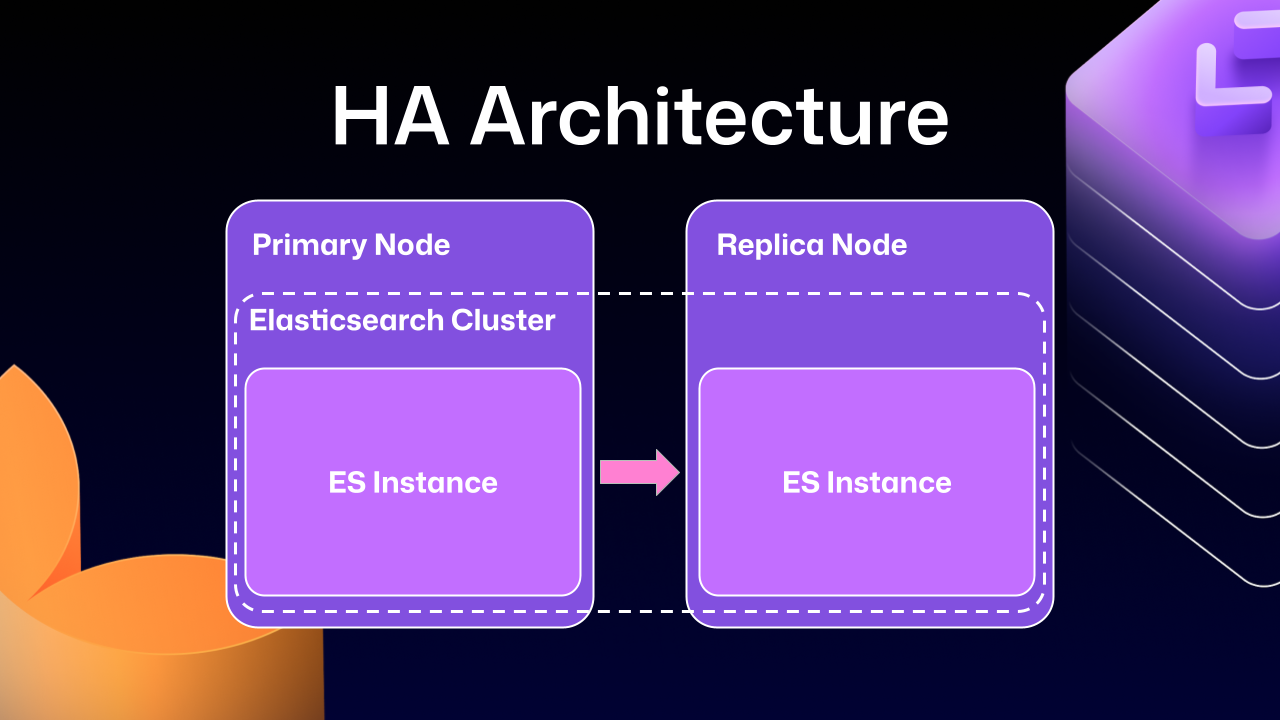
Much of this difficulty comes from how previous versions of Elasticsearch, our search database of choice, were integrated. HA GitHub Enterprise Server installations use a leader/follower pattern. The leader (primary server) receives all the writes, updates, and traffic. Followers (replicas) are designed to be read-only. This pattern is deeply ingrained into all of the operations of GitHub Enterprise Server.
This is where Elasticsearch started running into issues. Since it couldn’t support having a primary node and a replica node, GitHub engineering had to create an Elasticsearch cluster across the primary and replica nodes. This made replicating data straightforward and additionally gave some performance benefits, since each node could locally handle search requests.
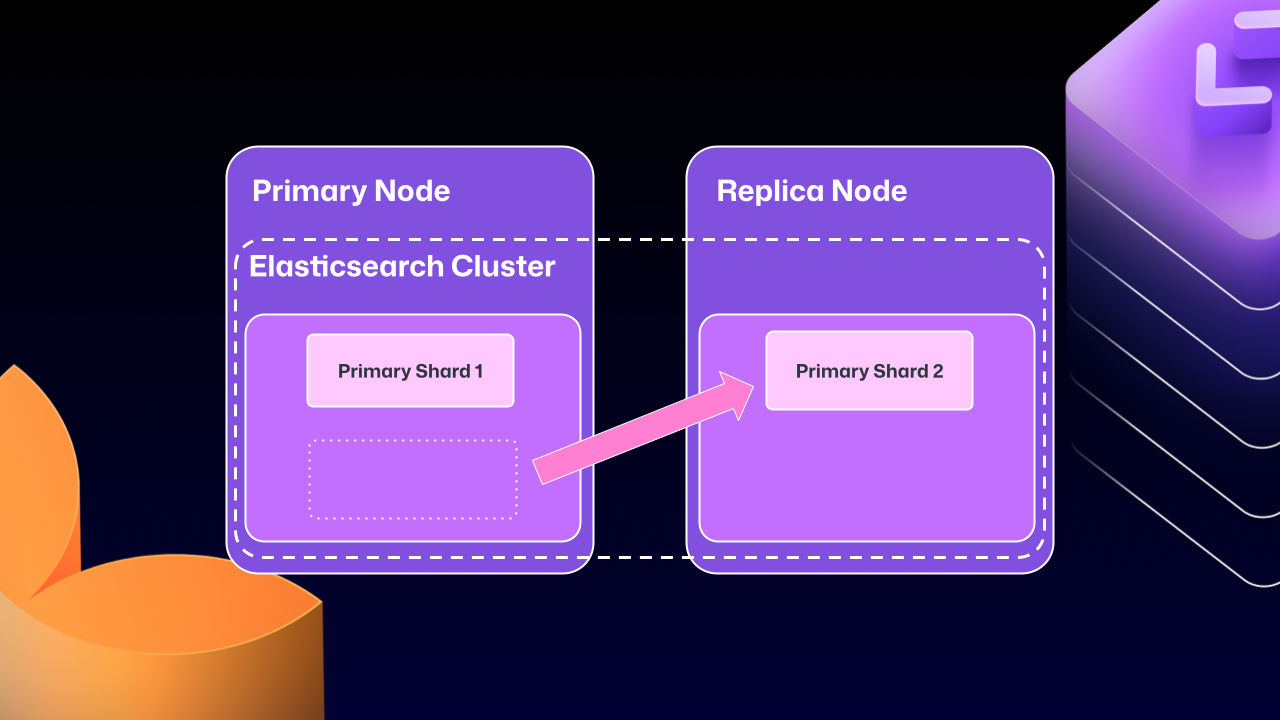
Unfortunately, the problems of clustering across servers eventually began to outweigh the benefits. For example, at any point Elasticsearch could move a primary shard (responsible for receiving/validating writes) to a replica. If that replica was then taken down for maintenance, GitHub Enterprise Server could end up in a locked state. The replica would wait for Elasticsearch to be healthy before starting up, but Elasticsearch couldn’t become healthy until the replica rejoined.
For a number of GitHub Enterprise Server releases, engineers at GitHub tried to make this mode more stable. We implemented checks to ensure Elasticsearch was in a healthy state, as well as other processes to try and correct drifting states. We went as far as attempting to build a “search mirroring” system that would allow us to move away from the clustered mode. But database replication is incredibly challenging and these efforts needed consistency.
What changed?
After years of work, we’re now able to use Elasticsearch’s Cross Cluster Replication (CCR) feature to support HA GitHub Enterprise.
“But David,” you say, “That’s replication between clusters. How does that help here?”
I’m so glad you asked. With this mode, we’re moving to use several, “single-node” Elasticsearch clusters. Now each Enterprise server instance will operate as independent single node Elasticsearch clusters.
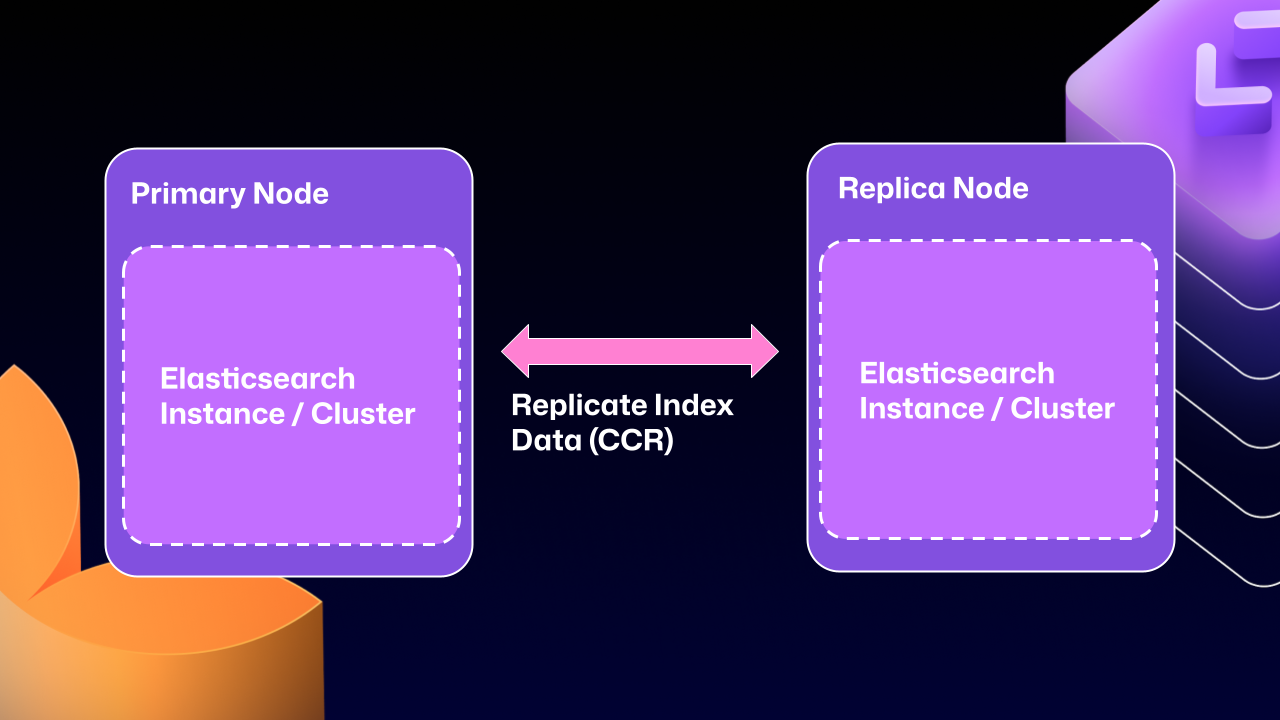
CCR lets us share the index data between nodes in a way that is carefully controlled and natively supported by Elasticsearch. It copies data once it’s been persisted to the Lucene segments (Elasticsearch’s underlying data store). This ensures we’re replicating data that has been durably persisted within the Elasticsearch cluster.
In other words, now that Elasticsearch supports a leader/follower pattern, GitHub Enterprise Server administrators will no longer be left in a state where critical data winds up on read-only nodes.
Under the hood
Elasticsearch has an auto-follow API, but it only applies to indexes created after the policy exists. GitHub Enterprise Server HA installations already have a long-lived set of indexes, so we need a bootstrap step that attaches followers to existing indexes, then enables auto-follow for anything created in the future.
Here’s a sample of what that workflow looks like:
function bootstrap_ccr(primary, replica):
  # Fetch the current indexes on each
  primary_indexes = list_indexes(primary)
  replica_indexes = list_indexes(replica)

  # Filter out the system indexes
  managed = filter(primary_indexes, is_managed_ghe_index)

  # For indexes without follower patterns we need to
  #   initialize that contract
  for index in managed:
    if index not in replica_indexes:
      ensure_follower_index(replica, leader=primary, index=index)
    else:
      ensure_following(replica, leader=primary, index=index)

  # Finally we will setup auto-follower patterns
  #   so new indexes are automatically followed
  ensure_auto_follow_policy(
    replica,
    leader=primary,
    patterns=[managed_index_patterns],
    exclude=[system_index_patterns]
  )
This is just one of the new workflows we’ve created to enable CCR in GitHub Enterprise Server. We’ve needed to engineer custom workflows for failover, index deletion, and upgrades. Elasticsearch only handles the document replication, and we’re responsible for the rest of the index’s lifecycle.
How to get started with CCR mode
To get started using the new CCR mode, reach out to [email protected] and let them know you’d like to use the new HA mode for GitHub Enterprise Server. They’ll set up your organization so that you can download the required license.
Once you’ve downloaded your new license, you’ll need to set `ghe-config app.elasticsearch.ccr true`. With that finished, administrators can run a `config-apply` or an upgrade on your cluster to move to 3.19.1, which is the first release to support this new architecture.
When your GitHub Enterprise Server restarts, Elasticsearch will migrate your installation to use the new replication method. This will consolidate all the data onto the primary nodes, break clustering across nodes, and restart replication using CCR. This update may take some time depending on the size of your GitHub Enterprise Server instance.
While the new HA method is optional for now, we’ll be making it our default over the next two years. We want to ensure there’s ample time for GitHub Enterprise administrators to get their feedback in, so now is the time to try it out.
We’re excited for you to start using the new HA mode for a more seamless experience managing GitHub Enterprise Server.
Want to get the most out of search on your High Availability GitHub Enterprise Server deployment? Reach out to support to get set up with our new search architecture!
The post How we rebuilt the search architecture for high availability in GitHub Enterprise Server appeared first on The GitHub Blog.
Building a modern lakehouse architecture: Yggdrasil Gaming’s journey from BigQuery to AWS
Post Syndicated from Edijs Drezovs, Viesturs Kols, Krisjanis Beitans original https://aws.amazon.com/blogs/big-data/building-a-modern-lakehouse-architecture-yggdrasil-gamings-journey-from-bigquery-to-aws/
This is a guest post by Edijs Drezovs, CEO and Founder of GOStack, Viesturs Kols, Data Architect at GOStack, and Krisjanis Beitans, Senior Data Engineer at GOStack, in partnership with AWS.
Yggdrasil Gaming develops and publishes casino games globally, processing massive amounts of real-time gaming data for game performance analytics, player behavior insights, and industry intelligence. As Yggdrasil’s system grew, managing dual-cloud environments created operational overhead and limited their ability to implement advanced analytics initiatives. This challenge became critical ahead of the launch of the Game in a Box solution on AWS Marketplace, which generates increases in data volume and complexity.
Yggdrasil Gaming reduced multi-cloud complexity and built a scalable analytics foundation by migrating from Google BigQuery to AWS analytics services. In this post, you’ll discover how Yggdrasil Gaming transformed their data architecture to meet growing business demands. You will learn practical strategies for migrating from proprietary systems to open table formats such as Apache Iceberg while maintaining business continuity.
Yggdrasil worked with GOStack, an AWS Partner, to migrate to an Apache Iceberg-based lakehouse architecture. The migration helped reduce operational complexity and enabled real-time gaming analytics and machine learning.
Challenges
Yggdrasil faced several critical challenges that prompted their migration to AWS:
- Multi-cloud operational complexity: Managing infrastructure across AWS and Google Cloud created significant operational overhead, reducing agility and increasing maintenance costs. The data team had to maintain expertise in both environments and coordinate data movement between clouds.
- Architecture limitations: The existing setup couldn’t effectively support advanced analytics and AI initiatives. More critically, the launch of Yggdrasil’s Game in a Box solution required a modernized, scalable data environment capable of handling increased data volumes and enabling advanced analytics.
- Scalability constraints: The architecture lacked the unified data foundation with open standards and automation required to scale efficiently. As data volumes grew, costs increased proportionally, and the team needed an environment designed for modern analytics at scale.
Solution overview
Yggdrasil worked with GOStack, an AWS APN partner, to design their new lakehouse architecture. The following diagram shows the high level overview of this architecture.
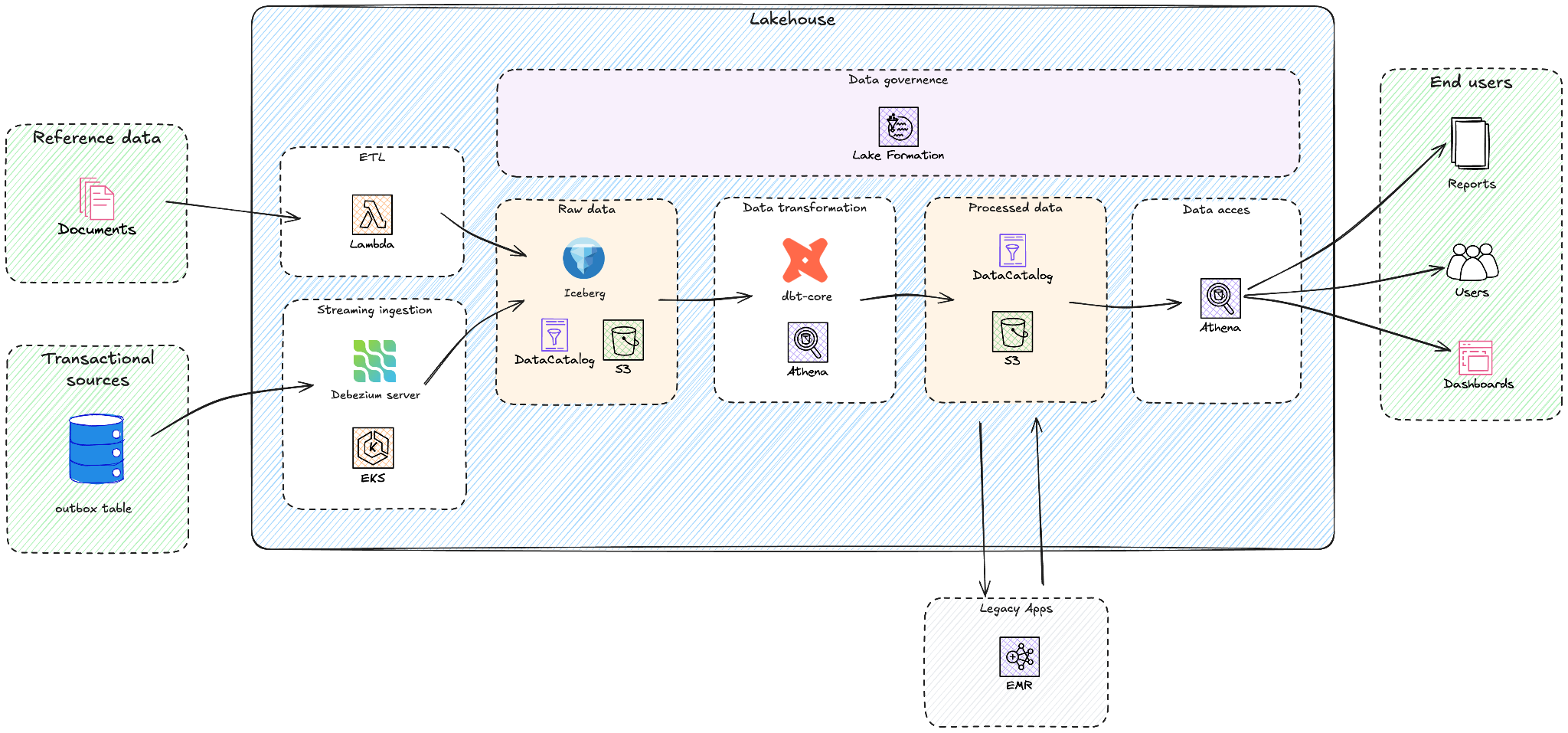

Yggdrasil successfully migrated from Google BigQuery to a data lakehouse architecture using Amazon Athena, Amazon EMR, Amazon Simple Storage Service (Amazon S3), AWS Glue Data Catalog, AWS Lake Formation, Amazon Elastic Kubernetes Service (Amazon EKS) and AWS Lambda. Their strategic approach aims to reduce multi-cloud complexity while building a scalable foundation for their Game in a Box solution and specific AI/ML initiatives like personalized game recommendations and fraud detection.
The combination of Amazon S3, Apache Iceberg, and Amazon Athena allowed Yggdrasil to move away from provisioned, always-on compute models. The Amazon Athena pay-per-query pricing charges only for data scanned, removing idle compute costs during off-peak periods. Internal cost modeling performed during the evaluation phase indicated that this architecture could reduce analytics system costs by 30–50% compared to compute-based warehouse pricing models of other solutions, particularly for bursty workloads driven by game launches, tournaments, and seasonal traffic. By adopting AWS-native analytics services, Yggdrasil reduced operational complexity through native integration with AWS Identity and Access Management (AWS IAM), Amazon EKS, and AWS Lambda, helping simplify security, governance, and automation across the analytics system.
The solution centers on a modern lakehouse architecture built on Amazon S3, which provides durable and cost-efficient storage for Iceberg tables in Apache Parquet format. Apache Iceberg table format provides ACID transactions, schema evolution, and time travel capabilities while maintaining an open standard. AWS Glue Data Catalog serves as the central technical metadata repository, while Amazon Athena acts as the serverless query engine used by dbt-athena and for ad-hoc data exploration. Amazon EMR runs Yggdrasil’s legacy Apache Spark application in a fully managed environment, and AWS Lake Formation provides centralized security and governance for data lakes, allowing fine-grained access control at database, table, column, and row levels.
The migration followed a phased approach:
- Establish lakehouse foundation – Set up Apache Iceberg-based architecture with Amazon S3 with AWS Glue Data Catalog
- Implement real-time data ingestion – Deploy Debezium connectors for real-time change data capture from EKS and Google Kubernetes Engine (GKE) clusters
- Migrate processing pipelines – Re-system ETL pipelines using AWS Lambda, and legacy data applications re-systemed on Amazon EMR
- Modernizing the transformation layer – Implement dbt with Amazon Athena for modular, reusable models
- Enable governance – Configure AWS Lake Formation for comprehensive data governance
Establish lakehouse foundation
The first phase of the migration focused on building a solid foundation for the new data lakehouse architecture on AWS. The goal was to create a scalable, secure, and cost-efficient environment that could support analytical workloads with open data formats and serverless query capabilities.
GOStack provisioned an Amazon S3-based data lake as the central storage layer, providing virtually unlimited scalability and fine-grained cost control. This storage-compute separation enables teams to decouple ingestion, transformation, and analytics processes, with each component scaling independently using the most appropriate compute engine.
To establish dataset interoperability and discoverability, the team adopted AWS Glue Data Catalog as the unified metadata repository. The catalog stores Iceberg table definitions and makes schemas accessible across services such as Amazon Athena and Apache Spark workloads on Amazon EMR. Most datasets, both batch and streaming, are registered here, enabling consistent metadata visibility across the lakehouse.
The data is stored in Apache Iceberg tables on Amazon S3, selected for its open table format, ACID transaction support, and powerful schema evolution features. Yggdrasil required ACID transactions for consistent financial reporting and fraud detection, schema evolution to accommodate rapidly changing gaming data models, and time travel queries to align with regulatory audit requirements.
GOStack built a custom schema conversion and table registration service. This internal tool converts source-system Avro schemas into Iceberg table definitions and manages the creation and evolution of raw-layer tables. By controlling schema translation and table registration directly, the team makes sure that metadata stays consistent with the source systems and provides predictable, versioned schema evolution aligned with ingestion needs.
The initial setup made the following components:
- Amazon S3 bucket structure design: Implemented a multi-layer layout (raw, curated, and analytics zones) aligned with data lifecycle best practices.
- AWS Glue Data Catalog integration: Defined database and table schemas with partitioning strategies optimized for Athena performance.
- Iceberg configuration: Enabled versioning and metadata retention policies to balance storage efficiency and query flexibility.
- Security and compliance: Configured encryption at rest using AWS Key Management Service (AWS KMS), helped enforce access controls via AWS IAM and Lake Formation, and implemented Amazon S3 bucket policies following the principle of least privilege.
The redesign of the previous GCP setup helped deliver price-performance improvements. Yggdrasil reduced ingestion and processing costs by approximately 60% while also lowering operational overhead through a more direct, event-driven pipeline.
Implement real-time data ingestion
After establishing the lakehouse architecture, the next step focused on enabling real-time data ingestion from Yggdrasil’s operational databases into the raw data layer of the lakehouse. The objective was to capture and deliver transactional changes as they occur, making sure that downstream analytics and reporting reflect the most up-to-date information.
To achieve this, GOStack deployed Debezium Server Iceberg, an open-source project that integrates change data capture (CDC) directly with Apache Iceberg tables. It was deployed as Argo CD applications on Amazon EKS and used Argo’s GitOps-based model for reproducibility, scalability, and seamless rollouts.
This architecture provides an efficient ingestion pathway – streaming data changes directly from the source system’s outbox tables into the Apache Iceberg tables registered in the AWS Glue Data Catalog and physically stored on Amazon S3, bypassing the need for intermediate brokers or staging services. By writing data in the Iceberg table format, the ingestion layer maintained transactional guarantees and immediate query availability through Amazon Athena.
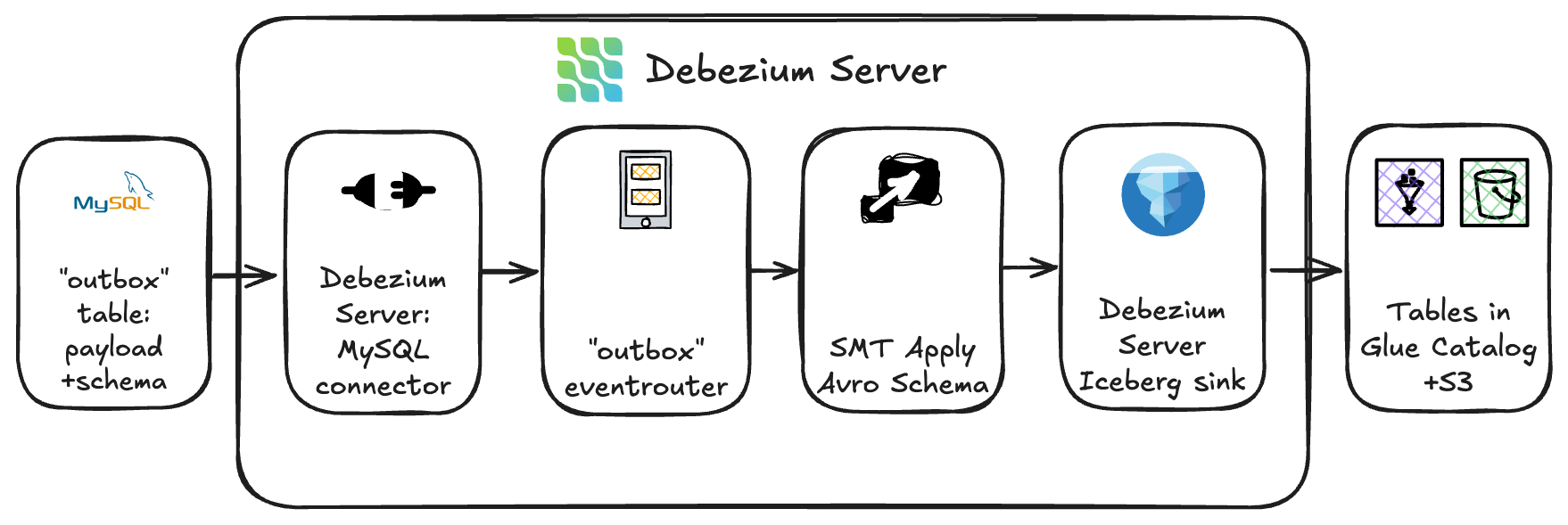
Because Yggdrasil’s source systems emitted outbox events containing Avro records, the team implemented a custom outbox-to-Avro transformation within Debezium. The outbox table stored two key components:
- The Avro schema definition
- The JSON-encoded payload of each record
The custom transformation module combined these elements into valid Avro records before persisting them into the target Iceberg tables. This approach preserved schema fidelity and verified compatibility with downstream processing tools.
To dynamically route incoming change events, the team leveraged Debezium’s event router configuration. Each record was routed to the appropriate Apache Iceberg table (backed by Amazon S3) based on topic and metadata rules, while table schemas and partitioning were governed on the AWS Glue side to maintain stability and alignment with the lakehouse’s data organization standards.
This setup helped deliver low-latency ingestion with end-to-end streaming from database outbox to S3-based Iceberg tables in near real time. The team managed operations end to end on Amazon EKS using Helm charts deployed via Argo CD in a GitOps model for fully declarative, version-controlled operations. ACID-compliant Iceberg writes verified that partially written data could not corrupt downstream analytics. The modular transformation logic allowed future expansion to new source systems or event formats without rearchitecting the ingestion pipeline.
This Debezium Server solution provides fast, real-time data ingestion. GOStack considers it an interim architecture. In the long term, the ingestion pipeline will evolve to use Amazon Managed Streaming for Apache Kafka (Amazon MSK) as the central event backbone. Debezium connectors will act as producers, publishing change events to Apache Kafka topics, while Apache Flink applications will consume, process, and write data into Iceberg tables.
This planned evolution toward a Kafka-based streaming architecture verifies Yggdrasil’s lakehouse remains not only scalable and cost-efficient today, but also future-ready – capable of supporting richer streaming analytics and broader data integration scenarios as the organization grows.
Migrate processing pipelines
Once real-time data ingestion was established, GOStack turned its focus to modernizing the data transformation layer. The goal was to simplify the transformation logic, reduce operational overhead, and unify the orchestration of analytical workloads within the new AWS-based lakehouse.
GOStack adopted a lift-and-shift approach for some of Yggdrasil’s data pipelines to support a fast and low-risk transition away from GCP. The lightweight Cloud Run functions that previously handled extraction tasks – pulling data from file shares, SharePoint, Google Sheets, and various third-party APIs – were re-implemented using AWS Lambda. These Lambda functions now integrate with the same external systems and write data directly into Iceberg tables.
For more complex processing, previous Apache Spark applications running on Dataproc were migrated to Amazon EMR with minimal code changes. This allowed it to preserve the existing transformation logic while benefiting from the managed scaling capabilities of EMR and improved cost control on AWS.
Over time, these processes will be gradually refactored and consolidated into containerized workflows on the EKS cluster, fully orchestrated by Argo Workflows. This phased migration allows Yggdrasil to move workloads to AWS quickly and decommission GCP resources sooner, while still leaving room for continuous improvement and modernization of the data system over time.
Finally, a lot of analytical transformations that previously lived as BigQuery stored procedures and scheduled queries, that were now rebuilt as modular dbt models executed with dbt-athena. This shift made transformation logic more transparent, maintainable, and version-controlled, improving both developer experience and long-term governance.
Modernizing the transformation layer
With the ingestion pipelines migrated to AWS, GOStack turned its focus to simplifying and modernizing Yggdrasil’s analytical transformations. Rather than replicating the previous stored-procedure–driven approach, the team rebuilt the transformation layer using dbt to help improve maintainability, lineage visibility, orchestration, and long-term governance.As part of this redesign, several data models were reshaped to fit the new lakehouse architecture. The most significant effort involved rewriting a critical Spark-based financial transformation into a set of SQL-driven dbt models. This shift not only aligned the logic with the lakehouse design but also removed the need for long-running Spark clusters, helping generate operational and cost savings.For the curated data layers, replacing the legacy warehouse, GOStack consolidated numerous scheduled queries and stored procedures into structured dbt models. This provides standardized, version-controlled transformations and clear lineage across the analytical stack.
Orchestration was simplified as well. Previously, coordination was split between Apache Airflow for Spark workloads and scheduled queries analytical transformations, creating operational friction and dependency risks. In the new architecture, Argo Workflows on Amazon EKS orchestrates dbt models centrally, consolidating the transformation logic within a single workflow engine. While most transformations still run on time-based schedules today, the system now supports event-driven execution through Argo Events, giving the opportunity to progressively adopt trigger-based workflows as the transformation layer evolves.
This unified orchestration framework can bring multiple benefits:
- Consistency: One orchestration layer for data workflows across ingestion and transformation.
- Automation: Event-driven dbt runs help remove manual scheduling and reduce operational overhead.
- Scalability: Argo Workflows scales with the EKS cluster, handling concurrent dbt jobs seamlessly.
- Observability: Centralized logging and workflow visualization help improve visibility into job dependencies and data freshness.
Through this transformation, Yggdrasil successfully unified its data lakes and warehouses into a modern lakehouse architecture, powered by open data formats, serverless query engines, and modular transformation logic. The move to dbt and Athena not only simplified operations but also helped pave the way for faster iteration, simpler governance, and greater developer productivity across the data environment.
Lakehouse performance optimizations
While performance tuning is an ongoing journey, as part of the transformation redesign, GOStack made few performance-oriented tweaks to make sure Athena queries can be fast and cost-efficient. The Apache Iceberg tables were stored in Parquet with ZSTD compression, providing strong read performance and reducing the amount of data scanned by Athena.
Partitioning strategies were also aligned to actual access patterns using Iceberg’s native partitioning. Raw data zones were partitioned by ingestion timestamp, enabling efficient incremental processing. Curated data used business-driven partition keys, such as player or game identifiers and date dimensions, to help optimize analytical queries. These designs made sure Athena could prune unneeded data and consistently scan only the relevant partitions.
Iceberg’s native partitioning features, including transforms such as bucketing and time slicing, replace traditional Hive partitioning patterns. Because Iceberg manages partitions internally in its metadata layer, not all Glue or Athena partition constructs apply. Relying on Iceberg’s native partitioning helps provide predictable pruning and consistent performance across the lakehouse without introducing legacy Hive behaviors.
To handle the high volume of small files produced by real-time ingestion, GOStack enabled AWS Glue Iceberg compaction. This automatically merges small Parquet files into larger segments, helping improve query performance and reduce metadata overhead without manual intervention.
Enable governance
The team adopted AWS Lake Formation as the primary governance layer for the curated zone of the lakehouse, leveraging Lake Formation hybrid access mode to manage fine-grained permissions alongside existing IAM-based access patterns. This hybrid mode provides an incremental and flexible pathway to adopt Lake Formation without forcing a full migration of legacy permissions or internal pipeline roles, making it an ideal fit for Yggdrasil’s phased modernization strategy.
Lake Formation offers centralized authorization, supporting database, table, column, and, critically for Yggdrasil, row-level permissions. These capabilities are essential because of the company’s multi-tenant operating model:
- Game development partners require access to data and reports pertaining only to their own games, facilitating both security and compliance alignment with partner agreements.
- iGaming operators integrating with Yggdrasil’s system must receive operational and financial insights exclusively for their own data, enforced automatically through reporting tools backed by curated Iceberg tables.
With Lake Formation hybrid access mode, tenant-specific row-level access policies are consistently enforced across Amazon Athena, AWS Glue, and Amazon EMR, without introducing breaking changes to existing IAM-based workloads. This allowed Yggdrasil to implement strong governance for external consumers while keeping internal operations stable and predictable.
Internally, Lake Formation is also used to grant the Analytics team and BI tools targeted access to curated datasets, straightforward but centrally managed to maintain consistency and reduce administrative overhead.
For ingestion and transformation workloads, the team continues to rely on IAM roles and policies. Services such as Debezium, dbt, and Argo Workflows require broad but controlled access to raw and intermediate storage layers, and IAM provides a straightforward, least-privilege mechanism for granting those permissions without involving Lake Formation in the internal pipeline path.
By adopting Lake Formation in hybrid access mode and combining it with IAM for internal services, Yggdrasil established a governance model that can balance strong security with operational flexibility – enabling the lakehouse to scale securely as the business grows.
Results and business impact
The new lakehouse, built on Amazon Athena, Amazon S3, and AWS Glue Data Catalog, now underpins advanced analytics and AI/ML use cases such as player behavior modeling, predictive game recommendations, and fraud detection.
The optimized lakehouse design allows Yggdrasil to rapidly onboard new analytics workloads and business use cases, helping deliver measurable outcomes:
- Reduced operational complexity through consolidation on AWS analytics services
- Cost optimization with a 60% reduction in data processing costs
- Improved data freshness with 75% lower latency for analytics results (from 2 hours to 30 minutes)
- Enhanced governance using the AWS Lake Formation fine-grained controls
- Future-ready architecture leveraging open formats and serverless analytics
Conclusion
Yggdrasil Gaming’s migration journey illustrates how organizations can successfully transition from proprietary analytics systems to an open, flexible lakehouse architecture. By following a phased approach guided by AWS Well-Architected Framework principles, Yggdrasil maintained business continuity while establishing a modern foundation for their data needs.
Based on this experience, several lessons emerged to help guide your own move to an AWS-based lakehouse:
- Assess your current state: Identify pain points in your existing data architecture and establish clear objectives for modernization.
- Start small: Begin with a pilot project using AWS analytics services to validate the lakehouse approach for your specific use cases.
- Design for openness: Leverage open table formats like Apache Iceberg to maintain flexibility and avoid vendor lock-in.
- Implement gradually: Follow a phased migration strategy similar to Yggdrasil’s, prioritizing high-value workloads.
- Optimize continuously: Use performance tuning techniques for Amazon Athena to help maximize efficiency and minimize costs.
To learn more about building modern lakehouse architectures, refer to “The lakehouse architecture of Amazon SageMaker”.
About the authors
Set up production-ready monitoring for Amazon MSK using CloudWatch alarms
Post Syndicated from Yashika Jain original https://aws.amazon.com/blogs/big-data/set-up-production-ready-monitoring-for-amazon-msk-using-cloudwatch-alarms/
Organizations running Apache Kafka as their streaming platform need comprehensive monitoring to maintain reliable operations. Without proper visibility into broker health, resource utilization, and data flow metrics, teams risk service disruptions, data loss, and degraded performance that can impact critical business operations. Effective monitoring and alerting are essential to detect anomalies early, from high system load to connectivity issues, enabling teams to take preventive action before problems affect production workloads.
Amazon Managed Streaming for Apache Kafka (Amazon MSK) addresses these monitoring challenges by publishing detailed metrics to Amazon CloudWatch. The service emits metrics at 1-minute intervals for provisioned (Standard) clusters, with flexible monitoring levels (DEFAULT, PER_BROKER, PER_TOPIC_PER_BROKER, or PER_TOPIC_PER_PARTITION) to control granularity and cost. At the DEFAULT level (free), cluster-level metrics are available; higher levels (paid) expose broker-level, per-topic and per-partition metrics.
In this post, I show you how to implement effective monitoring for your MSK clusters using Amazon CloudWatch. You’ll learn how to track critical metrics like broker health, resource utilization, and consumer lag, and set up automated alerts to prevent operational issues. By following these practices, you can work to improve streaming operations reliability, optimize resource usage, and support high availability for your mission-critical applications.
Key metrics to monitor
This article groups important Amazon MSK metrics into logical categories. For each, we highlight key metrics and what they indicate:
- Broker Health and Cluster Availability:
- ActiveControllerCount is a cluster-level metric where each broker reports whether it’s the active controller (1) or not (0). In a healthy cluster, exactly one broker serves as the active controller at any time. When viewing this metric with the average statistic, the value equals 1 divided by the number of brokers. For example, a 3-broker cluster shows 0.33 (1/3). Set CloudWatch alarm thresholds accordingly—for 6 brokers, alert if average falls below 0.166(1/6). When using the sum statistic, the value should always be 1, indicating one active controller regardless of cluster size. If the sum differs from 1, a controller election is in progress—typically during maintenance activities, configuration changes, or rolling restarts.
Note: For a KRaft-based clusters, the ActiveControllerCount is only exposed on dedicated controller endpoints so the sample count is 3 and only controller will report value of 1. Thus, the average is always 0.33 no matter how many brokers there are in the cluster. To monitor the broker health for Kraft-based clusters, check LeaderCount metric. If a broker is not emitting any metric, then it’s a good indication that broker might be unhealthy. - OfflinePartitionsCount (cluster): Number of partitions with no active leader. Non-zero values mean data is temporarily unavailable or unwritable. Trigger alerts if it rises above 0.
- UnderReplicatedPartitions (per broker): Number of partitions where not all replicas are caught up. This should stay at 0 under normal conditions. Spikes indicate traffic exceeds capacity or replication lag; sustained values often mean a configuration/ACL issue. Refer to Troubleshoot your Amazon MSK cluster
- UnderMinIsrPartitionCount (per broker): Partitions below the minimum in-sync replica (ISR) count. A non-zero value means potential data loss risk if brokers fail. Monitor to ensure replication is healthy. Refer to Custom configurations
- GlobalPartitionCount (cluster): Total number of partitions across all topics (leaders only). Useful for capacity planning and sanity checks.
- PartitionCount (per broker): Number of partitions (including replicas) hosted by a broker. Sudden changes may indicate re-balances. (Excess partitions per broker can degrade performance).
- ActiveControllerCount is a cluster-level metric where each broker reports whether it’s the active controller (1) or not (0). In a healthy cluster, exactly one broker serves as the active controller at any time. When viewing this metric with the average statistic, the value equals 1 divided by the number of brokers. For example, a 3-broker cluster shows 0.33 (1/3). Set CloudWatch alarm thresholds accordingly—for 6 brokers, alert if average falls below 0.166(1/6). When using the sum statistic, the value should always be 1, indicating one active controller regardless of cluster size. If the sum differs from 1, a controller election is in progress—typically during maintenance activities, configuration changes, or rolling restarts.
- Resource Utilization:
- CPU: Total broker CPU utilization is defined as CpuUser + CpuSystem. Best practice is to keep average CPU utilization under 60% . Set alarms on the sum of user+system to detect overload.
- CPUCreditBalance / CPUCreditUsage (per broker): For burstable instance types(T3), tracks earned/spent CPU credits. A declining credit balance or high credit usage warns that the instance may be CPU-starved.
- Memory: MemoryUsed, MemoryFree (per broker) show RAM usage. Critically, HeapMemoryAfterGC (per broker) reports JVM heap usage (%) after garbage collection. AWS recommends alerting if HeapMemoryAfterGC exceeds 60%, to avoid out-of-memory issues.
- Disk: Kafka brokers use attached EBS storage for topic data. Monitor KafkaDataLogsDiskUsed (per broker) – percentage of disk used by message logs. Best practice: alarm when data log usage exceeds 85%. Also track RootDiskUsed: the percentage of the root disk used by the broker.
- EBS I/O: Volume metrics (per broker) such as VolumeQueueLength, VolumeReadOps, VolumeWriteOps, VolumeReadBytes, VolumeWriteBytes indicate I/O latency and throughput. Rising queue lengths or latency (such as VolumeTotalReadTime) suggest disk contention.
- Network: Basic network stats per broker include NetworkRxPackets, NetworkTxPackets, and errors/drop counts (NetworkRxErrors, NetworkTxErrors, NetworkRxDropped, NetworkTxDropped). Unexpected errors or drops can indicate network issues.
- Topic and Partition Activity:
- Throughput: BytesInPerSec and BytesOutPerSec measure inbound/outbound data rates per broker or per topic. Sustained drops can signal lost producers/consumers; spikes may require scaling.
- Replication Traffic: ReplicationBytesInPerSec/ReplicationBytesOutPerSec (per topic) show inter-broker replication volume.
- Consumer Lag: Consumer lag metrics quantify the difference between the latest data written to your topics and the data read by your applications. Amazon MSK provides the following consumer-lag metrics, which you can get through Amazon CloudWatch or through open monitoring with Prometheus: EstimatedMaxTimeLag, EstimatedTimeLag, MaxOffsetLag, OffsetLag, and SumOffsetLag. For information about these metrics, see Amazon MSK metrics for monitoring Standard brokers with CloudWatch.
- Client Connections :
- ConnectionCount (per broker): Total active connections (clients + inter-broker). Sudden drops or sustained high counts (hitting limits) merit attention.
- ClientConnectionCount (per broker, with auth filter): Active authenticated client connections.
- ConnectionCreationRate / ConnectionCloseRate (per broker): New or closed connections per second. Spikes in connection churn may indicate client issues.
- Authentication: IAMNumberOfConnectionRequests and IAMTooManyConnections (per broker) show IAM auth request rates and throttle breaches (limit of 100 simultaneous connections).
- Network Bandwidth Metrics:
- TrafficShaping > 0 (any throttling) metric serves as your primary warning signal. When this value exceeds zero, your MSK cluster is experiencing network throttling at the EC2 layer, with packets being dropped or queued due to exceeded allocations. This throttling manifests as reduced throughput, increased latency, and potential network errors that impact both producer and consumer performance. TrafficShaping issues stem from two possible bandwidth limitations: BwInAllowanceExceeded & BwOutAllowanceExceeded :
- BwInAllowanceExceeded tracks when inbound aggregate bandwidth surpasses broker maximums.
- BwOutAllowanceExceeded monitors when outbound aggregate bandwidth exceeds limits.
Both BwInAllowanceExceeded and BwOutAllowanceExceeded metrics directly contribute to overall network throttling events.
- Other Operational Metrics:
- Thread Pools: RequestHandlerAvgIdlePercent, NetworkProcessorAvgIdlePercent (per broker) show how busy Kafka’s internal thread pools are. Consistently low idle (%) can indicate bottlenecks.
- ZooKeeper: For ZooKeeper-based MSK clusters, ZooKeeperRequestLatencyMsMean and ZooKeeperSessionState reflect ZK performance (for older Kafka versions that use Zookeeper). For ZooKeeperSessionState, anything other than 1 for 5-10 mins should be alarming as there can be chances broker has an issue or zookeeper is not able to connect to brokers due to some intermittent network issue.
- Tiered Storage: For clusters with tiered storage enabled, Amazon MSK provides metrics like RemoteFetchBytesPerSec, RemoteCopyBytesPerSec, RemoteLogSizeBytes, and related error/queue metrics. These track offloading to remote storage.
- Intelligent rebalancing metrics: For MSK Provisioned clusters using Express brokers, Amazon MSK provides two key metrics to monitor rebalancing operations: RebalanceInProgress and UnderProvisioned metrics. See Monitor Intelligent rebalancing metrics
By grouping metrics into these categories, you can build dashboards and alerts that comprehensively cover Amazon MSK health and performance. Amazon CloudWatch also provides automatic dashboards for Amazon MSK.
Let’s take a quick look on how to access CloudWatch automatic dashboard. In the AWS Console, go to the CloudWatch service. When in the CloudWatch console, select Dashboards. Open the Automatic dashboard tab and search for MSK in the Filter Bar.
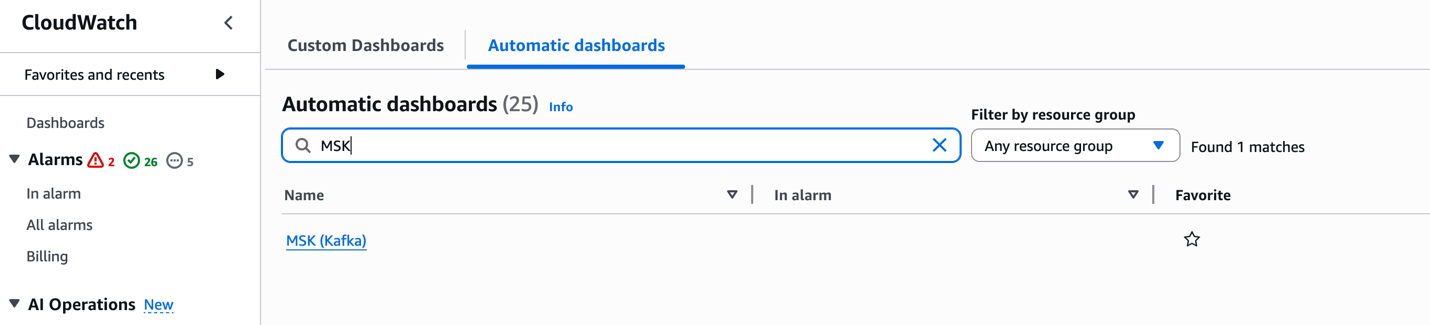
These dashboards offer per-configured visualizations of key metrics, enabling quick insights into the health and performance of your MSK clusters.
Recommended CloudWatch alarms
Setting alarms on key metrics helps catch issues early. Detecting issues early is crucial in streaming applications where every second counts. A single failing broker can trigger a chain reaction – halting data ingestion, backing up upstream systems, and breaking downstream applications. This can quickly escalate from delayed order processing to lost revenue. Proactive monitoring helps catch and fix problems before they impact your business operations. Based on AWS best practices and experience, consider alarms such as:
| Metric (Dimension) | Alarm Condition | Rationale |
| ActiveControllerCount (cluster) | ≠ 1 (count) | Only one active controller should exist. Deviation implies cluster instability. |
| CPU Utilization (Sum(CPUUser+CPUSystem), per broker) | > 60% (average) for 5+ mins | Helps maintain headroom for broker load and maintenance. High CPU may slow processing as outlined in the MSK best practices documentation |
| HeapMemoryAfterGC (broker) | > 60% (percentage) | Indicates Kafka heap is filling up. Helps prevent OOM by alerting early. |
| KafkaDataLogsDiskUsed (broker) | ≥ 85% (percent) | Warns that disk is nearly full. Helps prevent data loss by providing time for scaling or cleanup. |
| OfflinePartitionsCount (cluster) | > 0 (count) | Any offline partition means unavailable data. Immediate investigation needed. |
| UnderReplicatedPartitions (broker) | > 0 (count) | No replicas lagging under healthy conditions. Spikes or sustained lag can indicate overload or ACL misconfiguration. |
| UnderMinIsrPartitionCount (broker) | > 0 (count) | There must be topics with partitions that have either less in-sync replicas than the min.insync.replicas setting or with RF=MinISR. To find these topics whose partitions are under replicated, use command: <path-to-your-kafka-installation>/bin/kafka-topics.sh –bootstrap-server <bootstrap-server:port> —command-config client.properties –describe –under-min-isr-partitions |
| ConnectionCount (broker) | Sudden drop (e.g. < 90% of baseline) or spike above high threshold | Detect client connectivity issues or connection floods. Unexpected drops may mean a broker is unreachable. Refer to Amazon MSK Standard broker quota |
| CPUCreditBalance (for T3 broker) | < some low threshold (e.g. 10 credits) | For burstable instances, alerts when credits are nearly exhausted, which degrades performance. |
| VolumeQueueLength (broker) | > 0 (sustained) or rising | Indicates I/O operations are queuing, possible disk bottleneck. |
| NetworkRxErrors/TxErrors (broker) | > 0 (count) | Any network errors can cause packet loss or disconnections. |
| IAMTooManyConnections (broker) | > 0 (count) | Exceeding IAM connection limit (100) blocks new connections. |
| Consumer Lag (MaxOffsetLag or SumOffsetLag) (per consumer-group/topic) | > threshold (depends on SLAs, e.g. growing beyond expected) | Alerts on slow consumers so you can scale consumers or investigate backlogs. |
| TrafficShaping | > 0 (any throttling) | This is an indication that brokers are exceeding their allocated network bandwidth. |
These are illustrative thresholds; adjust them for your workload and SLAs. The remaining metrics listed in the CloudWatch metrics for Standard and Express brokers documentation are susceptible to downstream impact from anomalies in the primary metrics above. It is recommended to enable CloudWatch alarms on a single test cluster first to validate thresholds before extending coverage across your MSK fleet.
Conclusion
In this post, we covered the important CloudWatch metrics and alarms for monitoring Amazon MSK clusters effectively. By implementing these recommended alarms, you can proactively detect and respond to potential issues before they impact your Kafka workloads. To learn more about Amazon MSK monitoring, refer to the Amazon MSK Monitoring Best Practices documentation or explore our Amazon MSK Workshops hands-on experience.
About the authors
2025 PiTuKri ISAE 3000 Type II attestation report available with 183 services in scope
Post Syndicated from Tariro Dongo original https://aws.amazon.com/blogs/security/2025-pitukri-isae-3000-type-ii-attestation-report-available-with-183-services-in-scope/
Amazon Web Services (AWS) is pleased to announce the issuance of the Criteria to Assess the Information Security of Cloud Services (PiTuKri) Type II attestation report with 183 services in scope.
The Finnish Transport and Communications Agency (Traficom) Cyber Security Centre published PiTuKri, which consists of 52 criteria that provide guidance across 11 domains for assessing the security of cloud service providers.
An independent third-party audit firm issued the report to assure customers that the AWS control environment is appropriately designed and operating effectively to demonstrate adherence with PiTuKri requirements. This attestation demonstrates the AWS commitment to meet security expectations for cloud service providers set by Traficom.
The latest report covers a 12-month period from October 1, 2024 to September 30, 2025. AWS has added the following five services to the current PiTuKri scope:
- Amazon Verified Permissions
- AWS B2B Data Interchange
- AWS Resource Explorer
- AWS Security Incident Response
- AWS Transform
Customers can find the PiTuKri ISAE 3000 report on AWS Artifact. AWS Artifact is a self-service portal for on-demand access to AWS compliance reports. Sign in to AWS Artifact in the AWS Management Console, or learn more at Getting Started with AWS Artifact.
Security and compliance is a shared responsibility between AWS and the customer. When customers move their computer systems and data to the cloud, security responsibilities are shared between the customer and the cloud service provider. For more information, see the AWS Shared Security Responsibility Model.
To learn more about our compliance and security programs, see AWS Compliance Programs. As always, we value your feedback and questions; reach out to the AWS Compliance team through the Contact Us page.
If you have feedback about this post, submit comments in the Comments section below
CBP Tapped Into the Online Advertising Ecosystem To Track Peoples’ Movements (404 Media)
Post Syndicated from corbet original https://lwn.net/Articles/1061085/
This
404 Media article looks at how the US Customs and Border Protection
agency (CBP) is using location data from phones to track the location of
people of interest.
Specifically, CBP says the data was in part sourced via real-time
bidding, or RTB. Whenever an advertisement is displayed inside an
app, a near instantaneous bidding process happens with companies
vying to have their advert served to a certain demographic. A side
effect of this is that surveillance firms, or rogue advertising
companies working on their behalf, can observe this process and
siphon information about mobile phones, including their
location. All of this is essentially invisible to an ordinary phone
user, but happens constantly.
We should note that the minimal advertising shown on LWN is not delivered
via this bidding system.
Police Body Cams #lastweektonight
Post Syndicated from LastWeekTonight original https://www.youtube.com/shorts/vs0SjZdkQw4
The Hidden Price Tag: Uncovering Hidden Costs in Cloud Architectures with the AWS Well-Architected Framework
Post Syndicated from Ryan Dsouza original https://aws.amazon.com/blogs/architecture/the-hidden-price-tag-uncovering-hidden-costs-in-cloud-architectures-with-the-aws-well-architected-framework/
AWS and cloud computing changed how businesses operate. Organizations now store, process, and manage data in the cloud at scale while treating compute resources as a utility. Cloud architecture requires weighing trade-offs to find solutions that fit your specific requirements. Failing to follow best practices in cloud architecture design can lead to undesirable results and hidden costs, such as the cost of security and availability events.
The impact of architectural decisions extends beyond technical considerations to include business reputation, regulatory compliance, and market opportunities. According to research from IBM and Ponemon Institute, cloud misconfiguration risk has emerged as a significant security consideration over the past decade, reflecting the growing importance of cloud infrastructure. The report highlights how AI adoption is advancing rapidly, creating new opportunities to strengthen security and governance frameworks. The findings indicate that organizations benefit most when AI systems are implemented with robust architecture and governance practices.
Prioritize cloud architecture best practices as you move to the cloud. In this post, we discuss how following the AWS Cloud Adoption Framework (AWS CAF) and AWS Well-Architected Framework can help reduce these risks through proper implementation of AWS guidance and best practices while taking into consideration the practical challenges organizations face in implementing these best practices, including resource constraints, evaluating trade-offs and competing business priorities.
Background
The AWS CAF helps you identify transformation opportunities, evaluate your cloud readiness, and build your transformation roadmap using AWS best practices.
The AWS Well-Architected Framework helps cloud architects build secure, high-performing, resilient, efficient, and sustainable infrastructures for their applications. It provides guidance based on six pillars: Operational Excellence, Security, Reliability, Performance Efficiency, Cost Optimization, and Sustainability. The AWS Well-Architected Framework can help you learn the strategies and best practices for architecting workloads in the cloud, measure your architecture against these best practices, and improve your architecture through remediation of any identified issues. High risk issues (HRIs) identified in the AWS Well-Architected Tool are architectural and operational choices that AWS has found might have a significant negative impact to a customer’s business. These HRIs might affect organizational operations, assets, and individuals. Medium risk issues (MRIs) might also negatively impact business, but to a lesser extent. These issues are based on customer responses in the AWS Well-Architected Tool. Low risk issues (LRIs) require ongoing monitoring and evaluation. The cloud environment is dynamic, and what is a low risk today might become a higher risk tomorrow due to changes in your architecture, applications, or the threat landscape. The key is to constantly review and improve your cloud architecture to maintain a low-risk profile and maximize the benefits of the AWS cloud.
AWS Well-Architected Lenses extend the guidance offered by the AWS Well-Architected Framework to specific industry and technology domains, such as generative AI. Generative AI has rapidly evolved from experimental projects to mission-critical enterprise applications. However, many organizations face a significant challenge: successfully transitioning promising generative AI prototypes into robust production systems that can reliably deliver business value at scale. As your organization explores AI opportunities, architecting secure, compliant, and cost-effective solutions based on comprehensive well-architected guidance becomes critical for production success. The AWS Generative AI Lens provides architectural best practices for designing and operating generative AI workloads on AWS.
Let’s examine three areas where unoptimized architecture creates hidden costs: security, availability, and resource efficiency.
The hidden price of unoptimized cloud architecture: Security, availability, and cost
Cloud security protects your assets and creates competitive advantages. Robust security architecture reduces the risk of incidents that could affect business goals, revenue, and reputation. It helps protect data and intellectual property and leads to stronger compliance with various regulatory requirements. This strong security posture directly improves business opportunities and reduces the risk of hidden costs associated with security incidents.
Well-designed cloud architecture helps provide reliability of your services and reduces the risk of disruptions and downtime. Some common costs associated with downtime include lost productivity and revenue and failure to meet Service Level Agreements (SLAs) for your customers. Availability disruptions can lead to lost productivity because employees can’t access the systems and tools they need to perform their jobs. These concerns might directly affect business outcomes and revenue. Failure to meet SLA requirements could also lead to customer dissatisfaction in addition to several costs like penalties, hiring external consultants to fix the problem, or implementing new infrastructure.
Cloud providers offer a wide array of services, including storage, CPU, and memory resources. Over-provisioning cloud resources to avoid performance issues often leads to unnecessary costs. Although it might mitigate the risk of hardware limitations impacting workload performance, overallocation comes with its own financial drawbacks. Resource demand varies significantly across different workloads. Many applications don’t require continuous operation around the clock. Some might be dormant on weekends, whereas others might only be active for a few days each month. Certain workloads might even follow seasonal patterns, with fluctuating resource needs throughout the year. Understanding these diverse usage patterns is crucial for efficient resource allocation and cost management in cloud environments.
How the AWS Well-Architected Framework helps you avoid unnecessary cost
The AWS Well-Architected Framework provides you with a robust set of guidelines for building secure, reliable, and cost-efficient cloud infrastructures. By following the framework’s best practices and architectural patterns, organizations can minimize the risks and costs associated with security events, availability disruptions, and inefficient resource utilization, leading to more successful and profitable cloud deployments.
Reducing security risks with the AWS Well-Architected Framework
The AWS Well-Architected Framework emphasizes security as one of its six pillars. By following the best practices outlined in the framework, you can improve security posture of your workloads and reduce the risk of incidents and the potential hidden cost associated with them. The following are some security best practices:
- Identity and access management – The framework encourages implementing strong identity and access management practices, such as the principle of least privilege, multi-factor authentication, and regular auditing of access policies, which help prevent unauthorized access to cloud resources.
- Data protection – The framework promotes that customers use data encryption at rest and in transit, making sure sensitive information remains secure and reducing the risk of unauthorized or unintended access. The framework also recommends building mechanisms to keep people away from data.
- Infrastructure protection – Following the framework’s guidelines, you can implement network segmentation, intrusion detection and prevention systems, and automated patch management to protect your cloud infrastructure from potential events.
- Monitoring and incident response – The framework recommends continuous monitoring of your AWS environments, automated security alerts, and effective incident response plans to quickly detect and mitigate potential security events.
Minimizing downtime with the AWS Well-Architected Framework
The AWS Well-Architected Framework’s Reliability Pillar helps businesses minimize downtime and its associated costs. For example:
- Fault tolerance and high availability – The framework encourages the design of fault-tolerant and highly available systems, using techniques such as redundancy, automatic failover, and distributed systems architecture, to provide continuous operation even during component failures or outages.
- Scalability – The framework recommends designing systems to automatically scale based on demand, so businesses can handle peak loads and maintain optimal performance.
- Backup and disaster recovery – The framework suggests implementing regular data backups and robust disaster recovery plans to recover quickly from data loss or infrastructure failures. Recommendations include regular testing of backup and recovery plans.
- Monitoring and performance management – The framework encourages monitoring and observability of system performance and the use of proactive performance management techniques to identify and resolve potential issues before they result in downtime.
Optimizing operational costs with the AWS Well-Architected Framework
The Cost Optimization Pillar of the AWS Well-Architected Framework helps you reduce operational expenses and make the most of your cloud investments. Examples include, but are not limited to:
- Resource efficiency – The framework promotes right-sizing and consolidation of cloud resources, so businesses only pay for the resources they need.
- Cost-aware architecture – The framework encourages you to consider the cost implications of your design choices, helping you identify cost-effective solutions without compromising performance or security.
- Monitoring and cost management – The framework recommends regular monitoring and analysis of cloud spending, helping you identify and eliminate wasteful expenses and optimize your cloud costs.
- Understand pricing models – The framework recommends understanding and taking advantage of a variety of cloud pricing models designed to help users optimize costs based on their specific needs. These include On-Demand, Reserved Instances, Savings Plans, and Spot Instances, each with its own advantages and ideal use cases. Understanding these models and their differences is crucial for effective cost optimization in the AWS Cloud.
Conclusion
Organizations constantly face the possibility of service disruptions whether they result from human error, misconfigured systems, natural disasters, infrastructure issues, or cyberattacks. Business, technology, and security leaders can reduce risks from service disruptions and unoptimized cloud architecture by improving their defenses, allocating resources more effectively, and building resilience into their systems. Effective cloud design and optimization delivers more than just cost savings, such as:
- Faster innovation through reinvestment of saved resources
- Enhanced security and operational efficiency
- Improved ability to scale and adapt to business needs
- Better customer experiences and faster time-to-market
- The ability to make informed architecture and design decisions by balancing trade-offs across Well-Architected pillars.
- Find automated ways to handle failures or sudden spikes in demand to prevent disruptions and latency issues before they affect your end users.
To help you accelerate your cloud optimization efforts, AWS provides several tools and resources:
- AWS Cloud Adoption Framework – Assess your cloud readiness
- AWS Well-Architected Framework – Detailed guidance across all six pillars
- AWS Well-Architected Tool – Evaluate your workloads against AWS best practices
- AWS Well-Architected Lenses – Extend AWS Well-Architected to specific industry and technology domains, including the Generative AI lens
- AWS Health – Improve visibility into your AWS resource performance and availability of AWS services and accounts.
- AWS Trusted Advisor – Optimize costs, improve performance, and address security gaps
- Well-Architected IAC (Infrastructure as Code) Analyzer tool – Automatically assess infrastructure as code (IaC) templates such as AWS CloudFormation and Terraform against the AWS Well-Architected Framework.
At AWS, we’re dedicated to helping you optimize your cloud journey. By implementing these strategies and best practices described in the AWS CAF and AWS Well-Architected Framework, you can unlock the full potential of the cloud, driving innovation and growth while maintaining security and operational excellence.
Start by running the AWS Well-Architected Framework Review on your workloads. Consider using AWS’s extensive network of Solutions Architects, technical account managers, and AWS Well-Architected Partners, who can help conduct AWS CAF reviews and Well-Architected Framework Reviews. This expertise, combined with AWS’s elastic infrastructure, can help you scale efficiently and build a solid cloud foundation for sustainable growth in the digital age.
About the Authors
[$] Free software needs free tools
Post Syndicated from jzb original https://lwn.net/Articles/1060649/
One of the contradictions of the modern open-source movement is
that projects which respect user freedoms often rely on proprietary
tools that do not: communities often turn to non-free software for
code hosting, communication, and more. At Configuration Management
Camp (CfgMgmtCamp) 2026, Jan Ainali spoke
about the need for open-source projects to adopt open tools;
he hoped to persuade new and mature projects to switch to open
alternatives, even if just one tool, to reduce their dependencies on
tech giants and support community-driven infrastructure.
Garrett: To update blobs or not to update blobs
Post Syndicated from corbet original https://lwn.net/Articles/1061048/
Matthew Garrett examines
the factors that go into the decision about whether to install a
firmware update or not.
I trust my CPU vendor. I don’t trust my CPU vendor because I want
to, I trust my CPU vendor because I have no choice. I don’t think
it’s likely that my CPU vendor has designed a CPU that identifies
when I’m generating cryptographic keys and biases the RNG output so
my keys are significantly weaker than they look, but it’s not
literally impossible. I generate keys on it anyway, because what
choice do I have? At some point I will buy a new laptop because
Electron will no longer fit in 32GB of RAM and I will have to make
the same affirmation of trust, because the alternative is that I
just don’t have a computer.
Security updates for Tuesday
Post Syndicated from jzb original https://lwn.net/Articles/1061043/
Security updates have been issued by AlmaLinux (containernetworking-plugins, gnutls, kernel, libpng, and skopeo), Debian (firefox-esr, php8.2, and spip), Fedora (erlang and python-pillow), Red Hat (go-toolset:rhel8, golang, and yggdrasil), SUSE (cups, fluidsynth, gvfs, haproxy, libsoup, libsoup-3_0-0, mozilla-nss, python-azure-core, and shim), and Ubuntu (git and mailman).
Evolving Cloudflare’s Threat Intelligence Platform: actionable, scalable, and ETL-less
Post Syndicated from Blake Darché original https://blog.cloudflare.com/cloudflare-threat-intelligence-platform/
For years, the cybersecurity industry has suffered from a “data gravity” problem. Security teams are buried under billions of rows of telemetry, yet they remain starved for actionable insights.
A Threat Intelligence Platform (TIP) is a centralized security system that collects, aggregates, and organizes data about known and emerging cyber threats. It serves as the vital connective tissue between raw telemetry and active defense.
The underlying architecture of Cloudflare’s Threat Intelligence Platform sets it apart from other solutions. We have evolved our Threat Intelligence Platform to eliminate the need for complex ETL (Extract, Transform, Load) pipelines by using a sharded, SQLite-backed architecture. By running GraphQL directly on the edge, security teams can now visualize and automate threat response in real time. Instead of one massive database, we distribute Threat Events across thousands of logical shards — meaning sub-second query latency, even when aggregating millions of events across global datasets.
By unifying our global telemetry with the manual investigations performed by our analysts, our intelligence platform creates a single source of truth that allows security teams to move from observing a threat to preemptively blocking it across the Cloudflare network. We believe your intelligence platform shouldn’t just tell you that something is “bad”; it should tell you why it’s happening, who is behind it, and automatically prevent it from happening again.
In this post, we’ll explore some of the features that make the Cloudforce One experience powerful and effective.
When we announced the Cloudforce One team in 2022, we quickly realized that tracking adversary infrastructure required tools that didn’t yet exist. So we built our own.
What began as an internal project has evolved into a cloud-first, agentic-capable Threat Intelligence Platform (TIP) designed for our users. We have moved from conceptualizing “observable” events across various datasets to building a platform that maps the entire lifecycle of a threat. Today, the Cloudflare TIP allows you to correlate actors to malware, link cases to indicators, and store everything in one unified ecosystem.
We are moving beyond simple data access to provide a fully integrated, visual, and automated command center for your SOC. Our motivation behind building this TIP stems from the core tenets of effective threat intelligence: relevance, accuracy, and actionability. We needed a highly extensible system that can integrate multiple datasets, support multi-tenancy, enable group-based and tenant-to-tenant sharing, and scale efficiently on the edge.
By using Cloudflare Workers, we’ve built a next-generation developer stack that ensures rapid innovation. We can now synthesize millions of threat events into real-time graphs and diagrams and instantly answer the critical questions: What happened? And what does it mean?
Because our GraphQL endpoint is built in the same Worker that is driving the Threat Events platform, your data is always live and there are no delays between ingestion and availability. Whether you are applying complex analysis or drilling down into a specific event, the platform responds instantly. As Workers runtime evolves, our TIP inherits these optimizations automatically. For example, Smart Placement ensures our query-handling Workers are physically located near the Durable Objects they are fanning out to, minimizing tail latency. And the ability to use larger CPU limits and Hyperdrive allows us to maintain higher performance connection pooling directly at the edge, rather than backhauling the logic to a single datacenter.
While a SIEM (Security Information and Event Management) is designed for real-time log aggregation and immediate alerting, it often lacks the specialized schema and long-term retention needed for deep adversary tracking. Our TIP fills this gap by acting as a dedicated intelligence layer that enriches raw logs with historical actor patterns. The goal of our platform isn’t to replace a SIEM, but to complement it. Our TIP provides the long-term, structured storage for Threat Events — retained and indexed at the edge — needed to bridge the gap between technical telemetry and executive insight.
The Cloudflare Managed Defense and Threat Intelligence Platform are designed to operate in a symbiotic loop, creating a powerful force multiplier for threat detection and response. By integrating the TIP directly with the SOC, analysts gain immediate, rich context for any alert or event. Instead of just seeing an anomalous IP address or a suspicious file hash, the SOC team can instantly see its history, its association with known threat actors, its role in broader campaigns, and its risk score as determined by the TIP’s analytics. This immediate context eliminates time-consuming manual research and enables faster, more accurate decision-making.
Conversely, as the intel analyst team investigates incidents and hunts for new threats, their findings become a crucial source of new intelligence.
Newly discovered indicators of compromise (IOCs) are fed back into the TIP, enriching the platform for all users and enhancing its automated defenses. This continuous feedback loop ensures the intelligence is always current and grounded in real-world observations, providing unparalleled visibility into the threat landscape and allowing security teams to shift from a reactive to a proactive defense posture.
To ensure every piece of Cloudforce One telemetry is actionable, we had to solve a fundamental storage problem: how do you provide low-latency, complex queries over billions of events without the overhead of a traditional centralized database?
We chose a sharded architecture built on SQLite backed Durable Objects. By distributing Threat Events across this high-cardinality fleet of storage units, we ensure that no single database becomes a point of contention during high-volume ingestion. Each shard is a Durable Object, providing a consistent, transactional interface to its own private SQLite database.
This architecture allows us to use the full Cloudflare developer stack. We use Cloudflare Queues to ingest and distribute incoming telemetry asynchronously, ensuring that high-volume attack spikes don’t saturate our write throughput. Once ingested, data is stored in R2 for long-term retention, while the “hot” index remains in the Durable Object’s SQLite storage for instant retrieval.
The real power of this approach is visible during a search. When a user queries our GraphQL endpoint — which also runs in a Worker — the platform doesn’t query a single table. Instead, it fans out the request to multiple Durable Objects in parallel. Because Durable Objects are distributed across our global network, we can aggregate results with minimal latency. After we verify the user’s permissions and eliminate the shards that would not contain our events (by date), here is a simplified look at how the Worker handles a multi-shard fan-out:
// A conceptual look at fanning out a query to multiple shards
async function fetchFromShards(shards, query) {
  const promises = shards.map(shardId => {
    const stub = TELEMETRY_DO.get(shardId);
    return stub.querySQLite(query); // Calling the DO's storage method
  });

  // Parallel execution across the Cloudflare network
  const results = await Promise.all(promises);
  return results.flat();
}
This parallelism ensures a fluid experience whether you are auditing a single dataset for a year of history or synthesizing a month of activity across every dataset in your account. By moving the compute — the SQL execution — to where the data lives, we eliminate the bottleneck of a single, monolithic database.
Numbers on a spreadsheet don’t tell stories; patterns do. We’ve introduced dynamic visualizations to help you “see” the threat landscape.
-
Sankey Diagrams to trace the flow of attacks from origin to target, identifying which regions are being hit hardest and where the infrastructure resides.
-
Industry and dataset distribution of attacks, for users to instantly pivot your view to see if a specific campaign is targeting your sector (e.g., Finance or Retail) or if it’s a broad-spectrum commodity attack.
A single indicator, such as an IP address, provides limited utility without historical and relational context. We have structured our Threat Insights to act as a pivot point, allowing you to correlate disparate threat events across multiple datasets into a single, cohesive campaign or exploit.
Instead of manual cross-referencing, the platform automatically maps our internal actor nomenclature to recognized industry aliases — such as linking our internal tracking to “Fancy Bear” or “APT28.” This ensures that your local environment’s telemetry is instantly interoperable with broader global research and threat intelligence feeds.
Saved configurations and real-time notifications help you get notified the second our telemetry matches your custom filters, allowing you to react at the speed of the edge. Effective threat hunting requires the ability to filter global telemetry by specific technical attributes. The platform supports high-cardinality searches across our entire dataset — including IP addresses, file hashes, domains, and JA3 fingerprints — with results typically returned in seconds.
To move beyond manual searching, you can persist these query parameters as saved configurations. These configurations act as triggers for our real-time notification engine; when new incoming telemetry matches your defined filters, the platform pushes an alert to your configured endpoints. This transition from pull-based searching to push-based alerting ensures that your security stack can respond to matches as soon as they are ingested by our global network.

Intelligence is only “actionable” if it results in a reduced attack surface. We’ve built the TIP to handle the translation between raw telemetry and security enforcement automatically.
For organizations using third-party or in-house SIEM or SOAR platforms, interoperability is a requirement. However, mapping disparate internal data schemas to the STIX2 (Structured Threat Information eXpression) standard is traditionally a high-latency ETL task. We’ve moved this translation to the edge.
When a user requests a STIX2 export, a Worker dynamically maps our internal SQLite records to the STIX2 JSON schema. This means we are first converting raw IP addresses, file hashes, and domain names into standardized STIX cyber observables. Then we define relationship objects using our platform’s internal mapping to link indicator objects to threat-actor or malware objects, preserving the context of the investigation. Finally, we automatically manage the modified and created timestamps in UTC to ensure your downstream tools can track the evolution of the threat.
Beyond exports, the platform allows you to close the loop between discovery and defense. When you identify a malicious pattern in a Sankey diagram or a specific Actor campaign, you can generate a security rule with one click.
Under the hood, the TIP interacts directly with the Cloudflare Firewall Rules API. It takes the filtered attributes of your investigation (e.g., a specific JA3 fingerprint combined with a list of known malicious ASNs) and compiles them into a wire-protocol rule that is deployed across our global network in seconds.
While automation handles the bulk of telemetry, the most complex threats require human intuition. We’ve integrated a Requests for Information (RFI) Portal directly into the platform, allowing users to task Cloudforce One analysts with deep-dive investigations.
From a technical perspective, the RFI system isn’t just a ticketing portal; it’s a data-enrichment pipeline. When a subscriber uses a number of “tokens” to initiate a request, the workflow triggers a series of events:
-
The RFI Worker pulls the specific Threat Event IDs related to the query from the sharded SQLite storage, packaging the relevant telemetry for the analyst
-
Cloudforce One analysts use an internal version of the TIP to perform reverse engineering or pivot across global datasets
-
Once the investigation is complete, the findings (new IOCs, actor attributions, or campaign notes) are written back into our global intelligence feed
This ensures that the “human” insight doesn’t just sit in a PDF report. Instead, the resulting metadata is pushed back to the edge as a threat event where relevant, where it can be used by the WAF or Firewall rules you’ve already configured. We’ve moved from a static “report” model to a dynamic “intel-as-code” model, where human analysis directly improves the platform’s automated detection logic in real time.

The shift from managing ETL pipelines to active threat hunting isn’t just about a new interface but about where the compute happens. By moving the storage, aggregation, and visualization layers to the Cloudflare global network, we’ve removed the “data gravity” that typically slows down a SOC. Defenders no longer need to wait for logs to sync to a central repository before they can ask, “Is this IP related to a known campaign?” The answer is now available at the edge, in the same environment where the traffic is being filtered.
To ensure this intelligence is accessible regardless of your team’s size or specific requirements, we’ve structured our Cloudforce One access into three functional levels:
-
Cloudforce One Essentials allows customers to access the default datasets in threat events, search for indicators, and conduct threat hunting investigations.
-
Cloudforce One Advantage allows customers to access our Threat Intelligence Analyst custom insights via requests for information.
-
Cloudforce One Elite, the complete package, includes brand protection, a high number of requests for information, and access to all threat events datasets.
The Internet moves fast, and the infrastructure used by adversaries moves even faster. By centralizing your telemetry and your response logic in one integrated platform, you can stop building pipelines and start defending your network.
[Threat Landscape Report 2026] [Explore the Threat Intelligence Platform] | [Contact Sales for a Demo]
Introducing the 2026 Cloudflare Threat Report
Post Syndicated from Cloudforce One original https://blog.cloudflare.com/2026-threat-report/
Today’s threat landscape is more varied and chilling than ever: Sophisticated nation-state actors. Hyper-volumetric DDoS attacks. Deepfakes and fraudsters interviewing at your company. Even stealth attacks via trusted internal tools like Google Calendar, Dropbox, and GitHub.
After spending the last year translating trillions of network signals into actionable intelligence, Cloudforce One has identified a fundamental evolution in the threat landscape: the era of brute force entry is fading. In its place is a model of high-trust exploitation that prioritizes results at all costs. In order to equip defenders with a strategic roadmap for this new era, today we are releasing the inaugural 2026 Cloudflare Threat Report. This report provides the intelligence organizations need to navigate the rise of industrialized cyber threats.
Cloudforce One has observed a broader shift in attacker psychology. To understand how these methods win, we have to look at the why behind them: the Measure of Effectiveness, or MOE.
In 2026, the modern adversary is trading the pursuit of “sophistication” (complex, expensive, one-off hacks) in favor of throughput. MOE is the metric attackers use to decide what to exploit next. It is a cold calculation of the ratio of effort to operational outcome.
-
Why use an expensive zero-day exploit when a stolen session token (Identity) has a higher MOE?
-
Why build a custom server when a reputation shield (LotX) provides free, nearly untraceable infrastructure with a high delivery rate?
-
Why write code manually when AI can automate the discovery of the connective tissue that links your most sensitive data?
In 2026, the most dangerous threat actors aren’t the ones with the most advanced code; it’s the ones who can integrate intelligence and technology into a single, continuous system that achieves their mission in the shortest time possible.
Eight key trends — all driven by their MOE — will define the threat landscape in 2026:
-
AI is automating high-velocity attacker operations. Threat actors use generative AI for real-time network mapping, exploit development, and the creation of deepfakes, enabling low-skill actors to conduct high-impact operations.
-
State-sponsored pre-positioning is compromising critical infrastructure resilience. Chinese threat actors, including Salt Typhoon and Linen Typhoon, are prioritizing North American telecommunications, commercial, government, and IT services, anchoring their presence now for long-term geopolitical leverage.
-
Over-privileged SaaS integrations are expanding the blast radius of attacks. As demonstrated by the GRUB1 breach of Salesloft, the connective tissue of third-party API integrations allows a single compromised API to cascade into a breach affecting hundreds of distinct corporate environments.
-
Adversaries are weaponizing trusted cloud tooling to mask attacks. Threat actors actively target legitimate SaaS, IaaS, and PaaS tools such as Google Calendar, Dropbox, and GitHub to camouflage malicious actions within benign enterprise activity.
-
Deepfake personas are embedding adversarial operatives within Western payrolls. North Korea has operationalized the remote IT worker scheme, using deepfakes and fraudulent identities to embed state-sponsored operatives directly into Western payrolls for espionage and illicit revenue.
-
Token theft is neutralizing multi-factor authentication. By weaponizing infostealers like LummaC2 to harvest active session tokens, attackers bypass traditional multi-factor authentication and move straight to post-authentication actions.
-
Relay blind spots are enabling internal brand spoofing. Phishing-as-a-service bots are exploiting a blind spot where mail servers fail to re-verify a sender’s identity, allowing high-trust brand impersonations delivered directly to user inboxes.
-
Hyper-volumetric strikes are exhausting infrastructure capacity. Hyper-volumetric distributed denial-of-service (DDoS) attacks, fueled by massive botnets like Aisuru, are breaking records on a regular basis, closing the window for human response.
Now let’s take a deeper look at one high-MOE tactic we identified: weaponized cloud tooling. Instead of using known malicious servers, attackers are utilizing legitimate cloud ecosystems like Google Drive, Microsoft Teams, and Amazon S3 to mask their command-and-control (C2) traffic. This is known as “living off the land” (or off of anything-as-a-service): wearing the uniform of trusted providers, attackers make their activity nearly indistinguishable from benign corporate traffic.
SaaS platforms are also being used by threat actors to host, launch, redirect, or scale attacks. For instance, services like Amazon SES and SendGrid, designed for legitimate bulk email delivery, are frequently exploited to launch sophisticated phishing and malware distribution campaigns.
While the exploitation of cloud resources is an established tradecraft, 2025 investigations highlighted an accelerated maturation in nation-state strategy: actors are continuing to shift from mere infrastructure abuse toward pervasive living-off-the-land. We predict that for 2026, threat actors will attempt to standardize these techniques as a strategic aim for their operational playbooks.
Here are some of those threat actor groups, where they are based, and examples of their approaches.
| Threat Actor | Country | Technique | Details | Example |
|---|---|---|---|---|
| FrumpyToad | China | Logic-based C2 | Moving “inside the box” of reputable SaaS logic to evade detection. | Weaponizes Google Calendar for cloud-to-cloud C2 loop, reading and writing encrypted commands directly into event descriptions. |
| PunyToad | China | Encrypted tunneling | Utilizing legitimate developer tools to bypass egress filtering. | Uses tunneling capabilities and cloud computing to create resilient, living-off-the-cloud architectures, masking backend origin IPs and prioritizing long-term persistence. |
| NastyShrew | Russia | Paste site dead drop resolvers | Using public “paste” sites to coordinate shifting infrastructure. | Uses services like Teletype.in and Rentry.co as dead drop resolvers (DDR); infected hosts poll these sites to retrieve rotating C2 addresses. |
| PatheticSlug | North Korea | PaaS-ing the perimeter | Exploiting the “reputation shield” of cloud ecosystems to mask malicious delivery. | Used Google Drive and Dropbox to host XenoRAT payloads, leveraging GitHub for covert C2, successfully blending into legitimate enterprise traffic. |
| CrustyKrill | Iran | SaaS-hosted phishing | Blending credential harvesting into common cloud hosting. | Hosts C2 pages on Azure Web Apps (.azurewebsites.net) and uses ONLYOFFICE to host payloads, giving their operations a veneer of legitimacy. |
Establishing MOE requires more than just high-level observation. To truly unmask the 2026 landscape, this report details how Cloudforce One leverages a unique blend of internal expertise and global telemetry to uncover insights that traditional security models miss.
Our methodology is varied. For example:
-
As part of our AI-driven defense research, we tasked an AI coding agent with a self-vulnerability analysis, using the agent to uncover its own security gaps. This “dogfooding” uncovered CVE-2026-22813 (9.4 CVSS), a critical flaw in markdown rendering pipelines allowing for unauthenticated Remote Code Execution.
-
Our deep dives into Phishing-as-a-Service (PhaaS) reveal that the barrier to entry has a vanished barrier to entry. Analysts observed attackers leveraging high-reputation domains (Google Drive, Azure, etc.) to bypass filters. Email telemetry found an identity gap, where nearly 46% of analyzed emails failed DMARC (an email authentication protocol), revealing a large surface area that PhaaS bots are rapidly exploiting.
-
We tracked the transition from stealthy exploitation to attempted blackout, uncovering a 31.4 Tbps baseline for DDoS. Our telemetry also showed that, in the past 3 months, 63% of all logins involve credentials already compromised elsewhere and that 94% of all login attempts now originate from bots.
Through every stage of this research, Cloudforce One has leveraged our massive global telemetry and frontline threat intelligence to connect the dots across seemingly isolated incidents. Whether we are dogfooding our own AI agents to preempt zero-day exploits or tracking attacks launched by millions of bot-infected hosts tunneling through residential proxies, this unified visibility allows us to see the throughline between a single phished credential and a multi-terabit blackout.
Identifying these throughlines is only the first step. When threats move at machine speed, human-centric defense is no longer a viable shield. To counter “offense by the system,” defenders across the industry must pivot to a model of autonomous defense in order to drive the adversary’s MOE to zero.
This shift toward autonomous defense requires moving beyond manual checklists and fragmented alerts. Organizations must harden the connective tissue of their networks, using real-time visibility and automated response capabilities. In this new era, the goal isn’t just to build a better wall — it’s to ensure your system can act faster than the attacker, even when no one is watching.
To support this shift, today we are debuting a major upgrade to our threat events platform: evolving from simple data access to a fully automated, visual command center for your security operations center.
Through our unmatched threat visibility and the expertise of our Cloudforce One researchers, we provide the intelligence you need to outpace industrialized cyber threats. To explore the full data set, deep-dive case studies, and tactical recommendations, read the complete 2026 Cloudflare Threat Report.
And if you’re interested in learning more about our threat intelligence, managed defense, or incident response offerings, contact Cloudforce One experts.
The Big Story: The Iran War
Post Syndicated from The Atlantic original https://www.youtube.com/watch?v=2YqfEhkulp4
THG Podcast – Counterfactuals: Forgotten Battle of Thala
Post Syndicated from The History Guy: History Deserves to Be Remembered original https://www.youtube.com/watch?v=9prYd6Oqd0M
On Moltbook
Post Syndicated from Bruce Schneier original https://www.schneier.com/blog/archives/2026/03/on-moltbook.html
The MIT Technology Review has a good article on Moltbook, the supposed AI-only social network:
Many people have pointed out that a lot of the viral comments were in fact posted by people posing as bots. But even the bot-written posts are ultimately the result of people pulling the strings, more puppetry than autonomy.
“Despite some of the hype, Moltbook is not the Facebook for AI agents, nor is it a place where humans are excluded,” says Cobus Greyling at Kore.ai, a firm developing agent-based systems for business customers. “Humans are involved at every step of the process. From setup to prompting to publishing, nothing happens without explicit human direction.”
Humans must create and verify their bots’ accounts and provide the prompts for how they want a bot to behave. The agents do not do anything that they haven’t been prompted to do.
I think this take has it mostly right:
What happened on Moltbook is a preview of what researcher Juergen Nittner II calls “The LOL WUT Theory.” The point where AI-generated content becomes so easy to produce and so hard to detect that the average person’s only rational response to anything online is bewildered disbelief.
We’re not there yet. But we’re close.
The theory is simple: First, AI gets accessible enough that anyone can use it. Second, AI gets good enough that you can’t reliably tell what’s fake. Third, and this is the crisis point, regular people realize there’s nothing online they can trust. At that moment, the internet stops being useful for anything except entertainment.
Do you have some rope? Then let’s teach about AI concepts
Post Syndicated from Jane Waite original https://www.raspberrypi.org/blog/do-you-have-some-rope-then-lets-teach-about-ai-concepts/
Teaching about AI concepts in schools is a tricky business as there are complicated ideas to be taught.
To teach complex concepts, in computer science, we often use an instructional approach called ‘unplugged’. We use the unplugged approach to teach computing concepts without a computer. Often unplugged activities include using an everyday analogy or a physical fun activity. For example, to teach about algorithms, students might learn how to make a jam sandwich where the recipe and following instructions accurately are similar to an algorithm and the steps within it used to write a program. The jam sandwich activity has now become a popular and key teaching experience for young students across the world, as it teaches a complex but fundamental idea in a simple and fun way.

At the January 2026 Raspberry Pi Foundation Research Seminar, Salomey Afua Addo, a researcher at the University of Cambridge, presented her work about how to teach about AI. She has specifically looked at this in the context of high school students in Ghana, where AI is now part of the mandatory curriculum. In Ghana, most schools do not have access to computers, therefore an unplugged approach to teach about AI is a good idea. Therefore, Salomey developed a set of unplugged activities to teach about a range of AI concepts.
Here, I focus on one of the activities that she presented — one that I think will become another ‘jam sandwich’ experience for students. So if you might teach about AI at some point, then read on.
Neural networks and rope: An unplugged activity
Salomey has designed an unplugged role-play activity to teach about neural networks and how they are trained to solve a problem. She focused on finding a familiar problem context for Ghanaian teachers and their students, and selected farming and crop disease. Students are asked to figure out what features about a farm are relevant for detecting diseases on cocoa trees. To solve the problem, students are given data about the farms (see Table 1). Giving students data, rather than preconceived rules about the context is key to the learning activity. Neural networks are data-driven — they provide a way to model given data so that we can make predictions. Here the features of farms, and importantly whether disease is or is not found in their cocoa trees, is the data that is used to train a model. The model is used to make predictions, which can then be used to improve farming by reducing crop disease.

Using farm data, students can learn how neural networks work, and they can do this through an unplugged role play — using ropes!
Here’s how Salomey’s classroom activity works. Sets of students act out the processes of training a neural network, including forward propagation, evaluation, and backpropagation. They take on the “roles’’ of some of the concepts of a neural network. One student acts as the supervisor, six students act as the input layer, two as the hidden layer, and one as the output layer.
Keeping it simple: Concepts and data
Key concepts are simplified for students:
- Forward propagation: The hidden layer players randomly select a set of farms (three of the six sets of input values), which reflects how weights are often set to random values at the start.
- Evaluation: The student acting as the output layer compares the prediction (whether crop disease is present or not) to the actual value for the farm to assess the error, similar to a loss function.
- Backpropagation: Inspired by MIT’s RAISE curriculum, this stage is modelled on establishing trust. Players in the hidden and output layers modify their trust in the previous layers (by adding or removing ropes) based on the accuracy of the prediction (if the farm has disease).
Simple numerical data about the features of the problem are given to the students, such as whether the “Temperature” is suitable (0=No, 1=Yes), if there are “Spots” on the plant (0=No, 1=Yes), if “Fertilizer’’ has been used, whether the “Leaf colour’’ is green or not (see Table 1). Importantly, each of the six features given are represented by the six “input layer” students. So each student can ‘process’ each feature as the data for a given farm is used to train the model. Cards are used to represent the data values passed between layers. And this is where the ropes come into play, as they are used to represent the connections between the nodes in the layers.
Instructions for each role
Written role-specific instructions are provided for the students to follow, for example, the Supervisor is given three steps to follow for the forward propagation stage, and the Input Layer students receive a different set of instructions and so on. The detail of the role play is shown in the instruction sheets (see Figure 1).
Why the ropes are important
Using ropes to connect the nodes becomes most important at the reverse propagation stage. The clever part of this is that we can show an increase or decrease in the strength of connection by adding or removing ropes. For me, this is the ‘jam sandwich’ effect. This, I think, is probably the most significant learning point. Here, the number of ropes that connect the nodes in the layers are changed based on the strength of evidence that a particular feature is indicated, by the data, to be relevant to the output. In this case, whether “Temperature”, for example, has an implied effect on cocoa disease or not — based on the data, not on any preconceived rule. Simply put, if a farm did have disease then a rope is added, if a farm did not then a rope is removed. Or at a more abstracted level, if a particular neuron contributes towards the correct prediction, a rope is added, otherwise a rope is removed. In a real neural network, backpropagation involves complex maths, such as calculus that would not be accessible to students of this age. Therefore, the rope is an analogy that replaces something that would be impossible for these students to grasp if it was taught using the real-world implementation.
Problem to be solved in the unplugged activity: Identify features that are relevant for detecting diseases
At the end of the activity, features (temperature, leaf color, family farm, etc.) with many rope connections are considered to be relevant for crop disease detection on the farm, whereas features with fewer rope connections are considered to be irrelevant for crop disease detection. The more ropes attached to a particular feature, e.g., temperature, represent its higher relevance in identifying crop disease on the farm.
Activity design, follow-on and evaluation
As part of the design of this activity, Salomey has simplified technical language so that throughout the role play students use everyday terms and she has chosen a context that is relatable for the students. For example, she uses the language of trust, and the new thickness of a rope connection, rather than using technical terms such as weight, loss function, and the error of the network.
Salomey also designed a follow-on activity that uses pen and paper. In this version of the activity, which she calls a board game, the students draw lines to connect the nodes in the layers. The thickness of the lines connecting the nodes represent the strength of the trust (see Figure 2).
Salomey also shared her evaluation of the resources. She conducted pre‑ and post‑intervention surveys with 39 teachers as part of the professional development on the AI teaching materials, and ten of those teachers implemented the unplugged activities in their classrooms. She reported that the teachers found the role-play activity was effective to demonstrate neural networks, that children worked independently to learn, and that some students who did not take part usually in class were engaged.
As well as sharing about her unplugged neural network activity, Salomey also talked about a set of AI stories that she has developed to teach about other aspects of AI applications. For example, the importance of fact-checking is demonstrated through a story about a young girl who fact-checked information she received from her friends about life in a city.
If you would like to find out more about Salomey’s work, you can find related materials on our seminar website.
Join our next seminar
Join us at our next seminar on Tuesday 17 March from 17:00 to 18:30 GMT to hear Rebecca Fiebrink (University of the Arts London) speak about teaching AI for creative practitioners. This will be the second seminar in our new series on how to teach about AI across disciplines. We hope to see you there!
To sign up and take part in our research seminars, click below:
You can also view the schedule of our upcoming seminars, and catch up on past seminars on our previous seminars page.
The post Do you have some rope? Then let’s teach about AI concepts appeared first on Raspberry Pi Foundation.
Избирателните списъци, демографията, регистрите и ефирната дъвка „мъртви души“
Post Syndicated from Боян Юруков original https://yurukov.net/blog/2026/spisaci-i-martvi-dushi/
Вчера публикувах текст разглеждаш последните избирателни списъци публикувани от ЦИК на база данните на ГРАО, както и промените в местата за гласуване и броя на секциите в страната. Има учудващо много промени.
Един интересен момент беше увеличаването на броя гласоподаватели спрямо изборите през октомври 2024-та. В предварителния списък публикуван на страницата на ЦИК има 6641768 души в избирателния списък. Това са данни подадени в ГРАО взети от базата ЕСГРАОН и включва всички български граждани навършили 18 години независимо къде се намират.
Виждаме увеличение в този предварителен списък спрямо октомври 2024-та – т.е. с 18 месеца разлика – с 1385 души. Имало е и увеличение през октомври 2024 спрямо вота през юни същата година с 934 (за 4 месеца). Спрямо юли 2024 и вота през април 2023-та обаче има намаление от 11835 души (19 месеца).
За това може да има няколко причини, които искам да разгледам тук. Осъзнавам, че темата с избирателните списъци винаги деградира в навикване за „мъртви души“ и дали българите зад граница следва да им се осигурява практическа възможност да упражняват конституционните си права. Знам също, че доста няма да дочетат статията ми, а ще извадя няколко числа и изменени цитата да подкрепят това, което вече са решили за себе си. Все пак, смятам, че е важно да се разисква темата, още повече, че нямам точен отговор защо има увеличение на избирателите в условията на демографска криза.

Предварителен спрямо окончателен списък
Първо трябва да се разбере, че тук разглеждам предварителния списък публикуван от ЦИК. По-късно ще бъде добавен окончателния, който ще бъде предоставен на изборните комисии в изборния ден. В него се махат всички, които нямат право да гласуват или по друга причина следва да бъдат махнати от списъците в България. Пример за първите са хората под запрещение. Ако подавате заявление за гласуване в чужбина, също бивате заличен от списъка по постоянен адрес и можете да гласувате в чужбина. Повече за това ще прочете тук.
В окончателните списъци виждаме 39121 по-малко души през октомври 2024-та спрямо предварителния, 46174 през юни и 56691 през 2023-та. От данните на Glasuvam.org знаем, че е имало 30684, 38269 и 38269 заявления за гласуване в чужбина. Това означава, че съответно 8437, 7905 и 18422 души са махнати съответно през изброените вотове по други причини. Като вземем окончателния списък и добавим искащите да гласуват в чужбина, виждаме намаление на избирателите с 402. За 4 месеца това е очаквано предвид данните, които ще разгледаме по-долу. Говори ни, че тези предварителни данни на ГРАО се чистят и въпреки увеличението, което виждаме сега, може все пак да има сравнимо и очакваното намаление в броя на избирателите.
Данните на ГРАО
Тъй като предварителните списъци са буквално взети от ГРАО, може да сравним с таблиците, които публикуват, за настоящ и постоянен адрес. За съжаление, там няма разбивка по възрасти. Там намираме обаче отговор на въпроса колко български граждани има всъщност. Той е в центъра на спира за тези списъци при всеки вот.
Независимо колко безсмислена е в последните 36 години, в България все още имаме концепцията за постоянен адрес. Това означава, че всеки, независимо къде се намира по света, трябва да има постоянен адрес в страната. Ако по някаква причина няма, се пише в общината. Придобилите българско гражданство чужденци, които не живеят в България, както и децата им родени след това гражданство, например, се пишат в Столична община. Имаме, разбира се, и настоящ адрес, който може да се смени с такъв в чужбина. При раждане в страната или чужбина и изваждане на български акт за раждане, за постоянен и настоящ адрес се взимат тези на майката или на бащата, ако майката не е български гражданин. При смърт където и да е се отписва човекът от адресите си.
Не на последно място, чужденци, които живеят в България и нямат гражданство, имат адресна регистрация, но не могат да участват на националните избори. Те обаче се включват в таблиците на ГРАО цитирани тук. От НСИ разбираме, че 72275 души от трети страни имат разрешение за пребиваване. Общия брой на хората с чуждо или без гражданство в България към края на 2024 са 147419 (показва се като 1-ви януари 2025 според методологията на Евростат). Това значи, че 75144 граждани на европейския съюз са пребивавали в България в края на 2024-та.
Според данните на ГРАО към 15-ти март 2026-та постоянен адрес в България имат 8226341 души. Настоящ имат 7405722. Това означава, че според ГРАО 820619 души са сменили настоящи си адрес в чужбина.
Имаме последни данни за населението от НСИ за 2024-та г. Те ни показват преценката им колко хора живеят предимно в България. Тази преценка е въз основа на икономическа и социална активност, миграция и прочие. Използват същите методи и дефиниции, както останалите Европейски държави. Все пак преброяванията показват отклонение, което налага корекция на населението. Същото виждаме и в други страни като Германия, където също имат оклонение от няколко процента.
С това наум и взимайки данните за постоянен адрес на ГРАО заедно с тези за чуждите граждани към декември 2024-та получаваме, че според НСИ към онзи момент е имало 1646569 български граждани живеещи в чужбина. Както обсъждах при анализа на диаспората ни в Германия, не всички са родени в България. Доста са деца на българи родени в чужбина, а други са получили българско гражданство и вече живеят зад граница. Има и доста, на които е било възстановено гражданството – предимно насилствено изселените български турци и децата им. Това число обаче не показва родените и напуснали България.
Данните на НСИ и президентството
Взимайки броят българи над 18 г. публикуван от ЦИК преди 18 месеца – 6640383 – може да се опитаме да изчислим колко следва да е към днешна дата. Ще вземем броя починали над 18 годишна възраст, броя родени през 2007 и 2008-ма и броя получили българско гражданство през последните 18 месеца. По-трудно е отколкото ще реши човек.
Нямаме все още данните за починалите през 2025-а и първите два месеца на 2026-та. Следва да вземем интервала между септември 2024 и март 2026-та, но може единствено да предположим. Последните данни са от 2024-та. Смъртните случаи на българи над 18 г. са около 100260 за 12 месеца. При липса на други данни и отправна точка може грубо да ги умножим по 150% и получаваме около 150390. Т.е. толкова трябва да махнем от населението. Разбира се, това са данните за съвсем друг период и може да има намаление на смъртните случаи в изминалата година, както и вариация в конкретните периоди. Отклонението може да е с 10-15 хиляди според кой месец включим и датите, на които е взета справката. Затова е важно да запомним, че при липсата на данни в реално време боравим с много условности.
Ражданията са също толкова сложни. По принцип, през 2007-та и 2008-ма е имало съответно 75335 и 77704 раждания. Тогава видяхме увеличение на ражданията, което, разбира се, медиите съобщиха като поредния „антирекорд“. Не намирам разбивка по месеци, но приблизително излиза 115370 живородени деца за 18 месеца. В това число обаче не влизат много от децата родени зад граница и получили българско гражданство. Взех една от старите ми справки получени от ГРАО и НСИ и приблизително може да очакваме, че 8375 деца са били родени в чужбина, регистрирани късно в България и са навършили 18 години от миналия вот насам. Така общо добавяме към избирателни списъци около 123745 души.
Към президентството има комисия, която предоставя или отнема българско гражданство. Покрай този процес имаше много скандали след като схемата за финансиране на партийни каси бяха осветени. Публикуват доклади, от които разбираме за броя такива решение. Имат доклад за 2025-та, но все още не за първите два месеца на 2026-та. Взимайки получилите или възстановили гражданство през 2025 и последните три месеца на 2024-та и извадим загубилите го, получаваме 18159. Исторически виждаме големи вариации през първото тримесечие от 2 до 7 хиляди. Ако вземем последните налични за 2025-та и направим предположение за януари и февруари 2026, както и септември 2024-та, получаваме приблизително 22297 лица, които са станали български граждани. За съжаление, нямаме разбивка по възрастови групи, но следейки процеса и материали по темата, мнозинството са пълнолетни.
Моята интерпретация
Ако приемем, че всички получили гражданство са пълнолетни и вземем оценката за родените и получили български акт за раждане и навършващи сега 18 г., разликата с оценката ми за смъртността остава около 4345 души намаление. Важното тук е, че условностите в числата горе означават огромна вариация в този резултат. Смъртните случаи може да са с 5000 по-малко предвид кой сезон взимаме за отправна точка, Тъй като данните ми са на няколко години, е възможно в последствие още деца родени в чужбина да са се регистрирали. Възможно е да има значително по-голям пик на получилите гражданство в последните два месеца.
4000 души са твърде малка разлика при толкова много условности и може да се направи обосновано предположение, че предварителните данни предоставени от ГРАО да отговарят на реалността. Още повече, че както стана ясно, в последствие ги изчистват на база изискванията на изборния кодекс, заявленията за гласуване и други сведения като общия брой по списъци в страната и в чужбина намалява спрямо предварителния списък между 8 и 18 хиляди при последните три вота.
При липса на окончателния списък и последните данни за населението и получилите гражданство и предвид разминаването в рамките на статистическата грешка предвид грубите сметки по-горе, не виждам сведения за манипулация или дописване на избирателни списъци. Разбира се, очаквам такива спекулации, както всеки път. Ще се радвам обаче да видя данните, на които почиват, защото често почиват на усещане и емоции. Последните са разбираеми и приемам притеснението, но имам нужда от нещо повече, ако ще говорим за измами и изборни манипулации.
Проблем има, дебат – не
Имам сериозни резерви към системата и процесите на ГРАО. Произтичат от разговори с хора в общините, НСИ и програмисти работили по системата. Отдавна трябваше да заличим концепцията за „постоянен адрес“, но е трудно и в политическия хаос и липсата на върховенство на закона това остава очаквано на заден план. Адресната регистрация е крайно пожелателна и къде заради липса на ресурс, къде заради нежелание общините не се занимават да следят темата. Тук може да добавим лисата на контрол над наемодателите от страна на НАП и масовото отдаване под наем без плащане на данък и като косвен ефект – отказ наемателя да се регистрира по настоящ адрес. Особено голям проблем е смяната на адреса при пренасяне в чужбина, който се задълбочава откакто имаме свободно пътуване.
Истината е, че подобни проблеми имат доста страни. Писал многократно как статистическата служба в Германия няма идея колко българи има в страната по аналогични причини. Важното обаче е ефектът им да се минимизира и най-малкото да знаем с какви условности боравим. Още по-важно е дали ефектът се променя през времето, т.е. дали е безпредметно да сравняваме година с година, защото данните са грешни, но в различна степен.
Всичко това се събира в частния случай на избирателни списъци. Доколкото горните неща са известни, ефектът им върху списъците е минимален защото задаваме прост въпрос – кой има ЕГН и е на 18 г. в деня на вота. Това е. Махат се някои хора според хипотези описани в Изборния кодекс, но като цяло базовите данни са прости. Всичко, което описах по-горе е опит за оценка с други източници на данните, за които ГРАО отговаря. Те не влизат в никоя стъпка от процесите на вота или изготвянето на списъците. Дори данните за българите зад граница не се гледат като правят секции.
Основно притеснение за т.н. „мъртви души“ е за починали хора, които обаче остават включени в списъците и се гласува от тяхно име. Чуват се анекдотни примери за това и не бих се учудил да има такива пропуски. Предполагам, че е и част от процеса на ГРАО в чистенето на избирателните списъци, още повече, че качеството на данните в ЕСГРАОН е единствено и само тяхно задължение. Предвид, че НСИ отчита над 36.7% смъртност над 95 г. (повече от 1 от 3-ма) и 17.2% смъртност между 80 и 94 г. всяка година, гледайки данните за населението на преклонна възраст, не мисля, че дори половината да са „фиктивни“, би имало някакъв ефект, за да има смисъл усилието да се подправят държавни бази данни. Единствено, може би, на местни избори и то ако ги концентрират в някоя малка община.
Далеч по-ефективен е сегашния подход да овладяване на изборни комисии, ЦИК и РИК чрез свързани лица, купуването на гласове при бездействие и чадър от местната полиция, гласуването под команда от местни тартори, овладяването на цели райони чрез нарочни проверки на регулатори и висящи обвинения от прокуратурата, за да се привлече местния бизнес, кмет и общински съветници да съучастват в контролирания вот и от там икономически и социално да заставят местното население да гласува за КОЙто трябва. Всичко това се случва днес и се е случвало с малки прекъсвания и изключения на места в последните десетилетия. Организацията е по-лесна и мащаба му е далеч по-голям, за да не си струва да се занимават с малкото т.н. „мъртви души“.
Отново, не значи, че няма грешки в системата. Писах за критиките си в тази посока. Не съм видял доказателства обаче, че някой се възползва от тях в мащаби, в които да има значение. Виждам доказателства за други изборни измами, за които прокуратурата и съда спят.