Post Syndicated from The History Guy: History Deserves to Be Remembered original https://www.youtube.com/watch?v=tq0wlFkI7PU
Software Testing Day
Post Syndicated from xkcd.com original https://xkcd.com/2928/

Comic for 2024.05.02 – Deep Dark Woods
Post Syndicated from Explosm.net original https://explosm.net/comics/deep-dark-woods
New Cyanide and Happiness Comic
Dr. Aarathi Prasad on how the knowledge and use of silk is a global story
Post Syndicated from Talks at Google original https://www.youtube.com/watch?v=5IVCcS-1Iyg
MikroTik CRS510-8XS-2XQ-IN Review 8-port 25GbE 2-port 100GbE Switch
Post Syndicated from Rohit Kumar original https://www.servethehome.com/mikrotik-crs510-8xs-2xq-in-review-8-port-25gbe-2-port-100gbe-switch-marvell/
In our MikroTik CRS510-8XS-2XQ-IN review, we see how this switch is bringing 25GbE and 100GbE to even smaller and lower power deployments
The post MikroTik CRS510-8XS-2XQ-IN Review 8-port 25GbE 2-port 100GbE Switch appeared first on ServeTheHome.
Treadmills
Post Syndicated from The History Guy: History Deserves to Be Remembered original https://www.youtube.com/watch?v=iwAUDCszpFA
Accelerating workflow development with the TestState API in AWS Step Functions
Post Syndicated from James Beswick original https://aws.amazon.com/blogs/compute/accelerating-workflow-development-with-the-teststate-api-in-aws-step-functions/
This post is written by Ben Freiberg, Senior Solutions Architect.
Developers often choose AWS Step Functions to orchestrate the services that comprise their applications. Step Functions is a visual workflow service that makes it easier for developers to build distributed applications, automate processes, orchestrate microservices, and create data and machine learning (ML) pipelines. Step Functions integrates with over 220 AWS services and any publicly accessible HTTP endpoint. Step Functions provides many features that help developers build, such as built-in error handling, real-time and auditable workflow execution history, and large-scale parallel processing.
Several areas can be time consuming for developers when testing Step Functions workflows. For example, authentication with external services, input/output processing, AWS IAM permission, or intrinsic functions. To simplify and speed up resolving these issues, Step Functions released a new capability last year to test individual states: the TestState API. This feature allows you to test states independently from the execution of your workflow. You can change the input and test different scenarios without the need to deploy your workflow or execute the whole state machine. This feature is available for all task, choice, and pass states.
Since developers spend significant time in IDEs and terminals, TestState is also available via an API. This allows you to iterate over changes for an individual state and lets you refine the input/output processing or conditional logic in a choice state without leaving your IDE. In this post, you’ll learn how the TestState API can speed up your testing and development.
Getting started with TestState
Suppose that you are developing a payment processing workflow that consists of three states. First, a Choice state that checks the type of payment based on the input data. Depending on the type, it calls either an AWS Lambda function or an external endpoint. The task state that invokes the Lambda function includes some input/output processing.

To get started with the TestState API, you must create an IAM role that the service can assume. The role must contain the required IAM permissions for the resources your state is accessing. For information about the permissions a state might need, see IAM permissions to test a state. The following snippet shows the minimal necessary permissions:
{
  "Version": "2012-10-17",
  "Statement": [
    {
      "Effect": "Allow",
      "Action": [
        "states:TestState",
        "iam:PassRole"
      ],
      "Resource": "*"
    }
  ]
}
Next, you must provide the definition of the state being tested. The choice state is configured to check the type of payment and if the voucherId is present, in case of a voucher. The following snippet shows the state definition:
{
    "Type": "Choice",
    "Choices": [
        {
            "And": [
                {
                    "Variable": "$.payment.type",
                    "IsPresent": true
                },
                {
                    "Variable": "$.payment.type",
                    "StringEquals": "voucher"
                }
            ],
            "Next": "Process voucher"
        },
        {
            "Variable": "$.payment.type",
            "StringEquals": "credit",
            "Next": "Call payment provider"
        }
    ],
    "Default": "Fail"
}
Using the role and state definition, you can now test it if an input results in the expected next state:
aws stepfunctions test-state
--definition file://choice.json
--role-arn "arn:aws:iam::<account-id>:role/StepFunctions-TestState-Role"
--input '{"payment":{"type":"voucher"}}'
The response shows that the test did not encounter any errors and that the next state would be invoking the Lambda function to process the voucher as expected.
{
    "output": "{\"payment\":{\"type\":\"voucher\"}}",
    "nextState": "Process voucher",
    "status": "SUCCEEDED"
}
Similarly, with a payment type of credit as input, the next state is invoking the third-party endpoint:
aws stepfunctions test-state
--definition file://choice.json
--role-arn "arn:aws:iam::<account-id>:role/StepFunctions-TestState-Role"
--input '{"payment":{"type":"credit"}}'
{
"output": "{\"payment\":{\"type\":\"credit\"}}",
"nextState": "Call payment provider",
"status": "SUCCEEDED"
}Because the TestState API takes the state definition as an argument, you do not have to redeploy the state machine when changing the state definition. Instead, you can iterate and test your settings by passing the modified state definition to the TestState API.
Using inspection levels
For each state, you can specify the amount of detail you want to view in the test results. These details provide additional information about the state that you are testing. For example, if you’ve used any input and output data processing filters, such as InputPath or ResultPath in a state, you can view the intermediate and final data processing results. Step Functions provides the following levels to specify the details you want to view, INFO, DEBUG, and TRACE. All these levels return the status and nextState fields.
Next, the Lambda Invoke state is tested. In this scenario, the state includes input/output processing. The output from the function is transformed by renaming and restructuring the field and then merged with the original input. This is the relevant part of the task definition:
"Process voucher": {
      "Type": "Task",
      "Resource": "arn:aws:states:::lambda:invoke",
      "Parameters": {...},
      "Retry": [...],
      "Next": "Success",
      "ResultPath": "$.voucherProcessed",
      "ResultSelector": {
        "status.$": "$.Payload.result",
        "workflowId.$": "$.Payload.workflow"
      }
}
This time test using the Step Functions console, which can make it easier to understand the input/output processing steps. To get started, open the state machine in Workflow Studio and select the state, and then choose Test State. Make sure to select DEBUG as the inspection level. After testing the state, switch to the Input/output processing tab to check the intermediate steps.

When you call the TestState API and set the inspectionLevel parameter to DEBUG, the API response includes an object called inspectionData. This object contains fields to help you inspect how data was filtered or manipulated within the state when it was executed. This data is shown in the Input/output processing tab in the console.
Being able to see all the processing steps easily in one place allows developers to spot issues and iterate more quickly, saving time.
Testing third-party endpoint integrations
Applications might call third-party endpoints that require authentication. Step Functions offers the HTTPS endpoint resource to connect to third-party HTTP targets outside of the AWS Cloud.
HTTPS endpoints use Amazon EventBridge connections to manage the authentication credentials for the target. This defines the authorization type used, which can be a basic authentication with a username and password, an API key, or OAuth. EventBridge connections use AWS Secrets Manager to store the secret. This keeps the secrets out of the state machine, reducing the risks of accidentally exposing your secrets in logs or in the state machine definition.
Getting the authentication configuration right might involve several time-consuming iterations. With the TRACE inspection level, developers can see the raw HTTP request and response, which is useful for verifying headers, query parameters, and other API-specific details. This option is only available for the HTTP Task. You can also view the secrets included in the EventBridge connection. To do this, you must set the revealSecrets parameter to true in the TestState API. This can help verifying that the correct authentication parameters are used.
To get started, ensure that the execution role used for testing has the necessary permissions, as shown here:
{
    "Version": "2012-10-17",
    "Statement": [
        {
            "Effect": "Allow",
            "Action": [
                "secretsmanager:GetSecretValue",
                "secretsmanager:DescribeSecret"
            ],
            "Resource": "arn:aws:secretsmanager:<your-region>:<account-id>:secret:events!connection/<your-connection-id>"
        }
    ]
}
{
    "Version": "2012-10-17",
    "Statement": [
        {
            "Sid": "RetrieveConnectionCredentials",
            "Effect": "Allow",
            "Action": [
                "events:RetrieveConnectionCredentials"
            ],
            "Resource": [
                "arn:aws:events:<your-region>:<account-id>:connection/<your-connection-id>"
            ]
        }
    ]
}
{
    "Version": "2012-10-17",
    "Statement": [
        {
            "Sid": "InvokeHTTPEndpoint",
            "Effect": "Allow",
            "Action": [
                "states:InvokeHTTPEndpoint"
            ],
            "Resource": [
                "arn:aws:states:<your-region>:<account-id>:stateMachine:<your-statemachine>"
            ]
        }
    ]
}
When you test the HTTP task, make sure to set the inspection level to TRACE. Then use the HTTP request and response tab to check the details. This capability saves you time when debugging complex authentication issues.

Automating testing
Testing is not only a manual activity to get the configuration right. Most often, tests are run as part of a suite of tests, which are automatically performed to validate the correct behavior. It also prevents regressions when making changes. The TestState API can easily be integrated in such tests as well.
The following snippet shows a test using the Jest framework in JavaScript. The test checks if the correct next state is produced given a definition and input. The definition resides in a different file, which can also be used for infrastructure as code (IaC) to create the state machine.
const { SFNClient, TestStateCommand } = require("@aws-sdk/client-sfn");
// Import the state definition
const definition = require("./definition.json");

const client = new SFNClient({});

describe("Step Functions", () => {
  test("that next state is correct", async () => {
    const command = new TestStateCommand({
      definition: JSON.stringify(definition),
      roleArn: "arn:aws:iam::<account-id>:role/<role-with-sufficient-permissions>",
      input: "{}" # Adjust as necessary
    });
    const data = await client.send(command);

    expect(data.status).toBe("SUCCEEDED");
    expect(data.nextState).toBe("Success"); # Adjust as necessary
  });
});
With automated tests, you can safely change your workflow definitions without the need for manual efforts. That way, you are immediately alerted if a change would result in an incompatibility.
With TestState you can increase your test coverage with less effort because you can test states directly. This is especially helpful for complex workflows and states that require a specific set of circumstances to reach them. It makes it easier to validate the correctness of your error-handling as well. You can now test the potentially many combinations of your configured Retriers and Catchers much easier.
Conclusion
The TestState API helps developers to iterate faster, resolve issues efficiently, and deliver high-quality applications with greater confidence. By enabling developers to test individual states independently and integrating testing into their preferred development workflows, it simplifies the debugging process and reduces context switches. Whether testing input/output processing, authentication with external services, or third-party endpoint integrations, the TestState API can be a useful tool for testing.
Revolutionizing data querying: Amazon Redshift and Visual Studio Code integration
Post Syndicated from Navnit Shukla original https://aws.amazon.com/blogs/big-data/revolutionizing-data-querying-amazon-redshift-and-visual-studio-code-integration/
In today’s data-driven landscape, the efficiency and accessibility of querying tools play a crucial role in driving businesses forward. Amazon Redshift recently announced integration with Visual Studio Code (), an action that transforms the way data practitioners engage with Amazon Redshift and reshapes your interactions and practices in data management. This innovation not only unlocks new possibilities, but also tackles long-standing challenges in data analytics and query handling.
While the Amazon Redshift query editor v2 (QE v2) offers a smooth experience for data analysts and business users, many organizations have data engineers and developers who rely on VS Code as their primary development tool. Traditionally, they had to use QE v2 for their development tasks, which wasn’t the most optimal solution. However, this new feature resolves that issue by enabling data engineers and developers to seamlessly integrate their development work within VS Code, enhancing their workflow efficiency.
Visual Studio Code’s integration simplifies access to database objects within Redshift data warehouses, offering an interface you’re already familiar with to run and troubleshoot your code.
By integrating Amazon Redshift Provisioned cluster, and Amazon Redshift Serverless with the popular and free VS Code, you can alleviate concerns about costs associated with third-party tools. This integration allows you to reduce or eliminate licensing expenses for query authoring and data visualization, because these functionalities are now available within the free VSCode editor.
The support for Amazon Redshift within VS Code marks a significant leap towards a more streamlined, cost-effective, and user-friendly data querying experience.
In this post, we explore how to kickstart your journey with Amazon Redshift using the AWS Toolkit for VS Code.
Solution overview
This post outlines the procedure for creating a secure and direct connection between your local VS Code environment and the Redshift cluster. Emphasizing both security and accessibility, this solution allows you to operate within the familiar VS Code interface while seamlessly engaging with your Redshift database.
The following diagram illustrates the VS Code connection to Amazon Redshift deployed in a private VPC.

To connect to a data warehouse using VS Code from the Toolkit, you can choose from the following methods:
- Use a database user name and password
- Use AWS Secrets Manager
- Use temporary credentials (this option is only available with Amazon Redshift Provisioned cluster)
In the following sections, we show how to establish a connection with a database situated on an established provisioned cluster or a serverless data warehouse from the Toolkit.
Prerequisites
Before you begin using Amazon Redshift Provisioned Cluster and Amazon Redshift Serverless with the AWS Toolkit for Visual Studio Code, make sure you’ve completed the following requirements:
- Connect to your AWS account using the Toolkit.
- Set up a Amazon Redshift or Amazon Redshift serverless data warehouse.
Establish a connection to your data warehouse using user credentials
To connect using the database user name and password, complete the following steps:
- Navigate through the Toolkit explorer, expanding the AWS Region housing your data warehouse (for example, US East (N. Virginia)).
- In the Toolkit, expand the Redshift section and choose your specific data warehouse.
- In the Select a Connection Type dialog, choose Database user name and password and provide the necessary information requested by the prompts.
After the Toolkit establishes the connection to your data warehouse, you will be able to view your available databases, tables, and schemas directly in the Toolkit explorer.

Establish a connection to your data warehouse using Secrets Manager
To connect using Secrets Manager, complete the following steps:
- Navigate through the Toolkit explorer, expanding the AWS Region housing your data warehouse.
- In the Toolkit, expand the Redshift section and choose your specific data warehouse.
- In the Select a Connection Type dialog, choose Secrets Manager and fill in the information requested at each prompt.
After the Toolkit establishes a successful connection to your data warehouse, you’ll gain visibility into your databases, tables, and schemas directly in the Toolkit explorer.

Establish a connection to your Amazon Redshift Provisioned cluster using Temporary credentials:
To connect using Temporary credentials complete the following steps:
- Navigate through the Toolkit explorer, expanding the AWS Region housing your data warehouse.
- In the Toolkit, expand the Redshift section and choose your specific data warehouse.
- In the Select a Connection Type dialog, choose Temporary Credentials and fill in the information requested at each prompt.

Run SQL statements
We have successfully established the connection. The next step involves running some SQL. The steps outlined in this section detail the process of generating and running SQL statements within your database using the Toolkit for Visual Studio Code.
- Navigate to the Toolkit explorer and expand Redshift, then choose the data warehouse that stores the desired database for querying.
- Choose Create Notebook and specify a file name and location for saving your notebook locally.
- Choose OK to open the notebook in your VS Code editor.
- Enter the following SQL statements into the VS Code editor, which will be stored in this notebook:
- Choose Run All to run the SQL statements.
The output corresponding to your SQL statements will be visible below the entered statements within the editor.

Include markdown in a notebook
To include markdown in your notebook, complete the following steps:
- Access your notebook within the VS Code editor and choose Markdown to create a markdown cell.
- Enter your markdown content within the designated cell.
- Use the editing tools in the upper-right corner of the markdown cell to modify the markdown content as needed.

Congratulations, you have learned the art of using the VS Code editor to effectively interface with your Redshift environment.
Clean up
To remove the connection, complete the following steps:
- In the Toolkit explorer, expand Redshift, and choose the data warehouse containing your database.
- Choose the database (right-click) and choose Delete Connection.
Conclusion
In this post, we explored the process of using VS Code to establish a connection with Amazon Redshift, streamlining access to database objects within Redshift data warehouses.
You can learn about Amazon Redshift from Getting started with Amazon Redshift guide. Know more about write and run SQL queries directly in VS Code with the new AWS Toolkit for VS Code integration.
About the Author
 Navnit Shukla, an AWS Specialist Solution Architect specializing in Analytics, is passionate about helping clients uncover valuable insights from their data. Leveraging his expertise, he develops inventive solutions that empower businesses to make informed, data-driven decisions. Notably, Navnit Shukla is the accomplished author of the book “Data Wrangling on AWS,” showcasing his expertise in the field.
A new set of stable kernels
[$] Inheritable credentials for directory file descriptors
Post Syndicated from corbet original https://lwn.net/Articles/971825/
In Unix-like systems, an open file descriptor carries the right to access
the opened object in specific ways. As a general rule, that file
descriptor does not enable access to any other objects. The
recently merged BPF token feature runs
counter to this practice by creating file descriptors that carry specific
BPF-related access rights. A similar but different approach to
capability-carrying file descriptors, in the form of directory file
descriptors that include their own credentials, is currently under
consideration in the kernel community.
Rust 1.78.0 released
Post Syndicated from corbet original https://lwn.net/Articles/972191/
Version
1.78.0 of the Rust language has been released. Changes include a new
mechanism for diagnostic attributes, changes to how assertions around
unsafe blocks are handled, and more.
Rust now supports a #[diagnostic] attribute namespace to
influence compiler error messages. These are treated as hints which
the compiler is not required to use, and it is also not an error to
provide a diagnostic that the compiler doesn’t recognize. This
flexibility allows source code to provide diagnostics even when
they’re not supported by all compilers, whether those are different
versions or entirely different implementations.
Security updates for Thursday
Post Syndicated from jake original https://lwn.net/Articles/972186/
Security updates have been issued by Debian (chromium and distro-info-data), Fedora (et, php-tcpdf, python-aiohttp, python-openapi-core, thunderbird, tpm2-tools, and tpm2-tss), Red Hat (nodejs:16 and podman), and Ubuntu (firefox).
Is this The Most Beautiful Camera EVER???
Post Syndicated from Matt Granger original https://www.youtube.com/watch?v=fmh5v8mKpv4
Build RAG applications with MongoDB Atlas, now available in Knowledge Bases for Amazon Bedrock
Post Syndicated from Abhishek Gupta original https://aws.amazon.com/blogs/aws/build-rag-applications-with-mongodb-atlas-now-available-in-knowledge-bases-for-amazon-bedrock/
Foundational models (FMs) are trained on large volumes of data and use billions of parameters. However, in order to answer customers’ questions related to domain-specific private data, they need to reference an authoritative knowledge base outside of the model’s training data sources. This is commonly achieved using a technique known as Retrieval Augmented Generation (RAG). By fetching data from the organization’s internal or proprietary sources, RAG extends the capabilities of FMs to specific domains, without needing to retrain the model. It is a cost-effective approach to improving model output so it remains relevant, accurate, and useful in various contexts.
Knowledge Bases for Amazon Bedrock is a fully managed capability that helps you implement the entire RAG workflow from ingestion to retrieval and prompt augmentation without having to build custom integrations to data sources and manage data flows.
Today, we are announcing the availability of MongoDB Atlas as a vector store in Knowledge Bases for Amazon Bedrock. With MongoDB Atlas vector store integration, you can build RAG solutions to securely connect your organization’s private data sources to FMs in Amazon Bedrock. This integration adds to the list of vector stores supported by Knowledge Bases for Amazon Bedrock, including Amazon Aurora PostgreSQL-Compatible Edition, vector engine for Amazon OpenSearch Serverless, Pinecone, and Redis Enterprise Cloud.
Build RAG applications with MongoDB Atlas and Knowledge Bases for Amazon Bedrock
Vector Search in MongoDB Atlas is powered by the vectorSearch index type. In the index definition, you must specify the field that contains the vector data as the vector type. Before using MongoDB Atlas vector search in your application, you will need to create an index, ingest source data, create vector embeddings and store them in a MongoDB Atlas collection. To perform queries, you will need to convert the input text into a vector embedding, and then use an aggregation pipeline stage to perform vector search queries against fields indexed as the vector type in a vectorSearch type index.

Thanks to the MongoDB Atlas integration with Knowledge Bases for Amazon Bedrock, most of the heavy lifting is taken care of. Once the vector search index and knowledge base are configured, you can incorporate RAG into your applications. Behind the scenes, Amazon Bedrock will convert your input (prompt) into embeddings, query the knowledge base, augment the FM prompt with the search results as contextual information and return the generated response.
Let me walk you through the process of setting up MongoDB Atlas as a vector store in Knowledge Bases for Amazon Bedrock.
Configure MongoDB Atlas
Start by creating a MongoDB Atlas cluster on AWS. Choose an M10 dedicated cluster tier. Once the cluster is provisioned, create a database and collection. Next, create a database user and grant it the Read and write to any database role. Select Password as the Authentication Method. Finally, configure network access to modify the IP Access List – add IP address 0.0.0.0/0 to allow access from anywhere.
Use the following index definition to create the Vector Search index:
{
  "fields": [
    {
      "numDimensions": 1536,
      "path": "AMAZON_BEDROCK_CHUNK_VECTOR",
      "similarity": "cosine",
      "type": "vector"
    },
    {
      "path": "AMAZON_BEDROCK_METADATA",
      "type": "filter"
    },
    {
      "path": "AMAZON_BEDROCK_TEXT_CHUNK",
      "type": "filter"
    }
  ]
}
Configure the knowledge base
Create an AWS Secrets Manager secret to securely store the MongoDB Atlas database user credentials. Choose Other as the Secret type. Create an Amazon Simple Storage Service (Amazon S3) storage bucket and upload the Amazon Bedrock documentation user guide PDF. Later, you will use the knowledge base to ask questions about Amazon Bedrock.
You can also use another document of your choice because Knowledge Base supports multiple file formats (including text, HTML, and CSV).
Navigate to the Amazon Bedrock console and refer to the Amzaon Bedrock User Guide to configure the knowledge base. In the Select embeddings model and configure vector store, choose Titan Embeddings G1 – Text as the embedding model. From the list of databases, choose MongoDB Atlas.

Enter the basic information for the MongoDB Atlas cluster (Hostname, Database name, etc.) as well as the ARN of the AWS Secrets Manager secret you had created earlier. In the Metadata field mapping attributes, enter the vector store specific details. They should match the vector search index definition you used earlier.

Initiate the knowledge base creation. Once complete, synchronise the data source (S3 bucket data) with the MongoDB Atlas vector search index.
Once the synchronization is complete, navigate to MongoDB Atlas to confirm that the data has been ingested into the collection you created.

Notice the following attributes in each of the MongoDB Atlas documents:
AMAZON_BEDROCK_TEXT_CHUNK– Contains the raw text for each data chunk.AMAZON_BEDROCK_CHUNK_VECTOR– Contains the vector embedding for the data chunk.AMAZON_BEDROCK_METADATA– Contains additional data for source attribution and rich query capabilities.
Test the knowledge base
It’s time to ask questions about Amazon Bedrock by querying the knowledge base. You will need to choose a foundation model. I picked Claude v2 in this case and used “What is Amazon Bedrock” as my input (query).
If you are using a different source document, adjust the questions accordingly.
You can also change the foundation model. For example, I switched to Claude 3 Sonnet. Notice the difference in the output and select Show source details to see the chunks cited for each footnote.

Integrate knowledge base with applications
To build RAG applications on top of Knowledge Bases for Amazon Bedrock, you can use the RetrieveAndGenerate API which allows you to query the knowledge base and get a response.
Here is an example using the AWS SDK for Python (Boto3):
import boto3

bedrock_agent_runtime = boto3.client(
    service_name = "bedrock-agent-runtime"
)

def retrieveAndGenerate(input, kbId):
    return bedrock_agent_runtime.retrieve_and_generate(
        input={
            'text': input
        },
        retrieveAndGenerateConfiguration={
            'type': 'KNOWLEDGE_BASE',
            'knowledgeBaseConfiguration': {
                'knowledgeBaseId': kbId,
                'modelArn': 'arn:aws:bedrock:us-east-1::foundation-model/anthropic.claude-3-sonnet-20240229-v1:0'
                }
            }
        )

response = retrieveAndGenerate("What is Amazon Bedrock?", "BFT0P4NR1U")["output"]["text"]
If you want to further customize your RAG solutions, consider using the Retrieve API, which returns the semantic search responses that you can use for the remaining part of the RAG workflow.
import boto3

bedrock_agent_runtime = boto3.client(
    service_name = "bedrock-agent-runtime"
)

def retrieve(query, kbId, numberOfResults=5):
    return bedrock_agent_runtime.retrieve(
        retrievalQuery= {
            'text': query
        },
        knowledgeBaseId=kbId,
        retrievalConfiguration= {
            'vectorSearchConfiguration': {
                'numberOfResults': numberOfResults
            }
        }
    )

response = retrieve("What is Amazon Bedrock?", "BGU0Q4NU0U")["retrievalResults"]
Things to know
- MongoDB Atlas cluster tier – This integration requires requires an Atlas cluster tier of at least M10.
- AWS PrivateLink – For the purposes of this demo, MongoDB Atlas database IP Access List was configured to allow access from anywhere. For production deployments, AWS PrivateLink is the recommended way to have Amazon Bedrock establish a secure connection to your MongoDB Atlas cluster. Refer to the Amazon Bedrock User guide (under MongoDB Atlas) for details.
- Vector embedding size – The dimension size of the vector index and the embedding model should be the same. For example, if you plan to use Cohere Embed (which has a dimension size of
1024) as the embedding model for the knowledge base, make sure to configure the vector search index accordingly. - Metadata filters – You can add metadata for your source files to retrieve a well-defined subset of the semantically relevant chunks based on applied metadata filters. Refer to the documentation to learn more about how to use metadata filters.
Now available
MongoDB Atlas vector store in Knowledge Bases for Amazon Bedrock is available in the US East (N. Virginia) and US West (Oregon) Regions. Be sure to check the full Region list for future updates.
Learn more
- MongoDB Atlas on AWS Marketplace
- Knowledge Bases for Amazon Bedrock product page
- Knowledge Bases for Amazon Bedrock documentation
Try out the MongoDB Atlas integration with Knowledge Bases for Amazon Bedrock! Send feedback to AWS re:Post for Amazon Bedrock or through your usual AWS contacts and engage with the generative AI builder community at community.aws.
— Abhishek
The Take Command Summit: A Stacked Agenda, and Killer Guest Speakers Coming Your Way May 21
Post Syndicated from Rapid7 original https://blog.rapid7.com/2024/05/02/the-take-command-summit-a-stacked-agenda-and-killer-guest-speakers-coming-your-way-may-21/
By now you should have heard about Take Command, Rapid7’s day-long virtual summit on May 21 bringing together some of the best minds in the cybersecurity sphere for comprehensive discussions on the latest data, challenges, and opportunities in the industry. It’s an opportunity to expand your understanding of the state of play right from the comfort of your own home (or office, or home office).
Our agenda is pretty all-encompassing. We will have sessions on cutting edge tools designed to keep your networks safe and brand new data on attacker behaviors from our Rapid7 Labs team. But the highlights don’t stop there. We will take you through the Rapid7 always-on global SOC so you can see first-hand how we detect and respond to threats from every angle and get strategies for confronting ransomware, state-sponsored threats, and the major vulnerabilities creating headlines (and headaches).
Here are a few more of the featured sessions:
- Command Your Cloud: Anticipate, Pinpoint, and Act on Cloud Threats: Learn the latest tactics and operational trends for detecting cloud threats and mitigating risks fast.
- Commander-in-Chief: Enhancing Cybersecurity Culture: Effective security is more than a set of tools and tactics, it is an organization-wide mindset. Discover ways to boost awareness, engagement, and proactive behaviors among all employees.
- Ready and Resilient: Before, During, & After Ransomware Attacks: We will explore the entire ransomware lifecycle from an attacker’s perspective: recon, toolkits, misconfigurations, the works.
- Unlocking Security Success: Strategies for Measuring Team Performance and Demonstrating ROI: This session will focus on how to knock those performance and budget conversations out of the park by highlighting data that actually drives momentum.
But wait, there’s more. Take Command is Rapid7’s premier virtual summit so we’ve pulled out all the stops with featured guest speakers.
Andrew Bustamante is a former covert CIA intelligence officer and US Air Force combat veteran turned Fortune 10 corporate advisor. Andrew will join the Take Command Summit for an insightful interview on how dynamic thinking, creative problem solving, and educated risk-taking can elevate your personal and professional life.
Rachel Tobac is the CEO of SocialProof Security, a renowned white hat hacker, and the seemingly perennial winner of DefCon’s Social Engineering Capture the Flag contest (seriously, it was three years in a row). Rachel will talk about how she hacks and the best ways to stop her, standing in for all of the attackers we face daily.
And last but not least, we will have Brian Honan, CEO and Principal Consultant for BHConsulting, on hand to discuss the best practices he has learned over a career in cybersecurity for large companies, multinationals, SMEs, and government agencies.
As you can see, the Take Command agenda and guest list is pretty well stacked, and getting better every day. Tune in here for more details as we get closer to May 21!
And if you haven’t already registered you can do so here. Sign up for whichever sessions you want to see, and if you can’t make them all, they will be available on demand.
Backblaze Drive Stats for Q1 2024
Post Syndicated from Andy Klein original https://backblaze.com/blog/backblaze-drive-stats-for-q1-2024/
As of the end of Q1 2024, Backblaze was monitoring 283,851 hard drives and SSDs in our cloud storage servers located in our data centers around the world. We removed from this analysis 4,279 boot drives, consisting of 3,307 SSDs and 972 hard drives. This leaves us with 279,572 hard drives under management to examine for this report. We’ll review their annualized failure rates (AFRs) as of Q1 2024, and we’ll dig into the average age of drive failure by model, drive size, and more. Along the way, we’ll share our observations and insights on the data presented and, as always, we look forward to you doing the same in the comments section at the end of the post.
Hard Drive Failure Rates for Q1 2024
We analyzed the drive stats data of 279,572 hard drives. In this group we identified 275 individual drives which exceeded their manufacturer’s temperature specification at some point in their operational life. As such, these drives were removed from our AFR calculations.
The remaining 279,297 drives were divided into two groups. The primary group consists of the drive models which had at least 100 drives in operation as of the end of the quarter and accumulated over 10,000 drive days during the same quarter. This group consists of 278,656 drives grouped into 29 drive models. The secondary group contains the remaining 641 drives which did not meet the criteria noted. We will review the secondary group later in this post, but for the moment let’s focus on the primary group.
For Q1 2024, we analyzed 278,656 hard drives grouped into 29 drive models. The table below lists the AFRs of these drive models. The table is sorted by drive size then AFR, and grouped by drive size.


Notes and Observations on the Q1 2024 Drive Stats
- Downward AFR: The AFR for Q1 2024 was 1.41%. That’s down from Q4 2023 at 1.53%, and also down from one year ago (Q1 2023) at 1.54%. The continuing process of replacing older 4TB drives is a primary driver of this decrease as the Q1 2024 AFR (1.36%) for the 4TB drive cohort is down from a high of 2.33% in Q2 2023.
- A Few Good Zeroes: In Q1 2024, three drive models had zero failures:
- 16TB Seagate (model: ST16000NM002J)
- Q1 2024 drive days: 42,133
- Lifetime drive days: 216,019
- Lifetime AFR: 0.68%
- Lifetime confidence interval: 1.4%
- 8TB Seagate (model: ST8000NM000A)
- Q1 2024 drive days: 19,684
- Lifetime drive days: 106,759
- Lifetime AFR: 0.00%
- Lifetime confidence interval: 1.9%
- 6TB Seagate (model: ST6000DX000)
- Q1 2024 drive days: 80,262
- Lifetime drive days: 4,268,373
- Lifetime AFR: 0.86%
- Lifetime confidence interval: 0.3%
- 16TB Seagate (model: ST16000NM002J)
All three drives have a lifetime AFR of less than 1%, but in the case of the 8TB and 16TB drive models the confidence interval (95%) is still too high. While it is possible the two drives models will continue to perform well, we’d like to see the confidence interval below 1%, and preferably below 0.5%, before we can trust the lifetime AFR.
With a confidence interval of 0.3% the 6TB Seagate drives delivered another quarter of zero failures. At an average age of nine years, these drives continue to defy their age. They were purchased and installed at the same time back in 2015, and are members of the only 6TB Backblaze Vault still in operation.
- The End of the Line: The 4TB Toshiba (model: MD04ABA400V) are not in the Q1 2024 Drive Stats tables. This was not an oversight. The last of these drives became a migration target early in Q1 and their data was securely transferred to pristine 16TB Toshiba drives. They rivaled the 6TB Seagate drives in age and AFR, but their number was up and it was time to go.
The Secondary Group
As noted previously, we divided the drive models into two groups, primary and secondary, with drive count (>100) and drive days (>10,000) being the metrics used to divide the groups. The secondary group has a total of 641 drives spread across 27 drive models. Below is a table of those drive models.

The secondary group is mostly made up of drive models which are replacement drives or migration candidates. Regardless, the lack of observations (drive days) over the observation period is too low to have any certainty about the calculated AFR.
From time to time, a secondary drive model will move into the primary group. For example, the 14TB Seagate (model: ST14000NM000J) will most likely have over 100 drives and 10,000 drive days in Q2. The reverse is also possible, especially as we continue to migrate our 4TB drive models.
Why Have a Secondary Group?
In practice we’ve always had two groups; we just didn’t name them. Previously, we would eliminate from the quarterly, annual, and lifetime AFR charts drive models which did not have at least 45 drives, then we upped that to 60 drives. This was okay, but we realized that we needed to also set a minimum number of drive days over the analysis period to improve our confidence in the AFRs we calculated. To that end, we have set the following thresholds for drive models to be in the primary group.
| Review Period | Drive Count per Model | Drive Days per Model |
|---|---|---|
| Quarterly | >100 drives | >10,000 drive days |
| Annual | >250 drives | >50,000 drives days |
| Lifetime | >500 drives | >100,000 drive days |
We will evaluate these metrics as we go along and change them if needed. The goal is to continue to provide AFRs that we are confident are an accurate reflection of the drives in our environment.
The Average Age of Drive Failure Redux
In Q1 2023 Drive Stats report, we took a look at the average age in which a drive fails. This review was inspired by the folks at Secure Data Recovery who calculated that based on their analysis of 2,007 failed drives, the average age at which they failed was 1,051 days or roughly 2 years and 10 months.
We applied the same approach to our 17,155 failed drives and were surprised when our average age of failure was only 2 years and 6 months. Then we realized that many of the drive models that were still in use were older (much older) than the average, and surely when some number of them failed, it would affect the average age of failure for a given drive model.
To account for this realization, we considered only those drive models that are no longer active in our production environment. We call this collection retired drive models as these are drives that can no longer age or fail. When we reviewed the average age of this retired group of drives, the average age of failure was 2 years and 7 months. Unexpected, yes, but we decided we needed more data before reaching any conclusions.
So, here we are a year later to see if the average age of drive failure we computed in Q1 2023 has changed. Let’s dig in.
As before we recorded the date, serial_number, model, drive_capacity, failure, and SMART 9 raw value for all of the failed drives we have in the Drive Stats dataset back to April 2013. The SMART 9 raw value gives us the number of hours the drive was in operation. Then we removed boot drives and drives with incomplete data, that is some of the values were missing or wildly inaccurate. This left us with 17,155 failed drives as of Q1 2023.
Over this past year, Q2 2023 through Q1 2024, we recorded an additional 4,406 failed drives. There were 173 drives which were either boot drives or had incomplete data, leaving us with 4,233 drives to add to the 17,155 failed drives previous, totalling 21,388 failed drives to evaluate.
When we compare Q1 2023 to Q1 2024 we get the table below.
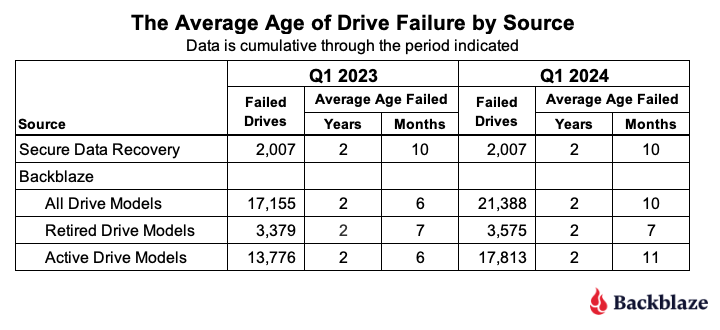
The average age of failure for all of the Backblaze drive models (2 years and 10 months) matches the Secure Data Recovery baseline. The question is, does that validate their number? We say, not yet. Why? Two primary reasons.
First, we only have two data points, so we don’t have much of a trend, that is we don’t know if the alignment is real or just temporary. Second, the average age of failure of the active drive models (that is, those in production) is now already higher (2 years and 11 months) than the Secure Data baseline. If that trend were to continue, then when the active drive models retire, they will likely increase the average age of failure of the drive models that are not in production.
That said, we can compare the numbers by drive size and drive model from Q1 2023 to Q1 2024 to see if we can gain any additional insights. Let’s start with the average age by drive size in the table below.

The most salient observation is that for every drive size that had active drive models (green), the average age of failure increased from Q1 2023 to Q1 2024. Given that the overall average age of failure increased over the last year, it is reasonable to expect that some of the active drive size cohorts would increase. With that in mind, let’s take a look at the changes by drive model over the same period.
Starting with the retired drive models, there were three drive models totalling 196 drives which moved from active to retired from Q1 2023 to Q1 2024. Still, the average age of failure for the retired drive cohort remained at 2 years 7 months, so we’ll spare you from looking at a chart with 39 drive models where over 90% of the data didn’t change Q1 2023 to Q1 2024.
On the other hand, the active drive models are a little more interesting, as we can see below.

In all but the two drive models (highlighted), the average age of failure for each drive model went up. In other words, active drive models are, on average, older when they fail, than one year ago. Remember, we are testing the average age of the drive failures, not the average age of the drive.
At this point, let’s review. The Secure Data Recovery folks checked 2,007 failed drives and determined their average age of failure was 2 years and 10 months. We are testing that assertion. At the moment, the average age of failure for the retired drive models (those no longer in operation in our environment) is 2 years and 7 months. This is still less than the Secure Data number. But, the drive models still in operation are now hitting an average of 2 years and 10 months, suggesting that once these drive models are removed from service, the average age of failure for the retired drive models will increase.
Based on all of this, we think the average age of failure for our retired drive models will eventually exceed 2 years and 10 months. Further, we predict that the average age of failure will reach closer to 4 years for the retired drive models once our 4TB drive models are removed from service.
Annualized Failures Rates for Manufacturers
As we noted at the beginning of this report, the quarterly AFR for Q1 2024 was 1.41%. Each of the four manufacturers we track contributed to the overall AFR as shown in the chart below.
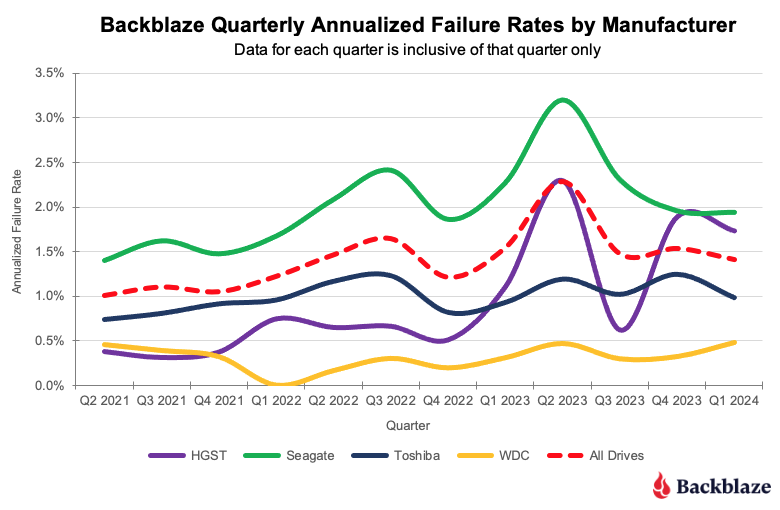
As you can see, the overall AFR for all drives peaked in Q3 2023 and is dropping. This is mostly due to the retirement of older 4TB drives that are further along the bathtub curve of drive failure. Interestingly, all of the remaining 4TB drives in use today are either Seagate or HGST models. Therefore, we expect the quarterly AFR will most likely continue to decrease for those two manufacturers as over the next year their 4TB drive models will be replaced.
Lifetime Hard Drive Failure Rates
As of the end of Q1 2024, we were tracking 279,572 operational hard drives. As noted earlier, we defined the minimum eligibility criteria of a drive model to be included in our analysis for quarterly, annual and lifetime reviews. To be considered for the lifetime review, a drive model was required to have 500 or more drives as of the end of Q1 2024 and have over 100,000 accumulated drive days during their lifetime. When we removed those drive models which did not meet the lifetime criteria, we had 277,910 drives grouped into 26 models remaining for analysis as shown in the tale below.
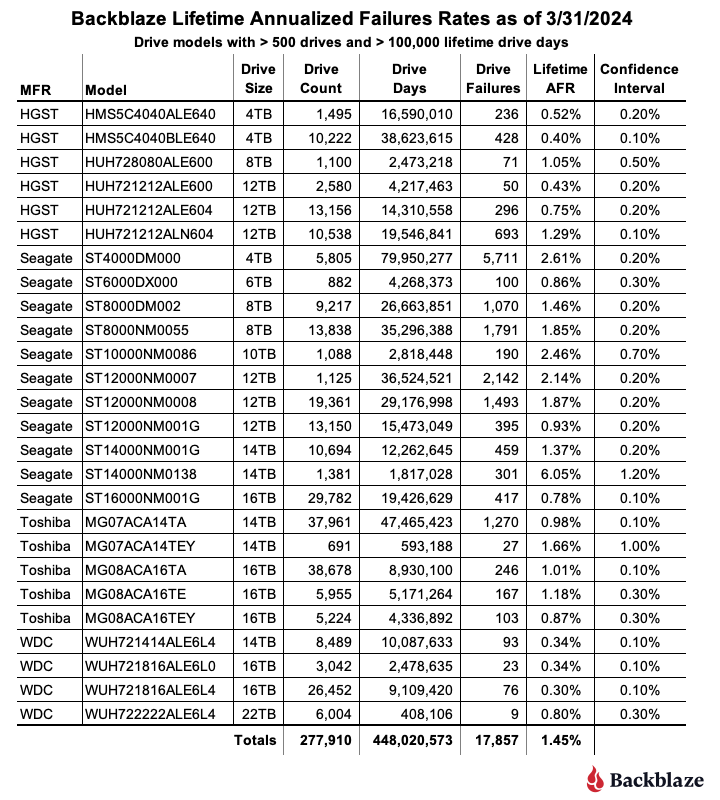
With three exceptions, the conference interval for each drive model is 0.5% or less at 95% certainty. For the three exceptions: the 10TB Seagate, the 14TB Seagate, and 14TB Toshiba models, the occurrence of drive failure from quarter to quarter was too variable over their lifetime. This volatility has a negative effect on the confidence interval.
The combination of a low lifetime AFR and a small confidence interval is helpful in identifying the drive models which work well in our environment. These days we are interested mostly in the larger drives as replacements, migration targets, or new installations. Using the table above, let’s see if we can identify our best 12, 14, and 16TB performers. We’ll skip reviewing the 22TB drives as we only have one model.

The drive models are grouped by drive size, then sorted by their Lifetime AFR. Let’s take a look at each of those groups.
- 12TB drive models: The three 12TB HGST models are great performers, but are hard to find new. Also, Western Digital, who purchased the HGST drive business a while back, has started using their own model numbers of these drives, so it can be confusing. If you do find an original HGST make sure it is new as from our perspective buying a refurbished drive is not the same as buying a new.
- 14TB drive models: The first three models look to be solid—the WDC (WUH721414ALE6L4), Toshiba (MG07ACA14TA), and Seagate (ST14000NM001G). The remaining two drive models have mediocre lifetime AFRs and undesirable confidence intervals.
- 16TB drive models: Lots of choice here, with all six drive models performing well to this point, although the WDC models are the best of the best to date.
The Hard Drive Stats Data
It has now been eleven years since we began recording, storing and reporting the operational statistics of the hard drives and SSDs we use to store data in the Backblaze data storage cloud. We look at the telemetry data of the drives, including their SMART stats and other health related attributes. We do not read or otherwise examine the actual customer data stored.
Over the years, we have analyzed the data we have gathered and published our findings and insights from our analyses. For transparency, we also publish the data itself, known as the Drive Stats dataset. This dataset is open source and can be downloaded from our Drive Stats webpage.
You can download and use the Drive Stats dataset for free for your own purpose. All we ask are three things: 1) you cite Backblaze as the source if you use the data, 2) you accept that you are solely responsible for how you use the data, and 3) you do not sell this data to anyone; it is free.
Good luck and let us know if you find anything interesting.
The post Backblaze Drive Stats for Q1 2024 appeared first on Backblaze Blog | Cloud Storage & Cloud Backup
Scandal: Apollo 15
Post Syndicated from The History Guy: History Deserves to Be Remembered original https://www.youtube.com/watch?v=jBfQEwg4F-k
The UK Bans Default Passwords
Post Syndicated from Bruce Schneier original https://www.schneier.com/blog/archives/2024/05/the-uk-bans-default-passwords.html
The UK is the first country to ban default passwords on IoT devices.
On Monday, the United Kingdom became the first country in the world to ban default guessable usernames and passwords from these IoT devices. Unique passwords installed by default are still permitted.
The Product Security and Telecommunications Infrastructure Act 2022 (PSTI) introduces new minimum-security standards for manufacturers, and demands that these companies are open with consumers about how long their products will receive security updates for.
The UK may be the first country, but as far as I know, California is the first jurisdiction. It banned default passwords in 2018, the law taking effect in 2020.
This sort of thing benefits all of us everywhere. IoT manufacturers aren’t making two devices, one for California and one for the rest of the US. And they’re not going to make one for the UK and another for the rest of Europe, either. They’ll remove the default passwords and sell those devices everywhere.
Another news article.
Making Life Easier for MSPs: The Zabbix Advantage
Post Syndicated from Michael Kammer original https://blog.zabbix.com/making-life-easier-for-msps-the-zabbix-advantage/28004/
Times have never been better for managed service providers (MSPs). The demand for remote monitoring services has skyrocketed as cloud adoption rises and working from home becomes the new standard. The number of organizations that trust MSPs with the everyday functioning of their mission-critical IT systems and processes has grown rapidly – nearly 9 out of 10 small and medium enterprises either use or plan to use MSPs to manage their infrastructure.
As a service provider, an MSP needs to be ahead of the curve at all times and adopt a constantly-shifting and evolving set of best practices for remote monitoring and management. At Zabbix, we’ve created the ultimate solution for full-stack IT monitoring, and we’ve built in features and benefits that are designed to make it as easy as possible for MSPs to provide top-quality monitoring to their clients as well. Keep reading to learn more about what makes Zabbix the ideal monitoring tool for any MSP.
Table of Contents
There are no limits to what you can monitor with Zabbix
And when we say no limits, we mean no limits! Zabbix literally allows you to monitor anything from the frequency of a baby’s cries to the hydraulic systems on a space station. From hardware to software to middleware, VEP resources, virtual resources, and more, Zabbix is capable of monitoring millions of metrics. As an MSP, you’re no doubt called upon to tackle anything from basic network and server monitoring to highly advanced cloud, container, and Kubernetes monitoring. Zabbix lets you keep it all under one roof and handle it with a single solution.
You can integrate Zabbix with any client’s systems
Today’s MSP needs to be able to seamlessly integrate their tools and processes with the IT frameworks and ITIL guidelines of their clients as well as their business goals, strategies, and best practices. Zabbix is designed to work with third party solutions and boasts a constantly-growing list of official integrations.

When you’re notified of a potential problem, you can easily forward your alerts to third-party ITSM, helpdesk, and messaging systems, enhance them with the additional information that Zabbix is able to collect, and freely customize the outgoing messages for different clients – just one of the areas where Zabbix stands out as an ideal multitenant solution.
Zabbix makes reporting and analysis simple
MSPs need to be able to quickly generate and share regular reports and analyses with clients, keeping them up to speed on the status, performance, and health of their infrastructure. Ideally, those reports should be clear, concise, and actionable, highlighting key metrics and insights via graphs, charts, and tables, identifying trends, and predicting potential issues. Done right, reporting can enhance service quality and position you as an ideal strategic partner.
When you make the decision to deploy Zabbix scheduled reports, you’ll get daily, weekly, monthly, and yearly overviews of the infrastructures and business services you’ve been tasked to monitor. You can also track the changes performed in your Zabbix instance with our robust and detailed built-in audit logging functionality, all of which is designed to make it as easy as possible for you to keep your clients in the loop.
Zabbix makes data easy to visualize
Much like the world around them, MSPs have become increasingly more data-driven. It’s easy to understand why – when you have critical information right in front of you, it’s easier to see trends you would have otherwise missed, which in turn helps you make better-informed decisions that can help guide you to success.
Zabbix dashboards are built to serve as visual storybooks for your business. They transform complex monitoring metrics into an engaging narrative, presenting intimidating data in an intuitive, insightful layout and making data interpretation simple.
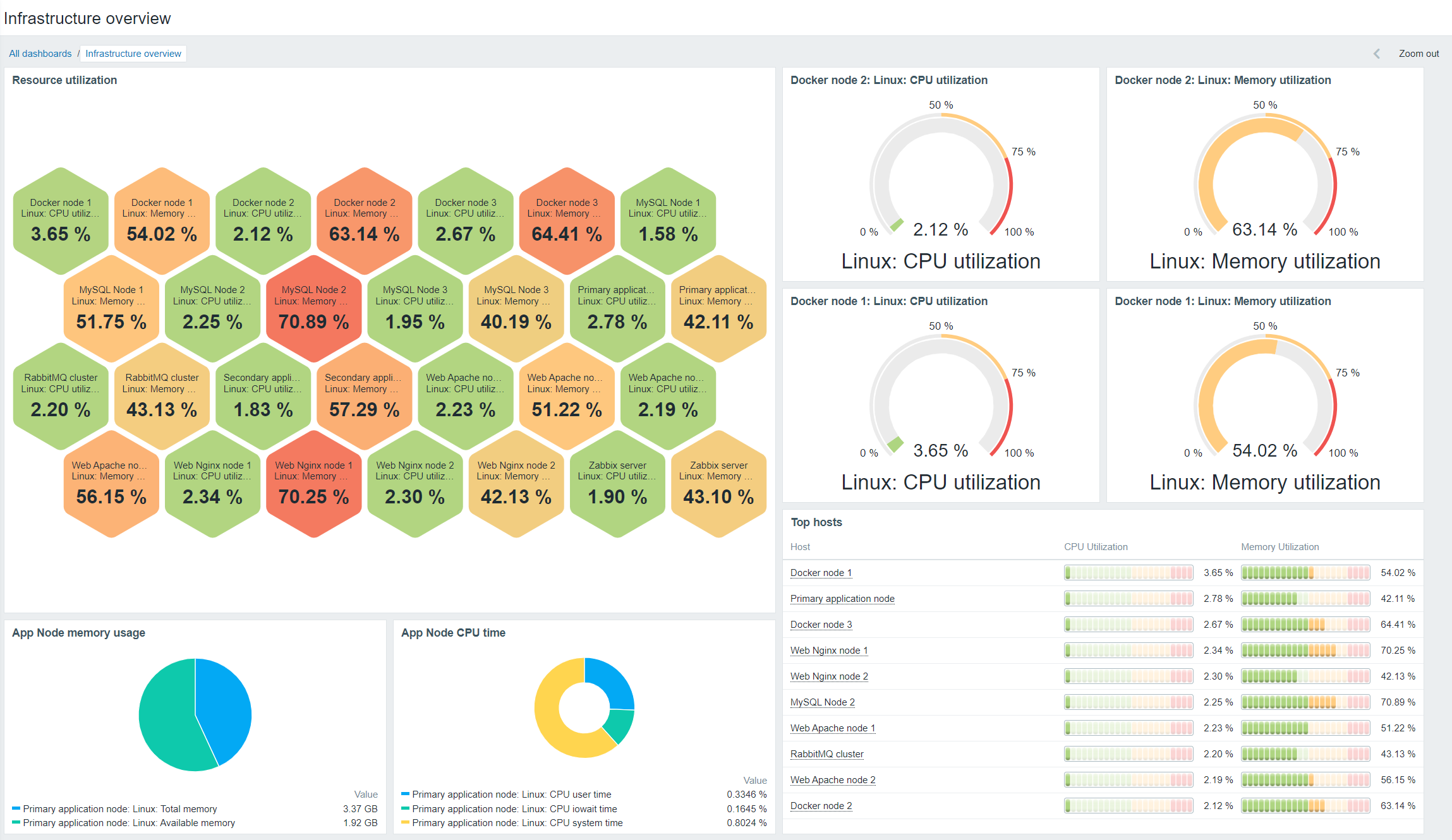
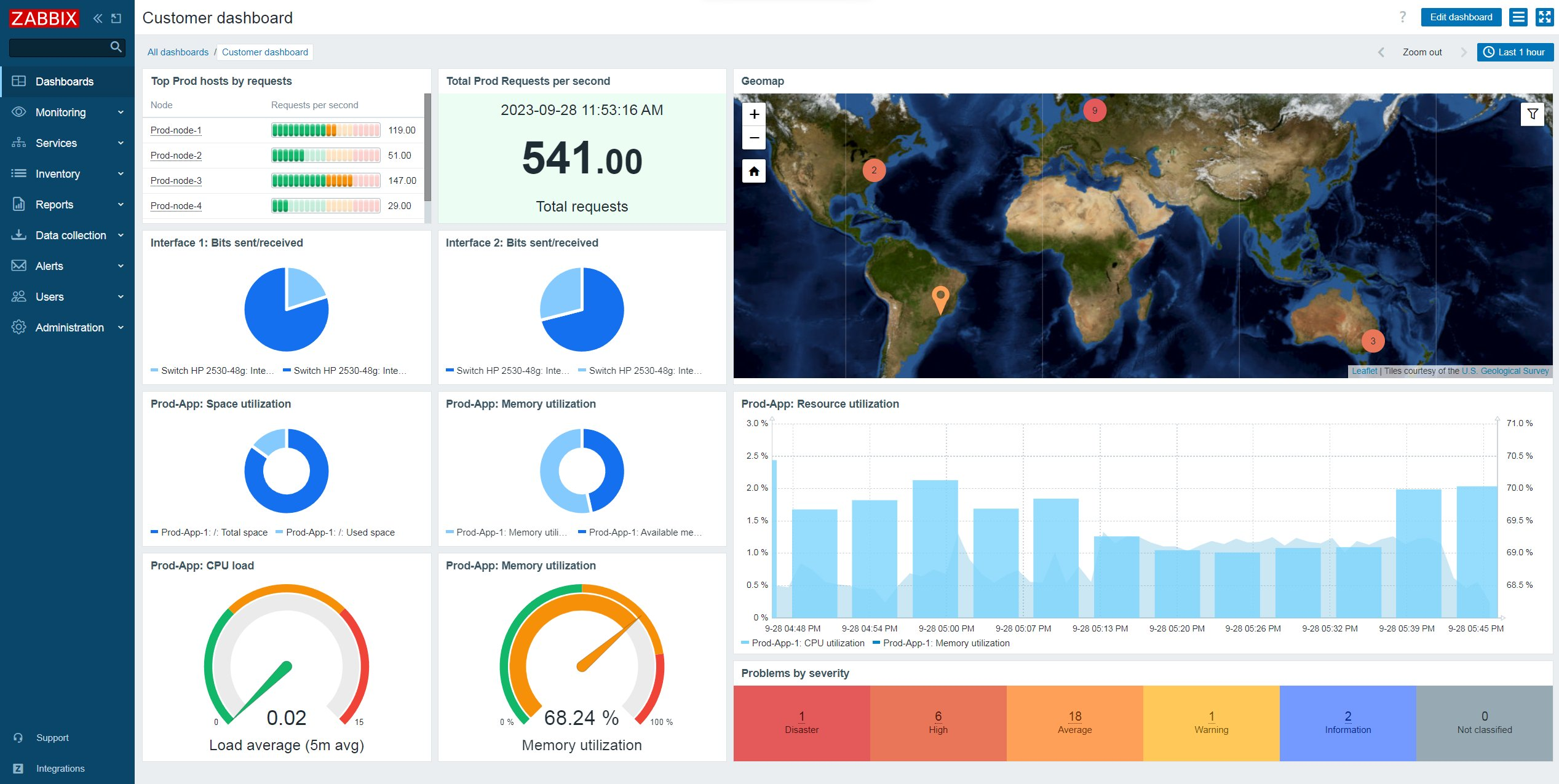
You can customize dashboards, screens, and slideshows to easily track the status of a tenant’s infrastructure, applications, and business services. You can also leverage a wide range of dashboard widgets to aggregate, transform, and graph your data while also tracking your monitoring endpoints on geographical and network maps, identifying the status of the most critical alarms, and sorting your monitoring endpoints by resource usage.
Zabbix makes effective security management easier
When it comes to cyberattacks, MSPs are up against a constantly changing threat landscape, not to mention the challenges they face in protecting diverse, multitenant setups. With Zabbix, you can secure connections to and from your monitoring endpoints either with certificates or via pre-shared key encryption.
Multitenant MSPs can also control access to different Zabbix elements and features by creating unique Zabbix roles for your tenants while taking advantage of the native permission logic to isolate monitoring endpoints between tenants. Host groups and subgroups let you decide what your tenants can see, and encrypted agents help to secure all communication, including proxy-to-server communication.
You can also rely on encrypted communication between Zabbix components as well as flexible permissions, user authentication, and integrations with secret vaults for storing passwords and other sensitive information.
Zabbix is inherently scalable
There are no two ways about it – surviving as an MSP in today’s business environment means being able to scale. The number of customers that you support is likely to vary from year to year or even month to month. In order to add customers without compromising your level of service, you need to scale up. And if your customer base shrinks, you will probably need to decrease the size of your infrastructure and operations in order to avoid spending money on services that your business no longer needs.
By deploying Zabbix proxies and letting them collect and process data on behalf of the primary Zabbix server node, you can easily scale your Zabbix instance as your client base expands – no matter where those clients happen to be. And if you need to scale back your business for any reason, it’s a simple matter of deleting the unused proxies.
Zabbix is uniquely cost-efficient
A key benefit of Zabbix has always been that it’s open-source – there are no license fees associated with using our software, and you’re not locked into an endless, inflexible contract. Meanwhile, our extensive range of competitively-priced professional services are designed to fit the unique needs of MSPs and give you the most effective solutions as quickly as possible.
Perhaps most importantly for a multitenant MSP, Zabbix is built to run without the need for a lot of infrastructure or resources. With Zabbix, you can offer your clients more flexibility than comparable monitoring solutions while dramatically lowering the amount of hardware, CPU power, and costs involved.
Conclusion
In order to serve the constantly evolving needs of their clients, MSPs demand more flexibility and features than ever before – and this naturally extends to the monitoring solutions they choose. Rather than offer a few additional services to target MSPs, we’ve built our business with them in mind, which is why we offer a range of feature-rich technical support plans specifically for MSPs.
To learn more about what Zabbix can do for MSPs like yours, visit our website or request a demo.
The post Making Life Easier for MSPs: The Zabbix Advantage appeared first on Zabbix Blog.
„Малките промени“, които отвоюват територия завладяната държава
Post Syndicated from Bozho original https://blog.bozho.net/blog/4290
Чувам скептиците да казват „нищо позитивно не се случи в тези девет месеца за борбата с корупцията“. И макар това обективно да не е вярно твърдение, много промени не стигат до прайм-тайма, защото изглеждат малки.
Премахването на едно изречение за всевластието на главния прокурор и превръщането на колегиите в отделни съвети с „лека“ промяна в квотите (в Конституцията) не звучи грандиозно за неекспертите. Механизма за разследване на главния прокурор – също. Обжалваемостта на отказите на прокуратурата да разследва – също. Повишената прозрачност в Закона за оествените поръчки (вероятно заради която в момента се разследва една варненска болница за незаконни инхауси) – също.
И още: подобряването на закона за защита на подателите на сигнали (вкл. за корупция); разследващите функции на новата антикорупционна комисия; задължението за нова, прозрачна и централизирана система за случайно разпределение на дела; проекта за нов Закон за съдебната власт; електронизацията в много сектори, което ги прави по-проследими и отчетни.
А и добрите промени много лесно се омаловажават. Разследването на главния прокурор е в ход, но тъй като няма повдигнато обвинение, е лесно да се каже, че „не работи“. За промените в Конституцията някой черноглед анализатор казва „ами ето, има проблеми със служебното правителство, значи цалата реформа е таква“. Отказът на ГЕРБ да попълним антикорупционната комисия се представя като дефицит на закона.
Обаче именно малките промени в член едикойси на Конституцията, Наказателно-процесуалния кодекс, Закона за съдебната власт, Закона за обществените поръчки, Закона за противодействие на корупцията и др. са тези, които носят съществената промяна. Заедно с други, косвено-антикорупционни мерки като включването на общинските проекти в Закона за бюджета, законовите промени за премахването на руската корупционна зависимост на енергетиката ни, дигитализацията и др.
Обнародването в Държавен вестник не вкарва никого в затвора и не спира корупцията на другия ден. Но създава необходимите условия за това.
И тук е асиметрията – трябва избирателите да вярват, че правим правилните неща, докато прайм-таймът не само не дава обективна оценка за ефекта от тези промени, а и опитва да ги задраска, защото „не работят“.
Наша работа е да свържем тези победи в разказ за битката срещу завладяната държава, който да не може да бъде отписан с махване на ръка от някой в сутрешен блок. Защото те са именно това – всяка запетая, която е станала закон след дълги преговори, спорове и маневри, е парче територия, което е отнето от паралелната власт.
И вече случилите се промени, и бъдещите – в Закона за съдебната власт и в законите, които в момента позволяват схеми като „Нотариуса“ и „Осемте джуджета“, са част от пътя, по който вървим, с подкрепата, която обществото ни дава.
Материалът „Малките промени“, които отвоюват територия завладяната държава е публикуван за пръв път на БЛОГодаря.