Widening the Channel: Exertis Broadcast Adds Backblaze B2 Reserve

Post Syndicated from Elton Carneiro original https://www.backblaze.com/blog/widening-the-channel-exertis-broadcast-adds-backblaze-b2-reserve/

We launched our Channel Partner program about seven months ago. In the months since, we’ve rapidly onboarded some great strategic resellers, added new benefits, welcomed more staff to our team, and completed our initial launch of Backblaze B2 Reserve, our capacity-based cloud storage offering that includes download fees, premium support, and our Universal Data Migration service, exclusively for Backblaze resellers—but we’re still just getting started.

We’re very excited to announce another partner today.

Exertis Broadcast + Backblaze

Exertis Broadcast now offers resellers the full value and benefits of our Backblaze B2 Reserve program. This new partnership is doubly exciting to us because a number of our alliance partners already work with Exertis Broadcast—including Quantum, Studio Network Solutions (SNS), and SoDA—which means the world class Exertis engineers can package a suite of best-in-breed cloud workflow solutions in one seamless package for teams working in media and entertainment, modern data protection, and/or disaster recovery solutions industries.

If you’re a reseller looking for a distribution partner that can help your customers with their cloud storage needs, here are a few of the benefits Exertis offers:

  • Sales and Support dedicated to customer success.
  • Engineering Team available to consult on the best products and solutions to fit any needs.
  • Tools and Resources ranging from a state-of-the-art demo center to an innovative video solution builder.
  • Video Production to create cutting-edge content.
  • Marketing Professionals to design effective marketing content to keep you abreast of industry news and events.

To get started, resellers can contact us at [email protected] today.

The Backblaze Channel Partner Program

The Channel Partner program exists to provide easy, transparent, predictable cloud storage solutions to accelerate growth for resellers through the value of our Backblaze B2 Reserve offering.

The program provides benefits ranging from deal registration to joint marketing; rewards like seller incentives and market development funds (coming soon); as well as support including a Partner Portal and sales and marketing staff assistance.

Join Us!

We can’t wait to join with our current and future Channel Partners to deliver tomorrow’s solutions to any customer who can use astonishingly easy cloud storage. (We think that’s pretty much everybody.)

If you’re a reseller, we’d love to hear from you. If you’re a customer interested in benefiting from any of the above, we’d love to connect you with the right Channel Partner team to serve your needs. Either way, the doors are open and we look forward to helping out.

The post Widening the Channel: Exertis Broadcast Adds Backblaze B2 Reserve appeared first on Backblaze Blog | Cloud Storage & Cloud Backup.

Enable Multi-AZ deployments for your Amazon Redshift data warehouse

Post Syndicated from Ranjan Burman original https://aws.amazon.com/blogs/big-data/enable-multi-az-deployments-for-your-amazon-redshift-data-warehouse/

November 2023: This post was reviewed and updated with the general availability of Multi-AZ deployments for provisioned RA3 clusters.
Originally published on December 9th, 2022.

Amazon Redshift is a fully managed, petabyte scale cloud data warehouse that enables you to analyze large datasets using standard SQL. Data warehouse workloads are increasingly being used with mission-critical analytics applications that require the highest levels of resilience and availability. Amazon Redshift is a cloud-based data warehouse that supports many recovery capabilities to address unforeseen outages and minimize downtime. Amazon Redshift RA3 instance types store their data in Redshift Managed Storage (RMS), which is backed by Amazon Simple Storage Service (Amazon S3) making it highly available and durable by default. Amazon Redshift also supports automatic backups that can recover a data warehouse, automatically remediate failures and relocates clusters to different AZs without changes to applications. Although many customers benefit from these features, enterprise data warehouse customers require a low Recovery Time Objective (RTO) and higher availability to support their business continuity with minimal impact to applications.

Amazon Redshift just announced the general availability of Multi-AZ deployments for provisioned RA3 clusters that support running your data warehouse in two Availability Zones simultaneously and can continue operating in unforeseen failure scenarios. A Multi-AZ deployment is intended for customers with mission-critical analytics applications that require the highest levels of  resilience and availability.

A Redshift Multi-AZ deployment leverages compute resources in two AZs to scale data warehouse workload processing.  In situations where there is a high level or concurrency Redshift will automatically leverage the resources in both AZs to scale the workload for both read and write requests.

Our pre-launch tests found that Amazon Redshift Multi-AZ deployments reduce recovery time to under 60 seconds or less in the unlikely case of an AZ failure.

Single-AZ vs. Multi-AZ deployment

Amazon Redshift requires a cluster subnet group to create a cluster in your VPC. The cluster subnet group includes information about the VPC ID and a list of subnets in your VPC. When you launch a cluster, Amazon Redshift either creates a default cluster subnet group automatically or you choose a cluster subnet group of your choice so that Amazon Redshift can provision your cluster in one of the subnets in the VPC. You can configure your cluster subnet group to add subnets from different Availability Zones that you want Amazon Redshift to use for cluster deployment.

All Amazon Redshift clusters today are created and situated in a particular Availability Zone within an AWS Region and thus called Single-AZ deployments. For a Single-AZ deployment, Amazon Redshift selects the subnet from one of the Availability Zones within a Region and deploys the cluster there. You can choose an Availability Zone for deployment, and Amazon Redshift will deploy your cluster in the chosen Availability Zone based on the subnets provided.

On the other hand, a multi-AZ deployment is provisioned in two Availability Zones simultaneously. For a Multi-AZ deployment, Amazon Redshift automatically selects two subnets from two different Availability Zones and deploys an equal number of compute nodes in each Availability Zone. All these compute nodes are utilized via a single endpoint as compute nodes from both Availability Zones are used for workload processing.

As shown in the following diagrams, Amazon Redshift deploys a cluster in a single Availability Zone for Single-AZ deployment, and two Availability Zones for Multi-AZ deployment.

Auto recovery of multi-AZ deployment

In the unlikely event of an Availability Zone failure, Amazon Redshift Multi-AZ deployments continue to serve your workloads by automatically using resources in the other Availability Zone. You are not required to make any application changes to maintain business continuity during unforeseen outages since a multi-AZ deployment is accessed as a single data warehouse with one endpoint. Amazon Redshift Multi-AZ deployments are designed to ensure there is no data loss, and you can query all data committed up until the point of failure.

As shown in the below diagram, if there is an unlikely event that causes compute nodes in AZ1 to fail, then a multi-AZ deployment automatically recovers to use compute resources in AZ2. Amazon Redshift will also automatically provision identical compute nodes in another availability zone (AZ3) to continue operating simultaneously in two Availability zones (AZ2 and AZ3).

Amazon Redshift Multi-AZ deployment is not only used for protection against the possibility of Availability Zone failures, but it can also maximize your data warehouse performance by automatically distributing workload processing across two Availability Zones. A Multi-AZ deployment will always process an individual query using compute resources only from one Availability Zone, but it can automatically distribute processing of multiple simultaneous queries to both Availability Zones to increase overall performance for high concurrency workloads.

It’s a good practice to set up automatic retries in your extract, transform, and load (ETL) processes and dashboards so that they can be reissued and served by the cluster in the secondary Availability Zone when an unlikely failure happens in the primary Availability Zone. If a connection is dropped, it can then be retried or reestablished immediately. In addition, queries and loads that were running in the failed Availability Zone will be aborted. New queries issued at or after a failure occurs may experience run delays while the multi-AZ data warehouse is being recovered to a two AZ setup.

Overview of solution

In this post, we provide a walkthrough of how to create and manage a Multi-AZ deployment for Amazon Redshift using the AWS Management Console. We also test the fault tolerance of an Amazon Redshift Multi-AZ data warehouse and monitor queries in your Multi-AZ deployment.

Create a new Multi-AZ deployment from the console

You can easily create a new multi-AZ deployments through Amazon Redshift console. Amazon Redshift will deploy the same number of nodes in each of the two Availability Zones for a Multi-AZ deployment. All nodes of a multi-AZ deployment can perform read and write workload processing during normal operation. A Multi-AZ deployment is supported only for provisioned RA3 clusters.

Follow these steps to create an Amazon Redshift provisioned cluster in two Availability Zones:

  1. On the Amazon Redshift console, in the navigation pane, choose Clusters.
  2. Click on Create cluster.

For general information about creating clusters, see Creating a cluster.

  1. Choose one of the RA3 node types on the Node type drop-down menu. The Multi-AZ deployment option only becomes available when you choose an RA3 node type.
  2. For Multi-AZ deployment, select Multi-AZ option.
  3. For Number of nodes per AZ, enter the number of nodes that you need for your cluster.

  1. Under the Database configurations, choose Admin user name and Admin user password.
  2. Turn Use defaults on next to Additional configurations to modify the default settings.
  3. Under Network and security, specify the following:
    1. For Virtual private cloud (VPC), choose the VPC you want to deploy the cluster in.
    2. For VPC security groups, either leave as default or add the security groups of your choice.
    3. For Cluster subnet group, either leave as default or add a cluster subnet group of your choice. For a Multi-AZ deployment, a cluster subnet group must include one subnet each from at least three or more different Availability Zones.

For general information about managing cluster subnet groups, see Cluster subnet groups

  1. Under Database configuration, for Database port, you either use the default value 5439 or choose a value from the range of 5431–5455 and 8191–8215.
  2. Under Database configuration, in the Database encryption section, to use a custom AWS Key Management Service (AWS KMS) key other than the default KMS key, choose Customize encryption settings. This option is deselected by default.
  3. Under Choose an AWS KMS key, you can either choose an existing KMS key, or choose Create an AWS KMS key to create a new KMS key.

For more information to create key using KMS, refer to Creating keys.

  1. Choose Create cluster.

When the cluster creation succeeds, you can view the details on the cluster details page.

Under General information, you can see Multi-AZ as Yes.

On the Properties tab, under Network and security settings, you can find the details on the primary and secondary Availability Zone.

Create a new Multi-AZ deployment from the CLI

The following create-cluster AWS CLI command shows how to create a Multi-AZ cluster

aws redshift create-cluster 
--port 5439 
    --master-username master
    --master-user-password ######
    --node-type ra3.4xlarge
    --number-of-nodes 2
    --profile maz-test
    --endpoint-url https://redshift.us-east-1.amazonaws.com
    --region eu-west-1
    --cluster-identifier redshift-cluster-1
    --multi-az 
    --maintenance-track-name CURRENT
    --encrypted

Convert a Single-AZ deployment to Multi-AZ deployment

To convert an existing Single-AZ deployment to a Multi-AZ deployment, you can go to the Redshift console and select your Redshift cluster that currently is Single-AZ setup and navigate to Actions and select Activate Multi-AZ. Your Single-AZ cluster must be encrypted for a successful conversion to Multi-AZ. During conversion to Multi-AZ, Redshift will double the total number of nodes distributing them equally in each AZ. Redshift will not allow you to split existing number of nodes while converting to Multi-AZ to maintain consistent query performance.

Complete the following steps to create a Multi-AZ deployment restored from a snapshot:

  1. On the Amazon Redshift console, in the navigation pane, choose Clusters.
  2. Select your cluster and navigate to the cluster details page.
  3. On the Actions menu, choose Activate Multi-AZ.

  1. Review the modification summary and confirm by choosing Activate Multi-AZ.

Using the below AWS CLI command you can convert a single AZ Redshift data warehouse to Multi-AZ.

aws redshift modify-cluster 
    --profile maz-test
    --endpoint-url https://redshift.eu-west-1.amazonaws.com
    --region eu-west-1
    --cluster-identifier redshift-cluster-1
    --multi-az

Convert a Multi-AZ deployment to Single-AZ deployment

Redshift also supports conversion of a Multi-AZ deployment into Single-AZ.  This option provides customers with the flexibility to switch between different deployments with few easy steps as follows:

  1. On the Amazon Redshift console, in the navigation pane, choose Clusters.
  2. Select your cluster and navigate to the cluster details page.
  3. On the Actions menu, choose Deactivate Multi-AZ.

  4. Review the modification summary and confirm by choosing Deactivate Multi-AZ.

Creating a Multi-AZ data warehouse restored from a snapshot

Existing customers can also create a Multi-AZ deployment by restoring a snapshot from an existing Single-AZ deployment. See the required steps as below.

  1. On the Amazon Redshift console, in the navigation pane, choose Clusters.
  2. Select the cluster and navigate to the cluster details page.
  3. Choose the Maintenance
  4. Select a snapshot and choose Restore snapshot, Restore to provisioned cluster.
  5. Review the Cluster configuration and Cluster details values of the new cluster to be created using the snapshot information.
  6. Select Multi-AZ option and update the properties of the new cluster, then choose Restore cluster from snapshot at the bottom of the page.

Resizing a Multi-AZ data warehouse

Redshift Multi-AZ feature also supports resizing Multi-AZ Redshift cluster deployments to change the cluster configuration based on scaling needs. You can change both number and type of nodes as per needs.

  1. On the Amazon Redshift console, in the navigation pane, choose Clusters.
  2. Select your cluster and navigate to the cluster details page.
  3. On the Actions menu, choose
  4. Once selected it will bring into another screen to show cluster resize screen where you can choose type and number of nodes and click on Resize cluster.

Failing over Multi-AZ deployment

In addition to the automatic recovery process, you can also trigger this process manually for your data warehouse using the Failover primary compute option. This approach can be used to manage operational maintenance and other planned operational procedures as per the needs of the respective environment. When the cluster successfully recovers, Multi-AZ deployment becomes available. Your Multi-AZ deployment also automatically provisions new compute nodes in another Availability Zone as soon as it is available.

Let’s manually trigger the Failover of your Redshift Multi-AZ deployment.

  1. On the Amazon Redshift console, choose Clusters in the navigation pane.
  2. Navigate to the cluster detail page
  3. From Actions, choose Failover primary compute.
  4. When prompted, choose Confirm.


After the cluster is back to Available status, you can observe that the primary and secondary Availability Zones have changed.

The following screenshot shows the status before injecting failure.

The following screenshot shows the status after injecting failure.

Restore a table from snapshot

You can restore a single table from a snapshot from your Multi-AZ cluster. When you restore a single table from a snapshot, you specify the source snapshot, database, schema, and table name, and the target database, schema, and a new table name for the restored table.

To restore a table from a snapshot:

  1. On the Amazon Redshift console, in the navigation pane, choose Clusters.
  2. Select your cluster and navigate to the cluster details page.
  3. On the Actions menu, choose Restore table.
  4. Enter the information about which snapshot, source table, and target table to use, and then choose Restore table.

Enable public connections for your Multi-AZ data warehouse

  1. From the navigation menu, choose CLUSTERS.
  2. Choose the Multi-AZ cluster that you want to modify.
  3. Choose Actions.
  4. Choose Turn on Publicly accessible.
  5. Choose Elastic IP address, if you do not choose one, an address will be randomly assigned to you.
  6. Choose Save changes.


Monitor queries for Multi-AZ deployments

A Multi-AZ deployment uses compute resources that are deployed in both Availability Zones and can continue operating in the event that the resources in a given Availability Zone are not available. All the compute resources are used at all times, which allows full operation across two Availability Zones in both read and write operations.

You can query SYS_views in the pg_catalog schema to monitor Multi-AZ query runs. The SYS_views cover query run activities and stats from primary and secondary clusters.

The following are the system tables in the SYS_view list:

Follow these steps to monitor the query run on Multi-AZ deployment from the Amazon Redshift Console:

  1. On the Amazon Redshift console, connect to the database in your Multi-AZ deployment and run queries through the query editor.
  2. Run any sample query on the Multi-AZ Redshift deployment.
  3. For a Multi-AZ deployment, you can identify a query and the Availability Zone where it is being run (running on the primary or secondary availability zone) by using the compute_type column in the SYS_QUERY_HISTORY table. The valid values for the compute type column are as follows:
    1. primary – When run on primary availability zone in the Multi-AZ deployment.
    2. secondary – When run on secondary availability zone in the Multi-AZ deployment.

The following is a sample query using the compute_type column to monitor a query:

dev=# select (compute_type) as compute_type, left(query_text, 50) query_text from sys_query_history order by start_time desc;

 compute_type | query_text
--------------+----------------------------------------------------
 secondary    | select count(*) from t1;
 primary 	   select count(*) from t2;

You can also access the query history from the console to analyze your query diagnostics.

  1. On the Query monitoring tab, choose Connect to database.

  1. For Connection, choose Create a new connection
  2. For Authentication, choose Temporary credentials
  3. For Database name, enter the database name (for example, dev).
  4. For Database user, enter the database user name (for example, awsuser).
  5. Choose Connect.

After you’re connected, under Query Monitoring, on the Query history tab, you can view all the queries and loads, as shown in the following screenshot.

Under Metric filters, you can use the various filters in the Additional filtering options section to view query history based on Time interval, Users, Databases, or SQL commands.

There are a few limitations when working with Amazon Redshift Multi-AZ in preview mode, refer here for the limitations.

Customer feedback

Janssen Pharmaceuticals, a subsidiary of Johnson & Johnson, researches and manufactures medicines with a focus on the changing needs of patients and the healthcare industry.

“Janssen Pharmaceutical uses Amazon Redshift to enable critical insights that drive important business decisions for our data scientists, data stewards, business users, and external stakeholders. With Amazon Redshift Multi-AZ, we can be confident that our data warehouse will always be available without any disruptions that might delay impact our ability to make critical business decisions.”

– Shyam Mohapatra, Director of Information Technology – Janssen Pharmaceutical Companies of Johnson & Johnson

Stripe is a technology company that builds economic infrastructure for the internet. Stripe’s products power payments for online and in-person retailers, subscriptions businesses, software platforms and marketplaces, and everything in between.

Millions of companies use Stripe’s software and APIs to accept payments, send payouts, and manage their businesses online.  Access to their Stripe data via leading data warehouses like Amazon Redshift has been a top request from our customers. Our customers needed highly available, secure, fast, and integrated analytics at scale without building complex data pipelines or moving and copying data around. With Stripe Data Pipeline for Amazon Redshift, we’re helping our customers set up a direct and reliable data pipeline in a few clicks. 

Stripe Data Pipeline enables our customers to automatically share their complete, up-to-date Stripe data with their Amazon Redshift data warehouse, and take their business analytics and reporting to the next level.”

– Brian Brunner, Senior Manager, Engineering at Stripe

Conclusion

This post demonstrated how to configure an Amazon Redshift Multi-AZ deployment in two Availability Zones and test the fault tolerance of your workloads during an unlikely failure of an Availability Zone. Amazon Redshift Multi-AZ deployment also helps improve overall performance of your data warehouse because compute nodes in both Availability Zones are used for read and write operations. Amazon Redshift Multi-AZ data warehouse helps meet the demands of customers with mission critical analytics applications that require the highest levels of availability and resiliency. For more details, refer Configuring Multi-AZ deployment.


About the Authors

Ranjan Burman is an Analytics Specialist Solutions Architect at AWS. He specializes in Amazon Redshift and helps customers build scalable analytical solutions. He has more than 16 years of experience in different database and data warehousing technologies. He is passionate about automating and solving customer problems with cloud solutions.

Saurav Das is part of the Amazon Redshift Product Management team. He has more than 16 years of experience in working with relational databases technologies and data protection. He has a deep interest in solving customer challenges centered around high availability and disaster recovery.

Anusha Challa is a Senior Analytics Specialist Solutions Architect focused on Amazon Redshift. She has helped many customers build large-scale data warehouse solutions in the cloud and on premises. She is passionate about data analytics and data science.

Nita Shah is an Analytics Specialist Solutions Architect at AWS based out of New York. She has been building data warehouse solutions for over 20 years and specializes in Amazon Redshift. She is focused on helping customers design and build enterprise-scale well-architected analytics and decision support platforms.

Suresh Patnam is a Principal BDM – GTM AI/ML Leader at AWS. He works with customers to build IT strategy, making digital transformation through the cloud more accessible by using data and AI/ML. In his spare time, Suresh enjoys playing tennis and spending time with his family.
[$] mimmutable() for OpenBSD

Post Syndicated from original https://lwn.net/Articles/915640/

Virtual-memory systems provide a great deal of flexibility in how memory
can be mapped and protected. Unfortunately, memory-management flexibility
can also be useful to attackers bent on compromising a system. In the
OpenBSD world, a new system call is being added to reduce this flexibility;
it is, though, a system call that almost no code is expected to use.

AWS Graviton Processor Support on Insight Agent

Post Syndicated from Rapid7 original https://blog.rapid7.com/2022/12/09/aws-graviton-processor-support-on-insight-agent/

AWS Graviton Processor Support on Insight Agent

By Marco Botros

Marco is a Technical Product Manager for Platform at Rapid7.

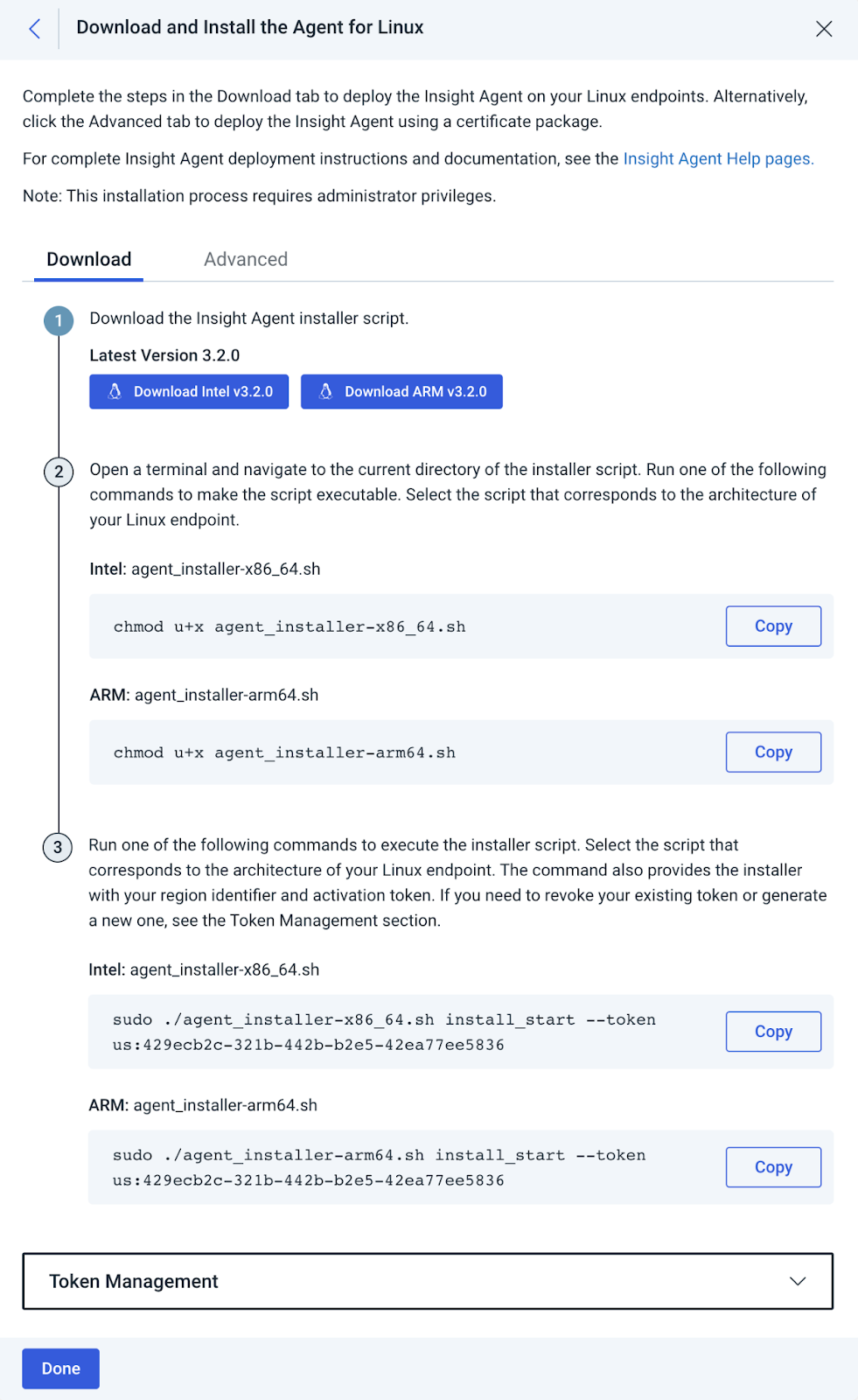
We are pleased to announce that the Insight Agent now supports the AWS Graviton processor. The Insight Agent supports various operating systems using the AWS Graviton processor, including Amazon Linux, Redhat, and Ubuntu. The full list of supported operating systems can be found in our documentation.

AWS first introduced its ARM-based server processor — Graviton — in 2018. It has since released Graviton2 in 2020 and Graviton3 in May of 2022. The Graviton3 Processor has a 25% better compute performance and uses up to 60% less energy than the Graviton2 Processor. Besides supporting Linux on the Graviton Processor, we will continue to support it on both 32-bit and 64-bit intel processors. However, you will only be able to see the new Graviton installer if your organization’s agents are not pinned or, if they have been pinned, are on an agent version higher than 3.2.0. The new Linux installer is called `agent_installer-arm64.sh`, and the intel-based Linux installer has been renamed to `agent_installer-x86_64.sh` (from just `agent_installer.sh`).

You can find more information on how to download and install the new Linux ARM Installer from the download section of Agent Management in the platform:

AWS Graviton Processor Support on Insight Agent

You can also use the Agent Test Set feature to roll out the new agent on a select set of machines before deploying it widely.

Genomics workflows, Part 2: simplify Snakemake launches

Post Syndicated from Rostislav Markov original https://aws.amazon.com/blogs/architecture/genomics-workflows-part-2-simplify-snakemake-launches/

Genomics workflows are high-performance computing workloads. In Part 1 of this series, we demonstrated how life-science research teams can focus on scientific discovery without the associated heavy lifting. We used regenie for large genome-wide association studies. Our design pattern built on AWS Step Functions with AWS Batch and Amazon FSx for Lustre.

In Part 2, we explore genomics workloads with built-in workflow logic. Historically, running bioinformatics data pipelines was a manual and error-prone task. Over the last years, multiple workflow management systems have emerged. An example of these is the Snakemake workflow management system with Tibanna orchestration. We discuss the solution design and how you can fully automate the launch with Amazon Web Services (AWS).

Use case

We focus on the use case of Snakemake, an open-source utility for whole genome sequence mapping in directed acyclic graph (DAG) format. Snakemake uses Snakefiles to declare workflow steps and commands. A Snakefile extends Python syntax to declare workflow steps such as mapping data sets to DAG structure and identifying variants. Consult the Snakemake tutorial for further information on workflow rules.

Snakefiles provide an exception from the general design pattern and an alternative to granular modeling workflow logic in Amazon States Language. In our real-life use case, we used Tibanna to orchestrate Snakemake. Tibanna is an open-source, AWS-native software that runs bioinformatics data pipelines. It supports Snakefile syntax, plus other workflow languages, including Common Workflow Language and Workflow Description Language (WDL).

We recommend using Amazon Genomics CLI, if Tibanna is not needed for your use case, and Amazon Omics, if your workflow definitions are compliant with the supported WDL and Nextflow specifications.

Solution overview

Snakemake is available as Docker image on GitHub. We push the image to Amazon Elastic Container Registry. Tibanna is also available as Docker image on GitHub—it comes with Snakemake. Consult the Tibanna installation guide for more information.

We store Snakefiles on Amazon Simple Storage Service (Amazon S3). We configure S3 Event Notifications on PUT request operations. The event notification triggers an AWS Lambda function. The Lambda function launches an AWS Fargate task, which overrides the task definition command with the appropriate Snakemake start command and arguments.

The launched AWS Fargate task pulls the Snakefiles at launch time for each job and prepares the Snakemake initiation commands. Once the Snakefiles are downloaded on the Fargate task, the Snakemake head initiation command is invoked to begin launching jobs using Tibanna. Tibanna invokes a Step Functions state machine which orchestrates the launch of Snakemake on Amazon Elastic Compute Cloud (Amazon EC2).

Amazon CloudWatch provides a consolidated overview of performance metrics, including elapsed time, failed jobs, and error types. You can keep logs of your failed jobs in CloudWatch Logs (Figure 1). You can set up filters to match specific error types, plus create subscriptions to deliver a real-time stream of your log events to Amazon Kinesis or Lambda for further retry.

Solution architecture for Snakemake with Tibanna on AWS

Figure 1. Solution architecture for Snakemake with Tibanna on AWS

Implementation considerations

Here, we describe some of the implementation considerations.

Creating Snakefiles

The launching point for the initiation depends on a Snakefile. Each Snakefile may contain one or more samples to be launched. The sheet resides in an S3 bucket. This adds flexibility and the ability to purge any sensitive or restrictive information after the job has been processed.

Invoking Tibanna

In order to launch Snakemake DAGs using Tibanna, we will need to set up a new Tibanna Unicorn. A Tibanna Unicorn is an Step Functions state machine and a corresponding Lambda function for provisioning EC2 instances.

The state machine runs the following sequence:

  1. Create EC2 instance
  2. Check EC2 status
  3. Exit

After the Tibanna Unicorn has been created, we can start a Snakemake DAG using the following sample commands inside of the Fargate task.

$ export TIBANNA_DEFAULT_STEP_FUNCTION_NAME=YOUR_UNICORN_PROJECT
$ snakemake --tibanna --tibanna-config spot_instance=true --default-remote-prefix=YOUR_S3_BUCKET/BUCKET_PREFIX --retries 3.

The Snakemake command is used with the --tibanna flag to send launch requests to the Step Functions state machine in order to provision EC2 instances and run DAG tasks.

We recommend deploying the solution with AWS Serverless Application Model or the AWS Cloud Development Kit, both of which launch AWS CloudFormation.

Logging and troubleshooting

With this solution, each launch will automatically capture and retain start logs in a centralized location in Amazon CloudWatch Logs for tracing and auditing.

If there are issues during the launch of the Tibanna Step Function state machine, such as Amazon EC2 capacity limits, logs will be available in the S3 bucket that was specified during the Tibanna Unicorn creation process. There will be a file available in the format of <EXECUTION_ID>.log inside of the S3 bucket. This information is easily accessible via the command line interface. Use the following command to display specific log results or error messages.

tibanna log -j <EXECUTION_ID> -T 

Retries and EC2 Spot Instances

We advise to use Amazon EC2 Spot Instances, if possible, for additional cost savings. This option is available in the --tibanna-config arguments with the setting spot_instance=true.

This is optional, and you need to create retry logic in the event a Spot Instance gets reclaimed. You can include --retries=3 in your Tibanna launch command. This would ensure all rules are retried three times. You can also specify the number of retries for individual rules when defining the Snakemake DAG definition; for example:

rule a:
    output:
        "test.txt"
    retries: 3
    shell:
        "curl https://some.unreliable.server/test.txt > {output}"

If EC2 Spot Instance capacity is hit, you can automatically switch to using EC2 On-Demand Instances instead. Add the behavior_on_capacity_limit argument and set retry_without_spot=true.

Adding services

The presented solution can be adapted to use other compute services supported by Snakemake. These include Amazon Elastic Kubernetes Service and AWS ParallelCluster with Slurm Workload Manager plus Amazon FSx for Lustre volumes attached to the head node and cluster nodes.

To initiate jobs on ParallelCluster, install the AWS Systems Manager agent on the head node. This is the launching point into the cluster and used for submitting jobs to the initiation queue. Systems Manager is a secure way to remotely invoke commands on an EC2 instance without the need for SSH access. You can restrict access to your EC2 instance through IAM policies.

Conclusion

In this blog post, we demonstrated how life-science research teams can simplify the launch of Snakemake using AWS. We used Snakefiles and Tibanna to orchestrate workflow steps. Snakefiles provide an exception from the general design pattern and an alternative to Amazon States Language. File uploads to Amazon S3 served as our launching point for workflow initiations.

Stay tuned for Part 3 of this series, in which we create a job manager that administrates multiple workflows.

Related information

New! Security Analytics provides a comprehensive view across all your traffic

Post Syndicated from Zhiyuan Zheng original https://blog.cloudflare.com/security-analytics/

New! Security Analytics provides a comprehensive view across all your traffic

New! Security Analytics provides a comprehensive view across all your traffic

An application proxying traffic through Cloudflare benefits from a wide range of easy to use security features including WAF, Bot Management and DDoS mitigation. To understand if traffic has been blocked by Cloudflare we have built a powerful Security Events dashboard that allows you to examine any mitigation events. Application owners often wonder though what happened to the rest of their traffic. Did they block all traffic that was detected as malicious?

Today, along with our announcement of the WAF Attack Score, we are also launching our new Security Analytics.

Security Analytics gives you a security lens across all of your HTTP traffic, not only mitigated requests, allowing you to focus on what matters most: traffic deemed malicious but potentially not mitigated.

Detect then mitigate

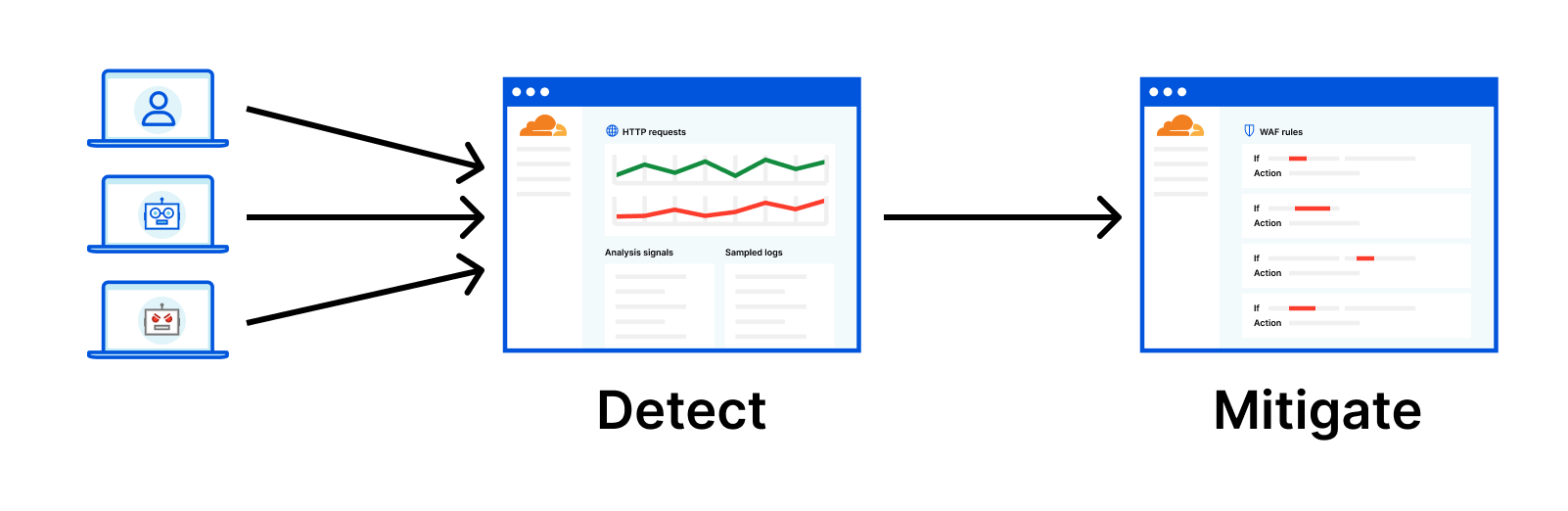
Imagine you just onboarded your application to Cloudflare and without any additional effort, each HTTP request is analyzed by the Cloudflare network. Analytics are therefore enriched with attack analysis, bot analysis and any other security signal provided by Cloudflare.

Right away, without any risk of causing false positives, you can view the entirety of your traffic to explore what is happening, when and where.

This allows you to dive straight into analyzing the results of these signals, shortening the time taken to deploy active blocking mitigations and boosting your confidence in making decisions.

New! Security Analytics provides a comprehensive view across all your traffic

We are calling this approach “detect then mitigate” and we have already received very positive feedback from early access customers.

In fact, Cloudflare’s Bot Management has been using this model for the past two years. We constantly hear feedback from our customers that with greater visibility, they have a high confidence in our bot scoring solution. To further support this new way of securing your web applications and bringing together all our intelligent signals, we have designed and developed the new Security Analytics which starts bringing signals from the WAF and other security products to follow this model.

New! Security Analytics provides a comprehensive view across all your traffic

New Security Analytics

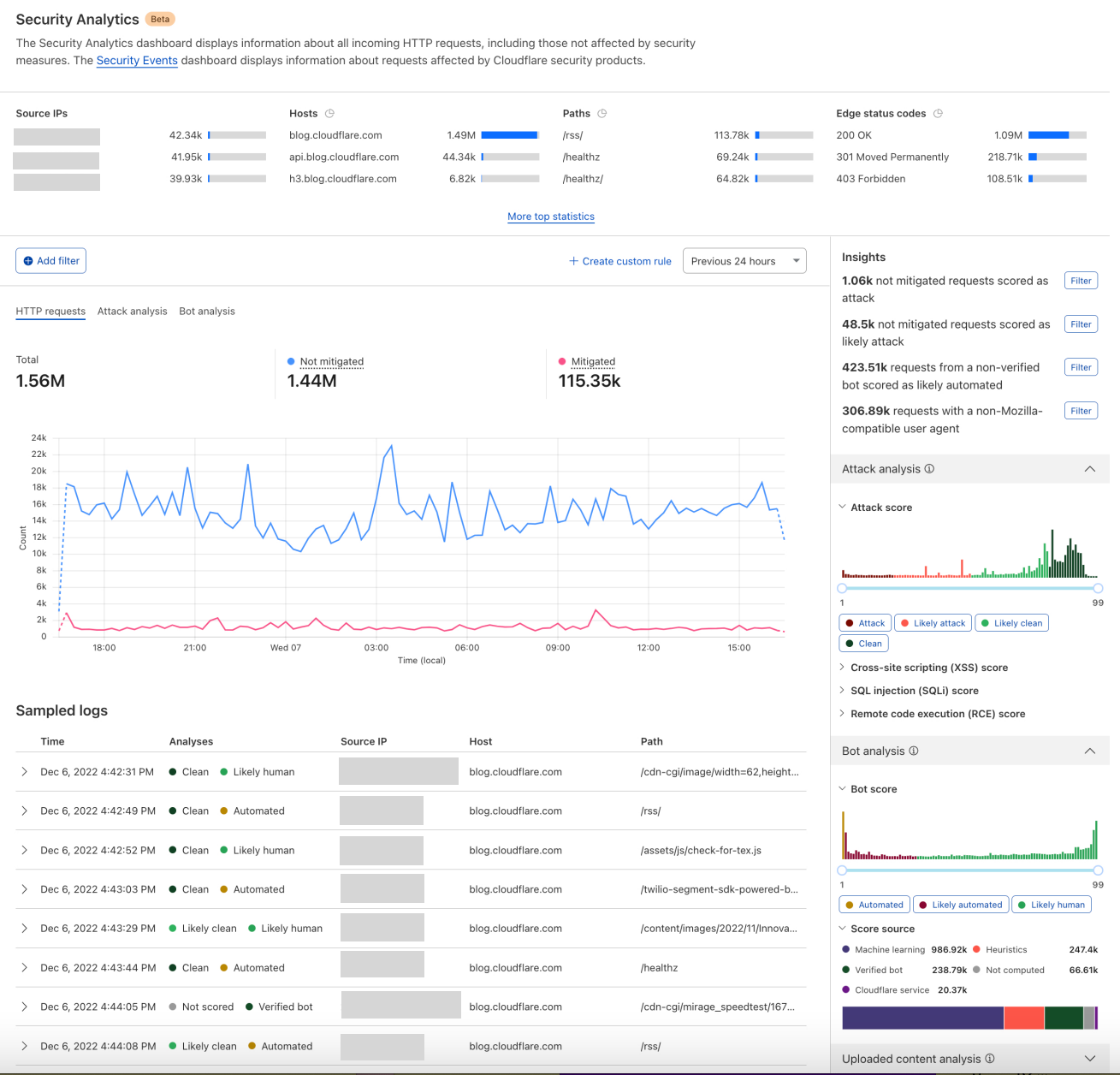
Built on top of the success of our analytics experiences, the new Security Analytics employs existing components such as top statistics, in-context quick filters, with a new page layout allowing for rapid exploration and validation. Following sections will break down this new page layout forming a high level workflow.

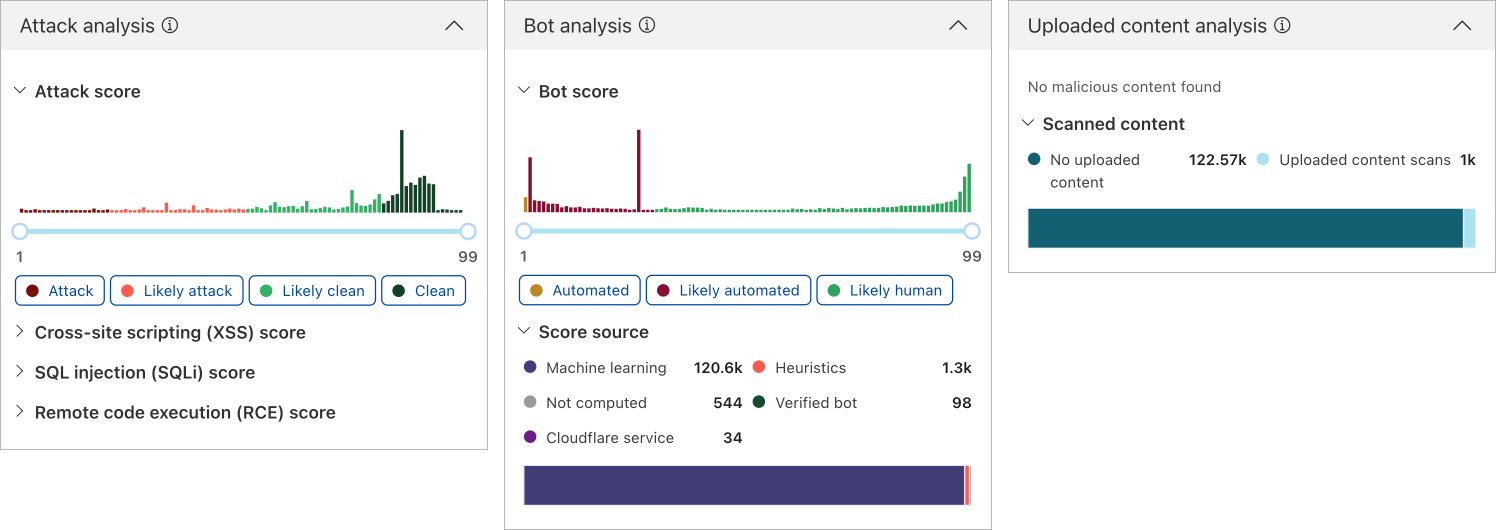
The key difference between Security Analytics and Security Events, is that the former is based on HTTP requests which covers visibility of your entire site’s traffic, while Security Events uses a different dataset that visualizes whenever there is a match with any active security rule.

Define a focus

The new Security Analytics visualizes the dataset of sampled HTTP requests based on your entire application, same as bots analytics. When validating the “detect then mitigate” model with selected customers, a common behavior observed is to use the top N statistics to quickly narrow down to either obvious anomalies or certain parts of the application. Based on this insight, the page starts with selected top N statistics covering both request sources and request destinations, allowing expanding to view all the statistics available. Questions like “How well is my application admin’s area protected?” lands at one or two quick filter clicks in this area.

New! Security Analytics provides a comprehensive view across all your traffic

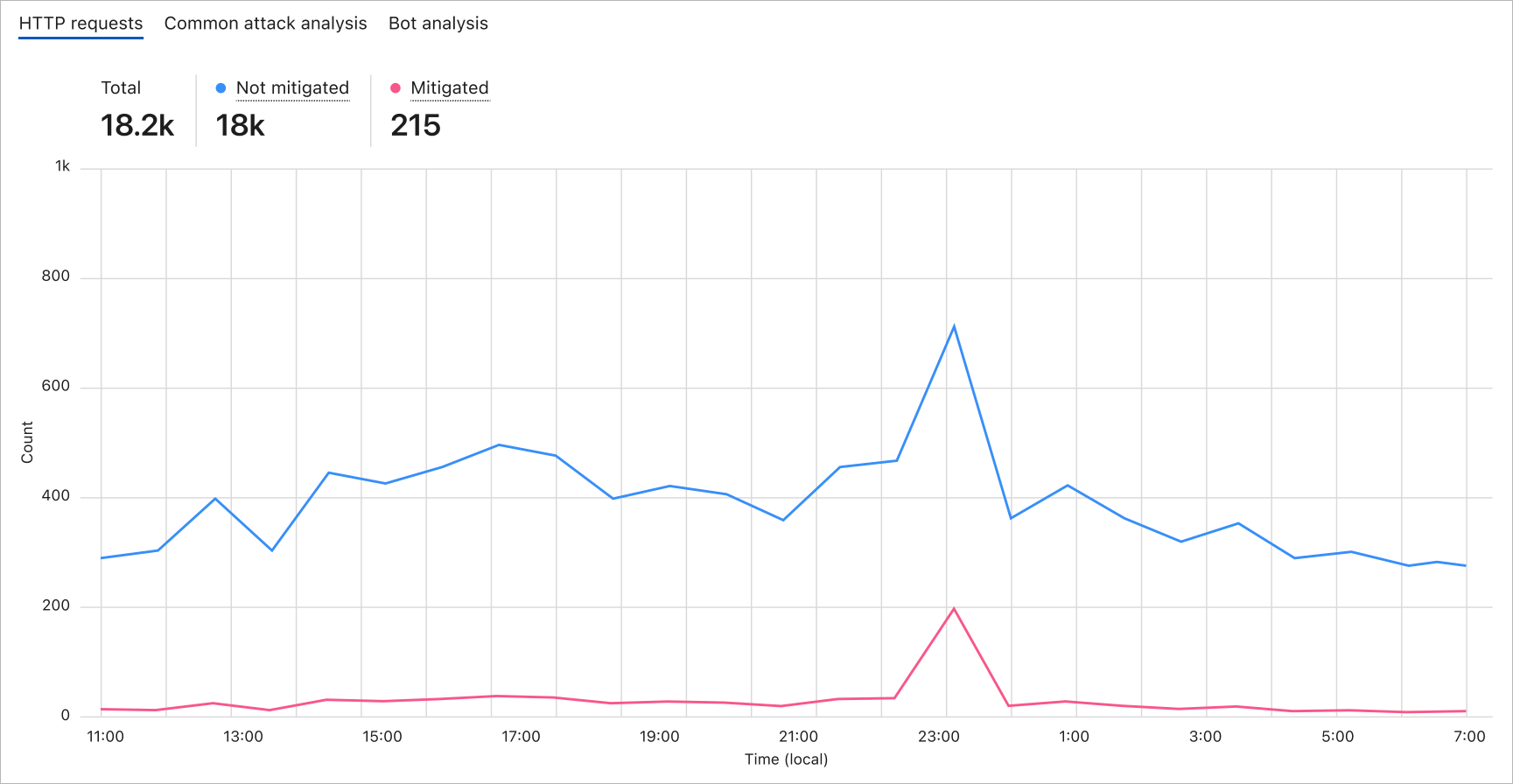
After a preliminary focus is defined, the core of the interface is dedicated to plotting trends over time. The time series chart has proven to be a powerful tool to help spot traffic anomalies, also allowing plotting based on different criteria. Whenever there is a spike, it is likely an attack or attack attempt has happened.

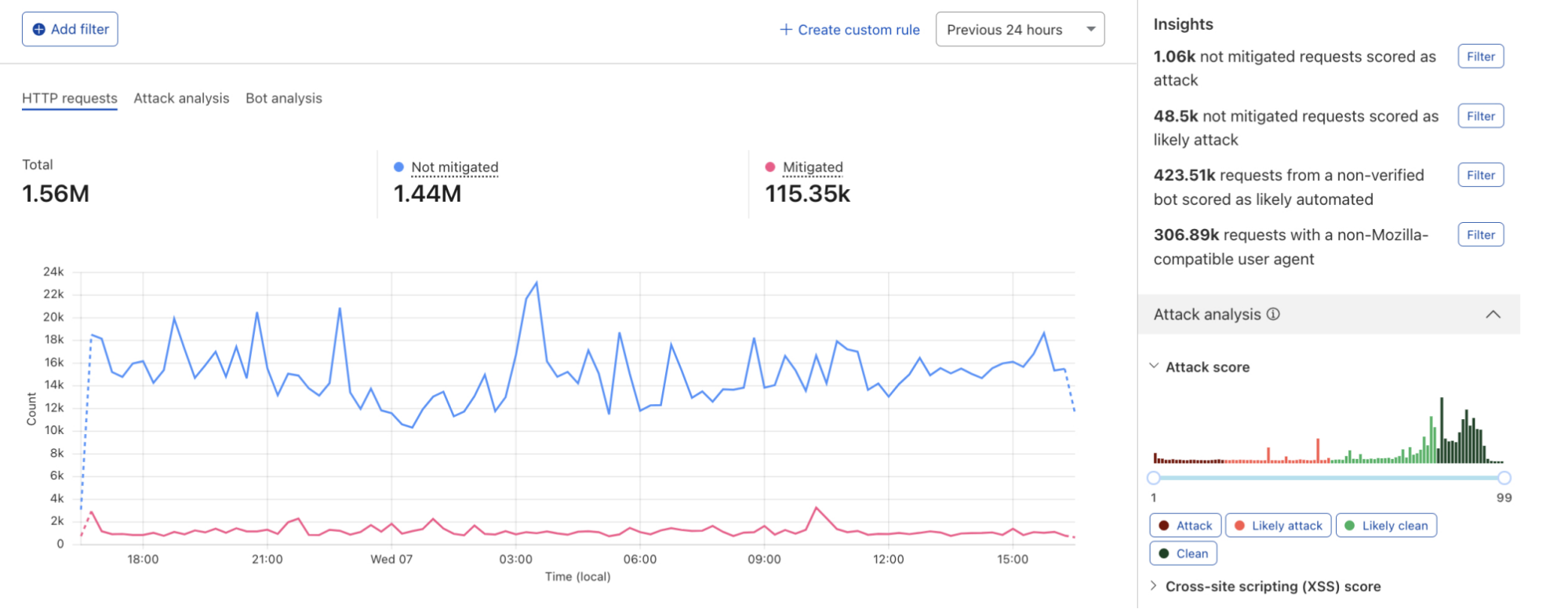
As mentioned above, different from Security Events, the dataset used in this page is HTTP requests which includes both mitigated and not mitigated requests. By mitigated requests here, we mean “any HTTP request that had a ‘terminating’ action applied by the Cloudflare platform”. The rest of the requests that have not been mitigated are either served by Cloudflare’s cache or reaching the origin. In the case such as a spike in not mitigated requests but flat in mitigated requests, an assumption could be that there was an attack that did not match any active WAF rule. In this example, you can one click to filter on not mitigated requests right in the chart which will update all the data visualized on this page supporting further investigations.

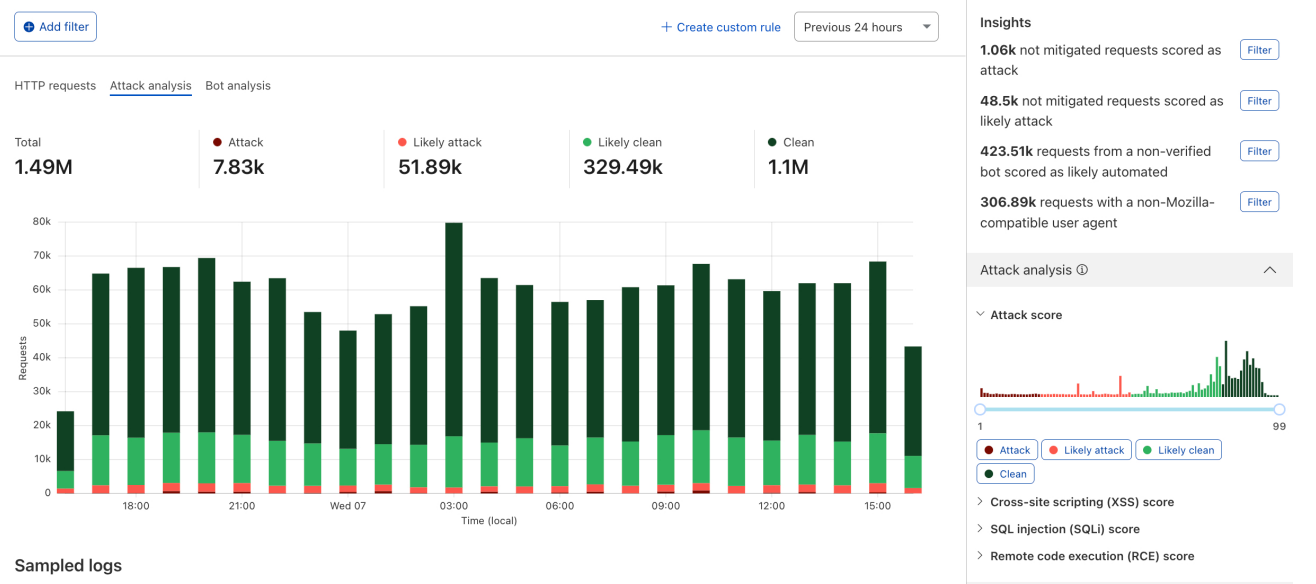
In addition to the default plotting of not mitigated and mitigated requests, you can also choose to plot trends of either attack analysis or bot analysis allowing you to spot anomalies for attack or bot behaviors.

New! Security Analytics provides a comprehensive view across all your traffic

Zoom in with analysis signals

One of the most loved and trusted analysis signals by our customers is the bot score. With the latest addition of WAF Attack Score and content scanning, we are bringing them together into one analytics page, helping you further zoom into your traffic based on some of these signals. The combination of these signals enables you to find answers to scenarios not possible until now:

  • Attack requests made by (definite) automated sources
  • Likely attack requests made by humans
  • Content uploaded with/without malicious content made by bots

Once a scenario is filtered on, the data visualization of the entire page including the top N statistics, HTTP requests trend and sampled log will be updated, allowing you to spot any anomalies among either one of the top N statistics or the time based HTTP requests trend.

New! Security Analytics provides a comprehensive view across all your traffic

Review sampled logs

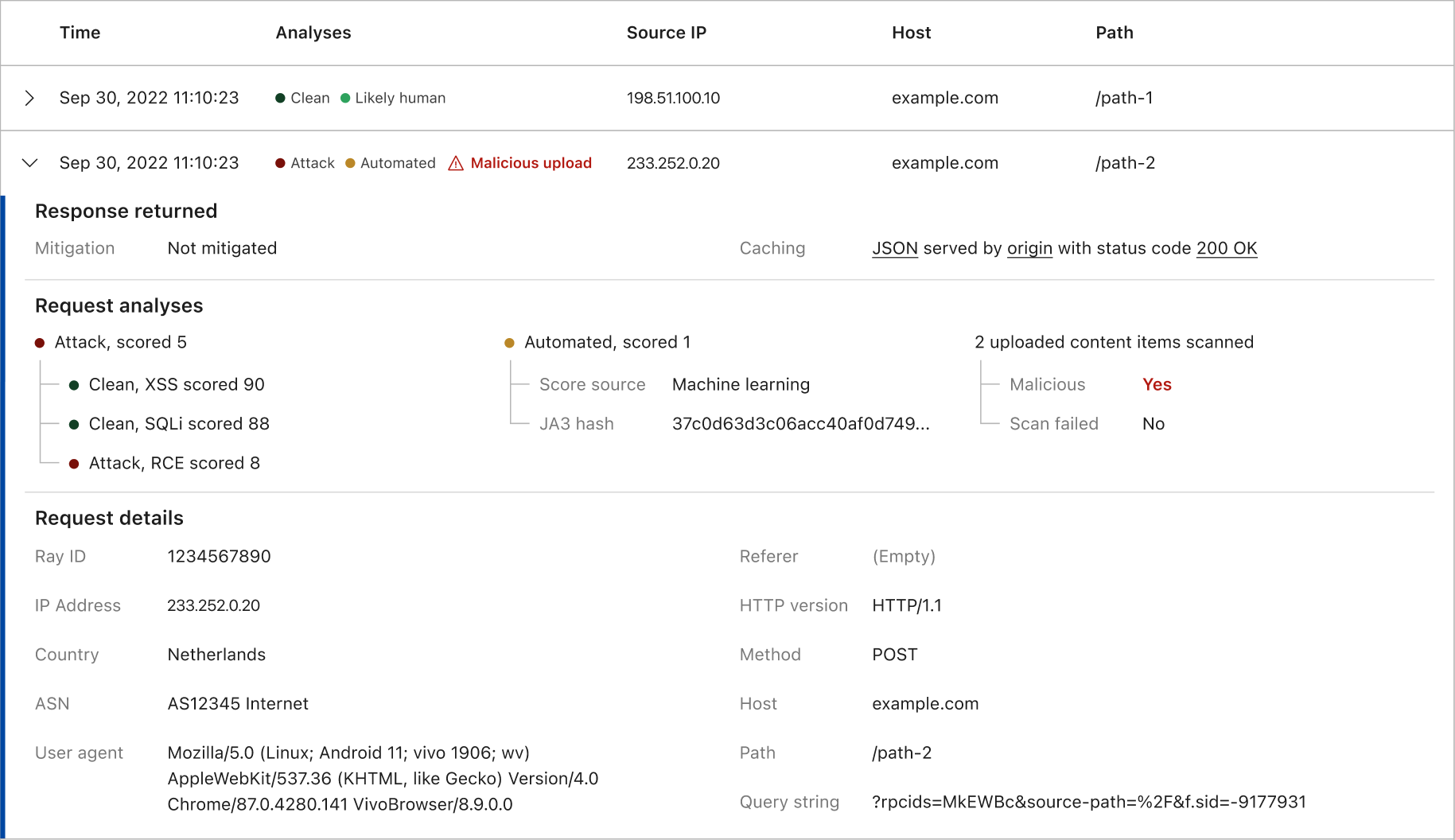
After zooming into a specific part of your traffic that may be an anomaly, sampled logs provide a detailed view to verify your finding per HTTP request. This is a crucial step in a security study workflow backed by the high engagement rate when examining the usage data of such logs viewed in Security Events. While we are adding more data into each log entry, the expanded log view becomes less readable over time. We have therefore redesigned the expanded view, starting with how Cloudflare responded to a request, followed by our analysis signals, lastly the key components of the raw request itself. By reviewing these details, you validate your hypothesis of an anomaly, and if any mitigation action is required.

New! Security Analytics provides a comprehensive view across all your traffic

Handy insights to get started

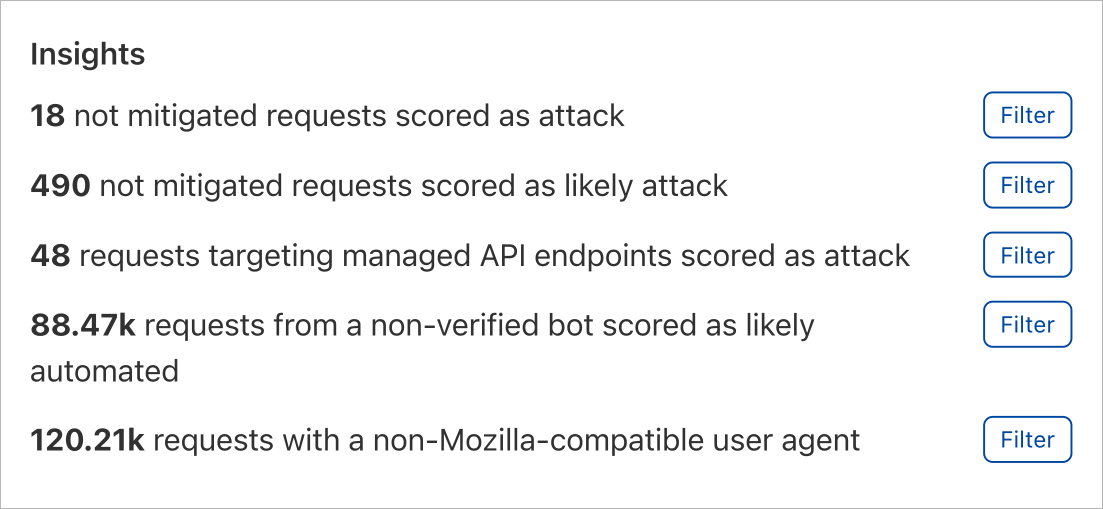
When testing the prototype of this analytics dashboard internally, we learnt that the power of flexibility yields the learning curve upwards. To help you get started mastering the flexibility, a handy insights panel is designed. These insights are crafted to highlight specific perspectives into your total traffic. By a simple click on any one of the insights, a preset of filters is applied zooming directly onto the portion of your traffic that you are interested in. From here, you can review the sampled logs or further fine tune any of the applied filters. This approach has been proven with further internal studies of a highly efficient workflow that in many cases will be your starting point of using this dashboard.

New! Security Analytics provides a comprehensive view across all your traffic

How can I get it?

The new Security Analytics is being gradually rolled out to all Enterprise customers who have purchased the new Application Security Core or Advanced Bundles. We plan to roll this out to all other customers in the near future. This new view will be alongside the existing Security Events dashboard.

New! Security Analytics provides a comprehensive view across all your traffic

What’s next

We are still at an early stage moving towards the “detect then mitigate” model, empowering you with greater visibility and intelligence to better protect your web applications. While we are working on enabling more detection capabilities, please share your thoughts and feedback with us to help us improve the experience. If you want to get access sooner, reach out to your account team to get started!

Stop attacks before they are known: making the Cloudflare WAF smarter

Post Syndicated from Radwa Radwan original https://blog.cloudflare.com/stop-attacks-before-they-are-known-making-the-cloudflare-waf-smarter/

Stop attacks before they are known: making the Cloudflare WAF smarter

Stop attacks before they are known: making the Cloudflare WAF smarter

Cloudflare’s WAF helps site owners keep their application safe from attackers. It does this by analyzing traffic with the Cloudflare Managed Rules: handwritten highly specialized rules that detect and stop malicious payloads. But they have a problem: if a rule is not written for a specific attack, it will not detect it.

Today, we are solving this problem by making our WAF smarter and announcing our WAF attack scoring system in general availability.

Customers on our Enterprise Core and Advanced Security bundles will have gradual access to this new feature. All remaining Enterprise customers will gain access over the coming months.

Our WAF attack scoring system, fully complementary to our Cloudflare Managed Rules, classifies all requests using a model trained on observed true positives across the Cloudflare network, allowing you to detect (and block) evasion, bypass and new attack techniques before they are publicly known.

The problem with signature based WAFs

Attackers trying to infiltrate web applications often use known or recently disclosed payloads. The Cloudflare WAF has been built to handle these attacks very well. The Cloudflare Managed Ruleset and the Cloudflare OWASP Managed Ruleset are in fact continuously updated and aimed at protecting web applications against known threats while minimizing false positives.

Things become harder with not publicly known attacks, often referred to as zero-days. While our teams do their best to research new threat vectors and keep the Cloudflare Managed rules updated, human speed becomes a limiting factor. Every time a new vector is found a window of opportunity becomes available for attackers to bypass mitigations.

One well known example was the Log4j RCE attack, where we had to deploy frequent rule updates as new bypasses were discovered by changing the known attack patterns.

The solution: complement signatures with a machine learning scoring model

Our WAF attack scoring system is a machine-learning-powered enhancement to Cloudflare’s WAF. It scores every request with a probability of it being malicious. You can then use this score when implementing WAF Custom Rules to keep your application safe alongside existing Cloudflare Managed Rules.

How do we use machine learning in Cloudflare’s WAF?

In any classification problem, the quality of the training set directly relates to the quality of the classification output, so a lot of effort was put into preparing the training data.

And this is where we used a Cloudflare superpower: we took advantage of Cloudflare’s network visibility by gathering millions of true positive samples generated by our existing signature based WAF and further enhanced it by using techniques covered in “Improving the accuracy of our machine learning WAF”.

This allowed us to train a model that is able to classify, given an HTTP request, the probability that the request contains a malicious payload, but more importantly, to classify when a request is very similar to a known true positive but yet sufficiently different to avoid a managed rule match.

The model runs inline to HTTP traffic and as of today it is optimized for three attack categories: SQL Injection (SQLi), Cross Site Scripting (XSS), and a wide range of Remote Code Execution (RCE) attacks such as shell injection, PHP injection, Apache Struts type compromises, Apache log4j, and similar attacks that result in RCE. We plan to add additional attack types in the future.

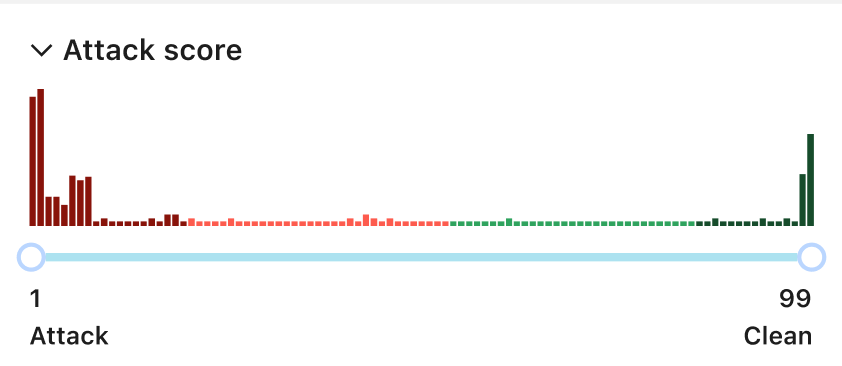
The output scores are similar to the Bot Management scores; they range between 1 and 99, where low scores indicate malicious or likely malicious and high scores indicate clean or likely clean HTTP request.

Stop attacks before they are known: making the Cloudflare WAF smarter

Proving immediate value

As one example of the effectiveness of this new system, on October 13, 2022 CVE-2022-42889 was identified as a “Critical Severity” in Apache Commons Text affecting versions 1.5 through 1.9.

The payload used in the attack, although not immediately blocked by our Cloudflare Managed Rules, was correctly identified (by scoring very low) by our attack scoring system. This allowed us to protect endpoints and identify the attack with zero time to deploy. Of course, we also still updated the Cloudflare Managed Rules to cover the new attack vector, as this allows us to improve our training data further completing our feedback loop.

Know what you don’t know with the new Security Analytics

In addition to the attack scoring system, we have another big announcement: our new Security Analytics! You can read more about this in the official announcement.

Using the new security analytics you can view the attack score distribution regardless of whether the requests were blocked or not allowing you to explore potentially malicious attacks before deploying any rules.

The view won’t only show the WAF Attack Score but also Bot Management and Content Scanning with the ability to mix and match filters as you desire.

Stop attacks before they are known: making the Cloudflare WAF smarter

How to use the WAF Attack Score and Security Analytics

Let’s go on a tour to spot attacks using the new Security Analytics, and then use the WAF Attack Scores to mitigate them.

Starting with Security Analytics

This new view has the power to show you everything in one place about your traffic. You have tens of filters to mix and match from, top statistics, multiple interactive graph distributions, as well as the log samples to verify your insights. In essence this gives you the ability to preview a number of filters without the need to create WAF Custom Rules in the first place.

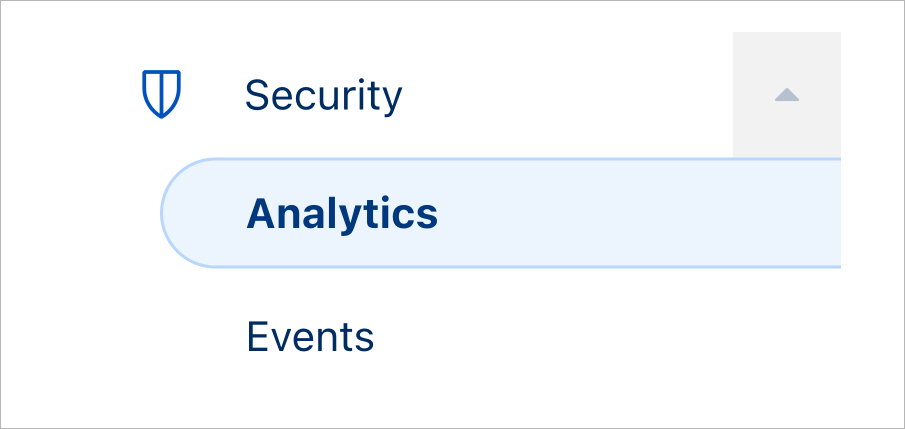
Step 1 – access the new Security Analytics: To Access the new Security Analytics in the dashboard, head over to the “Security” tab (Security > Analytics), the previous (Security > Overview) still exists under (Security > Events). You must have access to at least the WAF Attack Score to be able to see the new Security Analytics for the time being.

Step 2 – explore insights: On the new analytics page, you will view the time distribution of your entire traffic, along with many filters on the right side showing distributions for several features including the WAF Attack Score and the Bot Management score, to make it super easy to apply interesting filters we added the “Insights” section.

Stop attacks before they are known: making the Cloudflare WAF smarter

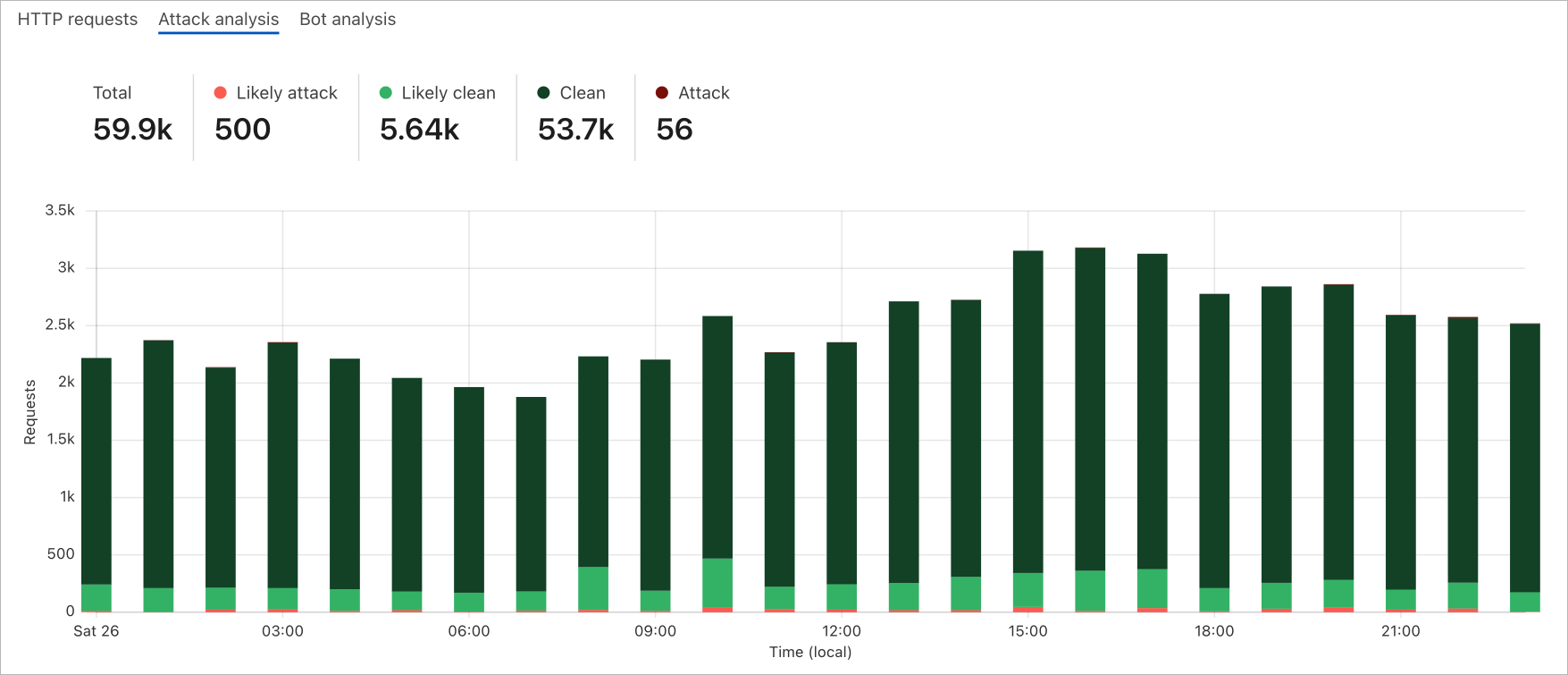
By choosing the “Attack Analysis” option you see a stacked chart overview of how your traffic looks from the WAF Attack Score perspective.

Stop attacks before they are known: making the Cloudflare WAF smarter

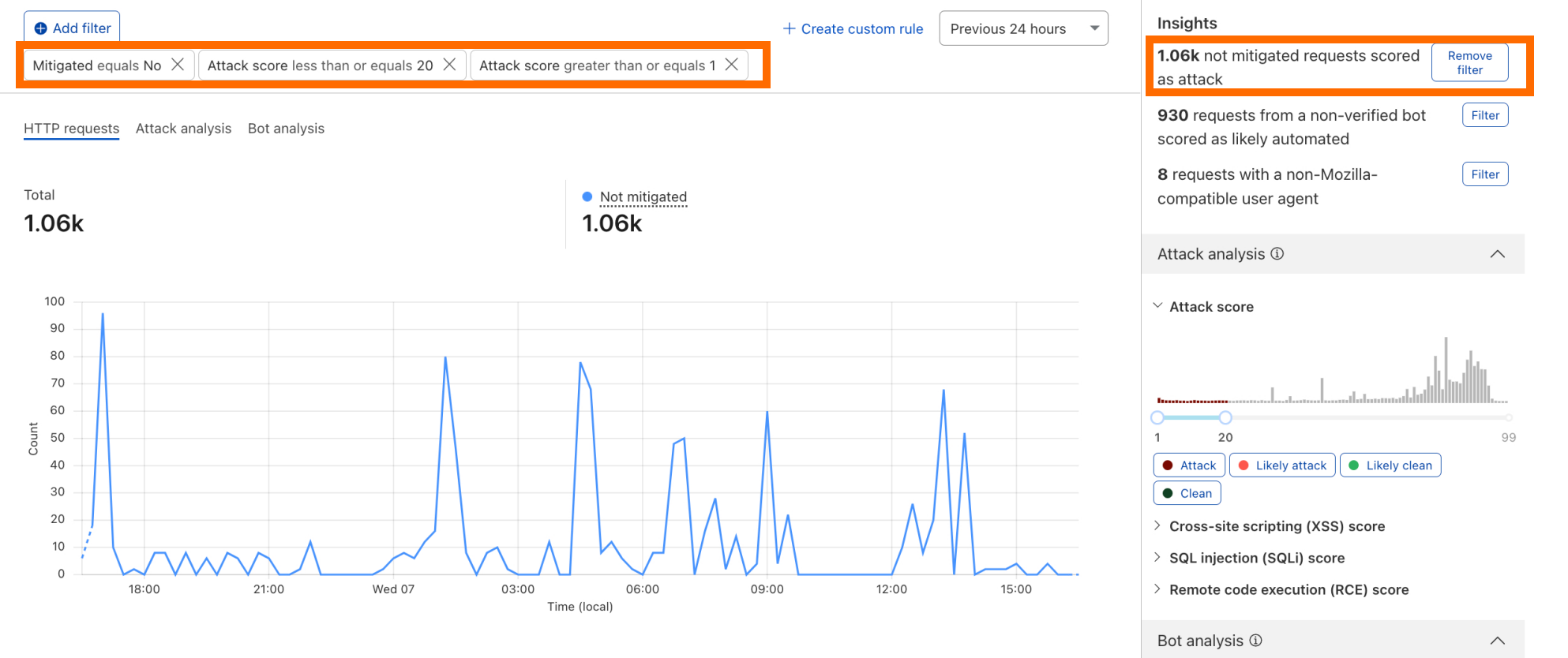
Step 3 – filter on attack traffic: A good place to start is to look for unmitigated HTTP requests classified as attacks. You can do this by using the attack score sliders on the right-hand side or by selecting any of the insights’ filters which are easy to use one click shortcuts. All charts will be updated automatically according to the selected filters.

Stop attacks before they are known: making the Cloudflare WAF smarter

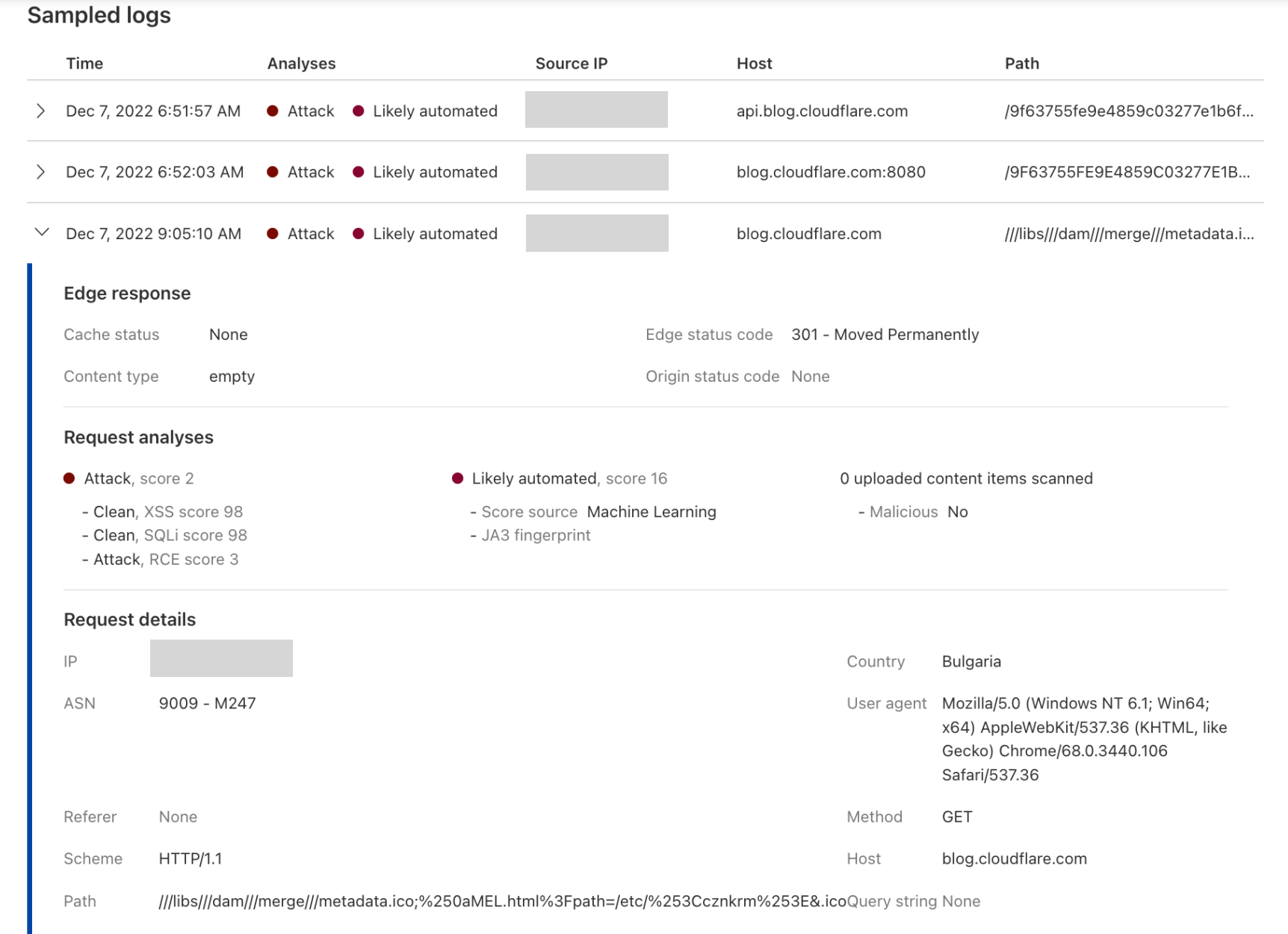
Step 4 – verify the attack traffic: This can be done by expanding the sampled logs below the traffic distribution graph, for instance in the below expanded log, you can see a very low RCE score indicating an “Attack”, along with Bot score indicating that the request was “Likely Automated”. Looking at the “Path” field, we can confirm that indeed this is a malicious request. Note that not all fields are currently logged/shown. For example a request might receive a low score due to a malicious payload in the HTTP body which cannot be easily verified in the sample logs today.

Stop attacks before they are known: making the Cloudflare WAF smarter

Step 5 – create a rule to mitigate the attack traffic: Once you have verified that your filter is not matching false positives, by using a single click on the “Create custom rule” button, you will be directed to the WAF Custom Rules builder with all your filters pre-populated and ready for you to “Deploy”.

Attack scores in Security Event logs

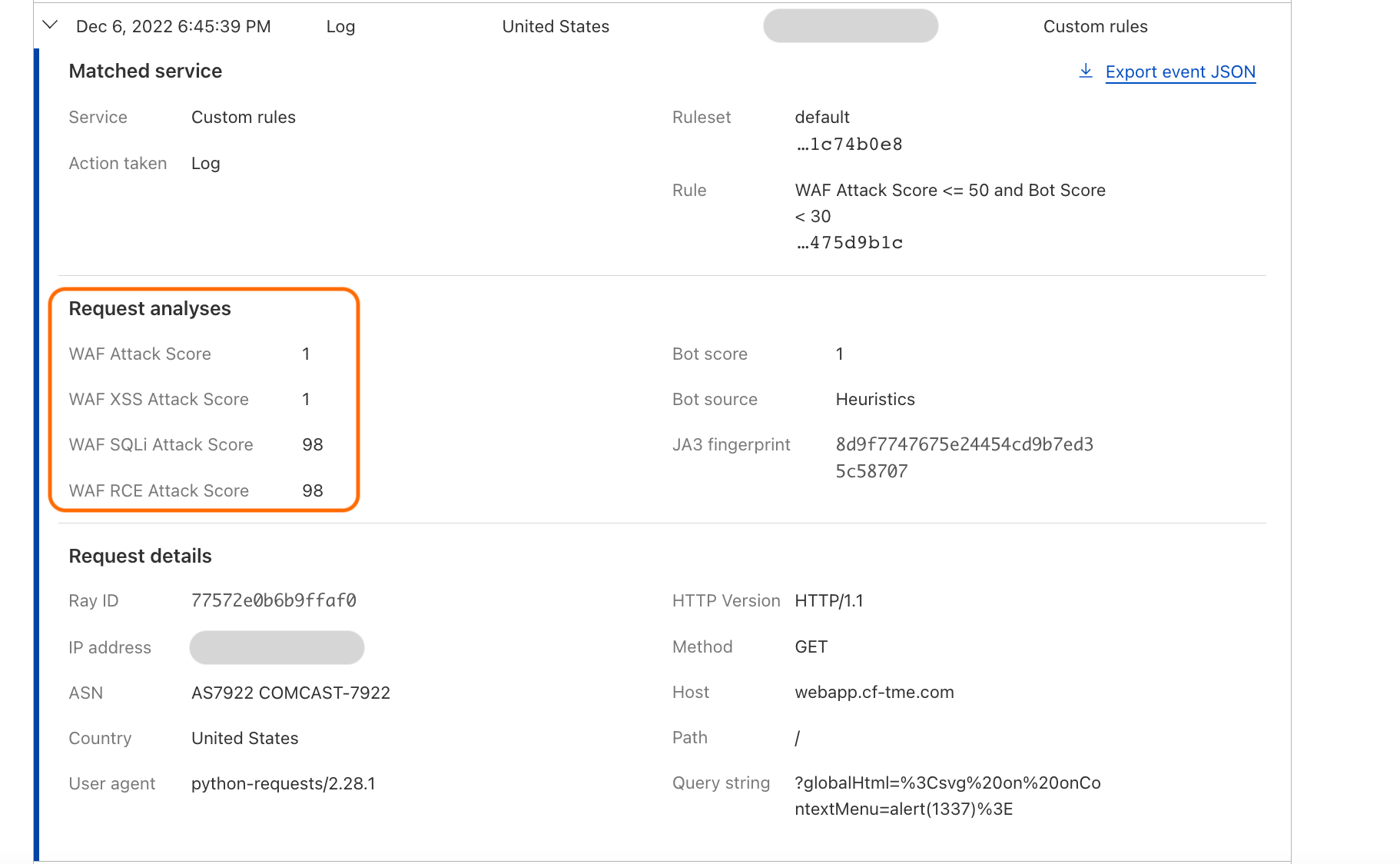
WAF Attack Scores are also available in HTTP logs, and by navigating to (Security > Events) when expanding any of the event log samples:

Stop attacks before they are known: making the Cloudflare WAF smarter

Note that all the new fields are available in WAF Custom Rules and WAF Rate Limiting Rules. These are documented in our developer docs: cf.waf.score, cf.waf.score.xss, cf.waf.score.sqli, and cf.waf.score.rce.

Although the easiest way to use these fields is by starting from our new Security Analytics dashboard as described above, you can use them as is when building rules and of course mixing with any other available field. The following example deploys a “Log” Action rule for any request with aggregate WAF Attack Score (cf.waf.score) less than 40.

Stop attacks before they are known: making the Cloudflare WAF smarter

What’s next?

This is just step one of many to make our Cloudflare WAF truly “intelligent”. In addition to rolling this new technology out to more customers, we are already working on providing even better visibility and cover additional attack vectors. For all that and more, stay tuned!

Security updates for Friday

Post Syndicated from original https://lwn.net/Articles/917530/

Security updates have been issued by Debian (leptonlib), Fedora (woff), Red Hat (grub2), Slackware (emacs), SUSE (busybox, chromium, java-1_8_0-openjdk, netatalk, and rabbitmq-server), and Ubuntu (gcc-5, gccgo-6, glibc, protobuf, and python2.7, python3.10, python3.6, python3.8).

What’s Up, Home? – Have a Nice Flight!

Post Syndicated from Janne Pikkarainen original https://blog.zabbix.com/whats-up-home-have-a-nice-flight/24755/

Can you monitor the FlightGear flight simulator with Zabbix? Of course, you can! By day, I am a monitoring tech lead in a global cyber security company. By night, I monitor my home with Zabbix & Grafana and do some weird experiments with them. Welcome to my blog about this project.

FlightGear is an awesome free, open-source flight simulator. I am not a pilot, not even a good virtual pilot, in fact, probably the virtual cabin crew would be chanting “BRACE! BRACE! BRACE! HEAD DOWN! STAY DOWN!” to my virtual passengers. Anyway, learning to fly would be awesome.

But what good would be virtual flying without any monitoring? Most people, they wouldn’t care about monitoring. For me, that’s everything I care about with this experiment.

FlightGear Properties

FlightGear can expose all kinds of flight-related data in many different ways; XML logging and via its built-in HTTP server, for example. This time I used its HTTP server, and cherry-picked only a few values (aircraft latitude, longitude, altitude, and speed), as the complete property list is LONG, and I do not understand most of it.

Anyway, you get the FlightGear HTTP server up and running by launching it like

fgfs –httpd=5480

… where 5480 is the port number where HTTP server will be listening on.

You will then have a property browser available on http://localhost:5480/json/ which is from where I found the values I wanted to harvest for my little experiment to see if this thing would fly.

Adding items to Zabbix

To get these values monitored, I added two new master items to Zabbix: one for velocities and one for the position. Then, dependent items are using those master items.

My latitude/longitude items also do populate the Zabbix inventory latitude/longitude fields for my aircraft.

Does it fly?

Yes, it does. I can now have data about my virtual flight.

And thanks to inventory fields, I can show the location of my virtual aircraft on Zabbix geomap.

If you are a flight simulator enthusiast, feel free to use this technique and possibly gather all the values from FlightGear property browser by using low-level discovery. For my little test, I did not bother.

I have been working at Forcepoint since 2014 and have learnt that proper monitoring makes sure your projects do takeoff without too much pain. — Janne Pikkarainen

This post was originally published on the author’s LinkedIn account.

Security Vulnerabilities in Eufy Cameras

Post Syndicated from Bruce Schneier original https://www.schneier.com/blog/archives/2022/12/security-vulnerabilities-in-eufy-cameras.html

Eufy cameras claim to be local only, but upload data to the cloud. The company is basically lying to reporters, despite being shown evidence to the contrary. The company’s behavior is so egregious that ReviewGeek is no longer recommending them.

This will be interesting to watch. If Eufy can ignore security researchers and the press without there being any repercussions in the market, others will follow suit. And we will lose public shaming as an incentive to improve security.

Update:

After further testing, we’re not seeing the VLC streams begin based solely on the camera detecting motion. We’re not sure if that’s a change since yesterday or something I got wrong in our initial report. It does appear that Eufy is making changes—it appears to have removed access to the method we were using to get the address of our streams, although an address we already obtained is still working.

End-to-end encrypted messages need more than libsignal

Post Syndicated from original https://mjg59.dreamwidth.org/62598.html

(Disclaimer: I’m not a cryptographer, and I do not claim to be an expert in Signal. I’ve had this read over by a couple of people who are so with luck there’s no egregious errors, but any mistakes here are mine)

There are indications that Twitter is working on end-to-end encrypted DMs, likely building on work that was done back in 2018. This made use of libsignal, the reference implementation of the protocol used by the Signal encrypted messaging app. There seems to be a fairly widespread perception that, since libsignal is widely deployed (it’s also the basis for WhatsApp‘s e2e encryption) and open source and has been worked on by a whole bunch of cryptography experts, choosing to use libsignal means that 90% of the work has already been done. And in some ways this is true – the security of the protocol is probably just fine. But there’s rather more to producing a secure and usable client than just sprinkling on some libsignal.

(Aside: To be clear, I have no reason to believe that the people who were working on this feature in 2018 were unaware of this. This thread kind of implies that the practical problems are why it didn’t ship at the time. Given the reduction in Twitter’s engineering headcount, and given the new leadership’s espousal of political and social perspectives that don’t line up terribly well with the bulk of the cryptography community, I have doubts that any implementation deployed in the near future will get all of these details right)

I was musing about this last night and someone pointed out some prior art. Bridgefy is a messaging app that uses Bluetooth as its transport layer, allowing messaging even in the absence of data services. The initial implementation involved a bunch of custom cryptography, enabling a range of attacks ranging from denial of service to extracting plaintext from encrypted messages. In response to criticism Bridgefy replaced their custom cryptographic protocol with libsignal, but that didn’t fix everything. One issue is the potential for MITMing – keys are shared on first communication, but the client provided no mechanism to verify those keys, so a hostile actor could pretend to be a user, receive messages intended for that user, and then reencrypt them with the user’s actual key. This isn’t a weakness in libsignal, in the same way that the ability to add a custom certificate authority to a browser’s trust store isn’t a weakness in TLS. In Signal the app key distribution is all handled via Signal’s servers, so if you’re just using libsignal you need to implement the equivalent yourself.

The other issue was more subtle. libsignal has no awareness at all of the Bluetooth transport layer. Deciding where to send a message is up to the client, and these routing messages were spoofable. Any phone in the mesh could say “Send messages for Bob here”, and other phones would do so. This should have been a denial of service at worst, since the messages for Bob would still be encrypted with Bob’s key, so the attacker would be able to prevent Bob from receiving the messages but wouldn’t be able to decrypt them. However, the code to decide where to send the message and the code to decide which key to encrypt the message with were separate, and the routing decision was made before the encryption key decision. An attacker could send a message saying “Route messages for Bob to me”, and then another saying “Actually lol no I’m Mallory”. If a message was sent between those two messages, the message intended for Bob would be delivered to Mallory’s phone and encrypted with Mallory’s key.

Again, this isn’t a libsignal issue. libsignal encrypted the message using the key bundle it was told to encrypt it with, but the client code gave it a key bundle corresponding to the wrong user. A race condition in the client logic allowed messages intended for one person to be delivered to and readable by another.

This isn’t the only case where client code has used libsignal poorly. The Bond Touch is a Bluetooth-connected bracelet that you wear. Tapping it or drawing gestures sends a signal to your phone, which culminates in a message being sent to someone else’s phone which sends a signal to their bracelet, which then vibrates and glows in order to indicate a specific sentiment. The idea is that you can send brief indications of your feelings to someone you care about by simply tapping on your wrist, and they can know what you’re thinking without having to interrupt whatever they’re doing at the time. It’s kind of sweet in a way that I’m not, but it also advertised “Private Spaces”, a supposedly secure way to send chat messages and pictures, and that seemed more interesting. I grabbed the app and disassembled it, and found it was using libsignal. So I bought one and played with it, including dumping the traffic from the app. One important thing to realise is that libsignal is just the protocol library – it doesn’t implement a server, and so you still need some way to get information between clients. And one of the bits of information you have to get between clients is the public key material.

Back when I played with this earlier this year, key distribution was implemented by uploading the public key to a database. The other end would download the public key, and everything works out fine. And this doesn’t sound like a problem, given that the entire point of a public key is to be, well, public. Except that there was no access control on this database, and the filenames were simply phone numbers, so you could overwrite anyone’s public key with one of your choosing. This didn’t let you cause messages intended for them to be delivered to you, so exploiting this for anything other than a DoS would require another vulnerability somewhere, but there are contrived situations where this would potentially allow the privacy expectations to be broken.

Another issue with this app was its handling of one-time prekeys. When you send someone new a message via Signal, it’s encrypted with a key derived from not only the recipient’s identity key, but also from what’s referred to as a “one-time prekey”. Users generate a bunch of keypairs and upload the public half to the server. When you want to send a message to someone, you ask the server for one of their one-time prekeys and use that. Decrypting this message requires using the private half of the one-time prekey, and the recipient deletes it afterwards. This means that an attacker who intercepts a bunch of encrypted messages over the network and then later somehow obtains the long-term keys still won’t be able to decrypt the messages, since they depended on keys that no longer exist. Since these one-time prekeys are only supposed to be used once (it’s in the name!) there’s a risk that they can all be consumed before they’re replenished. The spec regarding pre-keys says that servers should consider rate-limiting this, but the protocol also supports falling back to just not using one-time prekeys if they’re exhausted (you lose the forward secrecy benefits, but it’s still end-to-end encrypted). This implementation not only implemented no rate-limiting, making it easy to exhaust the one-time prekeys, it then also failed to fall back to running without them. Another easy way to force DoS.

(And, remember, a successful DoS on an encrypted communications channel potentially results in the users falling back to an unencrypted communications channel instead. DoS may not break the encrypted protocol, but it may be sufficient to obtain plaintext anyway)

And finally, there’s ClearSignal. I looked at this earlier this year – it’s avoided many of these pitfalls by literally just being a modified version of the official Signal client and using the existing Signal servers (it’s even interoperable with Actual Signal), but it’s then got a bunch of other weirdness. The Signal database (I /think/ including the keys, but I haven’t completely verified that) gets backed up to an AWS S3 bucket, identified using something derived from a key using KERI, and I’ve seen no external review of that whatsoever. So, who knows. It also has crash reporting enabled, and it’s unclear how much internal state it sends on crashes, and it’s also based on an extremely old version of Signal with the “You need to upgrade Signal” functionality disabled.

Three clients all using libsignal in one form or another, and three clients that do things wrong in ways that potentially have a privacy impact. Again, none of these issues are down to issues with libsignal, they’re all in the code that surrounds it. And remember that Twitter probably has to worry about other issues as well! If I lose my phone I’m probably not going to worry too much about whether the messages sent through my weird bracelet app being gone forever, but losing all my Twitter DMs would be a significant change in behaviour from the status quo. But that’s not an easy thing to do when you’re not supposed to have access to any keys! Group chats? That’s another significant problem to deal with. And making the messages readable through the web UI as well as on mobile means dealing with another set of key distribution issues. Get any of this wrong in one way and the user experience doesn’t line up with expectations, get it wrong in another way and the worst case involves some of your users in countries with poor human rights records being executed.

Simply building something on top of libsignal doesn’t mean it’s secure. If you want meaningful functionality you need to build a lot of infrastructure around libsignal, and doing that well involves not just competent development and UX design, but also a strong understanding of security and cryptography. Given Twitter’s lost most of their engineering and is led by someone who’s alienated all the cryptographers I know, I wouldn’t be optimistic.

comment count unavailable comments

Approaches for authenticating external applications in a machine-to-machine scenario

Post Syndicated from Patrick Sard original https://aws.amazon.com/blogs/security/approaches-for-authenticating-external-applications-in-a-machine-to-machine-scenario/

December 8, 2022: This post has been updated to reflect changes for M2M options with the new service of IAMRA. This blog post was first published November 19, 2013.

August 10, 2022: This blog post has been updated to reflect the new name of AWS Single Sign-On (SSO) – AWS IAM Identity Center. Read more about the name change here.


Amazon Web Services (AWS) supports multiple authentication mechanisms (AWS Signature v4, OpenID Connect, SAML 2.0, and more), essential in providing secure access to AWS resources. However, in a strictly machine-to machine (m2m) scenario, not all are a good fit. In these cases, a human is not present to provide user credential input. An example of such a scenario is when an on-premises application sends data to an AWS environment, as shown in Figure 1.

This post is designed to help you decide which approach is best to securely connect your applications, either residing on premises or hosted outside of AWS, to your AWS environment when no human interaction comes into play. We will go through the various alternatives available and highlight the pros and cons of each.

Figure 1: Securely connect your external applications to AWS in machine-to-machine scenarios

Figure 1: Securely connect your external applications to AWS in machine-to-machine scenarios

Determining the best approach

Let’s start by looking at possible authentication mechanisms that AWS supports in the following table. We’ll first identify the AWS service or services where the authentication can be set up—called the AWS front-end service. Then we’ll point out the AWS service that actually handles the authentication with AWS in the background—called the AWS backend service. We will also assess each mechanism based on use case.

Table 1: Authentication mechanisms available in AWS
Authentication mechanism AWS front-end service AWS backend service Good for m2m communication?
AWS Signature v4
  • All
AWS Security Token Service (AWS STS) Yes
Mutual TLS AWS STS Yes
OpenID Connect AWS STS Yes
SAML AWS STS Yes
Kerberos
  • n/a
AWS STS Yes
Microsoft Active Directory communication AWS STS No
IAM Roles Anywhere AWS STS Yes

Notes

We’ll now review each of these alternatives and also evaluate two additional characteristics on a 5-grade scale (from very low to very high) for each authentication mechanism:

  • Complexity: How complex is it to implement the authentication mechanism?
  • Convenience: How convenient is it to use the authentication mechanism on an ongoing basis?

As you’ll see, not all of the mechanisms are necessarily a good fit for a machine-to-machine scenario. Our focus here is on authentication of external applications, but not authentication of servers or other computers or Internet of Things (IoT) devices, which has already been documented extensively.

Active Directory–based authentication is available through either AWS IAM Identity Center or a limited set of AWS services and is meant in both cases to provide end users with access to AWS accounts and business applications. Active Directory–based authentication is also used broadly to authenticate devices such as Windows or Linux computers on a network. However, it isn’t used for authenticating applications with AWS. For that reason, we’ll exclude it from further scrutiny in this article.

Let’s look at the remaining authentication mechanisms one by one, with their respective pros and cons.

AWS Signature v4

The purpose of AWS Signature v4 is to authenticate incoming HTTP(S) requests to AWS services APIs. The AWS Signature v4 process is explained in detail in the documentation for the AWS APIs but, in a nutshell, the caller computes a signature using their credentials and then adds it to the header of the HTTP(S) request. On the other end, AWS accepts the request only if the provided signature is valid.

Figure 2: AWS Signature v4 authentication

Figure 2: AWS Signature v4 authentication

Native to AWS, low in complexity and highly convenient, AWS Signature v4 is the natural choice for machine-to-machine authentication scenarios with AWS. It is used behind the scenes by the AWS Command Line Interface (AWS CLI) and the AWS SDKs.

Pros

  • AWS Signature v4 is very convenient: the signature is built in the SDKs provided by AWS and is automatically computed on the caller’s behalf. If you prefer not to use an SDK, the signature process is a simple computation that can be implemented in any programming language.
  • There are fewer credentials to manage. No need to manage tedious digital certificates or even long-lived AWS credentials, because the AWS Signature v4 process supports temporary AWS credentials.
  • There is no need to interact with a third-party identity provider: once the request is signed, you’re good to go, provided that the signature is valid.

Cons

  • If you prefer not to store long-lived AWS credentials for your on-premises applications, you must first perform authentication through a third-party identity provider to obtain temporary AWS credentials. This would require using either OpenID Connect or SAML, in addition to AWS Signature v4. You could also use IAM Roles Anywhere, which exchanges a trusted certificate for temporary AWS credentials.

Mutual TLS

Mutual TLS, more specifically the mutual authentication mechanism of the Transport Layer Security (TLS) Protocol, allows the authentication of both ends—the client and the server sides—of a communication channel. By default, the server side of the TLS channel is always authenticated. With mutual TLS, the clients must also present a valid X.509 certificate for their identity to be verified.

Amazon API Gateway has recently announced native support for mutual TLS authentication (see this blog post for more details on the new feature). You can enable mutual TLS authentication on custom domains to authenticate your regional REST and HTTP APIs (except for private or edge APIs, for which the new feature is not supported at the time of this writing).

Figure 3: Mutual TLS authentication

Figure 3: Mutual TLS authentication

Mutual TLS can be both time-consuming and complicated to set up, but it is a widespread authentication mechanism.

Pros

  • Mutual TLS is widespread for IoT and business-to-business applications

Cons

  • You need to manage the digital certificates and their lifecycles. This can add significant burden and complexity to your IT operations.
  • You also need, at an application level, to pay special care to revoked certificates to reduce the risk of misuse. Since API Gateway doesn’t automatically verify if a client certificate has been revoked, you have to implement your own logic to do so, such as by using a Lambda authorizer.

OpenID Connect

OpenID Connect (OIDC), specifically OIDC 1.0, is a standard built on top of the OAuth 2.0 authorization framework to provide authentication for mobile and web-based applications. The OIDC client authentication method can be used by a client application to gain access to APIs exposed through Amazon API Gateway. The client application typically authenticates to an OAuth 2.0 authorization server, such as Amazon Cognito or another solution supporting that standard. As a result, the client application obtains a JSON Web Token (JWT) from the OAuth 2.0 authorization server. API Gateway then allows or denies the request based on the JWT validation. For more information about the access control part of this process, see the Amazon API Gateway documentation.

Figure 4: OIDC client authentication

Figure 4: OIDC client authentication

OIDC can be complex to put in place, but it’s a widespread authentication mechanism, especially for mobile and web applications and microservices architecture, including machine-to-machine scenarios.

Pros

  • With OIDC, you avoid storing long-lived AWS credentials for your on-premises applications.
  • OIDC uses REST or JSON message flows over HTTP, which makes it a particularly good fit (compared to SAML) for application developers today.

Cons

  • You need to store and maintain a set of credentials for each client application (such as client id and client secret) and make it accessible to the application. This can add complexity to your IT operations.

SAML

SAML 2.0 is an open standard for exchanging identity and security information between applications and service providers. SAML can be used to delegate authentication to a third-party identity provider, such as an Active Directory environment that is running on premises, and to gain access to AWS by providing a valid SAML assertion. (See About SAML 2.0-based federation to learn how to configure your AWS environment to leverage SAML 2.0.)

IAM validates the SAML assertion with your identity provider and, upon success, provides a set of AWS temporary credentials to the requesting party. The whole process is described in the IAM documentation.

Figure 5: SAML authentication

Figure 5: SAML authentication

SAML can be complex to put in place, but it’s a versatile authentication mechanism that can fit a lot of different use cases, including machine-to-machine scenarios.

Pros

  • With SAML, you not only avoid storing long-lived AWS credentials for your on-premises applications, but you can also use an existing on-premises directory, such as Active Directory, as an identity provider.
  • SAML doesn’t prescribe any particular technology or protocol by which the authentication should take place. The developer has total freedom to employ whichever is more convenient or makes more sense: key-based (such as X.509 certificates), ticket-based (such as Kerberos), or another applicable mechanism.
  • SAML is also a good fit when protocol bindings other than HTTP are needed.

Cons

  • Using SAML with AWS requires a third-party identity provider for your on-premises environment.
  • SAML also requires a trust to be established between your identity provider and your AWS environment, which adds more complexity to the process.
  • Because SAML is XML-based, it isn’t as concise or nimble as AWS Signature v4 or OIDC, for example.
  • You need to manage the SAML assertions and their lifecycles. This can add significant burden and complexity to your IT operations.

Kerberos

Initially developed by MIT, Kerberos v5 is an IETF standard protocol that enables client/server authentication on an unprotected network. It isn’t supported out-of-the-box by AWS, but you can use an identity provider, such as Active Directory, to exchange the Kerberos ticket provided to your application for either an OIDC/OAuth token or a SAML assertion that can be validated by AWS.

Figure 6: Kerberos authentication (through SAML or OIDC)

Figure 6: Kerberos authentication (through SAML or OIDC)

Kerberos is highly complex to set up, but it can make sense in cases where you already have an on-premises environment with Kerberos authentication in place.

Pros

  • With Kerberos, you not only avoid storing long-lived AWS credentials for your on-premises applications, but you can also use an existing on-premises directory, such as Active Directory, as an identity provider.

Cons

  • Using Kerberos with AWS requires the Kerberos ticket to be converted into something that can be accepted by AWS. Therefore, it requires you to use either the OIDC or SAML authentication mechanisms, as described previously.

IAM Roles Anywhere

IAM Roles Anywhere establishes a trust between your AWS account and the certificate authority (CA) that issues certificates to your on-premises workloads using public key infrastructure (PKI). For a detailed overview, see the blog post Extend AWS IAM roles to workloads outside of AWS with IAM Roles Anywhere. Your workloads outside of AWS use IAM Roles Anywhere to exchange x.509 certificates for temporary AWS credentials in order to interact with AWS APIs, thus removing the need for long-term credentials in your on-premises applications. IAM Roles Anywhere enables short-term credentials for numerous hybrid environment use cases including machine-to-machine scenarios.

Figure 7: IAMRA authentication process

Figure 7: IAMRA authentication process

IAM Roles Anywhere is a versatile authentication mechanism that can fit a lot of different use cases, including machine-to-machine scenarios where your on-premises workload is accessing AWS resources.

Pros

  • With IAM Roles Anywhere you avoid storing long-lived AWS credentials for your on-premises workloads.
  • You can import a certificate revocation list (CRL) from your certificate authority (CA) to support certificate revocation.

Cons

  • You need to manage the digital certificates and their lifecycles. This can add complexity to your IT operations.
  • IAM Roles Anywhere does not support callbacks to CRL distribution points (CDPs) or Online Certificate Status Protocol (OCSP) endpoints.

Conclusion

Now we’ll collect and summarize this discussion in the following table, with the pros and cons of each approach.

Authentication mechanism AWS front-end service Complexity Convenience
AWS Signature v4
  • All
Low Very High
Mutual TLS
  • AWS IoT Core
  • Amazon API Gateway
Medium High
OpenID Connect
  • Amazon Cognito
  • Amazon API Gateway
Medium High
SAML
  • Amazon Cognito
  • AWS Identity and Access Management (IAM)
High Medium
Kerberos
  • n/a
Very High Low
IAM Roles Anywhere
  • AWS Identity and Access Management (IAM)
Medium High

AWS Signature v4 is the most convenient and least complex mechanism of these options, but as for every situation, it’s important to start from your own requirements and context before making a choice. Additional factors may influence your choice, such as the structure or the culture of your organization, or the resources available for your project. Keeping the discussion focused on simple factors on purpose, we’ve come up with the following actionable decision helper.

Use AWS Signature v4 when:

  • You have access to AWS credentials (temporary or long-lived)
  • You want to call AWS services directly through their APIs

Use mutual TLS when:

  • The cost and effort of maintaining digital certificates is acceptable for your organization
  • Your organization already has a process in place to maintain digital certificates
  • You plan to call AWS services indirectly through custom-built APIs

Use OpenID Connect when:

  • You need or want to procure temporary AWS credentials by using a REST-based mechanism
  • You want to call AWS services directly through their APIs

Use SAML when:

  • You need to procure temporary AWS credentials
  • You already have a SAML-based authentication process in place
  • You want to call AWS services directly through their APIs

Use Kerberos when:

  • You already have a Kerberos-based authentication process in place
  • None of the previously mentioned mechanisms can be used for your use case

Use IAMRA when:

  • The cost and effort of maintaining digital certificates is acceptable for your organization
  • Your organization already has a process in place to maintain digital certificates
  • You want to call AWS services directly through their APIs
  • You need temporary security credentials for workloads such as servers, containers, and applications that run outside of AWS

We hope this post helps you find your way among the various alternatives that AWS offers to securely connect your external applications to your AWS environment, and to select the most appropriate mechanism for your specific use case. We look forward to your feedback.

If you have feedback about this post, submit comments in the Comments section below. If you have questions about this post, start a new thread on one of the AWS Developer forums or contact AWS Support.

Want more AWS Security how-to content, news, and feature announcements? Follow us on Twitter.

Author

Patrick Sard

Patrick works as a Solutions Architect at AWS. Apart from being a cloud enthusiast, Patrick loves practicing tai-chi (preferably Chen style), enjoys an occasional wine-tasting (he trained as a Sommelier), and is an avid tennis player.

Jeremy Wave

Jeremy Ware

Jeremy is a Security Specialist Solutions Architect focused on Identity and Access Management. Jeremy and his team enable AWS customers to implement sophisticated, scalable, and secure IAM architecture and Authentication workflows to solve business challenges. With a background in Security Engineering, Jeremy has spent many years working to raise the Security Maturity gap at numerous global enterprises. Outside of work, Jeremy loves to explore the mountainous outdoors participate in sports such as Snowboarding, Wakeboarding, and Dirt bike riding.

Experiment: The hidden costs of waiting on slow build times

Post Syndicated from Natalie Somersall original https://github.blog/2022-12-08-experiment-the-hidden-costs-of-waiting-on-slow-build-times/

The cost of hardware is one of the most common objections to providing more powerful computing resources to development teams—and that’s regardless of whether you’re talking about physical hardware in racks, managed cloud providers, or a software-as-a-service based (SaaS) compute resource. Paying for compute resources is an easy cost to “feel” as a business, especially if it’s a recurring operating expense for a managed cloud provider or SaaS solution.

When you ask a developer whether they’d prefer more or less powerful hardware, the answer is almost always the same: they want more powerful hardware. That’s because more powerful hardware means less time waiting on builds—and that means more time to build the next feature or fix a bug.

But even if the upfront cost is higher for higher-powered hardware, what’s the actual cost when you consider the impact on developer productivity?

To find out, I set up an experiment using GitHub’s new, larger hosted runners, which offer powerful cloud-based compute resources, to execute a large build at each compute tier from 2 cores to 64 cores. I wanted to see what the cost of each build time would be, and then compare that with the average hourly cost of a United States-based developer to figure out the actual operational expense for a business.

The results might surprise you.

Testing build times vs. cost by core size on compute resources

For my experiment, I used my own personal project where I compile the Linux kernel (seriously!) for Fedora 35 and Fedora 36. For background, I need a non-standard patch to play video games on my personal desktop without having to deal with dual booting.

Beyond being a fun project, it’s also a perfect case study for this experiment. As a software build, it takes a long time to run—and it’s a great proxy for more intensive software builds developers often navigate at work.

Now comes the fun part: our experiment. Like I said above, I’m going to initiate builds of this project at each compute tier from 2 cores to 64 cores, and then determine how long each build takes and its cost on GitHub’s larger runners. Last but not least: I’ll compare how much time we save during the build cycle and square that with how much more time developers would have to be productive to find the true business cost.

The logic here is that developers could either be waiting the entire time a build runs or end up context-switching to work on something else while a build runs. Both of these impact overall productivity (more on this below).

To simplify my calculations, I took the average runtimes of two builds per compute tier.

Pro tip: You can find my full spreadsheet for these calculations here if you want to copy it and play with the numbers yourself using other costs, times for builds, developer salaries, etc.

How much slow build times cost companies

In scenario number one of our experiment, we’ll assume that developers may just wait for a build to run and do nothing else during that time frame. That’s not a great outcome, but it happens.

So, what does this cost a business? According to StackOverflow’s 2022 Developer Survey, the average annual cost of a developer in the United States is approximately $150,000 per year including fringe benefits, taxes, and so on. That breaks down to around $75 (USD) an hour. In short, if a developer is waiting on a build to run for one hour and doing nothing in that timeframe, the business is still spending $75 on average for that developer’s time—and potentially losing out on time that developer could be focusing on building more code.

Now for the fun part: calculating the runtimes and cost to execute a build using each tier of compute power, plus the cost of a developer’s time spent waiting on the build. (And remember, I ran each of these twice at each tier and then averaged the results together.)

You end up with something like this:

Compute power Fedora 35 build Fedora 36 build Average time

(minutes)

Cost/minute for compute Total cost of 1 build Developer cost

(1 dev)

Developer cost

(5 devs)

2 core 5:24:27 4:54:02 310 $0.008 $2.48 $389.98 $1,939.98
4 core 2:46:33 2:57:47 173 $0.016 $2.77 $219.02 $1,084.02
8 core 1:32:13 1:30:41 92 $0.032 $2.94 $117.94 $577.94
16 core 0:54:31 0:54:14 55 $0.064 $3.52 $72.27 $347.27
32 core 0:36:21 0:32:21 35 $0.128 $4.48 $48.23 $223.23
64 core 0:29:25 0:24:24 27 $0.256 $6.91 $40.66 $175.66

You can immediately see how much faster each build completes on more powerful hardware—and that’s hardly surprising. But it’s striking how much money, on average, a business would be paying their developers in the time it takes for a build to run.

When you plot this out, you end up with a pretty compelling case for spending more money on stronger hardware.

A chart showing the cost of a build on servers of varying CPU power.

The bottom line: The cost of hardware is much, much less than the total cost for developers, and giving your engineering teams more CPU power means they have more time to develop software instead of waiting on builds to complete. And the bigger the team you have in a given organization, the more upside you have to invest in more capable compute resources.

How much context switching costs companies

Now let’s change the scenario in our experiment: Instead of assuming that developers are sitting idly while waiting for a build to finish, let’s consider they instead start working on another task while a build runs.

This is a classic example of context switching, and it comes with a cost, too. Research has found that context switching is both distracting and an impediment to focused and productive work. In fact, Gloria Mark, a professor of informatics at the University of California, Irvine, has found it takes about 23 minutes for someone to get back to their original task after context switching—and that isn’t even specific to development work, which often entails deeply involved work.

Based on my own experience, switching from one focused task to another takes at least an hour so that’s what I used to run the numbers against. Now, let’s break down the data again:

Compute power Minutes Cost of 1 build Partial developer cost

(1 dev)

Partial developer cost

(5 devs)

2 core 310 $2.48 $77.48 $377.48
4 core 173 $2.77 $77.77 $377.77
8 core 92 $2.94 $77.94 $377.94
16 core 55 $3.52 $78.52 $378.52
32 core 35 $4.48 $79.48 $379.48
64 core 27 $6.91 $81.91 $381.91

Here, the numbers tell a different story—that is, if you’re going to switch tasks anyways, the speed of build runs doesn’t significantly matter. Labor is much, much more expensive than compute resources. And that means spending a few more dollars to speed up the build is inconsequential in the long run.

Of course, this assumes it will take an hour for developers to get back on track after context switching. But according to the research we cited above, some people can get back on track in 23 minutes (and, additional research from Cornell found that it sometimes takes as little as 10 minutes).

To account for this, let’s try shortening the time frames to 30 minutes and 15 minutes:

Compute power Minutes Cost of 1 build Partial dev cost

(1 dev, 30 mins)

Partial dev cost

(5 devs, 30 mins)

Partial dev cost

(1 dev, 15 mins)

Partial dev cost

(5 devs, 15 mins)

2 core 310 $2.48 $39.98 $189.98 $21.23 $96.23
4 core 173 $2.77 $40.27 $190.27 $21.52 $96.52
8 core 92 $2.94 $40.44 $190.44 $21.69 $96.69
16 core 55 $3.52 $41.02 $191.02 $22.27 $97.27
32 core 35 $4.48 $41.98 $191.98 $23.23 $98.23
64 core 27 $6.91 $44.41 $194.41 $25.66 $100.66

And when you visualize this data on a graph, the cost for a single developer waiting on a build or switching tasks looks like this:

A chart showing how much it costs for developers to wait for a build to execute.

When you assume the average hourly rate of a developer is $75 (USD), the graph above shows that it almost always makes sense to pay more for more compute power so your developers aren’t left waiting or context switching. Even the most expensive compute option—$15 an hour for 64 cores and 256GB of RAM—only accounts for a fifth of the hourly cost of a single developer’s time. As developer salaries increase, the cost of hardware decreases, or the time the job takes to run decreases—and this inverse ratio bolsters the case for buying better equipment.

That’s something to consider.

The bottom line

It’s cheaper—and less frustrating for your developers—to pay more for better hardware to keep your team on track.

In this case, spending an extra $4-5 on build compute saves about $40 per build for an individual developer, or a little over $200 per build for a team of five, and the frustration of switching tasks with a productivity cost of about an hour. That’s not nothing. Of course, spending that extra $4-5 at scale can quickly compound—but so can the cost of sunk productivity.

Even though we used GitHub’s larger runners as an example here, these findings are applicable to any type of hardware—whether self-hosted or in the cloud. So remember: The upfront cost for more CPU power pays off over time. And your developers will thank you (trust us).

Want to try our new high-performance GitHub-hosted runners? Sign up for the beta today.

The collective thoughts of the interwebz