With the rapid growth in data coming from data platforms and applications, and the continuous improvements in state-of-the-art machine learning algorithms, data are becoming key assets for companies.
Modern data architectures include data mesh—a recent style that represents a paradigm shift, in which data is treated as a product and data architectures are designed around business domains. This type of approach supports the idea of distributed data, where each business domain focuses on the quality of the data it produces and exposes to the consumers.
In this edition of Let’s Architect!, we focus on data mesh and how it is designed on AWS, plus other approaches to adopt modern architectural patterns.
Domain Driven Design (DDD) is a software design approach where a solution is divided into domains aligned with business capabilities, software, and organizational boundaries. Unlike software architectures, most data architectures are often designed around technologies rather than business domains.
In this blog, you can learn about data mesh, an architectural pattern that applies the principles of DDD to data architectures. Data are organized into domains and considered the product that each team owns and offers for consumption.
A data mesh design organizes around data domains. Each domain owns multiple data products with their own data and technology stacks
In this video, discover how to use the data mesh approach in AWS. Specifically, how to implement certain design patterns for building a data mesh architecture with AWS services in the cloud.
This is a pragmatic presentation to get a quick understanding of data mesh fundamentals, the benefits/challenges, and the AWS services that you can use to build it. This video provides additional context to the aforementioned blog post and includes several examples on the benefits of modern data architectures.
This diagram demonstrates the pattern for sharing data catalogs between producer domains and consumer domains
In this blog, you can learn how to build a modern data strategy using AWS managed services to ingest data from sources like Salesforce. Also discussed is how to automatically create metadata catalogs and share data seamlessly between the data lake and data warehouse, plus creating alerts in the event of an orchestrated data workflow failure.
The second part of the post explains how a data warehouse can be built by using an agile data modeling pattern, as well as how ELT jobs were quickly developed, orchestrated, and configured to perform automated data quality testing.
A data platform architecture and the subcomponents used to build it
With a modern data architecture on AWS, architects and engineers can rapidly build scalable data lakes; use a broad and deep collection of purpose-built data services; and ensure compliance via unified data access, security, and governance. As data mesh is a modern architectural pattern, you can build it using a service like AWS Lake Formation.
Familiarize yourself with new technologies and services by not only learning how they work, but also to building prototypes and projects to gain hands-on experience. This workshop allows builders to become familiar with the features of AWS Lake Formation and its integrations with other AWS services.
A data catalog is a key component in a data mesh architecture. AWS Glue crawlers interact with data stores and other elements to populate the data catalog
See you next time!
Thanks for joining our discussion on data mesh! See you in a couple of weeks when we talk more about architectures and the challenges that we face every day while working with distributed systems.
Enterprise customers are modernizing their data warehouses and data lakes to provide real-time insights, because having the right insights at the right time is crucial for good business outcomes. To enable near-real-time decision-making, data pipelines need to process real-time or near-real-time data. This data is sourced from IoT devices, change data capture (CDC) services like AWS Data Migration Service (AWS DMS), and streaming services such as Amazon Kinesis, Apache Kafka, and others. These data pipelines need to be robust, able to scale, and able to process large data volumes in near-real time. AWS Glue streaming extract, transform, and load (ETL) jobs process data from data streams, including Kinesis and Apache Kafka, apply complex transformations in-flight, and load it into a target data stores for analytics and machine learning (ML).
Hundreds of customers are using AWS Glue streaming ETL for their near-real-time data processing requirements. These customers required an interactive capability to process streaming jobs. Previously, when developing and running a streaming job, you had to wait for the results to be available in the job logs or persisted into a target data warehouse or data lake to be able to view the results. With this approach, debugging and adjusting code is difficult, resulting in a longer development timeline.
Today, we are launching a new AWS Glue streaming ETL feature to interactively develop streaming ETL jobs in AWS Glue Studio notebooks and interactive sessions.
In this post, we provide a use case and step-by-step instructions to develop and debug your AWS Glue streaming ETL job using a notebook.
Solution overview
To demonstrate the streaming interactive sessions capability, we develop, test, and deploy an AWS Glue streaming ETL job to process Apache Webserver logs. The following high-level diagram represents the flow of events in our job. Apache Webserver logs are streamed to Amazon Kinesis Data Streams. An AWS Glue streaming ETL job consumes the data in near-real time and runs an aggregation that computes how many times a webpage has been unavailable (status code 500 and above) due to an internal error. The aggregate information is then published to a downstream Amazon DynamoDB table. As part of this post, we develop this job using AWS Glue Studio notebooks.
You can either work with the instructions provided in the notebook, which you download when instructed later in this post, or follow along with this post to author your first streaming interactive session job.
Prerequisites
To get started, click the Launch Stack button below, to run an AWS CloudFormation template on your AWS environment.
The template provisions a Kinesis data stream, DynamoDB table, AWS Glue job to generate simulated log data, and the necessary AWS Identity and Access Management (IAM) role and polices. After you deploy your resources, you can review the Resources tab on the AWS CloudFormation console for detailed information.
Set up the AWS Glue streaming interactive session job
To set up your AWS Glue streaming job, complete the following steps:
Download the notebook file and save it to a local directory on your computer.
On the AWS Glue console, choose Jobs in the navigation pane.
Choose Create job.
Select Jupyter Notebook.
Under Options, select Upload and edit an existing notebook.
Choose Choose file and browse to the notebook file you downloaded.
Choose Create.
For Job name¸ enter a name for the job.
For IAM Role, use the role glue-iss-role-0v8glq, which is provisioned as part of the CloudFormation template.
Choose Start notebook job.
You can see that the notebook is loaded into the UI. There are markdown cells with instructions as well as code blocks that you can run sequentially. You can either run the instructions on the notebook or follow along with this post to continue with the job development.
Run notebook cells
Let’s run the code block that has the magics. The notebook has notes on what each magic does.
Run the first cell.
After running the cell, you can see in the output section that the defaults have been reconfigured.
In the context of streaming interactive sessions, an important configuration is job type, which is set to streaming. Additionally, to minimize costs, the number of workers is set to 2 (default 5), which is sufficient for our use case that deals with a low-volume simulated dataset.
Our next step is to initialize an AWS Glue streaming session.
Run the next code cell.
After we run this cell, we can see that a session has been initialized and a session ID is created.
A Kinesis data stream and AWS Glue data generator job that feeds into this stream have already been provisioned and triggered by the CloudFormation template. With the next cell, we consume this data as an Apache Spark DataFrame.
Run the next cell.
Because there are no print statements, the cells don’t show any output. You can proceed to run the following cells.
Explore the data stream
To help enhance the interactive experience in AWS Glue interactive sessions, GlueContext provides the method getSampleStreamingDynamicFrame. It provides a snapshot of the stream in a static DynamicFrame. It takes three arguments:
The Spark streaming DataFrame
An options map
A writeStreamFunction to apply a function to every sampled record
Available options are as follows:
windowSize – Also known as the micro-batch duration, this parameter determines how long a streaming query will wait after the previous batch was triggered.
pollingTimeInMs – This is the total length of time the method will run. It starts at least one micro-batch to obtain sample records from the input stream. The time unit is milliseconds, and the value should be greater than the windowSize.
recordPollingLimit – This is defaulted to 100, and helps you set an upper bound on the number of records that is retrieved from the stream.
Run the next code cell and explore the output.
We see that the sample consists of 100 records (the default record limit), and we have successfully displayed the first 10 records from the sample.
Work with the data
Now that we know what our data looks like, we can write the logic to clean and format it for our analytics.
Run the code cell containing the reformat function.
Note that Python UDFs aren’t the recommended way to handle data transformations in a Spark application. We use reformat() to exemplify troubleshooting. When working with a real-world production application, we recommend using native APIs wherever possible.
We see that the code cell failed to run. The failure was on purpose. We deliberately created a division by zero exception in our parser.
Failure and recovery
In case of a regular AWS Glue job, for any error, the whole application exits, and you have to make code changes and resubmit the application. However, in case of interactive sessions, the coding context and definitions are fully preserved and the session is still operational. There is no need to bootstrap a new cluster and rerun all the preceding transformation. This allows you to focus on quickly iterating your batch function implementation to obtain the desired outcome. You can fix the defects and run them in a matter of seconds.
To test this out, go back to the code and comment or delete the erroneous line error_line=1/0 and rerun the cell.
Implement business logic
Now that we have successfully tested our parsing logic on the sample stream, let’s implement the actual business logic. The logics are implemented in the processBatch method within the next code cell. In this method, we do the following:
Pass the streaming DataFrame in micro-batches
Parse the input stream
Filter messages with status code >=500
Over a 1-minute interval, get the count of failures per webpage
Persist the preceding metric to a DynamoDB table (glue-iss-ddbtbl-0v8glq)
Run the next code cell to trigger the stream processing.
Wait a few minutes for the cell to complete.
On the DynamoDB console, navigate to the Items page and select the glue-iss-ddbtbl-0v8glq table.
The page displays the aggregated results that have been written by our interactive session job.
Deploy the streaming job
So far, we have been developing and testing our application using the streaming interactive sessions. Now that we’re confident of the job, let’s convert this into an AWS Glue job. We have seen that the majority of code cells are doing exploratory analysis and sampling, and aren’t required to be a part of the main job.
A commented code cell that represents the whole application is provided to you. You can uncomment the cell and delete all other cells. Another option would be to not use the commented cell, but delete just the two cells from the notebook that do the sampling or debugging and print statements.
To delete a cell, choose the cell and then choose the delete icon.
Now that you have the final application code ready, save and deploy the AWS Glue job by choosing Save.
A banner message appears when the job is updated.
Explore the AWS Glue job
After you save the notebook, you should be able to access the job like any regular AWS Glue job on the Jobs page of the AWS Glue console.
Additionally, you can look at the Job details tab to confirm the initial configurations, such as number of workers, have taken effect after deploying the job.
Run the AWS Glue job
If needed, you can choose Run to run the job as an AWS Glue streaming job.
To track progress, you can access the run details on the Runs tab.
Clean up
To avoid incurring additional charges to your account, stop the streaming job that you started as part of the instructions. Also, on the AWS CloudFormation console, select the stack that you provisioned and delete it.
Conclusion
In this post, we demonstrated how to do the following:
Author a job using notebooks
Preview incoming data streams
Code and fix issues without having to publish AWS Glue jobs
Review the end-to-end working code, remove any debugging, and print statements or cells from the notebook
Publish the code as an AWS Glue job
We did all of this via a notebook interface.
With these improvements in the overall development timelines of AWS Glue jobs, it’s easier to author jobs using the streaming interactive sessions. We encourage you to use the prescribed use case, CloudFormation stack, and notebook to jumpstart your individual use cases to adopt AWS Glue streaming workloads.
The goal of this post was to give you hands-on experience working with AWS Glue streaming and interactive sessions. When onboarding a productionized workload onto your AWS environment, based on the data sensitivity and security requirements, ensure you implement and enforce tighter security controls.
About the authors
Arun A K is a Big Data Solutions Architect with AWS. He works with customers to provide architectural guidance for running analytics solutions on the cloud. In his free time, Arun loves to enjoy quality time with his family.
Linan Zheng is a Software Development Engineer at AWS Glue Streaming Team, helping building the serverless data platform. His works involve large scale optimization engine for transactional data formats and streaming interactive sessions.
Roman Gavrilov is an Engineering Manager at AWS Glue. He has over a decade of experience building scalable Big Data and Event-Driven solutions. His team works on Glue Streaming ETL to allow near real time data preparation and enrichment for machine learning and analytics.
Shiv Narayanan is a Senior Technical Product Manager on the AWS Glue team. He works with AWS customers across the globe to strategize, build, develop, and deploy modern data platforms.
Amazon Redshift is a fully managed, petabyte-scale, massively parallel data warehouse that offers simple operations and high performance. It makes it fast, simple, and cost-effective to analyze all your data using standard SQL and your existing business intelligence (BI) tools. Today, Amazon Redshift has become the most widely used cloud data warehouse.
RA3 nodes – Amazon Redshift RA3 nodes are backed by a new managed storage model that gives you the power to separately optimize your compute power and your storage. They bring a few very important features, one of which is data sharing. RA3 nodes also support the ability to pause and resume, which allows you to easily suspend on-demand billing while the cluster is not being used.
Data sharing – Amazon Redshift data sharing offers you to extend the ease of use, performance, and cost benefits of Amazon Redshift in a single cluster to multi-cluster deployments while being able to share data. Data sharing enables instant, granular, and fast data access across Redshift clusters without the need to copy or move it. You can securely share live data with Amazon Redshift clusters in the same or different AWS accounts, and across regions. You can share data at many levels, including schemas, tables, views, and user-defined functions. You can also share the most up-to-date and consistent information as it’s updated in Amazon Redshift Serverless. It also provides fine-grained access controls that you can tailor for different users and businesses that all need access to the data. However, data sharing in Amazon Redshift has a few limitations.
Solution overview
In this use case, our customer is heavily using Amazon Redshift as their data warehouse for their analytics workloads, and they have been enjoying the possibility and convenience that Amazon Redshift brought to their business. They mainly use Amazon Redshift to store and process user behavioral data for BI purposes. The data has increased by hundreds of gigabytes daily in recent months, and employees from departments continuously run queries against the Amazon Redshift cluster on their BI platform during business hours.
The company runs four major analytics workloads on a single Amazon Redshift cluster, because some data is used by all workloads:
Queries from the BI platform – Various queries run mainly during business hours.
Hourly ETL – This extract, transform, and load (ETL) job runs in the first few minutes of each hour. It generally takes about 40 minutes.
Daily ETL – This job runs twice a day during business hours, because the operation team needs to get daily reports before the end of the day. Each job normally takes between 1.5–3 hours. It’s the second-most resource-heavy workload.
Weekly ETL – This job runs in the early morning every Sunday. It’s the most resource-heavy workload. The job normally takes 3–4 hours.
The analytics team has migrated to the RA3 family and increased the number of nodes of the Amazon Redshift cluster to 12 over the years to keep the average runtime of queries from their BI tool within an acceptable time due to the data size, especially when other workloads are running.
However, they have noticed that performance is reduced while running ETL tasks, and the duration of ETL tasks is long. Therefore, the analytics team wants to explore solutions to optimize their Amazon Redshift cluster.
Because CPU utilization spikes appear while the ETL tasks are running, the AWS team’s first thought was to separate workloads and relevant data into multiple Amazon Redshift clusters with different cluster sizes. By reducing the total number of nodes, we hoped to reduce the cost of Amazon Redshift.
After a series of conversations, the AWS team found that one of the reasons that the customer keeps all workloads on the 12-node Amazon Redshift cluster is to manage the performance of queries from their BI platform, especially while running ETL workloads, which have a big impact on the performance of all workloads on the Amazon Redshift cluster. The obstacle is that many tables in the data warehouse are required to be read and written by multiple workloads, and only the producer of a data share can update the shared data.
The challenge of dividing the Amazon Redshift cluster into multiple clusters is data consistency. Some tables need to be read by ETL workloads and written by BI workloads, and some tables are the opposite. Therefore, if we duplicate data into two Amazon Redshift clusters or only create a data share from the BI cluster to the reporting cluster, the customer will have to develop a data synchronization process to keep the data consistent between all Amazon Redshift clusters, and this process could be very complicated and unmaintainable.
After more analysis to gain an in-depth understanding of the customer’s workloads, the AWS team found that we could put tables into four groups, and proposed a multi-cluster, two-way data sharing solution. The purpose of the solution is to divide the workloads into separate Amazon Redshift clusters so that we can use Amazon Redshift to pause and resume clusters for periodic workloads to reduce the Amazon Redshift running costs, because clusters can still access a single copy of data that is required for workloads. The solution should meet the data consistency requirements without building a complicated data synchronization process.
The following diagram illustrates the old architecture (left) compared to the new multi-cluster solution (right).
Dividing workloads and data
Due to the characteristics of the four major workloads, we categorized workloads into two categories: long-running workloads and periodic-running workloads.
The long-running workloads are for the BI platform and hourly ETL jobs. Because the hourly ETL workload requires about 40 minutes to run, the gain is small even if we migrate it to an isolated Amazon Redshift cluster and pause and resume it every hour. Therefore, we leave it with the BI platform.
The periodic-running workloads are the daily and weekly ETL jobs. The daily job generally takes about 1 hour and 40 minutes to 3 hours, and the weekly job generally takes 3–4 hours.
Data sharing plan
The next step is identifying all data (tables) access patterns of each category. We identified four types of tables:
Type 1 – Tables are only read and written by long-running workloads
Type 2 – Tables are read and written by long-running workloads, and are also read by periodic-running workloads
Type 3 – Tables are read and written by periodic-running workloads, and are also read by long-running workloads
Type 4 – Tables are only read and written by periodic-running workloads
Fortunately, there is no table that is required to be written by all workloads. Therefore, we can separate the Amazon Redshift cluster into two Amazon Redshift clusters: one for the long-running workloads, and the other for periodic-running workloads with 20 RA3 nodes.
We created a two-way data share between the long-running cluster and the periodic-running cluster. For type 2 tables, we created a data share on the long-running cluster as the producer and the periodic-running cluster as the consumer. For type 3 tables, we created a data share on the periodic-running cluster as the producer and the long-running cluster as the consumer.
The following diagram illustrates this data sharing configuration.
Build two-way data share across Amazon Redshift clusters
In this section, we walk through the steps to build a two-way data share across Amazon Redshift clusters. First, let’s take a snapshot of the original Amazon Redshift cluster, which became the long-running cluster later.
Now, let’s create a new Amazon Redshift cluster with 20 RA3 nodes for periodic-running workloads. Then we migrate the type 3 and type 4 tables to the periodic-running cluster. Make sure you choose the ra3 node type. (Amazon Redshift Serverless supports data sharing too, and it becomes generally available in July 2022, so it is also an option now.)
Create the long-to-periodic data share
The next step is to create the long-to-periodic data share. Complete the following steps:
On the periodic-running cluster, get the namespace by running the following query:
SELECT current_namespace;
Make sure record the namespace.
On the long-running cluster, we run queries similar to the following:
CREATE DATASHARE ltop_share SET PUBLICACCESSIBLE TRUE;
ALTER DATASHARE ltop_share ADD SCHEMA public_long;
ALTER DATASHARE ltop_share ADD ALL TABLES IN SCHEMA public_long;
GRANT USAGE ON DATASHARE ltop_share TO NAMESPACE '[periodic-running-cluster-namespace]';
We can validate the long-to-periodic data share using the following command:
SHOW datashares;
After we validate the data share, we get the long-running cluster namespace with the following query:
SELECT current-namespace;
Make sure record the namespace.
On the periodic-running cluster, run the following command to load the data from the long-to-periodic data share with the long-running cluster namespace:
CREATE DATABASE ltop FROM DATASHARE ltop_share OF NAMESPACE '[long-running-cluster-namespace]';
Confirm that we have read access to tables in the long-to-periodic data share.
Create the periodic-to-long data share
The next step is to create the periodic-to-long data share. We use the namespaces of the long-running cluster and the periodic-running cluster that we collected in the previous step.
On the periodic-running cluster, run queries similar to the following to create the periodic-to-long data share:
CREATE DATASHARE ptol_share SET PUBLICACCESSIBLE TRUE;
ALTER DATASHARE ptol_share ADD SCHEMA public_periodic;
ALTER DATASHARE ptol_share ADD ALL TABLES IN SCHEMA public_periodic;
GRANT USAGE ON DATASHARE ptol_share TO NAMESPACE '[long-running-cluster-namespace]';
Validate the data share using the following command:
SHOW datashares;
On the long-running cluster, run the following command to load the data from the periodic-to-long data using the periodic-running cluster namespace:
CREATE DATABASE ptol FROM DATASHARE ptol_share OF NAMESPACE '[periodic-running-cluster-namespace]';
Check that we have read access to the tables in the periodic-to-long data share.
At this stage, we have separated workloads into two Amazon Redshift clusters and built a two-way data share across two Amazon Redshift clusters.
The next step is updating the code of different workloads to use the correct endpoints of two Amazon Redshift clusters and perform consolidated tests.
Pause and resume the periodic-running Amazon Redshift cluster
Let’s update the crontab scripts, which run periodic-running workloads. We make two updates.
When the scripts start, call the Amazon Redshift check and resume cluster APIs to resume the periodic-running Amazon Redshift cluster when the cluster is paused:
After we migrated the workloads to the new architecture, the company’s analytics team ran some tests to verify the results.
According to tests, the performance of all workloads improved:
The BI workload is about 100% faster during the ETL workload running periods
The hourly ETL workload is about 50% faster
The daily workload duration reduced to approximately 40 minutes, from a maximum of 3 hours
The weekly workload duration reduced to approximately 1.5 hours, from a maximum of 4 hours
All functionalities work properly, and cost of the new architecture only increased approximately 13%, while over 10% of new data had been added during the testing period.
Learnings and limitations
After we separated the workloads into different Amazon Redshift clusters, we discovered a few things:
The performance of the BI workloads was 100% faster because there was no resource competition with daily and weekly ETL workloads anymore
The duration of ETL workloads on the periodic-running cluster was reduced significantly because there were more nodes and no resource competition from the BI and hourly ETL workloads
Even when over 10% new data was added, the overall cost of the Amazon Redshift clusters only increased by 13%, due to using the cluster pause and resume function of the Amazon Redshift RA3 family
As a result, we saw a 70% price-performance improvement of the Amazon Redshift cluster.
However, there are some limitations of the solution:
To use the Amazon Redshift pause and resume function, the code for calling the Amazon Redshift pause and resume APIs must be added to all scheduled scripts that run ETL workloads on the periodic-running cluster
Amazon Redshift clusters require several minutes to finish pausing and resuming, although you’re not charged during these processes
The size of Amazon Redshift clusters can’t automatically scale in and out depending on workloads
Next steps
After improving performance significantly, we can explore the possibility of reducing the number of nodes of the long-running cluster to reduce Amazon Redshift costs.
Another possible optimization is using Amazon Redshift Spectrum to reduce the cost of Amazon Redshift on cluster storage. With Redshift Spectrum, multiple Amazon Redshift clusters can concurrently query and retrieve the same structured and semistructured dataset in Amazon Simple Storage Service (Amazon S3) without the need to make copies of the data for each cluster or having to load the data into Amazon Redshift tables.
Amazon Redshift Serverless was announced for preview in AWS re:Invent 2021 and became generally available in July 2022. Redshift Serverless automatically provisions and intelligently scales your data warehouse capacity to deliver best-in-class performance for all your analytics. You only pay for the compute used for the duration of the workloads on a per-second basis. You can benefit from this simplicity without making any changes to your existing analytics and BI applications. You can also share data for read purposes across different Amazon Redshift Serverless instances within or across AWS accounts.
Therefore, we can explore the possibility of removing the need to script for pausing and resuming the periodic-running cluster by using Redshift Serverless to make the management easier. We can also explore the possibility of improving the granularity of workloads.
Conclusion
In this post, we discussed how to optimize workloads on Amazon Redshift clusters using RA3 nodes, data sharing, and pausing and resuming clusters. We also explored a use case implementing a multi-cluster two-way data share solution to improve workload performance with a minimum code change. If you have any questions or feedback, please leave them in the comments section.
About the authors
Jingbin Ma is a Sr. Solutions Architect at Amazon Web Services. He helps customers build well-architected applications using AWS services. He has many years of experience working in the internet industry, and his last role was CTO of a New Zealand IT company before joining AWS. He is passionate about serverless and infrastructure as code.
Chao Pan is a Data Analytics Solutions Architect at Amazon Web Services. He’s responsible for the consultation and design of customers’ big data solution architectures. He has extensive experience in open-source big data. Outside of work, he enjoys hiking.
At the Raspberry Pi Foundation, we’ve been thinking about questions relating to artificial intelligence (AI) education and data science education for several months now, inviting experts to share their perspectives in a series of very well-attended seminars. At the same time, we’ve been running a programme of research trials to find out what interventions in school might successfully improve gender balance in computing. We’re learning a lot, and one primary lesson is that these topics are not discrete: there are relationships between them.
We can’t talk about AI education — or computer science education more generally — without considering the context in which we deliver it, and the societal issues surrounding computing, AI, and data. For this International Women’s Day, I’m writing about the intersection of AI and gender, particularly with respect to gender bias in machine learning.
The quest for gender equality
Gender inequality is everywhere, and researchers, activists, and initiatives, and governments themselves, have struggled since the 1960s to tackle it. As women and girls around the world continue to suffer from discrimination, the United Nations has pledged, in its Sustainable Development Goals, to achieve gender equality and to empower all women and girls.
While progress has been made, new developments in technology may be threatening to undo this. As Susan Leahy, a machine learning researcher from the Insight Centre for Data Analytics, puts it:
Artificial intelligence is increasingly influencing the opinions and behaviour of people in everyday life. However, the over-representation of men in the design of these technologies could quietly undo decades of advances in gender equality.
Susan Leavy, 2018 [1]
Gender-biased data
In her 2019 award-winning book Invisible Women: Exploring Data Bias in a World Designed for Men [2], Caroline Ceriado Perez discusses the effects of gender-biased data. She describes, for example, how the designs of cities, workplaces, smartphones, and even crash test dummies are all based on data gathered from men. She also discusses that medical research has historically been conducted by men, on male bodies.
Looking at this problem from a different angle, researcher Mayra Buvinic and her colleagues highlight that in most countries of the world, there are no sources of data that capture the differences between male and female participation in civil society organisations, or in local advisory or decision making bodies [3]. A lack of data about girls and women will surely impact decision making negatively.
Bias in machine learning
Machine learning (ML) is a type of artificial intelligence technology that relies on vast datasets for training. ML is currently being use in various systems for automated decision making. Bias in datasets for training ML models can be caused in several ways. For example, datasets can be biased because they are incomplete or skewed (as is the case in datasets which lack data about women). Another example is that datasets can be biased because of the use of incorrect labels by people who annotate the data. Annotating data is necessary for supervised learning, where machine learning models are trained to categorise data into categories decided upon by people (e.g. pineapples and mangoes).
Max Gruber / Better Images of AI / Banana / Plant / Flask / CC-BY 4.0
In order for a machine learning model to categorise new data appropriately, it needs to be trained with data that is gathered from everyone, and is, in the case of supervised learning, annotated without bias. Failing to do this creates a biased ML model. Bias has been demonstrated in different types of AI systems that have been released as products. For example:
Facial recognition: AI researcher Joy Buolamwini discovered that existing AI facial recognition systems do not identify dark-skinned and female faces accurately. Her discovery, and her work to push for the first-ever piece of legislation in the USA to govern against bias in the algorithms that impact our lives, is narrated in the 2020 documentary Coded Bias.
Natural language processing: Imagine an AI system that is tasked with filling in the missing word in “Man is to king as woman is to X” comes up with “queen”. But what if the system completes “Man is to software developer as woman is to X” with “secretary” or some other word that reflects stereotypical views of gender and careers? AI models called word embeddings learn by identifying patterns in huge collections of texts. In addition to the structural patterns of the text language, word embeddings learn human biases expressed in the texts. You can read more about this issue in this Brookings Institute report.
Not noticing
There is much debate about the level of bias in systems using artificial intelligence, and some AI researchers worry that this will cause distrust in machine learning systems. Thus, some scientists are keen to emphasise the breadth of their training data across the genders. However, other researchers point out that despite all good intentions, gender disparities are so entrenched in society that we literally are not aware of all of them. White and male dominance in our society may be so unconsciously prevalent that we don’t notice all its effects.
As sociologist Pierre Bourdieu famously asserted in 1977: “What is essential goes without saying because it comes without saying: the tradition is silent, not least about itself as a tradition.” [4]. This view holds that people’s experiences are deeply, or completely, shaped by social conventions, even those conventions that are biased. That means we cannot be sure we have accounted for all disparities when collecting data.
What is being done in the AI sector to address bias?
Developers and researchers of AI systems have been trying to establish rules for how to avoid bias in AI models. An example rule set is given in an article in the Harvard Business Review, which describes the fact that speech recognition systems originally performed poorly for female speakers as opposed to male ones, because systems analysed and modelled speech for taller speakers with longer vocal cords and lower-pitched voices (typically men).
The article recommends four ways for people who work in machine learning to try to avoid gender bias:
Ensure diversity in the training data (in the example from the article, including as many female audio samples as male ones)
Ensure that a diverse group of people labels the training data
Measure the accuracy of a ML model separately for different demographic categories to check whether the model is biased against some demographic categories
Establish techniques to encourage ML models towards unbiased results
What can everybody else do?
The above points can help people in the AI industry, which is of course important — but what about the rest of us? It’s important to raise awareness of the issues around gender data bias and AI lest we find out too late that we are reintroducing gender inequalities we have fought so hard to remove. Awareness is a good start, and some other suggestions, drawn out from others’ work in this area are:
Improve the gender balance in the AI workforce
Having more women in AI and data science, particularly in both technical and leadership roles, will help to reduce gender bias. A 2020 report by the World Economic Forum (WEF) on gender parity found that women account for only 26% of data and AI positions in the workforce. The WEF suggests five ways in which the AI workforce gender balance could be addressed:
Support STEM education
Showcase female AI trailblazers
Mentor women for leadership roles
Create equal opportunities
Ensure a gender-equal reward system
Ensure the collection of and access to high-quality and up-to-date gender data
We need high-quality dataset on women and girls, with good coverage, including country coverage. Data needs to be comparable across countries in terms of concepts, definitions, and measures. Data should have both complexity and granularity, so it can be cross-tabulated and disaggregated, following the recommendations from the Data2x project on mapping gender data gaps.
Educate young people about AI
At the Raspberry Pi Foundation we believe that introducing some of the potential (positive and negative) impacts of AI systems to young people through their school education may help to build awareness and understanding at a young age. The jury is out on what exactly to teach in AI education, and how to teach it. But we think educating young people about new and future technologies can help them to see AI-related work opportunities as being open to all, and to develop critical and ethical thinking.
In our AI education seminars we heard a number of perspectives on this topic, and you can revisit the videos, presentation slides, and blog posts. We’ve also been curating a list of resources that can help to further AI education — although there is a long way to go until we understand this area fully.
We’d love to hear your thoughts on this topic.
References
[1] Leavy, S. (2018). Gender bias in artificial intelligence: The need for diversity and gender theory in machine learning. Proceedings of the 1st International Workshop on Gender Equality in Software Engineering, 14–16.
[2] Perez, C. C. (2019). Invisible Women: Exploring Data Bias in a World Designed for Men. Random House.
[3] Buvinic M., Levine R. (2016). Closing the gender data gap. Significance 13(2):34–37
[4] Bourdieu, P. (1977). Outline of a Theory of Practice (No. 16). Cambridge University Press. (p.167)
Netflix has one of the most complex data platforms in the cloud on which our data scientists and engineers run batch and streaming workloads. As our subscribers grow worldwide and Netflix enters the world of gaming, the number of batch workflows and real-time data pipelines increases rapidly. The data platform is built on top of several distributed systems, and due to the inherent nature of these systems, it is inevitable that these workloads run into failures periodically. Troubleshooting these problems is not a trivial task and requires collecting logs and metrics from several different systems and analyzing them to identify the root cause. At our scale, even a tiny percentage of disrupted workloads can generate a substantial operational support burden for the data platform team when troubleshooting involves manual steps. And we can’t discount the productivity impact it causes on data platform users.
It motivates us to be proactive in detecting and handling failed workloads in our production environment, avoiding interruptions that could slow down our teams. We have been working on an auto-diagnosis and remediation system called Pensive in the data platform to address these concerns. With the goal of troubleshooting failing and slow workloads and remediating them without human intervention wherever possible. As our platform continues to grow and different scenarios and issues can disrupt the workloads, Pensive has to be proactive in detecting broad problems at the platform level in real-time and diagnosing the impact across the workloads.
Pensive infrastructure comprises two separate systems to support batch and streaming workloads. This blog will explore these two systems and how they perform auto-diagnosis and remediation across our Big Data Platform and Real-time infrastructure.
Batch Pensive
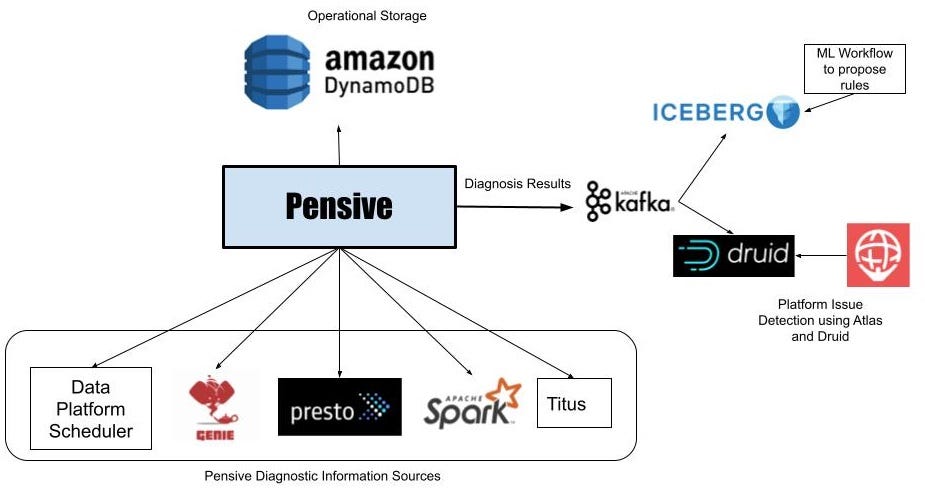
Batch Pensive Architecture
Batch workflows in the data platform run using a Scheduler service that launches containers on the Netflix container management platform called Titus to run workflow steps. These steps launch jobs on clusters running Apache Spark and Presto via Genie. If a workflow step fails, Scheduler asks Pensive to diagnose the step’s error. Pensive collects logs for the failed jobs launched by the step from the relevant data platform components and then extracts the stack traces. Pensive relies on a regular expression based rules engine that has been curated over time. The rules encode information about whether an error is due to a platform issue or a user bug and whether the error is transient or not. If a regular expression from one of the rules matches, then Pensive returns information about that error to the Scheduler. If the error is transient, Scheduler will retry that step with exponential backoff a few more times.
The most critical part of Pensive is the set of rules used to classify an error. We need to evolve them as the platform evolves to ensure that the percentage of errors that Pensive cannot classify remains low. Initially, the rules were added on an ad-hoc basis as requests came in from platform component owners and users. We have now moved to a more systematic approach where unknown errors are fed into a Machine Learning process that performs clustering to propose new regular expressions for commonly occurring errors. We take the proposals to platform component owners to then come up with the classification of the error source and whether it is of transitory nature. In the future, we are looking to automate this process.
Detection of Platform-wide Issues
Pensive does error classification on individual workflow step failures, but by doing real-time analytics on the errors detected by Pensive using Apache Kafka and Apache Druid, we can quickly identify platform issues affecting many workflows. Once the individual diagnoses get stored in a Druid table, our monitoring and alerting system called Atlas does aggregations every minute and sends out alerts if there is a sudden increase in the number of failures due to platform errors. This has led to a dramatic reduction in the time it takes to detect issues in hardware or bugs in recently rolled out data platform software.
Streaming Pensive
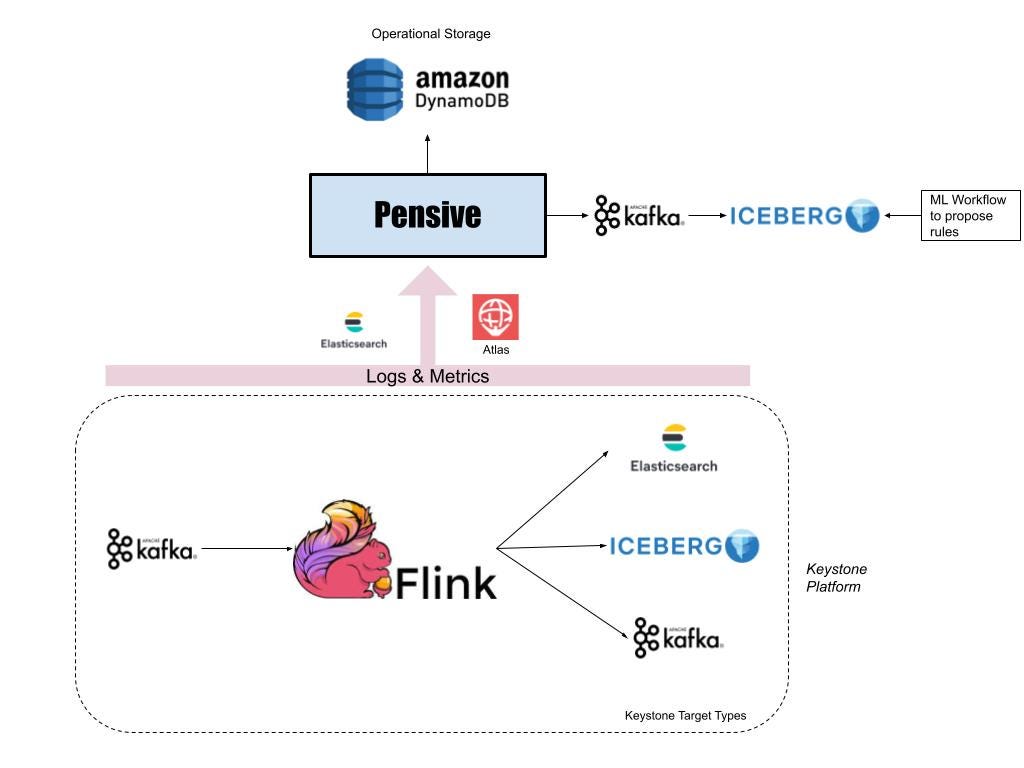
Streaming Pensive Architecture
Apache Flink powers real-time stream processing jobs in the Netflix data platform. And most of the Flink jobs run under a managed platform called Keystone, which abstracts out the underlying Flink job details and allows users to consume data from Apache Kafka streams and publish them to different data stores like Elasticsearch and Apache Iceberg on AWS S3.
Since the data platform manages keystone pipelines, users expect platform issues to be detected and remediated by the Keystone team without any involvement from their end. Furthermore, data in Kafka streams have a finite retention period, which adds time pressure for resolving the issues to avoid data loss.
For every Flink job running as part of a Keystone pipeline, we monitor the metric indicating how far the Flink consumer lags behind the Kafka producer. If it crosses a threshold, Atlas sends a notification to Streaming Pensive.
Like its batch counterpart, Streaming Pensive also has a rules engine to diagnose errors. However, in addition to logs, Streaming Pensive also has rules for checking various metric values for multiple components in the Keystone pipeline. The issue may occur in the source Kafka stream, the main Flink job, or the sinks to which the Flink job is writing data. Streaming Pensive diagnoses it and tries to remediate the issue automatically when it happens. Some examples where we are able to auto-remediate are:
If Streaming Pensive finds that one or more Flink Task Managers are going out of memory, it can redeploy the Flink cluster with more Task Managers.
If Streaming Pensive finds that there is an unexpected increase in the rate of incoming messages on the source Kafka cluster, it can increase the topic retention size and period so that we don’t lose any data while the consumer is lagging. If the spike goes away after some time, Streaming Pensive can revert the retention changes. Otherwise, it will page the job owner to investigate if there is a bug causing the increased rate or if the consumers need to be reconfigured to handle the higher rate.
Even though we have a high success rate, there are still occasions where automation is not possible. If manual intervention is required, Streaming Pensive will page the relevant component team to take timely action to resolve the issue.
What’s Next?
Pensive has had a significant impact on the operability of the Netflix data platform. And helped engineering teams lower the burden of operations work, freeing them to tackle more critical and challenging problems. But our job is nowhere near done. We have a long roadmap ahead of us. Some of the features and expansions we have planned are:
Batch Pensive is currently diagnosing failed jobs only, and we want to increase the scope into optimization to determine why jobs have become slow.
Auto-configure batch workflows so that they finish successfully or become faster and use fewer resources when possible. One example where it can dramatically help is Spark jobs, where memory tuning is a significant challenge.
Expand Pensive with Machine Learning classifiers.
The streaming platform recently added Data Mesh, and we need to expand Streaming Pensive to cover that.
Acknowledgments
This work could not have been completed without the help of the Big Data Compute and the Real-time Data Infrastructure teams within the Netflix data platform. They have been great partners for us as we work on improving the Pensive infrastructure.
Data Engineers of Netflix — Interview with Pallavi Phadnis
This post is part of our “Data Engineers of Netflix” series, where our very own data engineers talk about their journeys to Data Engineering @ Netflix.
Pallavi Phadnis is a Senior Software Engineer at Netflix.
Pallavi Phadnis is a Senior Software Engineer on the Product Data Science and Engineering team. In this post, Pallavi talks about her journey to Netflix and the challenges that keep the work interesting.
Pallavi received her master’s degree from Carnegie Mellon. Before joining Netflix, she worked in the advertising and e-commerce industries as a backend software engineer. In her free time, she enjoys watching Netflix and traveling.
Her favorite shows: Stranger Things, Gilmore Girls, and Breaking Bad.
Pallavi, what’s your journey to data engineering at Netflix?
Netflix’s unique work culture and petabyte-scale data problems are what drew me to Netflix.
During earlier years of my career, I primarily worked as a backend software engineer, designing and building the backend systems that enable big data analytics. I developed many batch and real-time data pipelines using open source technologies for AOL Advertising and eBay. I also built online serving systems and microservices powering Walmart’s e-commerce.
Those years of experience solving technical problems for various businesses have taught me that data has the power to maximize the potential of any product.
Before I joined Netflix, I was always fascinated by my experience as a Netflix member which left a great impression of Netflix engineering teams on me. When I read Netflix’s culture memo for the first time, I was impressed by how candid, direct and transparent the work culture sounded. These cultural points resonated with me most: freedom and responsibility, high bar for performance, and no hiring of brilliant jerks.
Over the years, I followed the big data open-source community and Netflix tech blogs closely, and learned a lot about Netflix’s innovative engineering solutions and active contributions to the open-source ecosystem. In 2017, I attended the Women in Big Data conference at Netflix and met with several amazing women in data engineering, including our VP. At this conference, I also got to know my current team: Consolidated Logging (CL).
CL provides an end-to-end solution for logging, processing, and analyzing user interactions on Netflix apps from all devices. It is critical for fast-paced product innovation at Netflix since CL provides foundational data for personalization, A/B experimentation, and performance analytics. Moreover, its petabyte scale also brings unique engineering challenges. The scope of work, business impact, and engineering challenges of CL were very exciting to me. Plus, the roles on the CL team require a blend of data engineering, software engineering, and distributed systems skills, which align really well with my interests and expertise.
What is your favorite project?
The project I am most proud of is building the Consolidated Logging V2 platform which processes and enriches data at a massive scale (5 million+ events per sec at peak) in real-time. I re-architected our legacy data pipelines and built a new platform on top of Apache Flink and Iceberg. The scale brought some interesting learnings and involved working closely with the Apache Flink and Kafka community to fix core issues. Thanks to the migration to V2, we were able to improve data availability and usability for our consumers significantly. The efficiency achieved in processing and storage layers brought us big savings on computing and storage costs. You can learn more about it from my talk at the Flink forward conference. Over the last couple of years, we have been continuously enhancing the V2 platform to support more logging use cases beyond Netflix streaming apps and provide further analytics capabilities. For instance, I am recently working on a project to build a common analytics solution for 100s of Netflix studio and internal apps.
How’s data engineering similar and different from software engineering?
The data engineering role at Netflix is similar to the software engineering role in many aspects. Both roles involve designing and developing large-scale solutions using various open-source technologies. In addition to the business logic, they need a good understanding of the framework internals and infrastructure in order to ensure production stability, for example, maintaining SLA to minimize the impact on the upstream and downstream applications. At Netflix, it is fairly common for data engineers and software engineers to collaborate on the same projects.
In addition, data engineers are responsible for designing data logging specifications and optimized data models to ensure that the desired business questions can be answered. Therefore, they have to understand both the product and the business use cases of the data in depth.
In other words, data engineers bridge the gap between data producers (such as client UI teams) and data consumers (such as data analysts and data scientists.)
Learning more
Interested in learning more about data roles at Netflix? You’re in the right place! Keep an eye out for our open roles in Data Science and Engineering by visiting our jobs site here. Our culture is key to our impact and growth: read about it here. To learn more about our Data Engineers, check out our chats with Dhevi Rajendran, Samuel Setegne, and Kevin Wylie.
Data Engineers of Netflix — Interview with Kevin Wylie
This post is part of our “Data Engineers of Netflix” series, where our very own data engineers talk about their journeys to Data Engineering @ Netflix.
Kevin Wylie is a Data Engineer on the Content Data Science and Engineering team. In this post, Kevin talks about his extensive experience in content analytics at Netflix since joining more than 10 years ago.
Kevin grew up in the Washington, DC area, and received his undergraduate degree in Mathematics from Virginia Tech. Before joining Netflix, he worked at MySpace, helping implement page categorization, pathing analysis, sessionization, and more. In his free time he enjoys gardening and playing sports with his 4 kids.
His favorite TV shows: Ozark, Breaking Bad, Black Mirror, Barry, and Chernobyl
Since I joined Netflix back in 2011, my favorite project has been designing and building the first version of our entertainment knowledge graph. The knowledge graph enabled us to better understand the trends of movies, TV shows, talent, and books. Building the knowledge graph offered many interesting technical challenges such as entity resolution (e.g., are these two movie names in different languages really the same?), and distributed graph algorithms in Spark. After we launched the product, analysts and scientists began surfacing new insights that were previously hidden behind difficult-to-use data. The combination of overcoming technical hurdles and creating new opportunities for analysis was rewarding.
Kevin, what drew you to data engineering?
I stumbled into data engineering rather than making an intentional career move into the field. I started my career as an application developer with basic familiarity with SQL. I was later hired into my first purely data gig where I was able to deepen my knowledge of big data. After that, I joined MySpace back at its peak as a data engineer and got my first taste of data warehousing at internet-scale.
What keeps me engaged and enjoying data engineering is giving super-suits and adrenaline shots to analytics engineers and data scientists.
When I make something complex seem simple, or create a clean environment for my stakeholders to explore, research and test, I empower them to do more impactful business-facing work. I like that data engineering isn’t in the limelight, but instead can help create economies of scale for downstream analytics professionals.
What drew you to Netflix?
My wife came across the Netflix job posting in her effort to keep us in Los Angeles near her twin sister’s family. As a big data engineer, I found that there was an enormous amount of opportunity in the Bay Area, but opportunities were more limited in LA where we were based at the time. So the chance to work at Netflix was exciting because it allowed me to live closer to family, but also provided the kind of data scale that was most common for Bay Area companies.
The company was intriguing to begin with, but I knew nothing of the talent, culture, or leadership’s vision. I had been a happy subscriber of Netflix’s DVD-rental program (no late fees!) for years.
After interviewing, it became clear to me that this company culture was different than any I had experienced.
I was especially intrigued by the trust they put in each employee. Speaking with fellow employees allowed me to get a sense for the kinds of people Netflix hires. The interview panel’s humility, curiosity and business acumen was quite impressive and inspired me to join them.
I was also excited by the prospect of doing analytics on movies and TV shows, which was something I enjoyed exploring outside of work. It seemed fortuitous that the area of analytics that I’d be working in would align so well with my hobbies and interests!
Kevin, you’ve been at Netflix for over 10 years now, which is pretty incredible. Over the course of your time here, how has your role evolved?
When I joined Netflix back in 2011, our content analytics team was just 3 people. We had a small office in Los Angeles focused on content, and significantly more employees at the headquarters in Los Gatos. The company was primarily thought of as a tech company.
At the time, the data engineering team mainly used a data warehouse ETL tool called Ab Initio, and an MPP (Massively Parallel Processing) database for warehousing. Both were appliances located in our own data center. Hadoop was being lightly tested, but only in a few high-scale areas.
Fast forward 10 years, and Netflix is now the leading streaming entertainment service — serving members in over 190 countries. In the data engineering space, very little of the same technology remains. Our data centers are retired, Hadoop has been replaced by Spark, Ab Initio and our MPP database no longer fits our big data ecosystem.
In addition to the company and tech shifting, my role has evolved quite a bit as our company has grown. When we were a smaller company, the ability to span multiple functions was valued for agility and speed of delivery. The sooner we could ingest new data and create dashboards and reports for non-technical users to explore and analyze, the sooner we could deliver results. But now, we have a much more mature business, and many more analytics stakeholders that we serve.
For a few years, I was in a management role, leading a great team of people with diverse backgrounds and skill sets. However, I missed creating data products with my own hands so I wanted to step back into a hands-on engineering role. My boss was gracious enough to let me make this change and focus on impacting the business as an individual contributor.
As I think about my future at Netflix, what motivates me is largely the same as what I’ve always been passionate about. I want to make the lives of data consumers easier and to enable them to be more impactful. As the company scales and as we continue to invest in storytelling, the opportunity grows for me to influence these decisions through better access to information and insights. The biggest impact I can make as a data engineer is creating economies of scale by producing data products that will serve a diverse set of use cases and stakeholders.
If I can build beautifully simple data products for analytics engineers, data scientists, and analysts, we can all get better at Netflix’s goal: entertaining the world.
Learning more
Interested in learning more about data roles at Netflix? You’re in the right place! Keep an eye out for our open roles in Data Science and Engineering by visiting our jobs site here. Our culture is key to our impact and growth: read about it here. To learn more about our Data Engineers, check out our chats with Dhevi Rajendran and Samuel Setegne.
Netflix has developed a network observability sidecar called Flow Exporter that uses eBPF tracepoints to capture TCP flows at near real time. At much less than 1% of CPU and memory on the instance, this highly performant sidecar provides flow data at scale for network insight.
Challenges
The cloud network infrastructure that Netflix utilizes today consists of AWS services such as VPC, DirectConnect, VPC Peering, Transit Gateways, NAT Gateways, etc and Netflix owned devices. Netflix software infrastructure is a large distributed ecosystem that consists of specialized functional tiers that are operated on the AWS and Netflix owned services. While we strive to keep the ecosystem simple, the inherent nature of leveraging a variety of technologies will lead us to challenges such as:
App Dependencies and Data Flow Mappings: With the number of micro services growing by the day without understanding and having visibility into an application’s dependencies and data flows, it is difficult for both service owners and centralized teams to identify systemic issues.
Pathway Validation: Netflix velocity of change within the production streaming and studio environment can result in the inability of services to communicate with other resources.
Service Segmentation: The ease of the cloud deployments has led to the organic growth of multiple AWS accounts, deployment practices, interconnection practices, etc. Without having network visibility, it’s difficult to improve our reliability, security and capacity posture.
Network Availability: The expected continued growth of our ecosystem makes it difficult to understand our network bottlenecks and potential limits we may be reaching.
Cloud Network Insight is a suite of solutions that provides both operational and analytical insight into the cloud network infrastructure to address the identified problems. By collecting, accessing and analyzing network data from a variety of sources like VPC Flow Logs, ELB Access Logs, eBPF flow logs on the instances, etc, we can provide network insight to users and central teams through multiple data visualization techniques like Lumen, Atlas, etc.
Flow Exporter
The Flow Exporter is a sidecar that uses eBPF tracepoints to capture TCP flows at near real time on instances that power the Netflix microservices architecture.
Berkeley Packet Filter (BPF) is an in-kernel execution engine that processes a virtual instruction set, and has been extended as eBPF for providing a safe way to extend kernel functionality. In some ways, eBPF does to the kernel what JavaScript does to websites: it allows all sorts of new applications to be created.
An eBPF flow log record represents one or more network flows that contain TCP/IP statistics that occur within a variable aggregation interval.
The sidecar has been implemented by leveraging the highly performant eBPF along with carefully chosen transport protocols to consume less than 1% of CPU and memory on any instance in our fleet. The choice of transport protocols like GRPC, HTTPS & UDP is runtime dependent on characteristics of the instance placement.
The runtime behavior of the Flow Exporter can be dynamically managed by configuration changes via Fast Properties. The Flow Exporter also publishes various operational metrics to Atlas. These metrics are visualized using Lumen, a self-service dashboarding infrastructure.
So how do we ingest and enrich these flows at scale ?
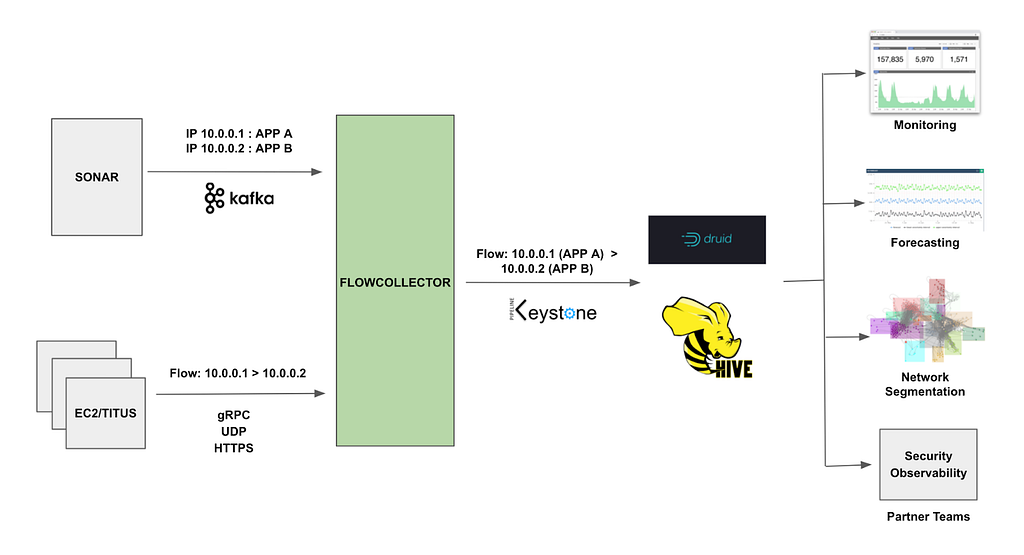
Flow Collector is a regional service that ingests and enriches flows. IP addresses within the cloud can move from one EC2 instance or Titus container to another over time. We use Sonar to attribute an IP address to a specific application at a particular time. Sonar is an IPv6 and IPv4 address identity tracking service.
Flow Collector consumes two data streams, the IP address change events from Sonar via Kafka and eBPF flow log data from the Flow Exporter sidecars. It performs real time attribution of flow data with application metadata from Sonar. The attributed flows are pushed to Keystone that routes them to the Hive and Druid datastores.
The attributed flow data drives various use cases within Netflix like network monitoring and network usage forecasting available via Lumen dashboards and machine learning based network segmentation. The data is also used by security and other partner teams for insight and incident analysis.
Summary
Providing network insight into the cloud network infrastructure using eBPF flow logs at scale is made possible with eBPF and a highly scalable and efficient flow collection pipeline. After several iterations of the architecture and some tuning, the solution has proven to be able to scale.
We are currently ingesting and enriching billions of eBPF flow logs per hour and providing visibility into our cloud ecosystem. The enriched data allows us to analyze networks across a variety of dimensions (e.g. availability, performance, and security), to ensure applications can effectively deliver their data payload across a globally dispersed cloud-based ecosystem.
Data Engineers of Netflix — Interview with Dhevi Rajendran
Dhevi Rajendran
This post is part of our “Data Engineers of Netflix” interview series, where our very own data engineers talk about their journeys to Data Engineering @ Netflix.
Dhevi Rajendran is a Data Engineer on the Growth Data Science and Engineering team. Dhevi joined Netflix in July 2020 and is one of many Data Engineers who have onboarded remotely during the pandemic. In this post, Dhevi talks about her passion for data engineering and taking on a new role during the pandemic.
Before Netflix, Dhevi was a software engineer at Two Sigma, where she was most recently on a data engineering team responsible for bringing in datasets from a variety of different sources for research and trading purposes. In her free time, she enjoys drawing, doing puzzles, reading, writing, traveling, cooking, and learning new things.
Her favorite TV shows: Atlanta, Barry, Better Call Saul, Breaking Bad, Dark, Fargo, Succession, The Killing
Her favorite movies: Das Leben der Anderen, Good Will Hunting, Intouchables, Mother, Spirited Away, The Dark Knight, The Truman Show, Up
Dhevi, so what got you into data engineering?
While my background has mostly been in backend software engineering, I was most recently doing backend work in the data space prior to Netflix. One great thing about working with data is the impact you can create as an engineer.
At Netflix, the work that data engineers do to produce data in a robust, scalable way is incredibly important to provide the best experience to our members as they interact with our service.
Beyond the really interesting technical challenges that come with working with big data, there are lots of opportunities to think about higher-level domain challenges as a data engineer. In college, I had done human-computer interaction research on subtitles for the Deaf and hard-of-hearing as well as computational genomics research on Alzheimer’s disease. I’ve always enjoyed learning about new areas and combining this knowledge with my technical skills to solve real-world problems.
What drew you to Netflix?
Netflix’s mission and its culture primarily drew me to Netflix. I liked the idea of being a part of a company that brings joy to so many members around the world with an incredibly powerful platform for their stories to be heard. The blend of creativity and a strong engineering culture at Netflix really appealed to me.
The culture was also something that piqued my interest. I was pretty skeptical of Netflix’s culture memo at first. Many companies have lofty ideals that don’t necessarily translate into the reality of the company culture, so I was surprised to see how consistently the culture memo aligns with the actual culture at the company. I’ve found the culture of freedom and responsibility empowering.
Rather than the typical top-down approach many companies use, Netflix trusts each person to make the right decisions for the company by using their deep knowledge of the problems they’re solving along with the context they gather from their leaders and stakeholders.
This means a lot less red tape, a lot less friction, and a lot more freedom for everyone at the company to do what’s best for the business. I also really appreciate the amount of visibility and input we get into broader strategic decisions that the company makes.
Finally, I was also really excited about joining the Growth Data Engineering team! My team is responsible for building data products relating to how we connect with our new members around the world, which is high-impact and has far-reaching global significance. I love that I get to help Netflix connect with new members around the world and help shape the first impression we make on them.
What is your favorite project or a project that you’re particularly proud of?
I have been primarily involved in the payments space. Not a project per se, but one of the things I’ve enjoyed being involved in is the cross-functional meetings with peers and stakeholders who are working in the payments space. These meetings include product managers, designers, consumer insights researchers, software engineers, data scientists, and people in a wide variety of other roles.
I love that I get to work cross-functionally with such a diverse group of people looking at the same set of problems from a variety of unique perspectives.
In addition to my day-to-day technical work, these meetings have provided me with the opportunity to be involved in the high-level product, design, and strategic discussions, which I value. Through these cross-functional efforts, I’ve also really gotten to learn and appreciate the nuances of payments. From using credit cards (which are fairly common in the US but not as widely adopted outside the US) to physically paying in person, members in different countries prefer to pay for our subscription in a wide variety of ways. It’s incredible to see the thoughtful and deeply member-driven approach we use to think about something as seemingly routine, straightforward, and often taken for granted as payments.
What was it like taking on a new role during the pandemic?
First off, I feel very lucky to have found a new role in this very difficult period. With the amount of change and uncertainty, the past year brought, it somehow felt both fitting and imprudent to voluntarily add a career change to the mix. The prospect was daunting at first. I knew there would be a bunch for me to learn coming into Netflix, considering that I hadn’t worked with the technologies my team uses (primarily Scala and Spark). Looking back now, I’m incredibly grateful for the opportunity and glad that I took it. I’ve already learned so much in the past six months and am excited about how much more I can learn and the impact I can make going forward.
Onboarding remotely has been a unique experience as well. Building relationships and gathering broader context are more difficult right now. I’ve found that I’ve learned to be more proactive and actively seek out opportunities to get to know people and the business, whether through setting up coffee chats, reading memos, or attending meetings covering topics I want to learn more about. I still haven’t met anyone I work with in person, but my teammates, my manager, and people across the company have been really helpful throughout the onboarding process.
It’s been incredible to see how gracious people are with their time and knowledge. The amount of empathy and understanding people have shown to each other, including to those who are new to the company, has made taking the leap and joining Netflix a positive experience.
Learning more
Interested in learning more about data roles at Netflix? You’re in the right place! Keep an eye out for our open roles in Data Science and Engineering here. Our culture is key to our impact and growth: read about it here.
Data Engineers of Netflix — Interview with Samuel Setegne
Samuel Setegne
This post is part of our “Data Engineers of Netflix” interview series, where our very own data engineers talk about their journeys to Data Engineering @ Netflix.
Samuel Setegne is a Senior Software Engineer on the Core Data Science and Engineering team. Samuel and his team build tools and frameworks that support data engineering teams across Netflix. In this post, Samuel talks about his journey from being a clinical researcher to supporting data engineering teams.
Samuel comes from West Philadelphia, and he received his Master’s in Biotechnology from Temple University. Before Netflix, Samuel worked at Travelers Insurance in the Data Science & Engineering space, implementing real-time machine learning models to predict severity and complexity at the onset of property claims.
His favorite movies: Scarface, I Am Legend and The Old Guard
Sam, what drew you to data engineering?
Early in my career, I was headed full speed towards life as a clinical researcher. Many healthcare practitioners had strong hunches and wild theories that were exciting to test against an empirical study. I personally loved looking at raw data and using it to understand patterns in the world through technology. However, most challenges that came with my role were domain-related but not as technically demanding. For example — clinical data was often small enough to fit into memory on an average computer and only in rare cases would its computation require any technical ingenuity or massive computing power. There was not enough scope to explore the distributed and large-scale computing challenges that usually come with big data processing. Furthermore, engineering velocity was often sacrificed owing to rigid processes.
Moving into pure Data engineering not only offered me the technical challenges I’ve always craved for but also the opportunity to connect the dots through data which was the best of both worlds.
What is your favorite project or a project you’re particularly proud of?
The very first project I had the opportunity to work on as a Netflix contractor was migrating all of Data Science and Engineering’s Python 2 code to Python 3. This was without a doubt, my favorite project that also opened the door for me to join the organization as a full-time employee. It was thrilling to analyze code from various cross-functional teams and learn different coding patterns and styles.
This kind of exposure opened up opportunities for me to engage with various data engineering teams and advocate for python best practices that helped me drive greater impact at Netflix.
What drew you to Netflix?
What initially caught my attention about a chance to work at Netflix was the variety and quality of content. My family and friends were always ecstatic about having lively and raucous conversations about Netflix shows or movies they recently watched like Marco Polo and Tiger King.
Although other great companies play a role in our daily lives, many of them serve as a kind of utility, whereas Netflix is meant to make us live, laugh, and love by enabling us to experience new voices, cultures, and perspectives.
After I read Netflix’s culture memo, I was completely sold. It precisely described what I always knew was missing in places I’ve worked before. I found the mantra of “people over process” extremely refreshing and eventually learned that it unlocked a bold and creative part of me in my technical designs. For instance, if I feel that a design of an application or a pipeline would benefit from new technology or architecture, I have the freedom to explore and innovate without excessive red tape. Typically in large corporations, you’re tied to strict and redundant processes, causing a lot of fatigue for engineers. When I landed at Netflix, it was a breath of fresh air to learn that we lean into freedom and responsibility and allow engineers to push the boundaries.
Sam, how do you approach building tools/frameworks that can be used across data engineering teams?
My team provides generalized solutions for common and repetitive data engineering tasks. This helps provide “paved path” solutions for data engineering teams and reduces the burden of re-inventing the wheel. When you have many specialized teams composed of highly skilled engineers, the last thing you want for a data engineer is to spend too much time solving small problems that are usually buried inside of the big, broad, and impactful problems. When we extrapolate that to every engineer on every Data Science & Engineering team, it easily adds up and is something worth optimizing.
Any time you have a data engineer spending cycles working on tasks where the data engineering part of their brain is turned off, that’s an opportunity where better tooling can help.
For example, many data engineering teams have to orchestrate notification campaigns when they make changes to critical tables that have downstream dependencies. This is achievable by a Data Engineer but it can be very time-consuming, especially having to track the migration of these downstream users over to your new table or table schema to ensure it’s safe to finalize your changes. This problem was tackled by one of my highly skilled team members who built a centralized migration service that lets Data Engineers easily start “migration campaigns” that can automatically identify downstream users and provide notification and status-tracking capabilities by leveraging Jira. The aim is to enable Data Engineers to quickly fire up one of these campaigns and keep an eye out for its completion while using that extra time to focus on other tasks.
By investing in the right tooling to streamline redundant (yet necessary) tasks, we can drive higher data engineering productivity and efficiency, while accelerating innovation for Netflix.
Learning more
Interested in learning more about data roles at Netflix? You’re in the right place! Keep an eye out for our open roles in Data Science and Engineering by visiting our jobs site here. Our culture is key to our impact and growth: read about it here. Check out our chat with Dhevi Rajendran to know more about starting a new role as a Data Engineer during the pandemic here.
A big data analytics engine can be used to optimize large and complex Zabbix installations: keeping track of the amount and kind of problems over time, top alert producers, and much more. You can employ Splunk to optimize and analyze vital Zabbix runtime parameters, such as ‘unsupported items,’ repeatedly happening host availability issues, misconfigured agents, and Zabbix Queue entries.
secadm GmbH is a service provider located in the south of Germany. The company with a strong background in monitoring and automation, network infrastructure, and security software development supports customers of all sizes to manage their IT infrastructures. secadm GmbH is a Zabbix partner and also a Zabbix training partner.
Complexity
Operating a Zabbix deployment of a specific size comes with some challenges:
A huge number of hosts, templates, items, host groups, macros, and configuration elements inside your Zabbix instance.
LLD rules/unsupported items — items that are unable to fetch information, for example, a wrong password or a wrong path, in an external check. It is often hard to get a hold of how many of those you have and in which of the various error states. Therefore, it’s also difficult to fix them.
Host availability/network issues — errors that you see only in the logs — things going up and down, losing their connectivity, but getting back in time before issuing an alert.
Queue entries. In larger Zabbix installations, you might have ten thousand or even more items in this service queue. Zabbix actually tells you that some items do not receive their data in time. Zabbix shows that something is really wrong, though it doesn’t give a hint about what is wrong.
Zabbix as a monitoring tool is there to actually generate problems and alerts out of these problems. Many problems often cause ‘alert fatigue’ when people start ignoring monitoring results because of too many alerts.
Therefore, we receive a lot of questions from our customers, such as:
Where do all these problems come from?
What are the hosts generating most of the problems, at what times, and generated by what templates?
Did the latest change/upgrade have any negative impact on our monitoring?
Can you get rid of unsupported items?
How many hosts have specific problems (for instance, caused by a known bug in an old version of an agent that behaves strangely with a specific version of the Zabbix server), and what would be the effect if we fixed those problems?
Where do all these queue entries come from?
Zabbix is a transparent and predictable monitoring tool that offers great ways to organize the monitored elements with templates and macros. Zabbix also offers excellent visualization capabilities. However, Zabbix is not an analytical utility offering a flexible query language to gather the required information in the required format, having on-demand statistical functions, and allowing you to enrich and correlate data with the data from arbitrary sources. So, extra tools will have to do the extra work.
Secadm GmbH being the partner of Zabbix and Splunk, has concluded that it’s obvious to use Splunk for such extra work. Splunk is offering many possibilities to onboard data in the platform far beyond the simple indexing of log data, looking up the Key-Value store, implementing scripts and programs inside the Splunk platform to fetch data in real-time and on-demand out of other systems without having to store and to index any kind of information, as well as performing custom search commands.
Zabbix entity inventory
The most important Zabbix data used for analysis — the inventory of all elements inside Zabbix that do not often change, such as:
Hosts,
Items,
Proxies,
Templates,
Triggers,
Discovery rules (LLD),
Item Prototypes, and
Trigger Prototypes.
As this data is not changing constantly, we fetch this data from Splunk with the scheduled search and custom search command directly from the API endpoints in Zabbix. Then we can store this information inside the Splunk KV Store, which is, in fact, the MongoDB allowing us to perform searches in milliseconds without having to index any data and quickly get the results.
Zabbix entity inventory
So, you can get statistics on status and state to drill down on the unsupported items for a list of all of the items. You can further identify the correlation for the hostnames instead of host IDs, which are not human-readable. The hostnames are available at the KV Store, which stores the hosts with their metadata. You can also identify how many unsupported items there are on each host.
You can also get information on the hostnames, hosts, item names, item types, and errors. You can categorize the problems as SNMP problems, shell problems such as wrong paths, and see how often certain problems happen and what hosts are assigned to what templates and host groups, and so on. This information may also be aggregated or correlated with information from UCMDB.
More data
More fun than having data within a data analytics platform has more data.
Indexing the Zabbix Server / Proxy Logs logs, categorizing events to identify availability issues, item problems, preprocessing problems, housekeepers statistics, etc.
A module to fetch information from Zabbix (item, host, trigger) in real-time.
Gathering metrics (History / Trends data) directly from Zabbix in real-time without the need to store these metrics in any place other than the Zabbix database. We can still use the data for graphing, correlations, calculations, etc.
Onboarding the Zabbix problems into Splunk by using the new custom Media types — Webhook.
Custom Media type
Correlation of the alert logs, which are new and available through the API since Zabbix 5.0.
Working on the queue items to solve these questions.
Use cases
Zabbix queue
Zabbix queue may be a real headache as you can wait for a Zabbix installation with 20,000-50,000 items for 5 or 10 minutes or even longer.
In this dashboard, the same view is displayed in Zabbix: items are categorized by overtime, item type, proxy, etc. Splunk here offers what Zabbix fails — the history so that you can see the spikes when things have changed dramatically. For instance, when more significant network changes happen, the network slows down, and the queues grow dramatically. You can see whether these queues have gone back down or remained up. This information is complicated to analyze in Zabbix.
You can also drill down to see the items correlated with their actual status and the host’s status inside Zabbix. So, you can clearly see, for instance, that an item is on the host that is down or in the queue as it’s not supported and doesn’t get any data.
Here, there is also an Ignore list. So you can get statistics for the remaining items and group them, for instance, by Item type. You can go further and analyze and fix the problems.
Zabbix problems analytics
Zabbix problems dashboard
In this dashboard, Zabbix problems are displayed by system categories. For instance, we can see that over the last 24 hours, Windows caused most of the problems.
Here, we can also drill down to see, for instance, if there are many similar problems. You can go further to identify a single issue that has caused many alerts or problems. You can see that one host is creating almost all of the problems. So, if you switch this one host off, you would have fewer problems.
Zabbix data for management visibility
We can use Zabbix data for greater management visibility, such as:
Correlation of data to generate meaningful dashboards:
— Zabbix (metrics, status, problems, etc.),
— application logs,
— other data sources,
— inventory (CMDB, …)
Business-level visualization.
Conclusion
Splunk is open-source software and is distributed for free. We are currently in the process of integrating Splunk with Zabbix.
If you are interested in Splunk, you can send a request to [email protected] or look for Christian Anton on LinkedIn or Instagram.
Questions & Answers
Question. If we use this kind of integration, are there any performance issues caused by Splunk or some misconfiguration?
Answer. We have been using Splunk for installations with several tens of thousands of monitored hosts and from hundreds of thousands up to millions of items and have not seen any performance implications.
Question. How does this connector work under the hood? Does it use the API or direct queries to the database?
Answer. We rely on the API. Besides, we can fetch the data directly from the database.
At Netflix, our current data warehouse contains hundreds of Petabytes of data stored in AWS S3, and each day we ingest and create additional Petabytes. At this scale, we can gain a significant amount of performance and cost benefits by optimizing the storage layout (records, objects, partitions) as the data lands into our warehouse.
There are several benefits of such optimizations like saving on storage, faster query time, cheaper downstream processing, and an increase in developer productivity by removing additional ETLs written only for query performance improvement. On the other hand, these optimizations themselves need to be sufficiently inexpensive to justify their own processing cost over the gains they bring.
We built AutoOptimize to efficiently and transparently optimize the data and metadata storage layout while maximizing their cost and performance benefits.
This article will list some of the use cases of AutoOptimize, discuss the design principles that help enhance efficiency, and present the high-level architecture. Then deep dive into the merging use case of AutoOptimize and share some results and benefits.
Use cases
We found several use cases where a system like AutoOptimize can bring tons of value. Some of the optimizations are prerequisites for a high-performance data warehouse. Sometimes Data Engineers write downstream ETLs on ingested data to optimize the data/metadata layouts to make other ETL processes cheaper and faster. The goal of AutoOptimize is to centralize such optimizations that will remove duplicate work and while doing it more efficiently than vanilla ETLs.
Merge
As the data lands into the data warehouse through real-time data ingestion systems, it comes in different sizes. This results in a perpetually increasing number of small files across the partitions. Merging those numerous smaller files into a handful of larger files can make query processing faster and reduce storage space.
Sort
Presorted records and files in partitions make queries faster and save significant amounts of storage space as it enables a higher level of compression. We already had some existing tables with sorting stages to reduce table storage and improve downstream query performance.
Compaction
Modern data warehouses allow updating and deleting pre-existing records. Iceberg plans to enable this in the form of delta files. Over time, the number of delta files grows, and compacting them to their source files can make the read operations more optimal.
Metadata optimization
In Iceberg, the physical partitioning is decoupled from logical partitioning by keeping a map to file locations in the metadata. This enables us to add additional indexes in the metadata to make point queries more optimal. We can also reorganize the metadata to make file scanning much faster.
Design Principles
For AutoOptimize to efficiently optimize the data layout, we’ve made the following choices:
Just in time vs. periodic optimization Only optimize a given data set when required (based on what changed) instead of blind periodic runs.
Essential vs. complete optimization Allow users to optimize at the point of diminishing returns instead of a binary setting. For example, we allow a partition to have a few small files instead of always merging files in perfect sizes.
Minimum replacement vs. full overwrite Only replace the required minimum amount of files instead of a full sweep overwrite.
These principles reduce resource usage by being more efficient and effective while lowering the end-to-end latency in data processing.
Other than these principles, there are some other design considerations to support and enable:
Multi-tenancy with database and table prioritization.
Both automatic (event-driven) as well as manual (ad-hoc) optimization.
Transparency to end-users.
High-Level Design
AutoOptimize High-Level Design
AutoOptimize is split into 2 subsystems (Service and Actors) to decouple the decisions from the actions at a high level. This decoupling of responsibilities helps us to design, manage, use, and scale the subsystems independently.
AutoOptimize Service
The service is the decision-maker. It decides what to do and when to do in response to an incoming event. It is responsible for listening to incoming events and requests and prioritizing different tables and actions to make the best usage of the available resources.
The work done in the service can be further broken down into the following 3 steps:
Observe: Listen to changes in the warehouse in near real-time. Also, respond to ad-hoc requests created manually by end-users.
Orient: Gather tuning parameters for a particular table that changed. Also, adjust the resource allocation for the table or the number of actors depending on the backlog.
Decide: Determine the highest value action with the right parameters for this particular change and when to act depending on how the action falls in the global priority across all tables and actions.
In AutoOptimize, the service is a cluster of Java (Spring Boot) applications using Redis to keep the states.
AutoOptimize Actors
Actors in AutoOptimize are responsible for the actual work (merging/sorting/compaction etc.). The AutoOptimize Service sends commands to the actors that specify what to do. The job of Actors is to perform those commands in a distributed and fault-tolerant manner.
Actors in AutoOptimize are a pool of long-running Spark jobs managed by the AutoOptimize service.
This was not intentional but we found that the way we modularized AutoOptimize’s decision-making workflow is very similar to the OODA loop and decided to use the same taxonomy.
Other Components
Iceberg We use Apache Iceberg as the table format. AutoOptimize relies on some of the Iceberg specific features such as snapshot and atomic operations to perform the optimizations in an accurate and scalable manner.
AutoAnalyze In short, AutoAnalyze finds the best tuning/configuration parameters for a table. It uses “What-If” experiments and previous experiences and heuristics to find the most fitting attributes for a table. We will publish a follow-up blog post about AutoAnalyze in the future. For AutoOptimize, it may find if a table needs file merging or suggest a target file size and other parameters.
Deep Dive into File Merge
File merge is the first use-case that we built for AutoOptimize. Previously we had our homegrown system called Ursula responsible for data ingestion into the Hive based warehouse. The Ursula based pipeline also performed file merges on the ingested table partitions periodically. Since then, we have moved our ingestion to Keystone and our table layout to Iceberg.
The migration out of Ursula to Keystone/Iceberg based ingestion initiated the need for a replacement for Ursula file merge. File merging is necessary for a low latency streaming ingestion pipeline as data often arrive late and unevenly. The number of small files cripples across partitions over time and can have some serious side effects like:
Slowing down queries.
More processing resources.
Increase in storage space.
The goal of File merge in AutoOptimize is to efficiently reduce the side effects while not adding additional latency to the data pipeline.
Solutions
This section will discuss some of the solutions that helped us achieve the previously stated goals.
Just in time optimization
AutoOptimize file merge gets triggered via table change events. This allows AutoOptimize to act right away with a minimum lag. But the problem with being event-driven is it’s expensive to scan the changed partitions every time they change. If we can determine “how noisy” a partition is from the changesets in a rolling manner, we will eliminate unnecessary full partition scanning with early signals from snapshots.
Essential work
After a full partition scan, AutoOptimize gets a more comprehensive view of the state of the partition. We can get a more accurate state of the partition at this stage and avoid non-essential work.
Partition Entropy We introduced a concept called Partition Entropy (PE) used for early pruning at each step to reduce actual work. It’s a set of stats about the state of the partition. We calculate this in a rolling manner after each snapshot scan and more exhaustively after each partition scan.
The parts of PE that deal with file sizes are called File Size Entropy (FSE). FSE of a partition is derived from the Mean Squared Error (MSE) of file sizes in a partition. We will use the terms FSE and MSE interchangeably.
N = Number of files in the partition Target = Target File Size Actual = min(Actual File Size, Target)
When a partition is scanned, it’s easy to calculate the MSE using the above formula as we know the sizes of all files in that partition. We store the MSE and N for each partition in Redis for later use.
At the snapshot scan stage, we get a commit definition containing the list of files and their metadata (like size, number of records, etc.) that got added and deleted in the commit. We calculate the new MSE’ of a changed partition in a rolling manner from the snapshot information and the previously stored stats using this formula:
Where,
M = Number of files added in the snapshot. Target = Target File Size. Actual = min(Actual File Size, Target) N = Previously stored number of files in the partition. MSE = Previously stored MSE.
We have a tolerance threshold (T) for each partition and skip further processing of the partition if MSE < T². This helps us significantly reduce the number of full partition scans at the snapshot scan step and the number of actual merges in the partition scan stage.
Entropy-Based Filtering
The actual formulas are a little bit more complicated than what stated here, as we need to take care of deleted files and some other edge cases. We could also use Mean Absolute Error but we want to be biased towards outliers — as the goal is to have a more even file size in a partition than having a mixed bag of different sizes with some perfect sized files.
Minimum replacement
Once we start processing a partition, we find the minimum amount of work needed to reduce the File Size Entropy and thus reduce the number of small files.
We use 2 different packing algorithms to achieve this:
Knuth/Plass line breaking algorithm We use this strategy when the sort order among files is important. With a correct error function (ex: Error²), this algorithm helps minimize MSE with a bounding run time of O(n²).
First Fit Decreasing bin packing algorithm We use a modified version of the original FFD algorithm if we can ignore the sort order. This helps reduce the number of replacements with an O(nlog(n)) running time.
These methods help us smooth out the file size histogram while doing it optimally with minimal file replacement.
Multi-tenancy
AutoOptimize is multi-tenant; that is, it runs on many different databases and tables. When running the optimizations, it also needs to prioritize and allocate resources at different levels for different tasks. It requires answering questions like which table should be processed first or get more resource bandwidth or what optimization gives the most ROI.
To support multi-tenancy and tasks prioritization, it needs to have the following properties:
Weighted resource sharing across different priorities.
Fair resource sharing across different tables and tasks with the same priority.
Handle bursts to prevent starvation.
We use different types of Weighted Fair Queue implementations inside AutoOptimize, including different combinations of the followings:
Reliable Priority Queue To support prioritization and fair resource usage, we introduced a concept called Reliable Priority Queue (RPQ) in AutoOptimize. A reliable queue does not lose items if the subscriber fails to process the items after a dequeue. An RPQ also has a sense of prioritization across different items while being reliable. The concept is fairly similar to the default Redis RPOPLPUSH reliable queue pattern. But for AutoOptimize’s use case, we use Sorted Sets instead of lists to enable prioritization.
The goal of AutoOptimize is to optimize the warehouse with a holistic perspective. Making it multi-tenant with a notion of different priorities helps us make the most optimal resource allocation.
Results
22% reduction in partition scans
2% reduction in merge actions
72% reduction in file replacements
These savings are stacked on top of each other as they are applied in sequence in the AutoOptimize pipeline. This results in a massive reduction in actual processing need while reducing the number of files by 80%.
80% reduction in the number of files
70% saving in compute
We are using 70% less compute instances than our previous merge implementation.
We also see up to 60% improvement in query performance and an additional 1% saving in storage.
Benefits
Increase processing efficiency: As AutoOptimize uses file replacement and can avoid processing by filtering early, it can save processing costs by skipping files that are not required to be merged.
Increase storage efficiency: AutoOptimize helps save storage costs by enabling AutoAnalyze recommendations to sort the records.
Reduce lag: Periodic overwrite ETLs take more time as it works in batches. AutoOptimize reduces end to end lag in data processing by optimizing as we go.
Faster query: A smaller number of files results in smaller file scanning, fewer network calls, and makes queries faster.
Ease of use: AutoOptimize provides a frictionless way to setup optimization with minimum maintenance overhead from Data Engineering.
Developer productivity: Instead of adding an ETL per table for merging, which adds ongoing incremental maintenance cost, we have a single solution that can transparently scale to many tables.
Conclusion
We believe the problems we faced at Netflix are not unique, and some of the techniques and design considerations we made can be applied more generally. By laying out the data intelligently as they are ingested into the warehouse, we are removing complexities for Data Engineers and accelerating the end-to-end pipeline. At the same time, we are gaining a significant amount of performance and cost improvement by optimizing only when it makes sense. We plan to extend AutoOptimize into other use cases and integrate it more with the Iceberg ecosystem in the future.
I’d like to share something very brief and very obvious – that compression works better with large amounts of data. That is, if you have to compress 100 sentences you’d better compress them in bulk rather than once sentence at a time. Let me illustrate that:
public static void main(String[] args) throws Exception {
    List<String> sentences = new ArrayList<>();
    for (int i = 0; i < 100; i ++) {
        StringBuilder sentence = new StringBuilder();
        for (int j = 0; j < 100; j ++) {
          sentence.append(RandomStringUtils.randomAlphabetic(10)).append(" ");
        }
        sentences.add(sentence.toString());
    }
    byte[] compressed = compress(StringUtils.join(sentences, ". "));
    System.out.println(compressed.length);
    System.out.println(sentences.stream().collect(Collectors.summingInt(sentence -> compress(sentence).length)));
}
The compress method is using commons-compress to easily generate results for multiple compression algorithms:
public static byte[] compress(String str) {
   if (str == null || str.length() == 0) {
       return new byte[0];
   }
   ByteArrayOutputStream out = new ByteArrayOutputStream();
   try (CompressorOutputStream gzip = new CompressorStreamFactory()
           .createCompressorOutputStream(CompressorStreamFactory.GZIP, out)) {
       gzip.write(str.getBytes("UTF-8"));
       gzip.close();
       return out.toByteArray();
   } catch (Exception ex) {
       throw new RuntimeException(ex);
   }
}
The results are as follows, in bytes (note that there’s some randomness, so algorithms are not directly comparable):
Algorithm
Bulk
Individual
GZIP
6590
10596
LZ4_FRAMED
9214
10900
BZIP2
6663
12451
Why is that an obvious result? Because of the way most compression algorithms work – they look for patterns in the raw data and create a map of those patterns (a very rough description).
How is that useful? In big data scenarios where the underlying store supports per-record compression (e.g. a database or search engine), you may save a significant amount of disk space if you bundle multiple records into one stored/indexed record.
This is not a generically useful advice, though. You should check the particular datastore implementation. For example MS SQL Server supports both row and page compression. Cassandra does compression on an SSTable level, so it may not matter how you structure your rows. Certainly, if storing data in files, storing it in one file and compressing it is more efficient than compressing multiple files separately.
Disk space is cheap so playing with data bundling and compression may be seen as premature optimization. But in systems that operate on large datasets it’s a decision that can save you a lot of storage costs.
By Akshay Sarma, Principal Engineer, Verizon Media & Brian Xiao, Software Engineer, Verizon Media
This is the first of an ongoing series of blog posts sharing releases and announcements for Bullet, an open-sourced lightweight, scalable, pluggable, multi-tenant query system.
Bullet allows you to query any data flowing through a streaming system without having to store it first through its UI or API. The queries are injected into the running system and have minimal overhead. Running hundreds of queries generally fit into the overhead of just reading the streaming data. Bullet requires running an instance of its backend on your data. This backend runs on common stream processing frameworks (Storm and Spark Streaming currently supported).
The data on which Bullet sits determines what it is used for. For example, our team runs an instance of Bullet on user engagement data (~1M events/sec) to let developers find their own events to validate their code that produces this data. We also use this instance to interactively explore data, throw up quick dashboards to monitor live releases, count unique users, debug issues, and more.
Since open sourcing Bullet in 2017, we’ve been hard at work adding many new features! We’ll highlight some of these here and continue sharing update posts for future releases.
Windowing
Bullet used to operate in a request-response fashion – you would submit a query and wait for the query to meet its termination conditions (usually duration) before receiving results. For short-lived queries, say, a few seconds, this was fine. But as we started fielding more interactive and iterative queries, waiting even a minute for results became too cumbersome.
Enter windowing! Bullet now supports time and record-based windowing. With time windowing, you can break up your query into chunks of time over its duration and retrieve results for each chunk. For example, you can calculate the average of a field, and stream back results every second:
In the above example, the aggregation is operating on all the data since the beginning of the query, but you can also do aggregations on just the windows themselves. This is often called a Tumbling window:
With record windowing, you can get the intermediate aggregation for each record that matches your query (a Sliding window). Or you can do a Tumbling window on records rather than time. For example, you could get results back every three records:
Overlapping windows in other ways (Hopping windows) or windows that reset based on different criteria (Session windows, Cascading windows) are currently being worked on. Stay tuned!
Apache Pulsar support as a native PubSub
Bullet uses a PubSub (publish-subscribe) message queue to send queries and results between the Web Service and Backend. As with everything else in Bullet, the PubSub is pluggable. You can use your favorite pubsub by implementing a few interfaces if you don’t want to use the ones we provide. Until now, we’ve maintained and supported a REST-based PubSub and an Apache Kafka PubSub. Now we are excited to announce supporting Apache Pulsar as well! Bullet Pulsar will be useful to those users who want to use Pulsar as their underlying messaging service.
If you aren’t familiar with Pulsar, setting up a local standalone is very simple, and by default, any Pulsar topics written to will automatically be created. Setting up an instance of Bullet with Pulsar instead of REST or Kafka is just as easy. You can refer to our documentation for more details.
Plug your data into Bullet without code
While Bullet worked on any data source located in any persistence layer, you still had to implement an interface to connect your data source to the Backend and convert it into a record container format that Bullet understands. For instance, your data might be located in Kafka and be in the Avro format. If you were using Bullet on Storm, you would perhaps write a Storm Spout to read from Kafka, deserialize, and convert the Avro data into the Bullet record format. This was the only interface in Bullet that required our customers to write their own code. Not anymore! Bullet DSL is a text/configuration-based format for users to plug in their data to the Bullet Backend without having to write a single line of code.
Bullet DSL abstracts away the two major components for plugging data into the Bullet Backend. A Connector piece to read from arbitrary data-sources and a Converter piece to convert that read data into the Bullet record container. We currently support and maintain a few of these – Kafka and Pulsar for Connectors and Avro, Maps and arbitrary Java POJOs for Converters. The Converters understand typed data and can even do a bit of minor ETL (Extract, Transform and Load) if you need to change your data around before feeding it into Bullet. As always, the DSL components are pluggable and you can write your own (and contribute it back!) if you need one that we don’t support.
We appreciate your feedback and contributions! Explore Bullet on GitHub, use and help contribute to the project, and chat with us on Google Groups. To get started, try our Quickstarts on Spark or Storm to set up an instance of Bullet on some fake data and play around with it.
By Michael Natkovich, Akshai Sarma, Nathan Speidel, Marcus Svedman, and Cat Utah
Big Data is no longer just Apache server logs. Nowadays, the data may be user engagement data, performance metrics, IoT (Internet of Things) data, or something else completely atypical. Regardless of the size of the data, or the type of querying patterns on it (exploratory, ad-hoc, periodic, long-term, etc.), everyone wants queries to be as fast as possible and cheap to run in terms of resources. Data can be broadly split into two kinds: the streaming (generally real-time) kind or the batched-up-over-a-time-interval (e.g., hourly or daily) kind. The batch version is typically easier to query since it is stored somewhere like a data warehouse that has nice SQL-like interfaces or an easy to use UI provided by tools such as Tableau, Looker, or Superset. Running arbitrary queries on streaming data quickly and cheaply though, is generally much harder… until now. Today, we are pleased to share our newly open sourced, forward-looking general purpose query engine, called Bullet, with the community on GitHub.
With Bullet, you can:
Powerful and nested filtering
Fetching raw data records
Aggregating data using Group Bys (Sum, Count, Average, etc.), Count Distincts, Top Ks
Getting distributions of fields like Percentiles or Frequency histograms
One of the key differences between how Bullet queries data and the standard querying paradigm is that Bullet does not store any data. In most other systems where you have a persistence layer (including in-memory storage), you are doing a look-back when you query the layer. Instead, Bullet operates on data flowing through the system after the query is started – it’s a look-forward system that doesn’t need persistence. On a real-time data stream, this means that Bullet is querying data after the query is submitted. This also means that Bullet does not query any data that has already passed through the stream. The fact that Bullet does not rely on a persistence layer is exactly what makes it extremely lightweight and cheap to run.
To see why this is better for the kinds of use cases Bullet is meant for – such as quickly looking at some metric, checking some assumption, iterating on a query, checking the status of something right now, etc. – consider the following: if you had a 1000 queries in a traditional query system that operated on the same data, these query systems would most likely scan the data 1000 times each. By the very virtue of it being forward looking, 1000 queries in Bullet scan the data only once because the arrival of the query determines and fixes the data that it will see. Essentially, the data is coming to the queries instead of the queries being farmed out to where the data is. When the conditions of the query are satisfied (usually a time window or a number of events), the query terminates and returns you the result.
A Brief Architecture Overview
High Level Bullet Architecture
The Bullet architecture is multi-tenant, can scale linearly for more queries and/or more data, and has been tested to handle 700+ simultaneous queries on a data stream that had up to 1.5 million records per second, or 5-6 GB/s. Bullet is currently implemented on top of Storm and can be extended to support other stream processing engines as well, like Spark Streaming or Flink. Bullet is pluggable, so you can plug in any source of data that can be read in Storm by implementing a simple data container interface to let Bullet work with it.
The UI, web service, and the backend layers constitute your standard three-tier architecture. The Bullet backend can be split into three main subsystems:
Request Processor – receives queries, adds metadata, and sends it to the rest of the system
Data Processor – reads data from an input stream, converts it to a unified data format, and matches it against queries
Combiner – combines results for different queries, performs final aggregations, and returns results
The web service can be deployed on any servlet container, like Jetty. The UI is a Node-based Ember application that runs in the client browser. Our full documentation contains all the details on exactly how we perform computationally-intractable queries like Count Distincts on fields with cardinality in the millions, etc. (DataSketches).
Usage at Yahoo
An instance of Bullet is currently running at Yahoo in production against a small subset of Yahoo’s user engagement data stream. This data is roughly 100,000 records per second and is about 130 MB/s compressed. Bullet queries this with about 100 CPU Virtual Cores and 120 GB of RAM. This fits on less than 2 of our (64 Virtual Cores, 256 GB RAM each) test Storm cluster machines.
One of the most popular use cases at Yahoo is to use Bullet to manually validate the instrumentation of an app or web application. Instrumentation produces user engagement data like clicks, views, swipes, etc. Since this data powers everything we do from analytics to personalization to targeting, it is absolutely critical that the data is correct. The usage pattern is generally to:
Submit a Bullet query to obtain data associated with your mobile device or browser (filter on a cookie value or mobile device ID)
Open and use the application to generate the data while the Bullet query is running
Go back to Bullet and inspect the data
In addition, Bullet is also used programmatically in continuous delivery pipelines for functional testing instrumentation on product releases. Product usage is simulated, then data is generated and validated in seconds using Bullet. Bullet is orders of magnitude faster to use for this kind of validation and for general data exploration use cases, as opposed to waiting for the data to be available in Hive or other systems. The Bullet UI supports pivot tables and a multitude of charting options that may speed up analysis further compared to other querying options.
We also use Bullet to do a bunch of other interesting things, including instances where we dynamically compute cardinalities (using a Count Distinct Bullet query) of fields as a check to protect systems that can’t support extremely high cardinalities for fields like Druid.
What you do with Bullet is entirely determined by the data you put it on. If you put it on data that is essentially some set of performance metrics (data center statistics for example), you could be running a lot of queries that find the 95th and 99th percentile of a metric. If you put it on user engagement data, you could be validating instrumentation and mostly looking at raw data.
We hope you will find Bullet interesting and tell us how you use it. If you find something you want to change, improve, or fix, your contributions and ideas are always welcome! You can contact us here.
To provide the best experiences, we use technologies like cookies to store and/or access device information. Consenting to these technologies will allow us to process data such as browsing behavior or unique IDs on this site. Not consenting or withdrawing consent, may adversely affect certain features and functions.
Functional
Always active
The technical storage or access is strictly necessary for the legitimate purpose of enabling the use of a specific service explicitly requested by the subscriber or user, or for the sole purpose of carrying out the transmission of a communication over an electronic communications network.
Preferences
The technical storage or access is necessary for the legitimate purpose of storing preferences that are not requested by the subscriber or user.
Statistics
The technical storage or access that is used exclusively for statistical purposes.The technical storage or access that is used exclusively for anonymous statistical purposes. Without a subpoena, voluntary compliance on the part of your Internet Service Provider, or additional records from a third party, information stored or retrieved for this purpose alone cannot usually be used to identify you.
Marketing
The technical storage or access is required to create user profiles to send advertising, or to track the user on a website or across several websites for similar marketing purposes.



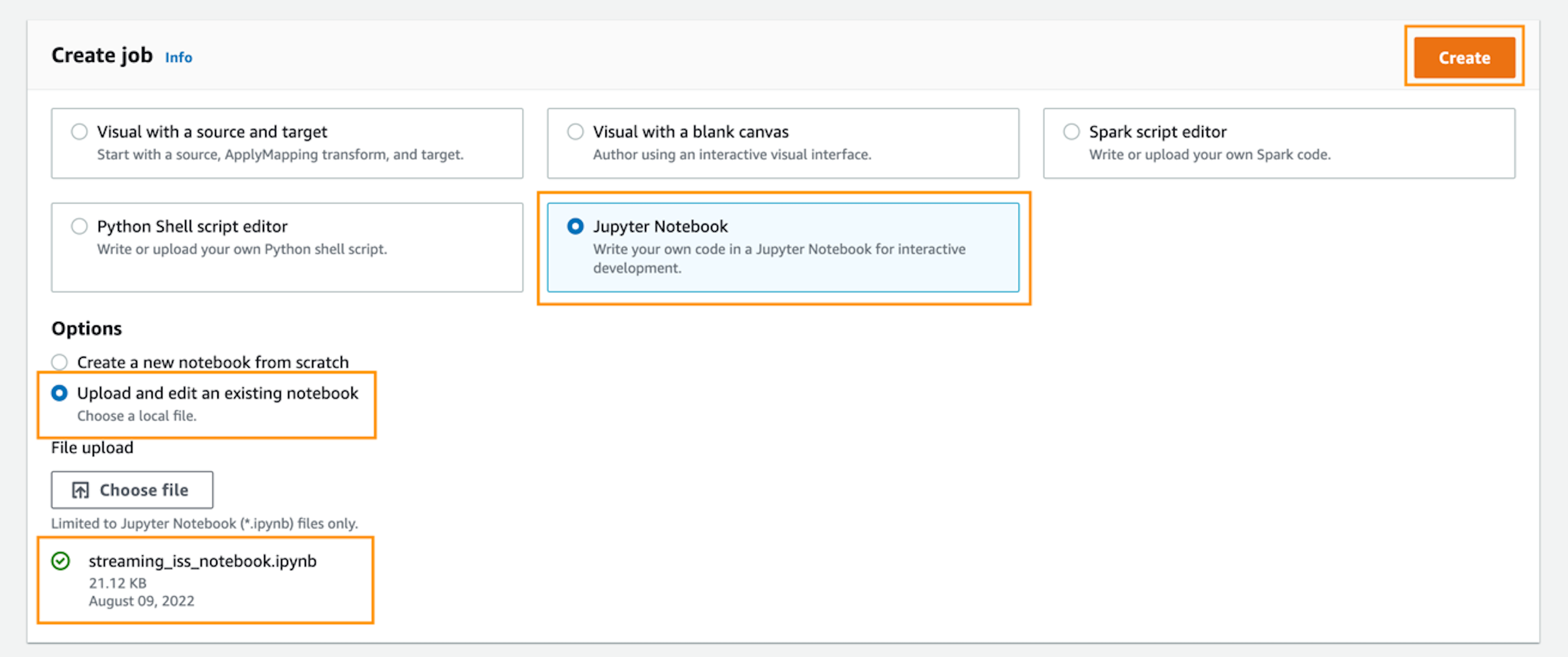
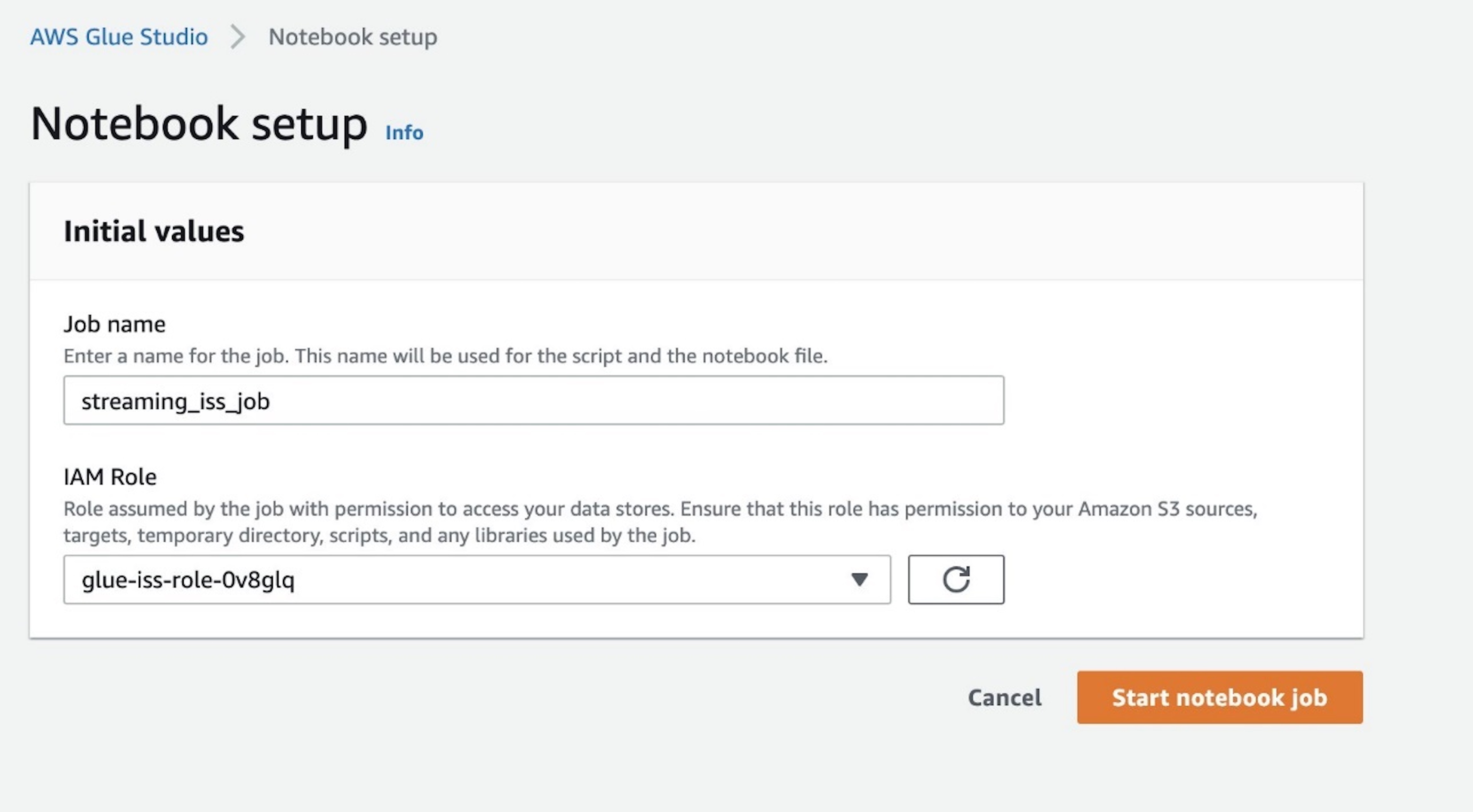
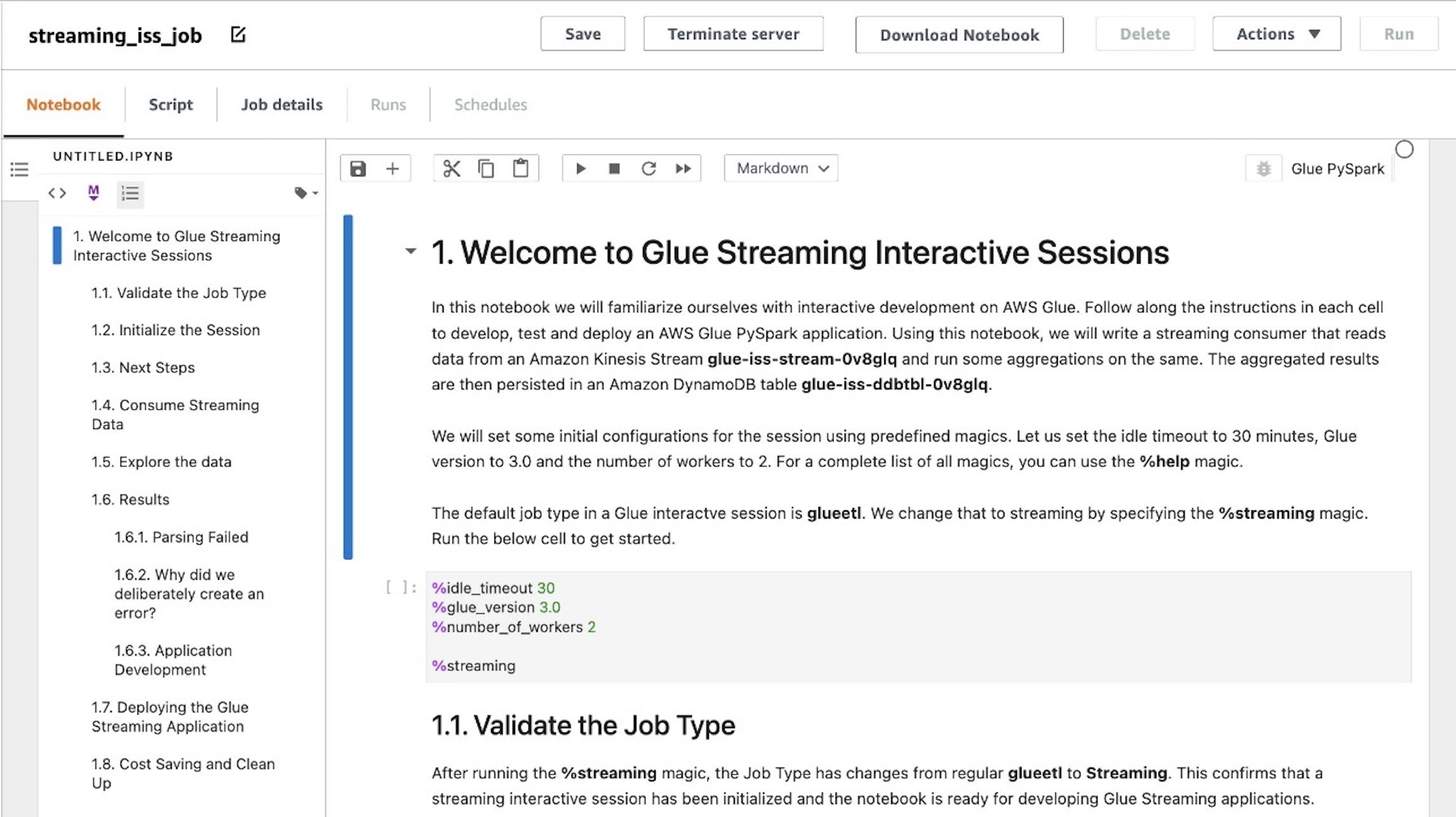
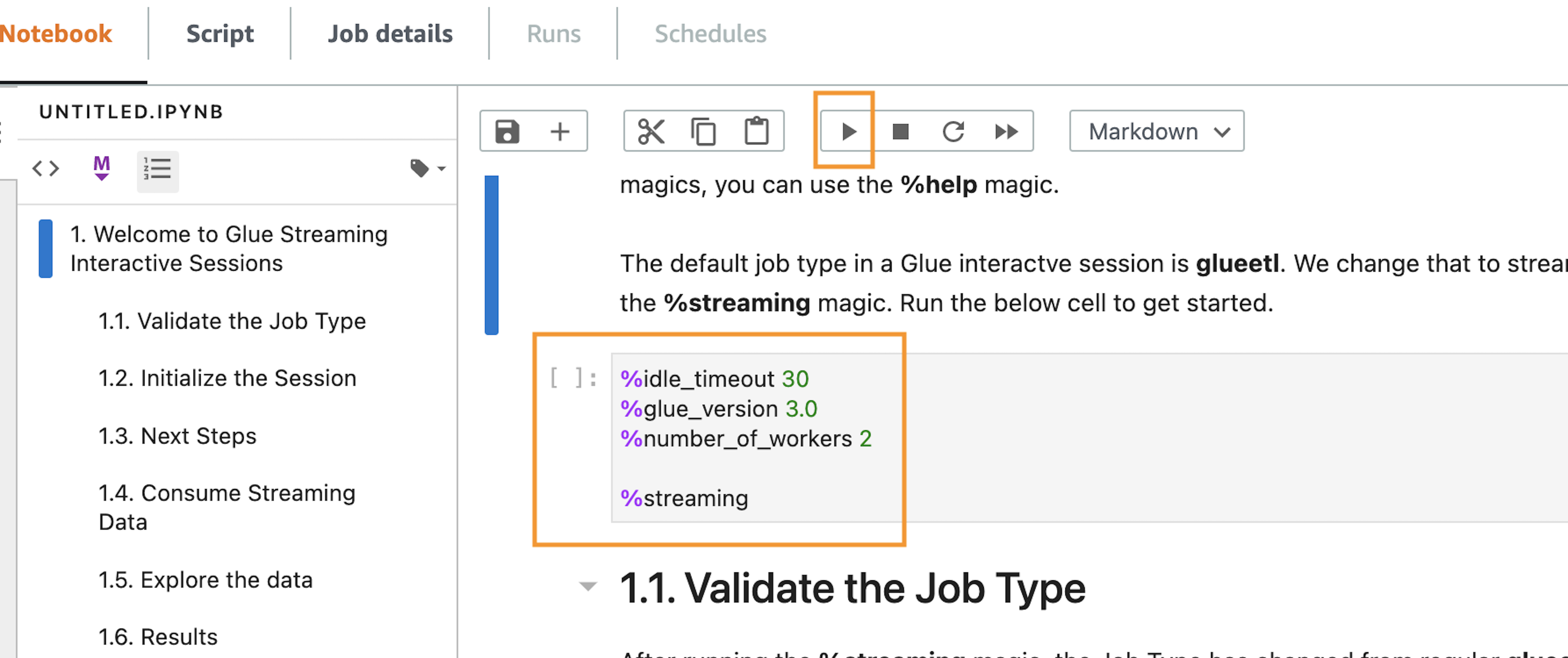
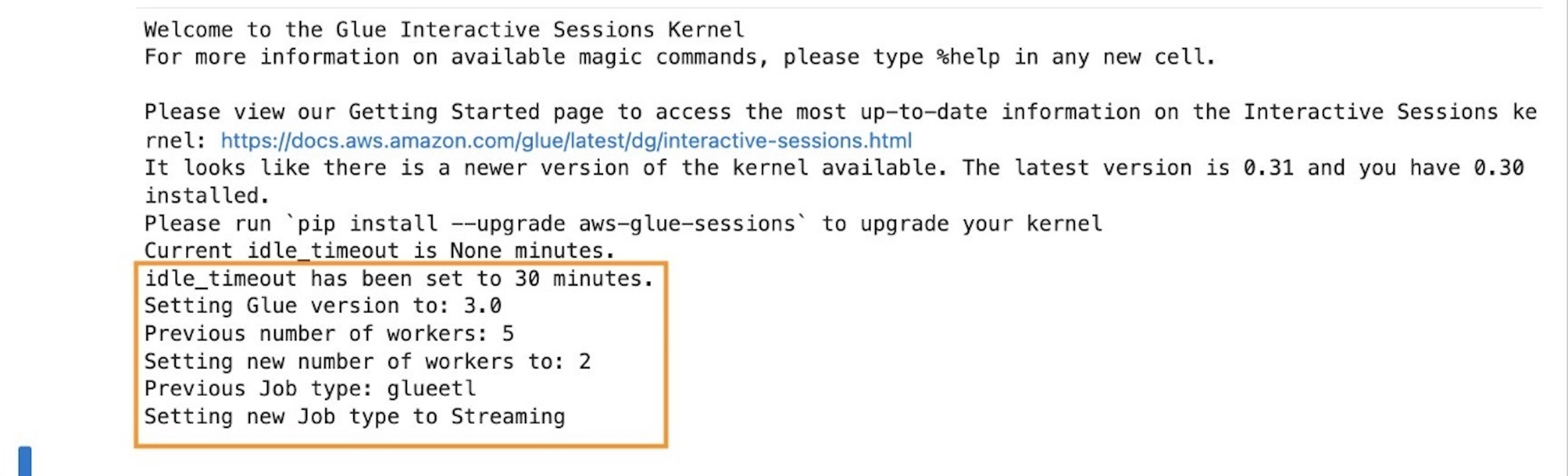
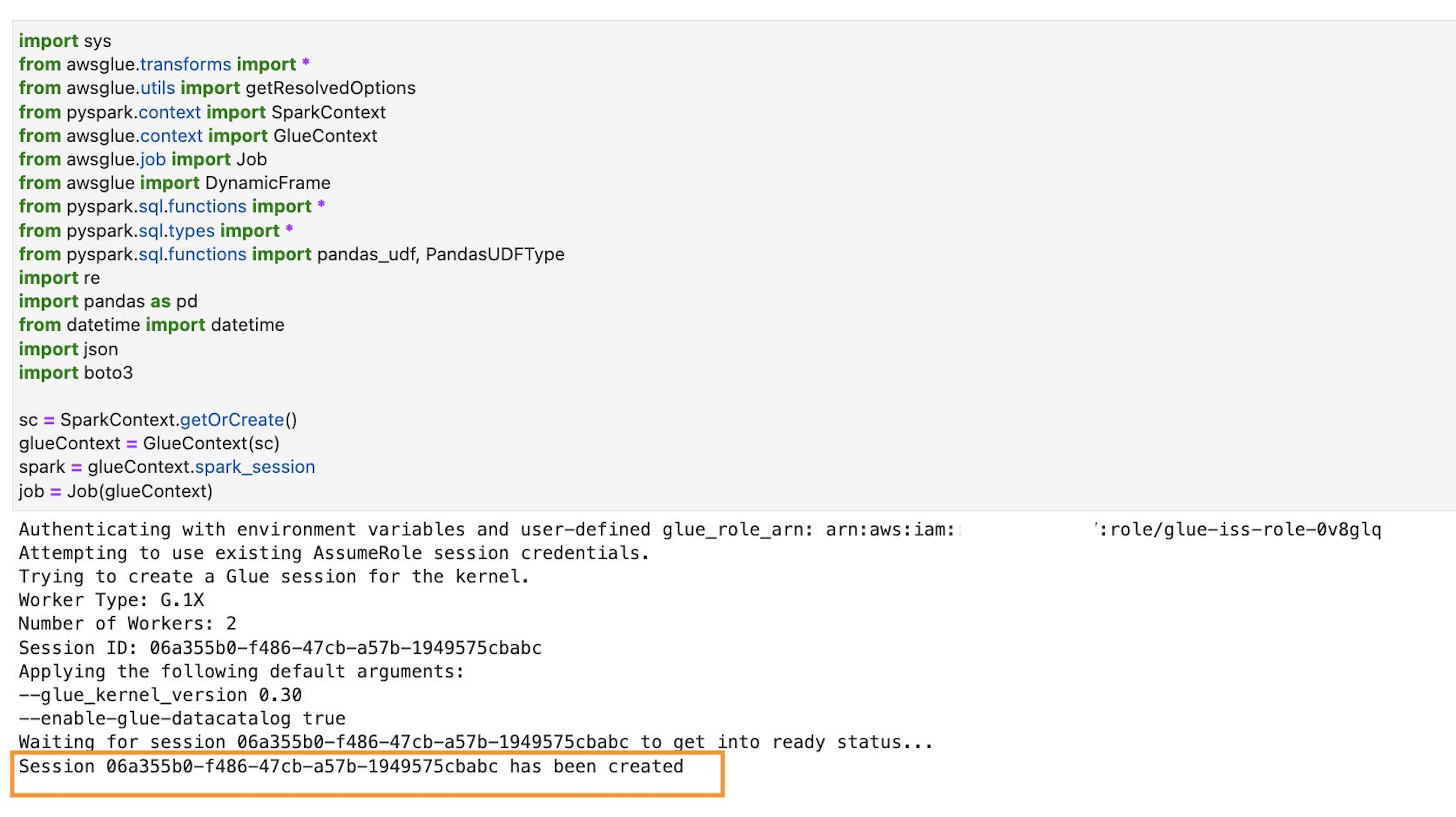
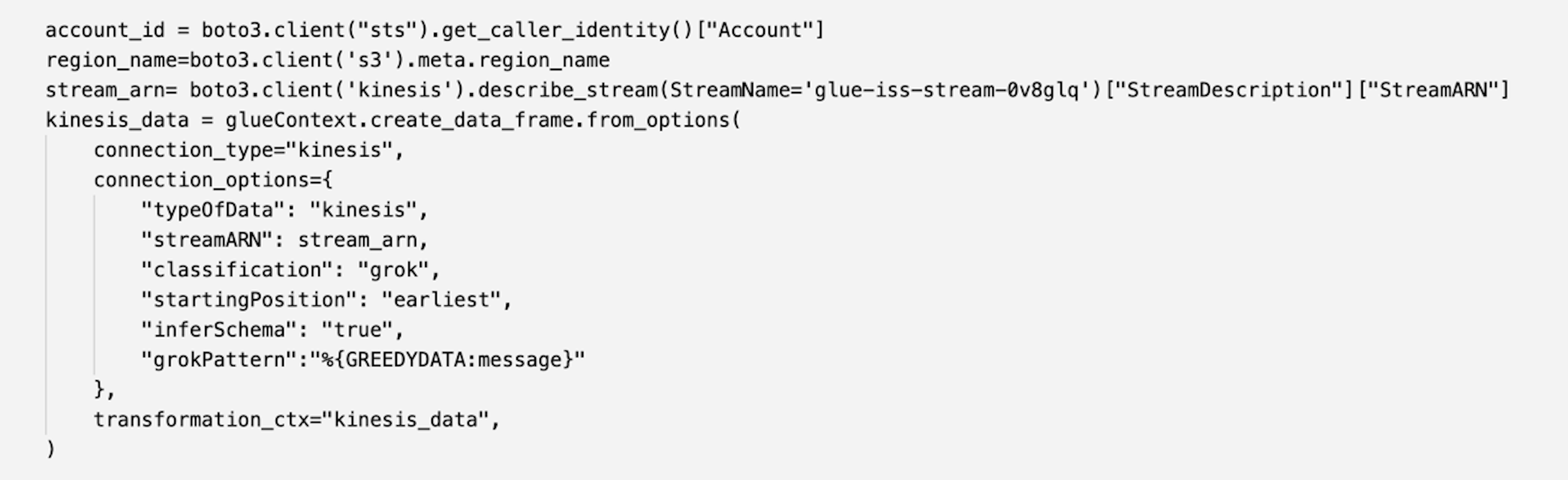
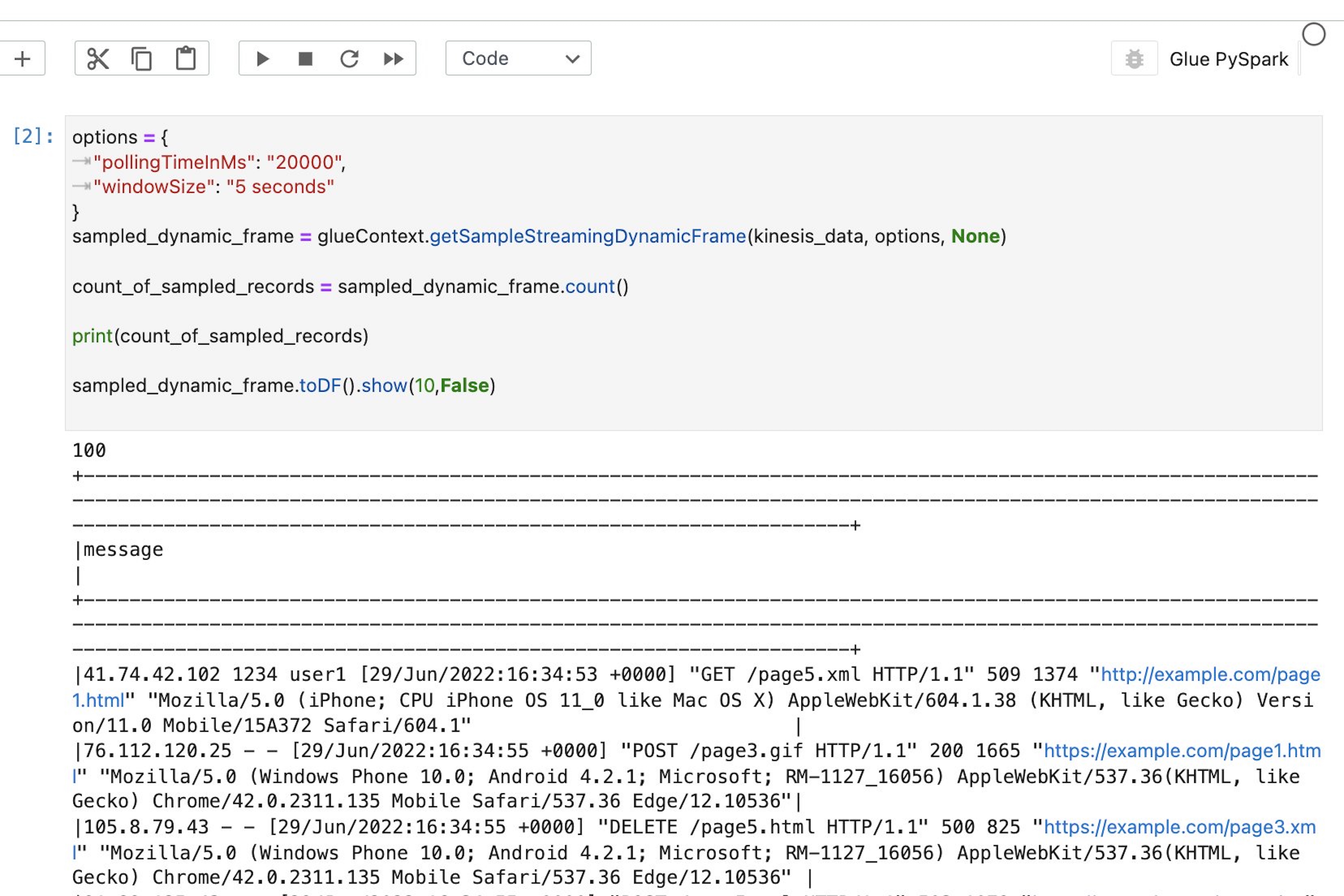

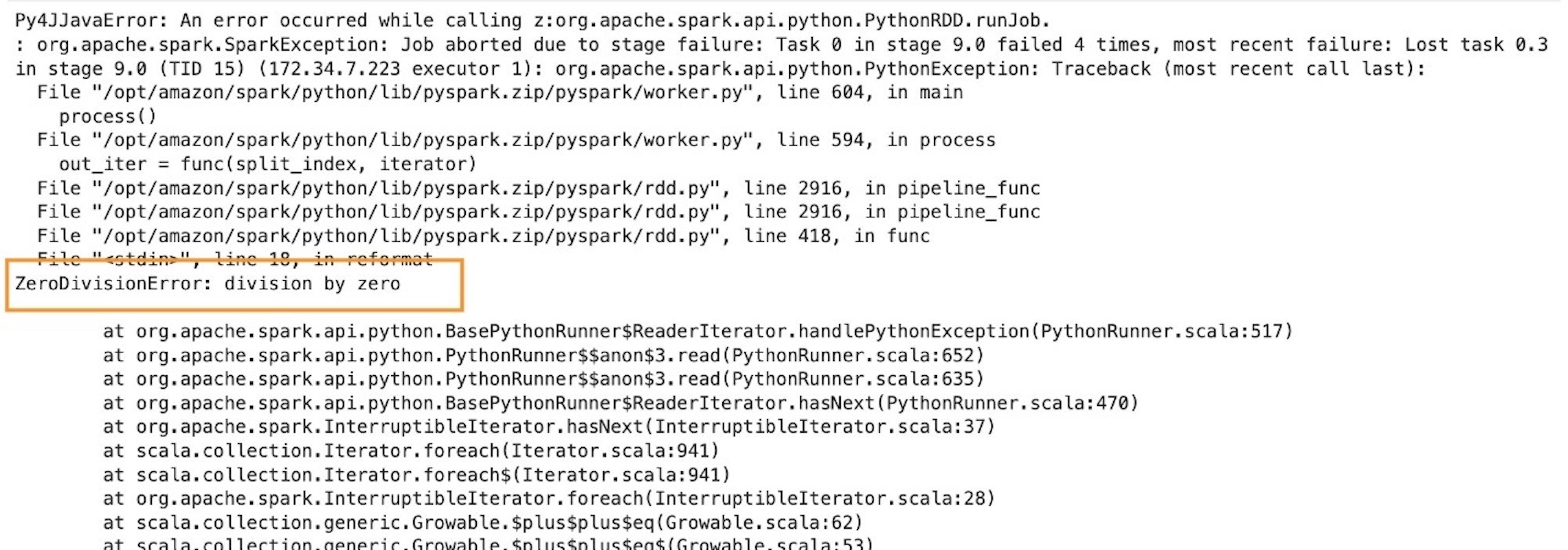
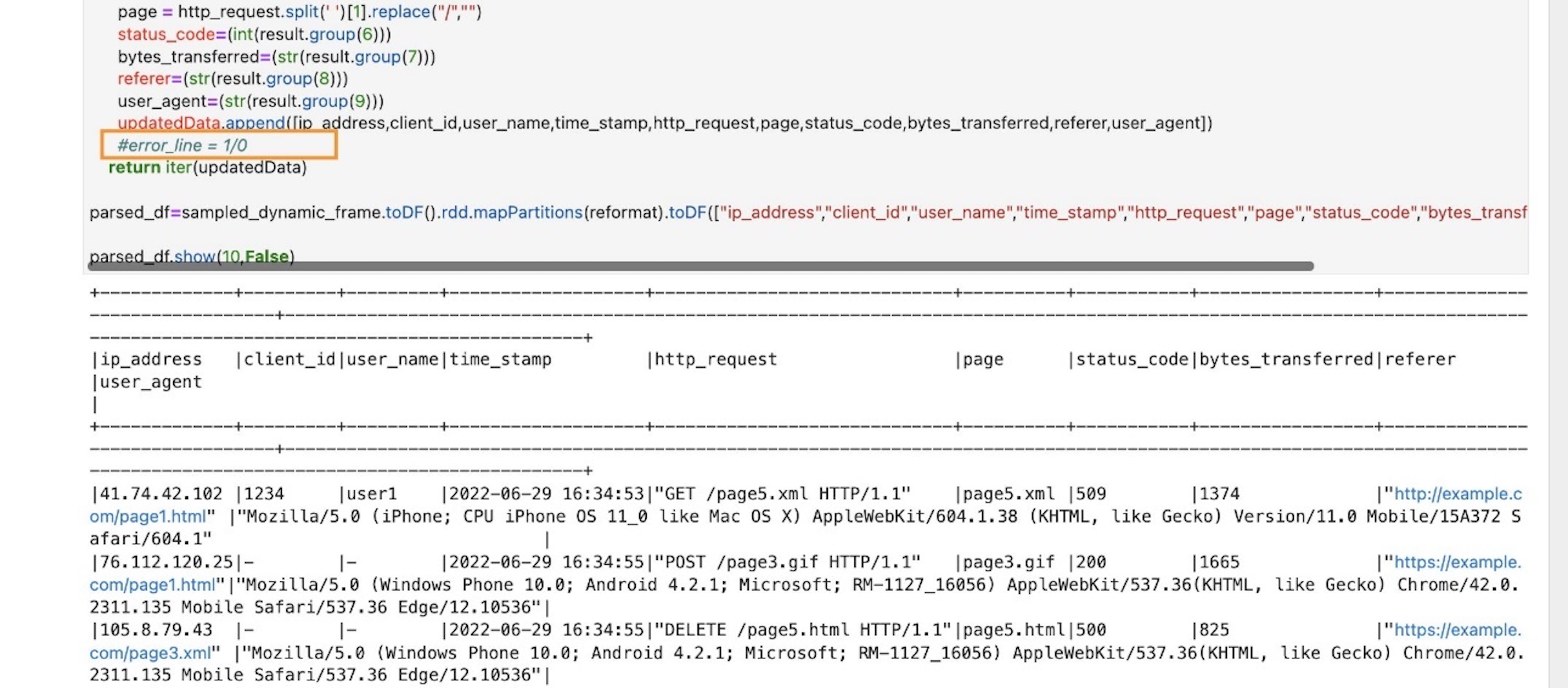
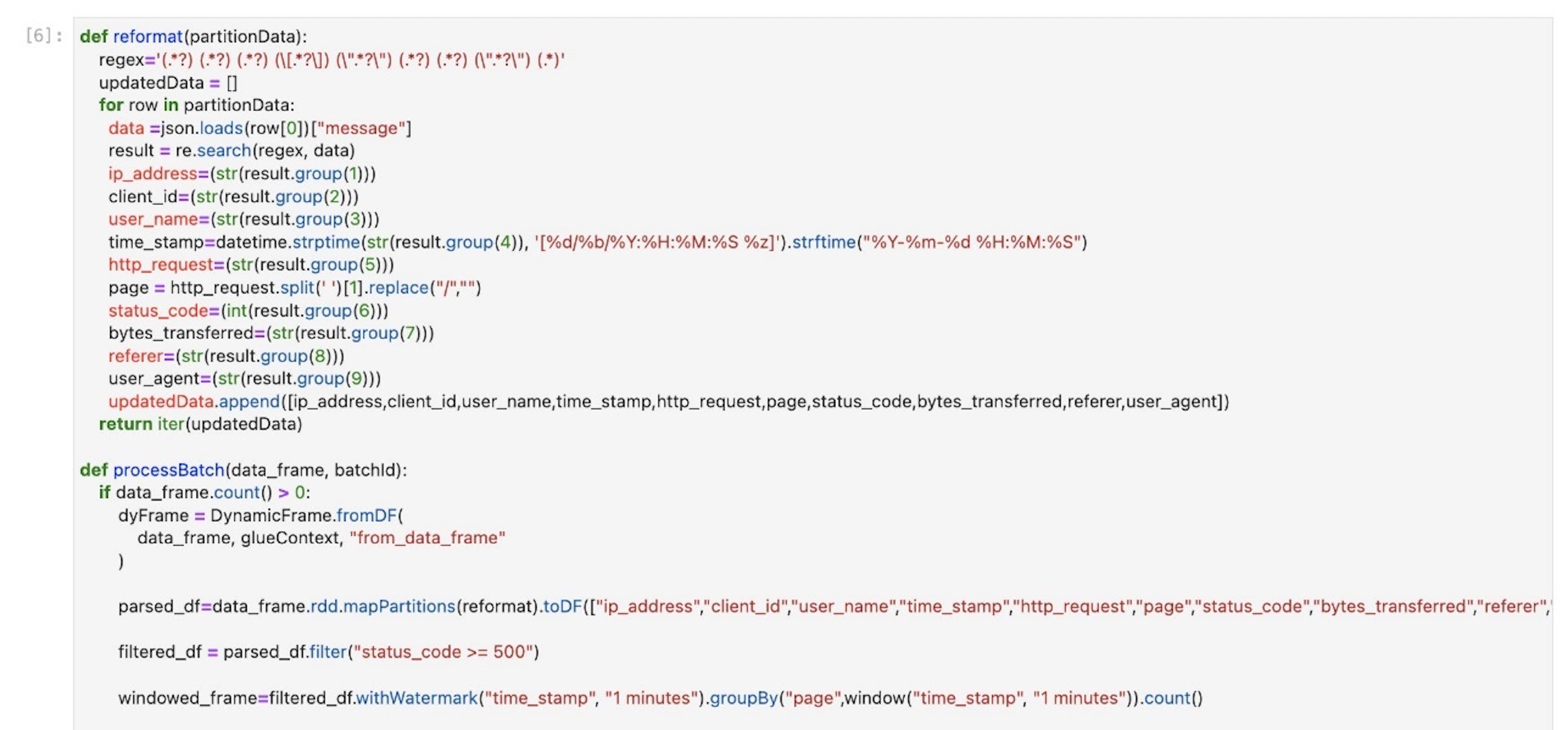
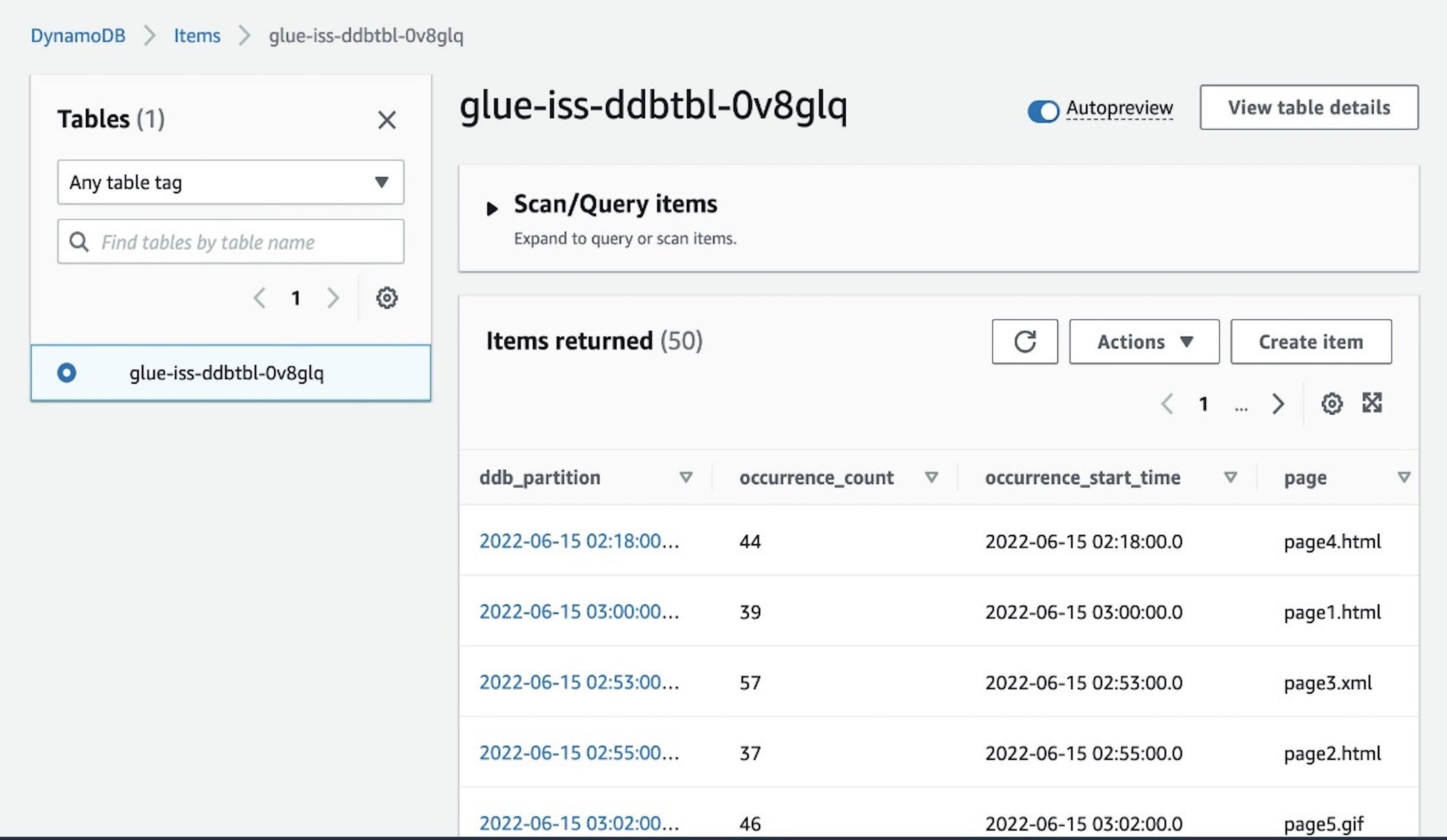
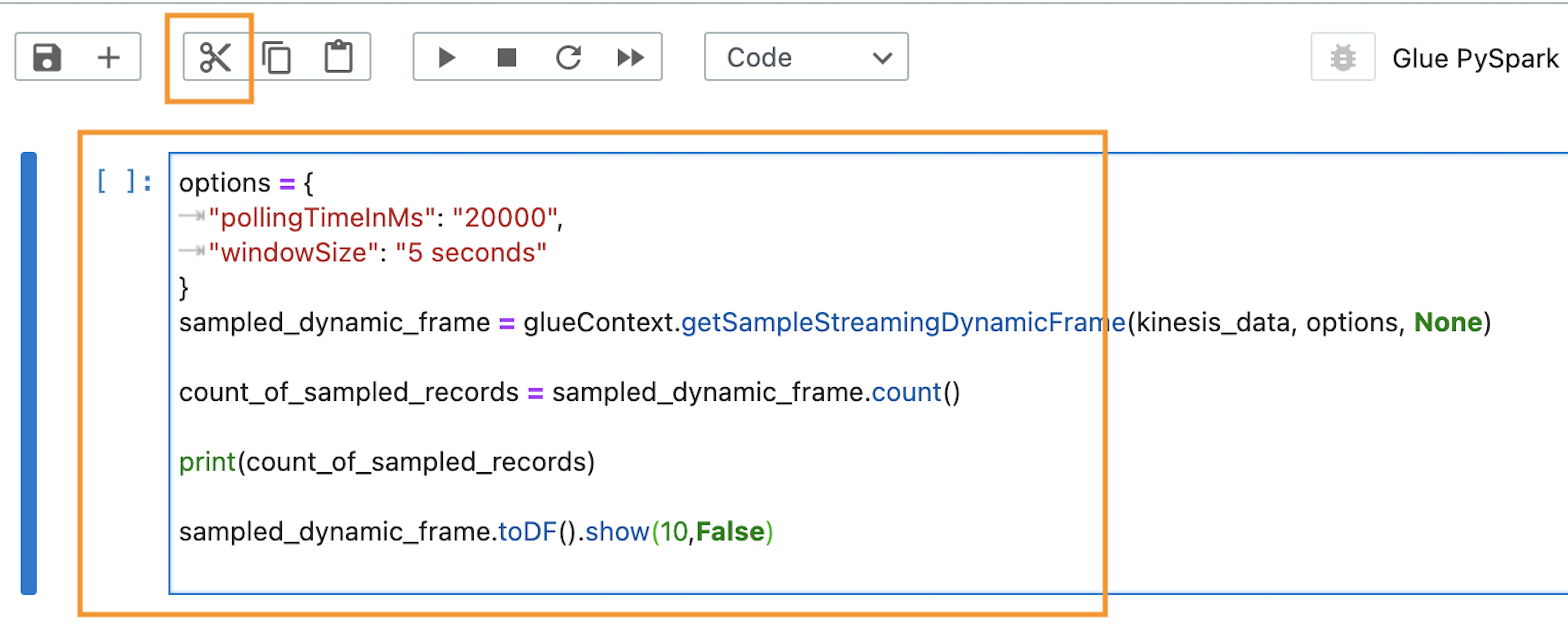


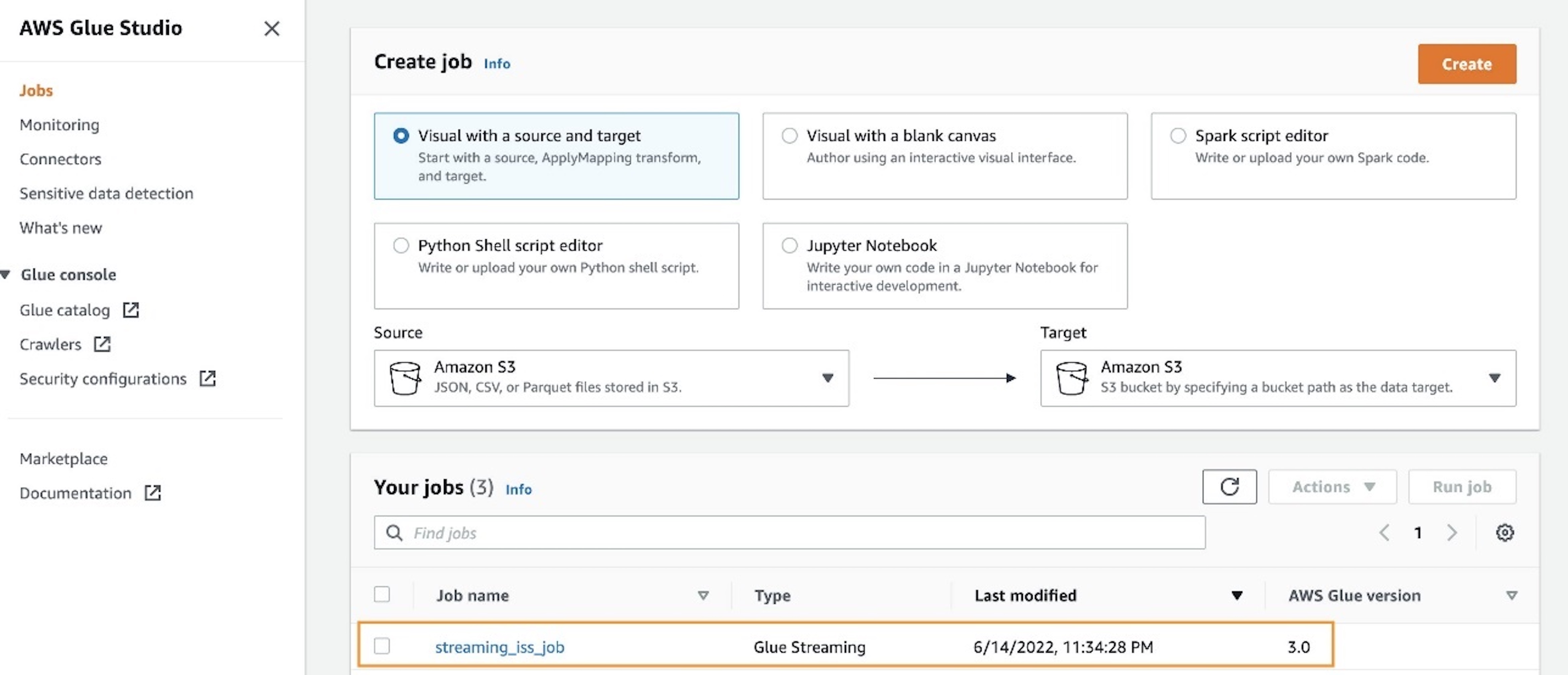
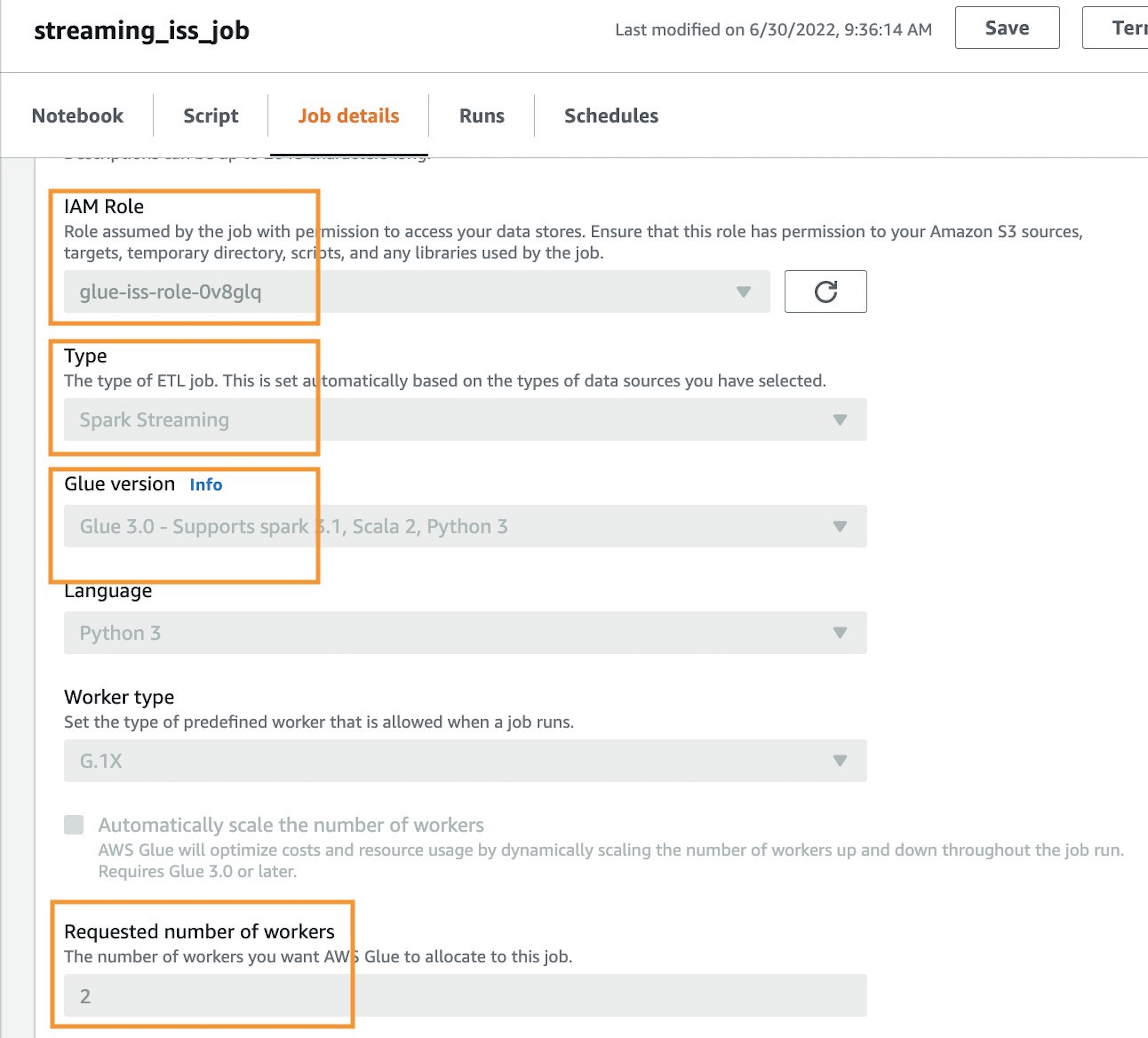
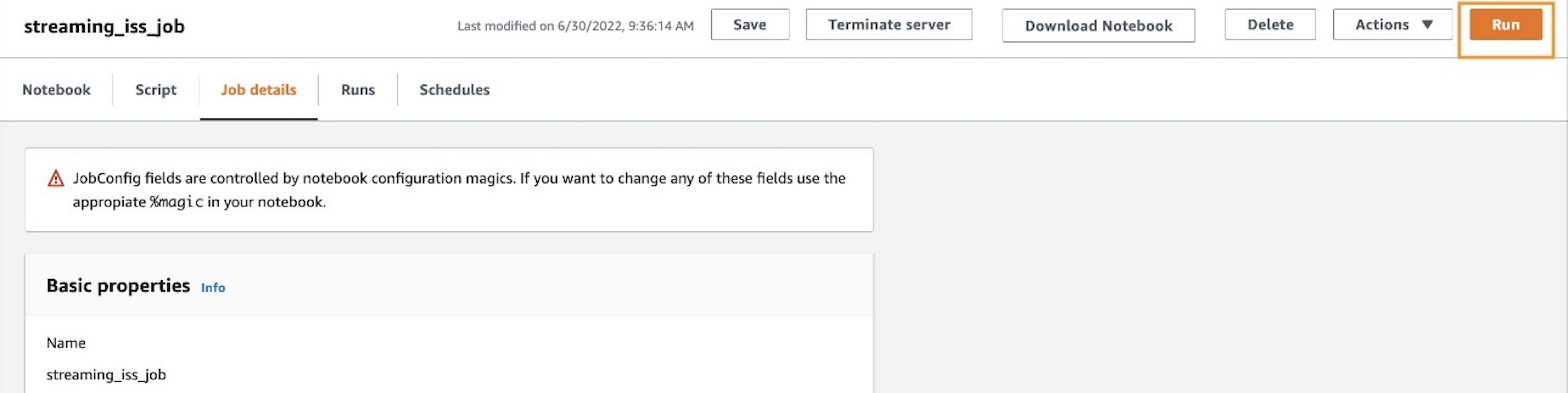
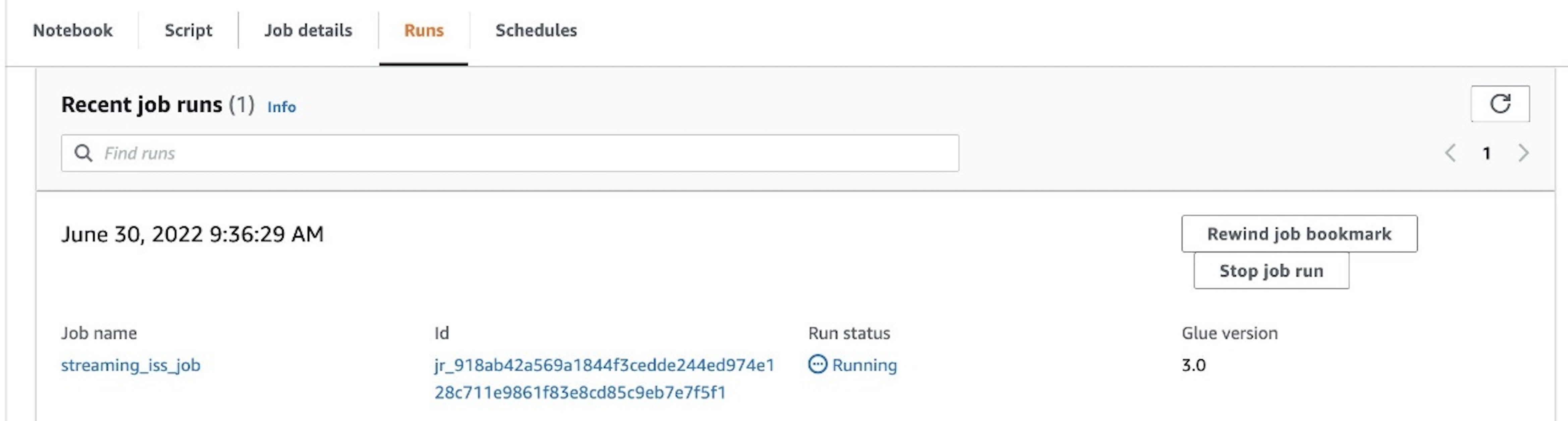






 Chao Pan is a Data Analytics Solutions Architect at Amazon Web Services. He’s responsible for the consultation and design of customers’ big data solution architectures. He has extensive experience in open-source big data. Outside of work, he enjoys hiking.