Tag Archives: generative AI

Five troubleshooting examples with Amazon Q

Post Syndicated from Brendan Jenkins original https://aws.amazon.com/blogs/devops/five-troubleshooting-examples-with-amazon-q/

Operators, administrators, developers, and many other personas leveraging AWS come across multiple common issues when it comes to troubleshooting in the AWS Console. To help alleviate this burden, AWS released Amazon Q. Amazon Q is AWS’s generative AI-powered assistant that helps make your organizational data more accessible, write code, answer questions, generate content, solve problems, manage AWS resources, and take action. A component of Amazon Q is Amazon Q Developer. Amazon Q Developer reimagines your experience across the entire development lifecycle, including having the ability to help you understand errors and remediate them in the AWS Management Console. Additionally, Amazon Q also provides access to opening new AWS support cases to address your AWS questions if further troubleshooting help is needed.

In this blog post, we will highlight the five troubleshooting examples with Amazon Q. Specific use cases that will be covered include: EC2 SSH connection issues, VPC Network troubleshooting, IAM Permission troubleshooting, AWS Lambda troubleshooting, and troubleshooting S3 errors.

Prerequisites

To follow along with these examples, the following prerequisites are required:

Five troubleshooting examples with Amazon Q

In this section, we will be covering the examples previously mentioned in the AWS Console.

Note: This feature is only available in US West (Oregon) AWS Region during preview for errors that arise while using the following services in the AWS Management Console: Amazon Elastic Compute Cloud (Amazon EC2), Amazon Elastic Container Service (Amazon ECS), Amazon Simple Storage Service (Amazon S3), and AWS Lambda.

EC2 SSH connection issues

In this section, we will show an example of troubleshooting an EC2 SSH connection issue. If you haven’t already, please be sure to create an Amazon EC2 instance for the purpose of this walkthrough.

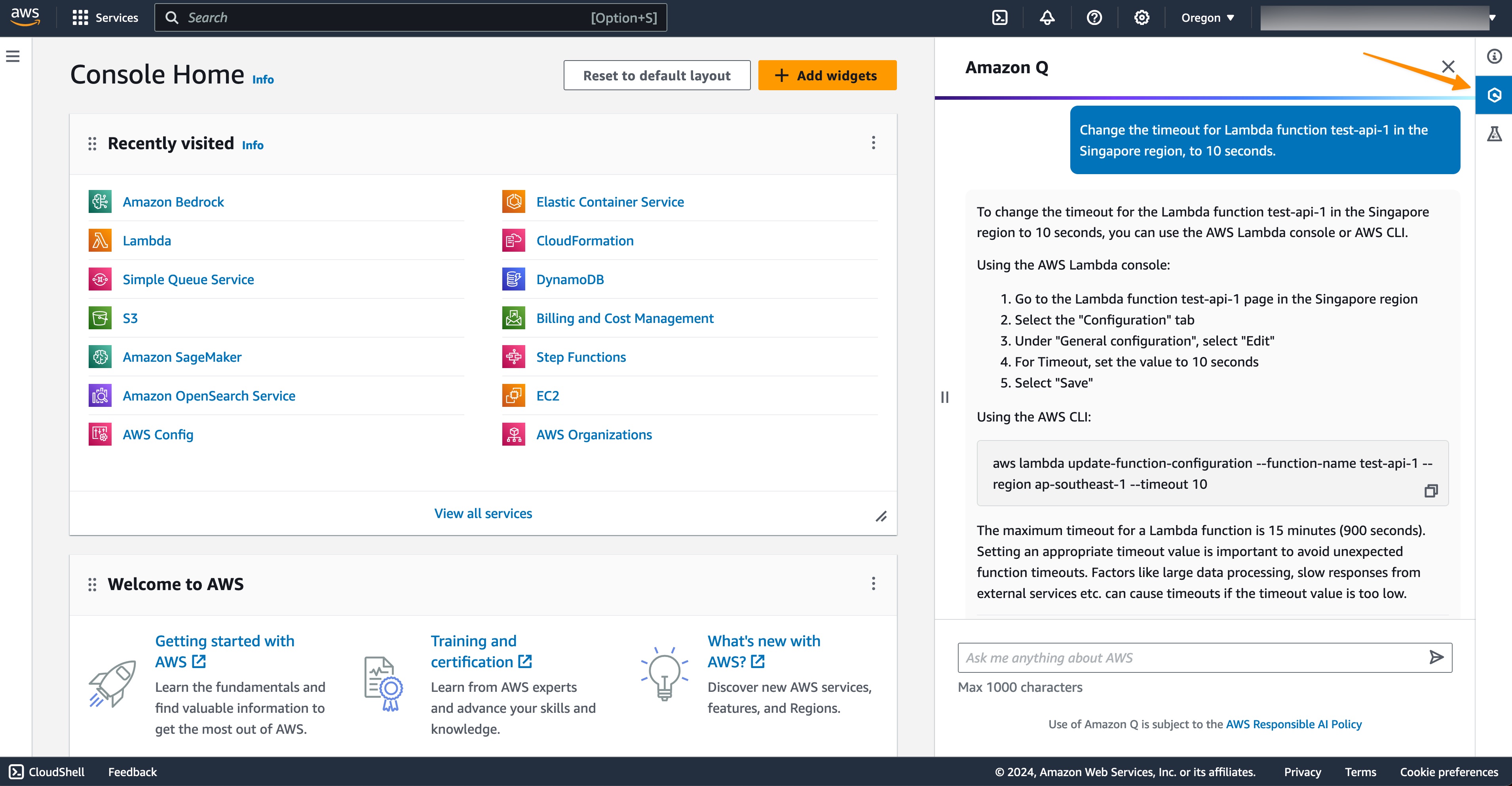
First, sign into the AWS console and navigate to the us-west-2 region then click on the Amazon Q icon in the right sidebar on the AWS Management Console as shown below in figure 1.

Figure 1 - Opening Amazon Q chat in the console

Figure 1 – Opening Amazon Q chat in the console

With the Amazon Q chat open, we enter the following prompt below:

Prompt:

"Why cant I SSH into my EC2 instance <insert Instance ID here>?"

Note: you can obtain the instance ID from within EC2 service in the console.

We now get a response up stating: “It looks like you need help with network connectivity issues. Amazon Q works with VPC Reachability Analyzer to provide an interactive generative AI experience for troubleshooting network connectivity issues. You can try the preview experience here (available in US East N. Virginia Region).”

Click on the preview experience here URL from Amazon Qs response.

Figure 2 - Prompting Q chat in the console.

Figure 2 – Prompting Q chat in the console.

Now, Amazon Q will run an analysis for connectivity between the internet and your EC2 instance. Find a sample response from Amazon Q below:

Figure 3 - Response from Amazon Q network troubleshooting
Figure 3 – Response from Amazon Q network troubleshooting

Toward the end of the explanation from Amazon Q, it states that it checked the security groups for allowing inbound traffic from port 22 and was blocked from accessing.

Figure 4 – Response from Amazon Q network troubleshooting cont.

As a best practice, you will want to follow AWS prescriptive guidance on adding rules for inbound SSH traffic for resolving an issue like this.

VPC Network troubleshooting

In this section, we will show how to troubleshoot a VPC network connection issue.

In this example, I have two EC2 instances, Server-1-demo and Server-2-demo in two separate VPCs shown below in figure 5. I want to leverage amazon Q troubleshooting to understand why these two instances cannot communicate with each other.

Figure 5 - two EC2 instances
Figure 5 – two EC2 instances

First, we navigate to the AWS console and click on the Amazon Q icon in the right sidebar on the AWS Management Console as shown below in figure 1.

Figure 6 - Opening Amazon Q chat in the console

Figure 6 – Opening Amazon Q chat in the console

Now, with the Q console chat open, I enter the following prompt for Amazon Q below to help understand the connectivity issue between the servers:

Prompt:

"Why cant my Server-1-demo communicate with Server-2-demo?"

Figure 7 - prompt for Amazon Q connectivity troubleshooting
Figure 7 – prompt for Amazon Q connectivity troubleshooting

Now, click the preview experience here hyperlink to be redirected to the Amazon Q network troubleshooting – preview. Amazon Q troubleshooting will now generate a response as shown below in Figure 8.

Figure 8 - connectivity troubleshooting response generated by Amazon QFigure 8 – connectivity troubleshooting response generated by Amazon Q

In the response, Amazon Q states, “It sounds like you are troubleshooting connectivity between Server-1-demo and Server-2-demo. Based on the previous context, these instances are in different VPCs which could explain why TCP testing previously did not resolve the issue, if a peering connection is not established between the VPCs.“

So, we need to establish a VPC peering connection between the two instances since they are in different VPCs.

IAM Permission troubleshooting

Now, let’s take a look at how Amazon Q can help resolve IAM Permission issues.

In this example, I’m creating a cluster with Amazon Elastic Container Service (ECS). I chose to deploy my containers on Amazon EC2 instances, which prompted some configuration options, including whether I wanted an SSH Key pair. I chose to “Create a new key pair”.

Figure 9 - Configuring ECS key pair

Figure 9 – Configuring ECS key pair

That opens up a new tab in the EC2 console.

Figure 10 - Creating ECS key pair

Figure 10 – Creating ECS key pair

But when I tried to create the SSH. I got the error below:

Figure 11 - ECS console error

Figure 11 – ECS console error

So, I clicked the link to “Troubleshoot with Amazon Q” which revealed an explanation as to why my user was not able to create the SSH key pair and the specific permissions that were missing.

Figure 12 - Amazon Q troubleshooting analysis

Figure 12 – Amazon Q troubleshooting analysis

So, I clicked the “Help me resolve” link ad I got the following steps.

Figure 13 - Amazon Q troubleshooting resolution

Figure 13 – Amazon Q troubleshooting resolution

Even though my user had permissions to use Amazon ECS, the user also needs certain permission permissions in the Amazon EC2 services as well, specifically ec2:CreateKeyPair. By only enabling the specific action required for this IAM user, your organization can follow the best practice of least privilege.

Lambda troubleshooting

Another area Amazon Q can help is with AWS Lambda errors when doing development work in the AWS Console. Users may find issues with things like missing configurations, environment variables, and code typos. With Amazon Q, it can help you fix and troubleshoot these issues with step by step guidance on how to fix it.

In this example, in the us-west-2 region, we have created a new lambda function called demo_function_blog in the console with the Python 3.12 runtime. The following code below is included with a missing lambda layer for AWS pandas.

Lambda Code:

import json
import pandas as pd

def lambda_handler(event, context):
    data = {'Name': ['John', 'Jane', 'Jim'],'Age': [25, 30, 35]}
    df = pd.DataFrame(data)
    print(df.head()) # print first five rows

    return {
        'statusCode': 200,
        'body': json.dumps("execution successful!")
    }

Now, we configure a test event to test the following code within the lambda console called test-event as shown below in figure 14.

Figure 14 - configuring test event

Figure 14 – configuring test event

Now that the test event is created, we can move over to the Test tab in the lambda console and click the Test button. We will then see an error (intended) and we will click on the Troubleshoot with Amazon Q button as shown below in figure 15.

Figure 15 - Lambda Error

Figure 15 – Lambda Error

Now we will be able to see Amazon Qs analysis of the issue. It states “It appears that the Lambda function is missing a dependency. The error message indicates that the function code requires the ‘pandas’ module, ….”. Click Help me resolve to get step by step instructions on the fix as shown below in figure 16.

Figure 16 - Amazon Q Analysis

Figure 16 – Amazon Q Analysis

Amazon Q will then generate a step-by-step resolution on how to the fix the error as shown below in figure 17.

Figure 17 - Amazon Q Resolution

Figure 17 – Amazon Q Resolution

Following with Amazon Q’s recommendations, we need to add a new lambda layer for the pandas dependency as shown below in figure 18:

Figure 18 – Updating lambda layer

Figure 18 – Updating lambda layer

Once updated, go to the Test tab once again and click Test. The function code should now run successfully as shown below in figure 19:

Figure 19 - Lambda function successfully run

Figure 19 – Lambda function successfully run

Check out the Amazon Q immersion day for more examples of Lambda troubleshooting.

Troubleshooting S3 Errors

While working with Amazon S3, users might encounter errors that can disrupt the smooth functioning of their operations. Identifying and resolving these issues promptly is crucial for ensuring uninterrupted access to S3 resources. Amazon Q, a powerful tool, offers a seamless way to troubleshoot errors across various AWS services, including Amazon S3.

In this example we use Q to troubleshoot S3 Replication rule configuration error. Imagine you’re attempting to configure a replication rule for an Amazon S3 bucket, and configuration fails. You can turn to Amazon Q for assistance. If you receive an error that Amazon Q can help with, a Troubleshoot with Amazon Q button appears in the error message. Navigate to the Amazon S3 service in the console to follow along with this example if it applies to your use case.

Figure 20 - S3 console error

Figure 20 – S3 console error

To use Amazon Q to troubleshoot, choose Troubleshoot with Amazon Q to proceed. A window appears where Amazon Q provides information about the error titled “Analysis“.

Amazon Q diagnosed that the error occurred because versioning is not enabled for the source bucket specified. Versioning must be enabled on the source bucket in order to replicate objects from that bucket.

Amazon Q also provides an overview on how to resolve this error. To see detailed steps for how to resolve the error, choose Help me resolve.

Figure 21 - Amazon Q analysis

Figure 21 – Amazon Q analysis

It can take several seconds for Amazon Q to generate instructions. After they appear, follow the instructions to resolve the error.

Figure 22 - Amazon Q Resolution
Figure 22 – Amazon Q Resolution

Here, Amazon Q recommends the following steps to resolve the error:

  1. Navigate to the S3 console
  2. Select the S3 bucket
  3. Go to the Properties tab
  4. Under Versioning, click Edit
  5. Enable versioning on the bucket
  6. Return to replication rule creation page
  7. Retry creating replication rule

Conclusion

Amazon Q is a powerful AI-powered assistant that can greatly simplify troubleshooting of common issues across various AWS services, especially for Developers. Amazon Q provides detailed analysis and step-by-step guidance to resolve errors efficiently. By leveraging Amazon Q, AWS users can save significant time and effort in diagnosing and fixing problems, allowing them to focus more on building and innovating with AWS. Amazon Q represents a valuable addition to the AWS ecosystem, empowering users with enhanced support and streamlined troubleshooting capabilities.

About the authors

Brendan Jenkins

Brendan Jenkins is a Solutions Architect at Amazon Web Services (AWS) working with Enterprise AWS customers providing them with technical guidance and helping achieve their business goals. He has an area of specialization in DevOps and Machine Learning technology.

Jehu Gray

Jehu Gray is an Enterprise Solutions Architect at Amazon Web Services where he helps customers design solutions that fits their needs. He enjoys exploring what’s possible with IaC.

Robert Stolz

Robert Stolz is a Solutions Architect at Amazon Web Services (AWS) working with Enterprise AWS customers in the financial services industry, helping them achieve their business goals. He has a specialization in AI Strategy and adoption tactics.

AWS Weekly Roundup – LlamaIndex support for Amazon Neptune, force AWS CloudFormation stack deletion, and more (May 27, 2024)

Post Syndicated from Antje Barth original https://aws.amazon.com/blogs/aws/aws-weekly-roundup-llamaindex-support-for-amazon-neptune-force-aws-cloudformation-stack-deletion-and-more-may-27-2024/

Last week, Dr. Matt Wood, VP for AI Products at Amazon Web Services (AWS), delivered the keynote at the AWS Summit Los Angeles. Matt and guest speakers shared the latest advancements in generative artificial intelligence (generative AI), developer tooling, and foundational infrastructure, showcasing how they come together to change what’s possible for builders. You can watch the full keynote on YouTube.

AWS Summit LA 2024 keynote

Announcements during the LA Summit included two new Amazon Q courses as part of Amazon’s AI Ready initiative to provide free AI skills training to 2 million people globally by 2025. The courses are part of the Amazon Q learning plan. But that’s not all that happened last week.

Last week’s launches
Here are some launches that got my attention:

LlamaIndex support for Amazon Neptune — You can now build Graph Retrieval Augmented Generation (GraphRAG) applications by combining knowledge graphs stored in Amazon Neptune and LlamaIndex, a popular open source framework for building applications with large language models (LLMs) such as those available in Amazon Bedrock. To learn more, check the LlamaIndex documentation for Amazon Neptune Graph Store.

AWS CloudFormation launches a new parameter called DeletionMode for the DeleteStack API — You can use the AWS CloudFormation DeleteStack API to delete your stacks and stack resources. However, certain stack resources can prevent the DeleteStack API from successfully completing, for example, when you attempt to delete non-empty Amazon Simple Storage Service (Amazon S3) buckets. The DeleteStack API can enter into the DELETE_FAILED state in such scenarios. With this launch, you can now pass FORCE_DELETE_STACK value to the new DeletionMode parameter and delete such stacks. To learn more, check the DeleteStack API documentation.

Mistral Small now available in Amazon Bedrock — The Mistral Small foundation model (FM) from Mistral AI is now generally available in Amazon Bedrock. This a fast-follow to our recent announcements of Mistral 7B and Mixtral 8x7B in March, and Mistral Large in April. Mistral Small, developed by Mistral AI, is a highly efficient large language model (LLM) optimized for high-volume, low-latency language-based tasks. To learn more, check Esra’s post.

New Amazon CloudFront edge location in Cairo, Egypt — The new AWS edge location brings the full suite of benefits provided by Amazon CloudFront, a secure, highly distributed, and scalable content delivery network (CDN) that delivers static and dynamic content, APIs, and live and on-demand video with low latency and high performance. Customers in Egypt can expect up to 30 percent improvement in latency, on average, for data delivered through the new edge location. To learn more about AWS edge locations, visit CloudFront edge locations.

Amazon OpenSearch Service zero-ETL integration with Amazon S3 — This Amazon OpenSearch Service integration offers a new efficient way to query operational logs in Amazon S3 data lakes, eliminating the need to switch between tools to analyze data. You can get started by installing out-of-the-box dashboards for AWS log types such as Amazon VPC Flow Logs, AWS WAF Logs, and Elastic Load Balancing (ELB). To learn more, check out the Amazon OpenSearch Service Integrations page and the Amazon OpenSearch Service Developer Guide.

For a full list of AWS announcements, be sure to keep an eye on the What’s New at AWS page.

Other AWS news
Here are some additional news items and a Twitch show that you might find interesting:

AWS Build On Generative AIBuild On Generative AI — Now streaming every Thursday, 2:00 PM US PT on twitch.tv/aws, my colleagues Tiffany and Mike discuss different aspects of generative AI and invite guest speakers to demo their work. Check out show notes and the full list of episodes on community.aws.

Amazon Bedrock Studio bootstrapper script — We’ve heard your feedback! To everyone who struggled setting up the required AWS Identity and Access Management (IAM) roles and permissions to get started with Amazon Bedrock Studio: You can now use the Bedrock Studio bootstrapper script to automate the creation of the permissions boundary, service role, and provisioning role.

Upcoming AWS events
Check your calendars and sign up for these AWS events:

AWS SummitsAWS Summits — It’s AWS Summit season! Join free online and in-person events that bring the cloud computing community together to connect, collaborate, and learn about AWS. Register in your nearest city: Dubai (May 29), Bangkok (May 30), Stockholm (June 4), Madrid (June 5), and Washington, DC (June 26–27).

AWS re:InforceAWS re:Inforce — Join us for AWS re:Inforce (June 10–12) in Philadelphia, PA. AWS re:Inforce is a learning conference focused on AWS security solutions, cloud security, compliance, and identity. Connect with the AWS teams that build the security tools and meet AWS customers to learn about their security journeys.

AWS Community DaysAWS Community Days — Join community-led conferences that feature technical discussions, workshops, and hands-on labs led by expert AWS users and industry leaders from around the world: Midwest | Columbus (June 13), Sri Lanka (June 27), Cameroon (July 13), New Zealand (August 15), Nigeria (August 24), and New York (August 28).

You can browse all upcoming in-person and virtual events.

That’s all for this week. Check back next Monday for another Weekly Roundup!

— Antje

This post is part of our Weekly Roundup series. Check back each week for a quick roundup of interesting news and announcements from AWS!

Optimized for low-latency workloads, Mistral Small now available in Amazon Bedrock

Post Syndicated from Esra Kayabali original https://aws.amazon.com/blogs/aws/optimized-for-low-latency-workloads-mistral-small-now-available-in-amazon-bedrock/

Today, I am happy to announce that the Mistral Small foundation model (FM) from Mistral AI is now generally available in Amazon Bedrock. This a fast-follow to our recent announcements of Mistral 7B and Mixtral 8x7B in March, and Mistral Large in April. You can now access four high-performing models from Mistral AI in Amazon Bedrock including Mistral Small, Mistral Large, Mistral 7B, and Mixtral 8x7B, further expanding model choice.

Mistral Small, developed by Mistral AI, is a highly efficient large language model (LLM) optimized for high-volume, low-latency language-based tasks. Mistral Small is perfectly suited for straightforward tasks that can be performed in bulk, such as classification, customer support, or text generation. It provides outstanding performance at a cost-effective price point.

Some key features of Mistral Small you need to know about:

  • Retrieval-Augmented Generation (RAG) specialization – Mistral Small ensures that important information is retained even in long context windows, which can extend up to 32K tokens.
  • Coding proficiency – Mistral Small excels in code generation, review, and commenting, supporting major coding languages.
  • Multilingual capability – Mistral Small delivers top-tier performance in French, German, Spanish, and Italian, in addition to English. It also supports dozens of other languages.

Getting started with Mistral Small
I first need access to the model to get started with Mistral Small. I go to the Amazon Bedrock console, choose Model access, and then choose Manage model access. I expand the Mistral AI section, choose Mistral Small, and then choose Save changes.

I now have model access to Mistral Small, and I can start using it in Amazon Bedrock. I refresh the Base models table to view the current status.

I use the following template to build a prompt for the model to get sub-optimal outputs:

<s>[INST] Instruction [/INST]

Note that <s> is a special token for beginning of string (BOS) while [INST] and [/INST] are regular strings.

I try the following prompt to see a classification example:

Prompt:

<s>[INST] Classify the following email to determine if it is spam or not. Only respond with the exact words "Spam" or "Not spam".
🎉 Limited time offer! Buy 2, Get 1 Free! Offer ends today! Don't miss out the CHANCE TO SAVE, please click on the link below: https://bit.ly/buy-2-get-1-free [/INST]

Mistral 7B, Mixtral 8x7B, and Mistral Large can all correctly classify this email as “Spam.” Mistral Small is also able to classify this accurately, just as the larger models can. I also try several similar tasks, such as generating a Bash script from a text prompt and generating a recipe to prepare yoghurt, and get good results. For this reason, Mistral Small is the most cost-effective and efficient option of the Mistral AI models in Amazon Bedrock for such tasks.

Mistral Small excels in multilingual tasks. Along with English, it delivers superior performance in French, German, Spanish, and Italian. I test the model’s understanding of the German language by asking it to give me two sentences about sustainability:

Prompt:

<s>[INST] Geben Sie mir zwei Sätze zum Thema Nachhaltigkeit. [/INST]

Output:

1. Nachhaltigkeit bedeutet, die Bedürfnisse der heutigen Generation zu befriedigen, ohne die Möglichkeiten künftiger Generationen zu gefährden.
2. Ein nachhaltiger Lebensstil umfasst den bewussten Umgang mit Ressourcen, wie Wasser, Energie und Rohstoffen, sowie den Schutz von Umwelt und Klima.
Diese Sätze sollten Ihnen einen guten Überblick über das Thema Nachhaltigkeit geben.

Programmatically interact with Mistral Small
I can use AWS Command Line Interface (AWS CLI) and AWS Software Development Kit (SDK) to programmatically interact with Mistral Small using Amazon Bedrock APIs. I use the following code in Python, which interacts with Amazon Bedrock Runtime APIs with AWS SDK, asking, “What is the color of the sky?”:

import argparse
import boto3
from botocore.exceptions import ClientError
import json

accept = "application/json"
content_type = "application/json"

def invoke_model(model_id, input_data, region, streaming): 
  client = boto3.client('bedrock-runtime', region_name=region)
  try:
    if streaming:
      response = client.invoke_model_with_response_stream(body=input_data, modelId=model_id, accept=accept, contentType=content_type)
    else:
      response = client.invoke_model(body=input_data, modelId=model_id, accept=accept, contentType=content_type)
    status_code = response['ResponseMetadata']['HTTPStatusCode']
    print(json.loads(response.get('body').read()))
  except ClientError as e:
    print(e)

if __name__ == "__main__":
  parser = argparse.ArgumentParser(description="Bedrock Testing Tool")
  parser.add_argument("--prompt", type=str, help="prompt to use", default="Hello")
  parser.add_argument("--max-tokens", type=int, default=64)
  parser.add_argument("--streaming", choices=["true", "false"], help="whether to stream or not", default="false")
  args = parser.parse_args()
  streaming = False
  if args.streaming == "true":
    streaming = True
  input_data = json.dumps({
    "prompt": f"<s>[INST]{args.prompt}[/INST]",
    "max_tokens": args.max_tokens
  })
  invoke_model(model_id="mistral.mistral-small-2402-v1:0", input_data=input_data, region="us-east-1", streaming=streaming)

I get the following output:

{'outputs': [{'text': ' The color of the sky can vary depending on the time of day, weather,', 'stop_reason': 'length'}]}

Now available
The Mistral Small model is now available in Amazon Bedrock in the US East (N. Virginia) Region.

To learn more, visit the Mistral AI in Amazon Bedrock product page. For pricing details, review the Amazon Bedrock pricing page.

To get started with Mistral Small in Amazon Bedrock, visit the Amazon Bedrock console and Amazon Bedrock User Guide.

— Esra

A new generative engine and three voices are now generally available on Amazon Polly

Post Syndicated from Channy Yun original https://aws.amazon.com/blogs/aws/a-new-generative-engine-and-three-voices-are-now-generally-available-on-amazon-polly/

Today, we are announcing the general availability of the generative engine of Amazon Polly with three voices: Ruth and Matthew in American English and Amy in British English. The new generative engine was trained with publicly available and proprietary data, a variety of voices, languages, and styles. It performs with the highest precision to render context-dependent prosody, pausing, spelling, dialectal properties, foreign word pronunciation, and more.

Amazon Polly is a machine learning (ML) service that converts text to lifelike speech, called text-to-speech (TTS) technology. Now, Amazon Polly includes high-quality, natural-sounding human-like voices in dozens of languages, so you can select the ideal voice and distribute your speech-enabled applications in many locales or countries.

With Amazon Polly, you can select various voice options, including neural, long-form, and generative voices, which deliver ground-breaking improvements in speech quality and produce human-like, highly expressive, and emotionally adept voices. You can store speech output in standard formats like MP3 or OGG, adjust the speech rate, pitch, or volume with Speech Synthesis Markup Language (SSML) tags, and quickly deliver lifelike voices and conversational user experiences with consistently fast response times.

What’s the new generative engine?
Amazon Polly now supports four voice engines: standard, neural, long-form, and generative voices.

Standard TTS voices, introduced in 2016 use traditional concatenative synthesis. This method strings together the phonemes of recorded speech, producing very natural-sounding synthesized speech. However, the inevitable variations in speech and the techniques used to segment the waveforms limit the quality of speech.

Neural TTS (NTTS) voices, introduced in 2019, use a sequence-to-sequence neural network that converts a sequence of phonemes into spectrograms, and a neural vocoder that converts the spectrograms into a continuous audio signal. The NTTS produces even higher quality human-like voices than its standard voices.

Long-form voices, introduced in 2023, are developed with cutting-edge deep learning TTS technology and designed to captivate listeners’ attention for longer content, such as news articles, training materials, or marketing videos.

In February 2024, Amazon scientists introduced a new research TTS model called Big Adaptive Streamable TTS with Emergent abilities (BASE). With this technology, Polly Generative engine is able to create human-like synthetically generated voices. You can use these voices as a knowledgeable customer assistant, a virtual trainer, or an experienced marketer.

Here are the new generative voices:

Name Locale Gender Language Sample prompt NTTS voices
Generative voices
Ruth en_US Female English (US) Selma was lying on the ground halfway down the steps. 'Selma! Selma!' we shouted in panic.
Matthew en_US Male English (US) The guards were standing outside with some of our neighbours, listening to a transistor radio. 'Any good news?' I asked. 'No, we're listening to the names of people who were killed yesterday,' Bruno replied.
Amy en_GB Female English (British) What are you looking at?' he said as he stood over me. They got off the bus and started searching the baggage compartment. The tension on the bus was like a dark, menacing cloud that hovered above us.

You can choose from these voice options to suit your application and use case. To learn more about the generative engine, visit Generative voices in the AWS documentation.

Get started with using generative voices
You can access the new voices using the AWS Management Console, AWS Command Line Interface (AWS CLI), or the AWS SDKs.

To get started, go to the Amazon Polly console in the US (N. Virginia) Region and choose Text-to-Speech menu in the left pane. If you select the voice of Ruth or Matthew in the language of English, US or Amy in English, UK, you can choose Generative engine. Input your text and listen to or download the generated voice output.

Using the CLI, you can list the voices that use the new generative engine:

$ aws polly describe-voices --output json --region us-east-1 \
| jq -r '.Voices[] | select(.SupportedEngines | index("generative")) | .Name'

Matthew
Amy
Ruth

Now, run the synthesize-speech CLI command to synthesize sample text to an audio file (hello.mp3) with the parameters of generative engine and a supported voice ID.

$ aws polly synthesize-speech --output-format mp3 --region us-east-1 \
  --text "Hello. This is my first generative voices!" \
  --voice-id Matthew --engine generative hello.mp3

To learn more code examples using AWS SDKs, visit Code and Application Examples in the AWS documentation. You can use Java and Python code examples, application examples such as web applications using Java or Python, or iOS and Android applications.

Now available
The new generative voices of Amazon Polly are now available today in the US East (N. Virginia) Region. You only pay for what you use based on the number of characters of text that you convert to speech. To learn more, visit our Amazon Polly Pricing page.

Give new generative voices a try in the Amazon Polly console today and send feedback to AWS re:Post for Amazon Polly or through your usual AWS Support contacts.

— Channy

Accelerate your Software Development Lifecycle with Amazon Q

Post Syndicated from Chetan Makvana original https://aws.amazon.com/blogs/devops/accelerate-your-software-development-lifecycle-with-amazon-q/

Software development teams are constantly looking for ways to accelerate their software development lifecycle (SDLC) to release quality software faster. Amazon Q, a generative AI–powered assistant, can help software development teams work more efficiently throughout the SDLC—from research to maintenance.

Software development teams spend significant time on undifferentiated tasks while analyzing requirements, building, testing, and operating applications. Trained on 17 years’ worth of AWS expertise, Amazon Q can transform how you build, deploy, and operate applications and workloads on AWS. By automating mundane tasks, Amazon Q enables development teams to spend more innovating and building. Amazon Q can speed up on-boarding, reduce context switching, and accelerate development of applications on AWS.

This blog post explores how Amazon Q can accelerate development tasks across the SDLC using an example To-Do API project. Throughout this blog, we will navigate through the various phases of the SDLC while implementing To-Do API by leveraging Amazon Q Business and Amazon Q Developer. We will walk through common use cases for Amazon Q Business in the planning and research phases, and Amazon Q Developer in the research, design, development, testing, and maintenance phases.

Planning

As a product owner, you spend significant time on requirements analysis and user story development. You research internal documents like functional specifications and business requirements to understand the desired functionalities and objectives. Manually sifting through documentation is time consuming. You can leverage Amazon Q Business to quickly extract relevant information from your internal documents or wikis, such as Confluence. Amazon Q Business quickly connects to your business data, information, and systems so that you can have tailored conversations, solve problems, generate content, and take actions relevant to your business. Amazon Q Business offers over 40 built-in connectors to popular enterprise applications and document repositories, including Amazon Simple Storage Service (Amazon S3), Confluence, Salesforce and more, enabling you to create a generative AI solution with minimal configuration. Amazon Q Business also provides plugins to interact with third-party applications. These plugins support read and write actions that can help boost end user productivity.

So, instead of digging through the internal documentations, you can simply ask Amazon Q Business about requirements using natural language and it will provide immediate and relevant information to the users, and helps streamline tasks and accelerate problem solving.

For our To-Do API example, let’s consider the business requirements are documented in Confluence, and Jira is utilized for issue management. You can configure Amazon Q Business with Confluence and Jira through the Confluence connector and Jira plugin, respectively. To understand requirements, you may ask Amazon Q Business for an overview of the use case, business drivers, non-functional requirements, and other related questions. Amazon Q Business then pulls the relevant details from the Confluence documents and presents them to you in a clear and concise manner. This allows you to save time gathering requirements and focus more on developing user stories.

Ask Amazon Q Business to understand requirements from the requirement document available on Confluence

Once you have a good understanding of the requirements, you can ask Amazon Q Business to write a user story and even create a Jira issue for you. For the To-Do API use case, Amazon Q Business generates the user stories tailored to the requirements and creates the corresponding Jira ticket ready for your team, saving you time and ensuring efficiency in the project workflow.

Ask Amazon Q Business to create issue in Jira

Research and Design

Let’s consider a scenario where the above mentioned user story is assigned to you and you have to implement it based on the technology stacks described in the confluence page.

First, you ask Amazon Q Business to gain insights into the technology stacks aligning with the organization’s development guidelines. Amazon Q Business promptly provides you with details sourced from the internal development guidelines document hosted on Confluence along with references and citations.

Ask Amazon Q Business to gain insight in technology stack detail from Confluence.

As a developer, you can use Amazon Q Developer in your integrated development environment (IDE) to get software development assistance, including code explanation, code generation, and code improvements such as debugging and optimization. Amazon Q Developer can help by analyzing the requirements, assessing different approaches, and creating an implementation plan and sample code. It can investigate options, weigh tradeoffs, recommend best practices, and even brainstorm with you to optimize the design.

Let’s see how Amazon Q Developer can help analyze the user story, design, and brainstorm with you arrive at an implementation plan.

Ask Amazon Q Developer to design To-Do API.

Let us further refine the design with adding non-functional requirements such as security and performance.

Ask Amazon Q Developer to design with non-functional requirements.

Develop and Test

Amazon Q Developer can generate code snippets that meet your specified business and technical needs. You can review the auto-generated code, manually copy, and paste it into your editor, or use the Insert at cursor option to directly incorporate it into your source code. This allows you to rapidly prototype and iterate on new capabilities for your application. Amazon Q Developer uses the context of your conversation to inform future responses for the duration of your conversation. This makes it easy to help you focus on building applications because you don’t have to leave your IDE to get answers and context-specific coding guidance.

Amazon Q Developer is particularly useful for answering questions related to the following areas:

  • Building on AWS, including AWS service selection, limits, and best practices.
  • General software development concepts, including programming language syntax and application development.
  • Writing code, including explaining code, debugging code, and writing unit tests.
  • Upgrading and modernizing existing application code using Amazon Q Developer Agent for Code Transformation.

Expanding on the same user story design generated by Amazon Q Developer, you can ask Amazon Q Developer to implement the API and refine based on additional requirements and parameters. Let’s collaborate with Amazon Q Developer, to expand our design to implementation. You can leverage Amazon Q Developer’s expertise to ideate, evaluate options, and arrive at an optimal solution. Amazon Q Developer can have an intelligent discussion to brainstorm creative new test cases based on the requirements. It can then help construct an implementation plan, suggesting ways to efficiently add robust, comprehensive tests that cover edge cases.

Let’s ask Amazon Q Developer to generate code based on the design.

Ask Amazon Q Developer to generate code

Now, let’s ask Amazon Q Developer to implement the AWS Lambda function.

Ask Amazon Q Developer to generate AWS Lambda function.

Amazon Q Developer can provide code examples and snippets that show how to implement the design. You can review the code, get Amazon Q Developer’s feedback, and seamlessly integrate it into the project. Collaborating with Amazon Q Developer allows you to amplify your productivity by leveraging its knowledge to quickly iterate and enrich our application capabilities.

Amazon Q Developer can also review the code and find opportunities for improvements, optimization based on performance and other parameters. Let us ask Amazon Q Developer to find any opportunities for improvements on the code for our To-do API.

Ask Amazon Q Developer for code improvements

Debugging and Troubleshooting

Amazon Q Developer can assist you with troubleshooting and debugging your code. For unfamiliar error codes or exception types, you can ask Amazon Q Developer to research their meaning and common resolutions. Amazon Q Developer can also help by analyzing your applications’ debug logs, highlighting any anomalies, errors, or warnings that could indicate potential issues.

Amazon Q Developer can troubleshoot network connectivity issues caused by misconfiguration, providing concise problem analysis and resolution suggestions. Amazon Q Developer can also research AWS best practices to identify areas not aligned with recommendations. For code issues, it can answer questions and debug problems within supported IDEs. Leveraging its knowledge of AWS services and their interactions, Amazon Q Developer can provide service-specific guidance. In the AWS Management Console, Amazon Q Developer can troubleshoot errors you receive while working with AWS services such as insufficient permissions, incorrect configuration, and exceeding service limits.

Let’s test our To-Do API by hitting the Amazon API Gateway endpoint using cURL.

Test To-Do API in IDE.

The API Gateway endpoint invokes the Lambda function to insert records in the Amazon DynamoDB table. Since it throws Internal Server Error, let’s go to the Lambda console to troubleshoot this further and test the function directly by creating a test event for the POST method. You can troubleshoot different console errors with Amazon Q Developer, directly in the AWS Management Console. For the above error, Amazon Q analyzes the issue and helps find the resolution. Amazon Q explains how to fix this error directly on the console by adding an environment variable for DynamoDB table name.

Ask Amazon Q to troubleshoot issue in the AWS Management Console.

Now, let’s ask Amazon Q Developer in IDE to generate code to fix this error. Amazon Q Developer then generates a code snippet to set the desired environment variable in the AWS Cloud Development Kit (AWS CDK) code for Lambda function.

Ask Amazon Q Developer to generate CDK.

Conclusion

In this post, you learned how to leverage Amazon Q Business and Amazon Q Developer to streamline SDLC and accelerate time-to-market. With its deep understanding of code and AWS resources, Amazon Q Developer enables development teams to work efficiently throughout the research, design, development, testing, and review phases. By automating mundane tasks, offering expert guidance, generating code snippets, optimizing implementations, and troubleshooting issues, Amazon Q Developer allows developers to redirect their focus towards higher-value activities that drive innovation. Moreover, through Amazon Q Business, teams can leverage the power of generative AI to expedite the requirements planning and research phases.

Chetan Makvana

Chetan Makvana is a Senior Solutions Architect with Amazon Web Services. He works with AWS partners and customers to provide them with architectural guidance for building scalable architecture and implementing strategies to drive adoption of AWS services. He is a technology enthusiast and a builder with a core area of interest on generative AI, serverless, and DevOps. Outside of work, he enjoys watching shows, traveling, and music.

Suruchi Saxena

Suruchi Saxena is a Cloud/DevOps Engineer working at Amazon Web Services. She has a background in Generative AI and DevOps, leveraging years of IT experience to drive transformational changes for AWS customers. She specializes in architecting and managing cloud-based solutions, automation, code delivery and analysis, infrastructure as code, and continuous integration/delivery. In her free time, she enjoys traveling and reading.

Venugopalan Vasudevan

Venugopalan Vasudevan is a Senior Specialist Solutions Architect at Amazon Web Services (AWS), where he specializes in AWS Generative AI services. His expertise lies in helping customers leverage cutting-edge services like Amazon Q, and Amazon Bedrock to streamline development processes, accelerate innovation, and drive digital transformation. Venugopalan is dedicated to facilitating the Next Generation Developer experience, enabling developers to work more efficiently and creatively through the integration of Generative AI into their workflows.

Build RAG and agent-based generative AI applications with new Amazon Titan Text Premier model, available in Amazon Bedrock

Post Syndicated from Antje Barth original https://aws.amazon.com/blogs/aws/build-rag-and-agent-based-generative-ai-applications-with-new-amazon-titan-text-premier-model-available-in-amazon-bedrock/

Today, we’re happy to welcome a new member of the Amazon Titan family of models: Amazon Titan Text Premier, now available in Amazon Bedrock.

Following Amazon Titan Text Lite and Titan Text Express, Titan Text Premier is the latest large language model (LLM) in the Amazon Titan family of models, further increasing your model choice within Amazon Bedrock. You can now choose between the following Titan Text models in Bedrock:

  • Titan Text Premier is the most advanced Titan LLM for text-based enterprise applications. With a maximum context length of 32K tokens, it has been specifically optimized for enterprise use cases, such as building Retrieval Augmented Generation (RAG) and agent-based applications with Knowledge Bases and Agents for Amazon Bedrock. As with all Titan LLMs, Titan Text Premier has been pre-trained on multilingual text data but is best suited for English-language tasks. You can further custom fine-tune (preview) Titan Text Premier with your own data in Amazon Bedrock to build applications that are specific to your domain, organization, brand style, and use case. I’ll dive deeper into model highlights and performance in the following sections of this post.
  • Titan Text Express is ideal for a wide range of tasks, such as open-ended text generation and conversational chat. The model has a maximum context length of 8K tokens.
  • Titan Text Lite is optimized for speed, is highly customizable, and is ideal to be fine-tuned for tasks such as article summarization and copywriting. The model has a maximum context length of 4K tokens.

Now, let’s discuss Titan Text Premier in more detail.

Amazon Titan Text Premier model highlights
Titan Text Premier has been optimized for high-quality RAG and agent-based applications and customization through fine-tuning while incorporating responsible artificial intelligence (AI) practices.

Optimized for RAG and agent-based applications – Titan Text Premier has been specifically optimized for RAG and agent-based applications in response to customer feedback, where respondents named RAG as one of their key components in building generative AI applications. The model training data includes examples for tasks like summarization, Q&A, and conversational chat and has been optimized for integration with Knowledge Bases and Agents for Amazon Bedrock. The optimization includes training the model to handle the nuances of these features, such as their specific prompt formats.

  • High-quality RAG through integration with Knowledge Bases for Amazon Bedrock – With a knowledge base, you can securely connect foundation models (FMs) in Amazon Bedrock to your company data for RAG. You can now choose Titan Text Premier with Knowledge Bases to implement question-answering and summarization tasks over your company’s proprietary data.
    Amazon Titan Text Premier support in Knowledge Bases
  • Automating tasks through integration with Agents for Amazon Bedrock – You can also create custom agents that can perform multistep tasks across different company systems and data sources using Titan Text Premier with Agents for Amazon Bedrock. Using agents, you can automate tasks for your internal or external customers, such as managing retail orders or processing insurance claims.
    Amazon Titan Text Premier with Agents for Amazon Bedrock

We already see customers exploring Titan Text Premier to implement interactive AI assistants that create summaries from unstructured data such as emails. They’re also exploring the model to extract relevant information across company systems and data sources to create more meaningful product summaries.

Here’s a demo video created by my colleague Brooke Jamieson that shows an example of how you can put Titan Text Premier to work for your business.

Custom fine-tuning of Amazon Titan Text Premier (preview) – You can fine-tune Titan Text Premier with your own data in Amazon Bedrock to increase model accuracy by providing your own task-specific labeled training dataset. Customizing Titan Text Premier helps to further specialize your model and create unique user experiences that reflect your company’s brand, style, voice, and services.

Built responsibly – Amazon Titan Text Premier incorporates safe, secure, and trustworthy practices. The AWS AI Service Card for Amazon Titan Text Premier documents the model’s performance across key responsible AI benchmarks from safety and fairness to veracity and robustness. The model also integrates with Guardrails for Amazon Bedrock so you can implement additional safeguards customized to your application requirements and responsible AI policies. Amazon indemnifies customers who responsibly use Amazon Titan models against claims that generally available Amazon Titan models or their outputs infringe on third-party copyrights.

Amazon Titan Text Premier model performance
Titan Text Premier has been built to deliver broad intelligence and utility relevant for enterprises. The following table shows evaluation results on public benchmarks that assess critical capabilities, such as instruction following, reading comprehension, and multistep reasoning against price-comparable models. The strong performance across these diverse and challenging benchmarks highlights that Titan Text Premier is built to handle a wide range of use cases in enterprise applications, offering great price performance. For all benchmarks listed below, a higher score is a better score.

Capability Benchmark Description Amazon Google OpenAI
Titan Text Premier Gemini Pro 1.0 GPT-3.5
General MMLU
(Paper)
Representation of questions in 57 subjects 70.4%
(5-shot)
71.8%
(5-shot)
70.0%
(5-shot)
Instruction following IFEval
(Paper)
Instruction-following evaluation for large language models 64.6%
(0-shot)
not published not published
Reading comprehension RACE-H
(Paper)
Large-scale reading comprehension 89.7%
(5-shot)
not published not published
Reasoning HellaSwag
(Paper)
Common-sense reasoning 92.6%
(10-shot)
84.7%
(10-shot)
85.5%
(10-shot)
DROP, F1 score
(Paper)
Reasoning over text 77.9
(3-shot)
74.1
(Variable Shots)
64.1
(3-shot)
BIG-Bench Hard
(Paper)
Challenging tasks requiring multistep reasoning 73.7%
(3-shot CoT)
75.0%
(3-shot CoT)
not published
ARC-Challenge
(Paper)
Common-sense reasoning 85.8%
(5-shot)
not published 85.2%
(25-shot)

Note: Benchmarks evaluate model performance using a variation of few-shot and zero-shot prompting. With few-shot prompting, you provide the model with a number of concrete examples (three for 3-shot, five for 5-shot, etc.) of how to solve a specific task. This demonstrates the model’s ability to learn from example, called in-context learning. With zero-shot prompting on the other hand, you evaluate a model’s ability to perform tasks by relying only on its preexisting knowledge and general language understanding without providing any examples.

Get started with Amazon Titan Text Premier
To enable access to Amazon Titan Text Premier, navigate to the Amazon Bedrock console and choose Model access on the bottom left pane. On the Model access overview page, choose the Manage model access button in the upper right corner and enable access to Amazon Titan Text Premier.

Select Amazon Titan Text Premier in Amazon Bedrock model access page

To use Amazon Titan Text Premier in the Bedrock console, choose Text or Chat under Playgrounds in the left menu pane. Then choose Select model and select Amazon as the category and Titan Text Premier as the model. To explore the model, you can load examples. The following screenshot shows one of those examples that demonstrates the model’s chain of thought (CoT) and reasoning capabilities.

Amazon Titan Text Premier in the Amazon Bedrock chat playground

By choosing View API request, you can get a code example of how to invoke the model using the AWS Command Line Interface (AWS CLI) with the current example prompt. You can also access Amazon Bedrock and available models using the AWS SDKs. In the following example, I will use the AWS SDK for Python (Boto3).

Amazon Titan Text Premier in action
For this demo, I ask Amazon Titan Text Premier to summarize one of my previous AWS News Blog posts that announced the availability of Amazon Titan Image Generator and the watermark detection feature.

For summarization tasks, a recommended prompt template looks like this:

The following is text from a {{Text Category}}:
{{Text}}
Summarize the {{Text Category}} in {{length of summary}}

For more prompting best practices, check out the Amazon Titan Text Prompt Engineering Guidelines.

I adapt this template to my example and define the prompt. In preparation, I saved my News Blog post as a text file and read it into the post string variable.

prompt = """
The following is text from a AWS News Blog post:

<text>
%s
</text>

Summarize the above AWS News Blog post in a short paragraph.
""" % post

Similar to previous Amazon Titan Text models, Amazon Titan Text Premier supports temperature and topP inference parameters to control the randomness and diversity of the response, as well as maxTokenCount and stopSequences to control the length of the response.

import boto3
import json

bedrock_runtime = boto3.client(service_name="bedrock-runtime")

body = json.dumps({
    "inputText": prompt, 
    "textGenerationConfig":{  
        "maxTokenCount":256,
        "stopSequences":[],
        "temperature":0,
        "topP":0.9
    }
})

Then, I use the InvokeModel API to send the inference request.

response = bedrock_runtime.invoke_model(
    body=body,
	modelId="amazon.titan-text-premier-v1:0",
    accept="application/json", 
    contentType="application/json"
)

response_body = json.loads(response.get('body').read())
print(response_body.get('results')[0].get('outputText'))

And here’s the response:

Amazon Titan Image Generator is now generally available in Amazon Bedrock, giving you an easy way to build and scale generative AI applications with new image generation and image editing capabilities, including instant customization of images. Watermark detection for Titan Image Generator is now generally available in the Amazon Bedrock console. Today, we’re also introducing a new DetectGeneratedContent API (preview) in Amazon Bedrock that checks for the existence of this watermark and helps you confirm whether an image was generated by Titan Image Generator.

For more examples in different programming languages, check out the code examples section in the Amazon Bedrock User Guide.

More resources
Here are some additional resources that you might find helpful:

Intended use cases and more — Check out the AWS AI Service Card for Amazon Titan Text Premier to learn more about the models’ intended use cases, design, and deployment, as well as performance optimization best practices.

AWS Generative AI CDK Constructs — Amazon Titan Text Premier is supported by the AWS Generative AI CDK Constructs, an open source extension of the AWS Cloud Development Kit (AWS CDK), providing sample implementations of AWS CDK for common generative AI patterns.

Amazon Titan models — If you’re curious to learn more about Amazon Titan models in general, check out the following video. Dr. Sherry Marcus, Director of Applied Science for Amazon Bedrock, shares how the Amazon Titan family of models incorporates the 25 years of experience Amazon has innovating with AI and machine learning (ML) across its business.

Now available
Amazon Titan Text Premier is available today in the AWS US East (N. Virginia) Region. Custom fine-tuning for Amazon Titan Text Premier is available today in preview in the AWS US East (N. Virginia) Region. Check the full Region list for future updates. To learn more about the Amazon Titan family of models, visit the Amazon Titan product page. For pricing details, review the Amazon Bedrock pricing page.

Give Amazon Titan Text Premier a try in the Amazon Bedrock console today, send feedback to AWS re:Post for Amazon Bedrock or through your usual AWS contacts, and engage with the generative AI builder community at community.aws.

— Antje

Build generative AI applications with Amazon Bedrock Studio (preview)

Post Syndicated from Antje Barth original https://aws.amazon.com/blogs/aws/build-generative-ai-applications-with-amazon-bedrock-studio-preview/

Today, we’re introducing Amazon Bedrock Studio, a new web-based generative artificial intelligence (generative AI) development experience, in public preview. Amazon Bedrock Studio accelerates the development of generative AI applications by providing a rapid prototyping environment with key Amazon Bedrock features, including Knowledge Bases, Agents, and Guardrails.

As a developer, you can now use your company’s single sign-on credentials to sign in to Bedrock Studio and start experimenting. You can build applications using a wide array of top performing models, evaluate, and share your generative AI apps within Bedrock Studio. The user interface guides you through various steps to help improve a model’s responses. You can experiment with model settings, and securely integrate your company data sources, tools, and APIs, and set guardrails. You can collaborate with team members to ideate, experiment, and refine your generative AI applications—all without requiring advanced machine learning (ML) expertise or AWS Management Console access.

As an Amazon Web Services (AWS) administrator, you can be confident that developers will only have access to the features provided by Bedrock Studio, and won’t have broader access to AWS infrastructure and services.

Amazon Bedrock Studio

Now, let me show you how to get started with Amazon Bedrock Studio.

Get started with Amazon Bedrock Studio
As an AWS administrator, you first need to create an Amazon Bedrock Studio workspace, then select and add users you want to give access to the workspace. Once the workspace is created, you can share the workspace URL with the respective users. Users with access privileges can sign in to the workspace using single sign-on, create projects within their workspace, and start building generative AI applications.

Create Amazon Bedrock Studio workspace
Navigate to the Amazon Bedrock console and choose Bedrock Studio on the bottom left pane.

Amazon Bedrock Studio in the Bedrock console

Before creating a workspace, you need to configure and secure the single sign-on integration with your identity provider (IdP) using the AWS IAM Identity Center. For detailed instructions on how to configure various IdPs, such as AWS Directory Service for Microsoft Active Directory, Microsoft Entra ID, or Okta, check out the AWS IAM Identity Center User Guide. For this demo, I configured user access with the default IAM Identity Center directory.

Next, choose Create workspace, enter your workspace details, and create any required AWS Identity and Access Management (IAM) roles.

If you want, you can also select default generative AI models and embedding models for the workspace. Once you’re done, choose Create.

Next, select the created workspace.

Amazon Bedrock Studio, workspace created

Then, choose User management and Add users or groups to select the users you want to give access to this workspace.

Add users to your Amazon Bedrock Studio workspace

Back in the Overview tab, you can now copy the Bedrock Studio URL and share it with your users.

Amazon Bedrock Studio, share workspace URL

Build generative AI applications using Amazon Bedrock Studio
As a builder, you can now navigate to the provided Bedrock Studio URL and sign in with your single sign-on user credentials. Welcome to Amazon Bedrock Studio! Let me show you how to choose from industry leading FMs, bring your own data, use functions to make API calls, and safeguard your applications using guardrails.

Choose from multiple industry leading FMs
By choosing Explore, you can start selecting available FMs and explore the models using natural language prompts.

Amazon Bedrock Studio UI

If you choose Build, you can start building generative AI applications in a playground mode, experiment with model configurations, iterate on system prompts to define the behavior of your application, and prototype new features.

Amazon Bedrock Studio - start building applications

Bring your own data
With Bedrock Studio, you can securely bring your own data to customize your application by providing a single file or by selecting a knowledge base created in Amazon Bedrock.

Amazon Bedrock Studio - start building applications

Use functions to make API calls and make model responses more relevant
A function call allows the FM to dynamically access and incorporate external data or capabilities when responding to a prompt. The model determines which function it needs to call based on an OpenAPI schema that you provide.

Functions enable a model to include information in its response that it doesn’t have direct access to or prior knowledge of. For example, a function could allow the model to retrieve and include the current weather conditions in its response, even though the model itself doesn’t have that information stored.

Amazon Bedrock Studio - Add functions

Safeguard your applications using Guardrails for Amazon Bedrock
You can create guardrails to promote safe interactions between users and your generative AI applications by implementing safeguards customized to your use cases and responsible AI policies.

Amazon Bedrock Studio - Add Guardrails

When you create applications in Amazon Bedrock Studio, the corresponding managed resources such as knowledge bases, agents, and guardrails are automatically deployed in your AWS account. You can use the Amazon Bedrock API to access those resources in downstream applications.

Here’s a short demo video of Amazon Bedrock Studio created by my colleague Banjo Obayomi.

Join the preview
Amazon Bedrock Studio is available today in public preview in AWS Regions US East (N. Virginia) and US West (Oregon). To learn more, visit the Amazon Bedrock Studio page and User Guide.

Give Amazon Bedrock Studio a try today and let us know what you think! Send feedback to AWS re:Post for Amazon Bedrock or through your usual AWS contacts, and engage with the generative AI builder community at community.aws.

— Antje

Build RAG applications with MongoDB Atlas, now available in Knowledge Bases for Amazon Bedrock

Post Syndicated from Abhishek Gupta original https://aws.amazon.com/blogs/aws/build-rag-applications-with-mongodb-atlas-now-available-in-knowledge-bases-for-amazon-bedrock/

Foundational models (FMs) are trained on large volumes of data and use billions of parameters. However, in order to answer customers’ questions related to domain-specific private data, they need to reference an authoritative knowledge base outside of the model’s training data sources. This is commonly achieved using a technique known as Retrieval Augmented Generation (RAG). By fetching data from the organization’s internal or proprietary sources, RAG extends the capabilities of FMs to specific domains, without needing to retrain the model. It is a cost-effective approach to improving model output so it remains relevant, accurate, and useful in various contexts.

Knowledge Bases for Amazon Bedrock is a fully managed capability that helps you implement the entire RAG workflow from ingestion to retrieval and prompt augmentation without having to build custom integrations to data sources and manage data flows.

Today, we are announcing the availability of MongoDB Atlas as a vector store in Knowledge Bases for Amazon Bedrock. With MongoDB Atlas vector store integration, you can build RAG solutions to securely connect your organization’s private data sources to FMs in Amazon Bedrock. This integration adds to the list of vector stores supported by Knowledge Bases for Amazon Bedrock, including Amazon Aurora PostgreSQL-Compatible Edition, vector engine for Amazon OpenSearch Serverless, Pinecone, and Redis Enterprise Cloud.

Build RAG applications with MongoDB Atlas and Knowledge Bases for Amazon Bedrock
Vector Search in MongoDB Atlas is powered by the vectorSearch index type. In the index definition, you must specify the field that contains the vector data as the vector type. Before using MongoDB Atlas vector search in your application, you will need to create an index, ingest source data, create vector embeddings and store them in a MongoDB Atlas collection. To perform queries, you will need to convert the input text into a vector embedding, and then use an aggregation pipeline stage to perform vector search queries against fields indexed as the vector type in a vectorSearch type index.

Thanks to the MongoDB Atlas integration with Knowledge Bases for Amazon Bedrock, most of the heavy lifting is taken care of. Once the vector search index and knowledge base are configured, you can incorporate RAG into your applications. Behind the scenes, Amazon Bedrock will convert your input (prompt) into embeddings, query the knowledge base, augment the FM prompt with the search results as contextual information and return the generated response.

Let me walk you through the process of setting up MongoDB Atlas as a vector store in Knowledge Bases for Amazon Bedrock.

Configure MongoDB Atlas
Start by creating a MongoDB Atlas cluster on AWS. Choose an M10 dedicated cluster tier. Once the cluster is provisioned, create a database and collection. Next, create a database user and grant it the Read and write to any database role. Select Password as the Authentication Method. Finally, configure network access to modify the IP Access List – add IP address 0.0.0.0/0 to allow access from anywhere.

Use the following index definition to create the Vector Search index:

{
  "fields": [
    {
      "numDimensions": 1536,
      "path": "AMAZON_BEDROCK_CHUNK_VECTOR",
      "similarity": "cosine",
      "type": "vector"
    },
    {
      "path": "AMAZON_BEDROCK_METADATA",
      "type": "filter"
    },
    {
      "path": "AMAZON_BEDROCK_TEXT_CHUNK",
      "type": "filter"
    }
  ]
}

Configure the knowledge base
Create an AWS Secrets Manager secret to securely store the MongoDB Atlas database user credentials. Choose Other as the Secret type. Create an Amazon Simple Storage Service (Amazon S3) storage bucket and upload the Amazon Bedrock documentation user guide PDF. Later, you will use the knowledge base to ask questions about Amazon Bedrock.

You can also use another document of your choice because Knowledge Base supports multiple file formats (including text, HTML, and CSV).

Navigate to the Amazon Bedrock console and refer to the Amzaon Bedrock User Guide to configure the knowledge base. In the Select embeddings model and configure vector store, choose Titan Embeddings G1 – Text as the embedding model. From the list of databases, choose MongoDB Atlas.

Enter the basic information for the MongoDB Atlas cluster (Hostname, Database name, etc.) as well as the ARN of the AWS Secrets Manager secret you had created earlier. In the Metadata field mapping attributes, enter the vector store specific details. They should match the vector search index definition you used earlier.

Initiate the knowledge base creation. Once complete, synchronise the data source (S3 bucket data) with the MongoDB Atlas vector search index.

Once the synchronization is complete, navigate to MongoDB Atlas to confirm that the data has been ingested into the collection you created.

Notice the following attributes in each of the MongoDB Atlas documents:

  • AMAZON_BEDROCK_TEXT_CHUNK – Contains the raw text for each data chunk.
  • AMAZON_BEDROCK_CHUNK_VECTOR – Contains the vector embedding for the data chunk.
  • AMAZON_BEDROCK_METADATA – Contains additional data for source attribution and rich query capabilities.

Test the knowledge base
It’s time to ask questions about Amazon Bedrock by querying the knowledge base. You will need to choose a foundation model. I picked Claude v2 in this case and used “What is Amazon Bedrock” as my input (query).

If you are using a different source document, adjust the questions accordingly.

You can also change the foundation model. For example, I switched to Claude 3 Sonnet. Notice the difference in the output and select Show source details to see the chunks cited for each footnote.

Integrate knowledge base with applications
To build RAG applications on top of Knowledge Bases for Amazon Bedrock, you can use the RetrieveAndGenerate API which allows you to query the knowledge base and get a response.

Here is an example using the AWS SDK for Python (Boto3):

import boto3

bedrock_agent_runtime = boto3.client(
    service_name = "bedrock-agent-runtime"
)

def retrieveAndGenerate(input, kbId):
    return bedrock_agent_runtime.retrieve_and_generate(
        input={
            'text': input
        },
        retrieveAndGenerateConfiguration={
            'type': 'KNOWLEDGE_BASE',
            'knowledgeBaseConfiguration': {
                'knowledgeBaseId': kbId,
                'modelArn': 'arn:aws:bedrock:us-east-1::foundation-model/anthropic.claude-3-sonnet-20240229-v1:0'
                }
            }
        )

response = retrieveAndGenerate("What is Amazon Bedrock?", "BFT0P4NR1U")["output"]["text"]

If you want to further customize your RAG solutions, consider using the Retrieve API, which returns the semantic search responses that you can use for the remaining part of the RAG workflow.

import boto3

bedrock_agent_runtime = boto3.client(
    service_name = "bedrock-agent-runtime"
)

def retrieve(query, kbId, numberOfResults=5):
    return bedrock_agent_runtime.retrieve(
        retrievalQuery= {
            'text': query
        },
        knowledgeBaseId=kbId,
        retrievalConfiguration= {
            'vectorSearchConfiguration': {
                'numberOfResults': numberOfResults
            }
        }
    )

response = retrieve("What is Amazon Bedrock?", "BGU0Q4NU0U")["retrievalResults"]

Things to know

  • MongoDB Atlas cluster tier – This integration requires requires an Atlas cluster tier of at least M10.
  • AWS PrivateLink – For the purposes of this demo, MongoDB Atlas database IP Access List was configured to allow access from anywhere. For production deployments, AWS PrivateLink is the recommended way to have Amazon Bedrock establish a secure connection to your MongoDB Atlas cluster. Refer to the Amazon Bedrock User guide (under MongoDB Atlas) for details.
  • Vector embedding size – The dimension size of the vector index and the embedding model should be the same. For example, if you plan to use Cohere Embed (which has a dimension size of 1024) as the embedding model for the knowledge base, make sure to configure the vector search index accordingly.
  • Metadata filters – You can add metadata for your source files to retrieve a well-defined subset of the semantically relevant chunks based on applied metadata filters. Refer to the documentation to learn more about how to use metadata filters.

Now available
MongoDB Atlas vector store in Knowledge Bases for Amazon Bedrock is available in the US East (N. Virginia) and US West (Oregon) Regions. Be sure to check the full Region list for future updates.

Learn more

Try out the MongoDB Atlas integration with Knowledge Bases for Amazon Bedrock! Send feedback to AWS re:Post for Amazon Bedrock or through your usual AWS contacts and engage with the generative AI builder community at community.aws.

— Abhishek

Amazon Titan Text V2 now available in Amazon Bedrock, optimized for improving RAG

Post Syndicated from Sébastien Stormacq original https://aws.amazon.com/blogs/aws/amazon-titan-text-v2-now-available-in-amazon-bedrock-optimized-for-improving-rag/

The Amazon Titan family of models, available exclusively in Amazon Bedrock, is built on top of 25 years of Amazon expertise in artificial intelligence (AI) and machine learning (ML) advancements. Amazon Titan foundation models (FMs) offer a comprehensive suite of pre-trained image, multimodal, and text models accessible through a fully managed API. Trained on extensive datasets, Amazon Titan models are powerful and versatile, designed for a range of applications while adhering to responsible AI practices.

The latest addition to the Amazon Titan family is Amazon Titan Text Embeddings V2, the second-generation text embeddings model from Amazon now available within Amazon Bedrock. This new text embeddings model is optimized for Retrieval-Augmented Generation (RAG). It is pre-trained on 100+ languages and on code.

Amazon Titan Text Embeddings V2 now lets you choose the size of of the output vector (either 256, 512, or 1024). Larger vector sizes create more detailed responses, but will also increase the computational time. Shorter vector lengths are less detailed but will improve the response time. Using smaller vectors helps to reduce your storage costs and the latency to search and retrieve document extracts from a vector database. We measured the accuracy of the vectors generated by Amazon Titan Text Embeddings V2 and we observed that vectors with 512 dimensions keep approximately 99 percent of the accuracy provided by vectors with 1024 dimensions. Vectors with 256 dimensions keep 97 percent of the accuracy. This means that you can save 75 percent in vector storage (from 1024 down to 256 dimensions) and keep approximately 97 percent of the accuracy provided by larger vectors.

Amazon Titan Text Embeddings V2 also proposes an improved unit vector normalization that helps improve the accuracy when measuring vector similarity. You can choose between normalized or unnormalized versions of the embeddings based on your use case (normalized is more accurate for RAG use cases). Normalization of a vector is the process of scaling it to have a unit length or magnitude of 1. It is useful to ensure that all vectors have the same scale and contribute equally during vector operations, preventing some vectors from dominating others due to their larger magnitudes.

This new text embeddings model is well-suited for a variety of use cases. It can help you perform semantic searches on documents, for example, to detect plagiarism. It can classify labels into data-based learned representations, for example, to categorize movies into genres. It can also improve the quality and relevance of retrieved or generated search results, for example, recommending content based on interest using RAG.

How embeddings help to improve accuracy of RAG
Imagine you’re a superpowered research assistant for a large language model (LLM). LLMs are like those brainiacs who can write different creative text formats, but their knowledge comes from the massive datasets they were trained on. This training data might be a bit outdated or lack specific details for your needs.

This is where RAG comes in. RAG acts like your assistant, fetching relevant information from a custom source, like a company knowledge base. When the LLM needs to answer a question, RAG provides the most up-to-date information to help it generate the best possible response.

To find the most up-to-date information, RAG uses embeddings. Imagine these embeddings (or vectors) as super-condensed summaries that capture the key idea of a piece of text. A high-quality embeddings model, such as Amazon Titan Text Embeddings V2, can create these summaries accurately, like a great assistant who can quickly grasp the important points of each document. This ensures RAG retrieves the most relevant information for the LLM, leading to more accurate and on-point answers.

Think of it like searching a library. Each page of the book is indexed and represented by a vector. With a bad search system, you might end up with a pile of books that aren’t quite what you need. But with a great search system that understands the content (like a high-quality embeddings model), you’ll get exactly what you’re looking for, making the LLM’s job of generating the answer much easier.

Amazon Titan Text Embeddings V2 overview
Amazon Titan Text Embeddings V2 is optimized for high accuracy and retrieval performance at smaller dimensions for reduced storage and latency. We measured that vectors with 512 dimensions maintain approximately 99 percent of the accuracy provided by vectors with 1024 dimensions. Those with 256 dimensions offer 97 percent of the accuracy.

Max tokens 8,192
Languages 100+ in pre-training
Fine-tuning supported No
Normalization supported Yes
Vector size 256, 512, 1,024 (default)

How to use Amazon Titan Text Embeddings V2
It’s very likely you will interact with Amazon Titan Text Embeddings V2 indirectly through Knowledge Bases for Amazon Bedrock. Knowledge Bases takes care of the heavy lifting to create a RAG-based application. However, you can also use the Amazon Bedrock Runtime API to directly invoke the model from your code. Here is a simple example in the Swift programming language (just to show you you can use any programming language, not just Python):

import Foundation
import AWSBedrockRuntime 

let text = "This is the text to transform in a vector"

// create an API client
let client = try BedrockRuntimeClient(region: "us-east-1")

// create the request 
let request = InvokeModelInput(
   accept: "application/json",
   body: """
   {
      "inputText": "\(text)",
      "dimensions": 256,
      "normalize": true
   }
   """.data(using: .utf8), 
   contentType: "application/json",
   modelId: "amazon.titan-embed-text-v2:0")

// send the request 
let response = try await client.invokeModel(input: request)

// decode the response
let response = String(data: (response.body!), encoding: .utf8)

print(response ?? "")

The model takes three parameters in its payload:

  • inputText – The text to convert to embeddings.
  • normalize – A flag indicating whether or not to normalize the output embeddings. It defaults to true, which is optimal for RAG use cases.
  • dimensions – The number of dimensions the output embeddings should have. Three values are accepted: 256, 512, and 1024 (the default value).

I added the dependency on the AWS SDK for Swift in my Package.swift. I type swift run to build and run this code. It prints the following output (truncated to keep it brief):

{"embedding":[-0.26757812,0.15332031,-0.015991211...-0.8203125,0.94921875],
"inputTextTokenCount":9}

As usual, do not forget to enable access to the new model in the Amazon Bedrock console before using the API.

Amazon Titan Text Embeddings V2 will soon be the default LLM proposed by Knowledge Bases for Amazon Bedrock. Your existing knowledge bases created with the original Amazon Titan Text Embeddings model will continue to work without changes.

To learn more about the Amazon Titan family of models, view the following video:

The new Amazon Titan Text Embeddings V2 model is available today in Amazon Bedrock in the US East (N. Virginia) and US West (Oregon) AWS Regions. Check the full Region list for future updates.

To learn more, check out the Amazon Titan in Amazon Bedrock product page and pricing page. Also, do not miss this blog post to learn how to use Amazon Titan Text Embeddings models. You can also visit our community.aws site to find deep-dive technical content and to discover how our Builder communities are using Amazon Bedrock in their solutions.

Give Amazon Titan Text Embeddings V2 a try in the Amazon Bedrock console today, and send feedback to AWS re:Post for Amazon Bedrock or through your usual AWS Support contacts.

— seb

Amazon Q Business, now generally available, helps boost workforce productivity with generative AI

Post Syndicated from Channy Yun original https://aws.amazon.com/blogs/aws/amazon-q-business-now-generally-available-helps-boost-workforce-productivity-with-generative-ai/

At AWS re:Invent 2023, we previewed Amazon Q Business, a generative artificial intelligence (generative AI)–powered assistant that can answer questions, provide summaries, generate content, and securely complete tasks based on data and information in your enterprise systems.

With Amazon Q Business, you can deploy a secure, private, generative AI assistant that empowers your organization’s users to be more creative, data-driven, efficient, prepared, and productive. During the preview, we heard lots of customer feedback and used that feedback to prioritize our enhancements to the service.

Today, we are announcing the general availability of Amazon Q Business with many new features, including custom plugins, and a preview of Amazon Q Apps, generative AI–powered customized and sharable applications using natural language in a single step for your organization.

In this blog post, I will briefly introduce the key features of Amazon Q Business with the new features now available and take a look at the features of Amazon Q Apps. Let’s get started!

Introducing Amazon Q Business
Amazon Q Business connects seamlessly to over 40 popular enterprise data sources and stores document and permission information, including Amazon Simple Storage Service (Amazon S3), Microsoft 365, and Salesforce. It ensures that you access content securely with existing credentials using single sign-on, according to your permissions, and also includes enterprise-level access controls.

Amazon Q Business makes it easy for users to get answers to questions like company policies, products, business results, or code, using its web-based chat assistant. You can point Amazon Q Business at your enterprise data repositories, and it’ll search across all data, summarize logically, analyze trends, and engage in dialog with users.

With Amazon Q Business, you can build secure and private generative AI assistants with enterprise-grade access controls at scale. You can also use administrative guardrails, document enrichment, and relevance tuning to customize and control responses that are consistent with your company’s guidelines.

Here are the key features of Amazon Q Business with new features now available:

End-user web experience
With the built-in web experience, you can ask a question, receive a response, and then ask follow-up questions and add new information with in-text source citations while keeping the context from the previous answer. You can only get a response from data sources that you have access to.

With general availability, we’re introducing a new content creation mode in the web experience. In this mode, Amazon Q Business does not use or access the enterprise content but instead uses generative AI models built into Amazon Q Business for creative use cases such as summarization of responses and crafting personalized emails. To use the content creation mode, you can turn off Respond from approved sources in the conversation settings.

To learn more, visit Using an Amazon Q Business web experience and Customizing an Amazon Q Business web experience in the AWS documentation.

Pre-built data connectors and plugins
You can connect, index, and sync your enterprise data using over 40 pre-built data connectors or an Amazon Kendra retriever, as well as web crawling or uploading your documents directly.

Amazon Q Business ingests content using a built-in semantic document retriever. It also retrieves and respects permission information such as access control lists (ACLs) to allow it to manage access to the data after retrieval. When the data is ingested, your data is secured with the Service-managed key of AWS Key Management Service (AWS KMS).

You can configure plugins to perform actions in enterprise systems, including Jira, Salesforce, ServiceNow, and Zendesk. Users can create a Jira issue or a Salesforce case while chatting in the chat assistant. You can also deploy a Microsoft Teams gateway or a Slack gateway to use an Amazon Q Business assistant in your teams or channels.

With general availability, you can build custom plugins to connect to any third-party application through APIs so that users can use natural language prompts to perform actions such as submitting time-off requests or sending meeting invites directly through Amazon Q Business assistant. Users can also search real-time data, such as time-off balances, scheduled meetings, and more.

When you choose Custom plugin, you can define an OpenAPI schema to connect your third-party application. You can upload the OpenAPI schema to Amazon S3 or copy it to the Amazon Q Business console in-line schema editor compatible with the Swagger OpenAPI specification.

To learn more, visit Data source connectors and Configure plugins in the AWS documentation.

Admin control and guardrails
You can configure global controls to give users the option to either generate large language model (LLM)-only responses or generate responses from connected data sources. You can specify whether all chat responses will be generated using only enterprise data or whether your application can also use its underlying LLM to generate responses when it can’t find answers in your enterprise data. You can also block specific words.

With topic-level controls, you can specify restricted topics and configure behavior rules in response to the topics, such as answering using enterprise data or blocking completely.

To learn more, visit Admin control and guardrails in the AWS documentation.

You can alter document metadata or attributes and content during the document ingestion process by configuring basic logic to specify a metadata field name, select a condition, and enter or select a value and target actions, such as update or delete. You can also use AWS Lambda functions to manipulate document fields and content, such as using optical character recognition (OCR) to extract text from images.

To learn more, visit Document attributes and types in Amazon Q Business and Document enrichment in Amazon Q Business in the AWS documentation.

Enhanced enterprise-grade security and management
Starting April 30, you will need to use AWS IAM Identity Center for user identity management of all new applications rather than using the legacy identity management. You can securely connect your workforce to Amazon Q Business applications either in the web experience or your own interface.

You can also centrally manage workforce access using IAM Identity Center alongside your existing IAM roles and policies. As the number of your accounts scales, IAM Identity Center gives you the option to use it as a single place to manage user access to all your applications. To learn more, visit Setting up Amazon Q Business with IAM Identity Center in the AWS documentation.

At general availability, Amazon Q Business is now integrated with various AWS services to securely connect and store the data and easily deploy and track access logs.

You can use AWS PrivateLink to access Amazon Q Business securely in your Amazon Virtual Private Cloud (Amazon VPC) environment using a VPC endpoint. You can use the Amazon Q Business template for AWS CloudFormation to easily automate the creation and provisioning of infrastructure resources. You can also use AWS CloudTrail to record actions taken by a user, role, or AWS service in Amazon Q Business.

Also, we support Federal Information Processing Standards (FIPS) endpoints, based on the United States and Canadian government standards and security requirements for cryptographic modules that protect sensitive information.

To learn more, visit Security in Amazon Q Business and Monitoring Amazon Q Business in the AWS documentation.

Build and share apps with new Amazon Q Apps (preview)
Today we are announcing the preview of Amazon Q Apps, a new capability within Amazon Q Business for your organization’s users to easily and quickly create generative AI-powered apps based on company data, without requiring any prior coding experience.

With Amazon Q Apps, users simply describe the app they want, in natural language, or they can take an existing conversation where Amazon Q Business helped them solve a problem. With a few clicks, Amazon Q Business will instantly generate an app that accomplishes their desired task that can be easily shared across their organization.

If you are familiar with PartyRock, you can easily use this code-free builder with the added benefit of connecting it to your enterprise data already with Amazon Q Business.

To create a new Amazon Q App, choose Apps in your web experience and enter a simple text expression for a task in the input box. You can try out samples, such as a content creator, interview question generator, meeting note summarizer, and grammar checker.

I will make a document assistant to review and correct a document using the following prompt:

You are a professional editor tasked with reviewing and correcting a document for grammatical errors, spelling mistakes, and inconsistencies in style and tone. Given a file, your goal is to recommend changes to ensure that the document adheres to the highest standards of writing while preserving the author’s original intent and meaning. You should provide a numbered list for all suggested revisions and the supporting reason.

When you choose the Generate button, a document editing assistant app will be automatically generated with two cards—one to upload a document file as an input and another text output card that gives edit suggestions.

When you choose the Add card button, you can add more cards, such as a user input, text output, file upload, or pre-configured plugin by your administrator. If you want to create a Jira ticket to request publishing a post in the corporate blog channel as an author, you can add a Jira Plugin with the result of edited suggestions from the uploaded file.

Once you are ready to share the app, choose the Publish button. You can securely share this app to your organization’s catalog for others to use, enhancing productivity. Your colleagues can choose shared apps, modify them, and publish their own versions to the organizational catalog instead of starting from scratch.

Choose Library to see all of the published Amazon Q Apps. You can search the catalog by labels and open your favorite apps.

Amazon Q Apps inherit robust security and governance controls from Amazon Q Business, including user authentication and access controls, which empower organizations to safely share apps across functions that warrant governed collaboration and innovation.

In the administrator console, you can see your Amazon Q Apps and control or remove them from the library.

To learn more, visit Amazon Q Apps in the AWS documentation.

Now available
Amazon Q Business is generally available today in the US East (N. Virginia) and US West (Oregon) Regions. We are launching two pricing subscription options.

The Amazon Q Business Lite ($3/user/month) subscription provides users access to the basic functionality of Amazon Q Business.

The Amazon Business Pro ($20/user/month) subscription gets users access to all features of Amazon Q Business, as well as Amazon Q Apps (preview) and Amazon Q in QuickSight (Reader Pro), which enhances business analyst and business user productivity using generative business intelligence capabilities.

You can use the free trial (50 users for 60 days) to experiment with Amazon Q Business. For more information about pricing options, visit Amazon Q Business Plan page.

To learn more about Amazon Q Business, you can study Amazon Q Business Getting Started, a free, self-paced digital course on AWS Skill Builder and Amazon Q Developer Center to get more sample codes.

Give it a try in the Amazon Q Business console today! For more information, visit the Amazon Q Business product page and the User Guide in the AWS documentation. Provide feedback to AWS re:Post for Amazon Q or through your usual AWS support contacts.

— Channy

Amazon Q Developer, now generally available, includes new capabilities to reimagine developer experience

Post Syndicated from Donnie Prakoso original https://aws.amazon.com/blogs/aws/amazon-q-developer-now-generally-available-includes-new-capabilities-to-reimagine-developer-experience/

When Amazon Web Services (AWS) launched Amazon Q Developer as a preview last year, it changed my experience of interacting with AWS services and, at the same time, maximizing the potential of AWS services on a daily basis. Trained on 17 years of AWS knowledge and experience, this generative artificial intelligence (generative AI)–powered assistant helps me build applications on AWS, research best practices, perform troubleshooting, and resolve errors.

Today, we are announcing the general availability of Amazon Q Developer. In this announcement, we have a few updates, including new capabilities. Let’s get started.

New: Amazon Q Developer has knowledge of your AWS account resources
This new capability helps you understand and manage your cloud infrastructure on AWS. With this capability, you can list and describe your AWS resources using natural language prompts, minimizing friction in navigating the AWS Management Console and compiling all information from documentation pages.

To get started, you can navigate to the AWS Management Console and select the Amazon Q Developer icon.

With this new capability, I can ask Amazon Q Developer to list all of my AWS resources. For example, if I ask Amazon Q Developer, “List all of my Lambda functions,” Amazon Q Developer returns the response with a set of my AWS Lambda functions as requested, as well as deep links so I can navigate to each resource easily.

Prompt for you to try: List all of my Lambda functions.

I can also list my resources residing in other AWS Regions without having to navigate through the AWS Management Console.

Prompt for you to try: List my Lambda functions in the Singapore Region.

Not only that, this capability can also generate AWS Command Line Interface (AWS CLI) commands so I can make changes immediately. Here, I ask Amazon Q Developer to change the timeout configuration for my Lambda function.

Prompt for you to try: Change the timeout for Lambda function <NAME of AWS LAMBDA FUNCTION> in the Singapore Region to 10 seconds.

I can see Amazon Q Developer generated an AWS CLI command for me to perform the action. Next, I can copy and paste the command into my terminal to perform the change.

$> aws lambda update-function-configuration --function-name <AWS_LAMBDA_FUNCTION_NAME> --region ap-southeast-1 --timeout 10
{
    "FunctionName": "<AWS_LAMBDA_FUNCTION_NAME>",
    "FunctionArn": "arn:aws:lambda:ap-southeast-1:<ACCOUNT_ID>:function:<AWS_LAMBDA_FUNCTION_NAME>",
    "Runtime": "python3.8",
    "Role": "arn:aws:iam::<ACCOUNT_ID>:role/service-role/-role-1o58f7qb",
    "Handler": "lambda_function.lambda_handler",
    "CodeSize": 399,
    "Description": "",
    "Timeout": 10,
...
<truncated for brevity> }

What I really like about this capability is that it minimizes the time and effort needed to get my account information in the AWS Management Console and generate AWS CLI commands so I can immediately implement any changes that I need. This helps me focus on my workflow to manage my AWS resources.

Amazon Q Developer can now help you understand your costs (preview)
To fully maximize the value of cloud spend, I need to have a thorough understanding of my cloud costs. With this capability, I can get answers to AWS cost-related questions using natural language. This capability works by retrieving and analyzing cost data from AWS Cost Explorer.

Recently, I’ve been building a generative AI demo using Amazon SageMaker JumpStart, and this is the right timing because I need to know the total spend. So, I ask Amazon Q Developer the following prompt to know my spend in Q1 this year.

Prompt for you to try: What were the top three highest-cost services in Q1?

From the Amazon Q response, I can further investigate this result by selecting the Cost Explorer URL, which will bring me to the AWS Cost Explorer dashboard. Then, I can follow up with this prompt:

Prompt for you to try: List services in my account which have the most increment month over month. Provide details and analysis.

In short, this capability makes it easier for me to develop a deep understanding and get valuable insights into my cloud spending.

Amazon Q extension for IDEs
As part of the update, we also released an Amazon Q integrated development environment (IDE) extension for Visual Studio Code and JetBrains IDEs. Now, you will see two extensions in the IDE marketplaces: (1) Amazon Q and (2) AWS Toolkit.

If you’re a new user, after installing the Amazon Q extension, you will see a sign-in page in the IDE with two options: using AWS Builder ID or single sign-on. You can continue to use Amazon Q normally.

For existing users, you will need to update the AWS Toolkit extension in your IDEs. Once you’ve finished the update, if you have existing Amazon Q and Amazon CodeWhisperer connections, even if they’re expired, the new Amazon Q extension will be automatically installed for you.

If you’re using Visual Studio 2022, you can use Amazon Q Developer as part of the AWS Toolkit for Visual Studio 2022 extension.

Free access for advanced capabilities in IDE
As you might know, you can use AWS Builder ID to start using Amazon Q Developer in your preferred IDEs. Now, with this announcement, you have free access to two existing advanced capabilities of Amazon Q Developer in IDE, Amazon Q Developer Agent for software development and Amazon Q Developer Agent for code transformation. I’m really excited about this update!

With the Amazon Q Developer Agent for software development, Amazon Q Developer can help you develop code features for projects in your IDE. To get started, you enter /dev in the Amazon Q Developer chat panel. My colleague Séb shared with me the following screenshot when he was using this capability for his support case project. He used the following prompt to generate an implementation plan for creating a new API in AWS Lambda:

Prompt for you to try: Add an API to list all support cases. Expose this API as a new Lambda function

Amazon Q Developer then provides an initial plan and you can keep on iterating this plan until you’re sure mostly everything is covered. Then, you can accept the plan and select Insert code.

The other capability you can access using AWS Builder ID is Developer Agent for code transformation. This capability will help you in upgrading your Java applications in IntelliJ or Visual Studio Code. Danilo described this capability last year, and you can see his thorough journey in Upgrade your Java applications with Amazon Q Code Transformation (preview).

Improvements in Amazon Q Developer Agent for Code Transformation
The new transformation plan provides details specific to my applications to help me understand the overall upgrade process. To get started, I enter /transform in the Amazon Q Developer chat and provide the necessary details for Amazon Q to start upgrading my java project.

In the first step, Amazon Q identifies and provides details on the Java Development Kit (JDK) version, dependencies, and related code that needs to be updated. The dependencies upgrades now include upgrading popular frameworks to their latest major versions. For example, if you’re building with Spring Boot, it now gets upgraded to version 3 as part of the Java 17 upgrade.

In this step, if Amazon Q identifies any deprecated code that Java language specifications recommend replacing, it will make those updates automatically during the upgrade. This is a new enhancement to Amazon Q capabilities and is available now.

In the third step, this capability will build and run unit tests on the upgraded code, including fixing any issues to ensure the code compilation process will run smoothly after the upgrade.

With this capability, you can upgrade Java 8 and 11 applications that are built using Apache Maven to Java version 17. To get started with the Amazon Q Developer Agent for code transformation capability, you can read and follow the steps at Upgrade language versions with Amazon Q Code Transformation. We also have sample code for you to try this capability.

Things to know

  • Availability — To learn more about the availability of Amazon Q Developer capabilities, please visit Amazon Q Developer FAQs page.
  • Pricing — Amazon Q Developer now offers two pricing tiers – Free (free), and Pro, at $19/month/user.
  • Free self-paced course on AWS Skill Builder — Amazon Q Introduction is a 15-minute course that provides a high-level overview of Amazon Q, a generative AI–powered assistant, and the use cases and benefits of using it. This course is part of Amazon’s AI Ready initiative to provide free AI skills training to 2 million people globally by 2025.

Visit our Amazon Q Developer Center to find deep-dive technical content and to discover how you can speed up your software development work.

Happy building,
— Donnie

Run scalable, enterprise-grade generative AI workloads with Cohere Command R & R+, now available in Amazon Bedrock

Post Syndicated from Veliswa Boya original https://aws.amazon.com/blogs/aws/run-scalable-enterprise-grade-generative-ai-workloads-with-cohere-r-r-now-available-in-amazon-bedrock/

In November 2023, we made two new Cohere models available in Amazon Bedrock (Cohere Command Light and Cohere Embed English). Today, we’re announcing the addition of two more Cohere models in Amazon Bedrock; Cohere Command R and Command R+.

Organizations need generative artificial intelligence (generative AI) models to securely interact with information stored in their enterprise data sources. Both Command R and Command R+ are powerful, scalable large language models (LLMs), purpose-built for real-world, enterprise-grade workloads. These models are multilingual and are focused on balancing high efficiency with strong accuracy to excel at capabilities such as Retrieval-Augmented Generation (RAG), and tool use to enable enterprises to move beyond proof-of-concept (POC), and into production using artificial intelligence (AI).

Command R is a scalable multilingual generative model targeting RAG and tool use to enable production-scale AI for enterprises. Command R+ is a state-of-the-art RAG-optimized model designed to tackle enterprise-grade workloads and optimize business AI applications. Command R+ is optimized for advanced RAG to provide enterprise-ready, highly reliable, and verifiable responses due to in-line citations which come standard with this model. With these new Cohere models in Bedrock, you can scale with AI to quickly find the most relevant information to support tasks across business functions like finance, human resources (HR), sales, marketing, and customer support, among others, in a range of business sectors. Tool use is also available in Command R+. Command R+ is a strong multilingual model, and similarly to Command R, features a tokenizer that compresses non-English text much better than the tokenizer used for other models in the market.

Getting started with Command R and Command R+
To get started with both models in Amazon Bedrock, you first need to get access to the models. In the Amazon Bedrock console, choose Model access, and then choose Manage model access. Next, choose your preferred model(s), and then choose Save changes. As you can see, you now have six Cohere models to choose from in Amazon Bedrock – including Command R and Command R+ – giving you greater choice and flexibility to use the optimal models for your specific business needs.

Once you have access to your preferred model, you can use the model in Amazon Bedrock. Refresh the base models table to view the updated status.

The models have been trained to respond in the language of the user such as English, French, Spanish, Italian, German, Brazilian Portuguese, Japanese, Korean, Simplified Chinese, and Arabic. Here’s an example:

Prompt

<s>"Écris une description de produit pour une voiture électrique en 50 à 75 mots"

Output

Découvrez la voiture électrique qui va révolutionner votre façon de conduire.
Avec son design élégant, cette voiture offre une expérience de conduite unique
avec une accélération puissante et une autonomie impressionnante. Sa
technologie avancée vous garantit une charge rapide et une fiabilité inégalée.
Avec sa conception innovante et durable, cette voiture est parfaite pour les 
trajets urbains et les longues distances. Profitez d'une conduite silencieuse
et vivez l'expérience de la voiture électrique!

Programmatically interact with Command R and Command R+
You can also use AWS Command Line Interface (CLI) and AWS Software Development Kit (SDK) to make various calls using Amazon Bedrock APIs. Following, is a sample code in Python that interacts with Amazon Bedrock Runtime APIs with AWS SDK. Taking the same text generation prompt I used earlier, here is how it looks when used programmatically. In this example I’m interacting with the Command R model. Back to Python, I first run the ListFoundationModels API call to discover the modelId for Command R.

import boto3
import json
import numpy

bedrock = boto3.client(service_name='bedrock', region_name='us-east-1')

listModels = bedrock.list_foundation_models(byProvider='cohere')
print("\n".join(list(map(lambda x: f"{x['modelName']} : { x['modelId'] }", listModels['modelSummaries']))))

Running this code gives the list:

Command : cohere.command-text-v14
Command Light : cohere.command-light-text-v14
Embed English : cohere.embed-english-v3
Embed Multilingual : cohere.embed-multilingual-v3
Command R: cohere.command-r-v1:0
Command R+: cohere.command-r-plus-v1:0

From this list, I select cohere.command-r-v1:0 model ID and write the code to generate the text as shown earlier in this post.

import boto3
import json

bedrock = boto3.client(service_name="bedrock-runtime", region_name='us-east-1')

prompt = """
<s>Écris une description de produit pour une voiture électrique en 50 à 75 mots

body = json.dumps({
    "prompt": prompt,
    "max_tokens": 512,
    "top_p": 0.8,
    "temperature": 0.5,
})

modelId = "cohere.command-r-v1:0"

accept = "application/json"
contentType = "application/json"

response = bedrock.invoke_model(
    body=body,
    modelId=modelId,
    accept=accept,
    contentType=contentType
)

print(json.loads(response.get('body').read()))

You can get JSON formatted output as like:

Découvrez la voiture électrique qui va révolutionner votre façon de conduire.
Avec son design élégant, cette voiture offre une expérience de conduite unique
avec une accélération puissante et une autonomie impressionnante. Sa
technologie avancée vous garantit une charge rapide et une fiabilité inégalée.
Avec sa conception innovante et durable, cette voiture est parfaite pour les 
trajets urbains et les longues distances. Profitez d'une conduite silencieuse
et vivez l'expérience de la voiture électrique!

Now Available

Command R and Command R+ models, along with other Cohere models, are available today in Amazon Bedrock in the US East (N. Virginia) and US West (Oregon) Regions; check the full Region list for future updates.

Visit our community.aws site to find deep-dive technical content and to discover how our Builder communities are using Amazon Bedrock in their solutions. Give Command R and Command R+ a try in the Amazon Bedrock console today and send feedback to AWS re:Post for Amazon Bedrock or through your usual AWS Support contacts.

– Veliswa.

Meta’s Llama 3 models are now available in Amazon Bedrock

Post Syndicated from Channy Yun original https://aws.amazon.com/blogs/aws/metas-llama-3-models-are-now-available-in-amazon-bedrock/

Today, we are announcing the general availability of Meta’s Llama 3 models in Amazon Bedrock. Meta Llama 3 is designed for you to build, experiment, and responsibly scale your generative artificial intelligence (AI) applications. New Llama 3 models are the most capable to support a broad range of use cases with improvements in reasoning, code generation, and instruction.

According to Meta’s Llama 3 announcement, the Llama 3 model family is a collection of pre-trained and instruction-tuned large language models (LLMs) in 8B and 70B parameter sizes. These models have been trained on over 15 trillion tokens of data—a training dataset seven times larger than that used for Llama 2 models, including four times more code, which supports an 8K context length that doubles the capacity of Llama 2.

You can now use two new Llama 3 models in Amazon Bedrock, further increasing model choice within Amazon Bedrock. These models provide the ability for you to easily experiment with and evaluate even more top foundation models (FMs) for your use case:

  • Llama 3 8B is ideal for limited computational power and resources, and edge devices. The model excels at text summarization, text classification, sentiment analysis, and language translation.
  • Llama 3 70B is ideal for content creation, conversational AI, language understanding, research development, and enterprise applications. The model excels at text summarization and accuracy, text classification and nuance, sentiment analysis and nuance reasoning, language modeling, dialogue systems, code generation, and following instructions.

Meta is also currently training additional Llama 3 models over 400B parameters in size. These 400B models will have new capabilities, including multimodality, multiple languages support, and a much longer context window. When released, these models will be ideal for content creation, conversational AI, language understanding, research and development (R&D), and enterprise applications.

Llama 3 models in action
If you are new to using Meta models, go to the Amazon Bedrock console and choose Model access on the bottom left pane. To access the latest Llama 3 models from Meta, request access separately for Llama 3 8B Instruct or Llama 3 70B Instruct.

To test the Meta Llama 3 models in the Amazon Bedrock console, choose Text or Chat under Playgrounds in the left menu pane. Then choose Select model and select Meta as the category and Llama 8B Instruct or Llama 3 70B Instruct as the model.

By choosing View API request, you can also access the model using code examples in the AWS Command Line Interface (AWS CLI) and AWS SDKs. You can use model IDs such as meta.llama3-8b-instruct-v1 or meta.llama3-70b-instruct-v1.

Here is a sample of the AWS CLI command:

$ aws bedrock-runtime invoke-model \
  --model-id meta.llama3-8b-instruct-v1:0 \
  --body "{\"prompt\":\"Simply put, the theory of relativity states that\\n the laws of physics are the same everywhere in the universe, and that the passage of time and the length of objects can vary depending on their speed and position in a gravitational field \",\"max_gen_len\":512,\"temperature\":0.5,\"top_p\":0.9}" \
  --cli-binary-format raw-in-base64-out \
  --region us-east-1 \
  invoke-model-output.txt

You can use code examples for Amazon Bedrock using AWS SDKs to build your applications with various programming languages. The following Python code examples show how to invoke the Llama 3 Chat model in Amazon Bedrock for text generation.

def invoke_llama3(self, prompt):
        try:
            body = {
                "prompt": prompt,
                "temperature": 0.5,
                "top_p": 0.9,
                "max_gen_len": 512,
            }

            response = self.bedrock_runtime_client.invoke_model(
                modelId="meta.llama3-8b-instruct-v1:0", body=json.dumps(body)
            )

            response_body = json.loads(response["body"].read())
            completion = response_body["generation"]

            return completion

        except ClientError:
            logger.error("Couldn't invoke Llama 3")
            raise

You can use these Llama 3 models for a variety of tasks, such as question answering, language translation, sentiment analysis, and more. Here is an example of Llama 3 models with few-shot in-context learning where we provide training samples available to the model.

Input: Translate English to French:
sea otter => loutre de mer
peppermint => menthe poivrée
plush girafe => girafe peluche
cheese =>
Output:  fromage
panda => panda
penguin => pingouin
polar bear => ours polaire
puffin => macareux
sloth => paresseux
walrus => morse
whale => baleine
zebra => z\u00e8bre

Translate English to German:
sea otter => Seeotter

You can also use Llama 3 instruct models optimized for dialogue use cases. The input to the instruct model endpoints is the previous history between the chat assistant and the user. So, you can ask questions contextual to the conversation that has happened so far and provide the system configuration, such as personas, which define the chat assistant’s behavior in the following format:

<|begin_of_text|><|start_header_id|>system<|end_header_id|>
[SYSTEM_TEXT]<|eot_id|><|start_header_id|>user<|end_header_id|>
[USER_TEXT]<|eot_id|><|start_header_id|>assistant<|end_header_id|>

In the following example, the user has a conversation with the assistant about tourist sites in Paris. Then, the user inquires about the first option recommended by the chat assistant.

Input: <|begin_of_text|><|start_header_id|>user<|end_header_id|>\n\n
I am going to Paris, what should I see?<|eot_id|><|start_header_id|>assistant<|end_header_id|>\n\n
Paris, the capital of France, is known for its stunning architecture, art museums, historical landmarks, and romantic atmosphere. Here are some of the top attractions to see in Paris:\n\n
1. The Eiffel Tower: The iconic Eiffel Tower is one of the most recognizable landmarks in the world and offers breathtaking views of the city.\n
2. The Louvre Museum: The Louvre is one of the world's largest and most famous museums, housing an impressive collection of art and artifacts, including the Mona Lisa.\n
3. Notre-Dame Cathedral: This beautiful cathedral is one of the most famous landmarks in Paris and is known for its Gothic architecture and stunning stained glass windows.\n\n
These are just a few of the many attractions that Paris has to offer. With so much to see and do, it's no wonder that Paris is one of the most popular tourist destinations in the world.<|eot_id|><|start_header_id|>user<|end_header_id|>\n\n
What is so great about #1?<|eot_id|><|start_header_id|>assistant<|end_header_id|>\n\n
Output: The Eiffel Tower! It's an iconic symbol of Paris and one of the most recognizable landmarks in the world. Here are some reasons why it's so great:\n\n
1. **Engineering marvel**: When it was built for the 1889 World's Fair, the Eiffel Tower was a groundbreaking feat of engineering. It was the tallest structure in the world at the time, standing at 324 meters (1,063 feet).\n
2. **Panoramic views**: The Eiffel Tower offers breathtaking 360-degree views of the city from its observation decks. You can see many of Paris' famous landmarks, such as the Seine River, the Louvre, and Montmartre.\n
3. **Romantic atmosphere**: The Eiffel Tower is often associated with romance and is a popular spot for proposals, weddings, and romantic dinners. The tower's iron latticework and twinkling lights at night add to its romantic ambiance.\n
4. **Historical significance**: The Eiffel Tower has played a significant role in French history, serving as a communication tower during World War I and a symbol of French culture and engineering.\n
5. **Accessibility**: The Eiffel Tower is easily accessible by public transportation or on foot, and there are various ways to experience it, including taking the stairs, elevator, or a guided tour.\n
6. **Nighttime spectacle**: The Eiffel Tower is even more magical at night, when it's illuminated with thousands of twinkling lights. The light show, known as the \"Eiffel Tower Sparkle,\" takes place every hour on the hour from dusk to midnight.\n
7. **Iconic status**: The Eiffel Tower has been featured in countless films, literature, and art, making it an instantly recognizable symbol of Paris and France.\n\n
Overall, the Eiffel Tower is a must-visit attraction in Paris, offering a unique combination of history, engineering, romance, and stunning views.

To learn more about the new prompt template and special tokens of Llama 3, check out Meta’s model cards and prompt formats or Llama Recipes in the GitHub repository.

Now available
Meta’s Llama 3 models are available today in Amazon Bedrock in the US East (N. Virginia) and US West (Oregon) Regions. Check the full Region list for future updates. To learn more, check out the Llama in Amazon Bedrock product page and pricing page.

Give Llama 3 a try in the Amazon Bedrock console today, and send feedback to AWS re:Post for Amazon Bedrock or through your usual AWS Support contacts.

Visit our community.aws site to find deep-dive technical content and to discover how our Builder communities are using Amazon Bedrock in their solutions.

— Channy

Guardrails for Amazon Bedrock now available with new safety filters and privacy controls

Post Syndicated from Esra Kayabali original https://aws.amazon.com/blogs/aws/guardrails-for-amazon-bedrock-now-available-with-new-safety-filters-and-privacy-controls/

Today, I am happy to announce the general availability of Guardrails for Amazon Bedrock, first released in preview at re:Invent 2023. With Guardrails for Amazon Bedrock, you can implement safeguards in your generative artificial intelligence (generative AI) applications that are customized to your use cases and responsible AI policies. You can create multiple guardrails tailored to different use cases and apply them across multiple foundation models (FMs), improving end-user experiences and standardizing safety controls across generative AI applications. You can use Guardrails for Amazon Bedrock with all large language models (LLMs) in Amazon Bedrock, including fine-tuned models.

Guardrails for Bedrock offers industry-leading safety protection on top of the native capabilities of FMs, helping customers block as much as 85% more harmful content than protection natively provided by some foundation models on Amazon Bedrock today. Guardrails for Amazon Bedrock is the only responsible AI capability offered by top cloud providers that enables customers to build and customize safety and privacy protections for their generative AI applications in a single solution, and it works with all large language models (LLMs) in Amazon Bedrock, as well as fine-tuned models.

Aha! is a software company that helps more than 1 million people bring their product strategy to life. “Our customers depend on us every day to set goals, collect customer feedback, and create visual roadmaps,” said Dr. Chris Waters, co-founder and Chief Technology Officer at Aha!. “That is why we use Amazon Bedrock to power many of our generative AI capabilities. Amazon Bedrock provides responsible AI features, which enable us to have full control over our information through its data protection and privacy policies, and block harmful content through Guardrails for Bedrock. We just built on it to help product managers discover insights by analyzing feedback submitted by their customers. This is just the beginning. We will continue to build on advanced AWS technology to help product development teams everywhere prioritize what to build next with confidence.”

In the preview post, Antje showed you how to use guardrails to configure thresholds to filter content across harmful categories and define a set of topics that need to be avoided in the context of your application. The Content filters feature now has two additional safety categories: Misconduct for detecting criminal activities and Prompt Attack for detecting prompt injection and jailbreak attempts. We also added important new features, including sensitive information filters to detect and redact personally identifiable information (PII) and word filters to block inputs containing profane and custom words (for example, harmful words, competitor names, and products).

Guardrails for Amazon Bedrock sits in between the application and the model. Guardrails automatically evaluates everything going into the model from the application and coming out of the model to the application to detect and help prevent content that falls into restricted categories.

You can recap the steps in the preview release blog to learn how to configure Denied topics and Content filters. Let me show you how the new features work.

New features
To start using Guardrails for Amazon Bedrock, I go to the AWS Management Console for Amazon Bedrock, where I can create guardrails and configure the new capabilities. In the navigation pane in the Amazon Bedrock console, I choose Guardrails, and then I choose Create guardrail.

I enter the guardrail Name and Description. I choose Next to move to the Add sensitive information filters step.

I use Sensitive information filters to detect sensitive and private information in user inputs and FM outputs. Based on the use cases, I can select a set of entities to be either blocked in inputs (for example, a FAQ-based chatbot that doesn’t require user-specific information) or redacted in outputs (for example, conversation summarization based on chat transcripts). The sensitive information filter supports a set of predefined PII types. I can also define custom regex-based entities specific to my use case and needs.

I add two PII types (Name, Email) from the list and add a regular expression pattern using Booking ID as Name and [0-9a-fA-F]{8} as the Regex pattern.

I choose Next and enter custom messages that will be displayed if my guardrail blocks the input or the model response in the Define blocked messaging step. I review the configuration at the last step and choose Create guardrail.

I navigate to the Guardrails Overview page and choose the Anthropic Claude Instant 1.2 model using the Test section. I enter the following call center transcript in the Prompt field and choose Run.

Please summarize the below call center transcript. Put the name, email and the booking ID to the top:
Agent: Welcome to ABC company. How can I help you today?
Customer: I want to cancel my hotel booking.
Agent: Sure, I can help you with the cancellation. Can you please provide your booking ID?
Customer: Yes, my booking ID is 550e8408.
Agent: Thank you. Can I have your name and email for confirmation?
Customer: My name is Jane Doe and my email is [email protected]
Agent: Thank you for confirming. I will go ahead and cancel your reservation.

Guardrail action shows there are three instances where the guardrails came in to effect. I use View trace to check the details. I notice that the guardrail detected the Name, Email and Booking ID and masked them in the final response.

I use Word filters to block inputs containing profane and custom words (for example, competitor names or offensive words). I check the Filter profanity box. The profanity list of words is based on the global definition of profanity. Additionally, I can specify up to 10,000 phrases (with a maximum of three words per phrase) to be blocked by the guardrail. A blocked message will show if my input or model response contain these words or phrases.

Now, I choose Custom words and phrases under Word filters and choose Edit. I use Add words and phrases manually to add a custom word CompetitorY. Alternatively, I can use Upload from a local file or Upload from S3 object if I need to upload a list of phrases. I choose Save and exit to return to my guardrail page.

I enter a prompt containing information about a fictional company and its competitor and add the question What are the extra features offered by CompetitorY?. I choose Run.

I use View trace to check the details. I notice that the guardrail intervened according to the policies I configured.

Now available
Guardrails for Amazon Bedrock is now available in US East (N. Virginia) and US West (Oregon) Regions.

For pricing information, visit the Amazon Bedrock pricing page.

To get started with this feature, visit the Guardrails for Amazon Bedrock web page.

For deep-dive technical content and to learn how our Builder communities are using Amazon Bedrock in their solutions, visit our community.aws website.

— Esra

Agents for Amazon Bedrock: Introducing a simplified creation and configuration experience

Post Syndicated from Danilo Poccia original https://aws.amazon.com/blogs/aws/agents-for-amazon-bedrock-introducing-a-simplified-creation-and-configuration-experience/

With Agents for Amazon Bedrock, applications can use generative artificial intelligence (generative AI) to run tasks across multiple systems and data sources. Starting today, these new capabilities streamline the creation and management of agents:

Quick agent creation – You can now quickly create an agent and optionally add instructions and action groups later, providing flexibility and agility for your development process.

Agent builder – All agent configurations can be operated in the new agent builder section of the console.

Simplified configuration – Action groups can use a simplified schema that just lists functions and parameters without having to provide an API schema.

Return of control –You can skip using an AWS Lambda function and return control to the application invoking the agent. In this way, the application can directly integrate with systems outside AWS or call internal endpoints hosted in any Amazon Virtual Private Cloud (Amazon VPC) without the need to integrate the required networking and security configurations with a Lambda function.

Infrastructure as code – You can use AWS CloudFormation to deploy and manage agents with the new simplified configuration, ensuring consistency and reproducibility across environments for your generative AI applications.

Let’s see how these enhancements work in practice.

Creating an agent using the new simplified console
To test the new experience, I want to build an agent that can help me reply to an email containing customer feedback. I can use generative AI, but a single invocation of a foundation model (FM) is not enough because I need to interact with other systems. To do that, I use an agent.

In the Amazon Bedrock console, I choose Agents from the navigation pane and then Create Agent. I enter a name for the agent (customer-feedback) and a description. Using the new interface, I proceed and create the agent without providing additional information at this stage.

Console screenshot.

I am now presented with the Agent builder, the place where I can access and edit the overall configuration of an agent. In the Agent resource role, I leave the default setting as Create and use a new service role so that the AWS Identity and Access Management (IAM) role assumed by the agent is automatically created for me. For the model, I select Anthropic and Claude 3 Sonnet.

Console screenshot.

In Instructions for the Agent, I provide clear and specific instructions for the task the agent has to perform. Here, I can also specify the style and tone I want the agent to use when replying. For my use case, I enter:

Help reply to customer feedback emails with a solution tailored to the customer account settings.

In Additional settings, I select Enabled for User input so that the agent can ask for additional details when it does not have enough information to respond. Then, I choose Save to update the configuration of the agent.

I now choose Add in the Action groups section. Action groups are the way agents can interact with external systems to gather more information or perform actions. I enter a name (retrieve-customer-settings) and a description for the action group:

Retrieve customer settings including customer ID.

The description is optional but, when provided, is passed to the model to help choose when to use this action group.

Console screenshot.

In Action group type, I select Define with function details so that I only need to specify functions and their parameters. The other option here (Define with API schemas) corresponds to the previous way of configuring action groups using an API schema.

Action group functions can be associated to a Lambda function call or configured to return control to the user or application invoking the agent so that they can provide a response to the function. The option to return control is useful for four main use cases:

  • When it’s easier to call an API from an existing application (for example, the one invoking the agent) than building a new Lambda function with the correct authentication and network configurations as required by the API
  • When the duration of the task goes beyond the maximum Lambda function timeout of 15 minutes so that I can handle the task with an application running in containers or virtual servers or use a workflow orchestration such as AWS Step Functions
  • When I have time-consuming actions because, with the return of control, the agent doesn’t wait for the action to complete before proceeding to the next step, and the invoking application can run actions asynchronously in the background while the orchestration flow of the agent continues
  • When I need a quick way to mock the interaction with an API during the development and testing and of an agent

In Action group invocation, I can specify the Lambda function that will be invoked when this action group is identified by the model during orchestration. I can ask the console to quickly create a new Lambda function, to select an existing Lambda function, or return control so that the user or application invoking the agent will ask for details to generate a response. I select Return Control to show how that works in the console.

Console screenshot.

I configure the first function of the action group. I enter a name (retrieve-customer-settings-from-crm) and the following description for the function:

Retrieve customer settings from CRM including customer ID using the customer email in the sender/from fields of the email.

Console screenshot.

In Parameters, I add email with Customer email as the description. This is a parameter of type String and is required by this function. I choose Add to complete the creation of the action group.

Because, for my use case, I expect many customers to have issues when logging in, I add another action group (named check-login-status) with the following description:

Check customer login status.

This time, I select the option to create a new Lambda function so that I can handle these requests in code.

For this action group, I configure a function (named check-customer-login-status-in-login-system) with the following description:

Check customer login status in login system using the customer ID from settings.

In Parameters, I add customer_id, another required parameter of type String. Then, I choose Add to complete the creation of the second action group.

When I open the configuration of this action group, I see the name of the Lambda function that has been created in my account. There, I choose View to open the Lambda function in the console.

Console screenshot.

In the Lambda console, I edit the starting code that has been provided and implement my business case:

import json

def lambda_handler(event, context):
    print(event)
    
    agent = event['agent']
    actionGroup = event['actionGroup']
    function = event['function']
    parameters = event.get('parameters', [])

    # Execute your business logic here. For more information,
    # refer to: https://docs.aws.amazon.com/bedrock/latest/userguide/agents-lambda.html
    if actionGroup == 'check-login-status' and function == 'check-customer-login-status-in-login-system':
        response = {
            "status": "unknown"
        }
        for p in parameters:
            if p['name'] == 'customer_id' and p['type'] == 'string' and p['value'] == '12345':
                response = {
                    "status": "not verified",
                    "reason": "the email address has not been verified",
                    "solution": "please verify your email address"
                }
    else:
        response = {
            "error": "Unknown action group {} or function {}".format(actionGroup, function)
        }
    
    responseBody =  {
        "TEXT": {
            "body": json.dumps(response)
        }
    }

    action_response = {
        'actionGroup': actionGroup,
        'function': function,
        'functionResponse': {
            'responseBody': responseBody
        }

    }

    dummy_function_response = {'response': action_response, 'messageVersion': event['messageVersion']}
    print("Response: {}".format(dummy_function_response))

    return dummy_function_response

I choose Deploy in the Lambda console. The function is configured with a resource-based policy that allows Amazon Bedrock to invoke the function. For this reason, I don’t need to update the IAM role used by the agent.

I am ready to test the agent. Back in the Amazon Bedrock console, with the agent selected, I look for the Test Agent section. There, I choose Prepare to prepare the agent and test it with the latest changes.

As input to the agent, I provide this sample email:

From: [email protected]

Subject: Problems logging in

Hi, when I try to log into my account, I get an error and cannot proceed further. Can you check? Thank you, Danilo

In the first step, the agent orchestration decides to use the first action group (retrieve-customer-settings) and function (retrieve-customer-settings-from-crm). This function is configured to return control, and in the console, I am asked to provide the output of the action group function. The customer email address is provided as the input parameter.

Console screenshot.

To simulate an interaction with an application, I reply with a JSON syntax and choose Submit:

{ "customer id": 12345 }

In the next step, the agent has the information required to use the second action group (check-login-status) and function (check-customer-login-status-in-login-system) to call the Lambda function. In return, the Lambda function provides this JSON payload:

{
  "status": "not verified",
  "reason": "the email address has not been verified",
  "solution": "please verify your email address"
}

Using this content, the agent can complete its task and suggest the correct solution for this customer.

Console screenshot.

I am satisfied with the result, but I want to know more about what happened under the hood. I choose Show trace where I can see the details of each step of the agent orchestration. This helps me understand the agent decisions and correct the configurations of the agent groups if they are not used as I expect.

Console screenshot.

Things to know
You can use the new simplified experience to create and manage Agents for Amazon Bedrock in the US East (N. Virginia) and US West (Oregon) AWS Regions.

You can now create an agent without having to specify an API schema or provide a Lambda function for the action groups. You just need to list the parameters that the action group needs. When invoking the agent, you can choose to return control with the details of the operation to perform so that you can handle the operation in your existing applications or if the duration is longer than the maximum Lambda function timeout.

CloudFormation support for Agents for Amazon Bedrock has been released recently and is now being updated to support the new simplified syntax.

To learn more:

— Danilo

Import custom models in Amazon Bedrock (preview)

Post Syndicated from Danilo Poccia original https://aws.amazon.com/blogs/aws/import-custom-models-in-amazon-bedrock-preview/

With Amazon Bedrock, you have access to a choice of high-performing foundation models (FMs) from leading artificial intelligence (AI) companies that make it easier to build and scale generative AI applications. Some of these models provide publicly available weights that can be fine-tuned and customized for specific use cases. However, deploying customized FMs in a secure and scalable way is not an easy task.

Starting today, Amazon Bedrock adds in preview the capability to import custom weights for supported model architectures (such as Meta Llama 2, Llama 3, and Mistral) and serve the custom model using On-Demand mode. You can import models with weights in Hugging Face safetensors format from Amazon SageMaker and Amazon Simple Storage Service (Amazon S3).

In this way, you can use Amazon Bedrock with existing customized models such as Code Llama, a code-specialized version of Llama 2 that was created by further training Llama 2 on code-specific datasets, or use your data to fine-tune models for your own unique business case and import the resulting model in Amazon Bedrock.

Let’s see how this works in practice.

Bringing a custom model to Amazon Bedrock
In the Amazon Bedrock console, I choose Imported models from the Foundation models section of the navigation pane. Now, I can create a custom model by importing model weights from an Amazon Simple Storage Service (Amazon S3) bucket or from an Amazon SageMaker model.

I choose to import model weights from an S3 bucket. In another browser tab, I download the MistralLite model from the Hugging Face website using this pull request (PR) that provides weights in safetensors format. The pull request is currently Ready to merge, so it might be part of the main branch when you read this. MistralLite is a fine-tuned Mistral-7B-v0.1 language model with enhanced capabilities of processing long context up to 32K tokens.

When the download is complete, I upload the files to an S3 bucket in the same AWS Region where I will import the model. Here are the MistralLite model files in the Amazon S3 console:

Console screenshot.

Back at the Amazon Bedrock console, I enter a name for the model and keep the proposed import job name.

Console screenshot.

I select Model weights in the Model import settings and browse S3 to choose the location where I uploaded the model weights.

Console screenshot.

To authorize Amazon Bedrock to access the files on the S3 bucket, I select the option to create and use a new AWS Identity and Access Management (IAM) service role. I use the View permissions details link to check what will be in the role. Then, I submit the job.

About ten minutes later, the import job is completed.

Console screenshot.

Now, I see the imported model in the console. The list also shows the model Amazon Resource Name (ARN) and the creation date.

Console screenshot.

I choose the model to get more information, such as the S3 location of the model files.

Console screenshot.

In the model detail page, I choose Open in playground to test the model in the console. In the text playground, I type a question using the prompt template of the model:

<|prompter|>What are the main challenges to support a long context for LLM?</s><|assistant|>

The MistralLite imported model is quick to reply and describe some of those challenges.

Console screenshot.

In the playground, I can tune responses for my use case using configurations such as temperature and maximum length or add stop sequences specific to the imported model.

To see the syntax of the API request, I choose the three small vertical dots at the top right of the playground.

Console screenshot.

I choose View API syntax and run the command using the AWS Command Line Interface (AWS CLI):

aws bedrock-runtime invoke-model \
--model-id arn:aws:bedrock:us-east-1:123412341234:imported-model/a82bkefgp20f \
--body "{\"prompt\":\"<|prompter|>What are the main challenges to support a long context for LLM?</s><|assistant|>\",\"max_tokens\":512,\"top_k\":200,\"top_p\":0.9,\"stop\":[],\"temperature\":0.5}" \
--cli-binary-format raw-in-base64-out \
--region us-east-1 \
invoke-model-output.txt

The output is similar to what I got in the playground. As you can see, for imported models, the model ID is the ARN of the imported model. I can use the model ID to invoke the imported model with the AWS CLI and AWS SDKs.

Things to know
You can bring your own weights for supported model architectures to Amazon Bedrock in the US East (N. Virginia) AWS Region. The model import capability is currently available in preview.

When using custom weights, Amazon Bedrock serves the model with On-Demand mode, and you only pay for what you use with no time-based term commitments. For detailed information, see Amazon Bedrock pricing.

The ability to import models is managed using AWS Identity and Access Management (IAM), and you can allow this capability only to the roles in your organization that need to have it.

With this launch, it’s now easier to build and scale generative AI applications using custom models with security and privacy built in.

To learn more:

— Danilo

Amazon Titan Image Generator and watermark detection API are now available in Amazon Bedrock

Post Syndicated from Antje Barth original https://aws.amazon.com/blogs/aws/amazon-titan-image-generator-and-watermark-detection-api-are-now-available-in-amazon-bedrock/

During AWS re:Invent 2023, we announced the preview of Amazon Titan Image Generator, a generative artificial intelligence (generative AI) foundation model (FM) that you can use to quickly create and refine realistic, studio-quality images using English natural language prompts.

I’m happy to share that Amazon Titan Image Generator is now generally available in Amazon Bedrock, giving you an easy way to build and scale generative AI applications with new image generation and image editing capabilities, including instant customization of images.

In my previous post, I also mentioned that all images generated by Titan Image Generator contain an invisible watermark, by default, which is designed to help reduce the spread of misinformation by providing a mechanism to identify AI-generated images.

I’m excited to announce that watermark detection for Titan Image Generator is now generally available in the Amazon Bedrock console. Today, we’re also introducing a new DetectGeneratedContent API (preview) in Amazon Bedrock that checks for the existence of this watermark and helps you confirm whether an image was generated by Titan Image Generator.

Let me show you how to get started with these new capabilities.

Instant image customization using Amazon Titan Image Generator
You can now generate new images of a subject by providing up to five reference images. You can create the subject in different scenes while preserving its key features, transfer the style from the reference images to new images, or mix styles from multiple reference images. All this can be done without additional prompt engineering or fine-tuning of the model.

For this demo, I prompt Titan Image Generator to create an image of a “parrot eating a banana.” In the first attempt, I use Titan Image Generator to create this new image without providing a reference image.

Note: In the following code examples, I’ll use the AWS SDK for Python (Boto3) to interact with Amazon Bedrock. You can find additional code examples for C#/.NET, Go, Java, and PHP in the Bedrock User Guide.

import boto3
import json

bedrock_runtime = boto3.client(service_name="bedrock-runtime")

body = json.dumps(
    {
        "taskType": "TEXT_IMAGE",
        "textToImageParams": {
            "text": "parrot eating a banana",   
        },
        "imageGenerationConfig": {
            "numberOfImages": 1,   
            "quality": "premium", 
            "height": 768,
            "width": 1280,
            "cfgScale": 10, 
            "seed": 42
        }
    }
)
response = bedrock_runtime.invoke_model(
    body=body, 
    modelId="amazon.titan-image-generator-v1",
    accept="application/json", 
    contentType="application/json"
)

You can display the generated image using the following code.

import io
import base64
from PIL import Image

response_body = json.loads(response.get("body").read())

images = [
    Image.open(io.BytesIO(base64.b64decode(base64_image)))
    for base64_image in response_body.get("images")
]

for img in images:
    display(img)

Here’s the generated image:

Image of a parrot eating a banana generated by Amazon Titan Image Generator

Then, I use the new instant image customization capability with the same prompt, but now also providing the following two reference images. For easier comparison, I’ve resized the images, added a caption, and plotted them side by side.

Reference images for Amazon Titan Image Generator

Here’s the code. The new instant customization is available through the IMAGE_VARIATION task:

# Import reference images
image_path_1 = "parrot-cartoon.png"
image_path_2 = "bird-sketch.png"

with open(image_path_1, "rb") as image_file:
    input_image_1 = base64.b64encode(image_file.read()).decode("utf8")

with open(image_path_2, "rb") as image_file:
    input_image_2 = base64.b64encode(image_file.read()).decode("utf8")

# ImageVariationParams options:
#   text: Prompt to guide the model on how to generate variations
#   images: Base64 string representation of a reference image, up to 5 images are supported
#   similarityStrength: Parameter you can tune to control similarity with reference image(s)

body = json.dumps(
    {
        "taskType": "IMAGE_VARIATION",
        "imageVariationParams": {
            "text": "parrot eating a banana",  # Required
            "images": [input_image_1, input_image_2],  # Required 1 to 5 images
            "similarityStrength": 0.7,  # Range: 0.2 to 1.0
        },
        "imageGenerationConfig": {
            "numberOfImages": 1,
            "quality": "premium",
            "height": 768,
            "width": 1280,
            "cfgScale": 10,
            "seed": 42
        }
    }
)

response = bedrock_runtime.invoke_model(
    body=body, 
    modelId="amazon.titan-image-generator-v1",
    accept="application/json", 
    contentType="application/json"
)

Once again, I’ve resized the generated image, added a caption, and plotted it side by side with the originally generated image. Amazon Titan Image Generator instance customization results

You can see how the parrot in the second image that has been generated using the instant image customization capability resembles in style the combination of the provided reference images.

Watermark detection for Amazon Titan Image Generator
All Amazon Titan FMs are built with responsible AI in mind. They detect and remove harmful content from data, reject inappropriate user inputs, and filter model outputs. As content creators create realistic-looking images with AI, it’s important to promote responsible development of this technology and reduce the spread of misinformation. That’s why all images generated by Titan Image Generator contain an invisible watermark, by default. Watermark detection is an innovative technology, and Amazon Web Services (AWS) is among the first major cloud providers to widely release built-in watermarks for AI image outputs.

Titan Image Generator’s new watermark detection feature is a mechanism that allows you to identify images generated by Amazon Titan. These watermarks are designed to be tamper-resistant, helping increase transparency around AI-generated content as these capabilities continue to advance.

Watermark detection using the console
Watermark detection is generally available in the Amazon Bedrock console. You can upload an image to detect watermarks embedded in images created by Titan Image Generator, including those generated by the base model and any customized versions. If you upload an image that was not created by Titan Image Generator, then the model will indicate that a watermark has not been detected.

The watermark detection feature also comes with a confidence score. The confidence score represents the confidence level in watermark detection. In some cases, the detection confidence may be low if the original image has been modified. This new capability enables content creators, news organizations, risk analysts, fraud detection teams, and others to better identify and mitigate misleading AI-generated content, promoting transparency and responsible AI deployment across organizations.

Watermark detection using the API (preview)
In addition to watermark detection using the console, we’re introducing a new DetectGeneratedContent API (preview) in Amazon Bedrock that checks for the existence of this watermark and helps you confirm whether an image was generated by Titan Image Generator. Let’s see how this works.

For this demo, let’s check if the image of the green iguana I showed in the Titan Image Generator preview post was indeed generated by the model.

Green iguana generated by Amazon Titan Image Generator

I define the imports, set up the Amazon Bedrock boto3 runtime client, and base64-encode the image. Then, I call the DetectGeneratedContent API by specifying the foundation model and providing the encoded image.

import boto3
import json
import base64

bedrock_runtime = boto3.client(service_name="bedrock-runtime")

image_path = "green-iguana.png"

with open(image_path, "rb") as image_file:
    input_image_iguana = image_file.read()

response = bedrock_runtime.detect_generated_content(
    foundationModelId = "amazon.titan-image-generator-v1",
    content = {
        "imageContent": { "bytes": input_image_iguana }
    }
)

Let’s check the response.

response.get("detectionResult")
'GENERATED'
response.get("confidenceLevel")
'HIGH'

The response GENERATED with the confidence level HIGH confirms that Amazon Bedrock detected a watermark generated by Titan Image Generator.

Now, let’s check another image I generated using Stable Diffusion XL 1.0 on Amazon Bedrock. In this case, a “meerkat facing the sunset.”

Meerkat facing the sunset

I call the API again, this time with the image of the meerkat.

image_path = "meerkat.png"

with open(image_path, "rb") as image_file:
    input_image_meerkat = image_file.read()

response = bedrock_runtime.detect_generated_content(
    foundationModelId = "amazon.titan-image-generator-v1",
    content = {
        "imageContent": { "bytes": input_image_meerkat }
    }
)

response.get("detectionResult")
'NOT_GENERATED'

And indeed, the response NOT_GENERATED tells me that there was no watermark by Titan Image Generator detected, and therefore, the image most likely wasn’t generated by the model.

Using Amazon Titan Image Generator and watermark detection in the console
Here’s a short demo of how to get started with Titan Image Generator and the new watermark detection feature in the Amazon Bedrock console, put together by my colleague Nirbhay Agarwal.

Availability
Amazon Titan Image Generator, the new instant customization capabilities, and watermark detection in the Amazon Bedrock console are available today in the AWS Regions US East (N. Virginia) and US West (Oregon). Check the full Region list for future updates. The new DetectGeneratedContent API in Amazon Bedrock is available today in public preview in the AWS Regions US East (N. Virginia) and US West (Oregon).

Amazon Titan Image Generator, now also available in PartyRock
Titan Image Generator is now also available in PartyRock, an Amazon Bedrock playground. PartyRock gives you a no-code, AI-powered app-building experience that doesn’t require a credit card. You can use PartyRock to create apps that generate images in seconds by selecting from your choice of image generation models from Stability AI and Amazon.

More resources
To learn more about the Amazon Titan family of models, visit the Amazon Titan product page. For pricing details, check Amazon Bedrock Pricing.

Give Amazon Titan Image Generator a try in PartyRock or explore the model’s advanced image generation and editing capabilities in the Amazon Bedrock console. Send feedback to AWS re:Post for Amazon Bedrock or through your usual AWS contacts.

For more deep-dive technical content and to engage with the generative AI Builder community, visit our generative AI space at community.aws.

— Antje

Anthropic’s Claude 3 Opus model is now available on Amazon Bedrock

Post Syndicated from Channy Yun original https://aws.amazon.com/blogs/aws/anthropics-claude-3-opus-model-on-amazon-bedrock/

We are living in the generative artificial intelligence (AI) era; a time of rapid innovation. When Anthropic announced its Claude 3 foundation models (FMs) on March 4, we made Claude 3 Sonnet, a model balanced between skills and speed, available on Amazon Bedrock the same day. On March 13, we launched the Claude 3 Haiku model on Amazon Bedrock, the fastest and most compact member of the Claude 3 family for near-instant responsiveness.

Today, we are announcing the availability of Anthropic’s Claude 3 Opus on Amazon Bedrock, the most intelligent Claude 3 model, with best-in-market performance on highly complex tasks. It can navigate open-ended prompts and sight-unseen scenarios with remarkable fluency and human-like understanding, leading the frontier of general intelligence.

With the availability of Claude 3 Opus on Amazon Bedrock, enterprises can build generative AI applications to automate tasks, generate revenue through user-facing applications, conduct complex financial forecasts, and accelerate research and development across various sectors. Like the rest of the Claude 3 family, Opus can process images and return text outputs.

Claude 3 Opus shows an estimated twofold gain in accuracy over Claude 2.1 on difficult open-ended questions, reducing the likelihood of faulty responses. As enterprise customers rely on Claude across industries like healthcare, finance, and legal research, improved accuracy is essential for safety and performance.

How does Claude 3 Opus perform?
Claude 3 Opus outperforms its peers on most of the common evaluation benchmarks for AI systems, including undergraduate-level expert knowledge (MMLU), graduate-level expert reasoning (GPQA), basic mathematics (GSM8K), and more. It exhibits high levels of comprehension and fluency on complex tasks, leading the frontier of general intelligence.


Source: https://www.anthropic.com/news/claude-3-family

Here are a few supported use cases for the Claude 3 Opus model:

  • Task automation: planning and execution of complex actions across APIs, databases, and interactive coding
  • Research: brainstorming and hypothesis generation, research review, and drug discovery
  • Strategy: advanced analysis of charts and graphs, financials and market trends, and forecasting

To learn more about Claude 3 Opus’s features and capabilities, visit Anthropic’s Claude on Bedrock page and Anthropic Claude models in the Amazon Bedrock documentation.

Claude 3 Opus in action
If you are new to using Anthropic models, go to the Amazon Bedrock console and choose Model access on the bottom left pane. Request access separately for Claude 3 Opus.

2024-claude3-opus-2-model-access screenshot

To test Claude 3 Opus in the console, choose Text or Chat under Playgrounds in the left menu pane. Then choose Select model and select Anthropic as the category and Claude 3 Opus as the model.

To test more Claude prompt examples, choose Load examples. You can view and run examples specific to Claude 3 Opus, such as analyzing a quarterly report, building a website, and creating a side-scrolling game.

By choosing View API request, you can also access the model using code examples in the AWS Command Line Interface (AWS CLI) and AWS SDKs. Here is a sample of the AWS CLI command:

aws bedrock-runtime invoke-model \
     --model-id anthropic.claude-3-opus-20240229-v1:0 \
     --body "{\"messages\":[{\"role\":\"user\",\"content\":[{\"type\":\"text\",\"text\":\" Your task is to create a one-page website for an online learning platform.\\n\"}]}],\"anthropic_version\":\"bedrock-2023-05-31\",\"max_tokens\":2000,\"temperature\":1,\"top_k\":250,\"top_p\":0.999,\"stop_sequences\":[\"\\n\\nHuman:\"]}" \
     --cli-binary-format raw-in-base64-out \
     --region us-east-1 \
     invoke-model-output.txt

As I mentioned in my previous Claude 3 model launch posts, you need to use the new Anthropic Claude Messages API format for some Claude 3 model features, such as image processing. If you use Anthropic Claude Text Completions API and want to use Claude 3 models, you should upgrade from the Text Completions API.

My colleagues, Dennis Traub and Francois Bouteruche, are building code examples for Amazon Bedrock using AWS SDKs. You can learn how to invoke Claude 3 on Amazon Bedrock to generate text or multimodal prompts for image analysis in the Amazon Bedrock documentation.

Here is sample JavaScript code to send a Messages API request to generate text:

// claude_opus.js - Invokes Anthropic Claude 3 Opus using the Messages API.
import {
  BedrockRuntimeClient,
  InvokeModelCommand
} from "@aws-sdk/client-bedrock-runtime";

const modelId = "anthropic.claude-3-opus-20240229-v1:0";
const prompt = "Hello Claude, how are you today?";

// Create a new Bedrock Runtime client instance
const client = new BedrockRuntimeClient({ region: "us-east-1" });

// Prepare the payload for the model
const payload = {
  anthropic_version: "bedrock-2023-05-31",
  max_tokens: 1000,
  messages: [{
    role: "user",
    content: [{ type: "text", text: prompt }]
  }]
};

// Invoke Claude with the payload and wait for the response
const command = new InvokeModelCommand({
  contentType: "application/json",
  body: JSON.stringify(payload),
  modelId
});
const apiResponse = await client.send(command);

// Decode and print Claude's response
const decodedResponseBody = new TextDecoder().decode(apiResponse.body);
const responseBody = JSON.parse(decodedResponseBody);
const text = responseBody.content[0].text;
console.log(`Response: ${text}`);

Now, you can install the AWS SDK for JavaScript Runtime Client for Node.js and run claude_opus.js.

npm install @aws-sdk/client-bedrock-runtime
node claude_opus.js

For more examples in different programming languages, check out the code examples section in the Amazon Bedrock User Guide, and learn how to use system prompts with Anthropic Claude at Community.aws.

Now available
Claude 3 Opus is available today in the US West (Oregon) Region; check the full Region list for future updates.

Give Claude 3 Opus a try in the Amazon Bedrock console today and send feedback to AWS re:Post for Amazon Bedrock or through your usual AWS Support contacts.

— Channy

Congratulations to the PartyRock generative AI hackathon winners

Post Syndicated from Jeff Barr original https://aws.amazon.com/blogs/aws/congratulations-to-the-partyrock-generative-ai-hackathon-winners/

The PartyRock Generative AI Hackathon wrapped up earlier this month. Entrants were asked to use PartyRock to build a functional app based on one of four challenge categories, with the option to remix an existing app as well. The hackathon attracted 7,650 registrants who submitted over 1,200 projects, and published over 250 project blog posts on community.aws .

As a member of the judging panel, I was blown away by the creativity and sophistication of the entries that I was asked to review. The participants had the opportunity to go hands-on with prompt engineering and to learn about Foundation Models, and pushed the bounds of what was possible.

Let’s take a quick look at the winners of the top 3 prizes…

First Place
First up, taking home the top overall prize of $20,000 in AWS credits is Parable Rhythm – The Interactive Crime Thriller by Param Birje. This project immerses you in a captivating interactive story using PartyRock’s generative capabilities. Just incredible stuff.

To learn more, read the hackathon submission and the blog post.

Second Place
In second place, earning $10,000 in credits, is Faith – Manga Creation Tools by Michael Oswell. This creative assistant app lets you generate original manga panels and panels with the click of a button. So much potential there.

To learn more, read the hackathon submission.

Third Place
And rounding out the top 3 overall is Arghhhh! Zombie by Michael Eziamaka. This is a wildly entertaining generative AI-powered zombie game that had the judges on the edge of their seats. Great work, Michael!

To learn more, read the hackathon submission.

Round of Applause
I want to give a huge round of applause to all our category winners as well:

Category / Place Submission Prize (USD) AWS Credits
Overall 1st Place Parable Rhythm – $20,000
Overall 2nd Place Faith – Manga Creation Tools – $10,000
Overall 3rd Place Arghhhh! Zombie – $5,000
Creative Assistants 1st Place Faith – Manga Creation Tools $4,000 $1,000
Creative Assistants 2nd Place MovieCreator $1,500 $1,000
Creative Assistants 3rd Place WingPal $500 $1,000
Experimental Entertainment 1st Place Parable Rhythm $4,000 $1,000
Experimental Entertainment 2nd Place Arghhhh! Zombie $1,500 $1,000
Experimental Entertainment 3rd Place Find your inner potato $500 $1,000
Interactive Learning 1st Place DeBeat Coach $4,000 $1,000
Interactive Learning 2nd Place Asteroid Mining Assistant $1,500 $1,000
Interactive Learning 3rd Place Unlock your pet’s language $500 $1,000
Freestyle 1st Place MindMap Party $1,000 $1,000
Freestyle 2nd Place Angler Advisor $750 $1,000
Freestyle 3rd Place SafeScares $250 $1,000
BONUS: Remix ChatRPG Inferno – $2,500
BONUS: Remix ChatRPG Chat RPG Generator – $2,500

From interactive learning experiences to experimental entertainment, the creativity and technical execution on display was off the charts.

And of course, a big thank you to all 7,650 participants who dove in and pushed the boundaries of what’s possible with generative AI. You all should be extremely proud.

Join the Party
You can click on any of the images above and try out the apps for yourself. You can remix and customize them, and you can build your own apps as well (read my post, Build AI apps with PartyRock and Amazon Bedrock to see how to get started).

Alright, that’s a wrap. Congrats again to our winners, and a huge thanks to the PartyRock team and all our amazing sponsors. I can’t wait to see what you all build next. Until then, keep building, keep learning, and keep having fun!

— Jeff;

AWS Weekly Roundup: New features on Knowledge Bases for Amazon Bedrock, OAC for Lambda function URL origins on Amazon CloudFront, and more (April 15, 2024)

Post Syndicated from Veliswa Boya original https://aws.amazon.com/blogs/aws/aws-weekly-roundup-new-features-on-knowledge-bases-for-amazon-bedrock-oac-for-lambda-function-url-origins-on-amazon-cloudfront-and-more-april-15-2024/

AWS Community Days conferences are in full swing with AWS communities around the globe. The AWS Community Day Poland was hosted last week with more than 600 cloud enthusiasts in attendance. Community speakers Agnieszka Biernacka, Krzysztof Kąkol, and more, presented talks which captivated the audience and resulted in vibrant discussions throughout the day. My teammate, Wojtek Gawroński, was at the event and he’s already looking forward to attending again next year!

Last week’s launches
Here are some launches that got my attention during the previous week.

Amazon CloudFront now supports Origin Access Control (OAC) for Lambda function URL origins – Now you can protect your AWS Lambda URL origins by using Amazon CloudFront Origin Access Control (OAC) to only allow access from designated CloudFront distributions. The CloudFront Developer Guide has more details on how to get started using CloudFront OAC to authenticate access to Lambda function URLs from your designated CloudFront distributions.

AWS Client VPN and AWS Verified Access migration and interoperability patterns – If you’re using AWS Client VPN or a similar third-party VPN-based solution to provide secure access to your applications today, you’ll be pleased to know that you can now combine the use of AWS Client VPN and AWS Verified Access for your new or existing applications.

These two announcements related to Knowledge Bases for Amazon Bedrock caught my eye:

Metadata filtering to improve retrieval accuracy – With metadata filtering, you can retrieve not only semantically relevant chunks but a well-defined subset of those relevant chunks based on applied metadata filters and associated values.

Custom prompts for the RetrieveAndGenerate API and configuration of the maximum number of retrieved results – These are two new features which you can now choose as query options alongside the search type to give you control over the search results. These are retrieved from the vector store and passed to the Foundation Models for generating the answer.

For a full list of AWS announcements, be sure to keep an eye on the What’s New at AWS page.

Other AWS news
AWS open source news and updates – My colleague Ricardo writes this weekly open source newsletter in which he highlights new open source projects, tools, and demos from the AWS Community.

Upcoming AWS events
AWS Summits – These are free online and in-person events that bring the cloud computing community together to connect, collaborate, and learn about AWS. Whether you’re in the Americas, Asia Pacific & Japan, or EMEA region, learn here about future AWS Summit events happening in your area.

AWS Community Days – Join an AWS Community Day event just like the one I mentioned at the beginning of this post to participate in technical discussions, workshops, and hands-on labs led by expert AWS users and industry leaders from your area. If you’re in Kenya, or Nepal, there’s an event happening in your area this coming weekend.

You can browse all upcoming in-person and virtual events here.

That’s all for this week. Check back next Monday for another Weekly Roundup!

– Veliswa

This post is part of our Weekly Roundup series. Check back each week for a quick roundup of interesting news and announcements from AWS.