Tag Archives: launch

AWS Lambda Now Supports Up to 10 GB Ephemeral Storage

Post Syndicated from Channy Yun original https://aws.amazon.com/blogs/aws/aws-lambda-now-supports-up-to-10-gb-ephemeral-storage/

Serverless applications are event-driven, using ephemeral compute functions ranging from web APIs, mobile backends, and streaming analytics to data processing stages in machine learning (ML) and high-performance applications. While AWS Lambda includes a 512 MB temporary file system (/tmp) for your code, this is an ephemeral scratch resource not intended for durable storage such as Amazon Elastic File System (Amazon EFS).

However, extract, transform, and load (ETL) jobs and content generation workflows such as creating PDF files or media transcoding require fast, scalable local storage to process large amounts of data quickly. Data-intensive applications require large amounts of temporary data specific to the invocation or cached data that can be reused for all invocation in the same execution environment in a highly performant manner. With the previous limit of 512 MB, customers had to selectively load data from Amazon Simple Storage Service (Amazon S3) and Amazon EFS, or increase the allocated function memory and thus increase their cost, just to handle large objects downloaded from Amazon S3. Since customers could not cache larger data locally in the Lambda execution environment, every function invoke had to read data in parallel, which made scaling out harder for customers.

Today, we are announcing that AWS Lambda now allows you to configure ephemeral storage (/tmp) between 512 MB and 10,240 MB. You can now control the amount of ephemeral storage a function gets for reading or writing data, allowing you to use AWS Lambda for ETL jobs, ML inference, or other data-intensive workloads.

With increased AWS Lambda ephemeral storage, you get access to a secure, low-latency ephemeral file system up to 10 GB. You can continue to use up to 512 MB for free and are charged for the amount of storage you configure over the free limit for the duration of invokes.

Setting Larger Ephemeral Storage for Your Lambda Function
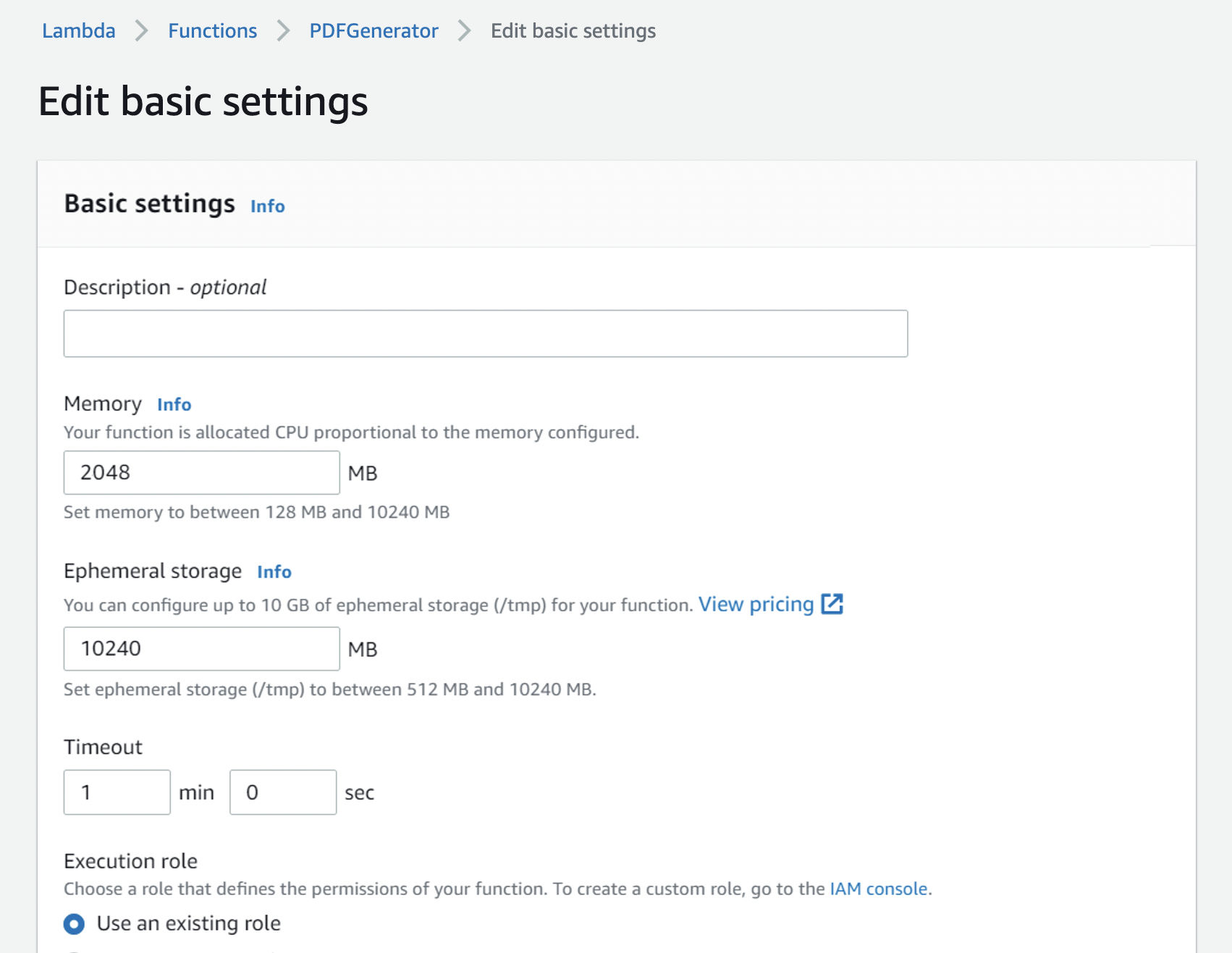
To configure your Lambda function with larger ephemeral storage, choose the Configuration tab under the General Configuration section in the AWS Lambda Console. You will see a new configuration for Ephemeral storage setting at 512MB by default.

When you click the Edit button, you can configure the ephemeral storage from 512 MB to 10,240 MB in 1 MB increments for your Lambda functions.

With AWS Command Line Interface (AWS CLI), you can update your desired size of ephemeral storage using theupdate-function-configuration command.

$ aws lambda update-function-configuration --function-name PDFGenerator \
              --ephemeral-storage '{"Size": 10240}'

You can configure ephemeral storage using Lambda API via AWS SDK and AWS CloudFormation. To learn more, see Configuring function options in the AWS Documentation.

As a review, AWS Lambda provides a comprehensive range of storage options. To learn more, see a great blog post, Choosing between AWS Lambda data storage options in web apps, written by my colleague James Beswick. I want to quote the table to show the differences between these options and common use-cases to help you choose the right one for your own applications.

Features Ephemeral Storage (/tmp) Lambda Layers Amazon EFS Amazon S3
Maximum size 10,240 MB 50 MB (direct upload) Elastic Elastic
Persistence Ephemeral Durable Durable Durable
Content Dynamic Static Dynamic Dynamic
Storage type File system Archive File system Object
Lambda event source integration N/A N/A N/A Native
Operations supported Any file system operation Immutable Any file system operation Atomic with versioning
Object tagging and metadata
N N N Y
Pricing model Included in Lambda
(Charged over 512MB)
Included in Lambda Storage + data transfer + throughput Storage + requests + data transfer
Shared across all invocations N Y Y Y
Sharing/permissions model Function-only IAM IAM + NFS IAM
Source for AWS Glue and Amazon Quicksight
N N N Y
Relative data access speed from Lambda Fastest Fastest Very fast Fast

Available Now
You can now configure up to 10 GB of ephemeral storage per Lambda function instance in all Regions where AWS Lambda is available. With 10 GB container image support, 10 GB function memory, and now 10 GB of ephemeral function storage, you can support workloads such as using large temporal files, data and media processing, machine learning inference, and financial analysis.

Support is also available through many AWS Lambda Partners such as HashiCorp (Terraform), Pulumi, Datadog, Splunk (SignalFx), Lumigo, Thundra, Dynatrace, Slalom, Cloudwiry, and Contino.

For this feature, you are charged for the storage you configure over the 512 MB free limit for the duration of your function invokes. To learn more, visit AWS Lambda product and pricing page and send feedback through the AWS re:Post for AWS Lambda or your usual AWS Support contacts.

– Channy
AWS Week in Review – March 21, 2022

Post Syndicated from Danilo Poccia original https://aws.amazon.com/blogs/aws/aws-week-in-review-march-21-2022/

This post is part of our Week in Review series. Check back each week for a quick round up of interesting news and announcements from AWS!

Another week, another round up of the most significant AWS launches from the previous seven days! Among the news, we have new AWS Heroes and a cost reduction. Also, improvements for customers using AWS Lambda and Amazon Elastic Kubernetes Service (EKS), and a new database-to-database connectivity option for Amazon Relational Database Service (RDS).

Last Week’s Launches
Here are some launches that caught my attention last week:

AWS Billing Conductor – This new tool provides customizable pricing and cost visibility for your end customers or business units and helps when you have specific showback and chargeback needs. To get started, see Getting Started with AWS Billing Conductor. And yes, you can call it “ABC.”

Cost Reduction for Amazon Route 53 Resolver DNS Firewall – Starting from the beginning of March, we are introducing a new tiered pricing structure that reduces query processing fees as your query volume increases. We are also implementing internal optimizations to reduce the number of DNS queries for which you are charged without affecting the number of DNS queries that are inspected or introducing any other changes to your security posture. For more info, see the What’s New.

Share Test Events in the Lambda Console With Other Developers – You can now share the test events you create in the Lambda console with other team members and have a consistent set of test events across your team. This new capability is based on Amazon EventBridge schemas and is available in the AWS Regions where both Lambda and EventBridge are available. Have a look at the What’s New for more details.

Use containerd with Windows Worker Nodes Managed by Amazon EKS – containerd is a container runtime that manages the complete container lifecycle on its host system with an emphasis on simplicity, robustness, and portability. In this way, you can get on Windows similar performance, security, and stability benefits to those available for Linux worker nodes. Here’s the What’s New with more info.

Amazon RDS for PostgreSQL databases can now connect and retrieve data from MySQL databases – You can connect your RDS PostgreSQL databases to Amazon Aurora MySQL-compatible, MySQL, and MariaDB databases. This capability works by adding support to mysql_fdw, an extension that implements a Foreign Data Wrapper (FDW) for MySQL. Foreign Data Wrappers are libraries that PostgreSQL databases can use to communicate with an external data source. Find more info in the What’s New.

For a full list of AWS announcements, be sure to keep an eye on the What’s New at AWS page.

Other AWS News
New AWS Heroes – It’s great to see both new and familiar faces joining the AWS Heroes program, a worldwide initiative that acknowledges individuals who have truly gone above and beyond to share knowledge in technical communities. Get to know them in the blog post!

More Than 400 Points of Presence for Amazon CloudFront – Impressive growth here, doubling the Points of Presence we had in October 2019. This number includes edge locations and mid-tier caches in AWS Regions. Do you know that edge locations are connected to the AWS Regions through the AWS network backbone? It’s a fully redundant, multiple 100GbE parallel fiber that circles the globe and links with tens of thousands of networks for improved origin fetches and dynamic content acceleration.

AWS Open Source News and Updates – A newsletter curated by my colleague Ricardo where he brings you the latest open-source projects, posts, events, and much more. This week he is also sharing a short list of some of the open-source roles currently open across Amazon and AWS, covering a broad range of open-source technologies. Read edition #105 here.

Upcoming AWS Events
Check your calendars and sign up for these AWS events:

The AWS Summits Are Back – Don’t forget to register to the AWS Summits in Brussels (on March 31) and Paris (on April 12). More summits are coming in the next weeks, and we’ll let you know in this weekly posts.

That’s all from me for this week. Come back next Monday for another Week in Review!

— Danilo

Get to know the first AWS Heroes of 2022!

Post Syndicated from Ross Barich original https://aws.amazon.com/blogs/aws/get-to-know-the-first-aws-heroes-of-2022/

The AWS Heroes program is a worldwide initiative which acknowledges individuals who have truly gone above and beyond to share knowledge in technical communities. AWS Heroes share knowledge by hosting events, Meetups, workshops, and study groups, or by authoring blogs, creating videos, speaking at conferences, or contributing to open source projects. You can see some of the Heroes’ work in the AWS Heroes Content Library.

Today we are excited to introduce the first new Heroes of 2022, including the first Hero based in the Czech Republic:

Albert Suwandhi – Medan, Indonesia

Community Hero Albert Suwandhi is an academic and IT Professional, and an AWS Champion Authorized Instructor who delivers AWS classroom training courses to AWS users and customers. He strongly believes in the power of community: he joined AWS User Group Indonesia, Medan chapter in 2019 and has since organized and delivered several sharing sessions. He has also been featured in number of tech talks, and his areas of cloud computing interest are cloud architecture and security. He enjoys helping people to realize the true potential of cloud computing and he runs a YouTube channel, which provides tutorials and tips & tricks related to AWS.

Dipali Kulshrestha – Delhi, India

Community Hero Dipali Kulshrestha is Vice President of Data Engineering at Natwest Group where she is an AWS trainer & mentor, conducting Cloud Practitioner and Solution Architect workshops every quarter. She is also an AWS Delhi User Group leader, hosts monthly immersive learning sessions on different AWS concepts, and is an active speaker at AWS community events. Dipali released a DevOps with AWS course on LinkedIn Learning, attended by 12000+ learners. She also created an AWS re:Skill series for containers on AWS. Dipali is huge advocate of diversity & inclusion of women in tech, and was recently featured in AWS India’s campaign called Developers of AWS and in a Tech Gig interview about cloud upskilling.

Faizal Khan – Hyderabad, India

Community Hero Faizal Khan is a tech entrepreneur, currently Founder & CEO at Ecomm.in and Xite Logic. He is an ardent contributor to the AWS community. As organizer of the AWS Hyderabad User Group, he helps organize AWS hackathons, AWS Meetups, re:Invent recaps, webinars, and AWS certification bootcamps. He is also a speaker at many events covering Networking, IoT, Storage, and Compute. His VPC masterclass on YouTube has garnered about half a million views. He was a core organizing member and host for the AWS Community Day South Asia 2021 Online, which attracted over 24K viewers. In addition, he built an AWS Q&A discussion forum for the community.

Filip Pyrek – Brno, Czech Republic

Serverless Hero Filip Pyrek is Serverless Architect at Purple Technology. At the age of 23 Filip is one of the youngest AWS Heroes. He started his serverless journey back in 2016 when he was 17 years old. He is helping grow the serverless community in Czech Republic and Slovakia by organizing Serverless Brno meetups, contributing to local podcasts, writing serverless blog posts in Czech language, and doing other evangelization activities. He is in touch with a community of maintainers and developers of serverless tooling projects and provides them with feedback, feature requests, and open-source contributions in order to continuously improve the serverless ecosystem.

Karolina Boboli – Warsaw, Poland

Community Hero Karolina Boboli works as an AWS Cloud Architect and Consultant. She has experience in cloud security, cloud governance, cost management, landing zones, serverless, and IoT. She created an online course “AWS in practice – your first project” about infrastructure as code. In 2019 she founded a vibrant cloud community – swiatchmury.pl – a Slack for cloud professionals focused on AWS – which she runs on a daily basis. The goal of the community is to have a friendly place to ask questions, inspire each other, and simply be together. From time to time she gives talks in AWS UG Poland and organizes her own webinars.

Masaya Arai – Kanagawa, Japan

Container Hero Masaya Arai is an 11x certified Tech Lead working for Nomura Research Institute (NRI). He is the central organizer of the JAWS-UG Container chapter (about 3000 registered members), an AWS user group in Japan, and he regularly contributes to activities in the AWS user community. Masaya wrote a commercial magazine called “AWS Container Guide + Hands-on”, which became a best-selling cloud-related book on amazon.co.jp, and published more than 10,000 copies. He focuses on promoting development of AWS container technologies through a wide variety of activities such as blogs, public presentations, contributing to magazines, and writing books. He truly enjoys sharing his knowledge and experience with others.

Mayank Pandey – Bengaluru, India

Community Hero Mayank Pandey is a cloud architect & teacher, helping both small and large organizations in their cloud adoption journey. He holds Professional & Specialty AWS Certifications and handles assignments including security & cost optimization on AWS, and cloud-native applications. Mayank is passionate about teaching and has done several classroom and online trainings. He is an active member of AWS community and contributes with hands-on demos and video tutorials to the YouTube channel – KnowledgeIndia. The YouTube channel has 65,000 subscribers and 150+ videos on various AWS topics.

Niv Yungelson – Tel Aviv, Israel

Community Hero Niv Yungelson works at Melio as the DevOps Team Lead. She is co-leader of the AWS Israel User Group, one of the biggest AWS User Groups in the world. As a community leader, she organizes Meetups and ensures they include underrepresented groups in the technology industry. She achieves this by both collaborating with other User Groups and experimenting with new initiatives. Niv also volunteers as an instructor in OpsSchool, which is a non-profit program meant to gather industry leaders to contribute together, train new DevOps engineers, and help the community continue the cycle of good deeds. She is active in tech user groups, forums, and Meetups, and is committed to sharing her knowledge and experience at any given opportunity.


If you’d like to learn more about the new Heroes, or connect with a Hero near you, please visit the AWS Heroes website or browse the AWS Heroes Content Library.

— Ross;

Welcome to AWS Pi Day 2022

Post Syndicated from Jeff Barr original https://aws.amazon.com/blogs/aws/welcome-to-aws-pi-day-2022/

We launched Amazon Simple Storage Service (Amazon S3) sixteen years ago today!

As I often told my audiences in the early days, I wanted them to think big thoughts and dream big dreams! Looking back, I think it is safe to say that the launch of S3 empowered them to do just that, and initiated a wave of innovation that continues to this day.

Bigger, Busier, and more Cost-Effective
Our customers count on Amazon S3 to provide them with reliable and highly durable object storage that scales to meet their needs, while growing more and more cost-effective over time. We’ve met those needs and many others; here are some new metrics that prove my point:

Object Storage – Amazon S3 now holds more than 200 trillion (2 x 10¹⁴) objects. That’s almost 29,000 objects for each resident of planet Earth. Counting at one object per second, it would take 6.342 million years to reach this number! According to Ethan Siegel, there are about 2 trillion galaxies in the visible Universe, so that’s 100 objects per galaxy! Shortly after the 2006 launch of S3, I was happy to announce the then-impressive metric of 800 million stored objects, so the object count has grown by a factor of 250,000 in less than 16 years.

Request Rate – Amazon S3 now averages over 100 million requests per second.

Cost Effective – Over time we have added multiple storage classes to S3 in order to optimize cost and performance for many different workloads. For example, AWS customers are making great use of Amazon S3 Intelligent Tiering (the only cloud storage class that delivers automatic storage cost savings when data access patterns change), and have saved more than $250 million in storage costs as compared to Amazon S3 Standard. When I first wrote about this storage class in 2018, I said:

In order to make it easier for you to take advantage of S3 without having to develop a deep understanding of your access patterns, we are launching a new storage class, S3 Intelligent-Tiering.

With the improved cost optimizations for small and short-lived objects and the archiving capabilities that we launched late last year, you can now use S3 Intelligent-Tiering as the default storage class for just about every workload, especially data lakes, analytics use cases, and new applications.

Customer Innovation
As you can see from the metrics above, our customers use S3 to store and protect vast amounts of data in support of an equally vast number of use cases and applications. Here are just a few of the ways that our customers are innovating:

NASCAR – After spending 15 years collecting video, image, and audio assets representing over 70 years of motor sports history, NASCAR built a media library that encompassed over 8,600 LTO 6 tapes and a few thousand LTO 4 tapes, with a growth rate of between 1.5 PB and 2 PB per year. Over the course of 18 months they migrated all of this content (a total of 15 PB) to AWS, making use of the Amazon S3 Standard, Amazon S3 Glacier Flexible Retrieval, and Amazon S3 Glacier Deep Archive storage classes. To learn more about how they migrated this massive and invaluable archive, read Modernizing NASCAR’s multi-PB media archive at speed with AWS Storage.

Electronic Arts –
This game maker’s core telemetry systems handle tens of petabytes of data, tens of thousands of tables, and over 2 billion objects. As their games became more popular and the volume of data grew, they were facing challenges around data growth, cost management, retention, and data usage. In a series of updates, they moved archival data to Amazon S3 Glacier Deep Archive, implemented tag-driven retention management, and implemented Amazon S3 Intelligent-Tiering. They have reduced their costs and made their data assets more accessible; read
Electronic Arts optimizes storage costs and operations using Amazon S3 Intelligent-Tiering and S3 Glacier to learn more.

NRGene / CRISPR-IL –
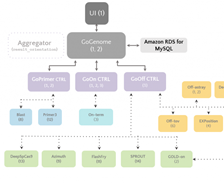
This team came together to build a best-in-class gene-editing prediction platform. CRISPR (
A Crack In Creation is a great introduction) is a very new and very precise way to edit genes and effect changes to an organism’s genetic makeup. The CRISPR-IL consortium is built around an iterative learning process that allows researchers to send results to a predictive engine that helps to shape the next round of experiments. As described in
A gene-editing prediction engine with iterative learning cycles built on AWS, the team identified five key challenges and then used AWS to build GoGenome, a web service that performs predictions and delivers the results to users. GoGenome stores over 20 terabytes of raw sequencing data, and hundreds of millions of feature vectors, making use of Amazon S3 and other
AWS storage services as the foundation of their data lake.

Some other cool recent S3 success stories include Liberty Mutual (How Liberty Mutual built a highly scalable and cost-effective document management solution), Discovery (Discovery Accelerates Innovation, Cuts Linear Playout Infrastructure Costs by 61% on AWS), and Pinterest (How Pinterest worked with AWS to create a new way to manage data access).

Join Us Online Today
In celebration of AWS Pi Day 2022 we have put together an entire day of educational sessions, live demos, and even a launch or two. We will also take a look at some of the newest S3 launches including Amazon S3 Glacier Instant Retrieval, Amazon S3 Batch Replication and AWS Backup Support for Amazon S3.

Designed for system administrators, engineers, developers, and architects, our sessions will bring you the latest and greatest information on security, backup, archiving, certification, and more. Join us at 9:30 AM PT on Twitch for Kevin Miller’s kickoff keynote, and stick around for the entire day to learn a lot more about how you can put Amazon S3 to use in your applications. See you there!

— Jeff;

New – Amazon EC2 X2idn and X2iedn Instances for Memory-Intensive Workloads with Higher Network Bandwidth

Post Syndicated from Channy Yun original https://aws.amazon.com/blogs/aws/new-amazon-ec2-x2idn-and-x2iedn-instances-for-memory-intensive-workloads-with-higher-network-bandwidth/

In 2016, we launched Amazon EC2 X1 instances designed for large-scale and in-memory applications in the cloud. The price per GiB of RAM for X1 instances is among the lowest. X1 instances are ideal for high performance computing (HPC) applications and running in-memory databases like SAP HANA and big data processing engines such as Apache Spark or Presto.

The following year, we launched X1e instances with up to 4 TiB of memory designed to run SAP HANA and other memory-intensive, in-memory applications. These instances are certified by SAP to run production environments of the next-generation Business Suite S/4HANA, Business Suite on HANA (SoH), Business Warehouse on HANA (BW), and Data Mart Solutions on HANA on the AWS Cloud.

Today, I am happy to announce the general availability of Amazon EC2 X2idn/X2iedn instances, built on the AWS Nitro system and featuring the third-generation Intel Xeon Scalable (Ice Lake) processors with up to 50 percent higher compute price performance than comparable X1 instances. These improvements result in up to 45 percent higher SAP Application Performance Standard (SAPS) performance than comparable X1 instances.

You might have noticed that we’re now using the “i” suffix in the instance type to specify that the instances are using an Intel processor, “e” in the memory-optimized instance family to indicate extended memory, “d” with local NVMe-based SSDs that are physically connected to the host server, and “n” to support higher network bandwidth up to 100 Gbps.

X2idn instances enable up to 2 TiB of memory, while X2iedn instances enable up to 4 TiB of memory. X2idn and X2iedn instances also support 100 Gbps of network performance with hardware-enabled VPC encryption and support 80 Gbps of Amazon EBS bandwidth and 260k IOPs with EBS-encrypted volumes.

Instance Name vCPUs RAM (GiB) Local NVMe SSD Storage (GB) Network Bandwidth (Gbps) EBS-Optimized Bandwidth (Gbps)
x2idn.16xlarge 64 1024 1 x 1900 Up to 50 Up to 40
x2idn.24xlarge 96 1536 1 x 1425 75 60
x2idn.32xlarge 128 2048 2 x 1900 100 80
x2iedn.xlarge 4 128 1 x 118 Up to 25 Up to 20
x2iedn.2xlarge 8 256 1 x 237 Up to 25 Up to 20
x2iedn.4xlarge 16 512 1 x 475 Up to 25 Up to 20
x2iedn.8xlarge 32 1024 1 x 950 25 20
x2iedn.16xlarge 64 2048 1 x 1900 50 40
x2iedn.24xlarge 96 3072 2 x 1425 75 60
x2iedn.32xlarge 128 4096 2 x 1900 100 80

X2idn instances are ideal for running large in-memory databases such as SAP HANA. All of the X2idn instance sizes are certified by SAP for production HANA and S/4HANA workloads. In addition, X2idn instances are ideal for memory-intensive and latency-sensitive workloads such as Apache Spark and Presto, and for generating real-time analytics, processing giant graphs using Neo4j or Titan, or creating enormous caches.

X2iedn instances are optimized for applications that seek high memory to vCPU ratio and deliver the highest memory capacity per vCPU among all virtualized EC2 instance types. X2iedn is suited to run high-performance databases (such as Oracle DB, SQL server) and in-memory workloads (such as SAP HANA, Redis). Workloads that are sensitized to per-core licensing, such as Oracle DB, greatly benefit from the higher memory per vCPU (32GB:1vCPU) offered by X2iedn. X2iedn allows you to optimize licensing costs because it provides customers the same memory at half the number of vCPU compared to X2idn.

These instances offer the same amount of local storage as in X1/X1e, up to 3.8 TB, but the local storage in X2idn/X2iedn is NVMe-based, which will offer an order of magnitude lower latency compared to SATA SSDs in X1/X1e.

Things to Know
Here are some fun facts about the X2idn and X2iedn instances:

Optimizing CPU—You can disable Intel Hyper-Threading Technology for workloads that perform well with single-threaded CPUs, like some HPC applications.

NUMA—You can make use of non-uniform memory access (NUMA) on X2idn and X2iedn instances. This advanced feature is worth exploring if you have a deep understanding of your application’s memory access patterns.

Available Now
X2idn instances are now available in the US East (N. Virginia), Asia Pacific (Mumbai, Singapore, Tokyo), Europe (Frankfurt, Ireland) Regions.

X2iedn instances are now available in the US East (Ohio, N. Virginia), US West (Oregon), Asia Pacific (Singapore, Tokyo), Europe (Frankfurt, Ireland) Regions.

You can use On-Demand Instances, Reserved Instances, Savings Plan, and Spot Instances. Dedicated Instances and Dedicated Hosts are also available.

To learn more, visit our EC2 X2i Instances page, and please send feedback to AWS re:Post for EC2 or through your usual AWS Support contacts.

– Channy

AWS Week in Review – March 7, 2022

Post Syndicated from Jeff Barr original https://aws.amazon.com/blogs/aws/aws-week-in-review-march-7-2022/

This post is part of our Week in Review series. Check back each week for a quick round up of interesting news and announcements from AWS!

Hello Again
The AWS Week in Review is back! Many years ago, I tried to write a weekly post that captured the most significant AWS activity. This was easy at first but quickly grew to consume a good fraction of a working day. After a lot of thought and planning, we are making a fresh start with the goal of focusing on some of the most significant AWS launches of the previous week. Each week, one member of the AWS News Blog team will write and publish a post similar to this one. We will do our best to make sure that our effort is scalable and sustainable.

Last Week’s Launches
Here are some launches that caught my eye last week:

AWS Health Dashboard – This new destination brings together the AWS Service Health Dashboard and the Personal Health Dashboard into a single connected experience. You get a more responsive and accurate view, better usability, and greater operational resilience. The new page is mobile-friendly and follows the latest AWS design standard. It includes a searchable history of events, fast page-load times, and automatic in-line refresh. It also provides a more responsive view when multiple AWS services are affected by a common underlying root cause. To learn more, read the blog post or just visit the AWS Health Dashboard.

AWS DeepRacer Student Virtual League – High school and undergraduate students 16 and older can now compete in the DeepRacer Student Virtual League for the chance to win prizes, glory, and a trip to AWS re:Invent 2022 in Las Vegas. The student league provides access to dozens of hours of free machine learning model training, along with educational materials that cover the theoretical and practical aspects of machine learning. Competitions run monthly until September 30; the top participants each month qualify for the Global AWS DeepRacer Student League Championships in October. To learn more, read the What’s New or visit AWS DeepRacer Student.

Customer Carbon Footprint Tool – This tool will help you to learn more about the carbon footprint of your cloud infrastructure, and will help you to meet your goals for sustainability. It is part of the AWS Billing console, and is available to all AWS customers at no cost. When you open the tool, you will see your carbon emissions in several forms, all with month-level granularity. You can also see your carbon emission statistics on a monthly, quarterly, or annual basis. To learn more, read my blog post.

RDS Multi-AZ Deployment Option – You can now take advantage of a new Amazon RDS deployment option that has a footprint in three AWS Availability Zones and gives you up to 2x faster transaction commit latency, automated failovers that typically take 35 seconds or less, and readable standby instances. This new option takes advantage of Graviton2 processors and fast NVME SSD storage; to learn more, read Seb’s blog post.

For a full list of AWS announcements, be sure to keep an eye on the What’s New at AWS page.

Other AWS News
Serverless Architecture Book – The second edition of Serverless Architectures on AWS is now available.

AWS Cookbook – AWS Cookbook: Recipes for Success on AWS is now available.

Upcoming AWS Events
Check your calendars and sign up for these AWS events:

AWS Pi Day (March 14) – We have an entire day of online content to celebrate 16 years of innovation with Amazon S3. Sessions will cover data protection, security, compliance, archiving, data lakes, backup, and more. Sign up today, and I will see you there!

.NET Application Modernization Webinar (March 23) – Learn about .NET modernization, what it is, and why you might want to modernize. See a deep dive that focuses on the AWS Microservice Extractor for .NET. Sign up today.

And that’s all for this week. Leave me a comment and let me know if this was helpful to you!

— Jeff;

New – Customer Carbon Footprint Tool

Post Syndicated from Jeff Barr original https://aws.amazon.com/blogs/aws/new-customer-carbon-footprint-tool/

Carbon is the fourth-most abundant element in the universe, and is also a primary component of all known life on Earth. When combined with oxygen it creates carbon dioxide (CO2). Many industrial activities, including the burning of fossil fuels such as coal and oil, release CO2 into the atmosphere and cause climate change.

As part of Amazon’s efforts to increase sustainability and reduce carbon emissions, we co-founded The Climate Pledge in 2019. Along with the 216 other signatories to the Pledge, we are committed to reaching net-zero carbon by 2040, 10 years ahead of the Paris Agreement. We are driving carbon out of our business in a multitude of ways, as detailed on our Carbon Footprint page. When I share this information with AWS customers, they respond positively. They now understand that running their applications in AWS Cloud can help them to lower their carbon footprint by 88% (when compared to the enterprise data centers that were surveyed), as detailed in The Carbon Reduction Opportunity of Moving to Amazon Web Services, published by 451 Research.

In addition to our efforts, organizations in many industries are working to set sustainability goals and to make commitments to reach them. In order to help them to measure progress toward their goals they are implementing systems and building applications to measure and monitor their carbon emissions data.

Customer Carbon Footprint Tool
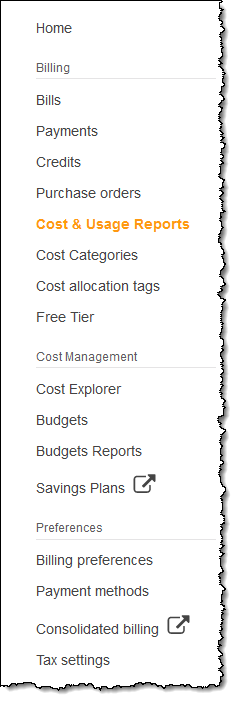
After I share information about our efforts to decarbonize with our customers, they tell me that their organization is on a similar path, and that they need to know more about the carbon footprint of their cloud infrastructure. Today I am happy to announce the new Customer Carbon Footprint Tool. This tool will help you to meet your own sustainability goals, and is available to all AWS customers at no cost. To access the calculator, I open the AWS Billing Console and click Cost & Usage Reports:

Then I scroll down to Customer Carbon Footprint Tool and review the report:

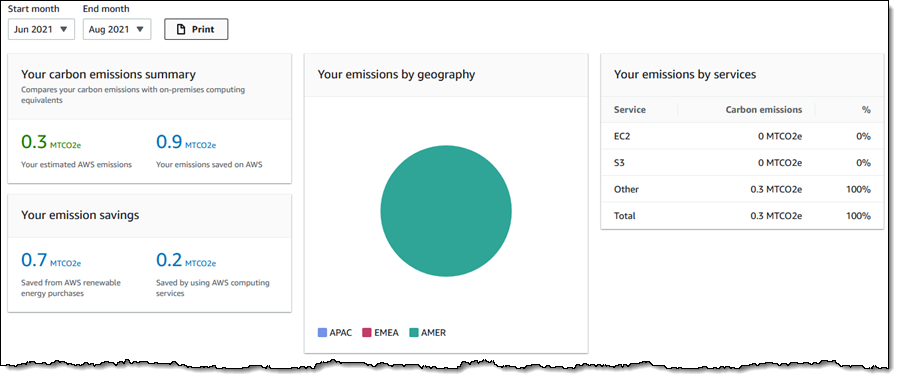
Let’s review each section. The first one allows me to select a time period with month-level granularity, and shows my carbon emissions in summary, geographic, and per-service form. In all cases, emissions are in Metric Tons of Carbon Dioxide Equivalent, abbreviated as MTCO2e:

All of the values in this section reflect the selected time period. In this example (all of which is sample data), my AWS resources emit an estimated 0.3 MTCO2e from June to August of 2021. If I had run the same application in my own facilities instead of in the AWS Cloud, I would have used an additional 0.9 MTCO2e. Of this value, 0.7 MTCO2e was saved due to renewable energy purchases made by AWS, and an additional 0.2 MTCO2e was saved due to the fact that AWS uses resources more efficiently.

I can also see my emissions by geography (all in America for this time period), and by AWS service in this section.

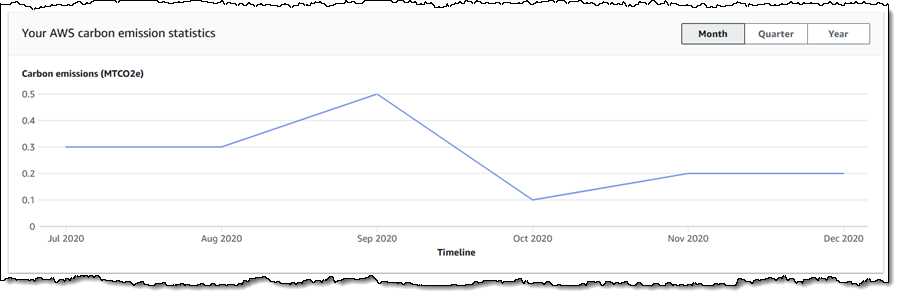
The second section shows my carbon emission statistics on a monthly, quarterly, or annual basis:

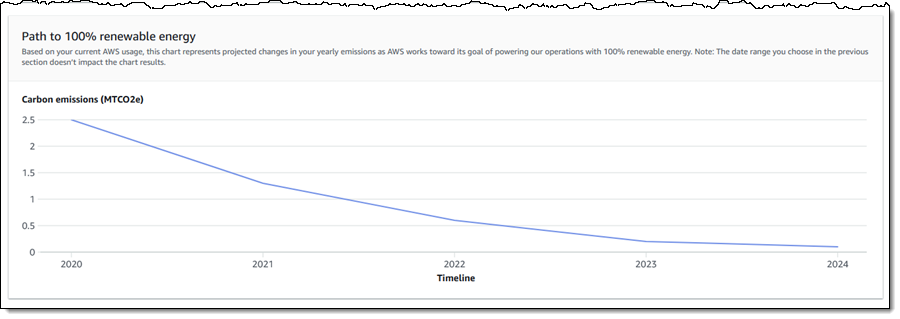
The third and final section projects how the AWS path to 100% renewable energy for our data centers will have a positive effect on my carbon emissions over time:

If you are an AWS customer, then you are already benefiting from our efforts to decarbonize and to reach 100% renewable energy usage by 2025, five years ahead of our original target.

You should also take advantage of the new Sustainability Pillar of AWS Well-Architected. This pillar contains six design principles for sustainability in the cloud, and will show you how to understand impact and to get the best utilization from the minimal number of necessary resources, while also reducing downstream impacts.

Things to Know
Here are a couple of important facts to keep in mind:

Regions – The emissions displayed reflect your AWS usage in all commercial AWS regions.

Timing – Emissions are calculated monthly. However, there is a three month delay due to the underlying billing cycle of the electric utilities that supply us with power.

Scope – The calculator shows Scope 1 and Scope 2 emissions, as defined here.

— Jeff;

Let Your IPv6-only Workloads Connect to IPv4 Services

Post Syndicated from Sébastien Stormacq original https://aws.amazon.com/blogs/aws/let-your-ipv6-only-workloads-connect-to-ipv4-services/

Today we are announcing two new capabilities for Amazon Virtual Private Cloud (VPC) NAT gateway and Amazon Route 53, allowing your IPv6-only workloads to transparently communicate with IPV4-only services. Curious? Read on; I have details for you.

Some of you are running very large workloads involving tens of thousands of virtual machines, containers, or micro-services. To do so, you configured these workloads to work in the IPv6 address space. This avoids the problem of running out of available IPv4 addresses (a single VPC has a maximum theoretical size of 65,536 IPv4 addresses, compared to /56 ranges for IPv6, allowing for a maximum theoretical size of 2^73 -1 IPv6 addresses), and it saves you from additional headaches caused by managing complex IPv4-based networks (think about non-overlapping subnets in between VPCs belonging to multiple AWS accounts, AWS Regions, or on-premises networks).

But can you really run an IPv6 workload in isolation from the rest of the IPv4 world? Most of you told us it is important to let such workloads continue to communicate with IPv4 services, either to make calls to older APIs or just as a transient design, while you are migrating multiple dependent workloads from IPv6 to IPv4. Not having the ability to call an IPv4 service from IPv6 hosts makes migrations slower and more difficult than it needs to be. It obliged some of you to build custom solutions that are hard to maintain.

This is why we are launching two new capabilities allowing your IPv6 workloads to transparently communicate with IPv4 services: NAT64 (read “six to four”) for the VPC NAT gateway and DNS64 (also “six to four”) for the Amazon Route 53 resolver.

How Does It Work?
As illustrated by the following diagram, let’s imagine I have an Amazon Elastic Compute Cloud (Amazon EC2) instance with an IPv6-only address that has to make an API call to an IPv4 service running on another EC2 instance. In the diagram, I chose to have the IPv4-only host in a separate VPC in the same AWS account, but these capabilities work to connect to any IPv4 service, whether in the same VPC or in another AWS account’s VPC, your on-premises network, or even on the public internet. My IPv6-only host only knows the DNS name of the service.

NAT64 DNS64 beforeHere is the sequence happening when the IPv6-only host initiates a connection to the IPv4 service:

1. The IPV6 host makes a DNS call to resolve the service name to an IP address. Without DNS64, Route 53 would have returned an IPv4 address. The IPv6-only hosts would not have been able to connect to that IPv4 address. But starting today, you can turn on DNS64 for your subnet. The DNS resolver first checks if the record contains an IPv6 address (AAAA record). If it does, the IPv6 address is returned. The IPv6 host can connect to the service using just IPv6. When the record only contains an IPv4 address, the Route 53 resolver synthesizes an IPv6 address by prepending the well-known 64:ff9b::/96 prefix to the IPv4 address.

For example, when the IPv4 service has the address 34.207.250.62, Route 53 returns 64:ff9b::ffff:22cf:fa3e.

IPv6 (hexadecimal) : 64:ff9b::ffff: 22 cf fa 3e
IPv4 (decimal) : – 34 207 250 62

64:ff9b::/96is a well-known prefix defined in the RFC 6052 proposed standard to the IETF. Reading the text of the standard is a great way to fall asleep rapidly to learn all the details about IPv6 to IPv4 translation.

2. The IPv6 host initiates a connection to 64:ff9b::ffff:22cf:fa3e. You may configure subnet routing to send all packets starting with 64:ff9b::/96 to the NAT gateway. The NAT gateway recognizes the IPv6 address prefix, extracts the IPv4 address from it, and initiates an IPv4 connection to the destination. As usual, the source IPv4 address is the IPv4 address of the NAT gateway itself.

3. When the packet response arrives, the NAT gateway repopulates the destination host IPv6 address and prepends the well-known prefix 64:ff9b::/96 to the source IP address of the response packet.

Now that you understand how it works, how can you configure your VPC to take advantage of these two new capabilities?

How to Get Started
To enable these two capabilities, I have to adjust two configurations: first, I flag the subnets that require DNS64 translation, and second, I add a route to the IPv6 subnet routing table to send part of the IPv6 traffic to the NAT gateway.

To enable DNS64, I have to use the new --enable-dns64 option to modify my existing subnets. In this demo, I use the modify-subnet-attribute command. This is a one-time operation. I can do it using the VPC API, the AWS Command Line Interface (CLI), or the AWS Management Console. Notice this is a subnet-level configuration that must be turned on explicitly. By default, the existing behavior is maintained.

aws ec2 modify-subnet-attribute --subnet-id subnet-123 --enable-dns64

I have to add a route to the subnet’s routing table to allow VPC to forward IPv6 packets prefixed by DNS64 to the NAT gateway. It tells it to route all packets with destination 64:ff9b::/96 to the NAT gateway.

aws ec2 create-route --route-table-id rtb-123 –-destination-ipv6-cidr-block 64:ff9b::/96 –-nat-gateway-id nat-123

The following diagram illustrates these two simple configuration changes.

NAT64 DNS64 afterWith these two simple changes, my IPv6-only workloads in the subnet may now communicate with IPv4 services. The IPv4 service might live in the same VPC, in another VPC, or anywhere on the internet.

You can continue to use your existing NAT gateway, and no change is required on the gateway itself or on the routing table attached to the NAT gateway subnet.

Pricing and Availability
These two new capabilities to the VPC NAT gateway and Route 53 are available today in all AWS Regions at no additional costs. Regular NAT gateway charges may apply.

Go and build your IPv6-only networks!

— seb

New – Additional Checksum Algorithms for Amazon S3

Post Syndicated from Jeff Barr original https://aws.amazon.com/blogs/aws/new-additional-checksum-algorithms-for-amazon-s3/

Amazon Simple Storage Service (Amazon S3) is designed to provide 99.999999999% (11 9s) of durability for your objects and for the metadata associated with your objects. You can rest assured that S3 stores exactly what you PUT, and returns exactly what is stored when you GET. In order to make sure that the object is transmitted back-and-forth properly, S3 uses checksums, basically a kind of digital fingerprint.

S3’s PutObject function already allows you to pass the MD5 checksum of the object, and only accepts the operation if the value that you supply matches the one computed by S3. While this allows S3 to detect data transmission errors, it does mean that you need to compute the checksum before you call PutObject or after you call GetObject. Further, computing checksums for large (multi-GB or even multi-TB) objects can be computationally intensive, and can lead to bottlenecks. In fact, some large S3 users have built special-purpose EC2 fleets solely to compute and validate checksums.

New Checksum Support
Today I am happy to tell you about S3’s new support for four checksum algorithms. It is now very easy for you to calculate and store checksums for data stored in Amazon S3 and to use the checksums to check the integrity of your upload and download requests. You can use this new feature to implement the digital preservation best practices and controls that are specific to your industry. In particular, you can specify the use of any one of four widely used checksum algorithms (SHA-1, SHA-256, CRC-32, and CRC-32C) when you upload each of your objects to S3.

Here are the principal aspects of this new feature:

Object Upload – The newest versions of the AWS SDKs compute the specified checksum as part of the upload, and include it in an HTTP trailer at the conclusion of the upload. You also have the option to supply a precomputed checksum. Either way, S3 will verify the checksum and accept the operation if the value in the request matches the one computed by S3. In combination with the use of HTTP trailers, this feature can greatly accelerate client-side integrity checking.

Multipart Object Upload – The AWS SDKs now take advantage of client-side parallelism and compute checksums for each part of a multipart upload. The checksums for all of the parts are themselves checksummed and this checksum-of-checksums is transmitted to S3 when the upload is finalized.

Checksum Storage & Persistence – The verified checksum, along with the specified algorithm, are stored as part of the object’s metadata. If Server-Side Encryption with KMS Keys is requested for the object, then the checksum is stored in encrypted form. The algorithm and the checksum stick to the object throughout its lifetime, even if it changes storage classes or is superseded by a newer version. They are also transferred as part of S3 Replication.

Checksum Retrieval – The new GetObjectAttributes function returns the checksum for the object and (if applicable) for each part.

Checksums in Action
You can access this feature from the AWS Command Line Interface (CLI), AWS SDKs, or the S3 Console. In the console, I enable the Additional Checksums option when I prepare to upload an object:

Then I choose a Checksum function:

If I have already computed the checksum I can enter it, otherwise the console will compute it.

After the upload is complete I can view the object’s properties to see the checksum:

The checksum function for each object is also listed in the S3 Inventory Report.

From my own code, the SDK can compute the checksum for me:

with open(file_path, 'rb') as file:
    r = s3.put_object(
        Bucket=bucket,
        Key=key,
        Body=file,
        ChecksumAlgorithm='sha1'
    )

Or I can compute the checksum myself and pass it to put_object:

with open(file_path, 'rb') as file:
    r = s3.put_object(
        Bucket=bucket,
        Key=key,
        Body=file,
        ChecksumSHA1='fUM9R+mPkIokxBJK7zU5QfeAHSy='
    )

When I retrieve the object, I specify checksum mode to indicate that I want the returned object validated:

r = s3.get_object(Bucket=bucket, Key=key, ChecksumMode='ENABLED')

The actual validation happens when I read the object from r['Body'], and an exception will be raised if there’s a mismatch.

Watch the Demo
Here’s a demo (first shown at re:Invent 2021) of this new feature in action:

Available Now
The four additional checksums are now available in all commercial AWS Regions and you can start using them today at no extra charge.

— Jeff;

Amazon Elastic File System Update – Sub-Millisecond Read Latency

Post Syndicated from Jeff Barr original https://aws.amazon.com/blogs/aws/amazon-elastic-file-system-update-sub-millisecond-read-latency/

Amazon Elastic File System (Amazon EFS) was announced in early 2015 and became generally available in 2016. We launched EFS in order to make it easier for you to build applications that need shared access to file data. EFS is (and always has been) simple and serverless: you simply create a file system, attach it to any number of EC2 instances, Lambda functions, or containers, and go about your work. EFS is highly durable and scalable, and gives you a strong read-after-write consistency model.

Since the 2016 launch we have added many new features and capabilities including encryption data at rest and in transit, an Infrequent Access storage class, and several other lower cost storage classes. We have also worked to improve performance, delivering a 400% increase in read operations per second, a 100% increase in per-client throughput, and then a further tripling of read throughput.

Our customers use EFS file systems to support many different applications and use cases including home directories, build farms, content management (WordPress and Drupal), DevOps (Git, GitLab, Jenkins, and Artifactory), and machine learning inference, to name a few of each.

Sub-Millisecond Read Latency
Faster is always better, and today I am thrilled to be able to tell you that your latency-sensitive EFS workloads can now run about twice as fast as before!

Up until today, EFS latency for read operations (both data and metadata) was typically in the low single-digit milliseconds. Effective today, new and existing EFS file systems now provide average latency as low as 600 microseconds for the majority of read operations on data and metadata.

This performance boost applies to One Zone and Standard General Purpose EFS file systems. New or old, you will still get the same availability, durability, scalability, and strong read-after-write consistency that you have come to expect from EFS, at no additional cost and with no configuration changes.

We “flipped the switch” and enabled this performance boost for all existing EFS General Purpose mode file systems over the course of the last few weeks, so you may already have noticed the improvement. Of course, any new file systems that you create will also benefit.

Learn More
To learn more about the performance characteristics of EFS, read Amazon EFS Performance.

— Jeff;

PS – Our multi-year roadmap contains a bunch of short-term and long-term performance enhancements, so stay tuned for more good news!

New – Amazon EC2 C6a Instances Powered By 3rd Gen AMD EPYC Processors for Compute-Intensive Workloads

Post Syndicated from Channy Yun original https://aws.amazon.com/blogs/aws/new-amazon-ec2-c6a-instances-powered-by-3rd-gen-amd-epyc-processors-for-compute-intensive-workloads/

At AWS re:Invent 2021, we launched Amazon EC2 M6a instances powered by the 3rd Gen AMD EPYC processors, running at frequencies up to 3.6 GHz, which offer customers up to 35 percent improvement in price-performance compared to M5a instances.

Many customers are looking for ways to optimize their cloud utilization, and they are taking advantage of the compute choice that Amazon EC2 offers. Customers such as Dropbox, Capital One, and Sprinklr have been able to realize the cost benefits of AWS using EC2 instances powered by AMD EPYC processors.

Today, I am happy to announce the availability of the new compute-optimized Amazon EC2 C6a instances, which offer up to up to 15 percent improvement in price-performance versus C5a instances, and 10 percent lower cost than comparable x86-based EC2 instances.

These instances are ideal for running compute-intensive workloads such as high-performance web servers, batch processing, ad serving, machine learning, multi-player gaming, video encoding, high performance computing (HPC) such as scientific modeling, and machine learning.

Compared to C5a instances, this new instance type provides:

To increase instance security, C6a instances have always-on memory encryption with AMD Transparent Single Key Memory Encryption (TSME), and support new AVX2 instructions for accelerating encryption and decryption algorithms.

Like M6a, C6a instances are also available in 10 sizes:

Name vCPUs Memory
(GiB)
Network Bandwidth
(Gbps)
EBS Throughput
(Gbps)
c6a.large 2 4 Up to 12.5 Up to 6.6
c6a.xlarge 4 8 Up to 12.5 Up to 6.6
c6a.2xlarge 8 16 Up to 12.5 Up to 6.6
c6a.4xlarge 16 32 Up to 12.5 Up to 6.6
c6a.8xlarge 32 64 12.5 6.6
c6a.12xlarge 48 96 18.75 10
c6a.16xlarge 64 128 25 13.3
c6a.24xlarge 96 192 37.5 20
c6a.32xlarge 128 256 50 26.6
c6a.48xlarge 192 384 50 40

The new instances are built on the AWS Nitro System, a collection of building blocks that offloads many of the traditional virtualization functions to dedicated hardware for high performance, high availability, and highly secure cloud instances.

Available Now
C6a instances are available today in three AWS Regions: US East (N. Virginia), US West (Oregon), and EU (Ireland). As usual with EC2, you pay for what you use. For more information, see the EC2 pricing page.

To learn more, visit the EC2 C6a instance and AWS/AMD partner page. You can send feedback to  [email protected], AWS re:Post for EC2, or through your usual AWS Support contacts.

— Channy

New for App Runner – VPC Support

Post Syndicated from Danilo Poccia original https://aws.amazon.com/blogs/aws/new-for-app-runner-vpc-support/

With AWS App Runner, you can quickly deploy web applications and APIs at any scale. You can start with your source code or a container image, and App Runner will fully manage all infrastructure including servers, networking, and load balancing for your application. If you want, App Runner can also configure a deployment pipeline for you.

Starting today, App Runner enables your services to communicate with databases and other applications hosted in an Amazon Virtual Private Cloud (VPC). For example, you can now connect App Runner services to databases in Amazon Relational Database Service (RDS), Redis or Memcached caches in Amazon ElastiCache, or your own applications running in Amazon Elastic Container Service (Amazon ECS), Amazon Elastic Kubernetes Service (EKS), Amazon Elastic Compute Cloud (Amazon EC2), or on-premises and connected via AWS Direct Connect.

Previously, in order for your App Runner application to connect to these resources, they needed to be publicly accessible over the internet. With this feature, App Runner applications can connect to private endpoints in your VPC, and you can enable a more secure and compliant environment by removing public access to these resources.

Within App Runner, you can now create VPC connectors that specify which VPC, subnets, and security groups to use for private networking. Once configured, you can use a VPC connector with one or more App Runner services.

When connected to a VPC, all outbound traffic from your AppRunner service will be routed based on the VPC routing rules. Services will not have access to the public internet (including AWS APIs) unless allowed by a route to a NAT Gateway. You can also set up VPC endpoints to connect to AWS APIs such as Amazon Simple Storage Service (Amazon S3) and Amazon DynamoDB to avoid NAT traffic.

The VPC connectors in App Runner work similarly to VPC networking in AWS Lambda and are based on AWS Hyperplane, the internal Amazon network function virtualization system behind AWS services and resources like Network Load Balancer, NAT Gateway, and AWS PrivateLink.

Let’s see how this works in practice with a web application connected to an RDS database.

Preparing the Amazon RDS Database
I start by configuring a database for my application. To simplify capacity management for this database, I use Amazon Aurora Serverless. In the RDS console, I create an Amazon Aurora MySQL-Compatible database. For the Capacity type, I choose Serverless. For networking, I use my default VPC and the default security group. I don’t need to make the database publicly accessible because I am going to connect using private VPC networking. To simplify connecting later, I enable AWS Identity and Access Management (IAM) database authentication.

I start an Amazon Linux EC2 instance in the same VPC. To connect from the EC2 instance to the database, I need a MySQL client. I install MariaDB, a community-developed branch of MySQL:

sudo yum install mariadb

Then, I connect to the database using the admin user.

mysql -h <DATABASE_HOST> -u admin -P

I enter the admin user password to log in. Then, I create a new user (bookuser) that is configured to use IAM authentication.

CREATE USER bookuser IDENTIFIED WITH AWSAuthenticationPlugin AS 'RDS'; 

I create the bookcase database and give permissions to the bookuser user to query the bookcase database.

CREATE DATABASE bookcase;
GRANT SELECT ON bookcase.* TO 'bookuser'@'%’;

To store information about some of my books, I create the authors and books tables.

CREATE TABLE authors (
  authorId INT,
  name varchar(255)
 );

CREATE TABLE books (
  bookId INT,
  authorId INT,
  title varchar(255),
  year INT
);

Then, I insert some values in the two tables:

INSERT INTO authors VALUES (1, "Issac Asimov");
INSERT INTO authors VALUES (2, "Robert A. Heinlein");
INSERT INTO books VALUES (1, 1, "Foundation", 1951);
INSERT INTO books VALUES (2, 1, "Foundation and Empire", 1952);
INSERT INTO books VALUES (3, 1, "Second Foundation", 1953);
INSERT INTO books VALUES (4, 2, "Stranger in a Strange Land", 1961);

Preparing the Application Source Code Repository
With App Runner, I can deploy a new service from code hosted in a source code repository or using a container image. In this example, I use a private project that I have on GitHub.

It’s a very simple Python web application connecting to the database I just created. This is the source code of the app (server.py):

from wsgiref.simple_server import make_server
from pyramid.config import Configurator
from pyramid.response import Response
import os
import boto3
import mysql.connector

import os

DATABASE_REGION = 'us-east-1'
DATABASE_CERT = 'cert/us-east-1-bundle.pem'
DATABASE_HOST = os.environ['DATABASE_HOST']
DATABASE_PORT = os.environ['DATABASE_PORT']
DATABASE_USER = os.environ['DATABASE_USER']
DATABASE_NAME = os.environ['DATABASE_NAME']

os.environ['LIBMYSQL_ENABLE_CLEARTEXT_PLUGIN'] = '1'

PORT = int(os.environ.get('PORT'))

rds = boto3.client('rds')

try:
    token = rds.generate_db_auth_token(
        DBHostname=DATABASE_HOST,
        Port=DATABASE_PORT,
        DBUsername=DATABASE_USER,
        Region=DATABASE_REGION
    )
    mydb =  mysql.connector.connect(
        host=DATABASE_HOST,
        user=DATABASE_USER,
        passwd=token,
        port=DATABASE_PORT,
        database=DATABASE_NAME,
        ssl_ca=DATABASE_CERT
    )
except Exception as e:
    print('Database connection failed due to {}'.format(e))          

def all_books(request):
    mycursor = mydb.cursor()
    mycursor.execute('SELECT name, title, year FROM authors, books WHERE authors.authorId = books.authorId ORDER BY year')
    title = 'Books'
    message = '<html><head><title>' + title + '</title></head><body>'
    message += '<h1>' + title + '</h1>'
    message += '<ul>'
    for (name, title, year) in mycursor:
        message += '<li>' + name + ' - ' + title + ' (' + str(year) + ')</li>'
    message += '</ul>'
    message += '</body></html>'
    return Response(message)

if __name__ == '__main__':

    with Configurator() as config:
        config.add_route('all_books', '/')
        config.add_view(all_books, route_name='all_books')
        app = config.make_wsgi_app()
    server = make_server('0.0.0.0', PORT, app)
    server.serve_forever()

The application uses the AWS SDK for Python (boto3) for IAM database authentication, the Pyramid web framework, and the MySQL connector for Python. The requirements.txt file describes the application dependencies:

boto3
pyramid==2.0
mysql-connector-python

To use SSL/TLS encryption when connecting to the database, I download a certificate bundle and add it to my source code repository.

Using VPC Support in AWS App Runner
In the App Runner console, I select Source code repository and the branch to use.

Console screenshot.

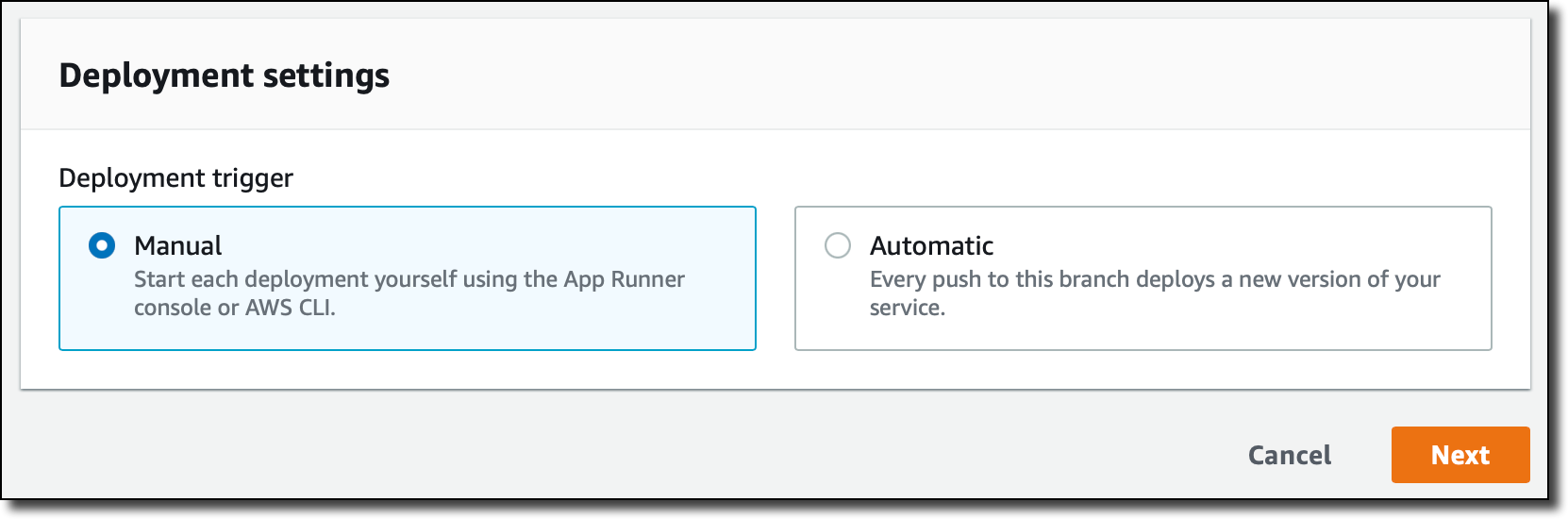
For the deployment settings, I choose Manual. Optionally, I could have selected the Automatic deployment trigger to have every push to this branch deploy a new version of my service.

Console screenshot.

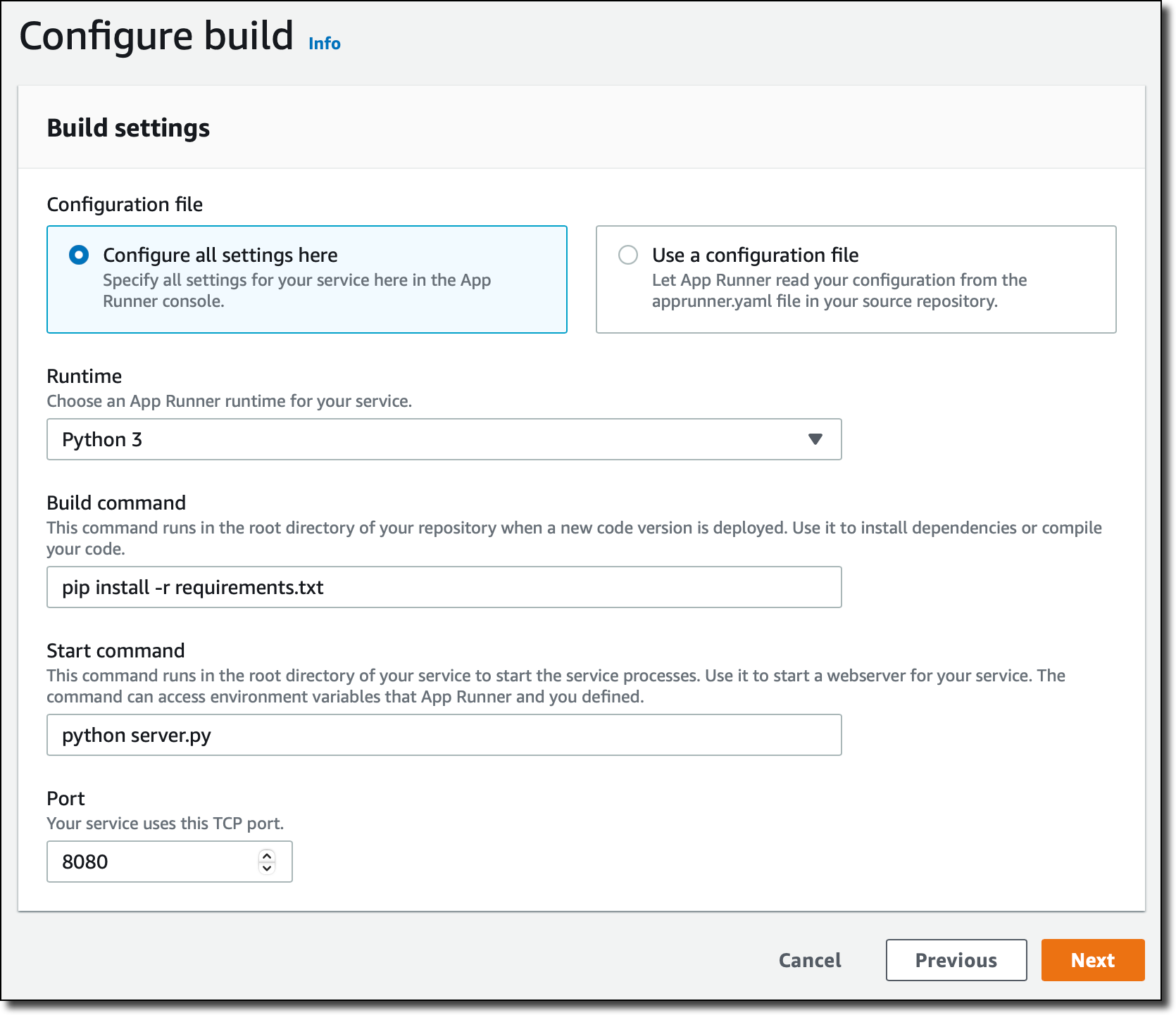
Then, I configure the build. This is a very simple application, so I pass the build and start commands in the console:

Build command – pip install -r requirements.txt
Start command – python server.py

For more advanced use cases, I would add an apprunner.yaml configuration file to my repository as in this sample application.

Console screenshot.

In the service configuration, I add the environment variables used by the application to connect to the database. I don’t need to pass a database password here because I am using IAM authentication.

Console screenshot.

In the Security section, I select an IAM role that gives permissions to connect to the database using IAM database authentication as described in Creating and using an IAM policy for IAM database access.

Console screenshot.

Here’s the syntax of the IAM role. I find the database Resource ID in the Configuration tab of the RDS console.

{
    "Version": "2012-10-17",
    "Statement": [
        {
            "Effect": "Allow",
            "Action": [
                "rds-db:connect"
            ],
            "Resource": [
                "arn:aws:rds-db:<REGION>:<ACCOUNT>:dbuser:<DB_RESOURCE_ID>/<DB_USER>"
            ]
        }
    ]
}

For the role trust policy,   I follow the instruction for instance roles in How App Runner works with IAM.

{
  "Version": "2012-10-17",
  "Statement": [
    {
      "Effect": "Allow",
      "Principal": {
        "Service": "tasks.apprunner.amazonaws.com"
      },
      "Action": "sts:AssumeRole"
    }
  ]
}

For Networking, I select the new option to use a Custom VPC for outgoing network traffic and then add a new VPC connector.

Console screenshot.

To add a new VPC connector, I write down a name and then select the VPC, subnets, and security groups to use. Here, I select all the subnets of my default VPC and the default security group. In this way, the App Runner service will be able to connect to the RDS database.

Console screenshot.

The next time, when configuring another application with the same VPC networking requirements, I can just select the VPC connector I created before.

Console screenshot. I review all the settings and then create and deploy the service.

After a few minutes, the service is running, and I choose the default domain to open a new tab in my browser. The application is connected to the database using VPC networking and performs a SQL query to join the books and authors tables and provide some reading suggestions. It works!

Browser screenshot.

Availability and Pricing
VPC connectors are available in all AWS Regions where AWS App Runner is offered. For more information, see the Regional Services List. There is no additional cost for using this feature, but you pay the standard pricing for data transmission or any NAT gateway or VPC endpoints you set up. You can set up VPC connectors with the AWS Management Console, AWS Command Line Interface (CLI), AWS SDKs, and AWS CloudFormation.

With VPC connectors, you can deploy your applications using App Runner and connect them to your private databases, caches, and applications running in a VPC or on-premises and connected via AWS Direct Connect.

Build and run web applications at any scale and connect to your private VPC resources with AWS App Runner.

— Danilo

Demonstrate your AWS Cloud Storage knowledge and skills with new digital badges!

Post Syndicated from Steve Roberts original https://aws.amazon.com/blogs/aws/demonstrate-your-aws-cloud-storage-knowledge-and-skills-with-new-digital-badges/

Are you a cloud storage professional or an on-premises storage pro who’s curious about cloud storage? Are you interested in demonstrating your AWS Storage knowledge and skills with potential employers and your community of peers? If so, I’d like to bring to your attention the recent launch of digital badges aligned to Learning Plans for Block Storage and Object Storage on AWS Skill Builder. In this 2021 blog post by Indeed, cloud-computing is the number one in-demand skill employers are looking for.

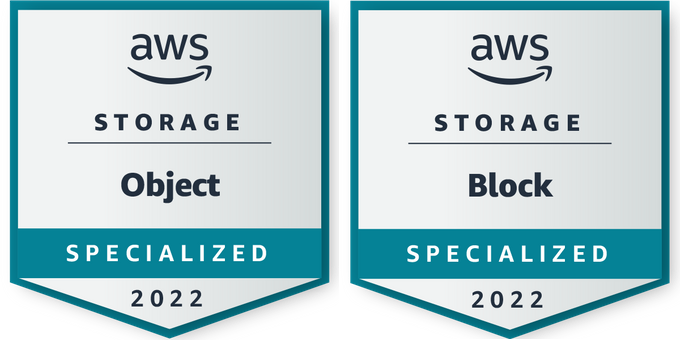
The new, verifiable, digital badges are available to everyone who scores at least 80 percent in the assessments associated with Learning Plans. The badges prove your knowledge and skills for Object Storage and/or Block Storage in the AWS Cloud. Badges, distributed and managed through Credly, carry with them metadata that enables verification of the issuer and the credential and lists the skills and knowledge demonstrated by the holder. Sharing badges on your résumé, peer community, and via social media assists in developing your career in cloud computing and celebrates your achievements. Some of you may be familiar with AWS re:Post, which launched during re:Invent 2021—your badges can be showcased in your AWS re:Post user profile too.

Object and Block Storage digital badges

AWS Skill Builder Learning Plans and digital badges for Block and Object Storage
Digital badges are available today for the Block Storage and Object Storage Learning Plans on AWS Skill Builder. Block Storage has a focus on Amazon Elastic Block Store (EBS), while Object Storage is focused on Amazon Simple Storage Service (Amazon S3). Both plans contain free learning content to help you build your knowledge in each of these areas and get ready for the assessments.

AWS Skill Builder offers a range of Learning Plans related to cloud computing skills. Learning Plans correspond to roles (architect, developer, etc.) and domain (databases, storage, etc.); each one is specifically designed to build your knowledge with a clear set of outcomes for you to achieve. Freely available, the Learning Plans and related assessments can be taken anywhere, anytime, providing equal and fair learning for all.

Badge assessments are linked to curriculum standards and are developed by service teams, field subject matter experts (SMEs), and content/curriculum SMEs. Therefore, employers can feel satisfied that the badges attained by a potential employee were awarded due to actual demonstrated skills and knowledge for Block and/or Object Storage. By the way, if you feel you have existing skills and knowledge and would prefer to skip straight to the assessment, you can. If you don’t pass, you’ll be guided to fill in your knowledge gaps, and you can then retake the assessment after 24 hours. To earn a badge, you need to score a minimum of 80 percent in the assessment.

The Block Storage and Object Storage Learning Plans are designed for you to take on your own, and you can track your own progress, making it easier to learn in your own time and manage your own learning development. They’re a great opportunity to refresh your skills, check your skills, or learn new ones.

Start collecting digital storage learning badges today
The Learning Plans and new digital badges for Block Storage and Object Storage help you showcase your in-demand knowledge and skills related to AWS Storage. As I mentioned earlier, enrollment for Learning Plans, and the subsequent assessments, are free for everyone. Find out more, and get started, at https://aws.amazon.com/training/badges. And be sure to share your accomplishment by posting on social media with the hashtag #AWSTraining and show off your badges!

— Steve

New – Amazon EC2 X2iezn Instances Powered by the Fastest Intel Xeon Scalable CPU for Memory-Intensive Workloads

Post Syndicated from Channy Yun original https://aws.amazon.com/blogs/aws/new-amazon-ec2-x2iezn-instances-powered-by-the-fastest-intel-xeon-scalable-cpu-for-memory-intensive-workloads/

Electronic Design Automation (EDA) workloads require high computing performance and a large memory footprint. These workloads are sensitive to faster CPU performance and higher clock speeds since the faster performance allows more jobs to be completed on the lower number of cores. At AWS re:Invent 2020, we launched Amazon EC2 M5zn instances which use second-generation Intel Xeon Scalable (Cascade Lake) processors with an all-core turbo clock frequency of up to 4.5 GHz, which is the fastest of any cloud instance.

Our customers have enjoyed the high single-threaded performance, high-speed networking, and balanced memory-to-vCPU ratio of EC2 M5zn instances. They have asked for instances that will leverage these features while also providing them a greater memory footprint per vCPU.

Today, we are launching Amazon EC2 X2iezn instances, which use the same Intel Xeon Scalable processors as M5zn instances, with an all-core turbo clock frequency of 4.5 GHz and up to 1.5 TiB of memory, which is the fastest of any cloud instance for EDA workloads. These instances are capable of delivering up to 55 percent better price-performance per vCPU compared to X1e instances.

X2iezn instances offer 32 GiB of memory per vCPU and will support up to 48 vCPUs and 1536 GiB of memory. Built on the AWS Nitro, they deliver up to 100 Gbps of networking bandwidth and 19 Gbps of dedicated Amazon EBS bandwidth to improve performance for EDA applications.

You might have noticed that we’re now using the “i” suffix in the instance type to specify that the instances are using an Intel processor, “e” in the memory-optimized instance family to indicate extended memory, “z” which indicates high-frequency processors, and “n” to support higher network bandwidth up to 100 Gbps.

X2iezn instances are VPC only, HVM-only, and EBS-Optimized, with support for Optimize vCPU. As you can see, the memory-to-vCPU ratio on these instances is the same as that of previous-generation X1e instances:

Instance Name vCPUs RAM (GiB) Network Bandwidth (Gbps) EBS-Optimized Bandwidth (Gbps)
x2iezn.2xlarge 8 256 Up to 25 3.170
x2iezn.4xlarge 16 512 Up to 25 4.750
x2iezn.6xlarge 24 768 50 9.5
x2iezn.8xlarge 32 1024 75 12
x2iezn.12xlarge 48 1536 100 19
x2iezn.metal 48 1536 100 19

Many customers will be able to benefit from using X2iezn instances to improve performance and efficiency for their EDA workloads. Here are some examples:

  • Annapurna Labs tested the X2iezn instances with Calibre’s Design Rule Checking, which has shown a 40 percent faster runtime compared to X1e instances, and a 25 percent faster runtime over R5d instances.
  • Astera Labs is a fabless, cloud-based semiconductor company developing purpose-built CXL, PCIe, and Ethernet connectivity solutions for data-centric systems. They were able to see performance gains of up to 25 percent compared to similar EDA workloads running on R5 instances.
  • Cadence tested the X2iezn instances using their Pegasus True Cloud feature, which allows designers to run physical verification jobs on the cloud and observed a 50 percent performance improvement over R5 instances. They see X2iezn instances as an excellent environment for testing EDA workloads.
  • NXP Semiconductors worked with AWS to run their Calibre and Spectre workloads on Amazon EC2 X2iezn instances, which measured 10-15 percent higher performance using X2iezn instances compared to their on-premises, Xeon Gold 6254 with max turbo frequency of 4.0GHz.
  • Siemens EDA worked with AWS to test the new Amazon EC2 X2iezn HPC/EDA focused instances with the industry performance and sign-off leader Calibre evaluating advanced node DRC workloads. They were pleased to demonstrate performance improvements of up to 14% using the 4.5 GHz all core turbo frequency of X2iezn instances for all VMs in the run. Additionally, they successfully demonstrated the use of a heterogeneous server configuration using the X2iezn as the primary node and other lower memory VMs for remote compute – providing an 11% speed up and attractive value. These results confirmed the X2iezn is a good fit for primary server EDA workloads for Calibre Physical and Circuit verification applications.
  • Synopsys IC Validator provides highly scalable high-performance physical verification signoff. They achieved 15 percent performance improvement, scalability to 1000s of cores, and 30 percent better efficiency using IC Validator’s unique elastic CPU management technology versus R5d instances.

Things to Know
Here are some fun facts about the X2iezn instances:

Optimizing CPU—You can disable Intel Hyper-Threading Technology for workloads that perform well with single-threaded CPUs, like some HPC applications.

NUMA—You can make use of non-uniform memory access (NUMA) on x2iezn.12xlarge instances. This advanced feature is worth exploring if you have a deep understanding of your application’s memory access patterns.

Available Now
Amazon EC2 X2iezn instances are now available in the US East (N. Virginia), US West (Oregon), Asia Pacific (Tokyo), and Europe (Ireland) Regions. You can use On-Demand Instances, Reserved Instances, Savings Plan, and Spot Instances. Dedicated Instances and Dedicated Hosts are also available.

To learn more, visit our EC2 X2i Instances page, and please send feedback to the AWS forum for EC2 or through your usual AWS Support contacts.

– Channy

New – Replication for Amazon Elastic File System (EFS)

Post Syndicated from Jeff Barr original https://aws.amazon.com/blogs/aws/new-replication-for-amazon-elastic-file-system-efs/

Amazon Elastic File System (Amazon EFS) allows EC2 instances, AWS Lambda functions, and containers to share access to a fully-managed file system. First announced in 2015 and generally available in 2016, Amazon EFS delivers low-latency performance for a wide variety of workloads and can scale to thousands of concurrent clients or connections. Since the 2016 launch we have continued to listen and to innovate, and have added many new features and capabilities in response to your feedback. These include on-premises access via Direct Connect (2016), encryption of data at rest (2017), provisioned throughput and encryption of data in transit (2018), an infrequent access storage class (2019), IAM authorization & access points (2020), lower-cost one zone storage classes (2021), and more.

Introducing Replication
Today I am happy to announce that you can now use replication to automatically maintain copies of your EFS file systems for business continuity or to help you to meet compliance requirements as part of your disaster recovery strategy. You can set this up in minutes for new or existing EFS file systems, with replication either within a single AWS region or between two AWS regions in the same AWS partition.

Once configured, replication begins immediately. All replication traffic stays on the AWS global backbone, and most changes are replicated within a minute, with an overall Recovery Point Objective (RPO) of 15 minutes for most file systems. Replication does not consume any burst credits and it does not count against the provisioned throughput of the file system.

Configuring Replication
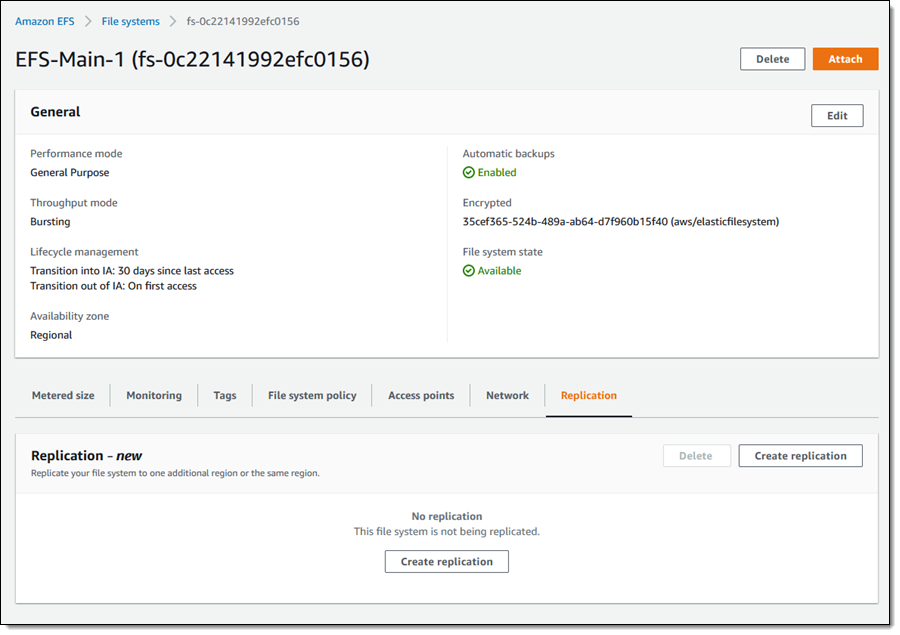
To configure replication, I open the Amazon EFS Console , view the file system that I want to replicate, and select the Replication tab:

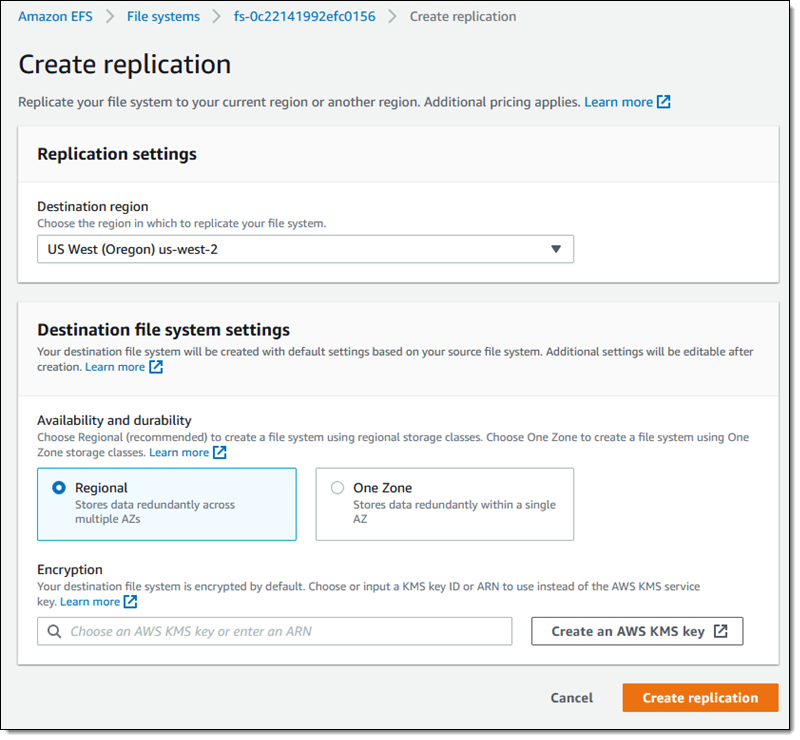
I click Create replication, choose the desired destination region, and select the desired storage (Regional or One Zone). I can use the default KMS key for encryption or I can choose another one. I review my settings and click Create replication to proceed:

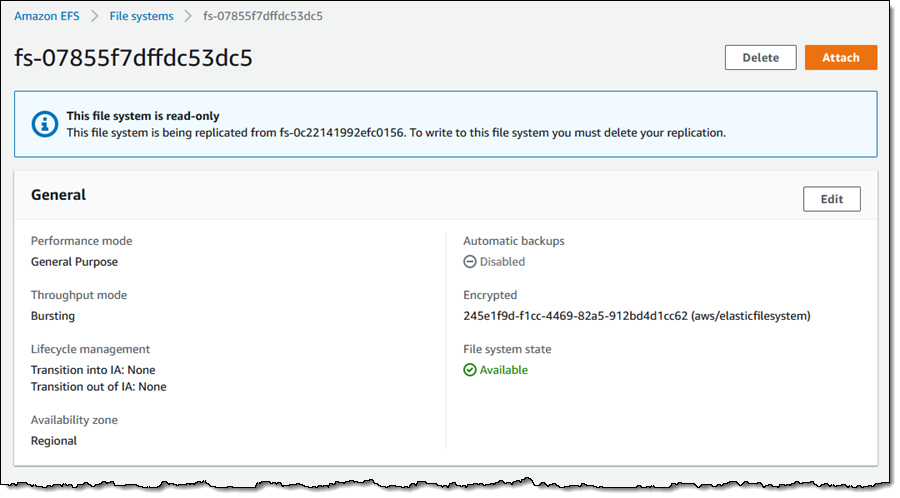
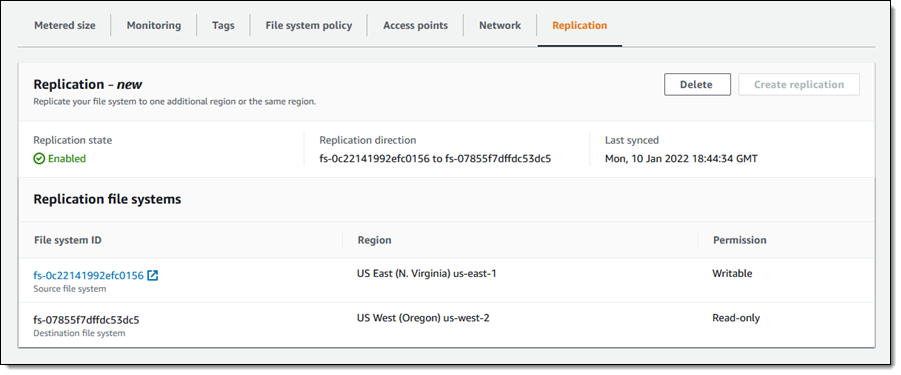
Replication begins right away and I can see the new, read-only file system immediately:

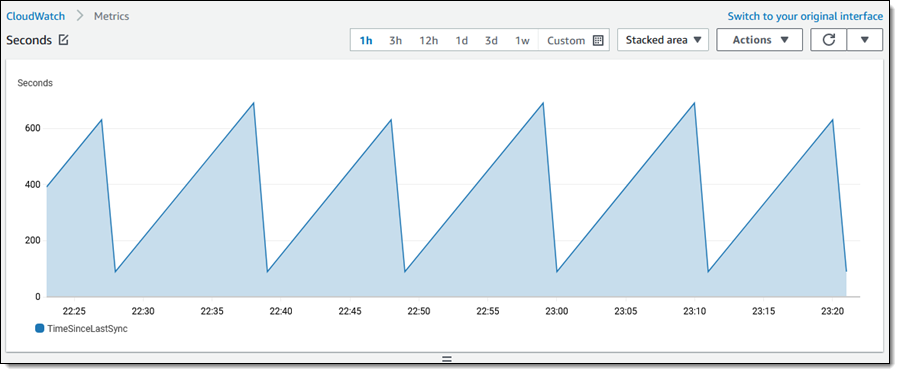
A new CloudWatch metric, TimeSinceLastSync, is published when the initial replication is complete, and periodically after that:

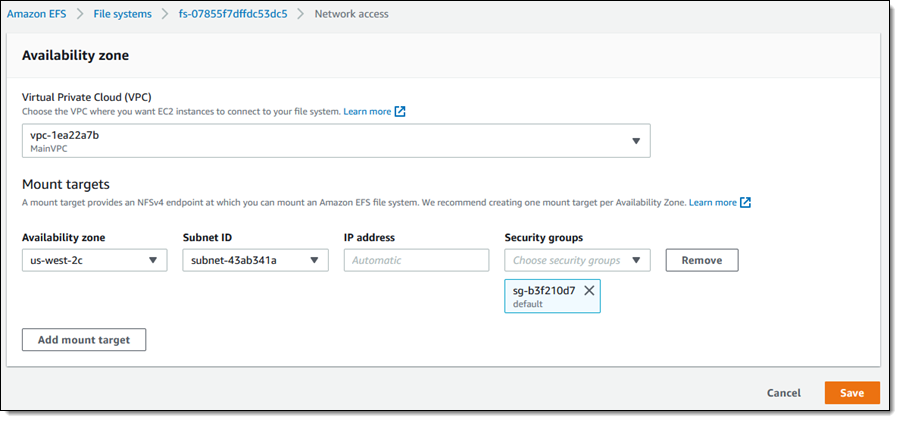
The replica is created in the selected region. I create any necessary mount targets and mount the replica on an EC2 instance:

EFS tracks modifications to the blocks (currently 4 MB) that are used to store files and metadata, and replicates the changes at a rate of up to 300 MB per second. Because replication is block-based, it is not crash-consistent; if you need crash-consistency you may want to take a look at AWS Backup.

After I have set up replication, I can change the lifecycle management, intelligent tiering, throughput mode, and automatic backup setting for the destination file system. The performance mode is chosen when the file system is created, and cannot be changed.

Initiating a Fail-Over
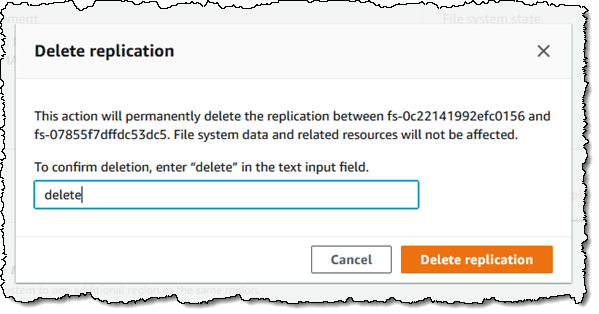
If I need to fail over to the replica, I simply delete the replication. I can do this from either side (source or destination), by clicking Delete and confirming my intent:

I enter delete, and click Delete replication to proceed:

The former read-only replica is now a writable file system that I can use as part of my recovery process. To fail-back, I create a replica in the original location, wait for replication to finish, and delete the replication.

I can also use the command line and the EFS APIs to manage replication. For example:

createreplication-configuration / CreateReplicationConfiguration – Establish replication for an existing file system.

describe-replication-configurations / DescribeReplicationConfigurations – See the replication configuration for a source or destination file system, or for all replication configurations in an AWS account. The data returned for a destination file system also includes LastReplicatedTimestamp, the time of the last successful sync.

delete-replication-configuration / DeleteReplicationConfiguration – End replication for a file system.

Available Now
This new feature is available now and you can start using it today in the AWS US East (N. Virginia), US East (Ohio), US West (N. California), US West (Oregon), Asia Pacific (Mumbai), Asia Pacific (Osaka), Asia Pacific (Seoul), Asia Pacific (Singapore), Asia Pacific (Sydney), Asia Pacific (Tokyo), Canada (Central), Europe (Frankfurt), Europe (Ireland), Europe (London), Europe (Paris), Europe (Stockholm), South America (São Paulo), and GovCloud Regions.

You pay the usual storage fees for the original and replica file systems and any applicable cross-region or intra-region data transfer charges.

— Jeff;

A New AWS Console Home Experience

Post Syndicated from Sébastien Stormacq original https://aws.amazon.com/blogs/aws/a-new-aws-console-home-experience/

If you are reading this blog, there is a high chance you frequently use the AWS Management Console. I taught AWS classes for years. During classes, students’ first hands-on experience with the AWS Cloud happened on the console, and I bet yours did too.

Until today, the home page of the console showed your most recently used services and a set of static links organized in sections, such as Getting Started with AWS, Build a Solution, or Explore AWS with links to training courses. However, we learned from our data that their usage is very different depending on your profile. You also told us it is cumbersome and time-consuming to navigate to different parts of the console to get an overview of important information for you.

We listened to your feedback, and I’m happy to announce a redesigned home page for the AWS Management Console. This new home page experience includes dynamic content, can be customized, and includes data from multiple AWS Regions.

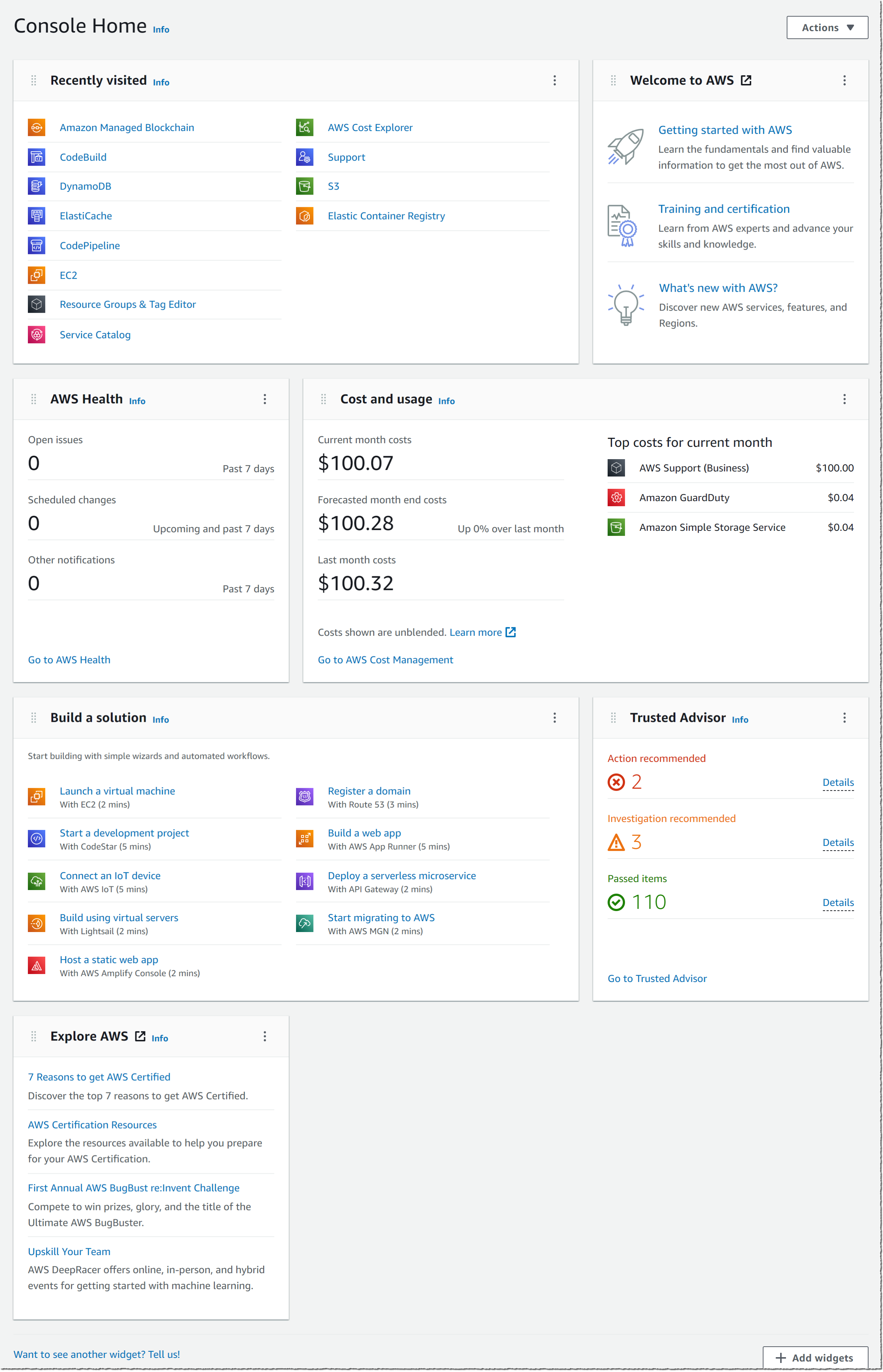
The screenshot below shows the default view of this new console home page:

New console default layout

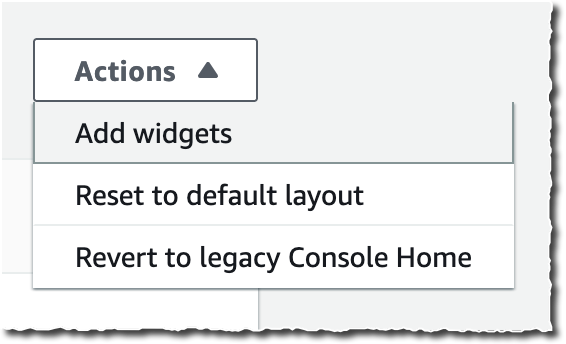
New console homepage action

The new Console Home is made of widgets. I may choose which widget to display on the page and where to include it. I may use the actions in the Actions drop down to customize my home page.

I may move and arrange widgets on the home page to organize the content as I want. When I click on the three little dots on the widget title bar, I may choose to remove the widget or resize it. I have the choice between Regular view and Extended view.

New console resize widget

At launch, the console provides eight widgets, and we will add more over time. Three widgets provide me with static links to learn how to build a solution or to explore AWS (Welcome to AWS, Build a Solution and Explore AWS). The other five are dynamic; their content depends on the usage of AWS by my applications and infrastructure:

  • AWS Health: this widget provides information on important events and changes
  • Cost and usage: this widget provides an overview of service costs, with a break down per AWS service.
  • Favorites: this widget shows a list of services that I have bookmarked
  • Recently visited: this widget provides the list of top recently visited services
  • Trusted Advisor: this widget provides recommendations to follow AWS best practices

AWS News Console List of widgets

As usual, we pay attention to the importance of not disturbing existing workflows and habits. You can use the new Console Home after opt-in. You can revert back to the old console home with a simple click.

This new Console Home is the first step to bring you more relevant content on this very first page you see every day. Stay tuned for more.

The new Console Home is available today in all AWS Regions at no additional cost. Go and customize your console homepage today.

— seb

New – Amazon EC2 Hpc6a Instance Optimized for High Performance Computing

Post Syndicated from Channy Yun original https://aws.amazon.com/blogs/aws/new-amazon-ec2-hpc6a-instance-optimized-for-high-performance-computing/

High Performance Computing (HPC) allows scientists and engineers to solve complex, compute-intensive problems such as computational fluid dynamics (CFD), weather forecasting, and genomics. HPC applications typically require instances with high memory bandwidth, a low latency, high bandwidth network interconnect and access to a fast parallel file system.

Many customers have turned to AWS to run their HPC workloads. For example, Descartes Labs used AWS to power a TOP500 LINPACK benchmarking (the most powerful commercially available computer systems) run that delivered 1.93 PFLOPS, landing at position 136 on the TOP500 list in June 2019. That run made use of 41,472 cores on a cluster of Amazon EC2 C5 instances. Last year Descartes Labs ran the LINPACK benchmark again and placed within the top 40 on the June 2021 TOP500 list with 172,692 cores on a cluster of EC2 instances, which represents a 417 percent performance increase in just two years.

AWS enables you to increase the speed of research and reduce time-to-results by running HPC in the cloud and scaling to tens of thousands of parallel tasks that wouldn’t be practical in most on-premises environments. AWS helps you reduce costs by providing CPU, GPU, and FPGA instances on-demand, Elastic Fabric Adapter (EFA), an EC2 network device that improves throughput and scaling tightly coupled workloads, and AWS ParallelCluster, an open-source cluster management tool that makes it easy for you to deploy and manage HPC clusters on AWS.

Announcing EC2 Hpc6a Instances for HPC Workloads
Customers today across various industries use compute-optimized EFA-enabled Amazon EC2 instances (for example, C5n, R5n, M5n, and M5zn) to maximize the performance of a variety of HPC workloads, but as these workloads scale to tens of thousands of cores, cost-efficiency becomes increasingly important. We have found that customers are not only looking to optimize performance for their HPC workloads but want to optimize costs as well.

As we pre-announced in November 2021, Hpc6a, a new HPC-optimized EC2 instance, is generally available beginning today. This instance delivers 100 Gbps networking through EFA with 96 third-generation AMD EPYC™ processor (Milan) cores with 384 GB RAM, and offers up to 65 percent better price-performance over comparable x86-based compute-optimized instances.

You can launch Hpc6a instances today in the US East (Ohio) and GovCloud (US-West) Regions in On-Demand and Dedicated Hosting or as part of a Savings Plan. Here are the detailed specs:

Instance Name CPUs* RAM EFA Network Bandwidth Attached Storage
hpc6a.48xlarge 96 384 GiB Up to 100 Gbps EBS Only

*Hpc6a instances have simultaneous multi-threading disabled to optimize for HPC codes. This means that unlike other EC2 instances, Hpc6a vCPUs are physical cores, not threads.

To enable predictable thread performance and efficient scheduling for HPC workloads, simultaneous multi-threading is disabled. Thanks to AWS Nitro System, no cores are held back for the hypervisor, making all cores available to your code.

Hpc6a instances introduce a number of targeted features to deliver cost and performance optimizations for customers running tightly coupled HPC workloads that rely on high levels of inter-instance communications. These instances enable EFA networking bandwidth of 100 Gbps and are designed to efficiently scale large tightly coupled clusters within a single Availability Zone.

We hear from many of our engineering customers, such as those in the automotive sector, that they want to reduce the need for physical testing and move towards an increasingly virtual simulation-based product design process faster at a lower cost.

According to our benchmarking results for Siemens Simcenter STAR-CCM+ automotive CFD simulation, when the Hpc6a scales up to 400 nodes (approximately 40,000 cores), with the help of EFA networking, it is able to maintain approximately 100 percent scaling efficiency. Hpc6a instance shows 70 percent lower cost compared to c5n, meaning companies can deliver new designs faster and at a lower cost when using Hpc6a instances. This means companies can deliver new designs faster and at a lower cost when using Hpc6a instances.

You can use the Hpc6a instance with AMD EPYC third-generation (Milan) processors to run your largest and most complex HPC simulations on EC2 and optimize for cost and performance. Customers can also use the new Hpc6a instances with AWS Batch and AWS ParallelCluster to simplify workload submission and cluster creation.

To learn more, visit our Hpc6a instance page and get in touch with our HPC team, AWS re:Post for EC2, or through your usual AWS Support contacts.

— Channy

Amazon Elastic Kubernetes Service Adds IPv6 Networking

Post Syndicated from Sébastien Stormacq original https://aws.amazon.com/blogs/aws/amazon-elastic-kubernetes-service-adds-ipv6-networking/

Starting today, you can deploy applications that use IPv6 address space on Amazon Elastic Kubernetes Service (EKS).

Many of our customers are standardizing Kubernetes as their compute infrastructure platform for cloud and on-premises applications. Amazon EKS makes it easy to deploy containerized workloads. It provides highly available clusters and automates tasks such as patching, node provisioning, and updates.

Kubernetes uses a flat networking model that requires each pod to receive an IP address. This simplified approach enables low-friction porting of applications from virtual machines to containers but requires a significant number of IP addresses that many private VPC IPv4 networks are not equipped to handle. Some cluster administrators work around this IPv4 space limitation by installing container network plugins (CNI) that virtualize IP addresses a layer above the VPC, but this architecture limits an administrator’s ability to effectively observe and troubleshoot applications and has a negative impact on network performance at scale. Further, to communicate with internet services outside the VPC, traffic from IPv4 pods is routed through multiple network hops before reaching its destination, which adds latency and puts a strain on network engineering teams who need to maintain complex routing setups.

To avoid IP address exhaustion, minimize latency at scale, and simplify routing configuration, the solution is to use IPv6 address space.

IPv6 is not new. In 1996, I bought my first book on “IPng, Internet Protocol Next Generation”, as it was called 25 years ago. It provides a 64-bit address space, allowing 3.4 x 10^38 possible IP addresses for our devices, servers, or containers. We could assign an IPv6 address to every atom on the surface of the planet and still have enough addresses left to do another 100-plus Earths.

IPng Internet protocol Next Generation bookThere are a few advantages to using Amazon EKS clusters with an IPv6 network. First, you can run more pods on one single host or subnet without the risk of exhausting all available IPv4 addresses available in your VPC. Second, it allows for lower-latency communications with other IPv6 services, running on-premises, on AWS, or on the internet, by avoiding an extra NAT hop. Third, it relieves network engineers of the burden of maintaining complex routing configurations.

Kubernetes cluster administrators can focus on migrating and scaling applications without spending efforts working around IPv4 limits. Finally, pod networking is configured so that the pods can communicate with IPv4-based applications outside the cluster, allowing you to adopt the benefits of IPv6 on Amazon EKS without requiring that all dependent services deployed across your organization are first migrated to IPv6.

As usual, I built a short demo to show you how it works.

How It Works
Before I get started, I create an IPv6 VPC. I use this CDK script to create an IPv6-enabled VPC in a few minutes (thank you Angus Lees for the code). Just install CDK v2 (npm install -g aws-cdk@next) and deploy the stack (cdk bootstrap && cdk deploy).

When the VPC with IPv6 is created, I use the console to configure auto-assignment of IPv6 addresses to resources deployed in the public subnets (I do this for each public subnet).

auto assign IPv6 addresses in subnet

I take note of the subnet IDs created by the CDK script above (they are listed in the output of the script) and define a couple of variables I’ll use throughout the demo. I also create a cluster IAM role and a node IAM role, as described in the Amazon EKS documentation. When you already have clusters deployed, these two roles exist already.

I open a Terminal and type:


CLUSTER_ROLE_ARN="arn:aws:iam::0123456789:role/EKSClusterRole"
NODE_ROLE_ARN="arn:aws:iam::0123456789:role/EKSNodeRole"
SUBNET1="subnet-06000a8"
SUBNET2="subnet-03000cc"
CLUSTER_NAME="AWSNewsBlog"
KEYPAIR_NAME="my-key-pair-name"

Next, I create an Amazon EKS IPv6 cluster. In a terminal, I type:


aws eks create-cluster --cli-input-json "{
\"name\": \"${CLUSTER_NAME}\",
\"version\": \"1.21\",
\"roleArn\": \"${CLUSTER_ROLE_ARN}\",
\"resourcesVpcConfig\": {
\"subnetIds\": [
    \"${SUBNET1}\", \"${SUBNET2}\"
],
\"endpointPublicAccess\": true,
\"endpointPrivateAccess\": true
},
\"kubernetesNetworkConfig\": {
    \"ipFamily\": \"ipv6\"
}
}"

{
    "cluster": {
        "name": "AWSNewsBlog",
        "arn": "arn:aws:eks:us-west-2:486652066693:cluster/AWSNewsBlog",
        "createdAt": "2021-11-02T17:29:32.989000+01:00",
        "version": "1.21",

...redacted for brevity...

        "status": "CREATING",
        "certificateAuthority": {},
        "platformVersion": "eks.4",
        "tags": {}
    }
}

I use the describe-cluster while waiting for the cluster to be created. When the cluster is ready, it has "status" : "ACTIVE"

aws eks describe-cluster --name "${CLUSTER_NAME}"

Then I create a node group:

aws eks create-nodegroup                       \
        --cluster-name ${CLUSTER_NAME}         \
        --nodegroup-name AWSNewsBlog-nodegroup \
        --node-role ${NODE_ROLE_ARN}           \
        --subnets "${SUBNET1}" "${SUBNET2}"    \
        --remote-access ec2SshKey=${KEYPAIR_NAME}
		
{
    "nodegroup": {
        "nodegroupName": "AWSNewsBlog-nodegroup",
        "nodegroupArn": "arn:aws:eks:us-west-2:0123456789:nodegroup/AWSNewsBlog/AWSNewsBlog-nodegroup/3ebe70c7-6c45-d498-6d42-4001f70e7833",
        "clusterName": "AWSNewsBlog",
        "version": "1.21",
        "releaseVersion": "1.21.4-20211101",

        "status": "CREATING",
        "capacityType": "ON_DEMAND",

... redacted for brevity ...

}		

Once the node group is created, I see two EC2 instances in the console. I use the AWS Command Line Interface (CLI) to verify that the instances received an IPv6 address:

aws ec2 describe-instances --query "Reservations[].Instances[? State.Name == 'running' ][].NetworkInterfaces[].Ipv6Addresses" --output text 

2600:1f13:812:0000:0000:0000:0000:71eb
2600:1f13:812:0000:0000:0000:0000:3c07

I use the kubectl command to verify the cluster from a Kubernetes point of view.

kubectl get nodes -o wide

NAME                                       STATUS   ROLES    AGE     VERSION               INTERNAL-IP                              EXTERNAL-IP    OS-IMAGE         KERNEL-VERSION                CONTAINER-RUNTIME
ip-10-0-0-108.us-west-2.compute.internal   Ready    <none>   2d13h   v1.21.4-eks-033ce7e   2600:1f13:812:0000:0000:0000:0000:2263   18.0.0.205   Amazon Linux 2   5.4.149-73.259.amzn2.x86_64   docker://20.10.7
ip-10-0-1-217.us-west-2.compute.internal   Ready    <none>   2d13h   v1.21.4-eks-033ce7e   2600:1f13:812:0000:0000:0000:0000:7f3e   52.0.0.122   Amazon Linux 2   5.4.149-73.259.amzn2.x86_64   docker://20.10.7

Then I deploy a Pod. I follow these steps in the EKS documentation. It deploys a sample nginx web server.

kubectl create namespace aws-news-blog
namespace/aws-news-blog created

# sample-service.yml is available at https://docs.aws.amazon.com/eks/latest/userguide/sample-deployment.html
kubectl apply -f  sample-service.yml 
service/my-service created
deployment.apps/my-deployment created

kubectl get pods -n aws-news-blog -o wide
NAME                             READY   STATUS    RESTARTS   AGE   IP                           NODE                                       NOMINATED NODE   READINESS GATES
my-deployment-5dd5dfd6b9-7rllg   1/1     Running   0          17m   2600:0000:0000:0000:405b::2   ip-10-0-1-217.us-west-2.compute.internal   <none>           <none>
my-deployment-5dd5dfd6b9-h6mrt   1/1     Running   0          17m   2600:0000:0000:0000:46f9::    ip-10-0-0-108.us-west-2.compute.internal   <none>           <none>
my-deployment-5dd5dfd6b9-mrkfv   1/1     Running   0          17m   2600:0000:0000:0000:46f9::1   ip-10-0-0-108.us-west-2.compute.internal   <none>           <none>

I take note of the IPv6 address of my pods, and try to connect it from my laptop. As my awesome service provider doesn’t provide me with an IPv6 at home yet, the connection fails. This is expected as the pods do not have an IPv4 address at all. Notice the -g option telling curl to not consider : in the IP address as the separator for the port number and -6 to tell curl to connect through IPv6 only (required when you provide curl with a DNS hostname).

curl -g -6 http://\[2600:0000:0000:35000000:46f9::1\]
curl: (7) Couldn't connect to server

To test IPv6 connectivity, I start a dual stack (IPv4 and IPv6) EC2 instance in the same VPC as the cluster. I SSH connect to the instance and try the curl command again. I see I receive the default HTML page served by nginx. IPv6 connectivity to the pod works!

curl -g -6 http://\[2600:0000:0000:35000000:46f9::1\]
<!DOCTYPE html>
<html>
<head>
<title>Welcome to nginx!</title>

... redacted for brevity ...

<p><em>Thank you for using nginx.</em></p>
</body>
</html>

If it does not work for you, verify the security group for the cluster EC2 nodes and be sure it has a rule allowing incoming connections on port TCP 80 from ::/0.

A Few Things to Remember
Before I wrap up, I’d like to answer some frequent questions received from customers who have already experimented with this new capability:

Pricing and Availability
IPv6 support for your Amazon Elastic Kubernetes Service (EKS) cluster is available today in all AWS Regions where Amazon EKS is available, at no additional cost.

Go try it out and build your first IPv6 cluster today.

— seb

Now Open – AWS Asia Pacific (Jakarta) Region

Post Syndicated from Jeff Barr original https://aws.amazon.com/blogs/aws/now-open-aws-asia-pacific-jakarta-region/

The AWS Region in Jakarta, Indonesia, is now open and you can start using it today. The official name is Asia Pacific (Jakarta) and the API name is ap-southeast-3. The AWS Asia Pacific (Jakarta) Region is the tenth active AWS Region in Asia Pacific and mainland China along with Beijing, Hong Kong, Mumbai, Ningxia, Osaka, Seoul, Singapore, Sydney, and, Tokyo. With this launch, AWS now spans 84 Availability Zones within 26 geographic regions around the world. We have also announced plans for 24 more Availability Zones and eight more AWS Regions in Australia, Canada, India, Israel, New Zealand, Spain, Switzerland, and the United Arab Emirates.

Instances and Services
Applications running in this 3-AZ region can use C5, C5d, I3, I3en, M5, M5d, R5, R5d, and T3 instances, and can use a long list of AWS services including Amazon API Gateway, Application Auto Scaling, AWS Certificate Manager (ACM), AWS CloudFormation, Amazon CloudFront, AWS CloudTrail, Amazon CloudWatch, CloudWatch Events, Amazon CloudWatch Logs, AWS CodeDeploy, AWS Config, AWS Database Migration Service, AWS Direct Connect, Amazon DynamoDB, EC2 Auto Scaling, Amazon Elastic Block Store (EBS), Amazon Elastic Compute Cloud (Amazon EC2), Amazon Elastic Container Registry, Amazon Elastic Container Service (Amazon ECS), Application Load Balancers (Classic, Network, and Application), Amazon EMR, Amazon ElastiCache, Amazon Elasticsearch Service, Amazon Glacier, AWS Identity and Access Management (IAM), Amazon Kinesis Data Streams, AWS Key Management Service (KMS), AWS Lambda, AWS Marketplace, AWS Organizations, AWS Personal Health Dashboard, Amazon Redshift, Amazon Relational Database Service (RDS), Amazon Aurora, Amazon Route 53 (including Private DNS for VPCs), Amazon Simple Notification Service (SNS), Amazon Simple Queue Service (SQS), Amazon Simple Storage Service (Amazon S3), Amazon Simple Workflow Service (SWF), AWS Step Functions, AWS Support API, AWS Systems Manager, AWS Trusted Advisor, Amazon Virtual Private Cloud (VPC), and VM Import/Export.

Using the Asia Pacific (Jakarta) Region
As is the case with all of the newer AWS Regions, you need to explicitly enable this one in order to be able to create and manage resources within it. To learn how to do this, read Using the Asia Pacific (Hong Kong) Region in my post, Now Open – AWS Asia Pacific (Hong Kong) Region.

Connectivity, Edge Locations, and Latency
Jakarta is already home to a Amazon CloudFront edge location that was opened earlier this year, along with two brand-new AWS Direct Connect locations. In addition to this in-country infrastructure, there are more than sixty other edge locations and multiple regional edge caches in Asia, as detailed on the AWS Global Infrastructure page.

The region offers low-latency connections to other AWS regions in the area. Here are the latest numbers:

Many AWS services give you options to replicate your data across multiple AWS regions. You can replicate S3 buckets to multiple destinations (and use Multi-Region Access Points so your users access the closest one), copy EC2 AMIs between regions, set up cross-region Amazon Aurora Read Replicas, replicate container images, and more. You can set up Amazon DynamoDB Global Tables that span any desired regions, and you can set up inter-region VPC peering. To learn more about how to build applications that span regions, be sure to check out our Multi-Region Application Architecture solution.

AWS in Indonesia
With this launch we are making a long-term commitment to growing our business in Indonesia, and expect to create an average of 24,700 jobs annually over the next 15 years. This includes the direct AWS supply chain (construction, facility maintenance, electricity, and telecommunications) along with the growth that this drives in the broader Indonesian economy.

We have been investing in Southeast Asia and Indonesia for many years. The first AWS office in Jakarta opened in 2018 to help support our customers, and now employs developer advocates, solutions architects, account managers, and partner managers, with hiring for other roles now underway.

Back in 2019 we announced a goal to train and empower hundreds of thousands of Indonesians with proficiency in cloud services by 2025. In collaboration with the Indonesian government and with the help of both AWS partners and educational institutions, we have already trained over 200,000 people. We are doing this through multiple routes and programs including:

Laptops for Builders – This is a free program that teaches high school and vocational student in Bahasa, Indonesia about cloud fundamentals.

Scholarship Programs – Working closely with tech-education startup Dicoding, we are offering a free scholarship program for up to 100,000 cloud and back-end developers.

AWS Training & Certification – Attendees are gaining new skills and certifications in areas such as AWS Cloud fundamentals, big data, security, and machine learning, with several training options available.

AWS Customers in Indonesia
We have many amazing customers in Indonesia! Here are a few success stories:

Traveloka is a lifestyle superapp with a focus on Indonesia, Thailand, Vietnam, Singapore, Malaysia, the Philippines, and Australia. They offer customers in those countries an end-to-end solution that spans travel, local services, and financial services, all powered by AWS. The company was born in the cloud, and counts on AWS to let them build apps quickly and with high scalability. The Traveloka app has been downloaded over 60 million times, making it the most popular travel and lifestyle booking app in Southeast Asia.

Halodoc is an Indonesian digital health startup. They are currently running a digital reservation program to help Indonesian citizens to book and receive their COVID-19 vaccinations, while also providing the government with easier monitoring and evaluation of the vaccine rollout. During the pandemic, they have also helped to provide testing and telemedicine services, all powered by a digital platform that runs on AWS and that allows them to scale in real-time according to market demand.

Under the national movement of Learning Freedom (“Merdeka Belajar”), the Indonesian government is working to allow students to access educational resources from anywhere and at any time. Simak Online allows 300,000 students from 430 schools across Jakarta to access their learning materials and assignments, complete homework, take examples, and participate in online forum discussions. Previously hosted on-premises, Simak Online moved to AWS shortly before COVID-19 broke out in Indonesia. Before the move, they could support exams at just 50 schools simultaneously. Thanks to AWS, they can now scale up and down as needed and can support the national movement and allow students to learn online and on-demand.

A translated version of this post is available on the AWS Indonesia Blog.

— Jeff;

New – FreeRTOS Extended Maintenance Plan for Up to 10 Years

Post Syndicated from Channy Yun original https://aws.amazon.com/blogs/aws/new-freertos-extended-maintenance-plan-for-up-to-10-years/

Last AWS re:Invent 2020, we announced FreeRTOS Long Term Support (LTS) that offers a more stable foundation than standard releases, as manufacturers deploy and later update devices in the field. FreeRTOS is an open source, real-time operating system for microcontrollers that makes small, low-power edge devices easy to program, deploy, secure, connect, and manage.

In 2021, FreeRTOS LTS released 202012.01 to include AWS IoT Over-the-Air (OTA) update, AWS IoT Device Defender, and AWS IoT Jobs libraries that provides feature stability, security patches, and critical bug fixes for the next two years.

Today, I am happy to announce FreeRTOS Extended Maintenance Plan (EMP), which allows embedded developers to receive critical bug fixes and security patches on their chosen FreeRTOS LTS version for up to 10 years beyond the expiry of the initial LTS period. FreeRTOS EMP lets developers improve device security (or helps keep devices secure) for years, save on operating system upgrade costs, and reduce the risks associated with patching their devices.

FreeRTOS EMP applies to libraries covered by FreeRTOS LTS. Therefore, developers have device lifecycles longer than the LTS period of 2 years and can continue using a version that provides feature stability, security patches, and critical bug fixes, all without having to plan a costly version upgrade.

Here are main features of FreeRTOS EMP:

Features Description Why is it important?
Feature stability Get FreeRTOS libraries that maintain the same set of features for years Save upgrade costs by using a stable FreeRTOS codebase for their product lifecycle
API stability Get FreeRTOS libraries that have stable APIs for years
Critical fixes Receive security patches and critical bug* fixes on your chosen FreeRTOS libraries Security patches help keep their IoT devices secure for the product lifecycle
Notification of patches Receive timely notification upcoming patches Timely awareness of security patches helps proactively plan the deployment of patches
Flexible subscription plan Extend maintenance by a year or longer Continue to renew their annual subscription for a longer period to keep the same version for the entire device lifecycle, or for a shorter period to buy time before upgrading to the latest FreeRTOS version.

* A critical bug is a defect determined by AWS to impact the functionality of the affected library and has no reasonable workaround.

Getting Started with FreeRTOS EMP
To get started, subscribe to the plan using your AWS account, and renew the subscription annually or for a longer period to either cover their product lifecycle or until you are ready to transition to a new FreeRTOS LTS release.

Before the end of the current LTS period, you will be able to use your AWS account to complete the FreeRTOS EMP registration on the FreeRTOS console, review and agree to the associated terms and conditions, select the LTS version, and buy an annual subscription. You will then gain access to the private repository where you’ll receive .zip files containing a git repo with chosen libraries, patches, and related notifications.

Under NDA, AWS will notify you via official AWS Security channels of an upcoming patch and its timelines (if AWS is reasonably able to do so and deems it appropriate). Patches will be sent to your private repository within three business days of successfully implementing and getting AWS Security approval for our mitigation.

AWS will provide technical support for FreeRTOS EMP customers via separate subscriptions to AWS Support. AWS Support is not included in FreeRTOS EMP subscriptions. You can track issues such as AWS accounts, billing, and bugs, or get access to technical experts such as patch integration issues based on your AWS Support plan.

Available Now
FreeRTOS EMP will be available for the current and all previous FreeRTOS LTS releases. Subscriptions can be renewed annually for up to 10 years from the end of the chosen LTS version’s support period. For example, a subscription for FreeRTOS 202012.01 LTS, whose LTS period ends March 2023, may be renewed annually for up to 10 years (i.e., March 2033).

You can find more information on the FreeRTOS feature page. Please send us feedback on the forum of FreeRTOS or AWS Support.

Sign up to get periodic updates on when and how you can subscribe to FreeRTOS EMP.

— Channy