Tag Archives: Malware

How to deploy AWS Network Firewall to help protect your network from malware

Post Syndicated from Ajit Puthiyavettle original https://aws.amazon.com/blogs/security/how-to-deploy-aws-network-firewall-to-help-protect-your-network-from-malware/

Protecting your network and computers from security events requires multi-level strategies, and you can use network level traffic filtration as one level of defense. Users need access to the internet for business reasons, but they can inadvertently download malware, which can impact network and data security. This post describes how to use custom Suricata Rules with AWS Network Firewall to add protections that prevent users from downloading malware. You can use your own internal list, or a list from commercial or open-source threat intelligence feeds.

Network Firewall is a managed service that makes it easy to deploy essential network protection for all of your Amazon Virtual Private Cloud (Amazon VPC) Infrastructure. Network Firewall’s flexible rules engine lets you define firewall rules, giving you fine-grained control over network traffic, such as blocking outbound requests to prevent the spread of potential malware.

Features of Network Firewall

This section describes features of Network Firewall that help improve the overall security of your network.

Network Firewall:

  • Is a managed Amazon Web Services (AWS) service, so you don’t have to build and maintain the infrastructure to host the network firewall.
  • Integrates with AWS Firewall Manager, which allows you to centrally manage security policies and automatically enforce mandatory security policies across existing and newly created accounts and virtual private clouds (VPCs).
  • Protects application availability by filtering inbound internet traffic using tools such as access control list (ACL) rules, stateful inspection, protocol detection, and intrusion prevention.
  • Provides URL, IP address, and domain-based outbound traffic filtering to help you meet compliance requirements, stop potential data leaks, and block communication with known malware hosts.
  • Gives you control and visibility of VPC-to-VPC traffic to logically separate networks that host sensitive applications or line-of-business resources.
  • Complements existing network and application security services on AWS by providing control and visibility to layer 3 through 7 network traffic for your entire VPC.

Automating deployment of Network Firewall and management of Network Firewall rules support management at-scale and help in timely response, as Network Firewall is designed to block access to insecure sites before they impact your resources. For the solution in this blog post, you’ll use an AWS CloudFormation template to deploy the network architecture with Network Firewall.

Solution architecture

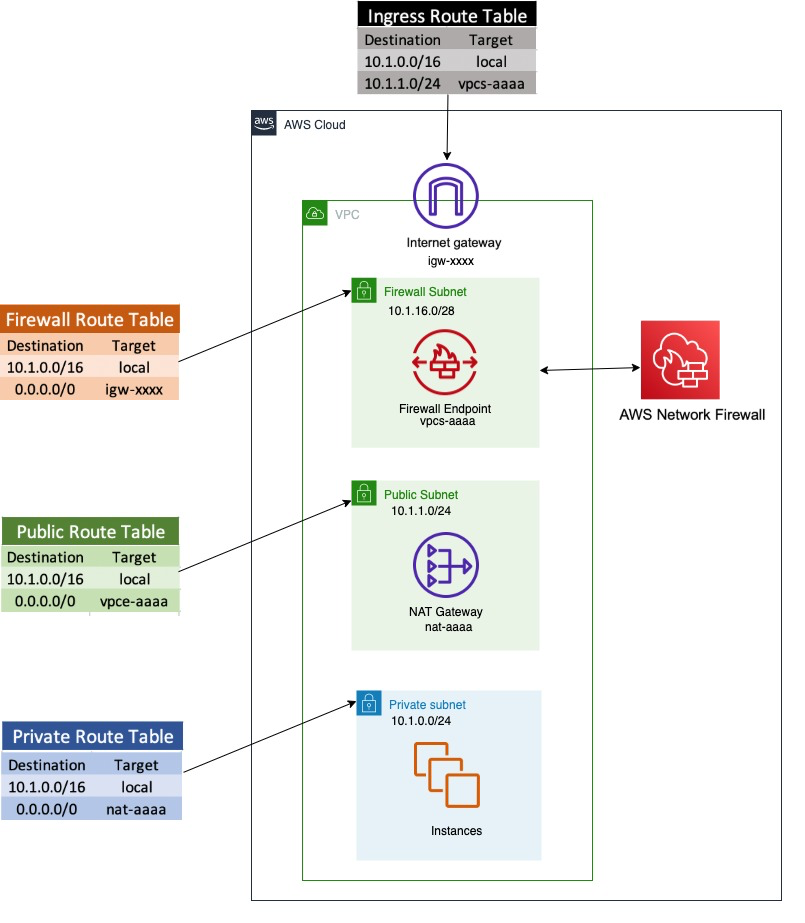
Figure 1 shows a sample architecture to demonstrate how users are able to download malware files, and how you can prevent this using network firewall rules.

Network Firewall is deployed in a single VPC architecture, where it is placed in line with the traffic to and from the internet.

Figure 1. Network architecture diagram

Figure 1. Network architecture diagram

The network architecture shown in Figure 1 includes three subnets:

  1. A network firewall subnet
    Hosts the Network Firewall endpoint interface. All outbound traffic from this network goes through the internet gateway.
  2. A public subnet
    Hosts a NAT gateway. The next hop from the public subnet is the Network Firewall endpoint, where all traffic can be inspected before being forwarded to the internet.
  3. A private network subnet
    Used to host the client instances. All outbound traffic from this network goes to the NAT gateway endpoint.

In the network architecture shown in Figure 1, only one AZ is shown for simplicity, but best practices recommend deploying infrastructure across multiple AZs

To run the CloudFormation deployment template

  1. To set up the architecture shown in Figure 1, launch the provided CloudFormation deployment template using the Launch stack button in step 2 below.
    This CloudFormation template:

    • Sets up VPCs and appropriate subnets as required by the network architecture.
    • Creates a route table with appropriate routes and attaches it to the appropriate subnet (i.e. private subnet, firewall subnet, public subnet).
    • Creates a test instance with appropriate security groups.
    • Deploys Network Firewall with firewall policy.
    • Creates a Rule Group SampleStatefulRulegroupName with Suricata rules, which is not attached to a firewall policy
  2. To launch the stack, click the Launch Stack button below.
  3. Select the Launch Stack button to launch the template

  4. Name the newly created stack (for example, nfw-stack).
  5. The template will also install two sample rules that will be used to protect against accessing two sample malware site URLs, but it will not automatically attach them to a firewall policy
  6. You can see that Network Firewall with firewall policy was deployed as part of the basic CloudFormation deployment. It also created Suricata rules in rule groups, but is not yet attached to the firewall policy.

    Note: Unless you attach the rule to the Network Firewall, it will not provide the required protection.

Example: confirming vulnerability

We have identified two sample URLs that contain malware to use for demonstration.

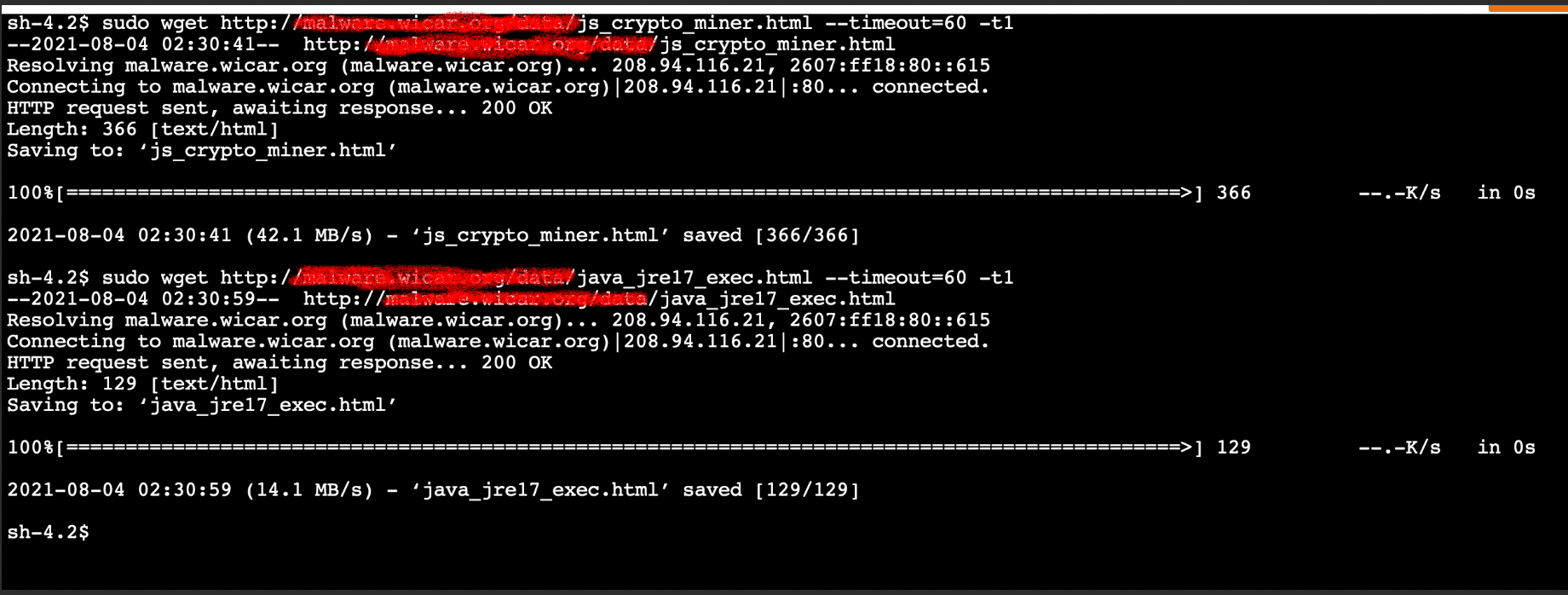
In the example screen shot below, we tested vulnerability by logging into test instance using AWS Session Manager. and at the shell prompt, used wget to access and download a malware file.

Figure 2 that follows is a screenshot of how a user could access and download two different malware files.

Note: Since these URLs contain malware files, we do not recommend users perform this test, but are providing a screenshot as a demonstration. If you wish to actually test ability to download files, use URLs you know are safe for testing.

Figure 2. Insecure URL access

Figure 2. Insecure URL access

Network Firewall policies

Before the template creates the Network Firewall rule group, it creates a Network Firewall policy and attaches it to the Network Firewall. An AWS Network Firewall firewall policy defines the monitoring and protection behavior for a firewall. The details of the behavior are defined in the rule groups that you add to your policy.

Network Firewall rules

A Network Firewall rule group is a reusable set of criteria for inspecting and handling network traffic. You can add one or more rule groups to a firewall policy as part of policy configuration. The included template does this for you.

Network Firewall rule groups are either stateless or stateful. Stateless rule groups evaluate packets in isolation, while stateful rule groups evaluate them in the context of their traffic flow. Network Firewall uses a Suricata rules engine to process all stateful rules.

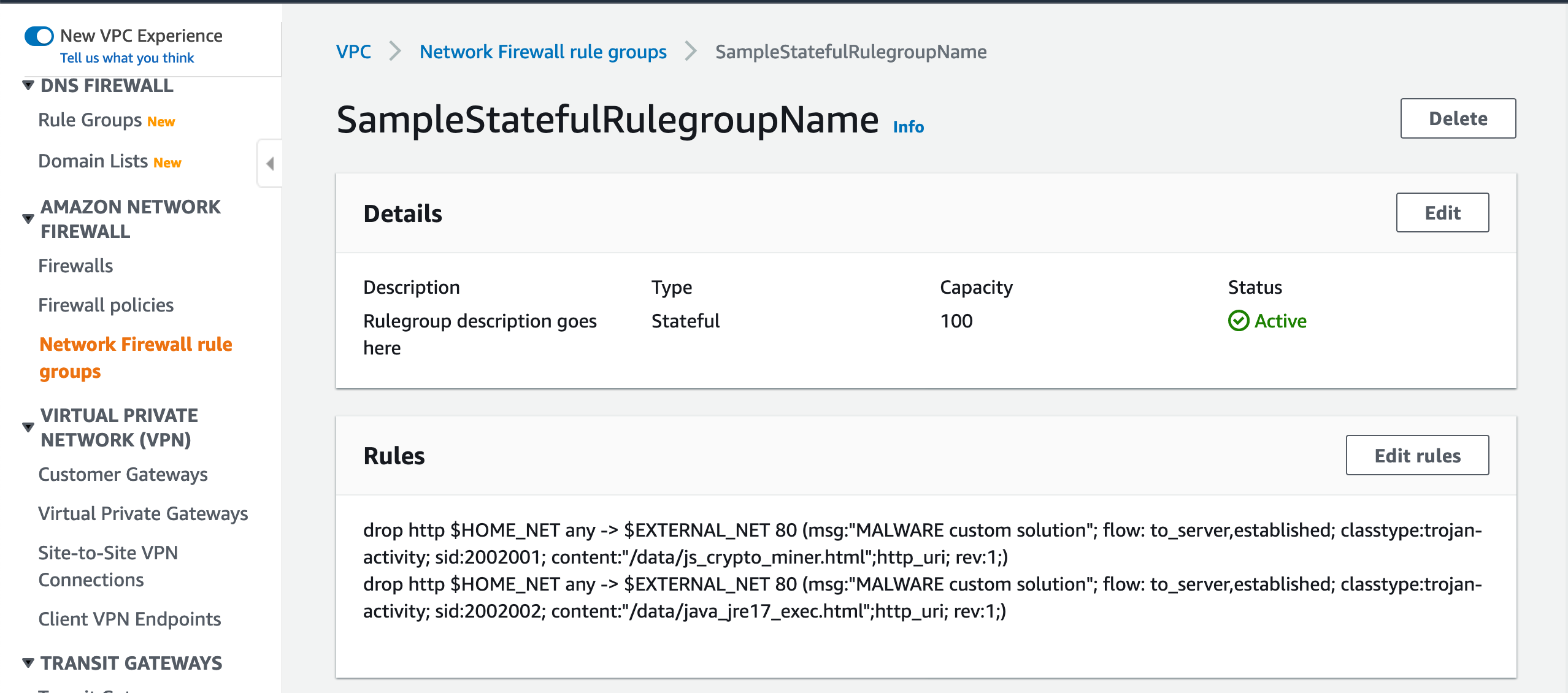
Suricata rules can be used to create a Network Firewall stateful rule to prevent insecure URL access. Figure 3 shows the Suricata rules that the template adds and attaches to the Network Firewall policy in order to block access to the sample malware URLs used in the previous example.

Figure 3. Suricata rules in a Network Firewall rule group

Figure 3. Suricata rules in a Network Firewall rule group

Attach the rule group to the Network Firewall policy

When you launched the CloudFormation template, it automatically created these rules in the rule group. You will now be attaching this rule group to the firewall policy in order to enable the protection. You will need similar rules to block the test URLs that are used for your testing.

Figure 3 shows two Suricata rules that have been configured to block the insecure malware URLs.

To add Suricata rules to Network Firewall

To improve site security and protect against downloading malware, you can add Suricata rules to Network Firewall to secure your site. You’ll do this by:

  1. Creating and attaching a firewall policy to the Network Firewall.
  2. Creating rules as part of rule groups, which are attached to the firewall policy
  3. Testing to verify that access to malware URLs from the instance is blocked.

Let’s review Suricata Rules that are created, which can be attached to Network Firewall.

Suricata rule parts

Each Suricata rule has three parts:

  1. Action
  2. drop action that should be taken

  3. Header
  4. http this is the traffic protocol

    $HOME_NET anywhere $HOME_NET is a Suricata variable. By default it is set to the CIDR range of the VPC where Network Firewall is deployed and any refers to any source port

    $EXTERNAL_NET 80 where $EXTERNAL_NET 80 is a Suricata standard variable that refers to traffic destination, and 80 refers to the destination port

    -> is the direction that tells in which direction the signature has to match

  5. Options
  6. msg “MALWARE custom solution” – gives textual information about the signature and the possible alert

    flow to_server,established – it is used to match on the direction of the flow and established refers to match on established connections

    classtype trojan-activity – gives information about the classification of rules and alerts

    sid:xxxxx gives every signature its own id

    content “xxxx” – This keyword is very important and it identifies the pattern that your signature should match.

    http_uri is a content modifier that helps you match specifically and only on the request URI

    rev:xxx this goes along with sid keyword. It represents the version of the signature

The signatures in the Suricate rule shown in Figure 3 will block traffic that matches the http_uri contents /data/js_crypto_miner.html and /data/java_jre17_exec.html when the traffic is initiated from the VPC to the public network.

To attach a rule group to an existing Network Firewall

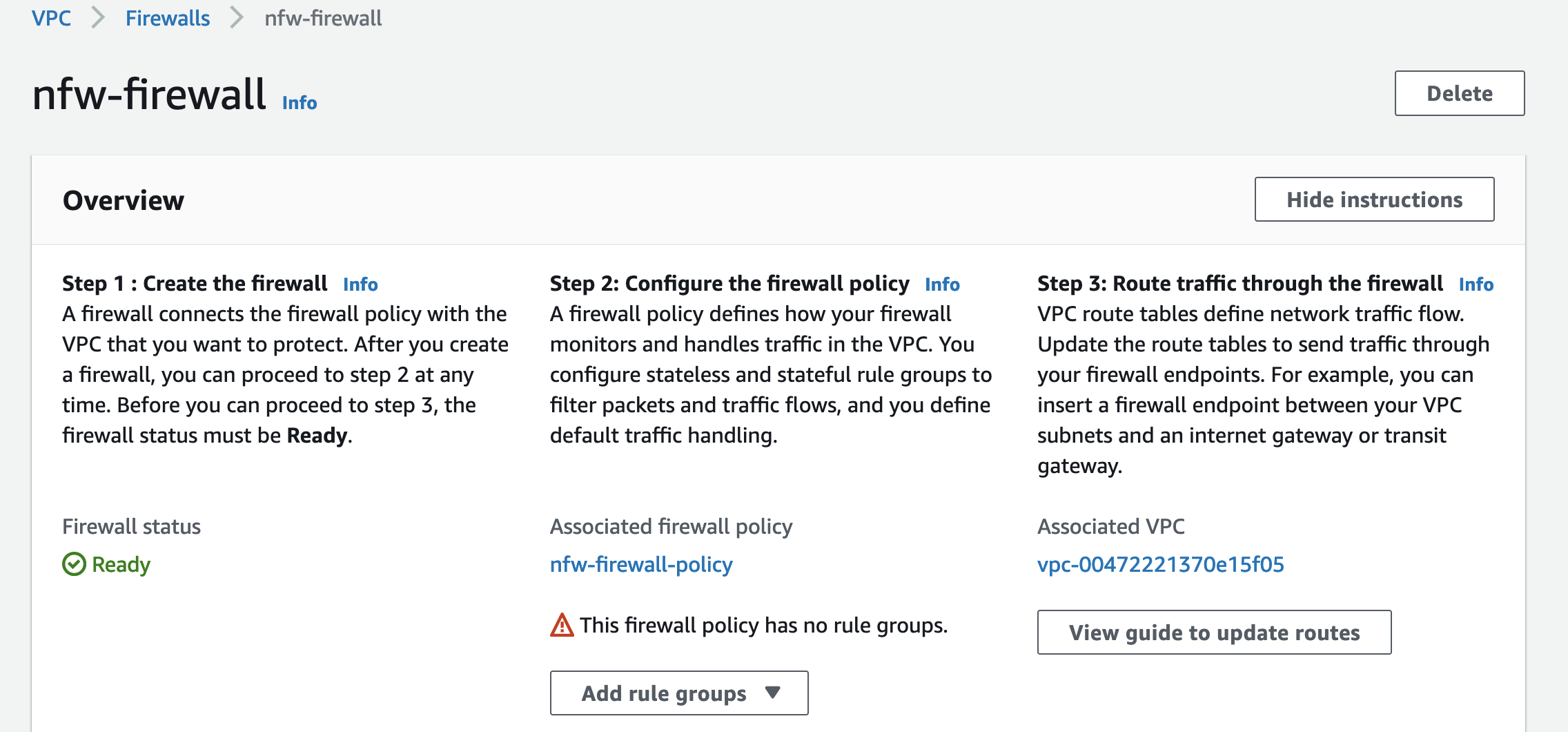
In Figure 4, the Network Firewall has a policy attached. but it does not have a rule group

Figure 4. A policy is attached, but not a rule group

Figure 4. A policy is attached, but not a rule group

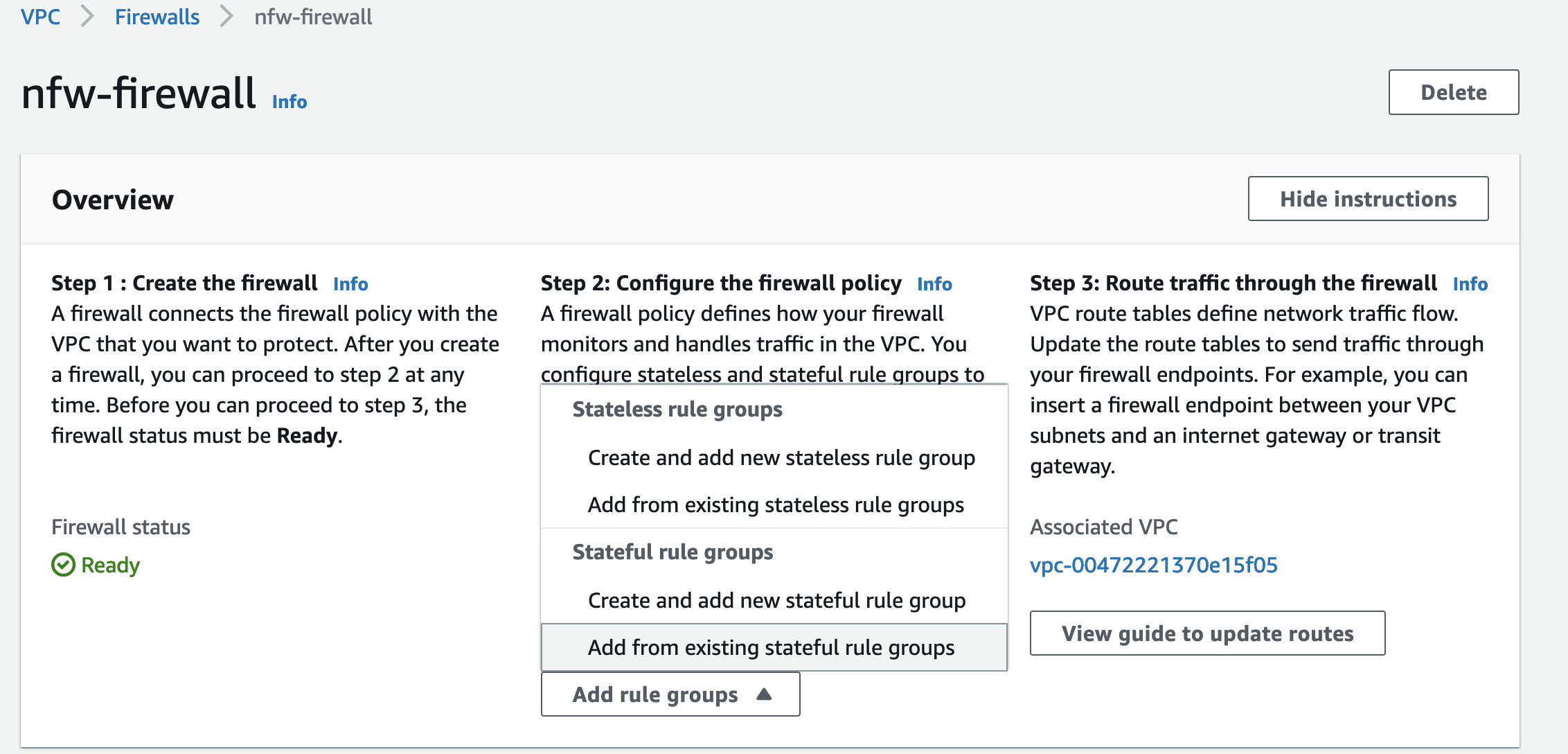
  1. As shown in Figure 5, choose Add rule group to start adding your Suricata rule to the Network Firewall.
  2. Choose Add from existing stateful rule groups to attach an already created Suricata rule group.
  3. Figure 5. Choose Add rule group

    Figure 5. Choose Add rule group

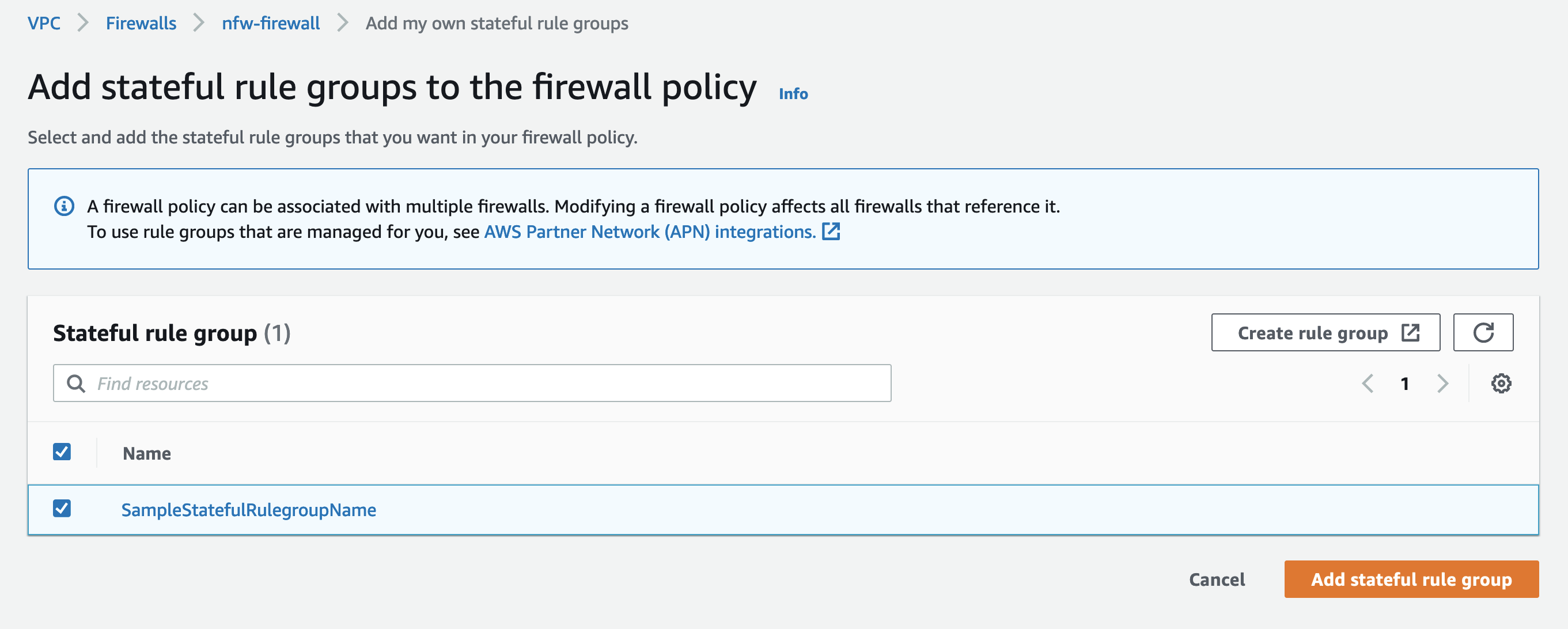
  4. Figure 6 shows the Suriacata rule groups that are already created. SampleStatefulRulegroupName is the rule group created by the CloudFormation template.
  5. Select the rule group and choose Add stateful rule group to finish adding the rule group to Network Firewall.
  6. Figure 6. Review the rule groups that are already created

    Figure 6. Review the rule groups that are already created

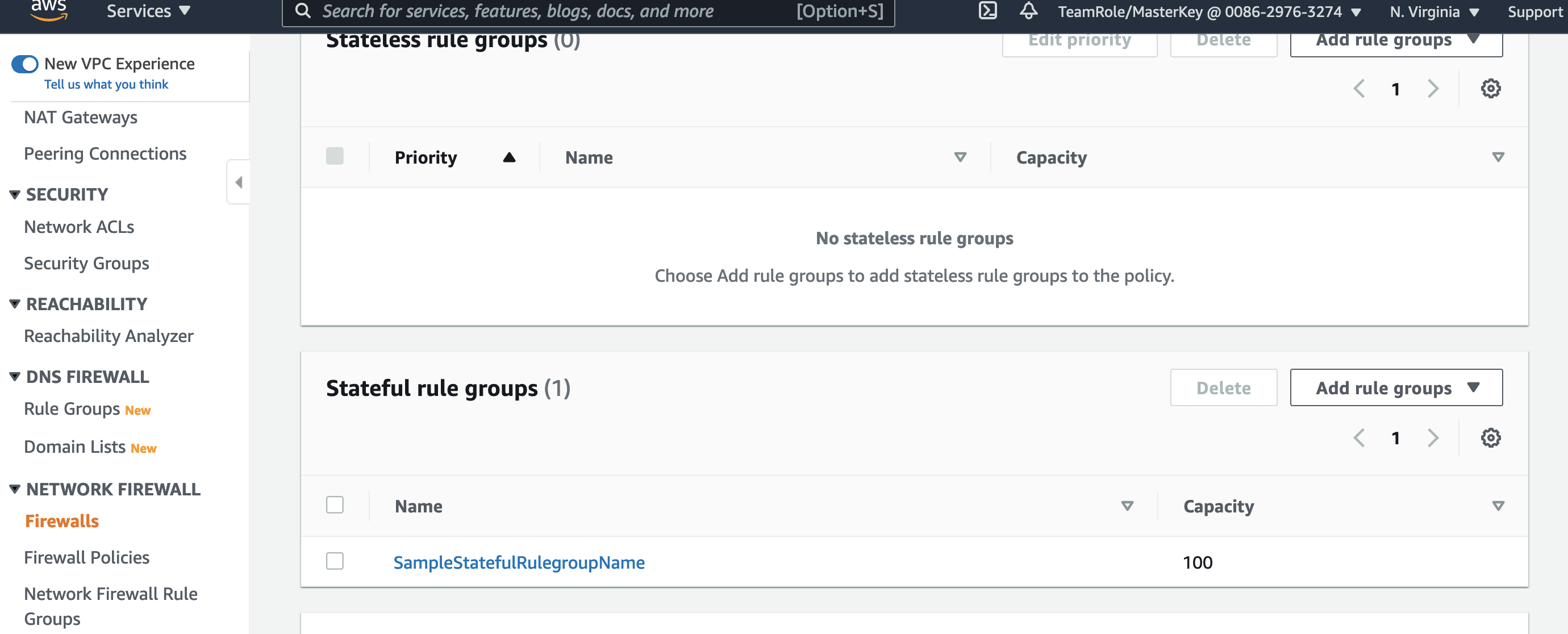
  7. Figure 7 shows that the rule group SampleStatefulRulegroupName is now part of the Stateful rule group section of Network Firewall screen, which completes adding Suricata rules to Network Firewall.
  8. Figure 7. Shows the new rule group is now added

    Figure 7. Shows the new rule group is now added

Example: validating the solution

Your Network Firewall is now configured to block malware URLs that are defined in the rulegroup SampleStatefulRulegroupName.

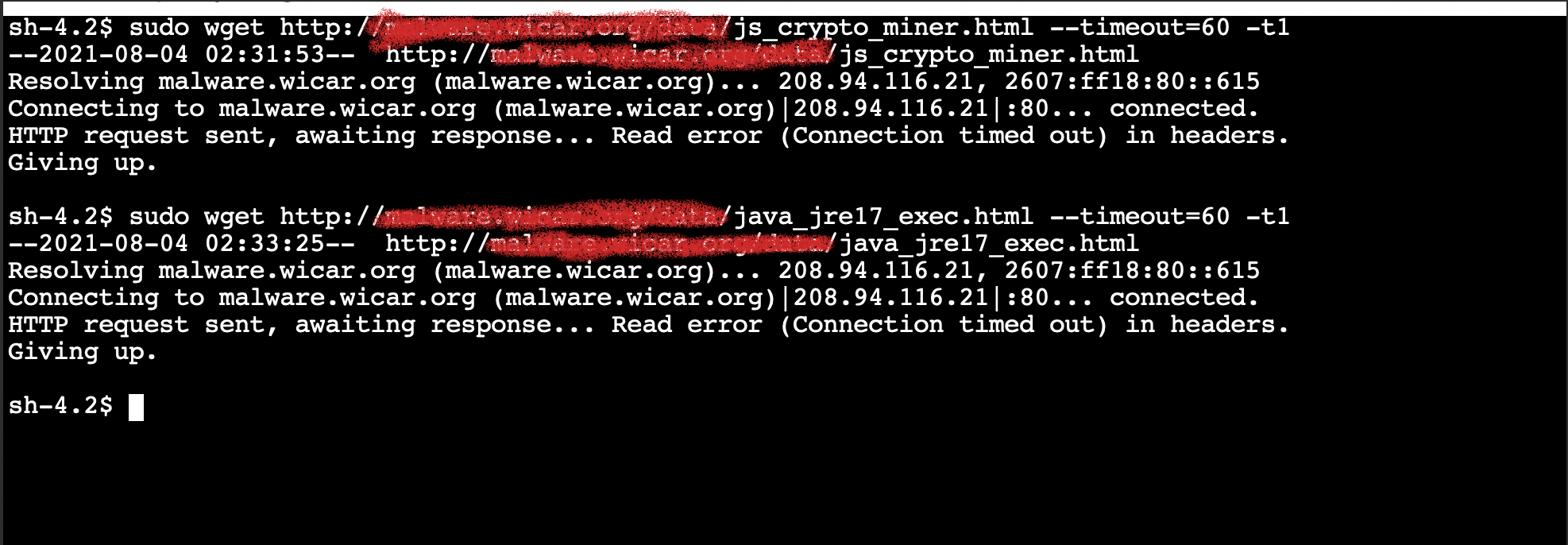
As in the example above where we confirmed vulnerability, Figure 8 shows how to validate that the solution is now protecting your users from accessing malware sites.

Figure 8 shows a user trying to access the same insecure URLs we tested earlier and shows that the URLs are now blocked and the attempted connection times out.

Note: Since these URLs contain malware files, we do not recommend users perform this test, but are providing a screenshot as a demonstration. If you wish to actually test ability to download files, use URLs you know are safe for testing.

Figure 8. Insecure URL access blocked

Figure 8. Insecure URL access blocked

Validating blocking access helps your security team ensure that users or applications on your network cannot download malware. You can add similar rules for any URLs you identify as insecure. SOC operators are typically not familiar with updating CloudFormation templates, but you can use a deployment pipeline where the data required for the rule is stored in Amazon DynamoDB and use AWS Lambda functions to automate updating rules.

Now that you have an example running, you should implement a complete rule set that meets your requirement from a publicly available malware list such as CISSECURITY MALWARE LIST.

Cleanup

AWS resources created for testing can result in additional costs. Since this environment used a CloudFormation template, you can remove all AWS resources associated with the solution by deleting the CloudFormation stack you named previously (for example, nfw-stack).

Conclusion

This blog describes an approach for preventing users from downloading malware. The solution presented uses AWS Network Firewall to secure your environment by blocking access to the specified malware URLs. The supplied CloudFormation template can be used to automate this protection, and to easily set up a test environment to simulate the scenario.

For additional best practice information, see:

If you have feedback about this post, submit comments in the Comments section below. If you have questions about this post, contact AWS Support.

.

Want more AWS Security news? Follow us on Twitter.

Author

Ajit Puthiyavettle

Ajit is a Solution Architect working with enterprise clients, architecting solutions to achieve business outcomes. He is passionate about solving customer challenges with innovative solutions. His experience is with leading DevOps and security teams for enterprise and SaaS (Software as a Service) companies.

Linux-Targeted Malware Increased by 35%

Post Syndicated from Bruce Schneier original https://www.schneier.com/blog/archives/2022/01/linux-targeted-malware-increased-by-35.html

Crowdstrike is reporting that malware targeting Linux has increased considerably in 2021:

Malware targeting Linux systems increased by 35% in 2021 compared to 2020.

XorDDoS, Mirai and Mozi malware families accounted for over 22% of Linux-targeted threats observed by CrowdStrike in 2021.

Ten times more Mozi malware samples were observed in 2021 compared to 2020.

Lots of details in the report.

News article:

The Crowdstrike findings aren’t surprising as they confirm an ongoing trend that emerged in previous years.

For example, an Intezer report analyzing 2020 stats found that Linux malware families increased by 40% in 2020 compared to the previous year.

In the first six months of 2020, a steep rise of 500% in Golang malware was recorded, showing that malware authors were looking for ways to make their code run on multiple platforms.

This programming, and by extension, targeting trend, has already been confirmed in early 2022 cases and is likely to continue unabated.

Slashdot thread.

Using EM Waves to Detect Malware

Post Syndicated from Bruce Schneier original https://www.schneier.com/blog/archives/2022/01/using-em-waves-to-detect-malware.html

I don’t even know what I think about this. Researchers have developed a malware detection system that uses EM waves: “Obfuscation Revealed: Leveraging Electromagnetic Signals for Obfuscated Malware Classification.”

Abstract: The Internet of Things (IoT) is constituted of devices that are exponentially growing in number and in complexity. They use numerous customized firmware and hardware, without taking into consideration security issues, which make them a target for cybercriminals, especially malware authors.

We will present a novel approach of using side channel information to identify the kinds of threats that are targeting the device. Using our approach, a malware analyst is able to obtain precise knowledge about malware type and identity, even in the presence of obfuscation techniques which may prevent static or symbolic binary analysis. We recorded 100,000 measurement traces from an IoT device infected by various in-the-wild malware samples and realistic benign activity. Our method does not require any modification on the target device. Thus, it can be deployed independently from the resources available without any overhead. Moreover, our approach has the advantage that it can hardly be detected and evaded by the malware authors. In our experiments, we were able to predict three generic malware types (and one benign class) with an accuracy of 99.82%. Even more, our results show that we are able to classify altered malware samples with unseen obfuscation techniques during the training phase, and to determine what kind of obfuscations were applied to the binary, which makes our approach particularly useful for malware analysts.

This seems impossible. It’s research, not a commercial product. But it’s fascinating if true.

Faking an iPhone Reboot

Post Syndicated from Bruce Schneier original https://www.schneier.com/blog/archives/2022/01/faking-an-iphone-reboot.html

Researchers have figured how how to intercept and fake an iPhone reboot:

We’ll dissect the iOS system and show how it’s possible to alter a shutdown event, tricking a user that got infected into thinking that the phone has been powered off, but in fact, it’s still running. The “NoReboot” approach simulates a real shutdown. The user cannot feel a difference between a real shutdown and a “fake shutdown.” There is no user-interface or any button feedback until the user turns the phone back “on.”

It’s a complicated hack, but it works.

Uses are obvious:

Historically, when malware infects an iOS device, it can be removed simply by restarting the device, which clears the malware from memory.

However, this technique hooks the shutdown and reboot routines to prevent them from ever happening, allowing malware to achieve persistence as the device is never actually turned off.

I see this as another manifestation of the security problems that stem from all controls becoming software controls. Back when the physical buttons actually did things — like turn the power, the Wi-Fi, or the camera on and off — you could actually know that something was on or off. Now that software controls those functions, you can never be sure.

Sneaking Through Windows: Infostealer Malware Masquerades as Windows Application

Post Syndicated from Andrew Iwamaye original https://blog.rapid7.com/2021/10/28/sneaking-through-windows-infostealer-malware-masquerades-as-windows-application/

Sneaking Through Windows: Infostealer Malware Masquerades as Windows Application

This post also includes contributions from Reese Lewis, Andrew Christian, and Seth Lazarus.

Rapid7’s Managed Detection and Response (MDR) team leverages specialized toolsets, malware analysis, tradecraft, and collaboration with our colleagues on the Threat Intelligence and Detection Engineering (TIDE) team to detect and remediate threats.

Recently, we identified a malware campaign whose payload installs itself as a Windows application after delivery via a browser ad service and bypasses User Account Control (UAC) by abusing a Windows environment variable and a native scheduled task to ensure it persistently executes with elevated privileges. The malware is classified as a stealer, which intends to steal sensitive data from an infected asset (such as browser credentials and cryptocurrency), prevent browser updates, and allow for arbitrary command execution.

Detection

The MDR SOC first became aware of this malware campaign upon analysis of “UAC Bypass – Disk Cleanup Utility” and “Suspicious Process – TaskKill Multiple Times” alerts (authored by Rapid7’s TIDE team) within Rapid7’s InsightIDR platform.

As the “UAC Bypass – Disk Cleanup Utility” name implies, the alert identified a possible UAC bypass using the Disk Cleanup utility due to a vulnerability in some versions of Windows 10 that allows a native scheduled task to execute arbitrary code by modifying the content of an environment variable. Specifically, the alert detected a PowerShell command spawned by a suspicious executable named HoxLuSfo.exe. We determined that HoxLuSfo.exe was spawned by sihost.exe, a background process that launches and maintains the Windows action and notification centers.

Sneaking Through Windows: Infostealer Malware Masquerades as Windows Application
Figure 1: PowerShell command identified by Rapid7’s MDR on infected assets

We determined the purpose of the PowerShell command was, after sleeping, to attempt to perform a Disk Cleanup Utility UAC bypass. The command works because, on some Windows systems, it is possible for the Disk Cleanup Utility to run via the native scheduled task “SilentCleanup” that, when triggered, executes the following command with elevated privileges:

%windir%\system32\cleanmgr.exe /autoclean /d %systemdrive%

The PowerShell command exploited the use of the environment variable %windir% in the path specified in the “SilentCleanup” scheduled task by altering the value set for the environment variable %windir%. Specifically, the PowerShell command deleted the existing %windir% environment variable and replaced it with a new %windir% environment variable set to:

%LOCALAPPDATA%\Microsoft\OneDrive\setup\st.exe REM

The environment variable replacement therefore configured the scheduled task “SilentCleanup” to execute the following command whenever the task “SilentCleanup” was triggered:

%LOCALAPPDATA%\Microsoft\OneDrive\setup\st.exe REM\system32\cleanmgr.exe /autoclean /d %systemdrive%

The binary st.exe was a copied version of HoxLuSfo.exe from the file path C:\Program Files\WindowsApps\3b76099d-e6e0-4e86-bed1-100cc5fa699f_113.0.2.0_neutral__7afzw0tp1da5e\HoxLuSfo\.

The trailing “REM” at the end of the Registry entry commented out the rest of the native command for the “SilentCleanup” scheduled task, effectively configuring the task to execute:

%LOCALAPPDATA%\Microsoft\OneDrive\setup\st.exe

After making the changes to the %windir% environment variable, the PowerShell command ran the “SilentCleanup” scheduled task, thereby hijacking the “SilentCleanup” scheduled task to run st.exe with elevated privileges.

The alert for “Suspicious Process – TaskKill Multiple Times” later detected st.exe spawning multiple commands attempting to kill any process named Google*, MicrosoftEdge*, or setu*.

Analysis of HoxLuSfo.exe

Rapid7’s MDR could not remotely acquire the files HoxLuSfo.exe and st.exe from the infected assets because they were no longer present at the time of the investigation. However, we obtained a copy of the executable from VirusTotal based on its MD5 hash, 1cc0536ae396eba7fbde9f35dc2fc8e3.

Sneaking Through Windows: Infostealer Malware Masquerades as Windows Application
Figure 2: Overview of HoxLuSfo.exe (originally named TorE.exe) within dnSpy and its partially obfuscated contents.

Rapid7’s MDR concluded that HoxLuSfo.exe had the following characteristics and behaviors:

  • 32-bit Microsoft Visual Studio .NET executable containing obfuscated code
  • Originally named TorE.exe
  • At the time of writing, only 10 antivirus solutions detected HoxLuSfo.exe as malicious

Sneaking Through Windows: Infostealer Malware Masquerades as Windows Application
Figure 3: Low detection rate for HoxLuSfo.exe on VirusTotal

  • Fingerprints the infected asset
  • Drops and leverages a 32-bit Microsoft Visual Studio .NET DLL, JiLuT64.dll (MD5: 14ff402962ad21b78ae0b4c43cd1f194), which is an Agile .NET obfuscator signed by SecureTeam Software Ltd, likely to (de)obfuscate contents
  • Modifies the hosts file on the infected asset to prevent correct resolution of common browser update URLs to prevent browser updates

Sneaking Through Windows: Infostealer Malware Masquerades as Windows Application
Figure 4: Modifications made to the hosts file on infected assets
  • Enumerates installed browsers and steals credentials from installed browsers
  • Kills processes named Google*, MicrosoftEdge*, setu*
  • Contains functionality to steal cryptocurrency
  • Contains functionality for the execution of arbitrary commands on the infected asset
Sneaking Through Windows: Infostealer Malware Masquerades as Windows Application
Figure 5: Sample of the functionality within HoxLuSfo.exe to execute arbitrary commands

  • Communicates with s1.cleancrack[.]tech and s4.cleancrack[.]tech (both of which resolve to 172.67.187[.]162 and 104.21.92[.]68 at the time of analysis) via AES-encrypted messages with a key of e84ad660c4721ae0e84ad660c4721ae0. The encryption scheme employed appears to be reused code from here.
  • Has a PDB path of E:\msix\ChromeRceADMIN4CB\TorE\obj\Release\TorE.pdb.

Rapid7’s MDR interacted with s4.cleancrack[.]tech and discovered what appears to be a login portal for the attacker to access stolen data.

Sneaking Through Windows: Infostealer Malware Masquerades as Windows Application
Figure 6: Login page hosted at hXXps://s4.cleancrack[.]tech/login

Source of infection

Rapid7’s MDR observed the execution of chrome.exe just prior to HoxLuSfo.exe spawning the PowerShell command we detected with our alert.

In one of our investigations, our analysis of the user’s Chrome browser history file showed redirects to suspicious domains before initial infection:
hXXps://getredd[.]biz/ →
hXXps://eu.postsupport[.]net →
hXXp://updateslives[.]com/

In another investigation, DNS logs showed a redirect chain that followed a similar pattern:
hXXps://getblackk[.]biz/ →
hXXps://eu.postsupport[.]net →
hXXp://updateslives[.]com/ →
hXXps://chromesupdate[.]com

In the first investigation, the user’s Chrome profile revealed that the site permission settings for a suspicious domain, birchlerarroyo[.]com, were altered just prior to the redirects. Specifically, the user granted permission to the site hosted at birchlerarroyo[.]com to send notifications to the user.

Sneaking Through Windows: Infostealer Malware Masquerades as Windows Application
Figure 7: Notifications enabled for birchlerarroyo[.]com within the user’s site settings of Chrome

Rapid7’s MDR visited the website hosted at birchlerarroyo[.]com and found that the website presented a browser notification requesting permission to show notifications to the user.

Sneaking Through Windows: Infostealer Malware Masquerades as Windows Application
Figure 8: Website hosted at birchlerarroyo[.]com requesting permission to show notifications to the user

We suspect that the website hosted at birchlerarroyo[.]com was compromised, as its source code contained a reference to a suspicious JavaScript file hosted at fastred[.]biz:

Sneaking Through Windows: Infostealer Malware Masquerades as Windows Application
Figure 9: Suspicious JavaScript file found within the source code of the website hosted at birchlerarroyo[.]com

We determined that the JavaScript file hosted at fastred[.]biz was responsible for the notification observed at birchlerarroyo[.]com via the code in Figure 10.

Sneaking Through Windows: Infostealer Malware Masquerades as Windows Application
Figure 10: Partial contents of the JavaScript file hosted at fastred[.]biz

Pivoting off of the string “Код RedPush” within the source code of birchlerarroyo[.]com (see highlighted lines in Figure 9), as well as the workerName and applicationServerKey settings within the JavaScript file in Figure 10, Rapid7’s MDR discovered additional websites containing similar source code: ostoday[.]com and magnetline[.]ru.

Rapid7’s MDR analyzed the websites hosted at each of birchlerarroyo[.]com, ostoday[.]com, and magnetline[.]ru and found that each:

  • Displayed the same type of browser notification shown in Figure 8
  • Was built using WordPress and employed the same WordPress plugin, “WP Rocket”
  • Had source code that referred to similar Javascript files hosted at either fastred[.]biz or clickmatters[.]biz and the JavaScript files had the same applicationServerKey: BIbjCoVklTIiXYjv3Z5WS9oemREJPCOFVHwpAxQphYoA5FOTzG-xOq6GiK31R-NF--qzgT3_C2jurmRX_N6nY4g

Sneaking Through Windows: Infostealer Malware Masquerades as Windows Application
Figure 11: Partial contents of the JavaScript file hosted at clickmatters[.]biz. The unicode in the “text” key decodes to “Нажмите \”Разрешить\”, чтобы получать уведомления”, which translates to “Click \ “Allow \” to receive notifications”.

  • Had source code that contained a similar rbConfig parameter referencing takiparkrb[.]site and a varying rotator value

Sneaking Through Windows: Infostealer Malware Masquerades as Windows Application
Figure 12: Example rbConfig parameter found in website source code

  • Had source code that contained references to either “Код RedPush” (translates to “Redpush code”), “Код РБ” (translates to “CodeRB”), or “Код нативного ПУШа RB” (translates to “Native PUSH code RB”)

Pivoting off of the similar strings of “CodeRB” and “Redpush” within source code led to other findings.

First, Rapid7’s MDR discovered an advertising business, RedPush (see redpush[.]biz). RedPush provides its customers with advertisement code to host on customers’ websites. The code produces pop-up notifications to allow for advertisements to be pushed to users browsing the customers’ websites. RedPush’s customers make a profit based on the number of advertisement clicks generated from their websites that contain RedPush’s code.

Sneaking Through Windows: Infostealer Malware Masquerades as Windows Application
Figure 13: Summary of RedPush’s ad delivery model via push notifications

Second, Rapid7’s MDR discovered a publication by Malwaretips describing a browser pop-up malware family known as Redpush. Upon visiting a website compromised with Redpush code, the code presents a browser notification requesting permission to send notifications to the user. After the user grants permission, the compromised site appears to gain the ability to push toast notifications, which could range from spam advertisements to notifications for malicious fake software updates. Similar publications by McAfee here and here describe that threat actors have recently been employing toast notifications that advertise fake software updates to trick users into installing malicious Windows applications.

Rapid7’s MDR could not reproduce a push of a malicious software after visiting the compromised website at birchlerarroyo[.]com, possibly for several reasons:

  • Notification-enabled sites may send notifications at varying frequencies, as explained here, and varying times of day.
  • Malicious packages are known to be selectively pushed to users based on geolocation, as explained here. (Note: Rapid7’s MDR interacted with the website using IP addresses having varying geolocations in North America and Europe.)
  • The malware was no longer being served at the time of investigation.

However, the malware delivery techniques described by Malwaretips and McAfee were likely employed to trick the users in our investigations into installing the malware while they were browsing the Internet. As explained in the “Forensic analysis” section, in one of our investigations, there was evidence of an initial toast notification, a fake update masquerade, and installation of a malicious Windows application. Additionally, the grandparent process of the PowerShell command we detected, sihost.exe, indicated to us that the malware may have leveraged the Windows Notification Center during the infection chain.

Forensic analysis

Analysis of the User’s Chrome profile and Microsoft-Windows-PushNotifications-Platform Windows Event Logs suggests that upon the user enabling notifications to be sent from the compromised site at birchlerarroyo[.]com, the user was presented with and cleared a toast notification. We could not determine what the contents of the toast notification were based on available evidence.

Sneaking Through Windows: Infostealer Malware Masquerades as Windows Application
Figure 14: Windows Event Log for the user clearing a toast notification to proceed with the malware’s infection chain

Based on our analysis of timestamp evidence, the user was likely directed to each of getredd[.]biz, postsupport[.]net, and updateslives[.]com after clicking the toast notification, and presented a fake update webpage.

Similar to the infection mechanism described by McAfee, the installation path of the malware on disk within C:\Program Files\WindowsApps\ suggests that the users were tricked into installing a malicious Windows application. The Microsoft-Windows-AppXDeploymentServerOperational and Microsoft-Windows-AppxPackagingOperational Windows Event logs contained suspicious entries confirming installation of the malware as a Windows application, as shown in Figures 15-19.

Sneaking Through Windows: Infostealer Malware Masquerades as Windows Application
Figure 15: Windows Event Log displaying the reading of the contents of a suspicious application package “3b76099d-e6e0-4e86-bed1-100cc5fa699f_113.0.2.0_neutral__7afzw0tp1da5e”
Sneaking Through Windows: Infostealer Malware Masquerades as Windows Application
Figure 16: Windows Event Log displaying the deployment of the application package and the passing of suspicious installation parameters to the application via App Installer, as explained here. (Note: Rapid7’s MDR noticed the value of the ran parameter changed across separate and distinct interactions with the threat actor’s infrastructure, suggesting the ran parameter may be employed for tracking purposes.)
Sneaking Through Windows: Infostealer Malware Masquerades as Windows Application
Figure 17: Windows Event Log that appears to show the URI installation parameter being processed by the application via App Installer
Sneaking Through Windows: Infostealer Malware Masquerades as Windows Application
Figure 18: Windows Event Log showing validation of the application package’s digital signature. See here for more information about signatures for Windows application packages
Sneaking Through Windows: Infostealer Malware Masquerades as Windows Application
Figure 19: Windows Event Log showing successful deployment of the application package

The events in Figures 15-19 illustrate that the malicious Windows application was distributed through the web with App Installer as a MSIX file, oelgfertgokejrgre.msix.

Analysis of oelgfertgokejrgre.msix

Rapid7’s MDR visited chromesupdate[.]com in a controlled environment and discovered that it was hosting a convincing Chrome-update-themed webpage.

Sneaking Through Windows: Infostealer Malware Masquerades as Windows Application
Figure 20: Lure hosted at chromesupdate[.]com

The website title, “Google Chrome – Download the Fast, Secure Browser from Google,” was consistent with those we observed of the redirect URLs getredd[.]biz, postsupport[.]net, and updateslives[.]com. The users in our investigations likely arrived at the website in Figure 20 after clicking a malicious toast notification, and proceeded to click the “Install” link presented on the website to initiate the Windows application installation.

The “Install” link presented at the website led to a Windows application installer URL (similar to that seen in Figure 17), which is consistent with MSIX distribution via the web.

Sneaking Through Windows: Infostealer Malware Masquerades as Windows Application
Figure 21: Portion of the source code of the webpage hosted at chromesupdate[.]com showing a Windows application installer URL for a malicious MSIX package

Rapid7’s MDR obtained the MSIX file, oelgfertgokejrgre.msix, hosted at chromesupdate[.]com, and confirmed that it was a Windows application package.

Sneaking Through Windows: Infostealer Malware Masquerades as Windows Application
Figure 22: Extracted contents of oelgfertgokejrgre.msix

Analysis of the contents extracted from oelgfertgokejrgre.msix revealed the following notable characteristics and features:

  • Two files, HoxLuSfo.exe and JiLutime.dll, were contained within the HoxLuSfo subdirectory. JiLutime.dll (MD5: 60bb67ebcffed2f406ac741b1083dc80) was a 32-bit Agile .NET obfuscator DLL signed by SecureTeam Software Ltd, likely to (de)obfuscate contents.
  • The AppxManifest.xml file contained more references to the Windows application’s masquerade as a Google Chrome update, as well as details related to its package identity and signature.

Sneaking Through Windows: Infostealer Malware Masquerades as Windows Application
Figure 24: Partial contents of AppxManifest.xml

  • The DeroKuilSza.build.appxrecipe file contained strings that referenced a project “DeroKuilSza,” which is likely associated with the malware author.

Sneaking Through Windows: Infostealer Malware Masquerades as Windows Application
Figure 25: References to a “DeroKuilSza” project found within DeroKuilSza.build.appxrecipe

Our dynamic analysis of oelgfertgokejrgre.msix provided clarity around the malware’s installation process. Detonation of oelgfertgokejrgre.msix caused a Windows App Installer window to appear, which displayed information about a fake Google Chrome update.

Sneaking Through Windows: Infostealer Malware Masquerades as Windows Application
Figure 26: Windows App Installer window showing a fake Google Chrome update installation prompt

The information displayed to the user in Figure 26 is spoofed to masquerade as a legitimate Google Chrome update. The information correlates to the AppxManifest.xml configuration shown in Figure 24.

Once we proceeded with the installation, the MSIX package registered a notification sender via App Installer and immediately presented a notification to launch the fake Google Chrome update.

Sneaking Through Windows: Infostealer Malware Masquerades as Windows Application
Figure 27: Registration of App Installer as a notification sender and notification to launch the fake Google Chrome update

Since the malicious Windows application package installed by the MSIX file was not hosted on the Microsoft Store, a prompt is presented to enable installation of sideload applications, if not already enabled, to allow for installation of applications from unofficial sources.

Sneaking Through Windows: Infostealer Malware Masquerades as Windows Application
Figure 28: Requirement for sideload apps mode to be enabled to proceed with installation

Sneaking Through Windows: Infostealer Malware Masquerades as Windows Application
Figure 29: Menu presented to the user to enable sideload apps mode to complete the installation of the malware

The malware needs the enablement of “Sideload apps” to complete its installation.

Pulling off the mask

The malware we summarized in this blog post has several tricks up its sleeve. Its delivery mechanism via an ad service as a Windows application (which does not leave typical web-based download forensic artifacts behind), Windows application installation path, and UAC bypass technique by manipulation of an environment variable and native scheduled task can go undetected by various security solutions or even by a seasoned SOC analyst. Rapid7’s MDR customers can rest assured that, by leveraging our attacker behavior analytics detection methodology, our analysts will detect and respond to this infection chain before the malware can steal valuable data.

IOCs

Type Indicator
Domain Name updateslives[.]com
Domain Name getredd[.]biz
Domain Name postsupport[.]net
Domain Name eu.postsupport[.]net
Domain Name cleancrack[.]tech
Domain Name s1.cleancrack[.]tech
Domain Name s4.cleancrack[.]tech
Domain Name getblackk[.]biz
Domain Name chromesupdate[.]com
Domain Name fastred[.]biz
Domain Name clickmatters[.]biz
Domain Name takiparkrb[.]site
IP Address 172.67.187[.]162
IP Address 104.21.92[.]68
IP Address 104.21.4[.]200
IP Address 172.67.132[.]99
Directory C:\Program Files\WindowsApps\3b76099d-e6e0-4e86-bed1-100cc5fa699f_113.0.2.0_neutral__7afzw0tp1da5e\HoxLuSfo
Filepath C:\Program Files\WindowsApps\3b76099d-e6e0-4e86-bed1-100cc5fa699f_113.0.2.0_neutral__7afzw0tp1da5e\HoxLuSfo\HoxLuSfo.exe
Filename HoxLuSfo.exe
MD5 1cc0536ae396eba7fbde9f35dc2fc8e3
SHA1 b7ac2fd5108f69e90ad02a1c31f8b50ab4612aa6
SHA256 5dc8aa3c906a469e734540d1fea1549220c63505b5508e539e4a16b841902ed1
Filepath %USERPROFILE%\AppData\Local\Microsoft\OneDrive\setup\st.exe
Filename st.exe
Registry Value + Registry Data HKCU\Environment.%windir% –> %LOCALAPPDATA%\Microsoft\OneDrive\setup\st.exe
Filename oelgfertgokejrgre.msix
MD5 6860c43374ad280c3927b16af66e3593
SHA1 94658e04988b02c395402992f46f1e975f9440e1
SHA256 0a127dfa75ecdc85e88810809c94231949606d93d232f40dad9823d3ac09b767

NEVER MISS A BLOG

Get the latest stories, expertise, and news about security today.

Zero-Click iPhone Exploits

Post Syndicated from Bruce Schneier original https://www.schneier.com/blog/archives/2021/09/zero-click-iphone-exploits.html

Citizen Lab is reporting on two zero-click iMessage exploits, in spyware sold by the cyberweapons arms manufacturer NSO Group to the Bahraini government.

These are particularly scary exploits, since they don’t require to victim to do anything, like click on a link or open a file. The victim receives a text message, and then they are hacked.

More on this here.

Hiding Malware in ML Models

Post Syndicated from Bruce Schneier original https://www.schneier.com/blog/archives/2021/07/hiding-malware-in-ml-models.html

Interesting research: “EvilModel: Hiding Malware Inside of Neural Network Models”.

Abstract: Delivering malware covertly and detection-evadingly is critical to advanced malware campaigns. In this paper, we present a method that delivers malware covertly and detection-evadingly through neural network models. Neural network models are poorly explainable and have a good generalization ability. By embedding malware into the neurons, malware can be delivered covertly with minor or even no impact on the performance of neural networks. Meanwhile, since the structure of the neural network models remains unchanged, they can pass the security scan of antivirus engines. Experiments show that 36.9MB of malware can be embedded into a 178MB-AlexNet model within 1% accuracy loss, and no suspicious are raised by antivirus engines in VirusTotal, which verifies the feasibility of this method. With the widespread application of artificial intelligence, utilizing neural networks becomes a forwarding trend of malware. We hope this work could provide a referenceable scenario for the defense on neural network-assisted attacks.

News article.

Details of the REvil Ransomware Attack

Post Syndicated from Bruce Schneier original https://www.schneier.com/blog/archives/2021/07/details-of-the-revil-ransomware-attack.html

ArsTechnica has a good story on the REvil ransomware attack of last weekend, with technical details:

This weekend’s attack was carried out with almost surgical precision. According to Cybereason, the REvil affiliates first gained access to targeted environments and then used the zero-day in the Kaseya Agent Monitor to gain administrative control over the target’s network. After writing a base-64-encoded payload to a file named agent.crt the dropper executed it.

[…]

The ransomware dropper Agent.exe is signed with a Windows-trusted certificate that uses the registrant name “PB03 TRANSPORT LTD.” By digitally signing their malware, attackers are able to suppress many security warnings that would otherwise appear when it’s being installed. Cybereason said that the certificate appears to have been used exclusively by REvil malware that was deployed during this attack.

To add stealth, the attackers used a technique called DLL Side-Loading, which places a spoofed malicious DLL file in a Windows’ WinSxS directory so that the operating system loads the spoof instead of the legitimate file. In the case here, Agent.exe drops an outdated version that is vulnerable to DLL Side-Loading of “msmpeng.exe,” which is the file for the Windows Defender executable.

Once executed, the malware changes the firewall settings to allow local windows systems to be discovered. Then, it starts to encrypt the files on the system….

REvil is demanding $70 million for a universal decryptor that will recover the data from the 1,500 affected Kaseya customers.

More news.

Note that this is yet another supply-chain attack. Instead of infecting those 1,500 networks directly, REvil infected a single managed service provider. And it leveraged a zero-day vulnerability in that provider.

EDITED TO ADD (7/13): Employees warned Kaseya’s management for years about critical security flaws, but they were ignored.

More Russian Hacking

Post Syndicated from Bruce Schneier original https://www.schneier.com/blog/archives/2021/07/more-russian-hacking.html

Two reports this week. The first is from Microsoft, which wrote:

As part of our investigation into this ongoing activity, we also detected information-stealing malware on a machine belonging to one of our customer support agents with access to basic account information for a small number of our customers. The actor used this information in some cases to launch highly-targeted attacks as part of their broader campaign.

The second is from the NSA, CISA, FBI, and the UK’s NCSC, which wrote that the GRU is continuing to conduct brute-force password guessing attacks around the world, and is in some cases successful. From the NSA press release:

Once valid credentials were discovered, the GTsSS combined them with various publicly known vulnerabilities to gain further access into victim networks. This, along with various techniques also detailed in the advisory, allowed the actors to evade defenses and collect and exfiltrate various information in the networks, including mailboxes.

News article.

Mollitiam Industries is the Newest Cyberweapons Arms Manufacturer

Post Syndicated from Bruce Schneier original https://www.schneier.com/blog/archives/2021/06/mollitiam-industries-is-the-newest-cyberweapons-arms-manufacturer.html

Wired is reporting on a company called Mollitiam Industries:

Marketing materials left exposed online by a third-party claim Mollitiam’s interception products, dubbed “Invisible Man” and “Night Crawler,” are capable of remotely accessing a target’s files, location, and covertly turning on a device’s camera and microphone. Its spyware is also said to be equipped with a keylogger, which means every keystroke made on an infected device — including passwords, search queries and messages sent via encrypted messaging apps — can be tracked and monitored.

To evade detection, the malware makes use of the company’s so-called “invisible low stealth technology” and its Android product is advertised as having “low data and battery consumption” to prevent people from suspecting their phone or tablet has been infected. Mollitiam is also currently marketing a tool that it claims enables “mass surveillance of digital profiles and identities” across social media and the dark web.

Mysterious Macintosh Malware

Post Syndicated from Bruce Schneier original https://www.schneier.com/blog/archives/2021/03/mysterious-macintosh-malware.html

This is weird:

Once an hour, infected Macs check a control server to see if there are any new commands the malware should run or binaries to execute. So far, however, researchers have yet to observe delivery of any payload on any of the infected 30,000 machines, leaving the malware’s ultimate goal unknown. The lack of a final payload suggests that the malware may spring into action once an unknown condition is met.

Also curious, the malware comes with a mechanism to completely remove itself, a capability that’s typically reserved for high-stealth operations. So far, though, there are no signs the self-destruct feature has been used, raising the question of why the mechanism exists.

Besides those questions, the malware is notable for a version that runs natively on the M1 chip that Apple introduced in November, making it only the second known piece of macOS malware to do so. The malicious binary is more mysterious still because it uses the macOS Installer JavaScript API to execute commands. That makes it hard to analyze installation package contents or the way that package uses the JavaScript commands.

The malware has been found in 153 countries with detections concentrated in the US, UK, Canada, France, and Germany. Its use of Amazon Web Services and the Akamai content delivery network ensures the command infrastructure works reliably and also makes blocking the servers harder. Researchers from Red Canary, the security firm that discovered the malware, are calling the malware Silver Sparrow.

Feels government-designed, rather than criminal or hacker.

Another article. And the Red Canary analysis.

Twelve-Year-Old Vulnerability Found in Windows Defender

Post Syndicated from Bruce Schneier original https://www.schneier.com/blog/archives/2021/02/twelve-year-old-vulnerability-found-in-windows-defender.html

Researchers found, and Microsoft has patched, a vulnerability in Windows Defender that has been around for twelve years. There is no evidence that anyone has used the vulnerability during that time.

The flaw, discovered by researchers at the security firm SentinelOne, showed up in a driver that Windows Defender — renamed Microsoft Defender last year — uses to delete the invasive files and infrastructure that malware can create. When the driver removes a malicious file, it replaces it with a new, benign one as a sort of placeholder during remediation. But the researchers discovered that the system doesn’t specifically verify that new file. As a result, an attacker could insert strategic system links that direct the driver to overwrite the wrong file or even run malicious code.

It isn’t unusual that vulnerabilities lie around for this long. They can’t be fixed until someone finds them, and people aren’t always looking.

Dependency Confusion: Another Supply-Chain Vulnerability

Post Syndicated from Bruce Schneier original https://www.schneier.com/blog/archives/2021/02/dependency-confusion-another-supply-chain-vulnerability.html

Alex Birsan writes about being able to install malware into proprietary corporate software by naming the code files to be identical to internal corporate code files. From a ZDNet article:

Today, developers at small or large companies use package managers to download and import libraries that are then assembled together using build tools to create a final app.

This app can be offered to the company’s customers or can be used internally at the company as an employee tool.

But some of these apps can also contain proprietary or highly-sensitive code, depending on their nature. For these apps, companies will often use private libraries that they store inside a private (internal) package repository, hosted inside the company’s own network.

When apps are built, the company’s developers will mix these private libraries with public libraries downloaded from public package portals like npm, PyPI, NuGet, or others.

[…]

Researchers showed that if an attacker learns the names of private libraries used inside a company’s app-building process, they could register these names on public package repositories and upload public libraries that contain malicious code.

The “dependency confusion” attack takes place when developers build their apps inside enterprise environments, and their package manager prioritizes the (malicious) library hosted on the public repository instead of the internal library with the same name.

The research team said they put this discovery to the test by searching for situations where big tech firms accidentally leaked the names of various internal libraries and then registered those same libraries on package repositories like npm, RubyGems, and PyPI.

Using this method, researchers said they successfully loaded their (non-malicious) code inside apps used by 35 major tech firms, including the likes of Apple, Microsoft, PayPal, Shopify, Netflix, Yelp, Uber, and others.

Clever attack, and one that has netted him $130K in bug bounties.

More news articles.

Malicious Barcode Scanner App

Post Syndicated from Bruce Schneier original https://www.schneier.com/blog/archives/2021/02/malicious-barcode-scanner-app.html

Interesting story about a barcode scanner app that has been pushing malware on to Android phones. The app is called Barcode Scanner. It’s been around since 2017 and is owned by the Ukrainian company Lavabird Ldt. But a December 2020 update included some new features:

However, a rash of malicious activity was recently traced back to the app. Users began noticing something weird going on with their phones: their default browsers kept getting hijacked and redirected to random advertisements, seemingly out of nowhere.

Generally, when this sort of thing happens it’s because the app was recently sold. That’s not the case here.

It is frightening that with one update an app can turn malicious while going under the radar of Google Play Protect. It is baffling to me that an app developer with a popular app would turn it into malware. Was this the scheme all along, to have an app lie dormant, waiting to strike after it reaches popularity? I guess we will never know.

NoxPlayer Android Emulator Supply-Chain Attack

Post Syndicated from Bruce Schneier original https://www.schneier.com/blog/archives/2021/02/noxplayer-android-emulator-supply-chain-attack.html

It seems to be the season of sophisticated supply-chain attacks.

This one is in the NoxPlayer Android emulator:

ESET says that based on evidence its researchers gathered, a threat actor compromised one of the company’s official API (api.bignox.com) and file-hosting servers (res06.bignox.com).

Using this access, hackers tampered with the download URL of NoxPlayer updates in the API server to deliver malware to NoxPlayer users.

[…]

Despite evidence implying that attackers had access to BigNox servers since at least September 2020, ESET said the threat actor didn’t target all of the company’s users but instead focused on specific machines, suggesting this was a highly-targeted attack looking to infect only a certain class of users.

Until today, and based on its own telemetry, ESET said it spotted malware-laced NoxPlayer updates being delivered to only five victims, located in Taiwan, Hong Kong, and Sri Lanka.

I don’t know if there are actually more supply-chain attacks occurring right now. More likely is that they’ve been happening for a while, and we have recently become more diligent about looking for them.

More SolarWinds News

Post Syndicated from Bruce Schneier original https://www.schneier.com/blog/archives/2021/02/more-solarwinds-news.html

Microsoft analyzed details of the SolarWinds attack:

Microsoft and FireEye only detected the Sunburst or Solorigate malware in December, but Crowdstrike reported this month that another related piece of malware, Sunspot, was deployed in September 2019, at the time hackers breached SolarWinds’ internal network. Other related malware includes Teardrop aka Raindrop.

Details are in the Microsoft blog:

We have published our in-depth analysis of the Solorigate backdoor malware (also referred to as SUNBURST by FireEye), the compromised DLL that was deployed on networks as part of SolarWinds products, that allowed attackers to gain backdoor access to affected devices. We have also detailed the hands-on-keyboard techniques that attackers employed on compromised endpoints using a powerful second-stage payload, one of several custom Cobalt Strike loaders, including the loader dubbed TEARDROP by FireEye and a variant named Raindrop by Symantec.

One missing link in the complex Solorigate attack chain is the handover from the Solorigate DLL backdoor to the Cobalt Strike loader. Our investigations show that the attackers went out of their way to ensure that these two components are separated as much as possible to evade detection. This blog provides details about this handover based on a limited number of cases where this process occurred. To uncover these cases, we used the powerful, cross-domain optics of Microsoft 365 Defender to gain visibility across the entire attack chain in one complete and consolidated view.

This is all important, because MalwareBytes was penetrated through Office 365, and not SolarWinds. New estimates are that 30% of the SolarWinds victims didn’t use SolarWinds:

Many of the attacks gained initial footholds by password spraying to compromise individual email accounts at targeted organizations. Once the attackers had that initial foothold, they used a variety of complex privilege escalation and authentication attacks to exploit flaws in Microsoft’s cloud services. Another of the Advanced Persistent Threat (APT)’s targets, security firm CrowdStrike, said the attacker tried unsuccessfully to read its email by leveraging a compromised account of a Microsoft reseller the firm had worked with.

On attribution: Earlier this month, the US government has stated the attack is “likely Russian in origin.” This echos what then Secretary of State Mike Pompeo said in December, and the Washington Post‘s reporting (both from December). (The New York Times has repeated this attribution — a good article that also discusses the magnitude of the attack.) More evidence comes from code forensics, which links it to Turla, another Russian threat actor.

And lastly, a long ProPublica story on an unused piece of government-developed tech that might have caught the supply-chain attack much earlier:

The in-toto system requires software vendors to map out their process for assembling computer code that will be sent to customers, and it records what’s done at each step along the way. It then verifies electronically that no hacker has inserted something in between steps. Immediately before installation, a pre-installed tool automatically runs a final check to make sure that what the customer received matches the final product the software vendor generated for delivery, confirming that it wasn’t tampered with in transit.

I don’t want to hype this defense too much without knowing a lot more, but I like the approach of verifying the software build process.

Police Have Disrupted the Emotet Botnet

Post Syndicated from Bruce Schneier original https://www.schneier.com/blog/archives/2021/01/police-have-disrupted-the-emotet-botnet.html

A coordinated effort has captured the command-and-control servers of the Emotet botnet:

Emotet establishes a backdoor onto Windows computer systems via automated phishing emails that distribute Word documents compromised with malware. Subjects of emails and documents in Emotet campaigns are regularly altered to provide the best chance of luring victims into opening emails and installing malware ­ regular themes include invoices, shipping notices and information about COVID-19.

Those behind the Emotet lease their army of infected machines out to other cyber criminals as a gateway for additional malware attacks, including remote access tools (RATs) and ransomware.

[…]

A week of action by law enforcement agencies around the world gained control of Emotet’s infrastructure of hundreds of servers around the world and disrupted it from the inside.

Machines infected by Emotet are now directed to infrastructure controlled by law enforcement, meaning cyber criminals can no longer exploit machines compromised and the malware can no longer spread to new targets, something which will cause significant disruption to cyber-criminal operations.

[…]

The Emotet takedown is the result of over two years of coordinated work by law enforcement operations around the world, including the Dutch National Police, Germany’s Federal Crime Police, France’s National Police, the Lithuanian Criminal Police Bureau, the Royal Canadian Mounted Police, the US Federal Bureau of Investigation, the UK’s National Crime Agency, and the National Police of Ukraine.

Hiding Malware in Social Media Buttons

Post Syndicated from Bruce Schneier original https://www.schneier.com/blog/archives/2020/12/hiding-malware-in-social-media-buttons.html

Clever tactic:

This new malware was discovered by researchers at Dutch cyber-security company Sansec that focuses on defending e-commerce websites from digital skimming (also known as Magecart) attacks.

The payment skimmer malware pulls its sleight of hand trick with the help of a double payload structure where the source code of the skimmer script that steals customers’ credit cards will be concealed in a social sharing icon loaded as an HTML ‘svg’ element with a ‘path’ element as a container.

The syntax for hiding the skimmer’s source code as a social media button perfectly mimics an ‘svg’ element named using social media platform names (e.g., facebook_full, twitter_full, instagram_full, youtube_full, pinterest_full, and google_full).

A separate decoder deployed separately somewhere on the e-commerce site’s server is used to extract and execute the code of the hidden credit card stealer.

This tactic increases the chances of avoiding detection even if one of the two malware components is found since the malware loader is not necessarily stored within the same location as the skimmer payload and their true purpose might evade superficial analysis.

Symantec Reports on Cicada APT Attacks against Japan

Post Syndicated from Bruce Schneier original https://www.schneier.com/blog/archives/2020/11/symantec-reports-on-cicada-apt-attacks-against-japan.html

Symantec is reporting on an APT group linked to China, named Cicada. They have been attacking organizations in Japan and elsewhere.

Cicada has historically been known to target Japan-linked organizations, and has also targeted MSPs in the past. The group is using living-off-the-land tools as well as custom malware in this attack campaign, including a custom malware — Backdoor.Hartip — that Symantec has not seen being used by the group before. Among the machines compromised during this attack campaign were domain controllers and file servers, and there was evidence of files being exfiltrated from some of the compromised machines.

The attackers extensively use DLL side-loading in this campaign, and were also seen leveraging the ZeroLogon vulnerability that was patched in August 2020.

Interesting details about the group’s tactics.

News article.

Interview with the Author of the 2000 Love Bug Virus

Post Syndicated from Bruce Schneier original https://www.schneier.com/blog/archives/2020/09/interview-with-the-author-of-the-2000-love-bug-virus.html

No real surprises, but we finally have the story.

The story he went on to tell is strikingly straightforward. De Guzman was poor, and internet access was expensive. He felt that getting online was almost akin to a human right (a view that was ahead of its time). Getting access required a password, so his solution was to steal the passwords from those who’d paid for them. Not that de Guzman regarded this as stealing: He argued that the password holder would get no less access as a result of having their password unknowingly “shared.” (Of course, his logic conveniently ignored the fact that the internet access provider would have to serve two people for the price of one.)

De Guzman came up with a solution: a password-stealing program. In hindsight, perhaps his guilt should have been obvious, because this was almost exactly the scheme he’d mapped out in a thesis proposal that had been rejected by his college the previous year.