Post Syndicated from The Atlantic original https://www.youtube.com/shorts/WzPF-CuAMko
Friday Squid Blogging: Regulating Squid Fishing in the South Pacific
Post Syndicated from Bruce Schneier original https://www.schneier.com/blog/archives/2026/05/friday-squid-blogging-regulating-squid-fishing-in-the-south-pacific.html
The South Pacific Regional Fisheries Management Organization (SPRFMO) needs to regulate squid fishing in the South Pacific.
As usual, you can also use this squid post to talk about the security stories in the news that I haven’t covered.
Streamline your infrastructure: Automating AMI creation with Kiro CLI and EC2 Image Builder
Post Syndicated from Malini Chatterjee original https://aws.amazon.com/blogs/compute/streamline-your-infrastructure-automating-ami-creation-with-kiro-cli-and-ec2-image-builder/
Managing infrastructure at scale requires robust automation tools that reduce manual effort while maintaining consistency and security. The combination of Kiro CLI and AWS EC2 Image Builder offers a powerful solution for automating the creation, testing, and deployment of Amazon Machine Images (AMIs).
The challenge of manual image management
Traditional approaches of creating and maintaining AMIs often involve manual processes that are time-consuming, error-prone, and difficult to scale. Teams struggle with:
- Inconsistent configurations across development, testing, and production environments
- Security vulnerabilities from outdated base images and missing patches
- Compliance gaps due to manual validation processes
- Slow deployment cycles caused by repetitive manual tasks
With EC2 Image Builder and Kiro CLI, teams can replace these manual workflows with automated, and secure AMI pipelines. EC2 Image Builder provides the fully managed automation engine, while Kiro CLI brings AI-powered assistance to help you build, iterate, and troubleshoot those pipelines faster — using natural language.
EC2 Image Builder
EC2 Image Builder is a fully managed AWS service that simplifies the creation, maintenance, and deployment of customized, secure, and up-to-date server images. The service provides the following key capabilities:
- Automated build pipelines: Define your image configuration once, automatically build images on a schedule or trigger basis, and manage the lifecycle of the AMI. Image Builder handles the entire lifecycle of custom AMI creation, testing, distributing and managing the lifecycle of the AMIs.
- Built-in security: Automatically apply the latest security patches and validate images against AWS security best practices. EC2 Image Builder can enforce security with every created AMI using update-linux/update-windows components patch OS vulnerabilities at build time, IMDSv2 can be enforced at the pipeline level, and Amazon Inspector validates CVE posture before image distribution — all automated, no manual intervention
- Testing and validation: Run automated tests to verify your images meet functional and security requirements before deployment. This ensures only validated images reach production environments.
- Multi-region distribution: Automatically distribute your AMIs across multiple AWS regions and share them with specific AWS accounts, streamlining deployment across complex organizational structures.
Kiro CLI: AI-powered infrastructure automation
Kiro CLI brings generative AI capabilities directly to your terminal, enabling natural language interactions with AWS services. This AI-powered command-line interface transforms how developers and operators interact with infrastructure automation tools.
What makes Kiro CLI powerful
- Natural language commands: Instead of memorizing complex CLI syntax or hand-authoring CloudFormation templates, simply describe what you want to accomplish. Kiro CLI interprets your intent and generates Infrastructure as Code — such as CloudFormation or CDK — that you can review, version-control, and deploy through your existing CI/CD pipelines. For quick, non-destructive exploration (e.g., listing resources or describing configurations), Kiro can also execute AWS API calls directly.
- Context-aware assistance: Kiro understands your AWS environment and provides intelligent suggestions based on your current context, resources, and best practices. You can connect Kiro CLI to remote tools and systems via Model Context Protocol (MCP), for example, you can connect to AWS MCP servers for and documentation and troubleshooting assistance.
- Workflow automation: Chain multiple operations together using conversational commands, reducing the cognitive load of managing complex infrastructure tasks.
- Integration with AWS services: Seamlessly interact with EC2 Image Builder, Systems Manager, and other AWS services without switching between different tools or interfaces.
The synergy: Kiro CLI + EC2 Image Builder, automated pipeline creation
When combined, these tools create a streamlined workflow infrastructure automation:
- Faster onboarding: Seamless AMI creation and faster maintenance with Kiro CLI. Rather than switching between the AWS Console and AWS CloudFormation documentation during initial exploration, Kiro CLI lets you describe your requirements conversationally — giving you a fast path to a working pipeline that you can then manage and refine through the Console or CloudFormation as your production needs mature.
- Improved security posture: Automated patching and compliance validation built into every image. Describe your patching requirements conversationally, and Kiro CLI includes the appropriate build components that apply OS-level patches, kernel updates, and CVE fixes directly into the AMI at build time.
- Consistent deployments: Version-controlled AMI pipelines that produce identical, pre-tested images promoted across dev, staging, and production without manual changes. EC2 Image Builder ensures every build follows the same recipe, components, and validation steps.
- Reduced operational overhead: Eliminates manual, repetitive tasks around image creation, distribution, and lifecycle management accelerating iteration cycles for pipeline builds.
- Faster troubleshooting: Kiro CLI parses error output and explains root cause in plain language, cutting the time spent deciphering CloudFormation stack traces and Image Builder build logs.
Getting started
Before implementing this solution, ensure you have the pre-requisites:
- Kiro CLI installed (installation guide: for Linux, macOS or Windows) and configured.
- Configure the AWS Documentation MCP server , refer the detailed steps here.
- AWS account with access permissions for the following services:
- EC2 Image Builder
- IAM (for role creation and policy attachment)
- EC2 (for AMI management)
- Systems Manager
- VPC (for network configuration)
- An existing VPC with public/private subnets configured
To begin automating your infrastructure using Kiro-CLI, here are some sample prompts that you can use as a baseline:
Example 1: Amazon Linux for EKS nodes
Use case: Teams running Kubernetes on Amazon EKS need custom node AMIs that include the correct container runtime, kubelet version, and security hardening — and that stay current with weekly base image updates. This prompt automates that pipeline and keeps your EKS node groups up to date automatically.
Prompt:
What Kiro CLI generates:
Kiro CLI produces the API calls and supporting configuration to set up:
- An EC2 Image Builder pipeline with a weekly schedule and base AMI change detection
- Image recipe based on the EKS-optimized Amazon Linux 2023 AMI
- Component definitions for container runtime (containerd), kubelet, and CloudWatch Agent
- Automation to update EKS managed node group launch templates with the new AMI ID after each build
- If we use a short prompt, Kiro will pick the default values, which customer can definitely change/edit accordingly. However, if we want to be more presriptive, then one can follow a detailed prompt like Example 2 below.
Example 2: Windows server golden image
Use case: Enterprise teams running Windows-based workloads often need a standardized, hardened base image that meets compliance requirements (such as CIS benchmarks) and includes approved software. Manually maintaining this image is error-prone and time-consuming. This prompt automates the full pipeline — from build to distribution.
Prompt:
What Kiro CLI generates:
Kiro CLI interprets this prompt and produces a complete CloudFormation template that includes:
- An EC2 Image Builder pipeline with a monthly build schedule
- Image recipe referencing the latest Windows Server 2025 AMI from AWS Systems Manager public parameter
- AWS-managed components for CloudWatch Agent, AWS CLI, and Windows Updates
- STIG hardening build component with corresponding validation component
- KMS key and encryption settings applied to the output AMI
- Amazon Inspector integration for CVE scanning before distribution
- Distribution configuration targeting 3 AWS accounts across 2 regions
- Built-in SsmParameterConfigurations writing the AMI ID to /golden-image/windows-server-2025/latest in each distribution region
- SNS topic and subscriptions for build success/failure notifications
- Lifecycle policy: disable AMIs after 180 days, delete after 360 days
- Least-privilege IAM roles for Image Builder service, EC2 instance profile, and lifecycle management
Once the execution is complete, you can navigate to the EC2 Image Builder console. Once you are in the AWS Console EC2 Image Builder, you will be on the page for Image Pipelines. You will see in the screenshot below that the new pipeline is now Enabled.
Please note that the name of the pipeline will vary based on your specific inputs. This image is just a sample “enabled” pipeline looks like in EC2 Image Builder console.

Fig 1: Sample EC2 Image Builder console, after the pipeline is “enabled”.
For more examples and scenarios, you can check Infrastructure Automation with Kiro CLI and EC2 Image Builder workshop.
Cleanup
To avoid ongoing charges, remove all resources created during this walkthrough. The cleanup steps depend on which example you followed.
Example 1: Amazon Linux for EKS nodes cleanup
If you created resources via direct API calls, delete them in the following order:
- Disable and delete the Image Builder pipeline — this stops the weekly automated builds triggered by base AMI updates.
- Delete the image recipe based on the EKS-optimized Amazon Linux 2023 AMI.
- Delete the component definitions for container runtime (containerd), kubelet, and CloudWatch Agent.
- Delete the infrastructure configuration and distribution configuration.
- Revert your EKS managed node group launch templates to their previous AMI ID, or point them to a known-good image, before removing the custom AMIs.
- Deregister any AMIs produced by the pipeline and delete their associated EBS snapshots.
- Remove IAM roles and instance profiles created for Image Builder and the EC2 instance profile.
Example 2: Windows server golden image cleanup
If you deployed the CloudFormation template, navigate to the AWS CloudFormation console, select your stack, and choose Delete. This removes the pipeline, recipe, components, IAM roles, KMS resources, SNS topic, and lifecycle policy in a single operation.
After the stack is deleted, manually clean up these resources that CloudFormation does not remove:
- Deregister distributed AMIs — In each target account (ACCOUNT_1, ACCOUNT_2, ACCOUNT_3) and region (us-east-1, us-west-2), deregister the shared Windows Server 2025 AMIs and delete their associated EBS snapshots.
- Delete SSM parameters — Remove
/golden-image/windows-server-2025/latestin each distribution region where it was written by the SsmParameterConfigurations. - Schedule KMS key deletion — If the multi-region primary key (MRK) was replicated to other regions, delete the replica keys first, then schedule deletion of the primary key. Revoke any cross-account grants issued to ACCOUNT_1, ACCOUNT_2, and ACCOUNT_3.
- Remove Amazon Inspector associations — If Inspector was enabled solely for this pipeline, disable it to avoid ongoing scanning charges.
- Verify lifecycle policy cleanup — Confirm that the lifecycle policy (disable after 180 days, delete after 360 days) was removed with the stack. If any AMIs were already marked for lifecycle action, manually deregister and delete them.
Please note that AMI de-registration and snapshot deletion must be performed in every account and region where images were distributed. Ensure receiving accounts also deregister their copies to stop incurring storage costs.
Conclusion
The combination of AI-powered tools like Kiro CLI with robust automation services like EC2 Image Builder represents the future of infrastructure management. Whether you’re managing dozens or thousands of instances, automating your AMI creation pipeline is no longer optional—it’s essential for maintaining security, consistency, and agility in modern cloud environments.
In this post, we highlighted the benefits of AI-assisted infrastructure management using Kiro CLI. You can start using the workshop Infrastructure Automation with Kiro CLI and EC2 Image Builder for detailed prompts for building production-ready golden AMI pipeline with minimal manual coding.
Dell Showcases Upcoming EPYC Venice PowerEdge Systems, Adds New 5.8PB PowerStore Elite
Post Syndicated from Ryan Smith original https://www.servethehome.com/dell-showcases-upcoming-epyc-venice-poweredge-systems-adds-new-5-8pb-powerstore-elite/
Outlining their hardware plans for the modern data center, Dell has announced their EPYC and Xeon-based 18th generation PowerEdge servers, as well as a next-gen storage server, the PowerStore Elite
The post Dell Showcases Upcoming EPYC Venice PowerEdge Systems, Adds New 5.8PB PowerStore Elite appeared first on ServeTheHome.
How Amazon is moving to integrate catalogs to improve data discovery with Amazon SageMaker
Post Syndicated from Pradeep Misra original https://aws.amazon.com/blogs/big-data/how-amazon-is-moving-to-integrate-catalogs-to-improve-data-discovery-with-amazon-sagemaker/
Enterprises face challenges when teams create data assets outside of central data catalogs. It adds overhead for discovery, and limits collaboration. Amazon’s Business Data Technologies (BDT) team has built an enterprise data catalog (Andes) for sharing datasets under well-defined policies. However, teams created catalog of local datasets and other non-tabular assets such as dashboards and metrics, outside Andes. This made it difficult to discover all assets in a consolidated way.
In this post, we share how Amazon.com is working to integrate catalogs by extending enterprise data catalog Andes with Amazon SageMaker.
Need for expanding catalog and governance from datasets to data assets
Without a single solution, users had to search multiple catalogs depending upon the asset type. Teams spent considerable time indexing the different catalogs and identifying the right one for their task. This slowed them down and took time away from solving the business problems.
To address these challenges, BDT team identified four critical capabilities needed:
- Multimodal catalog – Data consumers required the ability to blend enterprise data with local datasets and use them together for specific use cases. Teams sought to discover not only datasets, but also assets such as metrics, dashboards, and business files, to obtain a complete view of available resources. This necessitated a catalog that consolidates datasets and data assets in one location.
- Uniform governance and enforcement – To maintain best data protection practices and support business goals, teams need consistent enterprise-wide data governance where they request access once and the system enforces that access uniformly across all compute engines, alleviating fragmented or redundant access management. For internal systems, there was need for trusted identity propagation so user identity is preserved and used across AWS and internal systems for consistent enforcing.
- Multi-approval workflows – The solution supports multiple approval workflows within a single system, using Andes for dataset approvals and a custom workflow for dashboard approvals to maintain total governance and visibility across data assets.
- Delegated ownership – While enterprise teams retain overarching governance responsibility, business-specific data stewards required the ability to modify select attributes and apply appropriate tags to assets produced by their respective producers and consumers.
Solution: Unify datasets and data assets with Amazon SageMaker
Amazon chose to extend Andes with Amazon SageMaker to enhance the discovery experience. SageMaker offers native support for multimodal catalogs, and integrated with enterprise identity management, making it the ideal foundation for extending Andes’ governance model.
Rather than broadcasting assets across multiple domains, a single enterprise-wide domain standardizes and synchronizes data assets in one place. This domain is associated with AWS IAM Identity Center, which is connected to Amazon’s corporate identity system to maintain best data protection practices by limiting direct permissions and using corporate identity and group-based permissions.
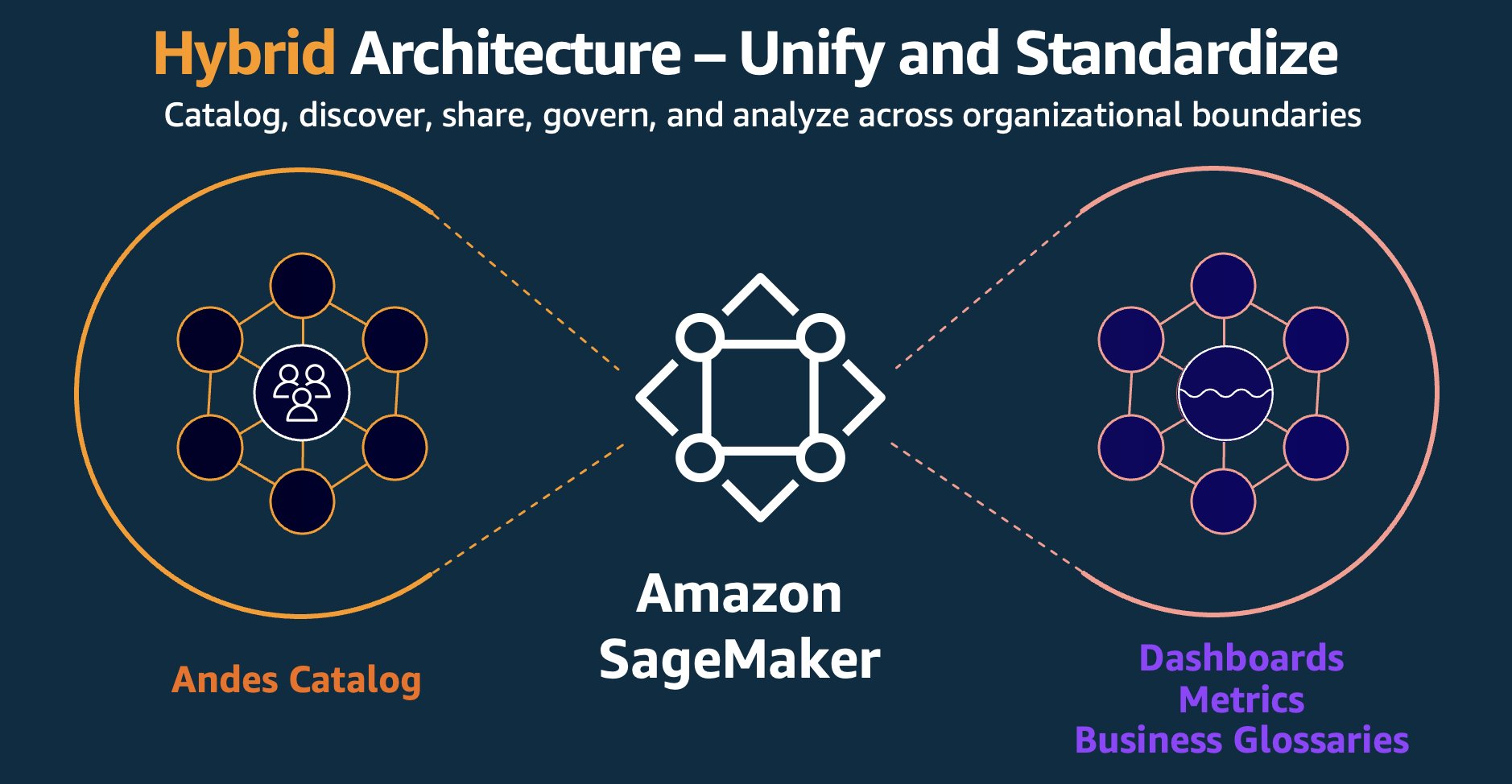
This integrated architecture directly addresses the identified challenges:
- Single-pane asset discovery – Datasets and data assets are accessible through a single, consolidated view, avoiding the need to navigate across disparate systems or domains. This simplifies discovery and reduces the time to insight for teams across the organization.
- Extended governance – Governance of both enterprise-wide and local datasets is orchestrated through a single system.
- Extended observability – Trusted Identity Propagation (TIP) through AWS IAM Identity Center allows human users to access data interactively using their corporate identities. This provides audit-trail visibility into who is accessing what data for audits and organization’s observability requirements.
- Amazon tool integration – Integration with Git and other internal systems automates management of accounts, permissions, and approvals. This reduces manual overhead and helps maintain that access controls remain tightly aligned with existing business workflows.
Design overview
This section describes the key features and design of the Amazon SageMaker integration. The technical implementation consists of three core components:
1) Catalog connectors
Amazon built connectors and ingestion paths to bring data assets into Amazon SageMaker while maintaining business continuity and preserving existing governance:
- Andes integration: SageMaker provides APIs to synchronize assets from external catalogs. BDT extended this to bring Andes datasets (with their sophisticated metadata, business context) into the integrated experience. The integration preserves Andes’ permission model and governance workflows, to maintain existing security standards and best practices intact.
- Account onboarding: Teams self-serve onboard their AWS accounts through an AWS Lambda-based integration. When creating projects, SageMaker queries this service to determine which accounts a user’s identity can access.
2) Delegated ownership
When data systems scale across business units, centralized governance teams need to delegate permissions for catalog enrichment, policy enforcement, and metadata management.
- Catalog enhancement allows business teams to define and publish their own business glossaries, curated vocabularies of domain-specific terms, definitions, and relationships, directly within the catalog. Allowing business owners to author and maintain these glossaries increased accuracy and discoverability of catalog assets. Data consumers across the enterprise benefit from clearer, more consistent terminology.
3) Integration with consumption and access tooling
Teams discover data in SageMaker Unified Studio and consume it through both SageMaker Unified Studio and internal tooling:
- Data discovery: SageMaker Unified Studio integrates with Amazon-wide Identity Center allowing almost all Amazon users to authenticate and search for cataloged assets. This integration addresses the data discovery problem by providing enterprise-wide visibility into available data resources.
- Integrated development environment: SageMaker Unified Studio provides built-in tooling out of the box including a Query Editor for SQL analytics and Amazon SageMaker AI for machine learning (ML), which helps teams access data, build models, and collaborate across organizational boundaries.
- Code repository integration: Manage code with full Git operations supported from SageMaker Unified Studio. Query code and notebook code persist to GitFarm (Amazon’s internal Git system), allowing teams to view and manage their work through Amazon’s standard version control system.
- Native analytics integration: Projects directly connect to AWS analytics engines including Amazon Athena for SQL, AWS Glue and Amazon EMR for Apache Spark, and Amazon Redshift for data warehousing. User-authored jobs use Andes governance and permissions across engines for consistent access control.
SageMaker implementation results
SageMaker catalog now encompasses various types of data assets from across the organization, representing an expansion from datasets alone to a complete inventory of data, dashboards, metrics, models, and other data assets, all while maintaining best practices and appropriate access and use guardrails.
“SageMaker provides a unified catalog that makes discovery and sharing of data assets, metrics and dashboards across teams straightforward, with direct integration to Andes datasets. SageMaker delivers deep integration through Git repository connections and enterprise identity management that aligns with existing Amazon workflows.”
– Gerry Moses, Sr. Principal TPM, Amazon
- Faster data discovery – Data consumers can go to one place to locate trusted, high-quality assets with significantly less friction, which reduces the time from question to insight. By surfacing well-documented, governed assets through an enriched catalog, teams can confidently identify the right data for their use cases without navigating sprawling, inconsistent inventories or relying on tribal knowledge.
- Improved collaboration – Breaks down data silos by making curated assets discoverable and reusable across Amazon. When teams can build on shared, authoritative datasets rather than creating redundant copies, data proliferation is reduced.
Conclusion
By integrating their existing governance tooling with Amazon SageMaker to build a centralized data catalog, BDT is creating a foundation for faster, more efficient data discovery across teams. Amazon SageMaker helped unify diverse data types with their existing catalog and enabled collaboration across teams to help them find the right data. By integrating with existing governance frameworks, BDT demonstrates how organizations can expand their catalog capabilities while preserving existing enterprise investments.
To learn more and get started with Amazon SageMaker Unified Studio, visit aws.amazon.com/sagemaker/unified-studio or the AWS console.
About the authors
Metasploit Wrap Up 05/22/2026
Post Syndicated from Martin Sutovsky original https://www.rapid7.com/blog/post/pt-metasploit-wrap-up-05-22-2026
Another week, another authentication bypass
Our humble Metasploit weekly(ish) blog has been blessed with a new network component vulnerability. The dynamic duo of @sfewer-r7 and @jburgess-r7 have discovered and authored the admin/networking/cisco_sdwan_vhub_auth_bypass module for CVE-2026-20182, a vulnerability gracing the Cisco Catalyst SD-WAN Controller. The devices, whose purpose is to control a software-defined (SD) wide-area-network (WAN) was unfortunately missing an extra A for authentication. An oversight that Cisco has duly patched.
Elsewhere this week, the HUSTOJ online judge platform has been caught failing to judge its own zip files (CVE-2026-24479), courtesy of a zip-slip RCE module from LoTuS and friends. Next, @Alpenlol has weaponized the small matter of Barracuda’s Email Security Gateway, happily eval()-ing the number format string inside an attached Excel file (CVE-2023-7102).
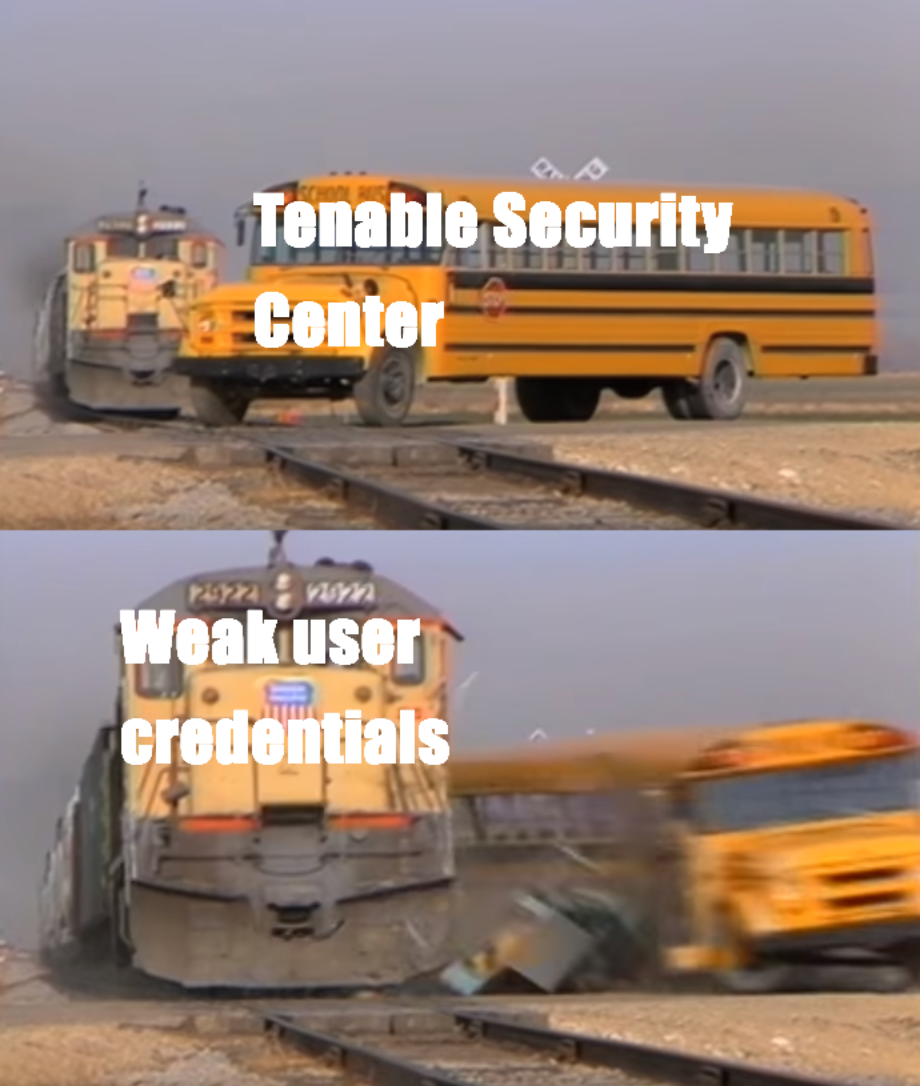
Our own @jburgess-r7 has been rather busy and also contributed a cPanel/WHM authentication bypass module that escalates straight to root via CRLF injection (CVE-2026-41940). And last, but not least, @h00die has gifted us a post module for Tenable Security Center that quietly extracts and cracks its stored credential hashes. Nevertheless, this module works only if your Tenable Security Center is using the same password you have been using since 2006.
New module content (5)
Cisco Catalyst SD-WAN Controller vHub Authentication Bypass
Authors: Crypto-Cat and sfewer-r7
Type: Auxiliary
Pull request: #21463 contributed by jburgess-r7
Path: admin/networking/cisco_sdwan_vhub_auth_bypass
AttackerKB reference: CVE-2026-20182
Description: This adds a new auxiliary module for CVE-2026-20182, an authentication bypass in the Cisco Catalyst SD-WAN Controller.
HUSTOJ Admin users can zip-slip problem_import_qduoj.php, planting PHP files in webroot for RCE
Authors: LoTuS and friends, ling101w, and oxagast
Type: Exploit
Pull request: #21165 contributed by oxagast
Path: linux/http/hustoj_problem_import_rce
AttackerKB reference: CVE-2026-24479
Description: This adds an exploit for CVE-2026-24479 which is a zip slip vulnerability in HustOJ, an open source online judge platform, prior to version 26.01.24.
Barracuda ESG Spreadsheet::ParseExcel Arbitrary Code Execution
Authors: Curt Hyvarinen, Mandiant, and haile01
Type: Exploit
Pull request: #21035 contributed by Alpenlol
Path: linux/smtp/barracuda_esg_spreadsheet_rce
AttackerKB reference: CVE-2023-7101
Description: Adds a new exploit module for CVE-2023-7102, an unauthenticated remote code execution vulnerability in Barracuda Email Security Gateway (ESG) appliances. The flaw resides in the Amavis scanner’s use of the Perl Spreadsheet::ParseExcel library, which allows eval injection via malicious Excel number format strings. The module uses Rex::OLE to craft a minimal BIFF8 XLS file with the payload embedded in a FORMAT record and delivers it via SMTP.
cPanel/WHM CRLF Injection Authentication Bypass RCE
Authors: Adam Kues, Crypto-Cat, Shubham Shah, and Sina Kheirkhah
Type: Exploit
Pull request: #21417 contributed by jburgess-r7
Path: multi/http/cpanel_whm_auth_bypass_rce
AttackerKB reference: CVE-2026-41940
Description: This adds an exploit module for cPanel/WHM authentication bypass leading to root RCE (CVE-2026-41940).
Tenable Security Center
Author: h00die
Type: Post
Pull request: #21177 contributed by h00die
Path: linux/gather/tenable_security_center
Description: This adds a linux post module for Tenable Security Center that will retrieve credential hashes and crack them.
Enhancements and features (6)
- #21292 from sjanusz-r7 – Updates the RPC notes command to allow data to return a hash value were applicable.
- #21305 from sjanusz-r7 – Updates the services RPC endpoint to additionally report the resource and parent services fields.
- #21414 from dledda-r7 – This backports the Python components of the Copy Fail (CVE-2026-31431) exploit to work with Python 2.7 interpreters, effectively supporting older targets.
- #21447 from jheysel-r7 – This updates Metasploit’s documentation to describe how a kerberoast attack can be performed entirely with Metasploit. It also updates the kerberoast module to correctly log the realm to the database regardless of if an existing LDAP session was used or not.
- #21458 from dwelch-r7 – Updates the Sinatra, Rack, and Thin web service dependencies to support an upcoming Rails 8 upgrade.
- #21460 from bhaskarbhar – This consolidates some code used by Windows exec payloads to provide a more consistent experience.
Bugs fixed (4)
- #21285 from sjanusz-r7 – Updates the RPC creds command to now also return the associated realm key and value.
- #21345 from g0tmi1k – This fixes an issue in the smb_enumshares module that prevented it from working against certain SMB 1 targets such as Metasploitable 2.
- #21474 from adfoster-r7 – Fixes a crash in msfdb init on Windows.
- #21475 from adfoster-r7 – Fix msfdb installation error on windows.
Documentation
You can find the latest Metasploit documentation on our docsite at docs.metasploit.com.
Get it
As always, you can update to the latest Metasploit Framework with msfupdate and you can get more details on the changes since the last blog post from GitHub:
If you are a git user, you can clone the Metasploit Framework repo (master branch) for the latest. To install fresh without using git, you can use the open-source-only Nightly Installers or the commercial edition Metasploit Pro
What Makes Online Content Unique in 2026?
Post Syndicated from The Atlantic original https://www.youtube.com/shorts/KKFXcnRHgQ4
I Automated My Water System… After This Happened
Post Syndicated from BeardedTinker original https://www.youtube.com/watch?v=d59JP1xSzaM
How Dropout Beat Big Media by Being Weird (w/Sam Reich)
Post Syndicated from The Atlantic original https://www.youtube.com/watch?v=3XscYNAA2sk
[$] Custom page-cache policies with BPF
Post Syndicated from corbet original https://lwn.net/Articles/1073103/
The kernel’s page cache is charged with maintaining pages (or, more
correctly, folios) containing copies of
data from files in the filesystem; its performance has a big effect on the
performance of the system as a whole. One of the key decisions the kernel
must make is when to evict folios from the page cache. At the 2026 Linux Storage,
Filesystem, Memory Management, and BPF Summit, Tal Zussman ran a
memory-management-track session on how the page cache could be better
customized for specific workloads. It will not be much of a spoiler to say
that it involves BPF.
CISA Security Leak
Post Syndicated from Bruce Schneier original https://www.schneier.com/blog/archives/2026/05/cisa-security-leak.html
Crazy story:
Until this past weekend, a contractor for the Cybersecurity & Infrastructure Security Agency (CISA) maintained a public GitHub repository that exposed credentials to several highly privileged AWS GovCloud accounts and a large number of internal CISA systems. Security experts said the public archive included files detailing how CISA builds, tests and deploys software internally, and that it represents one of the most egregious government data leaks in recent history.
News article.
[$] Toward better handling of major page faults
Post Syndicated from corbet original https://lwn.net/Articles/1073071/
A major page fault occurs when a process attempts to access a page that is
not currently present in RAM; satisfying such faults usually involves I/O, and can thus take some time. When many threads
sharing an address space are generating page faults, the result can be
significant lock contention while that I/O
takes place. During the memory-management track at the 2026 Linux Storage,
Filesystem, Memory Management, and BPF Summit, Barry Song led a session
to try, yet again, to find an enduring solution to this problem.
Security updates for Friday
Post Syndicated from corbet original https://lwn.net/Articles/1074040/
Security updates have been issued by AlmaLinux (firefox), Debian (chromium, nss, openvpn, and thunderbird), Fedora (cockpit, kernel, and linux-firmware), Oracle (gdk-pixbuf2, kernel, and libsndfile), SUSE (container-suseconnect, cpp-httplib, dnsmasq, firefox, glibc, GraphicsMagick, java-1_8_0-openj9, kernel, mozjs115, php8, python-urllib3, rekor, rootlesskit, rsync, tiff, ucode-intel, util-linux, and xz), and Ubuntu (bind9, bubblewrap, libarchive, linux-intel-iot-realtime, postgresql-14, postgresql-16, postgresql-17, postgresql-18, and xdg-desktop-portal).
Как се дресира опозиция
Post Syndicated from Емилия Милчева original https://www.toest.bg/kak-se-dresira-opozitsiya/

Най-сетне, 20 години след създаването си, ГЕРБ има шанса да бъде истинска опозиция. Но нито иска, нито знае как. Групата от 39 депутати на партията на Бойко Борисов и коалиционният ѝ придатък СДС е най-малката в парламентарната история на „Граждани за европейско развитие на България“.
Могъществото на Румен Радев и неговата „Прогресивна България“ (ПБ) е потискащо за Борисов. Но проблемът на партията е по-дълбок от едно смачкано его, било то и лидерско. ГЕРБ така и не се научи да бъде опозиция, защото никога истински не е била извън управлението.
Дори когато не управлява пряко, ГЕРБ остава вградена във властта – монополист е в местното управление, с влияние в регулатори и съдебна власт. Партия, свикнала да бъде част от държавата, трудно влиза в ролята на неин коректив.
За ГЕРБ опозицията никога не е била политическа идентичност, а временен режим.
Ако човек не знае, че в 52-рия парламент има парламентарна група на ГЕРБ–СДС, трудно би го разбрал по поведението ѝ. Новото мнозинство управлява по начин, болезнено познат от годините на Борисов – с концентрация на власт около премиера и автоматизирано парламентарно мнозинство. Само че ГЕРБ изглежда необичайно кротка.
Така моделът оцелява дори когато участниците в него се сменят.
А Румен Радев не просто се възползва от слабостта на ГЕРБ. Той случи и на раздробена и снишена опозиция, чийто общ сбор народни представители е по-малък от неговите 131 депутати.
Команда „Равнис!“ смени вятъра на промяната
След новата власт тръгна цялата държава в строй – прокурори се оттеглят, бизнесмени сменят роли, охрани падат, институции внезапно проработват, а доскорошни врагове козируват в синхрон. Само цените отказват да се подчинят на командата „Равнис!“. Там ще е първият тест. Коментар на Емилия Милчева.
 Емилия Милчева
Изобщо, изборите произведоха странна картина в 52-рия парламент – комфортно мнозинство срещу едновременно шумна и немощна опозиция. Именно ГЕРБ–СДС и ДПС („Ново начало“) – партиите на модела, срещу който бяха последните големи протести – днес са особено кон-струк-тив-ни.
Консолидиране на властта
ДПС продължава с тактиката публичните говорители да са предимно жени, а Атидже Вели очевидно влиза в тази роля. Партията демонстрира готовност за ситуативни мнозинства и внимателно избягва челни сблъсъци с новата власт.
Самият Пеевски е минал в режим на дистанционно управление през Facebook постове. Борисов пък все повече заприличва на разказвач за доброто старо време пред партийния актив и е с интонацията на човек, който още не може да приеме, че губи властта – след държавната охрана.
Новата власт вече подменя втория управленски ешелон с ускорени темпове. Сред сменените изпъкват шефовете на митниците, ДАНС, БЕХ, АЕЦ „Козлодуй“. Любопитното е, че точно в енергетиката някои ключови фигури остават непокътнати – като изпълнителните директори на „Булгартрансгаз“ и „Булгаргаз“ Владимир Малинов, свързван с разширението на газохранилището „Чирен“ и неизгодния договор с „Боташ“, и Веселин Синабов.
Новината обаче е, че енергийната министърка Ива Петрова ще преговаря по условията на 13-годишната сделка с „Боташ“, която носи огромни загуби за България и беше сключена от служебен кабинет на Радев като президент. България не плаща дължимите по нея 500 000 долара на ден за достъп до втечнен газ от Турция, който не използва, защото е много скъп.
Показателен за стила на новото управление е случаят с особения управител на активите на „Лукойл“ в България Румен Спецов. Скоро ще се разбере дали назначеният на 14 ноември 2025 г. бивш директор на НАП ще бъде сменен, за което съобщиха най-напред депутати от ПБ.
Със законови промени управляващите обаче ограничават правомощията на особения управител, а контролът върху действията му се премества от парламента към изпълнителната власт. Временната бюджетна комисия реши той да се отчита всеки месец пред министъра на икономиката вместо пред парламентарната Комисия по икономика.
Най-сетне ще бъде наложен съдебен контрол върху действията на особения управител, тъй като в момента те са необжалваеми. Поправките предвиждат финансови задължения извън обичайното управление да бъдат нищожни, ако не са предварително одобрени от Министерския съвет. Ограничават се и разпоредителните сделки с акции и дялове без пазарна оценка и разрешение от правителството.
Освен срещу дружеството, искове ще могат да се предявяват и срещу държавата и особения търговски управител, за да се осигури защита… на интересите на държавата. Появиха се обаче съмнения, че така се улесняват руските собственици, които вече заплашиха с арбитражен иск България.
В същото време кабинетът превръща мерките за контрол на цените в една от основните си публични кампании въпреки съмнителния им ефект и не бърза да вади скелети от гардеробите на предишните правителства. Макар че такива са обещани след проверките на цялостното състояние на министерствата.
Пирамидата
Абсолютното мнозинство на „Прогресивна България“ пренарежда властовия модел и предлага централизиран контрол с бързи решения и по всяка вероятност слаб отпор. Кой с какви заявки влиза в 52-рия парламент? От Емилия Милчева.
Емилия Милчева
Вицепремиерът и министър на финансите Гълъб Донев говори за икономии, но те се оказват политически селективни. Идеята е да спрат автоматичните увеличения на заплатите и да се орежат с 10% разходите в публичния сектор. Но армията, МВР, службите, Националната служба за охрана, учителите и лекарите остават защитени. Вдига се и максималният осигурителен доход – на 2300 евро.
Обещани са съкращения на незаетите 5729 бройки в държавната администрация. Броят им е константен от няколко години и благодарение на него на всеки 3 месеца се раздават „допълнителни материални стимули“.
Лимит за опозицията
Правителството се опитва да овладее растящите разходи, включително като изземва 100-процентово дивидента на държавните дружества – практика, въведена от Асен Василев през 2023 г. В парламента депутатите на ПБ осигуряват на правителството и нещо не по-малко важно – репутационен комфорт.
Правилникът за работа на 52-рото Народно събрание е променен така, че министрите могат да се измъкват от парламентарен контрол колкото пъти поискат. Премахнат беше досегашният им лимит за максимум две отсъствия, както и задължението им да дават лични обяснения при отговори, забавени до 10 дни.
Този замисъл е продиктуван от тактически съображения: голямата група на „Прогресивна България“ е пълна с нови депутати, които тепърва навлизат в парламентарната рутина. Колкото по-строго е режисиран процесът, толкова по-малък е рискът от неприятни изненади.
Затова и Правилникът започва да прилича на инструмент за управление на „другите“ – чрез ограничаване на изказванията, времето за реакции и възможностите за временни комисии. Някои от тези ограничения са разумни, защото намаляват процедурните хватки.
Срещу ограничаването на възможностите за парламентарен контрол този път възразиха и от ГЕРБ, освен от ДБ, ПП и „Възраждане“. ДПС отново бяха въздържани.
По идея на ПБ председателят на парламента ще предлага точки в дневния ред, без да са консултирани на председателски съвет. Eдна от най-сериозните промени е свързана с временните комисии. За създаването им вече ще са нужни 48 депутати – брой, с който не разполага нито една опозиционна формация сама по себе си.
Прагът е същият като за вот на недоверие или сезиране на Конституционния съд. ГЕРБ–СДС разполагат с 39 депутати, ДБ – с 25, ДПС наброяват 21, ПП – 12, „Възраждане“ са представени също с 12 депутати. Ако някоя от опозиционните парламентарни групи настоява за временна комисия, ще се наложи да преговаря с останалите.
Ако темата е значима, то тя трябва да намери изражение в по-голямо мнозинство.
Петър Витанов, председател на ПГ на „Прогресивна България“
Парламентът не е просто място, в което мнозинството само преброява гласовете си. То е мястото, където властта трябва да бъде питана и да дава отговори. Ако тук няма реален контрол, демокрацията се изпразва от съдържание.
Надежда Йорданова, съпредседателка на ПГ на „Демократична България“
Дори Бойко Борисов и Делян Пеевски не са се опитвали да ограничат така правата на опозицията.
Николай Денков, председател на ПГ на „Продължаваме промяната“
Всяка първа сряда от месеца, когато е денят на опозицията и се правят предложения за дневен ред, няма да се изслушват министри. Така излиза, че министрите ще се явяват предимно когато собственото им мнозинство „прецени“. Или когато е медийно комфортно.
Всичко това може да изглежда процедурно. Но всъщност парламентът постепенно се пренастройва така, че да създава по-малко шум, по-малко риск и по-малко неудобства за мнозинството. Неслучайно дори времето за запознаване със законопроектите беше орязано от 72 на 24 часа.
Същинският проблем
Истинският проблем не е, че опозицията е слаба. А че е раздробена и неспособна да произведе усещане за алтернатива. Това оставя управлението на Румен Радев почти без сериозен политически натиск – освен ако не се самовзриви.
А механизмите за обещаното от Радев разграждане на олигархичния модел все още изглеждат неясни. Дали ще има реален демонтаж на тази система, тепърва ще се вижда в съдебната власт и в новите антикорупционни механизми.
Радев, ще удряш ли с юмрука?
Абсолютното мнозинство дава възможност за бързи решения без оправдания. Първият тест е кадровият – ВСС, главен прокурор, регулатори. От него ще се види към обещаната промяна ли се върви, или „юмрукът“ ще пренарежда същата система с други лица. От Емилия Милчева.
Емилия Милчева
Както се разбра тази седмица, вот за нов състав на Висшия съдебен съвет от професионалната квота ще има в края на октомври. Първи тест ще бъде формирането на новата антикорупционна комисия, след като предишната беше закрита от парламента. За първо четене вече е одобрен законопроектът за новата комисия, подготвен от служебния правосъден министър Андрей Янкулов. Нейният състав ще е петчленен – с по един представител на парламента, Президентството, общите събрания на съдиите от върховните съдилища и на Висшия адвокатски съвет.
Именно при конструирането на бъдещата антикорупционна комисия ще стане ясно дали системата се променя, или просто сменя центъра на тежестта.
Когато властта се консолидира без особена съпротива, безалтернативността постепенно започва да изглежда естествена. И онзи вдигнат юмрук се превръща в новата нормалност.
Father of the Two Ocean Navy: Carl Vinson
Post Syndicated from The History Guy: History Deserves to Be Remembered original https://www.youtube.com/watch?v=LQ4FlrPEHds
На второ четене: „Мрак по пладне“
Post Syndicated from Стефан Иванов original https://www.toest.bg/na-vtoro-chetene-mrak-po-pladne/
„Мрак по пладне“ от Артур Кьостлер

превод от английски Алфред Криспин, София: изд. „Нике“, 2025
Романът е част от онези произведения, които демонтират самата възможност за история като последователен разказ. Той е едновременно политически роман, психологически трактат и нещо като философска аутопсия на ХХ век, извършена отвътре, с инструментите на самата идеология, която умира на масата.
Повечето романи за тоталитаризма разчитат на ужаса като движеща сила, на сцените на насилие и на документалния шок. Кьостлер избира друг път. Той кара читателя да мисли заедно с палача, което е много по-страшно, защото в определен момент логиката на палача започва да изглежда убедителна.
Още в първите страници се усеща една от ключовите черни иронии на текста. Тоталитаризмът функционира като прекалено добре подреден свят.
Разгръща се логическа система, стигнала до крайността си. Ужасът идва от самата завършеност на мисленето. Килията е чиста. Разпитите следват ритъма си. Дори екзекуцията е навреме. В света на романа насилието притежава формата на бюрократичен документ, който е подпечатан, заверен и архивиран. Точно тази тъй наречена нормалност прави нещата толкова непоносими. Злото тук има перфектна граматика.
Централният персонаж Рубашов е продукт на собствената си вяра. Неговият вътрешен разпад произтича от вътрешна логика много повече, отколкото от натиска на разпитите. Той приема вината си, защото е виновен в метафизичен смисъл. Поставил е абстрактното човечество над конкретния човек. Това е може би най-радикалната тема на романа. Разривът между идеята и тялото, между историята (с главно И) и човешкия живот като такъв. Рубашов е мислил, че може да реши уравнението на справедливостта с алгебрични средства и да изчисли по-малкото зло и да остойности страданието. В крайна сметка самият той се оказва в графата на допустимите загуби.
Тук заслужава внимание самият механизъм на „граматическата абстракция“ – термин, който Кьостлер въвежда чрез Рубашов. Азът като субект, като неделимо ядро, човекът като такъв, е фикция, която системата отказва да признае. Революцията говори в първо лице множествено число. Единственото число е ерес. Рубашов, затворен в килията, започва да усеща отново пулсирането на този забранен Аз като фантомна болка в ампутиран крайник. Връщането на субективността е последната форма на съпротива, макар закъсняла и безсилна.
В тази точка Кьостлер влиза в диалог с голямата традиция на европейската литературна мисъл. Ако при Достоевски вината е винаги лична и неотменима, вградена в самото тяло на човека, в неговата плът и молитва, то при Кьостлер тя е разтворена в колективното. При Кафка абсурдът идва от непрозрачността на властта, а тук извира от нейната прекомерна прозрачност. Всичко е логично, обяснимо и затова е и непоносимо. Това е анти-Кафка. Убива прекалено добре разбраният закон. Тук обвиняемият познава съдиите лично, пил е с тях, воювали са рамо до рамо.
Достоевски предлага на героите си изход през страданието или през вярата. Рубашов получава куршум в тила и никакъв метафизичен хоризонт отвъд него. Кьостлер пише в свят, от който Бог вече е евакуиран и на неговото място стои Партията. Божествено взискателна, абсолютна и без никакво обещание за спасение. Единственото трансцендентно, което остава, е „океанското усещане“, онова неясно, почти физиологично чувство за връзка с нещо по-голямо от себе си, което Рубашов изпитва в моменти на самота.
Паралелът с „1984“ на Джордж Оруел е почти неизбежен. При Оруел властта действа отвън и е брутална. Тя смазва, наблюдава и изтрива. При Кьостлер тя е интериоризирана и вградена в самия начин на мислене. Рубашов е съавтор на системата. Това прави трагедията му по-близка до античната. Той пада, защото е бил прекалено последователен в собствената си вяра. Оруел показва какво прави властта с тялото. Кьостлер показва какво се случва, когато умът доброволно ѝ се подчинява.
Има и друга, по-рядко коментирана разлика. Оруел описва система, в която лъжата е очевидна за всички. При Кьостлер системата функционира по-коварно, защото самата тя вярва в собствените си тези. Глеткин, вторият разпитващ, е искрено убеден в правотата на своите методи. Той представлява ново поколение хора, които никога не са познавали друга реалност и за които революцията е административен процес.
Пълното отсъствие на ирония е може би най-страшната форма на тоталитарно съзнание.
Един от най-смущаващите мотиви в романа е доброволното самопризнание. Това е философски парадокс. Човек се съгласява да бъде виновен, за да запази истинността на системата, в която е вярвал. В самопризнанието на Рубашов има нещо мъченическо, но обърнато наопаки. Рубашов умира, за да свидетелства за лъжата, в която е вярвал като в истина.
Тук си заслужава да се спрем и на Иванов, първия разпитващ, стария другар на Рубашов. Иванов е интелектуалният конформист, който е запазил достатъчно ирония, за да знае какво прави, и достатъчно цинизъм, за да продължи да го прави. Той е по-близък до Рубашов, отколкото и двамата биха искали да признаят, и точно затова системата го отстранява. В тоталитарния свят иронията е по-опасна от несъгласието. Ако не си съгласен, ще те смажат, но иронията е заразна и разяжда отвътре.

Ако направим крачка към съвременността, неудобството става по-голямо. Защото светът на романа се е трансформирал и не е изчезнал. Днес живеем в епоха, в която идеологиите са по-малко монолитни, но механизмите на самооправдание са също толкова ефективни. Днес липсва нужда от централен „Първи“, защото алгоритмите, социалните мрежи, икономиката и медийните екосистеми вършат сходна работа – по-меко, по-разсеяно и уж по-демократично.
Тоталитарната логика при Кьостлер е имала поне тежестта на трагедията и мащабът на жертвата е бил съизмерим с мащаба на вярата. Съвременният еквивалент има по-скоро текстурата на мека зависимост. Човек се отказва от малки порции автономия ежедневно и незабележимо. В замяна получава удобство, принадлежност и ценностна ориентация. Никой не те води на разпит, не е нужно, нужното се чува и чете. Алгоритъмът знае какво искаш, преди ти самият да го знаеш. Романът днес може да се мисли и като предупреждение за начина, по който се формира съгласието. За пътя до онази точка, в която доброволното престава да бъде наистина доброволно.
В днешна България паралелът е особено деликатен. Ние живеем сред остатъчни структури на мислене. Подозрителността, склонността към конспиративни обяснения, недоверието към институциите, вярата в месии (списъкът може да се допълва) – всичко това е като слаб радиационен фон от един отминал и неприключил съвсем свят. Рубашов е интелектуалец, който твърде дълго е оправдавал компромисите си с по-голямата цел. В българския контекст тази фигура е архетипна. Такива са както участниците в изграждането на социалистическата държава, така и съвременните уж реалполитици, които обясняват всеки компромис с прагматизъм.
Ако при Кьостлер героите умират за идеята, днес по-често биха я разменили за нещо с по-широко валутно обращение. Ако тоталитаризмът е бил трагедия, посттоталитарното общество понякога прилича на фарс с елементи на черен хумор, който ти засяда в гърлото. Вацлав Хавел е описал точно тази трансформация. „Животът в лъжа“ е ежедневие, от което е изтекъл целият драматичен заряд и е останала само инерцията. Кьостлер описва света, в който хората умират за абсурда. Хавел разказва за света, в който хората живеят с него, без дори да го забелязват. Днес сме някъде по средата.
Стилът на Кьостлер е сух, аскетичен, лишен от излишна литературна тлъстина и това усилва усещането за безизходица. Отсъства всякакъв лиризъм и опит за утеха. Прозата е оголена до кост. Всяка дума е под подозрение и може би точно в това се съдържа скритата тема на романа.
В тоталитарния свят самият език е развален и заразен.
В крайна сметка това е роман за опасността от всяка идея, която претендира за абсолютна валидност. Най-страшното е, че системата в някакъв перверзен, абсурден и изкривен смисъл може да убеди всеки в правотата си. Точно там, в тази пукнатина между правота и човечност, се ражда истинският мрак по пладне. И този мрак има една особена характеристика. Той е невидим за онези, които стоят в самия му център. Те мислят, че виждат ясно. Те вярват фанатично, че светлината е силна и логиката е безупречна. Мракът по пладне е слепота от яркост.
Никой от нас не чете единствено най-новите книги. Тогава защо само за тях се пише? „На второ четене“ е рубрика, в която отваряме списъците с книги, публикувани преди поне година, четем ги и препоръчваме любимите си от тях. За нея медията „Тоест“ е отличена с Националната награда „Христо Г. Данов“ (2025) за принос в представянето на българската книга.
Рубриката е част от партньорската програма Читателски клуб „Тоест“, благодарение на която активните дарители на „Тоест“ получават 20% отстъпка от коричната цена на всички книги на включените издателства. Изборът на заглавия обаче е единствено на авторите Стефан Иванов, Севда Семер и Антония Апостолова, които биха ви препоръчали тези книги и ако имаше как да се разходите с тях в книжарницата.
Equal1 Single Rack Quantum Computer at Dell Tech World 2026
Post Syndicated from Patrick Kennedy original https://www.servethehome.com/equal1-single-rack-quantum-computer-at-dell-tech-world-2026/
At Dell Tech World 2026, we saw an Equal1 single rack quantum computer that allows quantum deployment in standard data center racks
The post Equal1 Single Rack Quantum Computer at Dell Tech World 2026 appeared first on ServeTheHome.
The Hugo evolution: Engineering Grab’s unified, one-click data ingestion platform with Apache Flink
Post Syndicated from Grab Tech original https://engineering.grab.com/one-click-data-ingestion-platform-with-apache-flink
Introduction
Data drives every decision we make at Grab. As our operations scale, so does our need for robust, real-time data ingestion and processing frameworks. Enter Hugo: our self-service data platform that has long empowered teams to seamlessly route data into our Data Lake. Today, Hugo is evolving. We have taken previously siloed onboarding workflows and transformed them into one seamless, unified journey to truly democratize data ingestion and maximize efficiency.
In this blog, we’ll share how Hugo turns complex engineering hurdles into a frictionless, self-service reality. By moving away from siloed workflows, we’ve achieved a unified pipeline experience where one-click RDS CDC and self-service Kafka ingestion are the new standard.
Background
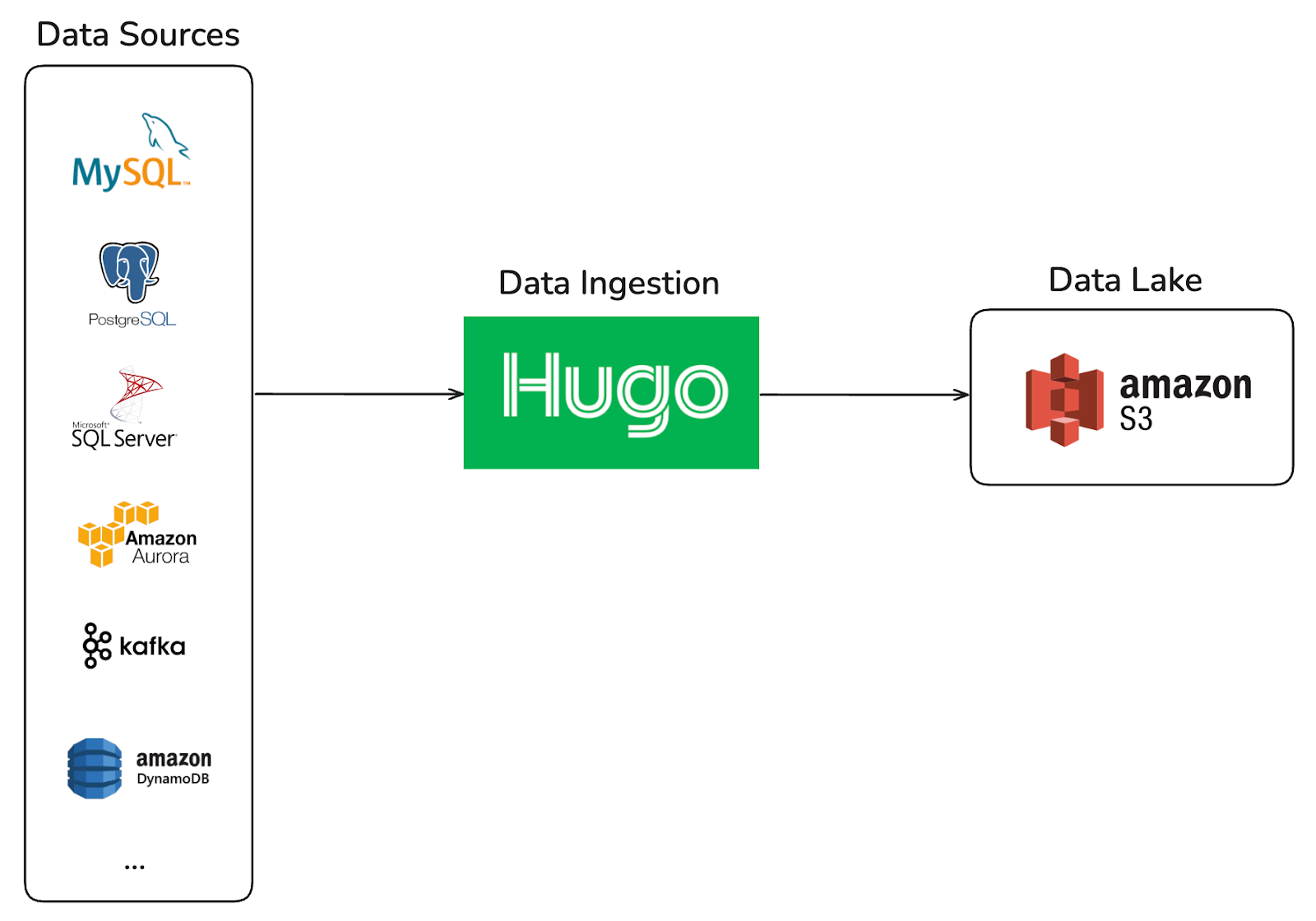
Hugo was originally designed as a self-service platform for batch-oriented data ingestion into the Data Lake, built on a single computation engine, Spark. It provided a centralized and streamlined onboarding experience for data sources such as MySQL, Aurora, PostgreSQL, and DynamoDB.
As the organization’s data platform evolved toward near real-time ingestion, Hugo expanded to support streaming pipelines from Kafka and MySQL binlog. This evolution introduced a more distributed architecture, where ingestion workflows spanned multiple systems, including Kafka Connect, Sprinkler (an in-house Go-based S3 writer), and Hugo.
The siloed past: A multi-platform hurdle
While powerful, the expanded architecture introduced significant onboarding friction. Creating a single data pipeline now requires users to coordinate across multiple platforms, each with its own configuration model and operational semantics. As a result, the onboarding journey became fragmented and difficult to navigate, especially for new users.
The common challenge during onboarding was helping users understand how configurations mapped across systems.
For MySQL CDC pipelines, users often asked, “I’ve already configured Kafka Connect, what values do I need to provide in Hugo?” after setting up a Kafka Connect job. This revealed a gap in abstraction between systems, requiring users to manually translate concepts and configurations across different platforms.
For Kafka pipelines, users frequently struggled with schema evolution in the data lake. Common questions included: “How should I update the data lake schema?” and “I’ve already updated the Protobuf schema for this Kafka topic, why isn’t the latest schema reflected in the data lake?” These issues highlighted unclear expectations around schema propagation and synchronization across the pipeline.
This multi-step, cross-system dependency increased cognitive load, slowed down onboarding, and created coordination overhead between platform teams and users.
The Hugo evolution: A unified ingestion platform
Hugo’s new, deeply automated ingestion framework, built with a custom automation layer and Apache Flink, has unified workflows and retired Sprinkler and Kafka Connect. This evolution converted manual, artisanal work into a streamlined, self-service experience, with custom automation serving as the “intelligent chassis” for the entire user journey.
The Hugo ingestion architecture: Engineering a unified flow
One-click MySQL CDC pipelines
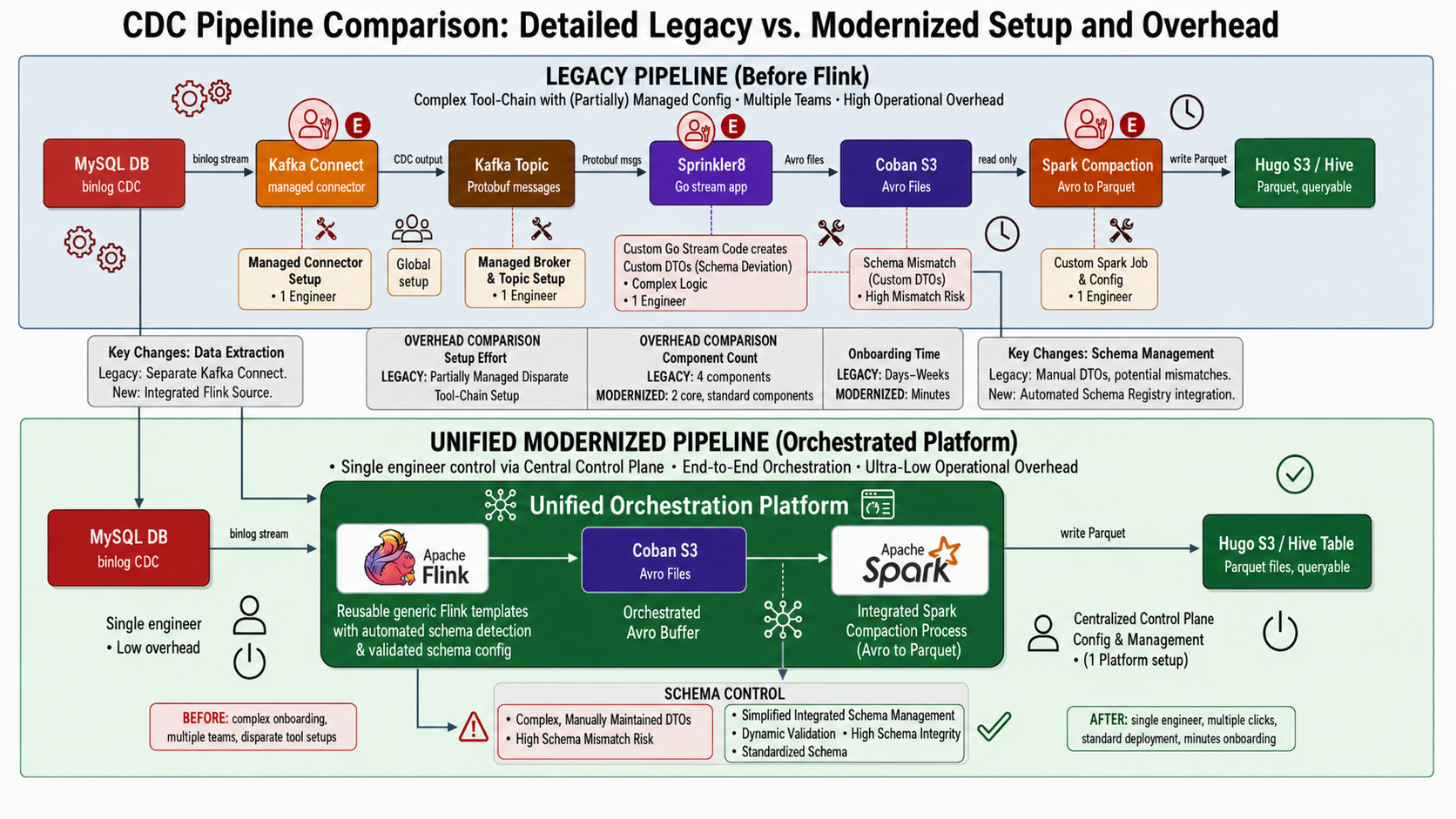
The transition to a unified modernized pipeline powered by Flink CDC shifts the data ingestion architecture from a fragmented, high-maintenance toolchain into a single, end-to-end orchestrated platform. By reading the database binlog directly and embedding the lifecycle within a centralized control plane, the modernized approach drastically reduces operational overhead, eliminates data mismatch risks, and cuts onboarding times from days to minutes. Below are the core advantages of adopting Flink:
- Minimal operational overhead: It reduces the footprint from 4 disparate components (Kafka Connect, topics, Sprinkler app, and Spark) to just 2 core components managed via a single control plane.
- Eliminated schema risk: It replaces brittle, manually coded Go DTOs, which caused frequent schema deviations, with automated schema detection and dynamic validation.
- Streamlined architecture: It eliminates the intermediary Kafka hop. Flink reads the MySQL binlog directly and pushes straight to a queryable Hive table via an integrated Spark compaction process.
- Instant onboarding: It shifts deployment from a multi-team, ticket-heavy process taking days to a single-engineer, self-service setup completed in minutes.
Self-service Kafka ingestion
The most significant architectural shift in the self-service Kafka ingestion pipeline is the move from manual, fragile schema handling to an automated, resilient system. This comparison highlights the operational pain points eliminated by adopting Flink’s approach.
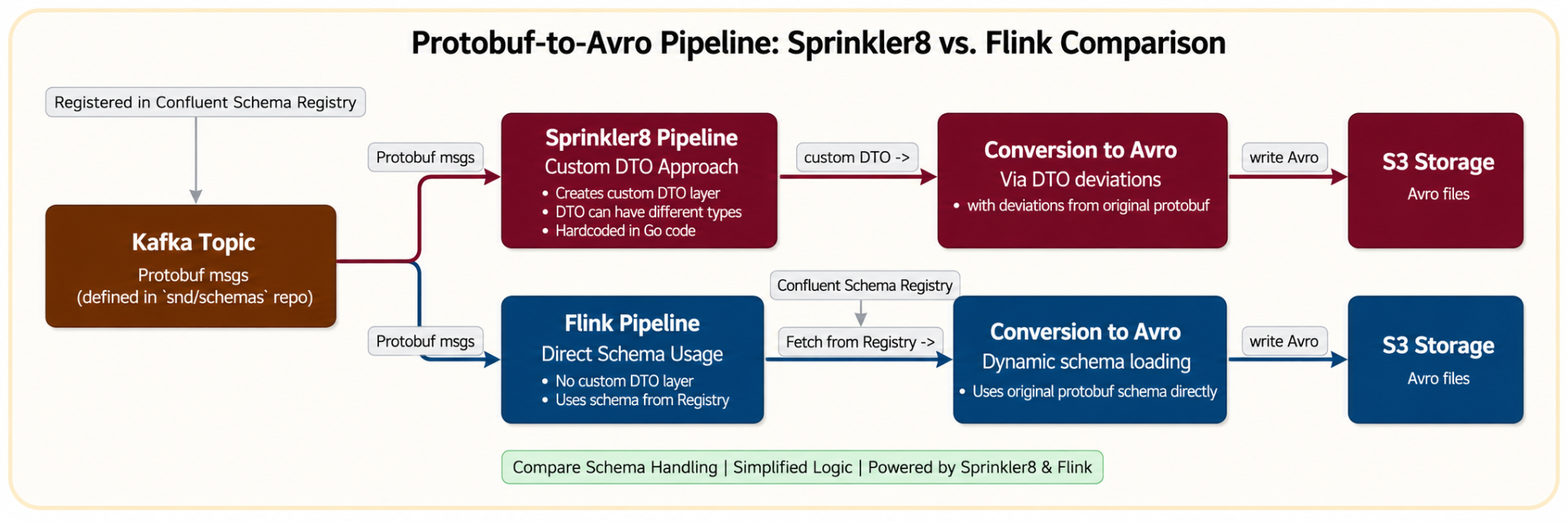
Legacy Sprinkler approach (manual and static)
- Static registration and hardcoding: It required manual registration of streams within the Go monorepo and relied on hardcoded mappings in
entities.goto convert Protobuf to Avro. - Custom dependencies: Avro schema was generated indirectly from custom DTO structs, not directly from the Protobuf definition.
- Manual schema evolution: Any field change required a multi-step manual process: updating
.pb.goand entity files, followed by a manual pipeline rebuild.
New Flink approach (automated and dynamic)
- Dynamic runtime fetching: Flink pipelines dynamically retrieve the Protobuf schema from Confluent Schema Registry on startup, removing the need for hardcoding and manual stream registration.
- Reduced operational overhead for schema changes: Schema updates are propagated through the CI pipeline to the Schema Registry, removing the need for hardcoded mapping changes. The Flink pipeline can detect updated schemas and resume from the latest checkpoint after restart, though manual restart intervention is still required.
- Click-to-query: Engineers can now ingest streaming data from Kafka topics into queryable Hive tables through a few clicks in the Hugo UI. Hugo automatically orchestrates the multi-stage background work, from Flink consumption and S3 writing to Spark compaction, ensuring data is query-optimized and ready for immediate use.
Impact
The platform’s new onboarding workflow has significantly reduced a previously multi-day process to mere minutes, enabling faster iteration and improving overall onboarding efficiency. This dramatic change has fundamentally altered how our teams interact with data.

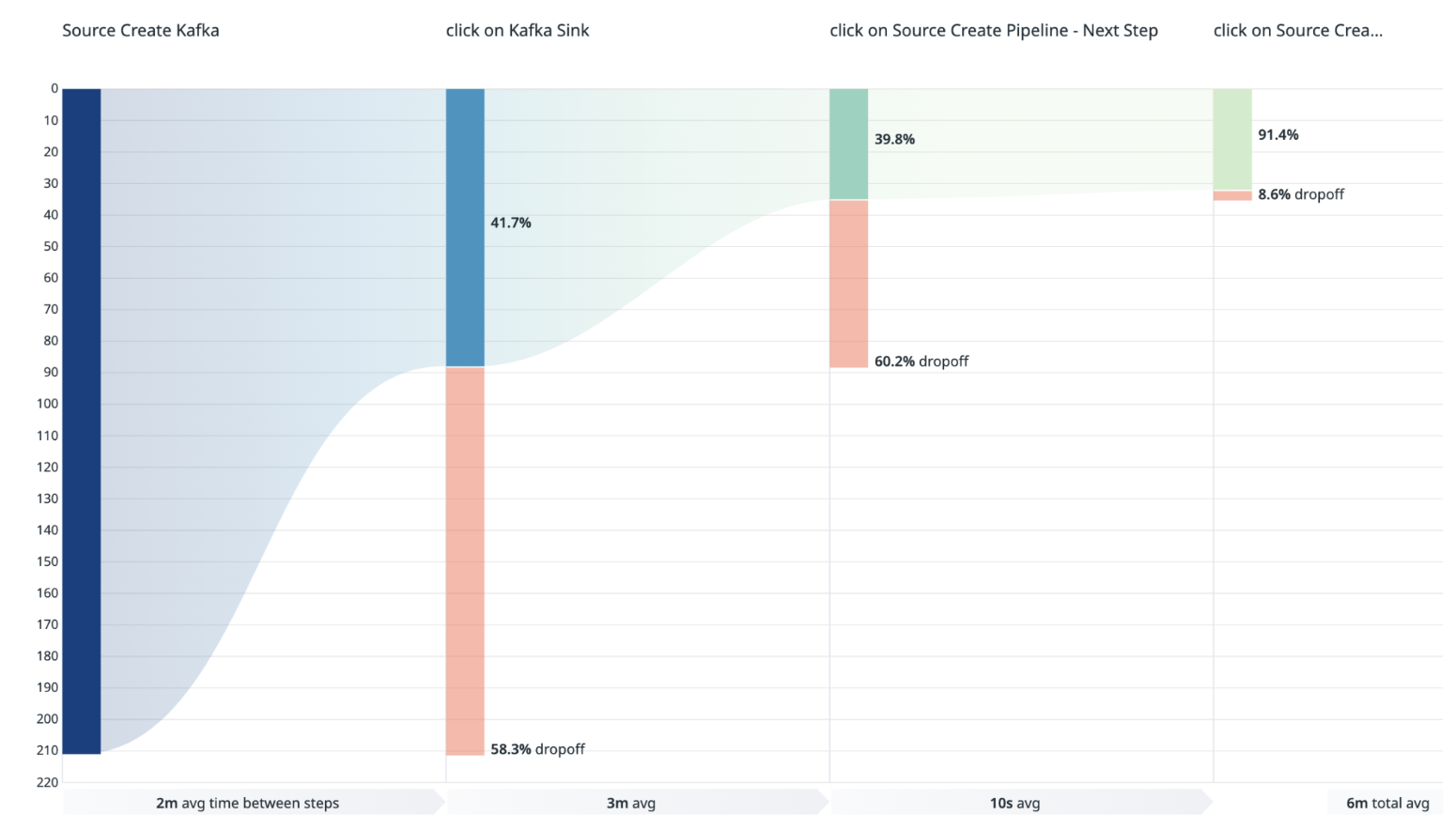
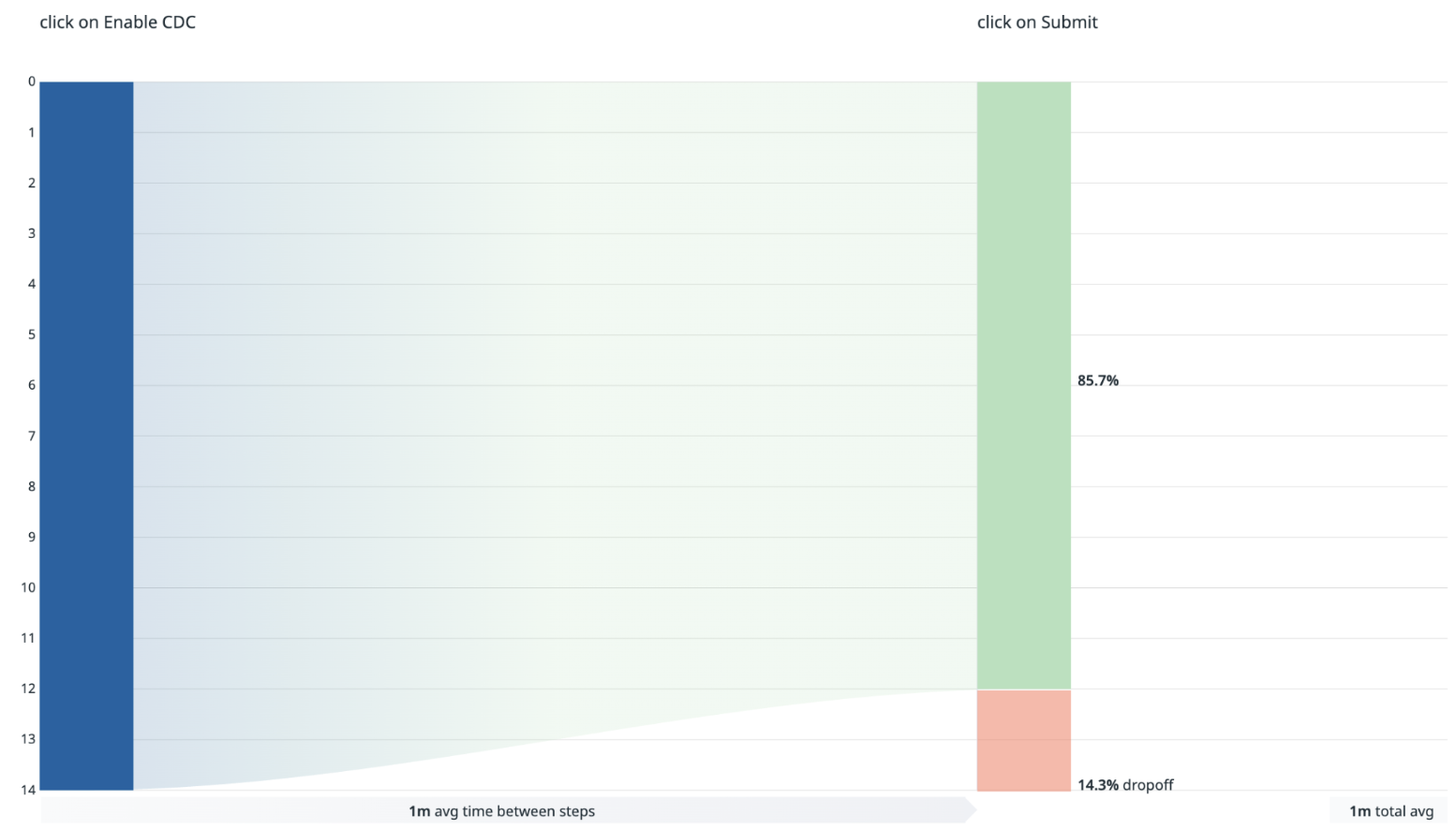
The onboarding workflow is intentionally designed with early validation guardrails to proactively surface prerequisite and governance-related issues before pipeline creation proceeds.
- For Kafka sources, user drop-offs between the “Create Kafka Source” and “Kafka Sink” stages are primarily driven by validation checks such as topic ownership verification and topic activity requirements, for example topics with zero message volume. Additional drop-offs between the “Kafka Sink” and “Create Source Pipeline” stages typically occur when the proposed output table name already exists in the data lake, preventing duplicate table creation.
- For MySQL sources, drop-offs are mainly associated with unmet database onboarding prerequisites, including credential setup, binlog user configuration, binlog format requirements, and binlog expiration settings.
In addition, the streamlined self-service experience encourages exploratory usage, allowing teams to familiarize themselves with the onboarding workflow and platform capabilities before fully committing to pipeline creation.
Summary
The new architecture engineered a custom automation layer that successfully retired the reliance on Kafka Connect and Sprinkler for the data lake, turning artisanal work into a streamlined, one-click experience. This transformation provides a direct boost to developer productivity.
The key impact metrics are:
- Onboarding time reduction: The time required to set up data pipelines has been dramatically reduced and is now measured in minutes.
- Kafka pipelines: approximately 6 minutes.
- MySQL CDC pipelines: approximately 3 minutes.
- Adoption: Since the release, the number of new Kafka and CDC pipelines onboarded in the last year is more than the total number of pipelines onboarded in the previous five years.
What’s next
These enhancements are just one step in our broader vision for optimized and self-service data ingestion. Currently, Flink is the default only for Kafka source pipelines. Flink onboarding for MySQL CDC pipelines is impact- and cost-driven. Our strategic roadmap includes:
- Next-generation formats: We are investigating the adoption of Apache Iceberg as the data lake table format to further improve pipeline SLA and costs, and improve performance.
- Seamless schema evolution: Schema changes still require some manual effort from pipeline owners, including manually restarting Flink pipelines. In Hugo, we aim to make schema evolution a zero-touch experience by automatically detecting changes, validating compatibility, and updating tables without disruption.
Join us
Grab is Southeast Asia’s leading superapp, serving over 900 cities across eight countries (Cambodia, Indonesia, Malaysia, Myanmar, the Philippines, Singapore, Thailand, and Vietnam). Through a single platform, millions of users access mobility, delivery, and digital financial services, including ride-hailing, food delivery, payments, lending, and digital banking via GXS Bank and GXBank. Founded in 2012, Grab’s mission is to drive Southeast Asia forward by creating economic empowerment for everyone while delivering sustainable financial performance and positive social impact.
Powered by technology and driven by heart, our mission is to drive Southeast Asia forward by creating economic empowerment for everyone. If this mission speaks to you, join our team today!
FINALLY! AMD GPU Acceleration in Project NOMAD (Plus Regional Map Downloads)
Post Syndicated from Crosstalk Solutions original https://www.youtube.com/watch?v=7c5bnvtZ8VY
Comic for 2026.05.22 – Language
Post Syndicated from Explosm.net original https://explosm.net/comics/language
New Cyanide and Happiness Comic