Five ways to use Kiro and Amazon Q to strengthen your security posture

Post Syndicated from Roger Nem original https://aws.amazon.com/blogs/security/five-ways-to-use-kiro-and-amazon-q-to-strengthen-your-security-posture/

A Monday morning security alert flags unauthorized access attempts, security group misconfigurations, and AWS Identity and Access Management (IAM) policy violations. Your team needs answers fast.

Security teams are using Kiro and Amazon Q Developer to handle repetitive tasks—scanning resources, drafting policies, and researching Common Vulnerabilities and Exposures (CVEs)—so engineers can focus on risk decisions and complex scenarios that require human judgment, resulting in faster threat response and more consistent security coverage.

This post shows you five ways to use Kiro and Amazon Q Developer to strengthen your AWS security posture based on the AWS Well-Architected Framework Security Pillar. Each technique builds on a common foundation described after the tool overview below.

About these tools

Amazon Web Services (AWS) gives customers choices when it comes to AI-assisted development and security automation. Whether you prefer Kiro’s agentic integrated development environment (IDE) experience or the deep integration of Amazon Q Developer into your existing AWS environment, both tools can help you implement the security practices described in this post. The right choice depends on your team’s workflow, and in many cases both tools are complementary and can be used together.

Kiro is an AI-powered, agentic, IDE designed by AWS for specification-driven development, combining natural language prompting with structured, intentional coding to generate, test, and deploy applications.

Amazon Q Developer is the generative AI assistant integrated into AWS development and cloud environments, designed to answer questions, generate code, troubleshoot issues, and automate operational tasks across AWS services.

For setup instructions and to learn more, see the Kiro documentation and Amazon Q Developer documentation.

1. Embed security best practices with persistent context

Providing AI assistants with the right context helps them produce more consistent and relevant results. Each of the five techniques in this post becomes significantly more powerful when your AI assistant already understands your organization’s security standards. Setting up persistent context first means every subsequent interaction builds on that foundation, and the results you get from triage, remediation, reviews, and policy development will better reflect your specific environment rather than generic best practices.

Without persistent context, you need to repeat the same security requirements in every prompt such as "enable encryption, use least privilege IAM settings, and enable logging," which leads to inconsistent results and missed controls. Amazon Q Developer IDE Plugin rules and Kiro steering files (CLI and IDE) solve exactly this problem: you can use them to codify your organization’s security standards so AI automatically builds secure infrastructure consistently, without requiring you to repeat requirements in every prompt. Both tools support this capability independently, so you can configure whichever fits your workflow, or use both together for coverage across your full development environment. The following steps show you how to get started with each.

For Amazon Q Developer:

  1. Create directory: .amazonq/rules/ in your project root.
  2. Create file: .amazonq/rules/security-standards.md.
  3. Paste your organization’s security standards in natural language (see “Example security standards context file” below).

For Kiro (steering files):

In Kiro, persistent context documents are called steering files. They give the agent ongoing awareness of your architecture decisions, coding standards, and security requirements across every interaction and every session.

  1. Create file: security-standards.md in your project root.
  2. Reference it in prompts: Using security-standards.md as context, create....

Pro tip: You can use Kiro itself to help you create steering files. Describe your security requirements in natural language and ask Kiro to generate a structured steering file for your review before saving and activating it. This means your AI assistant can help you build the very context it will later use, making the setup process faster and more thorough.

Example security standards context file:

# AWS Security Standards

## Identity and Access Management
- All IAM roles must use least privilege principles
- Require MFA for console access
- Enable IAM Access Analyzer for all accounts
- Rotate access keys every 90 days
- Use IAM roles for EC2 instances, never embed access keys

## Data Protection
- Enable encryption at rest for all storage services (S3, EBS, RDS)
- Use AWS KMS customer-managed keys for sensitive data
- Enable encryption in transit with TLS 1.2 minimum
- Implement S3 bucket policies denying unencrypted uploads
- Enable versioning and MFA delete for critical S3 buckets

## Infrastructure Protection
- Security groups must follow least privilege (no 0.0.0.0/0 on sensitive ports)
- Deploy resources in private subnets when possible
- Enable VPC Flow Logs for network monitoring
- Use AWS WAF for public-facing applications
- Implement Network ACLs as additional defense layer

## Detective Controls
- Enable CloudTrail in all regions with log file validation
- Configure CloudWatch alarms for security events
- Enable GuardDuty for threat detection
- Set up AWS Config rules for compliance monitoring
- Implement centralized logging with retention policies

## Incident Response
- Create SNS topics for security alerts
- Configure automated responses with AWS Lambda
- Maintain runbooks for common security incidents
- Enable AWS Systems Manager for secure instance access
- Implement automated backup and recovery procedure

What this unlocks:

Without persistent context, a prompt like Create a Lambda function to process customer data could produce a basic function with no encryption, logging, or IAM configuration. AI output is non-deterministic, meaning that without guidance it might or might not include those controls. Steering files and rules documents minimize those variables by providing stronger guidance as part of every prompt and inference input.

With your security standards embedded as in the example above, however, the same prompt generates a function with KMS-encrypted environment variables, a CloudWatch log group with 90-day retention, least-privilege IAM, VPC placement in private subnets, a dead-letter queue, and AWS X-Ray tracing—all automatically.

Where it works:

This persistent context approach applies across both tools and all infrastructure generation workflows:

  • Amazon Q Developer IDE Plugin: Rules in .amazonq/rules/ apply automatically to every code generation and review interaction.
  • Kiro: Steering files provide the agent with continuous architectural and security awareness across sessions and projects.

The shift-left impact:

This approach isn’t a replacement for your existing continuous integration and delivery (CI/CD) security automation. It’s a powerful complement to it, and that distinction matters. By embedding security standards directly into the development workflow, you shift security validation further left than pipeline checks can reach. Developers across your organization, not just security specialists, can generate infrastructure that meets your security standards from the first line of code. This scales security expertise into non-security roles, empowers development teams to self-serve on compliance requirements, and reduces the volume of findings that ever reach your automated pipeline checks.

The result is security functioning as an enabler of faster development rather than a gate that slows it down, and security engineers spending their time on policy design and complex risk decisions rather than remediating avoidable misconfigurations.

Measurable impact:

Track these metrics to quantify the value of persistent context:

  • Security findings during code review: Establish a 30–60 day baseline before enabling context files, then compare
  • Time from development to deployment: Track average cycle time before and after
  • Remediation cost: Research consistently shows defects fixed in development cost significantly less than those fixed in production. Track your own ratio for 60 days
  • Standards consistency: Audit a random sample of infrastructure pull requests for compliance with your top 10 policies

Implementation recommendation: Start by codifying your top 10 most frequently violated security policies as context. Measure the reduction in these specific findings over 30–60 days to quantify the impact on your team.

2. Accelerate security finding triage and investigation

AWS Security Hub consolidates findings from services such as Amazon GuardDuty, AWS Config, Amazon Inspector, and third-party security tools into a single dashboard, providing centralized security finding visibility and built-in triage capabilities across your AWS environment. AWS Security Hub Extended will bring even more capabilities into this mix, giving customers expanded control and additional opportunities to leverage the AI-assisted workflows described in this post at greater scale and with deeper integration across your security toolchain.

Kiro can complement Security Hub by helping you correlate findings across accounts, understand CVE context, and develop remediation approaches, including:

  • Query findings using natural language across multiple AWS accounts and AWS Regions
  • Understand specific CVEs and their potential impact on your infrastructure
  • Generate investigation queries for AWS CloudTrail and Amazon Virtual Private Cloud (Amazon VPC) Flow Logs
  • Correlate security events across different time periods and services
  • Access the latest AWS security documentation and best practices

How it works – Model Context Protocols:

To enable these capabilities, Kiro uses Model Context Protocols (MCPs)—a standardized way for AI assistants to securely connect with external tools, services, and data sources, enabling them to take actions, retrieve real-time information, and interact with APIs beyond their built-in capabilities.

Open source MCP servers for AWS are a suite of specialized MCP servers that enable Kiro to interact with AWS security services, providing real-time visibility into your security posture. To get started, configure security-focused MCP servers in your Kiro settings file (as shown in the following example). For full instructions on configuring MCP servers in Kiro, see the Kiro MCP documentation.

Note on authentication: Before querying Security Hub, verify you have configured valid AWS credentials for the target account. Set the AWS_PROFILE value to a named profile in your ~/.aws/credentials file that has the appropriate permissions, or configure credentials using the AWS Command Line Interface (AWS CLI) (aws configure). Without valid credentials for the target account, Kiro will not be able to retrieve findings.

{
    "mcpServers": {
        "awslabs.aws-api-mcp-server": {
            "command": "uvx",
            "args": ["awslabs.aws-api-mcp-server@latest"],
            "env": {
                "FASTMCP_LOG_LEVEL": "ERROR",
                "AWS_PROFILE": "<PROFILE>",
                "AWS_REGION": "us-east-1"
            },
            "timeout": 120000,
            "disabled": false
        },
        "awslabs.cloudtrail-mcp-server": {
            "command": "uvx",
            "args": ["awslabs.cloudtrail-mcp-server@latest"],
            "env": {
                "FASTMCP_LOG_LEVEL": "ERROR",
                "AWS_PROFILE": "<PROFILE>"
            },
            "disabled": false
        },
        "awslabs.iam-mcp-server": {
            "command": "uvx",
            "args": ["awslabs.iam-mcp-server@latest"],
            "env": {
                "FASTMCP_LOG_LEVEL": "ERROR",
                "AWS_PROFILE": "<PROFILE>"
            },
            "disabled": false
        }
    }
}

Configure the following security-focused MCP servers to get started:

  • AWS API MCP Server: Interact with Security Hub, GuardDuty, IAM Access Analyzer, and AWS Config through AWS CLI commands
  • CloudTrail MCP Server: Audit trail analysis and compliance monitoring
  • AWS IAM MCP Server: Manage IAM users, roles, policies, and permissions
  • AWS Knowledge MCP Server: Access up-to-date AWS security documentation and best practices

For a full list of available MCP servers, see the awslabs/mcp GitHub repository.

Example: querying Security Hub with Kiro:

  1. Open your terminal or Kiro IDE.
  2. Enter the following command:
"Show me all critical security findings from Security Hub in my production account ID <ACCOUNT ID>"

Example output:

> Found 4 critical security findings in account 123456789012:

## Configuration Issues (2)

1. SSM.7 - SSM documents block public sharing disabled
- Status: FAILED (since July 17, 2025)
- Impact: Systems Manager documents can be publicly shared
- Remediation: Enable block public sharing setting for SSM documents
- [Documentation](https://docs.aws.amazon.com/console/securityhub/SSM.7/remediation)

2. Config.1 - AWS Config not properly configured
- Status: FAILED (since March 4, 2025)
- Issue: Config isn't recording required IAM resource types (User, Role, Group, Policy)
- Standards affected: CIS, NIST 800-53, PCI DSS, AWS Foundational Security
- Remediation: Enable recording for IAM resources in AWS Config
- [Documentation](https://docs.aws.amazon.com/console/securityhub/Config.1/remediation)

## Vulnerabilities (2)

3. CVE-2020-36242 in Lambda function: MyLambdaOne
- Package: cryptography version 3.2.1
- CVSS Score: 9.1 (Critical)
- Issue: Integer/buffer overflow in Fernet encryption class
- Fix: Upgrade to cryptography 3.3.2
- Function: SPC-1233HH5R-MyLambdaOne-lUh3ESH0MdXF

4. CVE-2020-36242 in Lambda function: AutoUpdateMyLambdaOne
- Package: cryptography version 3.2.1
- CVSS Score: 9.1 (Critical)
- Same vulnerability as above
- Function: SPC-1233HH5R-AutoUpdateMyLambdaOne-d9HIBfxThbFW

Real-world impact:
Security finding triage that previously required navigating multiple consoles, correlating logs manually, and researching CVE databases can be accelerated significantly. Teams that have integrated AI-assisted triage into their Security Hub workflows report reducing mean time to triage for critical findings from hours to minutes, enabling faster containment and more consistent coverage across accounts.

3. Accelerate remediation of security findings in your infrastructure as code

AI assistants can scan your infrastructure code and flag security issues with specific fix recommendations. However, implementing these changes requires careful review, testing, and validation before any changes reach production.

Important: AI-generated remediation suggestions must be reviewed by a qualified security engineer before implementation. Automated application of AI-generated changes without human validation can introduce unintended misconfigurations or service disruptions. Treat AI output as a starting point, not a finished product.

The workflow:
You can execute this workflow in either Kiro or Amazon Q Developer, depending on which tool fits your existing development environment:

  1. Ask Kiro or Amazon Q Developer to scan your infrastructure files and identify security gaps.
  2. Review AI-generated remediation suggestions with your security team.
  3. Test changes in non-production environments.
  4. Validate using AWS security services such as IAM Access Analyzer, AWS Config, and Security Hub.
  5. Deploy to production with monitoring and rollback procedures in place.

Example prompt:

"Scan my infrastructure at /path/to/templates, identify all S3 buckets without encryption, enable AES-256 encryption, add bucket policies to deny unencrypted uploads, and provide the deployment command"

What happens:

The AI assistant analyzes your infrastructure files, whether written in AWS CloudFormation, Terraform , or AWS Cloud Development Kit (AWS CDK), and identifies resources that violate security best practices. It then implements controls such as encryption at rest using AWS Key Management Service (AWS KMS) or Amazon Simple Storage Service (Amazon S3)-managed keys, adds bucket policies enforcing encryption in transit, configures public access blocks, and generates the exact deployment command with a change preview so you can review what will be modified before anything is applied.

Based on the example security standards context file above, the following controls would be applied across all generated infrastructure: encryption at rest and in transit, least-privilege IAM policies, security group optimizations, VPC configurations, logging enablement, and backup and recovery settings.

Validation required:
AI-generated configurations deserve the same thoughtful review as other infrastructure code. Even a policy that looks correct on the surface might need tuning to match your organization’s least-privilege standards, or encryption settings might need adjusting to satisfy specific compliance requirements. Running those changes through a non-production environment and having a human confirm the results before anything reaches production are part of good infrastructure practices, whether the code was written by a person or generated by AI.

Real-world impact:

Identifying non-compliant resources across multiple accounts manually can take many hours and generating remediation templates for each resource can add significant time. Security teams that have adopted AI-assisted infrastructure scanning report spending less time on manual identification and template generation, and with AI assistance the same identification and drafting work can be completed in much less time. Customers report that a full remediation cycle that previously occupied their team for the better part of a day can be completed in under an hour when AI handles the scanning and template generation. It is worth noting that manual remediation time grows considerably at scale, as remediating dozens of non-compliant resources is not a linear exercise. Validation time in non-production environments remains essential regardless of how the remediation was generated, and should always be factored into your planning.

4. Perform in-depth security reviews

Amazon Q Developer and Kiro can analyze your infrastructure code and identify potential security issues across multiple categories aligned with the AWS Well-Architected Framework Security Pillar.

Using Amazon Q Developer:

  1. Open your infrastructure file in your IDE.
  2. Select the code you want to review.
  3. Open the context menu and choose Send to Amazon Q, then choose Optimize.
  4. Select Focus on security best practices.

Using Kiro:

  1. Open your infrastructure file in Kiro.
  2. Enter a natural language prompt such as: Perform a comprehensive security review of this CloudFormation template and identify all deviations from our standards.
  3. Kiro will automatically apply your steering files as additional context when generating its response.
  4. Review the findings and iterate with follow-up prompts.

Security categories evaluated: For the complete, up-to-date list of security categories and controls, see the AWS Well-Architected Framework Security Pillar documentation. Current categories include but are not limited to:

  • Identity and access management: Overly permissive IAM policies, missing multi-factor authentication (MFA) requirements, unused credentials and access keys, cross-account access risks
  • Detective controls: CloudTrail logging configuration, Amazon CloudWatch alarm coverage, GuardDuty enablement status, and AWS Config rule implementation
  • Infrastructure protection: Security group misconfigurations, public subnet exposure, missing AWS WAF rules, unencrypted network traffic
  • Data protection: Storage encryption status, KMS key rotation policies, backup configurations, S3 bucket access controls
  • Incident response: Amazon Simple Notification Service (Amazon SNS) alerting setup, log retention policies, automated response mechanisms

Example output:

Security Recommendations:
- Enable S3 bucket encryption with KMS: Critical
- Implement least privilege IAM policies: High
- Enable GuardDuty threat detection: High
- Configure VPC Flow Logs: Medium
- Add WAF rules for API Gateway: Medium
- Enable CloudTrail in all regions: Critical
- Implement automated backup policies: High

Total security improvements: 23 findings across 5 Well-Architected pillars

Keeping your configuration files current:

A security architect review remains valuable for keeping your steering files and rules documents complete and current. The goal is an AI assistant that already understands your environment, not one that needs correcting after every interaction. Treat your configuration files as living documents and update them when your security standards evolve, when new services are adopted, or when post-incident reviews reveal gaps. As this post notes, project rules reduce architectural drift and help maintain consistency as AI agents operate more autonomously.

Real-world impact:

Security reviews that previously required a security engineer to manually inspect infrastructure templates line by line can be completed in significantly less time with AI assistance. Teams using AI-assisted security reviews as a pre-commit gate—before code reaches CI/CD pipeline checks—report catching a meaningful portion of security findings earlier in the development cycle where they are faster and less costly to address. Integrating this review step into pull request workflows means security validation happens continuously rather than only at deployment gates.

5. Assist with service control policy development

You can use AWS Organizations Service Control Policies (SCPs) to apply preventive controls consistently across every account in your organization, enforcing security baselines without relying on individual account administrators. Kiro can generate initial SCP drafts from natural language security requirements, speeding up the drafting and iteration process considerably. Because SCPs are preventive controls that can’t be bypassed by administrators, misconfigurations can cause organization-wide service disruptions, making expert validation and staged testing essential before any SCP reaches production.

Step 1: Generate an SCP draft:

Describe your security requirements in natural language:

"Create an SCP with these security controls:
- Deny creation of S3 buckets without encryption
- Require MFA for IAM user console access
- Prevent public RDS snapshots
- Deny security group rules allowing 0.0.0.0/0 on sensitive ports
- Enforce encryption for all EBS volumes
- Require VPC Flow Logs on all VPCs
- Deny IAM policy creation without approval tags
- Restrict resource creation to approved regions only"

Kiro generates a complete SCP policy JSON with proper deny statements, condition keys for MFA and encryption enforcement, resource-level restrictions, and regional compliance requirements.

Step 2: Validate and lint the SCP:

Use Kiro or Amazon Q Developer to assist with policy linting and initial testing as a first layer of validation. IAM Policy Autopilot, available as a Kiro Power with one-click installation directly from the Kiro IDE, can analyze your application’s usage and generate necessary permissions based on the SDK calls it discovers. IAM Policy Autopilot also integrates as an MCP server with Kiro, Amazon Q Developer, and other MCP-compatible coding assistants, making it a natural part of your existing workflow rather than a separate tool.

"Review this SCP JSON for syntax errors, overly broad deny statements, and missing condition keys. Flag any statements that could unintentionally block legitimate operations."

The IAM Policy Simulator then adds another layer of validation on top of the AI-assisted linting, so you can test policy behavior, verify condition keys are correctly applied, and confirm that no legitimate operations are unintentionally blocked. IAM Policy Autopilot complements existing IAM tools such as IAM Access Analyzer by providing functional policies as a starting point, which you can then validate using IAM Access Analyzer policy validation or refine over time with unused access analysis. Together, these tools form a layered validation approach where each one strengthens the output of the previous step.

Step 3: Test in a sandbox environment:

Create a test organizational unit (OU) with non-production accounts and apply the SCP to the test OU. Attempt operations that should be blocked and confirm that no legitimate operations are unintentionally blocked. Use Kiro to pre-validate your infrastructure code against the proposed SCP before sandbox testing:

"Analyze my current infrastructure against this proposed SCP and identify resources that would be non-compliant"

This scan covers your infrastructure code files. For live account scanning across your organization, use the following AWS services:

  • AWS Config with the Config Aggregator and Conformance Packs for continuous compliance monitoring across your organization.
  • IAM Access Analyzer for automated reasoning-based analysis of external access, internal access, and unused permissions.
  • Account Assessment for AWS Organizations for bulk scanning of identity-based, resource-based, and service control policies across all accounts.
  • Security Hub for centralized aggregation of compliance findings and security scores across your entire organization.

Step 4: Security architect review:

Engage your security architects to identify potential risks and verify the policy aligns with your security framework. Check for conflicts with existing SCPs by reviewing all SCPs attached to parent OUs and the root in the AWS Organizations console. Use the IAM Policy Simulator to test interactions between policies and verify that emergency access procedures ( SEC03-BP03 Establish emergency access process – Security Pillar and SEC10-BP05 Pre-provision access – Security Pillar) remain functional before any production rollout.

Step 5: Staged rollout:

Deploy to development accounts first and monitor for policy violations and operational issues. Gradually expand to additional environments and maintain documented rollback procedures throughout the process.

Important: It’s strongly recommended not to deploy AI-generated SCPs directly to production without thorough expert review and staged testing. A misconfigured SCP can cause organization-wide service disruptions affecting every account in your organization.

Real-world impact:

SCP drafting that previously required security architects to write and iterate on complex JSON policy documents manually, often spanning multiple review cycles over several days, can be condensed when AI handles the initial drafting and linting. Your architects can then focus their time on policy design, edge case analysis, and organizational impact assessment rather than JSON syntax and structure.

Responsible implementation framework

Adopting AI-assisted security workflows is most effective when introduced gradually, with clear validation gates at each stage. The following two-phase approach gives your team time to build confidence, measure results, and establish the internal practices needed before expanding to production environments.

  • Phase 1: Development and testing (weeks 1–4): Start by testing AI-generated security controls in isolated development accounts. Validate functionality, identify edge cases, and deploy to a dedicated testing environment with thorough security validation. Use IAM Access Analyzer, AWS Config, and Security Hub to verify that generated controls behave as expected. This phase is also the right time to build internal expertise across both your security team and your development teams, so that knowledge of what works and what requires human review is shared broadly from the start.
  • Phase 2: Staging and production (week 5 and later): Apply the validated controls to a staging environment that mirrors production. Conduct penetration testing where appropriate and validate that monitoring and alerting function correctly before expanding further. Gradually roll out to production accounts with continuous monitoring in place. Maintain rollback procedures throughout and establish feedback loops so that lessons learned in production flow back into your steering files, rules documents, and validation processes over time.

Key takeaways

What distinguishes the approach in this post from general guidance on AI coding assistants is the specificity of the security integration. There’s no shortage of content about how AI assistants accelerate development. What this post focuses on is how to configure both Kiro and Amazon Q Developer to perform security-specific tasks: triaging findings from Security Hub, remediating infrastructure code vulnerabilities against your organization’s defined standards, conducting Well-Architected security reviews, drafting and validating SCPs, and generating secure-by-default infrastructure through persistent context that reflects your environment rather than generic defaults.

Kiro is an agentic IDE that helps you go from prototype to production with spec-driven development, and its steering files give the agent persistent awareness of your security standards across every session. Amazon Q Developer complements this by providing deep integration into your existing AWS environment and IDE workflows. Together, these tools extend your security team’s reach into every stage of the development lifecycle, scale security expertise into development teams, and reduce the gap between when vulnerabilities are introduced and when they are caught. As the AWS Well-Architected Framework Security Pillar establishes, embedding security early and consistently across the development process is foundational to a strong security posture.

These five techniques aren’t about replacing your security controls. They’re about making security a natural part of how your teams build on AWS, regardless of whether they’re security specialists or application developers. In addition to the five techniques covered in this post, the following AWS capabilities complement this approach and are worth exploring for a more complete picture:

  • Amazon Inspector is a vulnerability management service that continually scans AWS workloads for software vulnerabilities, code vulnerabilities, and unintended network exposure. It automatically discovers and scans Amazon EC2 instances, container images in Amazon ECR, AWS Lambda functions, and first-party code repositories. Amazon Inspector integrates directly into CI/CD pipelines through plugins for Jenkins, TeamCity, GitHub Actions, and Amazon CodeCatalyst, which teams can use to catch vulnerabilities before deployment. Its code security capabilities include Static Application Security Testing (SAST), Software Composition Analysis (SCA), and infrastructure as code (IaC) scanning, with native integration to GitHub and GitLab. All findings are surfaced directly in Security Hub for centralized visibility and response across your organization.
  • Amazon Q Developer security scanning provides real-time security issue detection in the IDE, including SAST scanning for security vulnerabilities, secrets detection, IaC security evaluation, and software composition analysis for third-party dependencies. These capabilities are available across JetBrains, Visual Studio Code, and Visual Studio.
  • Kiro Powers are curated and pre-packaged MCP servers, steering files, and hooks validated by Kiro partners to accelerate specialized development and deployment use cases. Security-relevant Kiro Powers include the IAM Policy Autopilot Kiro Power for baseline IAM policy generation and the real-time coding security validation MCP server pattern for Kiro.
  • AWS Security Agent is a frontier AI agent that proactively secures your applications throughout the development lifecycle. Security teams define organizational security requirements once in the AWS Security Agent console, such as approved encryption libraries, authentication frameworks, and logging standards, and AWS Security Agent then automatically validates these requirements throughout development by evaluating architectural documents and code against your defined standards. It provides three core capabilities: design security review for architecture documents, code security review that automatically analyzes pull requests against your defined standards across connected repositories, and on-demand penetration testing that discovers, validates, and reports vulnerabilities through sophisticated multi-step attack scenarios customized for each application. When vulnerabilities are found, AWS Security Agent creates pull requests with ready-to-implement fixes directly in your code repository. Customers report that AWS Security Agent compresses penetration testing timelines from weeks to hours, transforming penetration testing from a periodic bottleneck into an on-demand capability that reduces risk exposure and scales security reviews to match development velocity.
  • AWS Security Hub automated response and remediation provides pre-built playbooks for common findings using AWS Systems Manager Automation, enabling your team to act on findings faster and more consistently.

Getting started

If you’re new to AI-assisted security workflows, the following week-by-week approach gives your team a practical path forward without overextending before the foundation is in place.

  • Weeks 1 and 2: Set up your persistent context files with your top 10 security policies as described in the foundational setup section above. Configure MCP servers in Kiro for Security Hub and CloudTrail access and verify that credentials are correctly configured for your target accounts.
  • Weeks 3 and 4: Run your first AI-assisted security review on a non-production infrastructure template. Compare the findings against your last manual review to establish a baseline for measuring impact over time.
  • Weeks 5 and 6: pilot AI-assisted SCP drafting for one new preventive control. Run the full validation workflow including AI-assisted linting, IAM Policy Autopilot, and the IAM Policy Simulator before any production application.
  • From that point forward: Measure the metrics outlined in the foundational setup section, update your steering files and rules documents as your standards evolve, and share findings across your security team, development teams, and platform engineering teams. The knowledge of what works and what requires human judgment is valuable to everyone who touches infrastructure in your organization.

Conclusion

Kiro and Amazon Q Developer give security teams practical tools to accelerate threat response and maintain consistent security coverage by handling the tasks that consume the most time with the least strategic value: scanning for known misconfigurations, drafting policy JSON, researching CVEs, and generating secure infrastructure. These AI assistants are most effective when paired with security engineers, as they accelerate assessments and code generation while human review, policy design, and risk judgment remain essential throughout.

By implementing the five techniques outlined in this post, starting with embedding security best practices through persistent context and then applying that foundation to Security Hub finding triage, infrastructure code remediation, in-depth Well-Architected security reviews, and SCP development, your team can strengthen your AWS security posture while maintaining the standards your organization requires.

AWS services such as Security Hub, IAM Access Analyzer, AWS Config, and CloudTrail provide the foundation for these AI-assisted workflows, enabling centralized visibility and automated validation of security controls across your environment. Emergency access procedures should be established and validated before deploying any preventive controls such as SCPs, following the break-glass guidance in the AWS Well-Architected Security Pillar and the AWS Prescriptive Guidance for break-glass access.

Start small with non-production environments, establish clear validation processes, measure results, and gradually expand your use of AI assistants as your team builds expertise and confidence. The result is faster threat response, more consistent security coverage, and security engineers focused on complex decisions rather than repetitive tasks.

Additional resources

If you have feedback about this post, submit comments in the Comments section below


Roger Nem

Roger Nem

Roger is an Enterprise Technical Account Manager (TAM) supporting Healthcare & Life Science customers at Amazon Web Services (AWS). As a Security Technical Field community specialist, he helps enterprise customers design secure cloud architectures aligned with industry best practices. Beyond his professional pursuits, Roger finds joy in quality time with family and friends, nurturing his passion for music, and exploring new destinations through travel.

[$] Hardware-assisted Arm VMs for s390

Post Syndicated from daroc original https://lwn.net/Articles/1069954/

A recent

patch set
from Steffen Eiden and others has set the groundwork for allowing
hardware-assisted emulation of Arm CPUs on s390 CPUs.

Version two
of the posting fixes a handful of smaller problems, but does not
differ much.
The patches were welcomed
by the Arm maintainers, pending some discussion of how the collaboration between the
architectures could be structured to prevent maintainability problems on the Arm
side. When those details are resolved, the patches could pave the way for
transparently running Arm-based virtual machines (VMs) on s390 hosts at native or
near-native speeds.

Security updates for Tuesday

Post Syndicated from jzb original https://lwn.net/Articles/1071324/

Security updates have been issued by AlmaLinux (kernel, kernel-rt, libcap, LibRaw, openssh, thunderbird, and tigervnc), Debian (libarchive and lxd), Fedora (chromium, insight, nodejs20, rust-sequoia-git, and uriparser), Mageia (kernel, kmod-virtualbox), Oracle (kernel, libcap, thunderbird, and uek-kernel), Red Hat (.NET 10.0, .NET 8.0, .NET 9.0, fence-agents, sudo, and systemd), Slackware (httpd), SUSE (freerdp, hauler, helm, himmelblau, kernel, libspectre, thunderbird, trivy, and xen), and Ubuntu (curl, exim4, and sed).

Micron 6600 ION 245TB SSD Announced

Post Syndicated from Cliff Robinson original https://www.servethehome.com/micron-6600-ion-245tb-ssd-announced/

Micron has a new capacity point for its 6600 ION NVMe SSD family, and this one is the eye-catcher. The company now has a 245.76TB version of the Micron 6600 ION, giving data center platforms a way to put almost a quarter petabyte of flash i

The post Micron 6600 ION 245TB SSD Announced appeared first on ServeTheHome.

A Walkthrough of the 2026 Global Cybersecurity Summit Agenda

Post Syndicated from Emma Burdett original https://www.rapid7.com/blog/post/it-walkthrough-2026-global-cybersecurity-summit-agenda

The full agenda for the Rapid7 2026 Global Cybersecurity Summit is now live, and it gives a clearer sense of how the conversation around security operations is evolving.

Across two days, the sessions progress from a shared understanding of how threats are changing into a more detailed look at how teams detect, respond, and make decisions in practice.

Day 1: How threats evolve and how teams respond

The day opens with a keynote, Defense Starts Earlier Than You Think, where Brian Castagna is joined by Craig Robinson, Research Vice President at IDC, to examine why complexity has become the main barrier to effective security and what changes when teams start acting earlier.

That context carries into The Reality of Running a SOC in 2026, featuring Raj Samani alongside Rachel Tobac, CEO of SocialProof Security, and Graham Cluley, cybersecurity speaker and podcast host. The discussion focuses on how attacks actually begin, from identity misuse to cloud misconfigurations, and why defenders often fall behind as those attacks evolve.

In Customer Panel: How Clarity Beats Complexity, leaders including Debby Briggs, CISO at Netscout Systems, Raheem Daya, Chief Technology Officer at Target RWE, and Will Lambert from Culligan International share how they are simplifying their environments and focusing on outcomes rather than activity.

From there, Inside the Modern SOC: Who Carries You Through an Incident walks through a real investigation step by step, showing how alerts are triaged, decisions are made, and outcomes are shaped under pressure.

The conversation then turns to AI in The AI Dilemma: Automating Defense Without Surrendering Judgment, where the role of AI in the SOC is examined through the lens of trust, transparency, and how it supports analyst decision-making in practice.

In Beyond the Vulnerability List, the focus shifts to exposure management, looking at how organizations are moving beyond static vulnerability tracking and using exposure as an early signal to guide detection and response.

That idea of validation continues in Using Red Teaming to Power Preemptive MDR, where continuous adversary testing is used to prove detection coverage and refine response workflows before an incident occurs.

The day also includes a short look at Rapid7: What’s New and What’s Next, connecting recent innovations across exposure management, MDR, and AI to how teams operate in practice.

The closing session, Persistence Under Pressure, introduces a different perspective. Former Special Forces operator Jason Fox draws on real-world experience to explore preparation, understanding the adversary, and how teams make decisions when conditions are less predictable.

Day 2: Strategy for leaders, execution for practitioners

The second day builds on that foundation, with two dedicated tracks designed around how security teams actually work.

For security leaders, The CISO’s Role in Enterprise Transformation brings together perspectives from Craig Robinson and Horst Moll, CISO at Miltenyi Biotec, to explore how the role of the CISO is evolving beyond technical leadership into broader organizational influence.

That is followed by How Exposure Insights Reframe Risk and Security Decisions, which looks at how leaders define priorities and align teams when exposure data is tied more closely to real-world risk.

In A CISO’s Guide to MDR Accountability and Outcomes, the focus moves to how effectiveness is measured, shifting from activity-based metrics toward outcomes that reflect business impact.

The leader track closes with Customer Panel: What CISOs Would Do Differently If Starting Today, featuring CISOs including Jonathan Chow of Genesys and Tony Arnold of TSB Bank, reflecting on what they would change or simplify based on experience.

For practitioners, Hunt or Be Hunted: Frontline Tales of Detection walks through a real incident, showing how analysts decide what to investigate and how signals are correlated across environments.

The New Rules of Detection Engineering builds on that with insights from Steve Edwards, Director of Threat Intelligence Detection Engineering, focusing on detection-as-code and how teams prioritize signals in practice.

In From Cloud Exposure to Runtime Attack, Shauli Rozen, CEO and Co-founder of ARMO, and Ben Hirschberg, CTO and Co-founder, walk through a cloud attack scenario to show how risks escalate and how they can be interrupted earlier.

The practitioner track closes with IR in Practice: Tools, Tradecraft, and Adversary-Informed Investigation, where Shanna Battaglia and Michael Cohen demonstrate how open-source tools and real-world workflows come together during incident response.

Register and join the conversations

Taken together, the agenda reflects a shift that runs through every session. Security operations are moving toward earlier decisions, better prioritization, and a clearer understanding of what matters in the moment.

If you want to see how that shift is playing out across strategy, detection, and response, this is where those conversations come together.

Join us May 12–13 and explore the full agenda in practice.

Register now.

The retirement of the PHP license

Post Syndicated from corbet original https://lwn.net/Articles/1071253/

The PHP project has long shipped under its own license — except for
the parts under the Zend Engine License. The PHP project has now announced
that the PHP license has been retired, and the PHP code has been relicensed
under the three-clause BSD license. See this
blog entry
for more details.

Getting here required more than writing an
RFC
. The PHP License gives the PHP Group the authority to
change it, which meant tracking down each of the original PHP Group
members and getting their written consent. Each approved the
proposal. Perforce Software, the successor to Zend Technologies,
needed to sign off on the Zend Engine side, as well. They provided
a formal letter confirming their full authority and support for the
change. I hired an attorney to review the proposal and provide
advice on any legal questions that might surface during the
discussion period. Speaking of which, I allowed for a six-month
community discussion period preceding the vote, which passed
unanimously.

DarkSword Malware

Post Syndicated from Bruce Schneier original https://www.schneier.com/blog/archives/2026/05/darksword-malware.html

DarkSword is a sophisticated piece of malware—probably government designed—that targets iOS.

Google Threat Intelligence Group (GTIG) has identified a new iOS full-chain exploit that leveraged multiple zero-day vulnerabilities to fully compromise devices. Based on toolmarks in recovered payloads, we believe the exploit chain to be called DarkSword. Since at least November 2025, GTIG has observed multiple commercial surveillance vendors and suspected state-sponsored actors utilizing DarkSword in distinct campaigns. These threat actors have deployed the exploit chain against targets in Saudi Arabia, Turkey, Malaysia, and Ukraine.

DarkSword supports iOS versions 18.4 through 18.7 and utilizes six different vulnerabilities to deploy final-stage payloads. GTIG has identified three distinct malware families deployed following a successful DarkSword compromise: GHOSTBLADE, GHOSTKNIFE, and GHOSTSABER. The proliferation of this single exploit chain across disparate threat actors mirrors the previously discovered Coruna iOS exploit kit. Notably, UNC6353, a suspected Russian espionage group previously observed using Coruna, has recently incorporated DarkSword into their watering hole campaigns.

A week after it was identified, a version of it leaked onto the internet, where it is being used more broadly.

This news is a month old. Your devices are safe, assuming you patch regularly.

#КОЙ и #КТБ Mилиони по пътя към Дубай

Post Syndicated from Екип на Биволъ original https://bivol.bg/billions2dubai.html

вторник 5 май 2026


Фалитът на КТБ се превърна в схема за преразпределение на активи за стотици милиони и дори милиарди. Историята не свърши преди 12 години, когато банката бе закрита, а продължава и…

Материалът <span style='color:#ff0000;font-size:12px;'>#КОЙ и #КТБ</span> <BR> <H1 class='post-title single-post-title entry-title'>Mилиони по пътя към Дубай</H1> е публикуван за пръв път на Bivol!.

HP ZGX Nano G1n Review The HP Take on the NVIDIA GB10

Post Syndicated from Ryan Smith original https://www.servethehome.com/hp-zgx-nano-g1n-review-the-hp-take-on-the-nvidia-gb10/

Looking at the state of the NVIDIA GB10 ecosystem several months down the line, there are a couple of things that have continued to surprise us. The first has been the sheer popularity of the small-form-factor systems, which have seen GB10 boxes from multiple vendors sell almost as fast as they can be produced for […]

The post HP ZGX Nano G1n Review The HP Take on the NVIDIA GB10 appeared first on ServeTheHome.

Securing open proxies in your AWS environment

Post Syndicated from Dodd Mitchell original https://aws.amazon.com/blogs/security/securing-open-proxies-in-your-aws-environment/

This article shows you how to identify and secure open proxies in your AWS environment to prevent abuse, protect your IP address reputation, and control costs.

An open proxy is a server that forwards traffic on behalf of internet users without requiring authentication. While proxies can support legitimate use cases such as load balancing or caching, open proxies allow unrestricted access that threat actors can use to hide harmful activity. In Amazon Web Services (AWS) environments, open proxies often result from misconfigured Amazon Elastic Compute Cloud (Amazon EC2) instances, containers, or compute resources such as AWS Lambda functions. These resources expose proxy functionality without access controls.

Open proxies come in several forms. Common open proxies can include:

  • HTTP proxies: HTTP proxies forward HTTP requests to web servers, making them useful for web traffic management. These proxies can create potential issues when they’re unsecured.
  • SOCKS proxies: SOCKS proxies support a wider range of traffic types and provide more flexibility. These proxies create a broader potential for misuse.
  • Transparent proxies: Transparent proxies intercept traffic without the client’s knowledge and are often used to filter content. These proxies can become security liabilities when misconfigured.
  • Reverse proxies: Reverse proxies help with internal routing. Unauthorized users can misuse these proxies if they’re exposed.

Knowing these risks can help you better protect your AWS environment.

Security risks

Because of the unrestricted configuration of open proxy servers, threat actors target them to conduct denial of service (DoS) events, intrusion attempts, distribute spam, and other forms of unauthorized activity. These open proxy servers allow threat actors to hide their actual IP address and other forms of identification from the intended targets.

When your AWS infrastructure hosts an open proxy, several risks emerge that can affect both your operations and customers:

  • Threat actors can misuse your resources, which can result in your IP address being added to security service and reputation system block lists. This can affect your legitimate business operations and customer access. When external parties use your infrastructure for harmful activities, the reputation damage extends beyond immediate technical concerns to affect your ability to reach customers and partners.
  • Unexpected costs from resource consumption occur when threat actors use your bandwidth and compute capacity. The traffic patterns that proxy abuse generate can also alert AWS security monitoring systems and create additional operational overhead as you investigate and respond to these alerts.
  • Service disruptions might affect your legitimate workloads because unauthorized traffic competes for resources with your business-critical applications. This competition for resources can potentially degrade performance or cause availability issues for your customers.

Implementing security measures

To prevent the risks associated with open proxies, it’s essential to implement proper security controls for proxy services in AWS environments. The following guidance is a comprehensive approach that you can follow to secure your proxy infrastructure.

Access control implementation

An important security step is to use passwords and authentication mechanisms to restrict access to proxy services. Configure your proxies to accept connections only from known, trusted IP address ranges. For Elastic Load Balancing (ELB), limit access based on source IP addresses and add authentication to proxies behind the load balancers. When you create new instances in Amazon Elastic Kubernetes Service (Amazon EKS), limit access to your balancer in each instance. If instances don’t have public IP addresses, then you can limit access to the balancer instead. If instances have public IP addresses, then you must limit access to those IP addresses.

When possible, use AWS PrivateLink virtual private cloud (VPC) endpoints to provide private connectivity to AWS services without exposing them to the internet. Deploy proxy services in private subnets with controlled outbound access through NAT gateways or other controlled channels. For Amazon EC2 and Amazon Lightsail resources, update the attached security group to prevent public internet access. To secure the proxy, you must either limit access to specific IP addresses or implement authentication on the endpoint.

Authentication and authorization

Turn on authentication for the proxy software and use strong credentials, certificates, or integration with AWS Identity and Access Management (IAM) and AWS Directory Service. Apply IAM policies with the principle of least privilege to limit access to only what users need to perform their tasks. This approach reduces the potential effects of credential compromise and helps maintain clear accountability for resource access.

Monitoring and detection

To detect unusual proxy activity, configure Amazon Virtual Private Cloud (Amazon VPC) Flow Logs, AWS CloudTrail, and Amazon GuardDuty. Use Amazon CloudWatch alarms to notify you of abnormal traffic patterns that might indicate unauthorized use of your proxy services. These monitoring capabilities provide visibility into your network traffic patterns and help you identify both legitimate usage and potential security concerns.

Deployment best practices

Use HTTPS for ELB traffic to protect data in transit, and restrict security groups to necessary ports to minimize the surface area for potential misuse. Integrate AWS WAF with balancers to filter web traffic based on rules that you define. You can also use AWS Network Firewall for advanced traffic filtering capabilities. For APIs, deploy Amazon API Gateway with authentication and authorization controls to manage access to your backend services. This layered approach to security helps protect your infrastructure at multiple points in the traffic flow.

Regular security assessments

Run Amazon Inspector to scan for misconfigurations in your infrastructure, and use AWS Security Hub to centralize security findings across your AWS environment. Conduct penetration tests in accordance with AWS policy to identify potential security issues before they can result in unintended access.

Incident response planning

Automate remediation with AWS Config rules and Automation, a capability of AWS Systems Manager, to respond rapidly to security events. Maintain incident response runbooks that outline clear steps for addressing proxy-related security incidents, and decommission unused resources that could become security liabilities.

Documented procedures and automated responses reduce the time between detection and remediation and minimizes the potential effects of security incidents on your operations.

Benefits of proper proxy security

When you implement these security measures, you gain the following advantages for your AWS environment:

  • Protection of your IP address reputation helps maintain customer trust and prevents security services from blocking your legitimate traffic. When your infrastructure maintains a positive reputation, your business communications reach their intended recipients without interference.
  • Cost control prevents unauthorized users from consuming your AWS resources and generating unexpected charges on your account. When you restrict access to legitimate users and use cases, you maintain predictable costs that align with your business needs.
  • Operational stability reduces the risk of service disruptions that abuse of your proxy infrastructure can cause. When you dedicate your resources to serving your customers rather than supporting unauthorized activity, you can deliver consistent performance and availability.
  • Enhanced visibility into your network traffic patterns helps you identify both legitimate usage and potential security concerns. This awareness allows you to make informed decisions about capacity planning, security improvements, and operational optimizations.

Conclusion

Open proxies present a serious risk in AWS environments, but you can effectively secure proxies with the right measures. By implementing strict access controls and additional security practices such as authentication, monitoring, and regular assessments, you can prevent misuse, protect your infrastructure, and maintain your IP address reputation.

Taking proactive steps strengthens your own environment and supports the broader security of the internet ecosystem. Under the AWS shared responsibility model, you’re responsible for the configuration and maintenance of these security controls, while AWS provides the underlying secure infrastructure. By following the guidance in this article, you can build a robust security posture that protects your proxy infrastructure while supporting your legitimate business needs.

If you have feedback about this post, submit comments in the Comments section below.

Dodd Mitchell

Dodd Mitchell

Dodd is a member of the AWS Trust and Safety team in Virginia, supporting customers in navigating abuse, phishing, and content-related risks. He works closely with partners to strengthen response processes and build more resilient, trustworthy platforms.

AWS Weekly Roundup: What’s Next with AWS 2026, Amazon Quick, OpenAI partnership, and more (May 4, 2026)

Post Syndicated from Esra Kayabali original https://aws.amazon.com/blogs/aws/aws-weekly-roundup-whats-next-with-aws-2026-amazon-quick-openai-partnership-and-more-may-4-2026/

Last week, I took some time off in York, England, often described as the most haunted city in the country. I wandered through the ruins of abbeys that have stood for nearly a thousand years, walked along medieval walls, and spent an evening on a ghost tour hearing stories passed down through centuries. There’s something grounding about standing in a place that has witnessed so much history. Now I’m back at my desk, and the contrast is hard to miss: those abbey stones have stood for a thousand years largely unchanged, while in the span of a single week away, the pace of technological change has moved forward yet again.

The ruins of Whitby Abbey in North Yorkshire. Stones that have seen a thousand years, while this week alone brought another wave of change.

Now, let’s get into this week’s AWS news.

Headlines
On April 28, Matt Garman, CEO of AWS, Colleen Aubrey, SVP Amazon Applied AI Solutions, Julia White, CMO of AWS, and OpenAI leaders took the stage to share how customers are changing the way businesses operate with agents. The event brought a packed slate of announcements across Amazon Quick, Amazon Connect, and a deeper partnership with OpenAI. Here’s a roundup of the biggest announcements from the event.

Amazon Quick expands with a desktop app, new pricing plans, and visual asset generation – Amazon Quick is an AI assistant for work that connects to your apps, learns what matters to you, and takes action on your behalf. This week, Quick introduced a new desktop app (Preview) that keeps you connected to your local files, calendar, and communications without opening a browser. You can sign up within minutes using your personal email address or existing Google, Apple, Github, or Amazon credentials—no AWS account required. Quick can now generate polished documents, presentations, infographics, and images directly from the chat interface, and native integrations expand to include Google Workspace, Zoom, Airtable, Dropbox, and Microsoft Teams. A new Build custom apps with Quick capability (Preview) lets you create intelligent apps, dashboards, and web pages connected to the rest of your business using natural language.

Amazon Connect expands into four agentic AI solutions – Amazon Connect is expanding from a single product into a set of four agentic AI solutions designed to work within your existing workflows. Amazon Connect Decisions is a supply chain planning and intelligence solution that shifts teams from crisis management to proactive planning, combining 30 years of Amazon operational science with more than 25 specialized supply chain tools. Amazon Connect Talent (Preview) is an agentic AI hiring solution that delivers AI-led interviews, science-backed assessments, and consistent evaluation for talent acquisition leaders managing scaled hiring. Amazon Connect Customer, previously known as Amazon Connect, delivers personalized customer experiences across voice, chat, and digital channels, with new configuration capabilities that enable organizations to set up conversational AI in weeks rather than months. Amazon Connect Health delivers agentic patient verification, appointment management, patient insights, ambient documentation, and medical coding, giving patients faster access to care and clinicians more time to deliver it.

AWS and OpenAI expand their partnership across Amazon Bedrock – AWS and OpenAI are bringing the latest OpenAI models to Amazon Bedrock, launching Codex on Amazon Bedrock, and introducing Amazon Bedrock Managed Agents powered by OpenAI — all in limited preview. OpenAI models on Amazon Bedrock (Limited preview) brings the latest OpenAI models, including GPT-5.5 and GPT-5.4, to the Bedrock APIs you already use, with unified security, governance, and cost controls. No additional infrastructure to configure, no new security model to learn. Codex on Amazon Bedrock (Limited preview) lets you access the OpenAI coding agent within your existing AWS environments, authenticating with your AWS credentials, processing inference through Bedrock, and applying Codex usage toward your AWS cloud commitments. Codex on Bedrock is available through the Bedrock API, starting with the Codex CLI, the Codex desktop app, and a Visual Studio Code extension. Amazon Bedrock Managed Agents, powered by OpenAI (Limited preview) combines OpenAI frontier models with AWS infrastructure to build production-ready OpenAI-powered agents in the cloud, built with the OpenAI harness for faster execution, sharper reasoning, and reliable steering of long-running tasks.

To learn more, visit Top announcements of the What’s Next with AWS, 2026.

Last week’s launches
Here are some launches and updates from this past week that caught my attention:

  • Amazon EC2 M8in and M8ib instances are now generally available – Powered by custom 6th-gen Intel Xeon Scalable processors and 6th-gen AWS Nitro cards, these instances deliver up to 43% higher performance over M6in and M6ib. M8in offers 600 Gbps network bandwidth, while M8ib delivers up to 300 Gbps EBS bandwidth. Available in US East (N. Virginia), US West (Oregon), Asia Pacific (Tokyo), and Europe (Spain).
  • Amazon EC2 R8in and R8ib instances are now generally available – Memory-optimized instances built on the same 6th-gen Intel Xeon Scalable processors and Nitro cards, with the same 600 Gbps network and 300 Gbps EBS bandwidth profiles. Well-suited for large commercial databases, data lakes, and in-memory databases such as SAP HANA. Available in US East (N. Virginia, Ohio), US West (Oregon), and Europe (Spain).
  • Amazon EC2 C8ine and M8ine instances are now generally available – Network-optimized instances offering up to 2.5x higher packet performance per vCPU and up to 2x higher network throughput for traffic through internet gateways compared to C6in and M6in. Designed for security and network virtual appliances including virtual firewalls, load balancers, and 5G UPF workloads. Available in US East (N. Virginia), US West (Oregon), and Asia Pacific (Tokyo) for C8ine; US East (N. Virginia) and US West (Oregon) for M8ine.
  • Amazon Bedrock AgentCore adds optimization capabilities (Preview) – AgentCore now offers recommendations, batch evaluations, and A/B tests to complete the observe-evaluate-improve loop for agents in production. Recommendations analyze production traces and evaluation outputs to propose optimized system prompts and tool descriptions, which you can validate with batch evaluations against pre-defined test cases or A/B tests against live traffic. Every recommendation requires your approval before it ships.
  • AWS Lambda adds support for Ruby 4.0 – Ruby 4.0, the latest LTS release, is available as a Lambda managed runtime and container base image. It includes support for Lambda advanced logging controls, including JSON structured logs, configurable logging levels, and target CloudWatch log group configuration. Available in all AWS Regions, including China Regions and AWS GovCloud (US).

For a full list of AWS announcements, be sure to keep an eye on the What’s New with AWS page.

Other AWS news
Here are some additional posts and resources that you might find interesting:

  • Amazon Q Developer end-of-support announcement – Amazon Q Developer IDE plugins and paid subscriptions will reach end of support on April 30, 2027, giving customers 12 months to transition to Kiro. New signups will be blocked starting May 15, 2026, although existing subscriptions can continue to add users. Starting May 29, 2026, Opus 4.6 will no longer be available on Q Developer Pro; Opus 4.5 and other existing models remain available, and the latest coding models including Opus 4.7 are available exclusively on Kiro. Amazon Q Developer in the AWS Management Console and first-party AWS experiences (documentation, mobile app, Slack, and Microsoft Teams) are not affected.
  • AWS 10,000 AIdeas Competition: Meet the Winners – AWS announced the 20 winners of the 10,000 AIdeas Competition, a global challenge where builders submitted AI applications built entirely with Kiro and the AWS Free Tier, with submissions from 115 countries narrowed down through four rounds of evaluation and two rounds of community voting. Winners span Global Champions, Regional Champions, Innovation Awards, and Creative Track categories, with cash prizes and AWS credits awarded across each tier.
  • AWS Student Builder Groups – AWS Cloud Clubs is evolving to AWS Student Builder Groups. The community now spans 600+ colleges and universities across 63 countries. Existing Cloud Club memberships, badges, and progress carry forward, and Cloud Club Captains become Group Leaders. Membership is open to any learner 18 or older. You can find a group near you on AWS Builder Center or apply to launch a new group on your campus.

Upcoming AWS events
Check your calendar and sign up for upcoming AWS events:

Visit the AWS Builder Center to meet other builders, contribute solutions, and find resources that help you keep building. You can also browse upcoming AWS-led in-person and virtual events, plus developer-focused sessions.

— Esra

This post is part of our Weekly Roundup series. Check back each week for a quick roundup of interesting news and announcements from AWS!

Democratizing Machine Learning at Netflix: Building the Model Lifecycle Graph

Post Syndicated from Netflix Technology Blog original https://netflixtechblog.com/democratizing-machine-learning-at-netflix-building-the-model-lifecycle-graph-5cc6d5828bb1

Saish Sali, Nipun Kumar, Sura Elamurugu

Introduction

As Netflix has grown, machine learning continues to support our ability to deliver value to members and drive excellence across multiple areas of our business. When Netflix began investing in machine learning over a decade ago, it was primarily focused on a single domain: personalization. Scala was the industry standard, our ML teams were relatively small, and optimizing member engagement was our primary use case. Fast forward to today, and machine learning has become the backbone of Netflix’s business transformation. We now apply ML across various business domains, including:

  • Personalization: Optimizing engagement and helping members discover content they’ll love
  • Studio: Pre and post-production workflows
  • Payments: Fraud detection, payment routing, and recurring billing optimization
  • Ads: Our newest domain, requiring real-time decisioning and targeting

… and a growing number of additional use cases across the company

Each domain operates with a different tech stack, different business metrics, and a distinct organizational structure. While this diversity is a testament to how machine learning has evolved to drive value across many verticals at Netflix, this growth introduces a new challenge: enabling cross-pollination of models and data across domains.

The Challenge: A Fragmented ML Landscape

As our ML investments scaled across these domains, a critical problem emerged: the models produced largely became black boxes. Without any discovery infrastructure, ML practitioners couldn’t easily collaborate or share work across business verticals.

Consider a concrete example: content embeddings. Our Studio teams create sophisticated embeddings that identify scene boundaries, detect visual transitions, and understand content structure. These embeddings were originally built for production workflows.

But those same embeddings could be incredibly valuable elsewhere. Ads could hypothetically use content embeddings for context matching (ensuring advertisements align with the tone and content of what’s currently playing). Personalization could leverage them for episodic merchandising and recommendations (matching the topic or mood of an episode with a user’s preferred viewing preferences). Yet making this cross-pollination happen is extraordinarily difficult.

Why? Our ML tools exist in silos, each with its own backend services and user interface. The model registry is unaware of which A/B tests were using its models, and the pipeline orchestrator is unaware of downstream model dependencies. ML practitioners have to traverse multiple systems to answer basic questions about their work. Finding a model requires opening the model registry, understanding its lineage means switching to the pipeline orchestrator, and tracking which A/B tests use that model requires navigating to the experimentation platform. This fragmentation prevents practitioners from answering critical questions:

  • Discovery: What features exist? What data sources are available for generating features for a model?
  • Lineage: Which pipeline is generating data for a specific model? What data sources feed those features?
  • Impact: Which A/B tests are running this model? Which models will break if I change this feature? Who owns each piece of this chain?

The Hard Problem: Connecting everything

The real challenge wasn’t just building a consolidated UI. We needed to connect the different pieces of infrastructure our ML practitioners were using to perform different parts of the ML lifecycle.

Our ML ecosystem generates metadata from dozens of sources:

  • Pipeline orchestration systems emit execution details, stage dependencies, and data transformations
  • Deployed model registry tracks model versions, artifacts, staleness, and deployment history
  • Experimentation platform manages A/B tests and their configurations
  • Feature store catalog feature definitions and usage
  • AI Dataset platform tracks the creation, management, discovery, and loading of datasets.
  • Identity platform maintains user, team, and organization metadata

Each system employs different formats, identifiers, and mental models. The hard technical problem we had to solve was: How do we collect this heterogeneous metadata, transform it into a unified entity model, and build a connected graph that enables true exploration and collaboration across business domains?

The Solution: Metadata Service and the Model Lifecycle Graph

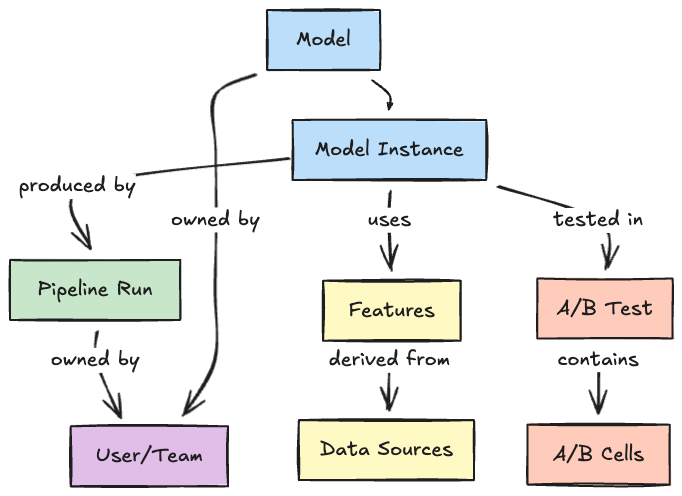
Our answer was the Metadata Service (MDS), which builds a Model Lifecycle Graph that indexes and connects ML-related entities across Netflix. MDS is optimized for real-time ingestion of ML metadata (e.g., models, features, pipelines, experiments, datasets) and to answer cross-domain questions such as “Which experiments are running this model?” or “Which models share these features?” It is the foundation that enables discovery, ingesting events from diverse sources, enriching them with context, and materializing relationships across entities.

Our vision: to make every ML asset at Netflix discoverable, understandable, and reusable by every ML practitioner, regardless of their team or domain.

Core Abstractions: The Vocabulary of the System

Before diving into the technical implementation, it’s helpful to understand the conceptual model that underpins MDS. This vocabulary enables consistent communication across teams and systems:

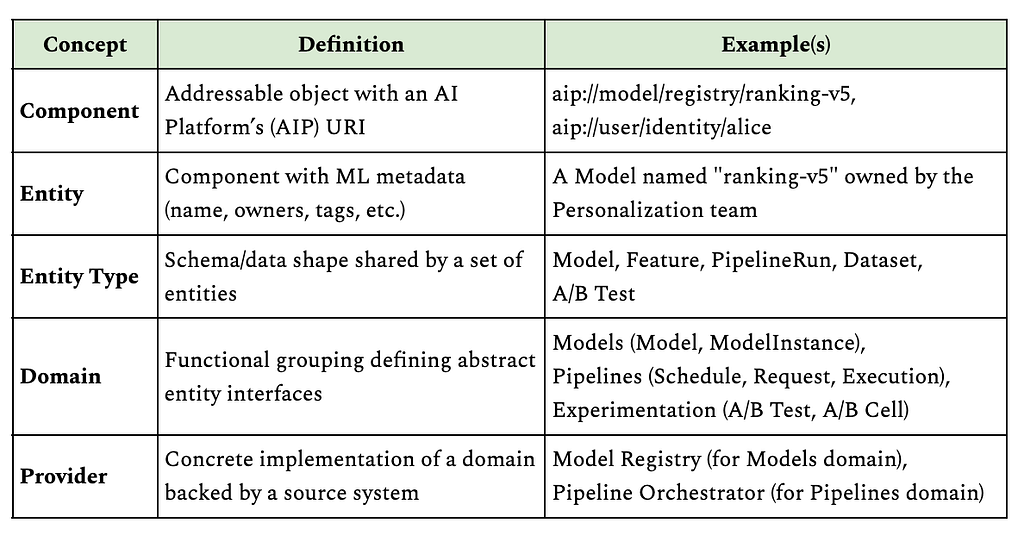
Component: Any object that is uniquely addressable using an AI Platform’s (AIP) Uniform Resource Identifier (URI). An AIP URI follows the formataip://<componentType>/<platformId>/<resourceId>, ensuring global uniqueness. For example:

  • Models: aip://model/registry/ranking-v5
  • Users: aip://user/identity/alice
  • Pipelines: aip://pipeline/orchestrator/weekly-training

Entity: A component within the ML ecosystem, characterized by additional properties such as name, description, creation date, and owners. Entities represent ML-specific assets, such as models, features, and pipelines.

Entity Type: A group of entities that share the same data shape. A data shape is a set of property constraints that specify the attributes and relationships an entity must have.

Domain: A functional grouping of related entity types that defines the abstract interface for a category of ML assets. For example, the Models domain defines what a Model and Model Instance look like, while the Pipelines domain defines Schedules, Requests, and Executions.

Provider: A concrete implementation of a domain, backed by a specific source system. For example, the Models domain is currently backed by our internal model registry. This separation allows MDS to support multiple providers for the same domain. If a new model registry were introduced, it could be added as an additional provider without changing the domain interface.

We can summarize these concepts with a concrete example:

This URI-based addressing scheme is crucial as it allows any service to reference any ML asset with a single string, and MDS can resolve that reference back to rich, connected metadata.

From Events to Entities to Graph

The journey from raw system events to a queryable graph happens in stages. Let’s walk through each with a concrete example: connecting a model to its A/B tests through relationship inference.

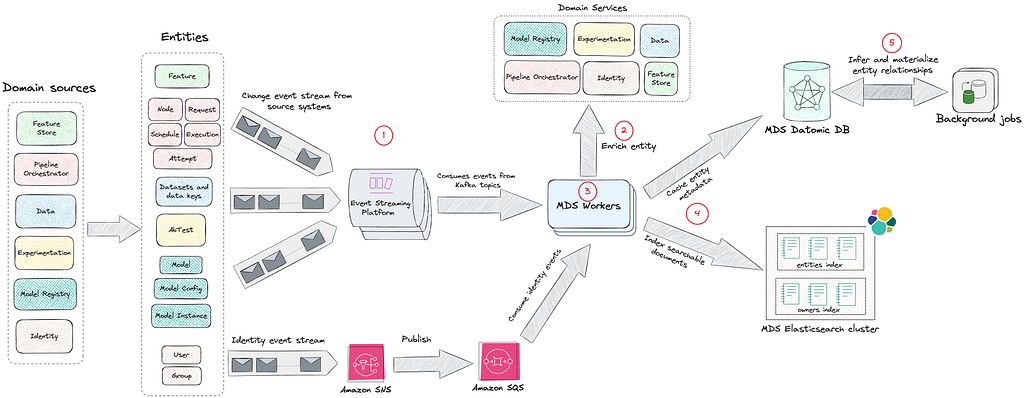
1 Event Ingestion

MDS integrates with various source systems via Kafka and AWS SNS/SQS, consuming events in real-time. Source systems emit thin events that include an identifier and an event type.

Example event:

{
"event_type": "model_instance_created",
"instance_id": "ranking-model-v5-20XX0101",
...
}

This design keeps producers simple. Source systems only need to announce that a change occurred, without building complete payloads or understanding downstream requirements.

Each source system has dedicated event handlers in MDS:

  • Pipeline Orchestration: Ingests pipeline execution events, including node definitions, schedules, requests, and job attempts
  • Model Registry: Captures model deployments, configurations, and version updates
  • Feature Store: Tracks feature definitions and their versions
  • Experimentation Platform: Monitors A/B test configurations and allocations
  • Datasets: Tracks ML datasets and their versions
  • Identity Platform: Maintains ownership and team membership information

2 Entity Enrichment

MDS implements a hydration contract for each event type. When an event arrives, MDS:

  1. Validates the event schema
  2. Calls the source system’s API to fetch the complete, current state
  3. Transforms the response into a normalized entity

This design has a crucial property: the order of events doesn’t matter. MDS always fetches the latest facts from the source of truth. This pattern decouples the event stream from state consistency. If the event bus drops a message or delivers it out of order, the next event corrects the state. The event stream becomes a notification of change rather than a log of changes.

This notification of change pattern has a few important tradeoffs. On the plus side, it keeps producers simple, makes us robust to out-of-order or dropped events, and ensures that MDS can always reconcile to the latest state by reading from the source of truth. The tradeoff is that we place additional read load on source systems during hydration and need to be deliberate about rate limiting, caching, and backoff in our enrichment workers so that we don’t overload them.

For our ranking model example, when the model_instance_created event arrives, MDS calls the Model Registry API: GET /api/v1/instances/ranking-model-v5-20XX0101

The registry responds with a full descriptor. Example response (key fields only):

{
"id": "ranking-model-v5-20XX0101",
"pipeline_run_id": "train-weekly-ranking-20XX0101",
"owner_emails": ["[email protected]"],
"labels": [{"key": "team", "value": "personalization"}],
...
}

3 Data Transformation and Normalization

Raw events are heterogeneous and each source system has its own schema and semantics. MDS workers transform these events into a unified entity model with standardized fields.

Without normalization, downstream consumers would need to understand every source system’s schema. Normalization creates a consistent interface, allowing queries and relationships to work across all entity types. Here is an example.

Normalized MDS entity:

{
"id": "aip://model/registry/ranking-model-v5-20XX0101",
"pipeline_run": "aip://pipeline-run/orchestrator/train-weekly-ranking-20XX0101",
"entity_type": "ModelInstance",
"owners": ["aip://user/identity/alice"],
"tags": [{"tag": "team", "value": "personalization"}],
...
}

The normalization process standardizes field names and formats. For example, platform-specific IDs become global AIP URIs, owner_emails becomes owners with resolved user URIs, and labels become tags. Foreign keys like pipeline_run_id are transformed into entity references. However, there’s still no reference to which A/B tests are using this model. The Model Registry doesn’t track experiments, and the Experimentation Platform doesn’t track which pipeline produced a given model. This is where knowledge enrichment becomes critical.

4 Storage and Indexing

Once normalized, entities are persisted to Datomic and immediately indexed in Elasticsearch. This happens synchronously within the event processing flow.

Datomic for Caching and Relationships
Normalized entities are first written to Datomic, which serves as both a local cache and a graph database.

Why Datomic? Datomic serves as both the system of record for MDS and the working dataset for enrichment processes. Its immutable fact model means we can continuously add relationships without losing the original entity state.

What we store:

  • All entity attributes as facts
  • Entity references (foreign keys that may point to entities not yet fully resolved)
  • All relationships as reified edges (added by enrichment processes)
  • Entity lifecycle state (tracking which entities are fully enriched vs awaiting hydration)

This enables:

  • Complex graph traversals: Navigate from a model to its features to their data sources in a single query
  • Entity relationships: Join across multiple domains without N+1 query problems
  • Flexible schema evolution: Easy to add new entity types and attributes as the catalog grows
  • Progressive enrichment: Background jobs efficiently identify and process entities requiring additional hydration, enabling gradual graph completion without reprocessing fully enriched entities

In practice, we use Datomic for relationship-heavy, navigational queries such as:

  • Starting from this model instance, show me all upstream datasets and downstream experiments.
  • Given this feature, list all consuming models and their owning teams.

These queries often span multiple hops in the graph and benefit from Datomic’s immutable fact model and efficient joins across entity relationships.

Elasticsearch for Discovery
Immediately after writing to Datomic, entities are indexed in Elasticsearch to power fast, full-text search across the catalog.

What we index:

  • Primary fields: Entity name, description, entity type, owner names
  • Relationship metadata: Names of related entities (e.g., a model’s features, pipelines, A/B tests) stored in the related field
  • Tags: Domain-specific metadata stored as key-value pairs (e.g., team::personalization, env::production, model.state::released)

Index structure:

  • Single entities index: All entity types (models, features, pipelines, etc.) are indexed in one unified index, differentiated by the entityType field
  • Separate owners index: Dedicated index for users and groups to enable cross-entity owner searches
  • Relevance boosting: Exact name matches score higher than other relevant matches

This enables:

  • Multi-field text search across entity names, descriptions, tags, and related metadata
  • Relevance ranking with boosting (exact name matches score significantly higher)
  • Complex filtering by entity type, ownership, tags, and domain-specific attributes (stored as tags)
  • Fuzzy matching to handle typos and partial queries

Elasticsearch powers the entry point into the system: users typically start with a free-text search in the AIP Portal (for a model name, a team, or a domain term), and then switch to graph navigation once they land on an entity page. Indexing happens in near real-time as part of the ingestion and enrichment workflows, so changes are usually visible in the Portal with a short delay that is acceptable for interactive use.

5 Knowledge Enrichment and Graph Formation

Once entity metadata is persisted in Datomic, scheduled background processes take over to discover and materialize relationships. These enrichment jobs run periodically, scanning for uncached or partially resolved entities (entities that exist only as references without full metadata).

The enrichment workflow:

  • Identify candidates: Find entities marked as uncached or with unresolved references
  • Hydrate relationships: Query source-of-truth systems to fetch related entity details
  • Materialize edges: Write discovered relationships back to Datomic
  • Re-index: Trigger Elasticsearch indexing for updated entities
  • Mark as enriched: Update entity status to prevent redundant processing

This asynchronous approach allows MDS to handle the computational cost of graph formation without blocking real-time event ingestion. It also enables retry logic and gradual enrichment as new entities become available.

Because enrichment is asynchronous, newly discovered relationships may appear with a short delay after the underlying entities are created (typically minutes rather than seconds). We track when each entity was last enriched and surface this timestamp in the AIP Portal, so practitioners can reason about staleness and know when it’s safe to rely on a particular relationship for debugging or impact analysis.

Why enrich? Source systems are purpose-built and don’t know about entities in other domains. Enrichment discovers and materializes cross-system relationships that enable powerful lineage and impact queries.

Example: Connecting Models to A/B Tests

When MDS processes a new model instance, background enrichment jobs discover relationships through multi-hop inference:

Step 1: Direct link to pipeline

The model references a pipeline_run_id. An enrichment job hydrates the pipeline and discovers its A/B test associations: GET /api/v1/pipeline-runs/train-weekly-ranking-20XX0101

Response:

{
"run_id": "train-weekly-ranking-20XX0101", "pipeline": "weekly-ranking-trainer",
"ab_test_cells": [
{"test_id": "12345","cell_number": 2,"cell_name": "treatment_ranking_v5"}
]
...
}

Step 2: Discover A/B test context
The enrichment job discovers the pipeline ran for A/B test cell #2 and queries the Experimentation Platform for test details: GET /api/v1/tests/12345

{
"test_id": "12345",
"name": "Ranking Model v5 vs v4",
"status": "ACTIVE",
"cells": [{"cell_number": 1, "name": "control_ranking_v4"}],
...
}

Step 3: Infer transitive relationships
The enrichment job now has the complete chain:

  • Model Instance was produced by Pipeline Run
  • Pipeline Run was executed for A/B Test Cell #2
  • The A/B Test Cell #2 belongs to A/B Test “Ranking Model v5 vs v4”
  • Model Instance now gets associated with this A/B Test

The job writes the inferred relationship back to Datomic and triggers re-indexing, and materializes these edges in the graph. MDS doesn’t just store what it’s told; it derives new knowledge by walking the graph in the background.

Why this matters: Without MDS, answering “Which A/B tests are using this model?” requires:

  1. Looking up the model in the Model Registry
  2. Finding which pipeline produced it
  3. Checking the Pipeline Orchestrator for A/B test tags
  4. Querying the Experimentation Platform for test details

With the model lifecycle graph, it’s a single query:

query {
model(id: "aip://model/registry/ranking-model-v5-20XX0101") {
name
owners { name }
currentInstance {
version
pipeline {
name
owners { name }
}
features {
edges {
node {
name
data { edges { node { name } } }
}
}
}
associatedAbTests {
name
cells { number name }
}
}
}
}

The reverse query also works: “What models are being tested in experiment 12345?”

Enabling Exploration, Not Just Search

With the Model Lifecycle Graph in place, we shift from entity search to entity exploration. Discovery isn’t just about finding a model; It’s about traversing relationships:

  • Start with a model, explore its features
  • From features, navigate to the core data driving them
  • From the data, trace back to the pipelines generating it
  • From pipelines, see which teams own and depend on them
  • From experiments, understand which models are being tested

For example, imagine an engineer investigating a degraded engagement metric for a personalization model. They might:

  1. Start with the model instance powering the affected recommendations in the AIP Portal.
  2. Inspect the model’s features and follow a suspicious feature to its upstream dataset.
  3. From the dataset page, see that its pipeline recently had failed runs and identify the owning team.
  4. Confirm which A/B tests are currently running this model instance to understand which members and surfaces are impacted.

Before MDS and the Model Lifecycle Graph, this required manual checks across multiple tools (model registry, pipeline orchestrator, experiment platform). Now it’s a contiguous journey in a single interface.

This graph-based exploration answers questions that were previously impossible:

  • Lineage queries: What is the complete lineage of this model, from training data to production experiments?
  • Impact analysis: Which models will be affected if I change this feature?
  • Usage discovery: Which A/B tests are using this model?
  • Dependency mapping: What data sources does my pipeline transitively depend on?
  • Deprecation planning: Which entities are no longer being used and can be retired?

Every entity has deep context: its creation time, ownership, update history, and most importantly, its relationships to other entities.

The Model Lifecycle Graph is surfaced to practitioners through the AIP Portal, a unified interface that provides full-text search across all entity types, detailed entity pages with navigable relationships, and personalized views for teams and individuals.

A typical interaction in the AIP Portal looks like:

  • Search: Type a model, feature, dataset, or team name into the single search box backed by Elasticsearch.
  • Inspect: Land on an entity page that shows key metadata (description, owners, domains, tags) alongside a relationships panel.
  • Explore: Click through to related entities (upstream datasets, downstream experiments, and sibling model versions) to navigate the Model Lifecycle Graph without leaving the portal.

When new entity types are introduced into MDS, the portal automatically provides baseline search, entity pages, and relationship navigation, and we can then layer on domain-specific visualizations (such as model deployment history or dataset version timelines) over time.

The Road Ahead: Open Challenges

Building the ML lifecycle graph is an ongoing journey. Significant challenges remain, and these represent the future opportunities for us:

  • Tool Proliferation: As new ML tools emerge, we need robust integration patterns that scale. How do we design plugin architectures that make adding new sources seamless? If we don’t keep up with new tools, practitioners will be forced back into fragmented views, and the Model Lifecycle Graph will lose coverage and trust.
  • Domain-Specific Visualizations: Different entity types require distinct visualization experiences. Model pages should display deployment history, A/B test associations, and performance metrics. Feature pages should highlight data lineage and consuming models. Pipeline pages must show execution history, dependencies, and schedules. Dataset pages require versioning timelines and downstream consumers. How do we design a flexible UI framework that allows each entity type to have its own tailored experience while maintaining consistent navigation and interaction patterns across the portal? Without rich, domain-specific experiences, the portal risks becoming a generic catalog rather than a tool that ML practitioners rely on in their daily workflows.
  • Metadata Quality: Today, MDS ensures data consistency through source-of-truth hydration and schema validation at ingestion. Background enrichment jobs continuously infer relationships and materialize entities from source systems. However, challenges remain in ensuring completeness and timeliness at scale. When source systems fail to emit events, when ownership information becomes stale, or when entities lack descriptions and contextual metadata, the graph’s utility degrades. How do we build automated validation and enrichment systems to detect metadata anomalies, suggest missing relationships, and maintain quality benchmarks across millions of entities? Poor or stale metadata erodes practitioner trust: if the graph is incomplete or incorrect, teams will revert to ad hoc knowledge and one-off integrations rather than using MDS as their source of truth.
  • Advanced Relationship Inference: Beyond explicit relationships declared in source systems, how do we infer implicit connections? Can we detect that two models serve similar purposes based on shared features? Can we recommend features based on usage patterns from similar pipelines? We are in the early stages of exploring these ideas. Done well, they would turn MDS from a passive catalog into an active recommendation engine for ML assets, accelerating reuse and reducing duplicate work across domains.

Acknowledgments

This work represents the collective effort of stunning colleagues across the AI Platform organization: Emma Carney, Megan Ren, Nadeem Ahmad, Pat Olenik, Prateek Agarwal, Tigran Hakobyan, Yinglao Liu


Democratizing Machine Learning at Netflix: Building the Model Lifecycle Graph was originally published in Netflix TechBlog on Medium, where people are continuing the conversation by highlighting and responding to this story.

[$] Bug-monitoring expectations and Fedora GNOME packages

Post Syndicated from jzb original https://lwn.net/Articles/1070006/

For a number of years, users submitting bugs reports against GNOME packages in Fedora have
received an auto-reply saying that the reports were not actively
monitored; users were encouraged to file bugs with GNOME upstream instead. However,
that practice seems to be in conflict with the Fedora Engineering Steering
Committee
(FESCo) policy
that package maintainers “deal with reported bugs in a timely manner“. On
April 28, FESCo discussed the disconnect between practice and policy; so far,
it has only opted to tweak the wording of the automatic response.

Security updates for Monday

Post Syndicated from jzb original https://lwn.net/Articles/1071167/

Security updates have been issued by AlmaLinux (kernel, libcap, libtiff, sudo, and thunderbird), Debian (dovecot, imagemagick, incus, kernel, libexif, linux-6.1, openjdk-25, pyasn1, python-aiohttp, and thunderbird), Fedora (chromium, firefox, GitPython, glibc, insight, krb5, nano, nss, openssh, openvpn, perl-CryptX, python3.14, rust-openssl, rust-openssl-sys, rust-sequoia-git, and xen), Oracle (dtrace, fence-agents, grafana-pcp, libcap, libtiff, sudo, and xorg-x11-server-Xwayland), Red Hat (buildah, fence-agents, firefox, java-11-openjdk with Extended Lifecycle Support, LibRaw, nodejs24, nodejs:24, openssh, python-pyasn1, resource-agents, thunderbird, tigervnc, xorg-x11-server, and xorg-x11-server-Xwayland), Slackware (mozilla), and SUSE (avahi, curl, freeipmi, freerdp, google-guest-agent, google-osconfig-agent, gvim, helm, himmelblau, java-1_8_0-openjdk, kernel, krb5-appl-clients, libsodium, libssh, libtiff-devel-32bit, ntfs-3g_ntfsprogs, openCryptoki, openexr, ovmf, PackageKit, python-jwcrypto, python-Mako, python-PyNaCl, python311, python311-pypdf, sed, trivy, and vim).

The collective thoughts of the interwebz