This is part 3 in a series called “Behind the Streams”. Check out part 1 and part 2 to learn more.
Picture this: It’s seconds before the biggest fight night in Netflix history. Sixty-five million fans are waiting, devices in hand, hearts pounding. The countdown hits zero. What does it take to get everyone to the action on time, every time? At Netflix, we’re used to on-demand viewing where everyone chooses their own moment. But with live events, millions are eager to join in at once. Our job: make sure our members never miss a beat.
When Live events break streaming records ¹²³, our infrastructure faces the ultimate stress test. Here’s how we engineered a discovery experience for a global audience excited to see a knockout.
Why are Live Events Different?
Unlike Video on Demand (VOD), members want to catch live events as they happen. There’s something uniquely exciting about being part of the moment. That means we only have a brief window to recommend a Live event at just the right time. Too early, excitement fades; too late, the moment is missed. Every second counts.
To capture that excitement, we enhanced our recommendation delivery systems to serve real-time suggestions, providing members richer and more compelling signals to hit play in the moment when it matters most. The challenge? Sending dynamic, timely updates concurrently to over a hundred million devices worldwide without creating a thundering herd effect that would overwhelm our cloud services. Simply scaling up linearly isn’t efficient and reliable. For popular events, it could also divert resources from other critical services. We needed a smarter and more scalable solution than just adding more resources.
Orchestrating the moment: Real-time Recommendations
With millions of devices online and live event schedules that can shift in real time, the challenge was to keep everyone perfectly in sync. We set out to solve this by building a system that doesn’t just react, but adapts by dynamically updating recommendations as the event unfolds. We identified the need to balance three constraints:
Time: the duration required to coordinate an update.
Request throughput: the capacity of our cloud services to handle requests.
Compute cardinality: the variety of requests necessary to serve a unique update.
Visualizing constraints for real-time updates
We solved this constraint optimization problem by splitting the real-time recommendations into two phases: prefetching and real-time broadcasting. First, we prefetch the necessary data ahead of time, distributing the load over a longer period to avoid traffic spikes. When the Live event starts or ends, we broadcast a low cardinality message to all connected devices, prompting them to use the prefetched data locally. The timing of the broadcast also adapts when event times shift to preserve accuracy with the production of the Live event. By combining these two phases, we’re able to keep our members’ devices in sync and solve the thundering herd problem. To maximize device reach, especially for those with unstable networks, we use “at least once” broadcasts to ensure every device gets the latest updates and can catch up on any previously missed broadcasts as soon as they’re back online.
The first phase optimizes request throughput and compute cardinality by prefetching materialized recommendations, displayed title metadata, and artwork for a Live event. As members naturally browse their devices before the event, this data is prepopulated and stored locally in device cache, awaiting the notification trigger to serve the recommendations instantaneously. By distributing these requests naturally over time ahead of the event, we can eliminate any related traffic spikes and avoid the need for large-scale, real-time system scaling.
A phased approach, smoothing traffic requests over time with a real-time low-cardinality broadcast
The second phase optimizes request throughput and time to updatedevices by broadcasting a low-cardinality, real-time message to all connected devices at critical moments in a Live event’s lifecycle. Each broadcast payload includes a state key and a timestamp. The state key indicates the current stage of the Live event, allowing devices to use their pre-fetched data to update cached responses locally without additional server requests. The timestamp ensures that if a device misses a broadcast due to network issues, it can catch up by replaying missed updates upon reconnecting. This mechanism guarantees devices receive updates at least once, significantly increasing delivery reliability even on unstable networks.
A phased approach optimizes each constraint to ensure we can deliver for the big moment!
Moment in Numbers: During peak load, we have successfully delivered updates at multiple stages of our events to over 100 million devices in under a minute.
Under the Hood: How It Works
With the big picture in mind, let’s examine how these pieces interact in practice.
In the diagram below, the Message Producer microservice centralizes all of the business logic. It continuously monitors live events for setup and timing changes. When it detects an update, it schedules broadcasts to be sent at precisely the right moment. The Message Producer also standardizes communication by providing a concise GraphQL schema for both device queries and broadcast payloads.
Rather than sending broadcasts directly to devices via WebSocket, the Message Producer hands them off to the Message Router. The Message Router is part of a robust two-tier pub/sub architecture built on proven technologies like Pushy (our WebSocket proxy), Apache Kafka, and Netflix’s KV key-value store. The Message Router tracks subscriptions at the Pushy node granularity, while Pushy nodes map the subscriptions to individual connections, creating a low-latency fanout that minimizes compute and bandwidth requirements.
Devices interface with our GraphQL Domain Graph Service (DGS). These schemas offer multiple query interfaces for prefetching, allowing devices to tailor their requests to the specific experience being presented. Each response adheres to a consistent API that resolves to a map of stage keys, enabling fast lookups and keeping business logic off the device. Our broadcast schema specifies WebSocket connection parameters, the current event stage, and the timestamp of the last broadcast message. When a device receives a broadcast, it injects the payload directly into its cache, triggering an immediate update and re-render of the interface.
Balancing the Moment: Throughput Management
In addition to building the new technology to support real-time recommendations, we also evaluated our existing systems for potential traffic hotspots. Using high-watermark traffic projections for live events, we generated synthetic traffic to simulate game-day scenarios and observed how our online services handled these bursts. Through this process, several common patterns emerged:
Breaking the Cache Synchrony
Our game-day simulations revealed that while our approach mitigated the immediate thundering herd risks driven by member traffic during the events, live events introduced unexpected mini thundering herds in our systems hours before and after the actual events. The surge of members joining just in time for these events led to concentrated cache expirations and recomputations, which created traffic spikes well outside the event window that we did not anticipate. This was not a problem for VOD content because the member traffic patterns are a lot smoother. We found that fixed TTLs caused cache expirations and refresh-traffic spikes to happen all at once. To address this, we added jitter to server and client cache expirations to spread out refreshes and smooth out traffic spikes.
Adaptive Traffic Prioritization
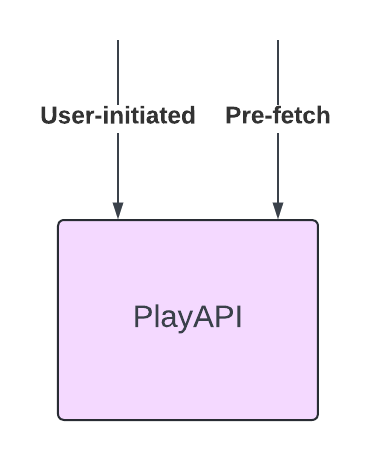
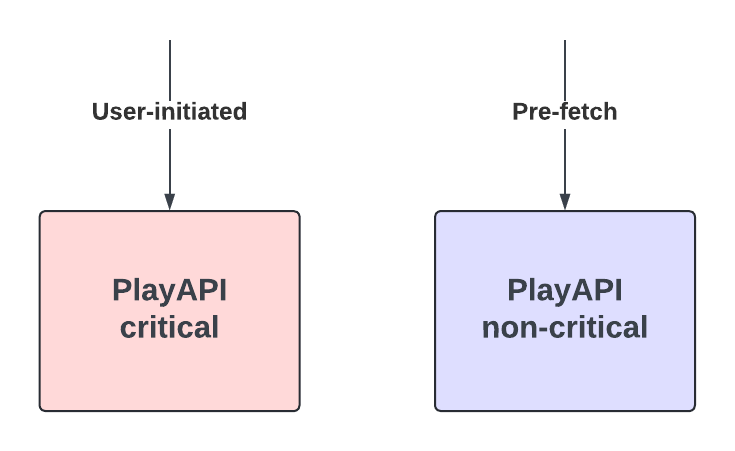
While our services already leverage traffic prioritization and partitioning based on factors such as request type and device type, live events introduced a distinct challenge. These events generated brief traffic bursts that were intensely spiky and placed significant strain on our systems. Through simulations, we recognized the need for an additional event-driven layer of traffic management.
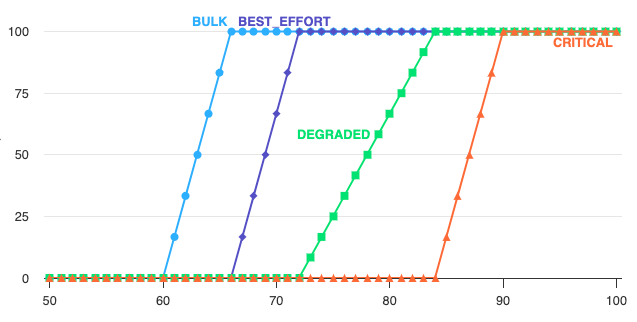
To tackle this, we improved our traffic sharding strategies by using event-based signals. This enabled us to route live event traffic to dedicated clusters with more aggressive scaling policies. We also added a dynamic traffic prioritization ruleset that activates whenever we see high requests per second (RPS) to ensure our systems can handle the surge smoothly. During these peaks, we aggressively deprioritize non-critical server-driven updates so that our systems can devote resources to the most time-sensitive computations. This approach ensures smooth performance and reliability when demand is at its highest.
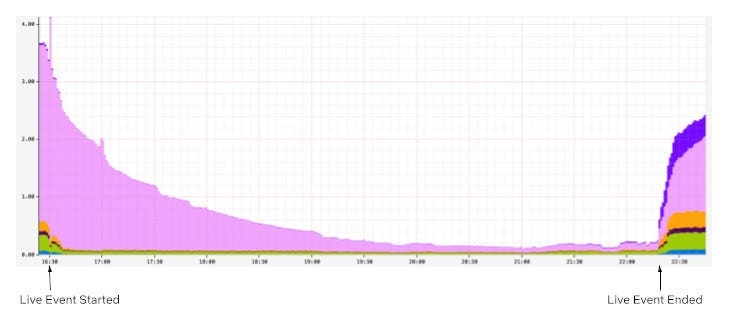
Snapshot of non-critical traffic volume decline (in %) for a member-facing service during a live event — achieved via aggressive de-prioritization
Looking Ahead
When we set out to build a seamlessly scalable scheduled viewing experience, our goal was to create a dynamic and richer member experience for live content. Popular live events like the Crawford v. Canelo fight and the NFL Christmas games truly put our systems to the test. Along the way, we also uncovered valuable learnings that continue to shape our work. Our attempts to deprioritize traffic to other non-critical services caused unexpected call patterns and spikes in traffic elsewhere. Similarly, in hindsight, we also learned that the high traffic volume from popular events caused excessive non-essential logging and was putting unnecessary pressure on our ingestion pipelines.
None of this work would have been possible without our stunning colleagues at Netflix who collaborated across multiple functions to architect, build, and test these approaches, ensuring members can easily access events at the right moment: UI Engineering, Cloud Gateway, Data Science & Engineering, Search and Discovery, Evidence Engineering, Member Experience Foundations, Content Promotion and Distribution, Operations and Reliability, Device Playback, Experience and Design and Product Management.
As Netflix’s content offering expands to include new formats like live titles, free-to-air linear content, and games, we’re excited to build on what we’ve accomplished and look ahead to even more possibilities. Our roadmap includes extending the capabilities we developed for scheduled live viewing to these emerging formats. We’re also focused on enhancing our engineering tooling for greater visibility into operations, message delivery, and error handling to help us continue to deliver the best possible experience for our members.
Join Us for What’s Next
We’re just scratching the surface of what’s possible as we bring new live experiences to members around the world. If you are looking to solve interesting technical challenges in a unique culture, then apply for a role that captures your curiosity.
Look out for future blog posts in our “Behind the Streams” series, where we’ll explore the systems that ensure viewers can watch live streams once they manage to find and play them.
We recently upgraded the Maestro engine to go beyond scalability and improved its performance by 100X! The overall overhead is reduced from seconds to milliseconds. We have updated the Maestro open source project with this improvement! Please visit the Maestro GitHub repository to get started. If you find it useful, please give us a star.
Introduction
In our previous blog post, we introduced Maestro as a horizontally scalable workflow orchestrator designed to manage large-scale Data/ML workflows at Netflix. Over the past two and a half years, Maestro has achieved its design goal and successfully supported massive workflows with hundreds of thousands of jobs, managing millions of executions daily. As the adoption of Maestro increases at Netflix, new use cases have emerged, driven by Netflix’s evolving business needs, such as Live, Ads, and Games. To meet these needs, some of the workflows are now scheduled on a sub-hourly basis. Additionally, Maestro is increasingly being used for low-latency use cases, such as ad hoc queries, beyond traditional daily or hourly scheduled ETL data pipeline use cases.
While Maestro excels in orchestrating various heterogeneous workflows and managing user end-to-end development experiences, users have experienced noticeable speedbumps (i.e. ten seconds overhead) from the Maestro engine during workflow executions and development, affecting overall efficiency and productivity. Although being fully scalable to support Netflix-scale use cases, the processing overhead from Maestro internal engine state transitions and lifecycle activities have become a bottleneck, particularly during development cycles. Users have expressed the need for a high performance workflow engine to support iterative development use cases.
To visualize our end users’ needs for the workflow orchestrator, we create a 5-layer structure graph shown below. Before the change, Maestro reached level 4 but faced challenges to satisfy the user’s needs in level 5. With the new engine design, Maestro is able to power the users to work with their highest capacity and spark joy for end users during their development over the Maestro.
Figure 1. A 5-layer structure showing needs for the workflow orchestrator.
In this blog post, we will share our new engine details, explain our design trade-off decisions, and share learnings from this redesign work.
Architectural Evolution of Maestro
Before the change
To understand the improvements, we will first revisit the original architecture of Maestro to understand why the overhead is high. The system was divided into three main layers, as illustrated in the diagram below. In the sections that follow we will explain each layer and the role it played in our performance optimization.
Figure 2. The architecture diagram before the evolution.
Maestro API and Step Runtime Layer
This layer offers seamless integrations with other Netflix services (e.g., compute engines like Spark and Trino). Using Maestro, thousands of practitioners build production workflows using a paved path to access platform services . They can focus primarily on their business logic while relying on Maestro to manage the lifecycle of jobs and workflows plus the integration with data platform services and required integrations such as for authentication, monitoring and alerting. This layer functioned efficiently without introducing significant overhead.
Maestro Engine Layer
The Maestro engine serves several crucial functions:
Managing the lifecycle of workflows, their steps and maintaining their state machines
Supporting all user actions (e.g., start, restart, stop, pause) on workflow and step entities
Translating complex Maestro workflow graphs into parallel flows, where each flow is an array of sequentially chained flow tasks, translating every step into a flow task, and then executing transformed flows using the internal flow engine
Acting as a middle layer to maintain isolation between the Maestro step runtime layer and the underlying flow engine layer
Implementing required data access patterns and writing Maestro data into the database
In terms of speed, this layer had acceptable overhead but faced edge cases (e.g. a step might be concurrently executed by two workers at the same time, causing race conditions) due to lacking a strong guarantee from the internal flow engine and the external distributed job queue.
Maestro Internal Flow Engine Layer
The Maestro internal flow engine performed 2 primary functions:
Calling task’s execution functions at a given interval.
Starting the next tasks in an array of sequential task flows (not a graph), if applicable.
This foundational layer was based on Netflix OSS Conductor 2.x (deprecated since Apr 2021), which requires a dedicated set of separate database tables and distributed job queues.
The existing implementation of this layer introduces an impactful overhead (e.g. a few seconds to tens of seconds overall delays). The lack of strong guarantees (e.g. exactly once publishing) from this layer leads to race conditions which cause stuck jobs or lost executions.
Options to consider
We have evaluated three options to address those existing issues:
Option 1: Implement an internal flow engine optimized for Maestro specific use cases
Option 2: Upgrade Conductor library to 4.0, which addresses the overheads and offers other improvements and enhancements compared with Conductor 2.X.
Option 3: Use Temporal as the internal flow engine
One aspect that influenced our assessment of option two is that Conductor 2 provided a final callback capability in the state machine that was contributed specifically for Maestro’s use case to ensure database synchronization between the Conductor and Maestro engine states. It would require porting this functionality to Conductor 4 though it had been dropped given no other Conductor use cases besides Maestro relied on this. By rewriting the flow engine it would allow removal of several complex internal databases and database synchronization requirements which was attractive for simplifying operational reliability. Given Maestro did not need the full set of state engine features offered by Conductor, this motivated us to consider a flow engine rewrite as a higher priority.
The decision for Temporal was more straightforward. Temporal is optimized towards facilitating inter-process orchestration and would involve calling an external service to interact with the Temporal flow engine. Given Maestro is operating greater than a million tasks per day, many of which are long running, we felt it was an unnecessary source of risk to couple the DAG engine execution with an external service call. If our requirements went beyond lightweight state transition management we might reconsider because Temporal is a very robust control plane orchestration system, but for our needs it introduced complexity and potential reliability weak spots when there was no direct need for the advanced feature set that it offered.
After considering Option 2 and Option 3, we developed more conviction that Maestro’s architecture could be greatly simplified by not using a full DAG evaluation engine and having to maintain the state machine for two systems (Maestro and Conductor/Temporal). Therefore, we have decided to go with Option 1.
After the change
To address these issues, we completely rewrote the Maestro internal flow engine layer to satisfy Maestro’s specific needs and optimize its performance. This new flow engine is lightweight with minimal dependencies, focusing on excelling in the two primary functions mentioned above. We also replaced existing distributed job queues with internal ones to provide a strong guarantee.
The new engine is highly performant, efficient, scalable, and fault-tolerant. It is the foundation for all upper components of Maestro and provides the following guarantees to avoid race conditions:
A single step should only be executed by a single worker at any given time
Step state should never be rolled back
Steps should always eventually run to a terminal state
The internal flow state should be eventually consistent with the Maestro workflow state
External API and user actions should not cause race conditions on the workflow execution
Here is the new architecture diagram after the change, which is much simpler with less dependencies:
Figure 3. The architecture diagram after the evolution.
New Flow Engine Optimization
The new flow engine significantly boosts speed by maintaining state in memory. It ensures consistency by using Maestro engine’s database as the source of truth for workflow and step states. During bootstrapping, the flow engine rebuilds its in-memory state from the database, improving performance and simplifying the overall architecture. This is in contrast to the previous design in which multiple databases had to be reconciled against one another (Conductor’s tables and Maestro’s tables) or else suffer race conditions and rare orphaned job status.
The flow engine operates on in-memory flow states, resembling a write through caching pattern. Updates to workflow or step state in the database also update the in-memory flow state. If in-memory state is lost, the flow engine rebuilds it from the database, ensuring eventual consistency and resolving race conditions.
This design delivers lower latency and higher throughput, avoids inconsistencies from dual persistence, simplifies the architecture, and keeps the in‑memory view eventually consistent with the database.
Maintaining Scalability While Gaining Speed
With the new engine, we significantly boost performance by collocating flows and their tasks on the same node throughout their lifecycle. Therefore, states of a flow and its tasks will stay in a single node’s memory without persisting to the database. This stickiness and locality bring great performance benefits but inevitably impact scalability since tasks are no longer reassigned to a new worker of the whole cluster in each polling cycle.
To maintain horizontal scalability, we introduced a flow group concept to partition running flows into groups. In this way, each Maestro flow engine instance only needs to maintain ownership of groups rather than individual flows, reducing maintenance costs (e.g., heartbeat) and simplifying reconciliation by allowing each Maestro node to load flows for a group in batches. Each Maestro node claims ownership of a group of flows through a flow group actor and manages their entire lifecycle via child flow actors. If ownership is lost due to node failure or long JVM GC, another node can claim the group to resume flow executions by reconciling internal state from Maestro database. The following diagram illustrates the ownership maintenance.
Figure 4. Ownership maintenance sequence diagram.
Flow Partitioning
To efficiently distribute traffic, Maestro assigns a consistent group ID to flows/workflows by a simple stable ID assignment method, as shown in the diagram’s Partitioning Function box. We chose this simpler partitioning strategy over advanced ones, e.g. consistent hashing, primarily due to execution and reconciliation costs and consistency challenges in a distributed system.
Since Maestro decomposes workflows into hierarchical internal flows (e.g., foreach), parent flows need to interact with child flows across different groups. To enable this, the maximal group number from the parent, denoted as N’ in the diagram, is passed down to all child flows. This allows child flows, such as subworkflows or foreach iterations, to recompute their own group IDs and also ensures that a parent flow can always determine the group ID of its child flows using only their workflow identifiers.
Figure 5. Flow group partitioning mechanism diagram.
After a flow’s group ID is determined, the flow operator routes the flow request to the appropriate node. Each node owns a specific range of group IDs. For example, in the diagram, Node 1 owns groups 0, 1, and 2, while Node 3 owns groups 6, 7, and 8. The groups then contain the individual flows (e.g., Flow A, Flow B).
In this design, the group size is configurable and nodes can also have different group size configurations. The following diagram shows a flow group partitioning example while the maximal group number is changed during the engine execution without impacting any existing workflows.
Figure 6. A flow group partitioning example.
In short, Maestro flow engine shares the group info across the parent and child workflows to provide a flexible and stable partitioning mechanism to distribute work across the cluster.
Queue Optimization
We replaced both external distributed job queues in the existing system with internal ones, preserving the same fault‑tolerance and recovery guarantees while reducing latency and boosting throughput.
For the internal flow engine, the queue is a simple in‑memory Java blocking queue. It requires no persistence and can be rebuilt from Maestro state during reconciliation.
For the Maestro engine, we implemented a database‑backed in‑memory queue that provides exactly‑once publishing and at‑least‑once delivery guarantees, addressing multiple edge cases that previously required manual state correction.
This design is similar to the transactional outbox pattern. In the same transaction that updates Maestro tables, a row is inserted into the `maestro_queue` table. Upon transaction commit, the job is immediately pushed to a queue worker on the same node, eliminating polling latency. After successful processing, the worker deletes the row from the database. A periodic sweeper re-enqueues any rows whose timeout has expired, ensuring another worker picks them up if a worker stalls or a node fails.
This design handles failures cleanly. If the transaction fails, both data and message roll back atomically, no partial publishing. If a worker or node fails after commit, the timeout mechanism ensures the job is retried elsewhere. On restart, a node rebuilds its in‑memory queue from the queue table, providing at-least-once delivery guarantee.
To enhance scalability and avoid contention across event types, each event type is assigned a `queue_id`. Job messages are then partitioned by `queue_id`, optimizing performance and maintaining system efficiency under high load.
From Stateless Worker Model to Stateful Actor Model
Maestro previously used a shared-nothing stateless worker model with a polling mechanism. When a task started, its identifier was enqueued to a distributed task queue. A worker from the flow engine would pick the task identifier from the queue, load the complete states of the whole workflow (including the flow itself and every task), execute the task interface method once, write the updated task data back to the database, and put the task back in the queue with a polling delay. The worker would then forget this task and start polling the next one.
That architecture was simple and horizontally scalable (excluding database scalability considerations), but it had drawbacks. The process introduced considerable overhead due to polling intervals and state loading. The time spent in one polling cycle on distributed queues, loading complete states, and other DB queries was significant.
As Maestro engine decomposes complex workflow graphs into multiple flows, actions might involve multiple flows spanning multiple polling cycles, adding up to significant overhead (around ten seconds in the worst cases). Also, this design didn’t offer strong execution guarantees mainly because the distributed job queue could only provide at-least-once guarantees. Tasks might be dequeued and dispatched to multiple workers, workers might reset states in certain race conditions, or load stale states of other tasks and make incorrect decisions. For example, after a long garbage-collection pause or network hiccup, two workers can pick up the same task: one sets the task status as completed and then unblocks the downstream steps to move forward. However, the other worker, working off stale state, resets the task status back to running, leaving the whole workflow in a conflicting state.
In the new design, we developed a stateful actor model, keeping internal states in memory. All tasks of a workflow are collocated in the same Maestro node, providing the best performance as states are in the same JVM.
Actor-Based Model
The new flow engine fits well into an actor model. We also deliberately designed it to allow sharing certain local states (read-only) between parent, child, and sibling actors. This optimization gains performance benefits without losing thread safety due to Maestro’s use cases. We used Java 21’s virtual thread support to implement it with minimal dependencies.
The new actor-based flow engine is fully message/event-driven and can take actions immediately when events are received, eliminating polling interval delays. To maintain compatibility with the existing polling-based logic, we developed a wakeup mechanism. This model requires flow actors and their child task actors to be collocated in the same JVM for communication over the in-memory queue. Since the Maestro engine already decomposes large-scale workflow instances into many small flows, each flow has a limited number of tasks that fit well into memory.
Below is a high-level overview of the Maestro execution flow based on the actor model.
Figure 7. The high level overview of the Maestro execution.
When a workflow starts or during reconciliation, the flow engine inserts (if not existing) or loads the Maestro workflow and step instance from the database, transforming it into the internal flow and task state. This state remains in JVM memory until evicted (e.g., when the workflow instance reaches a terminal state).
A virtual thread is created for each entity (workflow instance or step attempt) as an actor to handle all updates or actions for this entity, ensuring thread safety and eliminating distributed locks and potential race conditions.
Each virtual thread actor contains an in-memory state, a thread-safe blocking queue, and a state machine to update states, ensuring thread safety and high efficiency.
Actors are organized hierarchically, with flow actors managing all their task actors. Flow actors and their task actors are kept in the same JVM for locality benefits, with the ability to relocate flow instances to other nodes if needed.
An event can wake up a virtual thread by pushing a message to the actor’s job queue, enabling Maestro to move toward an event-driven approach alongside the current polling-based approach.
A reconciliation process transforms the Maestro data model into the internal flow data.
Virtual Thread Based Implementation
We chose Java virtual threads to implement various actors (e.g. group actors and flow actors), which simplified the actor model implementation. With a smaller amount of code, we developed a fully functional and highly performant event-driven distributed flow engine. Virtual threads fit very well in use cases like state machine transitions within actors. They are lightweight enough to be created in a large number without Out-Of-Memory risks.
However, virtual threads can potentially deadlock. They’re not suitable for executing user-provided logic or complex step runtime logic that might depend on external libraries or services outside our control. To address this, we separate flow engine execution from task execution logic by adding a separate worker thread pool (not virtual threads) to run actual step runtime business logic like launching containers or making external API calls. Flow/task actors can wait indefinitely for the future of the thread poll executor to complete but don’t perform actual execution, allowing us to benefit from virtual threads while avoiding deadlock issues.
Figure 8. Virtual thread and worker thread separation.
Providing Strong Execution Guarantees
To provide strong execution guarantees, we implemented a generation ID-based solution to ensure that a single flow or task is executed by only one actor at any time, with states that never roll back and eventually reach a terminal state.
When a node claims a new group or a group with an expired heartbeat, it updates the database table row and increments the group generation ID. During node bootstrap, the group actor updates all its owned flows’ generation IDs while rebuilding internal flow states. When creating a new flow, the group actor verifies that the database generation ID matches its in-memory generation ID, otherwise rejecting the creation and reporting a retryable error to the caller. Please check the source code for the implementation details.
Figure 9. An example sequence diagram showing how generation id provides a strong guarantee.
Additionally, the new flow engine supports both event-driven execution and polling-based periodic reconciliation. Event-driven support allows us to extend polling intervals for state reconciliation at a very low cost, while polling-based reconciliation relaxes event delivery requirements to at-most-once.
Testing, Validation and Rollout
Migrating hundreds of thousands of Netflix data processing jobs to a new workflow engine required meticulous planning and execution to avoid data corruption, unexpected traffic patterns, and edge cases that could hinder performance gains. We adopted a principled approach to ensure a smooth transition:
Realistic Testing: Our testing mirrored real-world use cases as closely as possible.
Balanced Approach: We balanced the need for rapid delivery with comprehensive testing.
Minimal User Disruption: The goal was for users to be unaware of the underlying changes.
Clear Communication: For cases requiring user involvement, clear communication was provided.
Maestro Test Framework
To achieve our testing goals, we developed an adaptable testing framework for Maestro. This framework addresses the limitations of static unit and integration tests by providing a more dynamic and comprehensive approach, mimicking organic production traffic. It complements existing tests to instill confidence when rolling out major changes, such as new DAG engines.
The framework is designed to sample real user workflows, disconnecting business logic from external side effects like data reads or writes. This allows us to run workflow graphs of various shapes and sizes, reflecting the diverse use cases across Netflix. While system integrations are handled through deployment pipeline integration tests, the ability to exercise a wide variety of workflow topologies (e.g., parallel executions, for-each jobs, conditional branching and parameter passing between jobs) was crucial for ensuring the new flow engine’s correctness and performance.
The prototype workflow for the test framework focuses on auto-testing parameters, involving two main steps:
1. Caching Production Workflows:
Successful production instances are queried from a historical Maestro feed table over a specified period.
Run parameters, initiator, and instance IDs are extracted and organized into an instance data map.
YAML definitions and subworkflow IDs are pulled from S3 storage.
Both workflow definitions and instance data are cached on S3 for subsequent steps.
2. Pushing, Running, and Monitoring Workflows:
Cached workflow definitions and instance data are loaded.
Notebook-based jobs are replaced with custom notebooks, and certain job types (e.g., vanilla container runtime jobs, templated data movement jobs) and signal triggers are converted to a special no-op job type or skipped.
Abstract job types like Write-Audit-Publish are expressed as a single step template but are translated to multiple reified nodes of the DAG when executed. These are auto-translated into several custom notebook job types to replace the generated nodes.
Workflows and subworkflows are pushed, with only non-subworkflows being run using original production instance information.
1. In the parent workflow, each sub-workflow is replaced with a special no-op placeholder so that the overall topology is preserved but without executing any side-effects of child workflows and avoid cases using dynamic runtime parameter logic.
2. Each sub-workflow is then separately treated like a top-level parent workflow not initiated from its parent, to exercise the actual workflow steps of the sub-workflow.
The custom notebook internally compares all passed parameters for each job.
Workflow instances are monitored until termination (success or failure).
An email detailing failed workflow instances is generated.
Future phases of the test framework aim to expand support for native steps, more templates, Titus and Metaflow workflows, and include more robust signal testing. Further integration with the ecosystem, including dedicated Genie clusters for no-op jobs and DGS for our internal workflow UI feature verification, is also being explored.
Rollout Plan
Our rollout strategy prioritized minimal user disruption. We determined that an entire workflow, from its root instance, must reside in either the old or new flow engine, preventing mixed operations that could lead to complex failure modes and manual data reconciliation.
To facilitate this, we established a parallel infrastructure for the new workflow engine and leveraged our orchestrator gateway API to hide any routing or redirection logic from users. This approach provided excellent isolation for managing the migration. Initially, specific workflows could explicitly opt in via a system flag, allowing us to observe their execution and gain confidence. By scaling up traffic to the parallel infrastructure in direct proportion to what was scaled down from the original infrastructure, the dual infrastructure cost increase was negligible.
Once confident, we transitioned to a percentage-based cutover. In the event of a sustained failure in the new engine, our team could roll back a workflow by removing it from the new engine’s database and restarting it in the original stack. However, one consequence of rollback was that failed workflows had to restart from the beginning, recomputing previously successful steps, to ensure all artifacts were generated from a consistent flow engine.
Leveraging Maestro’s 10-day workflow timeout, we migrated users without disruption. Existing executions would either complete or time out. Upon restarting (due to failure/timeout) or triggering a new instance (due to success), the workflow would be picked up by the new engine. This effectively allowed us to gradually “drain” traffic from the old engine to the new one with no user involvement.
While the plan generally proceeded as expected with limited edge cases, we did encounter a few challenges:
Stuck Workflows: Around 50 workflows with defunct or incorrect ownership information entered a stuck state. In some cases, a backlog of queued instances behind a stuck instance created a race condition in which a new instance would be started immediately when an old instance was terminated, perpetually keeping the workflow on the old engine. For these, we proactively contacted users to negotiate manual stop-and-restart times, forcing them onto the new engine.
Configuration Discrepancies: A significant lesson learned was the importance of meticulous record-keeping and management of parallel infrastructure components. We discovered alerts, system flags, and feature flags configured for one stack but not the other. This led to a failure in a partner team’s system that dynamically rolled out a Python migration by analyzing workflow configurations. The absence of a required feature flag in the new engine stack caused the process to be silently skipped, resulting in incorrect Python version configurations for about 40 workflows. Although quickly remediated, this caused user inconvenience as affected workflows needed to be restarted and verified for no lingering data corruption issues. This issue also highlighted limitations in the testing framework since runtime configuration based on external API calls to the configuration service were not exercised in simulated workflow executions.
Despite these challenges, the migration was a success. We migrated over 60,000 active workflows generating over a million data processing tasks daily with almost no user involvement. By observing the flow engine’s lifecycle management latency, we validated a reduction in step launch overhead from around 5 seconds to 50 milliseconds. Workflow start overhead (incurred once per each workflow execution) also improved from 200 milliseconds to 50 milliseconds. Aggregating this over a million daily step executions translates to saving approximately 57 days of flow engine overhead per day, leading to a snappier user experience, more timely workflow status for data practitioners and greater overall task throughput for the same infrastructure scale.
We additionally realized significant benefits internally with reduced maintenance effort due to the new flow engine’s simplified set of database components. We were able to delete nearly 40TB of obsolete tables related to the previous stateless flow engine and saw a 90% reduction in internal database query traffic which had previously been a significant source of system alerts for the team.
Conclusion
The architectural evolution of Maestro represents a significant leap in performance, reducing overhead from seconds to milliseconds. This redesign with a stateful actor model not only enhances speed by 100X but also maintains scalability and reliability, ensuring Maestro continues to meet the diverse needs of Netflix’s data and ML workflows.
Key takeaways from this evolution include:
Performance matters: Even in a system designed for scale, the speed of individual operations significantly impacts user experience and productivity.
Simplicity wins: Reducing dependencies and simplifying architecture not only improved performance but also enhanced reliability and maintainability.
Strong guarantees are essential: Providing strong execution guarantees eliminates race conditions and edge cases that previously required manual intervention.
Locality optimizations pay off: Collocating related flows and tasks in the same JVM dramatically reduces overhead from the Maestro engine.
Modern language features help: Java 21’s virtual threads enabled an elegant actor-based implementation with minimal code complexity and dependencies.
We’re excited to share these improvements with the open-source community and look forward to seeing how Maestro continues to evolve. The performance gains we’ve achieved open new possibilities for low-latency workflow orchestration use cases while continuing to support the massive scale that Netflix and other organizations require.
Visit the Maestro GitHub repository to explore these improvements. If you have any questions, thoughts, or comments about Maestro, please feel free to create a GitHub issue in the Maestro repository. We are eager to hear from you. If you are passionate about solving large scale orchestration problems, please join us.
Acknowledgements
Special thanks to Big Data Orchestration team members for general contributions to Maestro and diligent review, discussion and incident response required to make this project successful: Davis Shepherd, Natallia Dzenisenka, Praneeth Yenugutala, Brittany Truong, Jonathan Indig, Deepak Ramalingam, Binbing Hou, Zhuoran Dong, Victor Dusa, and Gabriel Ikpaetuk — and and internal partners Yun Li and Romain Cledat.
Thank you to Anoop Panicker and Aravindan Ramkumar from our partner organization that leads Conductor development in Netflix. They helped us understand issues in Conductor 2.X that initially motivated the rearchitecture and helped provide context on later versions of Conductor that defined some of the core trade-offs for the decision to implement a custom DAG engine in Maestro.
We’d also like to thank our partners on the Data Security & Infrastructure and Engineering Support teams who helped identify and rapidly fix the configuration discrepancy error encountered during production rollout: Amer Hesson, Ye Ji, Sungmin Lee, Brandon Quan, Anmol Khurana, and Manav Garekar.
A special thanks also goes out to partners from the Data Experience team including Jeff Bothe, Justin Wei, and Andrew Seier. The flow engine speed improvement was actually so dramatic that it broke some integrations with our internal workflow UI that reported state transition durations. Our partners helped us catch and fix UI regressions before they shipped to avoid impact to users.
We also thank Prashanth Ramdas, Anjali Norwood, Eva Tse, Charles Zhao, Sumukh Shivaprakash, Joey Lynch, Harikrishna Menon, Marcelo Mayworm, Charles Smith and other leaders for their constructive feedback and guidance on the Maestro project.
Netflix operates at a massive scale, serving hundreds of millions of users with diverse content and features. Behind the scenes, ensuring data consistency, reliability, and efficient operations across various services presents a continuous challenge. At the heart of many critical functions lies the concept of a Write-Ahead Log (WAL) abstraction. At Netflix scale, every challenge gets amplified. Some of the key challenges we encountered include:
Accidental data loss and data corruption in databases
System entropy across different datastores (e.g., writing to Cassandra and Elasticsearch)
Handling updates to multiple partitions (e.g., building secondary indices on top of a NoSQL database)
Data replication (in-region and across regions)
Reliable retry mechanisms forreal time data pipeline at scale
Bulk deletes to database causing OOM on the Key-Value nodes
All the above challenges either resulted in production incidents or outages, consumed significant engineering resources, or led to bespoke solutions and technical debt. During one particular incident, a developer issued an ALTER TABLE command that led to data corruption. Fortunately, the data was fronted by a cache, so the ability to extend cache TTL quickly together with the app writing the mutations to Kafka allowed us to recover. Absent the resilience features on the application, there would have been permanent data loss. As the data platform team, we needed to provide resilience and guarantees to protect not just this application, but all the critical applications we have at Netflix.
Regarding the retry mechanisms for real time data pipelines, Netflix operates at a massive scale where failures (network errors, downstream service outages, etc.) are inevitable. We needed a reliable and scalable way to retry failed messages, without sacrificing throughput.
With these problems in mind, we decided to build a system that would solve all the aforementioned issues and continue to serve the future needs of Netflix in the online data platform space. Our Write-Ahead Log (WAL) is a distributed system that captures data changes, provides strong durability guarantees, and reliably delivers these changes to downstream consumers. This blog post dives into how Netflix is building a generic WAL solution to address common data challenges, enhance developer efficiency, and power high-leverage capabilities like secondary indices, enable cross-region replication for non-replicated storage engines, and support widely used patterns like delayed queues.
API
Our API is intentionally simple, exposing just the essential parameters. WAL has one main API endpoint, WriteToLog, abstracting away the internal implementation and ensuring that users can onboard easily.
/** * WAL request message * namespace: Identifier for a particular WAL * lifecycle: How much delay to set and original write time * payload: Payload of the message * target: Details of where to send the payload */ message WriteToLogRequest { string namespace = 1; Lifecycle lifecycle = 2; bytes payload = 3; Target target = 4; }
A namespace defines where and how data is stored, providing logical separation while abstracting the underlying storage systems. Each namespace can be configured to use different queues: Kafka, SQS, or combinations of multiple. Namespace also serves as a central configuration of settings, such as backoff multiplier or maximum number of retry attempts, and more. This flexibility allows our Data Platform to route different use cases to the most suitable storage system based on performance, durability, and consistency needs.
WAL can assume different personas depending on the namespace configuration.
Persona #1 (Delayed Queues)
In the example configuration below, the Product Data Systems (PDS) namespace uses SQS as the underlying message queue, enabling delayed messages. PDS uses Kafka extensively, and failures (network errors, downstream service outages, etc.) are inevitable. We needed a reliable and scalable way to retry failed messages, without sacrificing throughput. That’s when PDS started leveraging WAL for delayed messages.
Below is the namespace configuration for cross-region replication of EVCache using WAL, which replicates messages from a source region to multiple destinations. It uses Kafka under the hood.
Below is the namespace configuration for supporting mutateItems API in Key-Value, where multiple write requests can go to different partitions and have to be eventually consistent. A key detail in the below configuration is the presence of Kafka and durable_storage. These data stores are required to facilitate two phase commit semantics, which we will discuss in detail below.
An important note is that requests to WAL support at-least once semantics due to the underlying implementation.
Under the Hood
The core architecture consists of several key components working together.
Message Producer and Message Consumer separation: The message producer receives incoming messages from client applications and adds them into the queue, while the message consumer processes messages from the queue and sends them to the targets. Because of this separation, other systems can bring their own pluggable producers or consumers, depending on their use cases. WAL’s control plane allows for a pluggable model, which, depending on the use-case, allows us to switch between different message queues.
SQS and Kafka with a dead letter queue by default: Every WAL namespace has its own message queue and gets a dead letter queue (DLQ) by default, because there can be transient errors and hard errors. Application teams using Key-Value abstraction simply need to toggle a flag to enable WAL and get all this functionality without needing to understand the underlying complexity.
Kafka-backed namespaces: handle standard message processing
SQS-backed namespaces: support delayed queue semantics (we added custom logic to go beyond the standard defaults enforced in terms of delay, size limits, etc)
Complex multi-partition scenarios: use queues and durable storage
Target Flexibility: The messages added to WAL are pushed to the target datastores. Targets can be Cassandra databases, Memcached caches, Kafka queues, or upstream applications. Users can specify the target via namespace configuration and in the API itself.
Architecture of WAL
Deployment Model
WAL is deployed using the Data Gateway infrastructure. This means that WAL deployments automatically come with mTLS, connection management, authentication, runtime and deployment configurations out of the box.
Each data gateway abstraction (including WAL) is deployed as a shard. A shard is a physical concept describing a group of hardware instances. Each use case of WAL is usually deployed as a separate shard. For example, the Ads Events service will send requests to WAL shard A, while the Gaming Catalog service will send requests to WAL shard B, allowing for separation of concerns and avoiding noisy neighbour problems.
Each shard of WAL can have multiple namespaces. A namespace is a logical concept describing a configuration. Each request to WAL has to specify its namespace so that WAL can apply the correct configuration to the request. Each namespace has its own configuration of queues to ensure isolation per use case. If the underlying queue of a WAL namespace becomes the bottleneck of throughput, the operators can choose to add more queues on the fly by modifying the namespace configurations. The concept of shards and namespaces is shared across all Data Gateway Abstractions, including Key-Value, Counter, Timeseries, etc. The namespace configurations are stored in a globally replicated Relational SQL database to ensure availability and consistency.
Deployment model of WAL
Based on certain CPU and network thresholds, the Producer group and the Consumer group of each shard will (separately) automatically scale up the number of instances to ensure the service has low latency, high throughput and high availability. WAL, along with other abstractions, also uses the Netflix adaptive load shedding libraries and Envoy to automatically shed requests beyond a certain limit. WAL can be deployed to multiple regions, so each region will deploy its own group of instances.
Solving different flavors of problems with no change to the core architecture
The WAL addresses multiple data reliability challenges with no changes to the core architecture:
Data Loss Prevention: In case of database downtime, WAL can continue to hold the incoming mutations. When the database becomes available again, replay mutations back to the database. The tradeoff is eventual consistency rather than immediate consistency, and no data loss.
Generic Data Replication: For systems like EVCache (using Memcached) and RocksDB that do not support replication by default, WAL provides systematic replication (both in-region and across-region). The target can be another application, another WAL, or another queue — it’s completely pluggable through configuration.
System Entropy and Multi-Partition Solutions: Whether dealing with writes across two databases (like Cassandra and Elasticsearch) or mutations across multiple partitions in one database, the solution is the same — write to WAL first, then let the WAL consumer handle the mutations. No more asynchronous repairs needed; WAL handles retries and backoff automatically.
Data Corruption Recovery: In case of DB corruptions, restore to the last known good backup, then replay mutations from WAL omitting the offending write/mutation.
There are some major differences between using WAL and directly using Kafka/SQS. WAL is an abstraction on the underlying queues, so the underlying technology can be swapped out depending on use cases with no code changes. WAL emphasizes an easy yet effective API that saves users from complicated setups and configurations. We leverage the control plane to pivot technologies behind WAL when needed without app or client intervention.
WAL usage at Netflix
Delay Queue
The most common use case for WAL is as a Delay Queue. If an application is interested in sending a request at a certain time in the future, it can offload its requests to WAL, which guarantees that their requests will land after the specified delay.
Netflix’s Live Origin processes and delivers Netflix live stream video chunks, storing its video data in a Key-Value abstraction backed by Cassandra and EVCache. When Live Origin decides to delete certain video data after an event is completed, it issues delete requests to the Key-Value abstraction. However, the large amount of delete requests in a short burst interfere with the more important real-time read/write requests, causing performance issues in Cassandra and timeouts for the incoming live traffic. To get around this, Key-Value issues the delete requests to WAL first, with a random delay and jitter set for each delete request. WAL, after the delay, sends the delete requests back to Key-Value. Since the deletes are now a flatter curve of requests over time, Key-Value is then able to send the requests to the datastore with no issues.
Requests being spread out over time through delayed requests
Additionally, WAL is used by many services that utilize Kafka to stream events, including Ads, Gaming, Product Data Systems, etc. Whenever Kafka requests fail for any reason, the client apps will send WAL a request to retry the kafka request with a delay. This abstracts away the backoff and retry layer of Kafka for many teams, increasing developer efficiency.
Backoff and delayed retries for clients producing to KafkaBackoff and delayed retries for clients consuming from Kafka
Cross-Region Replication
WAL is also used for global cross-region replication. The architecture of WAL is generic and allows any datastore/applications to onboard for cross-region replication. Currently, the largest use case is EVCache, and we are working to onboard other storage engines.
EVCache is deployed by clusters of Memcached instances across multiple regions, where each cluster in each region shares the same data. Each region’s client apps will write, read, or delete data from the EVCache cluster of the same region. To ensure global consistency, the EVCache client of one region will replicate write and delete requests to all other regions. To implement this, the EVCache client that originated the request will send the request to a WAL corresponding to the EVCache cluster and region.
Since the EVCache client acts as the message producer group in this case, WAL only needs to deploy the message consumer groups. From there, the multiple message consumers are set up to each target region. They will read from the Kafka topic, and send the replicated write or delete requests to a Writer group in their target region. The Writer group will then go ahead and replicate the request to the EVCache server in the same region.
EVCache Global Cross-Region Replication Implemented through WAL
The biggest benefits of this approach, compared to our legacy architecture, is being able to migrate from multi-tenant architecture to single tenant architecture for the most latency sensitive applications. For example, Live Origin will have its own dedicated Message Consumer and Writer groups, while a less latency sensitive service can be multi-tenant. This helps us reduce the blast radius of the issues and also prevents noisy neighbor issues.
Multi-Table Mutations
WAL is used by Key-Value service to build the MutateItems API. WAL enables the API’s multi-table and multi-id mutations by implementing 2-phase commit semantics under the hood. For this discussion, we can assume that Key-Value service is backed by Cassandra, and each of its namespaces represents a certain table in a Cassandra DB.
When a Key-Value client issues a MutateItems request to Key-Value server, the request can contain multiple PutItems or DeleteItems requests. Each of those requests can go to different ids and namespaces, or Cassandra tables.
The MutateItems request operates on an eventually consistent model. When the Key-Value server returns a success response, it guarantees that every operation within the MutateItemsRequest will eventually complete successfully. Individual put or delete operations may be partitioned into smaller chunks based on request size, meaning a single operation could spawn multiple chunk requests that must be processed in a specific sequence.
Two approaches exist to ensure Key-Value client requests achieve success. The synchronous approach involves client-side retries until all mutations complete. However, this method introduces significant challenges; datastores might not natively support transactions and provide no guarantees about the entire request succeeding. Additionally, when more than one replica set is involved in a request, latency occurs in unexpected ways, and the entire request chain must be retried. Also, partial failures in synchronous processing can leave the database in an inconsistent state if some mutations succeed while others fail, requiring complex rollback mechanisms or leaving data integrity compromised. The asynchronous approach was ultimately adopted to address these performance and consistency concerns.
Given Key-Value’s stateless architecture, the service cannot maintain the mutation success state or guarantee order internally. Instead, it leverages a Write-Ahead Log (WAL) to guarantee mutation completion. For each MutateItems request, Key-Value forwards individual put or delete operations to WAL as they arrive, with each operation tagged with a sequence number to preserve ordering. After transmitting all mutations, Key-Value sends a completion marker indicating the full request has been submitted.
The WAL producer receives these messages and persists the content, state, and ordering information to a durable storage. The message producer then forwards only the completion marker to the message queue. The message consumer retrieves these markers from the queue and reconstructs the complete mutation set by reading the stored state and content data, ordering operations according to their designated sequence. Failed mutations trigger re-queuing of the completion marker for subsequent retry attempts.
Architecture of Multi-Table Mutations through WALSequence diagram for Multi-Table Mutations through WAL
Closing Thoughts
Building Netflix’s generic Write-Ahead Log system has taught us several key lessons that guided our design decisions:
Pluggable Architecture is Core: The ability to support different targets, whether databases, caches, queues, or upstream applications, through configuration rather than code changes has been fundamental to WAL’s success across diverse use cases.
Leverage Existing Building Blocks: We had control plane infrastructure, Key-Value abstractions, and other components already in place. Building on top of these existing abstractions allowed us to focus on the unique challenges WAL needed to solve.
Separation of Concerns Enables Scale: By separating message processing from consumption and allowing independent scaling of each component, we can handle traffic surges and failures more gracefully.
Systems Fail — Consider Tradeoffs Carefully: WAL itself has failure modes, including traffic surges, slow consumers, and non-transient errors. We use abstractions and operational strategies like data partitioning and backpressure signals to handle these, but the tradeoffs must be understood.
Future work
We are planning to add secondary indices in Key-Value service leveraging WAL.
WAL can also be used by a service to guarantee sending requests to multiple datastores. For example, a database and a backup, or a database and a queue at the same time etc.
Acknowledgements
Launching WAL was a collaborative effort involving multiple teams at Netflix, and we are grateful to everyone who contributed to making this idea a reality. We would like to thank the following teams for their roles in this launch.
Caching team — Additional thanks to Shih-Hao Yeh, Akashdeep Goel for contributing to cross region replication for KV, EVCache etc. and owning this service.
Product Data System team — Carlos Matias Herrero, Brandon Bremen for contributing to the delay queue design and being early adopters of WAL giving valuable feedback.
KeyValue and Composite abstractions team — Raj Ummadisetty for feedback on API design and mutateItems design discussions. Rajiv Shringifor feedback on API design.
Kafka and Real Time Data Infrastructure teams — Nick Mahilani for feedback and inputs on integrating the WAL client into Kafka client. Sundaram Ananthanarayan for design discussions around the possibility of leveraging Flink for some of the WAL use cases.
Joseph Lynch for providing strategic direction and organizational support for this project.
Imagine scrolling through Netflix, where each movie poster or promotional banner competes for your attention. Every image you hover over isn’t just a visual placeholder; it’s a critical data point that fuels our sophisticated personalization engine. At Netflix, we call these images ‘impressions,’ and they play a pivotal role in transforming your interaction from simple browsing into an immersive binge-watching experience, all tailored to your unique tastes.
Capturing these moments and turning them into a personalized journey is no simple feat. It requires a state-of-the-art system that can track and process these impressions while maintaining a detailed history of each profile’s exposure. This nuanced integration of data and technology empowers us to offer bespoke content recommendations.
In this multi-part blog series, we take you behind the scenes of our system that processes billions of impressions daily. We will explore the challenges we encounter and unveil how we are building a resilient solution that transforms these client-side impressions into a personalized content discovery experience for every Netflix viewer.
Impressions on homepage
Why do we need impression history?
Enhanced Personalization
To tailor recommendations more effectively, it’s crucial to track what content a user has already encountered. Having impression history helps us achieve this by allowing us to identify content that has been displayed on the homepage but not engaged with, helping us deliver fresh, engaging recommendations.
Frequency Capping
By maintaining a history of impressions, we can implement frequency capping to prevent over-exposure to the same content. This ensures users aren’t repeatedly shown identical options, keeping the viewing experience vibrant and reducing the risk of frustration or disengagement.
Highlighting New Releases
For new content, impression history helps us monitor initial user interactions and adjust our merchandising efforts accordingly. We can experiment with different content placements or promotional strategies to boost visibility and engagement.
Analytical Insights
Additionally, impression history offers insightful information for addressing a number of platform-related analytics queries. Analyzing impression history, for example, might help determine how well a specific row on the home page is functioning or assess the effectiveness of a merchandising strategy.
Architecture Overview
The first pivotal step in managing impressions begins with the creation of a Source-of-Truth (SOT) dataset. This foundational dataset is essential, as it supports various downstream workflows and enables a multitude of use cases.
Collecting Raw Impression Events
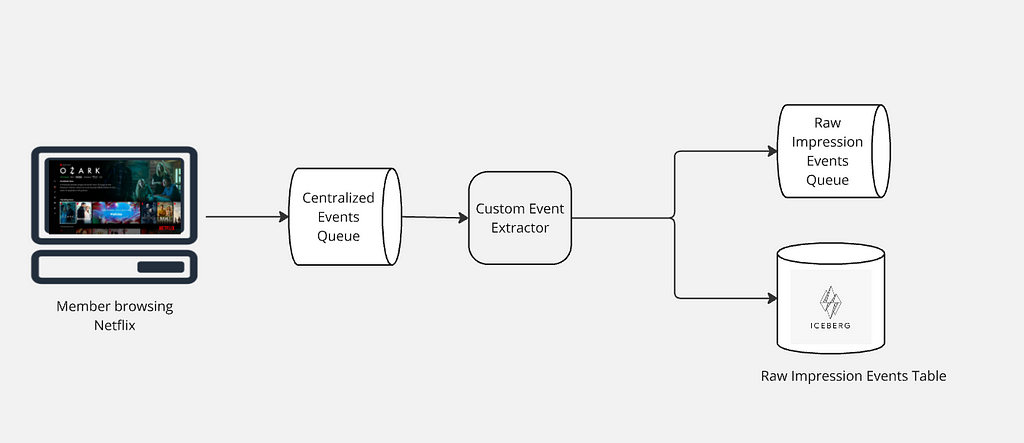
As Netflix members explore our platform, their interactions with the user interface spark a vast array of raw events. These events are promptly relayed from the client side to our servers, entering a centralized event processing queue. This queue ensures we are consistently capturing raw events from our global user base.
After raw events are collected into a centralized queue, a custom event extractor processes this data to identify and extract all impression events. These extracted events are then routed to an Apache Kafka topic for immediate processing needs and simultaneously stored in an Apache Iceberg table for long-term retention and historical analysis. This dual-path approach leverages Kafka’s capability for low-latency streaming and Iceberg’s efficient management of large-scale, immutable datasets, ensuring both real-time responsiveness and comprehensive historical data availability.
Collecting raw impression events
Filtering & Enriching Raw Impressions
Once the raw impression events are queued, a stateless Apache Flink job takes charge, meticulously processing this data. It filters out any invalid entries and enriches the valid ones with additional metadata, such as show or movie title details, and the specific page and row location where each impression was presented to users. This refined output is then structured using an Avro schema, establishing a definitive source of truth for Netflix’s impression data. The enriched data is seamlessly accessible for both real-time applications via Kafka and historical analysis through storage in an Apache Iceberg table. This dual availability ensures immediate processing capabilities alongside comprehensive long-term data retention.
Impression Source-of-Truth architecture
Ensuring High Quality Impressions
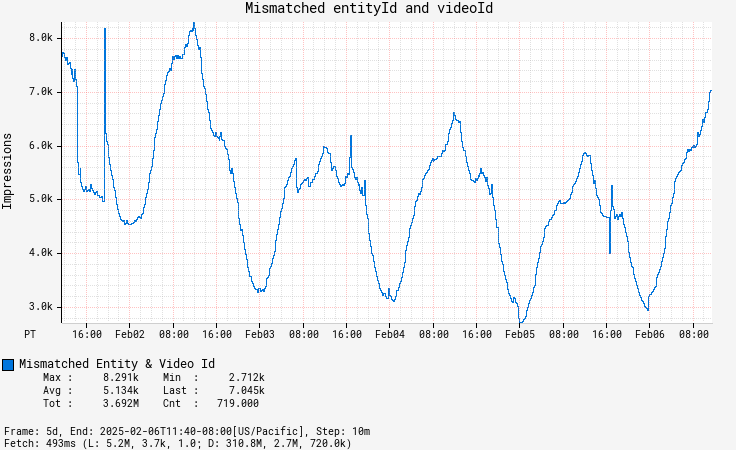
Maintaining the highest quality of impressions is a top priority. We accomplish this by gathering detailed column-level metrics that offer insights into the state and quality of each impression. These metrics include everything from validating identifiers to checking that essential columns are properly filled. The data collected feeds into a comprehensive quality dashboard and supports a tiered threshold-based alerting system. These alerts promptly notify us of any potential issues, enabling us to swiftly address regressions. Additionally, while enriching the data, we ensure that all columns are in agreement with each other, offering in-place corrections wherever possible to deliver accurate data.
Dashboard showing mismatch count between two columns- entityId and videoId
Configuration
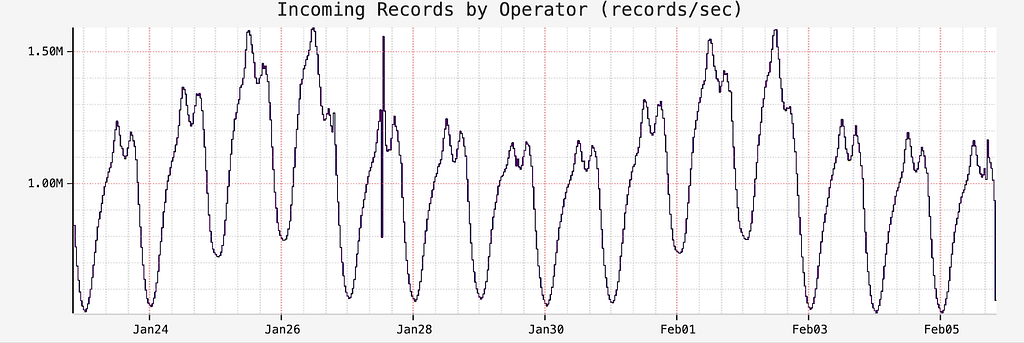
We handle a staggering volume of 1 to 1.5 million impression events globally every second, with each event approximately 1.2KB in size. To efficiently process this massive influx in real-time, we employ Apache Flink for its low-latency stream processing capabilities, which seamlessly integrates both batch and stream processing to facilitate efficient backfilling of historical data and ensure consistency across real-time and historical analyses. Our Flink configuration includes 8 task managers per region, each equipped with 8 CPU cores and 32GB of memory, operating at a parallelism of 48, allowing us to handle the necessary scale and speed for seamless performance delivery. The Flink job’s sink is equipped with a data mesh connector, as detailed in our Data Mesh platform which has two outputs: Kafka and Iceberg. This setup allows for efficient streaming of real-time data through Kafka and the preservation of historical data in Iceberg, providing a comprehensive and flexible data processing and storage solution.
Raw impressions records per second
We utilize the ‘island model’ for deploying our Flink jobs, where all dependencies for a given application reside within a single region. This approach ensures high availability by isolating regions, so if one becomes degraded, others remain unaffected, allowing traffic to be shifted between regions to maintain service continuity. Thus, all data in one region is processed by the Flink job deployed within that region.
Future Work
Addressing the Challenge of Unschematized Events
Allowing raw events to land on our centralized processing queue unschematized offers significant flexibility, but it also introduces challenges. Without a defined schema, it can be difficult to determine whether missing data was intentional or due to a logging error. We are investigating solutions to introduce schema management that maintains flexibility while providing clarity.
Automating Performance Tuning with Autoscalers
Tuning the performance of our Apache Flink jobs is currently a manual process. The next step is to integrate with autoscalers, which can dynamically adjust resources based on workload demands. This integration will not only optimize performance but also ensure more efficient resource utilization.
Improving Data Quality Alerts
Right now, there’s a lot of business rules dictating when a data quality alert needs to be fired. This leads to a lot of false positives that require manual judgement. A lot of times it is difficult to track changes leading to regression due to inadequate data lineage information. We are investing in building a comprehensive data quality platform that more intelligently identifies anomalies in our impression stream, keeps track of data lineage and data governance, and also, generates alerts notifying producers of any regressions. This approach will enhance efficiency, reduce manual oversight, and ensure a higher standard of data integrity.
Conclusion
Creating a reliable source of truth for impressions is a complex but essential task that enhances personalization and discovery experience. Stay tuned for the next part of this series, where we’ll delve into how we use this SOT dataset to create a microservice that provides impression histories. We invite you to share your thoughts in the comments and continue with us on this journey of discovering impressions.
Acknowledgments
We are genuinely grateful to our amazing colleagues whose contributions were essential to the success of Impressions: Julian Jaffe, Bryan Keller, Yun Wang, Brandon Bremen, Kyle Alford, Ron Brown and Shriya Arora.
In our previous blog post, we introduced Netflix’s TimeSeries Abstraction, a distributed service designed to store and query large volumes of temporal event data with low millisecond latencies. Today, we’re excited to present the Distributed Counter Abstraction. This counting service, built on top of the TimeSeries Abstraction, enables distributed counting at scale while maintaining similar low latency performance. As with all our abstractions, we use our Data Gateway Control Plane to shard, configure, and deploy this service globally.
Distributed counting is a challenging problem in computer science. In this blog post, we’ll explore the diverse counting requirements at Netflix, the challenges of achieving accurate counts in near real-time, and the rationale behind our chosen approach, including the necessary trade-offs.
Note: When it comes to distributed counters, terms such as ‘accurate’ or ‘precise’ should be taken with a grain of salt. In this context, they refer to a count very close to accurate, presented with minimal delays.
Use Cases and Requirements
At Netflix, our counting use cases include tracking millions of user interactions, monitoring how often specific features or experiences are shown to users, and counting multiple facets of data during A/B test experiments, among others.
At Netflix, these use cases can be classified into two broad categories:
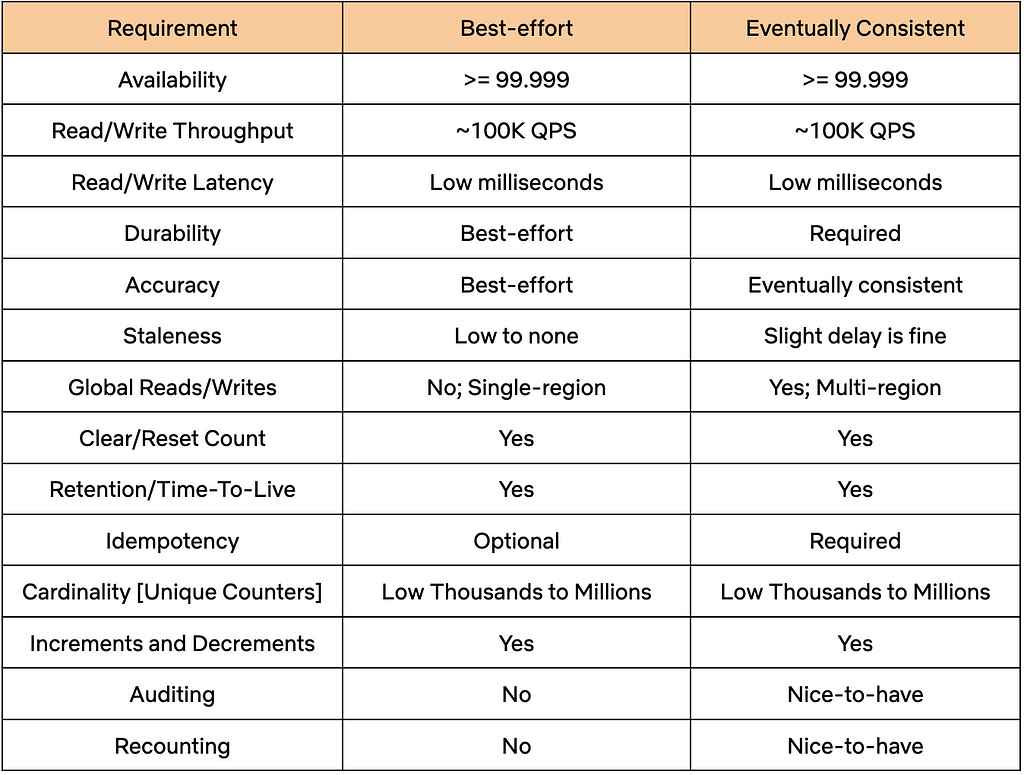
Best-Effort: For this category, the count doesn’t have to be very accurate or durable. However, this category requires near-immediate access to the current count at low latencies, all while keeping infrastructure costs to a minimum.
Eventually Consistent: This category needs accurate and durable counts, and is willing to tolerate a slight delay in accuracy and a slightly higher infrastructure cost as a trade-off.
Both categories share common requirements, such as high throughput and high availability. The table below provides a detailed overview of the diverse requirements across these two categories.
Distributed Counter Abstraction
To meet the outlined requirements, the Counter Abstraction was designed to be highly configurable. It allows users to choose between different counting modes, such as Best-Effort or Eventually Consistent, while considering the documented trade-offs of each option. After selecting a mode, users can interact with APIs without needing to worry about the underlying storage mechanisms and counting methods.
Let’s take a closer look at the structure and functionality of the API.
API
Counters are organized into separate namespaces that users set up for each of their specific use cases. Each namespace can be configured with different parameters, such as Type of Counter, Time-To-Live (TTL), and Counter Cardinality, using the service’s Control Plane.
The Counter Abstraction API resembles Java’s AtomicInteger interface:
AddCount/AddAndGetCount: Adjusts the count for the specified counter by the given delta value within a dataset. The delta value can be positive or negative. The AddAndGetCount counterpart also returns the count after performing the add operation.
The idempotency token can be used for counter types that support them. Clients can use this token to safely retry or hedge their requests. Failures in a distributed system are a given, and having the ability to safely retry requests enhances the reliability of the service.
GetCount: Retrieves the count value of the specified counter within a dataset.
Now, let’s look at the different types of counters supported within the Abstraction.
Types of Counters
The service primarily supports two types of counters: Best-Effort and Eventually Consistent, along with a third experimental type: Accurate. In the following sections, we’ll describe the different approaches for these types of counters and the trade-offs associated with each.
Best Effort Regional Counter
This type of counter is powered by EVCache, Netflix’s distributed caching solution built on the widely popular Memcached. It is suitable for use cases like A/B experiments, where many concurrent experiments are run for relatively short durations and an approximate count is sufficient. Setting aside the complexities of provisioning, resource allocation, and control plane management, the core of this solution is remarkably straightforward:
// clear counts from all replicas cache.delete(counterCacheKey, ReplicaPolicy.ALL);
EVCache delivers extremely high throughput at low millisecond latency or better within a single region, enabling a multi-tenant setup within a shared cluster, saving infrastructure costs. However, there are some trade-offs: it lacks cross-region replication for the increment operation and does not provide consistency guarantees, which may be necessary for an accurate count. Additionally, idempotency is not natively supported, making it unsafe to retry or hedge requests.
Edit: A note on probabilistic data structures:
Probabilistic data structures like HyperLogLog (HLL) can be useful for tracking an approximate number of distinct elements, like distinct views or visits to a website, but are not ideally suited for implementing distinct increments and decrements for a given key. Count-Min Sketch (CMS) is an alternative that can be used to adjust the values of keys by a given amount. Data stores like Redis support both HLL and CMS. However, we chose not to pursue this direction for several reasons:
We chose to build on top of data stores that we already operate at scale.
Probabilistic data structures do not natively support several of our requirements, such as resetting the count for a given key or having TTLs for counts. Additional data structures, including more sketches, would be needed to support these requirements.
On the other hand, the EVCache solution is quite simple, requiring minimal lines of code and using natively supported elements. However, it comes at the trade-off of using a small amount of memory per counter key.
Eventually Consistent Global Counter
While some users may accept the limitations of a Best-Effort counter, others opt for precise counts, durability and global availability. In the following sections, we’ll explore various strategies for achieving durable and accurate counts. Our objective is to highlight the challenges inherent in global distributed counting and explain the reasoning behind our chosen approach.
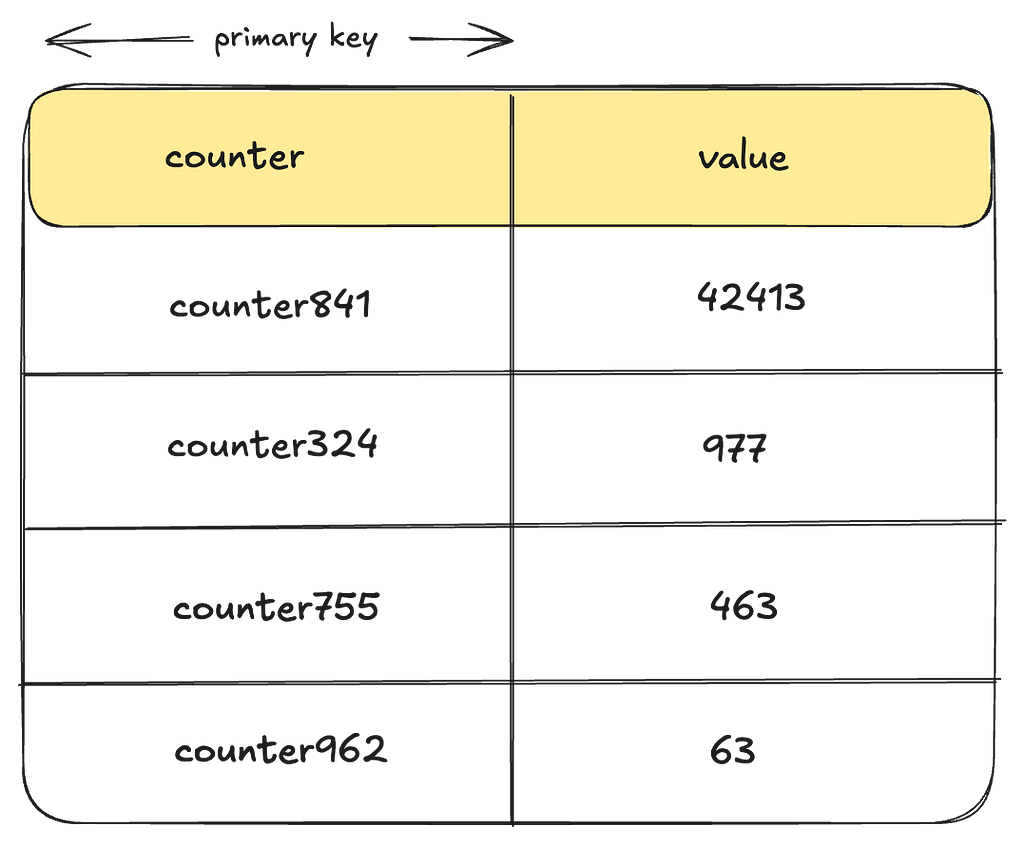
Approach 1: Storing a Single Row per Counter
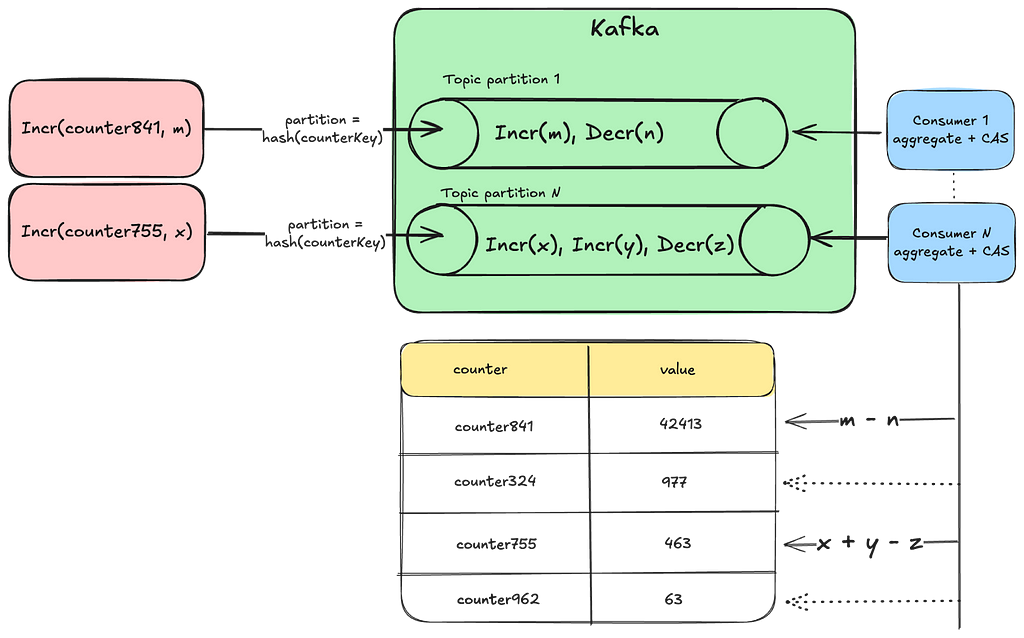
Let’s start simple by using a single row per counter key within a table in a globally replicated datastore.
Let’s examine some of the drawbacks of this approach:
Lack of Idempotency: There is no idempotency key baked into the storage data-model preventing users from safely retrying requests. Implementing idempotency would likely require using an external system for such keys, which can further degrade performance or cause race conditions.
Heavy Contention: To update counts reliably, every writer must perform a Compare-And-Swap operation for a given counter using locks or transactions. Depending on the throughput and concurrency of operations, this can lead to significant contention, heavily impacting performance.
Secondary Keys: One way to reduce contention in this approach would be to use a secondary key, such as a bucket_id, which allows for distributing writes by splitting a given counter into buckets, while enabling reads to aggregate across buckets. The challenge lies in determining the appropriate number of buckets. A static number may still lead to contention with hot keys, while dynamically assigning the number of buckets per counter across millions of counters presents a more complex problem.
Let’s see if we can iterate on our solution to overcome these drawbacks.
Approach 2: Per Instance Aggregation
To address issues of hot keys and contention from writing to the same row in real-time, we could implement a strategy where each instance aggregates the counts in memory and then flushes them to disk at regular intervals. Introducing sufficient jitter to the flush process can further reduce contention.
However, this solution presents a new set of issues:
Vulnerability to Data Loss: The solution is vulnerable to data loss for all in-memory data during instance failures, restarts, or deployments.
Inability to Reliably Reset Counts: Due to counting requests being distributed across multiple machines, it is challenging to establish consensus on the exact point in time when a counter reset occurred.
Lack of Idempotency: Similar to the previous approach, this method does not natively guarantee idempotency. One way to achieve idempotency is by consistently routing the same set of counters to the same instance. However, this approach may introduce additional complexities, such as leader election, and potential challenges with availability and latency in the write path.
That said, this approach may still be suitable in scenarios where these trade-offs are acceptable. However, let’s see if we can address some of these issues with a different event-based approach.
Approach 3: Using Durable Queues
In this approach, we log counter events into a durable queuing system like Apache Kafka to prevent any potential data loss. By creating multiple topic partitions and hashing the counter key to a specific partition, we ensure that the same set of counters are processed by the same set of consumers. This setup simplifies facilitating idempotency checks and resetting counts. Furthermore, by leveraging additional stream processing frameworks such as Kafka Streams or Apache Flink, we can implement windowed aggregations.
However, this approach comes with some challenges:
Potential Delays: Having the same consumer process all the counts from a given partition can lead to backups and delays, resulting in stale counts.
Rebalancing Partitions: This approach requires auto-scaling and rebalancing of topic partitions as the cardinality of counters and throughput increases.
Furthermore, all approaches that pre-aggregate counts make it challenging to support two of our requirements for accurate counters:
Auditing of Counts: Auditing involves extracting data to an offline system for analysis to ensure that increments were applied correctly to reach the final value. This process can also be used to track the provenance of increments. However, auditing becomes infeasible when counts are aggregated without storing the individual increments.
Potential Recounting: Similar to auditing, if adjustments to increments are necessary and recounting of events within a time window is required, pre-aggregating counts makes this infeasible.
Barring those few requirements, this approach can still be effective if we determine the right way to scale our queue partitions and consumers while maintaining idempotency. However, let’s explore how we can adjust this approach to meet the auditing and recounting requirements.
Approach 4: Event Log of Individual Increments
In this approach, we log each individual counter increment along with its event_time and event_id. The event_id can include the source information of where the increment originated. The combination of event_time and event_id can also serve as the idempotency key for the write.
However, in its simplest form, this approach has several drawbacks:
Read Latency: Each read request requires scanning all increments for a given counter potentially degrading performance.
Duplicate Work: Multiple threads might duplicate the effort of aggregating the same set of counters during read operations, leading to wasted effort and subpar resource utilization.
Wide Partitions: If using a datastore like Apache Cassandra, storing many increments for the same counter could lead to a wide partition, affecting read performance.
Large Data Footprint: Storing each increment individually could also result in a substantial data footprint over time. Without an efficient data retention strategy, this approach may struggle to scale effectively.
The combined impact of these issues can lead to increased infrastructure costs that may be difficult to justify. However, adopting an event-driven approach seems to be a significant step forward in addressing some of the challenges we’ve encountered and meeting our requirements.
How can we improve this solution further?
Netflix’s Approach
We use a combination of the previous approaches, where we log each counting activity as an event, and continuously aggregate these events in the background using queues and a sliding time window. Additionally, we employ a bucketing strategy to prevent wide partitions. In the following sections, we’ll explore how this approach addresses the previously mentioned drawbacks and meets all our requirements.
Note: From here on, we will use the words “rollup” and “aggregate” interchangeably. They essentially mean the same thing, i.e., collecting individual counter increments/decrements and arriving at the final value.
TimeSeries Event Store:
We chose the TimeSeries Data Abstraction as our event store, where counter mutations are ingested as event records. Some of the benefits of storing events in TimeSeries include:
High-Performance: The TimeSeries abstraction already addresses many of our requirements, including high availability and throughput, reliable and fast performance, and more.
Reducing Code Complexity: We reduce a lot of code complexity in Counter Abstraction by delegating a major portion of the functionality to an existing service.
TimeSeries Abstraction uses Cassandra as the underlying event store, but it can be configured to work with any persistent store. Here is what it looks like:
Handling Wide Partitions: The time_bucket and event_bucket columns play a crucial role in breaking up a wide partition, preventing high-throughput counter events from overwhelming a given partition. For more information regarding this, refer to our previous blog.
No Over-Counting: The event_time, event_id and event_item_key columns form the idempotency key for the events for a given counter, enabling clients to retry safely without the risk of over-counting.
Event Ordering: TimeSeries orders all events in descending order of time allowing us to leverage this property for events like count resets.
Event Retention: The TimeSeries Abstraction includes retention policies to ensure that events are not stored indefinitely, saving disk space and reducing infrastructure costs. Once events have been aggregated and moved to a more cost-effective store for audits, there’s no need to retain them in the primary storage.
Now, let’s see how these events are aggregated for a given counter.
Aggregating Count Events:
As mentioned earlier, collecting all individual increments for every read request would be cost-prohibitive in terms of read performance. Therefore, a background aggregation process is necessary to continually converge counts and ensure optimal read performance.
But how can we safely aggregate count events amidst ongoing write operations?
This is where the concept of Eventually Consistent counts becomes crucial. By intentionally lagging behind the current time by a safe margin, we ensure that aggregation always occurs within an immutable window.
Lets see what that looks like:
Let’s break this down:
lastRollupTs: This represents the most recent time when the counter value was last aggregated. For a counter being operated for the first time, this timestamp defaults to a reasonable time in the past.
Immutable Window and Lag: Aggregation can only occur safely within an immutable window that is no longer receiving counter events. The “acceptLimit” parameter of the TimeSeries Abstraction plays a crucial role here, as it rejects incoming events with timestamps beyond this limit. During aggregations, this window is pushed slightly further back to account for clock skews.
This does mean that the counter value will lag behind its most recent update by some margin (typically in the order of seconds). This approach does leave the door open for missed events due to cross-region replication issues. See “Future Work” section at the end.
Aggregation Process: The rollup process aggregates all events in the aggregation window since the last rollup to arrive at the new value.
Rollup Store:
We save the results of this aggregation in a persistent store. The next aggregation will simply continue from this checkpoint.
We create one such Rollup table per dataset and use Cassandra as our persistent store. However, as you will soon see in the Control Plane section, the Counter service can be configured to work with any persistent store.
LastWriteTs: Every time a given counter receives a write, we also log a last-write-timestamp as a columnar update in this table. This is done using Cassandra’s USING TIMESTAMP feature to predictably apply the Last-Write-Win (LWW) semantics. This timestamp is the same as the event_time for the event. In the subsequent sections, we’ll see how this timestamp is used to keep some counters in active rollup circulation until they have caught up to their latest value.
Rollup Cache
To optimize read performance, these values are cached in EVCache for each counter. We combine the lastRollupCount and lastRollupTsinto a single cached value per counter to prevent potential mismatches between the count and its corresponding checkpoint timestamp.
But, how do we know which counters to trigger rollups for? Let’s explore our Write and Read path to understand this better.
Add/Clear Count:
An add or clear count request writes durably to the TimeSeries Abstraction and updates the last-write-timestamp in the Rollup store. If the durability acknowledgement fails, clients can retry their requests with the same idempotency token without the risk of overcounting.Upon durability, we send a fire-and-forget request to trigger the rollup for the request counter.
GetCount:
We return the last rolled-up count as a quick point-read operation, accepting the trade-off of potentially delivering a slightly stale count. We also trigger a rollup during the read operation to advance the last-rollup-timestamp, enhancing the performance of subsequent aggregations. This process also self-remediates a stale count if any previous rollups had failed.
With this approach, the counts continually converge to their latest value. Now, let’s see how we scale this approach to millions of counters and thousands of concurrent operations using our Rollup Pipeline.
Rollup Pipeline:
Each Counter-Rollup server operates a rollup pipeline to efficiently aggregate counts across millions of counters. This is where most of the complexity in Counter Abstraction comes in. In the following sections, we will share key details on how efficient aggregations are achieved.
Light-Weight Roll-Up Event: As seen in our Write and Read paths above, every operation on a counter sends a light-weight event to the Rollup server:
Note that this event does not include the increment. This is only an indication to the Rollup server that this counter has been accessed and now needs to be aggregated. Knowing exactly which specific counters need to be aggregated prevents scanning the entire event dataset for the purpose of aggregations.
In-Memory Rollup Queues: A given Rollup server instance runs a set of in-memory queues to receive rollup events and parallelize aggregations. In the first version of this service, we settled on using in-memory queues to reduce provisioning complexity, save on infrastructure costs, and make rebalancing the number of queues fairly straightforward. However, this comes with the trade-off of potentially missing rollup events in case of an instance crash. For more details, see the “Stale Counts” section in “Future Work.”
Minimize Duplicate Effort: We use a fast non-cryptographic hash like XXHash to ensure that the same set of counters end up on the same queue. Further, we try to minimize the amount of duplicate aggregation work by having a separate rollup stack that chooses to run fewerbeefier instances.
Availability and Race Conditions: Having a single Rollup server instance can minimize duplicate aggregation work but may create availability challenges for triggering rollups. If we choose to horizontally scale the Rollup servers, we allow threads to overwrite rollup values while avoiding any form of distributed locking mechanisms to maintain high availability and performance. This approach remains safe because aggregation occurs within an immutable window. Although the concept of now() may differ between threads, causing rollup values to sometimes fluctuate, the counts will eventually converge to an accurate value within each immutable aggregation window.
Rebalancing Queues: If we need to scale the number of queues, a simple Control Plane configuration update followed by a re-deploy is enough to rebalance the number of queues.
"eventual_counter_config": { "queue_config": { "num_queues" : 8, // change to 16 and re-deploy ...
Handling Deployments: During deployments, these queues shut down gracefully, draining all existing events first, while the new Rollup server instance starts up with potentially new queue configurations. There may be a brief period when both the old and new Rollup servers are active, but as mentioned before, this race condition is managed since aggregations occur within immutable windows.
Minimize Rollup Effort: Receiving multiple events for the same counter doesn’t mean rolling it up multiple times. We drain these rollup events into a Set, ensuring a given counter is rolled up only onceduring a rollup window.
Efficient Aggregation: Each rollup consumer processes a batch of counters simultaneously. Within each batch, it queries the underlying TimeSeries abstraction in parallel to aggregate events within specified time boundaries. The TimeSeries abstraction optimizes these range scans to achieve low millisecond latencies.
Dynamic Batching: The Rollup server dynamically adjusts the number of time partitions that need to be scanned based on cardinality of counters in order to prevent overwhelming the underlying store with many parallel read requests.
Adaptive Back-Pressure: Each consumer waits for one batch to complete before issuing the rollups for the next batch. It adjusts the wait time between batches based on the performance of the previous batch. This approach provides back-pressure during rollups to prevent overwhelming the underlying TimeSeries store.
Handling Convergence:
In order to prevent low-cardinality counters from lagging behind too much and subsequently scanning too many time partitions, they are kept in constant rollup circulation. For high-cardinality counters, continuously circulating them would consume excessive memory in our Rollup queues. This is where the last-write-timestamp mentioned previously plays a crucial role. The Rollup server inspects this timestamp to determine if a given counter needs to be re-queued, ensuring that we continue aggregating until it has fully caught up with the writes.
Now, let’s see how we leverage this counter type to provide an up-to-date current count in near-realtime.
Experimental: Accurate Global Counter
We are experimenting with a slightly modified version of the Eventually Consistent counter. Again, take the term ‘Accurate’ with a grain of salt. The key difference between this type of counter and its counterpart is that the delta, representing the counts since the last-rolled-up timestamp, is computed in real-time.
And then, currentAccurateCount = lastRollupCount + delta
Aggregating this delta in real-time can impact the performance of this operation, depending on the number of events and partitions that need to be scanned to retrieve this delta. The same principle of rolling up in batches applies here to prevent scanning too many partitions in parallel. Conversely, if the counters in this dataset areaccessedfrequently, the time gap for the delta remains narrow, making this approach of fetching current counts quite effective.
Now, let’s see how all this complexity is managed by having a unified Control Plane configuration.
Control Plane
The Data Gateway Platform Control Plane manages control settings for all abstractions and namespaces, including the Counter Abstraction. Below, is an example of a control plane configuration for a namespace that supports eventually consistent counters with low cardinality:
"persistence_configuration": [ { "id": "CACHE", // Counter cache config "scope": "dal=counter", "physical_storage": { "type": "EVCACHE", // type of cache storage "cluster": "evcache_dgw_counter_tier1" // Shared EVCache cluster } }, { "id": "COUNTER_ROLLUP", "scope": "dal=counter", // Counter abstraction config "physical_storage": { "type": "CASSANDRA", // type of Rollup store "cluster": "cass_dgw_counter_uc1", // physical cluster name "dataset": "my_dataset_1" // namespace/dataset }, "counter_cardinality": "LOW", // supported counter cardinality "config": { "counter_type": "EVENTUAL", // Type of counter "eventual_counter_config": { // eventual counter type "internal_config": { "queue_config": { // adjust w.r.t cardinality "num_queues" : 8, // Rollup queues per instance "coalesce_ms": 10000, // coalesce duration for rollups "capacity_bytes": 16777216 // allocated memory per queue }, "rollup_batch_count": 32 // parallelization factor } } } }, { "id": "EVENT_STORAGE", "scope": "dal=ts", // TimeSeries Event store "physical_storage": { "type": "CASSANDRA", // persistent store type "cluster": "cass_dgw_counter_uc1", // physical cluster name "dataset": "my_dataset_1", // keyspace name }, "config": { "time_partition": { // time-partitioning for events "buckets_per_id": 4, // event buckets within "seconds_per_bucket": "600", // smaller width for LOW card "seconds_per_slice": "86400", // width of a time slice table }, "accept_limit": "5s", // boundary for immutability }, "lifecycleConfigs": { "lifecycleConfig": [ { "type": "retention", // Event retention "config": { "close_after": "518400s", "delete_after": "604800s" // 7 day count event retention } } ] } } ]
Using such a control plane configuration, we compose multiple abstraction layers using containers deployed on the same host, with each container fetching configuration specific to its scope.
Provisioning
As with the TimeSeries abstraction, our automation uses a bunch of user inputs regarding their workload and cardinalities to arrive at the right set of infrastructure and related control plane configuration. You can learn more about this process in a talk given by one of our stunning colleagues, Joey Lynch : How Netflix optimally provisions infrastructure in the cloud.
Performance
At the time of writing this blog, this service was processing close to 75K count requests/second globally across the different API endpoints and datasets:
while providing single-digit millisecond latencies for all its endpoints:
Future Work
While our system is robust, we still have work to do in making it more reliable and enhancing its features. Some of that work includes:
Regional Rollups: Cross-region replication issues can result in missed events from other regions. An alternate strategy involves establishing a rollup table for each region, and then tallying them in a global rollup table. A key challenge in this design would be effectively communicating the clearing of the counter across regions.
Error Detection and Stale Counts: Excessively stale counts can occur if rollup events are lost or if a rollup fails and isn’t retried. This isn’t an issue for frequently accessed counters, as they remain in rollup circulation. This issue is more pronounced for counters that aren’t accessed frequently. Typically, the initial read for such a counter will trigger a rollup, self-remediating the issue. However, for use cases that cannot accept potentially stale initial reads, we plan to implement improved error detection, rollup handoffs, and durable queues for resilient retries.
Conclusion
Distributed counting remains a challenging problem in computer science. In this blog, we explored multiple approaches to implement and deploy a Counting service at scale. While there may be other methods for distributed counting, our goal has been to deliver blazing fast performance at low infrastructure costs while maintaining high availability and providing idempotency guarantees. Along the way, we make various trade-offs to meet the diverse counting requirements at Netflix. We hope you found this blog post insightful.
Stay tuned for Part 3 of Composite Abstractions at Netflix, where we’ll introduce our Graph Abstraction, a new service being built on top of the Key-Value Abstractionand the TimeSeries Abstraction to handle high-throughput, low-latency graphs.
Netflix has an extensive history of using Java as our primary programming language across our vast fleet of microservices. As we pick up newer versions of Java, our JVM Ecosystem team seeks out new language features that can improve the ergonomics and performance of our systems. In a recent article, we detailed how our workloads benefited from switching to generational ZGC as our default garbage collector when we migrated to Java 21. Virtual threads is another feature we are excited to adopt as part of this migration.
For those new to virtual threads, they are described as “lightweight threads that dramatically reduce the effort of writing, maintaining, and observing high-throughput concurrent applications.” Their power comes from their ability to be suspended and resumed automatically via continuations when blocking operations occur, thus freeing the underlying operating system threads to be reused for other operations. Leveraging virtual threads can unlock higher performance when utilized in the appropriate context.
In this article we discuss one of the peculiar cases that we encountered along our path to deploying virtual threads on Java 21.
The problem
Netflix engineers raised several independent reports of intermittent timeouts and hung instances to the Performance Engineering and JVM Ecosystem teams. Upon closer examination, we noticed a set of common traits and symptoms. In all cases, the apps affected ran on Java 21 with SpringBoot 3 and embedded Tomcat serving traffic on REST endpoints. The instances that experienced the issue simply stopped serving traffic even though the JVM on those instances remained up and running. One clear symptom characterizing the onset of this issue is a persistent increase in the number of sockets in closeWait state as illustrated by the graph below:
Collected diagnostics
Sockets remaining in closeWait state indicate that the remote peer closed the socket, but it was never closed on the local instance, presumably because the application failed to do so. This can often indicate that the application is hanging in an abnormal state, in which case application thread dumps may reveal additional insight.
In order to troubleshoot this issue, we first leveraged our alerts system to catch an instance in this state. Since we periodically collect and persist thread dumps for all JVM workloads, we can often retroactively piece together the behavior by examining these thread dumps from an instance. However, we were surprised to find that all our thread dumps show a perfectly idle JVM with no clear activity. Reviewing recent changes revealed that these impacted services enabled virtual threads, and we knew that virtual thread call stacks do not show up in jstack-generated thread dumps. To obtain a more complete thread dump containing the state of the virtual threads, we used the “jcmd Thread.dump_to_file” command instead. As a last-ditch effort to introspect the state of JVM, we also collected a heap dump from the instance.
Analysis
Thread dumps revealed thousands of “blank” virtual threads:
#119821 "" virtual
#119820 "" virtual
#119823 "" virtual
#120847 "" virtual
#119822 "" virtual ...
These are the VTs (virtual threads) for which a thread object is created, but has not started running, and as such, has no stack trace. In fact, there were approximately the same number of blank VTs as the number of sockets in closeWait state. To make sense of what we were seeing, we need to first understand how VTs operate.
A virtual thread is not mapped 1:1 to a dedicated OS-level thread. Rather, we can think of it as a task that is scheduled to a fork-join thread pool. When a virtual thread enters a blocking call, like waiting for a Future, it relinquishes the OS thread it occupies and simply remains in memory until it is ready to resume. In the meantime, the OS thread can be reassigned to execute other VTs in the same fork-join pool. This allows us to multiplex a lot of VTs to just a handful of underlying OS threads. In JVM terminology, the underlying OS thread is referred to as the “carrier thread” to which a virtual thread can be “mounted” while it executes and “unmounted” while it waits. A great in-depth description of virtual thread is available in JEP 444.
In our environment, we utilize a blocking model for Tomcat, which in effect holds a worker thread for the lifespan of a request. By enabling virtual threads, Tomcat switches to virtual execution. Each incoming request creates a new virtual thread that is simply scheduled as a task on a Virtual Thread Executor. We can see Tomcat creates a VirtualThreadExecutor here.
Tying this information back to our problem, the symptoms correspond to a state when Tomcat keeps creating a new web worker VT for each incoming request, but there are no available OS threads to mount them onto.
Why is Tomcat stuck?
What happened to our OS threads and what are they busy with? As described here, a VT will be pinned to the underlying OS thread if it performs a blocking operation while inside a synchronized block or method. This is exactly what is happening here. Here is a relevant snippet from a thread dump obtained from the stuck instance:
In this stack trace, we enter the synchronization in brave.RealSpan.finish(RealSpan.java:134). This virtual thread is effectively pinned — it is mounted to an actual OS thread even while it waits to acquire a reentrant lock. There are 3 VTs in this exact state and another VT identified as “<redacted> @DefaultExecutor – 46542” that also follows the same code path. These 4 virtual threads are pinned while waiting to acquire a lock. Because the app is deployed on an instance with 4 vCPUs, the fork-join pool that underpins VT execution also contains 4 OS threads. Now that we have exhausted all of them, no other virtual thread can make any progress. This explains why Tomcat stopped processing the requests and why the number of sockets in closeWait state keeps climbing. Indeed, Tomcat accepts a connection on a socket, creates a request along with a virtual thread, and passes this request/thread to the executor for processing. However, the newly created VT cannot be scheduled because all of the OS threads in the fork-join pool are pinned and never released. So these newly created VTs are stuck in the queue, while still holding the socket.
Who has the lock?
Now that we know VTs are waiting to acquire a lock, the next question is: Who holds the lock? Answering this question is key to understanding what triggered this condition in the first place. Usually a thread dump indicates who holds the lock with either “- locked <0x…> (at …)” or “Locked ownable synchronizers,” but neither of these show up in our thread dumps. As a matter of fact, no locking/parking/waiting information is included in the jcmd-generated thread dumps. This is a limitation in Java 21 and will be addressed in the future releases. Carefully combing through the thread dump reveals that there are a total of 6 threads contending for the same ReentrantLock and associated Condition. Four of these six threads are detailed in the previous section. Here is another thread:
Note that while this thread seemingly goes through the same code path for finishing a span, it does not go through a synchronized block. Finally here is the 6th thread:
This is actually a normal platform thread, not a virtual thread. Paying particular attention to the line numbers in this stack trace, it is peculiar that the thread seems to be blocked within the internal acquire() method aftercompleting the wait. In other words, this calling thread owned the lock upon entering awaitNanos(). We know the lock was explicitly acquired here. However, by the time the wait completed, it could not reacquire the lock. Summarizing our thread dump analysis:
There are 5 virtual threads and 1 regular thread waiting for the lock. Out of those 5 VTs, 4 of them are pinned to the OS threads in the fork-join pool. There’s still no information on who owns the lock. As there’s nothing more we can glean from the thread dump, our next logical step is to peek into the heap dump and introspect the state of the lock.
Inspecting the lock
Finding the lock in the heap dump was relatively straightforward. Using the excellent Eclipse MAT tool, we examined the objects on the stack of the AsyncReporter non-virtual thread to identify the lock object. Reasoning about the current state of the lock was perhaps the trickiest part of our investigation. Most of the relevant code can be found in the AbstractQueuedSynchronizer.java. While we don’t claim to fully understand the inner workings of it, we reverse-engineered enough of it to match against what we see in the heap dump. This diagram illustrates our findings:
First off, the exclusiveOwnerThread field is null (2), signifying that no one owns the lock. We have an “empty” ExclusiveNode (3) at the head of the list (waiter is null and status is cleared) followed by another ExclusiveNode with waiter pointing to one of the virtual threads contending for the lock — #119516 (4). The only place we found that clears the exclusiveOwnerThread field is within the ReentrantLock.Sync.tryRelease() method (source link). There we also set state = 0 matching the state that we see in the heap dump (1).
With this in mind, we traced the code path to release() the lock. After successfully calling tryRelease(), the lock-holding thread attempts to signal the next waiter in the list. At this point, the lock-holding thread is still at the head of the list, even though ownership of the lock is effectively released. The next node in the list points to the thread that is about to acquire the lock.
To understand how this signaling works, let’s look at the lock acquire path in the AbstractQueuedSynchronizer.acquire() method. Grossly oversimplifying, it’s an infinite loop, where threads attempt to acquire the lock and then park if the attempt was unsuccessful:
When the lock-holding thread releases the lock and signals to unpark the next waiter thread, the unparked thread iterates through this loop again, giving it another opportunity to acquire the lock. Indeed, our thread dump indicates that all of our waiter threads are parked on line 754. Once unparked, the thread that managed to acquire the lock should end up in this code block, effectively resetting the head of the list and clearing the reference to the waiter.
To restate this more concisely, the lock-owning thread is referenced by the head node of the list. Releasing the lock notifies the next node in the list while acquiring the lock resets the head of the list to the current node. This means that what we see in the heap dump reflects the state when one thread has already released the lock but the next thread has yet to acquire it. It’s a weird in-between state that should be transient, but our JVM is stuck here. We know thread #119516 was notified and is about to acquire the lock because of the ExclusiveNode state we identified at the head of the list. However, thread dumps show that thread #119516 continues to wait, just like other threads contending for the same lock. How can we reconcile what we see between the thread and heap dumps?
The lock with no place to run
Knowing that thread #119516 was actually notified, we went back to the thread dump to re-examine the state of the threads. Recall that we have 6 total threads waiting for the lock with 4 of the virtual threads each pinned to an OS thread. These 4 will not yield their OS thread until they acquire the lock and proceed out of the synchronized block. #107 “AsyncReporter <redacted>” is a regular platform thread, so nothing should prevent it from proceeding if it acquires the lock. This leaves us with the last thread: #119516. It is a VT, but it is not pinned to an OS thread. Even if it’s notified to be unparked, it cannot proceed because there are no more OS threads left in the fork-join pool to schedule it onto. That’s exactly what happens here — although #119516 is signaled to unpark itself, it cannot leave the parked state because the fork-join pool is occupied by the 4 other VTs waiting to acquire the same lock. None of those pinned VTs can proceed until they acquire the lock. It’s a variation of the classic deadlock problem, but instead of 2 locks we have one lock and a semaphore with 4 permits as represented by the fork-join pool.
Now that we know exactly what happened, it was easy to come up with a reproducible test case.
Conclusion
Virtual threads are expected to improve performance by reducing overhead related to thread creation and context switching. Despite some sharp edges as of Java 21, virtual threads largely deliver on their promise. In our quest for more performant Java applications, we see further virtual thread adoption as a key towards unlocking that goal. We look forward to Java 23 and beyond, which brings a wealth of upgrades and hopefully addresses the integration between virtual threads and locking primitives.
This exploration highlights just one type of issue that performance engineers solve at Netflix. We hope this glimpse into our problem-solving approach proves valuable to others in their future investigations.
We are thrilled to announce that the Maestro source code is now open to the public! Please visit the Maestro GitHub repository to get started. If you find it useful, please give us a star.
What is Maestro
Maestro is a general-purpose, horizontally scalable workflow orchestrator designed to manage large-scale workflows such as data pipelines and machine learning model training pipelines. It oversees the entire lifecycle of a workflow, from start to finish, including retries, queuing, task distribution to compute engines, etc.. Users can package their business logic in various formats such as Docker images, notebooks, bash script, SQL, Python, and more. Unlike traditional workflow orchestrators that only support Directed Acyclic Graphs (DAGs), Maestro supports both acyclic and cyclic workflows and also includes multiple reusable patterns, including foreach loops, subworkflow, and conditional branch, etc.
Our Journey with Maestro
Since we first introduced Maestro in this blog post, we have successfully migrated hundreds of thousands of workflows to it on behalf of users with minimal interruption. The transition was seamless, and Maestro has met our design goals by handling our ever-growing workloads. Over the past year, we’ve seen a remarkable 87.5% increase in executed jobs. Maestro now launches thousands of workflow instances and runs half a million jobs daily on average, and has completed around 2 million jobs on particularly busy days.
Scalability and Versatility
Maestro is a fully managed workflow orchestrator that provides Workflow-as-a-Service to thousands of end users, applications, and services at Netflix. It supports a wide range of workflow use cases, including ETL pipelines, ML workflows, AB test pipelines, pipelines to move data between different storages, etc. Maestro’s horizontal scalability ensures it can manage both a large number of workflows and a large number of jobs within a single workflow.
At Netflix, workflows are intricately connected. Splitting them into smaller groups and managing them across different clusters adds unnecessary complexity and degrades the user experience. This approach also requires additional mechanisms to coordinate these fragmented workflows. Since Netflix’s data tables are housed in a single data warehouse, we believe a single orchestrator should handle all workflows accessing it.
Join us on this exciting journey by exploring the Maestro GitHub repository and contributing to its ongoing development. Your support and feedback are invaluable as we continue to improve the Maestro project.
Introducing Maestro
Netflix Maestro offers a comprehensive set of features designed to meet the diverse needs of both engineers and non-engineers. It includes the common functions and reusable patterns applicable to various use cases in a loosely coupled way.
A workflow definition is defined in a JSON format. Maestro combines user-supplied fields with those managed by Maestro to form a flexible and powerful orchestration definition. An example can be found in the Maestro repository wiki.
A Maestro workflow definition comprises two main sections: properties and versioned workflow including its metadata. Properties include author and owner information, and execution settings. Maestro preserves key properties across workflow versions, such as author and owner information, run strategy, and concurrency settings. This consistency simplifies management and aids in trouble-shootings. If the ownership of the current workflow changes, the new owner can claim the ownership of the workflows without creating a new workflow version. Users can also enable the triggering or alerting features for a given workflow over the properties.
Versioned workflow includes attributes like a unique identifier, name, description, tags, timeout settings, and criticality levels (low, medium, high) for prioritization. Each workflow change creates a new version, enabling tracking and easy reversion, with the active or the latest version used by default. A workflow consists of steps, which are the nodes in the workflow graph defined by users. Steps can represent jobs, another workflow using subworkflow step, or a loop using foreach step. Steps consist of unique identifiers, step types, tags, input and output step parameters, step dependencies, retry policies, and failure mode, step outputs, etc. Maestro supports configurable retry policies based on error types to enhance step resilience.
This high-level overview of Netflix Maestro’s workflow definition and properties highlights its flexibility to define complex workflows. Next, we dive into some of the useful features in the following sections.
Workflow Run Strategy
Users want to automate data pipelines while retaining control over the execution order. This is crucial when workflows cannot run in parallel or must halt current executions when new ones occur. Maestro uses predefined run strategies to decide whether a workflow instance should run or not. Here is the list of predefined run strategies Maestro offers.
Sequential Run Strategy This is the default strategy used by maestro, which runs workflows one at a time based on a First-In-First-Out (FIFO) order. With this run strategy, Maestro runs workflows in the order they are triggered. Note that an execution does not depend on the previous states. Once a workflow instance reaches one of the terminal states, whether succeeded or not, Maestro will start the next one in the queue.
Strict Sequential Run Strategy With this run strategy, Maestro will run workflows in the order they are triggered but block execution if there’s a blocking error in the workflow instance history. Newly triggered workflow instances are queued until the error is resolved by manually restarting the failed instances or marking the failed ones unblocked.
In the above example, run5 fails at 5AM, then later runs are queued but do not run. When someone manually marks run5 unblocked or restarts it, then the workflow execution will resume. This run strategy is useful for time insensitive but business critical workflows. This gives the workflow owners the option to review the failures at a later time and unblock the executions after verifying the correctness.
First-only Run Strategy With this run strategy, Maestro ensures that the running workflow is complete before queueing a new workflow instance. If a new workflow instance is queued while the current one is still running, Maestro will remove the queued instance. Maestro will execute a new workflow instance only if there is no workflow instance currently running, effectively turning off queuing with this run strategy. This approach helps to avoid idempotency issues by not queuing new workflow instances.
Last-only Run Strategy With this run strategy, Maestro ensures the running workflow is the latest triggered one and keeps only the last instance. If a new workflow instance is queued while there is an existing workflow instance already running, Maestro will stop the running instance and execute the newly triggered one. This is useful if a workflow is designed to always process the latest data, such as processing the latest snapshot of an entire table each time.
Parallel with Concurrency Limit Run Strategy With this run strategy, Maestro will run multiple triggered workflow instances in parallel, constrained by a predefined concurrency limit. This helps to fan out and distribute the execution, enabling the processing of large amounts of data within the time limit. A common use case for this strategy is for backfilling the old data.
Parameters and Expression Language Support
In Maestro, parameters play an important role. Maestro supports dynamic parameters with code injection, which is super useful and powerful. This feature significantly enhances the flexibility and dynamism of workflows, allowing using parameters to control execution logic and enable state sharing between workflows and their steps, as well as between upstream and downstream steps. Together with other Maestro features, it makes the defining of workflows dynamic and enables users to define parameterized workflows for complex use cases.
However, code injection introduces significant security and safety concerns. For example, users might unintentionally write an infinite loop that creates an array and appends items to it, eventually crashing the server with out-of-memory (OOM) issues. While one approach could be to ask users to embed the injected code within their business logic instead of the workflow definition, this would impose additional work on users and tightly couple their business logic with the workflow. In certain cases, this approach blocks users to design some complex parameterized workflows.
To mitigate these risks and assist users to build parameterized workflows, we developed our own customized expression language parser, a simple, secure, and safe expression language (SEL). SEL supports code injection while incorporating validations during syntax tree parsing to protect the system. It leverages the Java Security Manager to restrict access, ensuring a secure and controlled environment for code execution.
Simple, Secure, and Safe Expression Language (SEL) SEL is a homemade simple, secure, and safe expression language (SEL) to address the risks associated with code injection within Maestro parameterized workflows. It is a simple expression language and the grammar and syntax follow JLS (Java Language Specifications). SEL supports a subset of JLS, focusing on Maestro use cases. For example, it supports data types for all Maestro parameter types, raising errors, datetime handling, and many predefined utility methods. SEL also includes additional runtime checks, such as loop iteration limits, array size checks, object memory size limits and so on, to enhance security and reliability. For more details about SEL, please refer to the Maestro GitHub documentation.
Output Parameters To further enhance parameter support, Maestro allows for callable step execution, which returns output parameters from user execution back to the system. The output data is transmitted to Maestro via its REST API, ensuring that the step runtime does not have direct access to the Maestro database. This approach significantly reduces security concerns.
Parameterized Workflows Thanks to the powerful parameter support, users can easily create parameterized workflows in addition to static ones. Users enjoy defining parameterized workflows because they are easy to manage and troubleshoot while being powerful enough to solve complex use cases.
Static workflows are simple and easy to use but come with limitations. Often, users have to duplicate the same workflow multiple times to accommodate minor changes. Additionally, workflow and jobs cannot share the states without using parameters.
On the other hand, completely dynamic workflows can be challenging to manage and support. They are difficult to debug or troubleshoot and hard to be reused by others.
Parameterized workflows strike a balance by being initialized step by step at runtime based on user defined parameters. This approach provides great flexibility for users to control the execution at runtime while remaining easy to manage and understand.
As we described in the previous Maestro blog post, parameter support enables the creation of complex parameterized workflows, such as backfill data pipelines.
Workflow Execution Patterns
Maestro provides multiple useful building blocks that allow users to easily define dataflow patterns or other workflow patterns. It provides support for common patterns directly within the Maestro engine. Direct engine support not only enables us to optimize these patterns but also ensures a consistent approach to implementing them. Next, we will talk about the three major building blocks that Maestro provides.
Foreach Support In Maestro, the foreach pattern is modeled as a dedicated step within the original workflow definition. Each iteration of the foreach loop is internally treated as a separate workflow instance, which scales similarly as any other Maestro workflow based on the step executions (i.e. a sub-graph) defined within the foreach definition block. The execution of sub-graph within a foreach step is delegated to a separate workflow instance. Foreach step then monitors and collects the status of these foreach workflow instances, each managing the execution of a single iteration. For more details, please refer to our previous Maestro blog post.
The foreach pattern is frequently used to repeatedly run the same jobs with different parameters, such as data backfilling or machine learning model tuning. It would be tedious and time consuming to request users to explicitly define each iteration in the workflow definition (potentially hundreds of thousands of iterations). Additionally, users would need to create new workflows if the foreach range changes, further complicating the process.
Conditional Branch Support The conditional branch feature allows subsequent steps to run only if specific conditions in the upstream step are met. These conditions are defined using the SEL expression language, which is evaluated at runtime. Combined with other building blocks, users can build powerful workflows, e.g. doing some remediation if the audit check step fails and then run the job again.
Subworkflow Support The subworkflow feature allows a workflow step to run another workflow, enabling the sharing of common functions across multiple workflows. This effectively enables “workflow as a function” and allows users to build a graph of workflows. For example, we have observed complex workflows consisting of hundreds of subworkflows to process data across hundreds tables, where subworkflows are provided by multiple teams.
These patterns can be combined together to build composite patterns for complex workflow use cases. For instance, we can loop over a set of subworkflows or run nested foreach loops. One example that Maestro users developed is an auto-recovery workflow that utilizes both conditional branch and subworkflow features to handle errors and retry jobs automatically.
In this example, subworkflow `job1` runs another workflow consisting of extract-transform-load (ETL) and audit jobs. Next, a status check job leverages the Maestro parameter and SEL support to retrieve the status of the previous job. Based on this status, it can decide whether to complete the workflow or to run a recovery job to address any data issues. After resolving the issue, it then executes subworkflow `job2`, which runs the same workflow as subworkflow `job1`.
Step Runtime and Step Parameter
Step Runtime Interface In Maestro, we use step runtime to describe a job at execution time. The step runtime interface defines two pieces of information:
A set of basic APIs to control the behavior of a step instance at execution runtime.
Some simple data structures to track step runtime state and execution result.
Maestro offers a few step runtime implementations such as foreach step runtime, subworkflow step runtime (mentioned in previous section). Each implementation defines its own logic for start, execute and terminate operations. At runtime, these operations control the way to initialize a step instance, perform the business logic and terminate the execution under certain conditions (i.e. manual intervention by users).
Also, Maestro step runtime internally keeps track of runtime state as well as the execution result of the step. The runtime state is used to determine the next state transition of the step and tell if it has failed or terminated. The execution result hosts both step artifacts and the timeline of step execution history, which are accessible by subsequent steps.
Step Parameter Merging To control step behavior in a dynamic way, Maestro supports both runtime parameters and tags injection in step runtime. This makes a Maestro step more flexible to absorb runtime changes (i.e. overridden parameters) before actually being started. Maestro internally maintains a step parameter map that is initially empty and is updated by merging step parameters in the order below:
Default General Parameters: Parameters merging starts from default parameters that in general every step should have. For example, workflow_instance_id, step_instance_uuid, step_attempt_id and step_id are required parameters for each maestro step. They are internally reserved by maestro and cannot be passed by users.
Injected Parameters: Maestro then merges injected parameters (if present) into the parameter map. The injected parameters come from step runtime, which are dynamically generated based on step schema. Each type of step can have its own schema with specific parameters associated with this step. The step schema can evolve independently with no need to update Maestro code.
Default Typed Parameters: After injecting runtime parameters, Maestro tries to merge default parameters that are related to a specific type of step. For example, foreach step has loop_params and loop_index default parameters which are internally set by maestro and used for foreach step only.
Workflow and Step Info Parameters: These parameters contain information about step and the workflow it belongs to. This can be identity information, i.e. workflow_id and will be merged to step parameter map if present.
Undefined New Parameters: When starting or restarting a maestro workflow instance, users can specify new step parameters that are not present in initial step definition. ParamsManager merges these parameters to ensure they are available at execution time.
Step Definition Parameters: These step parameters are defined by users at definition time and get merged if they are not empty.
Run and Restart Parameters: When starting or restarting a maestro workflow instance, users can override defined parameters by providing run or restart parameters. These two types of parameters are merged at the end so that step runtime can see the most recent and accurate parameter space.
The parameters merging logic can be visualized in the diagram below.
Step Dependencies and Signals
Steps in the Maestro execution workflow graph can express execution dependencies using step dependencies. A step dependency specifies the data-related conditions required by a step to start execution. These conditions are usually defined based on signals, which are pieces of messages carrying information such as parameter values and can be published through step outputs or external systems like SNS or Kafka messages.
Signals in Maestro serve both signal trigger pattern and signal dependencies (a publisher-subscriber) pattern. One step can publish an output signal (a sample example) that can unblock the execution of multiple other steps that depend on it. A signal definition includes a list of mapped parameters, allowing Maestro to perform “signal matching” on a subset of fields. Additionally, Maestro supports signal operators like <, >, etc., on signal parameter values.
Netflix has built various abstractions on top of the concept of signals. For instance, a ETL workflow can update a table with data and send signals that unblock steps in downstream workflows dependent on that data. Maestro supports “signal lineage,” which allows users to navigate all historical instances of signals and the workflow steps that match (i.e. publishing or consuming) those signals. Signal triggering guarantees exactly-once execution for the workflow subscribing a signal or a set of joined signals. This approach is efficient, as it conserves resources by only executing the workflow or step when the specified conditions in the signals are met. A signal service is implemented for those advanced abstractions. Please refer to the Maestro blog for further details on it.
Breakpoint
Maestro allows users to set breakpoints on workflow steps, functioning similarly to code-level breakpoints in an IDE. When a workflow instance executes and reaches a step with a breakpoint, that step enters a “paused” state. This halts the workflow graph’s progression until a user manually resumes from the breakpoint. If multiple instances of a workflow step are paused at a breakpoint, resuming one instance will only affect that specific instance, leaving the others in a paused state. Deleting the breakpoint will cause all paused step instances to resume.
This feature is particularly useful during the initial development of a workflow, allowing users to inspect step executions and output data. It is also beneficial when running a step multiple times in a “foreach” pattern with various input parameters. Setting a single breakpoint on a step will cause all iterations of the foreach loop to pause at that step for debugging purposes. Additionally, the breakpoint feature allows human intervention during the workflow execution and can also be used for other purposes, e.g. supporting mutating step states while the workflow is running.
Timeline
Maestro includes a step execution timeline, capturing all significant events such as execution state machine changes and the reasoning behind them. This feature is useful for debugging, providing insights into the status of a step. For example, it logs transitions such as “Created” and “Evaluating params”, etc. An example of a timeline is included here for reference. The implemented step runtimes can add the timeline events into the timeline to surface the execution information to the end users.
Retry Policies
Maestro supports retry policies for steps that reach a terminal state due to failure. Users can specify the number of retries and configure retry policies, including delays between retries and exponential backoff strategies, in addition to fixed interval retries. Maestro distinguishes between two types of retries: “platform” and “user.” Platform retries address platform-level errors unrelated to user logic, while user retries are for user-defined conditions. Each type can have its own set of retry policies.
Automatic retries are beneficial for handling transient errors that can be resolved without user intervention. Maestro provides the flexibility to set retries to zero for non-idempotent steps to avoid retry. This feature ensures that users have control over how retries are managed based on their specific requirements.
Aggregated View
Because a workflow instance can have multiple runs, it is important for users to see an aggregated state of all steps in the workflow instance. Aggregated view is computed by merging base aggregated view with current runs instance step statuses. For example, as you can see on the figure below simulating a simple case, there is a first run, where step1 and step2 succeeded, step3 failed, and step4 and step5 have not started. When the user restarts the run, the run starts from step3 in run 2 with step1 and step2 skipped which succeeded in the previous run. After all steps succeed, the aggregated view shows the run states for all steps.
Rollup
Rollup provides a high-level summary of a workflow instance, detailing the status of each step and the count of steps in each status. It flattens steps across the current instance and any nested non-inline workflows like subworkflows or foreach steps. For instance, if a successful workflow has three steps, one of which is a subworkflow corresponding to a five-step workflow, the rollup will indicate that seven steps succeeded. Only leaf steps are counted in the rollup, as other steps serve merely as pointers to concrete workflows.
Rollup also retains references to any non-successful steps, offering a clear overview of step statuses and facilitating easy navigation to problematic steps, even within nested workflows. The aggregated rollup for a workflow instance is calculated by combining the current run’s runtime data with a base rollup. The current state is derived from the statuses of active steps, including aggregated rollups for foreach and subworkflow steps. The base rollup is established when the workflow instance begins and includes statuses of inline steps (excluding foreach and subworkflows) from the previous run that are not part of the current run.
For subworkflow steps, the rollup simply reflects the rollup of the subworkflow instance. For foreach steps, the rollup combines the base rollup of the foreach step with the current state rollup. The base is derived from the previous run’s aggregated rollup, excluding the iterations to be restarted in the new run. The current state is periodically updated by aggregating rollups of running iterations until all iterations reach a terminal state.
Due to these processes, the rollup model is eventually consistent. While the figure below illustrates a straightforward example of rollup, the calculations can become complex and recursive, especially with multiple levels of nested foreaches and subworkflows.
Maestro Event Publishing
When workflow definition, workflow instance or step instance is changed, Maestro generates an event, processes it internally and publishes the processed event to external system(s). Maestro has both internal and external events. The internal event tracks changes within the life cycle of workflow, workflow instance or step instance. It is published to an internal queue and processed within Maestro. After internal events are processed, some of them will be transformed into external event and sent out to the external queue (i.e. SNS, Kafka). The external event carries maestro status change information for downstream services. The event publishing flow is illustrated in the diagram below:
As shown in the diagram, the Maestro event processor bridges the two aforementioned Maestro events. It listens on the internal queue to get the published internal events. Within the processor, the internal job event is processed based on its type and gets converted to an external event if needed. The notification publisher at the end emits the external event so that downstream services can consume.
The downstream services are mostly event-driven. The Maestro event carries the most useful message for downstream services to capture different changes in Maestro. In general, these changes can be classified into two categories: workflow change and instance status change. The workflow change event is associated with actions at workflow level, i.e definition or properties of a workflow has changed. Meanwhile, instance status change tracks status transition on workflow instance or step instance.
Get Started with Maestro
Maestro has been extensively used within Netflix, and today, we are excited to make the Maestro source code publicly available. We hope that the scalability and usability that Maestro offers can expedite workflow development outside Netflix. We invite you to try Maestro, use it within your organization, and contribute to its development.
You can find the Maestro code repository at github.com/Netflix/maestro. If you have any questions, thoughts, or comments about Maestro, please feel free to create a GitHub issue in the Maestro repository. We are eager to hear from you.
We are taking workflow orchestration to the next level and constantly solving new problems and challenges, please stay tuned for updates. If you are passionate about solving large scale orchestration problems, please join us.
Acknowledgements
Thanks to other Maestro team members, Binbing Hou, Zhuoran Dong, Brittany Truong, Deepak Ramalingam, Moctar Ba, for their contributions to the Maestro project. Thanks to our Product Manager Ashim Pokharel for driving the strategy and requirements. We’d also like to thank Andrew Seier, Romain Cledat, Olek Gorajek, and other stunning colleagues at Netflix for their contributions to the Maestro project. We also thank Prashanth Ramdas, Eva Tse, David Noor, Charles Smith and other leaders of Netflix engineering organizations for their constructive feedback and suggestions on the Maestro project.
In November 2020, we introduced the concept of prioritized load shedding at the API gateway level in our blog post, Keeping Netflix Reliable Using Prioritized Load Shedding. Today, we’re excited to dive deeper into how we’ve extended this strategy to the individual service level, focusing on the video streaming control plane and data plane, to further enhance user experience and system resilience.
The Evolution of Load Shedding at Netflix
At Netflix, ensuring a seamless viewing experience for millions of users simultaneously is paramount. Our initial approach for prioritized load shedding was implemented at the Zuul API gateway layer. This system effectively manages different types of network traffic, ensuring that critical playback requests receive priority over less critical telemetry traffic.
Building on this foundation, we recognized the need to apply a similar prioritization logic deeper within our architecture, specifically at the service layer where different types of requests within the same service could be prioritized differently. The advantages of applying these techniques at the service level in addition to our edge API gateway are:
Service teams can own their prioritization logic and can apply finer grained prioritization.
This can be used for backend to backend communication, i.e. for services not sitting behind our edge API gateway.
Services can use cloud capacity more efficiently by combining different request types into one cluster and shedding low priority requests when necessary instead of maintaining separate clusters for failure isolation.
PlayAPI is a critical backend service on the video streaming control plane, responsible for handling device initiated manifest and license requests necessary to start playback. We categorize these requests into two types based on their criticality:
User-Initiated Requests (critical): These requests are made when a user hits play and directly impact the user’s ability to start watching a show or a movie.
Pre-fetch Requests (non-critical): These requests are made optimistically when a user browses content without the user hitting play, to reduce latency should the user decide to watch a particular title. A failure in only pre-fetch requests does not result in a playback failure, but slightly increases the latency between pressing play and video appearing on screen.
Netflix on Chrome making pre-fetch requests to PlayAPI while the user is browsing content
The Problem
In order to handle large traffic spikes, high backend latency, or an under-scaled backend service, PlayAPI previously used a concurrency limiter to throttle requests that would reduce the availability of both user-initiated and prefetch requests equally. This was not ideal because:
Spikes in pre-fetch traffic reduced availability for user-initiated requests
Increased backend latency reduced availability for user-initiated requests and pre-fetch requests equally, when the system had enough capacity to serve all user-initiated requests.
Sharding the critical and non-critical requests into separate clusters was an option, which addressed problem 1 and added failure isolation between the two types of requests, however it came with a higher compute cost. Another disadvantage of sharding is that it adds some operational overhead — engineers need to make sure CI/CD, auto-scaling, metrics, and alerts are enabled for the new cluster.
Option 1 — No isolationOption 2 — Isolation but higher compute cost
Our Solution
We implemented a concurrency limiter within PlayAPI that prioritizes user-initiated requests over prefetch requests without physically sharding the two request handlers. This mechanism uses the partitioning functionality of the open source Netflix/concurrency-limits Java library. We create two partitions in our limiter:
Pre-fetch Partition: Utilizes only excess capacity.
Option 3 — Single cluster with prioritized load-shedding offers application-level isolation with lower compute cost. Each instance serves both types of requests and has a partition whose size adjusts dynamically to ensure that pre-fetch requests only get excess capacity. This allows user-initiated requests to “steal” pre-fetch capacity when necessary.
The partitioned limiter is configured as a pre-processing Servlet Filter that uses HTTP headers sent by devices to determine a request’s criticality, thus avoiding the need to read and parse the request body for rejected requests. This ensures that the limiter is not itself a bottleneck and can effectively reject requests while using minimal CPU. As an example, the filter can be initialized as
Filter filter = new ConcurrencyLimitServletFilter( new ServletLimiterBuilder() .named("playapi") .partitionByHeader("X-Netflix.Request-Name") .partition("user-initiated", 1.0) .partition("pre-fetch", 0.0) .build());
Note that in steady state, there is no throttling and the prioritization has no effect on the handling of pre-fetch requests. The prioritization mechanism only kicks in when a server is at the concurrency limit and needs to reject requests.
Testing
In order to validate that our load-shedding worked as intended, we used Failure Injection Testing to inject 2 second latency in pre-fetch calls, where the typical p99 latency for these calls is < 200 ms. The failure was injected on one baseline instance with regular load shedding and one canary instance with prioritized load shedding. Some internal services that PlayAPI calls use separate clusters for user-initiated and pre-fetch requests and run pre-fetch clusters hotter. This test case simulates a scenario where a pre-fetch cluster for a downstream service is experiencing high latency.
Baseline — Without prioritized load-shedding. Both pre-fetch and user-initiated see an equal drop in availabilityCanary — With prioritized load-shedding. Only pre-fetch availability drops while user-initiated availability stays at 100%
Without prioritized load-shedding, both user-initiated and prefetch availability drop when latency is injected. However, after adding prioritized load-shedding, user-initiated requests maintain a 100% availability and only prefetch requests are throttled.
We were ready to roll this out to production and see how it performed in the wild!
Real-World Application and Results
Netflix engineers work hard to keep our systems available, and it was a while before we had a production incident that tested the efficacy of our solution. A few months after deploying prioritized load shedding, we had an infrastructure outage at Netflix that impacted streaming for many of our users. Once the outage was fixed, we got a 12x spike in pre-fetch requests per second from Android devices, presumably because there was a backlog of queued requests built up.
Spike in Android pre-fetch RPS
This could have resulted in a second outage as our systems weren’t scaled to handle this traffic spike. Did prioritized load-shedding in PlayAPI help us here?
Yes! While the availability for prefetch requests dropped as low as 20%, the availability for user-initiated requests was > 99.4% due to prioritized load-shedding.
Availability of pre-fetch and user-initiated requests
At one point we were throttling more than 50% of all requests but the availability of user-initiated requests continued to be > 99.4%.
Generic service work prioritization
Based on the success of this approach, we have created an internal library to enable services to perform prioritized load shedding based on pluggable utilization measures, with multiple priority levels.
Unlike API gateway, which needs to handle a large volume of requests with varying priorities, most microservices typically receive requests with only a few distinct priorities. To maintain consistency across different services, we have introduced four predefined priority buckets inspired by the Linux tc-prio levels:
CRITICAL: Affect core functionality — These will never be shed if we are not in complete failure.
DEGRADED: Affect user experience — These will be progressively shed as the load increases.
BEST_EFFORT: Do not affect the user — These will be responded to in a best effort fashion and may be shed progressively in normal operation.
BULK: Background work, expect these to be routinely shed.
Services can either choose the upstream client’s priority or map incoming requests to one of these priority buckets by examining various request attributes, such as HTTP headers or the request body, for more precise control. Here is an example of how services can map requests to priority buckets:
Most services at Netflix autoscale on CPU utilization, so it is a natural measure of system load to tie into the prioritized load shedding framework. Once a request is mapped to a priority bucket, services can determine when to shed traffic from a particular bucket based on CPU utilization. In order to maintain the signal to autoscaling that scaling is needed, prioritized shedding only starts shedding load after hitting the target CPU utilization, and as system load increases, more critical traffic is progressively shed in an attempt to maintain user experience.
For example, if a cluster targets a 60% CPU utilization for auto-scaling, it can be configured to start shedding requests when the CPU utilization exceeds this threshold. When a traffic spike causes the cluster’s CPU utilization to significantly surpass this threshold, it will gradually shed low-priority traffic to conserve resources for high-priority traffic. This approach also allows more time for auto-scaling to add additional instances to the cluster. Once more instances are added, CPU utilization will decrease, and low-priority traffic will resume being served normally.
Percentage of requests (Y-axis) being load-shed based on CPU utilization (X-axis) for different priority buckets
Experiments with CPU based load-shedding
We ran a series of experiments sending a large request volume at a service which normally targets 45% CPU for auto scaling but which was prevented from scaling up for the purpose of monitoring CPU load shedding under extreme load conditions. The instances were configured to shed noncritical traffic after 60% CPU and critical traffic after 80%.
As RPS was dialed up past 6x the autoscale volume, the service was able to shed first noncritical and then critical requests. Latency remained within reasonable limits throughout, and successful RPS throughput remained stable.
Experimental behavior of CPU based load-shedding using synthetic traffic.P99 latency stayed within a reasonable range throughout the experiment, even as RPS surpassed 6x the autoscale target.
Anti-patterns with load-shedding
Anti-pattern 1 — No shedding
In the above graphs, the limiter does a good job keeping latency low for the successful requests. If there was no shedding here, we’d see latency increase for all requests, instead of a fast failure in some requests that can be retried. Further, this can result in a death spiral where one instance becomes unhealthy, resulting in more load on other instances, resulting in all instances becoming unhealthy before auto-scaling can kick in.
No load-shedding: In the absence of load-shedding, increased latency can degrade all requests instead of rejecting some requests (that can be retried), and can make instances unhealthy
Anti-pattern 2 — Congestive failure
Another anti-pattern to watch out for is congestive failure or shedding too aggressively. If the load-shedding is due to an increase in traffic, the successful RPS should not drop after load-shedding. Here is an example of what congestive failure looks like:
Congestive failure: After 16:57, the service starts rejecting most requests and is not able to sustain a successful 240 RPS that it was before load-shedding kicked in. This can be seen in fixed concurrency limiters or when load-shedding consumes too much CPU preventing any other work from being done
We can see in the Experiments with CPU based load-shedding section above that our load-shedding implementation avoids both these anti-patterns by keeping latency low and sustaining as much successful RPS during load-shedding as before.
Generic IO based load-shedding
Some services are not CPU-bound but instead are IO-bound by backing services or datastores that can apply back pressure via increased latency when they are overloaded either in compute or in storage capacity. For these services we re-use the prioritized load shedding techniques, but we introduce new utilization measures to feed into the shedding logic. Our initial implementation supports two forms of latency based shedding in addition to standard adaptive concurrency limiters (themselves a measure of average latency):
The service can specify per-endpoint target and maximum latencies, which allow the service to shed when the service is abnormally slow regardless of backend.
The Netflix storage services running on the Data Gateway return observed storage target and max latency SLO utilization, allowing services to shed when they overload their allocated storage capacity.
These utilization measures provide early warning signs that a service is generating too much load to a backend, and allow it to shed low priority work before it overwhelms that backend. The main advantage of these techniques over concurrency limits alone is they require less tuning as our services already must maintain tight latency service-level-objectives (SLOs), for example a p50 < 10ms and p100 < 500ms. So, rephrasing these existing SLOs as utilizations allows us to shed low priority work early to prevent further latency impact to high priority work. At the same time, the system will accept as much work as it can while maintaining SLO’s.
To create these utilization measures, we count how many requests are processed slower than our target and maximum latency objectives, and emit the percentage of requests failing to meet those latency goals. For example, our KeyValue storage service offers a 10ms target with 500ms max latency for each namespace, and all clients receive utilization measures per data namespace to feed into their prioritized load shedding. These measures look like:
In this case, 12% of requests are slower than the 10ms target, 0% are slower than the 500ms max latency (timeout), and 17% of allocated storage is utilized. Different use cases consult different utilizations in their prioritized shedding, for example batches that write data daily may get shed when system storage utilization is approaching capacity as writing more data would create further instability.
An example where the latency utilization is useful is for one of our critical file origin services which accepts writes of new files in the AWS cloud and acts as an origin (serves reads) for those files to our Open Connect CDN infrastructure. Writes are the most critical and should never be shed by the service, but when the backing datastore is getting overloaded, it is reasonable to progressively shed reads to files which are less critical to the CDN as it can retry those reads and they do not affect the product experience.
To achieve this goal, the origin service configured a KeyValue latency based limiter that starts shedding reads to files which are less critical to the CDN when the datastore reports a target latency utilization exceeding 40%. We then stress tested the system by generating over 50Gbps of read traffic, some of it to high priority files and some of it to low priority files:
In this test, there are a nominal number of critical writes and a high number of reads to both low and high priority files. In the top-left graph we ramp to 2000 read/second of ~4MiB files until we can trigger overload of the backend store at over 50Gbps in the top-center graph. When that happens, the top-right graph shows that even under significant load, the origin only sheds low priority read work to preserve high-priority writes and reads. Before this change when we hit breaking points, critical writes and reads would fail along with low priority reads. During this test the CPU load of the file serving service was nominal (<10%), so in this case only IO based limiters are able to protect the system. It is also important to note that the origin will serve more traffic as long as the backing datastore continues accepting it with low latency, preventing the problems we had with concurrency limits in the past where they would either shed too early when nothing was actually wrong or too late when we had entered congestive failure.
Conclusion and Future Directions
The implementation of service-level prioritized load shedding has proven to be a significant step forward in maintaining high availability and excellent user experience for Netflix customers, even during unexpected system stress.
Stay tuned for more updates as we innovate to keep your favorite shows streaming smoothly, no matter what SLO busters lie in wait.
Acknowledgements
We would like to acknowledge the many members of the Netflix consumer product, platform, and open connect teams who have designed, implemented, and tested these prioritization techniques. In particular: Xiaomei Liu, Raj Ummadisetty, Shyam Gala, Justin Guerra, William Schor, Tony Ghita et al.
Since our previous posts regarding Content Engineering’s role in enabling search functionality within Netflix’s federated graph (the first post, where we identify the issue and elaborate on the indexing architecture, and the second post, where we detail how we facilitate querying) there have been significant developments. We’ve opened up Studio Search beyond Content Engineering to the entirety of the Engineering organization at Netflix and renamed it Graph Search. There are over 100 applications integrated with Graph Search and nearly 50 indices we support. We continue to add functionality to the service. As promised in the previous post, we’ll share how we partnered with one of our Studio Engineering teams to build reverse search. Reverse search inverts the standard querying pattern: rather than finding documents that match a query, it finds queries that match a document.
Intro
Tiffany is a Netflix Post Production Coordinator who oversees a slate of nearly a dozen movies in various states of pre-production, production, and post-production. Tiffany and her team work with various cross-functional partners, including Legal, Creative, and Title Launch Management, tracking the progression and health of her movies.
So Tiffany subscribes to notifications and calendar updates specific to certain areas of concern, like “movies shooting in Mexico City which don’t have a key role assigned”, or “movies that are at risk of not being ready by their launch date”.
Tiffany is not subscribing to updates of particular movies, but subscribing to queries that return a dynamic subset of movies. This poses an issue for those of us responsible for sending her those notifications. When a movie changes, we don’t know who to notify, since there’s no association between employees and the movies they’re interested in.
We could save these searches, and then repeatedly query for the results of every search, but because we’re part of a large federated graph, this would have heavy traffic implications for every service we’re connected to. We’d have to decide if we wanted timely notifications or less load on our graph.
If we could answer the question “would this movie be returned by this query”, we could re-query based on change events with laser precision and not impact the broader ecosystem.
The Solution
Graph Search is built on top of Elasticsearch, which has the exact capabilities we require:
percolate queries that can be used to determine which indexed queries match an input document.
Instead of taking a search (like “spanish-language movies shot in Mexico City”) and returning the documents that match (One for Roma, one for Familia), a percolate query takes a document (one for Roma) and returns the searches that match that document, like “spanish-language movies” and “scripted dramas”.
We’ve communicated this functionality as the ability to save a search, called SavedSearches, which is a persisted filter on an existing index.
type SavedSearch { id: ID! filter: String index: SearchIndex! }
We’ve called the process of finding matching saved searches ReverseSearch. This is the most straightforward part of this offering. We added a new resolver to the Domain Graph Service (DGS) for Graph Search. It takes the index of interest and a document, and returns all the saved searches that match the document by issuing a percolate query.
""" Query for retrieving all the registered saved searches, in a given index, based on a provided document. The document in this case is an ElasticSearch document that is generated based on the configuration of the index. """ reverseSearch( after: String, document: JSON!, first: Int!, index: SearchIndex!): SavedSearchConnection
Persisting a SavedSearch is implemented as a new mutation on the Graph Search DGS. This ultimately triggers the indexing of an Elasticsearch query in a percolator field.
""" Mutation for registering and updating a saved search. They need to be updated any time a user adjusts their search criteria. """ upsertSavedSearch(input: UpsertSavedSearchInput!): UpsertSavedSearchPayload
Supporting percolator fields fundamentally changed how we provision the indexing pipelines for Graph Search (see Architecture section of How Netflix Content Engineering makes a federated graph searchable). Rather than having a single indexing pipeline per Graph Search index we now have two: one to index documents and one to index saved searches to a percolate index. We chose to add percolator fields to a separate index in order to tune performance for the two types of queries separately.
Elasticsearch requires the percolate index to have a mapping that matches the structure of the queries it stores and therefore must match the mapping of the document index. Index templates define mappings that are applied when creating new indices. By using the index_patterns functionality of index templates, we’re able to share the mapping for the document index between the two. index_patterns also gives us an easy way to add a percolator field to every percolate index we create.
The percolate index isn’t as simple as taking the input from the GraphQL mutation, translating it to an Elasticsearch query, and indexing it. Versioning, which we’ll talk more about shortly, reared its ugly head and made things a bit more complicated. Here is the way the percolate indexing pipeline is set up.
When SavedSearches are modified, we store them in our CockroachDB, and the source connector for the Cockroach database emits CDC events.
A single table is shared for the storage of all SavedSearches, so the next step is filtering down to just those that are for *this* index using a filter processor.
As previously mentioned, what is stored in the database is our custom Graph Search filter DSL, which is not the same as the Elasticsearch DSL, so we cannot directly index the event to the percolate index. Instead, we issue a mutation to the Graph Search DGS. The Graph Search DGS translates the DSL to an Elasticsearch query.
Then we index the Elasticsearch query as a percolate field in the appropriate percolate index.
The success or failure of the indexing of the SavedSearch is returned. On failure, the SavedSearch events are sent to a Dead Letter Queue (DLQ) that can be used to address any failures, such as fields referenced in the search query being removed from the index.
Now a bit on versioning to explain why the above is necessary. Imagine we’ve started tagging movies that have animals. If we want users to be able to create views of “movies with animals”, we need to add this new field to the existing search index to flag movies as such. However, the mapping in the current index doesn’t include it, so we can’t filter on it. To solve for this we have index versions.
When a change is made to an index definition that necessitates a new mapping, like when we add the animal tag, Graph Search creates a new version of the Elasticsearch index and a new pipeline to populate it. This new pipeline reads from a log-compacted Kafka topic in Data Mesh — this is how we can reindex the entire corpus without asking the data sources to resend all the old events. The new pipeline and the old pipeline run side by side, until the new pipeline has processed the backlog, at which point Graph Search cuts over to the version using Elasticsearch index aliases.
Creating a new index for our documents means we also need to create a new percolate index for our queries so they can have consistent index mappings. This new percolate index also needs to be backfilled when we change versions. This is why the pipeline works the way it does — we can again utilize the log compacted topics in Data Mesh to reindex the corpus of SavedSearches when we spin up a new percolate indexing pipeline.
We persist the user provided filter DSL to the database rather than immediately translating it to Elasticsearch query language. This enables us to make changes or fixes when we translate the saved search DSL to an Elasticsearch query . We can deploy those changes by creating a new version of the index as the bootstrapping process will re-translate every saved search.
Another Use Case
We hoped reverse search functionality would eventually be useful for other engineering teams. We were approached almost immediately with a problem that reverse searching could solve.
The way you make a movie can be very different based on the type of movie it is. One movie might go through a set of phases that are not applicable to another, or might need to schedule certain events that another movie doesn’t require. Instead of manually configuring the workflow for a movie based on its classifications, we should be able to define the means of classifying movies and use that to automatically assign them to workflows. But determining the classification of a movie is challenging: you could define these movie classifications based on genre alone, like “Action” or “Comedy”, but you likely require more complex definitions. Maybe it’s defined by the genre, region, format, language, or some nuanced combination thereof. The Movie Matching service provides a way to classify a movie based on any combination of matching criteria. Under the hood, the matching criteria are stored as reverse searches, and to determine which criteria a movie matches against, the movie’s document is submitted to the reverse search endpoint.
In short, reverse search is powering an externalized criteria matcher. It’s being used for movie criteria now, but since every Graph Search index is now reverse-search capable, any index could use this pattern.
A Possible Future: Subscriptions
Reverse searches also look like a promising foundation for creating more responsive UIs. Rather than fetching results once as a query, the search results could be provided via a GraphQL subscription. These subscriptions could be associated with a SavedSearch and, as index changes come in, reverse search can be used to determine when to update the set of keys returned by the subscription.
Like many other companies, Grab uses marketing communications to notify users of promotions or other news. If a user receives these notifications from multiple companies, it would be a form of information overload and they might even start considering these communications as spam. Over time, this could lead to some users revoking their consent to receive marketing communications altogether. Hence, it is important to find a rate-limited solution that sends the right amount of communications to our users.
Background
In Grab, marketing emails and push notifications are part of carefully designed campaigns to ensure that users get the right notifications (i.e. based on past orders or usage patterns). Trident is Grab’s in-house tool to compose these campaigns so that they run efficiently at scale. An example of a campaign is scheduling a marketing email blast to 10 million users at 4 pm. Read more about Trident’s architecture here.
Trident relies on Hedwig, another in-house service, to deliver the messages to users. Hedwig does the heavy lifting of delivering large amounts of emails and push notifications to users while maintaining a high query per second (QPS) rate and minimal delay. The following high-level architectural illustration demonstrates the interaction between Trident and Hedwig.
Diagram of data interaction between Trident and Hedwig
The aim is to regulate the number of marketing comms sent to users daily and weekly, tailored based on their interaction patterns with the Grab superapp.
Solution
Based on their interaction patterns with our superapp, we have clustered users into a few segments.
For example:
New: Users recently signed up to the Grab app but haven’t taken any rides yet.
Active: Users who took rides in the past month.
With these metrics, we came up with optimal daily and weekly frequency limit values for each clustered user segment. The solution discussed in this article ensures that the comms sent to a user do not exceed the daily and weekly thresholds for the segment. This is also called frequency capping.
However, frequency capping can be split into two sub-problems:
Efficient storage of clustered user data
With a huge customer base of over 270 million users, storing the user segment membership information has to be cost-efficient and memory-sleek. Querying the segment to which a user belongs should also have minimal latency.
Persistent tracking of comms sent per user
To stay within the daily and weekly thresholds, we need to actively track the number of comms sent to each user, which can be referred to make rate limiting decisions. The rate limiting logic should also have minimal latency, be cost efficient, and not take up too much memory storage.
Optimising storage of user segment data
The problem here is figuring out which segment a particular user belongs to and ensuring that the user doesn’t appear in more than one segment. There are two options that suit our needs and we’ll explain more about each option, as well as what was the best option for us.
Bloom filter
A Bloom filter is a space-efficient probabilistic data structure that addresses this problem well. Simply put, Bloom filters internally use arrays to track memberships of the elements.
For our scenario, each user segment would need its own bloom filter. We used this bloom filter calculator to estimate the memory required for each bloom filter. We found that we needed approximately 1 GB of memory and 23 hash functions to accurately represent the membership information of 270 million users in an array. Additionally, this method guarantees a false positive rate of 1.0E-7, which means 1 in 1 million elements may get wrong membership results because of hash collision.
With Grab’s existing segments, this approach needs 4GB of memory, which may increase as we increase the number of segments in the future. Moreover, the potential hash collision needs to be handled by increasing the memory size with even more hash functions. Another thing to note is that Bloom filters do not support deletion so every time a change needs to be done, you need to create a new version of the Bloom filter. Although Bloom filters have many advantages, these shortcomings led us to explore another approach.
Roaring bitmaps Roaring bitmaps are sets of unsigned integers consisting of containers of disjoint subsets, which can store large amounts of data in a compressed form. Essentially, roaring bitmaps could reduce memory storage significantly and overcome the hash collision problem. To understand the intuition behind this, first, we need to know how bitmaps work and the possible drawbacks behind it.
To represent a list of numbers as a bitmap, we first need to create an array with a size equivalent to the largest element in the list. For every element in the list, we then mark the bit value as 1 in the corresponding index in the array. While bitmaps work very well for storing integers in closer intervals, they occupy more space and become sparse when storing integer ranges with uneven distribution, as shown in the image below.
Diagram of bitmaps with uneven distribution
To reduce memory footprint and improve the performance of bitmaps, there are compression techniques such as Run-Length Encoding (RLE), and Word Aligned Hybrid (WAH). However, this would require additional effort to implement, whereas using roaring bitmaps would solve these issues.
Roaring bitmaps’ hybrid data storage approach offers the following advantages:
Faster set operations (union, intersection, differencing).
Better compression ratio when handling mixed datasets (both dense and sparse data distribution).
Ability to scale to large datasets without significant performance loss.
To summarise, roaring bitmaps can store positive integers from 0 to (2^32)-1. Each positive integer value is converted to a 32-bit binary, where the 16 Most Significant Bits (MSB) are used as the key and the remaining 16 Least Significant Bits (LSB) are represented as the value. The values are then stored in an array, a bitmap, or used to run containers with RLE encoding data structures.
If the number of integers mapped to the key is less than 4096, then all the integers are stored in an array in sorted order and converted into a bitmap container in the runtime as the size exceeds. Roaring bitmap analyses the distribution of set bits in the bitmap container i.e. if the continuous interval of set bits is more than a given threshold, the bitmap container can be more efficiently represented using the RLE container. Internally, the RLE container uses an array where the even indices store the beginning of the runs and the odd indices represent the length of the runs. This enables the roaring bitmap to dynamically switch between the containers to optimise storage and performance.
The following diagram shows how a set of elements with different distributions are stored in roaring bitmaps.
Diagram of how roaring bitmaps store elements with different distributions
In Grab, we developed a microservice that abstracts roaring bitmaps implementations and provides an API to check set membership and enumeration of elements in the sets. Check out this blog to learn more about it.
Distributed rate limiting
The second part of the problem involves rate limiting the number of communication messages sent to users on a daily or weekly basis and each segment has specific daily and weekly limits. By utilising roaring bitmaps, we can determine the segment to which a user belongs. After identifying the appropriate segment, we will apply the personalised limits to the user using a distributed rate limiter, which will be discussed in further detail in the following sections.
Choosing the right datastore
Based on our use case, Amazon ElasticCache for Redis and DynamoDB were two viable options for storing the sent communication messages count per user. However, we decided to choose Redis due to a number of factors:
Higher throughput at lower latency – Redis shards data across nodes in the cluster.
Cost-effective – Usage of Lua script reduces unnecessary data transfer overheads.
Better at handling spiky rate limiting workloads at scale.
Distributed rate limiter
To appropriately limit the comms our users receive, we needed a rate limiting algorithm, which could execute directly in the datastore cluster, then return the results in the application logic for further processing. The two rate limiting algorithms we considered were the sliding window rate limiter and sliding log rate limiter.
The sliding window rate limiter algorithm divides time into a fixed-size window (we defined this as 1 minute) and counts the number of requests within each window. On the other hand, the sliding log maintains a log of each request timestamp and counts the number of requests between two timestamp ranges, providing a more fine-grained method of rate limiting. Although sliding log consumes more memory to store the log of request timestamp, we opted for the sliding log approach as the accuracy of the rate limiting was more important than memory consumption.
The sliding log rate limiter utilises a Redis sorted set data structure to efficiently track and organise request logs. Each timestamp in milliseconds is stored as a unique member in the set. The score assigned to each member represents the corresponding timestamp, allowing for easy sorting in ascending order. This design choice optimises the speed of search operations when querying for the total request count within specific time ranges.
Sliding Log Rate limiter Algorithm:
Input:
# user specific redis key where the request timestamp logs are stored as sorted set
keys => user_redis_key
# limit_value is the limit that needs to be applied for the user
# start_time_in_millis is the starting point of the time window
# end_time_in_millis is the ending point of the time window
# current_time_in_millis is the current time the request is sent
# eviction_time_in_millis, members in the set whose value is less than this will be evicted from the set
args => limit_value, start_time_in_millis, end_time_in_millis, current_time_in_millis, eviction_time_in_millis
Output:
# 0 means not_allowed and 1 means allowed
response => 0 / 1
Logic:
# zcount fetches the count of the request timestamp logs falling between the start and the end timestamp
request_count = zcount user_redis_key start_time_in_millis end_time_in_millis
response = 0
# if the count of request logs is less than allowed limits then record the usage by adding current timestamp in sorted set
if request_count < limit_value then
zadd user_redis_key current_time_in_millis current_time_in_millis
response = 1
# zremrangebyscore removes the members in the sorted set whose score is less than eviction_time_in_millis
zremrangebyscore user_redis_key -inf eviction_time_in_millis
return response
This algorithm takes O(log n) time complexity, where n is the number of request logs stored in the sorted set. It is not possible to evict entries in the sorted set like how we have time-to-live (TTL) for Redis keys. To prevent the size of the sorted set from increasing over time, we have a fixed variable eviction_time_in_millis that is passed to the script. The zremrangebyscore command then deletes members from the sorted set whose score is less than eviction_time_in_millis in O(log n) time complexity.
Lua script optimisations
In Redis Cluster mode, all Redis keys accessed by a Lua script must be present on the same node, and they should be passed as part of the KEYS input array of the script. If the script attempts to access keys located on different nodes within the cluster, a CROSSSLOT error will be thrown. Redis keys, or userIDs, are distributed across multiple nodes in the cluster so it is not feasible to send a batch of userIDs within the same Lua script for rate limiting, as this might result in a CROSSSLOT error.
Invoking a separate Lua script call for each user is a possible approach, but it incurs a significant number of network calls, which can be optimised further with the following approach:
Upload the Lua script into the Redis server during the server startup with the SCRIPT LOAD command and we get the SHA1 hash of the script if the upload is successful.
The SHA1 hash can then be used to invoke the Lua script with the EVALSHA command passing the keys and arguments as script input.
Redis pipelining takes in multiple EVALSHA commands that call the Lua script and each invocation corresponds to a userID for getting the rate limiting result.
Redis pipelining groups the EVALSHA Redis commands with Redis keys located on the same nodes internally. It then sends the grouped commands in a single network call to the relevant nodes within the Redis cluster and provides the rate limiting outcome to the client.
Since Redis operates on a single thread, any long-running Lua script can cause other Redis commands to be blocked until the script completes execution. Thus, it’s optimal for the Lua script to execute in under 5 milliseconds. Additionally, the current time is passed as an argument to the script to account for potential variations in time when the script is executed on a node’s replica, which could be caused by clock drift.
By bringing together roaring bitmaps and the distributed rate limiter, this is what our final solution looks like:
Our final solution using roaring bitmaps and distributed rate limiter
The roaring bitmaps structure is serialised and stored in an AWS S3 bucket, which is then downloaded in the instance during server startup. After which, triggering a user segment membership check can simply be done with a local method call. The configuration service manages the mapping information between the segment and allowed rate limiting values.
Whenever a marketing message needs to be sent to a user, we first find the segment to which the user belongs, retrieve the defined rate limiting values from the configuration service, then execute the Lua script to get the rate limiting decision. If there is enough quota available for the user, we send the comms.
The architecture of the messaging service looks something like this:
Architecture of the messaging service
Impact
In addition to decreasing the unsubscription rate, there was a significant enhancement in the latency of sending communications. Eliminating redundant communications also alleviated the system load, resulting in a reduction of the delay between the scheduled time and the actual send time of comms.
Conclusion
Applying rate limiters to safeguard our services is not only a standard practice but also a necessary process. Many times, this can be achieved by configuring the rate limiters at the instance level. The need for rate limiters for business logic may not be as common, but when you need it, the solution must be lightning-fast, and capable of seamlessly operating within a distributed environment.
Join us
Grab is the leading superapp platform in Southeast Asia, providing everyday services that matter to consumers. More than just a ride-hailing and food delivery app, Grab offers a wide range of on-demand services in the region, including mobility, food, package and grocery delivery services, mobile payments, and financial services across 428 cities in eight countries.
Powered by technology and driven by heart, our mission is to drive Southeast Asia forward by creating economic empowerment for everyone. If this mission speaks to you, join our team today!
At Netflix, we have created millions of artwork to represent our titles. Each artwork tells a story about the title it represents. From our testing on promotional assets, we know which of these assets have performed well and which ones haven’t. Through this, our teams have developed an intuition of what visual and thematic artwork characteristics work well for what genres of titles. A piece of promotional artwork may resonate more in certain regions, for certain genres, or for fans of particular talent. The complexity of these factors makes it difficult to determine the best creative strategy for upcoming titles.
Our assets are often created by selecting static image frames directly from our source videos. To improve it, we decided to invest in creating a Media Understanding Platform, which enables us to extract meaningful insights from media that we can then surface in our creative tools. In this post, we will take a deeper look into one of these tools, AVA Discovery View.
Intro to AVA Discovery View
AVA is an internal tool that surfaces still frames from video content. The tool provides an efficient way for creatives (photo editors, artwork designers, etc.) to pull moments from video content that authentically represent the title’s narrative themes, main characters, and visual characteristics. These still moments are used by multiple teams across Netflix for artwork (on and off the Netflix platform), Publicity, Marketing, Social teams, and more.
Stills are used to merchandise & publicize titles authentically, providing a diverse set of entry points to members who may watch for different reasons. For example, for our hit title “Wednesday”, one member may watch it because they love mysteries, while another may watch because they love coming-of-age stories or goth aesthetics. Another member may be drawn by talent. It’s a creative’s job to select frames with all these entry points in mind. Stills may be enhanced and combined to create a more polished piece of artwork or be used as is. For many teams and titles, Stills are essential to Netflix’s promotional asset strategy.
Watching every moment of content to find the best frames and select them manually takes a lot of time, and this approach is often not scalable. While frames can be saved manually from the video content, AVA goes beyond providing the functionality to surface authentic frames — it suggests the best moments for creatives to use: enter AVA Discovery View.
Example of AVA Discovery View
AVA’s imagery-harvesting algorithms pre-select and group relevant frames into categories like Storylines & Tones, Prominent Characters, and Environments.
Let’s look deeper at how different facets of a title are shown in one of Netflix’s biggest hits — “Wednesday”.
Storyline / Tone
The title “Wednesday” involves a character with supernatural abilities sleuthing to solve a mystery. The title has a dark, imaginative tone with shades of wit and dry humor. The setting is an extraordinary high school where teenagers of supernatural abilities are enrolled. The main character is a teenager and has relationship issues with her parents.
The paragraph above provides a short glimpse of the title and is similar to the briefs that our creatives have to work with. Finding authentic moments from this information to build the base of the artwork suite is not trivial and has been very time-consuming for our creatives.
This is where AVA Discovery View comes in and functions as a creative assistant. Using the information about the storyline and tones associated with a title, it surfaces key moments, which not only provide a nice visual summary but also provide a quick landscape view of the title’s main narrative themes and its visual language.
Storyline & Tone suggestions
Creatives can click on any storyline to see moments that best reflect that storyline and the title’s overall tone. For example, the following images illustrate how it displays moments for the “imaginative” tone.
Prominent Characters
Talent is a major draw for our titles, and our members want to see who is featured in a title to choose whether or not they want to watch that title. Getting to know the prominent characters for a title and then finding the best possible moments featuring them used to be an arduous task.
With the AVA Discovery View, all the prominent characters of the title and their best possible shots are presented to the creatives. They can see how much a character is featured in the title and find shots containing multiple characters and the best possible stills for the characters themselves.
Sensitivities
We don’t want the Netflix home screen to shock or offend audiences, so we aim to avoid artwork with violence, nudity, gore or similar attributes.
To help our creatives understand content sensitivities, AVA Discovery View lists moments where content contains gore, violence, intimacy, nudity, smoking, etc.
Sensitive Moments
Environments
The setting and the filming location often provide great genre cues and form the basis of great-looking artwork. Finding moments from a virtual setting in the title or the actual filming location required a visual scan of all episodes of a title. Now, AVA Discovery View shows such moments as suggestions to the creatives.
For example, for the title “Wednesday”, the creatives are presented with “Nevermore Academy” as a suggested environment
Suggested Environment — Nevermore Academy
Challenges
Algorithm Quality
AVA Discovery View included several different algorithms at the start, and since its release, we have expanded support to additional algorithms. Each algorithm needed a process of evaluation and tuning to get great results in AVA Discovery View.
For Visual Search
We found that the model was influenced by the text present in the image. For example, stills of title credits would often get picked up and highly recommended to users. We added a step where such stills with text results would be filtered out and not present in the search.
We also found that users preferred results that had a confidence threshold cutoff applied to them.
For Prominent Characters
We found that our current algorithm model did not handle animated faces well. As a result, we often find that poor or no suggestions are returned for animated content.
For Sensitive Moments
We found that setting a high confidence threshold was helpful. The algorithm was originally developed to be sensitive to bloody scenes, and when applied to scenes of cooking and painting, often flagged as false positives.
One challenge we encountered was the repetition of suggestions. Multiple suggestions from the same scene could be returned and lead to many visually similar moments. Users preferred seeing only the best frames and a diverse set of frames.
We added a ranking step to some algorithms to mark frames too visually similar to higher-ranked frames. These duplicate frames would be filtered out from the suggestions list.
However, not all algorithms can take this approach. We are exploring using scene boundary algorithms to group similar moments together as a single recommendation.
Suggestion Ranking
AVA Discovery View presents multiple levels of algorithmic suggestions, and a challenge was to help users navigate through the best-performing suggestions and avoid selecting bad suggestions.
The suggestion categories are presented based on our users’ workflow relevance. We show Storyline/Tone, Prominent Characters, Environments, then Sensitivities.
Within each suggestion category, we display suggestions ranked by the number of results and tie break along the confidence threshold.
Algorithm Feedback
As we launched the initial set of algorithms for AVA Discovery View, our team interviewed users about their experiences. We also built mechanisms within the tool to get explicit and implicit user feedback.
Explicit Feedback
For each algorithmic suggestion presented to a user, users can click a thumbs up or thumbs down to give direct feedback.
Implicit Feedback
We have tracking enabled to detect when an algorithmic suggestion has been utilized (downloaded or published for use on Netflix promotional purposes).
This implicit feedback is much easier to collect, although it may not work for all algorithms. For example, suggestions from Sensitivities are meant to be content watch-outs that should not be used for promotional purposes. As a result, this row does poorly on implicit feedback as we do not expect downloads or publish actions on these suggestions.
This feedback is easily accessible by our algorithm partners and used in training improved versions of the models.
Intersection Queries across Multiple Algorithms
Several media understanding algorithms return clip or short-duration video segment suggestions. We compute the timecode intersections against a set of known high-quality frames to surface the best frame within these clips.
We also rely on intersection queries to help users narrow a large set of frames to a specific moment. For example, returning stills with two or more prominent characters or filtering only indoor scenes from a search query.
Technical Architecture
Discovery View Plugin Architecture
We built Discovery View as a pluggable feature that could quickly be extended to support more algorithms and other types of suggestions. Discovery View is available via Studio Gateway for AVA UI and other front-end applications to leverage.
Unified Interface for Discovery
All Discovery View rows implement the same interface, and it’s simple to extend it and plug it into the existing view.
Scalable Categories In the Discovery View feature, we dynamically hide categories or recommendations based on the results of algorithms. Categories can be hidden if no suggestions are found. On the other hand, for a large number of suggestions, only top suggestions are retrieved, and users have the ability to request more.
Graceful Failure Handling We load Discovery View suggestions independently for a responsive user experience.
Asset Feedback MicroService
We identified that Asset Feedback is a functionality that is useful elsewhere in our ecosystem as well, so we decided to create a separate microservice for it. The service serves an important function of getting feedback about the quality of stills and ties them to the algorithms. This information is available both at individual and aggregated levels for our algorithm partners.
Media Understanding Platform
AVA Discovery View relies on the Media Understanding Platform (MUP) as the main interface for algorithm suggestions. The key features of this platform are
Uniform Query Interface
Hosting all of the algorithms in AVA Discovery View on MUP made it easier for product integration as the suggestions could be queried from each algorithm similarly
Rich Query Feature Set
We could test different confidence thresholds per algorithm, intersect across algorithm suggestions, and order suggestions by various fields.
Fast Algo Onboarding
Each algorithm took fewer than two weeks to onboard, and the platform ensured that new titles delivered to Netflix would automatically generate algorithm suggestions. Our team was able to spend more time evaluating algorithm performance and quickly iterate on AVA Discovery View.
Discovering authentic moments in an efficient and scalable way has a huge impact on Netflix and its creative teams. AVA has become a place to gain title insights and discover assets. It provides a concise brief on the main narratives, the visual language, and the title’s prominent characters. An AVA user can find relevant and visually stunning frames quickly and easily and leverage them as a context-gathering tool.
Future Work
To improve AVA Discovery View, our team needs to balance the number of frames returned and the quality of the suggestions so that creatives can build more trust with the feature.
Eliminating Repetition
AVA Discovery View will often put the same frame into multiple categories, which results in creatives viewing and evaluating the same frame multiple times. How can we solve for an engaging frame being a part of multiple groupings without bloating each grouping with repetition?
Improving Frame Quality
We’d like to only show creatives the best frames from a certain moment and work to eliminate frames that have either poor technical quality (a poor character expression) or poor editorial quality (not relevant to grouping, not relevant to narrative). Sifting through frames that aren’t up to quality standards creates user fatigue.
Building User Trust
Creatives don’t want to wonder whether there’s something better outside an AVA Discovery View grouping or if anything is missing from these suggested frames.
When looking at a particular grouping (like “Wednesday”’sSolving a Mystery or Gothic), creatives need to trust that it doesn’t contain any frames that don’t belong there, that these are the best quality frames, and that there are no better frames that exist in the content that isn’t included in the grouping. Suppose a creative is leveraging AVA Discovery View and doing separate manual work to improve frame quality or check for missing moments. In that case, AVA Discovery View hasn’t yet fully optimized the user experience.
In 2022, a major change was made to Netflix’s iOS and Android applications. We migrated Netflix’s mobile apps to GraphQL with zero downtime, which involved a total overhaul from the client to the API layer.
Until recently, an internal API framework, Falcor, powered our mobile apps. They are now backed by Federated GraphQL, a distributed approach to APIs where domain teams can independently manage and own specific sections of the API.
Doing this safely for 100s of millions of customers without disruption is exceptionally challenging, especially considering the many dimensions of change involved. This blog post will share broadly-applicable techniques (beyond GraphQL) we used to perform this migration. The three strategies we will discuss today are AB Testing, Replay Testing, and Sticky Canaries.
Migration Details
Before diving into these techniques, let’s briefly examine the migration plan.
Before GraphQL: Monolithic Falcor API implemented and maintained by the API Team
Before moving to GraphQL, our API layer consisted of a monolithic server built with Falcor. A single API team maintained both the Java implementation of the Falcor framework and the API Server.
Phase 1
Created a GraphQL Shim Service on top of our existing Monolith Falcor API.
By the summer of 2020, many UI engineers were ready to move to GraphQL. Instead of embarking on a full-fledged migration top to bottom, we created a GraphQL shim on top of our existing Falcor API. The GraphQL shim enabled client engineers to move quickly onto GraphQL, figure out client-side concerns like cache normalization, experiment with different GraphQL clients, and investigate client performance without being blocked by server-side migrations. To launch Phase 1 safely, we used AB Testing.
Phase 2
Deprecate the GraphQL Shim Service and Legacy API Monolith in favor of GraphQL services owned by the domain teams.
We didn’t want the legacy Falcor API to linger forever, so we leaned into Federated GraphQL to power a single GraphQL API with multiple GraphQL servers.
We could also swap out the implementation of a field from GraphQL Shim to Video API with federation directives. To launch Phase 2 safely, we used Replay Testing and Sticky Canaries.
Testing Strategies: A Summary
Two key factors determined our testing strategies:
Functional vs. non-functional requirements
Idempotency
If we were testing functional requirements like data accuracy, and if the request was idempotent, we relied on Replay Testing. We knew we could test the same query with the same inputs and consistently expect the same results.
We couldn’t replay test GraphQL queries or mutations that requested non-idempotent fields.
And we definitely couldn’t replay test non-functional requirements like caching and logging user interaction. In such cases, we were not testing for response data but overall behavior. So, we relied on higher-level metrics-based testing: AB Testing and Sticky Canaries.
Let’s discuss the three testing strategies in further detail.
Tool: AB Testing
Netflix traditionally uses AB Testing to evaluate whether new product features resonate with customers. In Phase 1, we leveraged the AB testing framework to isolate a user segment into two groups totaling 1 million users. The control group’s traffic utilized the legacy Falcor stack, while the experiment population leveraged the new GraphQL client and was directed to the GraphQL Shim. To determine customer impact, we could compare various metrics such as error rates, latencies, and time to render.
We set up a client-side AB experiment that tested Falcor versus GraphQL and reported coarse-grained quality of experience metrics (QoE). The AB experiment results hinted that GraphQL’s correctness was not up to par with the legacy system. We spent the next few months diving into these high-level metrics and fixing issues such as cache TTLs, flawed client assumptions, etc.
Wins
High-Level Health Metrics: AB Testing provided the assurance we needed in our overall client-side GraphQL implementation. This helped us successfully migrate 100% of the traffic on the mobile homepage canvas to GraphQL in 6 months.
Gotchas
Error Diagnosis: With an AB test, we could see coarse-grained metrics which pointed to potential issues, but it was challenging to diagnose the exact issues.
Tool: Replay Testing — Validation at Scale!
The next phase in the migration was to reimplement our existing Falcor API in a GraphQL-first server (Video API Service). The Falcor API had become a logic-heavy monolith with over a decade of tech debt. So we had to ensure that the reimplemented Video API server was bug-free and identical to the already productized Shim service.
We developed a Replay Testing tool to verify that idempotent APIs were migrated correctly from the GraphQL Shim to the Video API service.
How does it work?
The Replay Testing framework leverages the @override directive available in GraphQL Federation. This directive tells the GraphQL Gateway to route to one GraphQL server over another. Take, for instance, the following two GraphQL schemas defined by the Shim Service and the Video Service:
The GraphQL Shim first defined the certificationRating field (things like Rated R or PG-13) in Phase 1. In Phase 2, we stood up the VideoService and defined the same certificationRating field marked with the @override directive. The presence of the identical field with the @override directive informed the GraphQL Gateway to route the resolution of this field to the new Video Service rather than the old Shim Service.
The Replay Tester tool samples raw traffic streams from Mantis. With these sampled events, the tool can capture a live request from production and run an identical GraphQL query against both the GraphQL Shim and the new Video API service. The tool then compares the results and outputs any differences in response payloads.
Note: We do not replay test Personally Identifiable Information. It’s used only for non-sensitive product features on the Netflix UI.
Once the test is completed, the engineer can view the diffs displayed as a flattened JSON node. You can see the control value on the left side of the comma in parentheses and the experiment value on the right.
We captured two diffs above, the first had missing data for an ID field in the experiment, and the second had an encoding difference. We also saw differences in localization, date precisions, and floating point accuracy. It gave us confidence in replicated business logic, where subscriber plans and user geographic location determined the customer’s catalog availability.
Wins
Confidence in parity between the two GraphQL Implementations
Enabled tuningconfigs in cases where data was missing due to over-eager timeouts
Testedbusiness logic that required many (unknown) inputs and where correctness can be hard to eyeball
Gotchas
PII and non-idempotent APIs should not be tested using Replay Tests, and it would be valuable to have a mechanism to prevent that.
Manually constructed queries are only as good as the features the developer remembers to test. We ended up with untested fields simply because we forgot about them.
Correctness: The idea of correctness can be confusing too. For example, is it more correct for an array to be empty or null, or is it just noise? Ultimately, we matched the existing behavior as much as possible because verifying the robustness of the client’s error handling was difficult.
Despite these shortcomings, Replay Testing was a key indicator that we had achieved functional correctness of most idempotent queries.
Tool: Sticky Canary
While Replay Testing validates the functional correctness of the new GraphQL APIs, it does not provide any performance or business metric insight, such as the overall perceived health of user interaction. Are users clicking play at the same rates? Are things loading in time before the user loses interest? Replay Testing also cannot be used for non-idempotent API validation. We reached for a Netflix tool called the Sticky Canary to build confidence.
A Sticky Canary is an infrastructure experiment where customers are assigned either to a canary or baseline host for the entire duration of an experiment. All incoming traffic is allocated to an experimental or baseline host based on their device and profile, similar to a bucket hash. The experimental host deployment serves all the customers assigned to the experiment. Watch our Chaos Engineering talk from AWS Reinvent to learn more about Sticky Canaries.
In the case of our GraphQL APIs, we used a Sticky Canary experiment to run two instances of our GraphQL gateway. The baseline gateway used the existing schema, which routes all traffic to the GraphQL Shim. The experimental gateway used the new proposed schema, which routes traffic to the latest Video API service. Zuul, our primary edge gateway, assigns traffic to either cluster based on the experiment parameters.
We then collect and analyze the performance of the two clusters. Some KPIs we monitor closely include:
Median and tail latencies
Error rates
Logs
Resource utilization–CPU, network traffic, memory, disk
Device QoE (Quality of Experience) metrics
Streaming health metrics
We started small, with tiny customer allocations for hour-long experiments. After validating performance, we slowly built up scope. We increased the percentage of customer allocations, introduced multi-region tests, and eventually 12-hour or day-long experiments. Validating along the way is essential since Sticky Canaries impact live production traffic and are assigned persistently to a customer.
After several sticky canary experiments, we had assurance that phase 2 of the migration improved all core metrics, and we could dial up GraphQL globally with confidence.
Wins
Sticky Canaries was essential to build confidence in our new GraphQL services.
Non-Idempotent APIs: these tests are compatible with mutating or non-idempotent APIs
Business metrics: Sticky Canaries validated our core Netflix business metrics had improved after the migration
System performance: Insights into latency and resource usage help us understand how scaling profiles change after migration
Gotchas
Negative Customer Impact: Sticky Canaries can impact real users. We needed confidence in our new services before persistently routing some customers to them. This is partially mitigated by real-time impact detection, which will automatically cancel experiments.
Short-lived: Sticky Canaries are meant for short-lived experiments. For longer-lived tests, a full-blown AB test should be used.
In Summary
Technology is constantly changing, and we, as engineers, spend a large part of our careers performing migrations. The question is not whether we are migrating but whether we are migrating safely, with zero downtime, in a timely manner.
At Netflix, we have developed tools that ensure confidence in these migrations, targeted toward each specific use case being tested. We covered three tools, AB testing, Replay Testing, and Sticky Canaries that we used for the GraphQL Migration.
Picture yourself enthralled by the latest episode of your beloved Netflix series, delighting in an uninterrupted, high-definition streaming experience. Behind these perfect moments of entertainment is a complex mechanism, with numerous gears and cogs working in harmony. But what happens when this machinery needs a transformation? This is where large-scale system migrations come into play. Our previous blog post presented replay traffic testing — a crucial instrument in our toolkit that allows us to implement these transformations with precision and reliability.
Replay traffic testing gives us the initial foundation of validation, but as our migration process unfolds, we are met with the need for a carefully controlled migration process. A process that doesn’t just minimize risk, but also facilitates a continuous evaluation of the rollout’s impact. This blog post will delve into the techniques leveraged at Netflix to introduce these changes to production.
Sticky Canaries
Canary deployments are an effective mechanism for validating changes to a production backend service in a controlled and limited manner, thus mitigating the risk of unforeseen consequences that may arise due to the change. This process involves creating two new clusters for the updated service; a baseline cluster containing the current version running in production and a canary cluster containing the new version of the service. A small percentage of production traffic is redirected to the two new clusters, allowing us to monitor the new version’s performance and compare it against the current version. By collecting and analyzing key performance metrics of the service over time, we can assess the impact of the new changes and determine if they meet the availability, latency, and performance requirements.
Some product features require a lifecycle of requests between the customer device and a set of backend services to drive the feature. For instance, video playback functionality on Netflix involves requesting URLs for the streams from a service, calling the CDN to download the bits from the streams, requesting a license to decrypt the streams from a separate service, and sending telemetry indicating the successful start of playback to yet another service. By tracking metrics only at the level of service being updated, we might miss capturing deviations in broader end-to-end system functionality.
Sticky Canary is an improvement to the traditional canary process that addresses this limitation. In this variation, the canary framework creates a pool of unique customer devices and then routes traffic for this pool consistently to the canary and baseline clusters for the duration of the experiment. Apart from measuring service-level metrics, the canary framework is able to keep track of broader system operational and customer metrics across the canary pool and thereby detect regressions on the entire request lifecycle flow.
Sticky Canary
It is important to note that with sticky canaries, devices in the canary pool continue to be routed to the canary throughout the experiment, potentially resulting in undesirable behavior persisting through retries on customer devices. Therefore, the canary framework is designed to monitor operational and customer KPI metrics to detect persistent deviations and terminate the canary experiment if necessary.
Canaries and sticky canaries are valuable tools in the system migration process. Compared to replay testing, canaries allow us to extend the validation scope beyond the service level. They enable verification of the broader end-to-end system functionality across the request lifecycle for that functionality, giving us confidence that the migration will not cause any disruptions to the customer experience. Canaries also provide an opportunity to measure system performance under different load conditions, allowing us to identify and resolve any performance bottlenecks. They enable us to further fine-tune and configure the system, ensuring the new changes are integrated smoothly and seamlessly.
A/B Testing
A/B testing is a widely recognized method for verifying hypotheses through a controlled experiment. It involves dividing a portion of the population into two or more groups, each receiving a different treatment. The results are then evaluated using specific metrics to determine whether the hypothesis is valid. The industry frequently employs the technique to assess hypotheses related to product evolution and user interaction. It is also widely utilized at Netflix to test changes to product behavior and customer experience.
A/B testing is also a valuable tool for assessing significant changes to backend systems. We can determine A/B test membership in either device application or backend code and selectively invoke new code paths and services. Within the context of migrations, A/B testing enables us to limit exposure to the migrated system by enabling the new path for a smaller percentage of the member base. Thereby controlling the risk of unexpected behavior resulting from the new changes. A/B testing is also a key technique in migrations where the updates to the architecture involve changing device contracts as well.
Canary experiments are typically conducted over periods ranging from hours to days. However, in certain instances, migration-related experiments may be required to span weeks or months to obtain a more accurate understanding of the impact on specific Quality of Experience (QoE) metrics. Additionally, in-depth analyses of particular business Key Performance Indicators (KPIs) may require longer experiments. For instance, envision a migration scenario where we enhance the playback quality, anticipating that this improvement will lead to more customers engaging with the play button. Assessing relevant metrics across a considerable sample size is crucial for obtaining a reliable and confident evaluation of the hypothesis. A/B frameworks work as effective tools to accommodate this next step in the confidence-building process.
In addition to supporting extended durations, A/B testing frameworks offer other supplementary capabilities. This approach enables test allocation restrictions based on factors such as geography, device platforms, and device versions, while also allowing for analysis of migration metrics across similar dimensions. This ensures that the changes do not disproportionately impact specific customer segments. A/B testing also provides adaptability, permitting adjustments to allocation size throughout the experiment.
We might not use A/B testing for every backend migration. Instead, we use it for migrations in which changes are expected to impact device QoE or business KPIs significantly. For example, as discussed earlier, if the planned changes are expected to improve client QoE metrics, we would test the hypothesis via A/B testing.
Dialing Traffic
After completing the various stages of validation, such as replay testing, sticky canaries, and A/B tests, we can confidently assert that the planned changes will not significantly impact SLAs (service-level-agreement), device level QoE, or business KPIs. However, it is imperative that the final rollout is regulated to ensure that any unnoticed and unexpected problems do not disrupt the customer experience. To this end, we have implemented traffic dialing as the last step in mitigating the risk associated with enabling the changes in production.
A dial is a software construct that enables the controlled flow of traffic within a system. This construct samples inbound requests using a distribution function and determines whether they should be routed to the new path or kept on the existing path. The decision-making process involves assessing whether the distribution function’s output aligns within the range of the predefined target percentage. The sampling is done consistently using a fixed parameter associated with the request. The target percentage is controlled via a globally scoped dynamic property that can be updated in real-time. By increasing or decreasing the target percentage, traffic flow to the new path can be regulated instantaneously.
Dial
The selection of the actual sampling parameter depends on the specific migration requirements. A dial can be used to randomly sample all requests, which is achieved by selecting a variable parameter like a timestamp or a random number. Alternatively, in scenarios where the system path must remain constant with respect to customer devices, a constant device attribute such as deviceId is selected as the sampling parameter. Dials can be applied in several places, such as device application code, the relevant server component, or even at the API gateway for edge API systems, making them a versatile tool for managing migrations in complex systems.
Traffic is dialed over to the new system in measured discrete steps. At every step, relevant stakeholders are informed, and key metrics are monitored, including service, device, operational, and business metrics. If we discover an unexpected issue or notice metrics trending in an undesired direction during the migration, the dial gives us the capability to quickly roll back the traffic to the old path and address the issue.
The dialing steps can also be scoped at the data center level if traffic is served from multiple data centers. We can start by dialing traffic in a single data center to allow for an easier side-by-side comparison of key metrics across data centers, thereby making it easier to observe any deviations in the metrics. The duration of how long we run the actual discrete dialing steps can also be adjusted. Running the dialing steps for longer periods increases the probability of surfacing issues that may only affect a small group of members or devices and might have been too low to capture and perform shadow traffic analysis. We can complete the final step of migrating all the production traffic to the new system using the combination of gradual step-wise dialing and monitoring.
Migrating Persistent Stores
Stateful APIs pose unique challenges that require different strategies. While the replay testing technique discussed in the previous part of this blog series can be employed, additional measures outlined earlier are necessary.
This alternate migration strategy has proven effective for our systems that meet certain criteria. Specifically, our data model is simple, self-contained, and immutable, with no relational aspects. Our system doesn’t require strict consistency guarantees and does not use database transactions. We adopt an ETL-based dual-write strategy that roughly follows this sequence of steps:
Initial Load through an ETL process: Data is extracted from the source data store, transformed into the new model, and written to the newer data store through an offline job. We use custom queries to verify the completeness of the migrated records.
Continuous migration via Dual-writes: We utilize an active-active/dual-writes strategy to migrate the bulk of the data. As a safety mechanism, we use dials (discussed previously) to control the proportion of writes that go to the new data store. To maintain state parity across both stores, we write all state-altering requests of an entity to both stores. This is achieved by selecting a sampling parameter that makes the dial sticky to the entity’s lifecycle. We incrementally turn the dial up as we gain confidence in the system while carefully monitoring its overall health. The dial also acts as a switch to turn off all writes to the new data store if necessary.
Continuous verification of records: When a record is read, the service reads from both data stores and verifies the functional correctness of the new record if found in both stores. One can perform this comparison live on the request path or offline based on the latency requirements of the particular use case. In the case of a live comparison, we can return records from the new datastore when the records match. This process gives us an idea of the functional correctness of the migration.
Evaluation of migration completeness: To verify the completeness of the records, cold storage services are used to take periodic data dumps from the two data stores and compared for completeness. Gaps in the data are filled back with an ETL process.
Cut-over and clean-up: Once the data is verified for correctness and completeness, dual writes and reads are disabled, any client code is cleaned up, and read/writes only occur to the new data store.
Migrating Stateful Systems
Clean-up
Clean-up of any migration-related code and configuration after the migration is crucial to ensure the system runs smoothly and efficiently and we don’t build up tech debt and complexity. Once the migration is complete and validated, all migration-related code, such as traffic dials, A/B tests, and replay traffic integrations, can be safely removed from the system. This includes cleaning up configuration changes, reverting to the original settings, and disabling any temporary components added during the migration. In addition, it is important to document the entire migration process and keep records of any issues encountered and their resolution. By performing a thorough clean-up and documentation process, future migrations can be executed more efficiently and effectively, building on the lessons learned from the previous migrations.
Parting Thoughts
We have utilized a range of techniques outlined in our blog posts to conduct numerous large, medium, and small-scale migrations on the Netflix platform. Our efforts have been largely successful, with minimal to no downtime or significant issues encountered. Throughout the process, we have gained valuable insights and refined our techniques. It should be noted that not all of the techniques presented are universally applicable, as each migration presents its own unique set of circumstances. Determining the appropriate level of validation, testing, and risk mitigation requires careful consideration of several factors, including the nature of the changes, potential impacts on customer experience, engineering effort, and product priorities. Ultimately, we aim to achieve seamless migrations without disruptions or downtime.
In a series of forthcoming blog posts, we will explore a selection of specific use cases where the techniques highlighted in this blog series were utilized effectively. They will focus on a comprehensive analysis of the Ads Tier Launch and an extensive GraphQL migration for various product APIs. These posts will offer readers invaluable insights into the practical application of these methodologies in real-world situations.
In November 2022, we introduced a brand new tier — Basic with ads. This tier extended existing infrastructure by adding new backend components and a new remote call to our ads partner on the playback path. As we were gearing up for launch, we wanted to ensure it would go as smoothly as possible. To do this, we devised a novel way to simulate the projected traffic weeks ahead of launch by building upon the traffic migration framework described here. We used this simulation to help us surface problems of scale and validate our Ads algorithms.
Basic with ads was launched worldwide on November 3rd. In this blog post, we’ll discuss the methods we used to ensure a successful launch, including:
How we tested the system
Netflix technologies involved
Best practices we developed
Realistic Test Traffic
Netflix traffic ebbs and flows throughout the day in a sinusoidal pattern. New content or national events may drive brief spikes, but, by and large, traffic is usually smoothly increasing or decreasing. An exception to this trend is when we redirect traffic between AWS data centers during regional evacuations, which leads to sudden spikes in traffic in multiple regions. Region evacuations can occur at any time, for a variety of reasons.
Fig. 1: Traffic Patterns
While evaluating options to test anticipated load and evaluate our ad selection algorithms at scale, we realized that mimicking member viewing behavior in combination with the seasonality of our organic traffic with abrupt regional shifts were important requirements. Replaying real traffic and making it appear as Basic with ads traffic was a better solution than artificially simulating Netflix traffic. Replay traffic enabled us to test our new systems and algorithms at scale before launch, while also making the traffic as realistic as possible.
The Setup
A key objective of this initiative was to ensure that our customers were not impacted. We used member viewing habits to drive the simulation, but customers did not see any ads as a result. Achieving this goal required extensive planning and implementation of measures to isolate the replay traffic environment from the production environment.
Netflix’s data science team provided projections of what the Basic with ads subscriber count would look like a month after launch. We used this information to simulate a subscriber population through our AB testing platform. When traffic matching our AB test criteria arrived at our playback services, we stored copies of those requests in a Mantis stream.
Next, we launched a Mantis job that processed all requests in the stream and replayed them in a duplicate production environment created for replay traffic. We set the services in this environment to “replay traffic” mode, which meant that they did not alter state and were programmed to treat the request as being on the ads plan, which activated the components of the ads system.
The replay traffic environment generated responses containing a standard playback manifest, a JSON document containing all the necessary information for a Netflix device to start playback. It also included metadata about ads, such as ad placement and impression-tracking events. We stored these responses in a Keystone stream with outputs for Kafka and Elasticsearch. A Kafka consumer retrieved the playback manifests with ad metadata and simulated a device playing the content and triggering the impression-tracking events. We used Elasticsearch dashboards to analyze results.
Ultimately, we accurately simulated the projected Basic with ads traffic weeks ahead of the launch date.
Fig. 2: The Traffic Replay Setup
The Rollout
To fully replay the traffic, we first validated the idea with a small percentage of traffic. The Mantis query language allowed us to set the percentage of replay traffic to process. We informed our engineering and business partners, including customer support, about the experiment and ramped up traffic incrementally while monitoring the success and error metrics through Lumen dashboards. We continued ramping up and eventually reached 100% replay. At this point we felt confident to run the replay traffic 24/7.
To validate handling traffic spikes caused by regional evacuations, we utilized Netflix’s region evacuation exercises which are scheduled regularly. By coordinating with the team in charge of region evacuations and aligning with their calendar, we validated our system and third-party touchpoints at 100% replay traffic during these exercises.
We also constructed and checked our ad monitoring and alerting system during this period. Having representative data allowed us to be more confident in our alerting thresholds. The ads team also made necessary modifications to the algorithms to achieve the desired business outcomes for launch.
Finally, we conducted chaos experiments using the ChAP experimentation platform. This allowed us to validate our fallback logic and our new systems under failure scenarios. By intentionally introducing failure into the simulation, we were able to identify points of weakness and make the necessary improvements to ensure that our ads systems were resilient and able to handle unexpected events.
The availability of replay traffic 24/7 enabled us to refine our systems and boost our launch confidence, reducing stress levels for the team.
Takeaways
The above summarizes three months of hard work by a tiger team consisting of representatives from various backend teams and Netflix’s centralized SRE team. This work helped ensure a successful launch of the Basic with ads tier on November 3rd.
To briefly recap, here are a few of the things that we took away from this journey:
Accurately simulating real traffic helps build confidence in new systems and algorithms more quickly.
Large scale testing using representative traffic helps to uncover bugs and operational surprises.
Replay traffic has other applications outside of load testing that can be leveraged to build new products and features at Netflix.
What’s Next
Replay traffic at Netflix has numerous applications, one of which has proven to be a valuable tool for development and launch readiness. The Resilience team is streamlining this simulation strategy by integrating it into the CHAP experimentation platform, making it accessible for all development teams without the need for extensive infrastructure setup. Keep an eye out for updates on this.
The authorization team at Netflix recently sponsored work to add Attribute Based Access Control (ABAC) support to AuthZed’s open source Google Zanzibar inspired authorization system, SpiceDB. Netflix required attribute support in SpiceDB to support core Netflix application identity constructs. This post discusses why Netflix wanted ABAC support in SpiceDB, how Netflix collaborated with AuthZed, the end result–SpiceDB Caveats, and how Netflix may leverage this new feature.
Netflix is always looking for security, ergonomic, or efficiency improvements, and this extends to authorization tools. Google Zanzibar is exciting to Netflix as it makes it easier to produce authorization decision objects and reverse indexes for resources a principal can access.
Last year, while experimenting with Zanzibar approaches to authorization, Netflix found SpiceDB, the open source Google Zanzibar inspired permission system, and built a prototype to experiment with modeling. The prototype uncovered trade-offs required to implement Attribute Based Access Control in SpiceDB, which made it poorly suited to Netflix’s core requirements for application identities.
Why did Netflix Want Caveated Relationships?
Netflix application identities are fundamentally attribute based: e.g. an instance of the Data Processor runs in eu-west-1 in the test environment with a public shard.
Authorizing these identities is done not only by application name, but by specifying specific attributes on which to match. An application owner might want to craft a policy like “Application members of the EU data processors group can access a PI decryption key”. This is one normal relationship in SpiceDB. But, they might also want to specify a policy for compliance reasons that only allows access to the PI key from data processor instances running in the EU within a sensitive shard. Put another way, an identity should only be considered to have the “is member of the EU-data-processors group” if certain identity attributes (like region==eu) match in addition to the application name. This is a Caveated SpiceDB relationship.
Netflix Modeling Challenges Before Caveats
SpiceDB, being a Relationship Based Access Control (ReBAC) system, expected authorization checks to be performed against the existence of a specific relationship between objects. Users fit this model — they have a single user ID to describe who they are. As described above, Netflix applications do not fit this model. Their attributes are used to scope permissions to varying degrees.
Netflix ran into significant difficulties in trying to fit their existing policy model into relations. To do so Netflix’s design required:
An event based mechanism that could ingest information about application autoscaling groups. An autoscaling group isn’t the lowest level of granularity, but it’s relatively close to the lowest level where we’d typically see authorization policy applied.
Ingest the attributes describing the autoscaling group and write them as separate relations. That is for the data-processor, Netflix would need to write relations describing the region, environment, account, application name, etc.
At authZ check time, provide the attributes for the identity to check, e.g. “can app bar in us-west-2 access this document.” SpiceDB is then responsible for figuring out which relations map back to the autoscaling group, e.g. name, environment, region, etc.
A cleanup process to prune stale relationships from the database.
What was problematic about this design? Aside from being complicated, there were a few specific things that made Netflix uncomfortable. The most salient being that it wasn’t resilient to an absence of relationship data, e.g. if a new autoscaling group started and reporting its presence to SpiceDB had not yet happened, the autoscaling group members would be missing necessary permissions to run. All this meant that Netflix would have to write and prune the relationship state with significant freshness requirements. This would be a significant departure from its existing policy based system.
While working through this, Netflix hopped into the SpiceDB Discord to chat about possible solutions and found an open community issue: the caveated relationships proposal.
The Beginning of SpiceDB Caveats
The SpiceDB community had already explored integrating SpiceDB with Open Policy Agent (OPA) and concluded it strayed too far from Zanzibar’s core promise of global horizontal scalability with strong consistency. With Netflix’s support, the AuthZed team pondered a Zanzibar-native approach to Attribute-Based Access Control.
The requirements were captured and published as the caveated relationships proposal on GitHub for feedback from the SpiceDB community. The community’s excitement and interest became apparent through comments, reactions, and conversations on the SpiceDB Discord server. Clearly, Netflix wasn’t the only one facing challenges when reconciling SpiceDB with policy-based approaches, so Netflix decided to help! By sponsoring the project, Netflix was able to help AuthZed prioritize engineering effort and accelerate adding Caveats to SpiceDB.
Building SpiceDB Caveats
Quick Intro to SpiceDB
The SpiceDB Schema Language lays the rules for how to build, traverse, and interpret SpiceDB’s Relationship Graph to make authorization decisions. SpiceDB Relationships, e.g., document:readme writer user:emilia, are stored as relationships that represent a graph within a datastore like CockroachDB or PostgreSQL. SpiceDB walks the graph and decomposes it into subproblems. These subproblems are assigned through consistent hashing and dispatched to a node in a cluster running SpiceDB. Over time, each node caches a subset of subproblems to support a distributed cache, reduce the datastore load, and achieve SpiceDB’s horizontal scalability.
SpiceDB Caveats Design
The fundamental challenge with policies is that their input arguments can change the authorization result as understood by a centralized relationships datastore. If SpiceDB were to cache subproblems that have been “tainted” with policy variables, the likelihood those are reused for other requests would decrease and thus severely affect the cache hit rate. As you’d suspect, this would jeopardize one of the pillars of the system: its ability to scale.
Once you accept that adding input arguments to the distributed cache isn’t efficient, you naturally gravitate toward the first question: what if you keep those inputs out of the cached subproblems? They are only known at request-time, so let’s add them as a variable in the subproblem! The cost of propagating those variables, assembling them, and executing the logic pales compared to fetching relationships from the datastore.
The next question was: how do you integrate the policy decisions into the relationships graph? The SpiceDB Schema Languages’ core concepts are Relations and Permissions; these are how a developer defines the shape of their relationships and how to traverse them. Naturally, being a graph, it’s fitting to add policy logic at the edges or the nodes. That leaves at least two obvious options: policy at the Relation level, or policy at the Permission level.
After iterating on both options to get a feel for the ergonomics and expressiveness the choice was policy at the relation level. After all, SpiceDB is a Relationship Based Access Control (ReBAC) system. Policy at the relation level allows you to parameterize each relationship, which brought about the saying “this relationship exists, but with a Caveat!.” With this approach, SpiceDB could do request-time relationship vetoing like so:
definition human {}
caveat the_answer(received int) { received == 42 } definition the_answer_to_life_the_universe_and_everything { relation humans: human with the_answer permission enlightenment = humans
Netflix and AuthZed discussed the concept of static versus dynamic Caveats as well. A developer would define static Caveat expressions in the SpiceDB Schema, while dynamic Caveats would have expressions defined at run time. The discussion centered around typed versus dynamic programming languages, but given SpiceDB’s Schema Language was designed for type safety, it seemed coherent with the overall design to continue with static Caveats. To support runtime-provided policies, the choice was to introduce expressions as arguments to a Caveat. Keeping the SpiceDB Schema easy to understand was a key driver for this decision.
For defining Caveats, the main requirement was to provide an expression language with first-class support for partially-evaluated expressions. Google’s CEL seemed like the obvious choice: a protobuf-native expression language that evaluates in linear time, with first-class support for partial results that can be run at the edge, and is not turing complete. CEL expressions are type-safe, so they wouldn’t cause as many errors at runtime and can be stored in the datastore as a compiled protobuf. Given the near-perfect requirement match, it does make you wonder what Google’s Zanzibar has been up to since the white paper!
To execute the logic, SpiceDB would have to return a third response CAVEATED, in addition to ALLOW and DENY, to signal that a result of a CheckPermission request depends on computing an unresolved chain of CEL expressions.
SpiceDB Caveats needed to allow static input variables to be stored before evaluation to represent the multi-dimensional nature of Netflix application identities. Today, this is called “Caveat context,” defined by the values written in a SpiceDB Schema alongside a Relation and those provided by the client. Think of build time variables as an expansion of a templated CEL expression, and those take precedence over request-time arguments. Here is an example:
caveat the_answer(received int, expected int) { received == expected }
Lastly, to deal with scenarios where there are multiple Caveated subproblems, the decision was to collect up a final CEL expression tree before evaluating it. The result of the final evaluation can be ALLOW, DENY, or CAVEATED. Things get trickier with wildcards and SpiceDB APIs, but let’s save that for another post! If the response is CAVEATED, the client receives a list of missing variables needed to properly evaluate the expression.
To sum up! The primary design decisions were:
Caveats defined at the Relation-level, not the Permission-level
Keep Caveats in line with SpiceDB Schema’s type-safe nature
Support well-typed values provided by the caller
Use Google’s CEL to define Caveat expressions
Introduce a new result type: CAVEATED
How do SpiceDB Caveats Change Authorizing Netflix Identities?
SpiceDB Caveats simplify this approach by allowing Netflix to specify authorization policy as they have in the past for applications. Instead of needing to have the entire state of the authorization world persisted as relations, the system can have relations and attributes of the identity used at authorization check time.
Now Netflix can write a Caveat similar to match_fine , described below, that takes lists of expected attributes, e.g. region, account, etc. This Caveat would allow the specific application named by the relation as long as the context of the authorization check had an observed account, stack, detail, region, and extended attribute values that matched the values in their expected counterparts. This playground has a live version of the schema, relations, etc. with which to experiment.
With the playground we can also make assertions that can mirror the behavior we’d see from the CheckPermission API. These assertions make it clear that our caveats work as expected.
Netflix and AuthZed are both excited about the collaboration’s outcome. Netflix has another authorization tool it can employ and SpiceDB users have another option with which to perform rich authorization checks. Bridging the gap between policy based authorization and ReBAC is a powerful paradigm that is already benefiting companies looking to Zanzibar based implementations for modernizing their authorization stack.
Hundreds of millions of customers tune into Netflix every day, expecting an uninterrupted and immersive streaming experience. Behind the scenes, a myriad of systems and services are involved in orchestrating the product experience. These backend systems are consistently being evolved and optimized to meet and exceed customer and product expectations.
When undertaking system migrations, one of the main challenges is establishing confidence and seamlessly transitioning the traffic to the upgraded architecture without adversely impacting the customer experience. This blog series will examine the tools, techniques, and strategies we have utilized to achieve this goal.
The backend for the streaming product utilizes a highly distributed microservices architecture; hence these migrations also happen at different points of the service call graph. It can happen on an edge API system servicing customer devices, between the edge and mid-tier services, or from mid-tiers to data stores. Another relevant factor is that the migration could be happening on APIs that are stateless and idempotent, or it could be happening on stateful APIs.
We have categorized the tools and techniques we have used to facilitate these migrations in two high-level phases. The first phase involves validating functional correctness, scalability, and performance concerns and ensuring the new systems’ resilience before the migration. The second phase involves migrating the traffic over to the new systems in a manner that mitigates the risk of incidents while continually monitoring and confirming that we are meeting crucial metrics tracked at multiple levels. These include Quality-of-Experience(QoE) measurements at the customer device level, Service-Level-Agreements (SLAs), and business-level Key-Performance-Indicators(KPIs).
This blog post will provide a detailed analysis of replay traffic testing, a versatile technique we have applied in the preliminary validation phase for multiple migration initiatives. In a follow-up blog post, we will focus on the second phase and look deeper at some of the tactical steps that we use to migrate the traffic over in a controlled manner.
Replay Traffic Testing
Replay traffic refers to production traffic that is cloned and forked over to a different path in the service call graph, allowing us to exercise new/updated systems in a manner that simulates actual production conditions. In this testing strategy, we execute a copy (replay) of production traffic against a system’s existing and new versions to perform relevant validations. This approach has a handful of benefits.
Replay traffic testing enables sandboxed testing at scale without significantly impacting production traffic or user experience.
Utilizing cloned real traffic, we can exercise the diversity of inputs from awide range of devices and device application software versions in production. This is particularly important for complex APIs that have many high cardinality inputs. Replay traffic provides the reach and coverage required to test the ability of the system to handle infrequently used input combinations andedge cases.
This technique facilitates validation on multiple fronts. It allows us to assert functional correctness and provides a mechanism to load test the system and tune the system and scaling parameters for optimal functioning.
By simulating a real production environment, we can characterize system performance over an extended period while considering the expected and unexpected traffic pattern shifts. It provides a good read on the availability and latency ranges under different production conditions.
Provides a platform to ensure that essential operational insights, metrics, logging, and alerting are in place before migration.
Replay Solution
The replay traffic testing solution comprises two essential components.
Traffic Duplication and Correlation: The initial step requires the implementation of a mechanism to clone and fork production traffic to the newly established pathway, along with a process to record and correlate responses from the original and alternative routes.
Comparative Analysis and Reporting: Following traffic duplication and correlation, we need a framework to compare and analyze the responses recorded from the two paths and get a comprehensive report for the analysis.
Replay Testing Framework
We have tried different approaches for the traffic duplication and recording step through various migrations, making improvements along the way. These include options where replay traffic generation is orchestrated on the device, on the server, and via a dedicated service. We will examine these alternatives in the upcoming sections.
Device Driven
In this option, the device makes a request on the production path and the replay path, then discards the response on the replay path. These requests are executed in parallel to minimize any potential delay on the production path. The selection of the replay path on the backend can be driven by the URL the device uses when making the request or by utilizing specific request parameters in routing logic at the appropriate layer of the service call graph. The device also includes a unique identifier with identical values on both paths, which is used to correlate the production and replay responses. The responses can be recorded at the most optimal location in the service call graph or by the device itself, depending on the particular migration.
Device Driven Replay
The device-driven approach’s obvious downside is that we are wasting device resources. There is also a risk of impact on device QoE, especially on low-resource devices. Adding forking logic and complexity to the device code can create dependencies on device application release cycles that generally run at a slower cadence than service release cycles, leading to bottlenecks in the migration. Moreover, allowing the device to execute untested server-side code paths can inadvertently expose an attack surface area for potential misuse.
Server Driven
To address the concerns of the device-driven approach, the other option we have used is to handle the replay concerns entirely on the backend. The replay traffic is cloned and forked in the appropriate service upstream of the migrated service. The upstream service calls the existing and new replacement services concurrently to minimize any latency increase on the production path. The upstream service records the responses on the two paths along with an identifier with a common value that is used to correlate the responses. This recording operation is also done asynchronously to minimize any impact on the latency on the production path.
Server Driven Replay
The server-driven approach’s benefit is that the entire complexity of replay logic is encapsulated on the backend, and there is no wastage of device resources. Also, since this logic resides on the server side, we can iterate on any required changes faster. However, we are still inserting the replay-related logic alongside the production code that is handling business logic, which can result in unnecessary coupling and complexity. There is also an increased risk that bugs in the replay logic have the potential to impact production code and metrics.
Dedicated Service
The latest approach that we have used is to completely isolate all components of replay traffic into a separate dedicated service. In this approach, we record the requests and responses for the service that needs to be updated or replaced to an offline event stream asynchronously. Quite often, this logging of requests and responses is already happening for operational insights. Subsequently, we use Mantis, a distributed stream processor, to capture these requests and responses and replay the requests against the new service or cluster while making any required adjustments to the requests. After replaying the requests, this dedicated service also records the responses from the production and replay paths for offline analysis.
Dedicated Replay Service
This approach centralizes the replay logic in an isolated, dedicated code base. Apart from not consuming device resources and not impacting device QoE, this approach also reduces any coupling between production business logic and replay traffic logic on the backend. It also decouples any updates on the replay framework away from the device and service release cycles.
Analyzing Replay Traffic
Once we have run replay traffic and recorded a statistically significant volume of responses, we are ready for the comparative analysis and reporting component of replay traffic testing. Given the scale of the data being generated using replay traffic, we record the responses from the two sides to a cost-effective cold storage facility using technology like Apache Iceberg. We can then create offline distributed batch processing jobs to correlate & compare the responses across the production and replay paths and generate detailed reports on the analysis.
Normalization
Depending on the nature of the system being migrated, the responses might need some preprocessing before being compared. For example, if some fields in the responses are timestamps, those will differ. Similarly, if there are unsorted lists in the responses, it might be best to sort them before comparing. In certain migration scenarios, there may be intentional alterations to the response generated by the updated service or component. For instance, a field that was a list in the original path is represented as key-value pairs in the new path. In such cases, we can apply specific transformations to the response on the replay path to simulate the expected changes. Based on the system and the associated responses, there might be other specific normalizations that we might apply to the response before we compare the responses.
Comparison
After normalizing, we diff the responses on the two sides and check whether we have matching or mismatching responses. The batch job creates a high-level summary that captures some key comparison metrics. These include the total number of responses on both sides, the count of responses joined by the correlation identifier, matches and mismatches. The summary also records the number of passing/ failing responses on each path. This summary provides an excellent high-level view of the analysis and the overall match rate across the production and replay paths. Additionally, for mismatches, we record the normalized and unnormalized responses from both sides to another big data table along with other relevant parameters, such as the diff. We use this additional logging to debug and identify the root cause of issues driving the mismatches. Once we discover and address those issues, we can use the replay testing process iteratively to bring down the mismatch percentage to an acceptable number.
Lineage
When comparing responses, a common source of noise arises from the utilization of non-deterministic or non-idempotent dependency data for generating responses on the production and replay pathways. For instance, envision a response payload that delivers media streams for a playback session. The service responsible for generating this payload consults a metadata service that provides all available streams for the given title. Various factors can lead to the addition or removal of streams, such as identifying issues with a specific stream, incorporating support for a new language, or introducing a new encode. Consequently, there is a potential for discrepancies in the sets of streams used to determine payloads on the production and replay paths, resulting in divergent responses.
A comprehensive summary of data versions or checksums for all dependencies involved in generating a response, referred to as a lineage, is compiled to address this challenge. Discrepancies can be identified and discarded by comparing the lineage of both production and replay responses in the automated jobs analyzing the responses. This approach mitigates the impact of noise and ensures accurate and reliable comparisons between production and replay responses.
Comparing Live Traffic
An alternative method to recording responses and performing the comparison offline is to perform a live comparison. In this approach, we do the forking of the replay traffic on the upstream service as described in the `Server Driven` section. The service that forks and clones the replay traffic directly compares the responses on the production and replay path and records relevant metrics. This option is feasible if the response payload isn’t very complex, such that the comparison doesn’t significantly increase latencies or if the services being migrated are not on the critical path. Logging is selective to cases where the old and new responses do not match.
Replay Traffic Analysis
Load Testing
Besides functional testing, replay traffic allows us to stress test the updated system components. We can regulate the load on the replay path by controlling the amount of traffic being replayed and the new service’s horizontal and vertical scale factors. This approach allows us to evaluate the performance of the new services under different traffic conditions. We can see how the availability, latency, and other system performance metrics, such as CPU consumption, memory consumption, garbage collection rate, etc, change as the load factor changes. Load testing the system using this technique allows us to identify performance hotspots using actual production traffic profiles. It helps expose memory leaks, deadlocks, caching issues, and other system issues. It enables the tuning of thread pools, connection pools, connection timeouts, and other configuration parameters. Further, it helps in the determination of reasonable scaling policies and estimates for the associated cost and the broader cost/risk tradeoff.
Stateful Systems
We have extensively utilized replay testing to build confidence in migrations involving stateless and idempotent systems. Replay testing can also validate migrations involving stateful systems, although additional measures must be taken. The production and replay paths must have distinct and isolated data stores that are in identical states before enabling the replay of traffic. Additionally, all different request types that drive the state machine must be replayed. In the recording step, apart from the responses, we also want to capture the state associated with that specific response. Correspondingly in the analysis phase, we want to compare both the response and the related state in the state machine. Given the overall complexity of using replay testing with stateful systems, we have employed other techniques in such scenarios. We will look at one of them in the follow-up blog post in this series.
Summary
We have adopted replay traffic testing at Netflix for numerous migration projects. A recent example involved leveraging replay testing to validate an extensive re-architecture of the edge APIs that drive the playback component of our product. Another instance included migrating a mid-tier service from REST to gRPC. In both cases, replay testing facilitated comprehensive functional testing, load testing, and system tuning at scale using real production traffic. This approach enabled us to identify elusive issues and rapidly build confidence in these substantial redesigns.
Upon concluding replay testing, we are ready to start introducing these changes in production. In an upcoming blog post, we will look at some of the techniques we use to roll out significant changes to the system to production in a gradual risk-controlled way while building confidence via metrics at different levels.
Netflix leverages machine learning to create the best media for our members. Earlier we shared the details of one of these algorithms, introduced how our platform team is evolving the media-specific machine learning ecosystem, and discussed how data from these algorithms gets stored in our annotation service.
Much of the ML literature focuses on model training, evaluation, and scoring. In this post, we will explore an understudied aspect of the ML lifecycle: integration of model outputs into applications.
An example of using Machine Learning to find shots of Eleven in Stranger Things and surfacing the results in studio application for the consumption of Netflix video editors.
Specifically, we will dive into the architecture that powers search capabilities for studio applications at Netflix. We discuss specific problems that we have solved using Machine Learning (ML) algorithms, review different pain points that we addressed, and provide a technical overview of our new platform.
Overview
At Netflix, we aim to bring joy to our members by providing them with the opportunity to experience outstanding content. There are two components to this experience. First, we must provide the content that will bring them joy. Second, we must make it effortless and intuitive to choose from our library. We must quickly surface the most stand-out highlights from the titles available on our service in the form of images and videos in the member experience.
These multimedia assets, or “supplemental” assets, don’t just come into existence. Artists and video editors must create them. We build creator tooling to enable these colleagues to focus their time and energy on creativity. Unfortunately, much of their energy goes into labor-intensive pre-work. A key opportunity is to automate these mundane tasks.
Use cases
Use case #1: Dialogue search
Dialogue is a central aspect of storytelling. One of the best ways to tell an engaging story is through the mouths of the characters. Punchy or memorable lines are a prime target for trailer editors. The manual method for identifying such lines is a watchdown (aka breakdown).
An editor watches the title start-to-finish, transcribes memorable words and phrases with a timecode, and retrieves the snippet later if the quote is needed. An editor can choose to do this quickly and only jot down the most memorable moments, but will have to rewatch the content if they miss something they need later. Or, they can do it thoroughly and transcribe the entire piece of content ahead of time. In the words of one of our editors:
Watchdowns / breakdown are very repetitive and waste countless hours of creative time!
Scrubbing through hours of footage (or dozens of hours if working on a series) to find a single line of dialogue is profoundly tedious. In some cases editors need to search across many shows and manually doing it is not feasible. But what if scrubbing and transcribing dialogue is not needed at all?
Ideally, we want to enable dialogue search that supports the following features:
Search across one title, a subset of titles (e.g. all dramas), or the entire catalog
Search by character or talent
Multilingual search
Use case #2: Visual search
A picture is worth a thousand words. Visual storytelling can help make complex stories easier to understand, and as a result, deliver a more impactful message.
Artists and video editors routinely need specific visual elements to include in artworks and trailers. They may scrub for frames, shots, or scenes of specific characters, locations, objects, events (e.g. a car chasing scene in an action movie), or attributes (e.g. a close-up shot). What if we could enable users to find visual elements using natural language?
Here is an example of the desired output when the user searches for “red race car” across the entire content library.
User searching for “red race car”
Use case #3: Reverse shot search
Natural-language visual search offers editors a powerful tool. But what if they already have a shot in mind, and they want to find something that just looks similar? For instance, let’s say that an editor has found a visually stunning shot of a plate of food from Chef’s Table, and she’s interested in finding similar shots across the entire show.
User provides a sample image to find other similar images
Prior engineering work
Approach #1: on-demand batch processing
Our first approach to surface these innovations was a tool to trigger these algorithms on-demand and on a per-show basis. We implemented a batch processing system for users to submit their requests and wait for the system to generate the output. Processing took several hours to complete. Some ML algorithms are computationally intensive. Many of the samples provided had a significant number of frames to process. A typical 1 hour video could contain over 80,000 frames!
After waiting for processing, users downloaded the generated algo outputs for offline consumption. This limited pilot system greatly reduced the time spent by our users to manually analyze the content. Here is a visualization of this flow.
On-demand batch processing system flow
Approach #2: enabling online request with pre-computation
After the success of this approach we decided to add online support for a couple of algorithms. For the first time, users were able to discover matches across the entire catalog, oftentimes finding moments they never knew even existed. They didn’t need any time-consuming local setup and there was no delays since the data was already pre-computed.
Interactive system with pre-computed data flow
The following quote exemplifies the positive reception by our users:
“We wanted to find all the shots of the dining room in a show. In seconds, we had what normally would have taken 1–2 people hours/a full day to do, look through all the shots of the dining room from all 10 episodes of the show. Incredible!” Dawn Chenette, Design Lead
This approach had several benefits for product engineering. It allowed us to transparently update the algo data without users knowing about it. It also provided insights into query patterns and algorithms that were gaining traction among users. In addition, we were able to perform a handful of A/B tests to validate or negate our hypotheses for tuning the search experience.
Pain points
Our early efforts to deliver ML insights to creative professionals proved valuable. At the same time we experienced growing engineering pains that limited our ability to scale.
Maintaining disparate systems posed a challenge. They were first built by different teams on different stacks, so maintenance was expensive. Whenever ML researchers finished a new algorithm they had to integrate it separately into each system. We were near the breaking point with just two systems and a handful of algorithms. We knew this would only worsen as we expanded to more use cases and more researchers.
The online application unlocked the interactivity for our users and validated our direction. However, it was not scaling well. Adding new algos and onboarding new use cases was still time consuming and required the effort of too many engineers. These investments in one-to-one integrations were volatile with implementation timelines varying from a few weeks to several months. Due to the bespoke nature of the implementation, we lacked catalog wide searches for all available ML sources.
In summary, this model was a tightly-coupled application-to-data architecture, where machine learning algos were mixed with the backend and UI/UX software code stack. To address the variance in the implementation timelines we needed to standardize how different algorithms were integrated — starting from how they were executed to making the data available to all consumers consistently. As we developed more media understanding algos and wanted to expand to additional use cases, we needed to invest in system architecture redesign to enable researchers and engineers from different teams to innovate independently and collaboratively. Media Search Platform (MSP) is the initiative to address these requirements.
Although we were just getting started with media-search, search itself is not new to Netflix. We have a mature and robust search and recommendation functionality exposed to millions of our subscribers. We knew we could leverage learnings from our colleagues who are responsible for building and innovating in this space. In keeping with our “highly aligned, loosely coupled” culture, we wanted to enable engineers to onboard and improve algos quickly and independently, while making it easy for Studio and product applications to integrate with the media understanding algo capabilities.
Making the platform modular, pluggable and configurable was key to our success. This approach allowed us to keep the distributed ownership of the platform. It simultaneously provided different specialized teams to contribute relevant components of the platform. We used services already available for other use cases and extended their capabilities to support new requirements.
Next we will discuss the system architecture and describe how different modules interact with each other for end-to-end flow.
Architecture
System Architecture
Netflix engineers strive to iterate rapidly and prefer the “MVP” (minimum viable product) approach to receive early feedback and minimize the upfront investment costs. Thus, we didn’t build all the modules completely. We scoped the pilot implementation to ensure immediate functionalities were unblocked. At the same time, we kept the design open enough to allow future extensibility. We will highlight a few examples below as we discuss each component separately.
Interfaces – API & Query
Starting at the top of the diagram, the platform allows apps to interact with it using either gRPC or GraphQL interfaces. Having diversity in the interfaces is essential to meet the app-developers where they are. At Netflix, gRPC is predominantly used in backend-to-backend communication. With active GraphQL tooling provided by our developer productivity teams, GraphQL has become a de-facto choice for UI — backend integration. You can find more about what the team has built and how it is getting used in these blog posts. In particular, we have been relying on Domain Graph Service Framework for this project.
During the query schema design, we accounted for future use cases and ensured that it will allow future extensions. We aimed to keep the schema generic enough so that it hides implementation details of the actual search systems that are used to execute the query. Additionally it is intuitive and easy to understand yet feature rich so that it can be used to express complex queries. Users have flexibility to perform multimodal search with input being a simple text term, image or short video. As discussed earlier, search could be performed against the entire Netflix catalog, or it could be limited to specific titles. Users may prefer results that are organized in some way such as group by a movie, sorted by timestamp. When there are a large number of matches, we allow users to paginate the results (with configurable page size) instead of fetching all or a fixed number of results.
Search Gateway
The client generated input query is first given to the Query processing system. Since most of our users are performing targeted queries such as — search for dialogue “friends don’t lie” (from the above example), today this stage performs lightweight processing and provides a hook to integrate A/B testing. In the future we plan to evolve it into a “query understanding system” to support free-form searches to reduce the burden on users and simplify client side query generation.
The query processing modifies queries to match the target data set. This includes “embedding” transformation and translation. For queries against embedding based data sources it transforms the input such as text or image to corresponding vector representation. Each data source or algorithm could use a different encoding technique so, this stage ensures that the corresponding encoding is also applied to the provided query. One example why we need different encoding techniques per algorithm is because there is different processing for an image — which has a single frame while video — which contains a sequence of multiple frames.
With global expansion we have users where English is not a primary language. All of the text-based models in the platform are trained using English language so we translate non-English text to English. Although the translation is not always perfect it has worked well in our case and has expanded the eligible user base for our tool to non-English speakers.
Once the query is transformed and ready for execution, we delegate search execution to one or more of the searcher systems. First we need to federate which query should be routed to which system. This is handled by the Query router and Searcher-proxy module. For the initial implementation we have relied on a single searcher for executing all the queries. Our extensible approach meant the platform could support additional searchers, which have already been used to prototype new algorithms and experiments.
A search may intersect or aggregate the data from multiple algorithms so this layer can fan out a single query into multiple search executions. We have implemented a “searcher-proxy” inside this layer for each supported searcher. Each proxy is responsible for mapping input query to one expected by the corresponding searcher. It then consumes the raw response from the searcher before handing it over to the Results post-processor component.
The Results post-processor works on the results returned by one or more searchers. It can rank results by applying custom scoring, populate search recommendations based on other similar searches. Another functionality we are evaluating with this layer is to dynamically create different views from the same underlying data.
For ease of coordination and maintenance we abstracted the query processing and response handling in a module called — Search Gateway.
Searchers
As mentioned above, query execution is handled by the searcher system. The primary searcher used in the current implementation is called Marken — scalable annotation service built at Netflix. It supports different categories of searches including full text and embedding vector based similarity searches. It can store and retrieve temporal (timestamp) as well as spatial (coordinates) data. This service leverages Cassandra and Elasticsearch for data storage and retrieval. When onboarding embedding vector data we performed an extensive benchmarking to evaluate the available datastores. One takeaway here is that even if there is a datastore that specializes in a particular query pattern, for ease of maintainability and consistency we decided to not introduce it.
We have identified a handful of common schema types and standardized how data from different algorithms is stored. Each algorithm still has the flexibility to define a custom schema type. We are actively innovating in this space and recently added capability to intersect data from different algorithms. This is going to unlock creative ways of how the data from multiple algorithms can be superimposed on each other to quickly get to the desired results.
Algo Execution & Ingestion
So far we have focused on how the data is queried but, there is an equally complex machinery powering algorithm execution and the generation of the data. This is handled by our dedicated media ML Platform team. The team specializes in building a suite of media-specific machine learning tooling. It facilitates seamless access to media assets (audio, video, image and text) in addition to media-centric feature storage and compute orchestration.
For this project we developed a custom sink that indexes the generated data into Marken according to predefined schemas. Special care is taken when the data is backfilled for the first time so as to avoid overwhelming the system with huge amounts of writes.
Last but not the least, our UI team has built a configurable, extensible library to simplify integrating this platform with end user applications. Configurable UI makes it easy to customize query generation and response handling as per the needs of individual applications and algorithms. The future work involves building native widgets to minimize the UI work even further.
Summary
The media understanding platform serves as an abstraction layer between machine learning algos and various applications and features. The platform has already allowed us to seamlessly integrate search and discovery capabilities in several applications. We believe future work in maturing different parts will unlock value for more use cases and applications. We hope this post has offered insights into how we approached its evolution. We will continue to share our work in this space, so stay tuned.
At Netflix, we test hundreds of different device types every day, ranging from streaming sticks to smart TVs, to ensure that new version releases of the Netflix SDK continue to provide the exceptional Netflix experience that our customers expect. We also collaborate with our Partners to integrate the Netflix SDK onto their upcoming new devices, such as TVs and set top boxes. This program, known as Partner Certification, is particularly important for the business because device expansion historically has been crucial for new Netflix subscription acquisitions. The Netflix Test Studio (NTS) platform was created to support Netflix SDK testing and Partner Certification by providing a consistent automation solution for both Netflix and Partner developers to deploy and execute tests on “Netflix Ready” devices.
Over the years, both Netflix SDK testing and Partner Certification have gradually transitioned upstream towards a shift-left testing strategy. This requires the automation infrastructure to support large-scale CI, which NTS was not originally designed for. NTS 2.0 addresses this very limitation of NTS, as it has been built by taking the learnings from NTS 1.0 to re-architect the system into a platform that significantly improves reliable device testing at scale while maintaining the NTS user experience.
Background
The Test Workflow in NTS
We first describe the device testing workflow in NTS at a high level.
Tests: Netflix device tests are defined as scripts that run against the Netflix application. Test authors at Netflix write the tests and register them into the system along with information that specifies the hardware and software requirements for the test to be able to run correctly, since tests are written to exercise device- and Netflix SDK-specific features which can vary.
One feature that is unique to NTS as an automation system is the support for user interactions in device tests, i.e. tests that require user input or action in the middle of execution. For example, a test might ask the user to turn the volume button up, play an audio clip, then ask the user to either confirm the volume increase or fail the assertion. While most tests are fully automated, these semi-manual tests are often valuable in the device certification process, because they help us verify the integration of the Netflix SDK with the Partner device’s firmware, which we have no control over, and thus cannot automate.
Test Target: In both the Netflix SDK and Partner testing use cases, the test targets are generally production devices, meaning they may not necessarily provide ssh / root access. As such, operations on devices by the automation system may only be reliably carried out through established device communication protocols such as DIAL or ADB, instead of through hardware-specific debugging tools that the Partners use.
Test Environment: The test targets are located both internally at Netflix and inside the Partner networks. To normalize the diversity of networking environments across both the Netflix and Partner networks and create a consistent and controllable computing environment on which users can run certification testing on their devices, Netflix provides a customized embedded computer to Partners called the Reference Automation Environment (RAE). The devices are in turn connected to the RAE, which provides access to the testing services provided by NTS.
Device Onboarding: Before a user can execute tests, they must make their device known to NTS and associate it with their Netflix Partner account in a process called device onboarding. The user achieves this by connecting the device to the RAE in a plug-and-play fashion. The RAE collects the device properties and publishes this information to NTS. The user then goes to the UI to claim the newly-visible device so that its ownership is associated with their account.
Device and Test Selection: To run tests, the user first selects from the browser-based web UI (the “NTS UI”) a target device from the list of devices under their ownership (Figure 1).
Figure 1: Device selection in the NTS UI.
After a device has been selected, the user is presented with all tests that are applicable to the device being developed (Figure 2). The user then selects the subset of tests they are interested in running, and submits them for execution by NTS.
Figure 2: Test selection in the NTS UI.
Tests can be executed as a single test run or as part of a batch run. In the latter case, additional execution options are available, such as the option to run multiple iterations of the same test or re-run tests on failure (Figure 3).
Figure 3: Batch run options in the NTS UI.
Test Execution: Once the tests are launched, the user will get a view of the tests being run, with a live update of their progress (Figure 4).
Figure 4: The NTS UI batch execution view.
If the test is a manual test, prompts will appear in the UI at certain points during the test execution (Figure 5). The user follows the instructions in the prompt and clicks on the prompt buttons to notify the test to continue.
Figure 5: An example confirmation prompt in the NTS UI.
Defining the Stakeholders
To better define the business and system requirements for NTS, we must first identify who the stakeholders are and what their roles are in the business. For the purposes of this discussion, the major stakeholders in NTS are the following:
System Users: The system users are the Partners (system integrators) and the Partner Engineers that work with them. They select the certification targets, run tests, and analyze the results.
Test Authors: The test authors write the test cases that are to be run against the certification targets (devices). They are generally a subset of the system users, and are familiar or involved with the development of the Netflix SDK and UI.
System Developers: The system developers are responsible for developing the NTS platform and its components, adding new features, fixing bugs, maintaining uptime, and evolving the system architecture over time.
From the Use Cases to System Requirements
With the business workflows and stakeholders defined, we can articulate a set of high level system requirements / design guidelines that NTS should in theory follow:
Scheduling Non-requirement: The devices that are used in NTS form a pool of heterogeneous resources that have a diverse range of hardware constraints. However, NTS is built around the use case where users come in with a specific resource or pool of similar resources in mind and are searching for a subset of compatible tests to run on the target resource(s). This contrasts with test automation systems where users come in with a set of diverse tests, and are searching for compatible resources on which to run the tests. Resource sharing is possible, but it is expected to be manually coordinated between the users because the business workflows that use NTS often involve physical ownership of the device anyway. For these reasons, advanced resource scheduling is not a user requirement of this system.
Test Execution Component: Similar to other workflow automation systems, running tests in NTS involve performing tasks external to the target. These include controlling the target device, keeping track of the device state / connectivity, setting up test accounts for the test execution, collecting device logs, publishing test updates, validating test input parameters, and uploading test results, just to name a few. Thus, there needs to be a well-defined test execution stack that sits outside of the device under test to coordinate all these operations.
Proper State Management: Test execution statuses need to be accurately tracked, so that multiple users can follow what is happening while the test is running. Furthermore, certain tests require user interactions via prompts, which necessitate the system keeping track of messages being passed back and forth from the UI to the device. These two use cases call for a well-defined data model for representing test executions, as well as a system that provides consistent and reliable test execution state management.
Higher Level Execution Semantics: As noted from the business workflow description, users may want to run tests in batches, run multiple iterations of a test case, retry failing tests up to a given number of times, cancel tests in single or at the batch level, and be notified on the completion of a batch execution. Given that the execution of a single test case is already complex as is, these user features call for the need to encapsulate single test executions as the unit of abstraction that we can then use to define higher level execution semantics for supporting said features in a consistent manner.
Automated Supervision: Running tests on prototype hardware inherently comes with reliability issues, not to mention that it takes place in a network environment which we do not necessarily control. At any point during a test execution, the target device can run into any number of errors stemming from either the target device itself, the test execution stack, or the network environment. When this happens, the users should not be left without test execution updates and incomplete test results. As such, multiple levels of supervision need to be built into the test system, so that test executions are always cleaned up in a reliable manner.
Test Orchestration Component: The requirements for proper state management, higher level execution semantics, and automated supervision call for a well-defined test orchestration stack that handles these three aspects in a consistent manner. To clearly delineate the responsibilities of test orchestration from those of test execution, the test orchestration stack should be separate from and sit on top of the test execution component abstraction (Figure 6).
Figure 6: The workflow cases in NTS.
System Scalability: Scalability in NTS has different meaning for each of the system’s stakeholders. For the users, scalability implies the ability to always be able to run and interact with tests, no matter the scale (notwithstanding genuine device unavailability). For the test authors, scalability implies the ease of defining, extending, and debugging certification test cases. For the system developers, scalability implies the employment of distributed system design patterns and practices that scale up the development and maintenance velocities required to meet the needs of the users.
Adherence to the Paved Path: At Netflix, we emphasize building out solutions that use paved-path tooling as much as possible (see posts here and here). JVM and Kafka support are the most relevant components of the paved-path tooling for this article.
The Evolution of NTS
With the system requirements properly articulated, let us do a high-level walkthrough of the NTS 1.0 as implemented and examine some of its shortcomings with respect to meeting the requirements.
Test Execution Stack
In NTS 1.0, the test execution stack is partitioned into two components to address two orthogonal concerns: maintaining the test environment and running the actual tests. The RAE serves as the foundation for addressing the first concern. On the RAE sits the first component of the test execution stack, the device agent. The device agent is a monolithic daemon running on the RAE that manages the physical connections to the devices under test (DUTs), and provides an RPC API abstraction over physical device management and control.
Complementing the device agent is the test harness, which manages the actual test execution. The test harness accepts HTTP requests to run a single test case, upon which it will spin off a test executor instance to drive and manage the test case’s execution through RPC calls to the device agent managing the target device (see the NTS 1.0 blog post for details). Throughout the lifecycle of the test execution, the test harness publishes test updates to a message bus (Kafka in this case) that other services consume from.
Because the device agent provides a hardware abstraction layer for device control, the business logic for executing tests that resides in the test harness, from invoking device commands to publishing test results, is device-independent. This provides freedom for the component to be developed and deployed as a cloud-native application, so that it can enjoy the benefits of the cloud application model, e.g. write once run everywhere, automatic scalability, etc. Together, the device agent and the test harness form what is called the Hybrid Execution Context (HEC), i.e. the test execution is co-managed by a cloud and edge software stack (Figure 7).
Figure 7: The test execution stack (Hybrid Execution Context) in NTS 1.0.
Because the test harness contains all the common test execution business logic, it effectively acts as an “SDK” that device tests can be written on top of. Consequently, test case definitions are packaged as a common software library that the test harness imports on startup, and are executed as library methods called by the test executors in the test harness. This development model complements the write once run everywhere development model of test harness, since improvements to the test harness generally translate to test case execution improvements without any changes made to the test definitions themselves.
As noted earlier, executing a single test case against a device consists of many operations involved in the setup, runtime, and teardown of the test. Accordingly, the responsibility for each of the operations was divided between the device agent and test harness along device-specific and non-device-specific lines. While this seemed reasonable in theory, oftentimes there were operations that could not be clearly delegated to one or the other component. For example, since relevant logs are emitted by both software inside and outside of the device during a test, test log collection becomes a responsibility for both the device agent and test harness.
Presentation Layer
While the test harness publishes test events that eventually make their way into the test results store, the test executors and thus the intermediate test execution states are ephemeral and localized to the individual test harness instances that spun them. Consequently, a middleware service called the test dispatcher sits in between the users and the test harness to handle the complexity of test executor “discovery” (see the NTS 1.0 blog post for details). In addition to proxying test run requests coming from the users to the test harness, the test dispatcher most importantly serves materialized views of the intermediate test execution states to the users, by building them up through the ingestion of test events published by the test harness (Figure 8).
Figure 8: The presentation layer in NTS 1.0.
This presentation layer that is offered by the test dispatcher is more accurately described as a console abstraction to the test execution, since users rely on this service to not just follow the latest updates to a test execution, but also to interact with the tests that require user interaction. Consequently, bidirectionality is a requirement for the communications protocol shared between the test dispatcher service and the user interface, and as such, the WebSocket protocol was adopted due to its relative simplicity of implementation for both the test dispatcher and the user interface (web browsers in this case). When a test executes, users open a WebSocket session with the test dispatcher through the UI, and materialized test updates flow to the UI through this session as they are consumed by the service. Likewise, test prompt responses / cancellation requests flow from the UI back to the test dispatcher via the same session, and the test dispatcher forwards the message to the appropriate test executor instance in the test harness.
Batch Execution Stack
In NTS 1.0, the unit of abstraction for running tests is the single test case execution, and both the test execution stack and presentation layer was designed and implemented with this in mind. The construct of a batch run containing multiple tests was introduced only later in the evolution of NTS, being motivated by a set of related user-demanded features: the ability to run and associate multiple tests together, the ability to retry tests on failure, and the ability to be notified when a group of tests completes. To address the business logic of managing batch runs, a batch executor was developed, separate from both the test harness and dispatcher services (Figure 9).
Figure 9: The batch execution stack in NTS 1.0.
Similar to the test dispatcher service, the batch execution service proxies batch run requests coming from the users, and is ultimately responsible for dispatching the individual test runs in the batch through the test harness. However, the batch execution service maintains its own data model of the test execution that is separate from and thus incompatible with that materialized by the test dispatcher service. This is a necessary difference considering the unit of abstraction for running tests using the batch execution service is the batch run.
Examining the Shortcomings of NTS 1.0
Having described the major system components at a high level, we can now analyze some of the shortcomings of the system in detail:
Inconsistent Execution Semantics: Because batch runs were introduced as an afterthought, the semantics of batch executions in relation to those of the individual test executions were never fully clarified in implementation. In addition, the presence of both the test dispatcher and batch executor created a bifurcation in test executions management, where neither service alone satisfied the users’ needs. For example, a single test that is kicked off as part of a batch run through the batch executor must be canceled through the test dispatcher service. However, cancellation is only possible if the test is in a running state, since the test dispatcher has no information about tests prior to their execution. Behaviors such as this often resulted in the system appearing inconsistent and unintuitive to the users, while presenting a knowledge overhead for the system developers.
Test Execution Scalability and Reliability: The test execution stack suffered two technical issues that hampered its reliability and ability to scale. The first is in the partitioning of the test execution stack into two distinct components. While this division had emerged naturally from the setup of the business workflow, the device agent and test harness are fundamentally two pieces of a common stack separated by a control plane, i.e. the network. The conditions of the network at the Partner sites are known to be inconsistent and sometimes unreliable, as there might be traffic congestion, low bandwith, or unique firewall rules in place. Furthermore, RPC communications between the device agent and test harness are not direct, but go through a few more system components (e.g. gateway services). For these reasons, test executions in practice often suffer from a host of stability, reliability, and latency issues, most of which we cannot take action upon.
The second technical issue is in the implementation of the test executors hosted by the test harness. When a test case is run, a full thread is spawned off to manage its execution, and all intermediate test execution state is stored in thread-local memory. Given that much of the test execution lifecycle is involved with making blocking RPC calls, this choice of implementation in practice limits the number of tests that can effectively be run and managed per test harness instance. Moreover, the decision to maintain intermediate test execution state only in thread-local memory renders the test harness fragile, as all test executors running on a given test harness instance will be lost along with their data if the instance goes down. Operational issues stemming from the brittle implementation of the test executors and from the partitioning of the test execution stack frequently exacerbate each other, leading to situations where test executions are slow, unreliable, and prone to infrastructure errors.
Presentation Layer Scalability: In theory, the dispatcher service’s WebSocket server can scale up user sessions to the maximum number of HTTP connections allowed by the service and host configuration. However, the service was designed to be stateless so as to reduce the codebase size and complexity. This meant that the dispatcher service had to initialize a new Kafka consumer, read from the beginning of the target partition, filter for the relevant test updates, and build the intermediate test execution state on the fly each time a user opened a new WebSocket session with the service. This was a slow and resource-intensive process, which limited the scalability of the dispatcher service as an interactive test execution console for users in practice.
Test Authoring Scalability: Because the common test execution business logic was bundled with the test harness as a de facto SDK, test authors had to actually be familiar with the test harness stack in order to define new test cases. For the test authors, this presented a huge learning curve, since they had to learn a large codebase written in a programming language and toolchain that was completely different from those used in Netflix SDK and UI. Since only the test harness maintainers can effectively contribute test case definitions and improvements, this became a bottleneck as far as development velocity was concerned.
Unreliable State Management: Each of the three core services has a different policy with respect to test execution state management. In the test harness, state is held in thread-local memory, while in the test dispatcher, it is built on the fly by reading from Kafka with each new console session. In the batch executor, on the other hand, intermediate test execution states are ignored entirely and only test results are stored. Because there is no persistence story with regards to intermediate test execution state, and because there is no data model to represent test execution states consistently across the three services, it becomes very difficult to coordinate and track test executions. For example, two WebSocket sessions to the same test execution are generally not reproducible if user interactions such as prompt responses are involved, since each session has its own materialization of the test execution state. Without the ability to properly model and track test executions, supervision of test executions is consequently non-existent.
Moving To an Intentional Architecture
The evolution of NTS can best be described as that of an emergent system architecture, with many features added over time to fulfill the users’ ever-increasing needs. It became apparent that this model brought forth various shortcomings that prevented it from satisfying the system requirements laid out earlier. We now discuss the high-level architectural changes we have made with NTS 2.0, which was built with an intentional design approach to address the system requirements of the business problem.
Decoupling Test Definitions
In NTS 2.0, tests are defined as scripts against the Netflix SDK that execute on the device itself, as opposed to library code that is dependent on and executes in the test harness. These test definitions are hosted on a separate service where they can be accessed by the Netflix SDK on devices located in the Partner networks (Figure 10).
Figure 10: Decoupling the test definitions from the test execution stack in NTS 2.0.
This change brings several distinct benefits to the system. The first is that the new setup is more aligned with device certification, where ultimately we are testing the integration of the Netflix SDK with the target device’s firmware. The second is that we are able to consolidate instrumentation and logging onto a single stack, which simplifies the debugging process for the developers. In addition, by having tests be defined using the same programming language and toolchain used to develop the Netflix UI, the learning curve for writing and maintaining tests is significantly reduced for the test authors. Finally, this setup strongly decouples test definitions from the rest of the test execution infrastructure, allowing for the two to be developed separately in parallel with improved velocity.
Defining the Job Execution Model
A proper job execution model with concise semantics has been defined in NTS 2.0 to address the inconsistent semantics between single test and batch executions (Figure 11). The model is summarized as follows:
The base unit of test execution is the batch. A batch consists of one or more test cases to be run sequentially on the target device.
The base unit of test orchestration is the job. A job is a template containing a list of test cases to be run, configurations for test retries and job notifications, and information on the target device.
All test run requests create a job template, from which batches are instantiated for execution. This includes single test run requests.
Upon batch completion, a new batch may be instantiated from the source job, but containing only the subset of the test cases that failed earlier. Whether or not this occurs depends on the source job’s test retries configuration.
A job is considered finished when its instantiated batches and subsequent retries have completed. Notifications may then be sent out according to the job’s configuration.
Cancellations are applicable to either the single test execution level or the batch execution level. Jobs are considered canceled when its current batch instantiation is canceled.
Figure 11: The job execution model in NTS 2.0.
The newly-defined job execution model thoroughly clarifies the semantics of single test and batch executions while remaining consistent with all existing use cases of the system, and has informed the re-architecting of both the test execution and orchestration components, which we will discuss in the next few sections.
Replacement of the Control Plane
In NTS 1.0, the device agent at the edge and the test harness in the cloud communicate to each other via RPC calls proxied by intermediate gateway services. As noted in great detail earlier, this setup brought many stability, reliability, and latency issues that were observed in test executions. With NTS 2.0, this point-to-point-based control plane is replaced with a message bus-based control plane that is built on MQTT and Kafka (Figure 12).
MQTT is an OASIS standard messaging protocol for the Internet of Things (IoT) and was designed as a highly lightweight yet reliable publish/subscribe messaging transport that is ideal for connecting remote devices with a small code footprint and minimal network bandwidth. MQTT clients connect to the MQTT broker and send messages prefixed with a topic. The broker is responsible for receiving all messages, filtering them, determining who is subscribed to which topic, and sending the messages to the subscribed clients accordingly. The key features that make MQTT highly appealing to us are its support for request retries, fault tolerance, hierarchical topics, client authentication and authorization, per-topic ACLs, and bi-directional request/response message patterns, all of which are crucial for the business use cases around NTS.
Since the paved-path solution at Netflix supports Kafka, a bridge is established between the two protocols to allow cloud-side services to communicate with the control plane (Figure 12). Through the bridge, MQTT messages are converted directly to Kafka records, where the record key is set to be the MQTT topic that the message was assigned to. We take advantage of this construction by having test execution updates published on MQTT contain the test_id in the topic. This forces all updates for a given test execution to effectively appear on the same Kafka partition with a well-defined message order for consumption by NTS component cloud services.
The introduction of the new control plane has enabled communications between different NTS components to be carried out in a consistent, scalable, and reliable manner, regardless of where the components were located. One example of its use is described in our earlier blog post about reliable devices management. The new control plane sets the foundations for the evolution of the test execution stack in NTS 2.0, which we discuss next.
Migration from a Hybrid to Local Execution Context
The test execution component is completely migrated over from the cloud to the edge in NTS 2.0. This includes functionality from the batch execution stack in NTS 1.0, since batch executions are the new base unit of test execution. The migration immediately addresses the long standing problems of network reliability and latency in test executions, since the entire test execution stack now sits together in the same isolated environment, the RAE, instead of being partitioned by a control plane.
Figure 12: The test execution stack (Local Execution Context) and the control plane in NTS 2.0.
During the migration, the test harness and the device agent components were modularized, as each aspect of test execution management — device state management, device communications protocol management, batch executions management, log collection, etc — was moved into a dedicated system service running on the RAE that communicated with the other components via the new control plane (Figure 12). Together with the new control plane, these new local modules form what is called the Local Execution Context (LEC). By consolidating test execution management onto the edge and thus in close proximity to the device, the LEC becomes largely immune from the many network-related scalability, reliability, and stability issues that the HEC model frequently encounters. Alongside with the decoupling of test definitions from the test harness, the LEC has significantly reduced the complexity of the test execution stack, and has paved the way for its development to be parallelized and thus scalable.
Proper State Modeling with Event Sourcing
Test orchestration covers many aspects: support for the established job execution model (kicking off and running jobs), consistent state management for test executions, reconciliation of user interaction events with test execution state, and overall job execution supervision. These functions were divided amongst the three core services in NTS 1.0, but without a consistent model of the intermediate execution states that they can rely upon for coordination, test orchestration as defined by the system requirements could not be reliably achieved. With NTS 2.0, a unified data schema for test execution updates is defined according to the job execution model, with the data itself persisted in storage as an append-only log. In this state management model, all updates for a given test execution, including user interaction events, are stored as a totally-ordered sequence of immutable records ordered by time and grouped by the test_id. The append-only property here is a very powerful feature, because it gives us the ability to materialize a test execution state at any intermediate point in time simply by replaying the append-only log for the test execution from the beginning up until the given timestamp. Because the records are immutable, state materializations are always fully reproducible.
Since the test execution stack continuously publishes test updates to the control plane, state management at the test orchestration layer simply becomes a matter of ingesting and storing these updates in the correct order in accordance with the Event Sourcing Pattern. For this, we turn to the solution provided by Alpakka-Kafka, whose adoption we have previously pioneered in the implementation of our devices management platform (Figure 13). To summarize here, we chose Alpakka-Kafka as the basis of the test updates ingestion infrastructure because it fulfilled the following technical requirements: support for per-partition in-order processing of events, back-pressure support, fault tolerance, integration with the paved-path tooling, and long-term maintainability. Ingested updates are subsequently persisted into a log store backed by CockroachDB. CockroachDB was chosen as the backing store because it is designed to be horizontally scalable and it offers the SQL capabilities needed for working with the job execution data model.
Figure 13: The event sourcing pipeline in NTS 2.0, powered by Alpakka-Kafka.
With proper event sourcing in place and the test execution stack fully migrated over to the LEC, the remaining functionality in the three core services is consolidated into dedicated single service in NTS 2.0, effectively replacing and improving upon the former three in all areas where test orchestration was concerned. The scalable state management solution provided by this test orchestration service becomes the foundation for scalable presentation and job supervision in NTS 2.0, which we discuss next.
Scaling Up the Presentation Layer
The new test orchestration service serves the presentation layer, which, as with NTS 1.0, provides a test execution console abstraction implemented using WebSocket sessions. However, for the console abstraction to be truly reliable and functional, it needs to fulfill several requirements. The first and foremost is that console sessions must be fully reproducible, i.e. two users interacting with the same test execution should observe the exact same behavior. This was an area that was particularly problematic in NTS 1.0. The second is that console sessions must scale up with the number of concurrent users in practice, i.e. sessions should not be resource-intensive. The third is that communications between the session console and the user should be minimal and efficient, i.e. new test execution updates should be delivered to the user only once. This requirement implies the need for maintaining session-local memory to keep track of delivered updates. Finally, the test orchestration service itself needs to be able to intervene in console sessions, e.g. send session liveness updates to the users on an interval schedule or notify the users of session termination if the service instance hosting the session is shutting down.
To handle all of these requirements in a consistent yet scalable manner, we turn to the Actor Model for inspiration. The Actor Model is a concurrency model in which actors are the universal primitive of concurrent computation. Actors send messages to each other, and in response to incoming messages, they can perform operations, create more actors, send out other messages, and change their future behavior. Actors also maintain and modify their own private state, but they can only affect each other’s states indirectly through messaging. In-depth discussions of the Actor Model and its many applications can be found here and here.
Figure 14: The presentation layer in NTS 2.0.
The Actor Model naturally fits the mental model of the test execution console, since the console is fundamentally a standalone entity that reacts to messages (e.g. test updates, service-level notifications, and user interaction events) and maintains internal state. Accordingly, we modeled test execution sessions as such using Akka Typed, a well-known and highly-maintained actor system implementation for the JVM (Figure 14). Console sessions are instantiated when a WebSocket connection is opened by the user to the service, and upon launch, the console begins fetching new test updates for the given test_id from the data store. Updates are delivered to the user over the WebSocket connection and saved to session-local memory as record to keep track of what has already been delivered, while user interaction events are forwarded back to the LEC via the control plane. The polling process is repeated on a cron schedule (every 2 seconds) that is registered to the actor system’s scheduler during console instantiation, and the polling’s data query pattern is designed to be aligned with the service’s state management model.
Putting in Job Supervision
As a distributed system whose components communicate asynchronously and are involved with prototype embedded devices, faults frequently occur throughout the NTS stack. These faults range from device loops and crashes to the RAE being temporarily disconnected from the network, and generally result in missing test updates and/or incomplete test results if left unchecked. Such undefined behavior is a frequent occurrence in NTS 1.0 that impedes the reliability of the presentation layer as an accurate view of test executions. In NTS 2.0, multiple levels of supervision are present across the system to address this class of issues. Supervision is carried out through checks that are scheduled throughout the job execution lifecycle in reaction to the job’s progress. These checks include:
Handling response timeouts for requests sent from the test orchestration service to the LEC.
Handling test “liveness”, i.e. ensuring that updates are continuously present until the test execution reaches a terminal state.
Handling test execution timeouts.
Handling batch execution timeouts.
When these faults occur, the checks will discover them and automatically clean up the faulting test execution, e.g. marking test results as invalid, releasing the target device from reservation, etc. While some checks exist in the LEC stack, job-level supervision facilities mainly reside in the test orchestration service, whose log store can be reliably used for monitoring test execution runs.
Discussion
System Behavioral Reliability
The importance of understanding the business problem space and cementing this understanding through proper conceptual modeling cannot be underscored enough. Many of the perceived reliability issues in NTS 1.0 can be attributed to undefined behavior or missing features. These are an inevitable occurrence in the absence of conceptual modeling and thus strongly codified expectations of system behavior. With NTS 2.0, we properly defined from the very beginning the job execution model, the data schema for test execution updates according to the model, and the state management model for test execution states (i.e. the append-only log model). We then implemented various system-level features that are built upon these formalisms, such as event-sourcing of test updates, reproducible test execution console sessions, and job supervision. It is this development approach, along with the implementation choices made along the way, that empowers us to achieve behavioral reliability across the NTS system in accordance with the business requirements.
System Scalability
We can examine how each component in NTS 2.0 addresses the scalability issues that are present in its predecessor:
LEC Stack: With the consolidation of the test execution stack fully onto the RAE, the challenge of scaling up test executions is now broken down into two separate problems:
Whether or not the LEC stack can support executing as many tests simultaneously as the maximum number of devices that can be connected to the RAE.
Whether or not the communications between the edge and the cloud can scale with the number of RAEs in the system.
The first problem is naturally resolved by hardware-imposed limitations on the number of connected devices, as the RAE is an embedded appliance. The second refers to the scalability of the NTS control plane, which we will discuss next.
Control Plane: With the replacement of the point-to-point RPC-based control plane with a message bus-based control plane, system faults stemming from Partner networks have become a rare occurrence and RAE-edge communications have become scalable. For the MQTT side of the control plane, we used HiveMQ as the cloud MQTT broker. We chose HiveMQ because it met all of our business use case requirements in terms of performance and stability (see our adoption report for details), and came with the MQTT-Kafka bridging support that we needed.
Event Sourcing Infrastructure: The event-sourcing solution provided by Alpakka-Kafka and CockroachDB has already been demonstrated to be very performant, scalable, and fault tolerant in our earlier work on reliable devices management.
Presentation Layer: The current implementation of the test execution console abstraction using actors removed the practical scaling limits of the previous implementation. The real advantage of this implementation model is that we can achieve meaningful concurrency and performance without having to worry about the low-level details of thread pool management and lock-based synchronization. Notably, systems built on Akka Typed have been shown to support roughly 2.5 million actors per GB of heap and relay actor messages at a throughput of nearly 50 million messages per second.
To be thorough, we performed basic load tests on the presentation layer using the Gatling load-testing framework to verify its scalability. The simulated test scenario per request is as follows:
Open a test execution console session (i.e. WebSocket connection) in the test orchestration service.
Wait for 2 to 3 minutes (randomized), during which the session will be polling the data store at 2 second intervals for test updates.
Close the session.
This scenario is comparable to the typical NTS user workflow that involves the presentation layer. The load test plan is as follows:
Burst ramp-up requests to 1000 over 5 seconds.
Add 80 new requests per second for 10 minutes.
Wait for all requests to complete.
We observed that, in load tests of a single client machine (2.4 GHz, 8-Core, 32 GB RAM) running against a small cluster of 3 AWS m4.xlarge instances, we were able to peg the client at over 10,900 simultaneous live WebSocket connections before the client’s limits were reached (Figure 15). On the server side, neither CPU nor memory utilization appeared significantly impacted for the duration of the tests, and the database connection pool was able to handle the query load from all the data store polling (Figures 16–18). We can conclude from these load test results that scalability of the presentation layer has been achieved with the new implementation.
Figure 15: WebSocket sessions and handshake response time percentiles over time during the load testing.Figure 16: CPU usage over time during the load testing.Figure 17: Available memory over time during the load testing.Figure 18: Database requests per second over time during the load testing.
Job Supervision: While the actual business logic may be complex, job supervision itself is a very lightweight process, as checks are reactively scheduled in response to events across the job execution cycle. In implementation, checks are scheduled through the Akka scheduler and run using actors, which have been shown above to scale very well.
Development Velocity
The design decisions we have made with NTS 2.0 have simplified the NTS architecture and in the process made the platform run tests observably much faster, as there are simply a lot less moving components to work with. Whereas it used to take roughly 60 seconds to run through a “Hello, World” device test from setup to teardown, now it takes less than 5 seconds. This has translated to increased development velocity for our users, who can now iterate their test authoring and device integration / certification work much more frequently.
In NTS 2.0, we have thoroughly added multiple levels of observability across the stack using paved-path tools, from contextual logging to metrics to distributed tracing. Some of these capabilities were previously not available in NTS 1.0 because the component services were built prior to the introduction of paved-path tooling at Netflix. Combined with the simplification of the NTS architecture, this has increased development velocity for the system maintainers by an order of magnitude, as user-reported issues in general can now be tracked down and fixed within the same day as they were reported, for example.
Costs Reduction
Though our discussion of NTS 1.0 focused on the three core services, in reality there are many auxiliary services in between that coordinate different aspects of a test execution, such as RPC requests proxying from cloud to edge, test results collection, etc. Over the course of building NTS 2.0, we have deprecated a total of 10 microservices whose roles have been either obsolesced by the new architecture or consolidated into the LEC and test orchestration service. In addition, our work has paved the way for the eventual deprecation of 5 additional services and the evolution of several others. The consolidation of component services along with the increase in development and maintenance velocity brought about by NTS 2.0 has significantly reduced the business costs of maintaining the NTS platform, in terms of both compute and developer resources.
Conclusion
Systems design is a process of discovery and can be difficult to get right on the first iteration. Many design decisions need to be considered in light of the business requirements, which evolve over time. In addition, design decisions must be regularly revisited and guided by implementation experience and customer feedback in a process of value-driven development, while avoiding the pitfalls of an emergent model of system evolution. Our in-field experience with NTS 1.0 has thoroughly informed the evolution of NTS into a device testing solution that better satisfies the business workflows and requirements we have while scaling up developer productivity in building out and maintaining this solution.
Though we have brought in large changes with NTS 2.0 that addressed the systemic shortcomings of its predecessor, the improvements discussed here are focused on only a few components of the overall NTS platform. We have previously discussed reliable devices management, which is another large focus domain. The overall reliability of the NTS platform rests on significant work made in many other key areas, including devices onboarding, the MQTT-Kafka transport, authentication and authorization, test results management, and system observability, which we plan to discuss in detail in future blog posts. In the meantime, thanks to this work, we expect NTS to continue to scale with increasing workloads and diversity of workflows over time according to the needs of our stakeholders.
In 2007, Netflix started offering streaming alongside its DVD shipping services. As the catalog grew and users adopted streaming, so did the opportunities for creating and improving our recommendations. With a catalog spanning thousands of shows and a diverse member base spanning millions of accounts, recommending the right show to our members is crucial.
Why should members care about any particular show that we recommend? Trailers and artworks provide a glimpse of what to expect in that show. We have been leveraging machine learning (ML) models to personalize artwork and to help our creatives create promotional content efficiently.
Our goal in building a media-focused ML infrastructure is to reduce the time from ideation to productization for our media ML practitioners. We accomplish this by paving the path to:
Accessing and processing media data (e.g. video, image, audio, and text)
Training large-scale models efficiently
Productizing models in a self-serve fashion in order to execute on existing and newly arriving assets
Storing and serving model outputs for consumption in promotional content creation
In this post, we will describe some of the challenges of applying machine learning to media assets, and the infrastructure components that we have built to address them. We will then present a case study of using these components in order to optimize, scale, and solidify an existing pipeline. Finally, we’ll conclude with a brief discussion of the opportunities on the horizon.
Infrastructure challenges and components
In this section, we highlight some of the unique challenges faced by media ML practitioners, along with the infrastructure components that we have devised to address them.
Media Access: Jasper
In the early days of media ML efforts, it was very hard for researchers to access media data. Even after gaining access, one needed to deal with the challenges of homogeneity across different assets in terms of decoding performance, size, metadata, and general formatting.
To streamline this process, westandardized media assets with pre-processing steps that create and store dedicated quality-controlled derivatives with associated snapshotted metadata. In addition, we provide a unified library that enables ML practitioners to seamlessly access video, audio, image, and various text-based assets.
Media Feature Storage: Amber Storage
Media feature computation tends to be expensive and time-consuming. Many ML practitioners independently computed identical features against the same asset in their ML pipelines.
To reduce costs and promote reuse, we have built a feature store in order to memoize features/embeddings tied to media entities. This feature store is equipped with a data replication system that enables copying data to different storage solutions depending on the required access patterns.
Compute Triggering and Orchestration: Amber Orchestration
Productized models must run over newly arriving assets for scoring. In order to satisfy this requirement, ML practitioners had to develop bespoke triggering and orchestration components per pipeline. Over time, these bespoke components became the source of many downstream errors and were difficult to maintain.
Amber is a suite of multiple infrastructure components that offers triggering capabilities to initiate the computation of algorithms with recursive dependency resolution.
Training Performance
Media model training poses multiple system challenges in storage, network, and GPUs. We have developed a large-scale GPU training cluster based on Ray, which supports multi-GPU / multi-node distributed training. We precompute the datasets, offload the preprocessing to CPU instances, optimize model operators within the framework, and utilize a high-performance file system to resolve the data loading bottleneck, increasing the entire training system throughput 3–5 times.
Serving and Searching
Media feature values can be optionally synchronized to other systems depending on necessary query patterns. One of these systems is Marken, a scalable service used to persist feature values as annotations, which are versioned and strongly typed constructs associated with Netflix media entities such as videos and artwork.
This service provides a user-friendly query DSL for applications to perform search operations over these annotations with specific filtering and grouping. Marken provides unique search capabilities on temporal and spatial data by time frames or region coordinates, as well as vector searches that are able to scale up to the entire catalog.
ML practitioners interact with this infrastructure mostly using Python, but there is a plethora of tools and platforms being used in the systems behind the scenes. These include, but are not limited to, Conductor, Dagobah, Metaflow, Titus, Iceberg, Trino, Cassandra, Elastic Search, Spark, Ray, MezzFS, S3, Baggins, FSx, and Java/Scala-based applications with Spring Boot.
Case study: scaling match cutting using the media ML infra
The Media Machine Learning Infrastructure is empowering various scenarios across Netflix, and some of them are described here. In this section, we showcase the use of this infrastructure through the case study of Match Cutting.
Background
Match Cutting is a video editing technique. It’s a transition between two shots that uses similar visual framing, composition, or action to fluidly bring the viewer from one scene to the next. It is a powerful visual storytelling tool used to create a connection between two scenes.
Figure 2 – a series of frame match cuts from Wednesday.
In an earlier post, we described how we’ve used machine learning to find candidate pairs. In this post, we will focus on the engineering and infrastructure challenges of delivering this feature.
Where we started
Initially, we built Match Cutting to find matches across a single title (i.e. either a movie or an episode within a show). An average title has 2k shots, which means that we need to enumerate and process ~2M pairs.
Figure 3- The original Match Cutting pipeline before leveraging media ML infrastructure components.
This entire process was encapsulated in a single Metaflow flow. Each step was mapped to a Metaflow step, which allowed us to control the amount of resources used per step.
Step 1
We download a video file and produce shot boundary metadata. An example of this data is provided below:
SB = {0: [0, 20], 1: [20, 30], 2: [30, 85], …}
Each key in the SB dictionary is a shot index and each value represents the frame range corresponding to that shot index. For example, for the shot with index 1 (the second shot), the value captures the shot frame range [20, 30], where 20 is the start frame and 29 is the end frame (i.e. the end of the range is exclusive while the start is inclusive).
Using this data, we then materialized individual clip files (e.g. clip0.mp4, clip1.mp4, etc) corresponding to each shot so that they can be processed in Step 2.
Step 2
This step works with the individual files produced in Step 1 and the list of shot boundaries. We first extract a representation (aka embedding) of each file using a video encoder (i.e. an algorithm that converts a video to a fixed-size vector) and use that embedding to identify and remove duplicate shots.
In the following example SB_deduped is the result of deduplicating SB:
# the second shot (index 1) was removed and so was clip1.mp4 SB_deduped = {0: [0, 20], 2: [30, 85], …}
SB_deduped along with the surviving files are passed along to step 3.
Step 3
We compute another representation per shot, depending on the flavor of match cutting.
Step 4
We enumerate all pairs and compute a score for each pair of representations. These scores are stored along with the shot metadata:
[ # shots with indices 12 and 729 have a high matching score {shot1: 12, shot2: 729, score: 0.96}, # shots with indices 58 and 419 have a low matching score {shot1: 58, shot2: 410, score: 0.02}, … ]
Step 5
Finally, we sort the results by score in descending order and surface the top-K pairs, where K is a parameter.
The problems we faced
This pattern works well for a single flavor of match cutting and finding matches within the same title. As we started venturing beyond single-title and added more flavors, we quickly faced a few problems.
Lack of standardization
The representations we extract in Steps 2 and Step 3 are sensitive to the characteristics of the input video files. In some cases such as instance segmentation, the output representation in Step 3 is a function of the dimensions of the input file.
Not having a standardized input file format (e.g. same encoding recipes and dimensions) created matching quality issues when representations across titles with different input files needed to be processed together (e.g. multi-title match cutting).
Wasteful repeated computations
Segmentation at the shot level is a common task used across many media ML pipelines. Also, deduplicating similar shots is a common step that a subset of those pipelines shares.
We realized that memoizing these computations not only reduces waste but also allows for congruence between algo pipelines that share the same preprocessing step. In other words, having a single source of truth for shot boundaries helps us guarantee additional properties for the data generated downstream. As a concrete example, knowing that algo A and algoB both used the same shot boundary detection step, we know that shot index i has identical frame ranges in both. Without this knowledge, we’ll have to check if this is actually true.
Gaps in media-focused pipeline triggering and orchestration
Our stakeholders (i.e. video editors using match cutting) need to start working on titles as quickly as the video files land. Therefore, we built a mechanism to trigger the computation upon the landing of new video files. This triggering logic turned out to present two issues:
Lack of standardization meant that the computation was sometimes re-triggered for the same video file due to changes in metadata, without any content change.
Many pipelines independently developed similar bespoke components for triggering computation, which created inconsistencies.
Additionally, decomposing the pipeline into modular pieces and orchestrating computation with dependency semantics did not map to existing workflow orchestrators such as Conductor and Meson out of the box. The media machine learning domain needed to be mapped with some level of coupling between media assets metadata, media access, feature storage, feature compute and feature compute triggering, in a way that new algorithms could be easily plugged with predefined standards.
This is where Amber comes in, offering a Media Machine Learning Feature Development and Productization Suite, gluing all aspects of shipping algorithms while permitting the interdependency and composability of multiple smaller parts required to devise a complex system.
Each part is in itself an algorithm, which we call an Amber Feature, with its own scope of computation, storage, and triggering. Using dependency semantics, an Amber Feature can be plugged into other Amber Features, allowing for the composition of a complex mesh of interrelated algorithms.
Match Cutting across titles
Step 4 entails a computation that is quadratic in the number of shots. For instance, matching across a series with 10 episodes with an average of 2K shots per episode translates into 200M comparisons. Matching across 1,000 files (across multiple shows) would take approximately 200 trillion computations.
Setting aside the sheer number of computations required momentarily, editors may be interested in considering any subset of shows for matching. The naive approach is to pre-compute all possible subsets of shows. Even assuming that we only have 1,000 video files, this means that we have to pre-compute 2¹⁰⁰⁰ subsets, which is more than the number of atoms in the observable universe!
Ideally, we want to use an approach that avoids both issues.
Where we landed
The Media Machine Learning Infrastructure provided many of the building blocks required for overcoming these hurdles.
Standardized video encodes
The entire Netflix catalog is pre-processed and stored for reuse in machine learning scenarios. Match Cutting benefits from this standardization as it relies on homogeneity across videos for proper matching.
Shot segmentation and deduplication reuse
Videos are matched at the shot level. Since breaking videos into shots is a very common task across many algorithms, the infrastructure team provides this canonical feature that can be used as a dependency for other algorithms. With this, we were able to reuse memoized feature values, saving on compute costs and guaranteeing coherence of shot segments across algos.
Orchestrating embedding computations
We have used Amber’s feature dependency semantics to tie the computation of embeddings to shot deduplication. Leveraging Amber’s triggering, we automatically initiate scoring for new videos as soon as the standardized video encodes are ready. Amber handles the computation in the dependency chain recursively.
Feature value storage
We store embeddings in Amber, which guarantees immutability, versioning, auditing, and various metrics on top of the feature values. This also allows other algorithms to be built on top of the Match Cutting output as well as all the intermediate embeddings.
Compute pairs and sink to Marken
We have also used Amber’s synchronization mechanisms to replicate data from the main feature value copies to Marken, which is used for serving.
Media Search Platform
Used to serve high-scoring pairs to video editors in internal applications via Marken.
The following figure depicts the new pipeline using the above-mentioned components:
Figure 4 – Match cutting pipeline built using media ML infrastructure components. Interactions between algorithms are expressed as a feature mesh, and each Amber Feature encapsulates triggering and compute.
Conclusion and Future Work
The intersection of media and ML holds numerous prospects for innovation and impact. We examined some of the unique challenges that media ML practitioners face and presented some of our early efforts in building a platform that accommodates the scaling of ML solutions.
In addition to the promotional media use cases we discussed, we are extending the infrastructure to facilitate a growing set of use cases. Here are just a few examples:
ML-based VFX tooling
Improving recommendations using a suite of content understanding models
Enriching content understanding ML and creative tooling by leveraging personalization signals and insights
In future posts, we’ll dive deeper into more details about the solutions built for each of the components we have briefly described in this post.
Titus is the Netflix cloud container runtime that runs and manages containers at scale. In the time since it was first presented as an advanced Mesos framework, Titus has transparently evolved from being built on top of Mesos to Kubernetes, handling an ever-increasing volume of containers. As the number of Titus users increased over the years, the load and pressure on the system increased substantially. The original assumptions and architectural choices were no longer viable. This blog post presents how our current iteration of Titus deals with high API call volumes by scaling out horizontally.
We introduce a caching mechanism in the API gateway layer, allowing us to offload processing from singleton leader elected controllers without giving up strict data consistency and guarantees clients observe. Titus API clients always see the latest (not stale) version of the data regardless of which gateway node serves their request, and in which order.
Overview
The figure below depicts a simplified high-level architecture of a single Titus cluster (a.k.a cell):
Titus Job Coordinator is a leader elected process managing the active state of the system. Active data includes jobs and tasks that are currently running. When a new leader is elected it loads all data from external storage. Mutations are first persisted to the active data store before in-memory state is changed. Data for completed jobs and tasks is moved to the archive store first, and only then removed from the active data store and from the leader memory.
Titus Gateway handles user requests. A user request could be a job creation request, a query to the active data store, or a query to the archive store (the latter handled directly in Titus Gateway). Requests are load balanced across all Titus Gateway nodes. All reads are consistent, so it does not matter which Titus Gateway instance is serving a query. For example, it is OK to send writes through one instance, and do reads from another one with full data read consistency guarantees. Titus Gateways always connect to the current Titus Job Coordinator leader. During leader failovers, all writes and reads of the active data are rejected until a connection to the active leader is re-established.
In the original version of the system, all queries to the active data set were forwarded to a singleton Titus Job Coordinator. The freshest data is served to all requests, and clients never observe read-your-write or monotonic-read consistency issues¹:
Data consistency on the Titus API is highly desirable as it simplifies client implementation. Causal consistency, which includes read-your-writes and monotonic-reads, frees clients from implementing client-side synchronization mechanisms. In PACELC terms we choose PC/EC and have the same level of availability for writes of our previous system while improving our theoretical availability for reads.
For example, a batch workflow orchestration system may create multiple jobs which are part of a single workflow execution. After the jobs are created, it monitors their execution progress. If the system creates a new job, followed immediately by a query to get its status, and there is a data propagation lag, it might decide that the job was lost and a replacement must be created. In that scenario, the system would need to deal with the data propagation latency directly, for example, by use of timeouts or client-originated update tracking mechanisms. As Titus API reads are always consistently reflecting the up-to-date state, such workarounds are not needed.
With traffic growth, a single leader node handling all request volume started becoming overloaded. We started seeing increased response latencies and leader servers running at dangerously high utilization. To mitigate this issue we decided to handle all query requests directly from Titus Gateway nodes but still preserve the original consistency guarantees:
The state from Titus Job Coordinator is replicated over a persistent stream connection, with low event propagation latencies. A new wire protocol provided by Titus Job Coordinator allows monitoring of the cache consistency level and guarantees that clients always receive the latest data version. The cache is kept in sync with the current leader process. When there is a failover (because of node failures with the current leader or a system upgrade), a new snapshot from the freshly elected leader is loaded, replacing the previous cache state. Titus Gateways handling client requests can now be horizontally scaled out. The details and workings of these mechanisms are the primary topics of this blog post.
How do I know that my cache is up to date?
It is an easy answer for systems that were built from the beginning with a consistent data versioning scheme and can depend on clients to follow the established protocol. Kubernetes is a good example here. Each object and each collection read from the Kubernetes cluster has a unique revision which is a monotonically increasing number. A user may request all changes since the last received revision. For more details, see Kubernetes API Concepts and the Shared Informer Pattern.
In our case, we did not want to change the API contract and impose additional constraints and requirements on our users. Doing so would require a substantial migration effort to move all clients off the old API with questionable value to the affected teams (except for helping us solve Titus' internal scalability problems). In our experience, such migrations require a nontrivial amount of work, particularly with the migration timeline not fully in our control.
To fulfill the existing API contract, we had to guarantee that for a request received at a time T₀, the data returned to the client is read from a cache that contains all state updates in Titus Job Coordinator up to time T₀.
The path over which data travels from Titus Job Coordinator to a Titus Gateway cache can be described as a sequence of event queues with different processing speeds:
A message generated by the event source may be buffered at any stage. Furthermore, as each event stream subscription from Titus Gateway to Titus Job Coordinator establishes a different instance of the processing pipeline, the state of the cache in each gateway instance may be vastly different.
Let’s assume a sequence of events E₁…E₁₀, and their location within the pipeline of two Titus Gateway instances at time T₁:
If a client makes a call to Titus Gateway 2 at the time T₁, it will read version E₈ of the data. If it immediately makes a request to Titus Gateway 1, the cache there is behind with respect to the other gateway so the client might read an older version of the data.
In both cases, data is not up to date in the caches. If a client created a new object at time T₀, and the object value is captured by an event update E₁₀, this object will be missing in both gateways at time T₁. A surprise to the client who successfully completed a create request, but the follow-up query returned a not-found error (read-your-write consistency violation).
The solution is to flush all the events created up to time T₁ and force clients to wait for the cache to receive them all. This work can be split into two different steps each with its own unique solution.
Implementation details
We solved the cache synchronization problem (as stated above) with a combination of two strategies:
Titus Gateway <-> Titus Job Coordinator synchronization protocol over the wire.
Usage of high-resolution monotonic time sources like Java’s nano time within a single server process. Java’s nano time is used as a logical time within a JVM to define an order for events happening in the JVM process. An alternative solution based on an atomic integer values generator to order the events would suffice as well. Having the local logical time source avoids issues with distributed clock synchronization.
If Titus Gateways subscribed to the Titus Job Coordinator event stream without synchronization steps, the amount of data staleness would be impossible to estimate. To guarantee that a Titus Gateway received all state updates that happened until some time Tₙ an explicit synchronization between the two services must happen. Here is what the protocol we implemented looks like:
Titus Gateway receives a client request (queryₐ).
Titus Gateway makes a request to the local cache to fetch the latest version of the data.
The local cache in Titus Gateway records the local logical time and sends it to Titus Job Coordinator in a keep-alive message (keep-aliveₐ).
Titus Job Coordinator saves the keep-alive request together with the local logical time Tₐ of the request arrival in a local queue (KAₐ, Tₐ).
Titus Job Coordinator sends state updates to Titus Gateway until the former observes a state update (event) with a timestamp past the recorded local logical time (E1, E2).
At that time, Titus Job Coordinator sends an acknowledgment event for the keep-alive message (KAₐ keep-alive ACK).
Titus Gateway receives the keep-alive acknowledgment and consequently knows that its local cache contains all state changes that happened up to the time when the keep-alive request was sent.
At this point the original client request can be handled from the local cache, guaranteeing that the client will get a fresh enough version of the data (responseₐ).
This process is illustrated by the figure below:
The procedure above explains how to synchronize a Titus Gateway cache with the source of truth in Titus Job Coordinator, but it does not address how the internal queues in Titus Job Coordinator are drained to the point where all relevant messages are processed. The solution here is to add a logical timestamp to each event and guarantee a minimum time interval between messages emitted inside the event stream. If not enough events are created because of data updates, a dummy message is generated and inserted into the stream. Dummy messages guarantee that each keep-alive request is acknowledged within a bounded time, and does not wait indefinitely until some change in the system happens. For example:
Ta, Tb, Tc, Td, and Te are high-resolution monotonic logical timestamps. At time Td a dummy message is inserted, so the interval between two consecutive events in the event stream is always below a configurable threshold. These timestamp values are compared with keep-alive request arrival timestamps to know when a keep-alive acknowledgment can be sent.
There are a few optimization techniques that can be used. Here are those implemented in Titus:
Before sending a keep-alive request for each new client request, wait a fixed interval and send a single keep-alive request for all requests that arrived during that time. So the maximum rate of keep-alive requests is constrained by 1 / max_interval. For example, if max_interval is set to 5ms, the max keep alive request rate is 200 req / sec.
Collapse multiple keep-alive requests in Titus Job Coordinator, sending a response to the latest one which has the arrival timestamp less than that of the timestamp of the last event sent over the network. On the Titus Gateway side, a keep-alive response with a given timestamp acknowledges all pending requests with keep-alive timestamps earlier or equal to the received one.
Do not wait for cache synchronization on requests that do not have ordering requirements, serving data from the local cache on each Titus Gateway. Clients that can tolerate eventual consistency can opt into this new API for lower response times and increased availability.
Given the mechanism described so far, let’s try to estimate the maximum wait time of a client request that arrived at Titus Gateway for different scenarios. Let’s assume that the maximum keep alive interval is 5ms, and the maximum interval between events emitted in Titus Job Coordinator is 2ms.
Assuming that the system runs idle (no changes made to the data), and the client request arrives at a time when a new keep-alive request wait time starts, the cache update latency is equal to 7 milliseconds + network propagation delay + processing time. If we ignore the processing time and assume that the network propagation delay is <1ms given we have to only send back a small keep-alive response, we should expect an 8ms delay in the typical case. If the client request does not have to wait for the keep-alive to be sent, and the keep-alive request is acknowledged immediately in Titus Job Coordinator, the delay is equal to network propagation delay + processing time, which we estimated to be <1ms. The average delay introduced by cache synchronization is around 4ms.
Network propagation delays and stream processing times start to become a more important factor as the number of state change events and client requests increases. However, Titus Job Coordinator can now dedicate its capacity for serving high bandwidth streams to a finite number of Titus Gateways, relying on the gateway instances to serve client requests, instead of serving payloads to all client requests itself. Titus Gateways can then be scaled out to match client request volumes.
We ran empirical tests for scenarios of low and high request volumes, and the results are presented in the next section.
Performance test results
To show how the system performs with and without the caching mechanism, we ran two tests:
A test with a low/moderate load showing a median latency increase due to overhead from the cache synchronization mechanism, but better 99th percentile latencies.
A test with load close to the peak of Titus Job Coordinator capacity, above which the original system collapses. Previous results hold, showing better scalability with the caching solution.
A single request in the tests below consists of one query. The query is of a moderate size, which is a collection of 100 records, with a serialized response size of ~256KB. The total payload (request size times the number of concurrently running requests) requires a network bandwidth of ~2Gbps in the first test and ~8Gbps in the second one.
Moderate load level
This test shows the impact of cache synchronization on query latency in a moderately loaded system. The query rate in this test is set to 1K requests/second.
Median latency without caching is half of what we observe with the introduction of the caching mechanism, due to the added synchronization delays. In exchange, the worst-case 99th percentile latencies are 90% lower, dropping from 292 milliseconds without a cache to 30 milliseconds with the cache.
Load level close to Titus Job Coordinator maximum
If Titus Job Coordinator has to handle all query requests (when the cache is not enabled), it handles the traffic well up to 4K test queries / second, and breaks down (sharp latency increase and a rapid drop of throughput) at around 4.5K queries/sec. The maximum load test is thus kept at 4K queries/second.
Without caching enabled the 99th percentile hovers around 1000ms, and the 80th percentile is around 336ms, compared with the cache-enabled 99th percentile at 46ms and 80th percentile at 22ms. The median still looks better on the setup with no cache at 17ms vs 19ms when the cache is enabled. It should be noted however that the system with caching enabled scales out linearly to more request load while keeping the same latency percentiles, while the no-cache setup collapses with a mere ~15% additional load increase.
Doubling the load when the caching is enabled does not increase the latencies at all. Here are latency percentiles when running 8K query requests/second:
Conclusion
After reaching the limit of vertical scaling of our previous system, we were pleased to implement a real solution that provides (in a practical sense) unlimited scalability of Titus read-only API. We were able to achieve better tail latencies with a minor sacrifice in median latencies when traffic is low, and gained the ability to horizontally scale out our API gateway processing layer to handle growth in traffic without changes to API clients. The upgrade process was completely transparent, and no single client observed any abnormalities or changes in API behavior during and after the migration.
The mechanism described here can be applied to any system relying on a singleton leader elected component as the source of truth for managed data, where the data fits in memory and latency is low.
As for prior art, there is ample coverage of cache coherence protocols in the literature, both in the context of multiprocessor architectures (Adve & Gharachorloo, 1996) and distributed systems (Gwertzman & Seltzer, 1996). Our work fits within mechanisms of client polling and invalidation protocols explored by Gwertzman and Seltzer (1996) in their survey paper. Central timestamping to facilitate linearizability in read replicas is similar to the Calvin system (example real-world implementations in systems like FoundationDB) as well as the replica watermarking in AWS Aurora.
To provide the best experiences, we use technologies like cookies to store and/or access device information. Consenting to these technologies will allow us to process data such as browsing behavior or unique IDs on this site. Not consenting or withdrawing consent, may adversely affect certain features and functions.
Functional
Always active
The technical storage or access is strictly necessary for the legitimate purpose of enabling the use of a specific service explicitly requested by the subscriber or user, or for the sole purpose of carrying out the transmission of a communication over an electronic communications network.
Preferences
The technical storage or access is necessary for the legitimate purpose of storing preferences that are not requested by the subscriber or user.
Statistics
The technical storage or access that is used exclusively for statistical purposes.The technical storage or access that is used exclusively for anonymous statistical purposes. Without a subpoena, voluntary compliance on the part of your Internet Service Provider, or additional records from a third party, information stored or retrieved for this purpose alone cannot usually be used to identify you.
Marketing
The technical storage or access is required to create user profiles to send advertising, or to track the user on a website or across several websites for similar marketing purposes.