Caching KMS data keys in multi-thread environments: Per-tenant encryption for event-driven systems at scale

Post Syndicated from Maria Gutovsky original https://aws.amazon.com/blogs/security/caching-kms-data-keys-in-multi-thread-environments-per-tenant-encryption-for-event-driven-systems-at-scale/

This post assumes familiarity with envelope encryption and the AWS Encryption SDK.

When your encryption system generates millions of duplicate API calls per hour, costs spiral and performance degrades. That’s exactly the challenge NICE Actimize faced while operating their global-scale, event-driven financial crime detection platform on Amazon Web Services (AWS).

NICE Actimize, a leading provider of financial crime, risk, and compliance solutions, processes millions of encrypted messages daily across hundreds of tenants. By rethinking how they cache encryption keys, they reduced their AWS Key Management Service (AWS KMS) costs by 77% while maintaining strict security guarantees and per-tenant encryption isolation.

In this post, we explore the cache stampede problem that emerges when envelope encryption meets high-concurrency, multi-tenant architectures. We walk through two solutions: the AWS-recommended hierarchical keyring pattern and a custom caching approach that NICE Actimize built for their regulated environment. These patterns apply to multi-tenant software as a service (SaaS) environments and high-throughput systems where per-tenant encryption generates significant KMS API volume.

Why per-tenant encryption matters

Financial services systems operate under strict regulatory requirements. You must encrypt data at rest and in transit. For multi-tenant SaaS providers, this requirement might go further: each tenant’s data must be encrypted with separate keys to provide complete cryptographic isolation. If one tenant’s key is compromised, no other tenant’s data is at risk.

Consider an enterprise SaaS environment built on an event-driven architecture using Amazon Managed Streaming for Apache Kafka (Amazon MSK), with many different databases for storing data and Amazon Simple Queue Service (Amazon SQS) for messaging. Messages flow continuously between producers and consumers, and each message must be encrypted with the correct tenant-specific key. At scale with millions of messages daily across hundreds of tenants, this creates a massive volume of encryption and decryption operations.

To handle this volume efficiently, the standard approach is envelope encryption: a two-tier model where an AWS KMS key encrypts short-lived data keys, and those data keys encrypt the actual data. Your application can encrypt large volumes of data locally without calling AWS KMS for every operation, reducing latency and costs.

The cache stampede problem

Envelope encryption reduces AWS KMS calls, but it doesn’t eliminate them. Each encrypt operation still requires a data key, either generated fresh using GenerateDataKey or retrieved from a cache, and each decrypt operation must unwrap an encrypted data key (EDK) by calling Decrypt. In high-throughput systems processing millions of messages, these calls add up quickly.

The AWS Encryption SDK provides a built-in solution for this: the CachingCryptoMaterialsManager. This component caches data encryption materials (data keys) locally, so your application can reuse them across multiple operations without calling AWS KMS each time. You configure a time-to-live (TTL), a maximum message-use limit, and a local cache, and the SDK handles the rest.

This approach works well under moderate load when you partition the cache by tenant AWS KMS key Amazon Resource Name (ARN) so that each tenant’s encryption materials remain cryptographically isolated. However, a critical problem emerges as concurrency scales to hundreds of threads processing millions of encrypted messages in parallel: the cache stampede, also known as the thundering herd problem.

How the stampede occurs

The CachingCryptoMaterialsManager caches the result of the SDK’s internal getMaterialsForEncrypt and decryptMaterials calls at the materials level. The cache stampede, however, happens at the KMS API call level. When a cached data key expires or a new, previously-unseen EDK arrives, the following sequence unfolds:

  1. On encrypt – data key explosion: Multiple threads simultaneously call encrypt() for the same tenant. Each thread finds the cache entry expired and independently calls GenerateDataKey against AWS KMS. Instead of one thread generating a data key while others wait, N threads create N distinct data keys. Each new data key produces a unique EDK, which inflates the EDK cardinality across the system.
  2. On decrypt – redundant unwrap calls: Those extra unique EDKs propagate downstream. When consumers later read encrypted records, each distinct EDK is a separate cache key. Multiple threads encountering the same EDK simultaneously each trigger an independent Decrypt call to AWS KMS because the cache has no coordination mechanism to make competing threads wait for a single in-flight request.
  3. Compounding effect: The encrypt-side stampede creates excess EDK cardinality, which degrades the decrypt-side cache hit ratio, which triggers more KMS calls, which drives up costs further. In the NICE Actimize case, this produced a ratio of 30% unique data keys to data records in DynamoDB tables, meaning nearly one in three records was encrypted with a different data key.

At enterprise SaaS scale, this compounding effect can generate millions of redundant AWS KMS GenerateDataKey and Decrypt calls per hour, even with the SDK’s built-in caching enabled. The following figure shows the pattern leading to a stampede.
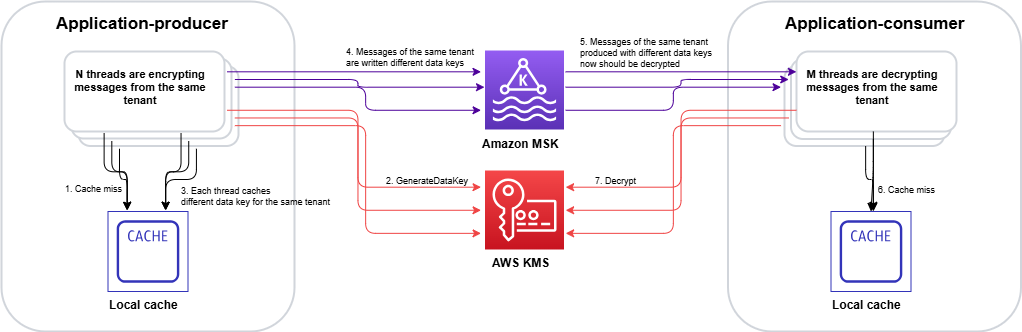
Figure 1: Cache stampede – multiple threads independently calling AWS KMS for the same encrypted data key, creating duplicate requests

Figure 1: Cache stampede – multiple threads independently calling AWS KMS for the same encrypted data key, creating duplicate requests

The stampede follows this sequence on the encrypt side:

  1. Multiple threads call encrypt() for the same tenant concurrently.
  2. Each thread checks the CachingCryptoMaterialsManager and finds the cache entry expired.
  3. With no coordination mechanism, each thread independently calls GenerateDataKey.
  4. AWS KMS returns N distinct data keys (one per thread).
  5. Each data key produces a unique EDK, inflating cardinality across the system.

On the decrypt side, the inflated EDK cardinality compounds the problem:

  1. Consumer threads encounter unique EDKs that were never cached.
  2. Multiple threads hitting the same EDK simultaneously each trigger a separate Decrypt call. AWS KMS returns the same plaintext data key N times, doing redundant work.

Two paths forward

We evaluated two approaches to solve the cache stampede problem. Each fits different architectural requirements and regulatory constraints.

Option A: Hierarchical keyring with DynamoDB (AWS-recommended)

AWS addresses the cache stampede challenge through the hierarchical keyring pattern, which introduces an additional level of key hierarchy that significantly reduces how often cache stampedes occur.

In this architecture, branch keys serve as intermediate wrapping keys stored in a DynamoDB table. This DynamoDB table acts as a shared cache layer that coordinates across all instances in your distributed fleet.
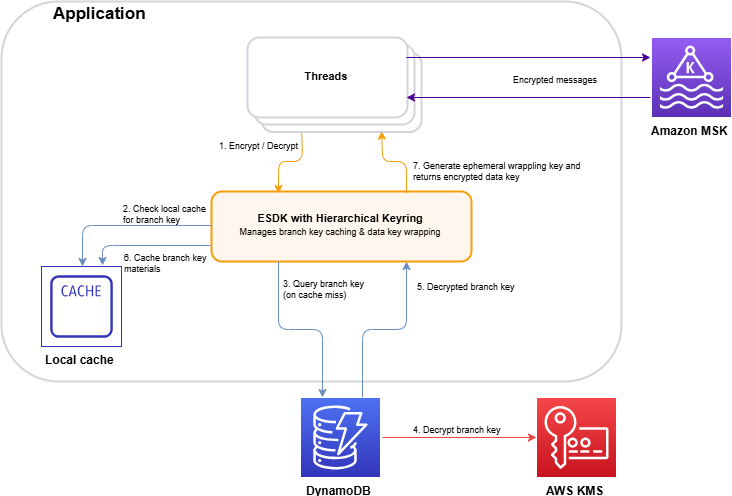
Figure 2: Hierarchical keyring architecture – branch keys in DynamoDB coordinating across distributed instances

Figure 2: Hierarchical keyring architecture – branch keys in DynamoDB coordinating across distributed instances

The architecture (shown in Figure 2) works as follows:

  1. The application requests encryption through the hierarchical keyring.
  2. The keyring checks the local cache for the tenant’s branch key.
  3. On a cache miss, it queries the DynamoDB Key Store table for the active branch key.
  4. AWS KMS decrypts the branch key (this is the only KMS call in the flow).
  5. The decrypted branch key is returned to the keyring.
  6. The keyring stores the branch key in the local cache for subsequent requests.
  7. The keyring derives a unique wrapping key from the branch key and generates the data key locally.

The key insight is that the cache is thread-aware. When the cache expires, threads coordinate to make a single request to refresh the cache. Only a single thread is used to make a call to the branch key, rather than all the threads acting independently. Additionally, by adding an additional key into the key hierarchy, branch keys don’t live within AWS KMS. This means cache misses and the stampedes they trigger interact with the branch key, and don’t make as many calls to the AWS KMS service at the top of the hierarchy:

  • Without hierarchical keyrings: Your local cache needs to store all the data encryption keys, and has constant misses as new, unique data keys arrive with each encrypted message. A miss can trigger a stampede.
  • With hierarchical keyrings: The same branch key wraps thousands or millions of data keys. A cache miss only occurs when a branch key expires or is first requested, which happens orders of magnitude less frequently than without hierarchical keyrings.

The DynamoDB table acts as a coordination point. The first thread to request a missing branch key retrieves it from AWS KMS and stores it in DynamoDB (the Key Store table). Subsequent requests from instances in the fleet retrieve the cached branch key from DynamoDB instead of making duplicate AWS KMS calls.

Beyond reducing cache miss frequency, the hierarchical keyring provides built-in stampede protection within its local cache implementation. The SDK offers multiple cache types, and the Default cache, designed for heavily multi-threaded environments, prevents multiple threads from calling AWS KMS on cache expiry by notifying a single thread that the branch key materials entry is about to expire 10 seconds in advance. That one thread refreshes the cache while all other threads continue serving requests using the still-valid entry.

This solution integrates with the AWS Encryption SDK and requires minimal code changes to existing applications. For event-driven architectures processing encrypted Kafka streams, this approach reduces KMS call volume by orders of magnitude while preserving per-tenant cryptographic isolation.

Option B: Custom KMS client caching – Solving the stampede at the API layer

While the hierarchical keyring (Option A) addresses the stampede by reducing how often cache misses occur, there’s a complementary approach: eliminating the stampede at its source by caching KMS API responses directly, using atomic, single-flight cache loading that prevents concurrent threads from issuing duplicate calls. This is the path NICE Actimize took.

The IClientSupplier extension point in AWS Encryption SDK v3

In the AWS Encryption SDK v2, decorating the AWS KMS client on a per-request basis was possible through the RegionalClientSupplier interface, but it was an advanced and undocumented use case. Without explicit guidance or a supported pattern, caching strategies typically operated above the SDK layer, making it difficult to prevent duplicate KMS calls at their source. The AWS Encryption SDK v3 introduced the IClientSupplier interface, which the AwsKmsMrkMultiKeyring accepts at construction time. This interface is called by the SDK whenever it needs a KMS client for a given AWS Region, and you control what it returns, making it possible to insert a caching layer between the SDK and AWS KMS.

Architecture: A decorated KMS client with two Caffeine caches
The solution is a CachedKmsClient—a decorator that wraps the standard AWS SDK KmsClient and interposes two Caffeine LoadingCache instances between the application and AWS KMS:

Cache Key Value Purpose
GenerateDataKey cache GenerateDataKeyRequest (tenant KMS key ARN and key spec) GenerateDataKeyResponse (EDK and plaintext data key) Ensures encrypt operations on the same node reuse the same data key for a given tenant KMS key during the cache window
Decrypt cache DecryptRequest (EDK and key ARN) DecryptResponse (plaintext data key) Ensures decrypt operations for the same EDK share a single KMS call result

Both caches are configured with refreshAfterWrite (default: 1 hour, configurable), which means:

  • During the refresh window, concurrent threads receive the cached response instantly resulting in zero KMS calls.
  • When a cache entry expires, Caffeine’s LoadingCache.get() guarantees that exactly one thread executes the loader function (the actual KMS API call), while all other concurrent threads block and wait for that single result. This is the atomic, single-flight property that eliminates the stampede.

Security consideration: Caching plaintext data keys in memory means the keys exist in process memory for the duration of the cache TTL. The TTL acts as a security control: shorter TTLs reduce the window of exposure in the event of a memory dump, while longer TTLs reduce KMS call volume. Choose a TTL that balances your security requirements with your cost and performance goals. Key rotation at the KMS key level remains unaffected by the cache, because rotated keys produce new data keys on the next cache refresh.

Integration with the AWS Encryption SDK v3

The integration is minimal. The IClientSupplier AWS Lambda function returns a CachedKmsClient singleton for each AWS Region, this singleton is passed into the AwsKmsMrkMultiKeyring at keyring construction time. From that point forward, each GenerateDataKey and Decrypt call the SDK makes flows through the caching decorator transparently, with no changes to the encrypt or decrypt call sites.

The CachedKmsClient is a singleton per Region (managed using a ConcurrentHashMap), so all tenants on the same node share the same caching layer but their data keys remain fully isolated because the cache keys include the tenant-specific AWS KMS key ARN.

Why Caffeine?

Caffeine is a high-performance, near-optimal Java caching library well-suited for this pattern for several reasons:

  • Atomic loading: LoadingCache.get() guarantees that on a cache miss, only one thread executes the loader while others wait. This is the core property that eliminates the stampede.
  • refreshAfterWrite semantics: Unlike expireAfterWrite (which blocks all threads during refresh), refreshAfterWrite allows one thread to asynchronously reload the entry while other threads continue to serve the stale-but-valid cached value. This eliminates latency spikes during key rotation.
  • Observability: Cache eviction listeners and Micrometer metric counters can be wired in to track actual KMS call volume per tenant KMS key, enabling real-time cost monitoring.

Choosing between the two options

The hierarchical keyring with DynamoDB (Option A) is a production-ready, AWS-recommended solution that reduces stampede frequency by introducing longer-lived branch keys. It’s the best choice for most organizations. Particularly when starting fresh or when the operational overhead of an additional data store is acceptable.

NICE Actimize chose the custom caching approach (Option B) for a pragmatic reason: it avoided introducing a new infrastructure dependency into the encryption critical path. Their platform already operated at scale across hundreds of tenants, and adding a DynamoDB table as a key coordination layer would have meant taking on additional operational responsibility: provisioning, monitoring, backup, access control, and ensuring high availability for a component that sits directly in the encrypt/decrypt hot path. In a regulated financial services environment, each new stateful component in the security chain requires its own resilience planning, failure-mode analysis, and compliance review. The Caffeine cache used in Option B, by contrast, is an in-process library (a JAR on the classpath). It is stateless, requires no network calls, no provisioning and no operational overhead. It makes a lighter dependency than a managed cloud resource in the critical path. There is no shared state to lose, no additional infrastructure to protect, and no new failure mode beyond what already exists with AWS KMS itself. If a node restarts, the cache rebuilds on the next KMS call.

Results

By implementing a rotation policy with the optimized caching approach, NICE Actimize achieved the following results:

  • 77% reduction in AWS KMS costs – Eliminating millions of redundant API calls translated directly into significant cost savings.
  • Maintained strict per-tenant isolation – Per-tenant encryption isolation remained fully intact, with no compromise to their security posture.
  • Improved system performance – Removing the stampede of duplicate AWS KMS calls reduced latency and freed up system resources for core processing.
  • Simplified operations – A coordinated caching layer replaced fragmented, per-thread caching, reducing operational complexity.

Conclusion and next steps

The cache stampede problem compounds in multi-tenant encryption systems: excess data key generation on the encrypt side degrades cache hit ratios on the decrypt side, creating a feedback loop of redundant KMS calls. The AWS-recommended hierarchical keyring pattern with DynamoDB provides a production-ready solution that integrates with the AWS Encryption SDK with minimal code changes. For regulated environments requiring additional control, a custom caching approach can deliver similar results.

If you operate a multi-tenant SaaS platform or a high-throughput system with per-tenant encryption requirements, consider these patterns to optimize your encryption costs and performance.

To get started, explore the following resources:

If you have questions or feedback about this post, leave a comment in the Comments section.

Maria Gutovsky

Maria Gutovsky

Maria is a Solutions Architect at AWS, based in Tel Aviv, Israel. She is part of the Database and Analytics Technical Field Community. In her free time, you will probably find her building a new character for a Dungeons and Dragons campaign.

Hemmy Yona

Hemmy Yona

Hemmy is a Solutions Architect at AWS, based in Israel. With 20 years of experience in software development and group management, Hemmy is passionate about helping customers build innovative, scalable, and cost-effective solutions. Outside of work, you’ll find Hemmy enjoying sports and traveling with family.

Contributor

Special thanks to Devora Roth Goldshmidt, Head of X-Sight Architects at NICE Actimize, who made a significant contribution to this post.

[$] Bringing BPF to binfmt_misc

Post Syndicated from corbet original https://lwn.net/Articles/1086947/

The kernel is able to run a few types of executable files, including native
binaries in the ELF format and interpreted programs that begin with the
#! marker. It also, however, has a mechanism, called binfmt_misc,
that can be configured from user space to enable the transparent execution
of programs in just about any format. This feature has been relatively
static for years, but it seems likely to receive some significant updates
in the near future, including the ability to load BPF programs that can
decide how to run a given program.

90% of Enterprise Data Is Unstructured, and GenAI Can’t Use It Without Better Storage

Post Syndicated from Maddie Presland original https://www.backblaze.com/blog/90-of-enterprise-data-is-unstructured-and-genai-cant-use-it-without-better-storage/

A decorative image showing different generic computer module icons.

At GTC this year, Jensen Huang put a number on a problem that most enterprise AI teams already feel but struggle to articulate: about 90% of what gets generated every year is unstructured data. This includes PDFs, emails, video, contracts, support tickets, and voice recordings. 

Until recently, that data was, in his words, almost entirely useless. You could store it or search it by keyword, but machines couldn’t read it, understand what it meant, or draw any connections between it and other content. 

GenAI has changed that. RAG pipelines, vector databases, and embedding workflows give machines a way to process unstructured content, comprehend its meaning, and synthesize information across the entire enterprise.

The problem is that these tools put a completely different set of demands on storage than anything that came before them. And most enterprise storage wasn’t built for it.

The access pattern no one planned for

Traditional enterprise storage assumes that data gets written and then occasionally retrieved. The architecture for it was built with hierarchical file systems and tiered storage (hot archives for data that gets accessed regularly, cold archives for anything that hasn’t been touched in a while). It worked well for decades, until RAG pipelines broke it.

A RAG pipeline works by reading your documents and converting them into a format the AI can search. But that conversion process is not a one-time event. It has to be run repeatedly as you test, adjust, and update. Every adjustment means re-reading the same content, re-processing it, and re-writing the results back to storage.

For example, the pipeline breaks documents into chunks because the AI can only search effectively when content is divided into manageable pieces. The size of those chunks directly affects how well the AI answers questions. Too large, and the AI retrieves too much irrelevant content. Too small, and it loses context.

Whenever you have to update your underlying documents, the pipeline has to re-read and re-process everything affected by the change. The same is true when upgrading to a newer AI model, because the new model produces different representations of the same content and requires everything to be re-converted.

While the pipeline is reading, it’s also saving converted content, updated search indices, and checkpoints. And what it saves is tiny. Embeddings, vector chunks, and metadata objects are often just a few kilobytes each, but a production RAG pipeline generates millions of them. Legacy storage treats every save operation the same regardless of file size, so saving a million tiny files costs nearly as much as saving a million large ones.

Tiered storage exacerbates this even more. These systems judge which data is still needed and which can be moved to cheaper, slower storage based on how recently something was accessed. But a RAG pipeline might go quiet for weeks between runs and then suddenly need everything at once. Or it might re-index documents on a schedule that the storage system doesn’t recognize as regular access. Either way, the tiered system sees cold data and moves it to a slower tier. When the pipeline needs that data back, it waits and pays a retrieval fee before it can proceed. That cost and delay compounds across millions of objects and dozens of pipeline runs.

The governance problem hiding inside your index

When a RAG pipeline indexes documents into a vector database, it takes a snapshot of your data at that moment in time. The embeddings it generates reflect the content of those documents as they existed when the pipeline ran. When the original documents are updated or changed, the snapshot doesn’t change with them. The vector index keeps pointing to the old version, and the AI keeps retrieving it and presenting it as current fact.

To a user, that looks like hallucination. The model is confidently citing a document that no longer says what the model thinks it says. But the failure isn’t happening inside the model; it’s happening at the storage layer. Specifically, in the gap between when source documents change and when the index gets updated.

Most enterprises running RAG pipelines today have no systematic way to close that gap. Document management systems aren’t built to notify downstream AI pipelines when content changes. Vector databases aren’t built to automatically invalidate and re-index affected embeddings. The result is an AI system that’s architecturally incapable of knowing when its knowledge has gone stale, so it presents outdated information with the same confidence as current information.

What GenAI storage actually requires

Closing the gap between what RAG pipelines demand and what legacy storage delivers requires three things:

  1. Sustained high throughput. RAG pipelines generate continuous, mixed traffic at every stage of the process—ingesting documents, processing them, writing the results to an index, and querying that index—often all running simultaneously. Storage must be able to move data in and out fast enough to match the speed at which the pipeline generates requests, and sustain that speed across the entire duration of a run, not just handle short bursts.
  1. Always-hot architecture with no tiering. Every document needs to be immediately accessible regardless of when it was last touched. This is not just for pipeline performance, but also because slow re-indexing is what produces stale outputs. When source documents change, the pipeline needs to re-index immediately. Storage that puts documents behind retrieval delays or tiering penalties widens the window in which the AI is working from outdated information and presenting it as fact.
  1. Free data movement. RAG workflows span multiple GPU providers, MLOps platforms, and inference environments across multiple regions. Storage that charges egress fees for every transfer turns architecture decisions into cost calculations and discourages the experimentation that gets AI systems from prototype to production.

The storage layer that doesn’t get in the way

Backblaze B2 Overdrive is built around exactly these requirements. It is always-hot object storage with no tiering, no retrieval delays, and no waiting for data to be promoted before a pipeline can run. Every document is always available, regardless of how recently it was written, which means when the pipeline needs to re-index, storage never slows it down.

At up to 1Tbps sustained throughput, it keeps high-volume RAG pipelines fed continuously through the constant mixed traffic of reads and writes they generate. Because egress is free, teams can move data between storage and compute across regions and providers without a cost penalty. And S3 compatibility lets B2 Overdrive drop into existing LangChain, LlamaIndex, and vector database pipelines without rewrites.

Ninety percent of enterprise data is sitting in formats that, until recently, machines couldn’t do anything useful with. The tools to unlock it now exist. How well they perform and what they cost to run depends largely on the storage underneath them.

Ready to build a RAG pipeline that doesn’t stall on storage? Learn more about Backblaze B2 Overdrive.

The post 90% of Enterprise Data Is Unstructured, and GenAI Can’t Use It Without Better Storage appeared first on Backblaze Blog | Cloud Storage & Cloud Backup

Rust Coreutils 0.10 released

Post Syndicated from jzb original https://lwn.net/Articles/1087490/

Version
0.10
of the uutils project’s Rust Coreutils has been released. This
release focused on compatibility with the GNU Core Utilities suite,
with Rust Coreutils now passing 645 of 690 tests, up from 625 with version 0.9.0. Notable
changes in this release include addition of the mv --exchange
option, an OpenSSL backend for checksum utilities, applying SELinux labels at
creation when using mkdir, mkfifo, and mknod, as well
as a number of performance and security improvements.

The project has an
online playground that runs the
Rust Coreutils directly in the browser via WebAssembly for those who would like
to try the utilities without installing them. LWN covered the uutils project in
February 2025.

Security updates for Thursday

Post Syndicated from jzb original https://lwn.net/Articles/1087489/

Security updates have been issued by Debian (7zip, kernel, libde265, and p7zip), Mageia (tomcat), Oracle (fence-agents, frr10, kernel, ldns, libgcrypt, mingw-glib2, nodejs24, osbuild-composer, p11-kit, php8.4, sg3_utils, and thunderbird), Red Hat (libXfont2), and SUSE (containerd, evince, libXfont2, nginx, openssl-3, pcp, php7, php8, python-Django, python-httplib2, python-nltk, rrdtool, vifm, and wireshark).

Cloudflare AI Search: give your agents a search engine for your data

Post Syndicated from Nelson Duarte original https://blog.cloudflare.com/ai-search-easier/

Today, we’re excited to announce a few developer experience improvements to Cloudflare AI Search to make it easy to manage a search solution out of the box. Previously, you had to stitch together components of the Cloudflare primitives (Workers AI, AI Gateway, Vectorize, R2, Browser Run) but now, AI Search can do this automatically — and better. Our goal is to give your agents their own search engine, where they can easily find data to provide better answers for themselves and their humans. 

We’re also sharing an early preview of pricing for customers of AI Search so you can learn how this scales. We modeled pricing in a way that makes it predictable and scalable: embedding and reranking are free when you use the default models, so no need to worry about predicting token count.

In AI Search, users can now:

  • Index a collection of data for your agent: Make structured and unstructured data easily accessible for your agent to build with, from individual files to websites you own. (Today, it must be a zone on your Cloudflare account, but with more ways to verify ownership coming soon.)
  • Skip the sitemap for your websites: Previously, AI Search required that websites have a sitemap to use the website integration. Now you can select the “Discover” parsing option to add a website without a sitemap as a source.
  • Get a single public endpoint for searching across a namespace: When you enable public URLs on your namespace, you can get a /search and /mcp endpoint that can search through multiple instances or websites at once without authentication, so you can share easily with your customers.
  • Put your own custom domain over public endpoints: You can now add your own domains over your public URLs, so you can brand your /search and /mcp endpoints (e.g., search.example.com/mcp). You can also add Cloudflare Access to create private search instances.
  • Add semantic search to your sites built on EmDash with AI Search plugin: If your site runs on EmDash, our open-source CMS, the AI Search plugin adds semantic search over your content.
  • Preview the new pricing model for AI Search: We want pricing to be predictable and to scale with you, so we built in the cost of embedding and reranking: they’re free when you use select models from the Workers AI catalog.

Finally, we will also share examples of how AI Search is used across our own platform including Cloudflare.com, our Developer Docs, with EmDash, in Cloudflare Dev Stack MCP — and even the blog post you’re reading right now (try cmd+K).

AI Search in action: powering the new Cloudflare Dev Stack MCP

One of the ways we use AI Search is in our new Cloudflare Dev Stack MCP, which you can try today in our AI Playground. It gives coding agents current, cited docs from across the Cloudflare developer ecosystem, so they build on the latest features and fixes instead of stale training data.

Here's how we built it using the features available today in AI Search:

1. Index each surface

We created one AI Search instance per Cloudflare-owned surface: Docs, Blog, API Docs, Community, Astro, Vite, Vitest, Hono, Replicate, OpenNext. (Each of these is Cloudflare-owned.) 

They span different domains, but, because Cloudflare owns the website data, AI Search is able to treat them as a single set and ingest them all the same way. Point AI Search at a site, or set of sites, and it handles crawling, ingestion, embedding, and retrieval. Creating an instance is a single command, and for a site without a sitemap you add –parse-type discover to find pages by following links (powered by /crawl from Browser Run):

2. Combine the instances into one search

Now the interesting part: answering a single query across all 10 instances. There are two ways to do it.

Option A: in a Worker (what we did for Cloudflare Stack MCP)

We bound the namespace to a Worker to create a remote MCP server and made one multi-instance call across all 10 instances. We took this path because we're adding the stack search into Cloudflare's MCP server, so it ships as a tool alongside the Cloudflare tools agents already connect to.

The binding, in wrangler.jsonc:

Then a single tool makes one call that fans out across the instances you name:

Option B: flip on public endpoints (no code)

If you'd rather not write a Worker at all, enable public URLs on the namespace. You immediately get /search and /mcp endpoints that query every instance, with no auth and nothing to deploy.

Reach for the Worker when you're folding search into an existing app or MCP server, as we are. Or reach for the public endpoint when you just want a shareable search endpoint in one click.

3. Brand it and lock it down

Public endpoints come with a default public URL, but you can put your own custom domain over them to brand the endpoint (e.g., search.example.com/mcp).

If the search should be private, add Cloudflare Access in front of the domain. The endpoint now requires a login, so only authorized people (or agents) can query it.

Try it yourself: use the Dev Stack MCP

With the Cloudflare Dev Stack MCP Server, you can ask about any tool, or describe an app you want to build, and you'll get back current, cited answers on how best to build it on the Cloudflare stack.

The AI Playground is worth checking out, but the real magic is wiring the MCP into your coding agent, so the stack's current docs are one tool call away. That replaces the usual fallback (web search then fetching full pages), which is slow, token-heavy, and often lands on the wrong or stale source. To use with your agent of choice, drop the Dev Stack MCP URL into your MCP configuration. For example:

Powering search on our Blog, Developer Docs, and Cloudflare.com

We build with AI Search the same way our customers would: Cloudflare Blog's search already runs on it, and today Developer Docs and Cloudflare.com join it. All of it uses hybrid search, semantic and keyword together in one query, so it handles both open-ended "what does this do" questions and exact lookups of names or keywords. We recently rebuilt the Blog on EmDash, our new open-source CMS, and our new

EmDash AI Search integration is what powers that search now. You can also add it to your own EmDash site and get the same search over your content out of the box.

AI Search respects all bot policies

AI Search is powered by Browser Run /crawl in the background, but goes a step further to identify itself with its own bot identity: Cloudflare-AI-Search. Just like Browser Run, it follows robots.txt, identifies itself with an immutable, public user agent, and will respect whatever bot controls a site has in place. 

Preview pricing: pricing you can predict

AI Search is currently free while in beta, and billing is not yet enabled; we'll email you with plenty of notice before it starts. As we move toward general availability, here's a preview of pricing across ingestion, storage, and queries, plus embedding and reranking (preview prices are subject to change before billing begins):

† A single pool of 5M ingestion tokens per month, covering any file type currently supported (e.g., text, images). ‡ A single pool of 2,000 queries per month, shared across both query types. 

Our goal is to provide pricing you can predict, starting with the models your search leans on. Embedding turns your text into the vectors that search matches on, and reranking reorders results so the most relevant come first. Both run free with AI Search defaults or when using select models from the Workers AI catalog, so the models behind indexing and every search are not a cost you have to worry about. Answer generation and query rewriting are optional steps that run on a model you choose, billed as Workers AI usage, or you can use AI Gateway credits with any model/provider.

Example bill with preview pricing

Here's a sample monthly bill on the Workers Paid plan for creating a new AI Search instance for a 20,000-document data source (about 20M tokens of text) plus 1,000 images (assume about 1,000 tokens each), with 30,000 semantic queries a month using the default AI Search embedding and reranking model. Ingestion is chunked with roughly 10% overlap, which shows up as the × 1.1 below:

Images count toward base ingestion and also incur the image add-on cost. Storage assumes about 10 KB per document and 1 MB per image. Indexing is largely a one-time cost, so later months are mostly queries, closer to $21.

Get started today

AI Search is available to enable and use today. Point it at your site, turn on hybrid search for both semantic and keyword matching, and you have a search engine for your own data, ready for your agents. Spin one up with one command:

From there, query it, wire it into an agent over /mcp, or put a custom domain on a public /search endpoint to share it with your users. Check out the AI Search docs for more information.

From ranking to recommended: get your site ready to thrive in the age of AI agents

Post Syndicated from Matthew Conroy original https://blog.cloudflare.com/aeo/

Your next customer may not find you through a search engine. Instead, they'll ask an AI assistant: "how do I do X?"; "which option is best for someone like me?"; "just handle it for me" and an agent will find the answer, weigh the options, and act on their behalf. Increasingly, the moment that determines whether a customer chooses you happens inside a model's response — before a human ever sees your homepage.

This agentic audience is already here: by our count, fewer than half of all HTML page requests now come from a human. Not all of those machines are agents acting for a person, but that share is growing fast, and answer engines, shopping assistants, and research tools will shape which businesses are found and recommended. Discoverability used to mean ranking on a results page. Now it means being found, read, and confidently recommended by the agents that guide your customers.

The old metrics, human clicks and page views, no longer paint the full picture. We spent time talking to site owners who were staring at access logs full of AI bots, completely blind to whether those bots were capable of using their site or recommending their products and services to their users. We heard two main questions:

  • Can agents actually use my site?
  • Am I getting recommended?

To help site owners answer these questions, we have integrated our previous work on Agent Readiness into the Cloudflare dashboard, and added our new Answer Engine Optimization (AEO) tool as well. These tools treat agents as a core user base for your site, showing you how an agent will see it, and how often you get recommended.

The opportunity is big, and the bar is low, because most sites aren't built for this user yet. Just as early SEO rewarded the sites built for search engines, the sites built for agents will be rewarded now. The ones that are easy to find, read, and trust are the ones agents will recommend.

Diagnostics: is your site ready for agents?

Diagnostics is the technical checkup within Agent Readiness. It scans your site the way an agent reads it: it works out whether it's allowed in and whether it can discover your content, fetches a clean machine-readable copy, and finds the interfaces it can call. 

While a person just loads your homepage, an agent leans on your robots.txt, your sitemap, your response headers, a Markdown version of your content, and published metadata for authentication and tools.

Diagnostics runs those checks against a hostname and rolls the results into a single agent-readiness view, from "Not Ready" to fully agent-native. Every check comes back as pass, fail, or neutral, with a note on why it matters, and an evidence trail showing the exact request and response we saw.

The checks are grouped by effort, so you know where to start:

  • Quick wins: the high-impact basics most sites are missing, including a crawler-readable robots.txt, an XML sitemap, AI-crawler rules, and serving clean Markdown to agents
  • Technical groundwork: the next layer, including Content Signals that state how your content may be used, an API catalog, link headers, and agent login instructions
  • Advanced integration: the agent-native features, including OAuth discovery, MCP (Model Context Protocol) and A2A (Agent2Agent) agent cards, a skills index, Web Bot Auth, and WebMCP
  • Commerce: the emerging agent-payment standards including x402 (an extension of the classic HTTP 402 Payment Required status code), ACP (Agent Commerce Protocol), Universal Commerce Protocol (UCP), and AP2 (Agent Payments Protocol). This is informational for now, and not counted in your score.

Every suggested improvement comes with a next step. When there’s a Cloudflare feature that can help, there's a "Set up in Cloudflare" link straight to the setting, such as switching on Markdown for Agents or managed robots.txt. For everything else, there’s a "Copy Agent Prompt" button that proposes what your coding agent needs to build. Make the change, re-scan, and watch the checkmark turn green.

AEO: are AI assistants recommending you?

Diagnostics tells you whether agents can read your site. The AEO tab tells you what happens next: when a customer asks an AI assistant a question in your category, does it recommend you or a competitor? You can't look this up like a search ranking. There's no impression count and no missed-click report, so when a competitor gets named instead of you, the sale is gone and nothing tells you it happened.

We infer your industry (e.g. health and fitness) and category (e.g. sports apparel) from your site, and we probe the leading assistants (today, Anthropic's Claude and OpenAI's GPT) with likely customer prompts to see how they respond. We structure these prompts to mimic real-world discovery, asking for recommendations, product comparisons, and general advice within your category. By observing how models answer these realistic queries, you get metrics such as:

  • Citation Rate: the share of answers in your category that cite your site as a source
  • Prominence: when you are cited, how much of the answer is actually yours and how early it lands
  • Mention Rate: how often assistants name your brand in their answer — for example, how often "Cloudflare" shows up in the response, whether or not cloudflare.com is cited as a source. Read alongside your Citation Rate, it separates awareness from attribution: assistants naming you far more than they cite you means you're on their radar but not yet earning the citation — a specific, targetable gap.
  • Share of Voice: your slice of citations against those for your competitors, so you can see who is winning the prompts you're losing

To evaluate how an AI model perceives your market presence, we build a benchmark across each industry and category before scoring a specific site. We query AI assistants with likely prompts in that category — without specifying your brand — and record which sites are cited, where they appear, and how prominently they feature.

Rather than re-querying models every time a site owner runs a scan, we run this panel once per category and reuse the baseline across all accounts in that domain. Pre-computing this dataset provides three main benefits:

  • Zero latency: Results load instantly from a snapshot rather than waiting for live model queries.
  • Lower compute overhead: Aggregating queries at the category level avoids redundant AI calls across thousands of scans.
  • Industry Fit scoring: Reusing the panel corpus lets us map which brands consistently appear together, allowing us to derive an Industry Fit score that measures whether an AI assistant views your site alongside your actual competitors.

AI assistants rarely answer the same question the exact same way twice. To account for this variance, we use Cloudflare AI Gateway to prompt each assistant multiple times across different models. We then read the responses a customer would see — the answer text alongside the sources each assistant cited — and extract multiple signals from it. 

We evaluate not just whether your site was mentioned, but whether you were cited as a source, how early your citations appear in the answer, and how much of the final answer's substance is attributed to you. Where genuine judgment is required, Workers AI does the heavy lifting, running natively on our own infrastructure to read each reply and score how your citations and mentions appear. We also use exact text analysis rather than a model grading its own output. Together, this folds dozens of one-off replies into actionable metrics. By abstracting the multimodel query and evaluation pipeline, the tool provides metrics without requiring you to build your own evaluation framework.

Alongside the answers, an AI Operator Activity shows the real crawl and referral traffic on your site, per operator (OpenAI, Google, and so on): who reads your content, who sends visitors back, and the errors they hit on the way (403 blocked, 404 dead link). The pattern worth acting on is the operator that crawls thousands of your pages but refers no one, using your work without sending customers back.

Because these numbers are specific to your site, you can experiment, re-run the scan, and measure the impact on the exact questions that bring you business.

Meet your other audience

Until now, sizing up agents meant guesswork: grepping your logs to infer who visited, or feeding a chatbot a prompt and eyeballing whether it mentioned you. But with Agent Readiness and AEO, you can get the data you need to act. And because the requests actually pass through Cloudflare, these tools measure rather than estimate where possible, and will improve over time. 

Helping you see who's reaching your site and decide how to engage on your own terms is what we've always done. Agents are just the newest audience, and the businesses that make themselves easy for agents to find, understand, and trust are the ones that get recommended. Agent Readiness is where you find out whether you're one of them, and what to do if you're not yet.

Ready to find out if AI agents are sending customers your way? Head over to the Overview tab in your dashboard to get your site Agent Ready and request early access to AEO Visibility.

Building on the open, agent-ready web? Open the Agent Readiness tab in your Cloudflare dashboard and tell us what you're building on the Cloudflare Developer Discord.

Building an open Agentic Internet: readable, discoverable, callable, and payable

Post Syndicated from Jack Galilee original https://blog.cloudflare.com/the-agentic-internet/

Our data shows that a lot of traffic from well-behaved bots is re-fetching pages that have not changed. Billions of requests. An enormous amount of machine effort, attached to no outcome at all. That's the signature of a web built for humans being visited by something else.

Agents are here – not as a new kind of software, but as a new kind of visitor to the web.

The web reshaped around this new visitor is what we call the Agentic Internet. We see its future as readable, discoverable, callable, and payable. To realize that future, it needs its own tools and protocols.

Cloudflare's developer platform gave agents a place to run, and the first tools to build them. What's missing are the ones that let agents and domain owners cooperate instead of collide — on the open Internet, not just inside a single platform.

Every browser has always identified itself to the web with a header called User-Agent. The name only made sense once you realized the browser was acting on your behalf. Now a user agent is truly a user's agent: a program that fetches the web on a person's behalf. Today its most mature form is the coding agent that reads and writes code, pulls the docs it needs, and never sees the pages it reads.

An agent doesn't render your CSS, see your hero image, or click your ads. But it has a paying human on the other end. Every request now costs someone money and carries a purpose. Block it and you block your customer. Treat it like a scraper and you lose them.

Every agent runs because someone — a person or a business — is paying for what it does. Most people don't spend tokens for the sake of it. This version of the Internet, one with an outcome and a bill on the other end of every request, is going to look nothing like the one we have now.

The web was not built for this, and neither were your analytics. Nor, in most cases, was your business model. How agents read, discover, call, and pay is going to decide whether the Internet stays open or gets closed. In one version of the future, a handful of stacks own discovery, identity, and payments, and everyone else routes through them. In another, the Internet stays open: primitives built on standards anyone can implement, running on rails that are neutral because the code is public.

Cloudflare believes in the open Internet, and we're in a position to help build the future where it thrives.

The specifications we build on are open standards that anyone can implement — x402, MCP, Web Bot Auth, PACT. Domain owners choose their own identity providers, their own payment processors, their own agent partners. Cloudflare is one option, not the whole stack. We are Customer Zero of the same rails our customers use, with no privileged path or early-access API that only we can reach. This is the job we've done for the human web for fifteen years, and it's the job we intend to do for the Agentic Internet.

The engineering is not what humans on the Agentic Internet will notice. They're picking up a new medium, and they'll judge it the way they judged the web: on whether it's better. Whether finding and booking a table takes one exchange instead of nine. Whether they know who they're dealing with. Whether paying feels safe.

Our philosophy: A readable, discoverable, callable, and payable Agentic Internet

This starts with identity. Web Bot Auth lets a bot cryptographically identify itself to any site it visits, so publishers can decide who they welcome and who they don't. No more guessing and no more spoofed user agents. Many sites already know the human behind a request from login, in-app behavior, or purchase history. That site can issue Private Access Control Tokens (PACT). Announced with Mozilla, Google, Microsoft, and Shopify, PACT lets sites vouch anonymously, so the agent can present the token elsewhere. Legitimate agents get in with less friction.

We can then make it easier for an agent to do its job. Markdown for Agents lets agents read websites with fewer tokens and less bandwidth. WebMCP gives them a native way to interact on your behalf. Standards like x402 let them pay merchants directly.

Readable is straightforward. Can AI agents read content in a way that is native to them and plays to their strengths? The less bandwidth and fewer tokens an agent burns, the better. Every HTML tag rendered for a human that never looks at it is not only a waste of compute but also a pollution of the context window the agent then has to pay to ignore. Markdown for Agents addresses this from the server side.

On the client side, we approached building a browser with agents in mind as first-class citizens. Kitesurf is our new browser lean enough to run on Workers, spun up per request and thrown away after. It delivers content and features that agents need without any of the bloat from human-oriented features in traditional browsers.

Discoverable is where every economic moment on the Agentic Internet begins. Before an agent can read a resource, call a tool, or pay for a transaction, it has to know the resource is there. Search is one half of the story, as agents need to find what they need through interfaces built for them, not through a keyword box designed for a human who types slowly and skims. AI Search is available today, so any public site can be made searchable by agents.

Being discovered is the other part. Content creators and API owners need to know how visible they are to agents. Agent Engine Optimization (AEO) measures brand visibility across the models and agents that matter. If you are not measurably visible to the agents your customers use, then you are effectively offline for them. 

Callable is where the agents start doing things: booking a table, renewing a subscription, pulling a report. On the human web these all look different, because they were built for humans clicking through user interfaces. An agent trying to add an item to a to-do list has to parse the HTML, guess which button is “Add”, synthesize a click, and hope the DOM didn’t change since it last looked.

WebMCP lets a site expose its actions directly to agents through the browser:

The tool “contract” becomes explicit. No HTML parsing, no guessing at form fields. As the tools run inside the page, they reuse the user’s existing session and state. Code Mode goes one step further. Agents think in code, and calling tools by writing code is faster and more accurate than prose. As agents are calling endpoints rather than scraping webpages, there is a clear signal back to the content owner of what content is actually being used. 

Payable is where we believe the Agentic Internet is going. Every economic transaction eventually needs a way to pay. Ad-based models are breaking. Seat-based models do not work when the user is a program. The publishers we all rely on cannot fund themselves on pageviews that never happen and browsers that do not render their ads. 

A recipe site that never turned a profit using ads can charge a fraction of a cent per fetch and be profitable at the scale of the Agentic Internet. A local paper can license articles at read time without a licensing deal or login. On the other side, the agent shows up with a wallet and a budget the human set once. 

Every paid interaction leaves a receipt. The publisher can prove which agent fetched which page. The agent can prove it paid for what it used. Wallets allow agents to easily pay for content and APIs. Monetization Gateway lets domain owners set up payments from agents in a few clicks.

Cloudflare sits in the middle of all of this by design. We already sit between billions of humans and the sites they visit, protecting them, speeding them up, keeping them online. Agents change the traffic but not the shape of that job — we're the neutral, high-performance layer that publishers, merchants, agent builders, and end users can all trust to be on their side, not competing with them. 

We want to give domain owners the tools to empower the kinds of AI agents that they want to support and block the ones that they don’t. A developer tool likely wants to become agent-ready to encourage AI agents to discover, recommend, and pay them. A publisher may want to block extractive AI agents (which consume resources without giving anything back) but allow AI agents that license their content or compensate them. A nonprofit data provider may want to block bots or humans who exceed their rate limits, but allow them to pay to get unblocked and use those funds to cover the excess resource consumption.

Bots are dead, long live bots

The distinction between a bot and a human isn’t so simple anymore. It’s not as straightforward as bots are bad and humans are good, or bots wasting resources that humans should instead consume. This is the old way of thinking that is outdated in the world of agents.

We see agents as a new type of actor. Their actions can be desirable, say, by reading content in a way that preserves resources, interacting with websites in the way that the domain owners specify, and paying for what they use. Or their actions can be undesirable, for example, by scraping millions of pages without compensation, attempting to circumvent blocks, or ignoring robots.txt. We believe that many of the undesirable actions will diminish, and even convert to desirable actions, if humans and bots are given the right tools.

Closing the revenue gap

Cloudflare has spent years detecting bots, allowing domain owners to take control of whether bots can access them. What's been missing is the other half: how agents interact with those sites once they're let in. That's what this suite of agentic tools is for: making the web readable, discoverable, callable, payable. These four primitives are all built on open standards, so no single company owns the rails. 

An open Agentic Internet needs diversity on both sides. Not just diverse publishers and content creators but also diverse agents. If the demand side converges, it doesn’t matter how open the supply side is. The Internet will still be a walled garden.

We are building this open alternative. Join us by getting your site agent ready with our new dashboard, and sign up to receive news on our Answer Engine Optimization product. If you run a site or an agent, you can experiment with all of the Internet's new technologies using our AI Playground.

Introducing Kitesurf: The agent-first browser that runs in V8 isolates on Cloudflare Workers

Post Syndicated from Celso Martinho original https://blog.cloudflare.com/kitesurf/

Should we build our own browser? This is one of those questions that has come up every few months internally at Cloudflare for years. Unsurprisingly, it’s the kind that triggers long threads with multiple reasons and persuasive arguments on why we should do it. The browser is obviously the most important software we use every day on our computers; it’s arguably the operating system of the Internet. We’re a company on a mission to help build a better Internet — who wouldn’t want to take on the challenge of building a new browser?

But we never quite found the balance between the technical difficulty of such an endeavour and the unique problems we’d be solving by doing it. And so, the idea was shelved, over and over again. Until now.

Something magical happened: we reached a tipping point where a series of powerful technical advancements in our Developer Platform became a reality, while the advent of AI agents and the demand for a new kind of browser became critical at the same time.

Running WebAssembly (Wasm) in Workers is now very mature. Primitives like dynamic workers, SQLite-based Durable Objects, Worker-to-worker RPC, service bindings, higher NodeJS compatibility and higher limits open doors to much more ambitious and complex applications that were simply not possible before.

Browser Run, our headless browser automation API product, has seen tremendous growth with the rise of AI. Agents need browsers in order to perform many tasks, and in many cases cannot succeed without them.

But there's a problem — browser engines like Chromium were built for humans, not agents, and they come with overhead that AI models simply do not need. They consume so much memory and compute that providing every agent with its own instance is prohibitively expensive, restricting large parts of the Web to only the most sophisticated and costly AI models with higher parametric knowledge, while locking out many other agentic applications. 

We should be giving all agents a browser that excels at what’s important for an AI model, even if that means being light on what’s only useful for humans. For example:

  • AI doesn’t care about tabs, themes, browser extensions, or synchronization across devices. It cares about token count, context windows, scalability, performance, and costs.
  • Structured, machine-readable content is important, but visual perfection, smooth 60-fps scrolling is not. Agents will be just fine if the CSS parsing is slightly off or the rendering isn’t pixel perfect.
  • The threat model in the context of AI using a browser is different. New problems like prompt injection and tool safety are top priorities.

Faced with these realizations, 12 weeks ago we asked the question again: Should we build our own browser? This time the answer was unanimous: Yes!

Today we are announcing Kitesurf, a new browser that runs entirely on top of Workers that we built specifically for agents, available for free while in beta in Browser Run.

Kitesurf is significantly more efficient in CPU and memory consumption than Chromium for common agentic tasks like screenshots and HTML extraction. What follows is the story of how we built it. Buckle up, it’s going to get technical — but we promise to keep it interesting.

How it started

Kitesurf started as many other great ideas have started at Cloudflare. Someone found something interesting, and the next thing you know they end up “nerd sniping” the rest of the team with a seemingly impossible but very attractive idea.

We got the initial inspiration from obscura, a headless engine written in Rust for AI automation that has “no Chrome, no Node.js, no dependencies.”

Then, with the help of an AI agent, we tried to port it to Workers. It didn't work very well at first. But once we gave the AI a solid plan and a clear definition of success — detailed enough for the agent to loop endlessly and ask questions when needed — it did work.
Blown away by this (barely) working proof of concept, we decided to let the team cook.

Design decisions

Here are some of the design decisions we made before we started.

Tests, tests, tests

We knew that moving from a prototype to a full-blown browser that could actually be useful for tasks at scale in production would take a lot of work and iteration. We won’t hide that using AI to accelerate the process was key. But how do you use AI in such a complex project, keeping the quality of both code and results under control without losing velocity? The answer is to provide as many tests as you can.

Enter the Web Platform Tests (WPT), the ideal setup: an extensive suite of success criteria that gave the AI agents clear goalposts for assessing feature conformance. We curated the selection and order of features to assign to the agents, allowing humans to focus on architectural work and reviewing the agents' approaches.

However, WPT tests only go so far: they measure conformance to W3C standards, not a browser's ability to render and interact with real-world websites. To bridge this gap, we implemented a combination of integration testing and visual regression testing — it runs multistep Puppeteer tests on real websites against both Chromium and Kitesurf not only by comparing the assertions that it makes, but also rendering outputs at every step to highlight any unwanted differences.

Use Rust when possible

Cloudflare has been working on providing great support for WebAssembly (Wasm) in Workers for quite some time. This is great because we can use high-performance C, C++, and Rust packages and compile them to Wasm. If we use Emscripten (for example) and its many layers of mocked dependencies, the compiled binary can get bulky and slow.

Instead, we opted for native Rust whenever possible and to compile directly to WebAssembly using wasm-bindgen, thus avoiding unnecessary emulation layers and running as close to the metal as possible, reliably.

Exception handling

A browser must render the whole unreliable and sometimes hostile web without ever dropping the page it's holding, so exception handling is more than just hygiene — it's how the application survives bad input without just crashing outright.

So we committed to one rule up front: any failure degrades to a blank frame or a missing element, never a dead session. Catch faults at every boundary, default to something safe and empty, and log enough to diagnose.

Isolation

Contrary to running a browser on your laptop (where you're visiting sites you trust, and it's acceptable to share some resources between them), an agent is pointed at whatever a task demands: arbitrary code from arbitrary origins.

So we built this browser on the assumption that every page load is untrusted input and every session starts fresh. Each component is isolated and has access only to the resources strictly necessary for its function.

This seems like a perfect fit for Cloudflare Workers, whose security model is built around isolation by design. But the platform only gets us the boundary between isolates. We still have to enforce the same principle at the application level, deciding what each component is allowed to touch and making sure nothing leaks across a page it shouldn't.

Stateless whenever possible

State is what makes failure expensive — if there's nothing to reconstruct, recovering from a crash is just starting a new one and replaying the request. A stateless component is disposable and parallel by nature: kill it the moment it stalls, run a thousand at once, and size them to demand instead of keeping things warm. That fits automation perfectly, where load arrives in bursts and the cheapest thing you can do is spin up work that costs only what it used and vanishes when it's done. In short, wherever a component can be stateless, it should be.

How we built it

Armed with a good plan, extensive tests, and a good tooling environment, we were ready to get started beyond the initial proof of concept. This is Kitesurf’s very high level life of a request that still holds today:

Let’s dive into the three main components that make Kitesurf work: the Engine, PageScript, and PageRenderer.

Fetching from origins

In order to render an untrusted web page, a browser has to fetch arbitrary assets — images, fonts, CSS, JavaScript, and Wasm files — off the Internet. This is one of the most dangerous operations a browser can do.

Kitesurf does it through one single component, the SandboxOutbound worker, and nothing else can touch the network directly — enforced by Dynamic Workers. The Engine uses it to bootstrap the page, fetching the main document and its scripts, and PageScript fetches everything else: stylesheets, images, fonts, and the page's own fetch() calls.

We use SandboxOutbound to enforce CORS, inject browser-shaped headers, filter responses, and keep each page's cookies in their own jar. Anything that fails our policy gets a 403 — each component gets precisely the network it needs and nothing more.

The Engine

The Engine is the only public-facing component of Kitesurf. It handles the Chrome DevTools Protocol (CDP) WebSocket and HTTP REST APIs, serves a landing page that is useful for internal testing purposes and, most importantly, stores each session state. All other components are stateless.

The advantage of using CDP is client compatibility: Puppeteer, Playwright, chrome-remote-interface, and the actual Chrome DevTools frontend. Point them at Kitesurf and they will all just work. This is also how Browser Run works (more on why this is important later).

Contrary to what the name suggests, the Engine is actually the simplest of the Kitesurf components. The fun parts come next.

PageScript

PageScript offers a good example of the power of our new Workers features: in this case, Dynamic Workers.  Kitesurf simply wouldn’t have been possible before this.

Here’s a simplified diagram of how PageScript works internally.

Every next page or out-of-process iframe (OOPIF) uses Dynamic Workers to spin up a long-lived PageScript isolate that handles the page session, consisting of a clean globalThis and the DOM document object. 

The DOM object is then populated with the results of parsing the HTML document and running all the JavaScript scripts. For parsing the HTML and the CSS we use parts of Blitz, a modular rendering engine, and Stylo, Firefox’s high-performance CSS parser, both written in Rust. 

For each found <script> tag or .wasm file we run the JavaScript and WebAssembly code inside the same isolate.

Yes, but evals

What about evals, you ask? Evals are trickier to handle because for security reasons we still don’t support eval natively in Workers. We can’t spin another isolate to handle them either, because it wouldn’t have access to globalThis.

Our solution is to use Boa JS, an ECMAScript engine written in Rust, to compile and run on Workers. We are basically executing a runtime on top of a runtime, which doesn’t seem optimal, and it isn’t, but it works well enough to handle the occasional evals we find in the code. In the future, when native eval support lands in Workers, we will migrate away from Boa.

PageRenderer

This component is essentially responsible for generating the actual pixels from the computed page objects. Here’s how it works:

PageRenderer works in a loop with the Engine Worker. Every time the engine needs a frame, PageRenderer gets the page object from PageScript (also known as the scene), fetches the internal fonts and images from Static Assets, rasterizes everything into an image buffer, and then returns the buffer to the engine in a format that the client can display like a JPEG/PNG or PDF.

A big part of the magic here is handled by another Blitz module, blitz-paint, which in turn uses Parley for shaping the characters into glyphs, choosing fonts, and breaking text into lines.

Workers’ built-in RPC system: same application, multiple isolates 

Cloudflare Workers have a built-in remote procedure call (RPC) system that allows you to call methods on other Workers, pass objects between them, and call methods on those objects. You don’t have to worry about API schemas, types, or authentication, you just call remoteFunction(…params) and it works. You benefit from the isolation and the resources of the remote Worker without losing the convenience of accessing all of their functions locally using JavaScript.

Kitesurf uses this RPC system: the Engine Worker calls renderFrame() from the PageRenderer Worker over RPC using one single call and gets a PNG as the result. Because the renderer holds no page state (only a disposable cache), the engine can safely kill and relaunch it on any failed or stuck RPC call — making each render request self-contained, retryable, and its isolate cheap and throwaway.

Kitesurf passes 215,000+ WPT tests and growing

Kitesurf works. It already passes around 215,000+ WPT tests, and we are adding hundreds of passing tests every week. Here you can see the evolution over time, up to the latest version since we started the project:

It’s worth noting that the parts of a browser that are important to agents (e.g., CSS, DOM, HTML, selection, SVG, and XHR) have good coverage already. Even things that might not be particularly important in the context of agents, like streams, are now decently supported.

Performance-wise, Kitesurf is doing pretty well. Below are the medians of five Browser Run quick-action runs across a 14-URL corpus comparing Chromium with Kitesurf.

Chromium wins the stopwatch because a JIT that has already seen this page always beats a cold software renderer — and today it does, by about 1.7x. Most of that gap comes from rasterization and JPEG/PNG encoding, which we will keep optimizing.

But Kitesurf wins on memory and CPU, the things that actually drive your bill, by 3-7x compared to what Chromium uses. Less memory means we can run more sessions, scale better, and fundamentally lower both our costs and yours. 

The most important test of all: Kitesurf runs Doom

We highlighted the importance of testing in our design decisions, but we all know that no matter how many tests you have, a project isn't truly complete until Doom runs on it. Here’s Kitesurf running https://silentspacemarine.com/ from our little Doom experiment a few years ago.

Try it today in Browser Run

You can try Kitesurf with Browser Run today, available for free while in beta, behind per-account limits.

The Browser Run CDP endpoint now supports Kitesurf as an option, so your existing client Puppeteer, Playwright, chrome-remote-interface, or any AI Agent that speaks MCP and CDP, already works. All you need to do is add the browser=kitesurf parameter to our endpoints.

For example, to use Kitesurf with Opencode see Using with MCP clients (CDP) in our developer documentation and use this configuration:

Another way to use Kitesurf is with Browser Run’s Quick Actions. Again, just add browser=kitesurf to the quick action endpoint and it will work. For example, if you need a quick screenshot from Wikipedia, this will work just fine:

Use the Kitesurf Playground with Chrome DevTools

Another option to start exploring Kitesurf is to use our public playground here. You can type in any URL to see how Kitesurf renders the page and interact with it.

One interesting feature of the playground is that we inject Chrome DevTools in the UI, so you can inspect expanded DOM elements, read console messages, and watch network activity while Kitesurf renders pages. More interestingly, we implemented the necessary CDP instructions for the Memory panel to report the WebAssembly footprint of each isolate, including frames, so you can gain a clear understanding of the resources each page is consuming.

Check our Developer Documentation for all the details on how to use Kitesurf with Browser Run.

When is Kitesurf better?

As of today, Kitesurf correctly renders pages like TodoMVC (vanilla, React, Vue, Angular, Preact), Wikipedia, Hacker News, the Cloudflare Blog, and much of the Cloudflare dashboard. We will keep improving Kitesurf and increasing the percentage of WPT tests that pass, to improve compatibility for more complex web pages.

Kitesurf is great for AI agents that need to render pages but can accept the trade-offs of not using a full-featured, pixel-perfect Chromium browser. It is also excellent for automations and applications that rely on one-shot Quick Actions, such as extracting content from a page or generating PDFs or screenshots, for compatible sites.

Think of Kitesurf as an ephemeral, fully-isolated, stateless engine designed to exist only for the duration of a task, that scales well for bursty, AI-driven workloads.

What Kitesurf is not yet able to do

If you need to play video, render WebGL, negotiate a bot-challenge handshake with real TLS fingerprints, or start a ten-minute authenticated session that requires persistent state — Kitesurf isn’t yet the right option. Just use Browser Run’s default, which is powered by Chromium.

The best way to know if a specific site is compatible with Kitesurf is to try it. You can do this by using the APIs or, more quickly, try it in our public playground.

Explore the DevTools panels and see what’s happening behind the scenes, with particular attention to the console and the memory metrics.

Where it goes

Kitesurf is twelve weeks old. The first commit was in May. Here are some of the things we're actively working on:

  • Better CDP coverage. Kitesurf implements a subset of the CDP protocol — enough to cover the requirements of most agents and automation tools, including robust DOM and network inspection — and we continue to expand its capabilities to be as complete as possible.
  • Rendering fidelity for screenshots and PDFs, because we know that  LLMs can often work better from an image than from the underlying text.
  • WPT coverage. We are iterating rapidly to add more web APIs and pass more WPT tests on the road to making Kitesurf production-ready.
  • Efficiency. We keep CPU, memory, and wall time benchmarks running all the time and are working hand-in-hand with other Developer Platform teams to make Kitesurf as cost-effective and efficient as possible.

Final notes

Thank you for making it all the way here — we know this was a long and technical blog post, but hopefully an interesting one. We went into detail because we don't take lightly how important, but also how complex, it is to build a new browser, even a very specific one.

Kitesurf is in its early stages, but we wanted to open it up to you as soon as possible and learn from your feedback. The team will be actively improving it with frequent updates focused on performance, efficiency, and compatibility. 

One last thing: we're going to open source Kitesurf once we're ready — hopefully soon. Our goal is to let any customer deploy their own version of Kitesurf on their own accounts, if they want to.

So give it a try in the playground, keep an eye on our changelog, and come chat with the team on Discord. Share your experience and send us feedback; we’ll be listening.

The next generation of MCP

Post Syndicated from Matt Carey original https://blog.cloudflare.com/mcp-v2/

Over the last year and a half, the Model Context Protocol (MCP) has become the universal standard for how agents interact with external services. 

But one of the main criticisms of MCP was that the protocol required a stateful connection between Client and Server. This evolved from MCP’s origins and the first STDIO transport, designed for local applications. When MCP Servers went remote, it translated the stateful connection that worked so well locally and transposed it onto web infrastructure. Building a well-behaved MCP Server meant managing request routing to sticky sessions, holding open streams, message replay, and generally more overhead and complexity than a traditional web server. This changes now.

The latest MCP 2026-07-28 specification was released last week, together with updated TypeScript, Python, Go, and C# SDKs. MCP is now a fully stateless protocol. The specification, interaction model and SDKs have all been rewritten to leverage this new protocol and simplify usage. This means that MCP servers can now run in just a Worker, no stateful infrastructure needed, and customers benefit from the operational simplicity and reduced cost of less moving parts. 

A new MCP

At Cloudflare, our journey with MCP goes back to the very beginning. In March 2025, we released our McpAgent primitive for building MCP servers with Cloudflare Agents SDK. Two months later, we ran an MCP Demo Day showcasing customers such as Asana, Atlassian, Block, Intercom, Linear, PayPal, Sentry, Stripe, and Webflow launching their own MCP Servers along with 13 Cloudflare product-specific MCP servers. A year ago, we released MCP Server Portals, to help enterprises securely adopt MCP in their organisations.

Cloudflare Durable Objects were uniquely positioned to be the best place to host these new applications. They are stateful servers that combine compute, persistent transactional storage (via embedded SQLite), and real-time coordination. They scale up on demand, hibernate when not in use, and keep the stateful connection needed by MCP for Agent-to-Human interaction.

McpAgent combined with the Workers OAuth Provider package was the best place to host remote MCP servers. However, it became apparent that MCP could be simpler, more efficient, and easier to host, while keeping all capabilities we have grown to love.

This release of the MCP 2026-07-28 specification has been months of work by the whole MCP team and the SDK maintainers. In this post, we will outline the protocol changes that matter most for developers, share testimonials from customers running it in production, and explain how to start building with the new specification.

MCP is now stateless

Earlier MCP transports began with an initialize and initialized exchange that would start a session. A server could assign an Mcp-Session-Id header, and every subsequent request had to find the state associated with that session. In practice this meant that autoscaling infrastructure had to preserve active sessions, deployments had to drain or migrate them, and losing an active instance could force clients to reconnect or lead to broken sessions. Serverless platforms could run MCP servers, but only by adding coordination for a protocol session that most interactions never even needed.

The new protocol removes the required handshake, the Mcp-Session-Id header, and protocol sessions from the core request path. Each request carries the protocol version, client identity, and client capabilities it needs. A client that wants to inspect a server before making another request can call server/discover, but this is optional.

That simple detail changes how an MCP server can be deployed. A request can arrive at a server, invoke a tool, prompt, or resource, and simply return the result. There is no protocol session to store. This removes a huge part of MCP complexity, while preserving all the functionality that’s expected from it, making MCP servers easier to deploy, scale, and maintain over time.

This new specification thus also removes the need for McpAgent. While Durable Objects remain the right primitive when an application itself needs state, MCP itself no longer requires a Durable Object to speak the protocol. Servers can scale faster on request scoped infrastructure such as Cloudflare Workers. 

Cloudflare's Agents SDK has supported the new specification since day one. Customers and partners have used the release candidate on Cloudflare before the specification was finalized, giving us confidence that the migration path from McpAgent to the new createMcpHandler (see below) works with production traffic.

Elicitation no longer needs an open stream

An MCP server sometimes needs more information before it can finish a request. For example, a deployment tool may need approval before releasing to production. A design tool may need the user to choose colors. A billing tool may need confirmation before issuing a refund. MCP calls this interaction an elicitation.

Previously, server-initiated requests such as elicitation/create depended on an open stream. Deployment of such a server requires balancing the complexity around streams, cost, and request timeouts.

The new protocol reworks this with Multi Round-Trip Requests (MRTR). A server can return an input_required result that describes what it needs. The client collects the answer and retries the operation with that input. The original operation can then complete, without either side preserving a transport session between those requests.

This is a breaking change from the old way of doing elicitations. However, it is operationally much simpler to implement, and we believe that it will allow more developers to make use of this capability to build rich agentic applications. 

HTTP infrastructure understands MCP

MCP requests are JSON-RPC messages sent over HTTP, but information about the request previously lived only inside the JSON body. A gateway had to parse that body to learn whether a request called tools/list, invoked a tool, or read a resource.

The new specification requires Mcp-Method and Mcp-Name headers on Streamable HTTP requests. For example, a tool invocation can look like this:

A gateway, rate limiter, or Web Application Firewall can now make decisions from headers without parsing arbitrary JSON. Operators can apply different rules to different methods or record tool-level metrics using the same HTTP primitives they already use elsewhere.

The specification also adds ttlMs and cacheScope hints to results from tools/list, prompts/list, resources/list, and resources/read. Tool catalogs are deterministically ordered, allowing clients to reuse them while keeping upstream prompt caches stable across reconnects.

Authorization continues to evolve

The new specification also tightens MCP authorization. MCP now prefers pre-registered clients when the server and client already have a relationship, then Client ID Metadata Documents (CIMD) for dynamic registrations, with Dynamic Client Registration (DCR) as a fallback. DCR is deprecated for new implementations and is slated for removal after summer 2027.

The specification also adopts RFC 9207 issuer identification. An authorization server advertises authorization_response_iss_parameter_supported: true and includes iss in successful authorization responses. The client compares it with the issuer discovered before starting the authorization flow. This prevents an authorization response from one issuer from being confused with a response from another.

There are several less visible changes that close gaps in production deployments. MCP clients now send the canonical server URI as the RFC 8707 resource in authorization and token requests. Tokens must be issued for, and accepted only by, that audience.
Workers OAuth Provider implements all these requirements for MCP servers on Workers. Just wrap your handler functions like so:

A lifecycle for a maturing standard

The technical changes are only part of this release. MCP 2026-07-28 also introduces a formal feature lifecycle.

Features are classified as Active, Deprecated, or Removed. A deprecated feature must remain available for at least 12 months before it can be removed. Roots, Sampling, Logging, Dynamic Client Registration, and the legacy HTTP+SSE transport are deprecated in this release, but existing implementations have a defined migration window.

This policy gives teams a minimum amount of time to plan upgrades rather than react to sudden removals. It also gives the core protocol room to stabilize.

New ideas can move faster through the new extensions framework without immediately becoming part of the core protocol. MCP Apps and Enterprise-Managed Authorization are already extensions, while Tasks have been moved over to provide a path for reliable, long-running work. Implementers can adopt those capabilities as and when needed. 

A new MCP with new SDKs

In November 2025, we introduced createMcpHandler to our Agents SDK, built on an experimental stateless mode in the MCP TypeScript SDK. This let MCP servers that only made use of tools, prompts, and resources be deployed to a Cloudflare Worker for lower complexity, cost and easier deployments. 

We are happy to see createMcpHandler graduate into the official MCP TypeScript SDK with this release!

In early 2026, we also worked with MCP maintainers on replatforming the MCP TypeScript SDK from Node.js to Web Standards, helping to improve interoperability with alternative JavaScript runtimes like Bun, Deno, and Cloudflare Workers. We contributed bundling, runtime shims, and split packages in the TypeScript SDK, lowering deployment sizes and benefitting the whole ecosystem.

Customers can migrate to the new specification whilst keeping backward compatibility with older specifications. The /mcp endpoint accepts both the new protocol and stateless requests from 2025 Streamable HTTP clients, so most clients can reconnect without configuration changes.

For example, in February we released our Code Mode MCP Server for the entire Cloudflare API using this unofficial stateless mode and the (catchy) WebStandardsStreamableHTTPServerTransport. Since then, it has scaled up to thousands of requests per second and served billions of tool calls. 

Here is the shape of a minimal server using the official SDK and the Cloudflare Agents SDK:

Servers that truly depend on legacy protocol sessions, server-to-client requests, or standalone streams need a more deliberate migration. They can run a strict stateless route beside the existing sessionful route, move features over, allow active sessions to drain, and then remove the legacy path during the deprecation period. Our MCP SDK v2 migration guide covers that process. For MCP clients the process is even easier: just upgrade your version of agents, and it will just work. 

The createMcpHandler API began in the Agents SDK, and will continue to live there. We will also continue to wrap the upstream handler to provide a Worker-focused interface with functional defaults and richer interaction patterns than the lower level MCP TypeScript SDK.

Next gen MCP is already in production

David Cramer, co-founder and chief product officer at Sentry, is a noted voice on both the promise of MCP and its early opportunities for improvement. In his early real-world experience, the latest MCP spec delivers on that promise while addressing the early criticism.

"We built Sentry's MCP on Cloudflare's SDK. Big fans,” Cramer told us. “We went live with this new one before the 7-28 spec was even finalized, and it didn't break prod. Big fans of that, too. This new spec cleans up a bunch of the nonsense around auth and tools, which is exactly what I wanted. Agents only get useful once the plumbing stops being the whole story."

Linear builds a fast, modern issue tracking and project management tool. They’ve adopted MCP to let agents access Linear data in a simple and secure way.

“MCP is a clear example of why open standards matter,” said Tom Moor, Head of Engineering at Linear. “The latest iteration of the spec is a great improvement that makes hosting an MCP server easier, more reliable, and at the same time adds much needed functionality. I still think MCP is massively underestimated — we built our server once on the standard and it works with whatever AI client our users want to bring. Linear's stance has always been to make your Linear data accessible wherever you need it and the shared spec makes that possible without building hundreds of integrations.”

Anthropic created MCP and donated it to the Agentic AI Foundation. For the team that started the protocol, the new spec is a measure of how far it has come, and of how much the community now carries it forward.

“We donated MCP to the Agentic AI Foundation so it could become open, vendor-neutral infrastructure for the whole ecosystem. MCP is now foundational for agentic software. It’s the layer applications build on to connect with the tools and data people rely on every day and this is the most significant advance to the protocol since launch. Clients gain meaningful performance with minimal engineering work.

Security follows the same proven standards that protect the rest of the internet. Maintainers and contributors from across the community, drawing on real production experience at enterprise scale, made that possible. We can't wait to see what developers build on MCP." said David Soria Parra, Co-creator and Lead Maintainer of MCP, and Member of Technical Staff at Anthropic.

Long live MCP

The new MCP specification is available for both clients and servers on Cloudflare today. You can run a stateless MCP server in a Cloudflare Worker, secured with Workers OAuth Provider and connect to an MCP client in an Agent. Use Cloudflare Durable Objects when your application actually needs coordinated state, and serve new and legacy stateless clients from the same route while users migrate.

Install the latest Agents SDK and the MCP TypeScript server SDK, follow the migration guide, or start with the createMcpHandler documentation. You can also connect to Cloudflare's MCP servers, which already support the new specification.

MCP no longer needs stateful infrastructure to do useful, interactive work. Servers can run as an ordinary HTTP workload on Workers, close to users, with the scale, security, and observability primitives developers use for the rest of the web.

Give any website a WebMCP interface

Post Syndicated from Will Rowe original https://blog.cloudflare.com/webmcp/

Today we are launching a developer preview of WebMCP on Cloudflare. Switch it on and browser agents can start working with your site, with no code and nothing changed at your origin. Cloudflare adds a small bridge to your pages, which registers a set of tools for a visitor’s agent to use.

The web was built on the assumption that there is a person on the other end: someone to read the page, click buttons, and fill in the forms. But now more and more visits come from AI agents instead, to an Internet made for humans. The usual approach has been crawlers, which copy content back to a server and, too often, give the original site none of the traffic and little of the credit. There is a better way, and it does not involve scraping.

WebMCP is a new browser standard, shipping experimentally in Chrome 146, that shows up in the page as document.modelContext. A site can choose to expose a set of tools for agents running in the browser, meaning agents no longer have to guess their way through a page built for humans. This enables agents to have a different browsing experience from the user and use tokens on tasks, not navigation. The catch: the site has to implement it. 

Cloudflare has been building both ends of this. BrowserRun, our remote browser, already added WebMCP support, so an agent can discover and call the tools a site exposes. Cloudflare Radar will soon offer WebMCP tools of its own. This preview is about the other side: a way to give any site on Cloudflare those tools with a single switch, and no code. 

A developer preview of WebMCP on Cloudflare

Implementing WebMCP by hand is a small project: design the tools to expose, wire them into your interface, and keep them working as the standard evolves. We wanted it to be simpler than that: just toggle a setting to enable tools.

These tools come in packs — groups of related tools that can be turned on together. These are built to grow: as we add packs, a site can opt in to more just by turning them on, no redeploy needed. We are including two tool packs in this developer preview, which both run entirely in the browser.

What this does and how it works

Our implementation comprises two parts, both in front of your origin. Neither touches your site’s code and both work the same way whether your site is static or a single-page app.

First, an injection at the edge. When your site has WebMCP switched on in your Cloudflare Dashboard, we use HTMLRewriter to add one line to each HTML response: a small reference to a bridge script that we also serve. Both the tag and script it loads come from the edge, same origin, so nothing else about the page changes:

The data-packs attribute is the list of packs to activate. If you have an existing Model Context Protocol (MCP) server, the data-mcp-url points at your own MCP server (defaulting to the same origin /mcp).

Second, the bridge. This runs in the page and finds the WebMCP surface. If the browser does not have one, it returns and does nothing, so the page behaves exactly as before.

From there, the bridge composes the packs named in data-packs into one tool list and registers each with .registerTool. A pack is just a set of MCP tool descriptors and their handlers. Static packs, such as Content Credentials, declare their tools up front. A dynamic pack, such as the Site MCP Server pack, discovers its tools at boot before registering anything.

In this preview, every tool runs entirely in the visitor’s browser. There is no round trip to a server of ours. The Content Credentials pack fetches an image and parses its first few kilobytes of content provenance metadata locally. The Site MCP Server pack talks straight to your MCP server endpoint from the page, on the visitor's origin and with their existing session.

The bridge code is served by a worker running at the edge. This leaves us room to grow the offering — future packs will be able to call this worker for tasks the page cannot do alone, like summarizing a sitemap with Workers AI or querying an AI Search index. 

To an agent, all of these are ordinary MCP tools. We use Model Context Protocol’s own Tool and CallToolResult types, so an agent that already talks to MCP servers can drive a page with nothing special added. The browser is just another place MCP runs. The example below shows how the bridge turns one of your own MCP tools into a tool the visitor’s agent can call. 

Checking out content metadata

We are also developing packs to read different types of metadata. For example, credentials for participants of the C2PA program can be retrieved using the Content Credentials pack. scan_images_c2pa sweeps every image and returns a short summary of each:

For a closer look, inspect_image_c2pa decodes one image’s full manifest: its edit history, the stated author, and the signing certificate. It is a plain TypeScript reader that touches only a few kilobytes of the metadata at the front of the image, not the image itself. For now, it reads and reports the credential, rather than cryptographically verifying it: every result carries signatureVerified: false, so an agent won’t mistake a decoded claim for a checked one.

Try it out

Get started with WebMCP by going to Agent Readiness > Labs in the Cloudflare Dashboard. Here you can toggle on WebMCP for a domain, and pick which packs to add: both Content Credentials and Site MCP Server are on by default, and more packs will show up here as we ship them. That's the whole setup. There's nothing to deploy and nothing to change at your origin, and the next HTML your site sends will include the bridge.

To confirm it’s live, ask your site for any HTML page and look for the line Cloudflare injected:

You do not need your own agent to see the tools work. Point BrowserRun, Cloudflare’s remote browser, at your URL, and it will discover and call the tools your packs registered, exactly as a visitor’s agent would. That is the whole loop: BrowserRun gives agents a browser to act on, this preview gives your site the tools to be acted on, and they meet using the open standard. The tools behave in the same way whether the browser is on someone’s laptop or running headless in the cloud. 

Why we built this

Our job is to help make the Internet better, and as the Internet changes we need to provide domain owners with tools that allow new visitors, AI agents, to interact without a full rebuild. It is one step towards a web that can still thrive when visitors are not always human.

This is a developer preview, and we want your feedback. Turn it on, try it against your own site, and tell us how it goes in the Cloudflare Developers Discord or on the Community forum.

Adversarial Clothing Designed to Fool Facial Recognition Systems

Post Syndicated from Bruce Schneier original https://www.schneier.com/blog/archives/2026/08/adversarial-clothing-designed-to-fool-facial-recognition-systems.html

There are many companies manufacturing adversarial clothing designed to confuse facial recognition systems.

It’s a cool idea, but I worry that it’s mostly security theater:

“Our patterns play with that chaos, confuse algorithms and make it way harder to pin you down,” he said.

Bell, however, said “none of these products are tried and tested, and a lot of these surveillance technologies can deal with a little resistance … [but] even if the designs don’t necessarily work perfectly, fashion is also a visible sign of resistance.

“This is consumers collectively coming together to make a visible statement.”

Without serious testing, there is no reason to trust the technology. And even with testing, there is no reason to trust that a new version of the facial recognition software doesn’t break the anti-surveillance properties.

I don’t want people to mistakenly rely on this stuff.

[$] LWN.net Weekly Edition for August 6, 2026

Post Syndicated from jzb original https://lwn.net/Articles/1086134/

Inside this week’s LWN.net Weekly Edition:

  • Front: Process-builder API; Fedora COI; FUSE io_uring buffer sizes; BPF network namespaces; FUSE plans; BPF libraries; directory creation system call.
  • Briefs: AISI hack; JFrog on CVEs; npm worm; AUR adoption; NetBSD 11.0; b4 0.16.0; C-Kermit 11; Rust LLM policy; Servo 0.4.0; Quotes; …
  • Announcements: Newsletters, conferences, security updates, patches, and more.

Cloudflare is the only vendor named a Visionary in 2026 SASE and SSE reports

Post Syndicated from Michael Keane original https://blog.cloudflare.com/cloudflare-sase-sse-gartner-magic-quadrants-2026/

We're honored to announce that Cloudflare is the only vendor that has been recognized as a Visionary in both the 2026 Gartner® Magic Quadrant™ for SASE Platforms and the 2026 Gartner® Magic Quadrant™ for Security Service Edge reports. To us, this validates our architectural choices and, more importantly, reflects the trust our customers place in us to navigate an increasingly complex security landscape.

To every customer who shared feedback with Gartner, discussed your roadmap challenges with our team, and pushed us to build better solutions: thank you. This recognition belongs to you as much as it does to us.

The SASE (Secure Access Service Edge) and SSE (Security Service Edge) markets are at an inflection point. Many organizations started with the SSE as the “security half” of SASE to tackle their remote work challenges during the pandemic. More recently, SASE has grown more prominent given the rise in return-to-office work mandates. Now, as AI agents, post-quantum threats, and the sprawl of shadow apps reshape enterprise security, organizations need platforms that can adapt at the speed of change, not vendors locked into yesterday's architecture. That’s exactly where Cloudflare One, our agile SASE platform, comes in.

The market gap and where SASE is heading next

It’s no secret that most SASE vendors haven't adapted to the architectural realities of modern enterprises. In fact, when customers migrate to Cloudflare, we hear some of the exact same challenges time and time again:

Fragmented architectures: When SASE platforms are stitched together through mergers and acquisitions, deploying use cases across multiple products becomes a massive headache. Cloudflare mitigates these implementation nightmares and security gaps with a connectivity cloud approach: one global network that connects and protects your workforce, AI agents, and infrastructure.

Unmanaged AI agents: The market rushed to secure human GenAI prompts, leaving AI agents largely ungoverned. Cloudflare was the first SASE platform to rein in MCP server sprawl, natively governing AI agents and human users together for total visibility. The interaction between our SASE and AI Gateway also lets admins cap AI inference costs per user, team, or application to prevent runaway bills. This is especially important when employees can rack up thousands of dollars in queries without realizing it. 

Theoretical post-quantum security: While other vendors discuss post-quantum cryptography in theory, we built it into our fabric. We were the first SASE platform to deploy post-quantum encryption across all major on- and off-ramps, and we’re neutralizing "harvest-now, decrypt-later" threats for regulated industries right now.

Nickel-and-dime pricing: Legacy vendors have a bad habit of turning advanced capabilities into expensive add-ons, or double-charging for remote and office work. Cloudflare delivers predictable, value-driven SASE bundles designed for holistic adoption, with no hidden fees.

Technological pressures reshaping SASE

We believe the SASE platforms of tomorrow will need to be much more than bundled security and connectivity. Over the coming year, four major technological shifts will force SASE to evolve into a highly agile governance layer:

Securing the "vibe-coded" app explosion: AI has made it easier than ever for employees to spin up internal tools with zero IT oversight. This shadow IT sprawl requires a secure-by-default posture. SASE platforms must automatically wrap these citizen-developed apps in zero trust access, WAF, API protection, and data loss prevention (DLP), safeguarding sensitive AI prompts without slowing builders down.

Reining in AI agents: Traditional SASE tracks human behavior, but the future is autonomous. As we shift to agentic operations, SASE must issue strict, highly scoped credentials for specific bot tasks rather than inheriting broad human permissions. Adaptive access also has to get smarter, analyzing agent intent and baselining tool-call volumes to catch anomalies instantly.

Delivering post-quantum agility today: Quantum computing is accelerating, meaning organizations must protect against "harvest-now, decrypt-later" attacks right now. The market demands native post-quantum encryption that can adapt as NIST standards finalize. By 2028, Cloudflare targets delivering the first fully quantum-secure SASE platform, including post-quantum authentication, years ahead of the 2030 National Institute of Standards and Technology (NIST) mandate, with no impact on user experience.

Deeper architectural consolidation: Deployment fatigue is real, and CIOs are tired of hollow "platformization" pitches. Genuine consolidation only happens on a single codebase with truly unified control, data, and infrastructure planes. To move at the speed of AI, composability and programmability have to be an architectural reality, not a marketing slogan.

These aren't just predictions for the future. They're the realities our customers are facing today, and the exact roadmap we are building together.

Why Cloudflare stands out

If there is one thing that defines Cloudflare’s edge in the SASE market, it’s our architecture. Many legacy SASE solutions are patchworks of disparate technologies stitched together. Cloudflare took a different route and built a unified platform from the ground up. This clean, composable design gives our customers three massive advantages:

The fast path to safe AI adoption

The rest of the market has largely treated AI security as just another bolted-on feature. But because Cloudflare shares a single architecture across our entire global network, we can rapidly roll out new security tools within our SASE platform without waiting for product integration cycles or vendor roadmaps to align.

Thanks to our composable design, your administrators can easily extend coverage using familiar SASE policies, while also keeping costs under control. Securing human GenAI prompts or governing an AI agent's connections to an MCP server happens in the same policy language they use every day. It’s not an add-on module with its own learning curve; it’s built right in.

Whenever your developers build a new AI assistant, or your finance team starts using an AI-powered forecasting tool, Cloudflare's zero trust policies are already there. You never have to retrofit security. You just apply the framework you already rely on.

SASE that’s actually easy to use

First-generation SASE platforms have a bad habit of routing traffic through multiple disjointed inspection points. The result? Complicated deployments, blown timelines, and delayed success. "Single-vendor SASE" has historically been a great pitch on a slide deck, while in reality, customers are stuck managing stitched-together engines under the hood.

Cloudflare’s composability fixes this by delivering an exceptionally intuitive SASE experience. Our architecture is unified by design; every service runs on every server across our entire network. That means no traffic tromboning between specialized appliances, no more capacity planning across siloed products, and no hidden complexity.

By operating like a modern SaaS platform, we are designed for teams to intuitively deploy new use cases in days and weeks, rather than months and years. Need to extend zero trust access to a new app, add DLP to your Gateway traffic, or bring a new office location online? Cloudflare responds at the speed of configuration.

Truly programmable SASE

Too often, the industry waters down the word "programmable" to mean simple automation, like GUI workflows or basic APIs on top of rigid logic. The result is that most SASE platforms feel like black boxes that force you to work around your vendor's limitations.

We built a truly composable, programmable SASE platform that runs natively with our edge developer platform, empowering you to weave custom code directly into our SASE fabric. Want to enrich access decisions using real-time signals from niche, internal tools? Building a custom workflow to route traffic based on a unique application context?

By integrating Cloudflare Workers into our SASE stack, customers can solve sophisticated, highly specific edge cases, without requiring custom feature development that would add bloat and reduce usability for everyone else. It's a level of flexibility legacy architectures just can't offer, and thanks to AI code generation, it's never been easier to implement.

Looking ahead

This recognition from Gartner is a fantastic milestone for us, but we're already focused on the road ahead. Our promise to you hasn't changed: we will keep listening to your feedback, building the primitives that help you adapt, and delivering a platform that gets easier to use even as your challenges grow more complex. To us, agile SASE means enabling our customers to confidently respond to whatever tomorrow brings.

Whether you're actively evaluating SASE platforms or just trying to navigate the shifts we've discussed, we'd love to connect. Download the full Gartner reports (for SASE or SSE, or both), take a closer look at Cloudflare One, or reach out to our team directly.

Gartner, Magic Quadrant for SASE Platforms, Analyst(s): Jonathan Forest, Andrew Lerner, John Watts, July 28, 2026

Gartner, Magic Quadrant for Security Service Edge, Analyst(s): John Watts, Thomas Lintemuth, Theo de Feligonde, Jonathan Forest, July 29, 2026

Gartner and Magic Quadrant are trademarks of Gartner, Inc. and/or its affiliates.

Gartner does not endorse any company, vendor, product or service depicted in its publications, and does not advise technology users to select only those vendors with the highest ratings or other designation. Gartner publications consist of the opinions of Gartner’s business and technology insights organization and should not be construed as statements of fact. Gartner disclaims all warranties, expressed or implied, with respect to this publication, including any warranties of merchantability or fitness for a particular purpose.

AWS partners with Anthropic and OpenAI to bring AWS Continuum into developer workflows

Post Syndicated from Chet Kapoor original https://aws.amazon.com/blogs/security/aws-partners-with-anthropic-and-openai-to-bring-aws-continuum-into-developer-workflows/

Customers have access to models that are continuously getting better with each new generation bringing larger context windows, stronger reasoning, and lower token costs. Getting the strongest AI-powered security will come from tools that combine the most relevant models with deep knowledge of a customer’s specific environment.

AWS Continuum for code vulnerabilities (Preview) is built to be that tool to help secure your code at machine speed. Today, we’re announcing a partnership with Anthropic and OpenAI that extends AWS Continuum directly into the developer workflows where code is being written: Anthropic Claude Code, OpenAI Codex, and Kiro. Developers can use these integrations to discover vulnerabilities, contextually prioritize, validate, and remediate, within their existing workflows.

Models are getting smarter

AI models are advancing rapidly. Each generation brings new capabilities, and different models excel at different tasks. The latest frontier models can now identify vulnerabilities and reason through multi-step attack paths that would take a human security team weeks to trace manually.

This is a genuine breakthrough in detection, but it creates a new challenge for your security teams: more findings, more complexity, and the need to determine which ones matter most in your environment and how to address them. The next challenge customers face is building the correct harness and orchestration to turn these models into a single interface that goes from detection through remediation. This is what we set out to do when creating Continuum, which brings together many different models and uses the model that’s most effective for each part of the process.

We also partner with the Frontier Model Forum, an industry consortium developing shared safety standards, evaluation methods, and benchmarking to ensure we can evaluate these models effectively together. We’re also working with model providers on shared security performance benchmarking to make sure we’re using the best model for each task within Continuum and our other AWS security products.

The harness

An AI harness is the orchestration layer that wraps around a model to connect it to tools, guardrails, memory, and workflows, so it delivers outcomes. Think of the model as the engine and the harness as everything around it. You need both to have a high-performance car.

Harnesses are becoming increasingly complex. Teams are stitching together multiple models, agents that call agents, and dynamic workflows, and are dealing with constant change driven by innovations in models, agent frameworks, and tool integrations.

As a result of that complexity, customers are implementing shadow infrastructure to manage integration layers across models and tools. Every time the landscape shifts, security and governance controls potentially break, forcing teams to go back to revisit them and make updates.

These challenges extend beyond the model. They arise in the orchestration required to connect different models and developer environments with tools, context, controls, and workflows across a customer’s environment. At AWS, we see managing that complexity as heavy lifting that AWS should solve. We treat the harness as infrastructure and with the same rigor we apply to identity, discovery, policy enforcement, observability, and compliance of the core infrastructure at AWS.

Enter Continuum

AWS Continuum for code vulnerabilities discovers vulnerabilities, prioritizes them within the context of a customer’s business, validates them in a sandbox, and provides remediation at machine speed. Under the hood, Continuum is an agent-team loop architecture. A sophisticated harness that orchestrates all of it: selecting the right model, connecting to a customer environment, and delivering secure code that’s been validated in context. You never need to think about how the orchestration works, or what changed in the latest release.

Anthropic and OpenAI partnerships

Today we’re announcing partnerships with Anthropic and OpenAI to bring Continuum into the developer workflows where code is being written.

How it works:

Within Claude Code, Codex, and Kiro coding environments, on-demand vulnerability scans identify potential issues and send findings to Continuum. Continuum prioritizes them within the context of the customer’s AWS environment (configurations, AWS Identity and Access Management (IAM) policies, network topology, and exposure surfaces) and validates them in a sandbox. It then returns prioritized, contextual intelligence back to the coding assistant, which adjusts its recommendations accordingly.

This collapses what was traditionally a multi-step, multi-team process (write, scan, triage, prioritize, fix, rescan) into a single outcome: the code suggestion itself. Two modes, one outcome:

  • For existing code: Use Continuum for code vulnerabilities from AWS to discover, prioritize, validate, and remediate across your environment.
  • For greenfield code: Use the Continuum plugin within Codex, Claude Code, or Kiro to get security-validated suggestions in your development environment.

Early design partners are already seeing results.

“AWS Continuum connects source code with enterprise knowledge, allowing teams to accurately pinpoint security vulnerabilities and verify that flagged issues are truly meaningful. This shortens what really matters: timeline to fix serious vulnerabilities.” – Mike Johnson, CISO, Rivian

Next

  • AWS Continuum for code vulnerabilities is available in preview through AWS. Sign up to request access at AWS Continuum.
  • Continuum integrated into Claude Code, Codex, and Kiro workflows are coming soon.

If you have feedback about this post, submit comments in the Comments section below.


Chet Kapoor

Chet Kapoor

Chet is Vice President of Search, Security, and Observability at Amazon Web Services. With more than two decades in enterprise technology, he has led companies through some of the industry’s most consequential platform shifts — from APIs and open source to cloud and AI — building and scaling businesses through periods of rapid growth, transformation, acquisition, and IPO. He brings a builder’s mindset, deep operational experience, and a strong customer orientation to helping organizations adopt emerging technologies securely and at scale.

The collective thoughts of the interwebz