Unlocking near real-time analytics with petabytes of transaction data using Amazon Aurora Zero-ETL integration with Amazon Redshift and dbt Cloud

Post Syndicated from BP Yau original https://aws.amazon.com/blogs/big-data/unlocking-near-real-time-analytics-with-petabytes-of-transaction-data-using-amazon-aurora-zero-etl-integration-with-amazon-redshift-and-dbt-cloud/

While customers can perform some basic analysis within their operational or transactional databases, many still need to build custom data pipelines that use batch or streaming jobs to extract, transform, and load (ETL) data into their data warehouse for more comprehensive analysis.

Zero-ETL integration with Amazon Redshift reduces the need for custom pipelines, preserves resources for your transactional systems, and gives you access to powerful analytics. Within seconds of transactional data being written into Amazon Aurora (a fully managed modern relational database service offering performance and high availability at scale), the data is seamlessly made available in Amazon Redshift for analytics and machine learning. The data in Amazon Redshift is transactionally consistent and updates are automatically and continuously propagated.

Amazon Redshift is a fast, scalable, secure, and fully managed cloud data warehouse that makes it simple and cost-effective to analyze all your data using standard SQL and your existing ETL, business intelligence (BI), and reporting tools. Together with price-performance, Amazon Redshift offers capabilities such as serverless architecture, machine learning integration within your data warehouse and secure data sharing across the organization.

dbt helps manage data transformation by enabling teams to deploy analytics code following software engineering best practices such as modularity, continuous integration and continuous deployment (CI/CD), and embedded documentation.

dbt Cloud is a hosted service that helps data teams productionize dbt deployments. dbt Cloud offers turnkey support for job scheduling, CI/CD integrations; serving documentation, native git integrations, monitoring and alerting, and an integrated developer environment (IDE) all within a web-based UI.

In this post, we explore how to use Aurora MySQL-Compatible Edition Zero-ETL integration with Amazon Redshift and dbt Cloud to enable near real-time analytics. By using dbt Cloud for data transformation, data teams can focus on writing business rules to drive insights from their transaction data to respond effectively to critical, time sensitive events. This enables the line of business (LOB) to better understand their core business drivers so they can maximize sales, reduce costs, and further grow and optimize their business.

Solution overview

Let’s consider TICKIT, a fictional website where users buy and sell tickets online for sporting events, shows, and concerts. The transactional data from this website is loaded into an Aurora MySQL 3.05.0 (or a later version) database. The company’s business analysts want to generate metrics to identify ticket movement over time, success rates for sellers, and the best-selling events, venues, and seasons. Analysts can use this information to provide incentives to buyers and sellers who frequently use the site, to attract new users, and to drive advertising and promotions.

The Zero-ETL integration between Aurora MySQL and Amazon Redshift is set up by using a CloudFormation template to replicate raw ticket sales information to a Redshift data warehouse. After the data is in Amazon Redshift, dbt models are used to transform the raw data into key metrics such as ticket trends, seller performance, and event popularity. These insights help analysts make data-driven decisions to improve promotions and user engagement.

The following diagram illustrates the solution architecture at a high-level.

To implement this solution, complete the following steps:

  1. Set up Zero-ETL integration from the AWS Management Console for Amazon Relational Database Service (Amazon RDS).
  2. Create dbt models in dbt Cloud.
  3. Deploy dbt models to Amazon Redshift.

Prerequisites

Set up resources with CloudFormation

This post provides a CloudFormation template as a general guide. You can review and customize it to suit your needs. Some of the resources that this stack deploys incur costs when in use.

The CloudFormation template provisions the following components

  • An Aurora MySQL provisioned cluster (source)
  • An Amazon Redshift Serverless data warehouse (target)
  • Zero-ETL integration between the source (Aurora MySQL) and target (Amazon Redshift Serverless)

To create your resources:

  1. Sign in to the console.
  2. Choose the us-east-1 AWS Region in which to create the stack.
  3. Choose Launch Stack

       Launch Cloudformation Stack

  1. Choose Next.

This automatically launches CloudFormation in your AWS account with a template. It prompts you to sign in as needed. You can view the CloudFormation template from within the console.

  1. For Stack name, enter a stack name.
  2. Keep the default values for the rest of the Parameters and choose Next.
  3. On the next screen, choose Next.
  4. Review the details on the final screen and select I acknowledge that AWS CloudFormation might create IAM resources.
  5. Choose Submit.

Stack creation can take up to 30 minutes.

  1. After the stack creation is complete go to the Outputs tab of the stack and record the values of the keys for the following components, which you will use in a later step:
  • NamespaceName
  • PortNumber
  • RDSPassword
  • RDSUsername
  • RedshiftClusterSecurityGroupName
  • RedshiftPassword
  • RedshiftUsername
  • VPC
  • Workinggroupname
  • ZeroETLServicesRoleNameArn

  1. Configure your Amazon Redshift data warehouse security group settings to allow inbound traffic from dbt IP addresses.
  2. You’re now ready to sign in to both Aurora MySQL cluster and Amazon Redshift Serverless data warehouse and run some basic commands to test them.

Create a database from integration in Amazon Redshift

To create a target database using Redshift query editor V2:

  1. On the Amazon Redshift Serverless console, choose the zero-etl-destination workgroup.
  2. Choose Query data to open Query Editor v2.
  3. Connect to an Amazon Redshift Serverless data warehouse using the username and password from the CloudFormation resource creation step.
  4. Get the integration_id from the svv_integration system table.
select integration_id from svv_integration; ---- copy this result, use in the next sql
  1. Use the integration_id from the preceding step to create a new database from the integration.
CREATE DATABASE aurora_zeroetl_integration FROM INTEGRATION '<result from above>';

The integration between Aurora MYSQL and the Amazon Redshift Serverless data warehouse is now complete.

Populate source data in Aurora MySQL

You’re now ready to populate source data in Amazon Aurora MYSQL.

You can use your favorite query editor installed on either an Amazon Elastic Compute Cloud (Amazon EC2) instance or your local system to interact with Aurora MYSQL. However, you need to provide access to Aurora MYSQL from the machine where the query editor is installed. To achieve this, modify the security group inbound rules to allow the IP address of your machine and make Aurora publicly accessible.

To populate source data:

  1. Run the following script on Query Editor to create the sample database DEMO_DB and tables inside DEMO_DB.
create database demodb;

create table demodb.users(
userid integer not null primary key,
username char(8),
firstname varchar(30),
lastname varchar(30),
city varchar(30),
state char(2),
email varchar(100),
phone char(14),
likesports boolean,
liketheatre boolean,
likeconcerts boolean,
likejazz boolean,
likeclassical boolean,
likeopera boolean,
likerock boolean,
likevegas boolean,
likebroadway boolean,
likemusicals boolean);

create table demodb.venue(
venueid integer not null primary key,
venuename varchar(100),
venuecity varchar(30),
venuestate char(2),
venueseats integer);

create table demodb.category(
catid integer not null primary key,
catgroup varchar(10),
catname varchar(10),
catdesc varchar(50));

create table demodb.date (
dateid integer not null primary key,
caldate date not null,
day character(3) not null,
week smallint not null,
month character(5) not null,
qtr character(5) not null,
year smallint not null,
holiday boolean default FALSE );

create table demodb.event(
eventid integer not null primary key,
venueid integer not null,
catid integer not null,
dateid integer not null,
eventname varchar(200),
starttime timestamp);

create table demodb.listing(
listid integer not null primary key,
sellerid integer not null,
eventid integer not null,
dateid integer not null,
numtickets smallint not null,
priceperticket decimal(8,2),
totalprice decimal(8,2),
listtime timestamp);

create table demodb.sales(
salesid integer not null primary key,
listid integer not null,
sellerid integer not null,
buyerid integer not null,
eventid integer not null,
dateid integer not null,
qtysold smallint not null,
pricepaid decimal(8,2),
commission decimal(8,2),
saletime timestamp);
  1. Load data from Amazon Simple Storage Service (Amazon S3) to the corresponding table using the following commands:
LOAD DATA FROM S3 PREFIX 's3-us-east-1://aws-bigdata-blog/artifacts/BDB-3864/data/tickit/users/' 
INTO TABLE demodb.users FIELDS TERMINATED BY '|';

LOAD DATA FROM S3 PREFIX 's3-us-east-1://aws-bigdata-blog/artifacts/BDB-3864/data/tickit/venue/' 
INTO TABLE demodb.venue FIELDS TERMINATED BY '|';

LOAD DATA FROM S3 PREFIX 's3-us-east-1://aws-bigdata-blog/artifacts/BDB-3864/data/tickit/category/' 
INTO TABLE demodb.category FIELDS TERMINATED BY '|';

LOAD DATA FROM S3 PREFIX 's3-us-east-1://aws-bigdata-blog/artifacts/BDB-3864/data/tickit/date/' 
INTO TABLE demodb.date FIELDS TERMINATED BY '|';

LOAD DATA FROM S3 PREFIX 's3-us-east-1://aws-bigdata-blog/artifacts/BDB-3864/data/tickit/event/' 
INTO TABLE demodb.event FIELDS TERMINATED BY '|';

LOAD DATA FROM S3 PREFIX 's3-us-east-1://aws-bigdata-blog/artifacts/BDB-3864/data/tickit/listing/' 
INTO TABLE demodb.listing FIELDS TERMINATED BY '|';

LOAD DATA FROM S3 PREFIX 's3-us-east-1://aws-bigdata-blog/artifacts/BDB-3864/data/tickit/sales/' 
INTO TABLE demodb.sales FIELDS TERMINATED BY '|';

The following are common errors associated with load from Amazon S3:

  • For the current version of the Aurora MySQL cluster, set the aws_default_s3_role parameter in the database cluster parameter group to the role Amazon Resource Name (ARN) that has the necessary Amazon S3 access permissions.
  • If you get an error for missing credentials, such as the following, you probably haven’t associated your IAM role to the cluster. In this case, add the intended IAM role to the source Aurora MySQL cluster.

Error 63985 (HY000): S3 API returned error: Missing Credentials: Cannot instantiate S3 Client),

Validate the source data in your Amazon Redshift data warehouse

To validate the source data

  1. Navigate to the Redshift Serverless dashboard, open Query Editor v2, and select the workgroup and database created from integration from the drop-down list. Expand the database aurora_zeroetl, schema demodb and you should see 7 tables being created.
  2. Wait a few seconds and run the following SQL query to see integration in action.
select * from aurora_zeroetl_integration.demodb.category;

Transforming data with dbtCloud

Connect dbt Cloud to Amazon Redshift

  1. Create a new project in dbt Cloud. From Account settings (using the gear menu in the top right corner), choose + New Project.
  2. Enter a project name and choose Continue.

  1. For Connection, select Add new connection from the drop-down list.
  2. Select Redshift and enter the following information:
    1. Connection name: The Name of the connection.
    2. Server Hostname: Your Amazon Redshift Serverless endpoint.
    3. Port: Redshift 5439.
    4. Database name: dev.
  3. Make sure you allowlist your dbt Cloud IP address in your Redshift data warehouse security group inbound traffic.
  4. Choose Save to set up your connection.

  1. Set your development credentials. These credentials will be used by dbt Cloud to connect to your Amazon Redshift data warehouse. See the CloudFormation template output for the credentials.
  2. Schema – dbt_zetl. dbt Cloud automatically generates a schema name for you. By convention, this is dbt_<first-initial><last-name>. This is the schema connected directly to your development environment, and it’s where your models will be built when running dbt within the Cloud integrated development environment (IDE).

  1. Choose Test Connection. This verifies that dbt Cloud can access your Redshift data warehouse.
  2. Choose Next if the test succeeded. If it failed, check your Amazon Redshift settings and credentials.

Set up a dbt Cloud managed repository

When you develop in dbt Cloud, you can use git to version control your code. For the purposes of this post, use a dbt Cloud-hosted managed repository.

To set up a managed repository:

  1. Under Setup a repository, select Managed.
  2. Enter a name for your repo, such as dbt-zeroetl.
  3. Choose Create. It will take a few seconds for your repository to be created and imported.

Initialize your dbt project and start developing

Now that you have a repository configured, initialize your project and start developing in dbt Cloud.

To start development in dbt Cloud:

  1. In dbt Cloud, choose Start developing in the IDE. It might take a few minutes for your project to spin up for the first time as it establishes your git connection, clones your repo, and tests the connection to the warehouse.

  1. Above the file tree to the left, choose Initialize dbt project. This builds out your folder structure with example models.

  1. Make your initial commit by choosing Commit and sync. Use the commit message initial commit and choose Commit Changes. This creates the first commit to your managed repo and allows you to open a branch where you can add new dbt code.

To build your models

  1. Under Version Control on the left, choose Create branch. Enter a name, such as add-redshift-models. You need to create a new branch because the main branch is set to read-only mode.
  2. Choose dbt_project.yml.
  3. Update the models section of dbt_project.yml at the bottom of the file. Change example to staging and make sure the materialized value is set to table.

models:

my_new_project:

# Applies to all files under models/example/

staging:

materialized: table

  1. Choose the three-dot icon (…) next to the models directory, then select Create Folder.
  2. Name the folder staging, then choose Create.
  3. Choose the three-dot icon (…) next to the models directory, then select Create Folder.
  4. Name the folder dept_finance, then choose Create.
  5. Choose the three-dot icon (…) next to the staging directory, then select Create File.

  1. Name the file sources.yml, then choose Create.
  2. Copy the following query into the file and choose Save.
version: 2
sources:
- name: ops
database: aurora_zeroetl_integration
schema: demodb
tables:
- name: category
- name: date
- name: event
- name: listing
- name: users
- name: venue
- name: sales

Be aware that the operation database created on your Amazon Redshift data warehouse is a special read only database and you cannot directly connect to it to create objects. You need to connect to another regular database and use three-part notation as defined in sources.yml to query data from it.

  1. Choose the three-dot icon (…) directory, then select Create File.
  2. Name the file staging_event.sql, then choose Create.
  3. Copy the following query into the file and choose Save.
with source as (
select * from {{ source('ops', 'event') }}
)
SELECT
eventid::integer AS eventid,
venueid::smallint AS venueid,
catid::smallint AS catid,
dateid::smallint AS dateid,
eventname::varchar(200) AS eventname,
starttime::timestamp AS starttime,
current_timestamp as etl_load_timestamp
from source
  1. Choose the three-dot icon (…)  next to the staging directory, then select Create File.
  2. Name the file staging_sales.sql, then choose Create.
  3. Copy the following query into the file and choose Save.
with store_source as (
select * from {{ source('ops', 'sales') }}
)
SELECT
salesid::integer AS salesid,
'store' as salestype,
listid::integer AS listid,
sellerid::integer AS sellerid,
buyerid::integer AS buyerid,
eventid::integer AS eventid,
dateid::smallint AS dateid,
qtysold::smallint AS qtysold,
pricepaid::decimal(8,2) AS pricepaid,
commission::decimal(8,2) AS commission,
saletime::timestamp AS saletime,
current_timestamp as etl_load_timestamp
from store_source
  1. Choose the three-dot icon (…)  next to the dept_finance directory, then select Create File.
  2. Name the file rpt_finance_qtr_total_sales_by_event.sql, then choose Create.
  3. Copy the following query into the file and choose Save.
select
date_part('year', a.saletime) as year,
date_part('quarter', a.saletime) as quarter,
b.eventname,
count(a.salesid) as sales_made,
sum(a.pricepaid) as sales_revenue,
sum(a.commission) as staff_commission,
staff_commission / sales_revenue as commission_pcnt
from {{ref('staging_sales')}} a
left join {{ref('staging_event')}} b on a.eventid = b.eventid
group by
year,
quarter,
b.eventname
order by
year,
quarter,
b.eventname
  1. Choose the three-dot icon (…) next to the dept_finance directory, then select Create File.
  2. Name the file rpt_finance_qtr_top_event_by_sales.sql, then choose Create.
  3. Copy the following query into the file and choose Save.
select *
from
(
select
*,
rank() over (partition by year, quarter order by sales_revenue desc) as row_num
from {{ref('rpt_finance_qtr_total_sales_by_event')}}
)
where row_num <= 3
  1. Choose the three-dot icon (…) next to the example directory, then select Delete.
  2. Enter dbt run in the command prompt at the bottom of the screen and press Enter.

  1. You should get a successful run and see the four models.

  1. Now that you have successfully run the dbt model, you should be able to find it in the Amazon Redshift data warehouse. Go to Redshift Query Editor v2, refresh the dev database, and verify that you have a new dbt_zetl schema with the staging_event and staging_sales tables and rpt_finance_qtr_top_event_by_sales and rpt_finance_qtr_total_sales_by_event views in it.

  1. Run the following SQL statement to verify that data has been loaded into your Amazon Redshift table.
    SELECT * FROM dbt_zetl.rpt_finance_qtr_total_sales_by_event;
    SELECT * FROM dbt_zetl.rpt_finance_qtr_top_event_by_sales;

Add tests to your models

Adding tests to a project helps validate that your models are working correctly.

To add tests to your project:

  1. Create a new YAML file in the models directory and name it models/schema.yml.
  2. Add the following contents to the file:
version: 2
models:
- name: rpt_finance_qtr_top_events_by_sales
columns:
- name: year
tests:
- not_null
- name: rpt_finance_qtr_total_sales_by_event
columns:
- name: year
tests:
- not_null
- name: staging_event
columns:
- name: eventid
tests:
- not_null
- name: staging_sales
columns:
- name: salesid
tests:
- not_null
  1. Run dbt test, and confirm that all your tests passed.
  2. When you run dbt test, dbt iterates through your YAML files and constructs a query for each test. Each query will return the number of records that fail the test. If this number is 0, then the test is successful.

Document your models

By adding documentation to your project, you can describe your models in detail and share that information with your team.

To add documentation:

  1. Run dbt docs generate to generate the documentation for your project. dbt inspects your project and your warehouse to generate a JSON file documenting your project.

  1. Choose the book icon in the Develop interface to launch documentation in a new tab.

Commit your changes

Now that you’ve built your models, you need to commit the changes you made to the project so that the repository has your latest code.

To commit the changes:

  1. Under Version Control on the left, choose Commit and sync and add a message. For example, Add Aurora zero-ETL integration with Redshift models.

  1. Choose Merge this branch to main to add these changes to the main branch on your repo.

Deploy dbt

Use dbt Cloud’s Scheduler to deploy your production jobs confidently and build observability into your processes. You’ll learn to create a deployment environment and run a job in the following steps.

To create a deployment environment:

  1. In the left pane, select Deploy, then choose Environments.

  1. Choose Create Environment.
  2. In the Name field, enter the name of your deployment environment. For example, Production.
  3. In the dbt Version field, select Versionless from the dropdown.
  4. In the Connection field, select the connection used earlier in development.
  5. Under Deployment Credentials, enter the credentials used to connect to your Redshift data warehouse. Choose Test Connection.

  1. Choose Save.

Create and run a job

Jobs are a set of dbt commands that you want to run on a schedule.

To create and run a job:

  1. After creating your deployment environment, you should be directed to the page for a new environment. If not, select Deploy in the left pane, then choose Jobs.
  2. Choose Create job and select Deploy job.
  3. Enter a Job name, such as,  Production run, and link to the environment you just created.
  4. Under Execution Settings, select Generate docs on run.
  5. Under Commands, add this command as part of your job if you don’t see them:
    • dbt build
  6. For this exercise, don’t set a schedule for your project to run—while your organization’s project should run regularly, there’s no need to run this example project on a schedule. Scheduling a job is sometimes referred to as deploying a project.

  1. Choose Save, then choose Run now to run your job.
  2. Choose the run and watch its progress under Run history.
  3. After the run is complete, choose View Documentation to see the docs for your project.

Clean up

When you’re finished, delete the CloudFormation stack since some of the AWS resources in this walkthrough incur a cost if you continue to use them. Complete the following steps:

  1. On the CloudFormation console, choose Stacks.
  2. Choose the stack you launched in this walkthrough. The stack must be currently running.
  3. In the stack details pane, choose Delete.
  4. Choose Delete stack.

Summary

In this post, we showed you how to set up Amazon Aurora MySQL Zero-ETL integration from Aurora MySQL to Amazon Redshift, which eliminates complex data pipelines and enables near real-time analytics on transactional and operational data. We also showed you how to build dbt models on Aurora MySQL Zero-ETL integration tables in Amazon Redshift to transform the data to get insight.

We look forward to hearing from you about your experience. If you have questions or suggestions, leave a comment.


About the authors

BP Yau is a Sr Partner Solutions Architect at AWS. His role is to help customers architect big data solutions to process data at scale. Before AWS, he helped Amazon.com Supply Chain Optimization Technologies migrate its Oracle data warehouse to Amazon Redshift and build its next generation big data analytics platform using AWS technologies.

Saman Irfan is a Senior Specialist Solutions Architect at Amazon Web Services, based in Berlin, Germany. She collaborates with customers across industries to design and implement scalable, high-performance analytics solutions using cloud technologies. Saman is passionate about helping organizations modernize their data architectures and unlock the full potential of their data to drive innovation and business transformation. Outside of work, she enjoys spending time with her family, watching TV series, and staying updated with the latest advancements in technology.

Raghu Kuppala is an Analytics Specialist Solutions Architect experienced working in the databases, data warehousing, and analytics space. Outside of work, he enjoys trying different cuisines and spending time with his family and friends.

Neela Kulkarni is a Solutions Architect with Amazon Web Services. She primarily serves independent software vendors in the Northeast US, providing architectural guidance and best practice recommendations for new and existing workloads. Outside of work, she enjoys traveling, swimming, and spending time with her family.

Intel Accelerators on Amazon OpenSearch Service improve price-performance on vector search by up to 51%

Post Syndicated from Mulugeta Mammo original https://aws.amazon.com/blogs/big-data/intel-accelerators-on-amazon-opensearch-service-improve-price-performance-on-vector-search-by-up-to-51/

This post is co-written with Mulugeta Mammo and Akash Shankaran from Intel.

Today, we’re excited to announce the availability of Intel Advanced Vector Extensions 512 (AVX-512) technology acceleration on vector search workloads when you run OpenSearch 2.17+ domains with the 4th generation Intel Xeon Intel instances on the Amazon OpenSearch Service. When you run OpenSearch 2.17 domains on C/M/R 7i instances, you can gain up to 51% in vector search performance at no additional cost compared to previous R5 Intel instances.

Increasingly, application builders are using vector search to improve the search quality of their applications. This modern technique involves encoding content into numerical representations (vectors) that can be used to find similarities between content. For instance, it’s used in generative AI applications to match user queries to semantically similar knowledge articles providing context and grounding for generative models to perform tasks. However, vector search is computationally intensive, and higher compute and memory requirements can lead to higher costs than traditional search. Therefore, cost optimization levers are important to achieve a favorable balance of cost vs. benefit.

OpenSearch Service is a managed service for the OpenSearch search and analytics suite, which includes support for vector search. By running your OpenSearch 2.17+ domains on C/M/R 7i instances, you can achieve up to a 51% price-performance gain compared to the past R5 instances on OpenSearch Service. As we discuss in this post, this launch offers improvements to your infrastructure total cost of ownership (TCO) and savings.

Accelerating generative AI applications with vectorization

Let’s understand how these technologies come together through the building of a simple generative AI application. First, you bring vector search online by using machine learning (ML) models to encode your content (such as text, image or audio) into vectors. You then index these vectors into an OpenSearch Service domain, enabling real-time content similarity search that can be scaled to search billions of vectors in milliseconds. These vector searches provide contextually relevant insights, which can be further enriched by AI for hyper-personalization and integrated with generative models to power chatbots.

Vector search use cases extend beyond generative AI applications. Use cases include image to semantic search, and recommendations such as the following real-world use case from Amazon Music. The Amazon Music application uses vectorization to encode 100 million songs into vectors that represent both music tracks and customer preferences. These vectors are then indexed in OpenSearch, which manages over a billion vectors and handles up to 7,100 vector queries per second to analyze user listening behavior and provide real-time recommendations.

The indexing and search processes are computationally intensive, requiring calculations between vectors that are typically represented as 128–2,048 dimensions (numerical values). The Intel Xeon Scalable processors found on the 7th generation Intel instances use Intel AVX-512 to increase the speed and efficiency of vector operations through the following features:

  • Data parallel processing – By processing 512 bits (twice the number of its predecessor) of data at once, Intel AVX-512 efficiently uses SIMD (single input multiple data) to run multiple operations simultaneously, which provides significant speed-up
  • Pathlength reduction – The speed-up is due to a significant improvement in pathlength, which is a measure of the number of instructions required to perform a unit of work in workloads
  • Power performance savings – You can lower power performance costs by processing more data and performing more operations in a shorter amount of time

Benchmarking vector search on OpenSearch

OpenSearch Services R7i Instances with Intel AVX-512 are an excellent choice for OpenSearch vector workloads. They offer a high CPU-to-memory ratio, which further maximizes the compute potential while providing ample memory.

To verify just how much faster the new R7i instances perform, you can run OpenSearch benchmarks firsthand. Using your OpenSearch 2.17 domain, create a k-NN index configured to use either the Lucene or FAISS engine. Use the OpenSearch Benchmark with the public Cohere 10M 768D dataset to replicate the benchmarks published in this post. Replicate these tests using the older R5 instances as the baseline.

In the following sections, we present the benchmarks that demonstrate the 51% price-performance gains between the R7i and the R5 instances.

Lucene engine results

In this post, we define price-performance as the number of documents that can be indexed or search queries executed given a fixed budget ($1), taking into account the instance cost. The following are results of price-performance with the Cohere 10M dataset.

Up to a 44% improvement in price-performance is observed when using the Lucene engine and upgrading from R5 to R7i instances. The difference between the blue and orange bars in the following graphs illustrates the gains contributed by AVX512 acceleration.

FAISS engine results

We also examine results from the same tests performed on k-NN indexes configured on the FAISS engine. Up to 51% price-performance gains is achieved on index performance simply by upgrading from r5 to r7i instances. Again, the difference between the blue and orange bar demonstrates the additional gains contributed by AVX512.

In addition to price-performance gains, search response times also improved by upgrading R5 to R7i instances with AVX512. P90 and P99 latencies were lower by 33% and 38%, respectively.
The FAISS engine has the added benefit of AVX-512 acceleration with FP16 quantized vectors. With FP16 quantization, vectors are compressed to half the size, reducing memory and storage requirements and in turn infrastructure costs. AVX-512 contributes to further price-performance gains.

Conclusion

If you’re looking to modernize search experiences on OpenSearch Service while potentially lowering costs, try out the OpenSearch vector engine on OpenSearch Service C7i, M7i, or R7i instances. Built on 4th Gen Intel Xeon processors, the latest Intel instances provide advanced features like Intel AVX-512 accelerators, improved CPU performance, and higher memory bandwidth than the previous generation, which makes them an excellent choice for optimizing your vector search workloads on OpenSearch Service.

Credits to: Vesa Pehkonen, Noah Staveley, Assane Diop, Naveen Tatikonda


About the Authors

Mulugeta Mammo is a Senior Software Engineer, and currently leads the OpenSearch Optimization team at Intel.

Vamshi Vijay Nakkirtha is a software engineering manager working on the OpenSearch Project and Amazon OpenSearch Service. His primary interests include distributed systems.

Akash Shankaran is a Software Architect and Tech Lead in the Xeon software team at Intel working on OpenSearch. He works on pathfinding opportunities and enabling optimizations within databases, analytics, and data management domains.

Dylan Tong is a Senior Product Manager at Amazon Web Services. He leads the product initiatives for AI and machine learning (ML) on OpenSearch including OpenSearch’s vector database capabilities. Dylan has decades of experience working directly with customers and creating products and solutions in the database, analytics and AI/ML domain. Dylan holds a BSc and MEng degree in Computer Science from Cornell University.


Notices and disclaimers

Performance varies by use, configuration, and other factors. Learn more on the Performance Index website.
Your costs and results may vary.
Intel technologies may require enabled hardware, software, or service activation.

Leverage powerful generative-AI capabilities for Java development in the Eclipse IDE public preview

Post Syndicated from Vinicius Senger original https://aws.amazon.com/blogs/devops/amazon-q-developer-eclipse-preview/

Today marks an exciting milestone for Eclipse developers everywhere: we’re thrilled to announce the public preview of Amazon Q Developer in the Eclipse IDE. This integration brings the power of AI-driven development directly into one of the most popular development environments. In this blog post, we’ll explore some of its game-changing features, and show you how this fusion of traditional IDE and cutting-edge AI can supercharge your development tasks across the software development lifecycle.

Background

As I sit down to write this announcement, I can’t help but feel a wave of nostalgia mixed with excitement. This is one of the most requested IDEs for Amazon Q Developer and I can see why. Like many developers of my generation, Eclipse was where I cut my teeth in Java programming. I remember downloading that bulky IDE, waiting for what felt like an eternity as it installed, and then staring at the workspace, both intimidated and thrilled by the possibilities it presented.

Eclipse has been a stalwart in the world of software development for over two decades now. It’s been there through the evolution of Java, from the early days of J2SE to the modern Java Platform. For countless developers, it’s been more than just an IDE – it’s been a trusty companion on our coding journeys.

But times have changed. The landscape of software development is evolving at a rapid pace, and at the heart of this revolution is Generative AI. We’re witnessing a paradigm shift in how we approach coding, testing, and deploying applications. And today, I’m thrilled to announce a game-changing integration that brings together the familiar comfort of Eclipse with the cutting-edge capabilities of Amazon Q Developer.

Introducing Amazon Q Developer plugin for Eclipse IDE

Amazon Q Developer is the most capable AI-powered assistant for software development that reimagines the experience across the entire software development lifecycle, making it easier and faster to build, secure, manage, and optimize applications on AWS. By bringing this powerhouse directly into Eclipse, we’re not just adding a feature – we’re opening up a new world of possibilities for Java developers. Whether you’re a seasoned Java veteran or just starting your development journey, Amazon Q Developer in Eclipse is set to become your indispensable generative AI-assistant that accelerates tasks across the software development lifecycle, including coding.

During the public preview, Eclipse developers will be able to chat with Amazon Q Developer about their project and code faster with inline code suggestions. By leveraging Amazon Q Developer customizations they’ll be able to receive tailored responses that conform to their team’s internal tools and services, helping developers build faster while enhancing productivity across the entire software development lifecycle. Let’s take a look at some of the features that will be available to you during public preview.

Inline suggestions

Inline code suggestions is an excellent starting point for experiencing Amazon Q Developer AI-powered capabilities. As you type, Amazon Q Developer analyzes your code, comments, and naming conventions to provide context-aware suggestions. Note, that the more comprehensive and well-organized your code documentation is, the more accurate and helpful Amazon Q Developer’s suggestions will be.

Amazon Q is using a class with pre-existing methods as context for the inline code suggestions.

Chat

The Amazon Q Developer chat interface serves as a versatile tool for various development needs. You can request code snippet suggestions, ask questions about your project, or seek guidance on implementing specific functionalities. For example, you could ask for sample code to calculate a Fast Fourier Transform in Java or seek assistance in enhancing a database class with additional fields using UUID.

Seeking guidance from Amazon Q Developer on how to apply Fast Fourier transform with Java to detect frequencies.

You can also seamlessly integrate code snippets into your chat interactions with Amazon Q Developer. By selecting a code fragment and sending it to the chat window (by right-clicking in the editor and selecting Amazon Q > Send To Prompt), you can ask specific questions about the code or request modifications, enabling a more interactive and context-aware coding experience.

Integrate code snippets by using the right-click menu to ask Amazon Q Developer to integrate it into your chat experience.

You can also use the right-click menu to ask Amazon Q Developer to explain, refactor, fix, or optimize a selected fragment of code.

Customization

With customizations, Amazon Q Developer can assist with software development in ways that conform to your team’s internal libraries, proprietary algorithmic techniques, and enterprise code style. Customizations must first be configured by an administrator; they can then be selected in the IDE using the menu in the Amazon Q Developer panel. For more information, please refer to the user guide.

Conclusion

The Amazon Q Developer plugin for Eclipse IDE preview represents a significant step forward in enhancing the development experience within this trusted platform. By integrating AI-powered tools such as inline suggestions and chat, Amazon Q Developer empowers developers to work more efficiently across different programming tasks. Whether you’re maintaining legacy code, building new features, or troubleshooting complex issues, Amazon Q Developer streamlines your workflow, allowing you to focus on what matters most — writing great code.

To get started, install the Amazon Q Developer plugin into your Eclipse IDE.

Elementary OS 8 released

Post Syndicated from jzb original https://lwn.net/Articles/999910/

Version
8
of the Ubuntu-based elementary OS has been released. This
release includes a rewritten Dock, new window-management features,
improvements in the installation and initial setup procedures for
visually impaired users, as well as a new Secure Session mode:

In the Secure Session, apps will be more restricted and will require
your consent for access to system features. When an app wants to
listen in the background for your keystrokes, take a screenshot,
record the screen, or even pick up the color from a single pixel, you
will be asked first to make sure that it’s okay. The Secure Session
also comes with other modern features like support for Mixed DPI
modes—A hotly requested feature for folks using a HiDPI notebook or
tablet with a LoDPI external display—and improved support for
multi-touch gestures on touch screens and tablets.

[$] The kernel’s command-line commotion

Post Syndicated from corbet original https://lwn.net/Articles/999770/

For the most part, the 6.13 merge window has gone smoothly, with relatively
few problems or disagreements — other than this
one
, of course. There is one other exception, though, relating to the
kernel’s presentation of a process’s command line to interested user-space
observers when a relatively new system call is used. A pull request with a
simple change to make that information more user-friendly ran afoul of
Linus Torvalds, who has his own view of how it should be managed.

Security updates for Wednesday

Post Syndicated from jzb original https://lwn.net/Articles/999897/

Security updates have been issued by Debian (mpg123 and php8.2), Fedora (libsndfile, mingw-glib2, mingw-libsoup, mingw-python3, and qbittorrent), Oracle (pam:1.5.1 and perl-App-cpanminus), Red Hat (firefox, thunderbird, and webkit2gtk3), Slackware (mozilla), SUSE (firefox, rclone, tomcat, tomcat10, and xen), and Ubuntu (gh, libsoup2.4, libsoup3, pygments, TinyGLTF, and twisted).

New “CleverSoar” Installer Targets Chinese and Vietnamese Users

Post Syndicated from Natalie Zargarov original https://blog.rapid7.com/2024/11/27/new-cleversoar-installer-targets-chinese-and-vietnamese-users/

CleverSoar Installer Used to Deploy Nidhogg Rootkit and Winos4.0 Framework Against Targeted Users

New “CleverSoar” Installer Targets Chinese and Vietnamese Users

In early November, Rapid7 Labs identified a new, highly evasive malware installer, ‘CleverSoar,’ targeting Chinese and Vietnamese-speaking victims. CleverSoar is designed to deploy and protect multiple malicious components within a campaign, including the advanced Winos4.0 framework and the Nidhogg rootkit. These tools enable capabilities such as keystroke logging, data exfiltration, security bypasses, and covert system control, suggesting that the campaign is part of a potentially prolonged espionage effort. Rapid7 Labs’ findings indicate a sophisticated and persistent threat, likely focused on data capture and extended surveillance.

Distribution

While the majority of CleverSoar installer-related binaries were detected in November 2024, we discovered that the initial version of these files was uploaded to VirusTotal in late July of this year. The malware distribution begins with a .msi installer package, which extracts the files and subsequently executes the CleverSoar installer.

Victimology

The CleverSoar installer, as detailed in the Technical Analysis section, checks the user’s language settings to verify if they are set to Chinese or Vietnamese. If the language is not recognized, the installer terminates, effectively preventing infection. This behavior strongly suggests that the threat actor is primarily targeting victims in these regions. Based on the folder names generated by the malicious .msi files (e.g., Wegame, Installer), we infer that the .msi installer is being distributed as fake software or gaming-related applications.

Attribution

Rapid7 Labs was unable to attribute the installer to a specific known threat actor. However, due to similarities in campaign characteristics, we suspect with medium confidence that the same threat actor may be responsible for both the ValleyRAT campaign and the new campaign, both reported by Fortinet this year. The techniques employed in the CleverSoar installer suggest that the threat actor possesses advanced skills and a comprehensive understanding of Windows protocols and security products.

Rapid7 Customers

InsightIDR and Managed Detection and Response (MDR) customers have existing detection coverage through Rapid7’s expansive library of detection rules. Rapid7 recommends installing the Insight Agent on all applicable hosts to ensure visibility into suspicious processes and proper detection coverage. The following rule will alert on a wide range of malicious hashes tied to behavior in this blog:  Suspicious Process – Malicious Hash On Asset.

Technical Analysis

This technical analysis will cover the CleverSoar installer used to evasively deploy the Nidhogg rootkit, Winos4.0 framework and the custom backdoor (T1105). The installer is also responsible for disabling security solutions (T1562.001) and making sure to infect only machines with Chinese or Vietnamese system languages (T1614.001).

New “CleverSoar” Installer Targets Chinese and Vietnamese Users
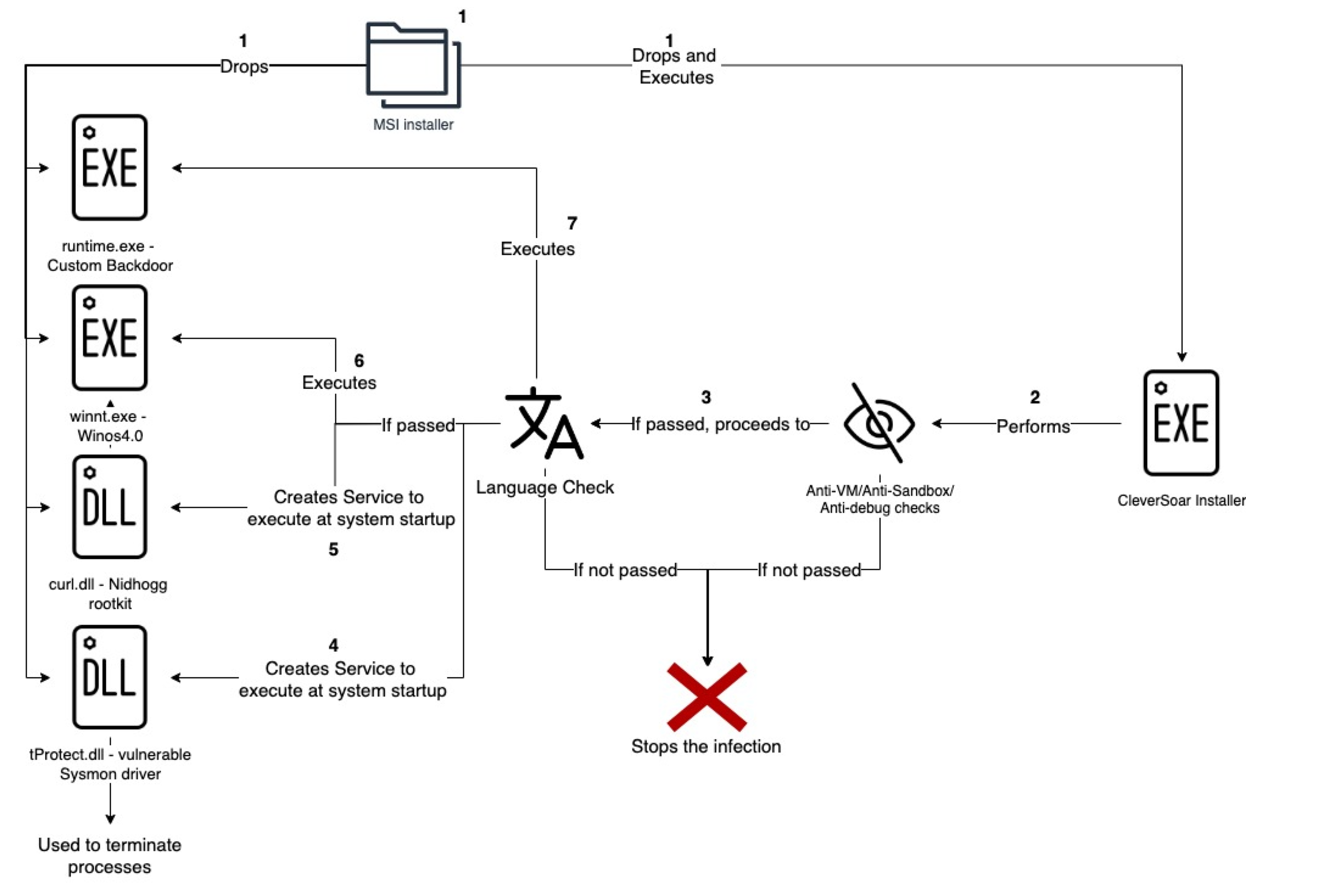
Figure 1 – CleverSoar Attack Flow

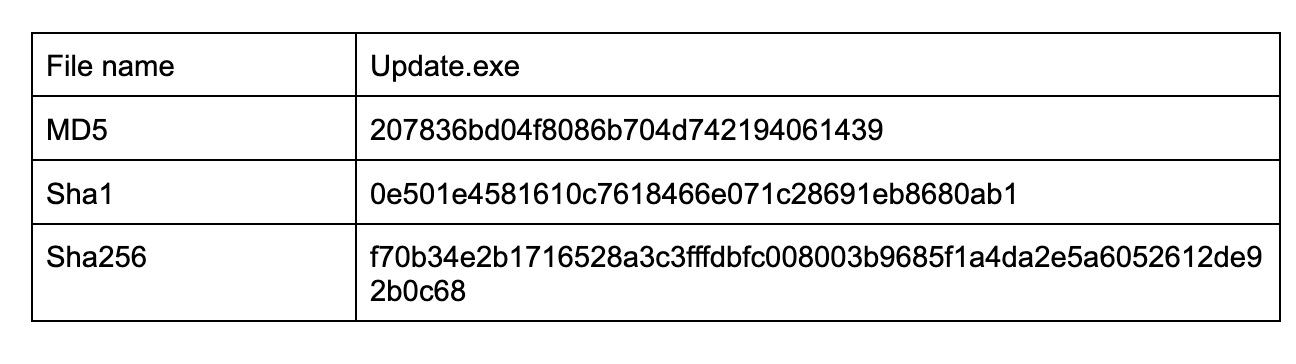
File Information:

New “CleverSoar” Installer Targets Chinese and Vietnamese Users

Given our high confidence that the malicious files were dropped by a .msi package (T1218.007), which in our case creates a ‘WindowsNT’ folder under the ‘C:\Program Files (x86)’ directory, we also assume that the same .msi package is responsible for dropping all the payloads listed below and executing the ‘Update.exe’ binary.

The installer begins by verifying the existence of the ‘C:\cs’ folder.It subsequently checks if the process is elevated by executing ‘GetTokenInformation’ and passing ‘TokenElevation’ (0x14) as a TokenInformationClass (T1134). If the process is not elevated, the malware will utilize the ‘runas’ operation of ‘ShellExecuteA’ to execute the process with Administrator privileges (T1134.002).

Subsequently, it proceeds to a series of evasion techniques, commencing with a rarely employed one.

Firmware Table Anti-VM

The malware retrieves a raw SMBIOS firmware table by invoking ‘GetSystemFirmwareTable’ and verifying a specific value presence. In our instance, the installer checks for ‘QEMU’ (indicating a free string open-sourced emulator) presence in the returned buffer (T1497.001). This technique is a sophisticated Anti-VM method as certain memory regions utilized by the operating system contain distinctive artifacts when the operating system is executed within a virtual environment. Notably, this technique has been previously employed by the Raspberry Robin malware, but in a slightly different way.

Windows Defender Emulator

The installer employs the ‘LdrGetDllHandleEx’ and ‘RtlImageDirectoryEntryToData’ functions to ascertain the state of Windows Defender’s emulator (T1497.001). Additionally, it utilizes the ‘NtIsProcessInJob’ and ‘NtCompressKey’ functions for the same purpose. These three anti-emulation techniques are publicly available in the UACME open-source project. Upon successful completion of these anti-emulation checks, the installer logs that defender checks were successfully bypassed and proceeds to the subsequent check.

Windows 10 or Windows 11

Initially, the installer verifies the operating system version by invoking the ‘GetVersionExW’ function (T1082). To identify whether the malware is executing on the Windows 10 operating system or Windows 11, the presence of the ‘C:\Windows\System32\Taskbar.dll’ file is checked, as this file can only be found on Windows 11 operating systems.

3rd Party DLL Injection Prevention

The CleverSoar installer modifies the processes mitigation policy to include the restriction ‘Signatures restricted (Microsoft only)’ (T1543). This action prevents non-Microsoft-signed binaries from being injected into the affected process. By implementing this technique, Anti-Virus and EDR solutions that employ userland hooking cannot inject their DLLs into the running process.

Timing Anti-Debug

The installer also executes timing anti-debug checks by invoking the ‘GetTickCount64’ function twice and measuring the delay between instructions and their execution (T1622).

Simple Anti-Debug check

The CleverSoar installer employs the ‘IsDebuggerPresent’ API call to ascertain whether the process is currently undergoing debugging (T1622).

Anti-Sandbox/Anti-VM Username Check

Upon the successful completion of all preceding checks, the malware retrieves the current username and subsequently compares it to the following (T1497.001):

‘CurrentUser, Sandbox, Emily, HAPUBWS, Hone Lee, IT-ADMIN, Johnaon, Miller, miloza, Peter Wilson, timmy, sand box, malware, maltest, test user, virus, John Doe, 9ZaXj, WALKER, vbccsb_*, vbccsb.’

While most of these usernames are well known for being used by sandboxes and emulator solutions, two of them seem to be misspelled: ‘Hone Lee’ instead of ‘Hong Lee’ and ‘Johnaon’ instead of ‘Johnson’.

New “CleverSoar” Installer Targets Chinese and Vietnamese Users
Figure 2 – Possibly misspelled username

There are two possible reasons for this misspell, first, the threat actor typed those names manually, and the second one might be, the threat actor found that those are more recent names used by sandboxes.

Once the username check bypass is successfully executed, the malware proceeds to complete the evasion phase and initiates its malicious actions.

Malicious Activity

Upon successful completion of all environmental checks, the installer proceeds to the system language verification. This process involves retrieving the language identifier (ID) for the user interface language and verifying if that ID corresponds to one of the Chinese language IDs (0x804, 0xC04, 0x1404, 0x1004) or the Vietnamese ID (0x42A). If the language ID does not match any of these identifiers, the malware terminates its execution (T1614.001).

This observation suggests a potential threat actor’s intention to target only endpoints within these two countries.

Subsequently, the installer creates the ‘HKCU\SOFTWARE\Magisk’ (T1112) registry key and searches for the ‘ring3_username’ value under it. If the value is not present, the malware retrieves the user name that the ‘explorer.exe’ process is running as and sets the ‘ring3_username’ value.

The installer verifies if virtualization is enabled in the firmware and made available by the operating system by calling ‘IsProcessorFeaturePresent’ with 0x15 (PF_VIRT_FIRMWARE_ENABLED) and creates the ‘INIT.dat’ file in the ‘C:\Program Files (x86)\Windows NT’ directory. Next, it enumerates processes and checks if one of ‘ZhuDongFangYu.exe’, ‘QHActiveDefense.exe’, ‘HipsTray.exe’, or ‘HipsDaemon.exe’ is running (T1518.001). The first two processes belong to 360 Total Security (Chinese Anti-Virus Software), and the last two belong to HeroBravo System Diagnostics. If one of these processes is discovered, the installer proceeds to adjust ‘Se_Debug_Privilege’ to the running process (T1134), enumerates running processes once again, searches for ‘lsass.exe’ and writes into that process (T1055). Unfortunately, we were unable to retrieve the written payload due to an unhandled runtime error. It is noteworthy that during our investigation, we identified several installer versions, and most of them encountered unhandled runtime errors and could not execute.

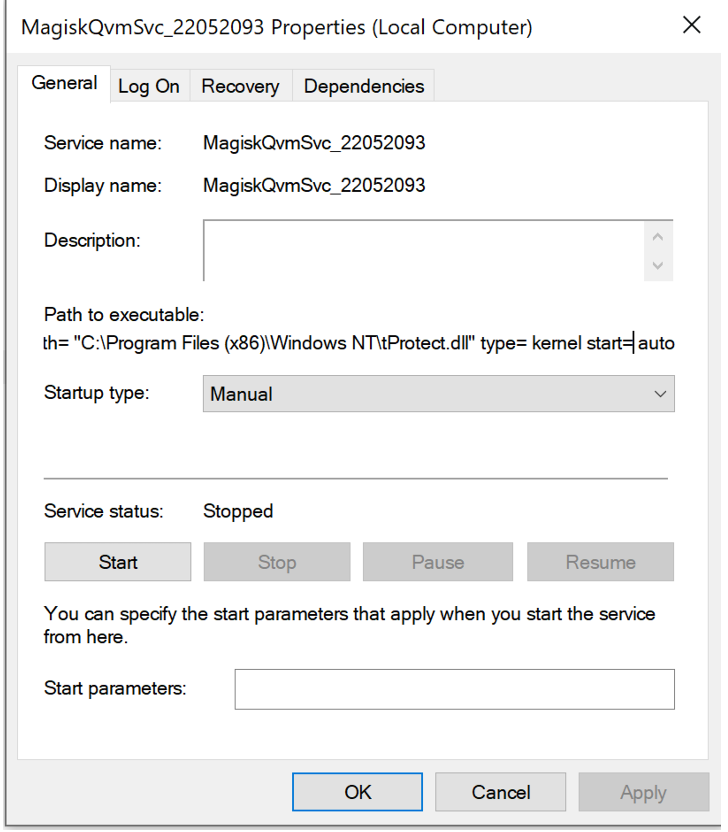
Upon successful completion of the preceding checks, the installer proceeds to verify the existence of the ‘CleverSoarInst’ service. If the service is not detected, the installer opens a named ‘\\.\pipe\ntsvcs’ pipe, which is linked to the RPC protocol, to establish a temporary service responsible for creating the ‘CleverSoar’ service (T1569.002). This temporary service will only execute once, executing the following command: ‘cmd /c start sc create CleverSoar’ displayname= CleverSoar binPath= “C:\Program Files (x86)\Windows NT\tProtect.dll” type= kernel start= auto’.

New “CleverSoar” Installer Targets Chinese and Vietnamese Users
Figure 3 – Temporary Service

This command will create a new ‘CleverSoar’ service that will commence executing a driver at the system’s startup. The DLL specified within this service is one of the previously dropped files and is, in fact, a vulnerable Sysmon driver commonly employed by threat actors to disable security software. The installer initiates the ‘CleverSoar’ service and establishes a named ‘\\.\TfSysMon’ pipe connection. Subsequently, it enumerates the currently running processes once more (T1057), searching for any instances that contain one of the following strings:

Security Product String
Bkav Pro bka, blu
Windows Security sechealthui, security, smartscreen, msmpeng, mssecess, mpcmdrun, defender
360 Total Security 360, zhudongfangyu, dsmain, qhactive, wdswfsafe, softmgr, 360se, 360chrome, 360zip
Kingsoft ksafe, kwatch, kxecenter, kislive, kxetray, kxemain, kxewsc, kscan, kxescore, xdict
Huorong Internet Security wsctrlsvc, usysdiag, hrsword
HeroBravo System Diagnostics hips
Kaspersky kav, avp, kis
2345 Security Guard 2345
Tencent qqpc
McAfee mcshield, mcapexe, mfemms
Avira avira, sentryeye
Eset eset, boothelper, efwd, egui, ekrn.exe, eguiproxy.exe
Elastic Security elastic, agentbeat.exe, apm-server.exe
Rising Anti-Virus ravmond.exe, rsmain.exe, rstray, rsmgrsvc
Monitoring and debugging tools dbg, pchunter, hacker, monitor, wireshark
Other lenovo, calc.exe, regedit
Unknown remotectrlaid, superki, mfeavsv, 52pojie, kl_, watchdog

If one of the listed processes is discovered, the installer employs the ‘DeviceIoControl’ API call, specifying the process ID and the ‘0B4A00404h’ IoControl code. Upon our examination of the Sysmon driver, this action results in the termination of the identified process (T1489).

New “CleverSoar” Installer Targets Chinese and Vietnamese Users
Figure 4 – Process Termination call from Installer

Subsequently, CleverSoar installer enumerates the files present in the folder generated by the malware and modifies their attributes by adding 0x6 (FILE_ATTRIBUTE_HIDDEN + FILE_ATTRIBUTE_SYSTEM). This modification is intended to evade file detection mechanisms (T1564.001).

The next phase involves the installation of a rootkit by creating a service which will run a rootkit dll in system startup. The installer initiates a verification process to ascertain the presence of a service named ‘Nidhogg.’ If the service is not already in existence, it proceeds to execute the command ‘sc create Nidhogg displayname= Nidhogg binPath= “C:\Program Files (x86)\Windows NT\curl.dll” type= kernel start= auto’ to create a new ‘Nidhogg’ service (T1543.003). The service will execute an open-sourced Nidhogg rootkit at system startup (T1014).

CleverSoar employs a persistence mechanism by executing a scheduled task upon user login (T1053). This task is initiated by dropping a .xml file into the user’s temporary folder, which contains a scheduled task XML file. By utilizing the same RPC service method previously mentioned, the installer constructs a service responsible for executing a command that creates the scheduled task with the ‘Corp’ name. The created task is concealed by modifying the ‘Index’ value under ‘HKEY_LOCAL_MACHINE\SOFTWARE\Microsoft\Windows NT\CurrentVersion\Schedule\TaskCache\Tree\Corp’ registry key to 0 (T1564).

After persistence set, the installer turns the Windows firewall off by executing the ‘netsh advfirewall set allprofiles state off’ command (T1562.004).

The malware now proceeds to the next stages of execution. Firstly, it checks if the ‘winnt.exe’ binary exists within the malware-created folder. In the event of its presence, the installer executes a command to create a scheduled task that will execute the binary once and immediately delete the scheduled task. The task responsible for executing the ‘winnt.exe’ is named ‘PayloadTask1’. If the binary is not present in the folder, the installer will persistently enumerate the folder and search for it. Based on our analysis of the ‘winnt.exe’ binary, it appears to be a Winos4.0 command-and-control (C2) framework implant that has recently been covered in Trend Micro’s report.

The installer executes the same process with the ‘runtime.exe’ binary. The task responsible for executing this binary is designated as ‘PayloadTask2’. Based on our investigation, ‘runtime.exe’ appears to be a custom backdoor, facilitating communication with the C2 server via a proprietary protocol.

By the time of the investigation the C2 server was already down and Rapid7 Labs could not continue the further analysis of interaction between the C2 server and the malware.

Conclusion

The CleverSoar campaign highlights an advanced and targeted threat, employing sophisticated evasion techniques and highly customized malware components like the Winos4.0 framework and Nidhogg rootkit. The campaign’s selective targeting of Chinese and Vietnamese-speaking users, along with its layered anti-detection measures, points to a persistent espionage effort by a capable threat actor. While currently aimed at individual users, this campaign’s tactics and tools demonstrate a level of sophistication that could easily extend to organizational targets. Organizations in the affected regions should take notice of the TTPs of this actor and monitor suspicious activity.

IOCs

F70b34e2b1716528a3c3fffdbfc008003b9685f1a4da2e5a6052612de92b0c68 CleverSoar installer
156.224.26.7 Winos4.0 C2
8848.twilight.zip Backdoor C2

References

Имат думата ЛГБТИ учениците. Докато не е забранено да говорят

Post Syndicated from Светла Енчева original https://www.toest.bg/imat-dumata-lgbti-uchenitsite-dokato-ne-e-zabraneno-da-govoryat/

 Страх ме е да излизам от класната си стая. В коридора има момчета, който крещят: „Мразя гейчета и транс!“

Имат думата ЛГБТИ учениците. Докато не е забранено да говорят

Думите са на анонимен участник във второто национално проучване на нагласите към ЛГБТИ (лесбийки, гей, бисексуални, транс и интерсекс) учениците в българските училища. Докладът върху проучването беше представен в средата на ноември 2024 г. Изследването е проведено от фондация „Сингъл Степ“, като огромната част от работата е извършена от клиничната психоложка Нели Цветкова. То е анонимно и в него участват 1009 ученици от всички области в страната.

Тук следва да направя уточнението, че съм редакторка на доклада. Приех поканата да го редактирам заради важността на темата му в контекста на промените в Закона за предучилищното и училищното образование (ЗПУО), с които се забранява изразяването на всичко, свързано с ЛГБТИ, в училище. Самото изследване е проведено преди забраната, но анализът на резултатите е извършен след нея.

Няколко думи за изследването

То е проведено онлайн и не е представително. Не би и могло да бъде – за да има представително изследване, трябва да се направи извадка от генералната съвкупност, тоест от всички, които са представени в него. За тази цел трябва да е известно кои са те. Не съществува обаче статистика на ЛГБТИ хората, още по-малко на ЛГБТИ тийнейджърите. А и няма как да има, защото много от тях не са разкрити.

Друг въпрос е колко представителни са например предизборните проучвания в България, като имаме предвид, че по данни на ЦИК имащите право на глас са повече от цялото население на България според НСИ.

Въпреки че изследването на „Сингъл Степ“ не е представително и е на принципа на отзовалите се, то дава реалистична представа за общата ситуация. Участниците в него са сравнително пропорционално разпределени в различните области на страната. Освен това в анализа са приложени статистически коефициенти на корелация – например между нивата на тормоз и успеха в училище. Това е нещо, което няма да видите често в изследванията на общественото мнение, тиражирани в медиите.

Проучването не е просто „моментна снимка“ – то надгражда изследване по същата тема от 2018 г., проведено от „Сингъл Степ“ в сътрудничество с „Билитис“. Това дава възможност в анализа да се откроят разлики и да се очертаят тенденции.

Няколко думи за контекста и репресиите

Второто изследване на ЛГБТИ учениците в България се провежда шест години след първото. Всъщност това са годините, последвали конспиративната пропагандна кампания срещу Конвенцията на Съвета на Европа за превенция и борба с насилието над жени и домашното насилие, по-известна като Истанбулската конвенция. В резултат на създадената обществена истерия последваха решения на Конституционния и Върховния касационен съд, в резултат на които възможността за промяна на юридическия пол в България на практика беше премахната. Сравнението на резултатите от двете изследвания хвърля светлина върху щетите, нанесени върху ЛГБТИ тийнейджърите.

Самото проучване от 2024 г. се използва срещу създателите му и срещу неправителствените организации изобщо, преди резултатите от него да видят бял свят наред с популяризираната от бившата председателка на БСП Корнелия Нинова брошура за сексуалното здраве на лесбийките, дело на Фондация „Билитис“.

На заседание на парламентарната Комисия по въпросите на младежта и демографската политика представители на „Сингъл Степ“ и „Билитис“ бяха подложени на продължаващо с часове подобие на разпит. Те бяха питани за източниците им на финансиране, които впрочем са публични и прозрачни, а председателят на „Сингъл Степ“ Иван Димов трябваше да отговаря на въпроса дали има лиценз да извършва такова проучване. На положителния му отговор депутатка от „Възраждане“ реагира, че ще поиска отнемане на този лиценз.

А според присъстващата в залата директорка на Държавната психиатрична болница „Св. Иван Рилски“ д-р Цветеслава Гълъбова начинът на провеждане на проучването бил „престъпление срещу децата“. Не става ясно кое е престъпното в една анонимна онлайн анкета, нито кое кара един психиатър да стигне до подобно заключение.

От „Възраждане“ подават сигнали срещу „Сингъл Степ“ в редица институции, в резултат на което организацията месеци наред е обект на проверки. До този момент няма институция, която да е открила нещо нередно нито в дейността на организацията, нито в начина на провеждане на изследването.

Някои по-важни акценти от изследването

Шестте години на усилващи се анти-ЛГБТИ послания след кампанията срещу Истанбулската конвенция дават тревожни, макар и не неочаквани плодове. Увеличил се е делът на учениците, които споделят, че са чували хомофобски коментари в училище много често. През 2018 г. така отговарят 54,5%, а през 2024 г. – 62,5%. При това става въпрос за повишаване на хомофобските коментари не само от страна на учениците, а и на учителите. През 2018 г. 57,4% от участниците в изследването са чували такива реплики от свои учители, а шест години по-късно делът им е 68% – над 10% повече.

Успоредно с това намалява готовността на представителите на училищния персонал да вземат мерки, когато учениците споделят с тях, че са станали обект на тормоз или нападение по хомофобски или трансфобски причини. В 53,5% от случаите учителите не предприемат нищо, в сравнение с 46,6% през 2018 г. 14,3% от респондентите дори посочват, че учителите са им казали да си променят поведението – да не се държат „като гей“, да си променят облеклото и т.н. (преди шест години този дял е 11,4%).

Участници в изследването споделят, че избягват някои места в училище, където е вероятно да бъдат тормозени, например съблекални. В някои училища дори има обособени зони за хомофобски тормоз:

Из училище има хомофобски стикери и лепенки с обозначено място за среща за побой над ЛГБТИ+ хора.

Влошеният климат в училище води до по-ниски образователни резултати и влошено психично здраве. Анализът на изследването показва връзка между нивата на вербален тормоз и академичните постижения на учениците – колкото по-голям е тормозът, толкова повече се влошава успехът. Аналогично, по-високите нива на тормоз водят и до засилване на депресивните състояния.

Особено тревожен резултат е, че почти половината от анкетираните – 49,6% – сериозно са обмисляли самоубийство през последната година. През 2018 г. този дял е 41,2%.

Затова не е учудващо, че близо две трети (60,1%) от участниците в изследването планират да емигрират. Нито че почти три четвърти (72,4%) от обмислящите да напуснат България посочват като основен мотив сексуалната си ориентация или половата си идентичност.

Все пак, наблюдават се и отделни положителни тенденции. Например през 2018 г. 77,5% от учениците са можели да посочат поне един представител на училищния персонал, който според тях подкрепя ЛГБТИ хората. През 2024 г. така смятат вече 82,5% от участниците в изследването.

Също така, въпреки влошената обществена среда в резултат на антиджендър кампанията, ЛГБТИ учениците, изглежда, разполагат с повече източници на информация, което им помага да се самоопределят по-прецизно. Въпреки че такива опции не присъстват в анкетната карта, през 2024 г. 7,3% от участниците в изследването се определят в свободен текст като пансексуални, а 11,5% – като небинарни. През 2018 г. няма такива отговори. Тогава няма и никой, посочил, че е интерсекс (тоест полът му чисто биологически не може да се определи еднозначно като мъжки или женски), а шест години по-късно като такива са се определили 8 души.

А след още шест години?

Пренасянето на тенденции механично в бъдещето невинаги е добър прогностичен метод, защото някои неочаквани събития – или пък процеси, които дълго време са останали невидими – могат да обърнат тенденциите. С уговорката, ако в следващите шест години не настъпи обрат, резултатите от едно следващо проучване на ЛГБТИ учениците в България биха били още по-тревожни. Предпоставките за това са и от вътрешно-, и от външнополитическо естество.

Промените в образователния закон ще доведат до допълнително влошаване на училищната среда за ЛГБТИ тийнейджърите. Те ще могат да разчитат на по-малка подкрепа от преди поради страх (в някои случаи основателен) от страна на учители, училищни психолози и директори, че ако ги защитят или се опитат да им помогнат, това може да изложи тях (т.е. представителите на училищния персонал) на риск. Такива случаи вече има – например в Природо-математическата гимназия в София.

Освен това до приемането на поправката в ЗПУО против „пропагандата“ в училище ЛГБТИ учениците може и да са били дискриминирани и тормозени, но законодателството е на тяхна страна.

С определянето на „правилна“ и „неправилна“ сексуална ориентация и полова идентичност със закон и със забраната за обсъждане на „неправилните“, ЛГБТИ хората се оказват извън закона. За един тийнейджър това означава, че „вече е забранено да си гей“.

Във външнополитическо отношение преизбирането на Доналд Тръмп за президент на САЩ по всяка вероятност ще доведе до допълнителна публична легитимация на хомофобията и трансфобията. Както и до обличането на тази легитимация в различни правни форми. Перспективата България да направи геополитически завой към Русия също не вещае нищо добро за ЛГБТИ хората.

Тези тенденции биха могли и да се обърнат – например при един по-силен Европейски съюз, сплотен около стоящите в основата му демократични ценности. Или (което на този етап граничи с фантастиката, но нека не го изключваме напълно) при наличие на политически субекти с достатъчно обществена подкрепа в България, последователно отстояващи демократични ценности.

По-важен въпрос от този за резултатите от едно бъдещо изследване на ЛГБТИ учениците в България е дали изобщо ще има такова. Целта на многобройните проверки по сигнали на „Възраждане“, на които е подложен екипът на „Сингъл Степ“, е опит да се затвори устата на организацията, така че да няма информация какви са ефектите върху младите хора от сеенето на омраза с политически цели. Номерът очевидно не минава, но на един следващ етап подобни опити могат да приемат и законова форма. И подобни изследвания да се окажат забранени.

Тази хипотеза следва да се приеме сериозно, но не за да се плашим. А защото става все по-важно да не забравяме, че човешките права, демокрацията и свободата, включително свободата на изследване, не са даденост, а трябва да се отстояват непрекъснато. Ако гледаме на тях като на благодеяние, то много лесно може да бъде оттеглено.

NSO Group Spies on People on Behalf of Governments

Post Syndicated from Bruce Schneier original https://www.schneier.com/blog/archives/2024/11/nso-group-spies-on-people-on-behalf-of-governments.html

The Israeli company NSO Group sells Pegasus spyware to countries around the world (including countries like Saudi Arabia, UAE, India, Mexico, Morocco and Rwanda). We assumed that those countries use the spyware themselves. Now we’ve learned that that’s not true: that NSO Group employees operate the spyware on behalf of their customers.

Legal documents released in ongoing US litigation between NSO Group and WhatsApp have revealed for the first time that the Israeli cyberweapons maker ­ and not its government customers ­ is the party that “installs and extracts” information from mobile phones targeted by the company’s hacking software.

Hosting containers at the edge using Amazon ECS and AWS Outposts server

Post Syndicated from aostan original https://aws.amazon.com/blogs/compute/hosting-containers-at-the-edge-using-amazon-ecs-and-aws-outposts-server/

This post is written by Craig Warburton, Hybrid Cloud Senior Solutions Architect and Sedji Gaouaou, Hybrid Cloud Senior Solutions Architect

In today’s fast-paced digital landscape, businesses are increasingly looking to process data and run applications closer to the source, at the edge of the network. For those seeking to use the power of containerized workloads in edge environments, AWS Outposts servers offer a compelling solution. This fully managed service brings the AWS infrastructure, services, APIs, and tools to virtually any on-premises or edge location, allowing users to run container-based applications seamlessly across their distributed environments. In this post, we explore how Outposts servers can empower organizations to deploy and manage containerized workloads at the edge, bringing cloud-native capabilities closer to where they’re needed most.

Solution overview

Amazon Elastic Container Service (Amazon ECS) is a fully managed container orchestration service that can be used with Outposts servers. This combination allows users to run containerized applications at the edge with the same ease and flexibility as in the AWS cloud.

By using Outposts server with Amazon ECS, users can effectively extend their container-based workloads to the edge, enabling new use cases and improving application performance for latency-sensitive operations.

The following diagram illustrates an example architecture where a user is looking to deploy a microservices based PHP web application and instance based MySQL database. Furthermore, a container based load balancer appliance is used to receive and distribute traffic to the web application container. The example application writes its data to a MySQL database, which is hosted on an external storage array. The application is deployed on the Outpost server, and can communicate with the database across the user data center network.

In this post we will show how users can deploy an example microservice based application. Each section of this post walks through Steps 1 through 4 shown in the following diagram.

Figure 1: Solution overview

Figure 1: Solution overview

Walkthrough

Prerequisites

Before deploying the sample application, you must have ordered, received, and successfully installed an Outposts server. The server is operational and visible in the AWS Management Console.

This walkthrough assumes you have access to Amazon Elastic Container Registry (Amazon ECR) that is used for the container repository.

You need the following AWS Identity and Access Management (IAM) role provisioned with the necessary permissions included in the policy to permit the load balancer to read the required Amazon ECS attributes. Refer to the user guide Create a role to delegate permissions to an IAM user section to help you through creating an IAM role and associated policy. The Amazon ECS task IAM role needs the following policy configuration to read the necessary Amazon ECS information:

{
    "Version": "2012-10-17",
    "Statement": [
        {
            "Sid": "LoadBalancerECSReadAccess",
            "Effect": "Allow",
            "Action": [
                "ecs:ListClusters",
                "ecs:DescribeClusters",
                "ecs:ListTasks",
                "ecs:DescribeTasks",
                "ecs:DescribeContainerInstances",
                "ecs:DescribeTaskDefinition",
                "ec2:DescribeInstances",
                "ssm:DescribeInstanceInformation"
            ],
            "Resource": [
                "*"
            ]
        }
    ]
}

You also need the Amazon ECS task execution IAM role (ecsTaskExecutionRole) that will grant the Amazon ECS container service the necessary permissions to make AWS API calls on your behalf.

Step 1: Setting up Amazon ECS on Outposts server

Amazon ECS is used in this walkthrough to deploy our container workloads to the Outposts server. Before deploying workloads, an ECS cluster on Outposts needs to be created.

In this configuration, the Amazon ECS cluster targets the private subnets (10.0.1.0/24 and 10.0.2.0/24) and the Amazon Elastic Compute Cloud Amazon (EC2) instances configured on the Outpost server for deployments.

To assist in targeting the deployment of our Amazon ECS services to specific instances with an attached Local Network Interface (LNI), our Amazon EC2 instances are assigned a logical role using custom Amazon ECS container instance attributes. Custom attributes are used to configure task placement constraints, as shown in the following figure.

Figure 2: Amazon ECS container instances used for tasks

Figure 2: Amazon ECS container instances used for tasks

One of the container instances is assigned the role of loadbalancer, as shown in the following figure. Follow the developer guide section to Define which container instances Amazon ECS uses for tasks, and add the following custom attribute to one of your instances:

  • Name = role, Value = loadbalancer

Figure 3: Instance with the Custom Attibutes - loadbalancer

Figure 3: Instance with the Custom Attibutes – loadbalancer

The other container instance is assigned the role of webserver, as shown in the following figure. Add the following custom attribute to each of the remaining instance:

  • Name = role, Value = webserver

Figure 4: Instance with the Custom Attibutes - webserver

Figure 4: Instance with the Custom Attributes – webserver

Step 2: Deploying a load balancer with host mode to use LNI

In this section, you deploy a task for the load balancer as seen in Step 2 of the Solution overview.

First, you must enable the private subnet, where your load balancer is deployed, for LNIs:

aws ec2 modify-subnet-attribute \

    --subnet-id subnet-1a2b3c4d \

    --enable-lni-at-device-index 1

Now add an LNI to the container instance with the attibute “loadbalancer”. This instance can now access your local network.

To deploy the load balancer, create an Amazon ECS task definition named “task-definition-loadbalancer.json”, which describes the container configuration to implement the load balancer as followed:

{
    "containerDefinitions": [
        {
            "name": "loadbalancer",
            "image": "traefik:latest",
            "cpu": 0,
            "portMappings": [
                {
                    "containerPort": 80,
                    "hostPort": 80,
                    "protocol": "tcp"
                },
                {
                    "containerPort": 8080,
                    "hostPort": 8080,
                    "protocol": "tcp"
                }
            ],
            "essential": true,
            "command": [
                "--api.dashboard=true",
                "--api.insecure=true",
                "--accesslog=true",
                "--providers.ecs.ecsAnywhere=false",
                "--providers.ecs.region=<AWS_REGION>",
                "--providers.ecs.autoDiscoverClusters=true",
                "--providers.ecs.clusters=<YOUR_CLUSTER_NAME>",
                "--providers.ecs.exposedByDefault=true"
            ],
            "environment": [],
            "mountPoints": [],
            "volumesFrom": [],
            "systemControls": []
        }
    ],
    "family": "loadbalancer",
    "taskRoleArn": <TASK_ROLE_ARN>,
    "executionRoleArn": <EXECUTION_ROLE_ARN>,
    "networkMode": "host",
    "volumes": [],
    "placementConstraints": [
        {
            "type": "memberOf",
            "expression": "attribute:role == loadbalancer"
        }
    ],
    "requiresCompatibilities": [
        "EC2"
    ],
    "cpu": "256",
    "memory": "128",
    "tags": []
}

Replace the string <TASK_ROLE_ARN> with the Amazon Resource Name (ARN) of the IAM role configured with the LoadBalancerECSReadAccess policy and the string <EXECUTION_ROLE_ARN> with the ARN of the IAM role configured with the ecsTaskExecutionRole policy as configured in the Prerequisites section, <AWS_REGION> with the AWS Region where you deployed your ECS cluster, <YOUR_CLUSTER_NAME> with your cluster name.

Some points to consider:

  • The Amazon ECS Network mode is set to “host”. The load balancer task uses the host’s network to access the LNI.
  • The task definition includes the placement constraint matching the loadbalancer custom attribute value.

Lastly, register the task definition with your cluster and create the loadbalancer service using the following AWS Command Line Interface (AWS CLI) command:

aws ecs register-task-definition --cli-input-json file://task-definition-loadbalancer.json

aws ecs create-service--cluster <CLUSTER_NAME> --service-name loadbalancer --task-definition loadbalancer:1 --desired-count 1

Replace the string <CLUSTER_NAME> with the target Amazon ECS cluster name.

The load balancer is now running.

Connecting to the Amazon EC2 instance with the attibute loadbalancer using Session Manager, you can get the following LNI IP address:

Figure 5: Getting the LNI IP

Figure 5: Getting the LNI IP

You can access the web user interface by browsing to the URL from your local network:

http://<HOST_IP>:8080/dashboard/

Replace the string <HOST_IP> with the Amazon EC2 instance host LNI IP address, or DNS hostname.

Step 3: Deploying sample web application in awsvpc mode

First, make sure that the AWSVPC Trunking is turned on, as shown in the following figure:

Figure 6: Enabling AWSVPC Trunking

Figure 6: Enabling AWSVPC Trunking

Create an Amazon ECS task definition for our application named “task-definition-webapp.json”, which describes the container configuration to implement the example web application as followed:

Replace the <PLACEHOLDER> values for your application.

{
    "containerDefinitions": [
        {
            "name": "whoami",
            "image": "<CONTAINER-IMAGE>:latest",
            "cpu": 0,
            "portMappings": [
                {
                    "name": "<WEBAPP>",
                    "containerPort": 80,
                    "hostPort": 80,
                    "protocol": "tcp"
                }
            ],
            "essential": true,
            "environment": [],
            "mountPoints": [],
            "volumesFrom": [],
            "dockerLabels": {
"traefik.http.routers.<WEBAPP>-host.rule":     "Host(`<WEBAPP>.domain.com`)",
               "traefik.http.routers.<WEBAPP>-path.rule": "Path(`/<WEBAPP>`)",
               "traefik.http.services.<WEBAPP>.loadbalancer.server.port": "80"
            },
            "systemControls": []
        }
    ],
    "family": "<WEBAPP>",
    "networkMode": "awsvpc",
    "volumes": [],
    "placementConstraints": [
        {
            "type": "memberOf",
            "expression": "attribute:role == webserver"
        }
    ],
    "requiresCompatibilities": [
        "EC2"
    ],
    "cpu": "256",
    "memory": "128",
    "tags": []
}

In the task-definition-webapp.json, consider the following:

  • The task definition includes the placement constraint matching the webserver custom attribute value.
  • Docker label traefik.http.routers is used to configure host and path based routing rules.
  • As the example web application container exposes the single TCP port 80, Docker label traefik.http.services.<WEBAPP> is used to configure this port for private communication with the Traefik load balancer.

Register the task definition with your cluster and create the loadbalancer service using the following AWS CLI command:

aws ecs register-task-definition --cli-input-json file://task-definition-webapp.json

aws ecs create-service--cluster <CLUSTER_NAME> --service-name <WEBAPP> --task-definition <WEBAPP>:1 --desired-count 1

Replace the string <CLUSTER_NAME> with the target Amazon ECS cluster name and the string <WEBAPP> with your application.

You can access the whoami application by browsing to the URL from your local network:

http://<HOST_IP>/<WEBAPP>

Step 4: Provision DB instance and attach an external storage

The web application has been successfully deployed, so we will move on to the deployment and configuration of the database server next. First, deploy an Amazon EC2 instance to host a MySQL database. As shown in the following screenshot, use the AWS Console to choose an instance type (this is dependent on your Outposts server instance capacity configuration) and configure its network settings to target the correct VPC and the subnet deployed to the Outposts server.

Figure 7: Provisioning a database instance

Figure 7: Provisioning a database instance

When the instance is available, deploy MySQL following a standard documented approach to install on a Linux host from the vendor. After successfully installing MySQL, configure users and tables necessary for the application. The sample application configuration file can now be updated to allow the PHP web server container to connect to the MySQL database, as well as create a user and list the users, as shown in the following figures.

Figure 8: Updating the application config file to use the database instance

Figure 8: Updating the application config file to use the database instance

Figure 9: Sample application connected to database

Figure 9: Sample application connected to database

For the database instance, make sure that the data associated with the application is stored on an existing storage array in the user data center. To do this, you must complete the following:

(a) Enable connectivity to the user network through the LNI.

(b) Mount the iSCSI volume in the EC2 instance.

(c) Configure MySQL to use this iSCSI volume.

To enable connectivity, follow the same process described in step 2 of this post to add an Elastic Network Interface (ENI) with the correct device index to present the LNI to the instance. The following screenshots show a second ENI configured on the instance and associated with the LNI along with the interface and address configuration of the instance that shows two addresses (VPC and user network addresses).

Figure 10: Network interface configuration

Figure 10: Network interface configuration

Now that connectivity has been established to the user network, you can configure the storage array to present an ISCSI volume to the database instance and mount that volume. The following screenshot shows the /mnt mountpoint being used with iSCSI multi-path across four volumes.

Figure 11: iSCSI volume mount

Figure 11: iSCSI volume mount

Finally, configure MySQL to use the iSCSI volume to store data by stopping the MySQL service, updating the default configuration file /etc/my.cnf, and restarting MySQL, as shown in the following figure.

Figure 12: MySQL configuration

Figure 12: MySQL configuration

Clean up:

Please follow the below instructions to clean up after testing:

  • Delete the <WEBAPP> service
  • Delete the loadbalancer service
  • Delete your Amazon ECS cluster
  • Delete the MySQL Database EC2 instance
  • Delete all VPCs

Conclusion

This post has demonstrated how to deploy a sample container-based web application while connecting to the user network, allowing access to the application and connecting to existing storage appliances.

AWS Outposts server allows users to run containers at the edge, addressing challenges related to low latency, local data processing, and data residency. Amazon ECS allows you to deploy consistently, whether in-Region or at the edge, allowing users to develop once and deploy many times.

Get started with Outposts servers by visiting the Outposts servers webpage and learn more about Amazon ECS to begin deploying your containarized workloads at the edge!

Били. Метаморфози

Post Syndicated from Тоест original https://www.toest.bg/bili-metamorfozi/

Били. Метаморфози

Появява се
и тази представа за рая:
в куче или в лъв да се вселиш,
защо не и в тигър като тебе, Били,
да лежиш под прозорците в онази стая, обляна от
светлина със знаменателна текстура,
да си един от домашните любимци
на светеца, който превежда ли, превежда
свещените писания.
Преди светът да почне сам
да си превежда най-насъщното
на милионите езици на своите потребности.

И се появява
напращяла благородна смелост,
готова да се хвърли,
да разкъса сред звънтеж
на рицарски доспехи.

Тигре Били,
ревът ти пурпурен
достоен е да украсява някой герб.
Преди гербът на бутафория да се обърне.

И се появява
на задна уличка
възрастна жена с рокля на цветя
и с поглед, който обяснява.

С каишка те разхожда.
А ти, проскубан леко, безсилен
срещу пиратските нашествия
на днешното ти време, котарако Били,
рицарски подкрепяш този поглед,
блясъка в него, който се рее
в това стечение на светлината. 

Калоян Игнатовски


Калоян Игнатовски (р. 1976) е автор на четири стихосбирки, последната от които – „Водата на деня“, е публикувана през август 2024 г. Литературен преводач от английски и испански език, редактор. През 2012 г. заедно със Силвия Чолева и Иглика Василева основава Издателство за поезия ДА.


Според Екатерина Йосифова „четящият стихотворение сутрин… добре понася другите часове“ от деня. Убедени, че поезията държи умовете ни будни, а сърцата – отворени, в края на всеки месец ви предлагаме по едно стихотворение. Защото и в най-смутни времена доброто стихотворение е добра новина.

На север: Снежни лета в една исландска хижа (втора част)

Post Syndicated from Светла Стоянова original https://www.toest.bg/na-sever-snezhni-leta-v-edna-islandska-hizha-vtora-chast/

<< Към първа част

На север: Снежни лета в една исландска хижа (втора част)

Дойде август. Дни наред ветровете са със скорост 70 км/ч, вали обилно, снегът преминава в дъжд и обратното. Повечето туристи не са подготвени за зимни условия и молят за място в хижата, искали да палаткуват, но такъв вариант в това време няма. „Не погледнахте ли прогнозата, преди да тръгнете? Не чухте ли, че идват страшни ветрове? – питам ги, а те смутено клатят глави. – Излагате се на опасност, ветровете в Исландия могат да ви повалят, а спре ли човек да си почине, измръзването идва неочаквано бързо.“ Тази вечер хижата е със свръхколичество матраци, оползотворен е всеки метър, приютяваме и последния стигнал дотук. Надяваме се останалите да са направили обратен завой навреме…

Бяхме назначени за хижари в една от високопланинските хижи в Исландия. Нейното привидно сложно име – „Храпънтинюскер“ (исл. Hrafntinnusker) – е и името на местността. Дългите думи в исландския език се състоят от множество прости като в немския. В случая с „Храпънтинюскер“ се започва отзад напред: „скер“ е братовчед на английското skerry, означаващо „скален остров, шхери“, а „храпънтина“ означава „обсидиан, вулканично черно стъкло“. Но загадката не се изчерпва с това, защото вместо международната дума „обсидиан“ исландците създават своя сложна дума от „храпън“ ‘гарван’ и „тина“ ‘камък’. Тоест

„Храпънтинюскер“ буквално означава Скалният остров на гарвановия камък.

Името много подхожда на местността, която в периметър от 3 км е обсипана именно с лъскавия като гарванови пера камък. Съседните ни хижи също имаха подобни живописни имена, като „Аулфтавахтън“ – Езерото с лебедите, „Квангил“ – Каньонът с лечебната пищялка, или „Тоурсмьорк“ – Долината на Тор.

Във всяка хижа работят между двама и шестима хижари, които се подготвят за цялото лято с хранителни запаси, тъй като най-близкият магазин е на 3–4 часа път пеш, а после още толкова с автомобил по неравен планински път. В моя случай бяхме двама и работихме в продължение на три месеца.

Ежедневно приемахме по стотина туристи – в хижата, къмпинга или просто преминаващи.

Осведомявахме ги за времето, за допълнителни живописни пътеки наоколо, както и за състоянието на пътя до следващата спирка от прехода. Отговаряхме за това хижата да бъде приветлива и уютна, както и колчетата по пътеката да бъдат видими дори и в мъгла. При възникнали проблеми оказвахме помощ и намирахме решения. Продавахме ограничен набор от суха храна и други полезни неща, като ръчно плетени ръкавици, чорапи и шапки от топла исландска вълна.

През летните месеци постоянно имаше или топящ се сняг, или нов снеговалеж. При откриването на сезона през юни всичко бе потънало в три метра сняг, затова трябваше да изкопаем снежен тунел, за да стигнем до вратата. С лопати оформихме импровизирано стълбище в снега, което с всеки следващ ден се снишаваше от топенето. Отварянето на вратата също си беше усилие, тъй като снегът бе натежал от едната страна на къщата и бе изместил всички прави линии.

В началото на сезона ни закараха с огромен планински автомобил. За лятото се бяхме подсигурили с десетина кашона зимнина и провизии. Предварително бяхме приготвили десетки буркани с конфитюр от ръчно брани боровинки и ревен, както и най-разнообразни ферментации – кисело зеле, червено цвекло и моркови. Бяхме купили 20 кг брашно от пшеница, ръж и ечемик, за да си правим квасен хляб и палачинки. Имахме и домашно кисело мляко и сирене. Запасихме се колкото можахме с пресни плодове и зеленчуци, както и със суха храна, като ориз, булгур, паста, леща, боб, нахут и др. От време на време приятели ни идваха на гости и ни носеха шоколади и кафе, а мама пък изпращаше с колетчета сушени гъби и домати, ядки и вкусни рибни консервички. В останалите случаи слизахме пеш 12 км по планинска пътека и 500 м денивелация до съседните хижи. Оттам до града се стигаше със специален автобус, който прекосяваше три реки по пътя си.

Електричеството в хижата се осигуряваше от соларни панели, а водата се набавяше от близката ледникова река. Отоплението представляваше сложна система, свързана с горещ извор, който поддържаше температура до 20 градуса. Затова в добре затопленото коридорче изсъхваха и най-мокрите якета и обувки. В края на сезона през септември обаче водопроводните тръби замръзваха и носехме вода на гръб от близката река. Хижата разполагаше с три помещения с легла и матраци без чаршафи, тъй като всеки си носеше спален чувал. Освен трите общи спални за 50 души имаше и кухня с котлони и посуда, тъй като всички туристи си готвеха сами. Често идваха и организирани групи с екскурзовод, който вечер влизаше в ролята на готвач.

Мобилен обхват имаше само по височините, но за работа разполагахме с безжичен интернет от сателит. Когато връзката изчезнеше, се катерехме по близкия хълм с лаптоп в ръка в слънце и мъгла, за да проверим прогнозата за времето и да можем да информираме туристите. За къмпингуващите имаше заслон, както и импровизирани заоблени стени от обсидиан, които предпазваха палатките от силните ветрове. С другите пет хижи общувахме чрез радиостанция.

Всеки петък вечер след края на работния ден по традиция се провеждаше конкурс по радиопоезия.

Темата се даваше предния ден и всяка хижа се включваше със стихотворение, плод на споделено творчество. След като всички творби се изчетяха по шумолящата радиостанция, участниците даваха оценки и победителите получаваха правото да измислят темата за следващия път. Стихотворчеството ни сплотяваше, когато времето не позволяваше на нас, хижарите, да си ходим на гости. Освен по радиостанцията, понякога си изпращахме и истински писма, пренасяни от хижа на хижа чрез наземните ни пощенски гълъби – туристите.

При спешни случаи на линия беше планински спасителен екип, който пристигаше с автомобил за първа помощ или с медикоптер. През сезоните имахме случаи с навехнати крайници, алергични реакции, камъни в бъбреците и сърдечни проблеми. Първата помощ и транспортът до болнично заведение са безплатни за пострадалите, тъй като държавата ги осигурява. Но тъй като пострадалите често се оказват недостатъчно подготвени чуждестранни туристи, някои исландци не желаят да плащат данъци за спасяването на хора, които не знаят къде са тръгнали.

На няколко километра от хижата е издигната каменна пирамида в памет на загинал преди десетина години младеж. Той пренебрегва съвета на местните да не тръгва заради очакваното влошаване на времето и буря. Подценява прогнозата и без карта, навигация или представа за пътя се изгубва и изпада в хипотермия. Спасителните служби го намират твърде късно. Въпреки строгите мерки, подобен случай имахме и ние:

Беше 29 юни, а навън се вихреше снежна буря. В 18 ч. ми се обадиха от 112 – възрастен мъж се е загубил по пътя. Вероятно е наблизо, но не може да продължи, защото е изтощен и не знае накъде да върви. В подобни ситуации обикновено отговаря местната спасителна служба, чийто пункт е на около 10 км, но предвид факта, че човекът вероятно е близо до хижата, ни помолиха да го потърсим. Бързо облякох непромокаемото яке и светлоотразителната жилетка, приготвих вода, шоколад, допълнителен чифт ръкавици и с бинокъл на врата и радиостанция на колана хукнах да го търся. Снежната буря беше поутихнала, но видимостта беше лоша – като неясна черно-бяла снимка. Новият слой сняг беше заличил напълно пътеката. Познавах околността добре, вървях в указаната посока и поглеждах през бинокъла. Надявах се, че мъжът е останал на пътеката или поне е близо до нея, защото иначе периметърът на търсене щеше много да се увеличи.

Вървях в бялата пустош и търсех. Следвах каменните пирамиди, обозначаващи пътя, и изведнъж забелязах очертанията на човешка фигура. Той ли беше? Помахах и ми отвърна! Възрастен мъж без ръкавици и шапка, с мътни, мокри очила, вир-вода насред снега. Беше се подпрял на камъните и едва се държеше на краката си. Хванах го под ръка и му подадох щека. Олюлявайки се от умора, той закуцука. Залисах го с въпроси за семейството и страната му и малко по малко духът му се възвърна, а стъпките станаха по-уверени. Така извървяхме отсечката до хижата. Посъветвахме го да обмисли добре дали да продължи нататък с прехода, но отпочинал, на следващия ден той все пак пое напред с нови сили.

На север: Снежни лета в една исландска хижа (втора част)
Училищна група от 50 деца тръгва на път в снежната мъгла през август © Светла Стоянова

През сезоните се запознахме с чудесни хора, чухме вдъхновяващи истории за оцеляване в дивото и в истински свирепото исландско време. Хората пристигаха откъде ли не – от Австралия до Япония, от Мексико до България. Сред тях

най-възрастният турист беше 81-годишен, а най-малкият – едва на годинка.

Хората се движеха по двойки, с приятели, с малки деца, в организирани групи, но и соло. За едни преходът беше предизвикателство за тялото и духа, за други – по-натоварваща екскурзия. Някои от тях посещаваха Исландия само за да усетят пеш отличителните страни на исландската природа, придвижвайки се бавно от пейзаж в пейзаж и далеч от удобствата на модерния свят.

Заради срещите ни със стотиците туристи – от опитните планинари до напълно безпомощните, подценили ситуацията – се чувствам задължена да спомена, че за да минимизираме неприятните ситуации при преходи на подобни труднодостъпни места, преди всичко трябва да сме добре подготвени – със здрави обувки, с водонепромокаеми дрехи, както и с резервни за смяна. Винаги да си носим достатъчно храна за всеки от дните, аптечка, навигация или карта и компас, но и да знаем как да ги използваме. Да проучим добре какво ни очаква като терен, физическо натоварване и метеорологични условия, както и да предупредим някой близък къде отиваме. Защото планината е голяма и лошото време дебне отвсякъде.

Вървиш ли, бъди готов да те повали ненадеен порив. Изправиш ли се, трябва да посрещнеш следващия удар. Стисни здраво щеки, напрегни мускули и гледай напред – кой знае, може би ще утихне…

Тук дървета няма и вятърът не се вижда. Само се чува. Той вие, свисти и фучи, блъска се в къщата, обикаля я като вихрушка и продължава все така вихрено по пътя си. Нависоко разстила облаците като с точилка, а те се разливат на пластове като палачинки, удàри ли залезният час, сменят палитрата си неколкократно. В ниското вятърът помита вулканичния прах на вълни, а той остава да виси във въздуха като сива мъгла.

Знамето на хижата стои като заковано в една-единствена посока и плющи на къси амплитуди като птица, учеща се да лети. Сякаш и то още малко и ще литне, ще бъде отвяно и понесено в безкрая. Пилонът, който сам не спира да се клати заплашително, го държи и не го пуска. Това обаче коства живота на знамето, което конец по конец се разбридва, нишка по нишка се разкъсва и се оплита само в себе си. Поредното знаме, което не устоя на вятъра. Да се опитам ли да го зашия? Не, и най-здравият ми шев едва ли ще го спаси.

(Следва продължение.)

На север: Снежни лета в една исландска хижа (втора част)
Знаме на вятъра © Светла Стоянова

The collective thoughts of the interwebz