One concern that has often been expressed about the Rust language is that
there is only one compiler for it. That makes it hard to say what the
standard version of the language is and restricts the architectures that
can be targeted by Rust code to those that the available compiler supports.
Adding a Rust frontend to GCC would do much to address those concerns; at
the 2024 GNU Tools
Cauldron, Pierre-Emmanuel Patry gave an update on the state of that
work and what its objectives are.
Security updates have been issued by Debian (debian-security-support, nghttp2, and sqlite3), Oracle (cups-filters, kernel, and osbuild-composer), SUSE (openssl-3), and Ubuntu (bubblewrap, flatpak and python2.7, python3.5).
Zabbix Summit 2024 is only a few days away, which means that it’s time for the last of our interviews with Summit speakers. Our final chat this year is with Tomáš Heřmánek, the CEO and Founder of initMAX s.r.o. We asked him about his beginnings in the tech industry, how he got started with Zabbix, and how AI will change the game for monitoring in general and Zabbix in particular.
Please tell us a bit about yourself and the journey that led you to initMAX.
My journey in the IT field started with small ISPs and later took a significant leap into the world of Linux and application management, where the need for effective monitoring became evident. I worked for a company that prioritized high-quality open-source solutions, and it was during this time that we adopted Zabbix version 1.8 as a replacement for Nagios, which we found to be inflexible. Shortly after our deployment, Zabbix 2.0 was released. It introduced JMX monitoring, which was crucial for us. Since then, Zabbix has been our go-to solution for monitoring.
I set a personal goal to master this outstanding monitoring system and participated in the first official Zabbix training in the Czech Republic, where I earned my initial certifications as a Zabbix Specialist and Professional on version 3.0. The training experience drew me deeper into the world of Zabbix, especially after meeting a burgeoning group of enthusiasts in the country. I felt compelled to give back to the community that had supported me.
How long have you been using Zabbix? What kind of Zabbix-related tasks does your team tackle on a daily basis?
When I started my own company, becoming a Zabbix partner was a natural choice. To further contribute to the community, I pursued the Expert and Trainer certifications. It was the most challenging 14 days of my life, but it was worth it. For anyone serious about Zabbix, I highly recommend participating in official training sessions and actively engaging with the community through forums, local groups, Telegram, WhatsApp, blogs, and forums. This commitment to support and strengthen the community further.is also why we created our own wiki, which is accessible to everyone without restrictions.
Can you give us a few clues about what we can expect to hear during your Zabbix Summit presentation?
This year, I have prepared a demonstration for the Zabbix Summit showcasing how we integrate AI into our operations, including various modifications to the web interface that allow us to automate and streamline routine tasks. Besides showcasing these innovations, we will also be making some parts of our work available to the public. The main focus of my presentation will be on problem identification, automating the creation of preprocessing steps, and using a chatbot for creating hosts, reading configurations, and making modifications. Essentially, it’s a smart assistant and guide all in one.
The final section, which we find the most challenging, deals with automated event correlation and the creation of a topology, from which correlations partially derive and evaluate. We are using the new Zabbix 7.0 feature – root cause and symptoms – for visualization in Zabbix. Our goal is to showcase not only the capabilities of Zabbix in combination with AI, but also to contribute back to the community by sharing some of these developments freely.
In your experience, does Zabbix lend itself easily to enhancement via AI?
AI is something that truly fascinates us and is currently shaping the world. From our experience, we believe that the possibilities are limited only by our imagination. In the future, I can envision AI autonomously discovering elements that need to be monitored, integrating them into Zabbix, and configuring everything necessary for effective monitoring.
What changes do you think AI will bring to the world of monitoring in general over the next decade or so?
I foresee a shift in our roles, moving away from traditional IT tasks towards a focus on idea generation, control, and the customization of artificial intelligence. As AI continues to evolve, it will not only enhance automation but also empower us to explore and implement innovative solutions more effectively.
This vulnerability hacks a feature that allows ChatGPT to have long-term memory, where it uses information from past conversations to inform future conversations with that same user. A researcher found that he could use that feature to plant “false memories” into that context window that could subvert the model.
A month later, the researcher submitted a new disclosure statement. This time, he included a PoC that caused the ChatGPT app for macOS to send a verbatim copy of all user input and ChatGPT output to a server of his choice. All a target needed to do was instruct the LLM to view a web link that hosted a malicious image. From then on, all input and output to and from ChatGPT was sent to the attacker’s website.
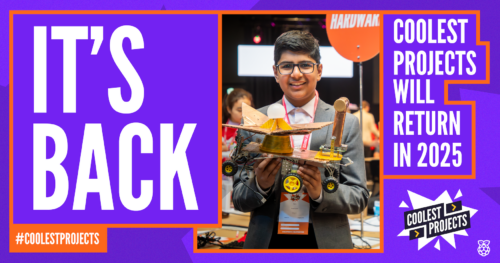
Coolest Projects celebrates young digital creators and the amazing things they make with technology. Today, we’re sharing the impact that taking part in Coolest Projects showcases has on young people’s motivation and confidence, as well as announcing dates for Coolest Projects 2025.
Coolest Projects in 2024
This year, 7197 young people across 4678 projects took part in our global Coolest Projects online showcase, with participants from 43 countries. All of these projects were shared in our online showcase gallery, and we hosted a live-streamed event celebrating the judges’ favourites watched by over 1000 people.
At the 2024 in-person Coolest Projects events in Ireland and the UK, 171 young people shared projects. At these events, the young creators presented their projects to other attendees and our team of judges. They also took part in other activities, including a digital escape room.
We wanted to understand how Coolest Projects impacts young people, and so we collected the following data:
For the online showcase, mentors and tech creators filled in a survey when they completed their project registration, and we ran focus groups with mentors, who are adults that support the tech creators
At the UK and Ireland in-person events, creators completed a survey, other event attendees completed feedback cards, and we also interviewed creators.
Online showcase: Impact on skills and confidence
In the survey, mentors and young people told us that taking part in the Coolest Projects online showcase had a positive impact:
91% of young people and 87% of mentors agreed or strongly agreed that taking part in Coolest Projects online inspired them or their team to continue to participate in computing and technology
89% of young people and 86% of mentors agreed or strongly agreed that taking part in Coolest Projects online increased their or their team’s confidence in coding and digital making
Mentors told us that the community built by the online showcase gallery played an important role in making young people want to participate, and improving their confidence. One mentor said that “[being part of the online showcase] motivates them actually to do something innovative and… [the] global community motivates them to think out of the box.”
They also reported that the online community inspired young people to solve real-world problems. One mentor said, “the wonderful thing is the kids create so many things which are solutions to world problems.” Others told us that young people feel a great deal of pride that their solutions are available for others to see online and that they get ideas from other projects on how to solve problems. One mentor from India told us about a young person who created a boat to clean rivers and then was inspired to learn to program micro:bit devices, having seen similar projects in the gallery.
Focus on ‘growth, not competition’
The phrase ‘growth, not competition’ came from the mentors in the focus group, and we love this description.
“[With] Coolest Projects… the only agenda is to grow. Grow with the coding, nurture your skills, creativity.” – Focus group attendee.
In the focus group, mentors told us they really valued the way the Coolest Projects online showcase allows all young people to participate, including those who were less experienced tech creators. One mentor told us that because everyone’s project is displayed in the gallery the “beauty is that everybody is encouraged individually… regarding the experience. … They can start with very small things. And they have [the] opportunity to upload it on the platform.”
One mentor who supports young people in remote locations in India spoke about the way Coolest Projects offers a level playing field where his students can be included and participate to the same extent as less remote places: “students never feel left behind.”
The in-person events also reflected the diversity of young people’s experience of digital making. Of those creators who answered surveys, 35% said it was their first time making this kind of project, while 37% said they had made similar projects before. This mix of experience was also reflected in the interviews, with some young people creating something for the first time and having only started learning coding recently, while others had been developing their projects for a long time. Many creators told us they felt inspired by the opportunity to show their projects to others, regardless of their experience level.
In-person events: Building a community of digital creators
Attendees at both Coolest Projects UK and Ireland commented on the sense of community and the excitement that was generated by being around other young people. One young person spoke about how much they enjoyed being “surrounded by people who like coding too”. They really valued seeing other creators’ projects and speaking with their peers.
The young people we spoke to reflected on the positive impact of this sense of community and belonging. They told us that seeing others’ projects inspired them to develop their ideas and learn new skills. One young person described how the in-person event allowed them to “get inspired and socialise.” A second said, “that’s why I’m here — to get inspired.”
Another clear theme was how much young people valued the opportunity to show their projects to others. This gave them confidence in their own ability to build things. One creator at Coolest Projects UK spoke about the sense of achievement they felt after building something themselves and then being able to present it to others.
Young people at both events spoke about their plans for what they wanted to do next, talking about trying new technology such as building games, learning Python, and creating mobile apps. At both events, creators described how they wanted to continue to develop and build on their existing ideas with the possibility of showcasing them again.
What we want to learn next
We are continuing to look for ways to improve the Coolest Projects experience for young people and their mentors. As part of this, we are conducting user experience research to understand how we can improve the registration process for the online Coolest Projects showcase.
We were delighted to hear from mentors in this year’s focus group how much they valued the online showcase gallery, and we want to understand the impact of this resource better as part of Coolest Projects 2025. If you want to find out more about Coolest Projects, we highly recommend taking a look at the amazing projects made by young people around the world.
Dates for Coolest Projects 2025
We’re so pleased that so many young people around the world loved taking part in Coolest Projects this year. And we’re very excited that Coolest Projects will be back and bigger than ever before in 2025!
The Coolest Projects online showcase is open to any young person up to age 18, based anywhere in the world. Registration opens 14 January, and we’ll host a celebratory livestream on 25 June.
Coolest Projects in-person events will also be popping up around the world. In-person events are open to everyone up to age 18 in the host country. Family and friends are very welcome to come along too.
It’s never too early to start making and saving digital projects to showcase next year. We can’t wait to see what the world’s young tech creators will make!
Следваща точка от приоритетите: „9. Отпадане на удостоверенията за липса на задължения и други често изисквани удостоверения и замяната им със служебни справки.“
Докато бях министър, подготвихме законови промени, с които всяко удостоверение трябва да бъде заменено със служебна справка, без да се ползват дежурните оправдания, че „в нашия закон/наредба пише, че трябва удостоверение“ и те бяха приети през 2023 г.
Но това, че нещо е незаконно, не значи, че не се случва. Контролът е в МЕУ, но там, както писах декември, се руши, вместо да се гради, така че поне засега ефект няма.
Именно затова започнах анализа на текущото състояние с искане на данни от НАП за удостоверенията за липса на задължения. 230 хиляди годишно са, но не е ясно на коя администрация са нужни. Поискал съм втора справка от НАП за данните в полето „да послужи пред …“.
Вероятно част от получателите са банките. Те по закон имат право на служебен достъп, но трябва да се внимава а обхвата на данните, одитната следа от проверката и санкциите при злоупотреби.
За почти всички удостоверения има разработени и служебни електронни справки, като преди 2 години и половина възложих вътрешна проверка на това кой ползвател до какви данни има достъп, за да се ограничи обмена на данни до минимално необходимия.
По принцип не би трябвало да е нужна законова промяна, за да се приложи общия ред на служебно електронно събиране на данните, а само прилагане на контролните правомощия на МЕУ. Но почти винаги в такива случаи трябва „методическо указание“.
Същото „упражнение“ ще направя и за други често срещани удостоверения, за да спрат гражданите и бизнесът да са куриери на администрацията.
Защо Община Родопи не желае да печели, дори и да може?
От известно време оставам с впечатлението, че Община Родопи е някакъв семеен бизнес. Или си от семейството и ти отпускаме малко джобни или си живей ако може незабележимо.
Във веки случай обче си длъжен да ръкопляснаш на TikTok изявите на кметовете и да ги венцеславиш при всяка новина, изглеждаща като хубава.
Побратимихме се с италианската община Барчелона Поцо ди Гото – голям праз. Не сме я чували никога, ама не може без снимки и лйкове.
Рожден ден на кмета Михайлов – статия в сайта на Общината и разбира се със снимки
Рехабилитирали улица – веднага статия и снимки, нищо че това ни е работата. Важното е да се знае.
Ей така стоят нещата
А мисленето и визията я оставяме по-натам.
Ето една визия, която споделих с Общинския кмет и друг кмет на населено място, която явно остана неразбрана, ако и да донесе доста приходи на общината за годни напред.
При ремонти и рехабилитации на улици, да се поставя оптичен кабел и да се изграждат трасета за интернет, който да бъдат отдавани под наем години наред, на интернет доставчици и IT компании.
Това би помогнало както на приходите на общината, така и на развитието и в IT сферата. Привличане на индустрия с висока добавена стойност и осигуряване на инфраструктура за хора които работят от вкъщи.
Преди години Пазарджик започнаха да дават разрешителни за обект, само ако се подпише декларация, че ще се остави отворен WiFi за да го ползват безплатно гражданите. така целият град беше опасан с безплатна WIFi мрежа и съответно безплатен интернет.
Разира се това не е съвсем уздържано решение, но като няма риба и ракът е риба.
Сега имаме възможност да го направим както трябва, но не би.
Да ама не. Това ще донесе пари на общината, но няма да донесе пари на кметовете. И без това се занимават с изкупуването и продажбата на земи. Представяте ли си ако пред всеки имот минава оптичен кабел за интернет какви ще са цените на имотите? Не че и сега не са, но има доста още земи за изкупуване.
Ето и примера от вчера
ЕВН копае канал за електрически кабел
(Рехабилитирахме улица) На пръв поглед много хубава новина – прекарва се инфраструктура и се доставя ток.
(нов асфалт и много важен участък)
Я да видим какво стои от другата страна? Паднал автомобил в изкопа и неполагане на оптичен кабел въпреки, че общината е дала разрешение за изкопни работи.
(когато решим да отговорим на европейските изисквания за вкарване на кабелите под земята, пак ще разкопаем и ще направим нова обществена поръчка)
(каналът от вчера е факт, както и катастрофиралият автомобил)
А как можеше да бъде?
1. Общината знае и дава разрешение за всеки изкоп, било той на ЕВН, ВиК, БТК, Община…
Први една нормална обществена поръчка (казвам нормална, защото сегашните не са най-нормалните, но за това друг път) и преди закопаването, изпраща екип който да положи кабела на този участък. Нанася го и на карта да се знае.
Между другото – Оптичният кабел е с цена между 0.60 ст, до 67 лева на метър. Сами преценете дали е по-скъпо от последващо разкопаване на улица. А ако смятате, че е скъпо, може само тръба да закопаят. Тя е 1.50 лв на метър. Доставчикът сам ще си изтегли кабела.
2. Общината обявява конкурс за отдаване под наем на изградените трасета. Надали някой интернет доставчик би предочел кабелите му да са по стълбовете и суитчовете му да горят при всеки дъжд. При месечна вноска от около 30 лева за интернет, всеки доставчик би се лишил в полза на общината от 5 лева на месец за наем на трасето при положение, че не би го изграждал той и комуникациите му биха били защитени под земята.
Представете си колко се копае в момента в Община Родопи. Само ако поставяха по една тръба за интернет кабел, половината община вече щеше да е включена с може би най-добрия интернет в държавата. Повярвайте IT фирмите не спят и не биха пропуснали такава възможност.
И все пак това са само мечти. Мечти за реализацията на които се изисква единствено организация и координация от Община Родопи.
Виж за организацията вече стои житейски и професионален опит, креативност, визия…
За каква визия обаче говорим като онлайн сесиите на обинския съвет се излъчват в TWITCH?
With Zabbix Cloud you can near-instantly deploy a feature-complete Zabbix environment fine-tuned for best possible performance.
Have you ever wanted to deploy a Zabbix instance in just a few clicks without having to worry about creating orchestrations or writing scripts to achieve this task? What about always having the latest stable Zabbix version without having to go through the upgrade procedure yourself? And then there’s scalability – what if we told you that we can offer you a Zabbix instance that can be rescaled at a moment’s notice with the most optimal performance configuration for your monitoring workloads?
No, you’re not dreaming (try pinching yourself) – you’re simply looking at our latest offering – Zabbix Cloud.
Introducing – Zabbix Cloud
With Zabbix Cloud, anyone can deploy their own Zabbix instance with a push of a button. Forget about allocating dedicated hardware, installing packages or configuring docker containers. All you have to do is name your instance, select a compute offering and a region and you’re good to go!
With Zabbix Cloud you will get:
7 Compute tiers
5 Datacenter regions
Initial 10GB of storage free of charge
Full Zabbix feature set
A Zabbix instance optimized for best possible performance
Customizable history retention periods
Ability to define access filters and encrypt Zabbix connections
Automatic version updates and node backups
Zabbix Cloud does not limit your monitoring in any way – Zabbix Cloud nodes are fully capable of leveraging the same data collection, processing and analysis method as an on-prem Zabbix instance.
But how about instead of us talking about Zabbix Cloud, we give you a chance to deploy a trial Zabbix Cloud node – you know what they say – “Show, don’t tell”. Anyone can sign up for a free 5 day trial and check out Zabbix Cloud for themselves – no billing information required!
Note that Zabbix Cloud is currently in Early access. During the early access period sign-ups for Zabbix Cloud will processed and accepted in batches, which means it may take some time for us to process your Zabbix Cloud sign-up request.
Deploying a Zabbix Cloud node
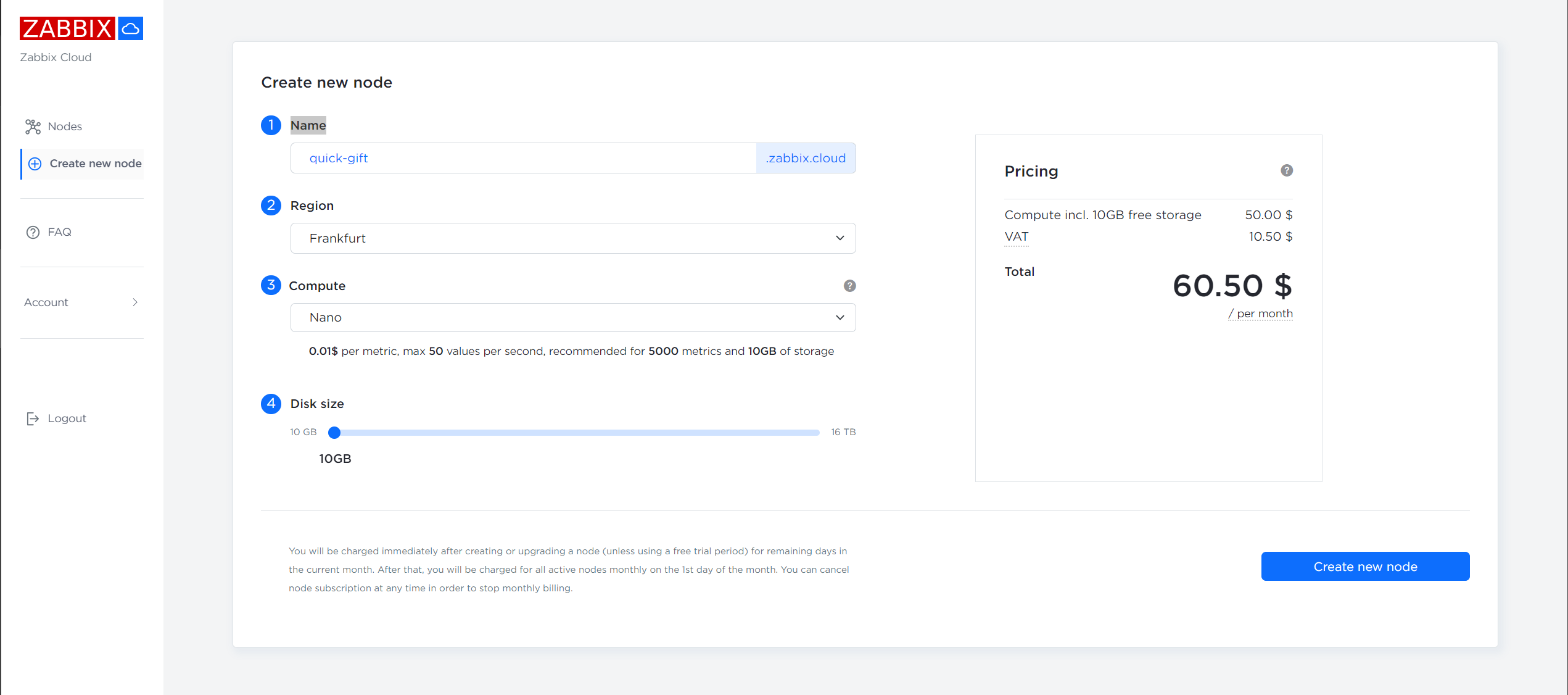
Deploying a Zabbix Cloud node can be done with just a few clicks. Simply press the “Create new node” button, give your node a name and select your Region, Compute tier and Disk size. Once the node deployment is complete, you can access your Cloud Zabbix instance via its DNS name and the provided login credentials for the Admin account.
In case you forgot to copy or lost the initial password – the initial password can be copied to clipboard, cleared and reset by accessing the Overview tab of the Node configuration section.
Configure a new Zabbix Cloud node
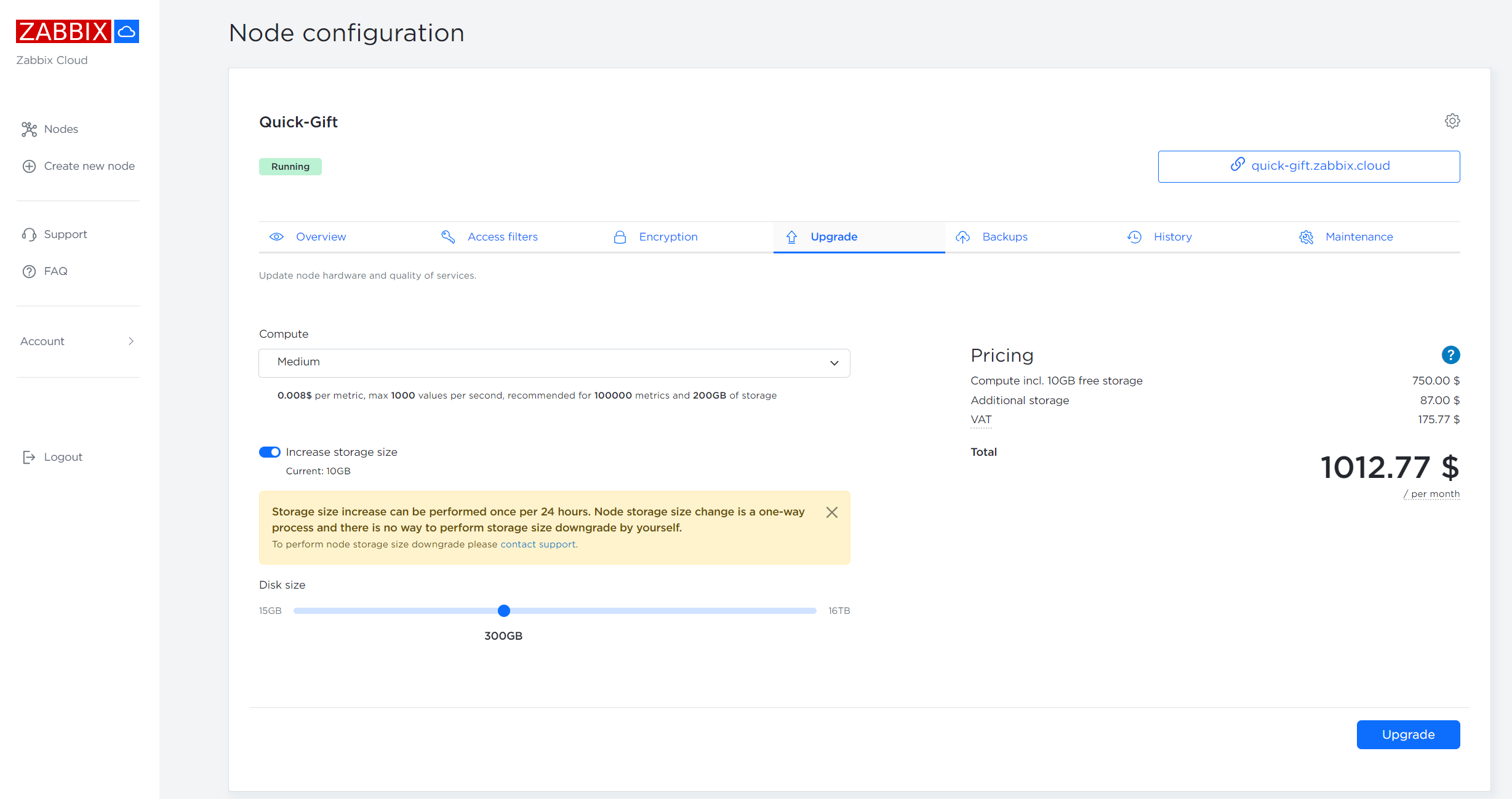
Upgrading Zabbix Cloud node compute tier and storage space
There are only two limiting factors for Zabbix Cloud nodes – the available storage space and the number of maximum supported new values per second for a particular compute tier.
Once a maximum supported number of new values per second (NVPS) for the current compute tier is reached, the values exceeding the limit will be discarded at random. You can either reduce the number of collected metrics to match the compute tier NVPS limitations or upgrade your node to a higher compute tier to support the required number of NVPS. Upgrading to a higher compute tier can be done from the Upgrade tab of the Node Configuration section.
Disk utilization can also be increased from the Upgrade tab of the Node configuration section. Note that once you have increased your Zabbix Cloud node storage you will not be able to decrease it!
In addition, storage space usage can be adjusted by modifying the history retention periods. This can be done in the History tab of the Node configuration section. Here you can adjust storage periods for various types of history, trend and auditlog data. Reducing the storage periods will also reduce the total space usage on the current node.
Zabbix Cloud users can upgrade the Zabbix Cloud node Compute tier and Disk size
Automatic upgrades to the latest version
With Zabbix Cloud you don’t have to worry about manually upgrading your Zabbix Cloud nodes to the latest minor or major releases. Once the latest Zabbix release passes the internal testing and QA for Zabbix Cloud deployment, your Zabbix Cloud instance will be automatically upgraded to the latest version during the weekly maintenance periods chosen by you under the Node configuration section.
The upgrade to the latest Zabbix major release can be postponed but it cannot be cancelled. Eventually, your Zabbix cloud node will be automatically upgraded to the latest major version.
This ensures that your Zabbix Cloud nodes will always have all of the latest features, performance improvements and security fixes applied on them after passing a thorough internal QA process.
Backing up your Zabbix cloud node
Zabbix Cloud provides two options for performing Zabbix Cloud node backups:
Free automatic weekly backups
Manual backups with an attached monthly cost
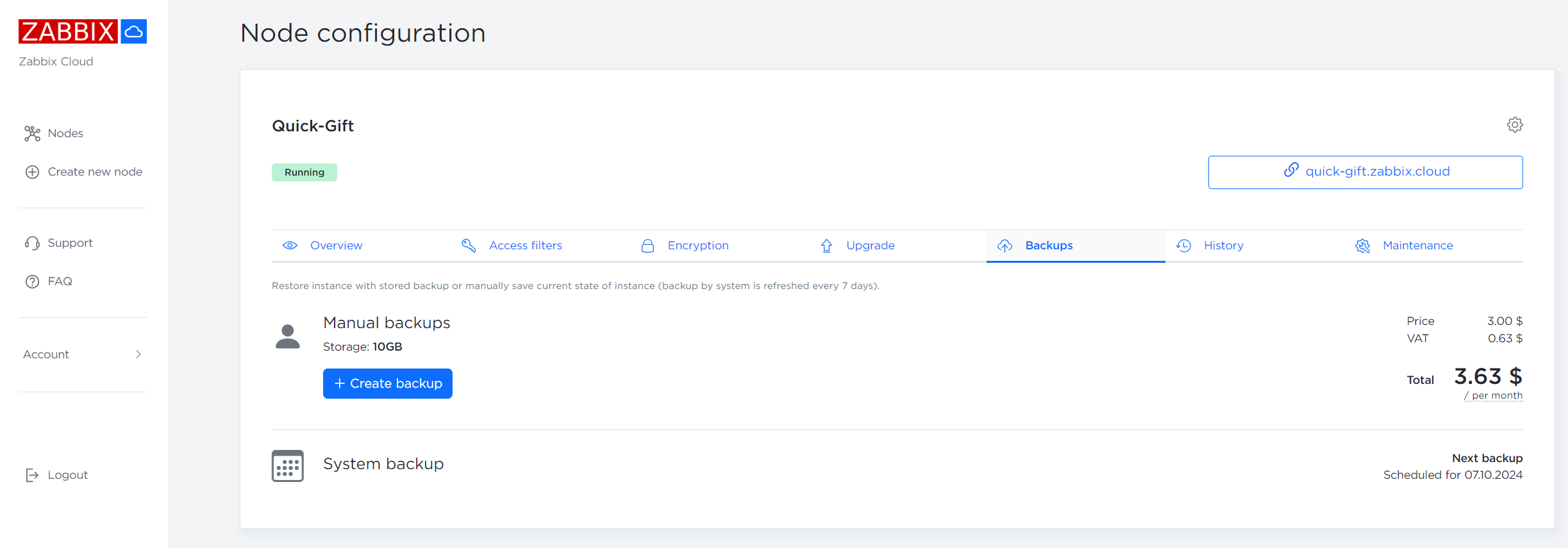
Manual backups can be performed from the Backups tab of the Node configuration section. Here you can also see the next scheduled automatic backup and restore your Zabbix Cloud node from an existing backup. Currently Zabbix Cloud node backups cannot be exported from Zabbix Cloud and existing Zabbix instances cannot be migrated to Zabbix Cloud.
Zabbix Cloud nodes are automatically backed up on a weekly basis
Maintenance windows
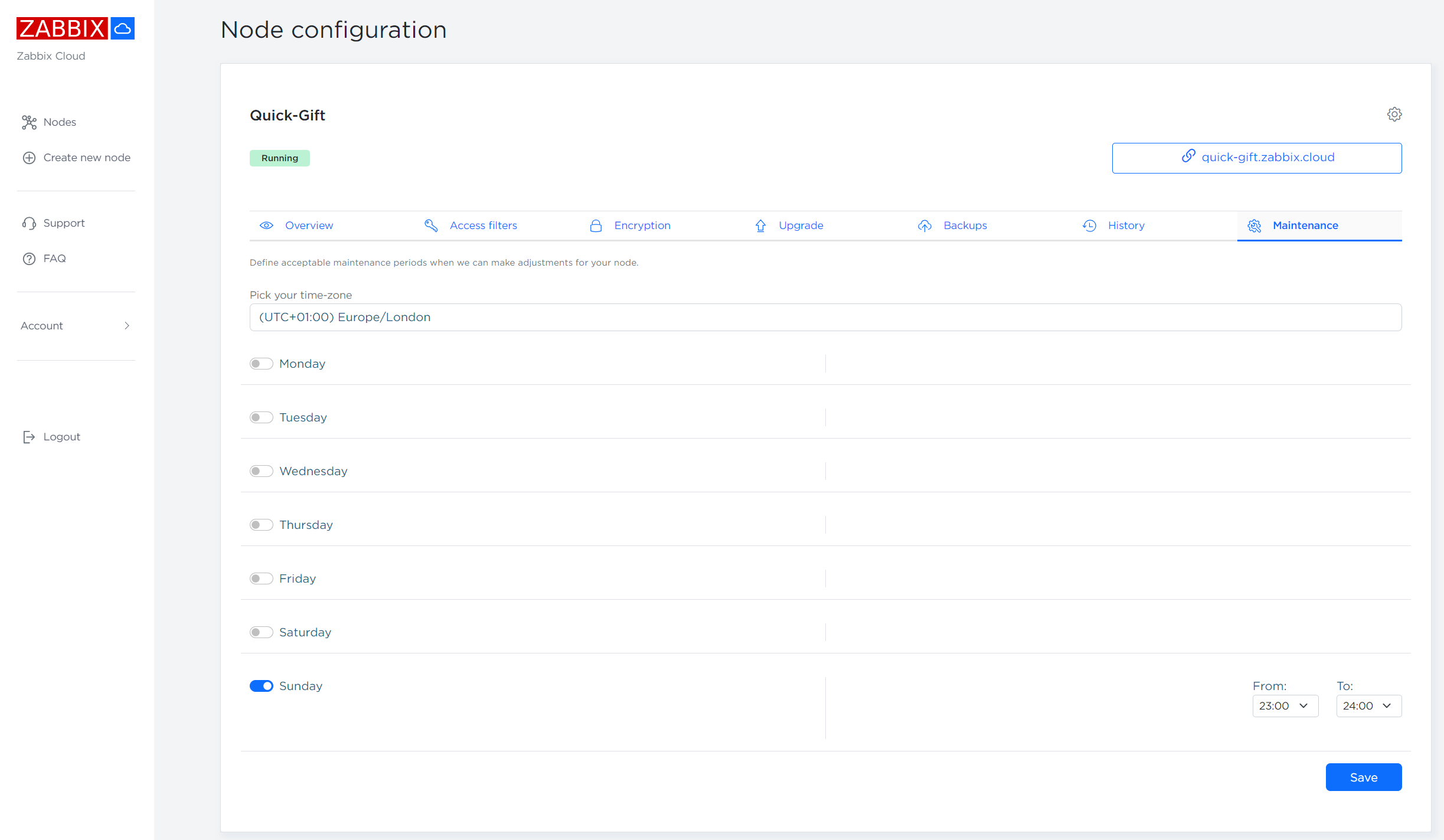
Each of your Zabbix Cloud nodes is required to have at least 1 hour long weekly maintenance window defined in the Maintenance tab of the Node configuration section.
During the maintenance the following upgrades might be performed on your Zabbix Cloud node:
Be upgraded to the latest Zabbix release
Have the latest security fixes applied on the nodes
Have the latest platform level upgrades applied on the nodes
Be optimized for best possible performance
Zabbix nodes may be taken offline during the maintenance period if the maintenance tasks require it.
Zabbix Cloud nodes are required to have weekly maintenance window of at least 1 hour assigned to them
Conclusion
With Zabbix Cloud, deploying a fully optimized Zabbix instance is easier than ever. Automated upgrades and backups ensure that Zabbix Cloud will position itself as a streamlined, secure and up-to-date product with 24/7 availability and the latest Zabbix features available to everyone, no matter their technical proficiency in managing, tuning and upgrading Zabbix environments.
On top of that, Zabbix provides a large selection of professional services with the goal of helping our users to configure and troubleshoot their monitoring workflows, deliver custom templates, integrate Zabbix nodes with 3rd party solutions and more! Check out the full list of Zabbix professional services and see how we can further enhance your Zabbix experience.
On Monday, September 30, customers on Verizon’s mobile network in multiple cities across the United States reported experiencing a loss of connectivity. Impacted phones showed “SOS” instead of the usual bar-based signal strength indicator, and customers complained of an inability to make or receive calls on their mobile devices.
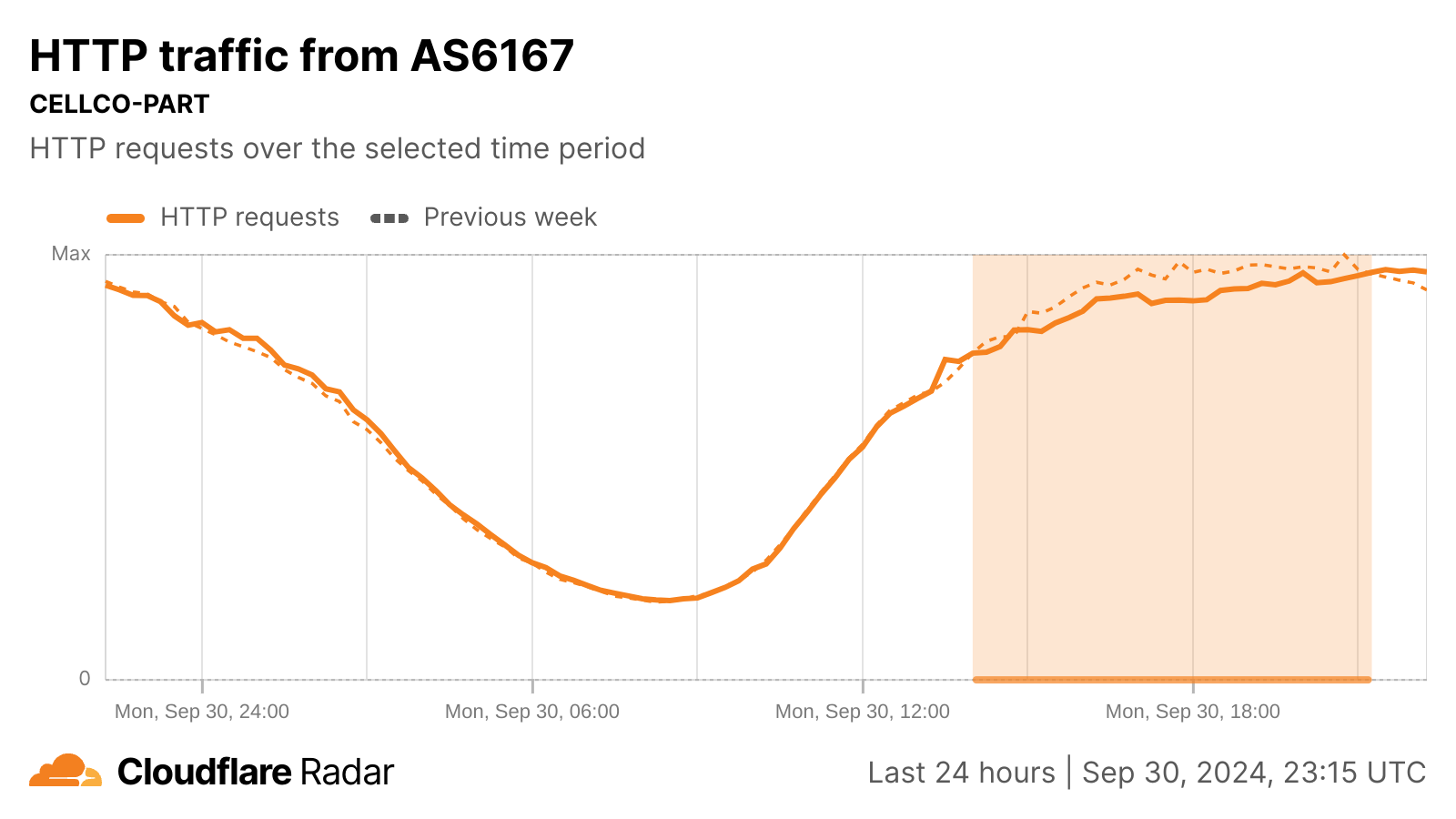
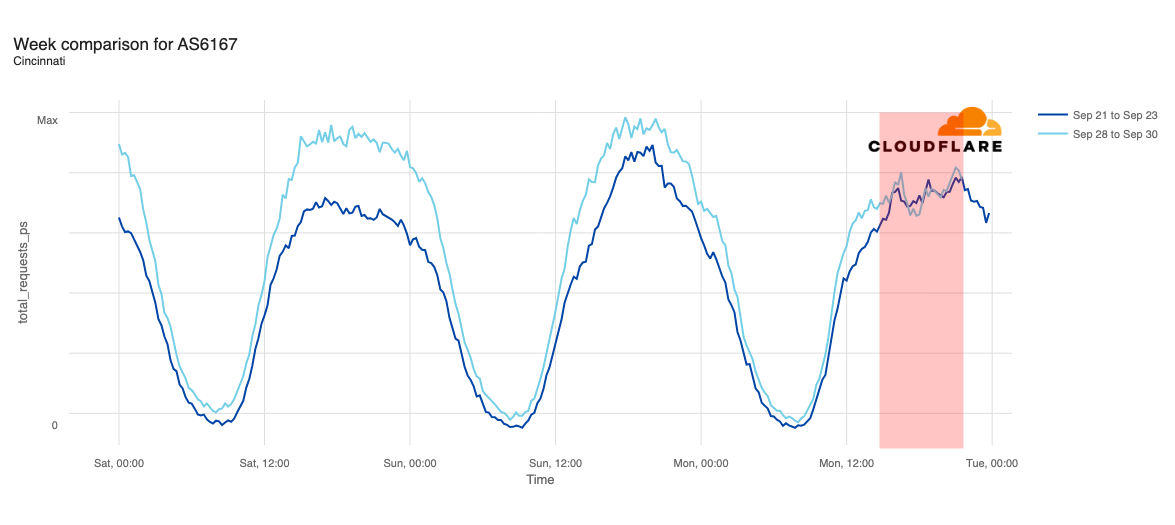
AS6167 (CELLCO) is the autonomous system used by Verizon for its mobile network. To better understand how the outage impacted Internet traffic on Verizon’s network, we took a look at HTTP request volume from AS6167 independent of geography, as well as traffic from AS6167 in various cities that were reported to be the most significantly impacted.
Although initial reports of connectivity problems started around 09:00 ET (13:00 UTC), we didn’t see a noticeable change in request volume at an ASN level until about two hours later. Just before 12:00 ET (16:00 UTC), Verizon published a social media post acknowledging the problem, stating “We are aware of an issue impacting service for some customers. Our engineers are engaged and we are working quickly to identify and solve the issue.”
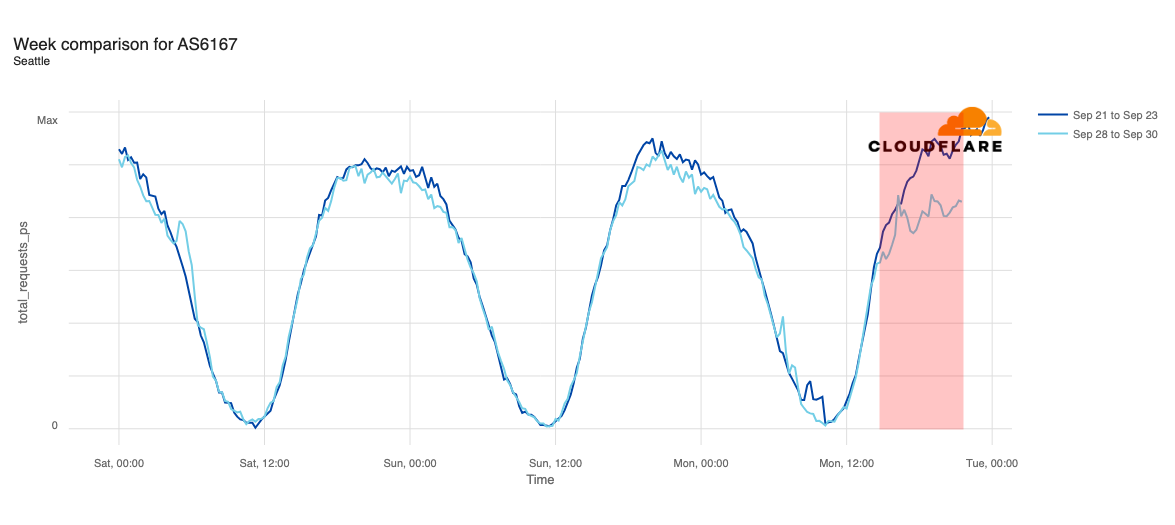
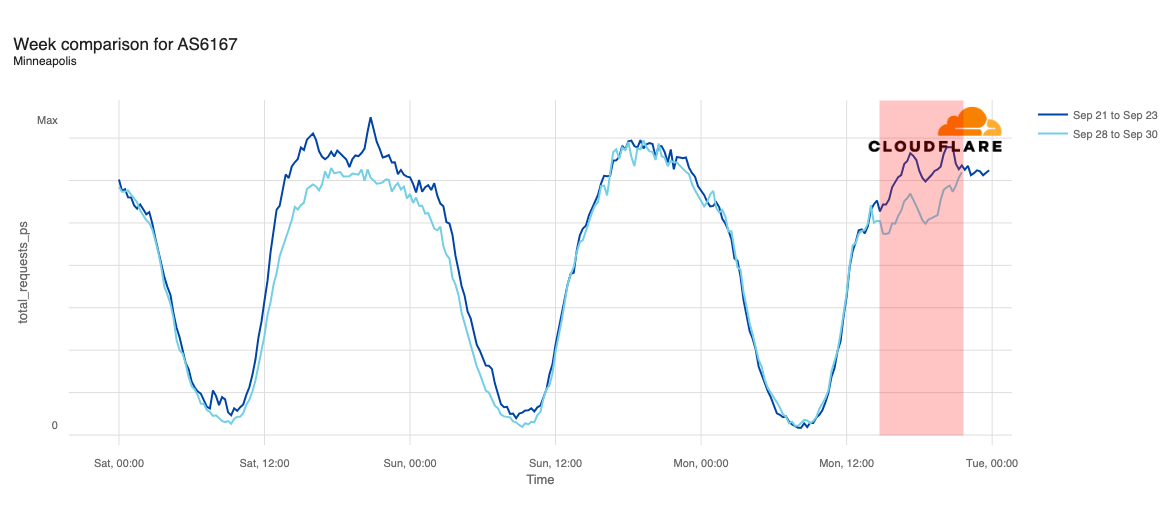
As the Cloudflare Radar graph below shows, a slight decline (-5%) in HTTP traffic as compared to traffic at the same time a week prior is first visible around 11:00 ET (15:00 UTC). Request volume fell as much as 9% below expected levels at 13:45 ET (17:45 UTC).
Just after 17:00 ET (21:00 UTC), Verizon published a second social media post noting, in part, “Verizon engineers are making progress on our network issue and service has started to be restored.” Request volumes returned to expected levels around the same time, surpassing the previous week’s levels at 17:15 ET (21:15 UTC). At 19:18 ET (23:18 UTC), a social media post from Verizon noted “Verizon engineers have fully restored today’s network disruption that impacted some customers. Service has returned to normal levels.”
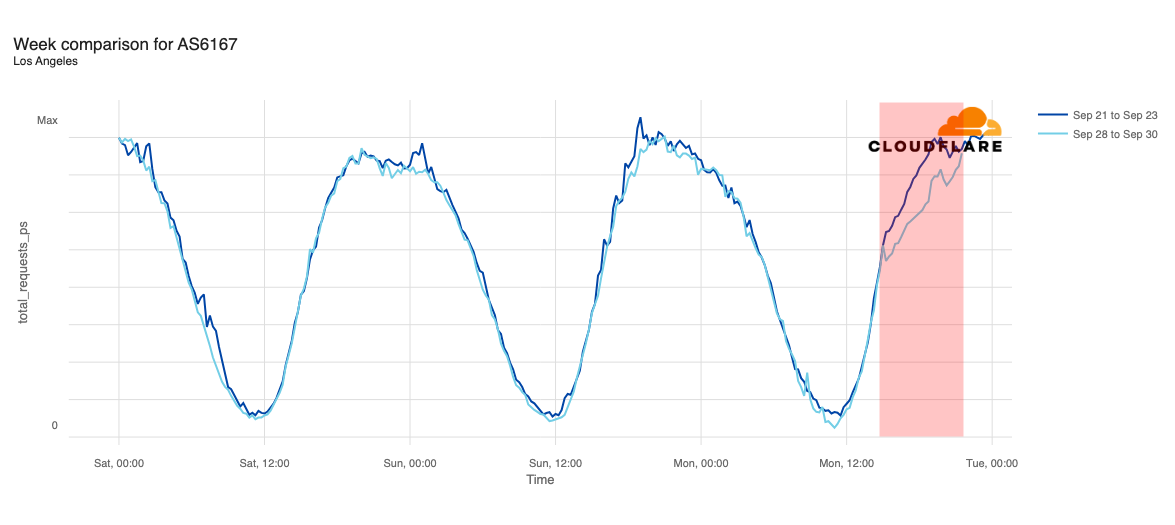
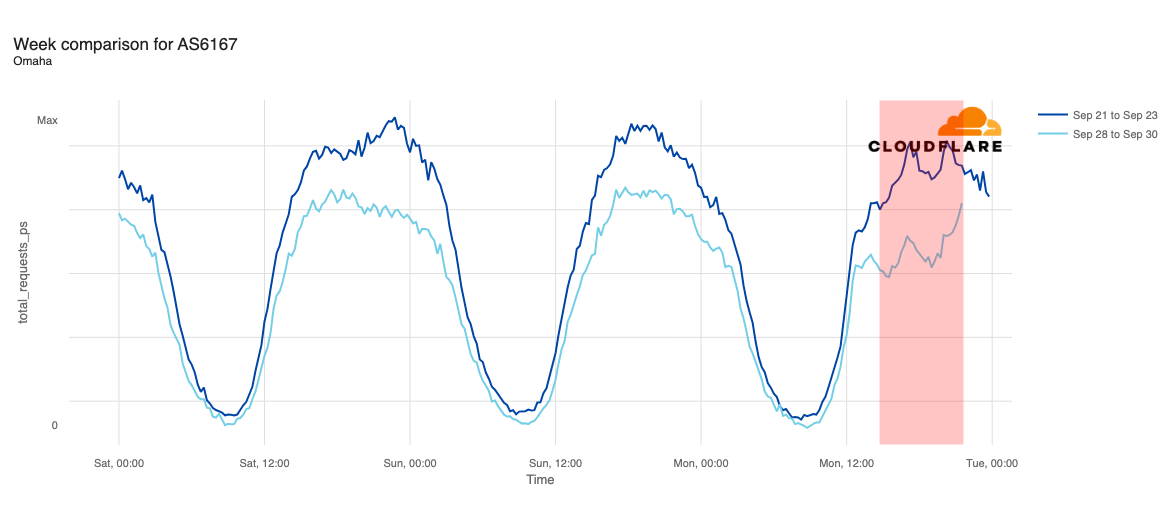
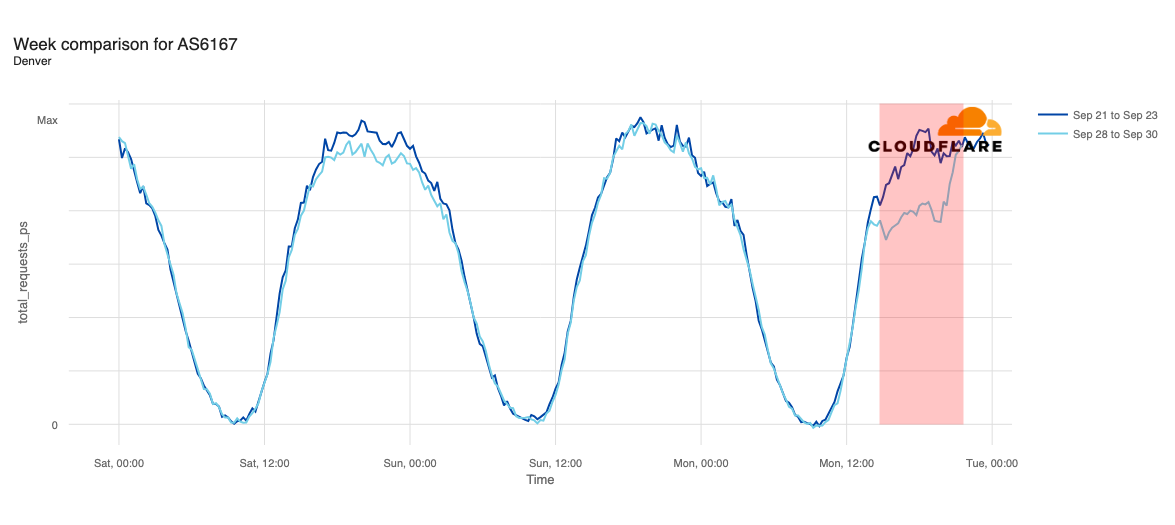
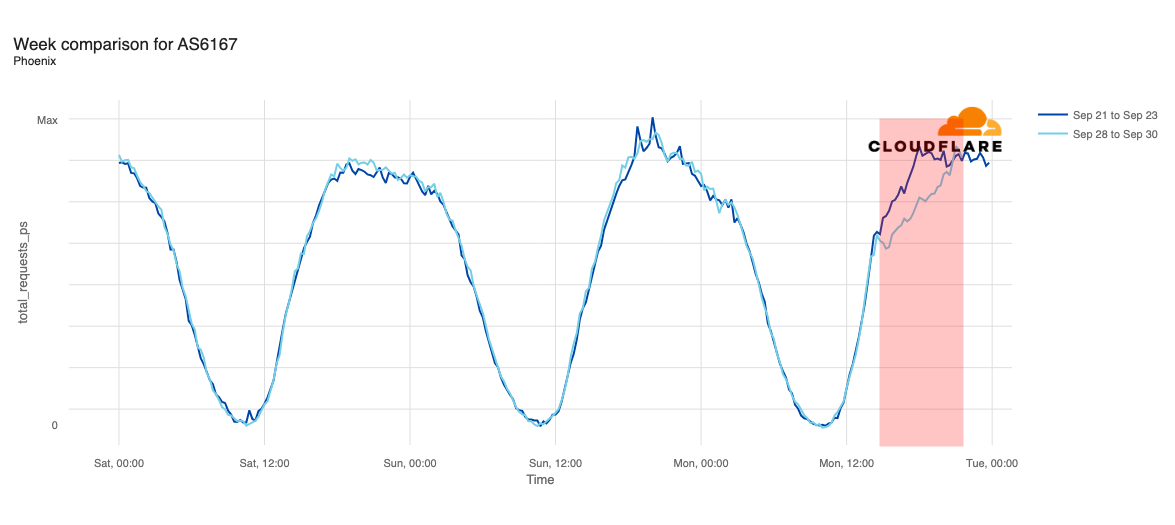
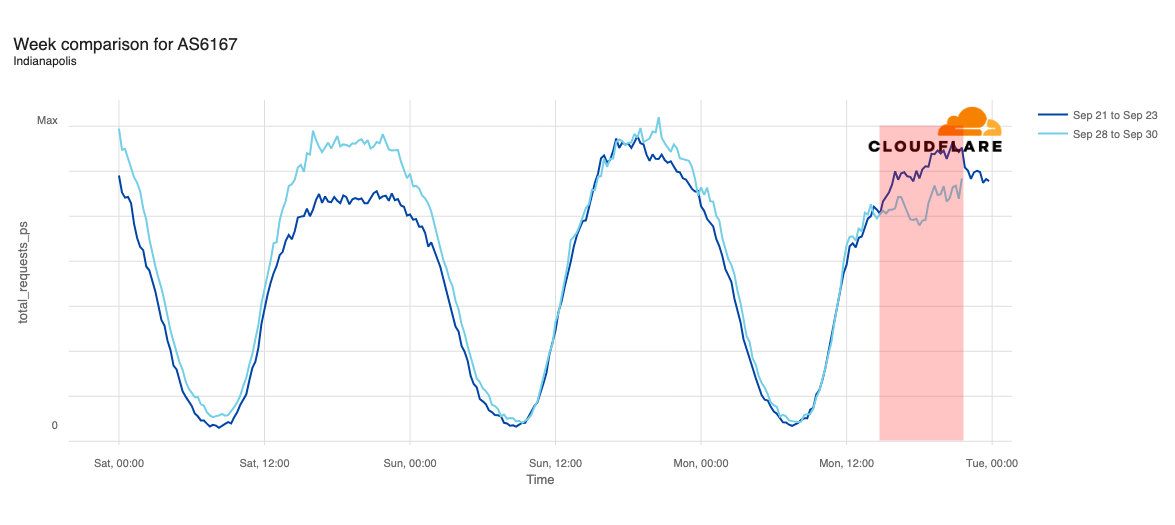
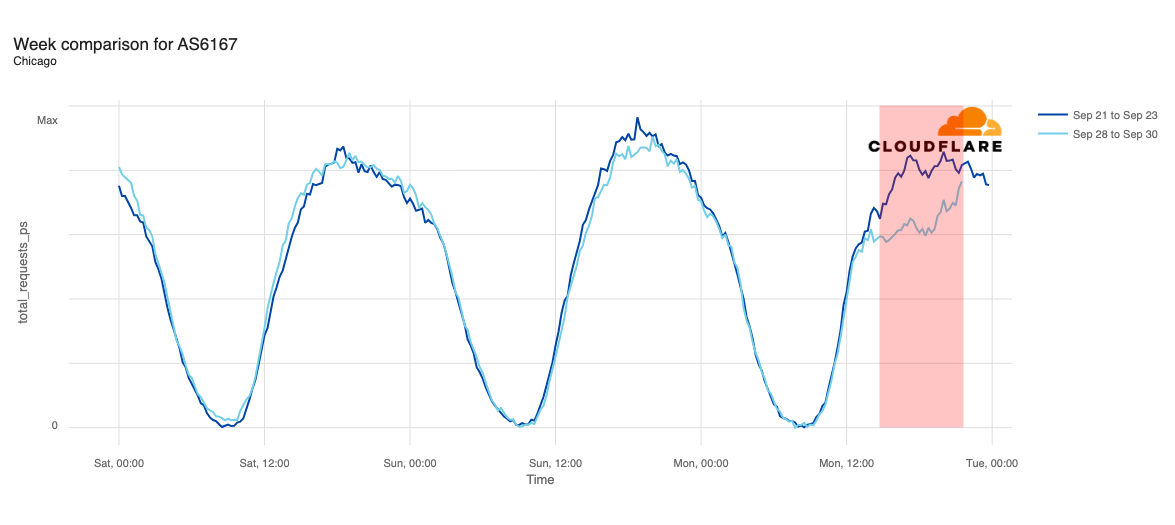
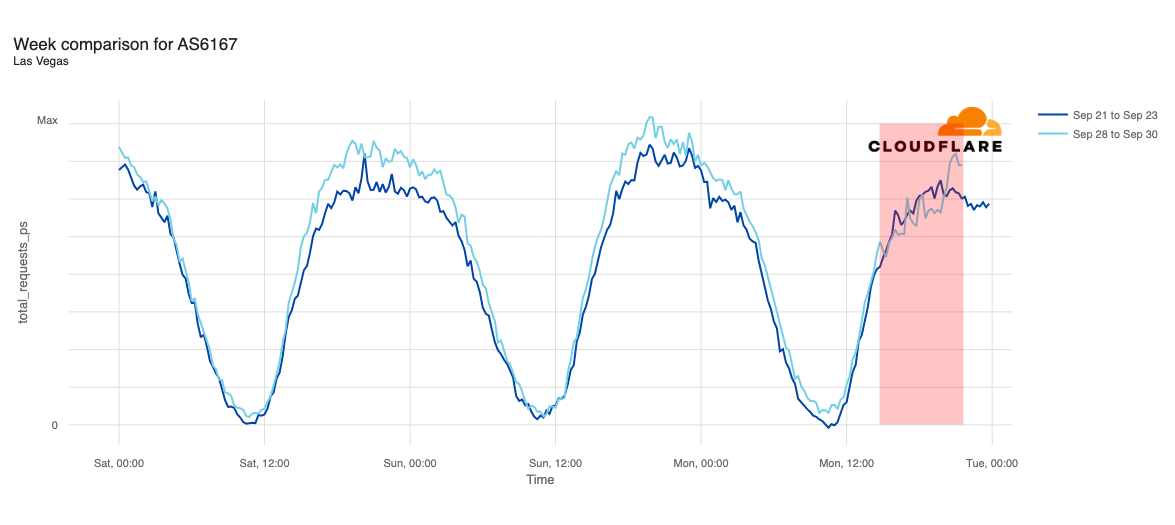
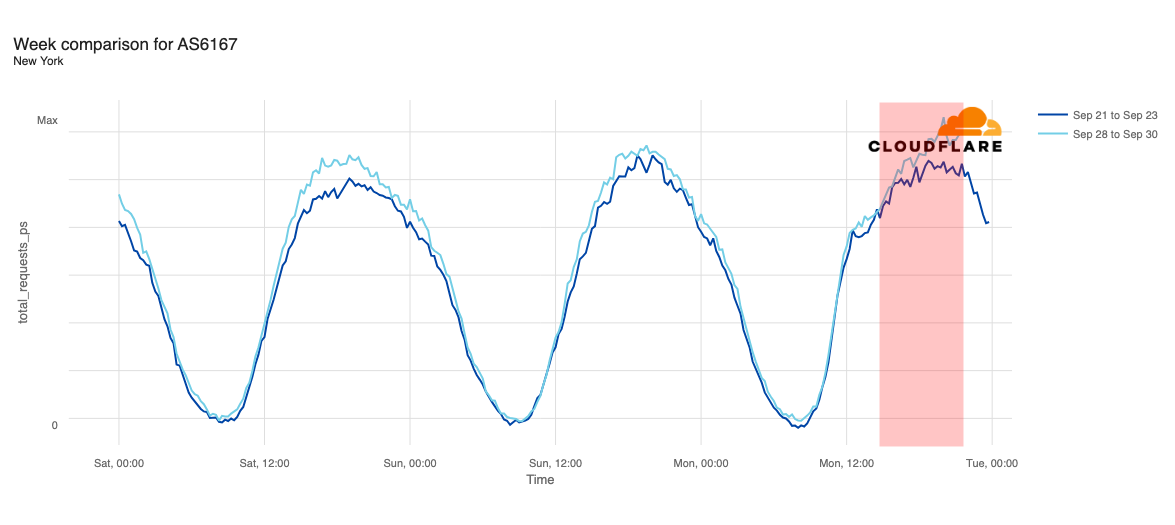
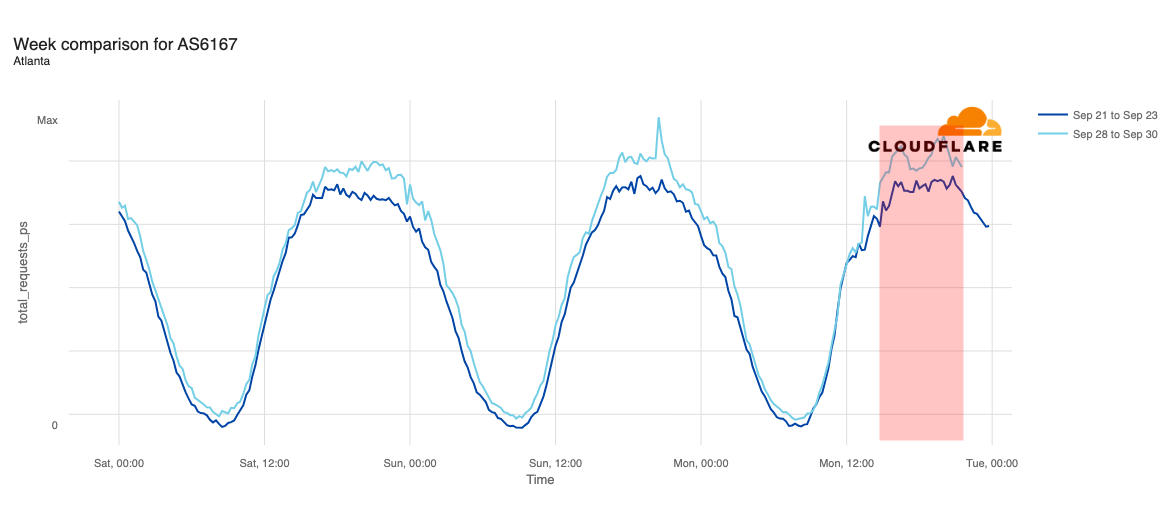
Media reports listed cities including Chicago, Indianapolis, New York City, Atlanta, Cincinnati, Omaha, Phoenix, Denver, Minneapolis, Seattle, Los Angeles, and Las Vegas as being most impacted. In addition to looking at comparative traffic trends across the whole Verizon Wireless network, we also compared request volumes in the listed cities to the same time a week prior (September 23).
Declines in request traffic starting around 11:00 ET (15:00 UTC) are clearly visible in cities including Los Angeles, Seattle, Omaha, Denver, Phoenix, Minneapolis, Indianapolis, and Chicago. In contrast to other cities, Omaha’s request volume was already trending lower than last week heading into today’s outage, but its graph clearly shows the impact of today’s disruption as well. Omaha’s difference in traffic was the most significant, down approximately 30%, while other cities saw declines in the 10-20% range.
Request traffic from Las Vegas initially appeared to exhibit a bit of volatility around 11:00 ET (15:00 UTC), but continues to track fairly closely to last week’s levels before exceeding them starting at 16:00 ET (20:00 UTC). Cincinnati was tracking slightly above last week’s request volume before the outage began, and tracked closely to the prior week during the outage period.
We observed week-over-week traffic increases during the outage period in New York and Atlanta. However, in both cities, traffic was already slightly above last week’s levels, and that trend continued throughout the day.
Based on our observations, it appears that voice services on Verizon’s network may have been more significantly impacted than data services, as we saw some declines in request traffic across impacted cities, but none experienced full outages.
As of this writing (19:15 ET, 23:15 UTC), no specific information has been made available by Verizon regarding the root cause of the network problems.
As Southeast Asia’s leading super app, Grab serves millions of users across multiple countries every day. Our services range from ride-hailing and food delivery to digital payments and much more. The backbone of our operations? Machine Learning (ML) models. They power our real-time decision-making capabilities, enabling us to provide a seamless and personalised experience to our users. Whether it’s determining the most efficient route for a ride, suggesting a food outlet based on a user’s preference, or detecting fraudulent transactions, ML models are at the forefront.
However, serving these ML models at Grab’s scale is no small feat. It requires a robust, efficient, and scalable model serving platform, which is where our ML model serving platform, Catwalk, comes in.
Catwalk has evolved over time, adapting to the growing needs of our business and the ever-changing tech landscape. It has been a journey of continuous learning and improvement, with each step bringing new challenges and opportunities.
Evolution of the platform
Phase 0: The need for a model serving platform
Before Catwalk’s debut as our dedicated model serving platform, data scientists across the company employed various ad-hoc approaches to serve ML models. These included:
Shipping models online using custom solutions.
Relying on backend engineering teams to deploy and manage trained ML models.
Embedding ML logic within Go backend services.
These methods, however, led to several challenges, undercovering the need for a unified, company-wide platform for serving machine learning models:
Operational overhead: Data scientists often lacked the necessary expertise to handle the operational aspects of their models, leading to service outages.
Resource wastage: There was frequently low resource utilisation (e.g., 1%) for data science services, leading to inefficient use of resources.
Friction with engineering teams: Differences in release cycles and unclear ownership when code was embedded into backend systems resulted in tension between data scientists and engineers.
Reinventing the wheel: Multiple teams independently attempted to solve model serving problems, leading to a duplication of effort.
These challenges highlighted the need for a company-wide, centralised platform for serving machine learning models.
Phase 1: No-code, managed platform for TensorFlow Serving models
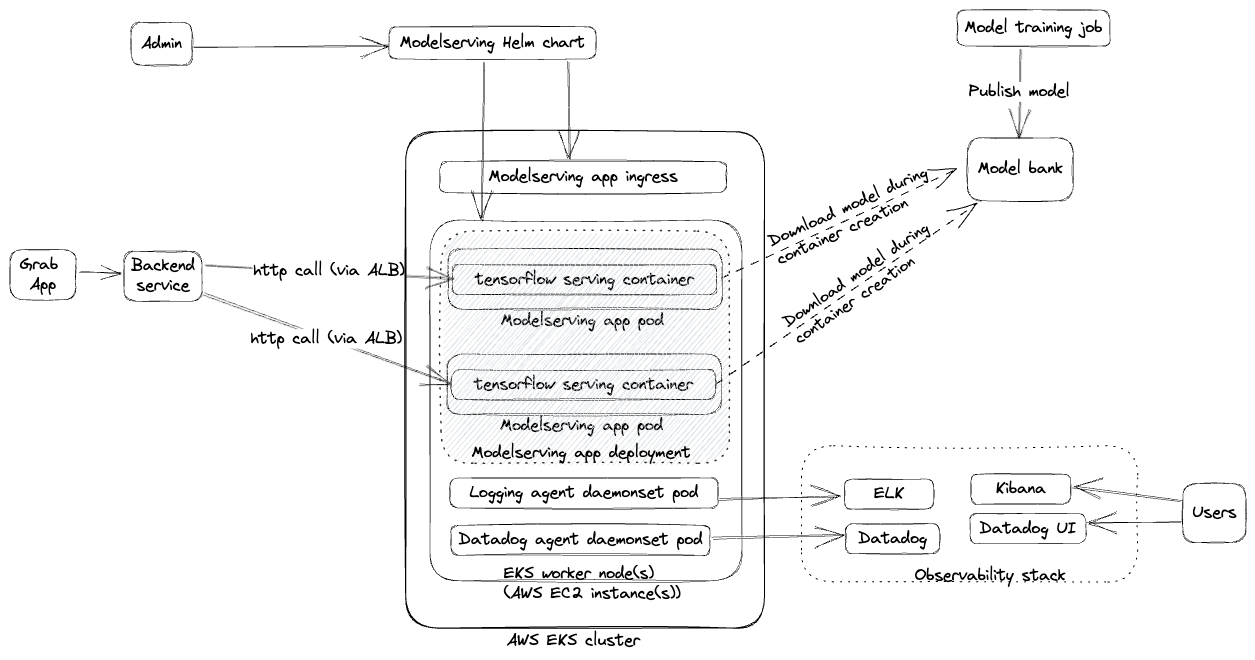
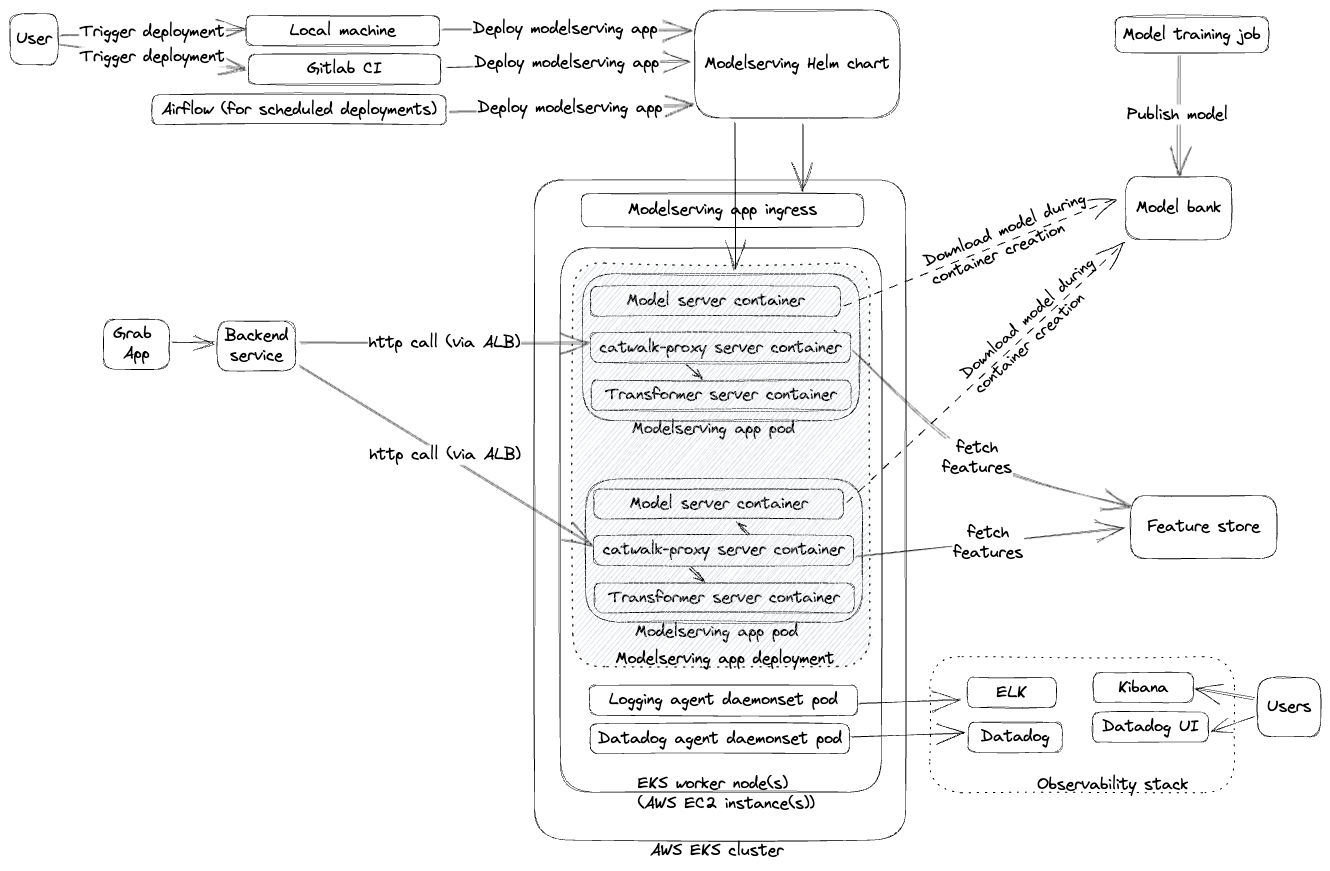
Our initial foray into model serving was centred around creating a managed platform for deploying TensorFlow Serving models. The process involved data scientists submitting their models to the platform’s engineering admin, who could then deploy the model with an endpoint. Infrastructure and networking were managed using Amazon Elastic Kubernetes Service (EKS) and Helm Charts as illustrated below.
This phase of our platform, which we also detailed in our previous article, was beneficial for some users. However, we quickly encountered scalability challenges:
Codebase maintenance: Applying changes to every TensorFlow Serving (TFS) version was cumbersome and difficult to maintain.
Limited scalability: The fully managed nature of the platform made it difficult to scale.
Admin bottleneck: The engineering admin’s limited bandwidth became a bottleneck for onboarding new models.
Limited serving types: The platform only supported TensorFlow, limiting its usefulness for data scientists using other frameworks like LightGBM, XGBoost, or PyTorch.
After a year of operation, only eight models were onboarded to the platform, highlighting the need for a more scalable and flexible solution.
Phase 2: From models to model serving applications
To address the limitations of Phase 1, we transitioned from deploying individual models to self-contained model serving applications. This “low-code, self-serving” strategy introduced several new components and changes as illustrated in the points and diagram below:
Support for multiple serving types: Users gained the ability to deploy models trained with a variety of frameworks like Open Neural Network Exchange (ONNX), PyTorch, and TensorFlow.
Self-served platform through CI/CD pipelines: Data scientists could self-serve and independently manage their model serving applications through CI/CD pipelines.
New components: We introduced these new components to support the self-serving approach:
Catwalk proxy, a managed reverse proxy to various serving types.
Catwalk transformer, a low-code component to transform input and output data.
Amphawa, a feature fetching component to augment model inputs.
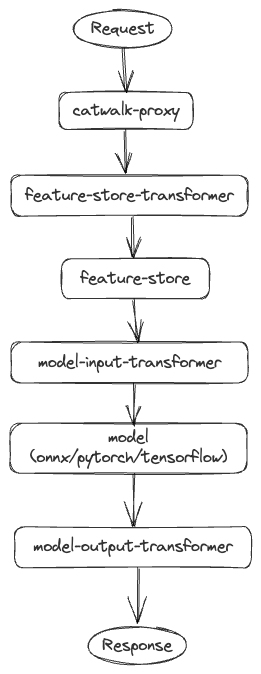
API request flow
The Catwalk proxy acts as the orchestration layer. Clients send requests to Catwalk proxy then it orchestrates calls to different components like transformers, feature-store, and so on. A typical end to end request flow is illustrated below.
Within a year of implementing these changes, the number of models on the platform increased from 8 to 300, demonstrating the success of this approach. However, new challenges emerged:
Complexity of maintaining Helm chart: As the platform continued to grow with new components and functionalities, maintaining the Helm chart became increasingly complex. The readability and flow control became more challenging, making the helm chart updating process prone to errors.
Process-level mistakes: The self-serving approach led to errors such as pushing empty or incompatible models to production, setting too few replicas, or allocating insufficient resources, which resulted in service crashes.
We knew that our work was nowhere near done. We had to keep iterating and explore ways to address the new challenges.
Phase 3: Replacing Helm charts with Kubernetes CRDs
To tackle the deployment challenges and gain more control, we made the significant decision to replace Helm charts with Kubernetes Custom Resource Definitions (CRDs). This required substantial engineering effort, but the outcomes have been rewarding. This transition gave us improved control over deployment pipelines, enabling customisations such as:
Smart defaults for AutoML
Blue-green deployments
Capacity management
Advanced scaling
Application set groupings
Below is an example of a simple model serving CRD manifest:
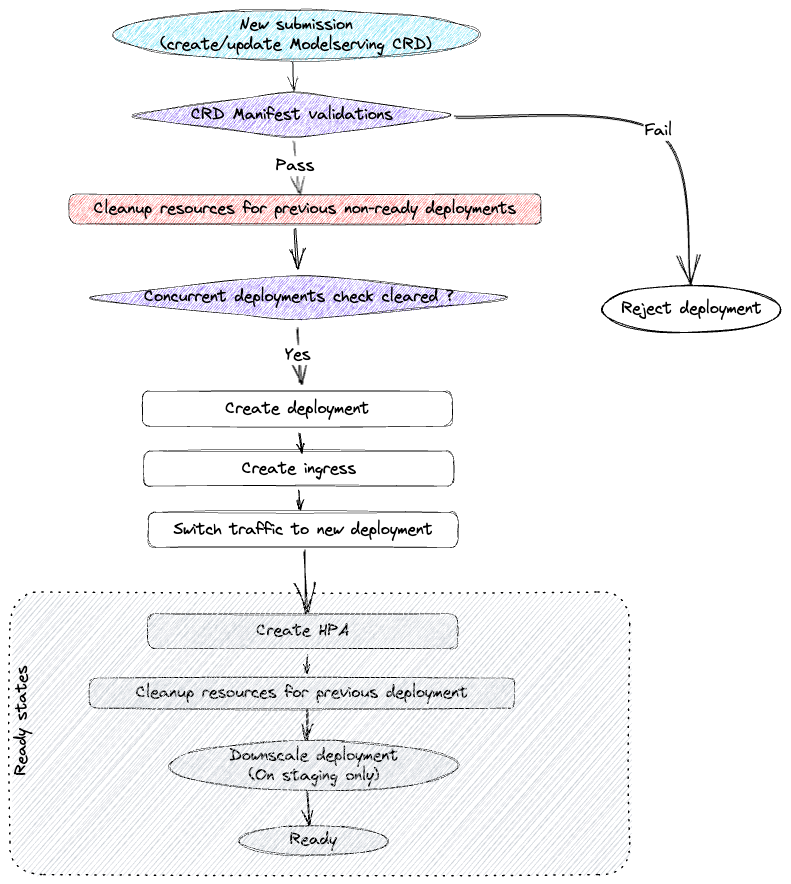
Every model serving CRD submission follows a sequence of steps. If there are failures at any step, the controller keeps retrying after small intervals. The major steps on the deployment cycle are described below:
Validate whether the new CRD specs are acceptable. Along with sanity checks, we also enforce a lot of platform constraints through this step.
Clean up previous non-ready deployment resources. Sometimes a deployment submission might keep crashing and hence it doesn’t proceed to a ready state. On every submission, it’s important to check and clean up such previous deployments.
Create resources for the new deployment and ensure that the new deployment is ready.
Switch traffic from old deployment to the new deployment.
Clean up resources for old deployment. At this point, traffic is already being served by the new deployment resources. So, we can clean up the old deployment.
Phase 4: Transition to a high-code, self-served, process-managed platform
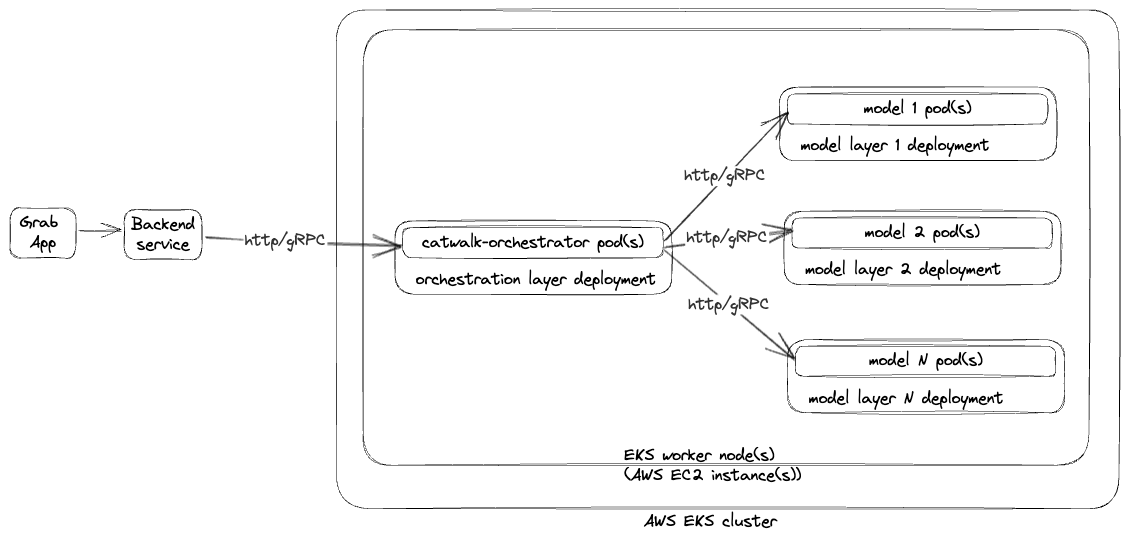
As the number of model serving applications and use cases multiplied, clients sought greater control over orchestrations between different models, experiment executions, traffic shadowing, and responses archiving. To cater to these needs, we introduced several changes and components with the Catwalk Orchestrator, a high code orchestration solution, leading the pack.
Catwalk orchestrator
The Catwalk Orchestrator is a highly abstracted framework for building ML applications that replaced the catwalk-proxy from previous phases. The key difference is that users can now write their own business/orchestration logic. The orchestrator offers a range of utilities, reducing the need for users to write extensive boilerplate code. Key components of the Catwalk Orchestrator include HTTP server, gRPC server, clients for different model serving flavours (TensorFlow, ONNX, PyTorch, etc), client for fetching features from the feature bank, and utilities for logging, metrics, and data lake ingestion.
The Catwalk Orchestrator is designed to streamline the deployment of machine learning models. Here’s a typical user journey:
Scaffold a model serving application: Users begin by scaffolding a model serving application using a command-line tool.
Write business logic: Users then write the business logic for the application.
Deploy to staging: The application is then deployed to a staging environment for testing.
Complete load testing: Users test the application in the staging environment and complete load testing to ensure it can handle the expected traffic.
Deploy to production: Once testing is completed, the application is deployed to the production environment.
Bundled deployments
To support multiple ML models as part of a single model serving application, we introduced the concept of bundled deployments. Multiple Kubernetes deployments are bundled together as a single model serving application deployment, allowing each component (e.g., models, catwalk-orchestrator, etc) to have its own Kubernetes deployment and to scale independently.
In addition to the major developments, we implemented other changes to enhance our platform’s efficiency. We made load testing mandatory for all ML application updates to ensure robust performance. This testing process was streamlined with a single command that runs the load test in the staging environment, with the results directly shared with the user.
Furthermore, we boosted deployment transparency by sharing deployment details through Slack and Datadog. This empowered users to diagnose issues independently, reducing the dependency on on-call support. This transparency not only improved our issue resolution times but also enhanced user confidence in our platform.
The results of these changes speak for themselves. The Catwalk Orchestrator has evolved into our flagship product. In just two years, we have deployed 200 Catwalk Orchestrators serving approximately 1,400 ML models.
What’s next?
As we continue to innovate and enhance our model serving platform, we are venturing into new territories:
Catwalk serverless: We aim to further abstract the model serving experience, making it even more user-friendly and efficient.
Catwalk data serving: We are looking to extend Catwalk’s capabilities to serve data online, providing a more comprehensive service.
LLM serving: In line with the trend towards generative AI and large language models (LLMs), we’re pivoting Catwalk to support these developments, ensuring we stay at the forefront of the AI and machine learning field.
Stay tuned as we continue to advance our technology and bring these exciting developments to life.
Join us
Grab is the leading superapp platform in Southeast Asia, providing everyday services that matter to consumers. More than just a ride-hailing and food delivery app, Grab offers a wide range of on-demand services in the region, including mobility, food, package and grocery delivery services, mobile payments, and financial services across 700 cities in eight countries.
Powered by technology and driven by heart, our mission is to drive Southeast Asia forward by creating economic empowerment for everyone. If this mission speaks to you, join our team today!
As organizations increasingly adopt Amazon Q Developer, understanding how developers use it is essential. Diving into specific telemetry events and user-level data clarifies how users interact with Amazon Q Developer, offering insights into feature usage and developer behaviors. This granular view, accessible through logs, is vital for identifying trends, optimizing performance, and enhancing the overall developer experience. This blog is intended to give visibility to key telemetry events logged by Amazon Q Developer and how to explore this data to gain insights.
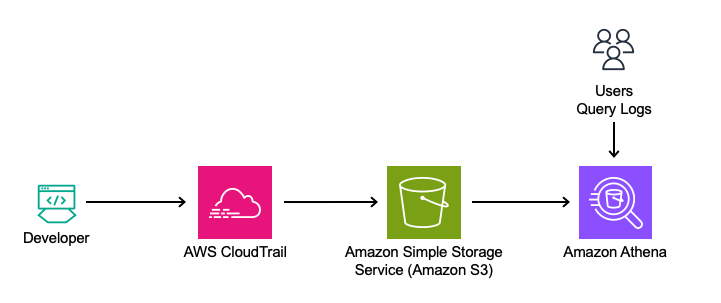
To help you get started, the following sections will walk through several practical examples that showcase how to extract meaningful insights from AWS CloudTrail. By reviewing the logs, organizations can track usage patterns, identify top users, and empower them to train and mentor other developers, ultimately fostering broader adoption and engagement across teams.
Although the examples here focus on Amazon Athena for querying logs, the methods can be adapted to integrate with other tools like Splunk or Datadog for further analysis. Through this exploration, readers will learn how to query the log data to understand better how Amazon Q Developer is used within your organization.
Solution Overview
This solution leverages Amazon Q Developer’s logs from the Integrated Development Environment (IDE) and terminal, captured in AWS CloudTrail. The logs will be queried directly using Amazon Athena from Amazon Simple Storage Service (Amazon S3) to analyze feature usage, such as in-line code suggestions, chat interactions, and security scanning events.
Analyzing Telemetry Events in Amazon Q Developer
Amazon Athena is used to query the CloudTrail logs directly to analyze this data. By utilizing Athena, queries can be run on existing CloudTrail records, making it simple to extract insights from the data in its current format.
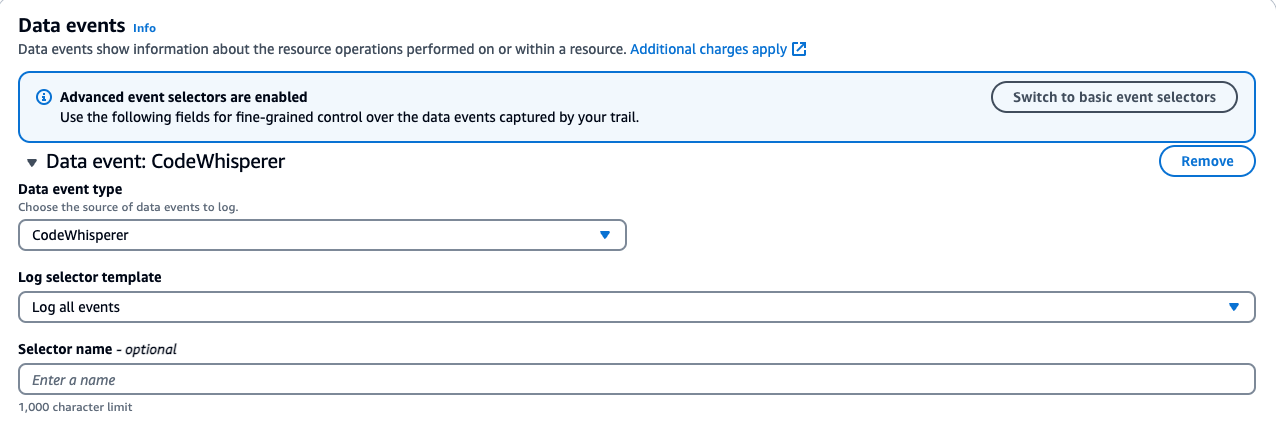
Ensuring CloudTrail is set up to log the data events.
Navigate to the AWS CloudTrail Console.
Edit an Existing Trail:
If you have a trail, verify it is configured to log data events for Amazon CodeWhisperer.
Note: As of 4/30/24, CodeWhisperer has been renamed to Amazon Q Developer. All the functionality previously provided by CodeWhisperer is now part of Amazon Q Developer. However, for consistency, the original API names have been retained.
Click on your existing trail in CloudTrail. Find the Data Events section and click edit.
For CodeWhisperer:
Data event type: CodeWhisperer
Log selector template: Log all events
Save your changes.
Note your “Trail log location.” This S3 bucket will be used in our Athena setup.
If you don’t have an existing trail, follow the instructions in the AWS CloudTrail User Guide to set up a new trail.
Below is a screenshot of the data events addition:
Steps to Create an Athena Table from CloudTrail Logs: This step aims to turn CloudTrail events into a queryable Athena table.
1. Navigate to the AWS Management Console > Athena > Editor.
2. Click on the plus to create a query tab.
3. Run the following query to create a database and table. Note to update the location to your S3 bucket.
-- Step 1: Create a new database (if it doesn't exist)
CREATE DATABASE IF NOT EXISTS amazon_q_metrics;

-- Step 2: Create the external table explicitly within the new database
CREATE EXTERNAL TABLE amazon_q_metrics.cloudtrail_logs (

    userIdentity STRUCT<
        accountId: STRING,
        onBehalfOf: STRUCT<
            userId: STRING,
            identityStoreArn: STRING
        >
    >,
    eventTime STRING,
    eventSource STRING,
    eventName STRING,
    requestParameters STRING,
    requestId STRING,
    eventId STRING,
    resources ARRAY<STRUCT<
        arn: STRING,
        accountId: STRING,
        type: STRING
    >>,
    recipientAccountId STRING

)
ROW FORMAT SERDE 'org.apache.hive.hcatalog.data.JsonSerDe'
STORED AS INPUTFORMAT 'com.amazon.emr.cloudtrail.CloudTrailInputFormat'
OUTPUTFORMAT 'org.apache.hadoop.hive.ql.io.HiveIgnoreKeyTextOutputFormat'
LOCATION 's3://{Insert Bucket Name from CloudTrail}/'
TBLPROPERTIES ('classification'='cloudtrail');
4. Click Run
5. Run a quick query to view the data.
SELECT
    eventTime,
    userIdentity.onBehalfOf.userId AS user_id,
    eventName,
    requestParameters
FROM
    amazon_q_metrics.cloudtrail_logs AS logs
WHERE
    eventName = 'SendTelemetryEvent'
LIMIT 10;
In this section, the significance of the telemetry events captured in the requestParameters field will be explained. The query begins by displaying key fields and their data, offering insights into how users interact with various features of Amazon Q Developer.
Query Breakdown:
eventTime: This field captures the time the event was recorded, providing insights into when specific user interactions took place.
userIdentity.onBehalfOf.userId: This extracts the userId of the user. This is critical for attributing interactions to the correct user, which will be covered in more detail later in the blog.
eventName: The query is filtered on SendTelemetryEvent. Telemetry events are triggered when the user interacts with particular features or when a developer uses the service.
requestParameters: The requestParameters field is crucial because it holds the details of the telemetry events. This field contains a rich set of information depending on the type of interaction and feature the developer uses, which programming languages are used, completion types, or code modifications.
In the context of the SendTelemetryEvent, various telemetry events are captured in the requestParameters field of CloudTrail logs. These events provide insights into user interactions, overall usage, and the effectiveness of Amazon Q Developer’s suggestions. Here are the key telemetry events along with their descriptions:
UserTriggerDecisionEvent
Description: This event is triggered when a user interacts with a suggestion made by Amazon Q Developer. It captures whether the suggestion was accepted or rejected, along with relevant metadata.
Key Fields:
completionType: Whether the completion was a block or a line.
suggestionState: Whether the user accepted, rejected, or discarded the suggestion.
programmingLanguage: The programming language associated with the suggestion.
generatedLine: The number of lines generated by the suggestion.
CodeScanEvent
Description: This event is logged when a code scan is performed. It helps track the scope and result of the scan, providing insights into security and code quality checks.
Key Fields:
codeAnalysisScope: Whether the scan was performed at the file level or the project level.
programmingLanguage: The language being scanned.
CodeScanRemediationsEvent
Description: This event captures user interactions with Amazon Q Developer’s remediation suggestions, such as applying fixes or viewing issue details.
Key Fields:
CodeScanRemediationsEventType: The type of remediation action taken (e.g., viewing details or applying a fix).
includesFix: A boolean indicating whether the user applied a fix.
ChatAddMessageEvent
Description: This event is triggered when a new message is added to an ongoing chat conversation. It captures the user’s intent which refers to the purpose or goal the user is trying to achieve with the chat message. The intent can include various actions, such as suggesting alternate implementations of the code, applying common best practices, improving the quality or performance of the code.
Key Fields:
conversationId: The unique identifier for the conversation.
messageId: The unique identifier for the chat message.
userIntent: The user’s intent, such as improving code or explaining code.
programmingLanguage: The language related to the chat message.
ChatInteractWithMessageEvent
Description: This event captures when users interact with chat messages, such as copying code snippets, clicking links, or hovering over references.
Key Fields:
interactionType: The type of interaction (e.g., copy, hover, click).
interactionTarget: The target of the interaction (e.g., a code snippet or a link).
acceptedCharacterCount: The number of characters from the message that were accepted.
acceptedSnippetHasReference: A boolean indicating if the accepted snippet included a reference.
TerminalUserInteractionEvent
Description: This event logs user interactions with terminal commands or completions in the terminal environment.
Key Fields:
terminalUserInteractionEventType: The type of interaction (e.g., terminal translation or code completion).
isCompletionAccepted: A boolean indicating whether the completion was accepted by the user.
terminal: The terminal environment in which the interaction occurred.
shell: The shell used for the interaction (e.g., Bash, Zsh).
Telemetry events are key to understanding how users engage with Amazon Q Developer. They track interactions such as code completion, security scans, and chat-based suggestions. Analyzing the data in the requestParameters field helps reveal usage patterns and behaviors that offer valuable insights.
By exploring events such as UserTriggerDecisionEvent, ChatAddMessageEvent, TerminalUserInteractionEvent, and others in the schema, organizations can assess the effectiveness of Amazon Q Developer and identify areas for improvement.
Example Queries for Analyzing Developer Engagement
To gain deeper insights into how developers interact with Amazon Q Developer, the following queries can help analyze key telemetry data from CloudTrail logs. These queries track in-line code suggestions, chat interactions, and code-scanning activities. By running these queries, you can uncover valuable metrics such as the frequency of accepted suggestions, the types of chat interactions, and the programming languages most frequently scanned. This analysis helps paint a clear picture of developer engagement and usage patterns, guiding efforts to enhance productivity.
These four examples only cover a sample set of the available telemetry events, but they serve as a starting point for further exploration of Amazon Q Developer’s capabilities.
SELECT
    eventTime,
    userIdentity.onBehalfOf.userId AS user_id,
    eventName,
    json_extract_scalar(requestParameters, '$.telemetryEvent.userTriggerDecisionEvent.suggestionState') AS suggestionState,
    json_extract_scalar(requestParameters, '$.telemetryEvent.userTriggerDecisionEvent.completionType') AS completionType
FROM
    amazon_q_metrics.cloudtrail_logs
WHERE
    eventName = 'SendTelemetryEvent'
    AND json_extract(requestParameters, '$.telemetryEvent.userTriggerDecisionEvent') IS NOT NULL
    AND json_extract_scalar(requestParameters, '$.telemetryEvent.userTriggerDecisionEvent.suggestionState') = 'ACCEPT';
Use Case:This use case focuses on how developers interact with in-line code suggestions by analyzing accepted snippets. It helps identify which users are accepting suggestions, the type of snippets being accepted (blocks or lines), and the programming languages involved. Understanding these patterns can reveal how well Amazon Q Developer aligns with the developers’ expectations.
Query Explanation: The query retrieves the event time, user ID, event name, suggestion state (filtered to show only ACCEPT), and completion type. TotalGeneratedLinesBlockAccept and totalGeneratedLinesLineAccept or discarded suggestions are not included, but this gives an idea of the developers using the service for in-line code suggestions and the lines or blocks they have accepted. Additionally, the programming language field can be extracted to see which languages are used during these interactions.
Query 2: Analyzing Chat Interactions
SELECT
    userIdentity.onBehalfOf.userId AS userId,
    json_extract_scalar(requestParameters, '$.telemetryEvent.chatInteractWithMessageEvent.interactionType') AS interactionType,
    COUNT(*) AS eventCount
FROM
    amazon_q_metrics.cloudtrail_logs
WHERE
    eventName = 'SendTelemetryEvent'
    AND json_extract(requestParameters, '$.telemetryEvent.chatInteractWithMessageEvent') IS NOT NULL
GROUP BY
    userIdentity.onBehalfOf.userId,
    json_extract_scalar(requestParameters, '$.telemetryEvent.chatInteractWithMessageEvent.interactionType')
ORDER BY
    eventCount DESC;
Use Case: This use case looks at how developers use chat options like upvoting, downvoting, and copying code snippets. Understanding the chat usage patterns shows which interactions are most used and how developers engage with Amazon Q Developer chat. As an organization, this insight can help support other developers in successfully leveraging this feature.
Query Explanation: The query provides insights into chat interactions within Amazon Q Developer by retrieving user IDs, interaction types, and event counts. This query aggregates data based on the interactionType field within chatInteractWithMessageEvent, showcasing various user actions such as UPVOTE, DOWNVOTE, INSERT_AT_CURSOR, COPY_SNIPPET, COPY, CLICK_LINK, CLICK_BODY_LINK, CLICK_FOLLOW_UP, and HOVER_REFERENCE.
This analysis highlights how users engage with the chat feature and the interactions, offering a view of interaction patterns. By focusing on the interactionType field, you can better understand how developers interact with the chat feature of Amazon Q Developer.
Query 3: Analyzing Code Scanning Jobs Across Programming Languages
SELECT
    userIdentity.onBehalfOf.userId AS userId,
    json_extract_scalar(requestParameters, '$.telemetryEvent.codeScanEvent.programmingLanguage.languageName') AS programmingLanguage,
    COUNT(json_extract_scalar(requestParameters, '$.telemetryEvent.codeScanEvent.codeScanJobId')) AS jobCount
FROM
    amazon_q_metrics.cloudtrail_logs
WHERE
    eventName = 'SendTelemetryEvent'
    AND json_extract(requestParameters, '$.telemetryEvent.codeScanEvent') IS NOT NULL
GROUP BY
    userIdentity.onBehalfOf.userId,
    json_extract_scalar(requestParameters, '$.telemetryEvent.codeScanEvent.programmingLanguage.languageName')
ORDER BY
    jobCount DESC;
Use Case: Amazon Q Developer includes security scanning, and this section helps determine how the security scanning feature is being used across different users and programming languages within the organization. Understanding these trends provides valuable insights into which users actively perform security scans and the specific languages targeted for these scans.
Query Explanation: The query provides insights into the distribution of code scanning jobs across different programming languages in Amazon Q Developer. It retrieves user IDs and the count of code-scanning jobs by programming language. This analysis focuses on the CodeScanEvent, aggregating data to show the total number of jobs executed per language.
By summing up the number of code scanning jobs per programming language, this query helps to understand which languages are most frequently analyzed. It provides a view of how users are leveraging the code-scanning feature. This can be useful for identifying trends in language usage and optimizing code-scanning practices.
Query 4: Analyzing User Activity across features.
SELECT
    userIdentity.onBehalfOf.userId AS user_id,
    COUNT(DISTINCT CASE
        WHEN json_extract(requestParameters, '$.telemetryEvent.userTriggerDecisionEvent') IS NOT NULL
        THEN eventId END) AS inline_suggestions_count,
    COUNT(DISTINCT CASE
        WHEN json_extract(requestParameters, '$.telemetryEvent.chatInteractWithMessageEvent') IS NOT NULL
        THEN eventId END) AS chat_interactions_count,
    COUNT(DISTINCT CASE
        WHEN json_extract(requestParameters, '$.telemetryEvent.codeScanEvent') IS NOT NULL
        THEN eventId END) AS security_scans_count,
    COUNT(DISTINCT CASE
        WHEN json_extract(requestParameters, '$.telemetryEvent.terminalUserInteractionEvent') IS NOT NULL
        THEN eventId END) AS terminal_interactions_count
FROM
    amazon_q_metrics.cloudtrail_logs
WHERE
    eventName = 'SendTelemetryEvent'
GROUP BY
    userIdentity.onBehalfOf.userId
Use Case:This use case looks at how developers use Amazon Q Developer across different features: in-line code suggestions, chat interactions, security scans, and terminal interactions. By tracking usage, organizations can see overall engagement and identify areas where developers may need more support or training. This helps optimize the use of Amazon Q Developer and helps teams get the most out of the tool.
Query Explanation: Let’s take the other events from the prior queries and additional events to get more detail overall and tie it all together. This expanded query provides a comprehensive view of user activity within Amazon Q Developer by tracking the number of in-line code suggestions, chat interactions, security scans, and terminal interactions performed by each user. By analyzing these events, organizations can gain a better understanding of how developers are using these key features.
By summing up the interactions for each feature, this query helps identify which users are most active in each category, offering insights into usage patterns and areas where additional training or support may be needed.
Enhancing Metrics with Display Names and Usernames
The previous queries had userid as a field; however, many customers would prefer to see a user alias (such as username or display name). The following section illustrates enhancing these metrics by augmenting user IDs with display names and usernames from the AWS IAM Identity Center. This will provide more human-readable user names.
In this example, the export is run locally to enhance user metrics with IAM Identity Center for simplicity. This method works well for demonstrating how to access and work with the data, but it provides a static snapshot of the users at the time of export. In a production environment, an automated solution would be preferable to capture newly added users continuously. For the purposes of this blog, this straightforward approach is used to focus on data access.
To proceed, install Python 3.8+ and Boto3, and configure AWS credentials via the CLI. Then, run the following Python script locally to export the data:
import boto3, csv
# replace this with the region of your IDC instance
RegionName='us-east-1'
# client creation
idstoreclient = boto3.client('identitystore', RegionName)
ssoadminclient = boto3.client('sso-admin', RegionName)

Instances= (ssoadminclient.list_instances()).get('Instances')
InstanceARN=Instances[0].get('InstanceArn')
IdentityStoreId=Instances[0].get('IdentityStoreId')

# query
UserDigestList = []
ListUserResponse = idstoreclient.list_users(IdentityStoreId=IdentityStoreId)
UserDigestList.extend([[user['DisplayName'], user['UserName'], user['UserId']] for user in ListUserResponse['Users']])
NextToken = None
if 'NextToken' in ListUserResponse.keys(): NextToken = ListUserResponse['NextToken']
while NextToken is not None:
    ListUserResponse = idstoreclient.list_users(IdentityStoreId=IdentityStoreId, NextToken=NextToken)
    UserDigestList.extend([[user['DisplayName'], user['UserName'], user['UserId']] for user in ListUserResponse['Users']])
    if 'NextToken' in ListUserResponse.keys(): NextToken = ListUserResponse['NextToken']
    else: NextToken = None

# write the query results to IDCUserInfo.csv
with open('IDCUserInfo.csv', 'w') as CSVFile:
    CSVWriter = csv.writer(CSVFile, quoting=csv.QUOTE_ALL)
    HeaderRow = ['DisplayName', 'UserName', 'UserId']
    CSVWriter.writerow(HeaderRow)
    for UserRow in UserDigestList:
        CSVWriter.writerow(UserRow)
This script will query the IAM Identity Center for all users and write the results to a CSV file, including DisplayName, UserName, and UserId. After generating the CSV file, upload it to an S3 bucket. Please make note of this S3 location.
Steps to Create an Athena Table from the above CSV output: Create a table in Athena to join the existing table with the user details.
1. Navigate to the AWS Management Console > Athena > Editor.
2. Click on the plus to create a query tab.
3. Run the following query to create our table. Note to update the location to your S3 bucket.
CREATE EXTERNAL TABLE amazon_q_metrics.user_data (
    DisplayName STRING,
    UserName STRING,
    UserId STRING
)
ROW FORMAT SERDE 'org.apache.hadoop.hive.serde2.OpenCSVSerde'
WITH SERDEPROPERTIES (
   'separatorChar' = ',',
   'quoteChar'     = '"'
)
STORED AS TEXTFILE
LOCATION 's3://{Update to your S3 object location}/'  -- Path containing CSV file
TBLPROPERTIES ('skip.header.line.count'='1');
4. Click Run
5. Now, let’s run a quick query to verify the data in the new table.
SELECT * FROM amazon_q_metrics.user_data limit 10;
The first query creates an external table in Athena from user data stored in a CSV file in S3. The user_data table has three fields: DisplayName, UserName, and UserId. To specify the correct parsing of the CSV, separatorChar is specified as a comma and quoteChar as a double quote. Additionally, the TBLPROPERTIES (‘skip.header.line.count’=’1’) flag skips the header row in the CSV file, ensuring that column names aren’t treated as data.
The user_data table holds key details: DisplayName (full name), UserName (username), and UserId (unique identifier). This table will be joined with the cloudtrail_q_metrics table using the userId field from the onBehalfOf struct, enriching the interaction logs with human-readable user names and display names instead of user IDs.
In the previous analysis of in-line code suggestions, the focus was on retrieving key metrics related to user interactions with Amazon Q Developer. The query below follows a similar structure but now includes a join with the user_data table to enrich insights with additional user details such as DisplayName and Username.
To include a join with the user_data table in the query, it is necessary to define a shared key between the cloudtrail_logs_amazon_q and user_data tables. For this example, user_id will be used.
SELECT
    logs.eventTime,
    user_data.displayname,  -- Additional field from user_data table
    user_data.username,     -- Additional field from user_data table
    json_extract_scalar(logs.requestParameters, '$.telemetryEvent.userTriggerDecisionEvent.suggestionState') AS suggestionState,
    json_extract_scalar(logs.requestParameters, '$.telemetryEvent.userTriggerDecisionEvent.completionType') AS completionType
FROM
    amazon_q_metrics.cloudtrail_logs AS logs  -- Specified database for cloudtrail_logs
JOIN
    amazon_q_metrics.user_data  -- Specified database for user_data
ON
    logs.userIdentity.onBehalfOf.userId = user_data.userid
WHERE
    logs.eventName = 'SendTelemetryEvent'
    AND json_extract_scalar(logs.requestParameters, '$.telemetryEvent.userTriggerDecisionEvent.suggestionState') = 'ACCEPT';
This approach allows for a deeper analysis by integrating user-specific information with the telemetry data, helping you better understand how different user roles interact with the in-line suggestions and other features of Amazon Q Developer.
Cleanup
If you have been following along with this workflow, it is important to clean up the resources to avoid unnecessary charges. You can perform the cleanup by running the following query in the Amazon Athena console:
-- Step 1: Drop the tables
DROP TABLE IF EXISTS amazon_q_metrics.cloudtrail_logs;
DROP TABLE IF EXISTS amazon_q_metrics.user_data;

-- Step 2: Drop the database after the tables are removed
DROP DATABASE IF EXISTS amazon_q_metrics CASCADE;
This query removes both the cloudtrail_logs and user_data tables, followed by the amazon_q_metrics database.
Remove the S3 objects used to store the CloudTrail logs and user data by navigating to the S3 console, selecting the relevant buckets or objects, and choosing “Delete.”
If a new CloudTrail trail was created, consider deleting it to stop further logging. For instructions, see Deleting a Trail. If an existing trail was used, remove the CodeWhisperer data events to prevent continued logging of those events.
Conclusion
By tapping into Amazon Q Developer’s logging capabilities, organizations can unlock detailed insights that drive better decision-making and boost developer productivity. The ability to analyze user-level interactions provides a deeper understanding of how the service is used.
Now that you have these insights, the next step is leveraging them to drive improvements. For example, organizations can use this data to identify opportunities for Proof of Concepts (PoCs) and pilot programs that further demonstrate the value of Amazon Q Developer. By focusing on areas where engagement is high, you can support the most engaged developers as champions to advocate for the tool across the organization, driving broader adoption.
The true potential of these insights lies in the “art of the possible.” With the data provided, it is up to you to explore how to query or visualize it further. Whether you’re examining metrics for in-line code suggestions, interactions, or security scanning, this foundational analysis is just the beginning.
As Amazon Q Developer continues to evolve, staying updated with emerging telemetry events is crucial for maintaining visibility into the available metrics. You can do this by regularly visiting the official Amazon Q Developer documentation and the Amazon Q Developer’s Changelog to stay up-to-date latest information and insights.
This post is written by Maximilian Schellhorn, Senior Solutions Architect and Michael Gasch, Senior Product Manager, EventBridge
Amazon EventBridge is a serverless event router that allows you to decouple your applications, using events to communicate important changes between event producers and consumers (targets). With EventBridge, producers publish events through an event bus, where you can configure rules to filter, transform, and route your events to a variety of targets such as AWS Lambda functions, Amazon Kinesis Data Streams, and public HTTPS endpoints (API destinations).
In event-driven architectures, the flow of sending and receiving events is asynchronous. There is no direct feedback to the producer when targets are invoked or if the invocation was successful. Therefore, to make sure business logic executes reliably in event-driven applications, it’s essential to get an understanding of your event delivery behavior with metrics, such as the number of delivery retries, failed delivery attempts, and the time it takes to deliver events. These metrics allow you to monitor the health of your event-driven architectures, and understand and mitigate event delivery issues caused by underperforming, undersized or unresponsive targets.
This post discusses how to monitor event delivery with EventBridge metrics to detect common event delivery issues and increase the reliability of your event-driven architectures on AWS.
Background
EventBridge is a multi-tenant system that handles more than 2.6 trillion events per month as of February 2024. EventBridge maintains fairness and availability under high load using mechanisms to detect and isolate noisy neighbors. As part of the AWS shared responsibility model, you are responsible to monitor and respond to target-related issues for reliable event delivery. For example, an underprovisioned Kinesis data stream or throttled API destination as a target will lead to delivery retries, delays, and failures.
Solution overview
EventBridge provides a variety of metrics to observe, troubleshoot, and optimize event delivery. For example, counter-based metrics such as InvocationAttempts, SuccessfulInvocationAttempts, RetryInvocationAttempts, and FailedInvocations allow you to observe throttling and calculate error rates. Latency-based metrics such as IngestionToInvocationSuccessLatency provide insights into event delivery and delays.
In the following sections, we demonstrate the behavior of these metrics through an example application and discuss best practices for reliable event delivery. The example is composed of three key components, as numbered in the following architecture:
An HTTP load generator to simulate different load patterns through Amazon API Gateway.
An EventBridge event bus and a rule with an API destination target, throttled at 50 requests per second to simulate an under-scaled resource.
A dead-letter queue (DLQ) that makes sure events are retained in case of invocations that fail permanently.
Example application architecture
The load generator creates varying load over multiple phases. To observe the number of incoming events, use the EventBridge metrics MatchedEvents or TriggeredRules on the rule name dimension, as illustrated in the following graph.
Number of incoming events visualized in CloudWatch Metrics
The following use cases focus on monitoring event delivery. Therefore, cases where event producers are not able to publish events due to permission errors or are experiencing throttling quotas on PutEvents are not covered.
Use case 1: Detecting event delivery issues due to target rate limiting
In this use case, event delivery will experience retries due to an under-scaled API destination target. The API processes all requests successfully. The load generator runs in three phases:
First, it warms up with a low number of requests and slowly increases the load while staying below the API destination rate limit of 50 requests per second
In the second phase, the load generator increases to 100 requests per second, exceeding the configured invocation rate on the API destination
Finally, the load generator slows to 50 requests per second, and eventually finishes
The following graph was created via CloudWatch Metrics and illustrates this scenario.
Load pattern of the example application
EventBridge supports new rule name dimensions for selected metrics, making it straightforward to observe invocations (event delivery) per rule. The following metrics are recommended:
InvocationAttempts – The overall number of times EventBridge attempts to invoke the target, including retries
SuccessfulInvocationAttempts – The number of invocation attempts that were successful
RetryInvocationAttempts – The number attempts that originated from retries
The following graph visualizes the metrics within the first phase of the example scenario. In this phase, the load stays below the configured rate limit of the target. When events are delivered successfully without throttling or errors, InvocationAttempts and SuccessfulInvocationAttempts are equivalent and RetryInvocationAttempts is 0 (the metric is only emitted if there are retries).
EventBridge Metrics during the first phase without throttling or errors
In the second phase (06:55), the load generator creates more events than the target can handle, exceeding the API destination invocation rate limit. This is reflected in the graph by InvocationAttempts and MatchedEvents increasing, while SuccessfulInvocationAttempts stays at the configured API destination rate limit. At the beginning of the phase, RetryInvocationAttempts is 0 because retries due to rate limiting from API destinations are not immediately executed, but delayed with exponential backoff. After the delay, RetryInvocationAttempts starts increasing (06:58), as shown in the following graph.
EventBridge Metrics during the ramp-up phase of the load generator
Because InvocationAttempts also includes retries, the overall number of InvocationAttempts is higher than the incoming MatchedEvents.
Lastly, during the cool down period, when the number of incoming events is decreasing significantly (7:03), more retry attempts succeed, and therefore InvocationAttempts and RetryAttempts reduce. Even though there are no more new incoming events (07:05), there are still events being retried that will eventually finish (07:14).
EventBridge Metrics during the cool-down phase of the load generator
Based on the observations during this scenario, we can calculate the overall custom metric SuccessfulInvocationRate. If you consider retries as a first sign of degraded system state, you can calculate this rate as SuccessfulInvocationAttempts/InvocationAttempts. For example, in Amazon CloudWatch, you can use metric math. Depending on your requirements, you can set up CloudWatch alarms to create notifications when a certain threshold is hit.
Custom SuccessfulInvocationRate metric generated with CloudWatch metric math
Although an occasional decrease of SuccessfulInvocationRate due to temporary traffic spikes or invocation errors can be considered normal, a constant mismatch is an indication of a misconfigured target and needs to be addressed as part of the shared responsibility model.
Use case 2: Detecting and handling event delivery failures
By default, EventBridge retries delivering an event for 24 hours and up to 185 times. After all retry attempts are exhausted, the event is dropped or sent to a DLQ. See Using dead-letter queues to process undelivered events in EventBridge for more information on how to configure a DLQ with EventBridge. These events can be visualized through the FailedInvocations or InvocationsSentToDlq metrics. Because FailedInvocations doesn’t consider retries that eventually succeed as failed invocations, this metric wasn’t visible in the previous example.
The following graph represents the same application and load pattern, but the EventBridge rule is configured with a maximum of three retries. During the first phase, there are no failed attempts because the load stays below the throttling limit.
EventBridge Metrics with FailedInvocations after maximum retries exceed
In the second phase, you can observe FailedInvocations starting after the initial retries (three) have been exceeded. Because the example application has a DLQ configured, InvocationsSentToDlq can provide the same insight, and can be used for alerting.
If you’re experiencing a large amount of FailedInvocations or InvocationsSentToDlq, it’s recommended to investigate if the target is properly scaled and able to receive the given traffic. For cases where retries are expected, the retry policy should be configured accordingly.
Use case 3: Detecting event delivery delays
The metrics outlined in the previous scenarios provided an overview of how to monitor your event delivery by the total number of retries or failures during a given time period. However, EventBridge also provides a metric that lets you observe the end-to-end latency (the time it takes from event ingestion to successful delivery to the target).
This can be achieved with the new IngestionToInvocationSuccessLatency metric. This metric surfaces effects from retries and delayed delivery, for example due to timeouts and slow responses from targets. In the following graph, you can observe 50th and 99th percentiles (p50 and p99) for IngestionToInvocationSuccessLatency on the right Y axis. During the second phase of the load generator, where invocations exceed the number of events the target can process, retries occur. Therefore, the overall time until events are delivered successfully to the target increases to almost 10 minutes (597,621ms, p99).
Combination of counter based metrics and latency based metrics
IngestionToInvocationSuccessLatency includes the time the target takes to successfully respond to event delivery. This allows you to monitor the end-to-end latency between EventBridge and your target, and detect performance variations and degradations of targets, even when there is no target throttling or errors. For example, the following graph displays constant successful invocations while the latency increases due to longer response times of the target over a 5-minute period (starting at 09:07).
Visualization of increased target latency without errors or retries
Conclusion
In this post, we explored best practices for observing event delivery with EventBridge. By using key metrics like SuccessfulInvocationAttempts, RetryInvocationAttempts, and FailedInvocations, you can gain visibility and identify issues early. With CloudWatch metric math, you can calculate a SuccessfulInvocationRate metric, allowing you to define thresholds and alerts on a single key metric.
Furthermore, the new IngestionToInvocationSuccessLatency metric provides insights into the end-to-end event delivery latency between EventBridge and your targets, enabling you to detect and respond to performance degradation. It’s recommended to combine these key metrics into a holistic overview, such as using CloudWatch dashboards. By setting up appropriate alarms and taking a proactive approach to observability, you can mitigate event delivery problems and build resilient, scalable, event-driven applications on AWS with EventBridge. Navigate to Monitoring Amazon EventBridge to get an overview of the available metrics and how to get started.
Try these metrics out with your own use case!
To find more serverless patterns, check out Serverless Land.
Tathagata Roy has been working to make the
Coccinelle tool that is used (among other things)
to automate the refactoring of C code work on Rust
code as well. Roy gave a
presentation at Kangrejos about that work,
including the creative approaches necessary to work with Rust’s more complicated
control flow and syntax.
The collective thoughts of the interwebz
Manage Consent
To provide the best experiences, we use technologies like cookies to store and/or access device information. Consenting to these technologies will allow us to process data such as browsing behavior or unique IDs on this site. Not consenting or withdrawing consent, may adversely affect certain features and functions.
Functional
Always active
The technical storage or access is strictly necessary for the legitimate purpose of enabling the use of a specific service explicitly requested by the subscriber or user, or for the sole purpose of carrying out the transmission of a communication over an electronic communications network.
Preferences
The technical storage or access is necessary for the legitimate purpose of storing preferences that are not requested by the subscriber or user.
Statistics
The technical storage or access that is used exclusively for statistical purposes.The technical storage or access that is used exclusively for anonymous statistical purposes. Without a subpoena, voluntary compliance on the part of your Internet Service Provider, or additional records from a third party, information stored or retrieved for this purpose alone cannot usually be used to identify you.
Marketing
The technical storage or access is required to create user profiles to send advertising, or to track the user on a website or across several websites for similar marketing purposes.