Audits of Rust crates from Google

Post Syndicated from original https://lwn.net/Articles/932734/

Google has announced
the release of the results of internal audits on a number of rust crates.

You can easily import audits done by Googlers into your own
projects that attest to the properties of many open-source Rust
crates. Then, equipped with this data, you can decide whether
crates meet the security, correctness, and testing requirements for
your projects.

This work uses the cargo vet tool covered here one year ago.

VeloCON 2023: Submissions Wanted!

Post Syndicated from Carlos Canto original https://blog.rapid7.com/2023/05/23/velocon-2023-submissions-wanted/

VeloCON 2023: Submissions Wanted!

Rapid7 is thrilled to announce that the 2nd annual VeloCON virtual summit will be held this September (date TBD), with times oriented to the continental USA time zones. Once again, the conference will be online and completely free!

VeloCON is a one-day event focused on the Velociraptor community. It’s a place to share experiences in using and developing Velociraptor to address the needs of the wider DFIR community and an opportunity to take a look ahead at the future of our platform.

This year’s event calls for even more of the stimulating and informative content that made last year’s VeloCON so much fun. Don’t miss your chance at being a part of this year’s marquee event of the open-source DFIR calendar.

The call for presentations closes Monday, July 17, 2023 (see details below).

Last year’s event was a tremendous success, with over 500 unique participants enjoying our lineup of fascinating discussions, tech talks and the opportunity to get to know real members of our own community.

Call for presentations (CFP)

VeloCON invites contributions in the form of a 30-45 minute presentation. We require a brief proposal (~500 words; not a paper). These proposals undergo a review process to select presentations of maximum interest to VeloCON attendees and the wider Velociraptor community and to filter out sales pitches.

VeloCON focuses on work that pushes the envelope of what is currently possible using Velociraptor. Potential topics to be addressed by submissions include, but are not limited to:

  • Use cases of Velociraptor in real investigations
  • Novel deployment modes to cater for specific requirements
  • Contributions to Velociraptor to address new capabilities
  • Potential future ideas and features that Velociraptor
  • Integration of Velociraptor with other tools/frameworks
  • Analysis and acquisition on novel Forensic Artifacts

Submission process

Please email your submission to [email protected] and include the following details:

  1. Your name and email address (if different from the sending email)
  2. Company/affiliation and title to be included on the agenda
  3. Presentation title
  4. A short abstract (~500 words) to be included in the agenda

Deadline

Submissions are due Monday, July 17, 2023 and a decision will be announced shortly afterwards.

The Free Credit Trap: Building SaaS Infrastructure for Long-Term Sustainability

Post Syndicated from Amrit Singh original https://www.backblaze.com/blog/the-free-credit-trap-building-saas-infrastructure-for-long-term-sustainability/

In today’s economic climate, cost cutting is on everyone’s mind, and businesses are doing everything they can to save money. But, it’s equally important that they can’t afford to compromise the integrity of their infrastructure or the quality of the customer experience. As a startup, taking advantage of free cloud credits from cloud providers like Amazon AWS, especially at a time like this, seems enticing. 

Using those credits can make sense, but it takes more planning than you might think to use them in a way that allows you to continue managing cloud costs once the credits run out. 

In this blog post, I’ll walk through common use cases for credit programs, the risks of using credits, and alternatives that help you balance growth and cloud costs.

The True Cost of “Free”

This post is part of a series exploring free cloud credits and the hidden complexities and limitations that come with these offers. Check out our previous installments:

The Shift to Cloud 3.0

As we see it, there have been three stages of “The Cloud” in its history:

Phase 1: What is the Cloud?

Starting around when Backblaze was founded in 2007, the public cloud was in its infancy. Most people weren’t clear on what cloud computing was or if it was going to take root. Businesses were asking themselves, “What is the cloud and how will it work with my business?”

Phase 2: Cloud = Amazon Web Services

Fast forward to 10 years later, and AWS and “The Cloud” started to become synonymous. Amazon had nearly 50% of market share of public cloud services, more than Microsoft, Google, and IBM combined. “The Cloud” was well-established, and for most folks, the cloud was AWS.

Phase 3: Multi-Cloud

Today, we’re in Phase 3 of the cloud. “The Cloud” of today is defined by the open, multi-cloud internet. Traditional cloud vendors are expensive, complicated, and seek to lock customers into their walled gardens. Customers have come to realize that (see below) and to value the benefits they can get from moving away from a model that demands exclusivity in cloud infrastructure.

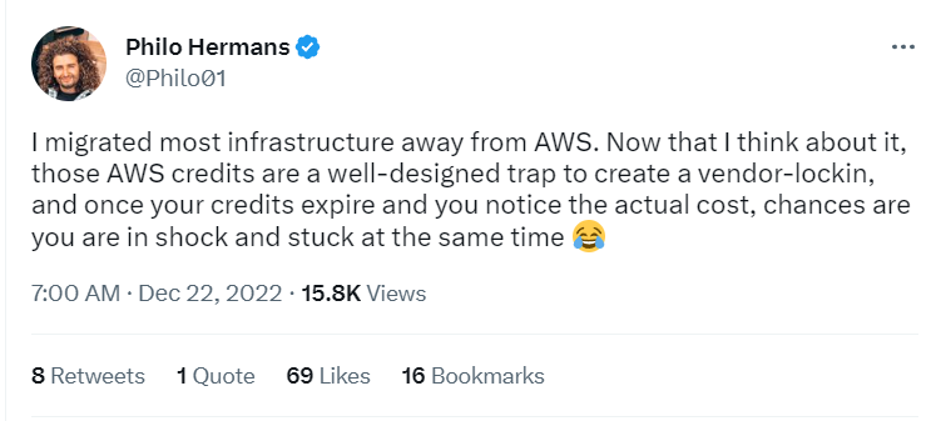
An image displaying a Tweet from user Philo Hermans @Philo01 that says 

I migrated most infrastructure away from AWS. Now that I think about it, those AWS credits are a well-designed trap to create a vendor lock in, and once your credits expire and you notice the actual cost, chances are you are in shock and stuck at the same time (laughing emoji).
Source.

In Cloud Phase 3.0, companies are looking to reign in spending, and are increasingly seeking specialized cloud providers offering affordable, best-of-breed services without sacrificing speed and performance. How do you balance that with the draw of free credits? I’ll get into that next, and the two are far from mutually exclusive.

Getting Hooked on Credits: Common Use Cases

So, you have $100k in free cloud credits from AWS. What do you do with them? Well, in our experience, there are a wide range of use cases for credits, including:

  • App development and testing: Teams may leverage credits to run an app development proof of concept (PoC) utilizing Amazon EC2, RDS, and S3 for compute, database, and storage needs, for example, but without understanding how these will scale in the longer term, there may be risks involved. Spinning up EC2 instances can quickly lead to burning through your credits and getting hit with an unexpected bill.
  • Machine learning (ML): Machine learning models require huge amounts of computing power and storage. Free cloud credits might be a good way to start, but you can expect them to quickly run out if you’re using them for this use case. 
  • Data analytics: While free cloud credits may cover storage and computing resources, data transfer costs might still apply. Analyzing large volumes of data or frequently transferring data in and out of the cloud can lead to unexpected expenses.
  • Website hosting: Hosting your website with free cloud credits can eliminate the up front infrastructure spend and provide an entry point into the cloud, but remember that when the credits expire, traffic spikes you should be celebrating can crater your bottom line.
  • Backup and disaster recovery: Free cloud credits may have restrictions on data retention, limiting the duration for which backups can be stored. This can pose challenges for organizations requiring long-term data retention for compliance or disaster recovery purposes.

All of this is to say: Proper configuration, long-term management and upkeep, and cost optimization all play a role on how you scale on monolith platforms. It is important to note that the risks and benefits mentioned above are general considerations, and specific terms and conditions may vary depending on the cloud service provider and the details of their free credit offerings. It’s crucial to thoroughly review the terms and plan accordingly to maximize the benefits and mitigate the risks associated with free cloud credits for each specific use case. (And, given the complicated pricing structures we mentioned before, that might take some effort.)

Monument Uses Free Credits Wisely

Monument, a photo management service with a strong focus on security and privacy, utilized free startup credits from AWS. But, they knew free credits wouldn’t last forever. Monument’s co-founder, Ercan Erciyes, realized they’d ultimately lose money if they built the infrastructure for Monument Cloud on AWS.

He also didn’t want to accumulate tech debt and become locked in to AWS. Rather than using the credits to build a minimum viable product as fast as humanly possible, he used the credits to develop the AI model, but not to build their infrastructure. Read more about how they put AWS credits to use while building infrastructure that could scale as they grew.

➔ Read More

The Risks of AWS Credits: Lessons from Founders

If you’re handed $100,000 in credits, it’s crucial to be aware of the risks and implications that come along with it. While it may seem like an exciting opportunity to explore the capabilities of the cloud without immediate financial constraints, there are several factors to consider:

  1. The temptation to overspend: With a credit balance at your disposal just waiting to be spent, there is a possibility of underestimating the actual costs of your cloud usage. This can lead to a scenario where you inadvertently exhaust the credits sooner than anticipated, leaving you with unexpected expenses that may strain your budget.
  2. The shock of high bills once credits expire: Without proper planning and monitoring of your cloud usage, the transition from “free” to paying for services can result in high bills that catch you off guard. It is essential to closely track your cloud usage throughout the credit period and have a clear understanding of the costs associated with the services you’re utilizing. Or better yet, use those credits for a discrete project to test your PoC or develop your minimum viable product, and plan to build your long-term infrastructure elsewhere.
  3. The risk of vendor lock-in: As you build and deploy your infrastructure within a specific cloud provider’s ecosystem, the process of migrating to an alternative provider can seem complex and can definitely be costly (shameless plug: at Backblaze, we’ll cover your migration over 50TB). Vendor lock-in can limit your flexibility, making it challenging to adapt to changing business needs or take advantage of cost-saving opportunities in the future.

The problems are nothing new for founders, as the online conversation bears out.

First, there’s the old surprise bill:

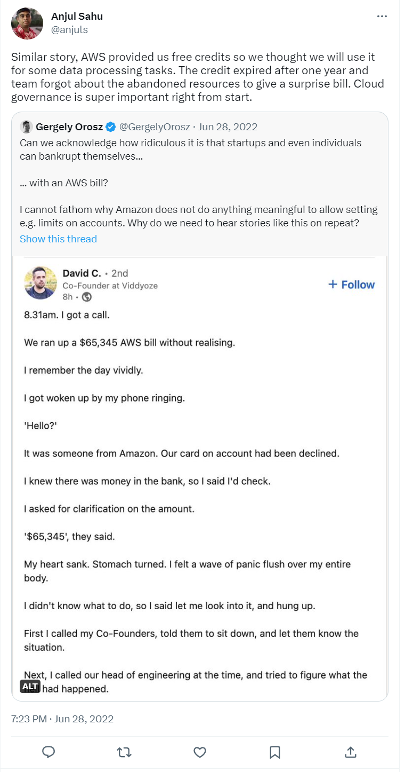
A Tweet from user Ajul Sahul @anjuls that says 

Similar story, AWS provided us free credits so we though we will use it for some data processing tasks. The credit expired after one year and team forgot about the abandoned resources to give a surprise bill. Cloud governance is super importance right from the start.
Source.

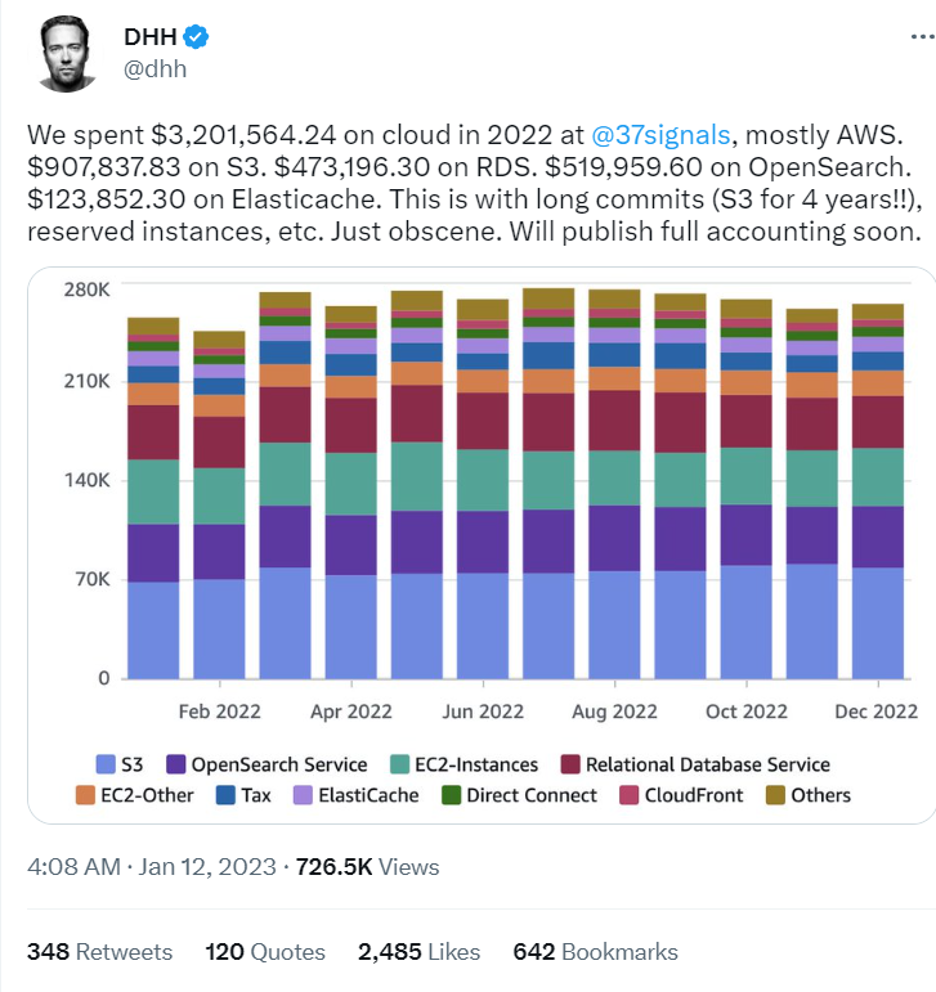
Even with some optimization, AWS cloud spend can still be pretty “obscene” as this user vividly shows:

A Tweet from user DHH @dhh that says 

We spent $3,201,564.24 on cloud in 2022 at @37signals, mostly AWS. $907,837.83 on S3. $473,196.30 on RDS. $519,959.60 on OpenSearch. $123,852.30 on Elasticache. This is with long commits (S3 for 4 years!!), reserved instances, etc. Just obscene. Will publish full accounting soon.
Source.

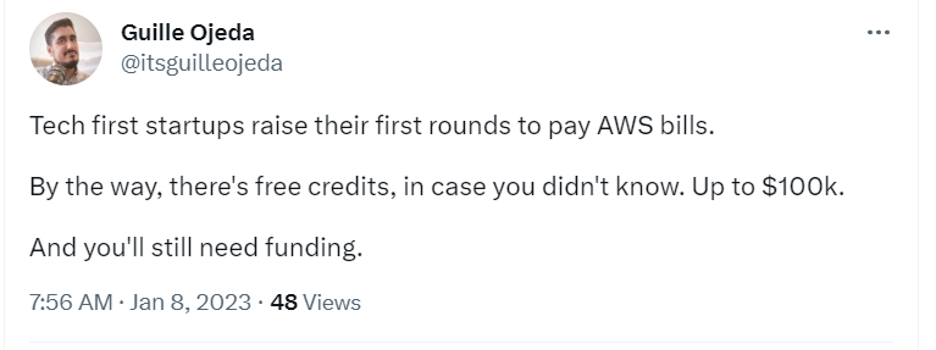
There’s the founder raising rounds just to pay AWS bills:

A Tweet from user Guille Ojeda @itsguilleojeda that says 

Tech first startups raise their first rounds to pay AWS bills. By the way, there's free credits, in case you didn't know. Up to $100k. And you'll still need funding.
Source.

Some use the surprise bill as motivation to get paying customers.

Lastly, there’s the comic relief:

A tweet from user Mrinal Wahal @MrinalWahal that reads 

Yeah high credit card bills are scary but have you forgotten turning off your AWS instances?
Source.

Strategies for Balancing Growth and Cloud Costs

Where does that leave you today? Here are some best practices startups and early founders can implement to balance growth and cloud costs:

  1. Establishing a cloud cost management plan early on.
  2. Monitoring and optimizing cloud usage to avoid wasted resources.
  3. Leveraging multiple cloud providers.
  4. Moving to a new cloud provider altogether.
  5. Setting aside some of your credits for the migration.

1. Establishing a Cloud Cost Management Plan

Put some time into creating a well-thought-out cloud cost management strategy from the beginning. This includes closely monitoring your usage, optimizing resource allocation, and planning for the expiration of credits to ensure a smooth transition. By understanding the risks involved and proactively managing your cloud usage, you can maximize the benefits of the credits while minimizing potential financial setbacks and vendor lock-in concerns.

2. Monitoring and Optimizing Cloud Usage

Monitoring and optimizing cloud usage plays a vital role in avoiding wasted resources and controlling costs. By regularly analyzing usage patterns, organizations can identify opportunities to right-size resources, adopt automation to reduce idle time, and leverage cost-effective pricing options. Effective monitoring and optimization ensure that businesses are only paying for the resources they truly need, maximizing cost efficiency while maintaining the necessary levels of performance and scalability.

3. Leveraging Multiple Cloud Providers

By adopting a multi-cloud strategy, businesses can diversify their cloud infrastructure and services across different providers. This allows them to benefit from each provider’s unique offerings, such as specialized services, geographical coverage, or pricing models. Additionally, it provides a layer of protection against potential service disruptions or price increases from a single provider. Adopting a multi-cloud approach requires careful planning and management to ensure compatibility, data integration, and consistent security measures across multiple platforms. However, it offers the flexibility to choose the best-fit cloud services from different providers, reducing dependency on a single vendor and enabling businesses to optimize costs while harnessing the capabilities of various cloud platforms.

4. Moving to a New Cloud Provider Altogether

If you’re already deeply invested in a major cloud platform, shifting away can seem cumbersome, but there may be long-term benefits that outweigh the short term “pains” (this leads into the shift to Cloud 3.0). The process could involve re-architecting applications, migrating data, and retraining personnel on the new platform. However, factors such as pricing models, performance, scalability, or access to specialized services may win out in the end. It’s worth noting that many specialized providers have taken measures to “ease the pain” and make the transition away from AWS more seamless without overhauling code. For example, at Backblaze, we developed an S3 compatible API so switching providers is as simple as dropping in a new storage target.

5. Setting Aside Credits for the Migration

By setting aside credits for future migration, businesses can ensure they have the necessary resources to transition to a different provider without incurring significant up front expenses like egress fees to transfer large data sets. This strategic allocation of credits allows organizations to explore alternative cloud platforms, evaluate their pricing models, and assess the cost-effectiveness of migrating their infrastructure and services without worrying about being able to afford the migration.

Welcome to Cloud 3.0: Alternatives to AWS

In 2022, David Heinemeier Hansson, the creator of Basecamp and Hey, announced that he was moving Hey’s infrastructure from AWS to on-premises. Hansson cited the high cost of AWS as one of the reasons for the move. His estimate? “We stand to save $7m over five years from our cloud exit,” he said.  

Going back to on-premises solutions is certainly one answer to the problem of AWS bills. In fact, when we started designing Backblaze’s Personal Backup solution, we were faced with the same problem. Hosting data storage for our computer backup product on AWS was a non-starter—it was going to be too expensive, and our business wouldn’t be able to deliver a reasonable consumer price point and be solvent. So, we didn’t just invest in on-premises resources: We built our own Storage Pods, the first evolution of the Backblaze Storage Cloud. 

But, moving back to on-premises solutions isn’t the only answer—it’s just the only answer if it’s 2007 and your two options are AWS and on-premises solutions. The cloud environment as it exists today has better choices. We’ve now grown that collection of Storage Pods into the Backblaze B2 Storage Cloud, which delivers performant, interoperable storage at one-fifth the cost of AWS. And, we offer free egress to our content delivery network (CDN) and compute partners. Backblaze may provide an even more cost-effective solution for mid-sized SaaS startups looking to save on cloud costs while maintaining speed and performance.

As we transition to Cloud 3.0 in 2023 and beyond, companies are expected to undergo a shift, reevaluating their cloud spending to ensure long-term sustainability and directing saved funds into other critical areas of their businesses. The age of limited choices is over. The age of customizable cloud integration is here. 

So, shout out to David Heinemeier Hansson: We’d love to chat about your storage bills some time.

Want to Test It Yourself?

Take a proactive approach to cloud cost management: If you’ve got more than 50TB of data storage or want to check out our capacity-based pricing model, B2 Reserve, contact our Sales Team to test a PoC for free with Backblaze B2.

And, for the streamlined, self–serve option, all you need is an email to get started today.

FAQs About Cloud Spend

If you’re thinking about moving to Backblaze B2 after taking AWS credits, but you’re not sure if it’s right for you, we’ve put together some frequently asked questions that folks have shared with us before their migrations:

My cloud credits are running out. What should I do?

Backblaze’s Universal Data Migration service can help you off-load some of your data to Backblaze B2 for free. Speak with a migration expert today.

AWS has all of the services I need, and Backblaze only offers storage. What about the other services I need?

Shifting away from AWS doesn’t mean ditching the workflows you have already set up. You can migrate some of your data storage while keeping some on AWS or continuing to use other AWS services. Moreover, AWS may be overkill for small to midsize SaaS businesses with limited resources.

How should I approach a migration?

Identify the specific services and functionalities that your applications and systems require, such as CDN for content delivery or compute resources for processing tasks. Check out our partner ecosystem to identify other independent cloud providers that offer the services you need at a lower cost than AWS.

What CDN partners does Backblaze have?

With the ease of use, predictable pricing, zero egress, our joint solutions are perfect for businesses looking to reduce their IT costs, improve their operational efficiency, and increase their competitive advantage in the market. Our CDN partners include Fastly, bunny.net, and Cloudflare. And, we extend free egress to joint customers.

What compute partners does Backblaze have?

Our compute partners include Vultr and Equinix Metal. You can connect Backblaze B2 Cloud Storage with Vultr’s global compute network to access, store, and scale application data on-demand, at a fraction of the cost of the hyperscalers.

The post The Free Credit Trap: Building SaaS Infrastructure for Long-Term Sustainability appeared first on Backblaze Blog | Cloud Storage & Cloud Backup.

Snagboot: an embedded-system recovery tool

Post Syndicated from original https://lwn.net/Articles/932724/

Bootlin has released
a tool called Snagboot
that is intended to help with the recovery of
bricked embedded systems.

Thankfully, most embedded platforms almost always include some form
of recovery via USB or UART, which usually involves sending a boot
image to the platform’s ROM code. A few tools exist that leverage
this functionality to offer quick recovery and reflashing via USB,
such as STM32CubeProgrammer, SAM-BA or UUU. However, these tools
are all vendor-specific, which means that developers working on
various kinds of platforms have to switch between different tools
and learn how to use each one.

To address this issue, Bootlin is happy to release today a new
recovery and reflashing tool, called Snagboot.

Intel Agilex 7 with R Tile Launched Integrated PCIe Gen5 and CXL

Post Syndicated from Cliff Robinson original https://www.servethehome.com/intel-agilex-7-with-r-tile-launched-integrated-pcie-gen5-and-cxl/

The new Intel Agilex 7 with R-Tile provides hardened PCIe Gen5 and CXL IP to accelerate bringing new solutions to market

The post Intel Agilex 7 with R Tile Launched Integrated PCIe Gen5 and CXL appeared first on ServeTheHome.

PyPI removes PGP-signature support

Post Syndicated from original https://lwn.net/Articles/932721/

The PyPI package archive has removed support
for PGP signatures
on packages.

In other words, out of all of the unique keys that had uploaded
signatures to PyPI, only 36% of them were capable of being
meaningfully verified at the time of audit. Even if all of those
signatures uploaded in that 3 year period of time were made by one
of those 36% of keys that are able to be meaningfully verified,
that would still represent only 0.3% of all of those files.

Given all of this, the continued support of uploading PGP
signatures to PyPI is no longer defensible.

Reserving EC2 Capacity across Availability Zones by utilizing On Demand Capacity Reservations (ODCRs)

Post Syndicated from Sheila Busser original https://aws.amazon.com/blogs/compute/reserving-ec2-capacity-across-availability-zones-by-utilizing-on-demand-capacity-reservations-odcrs/

This post is written by Johan Hedlund, Senior Solutions Architect, Enterprise PUMA.

Many customers have successfully migrated business critical legacy workloads to AWS, utilizing services such as Amazon Elastic Compute Cloud (Amazon EC2), Auto Scaling Groups (ASGs), as well as the use of Multiple Availability Zones (AZs), Regions for Business Continuity, and High Availability.

These critical applications require increased levels of availability to meet strict business Service Level Agreements (SLAs), even in extreme scenarios such as when EC2 functionality is impaired (see Advanced Multi-AZ Resilience Patterns for examples). Following AWS best practices such as architecting for flexibility will help here, but for some more rigid designs there can still be challenges around EC2 instance availability.

In this post, I detail an approach for Reserving Capacity for this type of scenario to mitigate the risk of the instance type(s) that your application needs being unavailable, including code for building it and ways of testing it.

Baseline: Multi-AZ application with restrictive instance needs

To focus on the problem of Capacity Reservation, our reference architecture is a simple horizontally scalable monolith. This consists of a single executable running across multiple instances as a cluster in an Auto Scaling group across three AZs for High Availability.

Architecture diagram featuring an Auto Scaling Group spanning three Availability Zones within one Region for high availability.

The application in this example is both business critical and memory intensive. It needs six r6i.4xlarge instances to meet the required specifications. R6i has been chosen to meet the required memory to vCPU requirements.

The third-party application we need to run, has a significant license cost, so we want to optimize our workload to make sure we run only the minimally required number of instances for the shortest amount of time.

The application should be resilient to issues in a single AZ. In the case of multi-AZ impact, it should failover to Disaster Recovery (DR) in an alternate Region, where service level objectives are instituted to return operations to defined parameters. But this is outside the scope for this post.

The problem: capacity during AZ failover

In this solution, the Auto Scaling Group automatically balances its instances across the selected AZs, providing a layer of resilience in the event of a disruption in a single AZ. However, this hinges on those instances being available for use in the Amazon EC2 capacity pools. The criticality of our application comes with SLAs which dictate that even the very low likelihood of instance types being unavailable in AWS must be mitigated.

The solution: Reserving Capacity

There are 2 main ways of Reserving Capacity for this scenario: (a) Running extra capacity 24/7, (b) On Demand Capacity Reservations (ODCRs).

In the past, another recommendation would have been to utilize Zonal Reserved Instances (Non Zonal will not Reserve Capacity). But although Zonal Reserved Instances do provide similar functionality as On Demand Capacity Reservations combined with Savings Plans, they do so in a less flexible way. Therefore, the recommendation from AWS is now to instead use On Demand Capacity Reservations in combination with Savings Plans for scenarios where Capacity Reservation is required.

The TCO impact of the licensing situation rules out the first of the two valid options. Merely keeping the spare capacity up and running all the time also doesn’t cover the scenario in which an instance needs to be stopped and started, for example for maintenance or patching. Without Capacity Reservation, there is a theoretical possibility that that instance type would not be available to start up again.

This leads us to the second option: On Demand Capacity Reservations.

How much capacity to reserve?

Our failure scenario is when functionality in one AZ is impaired and the Auto Scaling Group must shift its instances to the remaining AZs while maintaining the total number of instances. With a minimum requirement of six instances, this means that we need 6/2 = 3 instances worth of Reserved Capacity in each AZ (as we can’t know in advance which one will be affected).

Illustration of number of instances required per Availability Zone, in order to keep the total number of instances at six when one Availability Zone is removed. When using three AZs there are two instances per AZ. When using two AZs there are three instances per AZ.

Spinning up the solution

If you want to get hands-on experience with On Demand Capacity Reservations, refer to this CloudFormation template and its accompanying README file for details on how to spin up the solution that we’re using. The README also contains more information about the Stack architecture. Upon successful creation, you have the following architecture running in your account.

Architecture diagram featuring adding a Resource Group of On Demand Capacity Reservations with 3 On Demand Capacity Reservations per Availability Zone.

Note that the default instance type for the AWS CloudFormation stack has been downgraded to t2.micro to keep our experiment within the AWS Free Tier.

Testing the solution

Now we have a fully functioning solution with Reserved Capacity dedicated to this specific Auto Scaling Group. However, we haven’t tested it yet.

The tests utilize the AWS Command Line Interface (AWS CLI), which we execute using AWS CloudShell.

To interact with the resources created by CloudFormation, we need some names and IDs that have been collected in the “Outputs” section of the stack. These can be accessed from the console in a tab under the Stack that you have created.

Example of outputs from running the CloudFormation stack. AutoScalingGroupName, SubnetForManuallyAddedInstance, and SubnetsToKeepWhenDroppingASGAZ.

We set these as variables for easy access later (replace the values with the values from your stack):

export AUTOSCALING_GROUP_NAME=ASGWithODCRs-CapacityBackedASG-13IZJWXF9QV8E
export SUBNET_FOR_MANUALLY_ADDED_INSTANCE=subnet-03045a72a6328ef72
export SUBNETS_TO_KEEP=subnet-03045a72a6328ef72,subnet-0fd00353b8a42f251

How does the solution react to scaling out the Auto Scaling Group beyond the Capacity Reservation?

First, let’s look at what happens if the Auto Scaling Group wants to Scale Out. Our requirements state that we should have a minimum of six instances running at any one time. But the solution should still adapt to increased load. Before knowing anything about how this works in AWS, imagine two scenarios:

  1. The Auto Scaling Group can scale out to a total of nine instances, as that’s how many On Demand Capacity Reservations we have. But it can’t go beyond that even if there is On Demand capacity available.
  2. The Auto Scaling Group can scale just as much as it could when On Demand Capacity Reservations weren’t used, and it continues to launch unreserved instances when the On Demand Capacity Reservations run out (assuming that capacity is in fact available, which is why we have the On Demand Capacity Reservations in the first place).

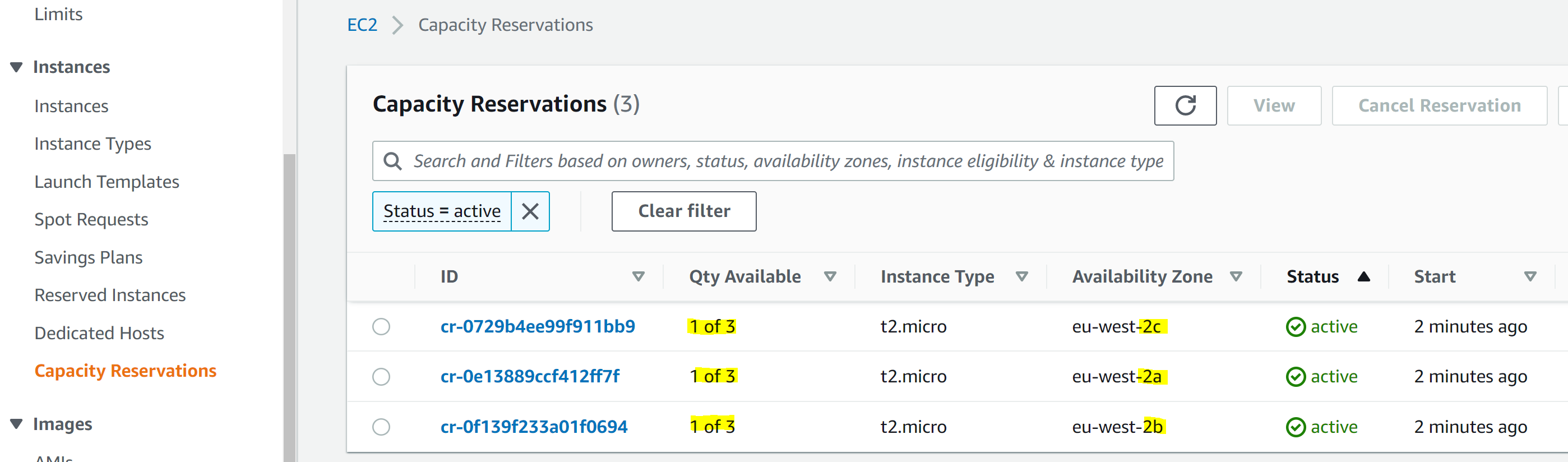
The instances section of the Amazon EC2 Management Console can be used to show our existing Capacity Reservations, as created by the CloudFormation stack.

Listing of consumed Capacity Reservations across the three Availability Zones, showing two used per Availability Zone.

As expected, this shows that we are currently using six out of our nine On Demand Capacity Reservations, with two in each AZ.

Now let’s scale out our Auto Scaling Group to 12, thus using up all On Demand Capacity Reservations in each AZ, as well as requesting one extra Instance per AZ.

aws autoscaling set-desired-capacity \
--auto-scaling-group-name $AUTOSCALING_GROUP_NAME \
--desired-capacity 12

The Auto Scaling Group now has the desired Capacity of 12:

Group details of the Auto Scaling Group, showing that Desired Capacity is set to 12.

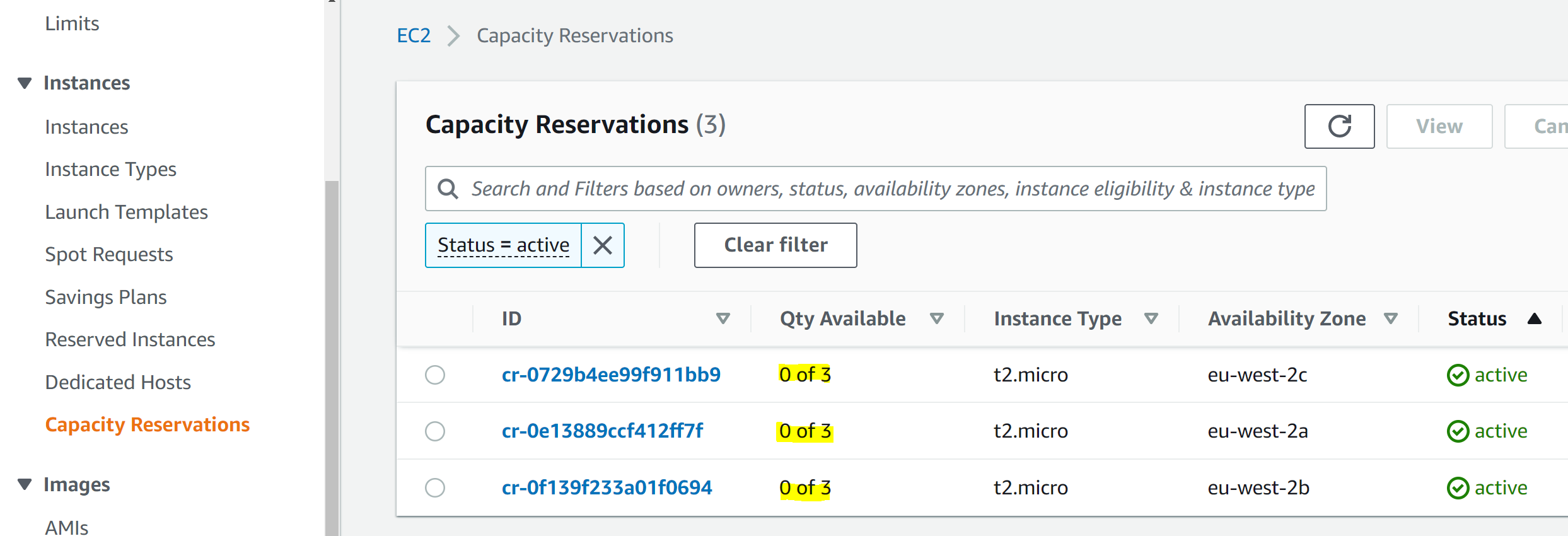
And in the Capacity Reservation screen we can see that all our On Demand Capacity Reservations have been used up:

Listing of consumed Capacity Reservations across the three Availability Zones, showing that all nine On Demand Capacity Reservations are used.

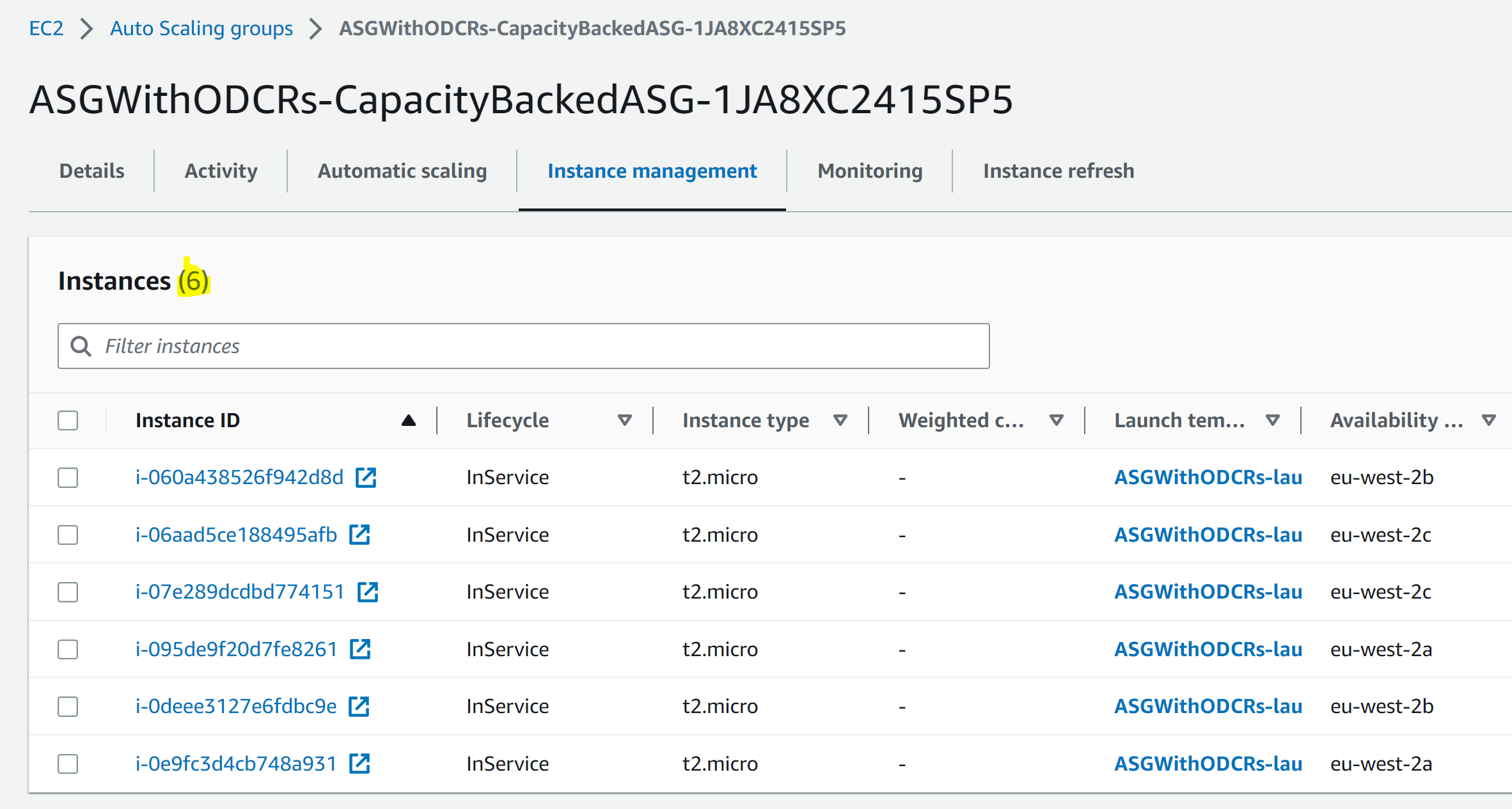
In the Auto Scaling Group we see that – as expected – we weren’t restricted to nine instances. Instead, the Auto Scaling Group fell back on launching unreserved instances when our On Demand Capacity Reservations ran out:

Listing of Instances in the Auto Scaling Group, showing that the total count is 12.

How does the solution react to adding a matching instance outside the Auto Scaling Group?

But what if someone else/another process in the account starts an EC2 instance of the same type for which we have the On Demand Capacity Reservations? Won’t they get that Reservation, and our Auto Scaling Group will be left short of its three instances per AZ, which would mean that we won’t have enough reservations for our minimum of six instances in case there are issues with an AZ?

This all comes down to the type of On Demand Capacity Reservation that we have created, or the “Eligibility”. Looking at our Capacity Reservations, we can see that they are all of the “targeted” type. This means that they are only used if explicitly referenced, like we’re doing in our Target Group for the Auto Scaling Group.

Listing of existing Capacity Reservations, showing that they are of the targeted type.

It’s time to prove that. First, we scale in our Auto Scaling Group so that only six instances are used, resulting in there being one unused capacity reservation in each AZ. Then, we try to add an EC2 instance manually, outside the target group.

First, scale in the Auto Scaling Group:

aws autoscaling set-desired-capacity \
--auto-scaling-group-name $AUTOSCALING_GROUP_NAME \
--desired-capacity 6

Listing of consumed Capacity Reservations across the three Availability Zones, showing two used reservations per Availability Zone.

Listing of Instances in the Auto Scaling Group, showing that the total count is six

Then, spin up the new instance, and save its ID for later when we clean up:

export MANUALLY_CREATED_INSTANCE_ID=$(aws ec2 run-instances \
--image-id resolve:ssm:/aws/service/ami-amazon-linux-latest/amzn2-ami-hvm-x86_64-gp2 \
--instance-type t2.micro \
--subnet-id $SUBNET_FOR_MANUALLY_ADDED_INSTANCE \
--query 'Instances[0].InstanceId' --output text) 

Listing of the newly created instance, showing that it is running.

We still have the three unutilized On Demand Capacity Reservations, as expected, proving that the On Demand Capacity Reservations with the “targeted” eligibility only get used when explicitly referenced:

Listing of consumed Capacity Reservations across the three Availability Zones, showing two used reservations per Availability Zone.

How does the solution react to an AZ being removed?

Now we’re comfortable that the Auto Scaling Group can grow beyond the On Demand Capacity Reservations if needed, as long as there is capacity, and that other EC2 instances in our account won’t use the On Demand Capacity Reservations specifically purchased for the Auto Scaling Group. It’s time for the big test. How does it all behave when an AZ becomes unavailable?

For our purposes, we can simulate this scenario by changing the Auto Scaling Group to be across two AZs instead of the original three.

First, we scale out to seven instances so that we can see the impact of overflow outside the On Demand Capacity Reservations when we subsequently remove one AZ:

aws autoscaling set-desired-capacity \
--auto-scaling-group-name $AUTOSCALING_GROUP_NAME \
--desired-capacity 7

Then, we change the Auto Scaling Group to only cover two AZs:

aws autoscaling update-auto-scaling-group \
--auto-scaling-group-name $AUTOSCALING_GROUP_NAME \
--vpc-zone-identifier $SUBNETS_TO_KEEP

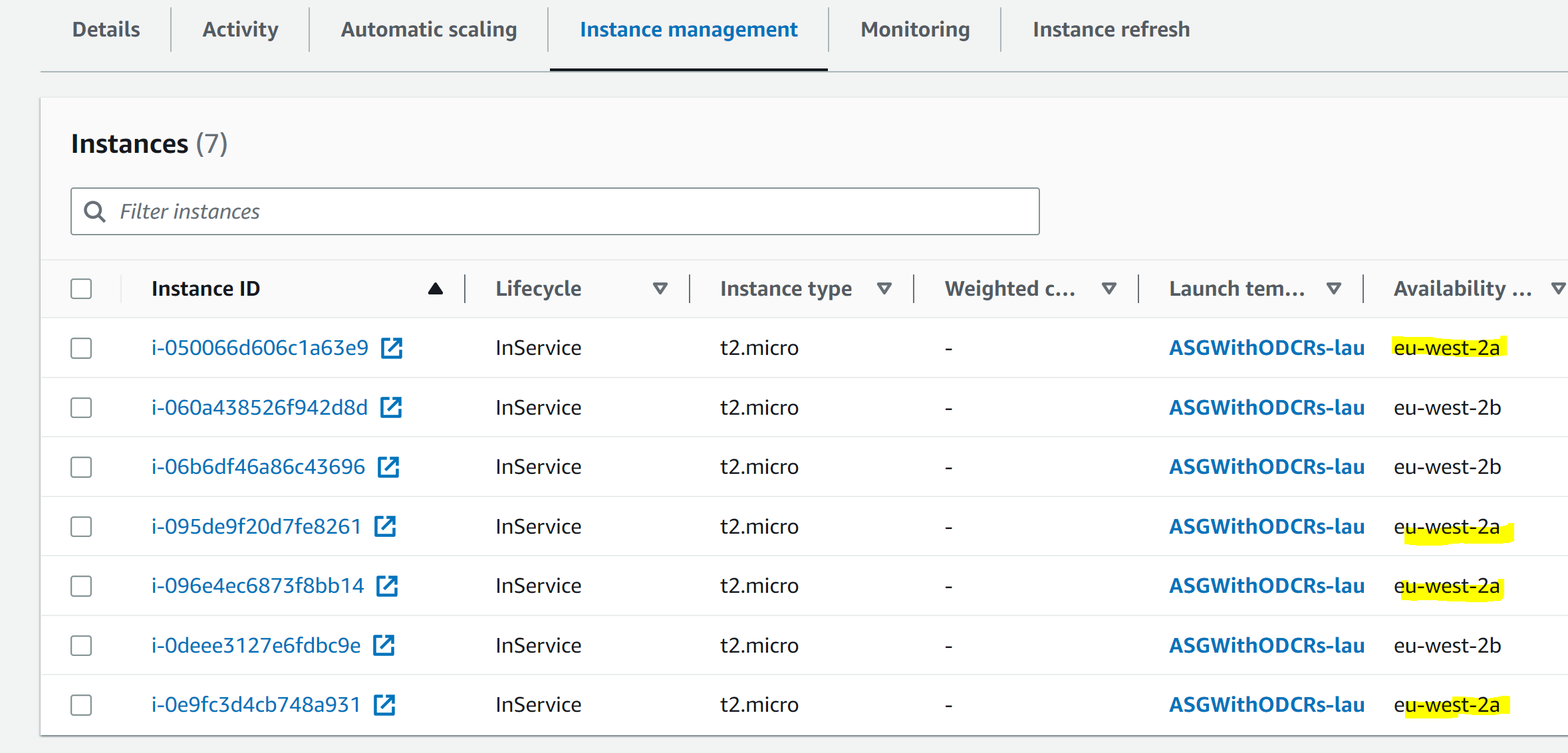
Give it some time, and we see that the Auto Scaling Group is now spread across two AZs, On Demand Capacity Reservations cover the minimum six instances as per our requirements, and the rest is handled by instances without Capacity Reservation:

Network details for the Auto Scaling Group, showing that it is configured for two Availability Zones.

Listing of consumed Capacity Reservations across the three Availability Zones, showing two Availability Zones using three On Demand Capacity Reservations each, with the third Availability Zone not using any of its On Demand Capacity Reservations.

Listing of Instances in the Auto Scaling Group, showing that there are 4 instances in the eu-west-2a Availability Zone.

Cleanup

It’s time to clean up, as those Instances and On Demand Capacity Reservations come at a cost!

  1. First, remove the EC2 instance that we made:
    aws ec2 terminate-instances --instance-ids $MANUALLY_CREATED_INSTANCE_ID
  2. Then, delete the CloudFormation stack.

Conclusion

Using a combination of Auto Scaling Groups, Resource Groups, and On Demand Capacity Reservations (ODCRs), we have built a solution that provides High Availability backed by reserved capacity, for those types of workloads where the requirements for availability in the case of an AZ becoming temporarily unavailable outweigh the increased cost of reserving capacity, and where the best practices for architecting for flexibility cannot be followed due to limitations on applicable architectures.

We have tested the solution and confirmed that the Auto Scaling Group falls back on using unreserved capacity when the On Demand Capacity Reservations are exhausted. Moreover, we confirmed that targeted On Demand Capacity Reservations won’t risk getting accidentally used by other solutions in our account.

Now it’s time for you to try it yourself! Download the IaC template and give it a try! And if you are planning on using On Demand Capacity Reservations, then don’t forget to look into Savings Plans, as they significantly reduce the cost of that Reserved Capacity..

Casting a Light on Shadow IT in Cloud Environments

Post Syndicated from Ryan Blanchard original https://blog.rapid7.com/2023/05/23/casting-a-light-on-shadow-it-in-cloud-environments/

Casting a Light on Shadow IT in Cloud Environments

The term “Shadow IT” refers to the use of systems, devices, software, applications, and services without explicit IT approval. This typically occurs when employees adopt consumer products to increase productivity or just make their lives easier. This type of Shadow IT can be easily addressed by implementing policies that limit use of consumer products and services. However, Shadow IT can also occur at a cloud infrastructure level. This can be exceedingly hard for organizations to get a handle on.

Historically, when teams needed to provision infrastructure resources, this required review and approval of a centralized IT team—who ultimately had final say on whether or not something could be provisioned. Nowadays, cloud has democratized ownership of resources to teams across the organization, and most organizations no longer require their development teams to request resources in the same manner. Instead, developers are empowered to provision the resources that they need to get their jobs done and ship code efficiently.

This dynamic is critical to achieving the promise of speed and efficiency that cloud, and more specifically DevOps methodologies, offer. The tradeoff here, however, is control. This paradigm shift means that development teams are spinning up resources without the security team’s knowledge. Obviously, the adage “you can’t secure what you can’t see” comes into play here, and you’re now running blind to the potential risk that this could pose to your organization in the event it was configured improperly

Cloud Shadow IT risks

Blind spots: As noted above, since security teams are unaware of Shadow IT assets, security vulnerabilities inevitably go unaddressed. Dev teams may not understand (or simply ignore) the importance of cloud security updates, patching, etc for these assets.

Unprotected data: Unmitigated vulnerabilities in these assets can put businesses at risk of data breaches or leaks, if cloud resources are accessed by unauthorized users. Additionally, this data will not be protected with centralized backups, making it difficult, if not impossible, to recover.

Compliance problems: Most compliance regulations requirements for processing, storing, and securing customers’ data. Since businesses have no oversight of data stored on Shadow IT assets, this can be an issue.

Addressing Cloud Shadow IT

One way to address Shadow IT in cloud environments is to implement a cloud risk and compliance management platform like Rapid7’s InsightCloudSec.

InsightCloudSec continuously assesses your entire cloud environment whether in a single cloud or across multiple clouds and can detect changes to your environment—such as the creation of a new resource—in less than 60 seconds with event-driven harvesting.

The platform doesn’t just stop at visibility, however. Out-of-the-box, users get access to 30+ compliance packs aligned to common industry standards like NIST, CIS Benchmarks, etc. as well as regulatory frameworks like HIPAA, PCI DSS, and GDPR. Teams also have the ability to tailor their compliance policies to their specific business needs with custom packs that allow you to set exceptions and/or add additional policies that aren’t included in the compliance frameworks you either choose or are required to adhere to.

When a resource is spun up, the platform detects it in real-time and automatically identifies whether or not it is in compliance with organization policies. Because InsightCloudSec offers native, no-code automation, teams are able to build bots that take immediate action whenever Shadow IT creeps into their environment by either adjusting configurations and permissions to regain compliance or even deleting the resource altogether if you so choose.

To learn more, check out our on-demand demo.

[$] An LSFMM development-process discussion

Post Syndicated from original https://lwn.net/Articles/932215/

At the 2023 Linux Storage, Filesystem,
Memory-Management and BPF Summit
, Hannes Reinecke led a plenary session
ostensibly dedicated to the “limits of development”. The actual discussion
focused on the frustrations of the kernel development process as
experienced by both developers and maintainers. It is probably fair to say
that no problems were solved here, but perhaps the nature of some of the
challenges is a bit more clear.

Главният прокурор в дима на безнаказаността

Post Syndicated from Светла Енчева original https://www.toest.bg/glavniyat-prokuror-v-dima-na-beznakazanostta/

Главният прокурор в дима на безнаказаността

В последните седмици не е проява на гражданска смелост да се критикува главният прокурор. Част от прокурорската колегия във Висшия съдебен съвет се обяви срещу Иван Гешев. А отявлени критици на прокурорската институция като съдийките Нели Куцкова и Мирослава Тодорова стават желани гости в телевизионните студиа. Всичко това означава, че пластовете се разместват. И е много вероятно да се окаже вярна прогнозата на Мирослава Тодорова, че Гешев, заместникът му и ръководител на следствието Борислав Сарафов, както и заместникът на Сарафов Ясен Тодоров няма да изкарат мандата си докрай.

Дребен, но показателен детайл

На фона на оголването на проблемите в прокуратурата един дребен детайл остана незабелязан. Той обаче символизира цялото беззаконие на тази институция, а и в държавата изобщо. Фактът, че остана незабелязан, означава, че дотолкова сме свикнали с беззаконието, че дори не ни прави впечатление. На него обръща внимание Павел Антонов, който е журналист, социален изследовател, активен гражданин, потомък на Владимир Димитров – Майстора и стои зад гражданската мрежа Bluelink.net, както и зад инициативата „България без дим“.

Като активист срещу пушенето на обществени места, на Павел Антонов му прави впечатление, че на заседанието на ВСС на 18 май 2023 г., част от което е излъчено по новините на bTV, Иван Гешев пуши пура. А според чл. 56, ал. 2 от Закона за здравето тютюнопушенето на обособени работни места е забранено. Самото заседание се провежда онлайн, така че Гешев не опушва директно присъстващите. Той обаче вероятно е в кабинета си (ако съдим по сводестия прозорец, какъвто се отразява на публикувани в сайта на прокуратурата снимки и записи) или поне на служебно място. Публичните заседания на ВСС се излъчват на живо на сайта на институцията.

Ето защо Павел Антонов подава сигнал до институциите, които би следвало да контролират спазването на Закона за здравето. В коментарите към поста му във Facebook реакциите са различни – от поздравления, през съмнения в професионалните качества на Гешев, включително съмнения, че той си дава сметка, че е извършил нарушение, до упрек към самия Антонов – „прекален светец и Богу не е драг“.

„Тоест“ попита Павел Антонов знак за какво е фактът, че главният прокурор – т.е. човекът в България, който най-добре трябва да знае какво е нарушение на закона – си позволява да го нарушава, и то пред камера. В отговор той предложи две хипотези – безобидна и небезобидна.

Повече от 10 години след забраната на пушенето на обществени места то още се радва на широка обществена подкрепа, а нарушенията на забраната се приемат не просто като човещина, а и с криворазбран правозащитен патос. Криворазбран, защото личната свобода свършва там, където започва свободата (в случая – дихателният апарат) на другия.

Безобидната хипотеза

„Най-безобидното би било, че [на Иван Гешев] и през ум не му минава, че прави нещо нередно“, разсъждава Антонов и прави асоциация с доскорошни статистики, с които е запознат. Според тях в повечето развити страни пушат най-вече хората с ниски приходи и образование, докато у нас – заможните и успелите.

Но не само пушенето се приема за нормално поведение в България, отбелязва Павел Антонов. Всъщност „въобще не става дума само за пушене – нарушават се всички правила. Това е състояние, обратно на върховенство на закона – подчиняване на закона. Тоест законът е нещо, което се спазва по изключение, когато някой изрично активира държавния апарат да го прилага“. Ужасяващото в конкретния случай според основателя на „България без дим“ е, че така постъпва именно човекът, от когото на теория се очаква да отстоява законността повече от всеки друг.

Небезобидната хипотеза

Това обаче все още е невинната хипотеза. След нея Антонов стига и до по-сериозната: „Страхувам се, че в случая сме свидетели на нещо по-лошо – нарушение на закона като демонстрация на власт.“ Според него тази нагласа е наследство от времето на социализма, когато „уж равноправното соцобщество се градеше на привилегии“ и както гласи старият виц, „има равни, равни и по-равни“.

Според журналиста и граждански активист този манталитет не е изкоренен: „Напротив, стремежът към власт се асоциира постоянно с достъп до някакви привилегии, които останалите нямат. Нарушението на забраната за пушене е най-лесната манифестация на този управленски манталитет. „Няма кой на мен да ми каже какво да правя, аз съм над закона, ерго, над всички останали“ е посланието, което излъчва запалената от Гешев пура.“

Към това може да се добави, че за разлика от запалването на обикновена цигара, което може да се обясни със зависимостта от никотина, пурите са символ на статус. А това допълнително усилва невербалното послание „Аз съм над закона“. Времената на Чърчил и Фидел Кастро са отдавна отминали и днес пушенето на пури се асоциира по-скоро с демонстрирането на статус по начина, по който го правят мафиотите.

Как се възпроизвежда беззаконието

Когато човекът, който според настоящата правосъдна система стои на нейния връх, си позволява публично да нарушава закона, с това той дава сигнал на всички надолу по веригата, смята Павел Антонов.

Проблемът е, че когато главният прокурор прави това, започват да го правят всички по йерархията под него. До последния редови полицай, който демонстративно си паркира патрулната кола така, че да пречи на движението. Смачкан от висшестоящите си, той също иска да покаже на някого, че има власт, че е над него.

Това е и механизмът, по силата на който непрекъснатото нарушаване на закона се е превърнало в своеобразна норма. Затова много хора най-искрено не схващат какъв пък толкова е проблемът. „Така всички живеем в постоянно беззаконие, в лепкава токсична обществена среда, в която правилата и законите важат само за „нисшите“, „балъците“, заключава Антонов.

Пушенето на работното място е закононарушение, което се наказва с глоба, но не е престъпление. Далеч по-сериозни неща са огласяването на записи от телефонни разговори, държането на дела „на трупчета“, „замитането“ на данни за престъпления „под килима“, заплашването на опоненти със съдебни дела… списъкът може да продължи още дълго.

Гешев не е началото, но може да се окаже началото на края

Демонстрацията на беззаконие от страна на най-силните в правосъдната ни система съвсем не започва с Гешев. Бившият главен прокурор Иван Татарчев например се заканваше да докара от Виена несимпатично нему лице „в чувал“. Името на наследника му Иван Филчев пък се свързва с две убийства, които така и си останаха неразкрити. Има сериозни подозрения, че той е поръчител на едното от тях, както и клетвени показания на двама свидетели, че Филчев е потвърдил, че е извършил другото убийство лично.

На този фон действията на Гешев са направо кокошкарски. Но тяхната популистка нелепост е капката, която доведе законовата уредба на институцията на главния прокурор до нейния предел. И за първи път изглежда, че този път някаква смислена промяна на правосъдната система може и да се състои.

„Може“ обаче не означава непременно „ще“. Правосъдната система в България няма традиции да бъде независима. Наслояването на определени професионални стереотипи в нея няма да се разсее толкова бързо, колкото димът от пурата на Гешев. Ала дори правосъдната система да се промени, ще трябва да минат още десетилетия, за да престане да бъде законът „врата у равно поле“ за всички надолу по веригата.

Security updates for Tuesday

Post Syndicated from original https://lwn.net/Articles/932693/

Security updates have been issued by Debian (node-nth-check), Mageia (mariadb and python-reportlab), Slackware (c-ares), SUSE (geoipupdate and qt6-svg), and Ubuntu (linux, linux-aws, linux-azure, linux-azure-5.4, linux-gcp, linux-gcp-5.4,
linux-gke, linux-gkeop, linux-hwe-5.4, linux-ibm, linux-ibm-5.4, linux-kvm, linux-bluefield, linux-gcp, linux-hwe, linux-raspi2, linux-snapdragon, and linux-gcp, linux-hwe-5.19).

Credible Handwriting Machine

Post Syndicated from Bruce Schneier original https://www.schneier.com/blog/archives/2023/05/credible-handwriting-machine.html

In case you don’t have enough to worry about, someone has built a credible handwriting machine:

This is still a work in progress, but the project seeks to solve one of the biggest problems with other homework machines, such as this one that I covered a few months ago after it blew up on social media. The problem with most homework machines is that they’re too perfect. Not only is their content output too well-written for most students, but they also have perfect grammar and punctuation ­ something even we professional writers fail to consistently achieve. Most importantly, the machine’s “handwriting” is too consistent. Humans always include small variations in their writing, no matter how honed their penmanship.

Devadath is on a quest to fix the issue with perfect penmanship by making his machine mimic human handwriting. Even better, it will reflect the handwriting of its specific user so that AI-written submissions match those written by the student themselves.

Like other machines, this starts with asking ChatGPT to write an essay based on the assignment prompt. That generates a chunk of text, which would normally be stylized with a script-style font and then output as g-code for a pen plotter. But instead, Devadeth created custom software that records examples of the user’s own handwriting. The software then uses that as a font, with small random variations, to create a document image that looks like it was actually handwritten.

Watch the video.

My guess is that this is another detection/detection avoidance arms race.

Preparing young children for a digital world | Hello World #21

Post Syndicated from Sway Grantham original https://www.raspberrypi.org/blog/preparing-young-children-digital-world-hello-world-21/

How do we teach our youngest learners digital and computing skills? Hello World‘s issue 21 will focus on this question and all things primary school computing education. We’re excited to share this new issue with you on Tuesday 30 May. Today we’re giving you a taste by sharing an article from it, written by our own Sway Grantham.

Cover of Hello World issue 21.

How are you preparing young children for a world filled with digital technology? Technology use of our youngest learners is a hotly debated topic. From governments to parents and from learning outcomes to screen-time rules, everyone has an opinion on the ‘right’ approach. Meanwhile, many young children encounter digital technology as a part of their world at home. For example in the UK, 87 percent of 3- to 4-year-olds and 93 percent of 5- to 7-year-olds went online at home in 2023. Schools should be no different.

A girl doing digital making on a tablet

As educators, we have a responsibility to prepare learners for life in a digital world. We want them to understand its uses, to be aware of its risks, and to have access to the wide range of experiences unavailable without it. And we especially need to consider the children who do not encounter technology at home. Education should be a great equaliser, so we need to ensure all our youngest learners have access to the skills they need to realise their full potential.

Exploring technology and the world

A major aspect of early-years or kindergarten education is about learners sharing their world with each other and discovering that everyone has different experiences and does things in their own way. Using digital technology is no different.

Allowing learners to share their experiences of using digital technology both accepts the central role of technology in our lives today and also introduces them to its broader uses in helping people to learn, talk to others, have fun, and do work. At home, many young learners may use technology to do just one of these things. Expanding their use of technology can encourage them to explore a wider range of skills and to see technology differently.

A girl shows off a robot she has built.

In their classroom environment, these explorations can first take place as part of the roleplay area of a classroom, where learners can use toys to show how they have seen people use technology. It may seem counterintuitive that play-based use of non-digital toys can contribute to reducing the digital divide, but if you don’t know what technology can do, how can you go about learning to use it? There is also a range of digital roleplay apps (such as the Toca Boca apps) that allow learners to recreate their experiences of real-world situations, such as visiting the hospital, a hair salon, or an office. Such apps are great tools for extending roleplay areas beyond the resources you already have.

Another aspect of a child’s learning that technology can facilitate is their understanding of the world beyond their local community. Technology allows learners to explore the wider world and follow their interests in ways that are otherwise largely inaccessible. For example:

  • Using virtual reality apps, such as Expeditions Pro, which lets learners explore Antarctica or even the bottom of the ocean
  • Using augmented reality apps, such as Octagon Studio’s 4D+ cards, which make sea creatures and other animals pop out of learners’ screens
  • Doing a joint project with a class of children in another country, where learners blog or share ‘email’ with each other

Each of these opportunities gives children a richer understanding of the world while they use technology in meaningful ways.

Technology as a learning tool

Beyond helping children to better understand our world, technology offers opportunities to be expressive and imaginative. For example, alongside your classroom art activities, how about using an app like Draw & Tell, which helps learners draw pictures and then record themselves explaining what they are drawing? Or what about using filters on photographs to create artistic portraits of themselves or their favourite toys? Digital technology should be part of the range of tools learners can access for creative play and expression, particularly where it offers opportunities that analogue tools don’t.

Young learners at computers in a classroom.

Using technology is also invaluable for learners who struggle with communication and language skills. When speaking is something you find challenging, it can often be intimidating to talk to others who speak much more confidently. But speaking to a tablet? A tablet only speaks as well as you do. Apps to record sounds and listen back to them are a helpful way for young children to learn about how clear their speech is and practise speech exercises. ChatterPix Kids is a great tool for this. It lets learners take a photo of an object, e.g. their favourite soft toy, and record themselves talking about it. When they play back the recording, the app makes it look like the toy is saying their words. This is a very engaging way for young learners to practise communicating.

Technology is part of young people’s world

No matter how we feel about the role of technology in the lives of young people, it is a part of their world. We need to ensure we are giving all learners opportunities to develop digital skills and understand the role of technology, including how people can use it for social good.

A woman and child follow instructions to build a digital making project at South London Raspberry Jam.

This is not just about preparing them for their computing education (although that’s definitely a bonus!) or about online safety (although this is vital — see my articles in Hello World issue 15 and issue 19 for more about the topic). It’s about their right to be active citizens in the digital world.

So I ask again: how are you preparing young children for a digital world?

Subscribe to the Hello World digital edition for free

The first experiences children have with learning about computing and digital technologies are formative. That’s why primary computing education should be of interest to all educators, no matter what the age of your learners is. This issue covers for example:

And there’s much more besides. So don’t miss out on this upcoming issue of Hello World — subscribe for free today to receive every PDF edition in your inbox on the day of publication.

The post Preparing young children for a digital world | Hello World #21 appeared first on Raspberry Pi Foundation.

Performance bottlenecks of Go application on Kubernetes with non-integer (floating) CPU allocation

Post Syndicated from Grab Tech original https://engineering.grab.com/performance-bottlenecks-go-apps

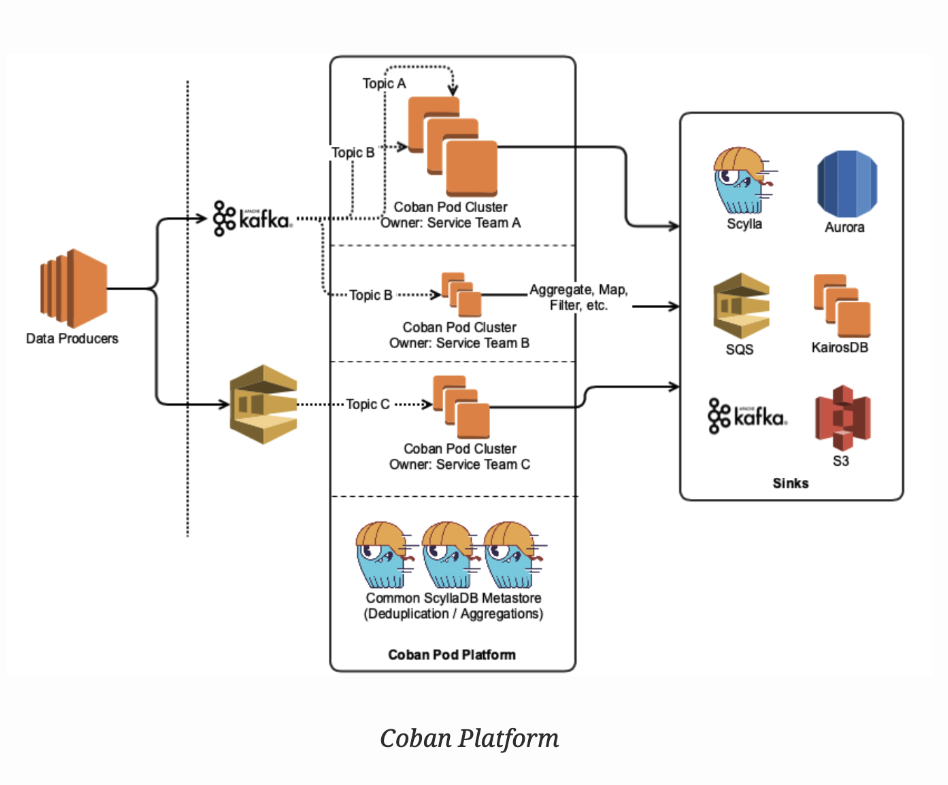
Grab’s real-time data platform team, Coban, has been running its stream processing framework on Kubernetes, as detailed in Plumbing at scale. We’ve also written another article (Scaling Kafka consumers) about vertical pod autoscaling (VPA) and the benefits of using it.

In this article, we cover the performance bottlenecks and other issues we came across for Go applications on Kubernetes.

Background

We noticed CPU throttling issues on some pipelines leading to consumption lag, which meant there was a delay between data production and consumption. This was an issue because the data might no longer be relevant or accurate when it gets consumed. This led to incorrect data-driven conclusions, costly mistakes, and more.

While debugging this issue, we focused primarily on the SinktoS3 pipeline. It is essentially used for sinking data from Kafka topics to AWS S3. Depending on your requirements, data sinking is primarily for archival purposes and can be used for analytical purposes.

Investigation

After conducting a thorough investigation, we found two main issues:

  • Resource throttling
  • Issue with VPA

Resource throttling

We redesigned our SinktoS3 pipeline architecture to concurrently perform the most CPU intensive operations using parallel goroutines (workers). This improved performance and considerably reduced consumer lag.

But the high-performance architecture needed more intensive resource configuration. As mentioned in Scaling kafka consumers, VPA helps remove manual resource configuration. So, we decided to let the SinktoS3 pipeline run on VPA, but this exposed a new set of problems.

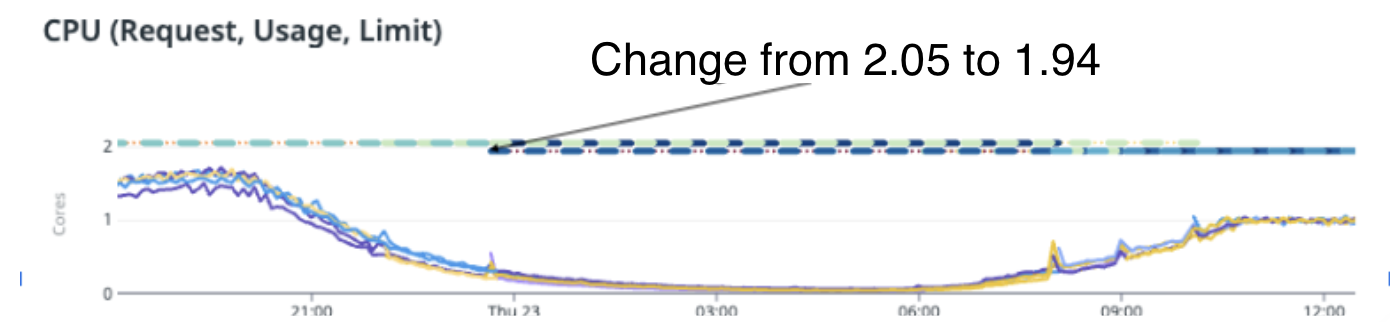
We tested our hypothesis on one of the highest traffic pipelines with parallel goroutines (workers). When the pipeline was left running on VPA, it tried optimising the resources by slowly reducing from 2.5 cores to 2.05 cores, and then to 1.94 cores.

CPU requests dropped from 2.05 cores to 1.94 cores, since the maximum performance can be seen at ~1.7 cores.

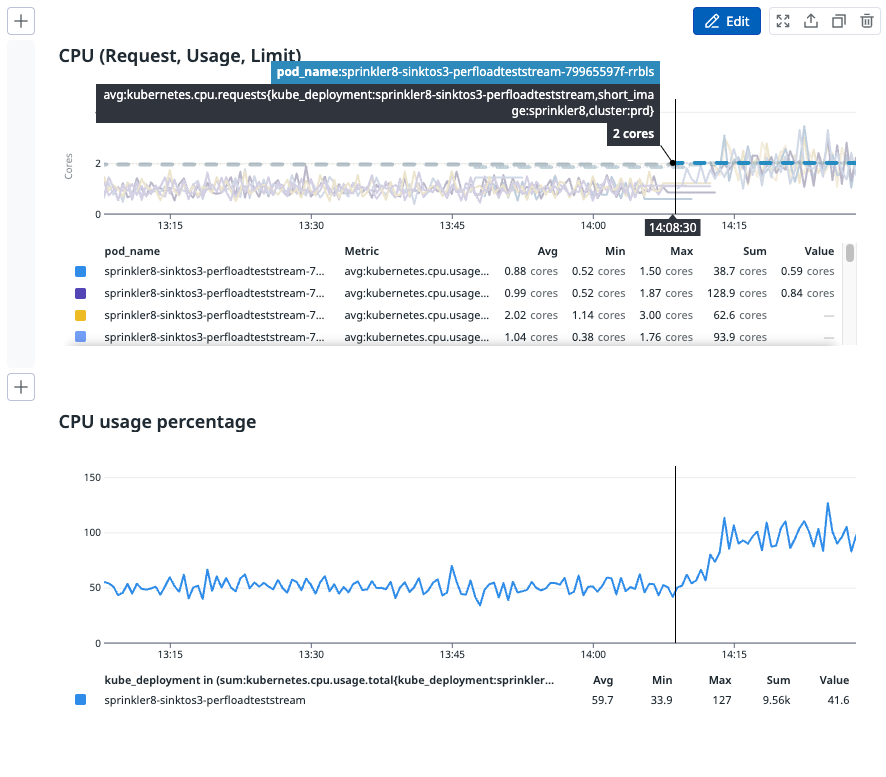
As you can see from the image above, CPU usage and performance reduced significantly after VPA changed the CPU cores to less than 2. The pipeline ended up with a huge backlog to clear and although it had resources on pod (around 1.94 cores), it did not process any faster and instead, slowed down significantly, resulting in throttling.

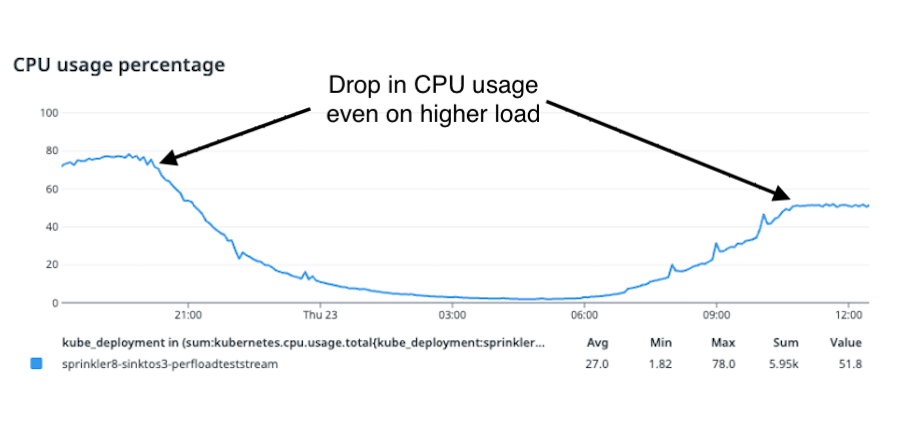
From the image above, we can see that after VPA scaled the limits of CPU down to 1.94 cores per pod, there was a sudden drop in CPU usage in each of the pods.

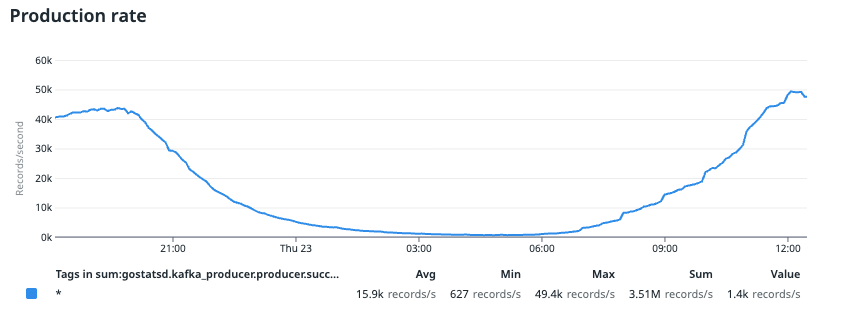
Stream production rate

You can see that at 21:00, CPU usage reached a maximum of 80%. This value dropped to around 50% between 10:00 to 12:00, which is our consecutive peak production rate.

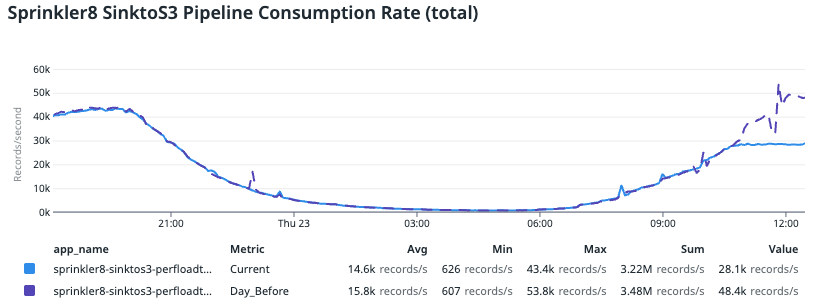
Significant drop in consumption rate from Day_Before
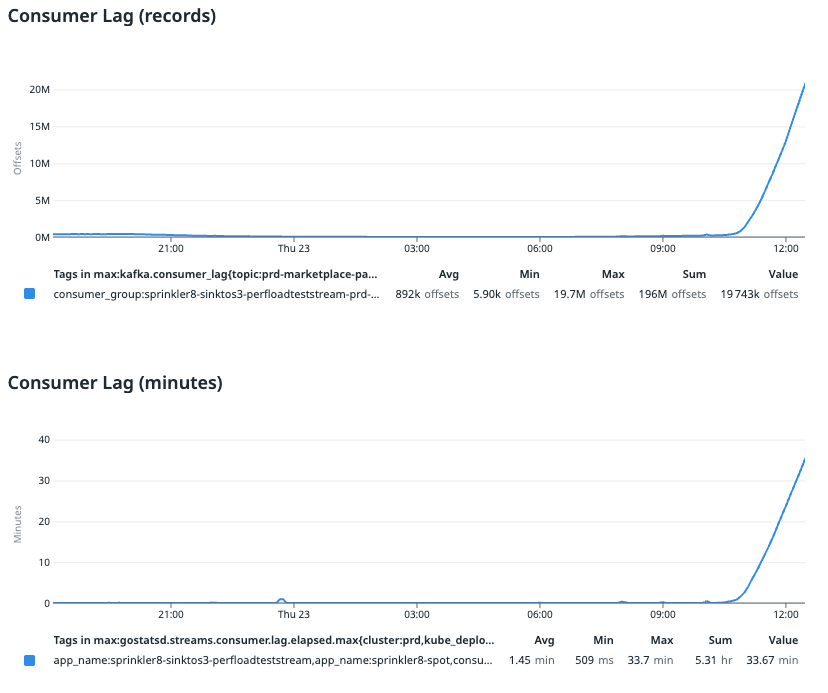
Consumer lag in terms of records pending to be consumed and in terms of minutes

In the image above, we compared this data with trends from previous data, where the purple line indicates the day before. We noticed a significant drop in consumption rate compared to the day before, which resulted in consumer lag. This drop was surprising since we didn’t tweak the application configuration. The only change was done by VPA, which brought the CPU request and limit down to less than 2 cores.

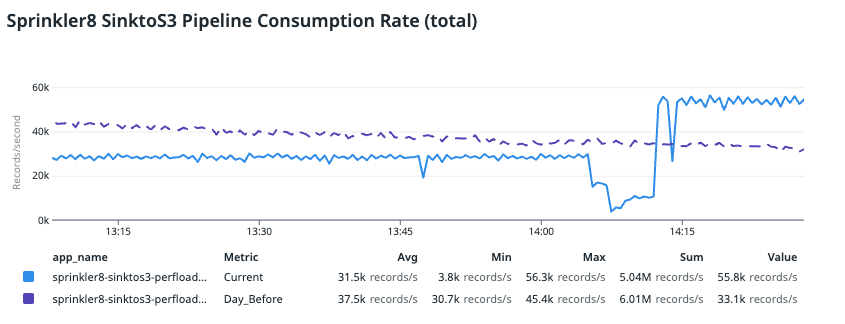
To revert this change, we redeployed the pipeline by retaining the same application setting but adjusting the minimum VPA limit to 2 cores. This helps to prevent VPA from bringing down the CPU cores below 2. With this simple change, performance and CPU utilisation improved almost instantly.

CPU usage percentage jumped back up to ~95%
Pipeline consumption rate compared to Day_Before

In the image above, we compared the data with trends from the day before (indicated in purple), where the pipeline was lagging and had a large backlog. You can see that the improved consumption rate was even better than the day before and the application consumed even more records. This is because it was catching up on the backlog from the previous consumer lag.

Deep dive into the root cause

This significant improvement just from increasing CPU allocation from 1.94 to 2 cores was unexpected as we had AUTO-GOMAXPROCS enabled in our SPF pipelines and this only uses integer values for CPU.

Upon further investigation, we found that the GOMAXPROCS is useful to control the CPU that golang uses on a kubernetes node when kubernetes Cgroup masks the actual CPU cores of the nodes. GOMAXPROCS only allocates the requested resources of the pod, hence configuring this value correctly helps the runtime to preallocate the correct CPU resources.

Without configuring GOMAXPROCS, go runtime assumes the node’s entire CPU capacity is available for its execution, which is sub-optimal when we run the Golang application on Kubernetes. Thus, it is important to configure GOMAXPROCS correctly so your application pre-allocates the right number of threads based on CPU resources. More details can be found in this article.

Let’s look at how Kubernetes resources relate to GOMAXPROCS value in the following table:

Kubernetes resources GOMAXPROCS value Remarks
2.5 core 2 Go runtime will just take and utilise 2 cores efficiently.
2 core 2 Go runtime will take and utilise the maximum CPU of the pod efficiently if the workload requires it.
1.5 core 1 AUTO-GOMAXPROCS will set the value as 1 since it rounds down the non-integer CPU value to an integer number. Hence the performance will be the same as if you had 1 core CPU.
0.5 core 1 AUTO-GOMAXPROCS will set the value as 1 CPU as the minimum allowed value for GOMAXPROCS is 1. Here we will see some throttling as Kubernetes will only give 0.5 core but runtime configures itself as it would have 1  hence it will starve for a few CPU cycles.

Issue with VPA

The vertical pod autoscaler enables you to easily scale pods vertically so you don’t have to make manual adjustments. It automatically allocates resources based on usage and allows proper scheduling so that there will be appropriate resources available for each pod. However, in our case, the throttling and CPU starvation issue was because VPA brought resources down to less than 2 cores.

To better visualise the issue, let’s use an example. Assume that this application needs roughly 1.7 cores to perform all its operations without any resource throttling. Let’s see how the VPA journey in this scenario looks like and where it will fail to correctly scale.

Timeline VPA recommendation CPU Utilisation AUTO-GOMAXPROCS Remarks
T0 0.5 core >90% 1 Throttled by Kubernetes Cgroup as it does give only 0.5 core.
T1 1 core >90% 1 CPU utilisation will still be >90% as GOMAXPROCS setting for the application remains the same. In reality, it will need even more.
T2 1.2 core <85% 1 Since the application actually needs more resources, VPA sets a non-integer value but GOMAXPROCS never utilised that extra resource and continued to throttle. Now, VPA computes that the CPU is underutilised and it won’t scale further.
T3 2 core (manual override) 80-90% 2 Since the application has enough resources, it will perform most optimally without throttling and will have maximum throughput.

Solution

During our investigation, we saw that AUTO-GOMAXPROCS sets an integer value (minimum 1). To avoid CPU throttling, we need VPA to propose integer values while scaling.

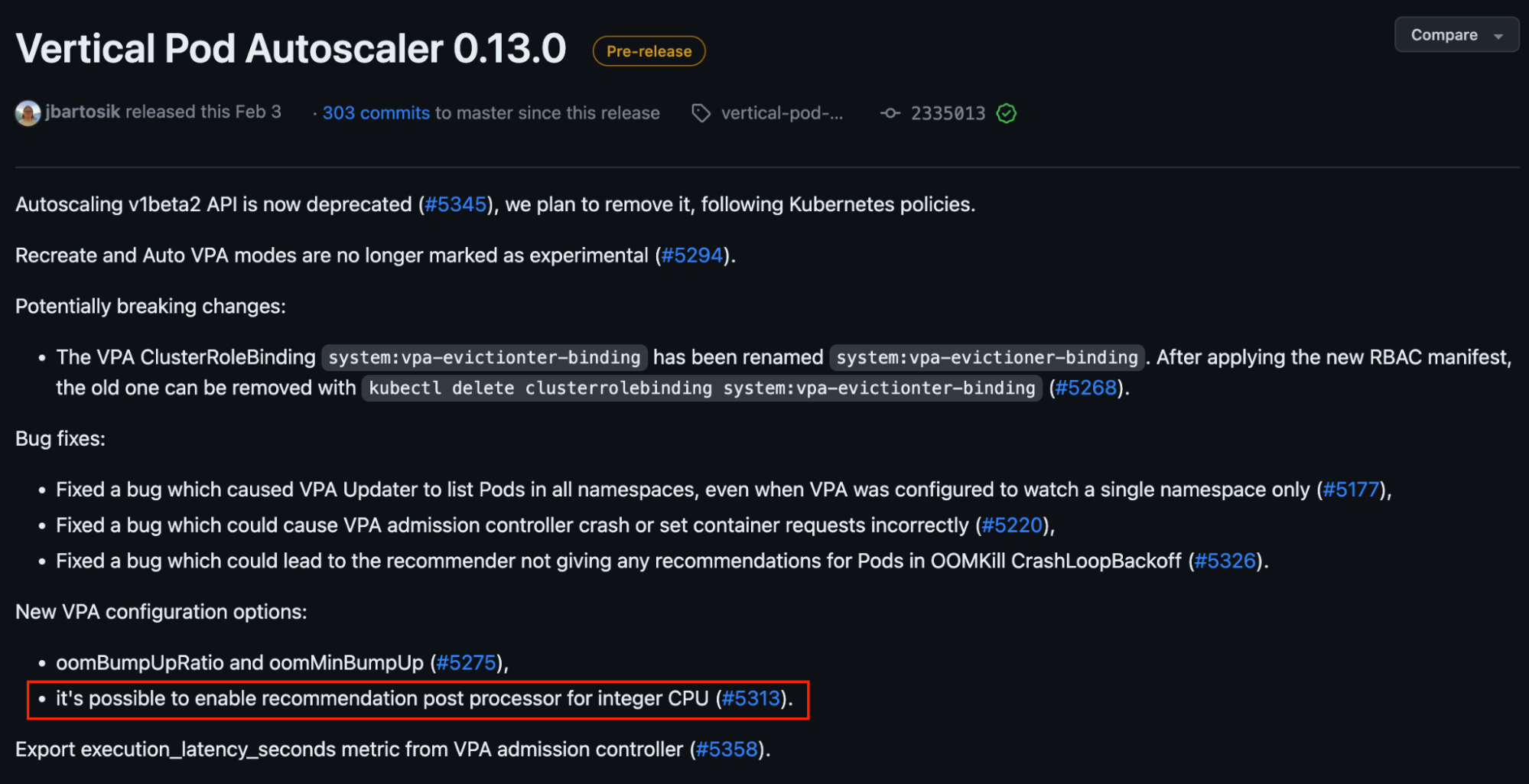
In v0.13 of VPA, this feature is available but only for Kubernetes versions ≥1.25 – see #5313 in the image below.

We acknowledge that if we define a default minimum integer CPU value of 1 core for Coban’s stream processing pipelines, it might be excessive for those that only require less than 1 core. So we propose to only enable this default setting for pipelines with heavy resource requirements and require more than 1 core.

That said, you should make this decision by evaluating your application’s needs. For example, some Coban pipelines still run on VPA with less than one core but they do not experience any lag. As we mentioned earlier  AUTO-GOMAXPROCS would be configured to 1 in this case, still they can catch up with message production rates. However, technically these pipelines are actually throttled and do not perform optimally but these pipelines don’t have consumer lag.

As we move from single to concurrent goroutine processing, we need more intensive CPU allocation. In the following table, we consider some scenarios where we have a few pipelines with heavy workloads that are not able to catch up with the production rate.

Actual CPU requirement VPA recommendation (after upgrade to v0.13) GOMAXPROCS value Remarks
0.8 1 core 1 Optimal setting for this pipeline. It should not lag and should utilise the CPU resources optimally via concurrent goroutines.
1.2 2 2 No CPU throttling and no lag. But not very cost efficient.
1.8 2 2 Optimal performance with no lag and cost efficiency.

Learnings/Conclusion

From this experience, we learnt several things:

  • Incorrect GOMAXPROCS configuration can lead to significant throttling and CPU starvation issues.
  • Autoscaling solutions are important, but can only take you so far. Depending on your application needs, manual intervention might still be needed to ensure optimal performance.

Join us

Grab is the leading superapp platform in Southeast Asia, providing everyday services that matter to consumers. More than just a ride-hailing and food delivery app, Grab offers a wide range of on-demand services in the region, including mobility, food, package and grocery delivery services, mobile payments, and financial services across 428 cities in eight countries.

Powered by technology and driven by heart, our mission is to drive Southeast Asia forward by creating economic empowerment for everyone. If this mission speaks to you, join our team today!

[$] Fanotify and hierarchical storage management

Post Syndicated from original https://lwn.net/Articles/932415/

In the filesystem track of the
2023 Linux Storage, Filesystem,
Memory-Management and BPF Summit
, Amir Goldstein led a session on using
fanotify
for hierarchical
storage management
(HSM). Linux had some support for HSM in the XFS
filesystem’s implementation of the data management API (DMAPI),
but that code was removed
back in 2010. Goldstein has done some work
on using fanotify for HSM features, but he has run into some problems with
deadlocks that he wanted to discuss with attendees.

[$] Reliable user-space stack traces with SFrame

Post Syndicated from original https://lwn.net/Articles/932209/

A complete stack trace is needed for a number of debugging and optimization
tasks, but getting such traces reliably can be surprisingly challenging.
At the 2023 Linux Storage, Filesystem,
Memory-Management and BPF Summit
, Steve Rostedt and Indu Bhagat
described a mechanism called SFrame that enables the creation of reliable
user-space stack traces in the kernel without
the memory and run-time overhead of some other solutions.

AWS Week in Review – AWS Documentation Updates, Amazon EventBridge is Faster, and More – May 22, 2023

Post Syndicated from Danilo Poccia original https://aws.amazon.com/blogs/aws/aws-week-in-review-aws-documentation-updates-amazon-eventbridge-is-faster-and-more-may-22-2023/

AWS Data Hero Anahit Pogosova keynote at CloudConf 2023Here are your AWS updates from the previous 7 days. Last week I was in Turin, Italy for CloudConf, a conference I’ve had the pleasure to participate in for the last 10 years. AWS Hero Anahit Pogosova was also there sharing a few serverless tips in front of a full house. Here’s a picture I took from the last row during her keynote.

On Thursday, May 25, I’ll be at the AWS Community Day in Dublin to celebrate the 10 years of the local AWS User Group. Say hi if you’re there!

Last Week’s Launches
Last week was packed with announcements! Here are the launches that got my attention:

Amazon SageMakerGeospatial capabilities are now generally available with security updates and more use case samples.

Amazon DetectiveSimplify the investigation of AWS Security Findings coming from new sources such as AWS IAM Access Analyzer, Amazon Inspector, and Amazon Macie.

Amazon EventBridge – EventBridge now delivers events up to 80% faster than before, as measured by the time an event is ingested to the first invocation attempt. No change is required on your side.

AWS Control Tower – The service has launched 28 new proactive controls that allow you to block non-compliant resources before they are provisioned for services such as AWS OpenSearch Service, AWS Auto Scaling, Amazon SageMaker, Amazon API Gateway, and Amazon Relational Database Service (Amazon RDS). Check out the original posts from when proactive controls were launched.

Amazon CloudFront – CloudFront now supports two new control directives to help improve performance and availability: stale-while-revalidate (to immediately deliver stale responses to users while it revalidates caches in the background) and the stale-if-error cache (to define how long stale responses should be reused if there’s an error).

Amazon Timestream – Timestream now enables to export query results to Amazon S3 in a cost-effective and secure manner using the new UNLOAD statement.

AWS Distro for OpenTelemetryThe tail sampling and the group-by-trace processors are now generally available in the AWS Distro for OpenTelemetry (ADOT) collector. For example, with tail sampling, you can define sampling policies such as “ingest 100% of all error cases and 5% of all success cases.”

AWS DataSync – You can now use DataSync to copy data to and from Amazon S3 compatible storage on AWS Snowball Edge Compute Optimized devices.

AWS Device Farm – Device Farm now supports VPC integration for private devices, for example, when an unreleased version of an app is accessing a staging environment and tests are accessing internal packages only accessible via private networking. Read more at Access your private network from real mobile devices using AWS Device Farm.

Amazon Kendra – Amazon Kendra now helps you search across different content repositories with new connectors for Gmail, Adobe Experience Manager Cloud, Adobe Experience Manager On-Premise, Alfresco PaaS, and Alfresco Enterprise. There is also an updated Microsoft SharePoint connector.

Amazon Omics – Omics now offers pre-built bioinformatic workflows, synchronous upload capability, integration with Amazon EventBridge, and support for Graphical Processing Units (GPUs). For more information, check out New capabilities make it easier for healthcare and life science customers to get started, build applications, and scale-up on Amazon Omics.

Amazon Braket – Braket now supports Aria, IonQ’s largest and highest fidelity publicly available quantum computing device to date. To learn more, read Amazon Braket launches IonQ Aria whith built-in error mitigation.

For a full list of AWS announcements, be sure to keep an eye on the What’s New at AWS page.

Other AWS News
A few more news items and blog posts you might have missed:

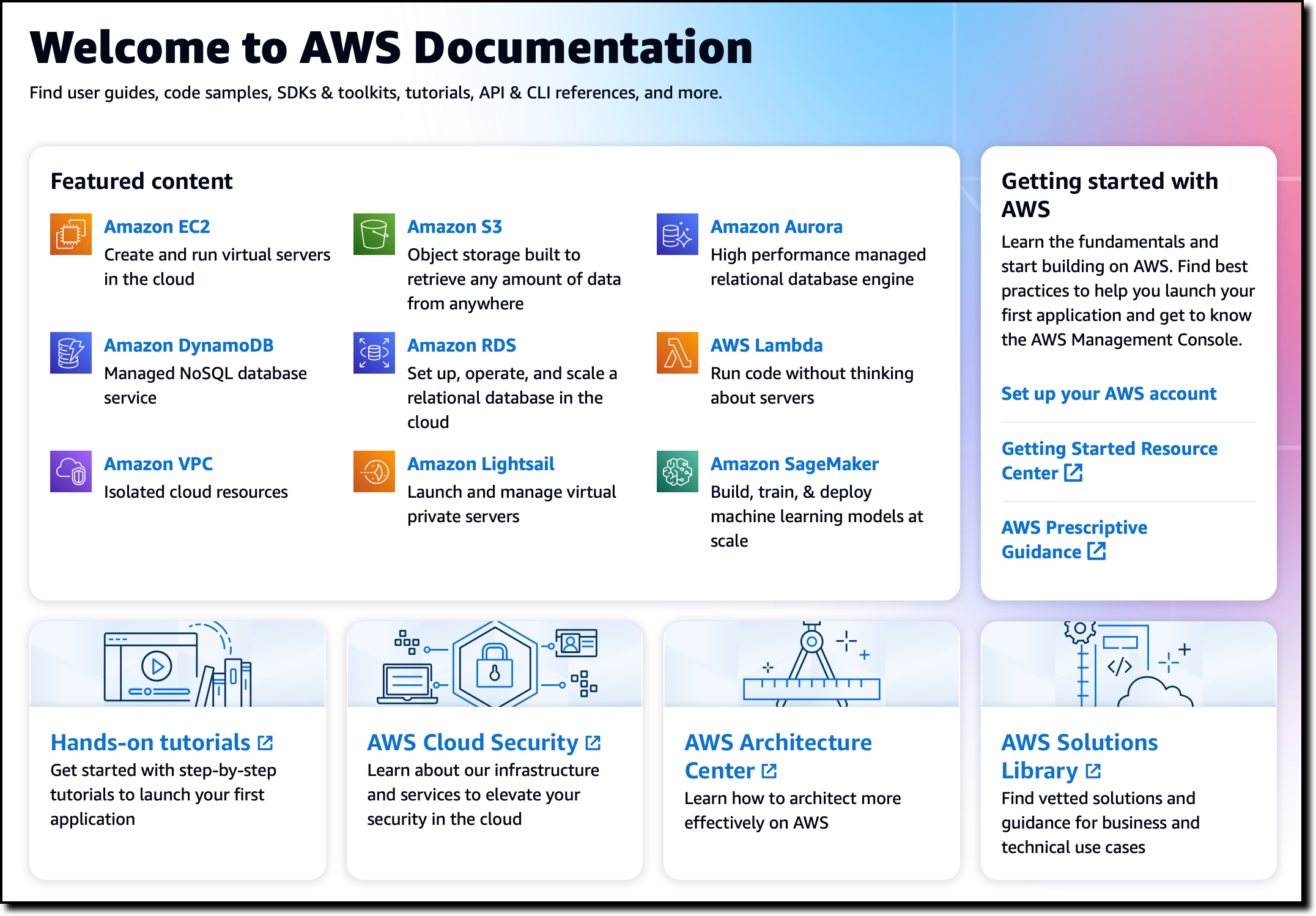
AWS Documentation home page screenshot.AWS Documentation – The AWS Documentation home page has been redesigned. Leave your feedback there to let us know what you think or to suggest future improvements. Last week we also announced that we are retiring the AWS Documentation GitHub repo to focus our resources to directly improve the documentation and the website.

Peloton case studyPeloton embraces Amazon Redshift to unlock the power of data during changing times.

Zoom case studyLearn how Zoom implemented streaming log ingestion and efficient GDPR deletes using Apache Hudi on Amazon EMR.

Nice solutionIntroducing an image-to-speech Generative AI application using SageMaker and Hugging Face.

For AWS open-source news and updates, check out the latest newsletter curated by Ricardo to bring you the most recent updates on open-source projects, posts, events, and more.

Upcoming AWS Events
Here are some opportunities to meet and learn:

AWS Data Insights Day (May 24) – A virtual event to discover how to innovate faster and more cost-effectively with data. This event focuses on customer voices, deep-dive sessions, and best practices of Amazon Redshift. You can register here.

AWS Silicon Innovation Day (June 21) – AWS has designed and developed purpose-built silicon specifically for the cloud. Join to learn AWS innovations in custom-designed Amazon EC2 chips built for high performance and scale in the cloud. Register here.

AWS re:Inforce (June 13–14) – You can still register for AWS re:Inforce. This year it is taking place in Anaheim, California.

AWS Global Summits – Sign up for the AWS Summit closest to where you live: Hong Kong (May 23), India (May 25), Amsterdam (June 1), London (June 7), Washington, DC (June 7-8), Toronto (June 14), Madrid (June 15), and Milano (June 22). If you want to meet, I’ll be at the one in London.

AWS Community Days – Join these community-led conferences where event logistics and content is planned, sourced, and delivered by community leaders: Dublin, Ireland (May 25), Shenzhen, China (May 28), Warsaw, Poland (June 1), Chicago, USA (June 15), and Chile (July 1).

That’s all from me for this week. Come back next Monday for another Week in Review!

Danilo

This post is part of our Week in Review series. Check back each week for a quick roundup of interesting news and announcements from AWS!

The collective thoughts of the interwebz