Tag Archives: artificial intelligence

Data: The genesis for modern invention

Post Syndicated from Swami Sivasubramanian original https://aws.amazon.com/blogs/big-data/data-the-genesis-for-modern-invention/

It only takes one groundbreaking invention—one iconic idea that solves a widespread pain point for customers—to create or transform an industry forever. From the invention of the telegraph, to the discovery of GPS, to the earliest cloud computing services, history is filled with examples of these “eureka” moments that continue to have long-lasting impacts on the way we do business today.

Cognitive scientists John Kounios and Mark Beeman demonstrated that great inventors don’t simply stumble upon their epiphanies; in reality, an idea is preceded by a collection of life experiences, educational knowledge, or even past failures the human brain processes and assimilates over time. Their ideas are preceded by a collection of data points.

When we apply this concept to organizations, and the vast amount of data being produced on a daily basis, we realize there’s an incredible opportunity to ingest, store, process, analyze, and visualize data to create the next big thing.

Today—more than ever before—data is the genesis for modern invention. But to produce new ideas with our data, we need to build dynamic, end-to-end data strategies that lead to new customer experiences as the final output. Some of the biggest brands in the world like Formula 1, Toyota, and Georgia-Pacific are already leveraging AWS to do just that.

This week at AWS re:Invent 2022, I shared several key learnings we’ve collected after working with these brands and more than 1.5 million customers who are using AWS to build their data strategies.

I also revealed several new services and innovations for our customers. Here are a few highlights.

You need a comprehensive set of services to get the job done

Creating a data lake to perform analytics and machine learning (ML) is not an end-to-end data strategy. Your needs will inevitably grow and change over time, which is why we believe every customer should have access to a wide variety of tools based on data types, personas, and their specific use cases.

And our data supports this, with 94% of the top 1,000 AWS customers using more than 10 of our databases and analytics services. A one-size-fits-all approach just doesn’t work in the long run.

You need a comprehensive set of services that enable you to store and query data in your databases, data lakes, and data warehouses; services that help you act on your data with analytics, business intelligence, and machine learning; and services that help you catalog and govern your data across your organization.

You should also have access to services that support a variety of data types for your future use cases, whether you’re working with financial data, clinical data, or retail data. Many of our customers are also using their data to create machine learning models, but some data types are still too cumbersome to work with and prepare for ML.

For example, geospatial data, which supports use cases like self-driving cars, urban planning, or even crop yield in agricultural farms, can be incredibly difficult to access, prepare, and visualize for ML. That’s why this week we announced new capabilities for Amazon SageMaker that make it easier for data scientists to work with geospatial data.

Performance and security are paramount

Performance and security continue to be critical components of our customers’ data strategies.

You’ll need to perform at scale across your data warehouses, databases, and data lakes, or when you want to quickly analyze and visualize your data. We’ve built our business on high-performing services like Amazon Aurora, Amazon DynamoDB, and Amazon Redshift, and this week, we announced several new capabilities to continue building on our performance innovations to date.

For our serverless, interactive query service, Amazon Athena, we announced a new integration with Apache Spark that enables you to spin up Spark workloads up to 75 times faster than other serverless Spark offerings. We also introduced a new feature called Elastic Clusters within our fully managed document database, Amazon DocumentDB, that enables customers to easily scale out or shard their data across multiple database instances.

To help our customers protect their data from potential compromises, we announced Amazon GuardDuty RDS Protection to intelligently detect potential threats for their data stored in Aurora, as well as a new open-source project that allows developers to safely use PostgreSQL extensions in their core databases without worrying about unintended security impacts.

Connecting data is critical for deeper insights

To get the most of your data, you need to combine data silos for deeper insights. However, connecting data across siloes typically requires complex extract, transform, and load (ETL) pipelines, which means creating a manual integration every time you want to ask a different question of your data or build a different ML model. This isn’t fast enough to keep up with the speed that businesses need to move today.

Zero ETL is the future. And we’ve been making strides in this zero-ETL future for several years by deepening integrations between our services. But this week, we’re getting closer to a zero-ETL future by announcing Aurora now supports zero-ETL integration with Amazon Redshift to bring transactional data in Aurora and the analytical capabilities in Amazon Redshift together.

We also announced a new auto-copy feature from Amazon Simple Storage Service (Amazon S3) to Amazon Redshift that removes the need for you to build and manage ETL pipelines whenever you want to use your data for analytics. And we’re not stopping here. With AWS, you can now connect to hundreds of data sources, from software as a service (SaaS) applications to on-premises data stores.

We’ll continue to build no zero-ETL capabilities into our services to help our customers easily analyze all their data, no matter where it resides.

Data governance unleashes innovation

Governance was historically used as a defensive measure, which meant locking down data in silos. But in reality, the right governance strategy helps you move and innovate faster with guardrails that give the right people access to your data, when and where they need it.

In addition to fine-grained access controls within AWS Lake Formation, this week we’re making it easier for customers to govern access and privileges within more of our data services with new capabilities announced in Amazon Redshift and Amazon SageMaker.

Our customers also told us they want an end-to-end strategy that enables them to govern their data across the entire data journey. That’s why this week we announced Amazon DataZone, a new data management service that helps you catalog, discover, analyze, share, and govern data across the organization.

When you properly manage secure access to your data, it can flow to the right places and connect the dots across siloed teams and departments.

Build with AWS

With the introduction of these new services and features this week, as well as our comprehensive set of data services, it’s important to remember that support is available as you build your end-to-end data strategy. In fact, we have an entire team at AWS, as well as an extensive network of partners to help our customers build data foundations that will meet their needs now—and well into the future.

For more information about re:Invent 2022, please visit our event page.


About the Author

Swami Sivasubramanian is the Vice President of AWS Data and Machine Learning.

New for Amazon SageMaker – Perform Shadow Tests to Compare Inference Performance Between ML Model Variants

Post Syndicated from Antje Barth original https://aws.amazon.com/blogs/aws/new-for-amazon-sagemaker-perform-shadow-tests-to-compare-inference-performance-between-ml-model-variants/

As you move your machine learning (ML) workloads into production, you need to continuously monitor your deployed models and iterate when you observe a deviation in your model performance. When you build a new model, you typically start validating the model offline using historical inference request data. But this data sometimes fails to account for current, real-world conditions. For example, new products might become trending that your product recommendation model hasn’t seen yet. Or, you experience a sudden spike in the volume of inference requests in production that you never exposed your model to before.

Today, I’m excited to announce Amazon SageMaker support for shadow testing!

Deploying a model in shadow mode lets you conduct a more holistic test by routing a copy of the live inference requests for a production model to the new (shadow) model. Yet, only the responses from the production model are returned to the calling application. Shadow testing helps you build further confidence in your model and catch potential configuration errors and performance issues before they impact end users. Once you complete a shadow test, you can use the deployment guardrails for SageMaker inference endpoints to safely update your model in production.

Get Started with Amazon SageMaker Shadow Testing
You can create shadow tests using the new SageMaker Inference Console and APIs. Shadow testing gives you a fully managed experience for setup, monitoring, viewing, and acting on the results of shadow tests. If you have existing workflows built around SageMaker endpoints, you can also deploy a model in shadow mode using the existing SageMaker Inference APIs.

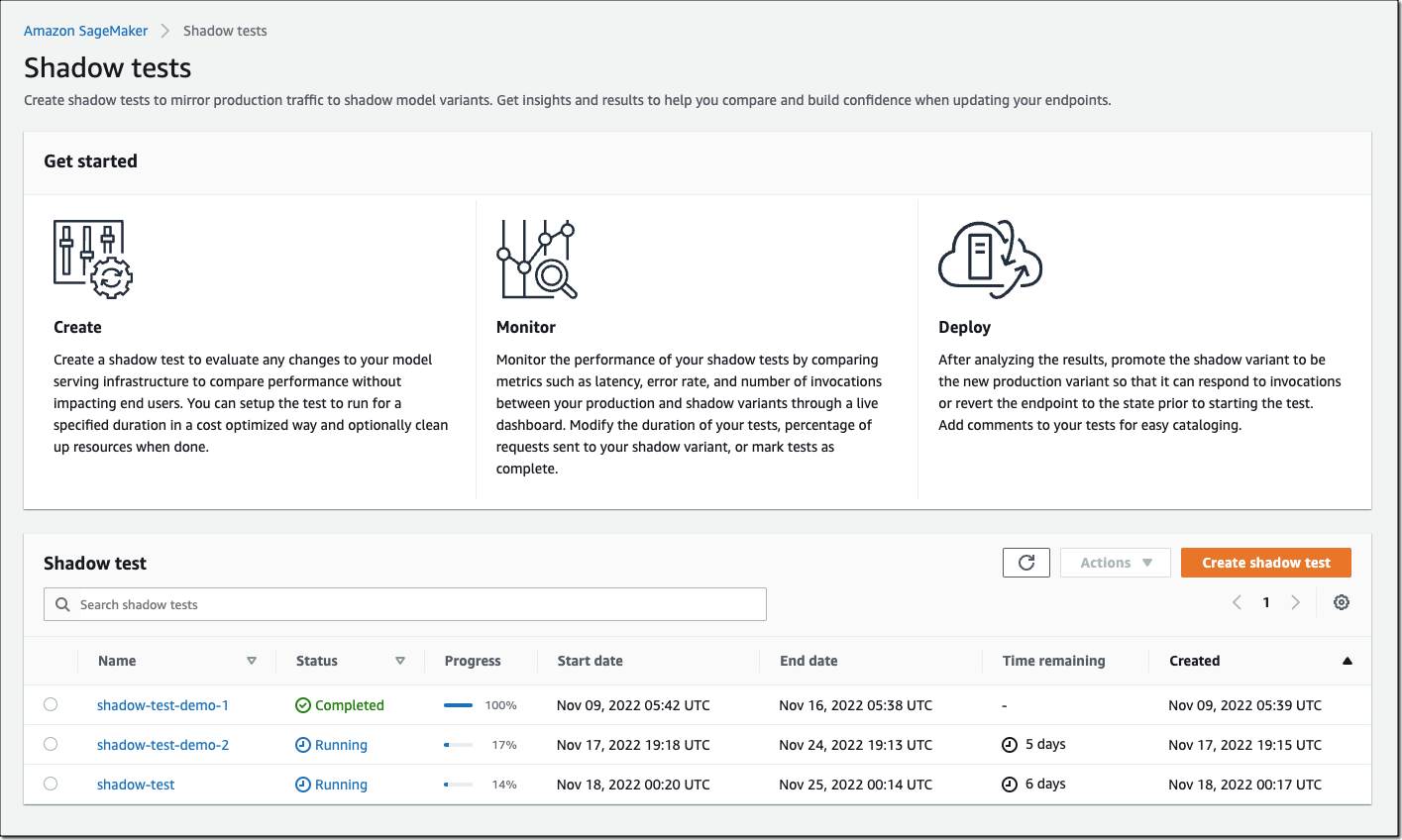
On the SageMaker console, select Inference and Shadow tests to create, monitor, and deploy shadow tests.

Amazon SageMaker Shadow Tests

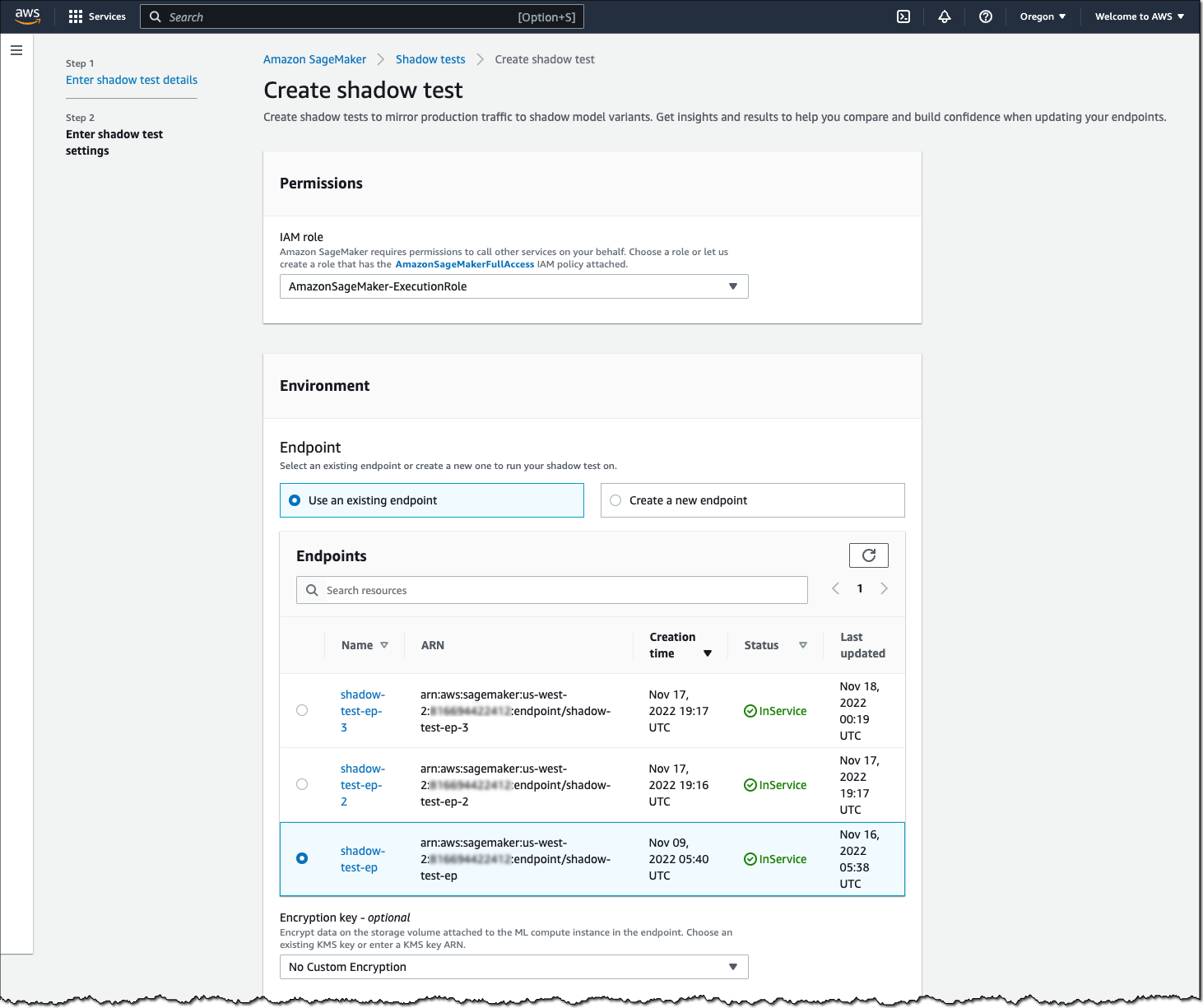
To create a shadow test, select an existing (or create a new) SageMaker endpoint and production variant you want to test against.

Amazon SageMaker - Create Shadow Test

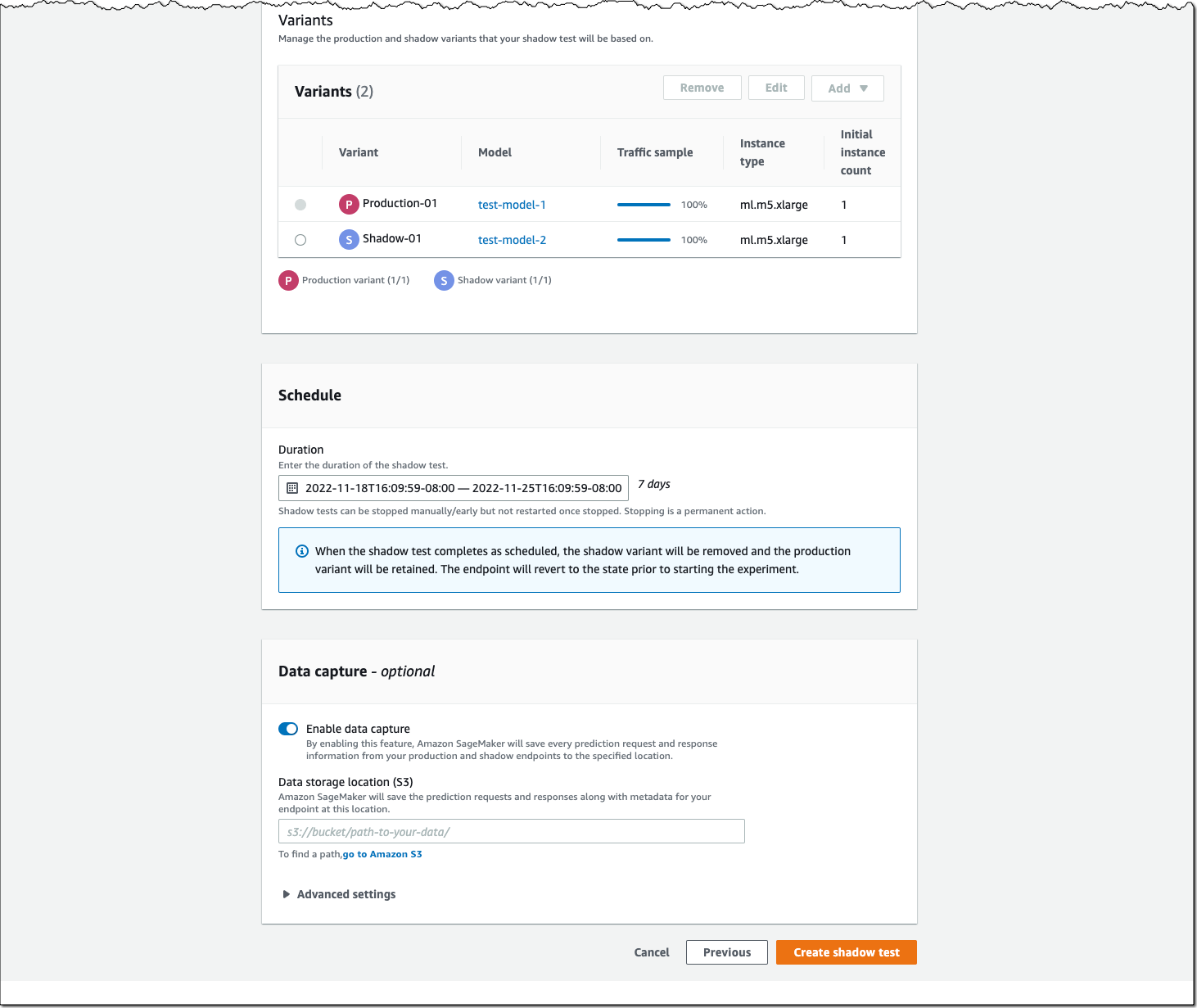
Next, configure the proportion of traffic to send to the shadow variant, the comparison metrics you want to evaluate, and the duration of the test. You can also enable data capture for your production and shadow variant.

Amazon SagMaker - Create Shadow Test

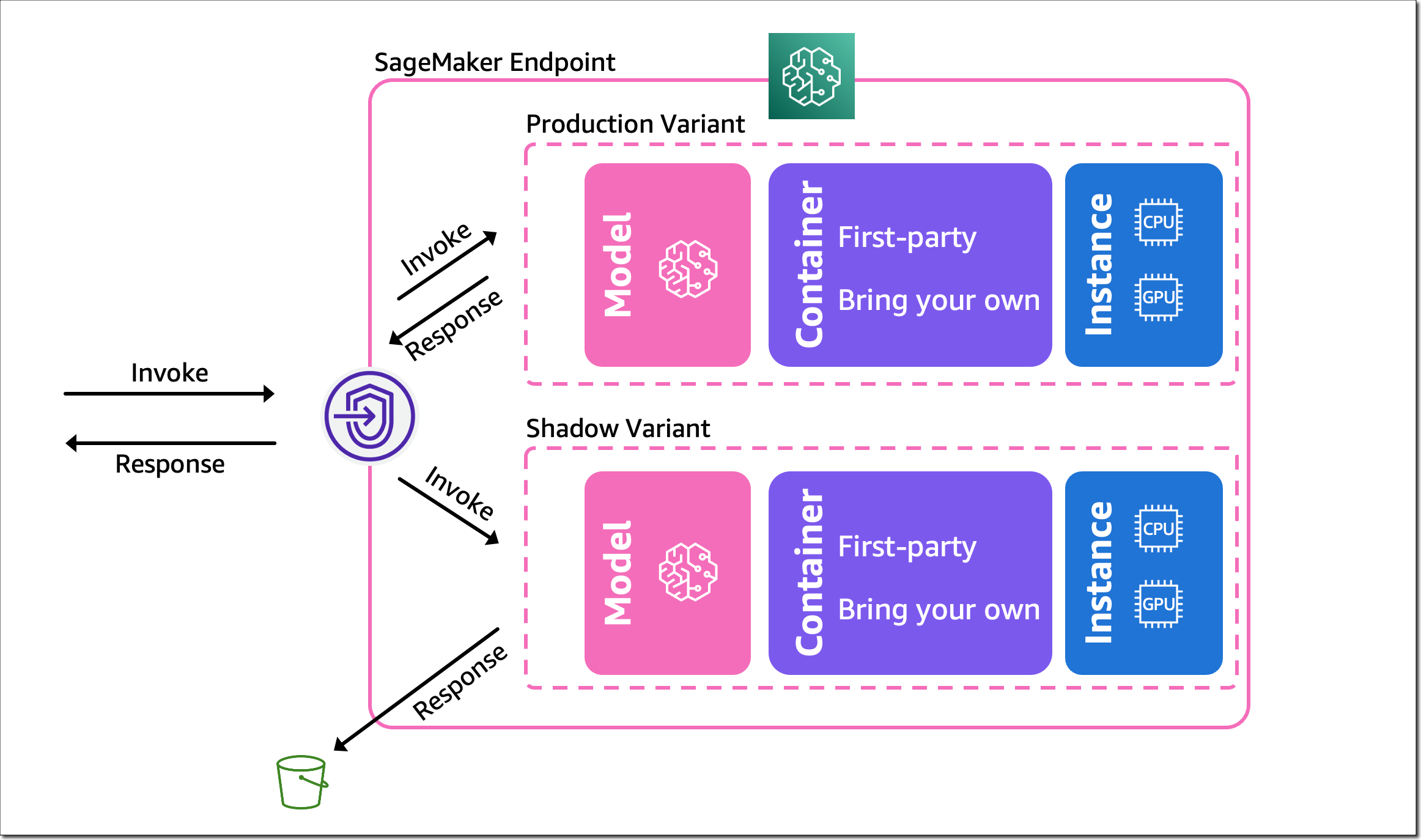
That’s it. SageMaker now automatically deploys the new variant in shadow mode and routes a copy of the inference requests to it in real time, all within the same endpoint. The following diagram illustrates this workflow.

Amazon SageMaker - Shadow Testing

Note that only the responses of the production variant are returned to the calling application. You can choose to either discard or log the responses of the shadow variant for offline comparison.

You can also use shadow testing to validate changes you made to any component in your production variant, including the serving container or ML instance. This can be useful when you’re upgrading to a new framework version of your serving container, applying patches, or if you want to make sure that there is no impact to latency or error rate due to this change. Similarly, if you consider moving to another ML instance type, for example, Amazon EC2 C7g instances based on AWS Graviton processors, or EC2 G5 instances powered by NVIDIA A10G Tensor Core GPUs, you can use shadow testing to evaluate the performance on production traffic prior to rollout.

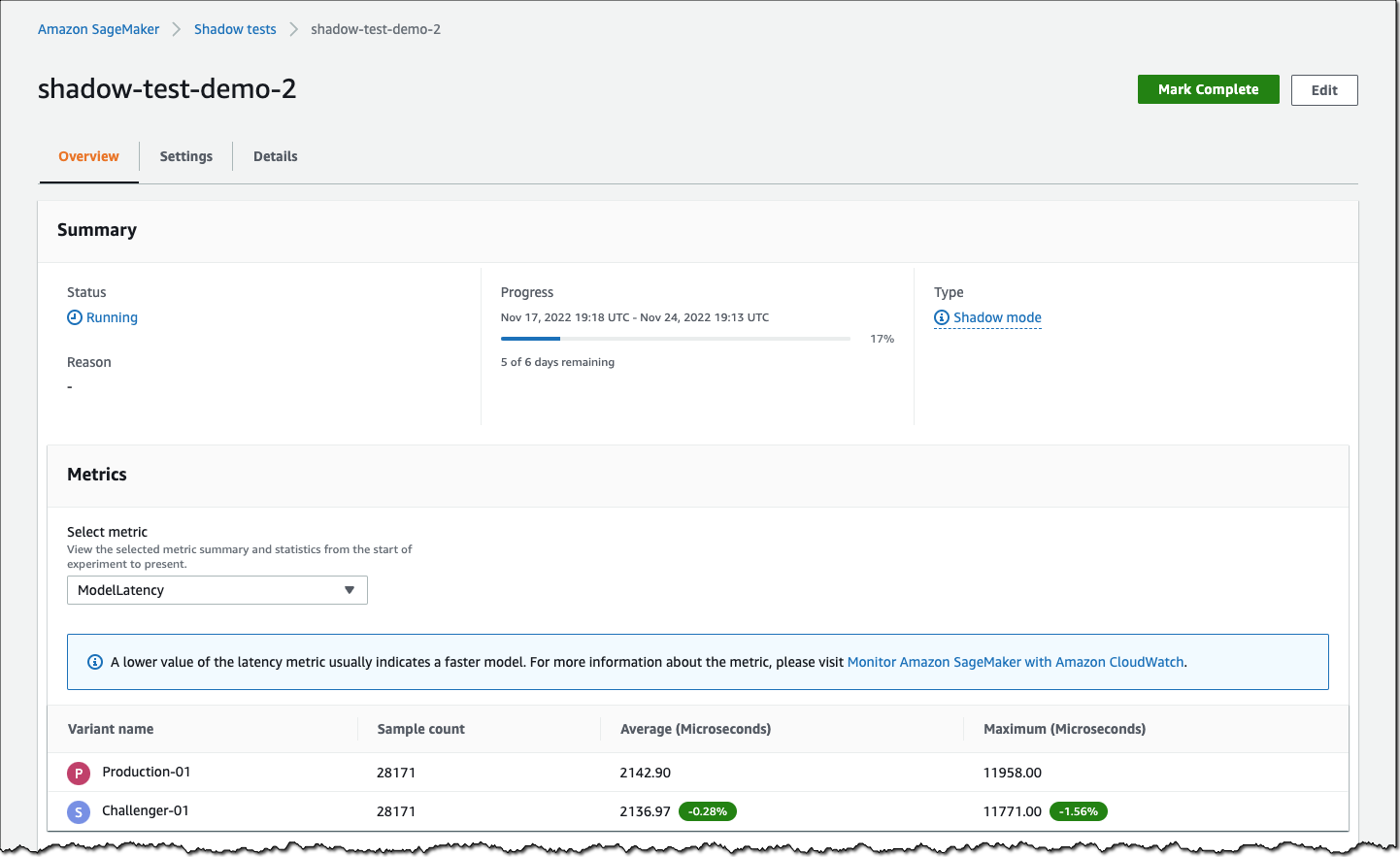
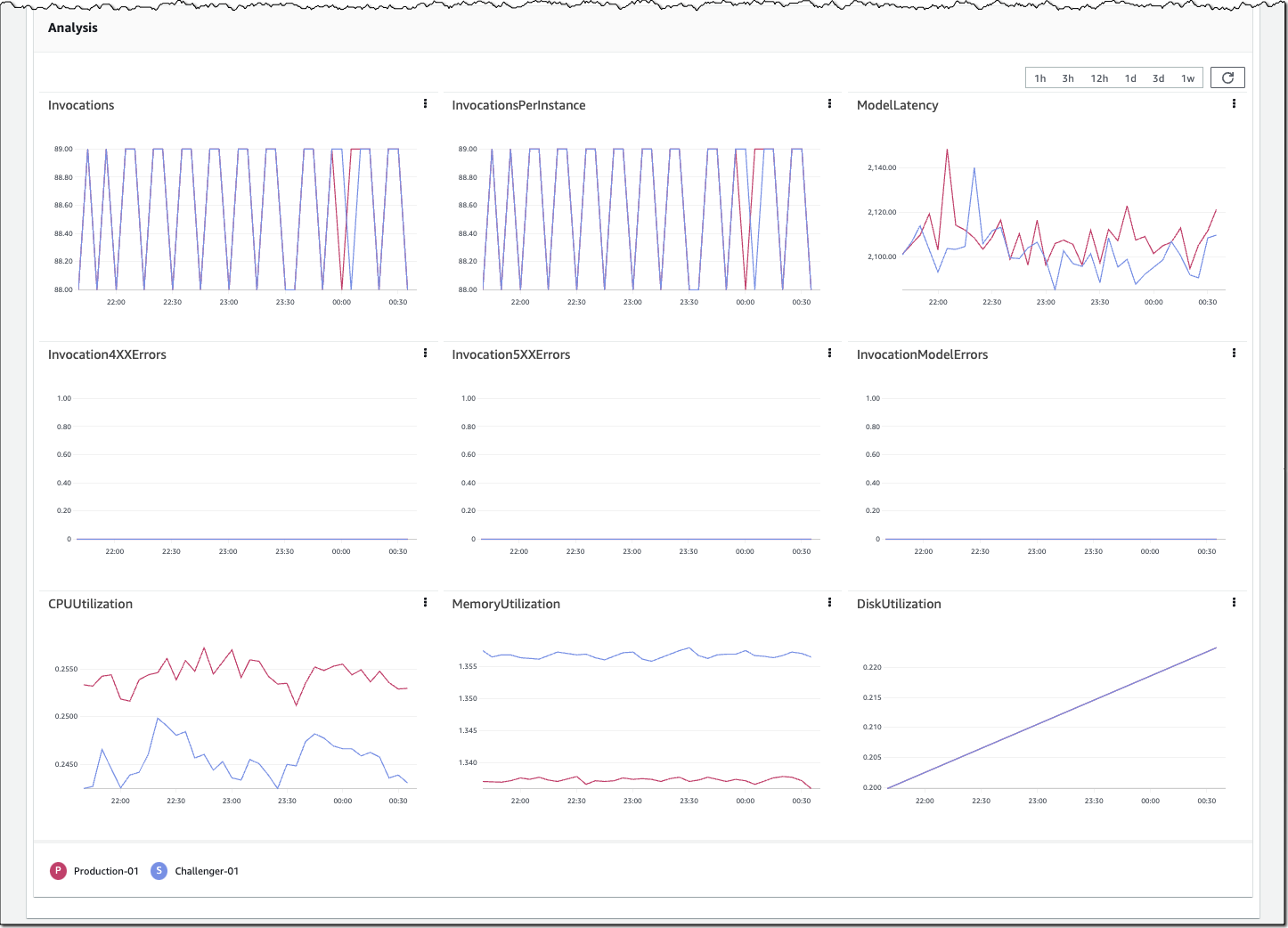
You can monitor the progress of the shadow test and performance metrics such as latency and error rate through a live dashboard. On the SageMaker console, select Inference and Shadow tests, then select the shadow test you want to monitor.

Amazon SageMaker - Monitor Shadow Test

Amazon SageMaker - Monitor Shadow Test

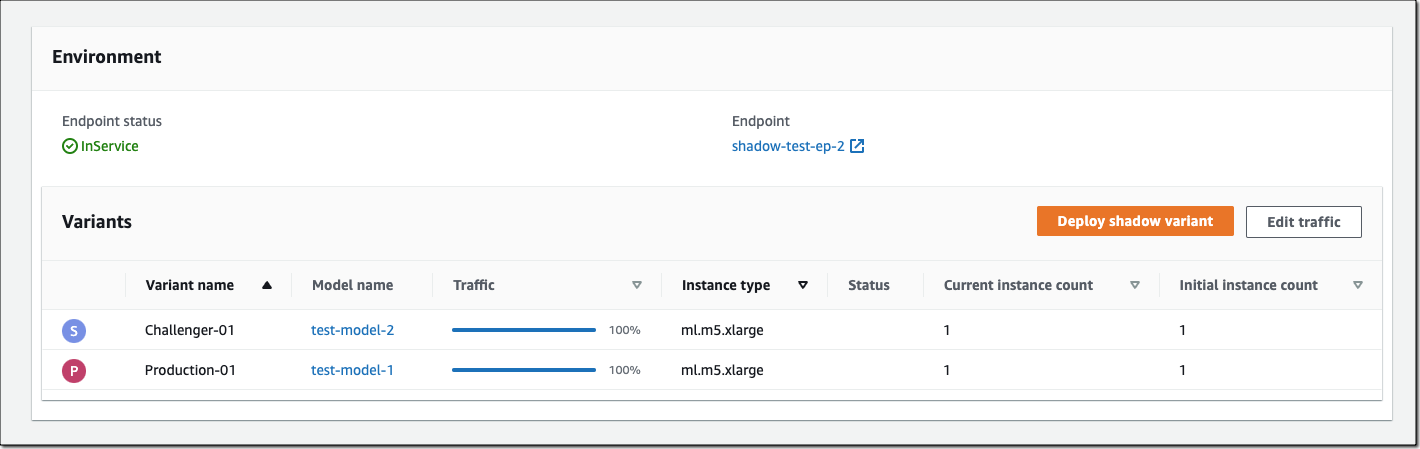
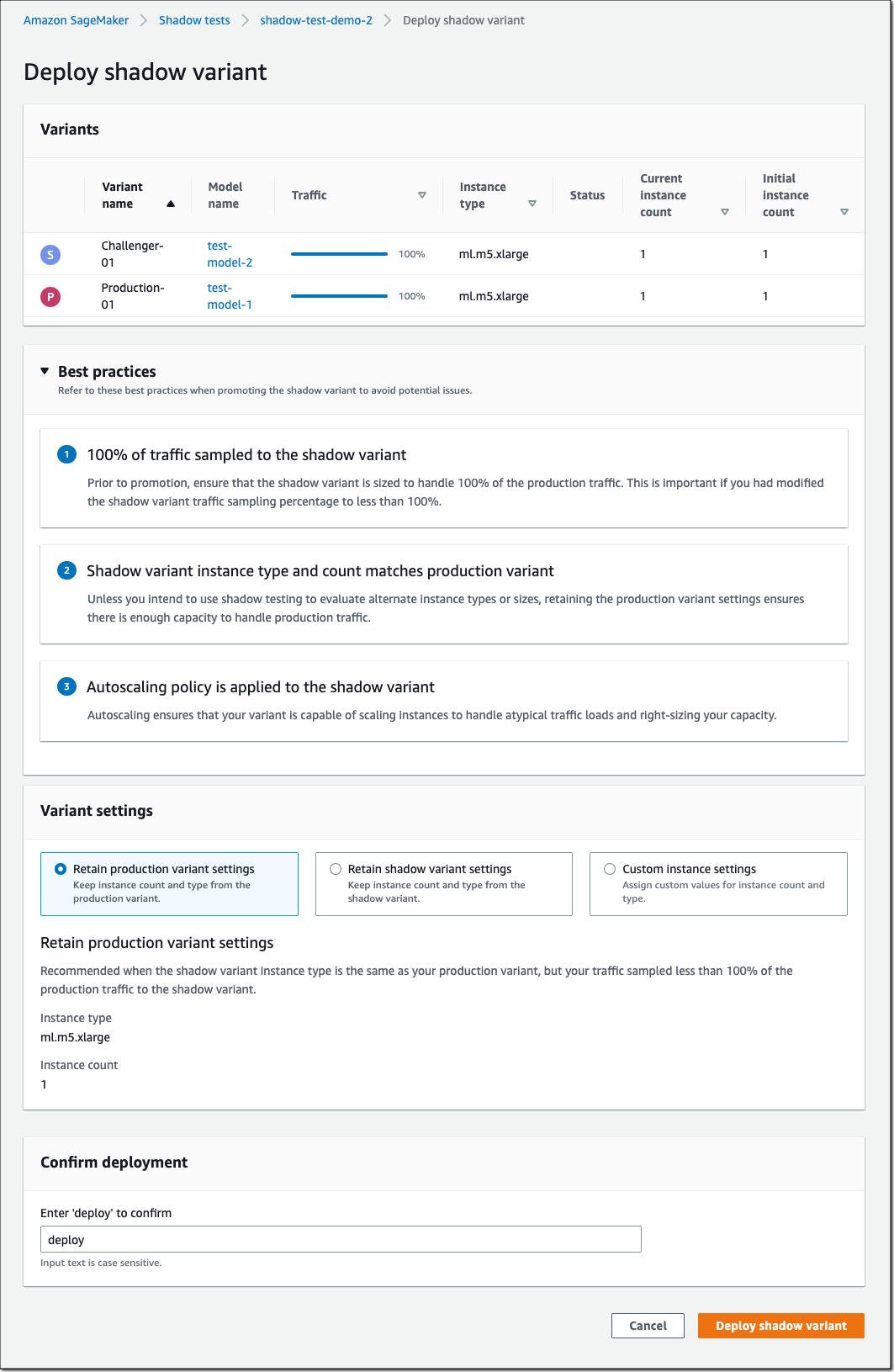
If you decide to promote the shadow model to production, select Deploy shadow variant and define the infrastructure configuration to deploy the shadow variant.

Amazon SageMaker - Deploy Shadow Variant

Amazon SageMaker - Deploy Shadow Variant

You can also use the SageMaker deployment guardrails if you want to add linear or canary traffic shifting modes and auto rollbacks to your update.

Availability and Pricing
SageMaker support for shadow testing is available today in all AWS Regions where SageMaker hosting is available except for the AWS GovCloud (US) Regions and AWS China Regions.

There is no additional charge for SageMaker shadow testing other than usage charges for the ML instances and ML storage provisioned to host the shadow variant. The pricing for ML instances and ML storage dimensions is the same as the real-time inference option. There is no additional charge for data processed in and out of shadow deployments. The SageMaker pricing page has all the details.

To learn more, visit Amazon SageMaker shadow testing.

Start validating your new ML models with SageMaker shadow tests today!

— Antje

Next Generation SageMaker Notebooks – Now with Built-in Data Preparation, Real-Time Collaboration, and Notebook Automation

Post Syndicated from Antje Barth original https://aws.amazon.com/blogs/aws/next-generation-sagemaker-notebooks-now-with-built-in-data-preparation-real-time-collaboration-and-notebook-automation/

In 2019, we introduced Amazon SageMaker Studio, the first fully integrated development environment (IDE) for data science and machine learning (ML). SageMaker Studio gives you access to fully managed Jupyter Notebooks that integrate with purpose-built tools to perform all ML steps, from preparing data to training and debugging models, tracking experiments, deploying and monitoring models, and managing pipelines.

Today, I’m excited to announce the next generation of Amazon SageMaker Notebooks to increase efficiency across the ML development workflow. You can now improve data quality in minutes with the built-in data preparation capability, edit the same notebooks with your teams in real time, and automatically convert notebook code to production-ready jobs.

Let me show you what’s new!

New Notebook Capability for Simplified Data Preparation
The new built-in data preparation capability is powered by Amazon SageMaker Data Wrangler and is available in SageMaker Studio notebooks.  SageMaker Studio notebooks automatically generate key visualizations on top of Pandas data frames to help you understand data distribution and identify data quality issues, like missing values, invalid data, and outliers. You can also select the target column for ML models and generate ML-specific insights such as imbalanced class or high correlation columns. You then receive recommendations for data transformations to resolve the issues. You can apply the data transformations right in the UI, and SageMaker Studio notebooks automatically generate the corresponding transformation code in the notebook cells that you can use to replay your data preparation pipeline.

Using the Built-in Data Preparation Capability
To get started, pip install and import sagemaker_datawrangler along with the pandas Python package. Then, download the dataset you want to analyze to the notebook working directory, and read the dataset with pandas.

import pandas as pd 
import sagemaker_datawrangler 

!aws s3 cp s3://<YOUR_S3_BUCKET>/data.csv . 

df = pd.read_csv("data.csv")

Now, when you display the data frame, it automatically shows key data visualizations at the top of each column, surfaces data insights, detects data quality issues, and suggests solutions to improve data quality. When you select a column as the target column for ML predictions, you get target-specific insights and warnings, such as mixed data types in target (for regression use cases) or too few instances per class (for classification use cases).

In this example, I’m using the Women’s E-Commerce Clothing Reviews dataset that contains customer reviews and ratings for women’s clothing. This dataset was obtained from Kaggle and has been modified by Amazon to add synthetic data quality issues.

Amazon SageMaker Studio notebooks with built-in data preparation

You can review the suggested data transformations to improve the data quality and apply them right in the UI. For a list of all supported data transformations, have a look at the documentation. Once you apply a data transformation, SageMaker Studio notebooks automatically generate the code to reproduce those data preparation steps in another notebook cell.

For my example, I select Rating as my target column. Target column insights tells me in a high-priority warning that this column has too few instances per class and with a medium-priority warning that classes are too imbalanced. Let’s follow the suggestions and drop rare target values and drop missing values. I will also follow the suggestions for some of the feature columns and drop missing values in the Review Text column and drop the Division Name column.

Once I apply the transformations, the notebook generates this code for me:

# Pandas code generated by sagemaker_datawrangler
output_df = df.copy(deep=True)


# Code to Drop rare target values for column: Rating to resolve warning: Too few instances per class 
rare_target_labels_to_drop = ['-100', '100']
output_df = output_df[~output_df['Rating'].isin(rare_target_labels_to_drop)]


# Code to Drop missing for column: Rating to resolve warning: Missing values 
output_df = output_df[output_df['Rating'].notnull()]


# Code to Drop missing for column: Review Text to resolve warning: Missing values 
output_df = output_df[output_df['Review Text'].notnull()]


# Code to Drop column for column: Division Name to resolve warning: Missing values 
output_df=output_df.drop(columns=['Division Name'])

I can now review and modify the code if needed or start integrating the data transformations as part of my ML development workflow.

Introducing Shared Spaces for Team-Based Sharing and Real-Time Collaboration
SageMaker Studio now offers shared spaces that give data science and ML teams a workspace where they can read, edit, and run notebooks together in real time to streamline collaboration and communication during the development process. Shared spaces provide a shared Amazon EFS directory that you can utilize to share files within a shared space. All taggable SageMaker resources that you create in a shared space are automatically tagged to help you organize and have a filtered view of your ML resources, such as training jobs, experiments, and models, that are relevant to the business problem you work on in the space. This also helps you monitor costs and plan budgets using tools such as AWS Budgets and AWS Cost Explorer.

And that’s not all. You can now also create multiple SageMaker domains within the same AWS account to scope access and isolate resources to different teams or business units in your organization. Now, let me show you how to create a shared space for users within a SageMaker domain.

Using Shared Spaces
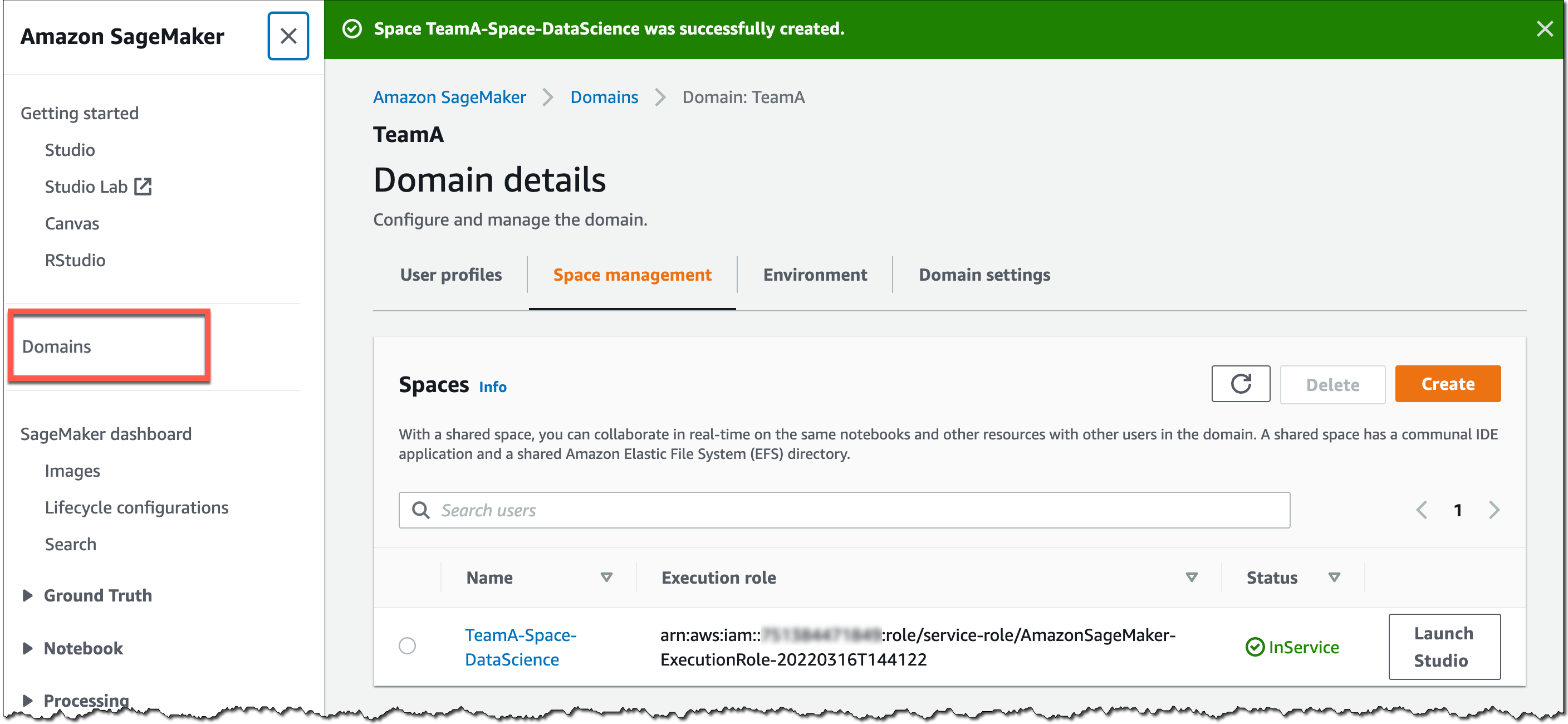
You can use the SageMaker console or the AWS CLI to create shared spaces for a SageMaker domain. To get started in the SageMaker console, go to Domains, select or create a new domain, and select Space management on the Domain details page. Then, select Create and give the shared space a name.

Amazon SageMaker Spaces - Create Space

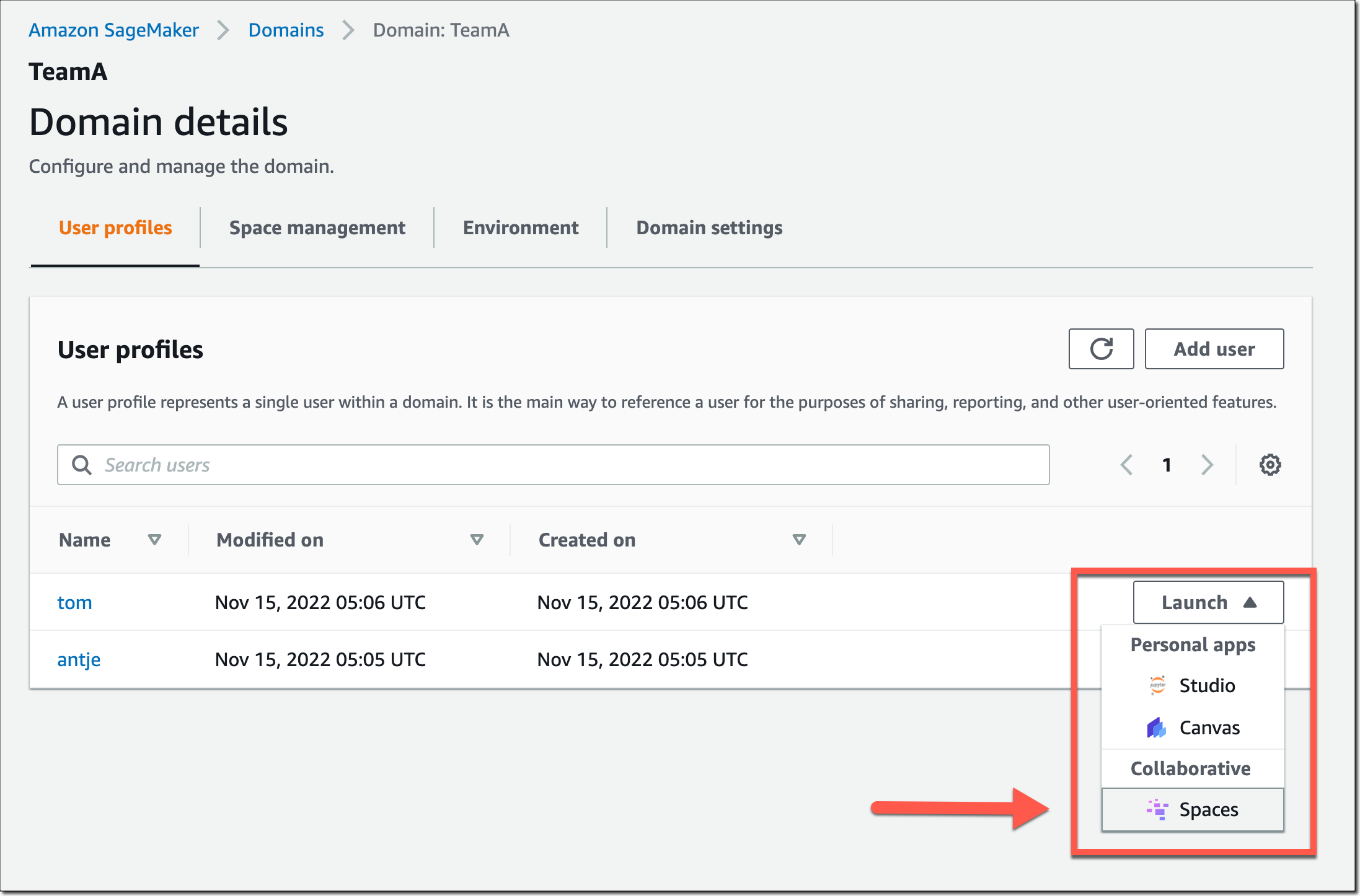
Users in this SageMaker domain can now launch and join the shared space through their SageMaker domain user profiles.

Amazon SageMaker Spaces - Launch Spaces

In a shared space, select the new Collaborators icon in the left navigation menu. You can now see who else is currently active in this space. The following screenshot shows user tom on the left, editing a notebook file. On the right, user antje sees the edits in real time, together with an annotation of the user name that currently edits that notebook cell.

Amazon SageMaker Spaces

New Notebook Capability to Automatically Convert Notebook Code to Production-Ready Jobs
You can now select a notebook and automate it as a job that can run in a production environment without the need to manage the underlying infrastructure. When you create a SageMaker Notebook Job, SageMaker Studio takes a snapshot of the entire notebook, packages its dependencies in a container, builds the infrastructure, runs the notebook as an automated job on a schedule you define, and deprovisions the infrastructure upon job completion. This notebook capability is now also available in SageMaker Studio Lab, our free ML development environment that provides the compute, storage, and security to learn and experiment with ML.

Using the Notebook Capability to Automate Notebooks
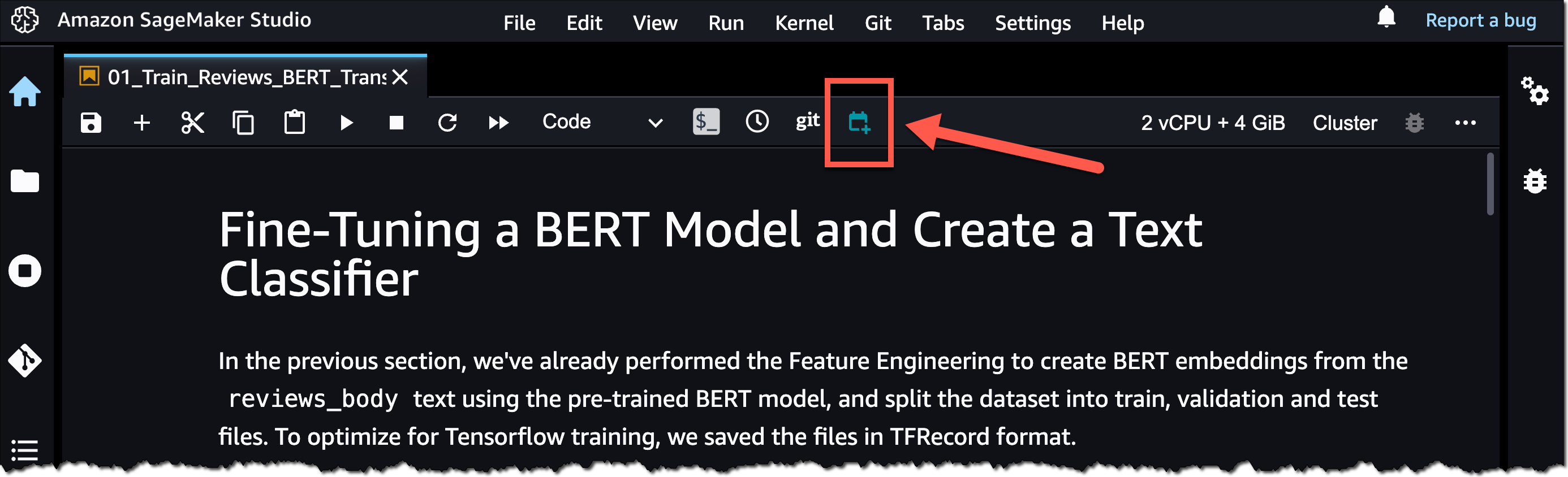
To get started, open a notebook file in SageMaker Studio. Then, right-click your notebook file and select Create Notebook Job or select the Create Notebook Job icon, as highlighted in the following screenshot.

Amazon SageMaker Studio - Automate your notebooks

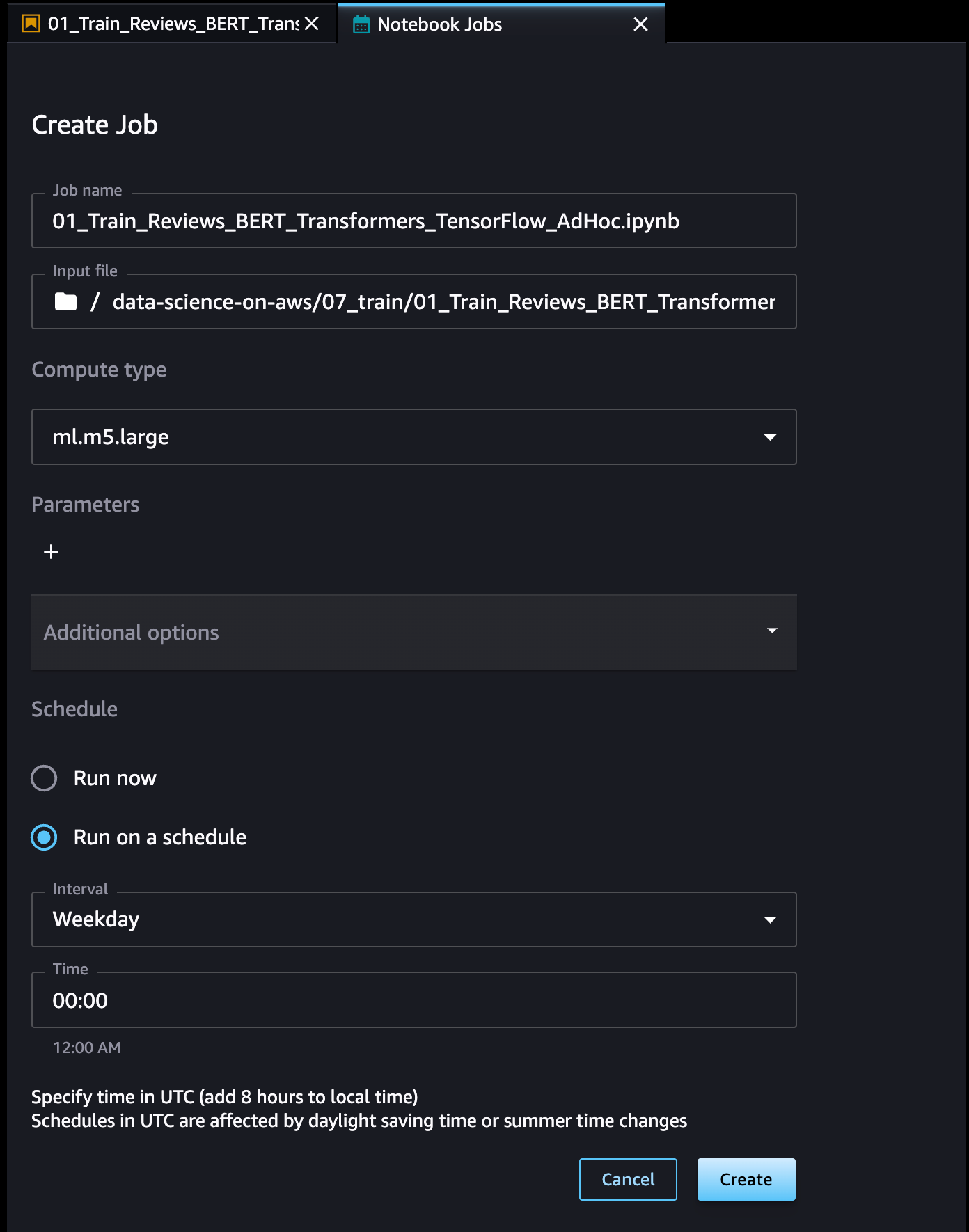
Define a name for the Notebook Job, review the input file location, specify the compute type to use, and whether to run the job immediately or on a schedule. Then, select Create.

Amazon SageMaker Studio - Create Notebook Job

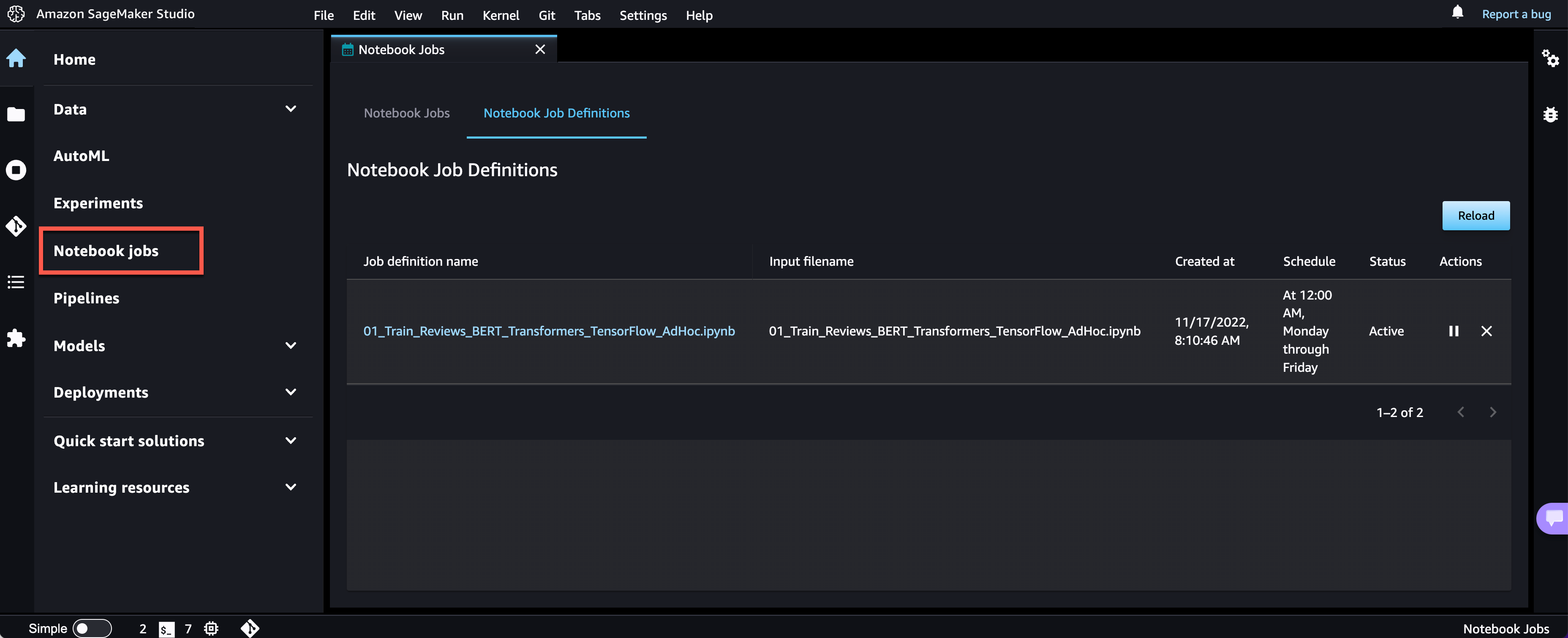
The Notebook Job has been created, and you can review all Notebook Job Definitions in the UI.

Amazon SageMaker Studio - Notebook Job Definitions

Now Available
The new Amazon SageMaker Studio notebook capabilities are now available in all AWS Regions where Amazon SageMaker Studio is available except for the AWS China Regions.

At launch, the built-in data preparation capability powered by SageMaker Data Wrangler is supported for SageMaker Studio notebooks and the following notebook kernel images:

  • Python 3 (Data Science) with Python 3.7
  • Python 3 (Data Science 2.0) with Python 3.8
  • Python 3 (Data Science 3.0) with Python 3.10
  • Spark Analytics 1.0 and 2.0

For more information, visit Amazon SageMaker Notebooks.

Start building your ML projects with the next generation of Amazon SageMaker Notebooks today!

— Antje

New – Share ML Models and Notebooks More Easily Within Your Organization with Amazon SageMaker JumpStart

Post Syndicated from Antje Barth original https://aws.amazon.com/blogs/aws/new-share-ml-models-and-notebooks-more-easily-within-your-organization-with-amazon-sagemaker-jumpstart/

Amazon SageMaker JumpStart is a machine learning (ML) hub that can help you accelerate your ML journey. SageMaker JumpStart gives you access to built-in algorithms with pre-trained models from popular model hubs, pre-trained foundation models to help you perform tasks such as article summarization and image generation, and end-to-end solutions to solve common use cases.

Today, I’m happy to announce that you can now share ML artifacts, such as models and notebooks, more easily with other users that share your AWS account using SageMaker JumpStart.

Using SageMaker JumpStart to Share ML Artifacts
Machine learning is a team sport. You might want to share your models and notebooks with other data scientists in your team to collaborate and increase productivity. Or, you might want to share your models with operations teams to put your models into production. Let me show you how to share ML artifacts using SageMaker JumpStart.

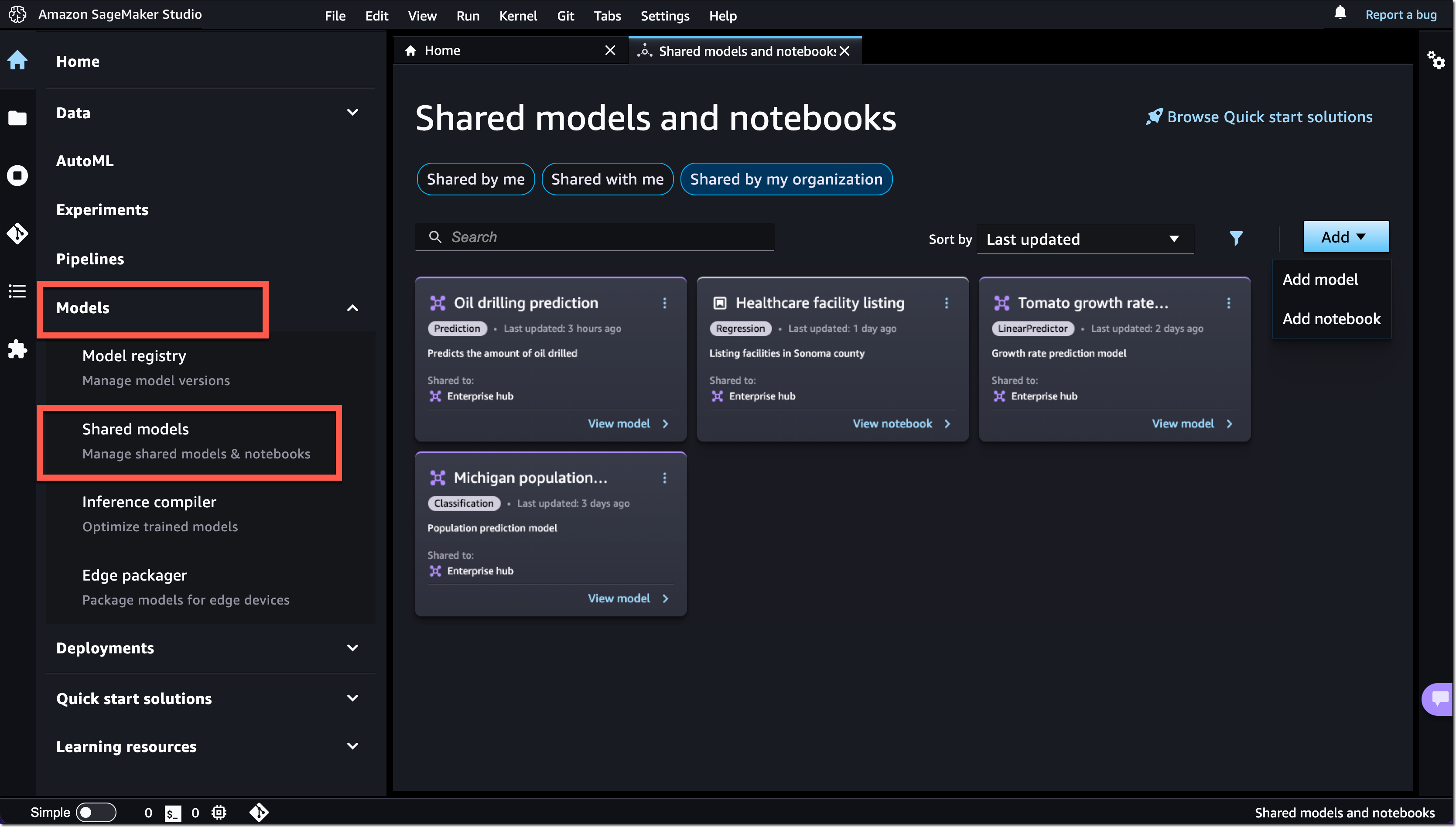
In SageMaker Studio, select Models in the left navigation menu. Then, select Shared models and Shared by my organization. You can now discover and search ML artifacts that other users shared within your AWS account. Note that you can add and share ML artifacts developed with SageMaker as well as those developed outside of SageMaker.

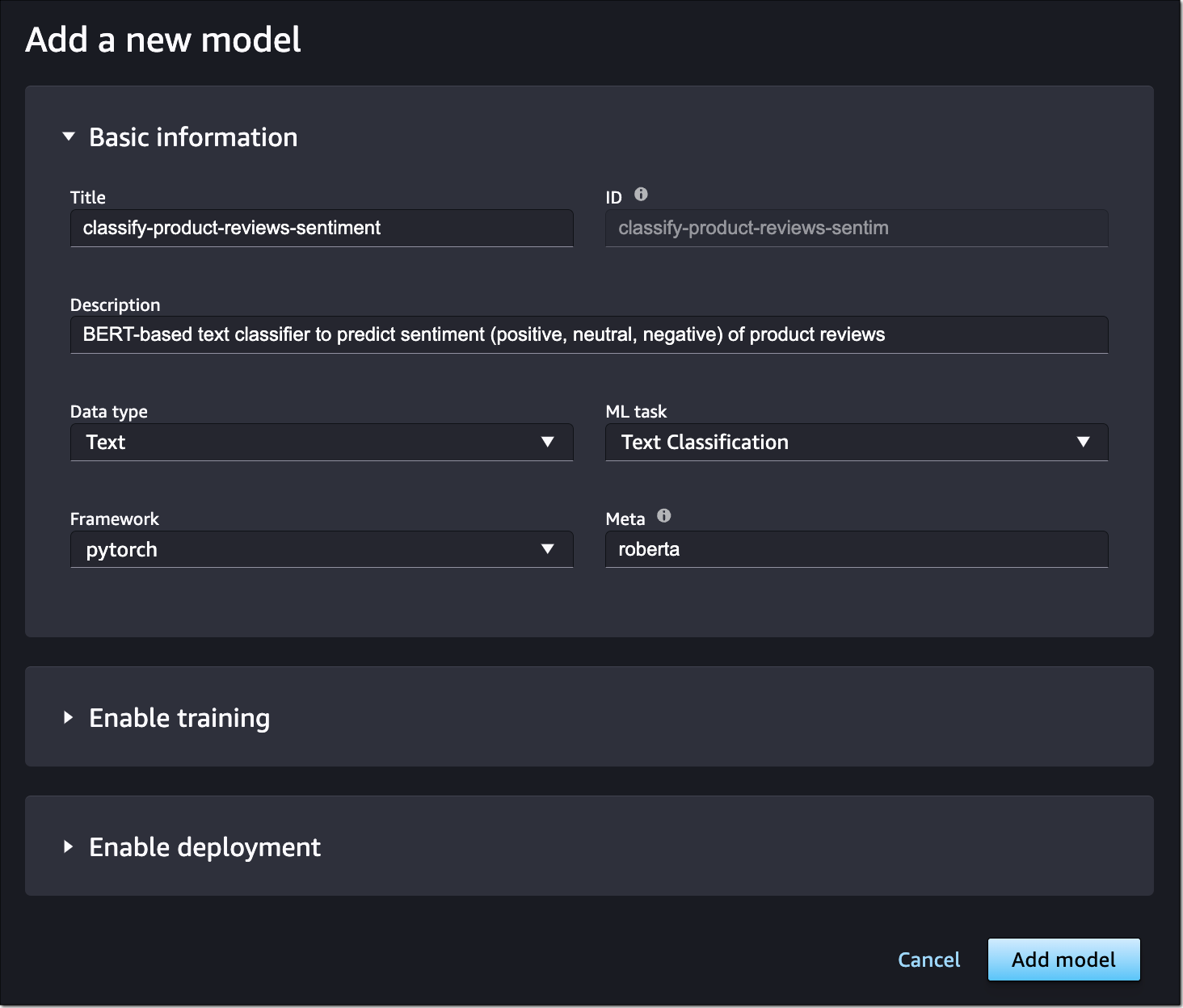
To share a model or notebook, select Add. For models, provide basic information, such as title, description, data type, ML task, framework, and any additional metadata. This information helps other users to find the right models for their use cases. You can also enable training and deployment for your model. This allows users to fine-tune your shared model and deploy the model in just a few clicks through SageMaker JumpStart.

Amazon SageMaker Jumpstart - Add model to private ML hub

To enable model training, you can select an existing SageMaker training job that will autopopulate all relevant information. This information includes the container framework, training script location, model artifact location, instance type, default training and validation datasets, and target column. You can also provide custom model training information by selecting a prebuilt SageMaker Deep Learning Container or selecting a custom Docker container in Amazon ECR. You can also specify default hyperparameters and metrics for model training.

To enable model deployment, you also need to define the container image to use, the inference script and model artifact location, and the default instance type. Have a look at the SageMaker Developer Guide to learn more about model training and model deployment options.

Sharing a notebook works similarly. You need to provide basic information about your notebook and the Amazon S3 location of the notebook file.

Amazon SageMaker JumpStart - Add a notebook to private ML hub

Users that share your AWS account can now browse and select shared models to fine-tune, deploy endpoints, or run notebooks directly in SageMaker JumpStart.

In SageMaker Studio, select Quick start solutions in the left navigation menu, then select Solutions, models, example notebooks to access all shared ML artifacts, together with pre-trained models from popular model hubs and end-to-end solutions.

Amazon SageMaker JumpStart

Now Available
The new ML artifact-sharing capability within Amazon SageMaker JumpStart is available today in all AWS Regions where Amazon SageMaker JumpStart is available. To learn more, visit Amazon SageMaker JumpStart and the SageMaker JumpStart documentation.

Start sharing your models and notebooks with Amazon SageMaker JumpStart today!

— Antje

AWS Machine Learning University New Educator Enablement Program to Build Diverse Talent for ML/AI Jobs

Post Syndicated from Marcia Villalba original https://aws.amazon.com/blogs/aws/aws-machine-learning-university-new-educator-enablement-program-to-build-diverse-talent-for-ml-ai-jobs/

AWS Machine Learning University is now providing a free educator enablement program. This program provides faculty at community colleges, minority-serving institutions (MSIs), and historically Black colleges and universities (HBCUs) with the skills and resources to teach data analytics, artificial intelligence (AI), and machine learning (ML) concepts to build a diverse pipeline for in-demand jobs of today and tomorrow.

According to the National Science Foundation, Black and Hispanic or Latino students earn bachelor’s degrees in Computer Science—the dominant pathway to AI/ML—at a much lower rate than their white peers, earning less than 11 percent of computer science degrees awarded. However, research shows that having diverse perspectives among skilled practitioners and across the AI/ML lifecycle contributes to the development of AI/ML systems that are safe, trustworthy, and have less bias. 

In 2018, we announced the Machine Learning University (MLU) to share with all developers the same courses that we used to train engineers at Amazon and AWS. This platform offers self-service, self-paced, AI/ML digital courses.

Machine Learning University home page

And today, we add this new program to our AI/ML training offering. Although anyone could access the MLU self-paced learning, it places the burden on the learner to source prerequisite work and solutions. This educator enablement program takes the concepts and lessons developed by MLU and makes them more accessible to educators. It offers a year-round educator enablement program with lesson planning, course playbooks, and access to free compute resources.

Program Details
Educators are onboarded in small-group cohorts into bootcamps where they will learn the material and deep dive into how to teach it via instructor-led lectures and hands-on projects. Educators who complete the bootcamp can take part in different year-round development opportunities, such as a dedicated Slack channel to share teaching best practices, education topic series and virtual study sessions moderated by MLU instructors, and regional events for continued professional development. Also, they will receive continuing education credits and AWS-provided stipends.

Faculty and students get access to instructional material through Amazon SageMaker Studio Lab. SageMaker Studio Lab was announced last year and is AWS’s free (no credit card required) ML development environment. It provides computing and storage for anybody that wants to learn and experiment with ML. Institutions can unlock additional resources to support their ML programs by registering for AWS Academy. AWS Academy unlocks all the AWS services for a complete AI/ML program.

Community colleges and universities can integrate this educator enablement program into their computer science, information technology, and business curricula to create an AI/ML course, certificate, or degree. We have worked with educators and education boards such as Houston Community College to create content that is vetted for credit-worthy and degree-earning curricula.

In August 2022, we launched our first educator bootcamp in partnership with The Coding School. The bootcamp was delivered over two weeks, offering lectures, case studies, and hands-on projects. 25 educators completed the Educator Machine Learning Bootcamp, representing 22 US community colleges and universities.

Learn More and Join The Program
During 2023, AWS Machine Learning University will run six educator-enablement cohorts starting in January. The program will give priority consideration to educators at community colleges, MSIs, and HBCUs, in alignment with this program mission to increase access to AI/ML technology to historically underserved and underrepresented students.

If you are a computer science educator or part of a board of educators interested in fostering more depth in your computer science coursework, you should sign up for the educator enablement program.

— Marcia

New — Amazon SageMaker Data Wrangler Supports SaaS Applications as Data Sources

Post Syndicated from Donnie Prakoso original https://aws.amazon.com/blogs/aws/new-amazon-sagemaker-data-wrangler-supports-saas-applications-as-data-sources/

Data fuels machine learning. In machine learning, data preparation is the process of transforming raw data into a format that is suitable for further processing and analysis. The common process for data preparation starts with collecting data, then cleaning it, labeling it, and finally validating and visualizing it. Getting the data right with high quality can often be a complex and time-consuming process.

This is why customers who build machine learning (ML) workloads on AWS appreciate the ability of Amazon SageMaker Data Wrangler. With SageMaker Data Wrangler, customers can simplify the process of data preparation and complete the required processes of the data preparation workflow on a single visual interface. Amazon SageMaker Data Wrangler helps to reduce the time it takes to aggregate and prepare data for ML.

However, due to the proliferation of data, customers generally have data spread out into multiple systems, including external software-as-a-service (SaaS) applications like SAP OData for manufacturing data, Salesforce for customer pipeline, and Google Analytics for web application data. To solve business problems using ML, customers have to bring all of these data sources together. They currently have to build their own solution or use third-party solutions to ingest data into Amazon S3 or Amazon Redshift. These solutions can be complex to set up and not cost-effective.

Introducing Amazon SageMaker Data Wrangler Supports SaaS Applications as Data Sources
I’m happy to share that starting today, you can aggregate external SaaS application data for ML in Amazon SageMaker Data Wrangler to prepare data for ML. With this feature, you can use more than 40 SaaS applications as data sources via Amazon AppFlow and have these data available on Amazon SageMaker Data Wrangler. Once the data sources are registered in AWS Glue Data Catalog by AppFlow, you can browse tables and schemas from these data sources using Data Wrangler SQL explorer. This feature provides seamless data integration between SaaS applications and SageMaker Data Wrangler using Amazon AppFlow.

Here is a quick preview of this new feature:

This new feature of Amazon SageMaker Data Wrangler works by using integration with Amazon AppFlow, a fully managed integration service that enables you to securely exchange data between SaaS applications and AWS services. With Amazon AppFlow, you can establish bidirectional data integration between SaaS applications, such as Salesforce, SAP, and Amplitude and all supported services, into your Amazon S3 or Amazon Redshift.

Then, with Amazon AppFlow, you can catalog the data in AWS Glue Data Catalog. This is a new feature where with Amazon AppFlow, you can create an integration with AWS Glue Data Catalog for Amazon S3 destination connector. With this new integration, customers can catalog SaaS data applications into AWS Glue Data Catalog with a few clicks, directly from the Amazon AppFlow Flow configuration, without the need to run any crawlers.

Once you’ve established a flow and inserted it into the AWS Glue Data Catalog, you can use this data inside the Amazon SageMaker Data Wrangler. Then, you can do the data preparation as you usually do. You can write Amazon Athena queries to preview data, join data from multiple sources, or import data to prepare for ML model training.

With this feature, you need to do a few simple steps to perform seamless data integration between SaaS applications into Amazon SageMaker Data Wrangler via Amazon AppFlow. This integration supports more than 40 SaaS applications, and for a complete list of supported applications, please check the Supported source and destination applications documentation.

Get Started with Amazon SageMaker Data Wrangler Support for Amazon AppFlow
Let’s see how this feature works in detail. In my scenario, I need to get data from Salesforce, and do the data preparation using Amazon SageMaker Data Wrangler.

To start using this feature, the first thing I need to do is to create a flow in Amazon AppFlow that registers the data source into the AWS Glue Data Catalog. I already have an existing connection with my Salesforce account, and all I need now is to create a flow.

One important thing to note is that to make SaaS application data available in Amazon SageMaker Data Wrangler, I need to create a flow with Amazon S3 as the destination. Then, I need to enable Create a Data Catalog table in the AWS Glue Data Catalog settings. This option will automatically catalog my Salesforce data into AWS Glue Data Catalog.

On this page, I need to select a user role with the required AWS Glue Data Catalog permissions and define the database name and the table name prefix. In addition, in this section, I can define the data format preference, be it in JSON, CSV, or Apache Parquet formats, and filename preference if I want to add a timestamp into the file name section.

To learn more about how to register SaaS data in Amazon AppFlow and AWS Glue Data Catalog, you can read Cataloging the data output from an Amazon AppFlow flow documentation page.

Once I’ve finished registering SaaS data, I need to make sure the IAM role can view the data sources in Data Wrangler from AppFlow. Here is an example of a policy in the IAM role:

{
    "Version": "2012-10-17",
    "Statement": [
        {
            "Effect": "Allow",
            "Action": "glue:SearchTables",
            "Resource": [
                "arn:aws:glue:*:*:table/*/*",
                "arn:aws:glue:*:*:database/*",
                "arn:aws:glue:*:*:catalog"
            ]
        }
    ]
} 

By enabling data cataloging with AWS Glue Data Catalog, from this point on, Amazon SageMaker Data Wrangler will be able to automatically discover this new data source and I can browse tables and schema using the Data Wrangler SQL Explorer.

Now it’s time to switch to the Amazon SageMaker Data Wrangler dashboard then select Connect to data sources.

On the following page, I need to Create connection and select the data source I want to import. In this section, I can see all the available connections for me to use. Here I see the Salesforce connection is already available for me to use.

If I would like to add additional data sources, I can see a list of external SaaS applications that I can integrate into the Set up new data sources section. To learn how to recognize external SaaS applications as data sources, I can learn more with the select How to enable access.

Now I will import datasets and select the Salesforce connection.

On the next page, I can define connection settings and import data from Salesforce. When I’m done with this configuration, I select Connect.

On the following page, I see my Salesforce data that I already configured with Amazon AppFlow and AWS Glue Data Catalog called appflowdatasourcedb. I can also see a table preview and schema for me to review if this is the data I need.

Then, I start building my dataset using this data by performing SQL queries inside the SageMaker Data Wrangler SQL Explorer. Then, I select Import query.

Then, I define a name for my dataset.

At this point, I can start doing the data preparation process. I can navigate to the Analysis tab to run the data insight report. The analysis will provide me with a report on the data quality issues and what transform I need to use next to fix the issues based on the ML problem I want to predict. To learn more about how to use the data analysis feature, see Accelerate data preparation with data quality and insights in the Amazon SageMaker Data Wrangler blog post.

In my case, there are several columns I don’t need, and I need to drop these columns. I select Add step.

One feature I like is that Amazon SageMaker Data Wrangler provides numerous ML data transforms. It helps me to streamline the process of cleaning, transforming and feature engineering my data in one dashboard. For more about what SageMaker Data Wrangler provides for transformation data, please read this Transform Data documentation page.

In this list, I select Manage columns.

Then, in the Transform section, I select the Drop column option. Then, I select a few columns that I don’t need.

Once I’m done, the columns I don’t need are removed and the Drop column data preparation step I just created is listed in the Add step section.

I can also see the visual of my data flow inside the Amazon SageMaker Data Wrangler. In this example, my data flow is quite basic. But when my data preparation process becomes complex, this visual view makes it easy for me to see all the data preparation steps.

From this point on, I can do what I require with my Salesforce data. For example, I can export data directly to Amazon S3 by selecting Export to and choosing Amazon S3 from the Add destination menu. In my case, I specify Data Wrangler to store the data in Amazon S3 after it has processed it by selecting Add destination and then Amazon S3.

Amazon SageMaker Data Wrangler provides me flexibility to automate the same data preparation flow using scheduled jobs. I can also automate feature engineering with SageMaker Pipelines (via Jupyter Notebook) and SageMaker Feature Store (via Jupyter Notebook), and deploy to Inference end point with SageMaker Inference Pipeline (via Jupyter Notebook).

Things to Know
Related news – This feature will make it easy for you to do data aggregation and preparation with Amazon SageMaker Data Wrangler. As this feature is an integration with Amazon AppFlow and also AWS Glue Data Catalog, you might want to learn more on Amazon AppFlow now supports AWS Glue Data Catalog integration and provides enhanced data preparation page.

Availability – Amazon SageMaker Data Wrangler supports SaaS applications as data sources available in all the Regions currently supported by Amazon AppFlow.

Pricing – There is no additional cost to use SaaS applications supports in Amazon SageMaker Data Wrangler, but there is a cost to running Amazon AppFlow to get the data in Amazon SageMaker Data Wrangler.

Visit Import Data From Software as a Service (SaaS) Platforms documentation page to learn more about this feature, and follow the getting started guide to start data aggregating and preparing SaaS applications data with Amazon SageMaker Data Wrangler.

Happy building!
— Donnie

New ML Governance Tools for Amazon SageMaker – Simplify Access Control and Enhance Transparency Over Your ML Projects

Post Syndicated from Antje Barth original https://aws.amazon.com/blogs/aws/new-ml-governance-tools-for-amazon-sagemaker-simplify-access-control-and-enhance-transparency-over-your-ml-projects/

As companies increasingly adopt machine learning (ML) for their business applications, they are looking for ways to improve governance of their ML projects with simplified access control and enhanced visibility across the ML lifecycle. A common challenge in that effort is managing the right set of user permissions across different groups and ML activities. For example, a data scientist in your team that builds and trains models usually requires different permissions than an MLOps engineer that manages ML pipelines. Another challenge is improving visibility over ML projects. For example, model information, such as intended use, out-of-scope use cases, risk rating, and evaluation results, is often captured and shared via emails or documents. In addition, there is often no simple mechanism to monitor and report on your deployed model behavior.

That’s why I’m excited to announce a new set of ML governance tools for Amazon SageMaker.

As an ML system or platform administrator, you can now use Amazon SageMaker Role Manager to define custom permissions for SageMaker users in minutes, so you can onboard users faster. As an ML practitioner, business owner, or model risk and compliance officer, you can now use Amazon SageMaker Model Cards to document model information from conception to deployment and Amazon SageMaker Model Dashboard to monitor all your deployed models through a unified dashboard.

Let’s dive deeper into each tool, and I’ll show you how to get started.

Introducing Amazon SageMaker Role Manager
SageMaker Role Manager lets you define custom permissions for SageMaker users in minutes. It comes with a set of predefined policy templates for different personas and ML activities. Personas represent the different types of users that need permissions to perform ML activities in SageMaker, such as data scientists or MLOps engineers. ML activities are a set of permissions to accomplish a common ML task, such as running SageMaker Studio applications or managing experiments, models, or pipelines. You can also define additional personas, add ML activities, and your managed policies to match your specific needs. Once you have selected the persona type and the set of ML activities, SageMaker Role Manager automatically creates the required AWS Identity and Access Management (IAM) role and policies that you can assign to SageMaker users.

A Primer on SageMaker and IAM Roles
A role is an IAM identity that has permissions to perform actions with AWS services. Besides user roles that are assumed by a user via federation from an Identity Provider (IdP) or the AWS Console, Amazon SageMaker requires service roles (also known as execution roles) to perform actions on behalf of the user. SageMaker Role Manager helps you create these service roles:

  • SageMaker Compute Role – Gives SageMaker compute resources the ability to perform tasks such as training and inference, typically used via PassRole. You can select the SageMaker Compute Role persona in SageMaker Role Manager to create this role. Depending on the ML activities you select in your SageMaker service roles, you will need to create this compute role first.
  • SageMaker Service Role – Some AWS services, including SageMaker, require a service role to perform actions on your behalf. You can select the Data Scientist, MLOps, or Custom persona in SageMaker Role Manager to start creating service roles with custom permissions for your ML practitioners.

Now, let me show you how this works in practice.

There are two ways to get to SageMaker Role Manager, either through Getting started in the SageMaker console or when you select Add user in the SageMaker Studio Domain control panel.

I start in the SageMaker console. Under Configure role, select Create a role. This opens a workflow that guides you through all required steps.

Amazon SageMaker Admin Hub - Getting Started

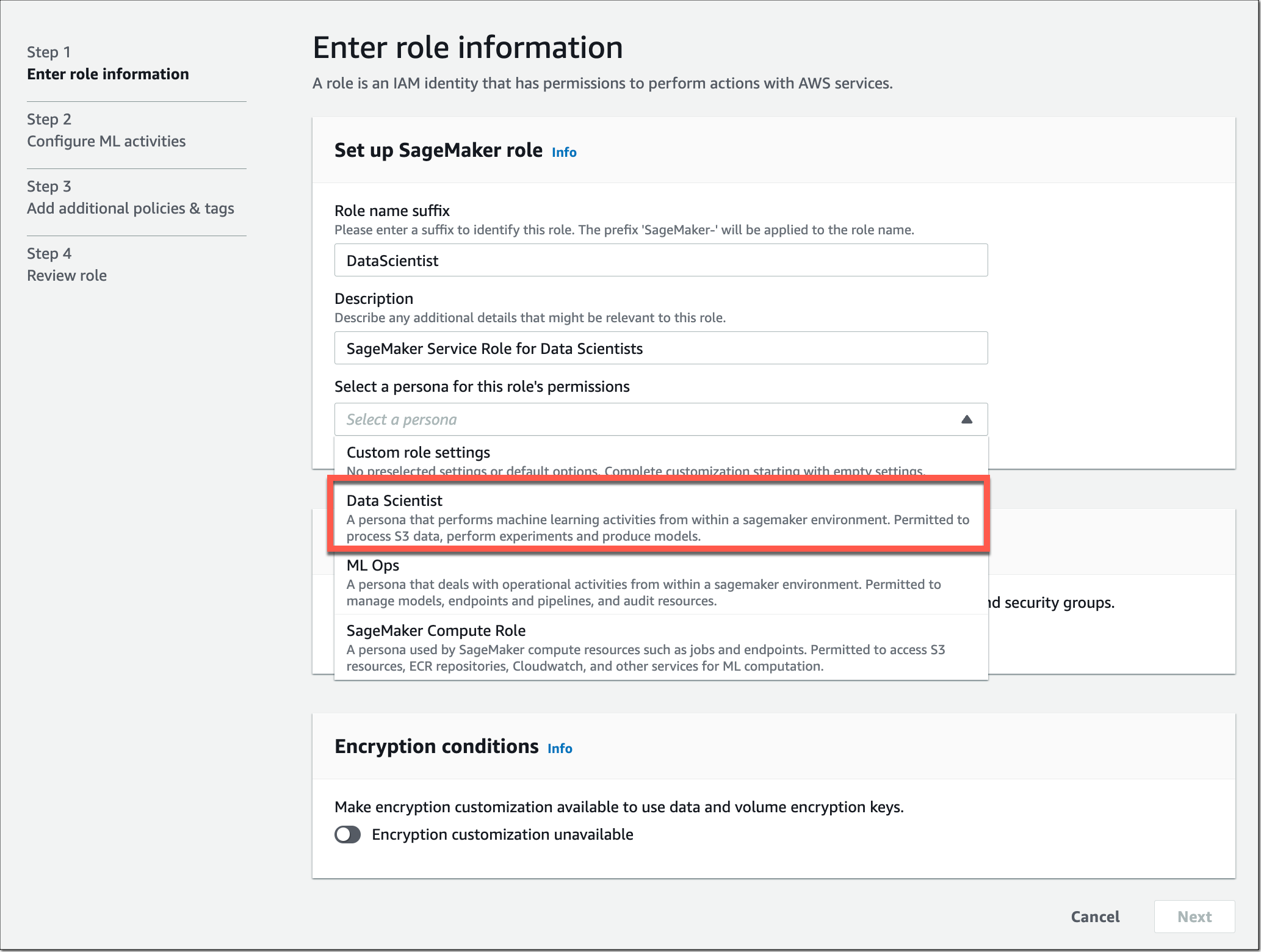
Let’s assume I want to create a SageMaker service role with a specific set of permissions for my team of data scientists. In Step 1, I select the predefined policy template for the Data Scientist persona.

Amazon SageMaker Role Manager - Select persona

I can also define the network and encryption settings in this step by selecting Amazon Virtual Private Cloud (Amazon VPC) subnets, security groups, and encryption keys.

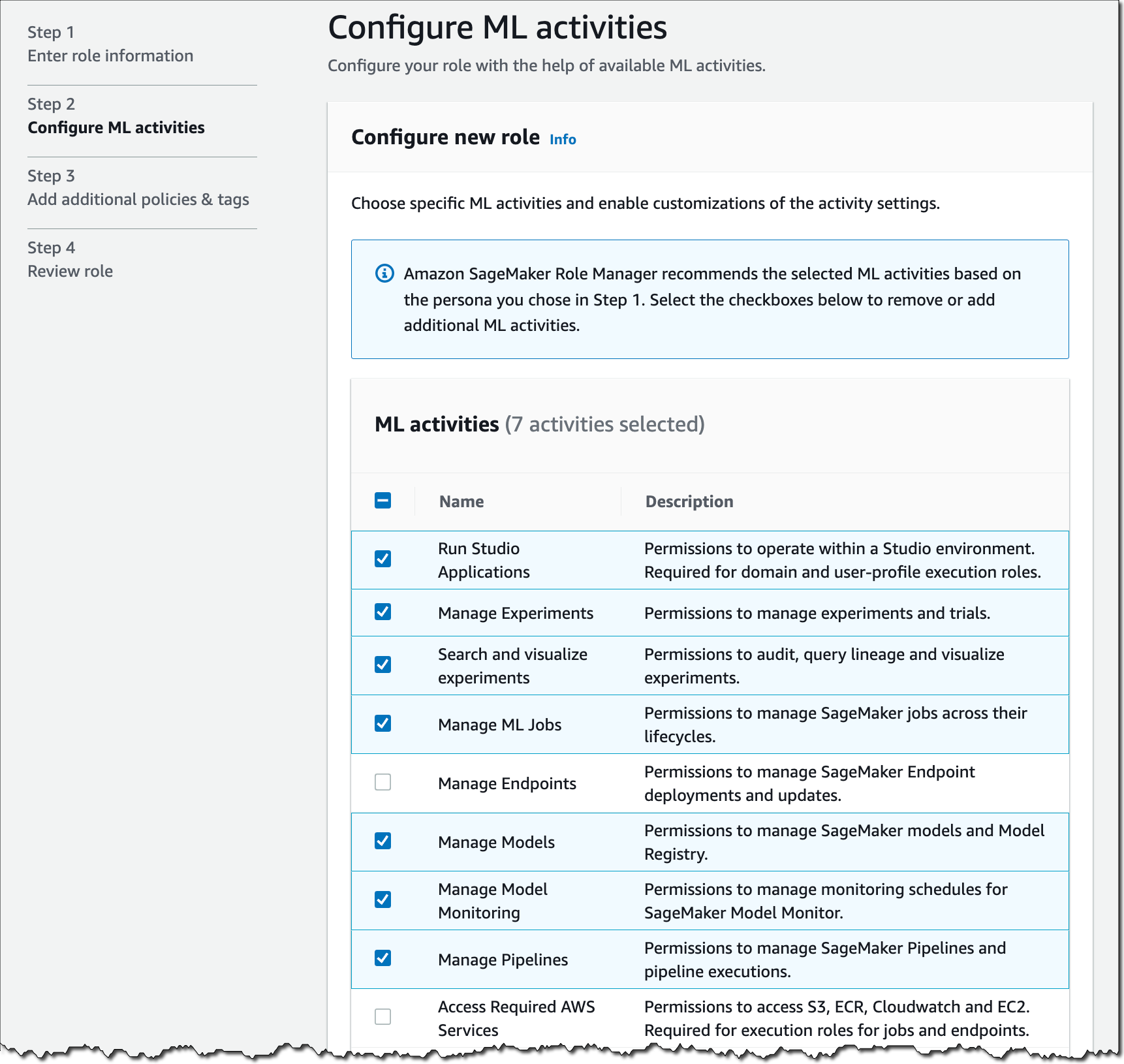
In Step 2, I select what ML activities data scientists in my team need to perform.

Amazon SageMaker Admin Hub - Configure ML activities

Some of the selected ML activities might require you to specify the Amazon Resource Name (ARN) of the SageMaker Compute Role so SageMaker compute resources have the ability to perform the tasks.

In Step 3, you can attach additional IAM policies and add tags to the role if needed. Tags help you identify and organize your AWS resources. You can use tags to add attributes such as project name, cost center, or location information to a role. After a final review of the settings in Step 4, select Submit, and the role is created.

In just a few minutes, I set up a SageMaker service role, and I’m now ready to onboard data scientists in SageMaker with custom permissions in place.

Introducing Amazon SageMaker Model Cards
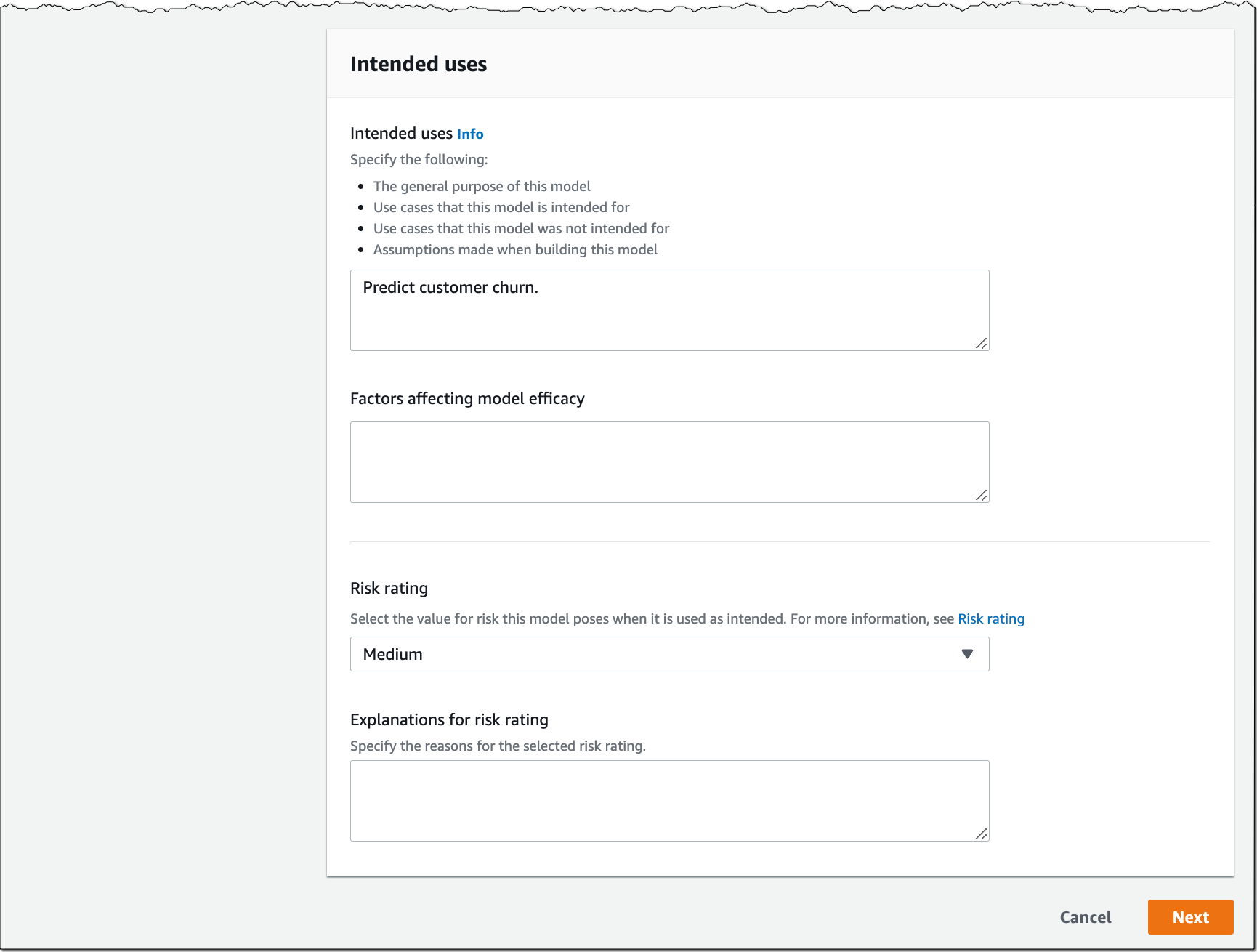
SageMaker Model Cards helps you streamline model documentation throughout the ML lifecycle by creating a single source of truth for model information. For models trained on SageMaker, SageMaker Model Cards discovers and autopopulates details such as training jobs, training datasets, model artifacts, and inference environment. You can also record model details such as the model’s intended use, risk rating, and evaluation results. For compliance documentation and model evidence reporting, you can export your model cards to a PDF file and easily share them with your customers or regulators.

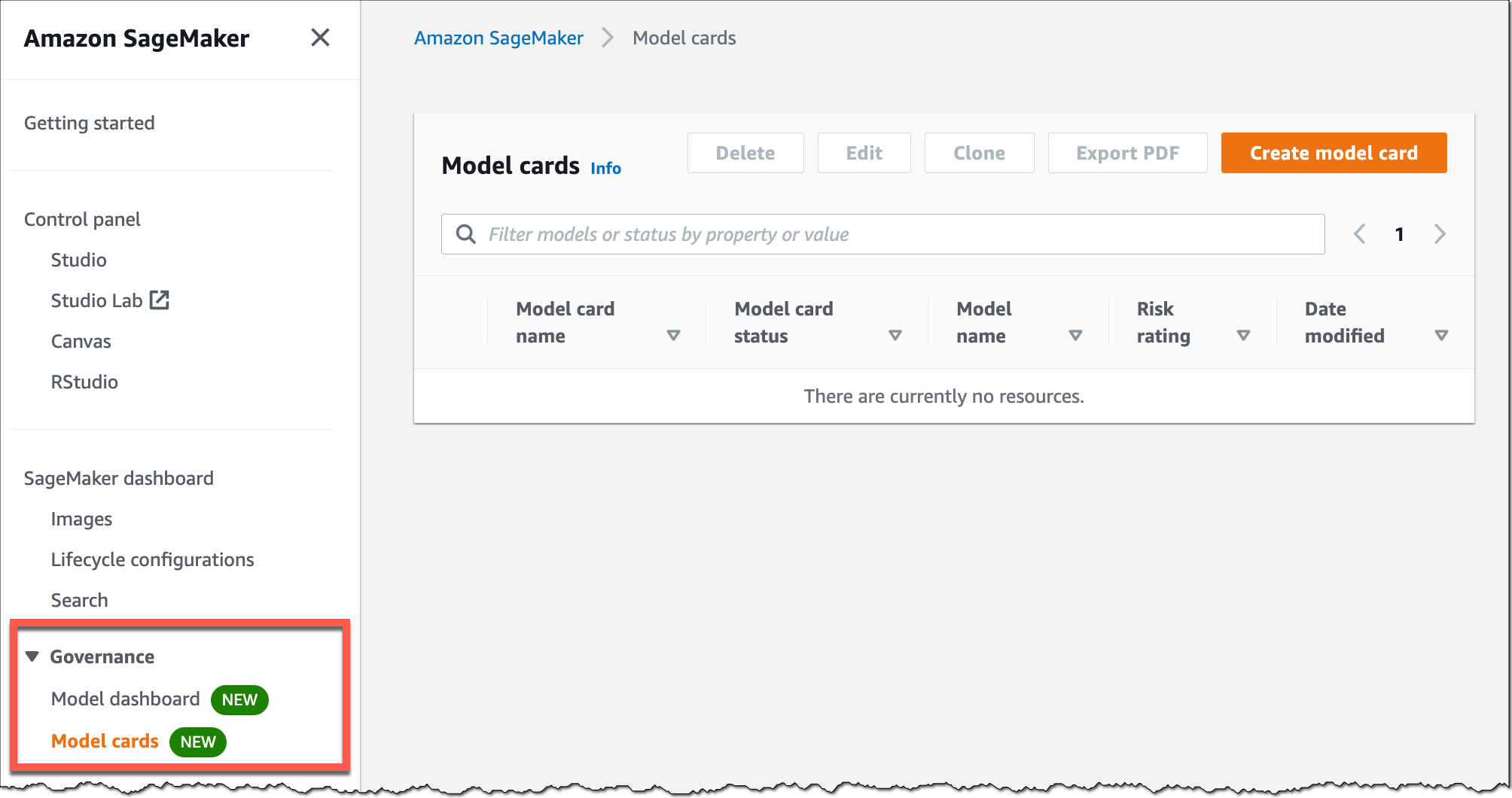
To start creating SageMaker Model Cards, go to the SageMaker console, select Governance in the left navigation menu, and select Model cards.

Amazon SageMaker Model Cards

Select Create model card to document your model information.

Amazon SageMaker Model Card

Amazon SageMaker Model Cards

Introducing Amazon SageMaker Model Dashboard
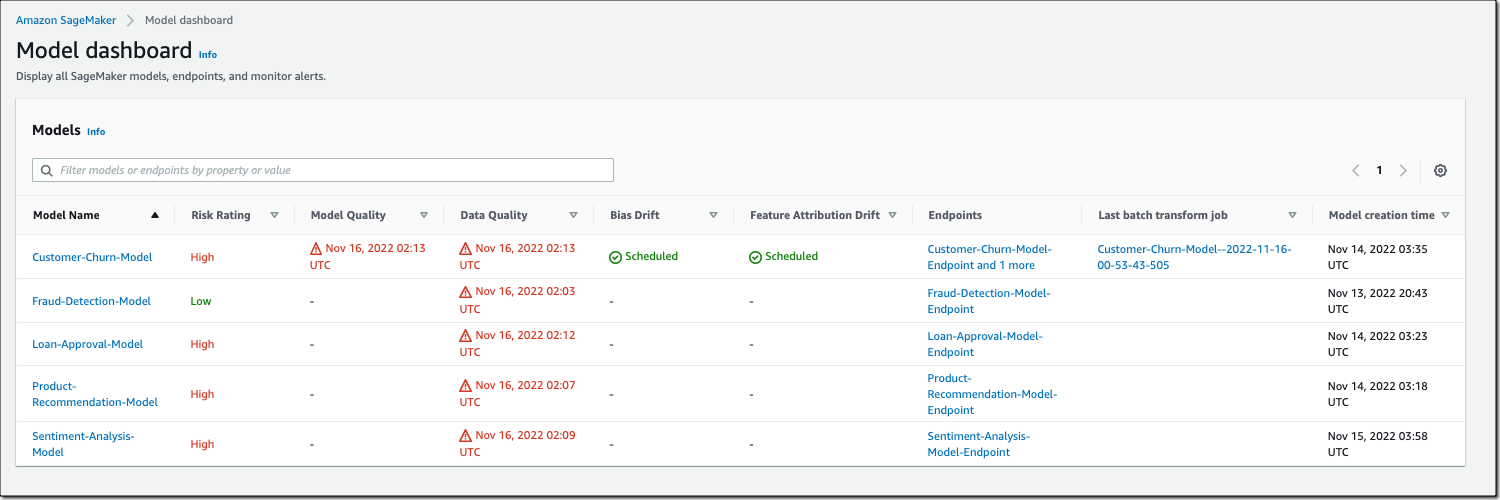
SageMaker Model Dashboard lets you monitor all your models in one place. With this bird’s-eye view, you can now see which models are used in production, view model cards, visualize model lineage, track resources, and monitor model behavior through an integration with SageMaker Model Monitor and SageMaker Clarify. The dashboard automatically alerts you when models are not being monitored or deviate from expected behavior. You can also drill deeper into individual models to troubleshoot issues.

To access SageMaker Model Dashboard, go to the SageMaker console, select Governance in the left navigation menu, and select Model dashboard.

Amazon SageMaker Model Dashboard

Note: The risk rating shown above is for illustrative purposes only and may vary based on input provided by you.

Now Available
Amazon SageMaker Role Manager, SageMaker Model Cards, and SageMaker Model Dashboard are available today at no additional charge in all the AWS Regions where Amazon SageMaker is available except for the AWS GovCloud and AWS China Regions.

To learn more, visit ML governance with Amazon SageMaker and check the developer guide.

Start building your ML projects with our new governance tools for Amazon SageMaker today. 

— Antje

Preview: Use Amazon SageMaker to Build, Train, and Deploy ML Models Using Geospatial Data

Post Syndicated from Channy Yun original https://aws.amazon.com/blogs/aws/preview-use-amazon-sagemaker-to-build-train-and-deploy-ml-models-using-geospatial-data/

You use map apps every day to find your favorite restaurant or travel the fastest route using geospatial data. There are two types of geospatial data: vector data that uses two-dimensional geometries such as a building location (points), roads (lines), or land boundary (polygons), and raster data such as satellite and aerial images.

Last year, we introduced Amazon Location Service, which makes it easy for developers to add location functionality to their applications. With Amazon Location Service, you can visualize a map, search points of interest, optimize delivery routes, track assets, and use geofencing to detect entry and exit events in your defined geographical boundary.

However, if you want to make predictions from geospatial data using machine learning (ML), there are lots of challenges. When I studied geographic information systems (GIS) in graduate school, I was limited to a small data set that covered only a narrow area and had to contend with limited storage and only the computing power of my laptop at the time.

These challenges include 1) acquiring and accessing high-quality geospatial datasets is complex as it requires working with multiple data sources and vendors, 2) preparing massive geospatial data for training and inference can be time-consuming and expensive, and 3) specialized tools are needed to visualize geospatial data and integrate with ML operation infrastructure

Today I’m excited to announce the preview release of Amazon SageMaker‘s new geospatial capabilities that make it easy to build, train, and deploy ML models using geospatial data. This collection of features offers pre-trained deep neural network (DNN) models and geospatial operators that make it easy to access and prepare large geospatial datasets. All generated predictions can be visualized and explored on the map.

Also, you can use the new geospatial image to transform and visualize data inside geospatial notebooks using open-source libraries such as NumPy, GDAL, GeoPandas, and Rasterio, as well as SageMaker-specific libraries.

With a few clicks in the SageMaker Studio console, a fully integrated development environment (IDE) for ML, you can run an Earth Observation job, such as a land cover segmentation or launch notebooks. You can bring various geospatial data, for example, your own Planet Labs satellite data from Amazon S3, or US Geological Survey LANDSAT and Sentinel-2 images from Open Data on AWS, Amazon Location Service, or bring your own data, such as location data generated from GPS devices, connected vehicles or internet of things (IoT) sensors, retail store foot traffic, geo-marketing and census data.

The Amazon SageMaker geospatial capabilities support use cases across any industry. For example, insurance companies can use satellite images to analyze the damage impact from natural disasters on local economies, and agriculture companies can track the health of crops, predict harvest yield, and forecast regional demand for agricultural produce. Retailers can combine location and map data with competitive intelligence to optimize new store locations worldwide. These are just a few of the example use cases. You can turn your own ideas into reality!

Introducing Amazon SageMaker Geospatial Capabilities
In the preview, you can use SageMaker Studio initialized in the US West (Oregon) Region. Make sure to set the default Jupyter Lab 3 as the version when you create a new user in the Studio. To learn more about setting up SageMaker Studio, see Onboard to Amazon SageMaker Domain Using Quick setup in the AWS documentation.

Now you can find the Geospatial section by navigating to the homepage and scrolling down in SageMaker Studio’s new Launcher tab.

Here is an overview of three key Amazon SageMaker geospatial capabilities:

  • Earth Observation jobs – Acquire, transform, and visualize satellite imagery data to make predictions and get useful insights.
  • Vector Enrichment jobs – Enrich your data with operations, such as converting geographical coordinates to readable addresses from CSV files.
  • Map Visualization – Visualize satellite images or map data uploaded from a CSV, JSON, or GeoJSON file.

Let’s dive deep into each component!

Get Started with an Earth Observation Job
To get started with Earth Observation jobs, select Create Earth Observation job on the front page.

You can select one of the geospatial operations or ML models based on your use case.

  • Spectral Index – Obtain a combination of spectral bands that indicate the abundance of features of interest.
  • Cloud Masking – Identify cloud and cloud-free pixels to get clear and accurate satellite imagery.
  • Land Cover Segmentation – Identify land cover types such as vegetation and water in satellite imagery.

The SageMaker provides a combination of geospatial functionalities that include built-in operations for data transformations along with pretrained ML models. You can use these models to understand the impact of environmental changes and human activities over time, identify cloud and cloud-free pixels, and perform semantic segmentation.

Define a Job name, choose a model to be used, and click the bottom-right Next button to move to the second configuration step.

Next, you can define an area of interest (AOI), the satellite image data set you want to use, and filters for your job. The left screen shows the Area of Interest map to visualize for your Earth Observation Job selection, and the right screen contains satellite images and filter options for your AOI.

You can choose the satellite image collection, either USGS LANDSAT or Sentinel-2 images, the date span for your Earth Observation job, and filters on properties of your images in the filter section.

I uploaded GeoJSON format to define my AOI as the Mountain Halla area in Jeju island, South Korea. I select all job properties and options and choose Create.

Once the Earth Observation job is successfully created, a flashbar will appear where I can view my job details by pressing the View job details button.

Once the job is finished, I can Visualize job output.

This image is a job output on rendering process to detect land usage from input satellite images. You can see either input images, output images, or the AOI from data layers in the left pane.

It shows automatic mapping results of land cover for natural resource management. For example, the yellow area is the sea, green is cloud, dark orange is forest, and orange is land.

You can also execute the same job with SageMaker notebook using the geospatial image with geospatial SDKs.

From the File and New, choose Notebook and select the Image dropdown menu in the Setup notebook environment and choose Geospatial 1.0. Let the other settings be set to the default values.

Let’s look at Python sample code! First, set up SageMaker geospatial libraries.

import boto3
import botocore
import sagemaker
import sagemaker_geospatial_map

region = boto3.Session().region_name
session = botocore.session.get_session()
execution_role = sagemaker.get_execution_role()

sg_client= session.create_client(
    service_name='sagemaker-geospatial',
    region_name=region
)

Start an Earth Observation Job to identify the land cover types in the area of Jeju island.

# Perform land cover segmentation on images returned from the sentinel dataset.
eoj_input_config = {
    "RasterDataCollectionQuery": {
        "RasterDataCollectionArn": <ArnDataCollection,
        "AreaOfInterest": {
            "AreaOfInterestGeometry": {
                "PolygonGeometry": {
                    "Coordinates": [
                        [[126.647226, 33.47014], [126.406116, 33.47014], [126.406116, 33.307529], [126.647226, 33.307529], [126.647226, 33.47014]]
                    ]
                }
            }
        },
        "TimeRangeFilter": {
            "StartTime": "2022-11-01T00:00:00Z",
            "EndTime": "2022-11-22T23:59:59Z"
        },
        "PropertyFilters": {
            "Properties": [
                {
                    "Property": {
                        "EoCloudCover": {
                            "LowerBound": 0,
                            "UpperBound": 20
                        }
                    }
                }
            ],
            "LogicalOperator": "AND"
        }
    }
}
eoj_config = {"LandCoverSegmentationConfig": {}}

response = sg_client.start_earth_observation_job(
    Name =  "jeju-island-landcover", 
    InputConfig = eoj_input_config,
    JobConfig = eoj_config, 
    ExecutionRoleArn = execution_role
)
# Monitor the EOJ status
sg_client.get_earth_observation_job(Arn = response['Arn'])

After your EOJ is created, the Arn is returned to you. You use the Arn to identify a job and perform further operations. After finishing the job, visualize Earth Observation inputs and outputs in the visualization tool.

# Creates an instance of the map to add EOJ input/ouput layer
map = sagemaker_geospatial_map.create_map({
    'is_raster': True
})
map.set_sagemaker_geospatial_client(sg_client)
# render the map
map.render()

# Visualize input, you can see EOJ is not be completed.
time_range_filter={
    "start_date": "2022-11-01T00:00:00Z",
    "end_date": "2022-11-22T23:59:59Z"
}
arn_to_visualize = response['Arn']
config = {
    'label': 'Jeju island'
}
input_layer=map.visualize_eoj_input(Arn=arn_to_visualize, config=config , time_range_filter=time_range_filter)

# Visualize output, EOJ needs to be in completed status
time_range_filter={
    "start_date": "2022-11-01T00:00:00Z",
    "snd_date": "2022-11-22T23:59:59Z"
}

config = {
   'preset': 'singleBand',
   'band_name': 'mask'
}
output_layer = map.visualize_eoj_output(Arn=arn_to_visualize, config=config, time_range_filter=time_range_filter)

You can also execute the StartEarthObservationJob API using the AWS Command Line Interface (AWS CLI).

When you create an Earth Observation Job in notebooks, you can use additional geospatial functionalities. Here is a list of some of the other geospatial operations that are supported by Amazon SageMaker:

  • Band Stacking – Combine multiple spectral properties to create a single image.
  • Cloud Removal – Remove pixels containing parts of a cloud from satellite imagery.
  • Geomosaic – Combine multiple images for greater fidelity.
  • Resampling – Scale images to different resolutions.
  • Temporal Statistics – Calculate statistics through time for multiple GeoTIFFs in the same area.
  • Zonal Statistics – Calculate statistics on user-defined regions.

To learn more, see Amazon SageMaker geospatial notebook SDK and Amazon SageMaker geospatial capability Service APIs in the AWS documentation and geospatial sample codes in the GitHub repository.

Perform a Vector Enrichment Job and Map Visualization
A Vector Enrichment Job (VEJ) performs operations on your vector data, such as reverse geocoding or map matching.

  • Reverse Geocoding – Convert map coordinates to human-readable addresses powered by Amazon Location Service.
  • Map Matching – Match GPS coordinates to road segments.

While you need to use an Amazon SageMaker Studio notebook to execute a VEJ, you can view all the jobs you create.

With the StartVectorEnrichmentJob API, you can create a VEJ for the supplied two job types.

{
  "Name":"vej-reverse", 
  "InputConfig":{
       "DocumentType":"csv", //
       "DataSourceConfig":{
       "S3Data":{
            "S3Uri":"s3://channy-geospatial/sample/vej.csv",
        } 
   }
  }, 
  "JobConfig": {
      "MapMatchingConfig": { 
          "YAttributeName":"string", // Latitude 
          "XAttributeName":"string", // Longitude 
          "TimestampAttributeName":"string", 
          "IdAttributeName":"string"
       }
   },
   "ExecutionRoleArn":"string" 
}

You can visualize the output of VEJ in the notebook or use the Map Visualization feature after you export VEJ jobs output to your S3 bucket. With the map visualization feature, you can easily show your geospatial data on the map.

This sample visualization includes Seattle City Council districts and public-school locations in GeoJSON format. Select Add data to upload data files or select S3 bucket.

{
  "type": "FeatureCollection",
  "crs": { "type": "name", "properties": { 
            "name":   "urn:ogc:def:crs:OGC:1.3:CRS84" } },
                                                                                
  "features": [
            { "type": "Feature", "id": 1, "properties": { "PROPERTY_L": "Jane Addams", "Status": "MS" }, "geometry": { "type": "Point", "coordinates": [ -122.293009024934037, 47.709944862769468 ] } },
            { "type": "Feature", "id": 2, "properties": { "PROPERTY_L": "Rainier View", "Status": "ELEM" }, "geometry": { "type": "Point", "coordinates": [ -122.263172064204767, 47.498863322205558 ] } },
            { "type": "Feature", "id": 3, "properties": { "PROPERTY_L": "Emerson", "Status": "ELEM" }, "geometry": { "type": "Point", "coordinates": [ -122.258636146463658, 47.514820466363943 ] } }
            ]
}

That’s all! For more information about each component, see Amazon SageMaker geospatial Developer Guide.

Join the Preview
The preview release of Amazon SageMaker geospatial capability is now available in the US West (Oregon) Region.

We want to hear more feedback during the preview. Give it a try, and please send feedback to AWS re:Post for Amazon SageMaker or through your usual AWS support contacts.

– Channy

New – Redesigned UI for Amazon SageMaker Studio

Post Syndicated from Antje Barth original https://aws.amazon.com/blogs/aws/new-redesigned-ui-for-amazon-sagemaker-studio/

Today, I’m excited to announce a new, redesigned user interface (UI) for Amazon SageMaker Studio.

SageMaker Studio provides a single, web-based visual interface where you can perform all machine learning (ML) development steps with a comprehensive set of ML tools. For example, you can prepare data using SageMaker Data Wrangler, build ML models with fully managed Jupyter notebooks, and deploy models using SageMaker’s multi-model endpoints.

Introducing the Redesigned UI for Amazon SageMaker Studio
The redesigned UI makes it easier for you to discover and get started with the ML tools in SageMaker Studio. One highlight of the new UI includes a redesigned navigation menu with links to SageMaker capabilities that follow the typical ML development workflow from preparing data to building, training, and deploying ML models.

We also added new dynamic landing pages for each of the navigation menu items. These landing pages will refresh automatically to show the ML resources relevant for the tool, such as clusters, feature groups, experiments, and model endpoints, as you create or update them. On each of these pages, you can also find links to videos, tutorials, blogs, or additional documentation, to help you get started with the corresponding ML tool in SageMaker Studio.

The new SageMaker Studio Home page gives you one-click access to common tasks and workflows. From here, you can also open the redesigned Launcher with quick links to some of the most frequent tasks, such as creating a new notebook, opening a code console, or opening an image terminal.

Let me give you a whirlwind tour of the redesigned UI.

New Navigation Menu
The new left navigation menu in SageMaker Studio now helps you discover and navigate to the right tools for each step in your ML development workflow. The menu offers clear entry points to key ML tasks, such as data preparation, experimentation, model building, and deployments. The menu also provides shortcuts to quick start solutions and helpful content to accelerate your work in SageMaker Studio.

Amazon SageMaker Studio - New Navigation Menu

New Landing Pages for SageMaker Features and Capabilities
The new left navigation menu groups relevant tools together. For example, if you click on Data, you can now see the relevant SageMaker capabilities for your data preparation tasks. From here, you can prepare your data with SageMaker Data Wrangler, create and store ML features with SageMaker Feature Store, or manage Amazon EMR clusters for large-scale data processing.

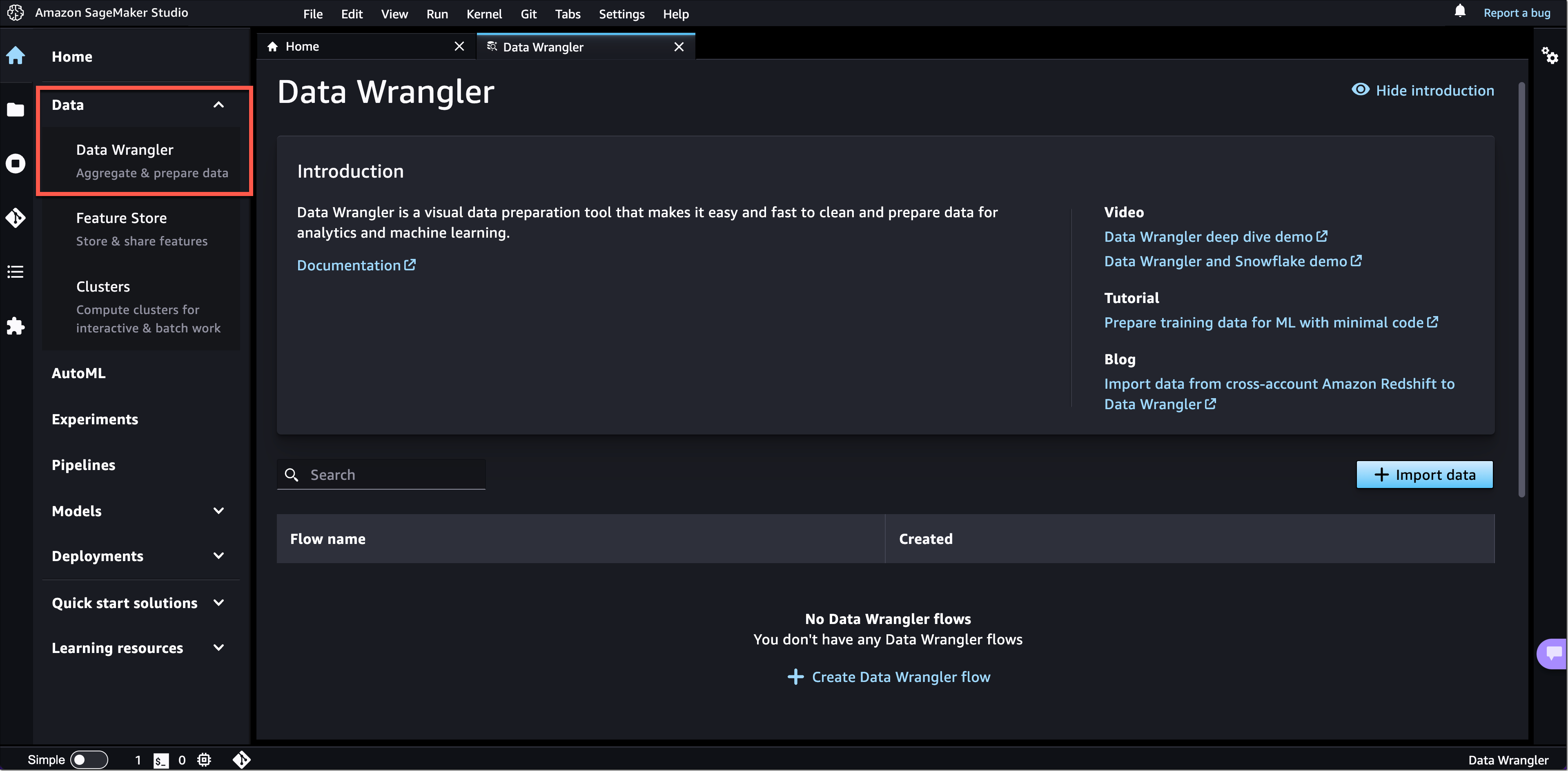
If you click on Data Wrangler, the new landing page opens. These landing pages are designed to help you get started more easily. You can find a brief introduction to the tool and links to additional resources, such as videos, tutorials, or blogs.

Amazon SageMaker Studio - New Feature Landing Pages

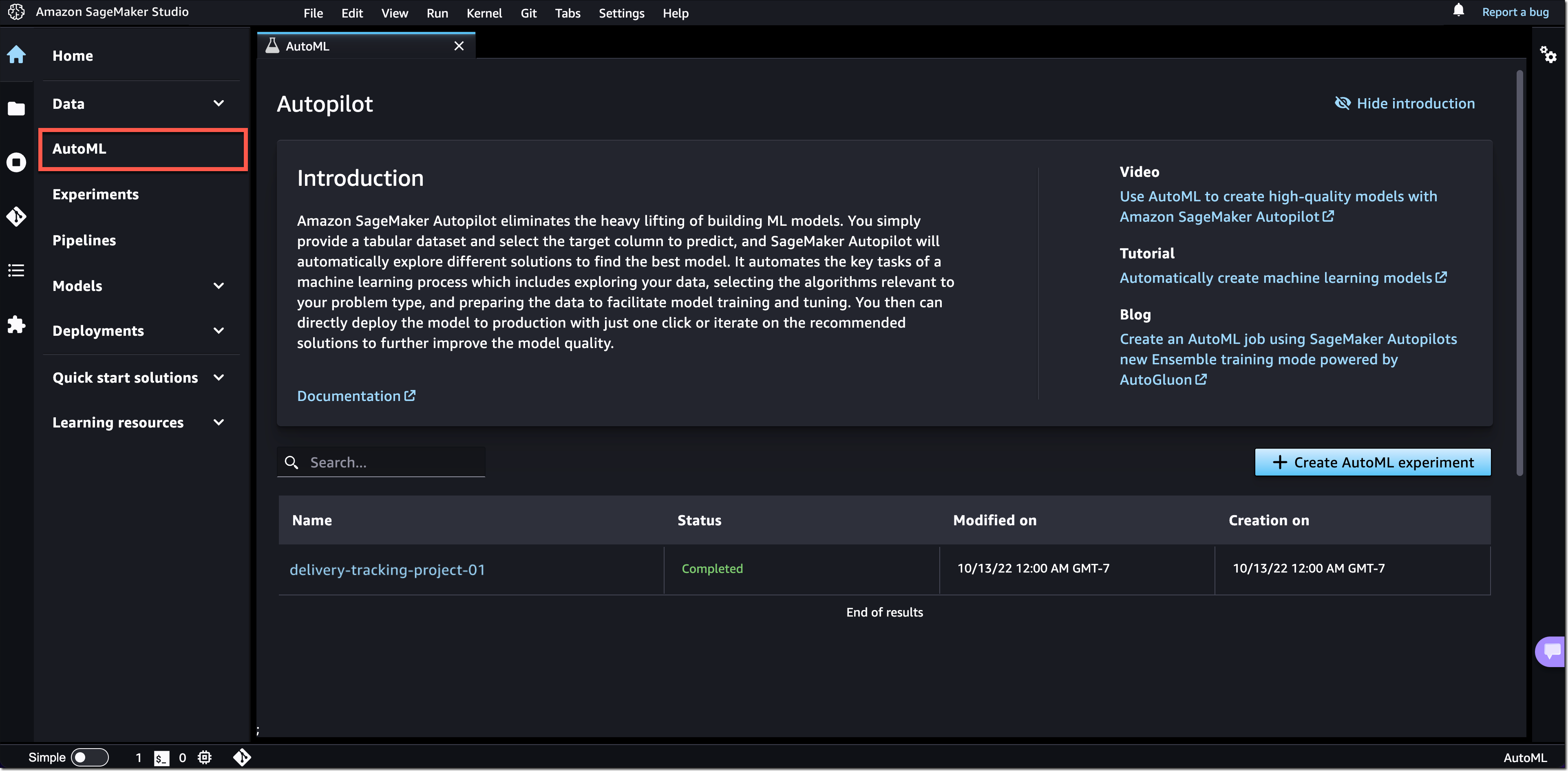
Similar landing pages exist for the other navigation menu items. For example, with one click on AutoML, you can now see your existing SageMaker Autopilot experiments or get started by creating a new one.

Amazon SageMaker Studio - New AutoML Landing Page

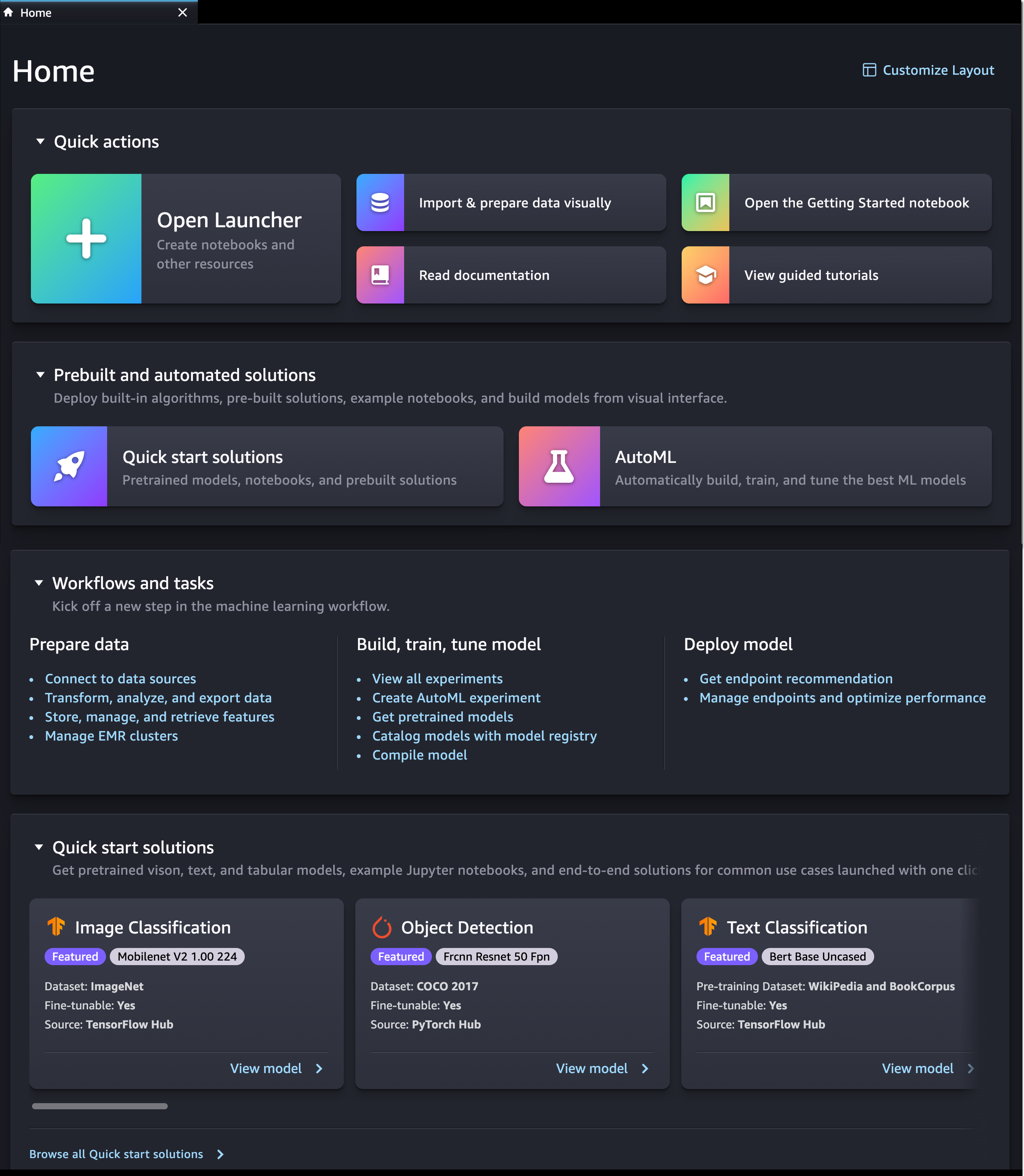
New SageMaker Studio Home Page
We also added a new SageMaker Studio Home page with tooltips on key controls in the UI.

The Home page includes a list of Quick actions for common tasks, such as Open Launcher to create notebooks and other resources. Import & prepare data visually takes you to SageMaker Data Wrangler and helps you get started with your data preparation tasks. You can open the new Getting Started notebook or find additional resources, such as documentation and tutorials.

The Prebuilt and automated solutions help you get started quickly with prebuilt solutions, pretrained open-source models, and AutoML.

In Workflows and tasks, you find a list of relevant tasks for each step in your ML development workflow that take you to the right tool for the job. For example, Store, manage, and retrieve features takes you to SageMaker Feature Store and opens the feature catalog. Similarly, View all experiments takes you to SageMaker Experiments and opens the experiments list view.

In Quick start solutions, you can find pretrained vision, text, and tabular models, notebooks, and end-to-end solutions for common use cases.

Amazon SageMaker Studio - New Home Page

New Getting Started Notebook
SageMaker Studio now includes a new Getting Started notebook that walks you through the basics of how to use SageMaker Studio. If you are a first-time user of SageMaker Studio, this is the perfect starting place. The notebook covers everything from the fundamentals of JupyterLab to a practical walkthrough of training an ML model. The notebook also provides detailed insight into SageMaker-specific functionality, resources, and tools.

New SageMaker Studio Launcher
The Launcher is designed to help you invoke JupyterLab actions and has been optimized to give you quick access to the most frequent tasks, such as creating a notebook, opening a code console, or opening an image terminal. In the same step, you can also choose the image, kernel, instance type, or startup script as needed. 

Amazon SageMaker Studio - New Launcher

Now Available
The redesigned Amazon SageMaker Studio UI is now available in all AWS Regions where SageMaker Studio is available. The redesigned UI is supported by SageMaker Studio domains running on JupyterLab 3. For instructions on how to update the JupyterLab version, see View and update the JupyterLab version of an app from the console.

Give the new user experience a try, and let us know what you think through the purple Feedback widget in SageMaker Studio, or through your usual AWS support contacts.

Start building your ML projects with Amazon SageMaker Studio today!

— Antje

New for Amazon Transcribe – Real-Time Analytics During Live Calls

Post Syndicated from Danilo Poccia original https://aws.amazon.com/blogs/aws/new-for-amazon-transcribe-real-time-analytics-during-live-calls/

The experience customers have when interacting with a contact center can have a profound impact on them. For this reason, we launched Amazon Transcribe Call Analytics last year to help you analyze customer call recordings and get insights into issues and trends related to customer satisfaction and agent performance.

To assist agents in resolving live calls faster, we are introducing today real-time call analytics in Amazon Transcribe Call Analytics. Real-time call analytics provides APIs for developers to accurately transcribe live calls and at the same time identify customer experience issues and sentiment in real time. Transcribe Call Analytics uses state-of-the-art machine learning capabilities to automatically assess thousands of in-progress calls and detect customer experience issues, such as repeated requests to speak to a manager or cancel a subscription.

With a few clicks, supervisors and analysts can create categories in the AWS console to identify customer experience issues using criteria such as specific terms such as “not happy,” “poor quality,” and “cancel my subscription.” Transcribe Call Analytics analyzes in-progress calls in real time to detect when a category is met. Developers can use those signals, along with sentiment trends from the API, to build a proactive system that alerts supervisors about emerging issues or assists agents with relevant information to solve customer issues.

Transcribe Call Analytics also provides a real-time transcript of the live conversation that supervisors can use to quickly get up to speed on the customer interaction and assess the appropriate action. The in-call transcript also eliminates the need for customers to repeat themselves if the call is transferred to another agent. Agents can focus all their attention on the customer during the call instead of taking notes for entry in a CRM system because Transcribe Call Analytics includes an automated call summarization capability, which identifies the issue, outcome, and action item associated with a call.

Transcribe Call Analytics is a foundational API for AWS Contact Center Intelligence solutions such as post-call analytics and the updated real-time call analytics with agent assist solution using the new real-time capabilities.

Let’s see how this works in practice.

Exploring Real-Time Call Analytics in the Console
To see how this works visually, I use the Amazon Transcribe console. First, I create a category to be notified if some terms are used in the call that would require an escalation. I choose Category Management from the navigation pane and then Create category.

I enter Escalation as the name for the category. I select REAL_TIME in the Category type dropdown. Then, I choose Create from scratch.

Console screenshot.

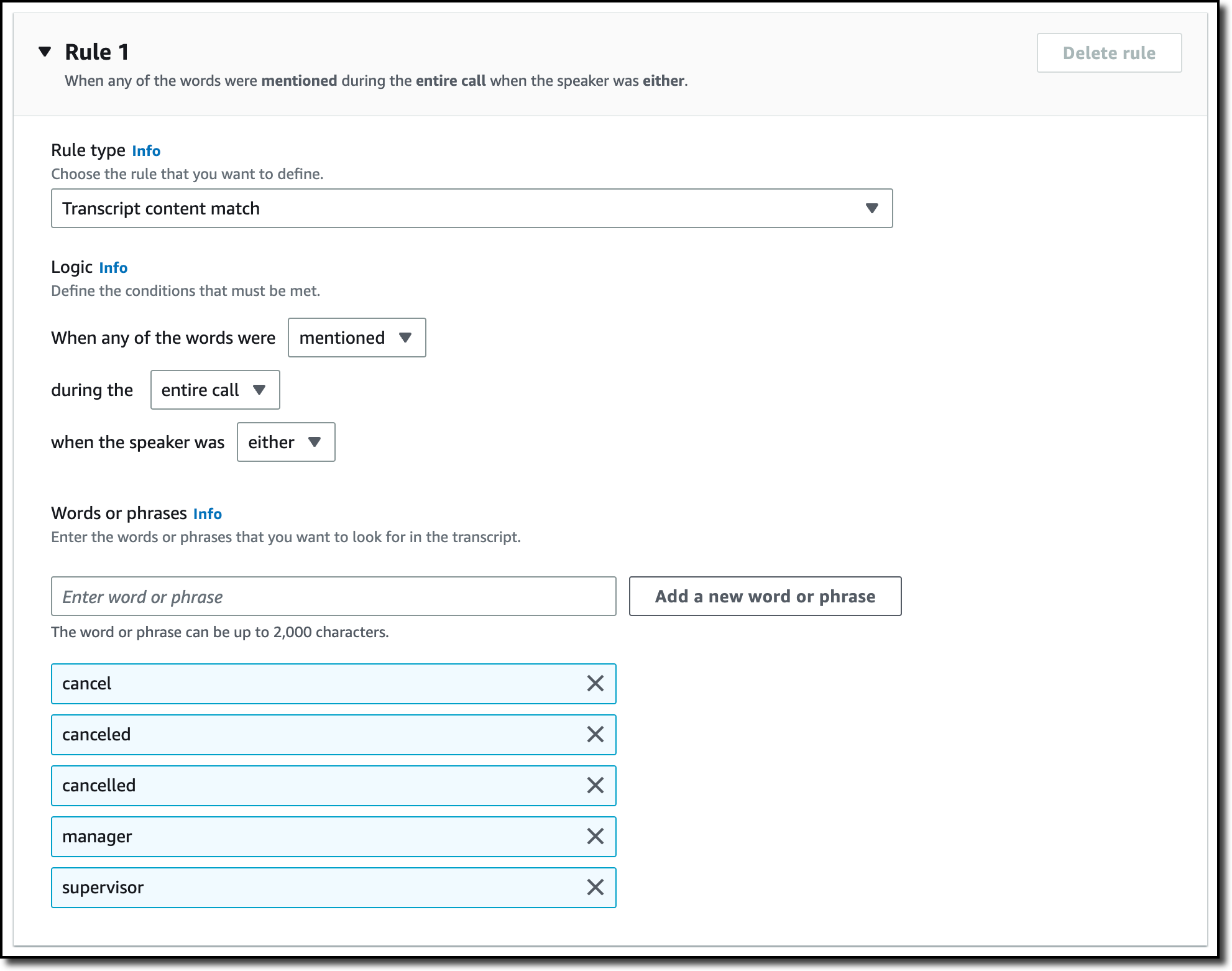
I only need one rule for this category. In the Rule type dropdown, I select Transcript content match. In the next three options, I choose to trigger the rule when any of the words are mentioned during the entire call, and the speaker is either the customer or the agent. Now, I can enter the words or phrases to look for in the transcript. In this case, I enter cancel, canceled, cancelled, manager, and supervisor. In your case, you might be more specific depending on your business. For example, if subscriptions are your business, you can look for the phrase cancel my subscription.

Console screenshot.

Now that the category has been created, I use one of the sample calls in the console to test it. I choose Real-Time Analytics in the navigation pane. By choosing Configure advanced settings, I can configure the personally identifiable information (PII) identification and redaction settings. For example, I can choose to identify personal data such as email addresses or redact financial data like bank account numbers.

With no additional charge, I can enable Post-call Analytics so that, at the end of the call, I receive the output of the transcription job in an Amazon Simple Storage Service (Amazon S3) bucket. This output is in a similar format to what I’d receive if I were analyzing a call recording with Transcribe Call Analytics. In this way, I can use the post-call analytics output derived from the audio stream in any process I already have in place for output of analytics generated from call recordings, for example, to update dashboards or generate periodic reports.

With Insurance complaints in Step 1: Specify input audio selected, I choose Start streaming. In the Transcription output section of the console, I receive in real-time the transcription of the call. The words of the customer and agent appear as they are pronounced. Each sentence is flagged with its recognized sentiment (positive, neutral, or negative). The Escalation category that I just configured is found in two sentences, first, when the customer mentions that their insurance has been canceled, and then when the agent mentions their manager. Also, part of a sentence is underlined because an issue has been detected.

Console screenshot.

Using the Download dropdown, I download the full JSON transcript. If I am only interested in the transcription, I can download the text transcript. The JSON transcript contains an array where each item is similar to what I’d get in real time when using the real-time call analytics API.

Using the Live Call Analytics With Agent Assist (LCA) Solution
You can use the open-source real-time call analytics with agent assist solution for your contact center or as an inspiration of what Amazon Transcribe enables for developers. Let’s look at a couple of screenshots to understand how it works.

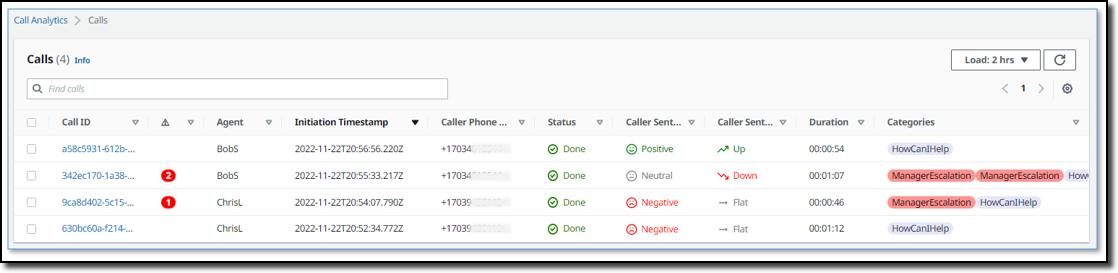
Here there is a list of on-going calls with the overall sentiment, the sentiment trend (is it improving or not?), and the categories found in real-time during the call that can be used for specific activities.

Screenshot from the real-time call analytics with agent assist solution.

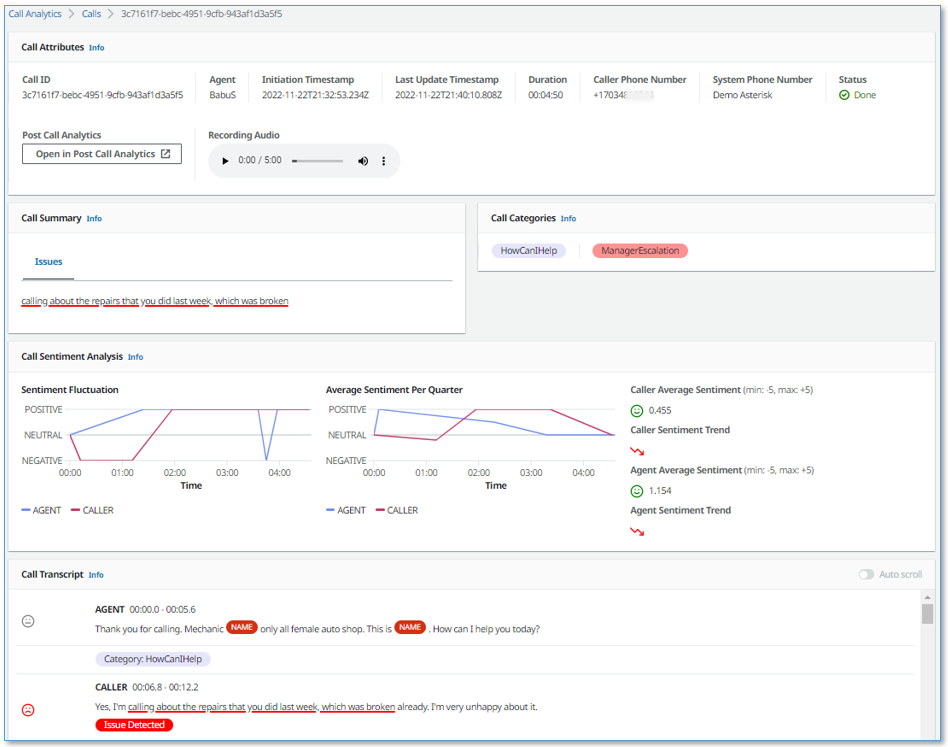
When selecting a call from the list, you have access to more in-depth information, including the call transcript and the issues found during the on-going call. This allows to take action quickly to help resolve the call.

Screenshot from the real-time call analytics with agent assist solution.

Availability and Pricing
Amazon Transcribe Call Analytics with real-time capabilities is available today in US (N. Virginia, Oregon), Canada (Central), Europe (Frankfurt, London), and Asia Pacific (Seoul, Sydney, Tokyo) and supports US English, British English, Australian English, US Spanish, Canadian French, French, German, Italian, and Brazilian Portuguese.

With Amazon Transcribe Call Analytics, you pay as you go and are billed monthly based on tiered pricing. For more information, see Amazon Transcribe pricing.

As part of the AWS Free Tier, you can get started with Amazon Transcribe Call Analytics for free, including the new real-time call analytics API. You can analyze up to 60 minutes of call audio monthly for free for the first 12 months. For more information, see the AWS Free Tier page.

If you’re at re:Invent, you can learn more about this new capability in session AIM307 – JPMorganChase real-time agent assist for contact center productivity. I will update this post when the recording of the session is publicly available.

Start analyzing contact center conversations in real-time to improve your customers’ experience.

— Danilo

Architecting near real-time personalized recommendations with Amazon Personalize

Post Syndicated from Raghavarao Sodabathina original https://aws.amazon.com/blogs/architecture/architecting-near-real-time-personalized-recommendations-with-amazon-personalize/

Delivering personalized customer experiences enables organizations to improve business outcomes such as acquiring and retaining customers, increasing engagement, driving efficiencies, and improving discoverability. Developing an in-house personalization solution can take a lot of time, which increases the time it takes for your business to launch new features and user experiences.

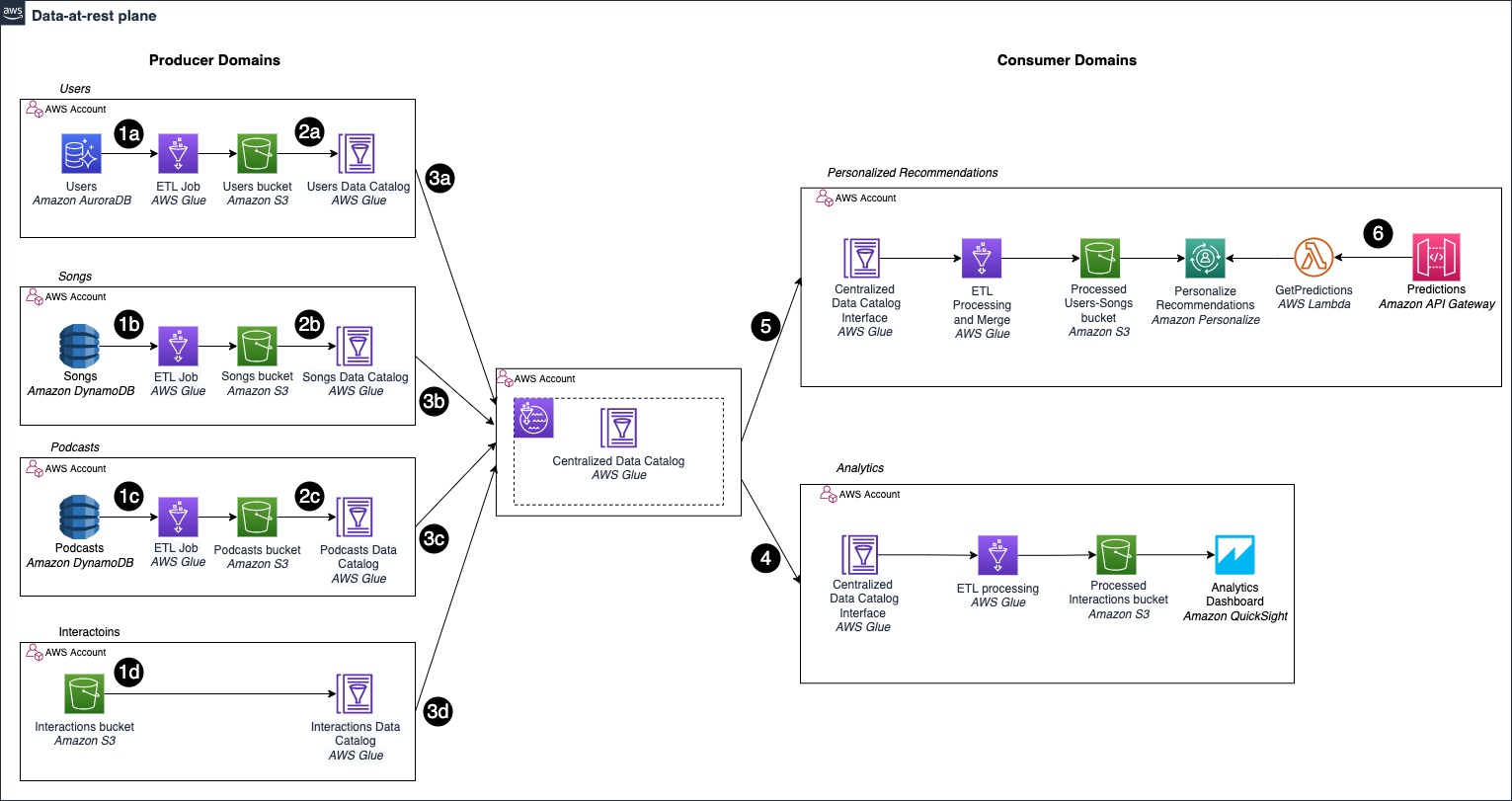
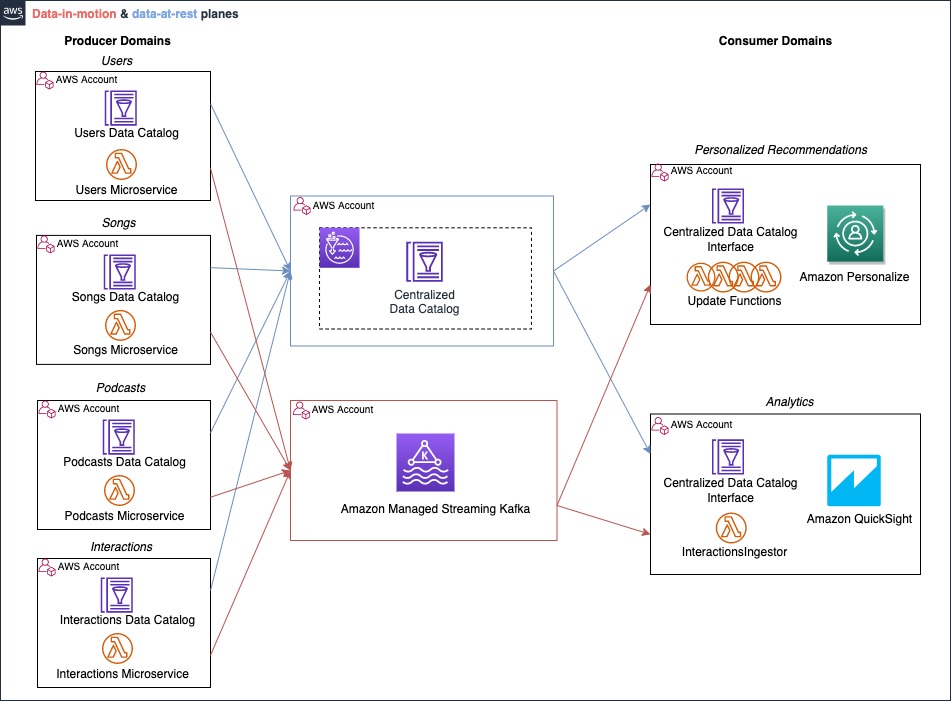
In this post, we show you how to architect near real-time personalized recommendations using Amazon Personalize and AWS purpose-built data services.  We also discuss key considerations and best practices while building near real-time personalized recommendations.

Building personalized recommendations with Amazon Personalize

Amazon Personalize makes it easy for developers to build applications capable of delivering a wide array of personalization experiences, including specific product recommendations, personalized product re-ranking, and customized direct marketing.

Amazon Personalize provisions the necessary infrastructure and manages the entire machine learning (ML) pipeline, including processing the data, identifying features, using the most appropriate algorithms, and training, optimizing, and hosting the models. You receive results through an Application Programming Interface (API) and pay only for what you use, with no minimum fees or upfront commitments.

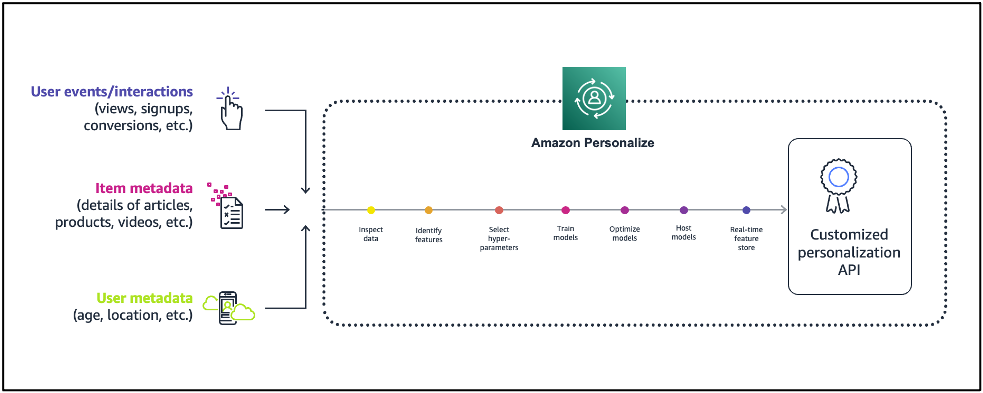
Figure 1 illustrates the comparison of Amazon Personalize with the ML lifecycle.

Machine learning lifecycle vs. Amazon Personalize

Figure 1. Machine learning lifecycle vs. Amazon Personalize

First, provide the user and items data to Amazon Personalize. In general, there are three steps for building near real-time recommendations with Amazon Personalize:

  1. Data preparation: Preparing data is one of the prerequisites for building accurate ML models and analytics, and it is the most time-consuming part of an ML project. There are three types of data you use for modeling on Amazon Personalize:
    • An Interactions data set captures the activity of your users, also known as events. Examples include items your users click on, purchase, or watch. The events you choose to send are dependent on your business domain. This data set has the strongest signal for personalization, and is the only mandatory data set.
    • An Items data set includes details about your items, such as price point, category information, and other essential information from your catalog. This data set is optional, but very useful for scenarios such as recommending new items.
    • A Users data set includes details about the users, such as their location, age, and other details.
  2. Train the model with Amazon Personalize: Amazon Personalize provides recipes, based on common use cases for training models. A recipe is an Amazon Personalize algorithm prepared for a given use case. Refer to Amazon Personalize recipes for more details. The four types of recipes are:
    • USER_PERSONALIZATION: Recommends items for a user from a catalog. This is often included on a landing page.
    • RELATED_ITEM: Suggests items similar to a selected item on a detail page.
    • PERSONALZIED_RANKING: Re-ranks a list of items for a user within a category or in within search results.
    • USER_SEGMENTATION: Generates segments of users based on item input data. You can use this to create a targeted marketing campaign for particular products by brand.
  3. Get near real-time recommendations: Once your model is trained, a private personalization model is hosted for you. You can then provide recommendations for your users through a private API.

Figure 2 illustrates a high-level overview of Amazon Personalize:

Figure 2. Building recommendations with Amazon Personalize

Figure 2. Building recommendations with Amazon Personalize

Near real-time personalized recommendations reference architecture

Figure 3 illustrates how to architect near real-time personalized recommendations using Amazon Personalize and AWS purpose-built data services.

Reference architecture for near real-time recommendations

Figure 3. Near real-time recommendations reference architecture

Architecture flow:

  1. Data preparation: Start by creating a dataset group, schemas, and datasets representing your items, interactions, and user data.
  2. Train the model: After importing your data, select the recipe matching your use case, and then create a solution to train a model by creating a solution version.
    Once your solution version is ready, you can create a campaign for your solution version. You can create a campaign for every solution version that you want to use for near real-time recommendations.
    In this example architecture, we’re just showing a single solution version and campaign. If you were building out multiple personalization use cases with different recipes, you could create multiple solution versions and campaigns from the same datasets.
  3. Get near real-time recommendations: Once you have a campaign, you can integrate calls to the campaign in your application. This is where calls to the GetRecommendations or GetPersonalizedRanking APIs are made to request near real-time recommendations from Amazon Personalize.
    • The approach you take to integrate recommendations into your application varies based on your architecture but it typically involves encapsulating recommendations in a microservice or AWS Lambda function that is called by your website or mobile application through a RESTful or GraphQL API interface.
    • Near real-time recommendations support the ability to adapt to each user’s evolving interests. This is done by creating an event tracker in Amazon Personalize.
    • An event tracker provides an endpoint that allows you to stream interactions that occur in your application back to Amazon Personalize in near real-time. You do this by using the PutEvents API.
    • Again, the architectural details on how you integrate PutEvents into your application varies, but it typically involves collecting events using a JavaScript library in your website or a native library in your mobile apps, and making API calls to stream them to your backend. AWS provides the AWS Amplify framework that can be integrated into your web and mobile apps to handle this for you.
    • In this example architecture, you can build an event collection pipeline using  Amazon API Gateway, Amazon Kinesis Data Streams, and Lambda to receive and forward interactions to Amazon Personalize.
    • The Event Tracker performs two primary functions. First, it persists all streamed interactions so they will be incorporated into future retraining of your model. This also how Amazon Personalize cold starts new users. When a new user visits your site, Amazon Personalize will recommend popular items. After you stream in an event or two, Amazon Personalize immediately starts adjusting recommendations.

Key considerations and best practices

  1. For all use cases, your interactions data must have a minimum 1000 interaction records from users interacting with items in your catalog. These interactions can be from bulk imports, streamed events, or both, and a minimum 25 unique user IDs with at least two interactions for each.
  2. Metadata fields (user or item) can be used for training, filters, or both.
  3. Amazon Personalize supports the encryption of your imported data. You can specify a role allowing Amazon Personalize to use an AWS Key Management Service (AWS KMS) key to decrypt your data, or use the Amazon Simple Storage Service (Amazon S3) AES-256 server-side default encryption.
  4. You can re-train Amazon Personalize deployments based on how much interaction data you generate on a daily basis. A good rule is to re-train your models once every week or two as needed.
  5. You can apply business rules for personalized recommendations using filters. Refer to Filtering recommendations and user segments for more details.

Conclusion

In this post, we showed you how to build near real-time personalized recommendations using Amazon Personalize and AWS purpose-built data services. With the information in this post, you can now build your own personalized recommendations for your applications.

Read more and get started on building personalized recommendations on AWS:

New Research: Optimizing DAST Vulnerability Triage with Deep Learning

Post Syndicated from Tom Caiazza original https://blog.rapid7.com/2022/11/09/new-research-optimizing-dast-vulnerability-triage-with-deep-learning/

New Research: Optimizing DAST Vulnerability Triage with Deep Learning

On November 11th 2022, Rapid7 will for the first time publish and present state-of-the-art machine learning (ML) research at AISec, the leading venue for AI/ML cybersecurity innovations. Led by Dr. Stuart Millar, Senior Data Scientist, Rapid7’s multi-disciplinary ML group has designed a novel deep learning model to automatically prioritize application security vulnerabilities and reduce false positive friction. Partnering with The Centre for Secure Information Technologies (CSIT) at Queen’s University Belfast, this is the first deep learning system to optimize DAST vulnerability triage in application security. CSIT is the UK’s Innovation and Knowledge Centre for cybersecurity, recognised by GCHQ and EPSRC as a Centre of Excellence for cybersecurity research.

Security teams struggle tremendously with prioritizing risk and managing a high level of false positive alerts, while the rise of the cloud post-Covid means web application security is more crucial than ever. Web attacks continue to be the most common type of compromise; however, high levels of false positives generated by vulnerability scanners have become an industry-wide challenge. To combat this, Rapid7’s innovative ML architecture optimizes vulnerability triage by utilizing the structure of traffic exchanges between a DAST scanner and a given web application. Leveraging convolutional neural networks and natural language processing, we designed a deep learning system that encapsulates internal representations of request and response HTTP traffic before fusing them together to make a prediction of a verified vulnerability or a false positive. This system learns from historical triage carried out by our industry-leading SMEs in Rapid7’s Managed Services division.

Given the skillset, time, and cognitive effort required to review high volumes of DAST results by hand, the addition of this deep learning capability to a scanner creates a hybrid system that enables application security analysts to rank scan results, deprioritise false positives, and concentrate on likely real vulnerabilities. With the system able to make hundreds of predictions per second, productivity is improved and remediation time reduced, resulting in stronger customer security postures. A rigorous evaluation of this machine learning architecture across multiple customers shows that 96% of false positives on average can automatically be detected and filtered out.

Rapid7’s deep learning model uses convolutional neural networks and natural language processing to represent the structure of client-server web traffic. Neither the model nor the scanner require source code access — with this hybrid approach first finding potential vulnerabilities using a scan engine, followed by the model predicting those findings as real vulnerabilities or false positives. The resultant solution enables the augmentation of triage decisions by deprioritizing false positives. These time savings are essential to reduce exposure and harden security postures — considering the average time to detect a web breach can be several months, the sooner a vulnerability can be discovered, verified and remediated, the smaller the window of opportunity for an attacker.

Now recognized as state-of-the-art research after expert peer review, Rapid7 will introduce the work at AISec on Nov 11th 2022 at the Omni Los Angeles Hotel at California Plaza. Watch this space for further developments, and download a copy of the pre-print publication here.

AWS Week in Review – October 31, 2022

Post Syndicated from Antje Barth original https://aws.amazon.com/blogs/aws/aws-week-in-review-october-31-2022/

No tricks, just treats in this weekly roundup of news and announcements. Let’s switch our AWS Management Console into dark mode and dive right into it.

Last Week’s Launches
Here are some launches that got my attention during the previous week:

AWS Local Zones in Hamburg and Warsaw now generally available – AWS Local Zones help you run latency-sensitive applications closer to end users. The AWS Local Zones in Hamburg, Germany, and Warsaw, Poland, are the first Local Zones in Europe. AWS Local Zones are now generally available in 20 metro areas globally, with announced plans to launch 33 additional Local Zones in metro areas around the world. See the full list of available and announced AWS Local Zones, and learn how to get started.

Amazon SageMaker multi-model endpoint (MME) now supports GPU instances – MME is a managed capability of SageMaker Inference that lets you deploy thousands of models on a single endpoint. MMEs can now run multiple models on a GPU core, share GPU instances behind an endpoint across multiple models, and dynamically load and unload models based on the incoming traffic. This can help you reduce costs and achieve better price performance. Learn how to run multiple deep learning models on GPU with Amazon SageMaker multi-model endpoints.

Amazon EC2 now lets you replace the root Amazon EBS volume for a running instance – You can now use the Replace Root Volume for patching features in Amazon EC2 to replace your instance root volume using an updated AMI without needing to stop the instance. This makes patching of the guest operating system and applications easier, while retraining the instance store data, networking, and IAM configuration. Check out the documentation to learn more.

AWS Fault Injection Simulator now supports network connectivity disruption – AWS Fault Injection Simulator (FIS) is a managed service for running controlled fault injection experiments on AWS. AWS FIS now has a new action type to disrupt network connectivity and validate that your applications are resilient to a total or partial loss of connectivity. To learn more, visit Network Actions in the AWS FIS user guide.

Amazon SageMaker Automatic Model Tuning now supports Grid Search – SageMaker Automatic Model Tuning helps you find the hyperparameter values that result in the best-performing model for a chosen metric. Until now, you could choose between random, Bayesian, and hyperband search strategies. Grid search now lets you cover every combination of the specified hyperparameter values for use cases in which you need reproducible tuning results. Learn how Amazon SageMaker Automatic Model Tuning now supports grid search.

For a full list of AWS announcements, be sure to keep an eye on the What’s New at AWS page.

Other AWS News
Here are some additional news items that you may find interesting:

Celebrating over 20 years of AI/ML innovation – On October 25, we hosted the AWS AI/ML Innovation Day. Bratin Saha and other leaders in the field shared the great strides we have made in the past and discussed what’s next in the world of ML. You can watch the recording here.

AWS open-source news and updates – My colleague Ricardo Sueiras writes this weekly open-source newsletter in which he highlights new open-source projects, tools, and demos from the AWS Community. Read edition #133 here.

Upcoming AWS Events
Check your calendars and sign up for these AWS events:

AWS re:Invent is only 4 weeks away! Join us live in Las Vegas from November 28–December 2 for keynote announcements, training and certification opportunities, access to 1,500+ technical sessions, and much more. Seats are still available to reserve, and walk-ups are available onsite. You can also join us online to watch live keynotes and leadership sessions.

If you are into machine learning like me, check out the ML attendee guide. AWS Machine Learning Hero Vinicius Caridá put together recommended sessions and tips and tricks for building your agenda. We also have attendee guides on additional topics and industries.

On November 2, there is a virtual event for building modern .NET applications on AWS. You can register for free.

On November 11–12, AWS User Groups in India are hosting the AWS Community Day India 2022, with success stories, use cases, and much more from industry leaders. Sign up for free to join this virtual event.

That’s all for this week. Check back next Monday for another Week in Review!

— Antje

This post is part of our Week in Review series. Check back each week for a quick roundup of interesting news and announcements from AWS!

Adversarial ML Attack that Secretly Gives a Language Model a Point of View

Post Syndicated from Bruce Schneier original https://www.schneier.com/blog/archives/2022/10/adversarial-ml-attack-that-secretly-gives-a-language-model-a-point-of-view.html

Machine learning security is extraordinarily difficult because the attacks are so varied—and it seems that each new one is weirder than the next. Here’s the latest: a training-time attack that forces the model to exhibit a point of view: Spinning Language Models: Risks of Propaganda-As-A-Service and Countermeasures.”

Abstract: We investigate a new threat to neural sequence-to-sequence (seq2seq) models: training-time attacks that cause models to “spin” their outputs so as to support an adversary-chosen sentiment or point of view—but only when the input contains adversary-chosen trigger words. For example, a spinned summarization model outputs positive summaries of any text that mentions the name of some individual or organization.

Model spinning introduces a “meta-backdoor” into a model. Whereas conventional backdoors cause models to produce incorrect outputs on inputs with the trigger, outputs of spinned models preserve context and maintain standard accuracy metrics, yet also satisfy a meta-task chosen by the adversary.

Model spinning enables propaganda-as-a-service, where propaganda is defined as biased speech. An adversary can create customized language models that produce desired spins for chosen triggers, then deploy these models to generate disinformation (a platform attack), or else inject them into ML training pipelines (a supply-chain attack), transferring malicious functionality to downstream models trained by victims.

To demonstrate the feasibility of model spinning, we develop a new backdooring technique. It stacks an adversarial meta-task onto a seq2seq model, backpropagates the desired meta-task output to points in the word-embedding space we call “pseudo-words,” and uses pseudo-words to shift the entire output distribution of the seq2seq model. We evaluate this attack on language generation, summarization, and translation models with different triggers and meta-tasks such as sentiment, toxicity, and entailment. Spinned models largely maintain their accuracy metrics (ROUGE and BLEU) while shifting their outputs to satisfy the adversary’s meta-task. We also show that, in the case of a supply-chain attack, the spin functionality transfers to downstream models.

This new attack dovetails with something I’ve been worried about for a while, something Latanya Sweeney has dubbed “persona bots.” This is what I wrote in my upcoming book (to be published in February):

One example of an extension of this technology is the “persona bot,” an AI posing as an individual on social media and other online groups. Persona bots have histories, personalities, and communication styles. They don’t constantly spew propaganda. They hang out in various interest groups: gardening, knitting, model railroading, whatever. They act as normal members of those communities, posting and commenting and discussing. Systems like GPT-3 will make it easy for those AIs to mine previous conversations and related Internet content and to appear knowledgeable. Then, once in a while, the AI might post something relevant to a political issue, maybe an article about a healthcare worker having an allergic reaction to the COVID-19 vaccine, with worried commentary. Or maybe it might offer its developer’s opinions about a recent election, or racial justice, or any other polarizing subject. One persona bot can’t move public opinion, but what if there were thousands of them? Millions?

These are chatbots on a very small scale. They would participate in small forums around the Internet: hobbyist groups, book groups, whatever. In general they would behave normally, participating in discussions like a person does. But occasionally they would say something partisan or political, depending on the desires of their owners. Because they’re all unique and only occasional, it would be hard for existing bot detection techniques to find them. And because they can be replicated by the millions across social media, they could have a greater effect. They would affect what we think, and—just as importantly—what we think others think. What we will see as robust political discussions would be persona bots arguing with other persona bots.

Attacks like these add another wrinkle to that sort of scenario.

Amazon EC2 Trn1 Instances for High-Performance Model Training are Now Available

Post Syndicated from Antje Barth original https://aws.amazon.com/blogs/aws/amazon-ec2-trn1-instances-for-high-performance-model-training-are-now-available/

Deep learning (DL) models have been increasing in size and complexity over the last few years, pushing the time to train from days to weeks. Training large language models the size of GPT-3 can take months, leading to an exponential growth in training cost. To reduce model training times and enable machine learning (ML) practitioners to iterate fast, AWS has been innovating across chips, servers, and data center connectivity.

At AWS re:Invent 2021, we announced the preview of Amazon EC2 Trn1 instances powered by AWS Trainium chips. AWS Trainium is optimized for high-performance deep learning training and is the second-generation ML chip built by AWS, following AWS Inferentia.

Today, I’m excited to announce that Amazon EC2 Trn1 instances are now generally available! These instances are well-suited for large-scale distributed training of complex DL models across a broad set of applications, such as natural language processing, image recognition, and more.

Compared to Amazon EC2 P4d instances, Trn1 instances deliver 1.4x the teraFLOPS for BF16 data types, 2.5x more teraFLOPS for TF32 data types, 5x the teraFLOPS for FP32 data types, 4x inter-node network bandwidth, and up to 50 percent cost-to-train savings. Trn1 instances can be deployed in EC2 UltraClusters that serve as powerful supercomputers to rapidly train complex deep learning models. I’ll share more details on EC2 UltraClusters later in this blog post.

New Trn1 Instance Highlights
Trn1 instances are available today in two sizes and are powered by up to 16 AWS Trainium chips with 128 vCPUs. They provide high-performance networking and storage to support efficient data and model parallelism, popular strategies for distributed training.

Trn1 instances offer up to 512 GB of high-bandwidth memory, deliver up to 3.4 petaFLOPS of TF32/FP16/BF16 compute power, and feature an ultra-high-speed NeuronLink interconnect between chips. NeuronLink helps avoid communication bottlenecks when scaling workloads across multiple Trainium chips.

Trn1 instances are also the first EC2 instances to enable up to 800 Gbps of Elastic Fabric Adapter (EFA) network bandwidth for high-throughput network communication. This second generation EFA delivers lower latency and up to 2x more network bandwidth compared to the previous generation. Trn1 instances also come with up to 8 TB of local NVMe SSD storage for ultra-fast access to large datasets.

The following table lists the sizes and specs of Trn1 instances in detail.

Instance Name
vCPUs AWS Trainium Chips Accelerator Memory NeuronLink Instance Memory Instance Networking Local Instance Storage
trn1.2xlarge 8 1 32 GB N/A 32 GB Up to 12.5 Gbps 1x 500 GB NVMe
trn1.32xlarge 128 16 512 GB Supported 512 GB 800 Gbps 4x 2 TB NVMe

Trn1 EC2 UltraClusters
For large-scale model training, Trn1 instances integrate with Amazon FSx for Lustre high-performance storage and are deployed in EC2 UltraClusters. EC2 UltraClusters are hyperscale clusters interconnected with a non-blocking petabit-scale network. This gives you on-demand access to a supercomputer to cut model training time for large and complex models from months to weeks or even days.

Amazon EC2 Trn1 UltraCluster

AWS Trainium Innovation
AWS Trainium chips include specific scalar, vector, and tensor engines that are purpose-built for deep learning algorithms. This ensures higher chip utilization as compared to other architectures, resulting in higher performance.

Here is a short summary of additional hardware innovations:

  • Data Types: AWS Trainium supports a wide range of data types, including FP32, TF32, BF16, FP16, and UINT8, so you can choose the most suitable data type for your workloads. It also supports a new, configurable FP8 (cFP8) data type, which is especially relevant for large models because it reduces the memory footprint and I/O requirements of the model.
  • Hardware-Optimized Stochastic Rounding: Stochastic rounding achieves close to FP32-level accuracy with faster BF16-level performance when you enable auto-casting from FP32 to BF16 data types. Stochastic rounding is a different way of rounding floating-point numbers, which is more suitable for machine learning workloads versus the commonly used Round Nearest Even rounding. By setting the environment variable NEURON_RT_STOCHASTIC_ROUNDING_EN=1 to use stochastic rounding, you can train a model up to 30 percent faster.
  • Custom Operators, Dynamic Tensor Shapes: AWS Trainium also supports custom operators written in C++ and dynamic tensor shapes. Dynamic tensor shapes are key for models with unknown input tensor sizes, such as models processing text.

AWS Trainium shares the same AWS Neuron SDK as AWS Inferentia, making it easy for everyone who is already using AWS Inferentia to get started with AWS Trainium.

For model training, the Neuron SDK consists of a compiler, framework extensions, a runtime library, and developer tools. The Neuron plugin natively integrates with popular ML frameworks, such as PyTorch and TensorFlow.

The AWS Neuron SDK supports just-in-time (JIT) compilation, in addition to ahead-of-time (AOT) compilation, to speed up model compilation, and Eager Debug Mode, for a step-by-step execution.

To compile and run your model on AWS Trainium, you need to change only a few lines of code in your training script. You don’t need to tweak your model or think about data type conversion.

Get Started with Trn1 Instances
In this example, I train a PyTorch model on an EC2 Trn1 instance using the available PyTorch Neuron packages. PyTorch Neuron is based on the PyTorch XLA software package and enables conversion of PyTorch operations to AWS Trainium instructions.

Each AWS Trainium chip includes two NeuronCore accelerators, which are the main neural network compute units. With only a few changes to your training code, you can train your PyTorch model on AWS Trainium NeuronCores.

SSH into the Trn1 instance and activate a Python virtual environment that includes the PyTorch Neuron packages. If you’re using a Neuron-provided AMI, you can activate the preinstalled environment by running the following command:

source aws_neuron_venv_pytorch_p36/bin/activate

Before you can run your training script, you need to make a few modifications. On Trn1 instances, the default XLA device should be mapped to a NeuronCore.

Let’s start by adding the PyTorch XLA imports to your training script:

import torch, torch_xla
import torch_xla.core.xla_model as xm

Then, place your model and tensors onto an XLA device:

model.to(xm.xla_device())
tensor.to(xm.xla_device())

When the model is moved to the XLA device (NeuronCore), subsequent operations on the model are recorded for later execution. This is XLA’s lazy execution which is different from PyTorch’s eager execution. Within the training loop, you have to mark the graph to be optimized and run on the XLA device using xm.mark_step(). Without this mark, XLA cannot determine where the graph ends.

...
for data, target in train_loader:
	output = model(data)
	loss = loss_fn(output, target)
	loss.backward()
	optimizer.step()
	xm.mark_step()
...

You can now run your training script using torchrun <my_training_script>.py.

When running the training script, you can configure the number of NeuronCores to use for training by using torchrun –nproc_per_node.

For example, to run a multi-worker data parallel model training on all 32 NeuronCores in one trn1.32xlarge instance, run torchrun --nproc_per_node=32 <my_training_script>.py.

Data parallel is a strategy for distributed training that allows you to replicate your script across multiple workers, with each worker processing a portion of the training dataset. The workers then share their result with each other.

For more details on supported ML frameworks, model types, and how to prepare your model training script for large-scale distributed training across trn1.32xlarge instances, have a look at the AWS Neuron SDK documentation.

Profiling Tools
Let’s have a quick look at useful tools to keep track of your ML experiments and profile Trn1 instance resource consumption. Neuron integrates with TensorBoard to track and visualize your model training metrics.

AWS Neuron SDK TensorBoard integration

On the Trn1 instance, you can use the neuron-ls command to describe the number of Neuron devices present in the system, along with the associated NeuronCore count, memory, connectivity/topology, PCI device information, and the Python process that currently has ownership of the NeuronCores:

AWS Neuron SDK neuron-ls command

Similarly, you can use the neuron-top command to see a high-level view of the Neuron environment. This shows the utilization of each of the NeuronCores, any models that are currently loaded onto one or more NeuronCores, process IDs for any processes that are using the Neuron runtime, and basic system statistics relating to vCPU and memory usage.

AWS Neuron SDK neuron-top command

Available Now
You can launch Trn1 instances today in the AWS US East (N. Virginia) and US West (Oregon) Regions as On-Demand, Reserved, and Spot Instances or as part of a Savings Plan. As usual with Amazon EC2, you pay only for what you use. For more information, see Amazon EC2 pricing.

Trn1 instances can be deployed using AWS Deep Learning AMIs, and container images are available via managed services such as Amazon SageMaker, Amazon Elastic Kubernetes Service (Amazon EKS), Amazon Elastic Container Service (Amazon ECS), and AWS ParallelCluster.

To learn more, visit our Amazon EC2 Trn1 instances page, and please send feedback to AWS re:Post for EC2 or through your usual AWS Support contacts.

— Antje

Design a data mesh with event streaming for real-time recommendations on AWS

Post Syndicated from Vittorio Denti original https://aws.amazon.com/blogs/big-data/design-a-data-mesh-with-event-streaming-for-real-time-recommendations-on-aws/

This blog post was co-authored with Federico Piccinini.

The data landscape has been changing in recent years: there is a proliferation of entities producing and consuming large quantities of data within companies, and for most of them defining a proper data strategy has become of fundamental importance. A modern data strategy gives you a comprehensive plan to manage, access, analyze, and act on data.

As a result, more companies are considering the adoption of a data mesh architecture, a recently introduced paradigm where data is organized by domain, clear ownership of data and technology stack is enhanced, and a more agile setup is achieved. Because of this, some of your applications may need to be designed for a data-by-domain separation in order to benefit from a data mesh architecture.

In this post, we show you how to design a data mesh architecture for a scenario that requires real-time recommendations. The recommendation system is implemented through Amazon Personalize, a fully managed machine learning (ML) service, and works by consuming data by domain. For recommendations use cases, it’s important to have access to information about users, items, and interactions, often associated with different data sources within a company.

Because ML applications may have multiple types of input data, we propose a solution that works both for data at rest as well as real-time streaming. Real-time recommendations require streaming data in order to adapt to the user’s current intent.

Throughout the post, we introduce the data mesh paradigm and then extend it to a real-time use case by adding event streaming capabilities. We use the use case of a music streaming company that offers its customers the opportunity to listen to on-demand songs. The company has also started to offer, through the same platform, on-demand podcasts, and wants to take advantage of a modern data architecture to support data access for fast ML experimentation and inference.

Data mesh: A paradigm shift

Domain-driven design (DDD) represents a software design approach where complex solutions are divided into domains according to the underlying business logic. An architectural style that is often mentioned in the context of DDD is microservice architecture, a concept where software systems are structured into loosely coupled entities, namely microservices, each one owned by a small team and structured around business requirements. These paradigms, together with the advancement of cloud technologies, allowed companies to release software updates faster and continuously adapt their technology stack to evolving business requirements.

However, unlike software architectures, most data architectures were still designed around technologies rather than business domains. This changed in 2019, when Zhamak Dehghani introduced the data mesh. Data mesh is a paradigm shift towards data being treated as a product and processed as part of a domain. Data mesh applies the principles of DDD to data architectures: data is organized into data domains and the data is considered the product that the team owns and offers for consumption. This is a shift from a centralized ownership model to a decentralized one that allows companies to access data at scale. This shift also allows each team assigned to a data domain to build the data products by choosing the right technology for their job, analogous to software engineers working on a microservice.

Data mesh advocates for decentralized ownership and delivery of data management systems, while emphasizing the need for distributed governance and self-service tooling. The data mesh approach enables better autonomy of data domain owners and brings domains together to enable data sharing and federation across business units, without compromising on data security. This type of architecture supports the idea of distributed data, where all data is accessible for those with the right authority to access it. One key differentiator between a data lake and a data mesh is that in a data mesh, data doesn’t have to be consolidated into a single data lake and can remain within different databases.

For more information about the details and advantages of adopting the data mesh as a domain-driven data architecture, refer to Design a data mesh architecture using AWS Lake Formation and AWS Glue.

The components of a data mesh

Now that we have a good understanding of the data mesh paradigm, let’s look at the implementation and its components.

First, we start with data producers. These are the entities that are responsible for maintaining, owning, and exposing the specific data of their domain. Because of the domain separation, each producer can choose its own technology stack independently.

Similarly, we also have data consumers. These components, as their name indicates, use one or more data sources exposed by the producers. As before, adopting a data mesh architecture implies that each consumer is independent one another, meaning they could implement different technology stacks as well as solve different use cases.

The data-at-rest plane is then completed by the Centralized Data Catalog, a component that works as the link between producers and consumers. This middle layer is responsible for indexing the available data producers into a centralized data catalog as well as controlling access to the different data sources.

The data catalog is used by the producers to expose the data products (steps 1a and 1b) to the organization’s data scientists and data engineers working on the consumer domains. The following figure illustrates how data products should be easily discoverable: the central data catalog allows the data consumers to find their data source of interest (steps 2a and 2b) after they have been registered with the centralized catalog by their corresponding producer domain (steps 1a and 1b).

Working with real-time events

One could argue that this architecture can only support data at rest as it is; indeed, there is no straightforward solution to move data in real time from a producer domain to a consumer. The paradigm presented so far addresses the scenario of data at rest, where producers are pulling data on demand rather than being notified when data is changed.

Because several applications need to quickly respond to the changes happening in the environment, real-time data is an important consideration in data architectures. For example, an ecommerce platform or a video streaming service can extract value from the real-time user interactions with content. In these cases, it’s critical to track events as they happen, feed them in the ML model, and adapt the predictions accordingly.

In this section, we want to introduce some of the streaming platforms that can work to implement this pattern, with a focus on Apache Kafka because it’s frequently used and many companies are moving their Kafka workloads to the cloud.

Apache Kafka is an open-source distributed event streaming platform that captures data in real time from sources such as microservices or databases, stores the events in streams organized into topics, and reacts to these events in real time as well as retrospectively. Event streaming architectures built on Apache Kafka follow the publish/subscribe paradigm: the producers publish events to topics via a write operation, and the consumers, which subscribe to such topics, receive the events as they happen. An alternative to Apache Kafka in this scenario could be Amazon Kinesis Data Streams, a streaming service that allows developers to collect, store, and process real-time data in the cloud.

If we consider for example an ecommerce platform, we could have a Payment microservice running the payment functionalities of the system publishing events to Purchases topic, tracking every transaction happening on the platform. Then, we could have another component subscribing to the Purchases topic to receive the events and take action accordingly, for example by updating a dashboard for business intelligence. For more information on Apache Kafka, we recommend reading Introduction to Apache Kafka.

Event-streaming architecture

The data-in-motion plane is introduced to implement the publish/subscribe pattern in the context of a data mesh. Such a plane is composed of the set of producer and consumer domains connected via a central event streaming component that makes real-time events accessible. To benefit from the data-by-domain architecture, we consider each producer to have its own corresponding centralized stream, as shown in the following figure.

You can also think of the event stream as the channel for sending real-time events to the consumers, therefore each producer has its dedicated channel to send updates.

Each consumer can subscribe to multiple topics based on specific data needs. When new events are available, the corresponding producer publishes them in the associated stream (steps 1a and 1b) and the subscribers can read the events (step 2a and 2b), process them, and take action accordingly.

The preceding figure shows a scenario with N producer domains and M consumer domains: each consumer subscribes only to the streams of interest for that domain. In this example, Consumer #1 is subscribed to the events coming from Producer #1, while Consumer #M is subscribed to the events coming from both Producer #1 and Producer #N.

You could adopt this pattern to solve several use cases and data domains. For instance, a user playing a song on a music streaming platform can generate a new event sent from the Interactions service producer to the Personalization consumer, where the recommendation system generates personalized recommendations. Similarly, a Payment producer can send a transaction request, and a Fraud Detector consumer determines whether the transaction is fraudulent or not.

For producers and consumers to communicate correctly, the event payload schema needs to be consistent. Applications depend on schemas so no changes made to events break the implicit contract between producers and consumers. For complex use cases, you can use a schema registry to enforce compatibility in event streaming. For more information about the options for working with the AWS Glue Schema Registry, refer to Validate streaming data over Amazon MSK using schemas in cross-account AWS Glue Schema Registry.

Recommendation use case

Previously, we introduced the overall idea behind the data mesh architecture without focusing on a specific use case. In this section, we present a real-world scenario where the mesh paradigm is implemented using AWS.

Let’s consider the music streaming company XYZ, which offers its customers the opportunity to listen to on-demand songs. XYZ has recently started to offer, through the same platform, on-demand podcasts as well.

The ML team is interested in adding podcasts to the catalog of personalized recommendations that are presented to users. To do so, the ML team working on the recommendation system, which in the data mesh paradigm can be seen as a consumer, needs access to multiple data domains (producers): Users, Songs, Podcasts, and Interactions.

In this post, we use Amazon Personalize as a fully managed ML service for personalized recommendations. It allows developers to train, tune, and deploy custom ML models to deliver highly customized experiences. Amazon Personalize provisions the infrastructure and manages the entire ML pipeline, including processing the data; identifying features; and training, optimizing, and hosting the models. You can learn more about Amazon Personalize in the Developer Guide.

We now dive deeper into the implementation of the solution, both for the data-at-rest and data-in-motion scenario. ML needs large amounts of data at rest to create a dataset and train the models. Additionally, the personalization scenario requires access to real-time data to adapt to the users’ current intent, so we need access to real-time events and interactions. A data mesh solution for this scenario will require both:

  • Data at rest – Historical data from user, items, and interactions. Some of this could be stored in separate systems and data sources.
  • Data in motion – This data is for the real-time events, for instance songs listened to or new items made available in the catalog.

Architecture for data at rest

In this section, we focus on the data at rest part of the solution.

The following diagram shows how we can implement the data mesh architecture in the context of personalized recommendations, and include the podcasts in the recommendation system deployed with Amazon Personalize. Each producer domain owns the data and exposes them via the data catalogs. The consumers use the data catalogs to find the data they need for their application.

First, we can identify the three main components of the mesh architecture introduced before: data producers, the centralized data catalog, and data consumers.

In this specific example, we can see how different producer domains implement different storage solutions:

  • The Users domain uses Amazon Aurora as its own line of business (LOB) database, a relational database (step 1a)
  • Songs and Podcasts use Amazon DynamoDB, a NoSQL database (steps 1b and 1c)
  • Interactions ingests the events directly into Amazon S3 (step 1d)

The producer domains are decoupling their LOB databases from the data catalogs by using Amazon Simple Storage Service (Amazon S3). With the data mesh paradigm, each producer considers the data as a product, therefore it can preprocess the data before exposing them, and store the results in a format that is suitable for the consumers. This decoupling is implemented using AWS Glue to define an extract, transform, and load (ETL) pipeline, whose results are eventually stored in S3 buckets (steps 2a, 2b, 2c).

Finally, each producer shares its respective AWS Glue Data Catalog with the Centralized Data Catalog (steps 3a, 3b, 3c, 3d).

Data consumers can now access the different data domains through the central catalog. As shown in the preceding figure, we have two consumers: the Analytics domain, which accesses certain catalogs and showcases metrics on an Amazon QuickSight dashboard (step 4), and the Personalized Recommendations domain (step 5).

The latter, which is the one of interest for this post, consists of an AWS Glue ETL job that accesses, through the central catalog, data from the different producers. The ETL job performs traditional data engineering tasks, for example merging song and podcast data. We can now generate our Amazon Personalize solution, where our items dataset includes information about both songs and podcasts, expanding the initial recommendation catalog.

Our recommendation engine is then made available for inference requests through an API deployed using Amazon API Gateway (step 6).

The architecture is designed to work across multiple accounts: an AWS account is a natural boundary for the resources deployed into it and a single unit of billing. This approach allows us to separate the resources owned by the different domains and maintain operational agility: each team owns and controls its account. To learn more about the approaches for sharing data catalogs across different accounts while working with a data mesh, check out Design a data mesh architecture using AWS Lake Formation and AWS Glue.

We’re now able to provide users with song or podcast recommendations based on their comprehensive listening preferences across the two categories. In the next section, we explore how to improve the architecture to be reactive to continuously evolving data, such as new songs added to the catalog or new interactions made available.

Architecture for data in motion

Earlier, we introduced the theoretical framework for event streaming in the context of the data mesh, defined as the data-in-motion plane. We can now drill down into the architecture for our specific use case.

We’re using a scenario with four producers (Users, Songs, Podcasts, and Interactions), the central streaming component, and two consumer domains (Personalized Recommendations and Analytics). The data-in-motion plane is implemented by using a platform for event streaming, namely Apache Kafka, and each producer has a dedicated stream to publish its events.

In the scenario of real-time recommendations for music, the Personalized Recommendations consumer is notified about changes to Users, Songs, Podcasts, and Interactions. Similar to the at-rest example, we also consider a second consumer domain, called Analytics, used to create real-time dashboards about the trends in the interactions. Here, the analytics consumer requires only interaction events, therefore it subscribes only to the Interactions stream.

This architecture is designed to offer a loosely coupled interaction mechanism for producers and consumers: the producers don’t need to know about the consumers that are part of the system. The producers focus on emitting the events, the events are sent to the data-in-motion plane, and the delivery is guaranteed by the streaming platform.

Let’s drill down into the strategy for building this architecture in the cloud. For readability purposes, we study this part of the solution in isolation, without adding to the diagram of the data-at-rest scenario.

From a technological perspective, we use AWS Lambda to run the back-end business logic of the application: the microservice runs the logic in a Lambda function and publishes events to the event streams. We use Lambda because it fits our use case well, both for scalability and operational efficiency, because it offers minimal operational overhead. However, the architecture pattern is also valid for other types of backend deployments, for example, containers running on Amazon Elastic Kubernetes Service (Amazon EKS) or Amazon Elastic Container Service (Amazon ECS).

The data-in-motion plane is implemented using Amazon Managed Streaming for Apache Kafka (Amazon MSK), a fully managed solution for running Apache Kafka in the cloud. It provisions the servers, configures the Apache Kafka clusters, replaces servers when they fail, orchestrates server patches and upgrades, and runs clusters for high availability. Kafka organizes and stores events into topics. Topics are always multi-producer and multi-consumer: this means that one or many producers can publish to the same topic, and one or many consumers can subscribe to read from the topic. We use the concept of topics to model this architecture paradigm, and we assign one topic for each producer domain.

Finally, we adapt our previously introduced consumer domain, Personalized Recommendations, to take into account real-time events. This time, we use Lambda to read the events from the topics and invoke the commands to call the Amazon Personalize API through the Amazon Personalize SDK. Within the same consumer domain, we use a Lambda function per topic, which is triggered as soon as a new event is published in the monitored topic. This event-driven pattern allows us to run code only when a new event is published and we need to update the information in Amazon Personalize. Each Lambda function in the Personalized Recommendations domain uses the Amazon Personalize SDK to invoke the corresponding actions on Amazon Personalize and update the datasets.

Let’s consider a new interaction happening in the system using the following figure. This serverless implementation of the event streaming pattern extends the data mesh to respond to real-time events.

The Interactions microservice, which is running the backend logic of the application, publishes a new event (step 1), which is persisted in the Interactions topic (step 2). The publishing of a new event triggers the Lambda functions subscribed to the topic, in this case InteractionsUpdate and InteractionsIngestor (step 3). The InteractionsUpdate function invokes the PutEvents operation on the Amazon Personalize API through the Amazon Personalize SDK to add the real-time event to the recommendation system (step 4). InteractionsIngestor triggers the operations to refresh the dashboards according to the strategy adopted by the Analytics domain. Finally, other services and components can consume the recommendations through the API exposed by the Personalized Recommendation domain to make the predictions consumable (step 5).

For the Analytics domain, which we added to showcase the scalability of this architecture, we use a Lambda function to ingest the real-time events into Amazon Kinesis Data Firehose. Then we can visualize the interactions using Amazon OpenSearch Service in conjunction with Amazon QuickSight. For more details, refer to Visualize live analytics from Amazon QuickSight connected to Amazon OpenSearch Service.

Because the data producers, Kafka resources, and data consumers are all in different accounts, we need to establish cross-account connectivity to keep the traffic within the AWS infrastructure and avoid the public internet, both for security reasons as well as cost-optimization. The objective of this post is to show the architecture and the approach to implement this pattern. If you want to dive deeper into how to establish cross-account connectivity between producers and consumers and Amazon MSK, refer to Secure connectivity patterns to access Amazon MSK and How Goldman Sachs builds cross-account connectivity to their Amazon MSK clusters with AWS Private Link.

Data mesh with event streaming: Putting it all together

Earlier, we recalled the data mesh paradigm and designed a solution to emphasize the importance of adopting a data as a product strategy. Each producer domain exposes the data via the catalog, and they are made centrally discoverable through the Centralized Data Catalog. Each consumer domain has a catalog interface for connecting to the central catalog and finding the data required to build the solution the domain focuses on.

Next, we studied the scenario for data in motion, introduced Apache Kafka and Amazon MSK to implement the event streaming platform, and connected the producers and consumers with the streaming service via Lambda. This event-driven implementation allows us to decouple the producers from the consumers, and make the solution scalable as the domains may change and evolve during time, without significant changes required in the architecture.

We can now put it all together, as shown in the following figure. The complete data mesh with event streaming architecture uses two different data planes: one is dedicated for sharing data at rest (blue); the other one is for data in motion (red).

Each domain has two interfaces required to communicate with both planes: the data catalogs and the Lambda functions. The data at rest is shared and discovered by taking advantage of the data catalogs, whereas the data in motion are emitted by the service running the backend logic in the producer domains. They’re consumed using the Lambda functions subscribed to the topics, which are deployed in the consumer domains.

Conclusion

In this post, we introduced the high-level architecture paradigm that allows you to extend the concept of a data mesh to real-time events.

We first covered the fundamental concepts associated with this architectural style, and then showcased how to apply this solution to solve real-world business challenges, such as real-time personalized recommendations and analytics, in a multi-account setting on AWS.

Furthermore, the framework presented in this post can be generalized to different domains, for example other AWS AI services such as Amazon Forecast or Amazon Comprehend, or your custom ML solutions built for your specific scenario and deployed through Amazon SageMaker. With the most experience, the most reliable, scalable and secure cloud, and the most comprehensive set of services and solutions, AWS is the best place to unlock value from your data.

More resources:


About the authors

Vittorio Denti is a Solutions Architect at AWS based in London. After completing his M.Sc. in Computer Science and Engineering at Politecnico di Milano (Milan) and the KTH Royal Institute of Technology (Stockholm), he joined AWS. Vittorio has a background in Distributed Systems and Machine Learning, and a strong interest in cloud technologies. He’s especially passionate for software engineering, building ML models, and putting ML into production.

Anna Grüebler is a Specialist Solutions Architect at AWS focusing on in Artificial Intelligence. She has more than 10 years experience helping customers develop and deploy machine learning applications. Her passion is taking new technologies and putting them in the hands of everyone, and solving difficult problems leveraging the advantages of using AI in the cloud.
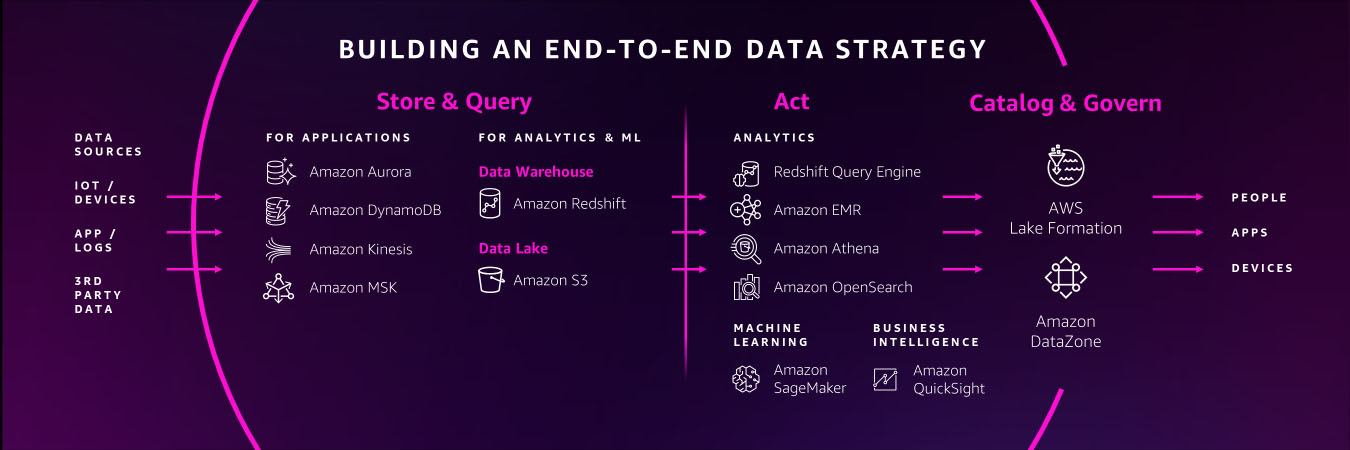

New Hands-On Course for Business Analysts – Practical Decision Making using No-Code ML on AWS

Post Syndicated from Antje Barth original https://aws.amazon.com/blogs/aws/new-hands-on-course-for-business-analysts-practical-decision-making-using-no-code-ml-on-aws/

Artificial intelligence (AI) is all around us. AI sends certain emails to our spam folders. It powers autocorrect, which helps us fix typos when we text. And now we can use it to solve business problems.

In business, data-driven insights have become increasingly valuable. These insights are often discovered with the help of machine learning (ML), a subset of AI and the foundation of complex AI systems. And ML technology has come a long way. Today, you don’t need to be a data scientist or computer engineer to gain insights. With the help of no-code ML tools such as Amazon SageMaker Canvas, you can now achieve effective business outcomes using ML without writing a single line of code. You can better understand patterns, trends, and what’s likely to happen in the future. And that means making better business decisions!

Today, I’m happy to announce that AWS and Coursera are launching the new hands-on course Practical Decision Making using No-Code ML on AWS. This five-hour course is designed to demystify AI/ML and give anyone with a spreadsheet the ability to solve real-life business problems.

Practical Decision Making on Coursera

Course Highlights
Over the course of three lessons, you will learn how to address your business problem using ML, how to build and understand an ML model without any code, and how to use ML to extract value to make better decisions. Each lesson walks you through real-life business scenarios and hands-on exercises using Amazon SageMaker Canvas, a visual, no-code ML tool.

Lesson 1 – How To Address Your Business Problem Using ML
In the first lesson, you will learn how to address your business problem using ML without knowing data science. You will be able to describe the four stages of analytics and discuss the high-level concepts of AI/ML.

Practical Data Science - Prescriptive Analytics

This lesson will also introduce you to automated machine learning (AutoML) and how AutoML can help you generate insights based on common business use cases. You will then practice forming business questions around the most common machine learning problem types.

Practical Decision Making - Forming ML questions

For example, imagine you are a business analyst at a ticketing company. You manage ticket sales for large venues—concerts, sporting events, and so on. Let’s assume you want to predict cash flow. A question to solve with ML could be: “How can you better forecast ticket sales?” This is an example of time series forecasting. You will also explore numeric and category ML problems throughout the course. They will help you answer business questions such as “What’s the likely annual revenue for a customer?” and “Will this customer buy another ticket in the next three months?”.

Next, you will learn about the iterative process of asking questions for machine learning to make the questions more explicit and explore how to pick the highest value problems to work on.

Practical Decision Making - Value vs. Ease

The first lesson wraps up with a deep dive on how time influences your data across forecasting and nonforecasting business problems and how to set up your data for each ML problem type.

Lesson 2 – Build and Understand an ML Model Without Any Code
In the second lesson, you learn how to build and understand an ML model without any code using Amazon SageMaker Canvas. You will focus on a customer churn example with synthetically generated data from a cellular services company. The problem question is, “Which customers are most likely to cancel their service next month?”

Practical Decision Making - Customer Churn Example

You will learn how to import data and start exploring it. This lesson will explain how to select the right configuration, pick the target column, and show you how to prepare your data for ML.

SageMaker Canvas also recently introduced new visualizations for exploratory data analysis (EDA), including scatter plots, bar charts, and box plots. These visualizations help you analyze the relationships between features in your data sets and comprehend your data better.

Practical Decision Making - SageMaker Canvas Scatter Plot

After a final data validation, you can preview the model. This shows you right away how accurate the model might be and, on average, which features or columns have the greatest relative impact on model predictions. Once you are done preparing and validating the data, you can go ahead and build the model.

Practical Decision Making - Model Evaluation

Next, you will learn how to evaluate the performance of the model. You will be able to describe the difference between training data and test data splits and how they are used to derive the model’s accuracy score. The lesson also discusses additional performance metrics and how you can apply domain knowledge to decide if the model is performing well. Once you understand how to evaluate the performance metrics, you have the foundation for making better business decisions.

The second lesson wraps up with some common gotchas to watch out for and shows how to iterate on the model to keep improving performance. You will be able to describe the concept of data leakage as a result of memorization versus generalization and additional model flaws to avoid. You will also learn how to iterate on questions, included features, and sample sizes to keep increasing model performance.

Lesson 3 – Extract Value From ML
In the third lesson, you learn how to extract value from ML to make better decisions. You will be able to generate and read predictions, including predictions on a single row of a spreadsheet, called a single prediction, and predictions on the entire spreadsheet, called batch prediction. You will be able to understand what is impacting predictions and play with different scenarios.

Next, you will learn how to share insights and predictions with others. You will learn how to take visuals from the product, such as feature importance charts or scoring diagrams, and share the insights through presentations or business reports.

The third lesson wraps up with how to collaborate with the data science team or a team member with machine learning expertise. When you build your model using SageMaker Canvas, you can choose either a Quick build or a Standard build. The Quick build usually takes 2–15 minutes and limits the input dataset to a maximum of 50,000 rows. The Standard build usually takes 2–4 hours and generally has a higher accuracy. SageMaker Canvas makes it easy to share a standard build model. In the process, you can reveal the model’s behind-the-scenes complexity down to the code level.

Once you have the trained model open, you can click on the Share button. This creates a link that can be opened in SageMaker Studio, an integrated development environment used by data science teams.

Practical Decision Making - Share Model

In SageMaker Studio, you can see the transformations to the input data set and detailed information about scoring and artifacts, like the model object. You can also see the Python notebooks for data exploration and feature engineering.

Practical Decision Making - SageMaker Studio

Hands-On Exercises
This course includes seven hands-on labs to put your learning into practice. You will have the opportunity to use no-code ML with SageMaker Canvas to solve real-world challenges based on publicly available datasets.

The labs focus on different business problems across industries, including retail, financial services, manufacturing, healthcare, and life sciences, as well as transport and logistics.

You will have the opportunity to work on customer churn predictions, housing price predictions, sales forecasting, loan predictions, diabetic patient readmission prediction, machine failure predictions, and supply chain delivery on-time predictions.

Register Today
Practical Decision Making using No-Code ML on AWS is a five-hour course for business analysts and anyone who wants to learn how to solve real-life business problems using no-code ML.

Sign up for Practical Decision Making using No-Code ML on AWS today at Coursera!

— Antje

Detecting Deepfake Audio by Modeling the Human Acoustic Tract

Post Syndicated from Bruce Schneier original https://www.schneier.com/blog/archives/2022/10/detecting-deepfake-audio-by-modeling-the-human-acoustic-tract.html

This is interesting research:

In this paper, we develop a new mechanism for detecting audio deepfakes using techniques from the field of articulatory phonetics. Specifically, we apply fluid dynamics to estimate the arrangement of the human vocal tract during speech generation and show that deepfakes often model impossible or highly-unlikely anatomical arrangements. When parameterized to achieve 99.9% precision, our detection mechanism achieves a recall of 99.5%, correctly identifying all but one deepfake sample in our dataset.

From an article by two of the researchers:

The first step in differentiating speech produced by humans from speech generated by deepfakes is understanding how to acoustically model the vocal tract. Luckily scientists have techniques to estimate what someone—or some being such as a dinosaur—would sound like based on anatomical measurements of its vocal tract.

We did the reverse. By inverting many of these same techniques, we were able to extract an approximation of a speaker’s vocal tract during a segment of speech. This allowed us to effectively peer into the anatomy of the speaker who created the audio sample.

From here, we hypothesized that deepfake audio samples would fail to be constrained by the same anatomical limitations humans have. In other words, the analysis of deepfaked audio samples simulated vocal tract shapes that do not exist in people.

Our testing results not only confirmed our hypothesis but revealed something interesting. When extracting vocal tract estimations from deepfake audio, we found that the estimations were often comically incorrect. For instance, it was common for deepfake audio to result in vocal tracts with the same relative diameter and consistency as a drinking straw, in contrast to human vocal tracts, which are much wider and more variable in shape.

This is, of course, not the last word. Deepfake generators will figure out how to use these techniques to create harder-to-detect fake voices. And the deepfake detectors will figure out another, better, detection technique. And the arms race will continue.

Slashdot thread.

3 Ways to Improve Data Protection in the Cloud

Post Syndicated from Jesse Mack original https://blog.rapid7.com/2022/09/07/3-ways-to-improve-data-protection-in-the-cloud/

3 Ways to Improve Data Protection in the Cloud

Cloud complexity is now a well-documented and widely felt phenomenon across technology teams — IT, development, and security alike. Multi-cloud architectures have become the norm, with 89% of organizations embracing a strategy that involves multiple cloud vendors. Not only are companies managing greater amounts of data than ever before, they’re also spread across an ever-increasing array of cloud services, applications, and devices.
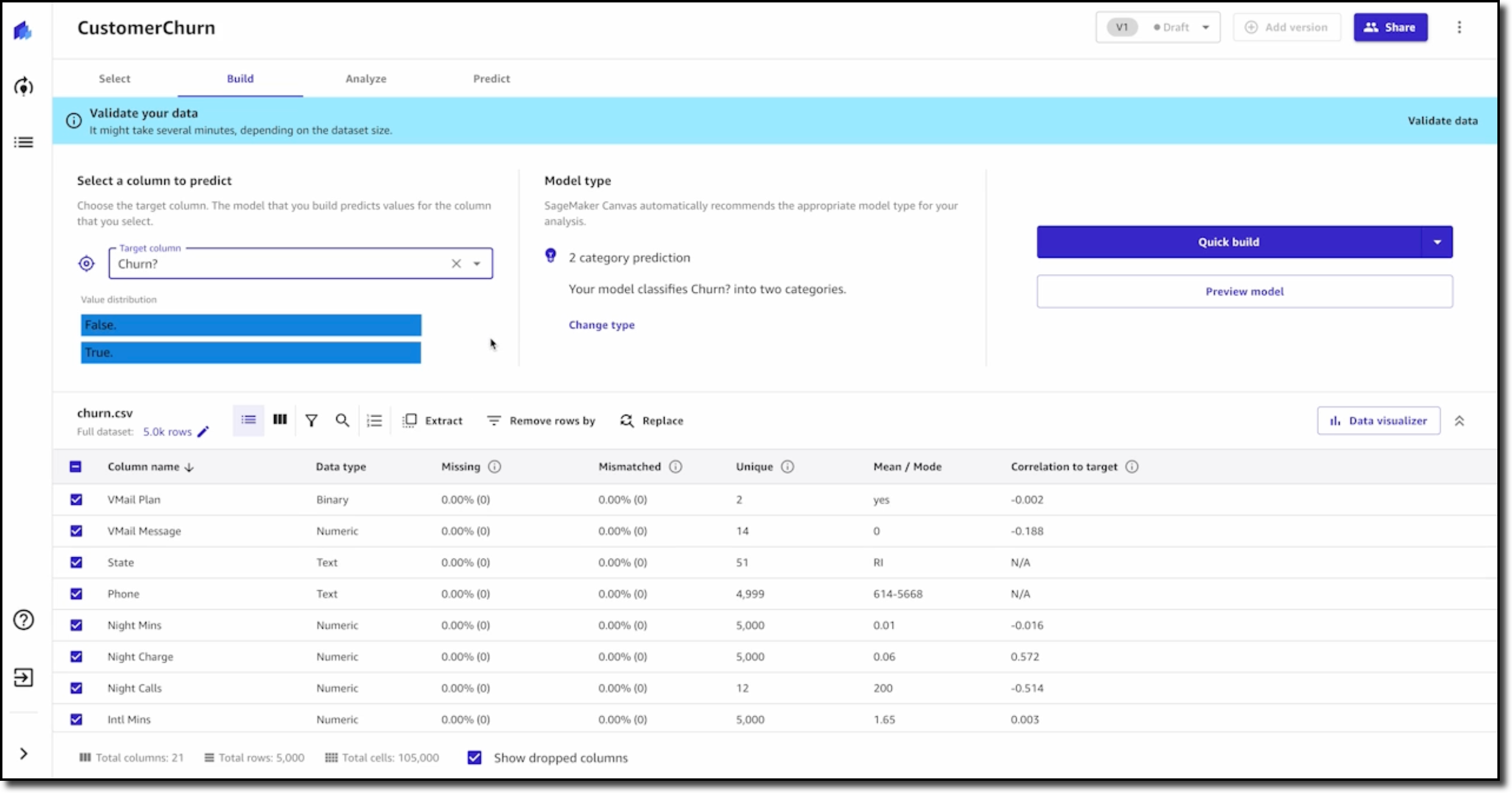
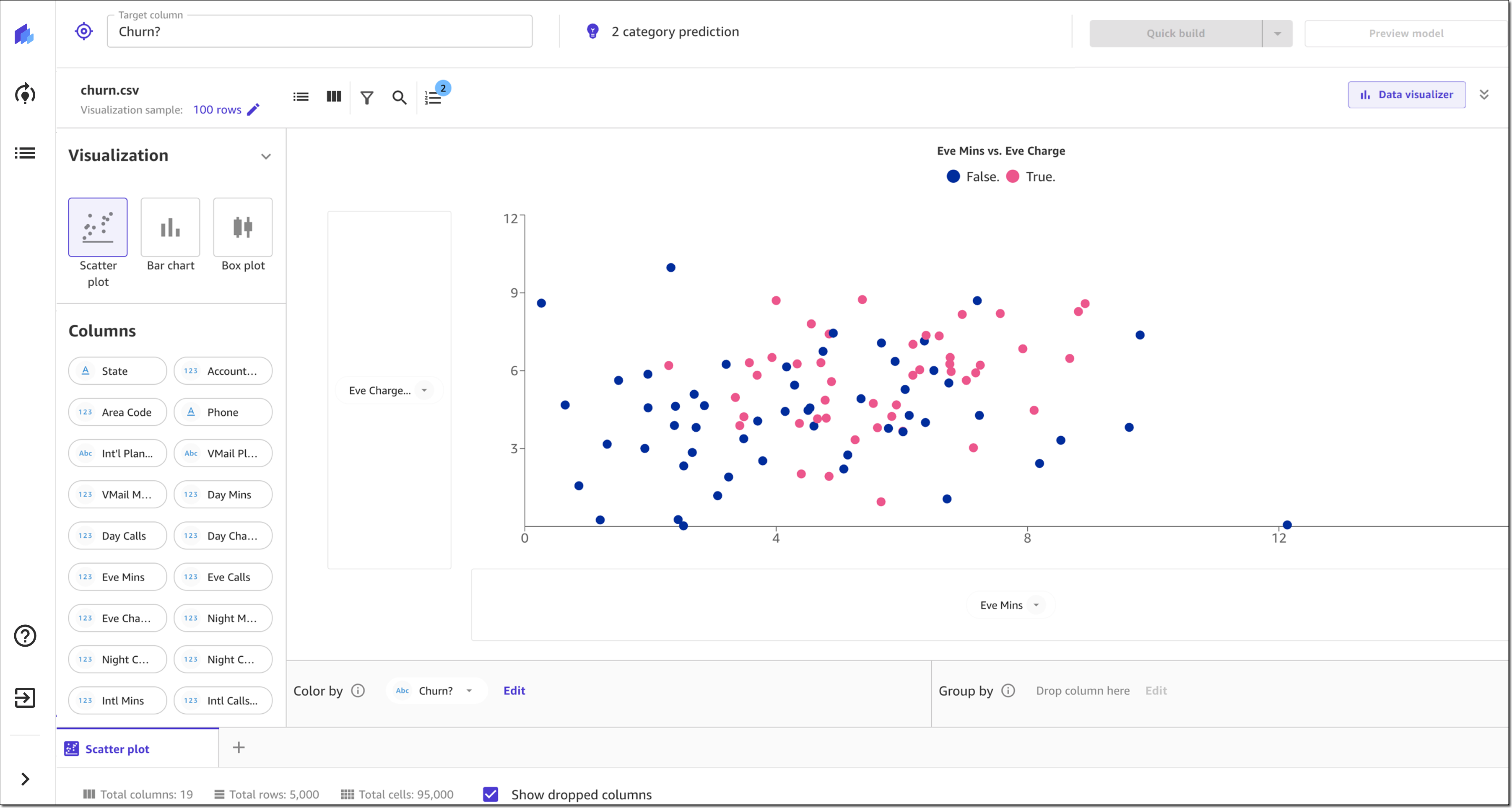
Securing all this information and preventing data loss in a multi-cloud environment would be a tall task for any security team. Add to the mix an increasingly heightened threat landscape and an ongoing cybersecurity skills shortage, and the challenge becomes even greater.

Rapid7, Mimecast, and Netskope recently published a joint white paper outlining best practices for cloud data protection and pinpointing some key resources that organizations can leverage in this effort. Here are three key concepts the paper highlights.

1. Embrace AI

Artificial intelligence (AI) and machine learning are well-known technologies at this point, but their potential is only just beginning to be tapped when it comes to helping security teams become more efficient and more effective.

Examples of AI-based tools that can help security teams include curated detections within an extended detection and response (XDR) platform, as well as intelligent threat and anomaly detection within cloud security tools.

Machine learning won’t ever replace the trained eye and keen insight of a veteran cybersecurity analyst — but AI-based tools can take on some of the repetitive and time-consuming tasks that security pros face, allowing analysts to increase productivity and focus on the alerts and issues that matter most. The goal is human-machine collaboration, with AI augmenting and boosting the capabilities of the analyst.

2. Utilize automation

Automation and AI work together as a one-two punch of process improvement for security. If an AI-based tool detects an anomalous event, automation allows you to set up actions that can take place in response to that suspicious activity. This can help get the ball rolling faster on mitigating security issues — and speed is the name of the game when it comes to keeping out attackers.

In the context of a cloud security platform, built-in automation and remediation tools let you create bots that can carry out certain tasks, specified by:

  • Scope: What resources the bot should evaluate — i.e., specific cloud resource groups, or certain types of resources contained in those groups
  • Filters: The conditions in which a bot should act — e.g., what tags the resource has, or whether the ports are open
  • Actions: What task you want the bot to carry out — e.g., delete a resource, start or stop an instance, or send an email with key information about the resource in question

3. Leverage integrations

AI and automation can help drive efficiencies — but with a multitude of cloud services in play, there’s a risk that these automated actions proliferate and become unwieldy, making it tough for security teams to reap the full benefits. This is where integrations become critical: They allow teams to coordinate actions quickly and seamlessly across multiple vendor systems.

Integrations make it easier to create a holistic security environment formed by a consistent set of controls, rather than a patchwork of best practices. For example, if you have an integration that links your email security gateway to your security information and event management (SIEM) tool, you can create an alert when a user receives an email containing suspected ransomware or malware, and take automated remediation actions instantly. Or if your security service edge (SSE) platform detects a serious data exfiltration risk, you can build a customized workflow in your security orchestration, automation, and response (SOAR) to quarantine that resource or take it offline.

Dive deeper on cloud data protection

Keeping data secure in the cloud comes with its share of challenges, but integrations that leverage AI-based analytics and automated workflows can help you ensure you know where your data is, what security controls are in place, and what threats there might be in your environment.

Looking to go deeper on how to bring this vision to life? Download the white paper today, or join experts from Mimecast, Netskope, and Rapid7 for the webinar “Data Protection and Control in the Cloud” at 2pm EST on Tuesday, September 13.

Additional reading:

NEVER MISS A BLOG

Get the latest stories, expertise, and news about security today.