Amazon Web Services (AWS) announces that it has successfully renewed the Portuguese GNS (Gabinete Nacional de Segurança, National Security Cabinet) certification in the AWS Regions and edge locations in the European Union. This accreditation confirms that AWS cloud infrastructure, security controls, and operational processes adhere to the stringent requirements set forth by the Portuguese government for handling classified information at the National Reservado level (equivalent to the NATO Restricted level).
The GNS certification is based on the NIST SP800-53 Rev. 5 and CSA CCM v4 frameworks. It demonstrates the AWS commitment to providing the most secure cloud services to public-sector customers, particularly those with the most demanding security and compliance needs. By achieving this certification, AWS has demonstrated its ability to safeguard classified data up to the Reservado (Restricted) level, in accordance with the Portuguese government’s rigorous security standards.
AWS was evaluated by an authorized and independent third-party auditor, Adyta Lda, and by the Portuguese GNS itself. With the GNS certification, AWS customers in Portugal, including public sector organizations and defense contractors, can now use the full extent of AWS cloud services to handle national restricted information. This enables these customers to take advantage of AWS scalability, reliability, and cost-effectiveness, while safeguarding data in alignment with GNS standards.
The Agence du Numérique en Santé (ANS), the French governmental agency for health, introduced the HDS certification to strengthen the security and protection of personal health data. By achieving this certification, AWS demonstrates our continuous commitment to adhere to the heightened expectations for cloud service providers.
The following 24 Regions are in scope for this certification:
US East (N. Virginia)
US East (Ohio)
US West (N. California)
US West (Oregon)
Asia Pacific (Hong Kong)
Asia Pacific (Hyderabad)
Asia Pacific (Jakarta)
Asia Pacific (Mumbai)
Asia Pacific (Osaka)
Asia Pacific (Seoul)
Asia Pacific (Singapore)
Asia Pacific (Sydney)
Asia Pacific (Tokyo)
Canada (Central)
Europe (Frankfurt)
Europe (Ireland)
Europe (London)
Europe (Milan)
Europe (Paris)
Europe (Stockholm)
Europe (Zurich)
Middle East (UAE)
Israel (Tel Aviv)
South America (São Paulo)
The HDS certification demonstrates that AWS provides a framework for technical and governance measures to secure and protect personal health data according to HDS requirements. Our customers who handle personal health data can continue to manage their workloads in HDS-certified Regions with confidence.
For up-to-date information, including when additional Regions are added, visit the AWS Compliance Programs page and choose HDS.
AWS strives to continuously meet your architectural and regulatory needs. If you have questions or feedback about HDS compliance, reach out to your AWS account team.
To learn more about our compliance and security programs, see AWS Compliance Programs. As always, we value your feedback and questions; reach out to the AWS Compliance team through the Contact Us page.
If you have feedback about this post, submit comments in the Comments section below.
January 30, 2025: This post was republished to make the instructions clearer and compatible with OCSF 1.1.
Customers often require multiple log sources across their AWS environment to empower their teams to respond and investigate security events. In part one of this two-part blog post, I show you how you can use Amazon OpenSearch Service to ingest logs collected by Amazon Security Lake to facilitate near real-time monitoring.
Many customers use Security Lake to automatically centralize security data from Amazon Web Services (AWS) environments, software as a service (SaaS) providers, on-premises workloads, and cloud sources into a purpose-built data lake in their AWS environment. OpenSearch Service is a managed service that customers can use to deploy, operate, and scale OpenSearch clusters in the AWS Cloud. It natively integrates with Security Lake to enable customers to perform interactive log analytics and searches across large datasets, create enterprise visualization and dashboards, and perform analysis across disparate applications and logs. With Amazon OpenSearch Security Analytics, customers can also gain visibility into the security posture of their organization’s infrastructure, monitor for anomalous activity, detect potential security threats in near real time, and initiate alerts to pre-configured destinations.
Without using Amazon OpenSearch Service, customers would need to build, deploy and manage infrastructure for an analytics solution, such as an ELK stack.
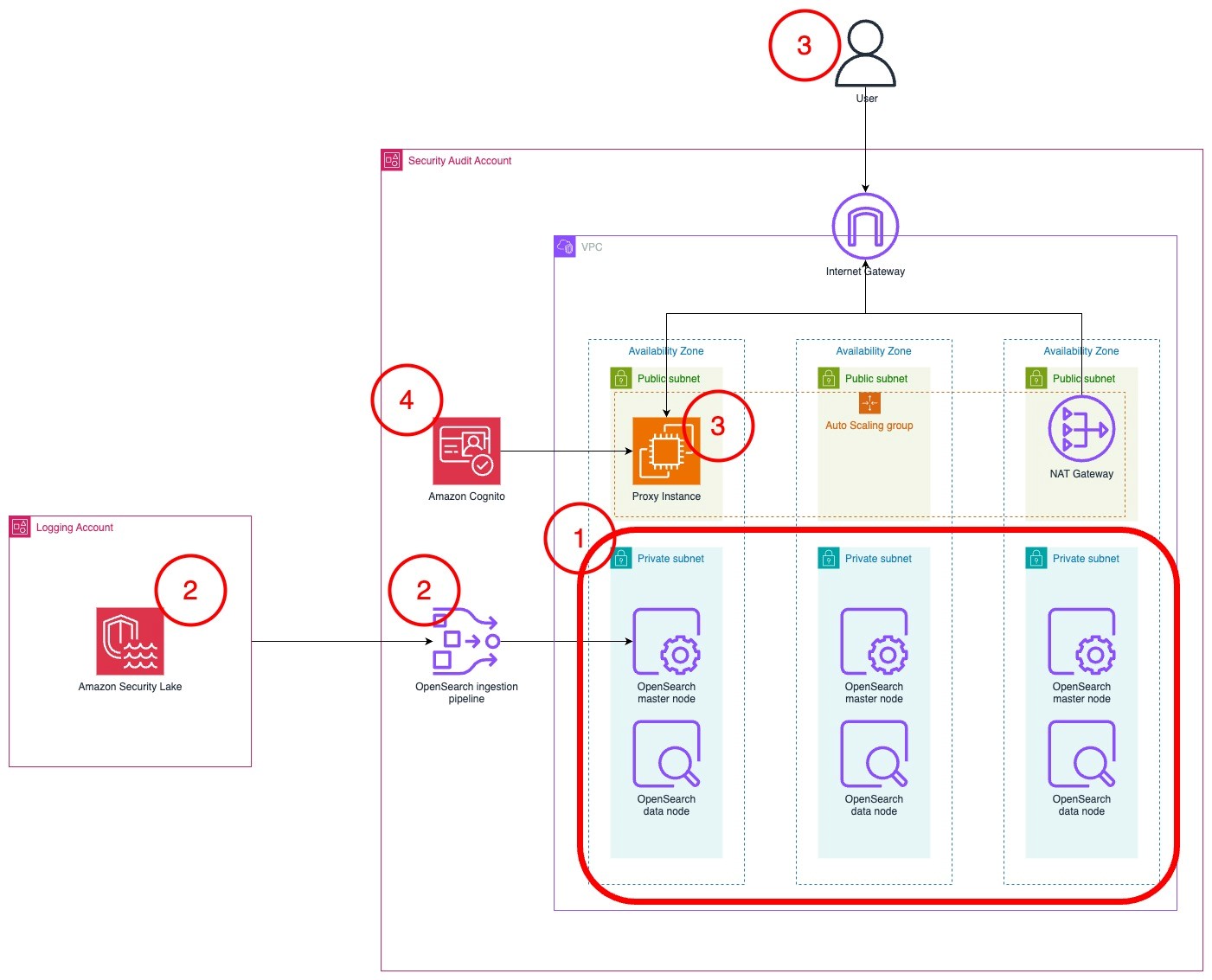
The architecture diagram in Figure 1 shows the completed architecture of the solution.
The OpenSearch Service cluster is deployed within a virtual private cloud (VPC) across three Availability Zones for high availability.
The OpenSearch Service cluster ingests logs from Security Lake using an OpenSearch Ingestion pipeline.
The cluster is accessed by end users through a public-facing proxy hosted on an Amazon EC2 instance.
To reduce costs, the template doesn’t deploy a dead letter queue (DLQ) for the OpenSearch Ingestion pipeline. You can add one later if you want.
Instead of a public facing proxy, you can deploy a VPN to access your cluster.
Authentication to the cluster is managed with Amazon Cognito.
Figure 1: Solution architecture
Planning the deployment
This section will help you plan your OpenSearch service deployment, including what nodes you should choose, the amount of storage to allocate, and where to deploy the cluster.
Deciding instances for the OpenSearch Service master and data nodes
First, determine what instance type to use for the master and data nodes. If your workload generates less than 100 GB of Security Lake logs per day, we recommend using three m6g.large.search master nodes and three r6g.large.search data nodes. You can start small and scale up or scale out later. For more information about deciding the size and number of instances, see Get started with Amazon OpenSearch Service. Note the instance types that you have selected on a text editor because you will use this as an input for the AWS CloudFormation template that you will deploy later.
Configuring storage
To optimize your storage costs, you need to plan your data strategy. In this architecture, Security Lake is used for long-term log storage. Because Security Lake uses Amazon Simple Storage Service (Amazon S3), you can optimize long-term storage costs. You can configure OpenSearch Service to ingest priority logs based on the recent data that you can use for near-real time detection and alerting. Your team can query logs in Security Lake using its Zero-ETL integration with OpenSearch Service to analyze older logs.
Therefore, Security Lake should serve as your primary long-term log storage, with OpenSearch Service storing only the most recent logs.
The number of days of logs in OpenSearch Service will depend on how many days’ worth of data you need to investigate at a given time. I recommend storing 15 days of data in OpenSearch Service. This allows you to react to and investigate the most immediate security events while optimizing storage costs for older logs.
The next step is to determine the volume of logs generated by Security Lake.
Sign in to the Security Lake delegated administrator account.
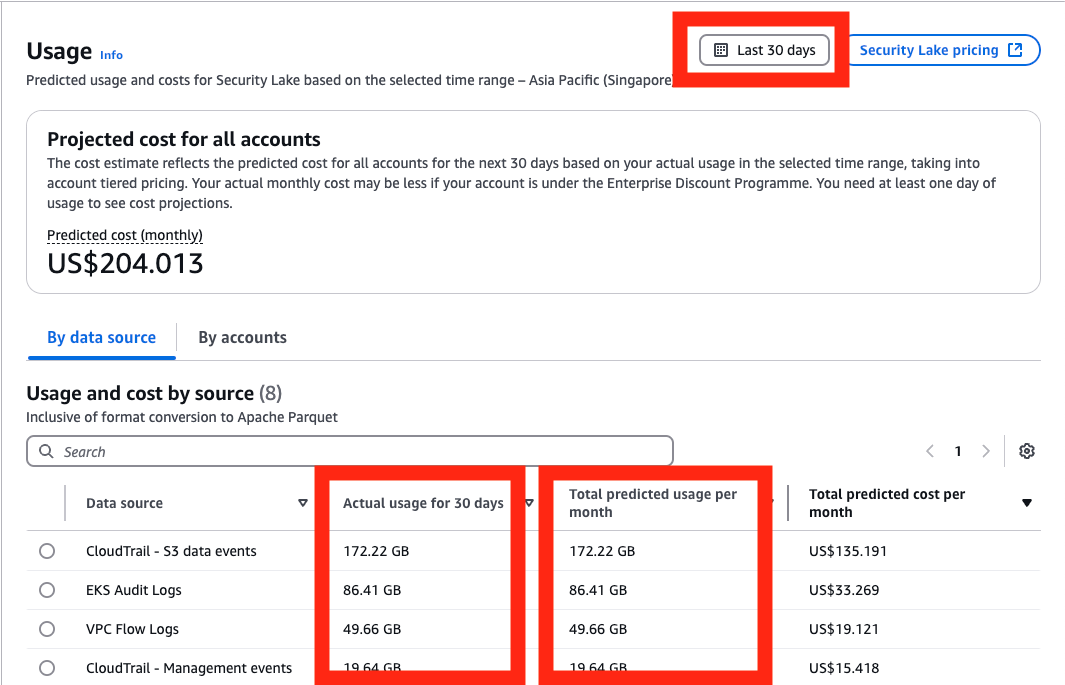
Go to the AWS Management Console for Security Lake. Choose Usage in the navigation pane.
On the Usage screen, select Last 30 days as the range of usage.
Add the total Actual usage for the last 30 days for the data sources that you intend to send to OpenSearch. If you have used Security Lake for less than 30 days, you can use the Total predicted usage per month. Divide this figure by 30 to get the daily data volume.
Figure 2: Select range of usage
To determine the total storage needed, multiply the data generated by Security Lake per day by the retention period you chose, then by 1.1 to account for the indexes, then multiply that number by 1.15 for overhead storage. For more information about calculating storage, see Get started with Amazon OpenSearch Service.
To determine the amount of Amazon Elastic Block Store (Amazon EBS) storage that you need per node, take the total amount of storage and divide it by the number of nodes that you have. Round that number up to the nearest whole number. You can increase the amount of storage after deployment when you have a better understanding of your workload. Make a note of this number in a text editor because you’ll use it as an input in the CloudFormation template later.
Example 1: 10 GB of Security Lake logs generated per day, stored for 30 days in OpenSearch Service in three nodes
10 GB of Security Lake logs stored for 30 days = 10 GB * 30 = 300 GB
Account for additional space for indexes and overhead space = 300 GB * 1.1 * 1.15 = 379.5 GB
Divide the storage required across three nodes, rounded up = 379.5/3 ≈ 127 GB per node
You would need 127 GB per node in OpenSearch Service
Example 2: 200 GB of Security Lake logs generated per day, stored for 15 days in OpenSearch Service across six nodes
200 GB of Security Lake logs stored for 15 days = 200 GB * 15 = 3000 GB
Account for additional space for indexes and overhead space = 3000 GB * 1.1 * 1.15 = 3795 GB
Divide the storage required across three nodes, rounded up = 3795/6 ≈ 633 GB per node
You would need 633 GB per node in OpenSearch Service
Where to deploy the cluster?
If you have an AWS Control Tower deployment or have a deployment modelled after the AWS Security Reference Architecture (AWS SRA), Security Lake should be deployed in the Log Archive account. Because security best practices recommend that the Log Archive account should not be frequently accessed, the OpenSearch Service cluster should be deployed into your Audit account or Security Tooling account.
You need to deploy your Security Lake subscriber in the same Region as your Security Lake roll-up Region. If you have more than one roll-up Region, choose the Region that collects logs from the Regions you want to monitor.
Your cluster needs to be deployed in the same Region as your Security Lake subscriber be able to access data.
Setting up the Security Lake subscriber
Before deploying the solution, create a Security Lake subscriber in your Security Lake roll-up Region so that OpenSearch Service can access data from Amazon Security Lake.
Access the Security Lake console in your Log Archive account.
Choose Subscribers in the navigation pane.
Choose Create subscriber.
On the Create subscriber page, enter a name, such as OpenSearch-subscriber.
Under Data Access, select Under S3 notification type, select SQS queue.
Under Subscriber credentials, enter the AWS account ID for the account you plan to deploy the OpenSearch cluster to, which should be your Security Tooling
Enter OpenSearchIngestion-<AWS account ID> under External ID.
Figure 3: Configuring the Security Lake subscriber
Leave All log and event sources selected and choose Create.
After the subscriber has been created, you will need to collect information to facilitate the deployment.
To gather necessary information:
Select the subscriber that you just created.
Derive the S3 bucket name from the S3 bucket ARN and store it in a text editor. The Amazon Resource Name (ARN) is formatted as arn:aws:s3:::<bucket name>. The bucket name should look like aws-security-data-lake-<region>-xxxxx.
Figure 4: Derive the S3 bucket name from the Subscriber details page
Go to the Amazon Simple Queue Service (Amazon SQS) console and select the SQS queue created as part of the Security Lake subscriber. It should look like AmazonSecurityLake-xxxxxxxxx-Main-Queue. Note the queue’s ARN and URL in your text editor.
Figure 5: Relevant details from the SQS queue
Deploy the solution
To deploy the solution in your Security Tooling account, use a CloudFormation template. This template deploys the OpenSearch Service cluster, OpenSearch Ingestion pipeline, and an AWS Lambda function to initialize the cluster.
To deploy the OpenSearch cluster:
To deploy the CloudFormation template that builds the OpenSearch service cluster, select the Launch Stack button.
In the CloudFormation console, make sure that you are in the correct AWS account. You should be in your Security Tooling account. Also make sure that you have selected the same Region as your Security Lake subscriber.
Enter a name for your stack. A name like os-stack-<day>-<month> can help you keep track of deployments.
Enter the instance types and Amazon EBS volume size that you noted earlier.
Enter the IP address range that you want to allow to access the proxy’s security group. You should limit this to your corporate IP range. You can set it as 0.0.0/0 if you want to expose it to the public internet.
Fill in the details of the Security Lake bucket and the subscriber Amazon SQS queue ARN, URL, and Region.
Figure 6: Add stack parameters
Check the acknowledgements in the Capabilities section.
Choose Create stack to begin deploying the resources.
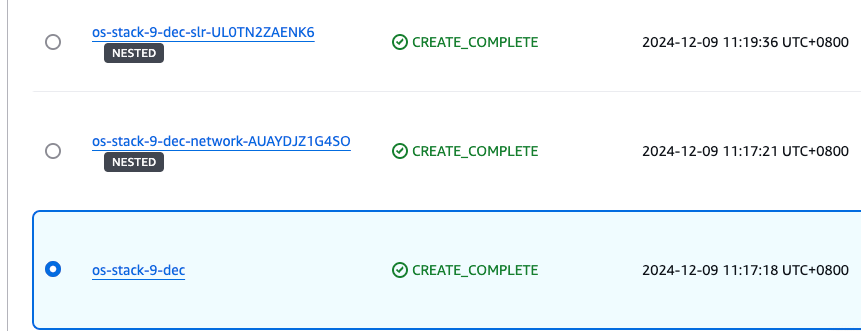
It will take 20–30 minutes to deploy the multiple nested templates. Wait for the main stack (not the nested ones) to achieve the CREATE_COMPLETE status before proceeding to the next step.
Note: If you encounter failures while deployment, you can download the CloudFormation file here and select Preserve successfully provisioned resources under Stack failure options while deploying. This will allow you to troubleshoot the stack deployment.
Go to the Outputs pane of the main CloudFormation stack. Save the DashboardsProxyURL, OpenSearchInitRoleARN, and PipelineRole values in a text editor to refer to later.
Figure 7: The stacks in the CREATE_COMPLETE state with the outputs panel shown
Open the DashboardsProxyURL value in a new tab.
Note: Because the proxy relies on a self-signed certificate, you will get an insecure certificate warning. You can safely ignore this warning and proceed. For a production workload, you should issue a trusted private certificate from your internal public key infrastructure or use AWS Private Certificate Authority.
You will be presented with the Amazon Cognito sign-in page. Use administrator as the username.
Access Secrets Manager to find the password. Select the secret that was created as part of the stack.
Figure 8: The Cognito password in Secrets Manager
Choose Retrieve secret value to get the password.
Figure 9: Retrieve the secret value
After signing in, you will be prompted to change your password and will be redirected to the OpenSearch dashboard.
If you see a pop-up that states Start by adding your own data, select Explore on my own. On the next page, Introducing new OpenSearch Dashboards look & feel, choose Dismiss.
If you see a pop-up that states Select your tenant, select Global, and then choose Confirm.
Figure 10: Select and confirm your tenant
To initialize the OpenSearch cluster:
Choose the menu icon (three stacked horizontal lines) on the top left and select Security under the Management section.
Figure 11: Navigating to the Security page in the OpenSearch console
Select Roles. On the Roles page, search for the all_access role and select it.
Select Mapped users, and then select Manage mapping.
On the Map user screen, choose Add another backend role. Paste the value for the OpenSearchInitRoleARN from the list of CloudFormation outputs. Choose Map.
Figure 12: Mapping the role on the Security page in the OpenSearch console
Leave this tab open and return to the AWS Management console. Go to the AWS Lambda console and select the function named xxxxxx-OS_INIT.
In the function screen, choose Test, and then Create new test event.
Figure 13: Creating the test event in the Lambda console
Choose Invoke. The function should run for about 30 seconds. The execution results should show the component templates that have been created. This Lambda function creates the component and index templates to ingest Open Cybersecurity Framework (OCSF) formatted data, a set of indices and aliases that correspond with the OCSF classes generated by Security Lake, and a rollover policy that will rollover the index daily or if it becomes larger than 40 GB.
Figure 14: Invoking the Lambda function in the Lambda console
To set up the pipeline
Return to the Map user page on the OpenSearch console.
Choose Add another backend role. Paste the value of the PipelineRole from the CloudFormation template output. Choose This will allow the OpenSearch Ingestion to write to the cluster.
Figure 15: Mapping the OpenSearch Ingestion role
Access the Amazon S3 console in the Log Archive account where Security Lake is hosted.
Select the Security Lake bucket in your roll-up Region. It should look like aws-security-data-lake-region-xxxxxxxxxx.
Choose Permissions, then Edit under Bucket policy.
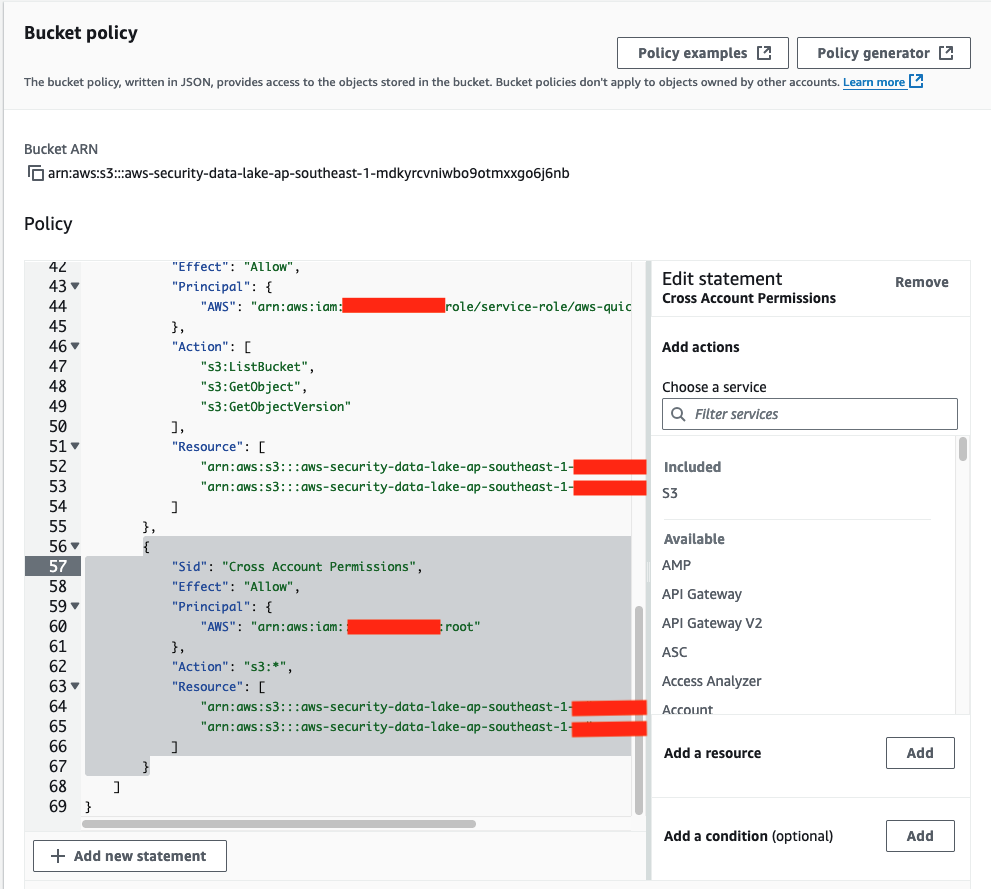
Add this policy to the end of the existing bucket policy. Replace the Principal with the ARN of the PipelineRole and the name of your Security Lake bucket in the Resource section.
{
            "Sid": "Cross Account Permissions",
            "Effect": "Allow",
            "Principal": {
                "AWS": "<Pipeline role ARN>"
            },
            "Action": "s3:*",
            "Resource": [
                "arn:aws:s3:::<Security Lake bucket name>/*",
                "arn:aws:s3:::<Security Lake bucket name>"
            ]
        }
Figure 16: The modified S3 bucket access policy
Choose Save changes.
To upload the index patterns and dashboards
Download the Security-lake-objects.ndjson file by right-clicking on this link and selecting Save link as.
Access the Dashboards Management page through the navigation menu.
Choose Saved objects in the navigation pane.
On the Saved Objects page, choose Import on the right side of the screen.
Figure 17: Import saved objects
Choose Import and select the Security-lake-objects.ndjson file that you downloaded previously.
Leave Create new objects with unique IDs selected and choose Import.
You can now view the ingested logs on the Discover page and visualizations on the Dashboards page, which you can find on the navigation bar.
Figure 18: The Discover page displaying ingested logs
Clean up
To avoid unwanted charges, delete the main CloudFormation template, named os-stack-<day>-<month> (not the nested stacks).
Figure 19: Select the main stack in the CloudFormation console
Modify the Security Lake bucket policy in the logging account to remove the section you added that trusted the PipelineRole. Be careful not to modify the rest of the policy because it could impact the functioning of Security Lake and other subscribers.
Figure 20: The S3 bucket policy with the relevant sections that needed to be deleted
Conclusion
In this post, you learned how to plan an OpenSearch deployment with Amazon OpenSearch Service to ingest logs from Amazon Security Lake. With this solution, you’re able to aggregate and manage logs with Security Lake and visualize and monitor those logs with OpenSearch Service. After deployment, monitor the OpenSearch Service metrics to determine if you need to scale this up or out for improved performance. In part 2, I will show you how to set up the Security Analytics detector to generate alerts to security findings in near-real time.
If you have feedback about this post, submit comments in the Comments section below. If you have questions about this post, contact AWS Support.
Amazon Web Services (AWS) is pleased to announce the successful attestation of our conformance with the National Institute of Standards and Technology (NIST) Secure Software Development Framework (SSDF), Special Publication 800-218. This achievement underscores our ongoing commitment to the security and integrity of our software supply chain.
Executive Order (EO) 14028, Improving the Nation’s Cybersecurity (May 12, 2021) directs U.S. government agencies to take a variety of actions that “enhance the security of the software supply chain.” In accordance with the EO, NIST released the SSDF, and the Office and Management and Budget (OMB) issued Memorandum M-22-18, Enhancing the Security of the Software Supply Chain through Secure Software Development Practices, requiring U.S. government agencies to only use software provided by software producers who can attest to conformance with NIST guidance.
A FedRAMP certified Third Party Assessment Organization (3PAO) assessed AWS against the 42 security tasks in the SSDF. Our attestation form is available in the Cybersecurity and Infrastructure Security Agency (CISA) Repository for Software Attestations and Artifacts for our U.S. government agency customers to access and download. Per CISA guidance, agencies are encouraged to collect the AWS attestation directly from CISA’s repository.
As always, we value your feedback and questions. Reach out to the AWS Compliance team through the Contact Us page. To learn more about our other compliance and security programs, see AWS Compliance Programs.
If you have feedback about this post, submit comments in the Comments section below. If you have questions about this post, contact AWS Support.
AWS Security Hub is a cloud security posture management (CSPM) service that performs security best practice checks across your Amazon Web Services (AWS) accounts and AWS Regions, aggregates alerts, and enables automated remediation. Security Hub is designed to simplify and streamline the management of security-related data from various AWS services and third-party tools. It provides a holistic view of your organization’s security state that you can use to prioritize and respond to security alerts efficiently.
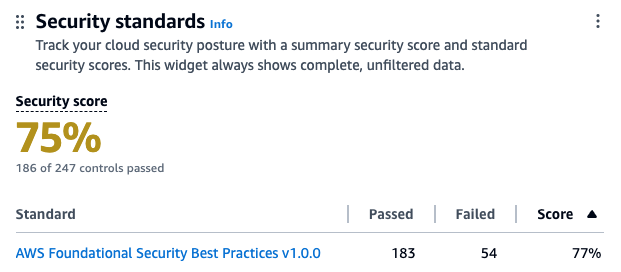
Security Hub assigns a security score to your environment, which is calculated based on passed and failed controls. A control is a safeguard or countermeasure prescribed for an information system or an organization that’s designed to protect the confidentiality, integrity, and availability of the system and to meet a set of defined security requirements. You can use the security score as a mechanism to baseline the accounts. The score is displayed as a percentage rounded up or down to the nearest whole number.
In this blog post, we review the top four mechanisms that you can use to improve your security score, review the five controls in Security Hub that most often fail, and provide recommendations on how to remediate them. This can help you reduce the number of failed controls, thus improving your security score for the accounts.
What is the security score?
Security scores represent the proportion of passed controls to enabled controls. The score is displayed as a percentage rounded to the nearest whole number. It’s a measure of how well your AWS accounts are aligned with security best practices and compliance standards. The security score is dynamic and changes based on the evolving state of your AWS environment. As you address and remediate findings associated with controls, your security score can improve. Similarly, changes in your environment or the introduction of new Security Hub findings will affect the score.
Each check is a point-in-time evaluation of a rule against a single resource that results in a compliance status of PASSED, FAILED, WARNING, or NOT_AVAILBLE. A control is considered passed when the compliance status of all underlying checks for resources are PASSED or if the FAILED checks have a workflow status of SUPPRESSED. You can view the security score through the Security Hub console summary page—as shown in figure 1—to quickly gain insights into your security posture. The dashboard provides visual representations and details of specific findings contributing to the score. For more information about how scores are calculated, see determining security scores.
Figure. 1 Security Hub dashboard
How to improve the security score?
You can improve your security score in four ways:
Remediating failed controls: After the resources responsible for failed checks in a control are configured with compliant settings and the check is repeated, Security Hub marks the compliance status of the checks as PASSED and the workflow status as RESOLVED. This increases the number of passed controls, thus improving the score.
Suppressing findings associated with failed controls: When calculating the control status, Security Hub ignores findings in the ARCHIVED state as well as findings with a workflow status of SUPPRESSED, which will affect security scores. So if you suppress all failed findings for a control, the control status becomes passed.
If you determine that a Security Hub finding for a resource is an accepted risk, you can manually set the workflow status of the finding to SUPPRESSED from the Security Hub console or using the BatchUpdateFindings API. Suppression doesn’t stop new findings from being generated, but you can set up an automation rule to suppress all future new and updated findings that meet the filtering criteria.
Disabling controls that aren’t relevant: Security Hub provides flexibility by allowing administrators to customize and configure security controls. This includes the ability to disable specific controls or adjust settings to help align with organizational security policies. When a control is disabled, security checks are no longer performed and no additional findings are generated. Existing findings are set to ARCHIVED and the control is excluded from the security score calculations.
Use central configuration in Security Hub to tailor the security controls to help align with your organization’s specific requirements. You can fine-tune your security controls, focus on relevant issues, and improve the accuracy and relevance of your security score. Introducing new central configuration capabilities in AWS Security Hub provides an overview and the benefits of central configuration.
Suppression should be used when you want to tune control findings from specific resources whereas controls should be disabled only when the control is no longer relevant for your AWS environment.
Customize parameter values to fine tune controls: Some Security Hub controls use parameters that affect how the control is evaluated. Typically, these controls are evaluated against the default parameter values that Security Hub defines. However, for a subset of these controls, you can customize the parameter values. When you customize a parameter value for a control, Security Hub starts evaluating the control against the value that you specify. If the resource underlying the control satisfies the custom value, Security Hub generates a PASSED finding.
We will use these mechanisms to address the most commonly failed controls in the following sections.
Identifying the most commonly failed controls in Security Hub
You can use the AWS Management Console to identify the most commonly failed controls across your accounts in AWS Organizations:
Sign in to the delegated administrator account and open the Security Hub console.
On the navigation pain, choose Controls.
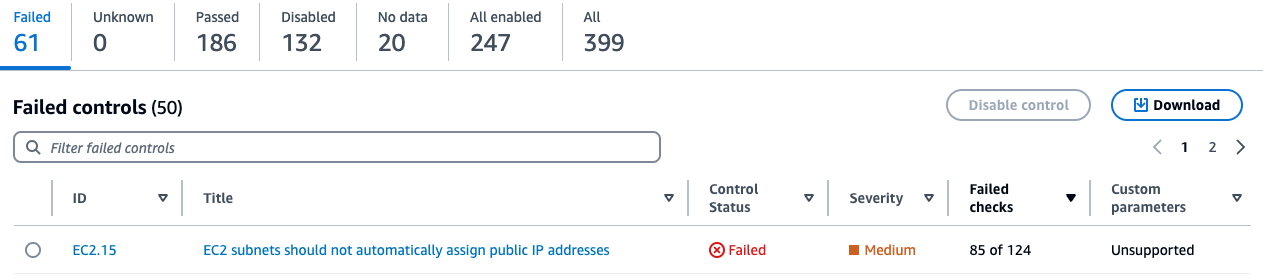
Here, you will see the status of your controls sorted by the severity of the failed controls. You will also see the associated number of failed checks with the failed controls in the Failed checks column on this page. A check is performed for each resource. If a column says 85 out of 124 for a control, it means 85 resources out of 124 failed the check for that control. You can sort this column in descending order to identify failed controls that have the most resources as shown in Figure 2.
Figure 2: Security Hub control status page
Addressing the most commonly failed controls
In this section we address remediation strategies for the most used Security Hub controls that have Critical and High severity and have a high failure rate amongst AWS customers. We review five such controls and provide recommended best practices, default settings for the resource type at deployment, guardrails, and compensating controls where applicable.
AutoScaling.3: Auto Scaling group launch configuration
An Auto Scaling group in AWS is a service that automatically adjusts the number of Amazon Elastic Compute Cloud (Amazon EC2) instances in a fleet based on user-defined policies, making sure that the desired number of instances are available to handle varying levels of application demand. A launch configuration is a blueprint that defines the configuration of the EC2 instances to be launched by the Auto Scaling group. The AutoScaling.3 control checks whether Instance Metadata Service Version 2 (IMDSv2) is enabled on the instances launched by EC2 Auto Scaling groups using launch configurations. The control fails if the Instance Metadata Service (IMDS) version isn’t included in the launch configuration, or if both Instance Metadata Service Version 1 (IMDSv1) and IMDSv2 are included. AutoScaling.3 aligns with best practice SEC06-BP02 Reduce attack surface of the well architected framework.
The IMDS is a service on Amazon EC2 that provides metadata about EC2 instances, such as instance ID, public IP address, AWS Identity and Access Management (IAM) role information, and user data such as scripts during launch. IMDS also provides credentials for the IAM role attached to the EC2 instance, which can be used by threat actors for privilege escalation. The existing instance metadata service (IMDSv1) is fully secure, and AWS will continue to support it. If your organization strategy involves using IMDSv1, then consider disabling AutoScaling.3 and EC2.8 Security Hub controls. EC2.8 is a similar control, but checks the IMDS configuration for each EC2 instance instead of the launch configuration.
IMDSv2 adds protection for four types of vulnerabilities that could be used to access the IMDS, including misconfigured or open website application firewalls, misconfigured or open reverse proxies, unpatched service-side request forgery (SSRF) vulnerabilities, and misconfigured or open layer 3 firewalls and network address translation. It does so by requiring the use of a session token using a PUT request when requesting instance metadata and using a Time to Live (TTL) default of 1 so the token cannot travel outside the EC2 instance. For more information on protections added by IMDSv2, see Add defense in depth against open firewalls, reverse proxies, and SSRF vulnerabilities with enhancements to the EC2 Instance Metadata Service.
The Autoscaling.3 control creates a failed check finding for every Amazon EC2 launch configuration that is out of compliance. An Auto Scaling group is associated with one launch configuration at a time. You cannot modify a launch configuration after you create it. To change the launch configuration for an Auto Scaling group, use an existing launch configuration as the basis for a new launch configuration with IMDSv2 enabled and then delete the old launch configuration. After you delete the launch configuration that’s out of compliance, Security Hub will automatically update the finding state to ARCHIVED. It’s recommended to use Amazon EC2 launch templates, which is a successor to launch configurations because you cannot create launch configurations with new EC2 instances released after December 31, 2022. See Migrate your Auto Scaling groups to launch templates for more information.
Amazon has taken a series of steps to make IMDSv2 the default. For example, Amazon Linux 2023 uses IMDSv2 by default for launches. You can also set the default instance metadata version at the account level to IMDSv2 for each Region. When an instance is launched, the instance metadata version is automatically set to the account level value. If you’re using the account-level setting to require the use of IMDSv2 outside of launch configuration, then consider using the central Security Hub configuration to disable AutoScaling.3 for these accounts. See the Sample Security Hub central configuration policy section for an example policy.
EC2.18: Security group configuration
AWS security groups act as virtual stateful firewalls for your EC2 instances to control inbound and outbound traffic and should follow the principle of least privileged access. In the Well-Architected Framework security pillar recommendation SEC05-BP01 Create network layers, it’s best practice to not use overly permissive or unrestricted (0.0.0.0/0) security groups because it exposes resources to misuse and abuse. By default, the EC2.18 control checks whether a security group permits unrestricted incoming TCP traffic on ports except for the allowlisted ports 80 and 443. It also checks if unrestricted UDP traffic is allowed on a port. For example, the check will fail if your security group has an inbound rule with unrestricted traffic to port 22. This control allows custom control parameters that can be used to edit the list of authorized ports for which unrestricted traffic is allowed. If you don’t expect any security groups in your organization to have unrestricted access on any port, then you can edit the control parameters and remove all ports from being allowlisted. You can use a central configuration policy as shown in Sample Security Hub central configuration policy to update the parameter across multiple accounts and Regions. Alternately, you can also add authorized ports to the list of ports you want to allowlist for the check to pass.
EC2.18 checks the rules in the security groups in accounts, whether the security groups are in use or not. You can use AWS Firewall Manager to identify and delete unused security groups in your organization using usage audit security group policies. Deleting unused security groups that have failed the checks will change the finding state of associated findings to ARCHIVED and exclude them from security score calculation. Deleting unused resources also aligns with SUS02-BP03 of the sustainability pillar of the Well-Architected Framework. You can create a Firewall Manager usage audit security group policy through the firewall manager using the following steps:
To configure Firewall Manager:
Sign in to the Firewall Manager administrator account and open the Firewall Manager console.
In the navigation pane, select Security policies.
Choose Create policy.
On Choose policy type and Region:
For Region, select the AWS Region the policy is meant for.
For Policy type, select Security group.
For Security group policy type, select Auditing and cleanup of unused and redundant security groups.
Choose Next.
On Describe policy:
Enter a Policy name and description.
For Policy rules, select Security groups within this policy scope must be used by at least one resource.
You can optionally specify how many minutes a security group can exist unused before it’s considered noncompliant, up to 525,600 minutes (365 days). You can use this setting to allow yourself time to associate new security groups with resources.
For Policy action, we recommend starting by selecting Identify resources that don’t comply with the policy rules, but don’t auto remediate. This allows you to assess the effects of your new policy before you apply it. When you’re satisfied that the changes are what you want, edit the policy and change the policy action by selecting Auto remediate any noncompliant resources.
Choose Next.
On Define policy scope:
For AWS accounts this policy applies to, select one of the three options as appropriate.
For Resource type, select Security Group.
For Resources, you can narrow the scope of the policy using tagging, by either including or excluding resources with the tags that you specify. You can use inclusion or exclusion, but not both.
Choose Next.
Review the policy settings to be sure they’re what you want, and then choose Create policy.
Firewall manager is a Regional service so these policies must be created in each Region you have services in.
You can also set up guardrails for security groups using Firewall Manager policies to remediate new or updated security groups that allow unrestricted access. You can create a Firewall Manager content audit security group policy through the Firewall Manager console:
To create a Firewall Manager security group policy:
Sign in to the Firewall Manager administrator account.
Open the Firewall Manager console.
In the navigation pane, select Security policies.
Choose Create policy.
On Choose policy type and Region:
For Region, select a Region.
For Policy type, select Security group.
For Security group policy type, select Auditing and enforcement of security group rules.
Choose Next.
On Describe policy:
Enter a Policy name and description.
For Policy rule options, select configure managed audit policy rules.
Configure the following options under Policy rules.
For the Security group rules to audit, select Inbound rules from the drop down.
Select Audit overly permissive security group rules.
Select Rule allows all traffic.
For Policy action, we recommend starting by selecting Identify resources that don’t comply with the policy rules, but don’t auto remediate. This allows you to assess the effects of your new policy before you apply it. When you’re satisfied that the changes are what you want, edit the policy and change the policy action by selecting Auto remediate any noncompliant resources.
Choose Next.
On Define policy scope:
For AWS accounts this policy applies to, select one of the three options as appropriate.
For Resource type, select Security Group.
For Resources, you can narrow the scope of the policy using tagging, by either including or excluding resources with the tags that you specify. You can use inclusion or exclusion, but not both.
Choose Next.
Review the policy settings to be sure they’re what you want, and then choose Create policy.
For use cases such as a bastion host where you might have unrestricted inbound access to port 22 (SSH), EC2.18 will fail. A bastion host is a server whose purpose is to provide access to a private network from an external network, such as the internet. In this scenario, you might want to suppress findings associated with the bastion host security groups instead of disabling the control. You can create a Security Hub automation rule in the Security Hub delegated administrator account based on a tag or resource ID to set the workflow status of future findings to SUPPRESSED. Note that an automation rule applies only in the Region in which it’s created. To apply a rule in multiple Regions, the delegated administrator must create the rule in each Region.
To create an automation rule:
Sign in to the delegated administrator account and open the Security Hub console.
In the navigation pane, select Automations, and then choose Create rule.
Enter a Rule Name and Rule Description.
For Rule Type, select Create custom rule.
In the Rule section, provide a unique rule name and a description for your rule.
For Criteria, use the Key, Operator, and Value drop down menus to select your rule criteria. Use the following fields in the criteria section:
Add key ProductName with operator Equals and enter the value Security Hub.
Add key WorkFlowStatus with operator Equals and enter the value NEW.
Add key ComplianceSecurityControlId with operator Equals and enter the value EC2.18.
Add key ResourceId with operator Equals and enter the Amazon Resource Name (ARN) of the bastion host security group as the value.
For Automated action:
Choose the drop down under Workflow Status and select SUPPRESSED.
Under Note, enter text such as EC2.18 exception.
For Rule status, select Enabled.
Choose Create rule.
This automation rule will set the workflow status of all future updated and new findings to SUPPRESSED.
IAM.6: Hardware MFA configuration for the root user
When you first create an AWS account, you begin with a single identity that has complete access to the AWS services and resources in the account. This identity is called the AWS account root user and is accessed by signing in with the email address and password that you used to create the account.
The root user has administrator level access to your AWS accounts, which requires that you apply several layers of security controls to protect this account. In this section, we walk you through:
What to do when the root account isn’t required on your Organizations member accounts and what to do when the root user is required.
We recommend using a layered approach and applying multiple best practices to secure your root account across these scenarios.
AWS root user best practices include recommendations from SEC02-BP01, which recommends multi-factor authentication (MFA) for the root user be enabled. IAM.6 checks whether your AWS account is enabled to use a hardware MFA device to sign in with root user credentials. The control fails if MFA isn’t enabled or if any virtual MFA devices are permitted for signing in with root user credentials. A finding is generated for every account that doesn’t meet compliance. To remediate, see General steps for enabling MFA devices, which describes how to set up and use MFA with a root account. Remember that the root account should be used only when absolutely necessary and is only required for a subset of tasks. As a best practice, for other tasks we recommend signing in to your AWS accounts using federation, which provides temporary access keys by assuming an IAM role instead of using long-lived static credentials.
The Organizations management account deploys universal security guardrails, and you can configure additional services that will affect the member accounts in the organization. So, you should restrict who can sign in and administer the root user in your management account and is why you should apply hardware MFA as an added layer of security.
Many customers manage hundreds of AWS accounts across their organization and managing hardware MFA devices for each root account can be a challenge. While it’s a best practice to use MFA, an alternative approach might be necessary. This includes mapping out and identifying the most critical AWS accounts. This analysis should be done carefully—consider if this is a production environment, what type of data is present, and the overall criticality of the workloads running in that account.
This subset of your most critical AWS accounts should be configured with MFA. For other accounts, consider that in most cases the root account isn’t required and you can disable the use of the root account across the Organizations member accounts using Organizations service control policies (SCP). The following is an example:
If you’re using AWS Control Tower, use the disallow actions as a root user guardrail. If you’re using an SCP for organizations or the AWS Control Tower guardrail to restrict root use in member accounts, consider disabling the IAM.6 control in those member accounts. However, do not disable IAM.6 in the management account. See the Sample Security Hub central configuration policy section for an example policy.
If root account use is required within a member account, confirmed as a valid root-user-task, then perform the following steps:
Another consideration and best practice is to make sure that all AWS accounts have updated contact information, including the email attached to the root user. This is important for several reasons. For example, you must have access to the email associated with the root user to reset the root user’s password. See how to update the email address associated with the root user. AWS uses account contact information to notify and communicate with the AWS account administrators on several important topics including security, operations, and billing related information. Consider using an email distribution list to make sure these email addresses are mapped to a common internal mailbox restricted to your cloud or security team. See how to update your AWS primary and secondary account contact details.
EC2.2: Default security groups configuration
Each Amazon Virtual Private Cloud (Amazon VPC) comes with a default security group. We recommend that you create security groups for EC2 instances or groups of instances instead of using the default security group. If you don’t specify a security group when you launch an instance, the service associates the instance with the default security group for the VPC. In addition, the default security group cannot be deleted because it’s the default security group assigned to an EC2 instance if another security group is not created or assigned.
The default security group allows outbound and inbound traffic from network interfaces (and their associated instances) that are assigned to the same security group. EC2.2 checks whether the default security group of a VPC allows inbound or outbound traffic, and the control fails if the security group allows inbound or outbound traffic. This control doesn’t check if the default security group is in use. A finding is generated for each default VPC security group that’s out of compliance. The default security group doesn’t adhere to least privilege and therefore the following steps are recommended. If no EC2 instance is attached to the default security group, delete the inbound and outbound rules of the default security group. However, if you’re not certain that the default security group is in use, use the following AWS Command Line Interface (AWS CLI) command across each account and Region. If the command returns a list of EC2 instance IDs, then the default security group is in use by these instances. If it returns an empty list, then the default security group isn’t used in that account. Use the ‐‐region option to change Regions.
For these instances, replace the default security group with a new security group using similar rules and work with the owners of those EC2 instances to determine a least privilege security group and ruleset that could be applied. After the instances are moved to the replacement security group, you can remove the inbound and outbound rules of the default security group. You can use an AWS Config rule in each account and Region to remove the inbound and outbound rules of the default security group.
Under the Resource ID Parameter dropdown, select GroupId.
Under Parameter, enter the ARN of the automation service role you copied in step 1.
Choose Save.
It’s important to verify that changes and configurations are clearly communicated to all users of an environment. We recommend that you take the opportunity to update your company’s central cloud security requirements and governance guidance and notify users in advance of the pending change.
ECS.5: ECS container access configuration
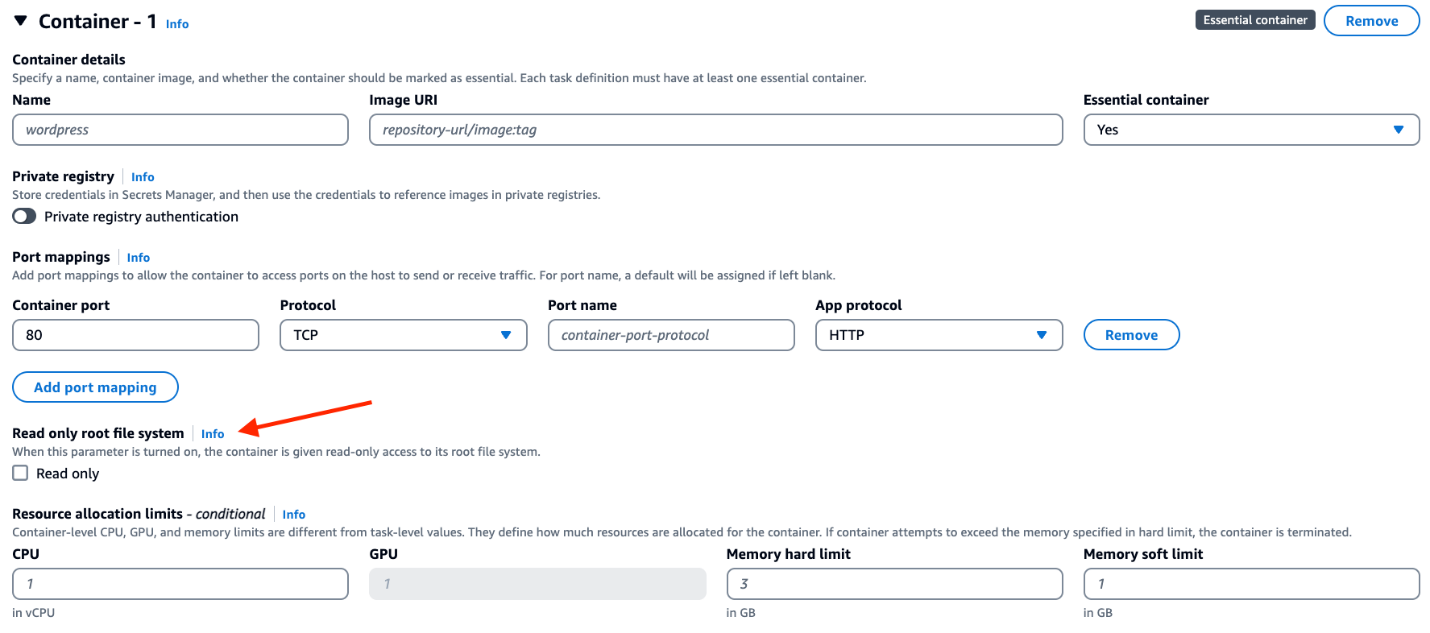
An Amazon Elastic Container Service (Amazon ECS) task definition is a blueprint for running Docker containers within an ECS cluster. It defines various parameters required for launching containers, such as Docker image, CPU and memory requirements, networking configuration, container dependencies, environment variables, and data volumes. An ECS task definition is to containers is what a launch configuration is to EC2 instances. ECS.5 is a control related to ECS and ensures that the ECS task definition has read-only access to mounted root filesystem enabled. This control is important and great for defense in depth because it helps prevent containers from making changes to the container’s root file system, prevents privilege escalation if a container is compromised, and can improve security and stability. This control fails if the readonlyRootFilesystem parameter doesn’t exist or is set to false in the ECS task definition JSON.
If you’re using the console to create the task definition, then you must select the read-only box against the root file system parameter in the console as show in Figure 3. If you are using JSON for task definition, then the parameter readonlyRootFilesystem must be set to true and supplied with the container definition or updated in order for this check to pass. This control creates a failed check finding for every ECS task definition that is out of compliance.
Figure 3: Using the ECS console to set readonlyRootFilesystem to true
Follow the steps in the remediation section of the control user guide to fix the resources identified by the control. Consider using infrastructure as code (IaC) tools such as AWS CloudFormation to define your task definitions as code, with the read-only root filesystem set to true to help prevent accidental misconfigurations. If you use continuous integration and delivery (CI/CD) to create your container task definitions, then consider adding a check that looks for the existence of the readonlyRootFilesystem parameter in the task definition and that its set to true.
If this is expected behavior for certain task definitions, you can use Security Hub automation rules to suppress the findings by matching on the ComplianceSecurityControlID and ResourceId filters in the criteria section.
To create the automation rule:
Sign in to the delegated administrator account and open the Security Hub console.
In the navigation pane, select Automations.
Choose Create rule. For Rule Type, select Create custom rule.
Enter a Rule Name and Rule Description.
In the Rule section, enter a unique rule name and a description for your rule.
For Criteria, use the Key, Operator, and Value drop down menus to specify your rule criteria. Use the following fields in the criteria section:
Add key ProductName with operator Equals and enter the value Security Hub.
Add key WorkFlowStatus with operator Equals and enter the value NEW.
Add key ComplianceSecurityControlId with operator Equals and enter the value ECS.5.
Add key ResourceId with operator Equals and enter the ARN of the ECS task definition as the value.
For Automated action,
Choose the dropdown under Workflow Status and select SUPPRESSED.
Under note, enter a description such as ECS.5 exception.
For Rule status, select Enabled
Choose Create rule.
Sample Security Hub central configuration policy
In this section, we cover a sample policy for the controls reviewed in this post using central configuration. To use central configuration, you must integrate Security Hub with Organizations and designate a home Region. The home Region is also your Security Hub aggregation Region, which receives findings, insights, and other data from linked Regions. If you use the Security Hub console, these prerequisites are included in the opt-in workflow for central configuration. Remember that an account or OU can only be associated with one configuration policy at a given time as to not have conflicting configurations. The policy should also provide complete specifications of settings applied to that account. Review the policy considerations document to understand how central configuration policies work. Follow the steps in the Start using central configuration to get started.
If you want to disable controls and update parameters as described in this post, then you must create two policies in the Security Hub delegated administrator account home Region. One policy applies to the management account and another policy applies to the member accounts.
First, create a policy to disable IAM.6, Autoscaling.3, and update the ports for the EC2.18 control to identify security groups with unrestricted access on the ports. Apply this policy to all member accounts. Use the Exclude organization units or accounts section to enter the account ID of the AWS management account.
To create a policy to disable IAM.6, Autoscaling.3 and update the ports:
Open the Security Hub console in the Security Hub delegated administrator account home Region.
In the navigation pane, select Configuration and then the Policies tab. Then, choose Create policy. If you already have an existing policy that applies to all member accounts, then select the policy and choose Edit.
For Controls, select Disable specific controls.
For Controls to disable, select IAM.6 and AutoScaling.3.
Select Customize controls parameters.
From the Select a Control dropdown, select EC2.18.
Edit the cell under List of authorized TCP ports, and add ports that are allow listed for unrestricted access. If no ports should be allow listed for unrestricted access then delete the text in the cell.
For Accounts, select All accounts.
Choose Exclude organizational units or accounts and enter the account ID of the management account.
For Policy details, enter a policy name and description.
Choose Next.
On the Review and apply page, review your configuration policy details. Choose Create policy and apply.
Create another policy in the Security Hub delegated administrator account home Region to disable Autoscaling.3 and update the ports for the EC2.18 control to fail the check for security groups with unrestricted access on any port. Apply this policy to the management account. Use the Specific accounts option for the Accounts section and then the Enter organization unit or accounts tab to enter the account ID of the management account.
To disable Autoscaling.3 and update the ports:
Open the AWS Security Hub console in the Security Hub delegated administrator account home Region.
In the navigation pane, select Configuration and the Policies tab.
Choose Create policy. If you already have an existing policy that applies to the management account only, then select the policy and choose Edit.
For Controls, choose Disable specific controls.
For Controls to disable, select AutoScaling.3.
Select Customize controls parameters.
From the Select a Control dropdown, select EC2.18.
Edit the cell under List of authorized TCP ports and add ports that are allow listed for unrestricted access. If no ports should be allow listed for unrestricted access then delete the text in the cell.
For Accounts, select Specific accounts.
Select the Enter Organization units or accounts tab and enter the Account ID of the management account.
For Policy details, enter a policy name and description.
Choose Next.
On the Review and apply page, review your configuration policy details. Choose Create policy and apply.
Conclusion
In this post, we reviewed the importance of the Security Hub security score and the four methods that you can use to improve your score. The methods include remediation of non-complaint resources, managing controls using Security Hub central configuration, suppressing findings using Security Hub automation rules, and using custom parameters to customize controls. You saw ways to address the five most commonly failed controls across Security Hub customers, including remediation strategies and guardrails for each of these controls.
If you have feedback about this post, submit comments in the Comments section below. If you have questions about this post, contact AWS Support.
Amazon Web Services (AWS) is pleased to announce the successful renewal of the United Kingdom Cyber Essentials Plus certification. The Cyber Essentials Plus certificate is valid for one year until March 22, 2025.
Cyber Essentials Plus is a UK Government–backed, industry-supported certification scheme intended to help organizations demonstrate controls against common cyber security threats. An independent third-party auditor certified by Information Assurance for Small and Medium Enterprises (IASME) completed the audit. The scope of our Cyber Essentials Plus certificate covers the AWS corporate network for the United Kingdom, Ireland, and Germany.
As always, we value your feedback and questions. Reach out to the AWS Compliance team through the Contact Us page. If you have feedback about this post, submit a comment in the Comments section below. To learn more about our other compliance and security programs, see AWS Compliance Programs.
Amazon Web Services (AWS) has recently renewed the Esquema Nacional de Seguridad (ENS) High certification, upgrading to the latest version regulated under Royal Decree 311/2022. The ENS establishes security standards that apply to government agencies and public organizations in Spain and service providers on which Spanish public services depend.
This security framework has gone through significant updates since the Royal Decree 3/2010 to the latest Royal Decree 311/2022 to adapt to evolving cybersecurity threats and technologies. The current scheme defines basic requirements and lists additional security reinforcements to meet the bar of the different security levels (Low, Medium, High).
Achieving the ENS High certification for its 311/2022 version underscores AWS commitment to maintaining robust cybersecurity controls and highlights our proactive approach to cybersecurity.
We are happy to announce the addition of 14 services to the scope of our ENS certification, for a new total of 172 services in scope. The certification now covers 31 Regions. Some of the additional services in scope for ENS High include the following:
Amazon Bedrock – This fully managed service offers a choice of high-performing foundation models (FMs) from leading artificial intelligence (AI) companies like AI21 Labs, Anthropic, Cohere, Meta, Mistral AI, Stability AI, and Amazon through a single API, along with a broad set of capabilities you need to build generative AI applications with security, privacy, and responsible AI.
Amazon EventBridge – Use this service to easily build loosely coupled, event-driven architectures. It creates point-to-point integrations between event producers and consumers without needing to write custom code or manage and provision servers.
AWS HealthOmics – This service helps healthcare and life science organizations and their software partners store, query, and analyze genomic, transcriptomic, and other omics data and then uses that data to generate insights to improve health.
AWS Signer – This is a fully managed code-signing service to ensure the trust and integrity of your code. AWS Signer manages the code-signing certificate’s public and private keys and enables central management of the code-signing lifecycle.
AWS Wickr – This service encrypts messages, calls, and files with a 256-bit end-to-end encryption protocol. Only the intended recipients and the customer organization can decrypt these communications, reducing the risk of adversary-in-the-middle attacks.
AWS achievement of the ENS High certification is verified by BDO Auditores S.L.P., which conducted an independent audit and confirmed that AWS continues to adhere to the confidentiality, integrity, and availability standards at its highest level as described in Royal Decree 311/2022.
As always, we are committed to bringing new services into the scope of our ENS High program based on your architectural and regulatory needs. If you have questions about the ENS program, reach out to your AWS account team or contact AWS Compliance.
If you have feedback about this post, submit comments in the Comments section below.
Want more AWS Security how-to content, news, and feature announcements? Follow us onTwitter.
Our customers depend on Amazon Web Services (AWS) for their mission-critical applications and most sensitive data. Every day, the world’s fastest-growing startups, largest enterprises, and most trusted governmental organizations are choosing AWS as the place to run their technology infrastructure. They choose us because security has been our top priority from day one. We designed AWS from its foundation to be the most secure way for our customers to run their workloads, and we’ve built our internal culture around security as a business imperative.
While technical security measures are important, organizations are made up of people. A recent report from the Cyber Safety Review Board (CSRB) makes it clear that a deficient security culture can be a root cause for avoidable errors that allow intrusions to succeed and remain undetected.
Security is our top priority
Our security culture starts at the top, and it extends through every part of our organization. Over eight years ago, we made the decision for our security team to report directly to our CEO. This structural design redefined how we build security into the culture of AWS and informs everyone at the company that security is our top priority by providing direct visibility to senior leadership. We empower our service teams to fully own the security of their services and scale security best practices and programs so our customers have the confidence to innovate on AWS.
We believe that there are four key principles to building a strong culture of security:
Security is built into our organizational structure
At AWS, we view security as a core function of our business, deeply connected to our mission objectives. This goes beyond good intentions—it’s embedded directly into our organizational structure. At Amazon, we make an intentional choice for all our security teams to report directly to the CEO while also being deeply embedded in our respective business units. The goal is to build security into the structural fabric of how we make decisions. Every week, the AWS leadership team, led by our CEO, meets with my team to discuss security and ensure we’re making the right choices on tactical and strategic security issues and course-correcting when needed. We report internally on operational metrics that tie our security culture to the impact that it has on our customers, connecting data to business outcomes and providing an opportunity for leadership to engage and ask questions. This support for security from the top levels of executive leadership helps us reinforce the idea that security is accelerating our business outcomes and improving our customers’ experiences rather than acting as a roadblock.
Security is everyone’s job
AWS operates with a strong ownership model built around our culture of security. Ownership is one of our key Leadership Principles at Amazon. Employees in every role receive regular training and reinforcement of the message that security is everyone’s job. Every service and product team is fully responsible for the security of the service or capability that they deliver. Security is built into every product roadmap, engineering plan, and weekly stand-up meeting, just as much as capabilities, performance, cost, and other core responsibilities of the builder team. The best security is not something that can be “bolted on” at the end of a process or on the outside of a system; rather, security is integral and foundational.
AWS business leaders prioritize building products and services that are designed to be secure. At the same time, they strive to create an environment that encourages employees to identify and escalate potential security concerns even when uncertain about whether there is an actual issue. Escalation is a normal part of how we work in AWS, and our practice of escalation provides a “security reporting safe space” to everyone. Our teams and individuals are encouraged to report and escalate any possible security issues or concerns with a high-priority ticket to the security team. We would much rather hear about a possible security concern and investigate it, regardless of whether it is unlikely or not. Our employees know that we welcome reports even for things that turn out to be nonissues.
Distributing security expertise and ownership across AWS
Our central AWS Security team provides a number of critical capabilities and services that support and enable our engineering and service teams to fulfill their security responsibilities effectively. Our central team provides training, consultation, threat-modeling tools, automated code-scanning frameworks and tools, design reviews, penetration testing, automated API test frameworks, and—in the end—a final security review of each new service or new feature. The security reviewer is empowered to make a go or no-go decision with respect to each and every release. If a service or feature does not pass the security review process in the first review, we dive deep to understand why so we can improve processes and catch issues earlier in development. But, releasing something that’s not ready would be an even bigger failure, so we err on the side of maintaining our high security bar and always trying to deliver to the high standards that our customers expect and rely on.
One important mechanism to distribute security ownership that we’ve developed over the years is the Security Guardians program. The Security Guardians program trains, develops, and empowers service team developers in each two-pizza team to be security ambassadors, or Guardians, within the product teams. At a high level, Guardians are the “security conscience” of each team. They make sure that security considerations for a product are made earlier and more often, helping their peers build and ship their product faster, while working closely with the central security team to help ensure the security bar remains high at AWS. Security Guardians feel empowered by being part of a cross-organizational community while also playing a critical role for the team and for AWS as a whole.
Scaling security through innovation
Another way we scale security across our culture at AWS is through innovation. We innovate to build tools and processes to help all of our people be as effective as possible and maintain focus. We use artificial intelligence (AI) to accelerate our secure software development process, as well as new generative AI–powered features in Amazon Inspector, Amazon Detective, AWS Config, and Amazon CodeWhisperer that complement the human skillset by helping people make better security decisions, using a broader collection of knowledge. This pattern of combining sophisticated tooling with skilled engineers is highly effective because it positions people to make the nuanced decisions required for effective security.
For large organizations, it can take years to assess every scenario and prove systems are secure. Even then, their systems are constantly changing. Our automated reasoning tools use mathematical logic to answer critical questions about infrastructure to detect misconfigurations that could potentially expose data. This provable security provides higher assurance in the security of the cloud and in the cloud. We apply automated reasoning in key service areas such as storage, networking, virtualization, identity, and cryptography. Amazon scientists and engineers also use automated reasoning to prove the correctness of critical internal systems. We process over a billion mathematical queries per day that power AWS Identity and Access Management Access Analyzer, Amazon Simple Storage Service (Amazon S3) Block Public Access, and other security offerings. AWS is the first and only cloud provider to use automated reasoning at this scale.
Advancing the future of cloud security
At AWS, we care deeply about our culture of security. We’re consistently working backwards from our customers and investing in raising the bar on our security tools and capabilities. For example, AWS enables encryption of everything. AWS Key Management Service (AWS KMS) is the first and only highly scalable, cloud-native key management system that is also FIPS 140-2 Level 3 certified. No one can retrieve customer plaintext keys, not even the most privileged admins within AWS. With the AWS Nitro System, which is the foundation of the AWS compute service Amazon Elastic Compute Cloud (Amazon EC2), we designed and delivered first-of-a-kind and still unique in the industry innovation to maximize the security of customers’ workloads. The Nitro System provides industry-leading privacy and isolation for all their compute needs, including GPU-based computing for the latest generative AI systems. No one, not even the most privileged admins within AWS, can access a customer’s workloads or data in Nitro-based EC2 instances.
We continue to innovate on behalf of our customers so they can move quickly, securely, and with confidence to enable their businesses, and our track record in the area of cloud security is second to none. That said, cybersecurity challenges continue to evolve, and while we’re proud of our achievements to date, we’re committed to constant improvement as we innovate and advance our technologies and our culture of security.
If you have feedback about this post, submit comments in the Comments section below. If you have questions about this post, contact AWS Support.
This alignment with DESC requirements demonstrates our continuous commitment to adhere to the heightened expectations for CSPs. Government customers of AWS can run their applications in AWS Cloud-certified Regions with confidence.
The independent third-party auditor BSI evaluated AWS on behalf of DESC on January 23, 2024. The Certificate of Compliance that illustrates the compliance status of AWS is available through AWS Artifact. AWS Artifact is a self-service portal for on-demand access to AWS compliance reports. Sign in to AWS Artifact in the AWS Management Console, or learn more at Getting Started with AWS Artifact.
The certification includes 25 additional services in scope, for a total of 87 services. This is a 40% increase in the number of services in the Middle East (UAE) Region that are in scope of the DESC CSP certification. For up-to-date information, including when additional services are added, see the AWS Services in Scope by Compliance Program webpage and choose DESC CSP.
AWS strives to continuously bring services into the scope of its compliance programs to help you meet your architectural and regulatory needs. If you have questions or feedback about DESC compliance, reach out to your AWS account team.
To learn more about our compliance and security programs, see AWS Compliance Programs. As always, we value your feedback and questions; reach out to the AWS Compliance team through the Contact Us page.
If you have feedback about this post, submit comments in the Comments section below.
The IAR provides management and technical information security controls to help establish, implement, maintain, and continuously improve information assurance. AWS alignment with IAR requirements demonstrates our ongoing commitment to adhere to the heightened expectations for cloud service providers. As such, IAR-regulated customers can continue to use AWS services with confidence.
Independent third-party auditors from BDO evaluated AWS for the period of November 1, 2022, to October 31, 2023. The assessment report that illustrates the status of AWS compliance is available through AWS Artifact. AWS Artifact is a self-service portal for on-demand access to AWS compliance reports. Sign in to AWS Artifact in the AWS Management Console, or learn more at Getting Started with AWS Artifact.
AWS strives to continuously bring services into the scope of its compliance programs to help you meet your architectural and regulatory needs. If you have questions or feedback about IAR compliance, reach out to your AWS account team.
To learn more about our compliance and security programs, see AWS Compliance Programs. As always, we value your feedback and questions; reach out to the AWS Compliance team through the Contact Us page.
If you have feedback about this post, submit comments in the Comments section below.
Amazon Web Services (AWS) is excited to announce that AWS Wickr has achieved Federal Risk and Authorization Management Program (FedRAMP) authorization at the High impact level from the FedRAMP Joint Authorization Board (JAB).
FedRAMP is a U.S. government–wide program that promotes the adoption of secure cloud services by providing a standardized approach to security and risk assessment for cloud technologies and federal agencies.
Customers find security and control in Wickr
Wickr is an end-to-end encrypted messaging and collaboration service with features designed to help keep your communications secure, private, and compliant. Wickr protects one-to-one and group messaging, voice and video calling, file sharing, screen sharing, and location sharing with 256-bit encryption, and provides data retention capabilities.
You can create Wickr networks through the AWS Management Console. Administrative controls allow your Wickr administrators to add, remove, and invite users, and organize them into security groups to manage messaging, calling, security, and federation settings. You maintain full control over data, which includes addressing information governance polices, configuring ephemeral messaging options, and deleting credentials for lost or stolen devices.
You can log internal and external communications—including conversations with guest users, contractors, and other partner networks—in a private data store that you manage. This allows you to retain messages and files that are sent to and from your organization, to help meet requirements such as those that fall under the Federal Records Act (FRA) and the National Archives and Records Administration (NARA).
The FedRAMP milestone
In obtaining a FedRAMP High authorization, Wickr has been measured against a rigorous set of security controls, procedures, and policies established by the U.S. Federal Government, based on National Institute of Standards and Technology (NIST) standards.
“For many federal agencies and organizations, having the ability to securely communicate and share information—whether in an office or out in the field—is key to helping achieve their critical missions. AWS Wickr helps our government customers collaborate securely through messaging, calling, file and screen sharing with end-to-end encryption. The FedRAMP High authorization for Wickr demonstrates our commitment to delivering solutions that give government customers the control and confidence they need to support their sensitive and regulated workloads.” — Christian Hoff, Director, US Federal Civilian & Health at AWS
FedRAMP on AWS
AWS is continually expanding the scope of our compliance programs to help you use authorized services for sensitive and regulated workloads. We now offer 150 services that are authorized in the AWS US East/West Regions under FedRAMP Moderate authorization, and 132 services authorized in the AWS GovCloud (US) Regions under FedRAMP High authorization.
The FedRAMP High authorization of Wickr further validates our commitment at AWS to public-sector customers. With Wickr, you can combine the security of end-to-end encryption with the administrative flexibility you need to secure mission-critical communications, and keep up with recordkeeping requirements. Wickr is available under FedRAMP High in the AWS GovCloud (US-West) Region.
This whitepaper summarizes OSFI’s expectations with respect to Technology and Cyber Risk Management (OSFI Guideline B-13). It also gives OSFI-regulated institutions information that they can use to commence their due diligence and assess how to implement the appropriate programs for their use of AWS Cloud services. In subsequent versions of the whitepaper, we will provide considerations for other OSFI guidelines as applicable.
In addition to this whitepaper, AWS provides updates on the evolving Canadian regulatory landscape on the AWS Security Blog and the AWS Compliance page. Customers looking for more information on cloud-related regulatory compliance in different countries around the world can refer to the AWS Compliance Center. For additional resources or support, reach out to your AWS account manager or contact us here.
If you have feedback about this post, submit comments in the Comments section below. If you have questions about this post, contact AWS Support.
You can use Amazon Security Lake to simplify log data collection and retention for Amazon Web Services (AWS) and non-AWS data sources. To make sure that you get the most out of your implementation requires proper planning.
In this post, we will show you how to plan and implement a proof of concept (POC) for Security Lake to help you determine the functionality and value of Security Lake in your environment, so that your team can confidently design and implement in production. We will walk you through the following steps:
Understand the functionality and value of Security Lake
Determine success criteria for the POC
Define your Security Lake configuration
Prepare for deployment
Enable Security Lake
Validate deployment
Understand the functionality of Security Lake
Figure 1 summarizes the main features of Security Lake and the context of how to use it:
Figure 1: Overview of Security Lake functionality
As shown in the figure, Security Lake ingests and normalizes logs from data sources such as AWS services, AWS Partner sources, and custom sources. Security Lake also manages the lifecycle, orchestration, and subscribers. Subscribers can be AWS services, such as Amazon Athena, or AWS Partner subscribers.
There are four primary functions that Security Lake provides:
Centralize visibility to your data from AWS environments, SaaS providers, on-premises, and other cloud data sources — You can collect log sources from AWS services such as AWS CloudTrail management events, Amazon Simple Storage Service (Amazon S3) data events, AWS Lambda data events, Amazon Route 53 Resolver logs, VPC Flow Logs, and AWS Security Hub findings, in addition to log sources from on-premises, other cloud services, SaaS applications, and custom sources. Security Lake automatically aggregates the security data across AWS Regions and accounts.
Normalize your security data to an open standard — Security Lake normalizes log sources in a common schema, the Open Security Schema Framework (OCSF), and stores them in compressed parquet files.
Use your preferred analytics tools to analyze your security data — You can use AWS tools, such as Athena and Amazon OpenSearch Service, or you can utilize external security tools to analyze the data in Security Lake.
Optimize and manage your security data for more efficient storage and query — Security Lake manages the lifecycle of your data with customizable retention settings with automated storage tiering to help provide more cost-effective storage.
Determine success criteria
By establishing success criteria, you can assess whether Security Lake has helped address the challenges that you are facing. Some example success criteria include:
I need to centrally set up and store AWS logs across my organization in AWS Organizations for multiple log sources.
I need to more efficiently collect VPC Flow Logs in my organization and analyze them in my security information and event management (SIEM) solution.
I want to use OpenSearch Service to replace my on-premises SIEM.
I want to collect AWS log sources and custom sources for machine learning with Amazon Sagemaker.
I need to establish a dashboard in Amazon QuickSight to visualize my Security Hub findings and a custom log source data.
Review your success criteria to make sure that your goals are realistic given your timeframe and potential constraints that are specific to your organization. For example, do you have full control over the creation of AWS services that are deployed in an organization? Do you have resources that can dedicate time to implement and test? Is this time convenient for relevant stakeholders to evaluate the service?
The timeframe of your POC will depend on your answers to these questions.
Important: Security Lake has a 15-day free trial per account that you use from the time that you enable Security Lake. This is the best way to estimate the costs for each Region throughout the trial, which is an important consideration when you configure your POC.
Define your Security Lake configuration
After you establish your success criteria, you should define your desired Security Lake configuration. Some important decisions include the following:
Determine AWS log sources — Decide which AWS log sources to collect. For information about the available options, see Collecting data from AWS services.
Determine third-party log sources — Decide if you want to include non-AWS service logs as sources in your POC. For more information about your options, see Third-party integrations with Security Lake; the integrations listed as “Source” can send logs to Security Lake.
Note: You can add third-party integrations after the POC or in a second phase of the POC. Pre-planning will be required to make sure that you can get these set up during the 15-day free trial. Third-party integrations usually take more time to set up than AWS service logs.
Select a delegated administrator – Identify which account will serve as the delegated administrator. Make sure that you have the appropriate permissions from the organization admin account to identify and enable the account that will be your Security Lake delegated administrator. This account will be the location for the S3 buckets with your security data and where you centrally configure Security Lake. The AWS Security Reference Architecture (AWS SRA) recommends that you use the AWS logging account for this purpose. In addition, make sure to review Important considerations for delegated Security Lake administrators.
Select accounts in scope — Define which accounts to collect data from. To get the most realistic estimate of the cost of Security Lake, enable all accounts across your organization during the free trial.
Determine analytics tool — Determine if you want to use native AWS analytics tools, such as Athena and OpenSearch Service, or an existing SIEM, where the SIEM is a subscriber to Security Lake.
Define log retention and Regions — Define your log retention requirements and Regional restrictions or considerations.
Prepare for deployment
After you determine your success criteria and your Security Lake configuration, you should have an idea of your stakeholders, desired state, and timeframe. Now you need to prepare for deployment. In this step, you should complete as much as possible before you deploy Security Lake. The following are some steps to take:
Create a project plan and timeline so that everyone involved understands what success look like and what the scope and timeline is.
Define the relevant stakeholders and consumers of the Security Lake data. Some common stakeholders include security operations center (SOC) analysts, incident responders, security engineers, cloud engineers, finance, and others.
Define who is responsible, accountable, consulted, and informed during the deployment. Make sure that team members understand their roles.
Consider other technical prerequisites that you need to accomplish. For example, if you need roles in addition to what Security Lake creates for custom extract, transform, and load (ETL) pipelines for custom sources, can you work with the team in charge of that process before the POC?
Enable Security Lake
The next step is to enable Security Lake in your environment and configure your sources and subscribers.
Deploy Security Lake across the Regions, accounts, and AWS log sources that you previously defined.
Configure custom sources that are in scope for your POC.
Configure analytics tools in scope for your POC.
Validate deployment
The final step is to confirm that you have configured Security Lake and additional components, validate that everything is working as intended, and evaluate the solution against your success criteria.
Validate log collection — Verify that you are collecting the log sources that you configured. To do this, check the S3 buckets in the delegated administrator account for the logs.
Validate analytics tool — Verify that you can analyze the log sources in your analytics tool of choice. If you don’t want to configure additional analytics tooling, you can use Athena, which is configured when you set up Security Lake. For sample Athena queries, see Amazon Security Lake Example Queries on GitHub and Security Lake queries in the documentation.
Obtain a cost estimate — In the Security Lake console, you can review a usage page to verify that the cost of Security Lake in your environment aligns with your expectations and budgets.
Assess success criteria — Determine if you achieved the success criteria that you defined at the beginning of the project.
Next steps
Next steps will largely depend on whether you decide to move forward with Security Lake.
Determine if you have the approval and budget to use Security Lake.
Expand to other data sources that can help you provide more security outcomes for your business.
Configure S3 lifecycle policies to efficiently store logs long term based on your requirements.
Let other teams know that they can subscribe to Security Lake to use the log data for their own purposes. For example, a development team that gets access to CloudTrail through Security Lake can analyze the logs to understand the permissions needed for an application.
Conclusion
In this blog post, we showed you how to plan and implement a Security Lake POC. You learned how to do so through phases, including defining success criteria, configuring Security Lake, and validating that Security Lake meets your business needs.
As a customer, this guide will help you run a successful proof of value (POV) with Security Lake. It guides you in assessing the value and factors to consider when deciding to implement the current features.
The new IRAP report includes an additional seven AWS services that are now assessed at the PROTECTED level under IRAP. This brings the total number of services assessed at the PROTECTED level to 151.
The following are the seven newly assessed services:
AWS has developed an IRAP documentation pack to assist Australian government agencies and their partners to plan, architect, and assess risk for their workloads when they use AWS Cloud services.
The IRAP pack on AWS Artifact also includes newly updated versions of the AWS Consumer Guide and the whitepaper Reference Architectures for ISM PROTECTED Workloads in the AWS Cloud.
Reach out to your AWS representatives to let us know which additional services you would like to see in scope for upcoming IRAP assessments. We strive to bring more services into scope at the PROTECTED level under IRAP to support your requirements.
If you have feedback about this post, submit comments in the Comments section below. If you have questions about this post, contact AWS Support.
The certification assessment covered the operation of infrastructure (including compute, storage, networking, databases, and security) in the AWS Asia Pacific (Seoul) Region. AWS was the first global cloud service provider (CSP) to obtain the K-ISMS certification back in 2017 and has held that certification longer than any other global CSP. In this year’s audit, 144 services running in the Asia Pacific (Seoul) Region were included.
Sponsored by the Korea Internet & Security Agency (KISA) and affiliated with the Korean Ministry of Science and ICT (MSIT), K-ISMS serves as a standard for evaluating whether enterprises and organizations operate and manage their information security management systems consistently and securely, such that they thoroughly protect their information assets.
This certification helps enterprises and organizations across South Korea, regardless of industry, meet KISA compliance requirements more efficiently. Achieving this certification demonstrates the AWS commitment on cloud security adoption, adhering to compliance requirements set by the South Korean government and delivering secure AWS services to customers.
The Operational Best Practices (conformance pack) page provides customers with a compliance framework that they can use for their K-ISMS compliance needs. Enterprises and organizations can use the toolkit and AWS certification to reduce the effort and cost of getting their own K-ISMS certification.
Customers can download the AWS K-ISMS certification from AWS Artifact. To learn more about the AWS K-ISMS certification, see the AWS K-ISMS page. If you have questions, contact your AWS account manager.
If you have feedback about this post, submit comments in the Comments section below.
We continue to expand the scope of our assurance programs at Amazon Web Services (AWS), and we’re pleased to announce that AWS has successfully completed the 2023 Cloud Computing Compliance Controls Catalogue (C5) attestation cycle with 170 services in scope. This alignment with C5 requirements demonstrates our ongoing commitment to adhere to the heightened expectations for cloud service providers. AWS customers in Germany and across Europe can run their applications on AWS Regions in scope of the C5 report with the assurance that AWS aligns with C5 requirements.
The C5 attestation scheme is backed by the German government and was introduced by the Federal Office for Information Security (BSI) in 2016. AWS has adhered to the C5 requirements since their inception. C5 helps organizations demonstrate operational security against common cybersecurity threats when using cloud services within the context of the German government’s Security Recommendations for Cloud Computing Providers.
Independent third-party auditors evaluated AWS for the period of October 1, 2022, through September 30, 2023. The C5 report illustrates the compliance status of AWS for both the basic and additional criteria of C5. Customers can download the C5 report through AWS Artifact, a self-service portal for on-demand access to AWS compliance reports. Sign in to AWS Artifact in the AWS Management Console, or learn more at Getting Started with AWS Artifact.
AWS has added the following 16 services to the current C5 scope:
With the 2023 C5 attestation, we’re also expanding the scope to two new Regions — Europe (Spain) and Europe (Zurich). In addition, the services offered in the Asia Pacific (Singapore), Europe (Frankfurt), Europe (Ireland), Europe (London), Europe (Milan), Europe (Paris), and Europe (Stockholm) Regions remain in scope of this attestation. For up-to-date information, see the C5 page of our AWS Services in Scope by Compliance Program.
AWS strives to continuously bring services into the scope of its compliance programs to help you meet your architectural and regulatory needs. If you have questions or feedback about C5 compliance, reach out to your AWS account team.
To learn more about our compliance and security programs, see AWS Compliance Programs. As always, we value your feedback and questions; reach out to the AWS Compliance team through the Contact Us page.
If you have feedback about this post, submit comments in the Comments section below.
The Finnish Transport and Communications Agency (Traficom) Cyber Security Centre published PiTuKri, which consists of 52 criteria that provide guidance when assessing the security of cloud service providers. The criteria are organized into the following 11 subdivisions:
Five additional AWS Regions have been added to the scope, for a total of 29 Regions. The following are the five additional Regions now in scope:
Australia: Asia Pacific (Melbourne) (ap-southeast-4)
India: Asia Pacific (Hyderabad) (ap-south-2)
Spain: Europe (Spain) (eu-south-2)
Switzerland: Europe (Zurich) (eu-central-2)
United Arab Emirates: Middle East (UAE) (me-central-1)
The latest report covers the period from October 1, 2022, to September 30, 2023. An independent third-party audit firm issued the report to assure customers that the AWS control environment is appropriately designed and implemented for support of adherence with PiTuKri requirements. This attestation demonstrates the AWS commitment to meet security expectations for cloud service providers set by Traficom.
AWS strives to continuously bring new services into the scope of its compliance programs to help you meet your architectural and regulatory needs. Contact your AWS account team for questions about the PiTuKri report.
If you have feedback about this post, submit comments in the Comments section below. If you have questions about this post, contact AWS Support.
Want more AWS Security news? Follow us on Twitter.
We’re excited to announce that Amazon Web Services (AWS) has completed the first cloud service provider (CSP) audit by the Ingelheim Kreis (IK) Initiative Joint Audits group. The audit group represents quality and compliance professionals from some of our largest pharmaceutical and life sciences customers who collectively perform audits on their key suppliers.
As customers embrace the scalability and flexibility of AWS, we’re helping them evolve security, identity, and compliance into key business enablers. At AWS, we’re obsessed with earning and maintaining customer trust. We work hard to provide our pharmaceutical and life sciences customers and their regulatory bodies with the assurance that AWS has the necessary controls in place to help protect their most sensitive data and regulated workloads.
Our collaboration with the IK Joint Audits Group to complete the first CSP audit is a good example of how we support your risk management and regulatory efforts. Regulated pharmaceutical and life sciences customers are required by GxP to employ a risk-based approach to design, develop, and maintain computerized systems. GxP is a collection of quality guidelines and regulations that are designed to ensure safe development and manufacturing of medical devices, pharmaceuticals, biologic, and other food and medical products. Currently, no specific certifications for GxP compliance exist for CSPs. Pharmaceutical companies must do their own supplier assessment to determine the adequacy of their development and support processes.
The joint audit thoroughly assessed the AWS controls that are designed to protect your data and material workloads and help satisfy your regulatory requirements. As more pharmaceutical and life sciences companies use cloud technology for their operations, the industry is experiencing greater regulatory oversight. Because the joint audit of independent auditors represented a group of companies, both AWS and our customers were able to streamline common controls and increase transparency, and use audit resources more efficiently to help decrease the organizational burden on both the companies and the supplier (in this case, AWS).
Audit results
The IK audit results provide IK members with assurance regarding the AWS controls environment, enabling members to work to remove compliance blockers, accelerate their adoption of AWS services, and obtain confidence and trust in the security controls of AWS.
As stated by the IK auditors, “…in the course of the Audit it became obvious that AWS within their service development, their data center operation and with their employees acts highly professional with a clear customer focus. The amount of control that AWS implemented and continuously extends exceeds our expectations of a qualified CSP”.
The report is confidential and only available to IK members who signed the NDA with AWS prior to the start of the audit in 2023. Members can access the report and assess their own residual risk. To participate in a future audit cycle, contact [email protected].
To learn more about our commitment to safeguard customer data, see AWS Cloud Security. For more information about the robust controls that are in place at AWS, see the AWS Compliance Program page. By integrating governance-focused, audit-friendly service features with applicable compliance or audit standards, AWS Compliance helps you set up and operate in an AWS control environment. Customers can also access AWS Artifact to download other compliance reports that independent auditors have evaluated.
The US East (Ohio) Region first obtained GSMA certification in September 2021, and the Europe (Paris) Region first obtained GSMA certification in October 2021. This renewal demonstrates our continuous commitment to adhere to the heightened expectations for cloud service providers. AWS customers who provide an embedded Universal Integrated Circuit Card (eUICC) for mobile devices can run their remote provisioning applications with confidence in the AWS Cloud in the GSMA-certified Regions.
For up-to-date information related to the certification, see the AWS Compliance Program page and choose GSMA under Europe, Middle East & Africa.
AWS was evaluated by independent third-party auditors that GSMA selected. The Certificate of Compliance that shows AWS achieved GSMA compliance status is available on the GSMA website and through AWS Artifact. AWS Artifact is a self-service portal for on-demand access to AWS compliance reports. Sign in to AWS Artifact in the AWS Management Console, or learn more at Getting Started with AWS Artifact.
To learn more about our compliance and security programs, see AWS Compliance Programs. As always, we value your feedback and questions; reach out to the AWS Compliance team through the Contact Us page. If you have feedback about this post, submit comments in the Comments section below.
Want more AWS Security news? Follow us on Twitter.
Amazon Web Services (AWS) is pleased to announce the successful renewal of the AWS CyberGRX cyber risk assessment report. This third-party validated report helps customers perform effective cloud supplier due diligence on AWS and enhances customers’ third-party risk management process.
With the increase in adoption of cloud products and services across multiple sectors and industries, AWS has become a critical component of customers’ environments. Regulated customers are held to high standards by regulators and auditors when it comes to exercising effective due diligence on third parties.
Many customers use third-party cyber risk management (TPCRM) services such as CyberGRX to better manage risks from their evolving third-party environments and to drive operational efficiencies. To help with such efforts, AWS has completed the CyberGRX assessment of its security posture. CyberGRX security analysts perform the assessment and validate the results annually.
The CyberGRX assessment applies a dynamic approach to third-party risk assessment. This approach integrates advanced analytics, threat intelligence, and sophisticated risk models with vendors’ responses to provide an in-depth view of how a vendor’s security controls help protect against potential threats.
Vendor profiles are continuously updated as the risk level of cloud service providers changes, or as AWS updates its security posture and controls. This approach eliminates outdated static spreadsheets for third-party risk assessments, in which the risk matrices are not updated in near real time.
In addition, AWS customers can use the CyberGRX Framework Mapper to map AWS assessment controls and responses to well-known industry standards and frameworks, such as National Institute of Standards and Technology (NIST) 800-53, NIST Cybersecurity Framework, International Organization for Standardization (ISO) 27001, Payment Card Industry Data Security Standard (PCI DSS), and the U.S. Health Insurance Portability and Assessment Act (HIPAA). This mapping can reduce customers’ third-party supplier due-diligence burden.
Customers can access the AWS CyberGRX report at no additional cost. Customers can request access to the report by completing an access request form, available on the AWS CyberGRX page.
As always, we value your feedback and questions. Reach out to the AWS Compliance team through the Contact Us page. If you have feedback about this post, submit comments in the Comments section below. To learn more about our other compliance and security programs, see AWS Compliance Programs.
Want more AWS Security news? Follow us on Twitter.
The collective thoughts of the interwebz
Manage Consent
To provide the best experiences, we use technologies like cookies to store and/or access device information. Consenting to these technologies will allow us to process data such as browsing behavior or unique IDs on this site. Not consenting or withdrawing consent, may adversely affect certain features and functions.
Functional
Always active
The technical storage or access is strictly necessary for the legitimate purpose of enabling the use of a specific service explicitly requested by the subscriber or user, or for the sole purpose of carrying out the transmission of a communication over an electronic communications network.
Preferences
The technical storage or access is necessary for the legitimate purpose of storing preferences that are not requested by the subscriber or user.
Statistics
The technical storage or access that is used exclusively for statistical purposes.The technical storage or access that is used exclusively for anonymous statistical purposes. Without a subpoena, voluntary compliance on the part of your Internet Service Provider, or additional records from a third party, information stored or retrieved for this purpose alone cannot usually be used to identify you.
Marketing
The technical storage or access is required to create user profiles to send advertising, or to track the user on a website or across several websites for similar marketing purposes.