Customers using Amazon Web Services (AWS) can use a range of native and third-party tools to build workloads based on their specific use cases. Logs and metrics are foundational components in building effective insights into the health of your IT environment. In a distributed and agile AWS environment, customers need a centralized and holistic solution to visualize the health and security posture of their infrastructure.
You can effectively categorize the members of the teams involved using the following roles:
Executive stakeholder: Owns and operates with their support staff and has total financial and risk accountability.
Data custodian: Aggregates related data sources while managing cost, access, and compliance.
Operator or analyst: Uses security tooling to monitor, assess, and respond to related events such as service disruptions.
In this blog post, we focus on the data custodian role. We show you how you can visualize metrics and logs centrally with Amazon QuickSight irrespective of the service or tool generating them. We use Amazon Simple Storage Service (Amazon S3) for storage, AWS Glue for cataloguing, and Amazon Athena for querying the data and creating structured query language (SQL) views for QuickSight to consume.
Target architecture
This post guides you towards building a target architecture in line with the AWS Well-Architected Framework. The tiered and multi-account target architecture, shown in Figure 1, uses account-level isolation to separate responsibilities across the various roles identified above and makes access management more defined and specific to those roles. The workload accounts generate the telemetry around the applications and infrastructure. The data custodian account is where the data lake is deployed and collects the telemetry. The operator account is where the queries and visualizations are created.
Throughout the post, I mention AWS services that reduce the operational overhead in one or more stages of the architecture.
Figure 1: Data visualization architecture
Ingestion
Irrespective of the technology choices, applications and infrastructure configurations should generate metrics and logs that report on resource health and security. The format of the logs depends on which tool and which part of the stack is generating the logs. For example, the format of log data generated by application code can capture bespoke and additional metadata deemed useful from a workload perspective as compared to access logs generated by proxies or load balancers. For more information on types of logs and effective logging strategies, see Logging strategies for security incident response.
Amazon S3 is a scalable, highly available, durable, and secure object storage that you will use as the storage layer. To build a solution that captures events agnostic of the source, you must forward data as a stream to the S3 bucket. Based on the architecture, there are multiple tools you can use to capture and stream data into S3 buckets. Some tools support integration with S3 and directly stream data to S3. Resources like servers and virtual machines need forwarding agents such as Amazon Kinesis Agent, Amazon CloudWatch agent, or Fluent Bit.
Amazon Kinesis Data Streams provides a scalable data streaming environment. Using on-demand capacity mode eliminates the need for capacity provisioning and capacity management for streaming workloads. For log data and metric collection, you should use on-demand capacity mode, because log data generation can be unpredictable depending on the requests that are being handled by the environment. Amazon Kinesis Data Firehose can convert the format of your input data from JSON to Apache Parquet before storing the data in Amazon S3. Parquet is naturally compressed, and using Parquet native partitioning and compression allows for faster queries compared to JSON formatted objects.
Amazon Security Lake is a fully managed security data lake service. You can use Security Lake to automatically centralize security data from AWS environments, SaaS providers, on-premises, and third-party sources into a purpose-built data lake that’s stored in your AWS account. Using Security Lake reduces the operational effort involved in building a scalable data lake, as the service automates the configuration and orchestration for the data lake with Lake Formation. Security Lake automatically transforms logs into a standard schema—the Open Cybersecurity Schema Framework (OCSF) — and parses them into a standard directory structure, which allows for faster queries. For more information, see How to visualize Amazon Security Lake findings with Amazon QuickSight.
You can start with basic queries and visualizations as described in Query logs in S3 with Athena and Create a QuickSight visualization. Depending on the nature and origin of the logs and metrics that you want to query, you can use the examples published in Running SQL queries using Amazon Athena. To build custom analytics, you can create views with Athena. Views in Athena are logical tables that you can use to query a subset of data. Views help you to hide complexity and minimize maintenance when querying large tables. Use views as a source for new datasets to build specific health analytics and dashboards.
You can also use Amazon QuickSight Q to get started on your analytics journey. Powered by machine learning, Q uses natural language processing to provide insights into the datasets. After the dataset is configured, you can use Q to give you suggestions for questions to ask about the data. Q understands business language and generates results based on relevant phrases detected in the questions. For more information, see Working with Amazon QuickSight Q topics.
Conclusion
Logs and metrics offer insights into the health of your applications and infrastructure. It’s essential to build visibility into the health of your IT environment so that you can understand what good health looks like and identify outliers in your data. These outliers can be used to identify thresholds and feed into your incident response workflow to help identify security issues. This post helps you build out a scalable centralized visualization environment irrespective of the source of log and metric data.
This post is part 1 of a series that helps you dive deeper into the security analytics use case. In part 2, How to visualize Amazon Security Lake findings with Amazon QuickSight, you will learn how you can use Security Lake to reduce the operational overhead involved in building a scalable data lake and centralizing log data from SaaS providers, on-premises, AWS, and third-party sources into a purpose-built data lake. You will also learn how you can integrate Athena with Security Lake and create visualizations with QuickSight of the data and events captured by Security Lake.
In December 2022, FINMA, the Swiss Financial Market Supervisory Authority, announced a fully revised circular called Operational risks and resilience – banks that will take effect on January 1, 2024. The circular will replace the Swiss Bankers Association’s Recommendations for Business Continuity Management (BCM), which is currently recognized as a minimum standard. The new circular also adopts the revised principles for managing operational risks, and the new principles on operational resilience, that the Basel Committee on Banking Supervision published in March 2021.
In this blog post, we share key considerations for AWS customers and regulated financial institutions to help them prepare for, and align to, the new circular.
AWS previously announced the publication of the AWS User Guide to Financial Services Regulations and Guidelines in Switzerland. The guide refers to certain rules applicable to financial institutions in Switzerland, including banks, insurance companies, stock exchanges, securities dealers, portfolio managers, trustees, and other financial entities that FINMA oversees (directly or indirectly).
FINMA has previously issued the following circulars to help regulated financial institutions understand approaches to due diligence, third party management, and key technical and organizational controls to be implemented in cloud outsourcing arrangements, particularly for material workloads:
2018/03 FINMA Circular Outsourcing – banks and insurers (31.10.2019)
2008/21 FINMA Circular Operational Risks – Banks (31.10.2019) – Appendix 3 Handling of electronic Client Identifying Data
2013/03 Auditing (04.11.2020) – Information Technology (21.04.2020)
BCM minimum standards proposed by the Swiss Insurance Association (01.06.2015) and Swiss Bankers Association (29.08.2013)
Operational risk management: Critical data
The circular defines critical data as follows:
“Critical data are data that, in view of the institution’s size, complexity, structure, risk profile and business model, are of such crucial significance that they require increased security measures. These are data that are crucial for the successful and sustainable provision of the institution’s services or for regulatory purposes. When assessing and determining the criticality of data, the confidentiality as well as the integrity and availability must be taken into account. Each of these three aspects can determine whether data is classified as critical.”
This definition is consistent with the AWS approach to privacy and security. We believe that for AWS to realize its full potential, customers must have control over their data. This includes the following commitments:
Control over the location of your data
Verifiable control over data access
Ability to encrypt everything everywhere
Resilience of AWS
These commitments further demonstrate our dedication to securing your data: it’s our highest priority. We implement rigorous contractual, technical, and organizational measures to help protect the confidentiality, integrity, and availability of your content regardless of which AWS Region you select. You have complete control over your content through powerful AWS services and tools that you can use to determine where to store your data, how to secure it, and who can access it.
You also have control over the location of your content on AWS. For example, in Europe, at the time of publication of this blog post, customers can deploy their data into any of eight Regions (for an up-to-date list of Regions, see AWS Global Infrastructure). One of these Regions is the Europe (Zurich) Region, also known by its API name ‘eu-central-2’, which customers can use to store data in Switzerland. Additionally, Swiss customers can rely on the terms of the AWS Swiss Addendum to the AWS Data Processing Addendum (DPA), which applies automatically when Swiss customers use AWS services to process personal data under the new Federal Act on Data Protection (nFADP).
AWS continually monitors the evolving privacy, regulatory, and legislative landscape to help identify changes and determine what tools our customers might need to meet their compliance requirements. Maintaining customer trust is an ongoing commitment. We strive to inform you of the privacy and security policies, practices, and technologies that we’ve put in place. Our commitments, as described in the Data Privacy FAQ, include the following:
Access – As a customer, you maintain full control of your content that you upload to the AWS services under your AWS account, and responsibility for configuring access to AWS services and resources. We provide an advanced set of access, encryption, and logging features to help you do this effectively (for example, AWS Identity and Access Management, AWS Organizations, and AWS CloudTrail). We provide APIs that you can use to configure access control permissions for the services that you develop or deploy in an AWS environment. We never use your content or derive information from it for marketing or advertising purposes.
Storage – You choose the AWS Regions in which your content is stored. You can replicate and back up your content in more than one Region. We will not move or replicate your content outside of your chosen AWS Regions except as agreed with you.
Security – You choose how your content is secured. We offer you industry-leading encryption features to protect your content in transit and at rest, and we provide you with the option to manage your own encryption keys. These data protection features include:
Disclosure of customer content – We will not disclose customer content unless we’re required to do so to comply with the law or a binding order of a government body. If a governmental body sends AWS a demand for your customer content, we will attempt to redirect the governmental body to request that data directly from you. If compelled to disclose your customer content to a governmental body, we will give you reasonable notice of the demand to allow the customer to seek a protective order or other appropriate remedy, unless AWS is legally prohibited from doing so.
Security assurance – We have developed a security assurance program that uses current recommendations for global privacy and data protection to help you operate securely on AWS, and to make the best use of our security control environment. These security protections and control processes are independently validated by multiple third-party independent assessments, including the FINMA International Standard on Assurance Engagements (ISAE) 3000 Type II attestation report.
Additionally, FINMA guidelines lay out requirements for the written agreement between a Swiss financial institution and its service provider, including access and audit rights. For Swiss financial institutions that run regulated workloads on AWS, we offer the Swiss Financial Services Addendum to address the contractual and audit requirements of the FINMA guidelines. We also provide these institutions the ability to comply with the audit requirements in the FINMA guidelines through the AWS Security & Audit Series, including participation in an Audit Symposium, to facilitate customer audits. To help align with regulatory requirements and expectations, our FINMA addendum and audit program incorporate feedback that we’ve received from a variety of financial supervisory authorities across EU member states. To learn more about the Swiss Financial Services addendum or about the audit engagements offered by AWS, reach out to your AWS account team.
Resilience
Customers need control over their workloads and high availability to help prepare for events such as supply chain disruptions, network interruptions, and natural disasters. Each AWS Region is composed of multiple Availability Zones (AZs). An Availability Zone is one or more discrete data centers with redundant power, networking, and connectivity in an AWS Region. To better isolate issues and achieve high availability, you can partition applications across multiple AZs in the same Region. If you are running workloads on premises or in intermittently connected or remote use cases, you can use our services that provide specific capabilities for offline data and remote compute and storage. We will continue to enhance our range of sovereign and resilient options, to help you sustain operations through disruption or disconnection.
FINMA incorporates the principles of operational resilience in the newest circular 2023/01. In line with the efforts of the European Commission’s proposal for the Digital Operational Resilience Act (DORA), FINMA outlines requirements for regulated institutions to identify critical functions and their tolerance for disruption. Continuity of service, especially for critical economic functions, is a key prerequisite for financial stability. AWS recognizes that financial institutions need to comply with sector-specific regulatory obligations and requirements regarding operational resilience. AWS has published the whitepaper Amazon Web Services’ Approach to Operational Resilience in the Financial Sector and Beyond, in which we discuss how AWS and customers build for resiliency on the AWS Cloud. AWS provides resilient infrastructure and services, which financial institution customers can rely on as they design their applications to align with FINMA regulatory and compliance obligations.
AWS is committed to adding new services into our future FINMA program scope based on your architectural and regulatory needs. If you have questions about the FINMA report, or how your workloads on AWS align to the FINMA obligations, contact your AWS account team. We will also help support customers as they look for new ways to experiment, remain competitive, meet consumer expectations, and develop new products and services on AWS that align with the new regulatory framework.
To learn more about our compliance, security programs and common privacy and data protection considerations, see AWS Compliance Programs and the dedicated AWS Compliance Center for Switzerland. As always, we value your feedback and questions; reach out to the AWS Compliance team through the Contact Us page.
The Essential Eight is a security framework that the ACSC designed to help organizations protect themselves against various cyber threats. The Essential Eight covers the following eight strategies:
Application control
Patch applications
Configure Microsoft Office macro settings
User application hardening
Restrict administrative privileges
Patch operating systems
Multi-factor authentication
Regular backups
The Department of Home Affairs’ Protective Security Policy Framework (PSPF) mandates that Australian Non-Corporate Commonwealth Entities (NCCEs) reach Essential Eight maturity. The Essential Eight is also one of the compliance frameworks available to owners of critical infrastructure (CI) assets under the Critical Infrastructure Risk Management Program (CIRMP) requirements of theSecurity of Critical Infrastructure (SOCI) Act.
In the Essential Eight Explained, the ACSC acknowledges some translation is required when applying the principles of the Essential Eight to cloud-based environments:
“The Essential Eight has been designed to protect Microsoft Windows-based internet-connected networks. While the principles behind the Essential Eight may be applied to cloud services and enterprise mobility, or other operating systems, it was not primarily designed for such purposes and alternative mitigation strategies may be more appropriate to mitigate unique cyber threats to these environments.”
The newly released guidance walks customers step-by-step through the process of reaching Essential Eight maturity in a cloud native way, making best use of the security, performance, innovation, elasticity, scalability, and resiliency benefits of the AWS Cloud. It includes a compliance matrix that maps Essential Eight strategies and controls to specific guidance and AWS resources.
It also features an example of a customer with different workloads—a serverless data lake, a containerized webservice, and an Amazon Elastic Compute Cloud (Amazon EC2) workload running commercial-off-the-shelf (COTS) software.
Vulnerability findings in a cloud environment can come from a variety of tools and scans depending on the underlying technology you’re using. Without processes in place to handle these findings, they can begin to mount, often leading to thousands to tens of thousands of findings in a short amount of time. We’re excited to announce the Building a scalable vulnerability management program on AWS guide, which includes how you can build a structured vulnerability management program, operationalize tooling, and scale your processes to handle a large number of findings from diverse sources.
Building a scalable vulnerability management program on AWS focuses on the fundamentals of building a cloud vulnerability management program, including traditional software and network vulnerabilities and cloud configuration risks. The guide covers how to build a successful and scalable vulnerability management program on AWS through preparation, enabling and configuring tools, triaging findings, and reporting.
Targeted outcomes
This guide can help you and your organization with the following:
Develop policies to streamline vulnerability management and maintain accountability.
Establish mechanisms to extend the responsibility of security to your application teams.
Configure relevant AWS services according to best practices for scalable vulnerability management.
Identify patterns for routing security findings to support a shared responsibility model.
Establish mechanisms to report on and iterate on your vulnerability management program.
Improve security finding visibility and help improve overall security posture.
Using the new guide
We encourage you to read the entire guide before taking action or building a list of changes to implement. After you read the guide, assess your current state compared to the action items and check off the items that you’ve already completed in the Next steps table. This will help you assess the current state of your AWS vulnerability management program. Then, plan short-term and long-term roadmaps based on your gaps, desired state, resources, and business needs. Building a cloud vulnerability management program often involves iteration, so you should prioritize key items and regularly revisit your backlog to keep up with technology changes and your business requirements.
We greatly value feedback and contributions from our community. To share your thoughts and insights about the guide, your experience using it, and what you want to see in future versions, select Provide feedback at the bottom of any page in the guide and complete the form.
If you have feedback about this post, submit comments in the Comments section below. If you have questions about this post, contact AWS Support.
Want more AWS Security news? Follow us on Twitter.
You can now deploy AWS WAF managed rules as part of the Security Automations for AWS WAF solution. In this post, we show you how to get started and set up monitoring for this automated solution with additional recommendations.
This article discusses AWS WAF, a service that assists you in protecting against typical web attacks and bots that might disrupt availability, compromise security, or consume excessive resources. As requests for your websites are received by the underlying service, they’re forwarded to AWS WAF for inspection against your rules. AWS WAF informs the underlying service to either block, allow, or take another configured action when a request fulfills the criteria stated in your rules. AWS WAF is tightly integrated with Amazon CloudFront, Application Load Balancer (ALB), Amazon API Gateway, and AWS AppSync—all of which are routinely used by AWS customers to provide content for their websites and applications.
To provide a simple, purpose-driven deployment approach, our solutions builder teams developed Security Automations for AWS WAF, a solution that can help organizations that don’t have dedicated security teams to quickly deploy an AWS WAF that filters common web-based malicious activity. Security Automations for AWS WAF deploys a set of preconfigured rules to help you protect your applications from common web exploits.
This solution can be installed in your AWS accounts by launching the provided AWS CloudFormation template.
Security Automations for AWS WAF provides the following features and benefits:
Helps secure your web applications with AWS managed rule groups
Provide layer 7 flood protection with a predefined HTTP flood custom rule
Helps block exploitation of vulnerabilities with a predefined scanners and probes custom rule
Detect and deflect intrusion from bots with a honeypot endpoint using a bad bot custom rule
Helps block malicious IP addresses based on AWS and external IP reputation lists
Figure 1: Design overview of the new Security Automations for AWS WAF solution
Getting started
Many customers begin their proofs of concept (POC) by using the AWS Management Console for AWS WAF to set up their very first AWS WAF, but quickly realize the benefits of automation, such as increased productivity, enforcing best practices, avoiding repetition, and so on. Manually managing AWS WAF can be time-consuming, especially if you want to duplicate complicated automations across multiple environments.
You can deploy this solution for new and existing supported AWS WAF resources. The implementation guide discusses architectural considerations, configuration steps, and operational best practices for deploying this solution in the AWS Cloud. It includes links to AWS CloudFormation templates and stacks that launch, configure, and run the AWS security, compute, storage, and other services required to deploy this solution on AWS, using AWS best practices for security and availability.
Before you launch the CloudFormation template, review the architecture and configuration considerations discussed in this guide. The template takes about 15 minutes to deploy and includes three basic steps:
Associate your CloudFront web distributions or ALBs with the web ACL that this solution generates. You can associate as many distributions or load balancers as you want.
Turn on web access logging for your CloudFront web distributions or ALBs, and send the log files to the appropriate Amazon Simple Storage Service (Amazon S3) bucket. Save the logs in a folder matching the user-defined prefix. If no user-defined prefix is used, save the logs to AWSLogs (default log prefix AWSLogs/).
Customize the solution
This solution provides an example of how to use AWS WAF and other services to build security automations on the AWS Cloud. You can download the open source code from GitHub to apply customizations or build your own security automations that fit your needs. The solution builder team is planning to release a Terraform version for this solution in the near future.
Monitor the solution
This solution includes a Service Catalog AppRegistry resource to register the CloudFormation template and underlying resources as an application in both the Service Catalog AppRegistry and Systems Manager Application Manager. You can monitor the costs and operations data in the Systems Manager console, as shown in Figure 2 that follows.
Figure 2: Example of the application view for the Security Automations for AWS WAF stack in Application Manager
CloudWatch dashboards are customizable home pages in the CloudWatch console that you can use to monitor your resources in a single view, including visualizing AWS WAF logs as shown in Figure 3 that follows. The solution creates a simple dashboard that you can customize to monitor additional metrics, alarms and logs. If suspicious activity is reported, you can use the visuals to understand the traffic in more detail and drive incident response actions as needed. From here, you can investigate further by using specific queries with CloudWatch Logs Insights.
Figure 3: Example of an enhanced AWS WAF CloudWatch dashboard that can be built for monitoring your site traffic
Conclusion
In this post, you learned about using the AWS Security Automation template to quickly deploy AWS WAF. If you prefer a simpler solution, we recommend using the one-click CloudFront AWS WAF setup, which offers a simple way to deploy AWS WAF for your CloudFront distribution. By choosing the approach that aligns with your requirements, you can enhance the security of your web applications and safeguard them against potential threats.
The new IRAP report includes an additional six AWS services, as well as the new AWS Local Zone in Perth, that are now assessed at the PROTECTED level under IRAP. This brings the total number of services assessed at the PROTECTED level to 145.
The following are the six newly assessed services:
AWS has developed an IRAP documentation pack to assist Australian government agencies and their partners to plan, architect, and assess risk for their workloads when they use AWS Cloud services.
The IRAP pack on AWS Artifact also includes newly updated versions of the AWS Consumer Guide and the whitepaper Reference Architectures for ISM PROTECTED Workloads in the AWS Cloud.
Reach out to your AWS representatives to let us know which additional services you would like to see in scope for upcoming IRAP assessments. We strive to bring more services into scope at the PROTECTED level under IRAP to support your requirements.
If you have feedback about this post, submit comments in the Comments section below. If you have questions about this post, contact AWS Support.
Want more AWS Security news? Follow us on Twitter.
The Agence Française de la Santé Numérique (ASIP Santé), the French governmental agency for health, introduced the HDS certification to strengthen the security and protection of personal health data. By achieving this certification, AWS demonstrates our commitment to adhere to the heightened expectations for cloud service providers.
The following 20 Regions are in scope for this certification:
US East (Ohio)
US East (Northern Virginia)
US West (Northern California)
US West (Oregon)
Asia Pacific (Jakarta)
Asia Pacific (Seoul)
Asia Pacific (Mumbai)
Asia Pacific (Singapore)
Asia Pacific (Sydney)
Asia Pacific (Tokyo)
Canada (Central)
Europe (Frankfurt)
Europe (Ireland)
Europe (London)
Europe (Milan)
Europe (Paris)
Europe (Stockholm)
Europe (Zurich)
Middle East (UAE)
South America (São Paulo)
The HDS certification demonstrates that AWS provides a framework for technical and governance measures that secure and protect personal health data, governed by French law. Our customers who handle personal health data can continue to manage their workloads in HDS-certified Regions with confidence.
For up-to-date information, including when additional Regions are added, see the AWS Compliance Programs page and choose HDS.
AWS strives to continuously meet your architectural and regulatory needs. If you have questions or feedback about HDS compliance, reach out to your AWS account team.
To learn more about our compliance and security programs, see AWS Compliance Programs. As always, we value your feedback and questions; reach out to the AWS Compliance team through the Contact Us page.
If you have feedback about this post, submit comments in the Comments section below.
Want more AWS Security news? Follow us on Twitter.
Earning and maintaining customer trust is an ongoing commitment at Amazon Web Services (AWS). Our customers’ security requirements drive the scope and portfolio of the compliance reports, attestations, and certifications that we pursue. We’re excited to announce that AWS has achieved authorization under the Information System Security Management and Assessment Program (ISMAP), effective from April 1, 2023, to March 31, 2024. The authorization scope covers a total of 157 AWS services (an increase of 11 services over the previous authorization) across 22 AWS Regions (an increase of 1 Region over the previous authorization), including the Asia Pacific (Tokyo) Region and the Asia Pacific (Osaka) Region. This is the third time that AWS has undergone an assessment since ISMAP was first published by the ISMAP steering committee in March 2020.
ISMAP is a Japanese government program for assessing the security of public cloud services. The purpose of ISMAP is to provide a common set of security standards for cloud service providers (CSPs) to comply with as a baseline requirement for government procurement. ISMAP introduces security requirements for cloud domains, practices, and procedures that CSPs must implement. CSPs must engage with an ISMAP-approved third-party assessor to assess compliance with the ISMAP security requirements in order to apply as an ISMAP-registered CSP. ISMAP evaluates the security of each CSP and registers those that satisfy the Japanese government’s security requirements. Upon successful ISMAP registration of CSPs, government procurement departments and agencies can accelerate their engagement with the registered CSPs and contribute to the smooth introduction of cloud services in government information systems.
The achievement of this authorization demonstrates the proactive approach that AWS has taken to help customers meet compliance requirements set by the Japanese government and to deliver secure AWS services to our customers. Service providers and customers of AWS can use the ISMAP authorization of AWS services to support their own ISMAP authorization programs. The full list of 157 ISMAP-authorized AWS services is available on the AWS Services in Scope by Compliance Program webpage, and customers can also access the ISMAP Customer Package on AWS Artifact. You can confirm the AWS ISMAP authorization status and find detailed scope information on the ISMAP Portal.
As always, we are committed to bringing new services and Regions into the scope of our ISMAP program, based on your business needs. If you have any questions, don’t hesitate to contact your AWS Account Manager.
If you have feedback about this post, submit comments in the Comments section below. If you have questions about this post, contact AWS Support.
Want more AWS Security news? Follow us on Twitter.
We’re excited to announce that our Europe (London) Region has renewed our accreditation for United Kingdom (UK) Police-Assured Secure Facilities (PASF) for Official-Sensitive data. Since 2017, the Amazon Web Services (AWS) Europe (London) Region has been assured under the PASF program. This demonstrates our continuous commitment to adhere to the heightened expectations of customers with UK law enforcement workloads. Our UK law enforcement customers who require PASF can continue to run their applications in the PASF-assured Europe (London) Region in confidence.
The PASF is a long-established assurance process, used by UK law enforcement, as a method for assuring the security of facilities such as data centers or other locations that house critical business applications that process or hold police data. PASF consists of a control set of security requirements, an on-site inspection, and an audit interview with representatives of the facility.
The Police Digital Service (PDS) confirmed the renewal for AWS on May 5, 2023. The UK police force and law enforcement organizations can obtain confirmation of the compliance status of AWS through the Police Digital Service.
To learn more about our compliance and security programs, see AWS Compliance Programs. As always, we value your feedback and questions; reach out to the AWS Compliance team through the Contact Us page.
Please reach out to your AWS account team if you have questions or feedback about PASF compliance.
If you have feedback about this post, submit comments in the Comments section below.
Want more AWS Security news? Follow us on Twitter.
The following is background on ransomware, CIS, and the initiatives that led to the publication of this new blueprint.
The Ransomware Task Force
In April of 2021, the U.S. government launched the Ransomware Task Force (RTF), which has the mission of uniting key stakeholders across industry, government, and civil society to create new solutions, break down silos, and find effective new methods of countering the ransomware threat. The RTF has since launched several progress reports with specific recommendations, including the development of the RTF Blueprint for Ransomware Defense, which provides a framework with practical steps to mitigate, respond to, and recover from ransomware. AWS is a member of the RTF, and we have taken action to create our own AWS Blueprint for Ransomware Defense that maps actionable and foundational security controls to AWS services and features that customers can use to implement those controls. The AWS Blueprint for Ransomware Defense is based on the CIS Controls framework.
Center for Internet Security
The Center for Internet Security (CIS) is a community-driven nonprofit, globally recognized for establishing best practices for securing IT systems and data. To help establish foundational defense mechanisms, a subset of the CIS Critical Security Controls (CIS Controls) have been identified as important first steps in the implementation of a robust program to prevent, respond to, and recover from ransomware events. This list of controls was established to provide safeguards against the most impactful and well-known internet security issues. The controls have been further prioritized into three implementation groups (IGs), to help guide their implementation. IG1, considered “essential cyber hygiene,” provides foundational safeguards. IG2 builds on IG1 by including the controls in IG1 plus a number of additional considerations. Finally, IG3 includes the controls in IG1 and IG2, with an additional layer of controls that protect against more sophisticated security issues.
CIS recommends that organizations use the CIS IG1 controls as basic preventative steps against ransomware events. We’ve produced a mapping of AWS services that can help you implement aspects of these controls in your AWS environment. Ransomware is a complex event, and the best course of action to mitigate risk is to apply a thoughtful strategy of defense in depth. The mitigations and controls outlined in this mapping document are general security best practices, but are a non-exhaustive list.
Because data is often vital to the operation of mission-critical services, ransomware can severely disrupt business processes and applications that depend on this data. For this reason, many organizations are looking for effective security controls that will improve their security posture against these types of events. We hope you find the information in the AWS Blueprint for Ransomware Defense helpful and incorporate it as a tool to provide additional layers of security to help keep your data safe.
Let us know if you have any feedback through the AWS Security Contact Us page. Please reach out if there is anything we can do to add to the usefulness of the blueprint or if you have any additional questions on security and compliance. You can find more information from the IST (Institute for Security and Technology) describing ransomware and how to protect yourself on the IST website.
If you have feedback about this post, submit comments in the Comments section below. If you have questions about this post, contact AWS Support.
Want more AWS Security news? Follow us on Twitter.
Cyber Essentials Plus is a UK Government-backed, industry-supported certification scheme intended to help organizations demonstrate organizational cyber security against common cyber attacks. An independent third-party auditor certified by the Information Assurance for Small and Medium Enterprises (IASME) completed the audit. The scope of our Cyber Essentials Plus certificate covers AWS Europe (London), AWS Europe (Ireland), and AWS Europe (Frankfurt) Regions.
The NHS DSPT is a self-assessment that organizations use to measure their performance against data security and information governance requirements. The UK Department of Health and Social Care sets these requirements.
When customers move to the AWS Cloud, AWS is responsible for protecting the global infrastructure that runs our services offered in the AWS Cloud. AWS customers are the data controllers for patient health and care data, and are responsible for anything they put in the cloud or connect to the cloud. For more information, see the AWS Shared Security Responsibility Model.
As always, we value your feedback and questions. Reach out to the AWS Compliance team through the Contact Us page. If you have feedback about this post, submit a comment in the Comments section below. To learn more about our other compliance and security programs, see AWS Compliance Programs.
Want more AWS Security news? Follow us on Twitter.
Amazon Web Services (AWS) is pleased to announce that we have achieved an AAA rating from Pinakes. The scope of this qualification covers 166 services in 25 global AWS Regions.
The Spanish banking association Centro de Cooperación Interbancaria (CCI) developed Pinakes, a rating framework intended to manage and monitor the cybersecurity controls of service providers that Spanish financial entities depend on. The requirements arise from the European Banking Authority guidelines (EBA/GL/2019/02).
Pinakes evaluates the cybersecurity levels of service providers through 1,315 requirements across 4 categories (confidentiality, integrity, availability of information, and general) and 14 domains:
Information security management program
Facility security
Third-party management
Normative compliance
Network controls
Access control
Incident management
Encryption
Secure development
Monitoring
Malware protection
Resilience
Systems operation
Staff safety
Each requirement is associated to a rating level (A+, A, B, C, D), ranging from the highest A+ (provider has implemented the most diligent measures and controls for cybersecurity management) to the lowest D (minimum security requirements are met).
An independent third-party auditor has verified the implementation status for each section. As a result, AWS has been qualified with A ratings for Confidentiality, Integrity and Availability, getting an overall rating of AAA.
Our Spanish financial customers can refer to the AWS Pinakes rating to confirm that the AWS control environment is appropriately designed and implemented. By receiving an AAA, AWS demonstrates our commitment to meet the heightened security expectations for cloud service providers set by the CCI. The full evaluation report will be published on AWS Artifact upon request. Pinakes participants who are AWS customers can contact their AWS account manager to request access to it.
As always, we value your feedback and questions. Reach out to the AWS Compliance team through the Contact Us page. To learn more about our other compliance and security programs, see AWS Compliance Programs.
If you have feedback about this post, please submit them in the Comments section below.
Want more AWS Security news? Follow us on Twitter.
Effective security incident response depends on adequate logging, as described in the AWS Security Incident Response Guide. If you have the proper logs and the ability to query them, you can respond more rapidly and effectively to security events. If a security event occurs, you can use various log sources to validate what occurred and understand the scope. Then, you can use the results of your analysis to take remediation actions. To learn more about logging best practices, see Configure service and application logging and Analyze logs, findings, and metrics centrally.
In this blog post, we will show you how to achieve an effective strategy for logging for security incident response. We will share logging options across the typical cloud application stack, log analysis options, and sample queries. AWS offers managed services, such as Amazon GuardDuty for threat detection and Amazon Detective for incident analysis. If you want to collect additional logs or perform custom analysis, then you should consider the options described in this blog post.
Selection of logs
To select the appropriate logs for security incident response, you should start with the common cloud application stack, which consists of the components and layers of your application deployed on AWS. For each component, we will describe the logging sources that you have. For each log source, we will describe why you should log it for security incident response, how to enable the logs, and what your log storage options are.
To select the logs for security incident response, first consider the following questions:
What are your compliance and regulatory requirements for logging?
Note: Make sure that you comply with the log retention requirements of compliance standards relevant to your organization, as well as your organization’s incident response strategy.
What AWS services do you commonly use?
What AWS services have access to or contain sensitive data?
What threats are most relevant to you?
Note: Performing a threat model of your cloud architectures can help you answer this question. For more information, see How to approach threat modelling.
Considering these questions can help you develop requirements for logging that will guide your selection of the following log sources.
AWS account logs
An AWS account is the first, fundamental component of an application deployed on AWS. The account is a container for your AWS resources. You create and manage your AWS resources in this account, and the account provides administrative capabilities for access and billing.
AWS CloudTrail
Within an account, each action performed is an API call. From a console sign-in to the deployment of each resource in an AWS CloudFormation stack, events are generated to provide transparency on what has occurred in the account. With AWS CloudTrail, you can log, continuously monitor, and retain account activity related to actions across supported AWS services. CloudTrail provides the event history of your account activity, including actions taken through the AWS Management Console, AWS SDKs, command line tools, and other AWS services. CloudTrail logs API calls as three types of events:
Management events(also known as control plane operations) show management operations that are performed on resources in your account. This includes actions like creating an Amazon Simple Storage Service (Amazon S3) bucket and setting up logging.
Data events(also known as data plane operations) show the resource operations performed on or within resources in your account. These operations are often high-volume activities, such as Amazon S3 object-level API activity (for example, GetObject, DeleteObject, and PutObject API operations) and AWS Lambda function invocation activity.
Insights events capture unusual API call rate or error rate activity in your account. You must enable these events on a trail in order to capture them, and they are logged to a different folder prefix in the destination S3 bucket for your trail. Insights events provide you with information such as the type of event, the incident time period, the associated API, the error code, and statistics to help you understand and respond effectively to unusual activity.
For security investigations, CloudTrail provides context on the creation, modification, and deletion of AWS resources. Therefore, CloudTrail is one of your most important log sources for security incident response in an AWS environment. You have three primary ways to set up CloudTrail:
CloudTrail Event history — CloudTrail is enabled by default with 90-day retention of management events that you can retrieve through the CloudTrail Event history facility using the console, AWS Command line Interface (AWS CLI), or AWS SDK. You don’t need to take any action to get started using the Event history feature.
CloudTrail trail — For longer retention and visibility of data events, you need to create a CloudTrail trail and associate it with an S3 bucket and optionally with an Amazon CloudWatch log group. If you use AWS Organizations, you can create an organization trail that will log events for each account in the organization. By default, trails are multi-Region, so you don’t need to enable CloudTrail logs in each AWS Region.
AWS CloudTrail Lake — You can create a CloudTrail lake, which retains CloudTrail logs for up to seven years and provides a SQL-based querying facility. You don’t need to have a trail configured in your account to use CloudTrail Lake.
Amazon Security Lake — You can use Security Lake to ingest CloudTrail events, which include management and data events. You can further analyze these events with Amazon QuickSight or another other third-party security information and event management (SIEM) tool.
AWS Config
Creating and modifying resources is an integral part of your account use. Tracking resource configuration changes made by calling the AWS API helps you review changes throughout the resource lifecycle. AWS Config provides a detailed view of the configuration of AWS resources in your account, examines the resource configurations periodically, and tracks configuration changes that were not initiated by the API. This includes how the resources are related to one another and how they were configured in the past so that you can see how configurations and relationships change over time.
You should enable AWS Config in each Region where you have resources deployed, and you should configure an S3 bucket to receive configuration history and configuration snapshot files, which contain details on the resources that AWS Config records. You can then review configuration compliance and analyze activities performed before, during, and after an event using the configuration history in S3. You should centralize AWS Config resource tracking across multiple accounts in the same organization by setting up an aggregator. You can use AWS Control Tower to automate the setup.
During a security investigation, you might want to understand how a resource configuration has changed over time. For example, you might want to investigate the changes to an S3 bucket policy before and after a security event that involves an S3 bucket. AWS Config provides a configuration history for resources that can help you track activities performed during a security event.
Operating system and application logs
To record interactions with applications, you must capture operating system (OS) and application logs, especially custom logs generated by the application development framework. OS and local application logs are relevant for security events that involve an Amazon Elastic Compute Cloud (Amazon EC2) instance. These instances could be standalone, in an auto scaling group behind a load balancer, or compute workloads for Amazon Elastic Container Service (Amazon ECS) or an Amazon Elastic Kubernetes Service (Amazon EKS) cluster. OS logs track privileged use, processes, login events, access to directory services, and file system activity on a server. To analyze a potential compromise to an EC2 instance, you will want to review the security event logs for Windows OS and the system logs for Linux-based OS.
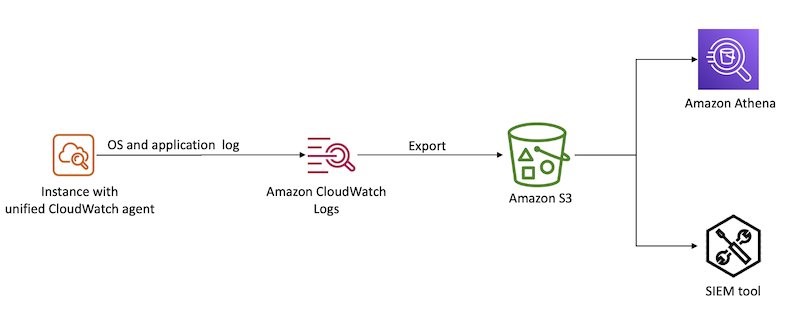
With the unified CloudWatch agent, you can collect metrics and logs from EC2 instances and on-premises servers. The CloudWatch agent aggregates log data into CloudWatch logs, which can then be exported to Amazon S3 for long-term retention and analyzed with a SIEM tool of your choice or Amazon Athena, as shown in Figure 1.
Figure 1: Aggregate OS and application logs using CloudWatch Logs
Database logs
With SQL databases, you can log transactions to help track modifications to the databases, such as additions or deletions. After an engine or system failure, you will need transaction logs to restore a database to a consistent state. Transaction logs are designed to be secure, and they require additional processing to access valuable information. It’s important that you understand data interactions during a security investigation, especially if your databases hold personally identifiable information (PII), financial and payments information, or other information subject to regulatory controls.
The goal of logging network activity is to gain insight into the communications that traverse your network. You might need this data for a variety of reasons, such as network troubleshooting or for use in a forensic investigation of suspected malware activity within your network.
In the AWS Cloud, you can log network activity by creating a proxy that logs network traffic or by using Traffic Mirroring to send a copy of network traffic to a logging server. You can adopt cloud-native approaches to capture this type of data using Amazon Route 53 DNS query logs and Amazon VPC Flow Logs.
There are also a variety of third-party networking solutions available like Palo Alto Networks and Fortinet, so you can continue to use the network logging mechanisms that you might have used in an on-premises environment.
Route 53 DNS query logs
You can configure Amazon Route 53 to log Domain Name System (DNS) queries. These logs are categorized into two groups:
Public DNS query logging
Resolver query logging
Logging public DNS queries against domains that you have hosted in Route 53 provides query information, such as the domain or subdomain requested, date and time stamp of the request, DNS record type, Route 53 edge location that responded, and response code.
You can configure VPC Flow Logs for a VPC in your account to capture traffic that enters and moves around your VPC network, without the addition of instances or products. From these logs, you can review information, such as source and destination IP, ports, timestamps, protocol, account ID, and whether the traffic was accepted or rejected. For a complete list of the fields available for flow log records, see Available fields. You can create a flow log for a VPC, a subnet, or a network interface. If you create a flow log for a subnet or VPC, IP traffic going to and from each network interface in that subnet or VPC will be logged. For more details on VPC Flow Logs, see Logging IP traffic using VPC Flow Logs.
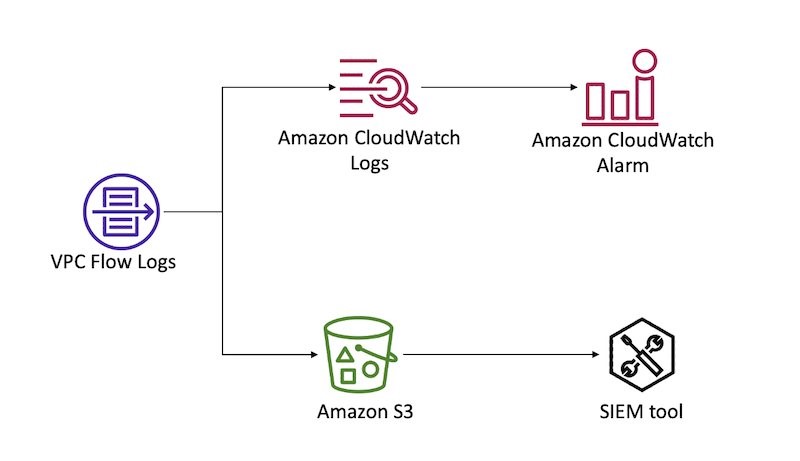
You can forward flow logs to Amazon CloudWatch Logs to create CloudWatch alarms based on metric filters. You can also forward flow logs to an S3 bucket for long-term retention and further analysis. Figure 2 demonstrates these configurations.
Figure 2: Sending VPC Flow logs to CloudWatch Logs and S3
Access logs
To identify access patterns for accessible endpoints, especially public endpoints, you should use access logs. Access logs capture detailed information about requests sent to your load balancer. Each log contains information such as the time the request was received, the client’s IP address, latencies, request paths, and server responses. With services built in layers behind a load balancer, unless you track the X-Forwarded-For request header, the requestor’s context is lost. Access logs help bridge that gap during investigations and analysis.
Amazon S3 server access logs
Access logs are critical to track object level access when using S3 buckets to store confidential or sensitive data. You can also turn on CloudTrail to capture S3 data events. You can store access logs in S3 buckets for long-term storage for compliance purposes and to run analyses during and after an event.
Load balancing logs
Elastic Load Balancing provides access logs that capture detailed information about requests sent to load balancers. Each log contains information such as the time the request was received, the client’s IP address, latencies, request paths, and server responses. You can use this log to analyze traffic patterns and to troubleshoot issues.
Access logs is an optional feature of Elastic Load Balancing that is turned off by default. To enable access logs for load balancers, see Access logs for your Application Load Balancer.
If you implement your own reverse proxy for load balancing needs, make sure that you capture the reverse proxy access logs. You can use the unified CloudWatch agent to forward the logs to CloudWatch. As with OS logs, you can export CloudWatch logs to an S3 bucket for long-term retention and analysis.
If you use an Amazon CloudFront distribution as the public endpoint for end users with load balancers as the custom origin, then load balancing access logs will represent the CloudFront distribution as the requestor, rather than the actual end user. If this information doesn’t add value to your incident handling process, then you can use CloudFront access logs as the log source that provides end user request details.
CloudFront access logs
You should enable standard logs, also known as access logs, when using CloudFront. Specify an S3 bucket where you want CloudFront to save the files.
CloudFront access logs are delivered on a best-effort basis. For information about requests made to a distribution in real time, use real-time logs that are delivered within seconds of receiving the requests. You should use real-time logs to monitor, analyze, and take action based on content delivery performance. For more details on the fields available from these logs, see the CloudFront standard log file format.
AWS WAF logs
When associated with a supported resource like a CloudFront distribution, Amazon API Gateway REST API, Application Load Balancer, AWS AppSync GraphQL API, Amazon Cognito user pool, or AWS App Runner, AWS WAF can help you monitor HTTP and HTTPS requests that are forwarded to the resource. You should configure web access control lists (ACLs) to gain fine-grained control over the requests, and enable logging for such ACLs to get detailed information about traffic that is analyzed by AWS WAF. Log information includes time of the request being received by AWS WAF from the AWS resource, details about the request, and the AWS WAF rules that the request matched. You can use this log information to monitor access patterns of public endpoints and configure rules to inspect requests in detail. For more information about AWS WAF logging, see Logging web ACL traffic.
Serverless logs
Serverless computing has become increasingly popular in the cloud-computing space. It provides on-demand compute power in a relatively short burst, meaning that cloud-based instances don’t need to be provisioned and kept around, idle, when there are no tasks to be completed. Although more and more compute tasks are being moved to serverless solutions, the need to log has not changed, but how the logs are generated has. In a serverless environment, security investigations not only benefit from logs that demonstrate the interactions and changes made by the code deployed, but that also document changes to the deployed code itself and access permissions of the Lambda execution role that is granting privileged access.
AWS Lambda
The logging of Lambda functions involves two components: how the function itself is operating, and what is happening inside the function (what your code is actually doing).
The logging of a Lambda function itself occurs through data events captured by CloudTrail. As noted earlier in this post, you must configure data events on a trail created in CloudTrail. During configuration, you will need to specify the function from which logs will be captured by your trail, and the destination S3 bucket where they will be stored. These logs contain details on the invocation of the function and help identify the IAM principals that called the Invoke API for Lambda.
AWS Lambda automatically monitors Lambda functions on your behalf and sends logs to CloudWatch. Your Lambda function comes with a CloudWatch Logs log group and a log stream for each instance of your function. The Lambda runtime environment sends details about each invocation to the log stream, and relays logs and other output from your function’s code. For more details on how to monitor Lambda functions, see Accessing Amazon CloudWatch logs for AWS Lambda.
Log analysis
For incident response, you need to be able to analyze and query your logs to validate what occurred and to understand the scope.
To begin, you can aggregate logs from various sources in S3 buckets for long-term storage, and you can integrate that data with query tools for further investigation. Logs can be exported and either parsed through directly, or ingested by another tool to help with the analysis. The following are some options that you can use to query these logs:
Amazon Athena — You can directly query CloudTrail events stored in S3 with Athena using SQL commands, specifying the LOCATION of the log files. You would generally use this approach if you have advanced queries to run, and you don’t have a SIEM. To set up Athena to query logs, you can use this open-source solution from AWS.
Amazon OpenSearch Service — OpenSearch is a distributed search and log analytics suite. Because it’s open source, it can ingest logs from more than just AWS log sources. To set this up, you can use this open-source SIEM solution from AWS.
CloudTrail Event History — Either from the console, or programmatically, you can query CloudTrail management events from the last 90-day period. This is ideal for when you have simple queries to make within the last 90 days, and you don’t need stored logs or more complex queries.
AWS CloudTrail Lake — Either from the console, or programmatically, you can query stored events in your configured CloudTrail Lake from the time of its configuration, up until the maximum storage duration of 2,557 days (7 years) from the time that you make your query. This approach allows for SQL-based queries, and it is ideal for when you need to make more complex queries against events, but don’t require the additional features of a SIEM solution.
Parse through raw JSON using CLI — This is achieved programmatically and parsed through terminal commands. It’s more a legacy method of parsing through logs. You might choose to use this approach for analysis if another service or solution isn’t feasible (for example, if you can’t use the service due to your corporate security policy).
Third-party SIEM — A third-party SIEM might be ideal if you already have a SIEM solution on AWS or elsewhere, and you don’t need a duplicated solution elsewhere. Typically, SIEM solutions will import logs from an S3 bucket and process and index events for analysis. To learn more about SIEM options, see the SIEM solutions in the AWS Marketplace, or the AWS Security Competency Partners for a partner local to you with threat detection and incident response (TDIR) expertise.
Sample queries
In this section, we provide samples of SQL queries. Both Athena and CloudTrail Lake accept SQL queries, but the following samples have been tested for use in Athena only. This is because some samples are for VPC Flow Logs, which you can’t query from CloudTrail Lake. To query CloudTrail logs in Athena, you must first create a table definition that points to the location of your logs stored in S3. You can do this from the CloudTrail Events console by using a hyperlinked suggestion, or from the Athena console directly. Alternatively, for Athena, you can use the AWS Security Analytics Bootstrap.
For each of these queries, you might need to modify some of the fields, such as the time frame that you are investigating, the IAM entity involved, and the account and Region in scope. For example, you might want to modify the time frame based on the current time and when you believe the security event began. This often involves expanding the time frame after running additional queries and learning more about the scope and timeline.
By using partitions for tables, you can restrict the amount of data scanned by each Athena query, helping to improve performance and reduce cost. For example, you can partition your CloudTrail Athena table manually or by using partition projection. You can include the partition column (for example, the timestamp) in your queries to limit the amount of data scanned.
Unauthorized attempts
When a security event occurs, you might want to review API calls that were attempted but failed due to the IAM principal not having access to perform the action on that resource. To discover this activity, run the following query (be sure to modify the time window first):
SELECT *
FROM cloudtrail
WHERE errorcode IN ('Client.UnauthorizedOperation','Client.InvalidPermission.NotFound','Client.OperationNotPermitted','AccessDenied')
AND useridentity.arn LIKE '%iam%'
AND eventtime >= '2023-01-01T00:00:00Z'
AND eventtime < '2023-03-01T00:00:00Z'
ORDER BY eventtime desc
This sample query can help you identify whether certain IAM principals have a significant amount of unauthorized API calls, which can indicate that an IAM principal is compromised.
Rejected TCP connections
During a security event, the unauthorized user that is interacting with the resources in your account is probably trying to establish persistence through the network layer. To get a list of rejected TCP connections and extract from it the day that these events occurred, run the following query:
SELECT day_of_week(date) AS
day,date,interface_id,srcaddr,action,protocol
FROM vpc_flow_logs
WHERE action = 'REJECT' AND protocol = 6
LIMIT 100;
Connections over older TLS versions
You might want to see how many calls to AWS APIs were made using older versions of the TLS protocol, as part of a forensic follow-up or a discovery job after a risk analysis. You can get this data by querying CloudTrail logs.
SELECT eventSource
COUNT(*) AS numOutdatedTlsCalls FROM cloudtrail WHERE tlsDetails.tlsVersion IN ('TLSv1', 'TLSv1.1') AND eventTime > '2023-01-01 00:00:00' GROUP BY eventSource ORDER BY numOutdatedTlsCalls DESC
Filter connections from an IP
With an IP address that you’d like to investigate, as a part of your forensic analysis, you might want to see the connections made to resources in a VPC. You can obtain this information by querying VPC Flow Logs. As with the server access logs, if you’re using Athena, you will first need to create a new table.
SELECT day_of_week(date) AS
day, date, srcaddr, dstaddr, action, protocol
FROM vpc_flow_logs
WHERE day >= '2023/01/01' AND day < '2023/03/01' AND srcaddr LIKE '172.50.%'
ORDER BY day DESC
LIMIT 100
Investigate user actions
If you have identified a user who has been compromised, or that you suspect has been compromised, you might want to know the API calls that they made over a specific time period. Understanding the activity of a user can help you understand the scope of impact during an incident, as well as the reach of user permissions when you design your access management strategy.
SELECT eventID, eventName, eventSource, eventTime, userIdentity.arn
AS user
FROM cloudtrail
WHERE userIdentity.arn = '%<username>%' AND eventTime > '2022-12-05 00:00:00' AND eventTime < '2022-12-08 00:00:00'
Conclusion
It is essential that you capture logs from various layers within your application architecture, so that you can effectively respond to a security event at various layers of the application stack. If a security event occurs, logs can help provide a clear picture of what happened and the scope of the affected resources. This post helps you build a logging strategy for security incident response by understanding what logs you want to analyze, where you want to store those logs, and how you will analyze them.
The new IRAP report includes an additional six AWS services, as well as the new AWS Melbourne Region, that are now assessed at the PROTECTED level under IRAP. This brings the total number of services assessed at the PROTECTED level to 139.
The following are the six newly assessed services:
AWS has developed an IRAP documentation pack to assist Australian government agencies and their partners to plan, architect, and assess risk for their workloads when they use AWS Cloud services.
The IRAP pack on AWS Artifact also includes newly updated versions of the AWS Consumer Guide and the whitepaper Reference Architectures for ISM PROTECTED Workloads in the AWS Cloud.
Reach out to your AWS representatives to let us know which additional services you would like to see in scope for upcoming IRAP assessments. We strive to bring more services into scope at the PROTECTED level under IRAP to support your requirements.
If you have feedback about this post, submit comments in the Comments section below. If you have questions about this post, contact AWS Support.
Want more AWS Security news? Follow us on Twitter.
We know that maintaining security and resiliency to keep critical data and infrastructure safe is a top priority for the Australian Government and all our customers in Australia. The Strategic Certification of both the existing Sydney and the new Melbourne Regions reinforces our ongoing commitment to meet security expectations for cloud service providers and means Australian citizens can now have even greater confidence that the Government is securing their data.
The HCF provides guidance to government customers to identify cloud providers that meet enhanced privacy, sovereignty, and security requirements. The expanded scope of the AWS HCF Strategic Certification gives Australian Government customers additional architectural options, including the ability to store backup data in geographically separated locations within Australia.
Our AWS infrastructure is custom-built for the cloud and designed to meet the most stringent security requirements in the world, and is monitored 24/7 to help support the confidentiality, integrity, and availability of customers’ data. All data flowing across the AWS global network that interconnects our data centers and Regions is automatically encrypted at the physical layer before it leaves our secured facilities. We will continue to expand the scope of our security assurance programs at AWS and are pleased that Australian Government customers can continue to innovate at a rapid pace and be confident AWS meets the Government’s requirements to support the secure management of government systems and data.
The Melbourne Region was officially added to the AWS HCF Strategic Certification on December 21, 2022, and the Sydney Region was certified in October 2021. AWS compliance status is available on the HCF Certified Service Providers website, and the Certificate of Compliance is available through AWS Artifact. AWS Artifact is a self-service portal for on-demand access to AWS compliance reports. Sign in to AWS Artifact in the AWS Management Console, or learn more at Getting Started with AWS Artifact. AWS has also achieved many international certifications and accreditations, demonstrating compliance with third-party assurance frameworks such as ISO 27017 for cloud security, ISO 27018 for cloud privacy, and SOC 1, SOC 2, and SOC 3.
To learn more about our compliance and security programs, see AWS Compliance Programs. As always, we value your feedback and questions; reach out to the AWS Compliance team through the Contact Us page.
Please reach out to your AWS account team if you have questions or feedback about HCF compliance.
If you have feedback about this post, submit comments in the Comments section below.
Want more AWS Security how-to content, news, and feature announcements? Follow us on Twitter.
We continue to expand the scope of our assurance programs at Amazon Web Services (AWS) and are pleased to announce that our Middle East (UAE) Region is now certified by the Dubai Electronic Security Centre (DESC) to operate as a Tier 1 cloud service provider (CSP). This alignment with DESC requirements demonstrates our continuous commitment to adhere to the heightened expectations for CSPs. AWS government customers can run their applications in the AWS Cloud certified Regions in confidence.
AWS was evaluated by independent third-party auditor BSI on behalf of DESC on January 23, 2023. The Certificate of Compliance illustrating the AWS compliance status is available through AWS Artifact. AWS Artifact is a self-service portal for on-demand access to AWS compliance reports. Sign in to AWS Artifact in the AWS Management Console, or learn more at Getting Started with AWS Artifact.
As of this writing, 62 services offered in the Middle East (UAE) Region are in scope of this certification. For up-to-date information, including when additional services are added, visit the AWS Services in Scope by Compliance Program webpage and choose DESC CSP.
AWS strives to continuously bring services into scope of its compliance programs to help you meet your architectural and regulatory needs. Please reach out to your AWS account team if you have questions or feedback about DESC compliance.
To learn more about our compliance and security programs, see AWS Compliance Programs. As always, we value your feedback and questions; reach out to the AWS Compliance team through the Contact Us page.
If you have feedback about this post, submit comments in the Comments section below.
Want more AWS Security how-to content, news, and feature announcements? Follow us on Twitter.
Amazon Web Services is excited to announce that we’ve updated the AWS ebook, Protecting your AWS environment from ransomware. The new ebook includes the top 10 best practices for ransomware protection and covers new services and features that have been released since the original published date in April 2020.
We know that customers care about ransomware. Security teams across the board are ramping up their protective, detective, and reactive measures. AWS serves all customers, including those most sensitive to disruption like teams responsible for critical infrastructure, healthcare organizations, manufacturing, educational institutions, and state and local governments. We want to empower our customers to protect themselves against ransomware by using a range of security capabilities. These capabilities provide unparalleled visibility into your AWS environment, as well as the ability to update and patch efficiently, to seamlessly and cost-effectively back up your data, and to templatize your environment, enabling a rapid return to a known good state. Keep in mind that there is no single solution or quick fix to mitigate ransomware. In fact, the mitigations and controls outlined in this document are general security best practices. We hope you find this information helpful and take action.
For example, to help protect against a security event that impacts stored backups in the source account, AWS Backup supports cross-account backups and the ability to centrally define backup policies for accounts in AWS Organizations by using the management account. Also, AWS Backup Vault Lock enforces write-once, read-many (WORM) backups to help protect backups (recovery points) in your backup vaults from inadvertent or malicious actions. You can copy backups to a known logically isolated destination account in the organization, and you can restore from the destination account or, alternatively, to a third account. This gives you an additional layer of protection if the source account experiences disruption from accidental or malicious deletion, disasters, or ransomware.
Learn more about solutions like these by checking out our Protecting against ransomware webpage, which discusses security resources that can help you secure your AWS environments from ransomware.
Ransomware events have significantly increased over the past several years and captured worldwide attention. Traditional ransomware events affect mostly infrastructure resources like servers, databases, and connected file systems. However, there are also non-traditional events that you may not be as familiar with, such as ransomware events that target data stored in Amazon Simple Storage Service (Amazon S3). There are important steps you can take to help prevent these events, and to identify possible ransomware events early so that you can take action to recover. The goal of this post is to help you learn about the AWS services and features that you can use to protect against ransomware events in your environment, and to investigate possible ransomware events if they occur.
Ransomware is a type of malware that bad actors can use to extort money from entities. The actors can use a range of tactics to gain unauthorized access to their target’s data and systems, including but not limited to taking advantage of unpatched software flaws, misuse of weak credentials or previous unintended disclosure of credentials, and using social engineering. In a ransomware event, a legitimate entity’s access to their data and systems is restricted by the bad actors, and a ransom demand is made for the safe return of these digital assets. There are several methods actors use to restrict or disable authorized access to resources including a) encryption or deletion, b) modified access controls, and c) network-based Denial of Service (DoS) attacks. In some cases, after the target’s data access is restored by providing the encryption key or transferring the data back, bad actors who have a copy of the data demand a second ransom—promising not to retain the data in order to sell or publicly release it.
In the next sections, we’ll describe several important stages of your response to a ransomware event in Amazon S3, including detection, response, recovery, and protection.
After a bad actor has obtained credentials, they use AWS API actions that they iterate through to discover the type of access that the exposed IAM principal has been granted. Bad actors can do this in multiple ways, which can generate different levels of activity. This activity might alert your security teams because of an increase in API calls that result in errors. Other times, if a bad actor’s goal is to ransom S3 objects, then the API calls will be specific to Amazon S3. If access to Amazon S3 is permitted through the exposed IAM principal, then you might see an increase in API actions such as s3:ListBuckets, s3:GetBucketLocation, s3:GetBucketPolicy, and s3:GetBucketAcl.
Analysis
In this section, we’ll describe where to find the log and metric data to help you analyze this type of ransomware event in more detail.
When a ransomware event targets data stored in Amazon S3, often the objects stored in S3 buckets are deleted, without the bad actor making copies. This is more like a data destruction event than a ransomware event where objects are encrypted.
There are several logs that will capture this activity. You can enable AWS CloudTrail event logging for Amazon S3 data, which allows you to review the activity logs to understand read and delete actions that were taken on specific objects.
In addition, if you have enabled Amazon CloudWatch metrics for Amazon S3 prior to the ransomware event, you can use the sum of the BytesDownloaded metric to gain insight into abnormal transfer spikes.
Another way to gain information is to use the region-DataTransfer-Out-Bytes metric, which shows the amount of data transferred from Amazon S3 to the internet. This metric is enabled by default and is associated with your AWS billing and usage reports for Amazon S3.
Next, we’ll walk through how to respond to the unintended disclosure of IAM access keys. Based on the business impact, you may decide to create a second set of access keys to replace all legitimate use of those credentials so that legitimate systems are not interrupted when you deactivate the compromised access keys. You can deactivate the access keys by using the IAM console or through automation, as defined in your incident response plan. However, you also need to document specific details for the event within your secure and private incident response documentation so that you can reference them in the future. If the activity was related to the use of an IAM role or temporary credentials, you need to take an additional step and revoke any active sessions. To do this, in the IAM console, you choose the Revoke active session button, which will attach a policy that denies access to users who assumed the role before that moment. Then you can delete the exposed access keys.
In addition, you can use the AWS CloudTrail dashboard and event history (which includes 90 days of logs) to review the IAM related activities by that compromised IAM user or role. Your analysis can show potential persistent access that might have been created by the bad actor. In addition, you can use the IAM console to look at the IAM credential report (this report is updated every 4 hours) to review activity such as access key last used, user creation time, and password last used. Alternatively, you can use Amazon Athena to query the CloudTrail logs for the same information. See the following example of an Athena query that will take an IAM user Amazon Resource Number (ARN) to show activity for a particular time frame.
SELECT eventtime, eventname, awsregion, sourceipaddress, useragent
FROM cloudtrail
WHERE useridentity.arn = 'arn:aws:iam::1234567890:user/Name' AND
-- Enter timeframe
(event_date >= '2022/08/04' AND event_date <= '2022/11/04')
ORDER BY eventtime ASC
Recovery
After you’ve removed access from the bad actor, you have multiple options to recover data, which we discuss in the following sections. Keep in mind that there is currently no undelete capability for Amazon S3, and AWS does not have the ability to recover data after a delete operation. In addition, many of the recovery options require configuration upon bucket creation.
S3 Versioning
Using versioning in S3 buckets is a way to keep multiple versions of an object in the same bucket, which gives you the ability to restore a particular version during the recovery process. You can use the S3 Versioning feature to preserve, retrieve, and restore every version of every object stored in your buckets. With versioning, you can recover more easily from both unintended user actions and application failures. Versioning-enabled buckets can help you recover objects from accidental deletion or overwrite. For example, if you delete an object, Amazon S3 inserts a delete marker instead of removing the object permanently. The previous version remains in the bucket and becomes a noncurrent version. You can restore the previous version. Versioning is not enabled by default and incurs additional costs, because you are maintaining multiple copies of the same object. For more information about cost, see the Amazon S3 pricing page.
AWS Backup
Using AWS Backup gives you the ability to create and maintain separate copies of your S3 data under separate access credentials that can be used to restore data during a recovery process. AWS Backup provides centralized backup for several AWS services, so you can manage your backups in one location. AWS Backup for Amazon S3 provides you with two options: continuous backups, which allow you to restore to any point in time within the last 35 days; and periodic backups, which allow you to retain data for a specified duration, including indefinitely. For more information, see Using AWS Backup for Amazon S3.
Protection
In this section, we’ll describe some of the preventative security controls available in AWS.
S3 Object Lock
You can add another layer of protection against object changes and deletion by enabling S3 Object Lock for your S3 buckets. With S3 Object Lock, you can store objects using a write-once-read-many (WORM) model and can help prevent objects from being deleted or overwritten for a fixed amount of time or indefinitely.
AWS Backup Vault Lock
Similar to S3 Object lock, which adds additional protection to S3 objects, if you use AWS Backup you can consider enabling AWS Backup Vault Lock, which enforces the same WORM setting for all the backups you store and create in a backup vault. AWS Backup Vault Lock helps you to prevent inadvertent or malicious delete operations by the AWS account root user.
Amazon S3 Inventory
To make sure that your organization understands the sensitivity of the objects you store in Amazon S3, you should inventory your most critical and sensitive data across Amazon S3 and make sure that the appropriate bucket configuration is in place to protect and enable recovery of your data. You can use Amazon S3 Inventory to understand what objects are in your S3 buckets, and the existing configurations, including encryption status, replication status, and object lock information. You can use resource tags to label the classification and owner of the objects in Amazon S3, and take automated action and apply controls that match the sensitivity of the objects stored in a particular S3 bucket.
MFA delete
Another preventative control you can use is to enforce multi-factor authentication (MFA) delete in S3 Versioning. MFA delete provides added security and can help prevent accidental bucket deletions, by requiring the user who initiates the delete action to prove physical or virtual possession of an MFA device with an MFA code. This adds an extra layer of friction and security to the delete action.
Use IAM roles for short-term credentials
Because many ransomware events arise from unintended disclosure of static IAM access keys, AWS recommends that you use IAM roles that provide short-term credentials, rather than using long-term IAM access keys. This includes using identity federation for your developers who are accessing AWS, using IAM roles for system-to-system access, and using IAM Roles Anywhere for hybrid access. For most use cases, you shouldn’t need to use static keys or long-term access keys. Now is a good time to audit and work toward eliminating the use of these types of keys in your environment. Consider taking the following steps:
Create an inventory across all of your AWS accounts and identify the IAM user, when the credentials were last rotated and last used, and the attached policy.
Disable and delete all AWS account root access keys.
Rotate the credentials and apply MFA to the user.
Re-architect to take advantage of temporary role-based access, such as IAM roles or IAM Roles Anywhere.
Review attached policies to make sure that you’re enforcing least privilege access, including removing wild cards from the policy.
Server-side encryption with customer managed KMS keys
Another protection you can use is to implement server-side encryption with AWS Key Management Service (SSE-KMS) and use customer managed keys to encrypt your S3 objects. Using a customer managed key requires you to apply a specific key policy around who can encrypt and decrypt the data within your bucket, which provides an additional access control mechanism to protect your data. You can also centrally manage AWS KMS keys and audit their usage with an audit trail of when the key was used and by whom.
GuardDuty protections for Amazon S3
You can enable Amazon S3 protection in Amazon GuardDuty. With S3 protection, GuardDuty monitors object-level API operations to identify potential security risks for data in your S3 buckets. This includes findings related to anomalous API activity and unusual behavior related to your data in Amazon S3, and can help you identify a security event early on.
Conclusion
In this post, you learned about ransomware events that target data stored in Amazon S3. By taking proactive steps, you can identify potential ransomware events quickly, and you can put in place additional protections to help you reduce the risk of this type of security event in the future.
The IAR provides management and technical information security controls to establish, implement, maintain, and continuously improve information assurance. AWS alignment with IAR requirements demonstrates our ongoing commitment to adhere to the heightened expectations for cloud service providers. As such, IAR-regulated customers can use AWS services with confidence.
Independent third-party auditors from BDO evaluated AWS for the period of November 1, 2021, to October 31, 2022. The assessment report illustrating the status of AWS compliance is available through AWS Artifact. AWS Artifact is a self-service portal for on-demand access to AWS compliance reports. Sign in to AWS Artifact in the AWS Management Console, or learn more at Getting Started with AWS Artifact.
AWS strives to continuously bring services into the scope of its compliance programs to help you meet your architectural and regulatory needs. If you have questions or feedback about IAR compliance, reach out to your AWS account team.
To learn more about our compliance and security programs, see AWS Compliance Programs. As always, we value your feedback and questions; reach out to the AWS Compliance team through the Contact Us page.
If you have feedback about this post, submit comments in the Comments section below.
Want more AWS Security how-to content, news, and feature announcements? Follow us on Twitter.
We continue to expand the scope of our assurance programs at Amazon Web Services (AWS), and we are pleased to announce that AWS has successfully completed the 2022 Cloud Computing Compliance Controls Catalogue (C5) attestation cycle with 156 services in scope. This alignment with C5 requirements demonstrates our ongoing commitment to adhere to the heightened expectations for cloud service providers. AWS customers in Germany and across Europe can run their applications on AWS Regions in scope of the C5 report with the assurance that AWS aligns with C5 requirements.
The C5 attestation scheme is backed by the German government and was introduced by the Federal Office for Information Security (BSI) in 2016. AWS has adhered to the C5 requirements since their inception. C5 helps organizations demonstrate operational security against common cyberattacks when using cloud services within the context of the German Government’s Security Recommendations for Cloud Computing Providers.
Independent third-party auditors evaluated AWS for the period October 1, 2021, through September 30, 2022. The C5 report illustrates AWS’ compliance status for both the basic and additional criteria of C5. Customers can download the C5 report through AWS Artifact. AWS Artifact is a self-service portal for on-demand access to AWS compliance reports. Sign in to AWS Artifact in the AWS Management Console, or learn more at Getting Started with AWS Artifact.
AWS has added the following 16 services to the current C5 scope:
At present, the services offered in the Frankfurt, Dublin, London, Paris, Milan, Stockholm and Singapore Regions are in scope of this certification. For up-to-date information, see the AWS Services in Scope by Compliance Program page and choose C5.
AWS strives to continuously bring services into the scope of its compliance programs to help you meet your architectural and regulatory needs. If you have questions or feedback about C5 compliance, reach out to your AWS account team.
To learn more about our compliance and security programs, see AWS Compliance Programs. As always, we value your feedback and questions; reach out to the AWS Compliance team through the Contact Us page.
If you have feedback about this post, submit comments in the Comments section below.
Want more AWS Security how-to content, news, and feature announcements? Follow us on Twitter.
The collective thoughts of the interwebz
Manage Consent
To provide the best experiences, we use technologies like cookies to store and/or access device information. Consenting to these technologies will allow us to process data such as browsing behavior or unique IDs on this site. Not consenting or withdrawing consent, may adversely affect certain features and functions.
Functional
Always active
The technical storage or access is strictly necessary for the legitimate purpose of enabling the use of a specific service explicitly requested by the subscriber or user, or for the sole purpose of carrying out the transmission of a communication over an electronic communications network.
Preferences
The technical storage or access is necessary for the legitimate purpose of storing preferences that are not requested by the subscriber or user.
Statistics
The technical storage or access that is used exclusively for statistical purposes.The technical storage or access that is used exclusively for anonymous statistical purposes. Without a subpoena, voluntary compliance on the part of your Internet Service Provider, or additional records from a third party, information stored or retrieved for this purpose alone cannot usually be used to identify you.
Marketing
The technical storage or access is required to create user profiles to send advertising, or to track the user on a website or across several websites for similar marketing purposes.