Tag Archives: RDS for Oracle

Stream data to Amazon S3 for real-time analytics using the Oracle GoldenGate S3 handler

Post Syndicated from Prasad Matkar original https://aws.amazon.com/blogs/big-data/stream-data-to-amazon-s3-for-real-time-analytics-using-the-oracle-goldengate-s3-handler/

Modern business applications rely on timely and accurate data with increasing demand for real-time analytics. There is a growing need for efficient and scalable data storage solutions. Data at times is stored in different datasets and needs to be consolidated before meaningful and complete insights can be drawn from the datasets. This is where replication tools help move the data from its source to the target systems in real time and transform it as necessary to help businesses with consolidation.

In this post, we provide a step-by-step guide for installing and configuring Oracle GoldenGate for streaming data from relational databases to Amazon Simple Storage Service (Amazon S3) for real-time analytics using the Oracle GoldenGate S3 handler.

Oracle GoldenGate for Oracle Database and Big Data adapters

Oracle GoldenGate is a real-time data integration and replication tool used for disaster recovery, data migrations, high availability. It captures and applies transactional changes in real time, minimizing latency and keeping target systems synchronized with source databases. It supports data transformation, allowing modifications during replication, and works with various database systems, including SQL Server, MySQL, and PostgreSQL. GoldenGate supports flexible replication topologies such as unidirectional, bidirectional, and multi-master configurations. Before using GoldenGate, make sure you have reviewed and adhere to the license agreement.

Oracle GoldenGate for Big Data provides adapters that facilitate real-time data integration from different sources to big data services like Hadoop, Apache Kafka, and Amazon S3. You can configure the adapters to control the data capture, transformation, and delivery process based on your specific requirements to support both batch-oriented and real-time streaming data integration patterns.

GoldenGate provides special tools called S3 event handlers to integrate with Amazon S3 for data replication. These handlers allow GoldenGate to read from and write data to S3 buckets. This option allows you to use Amazon S3 for GoldenGate deployments across on-premises, cloud, and hybrid environments.

Solution overview

The following diagram illustrates our solution architecture.

In this post, we walk you through the following high-level steps:

  1. Install GoldenGate software on Amazon Elastic Compute Cloud (Amazon EC2).
  2. Configure GoldenGate for Oracle Database and extract data from the Oracle database to trail files.
  3. Replicate the data to Amazon S3 using the GoldenGate for Big Data S3 handler.

Prerequisites

You must have the following prerequisites in place:

Install GoldenGate software on Amazon EC2

You need to run GoldenGate on EC2 instances. The instances must have adequate CPU, memory, and storage to handle the anticipated replication volume. For more details, refer to Operating System Requirements. After you determine the CPU and memory requirements, select a current generation EC2 instance type for GoldenGate.

Use the following formula to estimate the required trail space:

trail disk space = transaction log volume in 1 hour x number of hours down x .4

When the EC2 instance is up and running, download the following GoldenGate software from the Oracle GoldenGate Downloads page:

  • GoldenGate 21.3.0.0
  • GoldenGate for Big Data 21c

Use the following steps to upload and install the file from your local machine to the EC2 instance. Make sure that your IP address is allowed in the inbound rules of the security group of your EC2 instance before starting a session. For this use case, we install GoldenGate for Classic Architecture and Big Data. See the following code:

scp -i pem-key.pem 213000_fbo_ggs_Linux_×64_Oracle_shiphome.zip ec2-user@hostname:~/.
ssh -i pem-key.pem  ec2-user@hostname
unzip 213000_fbo_ggs_Linux_×64_Oracle_shiphome.zip

Install GoldenGate 21.3.0.0

Complete the following steps to install GoldenGate 21.3 on an EC2 instance:

  1. Create a home directory to install the GoldenGate software and run the installer:
    mkdir /u01/app/oracle/product/OGG_DB_ORACLE
    /fbo_ggs_Linux_x64_Oracle_shiphome/Disk1
    
    ls -lrt
    total 8
    drwxr-xr-x. 4 oracle oinstall 187 Jul 29 2021 install
    drwxr-xr-x. 12 oracle oinstall 4096 Jul 29 2021 stage
    -rwxr-xr-x. 1 oracle oinstall 918 Jul 29 2021 runInstaller
    drwxrwxr-x. 2 oracle oinstall 25 Jul 29 2021 response

  2. Run runInstaller:
    [oracle@hostname Disk1]$ ./runInstaller
    Starting Oracle Universal Installer.
    Checking Temp space: must be greater than 120 MB.   Actual 193260 MB Passed
    Checking swap space: must be greater than 150 B.       Actual 15624 MB    Passed

A GUI window will pop up to install the software.

  1. Follow the instructions in the GUI to complete the installation process. Provide the directory path you created as the home directory for GoldenGate.

After the GoldenGate software installation is complete, you can create the GoldenGate processes that read the data from the source. First, you configure OGG EXTRACT.

  1. Create an extract parameter file for the source Oracle database. The following code is the sample file content:
    [oracle@hostname Disk1]$vi eabc.prm
    
    -- Extract group name
    EXTRACT EABC
    SETENV (TNS_ADMIN = "/u01/app/oracle/product/19.3.0/network/admin")
    
    -- Extract database user login
    
    USERID ggs_admin@mydb, PASSWORD "********"
    
    -- Local trail on the remote host
    EXTTRAIL /u01/app/oracle/product/OGG_DB_ORACLE/dirdat/ea
    IGNOREREPLICATES
    GETAPPLOPS
    TRANLOGOPTIONS EXCLUDEUSER ggs_admin
    TABLE scott.emp;

  2. Add the EXTRACT on the GoldenGate prompt by running the following command:
    GGSCI> ADD EXTRACT EABC, TRANLOG, BEGIN NOW

  3. After you add the EXTRACT, check the status of the running programs with the info all

You will see the EXTRACT status is in the STOPPED state, as shown in the following screenshot; this is expected.

  1. Start the EXTRACT process as shown in the following figure.

The status changes to RUNNING. The following are the different statuses:

  • STARTING – The process is starting.
  • RUNNING – The process has started and is running normally.
  • STOPPED – The process has stopped either normally (controlled manner) or due to an error.
  • ABENDED – The process has been stopped in an uncontrolled manner. An abnormal end is known as ABEND.

This will start the extract process and a trail file will be created in the location mentioned in the extract parameter file.

  1. You can verify this by using the command stats <<group_name>>, as shown in the following screenshot.

Install GoldenGate for Big Data 21c

In this step, we install GoldenGate for Big Data in the same EC2 instance where we installed the GoldenGate Classic Architecture.

  1. Create a directory to install the GoldenGate for Big Data software. To copy the .zip file, follow these steps:
    mkdir /u01/app/oracle/product/OGG_BIG_DATA
    
    unzip 214000_ggs_Linux_x64_BigData_64bit.zip
    tar -xvf ggs_Linux_x64_BigData_64bit.tar
    
    GGSCI> CREATE SUBDIRS
    GGSCI> EDIT PARAM MGR
    PORT 7801
    
    GGSCI> START MGR

This will start the MANAGER program. Now you can install the dependencies required for the REPLICAT to run.

  1. Go to /u01/app/oracle/product/OGG_BIG_DATA/DependencyDownloader and run the sh file with the latest version of aws-java-sdk. This script downloads the AWS SDK, which provides client libraries for connectivity to the AWS Cloud.
    [oracle@hostname DependencyDownloader]$ ./aws.sh 1.12.748

Configure the S3 handler

To configure an GoldenGate Replicat to send data to an S3 bucket, you need to set up a Replicat parameter file and properties file that defines how data is handled and sent to Amazon S3.

AWS_ACCESS_KEY_ID and AWS_SECRET_ACCESS_KEY are the access key and secret access key of your IAM user, respectively. Do not hardcode credentials or security keys in the parameter and properties file. There are several methods available to achieve this, such as the following:

#!/bin/bash

# Use environment variables that are already set in the OS
export AWS_ACCESS_KEY_ID=$AWS_ACCESS_KEY_ID
export AWS_SECRET_ACCESS_KEY=$AWS_SECRET_ACCESS_KEY
export AWS_REGION="your_aws_region"

You can set these environment variables in your shell configuration file (e.g., .bashrc, .bash_profile, .zshrc) or use a secure method to set them temporarily:

export AWS_ACCESS_KEY_ID="your_access_key_id"
export AWS_SECRET_ACCESS_KEY="your_secret_access_key"

Configure the properties file

Create a properties file for the S3 handler. This file defines how GoldenGate will interact with your S3 bucket. Make sure that you have added the correct parameters as shown in the properties file.

The following code is an example of an S3 handler properties file (dirprm/reps3.properties):

[oracle@hostname dirprm]$ cat reps3.properties
gg.handlerlist=filewriter

gg.handler.filewriter.type=filewriter
gg.handler.filewriter.fileRollInterval=60s
gg.handler.filewriter.fileNameMappingTemplate=${tableName}${currentTimestamp}.json
gg.handler.filewriter.pathMappingTemplate=./dirout
gg.handler.filewriter.stateFileDirectory=./dirsta
gg.handler.filewriter.format=json
gg.handler.filewriter.finalizeAction=rename
gg.handler.filewriter.fileRenameMappingTemplate=${tableName}${currentTimestamp}.json
gg.handler.filewriter.eventHandler=s3

goldengate.userexit.writers=javawriter
#TODO Set S3 Event Handler- please update as needed
gg.eventhandler.s3.type=s3
gg.eventhandler.s3.region=eu-west-1
gg.eventhandler.s3.bucketMappingTemplate=s3bucketname
gg.eventhandler.s3.pathMappingTemplate=${tableName}_${currentTimestamp}
gg.eventhandler.s3.accessKeyId=$AWS_ACCESS_KEY_ID
gg.eventhandler.s3.secretKey=$AWS_SECRET_ACCESS_KEY

gg.classpath=/u01/app/oracle/product/OGG_BIG_DATA/dirprm/:/u01/app/oracle/product/OGG_BIG_DATA/DependencyDownloader/dependencies/aws_sdk_1.12.748/
gg.log=log4j
gg.log.level=DEBUG

#javawriter.bootoptions=-Xmx512m -Xms32m -Djava.class.path=.:ggjava/ggjava.jar -Daws.accessKeyId=my_access_key_id -Daws.secretKey=my_secret_key
javawriter.bootoptions=-Xmx512m -Xms32m -Djava.class.path=.:ggjava/ggjava.jar

Configure GoldenGate REPLICAT

Create the parameter file in /dirprm in the GoldenGate for Big Data home:

[oracle@hostname dirprm]$ vi rps3.prm
REPLICAT rps3
-- Command to add REPLICAT
-- add replicat fw, exttrail AdapterExamples/trail/tr
SETENV(GGS_JAVAUSEREXIT_CONF = 'dirprm/rps3.props')
TARGETDB LIBFILE libggjava.so SET property=dirprm/rps3.props
REPORTCOUNT EVERY 1 MINUTES, RATE
MAP SCOTT.EMP, TARGET gg.handler.s3handler;;

[oracle@hostname OGG_BIG_DATA]$ ./ggsci
GGSCI > add replicat rps3, exttrail ./dirdat/tr/ea
Replicat added.

GGSCI > info all
Program Status Group Lag at Chkpt Time Since Chkpt
MANAGER RUNNING
REPLICAT STOPPED RPS3 00:00:00 00:00:39

GGSCI > start *
Sending START request to Manager ...
Replicat group RPS3 starting.

Now you have successfully started the Replicat. You can verify this by running info and stats commands followed by the Replicat name, as shown in the following screenshot.

To confirm that the file has been replicated to an S3 bucket, open the Amazon S3 console and open the bucket you created. You can see that the table data has been replicated to Amazon S3 in JSON file format.

Best practices

Make sure that you are following the best practices on performance, compression, and security.

Consider the following best practices for performance:

The following are best practices for compression:

  • Enable compression for trail files to reduce storage requirements and improve network transfer performance.
  • Use GoldenGate’s built-in compression capabilities or use file system-level compression tools.
  • Strike a balance between compression level and CPU overhead, because higher compression levels may impact performance.

Lastly, when implementing Oracle GoldenGate for streaming data to Amazon S3 for real-time analytics, it’s crucial to address various security considerations to protect your data and infrastructure. Follow the security best practices for Amazon S3 and security options available for GoldenGate Classic Architecture.

Clean up

To avoid ongoing charges, delete the resources that you created as part of this post:

  1. Remove the S3 bucket and trail files if no longer needed and stop the GoldenGate processes on Amazon EC2.
  2. Revert the changes that you made in the database (such as grants, supplemental logging, and archive log retention).
  3. To delete the entire setup, stop your EC2 instance.

Conclusion

In this post, we provided a step-by-step guide for installing and configuring GoldenGate for Oracle Classic Architecture and Big Data for streaming data from relational databases to Amazon S3. With these instructions, you can successfully set up an environment and take advantage of the real-time analytics using a GoldenGate handler for Amazon S3, which we will explore further in an upcoming post.

If you have any comments or questions, leave them in the comments section.


About the Authors

Prasad Matkar is Database Specialist Solutions Architect at AWS based in the EMEA region. With a focus on relational database engines, he provides technical assistance to customers migrating and modernizing their database workloads to AWS.

Arun Sankaranarayanan is a Database Specialist Solution Architect based in London, UK. With a focus on purpose-built database engines, he assists customers in migrating and modernizing their database workloads to AWS.

Giorgio Bonzi is a Sr. Database Specialist Solutions Architect at AWS based in the EMEA region. With a focus on relational database engines, he provides technical assistance to customers migrating and modernizing their database workloads to AWS.

AWS Week in Review – August 29, 2022

Post Syndicated from Antje Barth original https://aws.amazon.com/blogs/aws/aws-week-in-review-august-29-2022/

I’ve just returned from data and machine learning (ML) conferences in Los Angeles and San Francisco, California. It’s been great to chat with customers and developers about the latest technology trends and use cases. This past week has also been packed with launches at AWS.

Last Week’s Launches
Here are some launches that got my attention during the previous week:

Amazon QuickSight announces fine-grained visual embedding. You can now embed individual visuals from QuickSight dashboards in applications and portals to provide key insights to users where they’re needed most. Check out Donnie’s blog post to learn more, and tune into this week’s The Official AWS Podcast episode.

Sample Web App with a Visual

Sample Web App with a Visual

Amazon SageMaker Automatic Model Tuning is now available in the Europe (Milan), Africa (Cape Town), Asia Pacific (Osaka), and Asia Pacific (Jakarta) Regions. In addition, SageMaker Automatic Model Tuning now reuses SageMaker Training instances to reduce start-up overheads by 20x. In scenarios where you have a large number of hyperparameter evaluations, the reuse of training instances can cumulatively save 2 hours for every 50 sequential evaluations.

Amazon RDS now supports setting up connectivity between your RDS database and EC2 compute instance in one click. Amazon RDS automatically sets up your VPC and related network settings during database creation to enable a secure connection between the EC2 instance and the RDS database.

In addition, Amazon RDS for Oracle now supports managed Oracle Data Guard Switchover and Automated Backups for replicas. With the Oracle Data Guard Switchover feature, you can reverse the roles between the primary database and one of its standby databases (replicas) with no data loss and a brief outage. You can also now create Automated Backups and manual DB snapshots of an RDS for Oracle replica, which reduces the time spent taking backups following a role transition.

Amazon Forecast now supports what-if analyses. Amazon Forecast is a fully managed service that uses ML algorithms to deliver highly accurate time series forecasts.  You can now use what-if analyses to quantify the potential impact of business scenarios on your demand forecasts.

AWS Asia Pacific (Jakarta) Region now supports additional AWS services and EC2 instance types – Amazon SageMaker, AWS Application Migration Service, AWS Glue, Red Hat OpenShift Service on AWS (ROSA), and Amazon EC2 X2idn and X2iedn instances are now available in the Asia Pacific (Jakarta) Region.

For a full list of AWS announcements, be sure to keep an eye on the What’s New at AWS page.

Other AWS News
Here are some additional news, blog posts, and fun code competitions you may find interesting:

Scaling AI and Machine Learning Workloads with Ray on AWS – This past week, I attended Ray Summit in San Francisco, California, and had great conversations with the community. Check out this blog post to learn more about AWS contributions to the scalability and operational efficiency of Ray on AWS.

Ray on AWS

New AWS Heroes – It’s great to see both new and familiar faces joining the AWS Heroes program, a worldwide initiative that acknowledges individuals who have truly gone above and beyond to share knowledge in technical communities. Get to know them in the blog post!

DFL Bundesliga Data ShootoutDFL Deutsche Fußball Liga launched a code competition, powered by AWS: the Bundesliga Data Shootout. The task: Develop a computer vision model to classify events on the pitch. Join the competition as an individual or in a team and win prizes.

Become an AWS GameDay World Champion – AWS GameDay is an interactive, team-based learning experience designed to put your AWS skills to the test by solving real-world problems in a gamified, risk-free environment. Developers of all skill levels can get in on the action, to compete for worldwide glory, as well as a chance to claim the top prize: an all-expenses-paid trip to AWS re:Invent Las Vegas 2022!

Learn more about the AWS Impact Accelerator for Black Founders from one of the inaugural members of the program in this blog post. The AWS Impact Accelerator is a series of programs designed to help high-potential, pre-seed start-ups led by underrepresented founders succeed.

Upcoming AWS Events
Check your calendars and sign up for these AWS events:

AWS SummitAWS Global Summits – AWS Global Summits are free events that bring the cloud computing community together to connect, collaborate, and learn about AWS.

Registration is open for the following in-person AWS Summits that might be close to you in August and September: Canberra (August 31), Ottawa (September 8), New Delhi (September 9), and Mexico City (September 21–22), Bogotá (October 4), and Singapore (October 6).

AWS Community DayAWS Community DaysAWS Community Day events are community-led conferences that deliver a peer-to-peer learning experience, providing developers with a venue for them to acquire AWS knowledge in their preferred way: from one another.

In September, the AWS community will host events in the Bay Area, California (September 9) and in Arlington, Virginia (September 30). In October, you can join Community Days in Amersfoort, Netherlands (October 3), in Warsaw, Poland (October 14), and in Dresden, Germany (October 19).

That’s all for this week. Check back next Monday for another Week in Review! And maybe I’ll see you at the AWS Community Day here in the Bay Area!

Antje

This post is part of our Week in Review series. Check back each week for a quick roundup of interesting news and announcements from AWS!

AWS Week in Review – August 8, 2022

Post Syndicated from Steve Roberts original https://aws.amazon.com/blogs/aws/aws-week-in-review-august-8-2022/

As an ex-.NET developer, and now Developer Advocate for .NET at AWS, I’m excited to bring you this week’s Week in Review post, for reasons that will quickly become apparent! There are several updates, customer stories, and events I want to bring to your attention, so let’s dive straight in!

Last Week’s launches
.NET developers, here are two new updates to be aware of—and be sure to check out the events section below for another big announcement:

Tiered pricing for AWS Lambda will interest customers running large workloads on Lambda. The tiers, based on compute duration (measured in GB-seconds), help you save on monthly costs—automatically. Find out more about the new tiers, and see some worked examples showing just how they can help reduce costs, in this AWS Compute Blog post by Heeki Park, a Principal Solutions Architect for Serverless.

Amazon Relational Database Service (RDS) released updates for several popular database engines:

  • RDS for Oracle now supports the April 2022 patch.
  • RDS for PostgreSQL now supports new minor versions. Besides the version upgrades, there are also updates for the PostgreSQL extensions pglogical, pg_hint_plan, and hll.
  • RDS for MySQL can now enforce SSL/TLS for client connections to your databases to help enhance transport layer security. You can enforce SSL/TLS by simply enabling the require_secure_transport parameter (disabled by default) via the Amazon RDS Management console, the AWS Command Line Interface (AWS CLI), AWS Tools for PowerShell, or using the API. When you enable this parameter, clients will only be able to connect if an encrypted connection can be established.

Amazon Elastic Compute Cloud (Amazon EC2) expanded availability of the latest generation storage-optimized Is4gen and Im4gn instances to the Asia Pacific (Sydney), Canada (Central), Europe (Frankfurt), and Europe (London) Regions. Built on the AWS Nitro System and powered by AWS Graviton2 processors, these instance types feature up to 30 TB of storage using the new custom-designed AWS Nitro System SSDs. They’re ideal for maximizing the storage performance of I/O intensive workloads that continuously read and write from the SSDs in a sustained manner, for example SQL/NoSQL databases, search engines, distributed file systems, and data analytics.

Lastly, there’s a new URL from AWS Support API to use when you need to access the AWS Support Center console. I recommend bookmarking the new URL, https://support.console.aws.amazon.com/, which the team built using the latest architectural standards for high availability and Region redundancy to ensure you’re always able to contact AWS Support via the console.

For a full list of AWS announcements, be sure to keep an eye on the What’s New at AWS page.

Other AWS News
Here’s some other news items and customer stories that you may find interesting:

AWS Open Source News and Updates – Catch up on all the latest open-source projects, tools, and demos from the AWS community in installment #123 of the weekly open source newsletter.

In one recent AWS on Air livestream segment from AWS re:MARS, discussing the increasing scale of machine learning (ML) models, our guests mentioned billion-parameter ML models which quite intrigued me. As an ex-developer, my mental model of parameters is a handful of values, if that, supplied to methods or functions—not billions. Of course, I’ve since learned they’re not the same thing! As I continue my own ML learning journey I was particularly interested in reading this Amazon Science blog on 20B-parameter Alexa Teacher Models (AlexaTM). These large-scale multilingual language models can learn new concepts and transfer knowledge from one language or task to another with minimal human input, given only a few examples of a task in a new language.

When developing games intended to run fully in the cloud, what benefits might there be in going fully cloud-native and moving the entire process into the cloud? Find out in this customer story from Return Entertainment, who did just that to build a cloud-native gaming infrastructure in a few months, reducing time and cost with AWS services.

Upcoming events
Check your calendar and sign up for these online and in-person AWS events:

AWS Storage Day: On August 10, tune into this virtual event on twitch.tv/aws, 9:00 AM–4.30 PM PT, where we’ll be diving into building data resiliency into your organization, and how to put data to work to gain insights and realize its potential, while also optimizing your storage costs. Register for the event here.

AWS SummitAWS Global Summits: These free events bring the cloud computing community together to connect, collaborate, and learn about AWS. Registration is open for the following AWS Summits in August:

AWS .NET Enterprise Developer Days 2022 – North America: Registration for this free, 2-day, in-person event and follow-up 2-day virtual event opened this past week. The in-person event runs September 7–8, at the Palmer Events Center in Austin, Texas. The virtual event runs September 13–14. AWS .NET Enterprise Developer Days (.NET EDD) runs as a mini-conference within the DeveloperWeek Cloud conference (also in-person and virtual). Anyone registering for .NET EDD is eligible for a free pass to DeveloperWeek Cloud, and vice versa! I’m super excited to be helping organize this third .NET event from AWS, our first that has an in-person version. If you’re a .NET developer working with AWS, I encourage you to check it out!

That’s all for this week. Be sure to check back next Monday for another Week in Review roundup!

— Steve
This post is part of our Week in Review series. Check back each week for a quick roundup of interesting news and announcements from AWS!

AWS Week in Review – June 27, 2022

Post Syndicated from Danilo Poccia original https://aws.amazon.com/blogs/aws/aws-week-in-review-june-27-2022/

This post is part of our Week in Review series. Check back each week for a quick roundup of interesting news and announcements from AWS!

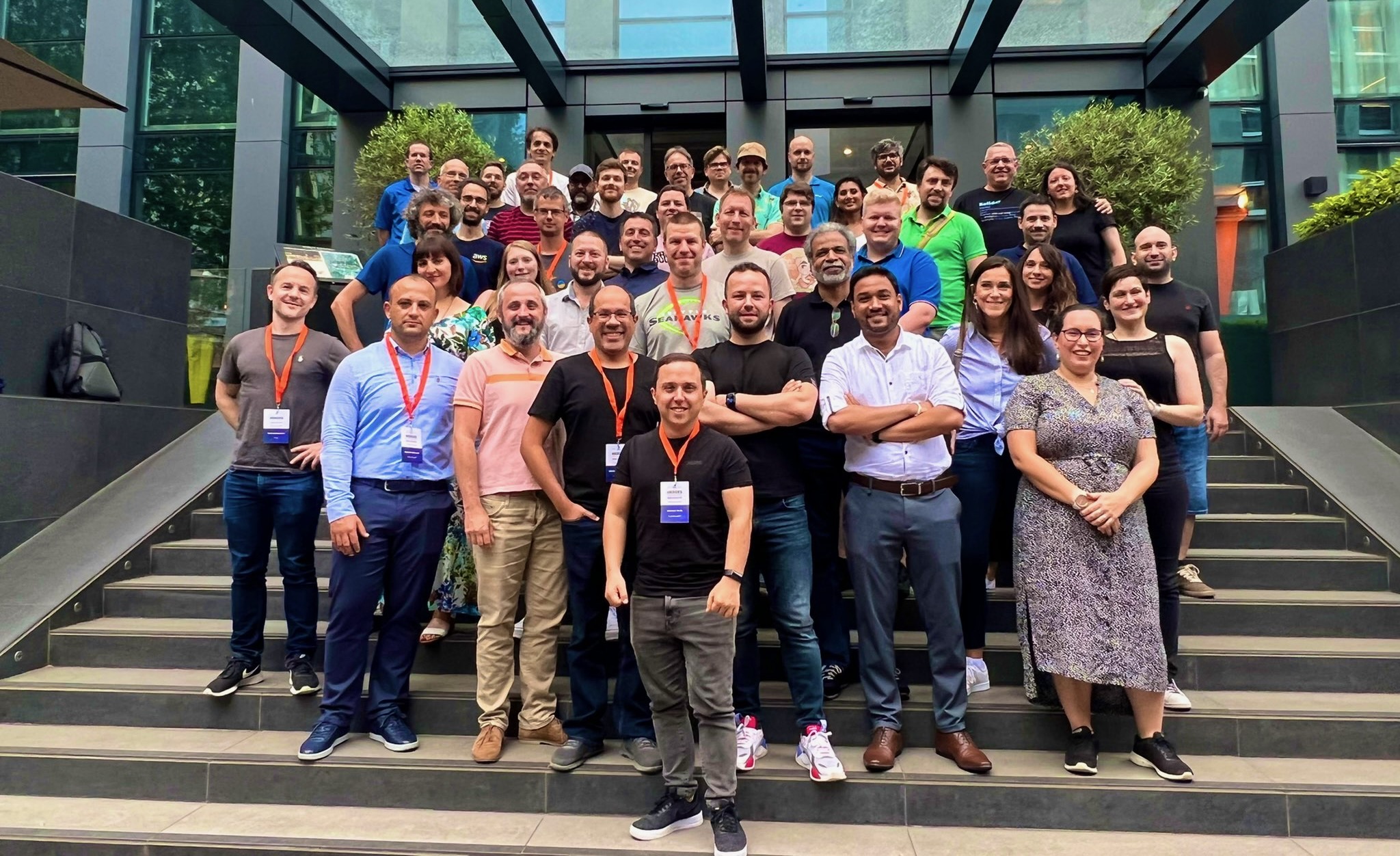
It’s the beginning of a new week, and I’d like to start with a recap of the most significant AWS news from the previous 7 days. Last week was special because I had the privilege to be at the very first EMEA AWS Heroes Summit in Milan, Italy. It was a great opportunity of mutual learning as this community of experts shared their thoughts with AWS developer advocates, product managers, and technologists on topics such as containers, serverless, and machine learning.

Participants at the EMEA AWS Heroes Summit 2022

Last Week’s Launches
Here are the launches that got my attention last week:

Amazon Connect Cases (available in preview) – This new capability of Amazon Connect provides built-in case management for your contact center agents to create, collaborate on, and resolve customer issues. Learn more in this blog post that shows how to simplify case management in your contact center.

Many updates for Amazon RDS and Amazon AuroraAmazon RDS Custom for Oracle now supports Oracle database 12.2 and 18c, and Amazon RDS Multi-AZ deployments with one primary and two readable standby database instances now supports M5d and R5d instances and is available in more Regions. There is also a Regional expansion for RDS Custom. Finally, PostgreSQL 14, a new major version, is now supported by Amazon Aurora PostgreSQL-Compatible Edition.

AWS WAF Captcha is now generally available – You can use AWS WAF Captcha to block unwanted bot traffic by requiring users to successfully complete challenges before their web requests are allowed to reach resources.

Private IP VPNs with AWS Site-to-Site VPN – You can now deploy AWS Site-to-Site VPN connections over AWS Direct Connect using private IP addresses. This way, you can encrypt traffic between on-premises networks and AWS via Direct Connect connections without the need for public IP addresses.

AWS Center for Quantum Networking – Research and development of quantum computers have the potential to revolutionize science and technology. To address fundamental scientific and engineering challenges and develop new hardware, software, and applications for quantum networks, we announced the AWS Center for Quantum Networking.

Simpler access to sustainability data, plus a global hackathon – The Amazon Sustainability Data Initiative catalog of datasets is now searchable and discoverable through AWS Data Exchange. As part of a new collaboration with the International Research Centre in Artificial Intelligence, under the auspices of UNESCO, you can use the power of the cloud to help the world become sustainable by participating to the Amazon Sustainability Data Initiative Global Hackathon.

For a full list of AWS announcements, be sure to keep an eye on the What’s New at AWS page.

Other AWS News
A couple of takeaways from the Amazon re:MARS conference:

Amazon CodeWhisperer (preview) – Amazon CodeWhisperer is a coding companion powered by machine learning with support for multiple IDEs and languages.

Synthetic data generation with Amazon SageMaker Ground TruthGenerate labeled synthetic image data that you can combine with real-world data to create more complete training datasets for your ML models.

Some other updates you might have missed:

AstraZeneca’s drug design program built using AWS wins innovation award – AstraZeneca received the BioIT World Innovative Practice Award at the 20th anniversary of the Bio-IT World Conference for its novel augmented drug design platform built on AWS. More in this blog post.

Large object storage strategies for Amazon DynamoDB – A blog post showing different options for handling large objects within DynamoDB and the benefits and disadvantages of each approach.

Amazon DevOps Guru for RDS under the hoodSome details of how DevOps Guru for RDS works, with a specific focus on its scalability, security, and availability.

AWS open-source news and updates – A newsletter curated by my colleague Ricardo to bring you the latest open-source projects, posts, events, and more.

Upcoming AWS Events
It’s AWS Summits season and here are some virtual and in-person events that might be close to you:

On June 30, the AWS User Group Ukraine is running an AWS Tech Conference to discuss digital transformation with AWS. Join to learn from many sessions including a fireside chat with Dr. Werner Vogels, CTO at Amazon.com.

That’s all from me for this week. Come back next Monday for another Week in Review!

Danilo

Amazon RDS Custom for Oracle – New Control Capabilities in Database Environment

Post Syndicated from Channy Yun original https://aws.amazon.com/blogs/aws/amazon-rds-custom-for-oracle-new-control-capabilities-in-database-environment/

Managing databases in self-managed environments such as on premises or Amazon Elastic Compute Cloud (Amazon EC2) requires customers to spend time and resources doing database administration tasks such as provisioning, scaling, patching, backups, and configuring for high availability. So, hundreds of thousands of AWS customers use Amazon Relational Database Service (Amazon RDS) because it automates these undifferentiated administration tasks.

However, there are some legacy and packaged applications that require customers to make specialized customizations to the underlying database and the operating system (OS), such as Oracle industry specialized applications for healthcare and life sciences, telecom, retail, banking, and hospitality. Customers with these specific customization requirements cannot get the benefits of a fully managed database service like Amazon RDS, and they end up deploying their databases on premises or on EC2 instances.

Today, I am happy to announce the general availability of Amazon RDS Custom for Oracle, new capabilities that enable database administrators to access and customize the database environment and operating system. With RDS Custom for Oracle, you can now access and customize your database server host and operating system, for example by applying special patches and changing the database software settings to support third-party applications that require privileged access.

You can easily move your existing self-managed database for these applications to Amazon RDS and automate time-consuming database management tasks, such as software installation, patching, and backups. Here is a simple comparison of features and responsibilities between Amazon EC2, RDS Custom for Oracle, and RDS.

Features and Responsibilities Amazon EC2 RDS Custom for Oracle Amazon RDS
Application optimization Customer Customer Customer
Scaling/high availability Customer Shared AWS
DB backups Customer Shared AWS
DB software maintenance Customer Shared AWS
OS maintenance Customer Shared AWS
Server maintenance AWS AWS AWS

The shared responsibility model of RDS Custom for Oracle gives you more control than in RDS, but also more responsibility, similar to EC2. So, if you need deep control of your database environment where you take responsibility for changes that you make and want to offload common administration tasks to AWS, RDS Custom for Oracle is the recommended deployment option over self-managing databases on EC2.

Getting Started with Amazon RDS Custom for Oracle
To get started with RDS Custom for Oracle, you create a custom engine version (CEV), the database installation files of supported Oracle database versions and upload the CEV to Amazon Simple Storage Service (Amazon S3). This launch includes Oracle Enterprise Edition allowing Oracle customers to use their own licensed software with bring your own license (BYOL).

Then with just a few clicks in the AWS Management Console, you can deploy an Oracle database instance in minutes. Then, you can connect to it using SSH or AWS Systems Manager.

Before creating and connecting your DB instance, make sure that you meet some prerequisites such as configuring the AWS Identity and Access Management (IAM) role and Amazon Virtual Private Cloud (VPC) using the pre-created AWS CloudFormation template in the Amazon RDS User Guide.

A symmetric AWS Key Management Service (KMS) key is required for RDS Custom for Oracle. If you don’t have an existing symmetric KMS key in your account, create a KMS key by following the instructions in Creating keys in the AWS KMS Developer Guide.

The Oracle Database installation files and patches are hosted on Oracle Software Delivery Cloud. If you want to create a CEV, search and download your preferred version under the Linux x86/64 platform and upload it to Amazon S3.

$ aws s3 cp install-or-patch-file.zip \ s3://my-oracle-db-files

To create CEV for creating a DB instance, you need a CEV manifest, a JSON document that describes installation .zip files stored in Amazon S3. RDS Custom for Oracle will apply the patches in the order in which they are listed when creating the instance by using this CEV.

{
    "mediaImportTemplateVersion": "2020-08-14",
    "databaseInstallationFileNames": [
        "V982063-01.zip"
    ],
    "opatchFileNames": [
        "p6880880_190000_Linux-x86-64.zip"
    ],
    "psuRuPatchFileNames": [
        "p32126828_190000_Linux-x86-64.zip"
    ],
    "otherPatchFileNames": [
        "p29213893_1910000DBRU_Generic.zip",
        "p29782284_1910000DBRU_Generic.zip",
        "p28730253_190000_Linux-x86-64.zip",
        "p29374604_1910000DBRU_Linux-x86-64.zip",
        "p28852325_190000_Linux-x86-64.zip",
        "p29997937_190000_Linux-x86-64.zip",
        "p31335037_190000_Linux-x86-64.zip",
        "p31335142_190000_Generic.zip"
] }

To create a CEV in the AWS Management Console, choose Create custom engine version in the Custom engine version menu.

You can set Engine type to Oracle, choose your preferred database edition and version, and enter CEV manifest, the location of the S3 bucket that you specified. Then, choose Create custom engine version. Creation takes approximately two hours.

To create your DB instance with the prepared CEV, choose Create database in the Databases menu. When you choose a database creation method, select Standard create. You can set Engine options to Oracle and choose Amazon RDS Custom in the database management type.

In Settings, enter a unique name for the DB instance identifier and your master username and password. By default, the new instance uses an automatically generated password for the master user. To learn more in the remaining setting, see Settings for DB instances in the Amazon RDS User Guide. Choose Create database.

Alternatively, you can create a CEV by running create-custom-db-engine-version command in the AWS Command Line Interface (AWS CLI).

$ aws rds create-db-instances \
      --engine my-oracle-ee \
      --db-instance-identifier my-oracle-instance \ 
      --engine-version 19.my_cev1 \ 
      --allocated-storage 250 \ 
      --db-instance-class db.m5.xlarge \ 
      --db-subnet-group mydbsubnetgroup \ 
      --master-username masterawsuser \ 
      --master-user-password masteruserpassword \ 
      --backup-retention-period 3 \ 
      --no-multi-az \ 
              --port 8200 \
      --license-model bring-your-own-license \
      --kms-key-id my-kms-key

After you create your DB instance, you can connect to this instance using an SSH client. The procedure is the same as for connecting to an Amazon EC2 instance. To connect to the DB instance, you need the key pair associated with the instance. RDS Custom for Oracle creates the key pair on your behalf. The pair name uses the prefix do-not-delete-ssh-privatekey-db-. AWS Secrets Manager stores your private key as a secret.

For more information, see Connecting to your Linux instance using SSH in the Amazon EC2 User Guide.

You can also connect to it using AWS Systems Manager Session Manager, a capability that lets you manage EC2 instances through a browser-based shell. To learn more, see Connecting to your RDS Custom DB instance using SSH and AWS Systems Manager in the Amazon RDS User Guide.

Things to Know
Here are a couple of things to keep in mind about managing your DB instance:

High Availability (HA): To configure replication between DB instances in different Availability Zones to be resilient to Availability Zone failures, you can create read replicas for RDS Custom for Oracle DB instances. Read replica creation is similar to Amazon RDS, but with some differences. Not all options are supported when creating RDS Custom read replicas. To learn how to configure HA, see Working with RDS Custom for Oracle read replicas in the AWS Documentation.

Backup and Recovery: Like Amazon RDS, RDS Custom for Oracle creates and saves automated backups during the backup window of your DB instance. You can also back up your DB instance manually. The procedure is identical to taking a snapshot of an Amazon RDS DB instance. The first snapshot contains the data for the full DB instance just like in Amazon RDS. RDS Custom also includes a snapshot of the OS image, and the EBS volume that contains the database software. Subsequent snapshots are incremental. With backup retention enabled, RDS Custom also uploads transaction logs into an S3 bucket in your account to be used with the RDS point-in-time recovery feature. Restore DB snapshots, or restore DB instances to a specific point in time using either the AWS Management Console or the AWS CLI. To learn more, see Backing up and restoring an Amazon RDS Custom for Oracle DB instance in the Amazon RDS User Guide.

Monitoring and Logging: RDS Custom for Oracle provides a monitoring service called the support perimeter. This service ensures that your DB instance uses a supported AWS infrastructure, operating system, and database. Also, all changes and customizations to the underlying operating system are automatically logged for audit purposes using Systems Manager and AWS CloudTrail. To learn more, see Troubleshooting an Amazon RDS Custom for DB instance in the Amazon RDS User Guide.

Now Available
Amazon RDS Custom for Oracle is now available in US East (N. Virginia), US East (Ohio), US West (Oregon), EU (Frankfurt), EU (Ireland), EU (Stockholm), Asia Pacific (Singapore), Asia Pacific (Sydney), and Asia Pacific (Tokyo) regions.

To learn more, take a look at the product page and documentations of Amazon RDS Custom for Oracle. Please send us feedback either in the AWS forum for Amazon RDS or through your usual AWS support contacts.

Channy

Query your Oracle database using Athena Federated Query and join with data in your Amazon S3 data lake

Post Syndicated from Navnit Shukla original https://aws.amazon.com/blogs/big-data/query-your-oracle-database-using-athena-federated-query-and-join-with-data-in-your-amazon-s3-data-lake/

If you use data lakes in Amazon Simple Storage Service (Amazon S3) and use Oracle as your transactional data store, you may need to join the data in your data lake with Oracle on Amazon Relational Database Service (Amazon RDS), Oracle running on Amazon Elastic Compute Cloud (Amazon EC2), or an on-premises Oracle database, for example to build a dashboard or create consolidated reporting.

In these use cases, Amazon Athena Federated Query allows you to seamlessly access the data you’re your Oracle database without having to move the data to the S3 data lake. This removes the overhead in managing such jobs.

In this post, we walk you through a step-by-step configuration to set up Athena Federated query using AWS Lambda to access data in Oracle on Amazon RDS.

For this post, we will be using the Oracle Athena Federated query connector developed by Trianz. The runtime includes Oracle XE running on Amazon EC2 and Amazon RDS. Your Oracle instance can be on Amazon RDS, Amazon EC2, or on premises. You can deploy the Trianz Oracle AFQ connector available in the AWS Serverless Application Repository.

Let’s start with discussing the solution and then detailing the steps involved.

Solution overview

Data federation is the capability to integrate data in another data store using a single interface (Amazon Athena). The following diagram depicts how Athena federation works by using Lambda to integrate with a federated data source.

Athena is an interactive query service that makes it easy to analyze data in Amazon S3 using standard SQL. If you have data in sources other than Amazon S3, you can use Athena Federated Query to query the data in place or build pipelines to extract data from multiple data sources and store them in Amazon S3. With Athena Federated Query, you can run SQL queries across data stored in relational, non-relational, object, and custom data sources.

When a federated query is run, Athena identifies the parts of the query that should be routed to the data source connector and executes them with Lambda. The data source connector makes the connection to the source, runs the query, and returns the results to Athena. If the data doesn’t fit into Lambda RAM runtime memory, it spills the data to Amazon S3 and is later accessed by Athena.

Athena uses data source connectors which internally use Lambda to run federated queries. Data source connectors are pre-built and can be deployed from the Athena console or from the Serverless Application Repository. Based on the user submitting the query, connectors can provide or restrict access to specific data elements.

To implement this solution, we complete the following steps:

  1. Create a secret for the Oracle instance using AWS Secrets Manager.
  2. Create an S3 bucket and subfolder for Lambda to use.
  3. Configure Athena federation with the Oracle XE instance.
  4. Run federated queries with Athena.

Prerequisites

Before getting started, make sure you have an Oracle database up and running.

Create a secret for the Oracle instance

Our first step is to create a secret for the Oracle instance with a username and password using Secrets Manager.

  1. On the Secrets Manager console, choose Secrets.
  2. Choose Store a new secret.
  3. Select Other types of secrets.
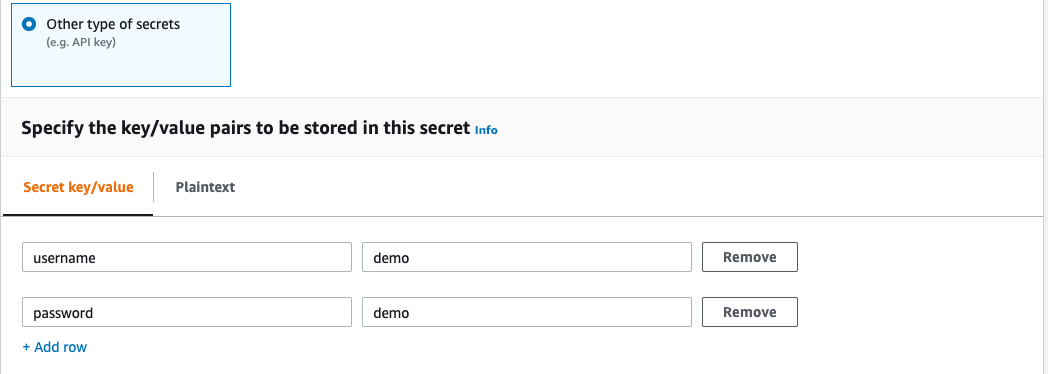
  4. Enter the credentials as key-value pairs (username, password) for your Oracle XE instance.

  1. For Secret name, enter a name for your secret. Use the prefix OracleAFQ so it’s easy to find.
  2. Leave the remaining fields at their defaults and choose Next.
  3. Complete your secret creation.

Create an S3 bucket for Lambda

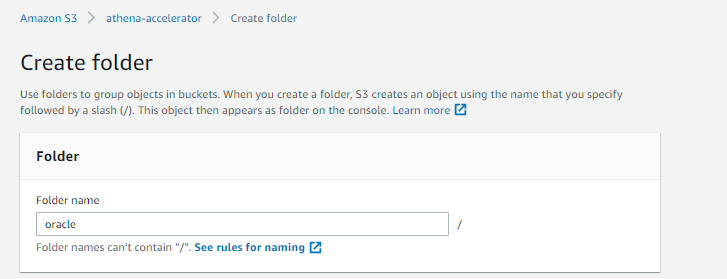
On the Amazon S3 console, create a new S3 bucket and subfolder for Lambda to use. For this post, I use athena-accelerator/oracle.

Configure Athena federation with the Oracle XE instance

To configure Athena federation with your Oracle instance, complete the following steps:

  1. On the AWS Serverless Application Repository console, choose Available applications.
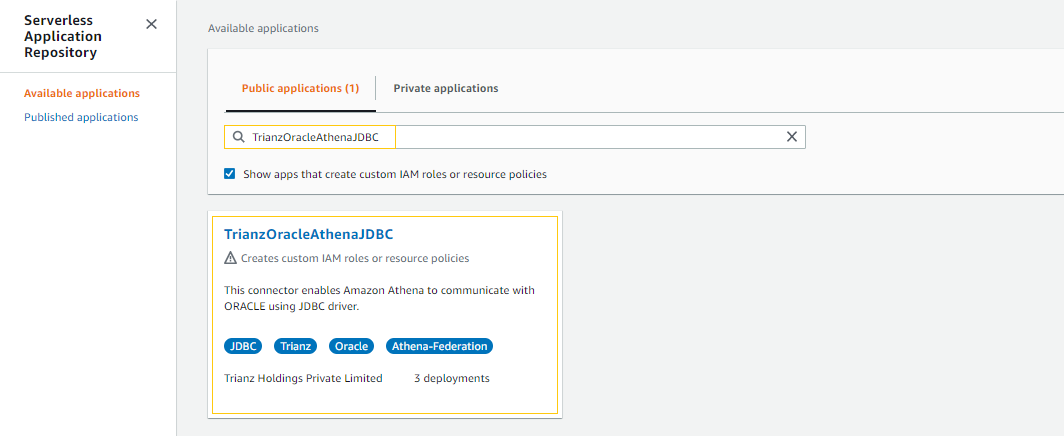
  2. In the search field, enter TrianzOracleAthenaJDBC.

  1. For Application name, enter TrianzOracleAthenaJDBC.
  2. For SecretNamePrefix, enter OracleAFQ_XE.
  3. For SpillBucket, enter Athena-accelerator/oracle.
  4. For JDBCConnectorConfig, use the format oracle://jdbc:oracle:thin:${secretname}@//hostname:port/servicename.

For example, we enter oracle://jdbc:oracle:thin:${OracleAFQ_XE}@//12.345.67.89:1521/xe.

  1. For DisableSpillEncryption, enter false.
  2. For LambdaFunctionName, enter oracleconnector.
  3. For SecurityGroupID, enter the security group ID where the Oracle instance is deployed.

Make sure to apply valid inbound and outbound rules based on your connection.

  1. For SpillPrefix, create a folder under the S3 bucket you created and specify the name (for example, athena-spill).
  2. For Subnetids, use the subnets where the Oracle instance is running with comma separation.

Make sure the subnet is in a VPC and has NAT gateway and internet gateway attached.

  1. Select the I acknowledge check box.
  2. Choose Deploy.

Make sure that the AWS Identity and Access Management (IAM) roles have permissions to access AWS Serverless Application Repository, AWS CloudFormation, Amazon S3, Amazon CloudWatch, AWS CloudTrail, Secrets Manager, Lambda, and Athena. For more information, see Example IAM Permissions Policies to Allow Athena Federated Query.

Run federated queries with Athena

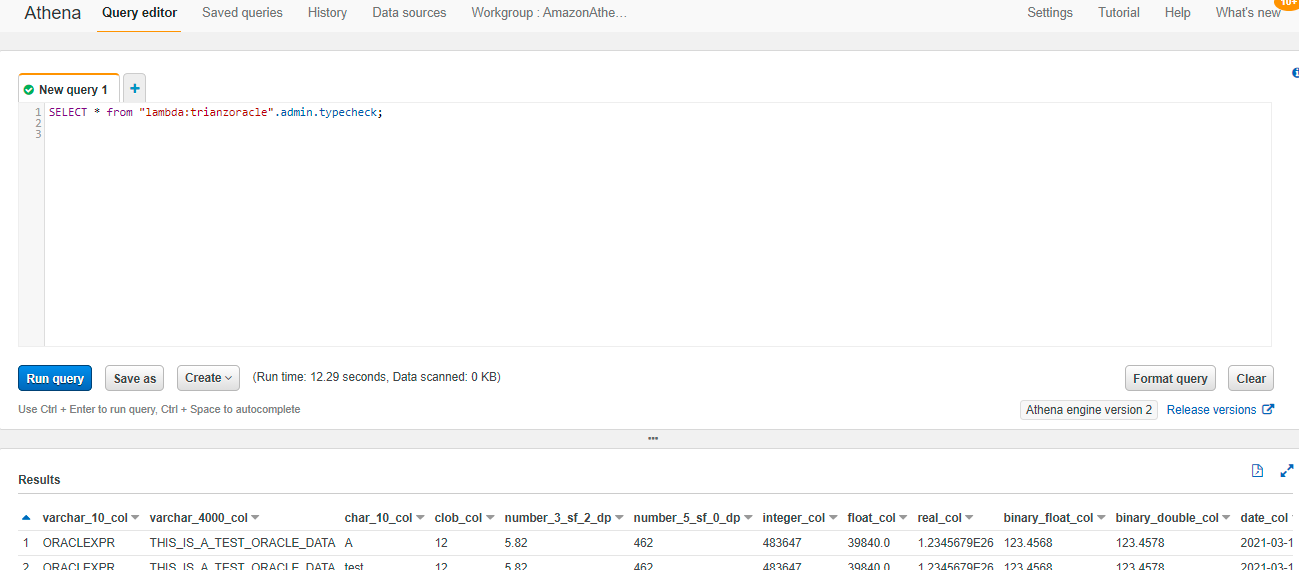
Run your federated queries using lambda:trianzoracle against tables in the Oracle database. trianzoracle is the name of lambda function which we have created in step 7 of previous section of this blog

lambda:trianzoracle is a reference data source connector Lambda function using the format lambda:MyLambdaFunctionName. For more information, see Writing Federated Queries.

The following query joins the dataset between Oracle and the S3 data lake.

Key performance best practices

If you’re considering Athena Federated query with Oracle, we recommend the following best practices:

  • Athena Federated query works great for queries with predicate filtering because the predicates are pushed down to the Oracle database. Use filter and limited-range scans in your queries to avoid full table scans.
  • If your SQL query requires returning a large volume of data from the Oracle database to Athena (which could lead to query timeouts or slow performance), unload the large tables in your query from Oracle to your S3 data lake.
  • The star schema is a commonly used data model in Oracle. In the star schema model, unload your large fact tables into your S3 data lake and leave the dimension tables in Oracle. If large dimension tables are contributing to slow performance or query timeouts, unload those tables to your S3 data lake.
  • When you run federated queries, Athena spins up multiple Lambda functions, which causes a spike in database connections. It’s important to monitor the Oracle database WLM queue slots to ensure there is no queuing. Additionally, you can use concurrency scaling on your Oracle database cluster to benefit from concurrent connections to queue up.

Conclusion

In this post, you learned how to configure and use Athena Federated query with Oracle. Now you don’t need to wait for all the data in your Oracle data warehouse to be unloaded to Amazon S3 and maintained on a day-to-day basis to run your queries.

You can use the best practice considerations outlined in the post to help minimize the data transferred from Oracle for better performance. When queries are well written for Federated query, the performance penalties are negligible.

For more information, see the Athena User Guide and Using Amazon Athena Federated Query.


About the Author

Navnit Shukla is AWS Specialist Solution Architect in Analytics. He is passionate about helping customers uncover insights from their data. He has been building solutions to help organizations make data-driven decisions.