There is a new report on police decryption capabilities: specifically, mobile device forensic tools (MDFTs). Short summary: it’s not just the FBI that can do it.
This report documents the widespread adoption of MDFTs by law enforcement in the United States. Based on 110 public records requests to state and local law enforcement agencies across the country, our research documents more than 2,000 agencies that have purchased these tools, in all 50 states and the District of Columbia. We found that state and local law enforcement agencies have performed hundreds of thousands of cellphone extractions since 2015, often without a warrant. To our knowledge, this is the first time that such records have been widely disclosed.
Lots of details in the report. And in this news article:
At least 49 of the 50 largest U.S. police departments have the tools, according to the records, as do the police and sheriffs in small towns and counties across the country, including Buckeye, Ariz.; Shaker Heights, Ohio; and Walla Walla, Wash. And local law enforcement agencies that don’t have such tools can often send a locked phone to a state or federal crime lab that does.
[…]
The tools mostly come from Grayshift, an Atlanta company co-founded by a former Apple engineer, and Cellebrite, an Israeli unit of Japan’s Sun Corporation. Their flagship tools cost roughly $9,000 to $18,000, plus $3,500 to $15,000 in annual licensing fees, according to invoices obtained by Upturn.
I am delighted to share the news that we have appointed a new Chair and Trustees of the Raspberry Pi Foundation. Between them, they bring an enormous range of experience and expertise to what is already a fantastic Board of Trustees, and I am really looking forward to working with them.
John Lazar
Amali de Alwis
Charles Leadbeater
Dan Labbad
New Chair of the Board of Trustees: John Lazar
John Lazar has been appointed as the new Chair of the Board of Trustees. John is a software engineer and business leader who is focused on combining technology and entrepreneurship to generate lasting positive impact.
Formerly the Chairman and CEO of Metaswitch Networks, John is now an angel investor, startup mentor, non-executive chairman and board director, including serving as the Chair of What3Words. He is a Fellow of the Royal Academy of Engineering and played an active role in developing the programme of study for England’s school Computer Science curriculum. John has also spent many years working on tech-related non-profit initiatives in Africa and co-founded Enza Capital, which invests in early-stage African technology companies that solve pressing problems.
John takes over the Chair from David Cleevely, who has reached the end of his two three-year terms as Trustee and Chair of the Foundation. David has made a huge contribution to the Foundation over that time, and we are delighted that he will continue to be involved in our work as one of the founding members of the Supporters Club.
New Trustees: Amali de Alwis, Charles Leadbeater, Dan Labbad
Alongside John, we are welcoming three new Trustees to the Board of Trustees:
Amali de Alwis is the UK Managing Director of Microsoft for Startups, and is the former CEO of Code First: Girls. She is also a Board member at Ada National College for Digital Skills, sits on the Diversity & Inclusion Board at the Institute of Coding, is an Advisory Board member at the Founders Academy, and was a founding member at Tech Talent Charter.
Charles Leadbeater is an independent author, a social entrepreneur, and a leading authority on innovation and creativity. He has advised companies, cities, and governments around the world on innovation strategy and has researched and written extensively on innovation in education. Charles is also a Trustee of the Paul Hamlyn Foundation.
Dan Labbad is Chief Executive and Executive Member of the Board of The Crown Estate. He was previously at Lendlease, where he was Chief Executive Officer of Europe from 2009. Dan is also a Director of The Hornery Institute and Ark Schools.
New Member: Suranga Chandratillake
I am also delighted to announce that we have appointed Suranga Chandratillake as a Member of the Raspberry Pi Foundation. Suranga is a technologist, entrepreneur, and investor.
He founded the intelligent search company blinkx and is now a General Partner at Balderton Capital. Suranga is a Fellow of the Royal Academy of Engineering and a World Economic Forum Young Global Leader, and he serves on the UK Government’s Council for Science and Technology.
What is a Board of Trustees anyway?
As a charity, the Raspberry Pi Foundation is governed by a Board of Trustees that is ultimately responsible for what we do and how we are run. It is the Trustees’ job to make sure that we are focused on our mission, which for us means helping more people learn about computing, computer science, and related subjects. The Trustees also have all the usual responsibilities of company directors, including making sure that we use our resources effectively. As Chief Executive, I am accountable to the Board of Trustees.
We’ve always been fortunate to attract the most amazing people to serve as Trustees and, as volunteers, they are incredibly generous with their time, sharing their expertise and experience on a wide range of issues. They are an important part of the team. Trustees serve for up to two terms of three years so that we always have fresh views and experience to draw on.
How do you appoint Trustees?
Appointments to the Board of Trustees follow open recruitment and selection processes that are overseen by the Foundation’s Nominations Committee, supported by independent external advisers. Our aim is to appoint Trustees who bring different backgrounds, perspectives, and lived experience, as well as a range of skills. As with all appointments, we consider diversity at every aspect of the recruitment and selection processes.
Formally, Trustees are elected by the Foundation’s Members at our Annual General Meeting. This year’s AGM took place last week on Zoom. Members are also volunteers, and they play an important role in holding the Board of Trustees to account, helping to shape our strategy, and acting as advocates for our mission.
The NSA released an advisory listing the top twenty-five known vulnerabilities currently being exploited by Chinese nation-state attackers.
This advisory provides Common Vulnerabilities and Exposures (CVEs) known to be recently leveraged, or scanned-for, by Chinese state-sponsored cyber actors to enable successful hacking operations against a multitude of victim networks. Most of the vulnerabilities listed below can be exploited to gain initial access to victim networks using products that are directly accessible from the Internet and act as gateways to internal networks. The majority of the products are either for remote access (T1133) or for external web services (T1190), and should be prioritized for immediate patching.
The Hewlett Foundation just announced its top five ideas in its Cybersecurity Visuals Challenge. The problem Hewlett is trying to solve is the dearth of good visuals for cybersecurity. A Google Images Search demonstrates the problem: locks, fingerprints, hands on laptops, scary looking hackers in black hoodies. Hewlett wanted to go beyond those tropes.
I really liked the idea, but find the results underwhelming. It’s a hard problem.
Researchers are tricking autopilots by inserting split-second images into roadside billboards.
Researchers at Israel’s Ben Gurion University of the Negev … previously revealed that they could use split-second light projections on roads to successfully trick Tesla’s driver-assistance systems into automatically stopping without warning when its camera sees spoofed images of road signs or pedestrians. In new research, they’ve found they can pull off the same trick with just a few frames of a road sign injected on a billboard’s video. And they warn that if hackers hijacked an internet-connected billboard to carry out the trick, it could be used to cause traffic jams or even road accidents while leaving little evidence behind.
[…]
In this latest set of experiments, the researchers injected frames of a phantom stop sign on digital billboards, simulating what they describe as a scenario in which someone hacked into a roadside billboard to alter its video. They also upgraded to Tesla’s most recent version of Autopilot known as HW3. They found that they could again trick a Tesla or cause the same Mobileye device to give the driver mistaken alerts with just a few frames of altered video.
The researchers found that an image that appeared for 0.42 seconds would reliably trick the Tesla, while one that appeared for just an eighth of a second would fool the Mobileye device. They also experimented with finding spots in a video frame that would attract the least notice from a human eye, going so far as to develop their own algorithm for identifying key blocks of pixels in an image so that a half-second phantom road sign could be slipped into the “uninteresting” portions.
Abstract: In this paper, we investigate “split-second phantom attacks,” a scientific gap that causes two commercial advanced driver-assistance systems (ADASs), Telsa Model X (HW 2.5 and HW 3) and Mobileye 630, to treat a depthless object that appears for a few milliseconds as a real obstacle/object. We discuss the challenge that split-second phantom attacks create for ADASs. We demonstrate how attackers can apply split-second phantom attacks remotely by embedding phantom road signs into an advertisement presented on a digital billboard which causes Tesla’s autopilot to suddenly stop the car in the middle of a road and Mobileye 630 to issue false notifications. We also demonstrate how attackers can use a projector in order to cause Tesla’s autopilot to apply the brakes in response to a phantom of a pedestrian that was projected on the road and Mobileye 630 to issue false notifications in response to a projected road sign. To counter this threat, we propose a countermeasure which can determine whether a detected object is a phantom or real using just the camera sensor. The countermeasure (GhostBusters) uses a “committee of experts” approach and combines the results obtained from four lightweight deep convolutional neural networks that assess the authenticity of an object based on the object’s light, context, surface, and depth. We demonstrate our countermeasure’s effectiveness (it obtains a TPR of 0.994 with an FPR of zero) and test its robustness to adversarial machine learning attacks.
Earlier this month, we learned that someone is disrupting the TrickBot botnet network.
Over the past 10 days, someone has been launching a series of coordinated attacks designed to disrupt Trickbot, an enormous collection of more than two million malware-infected Windows PCs that are constantly being harvested for financial data and are often used as the entry point for deploying ransomware within compromised organizations.
On Sept. 22, someone pushed out a new configuration file to Windows computers currently infected with Trickbot. The crooks running the Trickbot botnet typically use these config files to pass new instructions to their fleet of infected PCs, such as the Internet address where hacked systems should download new updates to the malware.
But the new configuration file pushed on Sept. 22 told all systems infected with Trickbot that their new malware control server had the address 127.0.0.1, which is a “localhost” address that is not reachable over the public Internet, according to an analysis by cyber intelligence firm Intel 471.
A few days ago, the Washington Postreported that it’s the work of US Cyber Command:
U.S. Cyber Command’s campaign against the Trickbot botnet, an army of at least 1 million hijacked computers run by Russian-speaking criminals, is not expected to permanently dismantle the network, said four U.S. officials, who spoke on the condition of anonymity because of the matter’s sensitivity. But it is one way to distract them at least for a while as they seek to restore operations.
The network is controlled by “Russian speaking criminals,” and the fear is that it will be used to disrupt the US election next month.
The effort is part of what Gen. Paul Nakasone, the head of Cyber Command, calls “persistent engagement,” or the imposition of cumulative costs on an adversary by keeping them constantly engaged. And that is a key feature of CyberCom’s activities to help protect the election against foreign threats, officials said.
Here’s General Nakasone talking about persistent engagement.
We disrupted Trickbot through a court order we obtained as well as technical action we executed in partnership with telecommunications providers around the world. We have now cut off key infrastructure so those operating Trickbot will no longer be able to initiate new infections or activate ransomware already dropped into computer systems.
[…]
We took today’s action after the United States District Court for the Eastern District of Virginia granted our request for a court order to halt Trickbot’s operations.
During the investigation that underpinned our case, we were able to identify operational details including the infrastructure Trickbot used to communicate with and control victim computers, the way infected computers talk with each other, and Trickbot’s mechanisms to evade detection and attempts to disrupt its operation. As we observed the infected computers connect to and receive instructions from command and control servers, we were able to identify the precise IP addresses of those servers. With this evidence, the court granted approval for Microsoft and our partners to disable the IP addresses, render the content stored on the command and control servers inaccessible, suspend all services to the botnet operators, and block any effort by the Trickbot operators to purchase or lease additional servers.
To execute this action, Microsoft formed an international group of industry and telecommunications providers. Our Digital Crimes Unit (DCU) led investigation efforts including detection, analysis, telemetry, and reverse engineering, with additional data and insights to strengthen our legal case from a global network of partners including FS-ISAC, ESET, Lumen’s Black Lotus Labs, NTT and Symantec, a division of Broadcom, in addition to our Microsoft Defender team. Further action to remediate victims will be supported by internet service providers (ISPs) and computer emergency readiness teams (CERTs) around the world.
This action also represents a new legal approach that our DCU is using for the first time. Our case includes copyright claims against Trickbot’s malicious use of our software code. This approach is an important development in our efforts to stop the spread of malware, allowing us to take civil action to protect customers in the large number of countries around the world that have these laws in place.
In legal filings, Microsoft argued that Trickbot irreparably harms the company “by damaging its reputation, brands, and customer goodwill. Defendants physically alter and corrupt Microsoft products such as the Microsoft Windows products. Once infected, altered and controlled by Trickbot, the Windows operating system ceases to operate normally and becomes tools for Defendants to conduct their theft.”
One of the things we learned from the Snowden documents is that the NSA conducts “about” searches. That is, searches based on activities and not identifiers. A normal search would be on a name, or IP address, or phone number. An about search would something like “show me anyone that has used this particular name in a communications,” or “show me anyone who was at this particular location within this time frame.” These searches are legal when conducted for the purpose of foreign surveillance, but the worry about using them domestically is that they are unconstitutionally broad. After all, the only way to know who said a particular name is to know what everyone said, and the only way to know who was at a particular location is to know where everyone was. The very nature of these searches requires mass surveillance.
The FBI does not conduct mass surveillance. But many US corporations do, as a normal part of their business model. And the FBI uses that surveillance infrastructure to conduct its own about searches. Here’s an arson case where the FBI asked Google who searched for a particular street address:
Homeland Security special agent Sylvette Reynoso testified that her team began by asking Google to produce a list of public IP addresses used to google the home of the victim in the run-up to the arson. The Chocolate Factory [Google] complied with the warrant, and gave the investigators the list. As Reynoso put it:
On June 15, 2020, the Honorable Ramon E. Reyes, Jr., United States Magistrate Judge for the Eastern District of New York, authorized a search warrant to Google for users who had searched the address of the Residence close in time to the arson.
The records indicated two IPv6 addresses had been used to search for the address three times: one the day before the SUV was set on fire, and the other two about an hour before the attack. The IPv6 addresses were traced to Verizon Wireless, which told the investigators that the addresses were in use by an account belonging to Williams.
Google’s response is that this is rare:
While word of these sort of requests for the identities of people making specific searches will raise the eyebrows of privacy-conscious users, Google told The Register the warrants are a very rare occurrence, and its team fights overly broad or vague requests.
“We vigorously protect the privacy of our users while supporting the important work of law enforcement,” Google’s director of law enforcement and information security Richard Salgado told us. “We require a warrant and push to narrow the scope of these particular demands when overly broad, including by objecting in court when appropriate.
“These data demands represent less than one per cent of total warrants and a small fraction of the overall legal demands for user data that we currently receive.”
Here’s another example of what seems to be about data leading to a false arrest.
According to the lawsuit, police investigating the murder knew months before they arrested Molina that the location data obtained from Google often showed him in two places at once, and that he was not the only person who drove the Honda registered under his name.
Avondale police knew almost two months before they arrested Molina that another man his stepfather sometimes drove Molina’s white Honda. On October 25, 2018, police obtained records showing that Molina’s Honda had been impounded earlier that year after Molina’s stepfather was caught driving the car without a license.
Data obtained by Avondale police from Google did show that a device logged into Molina’s Google account was in the area at the time of Knight’s murder. Yet on a different date, the location data from Google also showed that Molina was at a retirement community in Scottsdale (where his mother worked) while debit card records showed that Molina had made a purchase at a Walmart across town at the exact same time.
Molina’s attorneys argue that this and other instances like it should have made it clear to Avondale police that Google’s account-location data is not always reliable in determining the actual location of a person.
“About” searches might be rare, but that doesn’t make them a good idea. We have knowingly and willingly built the architecture of a police state, just so companies can show us ads. (And it is increasingly apparent that the advertising-supported Internet is heading for a crash.)
Email is a popular channel for applications, used in both marketing campaigns and other outbound customer communications. The challenge with email is that it can become increasingly complex to manage for companies that must send large quantities of messages per month. This complexity is especially true when companies need to measure detailed email engagement metrics to track campaign success.
As a marketer, you want to monitor several metrics, including open rates, click-through rates, bounce rates, and delivery rates. If you do not track your email results, you could potentially be wasting your campaign resources. Monitoring and interpreting your sending results can help you deliver the best content possible to your subscribers’ inboxes, and it can also ensure that your IP reputation stays high. Mailbox providers prioritize inbox placement for senders that deliver relevant content. As a business professional, tracking your emails can also help you stay on top of hot leads and important clients. For example, if someone has opened your email multiple times in one day, it might be a good idea to send out another follow-up email to touch base.
Building a large-scale email solution is a complex and expensive challenge for any business. You would need to build infrastructure, assemble your network, and warm up your IP addresses. Alternatively, working with some third-party email solutions require contract negotiations and upfront costs.
Fortunately, Amazon Simple Email Service (SES) has a highly scalable and reliable backend infrastructure to reduce the preceding challenges. It has improved content filtering techniques, reputation management features, and a vast array of analytics and reporting functions. These features help email senders reach their audiences and make it easier to manage email channels across applications. Amazon SES also provides API operations to monitor your sending activities through simple API calls. You can publish these events to Amazon CloudWatch, Amazon Kinesis Data Firehose, or by using Amazon Simple Notification Service (SNS).
In this post, you learn how to build and automate a serverless architecture that analyzes email events. We explore how to track important metrics such as open and click rate of the emails.
Solution overview
The metrics that you can measure using Amazon SES are referred to as email sending events. You can use Amazon CloudWatch to retrieve Amazon SES event data. You can also use Amazon SNS to interpret Amazon SES event data. However, in this post, we are going to use Amazon Kinesis Data Firehose to monitor our user sending activity.
Enable Amazon SES configuration sets with open and click metrics and publish email sending events to Amazon Kinesis Data Firehose as JSON records. A Lambda function is used to parse the JSON records and publish the content in the Amazon S3 bucket.
Ingested data lands in an Amazon S3 bucket that we refer to as the raw zone. To make that data available, you have to catalog its schema in the AWS Glue data catalog. You create and run the AWS Glue crawler that crawls your data sources and construct your Data Catalog. The Data Catalog uses pre-built classifiers for many popular source formats and data types, including JSON, CSV, and Parquet.
When the crawler is finished creating the table definition and schema, you analyze the data using Amazon Athena. It is an interactive query service that makes it easy to analyze data in Amazon S3 using SQL. Point to your data in Amazon S3, define the schema, and start querying using standard SQL, with most results delivered in seconds.
Now you can build visualizations, perform ad hoc analysis, and quickly get business insights from the Amazon SES event data using Amazon QuickSight. You can easily run SQL queries using Amazon Athena on data stored in Amazon S3, and build business dashboards within Amazon QuickSight.
Deploying the architecture:
Configuring Amazon Kinesis Data Firehose to write to Amazon S3:
Navigate to the Amazon Kinesis in the AWS Management Console. Choose Kinesis Data Firehose and create a delivery stream.
Enter delivery stream name as “SES_Firehose_Demo”.
Under the source category, select “Direct Put or other sources”.
On the next page, make sure to enable Data Transformation of source records with AWS Lambda. We use AWS Lambda to parse the notification contents that we only process the required information as per the use case.
Click the “Create New” Lambda function.
Click on “General Kinesis Data FirehoseProcessing” Lambda blueprint and this opens up the Lambda console. Enter following values in Lambda
Name: SES-Firehose-Json-Parser
Execution role: Create a new role with basic Lambda permissions.
Click “Create Function”. Now replace the Lambda code with the following provided code and save the function.
For this blog, we are only filtering out three fields i.e. Eventname, destination_Email, and SourceIP. If you want to store other parameters you can modify your code accordingly. For the list of information that we receive in notifications, you may check out the following document.
You may utilize the above values in the Amazon S3 prefix and error prefix. If you use your own prefixes make sure to accordingly update the target values in AWS Glue which you will see in further process.
Keep the Amazon S3 backup option disabled and click “Next”.
On the next page, under the Permissions section, select create a new role. This opens up a new tab and then click “Allow” to create the role.
Navigate back to the Amazon Kinesis Data Firehose console and click “Next”.
Review the changes and click on “Create delivery stream”.
Configure Amazon SES to publish event data to Kinesis Data Firehose:
Navigate to Amazon SES console and select “Email Addresses” from the left side.
Click on “Verify a New Email Address” on the top. Enter your email address to which you send a test email.
Go to your email inbox and click on the verify link. Navigate back to the Amazon SES console and you will see verified status on the email address provided.
Open the Amazon SES console and select Configuration set from the left side.
Create a new configuration set. Enter “SES_Firehose_Demo” as the configuration set name and click “Create”.
Choose Kinesis Data Firehose as the destination and provide the following details.
Name: OpenClick
Event Types: Open and Click
In the IAM Role field, select ‘Let SES make a new role’. This allows SES to create a new role and add sufficient permissions for this use case in that role.
Click “Save”.
Sending a Test email:
Navigate to Amazon SES console, click on “Email Addresses” on the left side.
Select your verified email address and click on “Send a Test email”.
Make sure you select the raw email format. You may use the following format to send out a test email from the console. Make sure you send out this email to a recipient inbox to which you have the access.
X-SES-CONFIGURATION-SET: SES_Firehose_Demo
X-SES-MESSAGE-TAGS: Email=NULL
From: [email protected]
To: [email protected]
Subject: Test email
Content-Type: multipart/alternative;
    		boundary="----=_boundary"

------=_boundary
Content-Type: text/html; charset=UTF-8
Content-Transfer-Encoding: 7bit
This is a test email.

<a href="https://aws.amazon.com/">Amazon Web Services</a>
------=_boundary
Once the email is received in the recipient’s inbox, open the email and click the link present in the same. This generates a click and open event and send the response back to SES.
Creating Glue Crawler:
Navigate to the AWS Glue console, select “crawler” from the left side, and then click on “Add crawler” on the top.
Enter the crawler name as “SES_Firehose_Crawler” and click “Next”.
Under Crawler source type, select “Data stores” and click “Next”.
Select Amazon S3 as the data source and prove the required path. Include the path until the “fhbase” folder.
Select “no” under Add another data source section.
In the IAM role, select the option to ‘Create an IAM role’. Enter the name as “SES_Firehose-Crawler”. This provides the necessary permissions automatically to the newly created role.
In the frequency section, select run on demand and click “Next”. You may choose this value as per your use case.
Click on add Database and provide the name as “ses_firehose_glue_db”. Click on create and then click “Next”.
Review your Glue crawler setting and click on “Finish”.
Run the above-created crawler. This crawls the data from the specified Amazon S3 bucket and create a catalog and table definition.
Now navigate to “tables” on the left, and verify a “fhbase” table is created after you run the crawler.
If you want to analyze the data stored until now, you can use Amazon Athena and test the queries. If not, you can move to the Amazon Quicksight directly.
Analyzing the data using Amazon Athena:
Open Athena console and select the database, which is created using AWS Glue
Click on “setup a query result location in Amazon S3” as shown in the following screenshot.
Navigate to the Amazon S3 bucket created in earlier steps and create a folder called “AthenaQueryResult”. We store our Athena query result in this bucket.
Now navigate back to Amazon Athena and select the Amazon S3 bucket with the folder location as shown in the following screenshot and click “Save”.
Run the following query to test the sample output and accordingly modify your SQL query to get the desired output.
Select * from “ses_firehose_glue_db”.”fhbase”
Note: If you want to track the opened emails by unique Ip addresses then you can modify your SQL query accordingly. This is because every time an email gets opened, you will receive a notification even if the same email was previously opened.
Visualizing the data in Amazon QuickSight dashboards:
Now, let’s analyze this data using Amazon Athena via Amazon Quicksight.
Log into Amazon Quicksight and choose Manage data, New dataset. Choose Amazon Athena as a new data source.
Enter the data source name as “SES-Demo” and click on “Create the data source”.
Select your database from the drop-down as “ses_firehose_glue_db” and table “fhbase” that you have created in AWS Glue.
And add a custom SQL based on your use case and click on “Confirm query”. Refer to the example below.
You can perform ad hoc analysis and modify your query according to your business needs as shown in the following image. Click “Save & Visualize”.
You can now visualize your event data on Amazon Quicksight dashboard. You can use various graphs to represent your data. For this demo, the default graph is used and two fields are selected to populate on the graph, as shown below.
Conclusion:
This architecture shows how to track your email sending activity at a granular level. You set up Amazon SES to publish event data to Amazon Kinesis Data Firehose based on fine-grained email characteristics that you define. You can also track several types of email sending events, including sends, deliveries, bounces, complaints, rejections, rendering failures, and delivery delays. This information can be useful for operational and analytical purposes.
Chirag Oswal is a solutions architect and AR/VR specialist working with the public sector India. He works with AWS customers to help them adopt the cloud operating model on a large scale.
Apoorv Gakhar is a Cloud Support Engineer and an Amazon SES Expert. He is working with AWS to help the customers integrate their applications with various AWS Services.
Five researchers hacked Apple Computer’s networks — not their products — and found fifty-five vulnerabilities. So far, they have received $289K.
One of the worst of all the bugs they found would have allowed criminals to create a worm that would automatically steal all the photos, videos, and documents from someone’s iCloud account and then do the same to the victim’s contacts.
Lots of details in this blog post by one of the hackers.
Discover how non-player characters make decisions by tinkering with this Unity-based Pac-Man homage. Paul Roberts wrote this for the latest issue of Wireframe magazine.
From the first video game to the present, artificial intelligence has been a vital part of the medium. While most early games had enemies that simply walked left and right, like the Goombas in Super Mario Bros., there were also games like Pac-Man, where each ghost appeared to move intelligently. But from a programming perspective, how do we handle all the different possible states we want our characters to display?
Here’s AI-Man, our homage to a certain Namco maze game. You can switch between AI types to see how they affect the ghosts’ behaviours.
For example, how do we control whether a ghost is chasing Pac-Man, or running away, or even returning to their home? To explore these behaviours, we’ll be tinkering with AI-Man – a Pac-Man-style game developed in Unity. It will show you how the approaches discussed in this article are implemented, and there’s code available for you to modify and add to. You can freely download the AI-Man project here. One solution to managing the different states a character can be in, which has been used for decades, is a finite state machine, or FSM for short. It’s an approach that describes the high-level actions of an agent, and takes its name simply from the fact that there are a finite number of states from which to transition between, with each state only ever doing one thing.
Altered states
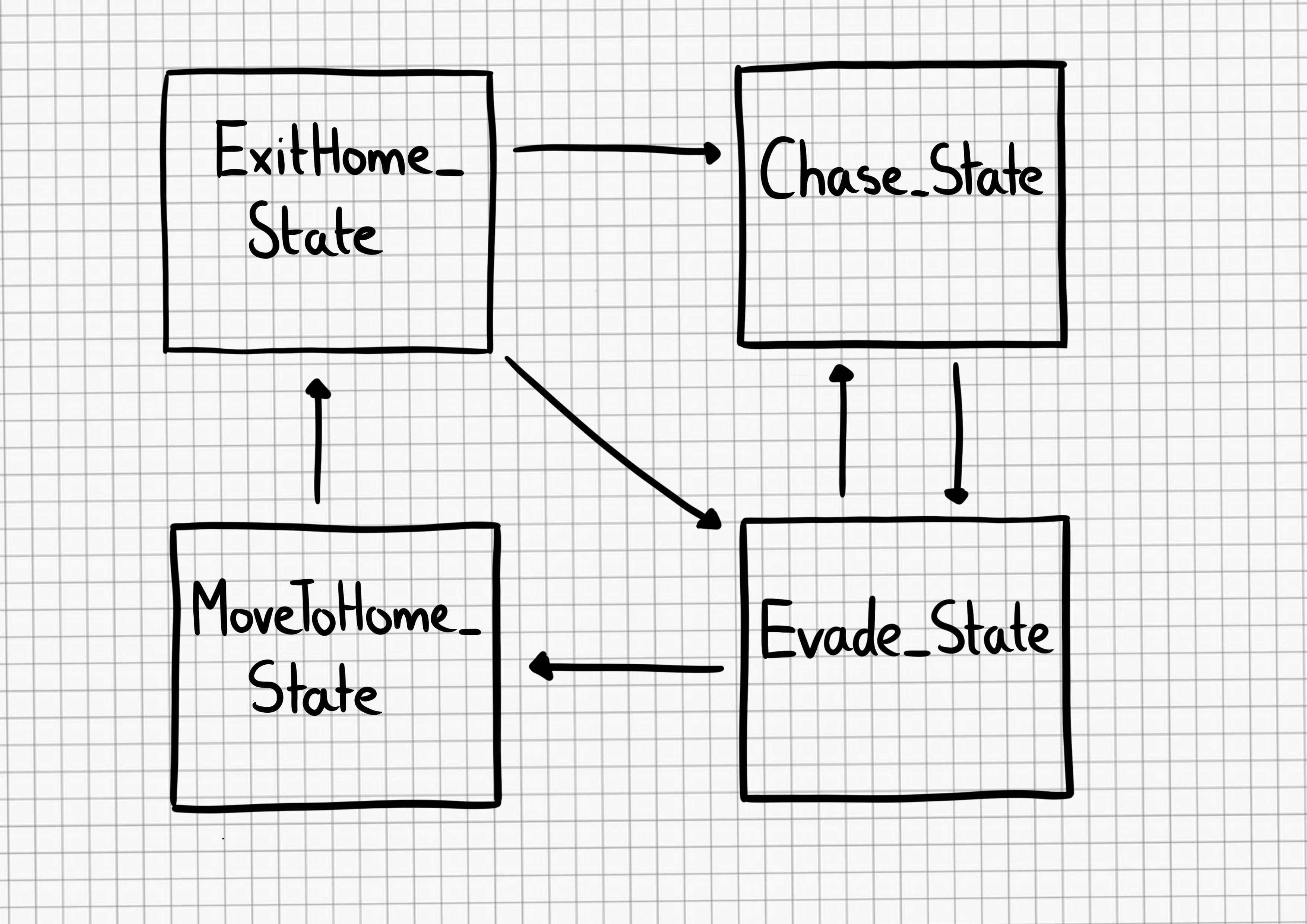
To explain what’s meant by high level, let’s take a closer look at the ghosts in Pac-Man. The highlevel state of a ghost is to ‘Chase’ Pac-Man, but the low level is how the ghost actually does this. In Pac-Man, each ghost has its own behaviour in which it hunts the player down, but they’re all in the same high-level state of ‘Chase’. Looking at Figure 1, you can see how the overall behaviour of a ghost can be depicted extremely easily, but there’s a lot of hidden complexity. At what point do we transition between states? What are the conditions on moving between states across the connecting lines? Once we have this information, the diagram can be turned into code with relative ease. You could use simple switch statements to achieve this, or we could achieve the same using an object-oriented approach.
Figure 1: A finite state machine
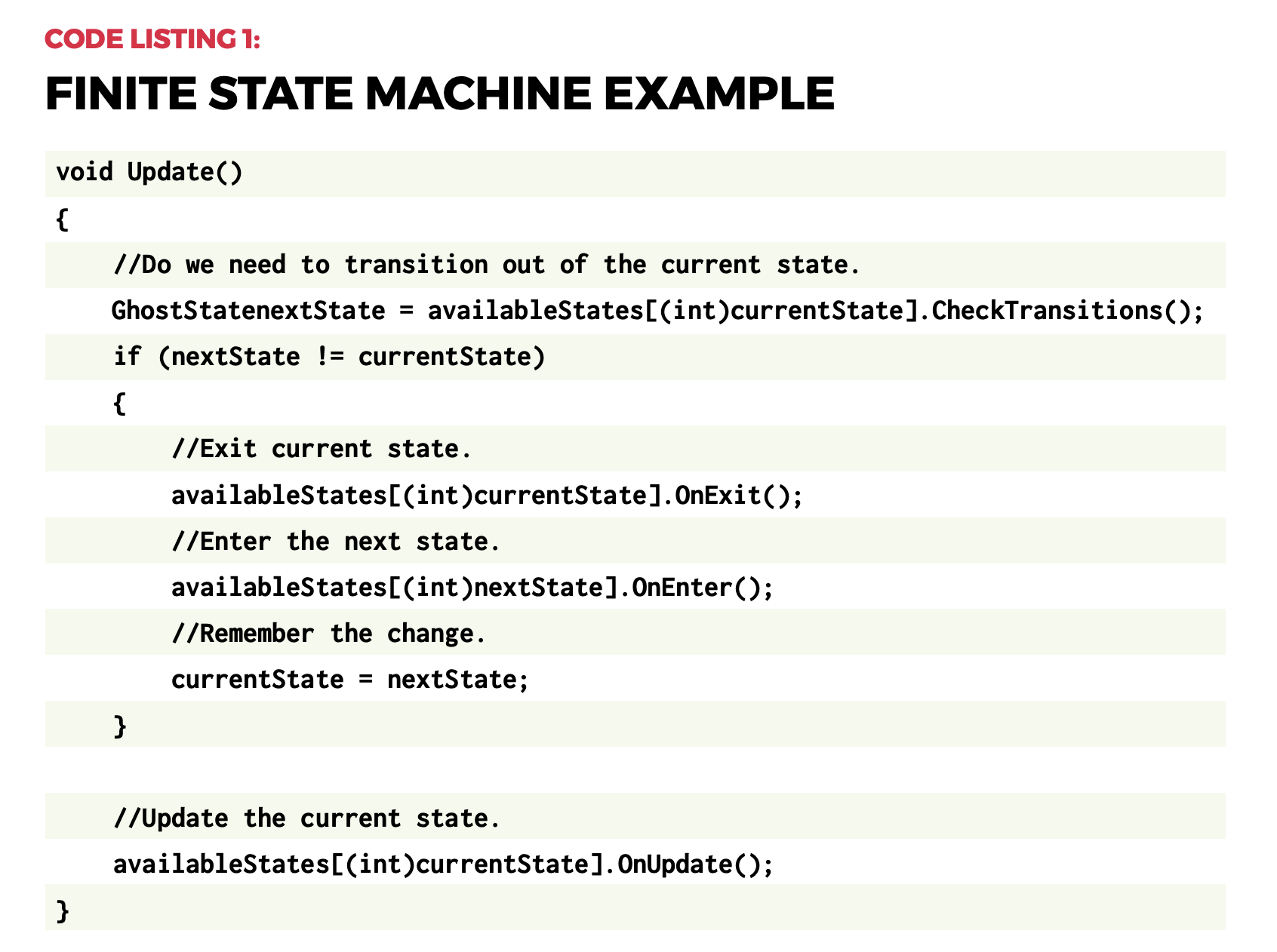
Using switch statements can quickly become cumbersome the more states we add, so I’ve used the object-oriented approach in the accompanying project, and an example code snippet can be seen in Code Listing 1. Each state handles whether it needs to transition into another state, and lets the state machine know. If a transition’s required, the Exit() function is called on the current state, before calling the Enter() function on the new state. This is done to ensure any setup or cleanup is done, after which the Update() function is called on whatever the current state is. The Update()function is where the low-level code for completing the state is processed. For a project as simple as Pac-Man, this only involves setting a different position for the ghost to move to.
Hidden complexity
Extending this approach, it’s reasonable for a state to call multiple states from within. This is called a hierarchical finite state machine, or HFSM for short. An example is an agent in Call of Duty: Strike Team being instructed to seek a stealthy position, so the high-level state is ‘Find Cover’, but within that, the agent needs to exit the dumpster he’s currently hiding in, find a safe location, calculate a safe path to that location, then repeatedly move between points on that path until he reaches the target position.
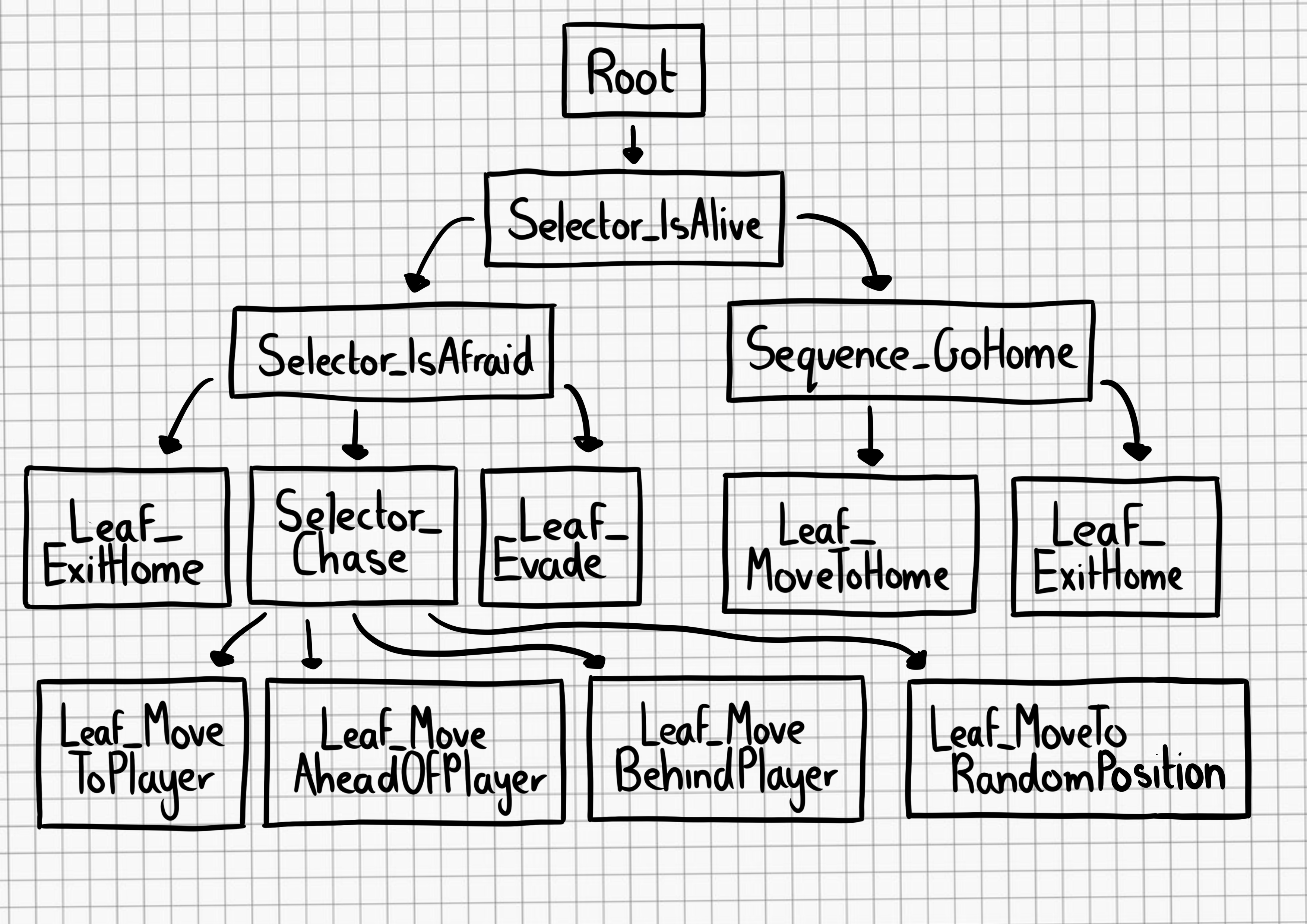
FSMs can appear somewhat predictable as the agent will always transition into the same state. This can be accommodated for by having multiple options that achieve the same goal. For example, when the ghosts in our Unity project are in the ‘Chase’ state, they can either move to the player, get in front of the player, or move to a position behind the player. There’s also an option to move to a random position. The FSM implemented has each ghost do one of these, whereas the behaviour tree allows all ghosts to switch between the options every ten seconds. A limitation of the FSM approach is that you can only ever be in a single state at a particular time. Imagine a tank battle game where multiple enemies can be engaged. Simply being in the ‘Retreat’ state doesn’t look smart if you’re about to run into the sights of another enemy. The worst-case scenario would be our tank transitions between ‘Attack’ and ‘Retreat’ states on each frame – an issue known as state thrashing – and gets stuck, and seemingly confused about what to do in this situation. What we need is away to be in multiple states at the same time: ideally retreating from tank A, whilst attacking tank B. This is where fuzzy finite state machines, or FFSM for short, come in useful.
This approach allows you to be in a particular state to a certain degree. For example, my tank could be 80% committed to the Retreat state (avoid tank A), and 20% committed to the Attack state (attack tank B). This allows us to both Retreat and Attack at the same time. To achieve this, on each update, your agent needs to check each possible state to determine its degree of commitment, and then call each of the active states’ updates. This differs from a standard FSM, where you can only ever be in a single state. FFSMs can be in none, one, two, or however many states you like at one time. This can prove tricky to balance, but it does offer an alternative to the standard approach.
No memory
Another potential issue with an FSM is that the agent has no memory of what they were previously doing. Granted, this may not be important: in the example given, the ghosts in Pac-Man don’t care about what they were doing, they only care about what they are doing, but in other games, memory can be extremely important. Imagine instructing a character to gather wood in a game like Age of Empires, and then the character gets into a fight. It would be extremely frustrating if the characters just stood around with nothing to do after the fight had concluded, and for the player to have to go back through all these characters and reinstruct them after the fight is over. It would be much better for the characters to return to their previous duties.
“FFSMs can be in one, none,
two, or however many states
you like.”
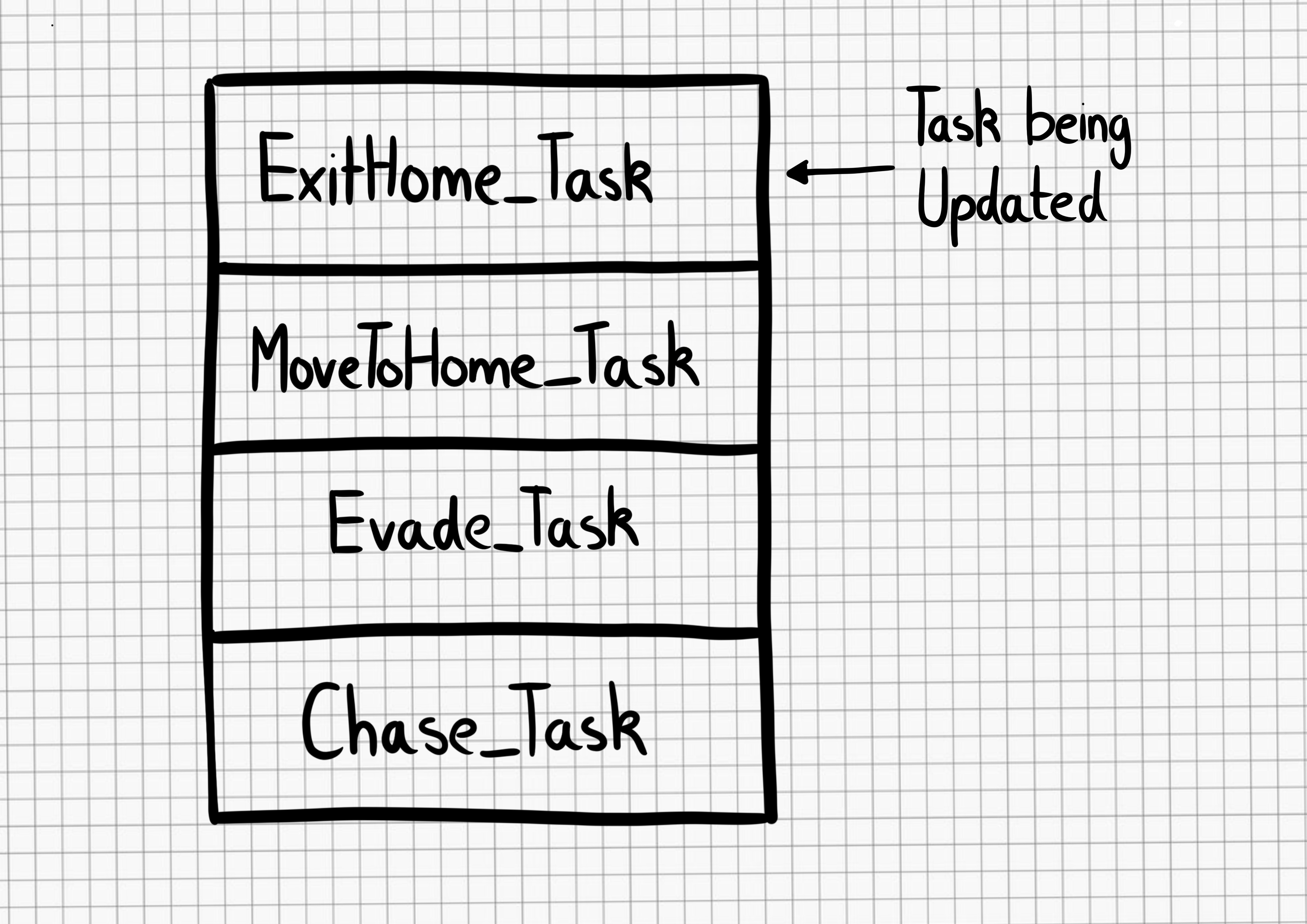
We can incorporate the idea of memory quite easily by using the stack data structure. The stack will hold AI states, with only the top-most element receiving the update. This in effect means that when a state is completed, it’s removed from the stack and the previous state is then processed. Figure 2 depicts how this was achieved in our Unity project. To differentiate the states from the FSM approach, I’ve called them tasks for the stackbased implementation. Looking at Figure 2, it shows how (from the bottom), the ghost was chasing the player, then the player collected a power pill, which resulted in the AI adding an Evade_Task – this now gets the update call, not the Chase_Task. While evading the player, the ghost was then eaten.
At this point, the ghost needed to return home, so the appropriate task was added. Once home, the ghost needed to exit this area, so again, the relevant task was added. At the point the ghost exited home, the ExitHome_Task was removed, which drops processing back to MoveToHome_Task. This was no longer required, so it was also removed. Back in the Evade_Task, if the power pill was still active, the ghost would return to avoiding the player, but if it had worn off, this task, in turn, got removed, putting the ghost back in its default task of Chase_Task, which will get the update calls until something else in the world changes.
Figure 2: Stack-based finite state machine.
Behaviour trees
In 2002, Halo 2 programmer Damian Isla expanded on the idea of HFSM in a way that made it more scalable and modular for the game’s AI. This became known as the behaviour tree approach. It’s now a staple in AI game development. The behaviour tree is made up of nodes, which can be one of three types – composite, decorator, or leaf nodes. Each has a different function within the tree and affects the flow through the tree. Figure 3 shows how this approach is set up for our Unity project. The states we’ve explored so far are called leaf nodes. Leaf nodes end a particular branch of the tree and don’t have child nodes – these are where the AI behaviours are located. For example, Leaf_ExitHome, Leaf_Evade, and Leaf_ MoveAheadOfPlayer all tell the ghost where to move to. Composite nodes can have multiple child nodes and are used to determine the order in which the children are called. This could be in the order in which they’re described by the tree, or by selection, where the children nodes will compete, with the parent node selecting which child node gets the go-ahead. Selector_Chase allows the ghost to select a single path down the tree by choosing a random option, whereas Sequence_ GoHome has to complete all the child paths to complete its behaviour.
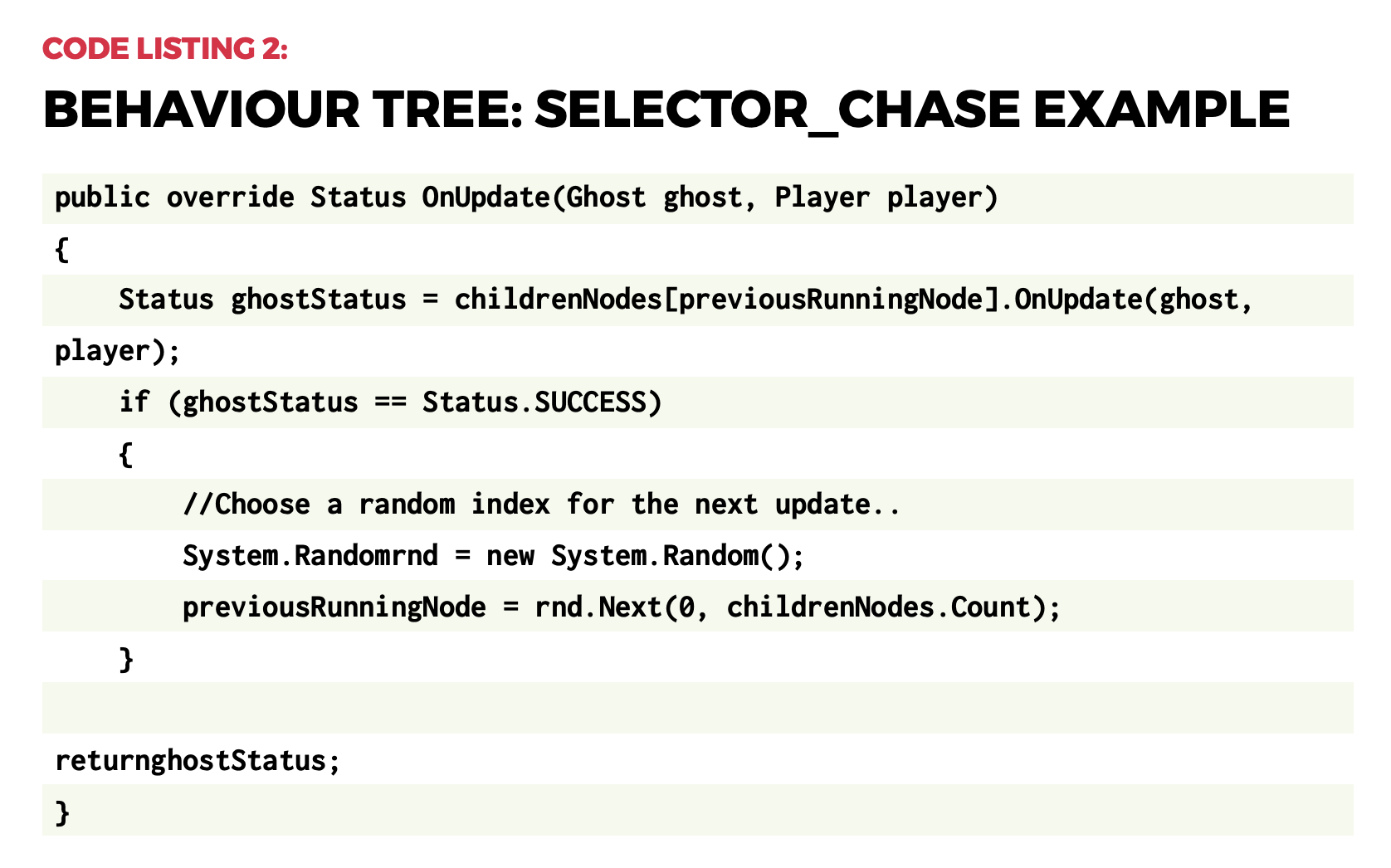
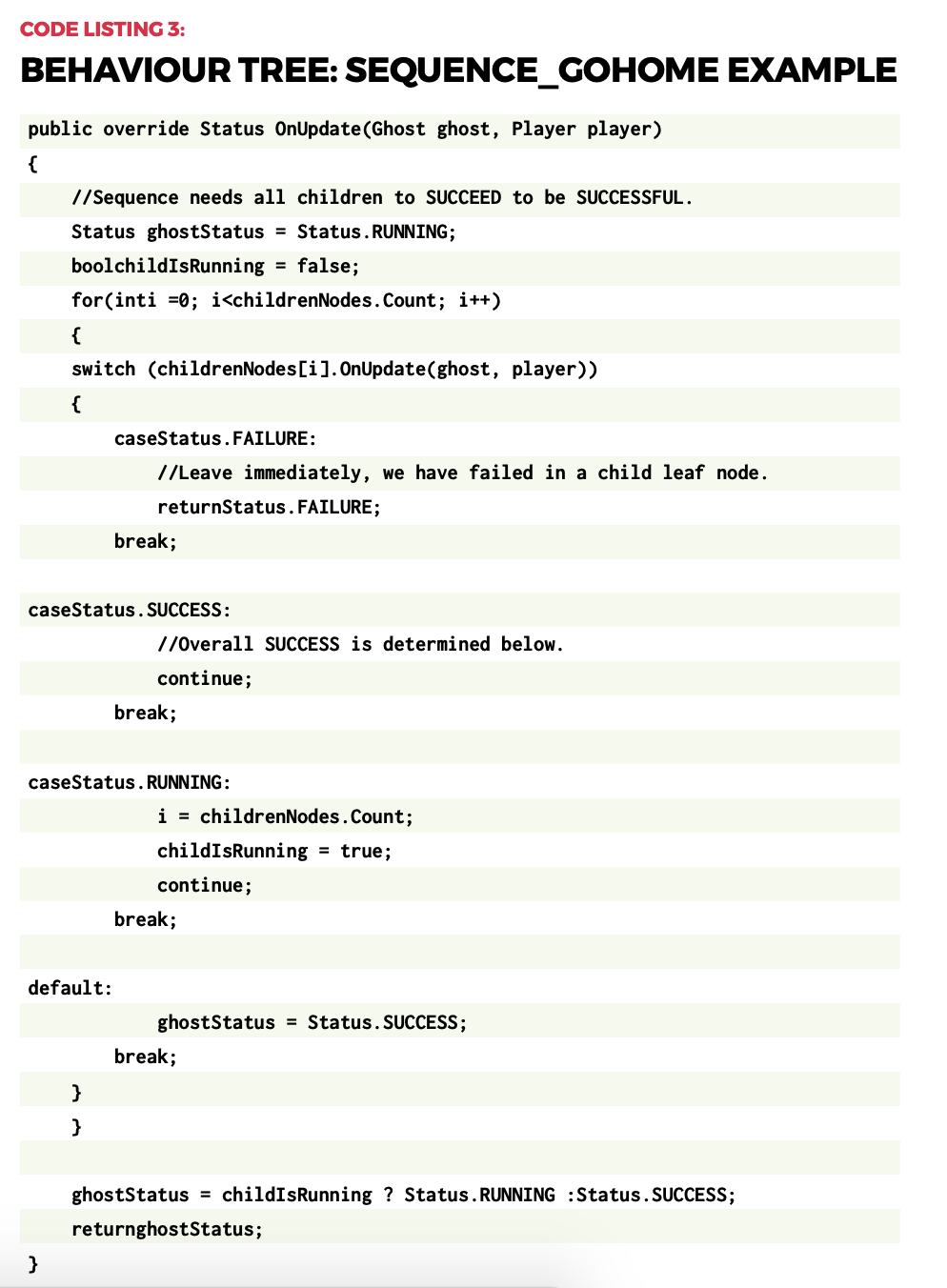
Code Listing 2 shows how simple it is to choose a random behaviour to use – just be sure to store the index for the next update. Code Listing 3 demonstrates how to go through all child nodes, and to return SUCCESS only when all have completed, otherwise the status RUNNING is returned. FAILURE only gets returned when a child node itself returns a FAILURE status.
Complex behaviours
Although not used in our example project, behaviour trees can also have nodes called decorators. A decorator node can only have a single child, and can modify the result returned. For example, a decorator may iterate the child node for a set period, perhaps indefinitely, or even flip the result returned from being a success to a failure. From what first appears to be a collection of simple concepts, complex behaviours can then develop.
Figure 3: Behaviour tree
Video game AI is all about the illusion of intelligence. As long as the characters are believable in their context, the player should maintain their immersion in the game world and enjoy the experience we’ve made. Hopefully, the approaches introduced here highlight how even simple approaches can be used to develop complex characters. This is just the tip of the iceberg: AI development is a complex subject, but it’s also fun and rewarding to explore.
Wireframe #43, with the gorgeous Sea of Stars on the cover.
Have you perfected your particular combination of ‘eye widening then squinting’ to let people know you’re smiling at them behind your mask? Or do you need help expressing yourself from this text-scrolling creation by Caroline Dunn?
The mask running colourful sample code
What’s it made of?
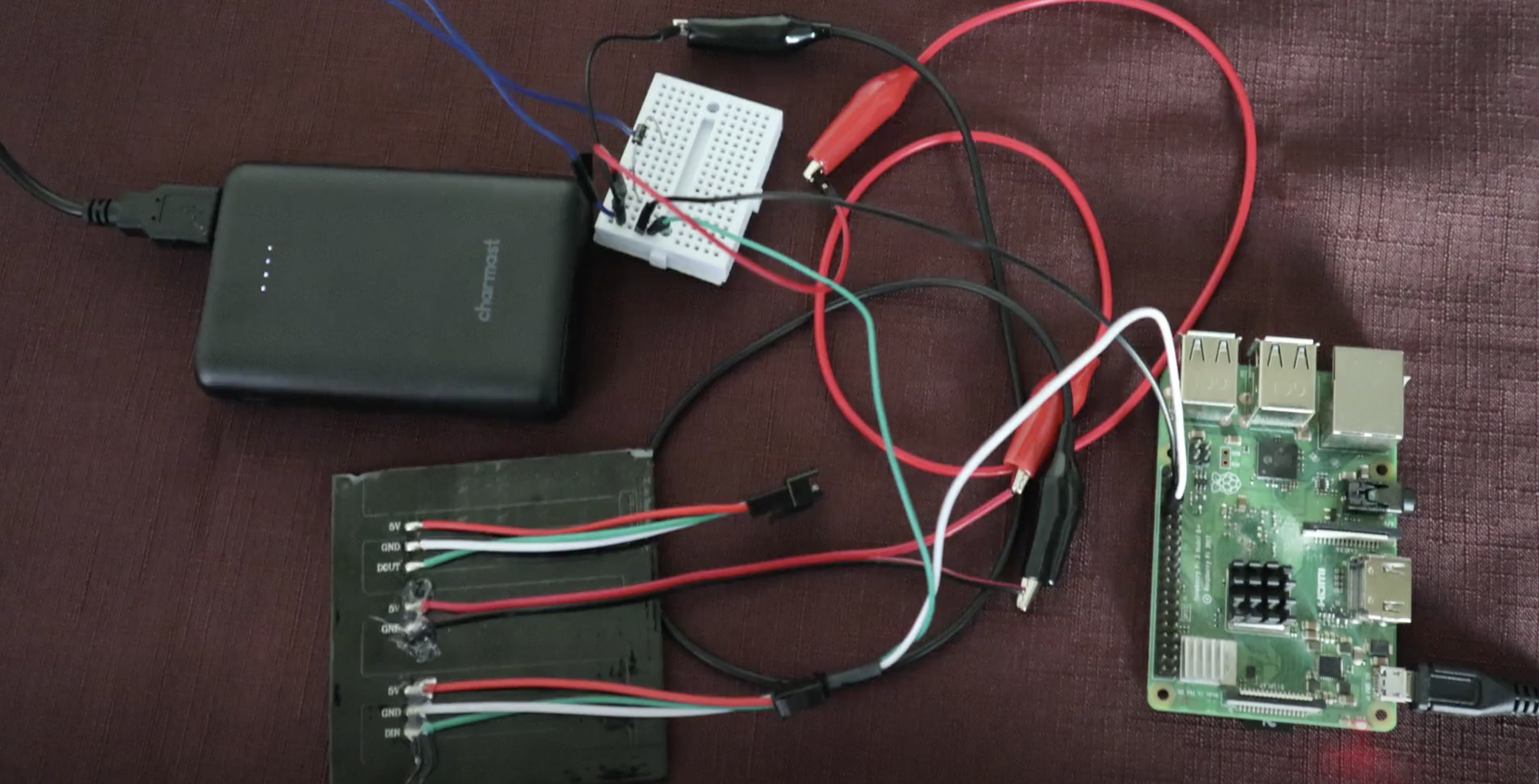
The main bits of hardware need are a Raspberry Pi 3 or Raspberry Pi 4 or Raspberry Pi Zero W (or a Zero WH with pre-soldered GPIO header if you don’t want to do soldering yourself), and an 8×8 Flexible NeoPixel Matrix with individually addressable LEDs. The latter is a two-dimensional grid of NeoPixels, all controlled via a single microcontroller pin.
Raspberry Pi and the NeoPixel Matrix (bottom left) getting wired up
The NeoPixel Matrix is attached to a cloth face that which has a second translucent fabric layer. The translucent layer is to sew your Raspberry Pi project to, the cloth layer underneath is a barrier for germs.
You’ll need a separate 5V power source for the NeoPixel Matrix. Caroline used a 5V power bank, which involved some extra fiddling with cutting up and stripping an old USB cable. You may want to go for a purpose-made traditional power supply for ease.
Running the text
To prototype, Caroline connected the Raspberry Pi computer to the NeoPixel Matrix via a breadboard and some jumper wires. At this stage of your own build, you check everything is working by running this sample code from Adafruit, which should get your NeoPixel Matrix lighting up like a rainbow.
The internal website on the left
Once you’ve got your project up and running, you can ditch the breadboard and wires and set up the key script, app.py, to run on boot.
Going mobile
To change the text scrolling across your mask, you use the internal website that’s part of Caroline’s code.
And for a truly mobile solution, you can access the internal website via mobile phone by hooking up your Raspberry Pi using your phone’s hotspot functionality. Then you can alter the scrolling text while you’re out and about.
Caroline wearing the 32×8 version
Caroline also created a version of her project using a 32×8 Neopixel Matrix, which fits on the across the headband of larger plastic face visors.
If you want to make this build for yourself, you’d do well to start with the very nice in-depth walkthrough Caroline created. It’s only three parts; you’ll be fine.
Spookify your home in time for Halloween with Rob Zwetsloot and these terror-ific projects!
We picked four of our favourites from a much longer feature in the latest issue of The MagPi magazine, so make sure you check it out if you need more Haunted House hacks in your life.
Raspberry Pi Haunted House
This project is a bit of a mixture of indoors and outdoors, with a doorbell on the house activating a series of spooky effects like a creaking door, ‘malfunctioning’ porch lights, and finally a big old monster mash in the garage.
MagPi magazine talked to its creator Stewart Watkiss about it a few years ago and he revealed how he used a PiFace HAT to interface with home automation techniques to create the scary show, although it can be made much easier these days thanks to Energenie. Our favourite part, though, is still the Home Alone-esque monster party that caps it off.
The dreaded dark lord Sauron from Lord of the Rings watched over Middle-earth in the form of a giant flaming eye atop his black tower, Barad-dûr. Mike Christian’s version sits on top of a shed in Saratoga, CA.
Atop the shed with some extra light effects, it looks very scary
It makes use of the Snake Eyes Bonnet from Adafruit, with some code modifications and projecting onto a bigger eye. Throw in some cool lights and copper wires and you get a nice little effect, much like that from the films.
We love the eyes and scary sounds in this version that seem to follow you around
A classic indoor Halloween decoration (and outdoor, according to American movies) is the humble Jack-o’-lantern. While you could carve your own for this kind of project (and we’ve seen many people do so), this version uses a pre-cut, 3D-printed pumpkin.
The original 3D print lit with a single source is still fairly scary
If you want to put one outside as well, we highly recommend you add some waterproofing or put it under a porch of some kind, especially if you live in the UK.
You’re unlikely to trick someone already in your house with a random door that has appeared out of nowhere, but while they’re investigating they’ll get the scare of their life. This door was created as a ‘sequel’ to a Scary Porch, and has a big monitor where a window might be in the door. There’s also an array of air-pistons just behind the door to make it sound like someone is trying to get out.
There are various videos that can play on the door screen, and they’re randomised so any viewers won’t know what to expect. This one also uses relays, so be careful.
This project is the brainchild of the element14 community and you can read more about how it was made here.
A traditional LAMP stack often implements the Model-View-Controller (MVC) architecture. This is a well-established way of separating application logic into three parts: the model, the view, and the controller.
Model: This part is responsible for managing the data of the application. Its role is to retrieve raw information from the database or receive user input from the controller.
View: This component focuses on the display. Data received from the model is presented to the user. Any response from the user is also recognized and sent to the controller component.
Controller: This part is responsible for the application logic. It responds to the user input and performs interactions on the data model objects.
The MVC principal of decoupling data, logic, and presentation layers means that changes in one layer have minimal impact on the others. This speeds the development process and makes it easier to update layouts, change business rules, and add new features. Components are more adaptable for reuse and refactoring, and allow for a degree of simultaneous development.
The serverless LAMP stack
The preceding serverless LAMP stack architecture is first discussed in this post. A web application is split in to two components. A single AWS Lambda function contains the application’s MVC framework. Each response is synchronously returned via Amazon API Gateway. This architecture addresses the scalability challenge that is often seen in traditional LAMP stack applications. It scales automatically with a managed infrastructure and a pay-per-use billing model. However, the serverless paradigm makes it possible to apply the MVC principles of decoupling and reusability to an even greater degree.
The “Lambda-lith”
The preceding architecture represents a serverless monolith or “Lambda-lith”. A single Lambda function contains the entire business logic within an MVC framework. This implementation can be used to “lift and shift” from a legacy MVC to a serverless application. Simple applications often start this way too, but as the application grows more complex over time new challenges can occur.
Lambda Day 1 to day 100
A Lambda-lith is often maintained in a single repository that contains the entire application logic. This is sometimes referred to as a mono-repo.
Lamba-lith monorepo
A mono-repo makes it harder to separate responsibility of ownership between development teams. Consequently, projects in a mono-repo are prone to depend on each other, creating tight coupling. The tightly coupled code base with all of its interconnected modules be challenging to maintain a regular release cadence. Any small fix can require updates to other parts of the code base, making maintenance challenging without fracturing the whole application. Onboarding can be slow as new developers take time to learn and understand the code base and all of the interdependencies.
By applying the following principles, Lambda-lith MVC applications can be refactored into decoupled serverless microservices.
Divide into independent Lambda functions with finite business logic
The following example illustrates a Lambda-lith with all business and routing logic stored in a single Lambda function. Every request is routed to this function from API Gateway. The function code base contains a `router.php` file to direct requests to the correct model, view, or controller.
This is similar to a traditional LAMP stack implementation in which a web server such as Apache or NGINX routes all requests to a single index.php function. However, it’s often more practical to split applications into multiple functions or services.
Lambda as a web server
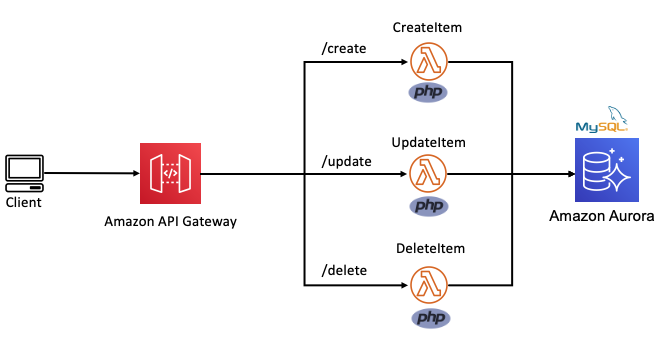
In the following example, this Lambda function is split into multiple functions based on each CRUD operation. The internal routing logic is now decoupled from the business logic. The API Gateway service uses rules to route requests to the correct Lambda function. This allows each function to scale independently and updates can be made to one function without impacting another.
Routing decoupled from business logic
Build micro-perimeters to enforce strict verification of every person or service.
Traditional MVC applications often use a castle-and-moat security model. This provides security by placing a perimeter around the entire application to protect it from malicious actors. This perimeter guards the application or network by verifying requests and user identities at the point of entry or exit.
This is typically achieved with firewalls, proxy servers, honeypots, and other intrusion prevention tools. It assumes that activity inside the perimeter is safe. However, a network vulnerability may provide access to everything inside.
Microservice-based applications allow developers to apply a “zero trust” security model. This enables developers to build micro-perimeters around each resource. This is sometimes referred to as the principle of least privilege. It ensures that each request, service, or user can access only the data or resource that is necessary for its legitimate purpose. Even with a vulnerability, the blast radius is limited only to the service within that micro-perimeter.
Castle-and-moat vs zero trust security model
Use AWS Identity and Access Management (IAM) resource policies and execution roles to decouple business logic from security posture. Lambda resource policies define the events and services that are authorized to invoke the function. Lambda execution roles place constraints the resource or service the Lambda function has access to. When defining resource policies and execution roles, start with a minimum set of permissions and grant additional permissions as necessary.
Create building blocks based on common functionality
Each component is a single building block that makes up an application together with other blocks. These blocks form microservices that deliver a set of capabilities on a specific domain. This makes is easy to change, upgrade, and replace with no impact on the remaining microservice components. This creates natural ownership boundaries to help organize repositories.
Development teams can then easily be assigned ownership to individual microservice repositories. Use the AWS Serverless Application Model (AWS SAM) to organize microservices into multiple code repositories, as explained in this blog post.
Use messages to connect and communicate between microservices.
In traditional MVC applications, one part of the application uses method calls to communicate with the other parts. With serverless microservices, the code base is spread across short-lived stateless functions and services. Communication between these services is achieved using asynchronous messages or synchronous HTTP requests.
Synchronous communication
In this method, a service calls an API and waits for a response from the receiving service before proceeding. Use API Gateway to create a front door to your backend microservices. API Gateway is a fully managed service for creating and managing RESTful and WebSocket APIs.
Using API Gateway to transport data addresses common concerns such as authorization, API tokens, access control and rate limiting from your code, and helps to reduce code complexity. API Gateway can also be used for synchronous internal microservice communications where the services have clear separation, strict authentication requirements, or have been deployed across accounts.
The following architecture demonstrates an application that is deployed across two accounts. The Booking microservice, invokes a loyalty booking function via API Gateway that exists in the Loyalty points account.
Synchronous internal microservice communications
Asynchronous communication
In this pattern, a service sends a message without waiting for a response, and one or more services process the message asynchronously. Here, the services involved do not directly communicate with each other. Instead, services publish messages to a broker such as Amazon Simple Queue Service (SQS) or Amazon EventBridge. Other services can choose to subscribe to the topic in the broker that they care about. This enables further decoupling of business logic from data transportation and reduces your code complexity.
Use services instead of code, where possible
A service-first mindset is an important part of serverless application development. Each line of code you write may limit your project’s responsiveness to change and adds cognitive overhead for new developers. Using an appropriate AWS service for each domain (messaging, storage, orchestration) helps to build faster. Embracing this mind-set allows developers to focus on solving those unique challenges that add the most value to their customers.
By applying these principles to refactor an MVC Lambda-lith, I build the following CRUD API microservice. This application can be deployed from this GitHub repository. It uses an AWS Serverless Application Model (AWS SAM) template to define an HTTP API, 5 Lambda functions, an Amazon DynamoDB table and all the IAM roles required.
All routing logic and authentication is managed by Amazon API Gateway. Each Lambda function has limited scope and minimal business logic. It uses a lightweight custom-built PHP runtime, explained in this post. Each Lambda function uses the AWS PHP SDK to interact with the DynamoDB table. This architecture is suitable as a serverless microservice for a website backend.
A serverless API microservice with PHP
Conclusion
In this post, I show how to move from using a single Lambda function as a scalable web host with an MVC framework, to a decoupled microservice model. I explain the principles that can be applied to help transition an MCV application into a collection of microservices and show the benefits of doing so. I provide code examples for a serverless PHP CRUD microservice with a deployable AWS SAM template.
PHP development teams can transition from Lambda-lith MVC applications to a decoupled microservice model. This allows them to focus on shipping code to delight their customers without managing infrastructure.
Find more resources for building serverless PHP applications at ServerlessLand.com.
James Bruxton (or @xrobotosuk on Instagram) built an IoT-controlled e-paper message board using Raspberry Pi. Updating it is easy: just edit a Google sheet, and the message board will update with the new data.
Harnessing Google power
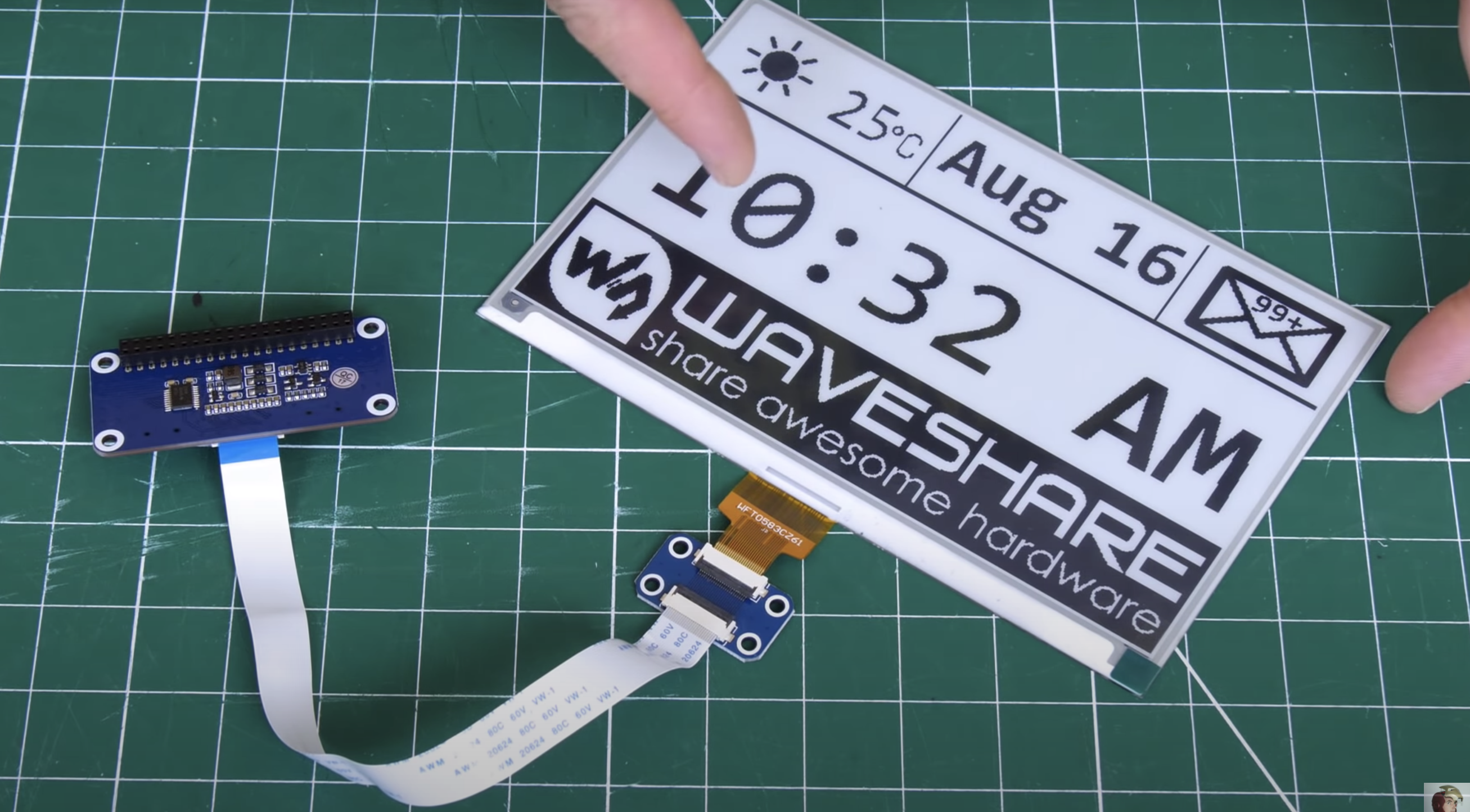
This smart message board uses e-paper, which has very low power consumption. Combining this with the Google Docs API (which allows you to write code to read and write to Google Docs) and Raspberry Pi makes it possible to build a message board that polls a Google Sheet and updates whenever there’s new data. This guide helped James write the Google Docs API code.
We’ll do #4 for you, James!
Why e-paper?
James’s original plan was to hook up his Raspberry Pi to a standard monitor and use Google Docs so people could update the display via mobile app. However, a standard monitor consumes a lot of power, due to its backlight, and if you set it to go into sleep mode, people would just walk past it and not see updates to the list unless they remember to wake the device up.
Raspberry Pi wearing its blue e-paper HAT on the left, which connects to the display on the right via a ribbon cable
Enter e-paper (the same stuff used for Kindle devices), which only consumes power when it’s updating. Once you’ve got the info you want on the e-paper, you can even disconnect it entirely from your power source and the screen will still display whatever the least update told it to. James’s top tip for your project: go for the smallest e-paper display possible, as those things are expensive. He went with this one, which comes with a HAT for Raspberry Pi and a ribbon cable to connect the two.
The display disconnected from any power and still clearly readable
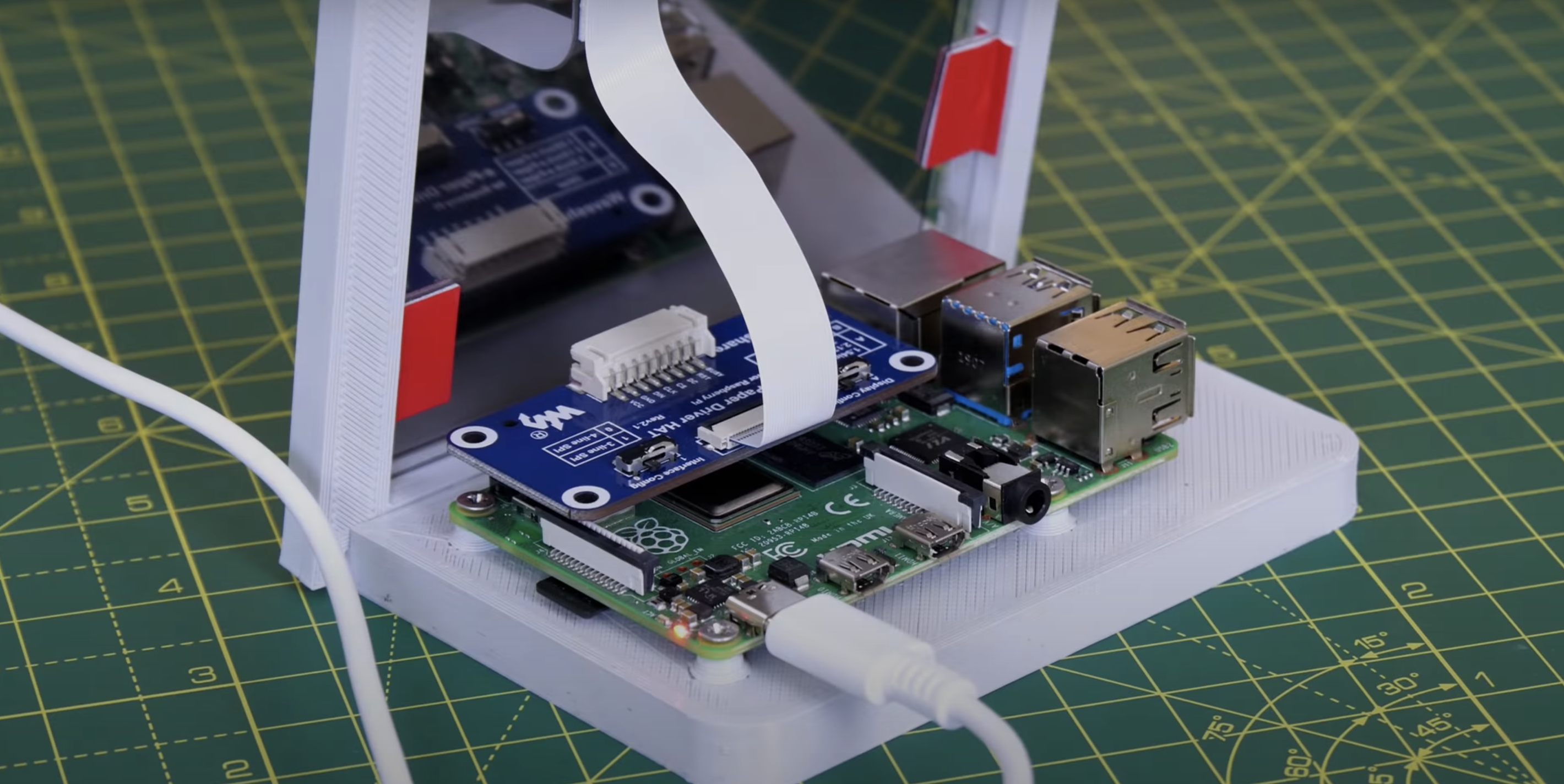
The HAT has an adaptor for plugging into the Raspberry Pi GPIO pins, and a breakout header for the SPI pins. James found it’s not as simple as enabling the SPI on his Raspberry Pi and the e-paper display springing to life: you need a bit of code to enable the SPI display to act as the main display for the Raspberry Pi. Luckily, the code for this is on the wiki of Waveshare, the producer of HAT and display James used for this project.
Making it pretty
A 3D-printed case, which looks like a classic photo frame but with a hefty in-built stand to hold it up and provide enough space for the Raspberry Pi to sit on, is home to James’s finished smart to-do list. The e-paper is so light and thin it can just be sticky-taped into the frame.
The roomy frame stand
James’s creation is powered by Raspberry Pi 4, but you don’t need that much power, and he’s convinced you’ll be fine with any Raspberry Pi model that has 40 GPIO pins.
If you’re into e-paper stuff but are wedded to your handwritten to-do lists, then why not try building this super slow movie player instead? The blog squad went *nuts* for it when we posted it last month.
Previously I have writtenabout the Swedish-owned Swiss-based cryptographic hardware company: Crypto AG. It was a CIA-owned Cold War operation for decades. Today it is called Crypto International, still based in Switzerland but owned by a Swedish company.
Late last week, Swedish Foreign Minister Ann Linde said she had canceled a meeting with her Swiss counterpart Ignazio Cassis slated for this month after Switzerland placed an export ban on Crypto International, a Swiss-based and Swedish-owned cybersecurity company.
The ban was imposed while Swiss authorities examine long-running and explosive claims that a previous incarnation of Crypto International, Crypto AG, was little more than a front for U.S. intelligence-gathering during the Cold War.
Linde said the Swiss ban was stopping “goods” — which experts suggest could include cybersecurity upgrades or other IT support needed by Swedish state agencies — from reaching Sweden.
She told public broadcaster SVT that the meeting with Cassis was “not appropriate right now until we have fully understood the Swiss actions.”
EDITED TO ADD (10/13): Lots of information on Crypto AG.
The collective thoughts of the interwebz
Manage Consent
To provide the best experiences, we use technologies like cookies to store and/or access device information. Consenting to these technologies will allow us to process data such as browsing behavior or unique IDs on this site. Not consenting or withdrawing consent, may adversely affect certain features and functions.
Functional
Always active
The technical storage or access is strictly necessary for the legitimate purpose of enabling the use of a specific service explicitly requested by the subscriber or user, or for the sole purpose of carrying out the transmission of a communication over an electronic communications network.
Preferences
The technical storage or access is necessary for the legitimate purpose of storing preferences that are not requested by the subscriber or user.
Statistics
The technical storage or access that is used exclusively for statistical purposes.The technical storage or access that is used exclusively for anonymous statistical purposes. Without a subpoena, voluntary compliance on the part of your Internet Service Provider, or additional records from a third party, information stored or retrieved for this purpose alone cannot usually be used to identify you.
Marketing
The technical storage or access is required to create user profiles to send advertising, or to track the user on a website or across several websites for similar marketing purposes.