Automating multi-AZ high availability for WebLogic administration server with DNS: Part 2

Post Syndicated from Robin Geddes original https://aws.amazon.com/blogs/architecture/automating-multi-az-high-availability-for-weblogic-administration-server-with-dns-part-2/

In Part 1 of this series, we used a floating virtual IP (VIP) to achieve hands-off high availability (HA) of WebLogic Admin Server. In Part 2, we’ll achieve an arguably superior solution using Domain Name System (DNS) resolution.

Using a DNS to resolve the address for WebLogic admin server

Let’s look at the reference WebLogic deployment architecture on AWS shown in Figure 1.
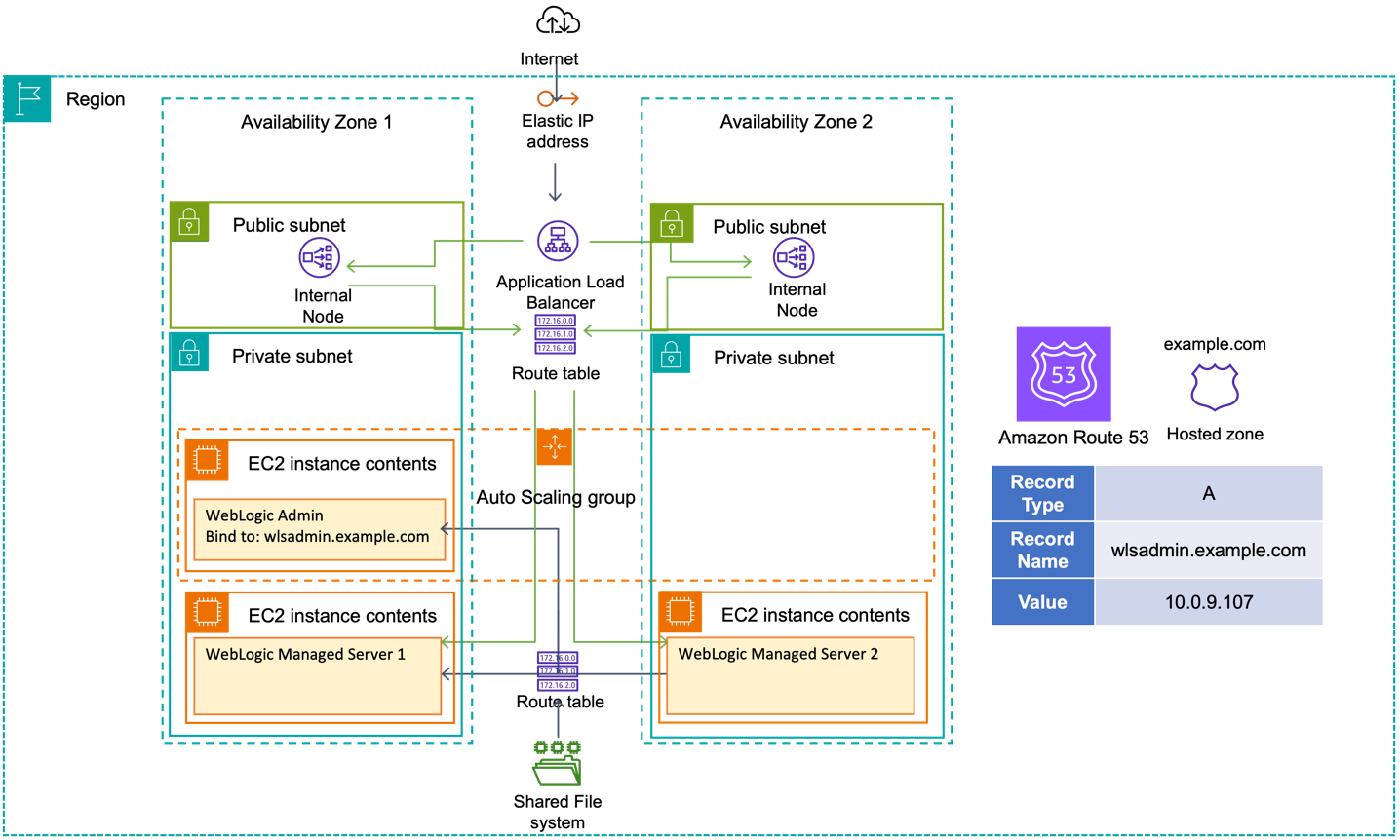
Reference WebLogic deployment with multi-AZ admin HA capability

Figure 1. Reference WebLogic deployment with multi-AZ admin HA capability

This solution comes in two parts:

  • Configure the environment to use DNS to locate the admin server.
  • Create a mechanism to automatically update the DNS entry when the admin server is launched.

Environment configuration

A WebLogic domain resides in private subnets of a Virtual Private Cloud (VPC). The admin server resides in one of the private subnets on its own Amazon Elastic Compute Cloud (Amazon EC2) instance. In this scenario, the admin server is bound to the private IP address of the EC2 host associated with a hostname/DNS record (configured in Amazon Route53).

We deploy WebLogic in multi-Availability Zone (multi-AZ) active-active stretch architecture. For this simple example, there is only one WebLogic domain and one admin server. To meet this requirement, we:

  1. create an EC2 launch template for the admin server, and then
  2. associate the launch template to an Amazon EC2 Auto Scaling group named wlsadmin-asg with min, max, and desired capacity of 1. Note we will need the group name later.

The Auto Scaling group detects EC2 and Availability Zone degradation and launches a new instance – in a different AZ if the current one becomes unavailable.

To enable access, we create two route tables: one for the private subnets, and the other for public subnets.

Next, we use the Amazon Route 53 DNS service to abstract the IPv4 address of the WebLogic admin server:

  • Create a private hosted zone in Amazon Route 53; in this example, we use example.com.
  • Create an A record for the admin server; in this example, example.com, pointing to the IP address of the EC2 instance hosting the admin server. Set the TTL to 60 seconds so the managed servers’ DNS records will be propagated before the admin server has finished starting.
  • Note the ID of the hosted zone, it will be required later in two places: to create an IAM role with permissions to update the DNS A record, and as an environment variable for an AWS Lambda function to perform the update.

We then update the WebLogic domain configuration and set the WebLogic Admin server listen address to the DNS name we chose. In this example, we set the line of WebLogic Admin server configuration to <listen-address>wlsadmin.example.com</listen-address> in WebLogic domain configuration file $DOMAIN_HOME/config/config.xml.

Automatically updating the DNS A record upon admin server launch

On-premises, it would often be a cultural anathema to update a DNS record as part of a server’s lifecycle. Operations that cut across team boundaries and responsibilities can be difficult to orchestrate. In the cloud, we have tools and a security model to enable such operations.

There are several approaches for this, and it is important to understand the patterns we prototyped and why they were rejected before we describe our recommended implementation pattern:

  • Rejected Option 1 – Simple: The user data script makes an API call to update the A record (with suitable IAM instance policy). However, a compromised server could update that A record for nefarious means; hence, we reject this option.
  • Rejected Option 2 – Better: The user data script calls a Lambda function to update the A record and include suitable checks to prevent misuse of the A record, such as setting it to a public address. This still requires granting permission for instance to call the lambda function and determining the correct logic to validate the IP address.
  • Accepted Option 3 – Best: We do not grant the EC2 instance any additional permission to update the DNS A Record. We rely on the event lifecycle of the Auto Scaling group as shown in Figure 2.
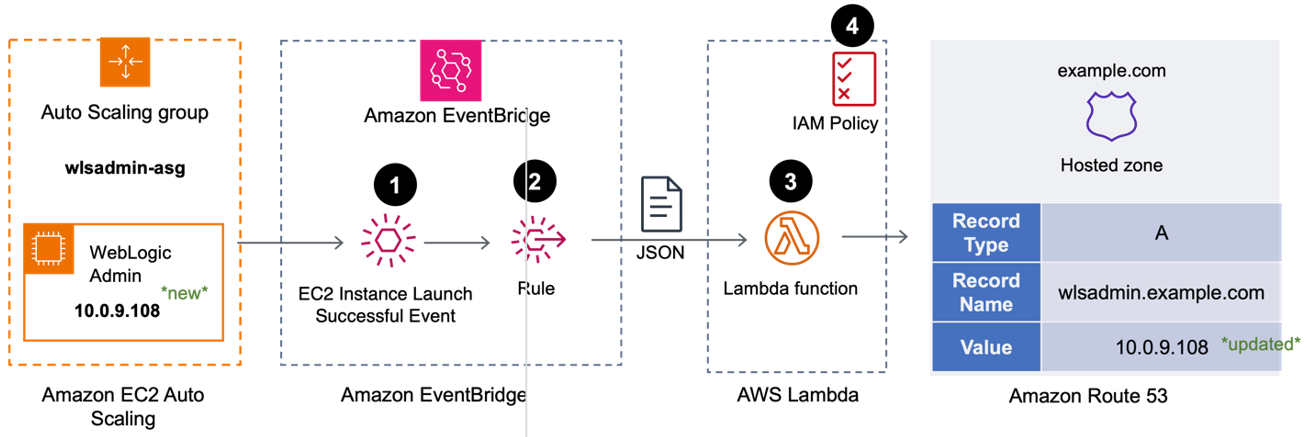
Triggering the DNS A record update from EventBridge using Lambda

Figure 2. Triggering the DNS A record update from EventBridge using Lambda

  1. When the Auto Scaling group successfully launches a new admin server through a scale-out action, an “EC2 Instance Launch Successful” event is created in Amazon EventBridge.
  2. An EventBridge rule calls an AWS Lambda function, passing the event data as a JSON object.
  3. The Lambda function:
    1. parses the event data to determine the EC2 Instance ID,
    2. obtains the IP address of new server using the Instance ID, then
    3. updates the DNS A Record for the admin server in Hosted Zone we created above with the IP address.
  4. The Lambda function needs permissions to:
    • describe EC2 instances within the account (to get the IP address).
    • update the A-record in (only) the Hosted Zone we created earlier.

Working backwards, first we create the IAM Policy; second, we create the Lambda function (which references the policy); finally, we create the EventBridge rule (which references the Lambda function).

Policy

Create a policy “AllowWeblogicAdminServerUpdateDNS“ with the following JSON. Replace <MY_HOSTED_ZONE_ID> with the ID you recorded earlier.

{
	"Version": "2012-10-17",
	"Statement": [
		{
			"Effect": "Allow",
			"Action": [
				"route53:ChangeResourceRecordSets"
			],
			"Resource": "arn:aws:route53:::hostedzone/<MY_HOSTED_ZONE_ID>",
			"Condition": {
				"ForAllValues:StringLike": {
					"route53:ChangeResourceRecordSetsNormalizedRecordNames": [
						"wlsadmin.example.com"
					]
				},
				"ForAnyValue:StringEquals": {
					"route53:ChangeResourceRecordSetsRecordTypes": "A"
				}
			}
		},
		{
			"Effect": "Allow",
			"Action": [
				"ec2:DescribeInstances"
			],
			"Resource": "*"
		}
	]
}

Lambda function

We create a Lambda function named “wlsAdminARecordUpdater” with the default settings for runtime (Node.js), architecture (x86_64) and permissions.

Add an environment variable named WLSHostedZoneID and value of the Hosted Zone ID created earlier.

A role will have been created for the Lambda function with a name beginning with “wlsAdminARecordUpdater-role-“. Add the policy AllowWeblogicAdminServerUpdateDNS to this role.

Finally, add the following code then save and deploy the Lambda function.

import { EC2Client, DescribeInstancesCommand } from "@aws-sdk/client-ec2"; 
import { Route53Client, ChangeResourceRecordSetsCommand } from "@aws-sdk/client-route-53"; 
				
export const handler = async (event, context, callback) => {
  				  
  const ec2input = {
    "InstanceIds": [
      event.detail.EC2InstanceId 
    ]
  };
				
  const ec2client = new EC2Client({region: event.region});
  const route53Client = new Route53Client({region: event.region});
				  
  const ec2command = new DescribeInstancesCommand(ec2input);
  const ec2data = await ec2client.send(ec2command);
  const ec2privateip = ec2data.Reservations[0].Instances[0].PrivateIpAddress;
				    
  const r53input = {
  "ChangeBatch": {
    "Changes": [
      {
        "Action": "UPSERT",
        "ResourceRecordSet": {
          "Name": "wlsadmin.weblogic.com",
          "ResourceRecords": [
            {
              "Value": ec2privateip
            }
          ],
          "TTL": 60,
          "Type": "A"
        }
      }
    ],
    "Comment": "weblogic admin server"
    },
    "HostedZoneId": process.env.WLSHostedZoneID
  };
 const r53command = new ChangeResourceRecordSetsCommand(r53input);
 
 return await route53Client.send(r53command);
 
};

EventBridge rule

We create an EventBridge rule, “wlsAdminASG-ScaleOut”, enabled on the default event bus.

  • Rule type: “Rule with an event pattern”
  • Event Source: AWS Events or EventBridge partner events
  • Creation Method – Use pattern Form
  • Event Pattern
    • Event Source: AWS Services
    • AWS Service: Auto Scaling
    • Event Type: Instance Launch and Terminate
    • Event Type Specification 1: Specific instance event(s)
    • Event Type Specification 2: wlsadmin-asg
      The event definition should look like the following example, scoped only to the Auto Scaling group wlsadmin-asg we created earlier.

      {
        "source": ["aws.autoscaling"],
        "detail-type": ["EC2 Instance Launch Successful"],
        "detail": {
          "AutoScalingGroupName": ["wlsadmin-asg"]
        }
      }
  • Target 1: AWS Service
    • Select a target: Lambda Service
    • Function: wlsAdminARecordUpdater

Review and create the rule. Note that “EventBridge (CloudWatch Events): wlsAdminASG-ScaleOut” will be added as a trigger to the Lambda function.

If you cycle the Auto Scaling group (set min and desired to 0, let the admin server terminate, then set min and desired to 1), you will observe that after the new server is successfully launched, the value of the DNS A record wlsadmin.example.com matches the IP of the new WebLogic Admin server.

Enabling internet access to the admin server

If we want to enable internet access to the admin server, we need to create an internet-facing Application Load Balancer (ALB) attached to the public subnets. With the route to the admin server, the ALB can forward traffic to it.

  1. Create an IP-based target group that points to the wlsadmin.example.com.
  2. Add a forwarding rule in the ALB to route WebLogic admin traffic to the admin server.

Conclusion

AWS has a successful track record of running Oracle applications, Oracle EBS, PeopleSoft, and mission critical JEE workloads. In this post, we delved into leveraging DNS for the WebLogic admin server location, and using Auto Scaling groups to ensure an available and singular admin server. We showed how to automate the DNS A record update for the admin server. We also covered enabling public access to the admin server. This solution showcases multi-AZ resilience for WebLogic admin server with automated recovery.


Root Access for Data Control: A DEF CON IoT Village Story

Post Syndicated from Rapid7 original https://blog.rapid7.com/2024/10/16/root-access-for-data-control-a-def-con-iot-village-story/

Root Access for Data Control: A DEF CON IoT Village Story

Every year, Rapid7 is a presenter at DEF CON’s IoT Village, sharing in-depth insight and expertise into the hacking of all things Internet of Things. This year, our perennial IoT hacking presenter, Principal Security Researcher, IoT, Deral Heiland, along with Rapid7 pentest team members, showed attendees many methods of extracting firmware from IoT devices and manipulating the systems in the name of control and operations.

Extracting firmware without the use of destructive means can be difficult and in some cases impossible. However, Deral went deep with IoT Village attendees, presenting a live hands-on exercise each attendee in the room could interact with. It was an enlightening and productive presentation. But we are aware not everyone could make it to DEF CON 32 this year.

Which is why we’ve transformed the presentation into a handy whitepaper. Deral has gone step-by-step through the exercise, and even improved upon it in some cases (so even if you were in the room, there’s likely even more for you to get from it). While DEF CON 32 may be firmly in the rear-view mirror, the hacking carries on. And if you missed DEF CON, or Deral’s presentation, you have another chance to learn and take part in the exercise.

To check out the whitepaper, please click here. And if you’d like to learn more about Deral’s previous IoT Village presentations (he’s done a lot of them), many live right here on the blog.

Enhance release control with AWS CodePipeline stage-level conditions

Post Syndicated from Ryan Bachman original https://aws.amazon.com/blogs/devops/enhance-release-control-with-aws-codepipeline-stage-level-conditions/

It’s an established practice for development teams to build deployment pipelines, with services such as AWS CodePipeline, to increase the quality of application and infrastructure releases through reliable, repeatable and consistent automation.

Automating the deployment process helps build quality into our products by introducing continuous integration to build and test code, however enterprises may sometimes wish to implement certain conditions such as an approved deployment window to ensure more fine-grained control over pipeline executions.

AWS CodePipeline recently added stage-level conditions to implement pipeline gates. In this blog post, we will cover how you can implement stage-level conditions to improve your governance, code quality, and security by following a simple pipeline scenario detailed in the sections below.

AWS CodePipeline

AWS CodePipeline is a fully managed continuous delivery service that helps you automate your release pipelines for fast and reliable application and infrastructure updates.

AWS CodePipeline orchestration stages

Figure 1. AWS CodePipeline orchestration

CodePipeline has three core constructs:

  • Pipelines – A pipeline is a workflow construct that describes how software changes go through a release process. Each pipeline is made up of a series of stages.
  • Stages – A stage is a logical unit you can use to isolate an environment and to limit the number of concurrent changes in that environment. Each stage contains actions that are performed on the application artifacts.
  • Actions – An action is a set of operations performed on application code and configured so that the actions run in the pipeline at a specified point.

A pipeline execution is a set of changes released by a pipeline. Each pipeline execution is unique and has its own ID. An execution corresponds to a set of changes, such as a merged commit or a manual release of the latest commit.

You can now configure stage-level conditions to gate a pipeline execution before entering the stage, as well as when exiting a stage for both success and failure state. A condition consists of one or more rules, and a result (such as rolling back) to apply when the condition fails. Conditions are also referred to as gates because they allow you to specify when an execution will enter and run through a stage or exit the stage after running through it.

You can configure a stage-level condition from the console, API, CLI, AWS CloudFormation, or SDK. For the purposes of this blog post, we will showcase how you can configure the two gate scenarios using the console. You can see how you can create conditions using the CLI in the documentation.

Scenario

For this blog, we started with a four stage Pipeline based off the Amazon ECS deployment example from this tutorial. While this tutorial provides a getting started example on how to build a CI/CD pipeline for an ECS application, it lacks the quality gates we want to enforce to ensure what we deploy to production is safe and tested. For this we will turn to CodePipeline stage-level conditions to verify certain criteria is met throughout the pipeline execution.

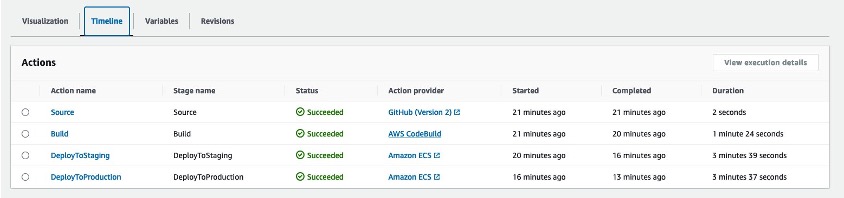
In our environment, we started with a source repository in a Github organization and used AWS CodeConnections to connect the source stage to our pipeline. Inside our repository are files for a sample application, a Dockerfile to build our application, and a buildspec.yaml file to define the steps that will be executed in the build stage of our pipeline. We added a fourth stage to our pipeline which separated production deployments after a successful deployment to the staging environment. We released a change using this pipeline to ensure everything deployed as expected.

Example of a 4-Stage CodePipeline

Figure 2: Example of a 4-Stage CodePipeline

Applying Stage Conditions

One of the primary concerns in any development process is maintaining high code quality standards. With stage-level conditions, you can now include specific checks to verify that your organization’s security and governance standards are met throughout the entire execution of your pipelines. These checks can include restricting deployments to certain days of the week, monitoring Amazon CloudWatch alarms prior to progressing, and verifying the results of security testing before promoting code as examples.

The AWS CodePipeline documentation details what conditions are available and how they can be used.

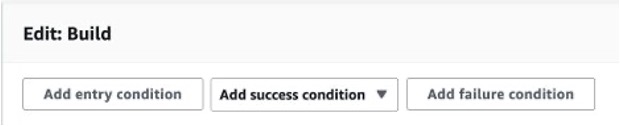
You can add conditions to stages on the pipelines detail page by choosing Edit and then selecting Edit stage from the relevant stage.

Adding a stage condition in the AWS console

Figure 3: Adding a Stage Condition in the AWS console

In our pipeline, we added rules that address three scenarios:

  • Scenario 1 – “On Success” condition that fails if the Amazon Elastic Container Registry (Amazon ECR) image scanning detects a critical severity in the Docker image in the build stage.
  • Scenario 2 – “On Failure” condition that rolls back a deployment stage in the event a CloudWatch alarm triggers after a successful deployment.
  • Scenario 3 – “Entry” condition to prevent deploying to production on Fridays, Saturdays and Sundays

Scenario 1 – “On Success” condition

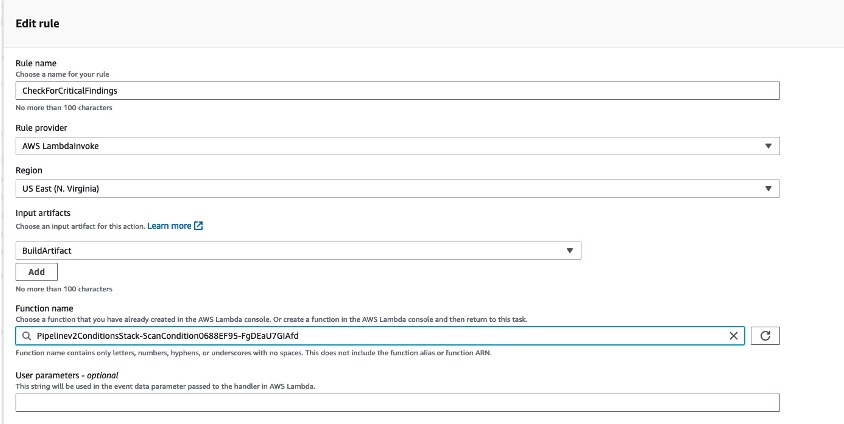
For the first gate we implemented an OnSuccess exit condition that would fail the execution using the AWS Lambda Invoke rule provider. If you would like to dive deeper into this implementation, you can take a look at Logging image scan findings from Amazon ECR in CloudWatch using an AWS Lambda function.

Lambda invoke rule in the console

Figure 4: Lambda invoke rule in the console

Before we added this condition rule, we created a Lambda function in the same region that was responsible for getting the findings from an image scan that Amazon ECR executed. If a critical finding was detected in the image, the Lambda function will fail the condition. You can read more about utilizing Lambda with CodePipeline in the documentation. The LambdaInvoke rule is able to use input artifacts to implement additional logic in the function. Here we passed in the artifact created during the build stage which contains the ECR image name and tag. This pattern allows you to re-use Lambda functions as conditions across many pipelines.

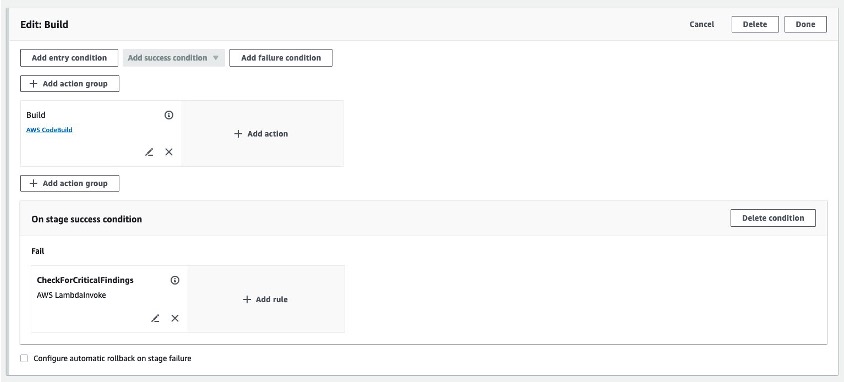
After configuring the rule, we reviewed our stage configuration and saved the pipeline.

Adding a stage condition to the build stage

Figure 5: Adding a stage condition to the build stage

Scenario 2 – “On Failure” condition

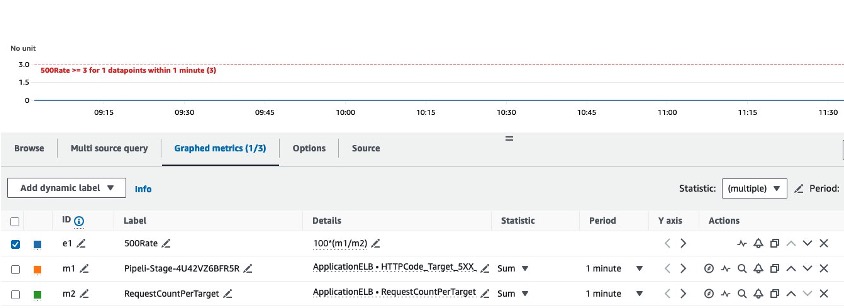
Next, we configured a condition to fail and rollback a deployment in our staging environment. If you would like to read more about implementing rollback in your CodePipeline pipelines, you can refer to De-risk releases with AWS CodePipeline rollbacks. Oftentimes a deployment will appear successful, but regressions in the code, or bugs in a new feature, may surface only when users interact with the application. To mitigate this risk, we configured a CloudWatch alarm to alert when error rates exceeded 3% of overall traffic.

CloudWatch alarm definition

Figure 6: Amazon CloudWatch alarm definition

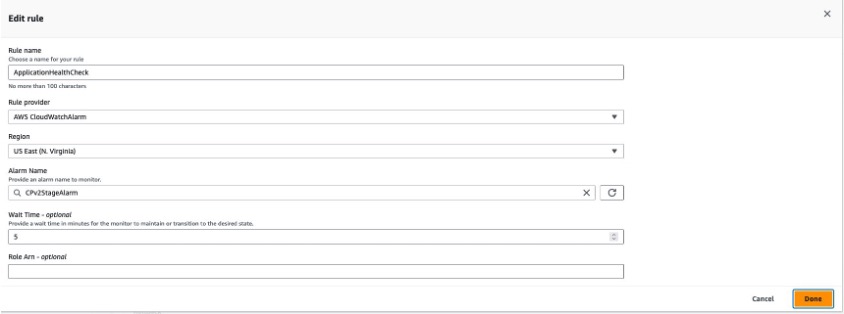
We then added an OnSuccess condition to the DeployToStage stage with a rollback rule that tracks the CloudWatch alarm configured for the above error rate metric. A wait time was configured in the rule to allow time for CloudWatch to detect any increase in errors related to the new deployment.

AWS CodePipeline condition rule using Amazon CloudWatch

Figure 7: AWS CodePipeline condition rule using Amazon CloudWatch

Scenario 3 – “Entry” condition

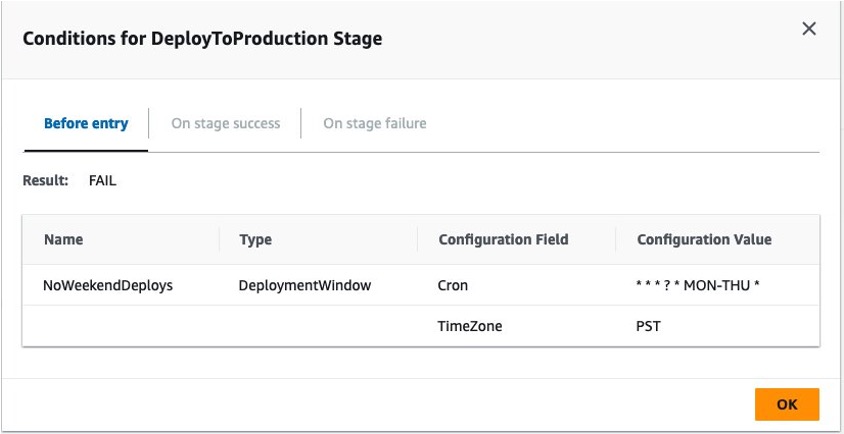
Finally, we added a third condition as an entry condition to the DeployToProduction stage. We added an AWS DeploymentWindow rule provider with a cron expression to fail the condition if a deployment to production was executed outside of our defined window.

Cron rule for AWS CodePipeline stage conditions

Figure 8: Cron rule for AWS CodePipeline stage conditions

Testing Stage Conditions

Testing Scenario 1

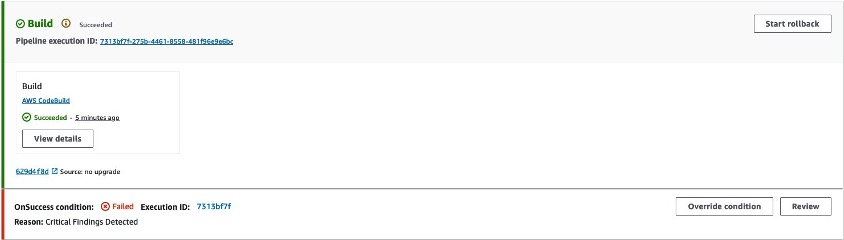
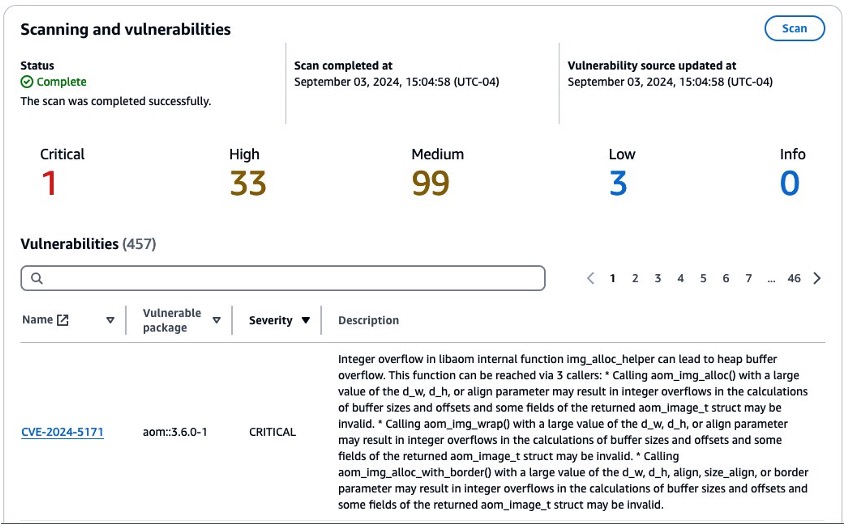
To test our CodePipeline with these stage-level conditions, we executed a git push to the source repository, which triggered a new pipeline execution. Our build stage successfully built a Docker image and pushed that image to the ECR repository, triggering the OnSuccess condition to check for critical vulnerabilities. The Lambda function reported that the scan exceeded our vulnerability threshold and stopped our pipeline with a reason of “Critical Findings Detected”

ECR scan condition failure

Figure 9: Amazon ECR scan condition failure

Navigating to the Amazon Elastic Container Registry service console, we were able to identify the critical vulnerability.

Amazon ECR vulnerability report

Figure 10: Amazon ECR vulnerability report

By reading the CVE we learned that the finding was related to a system package present in the source image defined in our Dockerfile. To remediate this issue, we added a new line to the Dockerfile in our source repository. The full Dockerfile is shown below for example with the change highlighted.

FROM public.ecr.aws/docker/library/python:3.12

WORKDIR /qchess
COPY . /qchess/
RUN apt-get remove --purge git git-man -y
RUN cd /qchess && pip install -r requirements.txt
RUN apt update && apt upgrade -y

CMD ["flask","run","--host=0.0.0.0","--port=80"]

With this change, we ensured that our image’s system packages would be upgraded on every build along with the version of the vulnerable package discovered by our condition check. We committed and pushed to our source repository to trigger a new pipeline execution.

Testing Scenario 2

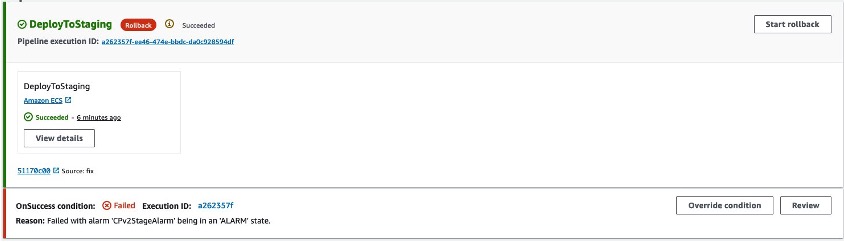
During the next run, our Pipeline made it to the DeployToStage stage and successfully deployed our code changes to our staging environment. However, when the OnSuccess condition was executed, it detected that the error rate alarm had transitioned to alarm status, resulting in the stage condition to issue a rollback. We had a bug in our new feature!

CloudWatch Rule triggering a stage rollback

Figure 11: CloudWatch Rule triggering a stage rollback

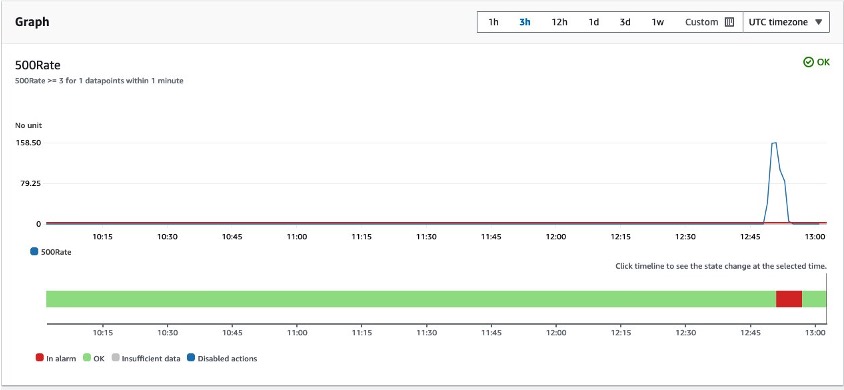
We reviewed the CloudWatch alarm and noticed the elevated error rates related to the deployment. The error rates returned to normal after the stage completed its rollback.

Amazon CloudWatch alarm details

Figure 12: Amazon CloudWatch alarm details

After this rollback we reviewed our code changes and discovered a bug in the code. We made the appropriate changes and pushed to our main branch.

Testing Scenario 3

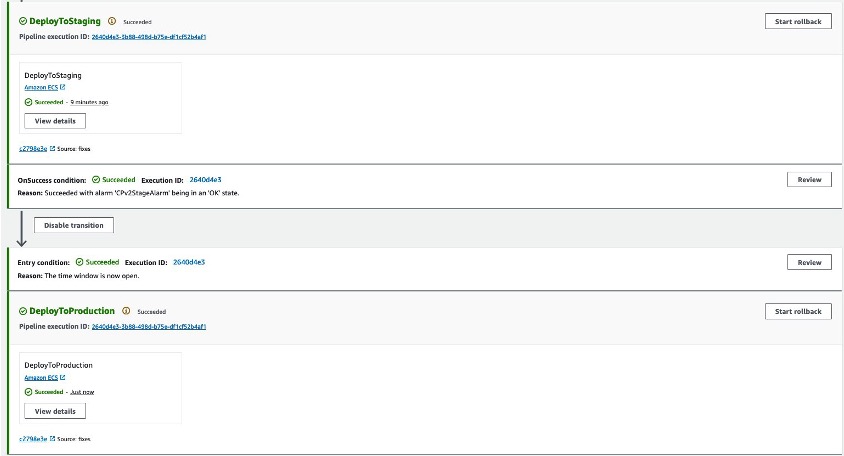
In the final pipeline execution, the pipeline made it past our DeployToStage condition and entered the entry condition in our DeployToProduction stage. This condition verified that the deployment was being executed within the defined deployment window and successfully deployed our change to production.

Deployment window allowed by condition rule

Figure 13: Deployment window allowed by stage condition rule

Clean up

If you followed along you should remove any resources you created related to this scenario. These resources include:

  • ECS Services
  • ECR Repository
  • CodeBuild Project
  • CodePipeline Pipeline
  • Lambda Function
  • CloudWatch Alarm
  • Associated IAM roles

Conclusion

Adding conditions to your AWS CodePipeline pipelines allows you to have fine-grained control over your pipeline. We have seen how you can safely automate deployments based on variables relevant to your organization. To learn more about CodePipeline conditions, visit How do stage conditions work.

Further reading

About the Authors:
Ryan Bachman profile image

Ryan Bachman

Ryan Bachman is a Sr. Specialist Solutions Architect with Amazon Web Services (AWS) with a focus on DevOps. Ryan is passionate about helping customers adopt process and services that increase their efficiency developing applications for the cloud. He has over 20 years professional experience as a technologist, including roles in development, network architecture, and technical product management.

Mirabela Dan profile image

Mirabela Dan

Mirabela Dan is a Solutions Architect for AWS with a focus on Next Generation Developer Experience and building Generative AI applications. She is passionate about DevOps and making developers lives easier with automation and productivity solutions. Outside of work, Mirabela loves travelling (70+ countries) and is a keen museum-goer and reader of history books.

Test Driving a New Benefit Programme in Belfast

Post Syndicated from Rapid7 original https://blog.rapid7.com/2024/10/16/test-driving-a-new-benefit-programme-in-belfast/

Test Driving a New Benefit Programme in Belfast

When most people think about benefits packages at work, what typically comes to mind are things like healthcare programmes, financial stipends, or wellbeing incentives. For Stephen, one benefit he uses on a daily basis comes on four wheels.

Rapid7’s electric vehicle scheme was rolled out in late 2023 for Belfast employees. The programme enables employees to lease an electric car via their employer and pay for it on a salary sacrifice basis, offering substantial tax and national insurance savings.

“I kept reading about the program and thinking – is it really this simple? What’s the catch?” said Stephen Gallagher, a Lead Product Manager who received his new electric BMW this past May. “The more I learned about the process and understood what that pre-tax payment would be vs. paying for a vehicle on my own, it was really a no brainer.”

The unique offering also contributes to the company’s sustainability goals by making electric vehicles more accessible, thanks to the pre-tax salary sacrifice. “I’ve worked for some other big tech companies in Belfast, but I’ve never seen this as a company offering. It definitely gives me a great sense of pride to work for Rapid7, and I feel motivated to do well for a company that takes care of employees in such a unique way.”

Test Driving a New Benefit Programme in Belfast

“The program provides employees with make and model options based on different salary levels to ensure the monthly payment is reasonable. Once an employee enrolls and selects a vehicle, our vendor sources it and coordinates delivery. Employees don’t pay anything until the vehicle is delivered.” Says Karen Hendry, Senior Benefits Manager. “I’ve watched employees go through the process, and I’m excited to have just taken ownership of a car myself through the programme!”

In addition to a competitive monthly payment, the program also eliminates the need for down payments, dealer fees, maintenance, or separate insurance fees as the offering is all inclusive. Stephen shared more on his recent experience by adding “I recently got a scratch on the car, so it’s been in the shop to get repaired. All I had to do was reach out to our vendor, and they got me in touch with a repair shop and coordinated everything for me”.

“As a benefits team, we are always evaluating our offerings and looking for ways to bring value to our employees through unique programmes. It’s exciting to see something new like this take off successfully in Belfast”

Learn more about Rapid7 in Belfast here.

[$] Using LKMM atomics in Rust

Post Syndicated from daroc original https://lwn.net/Articles/993785/

Rust, like C, has its own memory model describing how concurrent access to the
same data by multiple threads can behave.
The Linux kernel, however, has its own
ideas. The

Linux kernel memory model
(LKMM) is subtly different from both the
standard C memory model and Rust’s model.
At Kangrejos, Boqun Feng gave a presentation about the
need to reconcile the memory models used by Rust and the kernel,
including a few potential avenues for doing so. While
no consensus was reached, it is an area of active discussion.

[$] Two pidfd tweaks: PIDFD_GET_INFO and PIDFD_SELF

Post Syndicated from corbet original https://lwn.net/Articles/992991/

The pidfd mechanism, which uses file descriptors to refer to processes in
an unambiguous and race-free way, was first
introduced
in 2018. Since then, the interface has gained a number of new features, but
development has slowed over time as the interface has matured. There are,
however, a couple of patches in circulation that are meant to make working
with pidfds simpler in some situations.

Security updates for Wednesday

Post Syndicated from jzb original https://lwn.net/Articles/994436/

Security updates have been issued by AlmaLinux (buildah, containernetworking-plugins, and skopeo), Fedora (pdns-recursor and valkey), Mageia (unbound), Red Hat (fence-agents, firefox, java-11-openjdk, python-setuptools, python3-setuptools, resource-agents, and thunderbird), SUSE (etcd-for-k8s, libsonivox3, rubygem-puma, and unbound), and Ubuntu (apr, libarchive, linux, linux-aws, linux-aws-hwe, linux-azure-4.15, linux-gcp,
linux-gcp-4.15, linux-hwe, linux-kvm, linux-oracle, nano, and vim).

Instant Well-Architected CDK Resources with Solutions Constructs Factories

Post Syndicated from Biff Gaut original https://aws.amazon.com/blogs/devops/instant-well-architected-cdk-resources-with-solutions-constructs-factories/

For several years, AWS Solutions Constructs have helped thousands of AWS Cloud Development Kit (CDK) users accelerate their creation of well-architected workloads by providing small, composable patterns linking two or more AWS services, such as an Amazon S3 bucket triggering an AWS Lambda function. Over this time, customers with use cases that don’t match an existing Solutions Construct have expressed a desire to create individual well-architected resources directly. Solutions Constructs Factories allow clients to create well-architected individual resources using the same internal code that Solutions Constructs use when composing larger patterns. While deploying a single AWS resource using the AWS CDK is often a trivial task, deploying that resource following all the best practices requires more knowledge and effort. For instance, a properly configured S3 bucket should include versioning, encryption, access logging, bucket policies allowing only TLS calls, and lifecycle policies. The AWS Solutions Constructs S3BucketFactory()method implements a fully well-architected CDK S3 bucket with all the best practices configured, including an additional bucket to hold S3 Access Logs. At the same time, every aspect of each resource can be overridden to satisfy any unique requirements for your use case. Best of all, the resources created are all standard CDK L2 constructs that integrate with any CDK stack.

Solutions Constructs Factories are a new feature of AWS Solutions Constructs, a library of common architectural patterns built on top of the AWS CDK. These multi-service patterns allow you to deploy multiple resources with a single CDK Construct. Solutions Constructs follow best practices by default – both for the configuration of the individual resources as well as their interaction. While each Solutions Construct implements a very small architectural pattern, they are designed so that multiple constructs can be combined by sharing a common resource. For instance, a Solutions Construct that implements an S3 bucket invoking a Lambda function can be deployed along with a second Solutions Construct that deploys a Lambda function that writes to an Amazon SQS queue by sharing the same Lambda function between the two constructs. There are currently over 70 Solutions Constructs available, covering Amazon API Gateway, Amazon Simple Storage Service (S3), Amazon SNS, Amazon Simple Queue Service (SQS), AWS Lambda, AWS Secrets Manager, IoT, Amazon ElasticCache, AWS Step Functions, AWS Fargate, AWS WAF, Application Load Balancers, Amazon Kinesis, Amazon Data Firehose, Amazon Sagemaker, AWS Elemental Mediastore, and more.

The AWS CDK provides a programming model above the static AWS CloudFormation template, representing all AWS resources with instantiated objects in a high-level programming language. When you instantiate CDK objects in your Typescript (or other language) code, the CDK “compiles” those objects into a JSON template, then deploys that template with CloudFormation. The use of programming languages such as Typescript or Python rather than the declarative YAML or JSON allows much more flexibility in defining your infrastructure. If you are not yet familiar with the AWS CDK you should check it out.

Visual representation of how AWS Solutions Constructs build abstractions upon the AWS CDK, which is then compiled into static CloudFormation templates. Solutions Constructs Factories are a feature found within AWS Solutions Constructs

Infrastructure as Code Abstraction Layers

How Constructs Factories Work

This demo will guide you through building a small CDK stack that uses one of the new Solutions Constructs Factories. The app will use a factory to create an S3 bucket that fully implements all the recommended best practices with a single function call.

First, create a Typescript CDK app and install the Solutions Constructs libraries:

md factories-blog
cd factories-blog
cdk init -l=typescript
npm install @aws-solutions-constructs/aws-constructs-factories

Next, open lib/factories-blog-stack.ts, delete the comments and add the indicated new lines of code:

import * as cdk from 'aws-cdk-lib';
import { Construct } from 'constructs';
// Add this import statement:
import { ConstructsFactories } from '@aws-solutions-constructs/aws-constructs-factories';

export class FactoriesBlogStack extends cdk.Stack {
  constructor(scope: Construct, id: string, props?: cdk.StackProps) {
    super(scope, id, props);

    // Add these two lines
    const factories = new ConstructsFactories(this, 'constructs-factories');
    const response = factories.s3BucketFactory('default-bucket', {});
  }
}

Now build and deploy the app:

npm run build
cdk deploy

A key consideration for Constructs Factories is that the resources they create integrate seamlessly with the rest of your CDK stack. That’s why factories are implemented as methods that return standard AWS CDK L2 constructs rather than L3 constructs. Instantiating the ConstructsFactories object gives you access to the factory methods, but on its own adds nothing to your stack. In this case you called s3BucketFactory(), passing two arguments: a string id upon which all resource names will be based, and an empty S3BucketFactoryProps object. The method added 4 resources to your CDK stack. You can explore everything this app just deployed either in the console or through the synthesized template in ./cdk.out. Here’s a synopsis of what you’ll find:

  • An S3 bucket for storage (the goal of the call), with the following configuration:
    • AES-256 server side encryption
    • All public ACLs and policies blocked
    • Versioning enabled
    • A bucket policy blocking all access not via aws:SecureTransport (TSL)
    • Access logging enabled to a separate bucket
    • A lifecycle rule transitioning non-current versions to Glacier after 90 days
  • A second S3 bucket to contain the access logs, with a similar configuration:
    • AES-256 server side encryption
    • All public ACLs and policies blocked
    • Versioning enabled
    • A bucket policy blocking all access not via aws:SecureTransport (TSL)

A single call has deployed two resources with all best practices configured by default! As most workloads have some unique requirements, all of these resources can be customized to integrate into the overall stack. Diving a little deeper, recall the empty S3BucketFactoryProps object you passed to the factory call. The S3BucketFactoryProps argument allows you to send any properties to override the default settings for the main bucket and the logging bucket. For instance, if you need the bucket to send notifications to EventBridge you can enable that through the properties:

const response = factories.s3BucketFactory('customized-bucket', {
  bucketProps: {
    eventBridgeEnabled:true
  }
});

Second, the factory call returned an S3FactoryResponse object, which exposes standard CDK L2 Bucket constructs for both the main and logging buckets (you can also access the new BucketPolicies through these Bucket constructs).

const arn = response.s3Bucket.bucketArn;

Available Factories

The first release of Solutions Constructs Factories focuses on services where configuring a resource according to best practices requires the launch of additional resources, or other additional complexity. We currently support 3 different resources:

S3 Buckets

The s3BucketFactory() function will create an S3 bucket with:

  • TLS access required
  • Access logging enabled (to an additional log bucket by default)
  • Versioning enabled
  • All public ACLs and policies blocked
  • AWS managed server side encryption
  • Lifecycle policies that transition non-current versions to S3 Glacier after 90 days

Step Functions State Machines

The stateMachineFactory() function will create a Step Functions state machine with:

  • CloudWatch logs names prefixed with /aws/vendedlogs/ and unique to your stack, avoiding any issues with resource policy size without risk of name collisions in your account.
  • CloudWatch alarms for:
    • 1 or more failed executions
    • 1 or more throttled executions
    • 1 or more aborted executions

SQS Queues

The sqsQueueFactory() function will create an SQS queue with:

  • KMS managed encryption
  • A DLQ configured to accept messages that can’t be processed
  • A resource policy ensuring that only the queue owner can perform operations on the queue

Conclusion

A single call to an AWS Solutions Constructs Factory deploys a resource with all best practice settings, as well as any additional infrastructure required to make the resource part of a well-architected application. Since the factories return standard AWS CDK L2 constructs, you can use them in any new or existing CDK stack. The first Solutions Constructs Factories were launched earlier this year and more will be added soon. If you have factories you’d like to see implemented, enter an Issue on the Solutions Constructs github page. The next time you launch any of these three resources in a stack, try using a Constructs factory – you may never directly instantiate a CDK construct again.

Five ways to optimize code with Amazon Q Developer

Post Syndicated from Karthik Chemudupati original https://aws.amazon.com/blogs/devops/five-ways-to-optimize-code-with-amazon-q-developer/

Practical improvement and optimization of software quality requires expert-level knowledge across various subjects. As such, in this blog we shall look at how Amazon Q Developer can help improve your development team productivity and application stability by enabling automation around code optimization by improving your code’s quality, performance, application infrastructure specifications.

The blog will also look at sample prompts that can be used to discover optimization options, control the scope of modifications, choose improvements and iterate through code changes. Being a generative AI–powered software development assistant that integrates with your integrated development environment (IDE), Amazon Q Developer supports in code explanation, code generation, and code improvements such as debugging and optimization. Amazon Q Developer can be configured for IDEs such as Visual Studio Code or Jet Brains IDEs, using AWS Identity and Access Management (IAM) Identity Center or AWS Builder ID.

To illustrate the optimization techniques, we will use the quant-trading sample application from the github aws-samples repo, to look at optimizations across the following domains – 1) Portability 2) Complexity 3) Code Performance 4) Infrastructure 5) Architecture and non-functionals 6) Running on AWS

Please note that as Amazon Q Developer continues to evolve, and due to the non-deterministic nature of Generative AI, the outputs you see when trying this yourself may differ from the examples shown in this blog post.

Amazon Q Developer can assess your code, provide recommendations, and generate an optimized version based on your prompts. A prompt is a natural language text that requests the generative AI to perform a specific task. Among areas you can optimize are portability and complexity.

Portability optimization

To assess portability of your code base, Let us use Portfolio Generator python code from quant-trading sample.

  • In the Integrated development environment (IDE), select the entire code in the file, open Amazon Q Chat and type your prompt: “Is the selected code portable?”

Amazon Q Developer will generate an assessment of portability of your code, as shown in Figure 1. Any specific improvements possible will also be specified.

This image shows two side-by-side screenshots of an Amazon Q chat interface discussing code portability. The left panel displays a question "Is the selected code portable?" followed by a detailed response outlining factors affecting code portability, including use of relative imports, hard-coded paths, external libraries, and AWS SDK integration. The right panel continues the discussion with suggestions on how to make the code more portable, including using absolute imports, avoiding hard-coded paths, isolating dependencies, and separating AWS-specific functionality. The interface has a dark theme with white text on a black background. At the bottom, there are suggested follow-up questions and a note about the AWS Responsible AI Policy.

Figure 1: Optimize code quality. Assessment and recommendations

  • Add code snippets directly to the prompt as context, for further response improvements by:
    1. Right click on the IDE
    2. choose “Send to Amazon Q”
    3. Select “Send to Prompt”.

Now, the context includes the code, its portability assessment and recommendations for further improvements.

  • Ask – “Rewrite code for maximum portability”

However, such a generic prompt would likely result in numerous code modifications chosen by Amazon Q Developer, as shown in Figure 2. To achieve a more specific and higher quality output, in addition to enriched context, the prompt must be more precise and targeted.

This image shows three side-by-side panels of code and explanations in an Amazon Q chat interface. The left panel displays Python code with various import statements and function definitions. The middle panel contains a summary of key changes made to improve code portability, including the use of environment variables, absolute imports, argument parsing, decimal usage, error handling, and formatting. The right panel shows more detailed Python code with import statements, function definitions, and file path configurations. All panels have a dark theme with light-colored text on a dark background. The interface includes options for asking questions or accessing quick actions at the bottom of each panel.

Figure 2: Specific optimization – externalizing config.

  • Ask Amazon Q Developer to perform optimization addressing only hardcoded path values in a specific way.
    • “Rewrite this code to be more portable. Move hardcoded file paths into a separate JSON configuration file under the node “file-paths”. Leave the rest of the file unchanged.”

Amazon Q Developer will now rewrite a few lines of the code and externalized configuration into a JSON file, as shown in Figure 3.

This image shows three panels of an Amazon Q chat interface discussing code portability improvement. The left panel displays a request to rewrite code for better portability by moving hardcoded file paths to a JSON configuration file. It then shows the rewritten Python code with import statements and a highlighted section for loading file paths from the configuration file. The middle panel contains some Python code and an example of the JSON configuration file with "file-paths" node. It explains how the rewritten code loads file paths from the config.json file, making the code more portable and easier to modify for different environments. The right panel shows more detailed Python code, including import statements and function definitions. A section of this code is highlighted, showing sys.path.append() statements that are likely the target of the portability improvement. All panels have a dark theme with colorful syntax highlighting for the code. The interface includes options for asking questions or accessing quick actions at the bottom of each panel.

    Figure 3: Specific optimization – externalizing config.

Note: Dialogue with Amazon Q Developer can span several iterations, allowing you to analyze and narrow down to a very specific aspect of your code. This approach will appear in line with pair programming, iteratively collaborating on a better solution.

  • Continue iterating for optimizations per your code. Examples are – ask “Use YAML format for config.” or “Use path names in config similar to their original values.” or “Add error handling when working with files.”

Such an iterative approach will allow you to gradually apply modifications while preserving control over the scope of changes.

Complexity Optimization

Now let’s analyze and reduce the complexity of the write_portfolio method:

  1. Ask either:
    • “Can the selected code be simplified?”
    • “How can I reduce complexity of the selected code?”
  2. Drill down into a specific, scoped optimization.
    • “Simplify loops, conditions and variables of the selected code.”

Be specific about the kind of optimizations you want Amazon Q Developer to apply (see Figure 4). Example, ask direct prompts such as – “Replace portfolio dictionary with JSON.”

This image shows two panels of an Amazon Q chat interface discussing code simplification. The left panel displays a request to "Simplify loops, conditions and variables of the selected code" followed by a simplified Python function called write_portfolio. The function creates a portfolio dictionary with various keys and values, and includes simplified logic for selecting tickers and creating a positions list using list comprehension. The right panel shows the original Python code that is being simplified. This code includes the write_portfolio function definition with similar structure but more verbose implementation. The file path at the top indicates this is from a file named portfolio_generator.py. Both panels use a dark theme with syntax highlighting in various colors for better code readability. The interface includes an option to ask questions or enter commands at the bottom of the left panel.

Figure 4: Simplify code example

Code Performance optimization

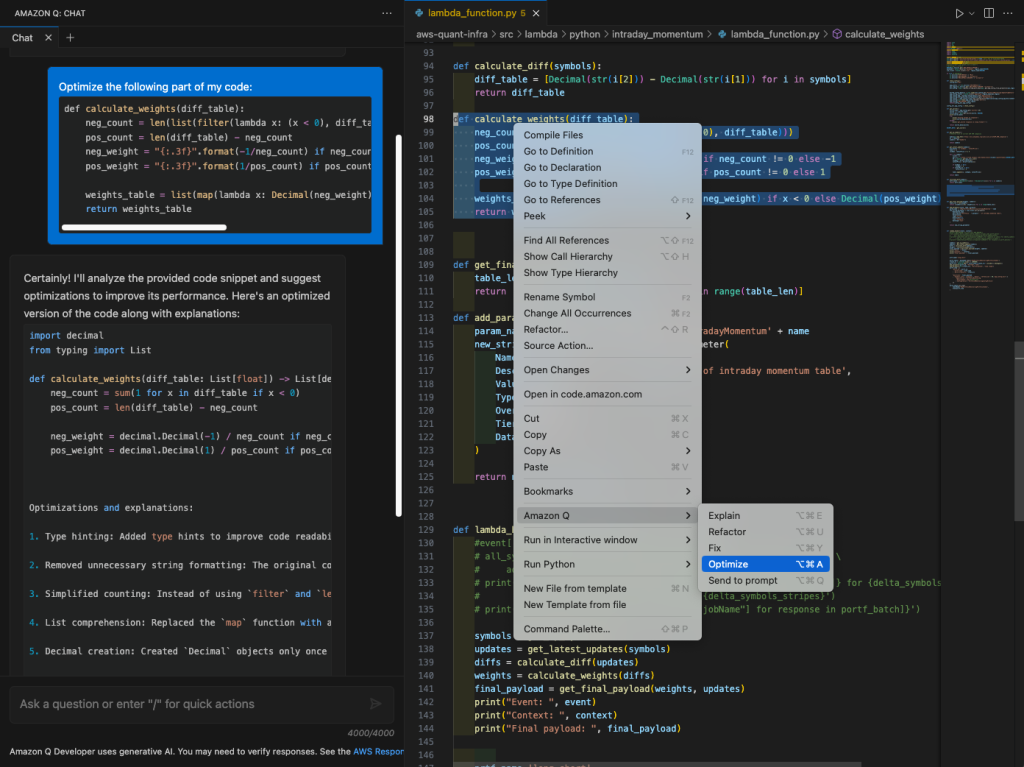
To improve code performance, we shall leverage Amazon Q Developer’s “Optimize” feature. It initiates a dialogue for code performance optimization via the right-click menu or key shortcut (see Figure 5).

This image shows two main panels of an Amazon Q chat interface discussing code optimization. The left panel displays a request to optimize a specific part of the code, followed by suggestions for improvement. These suggestions include using generator expressions instead of list comprehensions, avoiding unnecessary conversions, using conditional assignment, and considering NumPy or Pandas for large numerical datasets. Each suggestion is accompanied by a code snippet demonstrating the optimization. The right panel shows the original Python code in a file editor, with the function calculate_weights highlighted. This appears to be the function targeted for optimization. The editor interface includes various options like "Go to Definition", "Find All References", and "Optimize" visible in a dropdown menu. Both panels use a dark theme with syntax highlighting in various colors for better code readability. The interface includes tabs at the top for different files or chat sessions, and an option to ask questions or enter commands at the bottom of the left panel.

Figure 5: IDE “built-in” feature for code improvement. Amazon Q -> Optimize

The selected code is sent to Amazon Q Developer, which then provides recommendations and generates optimized code.

Let’s now look at how we can use Amazon Q Developer to improve the calculate_weights method.

As shown in Figure 5, Amazon Q Developer explains step-by-step every optimization it suggests. You can further follow-up with a more precise prompt, targeting a specific optimization for a specific code block. For instance, “Optimize only selected method and only avoid unnecessary type conversions. Leave the rest of code unchanged.”

A screenshot of a code editor displaying Python code with a dark background theme. The image shows multiple functions and methods, including 'calculate_weights', 'get_final_payload', and 'add_parameter'. On the left side, there's a blue banner with instructions to optimize a selected method and avoid unnecessary type conversions. Below this, an explanation of the optimized 'calculate_weights' method is provided, highlighting changes made to improve performance. The code is syntax-highlighted, making different elements like functions, variables, and comments easily distinguishable.

Figure 6: Follow-up with a more specific prompt for performance optimization

You can copy-paste newly generated code or insert it directly at the cursor by choosing “Insert code”.

To achieve even higher precision, include in your prompt what not to do or to avoid.

Infrastructure optimization

Amazon Q Developer also supports Infrastructure as Code (IaC) out of the box, providing expert advice and code generation for CloudFormation, CDK, and Terraform. This allows you to leverage code optimization techniques and patterns for your infrastructure.

As a demonstration, let’s improve portability of the CDK code in lambda.ts by introducing environment variables to inject configurations into the runtime.

To begin,

  1. Start a new chat with a broad question – “Could you recommend techniques to inject system variables into a Lambda container function?” Amazon Q Developer will generally provide options to inject environment variables into an AWS Lambda function.
  2. Send function code to the prompt and ask Amazon Q Developer. This generates the code for injecting environment variables through Lambda runtime by using prompt – “Could you add some deployment variables into the tradingStartStopFunction function?”
This image shows three side-by-side screenshots of an Amazon Q chat interface and code editor. The left panel displays a conversation about injecting system variables into a Lambda container function, listing five techniques. The middle panel shows a code snippet for a 'tradingStartStopFunction' with a question about adding deployment variables. The right panel displays more detailed code for Lambda functions related to trading operations. All three panels have a dark theme with syntax-highlighted code in various colors.

Figure 7: Optimizing infrastructure code by introducing environment variables in a Lambda function

Architecture and non-functional optimization

With Amazon Q Developer, you can go beyond code and enhance your system architecture. Let’s consider lambda_function.py which interacts with Amazon DynamoDB and AWS Systems Manager Parameter Store.

  • Send the entire function to the prompt and ask the following in sequence.
    • “What are the architecture implications if I call this lambda function daily?”
    • “How do I optimize this function to be called daily.”
    • Then, follow up with –“How do I optimize this function to be called every 1 second.”
A split-screen image showing two chat conversations and a code editor. The left panel discusses architectural implications of calling a Lambda function daily, covering topics like concurrency, idempotency, error handling, separation of concerns, monitoring, and security. The middle panel offers optimization strategies for calling a Lambda function every 1 second, including separating concerns, caching, batching, and scaling. The right panel shows Python code for a Lambda function, including imports and a function definition dealing with DynamoDB operations.A split-screen image showing two chat conversations and a code editor. The left panel discusses architectural implications of calling a Lambda function daily, covering topics like concurrency, idempotency, error handling, separation of concerns, monitoring, and security. The middle panel offers optimization strategies for calling a Lambda function every 1 second, including separating concerns, caching, batching, and scaling. The right panel shows Python code for a Lambda function, including imports and a function definition dealing with DynamoDB operations.

Figure 8: NFRs and business rules impact architecture enhancements

  • Compare Amazon Q’s outputs to see how each use case impacts the architectural recommendations, such as introducing caching, batch processing, queues, or concurrency mechanisms.

Following the techniques discussed earlier, you can dive in more specific implementations of suggested architecture enhancements. For example, ask “Implement a mechanism to execute only one instance of lambda function at any given moment of time. Implement cache for SSM Parameter store value, but not for Portfolio table.”

Optimize code to run on AWS

As a versatile developer assistant, Amazon Q Developer excels at helping you adhere to AWS best practices and recommendations.

Let’s examine if our sample – IntradayMomentum Lambda function handler can be improved.

  • Send the code to the Amazon Q Developer prompt and ask – “Is this lambda handler following AWS recommended best practices?”
This image shows a split-screen view of an Amazon Q chat interface on the left and a code editor on the right. The left side displays a conversation about AWS Lambda function best practices, listing 9 points of improvement for the provided code, including separation of concerns, environment variables usage, logging, error handling, dependency management, performance optimization, security, idempotency, and testing. The right side shows Python code for a Lambda function. The code includes a lambda_handler function with various operations like getting symbols, calculating updates and weights, and interacting with a DynamoDB table. The code is syntax-highlighted, indicating it's being viewed in a code editor. At the top of the code editor, there are tab names suggesting multiple files are open, including "lambda_function.py" and "portfolio_generator.py". The overall theme of the interface is dark, suggesting a dark mode IDE or development environment.

Figure 9: Optimize code to run on AWS. AWS-recommended best practices for the Lambda handler

The analysis generated by Amazon Q Developer is based on AWS code, best practices and documentation. Not only does it suggest improvements, but also highlights what’s been done correctly, reinforcing best practices.

  • Following an iterative technique described earlier, continue asking Amazon Q developer for further recommendations with more specific prompts. For example – “Add exception handling to the code.”
This image shows a split-screen interface with an Amazon Q chat on the left and a code editor on the right, both using a dark theme. The left side displays a chat conversation about adding exception handling to the code. It shows Python code for a Lambda function with newly added exception handling, including imports for logging and a try-except block. The right side shows the original Python code for the Lambda function in a code editor. The code includes functions for handling portfolio updates, interacting with DynamoDB, and processing various data elements. At the top of the screen, there are multiple tabs open in the code editor, including "lambda_function.py", "portfolio_generator.py", and "deploy_portfolio.py". The image demonstrates the process of improving the Lambda function code by adding error handling based on the chat conversation's recommendations.

Figure 10: Rewrite code with Best Practices in place. Adding Exception Handling.

Conclusion

In this blog post, we discussed approaches for code optimization with the help of Amazon Q Developer. We explored code optimization from various perspectives, such as code quality, performance, application infrastructure, following best practices, and enhancing architecture. We saw the importance of prompt engineering and context when optimizing code with Amazon Q Developer – a generative AI coding assistant. Starting with open, generic prompts helps build the necessary context and discover optimization options. In contrast, precise and specific follow-up prompts help define the scope of changes and incrementally generate optimized code.

It has never been easier for developers to have a development assistant and start improving code with the help of natural language dialogue, provided by Amazon Q.

About the authors

Roman Martynenko is a Senior Solutions Architect at Amazon Web Services with over 20 years of experience in Software Engineering, Architecture and Cloud technologies. Roman is helping Canadian public sector customers with their cloud journey. He focuses on next-generation developer experience, helping organizations re-imagine the entire Software Development Lifecycle. Outside of work, he enjoys hiking, home automation, and DIY projects.

Karthik Chemudupati is a Principal Technical Account Manager (TAM) with AWS, focused on helping customers achieve cost optimization and operational excellence. He has more than 20 years of IT experience in software engineering, cloud operations and automations. Karthik joined AWS in 2016 as a TAM and worked with more than dozen Enterprise Customers across US-West. Outside of work, he enjoys spending time with his family.

Shardul Vaidya is a Worldwide Partner Solutions Architect with AWS, focused on helping partners and customers build and effectively use Generative AI powered developer experiences. Shardul joined AWS in 2020 as part of their early career talent Solutions Architect team and worked with over a hundred modernization and DevOps partners across the world. Outside of work, he’s a music lover and collects records.
Monitoring My Home Network with Zabbix

Post Syndicated from Cesar Caceres original https://blog.zabbix.com/monitoring-my-home-network-with-zabbix/28921/

Recently, we reached out to the members of our global community with an invitation to share their dashboards and give us a quick tour of what they do with our product. The response was so incredible that we have decided to highlight a few of the most interesting submissions here on our blog.

First up is Cesar Caceres, an independent IT consultant with nearly 10 years of experience in critical system monitoring within the banking sector. Cesar enjoys being alerted to changes within his home network so much that he composed a custom song to let him know when a new alert arrives!

My environment

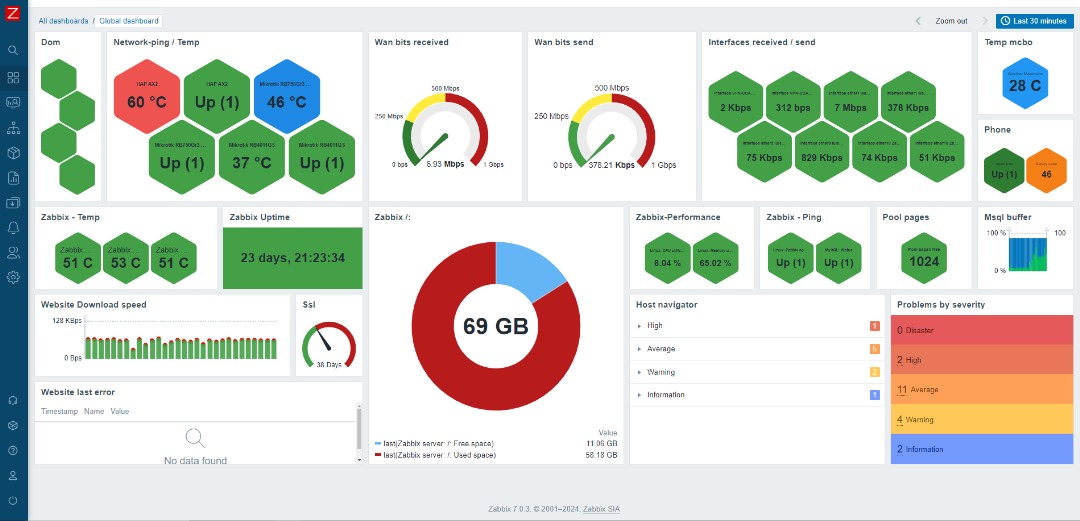
My environment includes ping monitoring for multiple devices (Google Nest, Smart LEDs, Smart Lights, and TV). I also track home network devices: one personal MikroTik router and two belonging to my colleague Alejandro Velasquez, along with the temperature of these devices. Additionally, I monitor WAN consumption from my internet provider, as well as the bandwidth consumption of a connected client, my colleague, and the VPN.

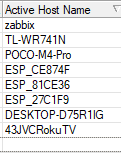
I have a MikroTik and TP-Link router. When I connect the TP-Link to a port on the MikroTik, I can capture information about any devices connected to my home network. Using SNMP v2, I can then retrieve detailed information from these devices. From the WinBox console of the MikroTik router, I can navigate to IP > DHCP Server to locate the active hostnames to monitor.

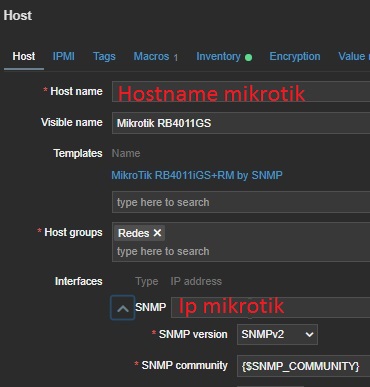
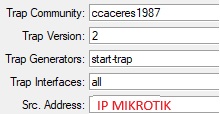
In WinBox, I navigate to IP > SNMP Settings. Here, assign a community name for identification, select SNMP version 2, and enter the IP address of the MikroTik device.

Once configured, I verify from the Zabbix server that communication has been successfully established through the SNMP v2 protocol.

On the Zabbix server, I verify the host name of the device to make sure it’s visible. Since version 6.0, Zabbix includes a template specifically for the RB4011GS device, which simplifies the monitoring process.

Temperature monitoring for my location (Maracaibo, Venezuela) is integrated with OpenWeatherMap. I also monitor my phone using an agent from the Android Play Store. The template for this is available on this GitHub repository, but customization will always depend on individual needs.

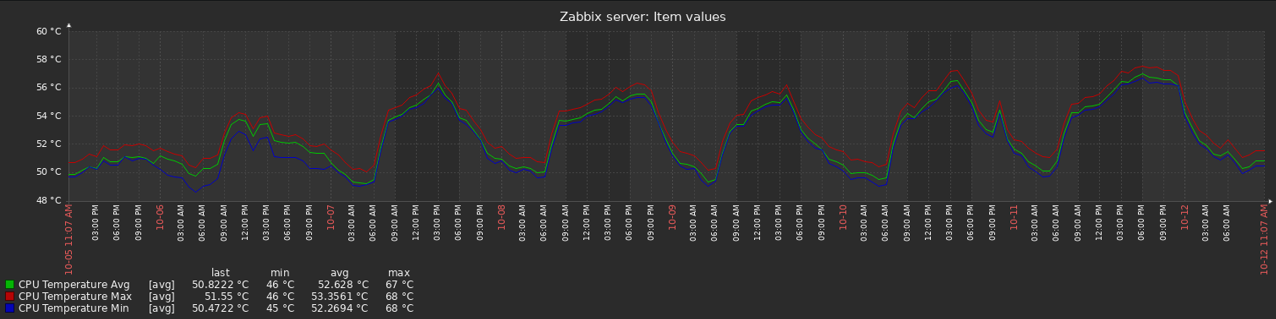
The temperature of my Zabbix Server is monitored using a repository available on GitHub. It’s important to know the operating temperature of the Zabbix server.

If possible, I adjust the default parameters to suit the specific environment.

I also monitor the performance of our Zabbix server and database using the MySQL integration with the Zabbix agent, focusing on key elements like buffer usage.

I track the behavior of my portfolio (ccaceresoln.com) with web scenarios , including certificate monitoring. When querying SSL for my portfolio, I make a folder in the Zabbix server and create a script called checkssl.sh inside it. Then, I grant execution permissions chmod +x to the checkssl.sh script.

In the configuration of these items, the call will be made to the URL. Each hosting provider may automatically generate a new SSL certificate periodically. In my case, I don’t use a trigger for certificate renewal.

On the right side, there is a new widget for navigating based on alerts, which allows me to view more details about these issues.

Alerts

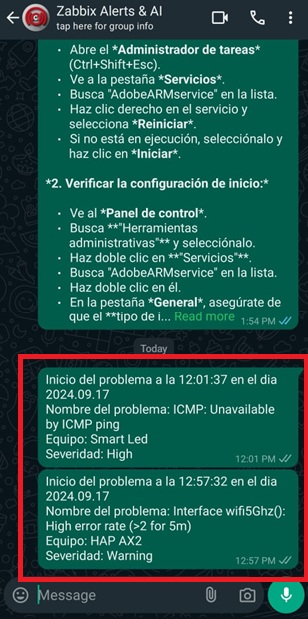
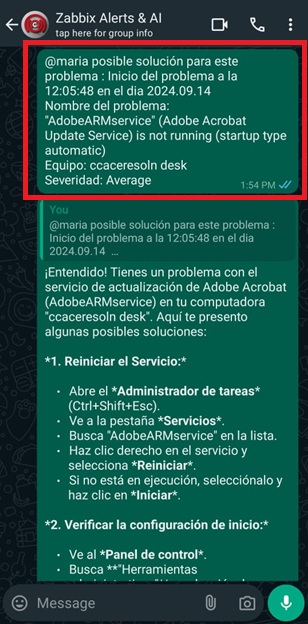
Alerts are delivered through WhatsApp, using a repository available on GitHub. This repository is based on the WhatsApp Web + Multi-Device API library. It’s important to ensure that the Mudslide libraries are up-to-date. Step-by-step instructions can be found in the Zabbix forums.

The assistant is based on a custom GitHub repository, customizing the language model using the Gemini 1.5 API. I chose this because it’s free to use and doesn’t require installation on the server. With the emergence of artificial intelligence, I’m hopeful that this could act as a proof of concept and an idea to help people understand how to resolve such alerts and learn from them. It’s more than just having everything in one place! Why MARIA? MARIA stands for:
M: Machine
A: Assistant
R: Reasoning
I: Intelligence
A: Artificial

Additional features

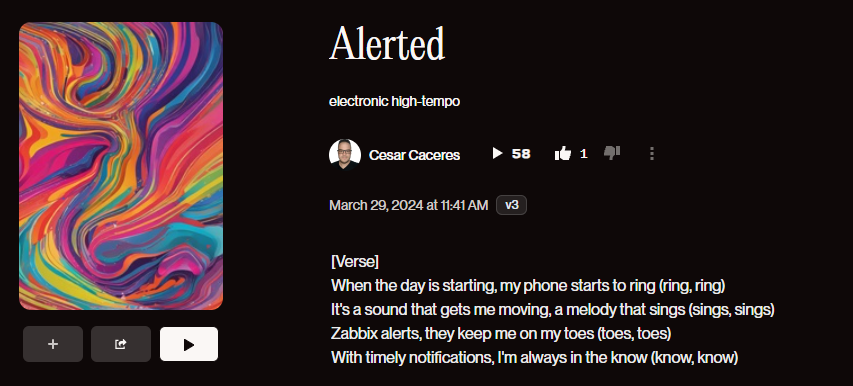
I had the idea to create a Zabbix song in order to have a sound that greets me every morning. Just a reminder that it’s a new day and Zabbix is here for alerts.
Song with sunoai:

Conclusion

Having a home network monitoring environment offers advantages such as receiving alerts about device status or specific equipment behavior even when you’re away from home. This allows for continuous supervision and proactive issue resolution.

The post Monitoring My Home Network with Zabbix appeared first on Zabbix Blog.