Security updates for Tuesday

Post Syndicated from corbet original https://lwn.net/Articles/944263/

Security updates have been issued by Debian (node-cookiejar and orthanc), Oracle (firefox, kernel, and kernel-container), Red Hat (flac and httpd:2.4), Slackware (vim), SUSE (python-Django, terraform-provider-aws, terraform-provider-helm, and terraform-provider-null), and Ubuntu (c-ares, curl, linux-azure, linux-azure-5.15, linux-azure-fde, linux-azure-fde-5.15,
linux-raspi, and linux-ibm, linux-ibm-5.4).

Cars Have Terrible Data Privacy

Post Syndicated from Bruce Schneier original https://www.schneier.com/blog/archives/2023/09/cars-have-terrible-data-privacy.html

A new Mozilla Foundation report concludes that cars, all of them, have terrible data privacy.

All 25 car brands we researched earned our *Privacy Not Included warning label—making cars the official worst category of products for privacy that we have ever reviewed.

There’s a lot of details in the report. They’re all bad.

BoingBoing post.

What is Server Monitoring? Everything You Need to Know

Post Syndicated from Michael Kammer original https://blog.zabbix.com/what-is-server-monitoring-everything-you-need-to-know/26617/

Servers are the foundation of a company’s IT infrastructure, and the cost of server downtime can include anything from days without system access to the loss of important business data. This can lead to operational issues, service outages, and steep repair costs.

Viewed against this backdrop, server monitoring is an investment with massive benefits to any organization. The latest generation of server monitoring tools make it easier to assess server health and deal with any underlying issues as quickly and painlessly as possible.

What are servers, and how do they work?

Servers are computers (or applications) that run software services for other computers or devices on a network. The computer takes requests from the client computers or devices and performs tasks in response to the requests. These tasks can involve processing data, providing content, or performing calculations. Some servers are dedicated to hosting web services, which are software services offered on any computer connected to the internet.

What is server monitoring? Why does it matter?

Servers are some of the most important pieces of any company’s IT infrastructure. If a server is offline, running slowly, or experiencing outages, website performance will be affected and customers may decide to go elsewhere. If an internal file server is generating errors, important business data like accounting files or customer records could be compromised.

A server monitoring system is designed to watch your systems and provide a number of key metrics regarding their operation. In general, server monitoring software tests for accessibility (making sure that the server is alive and can be reached) and response time (guaranteeing that it is running fast enough to keep users happy). What’s more, it sends notifications about missing or corrupt files, security violations, and other issues.

Server monitoring is most often used for processing data in real time, but quality server monitoring is also predictive, letting users know when disks will reach capacity and whether memory or CPU utilization is about to be throttled. By evaluating historical data, it’s possible to find out if a server’s performance is degrading over time and even predict when a complete crash might occur.

How can server monitoring help businesses?

Here are a few of the most important business benefits of server monitoring:

Server monitoring tools give you a bird’s-eye view of your server’s health and performance

A quality server monitoring tool keeps IT administrators aware of metrics like CPU usage, RAM, disk space, and network bandwidth. This helps them to see when servers are slowing down or failing, allowing them to act before users are affected.

Server monitoring simplifies process automation

IT teams have long checklists when it comes to managing servers. They need to monitor hard disk space, keep an eye on infrastructure, schedule system backups, and update antivirus software. They also need to be able to foresee and solve critical events, while managing any disruptions.

A server monitoring tool helps IT professionals by automating all or many aspects of these jobs. It can show whether a backup was successful, if software is patched, and whether a server is in good condition. This allows IT teams to focus on tasks that benefit more from their involvement and expertise.

Server monitoring makes it easier to retain customers as well as employees

Acting quickly when servers develop issues (or even before) makes sure that employee workflows aren’t disrupted, allowing them to perform their duties, see results, and reach their goals. It also guarantees a positive customer experience by providing early notification of any issues.

Server monitoring keeps costs down

By automating processes and tasks (and freeing up time in the process) server monitoring systems make the most of resources and reduce costs. And by solving potential issues before they affect the organization, they help businesses avoid lost revenue from unfinished employee tasks, operational delays, and unfinished purchases.

What should you look for in a server monitoring solution?

Now that you’re sold on the benefits of server monitoring, you’ll want to choose the server monitoring solution that’s right for you. Here are a few capabilities to keep in mind:

Ease of use

Does the solution include an intuitive dashboard that makes it easy to monitor events and react to problems quickly? It should, and it should also allow you to make the most of the data it exports by providing graphs, reports, and integrations.

Customer support

Is it easy to contact support? How quickly do they respond? A quality server monitoring solution will provide a defined SLA and stick to it with no exceptions.

Breadth of coverage

A good solution will support all the server types (hardware, software, on-premises, cloud) that your enterprise uses. It should also be flexible enough to support any server types you may implement in the future.

Alert management

There are a few important questions to ask when it comes to alerts:

  • Does the solution include a dashboard or display that makes it easy to track events and react to problems quickly?
  • Is it easy to set up alerts via the configuration of thresholds that trigger them? How are alerts delivered?
  • Does the solution have a way to help you determine why a problem has occurred, instead of just telling you that something has gone wrong without context?

What are some best practices to keep in mind?

Here are a few best practices that will help you avoid the more common server monitoring pitfalls:

Proactively check for failures

Keep a sharp eye out for any issues that may affect your software or hardware. The tools included with a good monitoring solution can alert you to errors caused by a corrupted database (for example) and let you know if a security incident has left important services disabled.

Don’t forget your historical data

Server problems rarely occur in a vacuum, so look into the context of issues that emerge. You can do that by exploring metrics across a specific period, typically between 30 to 90 days. For example, you may find that CPU temperature has increased within the past week, which may suggest a problem with a server cooling system.

Operate your hardware in line with recommended tolerance levels

File servers are commonly pushed to the limit, rarely getting a break. That’s why it’s important to monitor metrics like CPU utilization, RAM utilization, storage capacity usage, and CPU temperature. Check these metrics regularly to identify issues before it’s too late.

Keep track of alerts

Always monitor your alerts in real time as they occur and explore reliable ways to manage and prioritize them. When escalating an incident, make sure it goes to the right individual as soon as possible.

Use server monitoring data to plan short-term cloud capacity

Server monitoring systems can help you plan the right computing power for specific moments. If services become slower or users experience other problems with performance, an IT manager can assess the situation through the server monitor. They’ll then be able to allocate extra resources to solve the problem.

Take advantage of capacity planning

Data center workloads have almost doubled in the past 5 years, and servers have had to keep up with this ongoing change. Analyzing long-term server utilization trends can prepare you for future server requirements.

Go beyond asset management

With server monitoring, you can discover which systems are approaching the end of their lives and whether any assets have disappeared from your network. You can also let your server monitoring tool handle the heavy lifting for you when it comes to tracking physical hardware.

The Zabbix Advantage

Zabbix is designed to make server monitoring easy. Our solution allows you to track any possible server performance metrics and incidents, including server performance, availability, and configuration changes.

Intuitive dashboards, network graphs, and topology maps allow you to visualize server performance and availability, and our flexible alerting allows for multiple delivery methods and customized message content.

Not only that, our out-of-the-box templates come with preconfigured items, triggers, graphs, applications, screens, low-level discovery rules, and web scenarios – all designed to have you up and running in just a few minutes.

And because Zabbix is open-source, it’s not just affordable, it’s free. Contact us to find out more and enjoy the peace of mind that comes from knowing that your servers are under control.

FAQ

Why do we need server monitoring?

Server monitoring allows IT professionals to:

  • Monitor the responsiveness of a server
  • Know a server’s capacity, user load, and speed
  • Proactively detect and prevent any issues that might affect the server

Why do companies choose to monitor their servers?

Companies monitor servers so that they can:

  • Proactively identify any performance issues before they impact users
  • Understand a server’s system resource usage
  • Analyze a server for its reliability, availability, performance, security, etc.

How is server monitoring done?

Server monitoring tools constantly collect system data across an entire IT infrastructure, giving administrators a clear view of when certain metrics are above or below thresholds. They also automatically notify relevant parties if a critical system error is detected, allowing them to act in a timely manner to resolve issues.

What should you monitor on a server?

Key areas to monitor on a server include:

  • A server’s physical status
  • Server performance, including CPU utilization, memory resources, and disk activity
  • Server uptime
  • Page file usage
  • Context switches
  • Time synchronization
  • Process activity
  • Server capacity, user load, and speed

If I want to monitor a server, how easy is it to set things up?

Setting up a server monitoring tool is easy, provided you’ve taken into account these 5 steps:

  • Assess and create a monitoring plan
  • Discover how data can be collected
  • Define any and all metrics
  • Set up alerts
  • Have an established workflow

The post What is Server Monitoring? Everything You Need to Know appeared first on Zabbix Blog.

Experience AI: Teach about AI, chatbots, and biology

Post Syndicated from Ben Garside original https://www.raspberrypi.org/blog/experience-ai-new-updated-lessons/

New artificial intelligence (AI) tools have had a profound impact on many areas of our lives in the past twelve months, including on education. Teachers and schools have been exploring how AI tools can transform their work, and how they can teach their learners about this rapidly developing technology. As enabling all schools and teachers to help their learners understand computing and digital technologies is part of our mission, we’ve been working hard to support educators with high-quality, free teaching resources about AI through Experience AI, our learning programme in partnership with Google DeepMind.

""

In this article, we take you through the updates we’ve made to the Experience AI Lessons based on teachers’ feedback, reveal two new lessons on large language models (LLMs) and biology, and give you the chance to shape the future of the Experience AI programme. 

Updated lessons based on your feedback

In April we launched the first Experience AI Lessons as a unit of six lessons for secondary school students (ages 11 to 14, Key Stage 3) that gives you everything you need to teach AI, including lesson plans, slide decks, worksheets, and videos. Since the launch, we’ve worked closely with teachers and learners to make improvements to the lesson materials.

The first big update you’ll see now is an additional project for students to do across Lesson 5 and Lesson 6. Before, students could choose between two projects to create their own machine learning model, either to classify data from the world’s oceans or to identify fake news. The new project we’ve added gives students the chance to use images to train a machine learning model to identify whether or not an item is biodegradable and therefore suitable to be put in a food waste bin.

Two teenagers sit at laptops and do coding activities.

Our second big update is a new set of teacher-focused videos that summarise each lesson and highlight possible talking points. We hope these videos will help you feel confident and ready to deliver the Experience AI Lessons to your learners.

A new lesson on large language models

As well as updating the six existing lessons, we’ve just released a new seventh lesson consisting of a set of activities to help students learn about the capabilities, opportunities, and downsides of LLMs, the models that AI chatbots are based on.

With the LLM lesson’s activities you can help your learners to:

  • Explore the purpose and functionality of LLMs and examine the critical aspect of trustworthiness of these models’ outputs
  • Examine the reasons why the output of LLMs may not always be reliable and understand that LLMs are machines that make predictions
  • Compare LLMs to other technologies to assess their suitability for different purposes
  • Evaluate the appropriateness of using LLMs in a variety of authentic scenarios
A slide from an Experience AI Lesson about large language models.
An example activity in our new LLM unit.

All Experience AI Lessons are designed to be cross-curricular, and for England-based teachers, the LLM lesson is particularly useful for teaching PSHE (Personal, Social, Health and Economic education).

The LLM lesson is designed as a set of five 10-minute activities, so you have the flexibility to teach the material as a single lesson or over a number of sessions. While we recommend that you teach the activities in the order they come, you can easily adapt them for your learners’ interests and needs. Feel free to take longer than our recommended time and have fun with them.

A new lesson on biology: AI for the Serengeti

We have also been working on an exciting new lesson to introduce AI to secondary school students (ages 11 to 14, Key Stage 3) in the biology classroom. This stand-alone lesson focuses on how AI can help conservationists with monitoring an ecosystem in the Serengeti.

Elephants in the Serengeti.

We worked alongside members of the Biology Education Research Group (BERG) at the UK’s Royal Society of Biology to make sure the lesson is relevant and accessible for Key Stage 3 teachers and their learners.

Register your interest if you would like to be one of the first teachers to try out this thought-provoking lesson.  

Webinars to support your teaching

If you want to use the Experience AI materials but would like more support, our new webinar series will help you. You will get your questions answered by the people who created the lessons. Our first webinar covered the six-lesson unit and you can watch the recording now:

September’s webinar: How to use Machine Learning for Kids

Join us to learn how to use Machine Learning for Kids (ML4K), a child-friendly tool for training AI models that is used for project work throughout the Experience AI Lessons. The September webinar will be with Dale Lane, who has spent his career developing AI technology and is the creator of ML4K.

Help shape the future of AI education

We need your feedback like a machine learning model needs data. Here are two ways you can share your thoughts:

  1. Fill in our form to tell us how you’ve used the Experience AI materials.
  2. Become part of our teacher feedback panel. We meet every half term, and our first session will be held mid-October. Email us to register your interest and we’ll be in touch.

To find out more about how you can use Experience AI to teach AI and machine learning to your learners this school year, visit the Experience AI website.

The post Experience AI: Teach about AI, chatbots, and biology appeared first on Raspberry Pi Foundation.

New – Amazon EC2 R7a Instances Powered By 4th Gen AMD EPYC Processors for Memory Optimized Workloads

Post Syndicated from Channy Yun original https://aws.amazon.com/blogs/aws/new-amazon-ec2-r7a-instances-powered-by-4th-gen-amd-epyc-processors-for-memory-optimized-workloads/

We launched the memory optimized Amazon EC2 R6a instances in July 2022 powered by 3rd Gen AMD EPYC (Milan) processors, running at frequencies up to 3.6 GHz. Many customers who run workloads that are dependent on x86 instructions, such as SAP, are looking for ways to optimize their cloud utilization. They’re taking advantage of the compute choice that EC2 offers.

Today, we’re announcing the general availability of new memory optimized Amazon EC2 R7a instances powered by 4th Gen AMD EPYC (Genoa) processors with a maximum frequency of 3.7 GHz, which offer up to 50 percent higher performance compared to the previous generation instances. You can use this increased performance to process data faster, consolidate workloads, and lower the cost of ownership.

R7a instances also support AVX-512, Vector Neural Network Instructions (VNNI), and brain floating point (bfloat16). These instances feature Double Data Rate 5 (DDR5) memory, which enables high-speed access to data in-memory, and deliver 2.25 times more memory bandwidth compared to R6a instances for lower latency. Moreover, these instances support always-on memory encryption using AMD secure memory encryption (SME).

These instances are SAP-certified and ideal for high performance, memory-intensive workloads, such as SQL and NoSQL databases, distributed web scale in-memory caches, in-memory databases, real-time big data analytics, and Electronic Design Automation (EDA) applications.

R7a instances feature sizes of up to 192 vCPUs with 1536 GiB RAM. Here are the detailed specs:

Name vCPUs Memory (GiB) Network Bandwidth (Gbps) EBS Bandwidth (Gbps)
r7a.medium 1 8 Up to 12.5 Up to 10
r7a.large 2 16 Up to 12.5 Up to 10
r7a.xlarge 4 32 Up to 12.5 Up to 10
r7a.2xlarge 8 64 Up to 12.5 Up to 10
r7a.4xlarge 16 128 Up to 12.5 Up to 10
r7a.8xlarge 32 256 12.5 10
r7a.12xlarge 48 384 18.75 15
r7a.16xlarge 64 512 25 20
r7a.24xlarge 96 768 37.5 30
r7a.32xlarge 128 1024 50 40
r7a.48xlarge 192 1536 50 40

R7a instances have up to 50 Gbps enhanced networking and 40 Gbps EBS bandwidth, which is similar to R6a instances. You have a new medium instance size, which you can use to right-size your workloads more accurately, offering 1 vCPUs, 8 GiB. Additionally, with R7a instances you can attach up to 128 EBS volumes to an instance compared to up to 28 EBS volume attachments with R6a instances. R7a instances support AES-256 compared to AES-128 in R6a instances for enhanced security.

R7a instances are built on the AWS Nitro System and support Elastic Fabric Adapter (EFA) for workloads that benefit from lower network latency and highly scalable inter-node communication, such as high-performance computing and video processing.

Now Available
Amazon EC2 R7a instances are now available in AWS Regions: US East (Ohio), US East (N. Virginia), US West (Oregon), and EU (Ireland). As usual with Amazon EC2, you only pay for what you use. For more information, see the Amazon EC2 pricing page.

To learn more, visit the EC2 R7a instances page, and AWS/AMD partner page. You can send feedback to [email protected], AWS re:Post for EC2, or through your usual AWS Support contacts.

— Channy

Operating models for Web App Security Governance in AWS

Post Syndicated from Chamandeep Singh original https://aws.amazon.com/blogs/architecture/operating-models-for-web-app-security-governance-in-aws/

For most organizations, protecting their high value assets is a top priority. AWS Web Application Firewall (AWS WAF) is an industry leading solution that protects web applications from the evolving threat landscape, which includes common web exploits and bots. These threats affect availability, compromise security, or can consume excessive resources. Though AWS WAF is a managed service, the operating model of this critical first layer of defence is often overlooked.

Operating models for a core service like AWS WAF differ depending on your company’s technology footprint, and use cases are dependent on workloads. While some businesses were born in the public cloud and have modern applications, many large established businesses have classic and legacy workloads across their business units. We will examine three distinct operating models using AWS WAF, AWS Firewall Manager service (AWS FMS), AWS Organizations, and other AWS services.

Operating Models

I. Centralized

The centralized model works well for organizations where the applications to be protected by AWS WAF are similar, and rules can be consistent. With multi-tenant environments (where tenants share the same infrastructure or application), AWS WAF can be deployed with the same web access control lists (web ACLs) and rules for consistent security. Content management systems (CMS) also benefit from this model, since consistent web ACL and rules can protect multiple websites hosted on their CMS platform. This operating model provides uniform protection against web-based attacks and centralized administration across multiple AWS accounts. For managing all your accounts and applications in AWS Organizations, use AWS Firewall Manager.

AWS Firewall Manager simplifies your AWS WAF administration and helps you enforce AWS WAF rules on the resources in all accounts in an AWS Organization, by using AWS Config in the background. The compliance dashboard gives you a simplified view of the security posture. A centralized information security (IS) team can configure and manage AWS WAF’s managed and custom rules.

AWS Managed Rules are designed to protect against common web threats, providing an additional layer of security for your applications. By leveraging AWS Managed Rules and their pre-configured rule groups, you can streamline the management of WAF configurations. This reduces the need for specialized teams to handle these complex tasks and thereby alleviates undifferentiated heavy lifting.

A centralized operating pattern (see Figure 1) requires IS teams to construct an AWS WAF policy by using AWS FMS and then implement it at scale in each and every account. Keeping current on the constantly changing threat landscape can be time-consuming and expensive. Security teams will have the option of selecting one or more rule groups from AWS Managed Rules or an AWS Marketplace subscription for each web ACL, along with any custom rule needed.

Centralized operating model for AWS WAF

Figure 1. Centralized operating model for AWS WAF

AWS Config managed rule sets ensure AWS WAF logging, rule groups, web ACLs, and regional and global AWS WAF deployments have no empty rule sets. Managed rule sets simplify compliance monitoring and reporting, while assuring security and compliance. AWS CloudTrail monitors changes to AWS WAF configurations, providing valuable auditing capability of your operating environment.

This model places the responsibility for defining, enforcing, and reviewing security policies, as well as remediating any issues, squarely on the security administrator and IS team. While comprehensive, this approach may require careful management to avoid potential bottlenecks, especially in larger-scale operations.

II. Distributed

Many organizations start their IT operations on AWS from their inception. These organizations typically have multi-skilled infrastructure and development teams and a lean operating model. The distributed model shown in Figure 2 is a good fit for them. In this case, the application team understands the underlying infrastructure components and the Infrastructure as Code (IaC) that provisions them. It makes sense for these development teams to also manage the interconnected application security components, like AWS WAF.

The application teams own the deployment of AWS WAF and the setup of the Web ACLs for their respective applications. Typically, the Web ACL will be a combination of baseline rule groups and use case specific rule groups, both deployed and managed by the application team.

One of the challenges that comes with the distributed deployment is the inconsistency in rules’ deployment which can result in varying levels of protection. Conflicting priorities within application teams can sometimes compromise the focus on security, prioritizing feature rollouts over comprehensive risk mitigation, for example. A strong governance model can be very helpful in situations like these, where the security team might not be responsible for deploying the AWS WAF rules, but do need security posture visibility. AWS Security services like Security Hub and Config rules can help set these parameters. For example, some of the managed Config rules and Security Hub controls check if AWS WAF is enabled for Application Load Balancer (ALB) and Amazon API Gateway, and also if the associated Web ACL is empty.

Distributed operating model for AWS WAF

Figure 2. Distributed operating model for AWS WAF

III. Hybrid

An organization that has a diverse range of customer-facing applications hosted in a number of different AWS accounts can benefit from a hybrid deployment operating model. Organizations whose infrastructure is managed by a combination of an in-house security team, third-party vendors, contractors, and a managed cybersecurity operations center (CSOC) can also use this model. In this case, the security team can build and enforce a core AWS WAF rule set using AWS Firewall Manager. Application teams, can build and manage additional rules based on the requirements of the application. For example, use case specific rule groups will be different for PHP applications as compared to WordPress-based applications.

Information security teams can specify how core rule groups are ordered. The application administrator has the ability to add rules and rule groups that will be executed between the two rule group sets. This approach ensures that adequate security is applied to all legacy and modern applications, and developers can still write and manage custom rules for enhanced protection.

Organizations should adopt a collaborative DevSecOps model of development, where both the security team and the application development teams will build, manage, and deploy security rules. This can also be considered a hybrid approach combining the best of the central and distributed models, as shown in Figure 3.

Hybrid operating model for AWS WAF

Figure 3. Hybrid operating model for AWS WAF

Governance is shared between the centralized security team responsible for baseline rules sets deployed across all AWS accounts, and the individual application team responsible for AWS WAF custom rule sets. To maintain security and compliance, AWS Config checks Amazon CloudFront, AWS AppSync, Amazon API Gateway, and ALB for AWS WAF association with managed rule sets. AWS Security Hub combines and prioritizes AWS Firewall Manager security findings, enabling visibility into AWS WAF rule conformance across AWS accounts and resources. This model requires close coordination between the two teams to ensure that security policies are consistent and all security issues are effectively addressed.

The AWS WAF incident response strategy includes detecting, investigating, containing, and documenting incidents, alerting personnel, developing response plans, implementing mitigation measures, and continuous improvement based on lessons learned. Threat modelling for AWS WAF involves identifying assets, assessing threats and vulnerabilities, defining security controls, testing and monitoring, and staying updated on threats and AWS WAF updates.

Conclusion

Using the appropriate operating model is key to ensuring that the right web application security controls are implemented. It accounts for the needs of both business and application owners. In the majority of implementations, the centralized and hybrid model works well, by providing a stratified policy enforcement. However, the distributed method can be used to manage specific use cases. Amazon Firewall Manager services can be used to streamline the management of centralized and hybrid operating models across AWS Organizations.

AWS Weekly Roundup: R7iz Instances, Amazon Connect, CloudWatch Logs, and Lots More (Sept. 11, 2023)

Post Syndicated from Jeff Barr original https://aws.amazon.com/blogs/aws/aws-weekly-roundup-r7iz-instances-amazon-connect-cloudwatch-logs-and-lots-more-sept-11-2023/

Looks like it is my turn once again to write the AWS Weekly Roundup. I wrote and published the first one on April 16, 2012 — just 4,165 short day ago!

Last Week’s Launches
Here are some of the launches that caught my eye last week:

R7iz Instances – Optimized for high CPU performance and designed for your memory-intensive workloads, these instances are powered by the fastest 4th Generation Intel Xeon Scalable-based (Sapphire Rapids) instances in the cloud. They are available in eight sizes, with 2 to 128 vCPUs and 16 to 1024 GiB of memory, along with generous allocations of network and EBS bandwidth:

vCPUs
Memory (GiB)
Network Bandwidth
EBS Bandwidth
r7iz.large 2 16 Up to 12.5 Gbps Up to 10 Gbps
r7iz.xlarge 4 32 Up to 12.5 Gbps Up to 10 Gbps
r7iz.2xlarge 8 64 Up to 12.5 Gbps Up to 10 Gbps
r7iz.4xlarge 16 128 Up to 12.5 Gbps Up to 10 Gbps
r7iz.8xlarge 32 256 12.5 Gbps 10 Gbps
r7iz.12xlarge 48 384 25 Gbps 19 Gbps
r7iz.16xlarge 64 512 25 Gbps 20 Gbps
r7iz.32xlarge 128 1024 50 Gbps 40 Gbps

As Veliswa shared in her post, the R7iz instances also include four built-in accelerators, and are available in two AWS regions.

Amazon Connect APIs for View Resources – A new set of View APIs allows you to programmatically create and manage the view resources (UI templates) used in the step-by-step guides that are displayed in the agent’s UI.

Daily Disbursements to Marketplace Sellers – Sellers can now set disbursement preferences and opt-in to receiving outstanding balances on a daily basis for increased flexibility, including the ability to match payments to existing accounting processes.

Enhanced Error Handling for AWS Step Functions – You can now construct detailed error messages in Step Functions Fail states, and you can set a maximum limit on retry intervals.

Amazon CloudWatch Logs RegEx Filtering – You can now use regular expressions in your Amazon CloudWatch Logs filter patterns. You can, for example, define a single filter that matches multiple IP subnets or HTTP status codes instead of having to use multiple filters, as was previously the case. Each filter pattern can have up to two regular expression patterns.

Amazon SageMaker – There’s a new (and quick) Studio setup experience, support for Multi Model Endpoints for PyTorch, and the ability to use SageMaker’s geospatial capabilities on GPU-based instances when using Notebooks.

X in Y – We launched existing services and instance types in new regions:

Other AWS News
Here are some other AWS updates and news:

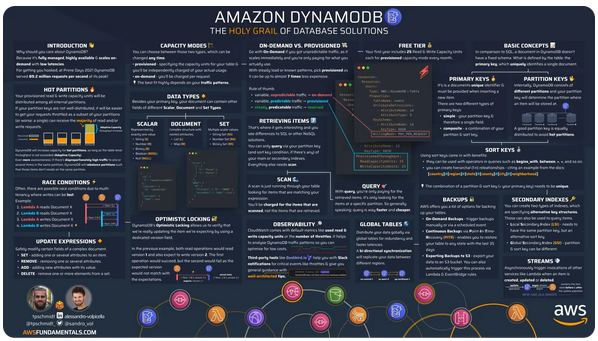
AWS Fundamentals – The second edition of this awesome book, AWS for the Real World, Not for Certifications, is now available. In addition to more than 400 pages that cover 16 vital AWS services, each chapter includes a detailed and attractive infographic. Here’s a small-scale sample:

More posts from AWS blogs  – Here are a few posts from some of the other AWS and cloud blogs that I follow:

Upcoming AWS Events
Check your calendars and sign up for these AWS events:

AWS End User Computing Innovation Day, Sept. 13 – The one-day virtual event is designed to help IT teams tasked with providing the tools employees need to do their jobs, especially in today’s challenging times. Learn more.

AWS Global Summits, Sept. 26 – The last in-person AWS Summit will be held in Johannesburg on Sept. 26th. You can also watch on-demand videos of the latest Summit events such as Berlin, Bogotá, Paris, Seoul, Sydney, Tel Aviv, and Washington DC in the AWS YouTube channels.

CDK Day, Sept. 29 – A community-led fully virtual event with tracks in English and Spanish about CDK and related projects. Learn more at the website.

AWS re:Invent, Nov. 27-Dec. 1 – AWS re:Invent 2023Ready to start planning your re:Invent? Browse the session catalog now. Join us to hear the latest from AWS, learn from experts, and connect with the global cloud community.

AWS Community Days, multiple dates AWS Community Day– Join a community-led conference run by AWS user group leaders in your region: Munich (Sept. 14), Argentina (Sept. 16), Spain (Sept. 23), Peru (Sept. 30), and Chile (Sept. 30). Visit the landing page to check out all the upcoming AWS Community Days.

You can browse all upcoming AWS-led in-person and virtual events, and developer-focused events such as AWS DevDay.

— Jeff;

This post is part of our Weekly Roundup series. Check back each week for a quick roundup of interesting news and announcements from AWS!

MLPerf Inference v3.1 Shows NVIDIA Grace Hopper and a Cool AMD TPU v5e Win

Post Syndicated from Cliff Robinson original https://www.servethehome.com/mlperf-inference-v3-1-shows-nvidia-grace-hopper-and-a-cool-amd-tpu-v5e-win/

NVIDIA’s MLPerf Inference v3.1 is out. Two standouts were NVIDIA setting the stage to jettison x86 and AMD having a big win at Google

The post MLPerf Inference v3.1 Shows NVIDIA Grace Hopper and a Cool AMD TPU v5e Win appeared first on ServeTheHome.

ВИДЕОИНТЕРВЮ и документи на “Биволъ” Фирми на ГЕРБ и кметът им “в сянка” – отговорни за жертвите в Царево, сигналите се смачкват

Post Syndicated from Екип на Биволъ original https://bivol.bg/gerb-syanka-bivol.html

понеделник 11 септември 2023


Смея да твърдя, че ако беше обърнато внимание поне на част от моите сигнали, отнетите човешки животи и щетите щяха да бъдат по-малки. Това заяви в ексклузивно интервю за “Биволъ”…

[$] The rest of the 6.6 merge window

Post Syndicated from corbet original https://lwn.net/Articles/943245/

Linus Torvalds released
6.6-rc1
and closed the 6.6 merge window on September 10. At that
point, 12,230 non-merge changesets had been pulled into the mainline
repository, which is exactly 500 more than were pulled for 6.5 at this stage
in the cycle. Over 7,000 of those changes were pulled after our first-half summary was written; they
brought a fair amount of new functionality with them. Read on for an
overview of those changes.

Security updates for Monday

Post Syndicated from jake original https://lwn.net/Articles/944190/

Security updates have been issued by Debian (frr, kernel, libraw, mutt, and open-vm-tools), Fedora (cjose, pypy, vim, wireshark, and xrdp), Gentoo (apache), Mageia (chromium-browser-stable, clamav, ghostscript, librsvg, libtiff, openssl, poppler, postgresql, python-pypdf2, and unrar), Red Hat (flac), SUSE (firefox, geoipupdate, icu73_2, libssh2_org, rekor, skopeo, and webkit2gtk3), and Ubuntu (linux-azure, linux-azure-4.15, linux-azure-5.4, linux-gcp-5.4, linux-gkeop, linux-raspi, linux-raspi-5.4, linux-xilinx-zynqmp, linux-gcp, linux-gcp-6.2, linux-ibm, linux-oracle, linux-starfive, linux-gcp-5.15, linux-gkeop-5.15, and opendmarc).

On Robots Killing People

Post Syndicated from Bruce Schneier original https://www.schneier.com/blog/archives/2023/09/on-robots-killing-people.html

The robot revolution began long ago, and so did the killing. One day in 1979, a robot at a Ford Motor Company casting plant malfunctioned—human workers determined that it was not going fast enough. And so twenty-five-year-old Robert Williams was asked to climb into a storage rack to help move things along. The one-ton robot continued to work silently, smashing into Williams’s head and instantly killing him. This was reportedly the first incident in which a robot killed a human; many more would follow.

At Kawasaki Heavy Industries in 1981, Kenji Urada died in similar circumstances. A malfunctioning robot he went to inspect killed him when he obstructed its path, according to Gabriel Hallevy in his 2013 book, When Robots Kill: Artificial Intelligence Under Criminal Law. As Hallevy puts it, the robot simply determined that “the most efficient way to eliminate the threat was to push the worker into an adjacent machine.” From 1992 to 2017, workplace robots were responsible for 41 recorded deaths in the United States—and that’s likely an underestimate, especially when you consider knock-on effects from automation, such as job loss. A robotic anti-aircraft cannon killed nine South African soldiers in 2007 when a possible software failure led the machine to swing itself wildly and fire dozens of lethal rounds in less than a second. In a 2018 trial, a medical robot was implicated in killing Stephen Pettitt during a routine operation that had occurred a few years earlier.

You get the picture. Robots—”intelligent” and not—have been killing people for decades. And the development of more advanced artificial intelligence has only increased the potential for machines to cause harm. Self-driving cars are already on American streets, and robotic "dogs" are being used by law enforcement. Computerized systems are being given the capabilities to use tools, allowing them to directly affect the physical world. Why worry about the theoretical emergence of an all-powerful, superintelligent program when more immediate problems are at our doorstep? Regulation must push companies toward safe innovation and innovation in safety. We are not there yet.

Historically, major disasters have needed to occur to spur regulation—the types of disasters we would ideally foresee and avoid in today’s AI paradigm. The 1905 Grover Shoe Factory disaster led to regulations governing the safe operation of steam boilers. At the time, companies claimed that large steam-automation machines were too complex to rush safety regulations. This, of course, led to overlooked safety flaws and escalating disasters. It wasn’t until the American Society of Mechanical Engineers demanded risk analysis and transparency that dangers from these huge tanks of boiling water, once considered mystifying, were made easily understandable. The 1911 Triangle Shirtwaist Factory fire led to regulations on sprinkler systems and emergency exits. And the preventable 1912 sinking of the Titanic resulted in new regulations on lifeboats, safety audits, and on-ship radios.

Perhaps the best analogy is the evolution of the Federal Aviation Administration. Fatalities in the first decades of aviation forced regulation, which required new developments in both law and technology. Starting with the Air Commerce Act of 1926, Congress recognized that the integration of aerospace tech into people’s lives and our economy demanded the highest scrutiny. Today, every airline crash is closely examined, motivating new technologies and procedures.

Any regulation of industrial robots stems from existing industrial regulation, which has been evolving for many decades. The Occupational Safety and Health Act of 1970 established safety standards for machinery, and the Robotic Industries Association, now merged into the Association for Advancing Automation, has been instrumental in developing and updating specific robot-safety standards since its founding in 1974. Those standards, with obscure names such as R15.06 and ISO 10218, emphasize inherent safe design, protective measures, and rigorous risk assessments for industrial robots.

But as technology continues to change, the government needs to more clearly regulate how and when robots can be used in society. Laws need to clarify who is responsible, and what the legal consequences are, when a robot’s actions result in harm. Yes, accidents happen. But the lessons of aviation and workplace safety demonstrate that accidents are preventable when they are openly discussed and subjected to proper expert scrutiny.

AI and robotics companies don’t want this to happen. OpenAI, for example, has reportedly fought to “water down” safety regulations and reduce AI-quality requirements. According to an article in Time, it lobbied European Union officials against classifying models like ChatGPT as “high risk” which would have brought “stringent legal requirements including transparency, traceability, and human oversight.” The reasoning was supposedly that OpenAI did not intend to put its products to high-risk use—a logical twist akin to the Titanic owners lobbying that the ship should not be inspected for lifeboats on the principle that it was a “general purpose” vessel that also could sail in warm waters where there were no icebergs and people could float for days. (OpenAI did not comment when asked about its stance on regulation; previously, it has said that “achieving our mission requires that we work to mitigate both current and longer-term risks,” and that it is working toward that goal by “collaborating with policymakers, researchers and users.”)

Large corporations have a tendency to develop computer technologies to self-servingly shift the burdens of their own shortcomings onto society at large, or to claim that safety regulations protecting society impose an unjust cost on corporations themselves, or that security baselines stifle innovation. We’ve heard it all before, and we should be extremely skeptical of such claims. Today’s AI-related robot deaths are no different from the robot accidents of the past. Those industrial robots malfunctioned, and human operators trying to assist were killed in unexpected ways. Since the first-known death resulting from the feature in January 2016, Tesla’s Autopilot has been implicated in more than 40 deaths according to official report estimates. Malfunctioning Teslas on Autopilot have deviated from their advertised capabilities by misreading road markings, suddenly veering into other cars or trees, crashing into well-marked service vehicles, or ignoring red lights, stop signs, and crosswalks. We’re concerned that AI-controlled robots already are moving beyond accidental killing in the name of efficiency and “deciding” to kill someone in order to achieve opaque and remotely controlled objectives.

As we move into a future where robots are becoming integral to our lives, we can’t forget that safety is a crucial part of innovation. True technological progress comes from applying comprehensive safety standards across technologies, even in the realm of the most futuristic and captivating robotic visions. By learning lessons from past fatalities, we can enhance safety protocols, rectify design flaws, and prevent further unnecessary loss of life.

For example, the UK government already sets out statements that safety matters. Lawmakers must reach further back in history to become more future-focused on what we must demand right now: modeling threats, calculating potential scenarios, enabling technical blueprints, and ensuring responsible engineering for building within parameters that protect society at large. Decades of experience have given us the empirical evidence to guide our actions toward a safer future with robots. Now we need the political will to regulate.

This essay was written with Davi Ottenheimer, and previously appeared on Atlantic.com.

The collective thoughts of the interwebz