Post Syndicated from The Atlantic original https://www.youtube.com/watch?v=1mst1-pLJaA
The Atlantic Festival Ideas Stage – Day Three
Post Syndicated from The Atlantic original https://www.youtube.com/watch?v=Fh24CARKouk
What’s the Diff: SSD vs. NVMe vs. M.2 Drives
Post Syndicated from Lora Maslenitsyna original https://backblaze.com/blog/nvme-vs-m-2-drives/

Storage technology has certainly changed over time, with new storage mediums taking aim at what’s become the industry standard: the hard disk drive (HDD). Of all the challengers, solid state drives (SSDs) are the most widely-adopted and likely to take the top spot—they’re fast, quiet, and retain information when they’re powered off (so you can just pop open your laptop and get back in the groove).
Yes, they’re more expensive than traditional hard disk drives, but there’s value in their much faster read/write speeds, and they’re arguably more reliable depending on your use case in the long term. Even with those benefits, that’s not to say HDDs are obsolete, just that there is good reason to upgrade to SSDs in many cases. The decision from the judges: These two contenders get to share the spotlight, and you get to decide which drive works best for your needs.
Once you’ve made the decision to invest in an SSD, you’ll have to choose the form factor and possibly the interface. In this post we’ll cover some basics about SSDs that should help you choose which type of SSD is best for you, including:
- What is an SSD?
- What is a SATA SSD?
- What is an M.2 SSD?
- What is an MSATA SSD?
- What is an U.2 SSD?
- What is an NVMe SSD?
- Which SSD is right for you?
A Brief Introduction to SSDs
SSDs are storage devices that use NAND-based flash memory to store data. They are now standard issue for most computers, as is the case across Apple’s line of Macs. Unlike traditional hard disk drives (HDDs), which store data on spinning disks, SSDs have no moving parts, which makes them faster, more reliable, and less prone to mechanical failures.
SSDs have become so common mainly because they are faster in terms of read/write speeds versus hard drives. This means that they can access and transfer data much more quickly. This makes them an ideal choice for use in high-performance computers, servers, and other devices that require fast data access and transfer speeds. They also use less power and are available at different form factors, such as 2.5” and M.2, so they can be used in a range of devices. You can read more about the difference between SSDs and HDDs in this post.
One downside of SSDs is that they tend to be more expensive than HDDs, especially when it comes to larger storage capacities. However, as the cost of flash memory continues to decrease, SSDs are becoming more affordable and accessible for everyday consumers. Comparatively speaking, they also have a more limited write cycle. While you usually don’t run into this limitation as a typical computer user, if you’re constantly saving large files like you would if you’re working with media files, for instance, it’s something to consider.
Additionally, it can be harder to tell when an SSD is failing (no spinning disks to whir furiously at you), which means you’ll want to make sure you’re effectively monitoring your drives and backing up.
What Is a SATA SSD?
A Serial Advanced Technology Attachment (SATA) is the standard storage interface used in many computers. A SATA SSD is an SSD equipped with a SATA interface to connect the storage device to a computer’s motherboard. The SATA SSD comes in the standard 2.5 inch form factor and has both power and data (SATA) connectors. If you buy an SSD external drive to connect to your PC, there will most likely be a SATA SSD inside.
Generally, the SATA SSD is the least expensive type of SSD, all other factors being equal. This makes a great choice to get an instant performance boost out of your HDD-based computer, or add an external drive that can read and write data more quickly.
One thing to know about external SSD drives is that they should not be disconnected from your computer and stored away for long periods of time. Anything over a year is too long, and as the drive gets older it needs to be plugged in even more often. If you do want to use your SSD for long-term archival storage and have it disconnected from your main devices (air gap, anyone?), then it’s a good idea to either store them with about 50% charge, or power on the SSD every few months to refresh the charge.

What Is an NVMe?
Non-Volatile Memory Express (NVMe) is a storage protocol that offers high-speed and efficient communication between a computer’s CPU and SSDs. Drives that use NVMe were introduced in 2013 to attach to the Peripheral Component Interconnect Express (PCIe) slot directly on a motherboard instead of using the traditional SATA interface typically used by HDDs and older SSDs. Unlike SATA, which was originally designed for slower HDDs, NVMe takes advantage of the low-latency and high-speed capabilities of SSDs. NVMe drives can usually deliver a sustained read-write speed of 4.0 GB/s in contrast with SATA SSDs that limit at 600 MB/s. Since NVMe SSDs can reach higher speeds and handle multiple data transfers simultaneously, it makes them ideal for gaming, high-resolution video editing, and applications that require high-performance storage, such as enterprise databases, virtualization, and data analytics.
Their high speeds come at a high cost, however: NVMe drives are some of the more expensive drives on the market.

To sum up our analysis on storage protocols in SSDs, here’s a handy chart:
| Feature | SATA | NVMe |
|---|---|---|
| Interface | Serial Advancement Technology Attachment | Non-Volatile Memory Express |
| Bus | SATA bus | PCIe bus |
| Data Transfer Speeds | Slower (up to 600 MB/s) | Faster (typically 3000 MB/s and up to 7,500 MB/s) |
| Latency | Higher | Lower |
| Scalability | Limited | Scalable |
What Are M.2 Drives?
M.2 drives, also known as Next Generation Form Factor (NGFF) drives, are a type of SSD that uses the M.2 interface to connect directly into a computer’s motherboard without the need for cables. M.2 is a form factor, which refers to the standard size of a component. So, while we’re comparing NVMe to SATA in storage protocol above, a direct comparison for the M.2 SSD is a traditional, 2.5 inch SSD.
M.2 SSDs are significantly smaller than traditional, 2.5 inch SSDs. Because they can use either SATA or NVMe to connect to the motherboard, they have the potential to be much faster when they’re utilizing the latter. They’re also more power-efficient than other types of SSDs, which improves battery life in portable devices. Because they take up less space while delivering all of the above, M.2 drives have become popular in gaming setups. (Game on, friends.)
Even at this smaller size, M.2 SSDs are able to hold as much data as other SSDs, ranging up to 8TB in storage size. But, while they can hold just as much data and are generally faster than other SSDs, they also come at a higher cost. As the old adage goes, you can only have two of the following things: cheap, fast, or good.
M.2 drives are easy to install, and they can be added to most modern motherboards that have an M.2 slot. If your motherboard does not have an M.2 slot, you may be able to use an M.2 drive by using an adapter card that fits into a PCIe slot. So, before you run out and buy an M.2 SSD, you’ll need to know which interface your computer will accept, M.2 SATA or M.2 PCIe.

What Are mSATA Drives?
mSATA, or mini-SATA, is basically a smaller version of the full-size SATA SSD that is designed for smaller form factor systems where space is limited. The mSATA form factor is compact like M.2, but they are not interchangeable. Currently, mSATA drives only support the SATA interface.

What Are U.2 Drives?
U.2 drives look like a 2.5” drive but are a bit thicker, and they use a different connector that sends data through a PCIe interface. The U.2 SSD was developed to enable the newer and faster NVMe-based PCIe SSDs to plug into the same drive backplane as older SAS and SATA drives. This allows the drives to be hot-swappable, an especially useful feature in enterprise server and storage systems.

Which SSD Is Best to Use?
There are a few factors to consider in choosing which drive is best for you. As you compare the different components of your build, consider your technical constraints, budget, capacity needs, and speed priority.
Technical Constraints
Check the capability of your system before choosing a drive, as some older devices don’t have the components needed for NVMe connections. Also, check that you have enough PCIe connections to support multiple PCIe devices. Not enough lanes, or only specific lanes, means you may have to choose a different drive or that only one of your lanes will be able to connect to the NVMe drive at full speed.
The same advice holds if you’re adding an SSD to your NAS array. Most newer models will be compatible with adding an SSD, but you should always double check your NAS specs before you commit to a purchase. And remember: even though SSDs offer many benefits, especially when you’re looking to add caching or using your NAS for media workflows, there are several use cases where you’d see minimal advantage compared with an HDD, such as if you want a NAS to store large amounts of infrequently accessed files (i.e. in backup/archive scenarios).
Budget
If you plan to be making a lot of large file transfers or want to have the highest speeds for gaming, then an NVMe SSD is what you want. Until recently SATA SSDs were much more affordable options compared with NVMe drives, but that is changing rapidly. For example, at the time of publication, a Samsung 1TB SATA SSD (870 EVO) retails for $990 on Amazon, while a Samsung 1TB NVMe drive (970 EVO) is listed for $150only $98 on sale on Amazon. That said, those 8TB NVMe drives we talked about are running about $850+, depending on the manufacturer.
Drive Capacity
SATA drives usually range from 500GB to 16TB in storage capacity. Most M.2 drives top out at 2TB, although some may be available at 4TB and 8TB models at much higher prices.
Drive Speed
When choosing the right drive for your setup, remember that SATA M.2 drives and 2.5 inch SSDs provide the same level of speed, so to gain a performance increase, you will have to opt for the NVMe-connected drives. While NVMe SSDs are going to be much faster than SATA drives, you may also need to upgrade your processor to keep up or you may experience worse performance. Finally, remember to check read and write speeds on a drive as some earlier generations of NVMe drives can have different speeds.
Whatever You Choose, Back It Up
Before choosing a new drive, remember to back up all of your data. Backing up is essential as every drive will eventually fail and need to be replaced. The basis of a solid backup plan requires three copies of your data: one on your device, one backup saved locally, and one stored off-site. Storing a copy of your data in the cloud ensures that you’re able to retrieve it if any data loss occurs on your device.
Interested in learning more about other drive types or best ways to optimize your setup? Let us know in the comments below.
FAQs about NVMe vs. M.2 drives
What is the difference between NVMe and M.2 drives?
NVMe and M.2 are often used interchangeably, but they refer to different aspects of storage technology. Non-Volatile Memory Express (NVMe) drives attach to the Peripheral Component Interconnect Express (PCIe) slot directly on a motherboard instead of using the traditional SATA interface, resulting in higher data transfer speeds. M.2, on the other hand, is a physical form factor or connector used for SSDs. M.2 drives can support various storage interfaces, including NVMe, SATA, and others, providing flexibility in terms of compatibility and speed.
Which is faster, NVMe or M.2 drives?
NVMe and M.2 drives are not directly comparable in terms of speed because they refer to different aspects of storage technology. NVMe (Non-Volatile Memory Express) is a storage protocol that provides high-speed communication between the computer’s CPU and SSDs. It is designed to take full advantage of the capabilities of SSDs and can offer significantly faster data transfer speeds compared to traditional interfaces like SATA.
M.2, on the other hand, refers to a physical form factor or connector used for storage devices, including SSDs. M.2 drives can support various interfaces, including NVMe, SATA, and others. The speed of an M.2 drive depends on the specific interface it uses. NVMe M.2 drives, which utilize the NVMe protocol, can provide faster speeds compared to M.2 drives that use the SATA interface.
In summary, NVMe is a storage protocol that can be implemented in various form factors, including M.2, and NVMe drives tend to offer faster speeds compared to M.2 drives that utilize the SATA interface.
Can NVMe be used in any M.2 slot?
NVMe drives can generally be used in M.2 slots, but it is important to ensure compatibility with the specific M.2 slot on your motherboard. M.2 slots can support different types of interfaces, including SATA and NVMe.
What are the advantages of NVMe in M.2 drives?
NVMe (Non-Volatile Memory Express) is a storage protocol that can be implemented through various form factors, one of which is M.2.
The main advantage of NVMe technology is its high-speed data transfer capabilities. Compared to traditional storage interfaces like SATA, NVMe provides significantly faster performance. It leverages the Peripheral Component Interconnect Express (PCIe) interface, allowing for direct communication between the CPU and the SSD. This results in reduced latency and improved overall system responsiveness.
M.2, on the other hand, is a physical form factor or connector that can support various interfaces, including SATA and NVMe. M.2 drives can accommodate NVMe SSDs, allowing them to take advantage of the faster speeds provided by the NVMe protocol. In addition to the ability to utilize a faster NVMe protocol, the advantages of an M.2 size are its small size and easy direct-to-motherboard installation.
Are NVMe drives more expensive than SATA drives?
Until recently SATA SSDs were much more affordable options compared with NVMe drives, but that is changing rapidly. For example, as of June 2023, a Samsung 1TB SATA SSD (870 EVO) retails for $90 on Amazon, while a Samsung 1TB NVMe drive (970 EVO) is listed for only $98 on sale on Amazon. Prices are now comparable.
The post What’s the Diff: SSD vs. NVMe vs. M.2 Drives appeared first on Backblaze Blog | Cloud Storage & Cloud Backup
Travis CI flaw exposed secrets of thousands of open source projects (ars technica)
Post Syndicated from original https://lwn.net/Articles/869388/rss
This
ars technica article describes a problem with the Travis
continuous-integration service:
A security flaw in Travis CI potentially exposed the secrets of
thousands of open source projects that rely on the hosted
continuous integration service. Travis CI is a software-testing
solution used by over 900,000 open source projects and 600,000
users. A vulnerability in the tool made it possible for secure
environment variables—signing keys, access credentials, and API
tokens of all public open source projects—to be exfiltrated.
Any project storing secrets in this service would be well advised to
replace them.
The Atlantic Festival Ideas Stage – Day Two
Post Syndicated from The Atlantic original https://www.youtube.com/watch?v=_MN-WJ56o18
The Atlantic Festival Ideas Stage – Day One
Post Syndicated from The Atlantic original https://www.youtube.com/watch?v=fp9oECXLYFQ
[$] The Rust for Linux project
Post Syndicated from original https://lwn.net/Articles/869145/rss
The first ever Rust for Linux conference, known as Kangrejos, got underway on
September 13. Organizer Miguel Ojeda used the opening session to give
an overview of why there is interest in using Rust in the kernel, where the
challenges are, and what the current status is. The talk and following
discussion provided a good overview of what is driving this initiative and
where some of the sticking points might be.
The Ransomware Killchain: How It Works, and How to Protect Your Systems
Post Syndicated from Erick Galinkin original https://blog.rapid7.com/2021/09/16/the-ransomware-killchain-how-it-works-and-how-to-protect-your-systems/

Much ado has been made (by this very author on this very blog!) about the incentives for attackers and defenders around ransomware. There is also a wealth of information on the internet about how to protect yourself from ransomware. One thing we want to avoid losing sight of, however, is just how we go from a machine that is working perfectly fine to one that is completely inoperable due to ransomware. We’ll use MITRE’s ATT&CK as a vague guide, but we don’t follow it exactly.
Ransomware targeting and delivery
As LockFile is ravaging Exchange servers just a few short weeks after widespread exploitation was documented, we can draw two conclusions:
- If you’re running an Exchange server, please stop reading this blog and go patch right away.
- When a widely exploitable vulnerability is available, ransomware actors will target it — no matter who you are.
Highly targeted attacks have certainly leveraged ransomware, but for nearly all of these actors, the goal is profit. That means widespread scanning for and exploitation of server-side vulnerabilities that allow for initial access, coupled with tools for privilege escalation and lateral movement. It also means the use of watering hole attacks, exploit kits, and spam campaigns.
That is to say, there are a few ways the initial access to a particular machine can come about, including through:
- Server-side vulnerability
- Lateral movement
- Watering hole or exploit kit
- Spam or phishing
The particular method tends to be subject to the availability of widely exploitable vulnerabilities and the preferences of the cybercrime group in question.
Droppers
The overwhelming majority of ransomware operators don’t directly drop the ransomware payload on a victim machine. Instead, the first stage tends to be something like TrickBot, Qbot, Dridex, Ursnif, BazarLoader, or some other dropper. Upon execution, the dropper will often disable detection and response software, extract credentials for lateral movement, and — crucially — download the second-stage payload.
This all happens quietly, and the second-stage payload may not be dropped immediately. In some cases, the dropper will drop a second-stage payload which is not ransomware — something like Cobalt Strike. This tends to happen more frequently in larger organizations, where the potential payoff is much greater. When something that appears to be a home computer is infected, actors will typically quickly encrypt the machine, demand a payment that they expect to be paid, and move on with their day.
Once the attacker has compromised to their heart’s content — one machine, one subnet, or every machine at an organization — they pull the trigger on the ransomware.
How ransomware works
By this point, nearly every security practitioner and many laypeople have a conceptual understanding of the mechanics of ransomware: A program encrypts some or all of your files, displays a message demanding payment, and (usually) sends a decryption key when the ransom is paid. But under the hood, how do these things happen? Once the dropper executes the ransomware, how does it work?
Launching the executable
The dropper will launch the executable. Typically, once it has achieved persistence and escalated privileges, the ransomware will either be injected into a running process or executed as a DLL. After successful injection or execution, the ransomware will build its imports and kill processes that could stop it. Many ransomware families will also delete all shadow copies and possible backups to maximize the damage.
The key
The first step of the encryption process is getting a key to actually encrypt the files with. Older and less advanced ransomware families will first reach out to a command and control server to request a key. Others come with built-in secret keys — these are typically easy to decrypt, with the right decrypter. Others still will use RSA or some other public key encryption so that no key needs to be imported. Many advanced families of ransomware today use both symmetric key encryption for speed and public key encryption to prevent defenders from intercepting the symmetric key.
For these modern families, an RSA public key is embedded in the executable, and an AES key is generated on the victim machine. Then, the files are encrypted using AES, and the key is encrypted using the RSA public key. Therefore, if a victim pays the ransom, they’re paying for the private key to decrypt the key that was used to encrypt all of their files.
Encryption
Once the right key is in place, the ransomware begins encryption of the filesystem. Sometimes, this is file-by-file. In other cases, they encrypt blocks of bytes on the system directly. In both cases, the end result is the same — an encrypted filesystem and a ransom note requesting payment for the decryption key.
Payment and decryption
The typical “business” transaction involves sending a certain amount of bitcoin to a specified wallet and proof of payment. Then, the hackers provide their private key and a decryption utility to the victim. In most cases, the attackers actually do follow through on giving decryption keys, though we have recently seen a rise in double encryption, where two payments need to be made.
Once the ransom is paid and the files are decrypted, the real work begins.
Recovery
Recovering encrypted files is an important part of the ransomware recovery process, and whether you pay for decryption, use an available decrypter, or some other method, there’s a catch to all of it. The attackers can still be in your environment.
As mentioned, in all but the least interesting cases (one machine on one home network), attackers are looking for lateral movement, and they’re looking to establish persistence. That means that even after the files have been decrypted, you will need to scour your entire environment for residual backdoors, cobalt strike deployments, stolen credentials, and so on. A full-scale incident response is warranted.
Even beyond the cost of paying the ransom, this can be an extremely expensive endeavor. Reimaging systems, resetting passwords throughout an organization, and performing threat hunting is a lot of work, but it’s necessary. Ultimately, failing to expunge the attacker from all of your systems means that if they want to double dip on your willingness to pay (especially if you paid them!), they just have to walk through the back door.
Proactive ransomware defense
Ransomware is a popular tactic for cybercrime organizations and shows no signs of slowing down. Unlike intellectual property theft or other forms of cybercrime, ransomware is typically an attack of opportunity and is therefore a threat to organizations of all sizes and industries. By understanding the different parts of the ransomware killchain, we can identify places to plug into the process and mitigate the issue.
Patching vulnerable systems and knowing your attack surface is a good first step in this process. Educating your staff on phishing emails, the threats of enabling macros, and other security knowledge can also help prevent the initial access.
The use of two-factor authentication, disabling of unnecessary or known-insecure services, and other standard hardening measures can help limit the spread of lateral movement. Additionally, having a security program that identifies and responds to threats in your environment is crucial for controlling the movement of attackers.
Having off-site backups is a really important step in this process as well. Between double extortion and the possibility that the group that attacked your organization and encrypted your files just isn’t an honest broker, there are many ways that things could go wrong after you’ve decided to pay the ransom. This can also make the incident response process easier, since the backup images themselves can be checked for signs of intrusion.
Security updates for Thursday
Post Syndicated from original https://lwn.net/Articles/869380/rss
Security updates have been issued by Debian (sssd), Fedora (libtpms and vim), openSUSE (kernel and php7-pear), Oracle (kernel), Slackware (curl), and Ubuntu (libgcrypt20 and squashfs-tools).
Early Hints: How Cloudflare Can Improve Website Load Times by 30%
Post Syndicated from Alex Krivit original https://blog.cloudflare.com/early-hints/


Want to know a secret about Internet performance? Browsers spend an inordinate amount of time twiddling their thumbs waiting to be told what to do. This waiting impacts page load performance. Today, we’re excited to announce support for Early Hints, which dramatically improves browser page load performance and reduces thumb-twiddling time.
In initial tests using Early Hints, we have observed more than 30% improvement to page load time for browsers visiting a website for the first time.
Early Hints is available in beta today — Cloudflare customers can request access to Early Hints in the dashboard’s Speed tab. It’s free for all customers because we think the web should be fast!
Early Hints in a nutshell
Browsers need instructions for what to render and what resources need to be fetched to complete “painting” a given web page. These instructions come from a server response. But the servers sending these responses often need time to compile these resources — this is known as “server think time.” While the servers are busy during this time… browsers sit idle and wait.
Early Hints takes advantage of “server think time” to asynchronously send instructions to the browser to begin loading resources while the origin server is compiling the full response. By sending these hints to a browser before the full response is prepared, the browser can figure out what it needs to do to load the webpage faster for the end user. Faster page loads and lower user-perceived latency means happier users!
More formally, Early Hints is a web standard that defines a new HTTP status code (103 Early Hints) that defines new interactions between a client and server. 103s are served to clients while a 200 OK (or error) response is being prepared (the so-called “server think time”), and contain hints on which assets will likely be needed to fully render the web page. This hinting speeds up page loads and generally reduces user-perceived latency.
Sending hints on which assets to expect before the entire response is compiled allows the browser to use think time (when it would otherwise have been waiting) to fetch needed assets, prepare parts of the displayed page, and otherwise get ready for the full response to be returned.

Cloudflare, as an edge network that sits in between client and server, is well positioned to issue these hints to clients on servers’ behalf. This is true for a few reasons:
- 103 is an experimental status code that origins may not be able to emit on their own, mostly for legacy reasons. Much of the machinery that powers the web incorrectly assumes that HTTP requests always correspond 1:1 with HTTP responses. This mistaken premise is baked into most HTTP server software, making it difficult for origin servers to emit Early Hints 103 responses prior to a “final” 200 OK response.
Cloudflare edge servers handling this complexity on behalf of our customers neatly sidesteps these technical challenges and gets the adoption flywheel spinning faster on this exciting new technology (more on this flywheel later).
- Cloudflare’s edge is very close to end users. This means we can serve hints very quickly, filling even the smallest of server think blocks with useful information the client can use to get a jump start on loading assets.
- Cloudflare already sees request and response flow from our customers. We use this data to generate hints automatically, without a customer needing to make any origin changes at all.
How can we speed up “slow” dynamic page loads?
The typical request/response cycle between browsers and servers leaves a lot of room for optimization. When you type an address into the search bar of your browser and press Enter, a series of things happen to get you the content you need, as quickly as possible. Your browser first converts the hostname in the URL into an IP address, then establishes an initial connection to the server where the content is stored.
After the connection is established, the actual request is sent. This is often a GET request with a bunch of information about what the browser can and cannot display to the end user. Following the request, the browser must wait for the origin server to send the first bytes of the response before it begins to render the page. In this time, the server is busy executing all sorts of business logic (looking things up in databases, personalizing the page, detecting fraud, etc.) before spitting a response out to the browser.
Once the response for the original HTML page is received, the browser then needs to parse the page, generate a Document Object Model (DOM), and begin loading subresources specified on the page, like images, scripts, and additional stylesheets.
Let’s take a look at this in action. Below is the performance waterfall for a checkout page on pinecoffeesupply.com, a coffee shop with a storefront on Shopify:
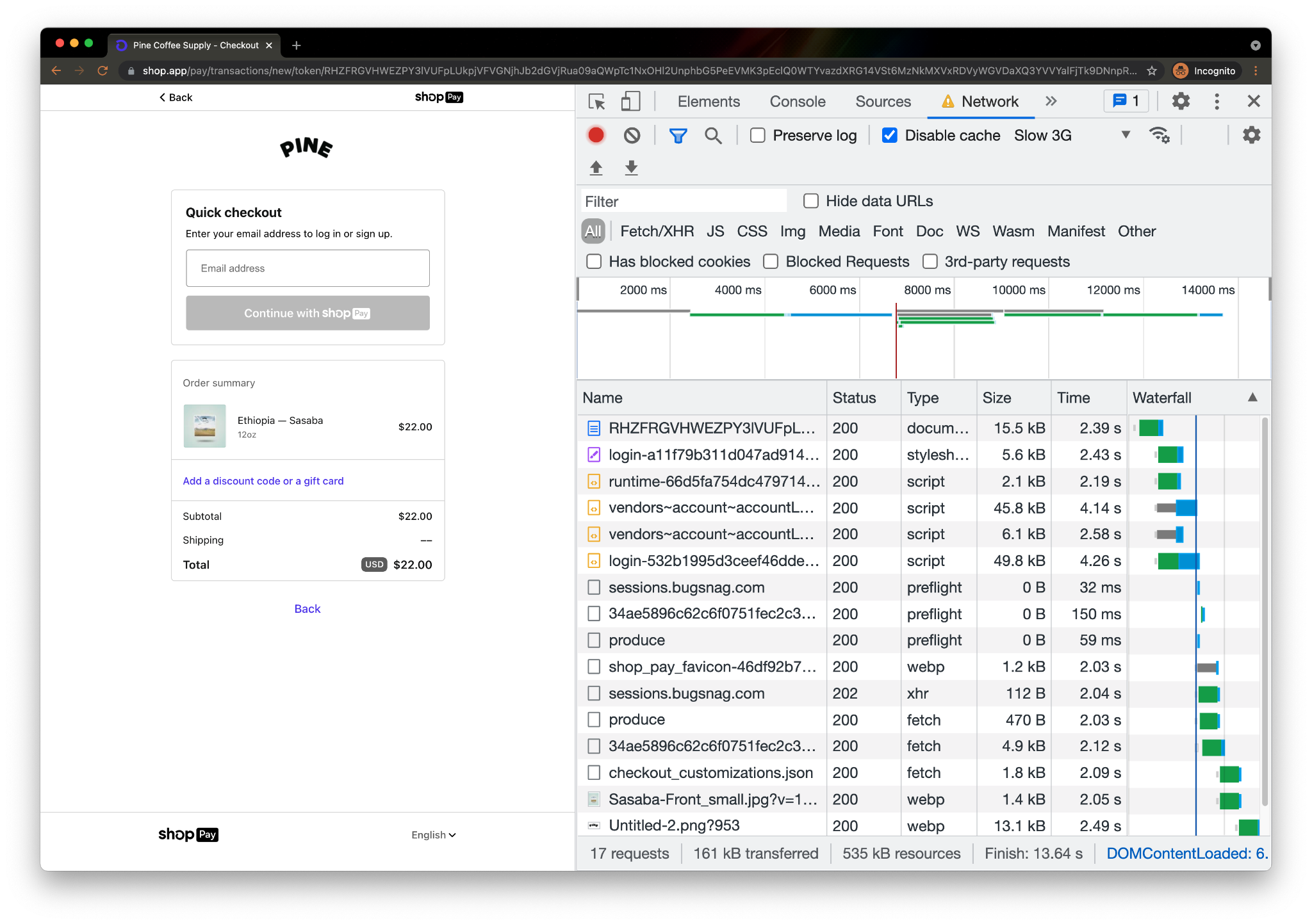
Page rendering cannot complete (and the shopper can’t get their coffee fix, and the coffee shop can’t get paid!) until key assets are loaded. Information on subresources needed for the browser to load the page aren’t available until the server has thought about and returned the initial response (the first document in the above table). In the above example, the page load could have been accelerated had the browser known, prior to receiving the full response, that the stylesheet and the four subsequent scripts will be needed to render the page.
Attempting to parallelize this dependency is what Early Hints is all about — productively using that “server think time” to help get the browser going on critical steps to render the page before the full server response arrives. The green “thinking” bar overlaps with the blue “content download” bar, allowing both the browser and server to be preparing the page at the same time. No more waiting. This is what Early Hints is all about!
“Entrepreneurs know that first impressions matter. Shopify’s own data shows that on average, when a store improves the speed of the first page in the buyer journey by 10%, there is a 7% increase in conversion. We see great promise in Early Hints being another tool to help improve the performance and experience for all merchants and customers.”
— Colin Bendell, Director Performance Engineering at Shopify
How does Early Hints speed things up?
Early Hints is a status code used in non-final HTTP responses. It is designed to speed up overall page load times by giving the browser an early signal about what certain linked assets might appear in the final response. The browser takes those hints and begins preparing the page for when the final 200 OK response from the server arrives.
The RFC provides this example of how the request/response cycle will look with Early Hints:
Client request:
GET / HTTP/1.1
Host: example.com
Server responses:
Early Hint Response
HTTP/1.1 103 Early Hints
     Link: </style.css>; rel=preload; as=style
Link: </script.js>; rel=preload; as=script⏱…Server Think Time… ⏱
Full Response
HTTP/1.1 200 OK
     Date: Thurs, 16 Sept 2021 11:30:00 GMT
     Content-Length: 1234
     Content-Type: text/html; charset=utf-8
     Link: </style.css>; rel=preload; as=style
     Link: </script.js>; rel=preload; as=script

[Rest of Response]
Seems simple enough. We’ve neatly communicated information to the browser on what resources it should consider preloading while the server is computing a full response.
This isn’t a new idea though!
Didn’t server push try to solve this problem?
There have been previous attempts at solving this problem, notably HTTP/2 “server push”. However, server push suffered from two major problems:
Server push sent the wrong bytes at the wrong time
The server pushed assets to the client, without great awareness of what was already present in browser caches, without knowing how much “server think time” would elapse and how best to spend it. Web performance guru Pat Meenan summarized server push’s gotchas in a mail thread discussing Chrome’s intent to deprecate and remove server push support:
Push sounds like a great solution, particularly when it can be done intelligently to not push resources already in cache and if it can exactly only fill the wait time while a CDN edge goes back to an origin for the HTML but getting those conditions right in practice is extremely rare. In virtually every case I have seen, the pushed resources end up delaying the HTML itself, the CSS and other render-blocking resources. Delaying the HTML is particularly bad because it delays the browser’s discovery of all of the other resources on the page. Preload works with the normal document parsing and resource discovery, letting preloaded resources intermix with other important resources and giving the dev, browsers and origins more control over prioritization.
Early Hints avoids these issues by “hinting” (vs. push being dictatorial) to clients which assets they should load, allowing them to prioritize resource loads with more complete information about what they will likely need to render a page, what they have cached, and other heuristics.
Using Early Hints with “rel=preload” solves the unsolicited bytes problem, but can still suffer from the ordering issue (forcing clients to load the wrong bytes at the wrong time). Early Hints’ superpower may actually be its use in conjunction with “rel=preconnect”. Many pages load hundreds of third party resources, and setting up connections and TLS sessions with each outside origin is time (but not bandwidth) intensive. Setting up these third party origin connections early, during think time, has practical advantages for page loading experience without the potential collateral damage of using “rel=preload”.
Server push wasn’t broadly implemented
The other notable issue with Server Push was that browsers supported it, and some origin servers implemented the feature, but no major CDN products (Cloudflare’s included) deemed the feature promising enough to implement and support at scale. Support for standards like server push or Early Hints in each key piece of the web content supply chain is critical for mass adoption.
Cracking the chicken and egg problem

Standards like Early Hints often don’t get off the ground because of this chicken and egg problem: clients have no reason to support new standards without server support and servers have no reason to implement support without clients speaking their language. As previously discussed, Early Hints is particularly complicated for origins to directly support, because 103 is an unfamiliar status code and multiple responses to a single request may not be a well-supported pattern in common HTTP server and application stacks.
We’ve tackled this in a few ways:
- Close partnership with Google Chrome and other browser teams to build support for the same standard at the same time, ensuring a critical mass of adoption for Early Hints from day one.
- Developing ways for hints to be emitted by our edge to clients with support for the standard without requiring support for the standard from the origin. We’ve been fortunate to have a ready, willing, and able design partner in Shopify, whose performance engineering team has been instrumental in shaping our implementation and testing our production deployment.
We plan to support Early Hints in two ways: one enabled now, and the other coming soon.
Now: Turning 200 OK Link: headers into 103 Early Hints
To avoid requiring origins to emit 103 responses from their origins directly, we settled on an approach that takes advantage of something many customers already used to indicate which assets an HTML page depends on, the Link: response header.
- When Cloudflare gets a response from the origin, we will parse it for Link headers with preload or preconnect rel types. These rel types indicate to the browser that the asset should be loaded as soon as possible (preload), or that a connection should be established to the specified origin but no bytes should be transferred (preconnect).
- Cloudflare takes these headers and caches them at our edge, ready to be served as a 103 Early Hints payload.
- When subsequent requests come for that asset, we immediately send the browser the cached Early Hints response while proxying the request to the origin server to generate the full response.
- Cloudflare then proxies the full response from origin to the browser when it’s available.
- When the full response is available, it will contain Link headers (that’s how we started this whole story). We will compare the Link headers in the 200 response with the cached version to make sure that they are the most up to date. If they have changed since they’ve been cached, we will automatically purge the out-of-date Early Hints and re-cache the new ones.
Coming soon: Smart Early Hints generation at the edge
We’re working hard on the next version of Early Hints. Smart Early Hints will use machine learning to generate Early Hints even when there isn’t a Link header present in the response from which we can harvest a 103. By analyzing historical request/response cycles for our customers, we can infer what assets being preloaded would help browsers load a webpage more quickly.
Look for Smart Early Hints in the next few months.
Browser support
As previously mentioned, we’ve partnered closely with Google Chrome and other browser vendors to ensure that their implementations of Early Hints interoperate well with Cloudflare’s. Google Chrome, Microsoft Edge, and Mozilla Firefox have announced their intention to support Early Hints. Progress for this support can be tracked here and here. We expect more browsers to announce support soon.
Benchmarking the impact of Early Hints
Once you get accepted into the beta and enable the feature, you can see Early Hints in action using Google Chrome, version 94 or higher. As of Sept 16th 2021, the Chrome Dev channel is at version 94.
Testing Early Hints with Chrome version 94 or higher
Early Hints support is available in Chrome by running (assuming a Mac, but the same flag works on Windows or Linux):
open /Applications/Google\ Chrome\ Dev.app --args --enable-features=EarlyHintsPreloadForNavigation
Testing Early Hints with Web Page Test
- Open webpagetest.org (a free performance testing tool).
- Specify the desired test URL. It should have the necessary preload/preconnect rel types in the Link header of the response.
- Choose Chrome Canary (or any Chrome version higher than 94) for the browser
- Under advanced settings, select Chromium.
- At the bottom of the Chromium section there’s a command-line section where you should paste Chrome’s Early Hints flag:
--enable-features=EarlyHintsPreloadForNavigation.
- To see the page load comparison, you can remove this flag and Early Hints won’t be enabled.
You can also test via Chrome’s Origin Trials.
Using Web Page Test, we’ve been able to observe greater than 30% improvement to a page’s content loading in the browser as measured by Largest Contentful Paint (LCP). An example test filmstrip:
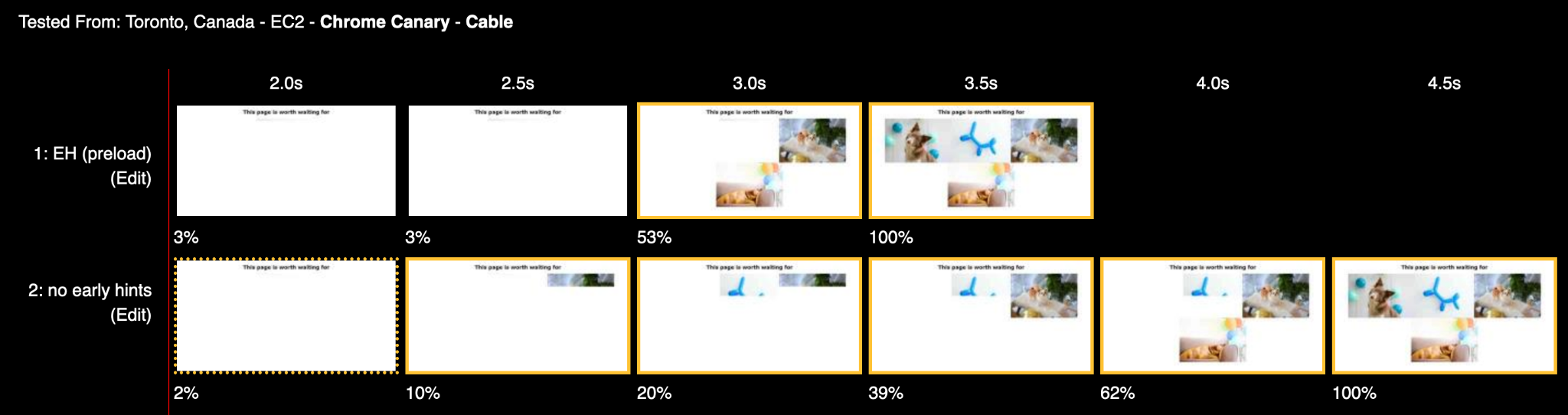
A few other considerations when testing…
- Chrome will not support Early Hints on HTTP/1.1 (or earlier protocols).
- Chrome will not support Early Hints on subresource requests.
- We encourage testers to see how different rel types improve performance along with other Cloudflare performance enhancements like Argo.
- It can be hard to see which resources are actually being loaded early as a result of Early Hints. Interrogating the ResourceTiming API will return initiator=EarlyHints for those assets.
Signing up for the Early Hints beta
Early Hints promises to revolutionize web performance. Support for the standard is live at our edge globally and is being tested by customers hungry for speed.
How to sign up for Cloudflare’s Early Hints beta:
- Sign in to your Cloudflare Account
- In the dashboard, navigate to Speed tab
- Click on the Optimization section
- Locate the Early Hints beta sign up card and request access. We’re enabling access for users on the beta list in batches.
Early Hints holds tremendous promise to speed up everyone’s experience on the web. It’s exactly the kind of product we like working on at Cloudflare and exactly the kind of feature we think should be free, for everyone. Be sure to check out the beta and let us know what you think.
You can explore our beta implementation in the Speed tab. And if you’re an engineer interested in improving the performance of the web for all, come join us!
The Zero Trust platform built for speed
Post Syndicated from Kenny Johnson original https://blog.cloudflare.com/the-zero-trust-platform-built-for-speed/
Cloudflare for Teams secures your company’s users, devices, and data — without slowing you down. Your team should not need to sacrifice performance in order to be secure. Unlike other vendors in the market, Cloudflare’s products not only avoid back hauling traffic and adding latency — they make your team faster.
We’ve accomplished this by building Cloudflare for Teams on Cloudflare. All the products in the Zero Trust platform build on the improvements and features we’re highlighting as part of Speed Week:
- Cloudflare for Teams replaces legacy private networks with Cloudflare’s network, a faster way to connect users to applications.
- Cloudflare’s Zero Trust decisions are enforced in Cloudflare Workers, the performant serverless platform that runs in every Cloudflare data center.
- The DNS filtering features in Cloudflare Gateway run on the same technology that powers 1.1.1.1, the world’s fastest recursive DNS resolver.
- Cloudflare’s Secure Web Gateway accelerates connections to the applications your team uses.
- The technology that powers Cloudflare Browser Isolation is fundamentally different compared to other approaches and the speed advantages demonstrate that.
We’re excited to share how each of these components work together to deliver a comprehensive Zero Trust platform that makes your team faster. All the tools we talk about below are available today, they’re easy to use (and get started with) — and they’re free for your first 50 users. If you want to sign up now, head over to the Teams Dashboard!
Shifting From an Old Model to a New, Much Faster One
Legacy access control slowed down teams
Most of our customers start their Zero Trust journey by replacing their legacy private network. Private networks, by default, trust users inside those networks. If a user is on the network, they are considered trusted and can reach other services unless explicitly blocked. Security teams hate that model. It creates a broad attack surface for internal and external bad actors. All they need to do is get network access.
Zero Trust solutions provide a more secure alternative where every request or connection is considered untrusted. Instead, users need to prove they should be able to reach the specific applications or services based on signals like identity, device posture, location and even multifactor method.
Cloudflare Access gives your team the ability to apply these rules, while also logging every event, as a full VPN replacement. Now instead of sneaking onto the network, a malicious user would need valid user credentials, a hard-key and company laptop to even get started.
It also makes your applications much, much faster by avoiding the legacy VPN backhaul requirement.
Private networks attempt to mirror a physical location. Deployments start inside the walls of an office building, for example. If a user was in the building, they could connect. When they left the building, they needed a Virtual Private Network (VPN) client. The VPN client punched a hole back into the private network and allowed the user to reach the same set of resources. If those resources also sat outside the office, the VPN became a slow backhaul requirement.
Some businesses address this by creating different VPN instances for their major hubs across the country or globe. However, they still need to ensure a fast and secure connection between major hubs and applications. This is typically done with dedicated MPLS connections to improve application performance. MPLS lines are both expensive and take IT resources to maintain.
When teams replace their VPN with a Zero Trust solution, they can and often do reduce the latency added by backhauling traffic through a VPN appliance. However, we think that “slightly faster” is not good enough. Cloudflare Access delivers your applications and services to end users on Cloudflare’s network while verifying every request to ensure the user is properly authenticated.
Cloudflare’s Zero Trust approach speeds teams up
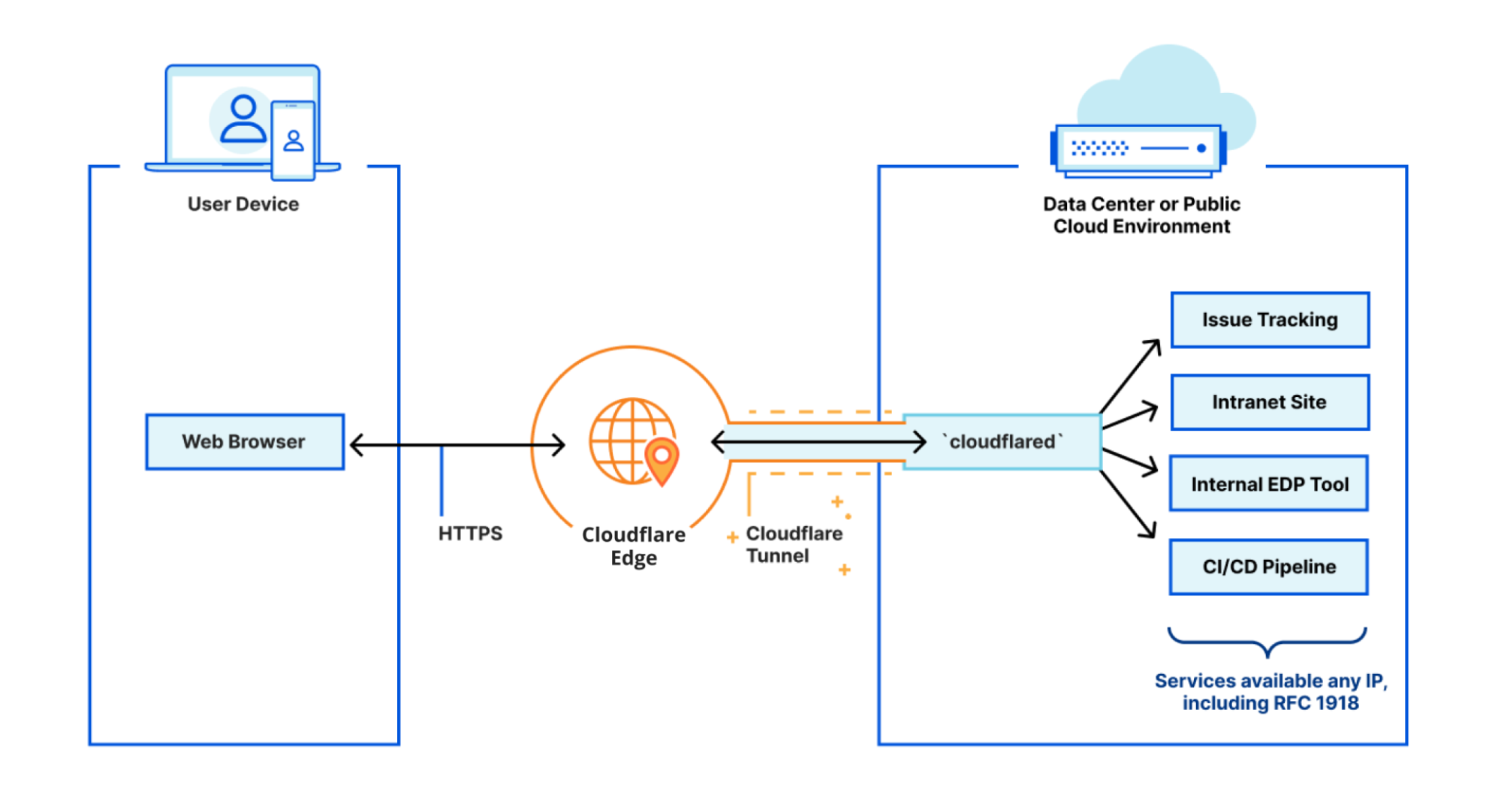
Organizations start by connecting their resources to Cloudflare’s network using Cloudflare Tunnel, a service that runs in your environment and creates outbound-only connections to Cloudflare’s edge. That service is powered by our Argo Smart Routing technology, which improves performance of web assets by 30% on average (Argo Smart Routing became even faster earlier this week).
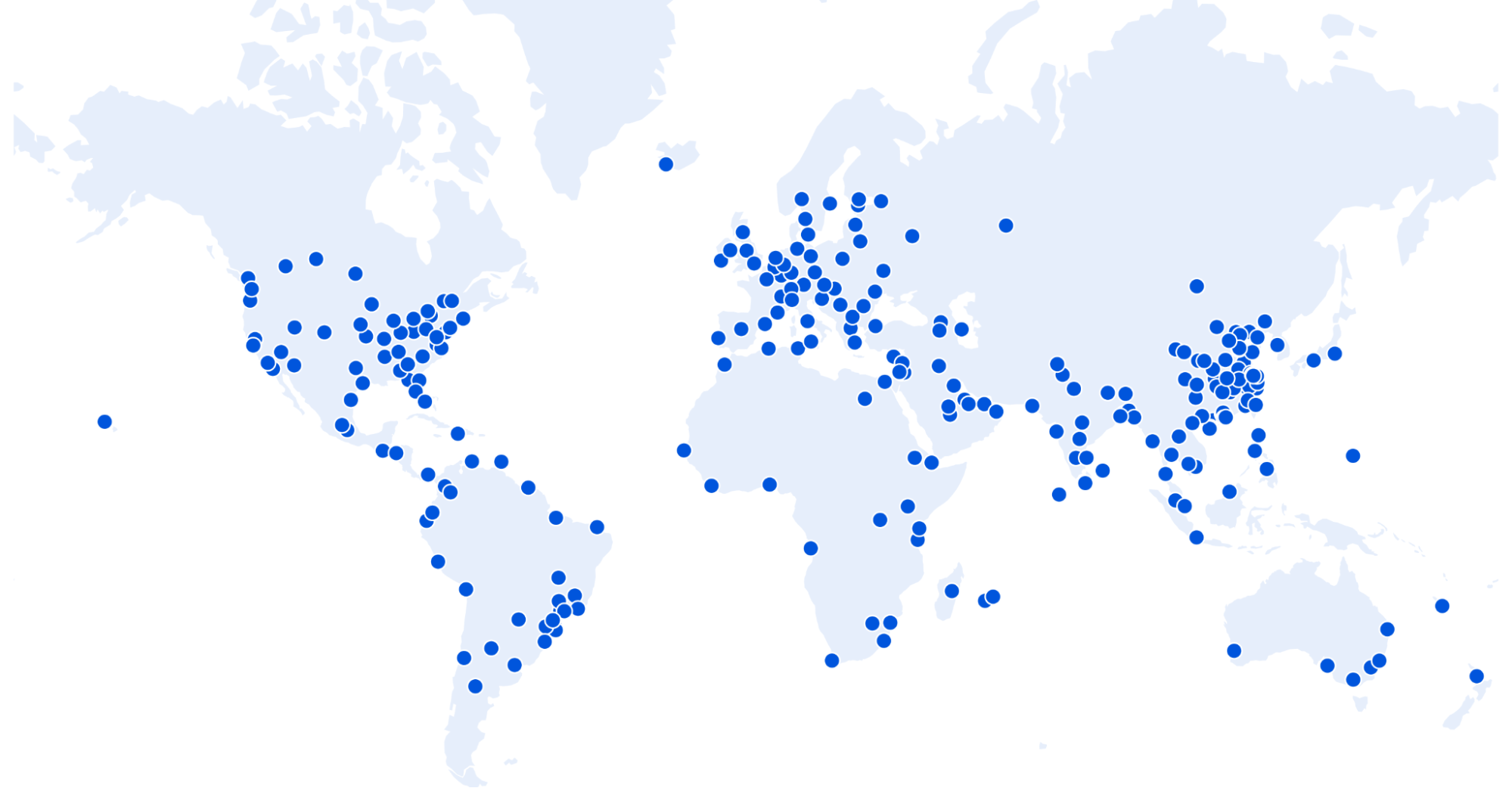
On the other side, users connect to Cloudflare’s network by reaching a data center near them in over 250 cities around the world. 95% of the entire Internet-connected world is now within 50 ms of a Cloudflare presence, and 80% of the entire Internet-connected world is within 20ms (for reference, it takes 300-400 ms for a human to blink).
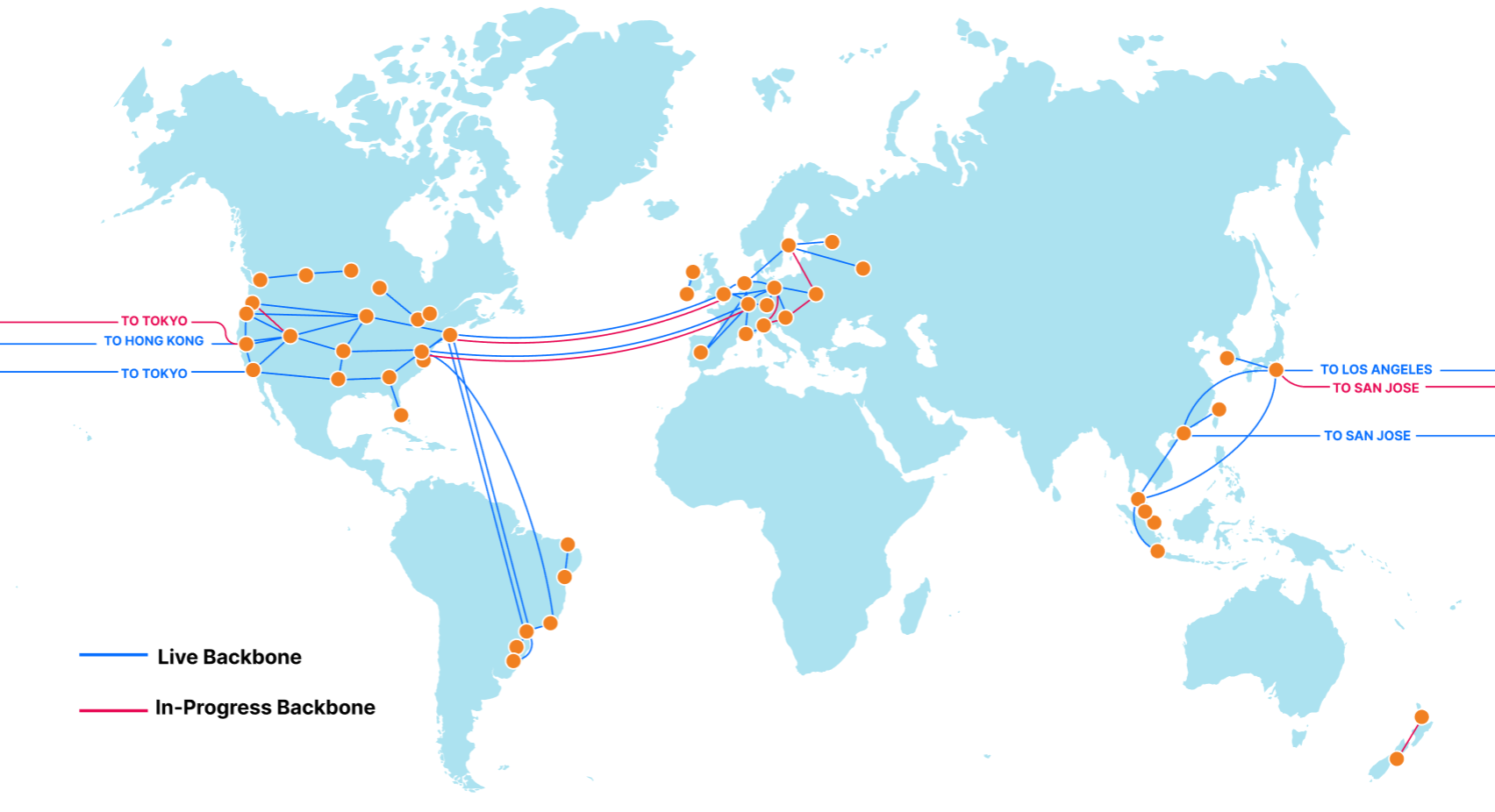
Finally, Cloudflare’s network finds the best route to get your users to your applications — regardless of where they are located, using Cloudflare’s global backbone. Our backbone consists of dedicated fiber optic lines and reserved portions of wavelength that connect Cloudflare data centers together. This is split approximately 55/45 between “metro” capacity, which redundantly connects data centers in which we have a presence, and “long-haul” capacity, which connects Cloudflare data centers in different cities. There are no individual VPN instances or MPLS lines, all a user needs to do is access their desired application and Cloudflare handles the logic to efficiently route their request.
When teams replace their private networks with Cloudflare, they accelerate the performance of the applications their employees need. However, the Zero Trust model also includes new security layers. Those safeguards should not slow you down, either — and on Cloudflare, they won’t.
Instant Zero Trust decisions built on the Internet’s most performant serverless platform, Workers
Cloudflare Access checks every request and connection against the rules that your administrators configure on a resource-by-resource basis. If users have not proved they should be able to reach a given resource, we begin evaluating their signals by taking steps like prompting them to authenticate with their identity/Sign-Sign On provider or checking their device for posture. If users meet all the criteria, we allow them to proceed.
Despite evaluating dozens of signals, we think this step should be near instantaneous to the user. To solve that problem, we built Cloudflare Access’ authentication layer entirely on Cloudflare Workers. Every application’s Access policies are stored and evaluated at every one of Cloudflare’s 250+ data centers. Instead of a user’s traffic having to be backhauled to an office and then to the application, traffic is routed from the closest data center to the user directly to their desired application.
As Rita Kozlov wrote earlier this week, Cloudflare Workers is the Internet’s fast serverless platform. Workers runs in every data center in Cloudflare’s network — meaning the authentication decision does not add more backhaul or get in the way of the network acceleration discussed above. In comparison to other serverless platforms, Cloudflare Workers is “210% faster than Lambda@Edge and 298% faster than Lambda.”
By building on Cloudflare Workers, we can authenticate user sessions to a given resource in less than three milliseconds on average. This also makes Access resilient — unlike a VPN that can go down and block user access, even if any Cloudflare data center goes offline, user requests are redirected to a nearby data center.
Filtering built on the same platform as the world’s fastest public DNS resolver
After securing internal resources, the next phase in a Zero Trust journey for many customers is to secure their users, devices, and data from external threats. Cloudflare Gateway helps organizations start by filtering DNS queries leaving devices and office networks.
When users navigate to a website or connect to a service, their device begins by making a DNS query to their DNS resolver. Most DNS resolvers respond with the IP of the hostname being requested. If the DNS resolver is aware of what hostnames on the Internet are dangerous, the resolver can instead keep the user safe by blocking the query.
Historically, organizations deployed DNS filtering solutions using appliances that sat inside their physical office. Similar to the private network challenges, users outside the office had to use a VPN to backhaul their traffic to the appliances in the office that provided DNS filtering and other security solutions.
That model has shifted to cloud-based solutions. However, those solutions are only as good as the speed of their DNS resolution and distribution of the data centers. Again, this is better for performance — but not yet good enough.
We wanted to bring DNS filtering closer to each user. When DNS queries are made from a device running Cloudflare Gateway, all requests are initially sent to a nearby Cloudflare data center. These DNS queries are then checked against a comprehensive list of known threats.
We’re able to do this faster than a traditional DNS filter because Cloudflare operates the world’s fastest public DNS resolver, 1.1.1.1. Cloudflare processes hundreds of billions of DNS queries per day and the users who choose 1.1.1.1 enjoy the fastest DNS resolution on the Internet and audited privacy guarantees.
Customers who secure their teams with Cloudflare Gateway benefit from the same improvements and optimizations that have kept 1.1.1.1 the fastest resolver on the Internet. When organizations begin filtering DNS with Cloudflare Gateway, they immediately improve the Internet experience for their employees compared to any other DNS resolver.
A Secure Web Gateway without performance penalties
In the kick-off post for Speed Week, we described how delivering a waitless Internet isn’t just about having ample bandwidth. The speed of light and round trips incurred by DNS, TLS and HTTP protocols can easily manifest into a degraded browsing experience.
To protect their teams from threats and data loss on the Internet, security teams inspect and filter traffic on a Virtual Private Network (VPN) and Secure Web Gateway (SWG). On an unfiltered Internet connection, your DNS, TLS and HTTP requests take a short trip from your browser to your local ISP which then sends the request to the target destination. With a filtered Internet connection, this traffic is instead sent from your local ISP to a centralized SWG hosted either on-premise or in a zero trust network — before eventually being dispatched to the end destination.
This centralization of Internet traffic introduces the tromboning effect, artificially degrading performance by forcing traffic to take longer paths to destinations even when the end destination is closer than the filtering service. This effect can be eliminated by performing filtering on a network that is interconnected directly with your ISP.
To quantify this point we again leveraged Catchpoint to measure zero trust network round trip time from a range of international cities. Based on public documentation we also measured publicly available endpoints for Cisco Umbrella, ZScaler, McAfee and Menlo Security.
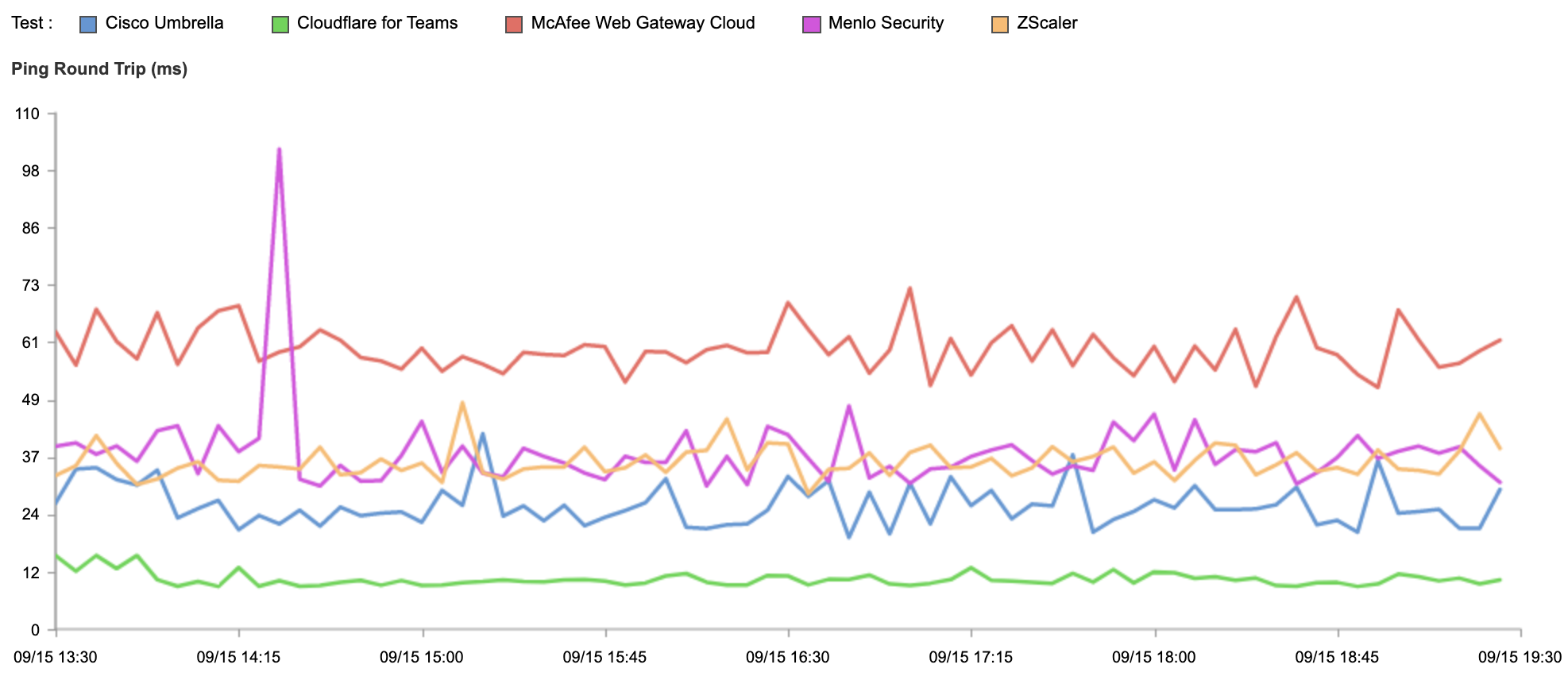
There is a wide variance in results. Cloudflare, on average, responds in 10.63ms, followed by Cisco Umbrella (26.39ms), ZScaler (35.60ms), Menlo Security (37.64ms) and McAfee (59.72ms).
Cloudflare for Teams is built on the same network that powers the world’s fastest DNS resolver and WARP to deliver consumer-grade privacy and performance. Since our network is highly interconnected and located in over 250 cities around the world our network, we’re able to eliminate the tromboning effect by inspecting and filtering traffic in the same Internet exchange points that your Internet Service Provider uses to connect you to the Internet.
These tests are simple network latency tests and do not encapsulate latency’s impact end-to-end on DNS, TLS and HTTPS connections or the benefits of our global content delivery network serving cached content for the millions of websites accelerated by our network. Unlike content delivery networks which are publicly measured, zero trust networks are hidden behind enterprise contracts which hinder industry-wide transparency.
Latency sensitivity and Browser Isolation
The web browser has evolved into workplace’s most ubiquitous application, and with it created one of the most common attack vectors for phishing, malware and data loss. This risk has led many security teams to incorporate a remote browser isolation solution into their security stack.
Users browsing remotely are especially sensitive to latency. Remote web pages will typically load fast due to the remote browser’s low latency, high bandwidth connection to the website, but user interactions such as scrolling, typing and mouse input stutter and buffer leading to significant user frustration. A high latency connection on a local browser is the opposite with latency manifesting as slow page load times.
Segmenting these results per continent, we can see highly inconsistent latency on centralized zero trust networks and far more consistent results for Cloudflare’s decentralized zero trust network.
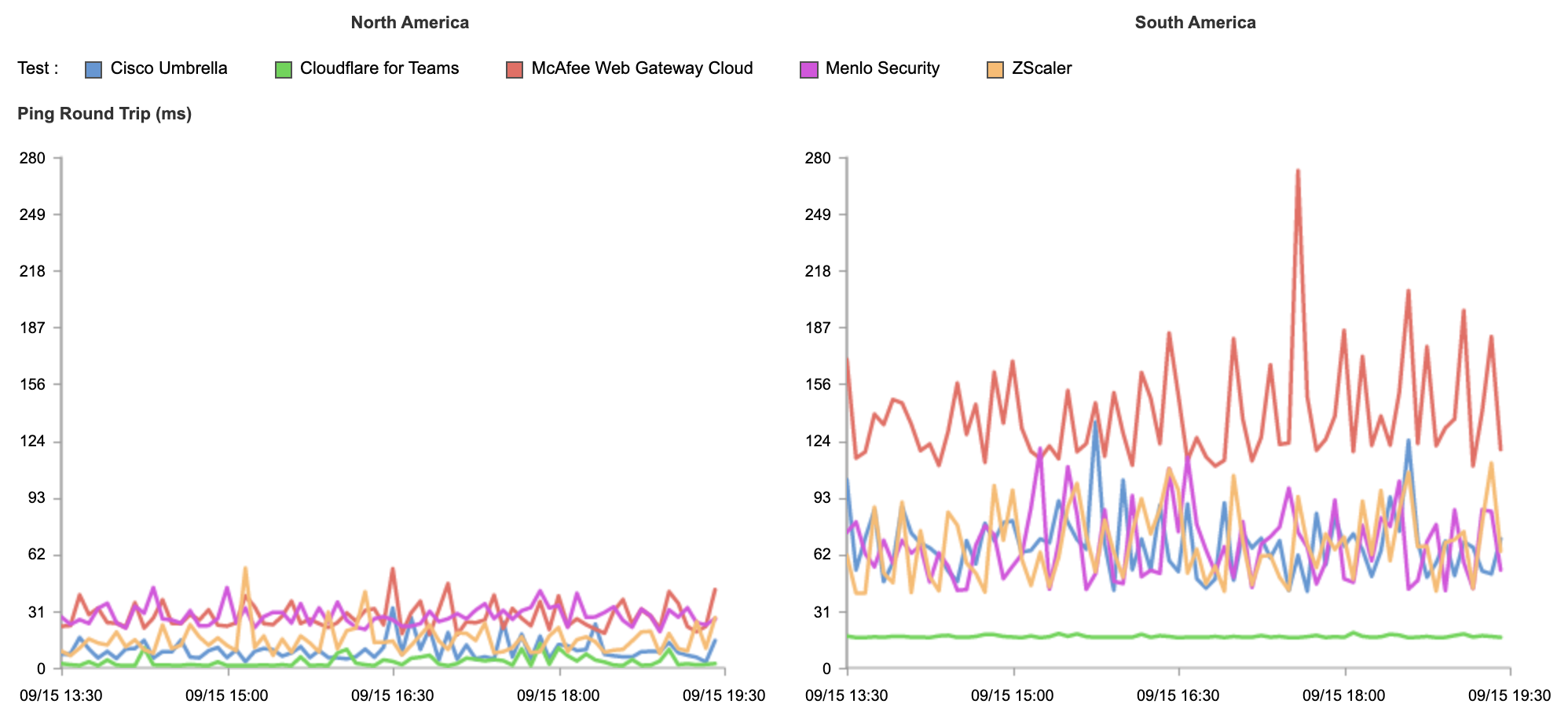
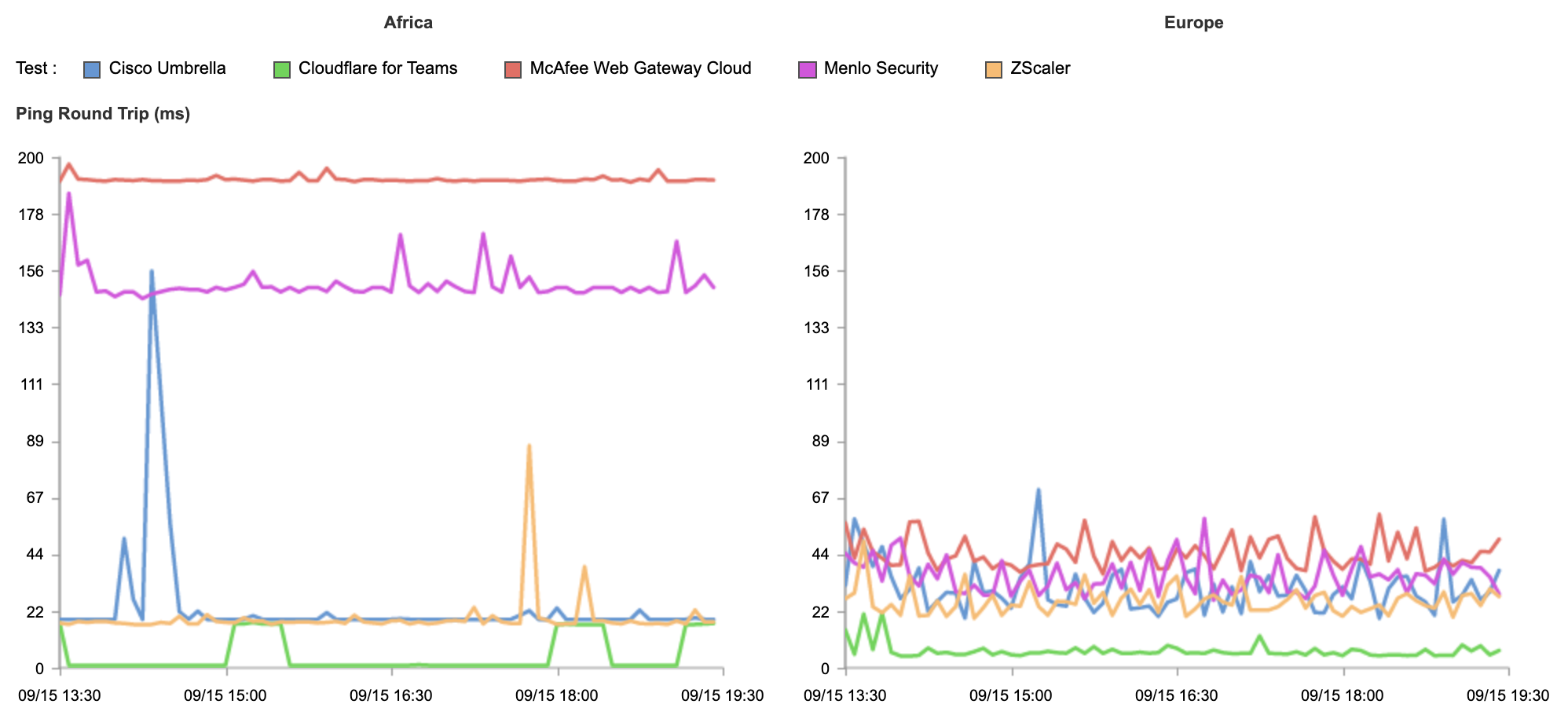
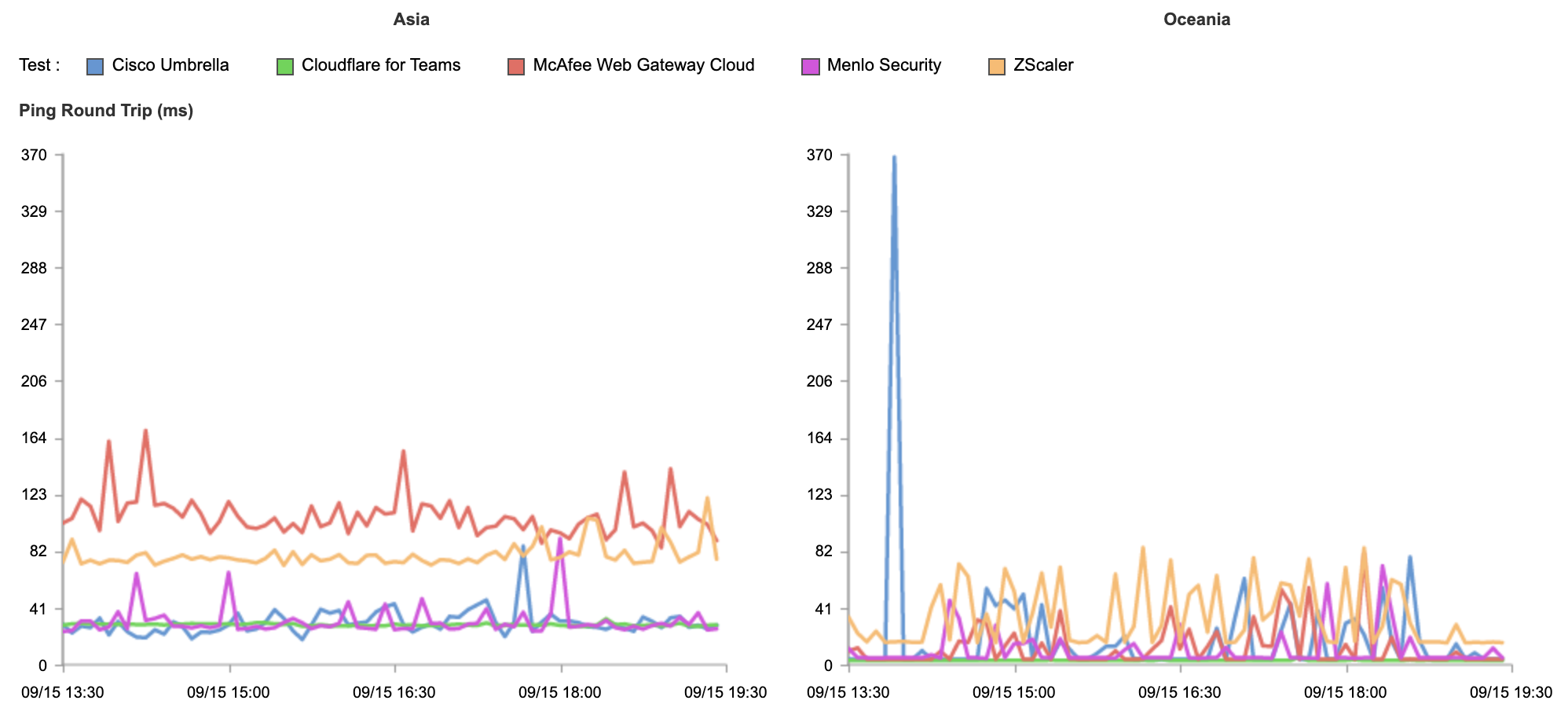
The thin green line shows Cloudflare consistently responding in under 11ms globally, with other vendors delivering unstable and inconsistent results. If you’ve had a bad experience with other Remote Browser Isolation tools in the past, it was likely because it wasn’t built on a network designed to support it.
Give it a try!
We believe that security shouldn’t result in sacrificing performance — and we’ve architected our Zero Trust platform to make it so. We also believe that Zero Trust security shouldn’t just be the domain of the big players with lots of resources — it should be available to everyone as part of our mission to help make the Internet a better place. We’ve made all the tools covered above free for your first 50 users. Get started today in the Teams Dashboard!
Magic makes your network faster
Post Syndicated from Annika Garbers original https://blog.cloudflare.com/magic-makes-your-network-faster/


We launched Magic Transit two years ago, followed more recently by its siblings Magic WAN and Magic Firewall, and have talked at length about how this suite of products helps security teams sleep better at night by protecting entire networks from malicious traffic. Today, as part of Speed Week, we’ll break down the other side of the Magic: how using Cloudflare can automatically make your entire network faster. Our scale and interconnectivity, use of data to make more intelligent routing decisions, and inherent architecture differences versus traditional networks all contribute to performance improvements across all IP traffic.
What is Magic?
Cloudflare’s “Magic” services help customers connect and secure their networks without the cost and complexity of maintaining legacy hardware. Magic Transit provides connectivity and DDoS protection for Internet-facing networks; Magic WAN enables customers to replace legacy WAN architectures by routing private traffic through Cloudflare; and Magic Firewall protects all connected traffic with a built-in firewall-as-a-service. All three share underlying architecture principles that form the basis of the performance improvements we’ll dive deeper into below.
Anycast everything
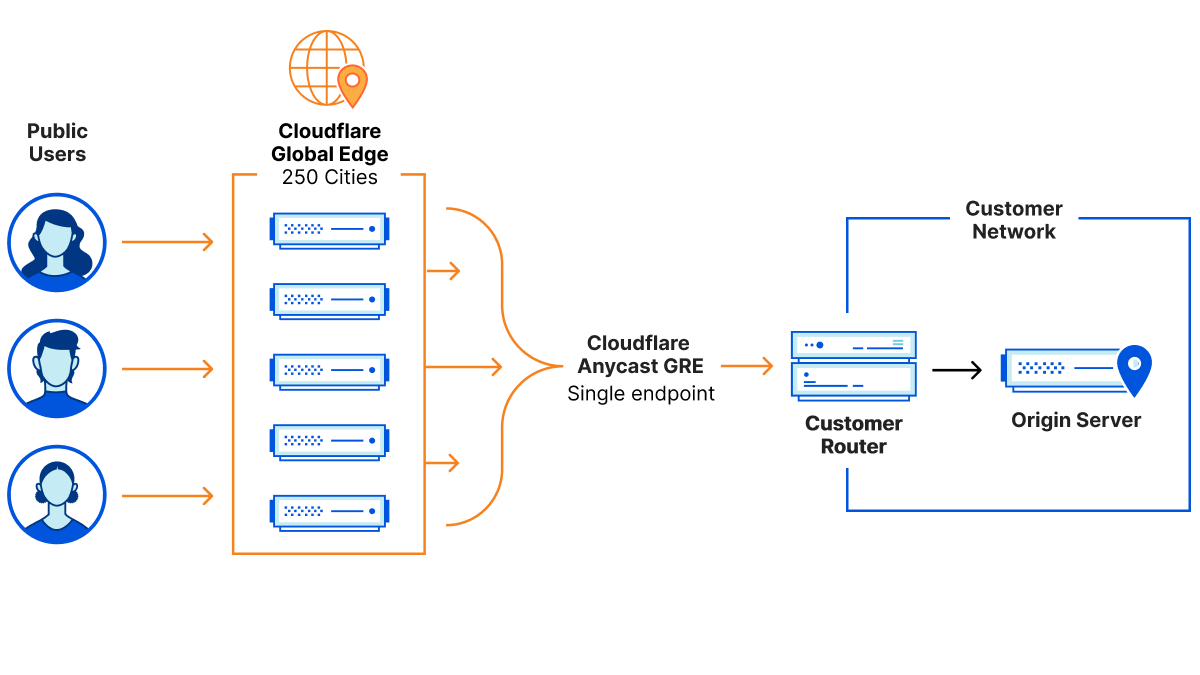
In contrast to traditional “point-to-point” architecture, Cloudflare uses Anycast GRE or IPsec (coming soon) tunnels to send and receive traffic for customer networks. This means that customers can set up a single tunnel to Cloudflare, but effectively get connected to every single Cloudflare location, dramatically simplifying the process to configure and maintain network connectivity.
Every service everywhere
In addition to being able to send and receive traffic from anywhere, Cloudflare’s edge network is also designed to run every service on every server in every location. This means that incoming traffic can be processed wherever it lands, which allows us to block DDoS attacks and other malicious traffic within seconds, apply firewall rules, and route traffic efficiently and without bouncing traffic around between different servers or even different locations before it’s dispatched to its destination.
Zero Trust + Magic: the next-gen network of the future
With Cloudflare One, customers can seamlessly combine Zero Trust and network connectivity to build a faster, more secure, more reliable experience for their entire corporate network. Everything we’ll talk about today applies even more to customers using the entire Cloudflare One platform – stacking these products together means the performance benefits multiply (check out our post on Zero Trust and speed from today for more on this).
More connectivity = faster traffic
So where does the Magic come in? This part isn’t intuitive, especially for customers using Magic Transit in front of their network for DDoS protection: how can adding a network hop subtract latency?
The answer lies in Cloudflare’s network architecture — our web of connectivity to the rest of the Internet. Cloudflare has invested heavily in building one of the world’s most interconnected networks (9800 interconnections and counting, including with major ISPs, cloud services, and enterprises). We’re also continuing to grow our own private backbone and giving customers the ability to directly connect with us. And our expansive connectivity to last mile providers means we’re just milliseconds away from the source of all your network traffic, regardless of where in the world your users or employees are.
This toolkit of varying connectivity options means traffic routed through the Cloudflare network is often meaningfully faster than paths across the public Internet alone, because more options available for BGP path selection mean increased ability to choose more performant routes. Imagine having only one possible path between your house and the grocery store versus ten or more – chances are, adding more options means better alternatives will be available. A cornucopia of connectivity methods also means more resiliency: if there’s an issue on one of the paths (like construction happening on what is usually the fastest street), we can easily route around it to avoid impact to your traffic.
One common comparison customers are interested in is latency for inbound traffic. From the end user perspective, does routing through Cloudflare speed up or slow down traffic to networks protected by Magic Transit? Our response: let’s test it out and see! We’ve repeatedly compared Magic Transit vs standard Internet performance for customer networks across geographies and industries and consistently seen really exciting results. Here’s an example from one recent test where we used third-party probes to measure the ping time to the same customer network location (their data center in Qatar) before and after onboarding with Magic Transit:
| Probe location | RTT w/o Magic (ms) | RTT w/ Magic (ms) | Difference (ms) | Difference (% improvement) |
|---|---|---|---|---|
| Dubai | 27 | 23 | 4 | 13% |
| Marseille | 202 | 188 | 13 | 7% |
| Global (results averaged across 800+ distributed probes) | 194 | 124 | 70 | 36% |
All of these results were collected without the use of Argo Smart Routing for Packets, which we announced on Tuesday. Early data indicates that networks using Smart Routing will see even more substantial gains.
Modern architecture eliminates traffic trombones
In addition to the performance boost available for traffic routed across the Cloudflare network versus the public Internet, customers using Magic products benefit from a new architecture model that totally removes up to thousands of miles worth of latency.
Traditionally, enterprises adopted a “hub and spoke” model for granting employees access to applications within and outside their network. All traffic from within a connected network location was routed through a central “hub” where a stack of network hardware (e.g. firewalls) was maintained. This model worked great in locations where the hub and spokes were geographically close, but started to strain as companies became more global and applications moved to the cloud.
Now, networks using hub and spoke architecture are often backhauling traffic thousands of miles, between continents and across oceans, just to apply security policies before packets are dispatched to their final destination, which is often physically closer to where they started! This creates a “trombone” effect, where precious seconds are wasted bouncing traffic back and forth across the globe, and performance problems are amplified by packet loss and instability along the way.
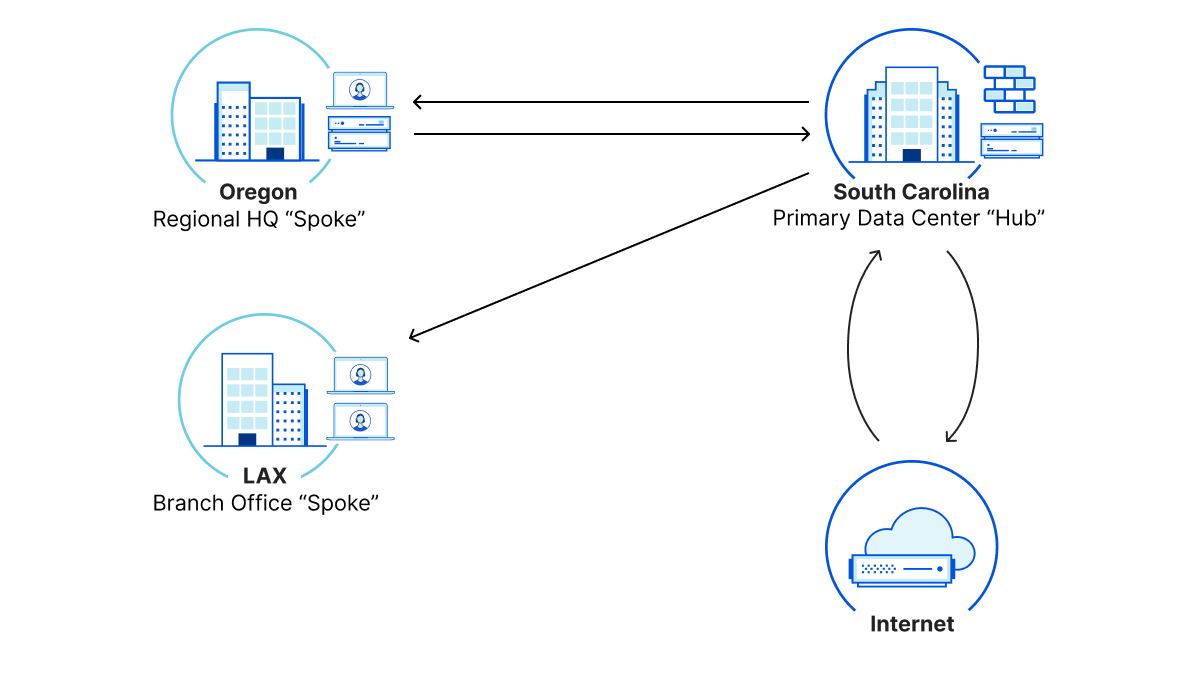
Network and security teams have tried to combat this issue by installing hardware at more locations to establish smaller, regional hubs, but this quickly becomes prohibitively expensive and hard to manage. The price of purchasing multiple hardware boxes and dedicated private links adds up quickly, both in network gear and connectivity itself as well as the effort required to maintain additional infrastructure. Ultimately, this cost usually outweighs the benefit of the seconds regained with shorter network paths.
The “hub” is everywhere
There’s a better way — with the Anycast architecture of Magic products, all traffic is automatically routed to the closest Cloudflare location to its source. There, security policies are applied with single-pass inspection before traffic is routed to its destination. This model is conceptually similar to a hub and spoke, except that the hub is everywhere: 95% of the entire Internet-connected world is within 50 ms of a Cloudflare location (check out this week’s updates on our quickly-expanding network presence for the latest). This means instead of tromboning traffic between locations, it can stop briefly at a Cloudflare hop in-path before it goes on its way: dramatically faster architecture without compromising security.
To demonstrate how this architecture shift can make a meaningful difference, we created a lab to mirror the setup we’ve heard many customers describe as they’ve explained performance issues with their existing network. This example customer network is headquartered in South Carolina and has branch office locations on the west coast, in California and Oregon. Traditionally, traffic from each branch would be backhauled through the South Carolina “hub” before being sent on to its destination, either another branch or the public Internet.
In our alternative setup, we’ve connected each customer network location to Cloudflare with an Anycast GRE tunnel, simplifying configuration and removing the South Carolina trombone. We can also enforce network and application-layer filtering on all of this traffic, ensuring that the faster network path doesn’t compromise security.
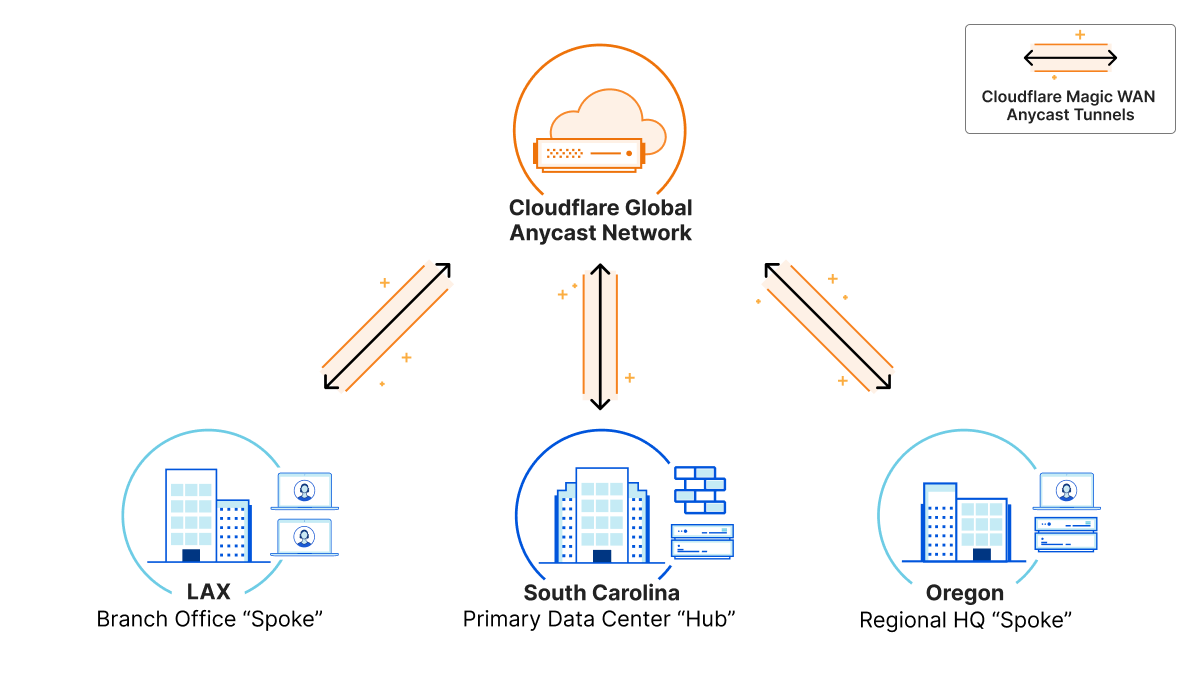
Here’s a summary of results from performance tests on this example network demonstrating the difference between the traditional hub and spoke setup and the Magic “global hub” — we saw up to 70% improvement in these tests, demonstrating the dramatic impact this architecture shift can make.
| LAX <> OR (ms) | |
|---|---|
| ICMP round-trip for “Regular” (hub and spoke) WAN | 127 |
| ICMP round-trip for Magic WAN | 38 |
| Latency savings for Magic WAN vs “Regular” WAN | 70% |
This effect can be amplified for networks with globally distributed locations — imagine the benefits for customers who are used to delays from backhauling traffic between different regions across the world.
Getting smarter
Adding more connectivity options and removing traffic trombones provide a performance boost for all Magic traffic, but we’re not stopping there. In the same way we leverage insights from hundreds of billions of requests per day to block new types of malicious traffic, we’re also using our unique perspective on Internet traffic to make more intelligent decisions about routing customer traffic versus relying on BGP alone. Earlier this week, we announced updates to Argo Smart Routing including the brand-new Argo Smart Routing for Packets. Customers using Magic products can enable it to automatically boost performance for any IP traffic routed through Cloudflare (by 10% on average according to results so far, and potentially more depending on the individual customer’s network topology) — read more on this in the announcement blog.
What’s next?
The modern architecture, well-connected network, and intelligent optimizations we’ve talked about today are just the start. Our vision is for any customer using Magic to connect and protect their network to have the best performance possible for all of their traffic, automatically. We’ll keep investing in expanding our presence, interconnections, and backbone, as well as continuously improving Smart Routing — but we’re also already cooking up brand-new products in this space to deliver optimizations in new ways, including WAN Optimization and Quality of Service functions. Stay tuned for more Magic coming soon, and get in touch with your account team to learn more about how we can help make your network faster starting today.
Cloudflare Backbone: A Fast Lane on the Busy Internet Highway
Post Syndicated from Tanner Ryan original https://blog.cloudflare.com/cloudflare-backbone-internet-fast-lane/
The Internet is an amazing place. It’s a communication superhighway, allowing people and machines to exchange exabytes of information every day. But it’s not without its share of issues: whether it’s DDoS attacks, route leaks, cable cuts, or packet loss, the components of the Internet do not always work as intended.
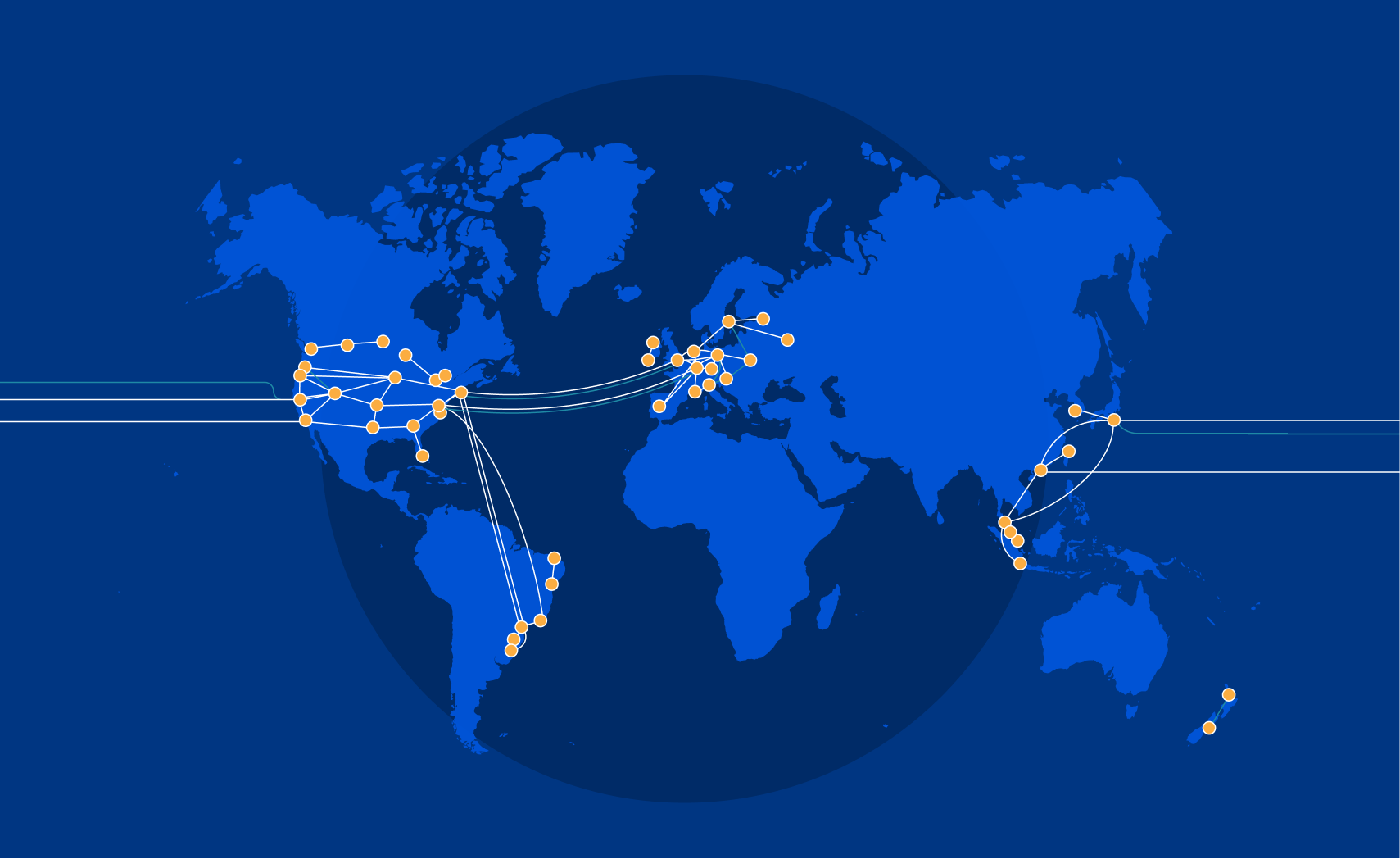
The reason Cloudflare exists is to help solve these problems. As we continue to grow our rapidly expanding global network in more than 250 cities, while directly connecting with more than 9,800 networks, it’s important that our network continues to help bring improved performance and resiliency to the Internet. To accomplish this, we built our own backbone. Other than improving redundancy, the immediate advantage to you as a Cloudflare user? It can reduce your website loading times by up to 45% — and you don’t have to do a thing.
The Cloudflare Backbone
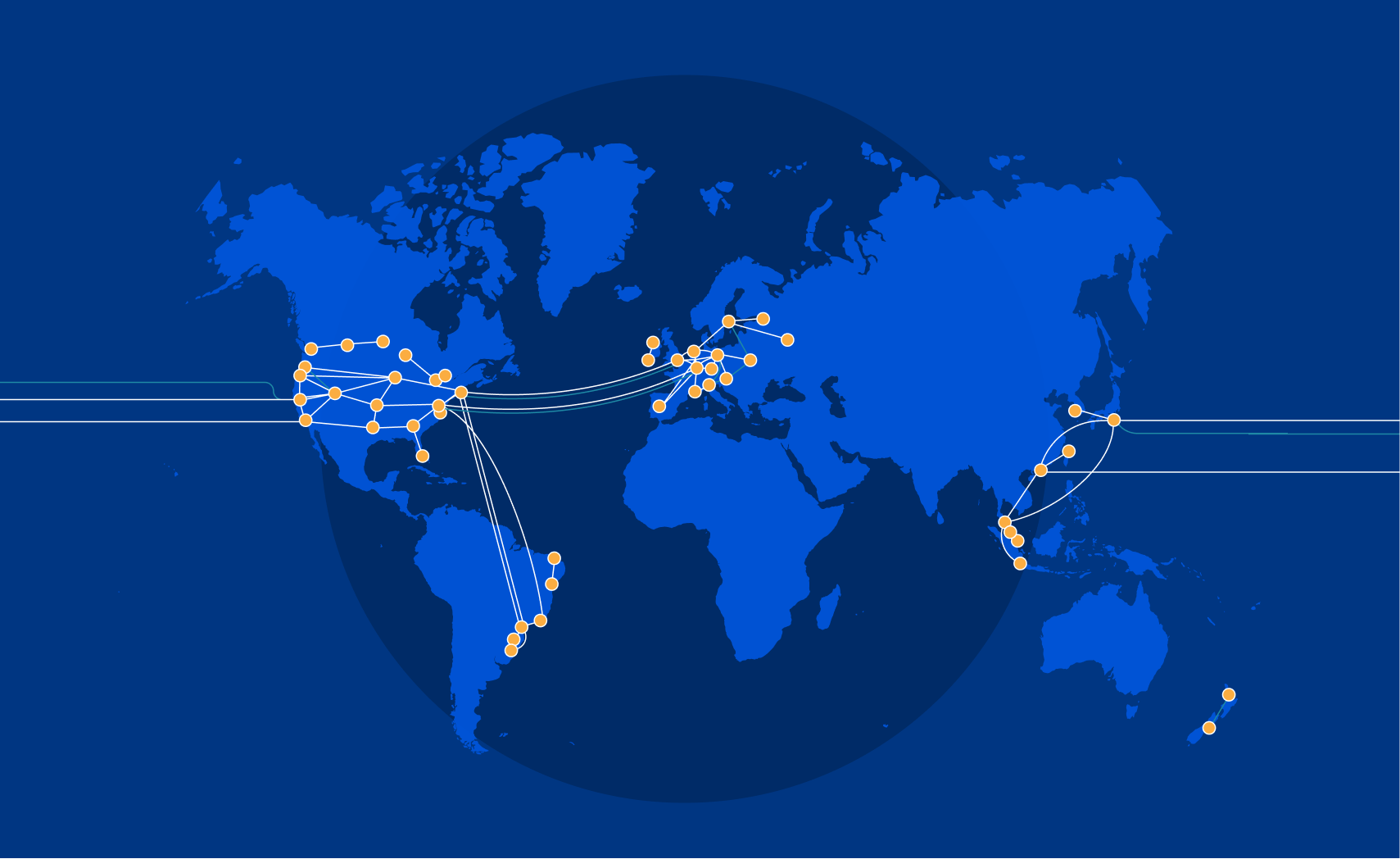
We began building out our global backbone in 2018. It comprises a network of long-distance fiber optic cables connecting various Cloudflare data centers across North America, South America, Europe, and Asia. This also includes Cloudflare’s metro fiber network, directly connecting data centers within a metropolitan area.
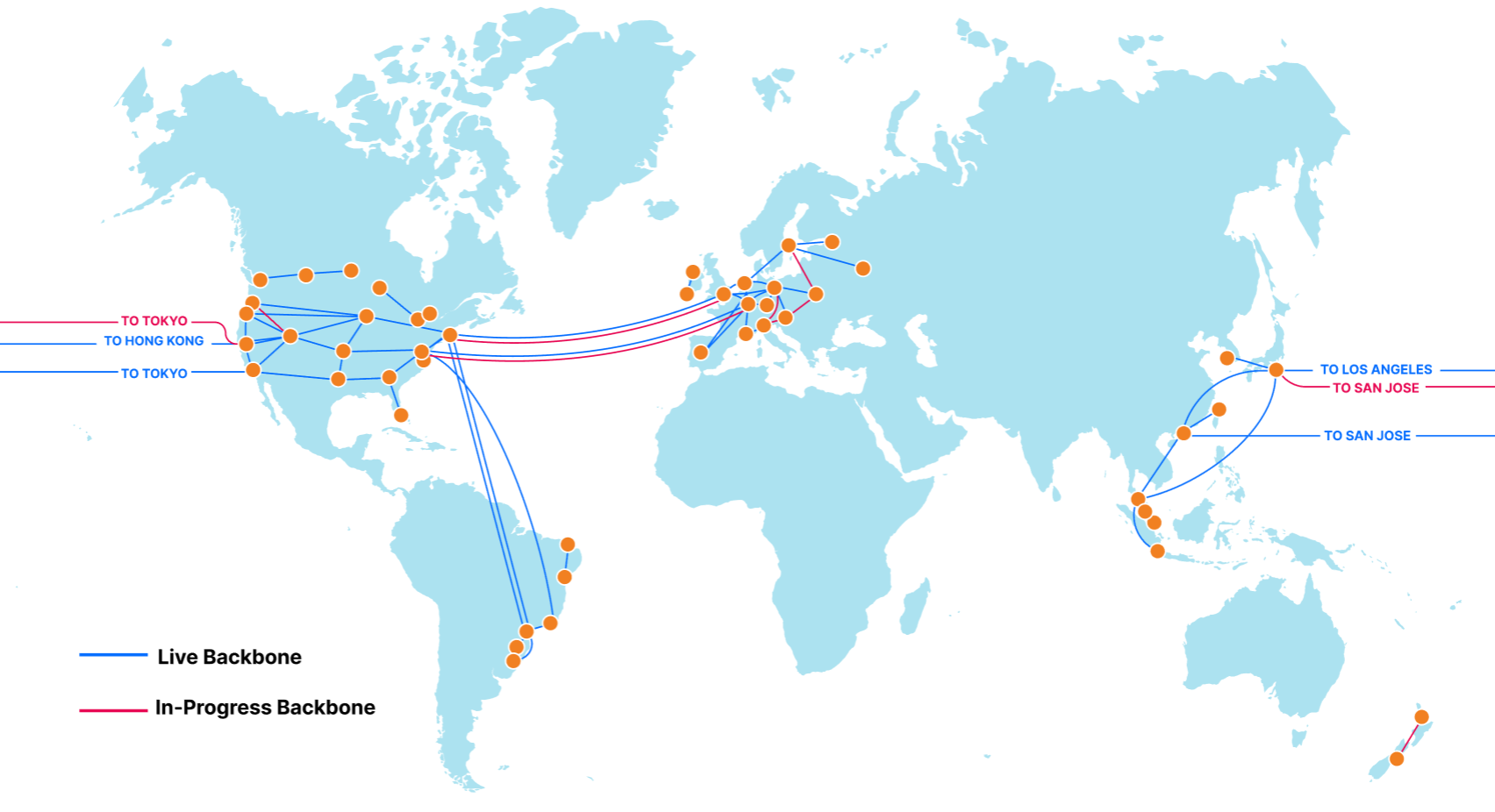
Our backbone is a dedicated network, providing guaranteed network capacity and consistent latency between various locations. It gives us the ability to securely, reliably, and quickly route packets between our data centers, without having to rely on other networks.
This dedicated network can be thought of as a fast lane on a busy highway. When traffic in the normal lanes of the highway encounter slowdowns from congestion and accidents, vehicles can make use of a fast lane to bypass the traffic and get to their destination on time.
Our software-defined network is like a smart GPS device, as we’re always calculating the performance of routes between various networks. If a route on the public Internet becomes congested or unavailable, our network automatically adjusts routing preferences in real-time to make use of all routes we have available, including our dedicated backbone, helping to deliver your network packets to the destination as fast as we can.
Measuring backbone improvements
As we grow our global infrastructure, it’s important that we analyze our network to quantify the impact we’re having on performance.
Here’s a simple, real-world test we’ve used to validate that our backbone helps speed up our global network. We deployed a simple API service hosted on a public cloud provider, located in Chicago, Illinois. Once placed behind Cloudflare, we performed benchmarks from various geographic locations with the backbone disabled and enabled to measure the change in performance.
Instead of comparing the difference in latency our backbone creates, it is important that our experiment captures a real-world performance gain that an API service or website would experience. To validate this, our primary metric is measuring the average request time when accessing an API service from Miami, Seattle, San Jose, São Paulo, and Tokyo. To capture the response of the network itself, we disabled caching on the Cloudflare dashboard and sent 100 requests from each testing location, both while forcing traffic through our backbone, and through the public Internet.
Now, before we claim our backbone solves all Internet problems, you can probably notice that for some tests (Seattle, WA and San Jose, CA), there was actually an increase in response time when we forced traffic through the backbone. Since latency is directly proportional to the distance of fiber optic cables, and since we have over 9,800 direct connections with other Internet networks, there is a possibility that an uncongested path on the public Internet might be geographically shorter, causing this speedup compared to our backbone.
Luckily for us, we have technologies like Argo Smart Routing, Argo Tiered Caching, WARP+, and most recently announced Orpheus, which dynamically calculates the performance of each route at our data centers, choosing the fastest healthy route at that time. What might be the fastest path during this test may not be the fastest at the time you are reading this.
With that disclaimer out of the way, now onto the test.

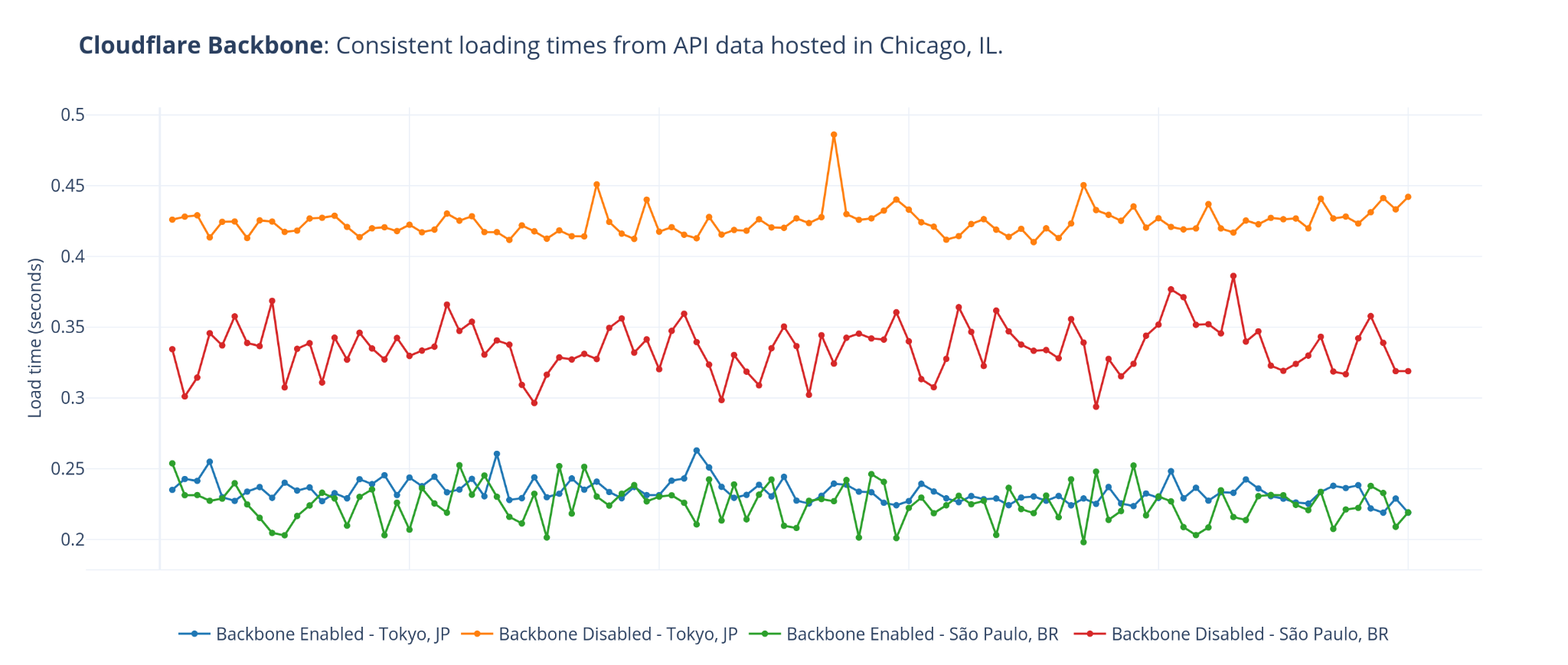
With the backbone disabled, if a visitor from São Paulo performed a request to our service, they would be routed to our São Paulo data center via BGP Anycast. With caching disabled, our São Paulo data center forwarded the request over the public Internet to the origin server in Chicago. On average, the entire process to fetch data from the origin server and return to the response to the requesting user took 335.8 milliseconds.
Once the backbone was enabled and requests were created, our software performed tests to determine the fastest healthy route to the origin, whether it was a route on the public Internet or through our private backbone. For this test the backbone was faster, resulting in an average total request time of 230.2 milliseconds. Just by routing the request through our private backbone, we improved the average response time by 31%.
We saw even better improvement when testing from Tokyo. When routing the request over the public Internet, the request took an average of 424 milliseconds. By enabling our backbone which created a faster path, the request took an average of 234 milliseconds, creating an average response time improvement of 44%.
| Visitor Location | Distance to Chicago | Avg. response time using public Internet (ms) | Avg. response using backbone (ms) | Change in response time |
|---|---|---|---|---|
| Miami, FL, US | 1917 km | 84 | 75 | 10.7% decrease |
| Seattle, WA, US | 2785 km | 118 | 124 | 5.1% increase |
| San Jose, CA, US | 2856 km | 122 | 132 | 8.2% increase |
| São Paulo, BR | 8403 km | 336 | 230 | 31.5% decrease |
| Tokyo JP | 10129 km | 424 | 234 | 44.8% decrease |
We also observed a smaller deviation in the response time of packets routed through our backbone over larger distances.
Our next generation network
Cloudflare is built on top of lossy, unreliable networks that we do not have control over. It’s our software that turns these traditional tubes of the Internet into a smart, high performing, and reliable network Cloudflare customers get to use today. Coupled with our new, but rapidly expanding backbone, it is this software that produces significant performance gains over traditional Internet networks.
Whether you visit a website powered by Cloudflare’s Argo Smart Routing, Argo Tiered Caching, Orpheus, or use our 1.1.1.1 service with WARP+ to access the Internet, you get direct access to the Internet fast lane we call the Cloudflare backbone.
For Cloudflare, a better Internet means improving Internet security, reliability, and performance. The backbone gives us the ability to build out our network in areas that have typically lacked infrastructure investments by other networks. Even with issues on the public Internet, these initiatives allow us to be located within 50 milliseconds of 95% of the Internet connected population.
In addition to our growing global infrastructure providing 1.1.1.1, WARP, Roughtime, NTP, IPFS Gateway, Drand, and F-Root to the greater Internet, it’s important that we extend our services to those who are most vulnerable. This is why we extend all our infrastructure benefits directly to the community, through projects like Galileo, Athenian, Fair Shot, and Pangea.
And while these thousands of fiber optic connections are already fixing today’s Internet issues, we truly are just getting started.
Want to help build the future Internet? Networks that are faster, safer, and more reliable than they are today? The Cloudflare Infrastructure team is currently hiring!
If you operate an ISP or transit network and would like to bring your users faster and more reliable access to websites and services powered by Cloudflare’s rapidly expanding network, please reach out to our Edge Partnerships team at [email protected].
Unboxing the Last Mile: Introducing Last Mile Insights
Post Syndicated from David Tuber original https://blog.cloudflare.com/last-mile-insights/


“The last 20% of the work requires 80% of the effort.” The Pareto Principle applies in many domains — nowhere more so on the Internet, however, than on the Last Mile. Last Mile networks are heterogeneous and independent of each other, but all of them need to be running to allow for everyone to use the Internet. They’re typically the responsibility of Internet Service Providers (ISPs). However, if you’re an organization running a mission-critical service on the Internet, not paying attention to Last Mile networks is in effect handing off responsibility for the uptime and performance of your service over to those ISPs.
Probably not the best idea.
When a customer puts a service on Cloudflare, part of our job is to offer a good experience across the whole Internet. We couldn’t do that without focusing on Last Mile networks. In particular, we’re focused on two things:
- Cloudflare needs to have strong connectivity to Last Mile ISPs and needs to be as close as possible to every Internet-connected person on the planet.
- Cloudflare needs good observability tools to know when something goes wrong, and needs to be able to surface that data to you so that you can be informed.
Today, we’re excited to announce Last Mile Insights, to help with this last problem in particular. Last Mile Insights allows customers to see where their end-users are having trouble connecting to their Cloudflare properties. Cloudflare can now show customers the traffic that failed to connect to Cloudflare, where it failed to connect, and why. If you’re an enterprise Cloudflare customer, you can sign up to join the beta in the Cloudflare Dashboard starting today: in the Analytics tab under Edge Reachability.
The Last Mile is historically the most complicated, least understood, and in some ways the most important part of operating a reliable network. We’re here to make it easier.
What is the Last Mile?
The Last Mile is the connection between your home and your ISP. When we talk about how users connect to content on the Internet, we typically do it like this:
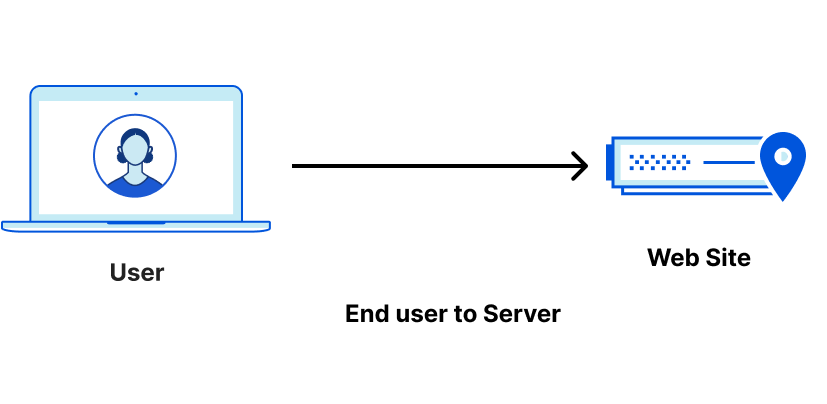
This is useful, but in reality, there are lots of things in the path between a user and anything on the Internet. Say that a user is connecting to a resource hosted behind Cloudflare. The path would look like this:

Cloudflare is a global Anycast network that takes traffic from the Internet and proxies it to your origin. Because we function as a proxy, we think of the life of a request in two legs: before it reaches Cloudflare (end users to Cloudflare), and after it reaches Cloudflare (Cloudflare to origin). However, in Internet parlance, there are generally three legs: the First Mile tends to represent the path from an origin server to the data that you are requesting. The Middle Mile represents the path from an origin server to any proxies or other network hops. And finally, there is the final hop from the ISP to the user, which is known as the Last Mile.
Issues with the Last Mile are difficult to detect. If users are unable to reach something on the Internet, it is difficult for the resource to report that there was a problem. This is because if a user never reaches the resource, then the resource will never know something is wrong. Multiply that one problem across hundreds of thousands of Last Mile ISPs coming from a diverse set of regions, and it can be really hard for services to keep track of all the possible things that can go wrong on the Internet. The above graphic actually doesn’t really reflect the scope of the problem, so let’s revise it a bit more:
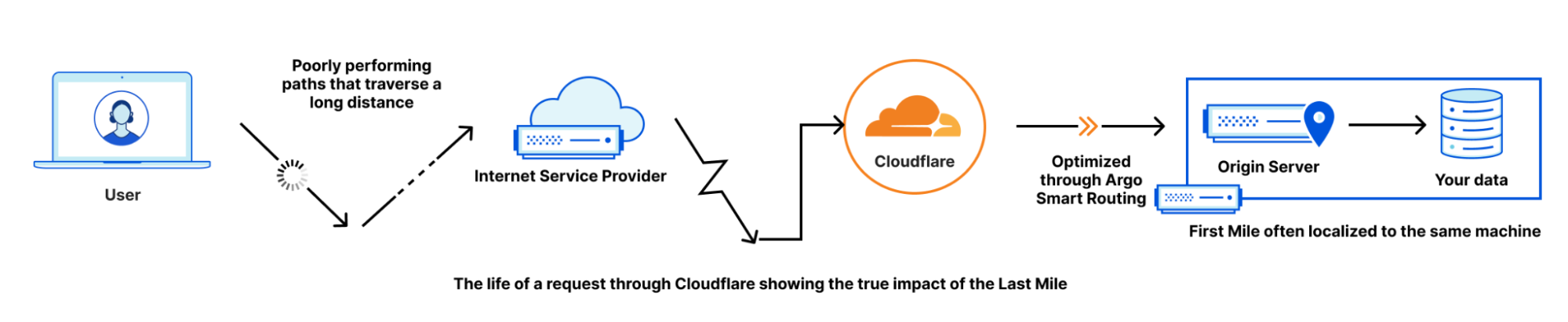
It’s not an easy problem to keep on top of.
Brand New Last Mile Insights
Cloudflare is launching a closed beta of a brand new Last Mile reporting tool, Last Mile Insights. Last Mile Insights allows for customers to see where their end-users are having trouble connecting to their Cloudflare properties. Cloudflare can now show customers the traffic that failed to connect to Cloudflare, where it failed to connect, and why.
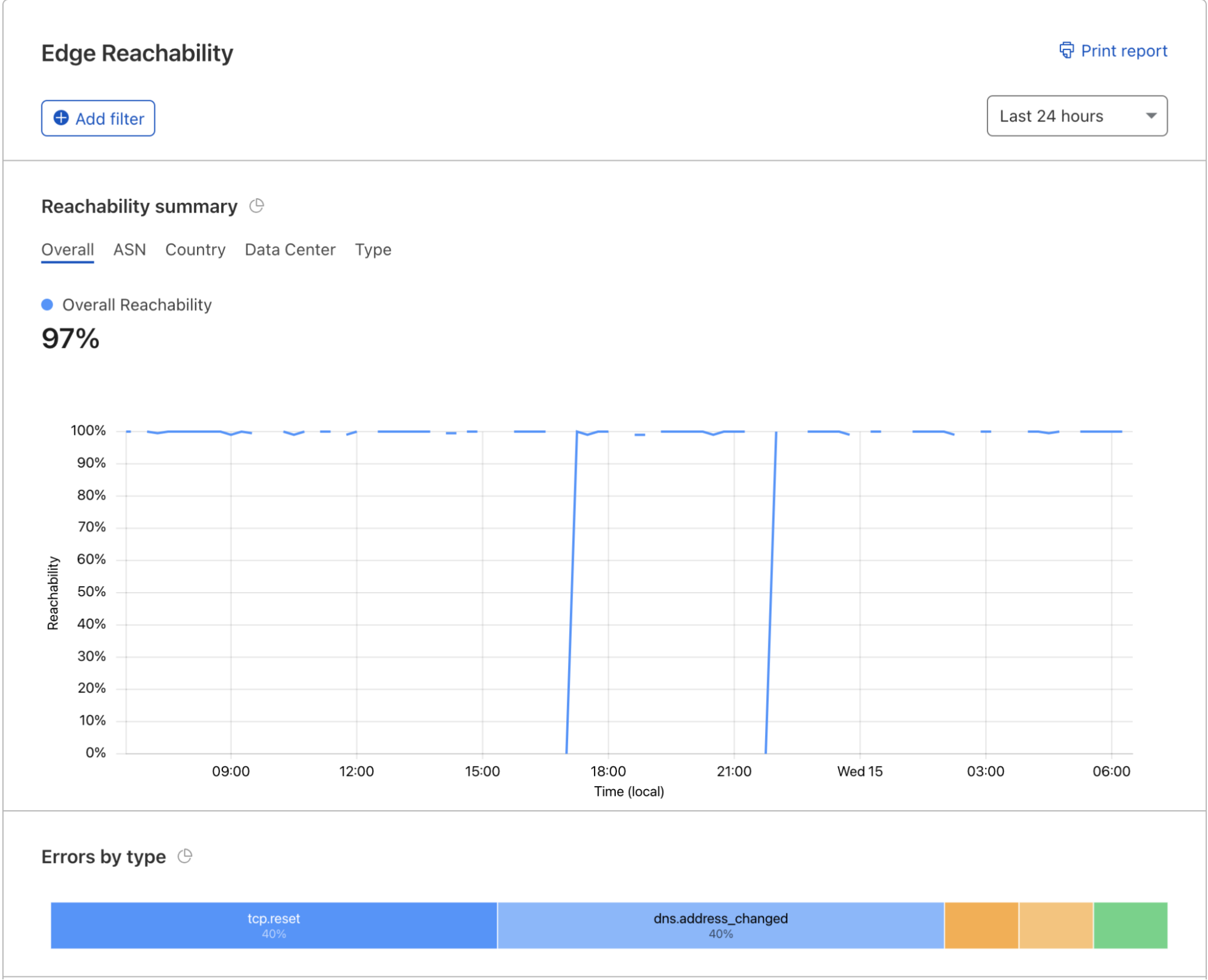
Access to this data is useful to our customers because when things break, knowing what is broken and why — and then communicating with your end users — is vital. During issues, users and employees may create support/helpdesk tickets and social media posts to understand what’s going on. Knowing what is going on, and then communicating effectively about what the problem is and where it’s happening, can give end users confidence that issues are identified and being investigated… even if the issues are occurring on a third party network. Beyond that, understanding the root of the problem can help with mitigations and speed time to resolution.
How do Last Mile Insights work?
Our Last Mile monitoring tools use a combination of signals and machine learning to detect errors and performance regressions on the Last Mile.
Among the signals: Network Error Logging (NEL) is a browser-based reporting system that allows users’ browsers to report connection failures to an endpoint specified by the webpage that failed to load. When a user is able to connect to Cloudflare on a site with NEL enabled, Cloudflare will pass back two headers that indicate to the browser that they should report any network failures to an endpoint specified in the headers. The browser will then operate as usual, and if something happens that prevents the browser from being able to connect to the site, it will log the failure as a report and send it to the endpoint. This all happens in real time; the endpoint receives failure reports instantly after the browser experiences them.
The browser can send failure reports for many reasons: it could send reports because the TLS certificate was incorrect, the ISP or an upstream transit was having issues on the request path, the terminating server was overloaded and dropping requests, or a data center was unreachable. The W3C specification outlines specific buckets that the browser should break reports into and uploads those as reasons the browser could not connect. So the browser is literally telling the reporting endpoint why it was unable to reach the desired site. Here’s an example of a sample report a browser gives to Cloudflare’s endpoint:
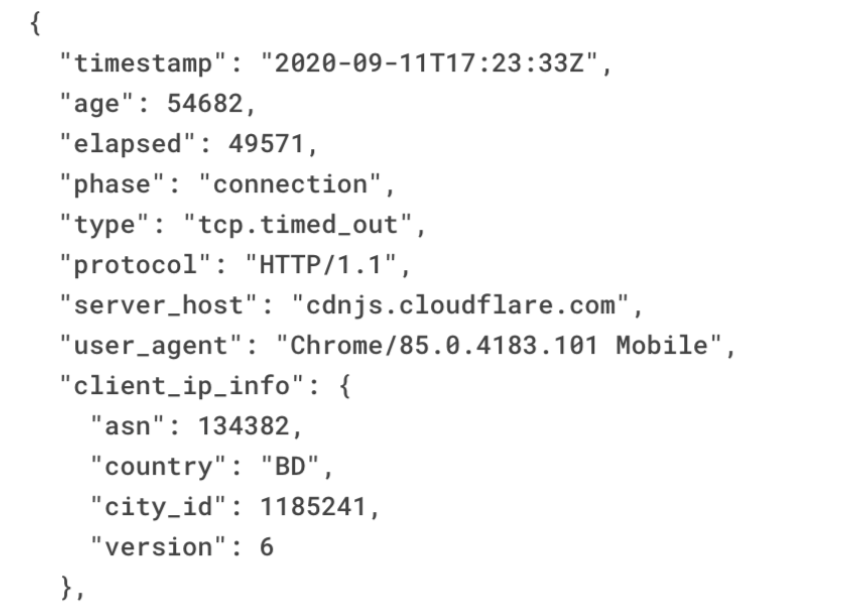
The report itself is a JSON blob that contains a lot of things, but the things we care about are when in the request the failure occurred (phase), why the request failed (tcp.timed_out), the ASN the request came over, and the metro area where the request came from. This information allows anyone looking at the reports to see where things are failing and why. Personal Identifiable Information is not captured in NEL reports. For more information, please see our KB article on NEL.
Many services can operate their own reporting endpoints and set their own headers indicating that users who connect to their site should upload these reports to the endpoint they specify. Cloudflare is also an operator of one such endpoint, and we’re excited to open up the data collected by us for customer use and visibility. Let’s talk about a customer who used Last Mile Insights to help make a bad day on the Internet a little better.
Case Study: Canva
Canva is a Cloudflare customer that provides a design and collaboration platform hosted in the cloud. With more than 60 million users around the world, having constant access to Canva’s platform is critical. Last year, Canva users connecting through Cox Communications in San Diego started to experience connectivity difficulties. Around 50% of Canva’s users connecting via Cox Communications saw disconnects during that time period, and these users weren’t able to access Canva or Cloudflare at all. This wasn’t a Canva or Cloudflare outage, but rather, was caused by Cox routing traffic destined for Canva incorrectly, and causing errors for mutual Cox/Canva customers as a result.
Normally, this scenario would have taken hours to diagnose and even longer to mitigate. Canva would’ve seen a slight drop in traffic, but as the outage wasn’t on Canva’s side, it wouldn’t have flagged any alerts based on traffic drops. Canva engineers, in this case, would be notified by the users which would then be followed by a lengthy investigation to diagnose the problem.
Fortunately, Cloudflare has invested in monitoring systems to proactively identify issues exactly like these. Within minutes of the routing anomaly being introduced on Cox’s network, Canva was made aware of the issue via our monitoring, and a conversation with Cox was started to remediate the issue. Meanwhile, Canva could advise their users on the steps to fix it.
Cloudflare is excited to be offering our internal monitoring solution to our customers so that they can see what we see.
But providing insights into seeing where problems happen on the Last Mile is only part of the solution. In order to truly deliver a reliable, fast network, we also need to be as close to end users as possible.
Getting close to users
Getting close to end users is important for one reason: it minimizes the time spent on the Last Mile. These networks can be unreliable and slow. The best way to improve performance is to spend as little time on them as possible. And the only way to do that is to get close to our users. In order to get close to our users, Cloudflare is constantly expanding our presence into new cities and markets. We’ve just announced expansion into new markets and are adding even more new markets all the time to get as close to every network and every user as we can.
This is because not every network is the same. Some users may be clustered very close together in cities with high bandwidth, in others, this may not be the case. Because user populations are not homogeneous, each ISP operates their network differently to meet the needs of their users. Physical distance from where servers are matters a great deal, because nobody can outrun the speed of light. If you’re farther away from the content you want, it will take longer to reach it. But distance is not the only variable; bandwidth and speed will also vary, because networks are operated differently all over the world. But one thing we do know is that your network performance will also be impacted by how healthy your Last Mile network is.
Healthier networks perform better
A healthy network has no downtime, minimal congestion, and low packet loss. These things all add latency. If you’re driving somewhere, street closures, traffic, and bad roads will prevent you from going as fast as possible to where you need to be. Healthy networks provide the best possible conditions for you to connect, and Last Mile performance is better because of it. Consider three networks in the same country: ISP A, ISP B, and ISP C. These ISPs have similar distribution among their users. ISP A is healthy and is directly connected with Cloudflare. ISP B is healthy but is not directly connected to Cloudflare. ISP C is an unhealthy network. Our data shows that Last Mile latencies for ISP C are significantly slower than Network A or B because the network quality of ISP C is worse.
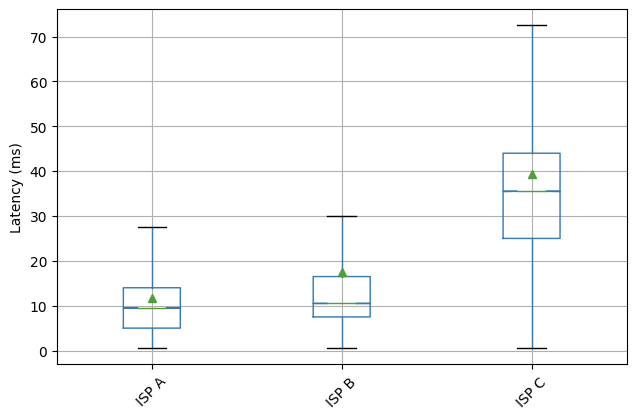
This box plot shows that the latencies to Cloudflare for ISP C are 360% higher than ISPs A or B.
We want all networks to be like Network A, but that’s not always the case, and it’s something Cloudflare can’t control. The only thing Cloudflare can do to mitigate performance problems like these is to limit how much time you spend on these networks.
Shrinking the Last Mile gives better performance
By placing data centers close to our users, we reduce the amount of time spent on these Last Mile networks, and the latency between end users and Cloudflare goes down. A great example of this is how bringing up new locations in Africa affected the latency for the Internet-connected population there. Blue shows the latency before these locations were added, and red shows after:
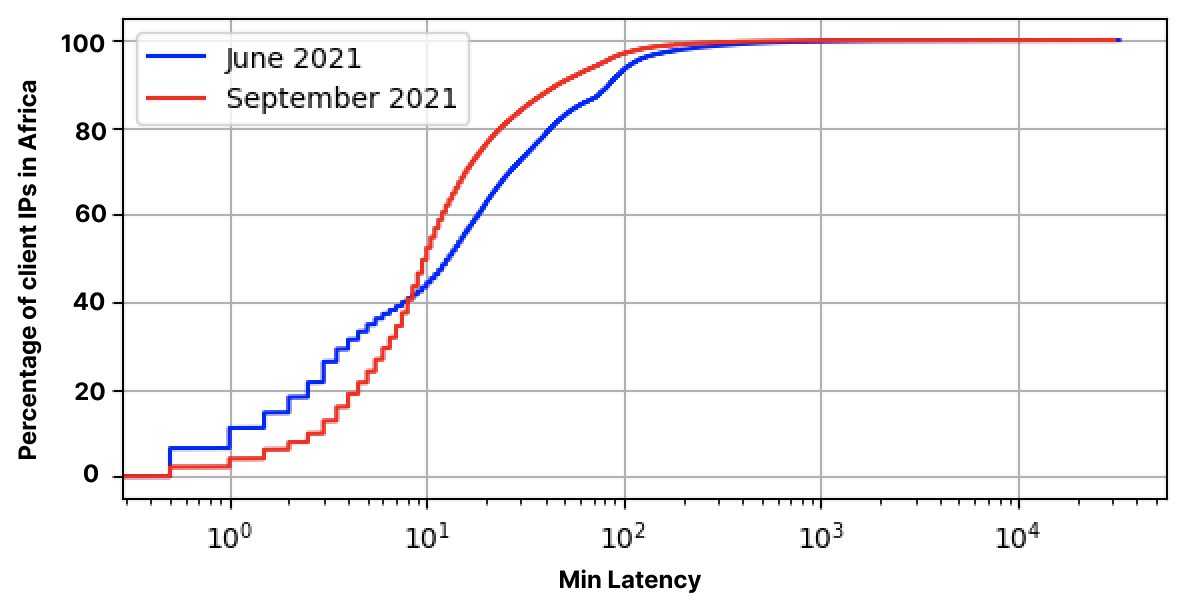
Our efforts globally have brought 95% of the Internet-connected population within 50ms of us:
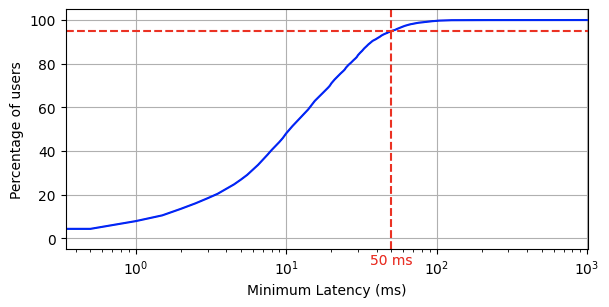
You will also notice that 80% of the Internet is within 30ms of us. The tail for Last Mile latencies is very long, and every data center we add helps bring that tail closer to great performance. As we expand into more locations and countries, more of the Internet will be even better connected.
But even when the Last Mile is shrunken down by our infrastructure expansions, networks can still have issues that are difficult to detect. Existing logging and monitoring solutions don’t provide a good way to see what the problem is. Cloudflare has built a sophisticated set of tools to identify issues with Last Mile networks outside our control, and help reduce time to resolution for this purpose, and it has already found problems on the Last Mile for our customers.
Cloudflare has unique performance and insight into Last Mile networking
Running an application on the Internet requires customers to look at the whole Internet. Many cloud services optimize latency starting at the first mile and work their way out, because it’s easier to optimize for things they can control. Because the Last Mile is controlled by hundreds or thousands of ISPs, it is difficult to influence how the Last Mile behaves.
Cloudflare is focused on closing performance gaps everywhere, including close to your users and employees. Last mile performance and reliability is critically important to delivering content, keeping employees productive, and all the other things the world depends on the Internet to do. If a Last Mile provider is having a problem, then users connecting to the Internet through them will have a bad day.
Cloudflare’s efforts to provide better Last Mile performance and visibility allow customers to rely on Cloudflare to optimize the Last Mile, making it one less thing they have to think about. Through Last Mile Insights and network expansion efforts — available today in the Cloudflare Dashboard, in the Analytics tab under Edge Reachability — we want to provide you the ability to see what’s really happening on the Internet while knowing that Cloudflare is working on giving your users the best possible Internet experience.
Отчет за парламентарната ми дейност
Post Syndicated from Bozho original https://blog.bozho.net/blog/3815
Както писах веднага след изборите през юли, това, че не съм избран за народен представител изобщо не значи, че няма да върша работа по темите, заради които хората гласуваха за мен. В този кратък парламент нямаше време да бъде свършена много такава работа, но все пак смятам за редно да отчета по какво съм работил. Въпреки, че не съм бил депутат. Трябва да отбележа, че нито едно от нещата по-долу не съм ги свършил сам, разбира се – всичко е част от общата работа на Демократична България.
Много от нещата изглеждат като малки стъпки и дори бюрократични детайли. Но дяволът е детайлите. Електронното управление не работи не защото няма закон, не защото няма отговорна институция (има – ДАЕУ), не защото няма стратегически документи, не защото няма средства или защото не са обявени процедури, а защото някой детайл е объркан или пропуснат, някой не е преценил нещо навреме или някой не си е влязъл в правомощията, някой не е тълкувал правилно определен текст или пък самият законов текст има нужда от прецизиране. И разбира се, защото я е нямало политическата воля всички тези камъни да бъдат преместени от пътя.
- Комисия по дигитализация, електронно управление и информационни технологии – създадохме такава комисия, която да контролира и направлява законодателния процес по дигиталните теми. Участвах на всяко заседание на тази комисия, активно вземайки думата, задавайки въпроси към институциите и подпомагайки председателя (Иво Мирчев от ДБ). Подпомагах и избора на дневен ред на комисията – какви теми да бъдат разглеждани, кой да бъде поканен и на какви въпроси да отговаря. По-надолу ще опиша трите основни въпроса, които разгледахме
- Електронна идентификация – проектът за електронна идентификация е „забил“ в съда на Европейския съюз след обжалване на процедурата у нас. Повикахме МВР да отговорят как планират да реализират националната схема, дали са подготвени за реализиране на т.нар. „цифров портфейл“, предложен от Европейската комисия. В следствие на техните отговори преценихме различните варианти за действие и изпратихме писмо до премиера Янев, с което предлагаме да изпратят официално искане до съда на ЕС за по-бързо произнасяне, тъй като проектът е стратегически. Надявам се това да доведе до ускоряване на процеса, за да имаме и нови лични карти, и електронна идентичност възможно най-скоро.
- План за възстановяване и устойчивост – проектите в плана за възстановяване и устойчивост, свързани с електронното управление, са няколко. Изискахме от Държавна агенция „Електронно управление“ и от вицепремиера Пеканов всички допълнителни данни, които не са част от архива и поискахме отговори на някои специфични въпроси. В следствие на това предложихме подобрения по някои от проектите, така че да се гарантира, че няма да бъдат изхарчени едни пари без резултат. Проектът за киберсигурност да бъде прецизиран, така че да е ясно за какво и колко пари отиват; в проекта за дигитализация на регистри да бъде включена и дейност за мигриране на малки регистри от тетрадки и ексели към централизирана система за управление на регистри; от проекта за широколентовия достъп да отпаднат 5G кулите по магистралите, защото на автономните автомобили това не им трябва, както пише в проекта, а и има други европейски източници на финансиране.
- НСИ и преброяването – повикахме НСИ да дадат обяснение какво и защо се е случило със системата за преброяването. Обобщение писах във Фейсбук и тук, а заключението е, че трябва повече централна координация и по-добра подготовка с оглед киберсигурността на ключови системи.
- ЦИК и машинното гласуване – повикахме и ЦИК в комисията, за да обсъдим машинното гласуване при избори 2в1. Там предложих няколко неща – тестове за ползваемост (A/B тестове), така че интерфейсът да е максимално удобен на избирателите; извадкова проверка на хешовете на машините с външен инструмент, за да не разчитаме само на това, което те самите разпечатват; системният образ на софтуера, който се инсталира на всички машини, да бъде компилиран публично. Подчертах и задължението изходният код да е наличен за заинтересованите страни (по закон – експерти, излъчени от партиите/коалициите, гражданския и академичния сектор). Ще следим оттук нататък ЦИК да спази това задължение.
- Законопроект за изменение на Закона за електронно управление – предлагаме няколко неща, като основните са две – доставчици на обществени услуги да участват в електронния обмен на документи с администрацията, ако са част от административна услуга (напр. ако за да получите разрешение за ползване на търговски обект ви изискват партида от ЕРП, това да не става с хвърчаща бележка, а служебно, по електронен път); администрациите да са длъжни да водят малки и прости регистри в централизирана система, отговаряща на всички съвременни изисквания, а не в ексел, на тетрадки или в някакви стари и пробити системи, както е в момента. Законопроектът получи подкрепя от всички партии, от администрацията и от браншови организации, в рамките на проведеното обществено обсъждане.
- Законопроект за отпадане на стикерите за технически преглед – новите стикери с чип, които са скъпи и грозно стоят на средата на предното стъкло, са напълно излишни. Предложихме отпадането им и замяната им с проверка в централизираните регистри по номер на автомобил. Повече за проблемите с RFID чиповете съм писал тук. Подготвихме и сходен законопроект за отпадане на стикерите за Гражданска отговорност, но тъй като стана ясно, че няма как да мине, не го внесохме.
- Законопроект за автоматично получаване на EORI номер (вместо да го заявяваме през неудобния сайт на агенция Митници)
- Законопроект за уреждане и ограничаване на безконтролното записване на данни за преминаващи автомобили от камерите на АПИ – към настоящия момент АПИ събира данни за това кой автомобил, къде и кога е преминал и ги съхранява на база на вътрешен акт, без да има гаранции кой има достъп, за колко време се съхраняват и за какво се ползват. С предложението уреждаме тези неща, включително уведомление на шофьорите, чиито данни са били използвани след като са били събрани.
- Въпрос към ГД ГРАО за отказите за предоставяне на данни – Националната база данни „Население“ е основен компонент на електронното управление. Повечето институции трябва да имат право да четат данни оттам – по ЕГН да получат три имена и адрес. Общините, например, често имат нужда от тези данни, за да предоставят общински услуги (при записване в детски градини, където адресът на родителите има значение, вместо родителите да носят удостоверение, общината да го събира служебно). За съжаление през годините има доста оплаквания, че ГД ГРАО отказва достъп. От отговорът на ГРАО излиза, че това наистина е така – около 1/4 от заявленията за достъп са получили отказ. Изводът от това е, че трябва да се промени Закона за гражданска регистрация, така че да не позволява превратно тълкуване, така че общините да могат да си вършат работата (особено предвид, че те са тези, които вкарват данните в регистъра), и разбира се – данните да бъдат защитени от изтичане
- Въпрос до премиера дали в Администрацията на министерския съвет документи се обменят електронно – отдавна е факт, че Администрацията на министерски съвет е една от най-недигиталните институции. Това е проблем на практическо и на символно ниво – не може да говорим за е-управление, а в „сърцето“ на управлението да се разнасят колички с папки по етажите. Отговорът, все пак е, че АМС е започнала (най-накрая!) поетапно да въвежда електронен документооборот. Надявам се натискът за това да продължи и този план да бъде изпълнен в следващите месеци
За два месеца – толкова. Ясно е, че нищо не може да бъде доведено до край. Но смятам, че помогнах за някои важни стъпки. Остават още много, много неща, разбира се. И трябва широк дебат за цялостната структура на електронното управление – къде стои ДАЕУ, къде стои системният интегратор, кой какво и как възлага, кой контролира. Тази структурна промяна ще трябва да започне в следващото Народно събрание.
Материалът Отчет за парламентарната ми дейност е публикуван за пръв път на БЛОГодаря.
Спасяването на редник Манолев и еврокъщата му
Post Syndicated from Гешо Иванов original https://bivol.bg/manolev-prokuratura-kpkonpi.html
четвъртък 16 септември 2021

На фона на неотдавнашните санкции, наложени от САЩ на бившия зам.-министър и виден гербер Александър Манолев, прокуратурата избърза да се похвали, че вече го била предала на съд заради неговата…
Revealing Zabbix Summit Online 2021 Agenda. Interview with Jacob Robinson
Post Syndicated from Jekaterina Sizova original https://blog.zabbix.com/revealing-zabbix-summit-online-2021-agenda-interview-with-jacob-robinson/15803/
This year’s Zabbix Summit 2021 will take place online on October 21. We decided to introduce you to the speakers and reveal some of the topics that will be covered during the event. Our first interviewee will be Jacob Robinson, who is speaking at this year’s Zabbix summit for the first time.
Hi Jacob, we are pleased to welcome you! We mentioned above that this year would be your debut speaking at our big event about monitoring. What was your primary motivation for giving the talk?
Hi, thank you, that is correct it is my first time speaking at any Zabbix event. My goal is to help let others know the unique way I am using Zabbix so they may benefit from it. I would really like to expand the system I have built and find others to use it and potentially contribute requests and development. I hope that the talk sparks some interest in the community, and I can connect with some people to discuss it more.
Would you like please to uncover your speech a bit? What should summit attendees expect?
Sure, my speech explains a project I developed that automatically detects, identifies, and creates hosts in Zabbix so that users never need to manually create any hosts. It also obtains MAC addresses, switch port configurations, and many other host details that are automatically entered into Zabbix even over large corporate networks.
Can you tell us about yourself and your experience with Zabbix? What exciting projects have you worked on?
I have been using Zabbix for around 3 years now to provide global monitoring of AV, Networking, and Security for WeWork. Everything I have done at WeWork has been very exciting, there have been integrations with several APIs, developing a custom Okta integration with Zabbix, controlling thousands of televisions and tracking electricity cost savings with Zabbix, and the challenges involved with monitoring WeWork’s network of over 150,000 active hosts. I also run a small blog, monitoreverything.net, where I try to write detailed documentation of things that I have done in Zabbix.
Can you tell us about your professional plans? In addition, should we wait for you at the Zabbix Summit in the following years with new and insightful cases (maybe even offline in Riga, who knows)?
My last job was working as an Audio-Visual engineer, and I transitioned into a Systems Infrastructure engineer so I’m not sure what I will do next. I have been enjoying developing and supporting Zabbix so I will likely continue to do that. I plan to be in-person at Zabbix Summit when it is possible!
Who remembers E.T. for the Atari 2600?
Post Syndicated from Ian Dransfield original https://www.raspberrypi.org/blog/who-remembers-e-t-for-the-atari-2600/
In the latest issue of Wireframe magazine, video game pioneer Howard Scott Warshaw reflects on the calamitous E.T. for the Atari 2600. Could it serve as a useful metaphor for real life?
When Julius Caesar ran into Brutus on the Ides of March so many years ago, it changed his life dramatically. I would say the same thing about my life when I ran into the E.T. project, though in my case, the change wasn’t quite so abrupt… or pointed. People say that my E.T. game was ahead of its time, so much so that it didn’t work for many players in its time. Fair enough. But E.T. is more than that. On many levels, that game has served as a metaphor for life, at least for my life. Let me explain, and perhaps it will sound familiar in yours as well.
There was an aura of promise and anticipation on the advent of the E.T. project – much like the prospect of graduating from college and entering the working world as a computer programming professional. This was super-exciting to me. Once I began the challenge of delivering this game, however, the bloom left the rose (no matter how many times I healed it). Similarly, on my entry into the working world, my excitement was quashed by the unsatisfying nature and demands of typical corporate computing tasks. This is analogous to the experience of E.T. players, having just unwrapped the game. They pop the cartridge in, fire it up, and venture forward with innocent exuberance… only to be crushed by a confusing and unforgiving game world. Perhaps the E.T. game was some sort of unconscious impulse on my part. Was I recreating the disappointment of my first foray into corporate life? Highly unlikely, but the therapist in me just had to ask.
In the E.T. game, I spend a lot of time wandering around and falling into pits. Sometimes I find treasure in those pits. Sometimes I’m just stuck in a pit and I need to dig my way out. That costs energy I could have used on more productive endeavours. There’s also a power-up in the game you can use to find out if there is something worth diving in for. Sadly, there’s no such power-up in life. Figuring out the difference between the treasure and the waste has always been one of my biggest questions, and it’s rarely obvious to me.

One of the treasures you find in the game is the flower. The act of healing it brings benefits and occasional delightful surprises. I was at the bottom of a ‘pit’ in my life when I found the path to becoming a psychotherapist (another act of healing). It helped me climb out and take some big steps toward winning the bigger game.
E.T. is all about the pits, at least it seems so for many who talk about it. And they do so with such derision. Many times I’ve heard the phrase, “E.T. isn’t about the pits. It is the pits!” But are pits really so bad? After all, there are situations in which being stuck in a pit can be an advantage – OK, perhaps not so much in the game. But in life, I find it’s unwise to judge where I am until I see where it takes me. There have been times where major disappointments ended up saving me from a far worse fate had I been granted my original desire. And in more concrete terms, during a hurricane or tornado, there are far worse outcomes than stumbling into a pit. Sometimes when I trip and fall, I wind up dodging a bullet.

Yes, in the game you can wind up wandering aimlessly around, feeling hopeless and without direction (somehow, they didn’t put that on the box). But ultimately, if you persevere (and read the directions), you can create a reasonably satisfying win. After finishing development of the game, there was a long period of waiting before any feedback arrived. Then it came with a vengeance. Of course, that only lasted for decades. My life after Atari seemed a bit of a wasteland for a long time too. Rays of sunlight broke through on occasion, but mostly cloudy skies persisted. Things didn’t improve until I broke free from the world in which I was stuck in order to launch the improbable life I truly wanted.

But it’s not like there were no lingering issues from my E.T. experience. It turns out that ever since the E.T. project, I have a much greater propensity to procrastinate, regularly shorting myself of dev time. I didn’t used to do that before E.T., but I’ve done it quite a bit since. I delay launching a genuine effort, then rush into things and try to do them too quickly. This results in a flurry of motion that doesn’t quite realise the potential of the original concept. More flailing and more failing. It doesn’t mean my idea was poor; it means it was unrefined and didn’t receive sufficient nourishment. On reflection, I see there are both challenges and opportunities at every turn. Pits and treasures. Which of those I emphasise as I move forward is how I construct the life I’m going to have, and I’m doing that all the time.

Pits and treasures, this is much of life. My E.T. game has mostly pits. Truth be known, people like to call them ‘pits’, but I’ve always thought of them as wells: a place to hide, to take repose and to weather out life’s storms. For me, that has been the value of having so many wells. I hope it works for you as well. Try it on. It just might fit like Caesar’s toga. And if it doesn’t, you can say what Brutus said on that fateful day: “At least I took a stab at it.”
Get your copy of Wireframe issue 55
You can read more features like this one in Wireframe issue 54, available directly from Raspberry Pi Press — we deliver worldwide.

And if you’d like a handy digital version of the magazine, you can also download issue 54 for free in PDF format.
The post Who remembers E.T. for the Atari 2600? appeared first on Raspberry Pi.
AWS IQ expansion: Connect with Experts and Consulting Firms based in the UK and France
Post Syndicated from Alex Casalboni original https://aws.amazon.com/blogs/aws/aws-iq-expansion-experts-uk-france/
AWS IQ launched in 2019 and has been helping customers worldwide engage thousands of AWS Certified third-party experts and consulting firms for on-demand project work. Whether you need to learn about AWS, plan your project, setup new services, migrate existing applications, or optimize your spend, AWS IQ connects you with experts and consulting firms who can help. You can share your project objectives with a description, receive responses within the AWS IQ application, approve permissions and budget, and will be charged directly through AWS billing.
Until yesterday, experts had to reside in the United States to offer their hands-on help on AWS IQ. Today, I’m happy to announce that AWS Certified experts and consulting firms based in the UK and France can participate in AWS IQ.
If you are an AWS customer based in the UK or France and need to connect with local AWS experts, now you can reach out to a wider pool of experts and consulting firms during European business hours. When creating a new project, you can now indicate a preferred expert location.
As an AWS Certified expert you can now view the buyer’s preferred expert location to ensure the right fit. AWS IQ simplifies finding relevant opportunities and it helps you access a customer’s AWS environment securely. It also takes care of billing so more time is spent on solving customer problems, instead of administrative tasks. Your payments will be disbursed by AWS Marketplace in USD towards a US bank account. If you don’t already have a US bank account, you may be able to obtain one through third-party services such as Hyperwallet.
AWS IQ User Interface Update
When you create a new project request, you can select a Preferred expert or firm location: Anywhere, France, UK, or US.

Check out Jeff Barr’s launch article to learn more about the full request creation process.
You can also work on the same project with multiple experts from different locations.
When browsing experts and firms, you will find their location under the company name and reviews.

Available Today
AWS IQ is available for customers anywhere in the world (except China) for all sorts of project work, delivered by AWS experts in the United States, the United Kingdom, and France. Get started by creating your project request on iq.aws.amazon.com. Here you can discover featured experts or browse experts for a specific service such as Amazon Elastic Compute Cloud (EC2) or DynamoDB.
If you’re interested in getting started as an expert, check out AWS IQ for Experts. Your profile will showcase your AWS Certifications as well as the ratings and reviews from completed projects.
I’m excited about the expansion of AWS IQ for experts based in the UK and France, and I’m looking forward to further expansions in the future.
— Alex
[$] LWN.net Weekly Edition for September 16, 2021
Post Syndicated from original https://lwn.net/Articles/868745/rss
The LWN.net Weekly Edition for September 16, 2021 is available.