[Security Nation] Jill Fraser and Deborah Blyth on Securing Colorado

Post Syndicated from Rapid7 original https://blog.rapid7.com/2021/09/01/security-nation-jill-fraser-deborah-blyth/

[Security Nation] Jill Fraser and Deborah Blyth on Securing Colorado

In this episode of Security Nation, we chat with Deborah Blyth, CISO of the State of Colorado, and Jill Fraser, CISO for Jefferson County, Colorado. They tell Jen and Tod about their experience securing Colorado’s cyber infrastructure at a state-wide level, breaking down silos across the various local governments to come together on an integrated, long-term plan. They go through some of the challenges of funding, collaboration, and generating buy-in — as well as how the recent national focus on election security has impacted the state and local levels.

Stick around for the Rapid Rundown, where Tod and Jen discuss Firefox’s new feature blocking insecure downloads.

Jill Fraser

[Security Nation] Jill Fraser and Deborah Blyth on Securing Colorado

Jill Fraser is the Chief Information Security Officer for Jefferson County in Colorado where she has worked for 9 years. Jill is responsible for managing the county’s enterprise cybersecurity program, which includes policy and procedure guidance, continuous improvement of incident response capabilities, end user awareness training, and risk management. She concentrates on ensuring the county’s security program is a business enabler by maintaining a sound cybersecurity strategy that supports county productivity, growth, and innovation.

Jill is an advocate for cross-organizational collaboration. She was one of the founding members of the Colorado Threat Intelligence Sharing (CTIS) network and is an active partner in the Whole of State cybersecurity program in Colorado (cooperatives formed to improve cybersecurity in Colorado-by-Colorado). Additionally, she participates in a locals-only mentoring group that serves as mechanism of peer support. She is the Chair of Colorado’s Homeland Security Senior Advisory Committee’s Cyber Subcommittee, and she is a member of the Multi-State Information Sharing and Analysis Centers (MS-ISAC) Executive committee.

Jill is an advocate for development of programs that will improve local government’s ability to secure their data and services within the limited budgets and staffing constraints most locals face. Jill has been in the information technology field for over 20 years and is a Certified Information Systems Security professional (CISSP*) as well as a Certified Chief Information Security Officer (C-CISO*).

Deborah Blyth

[Security Nation] Jill Fraser and Deborah Blyth on Securing Colorado

Deborah Blyth is Colorado’s Chief Information Security Officer (CISO), with over 25 years technology background and 15 years leading information security programs. As the CISO, she serves as the point of contact for all information security initiatives in Colorado, informing the state Chief Information Officer and executive agency leadership on security risks and impacts of policy and management decisions on IT-related initiatives. Deborah is responsible for determining the strategic and tactical security direction for executive branch agencies, to meet established objectives.

Before joining the state of Colorado, Deborah led the Information Technology Security and Compliance programs at TeleTech (5 years) and Travelport (3 years). Deborah is a Colorado native and graduated Summa cum Laude with a Bachelor of Science degree from Regis University.

Show notes

Interview links

Rapid Rundown links

Want More Inspiring Stories From the Security Community?

Subscribe to Security Nation Today

GitHub Availability Report: August 2021

Post Syndicated from Scott Sanders original https://github.blog/2021-09-01-github-availability-report-august-2021/

In August, we experienced two distinct incidents resulting in significant impact and degraded state of availability for Git operations, API requests, webhooks, issues, pull requests, GitHub Pages, GitHub Packages, and GitHub Actions services.

August 10 15:16 UTC (lasting one hour and 17 minutes)

This incident was caused when one of our MySQL database primaries entered a degraded state, affecting a number of internal services. This caused an impact to GitHub.com services requiring write access to this particular database cluster, which resulted in some users being unable to perform operations.

Investigation had identified an edge case in one of our most active applications, which caused the generation of a poorly performing query capable of impacting overall database capacity. This combined with application retry and queueing logic meant that the MySQL primary was placed into a state where the cluster was unable to automatically recover.

We have been able to address this query, as well as some of the application retry logic, to reduce the chance of recurrence in the future.

One of the novel elements to this incident was the breadth of impact across multiple services. This led to a discussion about the overall service status as we were reporting it within the incident, and, so we’d like to take this opportunity to discuss the approach we took at the time, as well as the way we look to increase our learning potential after the incident.

When we first introduced the monthly availability report, we aimed to provide post-incident reviews for major incidents that impact service availability, in addition to background on how we’re continuing to evolve the process. As part of our standard post-incident analysis process, we are using this incident as a valuable source of data to evaluate the responsiveness of our internal metrics and alerting. These systems guide our responders during incidents on both when to status and what degree of impact to status for. As a result, we’re continuing to tune and optimize these activities to ensure we are able to status—both quickly and accurately—so that we continue to earn the trust our users place in us everyday.

August 10 19:57 UTC (lasting 3 hours and 6 minutes)

Following ongoing maintenance of the Actions service, our service monitors detected a high error rate on workflow runs for new and in progress jobs, which affected the Actions service. This incident resulted in the failure of all queued jobs for a period of time. This was a new incident, unrelated to the earlier issue on August 10. We immediately reverted recent Actions deployments and started to investigate the issue.

The incident was caused by work to set up a new Actions Premium Runner microservice in the Actions service. The impacting portion of this work involved alterations to the service discovery process within the Actions microservices architecture. A bad service record pushed to this system resulted in many of the microservices being unable to make Service-to-Service calls.

Ultimately, the mitigation for this incident was to remove the bad record from the service discovery infrastructure. After investigating whether this mitigation would address the incident, we were able to confidently confirm that the bad record was the root cause of the issue, and removing it would restore the Actions service with no unintended side effects.

We have prioritized several changes as a result of this incident, including fixing this part of the Actions microservice discovery process to properly handle potential bad records. We’ve also added a broader scope of visibility into what’s changed recently across all of the Actions microservices, so we can quickly focus investigations in the correct place.

In Summary

We will continue to keep you updated on the progress and investments we’re making to ensure the reliability of our services. Please follow our status page for real time updates and watch our blog for next month’s availability report. To learn more about what we’re working on, check out the GitHub Engineering blog.

Field Notes: How to Deploy End-to-End CI/CD in the China Regions Using AWS CodePipeline

Post Syndicated from Ashutosh Pateriya original https://aws.amazon.com/blogs/architecture/field-notes-how-to-deploy-end-to-end-ci-cd-in-the-china-regions-using-aws-codepipeline/

This post was co-authored by Ravi Intodia, Cloud Archiect, Infosys Technologies Ltd, Nirmal Tomar, Principal Consultant, Infosys Technologies Ltd and Ashutosh Pateriya, Solution Architect, AWS.

Today’s businesses must contend with fast-changing competitive environments, expanding security needs, and scalability issues. Businesses must find a way to reconcile the need for operational stability with the need for quick product development. Continuous integration and continuous delivery (CI/CD) enables rapid software iterations while maintaining system stability and security.

With an increase in AWS Cloud and DevOps adoption, many organizations seek solutions which go beyond geographical boundaries. AWS CodePipeline, along with its related services, lets you integrate and deploy your solutions across multiple AWS accounts and Regions. However, it becomes more challenging when you want to deploy your application in multiple AWS Regions as well as in China, due to the unavailability of AWS CodePipeline in the Beijing and Ningxia Regions.

In this blog post, you will learn how to overcome the unique challenges when deploying applications across many parts of the world, including China. For this solution, we will use the power and flexibility of AWS CodeBuild to implement AWS Command Line Interface (AWS CLI) commands to perform custom actions that are not directly supported by CodePipeline or AWS CodeDeploy.

CodePipeline for multi-account and multi-Region deployment consists of the following components:

  • ArtifactStore and encryption keys – In the AWS account which hosts CodePipeline, there should be an Amazon Simple Storage Service (Amazon S3) bucket and an AWS Key Management Service (AWS KMS) key for each Region where resources need to be deployed.
  • CodeBuild and CodePipeline roles – In the AWS account which hosts CodePipeline there should be roles created that can be used or assumed by CodeBuild and CodePipeline projects for performing required actions.
  • Cross-account roles – In each AWS account where cross-account deployments are required, an AWS role with the necessary permissions must be created. The CodePipeline role of the deploying account must be allowed to assume this role for all required accounts. Cross-account roles will also have access to the required S3 buckets and AWS KMS keys for deploying accounts.
Figure 1. High-level solution for AWS Regions

Figure 1. High-level solution for AWS Regions

Although the solution works for most Regions, we encounter challenges when we try to expand our current worldwide solutions into the China Regions.

The challenges are as follows:

  • Cross-account roles – Cross-account roles cannot be created between accounts in non-China Regions and the China Regions. This means that CodeDeploy will be unable to assume the target account role necessary to complete component deployment.
  • Availability of services – Services required to configure a cloud native CI/CD pipeline are unavailable in the China Regions.
  • Connectivity – There is no direct network connectivity available between the China Regions and other AWS Regions.
  • User management – Accounts by users in China are distinct from AWS Region user accounts, and must be maintained independently.

Due to the lack of cross-account roles and the CodePipeline service, setting up a worldwide CI/CD pipeline that includes the China Regions is not automatically supported.

High-level solution

In the proposed solution, we will build and deploy the application to both Regions using the AWS CI/CD services from the non-China Region, and we will create an access key in a China Region with access to deploy the application using services, such as AWS Lambda, AWS Elastic Beanstalk, Amazon Elastic Container Service, and Amazon Elastic Kubernetes Service. This access key is stored in a non-China account as an SSM parameter after encryption. On committing, the CodePipeline in the non-China Region is initiated, and it builds the package and deploys the application in both Regions from a single place.

Solution architecture

Figure 2. High-level solution for cross-account deployment from AWS Regions to a China Region

Figure 2. High-level solution for cross-account deployment from AWS Regions to a China Region

In this architecture, AWS CLI commands are used to set an AWS profile of CodeBuild instance with China credentials (retrieved from the AWS Systems Manager Parameter Store). This enables a CodeBuild instance to run an AWS CloudFormation package and deploy commands directly on the China account, thereby deploying required resources in the desired China Region.

This solution is not relying on any AWS CI/CD services like CodeDeploy in the China Region. With this solution we can create a complete CI/CD pipeline running in an AWS Region that can deploy an application in both Regions.

The following key components are needed for deployment:

  • AWS Identity and Access Management (IAM) user credentials – An IAM user needs to be created in the target account in China.
  • SSM parameter (secure string) – China IAM user access key (secret access key needs to be saved as a secure string SSM parameter in the deployment AWS account).
  • Update CloudFormation templates – CloudFormation templates need to be updated to support China Region mappings (such as using “arn:aws-cn” instead of “arn:aws”).
  • Enhance CodeBuild to support build and deployment – CodeBuild buildspec.yml needs to be enhanced to perform build and deployment to China accounts, as mentioned in the following.

Prerequisites

  • Two AWS accounts: One AWS account outside of China, and one account in China.
  • Practical experience in deploying Lambda functions using CodeBuild, CodeDeploy, and CodePipeline, and using AWS CLI. Because this example focuses specifically on extending CodePipeline from Regions outside of China to deploy in China Region, we are not going to explore a standard CodePipeline set up.

Detailed Implementation

This solution is built using CodePipeline, CodeCommit, CodeBuild, AWS Cloud​Formation templates, and IAM.

Steps

  1. One-time key generation in an account in China with necessary access to deploy application, including creation of one S3 bucket for CodeBuild artifacts.
    Note: As a best practice, we suggest rotation of the access key every 30 days.
  2. Complete the setup of CodePipeline to deploy application in Regions outside of China, as well as including China Region.

As a demonstration, let’s deploy a Lambda function in us-east-1 and cn-north-1 and discuss the steps in detail. The same steps can be followed to deploy any other AWS service.

Part 1 – In the account based in China Region: cn-north-1

  1. Create an S3 bucket with default encryption enabled for CodeBuild artifacts.

  1. Create an IAM user (with programmatic access only) with the required permissions to deploy Lambda functions and related resources. The IAM user will also have access to the S3 bucket created for CodeBuild artifacts.To create an IAM policy, refer to the AWS IAM Policy resource.

Part 2 – In AWS account based in non-China Region: us-east-1

  1. Create two SSM parameters of type secure string.
SSM Parameter Name SSM Parameter Value
/China/Dev/UserAccessKey <Value of China IAM User Access Key>

To create secure SSM parameters using the AWS CLI, refer to the Create a Systems Manager parameter (AWS CLI) tutorial.

To create secure SSM parameters using the AWS Management Console, refer to the Create a Systems Manager parameter (console) tutorial.

Note: Creating secure SSM parameters is not supported by CloudFormation templates. Also, as a security best practice, you should not have any sensitive information as part of CloudFormation templates to avoid any possible security breach.

  1. Create an AWS KMS key for encrypting CodeBuild or CodePipeline artifacts (for cross-Region deployments, create AWS KMS key in all Regions, and create SSM parameters for each in the Region having CodePipeline).
  2. Create artifacts S3 bucket for CodeBuild or CodePipeline artifacts.
  3. Create CI/CD related roles. For CI/CD service roles, refer to:
    https://docs.aws.amazon.com/codepipeline/latest/userguide/pipelines-create-service-role.html
    https://docs.aws.amazon.com/codebuild/latest/userguide/setting-up.html#setting-up-service-role
  4. Create a CodeCommit repository.
  5. Create SSM parameters for the following.
SSM Parameter Name SSM Parameter Value
/China/Dev/DeploymentS3Bucket <Artifact Bucket Name in China Region>
/US/Dev/CodeBuildRole <Role ARN of CodeBuild Service Role>
/US/Dev/CodePipelineRole <Role ARN of Codepipeline Service Role>
/US/Dev/CloudformationRole <Role ARN of Cloudformation Service Role>
/US/Dev/DeploymentS3Bucket <Artifact Bucket Name in Pipeline Region>
/US/Dev/CodeBuildImage <Code Build Image Details>
/US/Stage/CrossAccountStageRole <Role ARN for Cross Account Service Role for Stage>
/US/Prod/CrossAccountStageRole <Role ARN for Cross Account Service Role for Prod>
  1. In CodeCommit, push the Lambda code and CloudFormation template for deploying Lambda resources (Lambda function, Lambda role, Lambda log group, and so forth).
  2. In CodeCommit, push two buildspec yml files, one for us-east-1, and one for cn-north-1.
    1. buildspec.yml: For us-east-1
# Buildspec Reference Doc: https://docs.aws.amazon.com/codebuild/latest/userguide/build-spec-ref.html
version: 0.2
phases:
  install:
    runtime-versions:
      python: 3.7
  pre_build:
    commands:
      - echo "[+] Updating PIP...."
      - pip install --upgrade pip
      - echo "[+] Installing dependencies...."
      #- Commands To Install required dependencies
      - yum install zip unzip -y -q
      - pip install awscli --upgrade
      
  build:
    commands:
      - echo "Starting build `date` in `pwd`"
      - echo "Starting SAM packaging `date` in `pwd`"
      - aws cloudformation package --template-file cloudformation_template.yaml --s3-bucket ${S3_BUCKET} --output-template-file transform-packaged.yaml
      # Additional package commands for cross-region deployments
      - echo "SAM packaging completed on `date`"
      - echo "Build completed `date` in `pwd`"
     
artifacts:
  type: zip
  files:
    - transform-packaged.yaml
    # - additional artifacts for cross-region deployments 

  discard-paths: yes

cache:
  paths:
    - '/root/.cache/pip'
    1. buildspec-china.yml: For cn-north-1
      buildspec-china.yml will be customized for performing build and deployment both. Refer to the following for details.
# Buildspec Reference Doc: https://docs.aws.amazon.com/codebuild/latest/userguide/build-spec-ref.html
version: 0.2    
phases:
  install:
    runtime-versions:
      python: 3.7

  pre_build:
    commands:
      - echo "[+] Updating PIP...."
      - pip install --upgrade pip
      - echo "[+] Installing dependencies...."
      #- Commands To Install required dependencies
      - yum install zip unzip -y -q
      - pip install awscli --upgrade
      # Setting China Region IAM User Profile
      - echo "Start setting User Profile  `date` in `pwd`"
      - USER_ACCESS_KEY=`aws ssm get-parameter --name ${USER_ACCESS_KEY_SSM} --with-decryption --query Parameter.Value --output text`
      - USER_SECRET_KEY=`aws ssm get-parameter --name ${USER_SECRET_KEY_SSM} --with-decryption --query Parameter.Value --output text`
      - aws configure --profile china set aws_access_key_id ${USER_ACCESS_KEY}
      - aws configure --profile china set aws_secret_access_key ${USER_SECRET_KEY}
      - echo "Setting User Profile Completed `date` in `pwd`"

  build:
    commands:
      # Creating Deployment Package 
      - echo "Start build/packaging  `date` in `pwd`"
      - S3_BUCKET=`aws ssm get-parameter --name ${S3_BUCKET_SSM} --query Parameter.Value --output text`
      - zip -q -r package.zip *
      - >
        bash -c '
        aws cloudformation package 
        --template-file cloudformation_template_china.yaml
        --s3-bucket ${S3_BUCKET}
        --output-template-file transformed-template-china.yaml
        --profile china
        --region cn-north-1'
      - echo "Completed build/packaging  `date` in `pwd`"
  post_build:
    commands:
      # Deploying 
      - echo "Start deployment  `date` in `pwd`"
      - >
        bash -c '
        aws cloudformation deploy 
        --capabilities CAPABILITY_NAMED_IAM
        --template-file transformed-template-china.yaml
        --stack-name ${ProjectName}-app-stack-dev
        --profile china
        --region cn-north-1'
      - echo "Completed deployment  `date` in `pwd`"
artifacts:
  type: zip
  files:
    - package.zip
    - transformed-template-china.yaml

Environment Variables: USER_ACCESS_KEY_SSM, USER_SECRET_KEY_SSM and S3_BUCKET_SSM

After creating and committing the previous files, your CodeCommit repository will look like the following.

Now that we have a CodeCommit repository, next we will create a CodePipeline for Lambda with the following stages:

  1. Source – Use the previously created CodeCommit repository (CodeRepository-US-East-1) as the source.
  2. Build – The CodeBuild project uses buildspec.yml by default, and takes output of Source stage as input and builds artifacts for us-east-1.
  3. Deploy
    1. Code-Deploy Project for deploying to us-east-1
      This takes output of the previous CodeBuild stage as input and performs deployment in two steps: create-changeset and execute-changeset (assuming the required role attached to the Code-Deploy for deployment).
    2. CodeBuild Project for deploying to cn-north-1
      This takes output of Source stage as input and performs build and deployment both to cn-north-1 using buildspec-china.yml. Also, it uses China IAM user credentials and bucket SSM parameters from environment variables.CodeBuild project details are outlined in the following image.

  1. Optional – Add further steps like manual approval, deployment to higher environment, and so forth, as required.

Congratulations! you have just created a CodePipeline with Lambda deployed in both a non-China Region and a China Region. Your CodePipeline should appear similar to the following.

Figure 3. CodePipeline implementation for both regions

Figure 3. CodePipeline implementation for both Regions

Note: Actual CodePipeline view will be vertical only where all environment deployment will be one after the other. For the purpose of this example, we have placed them side-by-side to more easily showcase multiple environments.

CodePipeline Implementation Steps

We have created this pipeline with the following high-level steps, and you can add or remove steps as needed.

Step 1. After you commit the source code, CodePipeline will launch in the non-China Region and fetch the source code.

Step 2. Build the package using using buildspec.yml.

Step 3. Deploy the application in both Regions by following the subsection steps for development environment.

    1. Create the changeset for the development environment.
    2. Implement the changeset for the development environment.

Step 4. Repeat step 3, but deploy the application in the staging environment.

Step 5. Wait for approval from your administrator or application owner before deploying application in production environment.

Step 6. Repeat steps 3 and 4 to deploy the application in the production environment.

Cleaning up

To avoid incurring future charges, clean up the resources created as part of this blog post.

  • Delete the CloudFormation stack created in the non-China Region.
  • Delete the SSM parameter created to store the access key.
  • Delete the access created in the China Region.

Conclusion

In this blog post, we have explored the question: how can you use AWS services to implement CI/CD in a China Region and keep them in sync with an AWS Region? Although we are using us-east-1 as an example here, this solution will work for any Region where CodePipeline services are available, including the China Region.

The question has been answered by dividing it into three problem statements as follows.

Problem 1: CodePipeline is not available in the China Regions.
Solution: Set up CodePipeline in a non-China Region and deploy to a China Region.

Problem 2: AWS cross-account roles are not possible between a non-China Region and the China Regions.
Solution: Use the power and flexibility of CodeBuild to build your application and also deploy your application using the AWS CLI.

Problem 3: Keep a non-China Region and the China Regions in sync.
Solution: Maintain all code and managing deployments from a common deployment AWS account.

Reference:

AWS CodeCommit | Managed Source Control Service

AWS CodePipeline | Continuous Integration and Continuous Delivery

AWS CodeBuild – Fully Managed Build Service

Developers Get EC2 Alternative With Vultr Cloud Compute and Bare Metal

Post Syndicated from Amrit Singh original https://www.backblaze.com/blog/developers-get-ec2-alternative-with-vultr-cloud-compute-and-bare-metal/

The old saying, “birds of a feather flock together,” couldn’t be more true of the latest addition to the Backblaze partner network. Today, we announce a new partnership with Vultr—the largest privately-owned, global hyperscale cloud—to serve developers and businesses with infrastructure as a service that’s easier to use and lower cost than perhaps better known alternatives.

With the Backblaze + Vultr combination, developers now have the ability to connect data stored in Backblaze B2 with virtualized cloud compute and bare metal resources in Vultr—providing a compelling alternative to Amazon S3 and EC2. Each Vultr compute instance includes a fixed amount of bandwidth, meaning that developers can easily transfer data between Vultr’s 17 global locations and Backblaze at no additional cost.

In addition to replacing AWS EC2, Vultr’s complete product line also offers load balancers and block storage which can seamlessly replace Amazon Elastic Load Balancing (ELB) and Elastic Block Storage (EBS).

With this partnership, developers of any size can avoid vendor lock-in, access best of breed services, and do more with the data they have stored in the cloud with ease, including:

  • Running analysis on stored data.
  • Deploying applications and storing application data.
  • Transcoding media and provisioning origin storage for streaming and video on-demand applications.

Backblaze + Vultr: Better Together

Vultr’s ease of use and comparatively low costs have motivated more than 1.3 million developers around the world to use its service. We recognized a shared culture in Vultr, which is why we’re looking forward to seeing what our joint customers can do with this partnership. Like Backblaze, Vultr was founded with minimal outside investment. Both services are transparent, affordable, simple to start without having to talk to sales (although sales support is only a call or email away), and, above all, easy. Vultr is on a mission to simplify deployment of cloud infrastructure, and Backblaze is on a mission to simplify cloud storage.

Rather than trying to be everything for everyone, both businesses play to their strengths, and customers get the benefit of working with unconflicted partners.

Vultr’s pricing often comes in at half the cost of the big three—Amazon, Google, and Microsoft—and with Vultr’s bundled egress, we’re working together to alleviate the burden of bandwidth costs, which can be disproportionately huge for small and medium-sized businesses.

“The Backblaze-Vultr partnership means more developers can build the flexible tech stacks they want to build, without having to make needlessly tough choices between access and affordability,” said Shane Zide, VP of Global Partnerships at Vultr. “When two companies who focus on ease of use and price performance work together, the whole is greater than the sum of the parts.”

Fly Higher With Backblaze B2 + Vultr

Existing Backblaze B2 customers now have unfettered access to compute resources with Vultr, and Vultr customers can connect to astonishingly easy cloud storage with Backblaze B2. If you’re not yet a B2 Cloud Storage customer, create an account to get started in minutes. If you’re already a B2 Cloud Storage customer, click here to activate an account with Vultr.

For developers looking to do more with their data, we welcome you to join the flock. Get started with Backblaze B2 and Vultr today.

The post Developers Get EC2 Alternative With Vultr Cloud Compute and Bare Metal appeared first on Backblaze Blog | Cloud Storage & Cloud Backup.

Security updates for Wednesday

Post Syndicated from original https://lwn.net/Articles/868015/rss

Security updates have been issued by CentOS (bind, GNOME, hivex, kernel, and sssd), Debian (gpac and squashfs-tools), Fedora (c-ares and openssl), openSUSE (dovecot23), Oracle (bind, hivex, kernel, and sssd), Red Hat (kernel), Scientific Linux (bind, hivex, kernel, libsndfile, libX11, and sssd), Slackware (ntfs), SUSE (dovecot23), and Ubuntu (ntfs-3g).

New Rapid7 MDR Essentials Capability Sees What Attackers See: “It’s Eye-Opening”

Post Syndicated from Jake Godgart original https://blog.rapid7.com/2021/09/01/new-rapid7-mdr-capability-sees-what-attackers-see-its-eye-opening/

New Rapid7 MDR Essentials Capability Sees What Attackers See: “It’s Eye-Opening”

The pandemic and remote work shattered your perimeter. Your attack surface has changed — and will keep changing.

It’s our mission to help customers strengthen security defenses and stay ahead of evil. As the modern perimeter expands, new (and old) vulnerabilities emerge as open doors for attackers; some can be exploited, and that leads to attacks.

The fact is, most successful attacks are caused by unpatched vulnerabilities, and most can be traced back to human error. So one answer to reducing risk is to patch the vulnerabilities you find with a simple external scan.

Rapid7 has been at the forefront of vulnerability risk management for 20 years — from the days where on-premise Nexpose scanners ruled, to our cloud-based InsightVM solution, to our Managed Vulnerability Management service.

Now, we’re adding a new capability (and report) to connect proactive and reactive security for our MDR Essentials customers. We call it Attack Surface Visibility.

Introducing Attack Surface Visibility

Our goal with Attack Surface Visibility — built exclusively for our MDR Essentials customers — is to help proactively plug the holes that attackers may exploit and, in turn, reduce the number of low-hanging incidents that could be avoided.

The Attack Surface Visibility report breaks down risks in your environment based on Rapid7’s granular Real Risk score. It looks at exploitability, malware exposure, and vulnerability age to give customers the actionable data that prioritizes remediation efforts on the places attackers will focus.

Attack Surface Visibility gives MDR Essentials customers the ability to:

  • See a monthly snapshot of how your exposed attack surface looks to an opportunistic attacker
  • Gain visibility into the top externally facing vulnerabilities that attackers can easily exploit
  • Stay ahead of risks as your attack surface changes
  • Optimize your team’s efforts with clear, prioritized actions to remediate risks and improve your security posture
  • Reduce the amount of alerts, MDR investigations, and incidents in your environment by being more proactive with your externally facing remediation efforts
  • Collaborate with your Security Advisor to determine prioritization and patching priority

While it does not replace the need for a true vulnerability management program, Attack Surface Visibility offers your team a better level of awareness to detect obvious weak points that attackers may exploit. Even customers running programs with InsightVM — our industry-leading vulnerability risk management solution backed by Gartner and Forrester — are able to see value.

Attack Surface Visibility in action

The first time we spun up the scan engine and sent the new report out to a customer, they saw instant value. The scan found almost 20 different remediations needed across their assets scanned, including a few highly concerning risks their MDR Security Advisor prioritized as the first ones to remediate:

  • Remove/disable SMBv1 For those who were in cybersecurity during 2017, I’m sure this is triggering some shell shock from the days of EternalBlue and WannaCry. Let’s be honest: SMB1 was designed for a world that existed almost 40 years ago and doesn’t belong in 2021. Even the guy who owns SMB at Microsoft urges everyone to stop using it. The fact is, with malware kits available in Metasploit, anyone who knows what they’re doing can launch an attack to exploit it. This one’s a big risk, but a quick fix.
  • Configure SMB signing for Windows Attackers have it easy when SMB is exposed externally. Most attacks stemming from this arise from attackers leveraging credential stuffing (password reuse) on external-facing assets as their primary method of entry.  Since this organization is in the process of implementing 2FA, this was another focus for immediate remediation efforts.
  • Disable insecure TLS/SSL protocol support As time marches on, cryptography standards evolve to meet the needs of an ever-more secure internet. However, the long shadow of legacy clients tends to mean that, by default, older and insecure cryptographic protocols remain enabled. These defaults tend to open up an attack surface that is otherwise mitigated by running modern cryptography suites. Specifically, organizations need to be aware of the risks posed by exposing older algorithms to attacks such as BEAST,  POODLE, and Lucky Thirteen.

In the customer’s words, this was “eye-opening.”

You can see what a sample version of the report looks like here.

For our existing MDR Essentials customers

Good news! We will be rolling out your first Attack Surface Visibility reports starting in Q4. Your Customer Advisor will reach out to you soon to capture external IP addresses in order to begin the scanning process.

We look forward to helping you continue to build more confidence with your security program!

To our future customers

Rapid7 MDR has service offerings available for customers of any size, security maturity, or industry. Whether you’re looking for your first MDR provider or making an upgrade, we have a service that fits your goals.

Interested in learning about Rapid7 MDR? Let’s connect you with an expert.

Zero-Click iPhone Exploits

Post Syndicated from Bruce Schneier original https://www.schneier.com/blog/archives/2021/09/zero-click-iphone-exploits.html

Citizen Lab is reporting on two zero-click iMessage exploits, in spyware sold by the cyberweapons arms manufacturer NSO Group to the Bahraini government.

These are particularly scary exploits, since they don’t require to victim to do anything, like click on a link or open a file. The victim receives a text message, and then they are hacked.

More on this here.

Teasmade comes back to life with Raspberry Pi

Post Syndicated from Ashley Whittaker original https://www.raspberrypi.org/blog/teasmade-comes-back-to-life-with-raspberry-pi/

It hurts our aged soul to think how many of you won’t know what a teasmade is. So here is a quick overview of this classic 20th-century technology. Now we will tell you how VEEB brought such a contraption back to life with Raspberry Pi.

Yeah, we love the project video as much as you do. The clattering trolley rolling in with this ancient tea-making machine on top. Then loudly making a Google calendar note to brew the tea for you while you do something more useful. Genius.

Parts list

teasmade with raspberry pi attached
Look how cute we look stuck on the side of a Teasmade

How does it work?

Raspberry Pi reads your Google calendar and automatically activates the kettle ten minutes before the time when you’ve said you want a coffee.

Then it gets super noisy. Teasmades are like that. But it’s worth it, trust me. To cover the sound of the janky old machine, VEEB has added a speaker that plays God save the Queen as the water heats up and pours into the clever dripper with the coffee filter in it. I’m not sure there is anything more English than that, other than if this project actually made tea and not coffee. I think coffee belongs to Seattle, but I’m not sure Seattle has a national anthem of its own. Correct me in the comments. Maybe Nirvana?

teasmade working with google calendar
You have to log that brew time

Anywho, then you sprinkle your coffee grounds into the hot water, give it a stir with a spoon, and hey presto, you have [kind of automatically brewed] coffee!

File this in the list of projects we love because engineers like to spend several hours building something to automate an activity that takes one second. In this case, switching on a kettle to boil water for your coffee.

For more of VEEBs wonderful projects, check out their YouTube channel.

Public Service Announcement

A quick PSA to share with those not in the know the wonder that is the limited television series Father Ted. The Mrs Doyle character was infamous for her fervent insistence on making everyone a cup of tea and she was crushed when her parochial employer, Father Ted, gave her a Teasmade for Christmas to take the “misery” out of making tea. It is not a miserable task. It is a calming, soothing ritual. Stupid Father Ted.

If you want to watch the whole episode, it’s the 1996 Christmas special

The post Teasmade comes back to life with Raspberry Pi appeared first on Raspberry Pi.

След година тупкане на топката… МРРБ провидя, че подпорната стена на Догансарай е незаконна. Нямало брегоукрепване

Post Syndicated from Екип на Биволъ original https://bivol.bg/dogansarai-nezakonno-bregoukrepvane.html

сряда 1 септември 2021


След цяла година проверки ДНСК е констатирала, че стоманобетонната подпорна стена на нос Чукалята, над която е изникнала значителна част от сарая на Доган, е изградена без строителни книжа и…

Top 5: Featured Architecture Content for August

Post Syndicated from Elyse Lopez original https://aws.amazon.com/blogs/architecture/top-5-featured-architecture-content-for-august/

The AWS Architecture Center provides new and notable reference architecture diagrams, vetted architecture solutions, AWS Well-Architected best practices, whitepapers, and more. This blog post features some of our best picks from the new and newly updated content we released in the past month.

1. Implementing Travel & Hospitality Data Mesh

The travel and hospitality industries are facing new challenges when generating, accessing, and analyzing data at scale. This new reference architecture diagram shows how to implement a travel and hospitality-related data mesh that you can use to work with data such as travel reservations, loyalty programs, and digital revenue.

2. AWS Outposts High Availability Design and Architecture Considerations

This new whitepaper discusses architecture considerations and recommended practices that systems architects and IT managers can apply to build highly available on-premises application environments with AWS Outposts.

3. Using Computer Vision for Product Quality Analysis in Plants

This reference architecture is designed for manufacturers that want to enhance their Internet of Things (IoT) infrastructure by using computer vision for product quality analysis. It shows how to detect and act on product defect classification using AWS IoT and artificial intelligence/machine learning (AI/ML) services.

4. Tamper Proof Quality Data Using Amazon QLDB

Data tampering is costly for manufacturing companies, and quality data can be particularly vulnerable. This new AWS Solutions Implementation protects quality data by using cryptographic hashing in Amazon Quantum Ledger Database (Amazon QLDB) to maintain an accurate history of data changes.

5. Back to Basics: Handling Communications Between Applications

Many developers are realizing the benefits of moving from centralized to distributed architectures. Because of this, information on how to establish communication between the application services in those environments is very popular. This episode of Back to Basics covers best practices to establish communication, including trade-offs, common anti-patterns, and how to handle errors in less than 5 minutes!

This episode of Back to Basics covers best practices to establish communication

Figure 1. A diagram from Back to Basics video

Automating Multi-Armed Bandit testing during feature rollout

Post Syndicated from Grab Tech original https://engineering.grab.com/multi-armed-bandit-system-recommendation

A/B testing is an experiment where a random e-commerce platform user is given two versions of a variable: a control group and a treatment group, to discover the optimal version that maximizes conversion. When running A/B testing, you can take the Multi-Armed Bandit optimisation approach to minimise the loss of conversion due to low performance.

In the traditional software development process, Multi-Armed Bandit (MAB) testing and rolling out a new feature are usually separate processes. The novel Multi-Armed Bandit System for Recommendation solution, hereafter the Multi-Armed Bandit Optimiser, proposes automating the Multi-Armed Bandit testing simultaneously while rolling out the new feature.

Advantages

  • Automates the MAB testing process during new feature rollouts.
  • Selects the optimal parameters based on predefined metrics of each use case, which results in an end-to-end solution without the need for user intervention.
  • Uses the Batched Multi-Armed Bandit and Monte Carlo Simulation, which enables it to process large-scale business scenarios.
  • Uses a feedback loop to automatically collect recommendation metrics from user event logs and to feed them to the Multi-Armed Bandit Optimiser.
  • Uses an adaptive rollout method to automatically roll out the best model to the maximum distribution capacity according to the feedback metrics.

Architecture

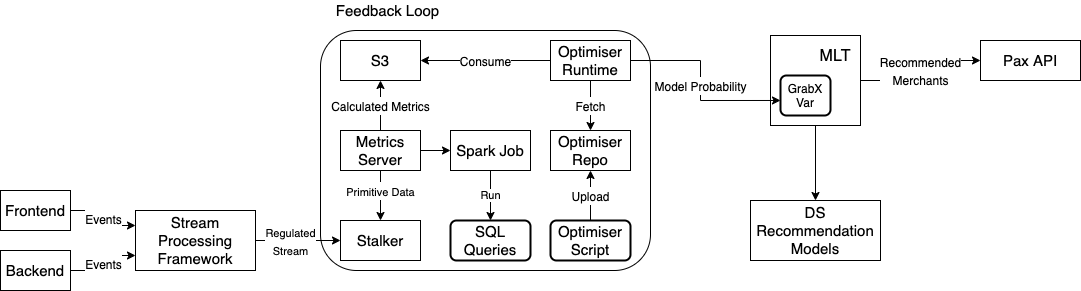
The following diagram illustrates the system architecture.

System architecture
System architecture


The novel Multi-Armed Bandit System for Recommendation solution contains three building blocks.

  • Stream processing framework

A lightweight system that performs basic operations on Kafka Streams, such as aggregation, filtering, and mapping. The proposed solution relies on this framework to pre-process raw events published by mobile apps and backend processes into the proper format that can be fed into the feedback loop.

  • Feedback loop

A system that calculates the goal metrics and optimises the model traffic distribution. It runs a metrics server which pulls the data from Stalker, which is a time series database that stores the processed events in the last one hour. The metrics server invokes a Spark Job periodically to run the SQL queries that computes the pre-defined goal metrics: the Clickthrough Rate, Conversion Rate and so on, provided by users. The output of the job is dumped into an S3 bucket, and is picked up by optimiser runtime. It runs the Multi-Armed Bandit Optimiser to optimise the model traffic distribution based on the latest goal metrics.

  • Dynamic value receiver, or the GrabX variable

Multi-Armed Bandit Optimiser modules

The Multi-Armed Bandit Optimiser consists of the following modules:

  • Reward Update
  • Batched Multi-Armed Bandit Agent
  • Monte-Carlo Simulation
  • Adaptive Rollout
Multi-Armed Bandit Optimiser modules


The goal of the Multi-Armed Bandit Optimisation is to find the optimal Arm that results in the best predefined metrics, and then allocate the maximum traffic to that Arm.

The solution can be illustrated in the following problem. For K Arm, in which the action space A={1,2,…,K}, the Multi-Arm-Bandit Optimiser goal is to solve the one-shot optimisation problem of Formula.


Reward Update module

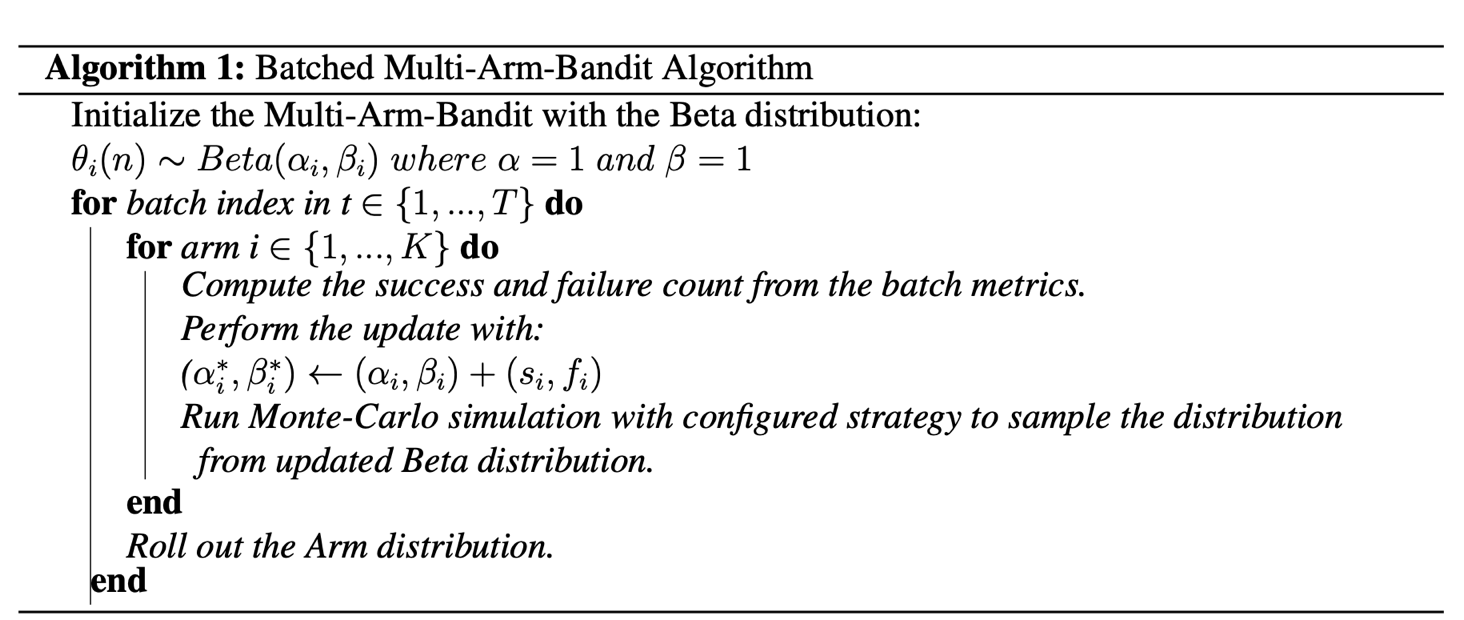
The Reward Update module collects a batch of the metrics. It calculates the Success and Failure counts, then updates the Beta distribution of each Arm with the Batched Multi-Armed Bandit algorithm.

Multi-Armed Bandit Agent module

In the Multi-Armed Bandit Agent module, each Arm’s metrics are modelled as a Beta distribution which is sampled with Thompson Sampling. The Beta distribution formula is:
Formula.


The Batched Multi-Armed Bandit algorithm updates the Beta distribution with the batch metrics. The optimisation algorithm can be described in the following method.

Batched Multi-Armed Bandit algorithm


Monte-Carlo Simulation module

The Monte-Carlo Simulation module runs the simulation for N repeated times to find the best Arm over a configurable simulation window. Then, it applies the simulated results as each Arm’s distribution percentage for the next round.

To handle different scenarios, we designed two strategies.

  • Max strategy: We count each Arm’s Success count’s result in Monte-Carlo Simulation, and then compute the next round distribution according to the success rate.
  • Mean strategy: We average each Arm’s Beta distribution probabilities’s result in Monte-Carlo Simulation, and then compute the next round distribution according to the averaged probabilities of each Arm.

Adaptive Rollout module

The Adaptive Rollout module rolls out the sampled distribution of each Multi-Armed Bandit Arm, in the form of Multi-Armed Bandit Arm Model ID and distribution, to the experimentation platform’s configuration variable. The resulting variable is then read from the online service. The process repeats as it collects feedback from the Adaptive Rollout metrics’ results in the feedback loop.

Multi-Armed Bandit for Recommendation Solution

In the GrabFood Recommended for You widget, there are several food recommendation models that categorise lists of merchants. The choice of the model is controlled through experiments at rollout, and the results of the experiments are analysed offline. After the analysis, data scientists and product managers rectify the model choice based on the experiment results.

The Multi-Armed Bandit System for Recommendation solution improves the process by speeding up the feedback loop with the Multi-Armed Bandit system. Instead of depending on offline data which comes out at T+N, the solution responds to minute-level metrics, and adjusts the model faster.

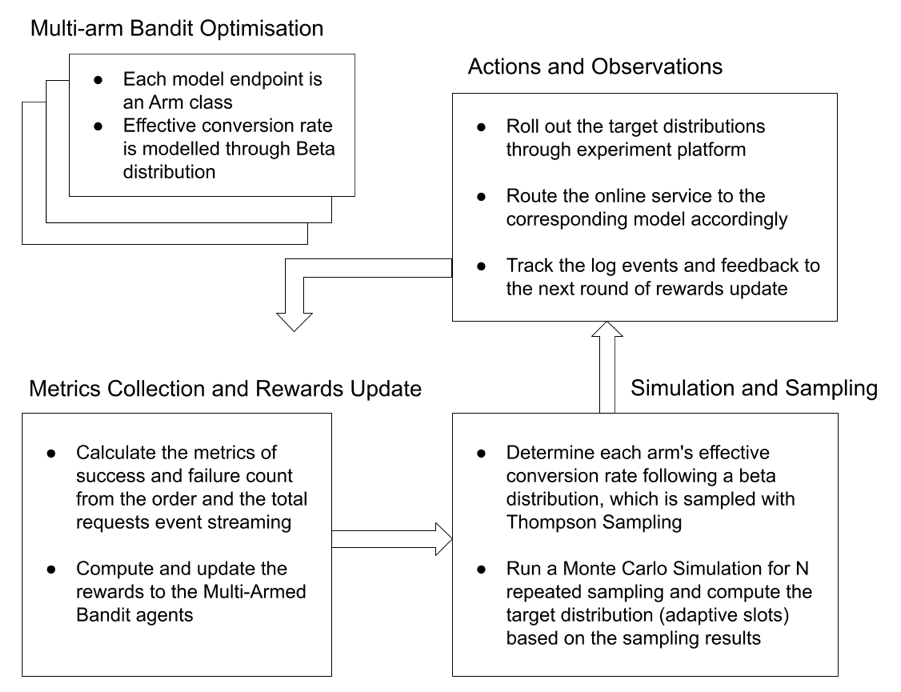
This results in an optimal solution faster. The proposed Multi-Armed Bandit for Recommendation solution workflow is illustrated in the following diagram.

 Multi-Armed Bandit for Recommendation Solution Workflow
Multi-Armed Bandit for Recommendation solution workflow


Optimisation metrics

The GrabFood recommendation uses the Effective Conversion Rate metrics as the optimisation objective. The Effective Conversion Rate is defined as the total number of checkouts through the Recommended for You widget, divided by the total widget viewed and multiplied by the coverage rate.

The events of views, clicks, and checkouts are collected over a 30-minute aggregation window and the coverage. A request with a checkout is considered as a success event, while a non-converted request is considered as a failure event.

Multi-Armed Bandit strategy

With the Multi-Armed Bandit Optimiser, the Beta distribution is selected to model the Effective Conversion Rate. The use of the mean strategy in the Monte-Carlo Simulation results in a more stable distribution.

Rollout policy

The Multi-Armed Bandit Optimiser uses the eater ID as the unique entity, applies a policy and assigns different percentages of eaters to each model, based on computed distribution at the beginning of each loop.

Fallback logic

The Multi-Armed Bandit Optimiser first runs model validation to ensure all candidates are suitable for rolling out. If the scheduled MAB job fails, it falls back to a default distribution that is set to 50-50% for each model.

Join us

Grab is more than just the leading ride-hailing and mobile payments platform in Southeast Asia. We use data and technology to improve everything from transportation to payments and financial services across a region of more than 620 million people. We aspire to unlock the true potential of Southeast Asia and look for like-minded individuals to join us on this ride.

If you share our vision of driving South East Asia forward, apply to join our team today.

Amazon Managed Grafana Is Now Generally Available with Many New Features

Post Syndicated from Danilo Poccia original https://aws.amazon.com/blogs/aws/amazon-managed-grafana-is-now-generally-available-with-many-new-features/

In December, we introduced the preview of Amazon Managed Grafana, a fully managed service developed in collaboration with Grafana Labs that makes it easy to use the open-source and the enterprise versions of Grafana to visualize and analyze your data from multiple sources. With Amazon Managed Grafana, you can analyze your metrics, logs, and traces without having to provision servers, or configure and update software.

During the preview, Amazon Managed Grafana was updated with new capabilities. Today, I am happy to announce that Amazon Managed Grafana is now generally available with additional new features:

  • Grafana has been upgraded to version 8 and offers new data sources, visualizations, and features, including library panels that you can build once and re-use on multiple dashboards, a Prometheus metrics browser to quickly find and query metrics, and new state timeline and status history visualizations.
  • To centralize the querying of additional data sources within an Amazon Managed Grafana workspace, you can now query data using the JSON data source plugin. You can now also query Redis, SAP HANA, Salesforce, ServiceNow, Atlassian Jira, and many more data sources.
  • You can use Grafana API keys to publish your own dashboards or give programmatic access to your Grafana workspace. For example, this is a Terraform recipe that you can use to add data sources and dashboards.
  • You can enable single sign-on to your Amazon Managed Grafana workspaces using Security Assertion Markup Language 2.0 (SAML 2.0). We have worked with these identity providers (IdP) to have them integrated at launch: CyberArk, Okta, OneLogin, Ping Identity, and Azure Active Directory.
  • All calls from the Amazon Managed Grafana console and code calls to Amazon Managed Grafana API operations are captured by AWS CloudTrail. In this way, you can have a record of actions taken in Amazon Managed Grafana by a user, role, or AWS service. Additionally, you can now audit mutating changes that occur in your Amazon Managed Grafana workspace, such as when a dashboard is deleted or data source permissions are changed.
  • The service is available in ten AWS Regions (full list at the end of the post).

Let’s do a quick walkthrough to see how this works in practice.

Using Amazon Managed Grafana
In the Amazon Managed Grafana console, I choose Create workspace. A workspace is a logically isolated, highly available Grafana server. I enter a name and a description for the workspace, and then choose Next.

Console screenshot.

I can use AWS Single Sign-On (AWS SSO) or an external identity provider via SAML to authenticate the users of my workspace. For simplicity, I select AWS SSO. Later in the post, I’ll show how SAML authentication works. If this is your first time using AWS SSO, you can see the prerequisites (such as having AWS Organizations set up) in the documentation.

Console screenshot.

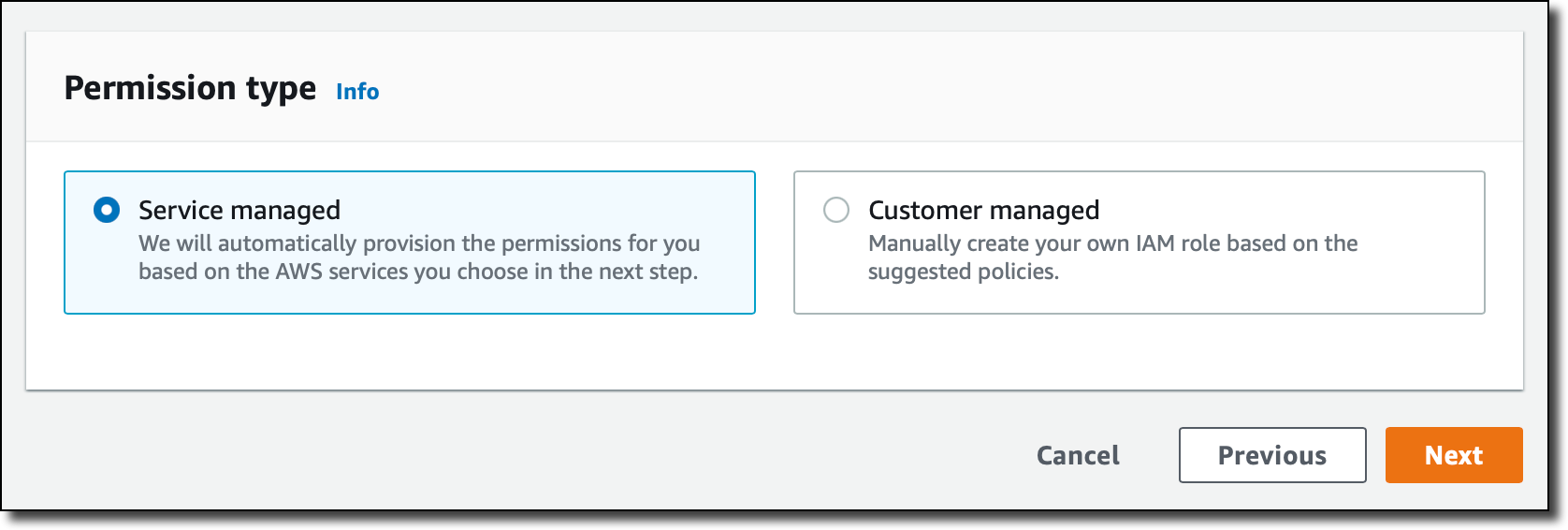
Then, I choose the Service managed permission type. In this way, Amazon Managed Grafana will automatically provision the necessary IAM permissions to access the AWS Services that I select in the next step.

Console screenshot.

In Service managed permission settings, I choose to monitor resources in my current AWS account. If you use AWS Organizations to centrally manage your AWS environment, you can use Grafana to monitor resources in your organizational units (OUs).

Console screenshot.

I can optionally select the AWS data sources that I am planning to use. This configuration creates an AWS Identity and Access Management (IAM) role that enables Amazon Managed Grafana to access those resources in my account. Later, in the Grafana console, I can set up the selected services as data sources. For now, I select Amazon CloudWatch so that I can quickly visualize CloudWatch metrics in my Grafana dashboards.

Here I also configure permissions to use Amazon Managed Service for Prometheus (AMP) as a data source and have a fully managed monitoring solution for my applications. For example, I can collect Prometheus metrics from Amazon Elastic Kubernetes Service (EKS) and Amazon Elastic Container Service (Amazon ECS) environments, using AWS Distro for OpenTelemetry or Prometheus servers as collection agents.

Console screenshot.

In this step I also select Amazon Simple Notification Service (SNS) as a notification channel. Similar to the data sources before, this option gives Amazon Managed Grafana access to SNS but does not set up the notification channel. I can do that later in the Grafana console. Specifically, this setting adds SNS publish permissions to topics that start with grafana to the IAM role created by the Amazon Managed Grafana console. If you prefer to have tighter control on permissions for SNS or any data source, you can edit the role in the IAM console or use customer-managed permissions for your workspace.

Finally, I review all the options and create the workspace.

After a few minutes, the workspace is ready, and I find the workspace URL that I can use to access the Grafana console.

Console screenshot.

I need to assign at least one user or group to the Grafana workspace to be able to access the workspace URL. I choose Assign new user or group and then select one of my AWS SSO users.

Console screenshot.

By default, the user is assigned a Viewer user type and has view-only access to the workspace. To give this user permissions to create and manage dashboards and alerts, I select the user and then choose Make admin.

Console screenshot.

Back to the workspace summary, I follow the workspace URL and sign in using my AWS SSO user credentials. I am now using the open-source version of Grafana. If you are a Grafana user, everything is familiar. For my first configurations, I will focus on AWS data sources so I choose the AWS logo on the left vertical bar.

Console screenshot.

Here, I choose CloudWatch. Permissions are already set because I selected CloudWatch in the service-managed permission settings earlier. I select the default AWS Region and add the data source. I choose the CloudWatch data source and on the Dashboards tab, I find a few dashboards for AWS services such as Amazon Elastic Compute Cloud (Amazon EC2), Amazon Elastic Block Store (EBS), AWS Lambda, Amazon Relational Database Service (RDS), and CloudWatch Logs.

Console screenshot.

I import the AWS Lambda dashboard. I can now use Grafana to monitor invocations, errors, and throttles for Lambda functions in my account. I’ll save you the screenshot because I don’t have any interesting data in this Region.

Using SAML Authentication
If I don’t have AWS SSO enabled, I can authenticate users to the Amazon Managed Grafana workspace using an external identity provider (IdP) by selecting the SAML authentication option when I create the workspace. For existing workspaces, I can choose Setup SAML configuration in the workspace summary.

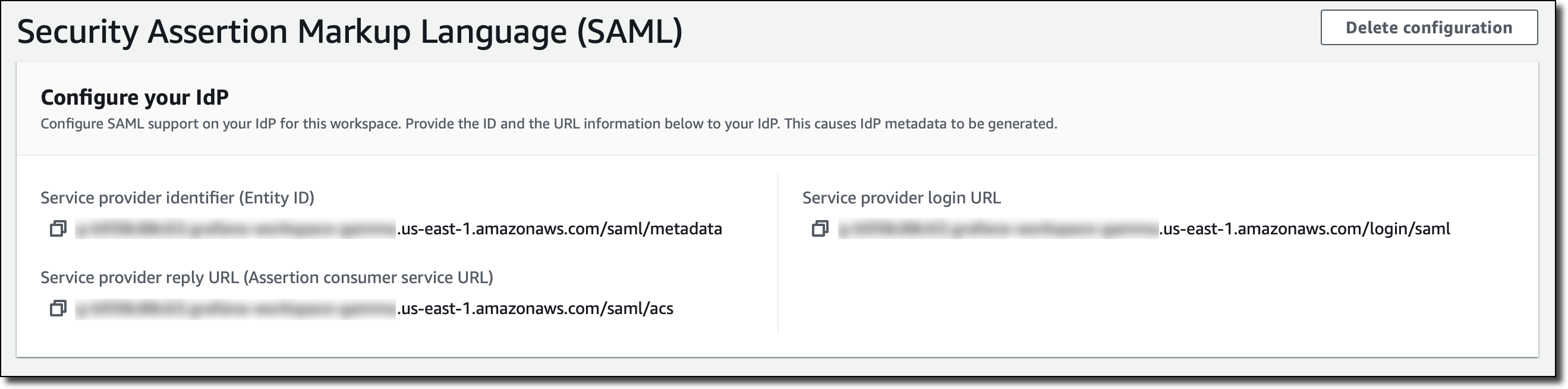
First, I have to provide the workspace ID and URL information to my IdP in order to generate IdP metadata for configuring this workspace.

Console screenshot.

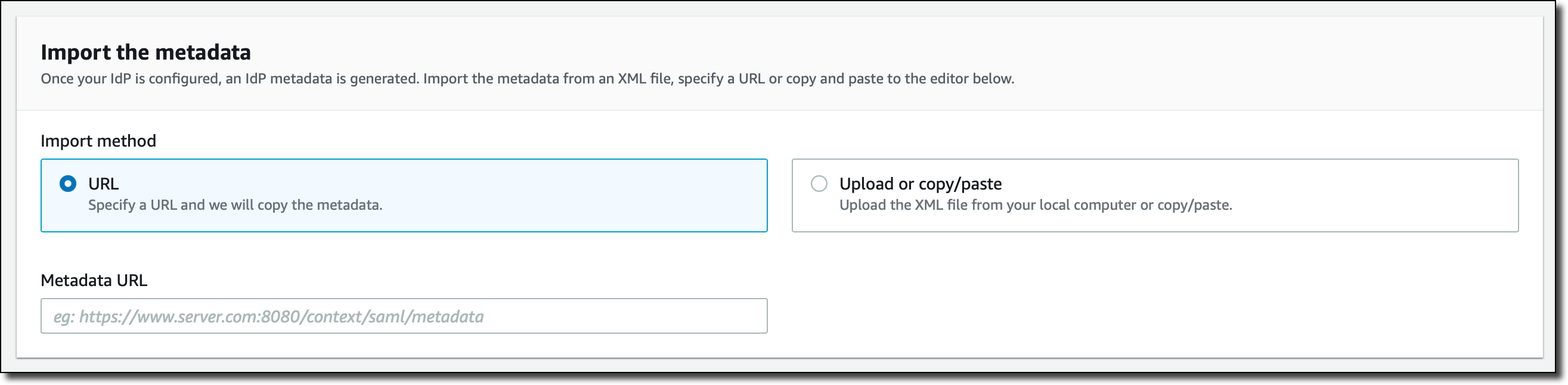
After my IdP is configured, I import the IdP metadata by specifying a URL or copying and pasting to the editor.

Console screenshot.

Finally, I can map user permissions in my IdP to Grafana user permissions, such as specifying which users will have Administrator, Editor, and Viewer permissions in my Amazon Managed Grafana workspace.

Console screenshot.

Availability and Pricing
Amazon Managed Grafana is available today in ten AWS Regions: US East (N. Virginia), US East (Ohio), US West (Oregon), Europe (Ireland), Europe (Frankfurt), Europe (London), Asia Pacific (Singapore), Asia Pacific (Tokyo), Asia Pacific (Sydney), and Asia Pacific (Seoul). For more information, see the AWS Regional Services List.

With Amazon Managed Grafana, you pay for the active users per workspace each month. Grafana API keys used to publish dashboards are billed as an API user license per workspace each month. You can upgrade to Grafana Enterprise to have access to enterprise plugins, support, and on-demand training directly from Grafana Labs. For more information, see the Amazon Managed Grafana pricing page.

To learn more, you are invited to this webinar on Thursday, September 9 at 9:00 am PDT / 12:00 pm EDT / 6:00 pm CEST.

Start using Amazon Managed Grafana today to visualize and analyze your operational data at any scale.

Danilo

Превод от Balkan Free Media Initiative Българската телеграфна агенция функционира като бюро на ТАСС

Post Syndicated from Николай Марченко original https://bivol.bg/%D0%B1%D1%8A%D0%BB%D0%B3%D0%B0%D1%80%D1%81%D0%BA%D0%B0%D1%82%D0%B0-%D1%82%D0%B5%D0%BB%D0%B5%D0%B3%D1%80%D0%B0%D1%84%D0%BD%D0%B0-%D0%B0%D0%B3%D0%B5%D0%BD%D1%86%D0%B8%D1%8F-%D1%84%D1%83%D0%BD%D0%BA.html

сряда 1 септември 2021


Николай Марченко от “Биволъ” анализира за Balkan Free Media Initiative (BFMI) чрез няколко нашумели факти от световната хроника, отразени от Българската национална информационна агенция БТА. Националната новинарска агенция на България…

The collective thoughts of the interwebz