Today, we’re announcing two significant enhancements to AWS Lambda that make it easier than ever for developers to build and debug serverless applications in their local development environments: console to IDE integration and remote debugging. These new capabilities build upon our recent improvements to the Lambda development experience, including the enhanced in-console editing experience and the improved local integrated development environment (IDE) experience launched in late 2024.
When building serverless applications, developers typically focus on two areas to streamline their workflow: local development environment setup and cloud debugging capabilities. While developers can bring functions from the console to their IDE, they’re looking for ways to make this process more efficient. Additionally, as functions interact with various AWS services in the cloud, developers want enhanced debugging capabilities to identify and resolve issues earlier in the development cycle, reducing their reliance on local emulation and helping them optimize their development workflow.
Console to IDE integration
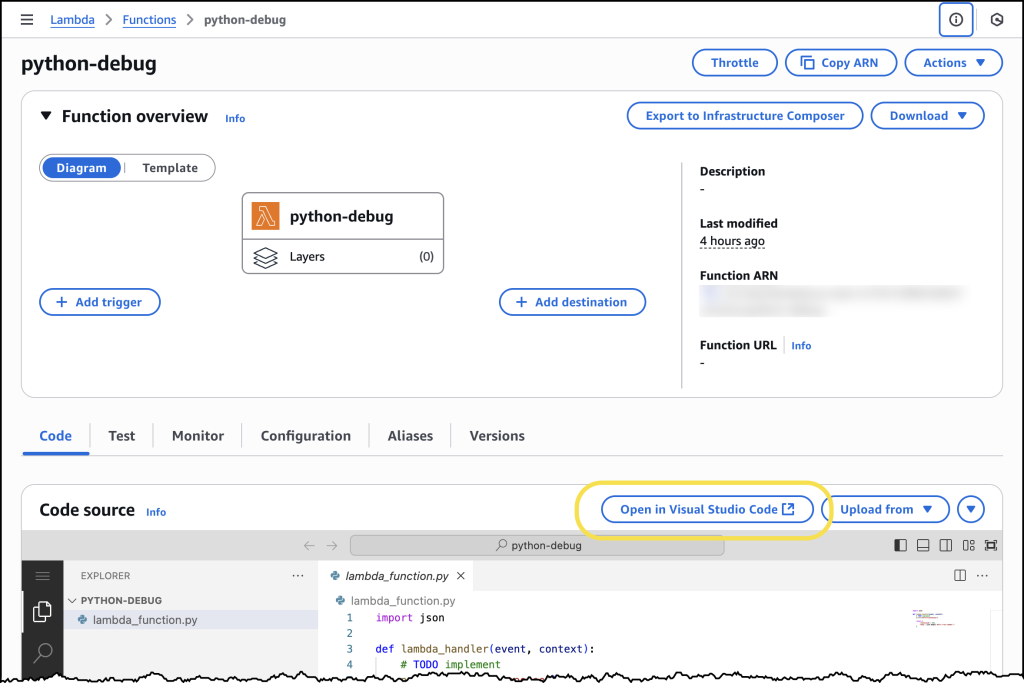
To address the first challenge, we’re introducing console to IDE integration, which streamlines the workflow from the AWS Management Console to Visual Studio Code (VS Code). This new capability adds an Open in Visual Studio Code button to the Lambda console, enabling developers to quickly move from viewing their function in the browser to editing it in their IDE, eliminating the time-consuming setup process for local development environments.
The console to IDE integration automatically handles the setup process, checking for VS Code installation and the AWS Toolkit for VS Code. For developers that have everything already configured, choosing the button immediately opens their function code in VS Code, so they can continue editing and deploy changes back to Lambda in seconds. If VS Code isn’t installed, it directs developers to the download page, and if the AWS Toolkit is missing, it prompts for installation.
To use console to IDE, look for the Open in VS Code button in either the Getting Started popup after creating a new function or the Code tab of existing Lambda functions. After selecting, VS Code opens automatically (installing AWS Toolkit if needed). Unlike the console environment, you now have access to a full development environment with integrated terminal – a significant improvement for developers who need to manage packages (npm install, pip install), run tests, or use development tools like linters and formatters. You can edit code, add new files/folders, and any changes you make will trigger an automatic deploy prompt. When you choose to deploy, the AWS Toolkit automatically deploys your function to your AWS account.
Remote debugging
Once developers have their functions in their IDE, they can use remote debugging to debug Lambda functions deployed in their AWS account directly from VS Code. The key benefit of remote debugging is that it allows developers to debug functions running in the cloud while integrated with other AWS services, enabling faster and more reliable development.
Getting started with remote debugging is straightforward. Developers can select a Lambda function in VS Code and enable debugging in seconds. AWS Toolkit for VS Code automatically downloads the function code, establishes a secure debugging connection, and enables breakpoint setting. When debugging is complete, AWS Toolkit for VS Code automatically cleans up the debugging configuration to prevent any impact on production traffic.
Let’s try it out
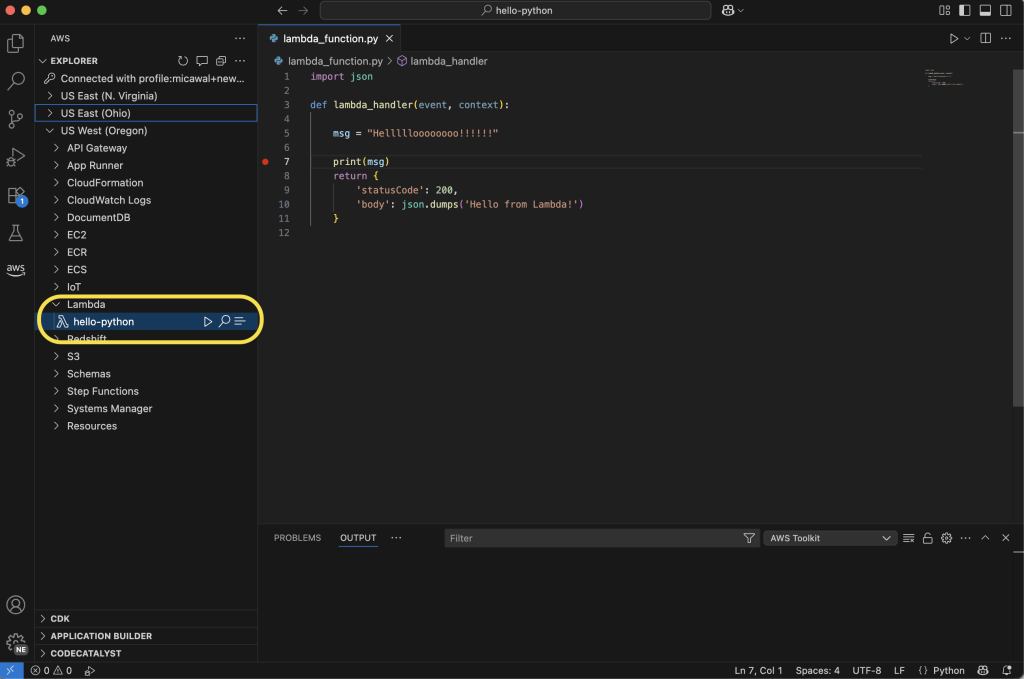
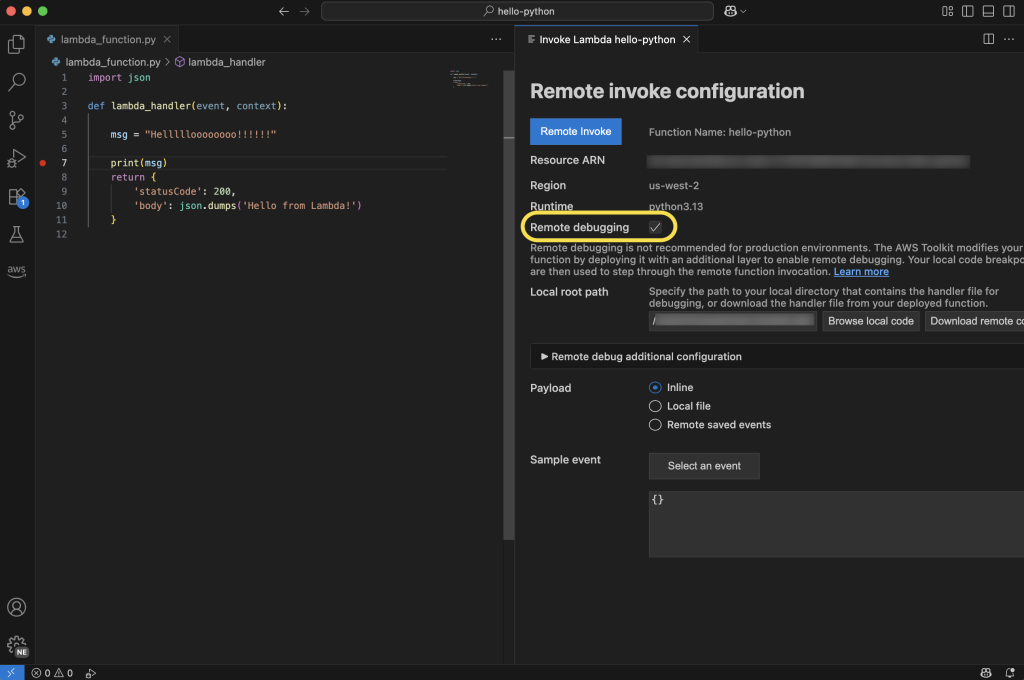
To take remote debugging for a spin, I chose to start with a basic “hello world” example function, written in Python. I had previously created the function using the AWS Management Console for AWS Lambda. Using the AWS Toolkit for VS Code, I can navigate to my function in the Explorer pane. Hovering over my function, I can right-click (ctrl-click in Windows) to download the code to my local machine to edit the code in my IDE. Saving the file will ask me to decide if I want to deploy the latest changes to Lambda.
From here, I can select the play icon to open the Remote invoke configuration page for my function. This dialog will now display a Remote debugging option, which I configure to point at my local copy of my function handler code. Before choosing Remote invoke, I can set breakpoints on the left anywhere I want my code to pause for inspection.
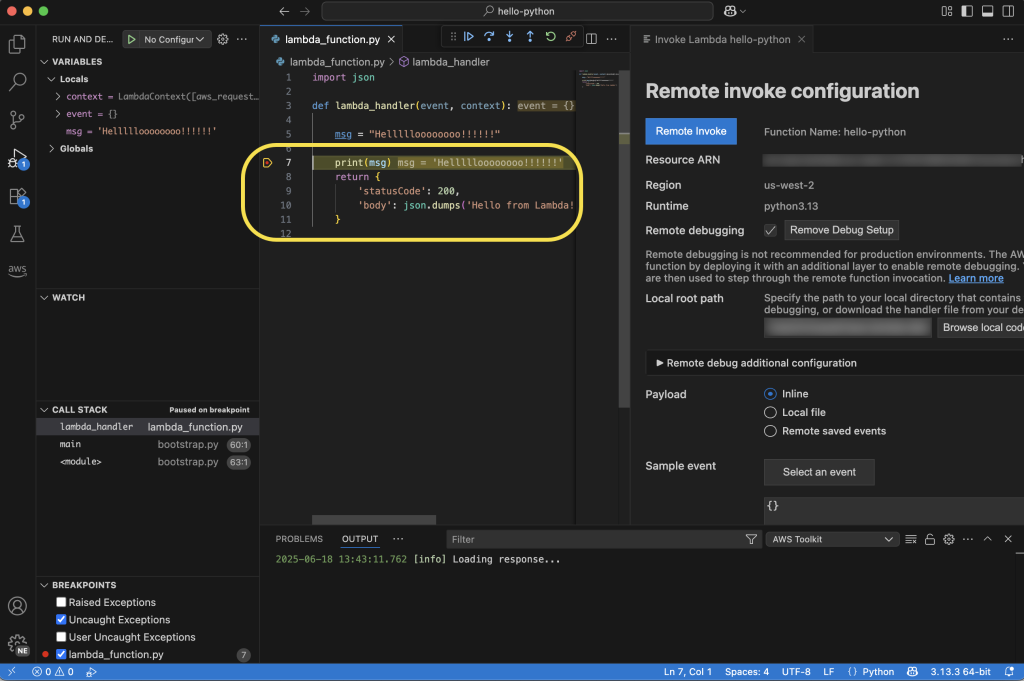
My code will be running in the cloud after it’s invoked, and I can monitor its status in real time in VS Code. In the following screenshot, you can see I’ve set a breakpoint at the print statement. My function will pause execution at this point in my code, and I can inspect things like local variable values before either continuing to the next breakpoint or stepping into the code line by line.
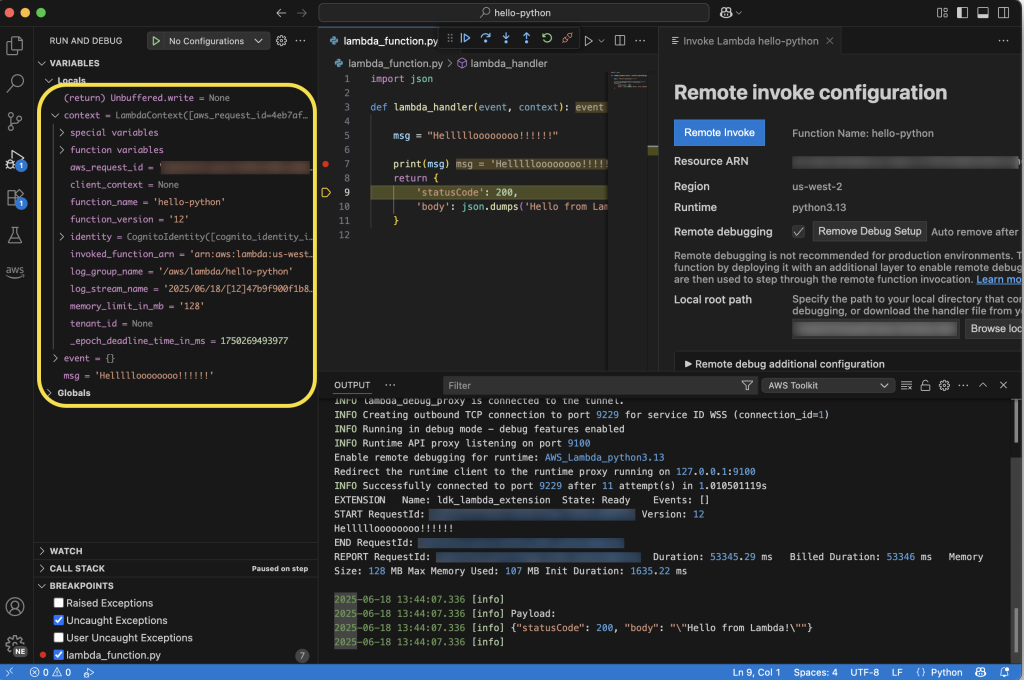
Here, you can see that I’ve chosen to step into the code, and as I go through it line by line, I can see the context and local and global variables displayed on the left side of the IDE. Additionally, I can follow the logs in the Output tab at the bottom of the IDE. As I step through, I’ll see any log messages or output messages from the execution of my function in real time.
Enhanced development workflow
These new capabilities work together to create a more streamlined development experience. Developers can start in the console, quickly transition to VS Code using the console to IDE integration, and then use remote debugging to debug their functions running in the cloud. This workflow eliminates the need to switch between multiple tools and environments, helping developers identify and fix issues faster.
Now available
You can start using these new features through the AWS Management Console and VS Code with the AWS Toolkit for VS Code (v3.69.0 or later) installed. Console to IDE integration is available in all commercial AWS Regions where Lambda is available, except AWS GovCloud (US) Regions. Learn more about it in Lambda and AWS Toolkit for VS Code documentation. To learn more about remote debugging capability, including AWS Regions it is available in, visit the AWS Toolkit for VS Code and Lambda documentation.
Console to IDE and remote debugging are available to you at no additional cost. With remote debugging, you pay only for the standard Lambda execution costs during debugging sessions. Remote debugging will support Python, Node.js, and Java runtimes at launch, with plans to expand support to additional runtimes in the future.
These enhancements represent a significant step forward in simplifying the serverless development experience, which means developers can build and debug Lambda functions more efficiently than ever before.
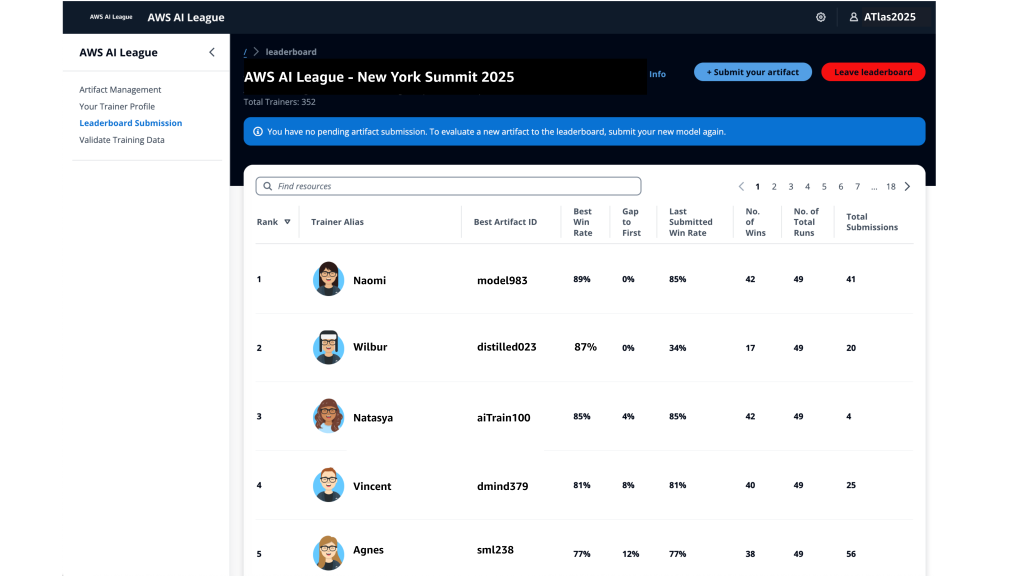
This is a unique competitive experience – your chance to dive deep into generative AI regardless of your skill level, compete with peers, and build solutions that solve actual business problems through an engaging, competitive experience.
With AWS AI League, your organization hosts private tournaments where teams collaborate and compete to solve real-world business use cases using practical AI skills. Participants craft effective prompts and fine-tune models while building powerful generative AI solutions relevant for their business. Throughout the competition, participants’ solutions are evaluated against reference standards on a real-time leaderboard that tracks performance based on accuracy and latency.
The AWS AI League experience starts with a 2-hour hands-on workshop led by AWS experts. This is followed by self-paced experimentation, culminating in a gameshow-style grand finale where participants showcase their generative AI creations addressing business challenges. Organizations can set up their own AWS AI League within half a day. The scalable design supports 500 to 5,000 employees while maintaining the same efficient timeline.
Supported by up to $2 million in AWS credits and a $25,000 championship prize pool at AWS re:Invent 2025, the program provides a unique opportunity to solve real business challenges.
AWS AI League transforms how organizations develop generative AI capabilities AWS AI League transforms how organizations develop generative AI capabilities by combining hands-on skills development, domain expertise, and gamification. This approach makes AI learning accessible and engaging for all skill levels. Teams collaborate through industry-specific challenges that mirror real organizational needs, with each challenge providing reference datasets and evaluation standards that reflect actual business requirements.
Customizable industry-specific challenges – Tailor competitions to your specific business context. Healthcare teams work on patient discharge summaries, financial services focus on fraud detection, and media companies develop content creation solutions.
Integrated AWS AI stack experience – Participants gain hands-on experience with AWS AI and ML tools, including Amazon SageMaker AI, Amazon Bedrock, and Amazon Nova, accessible from Amazon SageMaker Unified Studio. Teams work through a secure, cost-controlled environment within their organization’s AWS account.
Real-time performance tracking – The leaderboard evaluates submissions against established benchmarks and reference standards throughout the competition, providing immediate feedback on accuracy and speed so teams can iterate and improve their solutions. During the final round, this scoring includes expert evaluation where domain experts and a live audience participate in real-time voting to determine which AI solutions best solve real business challenges.
AWS AI League offers two foundational competition tracks:
Prompt Sage – The Ultimate Prompt Battle – Race to craft the perfect AI prompts that unlock breakthrough solutions. whether you detect financial fraud or streamlining healthcare workflows, every word counts as they climb the leaderboard using zero-shot learning and chain-of-thought reasoning.
Tune Whiz – The Model Mastery Showdown – Generic AI models meet their match as you sculpt them into industry-specific powerhouses. Armed with your domain expertise and specialized questions, competitors fine-tune models that speak your business language fluently. Victory goes to who achieve the perfect balance of blazing performance, lightning efficiency, and cost optimization.
As Generative AI continues to evolve, AWS AI League will regularly introduce new challenges and formats in addition to these tracks.
Get started today Ready to get started? Organizations can host private competitions by applying through the AWS AI League page. Individual developers can join public competitions at AWS Summits and AWS re:Invent.
PS: Writing a blog post at AWS is always a team effort, even when you see only one name under the post title. In this case, I want to thank Natasya Idries, for her generous help with technical guidance, and expertise, which made this overview possible and comprehensive.
While containers have revolutionized how development teams package and deploy applications, these teams have had to carefully monitor releases and build custom tooling to mitigate deployment risks, which slows down shipping velocity. At scale, development teams spend valuable cycles building and maintaining undifferentiated deployment tools instead of innovating for their business.
Starting today, you can use the built-in blue/green deployment capability in Amazon Elastic Container Service (Amazon ECS) to make your application deployments safer and more consistent. This new capability eliminates the need to build custom deployment tooling while giving you the confidence to ship software updates more frequently with rollback capability.
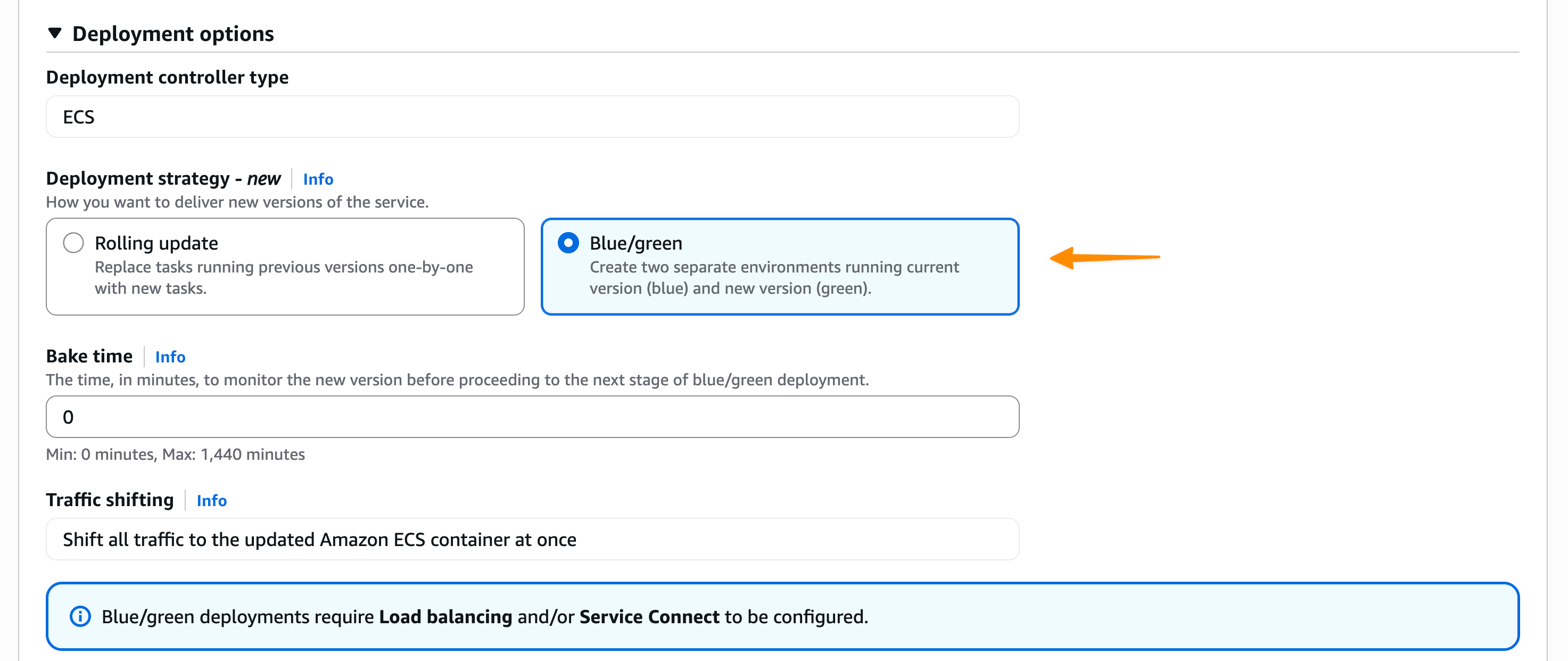
Here’s how you can enable the built-in blue/green deployment capability in the Amazon ECS console.
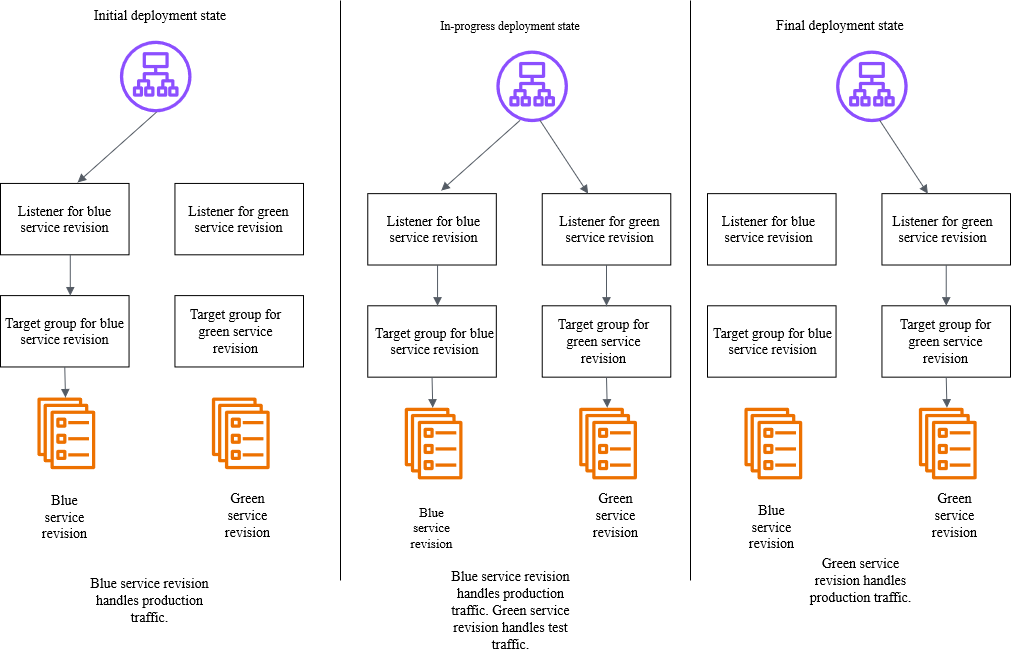
You create a new “green” application environment while your existing “blue” environment continues to serve live traffic. After monitoring and testing the green environment thoroughly, you route the live traffic from blue to green. With this capability, Amazon ECS now provides built-in functionality that makes containerized application deployments safer and more reliable.
Below is a diagram illustrating how blue/green deployment works by shifting application traffic from the blue environment to the green environment. You can learn more at the Amazon ECS blue/green service deployments workflow page.
Amazon ECS orchestrates this entire workflow while providing event hooks to validate new versions using synthetic traffic before routing production traffic. You can validate new software versions in production environments before exposing them to end users and roll back near-instantaneously if issues arise. Because this functionality is built directly into Amazon ECS, you can add these safeguards by simply updating your configuration without building any custom tooling.
Getting started Let me walk you through a demonstration that showcases how to configure and use blue/green deployments for an ECS service. Before that, there are a few setup steps that I need to complete, including configuring AWS Identity and Access Management (IAM) roles, which you can find on the Required resources for Amazon ECS blue/green deployments Documentation page.
For this demonstration, I want to deploy a new version of my application using the blue/green strategy to minimize risk. First, I need to configure my ECS service to use blue/green deployments. I can do this through the ECS console, AWS Command Line Interface (AWS CLI), or using infrastructure as code.
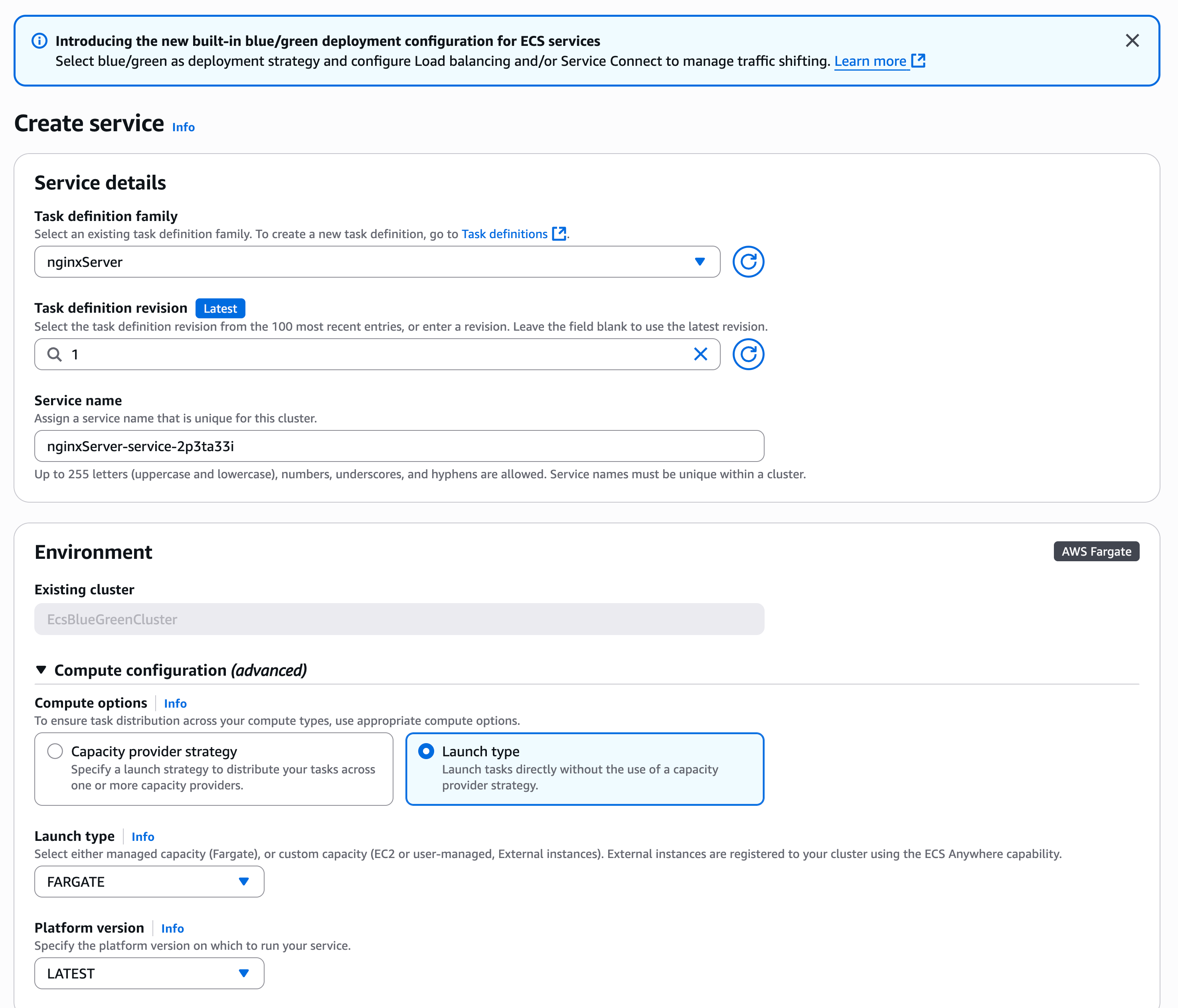
Using the Amazon ECS console, I create a new service and configure it as usual:
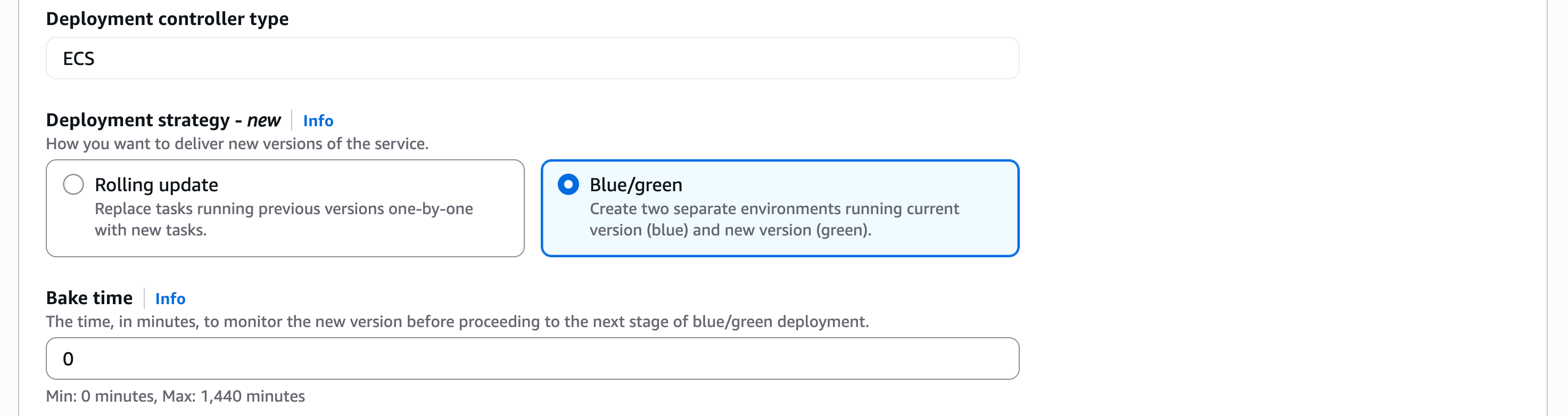
In the Deployment Options section, I choose ECS as the Deployment controller type, then Blue/green as the Deployment strategy. Bake time is the time after the production traffic has shifted to green, when instant rollback to blue is available. When the bake time expires, blue tasks are removed.
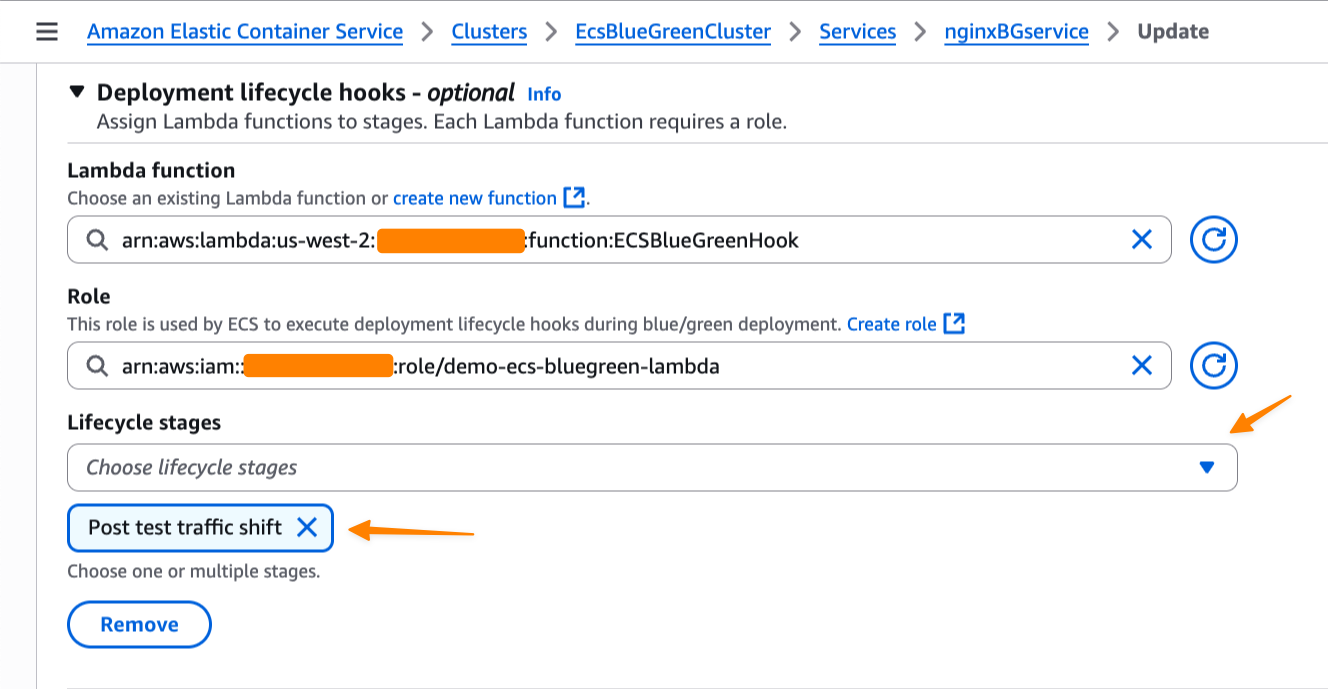
We’re also introducing deployment lifecycle hooks. These are event-driven mechanisms you can use to augment the deployment workflow. I can select which AWS Lambda function I’d like to use as a deployment lifecycle hook. The Lambda function can perform the required business logic, but it must return a hook status.
Amazon ECS supports the following lifecycle hooks during blue/green deployments. You can learn more about each stage on the Deployment lifecycle stages page.
Pre scale up
Post scale up
Production traffic shift
Test traffic shift
Post production traffic shift
Post test traffic shift
For my application, I want to test when the test traffic shift is complete and the green service handles all of the test traffic. Since there’s no end-user traffic, a rollback at this stage will have no impact on users. This makes Post test traffic shift suitable for my use case as I can test it first with my Lambda function.
Switching context for a moment, let’s focus on the Lambda function that I use to validate the deployment before allowing it to proceed. In my Lambda function as a deployment lifecycle hook, I can perform any business logic, such as synthetic testing, calling another API, or querying metrics.
Within the Lambda function, I must return a hookStatus. A hookStatus can be SUCCESSFUL, which will move the process to the next step. If the status is FAILED, it rolls back to the blue deployment. If it’s IN_PROGRESS, then Amazon ECS retries the Lambda function in 30 seconds.
In the following example, I set up my validation with a Lambda function that performs file upload as part of a test suite for my application.
import json
import urllib3
import logging
import base64
import os

# Configure logging
logger = logging.getLogger()
logger.setLevel(logging.DEBUG)

# Initialize HTTP client
http = urllib3.PoolManager()

def lambda_handler(event, context):
    """
    Validation hook that tests the green environment with file upload
    """
    logger.info(f"Event: {json.dumps(event)}")
    logger.info(f"Context: {context}")

    try:
        # In a real scenario, you would construct the test endpoint URL
        test_endpoint = os.getenv("APP_URL")

        # Create a test file for upload
        test_file_content = "This is a test file for deployment validation"
        test_file_data = test_file_content.encode('utf-8')

        # Prepare multipart form data for file upload
        fields = {
            'file': ('test.txt', test_file_data, 'text/plain'),
            'description': 'Deployment validation test file'
        }

        # Send POST request with file upload to /process endpoint
        response = http.request(
            'POST',
            test_endpoint,
            fields=fields,
            timeout=30
        )

        logger.info(f"POST /process response status: {response.status}")

        # Check if response has OK status code (200-299 range)
        if 200 <= response.status < 300:
            logger.info("File upload test passed - received OK status code")
            return {
                "hookStatus": "SUCCEEDED"
            }
        else:
            logger.error(f"File upload test failed - status code: {response.status}")
            return {
                "hookStatus": "FAILED"
            }

    except Exception as error:
        logger.error(f"File upload test failed: {str(error)}")
        return {
            "hookStatus": "FAILED"
        }
When the deployment reaches the lifecycle stage that is associated with the hook, Amazon ECS automatically invokes my Lambda function with deployment context. My validation function can run comprehensive tests against the green revision—checking application health, running integration tests, or validating performance metrics. The function then signals back to ECS whether to proceed or abort the deployment.
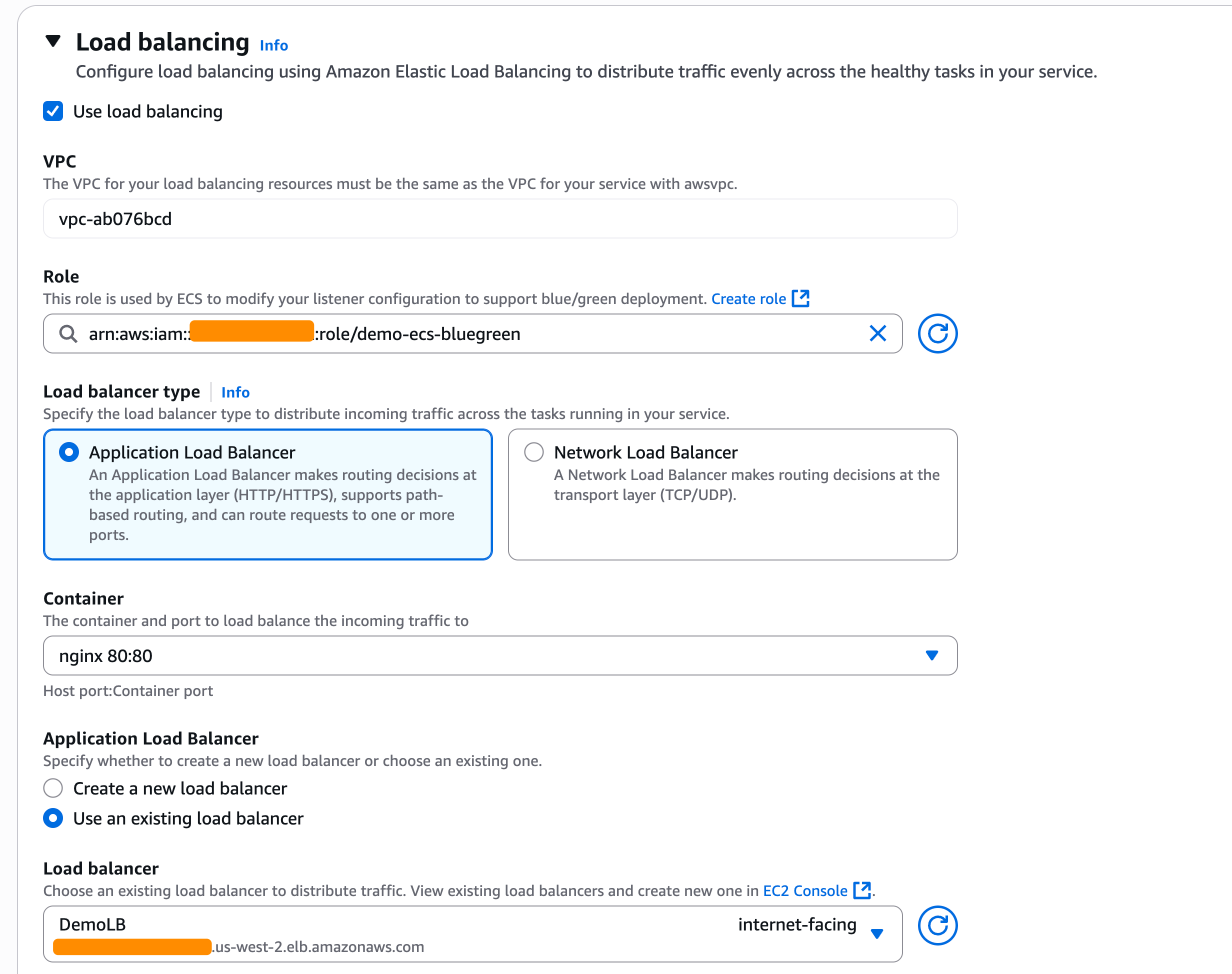
As I chose the blue/green deployment strategy, I also need to configure the load balancers and/or Amazon ECS Service Connect. In the Load balancing section, I select my Application Load Balancer.
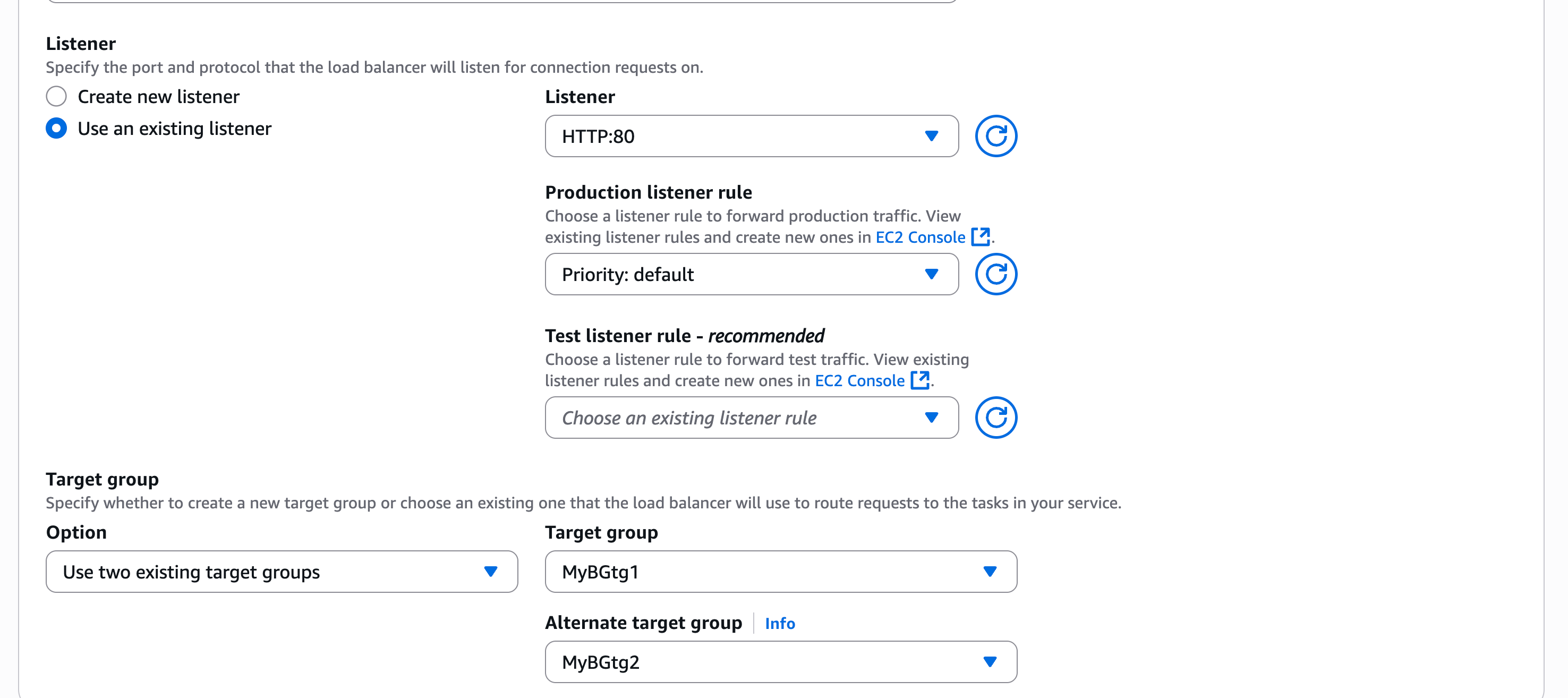
In the Listener section, I use an existing listener on port 80 and select two Target groups.
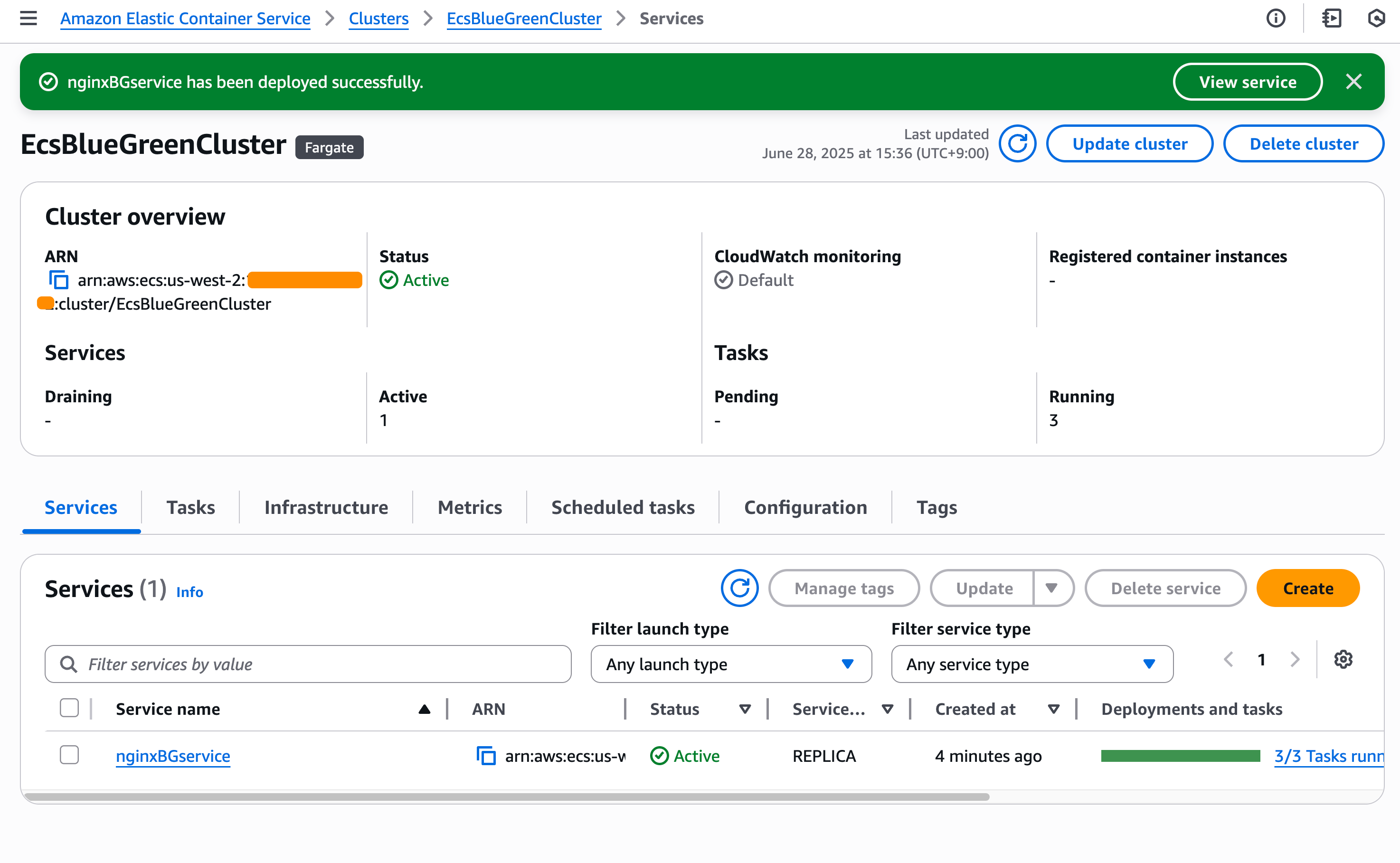
Happy with this configuration, I create the service and wait for ECS to provision my new service.
Testing blue/green deployments Now, it’s time to test my blue/green deployments. For this test, Amazon ECS will trigger my Lambda function after the test traffic shift is completed. My Lambda function will return FAILED in this case as it performs file upload to my application, but my application doesn’t have this capability.
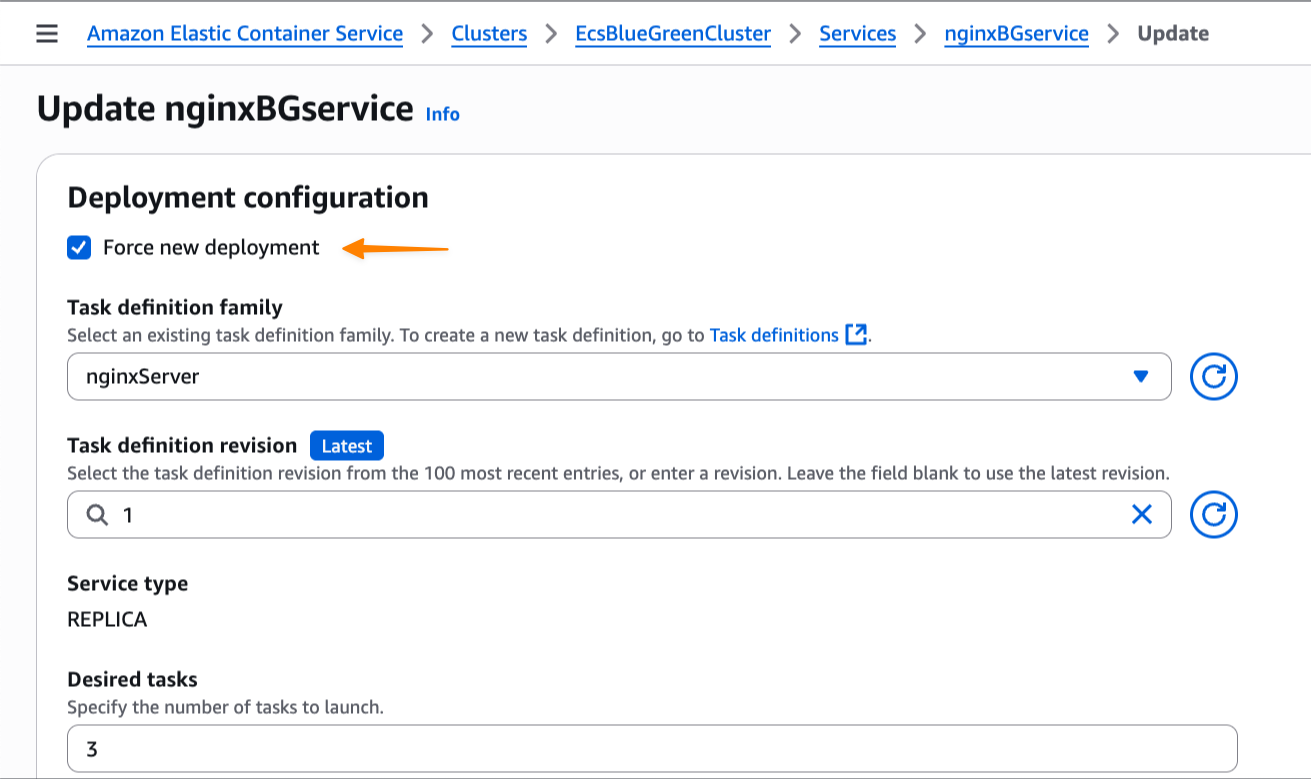
I update my service and check Force new deployment, knowing the blue/green deployment capability will roll back if it detects a failure. I select this option because I haven’t modified the task definition but still need to trigger a new deployment.
At this stage, I have both blue and green environments running, with the green revision handling all the test traffic. Meanwhile, based on Amazon CloudWatch Logs of my Lambda function, I also see that the deployment lifecycle hooks work as expected and emit the following payload:
As expected, my AWS Lambda function returns FAILED as hookStatus because it failed to perform the test.
[ERROR] 2025-07-10T13:18:43.392Z 67d9b03e-12da-4fab-920d-9887d264308e File upload test failed: HTTPConnectionPool(host='xyz.us-west-2.elb.amazonaws.com', port=80): Max retries exceeded with url: / (Caused by ConnectTimeoutError(<urllib3.connection.HTTPConnection object at 0x7f8036273a80>, 'Connection to xyz.us-west-2.elb.amazonaws.com timed out. (connect timeout=30)'))
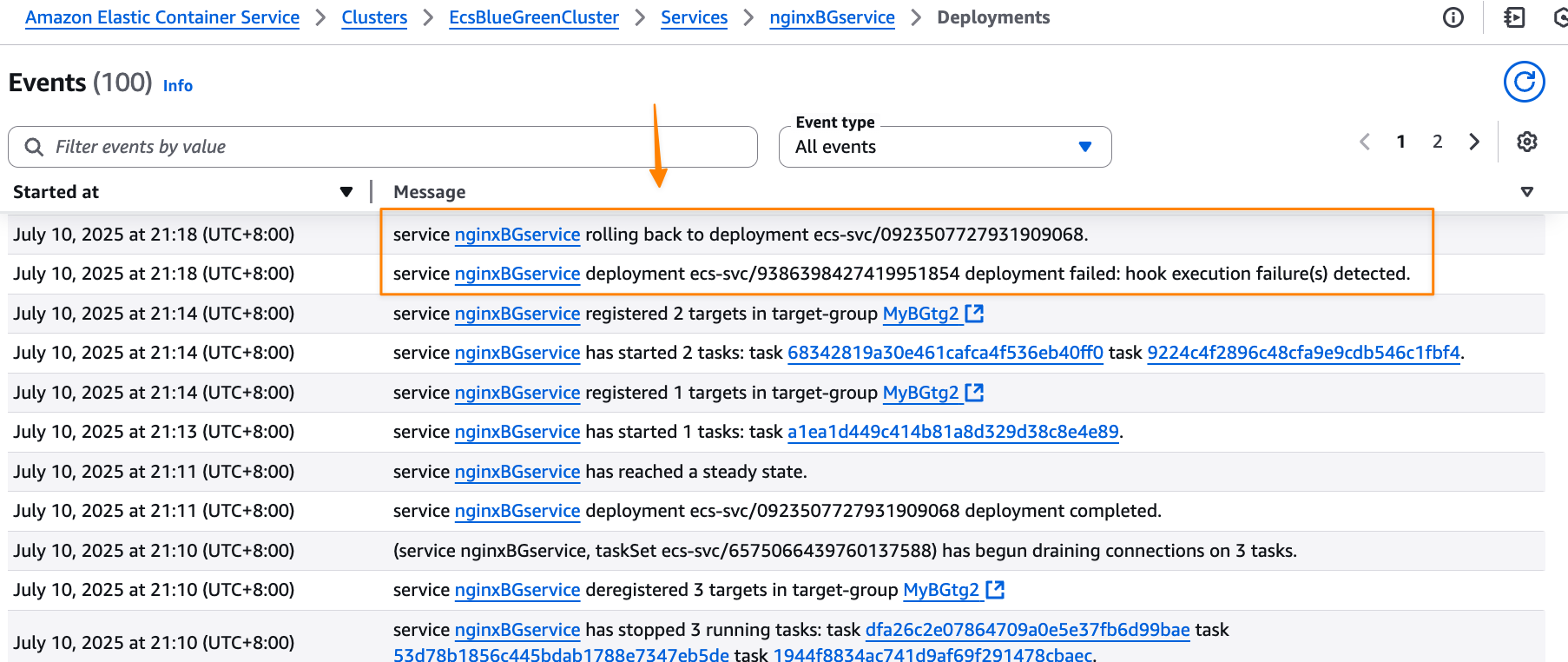
Because the validation wasn’t completed successfully, Amazon ECS tries to roll back to the blue version, which is the previous working deployment version. I can monitor this process through ECS events in the Events section, which provides detailed visibility into the deployment progress.
Amazon ECS successfully rolls back the deployment to the previous working version. The rollback happens near-instantaneously because the blue revision remains running and ready to receive production traffic. There is no end-user impact during this process, as production traffic never shifted to the new application version—ECS simply rolled back test traffic to the original stable version. This eliminates the typical deployment downtime associated with traditional rolling deployments.
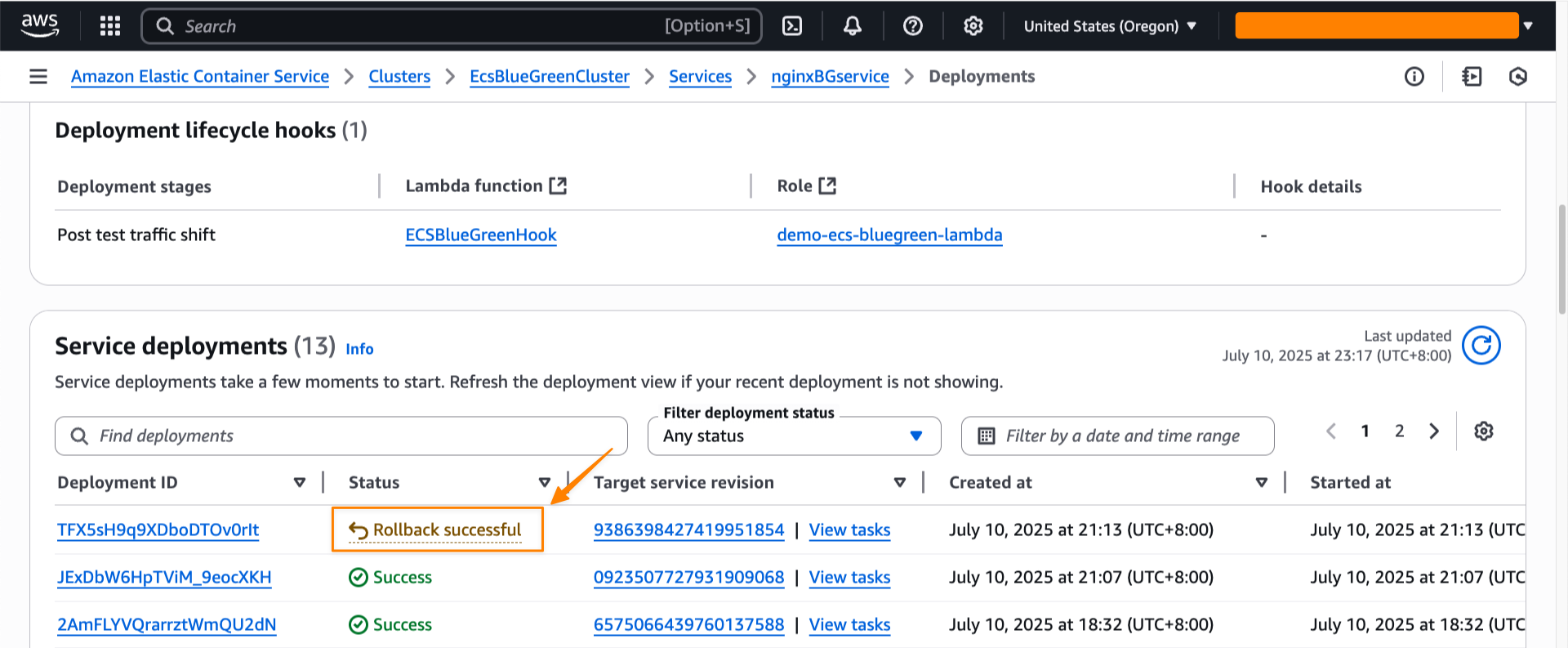
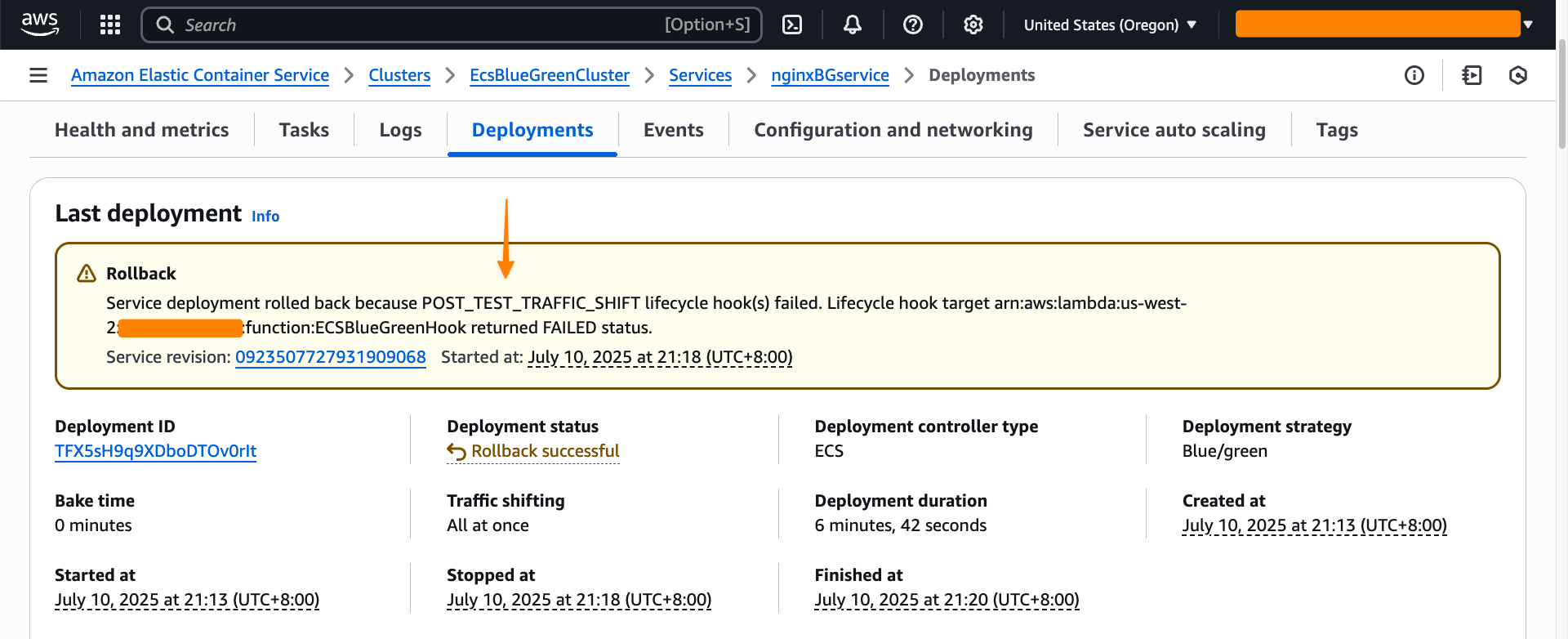
I can also see the rollback status in the Last deployment section.
Throughout my testing, I observed that the blue/green deployment strategy provides consistent and predictable behavior. Furthermore, the deployment lifecycle hooks provide more flexibility to control the behavior of the deployment. Each service revision maintains immutable configuration including task definition, load balancer settings, and Service Connect configuration. This means that rollbacks restore exactly the same environment that was previously running.
Additional things to know Here are a couple of things to note:
Pricing – The blue/green deployment capability is included with Amazon ECS at no additional charge. You pay only for the compute resources used during the deployment process.
Availability – This capability is available in all commercial AWS Regions.
Get started with blue/green deployments by updating your Amazon ECS service configuration in the Amazon ECS console.
Version 12.0 of
the Forgejo software forge has been released. Changes include a number of
user-interface improvements, a mechanism to keep forks in sync with their
upstream, and more; see the release
notes for the full list.
Ransomware used to mean locked files and paralyzed systems. But today, bad actors are just as focused on exfiltration—the silent theft of sensitive data—and using that data as leverage for extortion.
According to cybersecurity firm BlackFog, 94% of successful cyberattacks in 2024 involved data exfiltration, either alongside or instead of encryption. Whether it’s stolen patient records, credentials, or source code, the goal is simple: Extract something valuable and threaten to leak it if demands aren’t met.
In this article, we examine how exfiltration became a leading tactic, the trends driving its rise, and what organizations—and cloud storage providers—can do to defend against it.
What is exfiltration?
In cybersecurity, exfiltration refers to the unauthorized transfer of data from a system—often done stealthily, and almost always with malicious intent. Think of it as the digital equivalent of corporate espionage: Data is copied, compressed, and quietly smuggled out. Unlike ransomware encryption, which slams the door in your face, exfiltration leaves the front door looking untouched.
The data being exfiltrated is rarely random. Cybercriminals are increasingly strategic about what they take and why. Common targets include:
User credentials
Personally identifiable information (PII)
Intellectual property and source code
Encryption keys
Shadow copies or backup snapshots
Tactics include exploiting cloud storage misconfigurations, hijacking legitimate credentials, or disguising traffic as everyday protocols like DNS or HTTPS. Increasingly, data exfiltration happens before the main event—laying the groundwork for extortion, credential stuffing, or resale on underground markets.
Recent cybersecurity trends related to exfiltration
Exfiltration has become the defining feature of modern cyberattacks, and the evidence is growing:
Double extortion is now standard. Threat actors exfiltrate data first, then deploy ransomware—or skip the encryption altogether—to maximize leverage. According to the 2023 Unit 42 Report, 70% of ransomware incidents involved data theft.
Infostealers, malicious programs designed to covertly harvest sensitive information, are on the rise. Over 2.1 billion credentials were stolen in 2024 alone, with malware like RedLine and Lumma making theft accessible to low-skilled attackers. While cybersecurity task forces (comprised of both government and enterprise actors) have made the news with high-profile disruptions of Lumma and other tools, the ability to use generative AI coding tools has meant that cyber attackers have a shortened time to deployment for malware tools.
Time to exfiltration is shrinking.Fortinet’s 2025 Threat Landscape Report notes that attackers can extract data in under five hours, while defenders often take days to respond.
Encrypted traffic masks malicious behavior. Emerging exfiltration techniques like QUIC-Exfil use modern, encrypted protocols to evade detection by traditional firewalls.
Together, these trends point to a world where stolen data is the main prize—and the threat doesn’t start when the ransom note arrives. It starts when your data quietly leaves the building.
Cloud misconfiguration and its role in exfiltration attacks
Exfiltration doesn’t always require malware—sometimes it only takes a misconfigured storage bucket or firewall rule. Cloud misconfigurations remain a leading cause of breaches, with public buckets, excessive identity and access management (IAM) privileges, and overly permissive network rules exposing data to the open internet.
Attackers exploit these gaps to quietly access or extract data without triggering alerts. A strong cloud posture management strategy—one that includes audit automation, implementing the principle of least privilege, and configuring features like Object Lock or Bucket Access Logs—is critical to reducing exposure.
Defending against exfiltration is a shared responsibility
As exfiltration becomes a primary threat, defense requires collaboration between cloud storage providers and their customers. Here’s how the most effective strategies work together.
Immutable backups and Object Lock
One of the strongest defenses is immutability. Backblaze B2’s Object Lock, for example, allows files to be written once and protected from modification, deletion, or encryption for a set period. Even if attackers compromise credentials, the data cannot be altered or removed.
Visibility and outlier detection
Cloud providers are investing in making advanced logging and behavioral analytics available to users to detect data theft in real time. Some examples of these types of features include:
Granular access logging with IP and user-level metadata.
Rate limiting and download caps to prevent mass theft.
Outlier detection powered by machine learning to catch subtle deviations from baseline activity.
Best practices for customers
Storage-layer defenses work best when paired with customer-side security controls:
Adopt zero trust architecture: Never assume implicit trust. Continuously validate users, devices, and behaviors.
Use MFA and least-privilege access: Lock down credentials, rotate them regularly, and minimize exposure.
Encrypt data at rest and in transit: Use strong encryption standards (AES-256, TLS 1.2+) and managed key systems.
Monitor for exfiltration indicators: Watch for abnormal traffic volumes, geographic anomalies, and unexpected protocol usage.
Run simulated breach drills: Test your team’s ability to detect and respond to stealthy data leaks.
Cloud storage companies can help provide critical security layers, but stopping exfiltration is ultimately a shared responsibility. Combining provider-level resilience with customer vigilance is the best path forward.
In a world of silent theft, vigilance is your best defense
Exfiltration isn’t just an add-on to ransomware. In this environment, locking the doors isn’t enough—You need to monitor the exits.
By combining immutable backups, smart logging, credential controls, and proactive monitoring, organizations can shift from passive victims to active defenders. The best defenses today aren’t just about blocking access; they’re about knowing what’s leaving and making sure it can’t be used against you.
In our latest podcast miniseries, we spoke to educators live from the CS11TA 2025 annual conference in Cleveland, Ohio, to hear their top tips for integrating computer science (CS) into other subjects.
Hello World editor, Meg Wang and the team met teachers in the exhibit hall for real-time reflections and essential teacher tips on teaching cross-curricular CS. They spoke to some amazing educators from across the United States and had a great time interacting with everyone in attendance.
“Meeting teachers and hearing first-hand about their experiences, challenges, and triumphs was invaluable. It was amazing to meet Hello World writers in person, and to also meet future writers. Like I said at the conference, Hello World is for educators, by educators, so that means you! Everyone has valuable experience or useful advice to share, and we’re here to help you amplify that.” – Meg Wang, editor of the Hello World magazine
Who features in the episode, and what are their tips?
Lisa Wenzel, CS teacher from Maryland, USA
Lisa’s top tip for integrating computer science into your lessons is to start with topics that you’re passionate about. If you’re not a CS teacher yourself, Lisa suggests finding a colleague who teaches the subject. She advises having a chat with them to explore how you can include CS concepts into subjects you’re particularly interested in.
“I guarantee you that they’re going to have something […] to teach [another subject], and it’s going to involve computer science.”
Through peer discussions and collaboration between educators, you’ll discover engaging ways that you can incorporate CS into your teaching. Give it a try the next time you’re chatting to a CS teacher.
Tiffany N. Jones, CS and Cybersecurity teacher in Georgia, USA
Tiffany N. Jones, author of ‘Belonging in Tech’ (featured on page 82 of Hello World Issue 27), shares her top tip to seamlessly integrate computer science into other subjects.
Using the example of a class studying ocean health and pollution, Tiffany shares how you can introduce students to real-world applications of computer science by exploring how sensors and microcontrollers can be used to collect environmental data.
She then suggests exploring how databases and programming languages can be used to analyse and visualise the data that the sensors and microcontrollers have recorded. This not only deepens your learner’s scientific understanding but also demonstrates how computing concepts are used in real-world industry practices.
Rick Ballew, CS and Engineering teacher in Minnesota, USA
Rick’s top tip for integrating CS is to first think about your favourite lesson and consider ways that you can introduce computational thinking.
In the podcast, Rick says:
“chances are, computational thinking is already a part of that lesson you’re doing. Call it out to the students, and that’s going to help them to start understanding how computer science is baked into everything we do.”
Rick also offers a great example from his experience as a band teacher. He shares how learning to read a new piece of music is very similar to the steps involved in computational thinking. s
“[You’ve] got to break it down. There’s abstraction. You’ve got to figure out the sequencing, and you create the way that you’re going to learn it. And that is all part of computational thinking.”
This approach shows students that CS isn’t just coding; it’s a way of thinking that can be applied across disciplines.
We hope this episode inspires you and helps you to engage your students in computing. We’d love to hear your thoughts, your feedback, and any of your own tips on how to integrate CS into other subjects. Share your advice in the comments section below.
We hope you enjoy the episode!
More to listen to next week
Next week, we’ll be sharing an interesting conversation between Ben Garside, Senior Learning Manager (AI Literacy) at the Raspberry Pi Foundation, Leonida Soi, Learning Manager (Kenya) at the Raspberry Pi Foundation, and two of our global Experience AI partners, Monika Katkutė-Gelžinė from Vedliai in Lithuania, and Aimy Lee from Penang Science Cluster in Malaysia.
They’ll be exploring what AI education looks like around the world and what teachers need to feel confident teaching it.
You can watch or listen to each episode of our podcast on YouTube, or listen via your preferred audio streaming service, whether that’s Apple Podcasts, Spotify, or Amazon Music.
Decades after its creation, the Linux CPU scheduler remains an area
of active development; it is difficult to find a time slice to cover every
interesting scheduler change. In an attempt to catch up, the time has come
to round-robin through a few patches that have been circulating recently.
The work at hand focuses on a new attempt at time-slice extension, the
creation of a deadline server for sched_ext tasks, and keeping tasks on
isolated CPUs from being surprised by LRU batching.
ArgoCD is a leading GitOps tool that empowers teams to manage Kubernetes deployments declaratively, using Git as the single source of truth. Its robust feature set, including automated sync, rollback support, drift detection, advanced deployment strategies, RBAC integration, and multi-cluster support, makes it a go-to solution for Kubernetes application delivery. However, as organizations scale, several pain points and operational challenges become apparent.
Pain Points with Traditional ArgoCD Usage
ArgoCD’s UI and CLI are designed for users with extensive technical background. Interacting with YAML manifests, understanding Kubernetes resource relationships, and troubleshooting sync errors require specialized knowledge. This limits access to GitOps workflows for less technical stakeholders and increases reliance on DevOps engineers.
Managing ArgoCD across multiple clusters or environments (using hub-spoke, per-cluster, or grouped models) introduces significant operational complexity. Teams must handle multiple ArgoCD instances, maintain consistent configuration, and coordinate deployments, which can become a bottleneck as service footprints grow.
ArgoCD excels at syncing and monitoring Kubernetes resources but lacks built-in mechanisms for pre-deployment (e.g., image scanning) or post-deployment (e.g., load testing) tasks. This forces teams to rely on external tools or custom scripts, fragmenting the deployment pipeline and increasing maintenance effort.
Promoting applications across environments (Dev → Test → Prod) is not natively streamlined. Teams must manually orchestrate or script these promotions, slowing down urgent fixes and complicating the release process.
As organizations adopt multi-cluster strategies, managing ArgoCD’s access, RBAC, and resource visibility across environments becomes cumbersome, often leading to fragmented workflows and potential security gaps.
How ArgoCD MCP Server with Amazon Q CLI addresses these challenges:
The integration of the ArgoCD MCP (Model Context Protocol) Server with Amazon Q CLI fundamentally transforms the user experience by introducing natural language interaction for GitOps operations.
With MCP, users can manage deployments, monitor application states, and perform sync or rollback operations using plain conversational language rather than technical commands or YAML. For example, a user can simply ask, “What applications are out of sync in production?” or “Sync the api-service application,” and the system executes the appropriate ArgoCD API calls in the background.
This democratizes access to GitOps, enabling less technical team members (such as QA, product managers, or support engineers) to safely interact with deployment workflows.
Natural language interfaces abstract away the complexity of multi-cluster and multi-environment management. Users can query or act on resources across clusters without memorizing resource names, namespaces, or API endpoints.
The MCP server handles authentication, session management, and robust error handling, reducing the need for manual troubleshooting and custom scripting.
The integration provides detailed feedback, intelligent endpoint handling, and comprehensive error messages, making it easier to diagnose and resolve issues. Full static type checking and environment-based configuration further enhance reliability and maintainability.
By leveraging Amazon Q CLI’s extensibility, users gain access to pre-built integrations and context-aware prompts, accelerating development and deployment workflows.
The MCP server enables AI assistants and language models to automate routine tasks, recommend actions, and even debug issues, acting as a virtual DevOps engineer. This can significantly reduce manual effort and speed up incident response.
Traditional ArgoCD vs. ArgoCD MCP Server with Amazon Q CLI
Feature/Challenge
Traditional ArgoCD
With MCP Server + Amazon Q CLI
User Interface
Technical UI/CLI, YAML required
Natural language, conversational
Access for Non-Engineers
Limited
Broad, democratized
Multi-Cluster Management
Complex, manual
Simplified, abstracted
Pre-Post Deployment Tasks
External tools/scripts needed
(Still external, but easier to invoke)
Application Promotion
Manual or scripted
Natural language, easier orchestration
Troubleshooting
Technical, error-prone
Guided, AI-assisted, detailed feedback
Automation
Scripting required
AI/agent-driven, proactive
You can perform the following actions using natural language using Amazon Q CLI integration with ArgoCD MCP server.
Application Management: List, create, update, and delete ArgoCD applications
Sync Operations: Trigger sync operations and monitor their status
Resource Tree Visualization: View the hierarchy of resources managed by applications
Health Status Monitoring: Check the health of applications and their resources
Event Tracking: View events related to applications and resources
Log Access: Retrieve logs from application workloads
Resource Actions: Execute actions on resources managed by applications
Setting Up Your Environment
Pre-requisites
Following are the pre-requisites for setting up your EKS environment to be managed by ArgoCD using Amazon Q CLI.
An AWS account with appropriate permissions
AWS CLI v2.13.0 or later
Node.js v18.0.0 or later
npm v9.0.0 or later
Amazon Q CLI v1.0.0 or later (npm install -g @aws/amazon-q-cli)
An EKS cluster (v1.27 or later) with ArgoCD v2.8 or later installed
Once configured, you can start using natural language commands with Amazon Q CLI to interact with your ArgoCD applications.
Managing ArgoCD applications using natural language
Listed below are some example prompts to interact with ArgoCD applications in your EKS cluster.
List ArgoCD application
Prompt: “List all ArgoCD applications in my cluster”
Amazon Q will use the ArgoCD MCP server to retrieve and display all applications
Create new ArgoCD application
Prompt: Create new argocd application using App name: game-2048 Repo: https://github.com/aws-ia/terraform-aws-eks-blueprints Path: patterns/gitops/getting-started-argocd/k8s. Branch: main Namespace: argocd
Amazon Q will create a new application from GitRepo information provided
Viewing deployment status
Prompt: “Show me the resource tree for team-carmen app”
Amazon Q will display the hierarchy of Kubernetes resources managed by the application
Synchronizing applications
Prompt: “Show me the applications that’s out of sync”
Amazon Q will display the out of sync applications
Prompt: “Sync the application”
Amazon Q syncing application
Amazon Q will:
Initiate a sync operation for the specified application
Monitor the sync progress
Report the final status of the sync operation
Healthchecks and monitoring
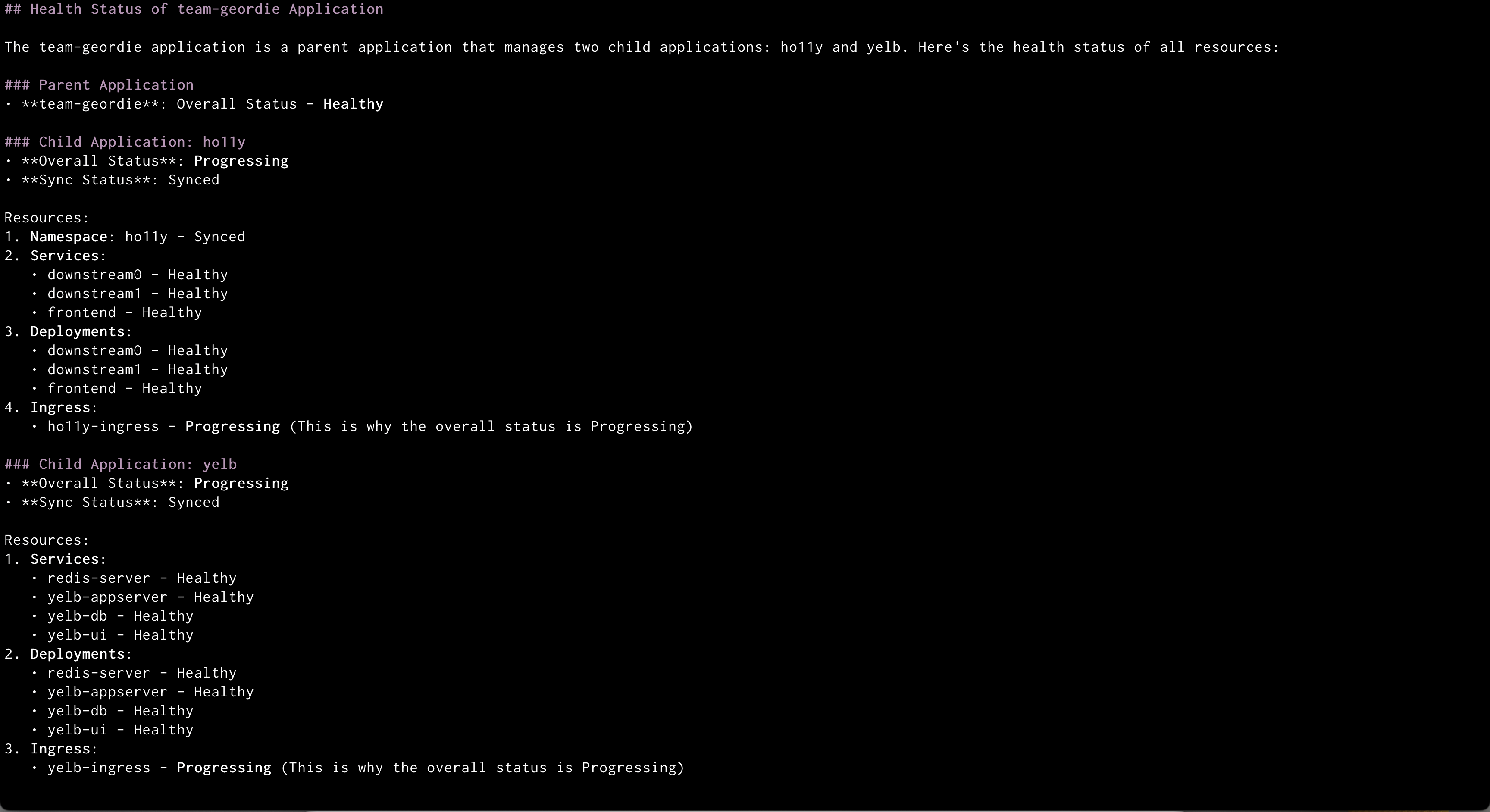
Prompt:”Check the health of all resources in the team-geordie application”
Amazon Q showing health status of all the resources in an application
Amazon Q will:
Retrieve the health status of all resources
Identify any unhealthy components
Provide recommendations for addressing issues
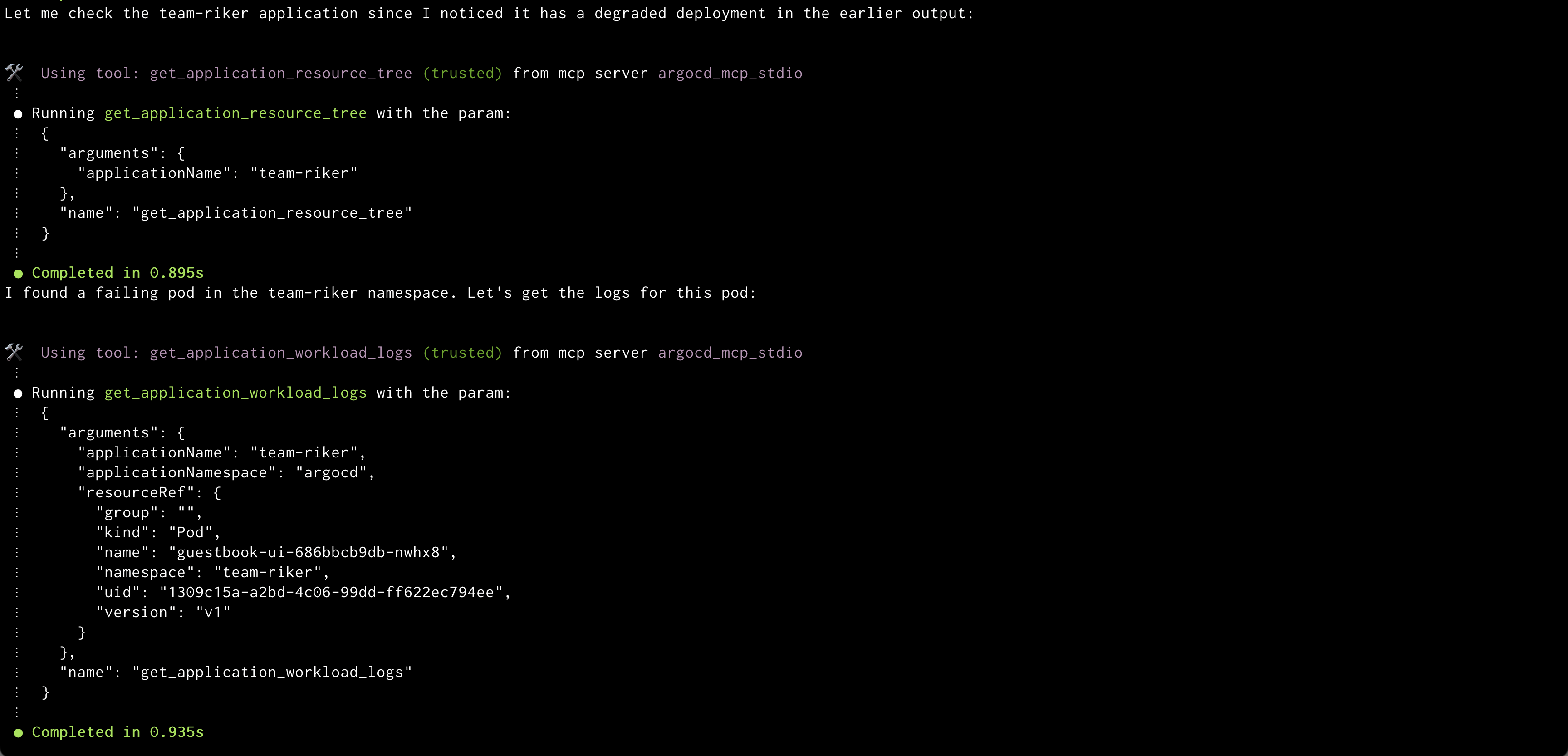
Prompt: “Show me the logs for the failing pod in the team-platform application”
Amazon Q showing logs of problematic pod
Amazon Q will:
Identify problematic pods
Retrieve and display relevant logs
Highlight potential error messages
Conclusion
The integration of Amazon Q CLI with ArgoCD through the MCP server marks a transformative advancement in Kubernetes management, combining ArgoCD’s GitOps capabilities with Amazon Q’s natural language processing. By transforming complex Kubernetes operations into simple conversational interactions, this solution allows teams to focus on what truly matters – creating value for their business. Rather than spending time memorizing commands or navigating technical complexities, teams can now manage their cloud infrastructure through natural dialogue, making the cloud-native journey more accessible and efficient for everyone.Ready to transform your EKS and ArgoCD experience? It’s highly recommended to try out Amazon Q CLI integration with ArgoCD MCP and discover why DevOps teams are making it an essential part of their toolkit.
About the authors
Jagdish Komakula is a passionate Sr. Delivery Consultant working with AWS Professional Services. With over two decades of experience in Information Technology, he helped numerous enterprise clients successfully navigate their digital transformation journeys and cloud adoption initiatives.
Aditya Ambati, Is an experienced DevOps Engineer with 12 plus years of experience in IT. Excellent reputation for resolving problems, improving customer satisfaction, and driving overall operational improvements.
Anand Krishna Varanasi, is a seasoned AWS builder and architect who began his career over 16 years ago. He guides customers with cutting-edge cloud technology migration strategies (the 7 Rs) and modernization. He is very passionate about the role that technology plays in bridging the present with all the possibilities for our future.
Cloudflare has servers in 330 cities spread across 125+ countries. All of these servers run Quicksilver, which is a key-value database that contains important configuration information for many of our services, and is queried for all requests that hit the Cloudflare network.
Because it is used while handling requests, Quicksilver is designed to be very fast; it currently responds to 90% of requests in less than 1 ms and 99.9% of requests in less than 7 ms. Most requests are only for a few keys, but some are for hundreds or even more keys.
Quicksilver currently contains over five billion key-value pairs with a combined size of 1.6 TB, and it serves over three billion keys per second, worldwide. Keeping Quicksilver fast provides some unique challenges, given that our dataset is always growing, and new use cases are added regularly.
Quicksilver used to store all key-values on all servers everywhere, but there is obviously a limit to how much disk space can be used on every single server. For instance, the more disk space used by Quicksilver, the less disk space is left for content caching. Also, with each added server that contains a particular key-value, the cost of storing that key-value increases.
This is why disk space usage has been the main battle that the Quicksilver team has been waging over the past several years. A lot was done over the years, but we now think that we have finally created an architecture that will allow us to get ahead of the disk space limitations and finally make Quicksilver scale better.
The size of the Quicksilver database has grown by 50% to about 1.6 TB in the past year
What we talked about previously
Part one of the story explained how Quicksilver V1 stored all key-value pairs on each server all around the world. It was a very simple and fast design, it worked very well, and it was a great way to get started. But over time, it turned out to not scale well from a disk space perspective.
The problem was that disk space was running out so fast that there was not enough time to design and implement a fully scalable version of Quicksilver. Therefore, Quicksilver V1.5 was created first. It halved the disk space used on each server compared to V1.
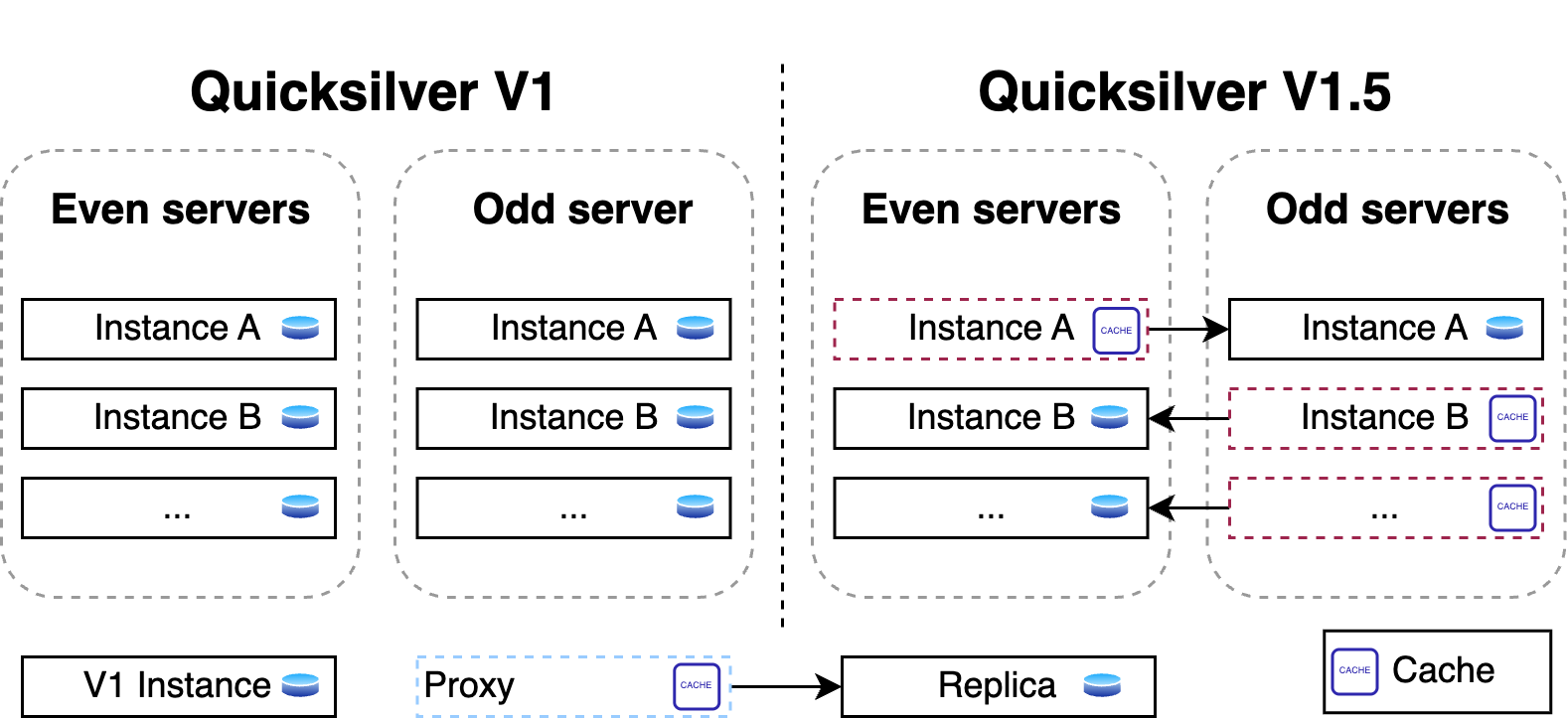
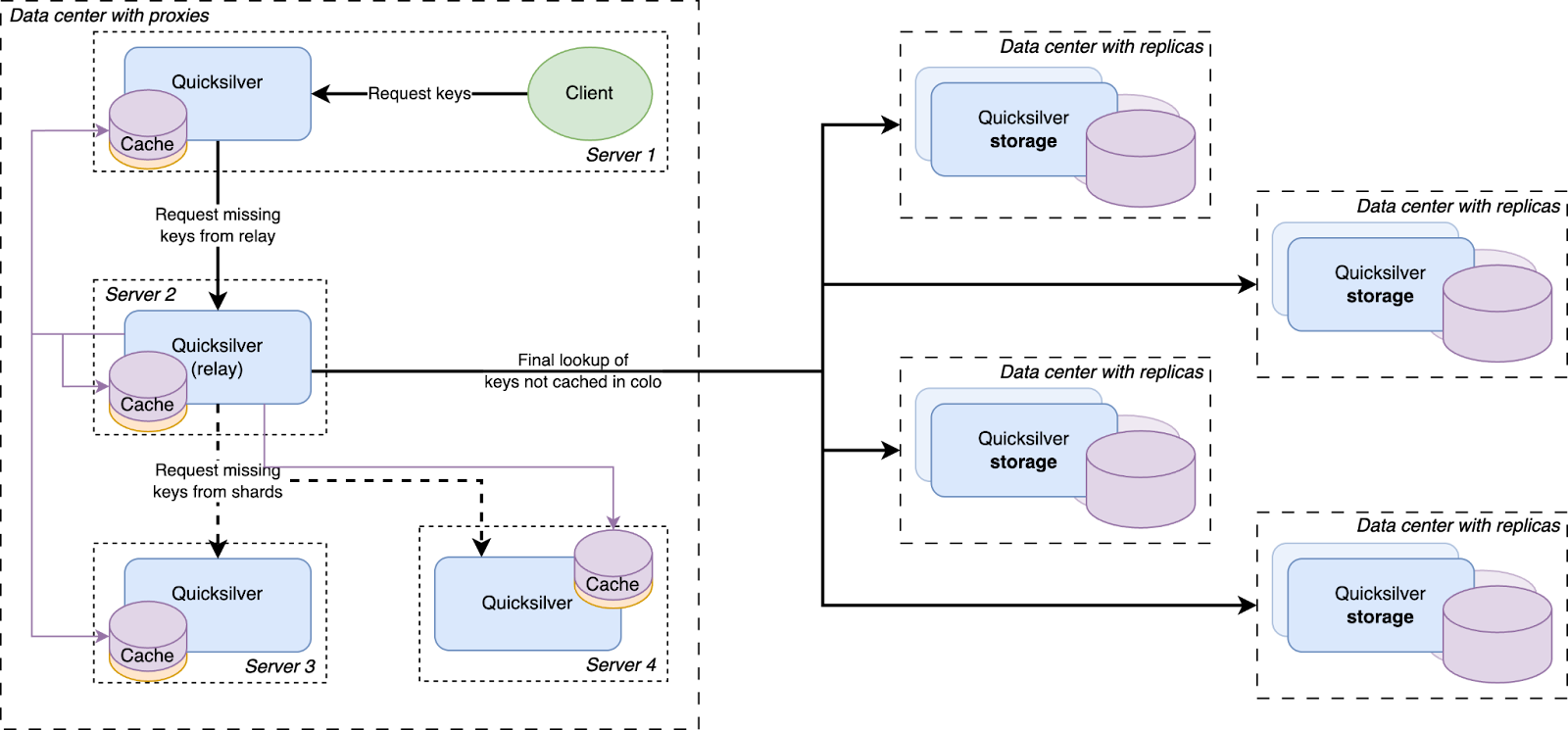
For this, a new proxy mode was introduced for Quicksilver. In this mode, Quicksilver does not contain the full dataset anymore, but only contains a cache. All cache misses are looked up on another server that runs Quicksilver with a full dataset. Each server runs about ten separate instances of Quicksilver, and all have different databases with different sets of key-values. We call Quicksilver instances with the full data set replicas.
For Quicksilver V1.5, half of those instances on a particular server would run Quicksilver in proxy mode, and therefore would not have the full dataset anymore. The other half would run in replica mode. This worked well for a time, but it was not the final solution.
Building this intermediate solution had the added benefit of allowing the team to gain experience running an even more distributed version of Quicksilver.
The problem
There were a few reasons why Quicksilver V1.5 was not fully scalable.
First, the size of the separate instances were not very stable. The key-space is owned by the teams that use Quicksilver, not by the Quicksilver team, and the way those teams use Quicksilver changes frequently. Furthermore, while most instances grow in size over time, some instances have actually gotten smaller, such as when the use of Quicksilver is optimised by teams. The result of this is that the split of instances that was well-balanced at the start, quickly became unbalanced.
Second, the analyses that were done to estimate how much of the key space would need to be in cache on each server assumed that taking all keys that were accessed in a three-day period would represent a good enough cache. This assumption turned out to be wildly off. This analysis estimated that we needed about 20% of the key space in cache, which turned out to not be entirely accurate. Whereas most instances did have a good cache hit rate, with 20% or less of the key space in cache, some instances turned out to need a much higher percentage.
The main issue, however, was that reducing the disk space used by Quicksilver on our network by as much as 40% does not actually make it more scalable. The number of key-values that are stored in Quicksilver keeps growing. It only took about two years before disk space was running low again.
The solution
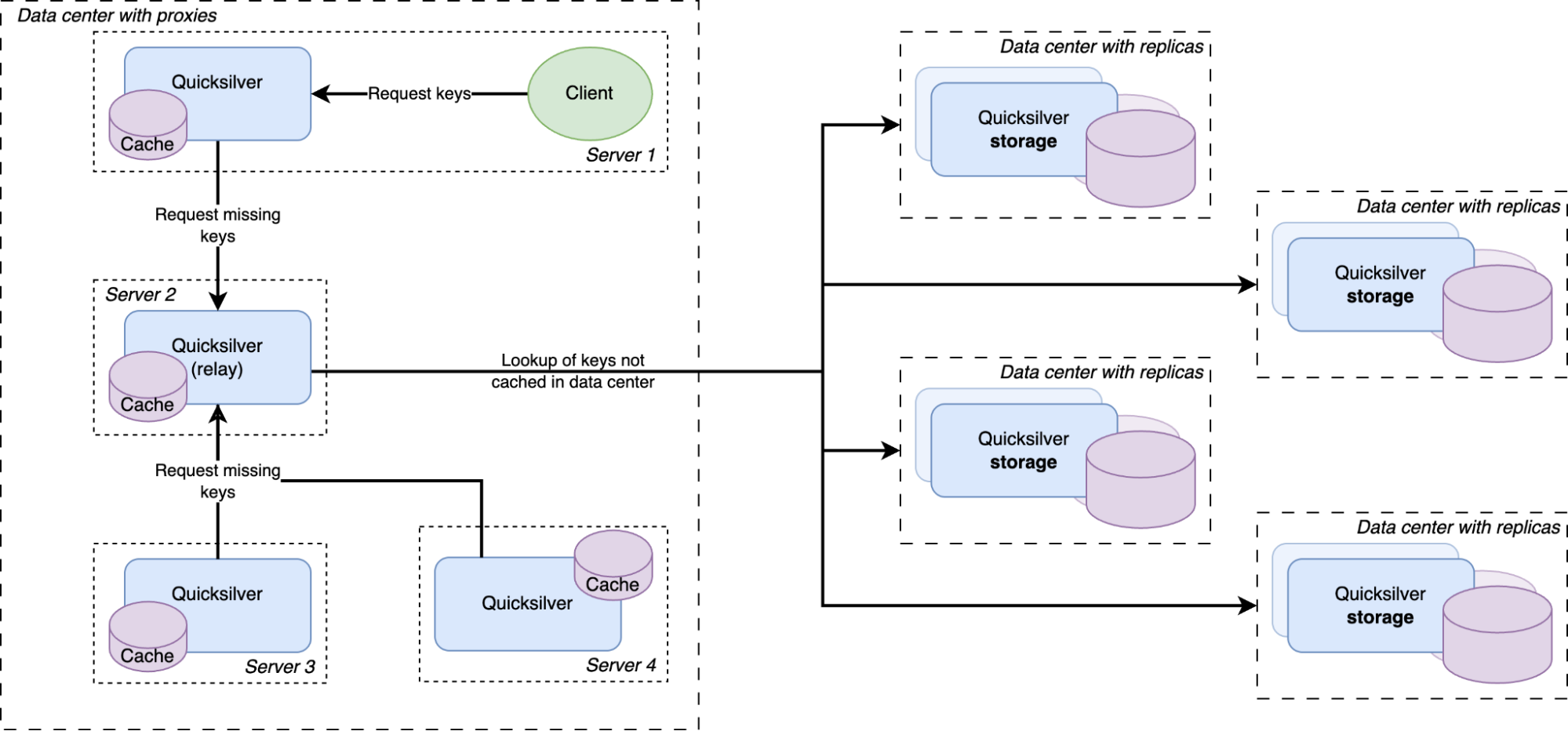
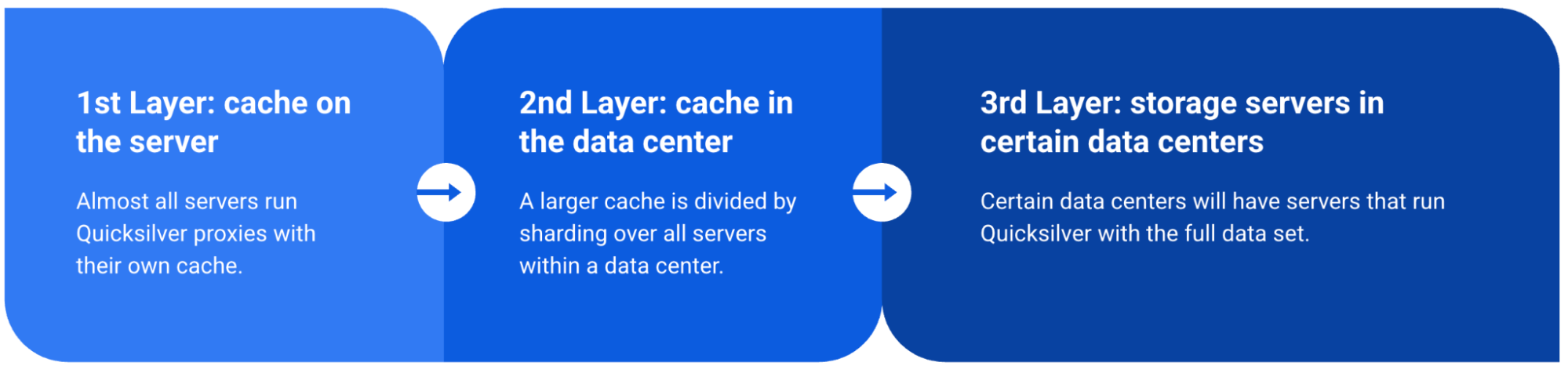
Except for a handful of special storage servers, Quicksilver does not contain the full dataset anymore, but only cache. Any cache misses will be looked up in replicas on our storage servers, which do have the full dataset.
The solution to the scalability problem was brought on by a new insight. As it turns out, numerous key-values were actually almost never used. We call these cold keys. There are different reasons for these cold keys: some of them were old and not well cleaned up, some were used only in certain regions or in certain data centers, and some were not used for a very long time or maybe not at all (a domain name that is never looked up for example or a script that was uploaded but never used).
At first, the team had been considering solving our scalability problem by splitting up the entire dataset into shards and distributing those across the servers in the different data centers. But sharding the full dataset adds a lot of complexity, corner cases, and unknowns. Sharding also does not optimize for data locality. For example, if the key-space is split into 4 shards and each server gets one shard, that server can only serve 25% of the requested keys from its local database. The cold keys would also still be contained in those shards and would take up disk space unnecessarily.
Another data structure that is much better at data locality and explicitly avoids storing keys that are never used is a cache. So it was decided that only a handful of servers with large disks would maintain the full data set, and all other servers would only have a cache. This was an obvious evolution from Quicksilver V1.5. Caching was already being done on a smaller scale, so all the components were already available. The caching proxies and the inter-data center discovery mechanisms were already in place. They had been used since 2021 and were therefore thoroughly battle tested. However, one more component needed to be added.
There was a concern that having all instances on all servers connect to a handful of storage nodes with replicas would overload them with too many connections. So a Quicksilver relay was added. For each instance, a few servers would be elected within each data center on which Quicksilver would run in relay mode. The relays would maintain the connections to the replicas on the storage nodes. All proxies inside a data center would discover those relays and all cache misses would be relayed through them to the replicas.
This new architecture worked very well. The cache hit rates still needed some improvement, however.
Prefetching the future
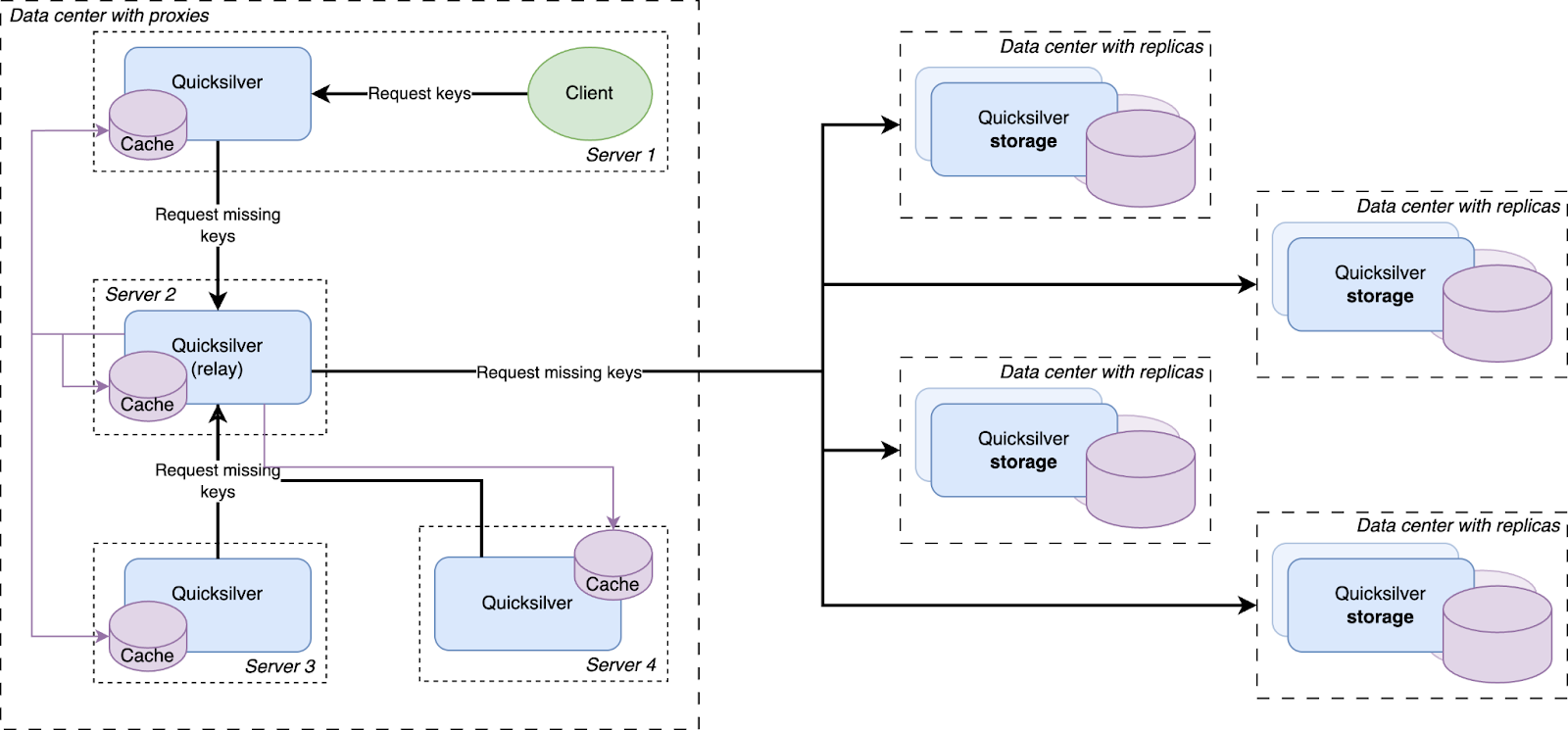
Every resolved cache miss is prefetched by all servers in the data center
We had a hypothesis that prefetching all keys that were cache misses on the other servers inside the same data center would improve the cache hit rate. So an analysis was done, and it indeed showed that every key that was a cache miss on one server in a data center had a very high probability of also being a cache miss on another server in the same data center sometime in the near future. Therefore, a mechanism was built that distributed all resolved cache misses on relays to all other servers.
All cache misses in a data center are resolved by requesting them from a relay, which subsequently forwards the requests to one of the replicas on the storage nodes. Therefore, the prefetching mechanism was implemented by making relays publish a stream of all resolved cache misses, to which all Quicksilver proxies in the same data center subscribe. The resulting key-values were then added to the proxy local caches.
This strategy is called reactive prefetching, because it fills caches only with the key-values that directly resulted from cache misses inside the same data center. Those prefetches are a reaction to the cache misses. Another way of prefetching is called predictive prefetching, in which an algorithm tries to predict which keys that have not yet been requested will be requested in the near future. A few approaches for making these predictions were tried, but they did not result in any improvement, and so this idea was abandoned.
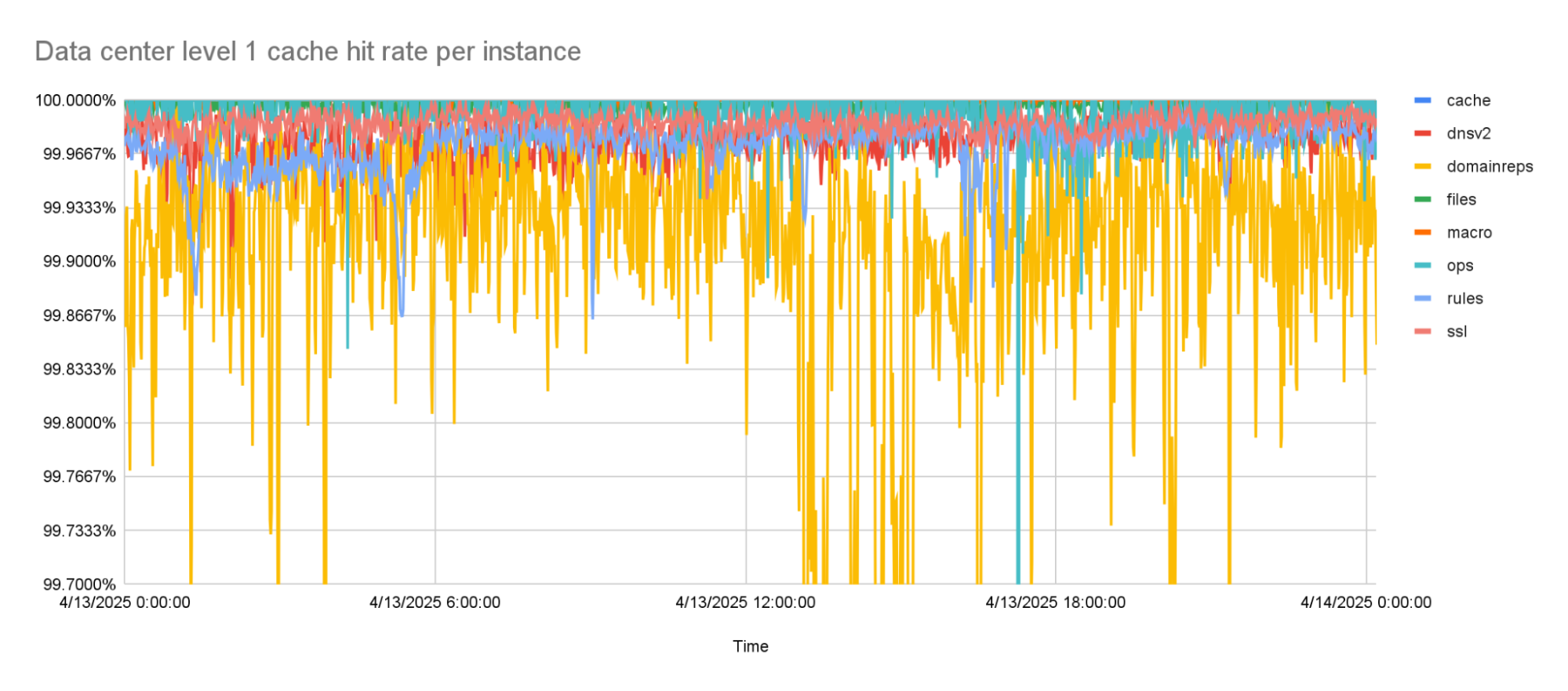
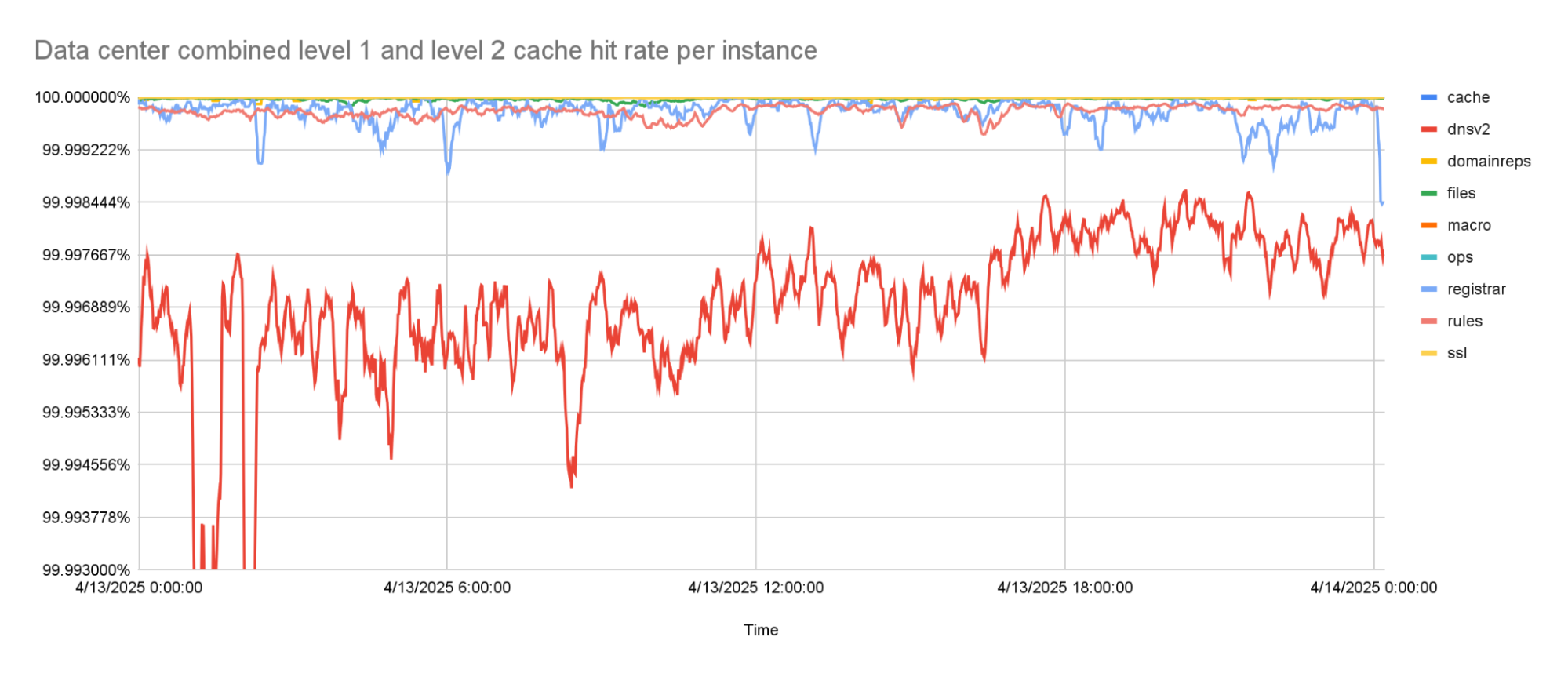
With the prefetching enabled, cache hit rates went up to about 99.9% for the worst performing instance. This was the goal that we were trying to reach. But while rolling this out to more of our network, it turned out that there was one team that needed an even higher cache hit rate, because the tail latencies they were seeing with this new architecture were too high.
This team was using a Quicksilver instance called dnsv2. This is a very latency sensitive instance, because it is the one from which DNS queries are served. Some of the DNS queries under the hood need multiple queries to Quicksilver, so any added latency to Quicksilver multiplies for them. This is why it was decided that one more improvement to the Quicksilver cache was needed.
The level 1 cache hit-rate is 99.9% or higher, on average.
Back to the sharding
Before going to a replica in another data center, a cache miss is first looked up in a data center-wide sharded cache
The instance on which higher cache hit rates were required was also the instance on which the cache performed the worst. The cache works with a retention time, defined as the number of days a key-value is kept in cache after it was last accessed, after which it is evicted from the cache. An analysis of the cache showed that this instance needed a much longer retention time. But, a higher retention time also causes the cache to take up more disk space — space that was not available.
However, while running Quicksilver V1.5, we had already noticed the pattern that caches generally performed much better in smaller data centers as compared to larger ones. This sparked the hypothesis that led to the final improvement.
It turns out that smaller data centers, with fewer servers, generally needed less disk space for their cache. Vice versa, the more servers there are in a data center, the larger the Quicksilver cache needs to be. This is easily explained by the fact that larger data centers generally serve larger populations, and therefore have a larger diversity of requests. More servers also means more total disk space available inside the data center. To be able to make use of this pattern the concept of sharding was reintroduced.
Our key space was split up into multiple shards. Each server in a data center was assigned one of the shards. Instead of those shards containing the full dataset for their part of the key space, they contain a cache for it. Those cache shards are populated by all cache misses inside the data center. This all forms a data center-wide cache that is distributed using sharding.
The data locality issue that sharding the full dataset has, as described above, is solved by keeping the local per-server caches as well. The sharded cache is in addition to the local caches. All servers in a data center contain both their local cache and a cache for one physical shard of the sharded cache. Therefore, each requested key is first looked up in the server’s local cache, after that the data center-wide sharded cache is queried, and finally if both caches miss the requested key, it is looked up on one of the storage nodes.
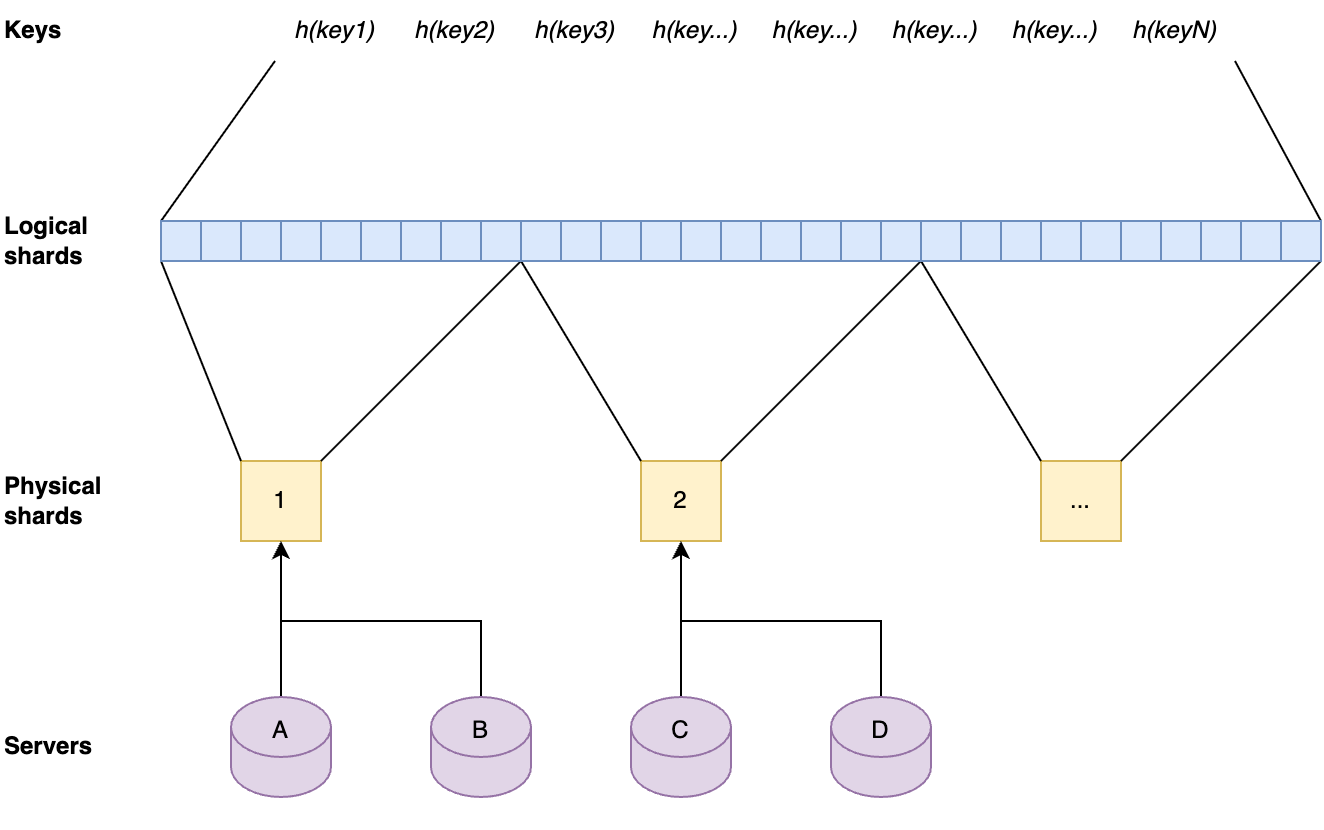
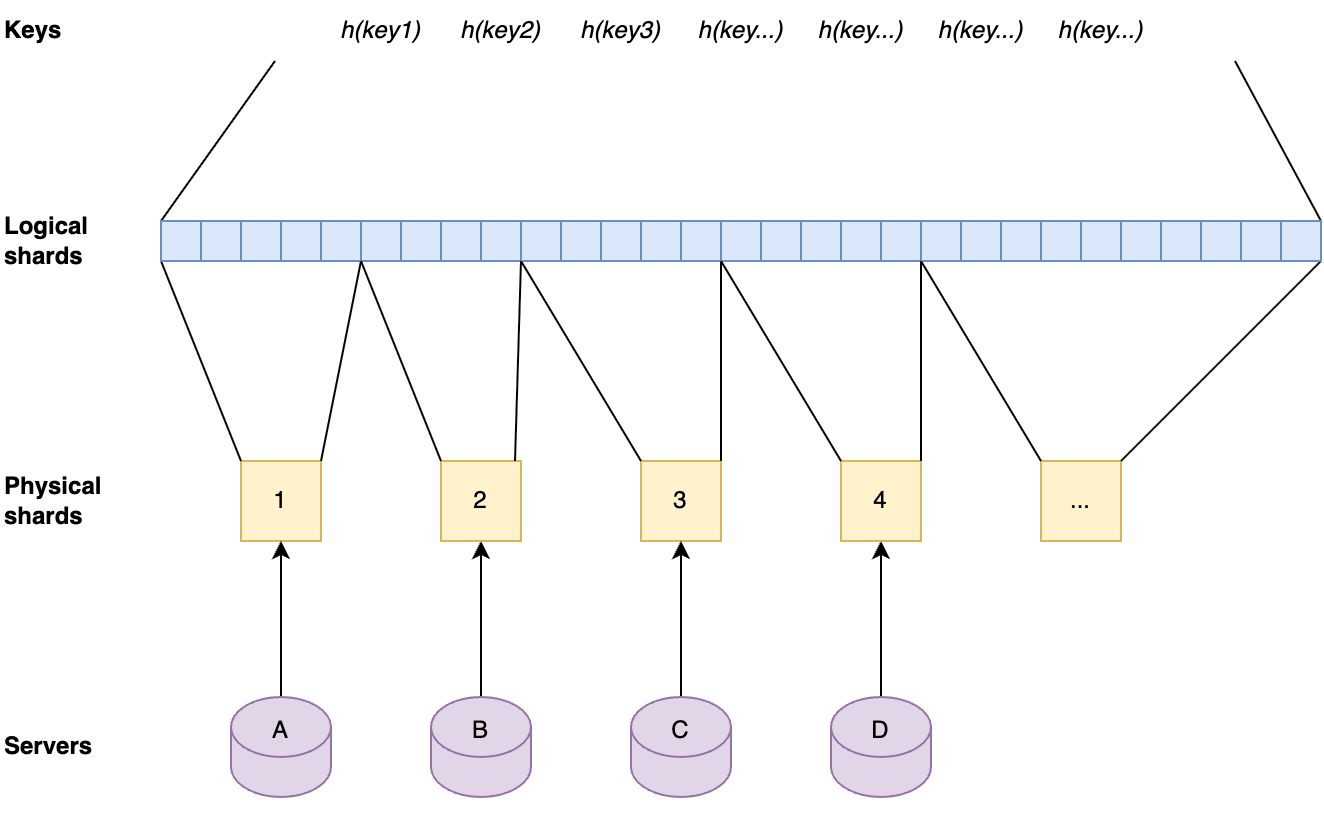
The key space is split up into separate shards by first dividing hashes of the keys by range into 1024 logical shards. Those logical shards are then divided up into physical shards, again by range. Each server gets one physical shard assigned by repeating the same process on the server hostname.
Each server contains one physical shard. A physical shard contains a range of logical shards. A local shard contains a range of the ordered set that result from hashing all keys.
This approach has the advantage that the sharding factor can be scaled up by factors of two without the need for copying caches to other servers. When the sharding factor is increased in this way, the servers will automatically get a new physical shard assigned that contains a subset of the key space that the previous physical shard on that server contained. After this has happened, their cache will contain supersets of the needed cache. The key-values that are not needed anymore will be evicted over time.
When the number of physical shards are doubled the servers will automatically get new physical shards that are subsets of their previous physical shards, therefore still have the relevant key-values in cache.
This approach means that the sharded caches can easily be scaled up when needed as the number of keys that are in Quicksilver grows, and without any need for relocating data. Also, shards are well-balanced due to the fact that they contain uniform random subsets of a very large key-space.
Adding new key-values to the physical cache shards piggybacks on the prefetching mechanism, which already distributes all resolved cache misses to all servers in a data center. The keys that are part of the key space for a physical shard on a particular server are just kept longer in cache than the keys that are not part of that physical shard.
Another reason why a sharded cache is simpler than sharding the full key-space is that it is possible to cut some corners with a cache. For instance, looking up older versions of key-values (as used for multiversion concurrency control) is not supported on cache shards. As explained in an earlier blog post, this is needed for consistency when looking up key-values on different servers, when that server has a newer version of the database. It is not needed in the cache shards, because lookups can always fall back to the storage nodes when the right version is not available.
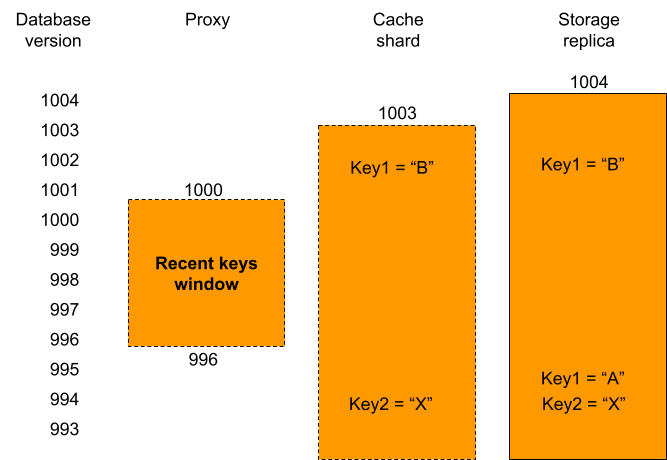
Proxies have a recent keys window that contains all recently written key-values. A cache shard only has its cached key-values. Storage replicas contain all key-values and on top of that they contain multiple versions for recently written key-values. When the proxy, that has database version 1000, has a cache miss for key1 it can be seen that the version of that key on the cache shard was written at database version 1002 and therefore is too new. This means that it is not consistent with the proxy’s database version. This is why the relay will fetch that key from a replica instead, which can return the earlier consistent version. In contrast, key2 on the cache shard can be used, because it was written at index 994, well below the database version of the proxy.
There is only one very specific corner case in which a key-value on a cache shard cannot be used. This happens when the key-value in the cache shard was written at a more recent database version than the version of the proxy database at that time. This would mean that the key-value probably has a different value than it had at the correct version. Because, in general, the cache shard and the proxy database versions are very close to each other, and this only happens for key-values that were written in between those two database versions, this happens very rarely. As such, deferring the lookup to storage nodes has no noticeable effect on the cache hit rate.
Tiered Storage
To summarize, Quicksilver V2 has three levels of storage.
Level 1: The local cache on each server that contains the key-values that have most recently been accessed.
Level 2: The data center wide sharded cache that contains key-values that haven’t been accessed in a while, but do have been accessed.
Level 3: The replicas on the storage nodes that contain the full dataset, which live on a handful of storage nodes and are only queried for the cold keys.
The results
The percentage of keys that can be resolved within a data center improved significantly by adding the second caching layer. The worst performing instance has a cache hit rate higher than 99.99%. All other instances have a cache hit rate that is higher than 99.999%.
The combined level 1 and level 2 cache hit-rate is 99.99% or higher for the worst caching instance.
Final notes
It took the team quite a few years to go from the old Quicksilver V1, where all data was stored on each server to the tiered caching Quicksilver V2, where all but a handful of servers only have cache. We faced many challenges, including migrating hundreds of thousands of live databases without interruptions, while serving billions of requests per second. A lot of code changes were rolled out, with the result that Quicksilver now has a significantly different architecture. All of this was done transparently to our customers. It was all done iteratively, always learning from the previous step before taking the next one. And always making sure that, if at all possible, all changes are easy to revert. These are important strategies for migrating complex systems safely.
And finally, a big thanks to the rest of the Quicksilver team, because we all do this together: Aleksandr Matveev, Aleksei Surikov, Alex Dzyoba, Alexandra (Modi) Stana-Palade, Francois Stiennon, Geoffrey Plouviez, Ilya Polyakovskiy, Manzur Mukhitdinov, Volodymyr Dorokhov.
The developer of ICEBlock, an iOS app for anonymously reporting sightings of US Immigration and Customs Enforcement (ICE) officials, promises that it “ensures user privacy by storing no personal data.” But that claim has come under scrutiny. ICEBlock creator Joshua Aaron has been accused of making false promises regarding user anonymity and privacy, being “misguided” about the privacy offered by iOS, and of being an Apple fanboy. The issue isn’t what ICEBlock stores. It’s about what it could accidentally reveal through its tight integration with iOS.
България най-сетне се сдоби със Закон за несъстоятелността на физическите лица, по-известен като Закон за личния фалит. Поне на хартия, защото ще започне да се прилага през март 2026 г. Нормативният акт, приет на 19 юни 2025 г. без особен ентусиазъм и след години протакане, беше условие за извършването на второто плащане по Плана за възстановяване и устойчивост.
Личен фалит съществува в много държави. В Германия например той е въведен още през 1999 г. и официално се нарича „потребителска несъстоятелност“ (Verbraucherinsolvenz), но е по-известен като „лична несъстоятелност“/„личен фалит“ (Privatisolvenz). За потребителската несъстоятелност няма отделен закон, а тя е уредена в част 10 от Кодекса за несъстоятелността.
Директното сравнение между личния фалит в България и Германия би било подвеждащо, защото в първия случай имаме закон, който още не се прилага, а в другия – дългогодишна практика. Съпоставката между тях обаче показва ключови разлики във философията, която стои зад възможността едно частно лице да бъде обявено в несъстоятелност.
България: да се разориш образцово
За да има шанс един човек в качеството си на физическо лице успешно да премине производство по несъстоятелност в България, той трябва да е достатъчно богат. И освен това да бъде, както пише в закона, „добросъвестен“.
Икономически ценз пред личния фалит
Необходимо е натрупаните задължения, които длъжникът не може да плати, да са в размер на поне десет минимални работни заплати. За 2025 г. това са 10 770 лв. Ако той няма имущество, което да се използва за разплащане с кредиторите, му се дава срок да придобие. Как да стане това, като е затънал в заеми? Ами, негов проблем.
Изисква се и фалиралият да заплати всички разноски по изпадането си в несъстоятелност – държавни такси, възнаграждението на синдика, който ще му бъде назначен, разходите, свързани с оценката, разделянето, съхранението и пр. на имуществото му. Тази сума е в добавка към средствата и собствеността, необходими за разплащане с кредиторите, както и към оставащото за задоволяването на основните му потребности (и на евентуалните финансово зависими от него членове на семейството).
Да не забравяме и адвокатските разноски. Те не са включени в закона, но е много трудно човек да премине през целия процес без квалифицирана юридическа помощ.
Кой длъжник е добросъвестен?
Законът посочва не кой длъжник е добросъвестен, а кой не е. Но от изброените примери можем да си направим извод колко изряден трябва да е човек, за да му се окаже честта да бъде обявен в несъстоятелност. Не е достатъчно да не е осъждан за злоупотреба с доверие и за финансови престъпления, да не се опитва да мами на дребно, като предоставя фалшиви или непълни документи или укрива пари или имущество, и да не си е декларирал честно доходите.
Добросъвестният длъжник, преди да поиска законно да фалира, трябва да е работоспособен и да е работил или получавал доходи от други източници поне година, освен ако не е бил възпрепятстван по уважителни причини.
Необходимо е кандидатите за фалит да отговорят на още ред условия, за да покрият изискването за добросъвестност. Едно от най-важните е през последните три години да не са купували на кредит нищо, което надхвърля доходите им и не е предназначено за задоволяване на основните им потребности, както и на членовете на семействата им, които трябва да издържат по закон.
Накратко – за кого не е законът?
Ако сте затънали в дългове, но общата им стойност е под десет минимални работни заплати и/или нямате пари за всички разходи по производството в несъстоятелност, новият закон не е за вас. Той не е за най-бедната и най-уязвима част от населението – хора, които задлъжняват от нищета, защото нямат достатъчно пари за лекарства, храна, дрехи, сметки.
Може би и вие като мен имате познати (или се е случвало на вас самите), които са си купували на изплащане или с кредит повече неща, отколкото са можели да си позволят. Защото никой не ги е учил на финансова култура, защото за тях е важно да демонстрират определен стандарт на живот, дори той да не отговаря на доходите им, защото са искали да осъществят някоя мечта…
Обществото, в което живеем, всъщност провокира „недобросъвестното“ (според закона) поведение. Докато пишех тази статия, получих имейл от банка, която ми предлага да изтегля заем. Отвсякъде изникват реклами за кредити, а възможностите за изплащане на вноски също стимулират спонтанните покупки.
Друг сериозен проблем е хазартът. Пристрастеността към хазарт в България придобива размерите на епидемия. Жертвите ѝ също не отговарят на изискванията за добросъвестност в закона.
Германия: подкрепа и превъзпитание за фалиралите
Между българското и германското законодателство, уреждащо личния фалит, има някои общи неща. И в двете страни човек трябва да се обърне към съда, за да бъде обявен в несъстоятелност (в Германия обаче се изисква преди това да се е опитал да постигне извънсъдебно споразумение). Еднакъв е и срокът на фалита – три години (в Германия до края на 2019 г. срокът е бил шест години и след това постепенно намалява до три).
В България с имуществото на фалиралите се разпорежда синдик, в Германия има нещо подобно – попечител. Според нашия закон обаче основната функция на синдика е да осъществява контрол, а длъжникът трябва да му се отчита незабавно за какво ли не (например да го уведоми до три дни при смяна на адрес). Изобщо, синдикът играе ролята на всяващ страх надзирател. В Германия по-важно от надзираването е активно да се общува с длъжника и да му се помага да придобие нужната финансова култура.
В Германия обаче няма минимален размер на дълга, при който човек има право да поиска производство в несъстоятелност. Нито толкова високи изисквания за добросъвестност.
Много германци стигат до процедурата за фалит, защото са пристрастени към пазаруването, нямат финансова култура, а често идват и от семейства, в които задлъжняването е обичайна практика. Някои имат и психични проблеми.
Всичко това е валидно за Алине, героиня на репортаж от документалната поредица Die Frage („Въпросът“), която неусетно затъва с 25 000 евро. След години на срам, спиращ я дори да отвори предупредителните писма за дълговете си, камо ли да сподели с някого, Алине намира сили да даде гласност на историята си и да се обърне към професионален съветник за длъжници. Много организации в страната предлагат помощ с такива съветници, някои – срещу минимални суми или дори безплатно. Голям брой сайтове описват необходимите стъпки с прости думи.
След като се запознава с всички документи, свързани с положението на Алине, съветникът обсъжда с нея вариантите за изход и препоръчва производството в несъстоятелност. Тогава младата жена се обръща към съда. Описва съдийката като изключително мила и разбираща. По същия начин определя и наставничката си, която ѝ помага да сложи ред в личните си финанси. Алине осъзнава, че не може да се справи сама и има нужда от подкрепа.
Историята ѝ има неочаквано щастливо развитие. Съветникът, към когото тя се обръща първоначално, ѝ предлага работа. Така самата тя става съветничка на длъжници и помага на хора с проблеми, каквито е преживяла. Понеже се справя добре, работодателят ѝ дори инвестира в допълнителната ѝ квалификация.
Основната разлика между двата модела е, че в Германия акцентът е върху превъзпитанието на фалиралите.
И вместо да се поставят тежки условия за допускане до несъстоятелност, се разчита на придобиването на лична финансова култура, докато трае самото производство. А това не става без разбиране и подкрепа. Неслучайно трите години, през които тече производството, се наричат период на добро поведение.
Докато в България човек има само един шанс през живота си да поиска да бъде обявен във фалит, в Германия това може да се случи повторно. Но тогава периодът на добро поведение вече е не три, а пет години.
Българският закон – решение или нови проблеми?
Според анализ на Мирела Веселинова в „Капитал“ новият Закон за личната несъстоятелност може да предизвика повече проблеми, отколкото да реши. Статията е публикувана преди приемането му, но основните пречки, посочени от Веселинова, не са изчистени от окончателния му текст. Една от тях е, че нормативният акт е изготвен „чрез префасониране на търговската несъстоятелност“ – със същата тромава структура, включваща събрания на кредиторите, синдици и пр. Хората обаче не са търговски дружества:
С фалита търговецът се заличава, но несъстоятелният гражданин трябва да продължи да живее и да издържа семейството си – […] той не може да бъде заличен.
За съжаление, във финалния си вариант дълго чаканият закон не изглежда, като да е правен за човешки същества. Което впрочем не е изключение сред българските нормативни актове. Когато целта е да се усвоят едни европейски пари, а не да се реши съществуващ сериозен проблем, това е резултатът.
А проблемът не е само на длъжниците и кредиторите им, а и на държавата.
В България контролът върху агресивната реклама на всевъзможни кредити и хазартни игри е твърде рехав, доколкото изобщо съществува. В училище няма и елементарно обучение по финансова грамотност. Резултатът е, че човек отвсякъде е „обстрелван“ със стимули спонтанно да харчи пари. Ала когато изгуби контрол, държавата не му предлага адекватни варианти за изход.
Примерите с Германия показват, че може да бъде и иначе. Когато в центъра на закона стоят човекът и необходимостта да бъде подкрепен, има шанс той да продължи живота си като пълноценен член на обществото. Остава да се надяваме, че Законът за личната несъстоятелност ще бъде толкова неработещ, че ще се наложи основно да се пренапише. Макар да няма гаранция, че и тогава законодателите ще мислят за хората.
To provide the best experiences, we use technologies like cookies to store and/or access device information. Consenting to these technologies will allow us to process data such as browsing behavior or unique IDs on this site. Not consenting or withdrawing consent, may adversely affect certain features and functions.
Functional
Always active
The technical storage or access is strictly necessary for the legitimate purpose of enabling the use of a specific service explicitly requested by the subscriber or user, or for the sole purpose of carrying out the transmission of a communication over an electronic communications network.
Preferences
The technical storage or access is necessary for the legitimate purpose of storing preferences that are not requested by the subscriber or user.
Statistics
The technical storage or access that is used exclusively for statistical purposes.The technical storage or access that is used exclusively for anonymous statistical purposes. Without a subpoena, voluntary compliance on the part of your Internet Service Provider, or additional records from a third party, information stored or retrieved for this purpose alone cannot usually be used to identify you.
Marketing
The technical storage or access is required to create user profiles to send advertising, or to track the user on a website or across several websites for similar marketing purposes.







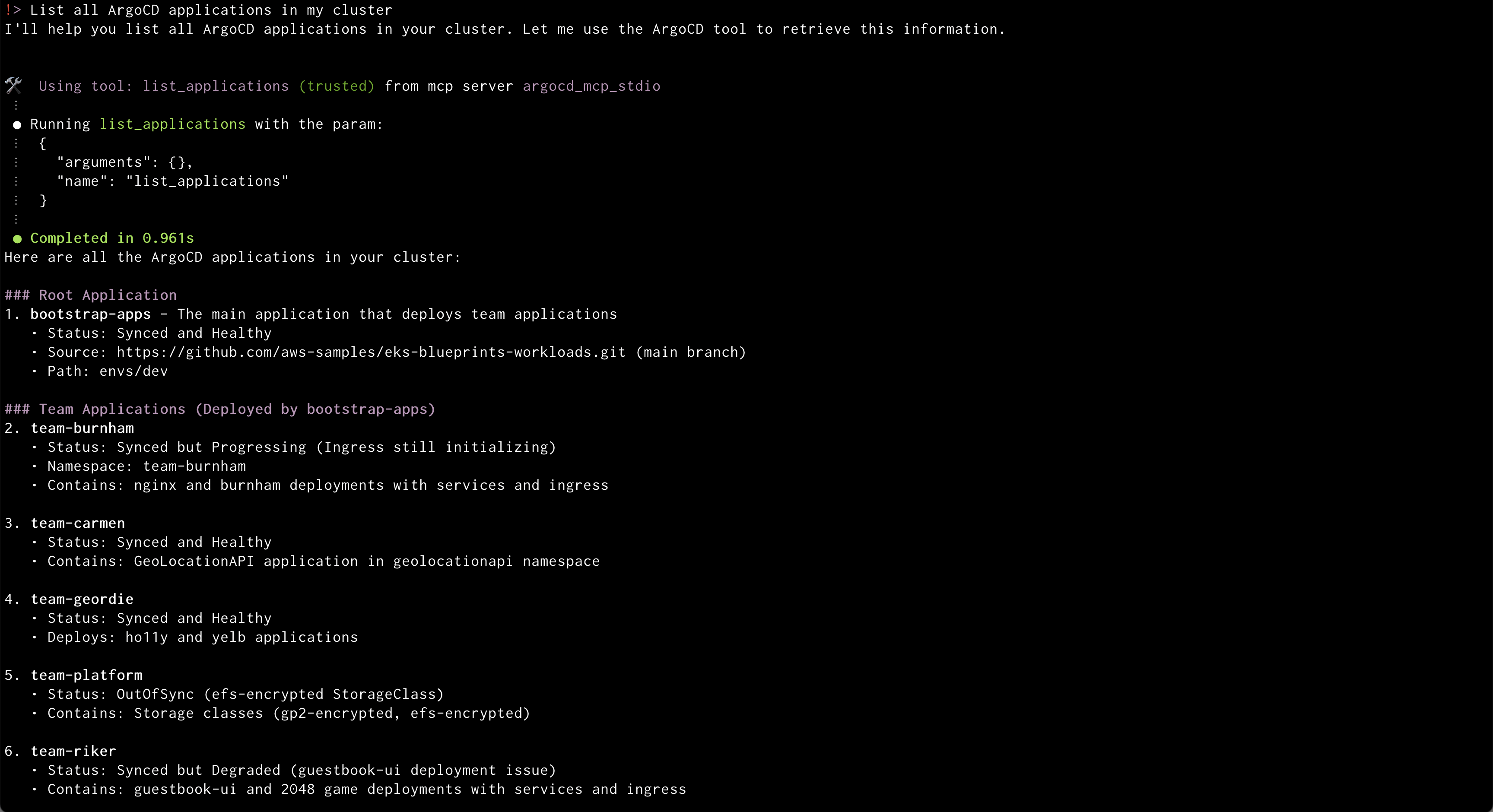 Amazon Q will use the ArgoCD MCP server to retrieve and display all applications
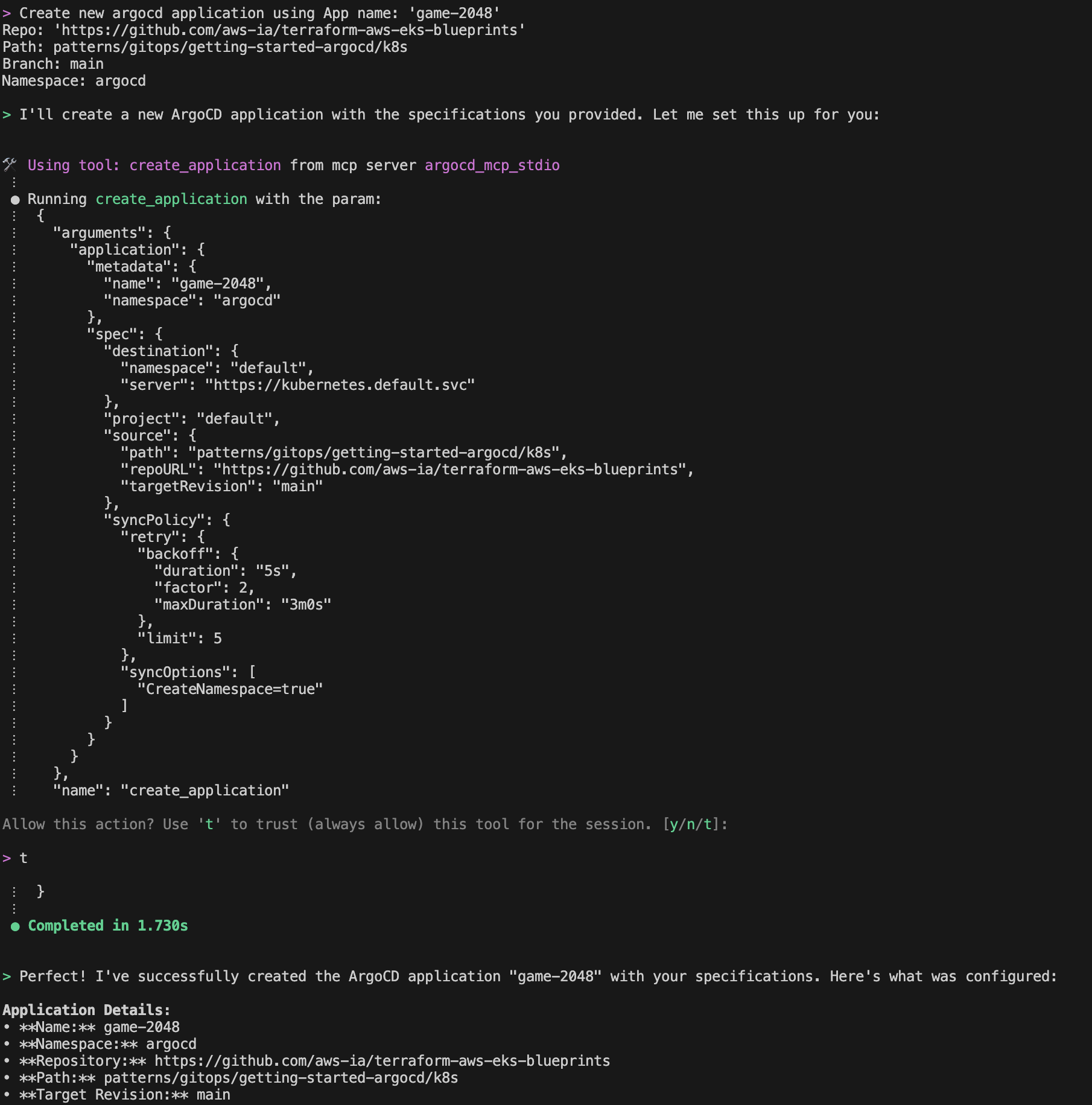 Amazon Q will create a new application from GitRepo information provided
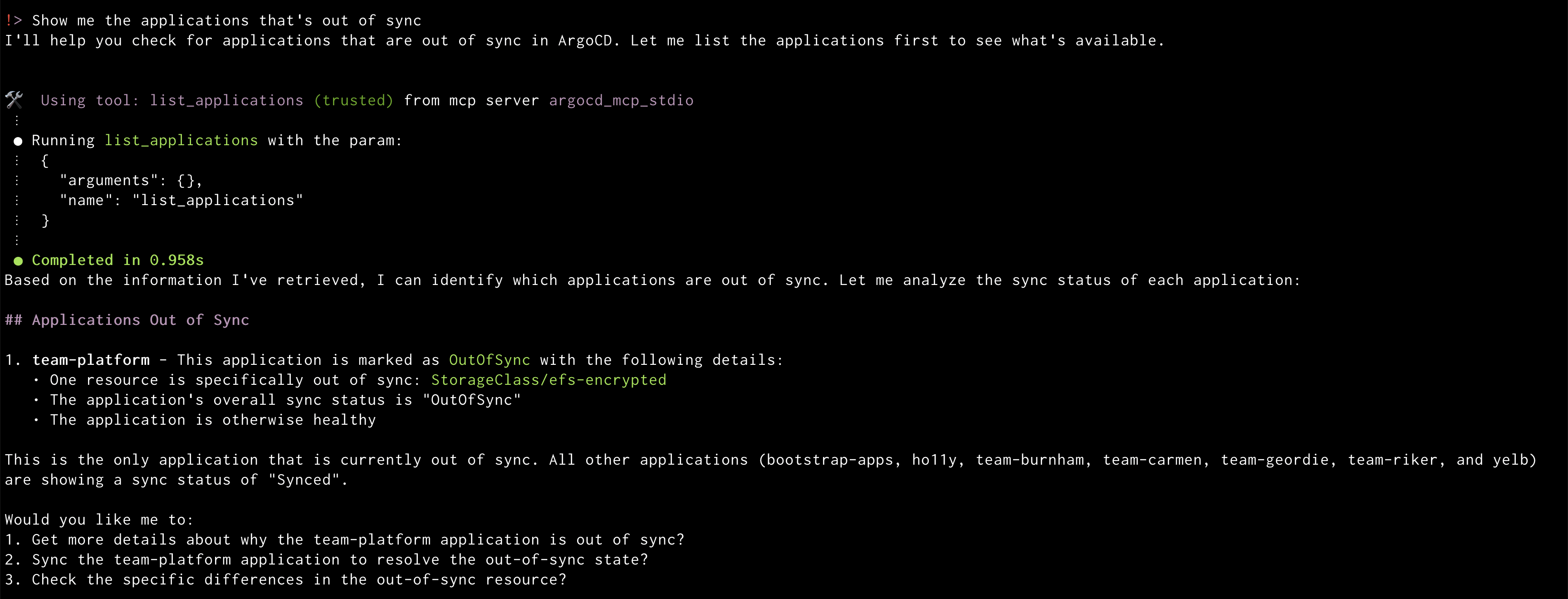 Amazon Q will display the out of sync applications
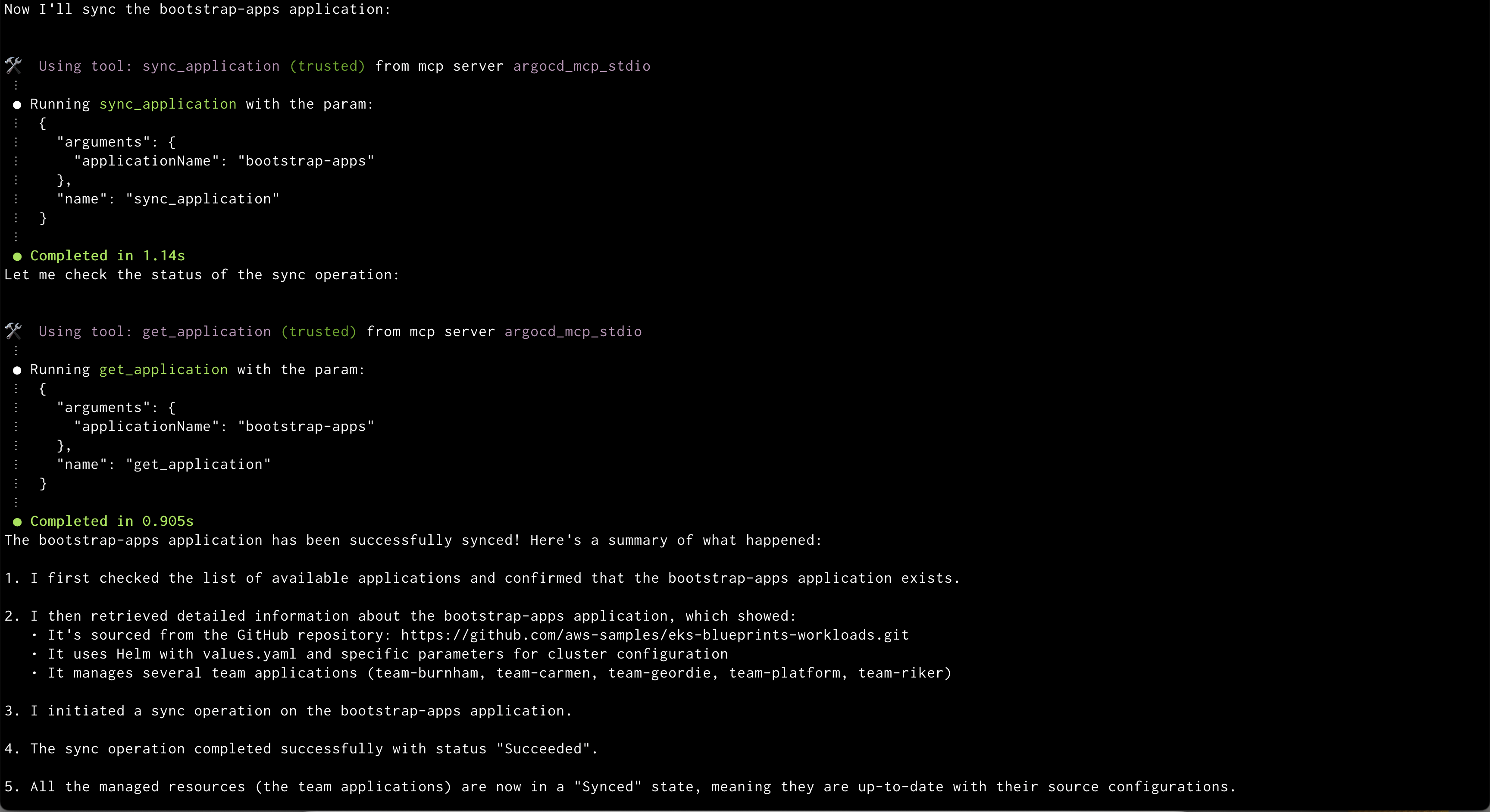 Amazon Q syncing application
 Amazon Q showing health status of all the resources in an application
 Amazon Q showing logs of problematic pod