If you work in an industry with high performance and security demands like video surveillance, internet of things (IoT), and mobile applications, a new Backblaze capability could help your cloud workflows—Scalable Application Keys. This new capability enables you to generate application keys for your Backblaze B2 Cloud Storage Buckets at 150 times the current scale. When you need high volume, short-lived application keys to upload your data to cloud storage, you can’t tolerate bottlenecks—the Scalable Application Keys feature removes them.
Today, I’m digging into the challenges solved by Scalable Application Keys, the use cases where it has the most impact, and the benefits of the feature.
Jump to the docs
Check out our documentation for more information on Scalable Application Keys and how to work with them.
The challenges
Managing large volumes of data under strict security requirements sometimes requires using application keys programmatically to interact with cloud storage buckets. In the video surveillance industry, for example, you might upload massive amounts of video footage directly from security cameras to Backblaze B2, and you need to regularly refresh the application keys used by each of those cameras to maintain a robust security posture. However, this practice has a few unique requirements:
You can’t be hampered by rate limitations to generate the volume of application keys you need.
You need high key limits sufficient for the total volume of keys.
Throughput needs to be high to generate hundreds or thousands of new application keys simultaneously.
The irregular timing of key refreshes and the scale of operations can further amplify the problem, especially when hundreds or thousands of devices request new keys at the same time.
The solution: Scalable Application Keys
With the introduction of Scalable Application Keys, Backblaze B2 customers can generate and refresh keys at significantly higher volumes and throughput—without hitting hard limits on the number of keys. This feature is designed to accommodate the unique requirements of customers who need:
High key throughput: Create keys at scale, even when thousands of devices need new keys simultaneously. You can create up to 10,000 keys per minute.
Unlimited key generation: Scale without interruption—there’s no hard cap on the number of application keys that can be generated.
Short-lived keys: Easily generate keys with very short lifespans, enhancing security without compromising functionality.
S3 compatibility: Maintain support for the Backblaze S3 compatible API, allowing you to avoid costly firmware upgrades on your devices.
Real-world applications
This feature is particularly beneficial for customers with many endpoints that all upload to Backblaze B2 cloud individually through the S3 Compatible API. For example:
Video surveillance: Companies with large networks of security cameras can now easily refresh keys for each device frequently. When you operate tens of thousands of cameras that record sensitive footage, you need to be able to refresh application keys regularly to maintain security. With Scalable Application Keys, you can handle refreshes efficiently and continue scaling the number of cameras in operation without worry.
Mobile applications: Developers of mobile apps that store data in B2 Cloud Storage can generate unique keys for each user’s device. This is especially useful for apps that rely on user-generated and user-uploaded content, where each end device needs its own application key.
IoT devices: Businesses managing large fleets of IoT devices, where each device needs a unique and regularly refreshed application key, can ensure secure, individualized access to cloud storage.
Benefits of Scalable Application Keys
Enhanced security:
Frequent key rotation becomes feasible at scale, significantly reducing the risk of unauthorized access.
Short-lived keys minimize the window of vulnerability if a key is compromised.
Customers can implement best practices for key management without extraneous components that could cause performance penalties.
Operational flexibility:
Easily manage key generation for large numbers of devices, from thousands to millions.
Accommodate sudden spikes in key requests, such as during system-wide updates or resets.
Adapt to varying usage patterns throughout the day without hitting rate limits.
Cost effectiveness:
Avoid expensive firmware upgrades by continuing to use the S3 Compatible API.
Eliminate the need for complex workarounds or additional infrastructure to handle key management.
Scalable Application Keys not only solves existing limitations but also future-proofs your workflows by providing the flexibility and performance needed to scale without restriction.This feature allows you to securely manage access to B2 Cloud Storage, no matter the scale of your operations.
Ready to get started?
This feature is available upon request. If you’re an existing Backblaze B2 customer and want to get access to this capability, please contact our Support team to request access.
New to Backblaze? Contact our Sales team to learn more about how Scalable Application Keys can benefit your business and how to get started.
Once this feature is enabled, you can generate application keys at scale. Check out the documentation for more on how to use the feature.
What next?
Are you leveraging Scalable Application Keys to build more efficient and performant workflows? Share how it’s working for you so other organizations and developers can benefit from what you find. If you have any questions or feedback, please don’t hesitate to reach out to us.
Cloudflare’s network spans more than 330 cities in over 120 countries, serving over 60 million HTTP requests per second and 39 million DNS queries per second on average. These numbers will continue to grow, and at an accelerating pace, as will Cloudflare’s infrastructure to support them. While we can continue to scale out by deploying more servers, it is also paramount for us to develop and deploy more performant and more efficient servers.
At the heart of each server is the processor (central processing unit, or CPU). Even though many aspects of a server rack can be redesigned to improve the cost to serve a request, CPU remains the biggest lever, as it is typically the primary compute resource in a server, and the primary enabler of new technologies.
The following table is a summary of the specification of the AMD EPYC 7713 CPU in our Gen 11 server against the three CPU candidates, one from each variant of the 4th generation AMD EPYC Processors architecture:
* AMD EPYC 7713 all core boost clock is based on Cloudflare production data, not the official specification from AMD
cf_benchmark
Readers may remember that Cloudflare introduced cf_benchmark when we evaluated Qualcomm’s ARM chips, using it as our first pass benchmark to shortlist AMD’s Rome CPU for our Gen 10 servers and to evaluate our chosen ARM CPU Ampere Altra Max against AWS Graviton 2. Likewise, we ran cf_benchmark against the three candidate CPUs for our 12th Gen servers: AMD EPYC 9654 (Genoa), AMD EPYC 9754 (Bergamo), and AMD EPYC 9684X (Genoa-X). The majority of cf_benchmark workloads are compute bound, and given more cores or higher CPU frequency, they score better. The graph and the table below show the benchmark performance comparison of the three CPU candidates with Genoa 9654 as the baseline, where > 1.00x indicates better performance.
Genoa 9654 (baseline)
Bergamo 9754
Genoa-X 9684X
openssl_pki
1.00x
1.16x
1.01x
openssl_aead
1.00x
1.20x
1.01x
luajit
1.00x
0.86x
1.00x
brotli
1.00x
1.11x
0.98x
gzip
1.00x
0.87x
1.01x
go
1.00x
1.09x
1.00x
Bergamo 9754 with 128 cores scores better in openssl_pki, openssl_aead, brotli, and go benchmark suites, and performs less favorably in luajit and gzip benchmark suites. Genoa-X 9684X (with significantly more L3 cache) doesn’t offer a significant boost in performance for these compute-bound benchmarks.
These benchmarks are representative of some of the common workloads Cloudflare runs, and are useful in identifying software scaling issues, system configuration bottlenecks, and the impact of CPU design choices on workload-specific performance. However, the benchmark suite is not an exhaustive list of all workloads Cloudflare runs in production, and in reality, the workloads included in the benchmark suites are almost certainly not the exclusive workload running on the CPU. In short, though benchmark results can be informative, they do not represent a good indication of production performance when a mix of these workloads run on the same processor.
Performance simulation
To get an early indication of production performance, Cloudflare has an internal performance simulation tool that exercises our software stack to fetch a fixed asset repeatedly. The simulation tool can be configured to fetch a specified fixed-size asset and configured to include or exclude services like WAF or Workers in the request path. Below, we show the simulated performance between the three CPUs for an asset size of 10 KB, where >1.00x indicates better performance.
Milan 7713
Genoa 9654
Bergamo 9754
Genoa-X 9684X
Lab simulation performance multiplier
1.00x
2.20x
1.95x
2.75x
Based on these results, Bergamo 9754, which has the highest core count, but smallest L3 cache per core, is least performant among the three candidates, followed by Genoa 9654. The Genoa-X 9684X with the largest L3 cache per core is the most performant. This data suggests that our software stack is very sensitive to L3 cache size, in addition to core count and CPU frequency. This is interesting and worth a deep dive into a sensitivity analysis of our workload against a few (high level) CPU design points, especially core scaling, frequency scaling, and L2/L3 cache sizes scaling.
Sensitivity analysis
Core sensitivity
Number of cores is the headline specification that practically everyone talks about, and one of the easiest improvements CPU vendors can make to increase performance per socket. The AMD Genoa 9654 has 96 cores, 50% more than the 64 cores available on the AMD Milan 7713 CPUs that we used in our Gen 11 servers. Is more always better? Does Cloudflare’s primary workload scale with core count and effectively utilize all available cores?
The figure and table below shows the result of a core scaling experiment performed on an AMD Genoa 9654 configured with 96 cores, 80 cores, 64 cores, and 48 cores, which was done by incrementally disabling 2x CCD (8 cores/CCD) at each step. The result is GREAT, as Cloudflare’s simulated primary workload scales linearly with core count on AMD Genoa CPUs.
The chart below shows the result of sweeping the TDP of the AMD Genoa 9654 (in power determinism mode) from 240W to 400W. (Note: x-axis step size is not linear).
Cloudflare’s simulated primary workload continues to see incremental performance improvements up to the maximum configurable 400W, albeit at a less favorable perf/watt ratio.
Looking at TDP sensitivity data is a quick and easy way to identify if performance stagnates at some power point, but what does power sensitivity actually measure? There are several factors contributing to CPU power consumption, but let’s focus on one of the primary factors: dynamic power consumption. Dynamic power consumption is approximately CV2f, where C is the switched load capacitance, V is the regulated voltage, and f is the frequency. In modern processors like the AMD Genoa 9654, the CPU dynamically scales its voltage along with frequency, so theoretically, CPU dynamic power is loosely proportional to f3. In other words, measuring TDP sensitivity is measuring the frequency sensitivity of a workload. Does the data agree? Yes!
cTDP
All core boost frequency (GHz)
Perf (rps) / baseline
240
2.47
0.78x
280
2.75
0.87x
320
2.93
0.93x
340
3.13
0.97x
360
3.3
1.00x
380
3.4
1.03x
390
3.465
1.04x
400
3.55
1.05x
Frequency sensitivity
Instead of relying on an indirect measure through the TDP, let’s measure frequency sensitivity directly by sweeping the maximum boost frequency.
At above 3GHz, the data shows that Cloudflare’s primary workload sees roughly 2% incremental improvement for every 0.1GHz all core average frequency increment. We hit the 400W power cap at 3.545GHz. This is notably higher than the typical all core boost frequency that Cloudflare Gen 11 servers with AMD Milan 7713 at 2.7GHz see in production, or at 2.4GHz in our performance simulation, which is amazing!
L3 cache size sensitivity
What about L3 cache size sensitivity? L3 cache size is one of the primary design choices and major differences between the trio of Genoa, Bergamo, and Genoa-X. Genoa 9654 has 4 MB L3/core, Bergamo 9754 has 2 MB L3/core, and Genoa-X has 12 MB L3/core. L3 cache is the last and largest “memory” bank on-chip before having to access memory on DIMMs outside the chip that would take significantly more CPU cycles.
We ran an experiment on the Genoa 9654 to check how performance scales with L3 cache size. L3 cache size per core is reduced through MSR writes (but could also be done using Intel RDT) and L3 cache per core is increased by disabling physical cores in a CCD (which reduces the number of cores sharing the fixed size 32 MB L3 cache per CCD effectively growing the L3 cache per core). Below is the result of the experiment, where >1.00x indicates better performance:
L3 cache size increase vs baseline 4MB per core
0.25x
0.5x
0.75x
1x
1.14x
1.33x
1.60x
2.00x
rps/core / baseline
0.67x
0.78x
0.89x
1.00x
1.08x
1.15x
1.25x
1.31x
L3 cache miss rate per CCD
56.04%
39.15%
30.37%
23.55%
22.39%
19.73%
16.94%
14.28%
Even though the expectation was that the impact of a different L3 cache size gets diminished by the faster DDR5 and larger memory bandwidth, Cloudflare’s simulated primary workload is quite sensitive to L3 cache size. The L3 cache miss rate dropped from 56% with only 1 MB L3 per core, to 14.28% with 8 MB L3/core. Changing the L3 cache size by 25% affects the performance by approximately 11%, and we continue to see performance increase to 2x L3 cache size, though the performance increase starts to diminish when we get to 2x L3 cache per core.
Do we see the same behavior when comparing Genoa 9654, Bergamo 9754 and Genoa-X 9684X? We ran an experiment comparing the impact of L3 cache size, controlling for core count and all core boost frequency, and we also saw significant deltas. Halving the L3 cache size from 4 MB/core to 2 MB/core reduces performance by 24%, roughly matching the experiment above. However, increasing the cache 3x from 4 MB/core to 12 MB/core only increases performance by 25%, less than the indication provided by previous experiments. This is likely because the performance gain we saw on experiment result above could be partially attributed to less cache contention due to reduced number of cores based on how we set up the test. Nevertheless, these are significant deltas!
L3/core
2MB/core
4MB/core
12MB/core
Perf (rps) / baseline
0.76x
1x
1.25x
Putting it all together
The table below summarizes how each factor from sensitivity analysis above contributes to the overall performance gain. There are an additional 6% to 14% of unaccounted performance improvement that are contributed by other factors like larger L2 cache, higher memory bandwidth, and miscellaneous CPU architecture changes that improve IPC.
Milan
7713
Genoa
9654
Bergamo
9754
Genoa-X
9684X
Lab simulation performance multiplier
1x
2.2x
1.95x
2.75x
Performance multiplier due to Core scaling
1x
1.5x
2x
1.5x
Performance multiplier due to Frequency scaling
(*Note: Milan 7713 all core frequency is ~2.4GHz when running simulated workload at 100% CPU utilization)
1x
1.32x
1.21x
1.29x
Performance multiplier due to L3 cache size scaling
1x
1x
0.76x
1.25x
Performance multiplier due to other factors like larger L2 cache, higher memory bandwidth, miscellaneous CPU architecture changes that improve IPC
1x
1.11x
1.06x
1.14x
Performance evaluation in production
How do these CPU candidates perform with real-world traffic and an actual production workload mix? The table below summarizes the performance of the three CPUs in lab simulation and in production. Genoa-X 9684X continues to outperform in production.
In addition, the Gen 12 server equipped with Genoa-X offered outstanding performance but only consumed 1.5x more power per system than our Gen 11 server with Milan 7713. In other words, we see a 63% increase in performance per watt. Genoa-X 9684X provides the best TCO improvement among the 3 options, and was ultimately chosen as the CPU for our Gen 12 server.
Milan 7713
Genoa 9654
Bergamo 9754
Genoa-X 9684X
Lab simulation performance multiplier
1x
2.2x
1.95x
2.75x
Production performance multiplier
1x
2x
2.15x
2.45x
Production performance per watt multiplier
1x
1.33x
1.38x
1.63x
The Gen 12 server with AMD Genoa-X 9684X is the most powerful and the most power efficient server Cloudflare has built to date. It serves as the underlying platform for all the incredible services that Cloudflare offers to our customers globally, and will help power the growth of Cloudflare infrastructure for the next several years with improved cost structure.
Hardware engineers at Cloudflare work closely with our infrastructure engineering partners and externally with our vendors to design and develop world-class servers to best serve our customers.
Come join us at Cloudflare to help build a better Internet!
Paul McKenney gave a presentation at Kangrejos this year that wasn’t (directly)
related to Rust. Instead, he spoke about the work he has been doing in concert
with many other contributors on improving the handling of subtle concurrency
problems in C++.
Although he cautioned that his talk was only an overview, and not a
substitute for reading the relevant papers, he hoped that the things the C++
community is working on would be of interest to the Rust developers present as
well, and potentially inform future work on the language. McKenney’s talk was,
as is his style, full of subtle examples of weird multithreaded behavior.
Interested readers may wish to refer to
his slides in an attempt to follow along.
Cloudflare One, our secure access service edge (SASE) platform, is introducing a new integration with Okta, the identity and access management (IAM) vendor, to share risk indicators in real-time and simplify how organizations can dynamically manage their security posture in response to changes across their environments.
For many organizations, it is becoming increasingly challenging and inefficient to adapt to risks across their growing attack surface. In particular, security teams struggle with multiple siloed tools that fail to share risk data effectively with each other, leading to excessive manual effort to extract signals from the noise. To address this complexity, Cloudflare launched risk posture management capabilities earlier this year to make it easier for organizations to accomplish three key jobs on one platform:
Exchanging risk telemetry with best-in-class security tools, and
Enforcing risk controls based on those dynamic first- and third-party risk scores.
Today’s announcement builds on these capabilities (particularly job #2) and our partnership with Okta by enabling organizations to share Cloudflare’s real-time user risk scores with Okta, which can then automatically enforce policies based on that user’s risk. In this way, organizations can adapt to evolving risks in less time with less manual effort.
Cloudflare’s user risk scoring
Introduced earlier this year, Cloudflare’s user risk scoring analyzes real-time telemetry of user activities and behaviors and assigns a risk score of high, medium, or low. For example, if Cloudflare detects risky or suspicious activity from a user — such as impossible travel, where a user logs in from multiple geographically dispersed locations within a short time frame, data loss prevention (DLP) detections, or endpoint detections suggesting that the device is infected — the user’s risk score will increase. The activity leading to that scoring is logged for analysis.
Cloudflare includes predefined risk behaviors to help you get started. Administrators can create policies based on specific risk behaviors and adjust the risk level for each behavior based on their company’s tolerance.
Share risk scores with Okta and take action automatically
Customers that opt in to this new integration will be able to share continually updated Cloudflare user risk scores with Identity Threat Protection with Okta AI. If a user is deemed too risky, Okta will automatically take action to mitigate the risk, such as enforcing multi-factor authentication (MFA) verification or universally logging the user out from all applications.
For example, a user has a low risk score from Cloudflare that was shared with Okta, but after exhibiting “impossible travel” behavior, the user’s risk level is raised to high. Cloudflare sends the updated score to Okta, which triggers a Universal Logout and an MFA challenge if the user attempts to log in again. Access to sensitive systems may be revoked completely until the user is verified.
How it works: continuous risk evaluation and exchange
Figure 1. Diagram showing risky behavior by a user, resulting in sign-out.
We begin by detecting risky behavior from a user (such as an “impossible travel” event between two geographic locations). Instances of risky behavior are called Risk Events. We perform two actions when we observe a Risk Event: logging the event and evaluating whether further action is required. For customers that have enabled Risk Score Sharing with Okta, any change in Risk Score is transmitted to Okta’s Identity Threat Protection (ITP).
Upon receiving a new event, Okta evaluates the change in user risk against the organization’s policies. These policies may include actions such as re-authenticating the user if they become high risk.
When we design new features, we aim for them to be extensible across the industry. For this reason, we chose the OpenID Shared Signals Framework Specification (SSF) to be the foundation of our transmission format. By doing this, we are able to leverage current and future providers that support the standard. The core functionality of SSF revolves around sharing Security Event Tokens (SETs), a specialized version of a JSON Web Token (JWT). Providers can produce and consume Security Event Tokens, forming a “network” of shared user risk information between providers.
Figure 2. Diagram showing a Security Event Token being transmitted from Cloudflare to Okta.
The diagram above (Figure 2) details the process of sharing risk. When sharing Risk Score changes with Okta, we bundle metadata about the risk event and user into the body of a Security Event Token. Following this, the JWT/SET is signed using our private key. This is an important step, as the signature is used to verify the sender’s identity (cryptographic authenticity) and that the payload body has not been tampered with (cryptographic integrity). In plain terms, this signature is used by Okta to verify that the event is unaltered and was sent by Cloudflare.
Once Okta has verified the authenticity and integrity of the SET token, they may use the risk metadata within the body to execute Identity Threat Protection policies defined by the customer. These policies could include actions such as “if a high risk score is received from Cloudflare, sign out the offending user”.
Cloudflare customers can easily enable risk score sharing from the Cloudflare One SSO setup page. This is available to customers whether you’ve already integrated with Okta or are setting up the integration for the first time. You will also be able to confirm that the feature was enabled in your audit logs.
If you’ve already integrated Okta within your Cloudflare One dashboard:
As an admin, navigate to Settings > Authentication and select the Okta login method.
Select “send risk score to Okta.”
If you haven’t yet integrated Okta within your Cloudflare One dashboard:
As an admin, navigate to Settings > Authentication and select a new login method.
Follow the instructions to add Okta as an SSO.
Select “send risk score to Okta.”
Now, whenever a user’s risk score changes within the organization, information is sent to Okta automatically and an audit log is documented.
Uphold Zero Trust principles
In conclusion, the ability to incorporate rich context is essential for making accurate and informed access decisions. With vast amounts of data — including user logins, logouts, websites visited, and emails sent — human analysts would struggle to keep pace with modern security challenges. Cloudflare provides context in the form of a risk score, enabling Okta’s risk engine to make more informed policy decisions about users. This sharing of information powers the continuous evaluation required to enforce Zero Trust policies within your organization, ultimately strengthening your organization’s security posture.
The Washington Post has a long and detailed story about the operation that’s well worth reading (alternate version here).
The sales pitch came from a marketing official trusted by Hezbollah with links to Apollo. The marketing official, a woman whose identity and nationality officials declined to reveal, was a former Middle East sales representative for the Taiwanese firm who had established her own company and acquired a license to sell a line of pagers that bore the Apollo brand. Sometime in 2023, she offered Hezbollah a deal on one of the products her firm sold: the rugged and reliable AR924.
“She was the one in touch with Hezbollah, and explained to them why the bigger pager with the larger battery was better than the original model,” said an Israeli official briefed on details of the operation. One of the main selling points about the AR924 was that it was “possible to charge with a cable. And the batteries were longer lasting,” the official said.
As it turned out, the actual production of the devices was outsourced and the marketing official had no knowledge of the operation and was unaware that the pagers were physically assembled in Israel under Mossad oversight, officials said. Mossad’s pagers, each weighing less than three ounces, included a unique feature: a battery pack that concealed a tiny amount of a powerful explosive, according to the officials familiar with the plot.
In a feat of engineering, the bomb component was so carefully hidden as to be virtually undetectable, even if the device was taken apart, the officials said. Israeli officials believe that Hezbollah did disassemble some of the pagers and may have even X-rayed them.
Also invisible was Mossad’s remote access to the devices. An electronic signal from the intelligence service could trigger the explosion of thousands of the devices at once. But, to ensure maximum damage, the blast could also be triggered by a special two-step procedure required for viewing secure messages that had been encrypted.
“You had to push two buttons to read the message,” an official said. In practice, that meant using both hands.
Also read Bunnie Huang’s essay on what it means to live in a world where people can turn IoT devices into bombs. His conclusion:
Not all things that could exist should exist, and some ideas are better left unimplemented. Technology alone has no ethics: the difference between a patch and an exploit is the method in which a technology is disclosed. Exploding batteries have probably been conceived of and tested by spy agencies around the world, but never deployed en masse because while it may achieve a tactical win, it is too easy for weaker adversaries to copy the idea and justify its re-deployment in an asymmetric and devastating retaliation.
However, now that I’ve seen it executed, I am left with the terrifying realization that not only is it feasible, it’s relatively easy for any modestly-funded entity to implement. Not just our allies can do this—a wide cast of adversaries have this capability in their reach, from nation-states to cartels and gangs, to shady copycat battery factories just looking for a big payday (if chemical suppliers can moonlight in illicit drugs, what stops battery factories from dealing in bespoke munitions?). Bottom line is: we should approach the public policy debate around this assuming that someday, we could be victims of exploding batteries, too. Turning everyday objects into fragmentation grenades should be a crime, as it blurs the line between civilian and military technologies.
I fear that if we do not universally and swiftly condemn the practice of turning everyday gadgets into bombs, we risk legitimizing a military technology that can literally bring the front line of every conflict into your pocket, purse or home.
At times, it can seem like everything is being automated with AI. However, there are some parts of learning to program that cannot (and probably should not) be automated, such as understanding errors in code and how to fix them. Manually typing code might not be necessary in the future, but it will still be crucial to understand the code that is being generated and how to improve and develop it.
As important as debugging might be for the future of programming, it’s still often the task most disliked by novice programmers. Even if program error messages can be explained in the future or tools like LitterBox can flag bugs in an engaging way, actually fixing the issues involves time, effort, and resilience — which can be hard to come by at the end of a computing lesson in the late afternoon with 30 students crammed into an IT room.
Debugging can be challenging in many different ways and it is important to understand why students struggle to be able to support them better.
But what is it about debugging that young people find so hard, even when they’re given enough time to do it? And how can we make debugging a more motivating experience for young people? These are two of the questions that Laurie Gale, a PhD student at the Raspberry Pi Computing Education Research Centre, focused on in our July seminar.
Why do students find debugging hard?
Laurie has spent the past two years talking to teachers and students and developing tools (a visualiser of students’ programming behaviour and PRIMMDebug, a teaching process and tool for debugging) to understand why many secondary school students struggle with debugging. It has quickly become clear through his research that most issues are due to problematic debugging strategies and students’ negative experiences and attitudes.
When Laurie Gale started looking into debugging research for his PhD, he noticed that the majority of studies had been with college students, so he decided to change that and find out what would make debugging easier for novice programmers at secondary school.
When students first start learning how to program, they have to remember a vast amount of new information, such as different variables, concepts, and program designs. Utilising this knowledge is often challenging because they’re already busy juggling all the content they’ve previously learnt and the challenges of the programming task at hand. When error messages inevitably appear that are confusing or misunderstood, it can become extremely difficult to debug effectively.
Program error messages are usually not tailored to the age of the programmers and can be hard to understand and overwhelming for novices.
Given this information overload, students often don’t develop efficient strategies for debugging. When Laurie analysed the debugging efforts of 12- to 14-year-old secondary school students, he noticed some interesting differences between students who were more and less successful at debugging. While successful students generally seemed to make less frequent and more intentional changes, less successful students tinkered frequently with their broken programs, making one- or two-character edits before running the program again. In addition, the less successful students often ran the program soon after beginning the debugging exercise without allowing enough time to actually read the code and understand what it was meant to do.
The issue with these behaviours was that they often resulted in students adding errors when changing the program, which then compounded and made debugging increasingly difficult with each run. 74% of students also resorted to spamming, pressing ‘run’ again and again without changing anything. This strategy resonated with many of our seminar attendees, who reported doing the same thing after becoming frustrated.
Educators need to be aware of the negative consequences of students’ exasperating and often overwhelming experiences with debugging, especially if students are less confident in their programming skills to begin with. Even though spending 15 minutes on an exercise shows a remarkable level of tenaciousness and resilience, students’ attitudes to programming — and computing as a whole — can quickly go downhill if their strategies for identifying errors prove ineffective. Debugging becomes a vicious circle: if a student has negative experiences, they are less confident when having to bug-fix again in the future, which can lead to another set of unsuccessful attempts, which can further damage their confidence, and so on. Avoiding this downward spiral is essential.
Approaches to help students engage with debugging
Laurie stresses the importance of understanding the cognitive challenges of debugging and using the right tools and techniques to empower students and support them in developing effective strategies.
To make debugging a less cognitively demanding activity, Laurie recommends using a range of tools and strategies in the classroom.
Some ideas of how to improve debugging skills that were mentioned by Laurie and our attendees included:
Using frame-based editing tools for novice programmers because such tools encourage students to focus on logical errors rather than accidental syntax errors, which can distract them from understanding the issues with the program. Teaching debugging should also go hand in hand with understanding programming syntax and using simple language. As one of our attendees put it, “You wouldn’t give novice readers a huge essay and ask them to find errors.”
Teaching systematic debugging processes. There are several different approaches to doing this. One of our participants suggested using the scientific method (forming a hypothesis about what is going wrong, devising an experiment that will provide information to see whether the hypothesis is right, and iterating this process) to methodically understand the program and its bugs.
Most importantly, debugging should not be a daunting or stressful experience. Everyone in the seminar agreed that creating a positive error culture is essential.
Teachers in Laurie’s study have stressed the importance of positive debugging experiences.
Some ideas you could explore in your classroom include:
Normalising errors: Stress how normal and important program errors are. Everyone encounters them — a professional software developer in our audience said that they spend about half of their time debugging.
Rewarding perseverance: Celebrate the effort, not just the outcome.
Modelling how to fix errors: Let your students write buggy programs and attempt to debug them in front of the class.
In a welcoming classroom where students are given support and encouragement, debugging can be a rewarding experience. What may at first appear to be a failure — even a spectacular one — can be embraced as a valuable opportunity for learning. As a teacher in Laurie’s study said, “If something should have gone right and went badly wrong but somebody found something interesting on the way… you celebrate it. Take the fear out of it.”
Watch the recording of Laurie’s presentation:
Join our next seminar
In our current seminar series, we are exploring how to teach programming with and without AI.
Join us at our next seminar on Tuesday, 12 November at 17:00–18:30 GMT to hear Nicholas Gardella (University of Virginia) discuss the effects of using tools like GitHub Copilot on the motivation, workload, emotion, and self-efficacy of novice programmers. To sign up and take part in the seminar, click the button below — we’ll then send you information about joining. We hope to see you there.
This post is written by Paul Tran, Senior Specialist SA; Asif Mujawar, Specialist SA Leader; Abdullatif AlRashdan, Specialist SA; and Shivagami Gugan, Enterprise Technologist.
Technology Innovation Institute (TII) has developed Falcon 2 11B foundation model (FM), a next-generation AI model that can be now deployed on Amazon Elastic Compute Cloud (Amazon EC2) c7i instances, which support Intel Advanced Matrix Extensions (Intel AMX). Intel AMX is designed to accelerate matrix operations on a CPU, which is fundamental for deep learning and AI workloads.
This post walks through the concept of model quantization and why quantization is vital for real-time use cases. You will be able to reproduce this process and run the model on a CPU at the end of this post.
Open source developers and customers can now use the EC2 C7i instance family to run their AI-powered applications using the Falcon 2 11B model on a CPU, offering a cost-effective alternative to the traditional GPU route to build cost-efficient solutions. It also unlocks deployment of the large language model (LLM) on widely available hardware that enables deployment of efficient and scalable AI applications.
Falcon 2 11B model
Falcon 2 11B is the first FM model from TII’s newly released Falcon 2 series. It is a more efficient and accessible LLM that was trained on a massive dataset of 5.5 trillion tokens consisting of web data from RefinedWeb. The model is built on causal decoder-only architecture with 11 billion trainable parameters, making it powerful for autoregressive tasks. It’s equipped with multilingual capabilities and can seamlessly tackle tasks in English, French, Spanish, German, Portuguese, and other languages for diverse scenarios. The new Falcon 2 Series, trained on Amazon SageMaker, widens the capabilities of Falcon by making it more efficient and multilingual. More detailed information on the previous generation of Falcon models can be found at RefinedWeb, Falcon 40B foundation model from TII available on SageMaker JumpStart, and Falcon 180B foundation model from TII is now available via Amazon SageMaker JumpStart.
Falcon 2 11B is supported by the Amazon SageMaker Text Generation Inference (TGI) Deep Learning Container (DLC), an open source, purpose-built solution for deploying and serving LLMs that enables high performance text generation using tensor parallelism and dynamic batching. The model is available under the TII Falcon License 2.0, the permissive Apache 2.0-based software license, which includes an acceptable use policy that promotes the responsible use of AI. In addition, Falcon 2 11B is now available on Amazon SageMaker JumpStart.
INT8 and INT4 quantization
For real-time applications such as Retrieval Augmented Generation (RAG) or code generation, reducing the latency for generating the first token is crucial, and minimizing the time between generating subsequent tokens promotes a seamless experience. These benefits are essential for applications that require real-time interaction, where even minor delays could disrupt the user experience and hinder productivity.
The OpenVINO framework enables INT8 and INT4 quantization and weight compression. This optimizes performance by reducing the model size and computational demands, making generative AI more cost-effective. These optimizations lower inference cost while maintaining high quality outputs.
Intel AMX is a new built-in accelerator that improves the performance of deep learning training and inference on the CPU. It provides significant performance advantages for INT8 and INT4 inferencing by accelerating matrix multiplication for deep learning workloads, which are essential in AI model execution. By using AMX, INT8 and INT4 precision models can run faster and more efficiently, without substantial loss in accuracy, providing for quicker inference and lower power consumption.
Benchmark results summary
The C7i.24xlarge instance was used for benchmarking the inference performance of the Falcon 2 11B model. The results showcased the effectiveness of INT8 and INT4 quantization techniques, using the OpenVINO toolkit. The results demonstrate significant improvements in latency and throughput.
The code to reproduce the benchmarks on the c7i instance can be found at openvino.genai. Please note that benchmarking performance varies by use, configuration, and other factors.
Case 1
Quantization technique using INT8 Falcon 2 11B with OpenVINO on c7i.24xlarge.
Quantization
Batch
Input
prompt tokens
Output tokens
First token
latency ms/token
Second token latency ms/token
Throughput tokens/s
INT8
1
32
128
148.07
82.51
12.12
INT8
1
64
128
189.98
79.74
12.54
INT8
1
128
128
283.50
80.26
12.46
INT8
1
512
128
1037.25
82.03
12.19
INT8
1
1024
128
1961.91
84.76
11.80
INT8
1
2048
128
4068.90
90.40
11.06
Table 1: Quantization technique using INT8 Falcon 2 11B with OpenVINO on c7i.24xlarge
Case 2
Quantization technique using INT4 Falcon11B with OpenVINO on c7i.24xlarge.
Quantization
Batch
Input
prompt tokens
Output
tokens
First token latency ms/token
Second token latency ms/token
Throughput tokens/s
INT4
1
32
128
142.00
59.06
16.93
INT4
1
64
128
195.73
82.58
12.11
INT4
1
128
128
274.67
80.40
12.44
INT4
1
512
128
991.34
82.22
12.16
INT4
1
1024
128
1922.87
85.18
11.74
INT4
1
2048
128
4079.58
90.11
11.10
Table 2: Quantization technique using INT4 Falcon11B with OpenVINO on c7i.24xlarge.
As these results show, INT8 quantization provides excellent latency and throughput numbers. This demonstrates how suitable inference on a CPU is for real-time use cases such as RAG or code generation. Increased performance can also be obtained with more aggressive quantization, such as INT4.
AWS customers can now explore and deploy Falcon 2 11B models using c7i instances across AWS Regions with dedicated performance improvements using OpenVINO Toolkit.
Quantize Falcon 2 11B using OpenVINO and run inference
Developers can use the following approach to quantize Falcon 2 11B and optimize to run on CPU instances. The model is pulled from HuggingFace hub through the OpenVINO framework. A full list of compatible models can be found at AI Models verified for OpenVINO.
For the model quantization, the process requires large RAM memory peaking up to over 116 GB for 11 billion parameters at full precision, hence the choice of running the experiments on c7i.24xlarge equipped with 192 GB of RAM for convenience.
This is shown in the following figure during quantization.
Figure 1: Model quantization
Once quantization is achieved, the converted model weights are stored in the instance disk ready to be consumed for inference.
The inference memory requirement is lower compared to the quantization process because the memory footprint of the quantized model for inference is approximately 12 GB, as illustrated in following figure. Running the inference on the c7i.24xlarge instance allows you to benefit from the increased number of cores, which directly correlates with model speed.
Figure 2: Memory footprint of quantized model for inference
Quantize Falcon 2 11B
To quantize Falcon 2 11B using OpenVINO, complete the following steps:
1. Create c7i.24xlarge EC2 instance in your AWS account. 2. Size the Amazon Elastic Block Store (Amazon EBS) storage depending on the number of models you need to experiment with. For instance, using Falcon 2 11B model weights at full precision requires approximately 24 GB of storage. For comfort, we recommend running with at least 150 GB of storage to experiment with different precisions and models. 3. Connect to your EC2 instance. See Connect to your EC2 instance to see the different options you can use to access your EC2 instance. 4. Create a virtual environment using the following code example.
python3 -m venv ov-llm-bench-env
source ov-llm-bench-env/bin/activate
pip install --upgrade pipClone the repository and navigate to the source directory.
5. Clone repository and navigate to the source directory:
git clone https://github.com/openvinotoolkit/openvino.genai.git
cd openvino.genai/llm_bench/python/
This command perform quantization using OpenVINO on Falcon2-11B model. It downloads the model from HuggingFace and output the converted model in the path specified in -output_dir
Test Falcon2-11B for inference
OpenVINO provides a convenient interface that allows to use the model with HuggingFace transformers library. Run the following python script on your EC2 instance to test inference:
from transformers import AutoTokenizer
from optimum.intel.openvino import OVModelForCausalLM

if __name__ == '__main__':
    model_path= "model_weights/int8/pytorch/dldt/compressed_weights/OV_FP32-INT8/"
    tokenizer = AutoTokenizer.from_pretrained(model_path)
    model = OVModelForCausalLM.from_pretrained(model_path)

    inputs = tokenizer("What is OpenVINO?", return_tensors="pt")

    outputs = model.generate(**inputs, max_length=200)
    text = tokenizer.batch_decode(outputs)[0]
    print(text)# Falcon2-11B inference completion
The following screenshot shows a sample generated from the previous code. The output is truncated to generate 200 tokens maximum.
Figure 3: Inference results after running Python script
Conclusion
In this post, we showcased Falcon 2 11B quantization and optimized performance using OpenVINO on AMX capable EC2 c7i instances. This enables deployment of LLM-based applications on widely available CPUs with high performance as a cost-effective alternative without sacrificing speed. These optimizations significantly lower inference costs while maintaining high-quality outputs.
At Netflix, the Analytics and Developer Experience organization, part of the Data Platform, offers a product called Workbench. Workbench is a remote development workspace based on Titus that allows data practitioners to work with big data and machine learning use cases at scale. A common use case for Workbench is running JupyterLab Notebooks.
Recently, several users reported that their JupyterLab UI becomes slow and unresponsive when running certain notebooks. This document details the intriguing process of debugging this issue, all the way from the UI down to the Linux kernel.
Symptom
Machine Learning engineer Luca Pozzi reported to our Data Platform team that their JupyterLab UI on their workbench becomes slow and unresponsive when running some of their Notebooks. Restarting the ipykernel process, which runs the Notebook, might temporarily alleviate the problem, but the frustration persists as more notebooks are run.
Quantify the Slowness
While we observed the issue firsthand, the term “UI being slow” is subjective and difficult to measure. To investigate this issue, we needed a quantitative analysis of the slowness.
Itay Dafna devised an effective and simple method to quantify the UI slowness. Specifically, we opened a terminal via JupyterLab and held down a key (e.g., “j”) for 15 seconds while running the user’s notebook. The input to stdin is sent to the backend (i.e., JupyterLab) via a WebSocket, and the output to stdout is sent back from the backend and displayed on the UI. We then exported the .har file recording all communications from the browser and loaded it into a Notebook for analysis.
Using this approach, we observed latencies ranging from 1 to 10 seconds, averaging 7.4 seconds.
Blame The Notebook
Now that we have an objective metric for the slowness, let’s officially start our investigation. If you have read the symptom carefully, you must have noticed that the slowness only occurs when the user runs certain notebooks but not others.
Therefore, the first step is scrutinizing the specific Notebook experiencing the issue. Why does the UI always slow down after running this particular Notebook? Naturally, you would think that there must be something wrong with the code running in it.
Upon closely examining the user’s Notebook, we noticed a library called pystan , which provides Python bindings to a native C++ library called stan, looked suspicious. Specifically, pystan uses asyncio. However, because there is already an existing asyncio event loop running in the Notebook process and asyncio cannot be nested by design, in order for pystan to work, the authors of pystanrecommend injecting pystan into the existing event loop by using a package called nest_asyncio, a library that became unmaintained because the author unfortunately passed away.
Given this seemingly hacky usage, we naturally suspected that the events injected by pystan into the event loop were blocking the handling of the WebSocket messages used to communicate with the JupyterLab UI. This reasoning sounds very plausible. However, the user claimed that there were cases when a Notebook not using pystan runs, the UI also became slow.
Moreover, after several rounds of discussion with ChatGPT, we learned more about the architecture and realized that, in theory, the usage of pystan and nest_asyncio should not cause the slowness in handling the UI WebSocket for the following reasons:
Even though pystan uses nest_asyncio to inject itself into the main event loop, the Notebook runs on a child process (i.e., the ipykernel process) of the jupyter-lab server process, which means the main event loop being injected by pystan is that of the ipykernel process, not the jupyter-server process. Therefore, even if pystan blocks the event loop, it shouldn’t impact the jupyter-lab main event loop that is used for UI websocket communication. See the diagram below:
In other words, pystan events are injected to the event loop B in this diagram instead of event loop A. So, it shouldn’t block the UI WebSocket events.
You might also think that because event loop A handles both the WebSocket events from the UI and the ZeroMQ socket events from the ipykernel process, a high volume of ZeroMQ events generated by the notebook could block the WebSocket. However, when we captured packets on the ZeroMQ socket while reproducing the issue, we didn’t observe heavy traffic on this socket that could cause such blocking.
A stronger piece of evidence to rule out pystan was that we were ultimately able to reproduce the issue even without it, which I’ll dive into later.
Blame Noisy Neighbors
The Workbench instance runs as a Titus container. To efficiently utilize our compute resources, Titus employs a CPU oversubscription feature, meaning the combined virtual CPUs allocated to containers exceed the number of available physical CPUs on a Titus agent. If a container is unfortunate enough to be scheduled alongside other “noisy” containers — those that consume a lot of CPU resources — it could suffer from CPU deficiency.
However, after examining the CPU utilization of neighboring containers on the same Titus agent as the Workbench instance, as well as the overall CPU utilization of the Titus agent, we quickly ruled out this hypothesis. Using the top command on the Workbench, we observed that when running the Notebook, the Workbench instance uses only 4 out of the 64 CPUs allocated to it. Simply put, this workload is not CPU-bound.
Blame The Network
The next theory was that the network between the web browser UI (on the laptop) and the JupyterLab server was slow. To investigate, we captured all the packets between the laptop and the server while running the Notebook and continuously pressing ‘j’ in the terminal.
When the UI experienced delays, we observed a 5-second pause in packet transmission from server port 8888 to the laptop. Meanwhile, traffic from other ports, such as port 22 for SSH, remained unaffected. This led us to conclude that the pause was caused by the application running on port 8888 (i.e., the JupyterLab process) rather than the network.
The Minimal Reproduction
As previously mentioned, another strong piece of evidence proving the innocence of pystan was that we could reproduce the issue without it. By gradually stripping down the “bad” Notebook, we eventually arrived at a minimal snippet of code that reproduces the issue without any third-party dependencies or complex logic:
import time
import os
from multiprocessing import Process

N = os.cpu_count()

def launch_worker(worker_id):
  time.sleep(60)

if __name__ == '__main__':
  with open('/root/2GB_file', 'r') as file:
    data = file.read()
    processes = []
    for i in range(N):
      p = Process(target=launch_worker, args=(i,))
      processes.append(p)
      p.start()

    for p in processes:
      p.join()
The code does only two things:
Read a 2GB file into memory (the Workbench instance has 480G memory in total so this memory usage is almost negligible).
Start N processes where N is the number of CPUs. The N processes do nothing but sleep.
There is no doubt that this is the most silly piece of code I’ve ever written. It is neither CPU bound nor memory bound. Yet it can cause the JupyterLab UI to stall for as many as 10 seconds!
Questions
There are a couple of interesting observations that raise several questions:
We noticed that both steps are required in order to reproduce the issue. If you don’t read the 2GB file (that is not even used!), the issue is not reproducible. Why using 2GB out of 480GB memory could impact the performance?
When the UI delay occurs, the jupyter-lab process CPU utilization spikes to 100%, hinting at contention on the single-threaded event loop in this process (event loop A in the diagram before). What does the jupyter-lab process need the CPU for, given that it is not the process that runs the Notebook?
The code runs in a Notebook, which means it runs in the ipykernel process, that is a child process of the jupyter-lab process. How can anything that happens in a child process cause the parent process to have CPU contention?
The workbench has 64CPUs. But when we printed os.cpu_count(), the output was 96. That means the code starts more processes than the number of CPUs. Why is that?
Let’s answer the last question first. In fact, if you run lscpu and nproc commands inside a Titus container, you will also see different results — the former gives you 96, which is the number of physical CPUs on the Titus agent, whereas the latter gives you 64, which is the number of virtual CPUs allocated to the container. This discrepancy is due to the lack of a “CPU namespace” in the Linux kernel, causing the number of physical CPUs to be leaked to the container when calling certain functions to get the CPU count. The assumption here is that Python os.cpu_count() uses the same function as the lscpu command, causing it to get the CPU count of the host instead of the container. Python 3.13 has a new call that can be used to get the accurate CPU count, but it’s not GA’ed yet.
It will be proven later that this inaccurate number of CPUs can be a contributing factor to the slowness.
More Clues
Next, we used py-spy to do a profiling of the jupyter-lab process. Note that we profiled the parent jupyter-lab process, not the ipykernel child process that runs the reproduction code. The profiling result is as follows:
As one can see, a lot of CPU time (89%!!) is spent on a function called __parse_smaps_rollup. In comparison, the terminal handler used only 0.47% CPU time. From the stack trace, we see that this function is inside the event loop A, so it can definitely cause the UI WebSocket events to be delayed.
The stack trace also shows that this function is ultimately called by a function used by a Jupyter lab extension called jupyter_resource_usage. We then disabled this extension and restarted the jupyter-lab process. As you may have guessed, we could no longer reproduce the slowness!
But our puzzle is not solved yet. Why does this extension cause the UI to slow down? Let’s keep digging.
Root Cause Analysis
From the name of the extension and the names of the other functions it calls, we can infer that this extension is used to get resources such as CPU and memory usage information. Examining the code, we see that this function call stack is triggered when an API endpoint /metrics/v1 is called from the UI. The UI apparently calls this function periodically, according to the network traffic tab in Chrome’s Developer Tools.
Now let’s look at the implementation starting from the call get(jupter_resource_usage/api.py:42) . The full code is here and the key lines are shown below:
for p in all_processes: info = p.memory_full_info()
Basically, it gets all children processes of the jupyter-lab process recursively, including both the ipykernel Notebook process and all processes created by the Notebook. Obviously, the cost of this function is linear to the number of all children processes. In the reproduction code, we create 96 processes. So here we will have at least 96 (sleep processes) + 1 (ipykernel process) + 1 (jupyter-lab process) = 98 processes when it should actually be 64 (allocated CPUs) + 1 (ipykernel process) + 1 (jupyter-lab process) = 66 processes, because the number of CPUs allocated to the container is, in fact, 64.
This is truly ironic. The more CPUs we have, the slower we are!
At this point, we have answered one question: Why does starting many grandchildren processes in the child process cause the parent process to be slow? Because the parent process runs a function that’s linear to the number all children process recursively.
However, this solves only half of the puzzle. If you remember the previous analysis, starting many child processes ALONE doesn’t reproduce the issue. If we don’t read the 2GB file, even if we create 2x more processes, we can’t reproduce the slowness.
So now we must answer the next question: Why does reading a 2GB file in the child process affect the parent process performance, especially when the workbench has as much as 480GB memory in total?
To answer this question, let’s look closely at the function __parse_smaps_rollup. As the name implies, this function parses the file /proc/<pid>/smaps_rollup.
def _parse_smaps_rollup(self):
  uss = pss = swap = 0
  with open_binary("{}/{}/smaps_rollup".format(self._procfs_path, self.pid)) as f:
  for line in f:
    if line.startswith(b”Private_”):
    # Private_Clean, Private_Dirty, Private_Hugetlb
      s uss += int(line.split()[1]) * 1024
    elif line.startswith(b”Pss:”):
      pss = int(line.split()[1]) * 1024
    elif line.startswith(b”Swap:”):
      swap = int(line.split()[1]) * 1024
return (uss, pss, swap)
Naturally, you might think that when memory usage increases, this file becomes larger in size, causing the function to take longer to parse. Unfortunately, this is not the answer because:
Second, this is a special file in the /proc filesystem, which should be seen as a kernel interface instead of a regular file on disk. In other words, I/O operations of this file are handled by the kernel rather than disk.
This file was introduced in this commit in 2017, with the purpose of improving the performance of user programs that determine aggregate memory statistics. Let’s first focus on the handler of open syscall on this /proc/<pid>/smaps_rollup.
Following through the single_openfunction, we will find that it uses the function show_smaps_rollup for the show operation, which can translate to the read system call on the file. Next, we look at the show_smaps_rollupimplementation. You will notice a do-while loop that is linear to the virtual memory area.
This perfectly explains why the function gets slower when a 2GB file is read into memory. Because the handler of reading the smaps_rollup file now takes longer to run the while loop. Basically, even though smaps_rollup already improved the performance of getting memory information compared to the old method of parsing the /proc/<pid>/smaps file, it is still linear to the virtual memory used.
More Quantitative Analysis
Even though at this point the puzzle is solved, let’s conduct a more quantitative analysis. How much is the time difference when reading the smaps_rollup file with small versus large virtual memory utilization? Let’s write some simple benchmark code like below:
import os

def read_smaps_rollup(pid):
  with open("/proc/{}/smaps_rollup".format(pid), "rb") as f:
    for line in f:
      pass

if __name__ == “__main__”:
  pid = os.getpid()

  read_smaps_rollup(pid)

  with open(“/root/2G_file”, “rb”) as f:
    data = f.read()

  read_smaps_rollup(pid)
This program performs the following steps:
Reads the smaps_rollup file of the current process.
Reads a 2GB file into memory.
Repeats step 1.
We then use strace to find the accurate time of reading the smaps_rollup file.
As you can see, both times, the read syscall returned 670, meaning the file size remained the same at 670 bytes. However, the time it took the second time (i.e., 0.027698 seconds) is 100x the time it took the first time (i.e., 0.000259 seconds)! This means that if there are 98 processes, the time spent on reading this file alone will be 98 * 0.027698 = 2.7 seconds! Such a delay can significantly affect the UI experience.
Solution
This extension is used to display the CPU and memory usage of the notebook process on the bar at the bottom of the Notebook:
We confirmed with the user that disabling the jupyter-resource-usage extension meets their requirements for UI responsiveness, and that this extension is not critical to their use case. Therefore, we provided a way for them to disable the extension.
Summary
This was such a challenging issue that required debugging from the UI all the way down to the Linux kernel. It is fascinating that the problem is linear to both the number of CPUs and the virtual memory size — two dimensions that are generally viewed separately.
Overall, we hope you enjoyed the irony of:
The extension used to monitor CPU usage causing CPU contention.
An interesting case where the more CPUs you have, the slower you get!
If you’re excited by tackling such technical challenges and have the opportunity to solve complex technical challenges and drive innovation, consider joining our Data Platform teams. Be part of shaping the future of Data Security and Infrastructure, Data Developer Experience, Analytics Infrastructure and Enablement, and more. Explore the impact you can make with us!
Version
1.4 of the Inkscape
open-source vector-graphics editor has been released. Highlights of
this release include a filter gallery, import for Affinity Designer
files, internal links in exported PDFs, and more. See the release
notes for all of the new features. LWN previewed the 1.4 release
in early October.
It is too early to say what the outcome will be in the ongoing fight between Automattic and WP Engine, but the WordPress community at large is already the
loser. Automattic founder and CEO Matt Mullenweg has been using
his control of the project, and the WordPress.org infrastructure, to
punish WP Engine and remove some dissenting contributors from discussion
channels. Most recently, Mullenweg has instituted a hostile fork of a
WP Engine plugin and the forked plugin is replacing the original
via WordPress updates.
Last week, AWS hosted free half-day conferences in London and Paris. My colleagues and I demonstrated how developers can use generative AI tools to speed up their design, analysis, code writing, debugging, and deployment workflows. These events were held at the GenAI Lofts. These lofts are open until October 25 (London) and November 5 (Paris). They will be packed with events, conferences, workshops, and meetups. If you’re around, be sure to check the agenda (London, Paris).
Our well-known AWS News blog co-author Veliswa did an amazing demo. She live-coded a Duolingo-like app from scratch, just using suggestions and reviews from Amazon Q Developer.
Now, let’s turn to other exciting news in the AWS universe from last week.
Last week’s launches Here are some launches that got my attention:
Bring your conversations to WhatsApp — AWS has added support for What’sApp to AWS End User Messaging, so developers can reach users on WhatsApp with multimedia and interactive messaging options. This feature integrates with SMS and push notifications already available. Developers can get started quickly using AWS Management Console.
Amazon Redshift data sharing with data lake tables — This offers a secure and convenient way to share live data lake tables across different Amazon Redshift warehouses. Data sharing of data lake tables in AWS Glue Data Catalog provides live access to the data, so you always see the most up-to-date and consistent information as it’s updated in the data lake.
Zonal shift and zonal autoshift for cross zoned Network Load Balancer — Network Load Balancer (NLB) now supports the Amazon Application Recovery Controller zonal shift and zonal autoshift features on load balancers that are enabled across zones. With Zonal shift, you can quickly shift traffic away from an impaired Availability Zone and recover from events such as bad application deployment and gray failures. Zonal autoshift safely and automatically shifts your traffic away from an Availability Zone when AWS identifies a potential impact to it.
Console to Code to generate infrastructure as a service code — This is by far my favorite launch of the week. Console to Code makes it simple, fast, and cost-effective to move from prototyping in the AWS Management Console to building code for production deployments. You can generate code for their console actions in their preferred format with a single click. The generated code helps you get started and bootstrap your automation pipelines for tasks. Console to Code is powered by Amazon Q Developer.
A new getting started experience for AWS CodePipeline — AWS Data Pipeline introduces a simplified and new getting started experience so you can quickly create new pipelines. When you create a new pipeline using the CodePipeline console, you can now select from a list of pipeline templates across build, automation, and deployment use cases. After selecting a pipeline template, you will be prompted to enter values for the action configuration fields in the pipeline definition, and completing the process will render a fully configured pipeline that’s ready to run.
Amazon MemoryDB for Valkey — Amazon MemoryDB for Redis is a fully managed, Valkey– and Redis OSS-compatible database service, which provides multi-AZ durability, microsecond read and single-digit millisecond write latency, and high throughput. It is ideal for use cases such as caching, leaderboards, and session stores. With MemoryDB for Valkey, you can benefit from a fully managed experience built on open-source technology while using the security, operational excellence, and reliability that AWS provides. MemoryDB for Valkey also delivers the fastest vector search performance at the highest recall rates among popular vector databases on AWS.
Amazon Polly adds four wew English voices for the generative engine and expands to three Regions — Polly is a managed service that turns text into lifelike speech, so you can create applications that talk and to build speech-enabled products depending on your business needs. The generative engine is the most advanced Amazon Polly text-to-speech (TTS) model. With this launch, we add a variety of new synthetic generative English voices to the Amazon Polly portfolio: an Australian English voice Olivia and three US English voices Joanna, Danielle, and Stephen. These voices have more natural pronunciation and prosody. You can use this high-tier product in various industries and for different purposes such as education, publishing, or marketing.
For a full list of AWS announcements, be sure to keep an eye on the AWS What’s New Feed page.
Upcoming AWS events Check your calendars and sign up for these AWS events:
AWS Cloud Day Prague — Join us for a free technical conferences in Prague on October 23. I will be there and share with attendees “The Art of Transforming a Foundation Model into a Domain Expert”. Be sure to register today!
AWS Community Days — Join community-led conferences featuring technical discussions, workshops, and hands-on labs led by expert AWS users and industry leaders from around the world. Don’t miss out on the AWS Community Days happening on October 19 in Vadodara, Spain, and Guatemala.
AWS re:Invent 2024 — Registration is now open for the annual tech extravaganza, taking place December 2 – 6 in Las Vegas. Beside recording podcast episodes, I will present three sessions:
CMP410 | Accelerate testing cycles of CI/CD pipelines with EC2 Mac instances (with Vishal)
DEV301 | The art of transforming foundation models into domain experts (with Gregory)
DEV334 | Swift, server-side, serverless
There are just a few seats left for these three sessions, so be sure to book your seat today!
This is a current list of where and when I am scheduled to speak:
I’m speaking at SOSS Fusion 2024 in Atlanta, Georgia, USA. The event will be held on October 22 and 23, 2024, and my talk is at 9:15 AM ET on October 22, 2024.
Extracting valuable insights from massive datasets is essential for businesses striving to gain a competitive edge. Enterprise data is brought into data lakes and data warehouses to carry out analytical, reporting, and data science use cases using AWS analytical services like Amazon Athena, Amazon Redshift, Amazon EMR, and so on. Amazon Athena provides interactive analytics service for analyzing the data in Amazon Simple Storage Service (Amazon S3). Amazon Redshift is used to analyze structured and semi-structured data across data warehouses, operational databases, and data lakes. Amazon EMR provides a big data environment for data processing, interactive analysis, and machine learning using open source frameworks such as Apache Spark, Apache Hive, and Presto. These data processing and analytical services support Structured Query Language (SQL) to interact with the data.
Writing SQL queries requires not just remembering the SQL syntax rules, but also knowledge of the tables metadata, which is data about table schemas, relationships among the tables, and possible column values. Large language model (LLM)-based generative AI is a new technology trend for comprehending a large corpora of information and assisting with complex tasks. Can it also help write SQL queries? The answer is yes.
Generative AI models can translate natural language questions into valid SQL queries, a capability known as text-to-SQL generation. Although LLMs can generate syntactically correct SQL queries, they still need the table metadata for writing accurate SQL query. In this post, we demonstrate the critical role of metadata in text-to-SQL generation through an example implemented for Amazon Athena using Amazon Bedrock. We discuss the challenges in maintaining the metadata as well as ways to overcome those challenges and enrich the metadata.
Solution overview
This post demonstrates text-to-SQL generation for Athena using an example implemented using Amazon Bedrock. We use Anthropic’s Claude 2.1 foundation model (FM) in Amazon Bedrock as the LLM. Amazon Bedrock models are invoked using Amazon SageMaker. Working examples are designed to demonstrate how various details included in the metadata influences the SQL generated by the model. These examples use synthetic datasets created in AWS Glue and Amazon S3. After we review the significance of these metadata details, we’ll delve into the challenges encountered in gathering the required level of metadata. Subsequently, we’ll explore strategies for overcoming these challenges.
The examples implemented in the workflow are illustrated in the following diagram.
Figure 1. The solution architecture and workflow.
The workflow follows the following sequence:
A user asks a text-based question which can be answered by querying relevant AWS Glue tables through Athena.
Table metadata is fetched from AWS Glue.
The tables’ metadata and SQL generating instructions are added to the prompt template. The Claude AI model is invoked by passing the prompt and the model parameters.
The Claude AI model translates the user intent (question) to SQL based on the instructions and tables’ metadata.
The generated Athena SQL query is run.
The generated Athena SQL query and the SQL query results are returned to the user.
Prerequisites
These prerequisites are given If you want to try this example yourself. You can skip this prerequisites section if you want to understand the example without implementing it. The example centers on invoking Amazon Bedrock models using SageMaker, so we need to set up a few resources in an AWS Account. The relevant CloudFormation template, Jupyter Notebooks, and details of launching the necessary AWS services are covered in this section. The CloudFormation template creates the SageMaker instance with the necessary S3 bucket and IAM role permissions to run AWS Glue commands, Athena SQL, and invoke Amazon Bedrock AI models. The two Jupyter Notebooks (0_create_tables_with_metadata.ipynb and 1_text-to-sql-for-athena.ipynb) provide working code snippets to create the necessary tables and generate the SQL using the Claude AI model on Amazon Bedrock.
Granting Anthropic’s Claude permissions on Amazon Bedrock
Have an AWS account and sign in using the AWS Management Console.
Open each downloaded Notebook and update the values of the athena_results_bucket, aws_region, and athena_workgroup variables based on the outputs from the texttosqlmetadata CloudFormation
Solution implementation
If you want to try this example yourself, try the CloudFormation template provided in the previous section. In the subsequent sections, we will illustrate how each element of the metadata included in the prompt influences the SQL query generated by the model.
The steps in the 0_create_tables_with_metadata.ipynb Jupyter Notebook create Amazon S3 files with synthetic data for employee and department datasets, creates employee_dtls and department_dtls Glue tables pointing to those S3 buckets, and extracts the following metadata for these two tables.
CREATE EXTERNAL TABLE employee_dtls (
	id int COMMENT 'Employee id',
	name string COMMENT 'Employee name',
	age int COMMENT 'Employee age',
	dept_id int COMMENT 'Employee Departments ID',
	emp_category string COMMENT 'Employee category. Contains TEMP For temporary, PERM for permanent, CONTR for contractors ',
	location_id int COMMENT 'Location identifier of the Employee',
	joining_date date COMMENT 'Joining date of the Employee',
	CONSTRAINT pk_1 PRIMARY KEY  (id) ,
	CONSTRAINT FK_1 FOREIGN KEY (dept_id) REFERENCES department_dtls(id)
)
PARTITIONED BY (
	region_id string COMMENT 'Region identifier. Contains AMER for Americas, EMEA for Europe, the Middle East, and Africa, APAC for Asia Pacific countries'
);

CREATE EXTERNAL TABLE department_dtls (
	id int COMMENT 'Department id',
	name string COMMENT 'Department name',
	location_id int COMMENT 'Location identifier of the Department'
)
The metadata extracted in the previous step provides column descriptions. For the region_id partition column and emp_category column, the description provides possible values along with their meaning. The metadata also has foreign key constraint details. AWS Glue doesn’t provide a way to specify the primary key and foreign key constraints, so use custom keys in the AWS Glue table-level parameters as an alternative to gather primary key and foreign keys while creating the AWS Glue table.
The steps in the 1_text-to-sql-for-athena.ipynb Jupyter notebook create the following wrapper function to interact with Claude FM on Amazon Bedrock to generate SQL based on user-provided text wrapped up in a prompt. This function hard codes the model’s parameters and model ID for demonstrating the basic functionality.
Define the following set of instructions for generating Athena SQL query. These SQL generating instructions specify which compute engine the SQL query should run on and other instructions to guide the model in generating the SQL query. These instructions are included in the prompt sent to the Bedrock model.
athena_sql_generating_instructions = """
Read database schema inside the <database_schema></database_schema> tags which contains a list of table names and their schemas to do the following:
    1. Create a syntactically correct AWS Athena query to answer the question.
    2. For tables with partitions, include the filters on the relevant partition columns.
    3. Include only relevant columns for the given question.
    4. Use only the column names that are listed in the schema description.
    5. Qualify column names with the table name.
    6. Avoid joins to a table if there is no column required from the table.
    7. Convert Strings to Date type while filtering on Date type columns
    8. Return the sql query inside the <SQL></SQL> tab.
"""
Define different prompt templates for demonstrating the importance of metadata in text-to-SQL generation. These templates have placeholders for SQL query generating instructions and tables metadata.
athena_prompt1 = """
Human:  You are an AWS Athena query expert whose output is a valid sql query. You are given the following Instructions for building the AWS Athena query.
<Instructions>
{instruction_dtls}
</Instructions>

Only use the following tables defined within the database_schema and table_schema XML-style tags:

<database_schema>
<table_schema>
CREATE EXTERNAL TABLE employee_dtls (
  id int,
  name string,
  age int ,
  dept_id int,
  emp_category string ,
  location_id int ,
  joining_date date
) PARTITIONED BY (
  region_id string
  )
</table_schema>

<table_schema>
CREATE EXTERNAL TABLE department_dtls (
  id int,
  name string ,
  location_id int
)
</table_schema>
</database_schema>

Question: {question}

Assistant:
"""
Generate the final prompt by passing the question and instruction details as arguments to the prompt template. Then, invoke the model.
question_asked = "List of permanent employees who work in North America and  joined after Jan 1 2024"
prompt_template_for_query_generate = PromptTemplate.from_template(athena_prompt1)
prompt_data_for_query_generate = prompt_template_for_query_generate.format(question=question_asked,instruction_dtls=athena_sql_generating_instructions)
llm_generated_response = interactWithClaude(prompt_data_for_query_generate)
print(llm_generated_response.replace("<sql>", "").replace("</sql>", " ")  )
The model generates the SQL query for the user question by using the instructions and table details provided in the prompt.
SELECT employee_dtls.id, employee_dtls.name, employee_dtls.age, employee_dtls.dept_id, employee_dtls.emp_category
FROM employee_dtls
WHERE employee_dtls.region_id = 'NA'
  AND employee_dtls.emp_category = 'permanent'
  AND employee_dtls.joining_date > CAST('2024-01-01' AS DATE)
Significance of prompts and metadata in text-to-SQL generation
Understanding the details of tables and the data they contain is essential for both human SQL experts and generative AI-based text-to-SQL generation. These details, collectively known as metadata, provide crucial context for writing SQL queries. For the text-to-SQL example implemented in the previous section, we used prompts to convey specific instructions and table metadata to the model, enabling it to perform user tasks effectively. A question arises on what level of details we need to include in the table metadata. To clarify this point, we asked the model to generate SQL query for the same question three times with different prompts each time.
Prompt with no metadata
For the first test, we used a basic prompt containing just the SQL generating instructions and no table metadata. The basic prompt helped the model generate a SQL query for the given question, but it’s not helpful because the model made assumptions about table names, column names, and literal values used in the filter expressions.
Question: List of permanent employees who work in North America and joined after January 1, 2024.
Prompt definition:
Human: You are an Amazon Athena query expert whose output is a valid sql query. You are given the following Instructions for building the Amazon Athena query.
<Instructions>
{instruction_dtls}
</Instructions>

Question: {question}
Assistant:
SQL query generated:
SELECT emp.employee_id, emp.first_name, emp.last_name, emp.department_id
FROM employee emp
WHERE emp.contract = 'Permanent'
AND emp.region = 'North America'
AND CAST(emp.start_date AS  DATE) > CAST('2024-01-01' AS DATE)
Prompt with basic metadata
For solving the problem of assumed table names and column names, we added table metadata in DDL format in the second prompt. As a result, the model used the correct column names and data types and restricted the DATE casting to a literal string value. It got the SQL query syntactically correct, but one issue remains: the model assumed the literal values used in the filter expressions.
Question: List of permanent employees who work in North America and joined after January 1, 2024.
Prompt definition:
Human: You are an Amazon Athena query expert whose output is a valid sql query. You are given the following Instructions for building the Amazon Athena query.
<Instructions>
{instruction_dtls}
</Instructions>

Only use the following tables defined within the database_schema and table_schema XML-style tags:

<database_schema>
<table_schema>
CREATE EXTERNAL TABLE employee_dtls (
  id int,
  name string,
  age int ,
  dept_id int,
  emp_category string ,
  location_id int ,
  joining_date date
) PARTITIONED BY (
  region_id string
  )
</table_schema>

<table_schema>
CREATE EXTERNAL TABLE department_dtls (
  id int,
  name string ,
  location_id int
)
</table_schema>
</database_schema>

Question: {question}
Assistant:
SQL query generated:
SELECT employee_dtls.id, employee_dtls.name, employee_dtls.age, employee_dtls.dept_id, employee_dtls.emp_category
FROM employee_dtls
WHERE employee_dtls.region_id = 'NA'
  AND employee_dtls.emp_category = 'permanent'
  AND employee_dtls.joining_date > CAST('2024-01-01' AS DATE)
Prompt with enriched metadata
Now we need to figure out how to provide the possible values of a column to the model. One way could be including metadata in the column for low cardinality columns. So we added column descriptions along with possible values in the third prompt. As a result, the model included the correct literal values in the filter expressions and gave accurate SQL query.
Question: List of permanent employees who work in North America and joined after Jan 1, 2024.
Prompt definition:
Human: You are an Amazon Athena query expert whose output is a valid sql query. You are given the following Instructions for building the Amazon Athena query.
<Instructions>
{instruction_dtls}
</Instructions>

Only use the following tables defined within the database_schema and table_schema XML-style tags:

<database_schema>
<table_schema>
CREATE EXTERNAL TABLE employee_dtls (
id int COMMENT 'Employee id',
name string COMMENT 'Employee name',
age int COMMENT 'Employee age',
dept_id int COMMENT 'Employee Departments ID',
emp_category string COMMENT 'Employee category. Contains TEMP For temporary, PERM for permanent, CONTR for contractors ',
location_id int COMMENT 'Location identifier of the Employee',
joining_date date  COMMENT 'Employee joining date',
CONSTRAINT pk_1 PRIMARY KEY  (id) ,
CONSTRAINT FK_1 FOREIGN KEY (dept_id) REFERENCES department_dtls(id)
) PARTITIONED BY (
region_id string COMMENT 'Region identifier. Contains AMER for Americas, EMEA for Europe, the Middle East, and Africa, APAC for Asia Pacific countries'
)
</table_schema>

<table_schema>
CREATE EXTERNAL TABLE department_dtls (
id int COMMENT 'Department id',
name string COMMENT 'Department name',
location_id int COMMENT 'Location identifier of the Department'
)
</table_schema>
</database_schema>

Question: {question}
Assistant:
SQL query generated:
SELECT employee_dtls.id,
employee_dtls.name
FROM employee_dtls
WHERE employee_dtls.emp_category = 'PERM'
  AND employee_dtls.region_id = 'AMER'
  AND employee_dtls.joining_date > CAST('2024-01-01' AS DATE)
Prompt with foreign key constraints in the Metadata
Note that when we added the finer details to the metadata of the third prompt, we included foreign key constraints as well. This is done to help the model generate SQL for advanced queries that require joins. Adding foreign key constraints to the metadata helps the model identify the correct columns to be used in the join conditions. To demonstrate this point, we asked the model to write SQL for showing department details along with the employee details. For showing the department details, we need the department_dtls table. The model added department_dtls table to the SQL query and identified the right columns for the join condition based on foreign key constraint details included in the metadata.
Question: List of permanent employees who work in North America and joined after Jan 1, 2024.
SQL query generated:
SELECT
  employee_dtls.name AS employee_name,
  employee_dtls.age,
  department_dtls.name AS department_name
FROM employee_dtls
JOIN department_dtls
  ON employee_dtls.dept_id = department_dtls.id
WHERE
  employee_dtls.emp_category = 'PERM'
  AND employee_dtls.region_id = 'AMER'
  AND employee_dtls.joining_date > CAST('2024-01-01' AS DATE)
Additional observations
Though the model included relevant employee attributes in the SELECT clause, the exact list of attributes it included varied each time. Even for the same prompt definition, the model provided a varying list of attributes. The model randomly used one of the two approaches for casting the string literal value to date type. The first approach uses CAST('2024-01-01' AS DATE) and the second approach uses DATE '2024-01-01'.
Challenges in maintaining the metadata
Now that you understand how maintaining detailed metadata along with foreign key constraints helps the model in generating accurate SQL queries, let’s discuss how you can gather the necessary details of table metadata. The data lake and database catalogs support gathering and querying metadata, including table and column descriptions. However, making sure that these descriptions are accurate and up-to-date poses several practical challenges, such as:
Creating database objects with useful descriptions requires collaboration between technical and business teams to write detailed and meaningful descriptions. As tables undergo schema changes, updating metadata for each change can be time-consuming and requires effort.
Maintaining lists of possible values for the columns requires continuous updates.
Adding data transformation details to metadata can be challenging because of the dispersed nature of this information across data processing pipelines, making it difficult to extract and incorporate into table-level metadata.
Adding data lineage details to metadata faces challenges because of the fragmented nature of this information across data processing pipelines, making extraction and integration into table-level metadata complex.
Specific to the AWS Glue Data Catalog, more challenges arise, such as the following:
Creating AWS Glue tables through crawlers doesn’t automatically generate table or column descriptions, requiring manual updates to table definitions from the AWS Glue console.
Unlike traditional relational databases, AWS Glue tables don’t explicitly define or enforce primary keys or foreign keys. AWS Glue tables operate on a schema-on-read basis, where the schema is inferred from the data when querying. Therefore, there’s no direct support for specifying primary keys, foreign keys, or column descriptions in AWS Glue tables like there is in traditional databases.
Enriching the metadata
Listed here some ways that you can overcome the previously mentioned challenges in maintaining the metadata.
Enhance the table and column descriptions: Documenting table and column descriptions requires a good understanding of the business process, terminology, acronyms, and domain knowledge. The following are the different methods you can use to get these table and column descriptions into the AWS Glue Data Catalog.
Use generative AI to generate better documentation: Enterprises often document their business processes, terminologies, and acronyms and make them accessible through company-specific portals. By following naming conventions for tables and columns, consistency in object names can be achieved, making them more relatable to business terminology and acronyms. Using generative AI models on Amazon Bedrock, you can enhance table and column descriptions by feeding the models with business terminology and acronym definitions along with the database schema objects. This approach reduces the time and effort required to generate detailed descriptions. The recently released metadata feature in Amazon DataZone, AI recommendations for descriptions in Amazon DataZone, is along these principles. After you generate the descriptions, you can update the column descriptions using any of the following options.
From the AWS Glue catalog UI
Using the AWS Glue SDK similar to Step 3a : Create employee_dtls Glue table for querying from Athena in the 0_create_tables_with_metadata.ipynb Jupyter Notebook
For AWS Glue tables cataloged from other databases:
You can add table and column descriptions from the source databases using the crawler in AWS Glue.
You can configure the EnableAdditionalMetadata Crawler option to crawl metadata such as comments and raw data types from the underlying data sources. The AWS Glue crawler will then populate the additional metadata in AWS Glue Data Catalog. This provides a way to document your tables and columns directly from the metadata defined in the underlying database.
Enhance the metadata with data profiling: As demonstrated in the previous section, providing the list of values in the employee category column and their meaning helped in generating the SQL query with more accurate filter conditions. We can provide such a list of values or data characteristics in the column descriptions with the help of data profiling. Data profiling is the process of analyzing and understanding the data and its characteristics as distinct values. By using data profiling insights, we can enhance column descriptions.
Enhance the metadata with details of partitions and a range of partition values: As demonstrated in the previous section, providing the list of partition values and their meaning in the partition column description helped in generating the SQL with more accurate filter conditions. For list partitions, we can add the list of the partition values and their meanings to the partition column description. For range partitions, we can add more context on the grain of the values like daily, monthly, and a specific range of values to the column description.
Enriching the prompt
You can enhance the prompts with query optimization rules like partition pruning. In the athena_sql_generating_instructions, defined as part of the 1_text-to-sql-for-athena.ipynb Jupyter Notebook, we added an instruction “For tables with partitions, include the filters on the relevant partition columns”. This instruction guides the model on how to handle partition pruning. In the example, we observed that the model added the relevant partition filter on the region_id partition column. These partition filters will speed up the SQL query execution and is one of the top query optimization techniques. You can add more such query optimization rules to the instructions. You can enhance these instructions with relevant SQL examples.
Cleanup
To clean up the resources, start by cleaning up the S3 bucket that was created by the CloudFormation stack. Then delete the CloudFormation stack using the following steps.
In the AWS Management Console, choose the name of the currently displayed Region and change it to US West (Oregon).
Navigate to AWS CloudFormation.
Choose Stacks.
Select texttosqlmetadata
Choose Delete.
Conclusion
The example presented in the post highlights the importance of enriched metadata in generating accurate SQL query using the text-to-SQL capabilities of Anthropic’s Claude model on Amazon Bedrock and discusses multiple ways to enrich the metadata. Amazon Bedrock is at the center of this text-to-SQL generation. Amazon Bedrock can help you build various generative AI applications including the metadata generation use case mentioned in the previous section. To get started with Amazon Bedrock, we recommend following the quick start in the GitHub repo and familiarizing yourself with building generative AI applications. After getting familiar with generative AI applications, see the GitHub Text-to-SQL workshop to learn more text-to-SQL techniques. See Build a robust Text-to-SQL solution and Best practices for Text-to-SQL for the recommended architecture and best practices to follow while implementing text-to-SQL generation.
About the author
Naidu Rongali is a Big Data and ML engineer at Amazon. He designs and develops data processing solutions for data intensive analytical systems supporting Amazon retail business. He has been working on integrating generative AI capabilities into the data lake and data warehouse systems using Amazon Bedrock AI models. Naidu has a PG diploma in Applied Statistics from the Indian Statistical Institute, Calcutta and BTech in Electrical and Electronics from NIT, Warangal. Outside of his work, Naidu practices yoga and goes trekking often.
The collective thoughts of the interwebz
Manage Consent
To provide the best experiences, we use technologies like cookies to store and/or access device information. Consenting to these technologies will allow us to process data such as browsing behavior or unique IDs on this site. Not consenting or withdrawing consent, may adversely affect certain features and functions.
Functional
Always active
The technical storage or access is strictly necessary for the legitimate purpose of enabling the use of a specific service explicitly requested by the subscriber or user, or for the sole purpose of carrying out the transmission of a communication over an electronic communications network.
Preferences
The technical storage or access is necessary for the legitimate purpose of storing preferences that are not requested by the subscriber or user.
Statistics
The technical storage or access that is used exclusively for statistical purposes.The technical storage or access that is used exclusively for anonymous statistical purposes. Without a subpoena, voluntary compliance on the part of your Internet Service Provider, or additional records from a third party, information stored or retrieved for this purpose alone cannot usually be used to identify you.
Marketing
The technical storage or access is required to create user profiles to send advertising, or to track the user on a website or across several websites for similar marketing purposes.




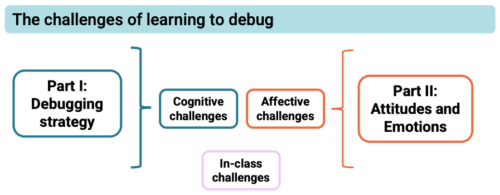

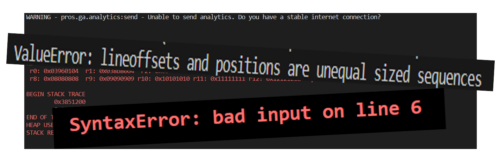
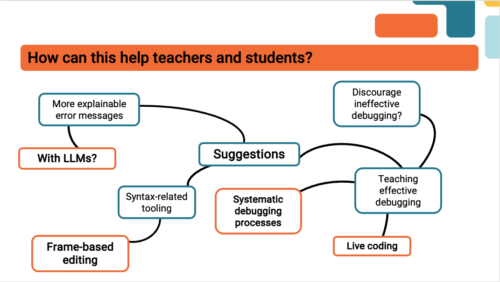
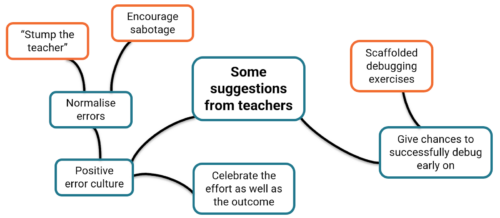


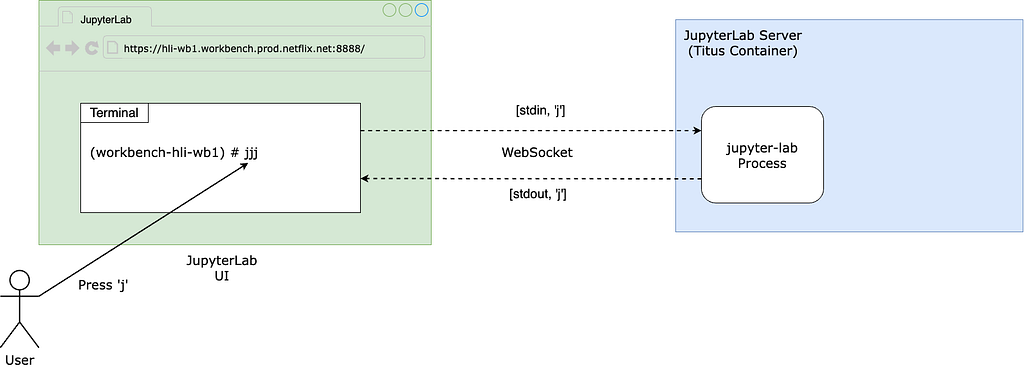
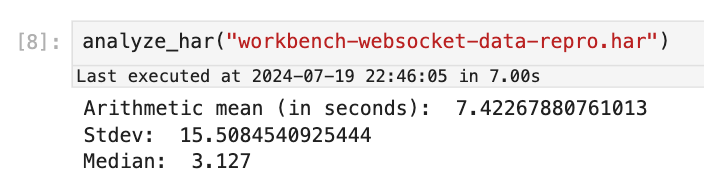
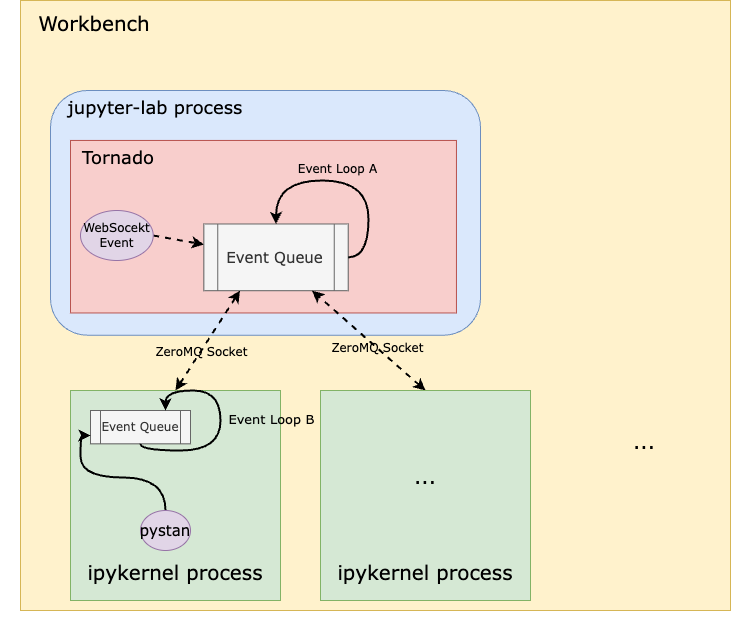
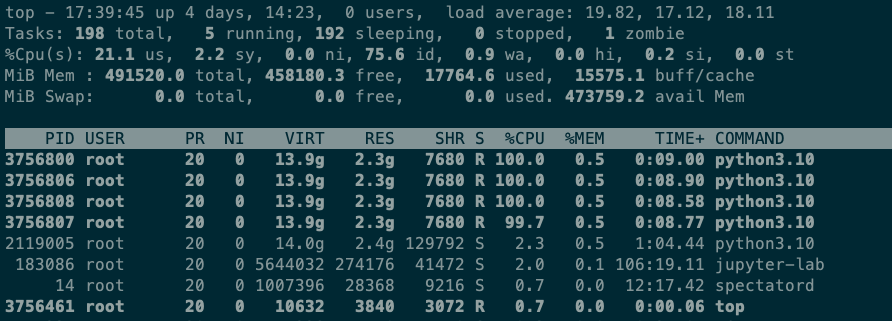

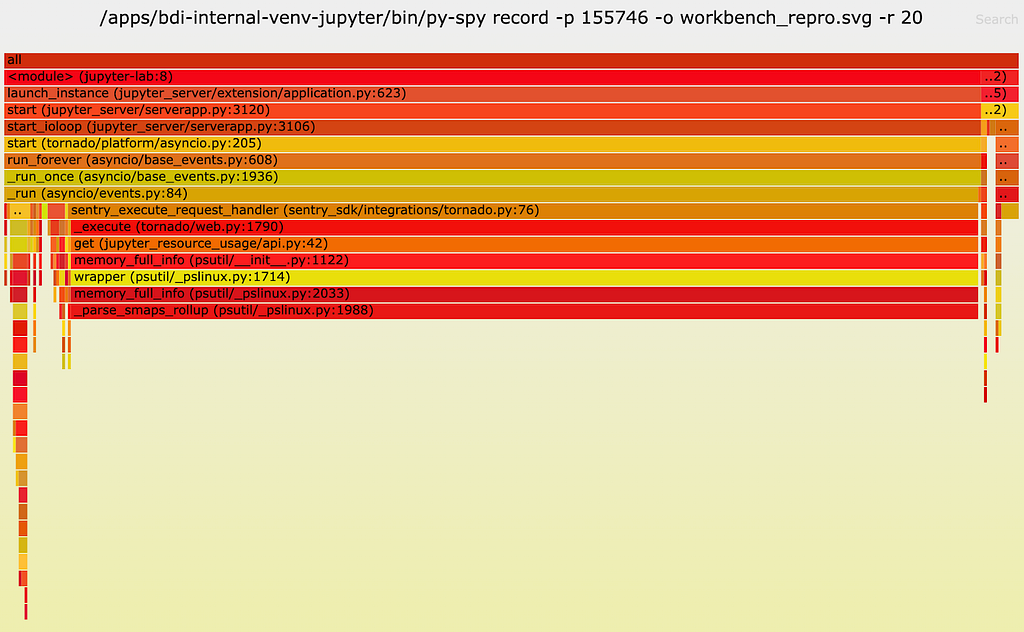
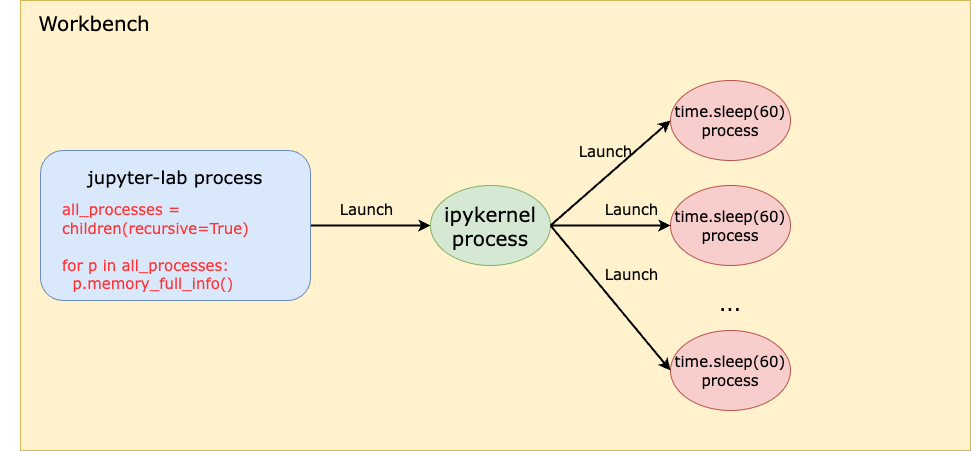
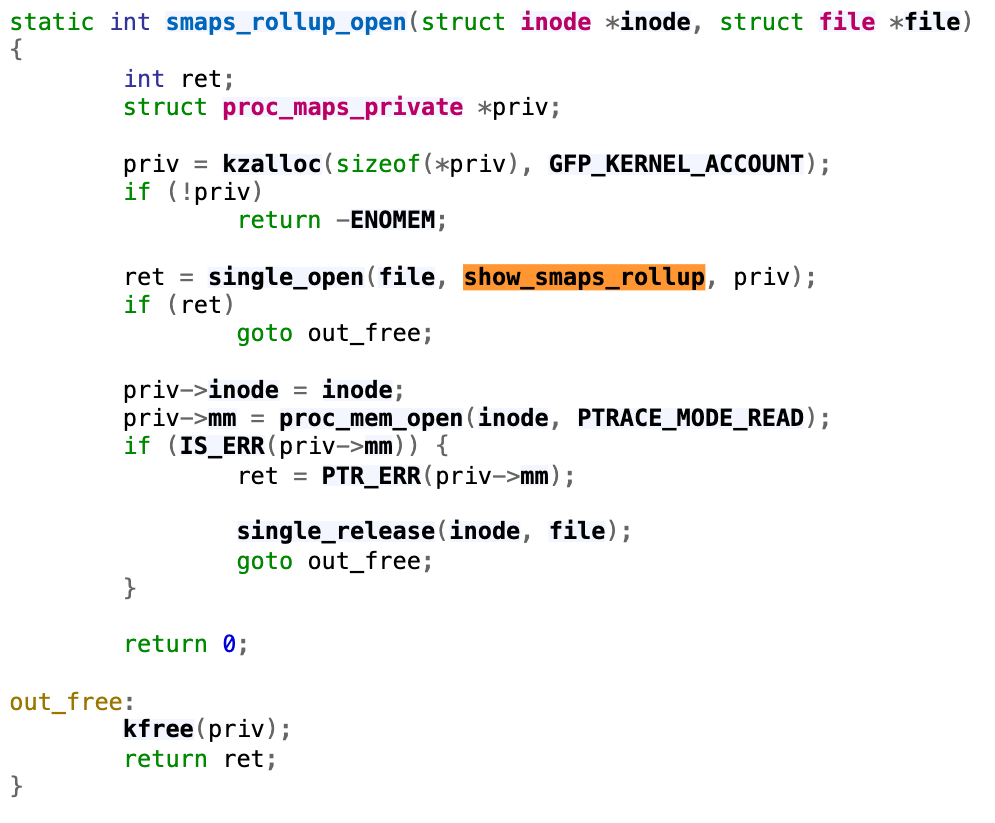



 Naidu Rongali is a Big Data and ML engineer at Amazon. He designs and develops data processing solutions for data intensive analytical systems supporting Amazon retail business. He has been working on integrating generative AI capabilities into the data lake and data warehouse systems using Amazon Bedrock AI models. Naidu has a PG diploma in Applied Statistics from the Indian Statistical Institute, Calcutta and BTech in Electrical and Electronics from NIT, Warangal. Outside of his work, Naidu practices yoga and goes trekking often.