Tag Archives: AWS security

Top 2021 AWS Security service launches security professionals should review – Part 1

Post Syndicated from Ryan Holland original https://aws.amazon.com/blogs/security/top-2021-aws-security-service-launches-part-1/

Given the speed of Amazon Web Services (AWS) innovation, it can sometimes be challenging to keep up with AWS Security service and feature launches. To help you stay current, here’s an overview of some of the most important 2021 AWS Security launches that security professionals should be aware of. This is the first of two related posts; Part 2 will highlight some of the important 2021 launches that security professionals should be aware of across all AWS services.

Amazon GuardDuty

In 2021, the threat detection service Amazon GuardDuty expanded the internal AWS security intelligence it consumes to use more of the intel that AWS internal threat detection teams collect, including additional nation-state threat intelligence. Sharing more of the important intel that internal AWS teams collect lets you quickly improve your protection. GuardDuty also launched domain reputation modeling. These machine learning models take all the domain requests from across all of AWS, and feed them into a model that allows AWS to categorize previously unseen domains as highly likely to be malicious or benign based on their behavioral characteristics. In practice, AWS is seeing that these models often deliver high-fidelity threat detections, identifying malicious domains 7–14 days before they are identified and available on commercial threat feeds.

AWS also launched second generation anomaly detection for GuardDuty. Shortly after the original GuardDuty launch in 2017, AWS added additional anomaly detection for user behavior analytics and monitoring for unusual activity of AWS Identity and Access Management (IAM) users. After receiving customer feedback that the original feature was a little too noisy, and that it was difficult to understand why some findings were generated, the GuardDuty analytics team rebuilt this functionality on an entirely new machine learning model, considerably reducing the number of detections and generating a more accurate positive-detection rate. The new model also added additional context that security professionals (such as analysts) can use to understand why the model shows findings as suspicious or unusual.

Since its introduction, GuardDuty has detected when AWS EC2 Role credentials are used to call AWS APIs from IP addresses outside of AWS. Beginning in early 2022, GuardDuty now supports detection when credentials are used from other AWS accounts, inside the AWS network. This is a complex problem for customers to solve on their own, which is why the GuardDuty team added this enhancement. The solution considers that there are legitimate reasons why a source IP address that is communicating with AWS services APIs might be different than the Amazon Elastic Compute Cloud (Amazon EC2) instance IP address, or a NAT gateway associated with the instance’s VPC. The enhancement also considers complex network topologies that route traffic to one or multiple VPCs—for example, AWS Transit Gateway or AWS Direct Connect.

Our customers are increasingly running container workloads in production; helping to raise the security posture of these workloads became an AWS development priority in 2021. GuardDuty for EKS Protection is one recent feature that has resulted from this investment. This new GuardDuty feature monitors Amazon Elastic Kubernetes Service (Amazon EKS) cluster control plane activity by analyzing Kubernetes audit logs. GuardDuty is integrated with Amazon EKS, giving it direct access to the Kubernetes audit logs without requiring you to turn on or store these logs. Once a threat is detected, GuardDuty generates a security finding that includes container details such as pod ID, container image ID, and associated tags. See below for details on how the new Amazon Inspector is also helping to protect containers.

Amazon Inspector

At AWS re:Invent 2021, we launched the new Amazon Inspector, a vulnerability management service that continually scans AWS workloads for software vulnerabilities and unintended network exposure. The original Amazon Inspector was completely re-architected in this release to automate vulnerability management and to deliver near real-time findings to minimize the time needed to discover new vulnerabilities. This new Amazon Inspector has simple one-click enablement and multi-account support using AWS Organizations, similar to our other AWS Security services. This launch also introduces a more accurate vulnerability risk score, called the Inspector score. The Inspector score is a highly contextualized risk score that is generated for each finding by correlating Common Vulnerability and Exposures (CVE) metadata with environmental factors for resources such as network accessibility. This makes it easier for you to identify and prioritize your most critical vulnerabilities for immediate remediation. One of the most important new capabilities is that Amazon Inspector automatically discovers running EC2 instances and container images residing in Amazon Elastic Container Registry (Amazon ECR), at any scale, and immediately starts assessing them for known vulnerabilities. Now you can consolidate your vulnerability management solutions for both Amazon EC2 and Amazon ECR into one fully managed service.

AWS Security Hub

In addition to a significant number of smaller enhancements throughout 2021, in October AWS Security Hub, an AWS cloud security posture management service, addressed a top customer enhancement request by adding support for cross-Region finding aggregation. You can now view all your findings from all accounts and all selected Regions in a single console view, and act on them from an Amazon EventBridge feed in a single account and Region. Looking back at 2021, Security Hub added 72 additional best practice checks, four new AWS service integrations, and 13 new external partner integrations. A few of these integrations are Atlassian Jira Service Management, Forcepoint Cloud Security Gateway (CSG), and Amazon Macie. Security Hub also achieved FedRAMP High authorization to enable security posture management for high-impact workloads.

Amazon Macie

Based on customer feedback, data discovery tool Amazon Macie launched a number of enhancements in 2021. One new feature, which made it easier to manage Amazon Simple Storage Service (Amazon S3) buckets for sensitive data, was criteria-based bucket selection. This Macie feature allows you to define runtime criteria to determine which S3 buckets should be included in a sensitive data-discovery job. When a job runs, Macie identifies the S3 buckets that match your criteria, and automatically adds or removes them from the job’s scope. Before this feature, once a job was configured, it was immutable. Now, for example, you can create a policy where if a bucket becomes public in the future, it’s automatically added to the scan, and similarly, if a bucket is no longer public, it will no longer be included in the daily scan.

Originally Macie included all managed data identifiers available for all scans. However, customers wanted more surgical search criteria. For example, they didn’t want to be informed if there were exposed data types in a particular environment. In September 2021, Macie launched the ability to enable/disable managed data identifiers. This allows you to customize the data types you deem sensitive and would like Macie to alert on, in accordance with your organization’s data governance and privacy needs.

Amazon Detective

Amazon Detective is a service to analyze and visualize security findings and related data to rapidly get to the root cause of potential security issues. In January 2021, Amazon Detective added a convenient, time-saving integration that allows you to start security incident investigation workflows directly from the GuardDuty console. This new hyperlink pivot in the GuardDuty console takes findings directly from the GuardDuty console into the Detective console. Another time-saving capability added was the IP address drill down functionality. This new capability can be useful to security forensic teams performing incident investigations, because it helps quickly determine the communications that took place from an EC2 instance under investigation before, during, and after an event.

In December 2021, Detective added support for AWS Organizations to simplify management for security operations and investigations across all existing and future accounts in an organization. This launch allows new and existing Detective customers to onboard and centrally manage the Detective graph database for up to 1,200 AWS accounts.

AWS Key Management Service

In June 2021, AWS Key Management Service (AWS KMS) introduced multi-Region keys, a capability that lets you replicate keys from one AWS Region into another. With multi-Region keys, you can more easily move encrypted data between Regions without having to decrypt and re-encrypt with different keys for each Region. Multi-Region keys are supported for client-side encryption using direct AWS KMS API calls, or in a simplified manner with the AWS Encryption SDK and Amazon DynamoDB Encryption Client.

AWS Secrets Manager

Last year was a busy year for AWS Secrets Manager, with four feature launches to make it easier to manage secrets at scale, not just for client applications, but also for platforms. In March 2021, Secrets Manager launched multi-Region secrets to automatically replicate secrets for multi-Region workloads. Also in March, Secrets Manager added three new rules to AWS Config, to help administrators verify that secrets in Secrets Manager are configured according to organizational requirements. Then in April 2021, Secrets Manager added a CSI driver plug-in, to make it easy to consume secrets from Amazon EKS by using Kubernetes’s standard Secrets Store interface. In November, Secrets Manager introduced a higher secret limit of 500,000 per account to simplify secrets management for independent software vendors (ISVs) that rely on unique secrets for a large number of end customers. Although launched in January 2022, it’s also worth mentioning Secrets Manager’s release of rotation windows to align automatic rotation of secrets with application maintenance windows.

Amazon CodeGuru and Secrets Manager

In November 2021, AWS announced a new secrets detector feature in Amazon CodeGuru that searches your codebase for hardcoded secrets. Amazon CodeGuru is a developer tool powered by machine learning that provides intelligent recommendations to detect security vulnerabilities, improve code quality, and identify an application’s most expensive lines of code.

This new feature can pinpoint locations in your code with usernames and passwords; database connection strings, tokens, and API keys from AWS; and other service providers. When a secret is found in your code, CodeGuru Reviewer provides an actionable recommendation that links to AWS Secrets Manager, where developers can secure the secret with a point-and-click experience.

Looking ahead for 2022

AWS will continue to deliver experiences in 2022 that meet administrators where they govern, developers where they code, and applications where they run. A lot of customers are moving to container and serverless workloads; you can expect to see more work on this in 2022. You can also expect to see more work around integrations, like CodeGuru Secrets Detector identifying plaintext secrets in code (as noted previously).

To stay up-to-date in the year ahead on the latest product and feature launches and security use cases, be sure to read the Security service launch announcements. Additionally, stay tuned to the AWS Security Blog for Part 2 of this blog series, which will provide an overview of some of the important 2021 launches that security professionals should be aware of across all AWS services.

If you’re looking for more opportunities to learn about AWS security services, check out AWS re:Inforce, the AWS conference focused on cloud security, identity, privacy, and compliance, which will take place June 28-29 in Houston, Texas.

If you have feedback about this post, submit comments in the Comments section below. If you have questions about this post, contact AWS Support.

Want more AWS Security news? Follow us on Twitter.
Author

Ryan Holland

Ryan is a Senior Manager with GuardDuty Security Response. His team is responsible for ensuring GuardDuty provides the best security value to customers, including threat intelligence, behavioral analytics, and finding quality.

Author

Marta Taggart

Marta is a Seattle-native and Senior Product Marketing Manager in AWS Security Product Marketing, where she focuses on data protection services. Outside of work you’ll find her trying to convince Jack, her rescue dog, not to chase squirrels and crows (with limited success).

How to secure API Gateway HTTP endpoints with JWT authorizer

Post Syndicated from Siva Rajamani original https://aws.amazon.com/blogs/security/how-to-secure-api-gateway-http-endpoints-with-jwt-authorizer/

This blog post demonstrates how you can secure Amazon API Gateway HTTP endpoints with JSON web token (JWT) authorizers. Amazon API Gateway helps developers create, publish, and maintain secure APIs at any scale, helping manage thousands of API calls. There are no minimum fees, and you only pay for the API calls you receive.

Based on customer feedback and lessons learned from building the REST and WebSocket APIs, AWS launched HTTP APIs for Amazon API Gateway, a service built to be fast, low cost, and simple to use. HTTP APIs offer a solution for building APIs, as well as multiple mechanisms for controlling and managing access through AWS Identity and Access Management (IAM) authorizers, AWS Lambda authorizers, and JWT authorizers.

This post includes step-by-step guidance for setting up JWT authorizers using Amazon Cognito as the identity provider, configuring HTTP APIs to use JWT authorizers, and examples to test the entire setup. If you want to protect HTTP APIs using Lambda and IAM authorizers, you can refer to Introducing IAM and Lambda authorizers for Amazon API Gateway HTTP APIs.

Prerequisites

Before you can set up a JWT authorizer using Cognito, you first need to create three Lambda functions. You should create each Lambda function using the following configuration settings, permissions, and code:

  1. The first Lambda function (Pre-tokenAuthLambda) is invoked before the token generation, allowing you to customize the claims in the identity token.
  2. The second Lambda function (LambdaForAdminUser) acts as the HTTP API Gateway integration target for /AdminUser HTTP API resource route.
  3. The third Lambda function (LambdaForRegularUser) acts as the HTTP API Gateway integration target for /RegularUser HTTP API resource route.

IAM policy for Lambda function

You first need to create an IAM role using the following IAM policy for each of the three Lambda functions:

	{
	"Version": "2012-10-17",
	"Statement": [
		{
			"Effect": "Allow",
			"Action": "logs:CreateLogGroup",
			"Resource": "arn:aws:logs:us-east-1:<AWS Account Number>:*"
		},
		{
			"Effect": "Allow",
			"Action": [
				"logs:CreateLogStream",
				"logs:PutLogEvents"
			],
			"Resource": [
				"arn:aws:logs:us-east-1:<AWS Account Number>:log-group:/aws/lambda/<Name of the Lambda functions>:*"
			]
		}
	]
} 

Settings for the required Lambda functions

For the three Lambda functions, use these settings:

Function name Enter an appropriate name for the Lambda function, for example:

  • Pre-tokenAuthLambda for the first Lambda
  • LambdaForAdminUser for the second
  • LambdaForRegularUser for the third
Runtime

Choose Node.js 12.x

Permissions Choose Use an existing role and select the role you created with the IAM policy in the Prerequisites section above.

Pre-tokenAuthLambda code

This first Lambda code, Pre-tokenAuthLambda, converts the authenticated user’s Cognito group details to be returned as the scope claim in the id_token returned by Cognito.

	exports.lambdaHandler = async (event, context) => {
		let newScopes = event.request.groupConfiguration.groupsToOverride.map(item => `${item}-${event.callerContext.clientId}`)
	event.response = {
		"claimsOverrideDetails": {
			"claimsToAddOrOverride": {
				"scope": newScopes.join(" "),
			}
		}
  	};
  	return event
}

LambdaForAdminUser code

This Lambda code, LambdaForAdminUser, acts as the HTTP API Gateway integration target and sends back the response Hello from Admin User when the /AdminUser resource path is invoked in API Gateway.

	exports.handler = async (event) => {

		const response = {
			statusCode: 200,
			body: JSON.stringify('Hello from Admin User'),
		};
		return response;
	};

LambdaForRegularUser code

This Lambda code, LambdaForRegularUser , acts as the HTTP API Gateway integration target and sends back the response Hello from Regular User when the /RegularUser resource path is invoked within API Gateway.

	exports.handler = async (event) => {

		const response = {
			statusCode: 200,
			body: JSON.stringify('Hello from Regular User'),
		};
		return response;
	};

Deploy the solution

To secure the API Gateway resources with JWT authorizer, complete the following steps:

  1. Create an Amazon Cognito User Pool with an app client that acts as the JWT authorizer
  2. Create API Gateway resources and secure them using the JWT authorizer based on the configured Amazon Cognito User Pool and app client settings.

The procedures below will walk you through the step-by-step configuration.

Set up JWT authorizer using Amazon Cognito

The first step to set up the JWT authorizer is to create an Amazon Cognito user pool.

To create an Amazon Cognito user pool

  1. Go to the Amazon Cognito console.
  2. Choose Manage User Pools, then choose Create a user pool.
    Figure 1: Create a user pool

    Figure 1: Create a user pool

  3. Enter a Pool name, then choose Review defaults.
    Figure 2: Review defaults while creating the user pool

    Figure 2: Review defaults while creating the user pool

  4. Choose Add app client.
    Figure 3: Add an app client for the user pool

    Figure 3: Add an app client for the user pool

  5. Enter an app client name. For this example, keep the default options. Choose Create app client to finish.
    Figure 4: Review the app client configuration and create it

    Figure 4: Review the app client configuration and create it

  6. Choose Return to pool details, and then choose Create pool.
    Figure 5: Complete the creation of user pool setup

    Figure 5: Complete the creation of user pool setup

To configure Cognito user pool settings

Now you can configure app client settings:

  1. On the left pane, choose App client settings. In Enabled Identity Providers, select the identity providers you want for the apps you configured in the App Clients tab.
  2. Enter the Callback URLs you want, separated by commas. These URLs apply to all selected identity providers.
  3. Under OAuth 2.0, select the from the following options.
    • For Allowed OAuth Flows, select Authorization code grant.
    • For Allowed OAuth Scopes, select phone, email, openID, and profile.
  4. Choose Save changes.
    Figure 6: Configure app client settings

    Figure 6: Configure app client settings

  5. Now add the domain prefix to use for the sign-in pages hosted by Amazon Cognito. On the left pane, choose Domain name and enter the appropriate domain prefix, then Save changes.
    Figure 7: Choose a domain name prefix for the Amazon Cognito domain

    Figure 7: Choose a domain name prefix for the Amazon Cognito domain

  6. Next, create the pre-token generation trigger. On the left pane, choose Triggers and under Pre Token Generation, select the Pre-tokenAuthLambda Lambda function you created in the Prerequisites procedure above, then choose Save changes.
    Figure 8: Configure Pre Token Generation trigger Lambda for user pool

    Figure 8: Configure Pre Token Generation trigger Lambda for user pool

  7. Finally, create two Cognito groups named admin and regular. Create two Cognito users named adminuser and regularuser. Assign adminuser to both admin and regular group. Assign regularuser to regular group.
    Figure 9: Create groups and users for user pool

    Figure 9: Create groups and users for user pool

Configuring HTTP endpoints with JWT authorizer

The first step to configure HTTP endpoints is to create the API in the API Gateway management console.

To create the API

  1. Go to the API Gateway management console and choose Create API.
    Figure 10: Create an API in API Gateway management console

    Figure 10: Create an API in API Gateway management console

  2. Choose HTTP API and select Build.
    Figure 11: Choose Build option for HTTP API

    Figure 11: Choose Build option for HTTP API

  3. Under Create and configure integrations, enter JWTAuth for the API name and choose Review and Create.
    Figure 12: Create Integrations for HTTP API

    Figure 12: Create Integrations for HTTP API

  4. Once you’ve created the API JWTAuth, choose Routes on the left pane.
    Figure 13: Navigate to Routes tab

    Figure 13: Navigate to Routes tab

  5. Choose Create a route and select GET method. Then, enter /AdminUser for the path.
    Figure 14: Create the first route for HTTP API

    Figure 14: Create the first route for HTTP API

  6. Repeat step 5 and create a second route using the GET method and /RegularUser for the path.
    Figure 15: Create the second route for HTTP API

    Figure 15: Create the second route for HTTP API

To create API integrations

  1. Now that the two routes are created, select Integrations from the left pane.
    Figure 16: Navigate to Integrations tab

    Figure 16: Navigate to Integrations tab

  2. Select GET for the /AdminUser resource path, and choose Create and attach an integration.
    Figure 17: Attach an integration to first route

    Figure 17: Attach an integration to first route

  3. To create an integration, select the following values

    Integration type: Lambda function
    Integration target: LambdaForAdminUser

  4. Choose Create.
    NOTE: LambdaForAdminUser is the Lambda function you previously created as part of the Prerequisites procedure LambdaForAdminUser code.
    Figure 18: Create an integration for first route

    Figure 18: Create an integration for first route

  5. Next, select GET for the /RegularUser resource path and choose Create and attach an integration.
    Figure 19: Attach an integration to second route

    Figure 19: Attach an integration to second route

  6. To create an integration, select the following values

    Integration type: Lambda function
    Integration target: LambdaForRegularUser

  7. Choose Create.
    NOTE: LambdaForRegularUser is the Lambda function you previously created as part of the Prerequisites procedure LambdaForRegularUser code.
    Figure 20: Create an integration for the second route

    Figure 20: Create an integration for the second route

To configure API authorization

  1. Select Authorization from the left pane, select /AdminUser path and choose Create and attach an authorizer.
    Figure 21: Navigate to Authorization left pane option to create an authorizer

    Figure 21: Navigate to Authorization left pane option to create an authorizer

  2. For Authorizer type select JWT and under Authorizer settings enter the following details:

    Name: JWTAuth
    Identity source: $request.header.Authorization
    Issuer URL: https://cognito-idp.us-east1.amazonaws.com/<your_userpool_id>
    Audience: <app_client_id_of_userpool>
  3. Choose Create.
    Figure 22: Create and attach an authorizer to HTTP API first route

    Figure 22: Create and attach an authorizer to HTTP API first route

  4. In the Authorizer for route GET /AdminUser screen, choose Add scope in the Authorization Scope section and enter scope name as admin-<app_client_id> and choose Save.
    Figure 23: Add authorization scopes to first route of HTTP API

    Figure 23: Add authorization scopes to first route of HTTP API

  5. Now select the /RegularUser path and from the dropdown, select the JWTAuth authorizer you created in step 3. Choose Attach authorizer.
    Figure 24: Attach an authorizer to HTTP API second route

    Figure 24: Attach an authorizer to HTTP API second route

  6. Choose Add scope and enter the scope name as regular-<app_client_id> and choose Save.
    Figure 25: Add authorization scopes to second route of HTTP API

    Figure 25: Add authorization scopes to second route of HTTP API

  7. Enter Test as the Name and then choose Create.
    Figure 26: Create a stage for HTTP API

    Figure 26: Create a stage for HTTP API

  8. Under Select a stage, enter Test, and then choose Deploy to stage.
    Figure 27: Deploy HTTP API to stage

    Figure 27: Deploy HTTP API to stage

Test the JWT authorizer

You can use the following examples to test the API authentication. We use Curl in this example, but you can use any HTTP client.

To test the API authentication

  1. Send a GET request to the /RegularUser HTTP API resource without specifying any authorization header.
    curl -s -X GET https://a1b2c3d4e5.execute-api.us-east-1.amazonaws.com/RegularUser

    API Gateway returns a 401 Unauthorized response, as expected.

    {“message”:”Unauthorized”}

  2. The required $request.header.Authorization identity source is not provided, so the JWT authorizer is not called. Supply a valid Authorization header key and value. You authenticate as the regularuser, using the aws cognito-idp initiate-auth AWS CLI command.
    aws cognito-idp initiate-auth --auth-flow USER_PASSWORD_AUTH --client-id <Cognito User Pool App Client ID> --auth-parameters USERNAME=regularuser,PASSWORD=<Password for regularuser>

    CLI Command response:

    
    {
    	"ChallengeParameters": {},
    	"AuthenticationResult": {
    		"AccessToken": "6f5e4d3c2b1a111112222233333xxxxxzz2yy",
    		"ExpiresIn": 3600,
    		"TokenType": "Bearer",
    		"RefreshToken": "xyz123abc456dddccc0000",
    		"IdToken": "aaabbbcccddd1234567890"
    	}
    }

    The command response contains a JWT (IdToken) that contains information about the authenticated user. This information can be used as the Authorization header value.

    curl -H "Authorization: aaabbbcccddd1234567890" -s -X GET https://a1b2c3d4e5.execute-api.us-east-1.amazonaws.com/RegularUser

  3. API Gateway returns the response Hello from Regular User. Now test access for the /AdminUser HTTP API resource with the JWT token for the regularuser.
    curl -H "Authorization: aaabbbcccddd1234567890" -s -X GET "https://a1b2c3d4e5.execute-api.us-east-1.amazonaws.com/AdminUser"

    API Gateway returns a 403 – Forbidden response.
    {“message”:”Forbidden”}
    The JWT token for the regularuser does not have the authorization scope defined for the /AdminUser resource, so API Gateway returns a 403 – Forbidden response.

  4. Next, log in as adminuser and validate that you can successfully access both /RegularUser and /AdminUser resource. You use the cognito-idp initiate-auth AWS CLI command.
  5. aws cognito-idp initiate-auth --auth-flow USER_PASSWORD_AUTH --client-id <Cognito User Pool App Client ID> --auth-parameters USERNAME=adminuser,PASSWORD==<Password for adminuser>

    CLI Command response:

    
    {
    	"ChallengeParameters": {},
    	"AuthenticationResult": {
    		"AccessToken": "a1b2c3d4e5c644444555556666Y2X3Z1111",
    		"ExpiresIn": 3600,
    		"TokenType": "Bearer",
    		"RefreshToken": "xyz654cba321dddccc1111",
    		"IdToken": "a1b2c3d4e5c6aabbbcccddd"
    	}
    }

  6. Using Curl, you can validate that the adminuser JWT token now has access to both the /RegularUser resource and the /AdminUser resource. This is possible when adminuser is part of both Cognito groups, so the JWT token contains both authorization scopes.
    curl -H "Authorization: a1b2c3d4e5c6aabbbcccddd" -s -X GET https://a1b2c3d4e5.execute-api.us-east-1.amazonaws.com/RegularUser

    API Gateway returns the response Hello from Regular User

    curl -H "Authorization: a1b2c3d4e5c6aabbbcccddd" -s -X GET https://a1b2c3d4e5.execute-api.us-east-1.amazonaws.com/AdminUser

    API Gateway returns the following response Hello from Admin User

Conclusion

AWS enabled the ability to manage access to an HTTP API in API Gateway in multiple ways: with Lambda authorizers, IAM roles and policies, and JWT authorizers. This post demonstrated how you can secure API Gateway HTTP API endpoints with JWT authorizers. We configured a JWT authorizer using Amazon Cognito as the identity provider (IdP). You can achieve the same results with any IdP that supports OAuth 2.0 standards. API Gateway validates the JWT that the client submits with API requests. API Gateway allows or denies requests based on token validation along with the scope of the token. You can configure distinct authorizers for each route of an API, or use the same authorizer for multiple routes.

To learn more, we recommend:

If you have feedback about this post, submit comments in the Comments section below. If you have questions about this post, contact AWS Support.

Want more AWS Security news? Follow us on Twitter.
Author

Siva Rajamani

Siva is a Boston-based Enterprise Solutions Architect. He enjoys working closely with customers and supporting their digital transformation and AWS adoption journey. His core areas of focus are Serverless, Application Integration, and Security.

Author

Sudhanshu Malhotra

Sudhanshu is a Boston-based Enterprise Solutions Architect for AWS. He’s a technology enthusiast who enjoys helping customers find innovative solutions to complex business challenges. His core areas of focus are DevOps, Machine Learning, and Security. When he’s not working with customers on their journey to the cloud, he enjoys reading, hiking, and exploring new cuisines.

Author

Rajat Mathur

Rajat is a Sr. Solutions Architect at Amazon Web Services. Rajat is a passionate technologist who enjoys building innovative solutions for AWS customers. His core areas of focus are IoT, Networking and Serverless computing. In his spare time, Rajat enjoys long drives, traveling and spending time with family.

C5 Type 2 attestation report now available with 141 services in scope

Post Syndicated from Mercy Kanengoni original https://aws.amazon.com/blogs/security/c5-type-2-attestation-report-now-available-with-141-services-in-scope/

Amazon Web Services (AWS) is pleased to announce the issuance of the new Cloud Computing Compliance Controls Catalogue (C5) Type 2 attestation report. We added 18 additional services and service features to the scope of the 2021 report.

Germany’s national cybersecurity authority, Bundesamt für Sicherheit in der Informationstechnik (BSI), established C5 to define a reference standard for German cloud security requirements. The C5 Type 2 report covers the time period from October 1, 2020, through September 30, 2021. It was issued by an independent third-party attestation organization, and assesses the design and the operational effectiveness of AWS’s controls against the new version C5:2020’s basic and additional criteria.

Customers in Germany and other European countries can use AWS’s attestation report to confirm that AWS meets the security requirements of the C5:2020 framework, and to review the details of the tested controls. This attestation demonstrates our commitment to meet and exceed the security expectations for cloud service providers set by the BSI.

AWS has added the following 18 services and service features to the new C5 scope:

You can see a current list of the services in scope for C5 on the AWS Services in Scope by Compliance Program page.

AWS strives to continuously bring services into scope of its compliance programs to help you meet your architectural and regulatory needs. Please reach out to your AWS account team if you have questions or feedback about the C5 report.

The C5 report and Continuing Operations Letter is available to AWS customers through AWS Artifact. For more information, see Cloud Computing Compliance Controls Catalogue (C5).

 
If you have feedback about this post, submit comments in the Comments section below. If you have questions about this post, start a new thread on the Security Hub forum. To start your 30-day free trial of Security Hub, visit AWS Security Hub.

Want more AWS Security how-to content, news, and feature announcements? Follow us on Twitter.

Mercy Kanengoni

Mercy Kanengoni

Mercy is a Security Audit Program Manager at AWS based in Manchester, UK. She leads security audits across Europe, and she has previously worked in security assurance and technology risk management.

Author

Karthik Amrutesh

Karthik is a Senior Manager, Security Assurance at AWS based in New York, U.S. His team is responsible for audits, attestations, certifications, and assessments globally. Karthik has previously worked in risk management, security assurance, and technology audits for the past 18 years.

How to deploy AWS Network Firewall to help protect your network from malware

Post Syndicated from Ajit Puthiyavettle original https://aws.amazon.com/blogs/security/how-to-deploy-aws-network-firewall-to-help-protect-your-network-from-malware/

Protecting your network and computers from security events requires multi-level strategies, and you can use network level traffic filtration as one level of defense. Users need access to the internet for business reasons, but they can inadvertently download malware, which can impact network and data security. This post describes how to use custom Suricata Rules with AWS Network Firewall to add protections that prevent users from downloading malware. You can use your own internal list, or a list from commercial or open-source threat intelligence feeds.

Network Firewall is a managed service that makes it easy to deploy essential network protection for all of your Amazon Virtual Private Cloud (Amazon VPC) Infrastructure. Network Firewall’s flexible rules engine lets you define firewall rules, giving you fine-grained control over network traffic, such as blocking outbound requests to prevent the spread of potential malware.

Features of Network Firewall

This section describes features of Network Firewall that help improve the overall security of your network.

Network Firewall:

  • Is a managed Amazon Web Services (AWS) service, so you don’t have to build and maintain the infrastructure to host the network firewall.
  • Integrates with AWS Firewall Manager, which allows you to centrally manage security policies and automatically enforce mandatory security policies across existing and newly created accounts and virtual private clouds (VPCs).
  • Protects application availability by filtering inbound internet traffic using tools such as access control list (ACL) rules, stateful inspection, protocol detection, and intrusion prevention.
  • Provides URL, IP address, and domain-based outbound traffic filtering to help you meet compliance requirements, stop potential data leaks, and block communication with known malware hosts.
  • Gives you control and visibility of VPC-to-VPC traffic to logically separate networks that host sensitive applications or line-of-business resources.
  • Complements existing network and application security services on AWS by providing control and visibility to layer 3 through 7 network traffic for your entire VPC.

Automating deployment of Network Firewall and management of Network Firewall rules support management at-scale and help in timely response, as Network Firewall is designed to block access to insecure sites before they impact your resources. For the solution in this blog post, you’ll use an AWS CloudFormation template to deploy the network architecture with Network Firewall.

Solution architecture

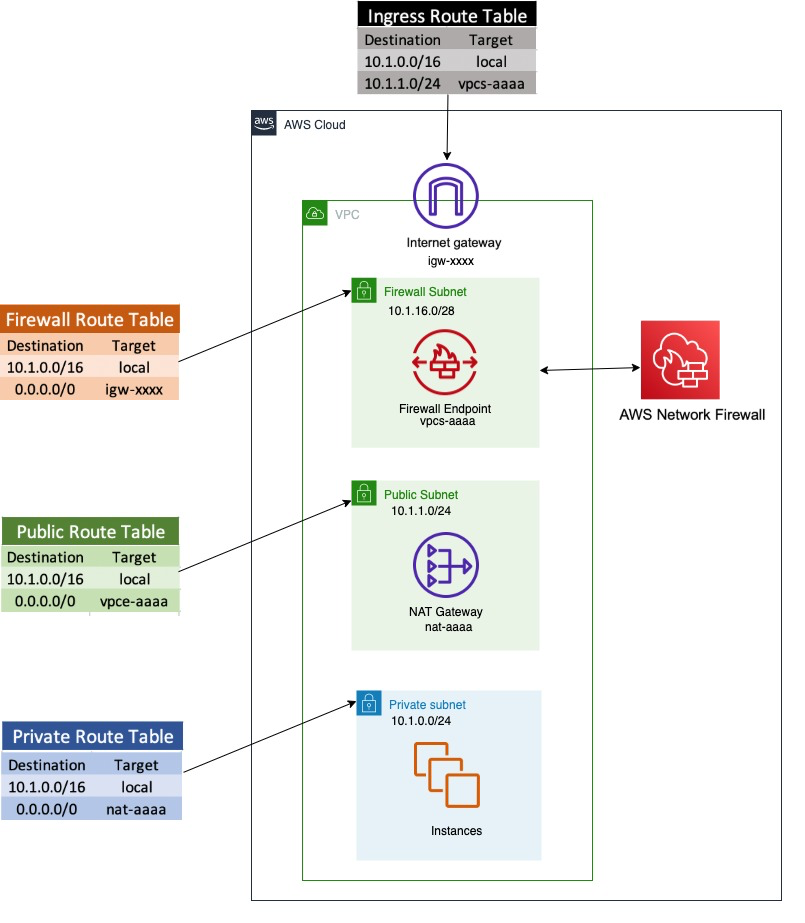
Figure 1 shows a sample architecture to demonstrate how users are able to download malware files, and how you can prevent this using network firewall rules.

Network Firewall is deployed in a single VPC architecture, where it is placed in line with the traffic to and from the internet.

Figure 1. Network architecture diagram

Figure 1. Network architecture diagram

The network architecture shown in Figure 1 includes three subnets:

  1. A network firewall subnet
    Hosts the Network Firewall endpoint interface. All outbound traffic from this network goes through the internet gateway.
  2. A public subnet
    Hosts a NAT gateway. The next hop from the public subnet is the Network Firewall endpoint, where all traffic can be inspected before being forwarded to the internet.
  3. A private network subnet
    Used to host the client instances. All outbound traffic from this network goes to the NAT gateway endpoint.

In the network architecture shown in Figure 1, only one AZ is shown for simplicity, but best practices recommend deploying infrastructure across multiple AZs

To run the CloudFormation deployment template

  1. To set up the architecture shown in Figure 1, launch the provided CloudFormation deployment template using the Launch stack button in step 2 below.
    This CloudFormation template:

    • Sets up VPCs and appropriate subnets as required by the network architecture.
    • Creates a route table with appropriate routes and attaches it to the appropriate subnet (i.e. private subnet, firewall subnet, public subnet).
    • Creates a test instance with appropriate security groups.
    • Deploys Network Firewall with firewall policy.
    • Creates a Rule Group SampleStatefulRulegroupName with Suricata rules, which is not attached to a firewall policy
  2. To launch the stack, click the Launch Stack button below.
  3. Select the Launch Stack button to launch the template

  4. Name the newly created stack (for example, nfw-stack).
  5. The template will also install two sample rules that will be used to protect against accessing two sample malware site URLs, but it will not automatically attach them to a firewall policy
  6. You can see that Network Firewall with firewall policy was deployed as part of the basic CloudFormation deployment. It also created Suricata rules in rule groups, but is not yet attached to the firewall policy.

    Note: Unless you attach the rule to the Network Firewall, it will not provide the required protection.

Example: confirming vulnerability

We have identified two sample URLs that contain malware to use for demonstration.

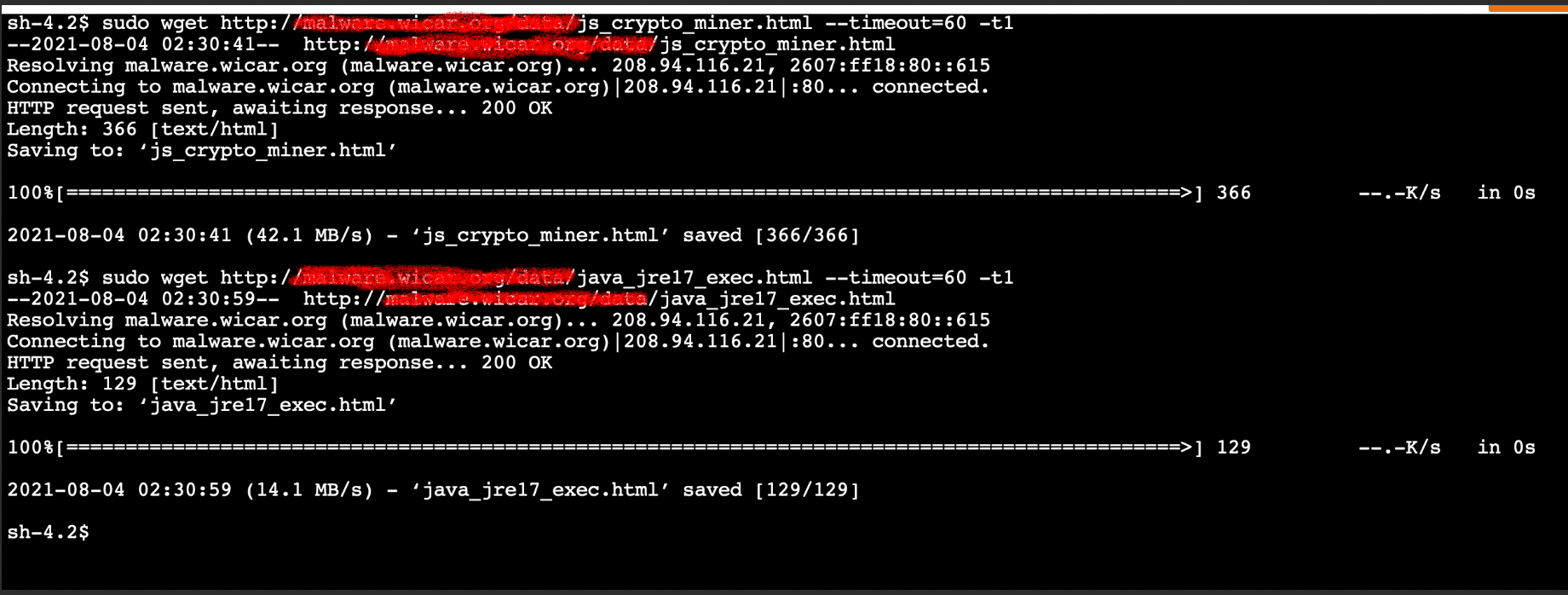
In the example screen shot below, we tested vulnerability by logging into test instance using AWS Session Manager. and at the shell prompt, used wget to access and download a malware file.

Figure 2 that follows is a screenshot of how a user could access and download two different malware files.

Note: Since these URLs contain malware files, we do not recommend users perform this test, but are providing a screenshot as a demonstration. If you wish to actually test ability to download files, use URLs you know are safe for testing.

Figure 2. Insecure URL access

Figure 2. Insecure URL access

Network Firewall policies

Before the template creates the Network Firewall rule group, it creates a Network Firewall policy and attaches it to the Network Firewall. An AWS Network Firewall firewall policy defines the monitoring and protection behavior for a firewall. The details of the behavior are defined in the rule groups that you add to your policy.

Network Firewall rules

A Network Firewall rule group is a reusable set of criteria for inspecting and handling network traffic. You can add one or more rule groups to a firewall policy as part of policy configuration. The included template does this for you.

Network Firewall rule groups are either stateless or stateful. Stateless rule groups evaluate packets in isolation, while stateful rule groups evaluate them in the context of their traffic flow. Network Firewall uses a Suricata rules engine to process all stateful rules.

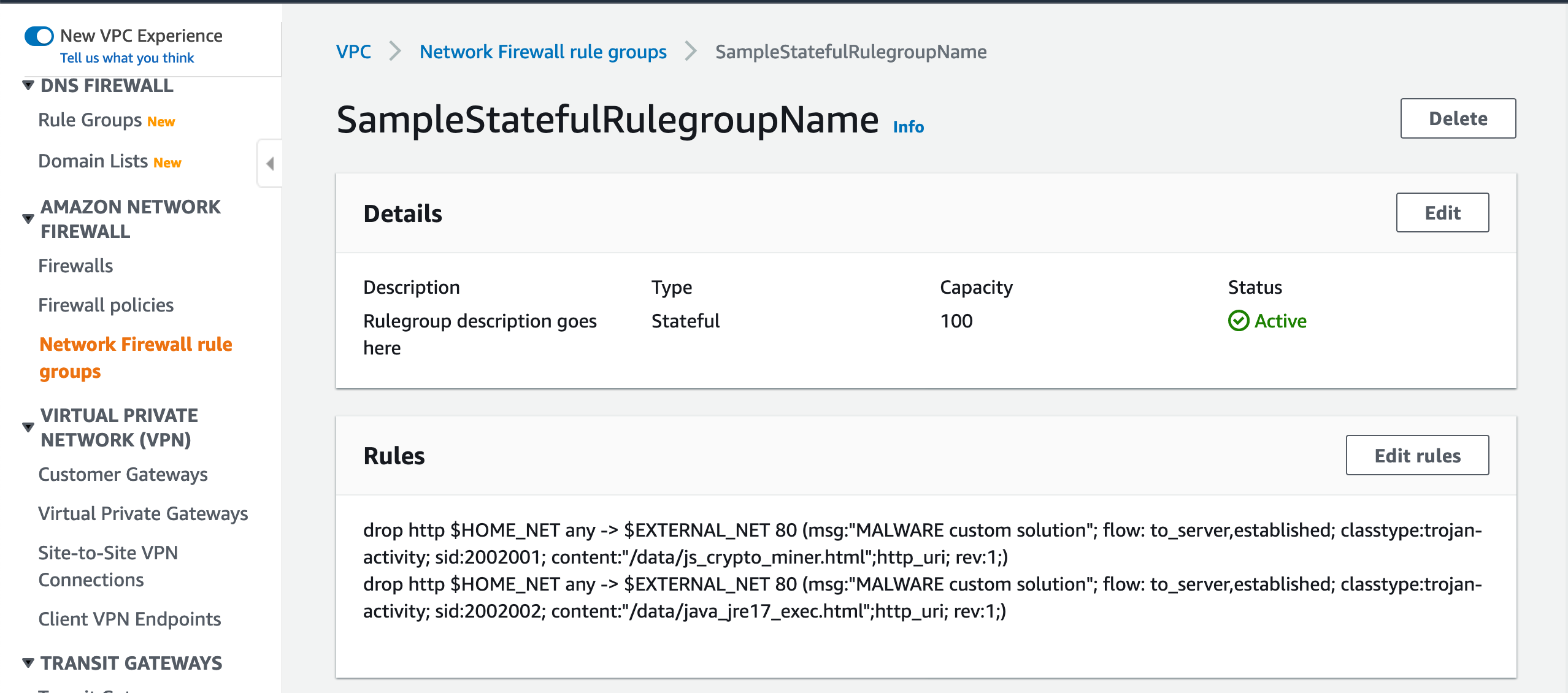
Suricata rules can be used to create a Network Firewall stateful rule to prevent insecure URL access. Figure 3 shows the Suricata rules that the template adds and attaches to the Network Firewall policy in order to block access to the sample malware URLs used in the previous example.

Figure 3. Suricata rules in a Network Firewall rule group

Figure 3. Suricata rules in a Network Firewall rule group

Attach the rule group to the Network Firewall policy

When you launched the CloudFormation template, it automatically created these rules in the rule group. You will now be attaching this rule group to the firewall policy in order to enable the protection. You will need similar rules to block the test URLs that are used for your testing.

Figure 3 shows two Suricata rules that have been configured to block the insecure malware URLs.

To add Suricata rules to Network Firewall

To improve site security and protect against downloading malware, you can add Suricata rules to Network Firewall to secure your site. You’ll do this by:

  1. Creating and attaching a firewall policy to the Network Firewall.
  2. Creating rules as part of rule groups, which are attached to the firewall policy
  3. Testing to verify that access to malware URLs from the instance is blocked.

Let’s review Suricata Rules that are created, which can be attached to Network Firewall.

Suricata rule parts

Each Suricata rule has three parts:

  1. Action
  2. drop action that should be taken

  3. Header
  4. http this is the traffic protocol

    $HOME_NET anywhere $HOME_NET is a Suricata variable. By default it is set to the CIDR range of the VPC where Network Firewall is deployed and any refers to any source port

    $EXTERNAL_NET 80 where $EXTERNAL_NET 80 is a Suricata standard variable that refers to traffic destination, and 80 refers to the destination port

    -> is the direction that tells in which direction the signature has to match

  5. Options
  6. msg “MALWARE custom solution” – gives textual information about the signature and the possible alert

    flow to_server,established – it is used to match on the direction of the flow and established refers to match on established connections

    classtype trojan-activity – gives information about the classification of rules and alerts

    sid:xxxxx gives every signature its own id

    content “xxxx” – This keyword is very important and it identifies the pattern that your signature should match.

    http_uri is a content modifier that helps you match specifically and only on the request URI

    rev:xxx this goes along with sid keyword. It represents the version of the signature

The signatures in the Suricate rule shown in Figure 3 will block traffic that matches the http_uri contents /data/js_crypto_miner.html and /data/java_jre17_exec.html when the traffic is initiated from the VPC to the public network.

To attach a rule group to an existing Network Firewall

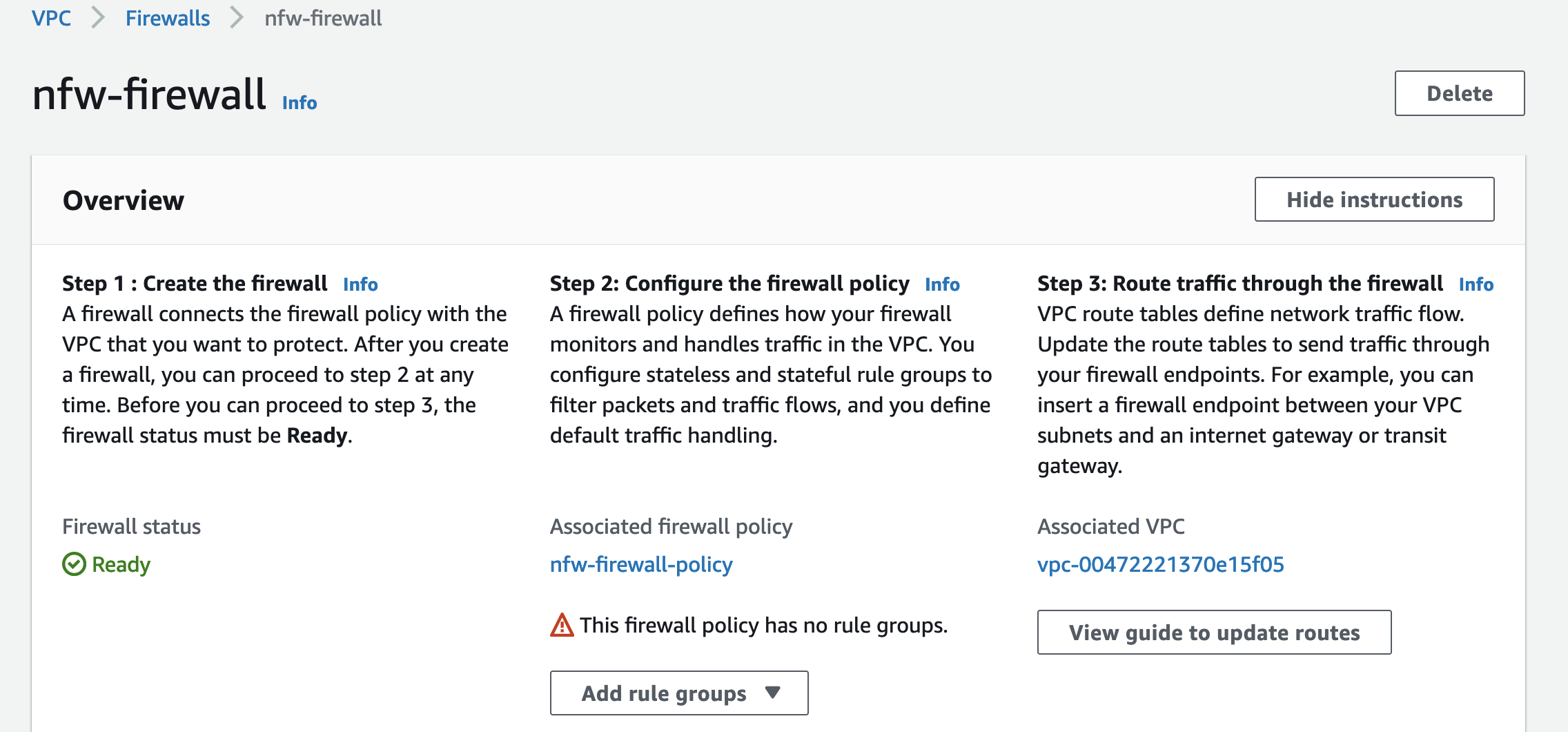
In Figure 4, the Network Firewall has a policy attached. but it does not have a rule group

Figure 4. A policy is attached, but not a rule group

Figure 4. A policy is attached, but not a rule group

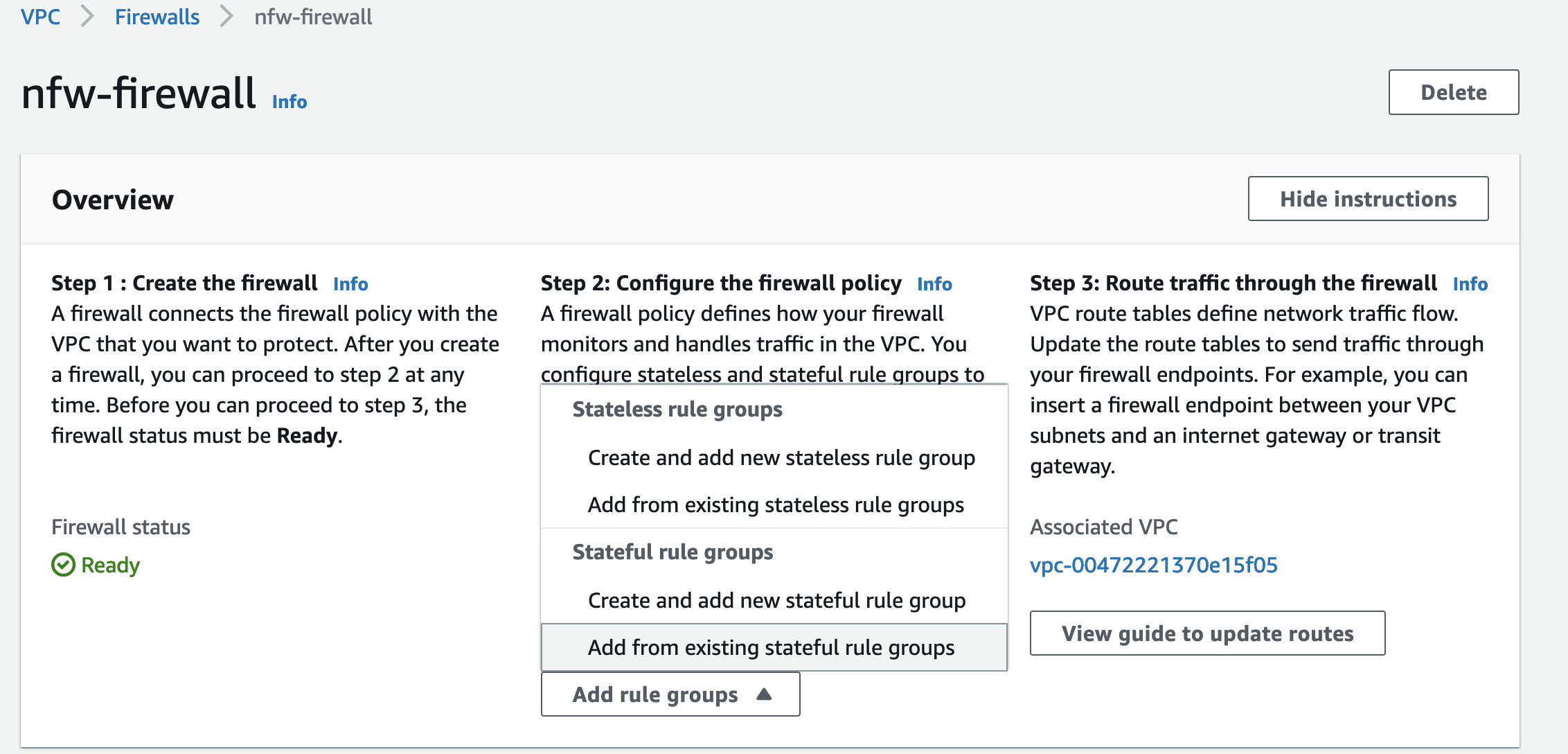
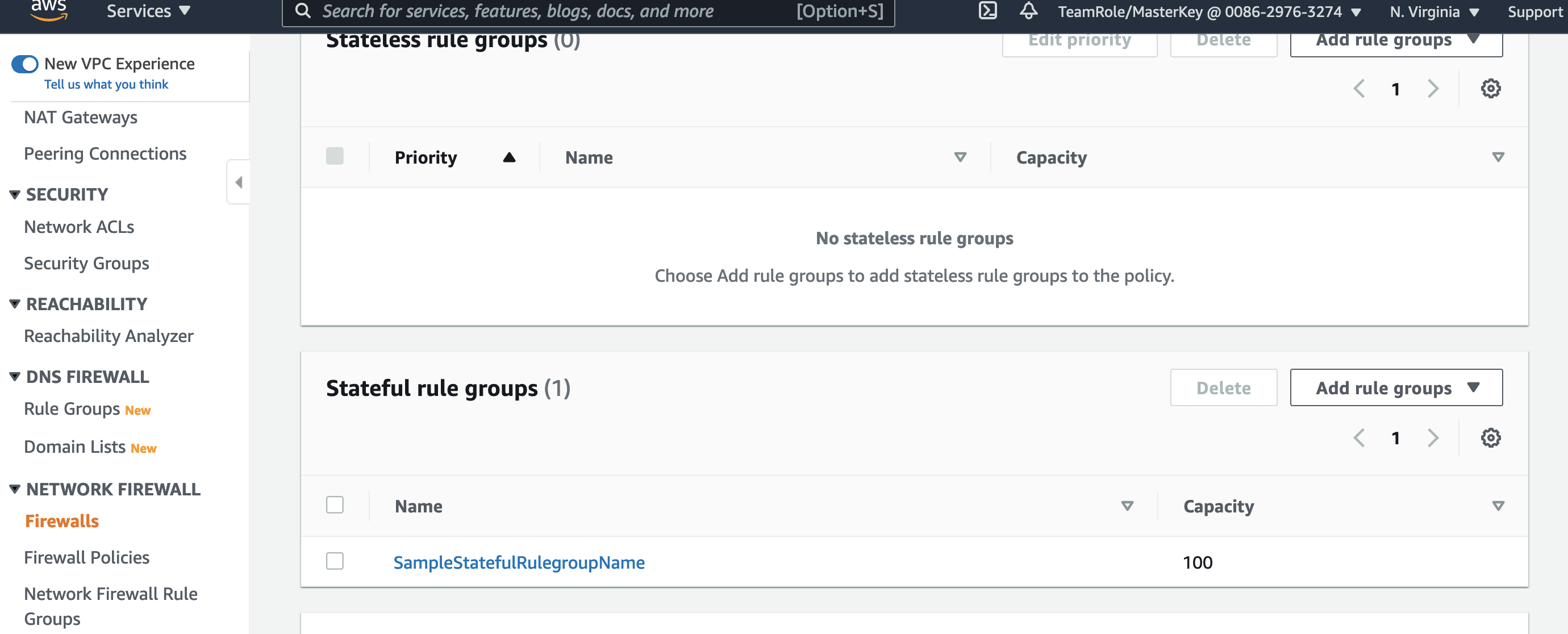
  1. As shown in Figure 5, choose Add rule group to start adding your Suricata rule to the Network Firewall.
  2. Choose Add from existing stateful rule groups to attach an already created Suricata rule group.
  3. Figure 5. Choose Add rule group

    Figure 5. Choose Add rule group

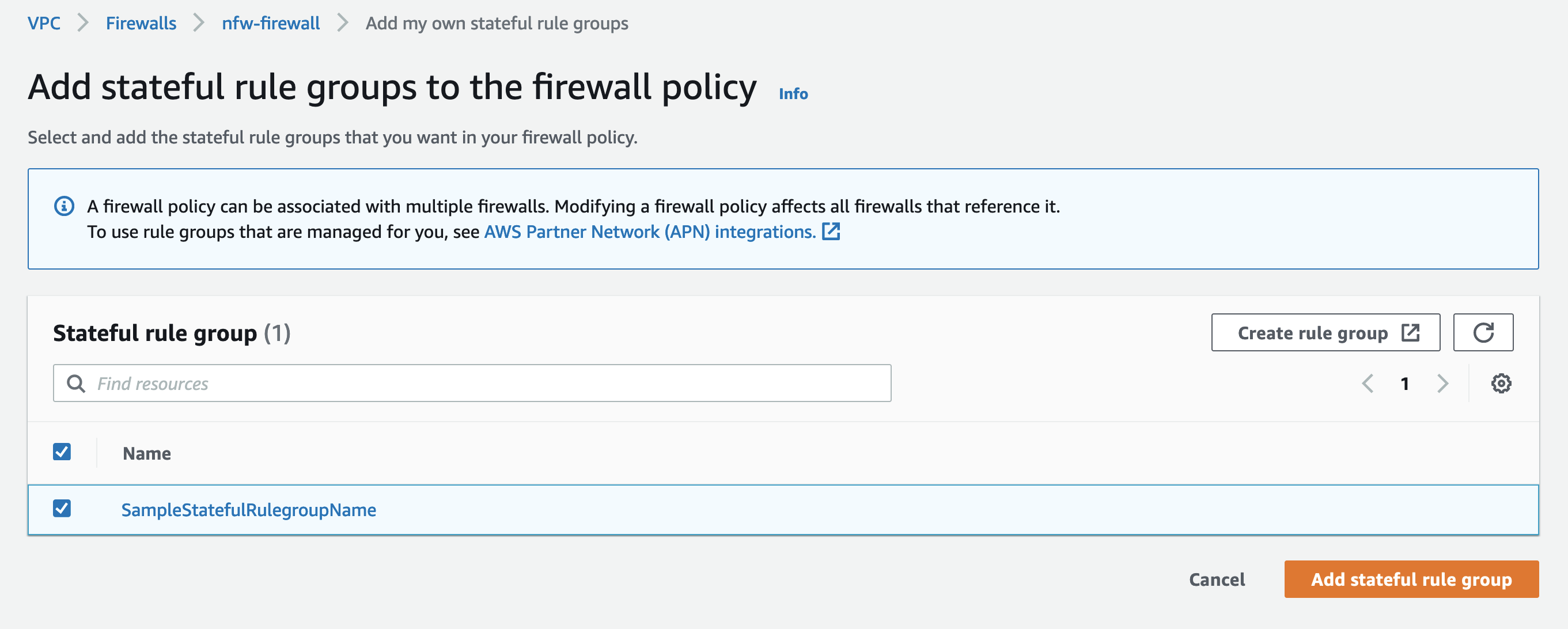
  4. Figure 6 shows the Suriacata rule groups that are already created. SampleStatefulRulegroupName is the rule group created by the CloudFormation template.
  5. Select the rule group and choose Add stateful rule group to finish adding the rule group to Network Firewall.
  6. Figure 6. Review the rule groups that are already created

    Figure 6. Review the rule groups that are already created

  7. Figure 7 shows that the rule group SampleStatefulRulegroupName is now part of the Stateful rule group section of Network Firewall screen, which completes adding Suricata rules to Network Firewall.
  8. Figure 7. Shows the new rule group is now added

    Figure 7. Shows the new rule group is now added

Example: validating the solution

Your Network Firewall is now configured to block malware URLs that are defined in the rulegroup SampleStatefulRulegroupName.

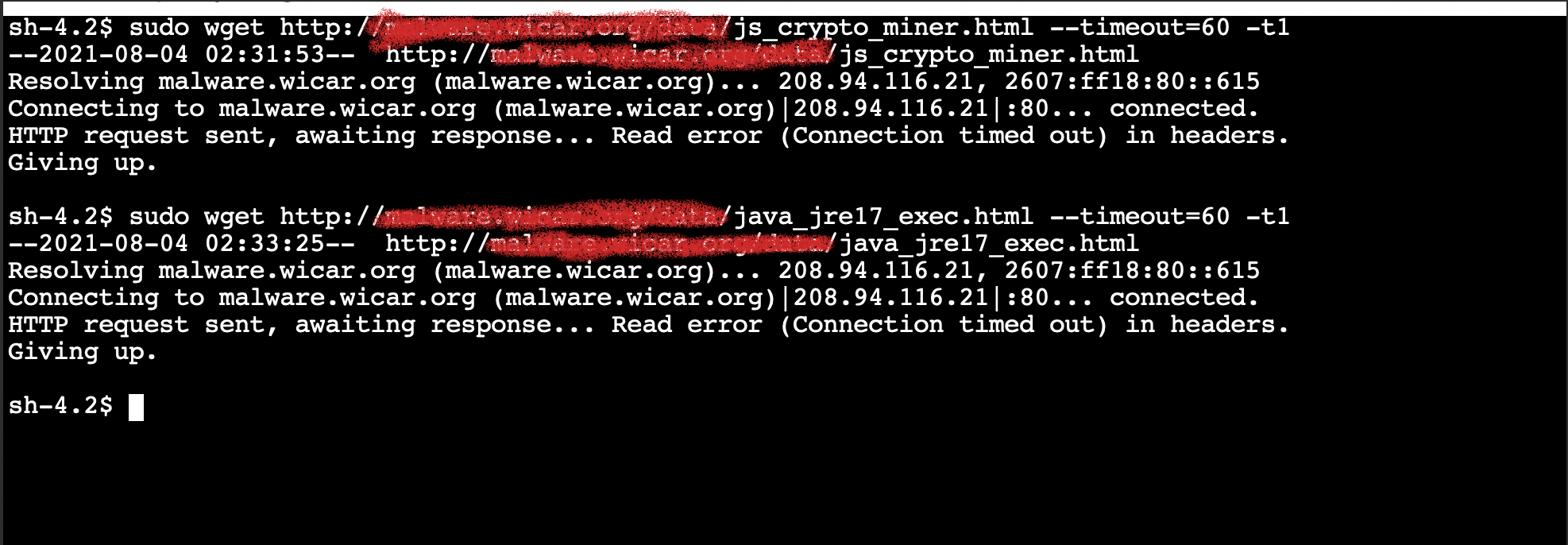
As in the example above where we confirmed vulnerability, Figure 8 shows how to validate that the solution is now protecting your users from accessing malware sites.

Figure 8 shows a user trying to access the same insecure URLs we tested earlier and shows that the URLs are now blocked and the attempted connection times out.

Note: Since these URLs contain malware files, we do not recommend users perform this test, but are providing a screenshot as a demonstration. If you wish to actually test ability to download files, use URLs you know are safe for testing.

Figure 8. Insecure URL access blocked

Figure 8. Insecure URL access blocked

Validating blocking access helps your security team ensure that users or applications on your network cannot download malware. You can add similar rules for any URLs you identify as insecure. SOC operators are typically not familiar with updating CloudFormation templates, but you can use a deployment pipeline where the data required for the rule is stored in Amazon DynamoDB and use AWS Lambda functions to automate updating rules.

Now that you have an example running, you should implement a complete rule set that meets your requirement from a publicly available malware list such as CISSECURITY MALWARE LIST.

Cleanup

AWS resources created for testing can result in additional costs. Since this environment used a CloudFormation template, you can remove all AWS resources associated with the solution by deleting the CloudFormation stack you named previously (for example, nfw-stack).

Conclusion

This blog describes an approach for preventing users from downloading malware. The solution presented uses AWS Network Firewall to secure your environment by blocking access to the specified malware URLs. The supplied CloudFormation template can be used to automate this protection, and to easily set up a test environment to simulate the scenario.

For additional best practice information, see:

If you have feedback about this post, submit comments in the Comments section below. If you have questions about this post, contact AWS Support.

.

Want more AWS Security news? Follow us on Twitter.

Author

Ajit Puthiyavettle

Ajit is a Solution Architect working with enterprise clients, architecting solutions to achieve business outcomes. He is passionate about solving customer challenges with innovative solutions. His experience is with leading DevOps and security teams for enterprise and SaaS (Software as a Service) companies.

Simplify setup of Amazon Detective with AWS Organizations

Post Syndicated from Karthik Ram original https://aws.amazon.com/blogs/security/simplify-setup-of-amazon-detective-with-aws-organizations/

Amazon Detective makes it easy to analyze, investigate, and quickly identify the root cause of potential security issues or suspicious activities by collecting log data from your AWS resources. Amazon Detective simplifies the process of a deep dive into a security finding from other AWS security services, such as Amazon GuardDuty and AWS SecurityHub. Detective uses machine learning, statistical analysis, and graph theory to build a linked set of data that enables customers to easily conduct faster and more efficient security investigations.

In this post you will learn about the new AWS Organizations integration with Amazon Detective, where new and existing Detective customers can delegate any account in their organization to be the delegated Detective administrator account, and can centrally manage the Detective behavior graph database for an organization with up to 1,200 accounts.

Customers tell us that they want to manage security findings and investigations across multiple AWS Accounts. Depending on the customer this can be 100s or 1000s of accounts. AWS Organizations integration with security services, including GuardDuty, Security Hub and AWS IAM Access Analyzer comes in handy by helping customers centralize management and governance of their environments as they scale and grow their AWS accounts and resources. Adding to the list, Detective is now integrated with AWS Organizations to simplify security posture management across all existing and future AWS accounts across an organization. Organizations integration is available in all AWS Regions that Detective supports.

Detective is aware of your existing delegated administrator accounts for other AWS Security services such as GuardDuty or Security Hub. Using this awareness, Detective recommends that you choose the same account as the administrator account for Detective, as shown in Figure 1. For a more complete walk though of how to enable your accounts, visit the AWS Detective Documentation.

Figure 1. Setting delegated administrator

Figure 1. Setting delegated administrator

You can then use the same account to manage all of your security services. AWS recommends you align your Detective administrator account with your GuardDuty and SecurityHub administrator accounts, to enable seamless integration between Detective and those services.

  • In GuardDuty or Security Hub, when viewing details for a GuardDuty finding, you can pivot from the finding details to the Detective finding profile.
  • In Detective, when investigating a GuardDuty finding, you can choose the option to archive that finding.

Once designated, the chosen account becomes the administrator account for the organization behavior graph. They can enable any organization account as a member account in the organization behavior graph, and can configure Detective to automatically enable organization accounts when they join the organization.

Figure 2. Auto-enabling Organization accounts

Figure 2. Auto-enabling Organization accounts

The Detective administrator account can also manually invite other accounts to join the organization behavior graph.

Figure 3. Inviting accounts to join the Organization behavior graph

Figure 3. Inviting accounts to join the Organization behavior graph

From Detective, the administrator account can centrally conduct security investigations across the organization

Considerations for AWS Organizations support

Some considerations and recommendations around Organizations support for Detective:

  1. Detective allows up to 1,200 member accounts in each behavior graph.
  2. The Detective administrator account becomes the administrator account for the organization’s behavior graph.
  3. An account can be a member account of multiple behavior graphs in the same Region. An account can accept multiple invitations. An organization account can be enabled as a member account in the organization behavior graph, and can then also accept invitations to other behavior graphs.
  4. An account can only be the administrator account of one behavior graph per Region, but can be an administrator account in different Regions.
  5. Changes to an organization are not immediately reflected in Detective. For most changes, such as new and removed organization accounts, it can take up to an hour for Detective to be notified.

Other recent updates from Amazon Detective

Additional support for all GuardDuty findings

With the recent expansion of security investigation support for Amazon Simple Storage Service (S3) and DNS-related findings on Amazon GuardDuty, Amazon Detective now provides full coverage of all detections from GuardDuty. Security analysts can now easily investigate and analyze the root cause of all GuardDuty findings using Detective, using the Investigate in Detective option in GuardDuty and Security Hub for further investigation.

New resource focused view

In addition to these integrations with AWS Organization and GuardDuty, Detective now makes it even easier for a security analyst to investigate entities and behaviors using a revamped user experience as seen in Figure 4. Amazon Detective presents a unified view of user and resource interactions over time, with all the context and details in one place, to help you quickly analyze the root cause of a security finding.

Figure 4. New resource focused view

Figure 4. New resource focused view

New finding overview

The new finding overview provides an expanded set of details for each finding, and provides links to the profiles for each involved entity as seen in the right panel in Figure 4. With this unified view, you can visualize all of the details and context in one place, while identifying the underlying reasons for the findings. This resource-focused view helps you understand the connections between resources affected by a security finding, and further helps you drill down into relevant historical activity to quickly determine the root cause.

Integration with Splunk

Amazon Detective, in coordination with the Splunk Trumpet project, has released the ability to pivot from an Amazon GuardDuty finding in Splunk directly to an Amazon Detective entity profile. Customers can now quickly identify the root cause of potential security issues or suspicious activities. This setting can be enabled on the Splunk Trumpet project installation page by selecting Detective GuardDuty URLs from the AWS CloudWatch Events dropdown.

Amazon Detective’s interactive visualizations make it easy to investigate and analyze issues more thoroughly and effectively, with minimal effort. Using these visualizations, customers can easily filter large sets of event data into specific timelines, with all the details, context, and guidance needed to help you to investigate quickly. For example; Amazon Detective enables you to view login attempts on a geolocation map, drill down into relevant historical activity, quickly determine a root cause, and if necessary, take action to resolve the issue.

Amazon Detective makes it easy to analyze, investigate, and quickly identify the root cause of potential security issues. To get started, enable a 30-day free trial of Amazon Detective with just a few clicks in the AWS Management console. See the AWS Regions page for a list of all Regions where Detective is available. To learn more, visit the Amazon Detective product page.

 
If you have feedback about this post, submit comments in the Comments section below.

Want more AWS Security news? Follow us on Twitter.
Karthik Ram

Karthik Ram

Karthik is a Senior Solutions Architect with Amazon Web Services based in Columbus, Ohio. He has a background in Networking and Infrastructure architecture. At AWS, Karthik helps customers build secure and innovative cloud solutions, solving their business problems using data driven approaches. Karthik’s Area of Depth is Cloud Security with a focus on Threat Detection and Incident Response (TDIR).

Author

Ross Warren

Ross Warren is a Senior Solution Architect at AWS based in Northern Virginia. Prior to his work at AWS, Ross’ areas of focus included cyber threat hunting and security operations. Ross has worked at a handful of startups and has enjoyed the transition to AWS because he can continue to build solutions for customers on today’s most innovative platform.

Privacy video: Innovating securely

Post Syndicated from Chad Woolf original https://aws.amazon.com/blogs/security/privacy-video-innovating-securely/

I’m pleased to share a video of a conversation about privacy I had with my colleague Laura Dawson, the North American Lead at the AWS Institute. Privacy is becoming more of a strategic issue for our customers, similar to how security is today. We discussed how, while the two topics are similar in some ways, they also have important differences. We also talked about the importance of building a strong privacy program, and how AWS helps customers safeguard privacy while still taking advantage of digital modernization opportunities.

The differences between security and privacy aren’t fully understood in some industries. Security principles are better known in the industry – security involves considering the confidentiality, integrity, and availability of information. It’s about keeping unauthorized parties away from your data, and about making sure access to your systems and data is appropriate. Similarly, privacy is about control of data through its entire lifecycle, specifically personal identifiable information (PII). That includes the collection, use, transmission, and deletion of that data. Properly managing the privacy of PII is like security when you consider the “access control” aspect, but privacy is about making sure you always have granular control of what is happening to that PII from formation/gathering through to deletion.

Unlike security, which is now commonly recognized as a core business function, privacy practices and principles are still in the early stages of being widely accepted. This is why AWS advocates for organizations to follow the principles of Privacy by Design, to ensure that privacy processes and controls are baked into everything you do.

I also discussed with Laura some of the privacy trends I see happening in the tech industry right now, such as homomorphic encryption, anonymization, and PII discovery tools. The privacy challenges organizations face today, however, aren’t just technology challenges; they’re also business challenges, of how to get value from the data you control, in a way that meets privacy best practices and accounts for your customers’ interests.

For more about these and other privacy topics, check out the video of my conversation with Laura. To learn more about privacy at AWS, check out the Data Privacy Center and Data Protection at AWS.

Author

Chad Woolf

Chad joined Amazon in 2010 and built the AWS compliance functions from the ground up, including audit and certifications, privacy, contract compliance, control automation engineering and security process monitoring. Chad’s work also includes enabling public sector and regulated industry adoption of the AWS cloud and leads the AWS trade and product compliance team.