On the surface, the goal of handling bot traffic is clear: keep malicious bots away, while letting through the helpful ones. Some bots are evidently malicious — such as mass price scrapers or those testing stolen credit cards. Others are helpful, like the bots that index your website. Cloudflare has segmented this second category of helpful bot traffic through our verified bots program, vetting and validating bots that are transparent about who they are and what they do.
Today, the rise of agents has transformed how we interact with the Internet, often blurring the distinctions between benign and malicious bot actors. Bots are no longer directed only by the bot owners, but also by individual end users to act on their behalf. These bots directed by end users are often working in ways that website owners want to allow, such as planning a trip, ordering food, or making a purchase.
Our customers have asked us for easier, more granular ways to ensure specific bots, crawlers, and agents can reach their websites, while continuing to block bad actors. That’s why we’re excited to introduce signed agents, an extension of our verified bots program that gives a new bot classification in our security rules and in Radar. Cloudflare has long recognized agents — but we’re now endowing them with their own classification to make it even easier for our customers to set the traffic lanes they want for their website.
But the bot landscape is constantly evolving. Let’s unpack a common type of verified AI bot — an AI crawler such as GPTBot. Even though the bot performs an array of tasks, the bot’s ultimate purpose is a singular, repetitive task on behalf of the operator of that bot: fetch and index information. Its intelligence is applied to performing that singular job on behalf of that bot owner.
Agents, though, are different. Think about an AI agent tasked by a user to “Book the best deal for a round-trip flight to New York City next month.” These agents sometimes use remote browsing products like Cloudflare’s Browser Rendering and similar products from companies like Browserbase and Anchor Browser. And here is the key distinction: this particular type of bot isn’t operating on behalf of a single company, like OpenAI in the prior example, but rather the end users themselves.
Introducing signed agents
In May, we announced Web Bot Auth, a new method of using cryptography to verify bot and agent traffic. HTTP message signatures allow bots to authenticate themselves and allow customer origins to identify them. This is one of the authentication methods we use today for our verified bots program.
What, exactly, is a signed agent? First, they are agents that are generally directed by an end user instead of a single company or entity. Second, the infrastructure or remote browsing platform the agents use is signing their HTTP requests via Web Both Auth, with Cloudflare validating these message signatures. And last, they comply with our signed agent policy.
The signed agents classification improves on our existing frameworks in a couple of ways:
Increased precision and visibility: we’ve updated the Cloudflare bots and agents directory to include signed agents in addition to verified bots. This allows us to verify the cryptographic signatures of a much wider set of automated traffic, and our customers to granularly apply their security preferences more easily. Bot operators can now submit signed agent applications from the Cloudflare dashboard, allowing bot owners to specify to us how they think we should segment their automated traffic.
Easier controls from security rules: similar to how they can take action on verified bots as a group, our Enterprise customers will be able to take action on signed agents as a group when configuring their security rules. This new field will be available in the Cloudflare dashboard under security rules soon.
To apply to have an agent added to Cloudflare’s directory of bots and agents, customers should complete the Bot Submission Form in the Cloudflare dashboard. Here, they can specify whether the submission should be considered for the signed agents list or the verified bots list. All signed agents will be recognized by their cryptographic signatures through Web Bot Auth validation.
The Bot Submission Form, available in the Cloudflare dashboard for bot owners to submit both verified bot and signed agent applications.
We want to be clear: our verified bots program isn’t going anywhere. In fact, well-behaved and transparent applications that make use of signed agents can further qualify to be a verified bot, if their specific service adheres to our policy. For instance,Cloudflare Radar’s URL Scanner, which relies on Browser Rendering as a service to scan URLs, is a verified bot. While Browser Rendering itself does not qualify to be a verified bot, URL Scanner does, since the bot owner (in this case, Cloudflare Radar) directs the traffic sent by the bot and always identifies itself with a unique Web Bot Auth signature — distinct from Browser Rendering’s signature.
From an agent’s perspective…
Since the launch of Web Bot Auth, our own Browser Rendering product has been sending signed Web Bot Auth HTTP headers, and is always given a bot score of 1 for our Bot Management customers. As of today, Browser Rendering will now show up in this new signed agent category.
We’re also excited to announce the first cohort of agents that we’re partnering with and will be classifying as signed agents: ChatGPT agent, Goose from Block, Browserbase, and Anchor Browser. They are perfect examples of this new classification because their remote browsers are used by their end customers, not necessarily the companies themselves. We’re thrilled to partner with these teams to take this critical step for the AI ecosystem:
“When we built Goose as an open source tool, we designed it to run locally with an extensible architecture that lets developers automate complex workflows. As Goose has evolved to interact with external services and third-party sites on users’ behalf, Web Bot Auth enables those sites to trust Goose while preserving what makes it unique. This authentication breakthrough unlocks entirely new possibilities for autonomous agents.” – Douwe Osinga, Staff Software Engineer, Block
“At Browserbase, we provide web browsing capabilities for some of the largest AI applications. We’re excited to partner with Cloudflare to support the adoption of Web Bot Auth, a critical layer of identity for agents. For AI to thrive, agents need reliable, responsible web access.“ – Paul Klein, CEO, Browserbase
“Anchor Browser has partnered with Cloudflare to let developers ship verified browser agents. This way trustworthy bots get reliable access while sites stay protected.” – Idan Raman, CEO, Anchor Browser
Updated visibility on Radar
We want everyone to be in the know about our bot classifications. Cloudflare began publishing verified bots on our Radar page back in 2022, meaning anyone on the Internet — Cloudflare customer or not — can see all of our verified bots on Radar. We dynamically update the list of bots, but show more than just a list: we announced on Content Independence Day that every verified bot would get its own page in our public-facing directory on Radar, which includes the traffic patterns that we see for each bot.
Our directory has been updated to include both signed agents and verified bots — we share exactly how Cloudflare classifies the bots that it recognizes, plus we surface all of the traffic that Cloudflare observes from these many recognized agents and bots. Through this updated directory, we’re not only giving better visibility to our customers, but also striving to set a higher standard for transparency of bot traffic on the Internet.
Cloudflare Radar’s Bots Directory, which lists verified bots and signed agents. This view is filtered to view only agent entries.
Cloudflare Radar’s signed agent page for ChatGPT agent, which includes its traffic patterns for the last 7 days, from August 21, 2025 to August 27, 2025.
What’s now, what’s next
As of today, the Cloudflare bot directory supports both bots and agents in a more clear-cut way, and customers or agent creators can submit agents to be signed and recognized through their account dashboard. In addition, anyone can see our signed agents and their traffic patterns on Radar. Soon, customers will be able to take action on signed agents as a group within their firewall rules, the same way you can take action on our verified bots.
Agents are changing the way that humans interact with the Internet. Websites need to know what tools are interacting with them, and for the builders of those tools to be able to easily scale. Message signatures help achieve both of these goals, but this is only step one. Cloudflare will continue to make it easier for agents and websites to interact (or not!) at scale, in a seamless way.
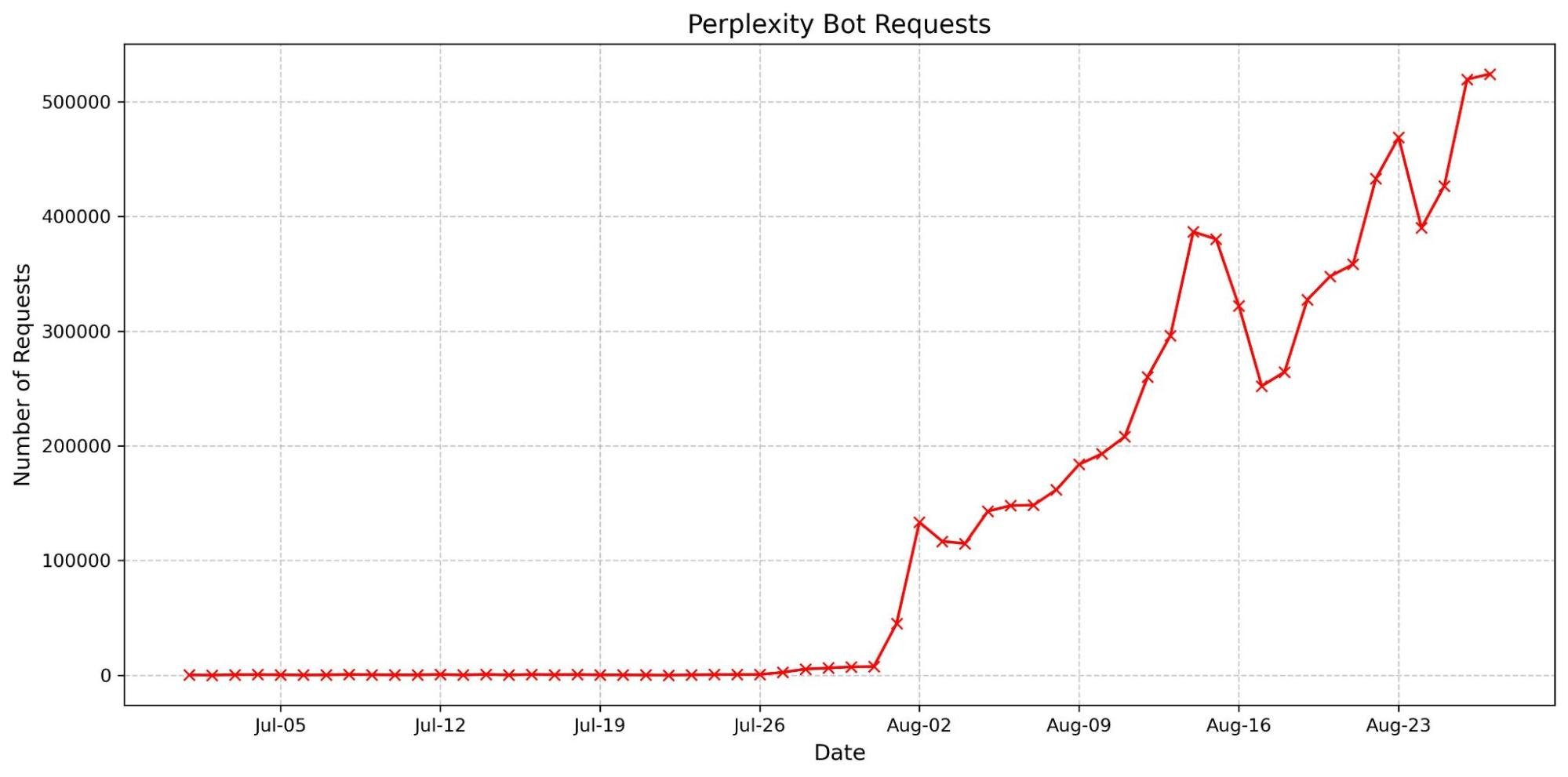
We are observing stealth crawling behavior from Perplexity, an AI-powered answer engine. Although Perplexity initially crawls from their declared user agent, when they are presented with a network block, they appear to obscure their crawling identity in an attempt to circumvent the website’s preferences. We see continued evidence that Perplexity is repeatedly modifying their user agent and changing their source ASNs to hide their crawling activity, as well as ignoring — or sometimes failing to even fetch — robots.txtfiles.
The Internet as we have known it for the past three decades is rapidly changing, but one thing remains constant: it is built on trust. There are clear preferences that crawlers should be transparent, serve a clear purpose, perform a specific activity, and, most importantly, follow website directives and preferences. Based on Perplexity’s observed behavior, which is incompatible with those preferences, we have de-listed them as a verified bot and added heuristics to our managed rules that block this stealth crawling.
How we tested
We received complaints from customers who had both disallowed Perplexity crawling activity in their robots.txt files and also created WAF rules to specifically block both of Perplexity’s declared crawlers: PerplexityBot and Perplexity-User. These customers told us that Perplexity was still able to access their content even when they saw its bots successfully blocked. We confirmed that Perplexity’s crawlers were in fact being blocked on the specific pages in question, and then performed several targeted tests to confirm what exact behavior we could observe.
We created multiple brand-new domains, similar to testexample.com and secretexample.com. These domains were newly purchased and had not yet been indexed by any search engine nor made publicly accessible in any discoverable way. We implemented a robots.txt file with directives to stop any respectful bots from accessing any part of a website:
We conducted an experiment by querying Perplexity AI with questions about these domains, and discovered Perplexity was still providing detailed information regarding the exact content hosted on each of these restricted domains. This response was unexpected, as we had taken all necessary precautions to prevent this data from being retrievable by their crawlers.
Obfuscating behavior observed
Bypassing Robots.txt and undisclosed IPs/User Agents
Our multiple test domains explicitly prohibited all automated access by specifying in robots.txt and had specific WAF rules that blocked crawling from Perplexity’s public crawlers. We observed that Perplexity uses not only their declared user-agent, but also a generic browser intended to impersonate Google Chrome on macOS when their declared crawler was blocked.
Declared
Mozilla/5.0 AppleWebKit/537.36 (KHTML, like Gecko; compatible; Perplexity-User/1.0; +https://perplexity.ai/perplexity-user)
20-25m daily requests
Stealth
Mozilla/5.0 (Macintosh; Intel Mac OS X 10_15_7) AppleWebKit/537.36 (KHTML, like Gecko) Chrome/124.0.0.0 Safari/537.36
3-6m daily requests
Both their declared and undeclared crawlers were attempting to access the content for scraping contrary to the web crawling norms as outlined in RFC 9309.
This undeclared crawler utilized multiple IPs not listed in Perplexity’s official IP range, and would rotate through these IPs in response to the restrictive robots.txt policy and block from Cloudflare. In addition to rotating IPs, we observed requests coming from different ASNs in attempts to further evade website blocks. This activity was observed across tens of thousands of domains and millions of requests per day. We were able to fingerprint this crawler using a combination of machine learning and network signals.
An example:
Of note: when the stealth crawler was successfully blocked, we observed that Perplexity uses other data sources — including other websites — to try to create an answer. However, these answers were less specific and lacked details from the original content, reflecting the fact that the block had been successful.
How well-meaning bot operators respect website preferences
In contrast to the behavior described above, the Internet has expressed clear preferences on how good crawlers should behave. All well-intentioned crawlers acting in good faith should:
Be transparent. Identify themselves honestly, using a unique user-agent, a declared list of IP ranges or Web Bot Auth integration, and provide contact information if something goes wrong.
Be well-behaved netizens. Don’t flood sites with excessive traffic, scrape sensitive data, or use stealth tactics to try and dodge detection.
Serve a clear purpose. Whether it’s powering a voice assistant, checking product prices, or making a website more accessible, every bot has a reason to be there. The purpose should be clearly and precisely defined and easy for site owners to look up publicly.
Separate bots for separate activities. Perform each activity from a unique bot. This makes it easy for site owners to decide which activities they want to allow. Don’t force site owners to make an all-or-nothing decision.
Follow the rules. That means checking for and respecting website signals like robots.txt, staying within rate limits, and never bypassing security protections.
OpenAI is an example of a leading AI company that follows these best practices. They clearly outline their crawlers and give detailed explanations for each crawler’s purpose. They respect robots.txt and do not try to evade either a robots.txt directive or a network level block. And ChatGPT Agent is signing http requests using the newly proposed open standard Web Bot Auth.
When we ran the same test as outlined above with ChatGPT, we found that ChatGPT-User fetched the robots file and stopped crawling when it was disallowed. We did not observe follow-up crawls from any other user agents or third party bots. When we removed the disallow directive from the robots entry, but presented ChatGPT with a block page, they again stopped crawling, and we saw no additional crawl attempts from other user agents. Both of these demonstrate the appropriate response to website owner preferences.
How can you protect yourself?
All the undeclared crawling activity that we observed from Perplexity’s hidden User Agent was scored by our bot management system as a bot and was unable to pass managed challenges. Any bot management customer who has an existing block rule in place is already protected. Customers who don’t want to block traffic can set up rules to challenge requests, giving real humans an opportunity to proceed. Customers with existing challenge rules are already protected. Lastly, we added signature matches for the stealth crawler into our managed rule that blocks AI crawling activity. This rule is available to all customers, including our free customers.
What’s next?
We announced Content Independence Day almost one month ago, giving content creators and publishers more control over how their content is accessed. Today, over two and a half million websites have chosen to completely disallow AI training through our managed robots.txt feature or our managed rule blocking AI Crawlers. Every Cloudflare customer is now able to selectively decide which declared AI crawlers are able to access their content in accordance with their business objectives.
We expected a change in bot and crawler behavior based on these new features, and we expect that the techniques bot operators use to evade detection will continue to evolve. Once this post is live the behavior we saw will almost certainly change, and the methods we use to stop them will keep evolving as well.
Cloudflare is actively working with technical and policy experts around the world, like the IETF efforts to standardize extensions to robots.txt, to establish clear and measurable principles that well-meaning bot operators should abide by. We think this is an important next step in this quickly evolving space.
As a site owner, how do you know which bots to allow on your site, and which you’d like to block? Existing identification methods rely on a combination of IP address range (which may be shared by other services, or change over time) and user-agent header (easily spoofable). These have limitations and deficiencies. In our last blog post, we proposed using HTTP Message Signatures: a way for developers of bots, agents, and crawlers to clearly identify themselves by cryptographically signing requests originating from their service.
Since we published the blog post on Message Signatures and the IETF draft for Web Bot Auth in May 2025, we’ve seen significant interest around implementing and deploying Message Signatures at scale. It’s clear that well-intentioned bot owners want a clear way to identify their bots to site owners, and site owners want a clear way to identify and manage bot traffic. Both parties seem to agree that deploying cryptography for the purposes of authentication is the right solution.
Today, we’re announcing that we’re integrating HTTP Message Signatures directly into our Verified Bots Program. This announcement has two main parts: (1) for bots, crawlers, and agents, we’re simplifying enrollment into the Verified Bots program for those who sign requests using Message Signatures, and (2) we’re encouraging all bot operators moving forward to use Message Signatures over existing verification mechanisms. Because Verified Bots are considered authenticated, they do not face challenges from our Bot Management to identify as bots, given they’re already identified as such.
For site owners, no additional action is required – Cloudflare will automatically validate signatures on our edge, and if that validation is a success, that traffic will be marked as verified so that site owners can use the verified bot fields to create Bot Management and WAF rules based on it.
This isn’t just about simplifying things for bot operators — it’s about giving website owners unparalleled accuracy in identifying trusted bot traffic, cutting down on the overhead for cryptographic verification, and fundamentally transforming how we manage authentication across the Cloudflare network.
Become a Verified Bot with Message Signatures
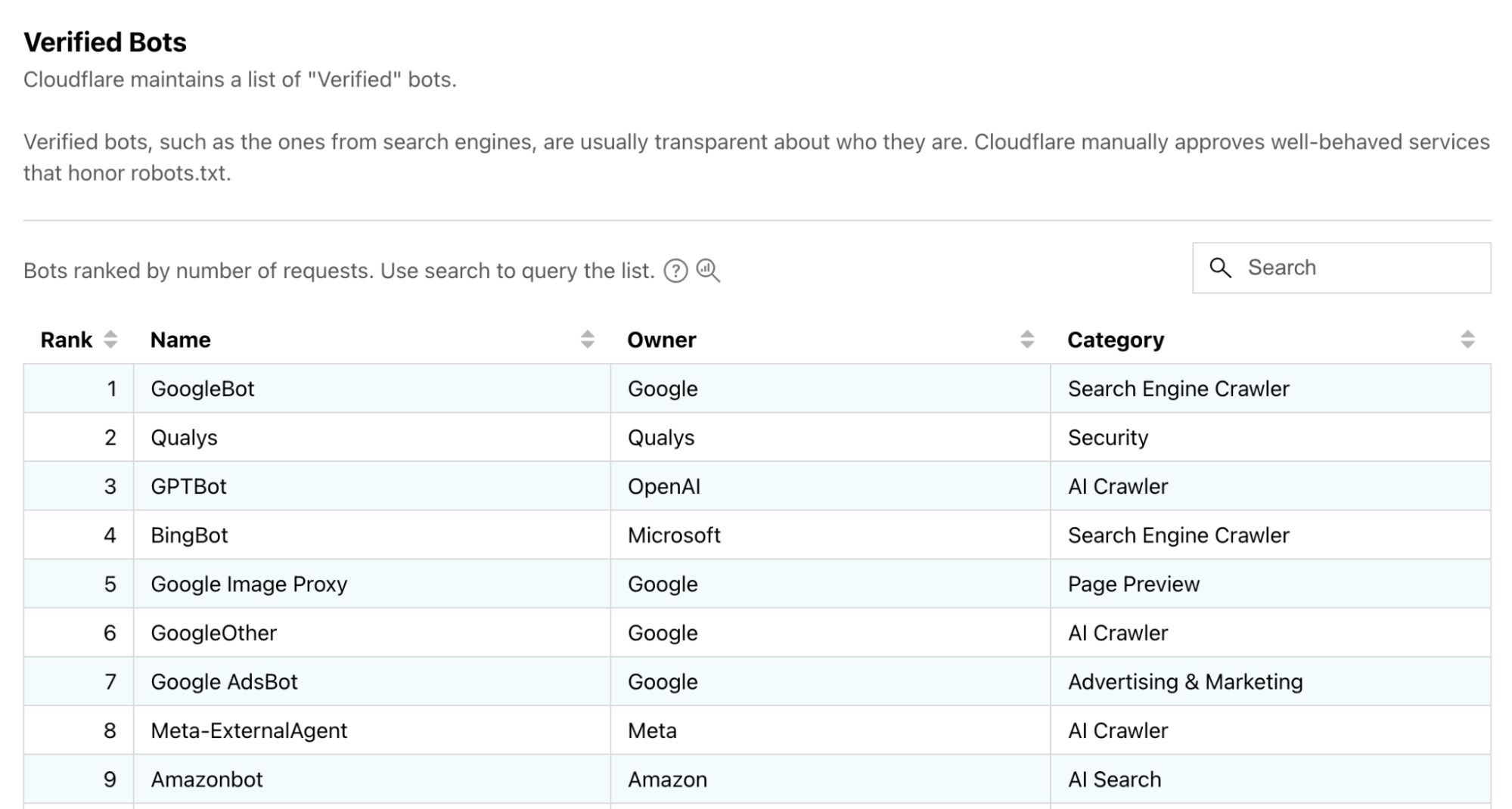
Cloudflare’s existing Verified Bots program is for bots that are transparent about who they are and what they do, like indexing sites for search or scanning for security vulnerabilities. You can see a list of these verified bots in Cloudflare Radar:
A preview of the Verified Bots page on Cloudflare Radar.
In the past, in order to apply to be a verified bot, we used to ask for IP address ranges or reverse DNS names so that we could verify your identity. This required some manual steps like checking that the IP address range is valid and is associated with the appropriate ASN.
With the integration of Message Signatures, we’re aiming to streamline applications into our Verified Bot program. Bots applying with well-formed Message Signatures will be prioritized, and approved more quickly!
At a high level, signing your requests with web bot auth consists of the following steps:
Generate a valid signing key. See Signing Key section for step-by-step instructions.
Host a JSON web key set containing your public key under /.well-known/http-message-signature-directory of your website.
Sign responses for that URL using a Web Bot Auth library, one signature for each key contained in it, to prove you own it. See the Hosting section for step-by-step instructions.
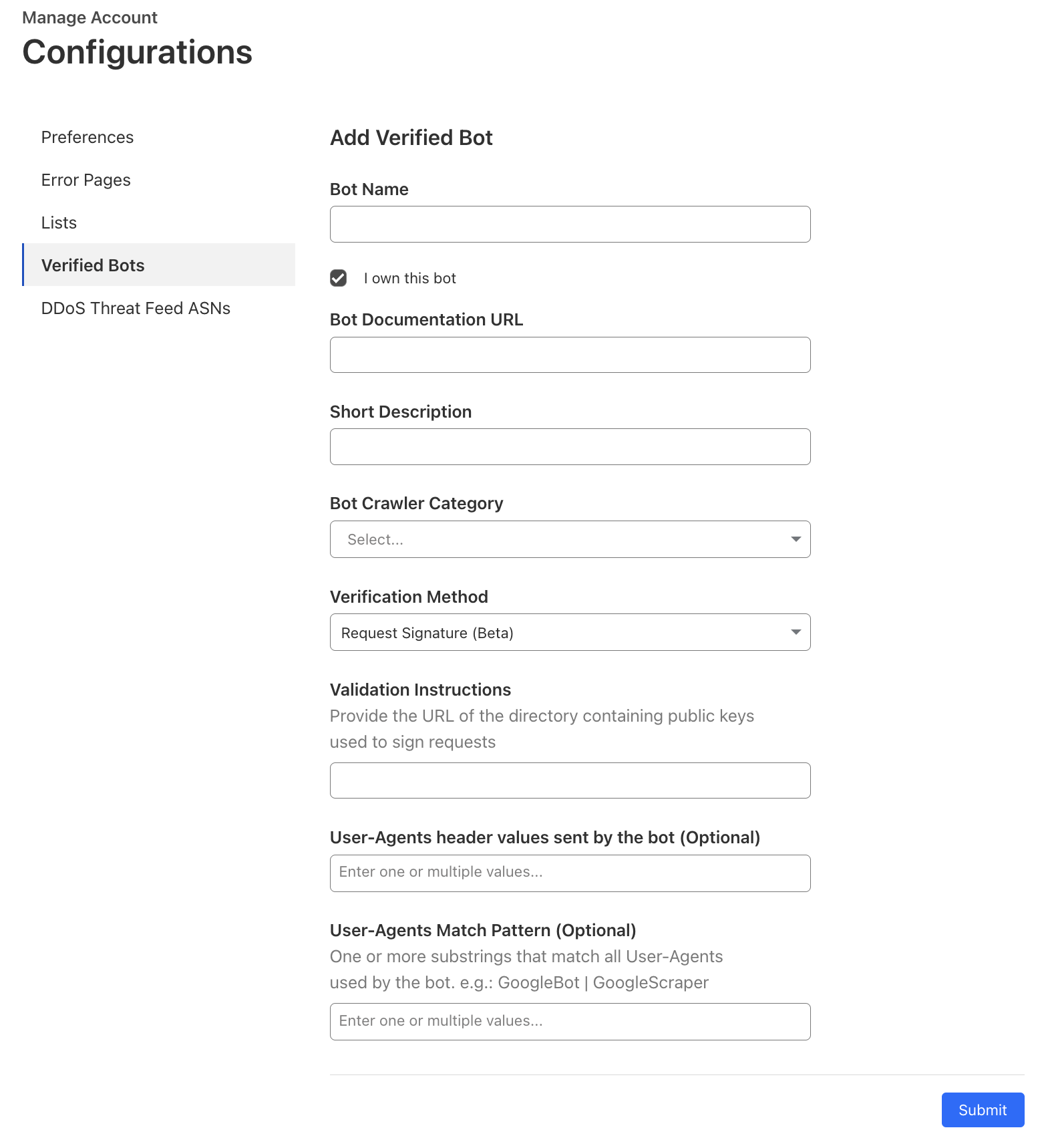
Register that URL with us, using our Verified Bots form. This can be done directly in your Cloudflare account. See our documentation.
Sign requests using a Web Bot Auth library.
As an example, Cloudflare Radar’s URL Scanner lets you scan any URL and get a publicly shareable report with security, performance, technology, and network information. Here’s an example of what a well-formed signature looks like for requests coming from URL Scanner:
GET /path/to/resource HTTP/1.1
Host: www.example.com
User-Agent: Mozilla/5.0 (Windows NT 10.0; Win64; x64) AppleWebKit/537.36 (KHTML, like Gecko) Chrome/119.0.0.0 Safari/537.36
Signature-Agent: "https://web-bot-auth-directory.radar-cfdata-org.workers.dev"
Signature-Input: sig=("@authority" "signature-agent");\
             	 created=1700000000;\
             	 expires=1700011111;\
             	 keyid="poqkLGiymh_W0uP6PZFw-dvez3QJT5SolqXBCW38r0U";\
             	 tag="web-bot-auth"
Signature:sig=jdq0SqOwHdyHr9+r5jw3iYZH6aNGKijYp/EstF4RQTQdi5N5YYKrD+mCT1HA1nZDsi6nJKuHxUi/5Syp3rLWBA==:
Since we’ve already registered URLScanner as a Verified Bot, Cloudflare will now automatically verify that the signature in the Signature header matches the request — more on that later.
Register your bot
Access the Verified Bots submission form on your account. If that link does not immediately take you there, go to your Cloudflare account → Account Home → the three dots next to your account name → Configurations → Verified Bots.
For the verification method, select “Request Signature”, then enter the URL of your key directory in Validation Instructions. Specifying the User-Agent values is optional if you’re submitting a Request Signature bot.
Once your application has gone through our (now shortened) review process, you don’t need to take any further action.
Message Signature verification for origins
Starting today, Cloudflare is ramping up verification of cryptographic signatures provided by automated crawlers and bots. This is currently available for all Free and Pro plans, and as we continue to test and validate at scale, will be released to all Business and Enterprise plans. This means that as time passes, the number of unauthenticated web crawlers should diminish, ensuring most bot traffic is authenticated before it reaches your website’s servers, helping to prevent spoofing attacks.
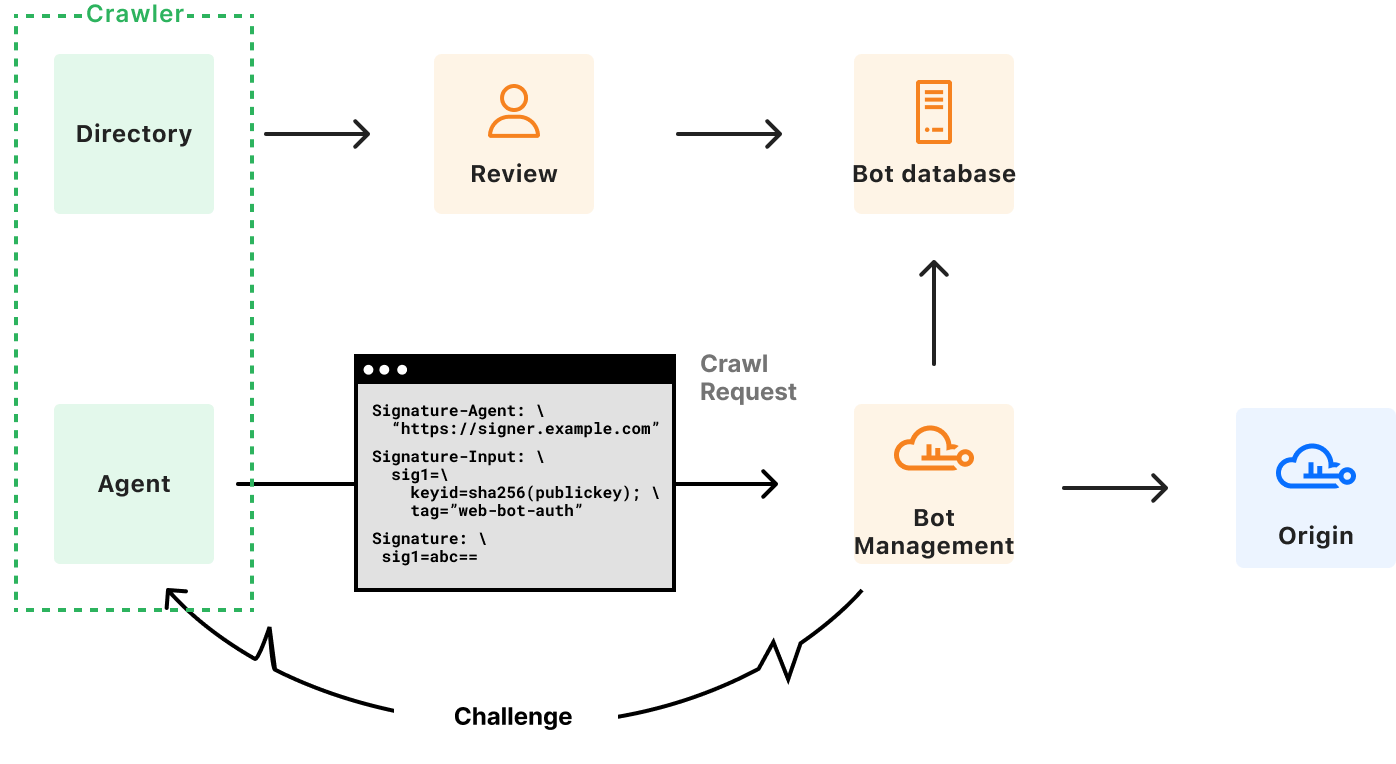
At a high level, signature verification works like this:
A bot or agent sends a request to a website behind Cloudflare.
Cloudflare’s Message Signature verification service checks for the Signature, Signature-Input, and Signature-Agent headers.
It checks that the incoming request presents a keyid parameter in your Signature-Input that points to a key we already know.
It looks at the expires parameter in the incoming bot request. If the current time is after expiration, verification fails. This guards against replay attacks, preventing malicious agents from trying to pass as a bot by retrying messages they captured in the past.
It checks that you’ve specified a tag parameter indicating web-bot-auth, to indicate your intent that the message be handled using web bot authentication specifically
It looks at all the components chosen in your Signature-Input header, and constructs a signature base from it.
If all pre-flight checks pass, Cloudflare attempts to verify the signature base against the value in Signature field using an ed25519 verification algorithm and the key supplied in keyid.
Verified Bots and other systems at Cloudflare use a successful verification as proof of your identity, and apply rules corresponding to that identity.
If any of the above steps fail, Cloudflare falls back to existing bot identification and mitigation mechanisms. As the system matures, we would strengthen these requirements, and limit the possibilities of a soft downgrade.
As a site owner, you can segment your Verified Bot traffic by its type and purpose by adding the Verified Bot Categories field cf.verified_bot_category as a filter criterion in WAF Custom rules, Advanced Rate Limiting, and Late Transform rules. For instance, to allow the Bibliothèque nationale de France and the Library of Congress, and institutions dedicated to academic research, you can add a rule that allows bots in the Academic Research category.
Where we’re going next
HTTP Message Signatures is a primitive that is useful beyond Cloudflare – the IETF standardized it as part of RFC 9421.
As discussed in our previous blog post, Cloudflare believes that making Message Signatures a core component of bot authentication on the web should follow the same path. The specifications for the protocol are being built in the open, and they have already evolved following feedback.
Moreover, due to widespread interest, the IETF is considering forming a working group around Web Bot Auth. Should you be a crawler, an origin, or even a CDN, we invite you to provide feedback to ensure the solution gets stronger, and suits your needs.
A better, more trusted Internet
For bot, agent, and crawler operators that act transparently and provide vital services for the Internet, we’re providing a faster and more automated path to being recognized as a Verified Bot, reducing manual processes. We trust that this approach improves bot authentication from what were formerly brittle and unreliable authentication methods, to a secure and reliable alternative. It should reduce the overall volume of friction and hurdles genuinely useful bots face.
For site owners, Message Signatures provides better assurance that the bot traffic is legitimate — automatically recognized and allowed, minimizing disruption to essential services (e.g., search engine indexing, monitoring). In line with our commitments to making TLS/SSL and Post-Quantum certificates available for everyone, we’ll always offer the cryptographic verification of Message Signatures for all sites because we believe in a safer and more efficient Internet by fostering a trusted environment for both human and automated traffic.
If you have a feature request, feedback, or are interested in partnering with us, please reach out.
Many publishers, content creators and website owners currently feel like they have a binary choice — either leave the front door wide open for AI to consume everything they create, or create their own walled garden. But what if there was another way?
At Cloudflare, we started from a simple principle: we wanted content creators to have control over who accesses their work. If a creator wants to block all AI crawlers from their content, they should be able to do so. If a creator wants to allow some or all AI crawlers full access to their content for free, they should be able to do that, too. Creators should be in the driver’s seat.
After hundreds of conversations with news organizations, publishers, and large-scale social media platforms, we heard a consistent desire for a third path: They’d like to allow AI crawlers to access their content, but they’d like to get compensated. Currently, that requires knowing the right individual and striking a one-off deal, which is an insurmountable challenge if you don’t have scale and leverage.
What if I could charge a crawler?
We believe your choice need not be binary — there should be a third, more nuanced option: You can charge for access. Instead of a blanket block or uncompensated open access, we want to empower content owners to monetize their content at Internet scale.
We’re excited to help dust off a mostly forgotten piece of the web: HTTP response code 402.
Introducing pay per crawl
Pay per crawl, in private beta, is our first experiment in this area.
Pay per crawl integrates with existing web infrastructure, leveraging HTTP status codes and established authentication mechanisms to create a framework for paid content access.
Each time an AI crawler requests content, they either present payment intent via request headers for successful access (HTTP response code 200), or receive a 402 Payment Required response with pricing. Cloudflare acts as the Merchant of Record for pay per crawl and also provides the underlying technical infrastructure.
Publisher controls and pricing
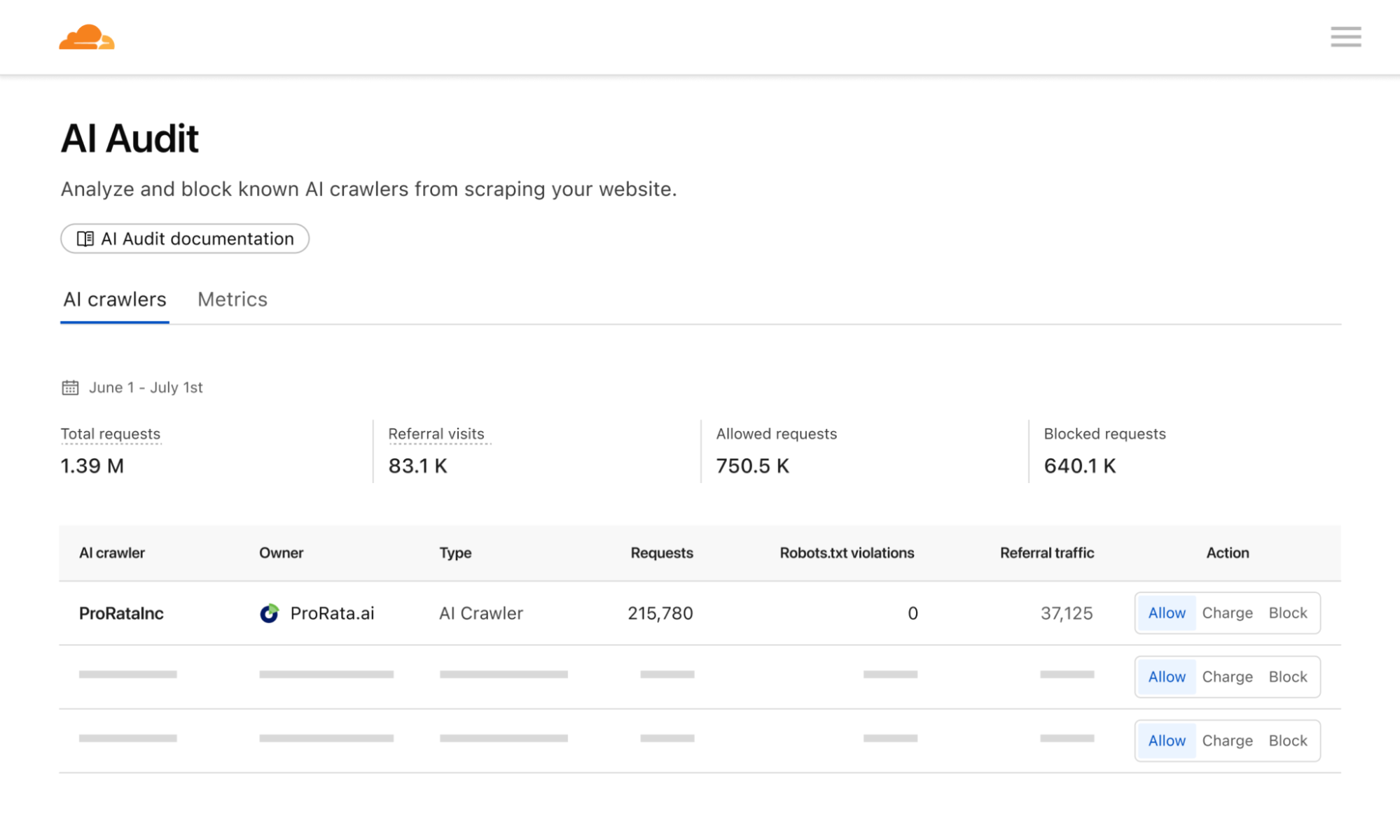
Pay per crawl grants domain owners full control over their monetization strategy. They can define a flat, per-request price across their entire site. Publishers will then have three distinct options for a crawler:
Allow: Grant the crawler free access to content.
Charge: Require payment at the configured, domain-wide price.
Block: Deny access entirely, with no option to pay.
An important mechanism here is that even if a crawler doesn’t have a billing relationship with Cloudflare, and thus couldn’t be charged for access, a publisher can still choose to ‘charge’ them. This is the functional equivalent of a network level block (an HTTP 403 Forbidden response where no content is returned) — but with the added benefit of telling the crawler there could be a relationship in the future.
While publishers currently can define a flat price across their entire site, they retain the flexibility to bypass charges for specific crawlers as needed. This is particularly helpful if you want to allow a certain crawler through for free, or if you want to negotiate and execute a content partnership outside the pay per crawl feature.
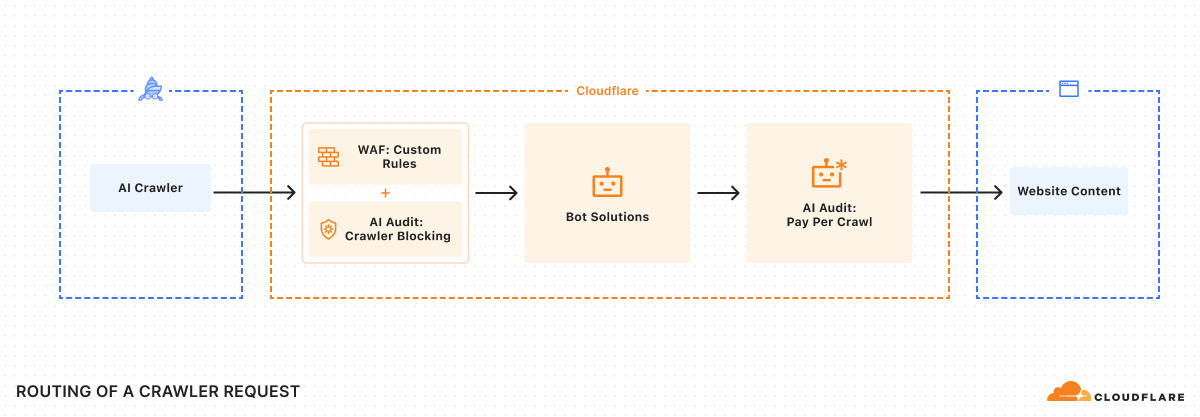
To ensure integration with each publisher’s existing security posture, Cloudflare enforces Allow or Charge decisions via a rules engine that operates only after existing WAF policies and bot management or bot blocking features have been applied.
Payment headers and access
As we were building the system, we knew we had to solve an incredibly important technical challenge: ensuring we could charge a specific crawler, but prevent anyone from spoofing that crawler. Thankfully, there’s a way to do this using Web Bot Auth proposals.
Once registration is accepted, crawler requests should always include signature-agent, signature-input, and signature headers to identify your crawler and discover paid resources.
Once a crawler is set up, determination of whether content requires payment can happen via two flows:
Reactive (discovery-first)
Should a crawler request a paid URL, Cloudflare returns an HTTP 402 Payment Required response, accompanied by a crawler-price header. This signals that payment is required for the requested resource.
The crawler can then decide to retry the request, this time including a crawler-exact-price header to indicate agreement to pay the configured price.
GET /example.html
crawler-exact-price: USD XX.XX
Proactive (intent-first)
Alternatively, a crawler can preemptively include a crawler-max-price header in its initial request.
GET /example.html
crawler-max-price: USD XX.XX
If the price configured for a resource is equal to or below this specified limit, the request proceeds, and the content is served with a successful HTTP 200 OK response, confirming the charge:
HTTP 200 OK
crawler-charged: USD XX.XX
server: cloudflare
If the amount in a crawler-max-price request is greater than the content owner’s configured price, only the configured price is charged. However, if the resource’s configured price exceeds the maximum price offered by the crawler, an HTTP402 Payment Required response is returned, indicating the specified cost. Only a single price declaration header, crawler-exact-price or crawler-max-price, may be used per request.
The crawler-exact-price or crawler-max-price headers explicitly declare the crawler’s willingness to pay. If all checks pass, the content is served, and the crawl event is logged. If any aspect of the request is invalid, the edge returns an HTTP 402 Payment Required response.
Financial settlement
Crawler operators and content owners must configure pay per crawl payment details in their Cloudflare account. Billing events are recorded each time a crawler makes an authenticated request with payment intent and receives an HTTP 200-level response with a crawler-charged header. Cloudflare then aggregates all the events, charges the crawler, and distributes the earnings to the publisher.
Content for crawlers today, agents tomorrow
At its core, pay per crawl begins a technical shift in how content is controlled online. By providing creators with a robust, programmatic mechanism for valuing and controlling their digital assets, we empower them to continue creating the rich, diverse content that makes the Internet invaluable.
We expect pay per crawl to evolve significantly. It’s very early: we believe many different types of interactions and marketplaces can and should develop simultaneously. We are excited to support these various efforts and open standards.
For example, a publisher or new organization might want to charge different rates for different paths or content types. How do you introduce dynamic pricing based not only upon demand, but also how many users your AI application has? How do you introduce granular licenses at internet scale, whether for training, inference, search, or something entirely new?
The true potential of pay per crawl may emerge in an agentic world. What if an agentic paywall could operate entirely programmatically? Imagine asking your favorite deep research program to help you synthesize the latest cancer research or a legal brief, or just help you find the best restaurant in Soho — and then giving that agent a budget to spend to acquire the best and most relevant content. By anchoring our first solution on HTTP response code 402, we enable a future where intelligent agents can programmatically negotiate access to digital resources.
Getting started
Pay per crawl is currently in private beta. We’d love to hear from you if you’re either a crawler interested in paying to access content or a content creator interested in charging for access. You can reach out to us at http://www.cloudflare.com/paypercrawl-signup/ or contact your Account Executive if you’re an existing Enterprise customer.
With the rise of traffic from AI agents, what’s considered a bot is no longer clear-cut. There are some clearly malicious bots, like ones that DoS your site or do credential stuffing, and ones that most site owners do want to interact with their site, like the bot that indexes your site for a search engine, or ones that fetch RSS feeds.
Historically, Cloudflare has relied on two main signals to verify legitimate web crawlers from other types of automated traffic: user agent headers and IP addresses. The User-Agent header allows bot developers to identify themselves, i.e. MyBotCrawler/1.1. However, user agent headers alone are easily spoofed and are therefore insufficient for reliable identification. To address this, user agent checks are often supplemented with IP address validation, the inspection of published IP address ranges to confirm a crawler’s authenticity. However, the logic around IP address ranges representing a product or group of users is brittle – connections from the crawling service might be shared by multiple users, such as in the case of privacy proxies and VPNs, and these ranges, often maintained by cloud providers, change over time.
Cloudflare will always try to block malicious bots, but we think our role here is to also provide an affirmative mechanism to authenticate desirable bot traffic. By using well-established cryptography techniques, we’re proposing a better mechanism for legitimate agents and bots to declare who they are, and provide a clearer signal for site owners to decide what traffic to permit.
Today, we’re introducing two proposals – HTTP message signatures and request mTLS – for friendly bots to authenticate themselves, and for customer origins to identify them. In this blog post, we’ll share how these authentication mechanisms work, how we implemented them, and how you can participate in our closed beta.
Existing bot verification mechanisms are broken
Historically, if you’ve worked on ChatGPT, Claude, Gemini, or any other agent, you’ve had several options to identify your HTTP traffic to other services:
You define a user agent, an HTTP header described in RFC 9110. The problem here is that this header is easily spoofable and there’s not a clear way for agents to identify themselves as semi-automated browsers — agents often use the Chrome user agent for this very reason, which is discouraged. The RFC states: “If a user agent masquerades as a different user agent, recipients can assume that the user intentionally desires to see responses tailored for that identified user agent, even if they might not work as well for the actual user agent being used.”
You publish your IP address range(s). This has limitations because the same IP address might be shared by multiple users or multiple services within the same company, or even by multiple companies when hosting infrastructure is shared (like Cloudflare Workers, for example). In addition, IP addresses are prone to change as underlying infrastructure changes, leading services to use ad-hoc sharing mechanisms like CIDR lists.
You go to every website and share a secret, like a Bearer token. This is impractical at scale because it requires developers to maintain separate tokens for each website their bot will visit.
We can do better! Instead of these arduous methods, we’re proposing that developers of bots and agents cryptographically sign requests originating from their service. When protecting origins, reverse proxies such as Cloudflare can then validate those signatures to confidently identify the request source on behalf of site owners, allowing them to take action as they see fit.
A typical system has three actors:
User: the entity that wants to perform some actions on the web. This may be a human, an automated program, or anything taking action to retrieve information from the web.
Agent: an orchestrated browser or software program. For example, Chrome on your computer, or OpenAI’s Operator with ChatGPT. Agents can interact with the web according to web standards (HTML rendering, JavaScript, subrequests, etc.).
Origin: the website hosting a resource. The user wants to access it through the browser. This is Cloudflare when your website is using our services, and it’s your own server(s) when exposed directly to the Internet.
In the next section, we’ll dive into HTTP Message Signatures and request mTLS, two mechanisms a browser agent may implement to sign outgoing requests, with different levels of ease for an origin to adopt.
Introducing HTTP Message Signatures
HTTP Message Signatures is a standard that defines the cryptographic authentication of a request sender. It’s essentially a cryptographically sound way to say, “hey, it’s me!”. It’s not the only way that developers can sign requests from their infrastructure — for example, AWS has used Signature v4, and Stripe has a framework for authenticating webhooks — but Message Signatures is a published standard, and the cleanest, most developer-friendly way to sign requests.
We’re working closely with the wider industry to support these standards-based approaches. For example, OpenAI has started to sign their requests. In their own words:
“Ensuring the authenticity of Operator traffic is paramount. With HTTP Message Signatures (RFC 9421), OpenAI signs all Operator requests so site owners can verify they genuinely originate from Operator and haven’t been tampered with” – Eugenio, Engineer, OpenAI
Without further delay, let’s dive in how HTTP Messages Signatures work to identify bot traffic.
Scoping standards to bot authentication
Generating a message signature works like this: before sending a request, the agent signs the target origin with a public key. When fetching https://example.com/path/to/resource, it signs example.com. This public key is known to the origin, either because the agent is well known, because it has previously registered, or any other method. Then, the agent writes a Signature-Input header with the following parameters:
A validity window (created and expires timestamps)
A Key ID that uniquely identifies the key used in the signature. This is a JSON Web Key Thumbprint.
A tag that shows websites the signature’s purpose and validation method, i.e. web-bot-auth for bot authentication.
In addition, the Signature-Agent header indicates where the origin can find the public keys the agent used when signing the request, such as in a directory hosted by signer.example.com. This header is part of the signed content as well.
For those building bots, we propose signing the authority of the target URI, i.e. crawler.search.google.com for Google Search, operator.openai.com for OpenAI Operator, workers.dev for Cloudflare Workers, and a way to retrieve the bot public key in the form of signature-agent, if present.
The User-Agent from the example above indicates that the software making the request is Chrome, because it is an agent that uses an orchestrated Chrome to browse the web. You should note that MyBotCrawler/1.1 is still present. The User-Agent header can actually contain multiple products, in decreasing order of importance. If our agent is making requests via Chrome, that’s the most important product and therefore comes first.
At Internet-level scale, these signatures may add a notable amount of overhead to request processing. However, with the right cryptographic suite, and compared to the cost of existing bot mitigation, both technical and social, this seems to be a straightforward tradeoff. This is a metric we will monitor closely, and report on as adoption grows.
Generating request signatures
We’re making several examples for generating Message Signatures for bots and agents available on Github (though we encourage other implementations!), all of which are standards-compliant, to maximize interoperability.
Imagine you’re building an agent using a managed Chromium browser, and want to sign all outgoing requests. To achieve this, the webextensions standard provides chrome.webRequest.onBeforeSendHeaders, where you can modify HTTP headers before they are sent by the browser. The event is triggered before sending any HTTP data, and when headers are available.
Here’s what that code would look like:
chrome.webRequest.onBeforeSendHeaders.addListener(
  function (details) {
	// Signature and header assignment logic goes here
      // <CODE>
  },
  { urls: ["<all_urls>"] },
  ["blocking", "requestHeaders"] // requires "installation_mode": "force_installed"
);
Cloudflare provides a web-bot-auth helper package on npm that helps you generate request signatures with the correct parameters. onBeforeSendHeaders is a Chrome extension hook that needs to be implemented synchronously. To do so, we import {signatureHeadersSync} from “web-bot-auth”. Once the signature completes, both Signature and Signature-Input headers are assigned. The request flow can then continue.
const request = new URL(details.url);
const created = new Date();
const expired = new Date(created.getTime() + 300_000)


// Perform request signature
const headers = signatureHeadersSync(
  request,
  new Ed25519Signer(jwk),
  { created, expires }
);
// `headers` object now contains `Signature` and `Signature-Input` headers that can be used
Using our debug server, we can now inspect and validate our request signatures from the perspective of the website we’d be visiting. We should now see the Signature and Signature-Input headers:
In this example, the homepage of the debugging server validates the signature from the RFC 9421 Ed25519 verifying key, which the extension uses for signing.
The above demo and code walkthrough has been fully written in TypeScript: the verification website is on Cloudflare Workers, and the client is a Chrome browser extension. We are cognisant that this does not suit all clients and servers on the web. To demonstrate the proposal works in more environments, we have also implemented bot signature validation in Go with a plugin for Caddy server.
Experimentation with request mTLS
HTTP is not the only way to convey signatures. For instance, one mechanism that has been used in the past to authenticate automated traffic against secured endpoints is mTLS, the “mutual” presentation of TLS certificates. As described in our knowledge base:
Mutual TLS, or mTLS for short, is a method formutual authentication. mTLS ensures that the parties at each end of a network connection are who they claim to be by verifying that they both have the correct privatekey. The information within their respectiveTLS certificates provides additional verification.
While mTLS seems like a good fit for bot authentication on the web, it has limitations. If a user is asked for authentication via the mTLS protocol but does not have a certificate to provide, they would get an inscrutable and unskippable error. Origin sites need a way to conditionally signal to clients that they accept or require mTLS authentication, so that only mTLS-enabled clients use it.
A TLS flag for bot authentication
TLS flags are an efficient way to describe whether a feature, like mTLS, is supported by origin sites. Within the IETF, we have proposed a new TLS flag called req mTLS to be sent by the client during the establishment of a connection that signals support for authentication via a client certificate.
This proposal leverages the tls-flags proposal under discussion in the IETF. The TLS Flags draft allows clients and servers to send an array of one bit flags to each other, rather than creating a new extension (with its associated overhead) for each piece of information they want to share. This is one of the first uses of this extension, and we hope that by using it here we can help drive adoption.
When a client sends the req mTLS flag to the server, they signal to the server that they are able to respond with a certificate if requested. The server can then safely request a certificate without risk of blocking ordinary user traffic, because ordinary users will never set this flag.
Let’s take a look at what an example of such a req mTLS would look like in Wireshark, a network protocol analyser. You can follow along in the packet capture here.
The extension number is 65025, or 0xfe01. This corresponds to an unassigned block of TLS extensions that can be used to experiment with TLS Flags. Once the standard is adopted and published by the IETF, the number would be fixed. To use the req mTLS flag the client needs to set the 80th bit to true, so with our block length of 12 bytes, it should contain the data 0b0000000000000000000001, which is the case here. The server then responds with a certificate request, and the request follows its course.
This example library allows you to configure Go to send req mTLS 0xfe01 bytes in the TLS Flags extension. If you’d like to test your implementation out, you can prompt your client for certificates against req-mtls.research.cloudflare.com using the Cloudflare Research client cloudflareresearch/req-mtls. For clients, once they set the TLS Flags associated with req mTLS, they are done. The code section taking care of normal mTLS will take over at that point, with no need to implement something new.
Two approaches, one goal
We believe that developers of agents and bots should have a public, standard way to authenticate themselves to CDNs and website hosting platforms, regardless of the technology they use or provider they choose. At a high level, both HTTP Message Signatures and request mTLS achieve a similar goal: they allow the owner of a service to authentically identify themselves to a website. That’s why we’re participating in the standardizing effort for both of these protocols at the IETF, where many other authentication mechanisms we’ve discussed here — from TLS to OAuth Bearer tokens –— been developed by diverse sets of stakeholders and standardized as RFCs.
Evaluating both proposals against each other, we’re prioritizing HTTP Message Signatures for Bots because it relies on the previously adopted RFC 9421 with several reference implementations, and works at the HTTP layer, making adoption simpler. request mTLS may be a better fit for site owners with concerns about the additional bandwidth, but TLS Flags has fewer implementations, is still waiting for IETF adoption, and upgrading the TLS stack has proven to be more challenging than with HTTP. Both approaches share similar discovery and key management concerns, as highlighted in a glossary draft at the IETF. We’re actively exploring both options, and would love to hear from both site owners and bot developers about how you’re evaluating their respective tradeoffs.
The bigger picture
In conclusion, we think request signatures and mTLS are promising mechanisms for bot owners and developers of AI agents to authenticate themselves in a tamper-proof manner, forging a path forward that doesn’t rely on ever-changing IP address ranges or spoofable headers such as User-Agent. This authentication can be consumed by Cloudflare when acting as a reverse proxy, or directly by site owners on their own infrastructure. This means that as a bot owner, you can now go to content creators and discuss crawling agreements, with as much granularity as the number of bots you have. You can start implementing these solutions today and test them against the research websites we’ve provided in this post.
Bot authentication also empowers site owners small and large to have more control over the traffic they allow, empowering them to continue to serve content on the public Internet while monitoring automated requests. Longer term, we will integrate these authentication mechanisms into our AI Audit and Bot Management products, to provide better visibility into the bots and agents that are willing to identify themselves.
Being able to solve problems for both origins and clients is key to helping build a better Internet, and we think identification of automated traffic is a step towards that. If you want us to start verifying your message signatures or client certificates, have a compelling use case you’d like us to consider, or any questions, please reach out.
Over the years, we have framed our Application Security features against market-defined product groupings such as Web Application Firewall (WAF), DDoS Mitigation, Bot Management, API Security (API Shield), Client Side Security (Page Shield), and so forth. This has led to unnecessary artificial separation of what is, under the hood, a well-integrated single platform.
This separation, which has sometimes guided implementation decisions that have led to different systems being built for the same purpose, makes it harder for our users to adopt our features and implement a simple effective security posture for their environment.
Today, following user feedback and our drive to constantly innovate and simplify, we are going back to our roots by breaking these artificial product boundaries and revising our dashboard, so it highlights our strengths. The ultimate goal remains: to make it shockingly easy to secure your web assets.
Introducing a new unified Application Security experience.
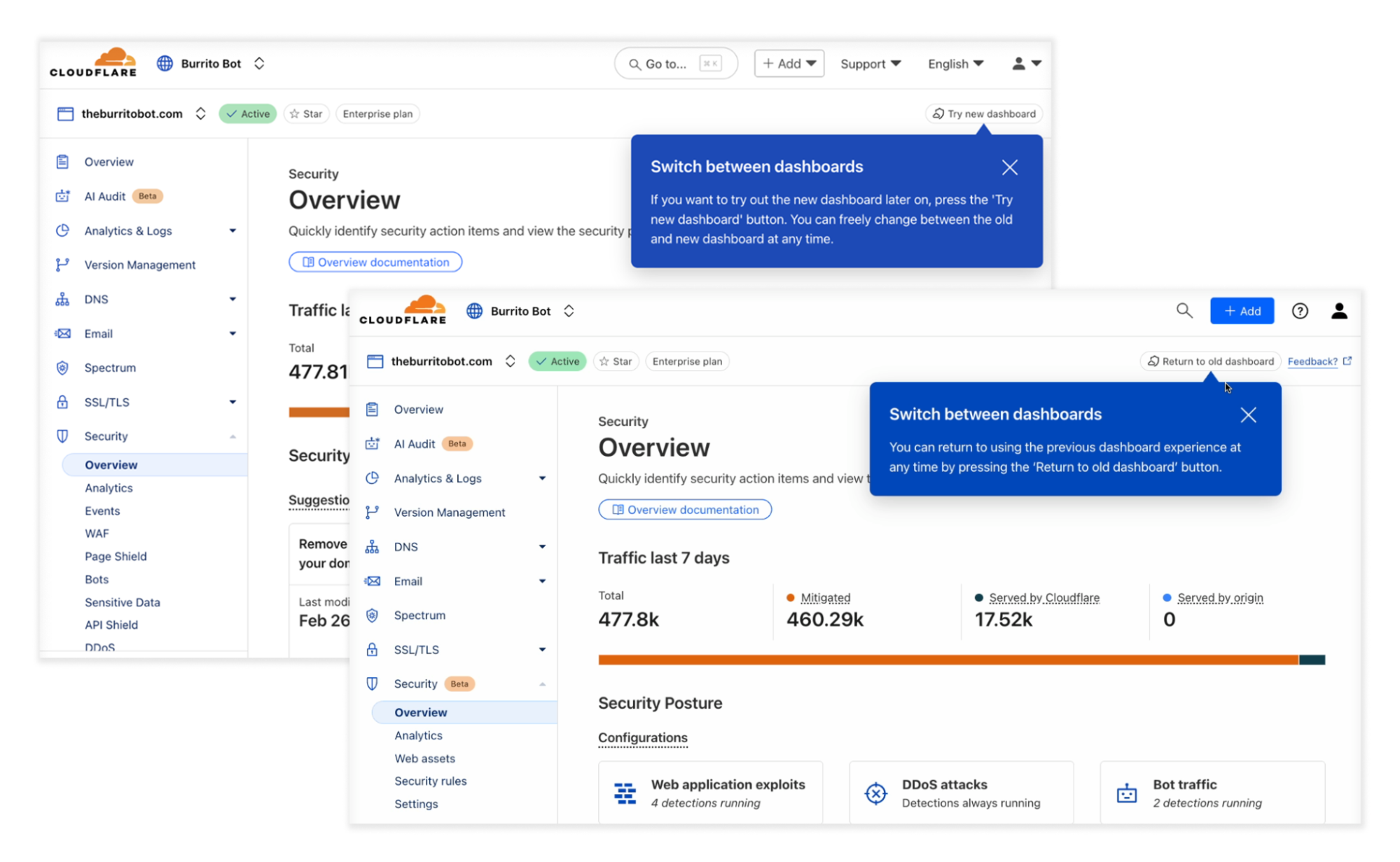
If you are a Cloudflare Application Security user, log in to the dashboard today and try out the updated dashboard interface. To make the transition easier, you can toggle between old and new interfaces.
Security, simplified
Modern applications are built using a variety of technologies. Your app might include a web interface and a mobile version, both powered by an API, each with its own unique security requirements. As these technologies increasingly overlap, traditional security categories like Web, API, client-side, and bot protection start to feel artificial and disconnected when applied to real-world application security.
Consider scenarios where you want to secure your API endpoints with proper authentication, or prevent vulnerability scanners from probing for weaknesses. These tasks often require switching between multiple dashboards, creating different policies, and managing disjointed configurations. This fragmented approach not only complicates workflows but also increases the risk of overlooking a critical vulnerability. The result? A security posture that is harder to manage and potentially less effective.
When you zoom out, a pattern emerges. Whether it’s managing bots, securing APIs, or filtering web traffic, these solutions ultimately analyze incoming traffic looking for specific patterns, and the resulting signal is used to perform actions. The primary difference between these tools is the type of signal they generate, such as identifying bots, enforcing authorization, or flagging suspicious requests.
At Cloudflare, we saw an opportunity to address this complexity by unifying our application security tools into a single platform with one cohesive UI. A unified approach means security practitioners no longer have to navigate multiple interfaces or piece together different security controls. With a single UI, you can configure policies more efficiently, detect threats faster, and maintain consistent protection across all aspects of your application. This simplicity doesn’t just save time, it ensures that your applications remain secure, even as threats evolve.
At the end of the day, attackers won’t care which product you’re using. But by unifying application security, we ensure they’ll have a much harder time finding a way in.
Many products, one common approach
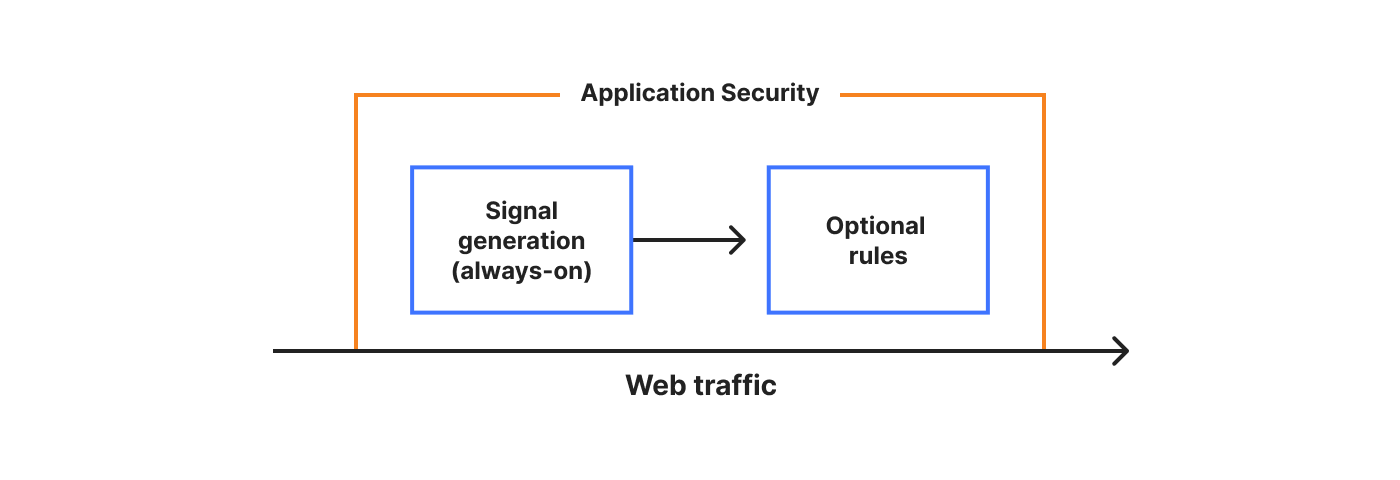
To redefine the experience across Application Security products, we can start by defining three concepts that commonly apply:
Web traffic (HTTP/S), which can be generalised even further as “data”
Signals and detections, which provide intelligence about the traffic. Can be generalised as “metadata”
Security rules that let you combine any signal or detection (metadata), to block, challenge or otherwise perform an action on the web traffic (data)
We can diagram the above as follows:
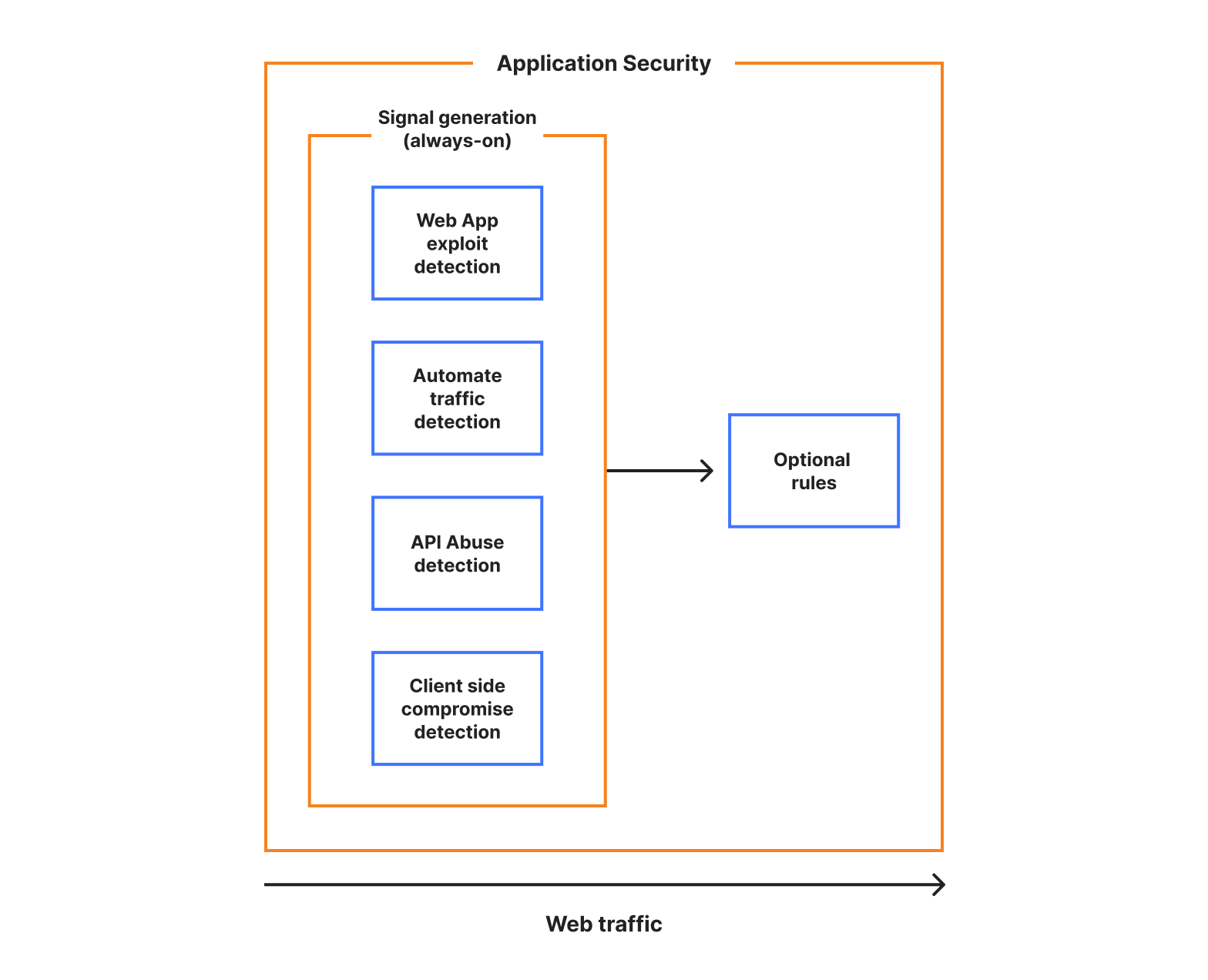
Using these concepts, all the product groupings that we offer can be converted to different types of signals or detections. All else remains the same. And if we are able to run and generate our signals on all traffic separately from the rule system, therefore generating all the metadata, we get what we call always-on detections, another vital benefit of a single platform approach. Also note that the order in which we generate the signals becomes irrelevant.
In diagram form:
The benefits are twofold. First, problem spaces (such as account takeover or web attacks) become signal groupings, and therefore metadata that can be queried to answer questions about your environment.
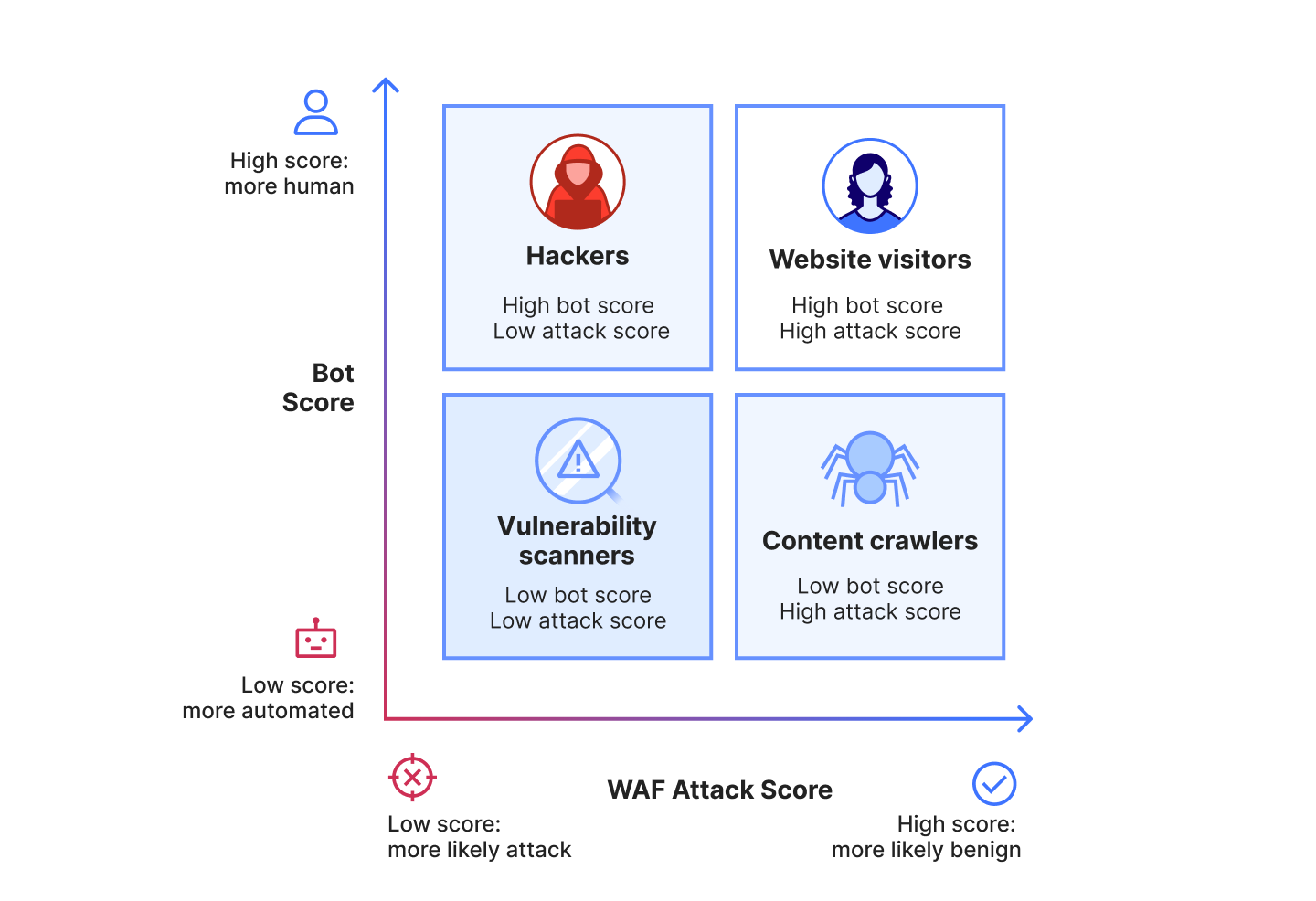
For example, let’s take our Bot Management signal, the bot score, and our WAF Attack Score signal, the attack score. These already run as always-on detections at Cloudflare. By combining these two signals and filtering your traffic against them, you can gain powerful insights on who is accessing your application*:
Second, as everything is just a signal, the mitigation layer, driven by the optional rules, becomes detection agnostic. By providing the same signals as fields in a unified rule system, writing high level policies becomes a breeze. And as we said earlier, given the detection is always-on and fully separated from the mitigation rule system, exploring the data can be thought of as a powerful rule match preview engine. No need to deploy a rule in LOG mode to see what it matches!
We can now design a unified user experience that reflects Application Security as a single product.
* note: the example here is simplistic, and the use cases become a lot more powerful once you expand to the full set of potential signals that the platform can generate. Take, for example, our ability to detect file uploads. If you run a job application site, you may want to let crawlers access your site, but you may *not* want crawlers to submit applications on behalf of applicants. By combining the bot score signal with the file upload signal, you can ensure that rule is enforced.
Introducing a unified Application Security experience
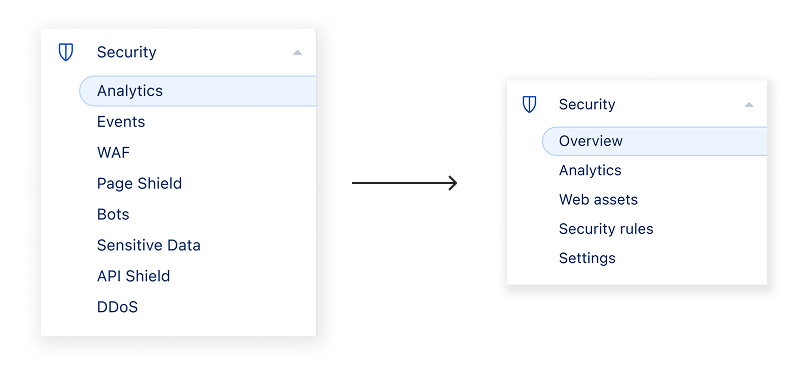
As signals are always-on, the user journey can now start from our new overview page where we highlight security suggestions based on your traffic profile and configurations. Alternatively, you can jump straight into analytics where you can investigate your traffic using a combination of all available signals.
When a specific traffic pattern seems malicious, you can jump into the rule system to implement a security policy. As part of our new design, given the simplicity of the navigation, we also took advantage of the opportunity to introduce a new web assets page, where we highlight discovery and attack surface management details.
Of course, reaching the final design required multiple iterations and feedback sessions. To best understand the balance of maintaining flexibility in the UI whilst reducing complexity, we focused on customer tasks to be done and documenting their processes while trying to achieve their intended actions in the dashboard. Reducing navigation items and using clear naming was one element, but we quickly learned that the changes needed to support ease of use for tasks across the platform.
Here is the end result:
To recap, our new dashboard now includes:
One overview page where misconfigurations, risks, and suggestions are aggregated
Simplified and redesigned security analytics that surfaces security signals from all Application Security capabilities, so you can easily identify and act on any suspicious activity
A new web assets page, where you can manage your attack surfaces, helping improve detection relevance
A single Security Rules page that provides a unified interface to manage, prioritise, and customise all mitigation rules in your zone, significantly streamlining your security configuration
A new settings page where advanced control is based on security needs, not individual products
Let’s dive into each one.
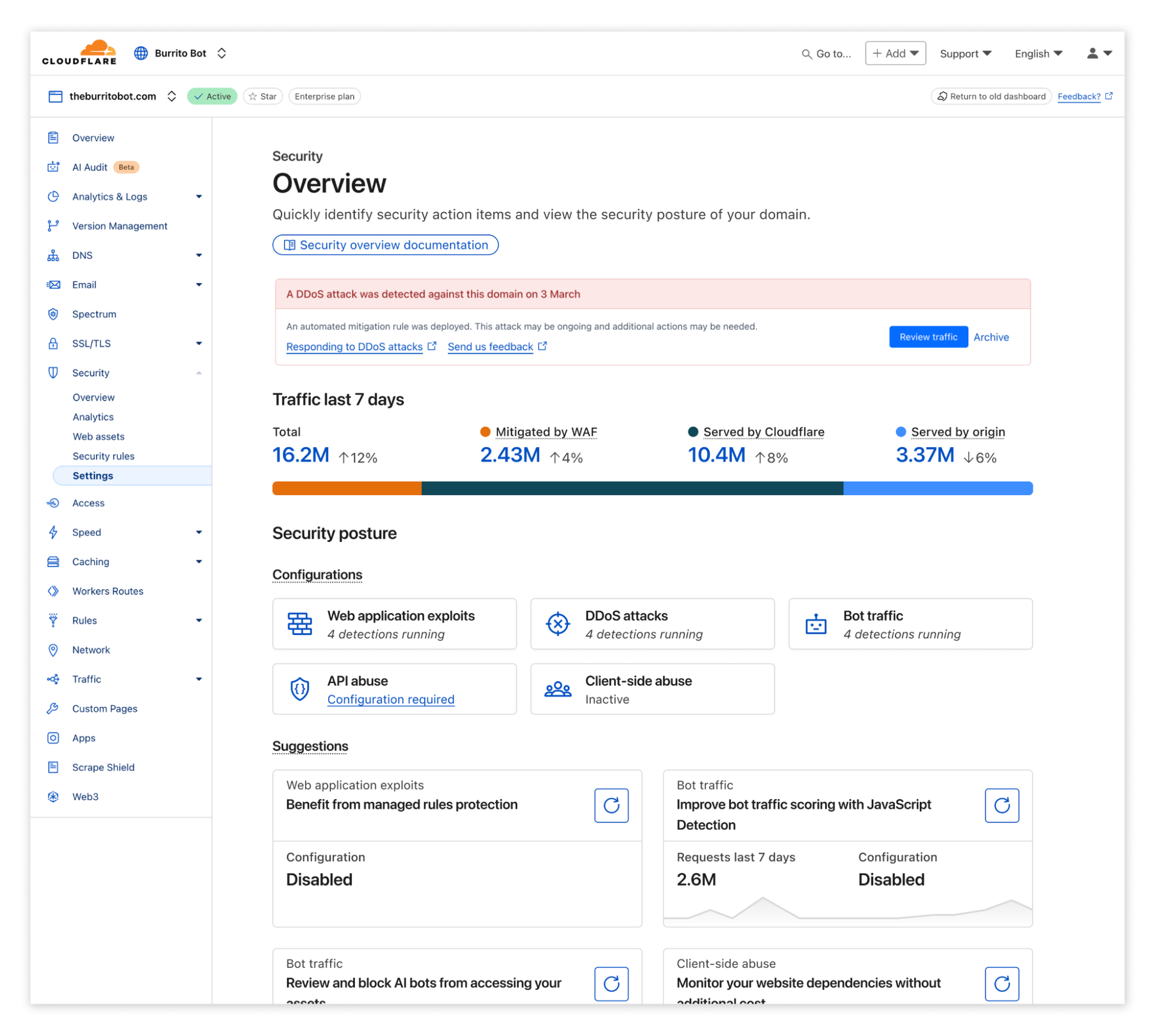
Overview
With the unified security approach, the new overview page aggregates and prioritizes security suggestions across all your web assets, helping you maintain a healthy security posture. The suggestions span from detected (ongoing) attacks if there are any, to risks and misconfigurations to further solidify your protection. This becomes the daily starting point to manage your security posture.
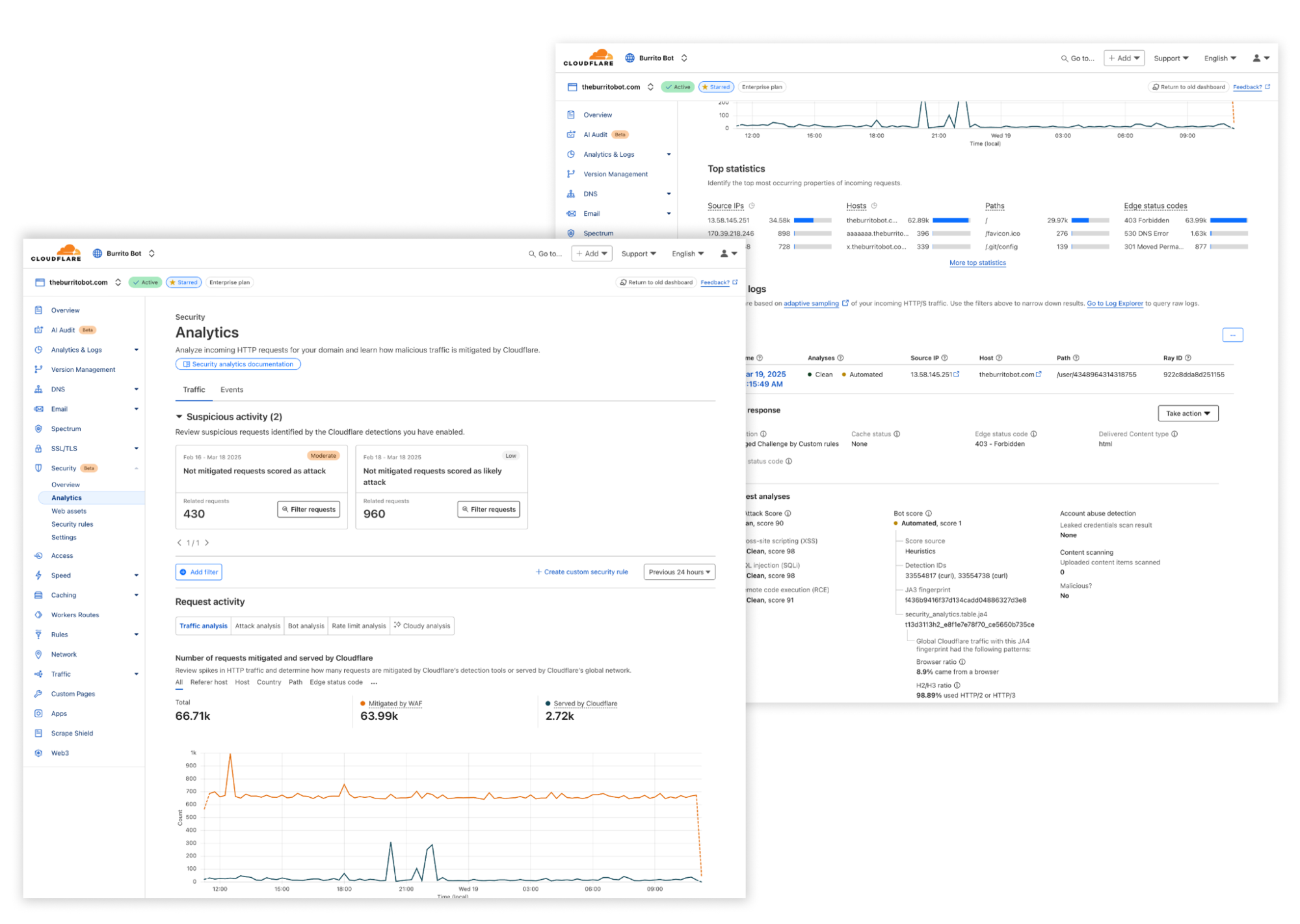
Analytics
Security Analytics and Events have been redesigned to make it easier to analyze your traffic. Suspicious activity detected by Cloudflare is surfaced at the top of the page, allowing you to easily filter and review related traffic. From the Traffic Analytics Sampled Log view, further below in the page, new workflows enable you to take quick action to craft a custom rule or review related security events in context.
Web assets
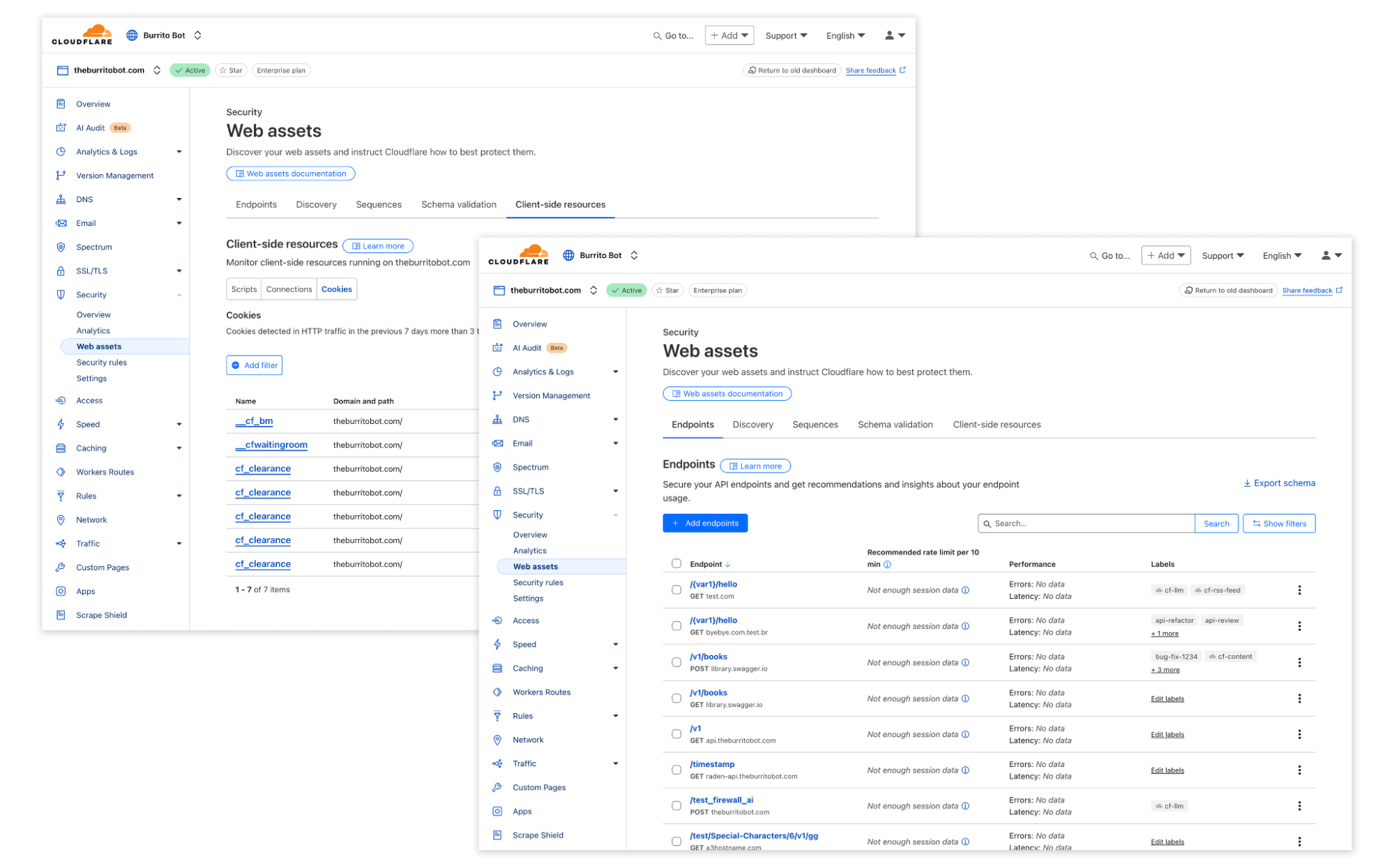
Web assets is a new concept introduced to bridge your business goals with threat detection capabilities. A web asset is any endpoint, file, document, or other related entity that we normally would act on from a security perspective. Within our new web asset page, you will be able to explore all relevant discovered assets by our system.
With our unified security platform, we are able to rapidly build new use-case driven threat detections. For example, to block automated actions across your e-commerce website, you can instruct Cloudflare’s system to block any fraudulent signup attempts, while allowing verified crawlers to index your product pages. This is made possible by labelling your web assets, which, where possible, is automated by Cloudflare, and then using those labels to power threat detections to protect your assets.
Security rules
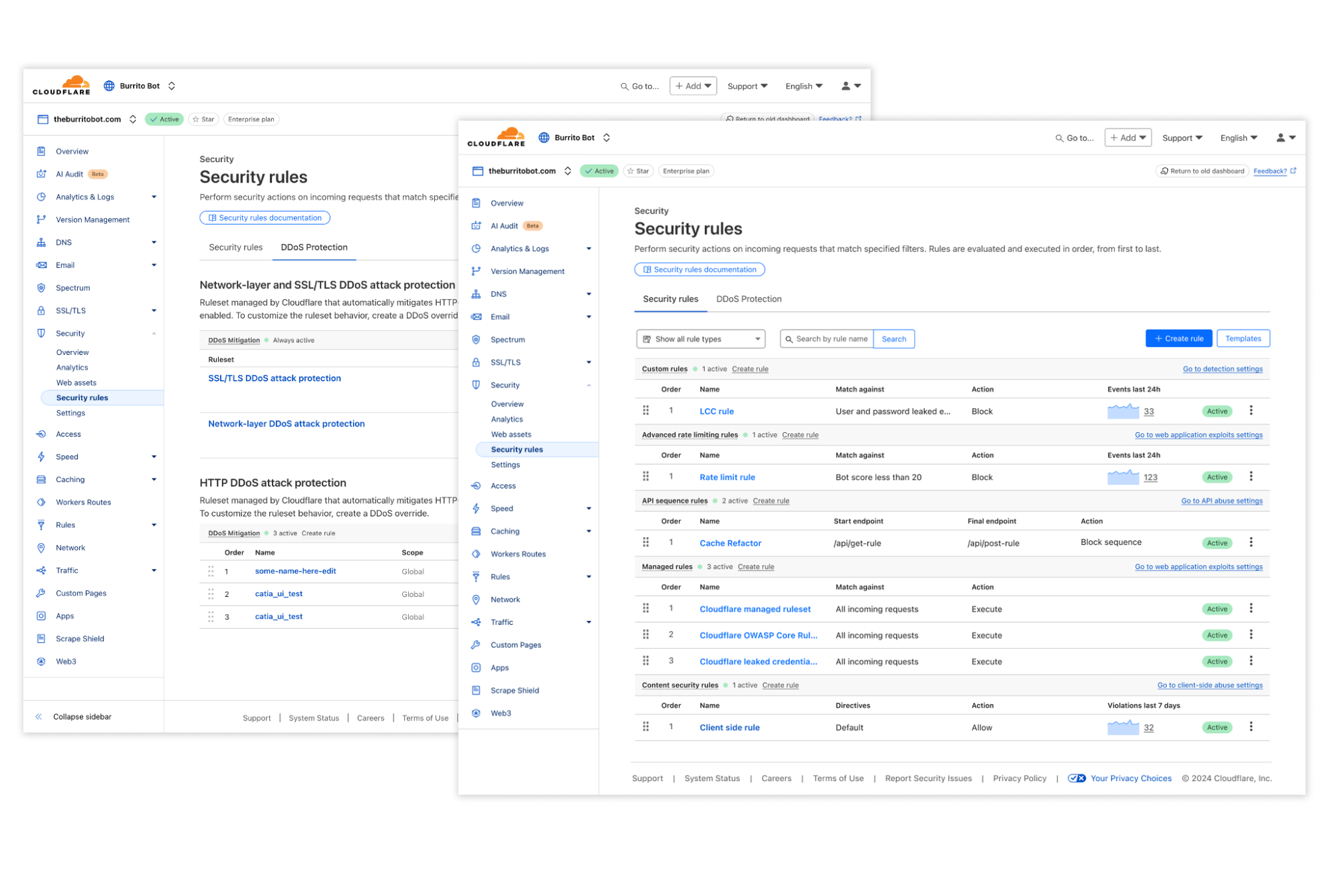
The unified Security rules interface brings all mitigation rule types — including WAF custom rules, rate limiting rules, API sequence rules, and client side rules — together in one centralized location, eliminating the need to navigate multiple dashboards.
The new page gives you visibility into how Cloudflare mitigates both incoming traffic and blocks potentially malicious client side resources from loading, making it easier to understand your security posture at a glance. The page allows you to create customised mitigation rules by combining any detection signals, such as Bot Score, Attack Score, or signals from Leaked Credential Checks, enabling precise control over how Cloudflare responds to potential threats.
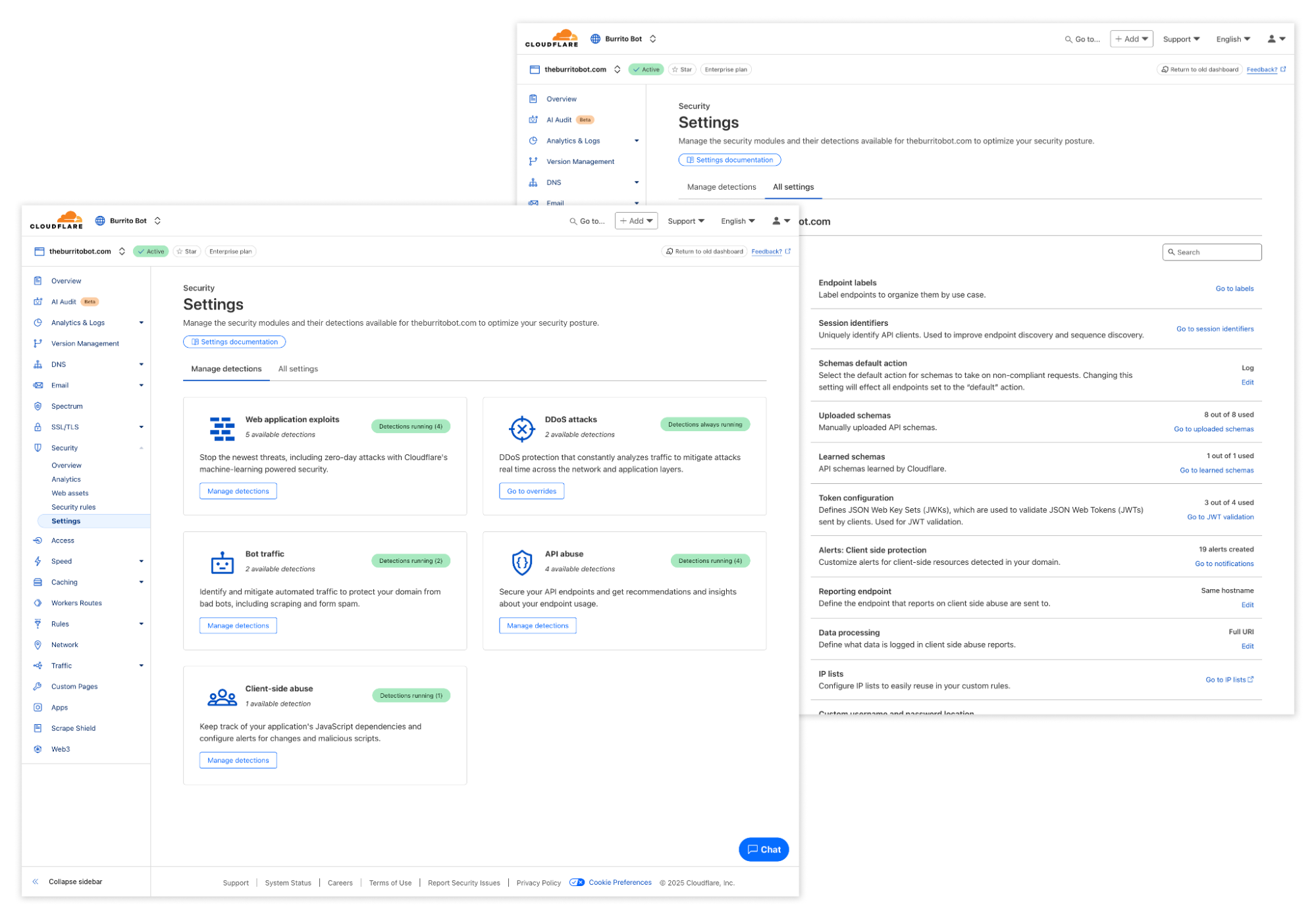
Settings
Balancing guidance and flexibility was the key driver for designing the new Settings page. As much as Cloudflare guides you towards the optimal security posture through recommendations and alerts, customers that want the flexibility to proactively adjust these settings can find all of them here.
Experience it today
This is the first of many enhancements we plan to make to the Application Security experience in the coming months. To check out the new navigation, log in to the Cloudflare dashboard, click on “Security” and choose “Check it out” when you see the message below. You will still have the option of opting out, if you so prefer.
Let us know what you think either by sharing feedback in our community forum or by providing feedback directly in the dashboard (you will be prompted if you revert to the old design).
Today, we’re excited to announce AI Labyrinth, a new mitigation approach that uses AI-generated content to slow down, confuse, and waste the resources of AI Crawlers and other bots that don’t respect “no crawl” directives. When you opt in, Cloudflare will automatically deploy an AI-generated set of linked pages when we detect inappropriate bot activity, without the need for customers to create any custom rules.
AI Labyrinth is available on an opt-in basis to all customers, including the Free plan.
Using Generative AI as a defensive weapon
AI-generated content has exploded, reportedly accounting for four of the top 20 Facebook posts last fall. Additionally, Medium estimates that 47% of all content on their platform is AI-generated. Like any newer tool it has both wonderful and malicious uses.
At the same time, we’ve also seen an explosion of new crawlers used by AI companies to scrape data for model training. AI Crawlers generate more than 50 billion requests to the Cloudflare network every day, or just under 1% of all web requests we see. While Cloudflare has several tools for identifying and blocking unauthorized AI crawling, we have found that blocking malicious bots can alert the attacker that you are on to them, leading to a shift in approach, and a never-ending arms race. So, we wanted to create a new way to thwart these unwanted bots, without letting them know they’ve been thwarted.
To do this, we decided to use a new offensive tool in the bot creator’s toolset that we haven’t really seen used defensively: AI-generated content. When we detect unauthorized crawling, rather than blocking the request, we will link to a series of AI-generated pages that are convincing enough to entice a crawler to traverse them. But while real looking, this content is not actually the content of the site we are protecting, so the crawler wastes time and resources.
As an added benefit, AI Labyrinth also acts as a next-generation honeypot. No real human would go four links deep into a maze of AI-generated nonsense. Any visitor that does is very likely to be a bot, so this gives us a brand-new tool to identify and fingerprint bad bots, which we add to our list of known bad actors. Here’s how we do it…
How we built the labyrinth
When AI crawlers follow these links, they waste valuable computational resources processing irrelevant content rather than extracting your legitimate website data. This significantly reduces their ability to gather enough useful information to train their models effectively.
To generate convincing human-like content, we used Workers AI with an open source model to create unique HTML pages on diverse topics. Rather than creating this content on-demand (which could impact performance), we implemented a pre-generation pipeline that sanitizes the content to prevent any XSS vulnerabilities, and stores it in R2 for faster retrieval. We found that generating a diverse set of topics first, then creating content for each topic, produced more varied and convincing results. It is important to us that we don’t generate inaccurate content that contributes to the spread of misinformation on the Internet, so the content we generate is real and related to scientific facts, just not relevant or proprietary to the site being crawled.
This pre-generated content is seamlessly integrated as hidden links on existing pages via our custom HTML transformation process, without disrupting the original structure or content of the page. Each generated page includes appropriate meta directives to protect SEO by preventing search engine indexing. We also ensured that these links remain invisible to human visitors through carefully implemented attributes and styling. To further minimize the impact to regular visitors, we ensured that these links are presented only to suspected AI scrapers, while allowing legitimate users and verified crawlers to browse normally.
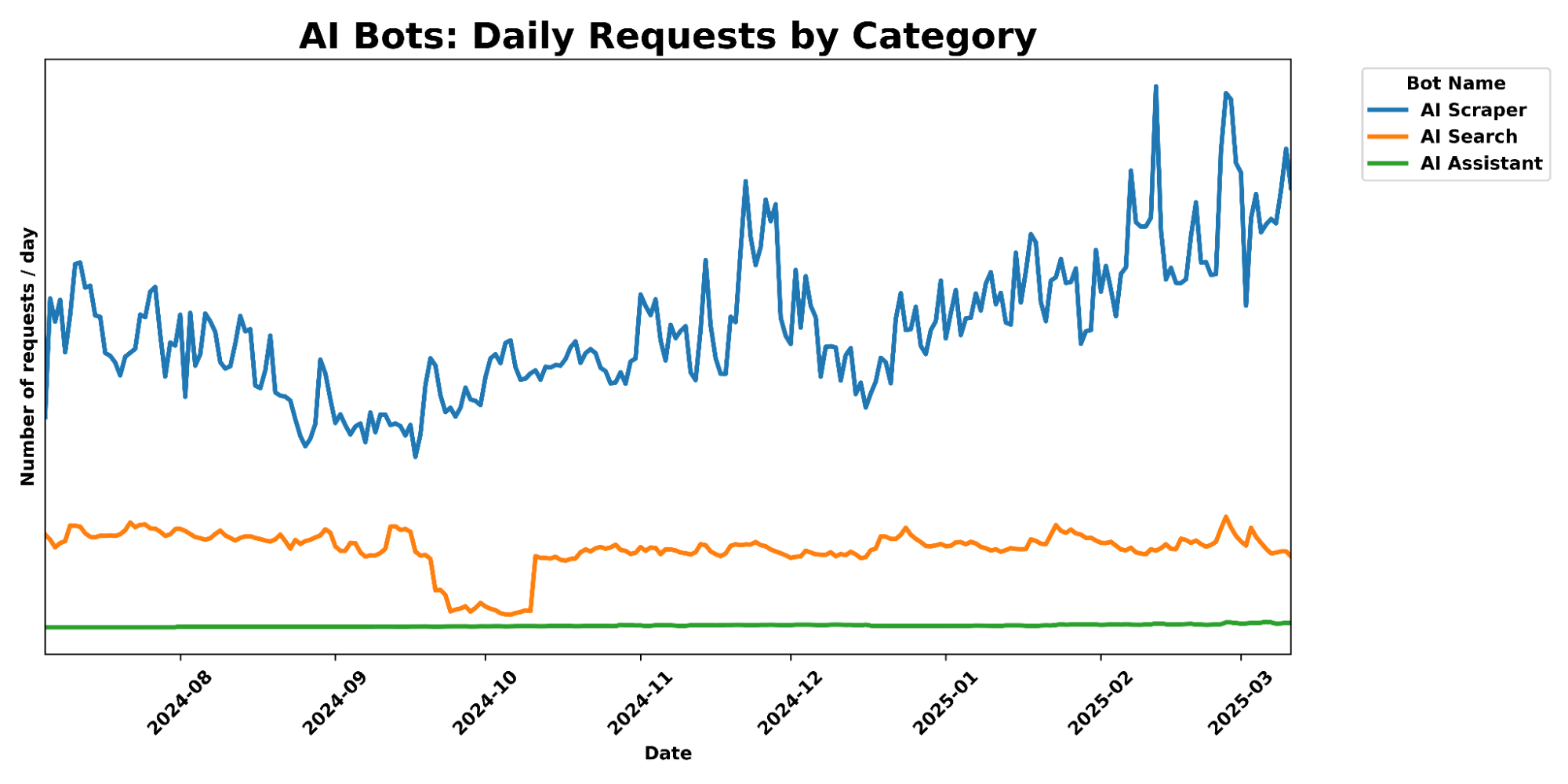
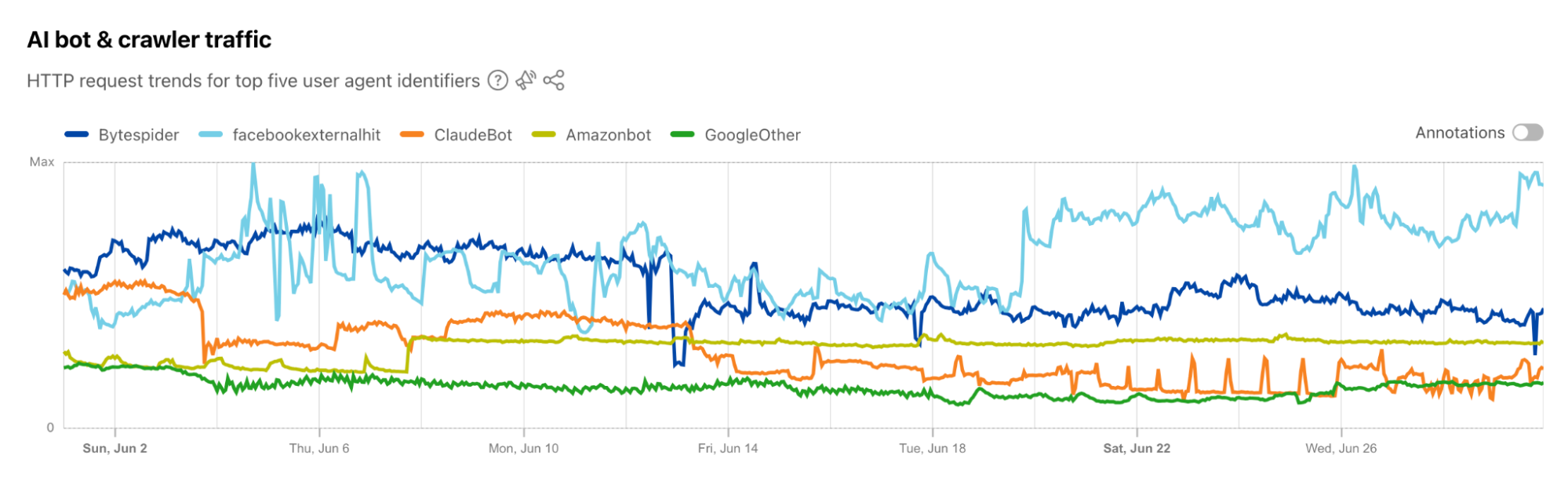
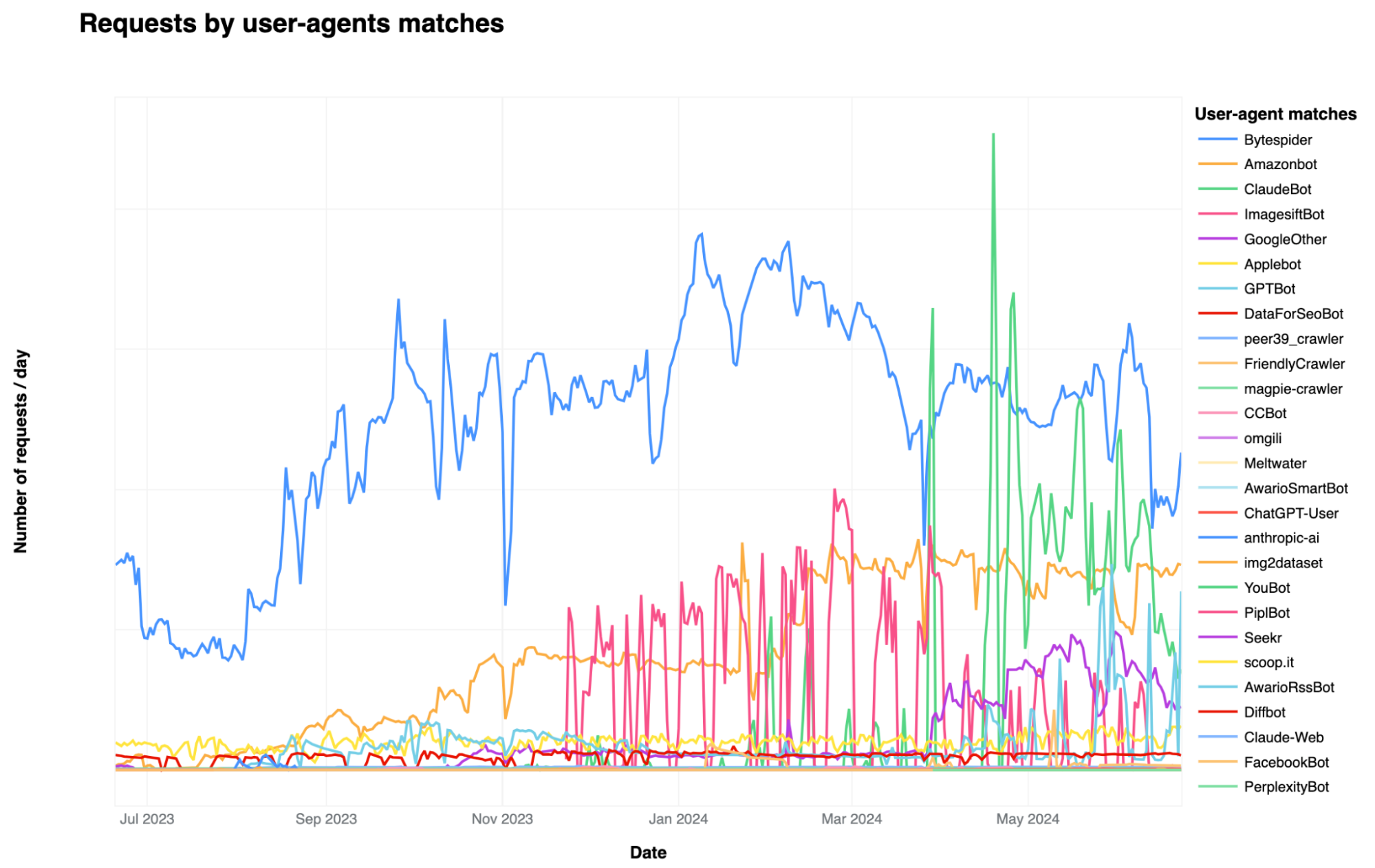
A graph of daily requests over time, comparing different categories of AI Crawlers.
What makes this approach particularly effective is its role in our continuously evolving bot detection system. When these links are followed, we know with high confidence that it’s automated crawler activity, as human visitors and legitimate browsers would never see or click them. This provides us with a powerful identification mechanism, generating valuable data that feeds into our machine learning models. By analyzing which crawlers are following these hidden pathways, we can identify new bot patterns and signatures that might otherwise go undetected. This proactive approach helps us stay ahead of AI scrapers, continuously improving our detection capabilities without disrupting the normal browsing experience.
By building this solution on our developer platform, we’ve created a system that serves convincing decoy content instantly while maintaining consistent quality – all without impacting your site’s performance or user experience.
How to use AI Labyrinth to stop AI crawlers
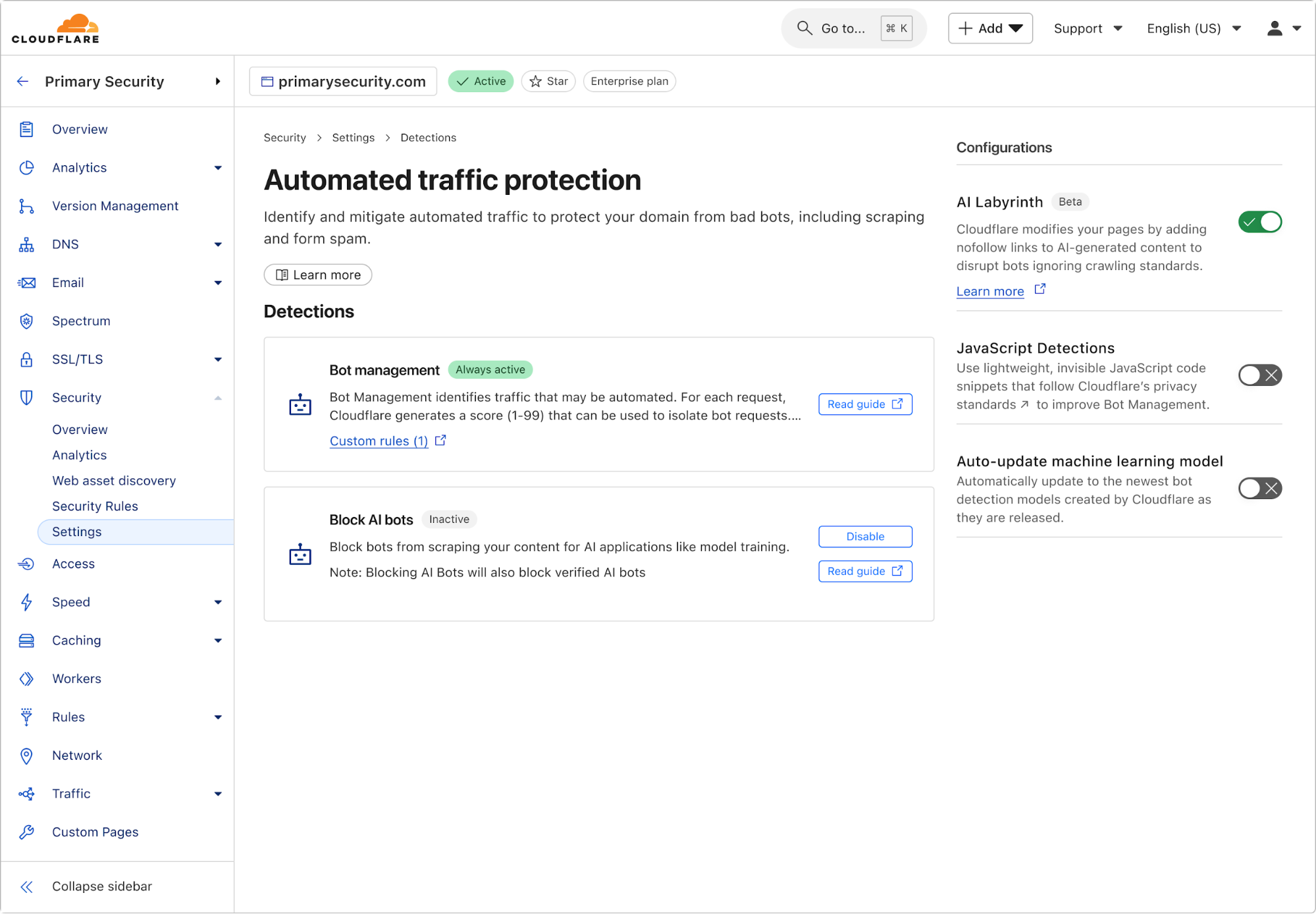
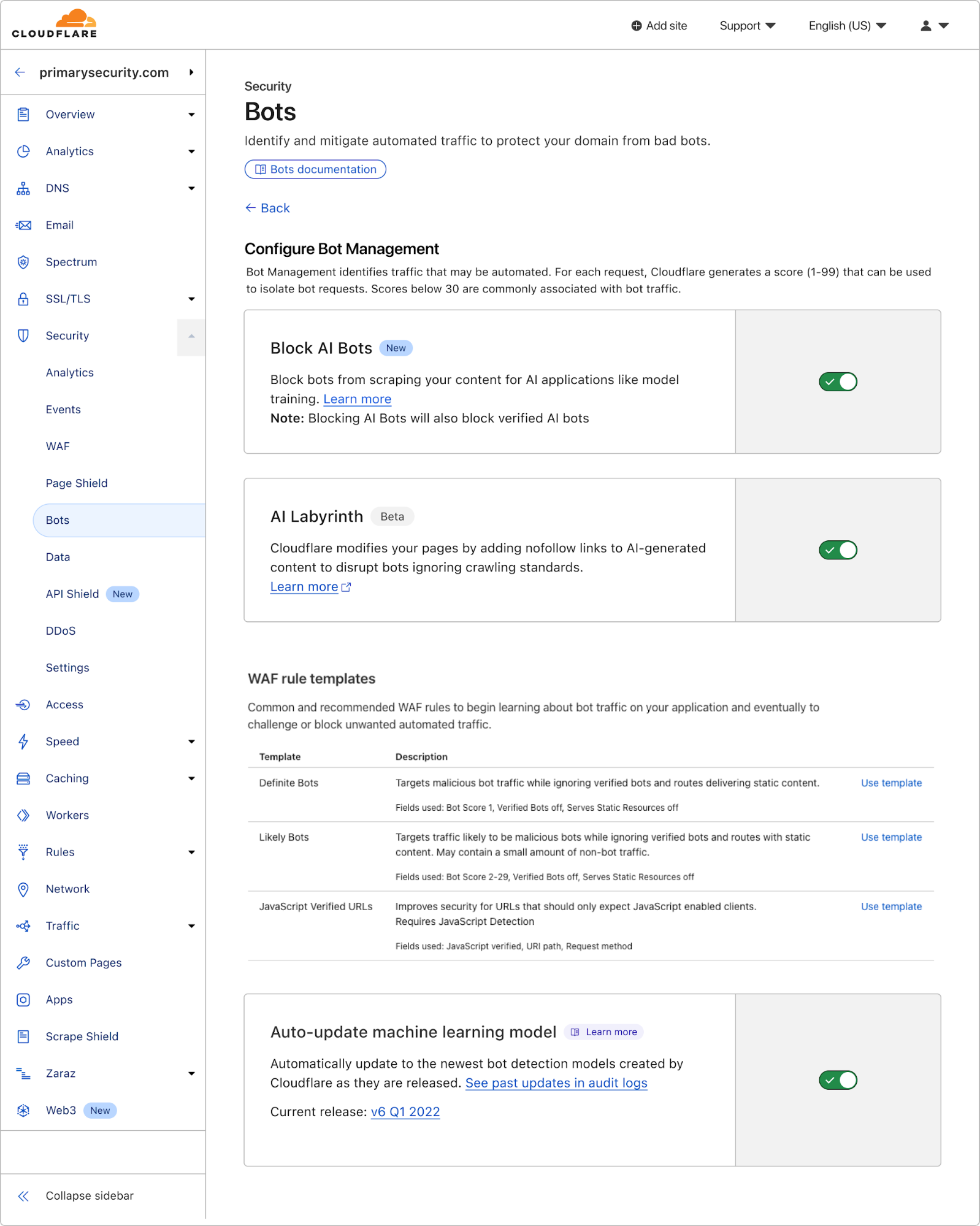
Enabling AI Labyrinth is simple and requires just a single toggle in your Cloudflare dashboard. Navigate to the bot management section within your zone, and toggle the new AI Labyrinth setting to on:
Once enabled, the AI Labyrinth begins working immediately with no additional configuration needed.
AI honeypots, created by AI
The core benefit of AI Labyrinth is to confuse and distract bots. However, a secondary benefit is to serve as a next-generation honeypot. In this context, a honeypot is just an invisible link that a website visitor can’t see, but a bot parsing HTML would see and click on, therefore revealing itself to be a bot. Honeypots have been used to catch hackers as early as the late 1986 Cuckoo’s Egg incident. And in 2004, Project Honeypot was created by Cloudflare founders (prior to founding Cloudflare) to let everyone easily deploy free email honeypots, and receive lists of crawler IPs in exchange for contributing to the database. But as bots have evolved, they now proactively look for honeypot techniques like hidden links, making this approach less effective.
AI Labyrinth won’t simply add invisible links, but will eventually create whole networks of linked URLs that are much more realistic, and not trivial for automated programs to spot. The content on the pages is obviously content no human would spend time-consuming, but AI bots are programmed to crawl rather deeply to harvest as much data as possible. When bots hit these URLs, we can be confident they aren’t actual humans, and this information is recorded and automatically fed to our machine learning models to help improve our bot identification. This creates a beneficial feedback loop where each scraping attempt helps protect all Cloudflare customers.
What’s next
This is only the first iteration of using generative AI to thwart bots for us. Currently, while the content we generate is convincingly human, it won’t conform to the existing structure of every website. In the future, we’ll continue to work to make these links harder to spot and make them fit seamlessly into the existing structure of the website they’re embedded in. You can help us by opting in now.
Within the Cloudflare Application Security team, every machine learning model we use is underpinned by a rich set of static rules that serve as a ground truth and a baseline comparison for how our models are performing. These are called heuristics. Our Bot Management heuristics engine has served as an important part of eight global machine learning (ML) models, but we needed a more expressive engine to increase our accuracy. In this post, we’ll review how we solved this by moving our heuristics to the Cloudflare Ruleset Engine. Not only did this provide the platform we needed to write more nuanced rules, it made our platform simpler and safer, and provided Bot Management customers more flexibility and visibility into their bot traffic.
Bot detection via simple heuristics
In Cloudflare’s bot detection, we build heuristics from attributes like software library fingerprints, HTTP request characteristics, and internal threat intelligence. Heuristics serve three separate purposes for bot detection:
Bot identification: If traffic matches a heuristic, we can identify the traffic as definitely automated traffic (with a bot score of 1) without the need of a machine learning model.
Train ML models: When traffic matches our heuristics, we create labelled datasets of bot traffic to train new models. We’ll use many different sources of labelled bot traffic to train a new model, but our heuristics datasets are one of the highest confidence datasets available to us.
Validate models: We benchmark any new model candidate’s performance against our heuristic detections (among many other checks) to make sure it meets a required level of accuracy.
While the existing heuristics engine has worked very well for us, as bots evolved we needed the flexibility to write increasingly complex rules. Unfortunately, such rules were not easily supported in the old engine. Customers have also been asking for more details about which specific heuristic caught a request, and for the flexibility to enforce different policies per heuristic ID. We found that by building a new heuristics framework integrated into the Cloudflare Ruleset Engine, we could build a more flexible system to write rules and give Bot Management customers the granular explainability and control they were asking for.
The need for more efficient, precise rules
In our previous heuristics engine, we wrote rules in Lua as part of our openresty-based reverse proxy. The Lua-based engine was limited to a very small number of characteristics in a rule because of the high engineering cost we observed with adding more complexity.
With Lua, we would write fairly simple logic to match on specific characteristics of a request (i.e. user agent). Creating new heuristics of an existing class was fairly straight forward. All we’d need to do is define another instance of the existing class in our database. However, if we observed malicious traffic that required more than two characteristics (as a simple example, user-agent and ASN) to identify, we’d need to create bespoke logic for detections. Because our Lua heuristics engine was bundled with the code that ran ML models and other important logic, all changes had to go through the same review and release process. If we identified malicious traffic that needed a new heuristic class, and we were also blocked by pending changes in the codebase, we’d be forced to either wait or rollback the changes. If we’re writing a new rule for an “under attack” scenario, every extra minute it takes to deploy a new rule can mean an unacceptable impact to our customer’s business.
More critical than time to deploy is the complexity that the heuristics engine supports. The old heuristics engine only supported using specific request attributes when creating a new rule. As bots became more sophisticated, we found we had to reject an increasing number of new heuristic candidates because we weren’t able to write precise enough rules. For example, we found a Golang TLS fingerprint frequently used by bots and by a small number of corporate VPNs. We couldn’t block the bots without also stopping the legitimate VPN usage as well, because the old heuristics platform lacked the flexibility to quickly compile sufficiently nuanced rules. Luckily, we already had the perfect solution with Cloudflare Ruleset Engine.
Our new heuristics engine
The Ruleset Engine is familiar to anyone who has written a WAF rule, Load Balancing rule, or Transform rule, just to name a few. For Bot Management, the Wireshark-inspired syntax allows us to quickly write heuristics with much greater flexibility to vastly improve accuracy. We can write a rule in YAML that includes arbitrary sub-conditions and inherit the same framework the WAF team uses to both ensure any new rule undergoes a rigorous testing process with the ability to rapidly release new rules to stop attacks in real-time.
Writing heuristics on the Cloudflare Ruleset Engine allows our engineers and analysts to write new rules in an easy to understand YAML syntax. This is critical to supporting a rapid response in under attack scenarios, especially as we support greater rule complexity. Here’s a simple rule using the new engine, to detect empty user-agents restricted to a specific JA4 fingerprint (right), compared to the empty user-agent detection in the old Lua based system (left):
--- Adds heuristic to be used for inference in `detect` method
-- @param heuristic schema.Heuristic table
function EmptyUserAgentHeuristic:add(heuristic)
self.heuristic = heuristic
end
--- Detect runs empty user agent heuristic detection
-- @param ctx context of request
-- @return schema.Heuristic table on successful detection or nil otherwise
function EmptyUserAgentHeuristic:detect(ctx)
local ua = ctx.user_agent
if not ua or ua == '' then
return self.heuristic
end
end
return _M
ref: empty-user-agent
description: Empty or missing
User-Agent header
action: add_bot_detection
action_parameters:
active_mode: false
expression: http.user_agent eq
"" and cf.bot_management.ja4 = "t13d1516h2_8daaf6152771_b186095e22b6"
The Golang heuristic that captured corporate proxy traffic as well (mentioned above) was one of the first to migrate to the new Ruleset engine. Before the migration, traffic matching on this heuristic had a false positive rate of 0.01%. While that sounds like a very small number, this means for every million bots we block, 100 real users saw a Cloudflare challenge page unnecessarily. At Cloudflare scale, even small issues can have real, negative impact.
When we analyzed the traffic caught by this heuristic rule in depth, we saw the vast majority of attack traffic came from a small number of abusive networks. After narrowing the definition of the heuristic to flag the Golang fingerprint only when it’s sourced by the abusive networks, the rule now has a false positive rate of 0.0001% (One out of 1 million). Updating the heuristic to include the network context improved our accuracy, while still blocking millions of bots every week and giving us plenty of training data for our bot detection models. Because this heuristic is now more accurate, newer ML models make more accurate decisions on what’s a bot and what isn’t.
New visibility and flexibility for Bot Management customers
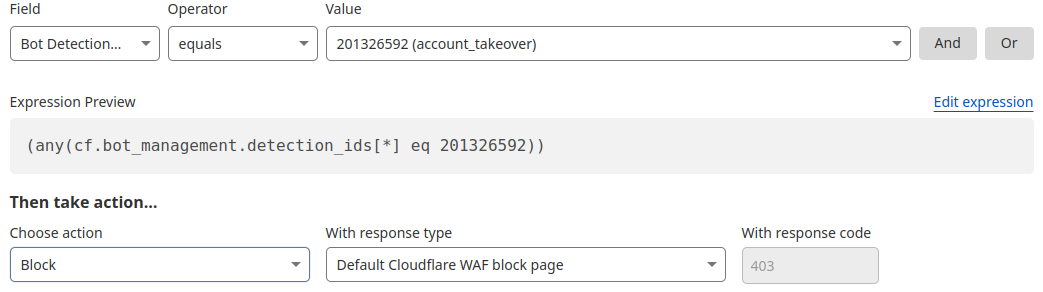
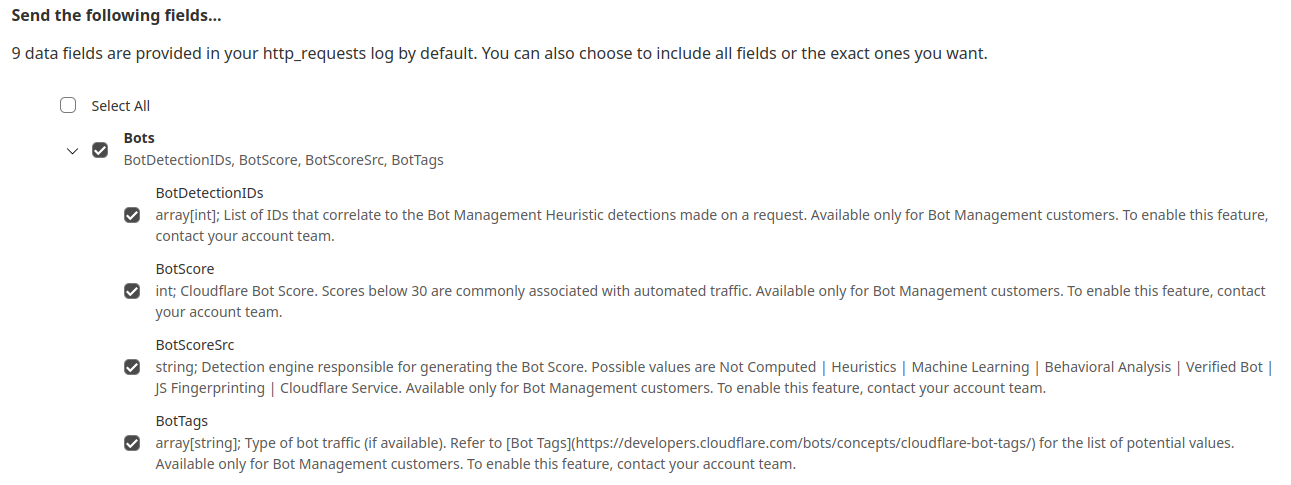
While the new heuristics engine provides more accurate detections for all customers and a better experience for our analysts, moving to the Cloudflare Ruleset Engine also allows us to deliver new functionality for Enterprise Bot Management customers, specifically by offering more visibility. This new visibility is via a new field for Bot Management customers called Bot Detection IDs. Every heuristic we use includes a unique Bot Detection ID. These are visible to Bot Management customers in analytics, logs, and firewall events, and they can be used in the firewall to write precise rules for individual bots.
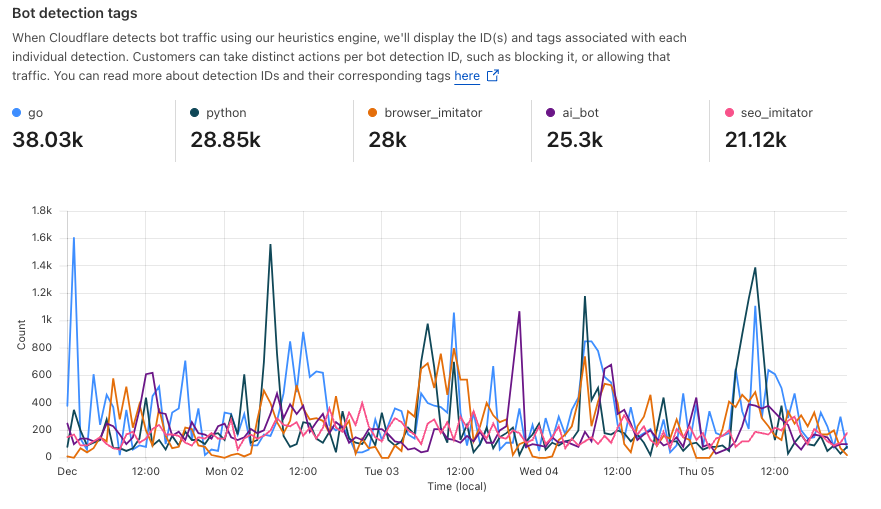
Detections also include a specific tag describing the class of heuristic. Customers see these plotted over time in their analytics.
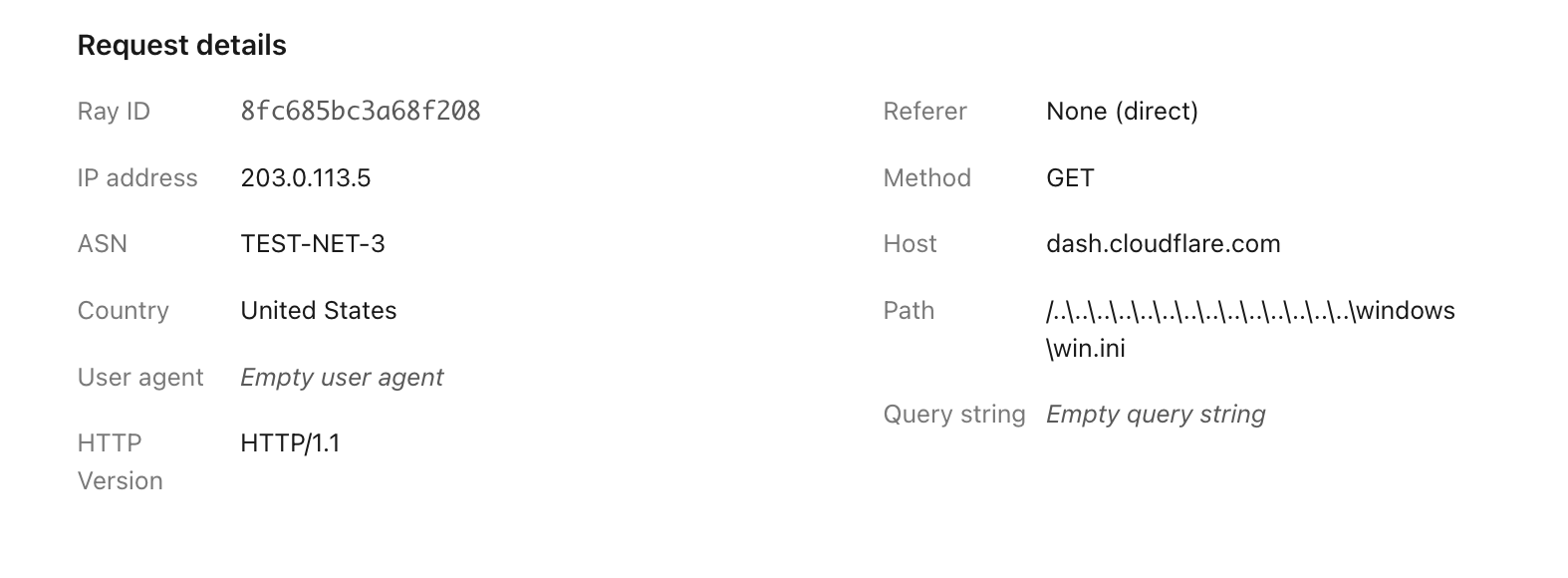
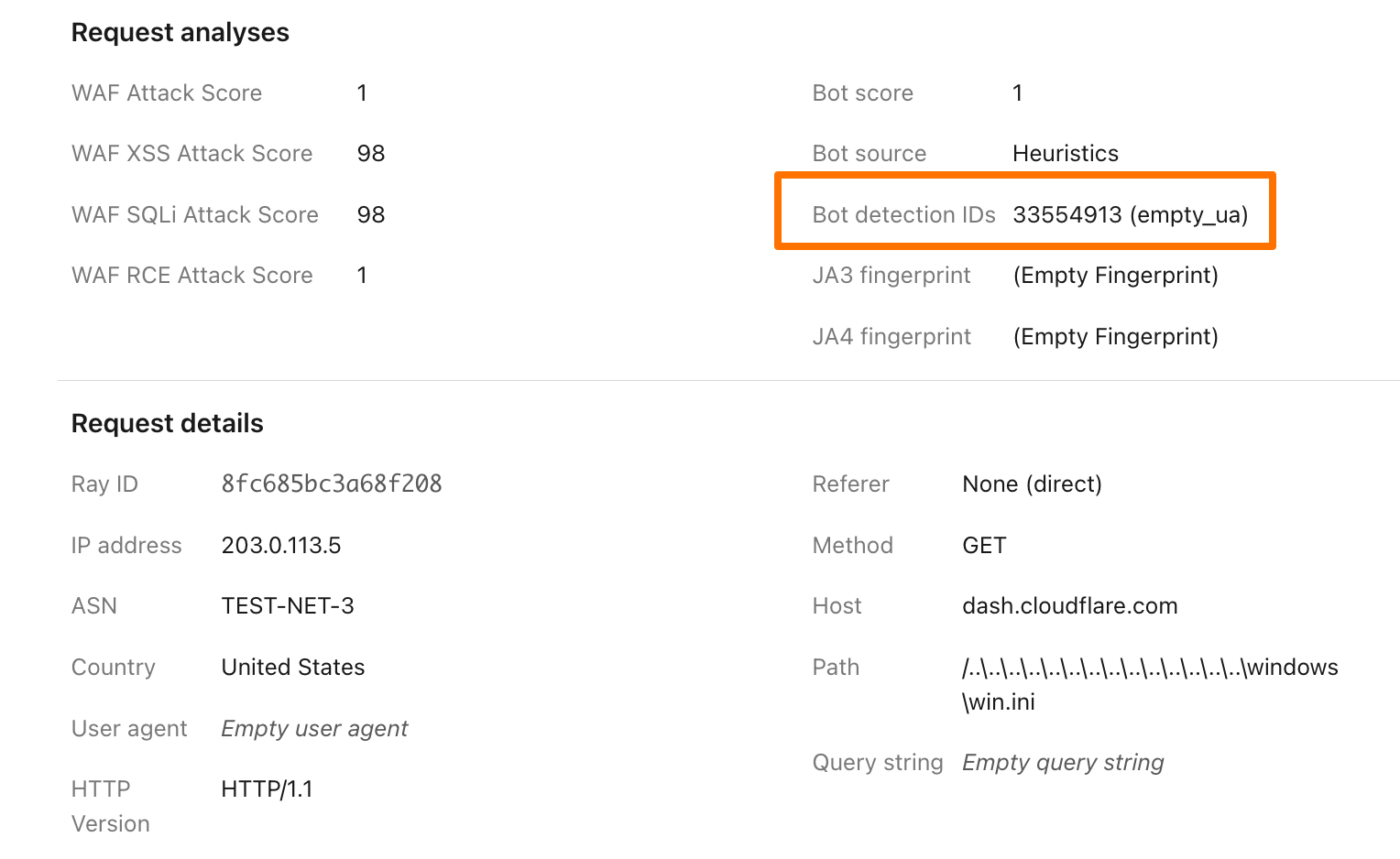
To illustrate how this data can help give customers visibility into why we blocked a request, here’s an example request flagged by Bot Management (with the IP address, ASN, and country changed):
Before, just seeing that our heuristics gave the request a score of 1 was not very helpful in understanding why it was flagged as a bot. Adding our Detection IDs to Firewall Events helps to paint a better picture for customers that we’ve identified this request as a bot because that traffic used an empty user-agent.
In addition to Analytics and Firewall Events, Bot Detection IDs are now available for Bot Management customers to use in Custom Rules, Rate Limiting Rules, Transform Rules, and Workers.
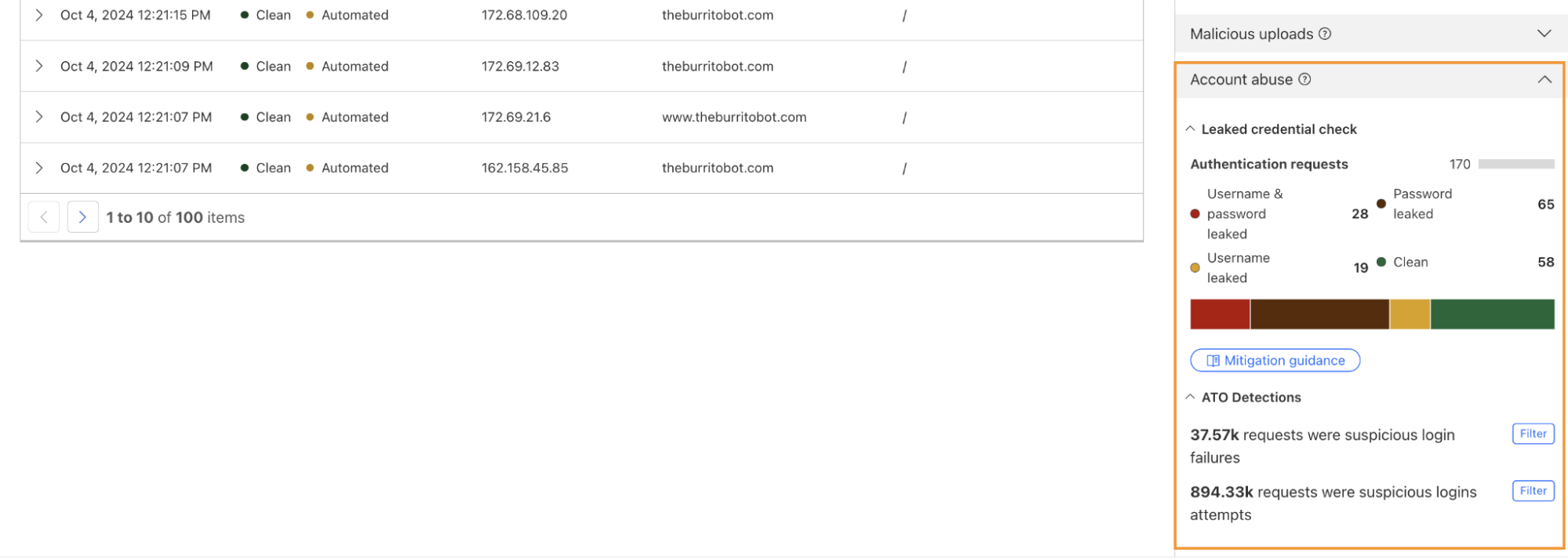
Account takeover detection IDs
One way we’re focused on improving Bot Management for our customers is by surfacing more attack-specific detections. During Birthday Week, we launched Leaked Credentials Check for all customers so that security teams could help prevent account takeover (ATO) attacks by identifying accounts at risk due to leaked credentials. We’ve now added two more detections that can help Bot Management enterprise customers identify suspicious login activity via specific detection IDs that monitor login attempts and failures on the zone. These detection IDs are not currently affecting the bot score, but will begin to later in 2025. Already, they can help many customers detect more account takeover events now.
Detection ID 201326592 monitors traffic on a customer website and looks for an anomalous rise in login failures (usually associated with brute force attacks), and ID 201326593 looks for an anomalous rise in login attempts (usually associated with credential stuffing).
Protect your applications
If you are a Bot Management customer, log in and head over to the Cloudflare dashboard and take a look in Security Analytics for bot detection IDs 201326592 and 201326593.
These will highlight ATO attempts targeting your site. If you spot anything suspicious, or would like to be protected against future attacks, create a rule that uses these detections to keep your application safe.
Back in 2021, we covered the antics of Grinch Bots and how the combination of proposed regulation and technology could prevent these malicious programs from stealing holiday cheer.
Fast-forward to 2024 — the Stop Grinch Bots Act of 2021 has not passed, and bots are more active and powerful than ever, leaving businesses to fend off increasingly sophisticated attacks on their own. During Black Friday 2024, Cloudflare observed:
29% of all traffic on Black Friday was Grinch Bots. Humans still accounted for the majority of all traffic, but bot traffic was up 4x from three years ago in absolute terms.
1% of traffic on Black Friday came from AI bots. The majority of it came from Claude, Meta, and Amazon. 71% of this traffic was given the green light to access the content requested.
63% of login attempts across our network on Black Friday were from bots. While this number is high, it was down a few percentage points compared to a month prior, indicating that more humans accessed their accounts and holiday deals.
Human logins on e-commerce sites increased 7-8% compared to the previous month.
These days, holiday shopping doesn’t start on Black Friday and stop on Cyber Monday. Instead, it stretches through Cyber Week and beyond, including flash sales, pre-orders, and various other promotions. While this provides consumers more opportunities to shop, it also creates more openings for Grinch Bots to wreak havoc.
Black Friday – Cyber Monday by the numbers
Black Friday and Cyber Monday in 2024 brought record-breaking shopping — and grinching. In addition to looking across our entire network, we also analyzed traffic patterns specifically on a cohort of e-commerce sites.
Legitimate shoppers flocked to e-commerce sites, with requests reaching an astounding 405 billion on Black Friday, accounting for 81% of the day’s total traffic to e-commerce sites. Retailers reaped the rewards of their deals and advertising, seeing a 50% surge in shoppers week-over-week and a 61% increase compared to the previous month.
Unfortunately, Grinch Bots were equally active. Total e-commerce bot activity surged to 103 billion requests, representing up to 19% of all traffic to e-commerce sites. Nearly one in every five requests to an online store was not a real customer. That’s a lot of resources to waste on bogus traffic. Cyber Week was a battleground, with bots hoarding inventory, exploiting deals, and disrupting genuine shopping experiences.
The upside, if there is one, is that there was more human activity on e-commerce sites (81%) than observed on our network more broadly (71%).
The Grinch Bot’s Modus Operandi
Cloudflare saw 4x more bot requests than what we observed in 2021. Being able to observe and score all this traffic at scale means we can help customers keep the grinches away. We also got to see patterns that help us better identify the concentration of these attacks:
19% of traffic on e-commerce sites was Grinch Bots
1% of traffic to e-commerce sites was from AI Bots.
63% of login attempt requests across our network were from bots
22% of bot activity originated from residential proxy networks
What are all of these bots up to?
AI bots
This year marked a breakthrough for AI-driven bots, agents, and models, with their impact spilling into Black Friday. AI bots went from zero to one, now making up 1% of all bot traffic on e-commerce sites.
AI-driven bots generated 29 billion requests on Black Friday alone, with Meta-external, Claudebot, and Amazonbot leading the pack. Based on their owners, these bots are meant to crawl to augment training data sets for Llama, Claude, and Alexa respectively.
We looked at e-commerce sites specifically to find out if these bots were treating all content equally. While Meta-External and Amazonbot were still in the Top 3 of AI bots reaching e-commerce sites, Bytedance’s Bytespider crawled the most shopping sites.
Account Takeover (ATO) bots
In addition to scraping, crawling, and shopping, bots also targeted customer accounts on Black Friday. We saw 14.1 billion requests from bots to /login endpoints, accounting for 63% of that day’s login attempts.
While this number seems high, intuitively it makes sense, given that humans don’t log in to accounts every day, but bots definitely try to crack accounts every day. Interestingly, while humans only accounted for 36% of traffic to login pages on Black Friday, this number was up 7-8% compared to the prior month. This suggests that more shoppers logged in to capitalize on deals and discounts on Black Friday than in preceding weeks. Human logins peaked at around 40% of all traffic to login sites on the Monday before Thanksgiving, and again on Cyber Monday.
Separately, we also saw a 37% increase in leaked passwords used in login requests compared to the prior month. During Birthday Week, we shared how 65% of internet users are at risk of ATO due to re-use of leaked passwords. This surge, coinciding with heightened human and bot traffic, underscores a troubling pattern: both humans and bots continue to depend on common and compromised passwords, amplifying security risks.
Proxy bots: Regardless of whether they’re crawling your content or hoarding your wares, 22% of bot traffic originated from residential proxy networks. This obfuscation makes these requests look like legitimate customers browsing from their homes rather than large cloud networks. The large pool of IP addresses and the diversity of networks poses a challenge to traditional bot defense mechanisms that rely on IP reputation and rate limiting.
Moreover, the diversity of IP addresses enables the attackers to rotate through them indefinitely. This shrinks the window of opportunity for bot detection systems to effectively detect and stop the attacks. The use of residential proxies is a trend we have been tracking for months now and Black Friday traffic was within the range we’ve seen throughout this year.
If you’re using Cloudflare’s Bot Management, your site is already protected from these bots since we update our bot score based on these types of network fingerprints. In May 2024, we introduced our latest model optimized for detecting residential proxies. Early results show promising declines in this type of activity, indicating that bot operators may be reducing their reliance on residential proxies.
The Christmas “Yule” log: how customers can protect themselves
35% of all traffic on Black Friday was Grinch Bots. To keep Grinch Bots at bay, businesses need year-round bot protection and proactive strategies tailored to the unique challenges of holiday shopping.
(2) Monitor potential Account Takeover (ATO) attacks: Bots often test stolen credentials in the months leading up to Cyber Week to refine their strategies. Re-use of stolen credentials makes businesses even more vulnerable. Our account abuse detections help customers monitor login paths for leaked credentials and traffic anomalies.
Check out more examples of related rules you can create.
(3) Rate limit account and purchase paths: Apply rate-limiting best practices on critical application paths. These include limiting new account access/creation from previously seen IP addresses, and leveraging other network fingerprints, to help prevent promo code abuse and inventory hoarding, as well as identifying account takeover attempts through the application of detection IDs and leaked credential checks.
(4) Block AI bots abusing shopping features to maintain fair access for human users. If you’re using Cloudflare, you can quickly block all AI bots by enabling our automatic AI bot blocking feature.
What to expect in 2025?
Over the next year, e-commerce sites should expect to see more humans shopping for longer periods. As sale periods lengthen (like they did in 2024) we expect more peaks in human activity on e-commerce sites across November and December. This is great for consumers and great for merchants.
More AI bots and agents will be integrated into e-commerce journeys in 2025. AI bots will not only be crawling sites for training data, but will also integrate into the shopping experience. AI bots did not exist in 2021, but now make up 1% of all bot traffic. This is only the tip of the iceberg and their growth will explode in the next year. We expect this to pose new risks as bots mimic and act on behalf of humans.
More sophisticated automation through network, device, and cookie cycling will also become a bigger threat. Bot operators will continue to employ advanced evasion tactics like rotating devices, IP addresses, and cookies to bypass detection.
Grinch Bots are evolving, and regulation may be slowing, but businesses don’t have to face them alone. We remain resolute in our mission to help build a better Internet … and holiday shopping experience.
Even though the holiday season is closing out soon, bots are never on vacation. It’s never too late or too early to start protecting your customers and your business from grinches that work all year round.
Wishing you all happy holidays and a bot-free new year!
The continued growth of AI has fundamentally changed the Internet over the past 24 months. AI is increasingly ubiquitous, and Cloudflare is leaning into the new opportunities and challenges it presents in a big way. This year for Cloudflare’s birthday, we’ve extended our AI Assistant capabilities to help you build new WAF rules, added AI bot traffic insights on Cloudflare Radar, and given customers new AI bot blocking capabilities.
AI Assistant for WAF Rule Builder
At Cloudflare, we’re always listening to your feedback and striving to make our products as user-friendly and powerful as possible. One area where we’ve heard your feedback loud and clear is in the complexity of creating custom and rate-limiting rules for our Web Application Firewall (WAF). With this in mind, we’re excited to introduce a new feature that will make rule creation easier and more intuitive: the AI Assistant for WAF Rule Builder.
By simply entering a natural language prompt, you can generate a custom or rate-limiting rule tailored to your needs. For example, instead of manually configuring a complex rule matching criteria, you can now type something like, “Match requests with low bot score,” and the assistant will generate the rule for you. It’s not about creating the perfect rule in one step, but giving you a strong foundation that you can build on.
The assistant will be available in the Custom and Rate Limit Rule Builder for all WAF users. We’re launching this feature in Beta for all customers, and we encourage you to give it a try. We’re looking forward to hearing your feedback (via the UI itself) as we continue to refine and enhance this tool to meet your needs.
AI bot traffic insights on Cloudflare Radar
AI platform providers use bots to crawl and scrape websites, vacuuming up data to use for model training. This is frequently done without the permission of, or a business relationship with, the content owners and providers. In July, Cloudflare urged content owners and providers to “declare their AIndependence”, providing them with a way to block AI bots, scrapers, and crawlers with a single click. In addition to this so-called “easy button” approach, sites can provide more specific guidance to these bots about what they are and are not allowed to access through directives in a robots.txt file. Regardless of whether a customer chooses to block or allow requests from AI-related bots, Cloudflare has insight into request activity from these bots, and associated traffic trends over time.
Tracking traffic trends for AI bots can help us better understand their activity over time — which are the most aggressive and have the highest volume of requests, which launch crawls on a regular basis, etc. The new AI bot & crawler traffic graph on Radar’s Traffic page provides insight into these traffic trends gathered over the selected time period for the top known AI bots. The associated list of bots tracked here is based on the ai.robots.txt list, and will be updated with new bots as they are identified. Time series and summary data is available from the Radar API as well. (Traffic trends for the full set of AI bots & crawlers can be viewed in the new Data Explorer.)
Blocking more AI bots
For Cloudflare’s birthday, we’re following up on our previous blog post, Declaring Your AIndependence, with an update on the new detections we’ve added to stop AI bots. Customers who haven’t already done so can simply click the button to block AI bots to gain more protection for their website.
Enabling dynamic updates for the AI bot rule
The old button allowed customers to block verified AI crawlers, those that respect robots.txt and crawl rate, and don’t try to hide their behavior. We’ve added new crawlers to that list, but we’ve also expanded the previous rule to include 27 signatures (and counting) of AI bots that don’t follow the rules. We want to take time to say “thank you” to everyone who took the time to use our “tip line” to point us towards new AI bots. These tips have been extremely helpful in finding some bots that would not have been on our radar so quickly.
For each bot we’ve added, we’re also adding them to our “Definitely automated” definition as well. So, if you’re a self-service plan customer using Super Bot Fight Mode, you’re already protected. Enterprise Bot Management customers will see more requests shift from the “Likely Bot” range to the “Definitely automated” range, which we’ll discuss more below.
Under the hood, we’ve converted this rule logic to a Cloudflare managed rule (the same framework that powers our WAF). This enables our security analysts and engineers to safely push updates to the rule in real-time, similar to how new WAF rule changes are rapidly delivered to ensure our customers are protected against the latest CVEs. If you haven’t logged back into the Bots dashboard since the previous version of our AI bot protection was announced, click the button again to update to the latest protection.
The impact of new fingerprints on the model
One hidden beneficiary of fingerprinting new AI bots is our ML model. As we’ve discussed before, our global ML model uses supervised machine learning and greatly benefits from more sources of labeled bot data. Below, you can see how well our ML model recognized these requests as automated, before and after we updated the button, adding new rules. To keep things simple, we have shown only the top 5 bots by the volume of requests on the chart. With the introduction of our new managed rule, we have observed an improvement in our detection capabilities for the majority of these AI bots. Button v1 represents the old option that let customers block only verified AI crawlers, while Button v2 is the newly introduced feature that includes managed rule detections.
So how did we make our detections more robust? As we have mentioned before, sometimes a single attribute can give a bot away. We developed a sophisticated set of heuristics tailored to these AI bots, enabling us to effortlessly and accurately classify them as such. Although our ML model was already detecting the vast majority of these requests, the integration of additional heuristics has resulted in a noticeable increase in detection rates for each bot, and ensuring we score every request correctly 100% of the time. Transitioning from a purely machine learning approach to incorporating heuristics offers several advantages, including faster detection times and greater certainty in classification. While deploying a machine learning model is complex and time-consuming, new heuristics can be created in minutes.
The initial launch of the AI bots block button was well-received and is now used by over 133,000 websites, with significant adoption even among our Free tier customers. The newly updated button, launched on August 20, 2024, is rapidly gaining traction. Over 90,000 zones have already adopted the new rule, with approximately 240 new sites integrating it every hour. Overall, we are now helping to protect the intellectual property of more than 146,000 sites from AI bots, and we are currently blocking 66 million requests daily with this new rule. Additionally, we’re excited to announce that support for configuring AI bots protection via Terraform will be available by the end of this year, providing even more flexibility and control for managing your bot protection settings.
Bot behavior
With the enhancements to our detection capabilities, it is essential to assess the impact of these changes to bot activity on the Internet. Since the launch of the updated AI bots block button, we have been closely monitoring for any shifts in bot activity and adaptation strategies. The most basic fingerprinting technique we use to identify AI bot looking for simple user-agent matches. User-agent matches are important to monitor because they indicate the bot is transparently announcing who they are when they’re crawling a website.
The graph below shows a volume of traffic we label as AI bot over the past two months. The blue line indicates the daily request count, while the red line represents the monthly average number of requests. In the past two months, we have seen an average reduction of nearly 30 million requests, with a decrease of 40 million in the most recent month.This decline coincides with the release of Button v1 and Button v2. Our hypothesis is that with the new AI bots blocking feature, Cloudflare is blocking a majority of these bots, which is discouraging them from crawling.
This hypothesis is supported by the observed decline in requests from several top AI crawlers. Specifically, the Bytespider bot reduced its daily requests from approximately 100 million to just 50 million between the end of June and the end of August (see graph below). This reduction could be attributed to several factors, including our new AI bots block button and changes in the crawler’s strategy.
We have also observed an increase in the accountability of some AI crawlers. The most basic fingerprinting technique we use to identify AI bot looking for simple user-agent matches. User-agent matches are important to monitor because they indicate the bot is transparently announcing who they are when they’re crawling a website. These crawlers are now more frequently using their agents, reflecting a shift towards more transparent and responsible behavior. Notably, there has been a dramatic surge in the number of requests from the Perplexity user agent. This increase might be linked to previous accusationsthat Perplexity did not properly present its user agent, which could have prompted a shift in their approach to ensure better identification and compliance.
These trends suggest that our updates are likely affecting how AI crawlers interact with content. We will continue to monitor AI bot activity to help users control who accesses their content and how. By keeping a close watch on emerging patterns, we aim to provide users with the tools and insights needed to make informed decisions about managing their traffic.
Wrap up
We’re excited to continue to explore the AI landscape, whether we’re finding more ways to make the Cloudflare dashboard usable or new threats to guard against. Our AI insights on Radar update in near real-time, so please join us in watching as new trends emerge and discussing them in the Cloudflare Community.
For many years, Cloudflare has used advanced fingerprinting techniques to help block online threats, in products like our DDoS engine, our WAF, and Bot Management. For the purposes of Bot Management, fingerprinting characteristic elements of client software help us quickly identify what kind of software is making an HTTP request. It’s an efficient and accurate way to differentiate a browser from a Python script, while preserving user privacy. These fingerprints are used on their own for simple rules, and they underpin complex machine learning models as well.
Making sure our fingerprints keep pace with the pace of change on the Internet is a constant and critical task. Bots will always adapt to try and look more browser-like. Less frequently, browsers will introduce major changes to their behavior and affect the entire Internet landscape. Last year, Google did exactly that, making older TLS fingerprints almost useless for identifying the latest version of Chrome.
Cloudflare network fingerprinting techniques
These methods are instrumental in accurately scoring and classifying bots, enhancing security measures, and enriching data analytics capabilities. Below are some examples of the fingerprinting techniques we have implemented over the years:
HTTP Signature: The HTTP Signature technique involves analyzing HTTP headers and other request attributes to create a unique signature for each client. This method is particularly useful for identifying and managing bot traffic, as it can detect inconsistencies between the HTTP signature and the claimed user-agent.
ClientHello fingerprint (v1 & v2): The ClientHello fingerprint technique involves analyzing the ClientHello message during the TLS handshake. This message contains various parameters, such as cipher suites, extensions, and supported groups, which can be used to create a unique fingerprint for each client. The first version of ClientHello fingerprint was introduced as part of Cloudflare’s broader TLS fingerprinting efforts, with subsequent improvements leading to version 2. These fingerprints help in identifying the client software and its configuration, providing a static identifier that can be used to detect anomalies and potential threats.
HTTP/2 fingerprint: HTTP/2 fingerprinting focuses on the unique characteristics of the HTTP/2 protocol, such as the settings frame, stream priority information, and the order of pseudo-header fields. Supported by all major browsers, this method was introduced to leverage the protocol’s binary framing layer, which provides a rich set of attributes for creating unique client fingerprints.
HTTP/3 and QUIC fingerprints: As HTTP/3 and the QUIC protocol gain popularity, Cloudflare has developed fingerprinting techniques tailored to these advanced protocols. Running over QUIC, HTTP/3 uses UDP and introduces unique handshake mechanisms, distinct from TCP-based protocols. Cloudflare’s techniques focus on specific attributes like QUIC version and transport parameters to generate precise fingerprints. These are vital for managing and identifying traffic, particularly in environments that heavily use Google products.
JA3 fingerprint: This TLS fingerprinting technique, introduced by Salesforce researchers in 2017 and later adopted by Cloudflare, involves creating a hash of the TLS ClientHello message. This hash includes the ordered list of TLS cipher suites, extensions, and other parameters, providing a unique identifier for each client. While JA3 is broadly utilized for detecting malicious activity and pinpointing specific client software, it shares similarities with Cloudflare’s proprietary ClientHello fingerprints (v1 & v2). However, the latter distinguish themselves by utilizing different components of the ClientHello message and employing alternative encoding schemes.
These fingerprinting techniques power Cloudflare’s Heuristic engine and machine learning models, both of which compute a Bot Score. This score assesses the likelihood — on a scale from 0 to 100 — of whether a request originated from an automated program (low score) or a human (high score). Additionally, these models leverage aggregated traffic statistics from all fingerprint types, and other dimensions, and integrate features throughout the OSI model’s layers (L1 to L7), enabling them to analyze every request for all customers. They provide sophisticated, real-time security analysis with inferences delivered at microsecond latency, providing prompt and precise responses to potential threats.
Limitations of JA3 fingerprint
In early 2023, Google implemented a change in Chromium-based browsers to shuffle the order of TLS extensions – a strategy aimed at disrupting the detection capabilities of JA3 and enhancing the robustness of the TLS ecosystem. This modification was prompted by concerns that fixed fingerprint patterns could lead to rigid server implementations, potentially causing complications each time Chrome updates were rolled out. Over time, JA3 became less useful due to the following reasons:
Randomization of TLS extensions: Browsers began randomizing the order of TLS extensions in their ClientHello messages. This change meant that the JA3 fingerprints, which relied on the sequential order of these extensions, would vary with each connection, making it unreliable for identifying unique clients. (Further information can be found at Stamus Networks.)
Inconsistencies across tools: Different tools and databases that implemented JA3 fingerprinting often produced varying results due to discrepancies in how they handled TLS extensions and other protocol elements. This inconsistency hindered the effectiveness of JA3 fingerprints for reliable cross-organization sharing and threat intelligence. (Further information can be found at Fingerprint.)
Vulnerability to evasion: While the static and simplistic nature of JA3 made it vulnerable to evasion, Cloudflare’s proprietary ClientHello fingerprint v2 (CHFPv2) addressed this challenge by accounting for the randomization of TLS extensions. In our internal implementations, TLS extensions are sorted before being incorporated into the fingerprint, effectively mitigating the impact of randomization for Cloudflare customers.
Limited scope and lack of adaptability: JA3 focused solely on elements within the TLS ClientHello packet, covering only a narrow portion of the OSI model’s layers. This limited scope often missed crucial context about a client’s environment. Additionally, as newer transport layer protocols like QUIC became popular, JA3’s methodology – originally designed for older versions of TLS and excluding modern protocols – proved ineffective.
Enter JA4 fingerprint
In response to these challenges, FoxIO developed JA4, a successor to JA3 that offers a more robust, adaptable, and reliable method for fingerprinting TLS clients across various protocols, including emerging standards like QUIC. Officially launched in September 2023, JA4 is part of the broader JA4+ suite that includes fingerprints for multiple protocols such as TLS, HTTP, and SSH. This suite is designed to be interpretable by both humans and machines, thereby enhancing threat detection and security analysis capabilities.
JA4 fingerprint is resistant to the randomization of TLS extensions and incorporates additional useful dimensions, such as Application Layer Protocol Negotiation (ALPN), which were not part of JA3. The introduction of JA4 has been met with positive reception in the cybersecurity community, with several open-source tools and commercial products beginning to incorporate it into their systems, including Cloudflare. The JA4 fingerprint is available under the BSD 3-Clause license, promoting seamless upgrades from JA3. Other fingerprints within the suite, such as JA4S (TLS Server Response) and JA4H (HTTP Client Fingerprinting), are licensed under the proprietary FoxIO License, which is designed for broader use but requires specific arrangements for commercial monetization.
Let’s take a look at specific JA4 fingerprint example, representing the latest version of Google Chrome on Linux:
Protocol Identifier (t): Indicates the use of TLS over TCP. This identifier is crucial for determining the underlying protocol, distinguishing it from q for QUIC or d for DTLS.
TLS Version (13): Represents TLS version 1.3, confirming that the client is using one of the latest secure protocols. The version number is derived from analyzing the highest version supported in the ClientHello, excluding any GREASE values.
SNI Presence (d): The presence of a domain name in the Server Name Indication. This indicates that the client specifies a domain (d), rather than an IP address (it would indicate the absence of SNI).
Cipher Suites Count (15): Reflects the total number of cipher suites included in the ClientHello, excluding any GREASE values. It provides insight into the cryptographic options the client is willing to use.
Extensions Count (16): Indicates the count of distinct extensions presented by the client in the ClientHello. This measure helps identify the range of functionalities or customizations the client supports.
ALPN Values (h2): Represents the Application-Layer Protocol Negotiation protocol, in this case, HTTP/2, which indicates the protocol preferences of the client for optimized web performance.
Cipher Hash (8daaf6152771): A truncated SHA256 hash of the list of cipher suites, sorted in hexadecimal order. This unique hash serves as a compact identifier for the client’s cipher suite preferences.
Extension Hash (02713d6af862): A truncated SHA256 hash of the sorted list of extensions combined with the list of signature algorithms. This hash provides a unique identifier that helps differentiate clients based on the extensions and signature algorithms they support.
Integrating JA4 support into Cloudflare required rethinking our approach to parsing TLS ClientHello messages, which were previously handled in separate implementations across C, Lua, and Go. Recognizing the need to boost performance and ensure memory safety, we developed a new Rust-based crate, client-hello-parser. This unified parser not only simplifies modifications by centralizing all related logic but also prepares us for future transitions, such as replacing nginx with an upcoming Rust-based service. Additionally, this streamlined parser facilitates the exposure of JA4 fingerprints across our platform, improving the integration with Cloudflare’s firewall rules, Workers, and analytics systems.
Parsing ClientHello
client-hello-parser is an internal Rust crate designed for parsing TLS ClientHello messages. It aims to simplify the process of analyzing TLS traffic by providing a straightforward way to decode and inspect the initial handshake messages sent by clients when establishing TLS connections. This crate efficiently populates a ClientHelloParsed struct with relevant parsed fields, including version 1 and version 2 fingerprints, and JA3 and JA4 hashes, which are essential for network traffic analysis and fingerprinting.
Key benefits of the client-hello-parser library include:
Optimized memory usage: The library achieves amortized zero heap allocations, verified through extensive testing with the dhat crate to track memory allocations. Utilizing the tiny_vec crate, it begins with stack allocations for small vectors backed by fixed-size arrays, resorting to heap allocations only when these vectors exceed their initial size. This method ensures efficient reuse of all vectors, maintaining amortized zero heap allocations.
Memory safety: Reinforced by Rust’s robust borrow checker and complemented by extensive fuzzing, which has helped identify and resolve potential security vulnerabilities previously undetected in C implementations.
Ultra-low latency: The parser benefits from using faster_hex for efficient hex encoding/decoding, which utilizes SIMD instructions to speed up processing. The use of Rust iterators also helps in optimizing performance, often allowing the compiler to generate SIMD-optimized assembly code. This efficiency is further enhanced through the use of BigEndianIterator, which allows for efficient streaming-like processing of TLS ClientHello bytes in a single pass.
The benchmark results demonstrate that the parser efficiently handles different sizes of ClientHello messages, with shorter messages being processed at a rate of approximately 2 million elements per second, and longer messages at around 1 million elements per second, showcasing the effectiveness of SIMD optimizations and Rust’s iterator performance in real-world applications.
Robust testing suite: Includes dozens of real-life TLS ClientHello message examples, with parsed components verified against Wireshark with JA3 and JA4 plugins. Additionally, Cargo fuzzer with memory sanitizer ensures no memory leaks or edge cases leading to core dumps. Backward compatibility tests with the legacy C parser, imported as a dependency and called via FFI, confirm that both parsers yield equivalent results.
Seamless integration with nginx: The crate, compiled as a dynamic library, is linked to the nginx binary, ensuring a smooth transition from the legacy parser to the new Rust-based parser through backwards compatibility tests.
The transition to a new Rust-based parser has enabled the retirement of multiple implementations across different languages (C, Lua, and Go), significantly enhancing performance and parser robustness against edge cases. This shift also facilitates the easier integration of new features and business logic for parsing TLS ClientHello messages, streamlining future expansions and security updates.
With Cloudflare JA4 fingerprints implemented on our network, we were left with another problem to solve. When JA3 was released, we saw some scenarios where customers were surprised by traffic from a new JA3 fingerprint and blocked it, only to find the fingerprint was a new browser release, or an OS update had caused a change in the fingerprint used by their mobile device. By giving customers just a hash, customers still lack context. We wanted to give our customers the necessary context to help them make informed decisions about the safety of a fingerprint, so they can act quickly and confidently on it. As more of our customers embrace AI, we’ve heard more demand from our customers to break out the signals that power our bot detection. These customers want to run complex models on proprietary data that has to stay in their control, but they want to have Cloudflare’s unique perspective on Internet traffic when they do it. To us, both use cases sounded like the same problem.
Enter JA4 Signals
In the ever-evolving landscape of web security, traditional fingerprinting techniques like JA3 and JA4 have proven invaluable for identifying and managing web traffic. However, these methods alone are not sufficient to address the sophisticated tactics employed by malicious agents. Fingerprints can be easily spoofed, they change frequently, and traffic patterns and behaviors are constantly evolving. This is where JA4 Signals come into play, providing a robust and comprehensive approach to traffic analysis.
JA4 Signals are inter-request features computed based on the last hour of all traffic that Cloudflare sees globally. On a daily basis, we analyze over 15 million unique JA4 fingerprints generated from more than 500 million user agents and billions of IP addresses. This breadth of data enables JA4 Signals to provide aggregated statistics that offer deeper insights into global traffic patterns – far beyond what single-request or connection fingerprinting can achieve. These signals are crucial for enhancing security measures, whether through simple firewall rules, Workers scripts, or advanced machine learning models.
Let’s consider a specific example of JA4 Signals from a Firewall events activity log, which involves the latest version of Chrome:
This example highlights that a particular HTTP request received a Bot Score of 95, suggesting it likely originated from a human user operating a browser rather than an automated program or a bot. Please note that ratio and quantile-based signal values fall within the range of [0.0 to 1.0], whereas rank-based signal values are integer values within the range of [1 to N]. Analyzing JA4 Signals in this context provides deeper insight into the behavior of this client (latest Linux Chrome) in comparison to other network clients and their respective JA4 fingerprints:
JA4 Signal
Description
Value example
Interpretation
browser_ratio_1h
The ratio of requests originating from browser-based user agents for the JA4 fingerprint in the last hour. Higher values suggest a higher proportion of browser-based requests.
0.942
Indicates a 94.2% browser-based request rate for this JA4.
cache_ratio_1h
The ratio of cacheable responses for the JA4 fingerprint in the last hour. Higher values suggest a higher proportion of responses that can be cached.
0.534
Shows a 53.4% cacheable response rate for this JA4.
h2h3_ratio_1h
The ratio of HTTP/2 and HTTP/3 requests combined with the total number of requests for the JA4 fingerprint in the last hour. Higher values indicate a higher proportion of HTTP/2 and HTTP/3 requests compared to other protocol versions.
0.987
Reflects a 98.7% rate of HTTP/2 and HTTP/3 requests.
heuristic_ratio_1h
The ratio of requests with a scoreSrc value of “heuristics” for the JA4 fingerprint in the last hour. Higher values suggest a larger proportion of requests being flagged by heuristic-based scoring.
0.007
Suggests a 0.7% rate of heuristic-based scoring for requests.
ips_quantile_1h
The quantile position of the JA4 fingerprint based on the number of unique client IP addresses across all fingerprints in the last hour. Higher values indicate a relatively higher number of distinct client IPs compared to other fingerprints.
1
Indicates a high diversity of client IPs for this JA4.
ips_rank_1h
The rank of the JA4 fingerprint based on the number of unique client IP addresses across all fingerprints in the last hour. Lower values indicate a higher number of distinct client IPs associated with the fingerprint.
2
High volume of IPs compared to other JA4s.
paths_rank_1h
The rank of the JA4 fingerprint based on the number of unique request paths across all fingerprints in the last hour. Lower values indicate a higher diversity of request paths associated with the fingerprint.
2
High diversity of request paths.
reqs_quantile_1h
The quantile position of the JA4 fingerprint based on the number of requests across all fingerprints in the last hour. Higher values indicate a relatively higher number of requests compared to other fingerprints.
1
High volume of requests compared to other JA4s.
reqs_rank_1h
The rank of the JA4 fingerprint based on the number of requests across all fingerprints in the last hour. Lower values indicate a higher number of requests associated with the fingerprint.
2
High request count for this JA4.
uas_rank_1h
The rank of the JA4 fingerprint based on the number of distinct user agents across all fingerprints in the last hour. Lower values indicate a higher diversity of user agents associated with the fingerprint.
1
Highest diversity of user agents for this JA4.
The JA4 fingerprint and JA4 Signals are now available in the Firewall Rules UI, Bot Analytics and Workers. Customers can now use these fields to write custom rules, rate-limiting rules, transform rules, or Workers logic using JA4 fingerprint and JA4 Signals.
Let’s demonstrate how to use JA4 Signals with the following Worker example. This script processes incoming requests by parsing and categorizing JA4 Signals, providing a clear structure for further analysis or rule application within Cloudflare Workers:
/**
 * Event listener for 'fetch' events. This triggers on every request to the worker.
 */
addEventListener('fetch', event => {
  event.respondWith(handleRequest(event.request))
})

/**
 * Main handler for incoming requests.
 * @param {Request} request - The incoming request object from the fetch event.
 * @returns {Response} A response object with JA4 Signals in JSON format.
 */
async function handleRequest(request) {
  // Safely access the ja4Signals object using optional chaining, which prevents errors if properties are undefined.
  const ja4Signals = request.cf?.botManagement?.ja4Signals || {};

  // Construct the response content, including both the original ja4Signals and the parsed signals.
  const responseContent = {
    ja4Signals: ja4Signals,
    jaSignalsParsed: parseJA4Signals(ja4Signals)
  };

  // Return a JSON response with appropriate headers.
  return new Response(JSON.stringify(responseContent), {
    status: 200,
    headers: {
      "content-type": "application/json;charset=UTF-8"
    }
  })
}

/**
 * Parses the JA4 Signals into categorized groups based on their names.
 * @param {Object} ja4Signals - The JA4 Signals object that may contain various metrics.
 * @returns {Object} An object with categorized JA4 Signals: ratios, ranks, and quantiles.
 */
function parseJA4Signals(ja4Signals) {
  // Define the keys for each category of signals.
  const ratios = ['h2h3_ratio_1h', 'heuristic_ratio_1h', 'browser_ratio_1h', 'cache_ratio_1h'];
  const ranks = ['uas_rank_1h', 'paths_rank_1h', 'reqs_rank_1h', 'ips_rank_1h'];
  const quantiles = ['reqs_quantile_1h', 'ips_quantile_1h'];

  // Return an object with each category containing only the signals that are present.
  return {
    ratios: filterKeys(ja4Signals, ratios),
    ranks: filterKeys(ja4Signals, ranks),
    quantiles: filterKeys(ja4Signals, quantiles)
  };
}

/**
 * Filters the keys in the ja4Signals object that match the list of specified keys and are not undefined.
 * @param {Object} ja4Signals - The JA4 Signals object.
 * @param {Array<string>} keys - An array of keys to filter from the ja4Signals object.
 * @returns {Object} A filtered object containing only the specified keys that are present in ja4Signals.
 */
function filterKeys(ja4Signals, keys) {
  const filtered = {};
  // Iterate over the specified keys and add them to the filtered object if they exist in ja4Signals.
  keys.forEach(key => {
    // Check if the key exists and is not undefined to handle optional presence of each signal.
    if (ja4Signals && ja4Signals[key] !== undefined) {
      filtered[key] = ja4Signals[key];
    }
  });
  return filtered;
}
When JA4 Signals are present, the output from the Worker might look like this:
Comprehensive traffic analysis: JA4 Signals aggregate data over an hour to provide a holistic view of traffic patterns. This method enhances the ability to identify emerging threats and abnormal behaviors by analyzing changes over time rather than in isolation.
Precision in anomaly detection: Leveraging detailed inter-request features, JA4 Signals enable the precise detection of anomalies that may be overlooked by single-request fingerprinting. This leads to more accurate identification of sophisticated cyber threats.
Globally scalable insights: By synthesizing data at a global scale, JA4 Signals harness the strength of Cloudflare’s network intelligence. This extensive analysis makes the system less susceptible to manipulation and provides a resilient foundation for security protocols.
Dynamic security enforcement: JA4 Signals can dynamically inform security rules, from simple firewall configurations to complex machine learning algorithms. This adaptability ensures that security measures evolve in tandem with changing traffic patterns and emerging threats.
Reduction in false positives and negatives: With the detailed insights provided by JA4 Signals, security systems can distinguish between legitimate and malicious traffic more effectively, reducing the occurrence of false positives and negatives and improving overall system reliability.
Conclusion
The introduction of JA4 fingerprint and JA4 Signals marks a significant milestone in advancing Cloudflare’s security offerings, including Bot Management and DDoS protection. These tools not only enhance the robustness of our traffic analysis but also showcase the continuous evolution of our network fingerprinting techniques. The efficiency of computing JA4 fingerprints enables real-time detection and response to emerging threats. Similarly, by leveraging aggregated statistics and inter-request features, JA4 Signals provide deep insights into traffic patterns at speeds measured in microseconds, ensuring that no detail is too small to be captured and analyzed.
These security features are underpinned by the scalable techniques and open-sourced libraries outlined in “Every request, every microsecond: scalable machine learning at Cloudflare”. This discussion highlights how Cloudflare’s innovations not only analyze vast amounts of data but also transform this analysis into actionable, reliable, and dynamically adaptable security measures.
Any Enterprise business with a bot problem will benefit from Cloudflare’s unique JA4 implementation and our perspective on bot traffic, but customers who run their own internal threat models will also benefit from access to data insights from a network that processes over 50 million requests per second. Please get in touch with us to learn more about our Bot Management offering.
Over the last twelve months, the Internet security landscape has changed dramatically. Geopolitical uncertainty, coupled with an active 2024 voting season in many countries across the world, has led to a substantial increase in malicious traffic activity across the Internet. In this report, we take a look at Cloudflare’s perspective on Internet application security.
This report is the fourth edition of our Application Security Report and is an official update to our Q2 2023 report. New in this report is a section focused on client-side security within the context of web applications.
Throughout the report we discuss various insights. From a global standpoint, mitigated traffic across the whole network now averages 7%, and WAF and Bot mitigations are the source of over half of that. While DDoS attacks remain the number one attack vector used against web applications, targeted CVE attacks are also worth keeping an eye on, as we have seen exploits as fast as 22 minutes after a proof of concept was released.
Focusing on bots, about a third of all traffic we observe is automated, and of that, the vast majority (93%) is not generated by bots in Cloudflare’s verified list and is potentially malicious.
API traffic is also still growing, now accounting for 60% of all traffic, and maybe more concerning, is that organizations have up to a quarter of their API endpoints not accounted for.
We also touch on client side security and the proliferation of third-party integrations in web applications. On average, enterprise sites integrate 47 third-party endpoints according to Page Shield data.
It is also worth mentioning that since the last report, our network, from which we gather the data and insights, is bigger and faster: we are now processing an average of 57 million HTTP requests/second (+23.9% YoY) and 77 million at peak (+22.2% YoY). From a DNS perspective, we are handling 35 million DNS queries per second (+40% YoY). This is the sum of authoritative and resolver requests served by our infrastructure.
Maybe even more noteworthy, is that, focusing on HTTP requests only, in Q1 2024 Cloudflare blocked an average of 209 billion cyber threats each day (+86.6% YoY). That is a substantial increase in relative terms compared to the same time last year.
As usual, before we dive in, we need to define our terms.
Definitions
Throughout this report, we will refer to the following terms:
Mitigated traffic: any eyeball HTTP* request that had a “terminating” action applied to it by the Cloudflare platform. These include the following actions: BLOCK, CHALLENGE, JS_CHALLENGE and MANAGED_CHALLENGE. This does not include requests that had the following actions applied: LOG, SKIP, ALLOW. They also accounted for a relatively small percentage of requests. Additionally, we improved our calculation regarding the CHALLENGE type actions to ensure that only unsolved challenges are counted as mitigated. A detailed description of actions can be found in our developer documentation. This has not changed from last year’s report.
Bot traffic/automated traffic: any HTTP* request identified by Cloudflare’s Bot Management system as being generated by a bot. This includes requests with a bot score between 1 and 29 inclusive. This has not changed from last year’s report.
API traffic: any HTTP* request with a response content type of XML or JSON. Where the response content type is not available, such as for mitigated requests, the equivalent Accept content type (specified by the user agent) is used instead. In this latter case, API traffic won’t be fully accounted for, but it still provides a good representation for the purposes of gaining insights. This has not changed from last year’s report.
Unless otherwise stated, the time frame evaluated in this post is the period from April 1, 2023, through March 31, 2024, inclusive.
Finally, please note that the data is calculated based only on traffic observed across the Cloudflare network and does not necessarily represent overall HTTP traffic patterns across the Internet.
*When referring to HTTP traffic we mean both HTTP and HTTPS.
Global traffic insights
Average mitigated daily traffic increases to nearly 7%
Compared to the prior 12-month period, Cloudflare mitigated a higher percentage of application layer traffic and layer 7 (L7) DDoS attacks between Q2 2023 and Q1 2024, growing from 6% to 6.8%.
Figure 1: Percent of mitigated HTTP traffic increasing over the last 12 months
During large global attack events, we can observe spikes of mitigated traffic approaching 12% of all HTTP traffic. These are much larger spikes than we have ever observed across our entire network.
WAF and Bot mitigations accounted for 53.9% of all mitigated traffic
As the Cloudflare platform continues to expose additional signals to identify potentially malicious traffic, customers have been actively using these signals in WAF Custom Rules to improve their security posture. Example signals include our WAF Attack Score, which identifies malicious payloads, and our Bot Score, which identifies automated traffic.
After WAF and Bot mitigations, HTTP DDoS rules are the second-largest contributor to mitigated traffic. IP reputation, that uses our IP threat score to block traffic, and access rules, which are simply IP and country blocks, follow in third and fourth place.
Figure 2: Mitigated traffic by Cloudflare product group
CVEs exploited as fast as 22 minutes after proof-of-concept published
Zero-day exploits (also called zero-day threats) are increasing, as is the speed of weaponization of disclosed CVEs. In 2023, 97 zero-days were exploited in the wild, and that’s along with a 15% increase of disclosed CVEs between 2022 and 2023.
Looking at CVE exploitation attempts against customers, Cloudflare mostly observed scanning activity, followed by command injections, and some exploitation attempts of vulnerabilities that had PoCs available online, including Apache CVE-2023-50164 and CVE-2022-33891, Coldfusion CVE-2023-29298CVE-2023-38203 and CVE-2023-26360, and MobileIron CVE-2023-35082.
This trend in CVE exploitation attempt activity indicates that attackers are going for the easiest targets first, and likely having success in some instances given the continued activity around old vulnerabilities.
As just one example, Cloudflare observed exploitation attempts of CVE-2024-27198 (JetBrains TeamCity authentication bypass) at 19:45 UTC on March 4, just 22 minutes after proof-of-concept code was published.
The speed of exploitation of disclosed CVEs is often quicker than the speed at which humans can create WAF rules or create and deploy patches to mitigate attacks. This also applies to our own internal security analyst team that maintains the WAF Managed Ruleset, which has led us to combine the human written signatures with an ML-based approach to achieve the best balance between low false positives and speed of response.
CVE exploitation campaigns from specific threat actors are clearly visible when we focus on a subset of CVE categories. For example, if we filter on CVEs that result in remote code execution (RCE), we see clear attempts to exploit Apache and Adobe installations towards the end of 2023 and start of 2024 along with a notable campaign targeting Citrix in May of this year.
Figure 4: Worldwide daily number of requests for Code Execution CVEs
Similar views become clearly visible when focusing on other CVEs or specific attack categories.
DDoS attacks remain the most common attack against web applications
DDoS attacks remain the most common attack type against web applications, with DDoS comprising 37.1% of all mitigated application traffic over the time period considered.
Figure 5: Volume of HTTP DDoS attacks over time
We saw a large increase in volumetric attacks in February and March 2024. This was partly the result of improved detections deployed by our teams, in addition to increased attack activity. In the first quarter of 2024 alone, Cloudflare’s automated defenses mitigated 4.5 million unique DDoS attacks, an amount equivalent to 32% of all the DDoS attacks Cloudflare mitigated in 2023. Specifically, application layer HTTP DDoS attacks increased by 93% YoY and 51% quarter-over-quarter (QoQ).
Cloudflare correlates DDoS attack traffic and defines unique attacks by looking at event start and end times along with target destination.
Motives for launching DDoS attacks range from targeting specific organizations for financial gains (ransom), to testing the capacity of botnets, to targeting institutions and countries for political reasons. As an example, Cloudflare observed a 466% increase in DDoS attacks on Sweden after its acceptance to the NATO alliance on March 7, 2024. This mirrored the DDoS pattern observed during Finland’s NATO acceptance in 2023. The size of DDoS attacks themselves are also increasing.
In August 2023, Cloudflare mitigated a hyper-volumetric HTTP/2 Rapid Reset DDoS attack that peaked at 201 million requests per second (rps) – three times larger than any previously observed attack. In the attack, threat actors exploited a zero-day vulnerability in the HTTP/2 protocol that had the potential to incapacitate nearly any server or application supporting HTTP/2. This underscores how menacing DDoS vulnerabilities are for unprotected organizations.
Gaming and gambling became the most targeted sector by DDoS attacks, followed by Internet technology companies and cryptomining.
Figure 6: Largest HTTP DDoS attacks as seen by Cloudflare, by year
Bot traffic insights
Cloudflare has continued to invest heavily in our bot detection systems. In early July, we declared AIndependence to help preserve a safe Internet for content creators, offering a brand new “easy button” to block all AI bots. It’s available for all customers, including those on our free tier.
Major progress has also been made in other complementary systems such as our Turnstile offering, a user-friendly, privacy-preserving alternative to CAPTCHA.
All these systems and technologies help us better identify and differentiate human traffic from automated bot traffic.
On average, bots comprise one-third of all application traffic
31.2% of all application traffic processed by Cloudflare is bot traffic. This percentage has stayed relatively consistent (hovering at about 30%) over the past three years.
The term bot traffic may carry a negative connotation, but in reality bot traffic is not necessarily good or bad; it all depends on the purpose of the bots. Some are “good” and perform a needed service, such as customer service chatbots and authorized search engine crawlers. But some bots misuse an online product or service and need to be blocked.
Different application owners may have different criteria for what they deem a “bad” bot. For example, some organizations may want to block a content scraping bot that is being deployed by a competitor to undercut on prices, whereas an organization that does not sell products or services may not be as concerned with content scraping. Known, good bots are classified by Cloudflare as “verified bots.”
93% of bots we identified were unverified bots, and potentially malicious
Unverified bots are often created for disruptive and harmful purposes, such as hoarding inventory, launching DDoS attacks, or attempting to take over an account via brute force or credential stuffing. Verified bots are those that are known to be safe, such as search engine crawlers, and Cloudflare aims to verify all major legitimate bot operators. A list of all verified bots can be found in our documentation.
Attackers leveraging bots focus most on industries that could bring them large financial gains. For example, consumer goods websites are often the target of inventory hoarding, price scraping run by competition or automated applications aimed at exploiting some sort of arbitrage (for example, sneaker bots). This type of abuse can have a significant financial impact on the target organization.
Figure 8: Industries with the highest median daily share of bot traffic
API traffic insights
Consumers and end users expect dynamic web and mobile experiences powered by APIs. For businesses, APIs fuel competitive advantages, greater business intelligence, faster cloud deployments, integration of new AI capabilities, and more.
However, APIs introduce new risks by providing outside parties additional attack surfaces with which to access applications and databases which also need to be secured. As a consequence, numerous attacks we observe are not targeting API endpoints first rather than the traditional web interfaces.
The additional security concerns are of course not slowing down adoption of API first applications.
60% of dynamic (non cacheable) traffic is API-related
This is a two percentage point increase compared to last year’s report. Of this 60%, about 4% on average is mitigated by our security systems.
Figure 9: Share of mitigated API traffic
A substantial spike is visible around January 11-17 that accounts for almost a 10% increase in traffic share alone for that period. This was due to a specific customer zone receiving attack traffic that was mitigated by a WAF Custom Rule.
Digging into mitigation sources for API traffic, we see the WAF being the largest contributor, as standard malicious payloads are commonly applicable to both API endpoints and standard web applications.
Figure 10: API mitigated traffic broken down by product group
A quarter of APIs are “shadow APIs”
You cannot protect what you cannot see. And, many organizations lack accurate API inventories, even when they believe they can correctly identify API traffic.
Using our proprietary machine learning model that scans not just known API calls, but all HTTP requests (identifying API traffic that may be going unaccounted for), we found that organizations had 33% more public-facing API endpoints than they knew about. This number was the median, and it was calculated by comparing the number of API endpoints detected through machine learning based discovery vs. customer-provided session identifiers.
This suggests that nearly a quarter of APIs are “shadow APIs” and may not be properly inventoried and secured.
Client-side risks
Most organizations’ web apps rely on separate programs or pieces of code from third-party providers (usually coded in JavaScript). The use of third-party scripts accelerates modern web app development and allows organizations to ship features to market faster, without having to build all new app features in-house.
Using Cloudflare’s client side security product, Page Shield, we can get a view on the popularity of third party libraries used on the Internet and the risk they pose to organizations. This has become very relevant recently due to the Polyfill.io incident that affected more than one hundred thousand sites.
Enterprise applications use 47 third-party scripts on average
Cloudflare’s typical enterprise customer uses an average of 47 third-party scripts, and a median of 20 third-party scripts. The average is much higher than the median due to SaaS providers, who often have thousands of subdomains which may all use third-party scripts. Here are some of the top third-party script providers Cloudflare customers commonly use:
Google (Tag Manager, Analytics, Ads, Translate, reCAPTCHA, YouTube)
Meta (Facebook Pixel, Instagram)
Cloudflare (Web Analytics)
jsDelivr
New Relic
Appcues
Microsoft (Clarity, Bing, LinkedIn)
jQuery
WordPress (Web Analytics, hosted plugins)
Pinterest
UNPKG
TikTok
Hotjar
While useful, third-party software dependencies are often loaded directly by the end-user’s browser (i.e. they are loaded client-side) placing organizations and their customers at risk given that organizations have no direct control over third-party security measures. For example, in the retail sector, 18% of all data breaches originate from Magecart style attacks, according to Verizon’s 2024 Data Breach Investigations Report.
Enterprise applications connect to nearly 50 third-parties on average
Loading a third-party script into your website poses risks, even more so when that script “calls home” to submit data to perform the intended function. A typical example here is Google Analytics: whenever a user performs an action, the Google Analytics script will submit data back to the Google servers. We identify these as connections.
On average, each enterprise website connects to 50 separate third-party destinations, with a median of 15. Each of these connections also poses a potential client-side security risk as attackers will often use them to exfiltrate additional data going unnoticed.
Here are some of the top third-party connections Cloudflare customers commonly use:
Google (Analytics, Ads)
Microsoft (Clarity, Bing, LinkedIn)
Meta (Facebook Pixel)
Hotjar
Kaspersky
Sentry
Criteo
tawk.to
OneTrust
New Relic
PayPal
Looking forward
This application security report is also available in PDF format with additional recommendations on how to address many of the concerns raised, along with additional insights.
We also publish many of our reports with dynamic charts on Cloudflare Radar, making it an excellent resource to keep up to date with the state of the Internet.
To help preserve a safe Internet for content creators, we’ve just launched a brand new “easy button” to block all AI bots. It’s available for all customers, including those on our free tier.
The popularity of generative AI has made the demand for content used to train models or run inference on skyrocket, and, although some AI companies clearly identify their web scraping bots, not all AI companies are being transparent. Google reportedly paid $60 million a year to license Reddit’s user generated content, Scarlett Johansson alleged OpenAI used her voice for their new personal assistant without her consent, and most recently, Perplexity has been accused of impersonating legitimate visitors in order to scrape content from websites. The value of original content in bulk has never been higher. Last year, Cloudflare announced the ability for customers to easily block AI bots that behave well. These bots follow robots.txt, and don’t use unlicensed content to train their models or run inference for RAG applications using website data. Even though these AI bots follow the rules, Cloudflare customers overwhelmingly opt to block them.
We hear clearly that customers don’t want AI bots visiting their websites, and especially those that do so dishonestly. To help, we’ve added a brand new one-click to block all AI bots. It’s available for all customers, including those on the free tier. To enable it, simply navigate to the Security > Bots section of the Cloudflare dashboard, and click the toggle labeled AI Scrapers and Crawlers.
This feature will automatically be updated over time as we see new fingerprints of offending bots we identify as widely scraping the web for model training. To ensure we have a comprehensive understanding of all AI crawler activity, we surveyed traffic across our network.
AI bot activity today
The graph below illustrates the most popular AI bots seen on Cloudflare’s network in terms of their request volume. We looked at common AI crawler user agents and aggregated the number of requests on our platform from these AI user agents over the last year:
When looking at the number of requests made to Cloudflare sites, we see that Bytespider, Amazonbot, ClaudeBot, and GPTBot are the top four AI crawlers. Operated by ByteDance, the Chinese company that owns TikTok, Bytespider is reportedly used to gather training data for its large language models (LLMs), including those that support its ChatGPT rival, Doubao. Amazonbot and ClaudeBot follow Bytespider in request volume. Amazonbot, reportedly used to index content for Alexa’s question-answering, sent the second-most number of requests and ClaudeBot, used to train the Claude chat bot, has recently increased in request volume.
Among the top AI bots that we see, Bytespider not only leads in terms of number of requests but also in both the extent of its Internet property crawling and the frequency with which it is blocked. Following closely is GPTBot, which ranks second in both crawling and being blocked. GPTBot, managed by OpenAI, collects training data for its LLMs, which underpin AI-driven products such as ChatGPT. In the table below, “Share of websites accessed” refers to the proportion of websites protected by Cloudflare that were accessed by the named AI bot.
AI Bot
Share of Websites Accessed
Bytespider
40.40%
GPTBot
35.46%
ClaudeBot
11.17%
ImagesiftBot
8.75%
CCBot
2.14%
ChatGPT-User
1.84%
omgili
0.10%
Diffbot
0.08%
Claude-Web
0.04%
PerplexityBot
0.01%
While our analysis identified the most popular crawlers in terms of request volume and number of Internet properties accessed, many customers are likely not aware of the more popular AI crawlers actively crawling their sites. Our Radar team performed an analysis of the top robots.txt entries across the top 10,000 Internet domains to identify the most commonly actioned AI bots, then looked at how frequently we saw these bots on sites protected by Cloudflare.
In the graph below, which looks at disallowed crawlers for these sites, we see that customers most often reference GPTBot, CCBot, and Google in robots.txt, but do not specifically disallow popular AI crawlers like Bytespider and ClaudeBot.
With the Internet now flooded with these AI bots, we were curious to see how website operators have already responded. In June, AI bots accessed around 39% of the top one million Internet properties using Cloudflare, but only 2.98% of these properties took measures to block or challenge those requests. Moreover, the higher-ranked (more popular) an Internet property is, the more likely it is to be targeted by AI bots, and correspondingly, the more likely it is to block such requests.
Top N Internet properties by number of visitors seen by Cloudflare
% accessed by AI bots
% blocking AI bots
10
80.0%
40.0%
100
63.0%
16.0%
1,000
53.2%
8.8%
10,000
47.99%
8.92%
100,000
44.53%
6.36%
1,000,000
38.73%
2.98%
We see website operators completely block access to these AI crawlers using robots.txt. However, these blocks are reliant on the bot operator respecting robots.txt and adhering to RFC9309 (ensuring variations on user against all match the product token) to honestly identify who they are when they visit an Internet property, but user agents are trivial for bot operators to change.
How we find AI bots pretending to be real web browsers
Sadly, we’ve observed bot operators attempt to appear as though they are a real browser by using a spoofed user agent. We’ve monitored this activity over time, and we’re proud to say that our global machine learning model has always recognized this activity as a bot, even when operators lie about their user agent.
Take one example of a specific bot that others observed to be hiding their activity. We ran an analysis to see how our machine learning models scored traffic from this bot. In the diagram below, you can see that all bot scores are firmly below 30, indicating that our scoring thinks this activity is likely to be coming from a bot.
The diagram reflects scoring of the requests using our newest model, where “hotter” colors indicate more requests falling in that band, and “cooler” colors meaning fewer requests did. We can see the vast majority of requests fell into the bottom two bands, showing that Cloudflare’s model gave the offending bot a score of 9 or less. The user agent changes have no effect on the score, because this is the very first thing we expect bot operators to do.
Any customer with an existing WAF rule set to challenge visitors with a bot score below 30 (our recommendation) automatically blocked all of this AI bot traffic with no new action on their part. The same will be true for future AI bots that use similar techniques to hide their activity.
We leverage Cloudflare global signals to calculate our Bot Score, which for AI bots like the one above, reflects that we correctly identify and score them as a “likely bot.”
When bad actors attempt to crawl websites at scale, they generally use tools and frameworks that we are able to fingerprint. For every fingerprint we see, we use Cloudflare’s network, which sees over 57 million requests per second on average, to understand how much we should trust this fingerprint. To power our models, we compute global aggregates across many signals. Based on these signals, our models were able to appropriately flag traffic from evasive AI bots, like the example mentioned above, as bots.
The upshot of this globally aggregated data is that we can immediately detect new scraping tools and their behavior without needing to manually fingerprint the bot, ensuring that customers stay protected from the newest waves of bot activity.
If you have a tip on an AI bot that’s not behaving, we’d love to investigate. There are two options you can use to report misbehaving AI crawlers:
1. Enterprise Bot Management customers can submit a False Negative Feedback Loop report via Bot Analytics by simply selecting the segment of traffic where they noticed misbehavior:
2. We’ve also set up a reporting tool where any Cloudflare customer can submit reports of an AI bot scraping your website without permission.
We fear that some AI companies intent on circumventing rules to access content will persistently adapt to evade bot detection. We will continue to keep watch and add more bot blocks to our AI Scrapers and Crawlers rule and evolve our machine learning models to help keep the Internet a place where content creators can thrive and keep full control over which models their content is used to train or run inference on.
Bots using residential proxies are a major source of frustration for security engineers trying to fight online abuse. These engineers often see a similar pattern of abuse when well-funded, modern botnets target their applications. Advanced bots bypass country blocks, ASN blocks, and rate-limiting. Every time, the bot operator moves to a new IP address space until they blend in perfectly with the “good” traffic, mimicking real users’ behavior and request patterns. Our new Bot Management machine learning model (v8) identifies residential proxy abuse without resorting to IP blocking, which can cause false positives for legitimate users.
Background
One of the main sources of Cloudflare’s bot score is our bot detection machine learning model which analyzes, on average, over 46 million HTTP requests per second in real time. Since our first Bot Management ML model was released in 2019, we have continuously evolved and improved the model. Nowadays, our models leverage features based on request fingerprints, behavioral signals, and global statistics and trends that we see across our network.
Each iteration of the model focuses on certain areas of improvement. This process starts with a rigorous R&D phase to identify the emerging patterns of bot attacks by reviewing feedback from our customers and reports of missed attacks. In v8, we mainly focused on two areas of abuse. First, we analyzed the campaigns that leverage residential IP proxies, which are proxies on residential networks commonly used to launch widely distributed attacks against high profile targets. In addition to that, we improved model accuracy for detecting attacks that originate from cloud providers.
Residential IP proxies
Proxies allow attackers to hide their identity and distribute their attack. Moreover, IP address rotation allows attackers to directly bypass traditional defenses such as IP reputation and IP rate limiting. Knowing this, defenders use a plethora of signals to identify malicious use of proxies. In its simplest forms, IP reputation signals (e.g., data center IP addresses, known open proxies, etc.) can lead to the detection of such distributed attacks.
However, in the past few years, bot operators have started favoring proxies operating in residential network IP address space. By using residential IP proxies, attackers can masquerade as legitimate users by sending their traffic through residential networks. Nowadays, residential IP proxies are offered by companies that facilitate access to large pools of IP addresses for attackers. Residential proxy providers claim to offer 30-100 million IPs belonging to residential and mobile networks across the world. Most commonly, these IPs are sourced by partnering with free VPN providers, as well as including the proxy SDKs into popular browser extensions and mobile applications. This allows residential proxy providers to gain a foothold on victims’ devices and abuse their residential network connections.
Figure 1: Architecture of a residential proxy network
Figure 1 depicts the architecture of a residential proxy. By subscribing to these services, attackers gain access to an authenticated proxy gateway address commonly using the HTTPS/SOCKS5 proxy protocol. Some residential proxy providers allow their users to select the country or region for the proxy exit nodes. Alternatively, users can choose to keep the same IP address throughout their session or rotate to a new one for each outgoing request. Residential proxy providers then identify active exit nodes on their network (on devices that they control within residential networks across the world) and route the proxied traffic through them.
The large pool of IP addresses and the diversity of networks poses a challenge to traditional bot defense mechanisms that rely on IP reputation and rate limiting. Moreover, the diversity of IPs enables the attackers to rotate through them indefinitely. This shrinks the window of opportunity for bot detection systems to effectively detect and stop the attacks. Effective defense against residential proxy attacks should be able to detect this type of bot traffic either based on single request features to stop the attack immediately, or identify unique fingerprints from the browsing agent to track and mitigate the bot traffic regardless of the IP source. Overly broad blocking actions, such as IP block-listing, by definition, would result in blocking legitimate traffic from residential networks where at least one device is acting as a residential proxy node.
ML model training
At its heart, our model is built using a chain of modules that work together. Initially, we fetch and prepare training and validation datasets from our Clickhouse data storage. We use datasets with high confidence labels as part of our training. For model validation, we use datasets consisting of missed attacks reported by our customers, known sources of bot traffic (e.g., verified bots), and high confidence detections from other bot management modules (e.g., heuristics engine). We orchestrate these steps using Apache Airflow, which enables us to customize each stage of the ML model training and define the interdependencies of our training, validation, and reporting modules in the form of directed acyclic graphs (DAGs).
The first step of training a new model is fetching labeled training data from our data store. Under the hood, our dataset definitions are SQL queries that will materialize by fetching data from our Clickhouse cluster where we store feature values and calculate aggregates from the traffic on our network. Figure 2 depicts these steps as train and validation dataset fetch operations. Introducing new datasets can be as straightforward as writing the SQL queries to filter the desired subset of requests.
Figure 2: Airflow DAG for model training and validation
After fetching the datasets, we train our Catboost model and tune its hyper parameters. During evaluation, we compare the performance of the newly trained model against the current default version running for our customers. To capture the intricate patterns in subsets of our data, we split certain validation datasets into smaller slivers called specializations. For instance, we use the detections made by our heuristics engine and managed rulesets as ground truth for bot traffic. To ensure that larger sources of traffic (large ASNs, different HTTP versions, etc.) do not mask our visibility into patterns for the rest of the traffic, we define specializations for these sources of traffic. As a result, improvements in accuracy of the new model can be evaluated for common patterns (e.g., HTTP/1.1 and HTTP/2) as well as less common ones. Our model training DAG will provide a breakdown report for the accuracy, score distribution, feature importance, and SHAP explainers for each validation dataset and its specializations.
Once we are happy with the validation results and model accuracy, we evaluate our model against a checklist of steps to ensure the correctness and validity of our model. We start by ensuring that our results and observations are reproducible over multiple non-overlapping training and validation time ranges. Moreover, we check for the following factors:
Check for the distribution of feature values to identify irregularities such as missing or skewed values.
Check for overlaps between training and validation datasets and feature values.
Verify the diversity of training data and the balance between labels and datasets.
Evaluate performance changes in the accuracy of the model on validation datasets based on their order of importance.
Check for model overfitting by evaluating the feature importance and SHAP explainers.
After the model passes the readiness checks, we deploy it in shadow mode. We can observe the behavior of the model on live traffic in log-only mode (i.e., without affecting the bot score). After gaining confidence in the model’s performance on live traffic, we start onboarding beta customers, and gradually switch the model to active mode all while closely monitoring the real-world performance of our new model.
ML features for bot detection
Each of our models uses a set of features to make inferences about the incoming requests. We compute our features based on single request properties (single request features) and patterns from multiple requests (i.e., inter-request features). We can categorize these features into the following groups:
Global features: inter-request features that are computed based on global aggregates for different types of fingerprints and traffic sources (e.g., for an ASN) seen across our global network. Given the relatively lower cardinality of these features, we can scalably calculate global aggregates for each of them.
High cardinality features: inter-request features focused on fine-grained aggregate data from local traffic patterns and behaviors (e.g., for an individual IP address)
Single request features: features derived from each individual request (e.g., user agent).
Our Bot Management system (named BLISS) is responsible for fetching and computing these feature values and making them available on our servers for inference by active versions of our ML models.
Detecting residential proxies using network and behavioral signals
Attacks originating from residential IP addresses are commonly characterized by a spike in the overall traffic towards sensitive endpoints on the target websites from a large number of residential ASNs. Our approach for detecting residential IP proxies is twofold. First, we start by comparing direct vs proxied requests and looking for network level discrepancies. Revisiting Figure 1, we notice that a request routed through residential proxies (red dotted line) has to traverse through multiple hops before reaching the target, which affects the network latency of the request.
Based on this observation alone, we are able to characterize residential proxy traffic with a high true positive rate (i.e., all residential proxy requests have high network latency). While we were able to replicate this in our lab environment, we quickly realized that at the scale of the Internet, we run into numerous exceptions with false positive detections (i.e., non-residential proxy traffic with high latency). For instance, countries and regions that predominantly use satellite Internet would exhibit a high network latency for the majority of their requests due to the use of performance enhancing proxies.
Realizing that relying solely on network characteristics of connections to detect residential proxies is inadequate given the diversity of the connections on the Internet, we switched our focus to the behavior of residential IPs. To that end, we observe that the IP addresses from residential proxies express a distinct behavior during periods of peak activity. While this observation singles out highly active IPs over their peak activity time, given the pool size of residential IPs, it is not uncommon to only observe a small number of requests from the majority of residential proxy IPs.
These periods of inactivity can be attributed to the temporary nature of residential proxy exit nodes. For instance, when the client software (i.e., browser or mobile application) that runs the exit nodes of these proxies is closed, the node leaves the residential proxy network. One way to filter out periods of inactivity is to increase the monitoring time and punish each IP address that exhibits residential proxy behavior for a period of time. This block-listing approach, however, has certain limitations. Most importantly, by relying only on IP-based behavioral signals, we would block traffic from legitimate users that may unknowingly run mobile applications or browser extensions that turn their devices into proxies. This is further detrimental for mobile networks where many users share their IPs behind CGNATs. Figure 3 demonstrates this by comparing the share of direct vs proxied requests that we received from active residential proxy IPs over a 24-hour period. Overall, we see that 4 out of 5 requests from these networks belong to direct and benign connections from residential devices.
Figure 3: Percentage of direct vs proxied requests from residential proxy IPs.
Using this insight, we combined behavioral and latency-based features along with new datasets to train a new machine learning model that detects residential proxy traffic on a per-request basis. This scheme allows us to block residential proxy traffic while allowing benign residential users to visit Cloudflare-protected websites from the same residential network.
Detection results and case studies
We started testing v8 in shadow mode in March 2024. Every hour, v8 is classifying more than 17 million unique IPs that participate in residential proxy attacks. Figure 4 shows the geographic distribution of IPs with residential proxy activity belonging to more than 45 thousand ASNs in 237 countries/regions. Among the most commonly requested endpoints from residential proxies, we observe patterns of account takeover attempts, such as requests to /login, /auth/login, and /api/login.
Figure 4: Countries and regions with residential network activity. Size of markers are proportionate to the number of IPs with residential proxy activity.
Furthermore, we see significant improvements when evaluating our new machine learning model on previously missed attacks reported by our customers. In one case, v8 was able to correctly classify 95% of requests from distributed residential proxy attacks targeting the voucher redemption endpoint of the customer’s website. In another case, our new model successfully detected a previously missed content scraping attack evident by increased detection during traffic spikes depicted in Figure 5. We are continuing to monitor the behavior of residential proxy attacks in the wild and work with our customers to ensure that we can provide robust detection against these distributed attacks.
Figure 5: Spikes in bot requests from residential proxies detected by ML v8
Improving detection for bots from cloud providers
In addition to residential IP proxies, bot operators commonly use cloud providers to host and run bot scripts that attack our customers. To combat these attacks, we improved our ground truth labels for cloud provider attacks in our latest ML training datasets. Early results show that v8 detects 20% more bots from cloud providers, with up to 70% more bots detected on zones that are marked as under attack. We further plan to expand the list of cloud providers that v8 detects as part of our ongoing updates.
Check out ML v8
For existing Bot Management customers we recommend toggling “Auto-update machine learning model” to instantly gain the benefits of ML v8 and its residential proxy detection, and to stay up to date with our future ML model updates. If you’re not a Cloudflare Bot Management customer, contact our sales team to try out Bot Management.
Cloudflare’s Bot Management is used by organizations around the world to proactively detect and mitigate automated bot traffic. To do this, Cloudflare leverages machine learning models that help predict whether a particular HTTP request is coming from a bot or not, and further distinguishes between benign and malicious bots. Cloudflare serves over 55 million HTTP requests per second — so our machine learning models need to run at Cloudflare scale.
We are constantly making improvements to the models that power Bot Management to ensure they are incorporating the latest threat intelligence. This process of iteration is an important part of ensuring our customers stay a step ahead of malicious actors, and it requires a rigorous process for experimentation, deployment, and ongoing observation.
We recently shared an introduction to Cloudflare’s approach to MLOps, which provides a holistic overview of model training and deployment processes at Cloudflare. In this post, we will dig deeper into monitoring, and how we continuously evaluate the models that power Bot Management.
Why monitoring matters
Before bot detection models are released, we undergo an extensive model testing/validation process to ensure our detections perform as expected. Model performance is validated across a wide number of web traffic segments, by browser, HTTP protocol, and other dimensions to get a fine-grained view into how we expect the model to perform once deployed. If everything checks out, the model is gradually released into production, and we get a level up in our bot detections.
After models are deployed to production, it can be challenging to get visibility into performance on a granular level. Sure, we can look at outcomes-based metrics — like bot score distributions, or challenge solve rates. These are informative, but with any change in bot scoring or challenge solve rates, we’re still left asking, “Which segments of web traffic are most impacted by this change? Was that expected?”.
To train a model for the Internet is to train a model against a moving target. Anyone can train a model on static data and achieve great results — so long as the input does not change. Building a model that generalizes into the future, with new threats, browsers, and bots is a more difficult task. Machine learning monitoring is an important part of the story because it provides confidence that our models continue to generalize, using a rigorous and repeatable process.
In the days before machine learning monitoring, the team would analyze web traffic patterns and model scoring results to track the proportion of web requests scored as bot or human. This high-level metric is helpful for evaluating performance of the model in the aggregate, but didn’t provide granular detail into how the model was behaving with particular types of traffic. For a deeper analysis, we’d be left with the additional work of investigating performance on individual traffic segments like traffic from Chrome browser or clients using iOS.
With machine learning monitoring, we get insights into how the model behaves not just at a high level, but in a much more granular way — without having to do a lot of manual investigation. The monitoring closes the feedback loop by answering the critical question: “How are our bot detection models performing in production?” Monitoring gives us the same level of confidence derived from pre-deployment model validation/testing, except applied to all models in production.
The use cases for which monitoring has proven invaluable include:
Investigating bot score anomalies: If a customer reports machine learning scoring false positives/negatives, and we suspect broader issues across a subset of detections, monitoring can help zero-in on the answer. Engineers can find insights from our global monitoring dashboard, or focus on performance for a specific dataset.
Monitoring any model predictions or request field: The monitoring service is flexible and can add an observability layer over any request artifact stored in our web requests databases. If model predictions or outcomes of interest are stored with our request logs, then they can be monitored. We can work across engineering teams to enable monitoring for any outcome.
Deploying new models: We gradually deploy new model versions, eventually ramping up to running across Cloudflare’s global web traffic. Along the way, we have a series of checks before a new model can be deployed to the next release step. Monitoring allows us to compare the latest model with the previous version against granular traffic segments at each deployment stage — giving us confidence when proceeding forward with the rollout.
How does machine learning monitoring work?
The process begins with a ground-truth dataset — a set of traffic data known to be either human or bot-generated, labeled accordingly and accurately. If our model identifies a particular request as bot traffic, when our ground-truth label indicates it originated from a human, then we know the model has miscategorized the request, and vice versa. This kind of labeled data, where we flag traffic as being from a bot or a human, is what our model is trained on to learn to make detections in the first place.
Datasets gathered at training time allow us to evaluate the performance of a trained model for that snapshot in time. Since we want to continuously evaluate model performance in production, we need to likewise get real-time labeled data to compare against our bot score. We can generate a labeled dataset for this purpose when we’re certain that web requests come from a certain actor. For example, our heuristics engine is one source of high-confidence labeled data. Other sources of reliable, labeled data include customer feedback and attack pattern research.
We can directly compare our model’s bot scores on web requests against recently-labeled datasets to judge model performance. To ensure that we are making an apples-to-apples comparison as we evaluate the model’s score over time, consistency is paramount: the data itself will be different, but we want the methodology, conditions, and filters to remain the same between sampling windows. We have automated this process, allowing us to generate labeled datasets in real-time that give us an up-to-the-minute view of model performance.
Getting granular performance metrics
Let’s say we detect a sudden drop in accuracy on a given dataset labeled as bot traffic, meaning our detection is incorrectly scoring bots as human traffic. We would be keen to determine the exact subset of traffic responsible for the scoring miss. Is it coming from the latest Chrome browser or maybe a certain ASN?
To answer this, performance monitoring uses specializations, which are filters applied against our dataset that focus on a dimension of interest (e.g. browser type, ASN). With specializations on datasets, we get both an expectation on how traffic shouldhave been scored, and insight into the exact dimension causing the miss.
Integrating monitoring into our bots machine learning platform
The monitoring system runs on a unified platform called Endeavor, which we built to handle all aspects of bots-related machine learning, including model training and validation, model interpretability, and delivering the most up-to-date information to our servers running bot detection. We can break down monitoring into a few tasks: rendering monitoring queries to fetch datasets, computing performance metrics, and storing metrics. Endeavour uses Airflow, a workflow execution engine, making it a great place to run our monitoring tasks on top of a kubernetes cluster and GPUs, with access to Postgres and ClickHouse databases.
Rendering monitoring queries
A monitoring query is simply a SQL query to our ClickHouse web request database asking “How does machine learning scoring look right now?”. The query gets more precise when we add in dataset and specialization conditions so that we can ask a more refined question “For this set of known (non-)automated traffic, how does machine learning scoring look along these dimensions of interest?”.
In our system, datasets for training and validation are determined using SQL queries, which are tailored to capture segments of request traffic, such as traffic flagged as bots by our heuristics engine. For model monitoring, we adapt these queries to measure performance metrics like accuracy and continuously update the time range to measure the latest model performance. For each dataset used in training and validation, we can generate a monitoring query that produces real-time insight into model performance.
Computing performance metrics
With a rendered monitoring query ready, we can go ahead and fetch bot score distributions from our web request database. The MetricsComputer takes in the bot score distributions as input and produces relevant performance metrics, like accuracy, over a configurable time interval.
We can evaluate model performance along any metric of interest. The MetricInterface is a Python interface that acts as a blueprint for performance metrics. Any newly added metric would only need to implement the interface’s compute_metric method, which defines how the MetricsComputer should perform the calculation.
Storing metrics
After each monitoring run, we store performance metrics by dataset, model version, and specialization value in the ml_performance ClickHouse table. Precomputing metrics enables long data retention periods, so we can review model performance by model versions or dimensions of interest over time. Importantly, newly added performance metrics can be backfilled as needed since the ml_performance table also stores the score distributions used to compute each metric.
Running tasks on GPUs
Metrics computation is load balanced across endeavour-worker instances running across GPUs. From a system perspective, the airflow-scheduler adds a monitoring task to a Redis Queue and Airflow Celery workers running on each GPU will pull tasks off the queue for processing. We benefit from having a production service constantly powered by GPUs, as opposed to only running ad hoc model training workloads. As a result, the monitoring service acts as a health-check that ensures various Endeavour components are functioning properly on GPUs. This helps ensure the GPUs are always updated and ready to run model training/validation tasks.
Machine learning monitoring in action
To better illustrate how Cloudflare uses machine learning monitoring, let’s explore some recent examples.
Improving accuracy of machine learning bot detection
When the monitoring system was first deployed, we quickly found an anomaly: our model wasn’t performing well on web traffic using HTTP/3. At the time, HTTP/3 usage was hardly seen across the web, and the primary model in production wasn’t trained on HTTP/3 traffic, leading to inaccurate bot scores. Fortunately, another bot detection layer, our heuristics engine, was still accurately finding bots using HTTP/3 — so our customers were still covered.
Still, this finding pointed to a key area of improvement for the next model iteration. And we did improve: the next model iteration was consistently able to distinguish between bot and human initiated HTTP/3 web requests with over 3.5x higher accuracy compared to the prior model version. As we enable more datasets and specializations, we can uncover specific browsers, OSs and other dimensions where performance can be improved during model training.
Early detection, quick intervention
Deploying machine learning at a global scale, running in data centers spread over 100 countries around the world, is challenging. Things don’t always go to plan.
A couple of years ago, we deployed an update to our machine learning powered bot detections, and it led to an increase in false positive bot detections — we were incorrectly flagging some legitimate traffic as bot traffic. Our monitoring system quickly showed a drop in performance on residential ASNs where we expect mostly non-automated traffic.
In the graph above, deployments are shown to three colo “tiers”, 1-3. Since software deployments start on tier 3 colocation centers and gradually move up to tier 1, the impact followed the same pattern.
At the same time, a software release was being deployed to our global network, but we didn’t know if it was the cause of the performance drop. We do staged deployments, updating the software in one batch of datacenters at a time before reaching global traffic. Our monitoring dashboards showed a drop in performance that followed this exact deployment pattern, and the release was starting to reach our biggest datacenters.
Monitoring dashboards clearly showed the pattern followed a software update. We reverted the change before the update made it to most of our datacenters and restored normal machine learning bot detection performance. Monitoring allows us to catch performance anomalies, dig into the root cause, and take action — fast.
Model deployment monitoring for all
We’ve seen a lot of value in being able to monitor and control our models and deployments, and realized that other people must be running into the same challenges as well. Over the next few months, we’ll be building out more advanced features for AI Gateway – our proxy that helps people observe and control their AI applications and models better. With AI Gateway, we can do all the same deployments, monitoring, and optimization strategies we have been doing for our Bot detection models in one unified control plane. We’re excited to use these new features internally, but even more excited to release these features to the public, so that anyone is able to deploy, test, monitor and improve the way they use AI or machine learning models.
Next up
Today, machine learning monitoring helps us investigate performance issues and monitor performance as we roll out new models — and we’re just getting started!
This year, we’re accelerating our machine learning model iterations for bot detection to deliver improved detections faster than ever. Monitoring will be key for enabling fast and safe deployments. We’re excited to add alerting based on model performance – so that we’re automatically notified should model performance ever drift outside our expected bounds.
Alongside our Workers AI launch, we recently deployed GPUs in 100+ cities, leveling up our compute resources at a global scale. This new infrastructure will unlock our model iteration process, allowing us to explore new, cutting-edge models with even more powerful bot detection capabilities. Running models on our GPUs will bring inference closer to users for better model performance and latency, and we’re excited to leverage our new GPU compute with our bot detection models as well.
In this post, we will take you through the advancements we've made in our machine learning capabilities. We'll describe the technical strategies that have enabled us to expand the number of machine learning features and models, all while substantially reducing the processing time for each HTTP request on our network. Let's begin.
Background
For a comprehensive understanding of our evolved approach, it's important to grasp the context within which our machine learning detections operate. Cloudflare, on average, serves over 46 million HTTP requests per second, surging to more than 63 million requests per second during peak times.
Machine learning detection plays a crucial role in ensuring the security and integrity of this vast network. In fact, it classifies the largest volume of requests among all our detection mechanisms, providing the final Bot Score decision for over 72% of all HTTP requests. Going beyond, we run several machine learning models in shadow mode for every HTTP request.
At the heart of our machine learning infrastructure lies our reliable ally, CatBoost. It enables ultra low-latency model inference and ensures high-quality predictions to detect novel threats such as stopping bots targeting our customers' mobile apps. However, it's worth noting that machine learning model inference is just one component of the overall latency equation. Other critical components include machine learning feature extraction and preparation. In our quest for optimal performance, we've continuously optimized each aspect contributing to the overall latency of our system.
Initially, our machine learning models relied on single-request features, such as presence or value of certain headers. However, given the ease of spoofing these attributes, we evolved our approach. We turned to inter-request features that leverage aggregated information across multiple dimensions of a request in a sliding time window. For example, we now consider factors like the number of unique user agents associated with certain request attributes.
The extraction and preparation of inter-request features were handled by Gagarin, a Go-based feature serving platform we developed. As a request arrived at Cloudflare, we extracted dimension keys from the request attributes. We then looked up the corresponding machine learning features in the multi-layered cache. If the desired machine learning features were not found in the cache, a memcached "get" request was made to Gagarin to fetch those. Then machine learning features were plugged into CatBoost models to produce detections, which were then surfaced to the customers via Firewall and Workers fields and internally through our logging pipeline to ClickHouse. This allowed our data scientists to run further experiments, producing more features and models.
Previous system design for serving machine learning features over Unix socket using Gagarin.
Initially, Gagarin exhibited decent latency, with a median latency around 200 microseconds to serve all machine learning features for given keys. However, as our system evolved and we introduced more features and dimension keys, coupled with increased traffic, the cache hit ratio began to wane. The median latency had increased to 500 microseconds and during peak times, the latency worsened significantly, with the p99 latency soaring to roughly 10 milliseconds. Gagarin underwent extensive low-level tuning, optimization, profiling, and benchmarking. Despite these efforts, we encountered the limits of inter-process communication (IPC) using Unix Domain Socket (UDS), among other challenges, explored below.
Problem definition
In summary, the previous solution had its drawbacks, including:
High tail latency: during the peak time, a portion of requests experienced increased latency caused by CPU contention on the Unix socket and Lua garbage collector.
Suboptimal resource utilization: CPU and RAM utilization was not optimized to the full potential, leaving less resources for other services running on the server.
Machine learning features availability: decreased due to memcached timeouts, which resulted in a higher likelihood of false positives or false negatives for a subset of the requests.
Scalability constraints: as we added more machine learning features, we approached the scalability limit of our infrastructure.
Equipped with a comprehensive understanding of the challenges and armed with quantifiable metrics, we ventured into the next phase: seeking a more efficient way to fetch and serve machine learning features.
Exploring solutions
In our quest for more efficient methods of fetching and serving machine learning features, we evaluated several alternatives. The key approaches included:
Further optimizing Gagarin: as we pushed our Go-based memcached server to its limits, we encountered a lower bound on latency reductions. This arose from IPC over UDS synchronization overhead and multiple data copies, the serialization/deserialization overheads, as well as the inherent latency of garbage collector and the performance of hashmap lookups in Go.
Considering Quicksilver: we contemplated using Quicksilver, but the volume and update frequency of machine learning features posed capacity concerns and potential negative impacts on other use cases. Moreover, it uses a Unix socket with the memcached protocol, reproducing the same limitations previously encountered.
Increasing multi-layered cache size: we investigated expanding cache size to accommodate tens of millions of dimension keys. However, the associated memory consumption, due to duplication of these keys and their machine learning features across worker threads, rendered this approach untenable.
Sharding the Unix socket: we considered sharding the Unix socket to alleviate contention and improve performance. Despite showing potential, this approach only partially solved the problem and introduced more system complexity.
Switching to RPC: we explored the option of using RPC for communication between our front line server and Gagarin. However, since RPC still requires some form of communication bus (such as TCP, UDP, or UDS), it would not significantly change the performance compared to the memcached protocol over UDS, which was already simple and minimalistic.
After considering these approaches, we shifted our focus towards investigating alternative Inter-Process Communication (IPC) mechanisms.
IPC mechanisms
Adopting a first principles design approach, we questioned: "What is the most efficient low-level method for data transfer between two processes provided by the operating system?" Our goal was to find a solution that would enable the direct serving of machine learning features from memory for corresponding HTTP requests. By eliminating the need to traverse the Unix socket, we aimed to reduce CPU contention, improve latency, and minimize data copying.
To identify the most efficient IPC mechanism, we evaluated various options available within the Linux ecosystem. We used ipc-bench, an open-source benchmarking tool specifically designed for this purpose, to measure the latencies of different IPC methods in our test environment. The measurements were based on sending one million 1,024-byte messages forth and back (i.e., ping pong) between two processes.
IPC method
Avg duration, μs
Avg throughput, msg/s
eventfd (bi-directional)
9.456
105,533
TCP sockets
8.74
114,143
Unix domain sockets
5.609
177,573
FIFOs (named pipes)
5.432
183,388
Pipe
4.733
210,369
Message Queue
4.396
226,421
Unix Signals
2.45
404,844
Shared Memory
0.598
1,616,014
Memory-Mapped Files
0.503
1,908,613
Based on our evaluation, we found that Unix sockets, while taking care of synchronization, were not the fastest IPC method available. The two fastest IPC mechanisms were shared memory and memory-mapped files. Both approaches offered similar performance, with the former using a specific tmpfs volume in /dev/shm and dedicated system calls, while the latter could be stored in any volume, including tmpfs or HDD/SDD.
Missing ingredients
In light of these findings, we decided to employ memory-mapped files as the IPC mechanism for serving machine learning features. This choice promised reduced latency, decreased CPU contention, and minimal data copying. However, it did not inherently offer data synchronization capabilities like Unix sockets. Unlike Unix sockets, memory-mapped files are simply files in a Linux volume that can be mapped into memory of the process. This sparked several critical questions:
How could we efficiently fetch an array of hundreds of float features for given dimension keys when dealing with a file?
How could we ensure safe, concurrent and frequent updates for tens of millions of keys?
How could we avert the CPU contention previously encountered with Unix sockets?
How could we effectively support the addition of more dimensions and features in the future?
To address these challenges we needed to further evolve this new approach by adding a few key ingredients to the recipe.
Augmenting the Idea
To realize our vision of memory-mapped files as a method for serving machine learning features, we needed to employ several key strategies, touching upon aspects like data synchronization, data structure, and deserialization.
Wait-free synchronization
When dealing with concurrent data, ensuring safe, concurrent, and frequent updates is paramount. Traditional locks are often not the most efficient solution, especially when dealing with high concurrency environments. Here's a rundown on three different synchronization techniques:
With-lock synchronization: a common approach using mechanisms like mutexes or spinlocks. It ensures only one thread can access the resource at a given time, but can suffer from contention, blocking, and priority inversion, just as evident with Unix sockets.
Lock-free synchronization: this non-blocking approach employs atomic operations to ensure at least one thread always progresses. It eliminates traditional locks but requires careful handling of edge cases and race conditions.
Wait-free synchronization: a more advanced technique that guarantees every thread makes progress and completes its operation without being blocked by other threads. It provides stronger progress guarantees compared to lock-free synchronization, ensuring that each thread completes its operation within a finite number of steps.
We store the synchronization state, which coordinates access to these data copies, in a third memory-mapped file, referred to as "state". This file contains an atomic 64-bit integer, which represents an InstanceVersionand a pair of additional atomic 32-bit variables, tracking the number of active readers for each data copy. The InstanceVersion consists of the currently active data file index (1 bit), the data size (39 bits, accommodating data sizes up to 549 GB), and a data checksum (24 bits).
Zero-copy deserialization
To efficiently store and fetch machine learning features, we needed to address the challenge of deserialization latency. Here, zero-copy deserialization provides an answer. This technique reduces the time and memory required to access and use data by directly referencing bytes in the serialized form.
We turned to rkyv, a zero-copy deserialization framework in Rust, to help us with this task. rkyv implements total zero-copy deserialization, meaning no data is copied during deserialization and no work is done to deserialize data. It achieves this by structuring its encoded representation to match the in-memory representation of the source type.
One of the key features of rkyv that our solution relies on is its ability to access HashMap data structures in a zero-copy fashion. This is a unique capability among Rust serialization libraries and one of the main reasons we chose rkyv for our implementation. It also has a vibrant Discord community, eager to offer best-practice advice and accommodate feature requests.
Leveraging the benefits of memory-mapped files, wait-free synchronization and zero-copy deserialization, we've crafted a unique and powerful tool for managing high-performance, concurrent data access between processes. We've packaged these concepts into a Rust crate named mmap-sync, which we're thrilled to open-source for the wider community.
At the core of the mmap-sync package is a structure named Synchronizer. It offers an avenue to read and write any data expressible as a Rust struct. Users simply have to implement or derive a specific Rust trait surrounding struct definition – a task requiring just a single line of code. The Synchronizer presents an elegantly simple interface, equipped with "write" and "read" methods.
impl Synchronizer {
    /// Write a given `entity` into the next available memory mapped file.
    pub fn write<T>(&mut self, entity: &T, grace_duration: Duration) -> Result<(usize, bool), SynchronizerError> {
        …
    }

    /// Reads and returns `entity` struct from mapped memory wrapped in `ReadResult`
    pub fn read<T>(&mut self) -> Result<ReadResult<T>, SynchronizerError> {
        …
    }
}

/// FeaturesMetadata stores features along with their metadata
#[derive(Archive, Deserialize, Serialize, Debug, PartialEq)]
#[archive_attr(derive(CheckBytes))]
pub struct FeaturesMetadata {
    /// Features version
    pub version: u32,
    /// Features creation Unix timestamp
    pub created_at: u32,
    /// Features represented by vector of hash maps
    pub features: Vec<HashMap<u64, Vec<f32>>>,
}
A read operation through the Synchronizer performs zero-copy deserialization and returns a "guarded" Result encapsulating a reference to the Rust struct using RAII design pattern. This operation also increments the atomic counter of active readers using the struct. Once the Result is out of scope, the Synchronizer decrements the number of readers.
The synchronization mechanism used in mmap-sync is not only "lock-free" but also "wait-free". This ensures an upper bound on the number of steps an operation will take before it completes, thus providing a performance guarantee.
The data is stored in shared mapped memory, which allows the Synchronizer to “write” to it and “read” from it concurrently. This design makes mmap-sync a highly efficient and flexible tool for managing shared, concurrent data access.
Now, with an understanding of the underlying mechanics of mmap-sync, let's explore how this package plays a key role in the broader context of our Bot Management platform, particularly within the newly developed components: the bliss service and library.
System design overhaul
Transitioning from a Lua-based module that made memcached requests over Unix socket to Gagarin in Go to fetch machine learning features, our new design represents a significant evolution. This change pivots around the introduction of mmap-sync, our newly developed Rust package, laying the groundwork for a substantial performance upgrade. This development led to a comprehensive system redesign and introduced two new components that form the backbone of our Bots Liquidation Intelligent Security System – or BLISS, in short: the bliss service and the bliss library.
Bliss service
The blissservice operates as a Rust-based, multi-threaded sidecar daemon. It has been designed for optimal batch processing of vast data quantities and extensive I/O operations. Among its key functions, it fetches, parses, and stores machine learning features and dimensions for effortless data access and manipulation. This has been made possible through the incorporation of the Tokio event-driven platform, which allows for efficient, non-blocking I/O operations.
Bliss library
Operating as a single-threaded dynamic library, the bliss library seamlessly integrates into each worker thread using the Foreign Function Interface (FFI) via a Lua module. Optimized for minimal resource usage and ultra-low latency, this lightweight library performs tasks without the need for heavy I/O operations. It efficiently serves machine learning features and generates corresponding detections.
In addition to leveraging the mmap-sync package for efficient machine learning feature access, our new design includes several other performance enhancements:
Allocations-free operation: bliss library re-uses pre-allocated data structures and performs no heap allocations, only low-cost stack allocations. To enforce our zero-allocation policy, we run integration tests using the dhat heap profiler.
SIMD optimizations: wherever possible, the bliss library employs vectorized CPU instructions. For instance, AVX2 and SSE4 instruction sets are used to expedite hex-decoding of certain request attributes, enhancing speed by tenfold.
Compiler tuning: We compile both the bliss service and library with the following flags for superior performance:
Benchmarking & profiling: We use Criterion for benchmarking every major feature or component within bliss. Moreover, we are also able to use the Go pprof profiler on Criterion benchmarks to view flame graphs and more:
This comprehensive overhaul of our system has not only streamlined our operations but also has been instrumental in enhancing the overall performance of our Bot Management platform. Stay tuned to witness the remarkable changes brought about by this new architecture in the next section.
Rollout results
Our system redesign has brought some truly "blissful" dividends. Above all, our commitment to a seamless user experience and the trust of our customers have guided our innovations. We ensured that the transition to the new design was seamless, maintaining full backward compatibility, with no customer-reported false positives or negatives encountered. This is a testament to the robustness of the new system.
As the old adage goes, the proof of the pudding is in the eating. This couldn't be truer when examining the dramatic latency improvements achieved by the redesign. Our overall processing latency for HTTP requests at Cloudflare improved by an average of 12.5% compared to the previous system.
This improvement is even more significant in the Bot Management module, where latency improved by an average of 55.93%.
Bot Management module latency, in microseconds.
More specifically, our machine learning features fetch latency has improved by several orders of magnitude:
Latency metric
Before (μs)
After (μs)
Change
p50
532
9
-98.30% or x59
p99
9510
18
-99.81% or x528
p999
16000
29
-99.82% or x551
To truly grasp this impact, consider this: with Cloudflare’s average rate of 46 million requests per second, a saving of 523 microseconds per request equates to saving over 24,000 days or 65 years of processing time every single day!
In addition to latency improvements, we also reaped other benefits from the rollout:
Enhanced feature availability: thanks to eliminating Unix socket timeouts, machine learning feature availability is now a robust 100%, resulting in fewer false positives and negatives in detections.
Improved resource utilization: our system overhaul liberated resources equivalent to thousands of CPU cores and hundreds of gigabytes of RAM – a substantial enhancement of our server fleet's efficiency.
Code cleanup: another positive spin-off has been in our Lua and Go code. Thousands of lines of less performant and less memory-safe code have been weeded out, reducing technical debt.
Upscaled machine learning capabilities: last but certainly not least, we've significantly expanded our machine learning features, dimensions, and models. This upgrade empowers our machine learning inference to handle hundreds of machine learning features and dozens of dimensions and models.
Conclusion
In the wake of our redesign, we've constructed a powerful and efficient system that truly embodies the essence of 'bliss'. Harnessing the advantages of memory-mapped files, wait-free synchronization, allocation-free operations, and zero-copy deserialization, we've established a robust infrastructure that maintains peak performance while achieving remarkable reductions in latency. As we navigate towards the future, we're committed to leveraging this platform to further improve our Security machine learning products and cultivate innovative features. Additionally, we're excited to share parts of this technology through an open-sourced Rust package mmap-sync.
As we leap into the future, we are building upon our platform's impressive capabilities, exploring new avenues to amplify the power of machine learning. We are deploying a new machine learning model built on BLISS with select customers. If you are a Bot Management subscriber and want to test the new model, please reach out to your account team.
Separately, we are on the lookout for more Cloudflare customers who want to run their own machine learning models at the edge today. If you’re a developer considering making the switch to Workers for your application, sign up for our Constellation AI closed beta. If you’re a Bot Management customer and looking to run an already trained, lightweight model at the edge, we would love to hear from you. Let's embark on this path to bliss together.
Cloudflare executes an array of security checks on servers spread across our global network. These checks are designed to block attacks and prevent malicious or unwanted traffic from reaching our customers’ servers. But every check carries a cost – some amount of computation, and therefore some amount of time must be spent evaluating every request we process. As we deploy new protections, the amount of time spent executing security checks increases.
Latency is a key metric on which CDNs are evaluated. Just as we optimize network latency by provisioning servers in close proximity to end users, we also optimize processing latency – which is the time spent processing a request before serving a response from cache or passing the request forward to the customers’ servers. Due to the scale of our network and the diversity of use-cases we serve, our edge software is subject to demanding specifications, both in terms of throughput and latency.
Cloudflare's bot management module is one suite of security checks which executes during the hot path of request processing. This module calculates a variety of bot signals and integrates directly with our front line servers, allowing us to customize behavior based on those signals. This module evaluates every request for heuristics and behaviors indicative of bot traffic, and scores every request with several machine learning models.
To reduce processing latency, we've undertaken a project to rewrite our bot management technology, porting it from Lua to Rust, and applying a number of performance optimizations. This post focuses on optimizations applied to the machine-learning detections within the bot management module, which account for approximately 15% of the latency added by bot detection. By switching away from a garbage collected language, removing memory allocations, and optimizing our parsers, we reduce the P50 latency of the bot management module by 79μs – a 20% reduction.
Engineering for zero allocations
Writing software without memory allocation poses several challenges. Indeed, high-level programming languages often trade memory management for productivity, abstracting away the details of memory management. But, in those details, are a number of algorithms to find contiguous regions of free memory, handle fragmentation, and call into the kernel to request new memory pages. Garbage collected languages incur additional costs throughout program execution to track when memory can be freed, plus pauses in program execution while the garbage collector executes. But, when performance is a critical requirement, languages should be evaluated for their ability to meet performance constraints.
Stack allocation
One of the simplest ways to reduce memory allocations is to work with fixed-size buffers. Fixed-sized buffers can be placed on the stack, which eliminates the need to invoke heap allocation logic; the compiler simply reserves space in the current stack frame to hold local variables. Alternatively, the buffers can be heap-allocated outside the hot path (for example, at application startup), incurring a one-time cost.
Arrays can be stack allocated:
let mut buf = [0u8; BUFFER_SIZE];
Vectors can be created outside the hot path:
let mut buf = Vec::with_capacity(BUFFER_SIZE);
To demonstrate the performance difference, let's compare two implementations of a case-insensitive string equality check. The first will allocate a buffer for each invocation to store the lower-case version of the string. The second will use a buffer that has already been allocated for this purpose.
Allocate a new buffer for each iteration:
fn case_insensitive_equality_buffer_with_capacity(s: &str, pat: &str) -> bool {
	let mut buf = String::with_capacity(s.len());
	buf.extend(s.chars().map(|c| c.to_ascii_lowercase()));
	buf == pat
}
Re-use a buffer for each iteration, avoiding allocations:
Benchmarking the two code snippets, the first executes in ~40ns per iteration, the second in ~25ns. Changing only the memory allocation behavior, the second implementation is ~38% faster.
Choice of algorithms
Another strategy to reduce the number of memory allocations is to choose algorithms that operate on the data in-place and store any necessary state on the stack.
Returning to our string comparison function from above, let's rewrite it operate completely on the stack, and without copying data into a separate buffer:
In addition to being the shortest, this function is also the fastest. This function benchmarks at ~13ns/iter, which is just slightly slower than the 11ns used to execute eq_ignore_ascii_case from the standard library. And the standard library implementation similarly avoids buffer allocation through use of iterators.
Testing allocations
Automated testing of memory allocation on the critical path prevents accidental use of functions or libraries which allocate memory. dhat is a crate in the Rust ecosystem that supports such testing. By setting a new global allocator, dhat is able to count the number of allocations, as well as the number of bytes allocated on a given code path.
/// Assert that the hot path logic performs zero allocations.
#[test]
fn zero_allocations() {
	let _profiler = dhat::Profiler::builder().testing().build();

	// Execute hot-path logic here.

	// Assert that no allocations occurred.
	dhat::assert_eq!(stats.total_blocks, 0);
	dhat::assert_eq!(stats.total_bytes, 0);
}
It is important to note, dhat does have the limitation that it only detects allocations in Rust code. External libraries can still allocate memory without using the Rust allocator. FFI calls, such as those made to C, are one such place where memory allocations may slip past dhat's measurements.
Zero allocation decision trees
CatBoost is an open-source machine learning library used within the bot management module. The core logic of CatBoost is implemented in C++, and the library exposes bindings to a number of other languages – such as C and Rust. The Lua-based implementation of the bot management module relied on FFI calls to the C API to execute our models.
By removing memory allocations and implementing buffer re-use, we optimize the execution duration of the sample model included in the CatBoost repository by 10%. Our production models see gains up to 15%.
Optimize for single-document evaluation
By optimizing CatBoost to evaluate a single set of features at a time, we reduce memory allocations and reduce latency. The CatBoost API has several functions which are optimized for evaluating multiple documents at a time, but this API does not benefit our application where requests are evaluated in the order they are received, and delaying processing to coalesce batches is undesirable. To support evaluation of a variable number of documents, the CatBoost implementation allocates vectors and iterates over the input documents, writing them into the vectors.
TVector<TConstArrayRef<float>> floatFeaturesVec(docCount);
TVector<TConstArrayRef<int>> catFeaturesVec(docCount);
for (size_t i = 0; i < docCount; ++i) {
    if (floatFeaturesSize > 0) {
        floatFeaturesVec[i] = TConstArrayRef<float>(floatFeatures[i], floatFeaturesSize);
    }
    if (catFeaturesSize > 0) {
        catFeaturesVec[i] = TConstArrayRef<int>(catFeatures[i], catFeaturesSize);
    }
}
FULL_MODEL_PTR(modelHandle)->Calc(floatFeaturesVec, catFeaturesVec, TArrayRef<double>(result, resultSize));
To evaluate a single document, however, CatBoost only needs access to a reference to contiguous memory holding feature values. The above code can be replaced with the following:
Similar to the C++ implementation, the CatBoost Rust bindings also allocate vectors to support multi-document evaluation. For example, the bindings iterate over a vector of vectors, mapping it to a newly allocated vector of pointers:
let mut float_features_ptr = float_features
   .iter()
   .map(|x| x.as_ptr())
   .collect::<Vec<_>>();
But in the single-document case, we don't need the outer vector at all. We can simply pass the inner pointer value directly:
let float_features_ptr = float_features.as_ptr();
Reusing buffers
The previous API in the Rust bindings accepted owned Vecs as input. By taking ownership of a heap-allocated data structure, the function also takes responsibility for freeing the memory at the conclusion of its execution. This is undesirable as it forecloses the possibility of buffer reuse. Additionally, categorical features are passed as owned Strings, which prevents us from passing references to bytes in the original request. Instead, we must allocate a temporary String on the heap and copy bytes into it.
But, we also execute several models per request, and those models may use the same categorical features. Instead of calculating the hash for each separate model we execute, let's compute the hashes first and then pass them to each model that requires them:
By optimizing away unnecessary memory allocations in the bot management module, we reduced P50 latency from 388us to 309us (20%), and reduced P99 latency from 940us to 813us (14%). And, in many cases, the optimized code is shorter and easier to read than the unoptimized implementation.
These optimizations were targeted at model execution in the bot management module. To learn more about how we are porting bot management from Lua to Rust, check out this blog post.
In this blog post, we wanted to highlight some ways that Cloudflare and IBM Cloud work together to help drive product innovation and deliver services that address the needs of our mutual customers. On our blog, we often discuss exciting new product developments and how we are solving real-world problems in our effort to make the internet better and many of our customers and partners play an important role.
IBM Cloud and Cloudflare have been working together since 2018 to integrate Cloudflare application security and performance products natively into IBM Cloud. IBM Cloud Internet Services (CIS) has customers across a wide range of industry verticals and geographic regions but they also have several specialist groups building unique service offerings.
The IBM Cloud team specializes in serving clients in highly regulated industries, aiming to ensure their resiliency, performance, security and compliance needs are met. One group that we’ve been working with recently is IBM Cloud for Financial Services. This group extends the capabilities of IBM Cloud to help serve the complex security and compliance needs of banks, financial institutions and fintech companies.
Bot Management
As malicious bot attacks get more sophisticated and manual mitigations become more onerous, a dynamic and adaptive solution is required for enterprises running Internet facing workloads. With Cloudflare Bot Management on IBM Cloud Internet Services, we aim to help IBM clients protect their Internet properties from targeted application abuse such as account takeover attacks, inventory hoarding, carding abuse and more. Bot Management will be available in the second quarter of 2023.
Threat actors specifically target financial services entities with Account Takeover Attacks, and this is where Cloudflare can help. As much as 71% of login requests we see come from bots (Source: Cloudflare Data) Cloudflare’s Bot Management is powered by a global machine learning model that analyses an average of 45 million HTTP requests a second to track botnets across our network. Cloudflare’s Bot Management solution has the potential to benefit all IBM CIS customers.
Supporting banks, financial institutions, and fintechs
IBM Cloud has been a leader when it comes to providing solutions for the financial services industry and has developed several key management solutions that are designed so clients only need to store their private keys in custom built devices.
The IBM CIS team wants to incorporate the right mix of security and performance, which necessitates the use of cloud-based DDoS, WAF, and Bot Management. Specifically, they wanted to incorporate the powerful security tools that were offered through IBM’s Enterprise-level Cloud Internet Services offerings. When using a cloud solution, it is necessary to proxy traffic which can create a potential challenge when it comes to managing private keys. While Cloudflare adopts strict controls to protect these keys, organizations in highly regulated industries may have security policies and compliance requirements that prevent them from sharing these private keys.
Cloudflare built Keyless SSL to allow customers to have total control over exactly where private keys are stored. With Keyless SSL and IBM’s key storage solutions, we aim to help enterprises benefit from the robust application protections available through Cloudflare’s WAF, including Cloudflare Bot Management, while still retaining control of their private keys.
“We aim to ensure our clients meet their resiliency, performance, security and compliance needs. The introduction of Keyless SSL and Bot Management security capabilities can further our collaborative accomplishments with Cloudflare and help enterprises, including those in regulated industries, to leverage cloud-native security and adaptive threat mitigation tools.” — Zane Adam, Vice President, IBM Cloud.
“Through our collaboration with IBM Cloud Internet Services, we get to draw on the knowledge and experience of IBM teams, such as the IBM Cloud for Financial Services team, and combine it with our incredible ability to innovate, resulting in exciting new product and service offerings.” — David McClure, Global Alliance Manager, Strategic Partnerships
This is a familiar story in the world of bot attacks. Cloudflare Bot Management helps customers identify the automated tools behind online fraud, but it’s important to note that not all fraud is committed by bots. If the target is valuable enough, bad actors will contract out the exploitation of online applications to real people. Security teams need to look at more than just bots to better secure online applications and tackle modern, online fraud.
Today, we’re excited to announce Cloudflare Fraud Detection. Fraud Detection will give you precise, easy to use tools that can be deployed in seconds to any website on the Cloudflare network to help detect and categorize fraud. For every type of fraud we detect on your website, you will be able to choose the behavior that makes the most sense to you. While some customers will want to block fraudulent traffic at our edge, other customers may want to pass this information in headers to build integrations with their own app, or use our Cloudflare Workers platform to direct high risk users to load an alternate online experience with fewer capabilities.
The online fraud experience today
When we talk to organizations impacted by sophisticated, online fraud, the first thing we hear from frustrated security teams is that they know what they could do to stop fraud in a vacuum: they’ve proposed requiring email verification on signup, enforcing two-factor authentication for all logins, or blocking online purchases from anonymizing VPNs or countries they repeatedly see a disproportionately high number of charge-backs from. While all of these measures would undoubtedly reduce fraud, they would also make the user experience worse. The fear for every company is that a bad UX will mean slower adoption and less revenue, and that’s too steep a price to pay for most run-of-the-mill online fraud.
For those who’ve chosen to preserve that frictionless user experience and bear the cost of fraud, we see two big impacts: higher infrastructure costs and less efficient employees. Bad actors that abuse account creation endpoints or service availability endpoints often do so with floods of highly distributed HTTP requests, quickly moving through residential proxies to pass under IP based rate limiting rules. Without a way to identify fraudulent traffic with certainty, companies are forced to scale up their infrastructure to be able to serve new peaks in request traffic, even when they know the majority of this traffic is illegitimate. Engineering and Trust and Safety Teams suddenly have a whole new set of responsibilities: regularly banning IP addresses that will probably never be used again, routinely purging fraudulent data from over capacity databases, and even sometimes becoming de-facto fraud investigators. As a result, the organization incurs greater costs without any greater value to their customers.
Reduce modern fraud without hurting UX
Organizations have told us loud and clear that an effective fraud management solution needs to reliably stop bad actors before they can create fraudulent accounts, use stolen credit cards, or steal customer data all the while ensuring a frictionless user experience for real users. We are building novel and highly accurate detections, solving for the four common fraud types we hear the most demand for from businesses around the world:
Fake Account Creation: Bad actors signing up for many different accounts to gain access to promotional rewards, or more resources than a single user should have access to.
Account Takeover: Gaining unauthorized access to legitimate accounts, by means such as using stolen username and password combinations from other websites, guessing weak passwords, or abusing account recovery mechanisms.
Card Testing and Fraudulent Transactions: Testing the validity of stolen credit card details or using those same details to purchase goods or services.
Expediting: Obtaining limited availability goods or services by circumventing the normal user flow to complete orders more quickly than should be possible.
In order to trust your fraud management solution, organizations have to understand the decisions or predictions behind the detection of fraud. This is referred to as explainability. For example, it’s not enough to know a signup attempt was flagged as fraud. You need to know, for example, if a signup is fraudulent, exactly what field supplied by the user led us to think this was an issue, why it was an issue, and if it was part of a larger pattern. We will pass along this level of detail when we detect fraud so you can ensure we are only keeping the bad actors out.
Every business that deals with modern, online fraud has a different idea of what risks are acceptable, and a different preference for dealing with fraud once it’s been identified. To give customers maximum flexibility, we’re building Cloudflare’s fraud detection signals to be used individually, or combined with other Cloudflare security products in whichever way best fits each customer’s risk profile and use case, all while using the familiar Cloudflare Firewall Rules interface. Templated rules and suggestions will be available to provide guidance and help customers become familiar with the new features, but each customer will have the option of fully customizing how they want to protect each internet application. Customers can either block, rate-limit, or challenge requests at the edge, or send those signals upstream in request headers, to trigger custom in-application behavior.
Cloudflare provides application performance and security services to millions of sites, and we see 45 million HTTP requests per second on average. The massive diversity and volume of this traffic puts us in a unique position to analyze and defeat online fraud. Cloudflare Bot Management is already built to run our Machine Learning model that detects automated traffic on every request we see. To better tackle more challenging use cases like online fraud, we made our lightning fast Machine Learning even more performant. The typical Machine Learning model now executes in under 0.2 milliseconds, giving us the architecture we need to run multiple specific Machine Learning models in parallel without slowing down content delivery.
Stopping fake account creation and adding to Cloudflare’s defense in depth
The first problem our customers asked us to tackle is detecting fake account creation. Cloudflare is perfectly positioned to solve this because we see more account creation pages than anyone else. Using sampled fake account attack data from our customers, we started looking at signup submission data, and how threat intelligence curated by our Cloudforce One team might be helpful. We found that the data used in our Cloudflare One products was already able to identify 72% of fake accounts based on the signup details supplied by the bad actor, such as the email address or the domain they’re using in the attack. We are continuing to add more sources of threat intelligence data specific to fake accounts to get this number close to 100%. On top of these threat intelligence based rules, we are also training new machine learning models on this data as well, that will spot trends like popular fraud domains based on intelligence from the millions of domains we see across the Cloudflare network.
Making fraud inefficient by expediting detection
The second problem customers asked us to prioritize is expediting. As a reminder, expediting means visiting a succession of web pages faster than would be possible for a normal user, and sometimes skipping ahead in the order of web pages in order to efficiently exploit a resource.
For instance, let’s say that you have an Account Recovery page that is being spammed by a sophisticated group of bad actors, looking for vulnerable users they can steal reset tokens for. In this case, the fraudsters have access to a large number of valid email addresses and they’re testing which of these addresses may be used at your website. To prevent your account recovery process from being abused, we need to ensure that no single person can move through the account recovery process faster, or in a different order than a real person would.
In order to complete a valid password reset action on your site, you may know that a user should have made:
A GET request to render your login page
A POST request to the login page (at least one second after receiving the login page HTML)
A GET request to render the Account Recovery page (at least one second after receiving the POST response)
A POST request to the password reset page (at least one second after receiving the Account Recovery page HTML)
Taken a total time of less than 5 seconds to complete the process
To solve this, we will rely on encrypted data stored by the user in a token to help us determine if the user has visited all the necessary pages needed in a reasonable amount of time to be performing sensitive actions on your site. If your account recovery process is being abused, the encrypted token we supply acts as a VIP pass, allowing only authorized users to successfully complete the password recovery process. Without a pass indicating the user has gone through the normal recovery flow in the correct order and time, they are denied entry to complete a password recovery. By forcing the bad actor to behave the same as a legitimate user, we make their task of checking which of their compromised email addresses might be registered at your site an impossibly slow process, forcing them to move on to other targets.
These are just two of the first techniques we use to identify and block fraud. We are also building Account Takeover and Carding Abuse detections that we will be talking about in the future on this blog. As online fraud continues to evolve, we will continue to build new and unique detections, leveraging Cloudflare’s unique position to help keep the internet safe.
Where do I sign up?
Cloudflare’s mission is to help build a better Internet, and that includes dealing with the evolution of modern online fraud. If you’re spending hours cleaning up after fraud, or are tired of paying to serve web traffic to bad actors, you can join in the Cloudflare Fraud Detection Early Access in the second half of 2023 by submitting your contact information here. Early Access customers can opt in to providing training data sets right away, making our models more effective for their use cases. You’ll also get test access to our newest models, and future fraud protection features as soon as they roll out.
Automated scripts, known as bots, can generate significant volumes of traffic to your mobile applications, websites, and APIs. Targeted bots take this a step further by targeting website content, such as product availability or pricing.
Traffic from targeted bots can result in a poor user experience by competing against legitimate user traffic for website access to high-demand inventory, increasing business risk through chargebacks from fraudulent transactions, and increasing infrastructure costs.
In 2021, AWS released AWS WAF Bot Control for Common Bots to help you detect and control common bots. In October 2022, AWS released a new feature—AWS Bot Control for Targeted Bots—that can help you detect and protect against bots that use advanced techniques to actively avoid detection.
In this post, I provide an overview of Bot Control for Targeted Bots and show you how to enable Bot Control to detect and block both common and targeted bots.
Overview of Bot Control for Targeted Bots
Bot Control for Targeted Bots provides sophisticated bot detection and mitigation by creating an intelligent baseline of traffic patterns. Bot Control for Targeted Bots uses browser fingerprinting techniques and client-side JavaScript interrogation methods to help protect your application from advanced bots that mimic human traffic patterns and actively try to evade detection.
Bot Control detects anomalies in usage patterns and provides new flexible mitigation options to isolate bad bots. These options include dynamic rate-limiting, challenge actions, and the ability to block based on labels and confidence scores.
With Bot Control for Targeted Bots, you can use bot protection rules to allow verified common bot traffic and, at the same time, to challenge unwanted advanced bot traffic. You can achieve both tasks from the same configuration page without making application or architectural changes. You can also configure fine-grained rule sets. For example, you can configure blocking actions for high-risk bots while allowing for exceptions for known IP ranges.
This release also introduces token domains, which is the ability to use the same AWS WAF web ACL across multiple domain names and Amazon CloudFront distributions to simplify client-side configuration. For example, you can use token domains to accept tokens that are generated by www.example.com for api.example.com and vice versa. In addition, you can now specify a resource path directly in the managed rule configuration, enabling you to only require a token for API calls, but not for cached, content-like images.
Bot Control for Targeted Bots sends metrics to Amazon CloudWatch to identify application access trends. The metrics include the percentage of human traffic compared to bot traffic and the count of requests for sensitive web pages such as login and checkout pages. Each rule in Bot Control produces a unique label so that you can review CloudWatch metrics and filter logs to understand traffic patterns. By using these mechanisms, you can identify, isolate, and remediate operational issues.
Walkthrough
In this walkthrough, I will show you how to set up Bot Control for Targeted Bots to help protect a CloudFront distribution.
You will set up an AWS WAF web ACL with an AWS Managed Rule for Bot Control for Targeted Bots. The rule detects bots and then decides the appropriate action:
Dynamically rate limit verified bots – Based on traffic history, Bot Control creates an intelligent baseline and then applies rate limits to abnormally high volumes.
Enable the challenge action – You have a new option, called challenge, along with the already supported options of count, allow, block, and CAPTCHA. The challenge option initiates a process of challenge interstitial, which means that Bot Control provides a challenge to the browser and creates a domain token when the challenge is resolved.
Set up Bot Control for Targeted Bots
In this section, I will show you how to set up Bot Control for Targeted Bots by creating a new web ACL or editing an existing one.
To create a new web ACL, choose Create a new web ACL.
To edit an existing web ACL, choose the name of the ACL.
On the Rules tab, for the Add rules drop-down, select Add managed rule groups.
Add a Bot Control rule set to the web ACL. Choose Edit to edit the rule.
For Bot Control inspection level, select the inspection level for Bot Control. For this walkthrough, we chose Targeted to enable Bot Control for Targeted Bots.
Figure 1: Bot Control – Select inspection level
Review and select the actions to be taken on each category of bots detected, and then choose Save rule. In our example, we set allow, challenge, and count rules for the categories, as shown in Figure 2.
Figure 2: Bot Control – Select actions for each category
You can select different actions for each category based on your application security needs:
Allow: Allows the request to be sent to a protected resource.
Block: Blocks the request, returning an HTTP 403 (Forbidden) response.
Count: Allows the request to be sent to the protected resource while counting detections. The count shows you bot activity that is occurring without blocking or challenging. When you turn on rules for the first time, this information can help you see what the detections are, before you change the actions.
CAPTCHA and Challenge: use CAPTCHA puzzles and silent challenges with tokens to track successful client responses.
In this example you will configure a scope-down statement to apply Bot Control for a given URI path only.
On the same page in the step above, you can add a scope-down statement to ensure you use and incur Targeted Bots charges for the requests where you need protections. There are more examples of how to use scope-down statements in our documentation.
Select “Enable scope-down statement” and configure the rule to inspect the URI path as per figure 3.
Figure 3: Bot Control – Add the scope-down statement
To add domain names to be protected, scroll to the bottom of the web ACL and choose Edit. In the Token domain list – optional section, enter the domain name or names to which the token verification applies. Tokens that are generated are valid for these domains.
Create the SDK link for the AWS WAF integration
In this section, I’ll show you how to find the AWS WAF SDK and add it to your application pages.
The token SDK manages the token authorization and includes the tokens in the requests that you send to your protected resources. By adding the SDK link to application pages, you can help ensure that the remote procedure calls by your client contain a valid token.
To add the SDK to your application pages
In the AWS WAF console, in the left navigation pane, choose Application integration SDKs.
Under JavaScript SDK, copy the provided code snippet. This code snippet allows for creation of the cryptographic token in the background when the application loads for the first time, providing a better customer experience.
Add the code snippet to your pages. For example, paste the provided script code within the <head> section of the HTML.
When this integration is in place on your application’s pages, you can add AWS WAF rules in your web ACL to block requests that don’t contain a valid token. Replace the <Web ACL integration URL> with the provided integration URL from the AWS WAF console or copy the script tag from the console:
Figure 4 shows the SDK link for application pages.
Figure 4: Bot Control – Add SDK link to application pages
Review metrics
Now that you’ve set up the web ACL and application, you can use the bot visualization dashboard to review bot traffic patterns. Bot rules emit metrics corresponding to their labels, helping you identify which rule within the AWS Managed Rule for Bot Control for Targeted Bots initiated an action. You can also use these labels and rule actions to filter AWS WAF logs so that you can further examine a request.
To view AWS WAF metrics for the distribution
In the AWS WAF console, in the left navigation pane, select Web ACLs.
Select the web ACL that Bot Control is enabled on and then choose the Bot Control tab to view the metrics.
Figure 5: Bot Control – Review web ACL metrics
Best practices
In this section, I describe best practices for your Bot Control setup.
Set priority ordering of AWS WAF rules to help lower costs
You can set the priority of rule groups in a web ACL such that the order of the rule matches requests more efficiently. AWS WAF will take the action associated to the first rule it matches. If the incoming traffic matches the more wider criteria (such as IPset rules at priority 1), the associated action is taken. That request is never analyzed by the Bot Control rule and hence do not incur the bot control request analysis fees. For example, the following list shows rules ranked in order from highest priority (1) to lowest priority (5):
Use allow and deny lists – provide IP addresses to allow or deny
AWS Managed Rule groups for IP reputation – block bots and other threats
General rate limit – help prevent HTTP flood across the protected resource
AWS WAF Bot Control rule group – scoped-down to exclude static content such as images
Rate limit for login pages – scoped-down for specific URLs and HTTP POST methods
Figure 6 shows the prioritized rules in AWS WAF.
Figure 6: AWS WAF – Web ACL rule order
Use scope-down statements
You can use scope-down statements to limit the requests evaluated for a rule group. For example, a scope-down statement that excludes checking requests for static assets, such as images for a given URI and HTTP method (GET), can help reduce Bot Control costs.
Block requests without tokens
If a request has a token absent or is rejected, you can block that request. For example, you might want to block requests on login or payment processing pages. To block requests with a missing or rejected token, add a rule to run after the Bot Control rule to block requests matching the labels rejected and absent:
awswaf:managed:token:rejected – The request token is present but is either corrupt or has an expired challenge timestamp.
awswaf:managed:token:absent – The request doesn’t have a token.
Use SDK integration
After you add the token domains and the provided script to your application pages, you can add a rule to block requests that don’t have a token. Use of the SDK helps AWS WAF verify the client application with silent challenges and provide AWS token acquisition and management. The SDK provides the full functionality of both AWS WAF Bot Control and AWS WAF Fraud Control, reducing the need for multiple SDKs if either or both rule groups are used in the web ACL.
Create CloudWatch alarms
You can add CloudWatch alarms to help you assess whether there is activity outside of the norm for your application. For example, you can monitor for a high number of token-absent metrics for a given time period.
Configure a billing alarm
To help you track costs, you can configure a billing alarm that sends an alert when you have exceeded the threshold for your expected costs.
Pricing and availability
Bot Control for Targeted Bots is available today in AWS Regions where AWS WAF is available, excluding AWS GovCloud (US) and China Regions. For information on pricing, see AWS WAF Pricing.
Conclusion
In this post, you learned how to use Bot Control for Targeted Bots to add visibility into bot activity on your website or applications. With Bot Control for common and targeted bots, you can detect, challenge, and block unwanted bot activity. Because Bot Control is customizable, you can tailor how you address legitimate bots while protecting against bots that use advanced techniques to actively avoid detection. For more information and to get started today, see AWS WAF Bot Control.
If you have feedback about this post, submit comments in the Comments section below. If you have questions about this post, contact AWS Support.
Want more AWS Security news? Follow us on Twitter.
The collective thoughts of the interwebz
Manage Consent
To provide the best experiences, we use technologies like cookies to store and/or access device information. Consenting to these technologies will allow us to process data such as browsing behavior or unique IDs on this site. Not consenting or withdrawing consent, may adversely affect certain features and functions.
Functional
Always active
The technical storage or access is strictly necessary for the legitimate purpose of enabling the use of a specific service explicitly requested by the subscriber or user, or for the sole purpose of carrying out the transmission of a communication over an electronic communications network.
Preferences
The technical storage or access is necessary for the legitimate purpose of storing preferences that are not requested by the subscriber or user.
Statistics
The technical storage or access that is used exclusively for statistical purposes.The technical storage or access that is used exclusively for anonymous statistical purposes. Without a subpoena, voluntary compliance on the part of your Internet Service Provider, or additional records from a third party, information stored or retrieved for this purpose alone cannot usually be used to identify you.
Marketing
The technical storage or access is required to create user profiles to send advertising, or to track the user on a website or across several websites for similar marketing purposes.