Here we are again, back for another day of Rapid7 expert debriefings and analysis for some of the most talked-about Black Hat sessions of this year. So without further delay, let’s take it away!
Get more DEF CON 2021 insights from our Research team on Tuesday, August 10
How do human behaviors — learned or learning — factor into incident response? Depending on the volume of stakeholders, your team may be under varying extremes of action bias. As in, are speedy actions being prioritized on vulnerabilities that don’t present a high risk profile? Is speed even possible if mitigating actions must suddenly be learned? Vendors have caught on, practicing “Security Theater”— peddling solutions to problems that might not present real risks.
Tangential to the previous topic, a question arises when exploring the weaponization of C2 channels: Due to the unlikelihood of an attack via, say, LDAP attributes when establishing C2, does it make sense to roll out an entirely new detection-and-response plan? Many different conditions must be met for an attacker to gain access in the wild, but teams might already have similar responses in place, on the off chance it happens.
Zooming out to a topic with broader public appeal, let’s consider how companies use — and abuse — our personal data. An 18-month test run by a professor and a group of students at Virginia Tech revealed how unlikely it is we’ll be able to predict which companies will abuse personal information after someone, say, creates login credentials for a TikTok account and the company launches cookie tracking for that person.
Vulnerability Risk Management
Key takeaways
Are Microsoft Exchange Servers creating an entirely new attack surface via Client Access Services (CAS)? Exchange architecture is incredibly complex, so it contains multitudes when it comes to vulnerabilities. CAS ties front-end and back-end services together, receiving the front-end request through a variety of protocols, including some extremely geriatric ones like POP3 and IMAP4. These legacy protocols are contributing to expanded attack surfaces.
Vulnerability Exploitability eXchange (VEX) helps teams rethink security advisories and what it means to be vulnerable. Essentially, it enables software providers to communicate they’re not affected by a vulnerability. Two advantages of VEX are 1) that creation and management of vulnerabilities are automated, and 2) that its results are machine-readable.
Open-source software (OSS) is incredible… and incredibly vulnerable. There are so many risks with OSS that a vendor might even put off patching a vulnerability — for whatever business reason — if alerted to it. There’s currently no mechanism to secure so many classes of vulnerabilities in OSS, but maybe there should be. Researchers should work together to create those class-eliminating mechanisms, ultimately reducing the lift when it comes to risk management.
Research and Policy
Key takeaways
What is Electromagnetic Fault Injection (EMFI)? It’s when hardware attackers use electromagnetism to hack hardware chips. When it comes to something like a car’s modern combustion engine, EMFI can be leveraged to change a vehicle’s performance, slithering past manufacturer-imposed security protocols. Some owners are beginning to “tune” chips with EMFI in order to push the limits of their vehicles.
There’s cause for concern that AI security products are simply repeating back to us the tables on which they were trained. If this is the case, can someone create more nefarious tables to sway AI security entities away from actual security? Attackers can now train explainable AI models on private data, turning them into the latest tool in their arsenals. Consider your attack surface expanded.
When companies export their technology beyond their own borders, it isn’t as easy as it sounds in a press release. Whereas policy constantly lagged behind technology, it’s starting to catch up as companies realize the cost of doing business with both digital authoritarians and digital democracies. Is proprietary tech compromised when entering a new country where it must adhere to each and every law imposed on it by local regulators?
Thanks for joining the Rapid7 team at another round of Black Hat debriefings. We hope to see you live and in person in Vegas next year. Until then, stay secure and stay safe!
The casino floor at Bally’s is a thrilling place, one that loads of hackers are familiar with from our time at DEF CON. One feature of these casinos is the unmistakable song of slots being played. Imagine a slot machine that costs a dollar to play, and pays out $75 if you win — what probability of winning would it take for you to play?
Naively, I’d guess most people’s answers are around “1 in 75” or maybe “1 in 74” if they want to turn a profit. One in 74 is a payout probability of about 1.37%. Now, at 1.37%, you turn a profit, on average, of $1 for 74 games — so how many times do you play? Probably not that many. You’re basically playing for free — but you’re not pulling much off $1 profit per 74 pulls. At least on average.
But what if that slot machine paid out about half the time, giving you $75 every other time you played? How many times would you play?
This is the game that ransomware operators are playing.
Playing Against the Profiteers
Between Wannacry, the Colonial Pipeline hack, and the recent Kaseya incident, everyone is now familiar with supply chain attacks — particularly those that use ransomware. As a result, ransomware has entered the public consciousness, and a natural question is: why ransomware? From an attacker’s perspective, the answer is simple: why not?
For the uninitiated, ransomware is a family of malware that encrypts files on a system and demands a payment to decrypt the files. Proof-of-concept ransomware has existed since at least 1996, but the attack vector really hit its stride with CryptoLocker’s innovative use of Bitcoin as a payment method. This allowed ransomware operators to perpetuate increasingly sophisticated attacks, including the 2017 WannaCry attack — the effects of which, according to the ransomware payment tracker Ransomwhere, are still being felt today.
Between the watering hole attacks and exploit kits of the Angler EK era and the recent spate of ransomware attacks targeting high-profile companies, the devastation of ransomware is being felt even by those outside of infosec. The topic of whether or not to pay ransoms — and whether or not to ban them — has sparked heated debate and commentary from folks like Tarah Wheeler and Ciaran Martin at the Brookings Institute, the FBI, and others in both industrial and academic circles. One noteworthy academic paper by Cartwright, Castro, and Cartwright uses game theory to ask the question of whether or not to pay.
Ransomware operators aren’t typically strategic actors with a long-term plan; rather, they’re profiteers who seek targets of opportunity. No target is too big or too small for these groups. Although these analyses differ in the details, they get the message right — if the ransomware operators don’t get paid, they won’t want to play the game anymore.
Warning: Math Ahead
According to Kaspersky, 56% of ransomware victims pay the ransom. Most other analyses put it around 50%, so we’ll use Kaspersky’s. In truth, it’s unlikely we have an accurate number for this, as many organizations specifically choose to pay the ransom in order to avoid public exposure of the incident.
If a ransomware attack costs some amount of money to launch and is successful some percentage of the time, the amount of money made from each attack is:
We call this the expected value of an attack.
It’s hard to know how many attacks are launched — and how many of those launched attacks actually land. Attackers use phishing, RDP exploits, and all kinds of other methods to gain initial access. For the moment, let’s ignore that problem and assume that every attack that gets launched lands. Ransomware that lands on a machine is successful about 54% of the time, and the probability of payment is 56%. Together, this means that the expected value of an attack is:
Given the average ransom payment is up to $312,493 as of 2020 — or using Sophos’s more conservative estimate, $170,404 — that means ransomware authors are turning a profit as long as the cost of an attack is less than $127,747.14 (or the more conservative $51,530.17). Based on some of the research that’s been done on the cost of attacks, where high-end estimates put it at around $4,200, we can start to see how a payout of almost 75 times the cost to play becomes an incentive.
In fact, because expected values are linear and the expected value is only for one play, we can see pretty quickly that in general, two attacks will give us double the value of one, and three will triple it. This means that if we let our payout be a random variable X, a ransomware operator’s expected value over an infinite number of attacks is… infinite.
Obviously, an infinite number of ransomware attacks is not reasonable, and there is a limit to the amount that any individual or business can pay over time before they just give up. But from an ideal market standpoint, the message is clear: While ransoms are being paid at these rates and sizes, the problem is only going to grow. Just like you’d happily play a slot machine that paid out almost half the time, attackers are happy to play a game that gets them paid more than 40% of the time, especially because the profits are so large.
Removing Incentives
So why would ransomware operators ever stop if, in an idealized model, there’s potentially infinite incentive to keep playing? A few reasons:
The value of payments is lower
The cost becomes prohibitive
The attacks don’t work
Nobody is paying
Out of the gate, we can more or less dismiss the notion that payment values will get lower. The only way to lower the value of the payment is to lower the value of Bitcoin to nearly zero. We’ve seen attempts to ban and regulate cryptocurrencies, but none of those have been successful.
In terms of the monetary cost, this is also pretty much a dead end for us. Even if we could remove all of the efficiencies and resilience of darknet markets, that would only remove the lowest-skill attackers from the equation. Other groups would still be capable of developing their own exploits and ransomware.
Ultimately, what our first two options have in common is that they deal, in a pretty direct way, with adversary capabilities. They leave room for adversaries to adapt and respond, ultimately trying to affect things that are in the control of attackers. This makes them much less desirable avenues for response.
So let’s look at the things that victims have control over: defenses and payments.
Defending Against Ransomware
Defending against ransomware is quite similar to defending against other attack types. In general, ransomware is not the first-stage payload delivered by an exploit; instead, it’s dropped by a loader. So the name of the game is to prevent code execution on endpoints. As security professionals, this is something we know quite well.
For ransomware, the majority of attacks come via a handful of vectors, which will be familiar to most security practitioners:
Phishing
Vulnerable services
Weak passwords, especially on Remote Desktop Protocol
Exploit kits
Many of these initial access vectors are things that can be kept in check with user training, vulnerability scans, and sound patching practices. Once initial access is established, many of these ransomware operators use software like WMI, PSExec, Powershell, and Cobalt Strike, in addition to commodity malware like Trickbot, to move laterally before hitting the entire network with ransomware.
Looking for these indicators of compromise is one way to limit the potential impact of ransomware. But of course, these techniques are hard to detect, and no organization is able to catch 100% of the bad things that are coming at them. So what do victims do when the worst happens?
Choosing Not to Pay
When ransomware attacks are successful, victims have two primary choices: pay or don’t. There are many follow-on decisions from each of these decisions, but the first and most critical decision (for the attacker) is whether or not to pay the ransom.
When people pay the ransom, they’re likely — though not guaranteed — to get their files back. However, because of the significant amounts of first stage implants and lateral movement associated with ransomware attacks, there’s still a lot of incident response work to be done beyond the return of the files. For many organizations, if they don’t have a suitable off-site backup in place, this may feel like an inevitable impact of this type of attack. As Tarah Wheeler pointed out, this is often something that can simply be written off as a business expense. Consequently, hackers get paid, companies get to write off the loss, and nobody learns a lesson.
As we discussed above, when you pay a ransom, you’re paying for the next attack, and according to reports from the UK’s NCSC, you may also be paying for human trafficking. None of us wants to be funding these attackers, but we want to protect our data. So how do we get away from paying?
As we mentioned before, preventing the attacks in the first place is the optimal outcome for us as defenders, but security solutions are never 100% effective. The easiest way not to pay is to have an off-site backup. That will let you invoke your normal incident response process but have your data intact. In many cases, this isn’t any more expensive than paying, and you’re guaranteed to get your data back.
In some cases, a decrypter is available for the ransomware. The decrypters can be used by victims to restore their files without paying the ransom. Organizations like No More Ransomware make decrypters available for free, saving organizations significant amounts of money paying for decryption keys.
Having a network configuration that makes lateral movement difficult will also reduce the “blast radius” of the attack and can help mitigate the spread. In these cases, you may be able to get away with reimaging a handful of employee laptops and accepting the loss. Ultimately, letting people write off their backups instead of their ransom payments encourages the switch to having sensible backup policies and discouraging these ransomware operators.
Why the Wheel Keeps Spinning
Ransomware remains a significant problem, and I hope we’ve demonstrated why: the incentives for everyone, including victims, are there to increase the number of ransomware attacks. Attackers who do more attacks will see more profits, which fund subsequent attacks. While victims can write off their payments, there’s no incentive to take steps to mitigate the impact of ransomware, so the problem will continue.
Crucially, ransomware attackers aren’t picky about their victims. They’re not nation-state actors who seek to target only the largest companies with the most intellectual property. Rather, they’re attackers of opportunity — their victim is anyone who lets their lever be pulled, and as long as the victims keep paying out often enough, attackers are happy to play.
NEVER MISS A BLOG
Get the latest stories, expertise, and news about security today.
OK, no big deal, we know how this goes. Once again, many of us are attending Black Hat in a virtual capacity as COVID-19 meanders its way out of our lives. The good news is that there’s an actual live component again this year in Las Vegas, and that’s progress. Here’s hoping that next year the pandemic will be more firmly in the rearview and any remaining travel trepidation will be a “2021 thing.”
So flip the on-switch to some neon lights if you got ‘em, and let’s get into what our Rapid7 experts thought were the biggest takeaways from a busy Day 1 of new tools, techniques, and up-to-the-minute information.
Want our daily Black Hat takeaways sent directly to your inbox?
Does it make sense for an organization to “roll its own SIEM”? Yes and no (because of course that’s the answer). For very specific use cases outside of the norm, it might make sense to start the often-herculean, cost-prohibitive task of building that cloud-native SIEM to best serve hyper-specific needs. But is it worth it to miss out on the high-quality, actionable intel a commercial vendor brings to the table?
When it comes to distributed malware, attackers are bypassing traditional detection. Return Oriented Programming (ROP — pronounced “rope”) grants attackers a bypass route through initial access points to get onto an endpoint faster and easier. However, the real endgame is to bypass that endpoint agent and hack the network at large.
Just how easy is it to hack a hotel? If you were the victim of a hotel hack, you might think a ghost had taken up residence in your room as your IoT-connected bed suddenly moves up and down. However, the proliferation of unprotected networks and IoT devices in modern hotels has created unprecedented opportunities for attackers to gain nefarious access. A back-to-basics approach might be the best way forward for the hospitality industry.
Vulnerability Risk Management
Key takeaways
Open Platform Communications (OPC) standards are a wondrous thing, allowing products across many industries to interact and exchange data efficiently. But is security a priority? When commercial vendors all along a supply chain start making their own customizations to the common legacy protocol, well, security isn’t so secure anymore.
Find an active-directory certificate vulnerability? Good luck getting it patched. These configuration-related instances are flaws that larger organizations might be hesitant to acknowledge. Check out this (extremely long, but informative) whitepaper on the subject — and the accompanying blog — from SpecterOps.
Printer vulnerabilities aren’t paper-thin. Windows Printer Spooler can offer up an attack surface that leads to an instance like the PrintDemon incident. Some of the larger vulnerabilities see attackers and exploit authors leveraging printer path names.
Research and Policy
Key takeaways
Let’s talk lasers — specifically, how attackers can use them to exploit vulnerabilities in hardware like bitcoin wallets. One would hope that the key material they’re storing in that wallet is secure. However, with a laser you can “look through” a silicon chip to confuse the CPU and bypass security checks.
Wondering how future information wars will be fought? By bots. Advanced bots, that is — those that leverage Generative Pre-Trained Transformer (GPT) language models like GPT-3. With this powerful tool, a small group of people could generate misinformation at scale, quickly spinning up thousands of fake social accounts creating individual posts that sound like actual human language. That’s scary.
As far as we know, AI cannot yet be arrested. However, threat actors can still run afoul of digital crime laws like the Computer Fraud and Abuse Act (CFAA) when they employ adversarial machine learning. This “poisoned data” results in systems learning things they shouldn’t. Current federal and state computer-crime laws need to reflect these more sophisticated AI attack methods so that, you know, the machines don’t win.
We’ll see you right back here tomorrow for Black Hat Day 2 insights and takeaways from the Rapid7 team!
Want our daily Black Hat takeaways sent directly to your inbox?
In computing education, designing equitable and authentic learning experiences requires a conscious effort to take into account the characteristics of all learners and their social environments. Doing this allows teachers to address topics that are relevant to a diverse range of learners. To support computing and computer science teachers with this work, we’re now sharing a practical guide document for culturally responsive teaching in schools.
Making computing culturally relevant means that learners with a range of cultural identities will be able to identify with the examples chosen to illustrate computing concepts, to engage effectively with the teaching methods, and to feel empowered to use computing to address problems that are meaningful to them and their communities. This will enable a more diverse group of learners to feel that they belong in computing and encourage them to choose to continue with it as a discipline in qualifications and careers.
Such an approach can empower all our students and support their skills and understanding of the integral role that computing can play in promoting social justice.
Yota Dimitriadi, Associate Professor at the University of Reading, member of the project working group
To get the project off to the best start possible once we had assembled the working group, we first spent time drawing on research from the USA and discussing within the working group to come to a shared understanding of key terms:
Culture: A person’s knowledge, beliefs, and understanding of the world, which are affected by multiple personal characteristics, as well as social and economic factors.
Culturally relevant pedagogy: A framework for teaching that emphasises the importance of incorporating and valuing all learners’ knowledge, ways of learning, and heritage, and that promotes critical consciousness in teachers and learners.
Culturally responsive teaching: A range of teaching practices that draw on learners’ personal experiences and cultural identities to make learning more relevant to them, and that support the development of critical consciousness.
Social justice: The extent to which all members of society have a fair and equal chance to participate in all aspects of social life, develop to their full potential, contribute to society, and be treated as equals.
Equity: The extent to which different groups in society have access to particular activities or resources. To ensure that opportunities for access and participation are equal across different groups.
To bring in the voices of young people into the project, we asked teachers in the working group to consult with their learners to understand their perspectives on computing and how schools can engage more diverse groups of learners in elective computer science courses. The main reason that learners reported for being put off computing: complex or boring lessons of coding activities with a focus on theory rather than on practical outcomes. Many said that they were inspired by tasks such as producing their own games and suggested that early experiences in primary school and KS3 had been very important for their engagement in computing.
Curriculum, teaching approaches, and learning materials
The guide shows you that a culturally relevant pedagogy applies in three aspects of education, which we liken to a tree to indicate how these aspects connect to each other: the tree’s root system, the basis of culturally relevant pedagogy, is the focus of the curriculum; the tree’s trunk and branches are the teaching approaches taken to deliver the curriculum; the learning materials, represented by the tree’s crown of leaves, are the most widely visible aspect of computing lessons.
Each aspect plays an important role in culturally relevant pedagogy:
Within the curriculum, it is important to think about the contexts in which computing concepts are taught, and about you make connections with issues that are meaningful to your learners
Equitable teaching approaches, such as open-ended, inquiry-led activities and discussion-based collaborative tasks, are key if you want to provide opportunities for all your learners to express their ideas and their identities through computing
Finally, inclusive representations of a range of cultures, and making learning materials accessible, are both of great importance to ensure that all your learners feel that computing is relevant to them
You’ll find a lot more information, practical tips, and links to resources to support you to implement culturally relevant pedagogy in all these aspects of your teaching
The document links to different available curricula, and we have highlighted materials we’ve created for the Teach Computing Curriculum that promote key aspects of the approach
We’ve also included links to academic papers and books if you want to learn more, as well as to videos and courses that you can use for professional development
What was being part of the working group like?
One of the teachers who was part of the working group is Joe Arday from Woodbridge High School in Essex, UK. Joe originally worked in the technology sector and has been teaching computing for ten years. We asked him about his experience of being part of the project and how he plans to use the guide in his own classroom practice:
“It has been an absolute privilege to play a part in working towards producing the guide that my own children will be beneficiaries of when they are studying the computing curriculum throughout their education. I have been able to reflect on how to further improve my teaching practice and pedagogy to ensure that the curriculum taught is culturally diverse and caters for all learners that I teach. (Also, having the opportunity to work with academics from both the UK and US has made me think about becoming an academic in the field of computing at some point in the future!)”
Joe also says: “I plan to review the computing curriculum taught in my computing department and sit down with my colleagues to work on how we can implement the guide in our units of work for Key Stages 3 to 5. The guide will also help my department to work towards one of my school’s aims to encourage an anti-racism community and curriculum in my school.“
Continuing the work
We hope you find this resource useful for your own practice, and for conversations within your school and network of fellow educators! Please spread the word about the guide to anyone in your circles who you think might benefit.
We plan to keep working with learners on their perspectives on culturally relevant teaching, and to develop professional development opportunities for teachers, initially in conjunction with a small number of schools. As always with our research projects, we will investigate what works well and share all our findings widely and promptly.
Many thanks to the teachers and academics in the working group for being wonderful collaborators, to the learners who contributed their time and ideas, and to Hayley Leonard and Diana Kirby from our team for all the time and energy they devoted to this project!
Working group
Joseph Arday, FCCT, Woodbridge High School, Essex, UK
Lynda Chinaka, University of Roehampton, UK
Mike Deutsch, Kids Code Jeunesse, Canada
Dr Yota Dimitriadi, University of Reading, UK
Amir Fakhoury, St Anne’s Catholic School and Sixth Form College, Hampshire, UK
Dr Samuel George, Ark St Alban’s Academy, West Midlands, UK
Professor Joanna Goode, University of Oregon, USA
Alain Ndabala, St George Catholic College, Hampshire, UK
Vanessa Olsen-Dry, North Cambridge Academy, Cambridgeshire, UK
Rohini Shah, Queens Park Community School, London, UK
Late last month (July 2021), security researcher Topotam published a proof-of-concept (PoC) implementation of a novel NTLM relay attack christened “PetitPotam.” The technique used in the PoC allows a remote, unauthenticated attacker to completely take over a Windows domain with the Active Directory Certificate Service (AD CS) running — including domain controllers.
PetitPotam works by abusing Microsoft’s Encrypting File System Remote Protocol (MS-EFSRPC) to trick one Windows host into authenticating to another over LSARPC on TCP port 445. Successful exploitation means that the target server will perform NTLM authentication to an arbitrary server, allowing an attacker who is able to leverage the technique to do… pretty much anything they want with a Windows domain (e.g., deploy ransomware, create nefarious new group policies, and so on). The folks over at SANS ISC have a great write-up here.
According to Microsoft’s ADV210003 advisory, Windows users are potentially vulnerable to this attack if they are using Active Directory Certificate Services (AD CS) with any of the following services:
Certificate Authority Web Enrollment
Certificate Enrollment Web Service
NTLM relay attacks aren’t new — they’ve been around for decades. However, a few things make PetitPotam and its variants of higher interest than your more run-of-the-mill NTLM relay attack. As noted above, remote attackers don’t need credentials to make this thing work, but more importantly, there’s no user interaction required to coerce a target domain controller to authenticate to a threat actor’s server. Not only is this easier to do — it’s faster (though admittedly, well-known tools like Mimikatz are also extremely effective for gathering domain administrator-level service accounts). PetitPotam is the latest attack vector to underscore the fundamental fragility of the Active Directory privilege model.
Microsoft released an advisory with a series of updates in response to community concern about the attack — which, as they point out, is “a classic NTLM relay attack” that abuses intended functionality. Users concerned about the PetitPotam attack should review Microsoft’s guidance on mitigating NTLM relay attacks against Active Directory Certificate Services in KB500413. Since it looks like Microsoft will not issue an official fix for this vector, community researchers have added PetitPotam to a running list of “won’t fix” exploitable conditions in Microsoft products.
In general, to prevent NTLM relay attacks on networks with NTLM enabled, domain administrators should ensure that services that permit NTLM authentication make use of protections such as Extended Protection for Authentication (EPA) coupled with “Require SSL” for affected virtual sites, or signing features such as SMB signing. Implementing “Require SSL” is a critical step: Without it, EPA is ineffective.
As an NTLM relay attack, PetitPotam takes advantage of servers on which Active Directory Certificate Services (AD CS) is not configured with the protections mentioned above. Microsoft’s KB5005413: Mitigating NTLM Relay Attacks on Active Directory Certificate Services (AD CS) emphasizes that the primary mitigation for PetitPotam consists of three configuration changes (and an IIS restart). In addition to primary mitigations, Microsoft also recommends disabling NTLM authentication where possible, starting with domain controllers.
Disabling NTLM for Internet Information Services (IIS) on AD CS Servers in your domain running the “Certificate Authority Web Enrollment” or “Certificate Enrollment Web Service” services.
While not included in Microsoft’s official guidance, community researchers have tested using NETSH RPC filtering to block PetitPotam attacks with apparent success. Rapid7 research teams have not verified this behavior, but it may be an option for blocking the attack vector without negatively impacting local EFS functionality.
Rapid7 Customers
We are investigating approaches for adding assessment capabilities to InsightVM and Nexpose to determine exposure to PetitPotam relay attacks.
NEVER MISS A BLOG
Get the latest stories, expertise, and news about security today.
It can be easy to think of science, technology, engineering, and maths (STEM) as fields that develop in a linear way, always progressing towards ever better solutions and approaches. Of course, alternative solutions are posed to all sorts of problems, but in western culture, those solutions that did not take hold are sometimes seen as the approaches that were ‘wrong’ or mistaken, and that eventually gave way to the ‘right’ approaches. A culture that includes the belief that there is only one ‘right’ way can be alienating to anyone who sees the world in a different way.
Dr Ron Eglash, University of Michigan
Dr Ron Eglash from the University of Michigan explored the intersections of diverse cultural ideas and computing in his talk at the final research seminar in our series about diversity and inclusion (see below for the recorded video). His work and insights show us how we might think about diversity in computing as being dependent on the diversity of cultural concepts and beliefs that can underpin the subject. Ron also shared free resources for educators who want to help their students learn about STEM while exploring cultural ideas.
Where do our ideas about computing and STEM come from?
Ron’s talk explored the overlaps of technology, culture, and society. In his research work, Ron has facilitated collaborations across the world between STEM students and people from indigenous cultures, opening up computing to people who have different backgrounds and different ways of seeing the world and, in the process, revealing many complex assumptions that different cultures have about computing and technology.
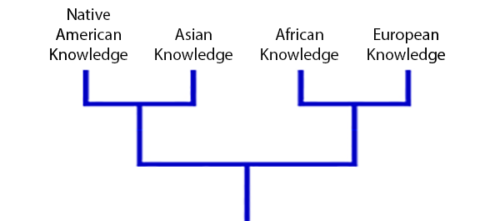
Ron’s work challenges some of the assumptions in western culture about technological knowledge. He started his talk by showing the evolution of knowledge as a branching set of possibilities and ideas that societies choose to move forward with or leave behind. To illustrate, he gave examples of different concepts of mathematics that western society has taken on board, refined, or discarded throughout its history, demonstrating that there are different versions of mathematics we could have had but chose not to.
A simplified view of the relationships of knowledge systems across the world, as shown by Ron in his talk.
These different choices in adoption and exploration of ideas, Ron continued, are more evident when one looks at the knowledge systems of different cultures side by side: different knowledge systems represent different paths that groups of people have chosen — not in totality but as the result of smaller decisions that select which ideas will be influential and which will be eliminated.
What ideas pattern our cultures?
One idea that western society has chosen, and that Ron highlighted for us, is the extraction of value. This is something we can see across this society, and it’s a powerful idea that fundamentally shapes how many of us think about the world. We extract value from the natural world in the way we exploit raw materials. We extract value from labour through the organisation of working arrangements that we have made the norm. And we extract value from social relationships through the online social media platforms, online games, and other digital tools that have so quickly become a central part of billions of people’s lives.
Examples of indigenous visual art patterned by circular and bottom-up principles, as shown by Ron in his talk.
But western culture, with its particular knowledge system and core tenet of value extraction, represents just one possible way of social and technical development. In nature, systems do not extract value, they circulate it: value moves in a recursive loop as organisms grow, die, and are subsumed back into the ecosystem. Many indigenous cultures have developed within this framework of circulating value. The possible benefits of a circular economy are becoming a topic of discussion in western society, and we would do well to remember that this concept is not western in origin: other cultures have been practicing it for a long time, a point Ron made clear in his talk. And as Ron showed us through his research, the framework of circulating value permeates various indigenous cultures in ways that go beyond approaches such as sustainable agriculture, and thereby creates repeating, fractal patterns in cultural artefacts at different scales, from artworks, to the way settlements are organised, to philosophical ideas.
Many natural phenomena show fractal patterns, for example this Angelica flowerhead, a sphere of spheres. (Photo by Chiswick Chap – Own work, CC BY-SA 3.0)
In nature, there are many examples of fractal geometry because of biological and chemical phenomena of bottom-up growth and replication. Ron shared images gathered during his research that highlight that fractal patterns are also clearly visible in, for example, traditional African art: by using visual patterns of recursive and non-linear scaling, artists intentionally symbolised the bottom-up and circular ideas permeating their culture. African cultural concepts of recursion and non-linearity, which were also brought to the Americas during the transatlantic slave trade, can be seen today in, for example, cornrow hair braiding, quilting, growing traditions, and spiritual practices.
Examples of hair braiding patterns informed by African cultural traditions, as shown by Ron in his talk.
Computing activities based on circulation of value
The links between indigenous cultural concepts and computing algorithms are many. To explore these in the context of education, Ron and his team have worked in collaboration with members of indigenous communities to develop Culturally Situated Design Tools (CSDT), a suite of computing and STEM activities and learning resources that allow young people of a range of ages to discover the relationship between computing and programming concepts and cultural ideas that trace back to indigenous cultures. The CSDT development process Ron described involved genuine collaboration: seeking ‘cultural permission’ from communities; deeply understanding the cultural concepts behind the artefacts that were being developed; and creating tools that not only allow students to explore traditional designs and artefacts but also give them the scope to design their own original artefacts and to actively contribute to communities’ cultural practices.
Screenshot from the Culturally Situated Design Tools website showing Cornrow Curves Tutorials.
Ron underlined in his talk how important it is not to see activities like CSDT as a lure to ‘trick’ young people into engaging with STEM classes; the intention is not using them as a veneer to interest more young people in industries underpinned by an extractive world view. Instead, circular and bottom-up concepts are an alternative way of seeing how technology can be used to influence and construct the world.
Returning creative contributions
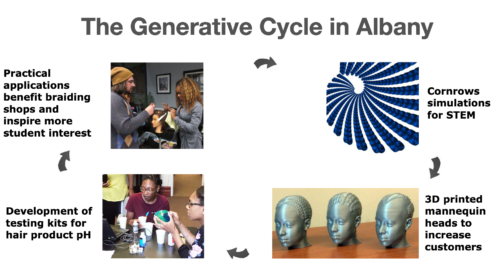
As such, an important aspect of the pedagogy of Culturally Situated Design Tools is returning creative contributions to the community whose concepts or artefacts are being explored in each activity. The aim is to create a generative cycle of STEM engagement, and Ron demonstrated how this can work by sharing more about a project he conducted with STEM students in Albany, NY. Students began the project by exploring cornrow design simulations. They brought these out of the computer, out of their schools, and into local braiding shops by producing 3D-printed mannequins featuring their cornrow designs. Through engaging with the braiding shop owners, the students learned that the owners had challenges to do with the pH level of hair products, and this led to the students producing pH testing kits for them. The practical applications benefitted the communities connected to the braiding shops and inspired more student interest in the project — thus, a circular, mutually beneficial process of engagement emerged.
A generative cycle of STEM education, in which students learn with activities based on cultural artefacts and then use their learning to give back to the community the artefacts came from. As shown by Ron in his talk.
Importantly, the STEM activities that Ron and his collaborators have developed cannot be separated from their cultural context. This way of teaching STEM is not about recruiting young people to become software developers or other tech professionals, but instead about giving them the skills to be creative contributors and problem solvers within communities so that they can help promote the circulation of value.
Rethinking diversity
I have long been enthusiastic about the potential of computing and digital making as a tool for many disciplines, and Ron’s talk made me consider what this might mean at a much deeper level than providing different routes into computing. There is a lot of discussion about how we need to increase diversity in the STEM field to make the field more equitable and able to positively contribute to society, but Ron’s presentation challenged me to think about the cultural assumptions that shape the nature of STEM, and how these influence who engages with the field. Increasing diversity and inclusion in computing and STEM is not just a case of making opportunities open to everyone, but about actually re-shaping the nature of the field so it can be equitable in its interactions with ecological systems, cultures, and human experiences.
Do watch the video of Ron’s presentation and the following Q&A for more on these concepts, examples of the computing activities and how to use them, and discussion of these fundamental ideas. You’ll find his presentation slides on our ‘previous seminars’ page.
We are taking a break from our monthly research seminars in August! In the meantime, you can revisit our previous seminars about diversity and inclusion. On 7 September, we’ll be back to start our new seminar series focusing on AI, machine learning, and data science education, in partnership with The Alan Turing Institute. At these seminars, you’ll hear from a range of international speakers about current best practices in teaching young people the technical concepts and ethical considerations involved in these technologies. Do sign up and put the dates in your calendar!
A recent Forbes article reported that over the last four years, the use of artificial intelligence (AI) tools in many business sectors has grown by 270%. AI has a history dating back to Alan Turing’s work in the 1940s, and we can define AI as the ability of a digital computer or computer-controlled robot to perform tasks commonly associated with intelligent beings.
Recent advances in computing technology have accelerated the rate at which AI and data science tools are coming to be used.
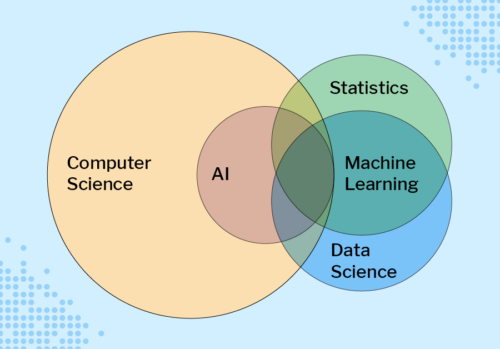
Four key areas of AI are machine learning, robotics, computer vision, and natural language processing. Other advances in computing technology mean we can now store and efficiently analyse colossal amounts of data (big data); consequently, data science was formed as an interdisciplinary field combining mathematics, statistics, and computer science. Data science is often presented as intertwined with machine learning, as data scientists commonly use machine learning techniques in their analysis.
Computer science, AI, statistics, machine learning, and data science are overlapping fields. (Diagram from our forthcoming free online course about machine learning for educators)
AI impacts everyone, so we need to teach young people about it
AI and data science have recently received huge amounts of attention in the media, as machine learning systems are now used to make decisions in areas such as healthcare, finance, and employment. These AI technologies cause many ethical issues, for example as explored in the film Coded Bias. This film describes the fallout of researcher Joy Buolamwini’s discovery that facial recognition systems do not identify dark-skinned faces accurately, and her journey to push for the first-ever piece of legislation in the USA to govern against bias in the algorithms that impact our lives. Many other ethical issues concerning AI exist and, as highlighted by UNESCO’s examples of AI’s ethical dilemmas, they impact each and every one of us.
We need to make sure that young people understand AI technologies and how they impact society and individuals.
So how do such advances in technology impact the education of young people? In the UK, a recent Royal Society report on machine learning recommended that schools should “ensure that key concepts in machine learning are taught to those who will be users, developers, and citizens” — in other words, every child. The AI Roadmap published by the UK AI Council in 2020 declared that “a comprehensive programme aimed at all teachers and with a clear deadline for completion would enable every teacher confidently to get to grips with AI concepts in ways that are relevant to their own teaching.” As of yet, very few countries have incorporated any study of AI and data science in their school curricula or computing programmes of study.
Our seminar speakers will share findings on how teachers can help their learners get to grips with AI concepts.
Partnering with The Alan Turing Institute for a new seminar series
Everyone with an interest in computing education research is welcome at our seminars, from researchers to educators and students!
The Alan Turing Institute is the UK’s national institute for data science and artificial intelligence and does pioneering work in data science research and education. The Institute conducts many different strands of research in this area and has a special interest group focused on data science education. As such, our partnership around the seminar series enables us to explore our mutual interest in the needs of young people relating to these technologies.
This promises to be an outstanding series drawing from international experts who will share examples of pedagogic best practice […].
Dr Matt Forshaw, The Alan Turing Institute
Dr Matt Forshaw, National Skills Lead at The Alan Turing Institute and Senior Lecturer in Data Science at Newcastle University, says: “We are delighted to partner with the Raspberry Pi Foundation to bring you this seminar series on AI, machine learning, and data science. This promises to be an outstanding series drawing from international experts who will share examples of pedagogic best practice and cover critical topics in education, highlighting ethical, fair, and safe use of these emerging technologies.”
Our free seminar series about AI, machine learning, and data science
At our computing education research seminars, we hear from a range of experts in the field and build an international community of researchers, practitioners, and educators interested in this important area. Our new free series of seminars runs from September 2021 to February 2022, with some excellent and inspirational speakers:
Tues 7 September:Dr Mhairi Aitken from The Alan Turing Institute will share a talk about AI ethics, setting out key ethical principles and how they apply to AI before discussing the ways in which these relate to children and young people.
Tues 5 October:Professor Carsten Schulte, Yannik Fleischer, and Lukas Höper from Paderborn University in Germany will use a series of examples from their ProDaBi programme to explore whether and how AI and machine learning should be taught differently from other topics in the computer science curriculum at school. The speakers will suggest that these topics require a paradigm shift for some teachers, and that this shift has to do with the changed role of algorithms and data, and of the societal context.
Tues 3 November:Professor Matti Tedre and Dr Henriikka Vartiainen from the University of Eastern Finland will focus on machine learning in the school curriculum. Their talk will map the emerging trajectories in educational practice, theory, and technology related to teaching machine learning in K-12 education.
Tues 7 December: Professor Rose Luckin from University College London will be looking at the breadth of issues impacting the teaching and learning of AI.
Tues 11 January: We’re delighted that Dr Dave Touretzky and Dr Fred Martin (Carnegie Mellon University and University of Massachusetts Lowell, respectively) from the AI4K12 Initiative in the USA will present some of the key insights into AI that the researchers hope children will acquire, and how they see K-12 AI education evolving over the next few years.
Tues 1 February: Speaker to be confirmed
How you can join our online seminars
All seminars start at 17:00 UK time (18:00 Central European Time, 12 noon Eastern Time, 9:00 Pacific Time) and take place in an online format, with a presentation, breakout discussion groups, and a whole-group Q&A.
Sage X3 is a resource planning product designed by Sage Group which is designed to help established businesses plan out their business operations. But what if you wanted to do more than just manage resources? What if you wanted to hijack the resource server itself? Well wait no more, as thanks to the work of Aaron Herndon, Jonathan Peterson, William Vu, Cale Black, and Ryan Villarreal along with work from community contributor deadjakk, Metasploit now has an exploit module for CVE-2020-7388 and CVE-2020-7387, to allow unauthenticated attackers to gain SYSTEM level code execution on affected versions of Sage X3. This module should prove very useful on engagements both as a way to gain an initial foothold in a target network, as well as a way to elevate privileges to allow for more effective pivoting throughout the target network. More information on these vulnerabilities can be found in our detailed writeup post on our blog.
Help My Server is Raining Keys
Another great module that landed this week was an exploit for CVE-2021-27850 from Johannes Mortiz and Yann Castel aka Hakyac, which allows attackers to steal the HMAC key from applications that use a vulnerable version of the Apache Tapestry web framework. This HMAC key is particularly important in many applications as it is often used to sign important data within the application. However in the case of Apache Tapestry, one can actually take this even further and use the leaked HMAC key to exploit a separate Java deserialization vulnerability in Apache Tapestry to gain RCE using readily available gadgets such as CommonBeansUtil1 from ysoserial. Therefore this should be one to keep an eye out for and patch if you haven’t already.
PrintNightmare Improvements
Improvements have been made to the PrintNightmare module thanks to Spencer McIntyre to improve the way that Metasploit checks if a target is vulnerable or not, as well as to incorporate the \??\UNC\ bypass for the second and most recent patch at the time of writing. Additionally, a separate bug was fixed in Metasploit’s DCERPC library to prevent crashes when handling fragmented responses from the target server that could not fit into a single packet. These fixes should help ensure that not only is Metasploit able to better detect servers that are vulnerable to PrintNightmare, but also help target those servers that may not have fully applied all the appropriate patches and mitigations.
New module content (4)
Apache Tapestry HMAC secret key leak by Johannes Moritz and Hakyac, which exploits CVE-2021-27850 – This adds an auxiliary module that retrieves the secret HMAC key from applications that use a vulnerable version of the Apache Tapestry web framework. Retrieving this key will allow an attacker to sign objects in order to exploit a separate Java deserialization vulnerability in Apache Tapestry.
WordPress Plugin Backup Guard – Authenticated Remote Code Execution by Nguyen Van Khanh, Ron Jost, and Hakyac, which exploits CVE-2021-24155 – This adds a module that exploits an authenticated file upload vulnerability in the WordPress plugin, Backup Guard. For versions below v1.6.0, the plugin permits the upload of arbitrary php code due to insufficient checks on the file format. Once the file is uploaded, code execution can be achieved by requesting the file, located under the /wp-content/uploads/backup-guard directory.
#15403 from pingport80 – This makes changes to the Powershell session type to report its platform using a value consistent with the other session types. It also adds Powershell session support to some methods within the file mixin.
#15409 from zeroSteiner – An update has been made to the PrintNightmare module to improve the way that it checks if a target is vulnerable or not and to now automatically converts UNC paths to use the \??\UNC\host\path\to\dll format to bypass the second and most recent patch at the time of writing. Additionally a bug was fixed in the DCERPC library where data that was read would be incomplete when the response would not fit into a single fragment to ensure that the PrintNightmare module can now read long responses from the target such as when enumerating the installed printer drivers.
#15440 from bwatters-r7 – This PR updates the payloads gem to include updates to Kiwi. For more information, see rapid7/mimikatz#5 and rapid7/metasploit-payloads#490
Bugs fixed
#14683 from gwillcox-r7 – This replaces a cryptic exception raised by msfvenom when an incompatible EXE template file is used with a specific injection technique. The new exception validates whether the EXE is compatible and reports the reason it is not so the user can more easily understand the problem.
#15436 from sjanusz-r7 – Ensure that generated variable names aren’t Java keywords
#15443 from dwelch-r7 – Adds python3 support for the wmiexec external module auxiliary/scanner/smb/impacket/wmiexec
#15445 from zeroSteiner – Updates msfconsole’s output logs to only show the target’s ip when an exploit module is run, rather than a host-hash
Get it
As always, you can update to the latest Metasploit Framework with msfupdate
and you can get more details on the changes since the last blog post from
GitHub:
If you are a git user, you can clone the Metasploit Framework repo (master branch) for the latest.
To install fresh without using git, you can use the open-source-only Nightly Installers or the binary installers (which also include the commercial edition).
With computers and digital technologies increasingly shaping all of our lives, it’s more important than ever that every young person, whatever their background or circumstances, has meaningful opportunities to learn about how computers work and how to create with them. That’s our mission at the Raspberry Pi Foundation.
The Raspberry Pi Computing Education Research Centre will work with educators to translate its research into practice and effect positive change in learners’ lives.
Why research matters
Compared to subjects like mathematics, computing is a relatively new field and, while there are enduring principles and concepts, it’s a subject that’s changing all the time as the pace of innovation accelerates. If we’re honest, we just don’t know enough about what works in computing education, and there isn’t nearly enough investment in high-quality research.
We need research to find the best ways of teaching young people how computers work and how to create with them.
Through our research activities we hope to make a contribution to the field of computing education and, as an operating foundation working with tens of thousands of educators and millions of learners every year, we’re uniquely well-placed to translate that research into practice. You can read more about our research work here.
The Raspberry Pi Computing Education Research Centre
The new Research Centre is a joint initiative between the University of Cambridge and the Raspberry Pi Foundation, and builds on our longstanding partnership with the Department of Computer Science and Technology. That partnership goes all the way back to 2008, to the creation of the Raspberry Pi Foundation and the invention of the Raspberry Pi computer. More recently, we have collaborated on Isaac Computer Science, an online platform that is already being used by more than 2500 teachers and 36,000 students of A level Computer Science in England, and that we will shortly expand to cover GCSE content.
Computers and digital technologies shape our lives and society — how do we make sure young people have the skills to use them to solve problems?
Through the Raspberry Pi Computing Education Research Centre, we want to increase understanding of what works in teaching and learning computing, with a particular focus on young people who come from backgrounds that are traditionally underrepresented in the field of computing or who experience educational disadvantage.
The Research Centre will combine expertise from both institutions, undertaking rigorous original research and working directly with teachers and other educators to translate that research into practice and effect positive change in young peoples’ lives.
The scope will be computing education — the teaching and learning of computing, computer science, digital making, and wider digital skills — for school-aged young people in primary and secondary education, colleges, and non-formal settings.
We’re starting with three broad themes:
Computing curricula, pedagogy, and assessment, including teacher professional development and the learning and teaching process
The role of non-formal learning in computing and digital making learning, including self-directed learning and extra-curricular programmes
Understanding and removing the barriers to computing education, including the factors that stand in the way of young people’s engagement and progression in computing education
While we’re based in the UK and expect to run a number of research projects here, we are eager to establish collaborations with universities and researchers in other countries, including the USA and India.
Get involved
We’re really excited about this next chapter in our research work, and doubly excited to be working with the brilliant team at the Department of Computer Science and Technology.
Our own Christophe De La Fuente added a module for CVE-2019-5736 based on the work of Adam Iwaniuk that breaks out of a Docker container by overwriting the runc binary of an image which is run in the user context whenever someone outside the container runs docker exec to make a request of the container.
Execute an Image Please, WordPress
Community contributor Alexandre Zanni sent us a PR that uses native PHP functions to upload a file as an image attachment to WordPress installations running the wpDiscuz plugin, then executes it by requesting the path of the uploaded file.
WordPress wpDiscuz Unauthenticated File Upload Vulnerability by Chloe Chamberland and Hoa Nguyen – SunCSR, which exploits CVE-2020-24186 – This adds an exploit module that targets versions >= v7.0.0 and <= v7.0.4 of the WordPress plugin, wpDiscuz. An unauthenticated user has the ability to upload arbitrary files as image attachments through the wpDiscuz plugin due to the PHP functions used to process the attachments. Once uploaded, unauthenticated code execution is achieved by requesting the path of the file uploaded.
Enhancements and features
#15363 from HynekPetrak – Enhances the auxiliary/scanner/ipmi/ipmi_dumphashes module to have SESSION_RETRY_DELAY and SESSION_MAX_ATTEMPTS options
Get it
As always, you can update to the latest Metasploit Framework with msfupdate
and you can get more details on the changes since the last blog post from
GitHub:
If you are a git user, you can clone the Metasploit Framework repo (master branch) for the latest.
To install fresh without using git, you can use the open-source-only Nightly Installers or the binary installers (which also include the commercial edition).
Digital technology is developing at pace, impacting us all. Most of us use screens and all kinds of computers much more than we did five years ago. The total number of apps downloaded globally each quarter has doubled since 2015, reflecting both increased smartphone penetration and the increasingly prominent role of apps in our lives. However, access to digital technology and the internet is not yet equal: there is still a ‘digital divide’, i.e. some people do not have as much access to digital technologies as others, if any at all.
This month we welcomed Dr Hayley Leonard and Thom Kunkeler at our research seminar series, to present findings on ‘Why the digital divide does not stop at access: understanding the complex interactions between socioeconomic disadvantage and computing education’. Both Hayley and Thom work as researchers at the Raspberry Pi Foundation, where we have a focus on increasing our understanding of computing education for all. They shared some results of a research project they’d carried out with a group of young people who benefitted from our Learn at Home campaign.
Digital inequality: beyond the dichotomy of access
Hayley introduced some of the existing research and thinking around digital inequality, and Thom presented the results of their research project. Setting the scene, Hayley explained that the term ‘digital divide’ can create a dichotomous have/have-not view of the world, as can the concept of a ‘gap’. However, the research presents a more nuanced picture. Rather than describing digital inequality as purely centred on access to technology, some researchers characterise three levels of the digital divide:
Level 1: Access
Level 2: Skills (digital skills, internet skills) and uses (what you do once you have access)
Level 3: Outcomes (what you achieve)
This characterisation is useful because it enables us to look beyond access and also towards what happens once people have access to technology. This is where our Learn At Home campaign came in.
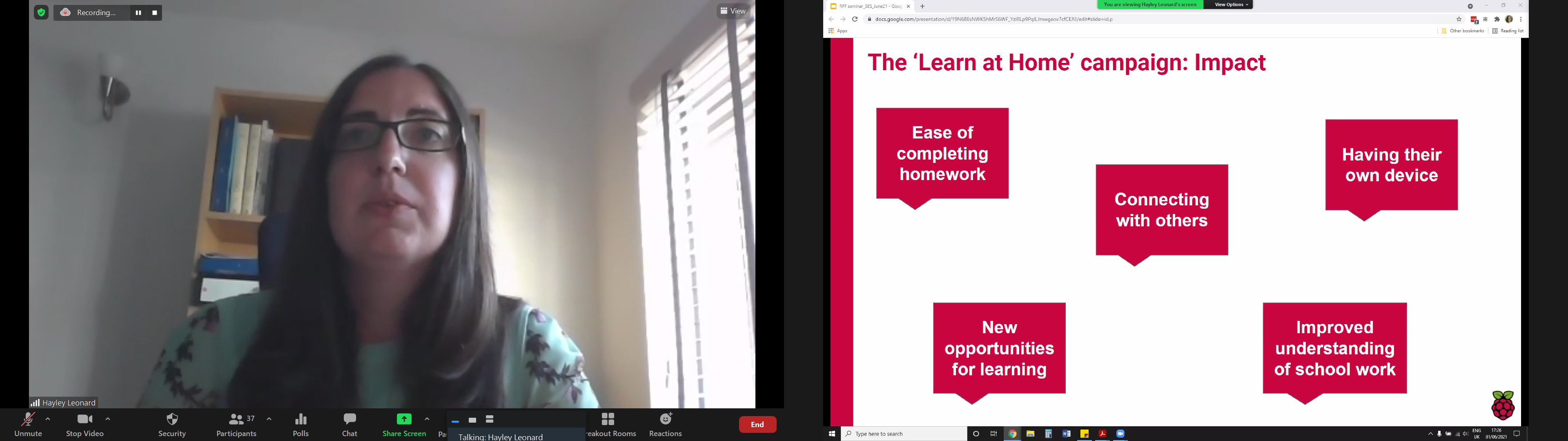
The presenters gave a brief overview of the impact of the campaign, in which the Raspberry Pi Foundation has partnered with 80 youth and community organisations and to date, thanks to generous donors, has given 5100 Raspberry Pi desktop computer kits (including monitors, headphones, etc.) to young people in the UK who didn’t have the resources to buy their own computers.
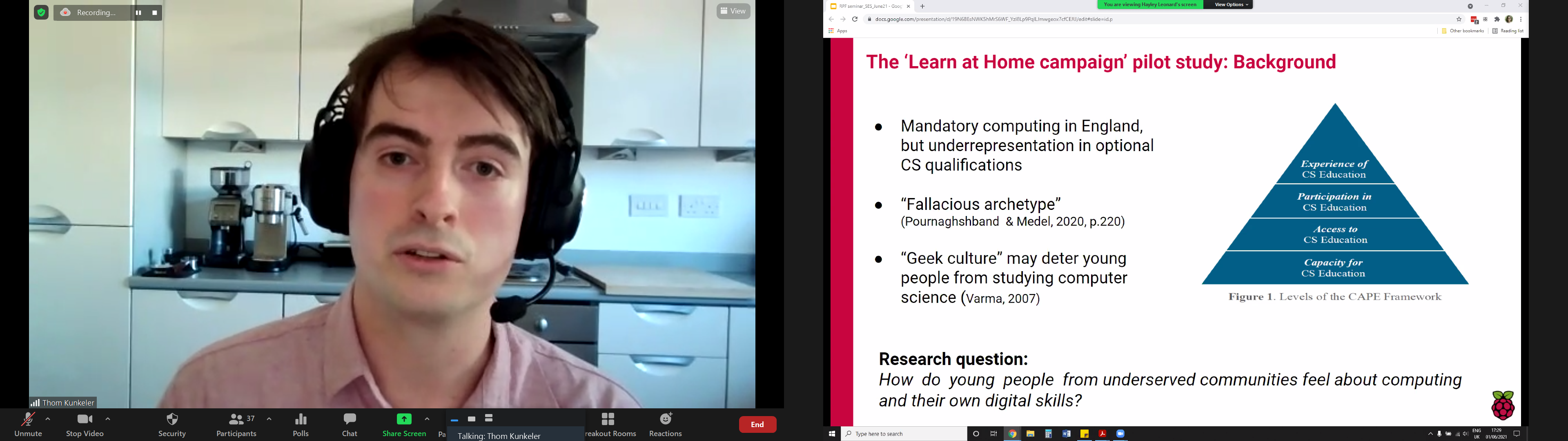
As part of the Learn At Home campaign, Hayley and Thom conducted a pilot study of how young people from underserved communities feel about computing and their own digital skills. They interviewed and analysed responses of fifteen young people, who had received hardware through Learn At Home, about computing as a subject, their confidence with computing, stereotypes, and their future aspirations.
Click on the image to enlarge it.
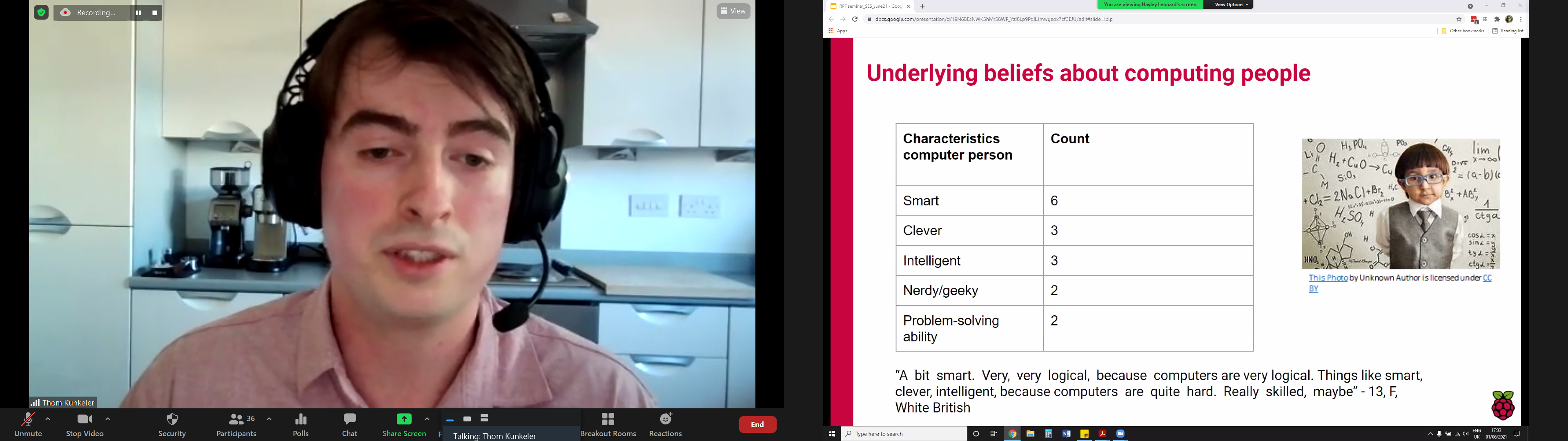
The notion of a ‘computer person’ was used in the interview questions, following work conducted by Billy Wong at the University of Reading, which found that young people experienced a difference between being a ‘computer person’ and ‘doing computing’. The study carried out by Hayley and Thom largely supports this finding. Thom described two major themes that emerged from their analysis: a mismatch between computing and interviewees’ own identities, and low self-indicated self-efficacy.
Showing that stereotypes still persist of what a ‘computer person’ is like, a 13-year-old female interviewee described them as “a bit smart. Very, very logical, because computers are very logical. Things like smart, clever, intelligent because computers are quite hard.” Four of the interviewees were also more likely to associate a ‘computer person’ with being male.
The young people interviewed associated a ‘computing person’ with the following characteristics: smart, clever, intelligent, nerdy/geeky, problem-solving ability. Click on the image to enlarge it.
The majority of the young people in the study said that they could be this ’computer person’. Even for those who did not see themselves working with computers in the future, being a ’computer person’ was still a possibility: One interviewee said, “I feel like maybe I’m quite good at using a computer. I know my way around. Yes, you never know. I could be, eventually.”
Five of the young people indicated relatively low self-efficacy in computing, and thought there were more barriers to becoming a computer person, for example needing to be better at mathematics.
In terms of future career goals, only two (White male) participants in the study considered computing as a career, with one (White female) interviewee understanding that choosing computing as a qualification might be important for her future career. This aligns with research into computer science (CS) qualification choice at age 14 in England, explored in a previous seminar, which highlighted the interaction between income, gender, and ethnicity: White girls from lower-income families were more likely to choose a CS qualification than White girls more from more affluent families, while very few Asian, Black, and Chinese girls from low-income backgrounds chose a CS qualification.
Evaluating computing education opportunities using the CAPE framework
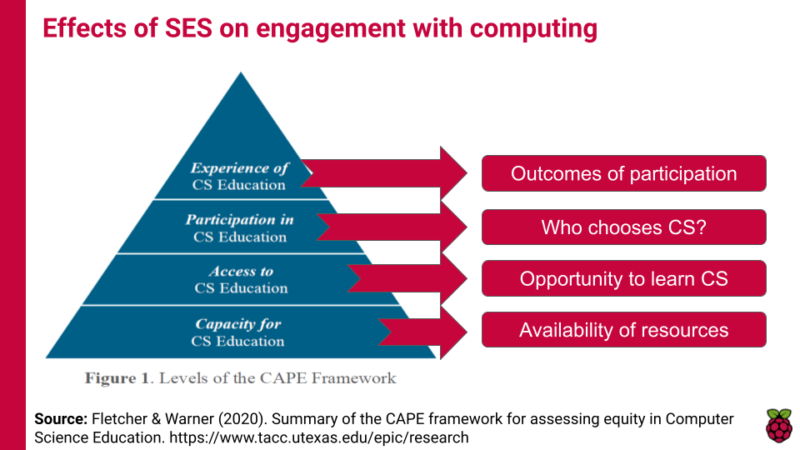
An interesting aspect of this seminar was how Hayley and Thom situated their work in the relatively new CAPE framework, which describes different levels at which to evaluate computer science education opportunities. The CAPE framework highlights that capacity and access to computing (C and A in the framework) are only part of the challenge of making computer science education equitable; students’ participation (P) in and experience (E) of computing are key factors in keeping them engaged longer-term.
Socioeconomic status (SES) can affect learner engagement with computing education at four levels set out in the CAPE framework.
As we develop computing education in the curriculum, we can use the CAPE framework to evaluate our provision. For example, where I’m writing from in England, we have the capacityto teach computing through the availability of professional development training for teachers, fully developed curriculum materials such as the Teach Computing Curriculum, and community support for teachers through organisations such as Computing at School and the National Centre for Computing Education. In terms of access we have an established national curriculum in the subject, but access to it has been interrupted for many due to the coronavirus pandemic. In terms of participation we know that gender and economic status can impact whether young people choose computer science as an elective subject post-14, and taking an intersectional view reveals that the issue of participation is more complex than that. Finally, according to our seminar speakers, young people’s experienceof computing education can be impacted by their digital or technological capital, by their self-efficacy, and by the relevance of the subject to their career aspirations and goals. This analysis really enhances our understanding of digital inequality, as it moves us away from the have/have-not language of the digital divide and starts to unpack the complexity of the impacting factors.
Although this was not covered in this month’s seminar, I also want to draw out that the CAPE framework also supports our understanding of global computing education: we may need to focus on capacity building in order to create a foundation for the other levels. Lots to think about!
If you missed the seminar, you can find the presentation slides on our seminars page and watch the recording of the researchers’ talk:
Join our next seminar
The next seminar will be the final one in the current series focused diversity and inclusion, which we’re co-hosting with the Royal Academy of Engineering. It will take place on Tuesday 13 July at 17:00–18:30 BST / 12:00–13:30 EDT / 9:00–10:30 PDT / 18:00–19:30 CEST, and we’ll welcome Prof Ron Eglash, a prominent researcher in the area of ethnocomputing. The title of Ron’s seminar is Computing for generative justice: decolonizing the circular economy.
To join this free event, click below and sign up with your name and email address:
Today, Rapid7 released the fourth in our Industry Cyber-Exposure Report (ICER) series. For those of you who have been following our research over the past few years, you may immediately suspect us of unloading another 100+ page tome of internet-based findings around the internet—but not so fast! We’ve slimmed down our research and reporting style, and this series focuses on five areas we believe that CISOs at mega-corporations actually have a shot at accomplishing, and will have a practical and fairly immediate effect on a given company’s internet security posture. Those are:
Implementing DMARC (Domain-based Message Authentication, Reporting & Conformance) to shore up email security, both internally and externally.
Enforcing HTTPS (secure HTTP) and HSTS (HTTP Strict Transport Security) in order to protect their brand reputation and their customers’ personal information.
Hitting a happily low count of unique versions for major internet-facing software applications like web servers and email servers.
Shutting off dangerous and inappropriate services that really have no business being exposed on the internet in the first place.
Kicking off a vulnerability disclosure program (VDP) that helps you learn about the security issues in your products and infrastructure before you run into real problems with malicious attackers.
The paper itself focuses on how well a specific cohort of companies are doing in these areas—this time, it’s the Deutsche Börse Prime Standard, which are widely considered to be the most successful of large companies headquartered in Germany. We cut the data by industry, so we can stack up how financials are doing compared to the technology sector, where manufacturing and pharma look pretty much the same, and plenty of other insights into how the companies and brands that permeate our lives are doing in terms of internet risk and threat exposure.
New Industry Cyber-Exposure Report (ICER): Deutsche Börse 314
In our brand-new issue of Hello World magazine, Hayley Leonard from our team gives a primer on how computing educators can apply the Universal Design for Learning framework in their lessons.
Universal Design for Learning (UDL) is a framework for considering how tools and resources can be used to reduce barriers and support all learners. Based on findings from neuroscience, it has been developed over the last 30 years by the Center for Applied Special Technology (CAST), a nonprofit education research and development organisation based in the US. UDL is currently used across the globe, with research showing it can be an efficient approach for designing flexible learning environments and accessible content.
Engaging a wider range of learners is an important issue in computer science, which is often not chosen as an optional subject by girls and those from some minority ethnic groups. Researchers at the Creative Technology Research Lab in the US have been investigating how UDL principles can be applied to computer science, to improve learning and engagement for all students. They have adapted the UDL guidelines to a computer science education context and begun to explore how teachers use the framework in their own practice. The hope is that understanding and adapting how the subject is taught could help to increase the representation of all groups in computing.
The UDL guidelines help educators anticipate barriers to learning and plan activities to overcome them.
A scientific approach
The UDL framework is based on neuroscientific evidence which highlights how different areas or networks in the brain work together to process information during learning. Importantly, there is variation across individuals in how each of these networks functions and how they interact with each other. This means that a traditional approach to teaching, in which a main task is differentiated for certain students with special educational needs, may miss out on the variation in learning between all students across different tasks.
The UDL framework is based on neuroscientific evidence
The UDL guidelines highlight different opportunities to take learner differences into account when planning lessons. The framework is structured according to three main principles, which are directly related to three networks in the brain that play a central role in learning. It encourages educators to plan multiple, flexible methods of engagement in learning (affective networks), representation of the teaching materials (recognition networks), and opportunities for action and expression of what has been learnt (strategic networks).
The three principles of UDL are each expanded into guidelines and checkpoints that allow educators to identify the different methods of engagement, representation, and expression to be used in a particular lesson. Each principle is also broken down into activities that allow learners to access the learning goals, remain engaged and build on their learning, and begin to internalise the approaches to learning so that they are empowered for the future.
Examples of UDL guidelines for computer science education from the Creative Technology Research Lab
Multiple means of engagement
Multiple means of representation
Multiple means of action and expression
Provide options for recruiting interests * Give students choice (software, project, topic) * Allow students to make projects relevant to culture and age
Provide options for perception * Model computing through physical representations as well as through interactive whiteboard/videos etc. * Select coding apps and websites that allow adjustment of visual settings (e.g. font size/contrast) and that are compatible with screen readers
Provide options for physical action * Include CS unplugged activities that show physical relationships of abstract computing concepts * Use assistive technology, including a larger or smaller mouse or touchscreen devices
Provide options for sustaining effort and persistence * Utilise pair programming and group work with clearly defined roles * Discuss the integral role of perseverance and problem-solving in computer science
Provide options for language, mathematical expressions, and symbols * Teach and review computing vocabulary (e.g. code, animations, algorithms) * Provide reference sheets with images of blocks, or with common syntax when using text
Provide options for expression and communication * Provide sentence starters or checklists for communicating in order to collaborate, give feedback, and explain work * Provide options that include starter code
Provide options for self-regulation * Break up coding activities with opportunities for reflection, such as ‘turn and talk’ or written questions * Model different strategies for dealing with frustration appropriately
Provide options for comprehension * Encourage students to ask questions as comprehension checkpoints * Use relevant analogies and make cross-curricular connections explicit
Provide options for executive function * Embed prompts to stop and plan, test, or debug throughout a lesson or project * Demonstrate debugging with think-alouds
Each principle of the UDL framework is associated with three areas of activity which may be considered when planning lessons or units of work. It will not be the case that each area of activity should be covered in every lesson, and some may prove more important in particular contexts than others. The full table and explanation can be found on the Creative Technology Research Lab website at ctrl.education.ufl.edu/projects/tactic.
Applying UDL to computer science education
While an advantage of UDL is that the principles can be applied across different subjects, it is important to think carefully about what activities to address these principles could look like in the case of computer science.
Researcher Maya Israel will speak at our April seminar
Researchers at the Creative Technology Research Lab, led by Maya Israel, have identified key activities, some of which are presented in the table on the previous page. These guidelines will help educators anticipate potential barriers to learning and plan activities that can overcome them, or adapt activities from those in existing schemes of work, to help engage the widest possible range of students in the lesson.
UDL in the classroom
As well as suggesting approaches to applying UDL to computer science education, the research team at the Creative Technology Research Lab has also investigated how teachers are using UDL in practice. Israel and colleagues worked with four novice computer science teachers in US elementary schools to train them in the use of UDL and understand how they applied the framework in their teaching.
The research found that the teachers were most likely to include in their teaching multiple means of engagement, followed by multiple methods of representation. For example, they all offered choice in their students’ activities and provided materials in different formats (such as oral and visual presentations and demonstrations). They were less likely to provide multiple means of action and expression, and mainly addressed this principle through supporting students in planning work and checking their progress against their goals.
Although the study included only four teachers, it highlighted the flexibility of the UDL approach in catering for different needs within variable teaching contexts. More research will be needed in future, with larger samples, to understand how successful the approach is in helping a wide range of students to achieve good learning outcomes.
Find out more about using UDL
There are numerous resources designed to help teachers learn more about the UDL framework and how to apply it to teaching computing. The CAST website (helloworld.cc/cast) includes an explainer video and the detailed UDL guidelines. The Creative Technology Research Lab website has computing-specific ideas and lesson plans using UDL (helloworld.cc/udl).
Maya Israel will be presenting her research at our computing education research seminar series, on 20 April 2021. Our seminars are free to attend and open to anyone from anywhere around the world. Find out more about the current seminar series, which focuses on diversity and inclusion, and sign up to attend for free.
Israel, M., Jeong, G., Ray, M., & Lash, T. (2020). Teaching Elementary Computer Science Through Universal Design for Learning. Proceedings of the 51st ACM Technical Symposium on Computer Science Education, pp. 1220-1226. dl.acm.org/doi/abs/10.1145/3328778.3366823
Rose, D. H. & Strangman, N. (2007). Universal design for learning: Meeting the challenge of individual learning differences through a neurocognitive perspective. Universal Access in the Information Society, 5(4), pp. 381-391. dl.acm.org/doi/abs/10.1007/s10209-006-0062-8
Today, I discuss the second research seminar in our series of six free online research seminars focused on diversity and inclusion in computing education, where we host researchers from the UK and USA together with the Royal Academy of Engineering. By diversity, we mean any dimension that can be used to differentiate groups and people from one another. This might be, for example, age, gender, socio-economic status, disability, ethnicity, religion, nationality, or sexuality. The aim of inclusion is to embrace all people irrespective of difference.
In this seminar, we were delighted to hear from Prof Tia Madkins (University of Texas at Austin), Dr Nicol R. Howard (University of Redlands), and Shomari Jones (Bellevue School District) (find their bios here), who talked to us about culturally responsive pedagogy and equity-focused teaching in K-12 Computer Science.
Prof Tia Madkins
Dr Nicol R. Howard
Shomari Jones
Equity-focused computer science teaching
Tia began the seminar with an audience-engaging task: she asked all participants to share their own definition of equity in the seminar chat. Amongst their many suggestions were “giving everybody the same opportunity”, “equal opportunity to access high-quality education”, and “everyone has access to the same resources”. I found Shomari’s own definition of equity very powerful:
“Equity is the fair treatment, access, opportunity, and advancement of all people, while at the same time striving to identify and eliminate barriers that have prevented the full participation of some groups. Improving equity involves increasing justice and fairness within the procedures and processes of institutions or systems, as well as the distribution of resources. Tackling equity requires an understanding of the root cause of outcome disparity within our society.”
Shomari Jones
This definition is drawn directly from the young people Shomari works with, and it goes beyond access and opportunity to the notion of increasing justice and fairness and addressing the causes of outcome disparity. Justice was a theme throughout the seminar, with all speakers referring to the way that their work looks at equity in computer science education through a justice-oriented lens.
Removing deficit thinking
Using a justice-oriented approach means that learners should be encouraged to use their computer science knowledge to make a difference in areas that are important to them. It means that just having access to a computer science education is not sufficient for equity.
Tia spoke about the need to reject “deficit thinking” (i.e. focusing on what learners lack) and instead focus on learners’ strengths or assets and how they bring these to the school classroom. For researchers and teachers to do this, we need to be aware of our own mindset and perspective, to think about what we value about ethnic and racial identities, and to be willing to reflect and take feedback.
Activities to support computer science teaching
Nicol talked about some of the ways of designing computing lessons to be equity-focused. She highlighted the benefits of pair programming and other peer pedagogies, where students teach and learn from each other through feedback and sharing ideas/completed work. She suggested using a variety of different programs and environments, to ensure a range of different pathways to understanding. Teachers and schools can aim to base teaching around tools that are open and accessible and, where possible, available in many languages. If the software environment and tasks are accessible, they open the doors of opportunity to enable students to move on to more advanced materials. To demonstrate to learners that computer science is applicable across domains, the topic can also be introduced in the context of mathematics and other subjects.
Learners can benefit from learning computer science regardless of whether they want to become a computer scientist. Computing offers them skills that they can use for self-expression or to be creative in other areas of their life. They can use their knowledge for a specific purpose and to become more autonomous, particularly if their teacher does not have any deficit thinking. In addition, culturally relevant teaching in the classroom demonstrates a teacher’s deliberate and explicit acknowledgment that they value all students in their classroom and expect students to excel.
Engaging family and community
Shomari talked about the importance of working with parents and families of ethnically diverse students in order to hear their voices and learn from their experiences.
He described how the absence of a background in technology of parents and carers can drastically impact the experiences of young people.
“Parents without backgrounds and insights into the changing landscape of technology struggle to negotiate what roles they can play, such as how to work together in computing activities or how to find learning opportunities for their children.”
Shomari drew on an example from the Pacific Northwest in the US, a region with many successful technology companies. In this location, young people from wealthy white and Asian communities can engage fully in informal learning of computer science and can have aspirations to enter technology-related fields, whereas amongst the Black and Latino communities, there are significant barriers to any form of engagement with technology. This already existent inequity has been enhanced by the coronavirus pandemic: once so much of education moved online, it became widely apparent that many families had never owned, or even used, a computer. Shomari highlighted the importance of working with pre-service teachers to support them in understanding the necessity of family and community engagement.
Building classroom communities
Building a classroom community starts by fostering and maintaining relationships with students, families, and their communities. Our speakers emphasised how important it is to understand the lives of learners and their situations. Through this understanding, learning experiences can be designed that connect with the learners’ lived experiences and cultural practices. In addition, by tapping into what matters most to learners, teachers can inspire them to be change agents in their communities. Tia gave the example of learning to code or learning to build an app, which provides learners with practical tools they can use for projects they care about, and with skills to create artefacts that challenge and document injustices they see happening in their communities.
Find out more
If you want to learn more about this topic, a great place to start is the recent paper Tia and Nicol have co-authored that lays out more detail on the work described in the seminar: Engaging Equity Pedagogies in Computer Science Learning Environments, by Tia C. Madkins, Nicol R. Howard and Natalie Freed, 2020.
Once you’ve signed up, we’ll email you the seminar meeting link and instructions for joining. If you attended Peter’s and Billy’s seminar, the link remains the same.
Welcome to the NICER Protocol Deep Dive blog series! When we started researching what all was out on the internet way back in January, we had no idea we’d end up with a hefty, 137-page tome of a research report. The sheer length of such a thing might put off folks who might otherwise learn a thing or two about the nature of internet exposure, so we figured, why not break up all the protocol studies into their own reports?
So, here we are! What follows is taken directly from our National / Industry / Cloud Exposure Report (NICER), so if you don’t want to wait around for the next installment, you can cheat and read ahead!
One protocol to bring them all, and in the darkness, bind them.
TLDR
WHAT IT IS: HTTP: Pristine, plaintext Hypertext Transfer Protocol communications. HTTPS: Encrypted HTTP.
HOW MANY: 51,519,309 discovered HTTP nodes. 36,141,137 discovered HTTPS nodes. We’re going to be talking a bit differently about fingerprinting in this blog post, so raw, generic counts will have no context.
VULNERABILITIES: Hoo boy! Many! But, do you mean vulnerabilities in core web servers themselves? The add-ons folks build into them? The web applications they serve? As many users of Facebook might say, “it’s complicated.”
ADVICE: Go back to Gopher! Seriously, though, please continue to build awesome things using HTTPS. Just build them in such a way that folks who install and operate web servers can easily configure them securely, see patch status, and upgrade quickly and confidently.
ALTERNATIVES: QUIC, or “Quick UDP Internet Connection,” which is a “new multiplexed and secure transport atop UDP, designed from the ground up and optimized for HTTP/2 semantics.” While HTTP[S] will be with us for a Very Long Time, QUIC is its successor and will usher in whole new ways to deliver content securely and efficiently (and undoubtedly, exploit the same).
We’re going to talk about both HTTP and HTTPS combined (for the most part) as we identify what we found, some core areas of exposure, and opportunities for attackers. It’ll be a bit different than all the previous blogs, but that’s just part of the quirky nature of HTTP in general.
Discovery details
Way back in our Email blogs, we compared encrypted and unencrypted services. We’ll do the same here, but will be presenting a “top 12” for countries since that is the set combination between HTTP and HTTPS.
There are 30% more devices on the internet running plaintext HTTP versus encrypted HTTPS web services. The U.S. dwarfs all other countries in terms of discovered web service, very likely due to the presence of so many cloud services, hosting providers, and routers, switches, etc. in IPv4 space allocated to the U.S.
Germany and Ireland each expose 9% more HTTPS nodes than HTTP, and both the Netherlands and U.K. are quickly closing their encryption disparity as well.
We’ll skip cloud counts since, well, everyone knows cloud servers are full of web servers and we’re not sure what good it will do letting you know that Amazon had ~640K Elastic Load Balancers (version 2.0!) running on the day our studies kicked off.
Exposure information
To understand exposure, we need to see what is running on these web servers. That’s not as easy as you might think with just lightweight scans. For example, here are the top 20 HTTP servers by vendor/family and port:
Vendor
Family
HTTPS (80)
% of HTTP
HTTPS (443)
% of HTTPS
Microsoft
IIS
5,273,393
10.24%
2,096,655
5.80%
Apache
Apache
4,873,517
9.46%
2,595,714
7.18%
nginx
nginx
3,938,031
7.64%
2,495,667
6.91%
Amazon
Elastic Load Balancing
644,862
1.25%
386,751
1.07%
Squid Cache
Squid
381,224
0.74%
8,649
0.02%
ACME Laboratories
mini_httpd
125,708
0.24%
82,427
0.23%
Oracle
GoAhead Webserver
48,505
0.09%
40,501
0.11%
Apache
Tomcat
40,702
0.08%
32,271
0.09%
Taobao
Tengine
37,626
0.07%
14,130
0.04%
Eclipse
Jetty
29,750
0.06%
50,763
0.14%
Mbedthis Software
Appweb
23,463
0.05%
19,470
0.05%
Virata
EmWeb
22,354
0.04%
7,179
0.02%
Embedthis
Appweb
17,235
0.03%
32,629
0.09%
Microsoft
Windows CE Web Server
14,012
0.03%
1,027
0.00%
TornadoWeb
Tornado
13,637
0.03%
10,151
0.03%
Tridium
Niagara
9,772
0.02%
564
0.00%
TwistedMatrix
Twisted Web
7,481
0.01%
4,984
0.01%
Caucho
Resin
5,168
0.01%
1,812
0.01%
Mort Bay
Jetty
5,079
0.01%
2,033
0.01%
SolarWinds
Serv-U
3,232
0.01%
6,421
0.02%
Remember, we’re just counting what comes back on a `GET` request to those two ports on each active IP address, and the counts come from Recog signatures (which are great, but far from comprehensive). For some servers, we can get down to the discrete version level, which lets us build a Common Platform Enumeration identifier. That identifier lets us see how many CVEs a given instance type has associated with it. We used this capability to compare each version of each service family against the number of CVEs it has. While we do not have complete coverage across the above list, we do have some of the heavy(ier) hitters:
We limited the view to a service family having at least having 10 or more systems exposed and used color to encode the CVSS v2 scores.
The most prevalent CVE-enumerated vulnerabilities are listed in the table below. While it’s technically possible that these CVEs have been mitigated through some other software control, patching them out entirely is really the best and easiest way to avoid uncomfortable conversations with your vulnerability manager.
And, the top 30 most prevalent are:
CVE
Number
CVE-2017-8361
336
CVE-2013-2275
202
CVE-2012-1452
186
CVE-2016-1000107
184
CVE-2016-6440
184
CVE-2012-0038
168
CVE-2012-1835
165
CVE-2016-8827
165
CVE-2011-3868
164
CVE-2011-0607
160
CVE-2007-6740
154
CVE-2013-4564
150
CVE-2016-0948
149
CVE-2016-0956
149
CVE-2009-2047
146
CVE-2015-5670
145
CVE-2017-8577
143
CVE-2014-0134
135
CVE-2015-5355
135
CVE-2012-5932
127
CVE-2014-8089
120
CVE-2015-5685
118
CVE-2016-1000109
118
CVE-2015-5672
114
CVE-2016-5596
112
CVE-2016-5600
112
CVE-2016-4261
111
CVE-2016-4263
111
CVE-2016-4264
111
CVE-2016-4268
111
While we expect to see traditional web servers, there are other devices connected to the internet that expose web services or administrative interfaces (which we’ve partially enumerated below):
Vendor
Device
HTTP (80)
HTTPS (443)
Cisco
Firewall
123
986,766
AVM
WAP
1,942
604,890
Asus
WAP
1
177,936
Synology
NAS
61,796
50,531
Check Point
Firewall
16,059
30,773
SonicWALL
VPN
7,413
16,061
Ubiquiti
WAP
0
11,813
HP
Printer
16,247
9,178
MikroTik
Router
289,026
8,056
Tivo
DVR
6,400
6,779
Philips
Light Bulb
4,785
3,349
Polycom
VoIP
369
3,079
Ubiquiti
Web cam
955
922
HP
Lights Out Management
601
708
ARRIS
Cable Modem
350
217
Fortinet
Firewall
1,221
159
Xerox
Printer
1,575
29
Canon
Multifunction Device
124
14
Netwave
Web cam
6,420
7
HeiTel
DVR
2,734
2
Samsung
DVR
53,053
2
Merit LILIN
DVR
2,565
1
Fidelix
Industrial Control
545
0
FUHO
DVR
1,249
0
Shenzhen Reecam Tech. Ltd.
Web cam
1,902
0
Ubiquiti
DVR
675
0
Yamaha
Router
9,675
0
For instance, we found nearly a million Cisco ASA firewalls. That fact is not necessarily “bad,” since they can be configured to provide remote access services (like VPN). Having 123 instances on port 80 is, however, not the best idea.
Unlike Cisco, most MikroTik routers seem to be exposed sans encryption, and over 75% of them are exposing the device’s admin interface. What could possibly go wrong?
Upward of 50,000 Synology network-attached storage devices show up as well, and the File Sharing blog posts talked at length about the sorry state of exposure in these types of devices. They’re on the internet to enable owners to play local media remotely and access other files remotely.
There are printers, and light bulbs; DVRs and home router admin interfaces; oh, and a few thousand entire building control systems.In short, you can find pretty much anything with a web interface hanging out on the internet.
Attacker’s view
There are so many layers in modern HTTP[S] services that attackers likely are often paralyzed by not knowing which ones to go after first. Attacking HTTP services on embedded systems is generally one of the safest paths to take, since they’re generally not monitored by the owner nor the network operator and can be used with almost guaranteed anonymity.
Formal web services—think Apache Struts, WebLogic, and the like—are also desirable targets, since they’re usually associated with enterprise deployments and, thus, have more potential for financial gain or access to confidential records. HTTP interfaces to firewalls and remote access systems (as we saw back in the Remote Access blog posts) have been a major focus for many attacker groups for the past 18–24 months since once compromised, they can drop an adversary right into the heart of the internal network where they can (usually) quickly establish a foothold and secondary access method.
You’re also more likely to see (at least for now) more initial probes on HTTP (80), as noted by both the unique source IPv4 and total interaction views (above). It’s hard to say “watch 80 closely, and especially 80→443 moves by clients,” since most services are still offered on both ports and good sites are configured to automatically redirect clients to HTTPS. Still, if you see clients focus more on 80, you may want to flag those for potential further investigation. And, definitely be more careful with your systems that only talk HTTP (80).
Our advice
IT and IT security teams should build awesome platforms and services and put them on the internet over HTTPS! Innovation drives change and progress—plus, the internet has likely done more good than harm since the first HTTP request was made. Do keep all this patched and ensure secure configuration and coding practices are part of the development and deployment lifecycles. Do not put administrative interfaces to anything on the internet if at all possible and ensure you know what services your network devices and “Internet of Things” devices are exposing. Finally, disable `Server:` banners on everything and examine other HTTP headers for what else they might leak and sanitize what you can. Attackers on the lookout for, say, nginx will often move on if they see Apache in the Server header. You’d be surprised just how effective this one change can be.
Cloud providers should continue to offer secure, scalable web technologies. At the same time, if pre-built disk images with common application stacks are offered, keep them patched and ensure you have the ability to inform users when things go out-of-date.
Government cybersecurity agencies should keep reminding us not to put digital detritus with embedded web servers on the internet and monitor for campaigns that are targeting these invisible services. When there are major issues with core technologies such as Microsoft IIS, Apache HTTP, or nginx, processes should be in place to notify the public and work with ISPs, hosting, and cloud providers to try to contain any possible widespread damage. There should be active programs in place to ensure no critical telecommunications infrastructure has dangerous ports or services exposed, especially router administrative interfaces over HTTP/HTTPS.
Welcome to the NICER Protocol Deep Dive blog series! When we started researching what all was out on the internet way back in January, we had no idea we’d end up with a hefty, 137-page tome of a research report. The sheer length of such a thing might put off folks who might otherwise learn a thing or two about the nature of internet exposure, so we figured, why not break up all the protocol studies into their own reports?
So, here we are! What follows is taken directly from our National / Industry / Cloud Exposure Report (NICER), so if you don’t want to wait around for the next installment, you can cheat and read ahead!
HOW MANY: 1,638,577 discovered nodes. 1,638,495 (99.9%) gave up version and/or other fingerprintable information and (much) smaller subsets provided operating system information.
VULNERABILITIES: A few. Mostly denial-of-service and information disclosure, but there have been remote code execution ones from time to time.
ADVICE: Use it! Just not on the internet. And, configured properly. And, patched.
ALTERNATIVES: Nope. This is the de facto way to keep time on the internet.
GETTING: Stuck in time. There was literally no change from 2019.
The internet could not function the way it does without NTP. You’d think with that much power NTP would be all BPOC and act all smug and superior. Yet, it does it’s thing—keeping all computers that use it in sync, time-wise—with little fanfare, except when it’s being used in denial-of-service attacks. It has been around since around 1985, and while it is not the only network-based time synchronization protocol, it is The Standard.
NTP servers operate in a hierarchy with up to 15 levels dubbed stratum. There are authoritative, highly available NTP servers we all use every day (most of the time provided by operating system vendors and running on obviously named hosts such as time.apple.com and time.windows.com).
Virtually anything can be an NTP server, from a router, to your phone, to a RaspberryPi, so dedicated appliances that key off of GPS signals as a time-source. Now, just because something can be a time server does not mean it should be a time server.
Discovery details
Project Sonar found 1,638,577 NTP servers on the public internet, so one might say we have quite a bit of time on our hands. Our editors say otherwise, so let’s see what time looks like across countries and clouds.
The United States has many IPv4 blocks, many computers, and many major ISPs and IT companies that like to control things. It also has a decent number of businesses that run NTP for no good reason. All of this helps push it to the top spot. Russia finally shows up in second place, for similar reasons, though two of Russia’s major ISPs account for just over 40% of Russia’s exposure. China—with its vast IPv4 space and population—comes in at No. 3, which means businesses and ISPs have figured out needlessly exposing NTP can cause more problems than it’s worth.
Rapid7 Labs was glad to see cloud environments (both the runners and the customers) seem to take the dangers of running NTP seriously as well, with most having almost no exposure.
Exposure information
Now, you know NTP has to be a bit dangerous if the main support site for the protocol itself has a big, bad warning about the dangers of NTP right at the top of its page. The biggest danger comes from using it for amplification DDoS (it is a UDP-based protocol). While it is still used today, there are way better services, such as memcached, to use for such things.
NTP servers are just bits of software that have vulnerabilities like all other software. When you put anything on the internet, bad folks are going to try to gain control over it. If an organization needs—for some odd reason—to run its own NTP server, there’s no reason it has to be on the public internet. And, if there is some weird reason it does, there’s no reason it has to be configured to respond to requests from all subnets.
Why are we picking nits? Well, it’s one more thing you’re not going to patch. Then, there’s the problem of all the information you might be giving to attackers about your network setup. In our NTP corpus, 255,602 (15.5%) reveal the private IP address scheme on the internal network interface.
OS
Count
Percentage
UNIX (generic)
1,089,876
69.61%
Cisco device
294,330
18.80%
Linux+kernel version
99,032
6.32%
BSD+kernel version
38,798
2.48%
Juniper device+version
32,469
2.07%
VMware+version
8,597
0.55%
SunOS
948
0.06%
Other
657
0.04%
vxWorks
505
0.03%
Sidewinder+version
332
0.02%
QNX+version
186
0.01%
macOS+version
66
0.00%
Over 1.5 million NTP servers give hints about the operating system and version they run. In total, 180,410 (11%) give us precise NTP version and build information, with all but roughly 4,000 giving us the precise release date:
There’s an [un]healthy mix of remote code execution, information leakage, local service DoS, and amplification DDoS spread throughout that mix of NTP devices.
Hopefully we’ve managed to at least start to convince you otherwise if you were thinking, “Well, it’s just an NTP server” at the start of this section.
Attacker’s view
The Exposure Information section provided a great deal of information on the potential (and measured) weaknesses in NTP systems. Attackers will judge your potential as a victim (and cyber-insurers will likely up your premiums) from how your attack surface is configured. NTP can reveal all the cracks in your configuration and patch management processes, and even provide a means of entry.
And, attackers still use NTP in amplification attacks, so that NTP server you didn’t realize you had or really thought you needed will likely be used in attacks on other sites.
Our advice
IT and IT security teams should use NTP behind the firewall and keep it patched. If you do need to run NTP externally, only let it talk to specific hosts/networks.
Cloud providers should keep up the great work by only exposing as much NTP as they need to and offering guidance to customers for how to run NTP securely (off the internet).
Government cybersecurity agencies should provide timely notifications when new vulnerabilities in NTP surface or there are known, active NTP DoS campaigns. Educational materials should be made available on dangers of exposing NTP to the internet and on how to securely configure various NTP services.
In this blog post, I’ll discuss the first research seminar in our six-part series about diversity and inclusion. Let’s start by defining our terms. Diversity is any dimension that can be used to differentiate groups and people from one another. This might be, for example, age, gender, socio-economic status, disability, ethnicity, religion, nationality, or sexuality. The aim of inclusion is to embrace all people irrespective of difference.
It’s vital that we are inclusive in computing education, because we need to ensure that everyone can access and learn the empowering and enabling technical skills they need to support all aspects of their lives.
We kicked off the series with a seminar from Dr Peter Kemp and Dr Billy Wong focused on computing education in England’s schools post-14. Peter is a Lecturer in Computing Education at King’s College London, where he leads on initial teacher education in computing. His research areas are digital creativity and digital equity. Billy is an Associate Professor at the Institute of Education, University of Reading. His areas of research are educational identities and inequalities, especially in the context of higher education and STEM education.
Dr Peter Kemp
Dr Billy Wong
Computing in England’s schools
Peter began the seminar with a comprehensive look at the history of curriculum change in Computing in England. This was very useful given our very international audience for these seminars, and I will summarise it below. (If you’d like more detail, you can look over the slides from the seminar. Note that these changes refer to England only, as education in the UK is devolved, and England, Northern Ireland, Scotland, and Wales each has a different education system.)
In 2014, England switched from mandatory ICT (Information and Communication Technology) to mandatory Computing (encompassing information technology, computer science, and digital literacy). This shift was complemented by a change in the qualifications for students aged 14–16 and 16–18, where the primary qualifications are GCSEs and A levels respectively:
At GCSE, there has been a transition from GCSE ICT to GCSE Computer Science over the last five years, with GCSE ICT being discontinued in 2017
At A level before 2014, ICT and Computing were on offer as two separate A levels; now there is only one, A level Computer Science
One of the issues is that in the English education system, there is a narrowing of the curriculum at age 14: students have to choose between Computer Science and other subjects such as Geography, History, Religious Studies, Drama, Music, etc. This means that those students that choose not to take a GCSE Computer Science (CS) may find that their digital education is thereby curtailed from then onwards. Peter’s and Billy’s view is that having a more specialist subject offer for age 14+ (Computer Science as opposed to ICT) means that fewer students take it, and they showed evidence of this from qualifications data. The number of students taking CS at GCSE has risen considerably since its introduction, but it’s not yet at the level of GCSE ICT uptake.
GCSE computer science and equity
Only 64% of schools in England offer GCSE Computer Science, meaning that just 81% of students have the opportunity to take the subject (some schools also add selection criteria). A higher percentage (90%) of selective grammar schools offer GCSE CS than do comprehensive schools (80%) or independent schools (39%). Peter suggested that this was making Computer Science a “little more elitist” as a subject.
Peter analysed data from England’s National Pupil Database (NPD) to thoroughly investigate the uptake of Computer Science post-14 with respect to the diversity of entrants.
He found that the gender gap for GCSE CS uptake is greater than it was for GCSE ICT. Now girls make up 22% of the cohort for GCSE CS (2020 data), whereas for the ICT qualification (2017 data), 43% of students were female.
Peter’s analysis showed that there is also a lower representation of black students and of students from socio-economically disadvantaged backgrounds in the cohort for GCSE CS. In contrast, students with Chinese ancestry are proportionally more highly represented in the cohort.
Another part of Peter’s analysis related gender data to the Income Deprivation Affecting Children Index (IDACI), which is used as an indicator of the level of poverty in England’s local authority districts. In the graphs below, a higher IDACI decile means more deprivation in an area. Relating gender data of GCSE CS uptake against the IDACI shows that:
Girls from more deprived areas are more likely to take up GCSE CS than girls from less deprived areas are
The opposite is true for boys
Peter covered much more data in the seminar, so do watch the video recording (below) if you want to learn more.
Peter’s analysis shows a lack of equity (i.e. equality of outcome in the form of proportional representation) in uptake of GCSE CS after age 14. It is also important to recognise, however, that England does mandate — not simply provide or offer — Computing for all pupils at both primary and secondary levels; making a subject mandatory is the only way to ensure that we do give access to all pupils.
What can we do about the lack of equity?
Billy presented some of the potential reasons for why some groups of young people are not fully represented in GCSE Computer Science:
There are many stereotypes surrounding the image of ‘the computer scientist’, and young people may not be able to identify with the perception they hold of ‘the computer scientist’
There is inequality in access to resources, as indicated by the research on science and STEM capital being carried out within the ASPIRES project
More research is needed to understand the subject choices young people make and their reasons for choosing as they do.
We also need to look at how the way we teach Computing to students aged 11 to 14 (and younger) affects whether they choose CS as a post-14 subject. Our next seminar revolves around equity-focused teaching practices, such as culturally relevant pedagogy or culturally responsive teaching, and how educators can use them in their CS learning environments.
Meanwhile, our own research project at the Raspberry Pi Foundation, Gender Balance in Computing, investigates particular approaches in school and non-formal learning and how they can impact on gender balance in Computer Science. For an overview of recent research around barriers to gender balance in school computing, look back on the research seminar by Katharine Childs from our team.
Peter and Billy themselves have recently been successful in obtaining funding for a research project to explore female computing performance and subject choice in English schools, a project they will be starting soon!
If you missed the seminar, watch recording here. You can also find Peter and Billy’s presentation slides on our seminars page.
Next up in our seminar series
In our next research seminar on Tuesday 2 February at 17:00–18:30 BST / 12:00–13:30 EDT / 9:00–10:30 PDT / 18:00–19:30 CEST, we’ll welcome Prof Tia Madkins (University of Texas at Austin), Dr Nicol R. Howard (University of Redlands), and Shomari Jones (Bellevue School District), who are going to talk to us about culturally responsive pedagogy and equity-focused teaching in K-12 Computer Science. To join this free online seminar, simply sign up with your name and email address.
Once you’ve signed up, we’ll email you the seminar meeting link and instructions for joining. If you attended Peter’s and Billy’s seminar, the link remains the same.
Welcome to the NICER Protocol Deep Dive blog series! When we started researching what all was out on the internet way back in January, we had no idea we’d end up with a hefty, 137-page tome of a research report. The sheer length of such a thing might put off folks who might otherwise learn a thing or two about the nature of internet exposure, so we figured, why not break up all the protocol studies into their own reports?
So, here we are! What follows is taken directly from our National / Industry / Cloud Exposure Report (NICER), so if you don’t want to wait around for the next installment, you can cheat and read ahead!
Encrypting DNS is great! Unless it’s baddies doing the encrypting.
TLDR
WHAT IT IS:DNS over TLS is just what it says on the tin: the DNS protocol embedded in a TLS connection, ostensibly to make your DNS request more confidential.
HOW MANY: 3,237 discovered nodes. A hodgepodge mix of vendor/version information was discernible, but you’ll need to read the details to find out more.
VULNERABILITIES: Whatever is in the DNS that backs the service or in the code that presents TLS (more often than not, a plain, ol’ web server).
ADVICE: It’s complicated (read on to find out why!)
GETTING: Drunk with power. There are nearly two times as many as April 2019.
At face value, DNS over TLS (henceforth referred to as DoT) aims to be the confidentiality solution for a legacy cleartext protocol that has managed to resist numerous other confidentiality (and integrity) fixup attempts. It is one of a handful of modern efforts to help make DNS less susceptible to eavesdropping and person-in-the-middle attacks.
Discovery details
We chose to examine DoT because web browsers have become the new operating system of the internet, and DoT and cousins all allow browsers (or any app, really) to bypass your home, ISP, or organization’s choices of DNS resolution method and resolution provider. Since it’s presented over TLS, it can also be a great way for attackers to continue to use DNS as a command-and-control channel as well as an exfiltration channel.
We chose to examine DoT versus DoH because, well, it is far easier to enumerate DoT endpoints than it is DoH endpoints. It’s getting easier to enumerate DoH since there seems to be some agreement on the standard way to query it, so that will likely make it to a future report, but for now, let’s take a look at what DoT Project Sonar found:
Yes, you read that chart correctly! Ireland is No. 1 in terms of the number of nodes running a DoT service, and it’s all thanks to a chap named Daniel Cid, who co-runs CleanBrowsing, which is a “DNS-based content filtering service that offers a safe way to browse the web without surprises.” Daniel has his name on AS205157, which is allocated to Ireland, but the CleanBrowsing service itself is run out of California. In fact, CleanBrowsing comprises almost 50% of the DoT corpus (1,612 nodes), with 563 nodes attributed to the United States and a tiny number of servers attributed to a dozen or so other country network spaces.
Both the U.S. and Germany have a cornucopia of server types and autonomous systems presenting DoT services (none really stand out besides CleanBrowsing).
Since Bulgaria rarely makes it into top 10 exposure lists, we took a look at what was there and it’s a ton (relatively, anyway: 242) of DoT servers in Fiber Optics Bulgaria OOD, which is a kind of “meta” service provider for ISPs. Given the relative scarcity of IPv4 addresses, setting aside 242 of them just for DoT is a pretty major investment.
Even though the numbers are small, Japan’s presence is interesting, as it’s nearly all due to a single ISP: Internet Initiative Japan Inc.
In case you have been left unawares, Google is a big player] in the DoT space, but it tends to concentrate DNS exposure to a tiny handful of IP addresses (i.e., that bar is not Google-proper). When we filter out CleanBrowsing (yep, they’re everywhere), we’re left with the major exposure in Google being … a couple dozen servers running an instance of Pi-hole (dnsmasq-pi-hole-2.80, to be precise). Cut/paste that finding for OV and DigitalOcean and yep, that same Pi-hole setup is tops in those two clouds as well.
You don’t need to get all fancy and run a Pi-hole setup to host your own DoT server. Just fire up an nginx instance, create a basic configuration, set up your own DNS behind it, and now, you too can stop your ISP from snooping your DNS queries.
Exposure information
Here is where we’d normally talk about versions and CVEs, etc., but the DoT situation is complicated by a few things. First, we have big players in this space using proprietary solutions, so version fingerprints such as “CleanBrowsing v1.6a” are not very useful information. Second, should we focus on the version of the web server or of the back-end DNS server (or, both)? The latter might not be useful, since you can configure an nginx DoT setup to proxy to a third party, and that’s what will get picked up in the response. Lastly, even if we focus on the second-tier “big guns,” such as PowerDNS, we end up with a situation like this:
Giving you that glimpse does help to show it’s utter chaos even in PowerDNS-land, but DNS and chaos seem to go hand in hand.
Attacker’s view
There are no DoT honeypots in project Heisenberg, but DoT is just a TLS wrapper over a traditional DNS binary-format query. When we looked for that in the TCP/853 full packet captures, we saw us (!) and a couple other researchers. Not very exciting, but with the goal of DoT being privacy, we really shouldn’t see random DoT requests.
Attackers are more likely to stand up their own DoT servers or reconfigure other DoT servers to use their DNS back-ends and then use those as covert channels once they gain a foothold after a successful phishing attack. This is a big reason we enumerate/catalog DoT, and we’re starting to see more DoT in residential ISP space and traditional hosting provider IP space. It looks like more folks are experimenting with DoT with each monthly study.
Our advice
IT and IT security teams should block TCP/853, lock down DoT and DoH browser settings as much as possible so there is no way to bypass organizational IT policies, and monitor for all attempts to use DoT or DoH services internally (or externally). In other words, unless you’re the ones setting them up, disallowing rogue, internal DoT is the safest course.
Cloud providers should consider offering managed DoT solutions and provide patched, secure disk images for folks who want to stand up their own. (This is one of the few cases where organizational advice and cloud advice are quite nearly opposite.)
Government cybersecurity agencies should monitor for malicious use of DoT and provide timely updates to the public. These centers should also be a source of unbiased, expert information on DoT, DoH, DoQ (et al).
The Domain Name System (DNS) matches names to resources. Instead of typing 104.18.26.46 to access the Cloudflare Blog, you type blog.cloudflare.com and, using DNS, the domain name resolves to 104.18.26.46, the Cloudflare Blog IP address.
Similarly, distributed systems such as Ethereum and IPFS rely on a naming system to be usable. DNS could be used, but its resolvers’ attributes run contrary to properties valued in distributed Web (dWeb) systems. Namely, dWeb resolvers ideally provide (i) locally verifiable data, (ii) built-in history, and (iii) have no single trust anchor.
At Cloudflare Research, we have been exploring alternative ways to resolve queries to responses that align with these attributes. We are proud to announce a new resolver for the Distributed Web, where IPFS content indexed by the Ethereum Name Service (ENS) can be accessed.
To discover how it has been built, and how you can use it today, read on.
Welcome to the Distributed Web
IPFS and its addressing system
The InterPlanetary FileSystem (IPFS) is a peer-to-peer network for storing content on a distributed file system. It is composed of a set of computers called nodes that store and relay content using a common addressing system.
This addressing system relies on the use of Content IDentifiers (CID). CIDs are self-describing identifiers, because the identifier is derived from the content itself. For example, QmXoypizjW3WknFiJnKLwHCnL72vedxjQkDDP1mXWo6uco is the CID version 0 (CIDv0) of the wikipedia-on ipfs homepage.
To understand why a CID is defined as self-describing, we can look at its binary representation. For QmXoypizjW3WknFiJnKLwHCnL72vedxjQkDDP1mXWo6uco, the CID looks like the following:
The first is the algorithm used to generate the CID (sha2-256 in this case); then comes the length of the encoded content (32 for a sha2-256 hash), and finally the content itself. When referring to the multicodec table, it is possible to understand how the content is encoded.
Name
Code (in hexadecimal)
identity
0x00
sha1
0x11
sha2-256
0x12 = 00010010
keccak-256
0x1b
This encoding mechanism is useful, because it creates a unique and upgradable content-addressing system across multiple protocols.
Ethereum is an account-based blockchain with smart contract capabilities. Being account-based, each account is associated with addresses and these can be modified by operations grouped in blocks and sealed by Ethereum’s consensus algorithm, Proof-of-Work.
There are two categories of accounts: user accounts and contract accounts. User accounts are controlled by a private key, which is used to sign transactions from the account. Contract accounts hold bytecode, which is executed by the network when a transaction is sent to their account. A transaction can include both funds and data, allowing for rich interaction between accounts.
When a transaction is created, it gets verified by each node on the network. For a transaction between two user accounts, the verification consists of checking the origin account signature. When the transaction is between a user and a smart contract, every node runs the smart contract bytecode on the Ethereum Virtual Machine (EVM). Therefore, all nodes perform the same suite of operations and end up in the same state. If one actor is malicious, nodes will not add its contribution. Since nodes have diverse ownership, they have an incentive to not cheat.
How to access IPFS content
As you may have noticed, while a CID describes a piece of content, it doesn’t describe where to find it. In fact, the CID describes the content, but not its location on the network. The location of the file would be retrieved by a query made to an IPFS node.
An IPFS URL (Unified Resource Locator) looks like this: ipfs://QmXoypizjW3WknFiJnKLwHCnL72vedxjQkDDP1mXWo6uco. Accessing this URL means retrieving QmXoypizjW3WknFiJnKLwHCnL72vedxjQkDDP1mXWo6uco using the IPFS protocol, denoted by ipfs://. However, typing such a URL is quite error-prone. Also, these URLs are not very human-friendly, because there is no good way to remember such long strings. To get around this issue, you can use DNSLink. DNSLink is a way of specifying IPFS CIDs within a DNS TXT record. For instance, wikipedia on ipfs has the following TXT record
In addition, its A record points to an IPFS gateway. This means that, when you access en.wikipedia-on-ipfs.org, your request is directed to an IPFS HTTP Gateway, which then looks out for the CID using your domain TXT record, and returns the content associated to this CID using the IPFS network.
This is trading ease-of-access against security. The web browser of the user doesn’t verify the integrity of the content served. This could be because the browser does not implement IPFS or because it has no way of validating domain signature — DNSSEC. We wrote about this issue in our previous blog post on End-to-End Integrity.
Human readable identifiers
DNS simplifies referring to IP addresses, in the same way that postal addresses are a way of referring to geolocation data, and contacts in your mobile phone abstract phone numbers. All these systems provide a human-readable format and reduce the error rate of an operation.
To verify these data, the trusted anchors, or “sources of truth”, are:
The government registry for postal addresses. In the UK, addresses are handled by cities, boroughs and local councils.
When it comes to your contacts, you are the trust anchor.
Ethereum Name Service, an index for the Distributed Web
An account is identified by its address. An address starts with “0x” and is followed by 20 bytes (ref 4.1 Ethereum yellow paper), for example: 0xf10326c1c6884b094e03d616cc8c7b920e3f73e0. This is not very readable, and can be pretty scary when transactions are not reversible and one can easily mistype a single character.
A first mitigation strategy was to introduce a new notation to capitalise some letters based on the hash of the address 0xF10326C1c6884b094E03d616Cc8c7b920E3F73E0. This can help detect mistype, but it is still not readable. If I have to send a transaction to a friend, I have no way of confirming she hasn’t mistyped the address.
The Ethereum Name Service (ENS) was created to tackle this issue. It is a system capable of turning human-readable names, referred to as domains, to blockchain addresses. For instance, the domain privacy-pass.eth points to the Ethereum address 0xF10326C1c6884b094E03d616Cc8c7b920E3F73E0.
To achieve this, the system is organised in two components, registries and resolvers.
A registry is a smart contract that maintains a list of domains and some information about each domain: the domain owner and the domain resolver. The owner is the account allowed to manage the domain. They can create subdomains and change ownership of their domain, as well as modify the resolver associated with their domain.
Resolvers are responsible for keeping records. For instance, Public Resolver is a smart contract capable of associating not only a name to blockchain addresses, but also a name to an IPFS content identifier. The resolver address is stored in a registry. Users then contact the registry to retrieve the resolver associated with the name.
Consider a user, Alice, who has direct access to the Ethereum state. The flow goes as follows: Alice would like to get Privacy Pass’s Ethereum address, for which the domain is privacy-pass.eth. She looks for privacy-pass.eth in the ENS Registry and figures out the resolver for privacy-pass.eth is at 0x1234… . She now looks for the address of privacy-pass.eth at the resolver address, which turns out to be 0xf10326c….
Accessing the IPFS content identifier for privacy-pass.eth works in a similar way. The resolver is the same, only the accessed data is different — Alice calls a different method from the smart contract.
Cloudflare Distributed Web Resolver
The goal was to be able to use this new way of indexing IPFS content directly from your web browser. However, accessing the ENS registry requires access to the Ethereum state. To get access to IPFS, you would also need to access the IPFS network.
To tackle this, we are going to use Cloudflare’s Distributed Web Gateway. Cloudflare operates both an Ethereum Gateway and an IPFS Gateway, respectively available at cloudflare-eth.com and cloudflare-ipfs.com.
EthLink
The first version of EthLink was built by Jim McDonald and is operated by True Name LTD at eth.link. Starting from next week, eth.link will transition to use the Cloudflare Distributed Web Resolver. To that end, we have built EthLink on top of Cloudflare Workers. This is a proxy to IPFS. It proxies all ENS registered domains when .link is appended. For instance, privacy-pass.eth should render the Privacy Pass homepage. From your web browser, https://privacy-pass.eth.link does it.
The resolution is done at the Cloudflare edge using a Cloudflare Worker. Cloudflare Workers allows JavaScript code to be run on Cloudflare infrastructure, eliminating the need to maintain a server and increasing the reliability of the service. In addition, it follows Service Workers API, so results returned from the resolver can be checked by end users if needed.
To do this, we setup a wildcard DNS record for *.eth.link to be proxied through Cloudflare and handled by a Cloudflare Worker. When a user Alice accesses privacy-pass.eth.link, the worker first gets the CID of the CID to be retrieved from Ethereum. Then, it requests the content matching this CID to IPFS, and returns it to Alice.
All parts can be run locally. The worker can be run in a service Worker, and the Ethereum Gateway can point to both a local Ethereum node and the IPFS gateway provided by IPFS Companion. It means that while Cloudflare provides resolution-as-a-service, none of the components has to be trusted.
Final notes
So are we distributed yet? No, but we are getting closer, building bridges between emerging technologies and current web infrastructure. By providing a gateway dedicated to the distributed web, we hope to make these services more accessible to everyone.
We thank the ENS team for their support of a new resolver on expanding the distributed web. The ENS team has been running a similar service at https://eth.link. On January 18th, they will switch https://eth.link to using our new service.
These services benefit from the added speed and security of the Cloudflare Worker platform, while paving the way to run distributed protocols in browsers.
Welcome to the NICER Protocol Deep Dive blog series! When we started researching what all was out on the internet way back in January, we had no idea we’d end up with a hefty, 137-page tome of a research report. The sheer length of such a thing might put off folks who might otherwise learn a thing or two about the nature of internet exposure, so we figured, why not break up all the protocol studies into their own reports?
So, here we are! What follows is taken directly from our National / Industry / Cloud Exposure Report (NICER), so if you don’t want to wait around for the next installment, you can cheat and read ahead!
“The Achilles Heel of the Internet” – Sir Tim Berners-Lee
TLDR
WHAT IT IS: Domain Name System (DNS): The globally distributed address book of services on the internet.
HOW MANY: 4,717,658 discovered nodes. 3,498,439 (74.1%) have Recog fingerprints (15 total vendor+service families)
VULNERABILITIES: Around 200 across all service families with every CVSS score imaginable.
ADVICE: You kinda have no other choice but to use it.
ALTERNATIVES: DNS over TLS (DoH), DNS over HTTPS (DoH), DNS over QUIC (DoQ); downgrade to Novell Netware.
GETTING: Used about as much as last year, which kind of makes sense since DNS makes the internet work.
Nobody wants to memorize IP addresses in order to get to network resources, nor does anyone want to maintain a giant standalone list of hostname to IP address mappings. However, nobody also wants to wait forever to get a response to the request for the IP address of, say, example.com. Thus was the atmosphere that begat what we posit is the most ubiquitous user-facing but also most user-overlooked service on the internet: the Domain Name System (DNS).
Discovery details
Project Sonar discovered nearly 5 million DNS servers via UDP requests on port 53. This is a far fewer number than the total sum of, say, web servers, but it is a non-trivial number of systems and the reasons for that make sense. ISPs provide DNS services to home and small-business users, organizations host their own DNS to maintain control of their brand namespace, and vendors provide customized DNS services in either an outsourcing capacity or to provide enhanced services such as malware and other types of content filtering. Finally, large technology companies such as Google, Cloudflare, IBM (via Quad9), and others also provide centralized DNS services for various good (?) reasons. This is all to say, outside of the giant centralized DNS providers, the global DNS footprint tends to track very closely with the allocated country IPv4 space; the more IP allocations a given country has, the more DNS servers are there to keep track of them all.
Conversely, it really doesn’t make much sense to waste precious (and costly) cloud resources by hosting DNS in there. However, it seems OVH users have plenty of cycles (and money) to burn. Yep, those aren’t just OVH’s DNS servers. We come to that conclusion based on the diversity of DNS vendor software and the version spread. Now, OVH does have the largest data center on the planet and is not just a cloud services provider, so it’s pretty reasonable to see that it can and should be in the top spot.
Given that most small orgs use their ISPs’ external DNS (directly or via recursive DNS) and that the vast majority of home users still use their ISP DNS, you can imagine that autonomous system DNS server distribution has a very long tail.
Exposure information
DNS has had … challenges … over the years. It is a binary protocol that receives quite a bit of attention paid to it by both researchers and attackers. Because of this, and the nature of the UDP service, it is possible to craft a binary DNS request that ends up being around 60 bytes that asks for a DNS response, which ends up potentially being near 4,000 bytes (~7:1 amplification), making it great for use in low-to-mid-level amplification DDoS attacks. It is also possible to compromise a DNS server via specially crafted binary messages, though that task gets more difficult with each passing year.
DNS Service Prevalence
Vendor
Count
Percentage
ISC BIND
2,007,593
57.39%
Thekelleys Dnsmasq
556,228
15.90%
NLnet Labs NSD
520,785
14.89%
PowerDNS PowerDNS
342,143
9.78%
Microsoft DNS
43,185
1.23%
NLnet Labs Unbound
14,158
0.40%
Nominum Vantio
7,596
0.22%
DrayTek DNS
2,674
0.08%
cz.nic Knot
1,897
0.05%
Michael Tokarev rbldnsd
898
0.03%
RIPE Atlas Anchor
614
0.02%
ALU DNS
539
0.02%
Incognito DNS
78
0.00%
D J Bernstein djbdns
45
0.00%
Check Point META IP
6
0.00%
BIND (now ISC BIND) was the first DNS server and is still the most prevalent one (of those we had Recog fingerprints for), which is likely why it has 119 CVEs (most all of them DoS-related). The picture really isn’t this clean, though. Within ISC BIND alone, we found 550 distinct version strings (most legit, too). We can look at version diversity by vendor across all autonomous systems with DNS servers to see just how crazy the situation really is:
If this were a social media service instead of a serious research paper, now’s about the time we’d post a “Do You Even…?” meme gif with the word “Patch” in it. So, not only do we forget about DNS when we’re using it, we also seem to forget about it when we run it, too. Denial-of-service flaws are found every year in these servers, but when DNS is running, it’s running, and you likely need it to keep running.
Attacker’s view
We’re not in the DDoS protection services racket market, nor do we have DDoS probes sitting in key locations to be able to detect when DDoS attacks are happening. We see both TCP- and UDP-based DNS traffic in Heisenberg, but they’re mostly inventory scans or misconfigurations.
This is not to say attackers care not about DNS anymore. Every DDoS mitigation vendor makes a point of reminding us about this a few times a year in their service reports, and Verizon noted a serious uptick in DoS in general in 2019 (in which DNS played a part). And, there are always new, crafty attack vectors being researched and developed.
But, attackers do more with DNS than just DoS. Organizations must register public, top-level domain names and set up various types of records for them so we can all buy things without leaving home. This exposes two potential avenues of for attack: first at the registrar level, which is why it is vital that you protect your domain registration account with multi-factor authentication (preferably app-based for this versus just SMS) and then do the same for your external DNS provider (if you’re using an external DNS provider). In May 2020, the Internet Systems Consortium hosted a webinar on this very topic that should help provide more background information, and SpamHaus estimates that GoDaddy has around 100 newly hijacked domains daily.
They who control DNS control who you are on the internet.
Our advice
IT and IT security teams should safeguard registrar and external DNS provider accounts with multi-factor authentication, keep internal and external DNS systems fully patched, relentlessly monitor DNS for signs of abuse and configuration changes, and consider treating DNS like a first-class application in your environment as opposed to the plumbing that sits hidden behind drywall.
Cloud providers that offer DNS registration and hosting services should mandate multi-factor authentication be used and have processes in place to detect potential malicious activity (i.e., takeover attempts). All machine images with DNS services installed by default should be updated immediately after new DNS server versions are released and then notify all existing users about the need to upgrade.
Government cybersecurity agencies should provide timely notifications regarding DNS attacks of all kinds and have resources available that document how to securely maintain DNS infrastructure.
To provide the best experiences, we use technologies like cookies to store and/or access device information. Consenting to these technologies will allow us to process data such as browsing behavior or unique IDs on this site. Not consenting or withdrawing consent, may adversely affect certain features and functions.
Functional
Always active
The technical storage or access is strictly necessary for the legitimate purpose of enabling the use of a specific service explicitly requested by the subscriber or user, or for the sole purpose of carrying out the transmission of a communication over an electronic communications network.
Preferences
The technical storage or access is necessary for the legitimate purpose of storing preferences that are not requested by the subscriber or user.
Statistics
The technical storage or access that is used exclusively for statistical purposes.The technical storage or access that is used exclusively for anonymous statistical purposes. Without a subpoena, voluntary compliance on the part of your Internet Service Provider, or additional records from a third party, information stored or retrieved for this purpose alone cannot usually be used to identify you.
Marketing
The technical storage or access is required to create user profiles to send advertising, or to track the user on a website or across several websites for similar marketing purposes.