Introducing the HubSpot connector for AWS Glue

Post Syndicated from Eric Bomarsi original https://aws.amazon.com/blogs/big-data/introducing-the-hubspot-connector-for-aws-glue/

Most companies have adopted a diverse set of software as a service (SaaS) platforms to support various applications. The rapid adoption has enabled them to quickly streamline operations, enhance collaboration, and gain more accessible, scalable solutions for managing their critical data and workflows.

More companies have realized there is an opportunity to integrate, enhance, and present this SaaS data to improve internal operations and gain valuable insights on their data. Using AWS Glue, a serverless data integration service, companies can streamline this process, integrating data from internal and external sources into a centralized AWS data lake. From there, they can perform meaningful analytics, gain valuable insights, and optionally push enriched data back to external SaaS platforms.

This post introduces the new HubSpot managed connector for AWS Glue, and demonstrates how you can integrate HubSpot data into your existing data lake on AWS. By consolidating HubSpot data with data from your AWS accounts and from other SaaS services, you can enhance, analyze, and optionally write the data back to HubSpot, creating a seamless and integrated data experience.

Solution overview

In this example, we use AWS Glue to extract, transform, and load (ETL) data from your HubSpot account into a transactional data lake on Amazon Simple Storage Service (Amazon S3), using Apache Iceberg format. We register the schema in the AWS Glue Data Catalog to make your data discoverable. Subsequently, we use Amazon Athena to validate that the HubSpot data has been successfully loaded to Amazon S3. The following diagram illustrates the solution architecture.

bdb-4748_hubspotblog_architecture

The following are key components and steps in the integration:

  1. Configure your HubSpot account and app to enable access to your HubSpot data.
  2. Prepare for data movement by securely storing your HubSpot OAuth credentials in AWS Secrets Manager, creating an S3 bucket to store your ingested data, and creating an AWS Identity and Access Management (IAM) role for AWS Glue.
  3. Create an AWS Glue job to extract and load data from HubSpot to Amazon S3. AWS Glue establishes a secure connection to HubSpot using OAuth for authorization and TLS for data encryption in transit. AWS Glue also supports the ability to apply complex data transformations, enabling efficient data integration and preparation to meet your needs.
  4. Schema and other metadata will be registered in the AWS Glue Data Catalog, a centralized metadata repository for all your data assets. This helps simplify schema management, and also makes the data discoverable by other services.
  5. Run the AWS Glue job to extract data from HubSpot and write it to Amazon S3 using Iceberg format. Apache Iceberg is an open source, high-performance open table format designed for large-scale analytics, providing transactional consistency and seamless schema evolution. Although we use Iceberg in this example, AWS Glue offers robust support for various data formats, including other transactional formats such as Apache Hudi and Delta Lake.
  6. The data loaded to Amazon S3 will be organized into partitioned folders to optimize for query performance and management. Amazon S3 will also store the AWS Glue scripts, logs, and other temporary data required during the ETL process.
  7. Finally, Amazon Athena will be used to query the data loaded from HubSpot to Amazon S3, validating that all changes in the source system have been captured successfully.
  8. Optionally, HubSpot can regularly synchronize HubSpot data to Amazon S3 and analyze data updates over time.

Set up your HubSpot account

This example requires you to create a HubSpot public app for AWS Glue in a HubSpot Developer account, and connect it to an associated HubSpot account. A HubSpot public app is a type of integration that can be installed in your HubSpot accounts or listed in the HubSpot Marketplace. In this example, you create a HubSpot app for the AWS Glue integration, and install it in a new test account. Although HubSpot calls it a public app, it will not be listed in their Marketplace and will only have access to your test account.

  1. If you don’t already have one, sign up for a free HubSpot developer account.
  2. Log in to your HubSpot developer account, where you’ll see options to create apps and test accounts.
  3. Choose Create a test account and follow the instructions.

HubSpot test accounts have Enterprise versions of the HubSpot Marketing, Sales, and Service Hubs along with sample data, so you can test most HubSpot tools, create CRM data, and access it through APIs with Glue. For more information about creating a test account, refer to Create a developer test account.

Create a HubSpot app

Complete the following steps to create a HubSpot app:

  1. Switch back to your HubSpot developer account, and choose Create an app.
  2. Fill in the App Info section with the name AWS Glue and a brief description.
  3. Choose the Auth tab.
  4. For Redirect URLs, enter the redirect URL for AWS Glue in the form: https://<region>.console.aws.amazon.com/gluestudio/oauth.

Be sure to replace <region> with your AWS Glue operating AWS Region. For instance, the code for the US East (N. Virginia) Region is us-east-1, so the AWS Glue redirect URL is https://us-east-1.console.aws.amazon.com/gluestudio/oauth.

  1. In the Scopes section, choose Add new scope and select the following permissions:
    • automation
    • content
    • crm.lists.read
    • crm.lists.write
    • crm.objects.companies.read
    • crm.objects.companies.write
    • crm.objects.contacts.read
    • crm.objects.contacts.write
    • crm.objects.custom.read
    • crm.objects.custom.write
    • crm.objects.deals.read
    • crm.objects.deals.write
    • crm.objects.owners.read
    • crm.schemas.custom.read
    • e-commerce
    • forms
    • oauth
    • sales-email-read
    • tickets
  2. Review the Scopes and Redirect URL settings, then choose Create app.
  3. Navigate back to your app Auth tab.
  4. Take note of the values for Client ID, Client secret, and Install URL (OAuth). You will need these later to connect your AWS Glue instance.

Select or create an Amazon S3 bucket where your HubSpot data will reside

Select an existing Amazon S3 bucket in your account, or create a new bucket to store your HubSpot data, as well as scripts, logs, and so on. For this example, the bucket name will follow the format aws-glue-hubspot-<account>-<region>, where <account> is the AWS account number and <region> is the operating Region. The account will be configured with all defaults: public access disabled, versioning disabled, and server-side encryption with Amazon S3 managed keys (SSE-S3).

If you use AWSGlueServiceRole in your IAM role as shown in this example, it will provide access to S3 buckets with names starting with aws-glue-.

Create an IAM role for AWS Glue

Create an IAM role with permissions for the AWS Glue job. AWS Glue will assume this role when calling other services on your behalf.

  1. On the IAM console, choose Roles in the navigation pane.
  2. Choose Create role.
  3. For Trusted entity type¸ choose AWS service.
  4. For Use case, choose Glue.
  5. Add the following AWS managed policies to the role:
    1. AWSGlueServiceRole for accessing related services such as Amazon S3, Amazon Elastic Compute Cloud, Amazon CloudWatch, and IAM. This policy enables access to S3 buckets with names starting with aws-glue-.
    2. SecretsManagerReadWrite for read/write access to AWS Secrets Manager.
  6. Give the role a name, for instance AWSGlueServiceRole_blog.

For more information, see Getting started with AWS Glue and Create an IAM role for AWS Glue.

Create a AWS Secrets Manager secret

AWS Secrets Manager is used to securely store your HubSpot OAuth credentials. Complete the following steps to create a secret:

  1. On the AWS Secrets Manager console, choose Secrets in the navigation pane.
  2. Choose Store a new secret.
  3. For Secret type, select Other type of secret.
  4. Under Kay/value pairs, enter the HubSpot client secret with the key USER_MANAGED_CLIENT_APPLICATION_CLIENT_SECRET.
  5. Choose Next.

bdb-4748_secretsmanager

  1. Enter the secret name, such as HubSpot-Blog, a description, and continue.
  2. Leave the secret rotation as default, and choose Next.
  3. Review the secret configuration, and choose Store.

Create an AWS Glue connection

Complete the following steps to create an AWS Glue connection to your HubSpot account:

  1. On the AWS Glue console, choose Data connections in the navigation pane.
  2. Choose Create connection.
  3. For Data sources, search for and select HubSpot.
  4. Choose Next.

bdb-4748_glueconnection

  1. On the Configure connection page, fill in the required information:
    1. For IAM service role, choose the service role created previously. In this example, we use the role AWSGlueServiceRole_blog.
    2. For Authentication URL, leave as default.
    3. For User Managed Client Application ClientId, enter the OAuth client ID from HubSpot.
    4. For AWS Secret, choose the OAuth client secret name configured previously in AWS Secrets Manager.
    5. Choose Next.

bdb-4748_GlueConnection2.

  1. Choose Test Connection to validate the connection to HubSpot.
  2. This will bring up a new HubSpot connection window. Be sure to select your HubSpot test account (not your developer account) to test the connection.
  3. If this is your first connection attempt, you will be redirected to another page where you are asked to confirm the access level granted to AWS Glue. Choose Connect App.

If successful, the HubSpot window will close and your AWS connection window will say Connection test successful.

  1. Under Set properties, for Name, enter a name (for example, HubSpot_Connection_blog).
  2. Choose Next.
  3. Under Review and create, review your settings and then create the connection.

Create a database in AWS Glue Data Catalog

Complete the following steps to create a database in AWS Glue Data Catalog to organize your HubSpot data:

  1. On the AWS Glue console, choose Databases in the navigation pane.
  2. Create a new database.
  3. Enter a name (for example, hubspot).
  4. You can leave the location field blank.
  5. Choose Create database.

Create an AWS Glue ETL job

Now that you have an AWS Glue data connection to your HubSpot account, you can create an AWS Glue ETL job to ingest HubSpot data into your AWS data lake. AWS Glue provides both visual and code-based interfaces to simplify data integration, depending on your expertise. In this example, we use the Script interface to ingest HubSpot data into the Amazon S3 location. Complete the following steps:

  1. On the AWS Glue console, choose ETL jobs in the navigation pane.
  2. Choose the Script editor.
  3. Choose Spark as the engine, and upload the following script.

The AWS Glue Spark job reads the HubSpot data and merges it into the S3 bucket in Iceberg format.

  1. On the Job details tab, provide the following information:
  2. For Name, enter a name, such as HubSpot_to_S3_blog.
  3. For Description, enter a meaningful description of the job.
  4. For IAM Role, choose the IAM role you created previously (for this post, AWSGlueServiceRole_blog).

bdb-4748_hubspot_connection

  1. Expand Advanced properties.
  2. Under Connections, enter your HubSpot connection from the previous section (for this post, HubSpot_Connection_blog).

bdb-4748_hubspotconnection2

  1. Under Job parameters, enter the following parameters:
    • For --conf, enter spark.sql.extensions=org.apache.iceberg.spark.extensions.IcebergSparkSessionExtensions --conf spark.sql.catalog.glue_catalog=org.apache.iceberg.spark.SparkCatalog --conf spark.sql.catalog.glue_catalog.catalog-impl=org.apache.iceberg.aws.glue.GlueCatalog --conf spark.sql.catalog.glue_catalog.io-impl=org.apache.iceberg.aws.s3.S3FileIO --conf spark.sql.catalog.glue_catalog.warehouse=file:///tmp/spark-warehouse
    • For --datalake-formats, enter iceberg
    • For --db_name, enter the AWS Glue database to store your data lake (for this post, hubspot)
    • For --table_name, enter the HubSpot table to be ingested (for this post, company)
    • For --s3_bucket_name, enter where the ingested Iceberg table is stored, in this case aws-glue-hubspot-<account>-<region>
    • For --connection_name, enter the AWS Glue connection name created, in this case HubSpot_Connection_blog
  1. Choose Save to save the job, then choose Run.

Depending on the amount of data in your HubSpot account, the job can take a few minutes to complete. After a successful job run, you can choose Run details to see the job specifications and logs.

Use Athena to query data

Athena is an interactive and serverless query service that makes it straightforward to analyze data directly in Amazon S3 using standard SQL. In this example, we query the results of the HubSpot data ingested into Amazon S3.

  1. On the Athena console, choose Query editor.
  2. For Database, choose hubspot, and you should see your company table.
  3. Select entries from the hubspot.company table to view the data captured from hubspot.

You can try various queries on the HubSpot data, such as:

-- get sample of dataset
SELECT * FROM "hubspot"."company" limit 10;

-- get companies revenue
SELECT * FROM "hubspot"."company" A
WHERE A.annualrevenue IS NOT NULL;

-- get number of companies with revenue
SELECT COUNT(*) AS companies_count FROM "hubspot"."company" A
WHERE A.annualrevenue IS NOT NULL;

bdb-4748_athena

Over time, your HubSpot data may change. You can rerun your ETL job periodically, and the Iceberg data lake table will effectively capture your changes. You can verify by adding, removing, and changing companies in your HubSpot database, and then rerun the ETL job. Your data lake should match your latest HubSpot data. With this capability, you can schedule the ETL job to run as often as you need.

Extending the HubSpot connector with AWS services

The HubSpot connector for AWS Glue provides a powerful foundation for building comprehensive data pipelines and analytics workflows. By integrating HubSpot data into your AWS environment, you can use additional services like Amazon Redshift, Amazon QuickSight, and Amazon SageMaker to further process, transform, and analyze the data. This allows you to construct sophisticated, end-to-end data architectures that unlock the full value of your HubSpot data, without the need to manage complex infrastructure. The seamless integration between these AWS services makes it straightforward to build scalable analytics pipelines tailored to your specific requirements.

Considerations

You can set up AWS Glue job triggers to run the ETL jobs on a schedule, so that the data is regularly synchronized between HubSpot and Amazon S3. You can also integrate the ETL jobs with other AWS services, including AWS Step Functions, Amazon MWAA (Amazon Managed Workflows for Apache Airflow), AWS Lambda, Amazon EventBridge , and Amazon Bedrock to create a more advanced data processing pipeline.

By default, the HubSpot connector doesn’t import deleted records. However, you can set the IMPORT_DELETED_RECORDS option to true to import all records, including the deleted ones.

Clean up

To avoid incurring charges, clean up the resources used in this post from your AWS account, including the AWS Glue jobs, HubSpot connection, AWS Secrets Manager secret, IAM role, and Amazon S3 bucket.

Conclusion

With the introduction of the AWS Glue connector for HubSpot, integrating HubSpot data with information from other data sources has become more streamlined than ever. This feature enables you to set up ongoing data integration from HubSpot to AWS, providing a unified view of data from across platforms and enabling more comprehensive analytics. The serverless nature of AWS Glue means there is no infrastructure management required, and you only pay for the resources consumed. By following the steps outlined in this post, you can make sure that up-to-date data from HubSpot is captured in the your data lake, allowing teams to make faster data-driven decisions and uncover complex insights from across data sources.

To learn more about the AWS Glue connector for HubSpot, refer to Connecting to HubSpot in AWS Glue. This guide walks through the entire process, from setting up the connection to running the data transfer flow. For more information on AWS Glue, visit AWS Glue.


About the Authors

Eric Bomarsi is a Senior Solutions Architect in the ISV group at AWS, where he focuses on building scalable solutions for large customers. As a member of the AWS analytics community, he helps customers get strategic insights from their data. Outside of work, he enjoys playing ice hockey and traveling with his family.

Annie Nelson is a Senior Solutions Architect at AWS. She is a data enthusiast who enjoys problem solving and tackling complex architectural challenges with customers.

Kartikay KhatorKartikay Khator is a Solutions Architect within Global Life Sciences at AWS, where he dedicates his efforts to developing innovative and scalable solutions that cater to the evolving needs of customers. His expertise lies in harnessing the capabilities of AWS analytics services. Extending beyond his professional pursuits, he finds joy and fulfillment in the world of running and hiking. Having already completed multiple marathons, he is currently preparing for his next marathon challenge.

bdb-4748_awskamenKamen Sharlandjiev is a Sr. Big Data and ETL Solutions Architect, Amazon MWAA and AWS Glue ETL expert. He’s on a mission to make life easier for customers who are facing complex data integration and orchestration challenges. His secret weapon? Fully managed AWS services that can get the job done with minimal effort. Follow Kamen on LinkedIn to keep up to date with the latest Amazon MWAA and AWS Glue features and news!

[$] The rest of the 6.13 merge window

Post Syndicated from corbet original https://lwn.net/Articles/998990/

The 6.13 merge window closed with the release of 6.13-rc1 on December 1. By that time,
11,307 non-merge commits had been pulled into the mainline
repository; about 9,500 of those landed after our first-half merge-window summary was
written. There was a lot of new material in these patches, including
architecture-support improvements, new BPF features, an efficient way to
add guard pages to an address space, more Rust support, a vast number of
new device drivers, and more.

Why Cybercriminals Are Not Necessarily Embracing AI

Post Syndicated from Christiaan Beek original https://blog.rapid7.com/2024/12/02/why-cybercriminals-are-not-necessarily-embracing-ai/

Why Cybercriminals Are Not Necessarily Embracing AI

As published in HackerNoon and featured as a “Top 20 Best Read Article” for AI.

Introduction

The rapid advancement of AI has offered powerful tools for malware detection, but it has also introduced new avenues for adversarial attacks. As an example, recently OpenAI reported threat actors abusing ChatGPT to execute reconnaissance, help fix code, write partial code, or look at vulnerabilities. These are, to me, examples of AI aiding “basic” steps, but would threat actors invest and use more advanced applications?

Universal Adversarial Perturbations (UAPs) have gained attention due to their potential to bypass machine learning models in various domains, including malware detection. UAPs can manipulate malware in ways that evade AI-based detection systems without altering the malware’s core functionality. However, despite this capability, cybercriminals have not widely adopted AI-driven techniques like UAPs. This blog delves into the complexity and effort required to generate UAPs for malware and explains why it might not be worth the trouble for attackers.

Just to be clear on definitions:

Artificial Intelligence (AI) is a broad field that aims to create machines or software capable of performing tasks that typically require human intelligence, such as understanding language, recognizing images, problem-solving, and decision-making. AI encompasses various techniques and approaches, from rule-based systems to learning algorithms.

Machine Learning (ML) is a subset of AI that focuses on building systems that learn from data. Instead of being explicitly programmed for each task, ML models identify patterns in data to make predictions or decisions, improving over time with more experience.

UAPs: A Brief Overview

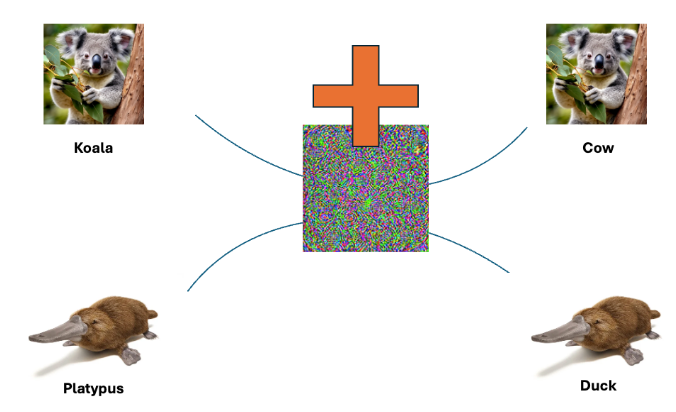
Universal Adversarial Perturbations (UAPs) are subtle modifications applied to input data (such as malware samples) to mislead AI models. What makes UAPs particularly interesting is that a single perturbation can be applied to many inputs (one ring rules them all), causing the AI model to misclassify them. Think of it as changing just a few pixels in a picture to make a powerful facial recognition system mistake someone for someone else. In the below example, a single bit of random code is added to multiple different images, resulting in the classifying model going completely wrong on the identification.

Why Cybercriminals Are Not Necessarily Embracing AI

When we look at the example of the platypus, the model identifies the animal partially right based on the training on the beak with other images, but due to the interference with the added “noise” in the pixels, it classifies it wrong. That is exactly the interesting space when it comes to malware detection and evasion. You want malicious files to be classified wrong.

In the context of malware detection, UAPs allow attackers to evade detection without having to create entirely new malware variants. While this seems like a low-effort, high-reward strategy, generating effective UAPs is far more challenging than it appears, particularly in the malware domain.

Complexity in Crafting UAPs for Malware

In their paper, “Realizable Universal Adversarial Perturbations for Malware,” Labaca-Castro et al. demonstrate that crafting UAPs for malware requires an intricate balance between manipulating feature space (abstract representations of malware) and problem space (real-world executable malware). Unlike image or text data, where perturbations may be easily applied without affecting functionality, malware is far more delicate. A slight misstep in the perturbation process can corrupt the malware sample, rendering it unusable. You need to respect (with regards to Windows malware) the PE structure of a file. A modification to that structure will break its functionality and the malware will not execute. It may have bypassed detection but it is useless to the attacker.

The process requires attackers to perform a series of careful transformations to avoid breaking the executable while still evading detection. This is a far cry from simply adding noise to an image or text dataset. As a result, the time and expertise required to create UAPs that both fool AI/ML malware detection models and preserve malware functionality is significant.

UAPs vs. New Malware Variants

Given the complexity of generating UAPs, cybercriminals face a dilemma: Should they invest time and resources into crafting these perturbations, or is it easier to create entirely new strains of malware?

Developing a new malware strain might involve reusing code from previous versions, applying known obfuscation techniques, or modifying payloads. This process is often faster, less risky, and more predictable compared to the complex sequence of transformations required to generate UAPs. As a result, many attackers prefer to invest in creating new strains of malware, which are more likely to achieve the desired outcome without the same level of effort and risk.

Challenges

One of the major hurdles in applying UAPs to malware is the real-world execution environment. Malware operates in dynamic, unpredictable conditions, and UAPs crafted in controlled environments may not perform as expected once deployed. Small changes in the operating system, file structure, or antivirus defenses can render the UAP ineffective. This fragility is a key reason why UAPs remain largely theoretical for malware attacks rather than a widely adopted technique in practice.

Additionally, defenders are not standing still. Adversarial training—where AI models are retrained using adversarial examples—can harden systems against UAPs, making it even harder for attackers to succeed. Mitigation strategies will raise the cost and effort required for attackers to generate successful UAPs, further reducing their appeal.

Conclusion

The idea of using AI to defeat AI, particularly through Universal Adversarial Perturbations, may seem like a natural progression in the ongoing battle between attackers and defenders. However, the reality is that the complexity and risk associated with developing UAPs for malware make this approach unattractive for most cybercriminals. Instead, attackers tend to rely on more straightforward methods like creating new malware variants, which offer a better return on investment with less risk of failure. If you examine some of the latest ransomware campaigns, none of them highlight the use of AI-based techniques. Instead, as shown in recent coverage of ransomware tactics, attackers consistently focus on tried-and-tested approaches that maximize impact and minimize operational complexity.

As long as the development of UAPs remains fraught with difficulties—such as maintaining functionality and overcoming problem-space constraints—it’s unlikely that we will see widespread adoption of these techniques in the cybercriminal world. Instead, traditional malware development and deployment methods will continue to dominate the landscape, while defenders must remain vigilant and adaptive to the evolving AI threat landscape.

Details about the iOS Inactivity Reboot Feature

Post Syndicated from Bruce Schneier original https://www.schneier.com/blog/archives/2024/12/details-about-the-ios-inactivity-reboot-feature.html

I recently wrote about the new iOS feature that forces an iPhone to reboot after it’s been inactive for a longish period of time.

Here are the technical details, discovered through reverse engineering. The feature triggers after seventy-two hours of inactivity, even it is remains connected to Wi-Fi.

Top announcements of AWS re:Invent 2024

Post Syndicated from AWS Editorial Team original https://aws.amazon.com/blogs/aws/top-announcements-of-aws-reinvent-2024/

AWS re:Invent 2024, our flagship anImage of large AWS logo with conference attendees moving in front of it in blurred motionnual conference, is taking place Dec. 2-6, 2024, in Las Vegas. This premier cloud computing event brings together the global cloud computing community for a week of keynotes, technical sessions, product launches, and networking opportunities. As AWS continues to unveil its latest innovations and services throughout the conference, we’ll keep you updated here with all the major product announcements.

Additional re:Invent resources:

  • AWS News Blog: Chief Evangelist Jeff Barr and colleagues keep you posted on the biggest and best new AWS offerings.
  • What’s New with AWS: A comprehensive list of all AWS launches.
  • The Official AWS Podcast: A podcast for developers and IT professionals looking for the latest news and trends from AWS.
  • AWS On Air: Live-streamed announcements and hands-on demos.
  • AWS re:Post: Join the community in conversation through Q&A.

(This post was last updated: 9:08 p.m. PST, Dec. 1, 2024.)


Quick category links:

AnalyticsApplication Integration | Business Applications | Compute | Containers | Database | Generative AI / Machine Learning | Management & Governance | Migration & Transfer Services | Security, Identity, & Compliance | Storage

Analytics

AWS Clean Rooms now supports multiple clouds and data sources
With expanded data sources, AWS Clean Rooms helps customers securely collaborate with their partners’ data across clouds, eliminating data movement, safeguarding sensitive information, promoting data freshness, and streamlining cross-company insights.

Application Integration

Securely share AWS resources across VPC and account boundaries with PrivateLink, VPC Lattice, EventBridge, and Step Functions

Orchestrate hybrid workflows accessing private HTTPS endpoints – no more Lambda/SQS workarounds. EventBridge and Step Functions natively support private resources, simplifying cloud modernization.


Business Applications

Newly enhanced Amazon Connect adds generative AI, WhatsApp Business, and secure data collection
Use innovative tools like generative AI for segmentation and campaigns, WhatsApp Business, data privacy controls for chat, AI guardrails, conversational AI bot management, and enhanced analytics to elevate customer experiences securely and efficiently.

Compute

Introducing storage optimized Amazon EC2 I8g instances powered by AWS Graviton4 processors and 3rd gen AWS Nitro SSDs
Elevate storage performance with AWS’s newest I8g instances, which deliver unparalleled speed and efficiency for I/O-intensive workloads.

Now available: Storage optimized Amazon EC2 I7ie instances
New AWS I7ie instances deliver unbeatable storage performance: up to 120TB NVMe, 40% better compute performance and up to 65% better real-time storage performance.

Containers

Use your on-premises infrastructure in Amazon EKS clusters with Amazon EKS Hybrid Nodes
Unify Kubernetes management across your cloud and on-premises environments with Amazon EKS Hybrid Nodes – use existing hardware while offloading control plane responsibilities to EKS for consistent operations.

Streamline Kubernetes cluster management with new Amazon EKS Auto Mode
With EKS Auto Mode, AWS simplifies Kubernetes cluster management, automating compute, storage, and networking, enabling higher agility and performance while reducing operational overhead.

Database

Amazon MemoryDB Multi-Region is now generally available
Build highly available, globally distributed apps with microsecond latencies across Regions, automatic conflict resolution, and up to 99.999% availability.

Generative AI / Machine Learning

New RAG evaluation and LLM-as-a-judge capabilities in Amazon Bedrock
Evaluate AI models and applications efficiently with Amazon Bedrock’s new LLM-as-a-judge capability for model evaluation and RAG evaluation for Knowledge Bases, offering a variety of quality and responsible AI metrics at scale.

Enhance your productivity with new extensions and integrations in Amazon Q Business
Seamlessly access AI assistance within work applications with Amazon Q Business’s new browser extensions and integrations.

New APIs in Amazon Bedrock to enhance RAG applications, now available
With custom connectors and reranking models, you can enhance RAG applications by enabling direct ingestion to knowledge bases without requiring a full sync, and improving response relevance through advanced reranking models.

Introducing new PartyRock capabilities and free daily usage
Unleash your creativity with PartyRock’s new AI capabilities: generate images, analyze visuals, search hundreds of thousands of apps, and process multiple docs simultaneously – no coding required.

Users can now query information embedded in various types of visuals, including diagrams, infographics, charts, and other image-based content.

Management & Governance

Container Insights with enhanced observability now available in Amazon ECS
With granular visibility into container workloads, CloudWatch Container Insights with enhanced observability for Amazon ECS enables proactive monitoring and faster troubleshooting, enhancing observability and improving application performance.

New Amazon CloudWatch Database Insights: Comprehensive database observability from fleets to instances
Monitor Amazon Aurora databases and gain comprehensive visibility into MySQL and PostgreSQL fleets and instances, analyze performance bottlenecks, track slow queries, set SLOs, and explore rich telemetry.

New Amazon CloudWatch and Amazon OpenSearch Service launch an integrated analytics experience
Unlock out-of-the-box OpenSearch dashboards and two additional query languages, OpenSearch SQL and PPL, for analyzing CloudWatch logs. OpenSearch customers can now analyze CloudWatch Logs without having to duplicate data.

Migration & Transfer Services

AWS Database Migration Service now automates time-intensive schema conversion tasks using generative AI
AWS DMS Schema Conversion converts up to 90% of your schema to accelerate your database migrations and reduce manual effort with the power of generative AI.

Announcing AWS Transfer Family web apps for fully managed Amazon S3 file transfers
AWS Transfer Family web apps are a new resource that you can use to create a simple interface for authorized line-of-business users to access data in Amazon S3 through a customizable web browser.

Introducing default data integrity protections for new objects in Amazon S3
Amazon S3 updates the default behavior of object upload requests with new data integrity protections that build upon S3’s existing durability posture.

Security, Identity, & Compliance

New AWS Security Incident Response helps organizations respond to and recover from security events
AWS introduces a new service to streamline security event response, providing automated triage, coordinated communication, and expert guidance to recover from cybersecurity threats.

Introducing Amazon GuardDuty Extended Threat Detection: AI/ML attack sequence identification for enhanced cloud security
AWS extends GuardDuty with AI/ML capabilities to detect complex attack sequences across workloads, applications, and data, correlating multiple security signals over time for proactive cloud security.

Simplify governance with declarative policies
With only a few steps, create declarative policies and enforce desired configuration for AWS services across your organization, reducing ongoing governance overhead and providing transparency for administrators and end users.

AWS Verified Access now supports secure access to resources over non-HTTP(S) protocols (preview)
With only a few steps, create declarative policies and enforce desired configuration for AWS services across your organization, reducing ongoing governance overhead and providing transparency for administrators and end users.

Introducing Amazon OpenSearch Service and Amazon Security Lake integration to simplify security analytics
Analyze security logs without data duplication; Amazon OpenSearch Service now offers zero-ETL integration with Amazon Security Lake for efficient threat hunting and investigations.

Storage

Announcing Amazon FSx Intelligent-Tiering, a new storage class for FSx for OpenZFS
Delivering NAS capabilities with automatic data tiering among frequently accessed, infrequent, and archival storage tiers, Amazon FSx Intelligent-Tiering offers high performance up to 400K IOPS, 20 GB/s throughput, seamless integration with AWS services.

New physical AWS Data Transfer Terminals let you upload to the cloud faster
Rapidly upload large datasets to AWS at blazing speeds with the new AWS Data Transfer Terminal, secure physical locations offering high throughput connection.

Connect users to data through your apps with Storage Browser for Amazon S3
Storage Browser for Amazon S3 is an open source interface component that you can add to your web applications to provide your authorized end users, such as customers, partners, and employees, with access to easily browse, upload, download, copy, and delete data in S3.

Пеевски може да бъде спрян с редовно правителство

Post Syndicated from Bozho original https://blog.bozho.net/blog/4436

Реалността е, че Пеевски може да бъде спрян трайно и сигурно само от редовно правителство. Другото са безспорно необходими, но краткосрочни мерки, които няма да го разклатят сериозно.

Дори да спрем избора на Сарафов, дори да го ограничим да продължи да заема длъжността (което безспорно трябва да направим и то бързо), тогава за изпълняващ функциите главен прокурор ще бъде назначен някой друг Сарафов, за който обаче дори няма да има снимка с Петьо Еврото и ще трябва да обясняваме защо и той е на Пеевски (а тази прокурорска колегия от този Висш съдебен съвет не може да назначи друго).

Дори да вземем оставката на Антон Славчев (КПК), което също трябва да случи, очакваме ли, че останалите членове на КПК няма да „съдействат“ на Пеевски? Те ако биха се противпоставили, щяха да блокират Славчев с мнозинство и досега.

Законите по Плана за възстановяване и устойчивост пък не отнемат нито един инструмент за влияние от Пеевски.

Служебно правителство, дори да не е на Главчев, не може да спре Пеевски. По две причини. Първата е, че който и да е премиер, ако няма ясно политическо мнозинство зад себе си, рискът да бъде „прихванат“ от Пеевски е голям. Втората е, че МВР днес не може да бъде „МВР на Рашков от 21-ва година“. Защото тогава вятърът духаше към промяна. Сега перспективата е за „още и още избори“, и едва ли в МВР ще изпълняват стриктно разпореждания за спиране на купуване на гласове. Да, може и да не помагат като носят кеш в патруплки (каквито разкази има), но едва ли ще пречат. Особено ако не искат прокуратурата и КПК на Пеевски да ги отстранят бързичко.

Антикорупционната програма, която предложихме в предизборната кампания, е с дълъг хоризонт, а не за 3-месечен парламент. Без избор на нов Висш съдебен съвет, почти нищо няма да се промени в съдебната система. Без избор на нов състав на антикорупционната комисия, тя няма да спре да бъде на Пеевски и да се ползва за бухалка – срещу опоненти, срещу „непослушни“ кметове, които не осигуряват гласове на Пеевски, срещу МВР шефове, които пречат на купуването на гласове.

Декларацията за ограничаване на корупционните влияния на Пеевски е само първата стъпка към такова редовно управление без деструктивни корупционни влияния – тя е инструмент за установяване на мнозинство за такова управление. И затова е толкова важна.

Материалът Пеевски може да бъде спрян с редовно правителство е публикуван за пръв път на БЛОГодаря.

Introducing Amazon GuardDuty Extended Threat Detection: AI/ML attack sequence identification for enhanced cloud security

Post Syndicated from Esra Kayabali original https://aws.amazon.com/blogs/aws/introducing-amazon-guardduty-extended-threat-detection-aiml-attack-sequence-identification-for-enhanced-cloud-security/

Today, I’m happy to introduce advanced AI/ML threat detection capabilities in Amazon GuardDuty. This new feature uses the extensive cloud visibility and scale of AWS to provide improved threat detection for your applications, workloads, and data. GuardDuty Extended Threat Detection employs sophisticated AI/ML to identify both known and previously unknown attack sequences, offering a more comprehensive and proactive approach to cloud security. This enhancement addresses the growing complexity of modern cloud environments and the evolving landscape of security threats, simplifying threat detection and response.

Many organizations face challenges in efficiently analyzing and responding to the high volume of security events generated across their cloud environments. With the increasing frequency and sophistication of security threats, it has become more challenging to effectively detect and respond to attacks that occur as sequences of events over time. Security teams often struggle to piece together related activities that might be part of a larger attack, potentially missing critical threats or responding too late to prevent significant impact.

To address these challenges, we have expanded GuardDuty threat detection capabilities to include new AI/ML capabilities that correlate security signals to identify active attack sequences in your AWS environment. These sequences can include multiple steps taken by an adversary, such as privilege discovery, API manipulation, persistence activities, and data exfiltration. These detections are represented as attack sequence findings, a new type of GuardDuty finding with critical severity. Previously, GuardDuty had never used critical severity, reserving this level for findings with the utmost confidence and urgency. These new findings introduce critical severity and include a natural language summary of the threat’s nature and significance, observed activities mapped to tactics and techniques from the MITRE ATT&CK® framework, and prescriptive remediation recommendations based on AWS best practices.

GuardDuty Extended Threat Detection introduces new attack sequence findings and improves actionability for existing detections in areas such as credential exfiltration, privilege escalation, and data exfiltration. This enhancement enables GuardDuty to offer composite detections that span multiple data sources, time periods, and resources within an account, providing you with a more comprehensive understanding of sophisticated cloud attacks.

Let me show you how the new capabilities work.

How to use the new AI/ML threat detection in Amazon GuardDuty
To experience the new AI/ML threat detection in GuardDuty, go to the Amazon GuardDuty console and explore the new widgets on the Summary page. The overview widget now helps you view the number of attack sequences you have and consider the details of those attack sequences. Cloud environment findings often reveal multistage attacks, but these sophisticated attack sequences are low volume and account for a small fraction of the total number of findings. For this particular account, you can observe a variety of findings in the cloud environment, but only a handful of actual attack sequences. In a larger cloud environment, you may see hundreds or even thousands of findings, yet the number of attack sequences will likely remain relatively small in comparison.

We’ve also added a new widget that helps you view the findings broken down by severity. This makes it easier to quickly pivot into and investigate specific findings that are of interest to you. The findings are now sorted by Severity, providing you with a clear overview of the most critical issues, including an additional Critical severity category, ensuring that the most urgent detections are immediately brought to your attention. You can also filter just for the attack sequences by choosing Top attack sequences only.

This new capability is enabled by default, so you don’t need to take any additional steps for it to start working. There are no extra costs for this feature beyond the underlying charges for GuardDuty and its associated protection plans. As you enable additional GuardDuty protection plans, this capability will provide more integrated security value, helping you gain deeper insights.

You can observe two types of findings. The first one is data compromise, which indicates a potential data compromise that can be a part of a larger ransomware attack. Data is the most critical organizational asset for most customers, making this an important area of concern. The second finding is compromised credential type, which helps you detect the misuse of compromised credentials, typically during the earlier stages of an attack in your cloud environment.

Let me dive into one of the compromise data findings. I’ll focus on “Potential data compromise of one or more S3 buckets involving a sequence of actions over multiple signals associated with a user in your account”. This finding indicates that we have observed data being compromised across multiple Amazon Simple Storage Service (Amazon S3) buckets with multiple associated signals.

The summary provided with this finding gives you key details, including the specific user (identified by their principal ID) who performed the actions, the account and resources affected, and the extended time period (nearly a full day) over which the activity occurred. This information can help you quickly understand the scope and severity of the potential compromise.

This finding has eight distinct signals observed over a nearly 24-hour period, indicating the use of multiple tactics and techniques mapped to the MITRE ATT&CK® framework. This broad coverage across the attack chain—from credential access, to discovery, evasion, persistence, and even impact and exfiltration—suggests this may indeed be a true positive incident. The finding also surfaces a concerning technique of data destruction, which is particularly alarming.

Additionally, GuardDuty provides further security context by highlighting sensitive API calls, such as the user deleting the AWS CloudTrail trail. This type of evasive behavior, combined with the creation of new access keys and actions targeting Amazon S3 objects, further reinforces the severity and potential scope of the incident. Based on the information presented in this finding, you would likely want to investigate this incident more thoroughly.

Reviewing the ATT&CK tactics associated with the findings provides visibility into the specific tactics involved, whether it’s a single tactic or multiple. GuardDuty also offers security indicators that explain why the activity was flagged as suspicious and assigned a critical severity, including the high-risk APIs called and the tactics observed.

Diving deeper, you can view details about the actor responsible. The information includes how the user connected to and carried out these actions, including the network locations. This additional context helps you better understand the full scope and nature of the incident, which is crucial for investigation and response. You can follow prescriptive remediation recommendations based on AWS best practices, offering you actionable insights to swiftly address and resolve identified detections. These tailored recommendations help you improve your cloud security posture and ensure alignment with security guidelines.

The Signals tab can be sorted by newest or oldest first. If responding to an active attack, you’ll want to start with the latest signals to quickly understand and mitigate the situation. For a post-incident review, you can trace back from the initial activities. Diving into each activity provides detailed information about the specific finding. We also offer a quick view through Indicators, Actors, and Endpoints to summarize what occurred and who took action.

Another way to follow the details is to access the Resources tab, where you can check the different buckets that are involved and the access keys. For each resource, you can check which tactics and techniques happened. Select the open resource to pivot directly to the relevant console and learn more details.

We’ve introduced a full-page view for GuardDuty findings, making it easier to see all the contextual data in one place. However, the traditional findings page with the side panel is still available if you prefer that layout, which provides a quick view of the details for specific findings.

GuardDuty Extended Threat Detection is automatically enabled for all GuardDuty accounts in a Region, leveraging foundational data sources without requiring additional protection plans. Enabling additional protection plans expands the range of security signals analyzed, improving the service’s ability to identify complex attack sequences. GuardDuty specifically recommends activating S3 Protection to detect potential data compromises in Amazon S3 buckets. Without S3 Protection enabled, GuardDuty cannot generate S3-specific findings or identify attack sequences involving S3 resources, limiting its capacity to detect data compromise scenarios in your Amazon S3 environment.

GuardDuty Extended Threat Detection integrates with existing GuardDuty workflows, including the AWS Security Hub, Amazon EventBridge, and third-party security event management systems.

Now available
Amazon GuardDuty Extended Threat Detection significantly enhances cloud security by automating the analysis of complex attack sequences and providing actionable insights, helping you focus on addressing the most critical threats efficiently, reducing the time and effort required for manual analysis.

These capabilities are automatically enabled for all new and existing GuardDuty customers at no additional cost in all commercial AWS Regions where GuardDuty is supported.

To learn more and start benefiting from these new capabilities, visit the Amazon GuardDuty documentation.

— Esra

Container Insights with enhanced observability now available in Amazon ECS

Post Syndicated from Donnie Prakoso original https://aws.amazon.com/blogs/aws/container-insights-with-enhanced-observability-now-available-in-amazon-ecs/

Last year, we announced enhanced observability in Amazon CloudWatch Container Insights, a new capability to improve your observability for Amazon Elastic Kubernetes Service (Amazon EKS). This capability helps you detect and fix container issues faster by providing detailed performance metrics and logs.

Expanding this capability, today we’re launching enhanced observability for your container workloads running on Amazon Elastic Container Service (Amazon ECS). This new capability will help reduce your mean time to detect (MTTD) and mean time to repair (MTTR) for your overall applications, helping prevent issues that could negatively impact your user experience.

Here’s a quick look at Container Insights with enhanced observability for Amazon ECS.

Container Insights with enhanced observability addresses a critical gap in container monitoring. Previously, correlating metrics with logs and events was a time-consuming process, often requiring manual searches and expertise in application architecture. Now, with this capability, CloudWatch and Amazon ECS automatically collect granular performance metrics such as CPU utilization at both the task and container levels while providing visual drill downs enabling easy root-cause analysis.

This new capability enables the following use cases:

  • Quickly identify root causes by viewing granular resource usage patterns and correlating telemetry data.
  • Proactively manage your ECS resources using curated dashboards based on AWS best practices.
  • Track your recent deployments and root causes of your deployment failures with the matching infrastructure anomalies enabling faster issue detection and quicker rollbacks when necessary.
  • Effortlessly monitor resources across multiple accounts without manual setup. Built-in cross-account support reduces operational overhead with single pane of glass observability.
  • Integration with other CloudWatch services such as Application Signals and CloudWatch Logs provides a seamless experience to correlate infrastructure with the services running and identify the impacted services.

Using container insights with enhanced observability for Amazon ECS
There are two ways to enable Container Insights with enhanced observability:

  1. Cluster-level onboarding – You can enable it for specific clusters individually.
  2. Account-level onboarding – You can also enable it at the account level, which automatically enables observability for all new clusters created in your account. This approach saves time and effort by eliminating the need to manually enable it for each new cluster.

To enable this feature at the account level, I navigate to the Amazon ECS console and select Account settings. Under the CloudWatch Container Insights observability section, I can see it’s currently disabled. I choose Update.

On this page, I find a new option called Container Insights with enhanced observability. I select this option and then choose Save changes.

If I need to enable this capability at the cluster level, I can do so when creating a new cluster.

I can also enable this capability for my existing clusters. To do so, I select Update cluster, and then choose the option.

Once enabled, I can see task-level metrics by navigating to the Metrics tab in my cluster overview console. To access health and performance metrics across my clusters, I can select View Container Insights, which will redirect me to the Container Insights page.

To get a big picture of all my workloads across different clusters, I can navigate to Amazon CloudWatch and then to Container Insights.

This view addresses the challenge of effectively monitoring clusters, services, tasks, and containers by providing a honeycomb visualization that offers an intuitive, high-level summary of cluster health. The dashboard employs a dual-state monitoring approach:

  1. Alarm state (red or green) – Reflects customer-defined thresholds and alerts, allowing teams to configure monitoring based on their specific requirements
  2. Utilization state (dark blue or light blue) – Uses CloudWatch built-in best practices to monitor resource usage patterns across containers. The darker blue indicates clusters operating under higher utilization, enabling teams to proactively identify potential resource constraints before they impact performance

Let’s say there’s an issue in one of my clusters. I can hover over the cluster to display all the alarms created under that cluster at different layers, from the cluster layer down to the container layer.

I also have the option to view all clusters in a list format. The list format is essential for cross-account observability, displaying account IDs and labels for cluster ownership. This helps DevOps engineers quickly identify and collaborate with account owners to resolve potential application issues.

Now, I’d like to explore further. I select my cluster link, which redirects me to the Container Insights detailed dashboard view. Here, I can see a spike in memory utilization for this cluster.

I can dive deeper into container-level details, which help me quickly identify which services are causing this issue.

Another useful feature I found is the Filters option, which helps me conduct more thorough investigations across containers, services, or tasks in this cluster.

If I need to delve deeper into the application logs to understand the root cause of this issue, I can select the task, choose Actions, and choose which logs I would like to view.

On top of using AWS X-Ray traces, I can investigate another two types of logs here. First, I can use performance logs—structured logs containing metric data—to drill down and identify container-level root causes. Second, I examine collected application or container logs . These logs give me detailed insights into application behavior within the container, helping me trace the sequence of events that led to any issues.

In this case, I use application logs.

This streamlines my journey to troubleshoot my application. In this case, the issue is on the downstream calls to third-party applications, which return timeouts.

This enhanced capability also works with Amazon CloudWatch Application Signals to automatically instrument my application. I can monitor current application health and track long-term application performance against service-level objectives.

I select the Application Signals tab.

This integration with Amazon CloudWatch Application Signals provides me with end-to-end visibility, helping me correlate container performance with end-user experience.

When I select datapoints in the graphs, I can see associated traces, which show me all correlated services and their impact. I can also access relevant logs to understand root causes.

Additional things to know
Here are a couple of important points to note:

  • Availability – Container Insights with enhanced observability for ECS is now available in all AWS Regions including the China Regions.
  • Pricing – Container Insights with enhanced observability for ECS comes with a flat metric pricing, visit the Amazon CloudWatch Pricing page.

Get started today and experience improved observability for your container workloads. Learn more on the Amazon CloudWatch documentation page.

Happy monitoring,
Donnie Prakoso

AWS Clean Rooms now supports multiple clouds and data sources

Post Syndicated from Esra Kayabali original https://aws.amazon.com/blogs/aws/aws-clean-rooms-now-supports-multiple-clouds-and-data-sources/

Today, we are announcing support for Snowflake and Amazon Athena as new sources for AWS Clean Rooms data collaborations. AWS Clean Rooms helps you and your partners more seamlessly and securely analyze your collective datasets without sharing or copying one another’s underlying data. This enhancement helps you collaborate with datasets stored in Snowflake or those queryable through Athena features, such as AWS Lake Formation permissions or AWS Glue Data Catalog views, without moving or revealing the source data.

You often need to collaborate with partners to analyze datasets to get insights for research and development, investments, or marketing and advertising campaigns. In some cases, your partners’ datasets are stored or managed outside of Amazon Simple Storage Service (Amazon S3), and companies want to reduce or eliminate the complexity, cost, compliance risks, and delays that are associated with moving or copying data. Companies also find that copying data can result in them using outdated information, potentially reducing the quality of the insights gained.

This launch helps companies to collaborate on the most up-to-date collective datasets in an AWS Clean Rooms collaboration with zero extract, transform, and load (zero-ETL). This eliminates the cost and complexity associated with migrating datasets out of existing environments. For example, an advertiser with data stored in Amazon S3 and a media publisher with data stored in Snowflake can run an audience overlap analysis to determine the percentage of users present in their collective datasets without having to build ETL data pipelines, or share underlying data with one another. No underlying data from external data sources is permanently stored in AWS Clean Rooms during the collaboration process and any data temporarily read into the AWS Clean Rooms analysis environment is deleted upon query completion. You can now work with your partners regardless of where their data is stored, streamlining the process of generating insights.

Let me show you how to use this feature.

How to use multiple clouds and data sources in AWS Clean Rooms
To demonstrate this feature, I use a scenario between an advertiser, Company A, and a publisher, Company B. Company A wants to know how many of their high-value users can be reached on Company B’s website before running an ad campaign. Company A stores their data in Amazon S3. Company B stores their data in Snowflake. To use AWS Clean Rooms, both parties must have their own AWS accounts.

In this demo, Company A, the advertiser, is the collaboration creator. Company A creates the AWS Clean Rooms collaboration and invites Company B, who has data hosted in Snowflake, to collaborate. You can follow the specific steps to create a collaboration in the AWS Clean Rooms general availability announcement blog post.

Next, I show how Company B, the publisher, creates a configured table in AWS Clean Rooms, specifying Snowflake as the data source and providing the Secrets Manager Amazon Resource Name (ARN). AWS Secrets Manager helps you manage, retrieve, and rotate secrets such as database credentials throughout their lifecycles. Your secret must contain the credentials for a Snowflake user with read-only permission to the data you want to collaborate with. AWS Clean Rooms will use it to read your secret and access the data stored in Snowflake. See the Secrets Manager documentation for step-by-step instructions for creating your secret.

Using Company B’s AWS account, I go to the AWS Clean Rooms console and choose Tables under Configured resources. I choose Configure new table. I choose Snowflake under Third-party clouds and data sources. I enter the Secret ARN for the secret that contains Snowflake credentials for a role with read access to the dataset stored in Snowflake I want to collaborate with. These are the credentials that you use to verify the identity of the entity trying to access the Snowflake table and schema. If you don’t have a secret ARN, you can create a new secret using the Store a new secret for this table option.

To define the table and schema details, I use the Import from file option and choose the Columns View Information Schema CSV file I exported from Snowflake to populate the information for me. You can also enter the information manually.

For this demo, I choose All columns under the Columns allowed in collaborations. Next, I choose Configure new table.

I go to the configured table and observe the table details, such as AWS accounts allowed to create queries and columns available for querying. On this page, I can edit the table name, description, and analysis rule.

As part of configuring a table to use in AWS Clean Rooms for collaboration analysis, I need to configure an analysis rule. An analysis rule is a privacy-enhancing control that each data owner sets up on a configured table. An analysis rule determines how the configured table can be analyzed. I choose Configure analysis rule to configure a custom analysis rule that allows custom queries to be run on the configured table.

In Step 1, I proceed with the selections. You can use JSON editor to create, paste, or import an analysis rule definition in a JSON format. I choose Next.

In Step 2, I choose Allow any queries created by specific collaborators to run without review on this table under Analyses for direct querying. With this option, only queries provided by the AWS accounts that I specify in the list of allowed accounts can be run on the table. All analysis templates created by the allowed accounts will automatically be allowed to be run on this table without requiring a review. I choose the allowed account under AWS account ID and choose Next.

In Step 3, I proceed with the selections. I choose None under Columns not allowed in output to allow all columns to be shown in the query output. I choose Not allowed under Additional analyses applied to output, so no additional analyses can be run on this table. I choose Next.

In the final step, I review the configuration and choose Configure analysis rule.

Next, I associate the table with the collaboration Company A, the advertiser, created using Associate to collaboration.

On the pop-up window, I choose a collaboration from the ones with active memberships and select Choose collaboration.

On the next page, I choose the Configured table name and enter the Name under Table associations details. I choose a method to authorize AWS Clean Rooms to give the permission to query the table. I choose Associate table.

Company A, the advertiser, and Company B, the publisher, can now run an audience overlap analysis to determine the percentage of users present in their collective datasets without accessing each other’s raw data. The analysis helps determine how much of the advertiser’s audience can be reached by the publisher. By evaluating the overlap, advertisers can determine whether the publisher provides unique reach or if the publisher’s audience predominantly overlaps with the advertiser’s existing audience, without either party having to move or share their source data. I switch to Company A’s account and go to AWS Clean Rooms console. I choose the collaboration I created and run the following query to get the audience overlap analysis result:

select count (distinct emailaddress)
from customer_data_example as advertiser
inner join synthetic_customer_data  as publisher
on 'emailaddress' = 'publisher_hashed_email_address'

In this example, I used Snowflake as a data source. You can also run queries on this data using Athena while following AWS Lake Formation permissions. This helps you do row- and column-level filtering with Lake Formation fine-grained access control and transform data using AWS Glue Data Catalog views before the datasets are associated to the collaboration.

Customer and partner voices
“Data security and privacy is essential to our work at Kinective Media by United Airlines, the world’s first traveler media network,” said Khatidja Ajania, Director, Strategic Partnerships, Kinective Media by United Airlines. “AWS Clean Rooms support of source data in multiple clouds and AWS sources enables us to securely and seamlessly work with more brands to deliver on closed loop measurement and other key use cases. This enhancement will make it easier for us to securely deliver personalized experiences, content, and relevant offerings to millions of United travelers through privacy-enhanced collaboration with our advertisers and partners.”

“Snowflake recognizes the challenges of source data interoperability across tech stacks when using data clean room technology; we are excited to see the progress and one more step taken in the direction of a shared goal to empower users to unlock the full potential of their data partnerships through their solution of choice, safely and effectively” – Kamakshi Sivaramakrishnan, General Manager, Snowflake Data Clean Rooms

Now available
Support for Snowflake and Athena as data sources in AWS Clean Rooms offers significant benefits for cross-cloud collaboration. This launch eliminates the need for data movement across clouds and data sources and simplifies the collaboration process. This is a first step in our efforts to expand the ways in which customers can securely collaborate with any of their partners while protecting sensitive information, regardless of where their data is stored.

Get started with AWS Clean Rooms today. To learn more about collaborating with multiple data sources, visit the AWS Clean Rooms documentation.

— Esra

New physical AWS Data Transfer Terminals let you upload to the cloud faster

Post Syndicated from Channy Yun (윤석찬) original https://aws.amazon.com/blogs/aws/new-physical-aws-data-transfer-terminals-let-you-upload-to-the-cloud-faster/

Today, we’re announcing the general availability of AWS Data Transfer Terminal, a secure physical location where you can bring your storage devices and upload data faster to the AWS Cloud.

The first Data Transfer Terminals are located in Los Angeles and New York, with plans to add more locations globally. You can reserve a time slot to visit your nearest location and upload data rapidly and securely to any AWS public endpoints, such as Amazon Simple Storage Service (Amazon S3), Amazon Elastic File System (Amazon EFS), or others, using a high throughput connection. Using AWS Data Transfer Terminal, you can significantly reduce the time of ingesting data with high throughput connectivity in the location near by you. You can upload large datasets from fleets of vehicles operating and collecting data in metro areas for training machine learning (ML) models, digital audio and video files from content creators for media processing workloads, and mapping or imagery data from local government organizations for geographic analysis.

After the data is uploaded to AWS, you can use the extensive suite of AWS services to generate value from your data and accelerate innovation. You can also bring your AWS Snowball devices to the location for upload and retain the device for continued use and not rely on traditional shipping methods.

Getting started with AWS Data Transfer Terminal
You can find the availability of a location in the AWS Management Console and reserve the date and time to visit. Then, you can visit the location, make a connection between your storage device and S3 bucket, initiate the transfer of your data, and validate that your transfer is complete.

Go to the AWS Data Transfer Terminal console, then choose Get started.

Choose Create Transfer Team and make a team by adding the team’s name and description with agreement of service terms and conditions. You can add your team members for personal or group reservation in the team setting.

To reserve your time and location, choose Create Reservation.

In the first step, choose your team, a process owner to manage your reservation, and team members to visit the location for the data transferring job. Now, you can choose a location of Data Transfer Terminal facility and set your preferred visiting time. You’ll pay for the space reservation at an hourly rate for your reserved time.

To secure your reservation, choose Next and Create after reviewing the reservation details.

After your reservation is requested, you can find your upcoming reservations in the team page. You can check the reservation status or cancel your reservation.

On your reserved date and time, visit the location and confirm access with the building reception. You’re escorted by building staff to the floor and your reserved room of the Data Transfer Terminal location.

Don’t be surprised if there are no AWS signs in the building or room. This is for security reasons to keep your work location as secret as possible.

Visiting a pilot Terminal
Instead of me visiting a Data Transfer Terminal location where I live in Seoul, Jeff Barr visited a pilot location near him in Seattle to test uploading data as my team member.

The room is equipped with a patch panel, fiber optic cable, and a personal computer. The patch panel is installed inside a wall mount rack or small floor rack to allow additional space on the desk table. With the personal computer, you can see how to remote access to the server during data transfer process.

Here is Jeff’s feedback about visiting and working at the pilot facility.

When I arrived at the building, I was kindly escorted in and able to work easily using the instructions provided at the time of reservation. This location provides me with direct access to AWS global network infrastructure in a secure and on-demand format. I am excited to see how customers use AWS Data Transfer Terminal to more quickly get data into the cloud where they can more rapidly innovate and build on AWS.

Thanks, Jeff, for visiting the facility and doing the uploading job in my place!

Now available
AWS Data Transfer Terminal is now available today in Los Angeles and New York, with plans to add more locations globally.

You’ll be charged for on-demand use per hour for each location. There will be no per GB charge for the data transfer if you upload data into AWS Regions in the same continent of your location. To learn more, visit the Data Transfer Terminal pricing page.

Give AWS Data Transfer Terminal a try in the AWS Management Console. To learn more, refer to the Data Transfer Terminal page and send feedback through your usual AWS Support contacts.

Channy

Enhance your productivity with new extensions and integrations in Amazon Q Business

Post Syndicated from Donnie Prakoso original https://aws.amazon.com/blogs/aws/enhance-your-productivity-with-new-extensions-and-integrations-in-amazon-q-business/

Today, we’re announcing a new capability from Amazon Q Business to seamlessly access your assistant within popular web browsers and productivity tools. This helps you save time and complete your work and tasks more efficiently without having to leave your preferred applications.

Now, you can use Amazon Q Business directly from your web browser and other supported messaging and collaboration applications. You can quickly gather insights, review information, and ask questions. For example, you can effortlessly analyze and summarize content, get explanations on complex topics, or create meeting summaries without switching between applications.

Let’s get started
Let me walk you through how to get started with the new browser extensions and integrations. First, let’s look at the browser extensions. The following screenshot shows how it looks.

As an administrator, I need to enable the browser extensions for users of my Amazon Q Business application. To do that, I navigate to my Amazon Q Business application dashboard and select Integrations under the Enhancements section in the left navigation pane.

Then, on the Integrations page, select Edit in the Browser extensions section.

I select the available options in the Browsers section and choose Save. After I’ve enabled these options, my users will receive notification emails prompting them to install the extension.

Now, I’m switching to a user perspective of the Amazon Q Business application. I’ve received an email with a link to the Amazon Q Business web application. I visit the link and sign in to the Amazon Q Business web application. Here, I see a banner with information and a link to install the extension for my browser. I select the Install extension button.

Then, I navigate to the Chrome Web Store and install the browser extension.

After I have installed the browser extension, I sign in to my Amazon Q Business application using the same URL and credentials I use to access the web application.

Now, I can chat with Amazon Q Business apps whenever I visit any webpage. For example, I can ask it to summarize the current website for me.

The following image shows the result.

Application integration with Amazon Q Business
With Amazon Q Business, you can get AI-powered assistance and information not only when browsing, but also when collaborating with your teams. Now, you can integrate Amazon Q Business with supported third-party applications, making it an always-ready productivity and creativity teammate in your conversations.

To add third-party applications to Amazon Q Business, I need to navigate to the Integrations page and choose Add integration.

Here, I find all available integrations that I can use. For this demo, I select Slack.

I fill in all the required details, including the Slack workspace team ID, which you can obtain by following the steps outlined on the Slack documentation page.

After the integration is successfully created, I need to deploy this integration as a Slack bot. From the Integrations page, I select the integration and complete the integration process in the Slack platform. With all the required steps completed, now I can now add the app into my Slack workspace.

Here’s a quick video showing how I use this integration to interact with Amazon Q Business on Slack.

As someone who juggles multiple tools and platforms daily, this new capability unlocks various possibilities for me to improve my productivity. The ability to access AI assistance and perform cross-application tasks without leaving my current workspace helps me save time and maintain focus.

Additional things to know

  • Supported browser extensions – At launch, the Amazon Q Business browser extension supports Chromium-based web browsers such as Google Chrome and Microsoft Edge. It also supports the Mozilla Firefox web browser.
  • Application integration support – For third-party applications, at launch, Amazon Q Business integrations support Slack and Microsoft Teams.
  • Availability – This new capability is available in AWS Regions where Amazon Q Business is available.

Get started today and experience an exciting opportunity to enhance your productivity and streamline cross-application workflows. Learn more on the Amazon Q Business page.

Happy building,
Donnie

Announcing Amazon FSx Intelligent-Tiering, a new storage class for FSx for OpenZFS

Post Syndicated from Jeff Barr original https://aws.amazon.com/blogs/aws/announcing-amazon-fsx-intelligent-tiering-a-new-storage-class-for-fsx-for-openzfs/

When I speak to customers who are planning to migrate massive amounts of on-premises data to AWS, they tell me that they want to simplify their storage management, reduce their costs, and to make the data more accessible so that it can be used for analytics, machine learning training, genomics, and other use cases. Customers are already using Network Attached Storage (NAS) on-premises, and are looking for a cloud-based upgrade that offers similar capabilities including point-in-time snapshots, data clones, and user management.

AWS customers such as Amdocs, Vela Games, and Astera Labs have been running their mission-critical and performance-intensive NAS workloads like databases, game development and streaming, and semiconductor chip design on Amazon FSx for OpenZFS. They’ve been using the existing SSD storage class on FSx to provide the predictable, high performance these workloads need. However, many other customers have large data sets that are stored on HDD-based or hybrid SSD/HDD-based NAS storage on prem that find it cost-prohibitive to move their data sets to all-SSD storage. Additionally, these customers are finding it increasingly challenging and expensive to manage provisioned storage on prem for unpredictable data sets and avoid running out of space. And they are keeping their NAS data around for longer because it could have future value for building their next model, investment strategy, or product, but that means they need to spend more time and effort monitoring access patterns and moving data around between hot and cold storage media to optimize costs.

FSx Intelligent-Tiering
Taking all of this into account, I am happy to be able to tell you about the new Amazon FSx Intelligent-Tiering storage class, available today for use with Amazon FSx for OpenZFS file systems. The new storage class is priced 85% lower than the existing SSD storage class and 20% lower than traditional HDD-based deployments on premises, and brings full elasticity and intelligent tiering to NAS data sets.

Your data moves between three storage tiers (Frequent Access, Infrequent Access, and Archive) with no effort on your part, so you get automatic cost savings with no upfront costs or commitments. Here’s how the tiers work:

Frequent Access – Data that has been accessed within the last 30 days is stored in this tier.

Infrequent Access – Data that has been not been accessed for 30 to 90 days is stored in tier, at a 44% cost reduction from Frequent Access.

Archive – Data that has not been accessed for 90 or more days is stored in this tier, at a 65% cost reduction from Infrequent Access.

Regardless of the storage tier, your data is stored across multiple AWS Availability Zones (AZs) for redundancy and availability, and can be retrieved instantly in milliseconds.

There’s no need to manage or pre-provision storage, making this storage class a great fit for uses case such as genomics, financial data analytics, seismic imagery analysis, and machine learning where storage requirements can change dramatically over the course of days or weeks.

Along with the potential for cost savings, you get high performance: up to 400K IOPS and 20 GB/second of throughput for each OpenZFS file system, with a time-to-first-byte of tens of milliseconds for all data, regardless of storage class. You can also configure an SSD-based read cache (64 GiB to 512 TiB) to reduce the time-to-first-byte by 10x to 100x for cached data.

Creating a File System
I can create a file system using the AWS Management Console, CLI, API, or a AWS CloudFormation. From the Console I click Create file system to get started:

I choose Amazon FSx for OpenZFS and click Next:

Then I enter a name (jeff_fsx_openzfs_1) for my file system and select the Intelligent-Tiering storage class. I choose the desired Throughput capacity, and I select one of the three sizing mode options for the read cache, click Next, and confirm my choices in order to create my file system:

It is ready within minutes, and I can NFS mount it to my EC2 instance:

$ sudo mkfs /fsx_zfs
$ sudo mount -t nfs -o noatime,nfsvers=4.2,sync,nconnect=16,rsize=1048576,wsize=1048576 \
  fs-00fc74f020d1e6f4e.fsx.us-east-2.aws.internal:/fsx/ /fsx_zfs/

After I run a representative workload for a while I can look at the metrics and review the performance of my file system:

It appears that I have plenty of throughput, but my read cache may be larger than needed. I created it in Automatically Provisioned mode, which allocated 3200 GiB of cache. I can change that (and save some money) with a couple of clicks:

I can also change the throughput capacity as needed:

Amazon FSx NAS Features and Attributes
Let’s take a quick look at some of the features which make FSx for OpenZFS and the FSx Intelligent-Tiering storage class a great for for your NAS-level storage needs:

Built-in Backups – Amazon FSx automatically makes a daily backup of each file system during a specified backup window and retains them for a specified retention period. The backups are file-system consistent, highly durable, and incremental. You can also create backups on your own and retain them for as long as needed.

Point-In-Time Snapshots -You can create a read-only image of an OpenZFS volume at any time. The snapshots are stored within the file system and consume storage; they can be used to restore a volume, restore individual files and folders, or to create a new volume as either a clone or a full-copy.

Replication – You can replicate a point-in-time view of an OpenZFS volume to another volume across file systems, AWS Regions, and AWS accounts. FSx uses ZFS send/receive technology behind the scenes to perform this replication and automatically establishes and maintains network connectivity between file systems to handle interruptions and resume data transfer as needed.

Data Compression – You can enable ZSTD or LZ4 compression on your OpenZFS volumes to reduce storage cost and speed up data transfer.

User and Volume Quotas – You can limit the amount of storage consumed by an individual volume or user.

Things to Know
Here are a couple of things to keep in mind before we wrap up:

Regions – This new storage class is available in the US East (Ohio, N. Virginia), US West (Oregon), Asia Pacific (Mumbai, Singapore, Sydney, Tokyo), Canada (Central), and Europe (Frankfurt, Ireland) AWS Regions.

Pricing – Pricing is based on the amount of primary storage consumed (GB/Month) and read cache provisioned (GB/Month). See the Amazon FSx for OpenZFS Pricing page for more information.

Jeff;

New RAG evaluation and LLM-as-a-judge capabilities in Amazon Bedrock

Post Syndicated from Danilo Poccia original https://aws.amazon.com/blogs/aws/new-rag-evaluation-and-llm-as-a-judge-capabilities-in-amazon-bedrock/

Today, we’re announcing two new evaluation capabilities in Amazon Bedrock that can help you streamline testing and improve generative AI applications:

Amazon Bedrock Knowledge Bases now supports RAG evaluation (preview) – You can now run an automatic knowledge base evaluation to assess and optimize Retrieval Augmented Generation (RAG) applications using Amazon Bedrock Knowledge Bases. The evaluation process uses a large language model (LLM) to compute the metrics for the evaluation. With RAG evaluations, you can compare different configurations and tune your settings to get the results you need for your use case.

Amazon Bedrock Model Evaluation now includes LLM-as-a-judge (preview) – You can now perform tests and evaluate other models with humanlike quality at a fraction of the cost and time of running human evaluations.

These new capabilities make it easier to go into production by providing fast, automated evaluation of AI-powered applications, shortening feedback loops and speeding up improvements. These evaluations assess multiple quality dimensions including correctness, helpfulness, and responsible AI criteria such as answer refusal and harmfulness.

To make it easy and intuitive, the evaluation results provide natural language explanations for each score in the output and on console, and the scores are normalized from 0 to 1 for ease of interpretability. Rubrics are published in full with the judge prompts in the documentation so non-scientists can understand how scores are derived.

Let’s see how they work in practice.

Using RAG evaluations in Amazon Bedrock Knowledge Bases
In the Amazon Bedrock console, I choose Evaluations in the Inference and Assessment section. There, I see the new Knowledge Bases tab.

Console screenshot.

I choose Create, enter a name and a description for the evaluation, and select the Evaluator model that will compute the metrics. In this case, I use Anthropic’s Claude 3.5 Sonnet.

Console screenshot.

I select the knowledge base to evaluate. I previously created a knowledge base containing only the AWS Lambda Developer Guide PDF file. In this way, for the evaluation, I can ask questions about the AWS Lambda service.

I can evaluate either the retrieval function alone or the complete retrieve-and-generate workflow. This choice affects the metrics that are available in the next step. I choose to evaluate both retrieval and response generation and select the model to use. In this case, I use Anthropic’s Claude 3 Haiku. I can also use Amazon Bedrock Guardrails and adjust runtime inference settings by choosing the configurations link after the response generator model.

Console screenshot.

Now, I can choose which metrics to evaluate. I select Helpfulness and Correctness in the Quality section and Harmfulness in the Responsible AI metrics section.

Console screenshot.

Now, I select the dataset that will be used for evaluation. This is the JSONL file I prepared and uploaded to Amazon Simple Storage Service (Amazon S3) for this evaluation. Each line provides a conversation, and for each message there is a reference response.

{"conversationTurns":[{"referenceResponses":[{"content":[{"text":"A trigger is a resource or configuration that invokes a Lambda function such as an AWS service."}]}],"prompt":{"content":[{"text":"What is an AWS Lambda trigger?"}]}}]}
{"conversationTurns":[{"referenceResponses":[{"content":[{"text":"An event is a JSON document defined by the AWS service or the application invoking a Lambda function that is provided in input to the Lambda function."}]}],"prompt":{"content":[{"text":"What is an AWS Lambda event?"}]}}]}

I specify the S3 location in which to store the results of the evaluation. The evaluation job requires that the S3 bucket is configured with the cross-origin resource sharing (CORS) permissions described in the Amazon Bedrock User Guide.

For service access, I need to create or provide an AWS Identity and Access Management (IAM) service role that Amazon Bedrock can assume and that allows access to the Amazon Bedrock and Amazon S3 resources used by the evaluation.

After a few minutes, the evaluation has completed, and I browse the results. The actual duration of an evaluation depends on the size of the prompt dataset and on the generator and the evaluator models used.

At the top, the Metric summary evaluates the overall performance using the average score across all conversations.

Console screenshot.

After that, the Generation metrics breakdown gives me details about each of the selected evaluation metrics. My evaluation dataset was small (two lines), so there isn’t a large distribution to look at.

From here, I can also see example conversations and how they were rated. To view all conversations, I can visit the full output in the S3 bucket.

I’m curious why Helpfulness is slightly below one. I expand and zoom Example conversations for Helpfulness. There, I see the generated output, the ground truth that I provided with the evaluation dataset, and the score. I choose the score to see the model reasoning. According to the model, it would have helped to have more in-depth information. Models really are strict judges.

Console screenshot.

Comparing RAG evaluations
The result of a knowledge base evaluation can be difficult to interpret by itself. For this reason, the console allows comparing results from multiple evaluations to understand the differences. In this way, you can understand if you’re improving or not for the metrics you care about.

For example, I previously ran two other knowledge base evaluations. They’re related to knowledge bases with the same data sources but different chunking and parsing configurations and different embedding models.

I select the two evaluations and choose Compare. To be comparable in the console, the evaluations need to cover the same metrics.

Console screenshot.

In the At a glance tab, I see a visual comparison of the metrics using a spider chart. In this case, the results are not much different. The main difference is the Faithfulness score.

Console screenshot.

In the Evaluation details tab, I find a detailed comparison of the results for each metric, including the difference in scores.

Console screenshot.

Using LLM-as-a-judge in Amazon Bedrock Model Evaluation (preview)
In the Amazon Bedrock console, I choose Evaluations in the Inference and Assessment section of the navigation pane. After I choose Create, I select the new Automatic: Model as a judge option.

I enter a name and a description for the evaluation and select the Evaluator model that is used to generate evaluation metrics. I use Anthropic’s Claude 3.5 Sonnet.

Console screenshot.

Then, I select the Generator model, which is the model I want to evaluate. Model evaluation can help me understand if a smaller and more cost-effective model meets the needs of my use case. I use Anthropic’s Claude 3 Haiku.

Console screenshot.

In the next section I select the Metrics to evaluate. I select Helpfulness and Correctness in the Quality section and Harmfulness in the Responsible AI metrics section.

Console screenshot.

In the Datasets section I specify the Amazon S3 location where my evaluation dataset is stored and the folder in an S3 bucket where the results of the model evaluation job are stored.

For the evaluation dataset, I prepared another JSONL file. Each line provides a prompt and a reference answer. Note that the format is different compared to knowledge base evaluations.

{"prompt":"Write a 15 words summary of this text:\n\nAWS Fargate is a technology that you can use to run containers without having to manage servers or clusters. With AWS Fargate, you no longer have to provision, configure, or scale clusters of virtual machines to run containers. This removes the need to choose server types, decide when to scale your clusters, or optimize cluster packing.","referenceResponse":"AWS Fargate allows running containers without managing servers or clusters, simplifying container deployment and scaling."}
{"prompt":"Give me a list of the top 3 benefits from this text:\n\nAWS Fargate is a technology that you can use to run containers without having to manage servers or clusters. With AWS Fargate, you no longer have to provision, configure, or scale clusters of virtual machines to run containers. This removes the need to choose server types, decide when to scale your clusters, or optimize cluster packing.","referenceResponse":"- No need to manage servers or clusters.\n- Simplified infrastructure management.\n- Improved focus on application development."}

Finally, I can choose an IAM service role that gives Amazon Bedrock access to the resources used by this evaluation job.

I complete the creation of the evaluation. After a few minutes, the evaluation is complete. Similar to the knowledge base evaluation, the result starts with a Metrics Summary.

The Generation metrics breakdown details each metric, and I can look at details for a few sample prompts. I look at Helpfulness to better understand the evaluation score.

Console screenshot.

The prompts in the evaluation have been correctly processed by the model, and I can apply the results for my use case. If my application needs to manage prompts similar to the ones used in this evaluation, the evaluated model is a good choice.

Things to know
These new evaluation capabilities are available in preview in the following AWS Regions:

  • RAG evaluation in US East (N. Virginia), US West (Oregon), Asia Pacific (Mumbai, Sydney, Tokyo), Canada (Central), Europe (Frankfurt, Ireland, London, Paris), and South America (São Paulo)
  • LLM-as-a-judge in US East (N. Virginia), US West (Oregon), Asia Pacific (Mumbai, Seoul, Sydney, Tokyo), Canada (Central), Europe (Frankfurt, Ireland, London, Paris, Zurich), and South America (São Paulo)

Note that the available evaluator models depend on the Region.

Pricing is based on the standard Amazon Bedrock pricing for model inference. There are no additional charges for evaluation jobs themselves. The evaluator models and models being evaluated are billed according to their normal on-demand or provisioned pricing. The judge prompt templates are part of the input tokens, and those judge prompts can be found in the AWS documentation for transparency.

The evaluation service is optimized for English language content at launch, though the underlying models can work with content in other languages they support.

To get started, visit the Amazon Bedrock console. To learn more, you can access the Amazon Bedrock documentation and send feedback to AWS re:Post for Amazon Bedrock. You can find deep-dive technical content and discover how our Builder communities are using Amazon Bedrock at community.aws. Let us know what you build with these new capabilities!

Danilo

Newly enhanced Amazon Connect adds generative AI, WhatsApp Business, and secure data collection

Post Syndicated from Elizabeth Fuentes original https://aws.amazon.com/blogs/aws/newly-enhanced-amazon-connect-adds-generative-ai-whatsapp-business-and-secure-data-collection/

Today, Amazon Connect introduces a set of new features that help businesses enhance their contact center operations through generative AI, advanced security features, and streamlined bot management. These innovations help businesses deliver better customer experiences by creating more time and space for meaningful human interactions, while maintaining security and compliance.

Contact center managers continually face challenges in optimizing self-service resolution rates, evaluating agent performance efficiently, and maintaining data privacy compliance. Additionally, creating and managing conversational AI experiences often requires specialized expertise and complex integrations across multiple services.

To address these challenges, Amazon Connect introduced key features such as generative AI–powered customer segmentation for targeted campaigns, native WhatsApp Business messaging for omnichannel support, secure collection of sensitive customer data in chat interactions, simplified conversational AI bot management in the Amazon Connect interface, and new enhancements to Amazon Q in Connect. Amazon Connect also added new analytics capabilities through Amazon Connect Contact Lens to help optimize bot performance and contact center operations.

Here are the new capabilities that will help you create more personalized and efficient customer experiences while maintaining the highest standards of data security and operational excellence.

Generative AI powered features
Amazon Connect integrates new generative AI capabilities to automate and enhance customer interactions, enabling smarter targeting and more efficient contact center management.

Generative AI segmentation and trigger-based campaigns – Uses generative AI–powered assistance to create customer segments using conversational prompts. This allows businesses to create precise customer segments using natural language descriptions, making it easier to identify and reach specific customer groups. Trigger campaigns enable organizations to communicate with their customers based on specific customer events, such as cart abandonment.

You can also start with ready-to-use suggestions.

Simplify conversational AI bot creation and enhance them with Amazon Q in Connect – Create, edit, and manage conversational AI bots powered by Amazon Lex directly within the Amazon Connect web interface. You can now enhance these bots with Amazon Q in Connect, a generative AI–powered assistant for customer service. Amazon Q in Connect now supports end-customer self-service interactions across interactive voice response (IVR) and digital channels, in addition to assisting contact center agents with recommended responses and actions.

This integration extends beyond traditional voice and chatbot Amazon Lex capabilities by providing advanced conversational abilities via large language models (LLMs). The system intelligently searches configured knowledge bases, customer information, web content, and third-party application data to respond to customer questions when they don’t match predefined intents. Administrators can set custom guardrails for their instance, defining restrictions on response generation and monitoring Amazon Q in Connect performance.

Generative AI–powered automated evaluations: Supervisors can automatically evaluate up to 100 percent of contacts using generative AI.

Generative AI–powered contact categorization: Improves existing semantic match functionality using natural language intents.

Improved interfaces and tools
Enhanced capabilities for bot management and monitoring, simplifying the creation and optimization of automated experiences.

Amazon Connect for WhatsApp Business messaging – Natively integrate with WhatsApp Business messaging so customers can receive support over WhatsApp in addition to existing Amazon Connect channels such as voice, SMS, chat, and Apple Messages for Business. This addition to Amazon Connect omnichannel capabilities helps businesses meet customers on their preferred communication channel while maintaining consistent service delivery and management within the Amazon Connect application.

Contact Lens conversational AI bot dashboards – Offers analytics to monitor the performance of your conversational AI bots built in Amazon Connect.

Self-service voice (IVR) recording and interaction logs on contact details – Provides comprehensive records of self-service interactions, including audio recordings.

Improved intraday forecasts – Allows comparison of intraday forecasts against previously published forecasts.

Salesforce Contact Center with Amazon Connect (Preview) – Natively integrates the digital channels and unified routing of Amazon Connect into Salesforce customer relationship management (CRM) system. This new offering allows companies to use a single routing and workflow system for both Amazon Connect and Salesforce channels, intelligently directing calls, chats, and cases to the appropriate self-service or agent interaction. If you’re interested, sign up to join the preview.

Enhanced security for chat
New features that enhance security and compliance in chat interactions, enabling secure handling of sensitive information.

Collection of sensitive customer data within chats – Amazon Connect chat and messaging now includes a data privacy option that enables secure handling of sensitive customer information during chat interactions. This feature protects personally identifiable information (PII) and payment card industry (PCI) data, promoting compliance with data protection regulations.

Key benefits
The latest features of Amazon Connect combine generative AI, enhanced security, and streamlined bot management to help businesses:

Transform customer experience – Amazon Connect elevates customer interactions through AI–powered segmentation, enabling personalized engagement strategies. The new WhatsApp Business messaging expands omnichannel support capabilities, meeting customers on their preferred channel. Additionally, advanced bot capabilities, including Amazon Q in Connect, enhance self-service resolution rates, delivering more efficient customer experiences.

Enhance security and operations – Contact centers can now strengthen their security posture with PCI-compliant chat interactions while maintaining operational efficiency. Custom AI guardrails promote appropriate response generation, while the simplified bot management interface eliminates the need for specialized expertise. Analytics and forecasting capabilities provide comprehensive performance monitoring, enabling data-driven decision-making for optimal contact center operations.

Pricing and availability – These features are available today in all AWS Regions where Amazon Connect is supported. For pricing, visit the Amazon Connect Pricing. For implementation guidance, visit the Amazon Connect documentation.

Eli