Metasploit Weekly Wrap-Up

Post Syndicated from Jeffrey Martin original https://blog.rapid7.com/2023/06/23/metasploit-weekly-wrap-up-16/

I like to MOVEit, MOVEit, We like to MOVEit!

Metasploit Weekly Wrap-Up

Party hard just like it’s Mardi Gras! bwatters-r7 delivered the dance moves this week with a masterful performance. The windows/http/moveit_cve_2023_34362 module is available for all your party needs, taking advantage of CVE-2023-34362, this module gets into the MOVEit database and nets shells to help you "Keep on jumpin’ off the floor"!

New module content (1)

MOVEit SQL Injection vulnerability

Authors: bwatters-r7, rbowes-r7, and sfewer-r7
Type: Exploit
Pull request: #18100 contributed by bwatters-r7
AttackerKB reference: CVE-2023-34362

Description: Adds a new module targeting the MOVEit Transfer web application that allows an unauthenticated attacker to gain access to MOVEit Transfer’s database.

Enhancements and features (7)

  • #18078 from zeroSteiner – This adds support to the auxiliary/admin/dcerpc/icpr_cert module to issue certificates for an explicit SID by specifying it within the NTDS_CA_SECURITY_EXT. This addition ensures that ESC1 will remain exploitable when issuing certificates with an SID becomes a requirement.
  • #18117 from smashery – This adds Windows 10 revision number extraction to the Windows version Post API.
  • #18118 from smashery – This PR updates the User Agent strings for June 2023.
  • #18119 from adfoster-r7 – This adds support for only running user specified test names in modules loaded by running loadpath test/modules.
  • #18126 from adfoster-r7 – This PR adds additional logging to the test/file module. This module is useful for developers contributing enhancements or new functionality to Meterpreter and other payloads. It is available after running loadpath test/modules.
  • #18127 from adfoster-r7 – This PR adds additional test/railgun_reverse_lookup tests for macOS and Linux.

Bugs fixed (5)

  • #17576 from gwillcox-r7 – This fixes a bug where adding and deleting tags to multiple hosts was not functioning correctly.
  • #18049 from cgranleese-r7 – This PR updates Jenkins modules to work with newer versions. Previously they fell over with a CSRF failure and gave a false negative result.
  • #18094 from zeroSteiner – Fixes an edgecase with windows/meterpreter/reverse_tcp where there was a small chance of an invalid stager being created.
  • #18104 from adfoster-r7 – This PR fixes an issue that falsely caused empty file reads on Meterpreter.
  • #18124 from adfoster-r7 – Fixes the broken test/extapi module. The module was facing issues returning clipboard data that pertained to the session being tested, this issue has been resolved. This module is useful for developers contributing enhancements or new functionality to Meterpreter and other payloads. It is available after running loadpath test/modules.
  • #18132 from jmartin-r7 – This PR reverts the changes from #17942 which was an improvement to AMSI bypass on new versions of windows. PR #17942 broke psexec and this PR reverts that issue.

Documentation

You can find the latest Metasploit documentation on our docsite at docs.metasploit.com.

Get it

As always, you can update to the latest Metasploit Framework with msfupdate
and you can get more details on the changes since the last blog post from
GitHub:

If you are a git user, you can clone the Metasploit Framework repo (master branch) for the latest.
To install fresh without using git, you can use the open-source-only Nightly Installers or the
binary installers (which also include the commercial edition).

Толкова ли са важни регулаторите?

Post Syndicated from Bozho original https://blog.bozho.net/blog/4110

Защо регулаторите и контролните органи са толкова важни? Защо заради процедурите за избор на едни три органа реагираме така остро?

Дълги години този тип органи се избират на квотен принцип без въпроси – всяка партия си предлага който реши и не прави проблем, за да не ѝ направят другите проблем за нейните кандидати.

И този подход не работеше добре. Затова преди да изберем правителство поискахме да има механизъм за проверка и издигани на кандидати – професионалиасти, наистина независими, които да оглавяват тези органи.

Това, което се случи вчера и днес, е отказ от такъв механизъм и връщане към стария, неработещ модел на зависими/партийни назначения. А е нужно нещо коренно различно.

За да не проспи БНБ следващо КТБ (за което всички знаеха, че кредитира свързани дружества и има проблеми, само не и регулаторът).

За да не прикрива Сметната палата злоупотребите на властта (настоящият председател, избран по изключение да е независим професионалист, беше махнат, в нарушение на конституцията, вкл. защото докладите на Сметната палата бяха доста критични, та чак се налагаше прокуратурата да ги покрива, за да не ги види обществото).

За да не изтичат пари, данни и най-вече животи през Здравната каса – само скорошният пример с фиктивното отпускане на лекарства за рак е достатъчен да си предтавим какви схеми има в сектор „Здравеопазване“. НЗОК разпределя най-много пари в страната, след МФ. И тези пари се харчат корупционно неефективно.

За да няма картели и монополи, които остават скрити за Комисията за защита на конкуренцията, на която ѝ е трудно да извършва проверки. А цените понякога са високо именно заради такива антипазарни механизми, каквито КЗК удобно пропуска.

За да няма застрахователи, които се превръщат в системен проблем за Европа и така стават пречка за влизането ни в еврозоната, но някак КФН не може да направи нищо.

За да няма антикорупционна комисия, която не е открила никаква корупция по високите етажи на властта, и която шеста година не може да си направи информационна система за анализ на корупционния риск, но пък ако се наложи е „добра“ бухалка.

За да няма удобно спящ инспекторат към Висшия съдебен съвет, за който не е проблем нито един от скандалите в съдебната система – „двете каки“, Цумгейт, Осемте джуджета и др.

И за да няма Висш съдебен съвет, който избира хора като Гешев, после не ги освобождава при доста красноречиви аргументи, докато политическият вятър не задуха в друга посока. И който утвърждава компрометирана система за избор на членове от професионалната квота, така че да е сигурно, че „здравите сили“ имат мнозинство.

Регулаторите и контролните органи са много, много важни за държавата ни. И не бива да се сменят „с риткик“, със седем-дневни срокове, приети от мнозинство, което отрича съществуването си.

За дългосрочното функциониране на държавата тези органи са от първостепенно значение. И затова реакцията ни е толкова остра. Не можем да оставим нещата с тези органи както са били, защото тогава никое правителство не може да изпълни очакванията за по-справедлива, ефективна и прозрачна държава.

Материалът Толкова ли са важни регулаторите? е публикуван за пръв път на БЛОГодаря.

[$] Removing the kthread freezer

Post Syndicated from original https://lwn.net/Articles/935602/

The final day of the
2023 Linux Storage, Filesystem,
Memory-Management and BPF Summit
featured three separate sessions led by
Luis Chamberlain (he also led a plenary on
day two); the first of those was a filesystem session on the status of the
kthread-freezer-removal effort. The kthread freezer is meant to help
filesystems freeze their state in order to
suspend or hibernate the system, but since at least 2015, the freezer has been targeted for removal. Things
did not change much a year later, nor by
LSFMM in 2018
when Chamberlain had picked up Jiri Kosina’s removal
effort; this year, Chamberlain was back to try to push things along.

Enable business users to analyze large datasets in your data lake with Amazon QuickSight

Post Syndicated from Eliad Maimon original https://aws.amazon.com/blogs/big-data/enable-business-users-to-analyze-large-datasets-in-your-data-lake-with-amazon-quicksight/

This blog post is co-written with Ori Nakar from Imperva.

Imperva Cloud WAF protects hundreds of thousands of websites and blocks billions of security events every day. Events and many other security data types are stored in Imperva’s Threat Research Multi-Region data lake.

Imperva harnesses data to improve their business outcomes. To enable this transformation to a data-driven organization, Imperva brings together data from structured, semi-structured, and unstructured sources into a data lake. As part of their solution, they are using Amazon QuickSight to unlock insights from their data.

Imperva’s data lake is based on Amazon Simple Storage Service (Amazon S3), where data is continually loaded. Imperva’s data lake has a few dozen different datasets, in the scale of petabytes. Each day, TBs of new data is added to the data lake, which is then transformed, aggregated, partitioned, and compressed.

In this post, we explain how Imperva’s solution enables users across the organization to explore, visualize, and analyze data using Amazon Redshift Serverless, Amazon Athena, and QuickSight.

Challenges and needs

A modern data strategy gives you a comprehensive plan to manage, access, analyze, and act on data. AWS provides the most complete set of services for the entire end-to-end data journey for all workloads, all types of data, and all desired business outcomes. In turn, this makes AWS the best place to unlock value from your data and turn it into insight.

Redshift Serverless is a serverless option of Amazon Redshift that allows you to run and scale analytics without having to provision and manage data warehouse clusters. Redshift Serverless automatically provisions and intelligently scales data warehouse capacity to deliver high performance for all your analytics. You just need to load and query your data, and you only pay for the compute used for the duration of the workloads on a per-second basis. Redshift Serverless is ideal when it’s difficult to predict compute needs such as variable workloads, periodic workloads with idle time, and steady-state workloads with spikes.

Athena is an interactive query service that makes it easy to analyze data in Amazon S3 using standard SQL. Athena is serverless, straightforward to use, and makes it simple for anyone with SQL skills to quickly analyze large-scale datasets in multiple Regions.

QuickSight is a cloud-native business intelligence (BI) service that you can use to visually analyze data and share interactive dashboards with all users in the organization. QuickSight is fully managed and serverless, requires no client downloads for dashboard creation, and has a pay-per-session pricing model that allows you to pay for dashboard consumption. Imperva uses QuickSight to enable users with no technical expertise, from different teams such as marketing, product, sales, and others, to extract insight from the data without the help of data or research teams.

QuickSight offers SPICE, an in-memory, cloud-native data store that allows end-users to interactively explore data. SPICE provides consistently fast query performance and automatically scales for high concurrency. With SPICE, you save time and cost because you don’t need to retrieve data from the data source (whether a database or data warehouse) every time you change an analysis or update a visual, and you remove the load of concurrent access or analytical complexity off the underlying data source with the data.

In order for QuickSight to consume data from the data lake, some of the data undergoes additional transformations, filters, joins, and aggregations. Imperva cleans their data by filtering incomplete records, reducing the number of records by aggregations, and applying internal logic to curate millions of security incidents out of hundreds of millions of records.

Imperva had the following requirements for their solution:

  • High performance with low query latency to enable interactive dashboards
  • Continuously update and append data to queryable sources from the data lake
  • Data freshness of up to 1 day
  • Low cost
  • Engineering efficiency

The challenge faced by Imperva and many other companies is how to create a big data extract, transform, and load (ETL) pipeline solution that fits these requirements.

In this post, we review two approaches Imperva implemented to address their challenges and meet their requirements. The solutions can be easily implemented while maintaining engineering efficiency, especially with the introduction of Redshift Serverless.

Imperva’s solutions

Imperva needed to have the data lake’s data available through QuickSight continuously. The following solutions were chosen to connect the data lake to QuickSight:

  • QuickSight caching layer, SPICE – Use Athena to query the data into a QuickSight SPICE dataset
  • Redshift Serverless – Copy the data to Redshift Serverless and use it as a data source

Our recommendation is to use a solution based on the use case. Each solution has its own advantages and challenges, which we discuss as part of this post.

The high-level flow is the following:

  • Data is continuously updated from the data lake into either Redshift Serverless or the QuickSight caching layer, SPICE
  • An internal user can create an analysis and publish it as a dashboard for other internal or external users

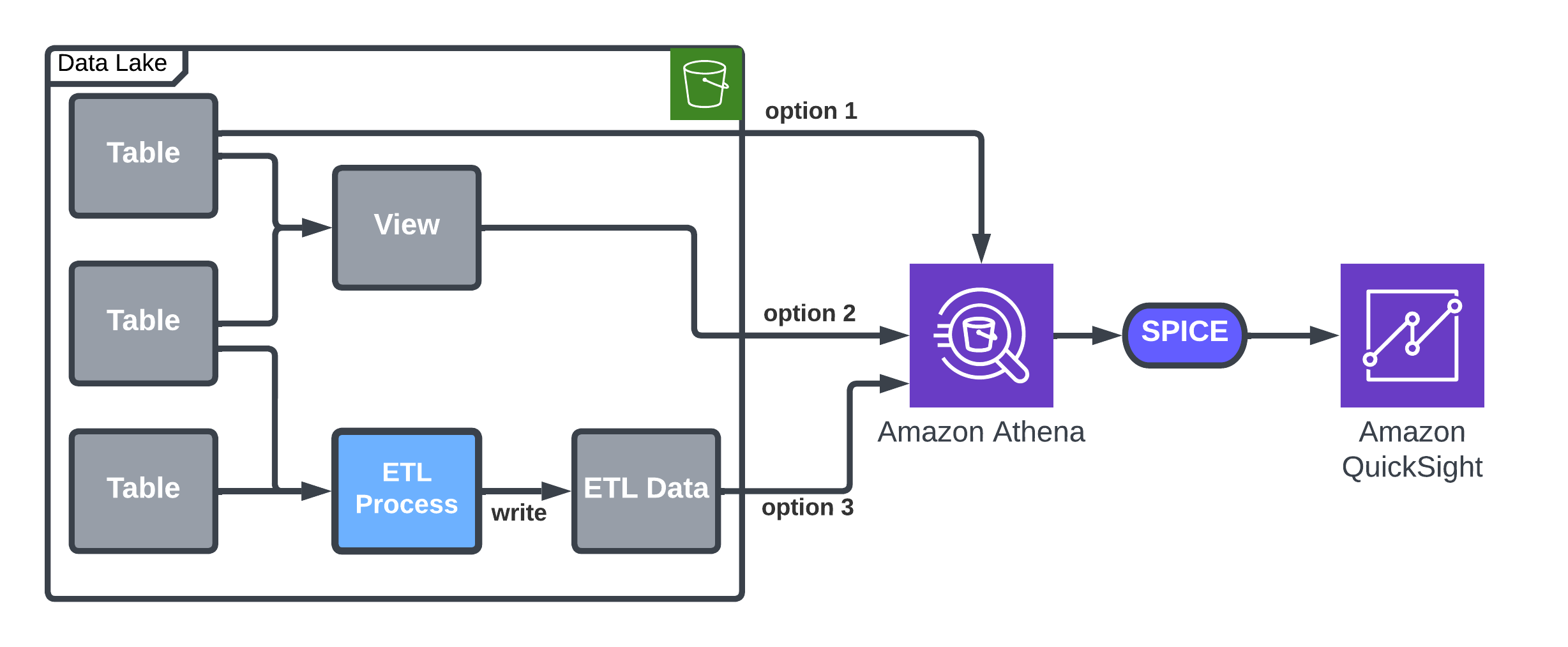
The following architecture diagram shows the high-level flow.

High-level flow

In the following sections, we discuss the details about the flow and the different solutions, including a comparison between them, which can help you choose the right solution for you.

Solution 1: Query with Athena and import to SPICE

QuickSight provides inherent capabilities to upload data using Athena into SPICE, which is a straightforward approach that meets Imperva’s requirements regarding simple data management. For example, it suits stable data flows without frequent exceptions, which may result in SPICE full refresh.

You can use Athena to load data into a QuickSight SPICE dataset, and then use the SPICE incremental upload option to load new data to the dataset. A QuickSight dataset will be connected to a table or a view accessible by Athena. A time column (like day or hour) is used for incremental updates. The following table summarizes the options and details.

Option Description Pros/Cons
Existing table Use the built-in option by QuickSight. Not flexible—the table is imported as is in the data lake.
Dedicated view

A view will let you better control the data in your dataset. It allows joining data, aggregation, or choosing a filter like the date you want to start importing data from.

Note that QuickSight allows building a dataset based on custom SQL, but this option doesn’t allow incremental updates.

Large Athena resource consumption on a full refresh.
Dedicated ETL

Create a dedicated ETL process, which is similar to a view, but unlike the view, it allows reuse of the results in case of a full refresh.

In case your ETL or view contains grouping or other complex operations, you know that these operations will be done only by the ETL process, according to the schedule you define.

Most flexible, but requires ETL development and implementation and additional Amazon S3 storage.

The following architecture diagram details the options for loading data by Athena into SPICE.

Architecture diagram details the options for loading data by Athena into SPICE

The following code provides a SQL example for a view creation. We assume the existence of two tables, customers and events, with one join column called customer_id. The view is used to do the following:

  • Aggregate the data from daily to weekly, and reduce the number of rows
  • Control the start date of the dataset (in this case, 30 weeks back)
  • Join the data to add more columns (customer_type) and filter it
CREATE VIEW my_dataset AS
SELECT DATE_ADD('day', -DAY_OF_WEEK(day) + 1, day) AS first_day_of_week,
       customer_type, event_type, COUNT(events) AS total_events
FROM my_events INNER JOIN my_customers USING (customer_id)
WHERE customer_type NOT IN ('Reseller')
      AND day BETWEEN DATE_ADD('DAY',-7 * 30 -DAY_OF_WEEK(CURRENT_DATE) + 1, CURRENT_DATE)
      AND DATE_ADD('DAY', -DAY_OF_WEEK(CURRENT_DATE), CURRENT_DATE)
GROUP BY 1, 2, 3

Solution 2: Load data into Redshift Serverless

Redshift Serverless provides full visibility to the data, which can be viewed or edited at any time. For example, if there is a delay in adding data to the data lake or the data isn’t properly added, with Redshift Serverless, you can edit data using SQL statements or retry data loading. Redshift Serverless is a scalable solution that doesn’t have a dataset size limitation.

Redshift Serverless is used as a serving layer for the datasets that are to be used in QuickSight. The pricing model for Redshift Serverless is based on storage utilization and the run of queries; idle compute resources have no associated cost. Setting up a cluster is simple and doesn’t require you to choose node types or amount of storage. You simply load the data to tables you create and start working.

To create a new dataset, you need to create an Amazon Redshift table and run the following process every time data is added:

  1. Transform the data using an ETL process (optional):
    • Read data from the tables.
    • Transform to the QuickSight dataset schema.
    • Write the data to an S3 bucket and load it to Amazon Redshift.
  2. Delete old data if it exists to avoid duplicate data.
  3. Load the data using the COPY command.

The following architecture diagram details the options to load data into Redshift Serverless with or without an ETL process.

Architecture diagram details the options to load data into Redshift Serverless with or without an ETL process

The Amazon Redshift COPY command is simple and fast. For example, to copy daily partition Parquet data, use the following code:

COPY my_table
FROM 's3://my_bucket/my_table/day=2022-01-01'
IAM_ROLE 'my_role' 
FORMAT AS PARQUET

Use the following COPY command to load the output file of the ETL process. Values will be truncated according to Amazon Redshift column size. The column truncation is important because, unlike in the data lake, in Amazon Redshift, the column size must be set. This option prevents COPY failures:

COPY my_table
FROM 's3://my_bucket/my_table/day=2022-01-01'
IAM_ROLE 'my_role' 
FORMAT AS JSON GZIP TRUNCATECOLUMNS

The Amazon Redshift COPY operation provides many benefits and options. It supports multiple formats as well as column mapping, escaping, and more. It also allows more control over data format, object size, and options to tune the COPY operation for improved performance. Unlike data in the data lake, Amazon Redshift has column length specifications. We use TRUNCATECOLUMNS to truncates the data in columns to the appropriate number of characters so that it fits the column specification.

Using this method provides full control over the data. In case of a problem, we can repair parts of the table by deleting old data and loading the data again. It’s also possible to use the QuickSight dataset JOIN option, which is not available in SPICE when using incremental update.

Additional benefit of this approach is that the data is available for other clients and services looking to use the same data, such as SQL clients or notebooks servers such as Apache Zeppelin.

Conclusion

QuickSight allows Imperva to expose business data to various departments within an organization. In the post, we explored approaches for importing data from a data lake to QuickSight, whether continuously or incrementally.

However, it’s important to note that there is no one-size-fits-all solution; the optimal approach will depend on the specific use case. Both options—continuous and incremental updates—are scalable and flexible, with no significant cost differences observed for our dataset and access patterns.

Imperva found incremental refresh to be very useful and uses it for simple data management. For more complex datasets, Imperva has benefitted from the greater scalability and flexibility provided by Redshift Serverless.

In cases where a higher degree of control over the datasets was required, Imperva chose Redshift Serverless so that data issues could be addressed promptly by deleting, updating, or inserting new records as necessary.

With the integration of dashboards, individuals can now access data that was previously inaccessible to them. Moreover, QuickSight has played a crucial role in streamlining our data distribution processes, enabling data accessibility across all departments within the organization.

To learn more, visit Amazon QuickSight.


About the Authors

Eliad Maimon is a Senior Startups Solutions Architect at AWS in Tel-Aviv with over 20 years of experience in architecting, building, and maintaining software products. He creates architectural best practices and collaborates with customers to leverage cloud and innovation, transforming businesses and disrupting markets. Eliad is specializing in machine learning on AWS, with a focus in areas such as generative AI, MLOps, and Amazon SageMaker.

Ori Nakar is a principal cyber-security researcher, a data engineer, and a data scientist at Imperva Threat Research group. Ori has many years of experience as a software engineer and engineering manager, focused on cloud technologies and big data infrastructure.

Enforce boundaries on AWS Glue interactive sessions

Post Syndicated from Nicolas Jacob Baer original https://aws.amazon.com/blogs/big-data/enforce-boundaries-on-aws-glue-interactive-sessions/

AWS Glue interactive sessions allow engineers to build, test, and run data preparation and analytics workloads in an interactive notebook. Interactive sessions provide isolated development environments, take care of the underlying compute cluster, and allow for configuration to stop idling resources.

Glue interactive sessions provides default recommended configurations, and also allows users to customize the session to meet their needs. For example, you can provision more workers to experiment on a larger dataset or set the idle timeout for long-running workloads. With the flexibility to change these options depending on the workload, you may need ensure that the options are changed within specific boundaries and apply a control mechanism.

In this post, we present the process of deploying a reusable solution to enforce AWS Glue interactive session limits on three options: connection, number of workers, and maximum idle time. The first option addresses the need for applying custom inspection and controls on traffic, for example by enforcing an interactive session to only be run inside a VPC. The other two enforce limits on costs and usage of AWS Glue resources by enforcing an upper boundary on the number of workers and idle time per session. You can further extend the solution for other properties or services within AWS Glue.

Overview of solution

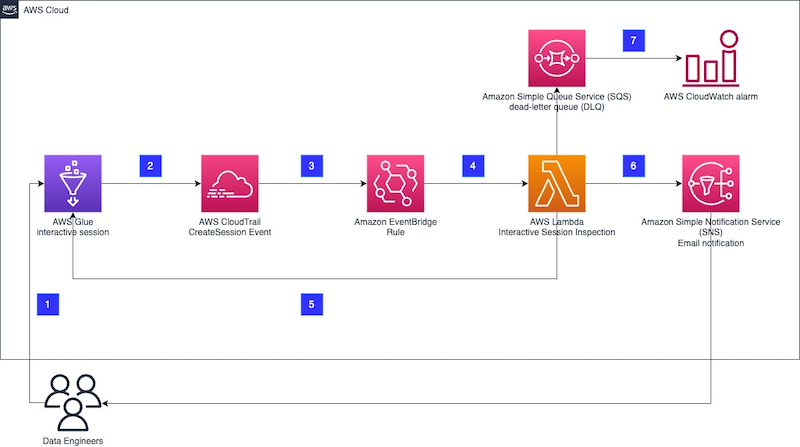
The proposed architecture is built on serverless components and runs whenever a new AWS Glue interactive session is created.

Architecture Diagram of the Solution

The workflow steps are as follows:

  1. A data engineer creates a new AWS Glue interactive session either through the AWS Management Console or in a Jupyter notebook locally.
  2. The interactive session produces a new event to AWS CloudTrail for the CreateSession event with all relevant information to identify and inspect a session as soon as the session is initiated.
  3. An Amazon EventBridge rule filters the CloudTrail events and invokes an AWS Lambda function to inspect the CreateSession event.
  4. The Lambda function inspects the CreateSession event and checks for all defined boundary conditions. Currently, the boundaries configurable with this solution are limited to maximum number of workers, idle timeout in minutes, and deployment with connection enforced.
  5. If any of the defined boundary conditions are not met, for example too many workers are provisioned for the session, depending on the provided configuration, the function ends the interactive session immediately and sends an email via Amazon Simple Notification Service (Amazon SNS). If the session hasn’t started yet, the function will wait for it to start before taking any action.
  6. If the session was stopped, an email is sent to an SNS topic. There is no information available in the interactive session notebook on the reason for the ending of the session. Therefore, additional context information is provided through the SNS topic to the data engineers.
  7. If the function fails, the sessions are logged in a dead-letter queue inside Amazon Simple Queue Service (Amazon SQS). Furthermore, the queue is monitored and in case of a message, it will trigger an Amazon CloudWatch alarm.

The following steps walk you through how to build and deploy the solution. The code is available in the GitHub repo.

Prerequisites

For this walkthrough, you should have the following prerequisites:

Overview of the deployed resources

All the necessary resources are defined in an AWS CloudFormation file located under cfn/template.yaml. To deploy those resources, we use AWS Serverless Application Model (AWS SAM), which enables us to conveniently build and package all the dependencies and also manages the AWS CloudFormation steps for us.

The CloudFormation stack deploys the following resources:

  • A Lambda function with its library, both defined under the directory src/functions. The function is the control. It will validate that the session is started within the limits defined.
  • An EventBridge rule. This event listens to CloudTrail and in case of a new interactive session, will trigger the control Lambda function.
  • An SQS dead-letter queue (DLQ) attached to the Lambda function. This keeps a record of events that triggered a Lambda function failure.
  • Two CloudWatch alarms monitoring the Lambda function failures and the messages in the DLQ.

If notification via email is enabled, two more resources are deployed:

Additionally, AWS CloudFormation deploys all the necessary AWS Identity and Access Management (IAM) roles and policies, and an AWS Key Management Service (AWS KMS) key to ensure that the exchanged data is encrypted.

Deploy the solution

To facilitate the deployment lifecycle, including the setup of the user local environment, we provide a Makefile that describes all the necessary steps. Make sure you have your AWS credentials renewed and have access to your account. For more information, refer to Configuration and credential file settings.

  • Explore the Makefile and adjust the Region and stack name as needed by modifying the values of the variables AWS_REGION and STACK_NAME.
  • Set KILL_SESSION = "True" if you want to immediately stop the interactive session that has been found out of boundaries. Allowed values are True or False; the default is True.
  • Set NOTIFICATION_EMAIL_ADDRESS = <[email protected]> in the Makefile if you want get notified when a session has been found out of boundaries.
  • Set values for your controls:
    • ENFORCE_VPC_CONNECTION to stop sessions not running inside a VPC (true or false).
    • MAX_WORKERS to set the maximum number of workers for a session (numeric).
    • MAX_IDLE_TIMEOUT_MINUTES to define the maximum idle time for sessions in minutes (numeric).
  • Install all the prerequisite libraries:
    make install-pre-requisites

    These will be installed under a newly created Python virtual environment inside this repository in the directory .venv.

  • Deploy the new stack:
    make deploy

    This command will complete the following tasks:

    • Check if the prerequisites are met.
    • Perform pytest unittest on the Python files.
    • Validate the CloudFormation template.
    • Build the artifacts (Lambda function and Lambda layers).
    • Deploy the resources via AWS SAM.

Test the solution

Refer to Introducing AWS Glue interactive sessions for Jupyter for information about running an interactive session. If you follow the instructions in the post (see the section Run your first code cell and author your AWS Glue notebook), the initialization of the interactive session should fail with an error similar to the following.

Example of code in the cell:

from awsglue.context import GlueContext
from awsglue.job import Job
from awsglue.transforms import *
from awsglue.utils import getResolvedOptions
from pyspark.context import SparkContext
sc3 = SparkContext.getOrCreate()
glueContext1 = GlueContext(sc3)
spark = glueContext1.spark_session
job = Job(glueContext1)

Received output:

Authenticating with profile=XXXXXXXX
glue_role_arn defined by user: arn:aws:iam::XXXXXXXXXX:role/XXXXXXXX
Trying to create a Glue session for the kernel.
Worker Type: G.1X
Number of Workers: 5
Session ID: XXXXXXXXXXXXX
Applying the following default arguments:
--glue_kernel_version 0.35
--enable-glue-datacatalog true
Waiting for session xxxxxxxxx to get into ready status...
Session xxxxxxxxx has been created
Exception encountered while running statement: An error occurred (EntityNotFoundException) when calling the GetStatement operation: Session ID xxxxxxxxx not found

If you enabled the email feature, you should also get an email notification.

You can also check on the AWS Glue console that your session ID isn’t listed.

Clean up

Clean up the deployed resources by running the following command:

make clean-up

Note that the resources deployed from following the recommended post, Introducing AWS Glue interactive sessions for Jupyter, will not be removed with the previous command.

Limitations

The delivery guarantee for CloudTrail events to EventBridge are best effort. This means CloudTrail will attempt to deliver all events to EventBridge, but in some rare cases, an event might not be delivered. For more information, refer to Events from AWS services.

Conclusion

This post described how to build, deploy, and test a solution to enforce boundary conditions on AWS Glue interactive sessions in order to enforce constraints on the number of workers, idle timeouts, and AWS Glue connection.

You can adapt this solution based on your needs and further extend it to allow controls on other options.

To learn more about how to use AWS Glue interactive sessions, refer to Introducing AWS Glue interactive sessions for Jupyter and Author AWS Glue jobs with PyCharm using AWS Glue interactive sessions.


About the Authors

Nicolas Jacob Baer is a Senior Cloud Application Architect with a strong focus on data engineering and machine learning, based in Switzerland. He works closely with enterprise customers to design data platforms and build advanced analytics/ml use-cases.

Luca Mazzaferro is a Senior DevOps Architect at Amazon Web Services. He likes to have infrastructure automated, reproducible and secured. In his free time he likes to cook, especially pizza.

Kemeng Zhang is a Cloud Application Architect with a strong focus on machine learning and UX, based in Switzerland. She works closely with customers to design user experiences and build advanced analytics/ml use-cases.

Mark Walser, a Senior Global Data Architect at Amazon Web Services, collaborates with customers to develop innovative Big Data solutions that solve business problems and speed up the adoption of AWS services. Outside of work, he finds pleasure in running, swimming, and all things related to technology.

Gal blog picGal Heyne is a Product Manager for AWS Glue with a strong focus on AI/ML, data engineering and BI, based in California. She is passionate about developing a deep understanding of customer’s business needs and collaborating with engineers to design easy to use data products.


[$] Reports from OSPM 2023, part 3

Post Syndicated from original https://lwn.net/Articles/935180/

The fifth conference on Power
Management and Scheduling in the Linux Kernel
(abbreviated “OSPM”) was
held on April 17 to 19 in Ancona, Italy. LWN was not there,
unfortunately, but the attendees of the event have gotten together to write
up summaries of the discussions that took place and LWN has the privilege
of being able to publish them. Reports from the third and final day of the
event appear below.

Security updates for Friday

Post Syndicated from original https://lwn.net/Articles/936040/

Security updates have been issued by Debian (asterisk, lua5.3, and trafficserver), Fedora (tang and trafficserver), Oracle (.NET 7.0, c-ares, firefox, openssl, postgresql, python3, texlive, and thunderbird), Red Hat (python27:2.7 and python39:3.9 and python39-devel:3.9), Scientific Linux (c-ares), Slackware (cups), SUSE (cups, dav1d, google-cloud-sap-agent, java-1_8_0-openjdk, libX11, openssl-1_0_0, openssl-1_1, openssl-3, openvswitch, and python-sqlparse), and Ubuntu (cups, dotnet6, dotnet7, and openssl).

Customer Compliance Guides now available on AWS Artifact

Post Syndicated from Kevin Donohue original https://aws.amazon.com/blogs/security/customer-compliance-guides-now-available-on-aws-artifact/

Amazon Web Services (AWS) has released Customer Compliance Guides (CCGs) to support customers, partners, and auditors in their understanding of how compliance requirements from leading frameworks map to AWS service security recommendations. CCGs cover 100+ services and features offering security guidance mapped to 10 different compliance frameworks. Customers can select any of the available frameworks and services to see a consolidated summary of recommendations that are mapped to security control requirements. 

CCGs summarize key details from public AWS user guides and map them to related security topics and control requirements. CCGs don’t cover compliance topics such as physical and maintenance controls, or organization-specific requirements such as policies and human resources controls. This makes the guides lightweight and focused only on the unique security considerations for AWS services.

Customer Compliance Guides work backwards from security configuration recommendations for each service and map the guidance and compliance considerations to the following frameworks:

  • National Institute of Standards and Technology (NIST) 800-53
  • NIST Cybersecurity Framework (CSF)
  • NIST 800-171
  • System and Organization Controls (SOC) II
  • Center for Internet Security (CIS) Critical Controls v8.0
  • ISO 27001
  • NERC Critical Infrastructure Protection (CIP)
  • Payment Card Industry Data Security Standard (PCI-DSS) v4.0
  • Department of Defense Cybersecurity Maturity Model Certification (CMMC)
  • HIPAA

Customer Compliance Guides help customers address three primary challenges:

  1. Explaining how configuration responsibility might vary depending on the service and summarizing security best practice guidance through the lens of compliance
  2. Assisting customers in determining the scope of their security or compliance assessments based on the services they use to run their workloads
  3. Providing customers with guidance to craft security compliance documentation that might be required to meet various compliance frameworks

CCGs are available for download in AWS Artifact. Artifact is your go-to, central resource for AWS compliance-related information. It provides on-demand access to security and compliance reports from AWS and independent software vendors (ISVs) who sell their products on AWS Marketplace. To access the new CCG resources, navigate to AWS Artifact from the console and search for Customer Compliance Guides. To learn more about the background of Customer Compliance Guides, see the YouTube video Simplify the Shared Responsibility Model.

 
If you have feedback about this post, submit comments in the Comments section below. If you have questions about this post, contact AWS Support.

Want more AWS Security news? Follow us on Twitter.

Kevin Donohue

Kevin Donohue

Kevin is a Senior Manager in AWS Security Assurance, specializing in shared responsibility compliance and regulatory operations across various industries. Kevin began his tenure with AWS in 2019 in support of U.S. Government customers in the AWS FedRAMP program.

Travis Goldbach

Travis Goldbach

Travis has over 12 years’ experience as a cybersecurity and compliance professional with demonstrated ability to map key business drivers to ensure client success. He started at AWS in 2021 as a Sr. Business Development Manager to help AWS customers accelerate their DFARS, NIST, and CMMC compliance requirements while reducing their level of effort and risk.

How we scaled and protected Eurovision 2023 voting with Pages and Turnstile

Post Syndicated from Dirk-Jan van Helmond original http://blog.cloudflare.com/how-cloudflare-scaled-and-protected-eurovision-2023-voting/

How we scaled and protected Eurovision 2023 voting with Pages and Turnstile

How we scaled and protected Eurovision 2023 voting with Pages and Turnstile

2023 was the first year that non-participating countries could vote for their favorites during the Eurovision Song Contest, adding millions of additional viewers and voters to an already impressive 162 million tuning in from the participating countries. It became a truly global event with a potential for disruption from multiple sources. To prepare for anything, Cloudflare helped scale and protect the voting application, used by millions of dedicated fans around the world to choose the winner.

In this blog we will cover how once.net built their platform based.io to monitor, manage and scale the Eurovision voting application to handle all traffic using many Cloudflare services. The speed with which DNS changes made through the Cloudflare API propagate globally allowed them to scale their backend within seconds. At the same time, Cloudflare Pages was ready to serve any amount of traffic to the voting landing page so fans didn’t miss a beat. And to cap it off, by combining Cloudflare CDN, DDoS protection, WAF, and Turnstile, they made sure that attackers didn’t steal any of the limelight.

The unsung heroes

Based.io is a resilient live data platform built by the once.net team, with the capability to scale up to 400 million concurrent connected users. It’s built from the ground up for speed and performance, consisting of an observable real time graph database, networking layer, cloud functions, analytics and infrastructure orchestration. Since all system information, traffic analysis and disruptions are monitored in real time, it makes the platform instantly responsive to variable demand, which enables real time scaling of your infrastructure during spikes, outages and attacks.

Although the based.io platform on its own is currently in closed beta, it is already serving a few flagship customers in production assisted by the software and services of the once.net team. One such customer is Tally, a platform used by multiple broadcasters in Europe to add live interaction to traditional television. Over 100 live shows have been performed using the platform. Another is Airhub, a startup that handles and logs automatic drone flights. And of course the star of this blog post, the Eurovision Song Contest.

Setting the stage

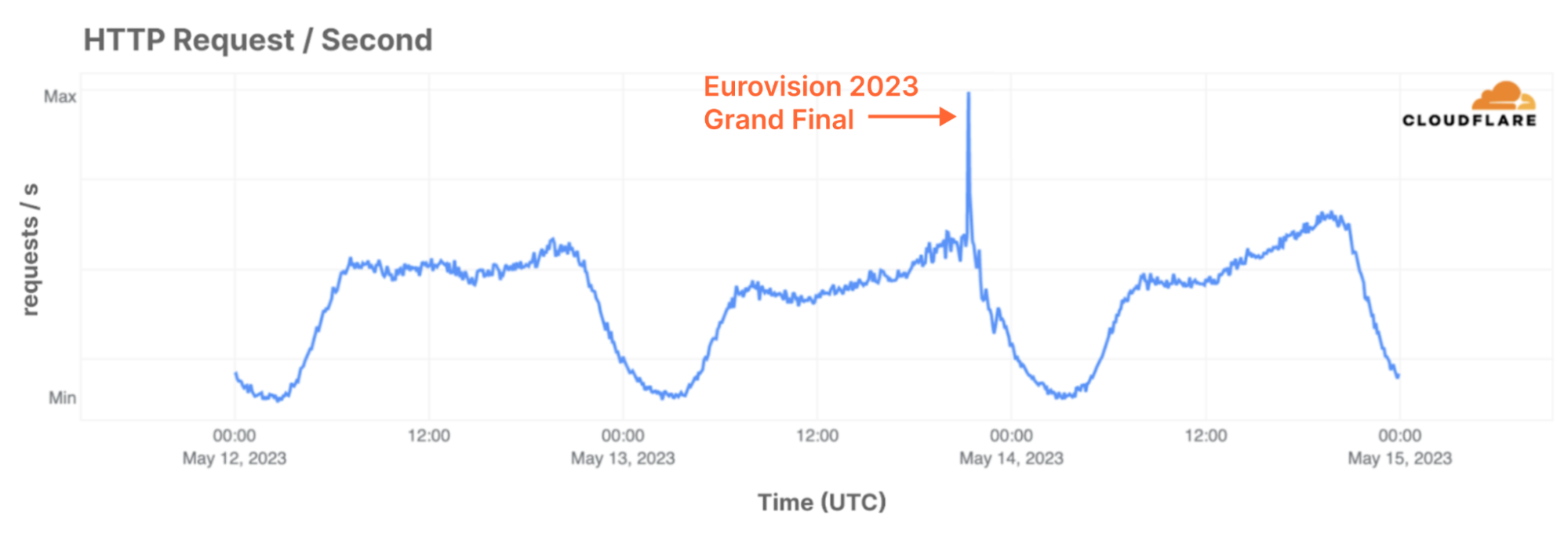
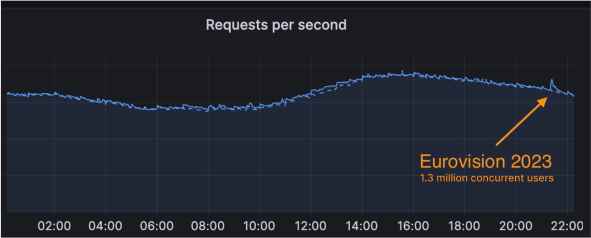
The Eurovision Song Contest is one of the world’s most popular broadcasted contests, and this year it reached 162 million people across 38 broadcasting countries. In addition, on TikTok the three live shows were viewed 4.8 million times, while 7.6 million people watched the Grand Final live on YouTube. With such an audience, it is no surprise that Cloudflare sees the impact of it on the Internet. Last year, we wrote a blog post where we showed lower than average traffic during, and higher than average traffic after the grand final. This year, the traffic from participating countries showed an even more remarkable surge:

How we scaled and protected Eurovision 2023 voting with Pages and Turnstile
HTTP Requests per Second from Norway, with a similar pattern visible in countries such as the UK, Sweden and France. Internet traffic spiked at 21:20 UTC, when voting started.

Such large amounts of traffic are nothing new to the Eurovision Song Contest. Eurovision has relied on Cloudflare’s services for over a decade now and Cloudflare has helped to protect Eurovision.tv and improve its performance through noticeable faster load time to visitors from all corners of the world. Year after year, the team of Eurovision continued to use our services more, discovering additional features to improve performance and reliability further, with increasingly fine-grained control over their traffic flows. Eurovision.tv uses Page Rules to cache additional content on Cloudflare’s edge, speeding up delivery without sacrificing up-to-the-minute updates during the global event. Finally, to protect their backend and content management system, the team has placed their admin portals behind Cloudflare Zero Trust to delegate responsibilities down to individual levels.

Since then the contest itself has also evolved – sometimes by choice, sometimes by force. During the COVID-19 pandemic in-person cheering became impossible for many people due to a reduced live audience, resulting in the Eurovision Song Contest asking once.net to build a new iOS and Android application in which fans could cheer virtually. The feature was an instant hit, and it was clear that it would become part of this year’s contest as well.

How we scaled and protected Eurovision 2023 voting with Pages and Turnstile
A screenshot of the official Eurovision Song Contest application showing the real-time number of connected fans (1) and allowing them to cheer (2) for their favorites.

In 2023, once.net was also asked to handle the paid voting from the regions where phone and SMS voting was not possible. It was the first time that Eurovision allowed voting online. The challenge that had to be overcome was the extreme peak demand on the platform when the show was live, and especially when the voting window started.

Complicating it further, was the fact that during last year’s show, there had been a large number of targeted and coordinated attacks.

To prepare for these spikes in demand and determined adversaries, once.net needed a platform that isn’t only resilient and highly scalable, but could also act as a mitigation layer in front of it. once.net selected Cloudflare for this functionality and integrated Cloudflare deeply with its real-time monitoring and management platform. To understand how and why, it’s essential to understand based.io underlying architecture.

The based.io platform

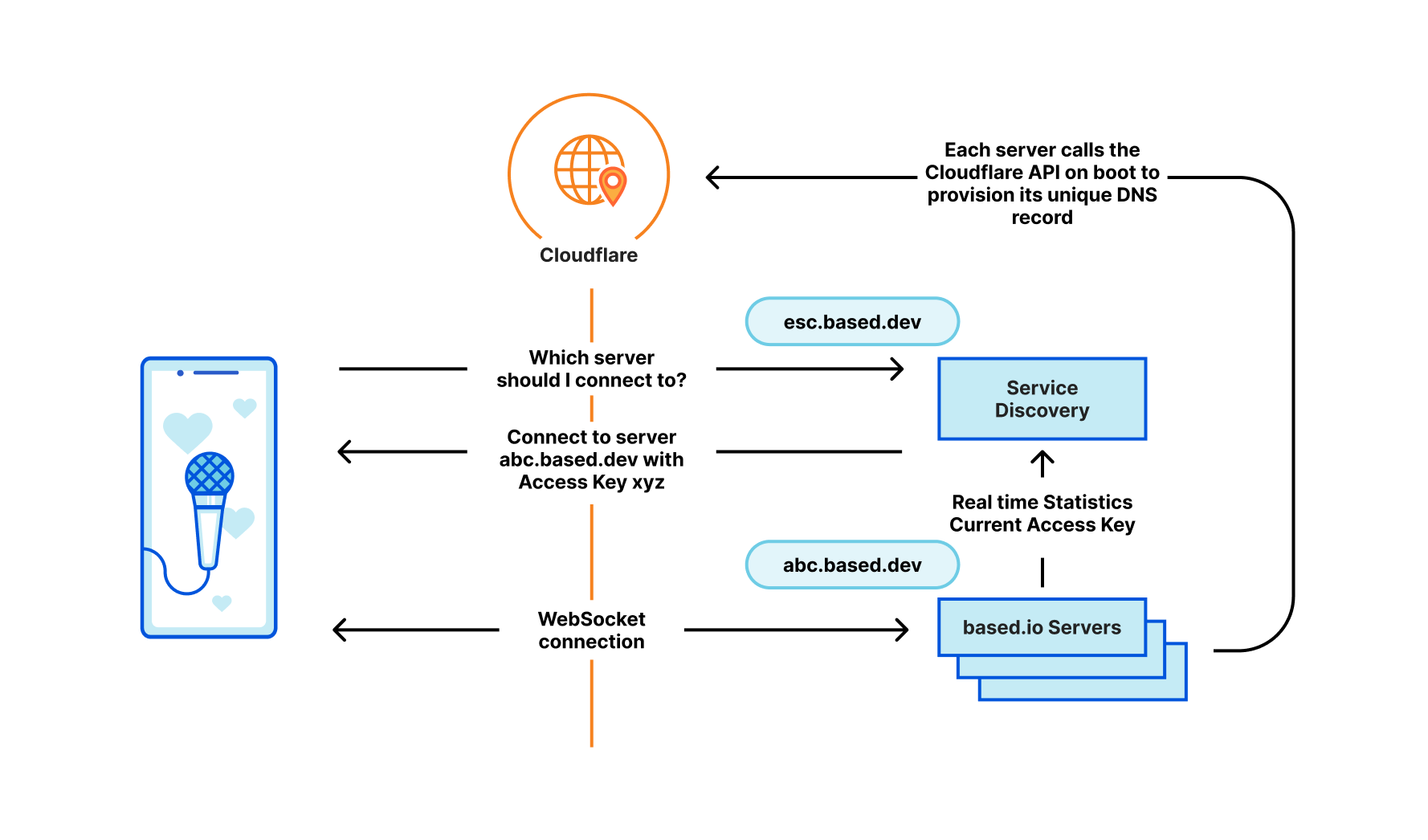
Instead of relying on network or HTTP load balancers, based.io uses a client-side service discovery pattern, selecting the most suitable server to connect to and leveraging Cloudflare's fast cache propagation infrastructure to handle spikes in traffic (both malicious and benign).

First, each server continuously registers a unique access key that has an expiration of 15 seconds, which must be used when a client connects to the server. In addition, the backend servers register their health (such as active connections, CPU, memory usage, requests per second, etc.) to the service registry every 300 milliseconds. Clients then request the optimal server URL and associated access key from a central discovery registry and proceed to establish a long lived connection with that server. When a server gets overloaded it will disconnect a certain amount of clients and those clients will go through the discovery process again.

The central discovery registry would normally be a huge bottleneck and attack target. based.io resolves this by putting the registry behind Cloudflare's global network with a cache time of three seconds. Since the system relies on real-time stats to distribute load and uses short lived access keys, it is crucial that the cache updates fast and reliably. This is where Cloudflare’s infrastructure proved its worth, both due to the fast updating cache and reducing load with Tiered Caching.

Not using load balancers means the based.io system allows clients to connect to the backend servers through Cloudflare, resulting in  better performance and a more resilient infrastructure by eliminating the load balancers as potential attack surface. It also results in a better distribution of connections, using the real-time information of server health, amount of active connections, active subscriptions.

Scaling up the platform happens automatically under load by deploying additional machines that can each handle 40,000 connected users. These are spun up in batches of a couple of hundred and as each machine spins up, it reaches out directly to the Cloudflare API to configure its own DNS record and proxy status. Thanks to Cloudflare’s high speed DNS system, these changes are then propagated globally within seconds, resulting in a total machine turn-up time of around three seconds. This means faster discovery of new servers and faster dynamic rebalancing from the clients. And since the voting window of the Eurovision Song Contest is only 45 minutes, with the main peak within minutes after the window opens, every second counts!

How we scaled and protected Eurovision 2023 voting with Pages and Turnstile
High level architecture of the based.io platform used for the 2023 Eurovision Song Contest‌ ‌

To vote, users of the mobile app and viewers globally were pointed to the voting landing page, esc.vote. Building a frontend web application able to handle this kind of an audience is a challenge in itself. Although hosting it yourself and putting a CDN in front seems straightforward, this still requires you to own, configure and manage your origin infrastructure. once.net decided to leverage Cloudflare’s infrastructure directly by hosting the voting landing page on Cloudflare Pages. Deploying was as quick as a commit to their Git repository, and they never had to worry about reachability or scaling of the webpage.

once.net also used Cloudflare Turnstile to protect their payment API endpoints that were used to validate online votes. They used the invisible Turnstile widget to make sure the request was not coming from emulated browsers (e.g. Selenium). And best of all, using the invisible Turnstile widget the user did not have to go through extra steps, which allowed for a better user experience and better conversion.

Cloudflare Pages stealing the show!

After the two semi-finals went according to plan with approximately 200,000 concurrent users during each,May 13 brought the Grand Final. The once.net team made sure that there were enough machines ready to take the initial load, jumped on a call with Cloudflare to monitor and started looking at the number of concurrent users slowly increasing. During the event, there were a few attempts to DDoS the site, which were automatically and instantaneously mitigated without any noticeable impact to any visitors.

The based.io discovery registry server also got some attention. Since the cache TTL was set quite low at five seconds, a high rate of distributed traffic to it could still result in a significant load. Luckily, on its own, the highly optimized based.io server can already handle around 300,000 requests per second. Still, it was great to see that during the event the cache hit ratio for normal traffic was 20%, and during one significant attack the cache hit ratio peaked towards 80%. This showed how easy it is to leverage a combination of Cloudflare CDN and DDoS protection to mitigate such attacks, while still being able to serve dynamic and real time content.

When the curtains finally closed, 1.3 million concurrent users connected to the based.io platform at peak. The based.io platform handled a total of 350 million events and served seven million unique users in three hours. The voting landing page hosted by Cloudflare Pages served 2.3 million requests per second at peak, and made sure that the voting payments were by real human fans using Turnstile. Although the Cloudflare platform didn’t blink for such a flood of traffic, it is no surprise that it shows up as a short crescendo in our traffic statistics:

How we scaled and protected Eurovision 2023 voting with Pages and Turnstile

Get in touch with us

If you’re also working on or with an application that would benefit from Cloudflare’s speed and security, but don’t know where to start, reach out and we’ll work together.

All the way up to 11: Serve Brotli from origin and Introducing Compression Rules

Post Syndicated from Matt Bullock original http://blog.cloudflare.com/this-is-brotli-from-origin/

All the way up to 11: Serve Brotli from origin and Introducing Compression Rules

This post is also available in 简体中文, 日本語, Español and Deutsch.

All the way up to 11: Serve Brotli from origin and Introducing Compression Rules

Throughout Speed Week, we have talked about the importance of optimizing performance. Compression plays a crucial role by reducing file sizes transmitted over the Internet. Smaller file sizes lead to faster downloads, quicker website loading, and an improved user experience.

Take household cleaning products as a real world example. It is estimated “a typical bottle of cleaner is 90% water and less than 10% actual valuable ingredients”. Removing 90% of a typical 500ml bottle of household cleaner reduces the weight from 600g to 60g. This reduction means only a 60g parcel, with instructions to rehydrate on receipt, needs to be sent. Extrapolated into the gallons, this weight reduction soon becomes a huge shipping saving for businesses. Not to mention the environmental impact.

This is how compression works. The sender compresses the file to its smallest possible size, and then sends the smaller file with instructions on how to handle it when received. By reducing the size of the files sent, compression ensures the amount of bandwidth needed to send files over the Internet is a lot less. Where files are stored in expensive cloud providers like AWS, reducing the size of files sent can directly equate to significant cost savings on bandwidth.

Smaller file sizes are also particularly beneficial for end users with limited Internet connections, such as mobile devices on cellular networks or users in areas with slow network speeds.

Cloudflare has always supported compression in the form of Gzip. Gzip is a widely used compression algorithm that has been around since 1992 and provides file compression for all Cloudflare users. However, in 2013 Google introduced Brotli which supports higher compression levels and better performance overall. Switching from gzip to Brotli results in smaller file sizes and faster load times for web pages. We have supported Brotli since 2017 for the connection between Cloudflare and client browsers. Today we are announcing end-to-end Brotli support for web content: support for Brotli compression, at the highest possible levels, from the origin server to the client.

If your origin server supports Brotli, turn it on, crank up the compression level, and enjoy the performance boost.

Brotli compression to 11

Brotli has 12 levels of compression ranging from 0 to 11, with 0 providing the fastest compression speed but the lowest compression ratio, and 11 offering the highest compression ratio but requiring more computational resources and time. During our initial implementation of Brotli five years ago, we identified that compression level 4 offered the balance between bytes saved and compression time without compromising performance.

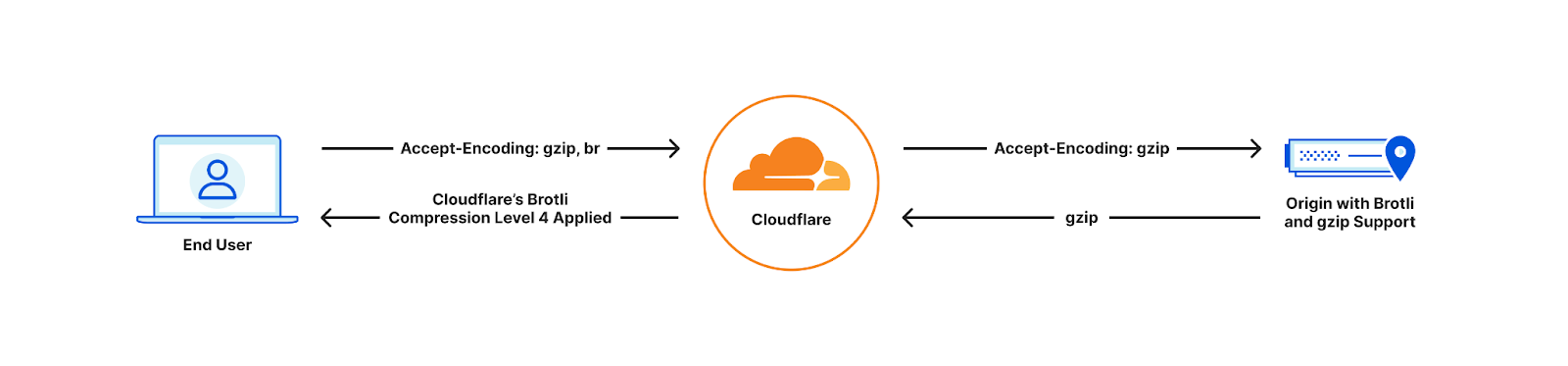
Since 2017, Cloudflare has been using a maximum compression of Brotli level 4 for all compressible assets based on the end user's "accept-encoding" header. However, one issue was that Cloudflare only requested Gzip compression from the origin, even if the origin supported Brotli. Furthermore, Cloudflare would always decompress the content received from the origin before compressing and sending it to the end user, resulting in additional processing time. As a result, customers were unable to fully leverage the benefits offered by Brotli compression.

Old world

All the way up to 11: Serve Brotli from origin and Introducing Compression Rules

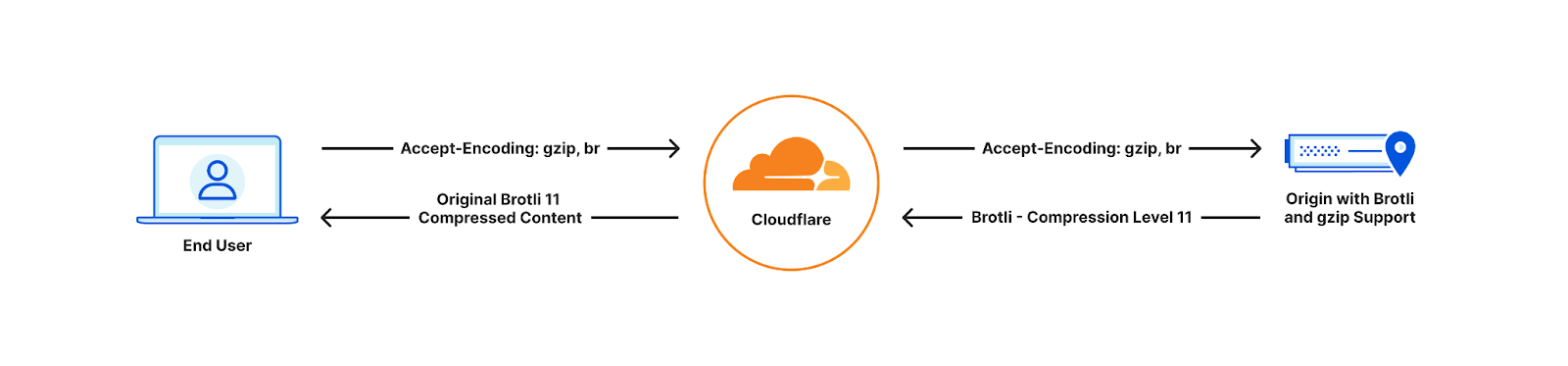
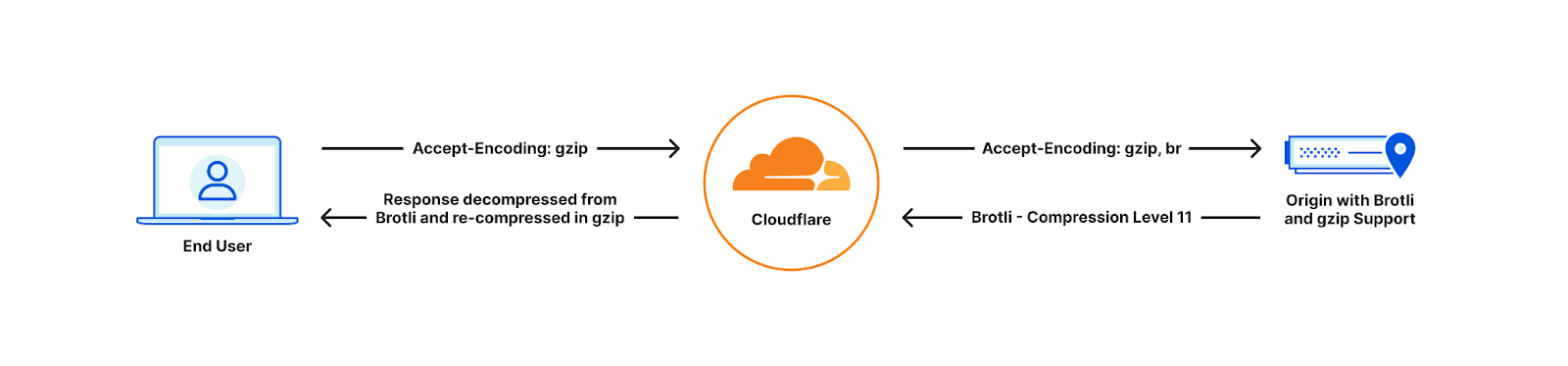
With Cloudflare now fully supporting Brotli end to end, customers will start seeing our updated accept-encoding header arriving at their origins. Once available customers can transfer, cache and serve heavily compressed Brotli files directly to us, all the way up to the maximum level of 11. This will help reduce latency and bandwidth consumption. If the end user device does not support Brotli compression, we will automatically decompress the file and serve it either in its decompressed format or as a Gzip-compressed file, depending on the Accept-Encoding header.

Full end-to-end Brotli compression support

All the way up to 11: Serve Brotli from origin and Introducing Compression Rules

End user cannot support Brotli compression

All the way up to 11: Serve Brotli from origin and Introducing Compression Rules

Customers can implement Brotli compression at their origin by referring to the appropriate online materials. For example, customers that are using NGINX, can implement Brotli by following this tutorial and setting compression at level 11 within the nginx.conf configuration file as follows:

brotli on;
brotli_comp_level 11;
brotli_static on;
brotli_types text/plain text/css application/javascript application/x-javascript text/xml 
application/xml application/xml+rss text/javascript image/x-icon 
image/vnd.microsoft.icon image/bmp image/svg+xml;

Cloudflare will then serve these assets to the client at the exact same compression level (11) for the matching file brotli_types. This means any SVG or BMP images will be sent to the client compressed at Brotli level 11.

Testing

We applied compression against a simple CSS file, measuring the impact of various compression algorithms and levels. Our goal was to identify potential improvements that users could experience by optimizing compression techniques. These results can be seen in the following table:

Test Size (bytes) % Reduction of original file (Higher % better)
Uncompressed response (no compression used) 2,747 –
Cloudflare default Gzip compression (level 8) 1,121 59.21%
Cloudflare default Brotli compression (level 4) 1,110 59.58%
Compressed with max Gzip level (level 9) 1,121 59.21%
Compressed with max Brotli level (level 11) 909 66.94%

By compressing Brotli at level 11 users are able to reduce their file sizes by 19% compared to the best Gzip compression level. Additionally, the strongest Brotli compression level is around 18% smaller than the default level used by Cloudflare. This highlights a significant size reduction achieved by utilizing Brotli compression, particularly at its highest levels, which can lead to improved website performance, faster page load times and an overall reduction in egress fees.

To take advantage of higher end to end compression rates the following Cloudflare proxy features need to be disabled.

  • Email Obfuscation
  • Rocket Loader
  • Server Side Excludes (SSE)
  • Mirage
  • HTML Minification – JavaScript and CSS can be left enabled.
  • Automatic HTTPS Rewrites

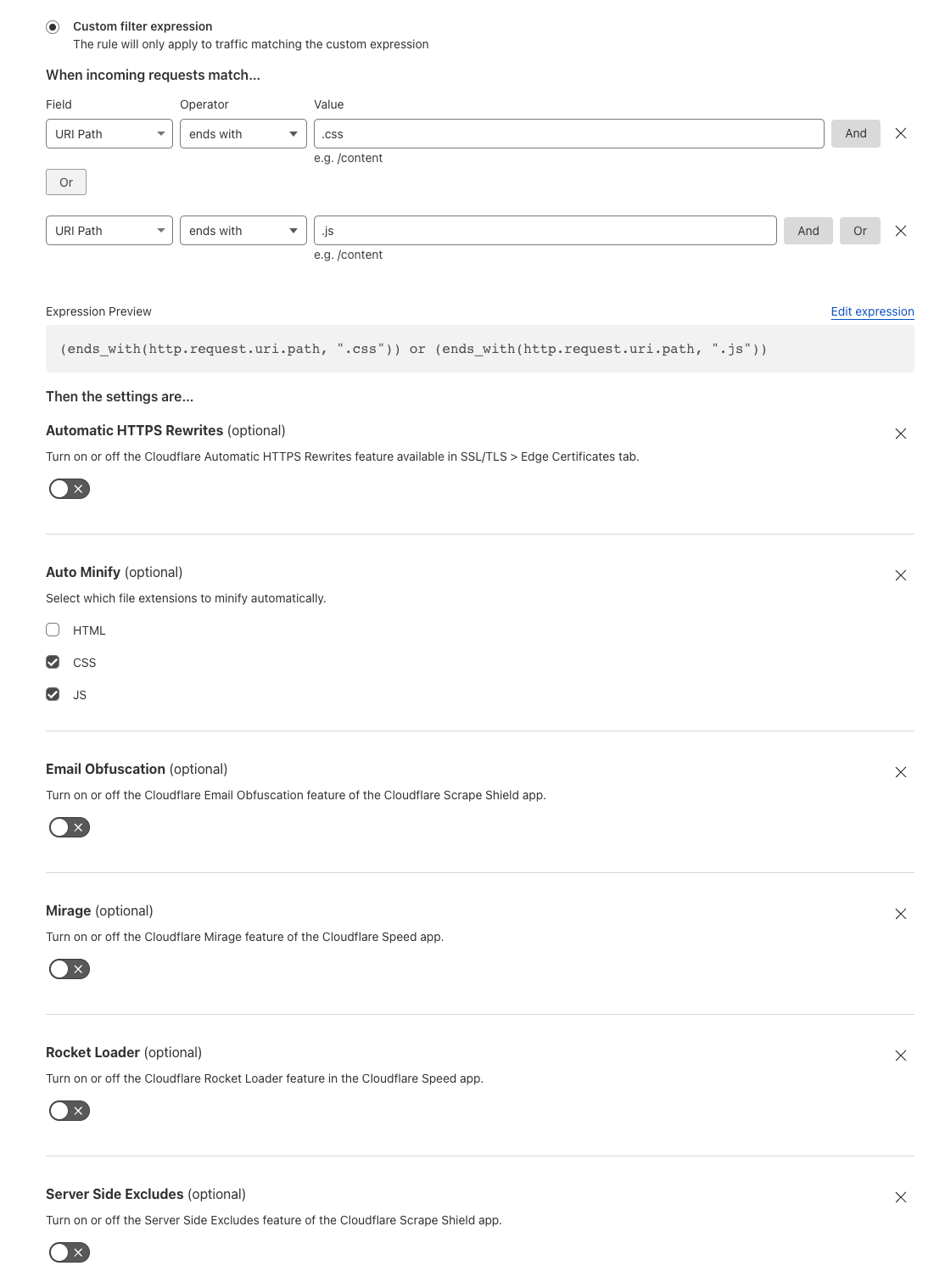
This is due to Cloudflare needing to decompress and access the body to apply the requested settings. Alternatively a customer can disable these features for specific paths using Configuration Rules.

All the way up to 11: Serve Brotli from origin and Introducing Compression Rules

If any of these rewrite features are enabled, your origin can still send Brotli compression at higher levels. However, we will decompress, apply the Cloudflare feature(s) enabled, and recompress on the fly using Cloudflare’s default Brotli level 4 or Gzip level 8 depending on the user's accept-encoding header.

For browsers that do not accept Brotli compression, we will continue to decompress and send Gzipped responses or uncompressed.

Implementation

The initial step towards implementing Brotli from the origin involved constructing a decompression module that could be integrated into Cloudflare software stack. It allows us to efficiently convert the compressed bits received from the origin into the original, uncompressed file. This step was crucial as numerous features such as Email Obfuscation and Cloudflare Workers Customers, rely on accessing the body of a response to apply customizations.

We integrated the decompressor into  the core reverse web proxy of Cloudflare. This integration ensured that all Cloudflare products and features could access Brotli decompression effortlessly. This also allowed our Cloudflare Workers team to incorporate Brotli Directly into Cloudflare Workers allowing our Workers customers to be able to interact with responses returned in Brotli or pass through to the end user unmodified.

Introducing Compression rules – Granular control of compression to end users

By default Cloudflare compresses certain content types based on the Content-Type header of the file. Today we are also announcing Compression Rules for our Enterprise Customers to allow you even more control on how and what Cloudflare will compress.

Today we are also announcing the introduction of Compression Rules for our Enterprise Customers. With Compression Rules, you gain enhanced control over Cloudflare's compression capabilities, enabling you to customize how and which content Cloudflare compresses to optimize your website's performance.

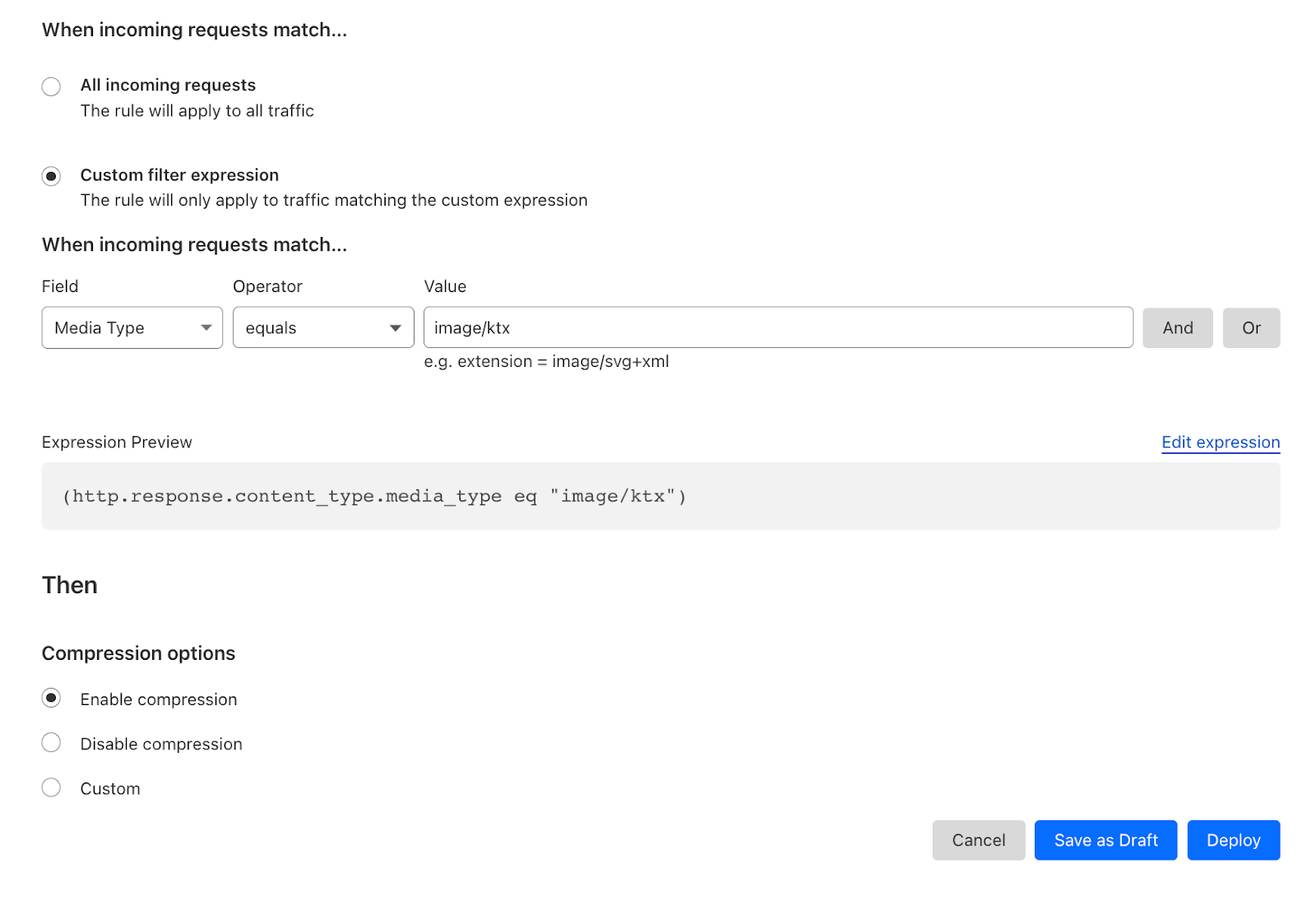
For example, by using Cloudflare's Compression Rules for .ktx files, customers can optimize the delivery of textures in webGL applications, enhancing the overall user experience. Enabling compression minimizes the bandwidth usage and ensures that webGL applications load quickly and smoothly, even when dealing with large and detailed textures.

All the way up to 11: Serve Brotli from origin and Introducing Compression Rules

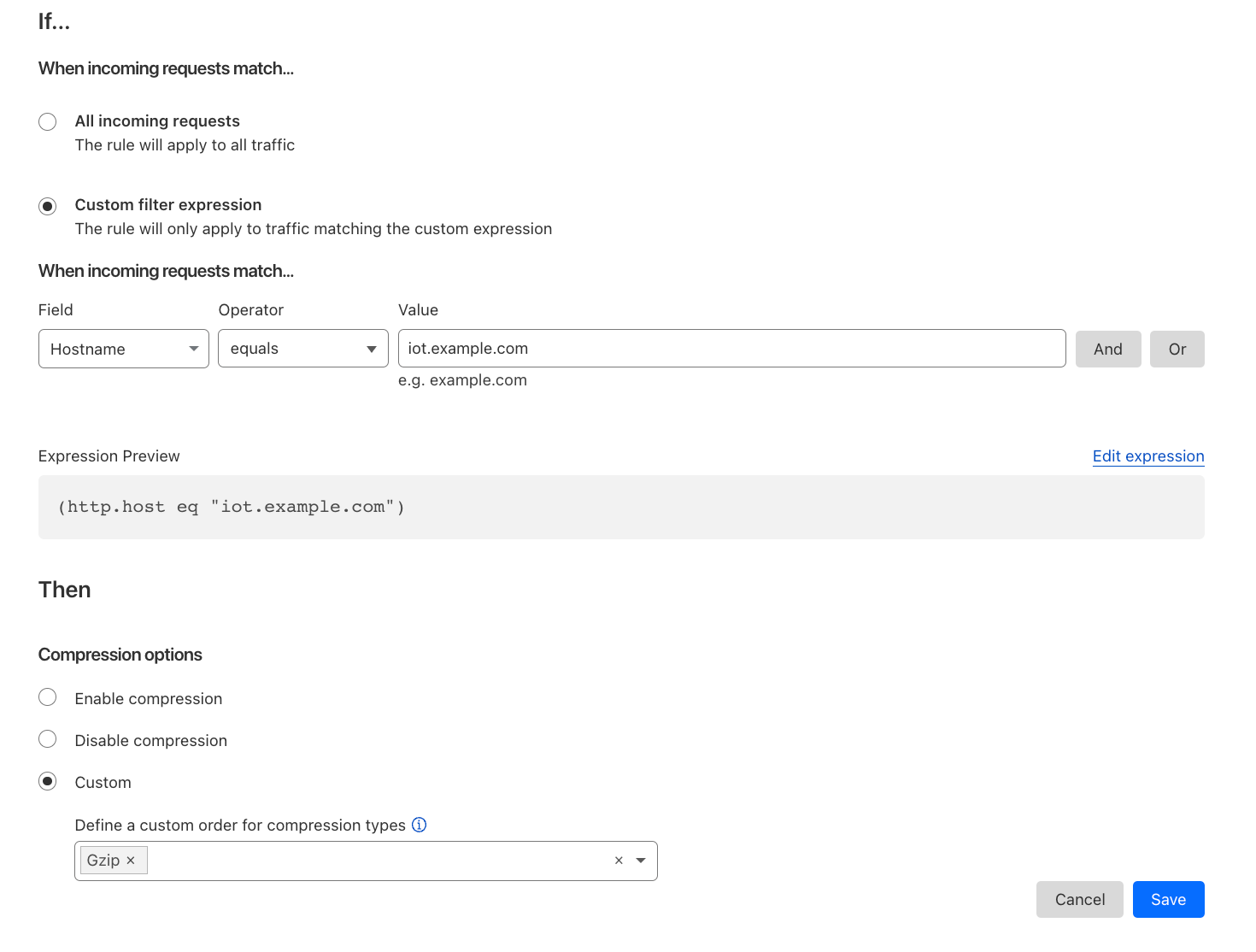
Alternatively customers can disable compression or specify a preference of how we compress. Another example could be an Infrastructure company only wanting to support Gzip for their IoT devices but allow Brotli compression for all other hostnames.

All the way up to 11: Serve Brotli from origin and Introducing Compression Rules

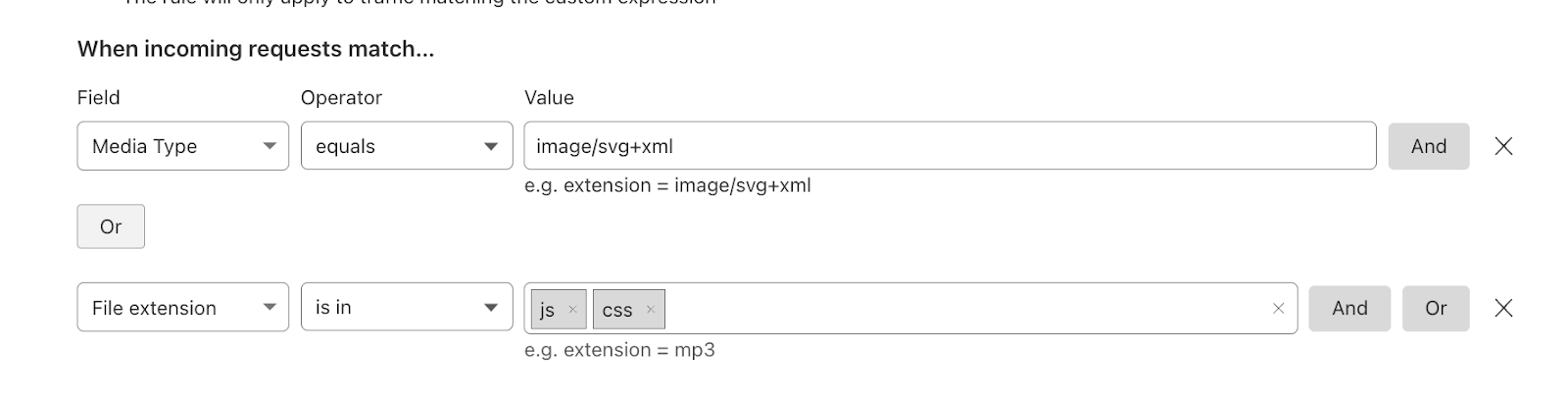
Compression rules use the filters that our other rules products are built on top of with the added fields of Media Type and Extension type. Allowing users to easily specify the content you wish to compress.

All the way up to 11: Serve Brotli from origin and Introducing Compression Rules

Deprecating the Brotli toggle

Brotli has been long supported by some web browsers since 2016 and Cloudflare offered Brotli Support in 2017. As with all new web technologies Brotli was unknown and we gave customers the ability to selectively enable or disable BrotlI via the API and our UI.

All the way up to 11: Serve Brotli from origin and Introducing Compression Rules

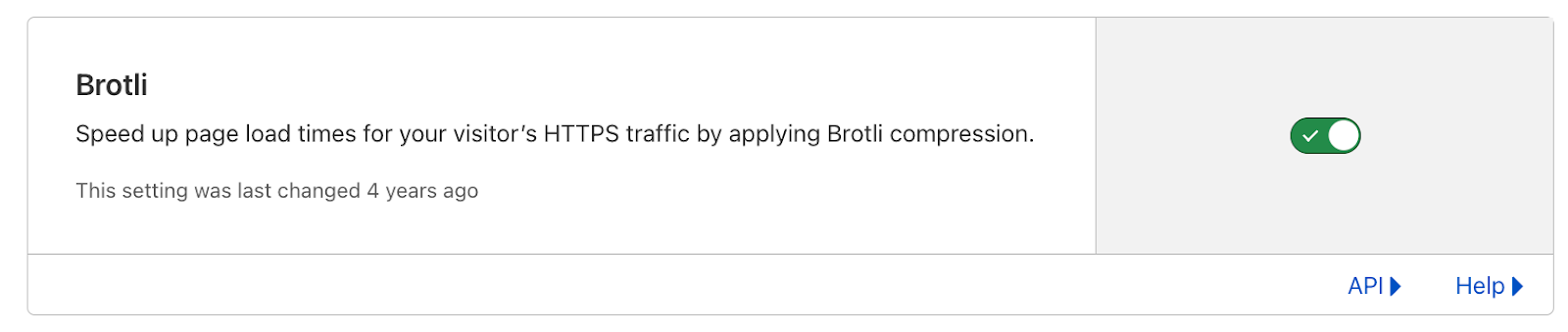
Now that Brotli has evolved and is supported by all browsers, we plan to enable Brotli on all zones by default in the coming months. Mirroring the Gzip behavior we currently support and removing the toggle from our dashboard. If browsers do not support Brotli, Cloudflare will continue to support their accepted encoding types such as Gzip or uncompressed and Enterprise customers will still be able to use Compression rules to granularly control how we compress data towards their users.

The future of web compression

We've seen great adoption and great performance for Brotli as the new compression technique for the web. Looking forward, we are closely following trends and new compression algorithms such as zstd as a possible next-generation compression algorithm.

At the same time, we're looking to improve Brotli directly where we can. One development that we're particularly focused on is shared dictionaries with Brotli. Whenever you compress an asset, you use a "dictionary" that helps the compression to be more efficient. A simple analogy of this is typing OMW into an iPhone message. The iPhone will automatically translate it into On My Way using its own internal dictionary.

O M W
O n M y W a y

This internal dictionary has taken three characters and morphed this into nine characters (including spaces) The internal dictionary has saved six characters which equals performance benefits for users.

By default, the Brotli RFC defines a static dictionary that both clients and the origin servers use. The static dictionary was designed to be general purpose and apply to everyone. Optimizing the size of the dictionary as to not be too large whilst able to generate best compression results. However, what if an origin could generate a bespoke dictionary tailored to a specific website? For example a Cloudflare-specific dictionary would allow us to compress the words and phrases that appear repeatedly on our site such as the word “Cloudflare”. The bespoke dictionary would be designed to compress this as heavily as possible and the browser using the same dictionary would be able to translate this back.

A new proposal by the Web Incubator CG aims to do just that, allowing you to specify your own dictionaries that browsers can use to allow websites to optimize compression further. We're excited about contributing to this proposal and plan on publishing our research soon.

Try it now

Compression Rules are available now! With End to End Brotli being rolled out over the coming weeks. Allowing you to improve performance, reduce bandwidth and granularly control how Cloudflare handles compression to your end users.

Making Cloudflare Pages the fastest way to serve your sites

Post Syndicated from Sid Chatterjee original http://blog.cloudflare.com/how-we-decreased-pages-latency/

Making Cloudflare Pages the fastest way to serve your sites

Making Cloudflare Pages the fastest way to serve your sites

In an era where visitors expect instant gratification and content on-demand, every millisecond counts. If you’re a web application developer, it’s an excellent time to be in this line of business, but with great power comes great responsibility. You’re tasked with creating an experience that is not only intuitive and delightful but also quick, reactive and responsive – sometimes with the two sides being at odds with each other. To add to this, if your business completely runs on the internet (say ecommerce), then your site’s Core Web Vitals could make or break your bottom line.

You don’t just need fast – you need magic fast. For the past two years, Cloudflare Pages has been serving up performant applications for users across the globe, but this week, we’re showing off our brand new, lightning fast architecture, decreasing the TTFB by up to 10X when serving assets.

And while a magician never reveals their secrets, this trick is too good to keep to ourselves. For all our application builders, we’re thrilled to share the juicy technical details on how we adopted Workers for Platforms — our extension of Workers to build SaaS businesses on top of — to make Pages one of the fastest ways to serve your sites.

The problem

When we launched Pages in 2021, we didn’t anticipate the exponential growth we would experience for our platform in the months and years to come. As our users began to adopt Pages into their development workflows, usage of our platform began to skyrocket. However, while riding the high of Pages’ success, we began to notice a problem – a rather large one. As projects grew in size, with every deployment came a pinch more latency, slowly affecting the end users visiting the Pages site. Customers with tens of thousands of deployments were at risk of introducing latency to their site – a problem that needed to be solved.

Before we dive into our technical solution, let’s first explore further the setup of Pages and the relationship between number of deployments and the observed latency.

How could this be?

Built on top of Cloudflare Workers, Pages serves static assets through a highly optimised Worker. We refer to this as the Asset Server Worker.

Users can also add dynamic content through Pages Functions which eventually get compiled into a separate Worker. Every single Pages deployment corresponds to unique instances of these Workers composed in a pipeline.

When a request hits Cloudflare we need to look up which pipeline to execute. As you’d expect, this is a function of the hostname in the URL.

If a user requested https://2b469e16.example.pages.dev/index.html, the hostname is 2b469e16.example.pages.dev which is unique across all deployments on Pages — 2b469e16 is typically the commit hash and example in this case refers to the name of the project.

Every Pages project has its own routing table which is used to look up the pipeline to execute. The routing table happens to be a JSON object with a list of regexes for possible paths in that project (in our case, one for every deployment) and their corresponding pipelines.

The script_hash in the example below refers to the pipeline identifier. Naming is hard indeed.

{
 "filters": [
   {
     "pattern": "^(?:2b469e16.example.pages.dev(?:[:][0-9]+)?\\/(?<p1>.*))$",
     "script_hash": "..."
   },
   {
     "pattern": "^(?:example.pages.dev(?:[:][0-9]+)?\\/(?<p1>.*))$",
     "script_hash": "..."
   },
   {
     "pattern": "^(?:test.example.com(?:[:][0-9]+)?\\/(?<p1>.*))$",
     "script_hash": "..."
   }
 ],
 "v": 1
}

So to look up the pipeline in question, we would: download this JSON object from Quicksilver, parse it, and then iterate through this until it finds a regex that matches the current request.

Unsurprisingly, this is expensive. Let’s take a look at a quick real world example to see how expensive.

In one realistic case, it took us 107ms just to parse the JSON. The larger the JSON object gets, the more compute it takes to parse it — with tens of thousands of deployments (not unusual for very active projects that deploy immutable preview deployments for every git commit), this JSON could be several megabytes in size!

It doesn’t end there though. After parsing this, it took 29ms to then iterate and test several regexes to find the one that matched the current request.

To summarise, every single request to this project would take 136ms to just pick the right pipeline to execute. While this was the median case for projects with 10,000 deployments on average, we’ve seen projects with seconds in added latency making them unusable after 50,000 deployments, punishing users for using our platform.

Given most web sites load more than one asset for a page, this leads to timeouts and breakage leading to an unstable and unacceptable user experience.

The secret sauce is Workers for Platforms

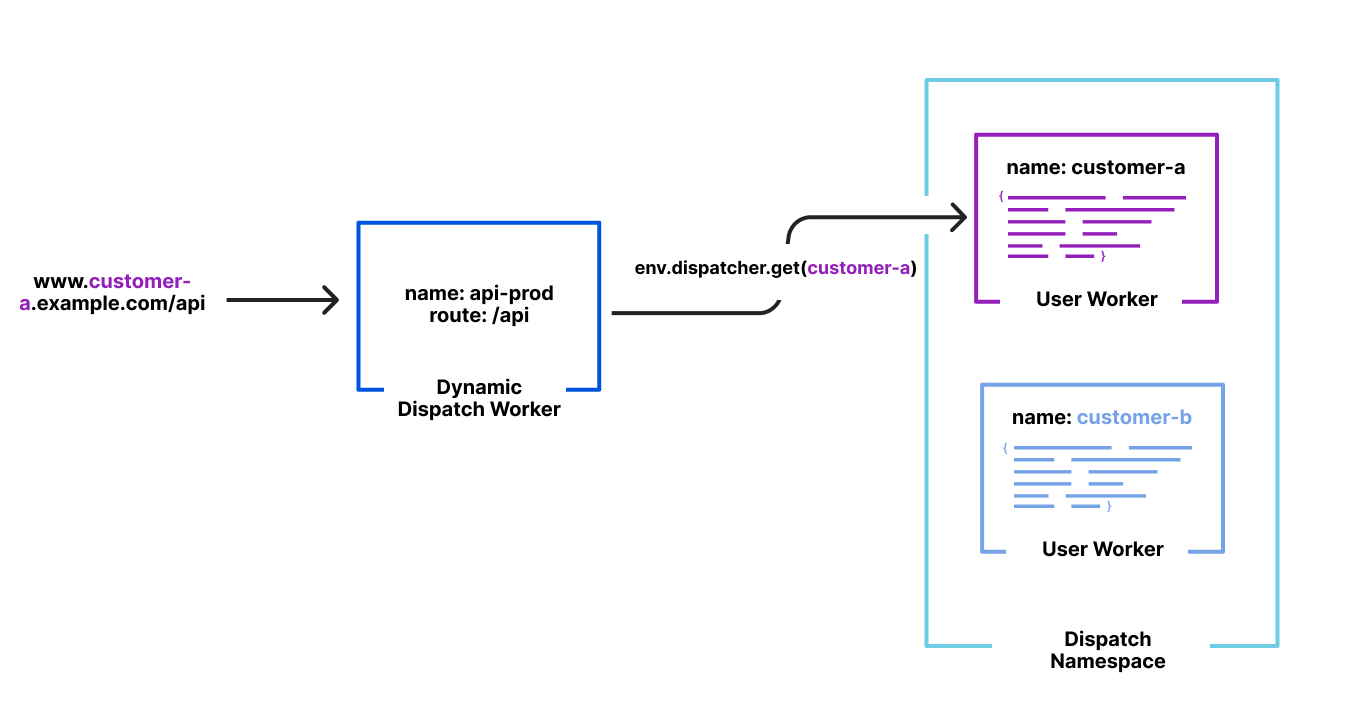
We launched Workers for Platforms last year as a way to build ambitious platforms on top of Workers. Workers for Platforms lets one build complex pipelines where a request may be served by a Worker built and maintained by you but could then dispatch to a Worker written by a user of your platform. This allows your platform’s users to write their own Worker like they’ve been used to but while you control how and when they are executed.

Making Cloudflare Pages the fastest way to serve your sites

This isn’t very different from what we do with Pages. Users write their Pages functions which compile into a Worker. Users also upload their own static assets which are then bound to our special Asset Server Worker in unique pipelines for each of their deployments. And we control how and when which Worker gets executed based on a hostname in their URL.

Runtime lookups shouldn’t be O(n) though but O(1). Because Workers for Platforms was designed to build entire platforms on top of, lookups when trying to dispatch to a user’s Worker were designed as O(1) ensuring latency wasn’t a function of number of Workers in an account.

The solution

By default, Workers for Platforms hashes the name of the Worker with a secret and uses that for lookups at runtime. However, because we need to dispatch by hostname, we had a different idea. At deployment time, we could hash the pipeline for the deployment by its hostname — 2b469e16.example.pages.dev, for example.

When a request comes in, we hash the hostname from the URL with our predefined secret and then use that value to look up the pipeline to execute. This entirely removes the necessity to fetch, parse and traverse the routing table JSON from before, now making our lookup O(1).

Once we were happy with our new setup from internal testing we wanted to onboard a real user. Our Developer Docs have been running on Pages since the start of 2022 and during that time, we’ve dogfooded many different features and experiments. Due to the great relationship between our two teams and them being a sizable customer of ours we wanted to bring them onto our new Workers for Platform routing.

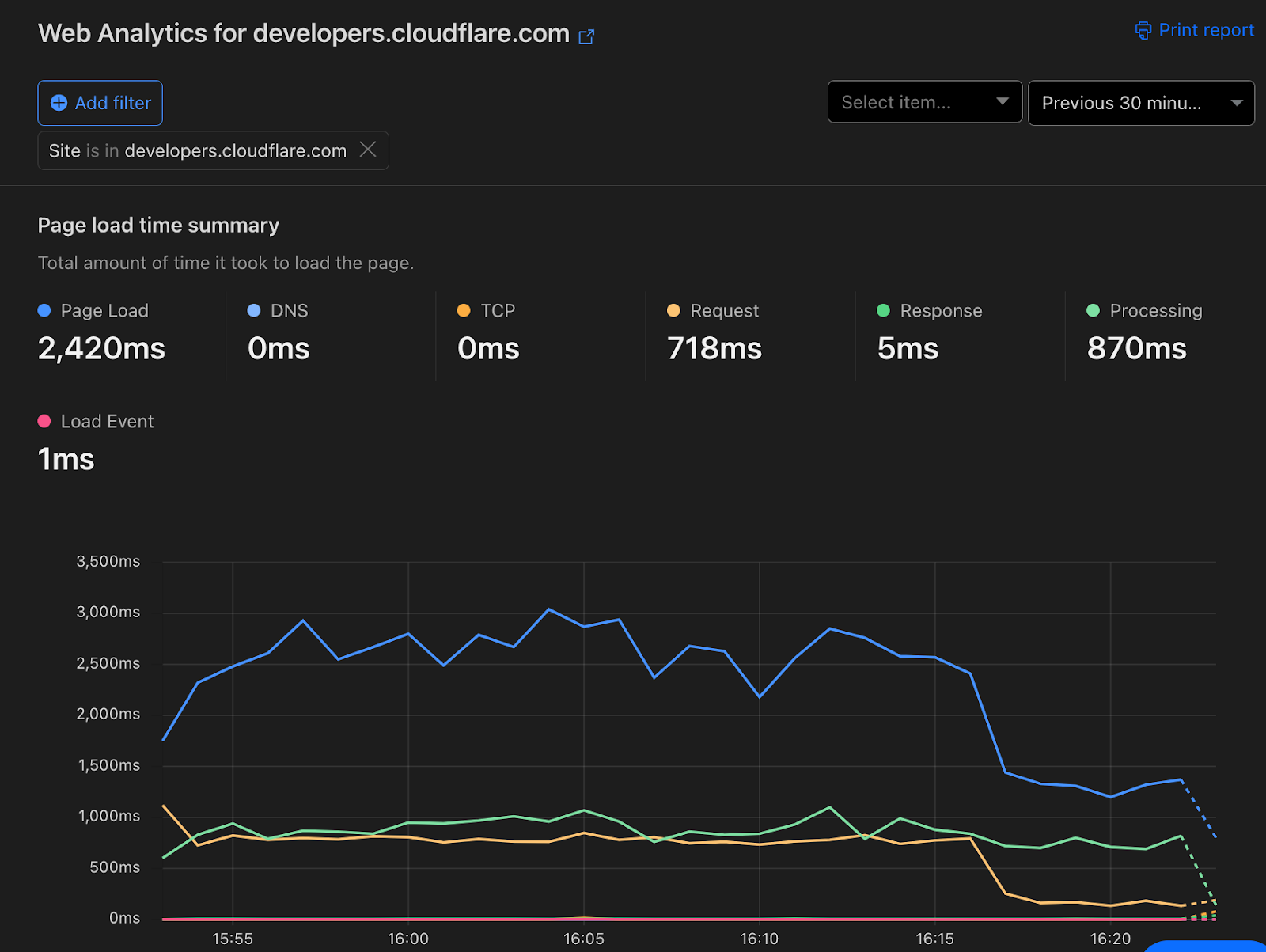
Before opting them in, TTFB was averaging at about 600ms.

After opting them in, TTFB is now 60ms. Web Analytics shows a noticeable drop in entire page load time as a result.

Making Cloudflare Pages the fastest way to serve your sites

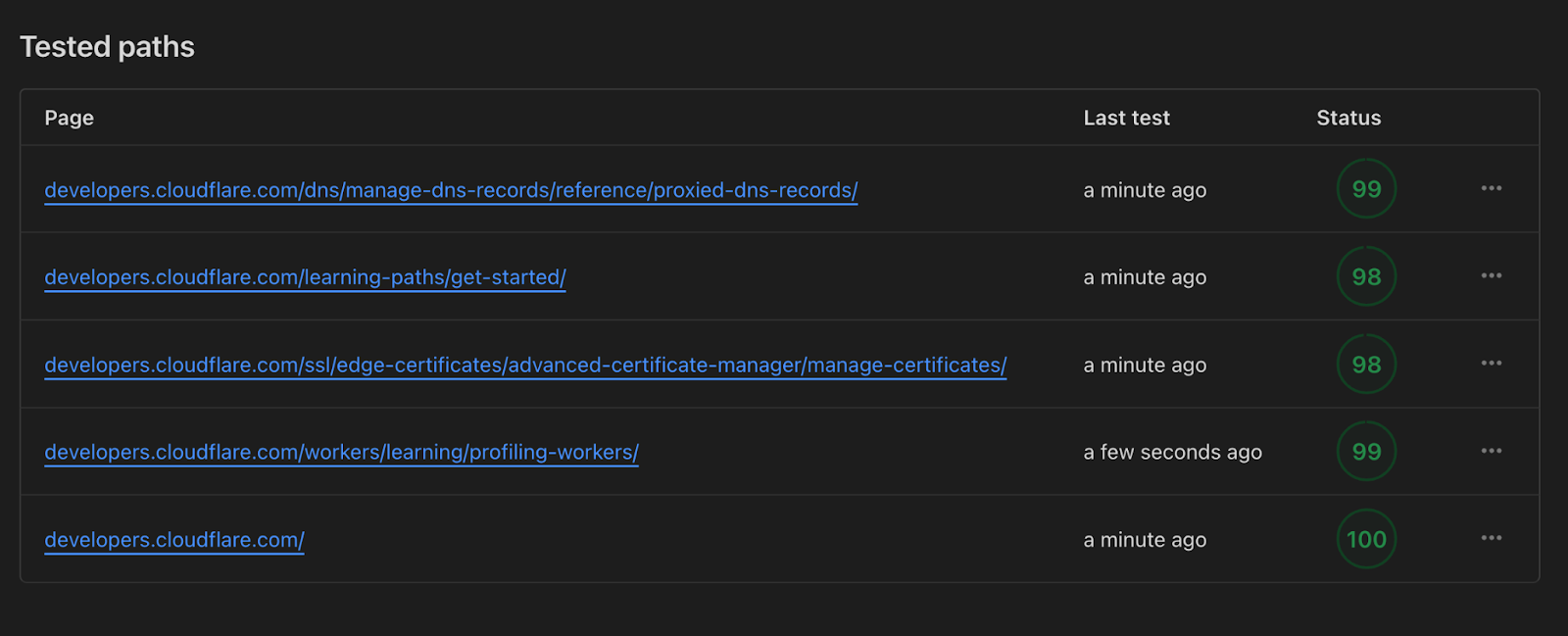
This improvement was also visible through Lighthouse scores now approaching a perfect score of 100 instead of 78 which was the average we saw previously.

Making Cloudflare Pages the fastest way to serve your sites

The team was ecstatic about this especially given all of this happened under the hood with no downtime or required engineering team on their end. Not only is https://developers.cloudflare.com/ faster, we’re using less compute to serve it to all of you.

The big migration

Migrating developers.cloudflare.com was a big milestone for us and meant our new infrastructure was capable of handling traffic at scale. But a goal we were very certain of was migrating every Pages deployment ever created. We didn’t want to leave any users behind.

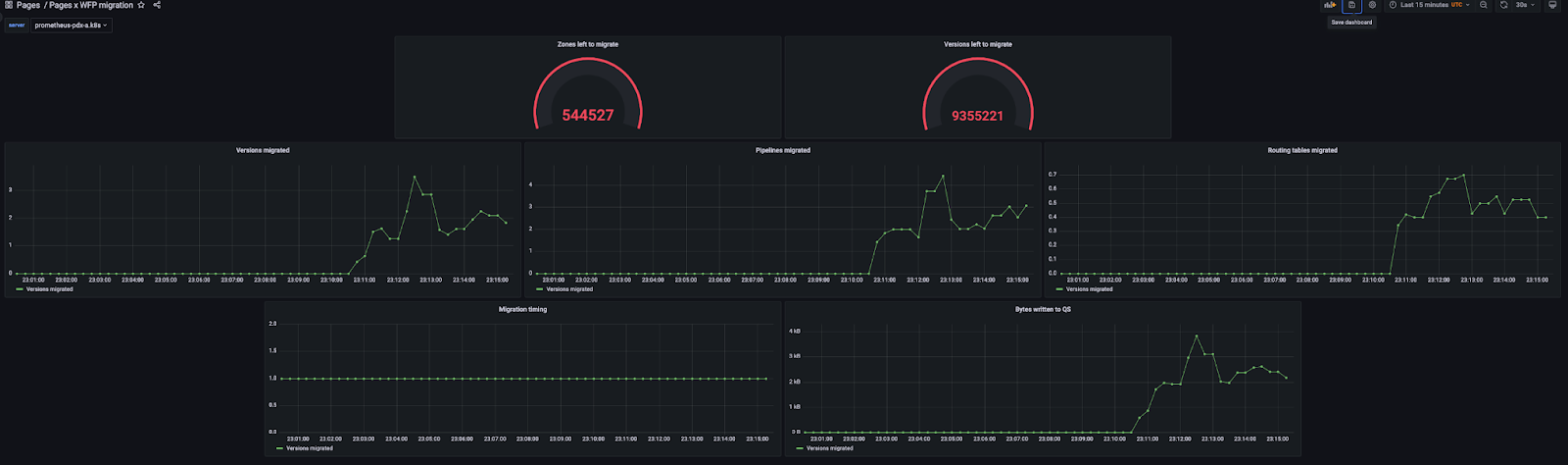
Turns out, that wasn’t a small number. There’d been over 14 million deployments so far over the years. This was about to be one of the biggest migrations we’d done to runtime assets and the risk was that we’d take down someone’s site.

We approached this migration with some key goals:

  • Customer impact in terms of downtime was a no go, all of this needed to happen under the hood without anyone’s site being affected;
  • We needed the ability to A/B test the old and new setup so we could revert on a per site basis if something went wrong or was incompatible;
  • Migrations at this scale have the ability to cause incidents because they exceed the typical request capacity of our APIs in a short window so they need to run slowly;
  • Because this was likely to be a long running migration, we needed the ability to look at metrics and retry failures.

The first step to all of this was to add the ability to A/B test between the legacy setup and the new one. To ensure we could A/B between the legacy setup and new one at any time, we needed to deploy both a regular pipeline (and updated routing table) and new Workers for Platforms hashed one for every deployment.

We also added a feature flag that allowed us to route to either the legacy setup or the new one per site or per data centre with the ability to explicitly opt out a site when an edgecase didn’t work.

With this setup, we started running our long running migration behind the scenes that duplicated every single deployment to the new Workers for Platforms enabled pipelines.

Making Cloudflare Pages the fastest way to serve your sites

Duplicating them instead of replacing them meant that risk was low and A/B would be possible with the tradeoff of more cleanup after we finished but we picked that with reliability for users in mind.

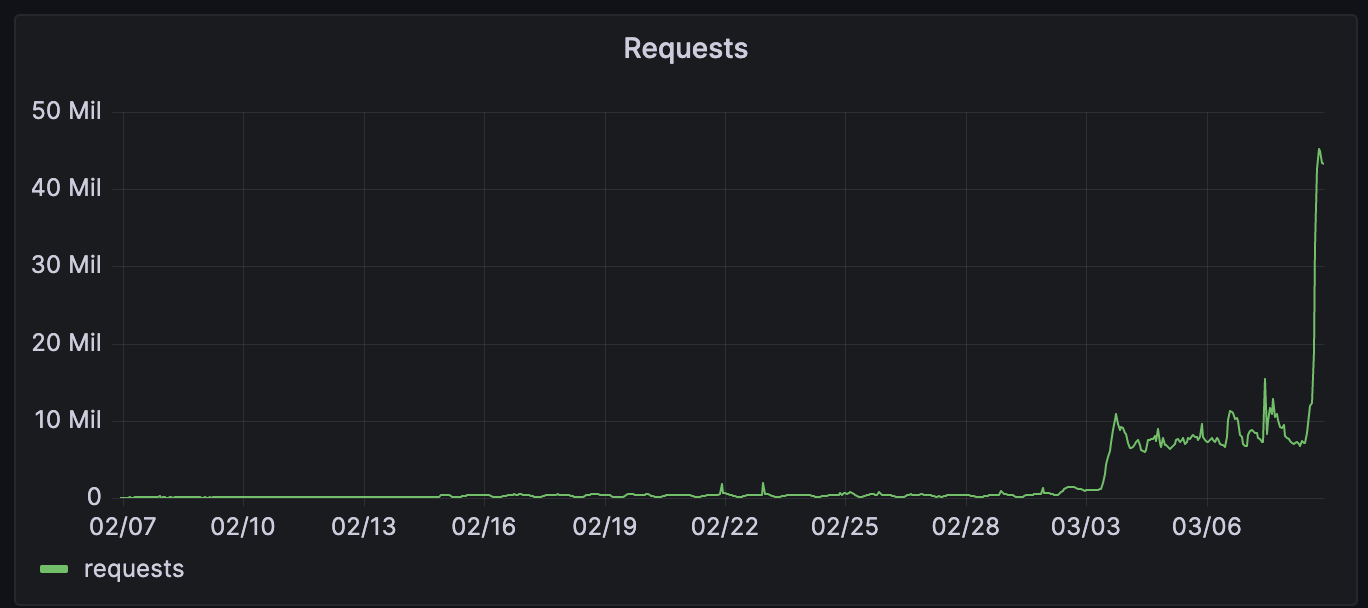
A few days in after all 14 million deployments had finished migrating over, we started rollout to the new infrastructure with a percentage based rollout. This was a great way for us to find issues and ensure we were ready to serve all runtime traffic for Pages without the risk of an incident.

Making Cloudflare Pages the fastest way to serve your sites

Feeding three birds with one scone

Alongside the significant latency improvements for Pages projects, this change also gave improvements in other areas:

  • Lower CPU usage – Since we no longer need to parse a huge JSON blob and do potentially thousands of regex matches, we saved a nice amount of CPU time across thousands of machines across our data centres.
  • Higher LRU hit rate – We have LRU caches for things we fetch from Quicksilver this is to reduce load on Quicksilver and improve performance. However, with the large routing tables we had previously, we could easily fill up this cache with one or just a few routing tables. Now that we have turned this into tiny single entry JSONs, we have improved the cache hit rate for all Workers.
  • Quicksilver storage reduction – We also reduced the storage we take up with our routing tables by 92%. This is a reduction of approximately 12 GiB on each of our hundreds of data centres.

We’re just getting started

Pages is now the fastest way to serve your sites across Netlify, Vercel and many others and we’re so proud.

But it’s going to get even faster. With projects like Flame, we can’t wait to shave off many more milliseconds to every request a user makes to your site.

To a faster web for all of us.

Speeding up APIs with Ricochet for API Gateway

Post Syndicated from John Cosgrove original http://blog.cloudflare.com/speeding-up-apis-ricochet-for-api-gateway/

Speeding up APIs with Ricochet for API Gateway

Speeding up APIs with Ricochet for API Gateway

APIs form the backbone of communication between apps and services on the Internet. They are a quick way for an application to ask for data or ask that a task be performed by a service. For example, anyone can write a weather app without being a meteorologist: simply ask a weather API for the forecast and display it in your app.

Speed is inherent to the API use case. Rather than transferring bulky files like images and HTML, APIs only share the essential data needed to render a webpage or an app. However, despite their efficiency, Internet latency can still impede API data transfers. If the server processing a user’s API request is located far from that user, the network round trip time can degrade that user’s experience.

Cloudflare's global network is specifically designed to optimize and accelerate internet traffic, including APIs. Our users enjoy features like 11ms DNS responses, load balancing, and Argo Smart Routing, which significantly improve API traffic speed. For web content, Cloudflare customers have always been able to cache their web traffic, serving requests from the closest data center and thereby reducing network round trip time and server processing time to a bare minimum. Now, we are leveraging these benefits to enhance API traffic in exciting new ways.

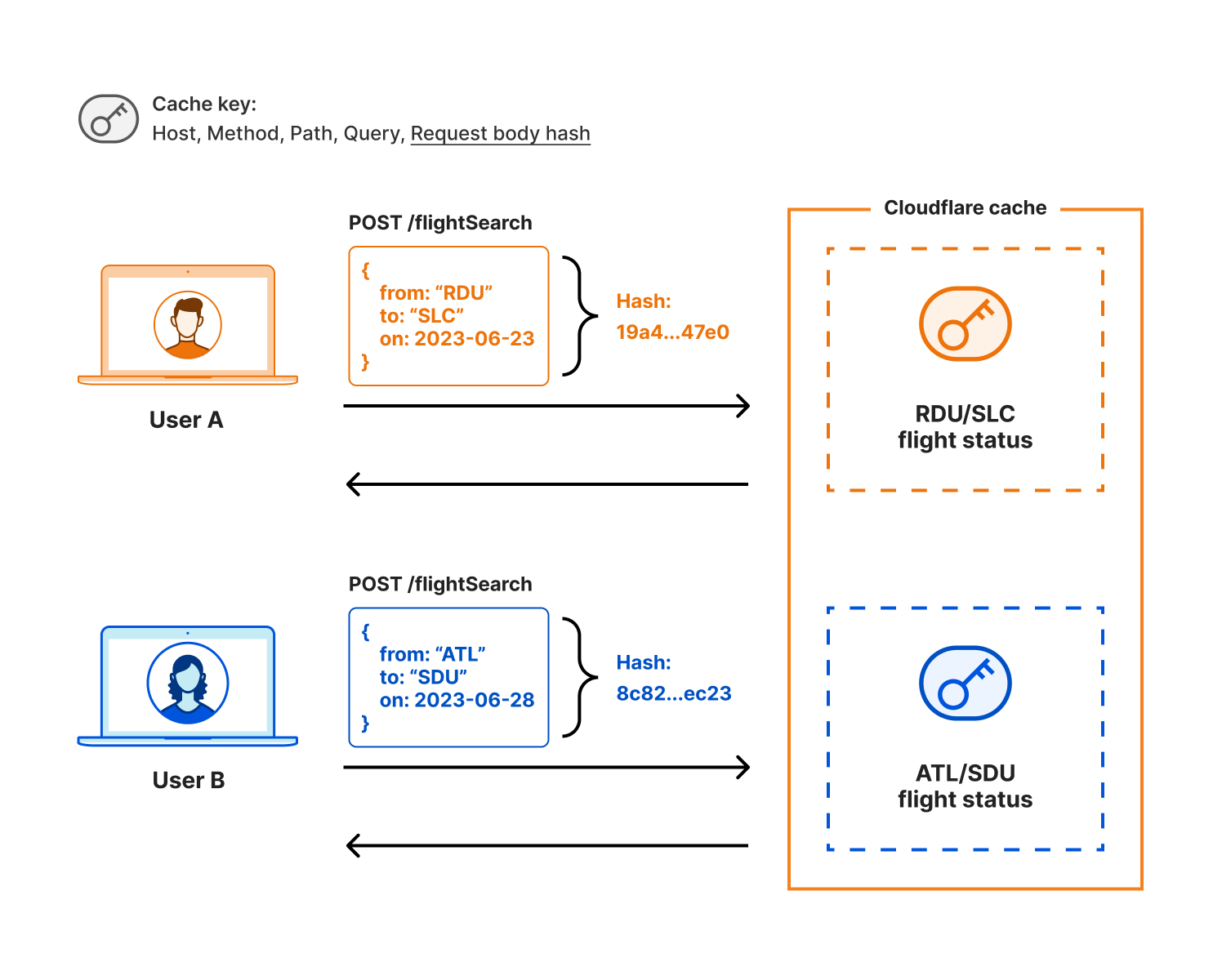
Today we’re announcing Ricochet for API Gateway, the easiest way for Cloudflare customers to achieve faster API responses. Customers using Cloudflare’s API Gateway will be able to enable Ricochet for their API endpoints and automatically reduce average latency through intelligent caching of API requests that would otherwise go to origin. Ricochet will even work for things you previously thought un-cacheable, like GraphQL POST requests. Best of all, there are no changes to make at your origin. Just configure API Gateway with your API session identifiers and leave the rest to us.

Enabling Ricochet for your APIs will cause Cloudflare to cache many of the basic, repetitive API calls from your applications and deliver them to users faster than ever. At first, your product metrics might even look broken with lower latency and fewer requests at origin. But these metrics will be a new sign of success, reflecting your app’s new speedy user experience.

Why you should cache API responses

It isn’t news that page load times directly correlate to dollar spend of site visitors. Organizations have spent the last decade obsessing over static content optimization to deliver websites quicker every year. Faster apps result in higher business metrics for most web sites. For example, faster sites receive more sales orders and have higher customer loyalty. Faster sites are also critical for engagement during marketing campaigns. Caching API requests will make your sites and apps faster by lowering the amount of time required to populate your app with data for your users.

The tools for caching APIs have always been available. But why isn’t it more common? We hypothesize a few reasons. It could be that API developers assume that APIs are too dynamic to cache, and that it only helps after lots of analysis of the application’s performance. It could also be that the security concerns around caching APIs are non-trivial. If both of those are true, you can imagine how caching APIs would only be successful with a large cross-organizational approach and lots of effort.

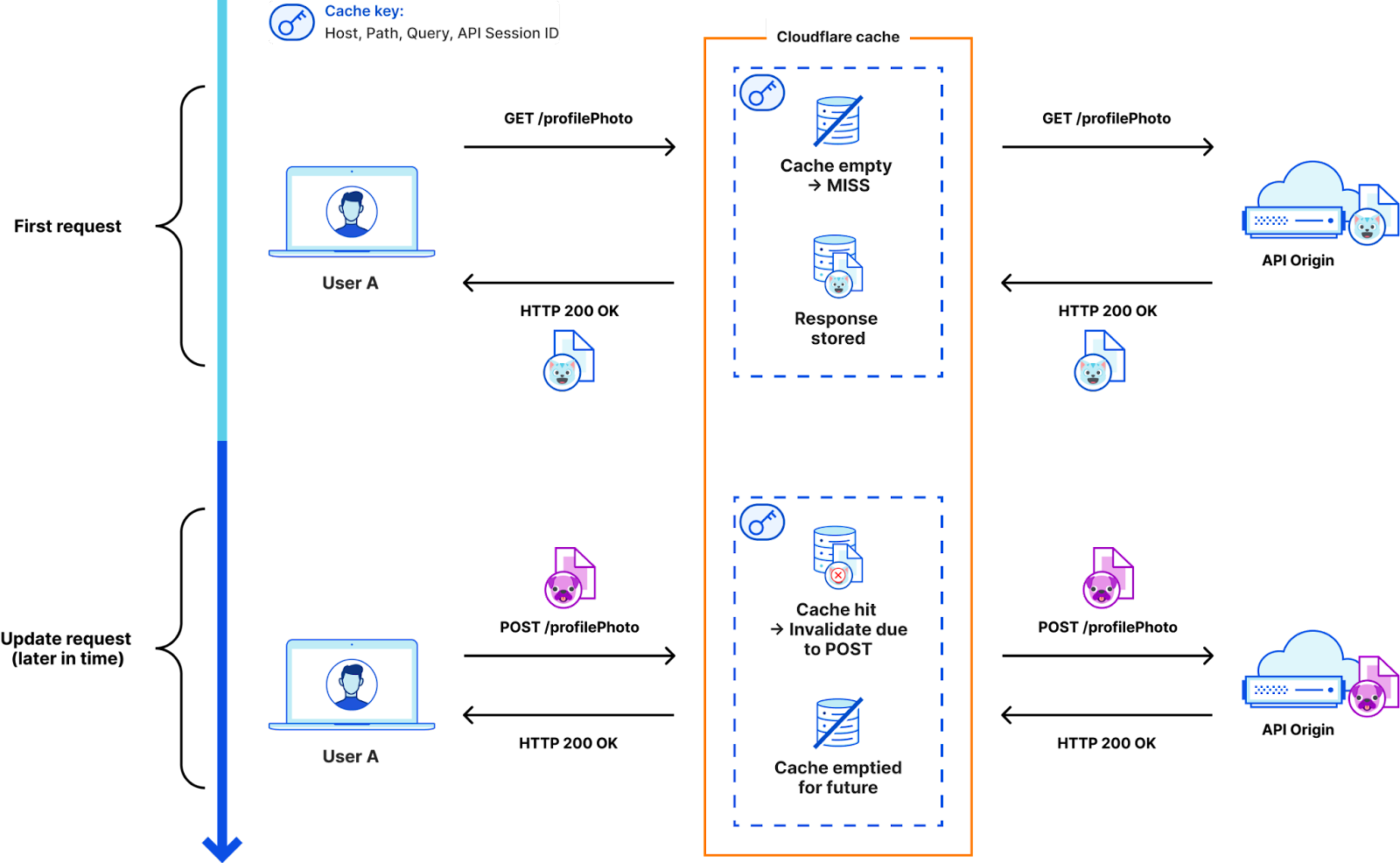
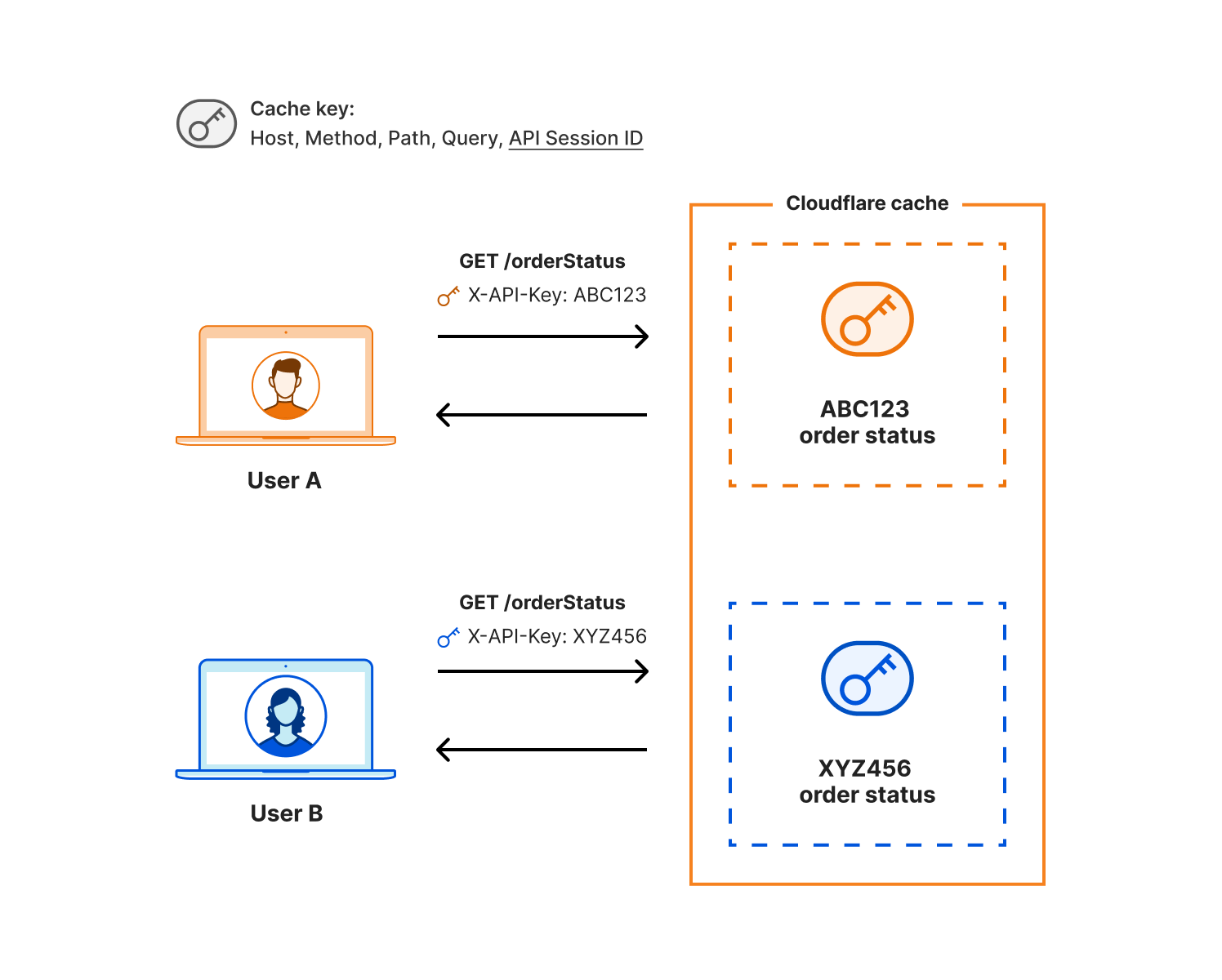
Let’s say your organization decided to try API caching anyway. We know there are a few problems if you want to cache APIs: First, traditional caching methods aren’t necessarily ready out of the box for caching APIs; cache invalidation needs to happen quickly and automatically. Second, special standalone cache tooling exists, but it doesn’t help you if it’s placed next to the origin and your users are globally distributed. Lastly, it’s hard to get security right when caching user data. It’s strictly forbidden to serve one user’s data to another on accident. Cloudflare has superpowers in these areas: knowledge of origin response time and existing cache-hit ratios, customer-configured API session IDs to establish secure user association with API requests, and the scale of our global network. We’re bringing together API Management with our robust caching infrastructure to safely and automatically cache API requests.

Cloudflare’s unique approach

The HTTP methods POST, PUT, and DELETE aren't generally cacheable. These methods are meant to change information at the origin on a one-time basis, and are therefore “non-safe”. If you responded to a non-safe request from cache, the data on the API server would not be updated. Compare this with “safe” HTTP methods: GET, OPTIONS, and HEAD. Caching requests with safe methods is straightforward as data at the origin does not change per-request.

But what do we know about RESTful APIs that can make caching easier? The endpoints usually stay the same when operating on objects, but the methods change. We will enable caching for safe methods and then automatically invalidate the cache when we see a non-safe method request for a RESTful endpoint managed by API Gateway. It’s also possible you have updates on one endpoint that change another endpoint’s data. In that event, we urge you to consider whether API Gateway’s short default TTL timers fit your use case by allowing a small delay between updating data at the origin and serving that update from cache. Check out the below diagram for an example of how automatic cache invalidation would work for shared paths with different methods:

Speeding up APIs with Ricochet for API Gateway

Even for safe requests, caching API data is risky when it comes to security. Done incorrectly, you could accidentally serve sensitive user data to the wrong person. That’s why Ricochet’s cache key includes the user’s API session identifier. This extra information in the cache key ensures that only an authorized user is able to receive their own cached data. For APIs without authentication, we hash the request parameters themselves and include that hash in the cache key, to ensure the correct data is returned for endpoints with static paths but variable inputs. Here’s an example for authenticated APIs:

Speeding up APIs with Ricochet for API Gateway

And here’s an example for anonymous APIs, where we use a hash of the request body to preserve privacy and still enable unique, useful cache keys:

Speeding up APIs with Ricochet for API Gateway

APIs can be ripe for caching

There are many API caching use cases out there, and we decided to start with two where our customers have asked us for help so far: mixed-authentication APIs where returning the correct data is critical, and APIs that have single endpoints that can return varied query results (think RESTful endpoints with variable inputs and GraphQL POST requests). These use cases include things like weather forecasts and current conditions, airline flight tracking and flight status, live sports scores, and collaborative tools with many users.

Even short cache control timers can be beneficial to reduce load at the origin and speed up responses. Consider an example of a popular public endpoint receiving 1,000 requests/second, or 60,000 requests/min at origin. Let’s assume the data at the origin changes unpredictably but not due to unique user interaction. For this use case, reporting stale data for a few seconds or even a minute could be acceptable, and most users wouldn’t know or mind the difference. You could set your cache control to a very low 1 second and serve 999 requests/second from cache. That would reduce the origin requests to only 60 requests/minute!

This is a simple example, and we urge you to think about your API and the potential performance improvements caching could bring.

Potential impact of caching APIs

We profiled five top global airline website APIs for flight status checks and compared their retrieval time against the airline logo’s retrieval time. Here are the results:

Speeding up APIs with Ricochet for API Gateway

All five airlines saw on average a ~7x slow down for data that could easily be cached!

Successful caching will also lower load on your API origin. The hidden benefit with lower load at origin means faster responses from the requests that miss the cache and do end up hitting origin. So it’s two-for-the-price-of-one and latency decreases all-around. We aren’t going to reinvent your API overnight, but we are going to make a difference in your application’s response times by making it easy to add caching to your APIs.

Conclusion

We're launching Ricochet in 2024. It’s going to make a measurable difference speeding up your APIs, and the best part is that as an API Gateway customer it will be easy to get started without requiring tons of your team’s time. Let your account team know if you’d like to be on our waitlist for this feature. Our goal is to increase the amount of API caching on the Internet so that we can all benefit from faster response times and snappier apps.

The collective thoughts of the interwebz