Serverless strategies for streaming LLM responses

Post Syndicated from KyungYong Shim original https://aws.amazon.com/blogs/compute/serverless-strategies-for-streaming-llm-responses/

Modern generative AI applications often need to stream large language model (LLM) outputs to users in real-time. Instead of waiting for a complete response, streaming delivers partial results as they become available, which significantly improves the user experience for chat interfaces and long-running AI tasks. This post compares three serverless approaches to handle Amazon Bedrock LLM streaming on Amazon Web Services (AWS), which helps you choose the best fit for your application.

  1. AWS Lambda function URLs with response streaming
  2. Amazon API Gateway WebSocket APIs
  3. AWS AppSync GraphQL subscriptions

We cover how each option works, the implementation details, authentication with Amazon Cognito, and when to choose one over the others.

Lambda function URLs with response streaming

AWS Lambda function URLs provide a direct HTTP(S) endpoint to invoke your Lambda function. Response streaming allows your function to send incremental chunks of data back to the caller without buffering the entire response. This approach is ideal for forwarding the Amazon Bedrock streamed output, providing a faster user experience. Streaming is supported in Node.js 18+. In Node.js, you wrap your handler with awslambda.streamifyResponse(), which provides a stream to write data to, and which sends it immediately to the HTTP response.

Architecture

The following figure shows the architecture.
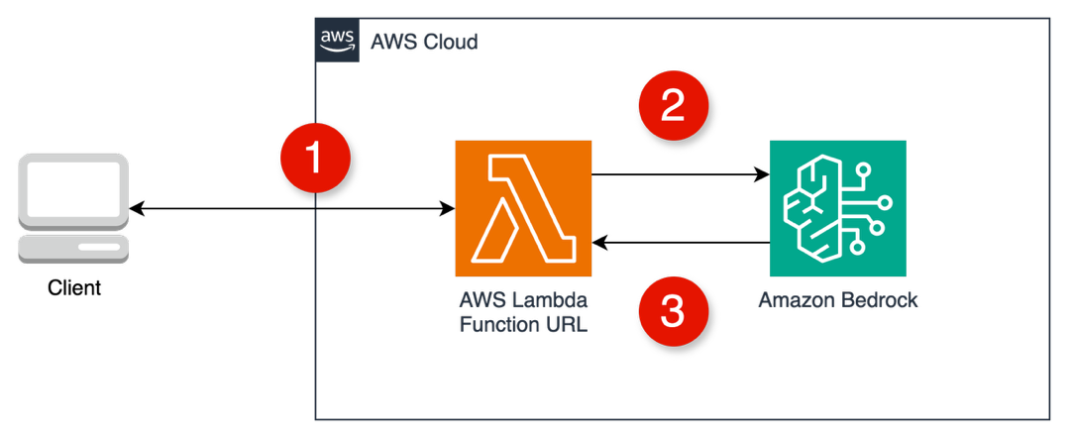
Lambda function URLs with Amazon Bedrock architecture

  1. The client makes a fetch() call to the Lambda function URL.
  2. Lambda invokes InvokeModelWithResponseStream using the AWS SDK for JavaScript.
  3. As tokens arrive from Amazon Bedrock, they are written to the response stream.

Implementation steps

  1. Create a streaming Lambda function: Use a Node.js 18+ or later runtime (necessary for native streaming). Install the AWS SDK to call Amazon Bedrock. In the handler code, wrap the function with awslambda.streamifyResponse and stream the model output. For example, in Node.js you might do the following:
    const bedrock = new BedrockRuntimeClient({region: “us-east-1”});
    
    // Please consider adding more details when you use it for your application.
    exports.handler = awslambda.streamifyResponse(async (event, responseStream) => 
    {
        // 1. Parse input (e.g., prompt from event)
        const prompt = event.body?.prompt;
        // 2. Call Amazon Bedrock with streaming (using AWS SDK for Amazon Bedrock)
        const command = new InvokeModelWithResponseStreamCommand({ modelId: "YOUR_MODEL_ID", body: { prompt }});
        const response = await bedrock.send(command);
        // 3. Stream Bedrock tokens to client
        for await (const event of response.body) {
            if (event.content) {
                responseStream.write(event.content); // write partial output
            }
        }
        // 4. End stream when done
        responseStream.end();
    });
    

  2. This code snippet uses the Amazon Bedrock SDK’s async iterable to read the event stream of tokens and writes each to the responseStream.
  3. Configure the Lambda role: the execution role must allow the Amazon Bedrock invocation (such as bedrock:InvokeModelWithResponseStream on the LLM model Amazon Resource Name (ARN)).

Authentication with Amazon Cognito

Lambda function URLs can be set to “None” (public) or “AWS_IAM”. Native Cognito User Pool token authentication isn’t supported, thus you need to implement a solution.

  1. JWT verification in Lambda: Allow public access and verify a valid JWT from Amazon Cognito in the request header within your Lambda code. This necessitates development effort.
    // Initialize Cognito JWT Verifier
    const { CognitoJwtVerifier } = require('aws-jwt-verify');
    
    const jwtVerifier = CognitoJwtVerifier.create({
      userPoolId: USER_POOL_ID,
      tokenUse: 'id',
      clientId: USER_POOL_CLIENT_ID
    });
    
    // Verify JWT token from Cognito
    async function verifyToken(token) {
      try {
        if (!token) throw new Error('No authorization token provided');
        
        // Remove 'Bearer ' prefix if present
        if (token.startsWith('Bearer ')) {
          token = token.slice(7);
        }
    
        // Verify the token using Cognito JWT Verifier
        const payload = await jwtVerifier.verify(token);
        logger.info(`Verified token for user: ${payload.sub}`);
        
        return payload;
      } catch (error) {
        logger.error(`Token verification failed: ${error.message}`);
        throw new Error(`Invalid token: ${error.message}`);
      }
    }
    
    //...
    
        // Verify authentication
        let userId;
        try {
          const authHeader = event.headers?.Authorization;
          const payload = await verifyToken(authHeader);
          userId = payload.sub;
          logger.info(`Authenticated user: ${userId}`);
        } catch (error) {
          responseStream.write(`data: ${JSON.stringify({ type: 'error', error: 'Unauthorized', message: error.message })}\n\n`);
          return;
        }
    

  2. IAM authorization with Amazon Cognito identity: Use AWS credentials obtained from Amazon Cognito. A more complex setup, especially for web apps, is potentially overkill for a single function.

Pros and cons of Lambda function URLs

Pros:

  • Clarity: No API Gateway or other services are needed, which minimizes operational overhead.
  • Low latency, high throughput: The response is delivered directly from Lambda to the client. This yields excellent Time To First Byte (TTFB) performance, with no intermediate buffering.
  • Direct implementation: For Node.js developers, enabling streaming is as direct as a wrapper and writing to a stream. This is ideal for quick prototypes or single function microservices.
  • Lower cost for low concurrent usage: You pay only for Lambda execution time. There’s no persistent connection cost, which is the same as with WebSocket or AWS AppSync. If invocations are infrequent or short, then this could be cost-efficient.

Cons:

  • Limited runtime support: Native streaming is only supported in Node.js.
  • No built-in user pool auth: Unlike API Gateway or AWS AppSync, Lambda URLs don’t directly support Amazon Cognito user pool authorizers. You must handle auth either through AWS Identity and Access Management (IAM) or manual token validation, adding some development effort and potential security pitfalls if done incorrectly.
  • Error handling complexity: Streaming makes error propagation trickier. If an error occurs mid-stream, then you need to decide how to inform the client.

API Gateway WebSocket for streaming

API Gateway WebSocket APIs establish persistent, stateful connections between clients and your backend. This is ideal for real-time applications needing server-initiated messages. The client connects once, sends a prompt to Amazon Bedrock through the WebSocket, and the server pushes the streamed response back over the same connection.

Architecture

The following figure shows the architecture.
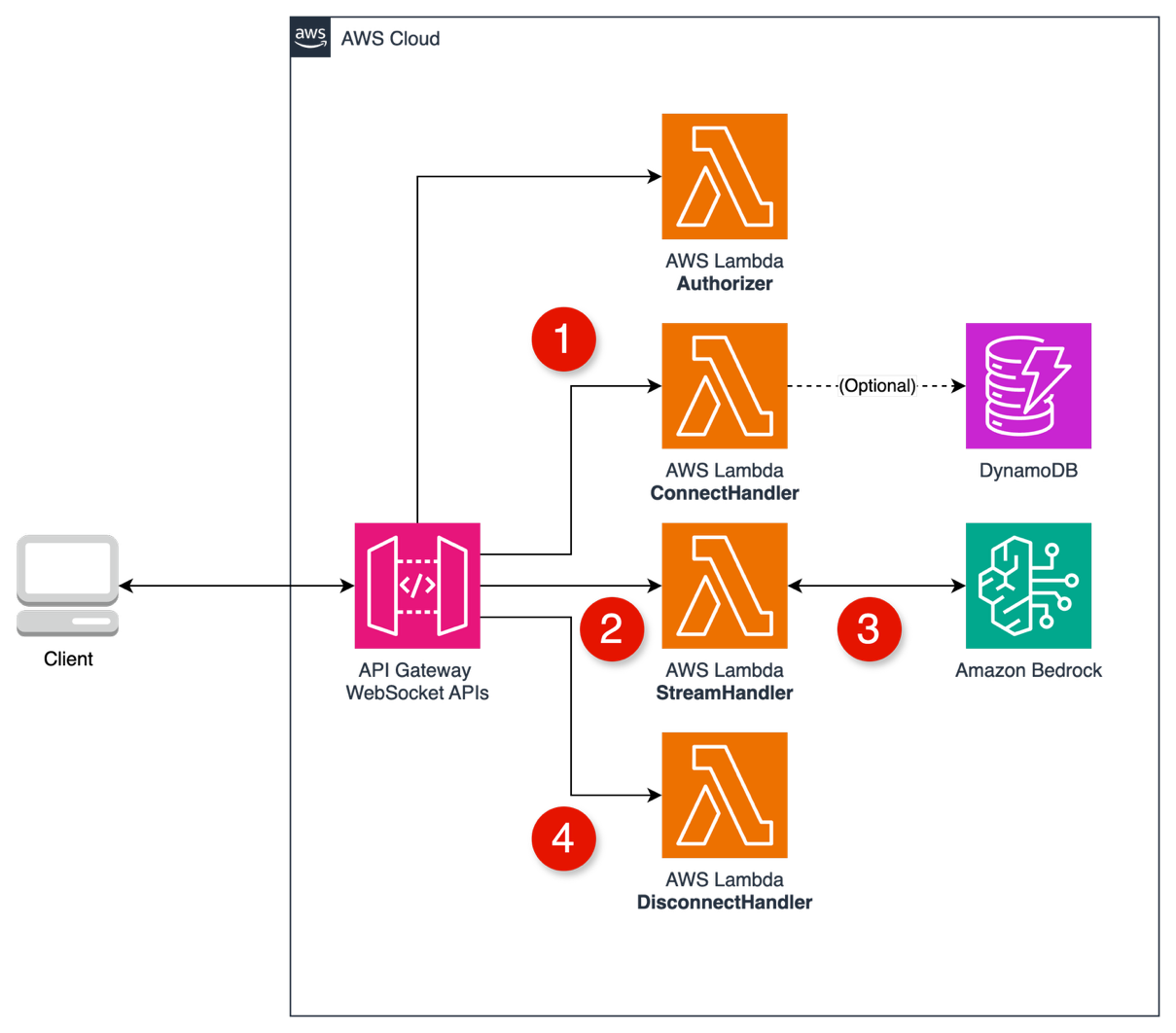
API Gateway WebSocket with Amazon Bedrock architecture

  1. Client connects through the WebSocket URL and store connectionId.
  2. Client sends a prompt through a custom route to the LLMHandler.
  3. Lambda as LLMHandler invokes Amazon Bedrock and streams back through WebSocket.
  4. Client disconnects through the DisconnectHandler and removes connectionId.

Implementation steps

  1. Create a WebSocket API in API Gateway with routes
    1. $connect: Connected to ConnectHandler Lambda.
    2. $disconnect: Connected to DisconnectHandler Lambda.
    3. $stream: All messages go to StreamHandler Lambda.
  2. Create Lambda Authorizer
    1. Receives the connection request with token in query string.
    2. Validates the JWT token against Amazon Cognito.
    3. Returns Allow/Deny policy for the connection.
      def lambda_handler(event, context):
          # Extract token from querystring
          token = event.get("queryStringParameters", {}).get("token", "")
          
          # Validate JWT token against Cognito
          if validate_token(token):
              return {
                  "isAuthorized": True,
                  # Optionally include context that other handlers can access
                  "context": {
                      "userId": extracted_user_id
                  }
              }
          else:
              return {"isAuthorized": False}
      

  3. Create Connection Handler
    1. Connection Lambda runs after successful authorization.
    2. Receives the new connection’s unique connectionId.
    3. Store connection info in Amazon DynamoDB (optional).
    4. Returns 200 status to complete the connection.
      def lambda_handler(event, context):
          # Extract connectionId
          connection_id = event.get("requestContext", {}).get("connectionId")
          
          # Optionally store in DynamoDB
          # dynamodb.put_item(...)
          
          # Connection established successfully
          return {"statusCode": 200}
      

  4. Create Disconnect Handler
    1. Disconnect Lambda is triggered automatically when clients disconnect.
    2. Receives the terminated connection’s connectionId.
    3. Cleans up any stored connection data.
    4. Returns 200 status
      def lambda_handler(event, context):
          # Extract connectionId
          connection_id = event.get("requestContext", {}).get("connectionId")
          
          # Optionally remove from DynamoDB
          # dynamodb.delete_item(...)
          
          # Disconnection handled successfully
          return {"statusCode": 200}
      

  5. Create LLM Handler
      1. Receives messages sent to the stream route.
      2. Extracts prompt from the message body.
      3. Calls Amazon Bedrock model with streaming response.
      4. Streams tokens back to the client using the connection ID.
        def lambda_handler(event, context):
            # Extract connectionId and domain details for sending responses
            connection_id = event["requestContext"]["connectionId"]
            domain = event["requestContext"]["domainName"]
            stage = event["requestContext"]["stage"]
            
            # Parse message body to get the prompt
            body = json.loads(event.get("body", "{}"))
            prompt = body.get("prompt", "")
            
            # Create API Gateway management client for sending responses
            api_client = boto3.client(
                'apigatewaymanagementapi',
                endpoint_url=f'https://{domain}/{stage}'
            )
            
            # Call Amazon Bedrock with streaming response
            response = bedrock_client.invoke_model_with_response_stream(...)
            
            # Stream tokens back to client
            for chunk in response["body"]:
                # Extract token from chunk
                token = process_chunk(chunk)
                
                # Send token directly back through the WebSocket
                api_client.post_to_connection(
                    ConnectionId=connection_id,
                    Data=json.dumps({"token": token, "isComplete": False})
                )
            
            # Send completion message
            api_client.post_to_connection(
                ConnectionId=connection_id,
                Data=json.dumps({"token": "", "isComplete": True})
            )
            
            return {"statusCode": 200}
        

Authentication with Amazon Cognito

Securing a WebSocket API with Amazon Cognito needs a bit more work. API Gateway WebSocket doesn’t have a built-in Amazon Cognito User Pool authorizer:

  1. Lambda authorizer with JWT authentication: API Gateway invokes your Lambda authorizer upon connection, validating the Amazon Cognito JWT (passed as a query parameter). The Lambda generates an IAM policy granting access and returns it.
  2. IAM authentication for WebSockets: Clients sign requests with SigV4 using AWS credentials from an Amazon Cognito Identity Pool. API Gateway evaluates the request against IAM policies.

Pros and cons of API Gateway WebSocket APIs

Pros:

  • Bidirectional real-time communication: WebSockets are ideal for applications where the server needs to push data such as the LLM’s response without explicit requests.
  • Persistent connection for multi-turn conversations: After the initial handshake, the same connection can be reused for subsequent prompts and responses, avoiding repeated setup latency. This is great for a chat UI where the user asks multiple questions in one session.
  • Scalability: API Gateway is a managed service that can handle 500 connections/second and 10,000 requests/second across APIs, which can be increased by request.

Cons:

  • Higher development complexity: When compared to the clarity of a direct Lambda URL, a WebSocket API involves multiple Lambdas and coordination to manage the connection state.
  • Custom auth implementation: There is no built-in Amazon Cognito user pool integration, thus you must implement a Lambda authorizer.
  • Timeout management: The API Gateway integration timeout is 29 s, thus your Lambda function should return the response promptly.

AWS AppSync GraphQL subscription

AWS AppSync is a fully managed GraphQL service that streamlines building real-time APIs. It handles WebSocket connections and client fan-out automatically. Clients subscribe to a GraphQL subscription, and a Lambda resolver pushes the Amazon Bedrock streamed tokens back.

Architecture

The following figure shows the architecture.
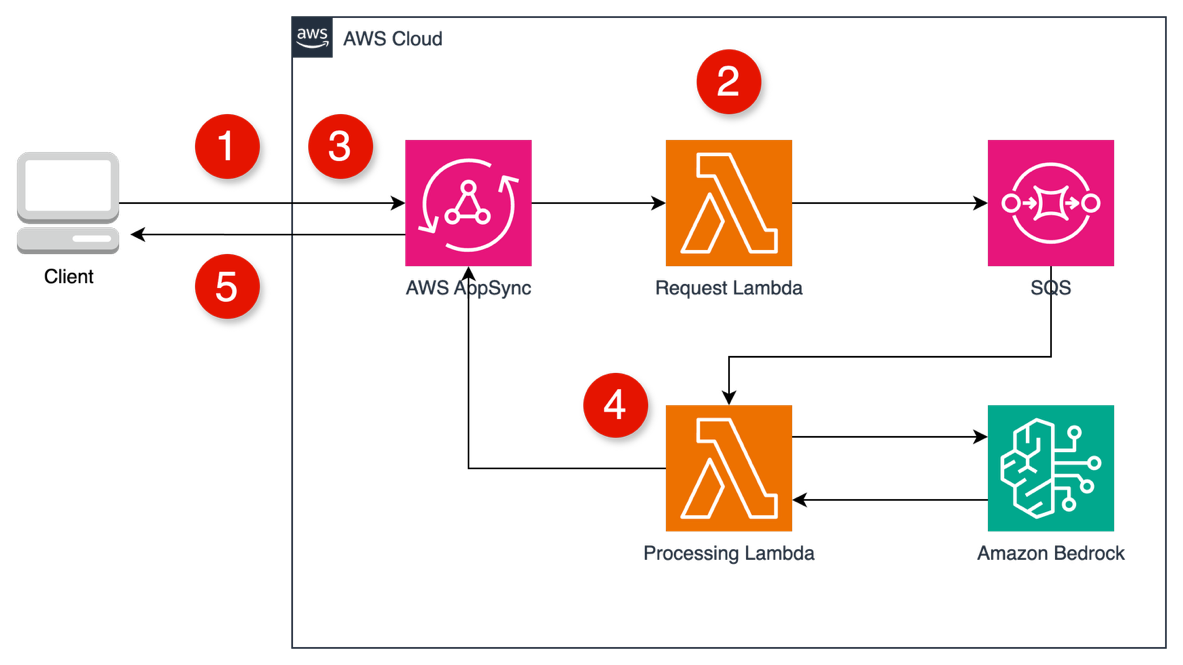
AWS AppSync GraphQL subscription with Amazon Bedrock architecture

  1. Client calls a startStream mutation. AppSync invokes the Request Lambda.
  2. The Request Lambda immediately returns a unique sessionId and sends the processing task to an Amazon Simple Queue Service (Amazon SQS) queue.
  3. Client uses the sessionId to subscribe to an onTokenReceived GraphQL subscription.
  4. The Processing Lambda (triggered by Amazon SQS) invokes Amazon Bedrock and, for each token, calls a publishToken mutation in AWS AppSync.
  5. AWS AppSync automatically pushes the token to all clients subscribed with the matching sessionId.

Implementation steps

  1. Design the GraphQL Schema: define types and operations.
    type StreamResponse {
      sessionId: String!
      status: String!
      message: String
      timestamp: String!
      error: String
    }
    
    type TokenEvent {
      sessionId: String!
      token: String!
      isComplete: Boolean!
      timestamp: String!
    }
    
    type Mutation {
      startStream(prompt: String!): StreamResponse!
      publishToken(sessionId: String!, token: String!, isComplete: Boolean!): TokenEvent!
    }
    
    type Subscription {
      onTokenReceived(sessionId: String!): TokenEvent
    

  2. Create the Request Handler (Request Lambda)
    1. Receives the GraphQL mutation with the prompt.
    2. Generates a unique session ID.
    3. Sends the prompt and session ID to the SQS queue.
    4. Returns the session ID to the client immediately.
      def lambda_handler(event, context):
          # Extract prompt from GraphQL event
          prompt = event["arguments"]["prompt"]
          
          # Generate unique session ID
          session_id = str(uuid.uuid4())
          
          # Send message to SQS queue
          sqs_client.send_message(
              QueueUrl="your-sqs-queue-url",
              MessageBody=json.dumps({
                  "prompt": prompt,
                  "sessionId": session_id
              })
          )
          
          # Return session ID to client
          return {
              "sessionId": session_id,
              "status": "streaming_started",
              "timestamp": datetime.datetime.utcnow().isoformat()
          }
      

  3. Create the Processing Handler (Processing Lambda)
    1. It is triggered by Amazon SQS messages.
    2. It calls Amazon Bedrock with streaming enabled.
    3. For each token generated, it calls the AppSync publishToken mutation.
      def lambda_handler(event, context):
          # Process SQS event records
          for record in event["Records"]:
              body = json.loads(record["body"])
              prompt = body["prompt"]
              session_id = body["sessionId"]
              
              # Call Amazon Bedrock with streaming
              response = bedrock_client.invoke_model_with_response_stream(...)
              
              # Process streaming response
              for chunk in response["body"]:
                  # Extract token from chunk
                  token = process_chunk(chunk)
                  
                  # Publish token to AppSync
                  publish_token_to_appsync(
                      session_id=session_id,
                      token=token,
                      is_complete=False
                  )
              
              # Send completion token
              publish_token_to_appsync(
                  session_id=session_id,
                  token="",
                  is_complete=True
              )
      

  4. Configure GraphQL Resolvers
    1. StartStream resolver: Connect to the Request Lambda.
    2. PublishToken resolver: Trigger subscription with a NONE data source.
  5. Client subscription setup
    1. Make a startStream mutation.
      const { sessionId } = await client.mutate({
        mutation: START_STREAM,
        variables: { prompt }
      });
      

    2. Subscribe to receive tokens.
      client.subscribe({
        query: ON_TOKEN_RECEIVED,
        variables: { sessionId }
      }).subscribe({
        next: ({ data }) => {
          if (data.onTokenReceived.isComplete) {
            // Handle completion
          } else {
            // Append token to UI
            appendToken(data.onTokenReceived.token);
          }
        }
      });
      

Authentication with Amazon Cognito

AWS AppSync integrates seamlessly with Amazon Cognito User Pools. Setting the API’s auth mode to Amazon Cognito User Pool needs a valid JWT for every GraphQL operation. This is the most developer-friendly option for authentication. AWS AppSync handles the handshake and token refresh.

Pros and cons of AWS AppSync subscriptions

Pros:

  • Fully managed real-time protocol: You don’t deal with raw WebSockets or connection IDs at all. AWS AppSync automatically establishes and maintains a secure WebSocket for subscriptions (no need for a connect or disconnect Lambda).
  • Streamlined authentication: Built-in support for Amazon Cognito User Pool tokens means that you can secure the API without writing custom authorizers.

Cons:

  • Potential overhead and complexity: For a direct case (one prompt—one stream), introducing GraphQL and AWS AppSync might be seen as over-engineering if your app doesn’t use GraphQL for other use cases.
  • 30-second resolver limit: AWS AppSync has a 30-second limit for mutation resolvers, thus you need to design the initial request to start the process and immediately return, relying on a subscription to stream the results progressively to avoid blocking the user.

Conclusion

The Amazon Bedrock streaming interface unlocks fluid, low-latency LLM experiences. You can use the right AWS serverless architecture to deliver streamed responses in a secure, scalable, and cost-effective way.

  • Lambda function URLs with streaming: Direct, single-user applications and prototypes.
  • API Gateway WebSocket: Multi-turn conversations, collaborative applications.
  • AppSync: Complex applications already using GraphQL.

Each method is serverless, production-ready, and fully integrated with Amazon Cognito for secure access control. AWS provides the flexibility to design high-quality AI user experiences at scale.

Refer to GitHub sample source code for more details.

Comparative table

Feature LAMBDA FUNCTION URLS API GATEWAY WEBSOCKET APIs APPSYNC GRAPHQL SUBSCRIPTIONS
Complexity Lowest Medium High
Real-time focus Limited Strong Strong
Authentication Needs custom logic Needs custom logic Built-in Amazon Cognito support
Scalability Good Good Excellent
GraphQL support None None Native
Use cases Q&A Chatbots, real-time apps Complex apps, multi-user scenarios
Cost Pay per invocation Connection time and Lambda execution Request/connection-based pricing


Introducing attribute-based access control for Amazon S3 general purpose buckets

Post Syndicated from Matheus Guimaraes original https://aws.amazon.com/blogs/aws/introducing-attribute-based-access-control-for-amazon-s3-general-purpose-buckets/

As organizations scale, managing access permissions for storage resources becomes increasingly complex and time-consuming. As new team members join, existing staff changes roles, and new S3 buckets are created, organizations must constantly update multiple types of access policies to govern access across their S3 buckets. This challenge is especially pronounced in multi-tenant S3 environments where administrators must frequently update these policies to control access across shared datasets and numerous users.

Today we’re introducing attribute-based access control (ABAC) for Amazon Simple Storage Service (S3) general purpose buckets, a new capability you can use to automatically manage permissions for users and roles by controlling data access through tags on S3 general purpose buckets. Instead of managing permissions individually, you can use tag-based IAM or bucket policies to automatically grant or deny access based on tags between users, roles, and S3 general purpose buckets. Tag-based authorization makes it easy to grant S3 access based on project, team, cost center, data classification, or other bucket attributes instead of bucket names, dramatically simplifying permissions management for large organizations.

How ABAC works
Here’s a common scenario: as an administrator, I want to give developers access to all S3 buckets meant to be used in development environments.

With ABAC, I can tag my development environment S3 buckets with a key-value pair such as environment:development and then attach an ABAC policy to an AWS Identity and Access Management (IAM) principal that checks for the same environment:development tag. If the bucket tag matches the condition in the policy, the principal is granted access.

Let’s see how this works.

Getting started
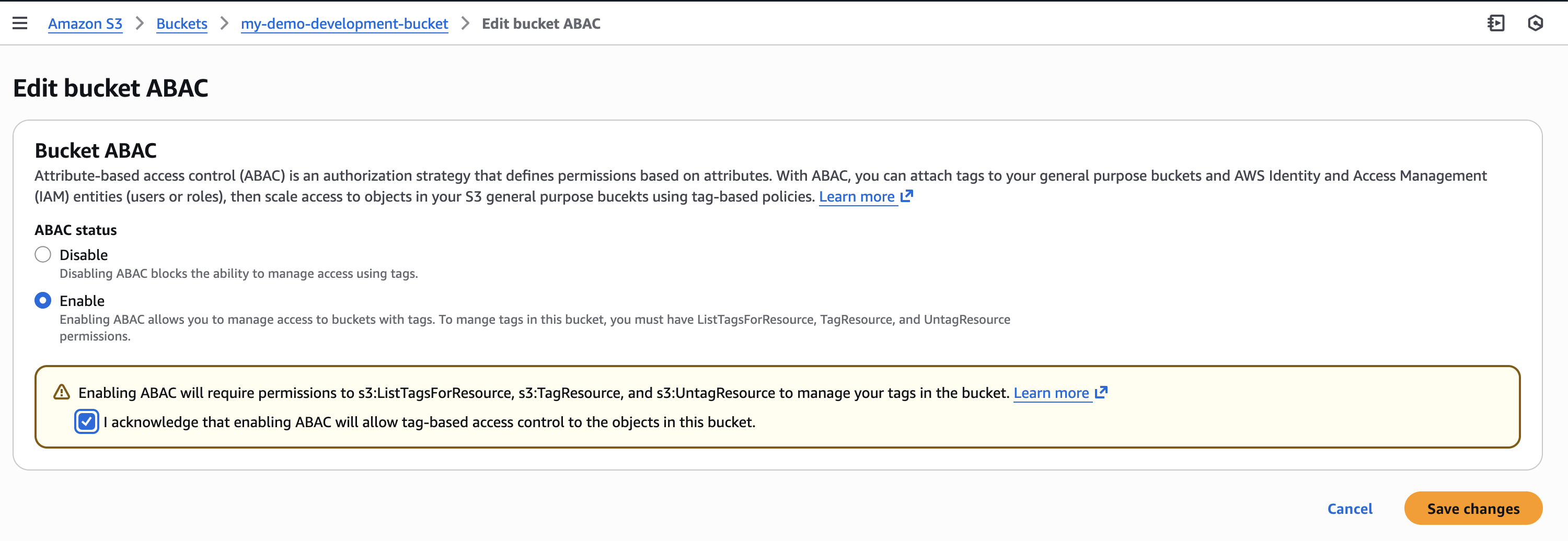
First, I need to explicitly enable ABAC on each S3 general purpose bucket where I want to use tag-based authorization.

I navigate to the Amazon S3 console, select my general purpose bucket then navigate to Properties where I can find the option to enable ABAC for this bucket.

I can also use the AWS Command Line Interface (AWS CLI) to enable it programmatically by using the new PutBucketAbac API. Here I am enabling ABAC on a bucket called my-demo-development-bucket located in the US East (Ohio) us-east-2 AWS Region.

aws s3api put-bucket-abac --bucket my-demo-development-bucket abac-status Status=Enabled --region us-east-2

Alternatively, if you use AWS CloudFormation, you can enable ABAC by setting the AbacStatus property to Enabled in your template.

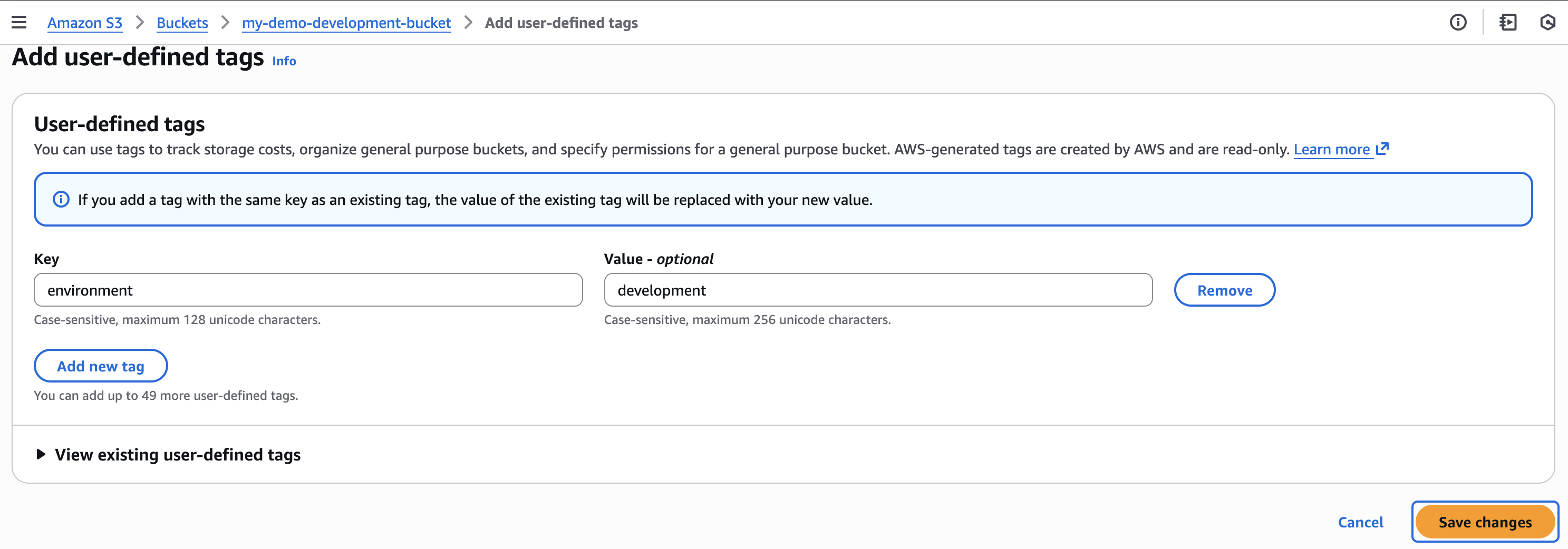
Next, let’s tag our S3 general purpose bucket. I add an environment:development tag which will become the criteria for my tag-based authorization.

Now that my S3 bucket is tagged, I’ll create an ABAC policy that verifies matching environment:development tags and attach it to an IAM role called dev-env-role. By managing developer access to this role, I can control permissions to all development environment buckets in a single place.

I navigate to the IAM console, choose Policies, and then Create policy. In the Policy editor, I switch to JSON view and create a policy that allows users to read, write and list S3 objects, but only when they have a tag with a key of “environment” attached and its value matches the one declared on the S3 bucket. I give this policy the name of s3-abac-policy and save it.

{
    "Version": "2012-10-17",
    "Statement": [
        {
            "Effect": "Allow",
            "Action": [
                "s3:GetObject",
                "s3:PutObject",
                "s3:ListBucket"
            ],
            "Resource": [
                "*"
            ],
            "Condition": {
                "StringEquals": {
                    "aws:ResourceTag/environment": "development"
                }
            }
        }
    ]
}

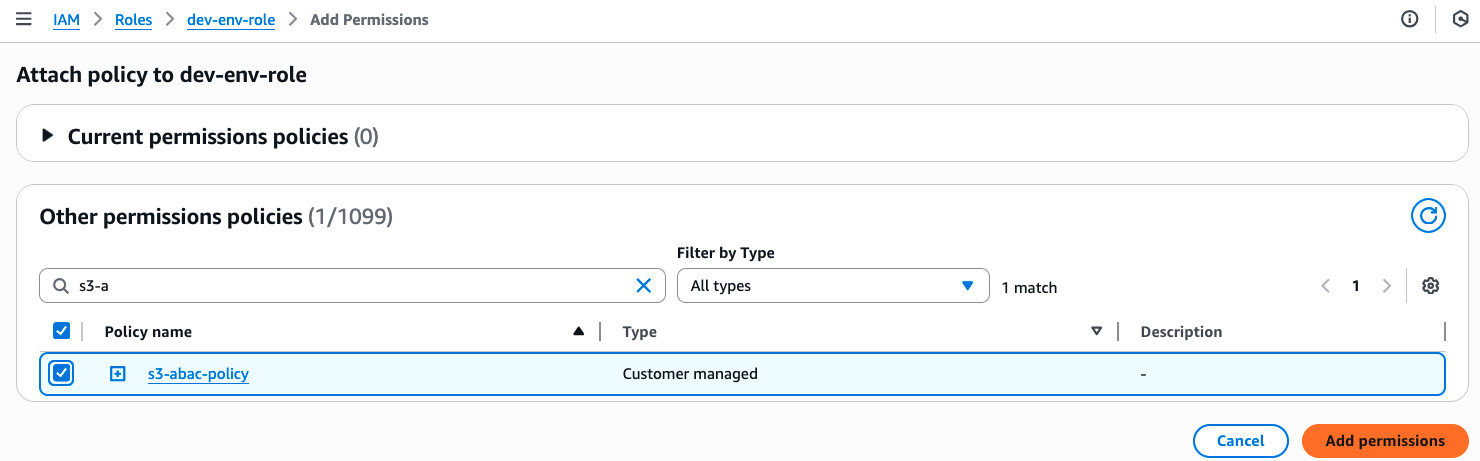
I then attach this s3-abac-policy to the dev-env-role.

That’s it! Now a user assuming the dev-role can access any ABAC-enabled bucket with the tag environment:development such as my-demo-development-bucket.

Using your existing tags
Keep in mind that although you can use your existing tags for ABAC, because these tags will now be used for access control, we recommend reviewing your current tag setup before enabling the feature. This includes reviewing your existing bucket tags and tag-based policies to prevent unintended access, and updating your tagging workflows to use the standard TagResource API (since enabling ABAC on your buckets will block the use of the PutBucketTagging API). You can use AWS Config to check which buckets have ABAC enabled and review your usage of PutBucketTagging API in your application using AWS Cloudtrail management events.

Additionally, the same tags you use for ABAC can also serve as cost allocation tags for your S3 buckets. Activate them as cost allocation tags in the AWS Billing Console or through APIs, and your AWS Cost Explorer and Cost and Usage Reports will automatically organize spending data based on these tags.

Enforcing tags on creation
To help standardize access control across your organization, you can now enforce tagging requirements when buckets are created through service control policies (SCPs) or IAM policies using the aws:TagKeys and aws:RequestTag condition keys. Then you can enable ABAC on these buckets to provide consistent access control patterns across your organization. To tag a bucket during creation you can add the tags to your CloudFormation templates or provide them in the request body of your call to the existing S3 CreateBucket API. For example, I could enforce a policy for my developers to create buckets with the tag environment=development so all my buckets are tagged accurately for cost allocation. If I want to use the same tags for access control, I can then enable ABAC for these buckets.

Things to know

With ABAC for Amazon S3, you can now implement scalable, tag-based access control across your S3 buckets. This feature makes writing access control policies simpler, and reduces the need for policy updates as principals and resources come and go. This helps you reduce administrative overhead while maintaining strong security governance as you scale.

Attribute-based access control for Amazon S3 general purpose buckets is available now through the AWS Management Console, API, AWS SDKs, AWS CLI, and AWS CloudFormation at no additional cost. Standard API request rates apply according to Amazon S3 pricing. There’s no additional charge for tag storage on S3 resources.

You can use AWS CloudTrail to audit access requests and understand which policies granted or denied access to your resources.

You can also use ABAC with other S3 resources such as S3 directory bucket, S3 access points and S3 tables buckets and tables. To learn more about ABAC on S3 buckets see the Amazon S3 User Guide.

You can use the same tags you use for access control for cost allocation as well. You can activate them as cost allocation tags through the AWS Billing Console or APIs. Check out the documentation for more details on how to use cost allocation tags.

SpellVault’s evolution: Beyond LLM apps, towards the agentic future

Post Syndicated from Grab Tech original https://engineering.grab.com/spellvault-evolution-beyond-llm

Introduction

At Grab, innovation isn’t just about building new features; it’s about evolving our platforms to meet the changing needs of our users and the broader technological landscape. SpellVault, our internal AI platform, exemplifies this philosophy. When SpellVault was first launched, our vision was straightforward: empower everyone at Grab to effortlessly build and manage AI-powered apps without the need for coding. Built on the principles of Retrieval-Augmented Generation (RAG) and enhanced by plugin support, SpellVault rapidly evolved into a powerful productivity engine for the organization, enabling the creation of thousands of apps that drive automation, foster experimentation, and support production use cases.

As the AI landscape has evolved, SpellVault has grown alongside it. Initially launched as a straightforward no-code app builder for Large Language Models (LLMs), it has now evolved into a cutting-edge platform that embraces the agentic future—a future where AI goes beyond generating responses to reasoning, acting, and dynamically adapting through the use of tools and contextual understanding.

This article outlines SpellVault’s journey towards an agentic future and how we empower users to build AI Agents that are smarter, more adaptable, and ready for the future.

A no-code platform for building LLM apps

SpellVault was founded with a clear mission: to democratize access to AI for everyone at Grab, regardless of their technical expertise. Initially launched as a no-code LLM app builder, the platform was built on a foundation of RAG pipelines and basic plugin support.

Early on, we recognized that the true potential of AI apps extends beyond the capabilities of language models alone. Their real value lies in the ability to seamlessly interact with external systems and diverse data sources. This insight drove our commitment to minimizing barriers and ensuring users could access data from various sources with ease. From the very beginning, we centered our efforts on three key focus areas:

Comprehensive RAG solution with useful integrations

From the start, the SpellVault team prioritized enabling users to enhance their LLM apps with data through RAG. Rather than solely relying on the LLM’s internal information, we wanted the apps to ground their responses in up-to-date, contextually relevant, and factual information. SpellVault has built-in integrations with knowledge sources such as Wikis, Google Docs, as well as plain text and PDF uploads. These capabilities empower users to build assistants that reference relevant knowledge and provide more accurate, verifiable answers.

Plugins to fetch information on demand

To move beyond static knowledge retrieval, we needed a way for apps to act dynamically. This was made possible through SpellVault plugins—modular components that allow apps to interact with internal systems (e.g. service dashboards, incident trackers) and external APIs (e.g. search engines, weather data). Rather than being confined to their initial prompt and data, these plugins can fetch fresh information at runtime. From the available plugin types, users can create their own instances of plugins with custom settings, enabling highly specialized functionality tailored to their specific workflows. For instance, with SpellVault’s HTTP plugin, users can define custom endpoints and credentials, enabling their AI apps to make tailored HTTP calls during runtime. These custom plugins have become the backbone of many of our most impactful apps, empowering teams to seamlessly integrate SpellVault with their existing systems and processes.

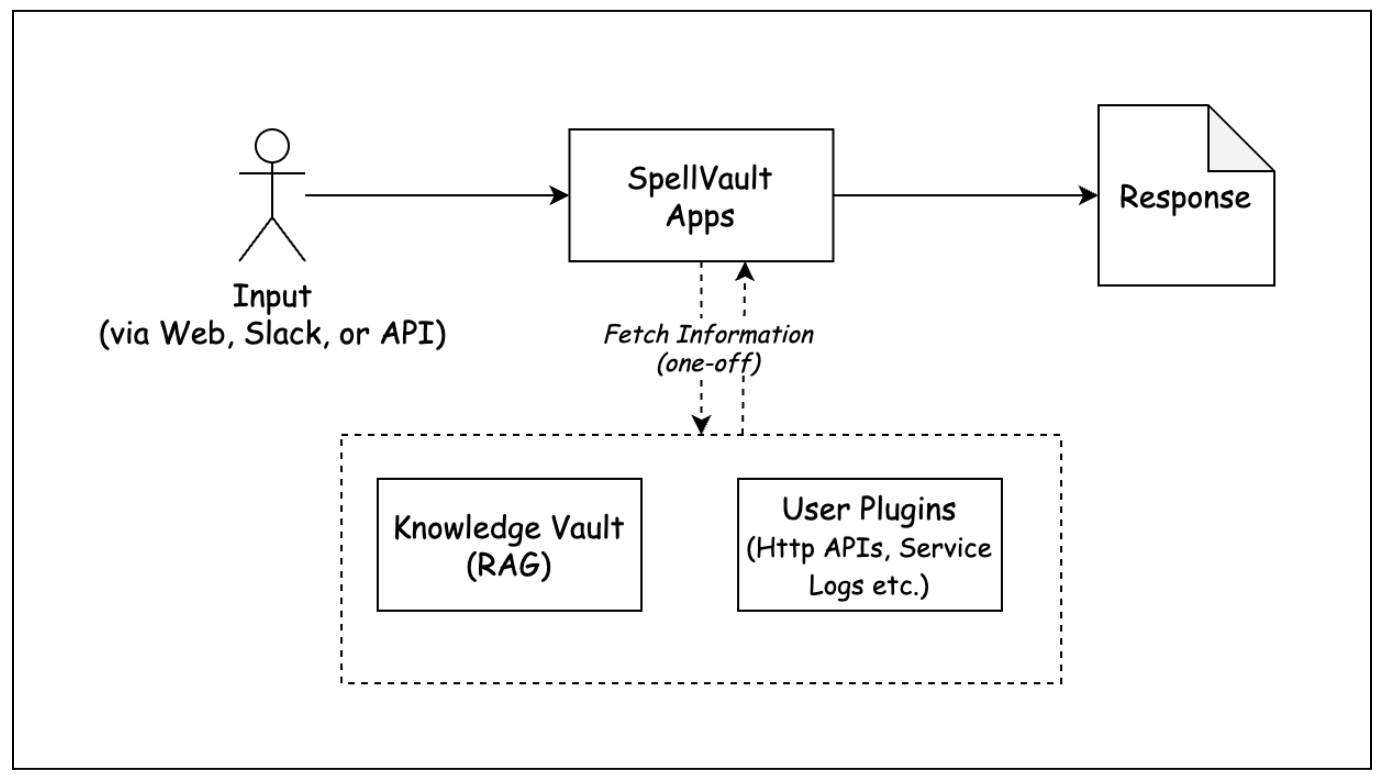
Figure 1. SpellVault’s early architecture.

Making SpellVault accessible via common interfaces: Web, Slack, API

One of our primary goals was to make AI seamlessly accessible and useful within the tools users already use—whether it’s a browser or Slack. With SpellVault, users can make their AI apps in minutes and start using them via browser or Slack messaging immediately and intuitively, without requiring any additional setup. We also exposed APIs that enabled other internal services to integrate with SpellVault apps for a variety of use cases. This multi-channel approach ensured that SpellVault wasn’t just a standalone sandbox but a platform woven into existing tools and processes.

Users quickly adopted the platform, creating thousands of apps for internal productivity gains, automation, and even production use cases. The platform’s success validated our hypothesis that there was significant demand for democratized AI tools within the organization.

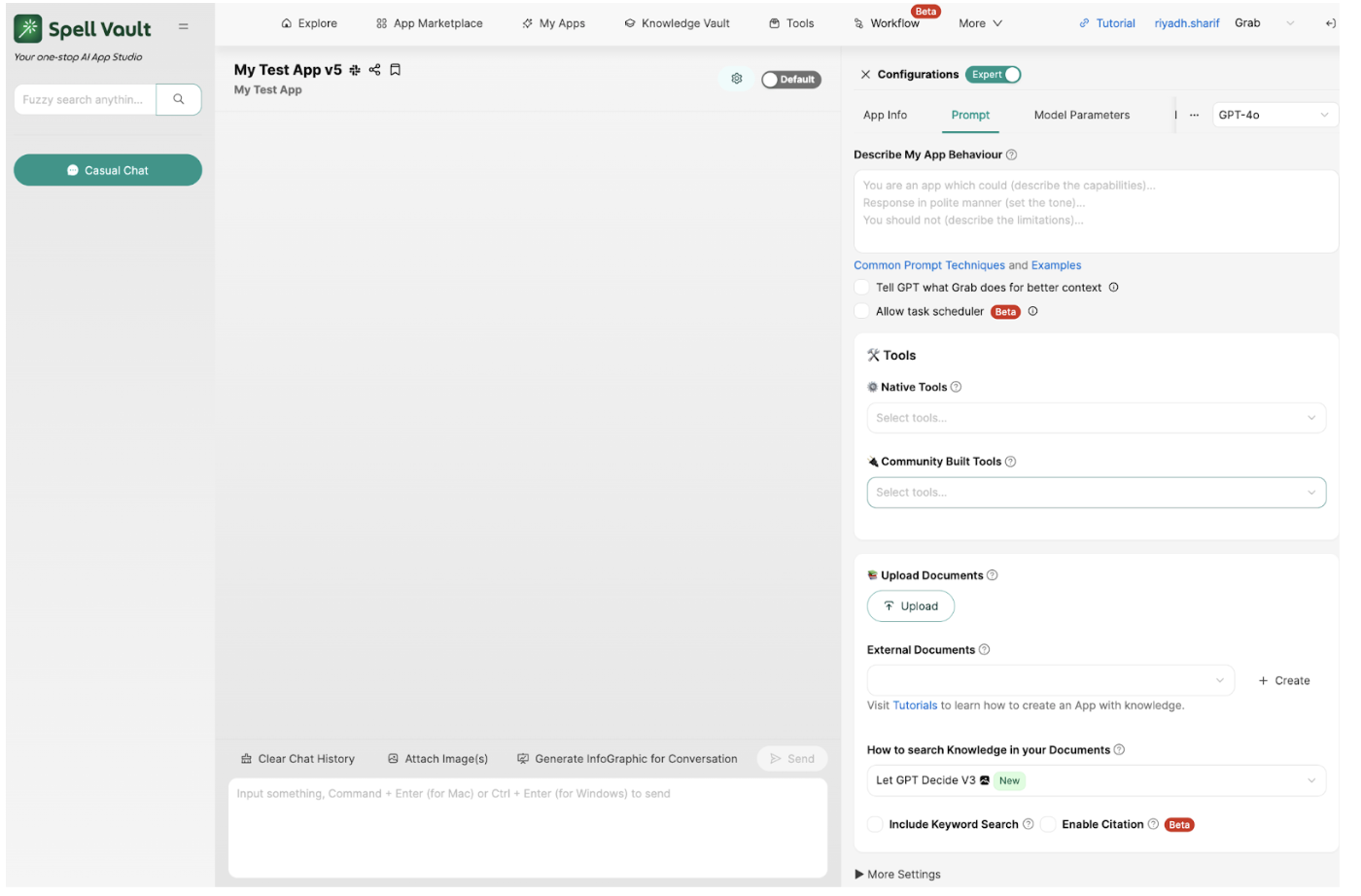
Figure 2. SpellVault’s web interface for LLM App configuration and chat.

Evolution over time

The AI landscape over the past few years has been defined by relentless change. New frameworks, execution paradigms, and standards have emerged in quick succession, each promising to make AI systems more powerful, more reliable, or more extensible. At Grab, we recognized that for SpellVault to stay relevant, it could not remain static. It needed to evolve in tandem with the ever-changing ecosystem, continuously incorporating valuable advancements while ensuring a seamless experience for our users.

This philosophy of continuous adaptation has guided SpellVault’s journey. From its early days as a simple RAG-powered app builder with a few plugins, the platform grew to support an extensive number of plugin types, richer execution models, and eventually a unified approach to tools. Each step was a response both to the needs of our users and to the shifting definition of what “building with AI” meant in practice. Rather than opting for a complete overhaul, SpellVault has embraced incremental advancements, ensuring that users can seamlessly benefit from new capabilities without disruption.

This approach to evolution has naturally positioned SpellVault to transition from a platform for LLM apps to one designed for AI agents. The following section delves into this transition in greater detail.

Expanding capabilities

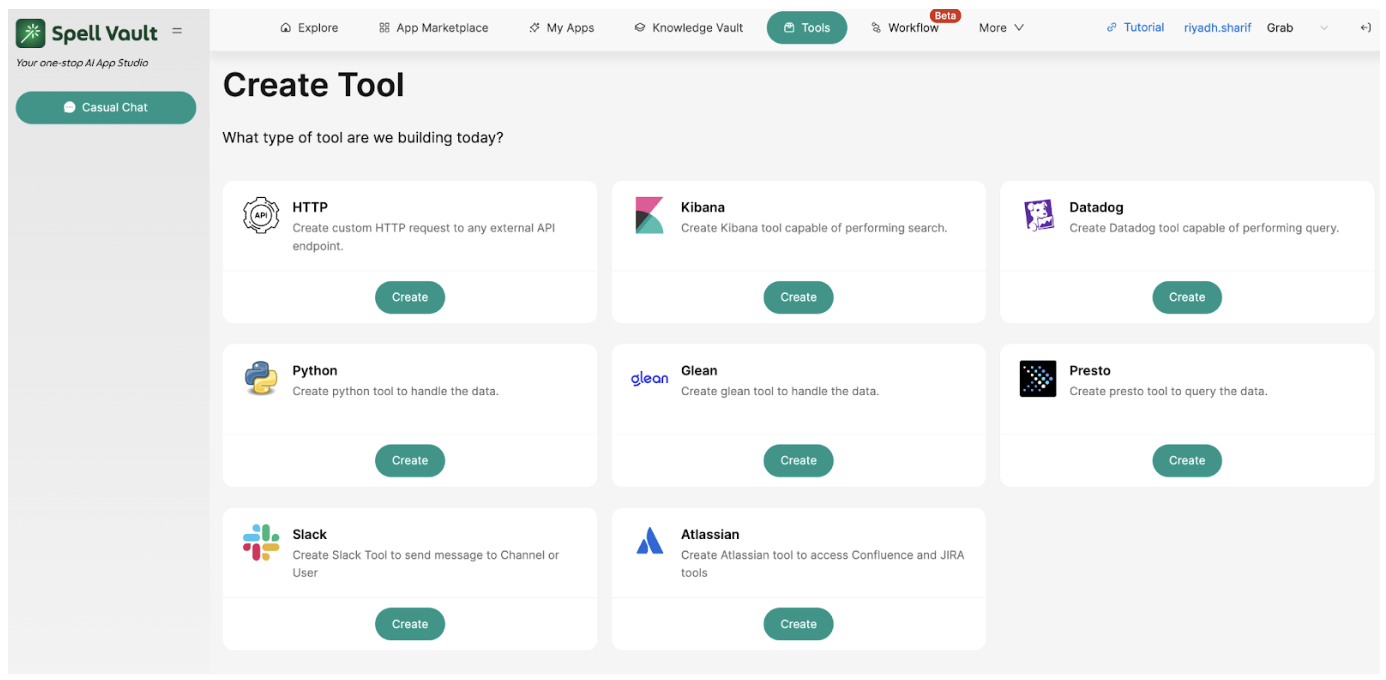
Over time, we introduced numerous new capabilities to SpellVault, driven both by user feedback and our commitment to innovation and staying ahead of industry trends. For instance, we extended support for different plugin types, enabling integrations with tools like Slack and Kibana, and continuously added more integrations to enhance the platform’s versatility. We implemented auto-updates for users’ Knowledge Vaults, ensuring their data remained current. With more users building with the platform, ensuring the trustworthiness of responses generated by SpellVault apps became increasingly important. We included citation capability to mitigate some of that concern. Recognizing the need for more precise answers to mathematical problems, we developed a feature that enabled LLMs to solve such problems using Python runtime. Additionally, many users requested an automated way to trigger their LLM apps, which led to the creation of a Task Scheduler feature that allows LLMs to schedule actions based on natural language user input.

A significant milestone in SpellVault’s evolution was the introduction of “Workflow,” a drag-and-drop interface within the platform that empowered users to design deterministic workflows. These workflows enabled users to seamlessly combine various components from the SpellVault ecosystem—such as LLM calls, Python code execution, and Knowledge Vault lookups—in a predefined and structured manner. This enabled advanced use cases for many users.

Figure 3. Evolving tools landscape of SpellVault with increasing integrations.

Shifting the execution model

As SpellVault evolved, a fundamental shift took place in the way its apps were executed internally. We transitioned from our legacy executor system, which facilitated one-off information retrieval from the Knowledge Vault or user plugins, to a more advanced graph based executor. This empowered SpellVault’s app execution with nodes, edges, and states that supported branching, looping, and modularity. This laid the groundwork for more sophisticated agent behaviors, moving beyond the linear input-output paradigm.

This transformed all existing SpellVault apps into ‘Reasoning and Acting’ agents, better known as ReAct agents – a “one size fits many” solution that significantly enhanced the capabilities of these apps. By enabling them to leverage the Knowledge Vault and plugins in a more agentic and dynamic manner, the ReAct agent framework allowed apps to perform more complex tasks while seamlessly preserving their existing functionality, ensuring no disruption to their behavior.

In addition, the internal decoupling of the executor and prompt engineering components enabled us to design multiple execution pathways with ease. This allowed us to provide generic Deep Research capability to any SpellVault app via a simple UI checkbox, as well as sophisticated internal workflows that cater to high-ROI complex use cases like on-call alert analysis. The Deep Research capability came with SpellVault’s ability to search across internal information repositories (e.g., Slack messages, Wiki, Jira) within Grab, as well as searching online for relevant information.

Figure 4. SpellVault’s evolved architecture with more dynamic context gathering and advanced interaction modes.

Towards an agentic framework

Over time, several capabilities were added to SpellVault, including features like Python code execution and internal repository search. Initially, these functionalities were integrated directly into the core PromptBuilder class. For users, these features were primarily accessible through simple checkboxes in the user interface. As SpellVault gradually transitioned towards giving more agency to user-crafted apps, we recognized that these capabilities should instead be positioned as “Tools” for LLMs to use with greater autonomy, similar to how ReAct agent–backed apps have been using SpellVault’s user plugins. We also understood that this shift could bring a clearer mental model for users where they were no longer simply toggling features but creating AI agents with access to a defined set of tools. The agents could then decide when and how to use those tools intelligently to accomplish tasks, making the overall experience more natural and intuitive.

This recognition led to the consolidation of these scattered capabilities into a unified framework called “Native Tools.” These Native Tools, along with SpellVault’s existing user plugins—rebranded as “Community Built Tools”—formed a comprehensive collection of tools that LLMs could dynamically invoke at runtime. Despite being grouped under the same umbrella, a key distinction was maintained: Native Tools required no user-specific configuration (e.g., performing internet searches), whereas Community Built Tools were custom, user-configured entities (e.g., invoking specific HTTP endpoints) created from available plugin types, often requiring credentials or other personalized settings.

This consolidation of capabilities under a unified Tools abstraction and enabling SpellVault apps to invoke them with greater autonomy marked a pivotal milestone in the platform’s evolution. It meaningfully shifted SpellVault toward making agentic behavior more natural, discoverable, and extensible for every app.

Figure 5. SpellVault’s Unified Tools housing both Native Tools and Community Built Tools.

SpellVault as an MCP service

As we streamlined SpellVault’s internal capabilities into a unified tools framework, we also turned our focus outward to align with industry standards. The growing adoption of the Model Context Protocol (MCP) presented an opportunity for agents and clients to seamlessly interact without requiring custom integrations. To remain at the forefront of innovation, we adapted SpellVault to function as an MCP service, enabling it to actively participate in this evolving ecosystem. This extension brought two key advancements:

  • SpellVault apps as MCP tools: Each app created in SpellVault can now be exposed through the MCP protocol. This allows other agents or MCP-compatible clients, such as IDEs or external orchestration frameworks, to treat a SpellVault app as a callable tool. Instead of living only inside our web user interface or Slack interface, these apps become accessible building blocks that other systems can invoke dynamically.

  • RAG as an MCP tool: We extended the same idea to our Knowledge Vaults. Through MCP, external clients can search, retrieve, and even add information to Vaults. This effectively turns SpellVault’s RAG pipeline into an MCP-native service, making contextual grounding available to agents beyond SpellVault itself.

While building the SpellVault MCP Server, we also created TinyMCP – a lightweight open-source Python library that adds MCP capabilities to an existing FastAPI app as just another router, instead of mounting a separate app.

By exposing both apps and RAG through MCP, we shifted SpellVault from being a self-contained platform to becoming an interoperable service provider in the agentic ecosystem. Users still benefit from the no-code simplicity inside SpellVault. However, the output of their work, apps, and knowledge, are now usable by other agents and tools outside of it.

Conclusion

SpellVault’s evolution shows how a platform can adapt with the AI landscape while staying true to its original mission of making powerful technology accessible to everyone. What began as a no-code builder for LLM apps has steadily expanded into an agentic platform – one where apps can act with more intelligence, agency, and context and interact with the systems around them.

This progress wasn’t the result of a single breakthrough, but of steady, incremental improvements that introduced new capabilities while preserving ease of use. By layering in these advancements thoughtfully but boldly, SpellVault has managed to support more sophisticated agentic behaviors without compromising its original goal of democratizing AI at Grab.

Join us

Grab is a leading superapp in Southeast Asia, operating across the deliveries, mobility and digital financial services sectors. Serving over 800 cities in eight Southeast Asian countries, Grab enables millions of people everyday to order food or groceries, send packages, hail a ride or taxi, pay for online purchases or access services such as lending and insurance, all through a single app. Grab was founded in 2012 with the mission to drive Southeast Asia forward by creating economic empowerment for everyone. Grab strives to serve a triple bottom line – we aim to simultaneously deliver financial performance for our shareholders and have a positive social impact, which includes economic empowerment for millions of people in the region, while mitigating our environmental footprint.

Powered by technology and driven by heart, our mission is to drive Southeast Asia forward by creating economic empowerment for everyone. If this mission speaks to you, join our team today!

Introducing the Landing Zone Accelerator on AWS Universal Configuration and LZA Compliance Workbook

Post Syndicated from Kevin Donohue original https://aws.amazon.com/blogs/security/introducing-the-landing-zone-accelerator-on-aws-universal-configuration-and-lza-compliance-workbook/

We’re pleased to announce the availability of the latest sample security baseline from Landing Zone Accelerator on AWS (LZA)—the Universal Configuration. Developed from years of field experience with highly regulated customers including governments across the world, and in consultation with AWS Partners and industry experts, the Universal Configuration was built to help you implement security and compliance at scale for on your regulated workloads. By setting a high bar with the latest AWS security best practices, the Universal Configuration can help address technical control requirements from compliance frameworks across different geographic regions and industry verticals. The Universal Configuration’s multi-account security architecture provides a foundation to host your diverse workload requirements today along with providing the ability to explore the generative AI and agentic AI solutions that will shape your organization in the future. It can also replace months of complex planning and design by deploying a comprehensive security and compliance-driven environment based on AWS Well-Architected principles in a matter of hours.

As organizations grow, they typically pursue or must adhere to new security compliance certifications. LZA and the Universal Configuration help organizations of all sizes and phases in their security and compliance journey. The speed of deployment, step-by-step documentation, and compliance resources can reduce traditional assessment and authorization timelines by months and result in more predictable and successful audit outcomes. This enables more freedom to invest resources to grow the business instead of choosing between security and compliance tradeoffs.

The Universal Configuration helps organizations:

  • Automate the deployment of a secure multi-account AWS environment
    • Foundational security controls based on AWS Well-Architected best practices
    • Apply consistent and predictable security controls post-deployment
    • Enable and integrate with native AWS security, identity, and compliance services
  • Implement controls across system layers
    • Organization-wide security architecture
    • Perimeter and resource-specific preventative, proactive, and detective controls
    • Support for multi-AWS Region resilience, disaster recovery, and active failover
  • Establish a foundation for security and compliance readiness
    • Built-in AWS security best practices and technical implementation statements
    • Map LZA capabilities across global and industry-specific compliance frameworks
    • Deploy hundreds of controls hours instead of months

The LZA Compliance Workbook

The LZA engine has been a trusted tool for quickly deploying secure multi-account AWS environments for over 4 years. It is also cost effective because you pay only for the AWS services used to operate your environment. The Universal Configuration is the first sample configuration accompanied by the LZA Compliance Workbook available on AWS Artifact. It’s a first-of-its-kind resource with detailed control mappings showing how the Universal Configuration can help you address requirements from frameworks including NIST 800-53 Rev5, CMMC/NIST 800-171, ISO-27001, HIPAA, C5:2020, NATO D-32 (Appendix B), and DoD CCI.

The LZA Compliance Workbook is regularly maintained to reflect the latest Universal Configuration baseline and will include additional compliance mappings in future releases. The workbook contains detailed security configuration descriptions based on the Universal Configuration deployment files, along with control requirement mappings and implementation statements that translate its security capabilities into a compliance-friendly format. By combining AWS security best practices with global compliance expertise, the Universal Configuration delivers predicable security outcomes while also helping you meet regional and industry requirements.

Getting started

To get started with the Landing Zone Accelerator on AWS Universal Configuration, the LZA Implementation Guide walks you through the steps, use cases, and considerations when deploying with LZA. You can download the LZA Compliance Workbook from AWS Artifact today and configure notifications to receive emails when future versions are released. You can view the deployment files and additional technical implementation guidance on the GitHub Universal Configuration sample and documentation page. Additionally, visit the AWS Partner Network (APN) for help with audit and advisory initiatives, cloud migrations, deploying the LZA Universal Configuration, and other services. You can visit the AWS Partner Finder tool and search by solution for Landing Zone Accelerator for the latest LZA Partner offerings.

If you have feedback about this post, submit comments in the Comments section below.

Kevin Donohue

Kevin Donohue

Kevin is a Senior Security Compliance Engineer at AWS, where he builds solutions and resources to help AWS customers achieve their security and compliance goals. Prior to joining the Landing Zone Accelerator team in AWS Professional Services in 2024, Kevin began his tenure with AWS Security in 2019 specializing in FedRAMP compliance and the shared responsibility model.

Christine Screnci

Christine Screnci

Christine is a Principal Technical Product Manager at AWS, where she specializes in developing and scaling enterprise-level solutions. Christine began her tenure with AWS in 2016 working with Worldwide Public Sector customers to improve the migration and modernization journey through globally scaled solutions. She is passionate about hypothesis-driven development and experimentation to improve customer experiences with AWS technologies.

Bhavish Khatri

Bhavish is a Senior Delivery Engineer at AWS, where he builds enterprise-scale solutions to help large organizations achieve their compliance goals. Bhavish started at AWS in 2018, specializing in multi-account AWS deployments and focusing on LZA and the Universal Configuration solution. He helps organizations build secure, scalable cloud environments that align with global compliance frameworks and regulatory requirements across diverse sectors.

Transfer data across AWS partitions with IAM Roles Anywhere

Post Syndicated from Jennifer Paz original https://aws.amazon.com/blogs/security/transfer-data-across-aws-partitions-with-iam-roles-anywhere/

Transfer across AWS Cloud partitions. Different identity planes. Long-lived IAM user credentials.

As an enterprise customer, you might need to bring together security, operational, and compliance data from multiple AWS partitions. Creating a holistic view of these types of data is critical to support operations and applications but understanding how to accomplish this while maintaining compliance can be a challenge.

In this post, we show you a past method for securing cross-partition data movement using AWS Identity and Access Management (IAM) user keys and why that’s no longer recommended. We continue by showing you the recommended best practice of using AWS IAM Roles Anywhere to support cross-partition data movement.

Security and compliance and AWS Regions and partitions

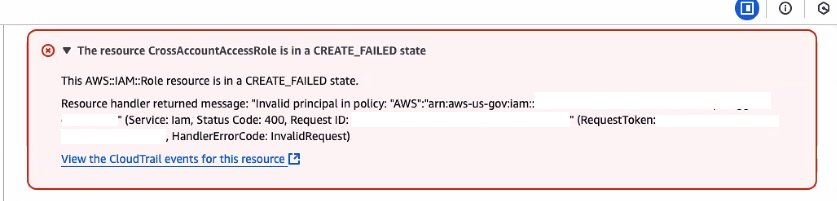
Before you begin, it’s important to understand how AWS Regions and partitions are designed. AWS partitions are hard boundaries designed to meet isolation requirements for compliance purposes and consist of one or more Regions, with each partition controlled by an independent instance of IAM. AWS provides multiple partitions; AWS Commercial Regions use an aws partition identifier within the Amazon Resource Name (ARN), AWS GovCloud Regions use an aws-us-gov partition identifier, and the AWS China Regions use an aws-cn partition identifier. AWS account IDs and Region designations are reserved to make sure that they exist only within that respective AWS partition. The IAM instance profile, within each AWS partition, prohibits the creation of trust policies that cross partitions. If you attempt to construct a cross-account trust policy across two partitions, they will receive a CREATE_FAILED error as shown in Figure 1. This isolation between partitions is part of the security that we provide our customers.

Figure 1: Failure message for cross partition trust policy

Figure 1: Failure message for cross partition trust policy

It’s critical that you understand your compliance requirements and build a unified dashboard and workflows in the appropriate partition. For example, data should only flow from the AWS Commercial partition to the AWS GovCloud partition—not the other way around. To adhere to the FedRAMP boundary policy FRR211, data about workloads within the AWS GovCloud partition should not be shared with AWS Commercial partition. Thus, it’s a best practice when you create a unified dashboard and automation to design the architecture and solution to operate within the AWS GovCloud partition. This approach enables a consolidated view of your security and cloud operations. From this centralized data plane, automated remediations, notifications, and escalations can be triggered by using Amazon EventBridge against data collected from Commercial and GovCloud Regional resources. These automated workflows can be used for operational triage within a ticketing system (such as Service Now or Atlassian JIRA), security detections within a cloud-native application protection platform (CNAPP) (such as AWS Security Hub or CrowdStrike), and application alerting from enterprise notification systems (such as Slack, Microsoft Teams, or email).

In addition to data partition isolation, it’s a FedRAMP security best practice to make sure that the credentials used to access GovCloud Regions are isolated to exist only within those Regions. It’s also a best practice to make sure that data access requests originate from the GovCloud partition, and to pull data from the less restrictive partition, such as the aws Commercial partition. This requirement is designed to help prevent exposure of GovCloud partition resources to the Commercial partition through open ports, APIs, endpoints, or credentials to a commercial partition. Because AWS Commercial partition resources can support connectivity from the internet, you can put appropriate security controls to limit access to endpoints, ports, APIs and load balancers using short-term or long-term credentials.

Cross-partition data transfer using IAM access keys (Not recommended)

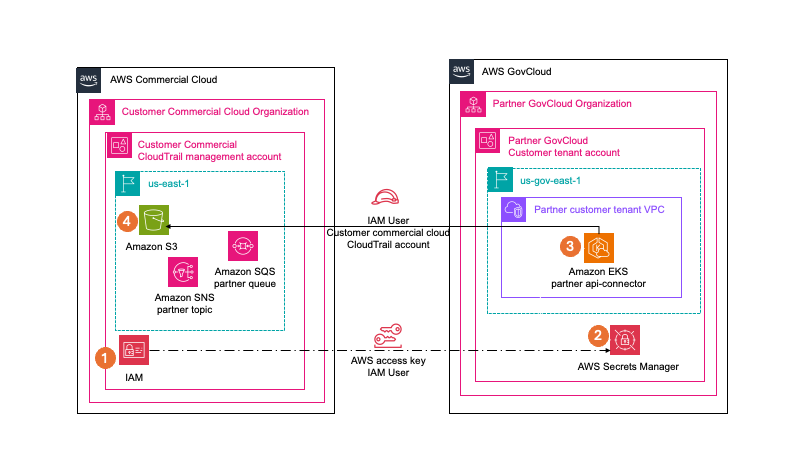
Though this is no longer a recommended best practice, data transfer requirements were met previously by using Data Sync, s3api, data transfer hub, and other SDK methods by creating an IAM user access key in the AWS Commercial partition. You would then store the aws partition IAM user access key in AWS Secrets Manager in the aws-us-gov partition. By using this method, one of these applications would operate within AWS GovCloud; the application would then use the aws partition IAM user access key to access and read data from the commercial partition Amazon Simple Storage Service (Amazon S3) bucket and then write it to the AWS GovCloud Partition S3 bucket. The application could then process the data within the application running in the AWS GovCloud partition. That legacy architecture is shown in Figure 2.

Figure 2: Cross-partition data movement using IAM access keys

Figure 2: Cross-partition data movement using IAM access keys

This solution requires an audit exception to allow the use of long-term user credentials. Using long-term user credentials for workloads or service accounts deviates from AWS security best practices and NIST 800-53 IA2, because they can be compromised and difficult to rotate and change. Temporary credentials align with AWS security best practices and are provided by AWS roles. Additionally, the use of x509 certificates has been a standard for establishing secure communications with applications operating processes on remote devices and comply with NIST 800.53r5 IA8.

Cross-partition data transfer using IAM Roles Anywhere (Recommended)

To meet the requirement to use short-term credentials and enable access across an AWS partition, you can use IAM Roles Anywhere, which avoids the need for long-term access key or secret access key credentials. Using IAM Roles Anywhere, you can use your existing certificate authority (CA) or AWS Private Certificate Authority to issue and manage X.509 certificates to specific workloads and applications. You can register your external CA with IAM Roles Anywhere as a trust anchor to establish a trust between your external CA and IAM Roles Anywhere. If you don’t manage your own private key infrastructure (PKI), a trust can be established with AWS Private CA to create a CA as the trust anchor. For detailed steps for setting up IAM Roles Anywhere, see Planning for your IAM Roles Anywhere deployment.

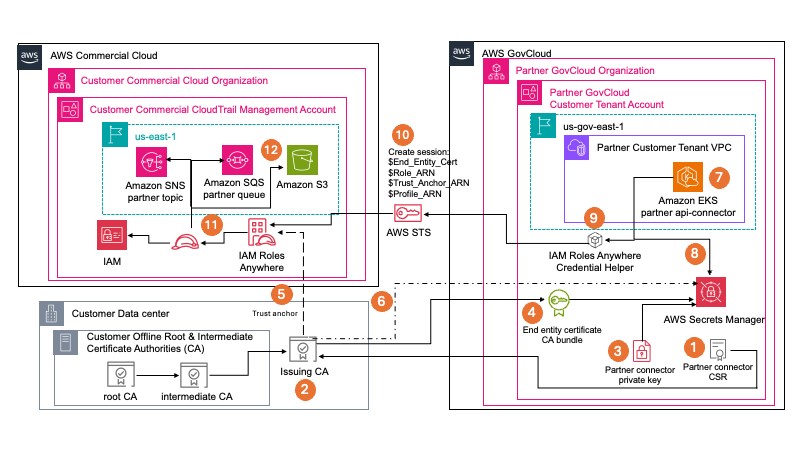
Figure 3: Architecture for cross-partition data movement using IAM Roles Anywhere with an external CA

Figure 3: Architecture for cross-partition data movement using IAM Roles Anywhere with an external CA

Figure 3 demonstrates how you can use IAM Roles Anywhere with an external CA to enable data transfer between partitions. By using this pattern, which is an AWS security best practice, you can pull data from your AWS Commercial partition into your AWS GovCloud partition. By using an external CA, you can use your existing PKI. For compliance purposes, internal CAs are often required to issue certificates for internal applications and services, device authentication, internal web services, employee authentication, and other tasks. Internal PKI consists of a root CA, intermediate CA and an issuing CA. The root CA is often disconnected from the internet to help prevent tampering or issuing of PKI to untrusted resources. The root CA will issue a certificate for an intermediate CA and the intermediate CA will create certificates for one or more issuing CAs. When the GovCloud application creates a certificate signing request (CSR), it will maintain the private key that goes with the CSR in Secrets Manager. The customer’s external issuing CA will then sign the CSR and provide an end-entity certificate for the GovCloud application in addition to the external CA bundle. This CA bundle contains the root CA, intermediate CA, and issuing CA certificates. All three of which will be stored in GovCloud application’s Secrets Manager so that the workload can then interact with AWS Commercial partition resources.

As shown in Figure 3 you can initiate a temporary session from GovCloud (right) to AWS Commercial (left). IAM Roles Anywhere is configured within the Commercial partition to use your existing PKI as the trust anchor. As you vend PKI certificates to workloads that run in GovCloud, they’re stored in Secrets Manager, and your Amazon Elastic Kubernetes Service (Amazon EKS) role allows access to the certificates. In the Commercial Region, you configured a role that allows access to Amazon Simple Notification Service (Amazon SNS), Amazon Simple Queue Service (Amazon SQS), and Amazon S3. You then configure the trust policy on that role to allow IAM Roles Anywhere access. Based on your GovCloud application scheduling, the Amazon EKS pipeline provides the credential helper process temporary security credentials for the Commercial Region. It does this by using the certificates, private key, Commercial Region IAM Roles Anywhere role ARN, profile ARN, and trust anchor ARN that are provided to the GovCloud application as it prepares to connect from the GovCloud Region to the Commercial Region.

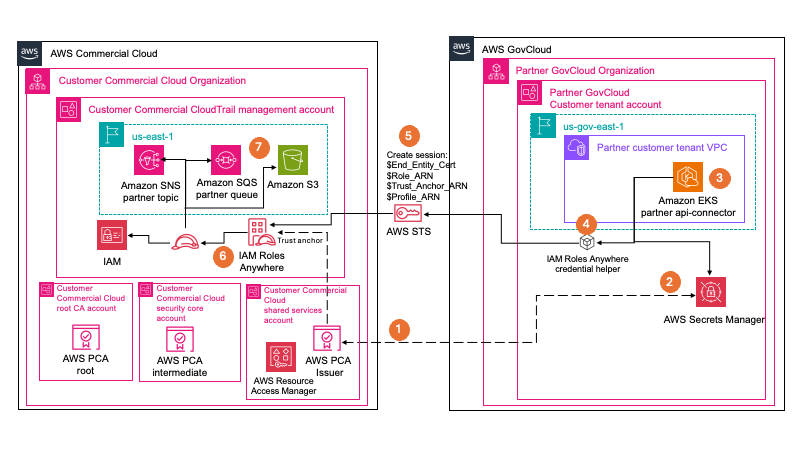
Figure 4: Cross-partition data movement using IAM Roles Anywhere with AWS Private CA

Figure 4: Cross-partition data movement using IAM Roles Anywhere with AWS Private CA

If you don’t have an existing PKI in place, or don’t want to build your own offline PKI, you can use AWS Private CA, as shown if Figure 4. Using AWS Private CA, you don’t have to maintain hardware or software. As a managed service, AWS handles the high availability, scalability, and durability, in addition to patching and maintenance. You also benefit from seamless integration with other AWS services such as AWS Elastic Load Balancing, Amazon CloudFront, and Amazon API Gateway. AWS Private CA also integrates with AWS CloudTrail, so that you can audit what actions have been taken.

Conclusion

In this post, we explained the compliance requirements that need to be considered when migrating data across AWS partitions. We also outlined architectural options AWS customers and partners can take when implementing a solution to address this need.

IAM Roles Anywhere is a great solution that AWS Customers and software as a service (SaaS) partners can use when they want to access AWS resources from across AWS partitions without needing to use long-lived credentials for IAM users.

To learn more about IAM Roles Anywhere, see the feature’s documentation, this IAM Roles Anywhere workshop, or this re:Inforce presentation featuring Hertz.

If you have feedback about this post, submit comments in the Comments section below. If you have questions about this post, start a new thread on AWS Security, Identity, and Compliance re:Post or contact AWS Support.

If you have feedback about this post, submit comments in the Comments section below.

Jenn Reed

Jenn Reed

Jenn is Principal Security Solutions Architect at AWS and former CISO, with over 30 years of security and software development experience and 12 years of experience building on AWS. She lives in Ann Arbor, Michigan, and enjoys running, playing ukulele, and reading science fiction novels.

Bill Wells

Bill Wells

Bill is a Senior Solutions Architect at AWS with over 20 years of experience beginning in the U.S. Air Force. Leveraging his diverse IT background across multiple organizations, Bill specializes in architecting secure, compliance-aligned cloud solutions that help Federal Partners achieve business outcomes using AWS services.

Enforce business glossary classification rules in Amazon SageMaker Catalog

Post Syndicated from Ramesh H Singh original https://aws.amazon.com/blogs/big-data/enforce-business-glossary-classification-rules-in-amazon-sagemaker-catalog/

Organizations are scaling their data catalogs faster than ever. Maintaining consistent metadata standards across teams remains a challenge. Business glossaries define the language of the enterprise—terms like Customer Profile, Transaction, or Confidential Data—but assets are often published without these classifications, leading to inconsistent metadata and poor discoverability.

To address this, Amazon SageMaker Catalog now supports metadata enforcement rules for glossary terms classification (tagging) at the asset level. With this capability, administrators can require that assets include specific business terms or classifications. Data producers must apply required glossary terms or classifications before an asset can be published. This enforces metadata consistency across the catalog and makes sure assets carry the business context needed for effective discovery and governance.

This capability builds on existing metadata rule features for enforcing required metadata fields during asset publishing. The new addition extends those rules to cover glossary term validation, strengthening the link between business language and technical data assets.

In this post, we show how to enforce business glossary classification rules in SageMaker Catalog.

Why metadata enforcement matters

A common governance challenge is the lack of standardized tagging and classification for assets entering enterprise catalogs. Without enforcement, data producers might publish assets missing required business terms (such as data sensitivity level or product domain), resulting in inconsistent metadata that confuses business users, unreliable search and filtering results, and manual cleanup and downstream compliance risks.

By automatically validating metadata at publish time, SageMaker Catalog validates metadata when assets are published. This offers the following key benefits:

  • Assets are classified with approved business terms before publication
  • Validation supports compliance with internal glossary and classification standards
  • Consistent tagging enhances search accuracy and reduces noise
  • Incomplete or incorrectly tagged assets don’t reach consumers

How metadata enforcement works

On the Amazon SageMaker Unified Studio console, administrators navigate to Catalog, Governance, Rules and create metadata rules targeting the asset publishing workflow. Rules can specify required glossary terms or classification fields (for example, Business Unit, PII Category, or Data Sensitivity). Rules can apply organization-wide or within specific domains or projects.

When a producer attempts to publish an asset, SageMaker Catalog checks that the asset includes the required glossary terms or classifications. If any required metadata is missing, the publish action fails with a clear error message. After the metadata is added, the asset can be published successfully.

Enforced tagging makes sure published assets can be searched and filtered using consistent business terminology, improving catalog usability for analysts and business users.

Solution overview

For this post, we explore a financial services use case. Our example a financial services company defines a rule requiring all datasets published from the project to have ‘Finance’ glossary associated:

  • A data producer attempting to publish a new dataset without this tag receives a validation error
  • After applying the correct classification, the dataset publishes successfully
  • Analysts can now filter the catalog to find only Finance datasets or join assets consistently tagged with the same glossary term

In the following sections, we walk through the steps to configure this solution. We create a rule that all assets published from a specific project should have a business unit tag called Finance.

Prerequisites

To test this solution, you should have a SageMaker Unified Studio domain set up with a domain owner or domain unit owner privileges. You should also have an existing project to publish assets and catalog assets. For instructions to create these assets, see the Getting started guide.

In this example, we created a project named financial_analysis and a test table. For instructions to create a table, see Get started with Amazon S3 Tables in Amazon SageMaker Unified Studio. To ingest the sample data to SageMaker Catalog and generate business metadata, see Create an Amazon SageMaker Unified Studio data source for Amazon Redshift in the project catalog.

Create glossary and add terms

Complete the following steps to create a new glossary and add terms:

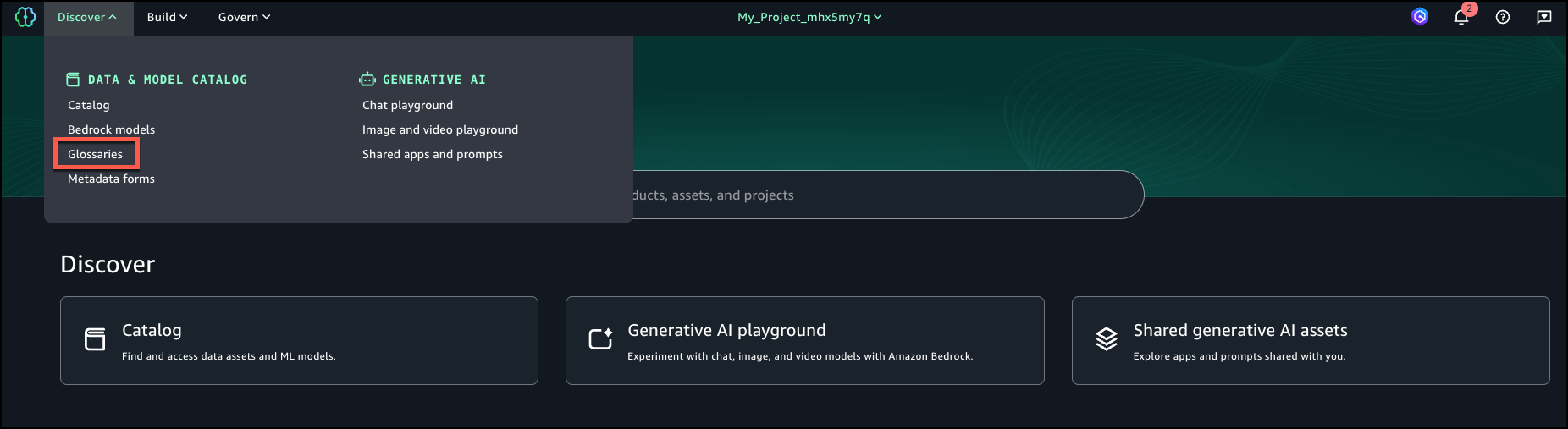
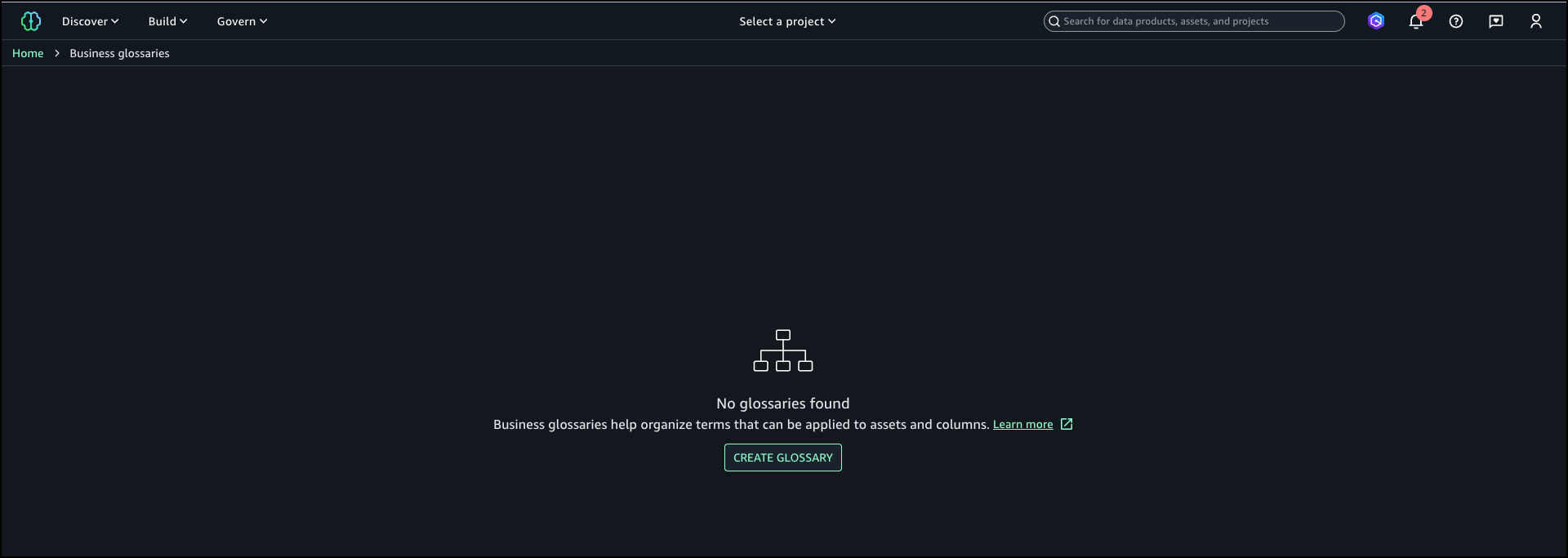
  1. In SageMaker Unified Studio, on the Discover menu, choose Glossaries.
  2. Choose Create glossary.
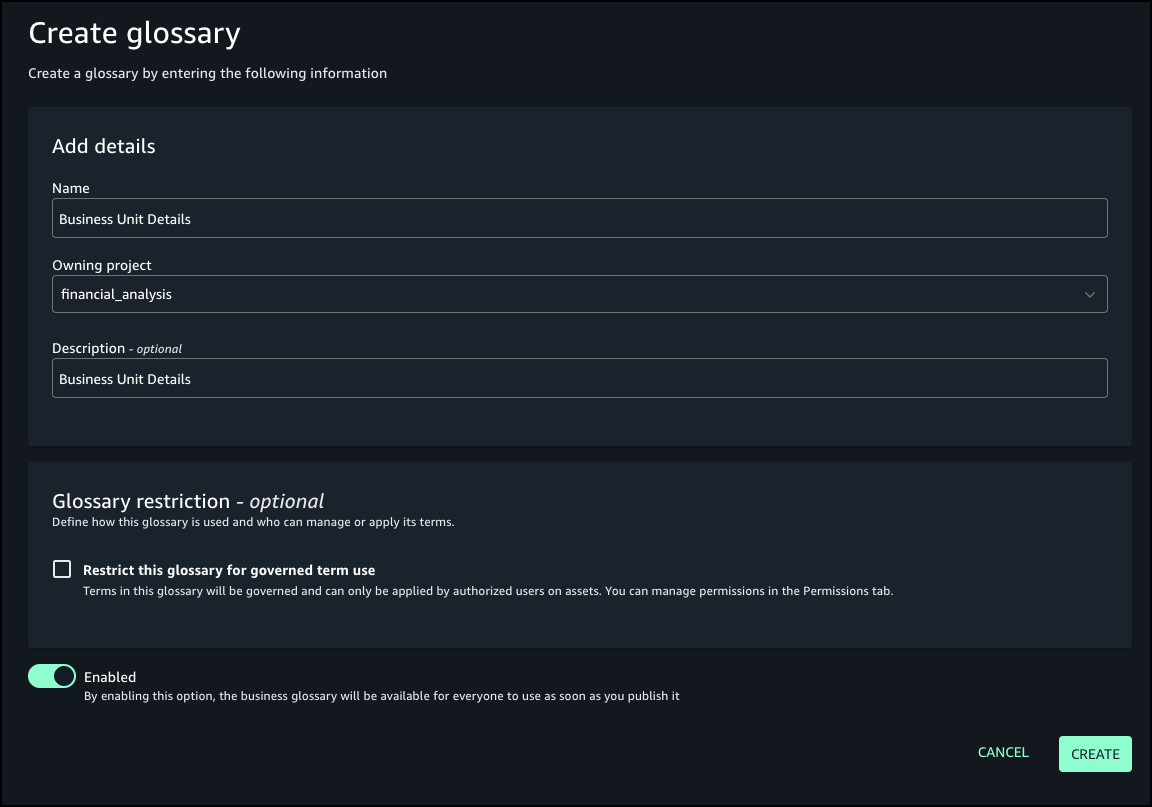
  3. Provide details for your glossary, including name, owning project, and optional description.
  4. For Glossary restriction, turn on Enabled.
  5. Choose Create.
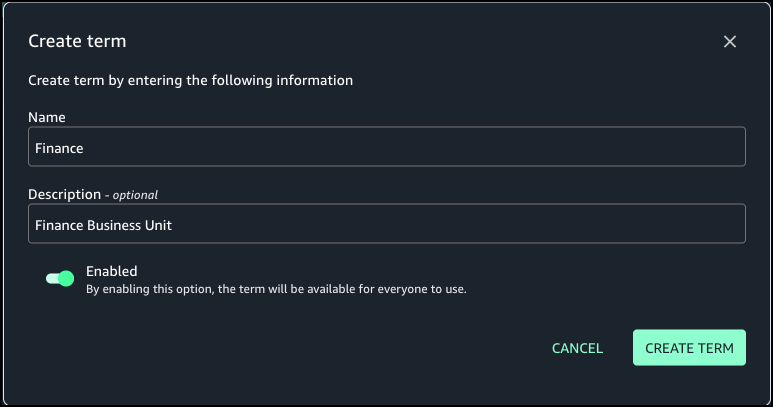
  6. Create the term Finance in the Business Unit Details glossary.

Create rule to enforce glossary terms

Complete the following steps to create a rule to define glossary terms:

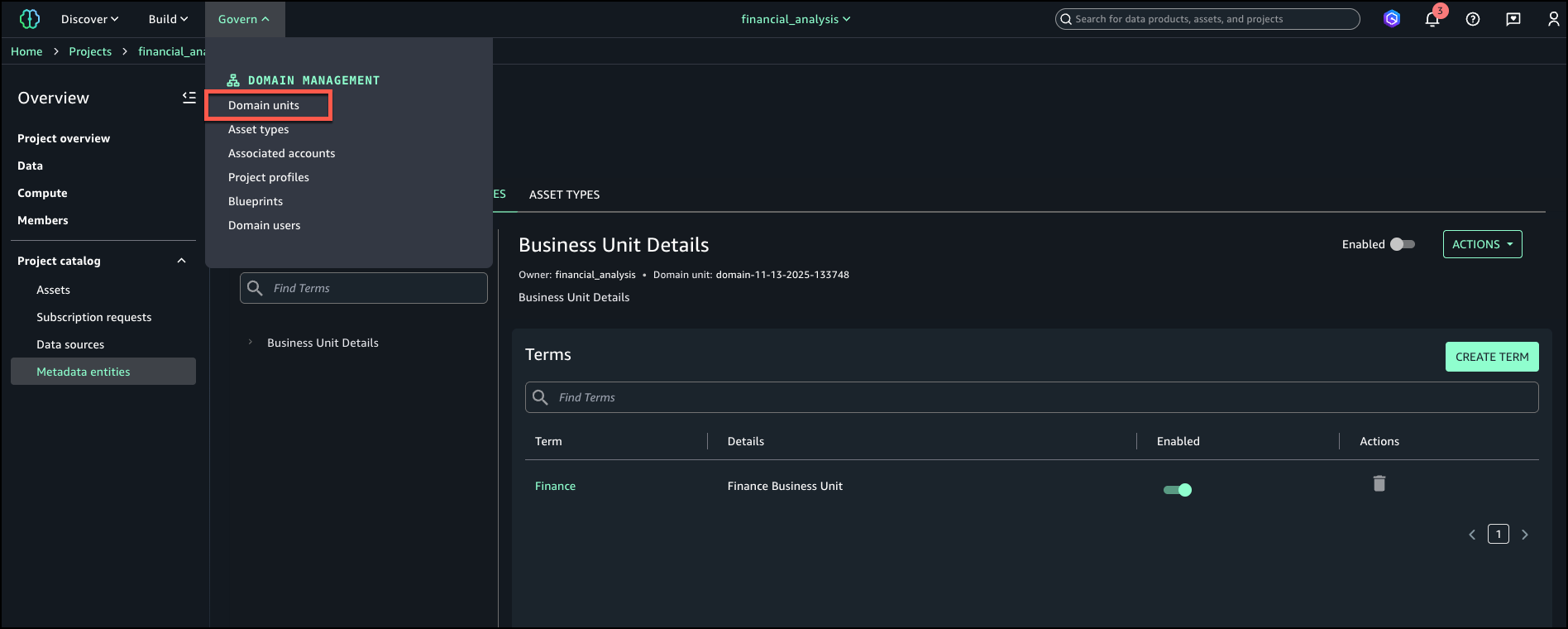
  1. On the Govern menu, choose Domain units.
  2. On the Rules tab, choose Add.
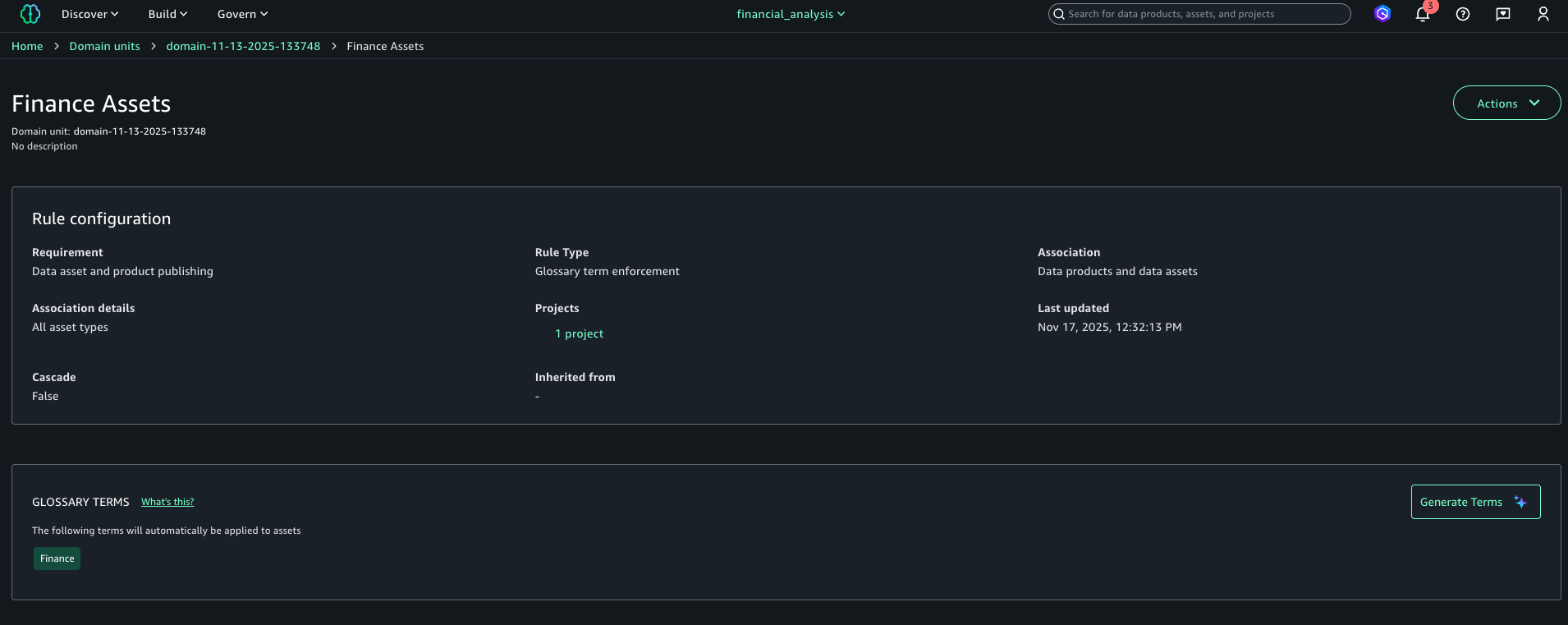
  3. Add a publishing rule for the Finance project to have the Finance tag for all assets published to the catalog.
  4. Choose Add rule.

    The following screenshot shows the configuration details for your new rule.

Publish asset with enforced rules

Complete the following steps to publish your asset with the enforced rules:

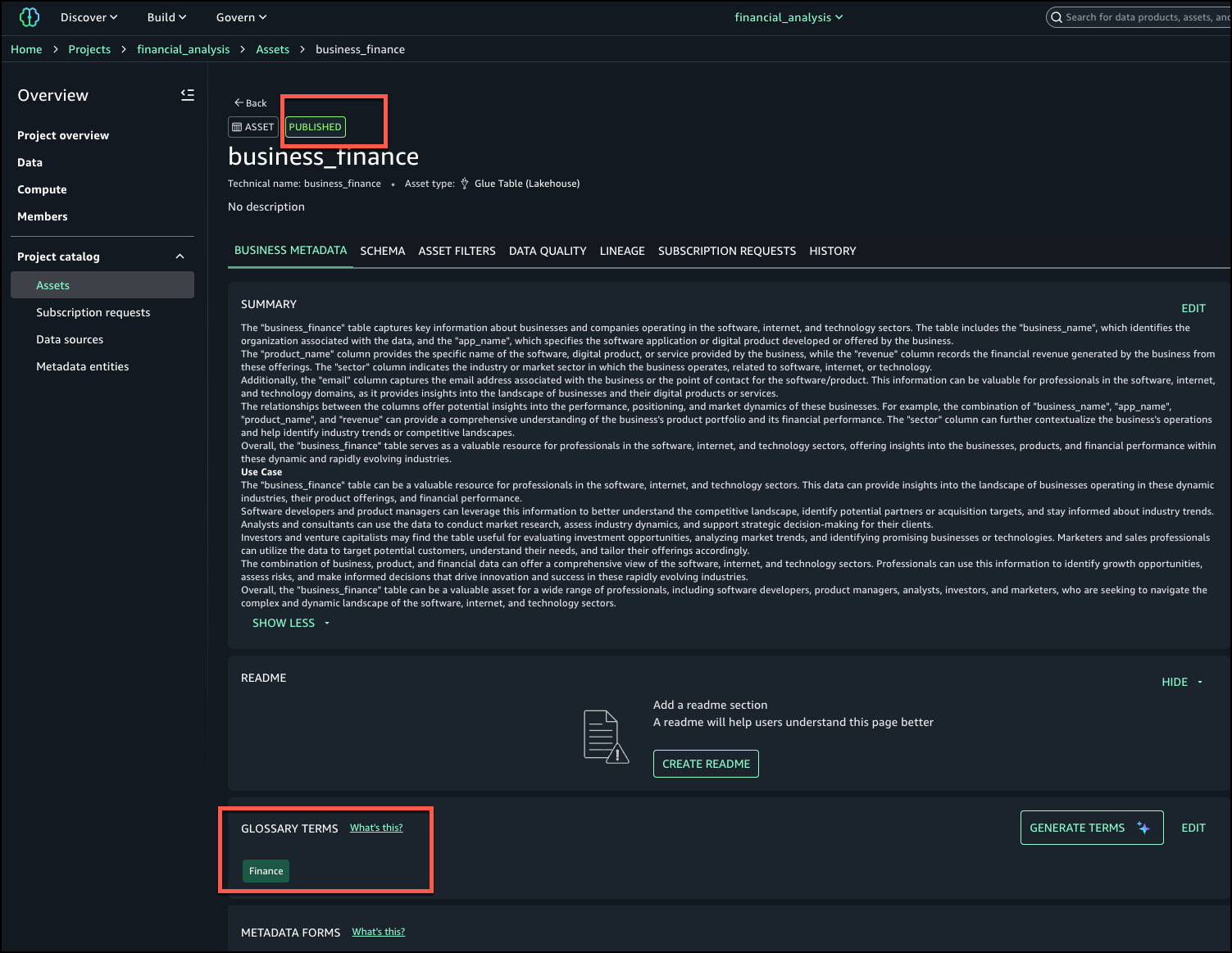
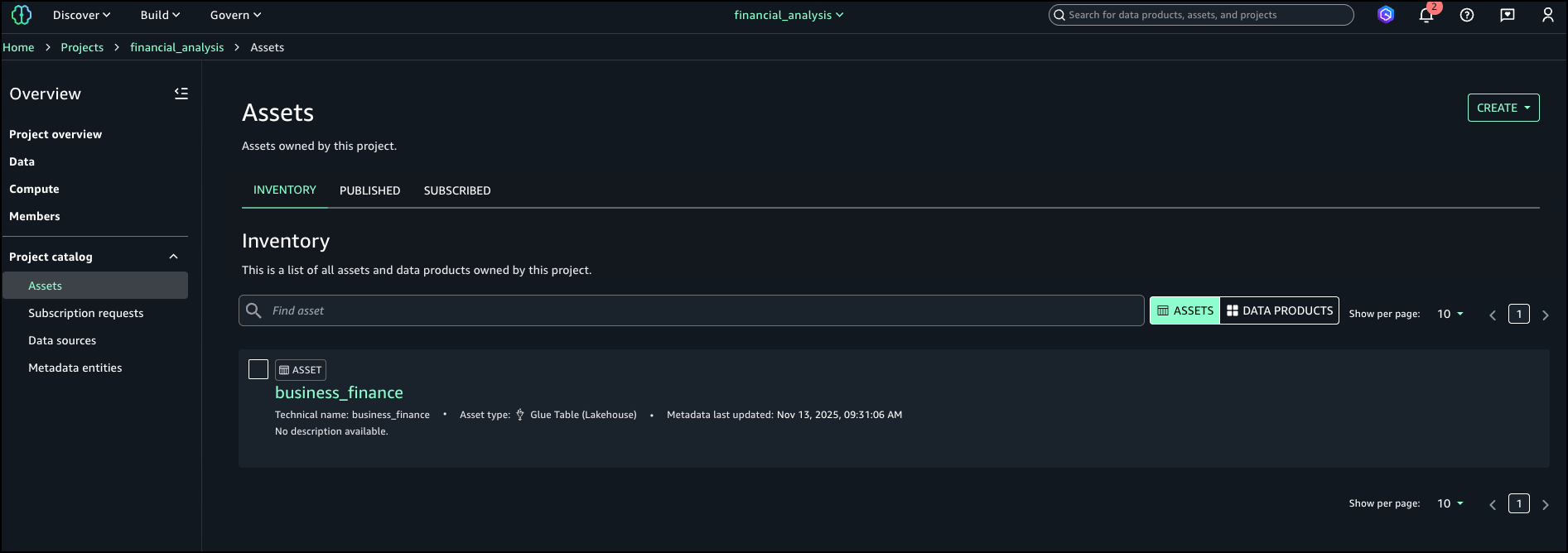
  1. On the financial_analysis project page, go to your asset.
  2. In the Glossary terms section, choose Add terms.

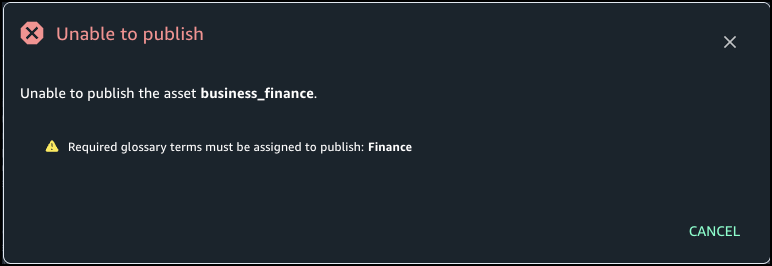
    If you choose Publish without adding the needed term, you get an error stating the Finance term should be assigned.
  3. Choose Finance to add the required term.
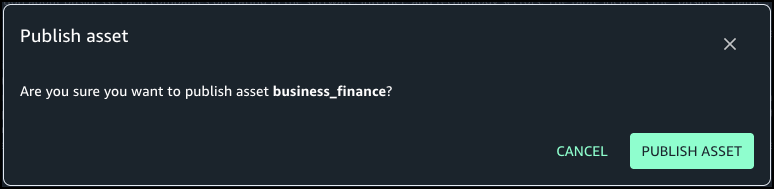
  4. Choose Publish asset.

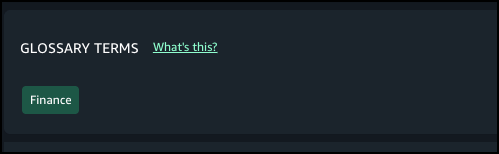
The following screenshot shows the published asset and the required terms in the glossary.

Conclusion

With metadata enforcement rules for glossary terms, SageMaker Catalog brings stronger control and consistency to how organizations publish and manage their data assets. By requiring approved business classifications before publication, teams can make sure assets adhere to enterprise metadata standards, improving governance, discoverability, and trust in shared catalogs. This capability helps organizations scale their catalog governance without adding manual overhead—embedding compliance and quality directly into the publishing workflow.

Metadata enforcement rules for glossary terms are available in AWS Regions where SageMaker Catalog operates. Get started with this capability, refer to the user guide.


About the Authors

Ramesh Singh

Ramesh Singh

Ramesh is a Senior Product Manager Technical (External Services) at AWS in Seattle, Washington, currently with the Amazon SageMaker team. He is passionate about building high-performance ML/AI and analytics products that help enterprise customers achieve their critical goals using cutting-edge technology.

Pradeep Misra

Pradeep Misra

Pradeep is a Principal Analytics and Applied AI Solutions Architect at AWS. He is passionate about solving customer challenges using data, analytics, and AI/ML. Outside of work, he likes exploring new places, trying new cuisines, and playing badminton with his family. He also likes doing science experiments, building LEGOs, and watching anime with his daughters.

Pradyut Singh

Pradyut Singh

Pradyut is a Software Development Engineer at AWS, working with the Amazon SageMaker team with a focus on Data and AI services. Outside of work, he has a passion for travel and enjoys going on long road trips, exploring diverse cuisines and discovering new places along the way.

Manny Pelaez

Manny Pelaez

Manny is a UX Designer at AWS working on Amazon SageMaker Unified Studio. He is passionate about creating intuitive user experiences by listening to customers and focusing on their pain points. Outside of work, he enjoys driving, exploring food, art, sketching, and working on side projects. He also teaches a design course, sharing his expertise with aspiring designers.

Enhanced data discovery in Amazon SageMaker Catalog with custom metadata forms and rich text documentation

Post Syndicated from Ramesh H Singh original https://aws.amazon.com/blogs/big-data/enhanced-data-discovery-in-amazon-sagemaker-catalog-with-custom-metadata-forms-and-rich-text-documentation/

Amazon SageMaker Catalog now supports custom metadata forms and rich text descriptions at the column level, extending existing curation capabilities for business names, descriptions, and glossary term classifications.

With these new features, data stewards can define and capture business-specific metadata directly in individual columns, and authors can use markdown-enabled rich text to provide detailed documentation and business context. Both form fields and formatted descriptions are indexed in real time, making them immediately discoverable through catalog search.

Column-level context is essential for understanding and trusting data. This release helps organizations improve data discoverability, collaboration, and governance by letting metadata stewards document columns using structured and formatted information that aligns with internal standards.

In this post, we show how to enhance data discovery in SageMaker Catalog with custom metadata forms and rich text documentation at the schema level.

Key capabilities

SageMaker Catalog now offers the following key capabilities:

  • Custom metadata forms – Data stewards can now use custom metadata forms to capture organization-specific metadata fields for columns such as Business Owner, Regulatory Classification, Units of Measure, or Approved Use Case. Each field is stored as a key-value pair and indexed for search, enabling business-level queries like “find columns where sensitivity = confidential.”
  • Rich text (markdown) descriptions – Each column supports a markdown-enabled description field. Authors can format text with headings, bullet lists, and hyperlinks to add deeper business or operational context—for example, logic definitions, sample values, or data lineage references.
  • Real-time indexing for search – Custom form values and rich text content are indexed as soon as they are saved. Users can search using a metadata value, keyword, or glossary term across columns.

Solution overview

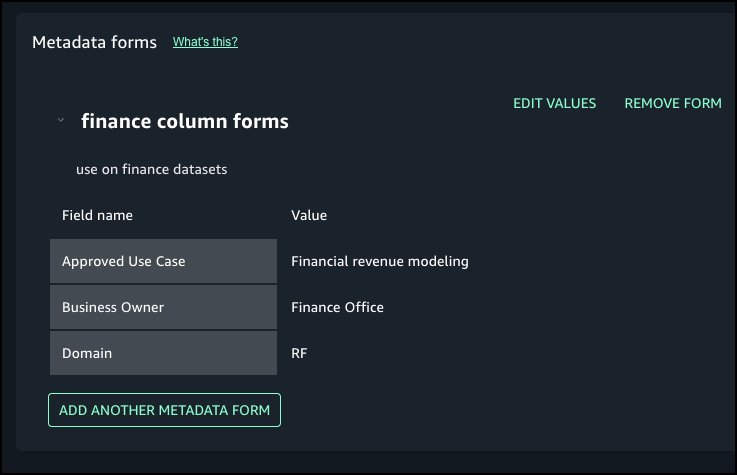
For this post, we explore a financial services use case. Our example financial services organization defines a column metadata form that includes several fields, as illustrated in the following table.

Field Example Value
Approved Use Case Financial revenue modeling
Business Owner Finance Office
Domain RF

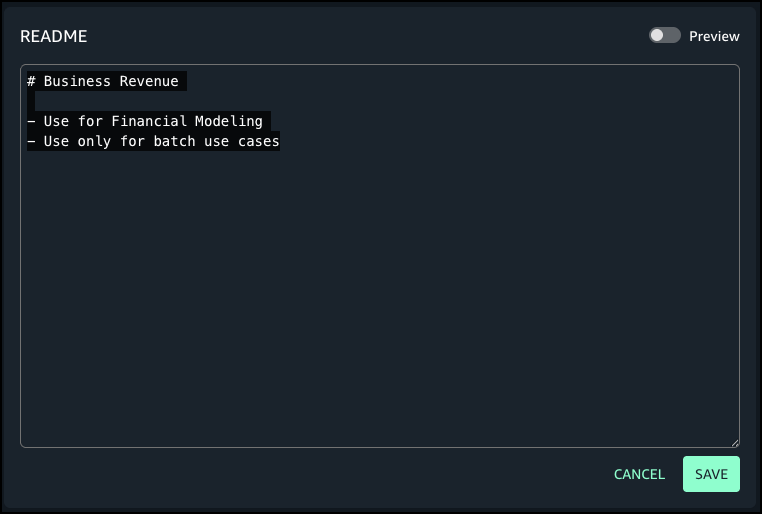
For a dataset column named revenue, the author adds the following markdown description:

# Business Revenue

- Use for Financial Modeling
- Use only for batch use cases

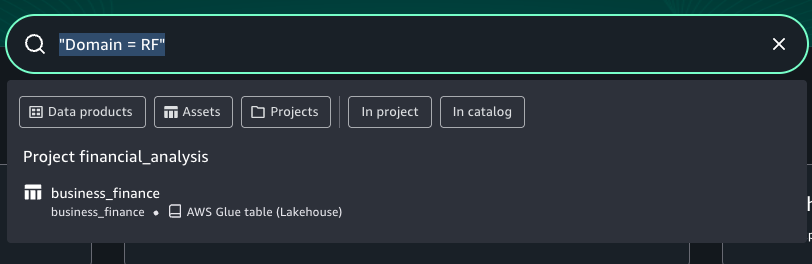
When analysts search for Domain = RF, this column appears in results with complete business context.

In the following sections, we demonstrate how to use to use metadata forms for columns and add rich text descriptions that is searchable.

Prerequisites

To test this solution, you should have an Amazon SageMaker Unified Studio domain set up with a domain owner or domain unit owner privileges. You should also have an existing project to publish assets and catalog assets. For instructions to create these assets, see the Getting started guide.

In this example, we created a project named financial_analysis and a test table. To create a similar table, see Get started with Amazon S3 Tables in Amazon SageMaker Unified Studio. To ingest the sample data to SageMaker Catalog and generate business metadata, see Create an Amazon SageMaker Unified Studio data source for Amazon Redshift in the project catalog.

Create new metadata form

Complete the following steps to create a new metadata form:

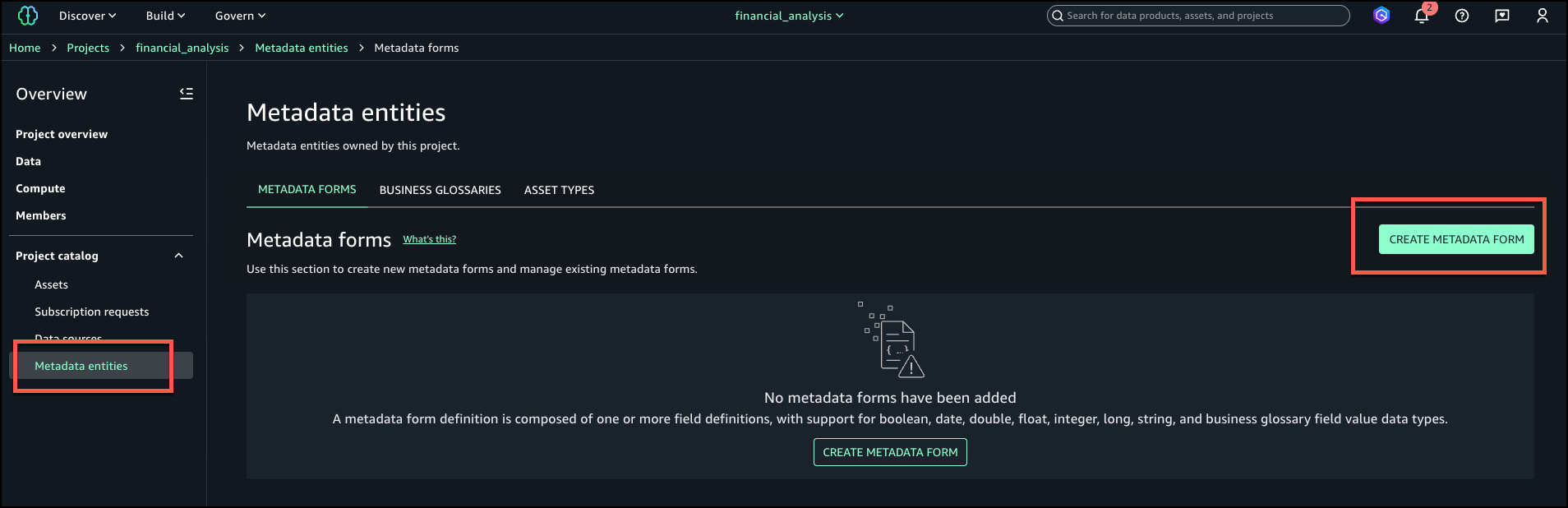
  1. In SageMaker Unified Studio, go to your project.
  2. Under Project catalog in the navigation pane, choose Metadata entities.
  3. Choose Create metadata form.
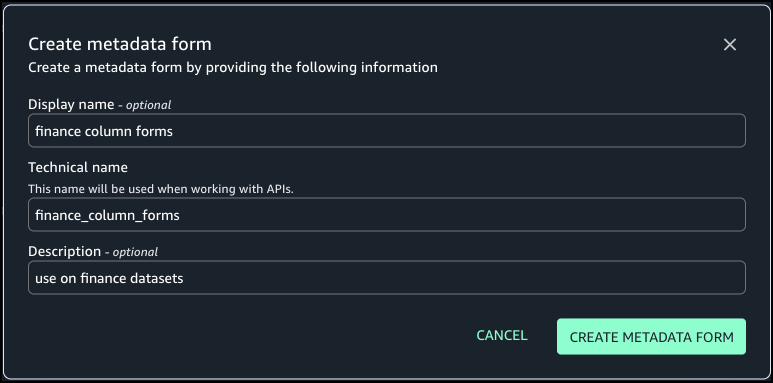
  4. Provide an optional display name, a technical name, and an optional description, then choose Create metadata form.
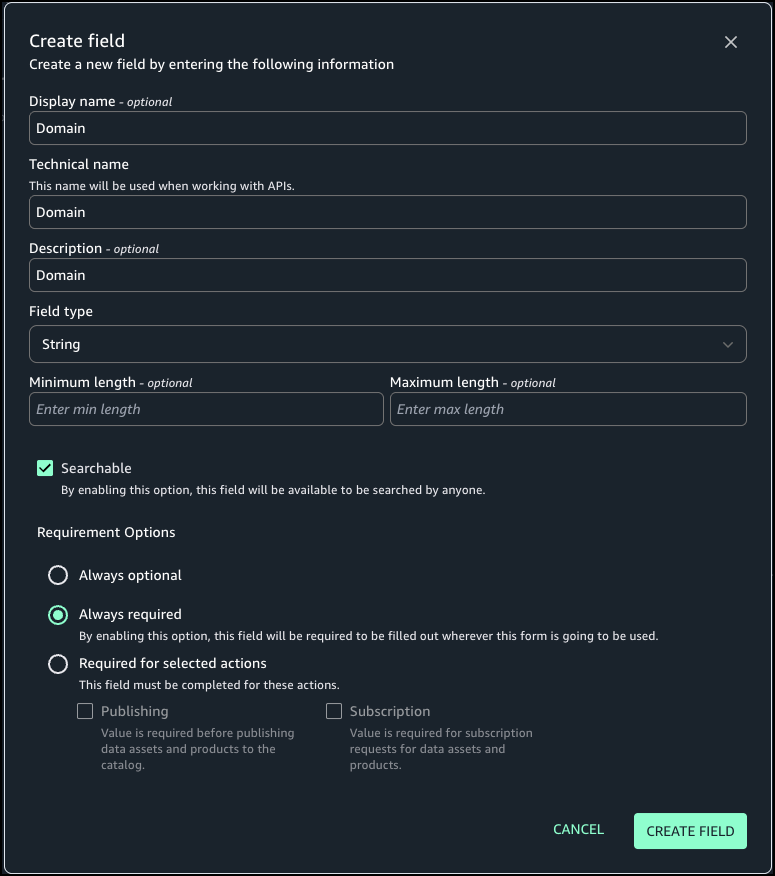
  5. Define the form fields. In this example, we add the fields Domain, Business Owner, and Approved Use Case.
  6. For Requirement Options, select the configuration for each field. For our use case, we select Always required.
  7. Choose Create field.
  8. Turn on Enabled so the form is visible and can be used for assets.

Attach metadata form to column

Complete the following steps to attach the metadata form to a column:

  1. Under Project catalog in the navigation pane, choose Assets.
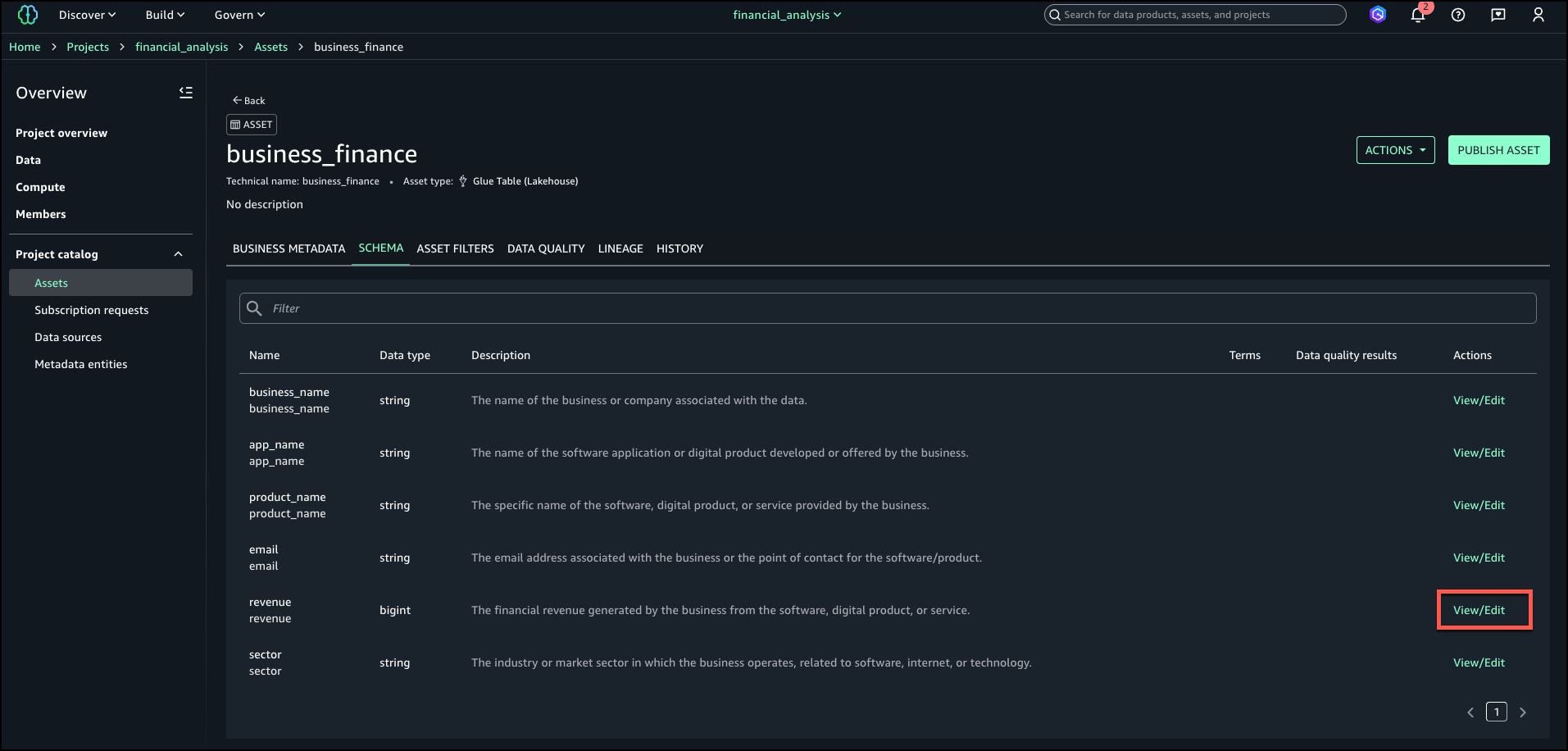
  2. Search for and select your asset (for this example, we use the asset business_finance).
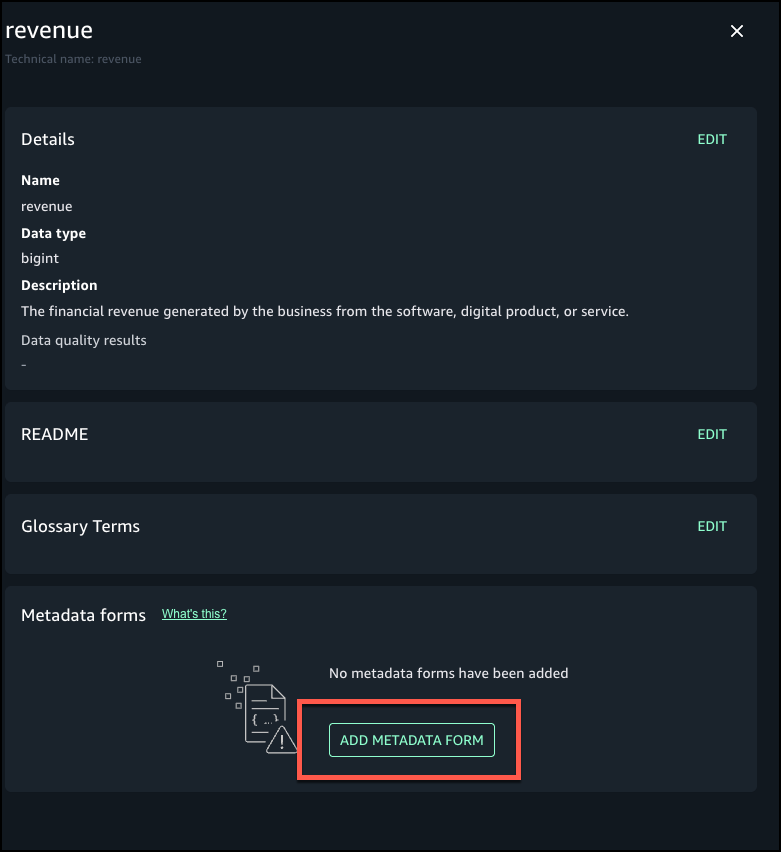
  3. On the Schema tab, choose View/Edit next to the revenue field.
  4. Choose Add metadata form.
  5. Choose the form you created and choose Add.
  6. Add details for the metadata form fields

Add additional context as formatted text

Next, we enter a rich text description for each column using the markdown editor, including headings, bullet lists, links, and sample values. Complete the following steps:

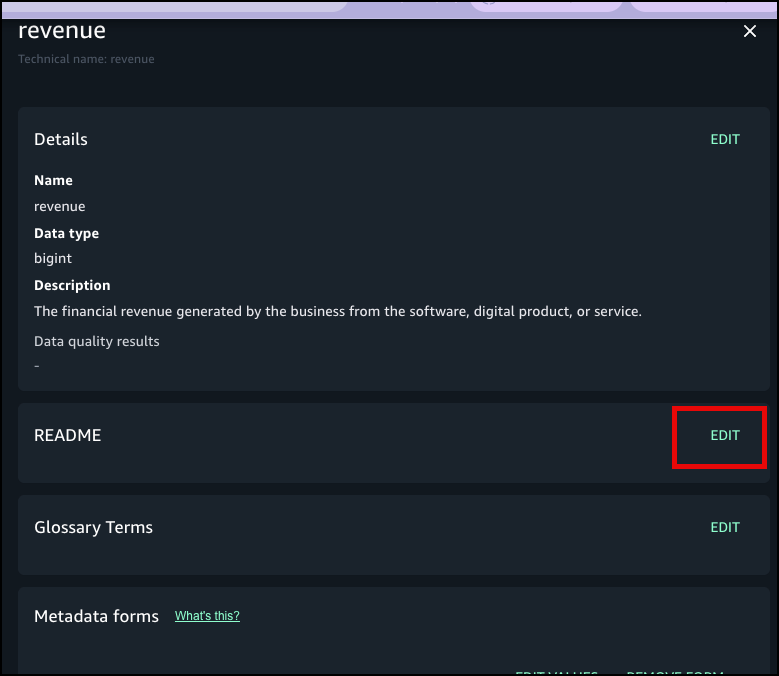
  1. Choose Edit next to README for the revenue field where you added the metadata form.
  2. Enter details and choose Save.
  3. Choose Preview to view the formatted README at the column level.

Publish and verify search

Now you’re ready to publish the asset. The metadata form values and markdown descriptions become part of the catalog record and are indexed for search. You can also see the history of revisions on the History tab. Other project users can see the metadata form and rich text description for the published assets and subscribe to the data asset. You can create more data products with these assets, and they will also have the column metadata form and README.

In the catalog search UI, data users can now filter on custom form fields (for example, “Domain = RF”) or search in natural language for text that matches the column description.

Best practices

Consider the following best practices when using this feature:

  • Define metadata forms aligned with your business vocabulary (domains, owners, sensitivity levels) proactively before publishing assets at scale.
  • Make column descriptions actionable—include business definitions, value ranges, logic, update cadence, and dependencies.
  • Verify the catalog indexing is timely; publish changes proactively so search results reflect new metadata.
  • Use governance controls. You can combine column-level metadata with existing asset-level templates and approval workflows to enforce publishing standards.
  • Monitor search usage and metadata completeness; target high-value datasets for complete column-level documentation first.
  • Do not store confidential or sensitive information in your metadata forms.

Conclusion

With column-level metadata forms and rich text descriptions, SageMaker Catalog helps organizations deliver higher-quality metadata, stronger governance, and better data discovery. These features make it straightforward for teams to capture complete business context and for analysts to quickly locate and understand the data they need.

Custom metadata forms and rich text descriptions at the column level are now available in AWS Regions where SageMaker is supported.

To learn more about SageMaker, see the Amazon SageMaker User Guide. Get started with this capability, refer to the user guide.


About the Authors

Ramesh Singh

Ramesh Singh

Ramesh is a Senior Product Manager Technical (External Services) at AWS in Seattle, Washington, currently with the Amazon SageMaker team. He is passionate about building high-performance ML/AI and analytics products that enable enterprise customers to achieve their critical goals using cutting-edge technology.

Pradeep Misra

Pradeep Misra

Pradeep is a Principal Analytics and Applied AI Solutions Architect at AWS. He is passionate about solving customer challenges using data, analytics, and AI/ML. Outside of work, he likes exploring new places, trying new cuisines, and playing badminton with his family. He also likes doing science experiments, building LEGOs, and watching anime with his daughters.

Abbas Makhdum

Abbas Makhdum

Abbas is Head of Product Marketing for Amazon SageMaker Catalog at AWS, where he leads go-to-market strategy and launches for data and AI governance solutions. With deep expertise across data, AI, and analytics, Abbas has also authored a book on data and AI governance with O’Reilly. He is passionate about helping organizations unlock business value by making data and AI more accessible, transparent, and governed.

Harish Panwar

Harish Panwar

Harish is a Software Development Manager at AWS in Bangalore, India. He is leading the Catalog engineering team, which is building data and AI governance solutions. Harish is a veteran in Amazon SageMaker, with deep expertise across SageMaker AI and SageMaker Catalog. He is passionate about creating simple and intuitive AI solutions making AI accessible to everyone.

Building multi-tenant SaaS applications with AWS Lambda’s new tenant isolation mode

Post Syndicated from Anton Aleksandrov original https://aws.amazon.com/blogs/compute/building-multi-tenant-saas-applications-with-aws-lambdas-new-tenant-isolation-mode/

Today, AWS announced a new tenant isolation mode for AWS Lambda, that allows you to process function invocations in separate execution environments for each application end-user or tenant invoking your Lambda function. This capability simplifies building secure multi-tenant SaaS applications by managing tenant-level compute environment isolation and request routing for you. As a result, you can focus on your core business logic rather than implementing your own tenant-aware compute environment isolation.

Overview

Lambda runs your function code in secure execution environments that leverage Firecracker virtualization to provide isolation. These execution environments never share or reuse virtual resources (such as vCPU, disk, or memory) across functions, or even across different versions of the same function. However, Lambda can reuse execution environments for multiple invocations of the same function version, as these execution environments are fully set-up and can therefore deliver faster request processing for your functions.

Figure 1. Incoming invocations processed by a collection of execution environments that belong to a single function.

Figure 1. Incoming invocations processed by a collection of execution environments that belong to a single function.

Multi-tenant SaaS applications that handle sensitive tenant-specific data or execute code supplied dynamically by tenants may need a higher degree of isolation—at the individual application tenant level rather than at the function level—for secure code execution and to reduce the risk of cross-tenant data access.

Prior to today’s launch, developers would implement custom solutions, such as SDKs or application logic to manage isolation within function code. This approach was bug-prone, required more work from application development teams, and didn’t ensure isolation at the compute environment level.

Alternatively, developers adopted the approach of creating separate functions per application tenant, replicating the same code across hundreds or thousands of tenants. This approach provided stronger compute environment isolation than sharing compute environments across multiple tenants of the same function, but increased implementation overhead and operational complexity as workloads grew to support a larger number of tenants over time.

Figure 2. Using function-per-tenant model, each tenant’s requests are processed by a separate function.

Figure 2. Using function-per-tenant model, each tenant’s requests are processed by a separate function.

Starting today, AWS Lambda offers a new tenant isolation mode that lets you isolate execution environments used across different tenants of your multi-tenant SaaS applications, even when all of the tenants invoke the same function. When you enable the new tenant isolation mode, you include a tenant identifier with each function invocation. Lambda uses this identifier to route the request to the correct execution environment. As a result, each execution environment is reused only for invocations from the same tenant. This means you still get the performance benefits of warm execution environments, while ensuring that each tenant’s workloads remain isolated.

Figure 3. With the new tenant isolation capability, Lambda creates separate execution environments per tenant for a single function.

Figure 3. With the new tenant isolation capability, Lambda creates separate execution environments per tenant for a single function.

For organizations handling sensitive tenant-specific data or running untrusted code supplied dynamically by end-users, Lambda’s new tenant isolation mode provides the security benefits of per-tenant compute environment separation without the operational complexity of managing individual functions or infrastructure for each tenant.

Example scenario

Consider building a multi-tenant serverless SaaS application. To optimize performance, your function handler can retrieve tenant-specific configuration and data, cache it in memory, and reuse it for subsequent invocations from the same tenant. For example, you might cache tenant-specific database location, feature flags, or business rules that are frequently accessed during request processing. You may store this information within the application runtime process as global variables or as files in the /tmp directory. However, if the underlying execution environment is used to serve multiple tenants, this approach can potentially expose data across tenants.

With tenant isolation mode you can address this risk with much simpler architecture and configuration. This built-in capability makes Lambda an excellent choice for multi-tenant SaaS applications needing isolated compute environments for individual tenants.

Getting Started with Lambda Tenant Isolation Mode

Use the new tenancy-config parameter to configure tenant isolation mode when you create your function. You can only apply this configuration at function creation time; it cannot be updated for existing functions. The following snippet creates a function with tenancy config using the AWS CLI.

aws lambda create-function \
   --function-name my-function1 \
   --runtime nodejs22.x \
   --zip-file fileb://my-function1.zip \
   --handler index.handler \
   --role arn:aws:iam:1234567890:role/my-function-role \
   --tenancy-config '{"TenantIsolationMode": "PER_TENANT"}'

After the function is created, you must provide the tenant ID parameter with each invocation. Lambda uses this identifier to ensure that the execution environment used for a particular tenant is never reused for other tenants. For subsequent invocations from the same tenant, Lambda may reuse the execution environment to optimize performance. Specify this tenant-id parameter as illustrated below:

aws lambda invoke \
   --function-name my-function \
   --tenant-id BlueTenant \
   response.json

The new tenant-id parameter is required for functions using the tenant isolation mode. Function invocations omitting this parameter will fail with an invocation error, as shown below:

aws lambda invoke --function-name multitenant-function out.json

An error occurred (InvalidParameterValueException) when calling the Invoke operation:
The invoked function is enabled with tenancy configuration. 
Add a valid tenant ID in your request and try again.

Lambda makes the tenant ID parameter available through your function handler’s context object. This allows you to access tenant-specific information in your code, for example if you wish to implement custom logic based on the tenant identity, as shown below:

exports.handler = async function (event, context) {
   const tenantId = context.tenantId;

   // Process tenant-specific logic

   return {
      statusCode: 200,
      body: `OK for tenantId=${tenantId}`
   };
};

The following table outlines differences between Lambda functions with and without tenant isolation mode enabled:

Feature Without the new
tenant isolation mode
With the new
tenant isolation mode
Execution environment isolation Isolated per function version. Isolated per end-user or tenant invoking a function version.
Execution environment reuse Can be reused to process all invocations of a function version. Can only be reused to process invocations from the same tenant invoking a function version.
Data stored on local disk and in-memory Potentially accessible across all invocations of a function version. Potentially accessible across invocations from the same tenant. Not accessible for invocations from other tenants.
Cold starts Occur when there are no warm execution environments available to process incoming invocation. Occur when there are no tenant-specific warm execution environments available to process incoming invocation. More cold starts expected due to tenant-specific execution environments.

Integrating with Amazon API Gateway

Amazon API Gateway uses Lambda’s Invoke API to invoke Lambda functions. When using the Invoke API, Lambda expects the tenant ID parameter to be passed using the X-Amz-Tenant-Id HTTP header. You can configure API Gateway to inject this HTTP header into the Lambda invocation request with a value obtained from client request properties such as HTTP header, query parameter, or path parameter. When using Lambda Authorizers, you can obtain the value from authorization context information returned by the authorizer, such as principal ID or JWT claim. See API Gateway documentation to learn how you can return authorization information from Lambda authorizers to be used for the X-Amz-Tenant-Id header value.

Figure 4. Obtaining X-Amz-Tenant-Id header value from authentication sources.

Figure 4. Obtaining X-Amz-Tenant-Id header value from authentication sources.

The following screenshot illustrates API Gateway Lambda integration configuration, where the incoming request to API Gateway includes an x-tenant-id header that is mapped to the X-Amz-Tenant-Id request header to invoke a Lambda function using tenant isolation mode.

Figure 5. Mapping client request header to Lambda tenant-id header.

Figure 5. Mapping client request header to Lambda tenant-id header.

The following code snippet illustrates this configuration implemented with the AWS CDK.

const lambdaIntegration = new ApiGw.LambdaIntegration(fn, {
   requestParameters: {
      // This configures API Gateway to inject X-Amz-Tenant-Id header
      // into downstream requests. The header value is obtained from 
      // x-tenant-id header in the client request.
      'integration.request.header.X-Amz-Tenant-Id': 'method.request.header.x-tenant-id'
   }
});

resource.addMethod('GET', lambdaIntegration, {
   requestParameters: {
      // This enables API Gateway to use the x-tenant-id header value 
      // obtained from the client request. The header name is arbitrary.
      // you can use any other header name. 
      'method.request.header.x-tenant-id': true
   }
});

Tenant-aware observability

For functions using tenant isolation, Lambda automatically includes the tenant ID in function logs when you have JSON logging enabled, making it easier to monitor and debug tenant-specific issues. Note that the tenantId property is available during function invocation, rather than during function initialization. The tenantId property is included for both platform events (like platform.start and platform.report) and custom logs you print in your function code, as shown in the following screenshot:

Figure 6. Lambda function logs with tenantId.

Figure 6. Lambda function logs with tenantId.

Lambda creates a separate CloudWatch log stream for each execution environment. You can use CloudWatch Log Insights to find log streams that belong to a particular tenant by filtering by tenant Id:

fields @logStream, @message
| filter tenantId=='BlueTenant' or record.tenantId=='BlueTenant'
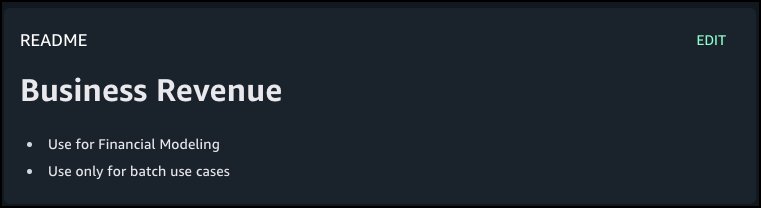
| stats count() as logCount by @logStream
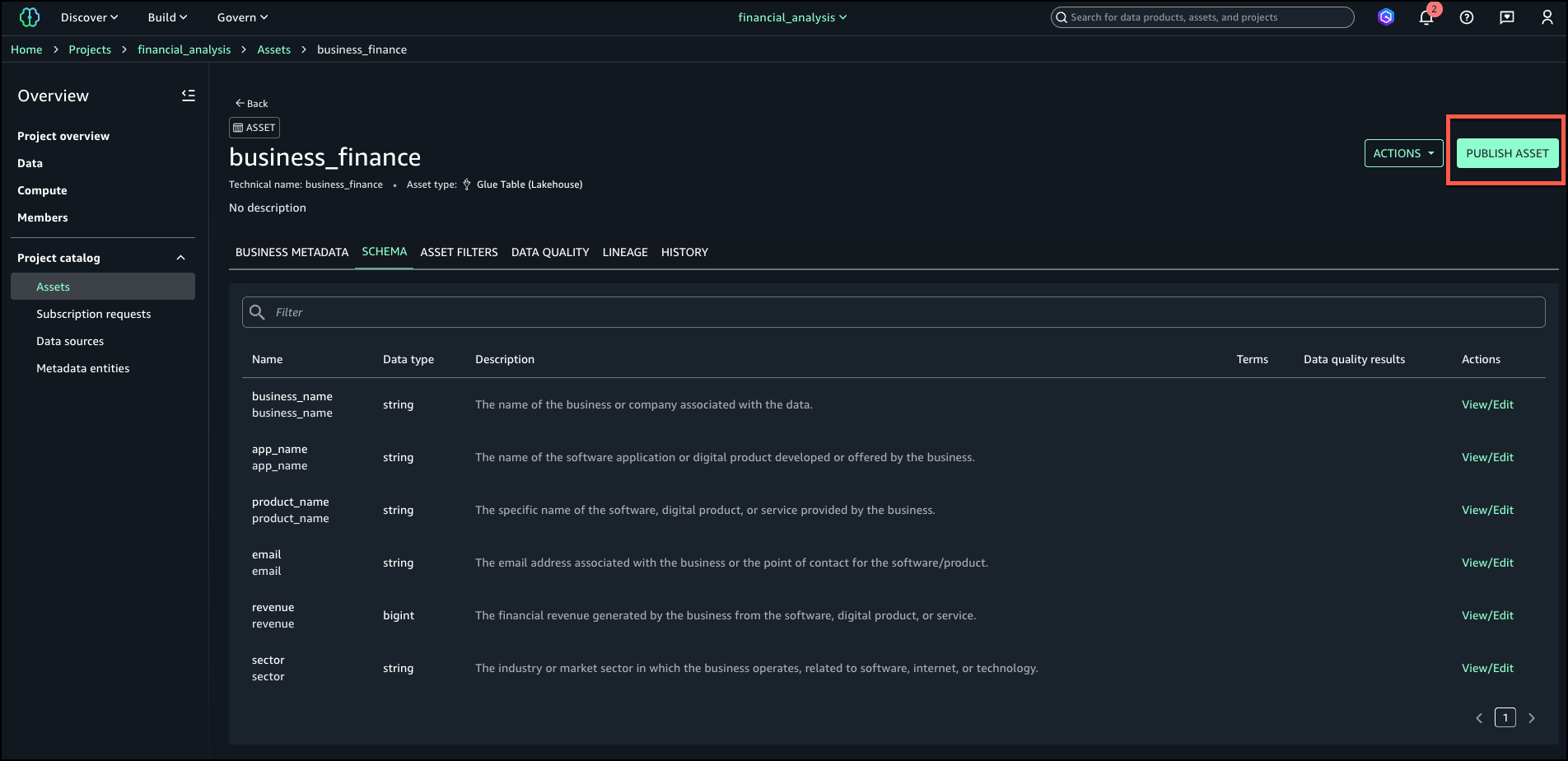
| sort @timestamp desc

You can also retrieve tenant-specific logs across all log streams:

fields @message
| filter tenantId=='BlueTenant' or record.tenantId=='BlueTenant'
| limit 1000

Each log stream starts with function initialization logs followed by the invocation logs. This structure helps you to debug tenant-specific issues and understand the lifecycle of each tenant’s execution environments.

Considerations

When using the new tenant isolation for Lambda functions, consider the following:

  • Each tenant’s execution environments are isolated from other tenants so that tenant-specific data stored on disk or in memory remain separated from other tenants invoking the same Lambda function.
  • All tenants share the function’s execution role. For more fine-grained permissions for individual tenants, consider propagating tenant-scoped credentials from the upstream application components invoking your Lambda function.
  • Your application may experience higher percentage of cold starts, as Lambda processes requests in separate execution environments for each tenant invoking your functions.
  • You pay a fee for each new tenant-specific execution environment created, depending on the memory configured for your function. See Lambda pricing page for details.

Best practices

When using the new tenant isolation mode for Lambda functions, AWS recommends the following best practices:

  • Implement robust tenant ID validation at the application layer to prevent unauthorized access through tenant ID manipulation. Consider using a dedicated service or database to maintain valid tenant IDs.
  • Monitor and audit tenant access patterns regularly to detect potential security anomalies or unauthorized cross-tenant access attempts.
  • Be aware of Lambda concurrency quotas when building multi-tenant applications. You might need to request quota increases based on your tenant count and usage patterns.

Sample code

Follow the instructions in this GitHub repository to provision a sample project in your own account and see the new Lambda tenant isolation mode in action. The sample project illustrates how to integrate a function using the new tenant isolation mode with Amazon API Gateway and propagate tenant identity from client requests.

Conclusion

The new tenant isolation mode for Lambda simplifies building serverless multi-tenant SaaS applications on AWS. By automatically managing application tenant-level compute environment isolation, this capability eliminates the need for custom isolation logic or separate tenant functions, allowing you to focus on the core business logic while AWS handles the complexities of tenant-aware compute environment isolation.

Combined with the existing security features in Lambda, rapid scaling, and pay-per-use pricing, tenant isolation mode makes Lambda an even more compelling choice for modern SaaS applications, whether you’re building new solutions or enhancing existing ones.

To learn more, refer to the documentation for tenant isolation. For details on pricing, refer to Lambda’s pricing page.

How to update CRLs without public access using AWS Private CA

Post Syndicated from Rochak Karki original https://aws.amazon.com/blogs/security/how-to-update-crls-without-public-access-using-aws-private-ca/

Certificates and the hierarchy of trust they create are the backbone of a secure infrastructure. AWS Private Certificate Authority is a highly available certificate authority (CA) that you can use to create private CA hierarchies, secure your applications and devices with private certificates, and manage certificate lifecycles.

A certificate revocation list (CRL) is a file that contains a signed list of certificates revoked before their scheduled expiration date. Certificates can be revoked for a variety of reasons, including unintended key exposure, or because of discontinued use.

AWS Private CA writes CRLs to an Amazon Simple Storage Service (Amazon S3) bucket that you specify. CRLs are public, fully qualified domain names (FQDNs), but you might have requirements for a CRL that is only accessible internally to your organization, or you might have security standards that require all S3 buckets to have Amazon S3 block public access enabled.

The recommended practice for S3 buckets is to enable Block Public Access, which enables only authorized and authenticated AWS accounts to have access to a bucket and its contents. However, because some public key infrastructure (PKI) clients retrieve CRLs across the public internet, a workaround might be necessary to serve CRLs without requiring authenticated client access to an S3 bucket. One recommended solution is to use Amazon CloudFront to provide access to the CRL. This will likely be the best solution for most customers. Our documentation specifically highlights CloudFront as the recommended implementation path. However, you might not be able to use CloudFront or might need another option.

You might need a solution where the CRL lookups don’t traverse the public internet. In this post, we go over two different approaches to achieve this.

Option 1: Relocate CRLs to an internally accessible location

By default, AWS Private CA writes CRLs to an S3 bucket that you specify. This solution consists of moving the CRL to a separate location that is internally accessible to your TLS clients, but not accessible via the public internet such as an on-premises server. A CRL distribution point (CDP) is a link that points to the location of the CRL where revoked certificates appear. However, when private certificates are generated by AWS Certificate Manager (ACM), the CDP universal resource identifiers (URI) in the certificates point by default to the S3 bucket initially specified.

This solution uses a custom CNAME in the CDP to indicate, during certificate generation, the location where the CRL will ultimately be located.

The steps in the solution are as follows:

  1. Select the S3 bucket where the CRL will be stored.
  2. Issue a certificate through the CA with a custom CNAME.
  3. Create an AWS Lambda function that moves the CRL file from the S3 bucket to another specified location.
  4. Create an Amazon Simple Notification Service (Amazon SNS) notification that alerts a user to the success metric of the CRL generation event.

Prerequisites:

For this walkthrough, you must have the following resources ready to use:

  1. An AWS account with:
    • An AWS Identity and Access Management (IAM) role with permissions for Amazon S3, ACM Private CA, Amazon EventBridge, and Lambda
    • An ACM private CA root and subordinate CA configured in the same AWS Region
    • An S3 bucket for the CRL with permissions that allow the AWS Private CA service principal to PutObject, PutObjectACL, GetBucketACL and GetBucketLocation (see the following example bucket policy)
{     
    "Version": "2012-10-17",     
    "Statement": [         
        {             
            "Effect": "Allow",             
            "Principal": {                 
                "Service": "acm-pca.amazonaws.com"             
            },             
            "Action": [                 
                "s3:PutObject",                 
                "s3:PutObjectAcl",                 
                "s3:GetBucketAcl",                 
                "s3:GetBucketLocation"             
            ],             
            "Resource": [                 
                "arn:aws:s3:::<name-of-bucket>/*",                 
                "arn:aws:s3:::<name-of-bucket>"             
            ],             
            "Condition": {                 
                "StringEquals": {                     
                    "aws:SourceAccount": "<account-num-here>",                     
                    "aws:SourceArn": "<subordinate-ca-arn-here>"                 
                }             
            }         
        }     
    ] 
}

2. AWS Command Line Interface (AWS CLI) configured

Deploy:

With the prerequisites in place, you’re ready to deploy the first solution.

To enable CRL distribution:

  1. Use your account to sign in to the AWS Management Console for AWS Private Certificate Authority.
  2. Select the name of your subordinate CA. This should take you to another page with more details.
  3. Scroll down and choose the Revocation configuration tab.
  4. Choose Edit on the top right.
  5. Figure 1: Edit the revocation configuration

    Figure 1: Edit the revocation configuration

  6. Select Activate CRL distribution. Select the CRL S3 bucket you created prior to the walkthrough.
  7. Figure 2: Enter a name for your CRL

    Figure 2: Enter a name for your CRL

  8. Modify the CDP by expanding the CRL settings dropdown. In the Custom CRL Name field, enter the URL where you will eventually move the CRL. This should be a place that is accessible by your internal organization, but not accessible externally. If you use partitioned CRLs, select the Enable partitioning checkbox. To learn more about CRL partitioning, see Plan your AWS Private CA certificate revocation method.
  9. Choose Save changes.

To create an SNS topic and Lambda function:

  1. Go to the Amazon SNS console.
  2. Create a standard SNS topic. Leave all options as default and subscribe an appropriate email to the topic.
  3. Figure 3: Create an SNS topic

    Figure 3: Create an SNS topic

  4. Go to the Lambda console.
  5. Choose Create Function.
  6. Enter a name for your function. Under Runtime, select Python 3.12 from the dropdown.
  7. Figure 4: Create a Lambda function

    Figure 4: Create a Lambda function

  8. Verify that the role associated with your Lambda function has permissions to get objects from the S3 bucket where AWS Private CA places the CRL (set when you configured the revocation details for the CA), copy objects in Amazon S3, then put objects in an S3 bucket (or wherever the new CRL distribution point specified in the certificate custom CNAME will be—for example, an internal-only accessible location), and publish to an Amazon SNS topic. The Lambda function also checks the success metric of a CRL generation event. If the event fails, an SNS topic will notify an admin. If the event is successful, a copy of the CRL in the original S3 bucket is created in the new specified location and an SNS topic will notify an admin.

Example code (Python 3.13):

import boto3 
import json 

def lambda_handler(event, context):     
	#create a s3 client     
	s3 = boto3.client('s3')          

	#create a sns client     
	sns = boto3.client('sns')     
    topicArn = "<sns-topic-arn-here>”     
    
    #get name of the CA from the CW event     
    caID = event['resources'][0].split('/')[-1]          
    status = event['detail']['result']     
    if status == 'success':              
    	
        source = '<ORIGINS3BUCKET>'         
        destination = '<DESTINATION-S3BUCKET>'         
        #See below note for more clarification on S3 CRL paths         
        folder = 'crl/'         
        file = caID + '.crl'         
        key = folder + file              
        
        try:             
        	copySource = {                 
            	'Bucket': source,                 
                'Key': key             
           	}                      
            
            s3.copy_object(                 
            	CopySource=copySource,                 
                Bucket=destination,                 
                Key=file             
          	)             
            response = sns.publish(                 
            	TopicArn=<sns-topicArn>,                 
                Message=f'Successfully moved {key} from {source} to {destination} in {caID}',                 
                Subject="CRL Upload Success"             
          	)                      
            
            return {                 
            	'statusCode': 200,                 
                'body': json.dumps(f'Successfully moved {key} from {source} to {destination} in {caID}')             
          	}                  
    	
        except s3.exceptions.NoSuchKey:             
        	response = sns.publish(                 
            	TopicArn=<sns-topicArn>,                 
                Message=f"Object {key} not found in {source}",                 
                Subject='CRL Upload Failure'             
          	)             
            return {                 
            	'statusCode': 404,                 
                'body': json.dumps(f'Object {key} not found in {source}')             
          	}                  
   		except Exception as e:             
    		print(e)             
        	response = sns.publish(                 
        		TopicArn=<sns-topicArn>,                 
            	Message=f'Error moving object: {str(e)}',                 
            	Subject='Failure Uploading CRL'             
     		)             
			return {                 
    			'statusCode': 500,                 
        		'body': json.dumps(f'Error moving object: {str(e)}')             
  			}     
    else:         
    	response = sns.publish(                 
        		TopicArn=<sns-topicArn>,                 
            	Message=f'Certificate Authority {caID} CRL creation {status}',                 
            	Subject='CRL Upload Failure'             
     		)         
        return {             
        	'statusCode': 200,             
            'body': json.dumps(f'Certificate Authority {caID} CRL creation {status}')         
      	}

Note: By default, the non-partitioned CRL path in S3 is <s3-bucket-name>/crl/<CA-ID>.crl. If you used a custom path, modify the path name to the CRL accordingly. Alternatively, if using partitioned CRLs, the path changes to <s3-bucket-name>/crl/<CA-ID>/<partition_GUID>.crl; in that case, you can loop over each file in the <CA-ID> path to achieve the same effect.

To create an EventBridge that deploys your Lambda function:

  1. Go to the EventBridge console. Under Buses, select Rules.
  2. Choose Create Rule.
  3. Enter a name for your rule. Under Rule Type, select Rule with an Event Pattern and choose Next.
  4. Under Events, select AWS events or EventBridge partner events as the Event Source.
  5. For the Event pattern, select Use pattern form. For the Event source, select AWS services. For Event Type, select ACM Private CA CRL Generation.
Figure 5: Configure the event pattern

Figure 5: Configure the event pattern

  1. Choose Next.
  2. Under Target types, choose AWS Service, and then select Lambda function from the Select a target dropdown and select the function that you created earlier.
  3. Figure 6: Select the Lambda function as the target

    Figure 6: Select the Lambda function as the target

  4. Choose Next. Review your topic, then choose Update rule.
  5. To test the success of the Lambda function:

    1. To test the EventBridge topic, create and revoke a certificate. You can do this using the AWS CLI by getting the serial number of a certificate using openSSL:
      openssl x509 -in cert.pem -noout -serial
    2. Use the following command to revoke the certificate:
      aws acm-pca revoke-certificate —certificate-authority-arn <CA ARN> \ —certificate-serial <SERIAL NUMBER RETURNED IN STEP 1> --revocation-reason “UNSPECIFIED”
    3. To make sure that the Lambda function is triggered, wait 5–30 minutes. Check CloudTrail to make sure that RevokeCertificate was called, then monitor the CloudWatch log of the Lambda function. You should also get a notification message from your SNS topic.
    4. You have now successfully moved your CRL to a new location.

    Option 2: Implement Private CRL Access Through AWS Private CA

    This solution provides private Certificate CRL access within AWS Private CA, avoiding the need for public internet exposure. The design centers on establishing root and subordinate CAs with CRL functionality enabled within a dedicated S3 bucket, combined with a private network infrastructure using Gateway VPC endpoints and private subnets. Security is enforced through an S3 bucket policy that accomplishes three critical objectives:

    • Authorizing essential AWS Private CA permissions
    • Constraining CRL access to a designated Gateway VPC endpoint
    • Explicitly blocking access attempts from other sources.

    The solution includes private DNS zone configuration for proper resolution and can be verified through access testing confirming successful CRL retrieval from private VPC instances while making sure that requests from public instances are denied, maintaining a strictly private PKI.

    1. Create a root CA and subordinate CA with CRL enabled
    2. Configure a dedicated S3 bucket for CRL storage
    3. Issue private certificates through ACM
    4. Set up a VPC with private subnets
    5. Configure a Gateway VPC endpoint for Amazon S3
    6. Set up route tables for local traffic only
    7. Implement an S3 bucket policy with specific permissions
    8. Configure private DNS resolution
    9. Set up access controls through VPC endpoints
    10. Test private access from within the VPC
    11. Verify that public access is blocked

    Prerequisites for CRL solution 2

    For this walkthrough, you must have the following resources available:

    Deploy CRL solution 2

    With the prerequisites in place, you’re ready to use the console and AWS CLI to deploy the solution.

    To deploy the solution:

    1. Go to the AWS Private Certificate Authority console.
    2. In the navigation pane, choose Create a Private CA.
      1. Under Mode options, select General-purpose.
      2. For CA type options, select root.
      3. For the Subject distinguished name options: Fill in at least one of the subject distinguished name options: Organization(O), Organization unit (OU), Country(C), State, Locality name, and Common name (CN).
        Figure 7: Create a private CA (root)

        Figure 7: Create a private CA (root)

      4. Select Key algorithm options, for example, RSA 2046.
      5. Under Certificate revocation options, select Activate CRL Distribution, and select or create an S3 bucket for CRL storage.
      6. Under Pricing, select the checkbox to acknowledge pricing and then select Create CA.
    Figure 8: Configure a private CA (root)

    Figure 8: Configure a private CA (root)

    3. After creating a root CA, repeat all of step 2 to create a subordinate CA, selecting
    Subordinate CA under
    CA options (step 2-b). When completed, both the root CA and subordinate CA will be visible on the Private certificate authority page.

    Figure 9: View of root CA and subordinate CA

    Figure 9: View of root CA and subordinate CA

    With the root CA and subordinate CA in place, the next step is to create a VPC gateway endpoint for S3 access to enable private network communication.

    To create a VPC gateway endpoint:

    1. Go to the Amazon VPC console
    2. In the left navigation pane, select Endpoints, and choose Create Endpoint.
    3. Configure the Gateway VPC endpoint settings:
      1. Enter a descriptive name for your endpoint (optional).
      2. Type: Select AWS services.
      3. Services: Select the service name com.amazonaws.[region].s3 from the list.
      4. Type: Verify that Gateway is selected (automatically chosen for Amazon S3).
      5. VPC: Choose the VPC where you want to create the endpoint.
      6. Route tables: Select the route tables associated with the subnets that need Amazon S3 access.
      7. Policy: Select Full Access or create a custom policy to restrict access to specific S3 buckets or actions.
      8. Review your configuration and choose Create endpoint.
    Figure 10: Gateway VPC endpoint configuration

    Figure 10: Gateway VPC endpoint configuration

    1. Create two private subnets:
      1. In the Amazon VPC console, choose Subnets and then Create subnet.
      2. Select your VPC and enter the subnet details (name, Availability Zone, and CIDR block).
      3. Repeat for the second subnet in a different Availability Zone.
    2. Configure route tables:
      1. Navigate to Route Tables and choose Create route table.
      2. Create and name two route tables for your private subnets.
      3. Associate each route table with its corresponding private subnet.
      4. Make sure that each route table contains only local routes (VPC CIDR).
      5. Remove any routes for internet access (0.0.0.0/0).
    Figure 11: Private route table configuration

    Figure 11: Private route table configuration

    1. You can see now see under Resource Map that the Gateway VPC endpoint provides secure access to Amazon S3 resources within the private network.
    Figure 12: VPC private instance configuration

    Figure 12: VPC private instance configuration

    1. Use the following example code to implement a bucket policy that enforces the following key security controls:
      • Grant AWS Private CA the necessary permissions for certificate management.
      • Restrict CRL access exclusively through the specified VPC endpoint.
      • Explicitly deny GetObject requests not originating from the designated Gateway VPC endpoint.
    Figure 13: S3 bucket policy

    Figure 13: S3 bucket policy

    The following is an example S3 bucket policy for private CA CRL access with VPC endpoint restrictions:

    {     
        "Version": "2012-10-17",     
        "Statement": [         
            {             
                "Effect": "Allow",             
                "Principal": {                 
                    "Service": "acm-pca.amazonaws.com"             
                    },             
                "Action": [                 
                    "s3:PutObject",                 
                    "s3:PutObjectAcl",                 
                    "s3:GetBucketAcl",                 
                    "s3:GetBucketLocation"             
                ],             
                "Resource": [                 
                    "<arn:aws:s3:::BUCKET_NAME>",                 
                    "<arn:aws:s3:::BUCKET_NAME>/"           
                ],           
                "Condition": {               
                    "StringEquals": {                   
                        "aws:SourceArn": "<arn:aws:acm-pca:REGION:ACCOUNT_ID:certificate-authority/CA_ID>",                   
                        "aws:SourceAccount": "<ACCOUNT_ID>"               
                        }           
                }       
            },       
            {           
                "Sid": "Allow Access to CRL",           
                "Effect": "Allow",            
                "Principal": "",             
                "Action": "s3:GetObject",             
                "Resource": "<arn:aws:s3:::BUCKET_NAME/crl/CA_ID.crl>",             
                "Condition": {                 
                    "StringEquals": {                     
                        "aws:SourceVpce": "<VPCE_ID>"                 
                        }             
                }         
            },         
            {             
                "Sid": "Access-to-specific-VPCE-only",             
                "Effect": "Deny",             
                "Principal": "",            
                "Action": "s3:GetObject",           
                "Resource": [               
                    "<arn:aws:s3:::BUCKET_NAME>",               
                    "<arn:aws:s3:::BUCKET_NAME>/"             
                ],             
                "Condition": {                 
                    "StringNotEquals": {                     
                        "aws:SourceVpce": "<VPCE_ID>"                 
                        }             
                }         
            }     
        ] 
    }

    Figure 14: S3 bucket CRL properties

    Figure 14: S3 bucket CRL properties

    Create a private hosted zone:

    1. Go to the Route 53 console.
    2. In the left navigation pane, choose Hosted zones.
    3. Choose Create hosted zone.
    4. Configure the following:
      1. Domain name: Enter s3.amazonaws.com
      2. Description: (optional) enter Private hosted zone for S3 CRL endpoint
      3. Type: Select Private hosted zone.
      4. VPC: For Region, select your VPC’s Region; for VPC ID, select your VPC from the dropdown list.
    5. Choose Create hosted zone.

    Create a record set:

    1. Inside your new private hosted zone:
      1. Choose Create record.
      2. Select Simple routing policy.
      3. Choose Next.
    2. Configure record:
      1. Record name: Enter your S3 bucket name.
      2. Record type: Select A – Routes traffic to an IPv4 address.
      3. Alias: Toggle Yes.
      4. Route traffic to: Select Alias to S3 website endpoint.
      5. Region: Select your Region.
      6. S3 endpoint: Select from dropdown list.
      7. TTL: Leave as default (300 seconds).
    3. Choose Create record.
    Figure 15: Hosted zone details

    Figure 15: Hosted zone details

    Verify configuration:

    1. Go to the Amazon EC2 console and choose Launch instance.
    2. Select Amazon Linux 2.
    3. Choose Instance Type.
    4. Select you VPC and subnet.
    5. Under Network settings, select Create security group, then choose Allow SSH traffic from and enter your IP address.
    6. Choose Launch instance.
    7. After the instance is launched, select the instance and choose Connect.
    8. Select EC2 Instance Connect and choose Connect.

    Test the solution

    To test private access from an EC2 instance within your private VPC, verify CRL access using:
    curl -s https://<bucket-name>.s3.<region>.amazonaws.com/crl/<certificate-id>.crl | openssl crl -text -noout

    If successful, the command completes the following steps, as shown in Figure 16:

    1. Retrieves the CRL from Amazon S3
    2. Decodes it using OpenSSL
    3. Displays comprehensive CRL information including issuer details, update timestamps, revoked certificate list, signature algorithm, and other metadata
    Figure 16: Public access verification

    Figure 16: Public access verification

    To validate your security controls, attempt access from a public EC2 instance using the following command:
    curl https://<bucket-name>.s3.<region>.amazonaws.com/crl/<certificate-id>.crl

    This should fail, receiving an access denied error confirming that the CRL cannot be accessed from the public internet, as shown in Figure 17.

    Figure 17: Access denied error confirming that the CRL cannot be accessed from the public internet

    Figure 17: Access denied error confirming that the CRL cannot be accessed from the public internet

    Conclusion

    In this post, we walked you through two solutions that you can use to make your CRLs accessible to your internal organization, but not publicly available. First, we showed you how to configure a custom CNAME in your CRL distribution point and deploy Lambda functions to automatically copy each newly generated CRL from the default S3 bucket into a private S3 store.

    Next, we showed you a VPC architecture that uses an Amazon S3 VPC gateway endpoint, tightly scoped bucket policies, and private Route 53 DNS zones to make sure that CRL retrieval is confined to your VPC. We also covered the essential IAM and bucket policies that your clients need to access those CRLs securely. You can get started with setting up this solution on AWS Private CA today.

    If you have feedback about this post, submit comments in the Comments section below. If you have questions about this post, start a new thread on the AWS Certificate Manager forum or contact AWS Support.

Rochak Karki

Rochak Karki

Rochak is a Security Specialist Solutions Architect at AWS, focusing on threat detection, incident response, and data protection helping customers build secure environments. Rochak is a US Army veteran and holds a Bachelor of Science in Engineering from the University of Wyoming. Outside of work, he enjoys spending time with family and friends, hiking, and traveling.

Cheryl Wang

Cheryl is an Associate Security Solutions Architect at AWS based in the SF Bay Area. Cheryl is passionate about cybersecurity and helping customers improve their security infrastructure. She holds a B.A. in Computer Science from Wellesley College. Outside of work, she enjoys writing and playing guzheng.

Racing karts on a Rust GPU kernel driver (Collabora blog)

Post Syndicated from jzb original https://lwn.net/Articles/1047291/

In July, Collabora announced
the Rust-based Tyr
GPU driver
for Arm Mali
GPUs. Daniel Almeida has posted an update
on progress with a prototype of the driver running on a Rock 5B board
with the Rockchip RK3588 system-on-chip:

The Tyr prototype has progressed from basic GPU job execution to
running GNOME, Weston, and full-screen 3D games like SuperTuxKart,
demonstrating a functional, high-performance Rust driver that matches
C-driver performance and paves the way for eventual upstream
integration! […]

Tyr is not ready to be used as a daily-driver, and it will still
take time to replicate this upstream, although it is now clear that we
will surely get there. And as a mere prototype, it has a lot of
shortcuts that we would not have in an upstream version, even though
it can run on top of an unmodified (i.e., upstream) version of
Mesa.

That said, this prototype can serve as an experimental driver and
as a testbed for all the Rust abstraction work taking place
upstream. It will let us experiment with different design decisions
and gather data on what truly contributes to the project’s
objective.

There is also a video on
YouTube of the prototype in action.

[$] BPF and io_uring, two different ways

Post Syndicated from corbet original https://lwn.net/Articles/1046950/

BPF allows programs uploaded from user space to be run, safely, within the
kernel. The io_uring subsystem, too, can be thought of as a way of loading
programs in the kernel, though the programs in question are mostly a
sequence of I/O-related system calls. It has sometimes seemed inevitable
that io_uring would, like many other parts of the kernel, gain BPF
capabilities as a way of providing more flexibility to user space. That
has not yet happened, but there are currently two patches sets under
consideration that take different approaches to the problem.

Security updates for Thursday

Post Syndicated from jzb original https://lwn.net/Articles/1047220/

Security updates have been issued by AlmaLinux (bind, bind9.18, container-tools:rhel8, expat, grub2, haproxy, idm:DL1, kernel, kernel-rt, lasso, libsoup, libssh, libtiff, pcs, podman, python-kdcproxy, qt5-qt3d, redis, redis:7, runc, shadow-utils, sqlite, squid, vim, webkit2gtk3, xorg-x11-server, xorg-x11-server-Xwayland, and zziplib), Debian (chromium), Oracle (lasso and postgresql), SUSE (erlang27, ghostscript, grub2, kernel, libIex-3_4-33, python312, and sbctl), and Ubuntu (linux, linux-aws, linux-aws-5.4, linux-gcp, linux-gcp-5.4, linux-hwe-5.4,
linux-ibm, linux-ibm-5.4, linux-kvm, linux-oracle, linux-oracle-5.4,
linux-raspi, linux-raspi-5.4, linux-xilinx-zynqmp, linux-aws-6.8, linux-fips, linux-aws-fips, linux-gcp-fips, linux-oracle, and mysql-8.0, mysql-8.4).

Onboard at Cloud Speed with Rapid7 and AWS IAM Delegation

Post Syndicated from Rapid7 original https://www.rapid7.com/blog/post/cds-onboard-at-cloud-speed-with-rapid7-aws-iam-delegation

Every great product experience starts with a smooth beginning. But in the world of cloud security, onboarding can sometimes feel like an obstacle course. Detailed fine-grained Identity and Access Management (IAM) configurations, lengthy deployment steps, and manual permission setups can turn what should be an exciting first impression into a tedious chore.

That’s changing. Rapid7 has enhanced the onboarding experience for Exposure Command and InsightCloudSec by integrating with AWS IAM temporary delegation – a new AWS capability that lets customers approve deployment access directly in the AWS console. The result? A faster, simpler, and more secure path to getting up and running in the cloud.

Why onboarding matters – and why it often fails  

The first minutes with a new platform matter. It’s the difference between “this is amazing” and “I’ll come back to it later.”

In cloud environments, setup usually involves multiple AWS services – compute, storage, networking, access management – all of which must be configured precisely to maintain security. Traditionally, customers have had to manually create IAM roles, adjust trust relationships, and fine-tune permissions just to let a partner solution like Rapid7 deploy resources.

It’s not just time-consuming; it’s error-prone. Misconfigured roles can cause deployment failures or unnecessary security risk. Support teams spend hours walking customers through the process, and the friction delays time-to-value. When scaling across dozens or hundreds of AWS accounts, those delays multiply fast.

Meet AWS IAM temporary delegation: What it is and why it matters

AWS IAM temporary delegation simplifies the entire setup journey. It allows trusted partners like Rapid7 to automate deployment securely – but only after the customer grants explicit, time-bound approval.

Here’s how it works: When you initiate onboarding from within Rapid7’s interface, you’re redirected to the AWS console. There, you can review the exact permissions Rapid7 is requesting and how long access will last. Once approved, AWS provides Rapid7 with temporary credentials to complete the setup. After the time window expires, that access ends automatically.

No long-term IAM keys, no manual role creation, and no guesswork. Customers stay in control, with full visibility and auditability. It’s automation with accountability built in.

How Rapid7 is putting this into action

With the latest release, Rapid7 has integrated this capability directly into Exposure Command and InsightCloudSec, creating a guided onboarding experience that happens almost entirely inside the Rapid7 interface.

Here’s the new flow:

  1. Customers configure deployment options in Rapid7’s InsightCloudSec environment.
  2. A temporary delegation request appears via an AWS console pop-up.
  3. An authorized AWS user reviews and approves the request.
  4. Rapid7 automatically deploys the necessary resources on the customer’s behalf.

This streamlined workflow eliminates dozens of manual steps and reduces onboarding time from hours to minutes. It’s faster, simpler, and still fully aligned with AWS’s strict security model. 

Speed, simplicity, and security

This integration hits the sweet spot between automation and trust:

  • Speed: Customers can start realizing value from Rapid7’s cloud security solutions in minutes instead of days.

  • Simplicity: The UI-driven process means no wrestling with IAM policies or JSON templates.

  • Security: Access is temporary and permission-scoped. Customers retain complete oversight through the AWS console and CloudTrail logs.

For organizations with compliance or security governance requirements, this is the ideal balance: operational efficiency without compromising control.

Beyond onboarding: What this says about Rapid7 and AWS alignment

This update isn’t just about faster onboarding. It’s a glimpse into Rapid7’s broader partnership with AWS. Rapid7 has long been an AWS Advanced Tier Partner, building integrations that help customers manage security across cloud-native environments. From leveraging AWS telemetry in MXDR to integrating with AWS services like CloudTrail and GuardDuty, Rapid7’s platform has been designed to meet customers where they already operate within AWS.

By adopting AWS IAM temporary delegation early, Rapid7 reinforces its commitment to cloud-first innovation and shared responsibility principles. Customers get the assurance that their onboarding, deployment, and operations all align with AWS security best practices. 

What this means for customers

If you’re deploying Rapid7 Exposure Command (Advanced or Ultimate) or InsightCloudSec on AWS, here’s what to expect:

  • A guided onboarding experience that automates AWS resource setup.
  • A faster, less error-prone workflow that still keeps you in control.
  • The ability for authorized users to approve temporary access requests directly in the AWS console.

Before onboarding, make sure someone in your organization has the permissions to approve delegation requests. After deployment, review your CloudTrail logs as part of normal governance;  you’ll see every action logged and time-bounded.

Value from day one

Onboarding shouldn’t be a hurdle. And now with AWS IAM Temporary Delegation and Rapid7’s enhanced experience, it no longer is. Together, AWS and Rapid7 have reimagined what “getting started” looks like in the cloud – faster, more intuitive, and just as secure as you need it to be.

It’s one more way Rapid7 is helping organizations unlock value from day one, while staying aligned with AWS’s best practices for identity, access, and automation.

See how easy secure onboarding can be.Explore Rapid7’s listings for Exposure Command and InsightCloudSec straight from the AWS Marketplace.

The collective thoughts of the interwebz