Tag Archives: Amazon Virtual Private Cloud (Amazon VPC)

How to update CRLs without public access using AWS Private CA

Post Syndicated from Rochak Karki original https://aws.amazon.com/blogs/security/how-to-update-crls-without-public-access-using-aws-private-ca/

Certificates and the hierarchy of trust they create are the backbone of a secure infrastructure. AWS Private Certificate Authority is a highly available certificate authority (CA) that you can use to create private CA hierarchies, secure your applications and devices with private certificates, and manage certificate lifecycles.

A certificate revocation list (CRL) is a file that contains a signed list of certificates revoked before their scheduled expiration date. Certificates can be revoked for a variety of reasons, including unintended key exposure, or because of discontinued use.

AWS Private CA writes CRLs to an Amazon Simple Storage Service (Amazon S3) bucket that you specify. CRLs are public, fully qualified domain names (FQDNs), but you might have requirements for a CRL that is only accessible internally to your organization, or you might have security standards that require all S3 buckets to have Amazon S3 block public access enabled.

The recommended practice for S3 buckets is to enable Block Public Access, which enables only authorized and authenticated AWS accounts to have access to a bucket and its contents. However, because some public key infrastructure (PKI) clients retrieve CRLs across the public internet, a workaround might be necessary to serve CRLs without requiring authenticated client access to an S3 bucket. One recommended solution is to use Amazon CloudFront to provide access to the CRL. This will likely be the best solution for most customers. Our documentation specifically highlights CloudFront as the recommended implementation path. However, you might not be able to use CloudFront or might need another option.

You might need a solution where the CRL lookups don’t traverse the public internet. In this post, we go over two different approaches to achieve this.

Option 1: Relocate CRLs to an internally accessible location

By default, AWS Private CA writes CRLs to an S3 bucket that you specify. This solution consists of moving the CRL to a separate location that is internally accessible to your TLS clients, but not accessible via the public internet such as an on-premises server. A CRL distribution point (CDP) is a link that points to the location of the CRL where revoked certificates appear. However, when private certificates are generated by AWS Certificate Manager (ACM), the CDP universal resource identifiers (URI) in the certificates point by default to the S3 bucket initially specified.

This solution uses a custom CNAME in the CDP to indicate, during certificate generation, the location where the CRL will ultimately be located.

The steps in the solution are as follows:

  1. Select the S3 bucket where the CRL will be stored.
  2. Issue a certificate through the CA with a custom CNAME.
  3. Create an AWS Lambda function that moves the CRL file from the S3 bucket to another specified location.
  4. Create an Amazon Simple Notification Service (Amazon SNS) notification that alerts a user to the success metric of the CRL generation event.

Prerequisites:

For this walkthrough, you must have the following resources ready to use:

  1. An AWS account with:
    • An AWS Identity and Access Management (IAM) role with permissions for Amazon S3, ACM Private CA, Amazon EventBridge, and Lambda
    • An ACM private CA root and subordinate CA configured in the same AWS Region
    • An S3 bucket for the CRL with permissions that allow the AWS Private CA service principal to PutObject, PutObjectACL, GetBucketACL and GetBucketLocation (see the following example bucket policy)
{     
    "Version": "2012-10-17",     
    "Statement": [         
        {             
            "Effect": "Allow",             
            "Principal": {                 
                "Service": "acm-pca.amazonaws.com"             
            },             
            "Action": [                 
                "s3:PutObject",                 
                "s3:PutObjectAcl",                 
                "s3:GetBucketAcl",                 
                "s3:GetBucketLocation"             
            ],             
            "Resource": [                 
                "arn:aws:s3:::<name-of-bucket>/*",                 
                "arn:aws:s3:::<name-of-bucket>"             
            ],             
            "Condition": {                 
                "StringEquals": {                     
                    "aws:SourceAccount": "<account-num-here>",                     
                    "aws:SourceArn": "<subordinate-ca-arn-here>"                 
                }             
            }         
        }     
    ] 
}

2. AWS Command Line Interface (AWS CLI) configured

Deploy:

With the prerequisites in place, you’re ready to deploy the first solution.

To enable CRL distribution:

  1. Use your account to sign in to the AWS Management Console for AWS Private Certificate Authority.
  2. Select the name of your subordinate CA. This should take you to another page with more details.
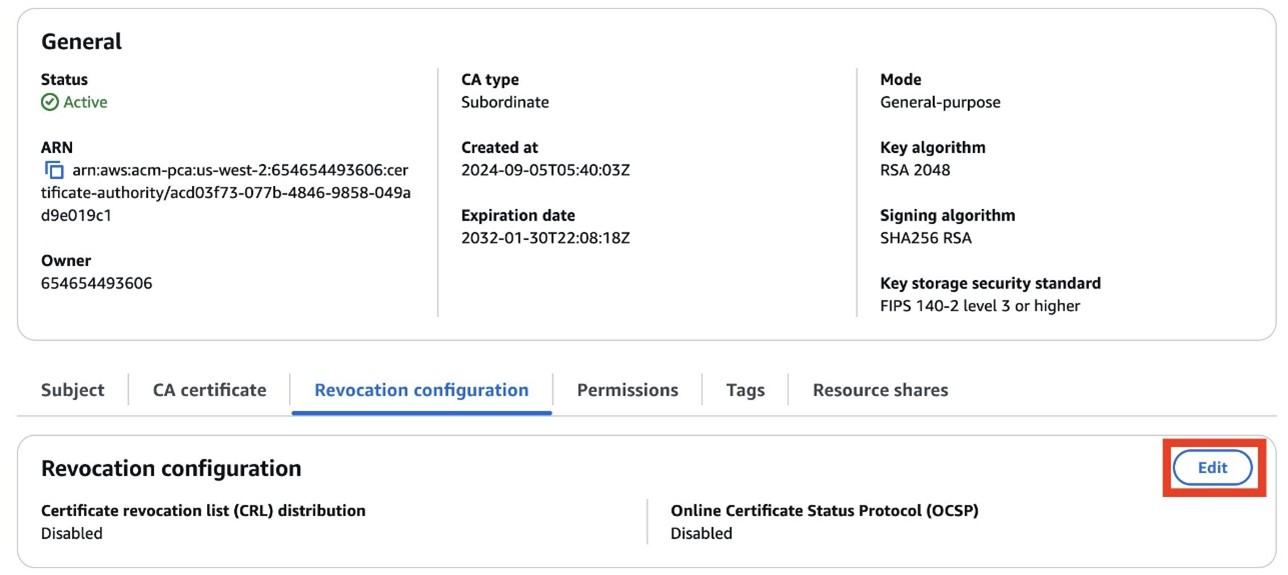
  3. Scroll down and choose the Revocation configuration tab.
  4. Choose Edit on the top right.
  5. Figure 1: Edit the revocation configuration
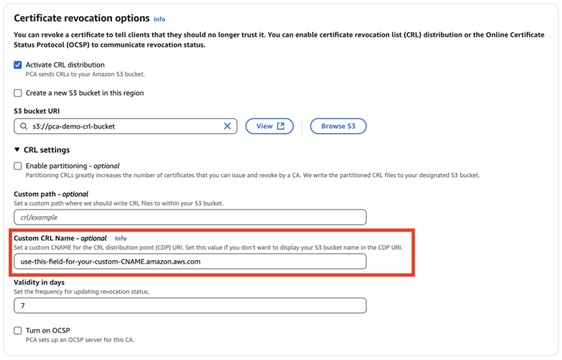
    Figure 1: Edit the revocation configuration

  6. Select Activate CRL distribution. Select the CRL S3 bucket you created prior to the walkthrough.
  7. Figure 2: Enter a name for your CRL

    Figure 2: Enter a name for your CRL

  8. Modify the CDP by expanding the CRL settings dropdown. In the Custom CRL Name field, enter the URL where you will eventually move the CRL. This should be a place that is accessible by your internal organization, but not accessible externally. If you use partitioned CRLs, select the Enable partitioning checkbox. To learn more about CRL partitioning, see Plan your AWS Private CA certificate revocation method.
  9. Choose Save changes.

To create an SNS topic and Lambda function:

  1. Go to the Amazon SNS console.
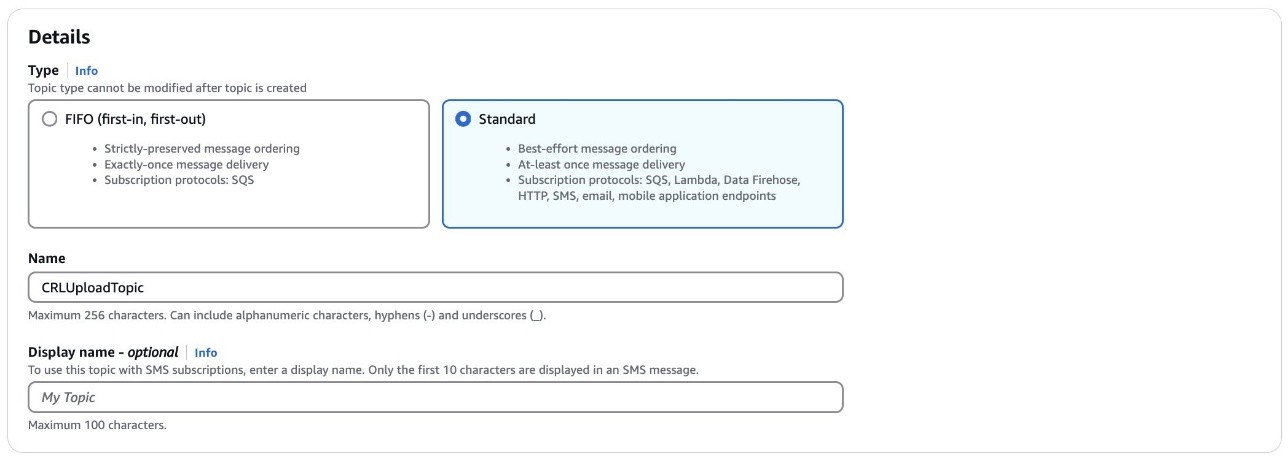
  2. Create a standard SNS topic. Leave all options as default and subscribe an appropriate email to the topic.
  3. Figure 3: Create an SNS topic

    Figure 3: Create an SNS topic

  4. Go to the Lambda console.
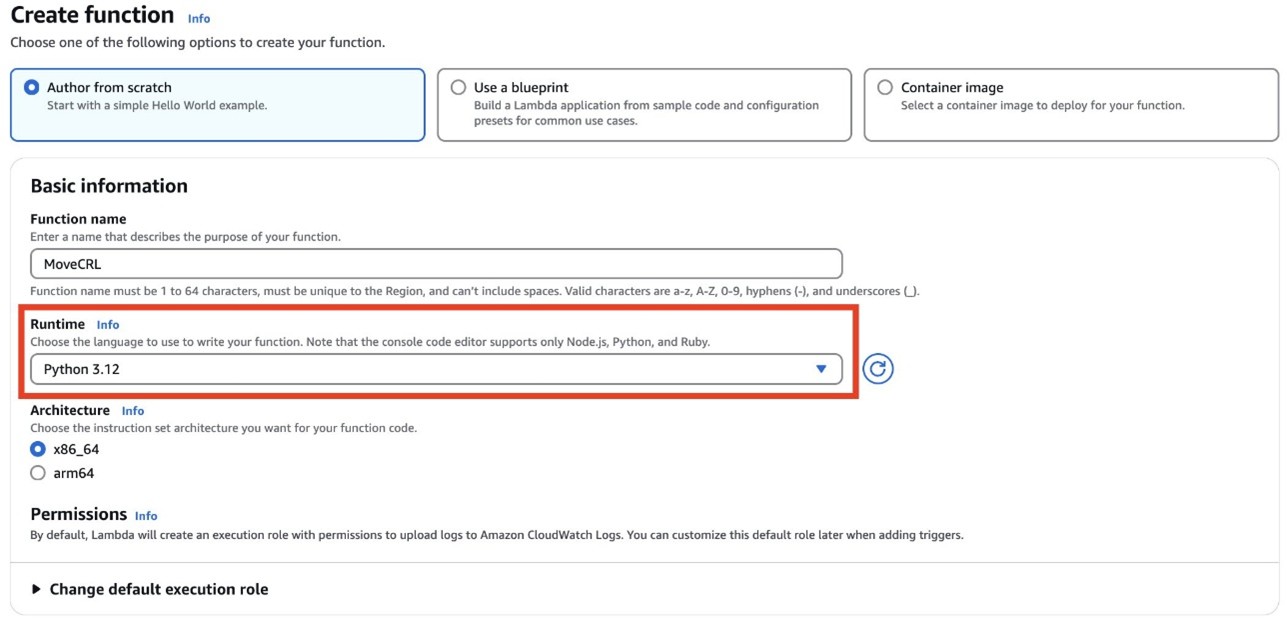
  5. Choose Create Function.
  6. Enter a name for your function. Under Runtime, select Python 3.12 from the dropdown.
  7. Figure 4: Create a Lambda function

    Figure 4: Create a Lambda function

  8. Verify that the role associated with your Lambda function has permissions to get objects from the S3 bucket where AWS Private CA places the CRL (set when you configured the revocation details for the CA), copy objects in Amazon S3, then put objects in an S3 bucket (or wherever the new CRL distribution point specified in the certificate custom CNAME will be—for example, an internal-only accessible location), and publish to an Amazon SNS topic. The Lambda function also checks the success metric of a CRL generation event. If the event fails, an SNS topic will notify an admin. If the event is successful, a copy of the CRL in the original S3 bucket is created in the new specified location and an SNS topic will notify an admin.
Example code (Python 3.13):

import boto3 
import json 

def lambda_handler(event, context):     
	#create a s3 client     
	s3 = boto3.client('s3')          

	#create a sns client     
	sns = boto3.client('sns')     
    topicArn = "<sns-topic-arn-here>”     
    
    #get name of the CA from the CW event     
    caID = event['resources'][0].split('/')[-1]          
    status = event['detail']['result']     
    if status == 'success':              
    	
        source = '<ORIGINS3BUCKET>'         
        destination = '<DESTINATION-S3BUCKET>'         
        #See below note for more clarification on S3 CRL paths         
        folder = 'crl/'         
        file = caID + '.crl'         
        key = folder + file              
        
        try:             
        	copySource = {                 
            	'Bucket': source,                 
                'Key': key             
           	}                      
            
            s3.copy_object(                 
            	CopySource=copySource,                 
                Bucket=destination,                 
                Key=file             
          	)             
            response = sns.publish(                 
            	TopicArn=<sns-topicArn>,                 
                Message=f'Successfully moved {key} from {source} to {destination} in {caID}',                 
                Subject="CRL Upload Success"             
          	)                      
            
            return {                 
            	'statusCode': 200,                 
                'body': json.dumps(f'Successfully moved {key} from {source} to {destination} in {caID}')             
          	}                  
    	
        except s3.exceptions.NoSuchKey:             
        	response = sns.publish(                 
            	TopicArn=<sns-topicArn>,                 
                Message=f"Object {key} not found in {source}",                 
                Subject='CRL Upload Failure'             
          	)             
            return {                 
            	'statusCode': 404,                 
                'body': json.dumps(f'Object {key} not found in {source}')             
          	}                  
   		except Exception as e:             
    		print(e)             
        	response = sns.publish(                 
        		TopicArn=<sns-topicArn>,                 
            	Message=f'Error moving object: {str(e)}',                 
            	Subject='Failure Uploading CRL'             
     		)             
			return {                 
    			'statusCode': 500,                 
        		'body': json.dumps(f'Error moving object: {str(e)}')             
  			}     
    else:         
    	response = sns.publish(                 
        		TopicArn=<sns-topicArn>,                 
            	Message=f'Certificate Authority {caID} CRL creation {status}',                 
            	Subject='CRL Upload Failure'             
     		)         
        return {             
        	'statusCode': 200,             
            'body': json.dumps(f'Certificate Authority {caID} CRL creation {status}')         
      	}

Note: By default, the non-partitioned CRL path in S3 is <s3-bucket-name>/crl/<CA-ID>.crl. If you used a custom path, modify the path name to the CRL accordingly. Alternatively, if using partitioned CRLs, the path changes to <s3-bucket-name>/crl/<CA-ID>/<partition_GUID>.crl; in that case, you can loop over each file in the <CA-ID> path to achieve the same effect.

To create an EventBridge that deploys your Lambda function:

  1. Go to the EventBridge console. Under Buses, select Rules.
  2. Choose Create Rule.
  3. Enter a name for your rule. Under Rule Type, select Rule with an Event Pattern and choose Next.
  4. Under Events, select AWS events or EventBridge partner events as the Event Source.
  5. For the Event pattern, select Use pattern form. For the Event source, select AWS services. For Event Type, select ACM Private CA CRL Generation.
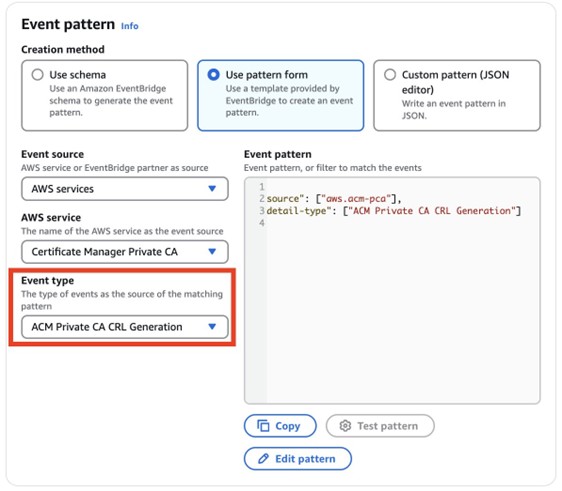
Figure 5: Configure the event pattern

Figure 5: Configure the event pattern

  1. Choose Next.
  2. Under Target types, choose AWS Service, and then select Lambda function from the Select a target dropdown and select the function that you created earlier.
  3. Figure 6: Select the Lambda function as the target

    Figure 6: Select the Lambda function as the target

  4. Choose Next. Review your topic, then choose Update rule.
  5. To test the success of the Lambda function:

    1. To test the EventBridge topic, create and revoke a certificate. You can do this using the AWS CLI by getting the serial number of a certificate using openSSL:
      openssl x509 -in cert.pem -noout -serial
    2. Use the following command to revoke the certificate:
      aws acm-pca revoke-certificate —certificate-authority-arn <CA ARN> \ —certificate-serial <SERIAL NUMBER RETURNED IN STEP 1> --revocation-reason “UNSPECIFIED”
    3. To make sure that the Lambda function is triggered, wait 5–30 minutes. Check CloudTrail to make sure that RevokeCertificate was called, then monitor the CloudWatch log of the Lambda function. You should also get a notification message from your SNS topic.
    4. You have now successfully moved your CRL to a new location.

    Option 2: Implement Private CRL Access Through AWS Private CA

    This solution provides private Certificate CRL access within AWS Private CA, avoiding the need for public internet exposure. The design centers on establishing root and subordinate CAs with CRL functionality enabled within a dedicated S3 bucket, combined with a private network infrastructure using Gateway VPC endpoints and private subnets. Security is enforced through an S3 bucket policy that accomplishes three critical objectives:

    • Authorizing essential AWS Private CA permissions
    • Constraining CRL access to a designated Gateway VPC endpoint
    • Explicitly blocking access attempts from other sources.

    The solution includes private DNS zone configuration for proper resolution and can be verified through access testing confirming successful CRL retrieval from private VPC instances while making sure that requests from public instances are denied, maintaining a strictly private PKI.

    1. Create a root CA and subordinate CA with CRL enabled
    2. Configure a dedicated S3 bucket for CRL storage
    3. Issue private certificates through ACM
    4. Set up a VPC with private subnets
    5. Configure a Gateway VPC endpoint for Amazon S3
    6. Set up route tables for local traffic only
    7. Implement an S3 bucket policy with specific permissions
    8. Configure private DNS resolution
    9. Set up access controls through VPC endpoints
    10. Test private access from within the VPC
    11. Verify that public access is blocked

    Prerequisites for CRL solution 2

    For this walkthrough, you must have the following resources available:

    Deploy CRL solution 2

    With the prerequisites in place, you’re ready to use the console and AWS CLI to deploy the solution.

    To deploy the solution:

    1. Go to the AWS Private Certificate Authority console.
    2. In the navigation pane, choose Create a Private CA.
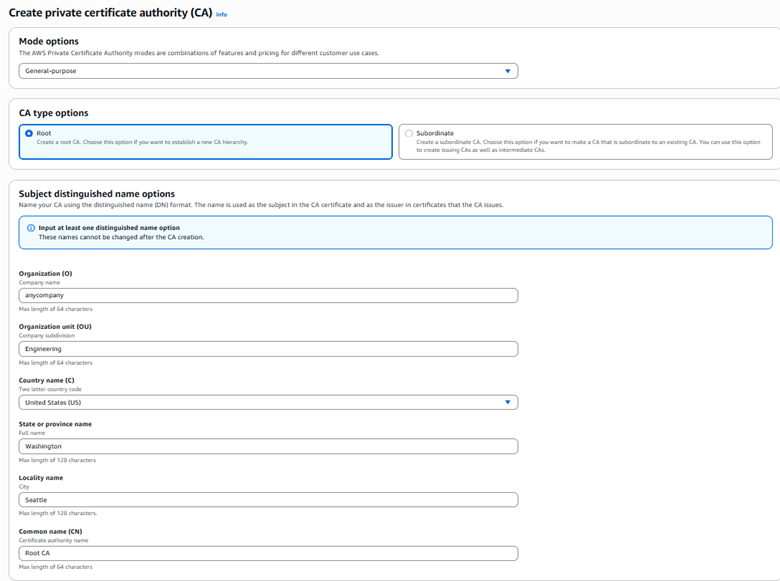
      1. Under Mode options, select General-purpose.
      2. For CA type options, select root.
      3. For the Subject distinguished name options: Fill in at least one of the subject distinguished name options: Organization(O), Organization unit (OU), Country(C), State, Locality name, and Common name (CN).
        Figure 7: Create a private CA (root)

        Figure 7: Create a private CA (root)

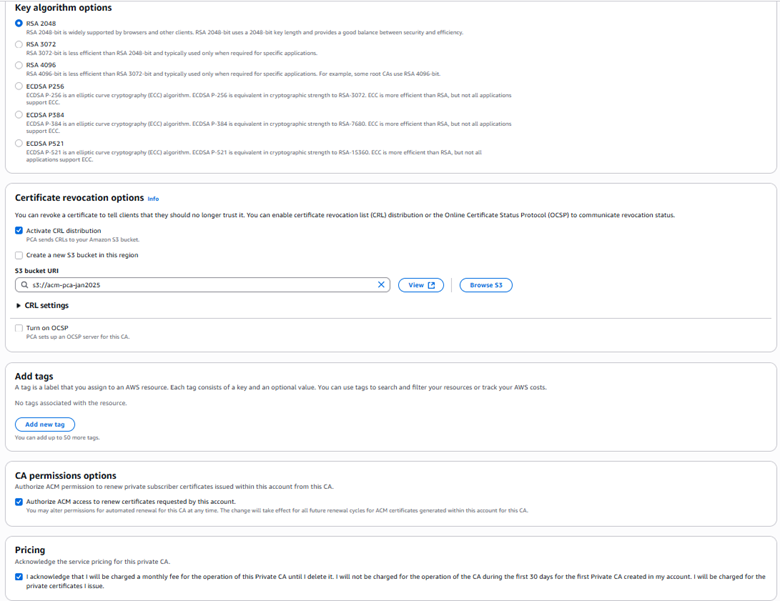
      4. Select Key algorithm options, for example, RSA 2046.
      5. Under Certificate revocation options, select Activate CRL Distribution, and select or create an S3 bucket for CRL storage.
      6. Under Pricing, select the checkbox to acknowledge pricing and then select Create CA.
    Figure 8: Configure a private CA (root)

    Figure 8: Configure a private CA (root)

    3. After creating a root CA, repeat all of step 2 to create a subordinate CA, selecting
    Subordinate CA under
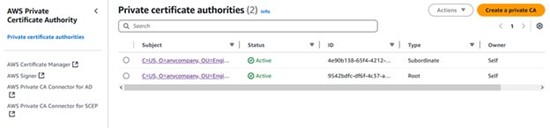
    CA options (step 2-b). When completed, both the root CA and subordinate CA will be visible on the Private certificate authority page.

    Figure 9: View of root CA and subordinate CA

    Figure 9: View of root CA and subordinate CA

    With the root CA and subordinate CA in place, the next step is to create a VPC gateway endpoint for S3 access to enable private network communication.

    To create a VPC gateway endpoint:

    1. Go to the Amazon VPC console
    2. In the left navigation pane, select Endpoints, and choose Create Endpoint.
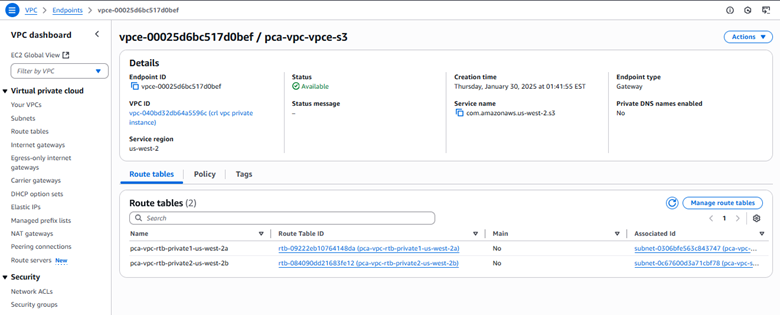
    3. Configure the Gateway VPC endpoint settings:
      1. Enter a descriptive name for your endpoint (optional).
      2. Type: Select AWS services.
      3. Services: Select the service name com.amazonaws.[region].s3 from the list.
      4. Type: Verify that Gateway is selected (automatically chosen for Amazon S3).
      5. VPC: Choose the VPC where you want to create the endpoint.
      6. Route tables: Select the route tables associated with the subnets that need Amazon S3 access.
      7. Policy: Select Full Access or create a custom policy to restrict access to specific S3 buckets or actions.
      8. Review your configuration and choose Create endpoint.
    Figure 10: Gateway VPC endpoint configuration

    Figure 10: Gateway VPC endpoint configuration

    1. Create two private subnets:
      1. In the Amazon VPC console, choose Subnets and then Create subnet.
      2. Select your VPC and enter the subnet details (name, Availability Zone, and CIDR block).
      3. Repeat for the second subnet in a different Availability Zone.
    2. Configure route tables:
      1. Navigate to Route Tables and choose Create route table.
      2. Create and name two route tables for your private subnets.
      3. Associate each route table with its corresponding private subnet.
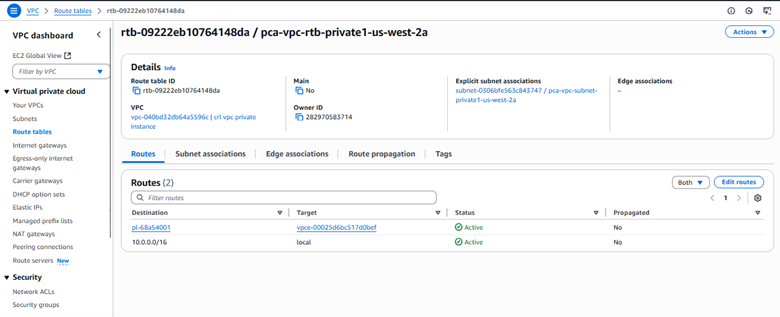
      4. Make sure that each route table contains only local routes (VPC CIDR).
      5. Remove any routes for internet access (0.0.0.0/0).
    Figure 11: Private route table configuration

    Figure 11: Private route table configuration

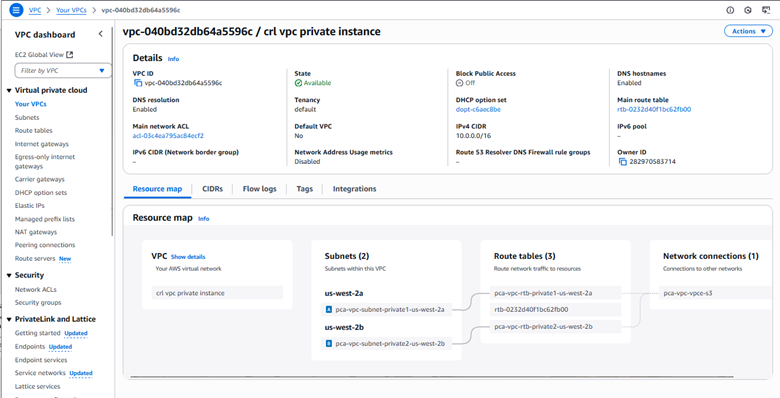
    1. You can see now see under Resource Map that the Gateway VPC endpoint provides secure access to Amazon S3 resources within the private network.
    Figure 12: VPC private instance configuration

    Figure 12: VPC private instance configuration

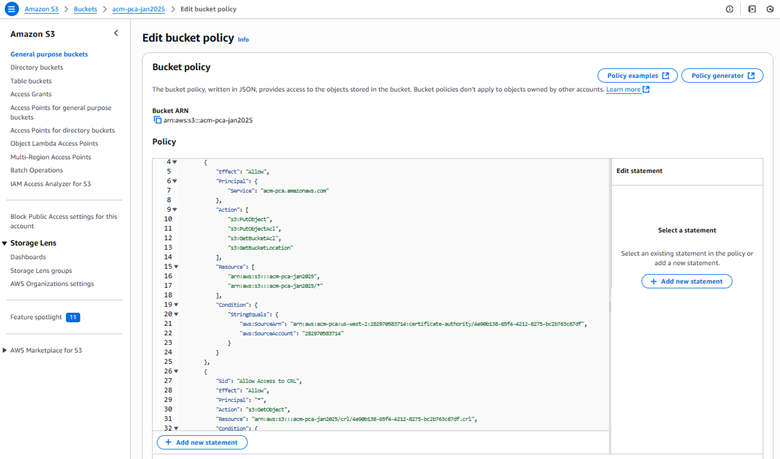
    1. Use the following example code to implement a bucket policy that enforces the following key security controls:
      • Grant AWS Private CA the necessary permissions for certificate management.
      • Restrict CRL access exclusively through the specified VPC endpoint.
      • Explicitly deny GetObject requests not originating from the designated Gateway VPC endpoint.
    Figure 13: S3 bucket policy

    Figure 13: S3 bucket policy

    The following is an example S3 bucket policy for private CA CRL access with VPC endpoint restrictions:

    {     
        "Version": "2012-10-17",     
        "Statement": [         
            {             
                "Effect": "Allow",             
                "Principal": {                 
                    "Service": "acm-pca.amazonaws.com"             
                    },             
                "Action": [                 
                    "s3:PutObject",                 
                    "s3:PutObjectAcl",                 
                    "s3:GetBucketAcl",                 
                    "s3:GetBucketLocation"             
                ],             
                "Resource": [                 
                    "<arn:aws:s3:::BUCKET_NAME>",                 
                    "<arn:aws:s3:::BUCKET_NAME>/"           
                ],           
                "Condition": {               
                    "StringEquals": {                   
                        "aws:SourceArn": "<arn:aws:acm-pca:REGION:ACCOUNT_ID:certificate-authority/CA_ID>",                   
                        "aws:SourceAccount": "<ACCOUNT_ID>"               
                        }           
                }       
            },       
            {           
                "Sid": "Allow Access to CRL",           
                "Effect": "Allow",            
                "Principal": "",             
                "Action": "s3:GetObject",             
                "Resource": "<arn:aws:s3:::BUCKET_NAME/crl/CA_ID.crl>",             
                "Condition": {                 
                    "StringEquals": {                     
                        "aws:SourceVpce": "<VPCE_ID>"                 
                        }             
                }         
            },         
            {             
                "Sid": "Access-to-specific-VPCE-only",             
                "Effect": "Deny",             
                "Principal": "",            
                "Action": "s3:GetObject",           
                "Resource": [               
                    "<arn:aws:s3:::BUCKET_NAME>",               
                    "<arn:aws:s3:::BUCKET_NAME>/"             
                ],             
                "Condition": {                 
                    "StringNotEquals": {                     
                        "aws:SourceVpce": "<VPCE_ID>"                 
                        }             
                }         
            }     
        ] 
    }

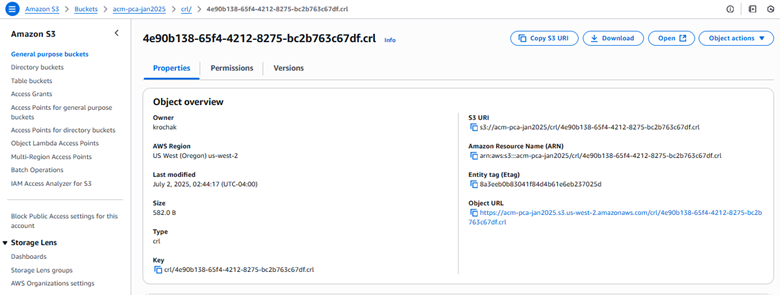
    Figure 14: S3 bucket CRL properties

    Figure 14: S3 bucket CRL properties

    Create a private hosted zone:

    1. Go to the Route 53 console.
    2. In the left navigation pane, choose Hosted zones.
    3. Choose Create hosted zone.
    4. Configure the following:
      1. Domain name: Enter s3.amazonaws.com
      2. Description: (optional) enter Private hosted zone for S3 CRL endpoint
      3. Type: Select Private hosted zone.
      4. VPC: For Region, select your VPC’s Region; for VPC ID, select your VPC from the dropdown list.
    5. Choose Create hosted zone.

    Create a record set:

    1. Inside your new private hosted zone:
      1. Choose Create record.
      2. Select Simple routing policy.
      3. Choose Next.
    2. Configure record:
      1. Record name: Enter your S3 bucket name.
      2. Record type: Select A – Routes traffic to an IPv4 address.
      3. Alias: Toggle Yes.
      4. Route traffic to: Select Alias to S3 website endpoint.
      5. Region: Select your Region.
      6. S3 endpoint: Select from dropdown list.
      7. TTL: Leave as default (300 seconds).
    3. Choose Create record.
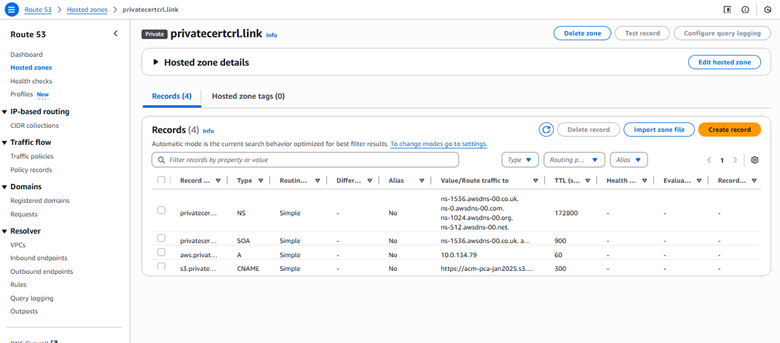
    Figure 15: Hosted zone details

    Figure 15: Hosted zone details

    Verify configuration:

    1. Go to the Amazon EC2 console and choose Launch instance.
    2. Select Amazon Linux 2.
    3. Choose Instance Type.
    4. Select you VPC and subnet.
    5. Under Network settings, select Create security group, then choose Allow SSH traffic from and enter your IP address.
    6. Choose Launch instance.
    7. After the instance is launched, select the instance and choose Connect.
    8. Select EC2 Instance Connect and choose Connect.

    Test the solution

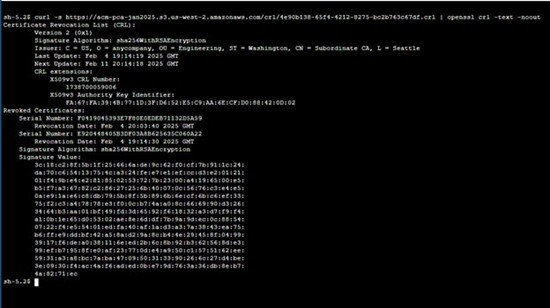
    To test private access from an EC2 instance within your private VPC, verify CRL access using:
    curl -s https://<bucket-name>.s3.<region>.amazonaws.com/crl/<certificate-id>.crl | openssl crl -text -noout

    If successful, the command completes the following steps, as shown in Figure 16:

    1. Retrieves the CRL from Amazon S3
    2. Decodes it using OpenSSL
    3. Displays comprehensive CRL information including issuer details, update timestamps, revoked certificate list, signature algorithm, and other metadata
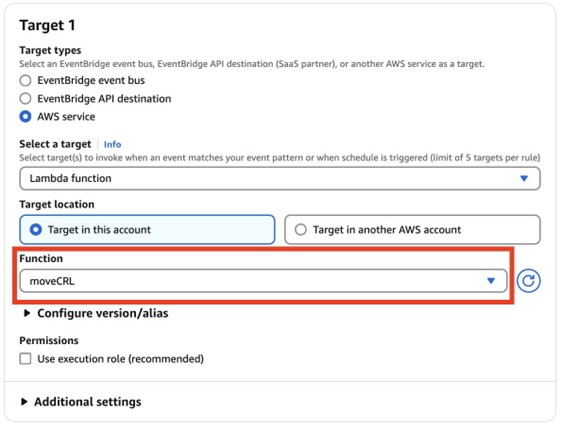
    Figure 16: Public access verification

    Figure 16: Public access verification

    To validate your security controls, attempt access from a public EC2 instance using the following command:
    curl https://<bucket-name>.s3.<region>.amazonaws.com/crl/<certificate-id>.crl

    This should fail, receiving an access denied error confirming that the CRL cannot be accessed from the public internet, as shown in Figure 17.
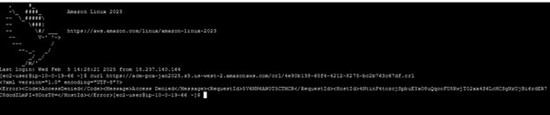
    Figure 17: Access denied error confirming that the CRL cannot be accessed from the public internet

    Figure 17: Access denied error confirming that the CRL cannot be accessed from the public internet

    Conclusion

    In this post, we walked you through two solutions that you can use to make your CRLs accessible to your internal organization, but not publicly available. First, we showed you how to configure a custom CNAME in your CRL distribution point and deploy Lambda functions to automatically copy each newly generated CRL from the default S3 bucket into a private S3 store.

    Next, we showed you a VPC architecture that uses an Amazon S3 VPC gateway endpoint, tightly scoped bucket policies, and private Route 53 DNS zones to make sure that CRL retrieval is confined to your VPC. We also covered the essential IAM and bucket policies that your clients need to access those CRLs securely. You can get started with setting up this solution on AWS Private CA today.

    If you have feedback about this post, submit comments in the Comments section below. If you have questions about this post, start a new thread on the AWS Certificate Manager forum or contact AWS Support.

Rochak Karki

Rochak Karki

Rochak is a Security Specialist Solutions Architect at AWS, focusing on threat detection, incident response, and data protection helping customers build secure environments. Rochak is a US Army veteran and holds a Bachelor of Science in Engineering from the University of Wyoming. Outside of work, he enjoys spending time with family and friends, hiking, and traveling.

Cheryl Wang

Cheryl is an Associate Security Solutions Architect at AWS based in the SF Bay Area. Cheryl is passionate about cybersecurity and helping customers improve their security infrastructure. She holds a B.A. in Computer Science from Wellesley College. Outside of work, she enjoys writing and playing guzheng.

Security at multiple layers for web-administered apps

Post Syndicated from Guy Morton original https://aws.amazon.com/blogs/security/security-at-multiple-layers-for-web-administered-apps/

In this post, I will show you how to apply security at multiple layers of a web application hosted on AWS.

Apply security at all layers is a design principle of the Security pillar of the AWS Well-Architected Framework. It encourages you to apply security at the network edge, virtual private cloud (VPC), load balancer, compute instance (or service), operating system, application, and code.

Many popular web apps are designed with a single layer of security: the login page. Behind that login page is an in-built administration interface that is directly exposed to the internet. Admin interfaces for these apps typically have simple login mechanisms and often lack multi-factor authentication (MFA) support, which can make them an attractive target for threat actors.

The in-built admin interface can also be problematic if you want to horizontally scale across multiple servers. The admin interface is available on every server that runs the app, so it creates a large attack surface. Because the admin interface updates the software on its own server, you must synchronize updates across a fleet of instances.

Multi-layered security is about identifying (or creating) isolation boundaries around the parts of your architecture and minimizing what is permitted to cross each boundary. Adding more layers to your architecture gives you the opportunity to introduce additional controls at each layer, creating more boundaries where security controls can be enforced.

In the example app scenario in this post, you have the opportunity to add many additional layers of security.

Example of multi-layered security

This post demonstrates how you can use the Run Web-Administered Apps on AWS sample project to help address these challenges, by implementing a horizontally-scalable architecture with multi-layered security. The project builds and configures many different AWS services, each designed to help provide security at different layers.

By running this solution, you can produce a segmented architecture that separates the two functions of these apps into an unprivileged public-facing view and an admin view. This design limits access to the web app’s admin functions while creating a fleet of unprivileged instances to serve the app at scale.

Figure 1 summarizes how the different services in this solution work to help provide security at the following layers:

  1. At the network edge
  2. Within the VPC
  3. At the load balancer
  4. On the compute instances
  5. Within the operating system
Figure 1: Logical flow diagram to apply security at multiple layers

Figure 1: Logical flow diagram to apply security at multiple layers

Deep dive on a multi-layered architecture

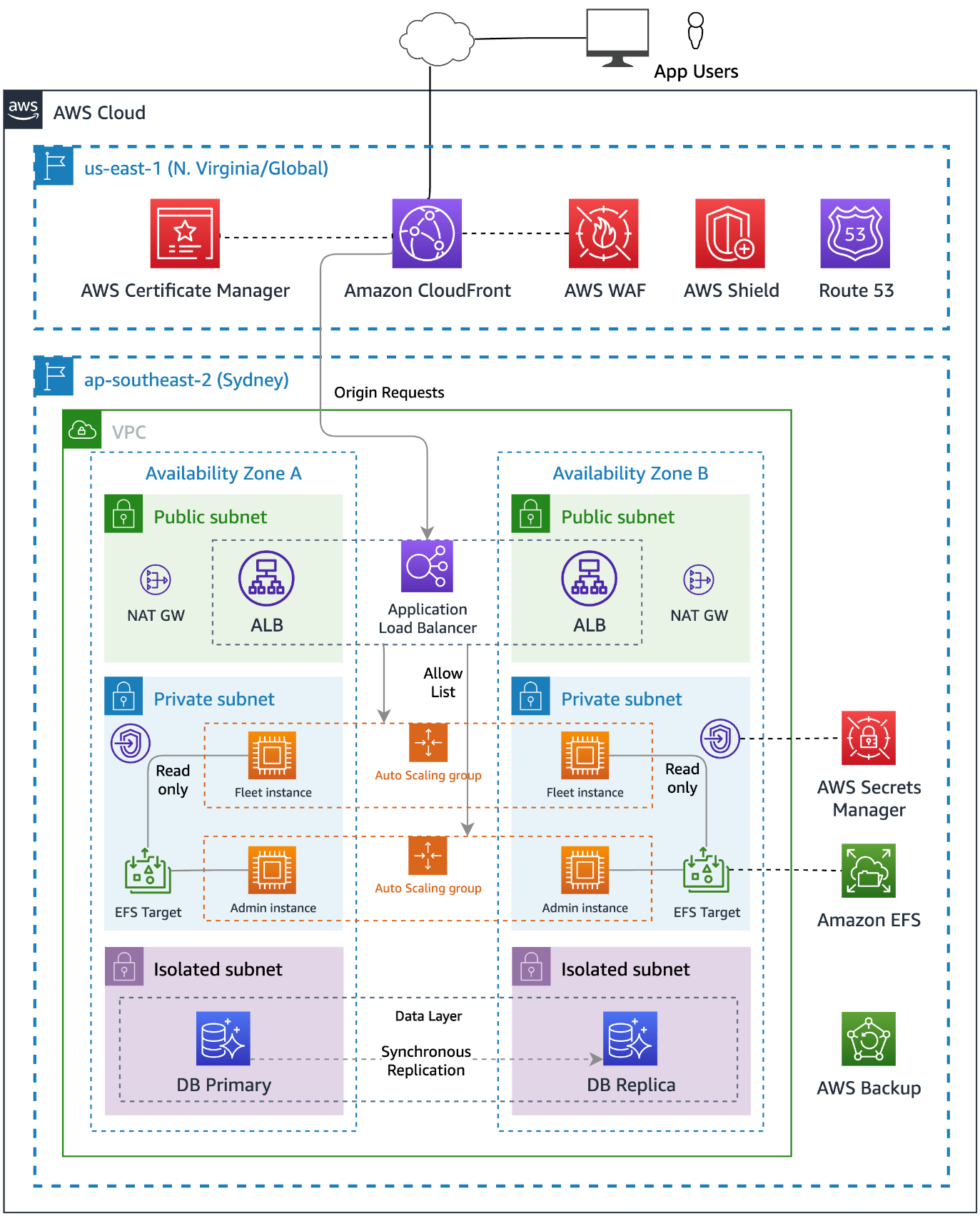
The following diagram shows the solution architecture deployed by Run Web-Administered Apps on AWS. The figure shows how the services deployed in this solution are deployed in different AWS Regions, and how requests flow from the application user through the different service layers.

Figure 2: Multi-layered architecture

Figure 2: Multi-layered architecture

This post will dive deeper into each of the architecture’s layers to see how security is added at each layer. But before we talk about the technology, let’s consider how infrastructure is built and managed — by people.

Perimeter 0 – Security at the people layer

Security starts with the people in your team and your organization’s operational practices. How your “people layer” builds and manages your infrastructure contributes significantly to your security posture.

A design principle of the Security pillar of the Well-Architected Framework is to automate security best practices. This helps in two ways: it reduces the effort required by people over time, and it helps prevent resources from being in inconsistent or misconfigured states. When people use manual processes to complete tasks, misconfigurations and missed steps are common.

The simplest way to automate security while reducing human effort is to adopt services that AWS manages for you, such as Amazon Relational Database Service (Amazon RDS). With Amazon RDS, AWS is responsible for the operating system and database software patching, and provides tools to make it simple for you to back up and restore your data.

You can automate and integrate key security functions by using managed AWS security services, such as Amazon GuardDuty, AWS Config, Amazon Inspector, and AWS Security Hub. These services provide network monitoring, configuration management, and detection of software vulnerabilities and unintended network exposure. As your cloud environments grow in scale and complexity, automated security monitoring is critical.

Infrastructure as code (IaC) is a best practice that you can follow to automate the creation of infrastructure. By using IaC to define, configure, and deploy the AWS resources that you use, you reduce the likelihood of human error when building AWS infrastructure.

Adopting IaC can help you improve your security posture because it applies the rigor of application code development to infrastructure provisioning. Storing your infrastructure definition in a source control system (such as AWS CodeCommit) creates an auditable artifact. With version control, you can track changes made to it over time as your architecture evolves.

You can add automated testing to your IaC project to help ensure that your infrastructure is aligned with your organization’s security policies. If you ever need to recover from a disaster, you can redeploy the entire architecture from your IaC project.

Another people-layer discipline is to apply the principle of least privilege. AWS Identity and Access Management (IAM) is a flexible and fine-grained permissions system that you can use to grant the smallest set of actions that your solution needs. You can use IAM to control access for both humans and machines, and we use it in this project to grant the compute instances the least privileges required.

You can also adopt other IAM best practices such as using temporary credentials instead of long-lived ones (such as access keys), and regularly reviewing and removing unused users, roles, permissions, policies, and credentials.

Perimeter 1 – network protections

The internet is public and therefore untrusted, so you must proactively address the risks from threat actors and network-level attacks.

To reduce the risk of distributed denial of service (DDoS) attacks, this solution uses AWS Shield for managed protection at the network edge. AWS Shield Standard is automatically enabled for all AWS customers at no additional cost and is designed to provide protection from common network and transport layer DDoS attacks. For higher levels of protection against attacks that target your applications, subscribe to AWS Shield Advanced.

Amazon Route 53 resolves the hostnames that the solution uses and maps the hostnames as aliases to an Amazon CloudFront distribution. Route 53 is a robust and highly available globally distributed DNS service that inspects requests to protect against DNS-specific attack types, such as DNS amplification attacks.

Perimeter 2 – request processing

CloudFront also operates at the AWS network edge and caches, transforms, and forwards inbound requests to the relevant origin services across the low-latency AWS global network. The risk of DDoS attempts overwhelming your application servers is further reduced by caching web requests in CloudFront.

The solution configures CloudFront to add a shared secret to the origin request within a custom header. A CloudFront function copies the originating user’s IP to another custom header. These headers get checked when the request arrives at the load balancer.

AWS WAF, a web application firewall, blocks known bad traffic, including cross-site scripting (XSS) and SQL injection events that come into CloudFront. This project uses AWS Managed Rules, but you can add your own rules, as well. To restrict frontend access to permitted IP CIDR blocks, this project configures an IP restriction rule on the web application firewall.

Perimeter 3 – the VPC

After CloudFront and AWS WAF check the request, CloudFront forwards it to the compute services inside an Amazon Virtual Private Cloud (Amazon VPC). VPCs are logically isolated networks within your AWS account that you can use to control the network traffic that is allowed in and out. This project configures its VPC to use a private IPv4 CIDR block that cannot be directly routed to or from the internet, creating a network perimeter around your resources on AWS.

The Amazon Elastic Compute Cloud (Amazon EC2) instances are hosted in private subnets within the VPC that have no inbound route from the internet. Using a NAT gateway, instances can make necessary outbound requests. This design hosts the database instances in isolated subnets that don’t have inbound or outbound internet access. Amazon RDS is a managed service, so AWS manages patching of the server and database software.

The solution accesses AWS Secrets Manager by using an interface VPC endpoint. VPC endpoints use AWS PrivateLink to connect your VPC to AWS services as if they were in your VPC. In this way, resources in the VPC can communicate with Secrets Manager without traversing the internet.

The project configures VPC Flow Logs as part of the VPC setup. VPC flow logs capture information about the IP traffic going to and from network interfaces in your VPC. GuardDuty analyzes these logs and uses threat intelligence data to identify unexpected, potentially unauthorized, and malicious activity within your AWS environment.

Although using VPCs and subnets to segment parts of your application is a common strategy, there are other ways that you can achieve partitioning for application components:

  • You can use separate VPCs to restrict access to a database, and use VPC peering to route traffic between them.
  • You can use a multi-account strategy so that different security and compliance controls are applied in different accounts to create strong logical boundaries between parts of a system. You can route network requests between accounts by using services such as AWS Transit Gateway, and control them using AWS Network Firewall.

There are always trade-offs between complexity, convenience, and security, so the right level of isolation between components depends on your requirements.

Perimeter 4 – the load balancer

After the request is sent to the VPC, an Application Load Balancer (ALB) processes it. The ALB distributes requests to the underlying EC2 instances. The ALB uses TLS version 1.2 to encrypt incoming connections with an AWS Certificate Manager (ACM) certificate.

Public access to the load balancer isn’t allowed. A security group applied to the ALB only allows inbound traffic on port 443 from the CloudFront IP range. This is achieved by specifying the Region-specific AWS-managed CloudFront prefix list as the source in the security group rule.

The ALB uses rules to decide whether to forward the request to the target instances or reject the traffic. As an additional layer of security, it uses the custom headers that the CloudFront distribution added to make sure that the request is from CloudFront. In another rule, the ALB uses the originating user’s IP to decide which target group of Amazon EC2 instances should handle the request. In this way, you can direct admin users to instances that are configured to allow admin tasks.

If a request doesn’t match a valid rule, the ALB returns a 404 response to the user.

Perimeter 5 – compute instance network security

A security group creates an isolation boundary around the EC2 instances. The only traffic that reaches the instance is the traffic that the security group rules allow. In this solution, only the ALB is allowed to make inbound connections to the EC2 instances.

A common practice is for customers to also open ports, or to set up and manage bastion hosts to provide remote access to their compute instances. The risk in this approach is that the ports could be left open to the whole internet, exposing the instances to vulnerabilities in the remote access protocol. With remote work on the rise, there is an increased risk for the creation of these overly permissive inbound rules.

Using AWS Systems Manager Session Manager, you can remove the need for bastion hosts or open ports by creating secure temporary connections to your EC2 instances using the installed SSM agent. As with every software package that you install, you should check that the SSM agent aligns with your security and compliance requirements. To review the source code to the SSM agent, see amazon-ssm-agent GitHub repo.

The compute layer of this solution consists of two separate Amazon EC2 Auto Scaling groups of EC2 instances. One group handles requests from administrators, while the other handles requests from unprivileged users. This creates another isolation boundary by keeping the functions separate while also helping to protect the system from a failure in one component causing the whole system to fail. Each Amazon EC2 Auto Scaling group spans multiple Availability Zones (AZs), providing resilience in the event of an outage in an AZ.

By using managed database services, you can reduce the risk that database server instances haven’t been proactively patched for security updates. Managed infrastructure helps reduce the risk of security issues that result from the underlying operating system not receiving security patches in a timely manner and the risk of downtime from hardware failures.

Perimeter 6 – compute instance operating system

When instances are first launched, the operating system must be secure, and the instances must be updated as required when new security patches are released. We recommend that you create immutable servers that you build and harden by using a tool such as EC2 Image Builder. Instead of patching running instances in place, replace them when an updated Amazon Machine Image (AMI) is created. This approach works in our example scenario because the application code (which changes over time) is stored on Amazon Elastic File System (Amazon EFS), so when you replace the instances with a new AMI, you don’t need to update them with data that has changed after the initial deployment.

Another way that the solution helps improve security on your instances at the operating system is to use EC2 instance profiles to allow them to assume IAM roles. IAM roles grant temporary credentials to applications running on EC2, instead of using hard-coded credentials stored on the instance. Access to other AWS resources is provided using these temporary credentials.

The IAM roles have least privilege policies attached that grant permission to mount the EFS file system and access AWS Systems Manager. If a database secret exists in Secrets Manager, the IAM role is granted permission to access it.

Perimeter 7 – at the file system

Both Amazon EC2 Auto Scaling groups of EC2 instances share access to Amazon EFS, which hosts the files that the application uses. IAM authorization applies IAM file system policies to control the instance’s access to the file system. This creates another isolation boundary that helps prevent the non-admin instances from modifying the application’s files.

The admin group’s instances have the file system mounted in read-write mode. This is necessary so that the application can update itself, install add-ons, upload content, or make configuration changes. On the unprivileged instances, the file system is mounted in read-only mode. This means that these instances can’t make changes to the application code or configuration files.

The unprivileged instances have local file caching enabled. This caches files from the EFS file system on the local Amazon Elastic Block Store (Amazon EBS) volume to help improve scalability and performance.

Perimeter 8 – web server configuration

This solution applies different web server configurations to the instances running in each Amazon EC2 Auto Scaling group. This creates a further isolation boundary at the web server layer.

The admin instances use the default configuration for the application that permits access to the admin interface. Non-admin, public-facing instances block admin routes, such as wp-login.php, and will return a 403 Forbidden response. This creates an additional layer of protection for those routes.

Perimeter 9 – database security

The database layer is within two additional isolation boundaries. The solution uses Amazon RDS, with database instances deployed in isolated subnets. Isolated subnets have no inbound or outbound internet access and can only be reached through other network interfaces within the VPC. The RDS security group further isolates the database instances by only allowing inbound traffic from the EC2 instances on the database server port.

By using IAM authentication for the database access, you can add an additional layer of security by configuring the non-admin instances with less privileged database user credentials.

Perimeter 10 – Security at the application code layer

To apply security at the application code level, you should establish good practices around installing updates as they become available. Most applications have email lists that you can subscribe to that will notify you when updates become available.

You should evaluate the quality of an application before you adopt it. The following are some metrics to consider:

  • Number of developers who are actively working on it
  • Frequency of updates to it
  • How quickly the developers respond with patches when bugs are reported

Other steps that you can take

Use AWS Verified Access to help secure application access for human users. With Verified Access, you can add another user authentication stage, to help ensure that only verified users can access an application’s administrative functions.

Amazon GuardDuty is a threat detection service that continuously monitors your AWS accounts and workloads for malicious activity and delivers detailed security findings for visibility and remediation. It can detect communication with known malicious domains and IP addresses and identify anomalous behavior. GuardDuty Malware Protection helps you detect the potential presence of malware by scanning the EBS volumes that are attached to your EC2 instances.

Amazon Inspector is an automated vulnerability management service that automatically discovers the Amazon EC2 instances that are running and scans them for software vulnerabilities and unintended network exposure. To help ensure that your web server instances are updated when security patches are available, use AWS Systems Manager Patch Manager.

Deploy the sample project

We wrote the Run Web-Administered Apps on AWS project by using the AWS Cloud Development Kit (AWS CDK). With the AWS CDK, you can use the expressive power of familiar programming languages to define your application resources and accelerate development. The AWS CDK has support for multiple languages, including TypeScript, Python, .NET, Java, and Go.

This project uses Python. To deploy it, you need to have a working version of Python 3 on your computer. For instructions on how to install the AWS CDK, see Get Started with AWS CDK.

Configure the project

To enable this project to deploy multiple different web projects, you must do the configuration in the parameters.properties file. Two variables identify the configuration blocks: app (which identifies the web application to deploy) and env (which identifies whether the deployment is to a dev or test environment, or to production).

When you deploy the stacks, you specify the app and env variables as CDK context variables so that you can select between different configurations at deploy time. If you don’t specify a context, a [default] stanza in the parameters.properties file specifies the default app name and environment that will be deployed.

To name other stanzas, combine valid app and env values by using the format <app>-<env>. For each stanza, you can specify its own Regions, accounts, instance types, instance counts, hostnames, and more. For example, if you want to support three different WordPress deployments, you might specify the app name as wp, and for env, you might want devtest, and prod, giving you three stanzas: wp-devwp-test, and wp-prod.

The project includes sample configuration items that are annotated with comments that explain their function.

Use CDK bootstrapping

Before you can use the AWS CDK to deploy stacks into your account, you need to use CDK bootstrapping to provision resources in each AWS environment (account and Region combination) that you plan to use. For this project, you need to bootstrap both the US East (N. Virginia) Region (us-east-1)  and the home Region in which you plan to host your application.

Create a hosted zone in the target account

You need to have a hosted zone in Route 53 to allow the creation of DNS records and certificates. You must manually create the hosted zone by using the AWS Management Console. You can delegate a domain that you control to Route 53 and use it with this project. You can also register a domain through Route 53 if you don’t currently have one.

Run the project

Clone the project to your local machine and navigate to the project root. To create the Python virtual environment (venv) and install the dependencies, follow the steps in the Generic CDK instructions.

To create and configure the parameters.properties file

Copy the parameters-template.properties file (in the root folder of the project) to a file called parameters.properties and save it in the root folder. Open it with a text editor and then do the following:

If you want to restrict public access to your site, change 192.0.2.0/24 to the IP range that you want to allow. By providing a comma-separated list of allowedIps, you can add multiple allowed CIDR blocks.

If you don’t want to restrict public access, set allowedIps=* instead.

If you have forked this project into your own private repository, you can commit the parameters.properties file to your repo. To do that, comment out the parameters.properties  line in the .gitignore file.

To install the custom resource helper

The solution uses an AWS CloudFormation custom resource for cross-Region configuration management. To install the needed Python package, run the following command in the custom_resource directory:

cd custom_resource
pip install crhelper -t .

To learn more about CloudFormation custom resource creation, see AWS CloudFormation custom resource creation with Python, AWS Lambda, and crhelper.

To configure the database layer

Before you deploy the stacks, decide whether you want to include a data layer as part of the deployment. The dbConfig parameter determines what will happen, as follows:

  • If dbConfig is left empty — no database will be created and no database credentials will be available in your compute stacks
  • If dbConfig is set to instance — you will get a new Amazon RDS instance
  • If dbConfig is set to cluster — you will get an Amazon Aurora cluster
  • If dbConfig is set to none — if you previously created a database in this stack, the database will be deleted

If you specify either instance or cluster, you should also configure the following database parameters to match your requirements:

  • dbEngine — set the database engine to either mysql or postgres
  • dbSnapshot — specify the named snapshot for your database
  • dbSecret — if you are using an existing database, specify the Amazon Resource Name (ARN) of the secret where the database credentials and DNS endpoint are located
  • dbMajorVersion — set the major version of the engine that you have chosen; leave blank to get the default version
  • dbFullVersion — set the minor version of the engine that you have chosen; leave blank to get the default version
  • dbInstanceType — set the instance type that you want (note that these vary by service); don’t prefix with db. because the CDK will automatically prepend it
  • dbClusterSize — if you request a cluster, set this parameter to determine how many Amazon Aurora replicas are created

You can choose between mysql or postgres for the database engine. Other settings that you can choose are determined by that choice.

You will need to use an Amazon Machine Image (AMI) that has the CLI preinstalled, such as Amazon Linux 2, or install the AWS Command Line Interface (AWS CLI) yourself with a user data command. If instead of creating a new, empty database, you want to create one from a snapshot, supply the snapshot name by using the dbSnapshot parameter.

To create the database secret

AWS automatically creates and stores the RDS instance or Aurora cluster credentials in a Secrets Manager secret when you create a new instance or cluster. You make these credentials available to the compute stack through the db_secret_command variable, which contains a single-line bash command that returns the JSON from the AWS CLI command aws secretsmanager get-secret-value. You can interpolate this variable into your user data commands as follows:

SECRET=$({db_secret_command})
USERNAME=`echo $SECRET | jq -r '.username'`
PASSWORD=`echo $SECRET | jq -r '.password'`
DBNAME=`echo $SECRET | jq -r '.dbname'`
HOST=`echo $SECRET | jq -r '.host'`

If you create a database from a snapshot, make sure that your Secrets Manager secret and Amazon RDS snapshot are in the target Region. If you supply the secret for an existing database, make sure that the secret contains at least the following four key-value pairs (replace the <placeholder values> with your values):

{
    "password":"<your-password>",
    "dbname":"<your-database-name>",
    "host":"<your-hostname>",
    "username":"<your-username>"
}

The name for the secret must match the app value followed by the env value (both in title case), followed by DatabaseSecret, so for app=wp and env=dev, your secret name should be WpDevDatabaseSecret.

To deploy the stacks

The following commands deploy the stacks defined in the CDK app. To deploy them individually, use the specific stack names (these will vary according to the info that you supplied previously), as shown in the following.

cdk deploy wp-dev-network-stack -c app=wp -c env=dev
cdk deploy wp-dev-database-stack -c app=wp -c env=dev
cdk deploy wp-dev-compute-stack -c app=wp -c env=dev
cdk deploy wp-dev-cdn-stack -c app=wp -c env=dev

To create a database stack, deploy the network and database stacks first.

cdk deploy wp-dev-network-stack -c app=wp -c env=dev
cdk deploy wp-dev-database-stack -c app=wp -c env=dev

You can then initiate the deployment of the compute stack.

cdk deploy wp-dev-compute-stack -c app=wp -c env=dev

After the compute stack deploys, you can deploy the stack that creates the CloudFront distribution.

cdk deploy wp-dev-cdn-stack -c env=dev

This deploys the CloudFront infrastructure to the US East (N. Virginia) Region (us-east-1). CloudFront is a global AWS service, which means that you must create it in this Region. The other stacks are deployed to the Region that you specified in your configuration stanza.

To test the results

If your stacks deploy successfully, your site appears at one of the following URLs:

  • subdomain.hostedZone (if you specified a value for the subdomain) — for example, www.example.com
  • appName-env.hostedZone (if you didn’t specify a value for the subdomain) — for example, wp-dev.example.com.

If you connect through the IP address that you configured in the adminIps configuration, you should be connected to the admin instance for your site. Because the admin instance can modify the file system, you should use it to do your administrative tasks.

Users who connect to your site from an IP that isn’t in your allowedIps list will be connected to your fleet instances and won’t be able to alter the file system (for example, they won’t be able to install plugins or upload media).

If you need to redeploy the same app-env combination, manually remove the parameter store items and the replicated secret that you created in us-east-1. You should also delete the cdk.context.json file because it caches values that you will be replacing.

One project, multiple configurations

You can modify the configuration file in this project to deploy different applications to different environments using the same project. Each app can have different configurations for dev, test, or production environments.

Using this mechanism, you can deploy sites for test and production into different accounts or even different Regions. The solution uses CDK context variables as command-line switches to select different configuration stanzas from the configuration file.

CDK projects allow for multiple deployments to coexist in one account by using unique names for the deployed stacks, based on their configuration.

Check the configuration file into your source control repo so that you track changes made to it over time.

Got a different web app that you want to deploy? Create a new configuration by copying and pasting one of the examples and then modify the build commands as needed for your use case.

Conclusion

In this post, you learned how to build an architecture on AWS that implements multi-layered security. You can use different AWS services to provide protections to your application at different stages of the request lifecycle.

You can learn more about the services used in this sample project by building it in your own account. It’s a great way to explore how the different services work and the full features that are available. By understanding how these AWS services work, you will be ready to use them to add security, at multiple layers, in your own architectures.

 
If you have feedback about this post, submit comments in the Comments section below. If you have questions about this post, contact AWS Support.

Want more AWS Security news? Follow us on Twitter.

Guy Morton

Guy Morton

Guy is a Senior Solutions Architect at AWS. He enjoys bringing his decades of experience as a full stack developer, architect, and people manager to helping customers build and scale their applications securely in the AWS Cloud. Guy has a passion for automation in all its forms, and is also an occasional songwriter and musician who performs under the pseudonym Whtsqr.

Top 2021 AWS service launches security professionals should review – Part 2

Post Syndicated from Marta Taggart original https://aws.amazon.com/blogs/security/top-2021-aws-service-launches-security-professionals-should-review-part-2/

In Part 1 of this two-part series, we shared an overview of some of the most important 2021 Amazon Web Services (AWS) Security service and feature launches. In this follow-up, we’ll dive deep into additional launches that are important for security professionals to be aware of and understand across all AWS services. There have already been plenty in the first half of 2022, so we’ll highlight those soon, as well.

AWS Identity

You can use AWS Identity Services to build Zero Trust architectures, help secure your environments with a robust data perimeter, and work toward the security best practice of granting least privilege. In 2021, AWS expanded the identity source options, AWS Region availability, and support for AWS services. There is also added visibility and power in the permission management system. New features offer new integrations, additional policy checks, and secure resource sharing across AWS accounts.

AWS Single Sign-On

For identity management, AWS Single Sign-On (AWS SSO) is where you create, or connect, your workforce identities in AWS once and manage access centrally across your AWS accounts in AWS Organizations. In 2021, AWS SSO announced new integrations for JumpCloud and CyberArk users. This adds to the list of providers that you can use to connect your users and groups, which also includes Microsoft Active Directory Domain Services, Okta Universal Directory, Azure AD, OneLogin, and Ping Identity.

AWS SSO expanded its availability to new Regions: AWS GovCloud (US), Europe (Paris), and South America (São Paulo) Regions. Another very cool AWS SSO development is its integration with AWS Systems Manager Fleet Manager. This integration enables you to log in interactively to your Windows servers running on Amazon Elastic Compute Cloud (Amazon EC2) while using your existing corporate identities—try it, it’s fantastic!

AWS Identity and Access Management

For access management, there have been a range of feature launches with AWS Identity and Access Management (IAM) that have added up to more power and visibility in the permissions management system. Here are some key examples.

IAM made it simpler to relate a user’s IAM role activity to their corporate identity. By setting the new source identity attribute, which persists through role assumption chains and gets logged in AWS CloudTrail, you can find out who is responsible for actions that IAM roles performed.

IAM added support for policy conditions, to help manage permissions for AWS services that access your resources. This important feature launch of service principal conditions helps you to distinguish between API calls being made on your behalf by a service principal, and those being made by a principal inside your account. You can choose to allow or deny the calls depending on your needs. As a security professional, you might find this especially useful in conjunction with the aws:CalledVia condition key, which allows you to scope permissions down to specify that this account principal can only call this API if they are calling it using a particular AWS service that’s acting on their behalf. For example, your account principal can’t generally access a particular Amazon Simple Storage Service (Amazon S3) bucket, but if they are accessing it by using Amazon Athena, they can do so. These conditions can also be used in service control policies (SCPs) to give account principals broader scope across an account, organizational unit, or organization; they need not be added to individual principal policies or resource policies.

Another very handy new IAM feature launch is additional information about the reason for an access denied error message. With this additional information, you can now see which of the relevant access control policies (for example, IAM, resource, SCP, or VPC endpoint) was the cause of the denial. As of now, this new IAM feature is supported by more than 50% of all AWS services in the AWS SDK and AWS Command Line Interface, and a fast-growing number in the AWS Management Console. We will continue to add support for this capability across services, as well as add more features that are designed to make the journey to least privilege simpler.

IAM Access Analyzer

AWS Identity and Access Management (IAM) Access Analyzer provides actionable recommendations to set secure and functional permissions. Access Analyzer introduced the ability to preview the impact of policy changes before deployment and added over 100 policy checks for correctness. Both of these enhancements are integrated into the console and are also available through APIs. Access Analyzer also provides findings for external access allowed by resource policies for many services, including a previous launch in which IAM Access Analyzer was directly integrated into the Amazon S3 management console.

IAM Access Analyzer also launched the ability to generate fine-grained policies based on analyzing past AWS CloudTrail activity. This feature provides a great new capability for DevOps teams or central security teams to scope down policies to just the permissions needed, making it simpler to implement least privilege permissions. IAM Access Analyzer launched further enhancements to expand policy checks, and the ability to generate a sample least-privilege policy from past activity was expanded beyond the account level to include an analysis of principal behavior within the entire organization by analyzing log activity stored in AWS CloudTrail.

AWS Resource Access Manager

AWS Resource Access Manager (AWS RAM) helps you securely share your resources across unrelated AWS accounts within your organization or organizational units (OUs) in AWS Organizations. Now you can also share your resources with IAM roles and IAM users for supported resource types. This update enables more granular access using managed permissions that you can use to define access to shared resources. In addition to the default managed permission defined for each shareable resource type, you now have more flexibility to choose which permissions to grant to whom for resource types that support additional managed permissions. Additionally, AWS RAM added support for global resource types, enabling you to provision a global resource once, and share that resource across your accounts. A global resource is one that can be used in multiple AWS Regions; the first example of a global resource is found in AWS Cloud WAN, currently in preview as of this publication. AWS RAM helps you more securely share an AWS Cloud WAN core network, which is a managed network containing AWS and on-premises networks. With AWS RAM global resource sharing, you can use the Cloud WAN core network to centrally operate a unified global network across Regions and accounts.

AWS Directory Service

AWS Directory Service for Microsoft Active Directory, also known as AWS Managed Microsoft Active Directory (AD), was updated to automatically provide domain controller and directory utilization metrics in Amazon CloudWatch for new and existing directories. Analyzing these utilization metrics helps you quantify your average and peak load times to identify the need for additional domain controllers. With this, you can define the number of domain controllers to meet your performance, resilience, and cost requirements.

Amazon Cognito

Amazon Cognito identity pools (federated identities) was updated to enable you to use attributes from social and corporate identity providers to make access control decisions and simplify permissions management in AWS resources. In Amazon Cognito, you can choose predefined attribute-tag mappings, or you can create custom mappings using the attributes from social and corporate providers’ access and ID tokens, or SAML assertions. You can then reference the tags in an IAM permissions policy to implement attribute-based access control (ABAC) and manage access to your AWS resources. Amazon Cognito also launched a new console experience for user pools and now supports targeted sign out through refresh token revocation.

Governance, control, and logging services

There were a number of important releases in 2021 in the areas of governance, control, and logging services.

AWS Organizations

AWS Organizations added a number of important import features and integrations during 2021. Security-relevant services like Amazon Detective, Amazon Inspector, and Amazon Virtual Private Cloud (Amazon VPC) IP Address Manager (IPAM), as well as others like Amazon DevOps Guru, launched integrations with Organizations. Others like AWS SSO and AWS License Manager upgraded their Organizations support by adding support for a Delegated Administrator account, reducing the need to use the management account for operational tasks. Amazon EC2 and EC2 Image Builder took advantage of the account grouping capabilities provided by Organizations to allow cross-account sharing of Amazon Machine Images (AMIs) (for more details, see the Amazon EC2 section later in this post). Organizations also got an updated console, increased quotas for tag policies, and provided support for the launch of an API that allows for programmatic creation and maintenance of AWS account alternate contacts, including the very important security contact (although that feature doesn’t require Organizations). For more information on the value of using the security contact for your accounts, see the blog post Update the alternate security contact across your AWS accounts for timely security notifications.

AWS Control Tower

2021 was also a good year for AWS Control Tower, beginning with an important launch of the ability to take over governance of existing OUs and accounts, as well as bulk update of new settings and guardrails with a single button click or API call. Toward the end of 2021, AWS Control Tower added another valuable enhancement that allows it to work with a broader set of customers and use cases, namely support for nested OUs within an organization.

AWS CloudFormation Guard 2.0

Another important milestone in 2021 for creating and maintaining a well-governed cloud environment was the re-launch of CloudFormation Guard as Cfn-Guard 2.0. This launch was a major overhaul of the Cfn-Guard domain-specific language (DSL), a DSL designed to provide the ability to test infrastructure-as-code (IaC) templates such as CloudFormation and Terraform to make sure that they conform with a set of constraints written in the DSL by a central team, such as a security organization or network management team.

This approach provides a powerful new middle ground between the older security models of prevention (which provide developers only an access denied message, and often can’t distinguish between an acceptable and an unacceptable use of the same API) and a detect and react model (when undesired states have already gone live). The Cfn-Guard 2.0 model gives builders the freedom to build with IaC, while allowing central teams to have the ability to reject infrastructure configurations or changes that don’t conform to central policies—and to do so with completely custom error messages that invite dialog between the builder team and the central team, in case the rule is unnuanced and needs to be refined, or if a specific exception needs to be created.

For example, a builder team might be allowed to provision and attach an internet gateway to a VPC, but the team can do this only if the routes to the internet gateway are limited to a certain pre-defined set of CIDR ranges, such as the public addresses of the organization’s branch offices. It’s not possible to write an IAM policy that takes into account the CIDR values of a VPC route table update, but you can write a Cfn-Guard 2.0 rule that allows the creation and use of an internet gateway, but only with a defined and limited set of IP addresses.

AWS Systems Manager Incident Manager

An important launch that security professionals should know about is AWS Systems Manager Incident Manager. Incident Manager provides a number of powerful capabilities for managing incidents of any kind, including operational and availability issues but also security issues. With Incident Manager, you can automatically take action when a critical issue is detected by an Amazon CloudWatch alarm or Amazon EventBridge event. Incident Manager runs pre-configured response plans to engage responders by using SMS and phone calls, can enable chat commands and notifications using AWS Chatbot, and runs automation workflows with AWS Systems Manager Automation runbooks. The Incident Manager console integrates with AWS Systems Manager OpsCenter to help you track incidents and post-incident action items from a central place that also synchronizes with third-party management tools such as Jira Service Desk and ServiceNow. Incident Manager enables cross-account sharing of incidents using AWS RAM, and provides cross-Region replication of incidents to achieve higher availability.

AWS CloudTrail

AWS CloudTrail added some great new logging capabilities in 2021, including logging data-plane events for Amazon DynamoDB and Amazon Elastic Block Store (Amazon EBS) direct APIs (direct APIs allow access to EBS snapshot content through a REST API). CloudTrail also got further enhancements to its machine-learning based CloudTrail Insights feature, including a new one called ErrorRate Insights.

Amazon S3

Amazon Simple Storage Service (Amazon S3) is one of the most important services at AWS, and its steady addition of security-related enhancements is always big news. Here are the 2021 highlights.

Access Points aliases

Amazon S3 introduced a new feature, Amazon S3 Access Points aliases. With Amazon S3 Access Points aliases, you can make the access points backwards-compatible with a large amount of existing code that is programmed to interact with S3 buckets rather than access points.

To understand the importance of this launch, we have to go back to 2019 to the launch of Amazon S3 Access Points. Access points are a powerful mechanism for managing S3 bucket access. They provide a great simplification for managing and controlling access to shared datasets in S3 buckets. You can create up to 1,000 access points per Region within each of your AWS accounts. Although bucket access policies remain fully enforced, you can delegate access control from the bucket to its access points, allowing for distributed and granular control. Each access point enforces a customizable policy that can be managed by a particular workgroup, while also avoiding the problem of bucket policies needing to grow beyond their maximum size. Finally, you can also bind an access point to a particular VPC for its lifetime, to prevent access directly from the internet.

With the 2021 launch of Access Points aliases, Amazon S3 now generates a unique DNS name, or alias, for each access point. The Access Points aliases look and acts just like an S3 bucket to existing code. This means that you don’t need to make changes to older code to use Amazon S3 Access Points; just substitute an Access Points aliases wherever you previously used a bucket name. As a security team, it’s important to know that this flexible and powerful administrative feature is backwards-compatible and can be treated as a drop-in replacement in your various code bases that use Amazon S3 but haven’t been updated to use access point APIs. In addition, using Access Points aliases adds a number of powerful security-related controls, such as permanent binding of S3 access to a particular VPC.

Bucket Keys

Amazon S3 launched support for S3 Inventory and S3 Batch Operations to identify and copy objects to use S3 Bucket Keys, which can help reduce the costs of server-side encryption (SSE) with AWS Key Management Service (AWS KMS).

S3 Bucket Keys were launched at the end of 2020, another great launch that security professionals should know about, so here is an overview in case you missed it. S3 Bucket Keys are data keys generated by AWS KMS to provide another layer of envelope encryption in which the outer layer (the S3 Bucket Key) is cached by S3 for a short period of time. This extra key layer increases performance and reduces the cost of requests to AWS KMS. It achieves this by decreasing the request traffic from Amazon S3 to AWS KMS from a one-to-one model—one request to AWS KMS for each object written to or read from Amazon S3—to a one-to-many model using the cached S3 Bucket Key. The S3 Bucket Key is never stored persistently in an unencrypted state outside AWS KMS, and so Amazon S3 ultimately must always return to AWS KMS to encrypt and decrypt the S3 Bucket Key, and thus, the data. As a result, you still retain control of the key hierarchy and resulting encrypted data through AWS KMS, and are still able to audit Amazon S3 returning periodically to AWS KMS to refresh the S3 Bucket Keys, as logged in CloudTrail.

Returning to our review of 2021, S3 Bucket Keys gained the ability to use Amazon S3 Inventory and Amazon S3 Batch Operations automatically to migrate objects from the higher cost, slightly lower-performance SSE-KMS model to the lower-cost, higher-performance S3 Bucket Keys model.

Simplified ownership and access management

The final item from 2021 for Amazon S3 is probably the most important of all. Last year was the year that Amazon S3 achieved fully modernized object ownership and access management capabilities. You can now disable access control lists to simplify ownership and access management for data in Amazon S3.

To understand this launch, we need to go in time to the origins of Amazon S3, which is one of the oldest services in AWS, created even before IAM was launched in 2011. In those pre-IAM days, a storage system like Amazon S3 needed to have some kind of access control model, so Amazon S3 invented its own: Amazon S3 access control lists (ACLs). Using ACLs, you could add access permissions down to the object level, but only with regard to access by other AWS account principals (the only kind of identity that was available at the time), or public access (read-only or read-write) to an object. And in this model, objects were always owned by the creator of the object, not the bucket owner.

After IAM was introduced, Amazon S3 added the bucket policy feature, a type of resource policy that provides the rich features of IAM, including full support for all IAM principals (users and roles), time-of-day conditions, source IP conditions, ability to require encryption, and more. For many years, Amazon S3 access decisions have been made by combining IAM policy permissions and ACL permissions, which has served customers well. But the object-writer-is-owner issue has often caused friction. The good news for security professionals has been that a deny by either type of access control type overrides an allow by the other, so there were no security issues with this bi-modal approach. The challenge was that it could be administratively difficult to manage both resource policies—which exist at the bucket and access point level—and ownership and ACLs—which exist at the object level. Ownership and ACLs might potentially impact the behavior of only a handful of objects, in a bucket full of millions or billions of objects.

With the features released in 2021, Amazon S3 has removed these points of friction, and now provides the features needed to reduce ownership issues and to make IAM-based policies the only access control system for a specified bucket. The first step came in 2020 with the ability to make object ownership track bucket ownership, regardless of writer. But that feature applied only to newly-written objects. The final step is the 2021 launch we’re highlighting here: the ability to disable at the bucket level the evaluation of all existing ACLs—including ownership and permissions—effectively nullifying all object ACLs. From this point forward, you have the mechanisms you need to govern Amazon S3 access with a combination of S3 bucket policies, S3 access point policies, and (within the same account) IAM principal policies, without worrying about legacy models of ACLs and per-object ownership.

Additional database and storage service features

AWS Backup Vault Lock

AWS Backup added an important new additional layer for backup protection with the availability of AWS Backup Vault Lock. A vault lock feature in AWS is the ability to configure a storage policy such that even the most powerful AWS principals (such as an account or Org root principal) can only delete data if the deletion conforms to the preset data retention policy. Even if the credentials of a powerful administrator are compromised, the data stored in the vault remains safe. Vault lock features are extremely valuable in guarding against a wide range of security and resiliency risks (including accidental deletion), notably in an era when ransomware represents a rising threat to data.

Prior to AWS Backup Vault Lock, AWS provided the extremely useful Amazon S3 and Amazon S3 Glacier vault locking features, but these previous vaulting features applied only to the two Amazon S3 storage classes. AWS Backup, on the other hand, supports a wide range of storage types and databases across the AWS portfolio, including Amazon EBS, Amazon Relational Database Service (Amazon RDS) including Amazon Aurora, Amazon DynamoDB, Amazon Neptune, Amazon DocumentDB, Amazon Elastic File System (Amazon EFS), Amazon FSx for Lustre, Amazon FSx for Windows File Server, Amazon EC2, and AWS Storage Gateway. While built on top of Amazon S3, AWS Backup even supports backup of data stored in Amazon S3. Thus, this new AWS Backup Vault Lock feature effectively serves as a vault lock for all the data from most of the critical storage and database technologies made available by AWS.

Finally, as a bonus, AWS Backup added two more features in 2021 that should delight security and compliance professionals: AWS Backup Audit Manager and compliance reporting.

Amazon DynamoDB

Amazon DynamoDB added a long-awaited feature: data-plane operations integration with AWS CloudTrail. DynamoDB has long supported the recording of management operations in CloudTrail—including a long list of operations like CreateTable, UpdateTable, DeleteTable, ListTables, CreateBackup, and many others. What has been added now is the ability to log the potentially far higher volume of data operations such as PutItem, BatchWriteItem, GetItem, BatchGetItem, and DeleteItem. With this launch, full database auditing became possible. In addition, DynamoDB added more granular control of logging through DynamoDB Streams filters. This feature allows users to vary the recording in CloudTrail of both control plane and data plane operations, at the table or stream level.

Amazon EBS snapshots

Let’s turn now to a simple but extremely useful feature launch affecting Amazon Elastic Block Store (Amazon EBS) snapshots. In the past, it was possible to accidently delete an EBS snapshot, which is a problem for security professionals because data availability is a part of the core security triad of confidentiality, integrity, and availability. Now you can manage that risk and recover from accidental deletions of your snapshots by using Recycle Bin. You simply define a retention policy that applies to all deleted snapshots, and then you can define other more granular policies, for example using longer retention periods based on snapshot tag values, such as stage=prod. Along with this launch, the Amazon EBS team announced EBS Snapshots Archive, a major price reduction for long-term storage of snapshots.

AWS Certificate Manager Private Certificate Authority

2021 was a big year for AWS Certificate Manager (ACM) Private Certificate Authority (CA) with the following updates and new features:

Network and application protection

We saw a lot of enhancements in network and application protection in 2021 that will help you to enforce fine-grained security policies at important network control points across your organization. The services and new capabilities offer flexible solutions for inspecting and filtering traffic to help prevent unauthorized resource access.

AWS WAF

AWS WAF launched AWS WAF Bot Control, which gives you visibility and control over common and pervasive bots that consume excess resources, skew metrics, cause downtime, or perform other undesired activities. The Bot Control managed rule group helps you monitor, block, or rate-limit pervasive bots, such as scrapers, scanners, and crawlers. You can also allow common bots that you consider acceptable, such as status monitors and search engines. AWS WAF also added support for custom responses, managed rule group versioning, in-line regular expressions, and Captcha. The Captcha feature has been popular with customers, removing another small example of “undifferentiated work” for customers.

AWS Shield Advanced

AWS Shield Advanced now automatically protects web applications by blocking application layer (L7) DDoS events with no manual intervention needed by you or the AWS Shield Response Team (SRT). When you protect your resources with AWS Shield Advanced and enable automatic application layer DDoS mitigation, Shield Advanced identifies patterns associated with L7 DDoS events and isolates this anomalous traffic by automatically creating AWS WAF rules in your web access control lists (ACLs).

Amazon CloudFront

In other edge networking news, Amazon CloudFront added support for response headers policies. This means that you can now add cross-origin resource sharing (CORS), security, and custom headers to HTTP responses returned by your CloudFront distributions. You no longer need to configure your origins or use custom Lambda@Edge or CloudFront Functions to insert these headers.

CloudFront Functions were another great 2021 addition to edge computing, providing a simple, inexpensive, and yet highly secure method for running customer-defined code as part of any CloudFront-managed web request. CloudFront functions allow for the creation of very efficient, fine-grained network access filters, such the ability to block or allow web requests at a region or city level.

Amazon Virtual Private Cloud and Route 53

Amazon Virtual Private Cloud (Amazon VPC) added more-specific routing (routing subnet-to-subnet traffic through a virtual networking device) that allows for packet interception and inspection between subnets in a VPC. This is particularly useful for highly-available, highly-scalable network virtual function services based on Gateway Load Balancer, including both AWS services like AWS Network Firewall, as well as third-party networking services such as the recently announced integration between AWS Firewall Manager and Palo Alto Networks Cloud Next Generation Firewall, powered by Gateway Load Balancer.

Another important set of enhancements to the core VPC experience came in the area of VPC Flow Logs. Amazon VPC launched out-of-the-box integration with Amazon Athena. This means with a few clicks, you can now use Athena to query your VPC flow logs delivered to Amazon S3. Additionally, Amazon VPC launched three associated new log features that make querying more efficient by supporting Apache Parquet, Hive-compatible prefixes, and hourly partitioned files.

Following Route 53 Resolver’s much-anticipated launch of DNS logging in 2020, the big news for 2021 was the launch of its DNS Firewall capability. Route 53 Resolver DNS Firewall lets you create “blocklists” for domains you don’t want your VPC resources to communicate with, or you can take a stricter, “walled-garden” approach by creating “allowlists” that permit outbound DNS queries only to domains that you specify. You can also create alerts for when outbound DNS queries match certain firewall rules, allowing you to test your rules before deploying for production traffic. Route 53 Resolver DNS Firewall launched with two managed domain lists—malware domains and botnet command and control domains—enabling you to get started quickly with managed protections against common threats. It also integrated with Firewall Manager (see the following section) for easier centralized administration.

AWS Network Firewall and Firewall Manager

Speaking of AWS Network Firewall and Firewall Manager, 2021 was a big year for both. Network Firewall added support for AWS Managed Rules, which are groups of rules based on threat intelligence data, to enable you to stay up to date on the latest security threats without writing and maintaining your own rules. AWS Network Firewall features a flexible rules engine enabling you to define firewall rules that give you fine-grained control over network traffic. As of the launch in late 2021, you can enable managed domain list rules to block HTTP and HTTPS traffic to domains identified as low-reputation, or that are known or suspected to be associated with malware or botnets. Prior to that, another important launch was new configuration options for rule ordering and default drop, making it simpler to write and process rules to monitor your VPC traffic. Also in 2021, Network Firewall announced a major regional expansion following its initial launch in 2020, and a range of compliance achievements and eligibility including HIPAA, PCI DSS, SOC, and ISO.

Firewall Manager also had a strong 2021, adding a number of additional features beyond its initial core area of managing network firewalls and VPC security groups that provide centralized, policy-based control over many other important network security capabilities: Amazon Route 53 Resolver DNS Firewall configurations, deployment of the new AWS WAF Bot Control, monitoring of VPC routes for AWS Network Firewall, AWS WAF log filtering, AWS WAF rate-based rules, and centralized logging of AWS Network Firewall logs.

Elastic Load Balancing

Elastic Load Balancing now supports forwarding traffic directly from Network Load Balancer (NLB) to Application Load Balancer (ALB). With this important new integration, you can take advantage of many critical NLB features such as support for AWS PrivateLink and exposing static IP addresses for applications that still require ALB.

In addition, Network Load Balancer now supports version 1.3 of the TLS protocol. This adds to the existing TLS 1.3 support in Amazon CloudFront, launched in 2020. AWS plans to add TLS 1.3 support for additional services.

The AWS Networking team also made Amazon VPC private NAT gateways available in both AWS GovCloud (US) Regions. The expansion into the AWS GovCloud (US) Regions enables US government agencies and contractors to move more sensitive workloads into the cloud by helping them to address certain regulatory and compliance requirements.

Compute

Security professionals should also be aware of some interesting enhancements in AWS compute services that can help improve their organization’s experience in building and operating a secure environment.

Amazon Elastic Compute Cloud (Amazon EC2) launched the Global View on the console to provide visibility to all your resources across Regions. Global View helps you monitor resource counts, notice abnormalities sooner, and find stray resources. A few days into 2022, another simple but extremely useful EC2 launch was the new ability to obtain instance tags from the Instance Metadata Service (IMDS). Many customers run code on Amazon EC2 that needs to introspect about the EC2 tags associated with the instance and then change its behavior depending on the content of the tags. Prior to this launch, you had to associate an EC2 role and call the EC2 API to get this information. That required access to API endpoints, either through a NAT gateway or a VPC endpoint for Amazon EC2. Now, that information can be obtained directly from the IMDS, greatly simplifying a common use case.

Amazon EC2 launched sharing of Amazon Machine Images (AMIs) with AWS Organizations and Organizational Units (OUs). Previously, you could share AMIs only with specific AWS account IDs. To share AMIs within AWS Organizations, you had to explicitly manage sharing of AMIs on an account-by-account basis, as they were added to or removed from AWS Organizations. With this new feature, you no longer have to update your AMI permissions because of organizational changes. AMI sharing is automatically synchronized when organizational changes occur. This feature greatly helps both security professionals and governance teams to centrally manage and govern AMIs as you grow and scale your AWS accounts. As previously noted, this feature was also added to EC2 Image Builder. Finally, Amazon Data Lifecycle Manager, the tool that manages all your EBS volumes and AMIs in a policy-driven way, now supports automatic deprecation of AMIs. As a security professional, you will find this helpful as you can set a timeline on your AMIs so that, if the AMIs haven’t been updated for a specified period of time, they will no longer be considered valid or usable by development teams.

Looking ahead

In 2022, AWS continues to deliver experiences that meet administrators where they govern, developers where they code, and applications where they run. We will continue to summarize important launches in future blog posts. If you’re interested in learning more about AWS services, join us for AWS re:Inforce, the AWS conference focused on cloud security, identity, privacy, and compliance. AWS re:Inforce 2022 will take place July 26–27 in Boston, MA. Registration is now open. Register now with discount code SALxUsxEFCw to get $150 off your full conference pass to AWS re:Inforce. For a limited time only and while supplies last. We look forward to seeing you there!

To stay up to date on the latest product and feature launches and security use cases, be sure to read the What’s New with AWS announcements (or subscribe to the RSS feed) and the AWS Security Blog.

 
If you have feedback about this post, submit comments in the Comments section below. If you have questions about this post, contact AWS Support.

Want more AWS Security news? Follow us on Twitter.

Author

Marta Taggart

Marta is a Seattle-native and Senior Product Marketing Manager in AWS Security Product Marketing, where she focuses on data protection services. Outside of work you’ll find her trying to convince Jack, her rescue dog, not to chase squirrels and crows (with limited success).

Mark Ryland

Mark Ryland

Mark is the director of the Office of the CISO for AWS. He has over 30 years of experience in the technology industry and has served in leadership roles in cybersecurity, software engineering, distributed systems, technology standardization and public policy. Previously, he served as the Director of Solution Architecture and Professional Services for the AWS World Public Sector team.