SFC reports a successful (L)GPL suit in Germany

Post Syndicated from corbet original https://lwn.net/Articles/1004595/

The Software Freedom Conservancy is reporting
that AVM has released the full source and installation scripts for its
routers in response to a lawsuit, filed by Sebastian Steck, based on Lesser
GNU Public License rights.

Historically, lawsuits have focused on the copyrights licensed
under GPL (or the GPL and LGPL together). Steck’s lawsuit uniquely
focused exclusively on users’ rights under the LGPL. Steck’s work
showed that despite being a “Lesser” license than GPL, LGPLv2.1
still guarantees users the right to repair, modify and reinstall
modified versions of the software on their device. There is now no
doubt that both GPL and LGPL mandate the device owner’s ability to
make changes to the software in the flash memory so those changes
persist across reboots.

[$] Page-table hardening with memory protection keys

Post Syndicated from corbet original https://lwn.net/Articles/1004029/

Attacks on the kernel can take many forms; one popular exploitation path is
to find a way to overwrite some memory with attacker-supplied data. If the
right memory can be targeted, one well-targeted stray write is all that is
needed to take control of the system. Since the system’s page tables
regulate access to memory, they are an attractive target for this type of
attack. This patch
set
from Kevin Brodsky is an attempt to protect page tables (and,
eventually, other data structures) using the “memory protection keys”
feature provided by a number of CPU architectures.

Security updates for Thursday

Post Syndicated from jake original https://lwn.net/Articles/1004543/

Security updates have been issued by AlmaLinux (cups, kernel, and kernel-rt), Debian (chromium, firefox-esr, and webkit2gtk), Fedora (curl, firefox, gimp, mupdf, openjpeg2, and valkey), Red Hat (389-ds-base, cups, firefox, iperf3, kernel, kernel-rt, libreswan, python3.11-urllib3, thunderbird, and webkit2gtk3), Slackware (firefox, seamonkey, and thunderbird), SUSE (apptainer, firefox-esr, libopenjp2-7, libruby3_4-3_4, openjpeg2, and tomcat10), and Ubuntu (firefox, linux-azure, linux-azure, linux-azure-4.15, linux-azure, linux-azure-6.8, linux-azure, linux-intel-iotg-5.15, linux-azure-5.15, python2.7, thunderbird, and xfpt).

Solving Log Monitoring Challenges at SEB Bank

Post Syndicated from Giedrius Stasiulionis original https://blog.zabbix.com/solving-log-monitoring-challenges-at-seb-bank/29153/

SEB Bank is a major financial services group based in Stockholm, Sweden. It serves northern Europe, particularly the Nordic and Baltic regions. Known for its digital innovation and commitment to sustainability, SEB offers banking, investment, and financial advisory services to individuals, businesses, and institutions, focusing on long-term relationships and financial stability. This case study, which shows how Zabbix helped SEB solve its log monitoring challenges, discusses aspects specific to SEB’s operations in the Baltics, where distinct systems and structures are in place but are aligned with the group’s overall approach.

The challenge

Between 2016 and 2020, SEB launched a unified IT platform for all three Baltic countries. They encountered a wide variety of challenges, including a distinct need to unify the monitoring area. Different countries had different tools and different attitudes regarding the way monitoring should operate. After numerous discussions and weighing the pros and cons of different monitoring tools, SEB concluded that the most effective way to achieve unification would be to (re)implement everything necessary with Zabbix.

It turned out that a great deal of valuable data for monitoring resides in logs. The logs varied in update frequency and structure, as did the requirements for data extraction. Some monitoring items were simple regex patterns to count matching entities or catch errors, while others had more complex logic, such as joining multiple lines for evaluation or dynamically detecting specific patterns to observe.

At the start of SEB’s journey with Zabbix, they were using version 3.0, which came with some now long-forgotten limitations:

  • No log.count[*] item yet
  • No PCRE regular expressions – only ERE was available
  • Very limited dashboard and visualization capabilities

The solution

To address all the log-related challenges, SEB chose to leverage Zabbix’s “UserParameter” capabilities. This feature is invaluable for extending Zabbix functionality.

log.discovery

This custom approach relies on the ability to effectively convert regex capturing groups into LLD (Low-Level Discovery) objects. When new elements that need monitoring appear in the logs, corresponding monitoring objects can be automatically created in Zabbix. This process was covered in more detail at Zabbix Summit 2023.

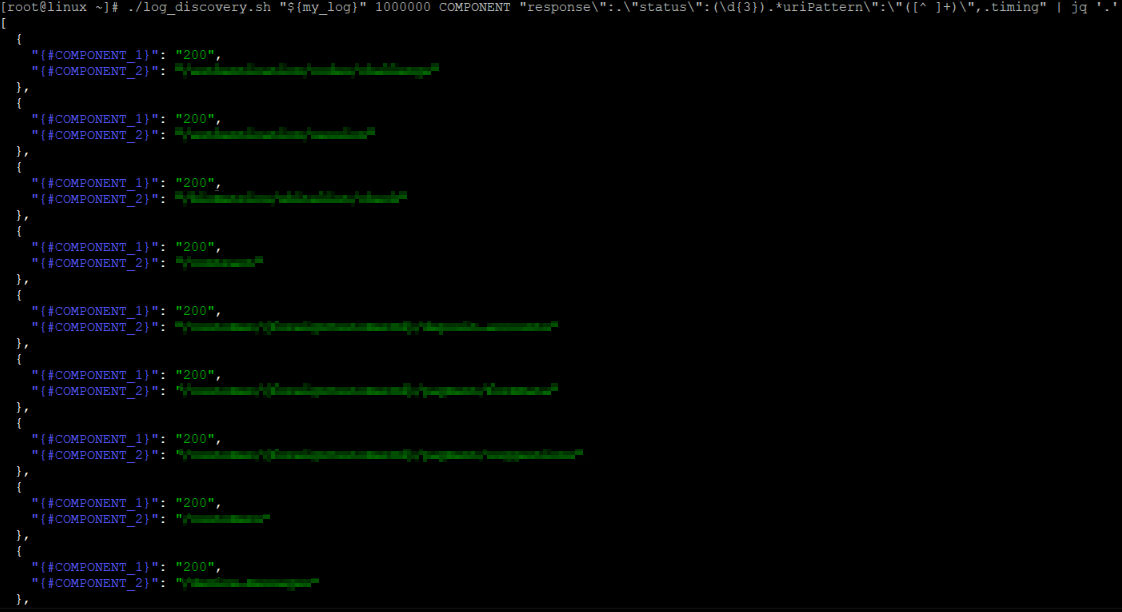
For instance, an effective set of metrics is extracted from logs to monitor the SEB mobile app. Request processing durations are logged alongside other parameters, enabling efficient grouping, such as by endpoint name and HTTP status code. This approach accommodates a wide range of potential combinations for “endpoint + HTTP status code”:

[root@linux ~]# ./log_discovery.sh "${my_log}" 1000000 COMPONENT "response\":.\"status\":(\d{3}).*uriPattern\":\"([^ ]+)\",.timing" | jq '.' | grep -c COMPONENT_1
205
[root@linux ~]#

LLD is able to gather them all:

For each discovered couple, monitoring of request processing durations is added, both for individual durations and 1 minute averages:

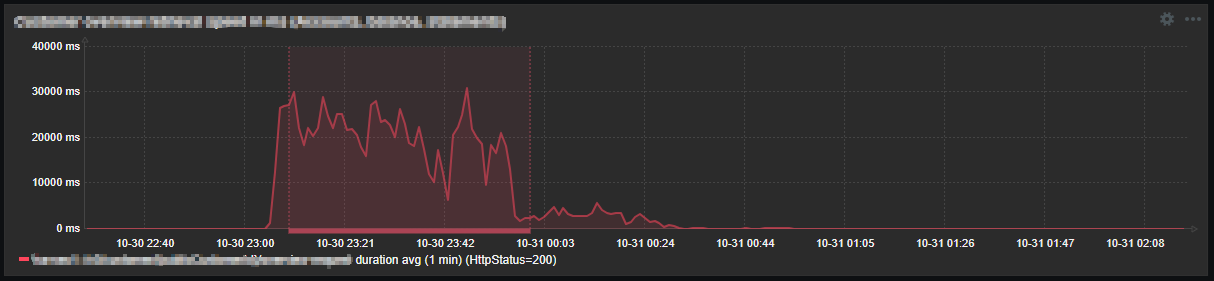
Certain significant combinations are enhanced with triggers, efficiently managed using the “Override” section in the LLD configuration to ensure they are created only for specific cases. So with this approach, some unexpected slowness can be nicely caught:

log.reader

For complex data collection scenarios, there was a need to implement a solution that allows data to be extracted from logs with minimal limitations. The approach was to create a log reading mechanism that could support any required data extraction logic on top of it. This was covered in more detail at Zabbix Summit 2024.

Zabbix agent 2

In addition to the mentioned custom log processing techniques, SEB had a good reason to use “Zabbix agent 2”. Both log[*] and log.count[*] are of the “Active” item type. These items are not processed in parallel by the Zabbix agent. In places with a large number of log-based items, “Zabbix Agent 2” was used, because it supports the concurrent processing of active checks.

The results

The ability to use LLD on logs was a game-changer and a lifesaver for SEB. Imagine hundreds of different items discovered from a single rule, along with the requirement to monitor any new entity matching a specific pattern as soon as it appears. Without LLD, meeting such a requirement would have been simply impossible. This approach covers many different areas, including mission-critical metrics such as counts of various requests and processing durations.

The ability to slice logs themselves and create any needed logic on top makes almost any custom log monitoring requirement possible. It gives the ability to analyze data in ways that wouldn’t be possible otherwise (e.g. average duration monitoring for large set of data).

In conclusion

SEB Bank in the Baltics relies heavily on data collection from logs. Zabbix is flexible enough to meet most of their needs when it comes to log monitoring, and – most importantly – it allows for custom implementations where required. This flexibility is highly appreciated, as it removes many barriers when monitoring the various components of SEB’s IT ecosystem and business functions.

The post Solving Log Monitoring Challenges at SEB Bank appeared first on Zabbix Blog.

Announcing Certificate Profile Selection

Post Syndicated from Let's Encrypt original https://letsencrypt.org/2025/01/09/acme-profiles.html

We are excited to announce a new extension to Let’s Encrypt’s implementation of the ACME protocol that we are calling “profile selection.” This new feature will allow site operators and ACME clients to opt in to the next evolution of Let’s Encrypt.

As of today, the staging environment is advertising a new field in its directory resource:

GET /directory HTTP/1.1
HTTP/1.1 200 OK
Content-Type: application/json

{
    ...
    "meta": {
        "profiles": {
            "classic": "The same profile you're accustomed to",
            "tlsserver": "https://letsencrypt.org/2025/01/09/acme-profiles/"
        }
    }
}

Here, the keys are the names of new “profiles”, and the values are human-readable descriptions of those profiles. A profile describes a collection of attributes about the certificate that will be issued, such as what extensions it will contain, how long it will be valid for, and more.

For example, the “classic” profile is exactly what it sounds like: certificates issued under the classic profile will look exactly the same as those that we have always issued, valid for 90 days.

But certificates issued under the “tlsserver” profile will have a number of differences tailored specifically towards TLS server usage:

  • No Common Name field (including a CN has been NOT RECOMMENDED by the Baseline Requirements for several years now)
  • No Subject Key Identifier (including a SKID is NOT RECOMMENDED by the Baseline Requirements)
  • No TLS Client Auth Extended Key Usage (root programs are moving towards requiring “single-purpose” issuance hierarchies, where every certificate has only a single EKU)
  • No Key Encipherment Key Usage for certificates with RSA public keys (this KU was used by older RSA-based TLS cipher suites, but is fully unnecessary in TLS 1.3)

Additionally, in the near future we will offer a “shortlived” profile which will be identical to the “tlsserver” profile but with a validity period of only 6 days. This profile isn’t available in Staging just yet, so keep an eye out for further announcements regarding short-lived certificates and why we think they’re exciting.

An ACME client can supply a desired profile name in a new-order request:

POST /acme/new-order HTTP/1.1
Host: example.com
Content-Type: application/jose+json

{
    "protected": base64url(...),
    "payload": base64url({
        "profile": "tlsserver",
        "identifiers": [
            { "type": "dns", "value": "www.example.org" },
            { "type": "dns", "value": "example.org" }
        ],
    }),
    "signature": "H6ZXtGjTZyUnPeKn...wEA4TklBdh3e454g"
}

If the new-order request is accepted, then the selected profile name will be reflected in the Order object when it is returned, and the resulting certificate after finalization will be issued with the selected profile. If the new-order request does not specify a profile, then the server will select one for it.

Guidance for ACME clients and users

If you are an ACME client author, we encourage you to introduce support for this new field in your client. Start by taking a look at the draft specification in the IETF ACME Working Group. A simple implementation might allow the user to configure a static profile name and include that name in all new-order requests. For a better user experience, check the configured name against the list of profiles advertised in the directory, to ensure that changes to the available profiles don’t result in invalid new-order requests. For clients with a user interface, such as a control panel or interactive command line interface, an implementation could fetch the list of profiles and their descriptions to prompt the user to select one on first run. It could also use a notification mechanism to inform the user of changes to the list of available profiles. We’d also love to hear from you about your experience implementing and deploying this new extension.

If you are a site operator or ACME client user, we encourage you to keep an eye on your ACME client of choice to see when they adopt this new feature, and update your client when they do. We also encourage you to try out the modern “tlsserver” profile in Staging, and let us know what you think of the changes we’ve made to the certificates issued under that profile.

What’s next?

Obviously there is more work to be done here. The draft standard will go through multiple rounds of review and tweaks before becoming an IETF RFC, and our implementation will evolve along with it if necessary. Over the coming weeks and months we will also be providing more information about when we enable profile selection in our production environment, and what our production profile options will be.

Thank you for coming along with us on this journey into the future of the Web PKI. We look forward to your testing and feedback!

Announcing Certificate Profile Selection

Post Syndicated from Let's Encrypt original https://letsencrypt.org/2025/01/09/acme-profiles/

We are excited to announce a new extension to Let’s Encrypt’s implementation of the ACME protocol that we are calling “profile selection.” This new feature will allow site operators and ACME clients to opt in to the next evolution of Let’s Encrypt.

As of today, the staging environment is advertising a new field in its directory resource:

GET /directory HTTP/1.1
HTTP/1.1 200 OK
Content-Type: application/json

{
    ...
    "meta": {
        "profiles": {
            "classic": "The same profile you're accustomed to",
            "tlsserver": "https://letsencrypt.org/2024/12/20/acme-profiles/"
        }
    }
}

Here, the keys are the names of new “profiles”, and the values are human-readable descriptions of those profiles. A profile describes a collection of attributes about the certificate that will be issued, such as what extensions it will contain, how long it will be valid for, and more.

For example, the “classic” profile is exactly what it sounds like: certificates issued under the classic profile will look exactly the same as those that we have always issued, valid for 90 days.

But certificates issued under the “tlsserver” profile will have a number of differences tailored specifically towards TLS server usage:

  • No Common Name field (including a CN has been NOT RECOMMENDED by the Baseline Requirements for several years now)
  • No Subject Key Identifier (including a SKID is NOT RECOMMENDED by the Baseline Requirements)
  • No TLS Client Auth Extended Key Usage (root programs are moving towards requiring “single-purpose” issuance hierarchies, where every certificate has only a single EKU)
  • No Key Encipherment Key Usage for certificates with RSA public keys (this KU was used by older RSA-based TLS cipher suites, but is fully unnecessary in TLS 1.3)

Additionally, in the near future we will offer a “shortlived” profile which will be identical to the “tlsserver” profile but with a validity period of only 6 days. This profile isn’t available in Staging just yet, so keep an eye out for further announcements regarding short-lived certificates and why we think they’re exciting.

An ACME client can supply a desired profile name in a new-order request:

POST /acme/new-order HTTP/1.1
Host: example.com
Content-Type: application/jose+json

{
    "protected": base64url(...),
    "payload": base64url({
        "profile": "tlsserver",
        "identifiers": [
            { "type": "dns", "value": "www.example.org" },
            { "type": "dns", "value": "example.org" }
        ],
    }),
    "signature": "H6ZXtGjTZyUnPeKn...wEA4TklBdh3e454g"
}

If the new-order request is accepted, then the selected profile name will be reflected in the Order object when it is returned, and the resulting certificate after finalization will be issued with the selected profile. If the new-order request does not specify a profile, then the server will select one for it.

Guidance for ACME clients and users

If you are an ACME client author, we encourage you to introduce support for this new field in your client. Start by taking a look at the draft specification in the IETF ACME Working Group. A simple implementation might allow the user to configure a static profile name and include that name in all new-order requests. For a better user experience, check the configured name against the list of profiles advertised in the directory, to ensure that changes to the available profiles don’t result in invalid new-order requests. For clients with a user interface, such as a control panel or interactive command line interface, an implementation could fetch the list of profiles and their descriptions to prompt the user to select one on first run. It could also use a notification mechanism to inform the user of changes to the list of available profiles. We’d also love to hear from you about your experience implementing and deploying this new extension.

If you are a site operator or ACME client user, we encourage you to keep an eye on your ACME client of choice to see when they adopt this new feature, and update your client when they do. We also encourage you to try out the modern “tlsserver” profile in Staging, and let us know what you think of the changes we’ve made to the certificates issued under that profile.

What’s next?

Obviously there is more work to be done here. The draft standard will go through multiple rounds of review and tweaks before becoming an IETF RFC, and our implementation will evolve along with it if necessary. Over the coming weeks and months we will also be providing more information about when we enable profile selection in our production environment, and what our production profile options will be.

Thank you for coming along with us on this journey into the future of the Web PKI. We look forward to your testing and feedback!

New AWS Skill Builder course available: Securing Generative AI on AWS

Post Syndicated from Anna McAbee original https://aws.amazon.com/blogs/security/new-aws-skill-builder-course-available-securing-generative-ai-on-aws/

To support our customers in securing their generative AI workloads on Amazon Web Services (AWS), we are excited to announce the launch of a new AWS Skill Builder course: Securing Generative AI on AWS.

This comprehensive course is designed to help security professionals, architects, and artificial intelligence and machine learning (AI/ML) engineers understand and implement security best practices for generative AI applications and models in the AWS Cloud.

AWS Skill Builder is a learning center for AWS customers and partners to build cloud skills through digital trainings, self-paced labs, and other course types. AWS Skill Builder has a variety of AWS security content to help customers understand concepts and gain hands-on experience with AWS security.

The course highlights are as follows:

  • Introduction to the Generative AI Security Scoping Matrix – Learn how to categorize and secure different AI implementations by using this innovative framework.
  • Coverage of key AI security frameworks – Gain insights into the OWASP Top 10 for Large Language Models (LLMs) and the MITRE ATLAS framework.
  • Practical security strategies – Develop skills to implement comprehensive security across the areas of governance, legal, risk, controls, and resilience for various AI scopes.
  • Real-world applications – Apply security concepts to case studies covering consumer applications, enterprise solutions, pre-trained models, fine-tuned models, and self-trained models.

To take the new course

  1. Sign up for your free AWS Skill Builder account.
  2. Search for “Securing Generative AI on AWS” in the course catalog.
  3. Enroll in the course and start learning!

More information

For more information on generative AI security, we recommend reviewing our recent blog post series:

We value your feedback and contributions. If you have thoughts or insights about the course after completing it, please share them in the Comments section below or contact AWS Support.

Anna McAbee
Anna McAbee

Anna is a Security Specialist Solutions Architect focused on financial services, generative AI, and incident response at AWS. Outside of work, Anna enjoys Taylor Swift, cheering on the Florida Gators football team, watching the NFL, and traveling the world.
Pablo Roesch
Pablo Roesch

Pablo is a Technical Senior Product Manager at AWS, managing Security and Cloud Operations Training portfolios. He leverages generative AI to revolutionize course development and go-to-market strategies, combining technical expertise with innovative approaches. Pablo holds a patent for External Communication with Packaged Virtual Machine Applications (US 11,7973,26 B2), reflecting his expertise in cloud and virtualization technology.
Meg Peddada
Meg Peddada

Meg, a Senior Security Solutions Architect with over 10 years of experience, specializes in security, risk, and compliance. Her expertise spans governance, security automations, threat management, and architecture. In her spare time, she loves playing volleyball, arts and crafts, and finding new brunch experiences.

New Research: Enhancing Botnet Detection with AI using LLMs and Similarity Search

Post Syndicated from Tom Caiazza original https://blog.rapid7.com/2025/01/08/new-research-enhancing-botnet-detection-with-ai-using-llms-and-similarity-search/

New Research: Enhancing Botnet Detection with AI using LLMs and Similarity Search

As botnets continue to evolve, so do the techniques required to detect them. While Transport Layer Security (TLS) encryption is widely adopted for secure communications, botnets leverage TLS to obscure command-and-control (C2) traffic. These malicious actors often have identifiable characteristics embedded within their TLS certificates, opening a potential pathway for advanced detection techniques.

In first-of-its-kind research, Rapid7’s Dr. Stuart Millar, in collaboration with Kumar Shashwat, Francis Hahn and Prof. Xinming Ou, at the University of South Florida, studied the use of AI large language models (LLMs) to detect botnets’ use of TLS encryption by analyzing embedding similarities to weed out botnets within a sea of benign TLS certificates. The work was presented at AISec 2024 in Salt Lake City as part of the leading ACM CCS conference toward the end of last year, where previously Rapid7 collected the best paper award.

Botnets — networks of hacked devices that attackers control remotely — often use TLS encryption to hide their activity. This encryption keeps the traffic secure, making it challenging for traditional security tools to detect whether a device is part of a botnet. Millar and company found they could detect botnets by analyzing the unique characteristics in the TLS certificates that each server uses to identify itself, dramatically reducing the time and human effort required.

Large language models can represent text as embeddings, or numerical vectors that capture the meaning and structure of the text. These embeddings were used to create vector representations of the text in TLS certificates, such as the organization names and country codes listed on them.  By projecting these representations into a vector space and then using a similarity search, any new certificate can first be compared to a known set of botnet and benign certificates, and then a decision made as to whether or not it is malicious.

They found that in using an open-source LLM called C-BERT, the model achieved an accuracy rate of 0.994, surpassing proprietary alternatives in accuracy, speed, and cost-efficiency. This means it could reliably distinguish between botnet and benign certificates far more effectively and efficiently than standard practices, which was confirmed through random sampling.

In order to simulate a real world scenario, the researchers tested the model on 150,000 TLS certificates. They found 13 certificates as potential botnets which, when verified against a malware detection service, yielded one certificate that was found to be malicious. This approach eliminated the time intensive and costly process of identifying malicious botnets manually.

The model was also able to identify zero-day botnets, or those that had not yet been documented before. By omitting certain known botnets during training and then testing with these omitted samples, they demonstrated that the model could still detect them, even without prior exposure.

Deploying this AI solution in a real-world environment offers cybersecurity teams a substantial advantage in botnet detection by reducing false positives and minimizing manual inspection. Future research aims to expand the range of certificate attributes used in embeddings, improve real-time processing capabilities, and integrate additional datasets for a broader scope. Explore the full research paper for an in-depth look at the methodology and results of an LLM-based approach to botnet TLS certificate detection.

[$] A look at the Sequoia command-line interface

Post Syndicated from daroc original https://lwn.net/Articles/1003243/

The

Sequoia
OpenPGP library has been in development for some time. LWN
covered the library in 2020. Now the project’s
command-line interface has
been released. The sq tool offers a
promising alternative to the venerable

GNU Privacy Guard
(GPG) tool — albeit one with a
different interface, set of terminology, and approach to the web of
trust. Several distributions are making increasing use of the tool
behind the scenes.

CVE-2025-0282: Ivanti Connect Secure zero-day exploited in the wild

Post Syndicated from Caitlin Condon original https://blog.rapid7.com/2025/01/08/etr-cve-2025-0282-ivanti-connect-secure-zero-day-exploited-in-the-wild/

CVE-2025-0282: Ivanti Connect Secure zero-day exploited in the wild

On Wednesday, January 8, 2025, Ivanti disclosed two CVEs affecting Ivanti Connect Secure, Policy Secure, and Neurons for ZTA gateways. CVE-2025-0282 is a stack-based buffer overflow vulnerability that allows remote, unauthenticated attackers to execute code on the target device. CVE-2025-0283 is a stack-based buffer overflow that allows local authenticated attackers to escalate privileges on the device.

Ivanti’s advisory indicates that CVE-2025-0282 has been exploited in the wild against a limited number of Connect Secure devices. Per the vendor, Ivanti Policy Secure and Neurons for ZTA are not known to have been exploited in the wild at time of disclosure. Google’s Mandiant division and Microsoft’s Threat Intelligence Center (MSTIC) are credited with the discovery of the two issues, which almost certainly means further intelligence will be released soon on one or more zero-day threat campaigns targeting Ivanti devices.

Ivanti also has a short blog available on the new CVEs here.

Mitigation guidance

The following products and versions are vulnerable to CVE-2025-0282:

  • Ivanti Connect Secure 22.7R2 through 22.7R2.4
  • Ivanti Policy Secure 22.7R1 through 22.7R1.2
  • Ivanti Neurons for ZTA 22.7R2 through 22.7R2.3

The following products and versions are vulnerable to CVE-2025-0283:

  • Ivanti Connect Secure 22.7R2.4 and prior, 9.1R18.9 and prior
  • Ivanti Policy Secure 22.7R1.2 and prior
  • Ivanti Neurons for ZTA 22.7R2.3 and prior

Ivanti has a full table of affected versions and corresponding solution estimates in its advisory. As of 1 PM ET on Wednesday, January 8, patches are available for both CVEs in Ivanti Connect Secure (22.7R2.5), but the CVEs are unpatched in Ivanti Policy Secure and Neurons for ZTA (patches appear to be expected January 21, 2025, per the advisory).

Customers should apply available Ivanti Connect Secure patches immediately, without waiting for a typical patch cycle to occur. Ivanti’s advisory notes that “Exploitation of CVE-2025-0282 can be identified by the Integrity Checker Tool (ICT). We strongly advise all customers to closely monitor their internal and external ICT as a part of a robust and layered approach to cybersecurity to ensure the integrity and security of the entire network infrastructure.”

For the latest information, please refer to the vendor advisory.

Rapid7 customers

Our VM engineering team is researching options for coverage of CVE-2025-0282 and CVE-2025-0283 in Ivanti Connect Secure and expects vulnerability checks to be available to InsightVM and Nexpose customers no later than Thursday, January 9, 2025.

2024: Year in Review (Tor Blog)

Post Syndicated from jzb original https://lwn.net/Articles/1004460/

The Tor Project has published a
review
of major milestones from 2024, including merging with
the Tails project
, work to enable human-friendly .onion
addresses, and the launch of WebTunnel:

By mimicking common internet protocols, WebTunnel improves the
resilience of the Tor network in regions with heavy censorship. And
since its launch earlier this year, we’ve made sure to prioritize
small download sizes for more convenient distribution and simplified
the support of uTLS integration further mimicking the characteristics
of more widespread browsers. This makes Webtunnel safe for general
users because it helps conceal the fact that a tool like Tor is being
used.

Customize the scope of IAM Access Analyzer unused access analysis

Post Syndicated from Stéphanie Mbappe original https://aws.amazon.com/blogs/security/customize-the-scope-of-iam-access-analyzer-unused-access-analysis/

AWS Identity and Access Management Access Analyzer simplifies inspecting unused access to guide you towards least privilege. You can use unused access findings to identify over-permissive access granted to AWS Identity and Access Management (IAM) roles and users in your accounts or organization. From a delegated administrator account for IAM Access Analyzer, you can use the dashboard to review unused access findings across your organization and prioritize the accounts to inspect based on the volume and type of findings. The findings highlight unused roles, unused access keys for IAM users, and unused passwords for IAM users. For active IAM users and roles, the findings provide visibility into unused services and actions. Recently, IAM Access Analyzer launched new configuration capabilities that you can use to customize the analysis. You can select accounts, roles, and users to exclude, and focus on the areas that matter the most to you. You can use identifiers such as account ID or scale configuration using tags. By scoping the IAM Access Analyzer to monitor a subset of accounts and roles, you can reduce noise from unwanted findings. You can update the configuration when needed to change the scope of analysis. With this new offering, IAM Access Analyzer provides enhanced controls to help you tailor the analysis more closely to your organization’s security needs.

In this post, we walk you through an example scenario. Imagine that you’re a cloud administrator in a company that uses Amazon Web Services (AWS). You use AWS Organizations to organize your workload into several organizational units (OUs) and accounts. You have dedicated accounts for testing and experimenting with new AWS features called sandbox accounts across your organization. The sandbox accounts can be created by anyone in your company and are centrally recorded. You’re using tags on IAM resources and have followed AWS best practices and strategies when tagging your AWS resources. Tags are applied to the IAM roles created by your teams.

To make sure that your teams are following the principle of least privilege and are working with only the required permissions to access the AWS accounts, you use IAM Access Analyzer. You created an unused access analyzer at the organization level so it will monitor the AWS accounts in your organization. You noticed that you have multiple unused access findings. After analysis, your security team suggests the exclusion of some AWS accounts, IAM roles, and users so they can focus on the relevant findings. They want the sandbox accounts and the IAM roles they use for security purposes (such as auditing, incident response) to be excluded from the unused access analysis.

You can select accounts and roles to exclude when you create a new analyzer or update the analyzer later. In this post, we show you how to configure IAM Access Analyzer unused access finding to exclude specific accounts across your organization and specific principals (IAM roles and IAM users) once you have set up an analyzer. There is no additional pricing for using the prescriptive recommendations after you have enabled unused access findings.

Prerequisites

The following are the prerequisites to configure IAM Access Analyzer for unused access analysis:

  • An unused access analyzer created at the organization level
  • Administrative level access to the IAM Access Analyzer delegated administrator account
  • A list of account IDs that you want to exclude
  • IAM roles with tags

In the following sections, you will learn how to customize your IAM Access Analyzer to better suit your organization’s needs. This includes the following:

  1. Explore how to exclude specific AWS accounts from the analyzer’s unused access findings.
  2. See how to exclude tagged IAM roles from the analysis, allowing you to focus on the most relevant security insights and you see how to review exclusions on your analyzer to modify them as needed.
  3. By the end, you will have a tailored unused access analyzer that provides more meaningful and actionable results for your organization.

Exclude specific accounts across your organization

In this section, you will see how to update your existing unused access analyzer at the organization level through the AWS Management Console and AWS Command Line Interface (AWS CLI) to exclude specific AWS account IDs from its analysis.

If you don’t have an unused access analyzer in the organization, see this post for instructions on how to create one.

Use the console to update your unused access analyzer:

  1. Connect to your IAM Access Analyzer delegated administrator account (by default, your organization management account).
  2. Open the IAM Access Analyzer console in your management account. You will see the dashboard with your active finding by selecting the analyzer of your choice on the top right. In this example, the analyzer has 251 active findings.
    Figure 1: Unused access findings dashboard without exclusions

    Figure 1: Unused access findings dashboard without exclusions

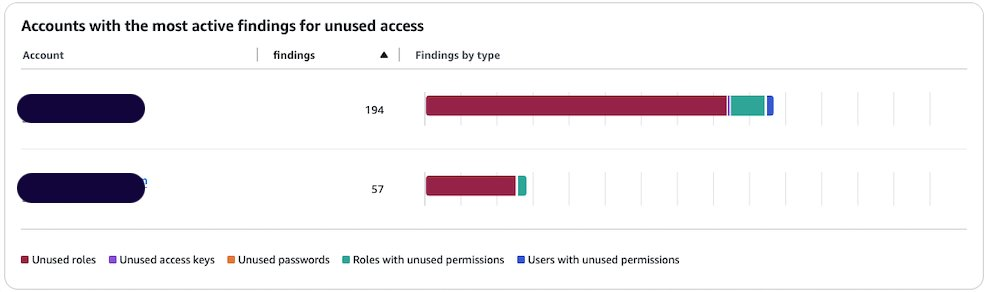
  3. You can see the split of active findings per account. The example account has 57 active findings that you want to exclude from it.
    Figure 2: Unused access findings per account

    Figure 2: Unused access findings per account

  4. Select Analyzer settings under Access Analyzer in that navigation pane.
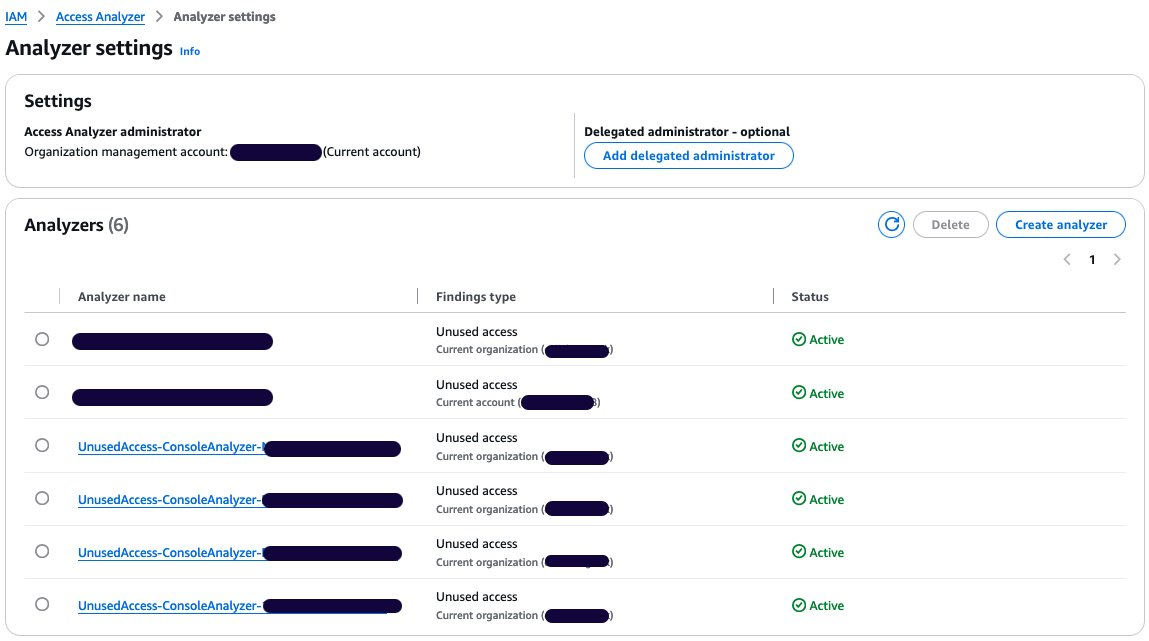
  5. The analyzer settings page presents the analyzers in your AWS Region and their status.
  6. Select your unused access analyzer in the list based on its name.
    Figure 3: Active access analyzers

    Figure 3: Active access analyzers

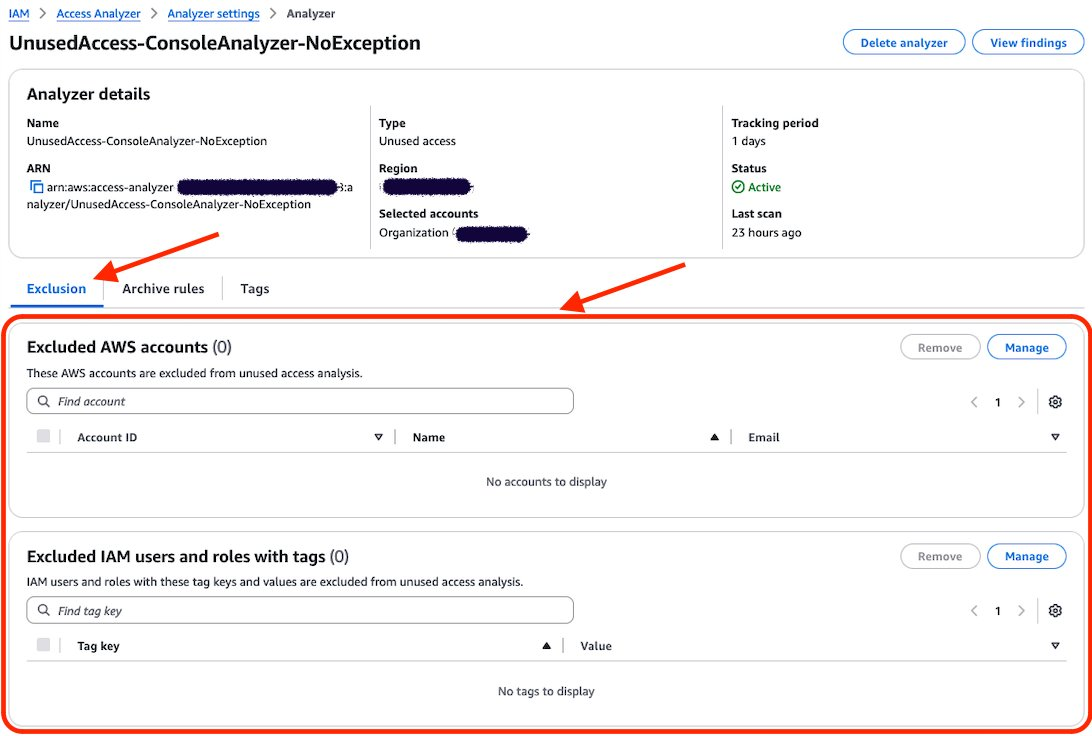
  7. On the Analyzer page, you can see the analyzer settings and a new tab called Exclusion. Because you have no excluded AWS accounts, the count of Excluded AWS accounts is 0 and there are no accounts displayed.
    Figure 4: Unused access analyzer exclusion tab

    Figure 4: Unused access analyzer exclusion tab

  8. Choose Manage in the Excluded AWS accounts section.
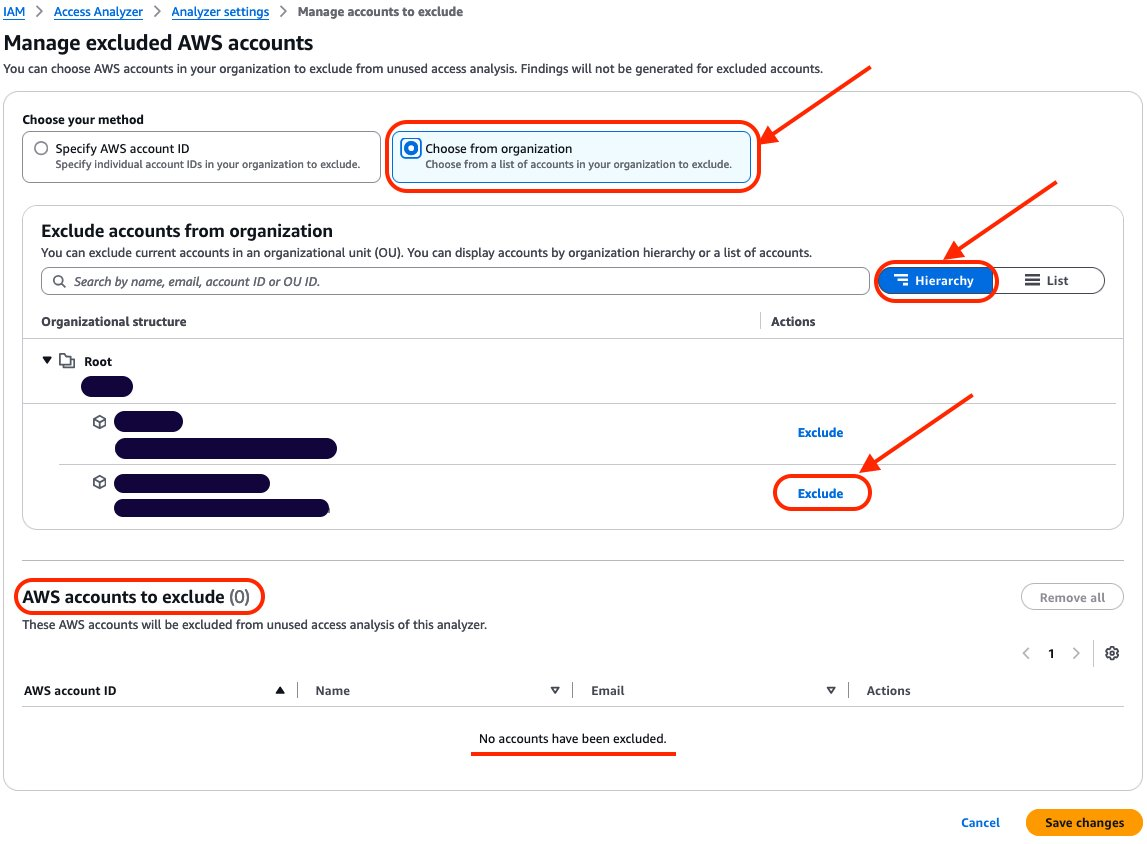
  9. Select Choose from organization and Hierarchy and choose Exclude next to the sandbox account that you want to exclude.
    Figure 5: Exclude sandbox account

    Figure 5: Exclude sandbox account

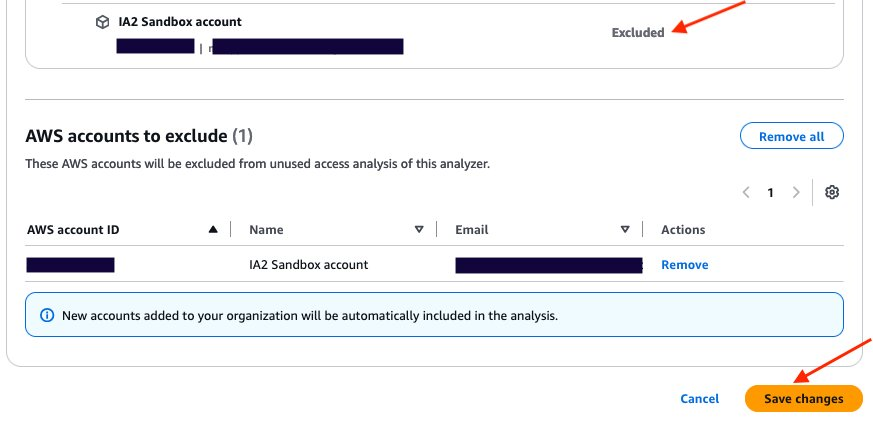
  10. After you select Exclude for the sandbox account, the account will be deselected and will appear in AWS accounts to exclude. The count of accounts to exclude has changed from 0 to 1. After you have finished, choose Save changes.
    Figure 6: Verify that the account is excluded and save changes

    Figure 6: Verify that the account is excluded and save changes

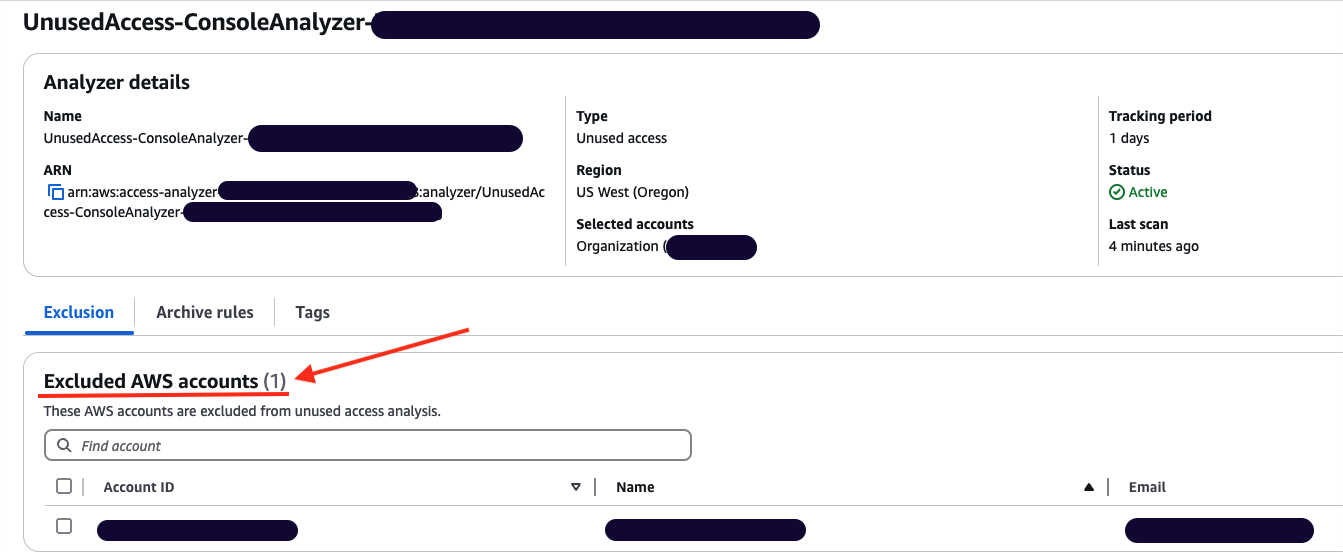
  11. The page will be automatically updated with your changes. You can then review the Excluded AWS accounts and verify that your excluded account is correctly configured.
    Figure 7: Analyzer configuration updated with excluded account

    Figure 7: Analyzer configuration updated with excluded account

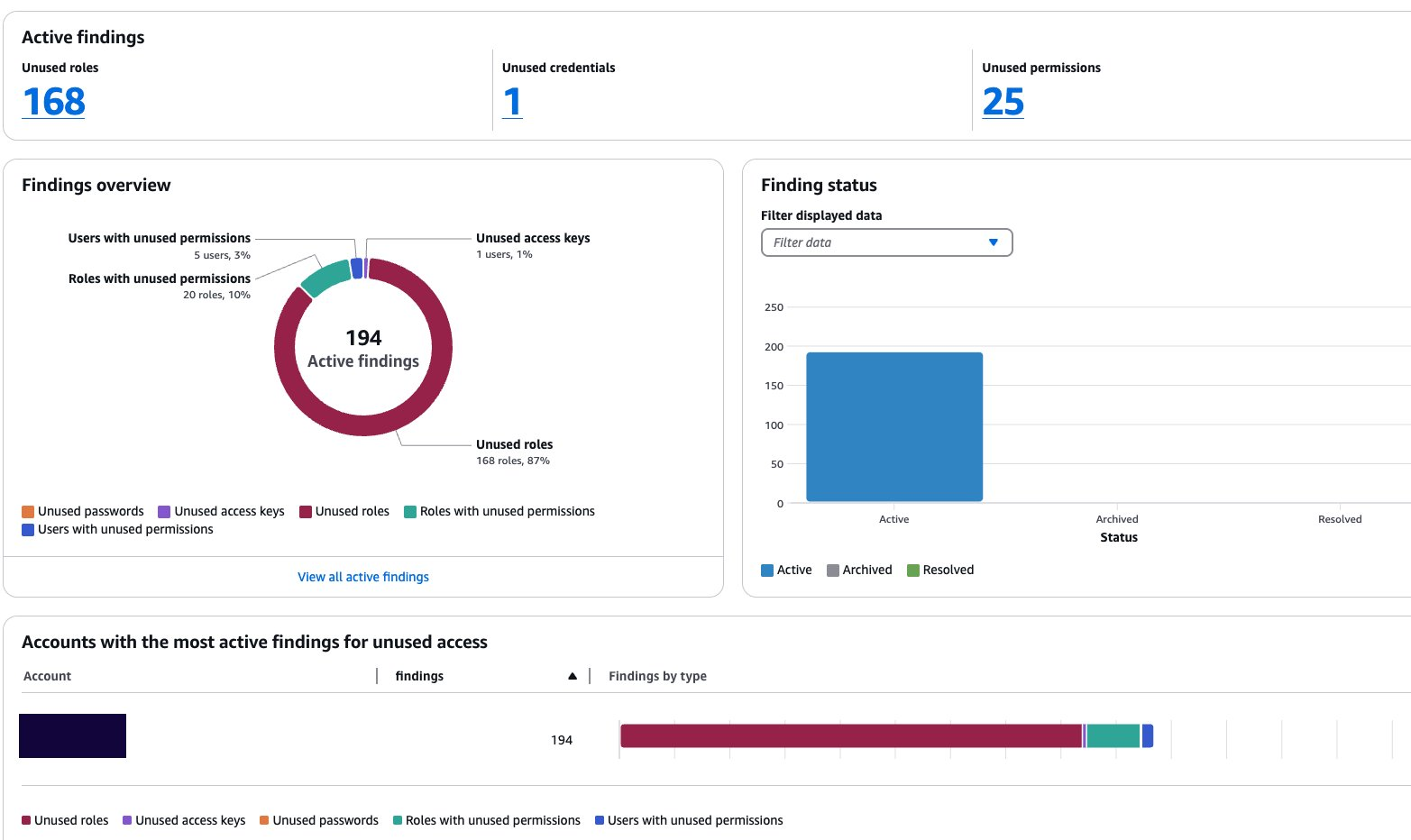
  12. You can go back to the console dashboard and see the results. In this example, the exclusion of the sandbox account has caused the total number of active findings to go down from 251 to 194.
    Figure 8: Dashboard showing a reduction in active findings

    Figure 8: Dashboard showing a reduction in active findings

Use AWS CLI to update your unused access analyzer:

You can update your existing analyzer using the AWS CLI command aws accessanalyzer update-analyzer. Use the following command, replacing <YOUR-ANALYZER-NAME> with the name of your analyzer.

aws accessanalyzer update-analyzer 
--analyzer-name <YOUR-ANALYZER-NAME>
--configuration '{
  "unusedAccess": {
    "analysisRule": {
      "exclusions": [
        {
          "accountIds": [
            "222222222222"
          ]
        }
      ]
    }
  }
}'

You will obtain a result similar to the following:

{
    "revisionId": "<UNIQUE-REVISION-NUMBER>", 
    "configuration": {
        "unusedAccess": {
            "analysisRule": {
                "exclusions": [
                    {
                        "accountIds": [
                            "222222222222"
                        ]
                    }
                ]
            }, 
            "unusedAccessAge": 90
        }
    }

You have successfully excluded a sandbox account from the unused access analysis. Now you will exclude the IAM roles used by the security team to audit your accounts based on tags.

Excluding specific principals in your organization using tags

In this section, you will see how to update an existing unused access analyzer by excluding tagged IAM roles in your organization using the console and then AWS CLI.

Use the console to update your unused access analyzer:

  1. Open the IAM Access Analyzer console.
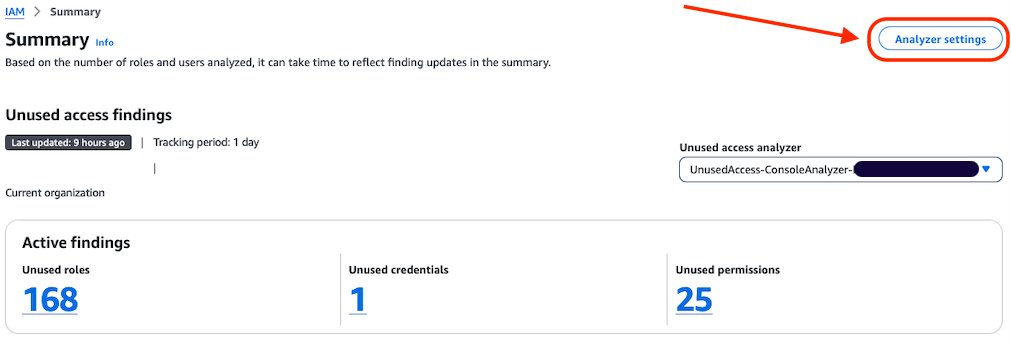
  2. Review the summary dashboard containing your unused findings. Choose Analyzer settings at the top of the screen.
    Figure 9: IAM Access Analyzer summary dashboard

    Figure 9: IAM Access Analyzer summary dashboard

  3. You will see a list of analyzers created in your account in that Region. Select the analyzer that you want to update.
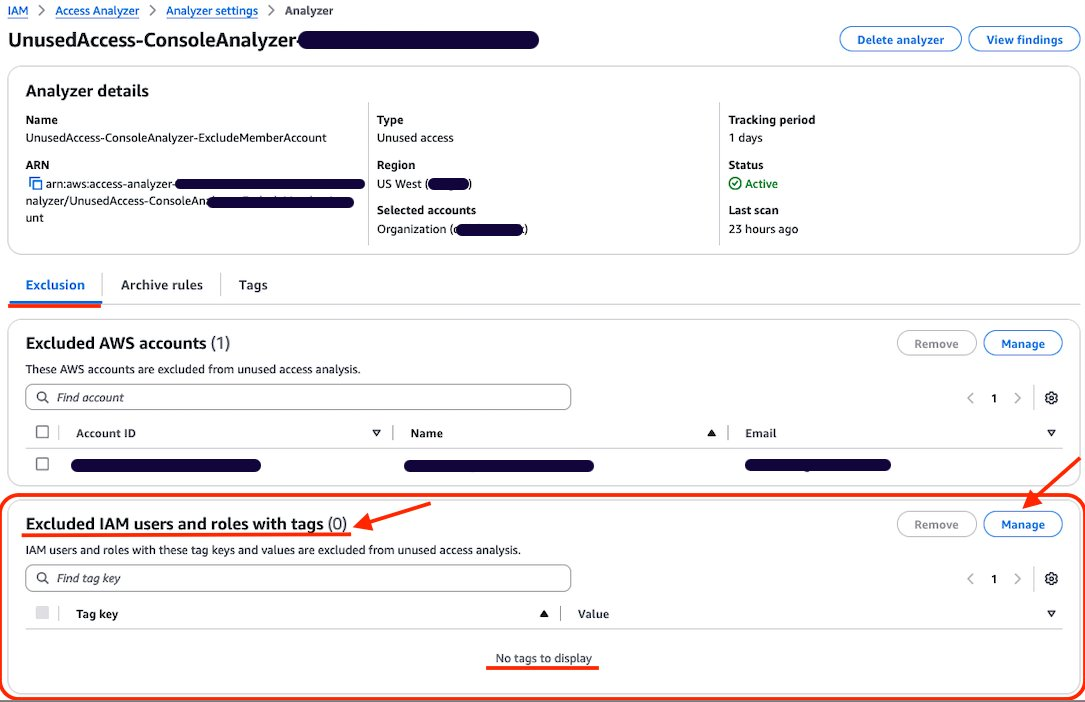
  4. Review the analyzer page. On the Exclusion tab, you will see Exclude IAM users and roles with tags with a count of 0.
    Figure 10: Configure exclusion of IAM roles using tag

    Figure 10: Configure exclusion of IAM roles using tag

  5. Choose Manage in the Excluded IAM users and roles with tags section.
  6. Add the tags attached to the roles that you want to exclude from the analysis and choose Save changes.
    Figure 11: Add tag to exclude

    Figure 11: Add tag to exclude

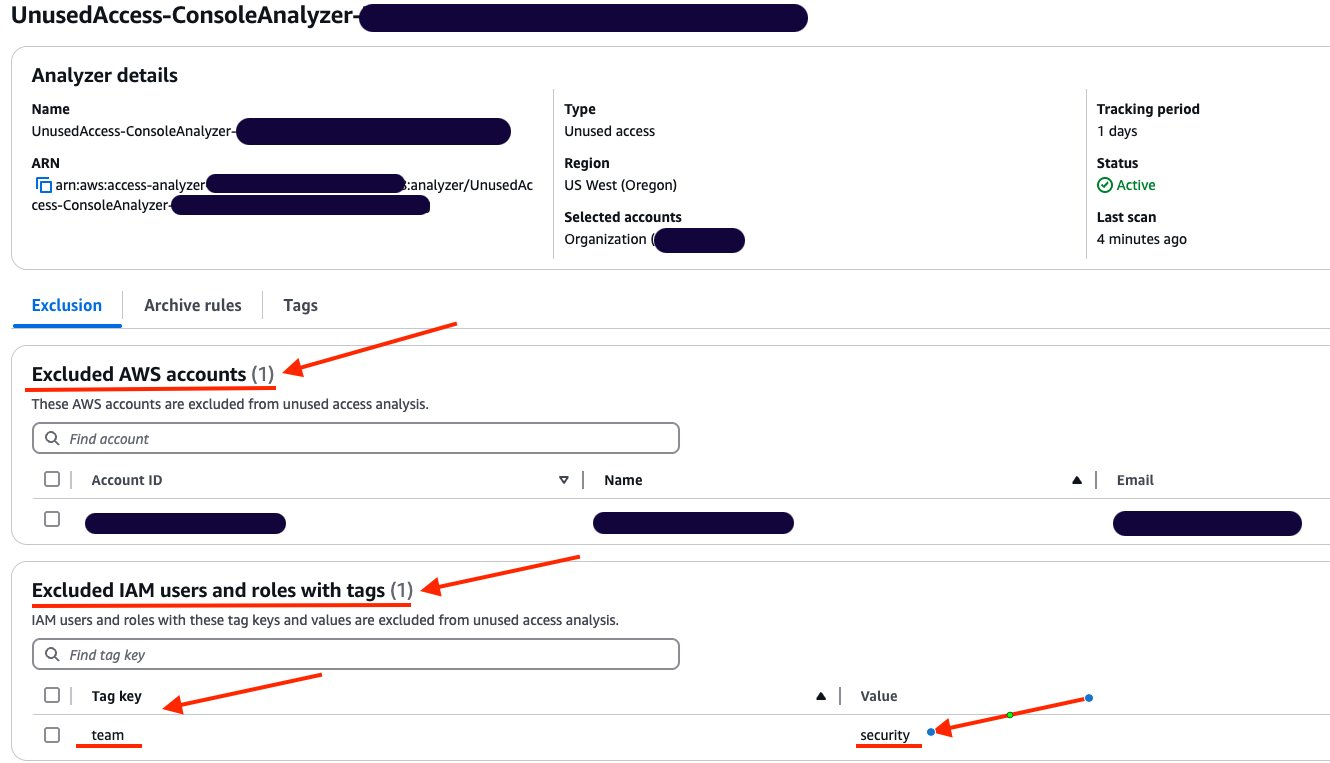
  7. You can now see that Excluded IAM users and roles with tags now has a count of 1, and you can see the tags in the list.
    Figure 12: List of exclusion tags

    Figure 12: List of exclusion tags

Use AWS CLI to update your unused access analyzer:

You can also update your existing analyzer using the AWS CLI command aws accessanalyzer update-analyzer. Using the following command, replace <YOUR-ANALYZER-NAME> with the name of your analyzer.

aws accessanalyzer update-analyzer 
--analyzer-name <YOUR-ANALYZER-NAME> 
--configuration '{
  "unusedAccess": {
    "analysisRule": {
      "exclusions": [
        {
          "accountIds": [
            "222222222222"
          ]
        },
        {
          "resourceTags": [
            {
              "team": "security"
            }
          ]
        }
      ]
    }
  }
}'

A successful response will look like the following:

{
    "revisionId": "<UNIQUE-REVISION-NUMBER>", 
    "configuration": {
        "unusedAccess": {
            "analysisRule": {
                "exclusions": [
                    {
                        "accountIds": [
                            "222222222222"
                        ]
                    }, 
                    {
                        "resourceTags": [
                            {
                                "team": "security"
                            }
                        ]
                    }
                ]
            }, 
            "unusedAccessAge": 90
        }
    }
}

Review the exclusion on your analyzer

You can review, remove, or update the exclusions configured on your analyzer by using the console or AWS CLI. For example, as a security administrator managing multiple accounts, you might initially exclude IAM roles that have the tag security from analysis. However, you might need to review these exclusions if your policies change, requiring analysis of certain security roles or removing the exclusion entirely. By adjusting your exclusions, you can make sure that your analyzer’s results remain relevant to your organization’s needs and account structure.

Review the exclusion on unused access analyzer using the console:

In this section, review the tags that have been excluded from an analyzer.

  1. Open the IAM console.
  2. Select Access Analyzer, under Access reports, you will see a summary dashboard of findings from an analyzer.
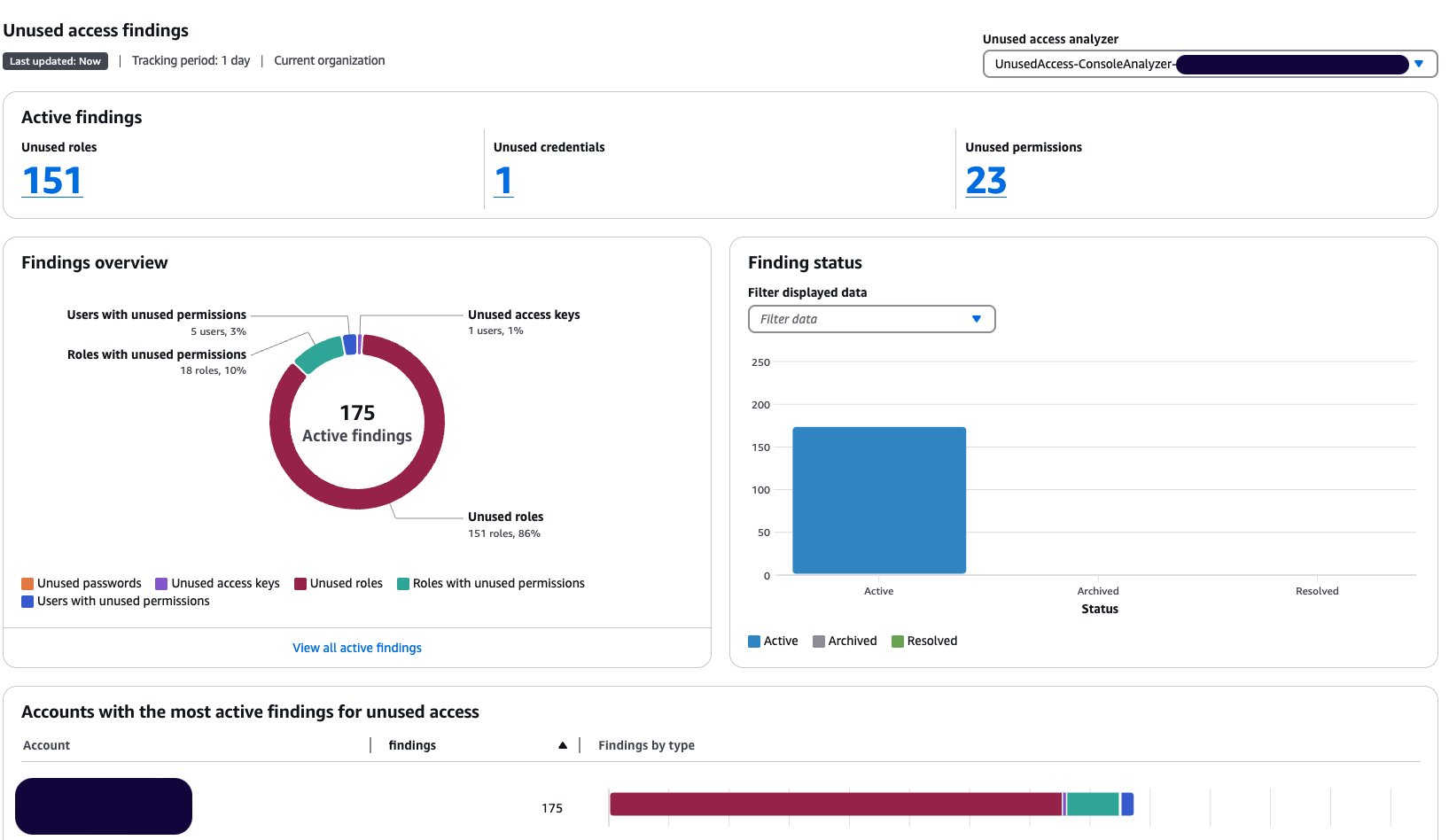
    1. The Active findings section shows the number of active findings for unused roles, the number of active findings for unused credentials and the number of active findings for unused permissions.
    2. The Findings overview section includes a breakdown of the active findings.
    3. The Findings status section shows the status of findings (whether active, archived or resolved).
      Figure 13: Unused access analyzer dashboard

      Figure 13: Unused access analyzer dashboard

  3. Select the Analyzer settings at the top of the screen.
  4. Select the analyzer that you want to review to see the exclusion tags.
    Figure 14: Review unused access analyzer exclusions

    Figure 14: Review unused access analyzer exclusions

  1. After applying the tags, the updated dashboard is shown after the next scan.
    Figure 15: Dashboard showing reduction of findings after exclusions

    Figure 15: Dashboard showing reduction of findings after exclusions

Review the exclusion on an unused access analyzer using AWS CLI:

Using the name of your analyzer, you can run the command get-analyzer to see the configured exclusion. Using the following command, replace <YOUR-ANALYZER-NAME> with the name of your analyzer:

aws accessanalyzer get-analyzer --analyzer-name <YOUR-ANALYZER-NAME>

You will get a response similar to the following:

{
  "analyzer": {
    "status": "ACTIVE",
    "name": "<YOUR-ANALYZER-NAME>",
    "tags": {},
    "revisionId": "<UNIQUE-REVISION-NUMBER>",
    "arn": "arn:aws:access-analyzer:<REGION>:111111111111:analyzer/<YOUR-ANALYZER-NAME>",
    "configuration": {
      "unusedAccess": {
        "analysisRule": {
          "exclusions": [
            {
              "accountIds": [
                "222222222222"
              ]
            },
            {
              "resourceTags": [
                {
                  "team": "security"
                }
              ]
            }
          ]
        },
        "unusedAccessAge": 90
      }
    },
    "type": "ORGANIZATION_UNUSED_ACCESS",
    "createdAt": "2024-10-11T22:26:57Z"
  }
}

Conclusion

In this post, you learned how to tailor your unused access analyzer to your needs by excluding specific accounts and IAM roles. To exclude the accounts in your organization from being monitored by IAM Access Analyzer, you can use a list of account IDs or select them from a hierarchical view of your organization structure. You can exclude IAM roles and IAM users based on tags. By customizing the exclusion on the unused access analyzer, you saw that the number of active findings went down, helping you focus on the findings that matter most. With this new offering, IAM Access Analyzer provides enhanced controls to help you tailor the analysis more closely to your organization’s security needs.

If you have feedback about this post, submit comments in the Comments section below.
Stéphanie Mbappe

P. Stéphanie Mbappe

Stéphanie is a Security Consultant with Amazon Web Services. She delights in assisting her customers at any step of their security journey. Stéphanie enjoys learning, designing new solutions, and sharing her knowledge with others.

Mathangi Ramesh

Mathangi Ramesh

Mathangi is the product manager for AWS Identity and Access Management. She enjoys talking to customers and working with data to solve problems. Outside of work, Mathangi is a fitness enthusiast and a Bharatanatyam dancer. She holds an MBA degree from Carnegie Mellon University.

Reke Jarikre

Reke Jarikre

Reke is an Associate Security Consultant at Amazon Web Services. She is passionate about safeguarding client infrastructures and crafting robust security measures. Outside work, she enjoys exploring new technologies, public speaking and contributing to open-source projects.

The collective thoughts of the interwebz