Post Syndicated from Talks at Google original https://www.youtube.com/watch?v=nbLHXOK20nQ
Access Amazon Redshift data from Salesforce Data Cloud with Zero Copy Data Federation
Post Syndicated from Vijay Gopalakrishnan original https://aws.amazon.com/blogs/big-data/access-amazon-redshift-data-from-salesforce-data-cloud-with-zero-copy-data-federation/
This post is co-authored by Vijay Gopalakrishnan, Director of Product, Salesforce Data Cloud.
In today’s data-driven business landscape, organizations collect a wealth of data across various touch points and unify it in a central data warehouse or a data lake to deliver business insights. This data is primarily used for analytical and machine learning purposes, but not easily accessible by the business users across Sales, Service, and Marketing teams to make data driven decisions. Salesforce and Amazon collaborated to address this challenge, by making the data accessible to the users in the flow of their work, with Zero Copy Data Federation between Salesforce Data Cloud and Amazon Redshift. This solution empowers businesses to access Redshift data within the Salesforce Data Cloud, breaking down data silos, gaining deeper insights, and creating unified customer profiles to deliver highly personalized experiences across various touchpoints. By eliminating the need for data replication, this integration improves efficiency and reduces costs while enabling real-time access to valuable business data.
In this post, we explore the benefits of the new Zero Copy Data Federation and provide a step-by-step guidance to configure it in Salesforce Data Cloud.
What is Salesforce Data Cloud?
Salesforce Data Cloud is a data platform that unifies all of your company’s data into Salesforce’s Einstein 1 Platform, giving every team a 360-degree view of the customer to drive automation, create analytics, personalize engagement, and power trusted artificial intelligence (AI). Data Cloud creates a holistic customer view by turning volumes of disconnected data into a unified customer profile that’s straightforward to access and understand. This includes diverse datasets like telemetry data, web engagement data, and more across your organization or your external data lakes and warehouses. This unified view helps your Sales, Service, and Marketing teams build personalized customer experiences, invoke data-driven actions and workflows, and safely drive AI across all your Salesforce apps.
What is Amazon Redshift?
Amazon Redshift is a fast, fully managed, petabyte-scale data warehouse service that makes it simple and cost-effective to efficiently analyze all your data using your existing business intelligence (BI) tools. It’s optimized for datasets ranging from a few hundred gigabytes to a petabyte or more and delivers better price-performance compared to most traditional data warehousing solutions. With a fully managed AI powered massively parallel processing (MPP) architecture, Amazon Redshift makes business decision-making quick and cost-effective.
What is Zero Copy Data Federation?
Zero Copy Data Federation, a Salesforce Data Cloud capability, unifies Salesforce and Amazon Redshift data through a point-and-click interface. It provides secure, real-time access to Redshift data without copying, keeping enterprise data in place. This eliminates replication overhead and ensures access to current information, enhancing data integration while maintaining data integrity and efficiency.
Data federated from Amazon Redshift is represented as a native data cloud object which power various Data Cloud features, including marketing segmentation, activations, and process automation. With these capabilities at your fingertips, you can enrich unified customer profile in Salesforce Data Cloud with transaction data from Amazon Redshift to create a rich customer 360, gain insights, harness predictive and generative AI on the unified data, and ultimately deliver highly personalized experiences across multiple touchpoints.
The following diagram depicts Zero Copy Data Federation flow, key features enabled and few potential actions and activations.

Connection to Amazon Redshift is established by deploying a data stream in Salesforce Data Cloud. When you deploy a data stream from Amazon Redshift to Data Cloud, an external data lake object (DLO) is created within the Data Cloud environment. This external DLO acts as a storage container, housing metadata for your federated Redshift data. Importantly, the DLO serves as a reference, pointing to the data physically stored in your Redshift data warehouse, keeping your data in its original location. Similar to native DLOs, the Amazon Redshift backed external DLOs can power several key features, including batch transform, calculated insights, identity resolution, query, segmentation, and activation, among others. Customer unified profiles enriched with Redshift data could be actioned by Amazon SageMaker to drive predictive outcomes and activated across several platforms, including Amazon Ads and Salesforce Marketing Cloud, for creating audience journeys and running targeted campaigns.
To increase performance, you can opt for acceleration, which is designed to enhance query runtimes. For more information on this feature, refer to Acceleration in Data Federation.
To summarize, Zero Copy Data Federation provides the following benefits:
- Unified data view: Integrates external data seamlessly with Salesforce data for a comprehensive customer view.
- Real-time access: Provides near real-time access to data stored in external sources like Amazon Redshift.
- Data efficiency: Eliminates the need to copy or move large datasets, reducing storage costs and data duplication.
- Cost-effective: Reduces data transfer pipeline and storage costs associated with traditional data integration methods.
- Enhanced security: Data remains in its original secure environment, reducing exposure risks.
- Streamlined compliance: Simplifies data governance by maintaining data in its original, regulated environment.
Prerequisites
Before configuring data federation, you must have access to Salesforce Data Cloud and the information to connect to your Redshift provisioned or serverless warehouse. The Redshift warehouse must be publicly accessible and it is recommended to restrict access by allow listing only the Data Cloud IP addresses.
For information on setting up an Amazon Redshift Serverless or Amazon Redshift provisioned cluster, refer to Amazon Redshift Serverless or Amazon Redshift provisioned clusters, respectively.
Configure Zero Copy Data Federation
To federate Redshift data to Salesforce Data Cloud, start by configuring a Redshift connection.
- Log in to Salesforce Data Cloud and navigate to Data Cloud Setup.

- In the navigation pane, choose Connectors under Configuration.

- Choose New, choose Amazon Redshift, and choose Next.

- Retrieve the Redshift endpoint by navigating to the Redshift Serverless or provisioned cluster in the AWS console. Following image shows how to obtain the endpoint URL for Redshift serverless.

- Back in Salesforce Data Cloud, configure the connector with a unique name and enter the endpoint from your Redshift server.
- Enter the user name and password configured for your Redshift serverless namespace.
- Enter the name of the database configured in your Redshift serverless namespace.

- Choose Test Connection to confirm you’re able to successfully connect to the Redshift instance and choose Save.


Create a Redshift Zero Copy Data Federation data stream
Complete the following steps to create a data stream using the connection you created:
- Navigate to Data Cloud and choose Data Streams in the navigation bar.
- Choose New to set up a new data stream.

- Choose Amazon Redshift and choose Next.

- Choose your connector, database, and objects, then choose Next.

- Configure the object, category, primary key, and fields:
- Set the object name and object API name. For more information, see Data Lake Object Naming Standards.
- Set the category to specify the type of data to ingest. For more information, see Category.
- Set the primary key to identify the incoming records uniquely. For more information, see Primary Key.
- Select the source fields you want to ingest.
- Choose Next.

- Select the relevant data space. Choose default if you don’t have any other data space provisioned in your organization. For more information, see Manage Data Spaces.
- If you want to query the data in your Redshift instance with reduced latency, select Enable acceleration and choose your acceleration schedule. For more information, see Acceleration in Data Federation.
- Choose Deploy.


On successful deployment, a data stream is created.

Use cases for Zero Copy Data Federation
The following are key use cases enabled by Zero Copy Data Federation between Redshift and Salesforce Data Cloud:
- Marketing insurance campaign journey – Combine customer profile, insurance policy, and plan data in Amazon Redshift with customer data in Salesforce Cloud for targeted outreach campaigns in Marketing Cloud. This facilitates cross-selling of other financial products.
- Targeted promotions and customer outreach – Merge customer purchase and profile data from Amazon Redshift with customer feedback and service data in Salesforce for targeted customer outreach in Marketing Cloud, including promotional deals.
- Customer satisfaction using service cloud data – Combine customer and case data in Salesforce with customer feedback data in Amazon Redshift to determine customer satisfaction ratings, enhancing service quality.
- Prioritized offers and data-driven next-best actions – Utilize customer billing accounts and service data from Salesforce along with prospect, order, and billing data in Amazon Redshift to generate prioritized offers and next-best actions. The transition from ETL pipelines to Zero Copy BYOL integration has streamlined operations.
- Customer segmentation and activation – Federate purchase data and billing history from Amazon Redshift to enrich unified profiles in Salesforce Data Cloud and generate actionable insights based on the recency, frequency, and monetary value to create customer segments and activate to your desired source.
- Customer 360 with rich insights – Enrich customer profiles in Salesforce Data Cloud with purchase, billing, and product data from Amazon Redshift to empower Marketing, Sales, and Service teams to improve customer engagement with rich customer insights.
Conclusion
Zero Copy Data Federation between Salesforce Data Cloud and Amazon Redshift empowers businesses to break down data silos, enhance customer experiences, and drive operational efficiencies. By federating Redshift data to Salesforce Data Cloud, organizations can make informed decisions faster, personalize customer interactions at scale, and optimize resources across marketing, sales, service, and operations. This integration sets a new standard for data-driven business success in the digital age. Check out the Salesforce Zero Copy Data Federation announcement and the following resources to learn more and get started:
About the Authors
 Vijay Gopalakrishnan is a Director of Product Management with Salesforce with several years of experience in the data space. He currently is a part of the Salesforce Data Cloud team.
 Ravi Bhattiprolu is a Sr. Partner Solutions Architect at AWS. Ravi works with strategic ISV partners, Salesforce and Tableau, to deliver innovative and well-architected products and solutions that help joint customers achieve their business and technical objectives.
 Avijit Goswami is a Principal Solutions Architect at AWS specialized in data and analytics. He supports AWS strategic customers in building high-performing, secure, and scalable data lake solutions on AWS using AWS managed services and open-source solutions. Outside of his work, Avijit likes to travel, hike, watch sports, and listen to music.
 Ife Stewart is a Principal Solutions Architect in the Strategic ISV segment at AWS. She has been engaged with Salesforce Data Cloud over the last 2 years to help build integrated customer experiences across Salesforce and AWS. Ife has over 10 years of experience in technology. She is an advocate for diversity and inclusion in the technology field.
 Mike Patterson is a Senior Customer Solutions Manager in the Strategic ISV segment at AWS. He has partnered with Salesforce Data Cloud to align business objectives with innovative AWS solutions to achieve impactful customer experiences. In Mike’s spare time, he enjoys spending time with his family, sports, and outdoor activities.
Everything Homelab Node Goes 1U Rackmount Qotom Review
Post Syndicated from Patrick Kennedy original https://www.servethehome.com/everything-homelab-node-goes-1u-rackmount-qotom-intel-review/
We test the 1U Qotom Everything Homelab Node that for $299 has an 8-core processor, five 2.5GbE and four 10GbE ports, and special storage
The post Everything Homelab Node Goes 1U Rackmount Qotom Review appeared first on ServeTheHome.
[$] Programming in Unison
Post Syndicated from daroc original https://lwn.net/Articles/978955/
Unison is a
MIT-licensed programming language, in development since 2013, that
explores the ramifications of making code immutable and stored in a database,
instead of a set of text files.
Unison supports a greatly simplified model for distributed
programming — one that describes the configuration of and communication between
programs in the same language as the programs themselves. Along the way, it
introduces a new approach to interfacing with programming languages, which is tailored to
its design.
Authentication Bypasses in MOVEit Transfer and MOVEit Gateway
Post Syndicated from Ryan Emmons original https://blog.rapid7.com/2024/06/25/etr-authentication-bypasses-in-moveit-transfer-and-moveit-gateway/

On June 25, 2024, Progress Software published information on two new vulnerabilities in MOVEit Transfer and MOVEit Gateway: CVE-2024-5806, a high-severity authentication bypass affecting the MOVEit Transfer SFTP service in a default configuration, and CVE-2024-5805, a critical SFTP-associated authentication bypass vulnerability affecting MOVEit Gateway. Attackers can exploit these improper authentication vulnerabilities to bypass SFTP authentication and gain access to MOVEit Transfer and Gateway.
CVE-2024-5806 is an improper authentication vulnerability affecting the MOVEit Transfer SFTP service that can lead to authentication bypass. Rapid7 researchers tested a MOVEit Transfer 2023.0.1 instance, which appeared to be vulnerable in the default configuration. As of June 25, the known criteria for exploitation are threefold: that attackers have knowledge of an existing username, that the target account can authenticate remotely, and that the SFTP service is exposed. It’s possible that attackers may spray usernames to identify valid accounts. Rapid7 recommends installing the vendor-provided patches for CVE-2024-5806 on an emergency basis, without waiting for a regular patch cycle to occur.
According to Progress Software’s advisory, CVE-2024-5805 is a critical authentication bypass vulnerability that affects the SFTP feature of the MOVEit Gateway software in version 2024.0.0; earlier versions do not appear to be vulnerable, which likely limits available attack surface area. MOVEit Gateway is an optional component designed to proxy traffic to and from MOVEit Transfer instances. A patch is available for CVE-2024-5805 and should be applied on an emergency basis for organizations running MOVEit Gateway.
Progress MOVEit is an enterprise file transfer suite, which inherently makes it a highly desirable target for threat actors. Since enterprise file transfer software typically holds a large volume of confidential data, smash-and-grab attackers target these solutions to extort victims. In June 2023, an unauthenticated attack chain targeting MOVEit Transfer was widely exploited by the Cl0p ransomware group. Shodan queries indicate that there are approximately 1,000 public-facing MOVEit Transfer SFTP servers and approximately 70 public-facing MOVEit Gateway SFTP servers. (Note that not all of these may be vulnerable to these latest CVEs.)
Notably, Rapid7 observed that installers for the patched (latest) version of the MOVEit Transfer have been available on VirusTotal since at least June 11, 2024. Vulnerability details and proof-of-concept exploit code are publicly available for MOVEit Transfer CVE-2024-5806 as of June 25, 2024.
Mitigation guidance
MOVEit customers should apply vendor-provided updates for both vulnerabilities immediately.
The following versions of MOVEit Transfer are vulnerable to CVE-2024-5806:
- MOVEit Transfer 2023.0.x (fixed in MOVEit Transfer 2023.0.11)
- MOVEit Transfer 2023.1.x (fixed in MOVEit Transfer 2023.1.6)
- MOVEit Transfer 2024.0.x (fixed in MOVEit Transfer 2024.0.2)
The advisory notes that “Customers using the MOVEit Cloud environment were patched and are no longer vulnerable to this exploit.”
Only MOVEit Gateway 2024.0.0 is vulnerable to CVE-2024-5805, per the vendor advisory. The vulnerability is fixed in MOVEit Gateway 2024.0.1. The advisory indicates that “MOVEit Cloud does not use MOVEit Gateway, so no further action is needed by MOVEit Cloud customers.”
Rapid7 customers
InsightVM and Nexpose customers will be able to assess their exposure to CVE-2024-5805 and CVE-2024-5806 with authenticated vulnerability checks expected to be available in today’s (June 25) content release.
Darktable 4.8.0 released
Post Syndicated from jzb original https://lwn.net/Articles/979666/
Version
4.8.0 of the darktable
photo editor has been released. Changes include performance
improvements for large collections, addition of more EXIF fields in
the image information module, and two new modules for image
composition: Enlarge Canvas and Overlay. Enlarge Canvas allows adding
areas to an image, while Overlay allows adding new content by
overlaying pixels from the current image or another image. LWN last
looked at darktable in
2022. Users are “strongly advised
” to make a backup of their
configuration and library before upgrading, as they will not be
compatible with darktable 4.6.
Takeaways From The Take Command Summit: Understanding Modern Cyber Attacks
Post Syndicated from Emma Burdett original https://blog.rapid7.com/2024/06/25/takeaways-from-the-take-command-summit-understanding-modern-cyber-attacks/

In today’s cybersecurity landscape, staying ahead of evolving threats is crucial. The State of Security Panel from our Take Command summit held May 21st delved into how artificial intelligence (AI) is reshaping cyber attacks and defenses.
The discussion highlighted the dual role of AI in cybersecurity, presenting both challenges and solutions. To learn more about these insights and protect your organization from sophisticated threats, watch the full video.
Key takeaways from the 30 minute panel:
- AI-Enhanced Attacks: Friendly Hacker and CEO of SocialProof Security Rachel Tobac highlighted the growing use of AI by attackers, stating, “Eight times out of ten, I’m using AI tools during my attacks.” AI helps create convincing phishing emails and scripts, making attacks more efficient and scalable.
- Voice Cloning and Deepfakes: Attackers are now using AI for voice cloning and deep fakes, making it vital for organizations to verify identities through multiple communication channels. Rachel continued, “We can even do a deep fake, live during a Teams or Zoom call to trick somebody.”
- Cloud Vulnerabilities: Rapid7’s Chief Security Officer Jaya Baloo pointed out that roughly 45% of data breaches are due to cloud issues, caused by misconfigurations and vulnerabilities, making cloud security a critical focus.
“Professional paranoia is something that I think we should hold dear to us,” – Jaya Bayloo, Chief Security Officer, Rapid7
Watch the full video here.
[$] Making containers bootable for fun and profit
Post Syndicated from jzb original https://lwn.net/Articles/979182/
Dan Walsh, Stef Walter, and Colin Walters all walk into a
presentation and Walter asks, “why would
you want to boot your containers?” This isn’t the setup for some technology joke, this is part of the trio’s
keynote at
DevConf.cz in Brno, Czech Republic on June 14 about bootable containers
(bootc). The talk, which was streamed to YouTube for those of us who
didn’t attend DevConf.cz in person, provided a solid overview of bootc
and the problems it is intended to solve. The idea behind bootc is to
make creating operating-system images just as easy as creating
application-container images while using the same tools.
Kumail Nanjiani | AAPI Heritage Month 2024 | Talks at Google
Post Syndicated from Talks at Google original https://www.youtube.com/watch?v=XSt48zFSBA0
Perform reindexing in Amazon OpenSearch Serverless using Amazon OpenSearch Ingestion
Post Syndicated from Utkarsh Agarwal original https://aws.amazon.com/blogs/big-data/perform-reindexing-in-amazon-opensearch-serverless-using-amazon-opensearch-ingestion/
Amazon OpenSearch Serverless is a serverless deployment option for Amazon OpenSearch Service that makes it straightforward to run search and analytics workloads without managing infrastructure. Customers using OpenSearch Serverless often need to copy documents between two indexes within the same collection or across different collections. This primarily arises from two scenarios:
- Reindexing – You frequently need to update or modify index mapping due to evolving data needs or schema changes
- Disaster recovery – Although OpenSearch Serverless data is inherently durable, you may want to copy data across AWS Regions for added redundancy and resiliency
Amazon OpenSearch Ingestion had recently introduced a feature supporting OpenSearch as a source. OpenSearch Ingestion, a fully managed, serverless data collector, facilitates real-time ingestion of log, metric, and trace data into OpenSearch Service domains and OpenSearch Serverless collections. We can leverage this feature to address these two scenarios, by reading the data from an OpenSearch Serverless Collection. This capability allows you to effortlessly copy data between indexes, making data management tasks more streamlined and eliminating the need for custom code.
In this post, we outline the steps to copy data between two indexes in the same OpenSearch Serverless collection using the new OpenSearch source feature of OpenSearch Ingestion. This is particularly useful for reindexing operations where you want to change your data schema. OpenSearch Serverless and OpenSearch Ingestion are both serverless services that enable you to seamlessly handle your data workflows, providing optimal performance and scalability.
Solution overview
The following diagram shows the flow of copying documents from the source index to the destination index using an OpenSearch Ingestion pipeline.

Implementing the solution consists of the following steps:
- Create an AWS Identity and Access Management (IAM) role to use as an OpenSearch Ingestion pipeline role.
- Update the data access policy attached to the OpenSearch Serverless collection.
- Create an OpenSearch Ingestion pipeline that simply copies data from one index to another, or you can even create an index template using the OpenSearch Ingestion pipeline to define explicit mapping, and then copy the data from the source index to the destination index with the defined mapping applied.
Prerequisites
To get started, you must have an active OpenSearch Serverless collection with an index that you want to reindex (copy). Refer to Creating collections to learn more about creating a collection.
When the collection is ready, note the following details:
- The endpoint of the OpenSearch Serverless collection
- The name of the index from which the documents need to be copied
- If the collection is defined as a VPC collection, note down the name of the network policy attached to the collection
You use these details in the ingestion pipeline configuration.
Create an IAM role to use as a pipeline role
An OpenSearch Ingestion pipeline needs certain permissions to pull data from the source and write to its sink. For this walkthrough, both the source and sink are the same, but if the source and sink collections are different, modify the policy accordingly.
Complete the following steps:
- Create an IAM policy (
opensearch-ingestion-pipeline-policy) that provides permission to read and send data to the OpenSearch Serverless collection. The following is a sample policy with least privileges (modify{account-id},{region},{collection-id}and{collection-name}accordingly): - Create an IAM role (
opensearch-ingestion-pipeline-role) that the OpenSearch Ingestion pipeline will assume. While creating the role, use the policy you created (opensearch-ingestion-pipeline-policy). The role should have the following trust relationship (modify{account-id}and{region}accordingly): - Record the ARN of the newly created IAM role (
arn:aws:iam::111122223333:role/opensearch-ingestion-pipeline-role).
Update the data access policy attached to the OpenSearch Serverless collection
After you create the IAM role, you need to update the data access policy attached to the OpenSearch Serverless collection. Data access policies control access to the OpenSearch operations that OpenSearch Serverless supports, such as PUT <index> or GET _cat/indices. To perform the update, complete the following steps:
- On the OpenSearch Service console, under Serverless in the navigation pane, choose Collections.
- From the list of the collections, choose your OpenSearch Serverless collection.
- On the Overview tab, in the Data access section, choose the associated policy.
- Choose Edit.
- Edit the policy in the JSON editor to add the following JSON rule block in the existing JSON (modify
{account-id}and{collection-name}accordingly):
You can also use the Visual Editor method to choose Add another rule and add the preceding permissions for arn:aws:iam::{account-id}:role/opensearch-ingestion-pipeline-role.
- Choose Save.
Now you have successfully allowed the OpenSearch Ingestion role to perform OpenSearch operations against the OpenSearch Serverless collection.

Create and configure the OpenSearch Ingestion pipeline to copy the data from one index to another
Complete the following steps:
- On the OpenSearch Service console, choose Pipelines under Ingestion in the navigation pane.
- Choose Create a pipeline.
- In Choose Blueprint, select
OpenSearchDataMigrationPipeline. - For Pipeline name, enter a name (for example,
sample-ingestion-pipeline). - For Pipeline capacity, you can define the minimum and maximum capacity to scale up the resources. For this walkthrough, you can use the default value of 2 Ingestion OCUs for Min capacity and 4 Ingestion OCUs for Max capacity. However, you can even choose different values as OpenSearch Ingestion automatically scales your pipeline capacity according to your estimated workload, based on the minimum and maximum Ingestion OpenSearch Compute Units (Ingestion OCUs) that you specify.
- Update the following information for the source:
- Uncomment
hostsand specify the endpoint of the existing OpenSearch Serverless collection that was copied as part of prerequisites. - Uncomment
includeandindex_name_regex, and specify the name of the index that will act as the source (in this demo, we’re usinglogs-2024.03.01). - Uncomment
regionunderawsand specify the AWS Region where your OpenSearch Serverless collection is (for example,us-east-1). - Uncomment
sts_role_arnunderawsand specify the role that has permission to read data from the OpenSearch Serverless collection (for example,arn:aws:iam::111122223333:role/opensearch-ingestion-pipeline-role). This is the same role that was added in the data access policy of the collection. - Update the
serverlessflag totrue. - If the OpenSearch Serverless collection has VPC access, uncomment
serverless_optionsandnetwork_policy_nameand specify the name of the network policy used for the collection. - Uncomment
scheduling,interval,index_read_count, andstart_timeand modify these parameters accordingly.
Using these parameters makes sure the OpenSearch Ingestion pipeline processes the indexes multiple times (to pick up new documents).
Note – If the collection specified in the sink is of theTime seriesorVector searchtype, you can keep thescheduling,interval,index_read_count, andstart_timeparameters commented.
- Uncomment
- Update the following information for the sink:
- Uncomment
hostsand specify the endpoint of the existing OpenSearch Serverless collection. - Uncomment
sts_role_arnunderawsand specify the role that has permission to write data into the OpenSearch Serverless collection (for example,arn:aws:iam::111122223333:role/opensearch-ingestion-pipeline-role). This is the same role that was added in the data access policy of the collection. - Update the
serverlessflag totrue. - If the OpenSearch Serverless collection has VPC access, uncomment
serverless_optionsandnetwork_policy_nameand specify the name of the network policy used for the collection. - Update the value for
indexand provide the index name to which you want to transfer the documents (for example,new-logs-2024.03.01). - For
document_id, you can get the ID from the document metadata in the source and use the same in the target.
However, it is important to note that custom document IDs are only supported for theSearchtype of collection. If your collection is of theTime SeriesorVector Searchtype, you should comment out thedocument_idline. - (Optional) The values for
bucket,regionandsts_role_arnkeys within thedlqsection can be modified to capture any failed requests in an S3 bucket.
Note – Additional permission toopensearch-ingestion-pipeline-roleneeds to be given, if configuring DLQ. Please refer Writing to a dead-letter queue, for the changes required.
For this walkthrough, you will not set up a DLQ. You can remove the entiredlqblock.
- Uncomment
- Now click on Validate pipeline to validate the pipeline configuration.
- For Network settings, choose your preferred setting:
- Choose VPC access and select your VPC, subnet, and security group to set up the access privately. Choose this option if the OpenSearch Serverless collection has VPC access. AWS recommends using a VPC endpoint for all production workloads.
- Choose Public to use public access. For this walkthrough, we select Public because the collection is also accessible from public network.
- For Log Publishing Option, you can either create a new Amazon CloudWatch group or use an existing CloudWatch group to write the ingestion logs. This provides access to information about errors and warnings raised during the operation, which can help during troubleshooting. For this walkthrough, choose Create new group.
- Choose Next, and verify the details you specified for your pipeline settings.
- Choose Create pipeline.

It will take a couple of minutes to create the ingestion pipeline. After the pipeline is created, you will see the documents in the destination index, specified in the sink (for example, new-logs-2024.03.01). After all the documents are copied, you can validate the number of documents by using the count API.
When the process is complete, you have the option to stop or delete the pipeline. If you choose to keep the pipeline running, it will continue to copy new documents from the source index according to the defined schedule, if specified.
In this walkthrough, the endpoint defined in the hosts parameter under source and sink of the pipeline configuration belonged to the same collection which was of the Search type. If the collections are different, you need to modify the permissions for the IAM role (opensearch-ingestion-pipeline-role) to allow access to both collections. Additionally, make sure you update the data access policy for both the collections to grant access to the OpenSearch Ingestion pipeline.
Create an index template using the OpenSearch Ingestion pipeline to define mapping
In OpenSearch, you can define how documents and their fields are stored and indexed by creating a mapping. The mapping specifies the list of fields for a document. Every field in the document has a field type, which defines the type of data the field contains. OpenSearch Service dynamically maps data types in each incoming document if an explicit mapping is not defined. However, you can use the template_type parameter with the index-template value and template_content with JSON of the content of the index-template in the pipeline configuration to define explicit mapping rules. You also need to define the index_type parameter with the value as custom.
The following code shows an example of the sink portion of the pipeline and the usage of index_type, template_type, and template_content:
Or you can create the index first, with the mapping in the collection before you start the pipeline.
If you want to create a template using an OpenSearch Ingestion pipeline, you need to provide aoss:UpdateCollectionItems and aoss:DescribeCollectionItems permission for the collection in the data access policy for the pipeline role (opensearch-ingestion-pipeline-role). The updated JSON block for the rule would look like the following:
Conclusion
In this post, we showed how to use an OpenSearch Ingestion pipeline to copy data from one index to another in an OpenSearch Serverless collection. OpenSearch Ingestion also allows you to perform transformation of data using various processors. AWS offers various resources for you to quickly start building pipelines using OpenSearch Ingestion. You can use various built-in pipeline integrations to quickly ingest data from Amazon DynamoDB, Amazon Managed Streaming for Apache Kafka (Amazon MSK), Amazon Security Lake, Fluent Bit, and many more. You can use the following OpenSearch Ingestion blueprints to build data pipelines with minimal configuration changes.
About the Authors
 Utkarsh Agarwal is a Cloud Support Engineer in the Support Engineering team at Amazon Web Services. He specializes in Amazon OpenSearch Service. He provides guidance and technical assistance to customers thus enabling them to build scalable, highly available, and secure solutions in the AWS Cloud. In his free time, he enjoys watching movies, TV series, and of course, cricket. Lately, he has also been attempting to master the art of cooking in his free time – the taste buds are excited, but the kitchen might disagree.
 Prashant Agrawal is a Sr. Search Specialist Solutions Architect with Amazon OpenSearch Service. He works closely with customers to help them migrate their workloads to the cloud and helps existing customers fine-tune their clusters to achieve better performance and save on cost. Before joining AWS, he helped various customers use OpenSearch and Elasticsearch for their search and log analytics use cases. When not working, you can find him traveling and exploring new places. In short, he likes doing Eat → Travel → Repeat.
Uncover social media insights in real time using Amazon Managed Service for Apache Flink and Amazon Bedrock
Post Syndicated from Francisco Morillo original https://aws.amazon.com/blogs/big-data/uncover-social-media-insights-in-real-time-using-amazon-managed-service-for-apache-flink-and-amazon-bedrock/
With over 550 million active users, X (formerly known as Twitter) has become a useful tool for understanding public opinion, identifying sentiment, and spotting emerging trends. In an environment where over 500 million tweets are sent each day, it’s crucial for brands to effectively analyze and interpret the data to maximize their return on investment (ROI), which is where real-time insights play an essential role.
Amazon Managed Service for Apache Flink helps you to transform and analyze streaming data in real time with Apache Flink. Apache Flink supports stateful computation over a large volume of data in real time with exactly-once consistency guarantees. Moreover, Apache Flink’s support for fine-grained control of time with highly customizable window logic enables the implementation of the advanced business logic required for building a streaming data platform. Stream processing and generative artificial intelligence (AI) have emerged as powerful tools to harness the potential of real time data. Amazon Bedrock, along with foundation models (FMs) such as Anthropic Claude on Amazon Bedrock, empowers a new wave of AI adoption by enabling natural language conversational experiences.
In this post, we explore how to combine real-time analytics with the capabilities of generative AI and use state-of-the-art natural language processing (NLP) models to analyze tweets through queries related to your brand, product, or topic of choice. It goes beyond basic sentiment analysis and allows companies to provide actionable insights that can be used immediately to enhance customer experience. These include:
- Identifying rising trends and discussion topics related to your brand
- Conducting granular sentiment analysis to truly understand customers’ opinions
- Detecting nuances such as emojis, acronyms, sarcasm, and irony
- Spotting and addressing concerns proactively before they spread
- Guiding product development based on feature requests and feedback
- Creating targeted customer segments for information campaigns
This post takes a step-by-step approach to showcase how you can use Retrieval Augmented Generation (RAG) to reference real-time tweets as a context for large language models (LLMs). RAG is the process of optimizing the output of an LLM so it references an authoritative knowledge base outside of its training data sources before generating a response. LLMs are trained on vast volumes of data and use billions of parameters to generate original output for tasks such as answering questions, translating languages, and completing sentences. RAG extends the already powerful capabilities of LLMs to specific domains or an organization’s internal knowledge base, all without the need to retrain the model. It’s a cost-effective approach to improving LLM output so it remains relevant, accurate, and useful in various contexts.
Solution overview
In this section, we explain the flow and architecture of the application. We divide the flow of the application into two parts:
- Data ingestion – Ingest data from streaming sources, convert it to vector embeddings, and then store them in a vector database
- Insights retrieval – Invoke an LLM with the user queries to retrieve insights on tweets using the RAG technique
Data ingestion
The following diagram describes the data ingestion flow:
- Process feeds from streaming sources, such as social media feeds, Amazon Kinesis Data Streams, or Amazon Managed Service for Apache Kafka (Amazon MSK).
- Convert streaming data to vector embeddings in real time.
- Store them in a vector database.

Data is ingested from a streaming source (for example, X) and processed using an Apache Flink application. Apache Flink is an open source stream processing framework. It provides powerful streaming capabilities, enabling real-time processing, stateful computations, fault tolerance, high throughput, and low latency. Apache Flink is used to process the streaming data, perform deduplication, and invoke an embedding model to create vector embeddings.
Vector embeddings are numerical representations that capture the relationships and meaning of words, sentences, and other data types. These vector embeddings will be used for semantic search or neural search to retrieve relevant information that will be used as context for the LLM to evaluate the response. After the text data is converted into vectors, the vectors are persisted in an Amazon OpenSearch Service domain, which will be used as a vector database. Unlike traditional relational databases with rows and columns, data points in a vector database are represented by vectors with a fixed number of dimensions, which are clustered based on similarity.
OpenSearch Service offers scalable and efficient similarity search capabilities tailored for handling large volumes of dense vector data. OpenSearch Service seamlessly integrates with other AWS services, enabling you to build robust data pipelines within AWS. As a fully managed service, OpenSearch Service alleviates the operational overhead of managing the underlying infrastructure, while providing essential features like approximate k-Nearest Neighbor (k-NN) search algorithms, dense vector support, and robust monitoring and logging tools through Amazon CloudWatch. These capabilities make OpenSearch Service a suitable solution for applications that require fast and accurate similarity-based retrieval tasks using vector embeddings.
This design enables real-time vector embedding, making it ideal for AI-driven applications.
Insights retrieval
The following diagram shows the flow from the user side, where the user places a query through the frontend and gets a response from the LLM model using the retrieved vector database documents as the context provided in the prompt.

As shown in the preceding figure, to retrieve insights from the LLM, first you need to receive a query from the user. The text query is then converted into vector embeddings using the same model that was used before for the tweets. It’s important to make sure the same embedding model is used for both ingestion and search. The vector embeddings are then used to perform a semantic search in the vector database to obtain the related vectors and associated text. This serves as the context for the prompt. Next, the previous conversation history (if any) is added to the prompt. This serves as the conversation history for the model. Finally, the user’s question is also included in the prompt and the LLM is invoked to get the response.
For the purpose of this post, we don’t take into consideration the conversation history or store it for later use.
Solution architecture
Now that you understand the overall process flow, let’s analyze the following architecture using AWS services step by step.

The first part of the preceding figure shows the data ingestion process:
- A user authenticates with Amazon Cognito.
- The user connects to the Streamlit frontend and configures the following parameters: query terms, API bearer token, and frequency to retrieve tweets.
- Managed Service for Apache Flink is used to consume and process the tweets in real time and stores in Apache Flink’s state the parameters for making the API requests received from the frontend application.
- The streaming application uses Apache Flink’s async I/O to invoke the Amazon Titan Embeddings model through the Amazon Bedrock API.
- Amazon Bedrock returns a vector embedding for each tweet.
- The Apache Flink application then writes the vector embedding with the original text of the tweet into an OpenSearch Service k-NN index.
The remainder of the architecture diagram shows the insights retrieval process:
- A user sends a query through the Streamlit frontend application.
- An AWS Lambda function is invoked by Amazon API Gateway, passing the user query as input.
- The Lambda function uses LangChain to orchestrate the RAG process. As a first step, the function invokes the Amazon Titan Embeddings model on Amazon Bedrock to create a vector embedding for the question.
- Amazon Bedrock returns the vector embedding for the question.
- As a second step in the RAG orchestration process, the Lambda function performs a semantic search in OpenSearch Service and retrieves the relevant documents related to the question.
- OpenSearch Service returns the relevant documents containing the tweet text to the Lambda function.
- As a last step in the LangChain orchestration process, the Lambda function augments the prompt, adding the context and using few-shot prompting. The augmented prompt, including instructions, examples, context, and query, is sent to the Anthropic Claude model through the Amazon Bedrock API.
- Amazon Bedrock returns the answer to the question in natural language to the Lambda function.
- The response is sent back to the user through API Gateway.
- API Gateway provides the response to the user question in the Streamlit application.
The solution is available in the GitHub repo. Follow the README file to deploy the solution.
Now that you understand the overall flow and architecture, let’s dive deeper into some of the key steps to understand how it works.
Amazon Bedrock chatbot UI
The Amazon Bedrock chatbot Streamlit application is designed to provide insights from tweets, whether they are real tweets ingested from the X API or simulated tweets or messages from the My Social Media application.
In the Streamlit application, we can provide the parameters that will be used to make the API requests to the X Developer API and pull the data from X. We developed an Apache Flink application that adjusts the API requests based on the provided parameters.
As parameters, you need to provide the following:
- Bearer token for API authorization – This is obtained from the X Developer platform when you sign up to use the APIs.
- Query terms to be used to filter the tweets consumed – You can use the search operators available in the X documentation.
- Frequency of the request – The X basic API only allows you to make a request every 15 seconds. If a lower interval is set, the application won’t pull data.
The parameters are sent to Kinesis Data Streams through API Gateway and are consumed by the Apache Flink application.

My Social Media UI
The My Social Media application is a Streamlit application that serves as an additional UI. Through this application, users can compose and send messages, simulating the experience of posting on a social media site. These messages are then ingested into an AWS data pipeline consisting of API Gateway, Kinesis Data Streams, and an Apache Flink application. The Apache Flink application processes the incoming messages, invokes an Amazon Bedrock embedding model, and stores the data in an OpenSearch Service cluster.
To accommodate both real X data and simulated data from the My Social Media application, we’ve set up separate indexes within the OpenSearch Service cluster. This separation allows users to choose which data source they want to analyze or query. The Streamlit application features a sidebar option called Use X Index that acts as a toggle. When this option is enabled, the application queries and analyzes data from the index containing real tweets ingested from the X API. If the option is disabled, the application queries and displays data from the index containing messages sent through the My Social Media application.

Apache Flink is used because of its ability to scale with the increasing volume of tweets. The Apache Flink application is responsible for performing data ingestion as explained previously. Let’s dive into the details of the flow.
Consume data from X
We use Apache Flink to process the API parameters sent from the Streamlit UI. We store the parameters in Apache Flink’s state, which allows us to modify and update the parameters without having to restart the application. We use the ProcessFunction to use Apache Flink’s internal timers to schedule the frequency of requests to fetch tweets. In this post, we use X’s Recent search API, which allows us to access filtered public tweets posted over the last 7 days. The API response is paginated and returns a maximum of 100 tweets on each request in reverse chronological order. If there are more tweets to be consumed, the response of the previous request will return a token, which needs to be used in the next API call. After we receive the tweets from the API, we apply the following transformations:
- Filter out the empty tweets (tweets without any text).
- Partition the set of tweets by author ID. This helps distribute the processing to multiple subtasks in Apache Flink.
- Apply a deduplication logic to only process tweets that haven’t been processed. For this, we store the already processed tweet ID in Apache Flink’s state and match and filter out the tweets that have already been processed. We store the tweets’ ID grouped by author ID, which can cause the state size of the application to increase. Because the API only provides tweets from the last 7 days when invoked, we have introduced a time-to-live (TTL) of 7 days so we don’t grow the application’s state indefinitely. You can modify this based on your requirements.
- Convert tweets into JSON objects for a later Amazon Bedrock API invocation.
Create vector embeddings
The vector embeddings are created by invoking the Amazon Titan Embeddings model through the Amazon Bedrock API. Asynchronous invocations of external APIs are important performance considerations when building a stream processing architecture. Synchronous calls increase latency, reduce throughput, and can be a bottleneck for overall processing.
To invoke the Amazon Bedrock API, you will use the Amazon Bedrock Runtime dependency in Java, which provides an asynchronous client that allows us invoke Amazon Bedrock models asynchronously through the BedrockRuntimeAsyncClient. This is invoked to create the embeddings. For this we use Apache Flink’s async I/O to make asynchronous requests to external APIs. Apache Flink’s async I/O is a library within Apache Flink that allows you to write asynchronous, non-blocking operators for stream processing applications, enabling better utilization of resources and higher throughput. We provide the asynchronous function to be called, the timeout duration that determines how long an asynchronous operation can take before it’s considered failed, and the maximum number of requests that should be in progress at any point in time. Limiting the number of concurrent requests makes sure that the operator won’t accumulate an ever-growing backlog of pending requests. However, this can cause backpressure after the capacity is exhausted. Because we use the timestamp of creation when we ingest into OpenSearch Service and so order won’t affect our results, we can use Apache Flink’s async I/O unordered function, allowing us to have better throughput and performance. See the following code:
DataStream<JSONObject> resultStream = AsyncDataStream

.unorderedWait(inputJSON, new BedRockEmbeddingModelAsyncTweetFunction(), 15000, TimeUnit.MILLISECONDS, 1000)
.uid("tweet-async-function");
Let’s have a closer look into the Apache Flink async I/O function. The following is within the CompletableFuture Java class:
- First, we create the Amazon Bedrock Runtime async client:
BedrockRuntimeAsyncClient runtime = BedrockRuntimeAsyncClient.builder()
.region(Region.of(region))  // Use the specified AWS region
.build();- We then extract the tweet for the event and build the payload that we will send to Amazon Bedrock:
String stringBody = jsonObject.getString("tweet");

ArrayList<String> stringList = new ArrayList<>();


stringList.add(stringBody);


JSONObject jsonBody = new JSONObject()
.put("inputText", stringBody);


SdkBytes body = SdkBytes.fromUtf8String(jsonBody.toString());- After we have the payload, we can call the InvokeModel API and invoke Amazon Titan to create the vector embeddings for the tweets:
InvokeModelRequest request = InvokeModelRequest.builder()

.modelId("amazon.titan-embed-text-v1")

.contentType("application/json")

.accept("*/*")

.body(body)

.build();

CompletableFuture<InvokeModelResponse> futureResponse = runtime.invokeModel(request);
- After receiving the vector, we append the following fields to the output JSONObject:
- Cleaned tweet
- Tweet creation timestamp
- Number of likes of the tweet
- Number of retweets
- Number of views from the tweet (impressions)
- Tweet ID
// Extract and process the response when it is available
JSONObject response = new JSONObject(
        futureResponse.join().body().asString(StandardCharsets.UTF_8)
);

// Add additional fields related to tweet data to the response
response.put("tweet", jsonObject.get("tweet"));
response.put("@timestamp", jsonObject.get("created_at"));
response.put("likes", jsonObject.get("likes"));
response.put("retweet_count", jsonObject.get("retweet_count"));
response.put("impression_count", jsonObject.get("impression_count"));
response.put("_id", jsonObject.get("_id"));

return response;
This will return the embeddings, original text, additional fields, and the number of tokens used for the embedding. In our connector, we are only consuming messages in English, as well as ignoring messages that are retweets from other tweets.
The same processing steps are replicated for messages coming from the My Social Media application (manually ingested).
Store vector embeddings in OpenSearch Service
We use OpenSearch Service as a vector database for semantic search. Before we can write the data into OpenSearch Service, we need to create an index that supports semantic search. We are using the k-NN plugin. The vector database index mapping should have the following properties for storing vectors for similarity search:
…
"embeddings": {
        "type": "knn_vector",
        "dimension": 1536,
        "method": {
          "name": "hnsw",
          "space_type": "l2",
          "engine": "nmslib",
          "parameters": {
            "ef_construction": 128,
            "m": 24
          }
        }
      }
…
The key parameters are as follows:
- type – This specifies that the field will hold vector data for a k-NN similarity search. The value should be
knn_vector. - dimension – The number of dimensions for each vector. This must match the model dimension. In this case we use 1,536 dimensions, the same as the Amazon Titan Text Embeddings v1 model.
- method – Defines the algorithm and parameters for indexing and searching the vectors:
- name – The identifier for the nearest neighbor method. We use hierarchical navigable small worlds (HNSW)—a hierarchical proximity graph approach—to run a approximate k-NN (A-NN) search because standard k-NN is not a scalable approach.
- space_type – The vector space used to calculate the distance between vectors. It supports multiple space type. The default value is 12.
- engine – The approximate k-NN library to use for indexing and search. The available libraries are faiss, nmslib, and Lucene.
- ef_construction – The size of the dynamic list used during k-NN graph creation. Higher values result in a more accurate graph but slower indexing speed.
- m – The number of bidirectional links that the plugin creates for each new element. Increasing and decreasing this value can have a large impact on memory consumption. Keep this value between 2–100.
Standard k-NN search methods compute similarity using a brute-force approach that measures the nearest distance between a query and a number of points, which produces exact results. This works well for most applications. However, in the case of extremely large datasets with high dimensionality, this creates a scaling problem that reduces the efficiency of the search. The approximate k-NN search methods used by OpenSearch Service use approximate nearest neighbor (ANN) algorithms from the nmslib, faiss, and Lucene libraries to power k-NN search. These search methods employ ANN to improve search latency for large datasets. Of the three search methods the k-NN plugin provides, this method offers the best search scalability for large datasets. This approach is the preferred method when a dataset reaches hundreds of thousands of vectors. For more information about the different methods and their trade-offs, refer to Comprehensive Guide To Approximate Nearest Neighbors Algorithms.
To use the k-NN plugin’s approximate search functionality, we must first create a k-NN index with index.knn set to true:
    "settings" : {
      "index" : {
        "knn": true,
        "number_of_shards" : "5",
        "number_of_replicas" : "1"
      }
    }
After we have our indexes created, we can sink the data from our Apache Flink application into OpenSearch.
RetrievalQA using Lambda and LangChain implementation
For this part, we take an input question from the user and invoke a Lambda function. The Lambda function retrieves relevant tweets from OpenSearch Service as context and generates an answer using the LangChain RAG chain RetrievalQA. LangChain is a framework for developing applications powered by language models.
First, some setup. We instantiate the bedrock-runtime client that will allow the Lambda function to invoke the models:
bedrock_runtime = boto3.client("bedrock-runtime", "us-east-1")

embeddings = BedrockEmbeddings(model_id="amazon.titan-embed-text-v1", client=bedrock_runtime)
The BedrockEmbeddings class uses the Amazon Bedrock API to generate embeddings for the user’s input question. It strips new line characters from the text. Notice that we need to pass as an argument the instantiation of the bedrock_runtime client and the model ID for the Amazon Titan Text Embeddings v1 model.
Next, we instantiate the client for the OpenSearchVectorSeach LangChain class that will allow the Lambda function to connect to the OpenSearch Service domain and perform the semantic search against the previously indexed X embeddings. For the embedding function, we’re passing the embeddings model that we defined previously. This will be used during the LangChain orchestration process:
os_client = OpenSearchVectorSearch(
        index_name=aos_index,
        embedding_function=embeddings,
        http_auth=(os.environ['aosUser'], os.environ['aosPassword']),
        opensearch_url=os.environ['aosDomain'],
        timeout=300,
        use_ssl=True,
        verify_certs=True,
        connection_class=RequestsHttpConnection,
        )
We need to define the LLM model from Amazon Bedrock to use for text generation. The temperature is set to 0 to reduce hallucinations:
model_kwargs={"temperature": 0, "max_tokens": 4096}

llm = BedrockChat(
    model_id="anthropic.claude-3-haiku-20240307-v1:0",
    client=bedrock_runtime,
    model_kwargs=model_kwargs
)
Next, in our Lambda function, we create the prompt to instruct the model on the specific task of analyzing hundreds of tweets in the context. To normalize the output, we use a prompt engineering technique called few-shot prompting. Few-shot prompting allows language models to learn and generate responses based on a small number of examples or demonstrations provided in the prompt itself. In this approach, instead of training the model on a large dataset, we provide a few examples of the desired task or output within the prompt. These examples serve as a guide or conditioning for the model, enabling it to understand the context and the desired format or pattern of the response. When presented with a new input after the examples, the model can then generate an appropriate response by following the patterns and context established by the few-shot demonstrations in the prompt.
As part of the prompt, we then provide examples of questions and answers, so the chatbot can follow the same pattern when used (see the Lambda function to view the complete prompt):
template = """As a helpful agent that is an expert analysing tweets, please answer the question using only the provided tweets from the context in <context></context> tags. If you don't see valuable information on the tweets provided in the context in <context></context> tags, say you don't have enough tweets related to the question. Cite the relevant context you used to build your answer. Print in a bullet point list the top most influential tweets from the context at the end of the response.

    Find below some examples:
    <example1>
    question:
    What are the main challenges or concerns mentioned in tweets about using Bedrock as a generative AI service on AWS, and how can they be addressed?

    answer:
    Based on the tweets provided in the context, the main challenges or concerns mentioned about using Bedrock as a generative AI service on AWS are:

1.	...
2.	...
3.	...
4.	...
...

    To address these concerns:

1.	...
2.	...
3.	...
4.	...
...

    Top tweets from context:

    [1] ...
    [2] ...
    [3] ...
    [4] ...

    </example1>

    <example2>
    ...
    </example2>

    Human:

    question: {question}

    <context>
    {context}
    </context>

    Assistant:"""

    prompt = PromptTemplate(input_variables=["context","question"], template=template)
We then create the RetrievalQA LangChain chain using the prompt template, Anthropic Claude on Amazon Bedrock, and the OpenSearch Service retriever configured previously. The RetrievalQA LangChain chain will orchestrate the following RAG steps:
- Invoke the text embedding model to create a vector for the user’s question
- Perform a semantic search on OpenSearch Service using the vector to retrieve the relevant tweets to the user’s question (k=200)
- Invoke the LLM model using the augmented prompt containing the prompt template, context (stuffed retrieved tweets) and question
chain = RetrievalQA.from_chain_type(
    llm=llm,
    verbose=True,
    chain_type="stuff",
    retriever=os_client.as_retriever(
        search_type="similarity",
        search_kwargs={
            "k": 200,
            "space_type": "l2",
            "vector_field": "embeddings",
            "text_field": text_field
        }
    ),
    chain_type_kwargs = {"prompt": prompt}
)
Finally, we run the chain:
answer = chain.invoke({"query": message})The response from the LLM is sent back to the user application. As shown in the following screenshot:

Considerations
You can extend the solution provided in this post. When you do, consider the following suggestions:
- Configure index retention and rollover in OpenSearch Service to manage index lifecycle and data retention effectively
- Incorporate chat history into the chatbot to provide richer context and improve the relevance of LLM responses
- Add filters and hybrid search with the possibility to modify the weight given to the keyword and semantic search to enhance search on RAG
- Modify the TTL for Apache Flink’s state to match your requirements (the solution in this post uses 7 days)
- Enable logging to API Gateway and in the Streamlit application.
Summary
This post demonstrates how to combine real-time analytics with generative AI capabilities to analyze tweets related to a brand, product, or topic of interest. It uses Amazon Managed Service for Apache Flink to process tweets from the X API, create vector embeddings using the Amazon Titan Embeddings model on Amazon Bedrock, and store the embeddings in an OpenSearch Service index configured for vector similarity search—all these steps happen in real time.
The post also explains how users can input queries through a Streamlit frontend application, which invokes a Lambda function. This Lambda function retrieves relevant tweets from OpenSearch Service by performing semantic search on the stored embeddings using the LangChain RetrievalQA chain. As a result, it generates insightful answers using the Anthropic Claude LLM on Amazon Bedrock.
The solution enables identifying trends, conducting sentiment analysis, detecting nuances, addressing concerns, guiding product development, and creating targeted customer segments based on real-time X data.
To get started with generative AI, visit Generative AI on AWS for information about industry use cases, tools to build and scale generative AI applications, as well as the post Exploring real-time streaming for generative AI Applications for other use cases for streaming with generative AI.
About the Authors
 Francisco Morillo is a Streaming Solutions Architect at AWS, specializing in real-time analytics architectures. With over five years in the streaming data space, Francisco has worked as a data analyst for startups and as a big data engineer for consultancies, building streaming data pipelines. He has deep expertise in Amazon Managed Streaming for Apache Kafka (Amazon MSK) and Amazon Managed Service for Apache Flink. Francisco collaborates closely with AWS customers to build scalable streaming data solutions and advanced streaming data lakes, ensuring seamless data processing and real-time insights.
 Sergio Garcés Vitale is a Senior Solutions Architect at AWS, passionate about generative AI. With over 10 years of experience in the telecommunications industry, where he helped build data and observability platforms, Sergio now focuses on guiding Retail and CPG customers in their cloud adoption, as well as customers across all industries and sizes in implementing Artificial Intelligence use cases.
 Subham Rakshit is a Streaming Specialist Solutions Architect for Analytics at AWS based in the UK. He works with customers to design and build search and streaming data platforms that help them achieve their business objective. Outside of work, he enjoys spending time solving jigsaw puzzles with his daughter.
Phone Alarm and Speech Notifications
Post Syndicated from BeardedTinker original https://www.youtube.com/watch?v=4gb3SHxuDsI
RIP Daniel Bristot de Oliveira
Post Syndicated from corbet original https://lwn.net/Articles/979617/
We have just received the
sad news of the passing of Daniel Bristot de Oliveira at far too young
an age. He was a strong contributor to the core kernel and associated
realtime infrastructure, and always a joyful presence in person; he will be
deeply missed.
Best practices working with self-hosted GitHub Action runners at scale on AWS
Post Syndicated from Shilpa Sharma original https://aws.amazon.com/blogs/devops/best-practices-working-with-self-hosted-github-action-runners-at-scale-on-aws/
Overview
GitHub Actions is a continuous integration and continuous deployment platform that enables the automation of build, test and deployment activities for your workload. GitHub Self-Hosted Runners provide a flexible and customizable option to run your GitHub Action pipelines. These runners allow you to run your builds on your own infrastructure, giving you control over the environment in which your code is built, tested, and deployed. This reduces your security risk and costs, and gives you the ability to use specific tools and technologies that may not be available in GitHub hosted runners. In this blog, I explore security, performance and cost best practices to take into consideration when deploying GitHub Self-Hosted Runners to your AWS environment.
Best Practices
Understand your security responsibilities
GitHub Self-hosted runners, by design, execute code defined within a GitHub repository, either through the workflow scripts or through the repository build process. You must understand that the security of your AWS runner execution environments are dependent upon the security of your GitHub implementation. Whilst a complete overview of GitHub security is outside the scope of this blog, I recommended that before you begin integrating your GitHub environment with your AWS environment, you review and understand at least the following GitHub security configurations.
- Federate your GitHub users, and manage the lifecycle of identities through a directory.
- Limit administrative privileges of GitHub repositories, and restrict who is able to administer permissions, write to repositories, modify repository configurations or install GitHub Apps.
- Limit control over GitHub Actions runner registration and group settings
- Limit control over GitHub workflows, and follow GitHub’s recommendations on using third-party actions
- Do not allow public repositories access to self-hosted runners
Reduce security risk with short-lived AWS credentials
Make use of short-lived credentials wherever you can. They expire by default within 1 hour, and you do not need to rotate or explicitly revoke them. Short lived credentials are created by the AWS Security Token Service (STS). If you use federation to access your AWS account, assume roles, or use Amazon EC2 instance profiles and Amazon ECS task roles, you are using STS already!
In almost all cases, you do not need long-lived AWS Identity and Access Management (IAM) credentials (access keys) even for services that do not “run” on AWS – you can extend IAM roles to workloads outside of AWS without requiring you to manage long-term credentials. With GitHub Actions, we suggest you use OpenID Connect (OIDC). OIDC is a decentralized authentication protocol that is natively supported by STS using sts:AssumeRoleWithWebIdentity, GitHub and many other providers. With OIDC, you can create least-privilege IAM roles tied to individual GitHub repositories and their respective actions. GitHub Actions exposes an OIDC provider to each action run that you can utilize for this purpose.
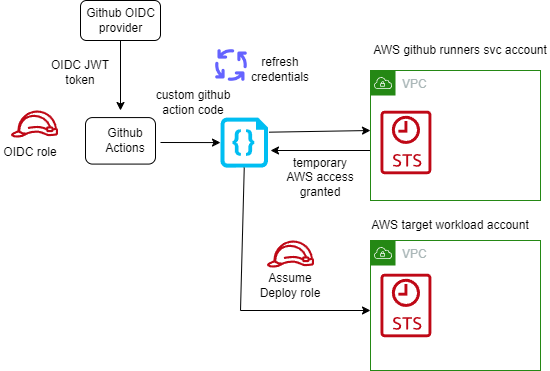
Short lived AWS credentials with GitHub self-hosted runners
If you have many repositories that you wish to grant an individual role to, you may run into a hard limit of the number of IAM roles in a single account. While I advocate solving this problem with a multi-account strategy, you can alternatively scale this approach by:
- using attribute based access control (ABAC) to match claims in the GitHub token (such as repository name, branch, or team) to the AWS resource tags.
- using role based access control (RBAC) by logically grouping the repositories in GitHub into Teams or applications to create fewer subset of roles.
- use an identity broker pattern to vend credentials dynamically based on the identity provided to the GitHub workflow.
Use Ephemeral Runners
Configure your GitHub Action runners to run in “ephemeral” mode, which creates (and destroys) individual short-lived compute environments per job on demand. The short environment lifespan and per-build isolation reduces the risk of data leakage , even in multi-tenanted continuous integration environments, as each build job remains isolated from others on the underlying host.
As each job runs on a new environment created on demand, there is no need for a job to wait for an idle runner, simplifying auto-scaling. With the ability to scale runners on demand, you do not need to worry about turning build infrastructure off when it is not needed (for example out of office hours), giving you a cost-efficient setup. To optimize the setup further, consider allowing developers to tag workflows with instance type tags and launch specific instance types that are optimal for respective workflows.
There are a few considerations to take into account when using ephemeral runners:
- A job will remain queued until the runner EC2 instance has launched and is ready. This can take up to 2 minutes to complete. To speed up this process, consider using an optimized AMI with all prerequisites installed.
- Since each job is launched on a fresh runner, utilizing caching on the runner is not possible. For example, Docker images and libraries will always be pulled from source.
Use Runner Groups to isolate your runners based on security requirements
By using ephemeral runners in a single GitHub runner group, you are creating a pool of resources in the same AWS account that are used by all repositories sharing this runner group. Your organizational security requirements may dictate that your execution environments must be isolated further, such as by repository or by environment (such as dev, test, prod).
Runner groups allow you to define the runners that will execute your workflows on a repository-by-repository basis. Creating multiple runner groups not only allow you to provide different types of compute environments, but allow you to place your workflow executions in locations within AWS that are isolated from each other. For example, you may choose to locate your development workflows in one runner group and test workflows in another, with each ephemeral runner group being deployed to a different AWS account.
Runners by definition execute code on behalf of your GitHub users. At a minimum, I recommend that your ephemeral runner groups are contained within their own AWS account and that this AWS account has minimal access to other organizational resources. When access to organizational resources is required, this can be given on a repository-by-repository basis through IAM role assumption with OIDC, and these roles can be given least-privilege access to the resources they require.
Optimize runner start up time using Amazon EC2 warm-pools
Ephemeral runners provide strong build isolation, simplicity and security. Since the runners are launched on demand, the job will be required to wait for the runner to launch and register itself with GitHub. While this usually happens in under 2 minutes, this wait time might not be acceptable in some scenarios.
We can use a warm pool of pre-registered ephemeral runners to reduce the wait time. These runners will listen to the incoming GitHub workflow events actively and as soon as an incoming workflow event is queued, it is picked up readily by the warm pool of registered EC2 runners.
While there can be multiple strategies to manage the warm pool, I recommend the following strategy which uses AWS Lambda for scaling up and scaling down the ephemeral runners:
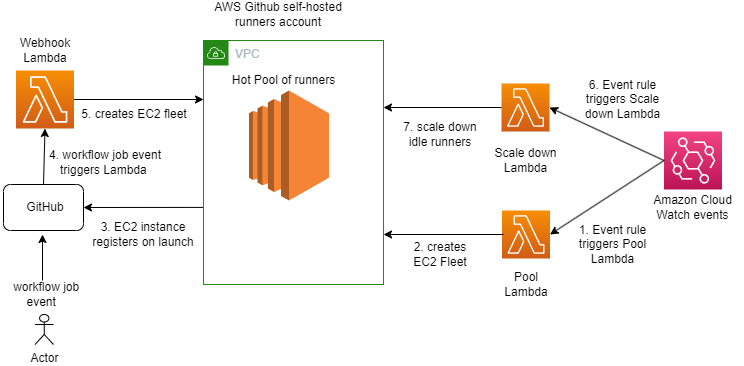
GitHub self-hosted runners warm pool flow
A GitHub workflow event is created on a trigger like push of code in a master repository or a merge of pull request. This event triggers a Lambda function via webhook and Amazon API Gateway endpoint. The Lambda function helps in validating the GitHub workflow event payload and log events for observability & building metrics. It can be used optionally to replenish the warm pool. There are separate backend Lambda functions to launch, scale up and scale down the warm pool of EC2 instances. The EC2 instances or runners are registered with GitHub at the time of launch. The registered runners listens for incoming GitHub work flow events using GitHub’s internal job queue and as soon as workflow events are triggered, its assigned by GitHub to one of the runners in warm pool for job execution. The runner is automatically de-registered once the job completes. A job can be a build, or deploy request as defined in your GitHub workflow.
With warm pool in place, it is expected to help reduce wait time by 70-80%.
Considerations
- Increased complexity as there is a possibility of over provisioning runners. This will depend on how long a runner EC2 instance requires to launch and reach a ready state and how frequently the scale up Lambda is configured to run. For example, if the scale up Lambda runs every 1 minute and the EC2 runner requires 2 minutes to launch, then the scale up Lambda will launch 2 instances. The mitigation is to use Auto scaling groups to manage the EC2 warm pool and desired capacity with predictive scaling policies tying back to incoming GitHub workflow events i.e. build job requests.
- This strategy may have to be revised when supporting Windows or Mac based runners given the spin up times can vary.
Use an optimized AMI to speed up the launch of GitHub self-hosted runners
Amazon Machine Images (AMI) provide a pre-configured, optimized image that can be used to launch the runner EC2 instance. By using AMIs, you will be able to reduce the launch time of a new runner since dependencies and tools are already installed. Consistency across builds is guaranteed due to all instances running the same version of dependencies and tools. Runners will benefit from increased stability and security compliance as images are tested and approved before being distributed for use as runner instances.
When building an AMI for use as a GitHub self-hosted runner the following considerations need to be made:
- Choosing the right OS base image for the builds. This will depend on your tech stack and toolset.
- Install the GitHub runner app as part of the image. Ensure automatic runner updates are enabled to reduce the overhead of managing running versions. In case a specific runner version must be used you can disable automatic runner updates to avoid untested changes. Keep in mind, if disabled, a runner will need to be updated manually within 30 days of a new version becoming available.
- Install build tools and dependencies from trusted sources.
- Ensure runner logs are captured and forwarded to your security information and event management (SIEM) of choice.
- The runner requires internet connectivity to access GitHub. This may require configuring proxy settings on the instance depending on your networking setup.
- Configure any artifact repositories the runner requires. This includes sources and authentication.
- Automate the creation of the AMI using tools such as EC2 Image Builder to achieve consistency.
Use Spot instances to save costs
The cost associated with scaling up the runners as well as maintaining a hot pool can be minimized using Spot Instances, which can result in savings up to 90% compared to On-Demand prices. However, there could be requirements where we can have longer running builds or batch jobs that cannot tolerate the spot instance terminating on 2 minutes notice. So, having a mixed pool of instances will be a good option where such jobs should be routed to on-demand EC2 instances and the rest on the Spot instances to cater for diverse build needs. This can be done by assigning labels to the runner during launch /registration. In that case, the on-demand instances will be launched and we can a savings plan in place to get cost benefits.
Record runner metrics using Amazon CloudWatch for Observability
It is vital for the observability of the overall platform to generate metrics for the EC2 based GitHub self-hosted runners. Examples of the GitHub runners metrics can be: the number of GitHub workflow events queued or completed in a minute, or number of EC2 runners up and available in the warm pool etc.
We can log the triggered workflow events and runner logs in Amazon CloudWatch and then use CloudWatch embedded metrics to collect metrics such as number of workflow events queued, in progress and completed. Using elements like “started_at” and “completed_at” timings which are part of workflow event payload we can calculate build wait time.
As an example, below is the sample incoming GitHub workflow event logged in Amazon Cloud Watch Logs
<p> </p><p><code>{</code></p><p><code>"hostname": "xxx.xxx.xxx.xxx",</code></p><p><code>"requestId": "aafddsd55-fgcf555",</code></p><p><code>"date": "2022-10-11T05:50:35.816Z",</code></p><p><code>"logLevel": "info",</code></p><p><code>"logLevelId": 3,</code></p><p><code>"filePath": "index.js",</code></p><p><code>"fullFilePath": "/var/task/index.js",</code></p><p><code>"fileNa<a class="ab-item" href="https://aws-blogs-prod.amazon.com/devops/" aria-haspopup="true">AWS DevOps Blog</a>me": "index.js",</code></p><p><code>"lineNumber": 83889,</code></p><p><code>"columnNumber": 12,</code></p><p><code>"isConstructor": false,</code></p><p><code>"functionName": "handle",</code></p><p><code>"argumentsArray": [</code></p><p><code>"Processing Github event",</code></p><p><code>"{\"event\":\"workflow_job\",\"repository\":\"testorg-poc/github-actions-test-repo\",\"action\":\"queued\",\"name\":\"jobname-buildanddeploy\",\"status\":\"queued\",\"started_at\":\"2022-10-11T05:50:33Z\",\"completed_at\":null,\"conclusion\":null}"</code></p><p><code>]</code></p><p><code>}</code></p>In order to use the logged elements of above log into metrics by capturing \”status\”:\”queued\”,\”repository\”:\”testorg-poc/github-actions-test-repo\c, \”name\”:\”jobname-buildanddeploy\” ,and workflow \”event\” , one can build embedded metrics in the application code or AWS metrics Lambda using any of the cloud watch metrics client library Creating logs in embedded metric format using the client libraries – Amazon CloudWatch based on the language of your choice listed.c
Essentially what one of those libraries will do under the hood is map elements from Log event into dimension fields so cloud watch can then read and generate a metric using that.
console.log(<br /> JSON.stringify({<br /> message: '[Embedded Metric]', // Identifier for metric logs in CW logs<br /> build_event_metric: 1, // Metric Name and value<br /> status: `${status}`, // Dimension name and value<br /> eventName: `${eventName}`,<br /> repository: `${repository}`,<br /> name: `${name}`,<br /> <br /> _aws: {<br /> Timestamp: Date.now(),<br /> CloudWatchMetrics: [<br /> {<br /> Namespace: `demo_2`,<br /> Dimensions: [['status','eventName','repository','name']],<br /> Metrics: [<br /> {<br /> Name: 'build_event_metric',<br /> Unit: 'Count',<br /> },<br /> ],<br /> },<br /> ],<br /> },<br /> })<br /> );A sample architecture:

Consumption of GitHub webhook events
The cloud watch metrics can be published to your dashboards or forwarded to any external tool based on requirements. Once we have metrics, CloudWatch alarms and notifications can be configured to manage pool exhaustion.
Conclusion
In this blog post, we outlined several best practices covering security, scalability and cost efficiency when using GitHub Actions with EC2 self-hosted runners on AWS. We covered how using short-lived credentials combined with ephemeral runners will reduce security and build contamination risks. We also showed how runners can be optimized for faster startup and job execution AMIs and warm EC2 pools. Last but not least, cost efficiencies can be maximized by using Spot instances for runners in the right scenarios.
Resources:
- Use IAM roles to connect GitHub Actions to actions in AWS
- Integrating with GitHub Actions – CI/CD pipeline to deploy a Web App to Amazon EC2
- Creating logs in embedded metric format using the client libraries – Amazon CloudWatch
- GitHub – awslabs/aws-embedded-metrics-node: Amazon CloudWatch Embedded Metric Format Client Library
- GitHub – philips-labs/terraform-aws-github-runner: Terraform module for scalable GitHub action runners on AWS
Not all “open source” AI models are actually open (Nature)
Post Syndicated from corbet original https://lwn.net/Articles/979609/
Nature looks
at a recent paper on the openness of “open-source” language
models.
It is not yet clear how many of these models will fit the EU’s
definition of open source. Under the act, this would refer to
models that are released under a “free and open” licence that, for
example, allows users to modify a model but says nothing about
access to training data. Refining this definition will probably
form “a single pressure point that will be targeted by corporate
lobbies and big companies”, the paper says.
From Top Dogs to Unified Pack
Post Syndicated from Rapid7 original https://blog.rapid7.com/2024/06/25/from-top-dogs-to-unified-pack-2/
Embracing a consolidated security ecosystem

Authored by Ralph Wascow
Cybersecurity is as unpredictable as it is rewarding. Each day often presents a new set of challenges and responsibilities, particularly as organizations accelerate digital transformation efforts. This means you and your cyber team may find yourselves navigating a complex landscape of multi-cloud environments and evolving compliance requirements.
So how does that translate into what cyber professionals have to deal with on a daily basis?
A Day in the Life of a Security Professional
In the Trenches
The responsibility of safeguarding sensitive data and protecting that very same data can create a constant pressure to stay one step ahead – of many things. Teams defending environments often face high stress levels and tight deadlines. Unsurprisingly, the demand for skilled security leaders often outpaces the supply of personnel. This is where an array of tools and solutions are introduced to support those teams. And while there are many positives to be had, security teams are often overrun by an array of solutions and vendors, creating increased complexity and vulnerabilities in their organisation’s risk posture.
Multiple Vendors Often Means More Work
Using different vendors and solutions for various security functions can help keep things fresh, but it can also be time-consuming and cumbersome. And rather than help teams, it may lead to a decrease in performance. With each platform and tool requiring its own resources, the overall efficiency of your infrastructure and processes may suffer. These performance issues can impact critical business operations and hinder productivity. For instance, by the time you receive a threat alert, the attacker could already be hard at work.
Security analysts require a streamlined work environment that enables them to understand the root cause of alerts from any source with a single click. They shouldn’t have to waste time switching between multiple tools to investigate and remediate potential threats. And when belts start tightening and resources become scarce, managing multiple vendors with different payment cycles can become frustrating.
It pays to find ways to create a security ecosystem without sacrificing the efficacy of its components. By reducing the number of disparate cyber solutions, security professionals can optimise effectiveness and efficiency, subsequently enhancing security posture and reducing their risk profile.
What are the Benefits of a Unified Security Ecosystem?
Widening visibility into your entire IT environment strengthens threat detection capabilities, allowing security teams to minimise the impact of potential cyberattacks. In fact, 41% of organisations surveyed by Gartner say consolidating security solutions improved their risk posture. For some organisations still clinging to the status quo of best of breed solutions, consider the following consolidation benefits when trying to gain executive-buy-in.
Identify Systems and Applications at Risk
A robust vulnerability management program should be your first port of call to help identify any systems or applications potentially at risk. It provides your security team with critical insight into potential weaknesses in your IT infrastructure and overall network. Importantly, it will enable you to properly manage and patch vulnerabilities that pose risks to the network, protecting your organisation from the possibility of a breach.
Safeguard an Evolving Landscape with Real-time Monitoring
Continuous scanning and testing of applications are vital components of a robust security strategy. Consolidating your security tech stack into a centralised ecosystem offers the ability to monitor your infrastructure in real-time and receive in-depth reports for better cross-team collaboration. Actionable insight gained will give you and your security team the autonomy you need to stay ahead of evolving risks and proactively address potential vulnerabilities.
Broaden Visibility and Contextual Understanding
Avoid leaving your security team with isolated alerts that require manual investigation and correlation. Integrating data from multiple sources, including endpoints, networks, cloud environments, and applications offers a comprehensive view and analysis of threats across different layers of the IT environment. This holistic approach allows for better correlation of data across various vectors, uncovering complex attack patterns that might otherwise go unnoticed. Consider broadening your context with threat intelligence, providing information about actor groups, typical targets, TTP’s, and more.
Automate Threat Hunting and Distinguish Friend from Foe
In the face of ever-evolving threats, automating threat hunting becomes a crucial capability. By integrating automation within your consolidated security ecosystem, you’ll be able to quickly discern whether incoming threats are benign or malicious. Streamlined processes allow for efficient identification of potential risks, enabling you and your team to prioritize your efforts for activities that require human effort.
Prioritize Risk and Simplify Workflows
The sheer volume of security alerts can overwhelm even the most robust security operations. A consolidated security ecosystem mitigates this challenge by automatically grouping related alerts and prioritising events that demand immediate attention. Unifying and visualizing activities in one place more rapidly identify the root causes of threats and their potential impact. Armed with this knowledge, you can assess the scope of an incident efficiently, build a timeline of the attack, and take swift, targeted action to effectively neutralize the threat.
Swiftly Investigate with End-to-end Digital Forensics
Incident resolution demands a thorough understanding of the attack’s entry point and the ability to track down any traces left by adversaries. With a consolidated security ecosystem, conduct swift and comprehensive investigations using end-to-end digital forensics and review key artefacts such as event logs, registry keys, and browser history across your entire IT environment — significantly enhancing your incident response capabilities. A full view of attacker activity can help you determine the extent of the compromise, identify weaknesses in your defenses, and take appropriate remedial actions.
Coordinate Responses with Remediation and Policy Enforcement
Enable coordinated responses and future-proof defences by integrating prevention technologies across your entire tech stack. Leverage communication between various security components and take decisive action against active threats in real-time. For example, an attack blocked on the network can automatically update policies on endpoints, ensuring consistent security measures across your infrastructure. This proactive approach to security ultimately reduces the risk of successful cyberattacks.
Consolidate to Mitigate
With a rapidly changing threat landscape, consolidation offers the security improvements your organisation needs to give it the balance of power. Simplifying and streamlining your cybersecurity solutions begins with gaining visibility into your tech stack. This enables your team to identify where consolidation can improve your team’s productivity and effectiveness in detecting and mitigating risk.
How Rapid7 Can Help: Managed Threat Complete
Managed Threat Complete offers a simplified security stack, fuelling your D&R program to give you a 24x7x365 SOC, IR, XDR technology, SIEM, SOAR, threat intelligence, and unlimited VRM in a single service. This ensures your environment is monitored round-the-clock and end-to-end by an elite SOC that works transparently with your in-house team, helping to further expand your resources.
Security updates for Tuesday
Post Syndicated from corbet original https://lwn.net/Articles/979606/
Security updates have been issued by AlmaLinux (python3.11), Debian (composer), Fedora (thunderbird), Mageia (chromium-browser-stable, python-aiohttp, python-gunicorn, python-werkzeug, and virtualbox), Oracle (libreswan and python3.11), Red Hat (git, kpatch-patch, python3.11, python3.9, and thunderbird), and SUSE (avahi, ghostscript, grafana and mybatis, hdf5, kernel, openssl-1_1-livepatches, python-docker, and wget).
The Knight with the Iron hand
Post Syndicated from The History Guy: History Deserves to Be Remembered original https://www.youtube.com/watch?v=r8N2AHZ7k4c
Is Ransomware Protection Working?
Post Syndicated from Bozho original https://techblog.bozho.net/is-ransomware-protection-working/
Recently an organization I’m familiar with suffered a ransomware attack. A LockBit ransomware infected a workstation and spread to a few servers. The attack was contained thanks to a quick incident response, but there was one important thing: the organization had a top-notch EDR installed. It’s in the Gartner’s leader quadrant for endpoint protection platforms. And it didn’t stop it. I won’t mention names, because the point here is not to attack a particular brand, but the fact that the attackers created a different build of the LockBit codebase meant that the signature-based detection didn’t work and so the files on the endpoints were encrypted. Not only that – attackers downloaded port scanners and executed password spraying on the network, in order to pivot to the servers, without much trouble caused by the EDR.
Ransomware is the most widespread type of attack, we have a security industry that’s trying to cope with those attacks for a long time, and in 2024 it’s sufficient to just rebuild the ransomware from source in order to not get caught. That’s a problem. To add insult to injury, the malware executable was called lockbit.exe_.
I think we need to think of better ways to tackle ransomware. I’m not an antivirus/EDR in-depth expert, but I have been thinking the following: why doesn’t the operating system have a built-in anti-ransomware functionality? The malware can stop endpoint agents, but it can’t stop the OS (well, it can stop OS services or modify OS dlls, I agree). I was thinking of native NTFS listeners to detect ransomware behavior – very fast enumeration and modification of files. Then I read this article titled “Microsoft Can Fix Ransomware Tomorrow” which echoed my thoughts. It’s not that simple as the title implies, and the article goes to argue that it’s hard, but something has to be done.
This may seriously impact the EDR market – if the top threat – ransomware – is automatically contained by built-in functionality, why purchase an EDR? Obviously, there are many other reasons to do so, but every budget cut will start from the EDR. Ransomware has been a successful driver for more investment in security. To prevent putting too much functionality in the OS, EDRs can tap into the detection capability of the OS to take further actions.
But ransomware works in a very simple way. Detecting mass-encryption of files is easy. Rate-limiting it is reasonable. You may be aware, but CPUs have AES-specific instructions that improve the performance of AES encryption – the fact that these instructions are used may be a further indicator of an ongoing ransomware attack.
I think we have to tap into the lower levels of our software stack – file system, OS, CPU – in order to tackle ransomware. It’s clear that omnipotent endpoint agents don’t exist, no matter how much “AI magic” you sprinkle ontop of them in the data sheet (I remember once asking another EDR vendor on a conference how exactly their AI is working. My impression from the answer was: it’s rules).
As I said, I’m no AV/EDR expert, and I expect comments like “But we are already doing that”. I’m sure APIs like this one are utilized by AV/EDRs, but they may be too slow or too heavy to be used. And it may mean that this APIs can be optimized for the ransomware-detection usecase. I don’t have a ready answer (otherwise I’d be an EDR vendor), but I’d welcome a serious discussion on that. We can’t be in a situation where purchasing an expensive security tool doesn’t reliably solve the most prominent threat – “off-the-shelf” ransomware.
The post Is Ransomware Protection Working? appeared first on Bozho's tech blog.
Breaking the M-209
Post Syndicated from Bruce Schneier original https://www.schneier.com/blog/archives/2024/06/breaking-the-m-209.html
Interesting paper about a German cryptanalysis machine that helped break the US M-209 mechanical ciphering machine.
The paper contains a good description of how the M-209 works.