Stalkerware Vendor Hacked

Post Syndicated from Bruce Schneier original https://www.schneier.com/blog/archives/2023/06/stalkerware-vendor-hacked.html

The stalkerware company LetMeSpy has been hacked:

TechCrunch reviewed the leaked data, which included years of victims’ call logs and text messages dating back to 2013.

The database we reviewed contained current records on at least 13,000 compromised devices, though some of the devices shared little to no data with LetMeSpy. (LetMeSpy claims to delete data after two months of account inactivity.)

[…]

The database also contained over 13,400 location data points for several thousand victims. Most of the location data points are centered over population hotspots, suggesting the majority of victims are located in the United States, India and Western Africa.

The data also contained the spyware’s master database, including information about 26,000 customers who used the spyware for free and the email addresses of customers who bought paying subscriptions.

The leaked data contains no identifying information, which means people whose data was leaked can’t be notified. (This is actually much more complicated than it might seem, because alerting the victims often means alerting the stalker—which can put the victims into unsafe situations.)

How to Manage Global Sending of SMS with Amazon Pinpoint

Post Syndicated from Tyler Holmes original https://aws.amazon.com/blogs/messaging-and-targeting/how-to-manage-global-sending-of-sms-with-amazon-pinpoint/

Amazon Pinpoint has a global SMS reach, of 240 countries and regions around the world, enabling companies of all sizes to send SMS globally. Unlike the process of sending a personal message from your phone to someone in another country, sending Application to Person (A2P) messages, also known as bulk SMS, involves many more regulations and requirements that vary from country to country. In this post we will review best practices for sending Global SMS and share a selection of AWS resources to help you send SMS globally.

The first thing to understand about delivering SMS around the world is that it takes a vast network of components working seamlessly together around the globe to deliver an SMS globally. The image below gives a simple example of delivering an SMS in the United States. Mobile devices are at the center of this, connecting to mobile carriers or operators, who operate the infrastructure necessary for SMS transmission. Once you hit that send button from AWS, your message travels to an Aggregator, who has connections to Operators, Partners, and/or other Aggregators. The reason for this is that there is no one vendor who delivers globally. AWS uses many Aggregators that both enable us to send globally as well as improve resiliency and deliverability of your messages. The last stop on the journey is the Short Message Service Center (SMSC), a central hub that receives, stores, and forwards text messages. The SMSC acts as a gateway, routing your message to the recipient’s carrier or operator through a series of interconnected networks, thanks to agreements between different carriers known as interconnection agreements. The entire process is facilitated by the Signaling System 7 (SS7), a set of protocols that enables the exchange of information between telecommunication networks, ensuring messages reach their intended recipients.
Diagram showing how SMS is delivered using aggregators
Every country has its own regulations and processes that you need to comply with in order to successfully deliver SMS to handsets that are registered to a particular country. There are some countries with little regulation and others that will block all SMS traffic unless it has been registered with the proper authorities.

Each country’s requirements include the origination identities (OIDs) that their networks support, some of these include long codes (standard phone numbers that typically have 10 or more digits), short codes (phone numbers that contain between four and seven digits), and Sender IDs (names that contain 6–11 alphanumeric characters). Each of these types of origination identities has unique benefits and drawbacks and you will need one for each use case and country you plan on supporting. Here is a list of the countries that AWS currently sends to and the OIDs that are supported.

Pre-Planning and Country Selection
The first step to planning a global roll out of SMS is to know what countries you want to send to and what each of your use cases are. Put together a spreadsheet (Download Here Global SMS Planning Sheet) for each unique use case you have and the countries you plan on sending to with the below key details:

  • The volumes you expect to send to each country
  • The throughput (Also referred to as Messages per Second, MPS, Transactions per Second, or TPS) at which you expect to deliver these messages
  • Whether your use case is one-way or two-way
    • Not all countries support 2-way communications, which is the ability to have the recipient send a message back to the OID. Sender ID also does not support 2-way communication so if you are planning on using Sender ID you will need to account for how to opt recipients out of future communications.
  • Leave a column for the Origination Identity you will use for each country
  • Leave a column for whether this country requires advanced registration
  • Leave a column for any country specific limitations or requirements such as language limitations
  • Leave a column for the estimated time it takes to register
    • This chart has estimates for common countries but there are others that also have lead time in procuring an OID so please open a support case for review

Selecting an Origination Identity

Now that you have these details all in one place consult this table to determine what OIDs each country supports, and, if your use case requires it, which countries support two-way.

In countries where there are multiple options for OIDs there are several guidelines to consider when you’re deciding what type of origination identity to use:

  • Sender IDs are a great option for one-way use cases. However, they’re not available in all countries and if you are needing to opt-out your customers you will need to provide a way for them to do so since they are only one-way.
    • In some countries (such as India and Saudi Arabia), long codes can be used to receive incoming messages, but can’t be used to send outgoing messages. You can use these inbound-only long codes to provide your recipients with a way to opt out of messages that you send using a Sender ID.
  • Short codes are a great option for two-way use cases and have the highest throughput of all OIDs.
    • While short codes have a higher throughput they also come at a much higher cost than other OIDs so weigh your cost against your use case requirements.
  • In some countries, we maintain a pool of shared origination identities. If you send messages to recipients in a particular country, but you don’t have a dedicated origination identity in that country, we make an effort to deliver your message using one of these shared identities.
    • Shared identities are unavailable in some countries, including the United States and China.
    • Shared identities cannot be 2-way so make sure you have a way of opting customers out of communication

With these in mind consult this guide to help you decide which OID to use for each country and use case. Update your sheet as you review each country. Many of our customers opt for a phased roll-out, enabling SMS for the countries that do not require registration and can be put into production swiftly while working through the registration process for those countries that require it and bringing those to production as they are approved. A phased approach is also preferred as it allows customers to monitor for any problems with deliverability with a smaller volume than their full production workload.

Procurement and Registration of Origination Identities

In countries where registration is onerous it is important to have a few things about your process all in one place. Some registrations are very similar in the information that they ask for while others have special processes that you need to follow. Examples include:

Once you have decided on your OIDs for each of your countries you can begin the process of procuring them. Depending on where you plan on sending you may need to open a case to procure them. Short codes you also need to open a case but the process is slightly different so review the documentation here. If you are having trouble making a decision on OIDs you may have the option of engaging with AWS support or your Account Manager dependent on the support level you have opted for on your account.

Testing SMS Sending

Once you have procured OIDs and are ready to begin testing, it is essential that you set up a way of monitoring the events that Pinpoint generates. Pay attention to the Delivery Receipts (DLRs) that are returned back into the event stream. These provide you details on the success or failure of your sends. Pinpoint delivers all events via Amazon Kinesis, which needs to be enabled within each Project you are using. This is a common solution among our customers. It enables the stream, sends it to a user-specified S3 Bucket, and sets up Tables and Views within Amazon Athena, our serverless SQL query engine.. Kinesis can stream to many different destinations, including Redshift and HTTP endpoints, among many others. This gives you flexibility in how you deliver the events to their required locations. Monitoring SMS events is an important part of sending globally, these are the SMS Events that are possible to receive in your stream.

TPS limits can vary depending on the countries you’re sending to and the OIDs you’re using. If there’s a risk of exceeding these limits and triggering rate limiting errors, it’s crucial to devise a strategy for queuing your messages. Keep in mind, Amazon Pinpoint doesn’t offer queueing capabilities. Therefore, message queueing must be incorporated at your application level or by leveraging AWS services. For instance, you could deploy this commonly used architecture that’s adjustable according to your specific use case.

Once you have your monitoring solution in place, you are read to begin testing sends to real destination phone numbers. Keep in mind that at this point you are likely still in the Sandbox for SMS. This means you have much lower quotas for sending and can only send to verified phone numbers or the SMS Simulator numbers. Pinpoint includes an SMS simulator, which you can use to send text messages and receive realistic event records to 51 commonly sent to countries. Messages sent to these destination phone numbers are not sent over the carrier network but do incur the standard outbound SMS messaging rate for the country that the simulated phone number is based in.

Best Practices for Sending
Before beginning There are two common ways of sending SMS via Pinpoint. The first option is the Pinpoint API using the SendMessages Action, which you can send a direct message to as many as 100 recipients at a time. The second option is to use the SMS and Voice v2 API and the SendTextMessage Action, which has more options available to configure your sends and can send to a single recipient with each call. The V2 API is the preferred way of sending as it allows for more fine grained control over your messages and is the API upon which new functionality will be built. Keep in mind that sending via the API does not attribute any metrics back to an endpoint unless you are specifying an endpoint ID in your call, so if you are using other features of Pinpoint such as campaigns or journeys or sending via other channels such as email you will need to consider your strategy for measuring success and how you will tie all of your communication efforts together.

When sending SMS Pinpoint includes logic for selecting the best OID to send from based on the country code. If there are multiple OIDs available to send to a particular country Pinpoint will default to the highest throughput OID available in your Account/Region. If there are not OIDs specific to the country being sent to Pinpoint will default to SenderID or to a shared OID owned by Pinpoint in that order, if the country allows these OIDs to be used. Given this functionality the best practice for sending SMS is to not specify the OID needed to send to a specific country and to allow Pinpoint to select. You can restrict Pinpoint to send to only those countries that you have OIDs for by using Pools, and turning off Shared Routes, more on this below.

If you have multiple use cases and need to specify the correct OID for each, this is where the V2 API is useful. OIDs can be attached to Pools, which can be configured to serve a particular use case, and the pool can be specified in your SendTextMessage call. Sending using a PoolID and allowing Pinpoint to select the right OID from that pool for the destination phone number simplifies your sending process. This blogpost details the process for creating Pools and using them to send SMS.

As mentioned above Pools also serve an additional use case, which is to limit message sending to specific countries. Some countries allow messages without an OID. If you don’t modify your settings to disable this feature, Pinpoint will attempt to deliver messages to these countries, even if you don’t have an explicit OID for them. Restricting SMS sends only to countries that you have OIDs for can be accomplished by using Pools and configuring “SharedRoutesEnabled“ to false by using the UpdatePool Action. Once configured you will receive an error back if attempting to send to a destination phone number that you do not have an OID for in the Pool. This configuration gives you the ability to control your costs while simplifying your process.

Managing Opt-Outs

As we have seen, managing SMS in an environment of increasing global regulation is challenging. An area of importance that needs to be configured is how you plan on managing the ability for recipients to opt out of your communications. Pinpoint can automatically opt your customers out of SMS communications using predefined keywords such as, “stop” or “unsubscribe.” However, this would make for an Account wide opt-out, and not ideal for customers that have multiple use cases such as OTP and Marketing communications. This blogpost details the process of managing opt-outs for multiple use cases. The configuration is enabled through the V2 API and is another reason to standardize your process on this API.

Monitoring Sending

The last step in ensuring success for SMS sending is having a solid platform for monitoring your sending. SMS is not a guaranteed delivery channel. You will always receive an event for a successful send in the event stream but there is no guarantee of a return status event, if a DLR from a carrier is not sent. A list of SMS Events and possible statuses can be found here.

The first Event you should see returned when watching the Event Stream for an SMS send activity is the “PENDING” event. This means we’ve sent the message to the carrier, where it’s buffered, and we’re waiting for the carrier to return a status message. There are no status messages between the “PENDING” state and the “whatever happens next” state, so if the carrier is retrying, we simply stay in PENDING and do not create more events. If a message is successfully delivered and a DLR is sent back from the carrier then a new event will be generated with a status of “SUCCESSFUL/DELIVERED.”

Make sure to review all of the possible values for the record_status attribute so that you are aware of varying issues with your sending that can arise. For example, statuses such as “Blocked,” “Spam,” and “Carrier_Blocked“ can indicate systemic issues that should be investigated.

Updates sent from a carrier via a DLR can be delayed for up to 72 hours or never sent at all. This varies based on the carrier and the country being sent to. Should you require a higher level of reliability, you need to establish business logic around monitoring SMS messages. If messages remain in a PENDING status longer than your business requirements permit, you must make a decision on how to handle them. You need to consider whether missed or duplicated messages are acceptable, or if it’s preferable to retry messages that are stuck in pending. The following is an example architecture for failed SMS retries that you can adjust to your needs.

Conclusion

This post covers the general process for getting started with Global SMS but as you have learned each country presents a different challenge and the regulatory environment is constantly evolving. It’s important to make sure that you are receiving messages from AWS that detail new regulations, new feature launches, and other major announcements to continually improve your process and make sure your SMS are delivering at the highest rate possible.

Take the time to plan out your approach, follow the steps outlined in this blog, and take advantage of any resources available to you within your support tier.

Decide what origination IDs you will need here
Review the documentation for the V2 SMS and Voice API here
Review the Pinpoint API and SendMessage here
Check out the support tiers comparison here

Resources:
https://docs.aws.amazon.com/pinpoint/latest/userguide/channels-sms-countries.html
https://aws.amazon.com/blogs/messaging-and-targeting/how-to-utilise-amazon-pinpoint-to-retry-unsuccessful-sms-delivery/
https://datatracker.ietf.org/doc/html/draft-wilde-sms-uri-20#section-4
https://docs.aws.amazon.com/pinpoint/latest/developerguide/event-streams-data-sms.html
https://docs.aws.amazon.com/pinpoint/latest/userguide/channels-sms-limitations-opt-out.html
https://docs.aws.amazon.com/pinpoint/latest/userguide/channels-sms-simulator.html

Typing Incriminating Evidence in the Memo Field

Post Syndicated from Bruce Schneier original https://www.schneier.com/blog/archives/2023/06/typing-incriminating-evidence-in-the-memo-field.html

Don’t do it:

Recently, the manager of the Harvard Med School morgue was accused of stealing and selling human body parts. Cedric Lodge and his wife Denise were among a half-dozen people arrested for some pretty grotesque crimes. This part is also at least a little bit funny though:

Over a three-year period, Taylor appeared to pay Denise Lodge more than $37,000 for human remains. One payment, for $1,000 included the memo “head number 7.” Another, for $200, read “braiiiiiins.”

It’s so easy to think that you won’t get caught.

Standardizing SaaS Data to Drive Greater Cloud Security Efficacy

Post Syndicated from Dina Durutlic original https://blog.rapid7.com/2023/06/27/standardizing-saas-data-to-drive-greater-cloud-security-efficacy/

Standardizing SaaS Data to Drive Greater Cloud Security Efficacy

The way we do business has fundamentally changed, and as a result, so must security. Whether it’s legacy modernization initiatives, process improvements, or bridging the gap between physical and digital—most organizational strategies and initiatives involve embracing the cloud. However, investing in the cloud doesn’t come without its complexities.

When organizations adopt new technologies and applications, they inadvertently introduce new opportunities for attackers through vulnerabilities and points of entry. To stay ahead of potential security concerns, teams need to rely on data in order to get an overview of their environment—ensuring protection.

Where this becomes a bigger challenge is two fold:

  1. Security professionals need to secure SaaS applications, but each app has its own methodology for generating and storing vital security and usage data.
  2. Even if a security team puts in the work to centralize all this data, it must be normalized and standardized in order to be usable, which creates more work and visibility gaps.

Elevating Security Posture Around SaaS Applications

As part of our continued commitment to ensuring customers stay future-ready and secure through their cloud adoption, we’re excited to announce our work with AWS on their new service that will continue the effort around data standardization. AWS AppFabric quickly connects SaaS applications across the organization, so IT and security teams can easily manage and secure applications using a standard schema.

By using AppFabric to natively connect SaaS productivity and security applications to each other, security teams can automatically normalize application data (into the Open Cybersecurity Schema Framework (OCSF) format) for administrators to set common policies, standardize security alerts, and easily manage user access across multiple applications.

For Rapid7 customers, InsightIDR will be able to ingest logs from AppFabric so security teams have access to that data—stay tuned for more! This is just one in a series of investments we are making to help secure your cloud infrastructure.

To learn more about how customers are leveraging Rapid7’s elite security expertise and practitioner first platform to elevate their security program, check out our Managed Threat Complete offer.

New AWS AppFabric Improves Application Observability for SaaS Applications

Post Syndicated from Donnie Prakoso original https://aws.amazon.com/blogs/aws/new-aws-appfabric-improves-application-observability-for-saas-applications/

In today’s business landscape, companies strive to equip their employees with the most suitable and efficient tools to perform their jobs effectively. To achieve this goal, many companies turn to Software-as-a-Service (SaaS) applications. This approach allows companies to optimize their workflows, enhance employee productivity, and focus their resources on core business activities rather than software development and maintenance.

As the use of SaaS applications expands, there’s an increasing need for solutions that can proactively identify and address potential security threats to maintain uninterrupted business operations. Security teams spend time monitoring application usage data for threats or suspicious behavior, and they’re responsible for maintaining security oversight to meet regulatory and compliance requirements.

Unfortunately, integrating SaaS applications with existing security tools requires many teams to build, manage, and maintain point-to-point (P2P) integrations. These P2P integrations are needed so security teams can monitor event logs to understand user or system activity from each application.

Introducing AWS AppFabric
Today, we’re launching AWS AppFabric, a fully managed service that aggregates and normalizes security data across SaaS applications to improve observability and help reduce operational effort and cost with no integration work necessary.

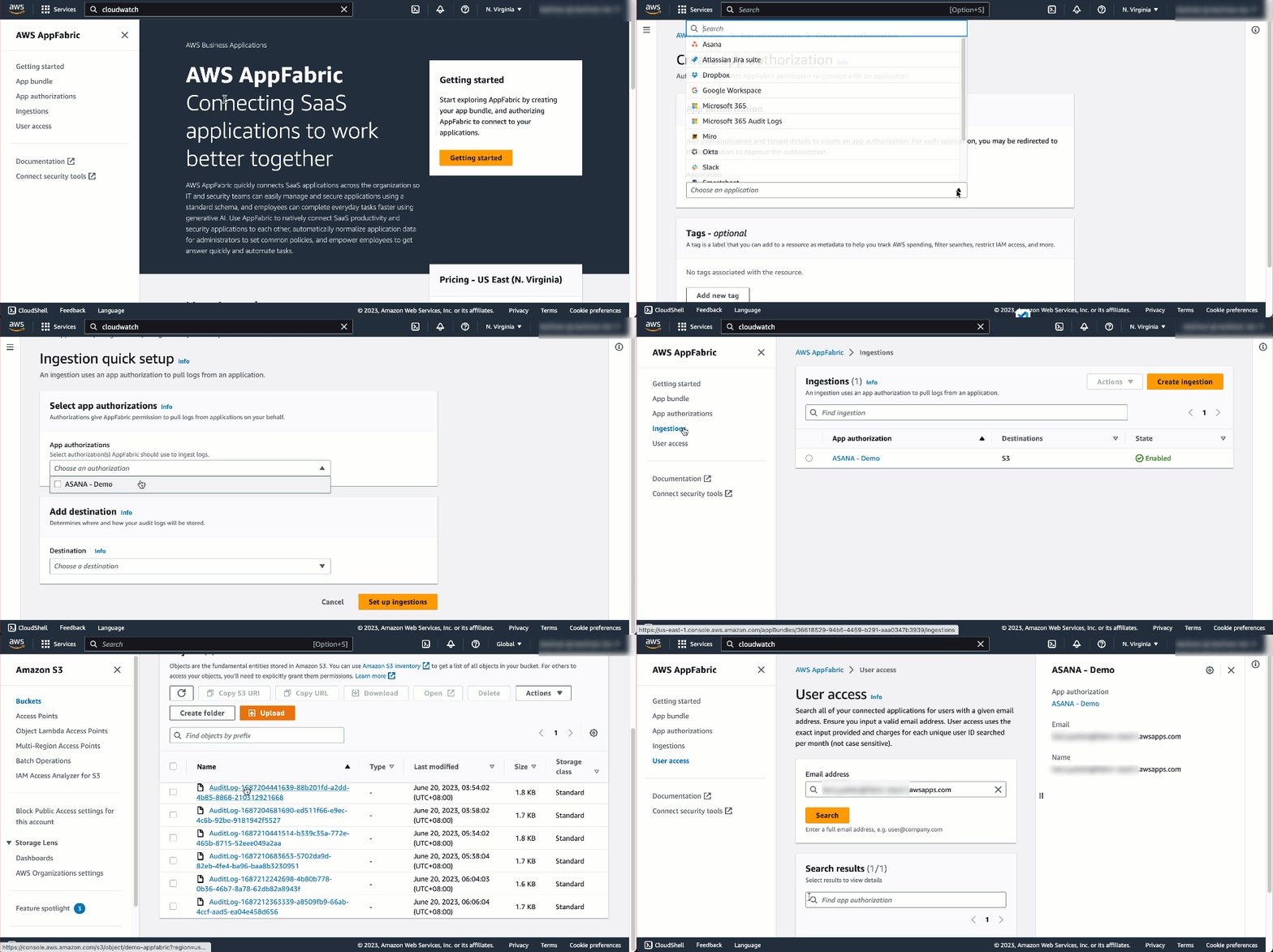
Here’s an animated GIF that gives you a quick look at how AWS AppFabric works.

With AppFabric, you can easily integrate leading SaaS applications without building and managing custom code or point-to-point integrations. For more information on what’s supported, refer to Supported Applications for AppFabric.

The generative AI features of AppFabric, powered by Amazon Bedrock, will be available in a future release. To learn more, visit the AWS AppFabric website.

When the SaaS applications are authorized and connected, AppFabric ingests the data and normalizes disparate security data such as user activity logs; this is accomplished using the Open Cybersecurity Schema Framework (OCSF), an industry standard schema and open-source project co-founded by AWS. This delivers an extensible framework for developing schemas and a vendor-agnostic core security schema.

The data is then enriched with a user identifier, such as a corporate email address. This reduces security incident response time because you gain full visibility to user information for each incident. You can ingest normalized and enriched data to your preferred security tools, which allows you to set common policies, standardize security alerts, and easily manage user access across multiple applications.

Getting Started with AWS AppFabric
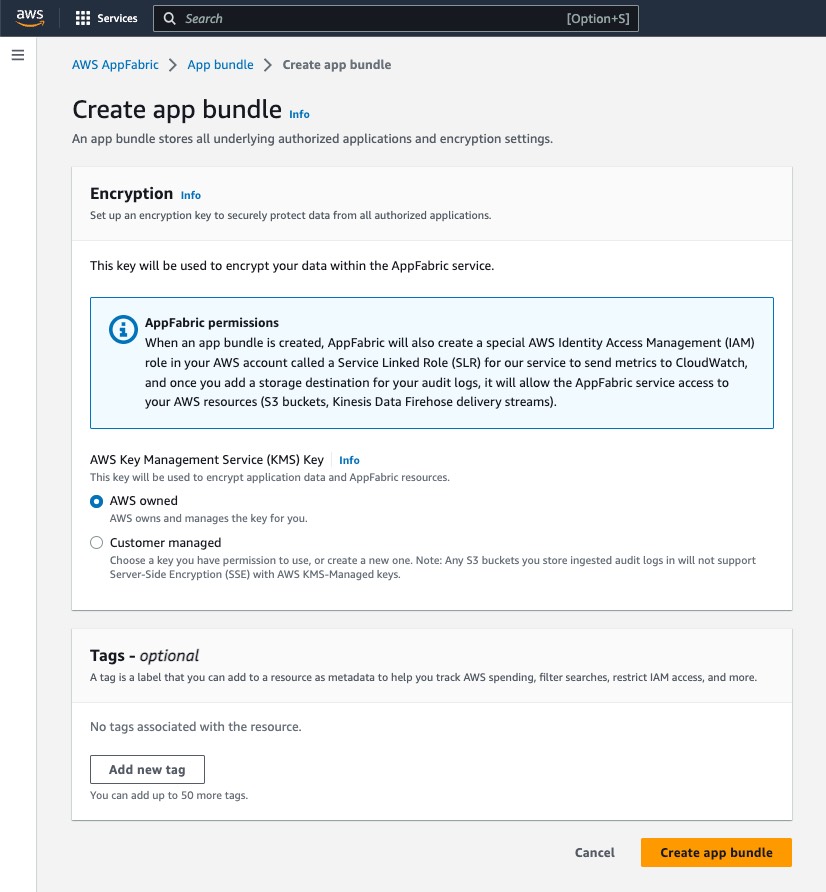
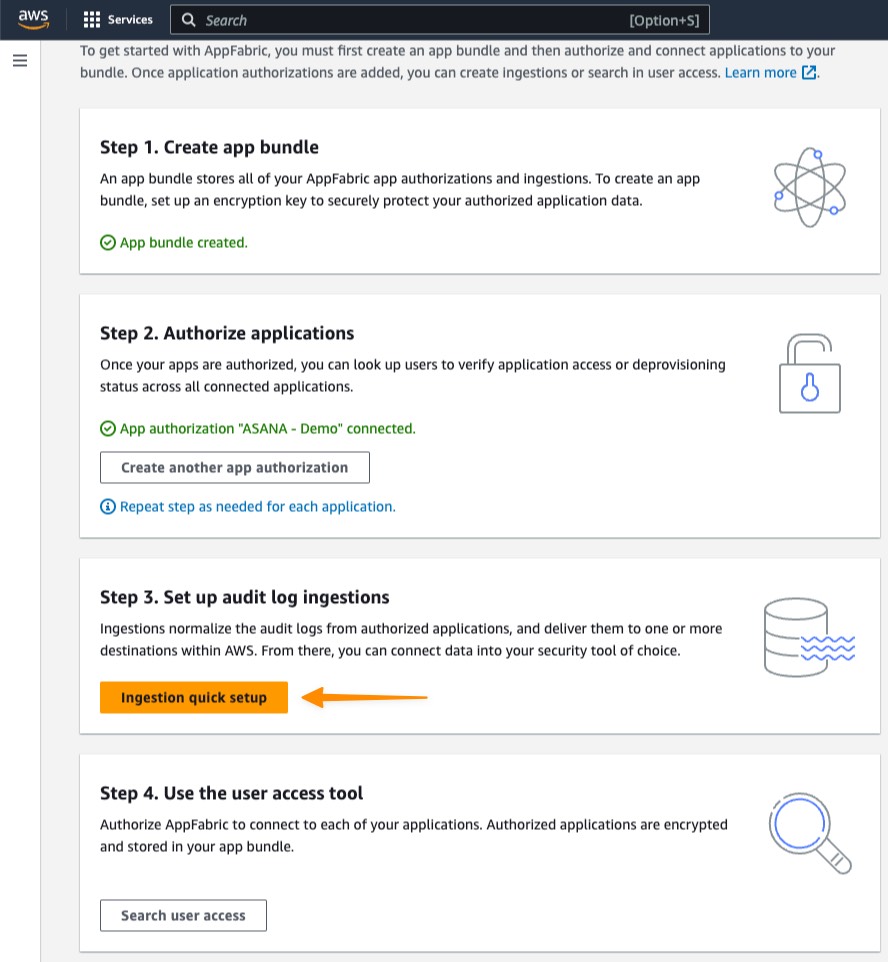
To get started with AppFabric, you need to create an App bundle, a one-time process. This stores all AppFabric app authorizations and ingestions, including the encryption key used. When you create an app bundle, AppFabric creates the required AWS Identity and Access Management (IAM) role in your AWS account, which is required to send metrics to Amazon CloudWatch and to access AWS resources such as Amazon Simple Storage Service (Amazon S3) and Amazon Kinesis Data Firehose.

Creating an App Bundle
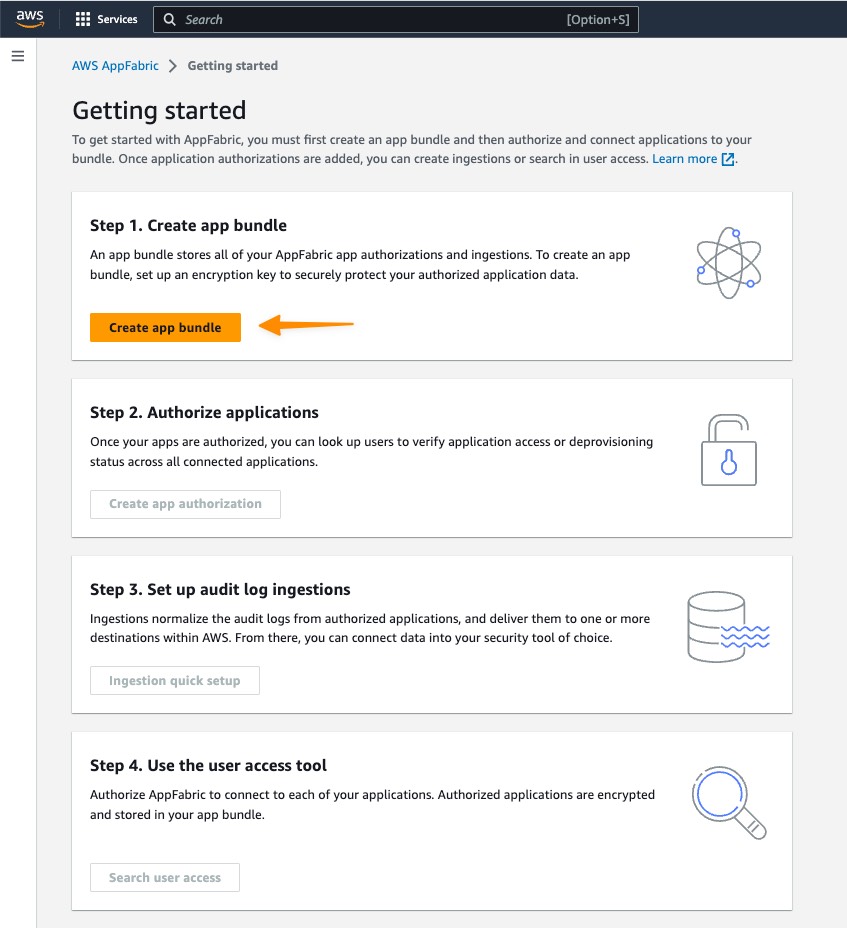
First, I select Getting started from the home page or left navigation panel from within the AWS Management Console.

Following the step-by-step instructions to set up AppFabric, I select Create app bundle.

In the Encryption section, I use AWS Key Management Service (AWS KMS) to define an encryption key to securely protect my data in all unauthorized applications. The KMS key encrypts my data within my internal data stores used as my ingestion destinations; for this example, my destination is Amazon S3. My key options include AWS owned and Customer managed. Select Customer managed if you want to use a key you have inside KMS.

Authorizing Applications
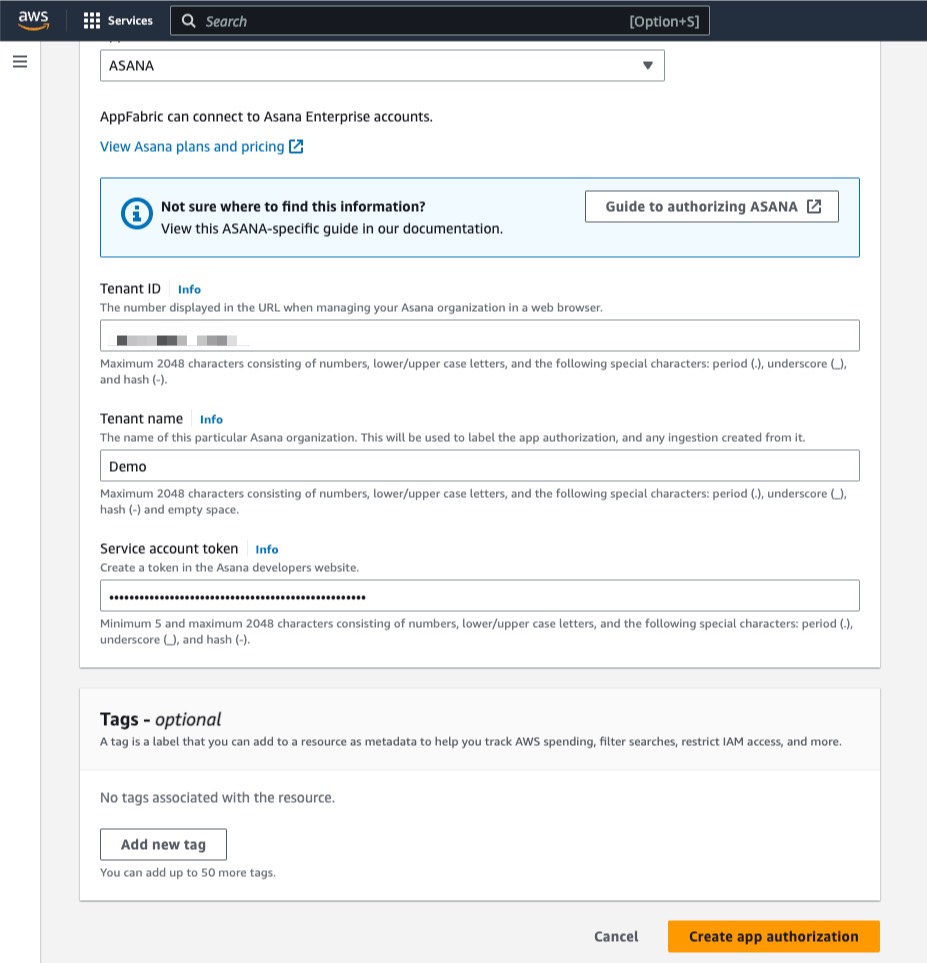
Once I have created the app bundle, the next step is Create app authorization. On this page, I can select the supported SaaS application that I want to connect to my app bundle.

Then, I need to enter my application credentials so that AppFabric can connect; one of the advantages of using AppFabric is that it connects directly into SaaS applications without the need for me to write any code.

I can set up multiple app authorizations by repeating this step, as required, for each application. The credentials required for authorization vary by app; see the AppFabric documentation for details.

Setting up Audit Log Ingestions
Now I have created an app authorization in my app bundle. I can proceed with Set up audit log ingestions. This step ingests and normalizes audit logs and delivers them to one or more destinations within AWS, including Amazon S3 or Amazon Kinesis Data Firehose.

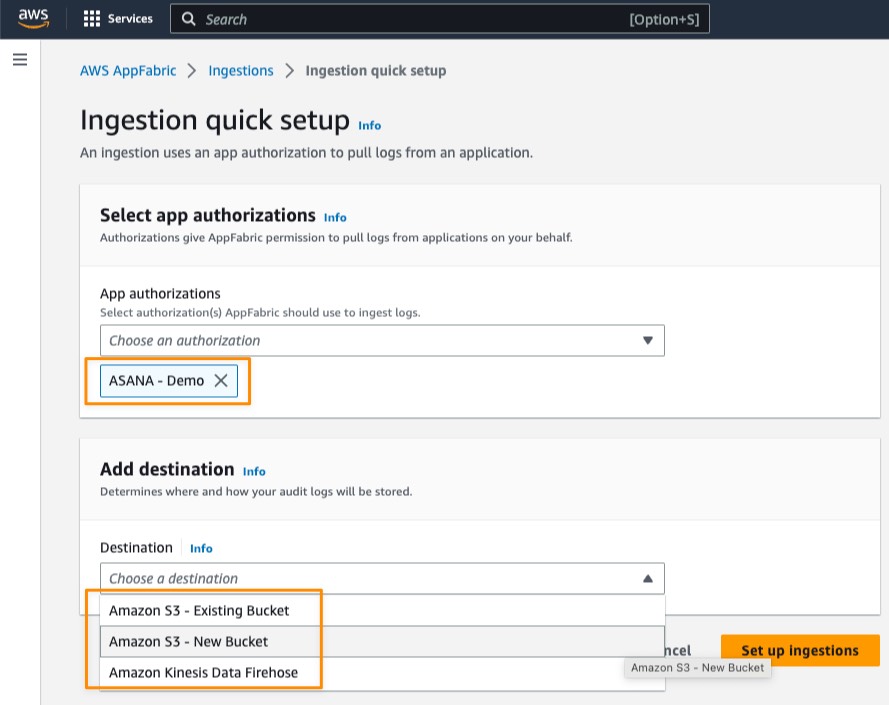
Under Select app authorizations, I select the authorized app that I created in the previous step. Here, I can choose more than one authorized application that allows me to consolidate data from various SaaS applications into a single destination. Then, I can select a destination for the audit logs of the selected apps. If I selected multiple app authorizations, the destination is applied to each authorized app. Currently, AppFabric supports the following destinations:

  • Amazon S3 – New Bucket
  • Amazon S3 – Existing Bucket
  • Amazon Kinesis Data Firehose

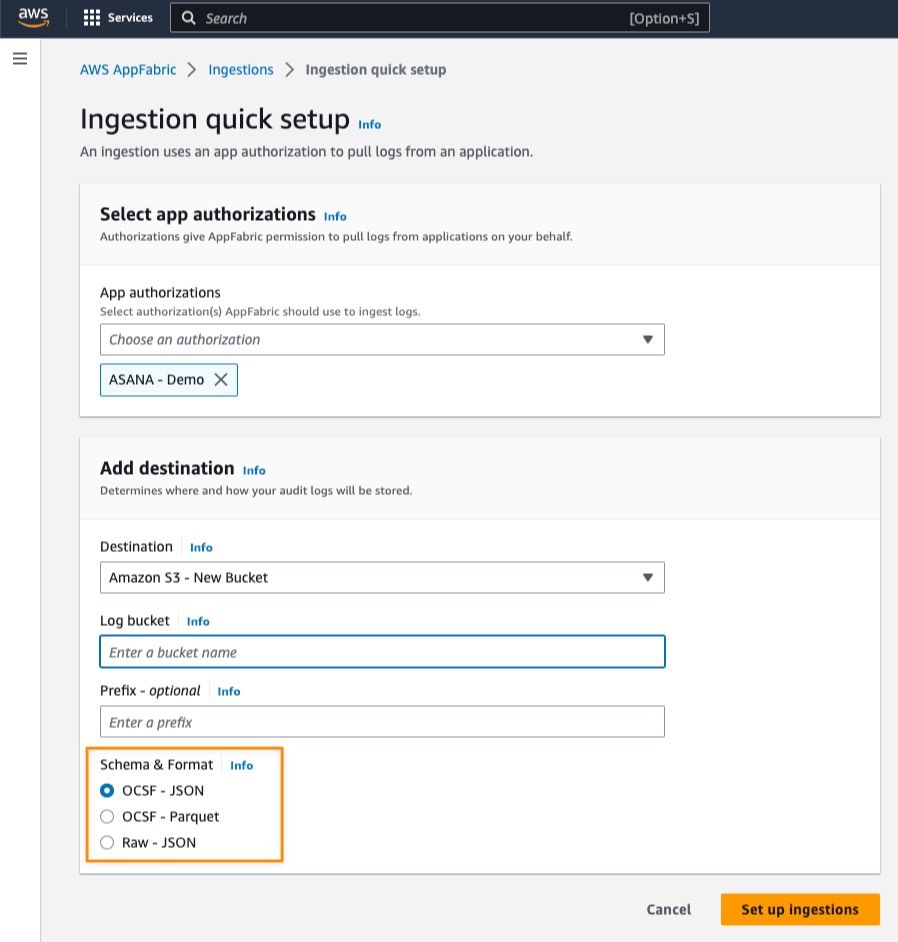
When I select a destination, additional fields appear. For example, if I select Amazon S3 – New Bucket, I need to fill the details for my Amazon S3 bucket and the optional prefix.

After that, I need to define Schema & Format of the ingested audit log data for my selected applications. Here, I have three options:

  • OCSF – JSON
  • OCSF – Parquet
  • Raw – JSON


AppFabric normalizes the audit log data to the OCSF schema and formats the audit log data into JSON or Parquet format. For OCSF – JSON and OCSF – Parquet options, AppFabric automatically maps the fields and enriches the field with user email as an identifier. As for the Raw – JSON data format, AppFabric simply provides the audit log data in its original JSON form.

To see a detailed view of my ingestion status, on the Ingestions page, I select my existing ingestion.

Here, I see the ingestion status is Enabled and the status for my Amazon S3 bucket is Active.

After my ingestion runs for around 10 minutes, I can see AppFabric stored the audit data logs in my Amazon S3 bucket.

When I open the file, I can see all the audit data logs from the SaaS application.

With audit data logs now in Amazon S3, I can also use AWS services to analyze and extract insights from the log data. For example, from data in Amazon S3, I can use AWS Glue and run a query using Amazon Athena. The following screenshot shows how I run a query for all activities in the audit data logs.

User Access
AWS AppFabric also has a feature called User access to allow security and IT admin teams to quickly see who has access to which applications. Using an employee’s corporate email address, AppFabric searches all authorized applications in the app bundle to return a list of apps that the user has access to. This helps to identify unauthorized user access and accelerate user deprovisioning.

Things to Know
Availability — AWS AppFabric is generally available today in US East (N. Virginia), Europe (Ireland), and Asia Pacific (Tokyo), with availability in additional AWS Regions coming soon.

AWS AppFabric generative AI capabilities – Available in a future release, AWS AppFabric will empower you to automatically perform tasks across applications using generative AI. Powered by Amazon Bedrock, this AI assistant generates answers to natural language queries, automates task management, and surfaces insights across SaaS applications.

Integrations with SaaS applications — AppFabric connects SaaS applications including Asana, Atlassian Jira suite, Dropbox, Miro, Okta, Slack, Smartsheet, Webex by Cisco, Zendesk, and Zoom. Refer to Supported applications for more details.

Integration with Security Tools — Audit data log from AppFabric is compatible with security tools, such as Logz.io, Netskope, NetWitness, Rapid7, and Splunk, or a customer’s proprietary security solution. Refer to Compatible security tools and services for more details on how to set up specific security tools and services.

Learn more
To get started, go to AWS AppFabric for more information and pricing details.

Happy building.
— Donnie

Uncover and Remediate Toxic Combinations with Attack Path Analysis

Post Syndicated from James Alaniz original https://blog.rapid7.com/2023/06/27/uncover-and-remediate-toxic-combinations-with-attack-path-analysis/

Uncover and Remediate Toxic Combinations with Attack Path Analysis

Particularly at enterprise scale, it’s not uncommon to have hundreds of thousands of resources running across your cloud environments at any given time. Of course, these resources aren’t running independently. In modern environments, these resources are all interconnected and in many cases interdependent. This interconnectivity means that if one resource or account is compromised, the whole system is at risk. Should a bad actor gain access to your systems via an open port, there are a number of avenues for them to move laterally across your environment, and even across environments, if your cloud environment is connected to your on-premises network.

Because of this, security teams need to understand how resources deployed across their environment relate to and interact with each other to effectively assess and prioritize risk remediation efforts.

For example, it’s helpful to know whether or not a resource is publicly available and it shouldn’t be, but what if that’s not the whole story? Perhaps that resource also provided an avenue to a database that was housing sensitive customer data, or was assigned a role that enabled it to escalate privileges and cause havoc across your environment. These types of toxic combinations compound risk and widen the potential blast radius should a resource or account be compromised.

Introducing Attack Path Analysis in InsightCloudSec

Attack Path Analysis provides a graph-based visualization that enables users to quickly identify the potential avenues that bad actors could use to navigate your cloud environment to exploit a vulnerable resource and/or access sensitive information.

Uncover and Remediate Toxic Combinations with Attack Path Analysis

With Attack Path Analysis, you can:

  • Visualize risk across your cloud environments in real-time, mapping relationships between compromised resources and the rest of your environment.
  • Prioritize remediation efforts by understanding the toxic risk combinations present in your environment that provide bad actors avenues to access business-critical resources and sensitive data.
  • Clearly communicate risk and the potential impact of an exploit to non-technical stakeholders with easy-to-consume attack path visualizations.

Identifying Toxic Combinations that Compound Risk and Widen the Blast Radius of an Attack

To effectively prioritize remediation efforts for the various risk signals across your environment, you need to take into account exploitability—whether or not a vulnerable account or resource can actually be accessed by a bad actor—and the potential impact should that vulnerable resource be compromised.

As an example, let’s dive into an attack path that highlights a publicly exposed compute instance with an attached privileged role. This can be exceedingly difficult to identify, because there are a variety of reasons that a compute instance might be assigned a set of permissions. When that instance is also publicly accessible, even if not directly, this can quickly become a major issue.

Uncover and Remediate Toxic Combinations with Attack Path Analysis

In this scenario, the environment would be susceptible to account takeover attacks, in which an attacker can gain control of the instance and use its assigned privileges to steal sensitive data such as login credentials, customer data, financial information or intellectual property. Perhaps even worse, the instance could be weaponized to launch attacks on other systems, cause a denial of service (DOS), or distribute malware across your network.

To remediate this issue, you’ll want to perform an audit to understand whether the compute instance needs to have the permissions and privileges it’s been granted and if it needs to be publicly accessible. Chances are, the answer to one or both will be “no”, and you’ll want to close off public access and/or adjust the privileges assigned to the resource in question.

There are a variety of attack paths that can be detected and investigated in InsightCloudSec upon launch, and we’ll continue to add more in the coming quarters. If you’re interested in learning more about Attack Path Analysis in InsightCloudSec, be sure to check out the dedicated docs page!

iostudio delivers key metrics to public sector recruiters with Amazon QuickSight

Post Syndicated from Jon Walker original https://aws.amazon.com/blogs/big-data/iostudio-delivers-key-metrics-to-public-sector-recruiters-with-amazon-quicksight/

This is a guest post by Jon Walker and Ari Orlinsky from iostudio written in collaboration with Sumitha AP from AWS.

iostudio is an award-winning marketing agency based in Nashville, TN. We build solutions that bring brands to life, making content and platforms work together. We serve our customers, who range from small technology startups to government agencies, as a social media strategy partner with in-house video production capabilities, a creative resource that provides data-driven insights about a campaign’s performance, a content marketing machine with connections across the United States, and a sophisticated customer engagement partner.

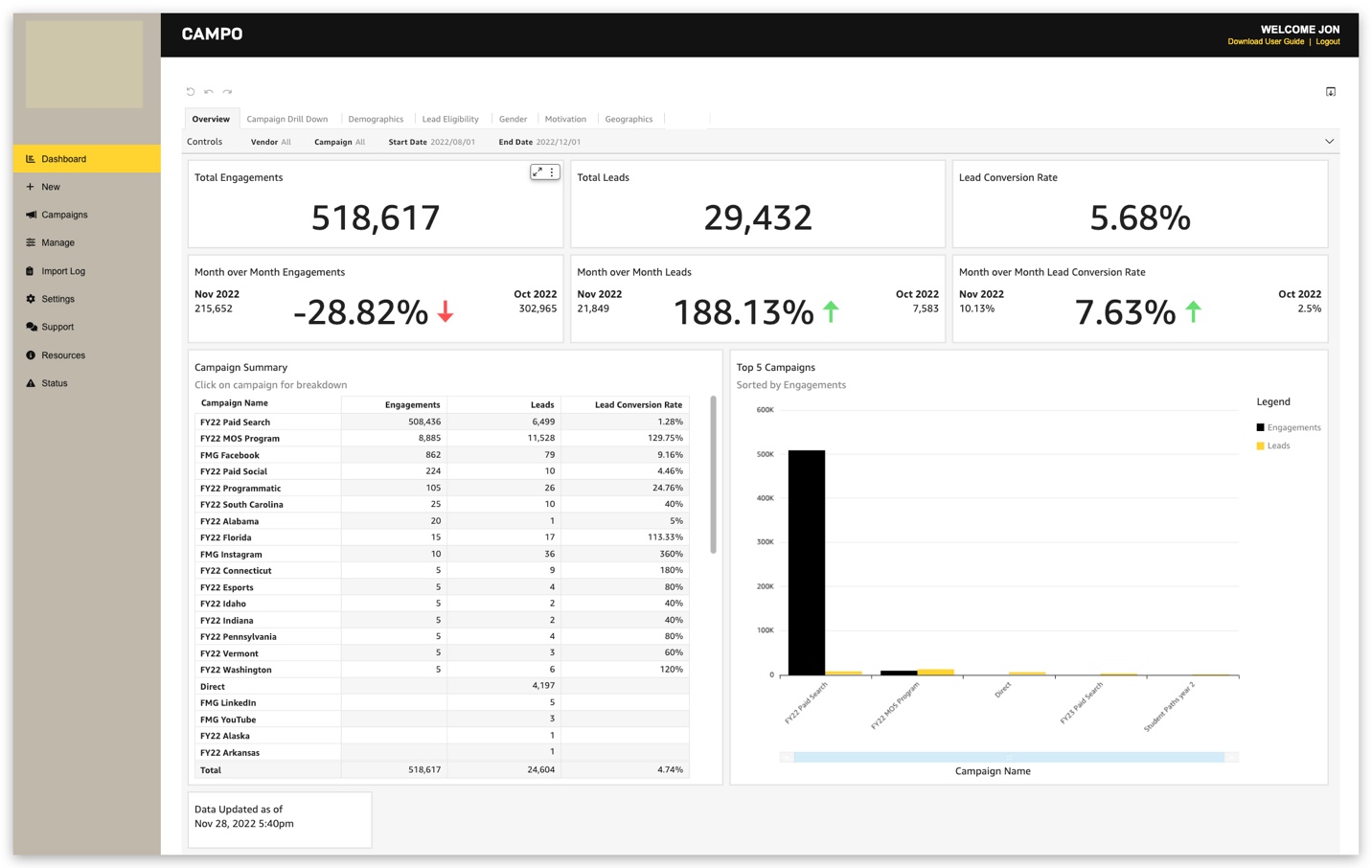
We wanted to include interactive, real-time visualizations to support recruiters from one of our government clients. Our previous solution offered visualization of key metrics, but point-in-time snapshots produced only in PDF format. We chose Amazon QuickSight because it gave us dynamic and interactive dashboards embedded in our application, while saving us money and development time.

In this post, we discuss how we built a solution using QuickSight that delivers real-time visibility of key metrics to public sector recruiters.

Modernized analytics and reporting

At iostudio, we faced the challenge of modernizing our government client’s static recruitment marketing analytics solution. Given the limitations of the static PDF charts used for its recruitment marketing data, we recognized the opportunity to introduce real-time interactive dashboards to improve insights needed to drive recruitment marketing initiatives. With the solution we built using QuickSight, recruiters are given access to rich visualizations on interactive dashboards in real time, eliminating uncertainty about whether the information they are looking at is accurate.

We created a QuickSight dashboard as a proof of concept, and it surpassed our expectations because of its advanced visualizations. We embedded QuickSight dashboards into our web application, making it seamless for recruiters to log in and get the insights they need. Because we used QuickSight anonymous embedding APIs, we were able to do this without registering and managing all our users in QuickSight. After this initial proof of concept, we gained confidence in our solution quickly, and we were able to build and launch our solution to production within 4–6 weeks. As a result, we reduced our development time by 60%, allowing us to bring this embedded analytics solution to our government client faster. We also saved 75% on our annual external software costs. Switching to QuickSight has enabled us to better serve our customers.

Taking care of sensitive data

iostudio operates in the AWS GovCloud environment because many of our customers are government agencies. This makes protecting customer data even more important. When building our solution for recruiters, we needed to ensure that recruiters can only see data related to the marketing campaigns that are assigned to them. We used row-level security with tag-based rules in QuickSight to restrict data on a per-user basis.

Integrating with AWS

With the AWS technology stack, we were able to create a custom-fit solution using a regionally diverse, service-oriented model to improve our time to deliver interactive reporting to our customers while also trimming costs. With AWS, we aren’t forced to pay for a bundle with services that we don’t use. We can pick what we need, and use what we need with pay-as-you-go pricing.

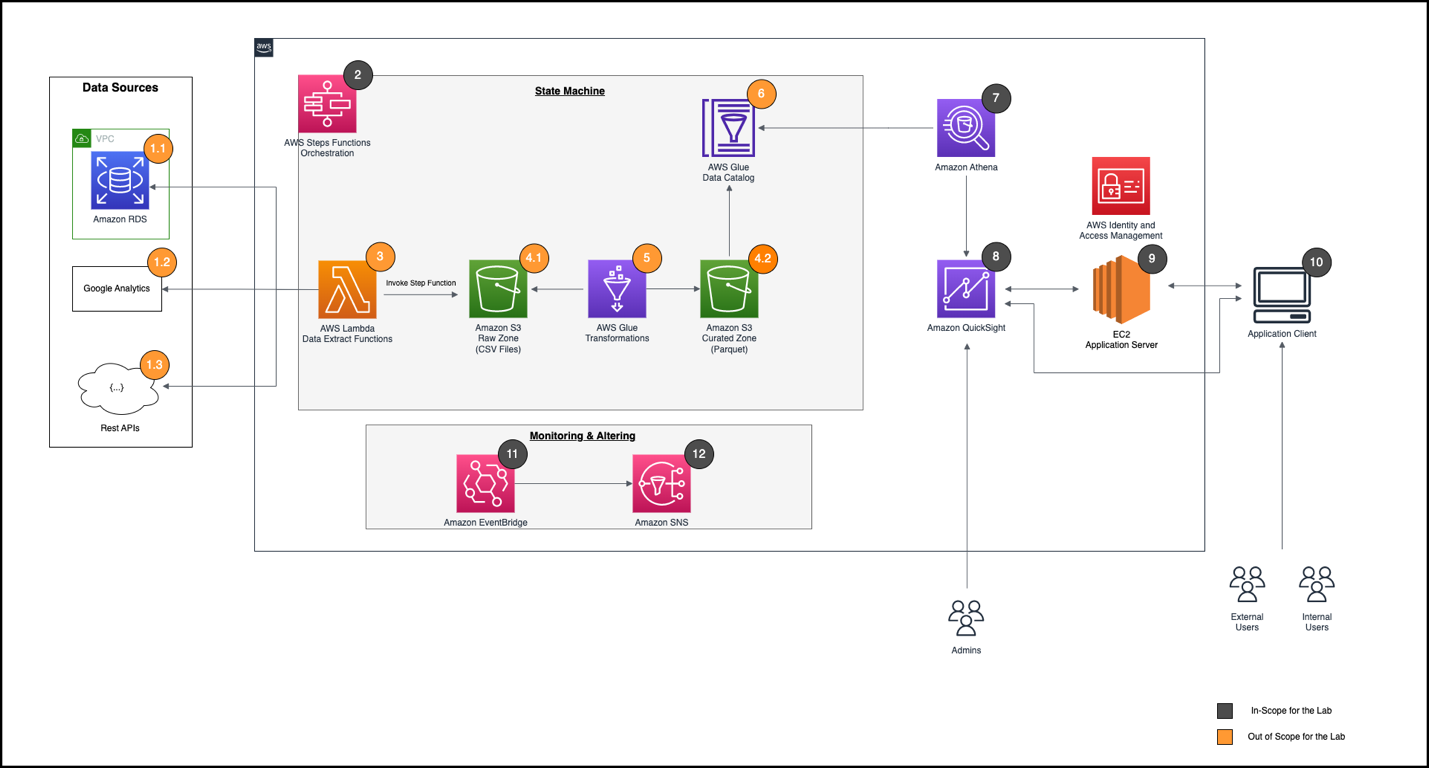
Our client had previously been using a data integration tool called Pentaho to get data from different sources into one place, which wasn’t an optimal solution. The following diagram illustrates our updated solution architecture using AWS services.

The custom-fit solution that we built uses AWS Lambda to extract data from three key data sources: a referral marketing tool, Google analytics data, and call center operations data. The data lands in an Amazon Simple Storage Service (Amazon S3) bucket, and from there AWS Glue jobs are used to transform the data and load it into another S3 bucket. QuickSight is connected to this data using Amazon Athena, helping us create real-time and interactive dashboards. This end-to-end extract, transform, and load (ETL) process is run with the help of AWS Step Functions, giving us the ability to orchestrate and monitor all the steps of the ETL process seamlessly.

Conclusion

By switching to QuickSight, we were able to provide our client’s recruiters with key metrics in real time, while reducing our development time and cutting costs significantly. Because the components in the architecture are reusable and interoperable, we were able to extend this solution to even more of our customers.

To learn more about how you can embed customized data visuals and interactive dashboards into any application, visit Amazon QuickSight Embedded.


About the Authors

Jon Walker, Senior Director of Engineering, is a native Nashvillian who has been in the technology field for over 19 years. He oversees enterprise-wide system engineering, development, and technology programs for large federal and DoD clients, as well as iostudio’s commercial clients.

Ari Orlinsky, Director of Information Services, leads iostudio’s Information Systems Department, responsible for AWS Cloud, SaaS applications, on-premises technology, risk assessment, compliance, budgeting, and human resource management. With nearly 20 years’ experience in strategic IS and technology operations, Ari has developed a keen enthusiasm for emerging technologies, DOD security and compliance, large format interactive experiences, and customer service communication technologies. As iostudio’s Technical Product Owner across internal and client-facing applications including a cloud-based omni-channel contact center platform, he advocates for secure deployment of applicable technologies to the cloud while ensuring resilient on-premises data center solutions.

Sumitha AP is a Sr. Solutions Architect at AWS. Sumitha works with SMB customers to help them design secure, scalable, reliable, and cost-effective solutions in the AWS Cloud. She has a focus on data and analytics and provides guidance on building analytics solutions on AWS.

[$] Converting filesystems to iomap

Post Syndicated from original https://lwn.net/Articles/935934/

A discussion that largely centered around the documentation of
iomap
, which provides a block-mapping interface for modern filesystems,
was led by Luis Chamberlain that the
2023 Linux Storage, Filesystem,
Memory-Management and BPF Summit
. There is an ongoing process of
converting filesystems to use iomap, in order to leave buffer heads
behind
and to better support folios, so
the intent was to get feedback on the documentation from developers who are
working on those conversions. One of the concrete outcomes of the session
was a plan to move that documentation from its current location on the
KernelNewbies wiki into
the kernel documentation
.

Discover the Secret to Lightning-Fast Big Data Analytics: Backblaze + Vultr Beats Amazon S3/EC2 by 39%

Post Syndicated from Pat Patterson original https://www.backblaze.com/blog/discover-the-secret-to-lightning-fast-big-data-analytics-backblaze-vultr-beats-amazon-s3-ec2-by-39/

A decorative image showing the Vultr and Backblaze logos on a trophy.

Over the past few months, we’ve explained how to store and query analytical data in Backblaze B2, and how to query the Drive Stats dataset using the Trino SQL query engine. Prompted by the recent expansion of Backblaze’s strategic partnership with Vultr, we took a closer look at how the Backblaze B2 + Vultr Cloud Compute combination performs for big data analytical workloads in comparison to similar services on Amazon Web Services (AWS). 

Running an industry-standard benchmark, and because AWS is almost five times more expensive, we were expecting to see a trade-off between better performance on the single cloud AWS deployment and lower cost on the multi-cloud Backblaze/Vultr equivalent, but we were very pleasantly surprised by the results we saw.

Spoiler alert: not only was the Backblaze B2 + Vultr combination significantly cheaper than Amazon S3/EC2, it also outperformed the Amazon services by a wide margin. Read on for the details—we cover a lot of background on this experiment, but you can skip straight ahead to the results of our tests if you’d rather get to the good stuff.

First, Some History: The Evolution of Big Data Storage Architecture

Back in 2004, Google’s MapReduce paper lit a fire under the data processing industry, proposing a new “programming model and an associated implementation for processing and generating large datasets.” MapReduce was applicable to many real-world data processing tasks, and, as its name implies, presented a straightforward programming model comprising two functions (map and reduce), each operating on sets of key/value pairs. This model allowed programs to be automatically parallelized and executed on large clusters of commodity machines, making it well suited for tackling “big data” problems involving datasets ranging into the petabytes.

The Apache Hadoop project, founded in 2005, produced an open source implementation of MapReduce, as well as the Hadoop Distributed File System (HDFS), which handled data storage. A Hadoop cluster could comprise hundreds, or even thousands, of nodes, each one responsible for both storing data to disk and running MapReduce tasks. In today’s terms, we would say that each Hadoop node combined storage and compute.

With the advent of cloud computing, more flexible big data frameworks, such as Apache Spark, decoupled storage from compute. Now organizations could store petabyte-scale datasets in cloud object storage, rather than on-premises clusters, with applications running on cloud compute platforms. Fast intra-cloud network connections and the flexibility and elasticity of the cloud computing environment more than compensated for the fact that big data applications were now accessing data via the network, rather than local storage.

Today we are moving into the next phase of cloud computing. With specialist providers such as Backblaze and Vultr each focusing on a core capability, can we move storage and compute even further apart, into different data centers? Our hypothesis was that increased latency and decreased bandwidth would severely impact performance, perhaps by a factor of two or three, but cost savings might still make for an attractive alternative to colocating storage and compute at a hyperscaler such as AWS. The tools we chose to test this hypothesis were the Trino open source SQL Query Engine and the TPC-DS benchmark.

Benchmarking Deployment Options With TPC-DS

The TPC-DS benchmark is widely used to measure the performance of systems operating on online analytical processing (OLAP) workloads, so it’s well suited for comparing deployment options for big data analytics.

A formal TPC-DS benchmark result measures query response time in single-user mode, query throughput in multiuser mode and data maintenance performance, giving a price/performance metric that can be used to compare systems from different vendors. Since we were focused on query performance rather than data loading, we simply measured the time taken for each configuration to execute TPC-DS’s set of 99 queries.

Helpfully, Trino includes a tpcds catalog with a range of schemas each containing the tables and data to run the benchmark at a given scale. After some experimentation, we chose scale factor 10, corresponding to approximately 10GB of raw test data, as it was a good fit for our test hardware configuration. Although this test dataset was relatively small, the TPC-DS query set simulates a real-world analytical workload of complex queries, and took several minutes to complete on the test systems. It would be straightforward, though expensive and time consuming, to repeat the test for larger scale factors.

We generated raw test data from the Trino tpcds catalog with its sf10 (scale factor 10) schema, resulting in 3GB of compressed Parquet files. We then used Greg Rahn’s version of the TPC-DS benchmark tools, tpcds-kit, to generate a standard TPC-DS 99-query script, modifying the script syntax slightly to match Trino’s SQL dialect and data types. We ran the set of 99 queries in single user mode three times on each of three combinations of compute/storage platforms: EC2/S3, EC2/B2 and Vultr/B2. The EC2/B2 combination allowed us to isolate the effect of moving storage duties to Backblaze B2 while keeping compute on Amazon EC2.

A note on data transfer costs: AWS does not charge for data transferred between an Amazon S3 bucket and an Amazon EC2 instance in the same region. In contrast, the Backblaze + Vultr partnership allows customers free data transfer between Backblaze B2 and Vultr Cloud Compute across any combination of regions.

Deployment Options for Cloud Compute and Storage

AWS

The EC2 configuration guide for Starburst Enterprise, the commercial version of Trino, recommends a r4.4xlarge EC2 instance, a memory-optimized instance offering 16 virtual CPUs and 122 GiB RAM, running Amazon Linux 2.

Following this lead, we configured an r4.4xlarge instance with 32GB of gp2 SSD local disk storage in the us-west-1 (Northern California) region. The combined hourly cost for the EC2 instance and SSD storage was $1.19.

We created an S3 bucket in the same us-west-1 region. After careful examination of the Amazon S3 Pricing Guide, we determined that the storage cost for the data on S3 was $0.026 per GB per month.

Vultr

We selected Vultr’s closest equivalent to the EC2 r4.4xlarge instance: a Memory Optimized Cloud Compute instance with 16 vCPUs, 128GB RAM plus 800GB of NVMe local storage, running Debian 11, at a cost of $0.95/hour in Vultr’s Silicon Valley region. Note the slight difference in the amount of available RAM–Vultr’s virtual machine (VM) includes an extra 6GB, despite its lower cost.

Backblaze B2

We created a Backblaze B2 Bucket located in the Sacramento, California data center of our U.S. West region, priced at $0.005/GB/month, about one-fifth the cost of Amazon S3.

Trino Configuration

We used the official Trino Docker image configured identically on the two compute platforms. Although a production Trino deployment would typically span several nodes, for simplicity, time savings, and cost-efficiency we brought up a single-node test deployment. We dedicated 78% of the VM’s RAM to Trino, and configured its Hive connector to access the Parquet files via the S3 compatible API. We followed the Trino/Backblaze B2 getting started tutorial to ensure consistency between the environments.

Benchmark Results

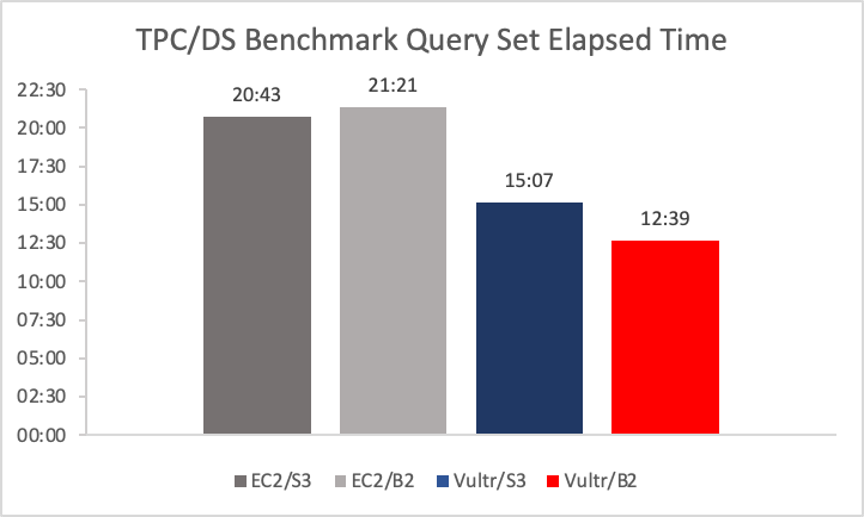
The table shows the time taken to complete the TPC-DS benchmark’s 99 queries. We calculated the mean of three runs for each combination of compute and storage. All times are in minutes and seconds, and a lower time is better.

A graph showing TPC/DS benchmark query times.

We used Trino on Amazon EC2 accessing data on Amazon S3 as our starting point; this configuration ran the benchmark in 20:43. 

Next, we kept Trino on Amazon EC2 and moved the data to Backblaze B2. We saw a surprisingly small difference in performance, considering that the data was no longer located in the same AWS region as the application. The EC2/B2 Storage Cloud combination ran the benchmark just 38 seconds slower (that’s about 3%), clocking in at 21:21.

When we looked at Trino running on Vultr accessing data on Amazon S3, we saw a significant increase in performance. On Vultr/S3, the benchmark ran in 15:07, 27% faster than the EC2/S3 combination. We suspect that this is due to Vultr providing faster vCPUs, more available memory, faster networking, or a combination of the three. Determining the exact reason for the performance delta would be an interesting investigation, but was out of scope for this exercise.

Finally, looking at Trino on Vultr accessing data on Backblaze B2, we were astonished to see that not only did this combination post the fastest benchmark time of all, Trino on Vultr/Backblaze B2’s time of 12:39 was 16% faster than Vultr/S3 and 39% faster than Trino on EC2/S3!

Note: this is not a formal TPC-DS result, and the query times generated cannot be compared outside this benchmarking exercise.

The Bottom Line: Higher Performance at Lower Cost

For the scale factor 10 TPC-DS data set and queries, with comparably specified instances, Trino running on Vultr retrieving data from B2 is 39% faster than Trino on EC2 pulling data from S3, with 20% lower compute cost and 76% lower storage cost.

You can get started with both Backblaze B2 and Vultr free of charge—click here to sign up for Backblaze B2, with 10GB free storage forever, and click here for $250 of free credit at Vultr.

The post Discover the Secret to Lightning-Fast Big Data Analytics: Backblaze + Vultr Beats Amazon S3/EC2 by 39% appeared first on Backblaze Blog | Cloud Storage & Cloud Backup.

Ekstrand: NVK update: Enabling new extensions, conformance status & more

Post Syndicated from original https://lwn.net/Articles/936554/

Faith Ekstrand has provided
an update
on the status of the NVK
Vulkan driver for NVIDIA GPUs.

Probably the single most common question I get from folks is, “When
will NVK be in upstream mesa?” The short answer is that it’ll be
upstreamed along with the new kernel API. The new API is going to
be required in order to implement Vulkan correctly in a bunch of
cases. Even though it mostly works on top of upstream nouveau, I
don’t want to be maintaining support for that interface for another
10 years when it only partially works.

We don’t yet have an exact timetable for when the new API will be
ready. I’m currently hoping that we get it all upstream this year
but I can’t say when exactly.

Security updates for Tuesday

Post Syndicated from original https://lwn.net/Articles/936549/

Security updates have been issued by Debian (c-ares and libx11), Fedora (chromium and kubernetes), Red Hat (python3 and python38:3.8, python38-devel:3.8), and SUSE (amazon-ssm-agent, kernel, kubernetes1.24, libvirt, nodejs16, openssl-1_1, and webkit2gtk3).

Cloudflare Zaraz supports JSONata

Post Syndicated from Yo'av Moshe original http://blog.cloudflare.com/zaraz-adds-jsonata-support/

Cloudflare Zaraz supports JSONata

Cloudflare Zaraz supports JSONata

Cloudflare users leverage Zaraz for loading their third-party JavaScript tools. Tools like analytics, conversion pixels, widgets and alike, load faster and safer when loaded through Zaraz.

When configuring a tool in Zaraz, users can specify the payload to be included when sending information to it. This allows for the transmission of more detailed data. For example, when sending the "Button Clicked" event to Google Analytics, users can include additional information such as the ID of the button element and the content of the user_id cookie at the time of the button press. In Zaraz, users have the flexibility to add as many fields as desired when configuring the action.

Typically, information reaches Zaraz through the execution of zaraz.track("event name", { properties }) within the website's code. The properties object can contain relevant details that will be sent to third-party tools, such as the button ID in the previous example. However, there are cases where users may need to process and manipulate the information before sending it to their third-party tools.

To address this requirement, we recently introduced Worker Variables, which enables users to send information to a Cloudflare Worker, perform manipulations on it, and return a modified value. This feature offers immense power and flexibility. For instance, users can communicate with their backend server to retrieve data and leverage JavaScript to perform necessary calculations. With Worker Variables, users have access to a fully-featured Worker, opening up endless possibilities.

However, feedback from our users highlighted the need for a middle-ground solution. Sometimes, the data manipulation required is minor, and employing a Cloudflare Worker might feel like overkill. It is in response to this feedback that we decided to integrate with JSONata.

What is JSONata?

JSONata calls itself a JSON query and transformation language. While some developers may already be familiar with jq, the command-line JSON processor, JSONata offers similar features with a syntax that we believe is more intuitive and easier to understand. Since JSONata is a JavaScript library, it was very easy to integrate into Cloudflare Zaraz.

Let’s say we have JSON document like the following:

{
  "name": "Jane Smith",
  "address": {
    "street": "123 High St",
    "city": "London"
  },
  "pets": [
    { "type": "hamster", "name": "Rex" },
    { "type": "parrot", "name": "Milo" },
    { "type": "parrot", "name": "Alfie" }
  ]
}

With JSONata, with JSONata, one can run interesting queries on the document:

$count(pets) // 3

address.city // London

pets[type="parrot"].name // ["Alfie", "Milo"]

The JSONata documentation includes many examples for what you do with it, and there’s even a playground where you can try your JSONata queries live.

Using JSONata with Zaraz

JSONata has been tightly integrated with Cloudflare Zaraz, allowing you to leverage its capabilities in the fields of all Actions, Triggers, and Variables. Before diving into writing your JSONata expressions, it's essential to understand the JSON document you'll be working with.

Similar to Worker Variables or the HTTP Request tool, JSONata has access to the Zaraz Context. This object contains information from your zaraz.track() and zaraz.ecommerce() calls, as well as automatically gathered data by Zaraz, such as the current page URL, cookies, page title, user-agent string, and more. You can find the complete reference for this object in the Zaraz documentation.

Using your JSONata query is straightforward once you are familiar with it. To incorporate the query into your field content, simply enclose it within double curly brackets. The expression will be passed to JSONata along with the Zaraz Context object, and the resulting value will be used for the field.

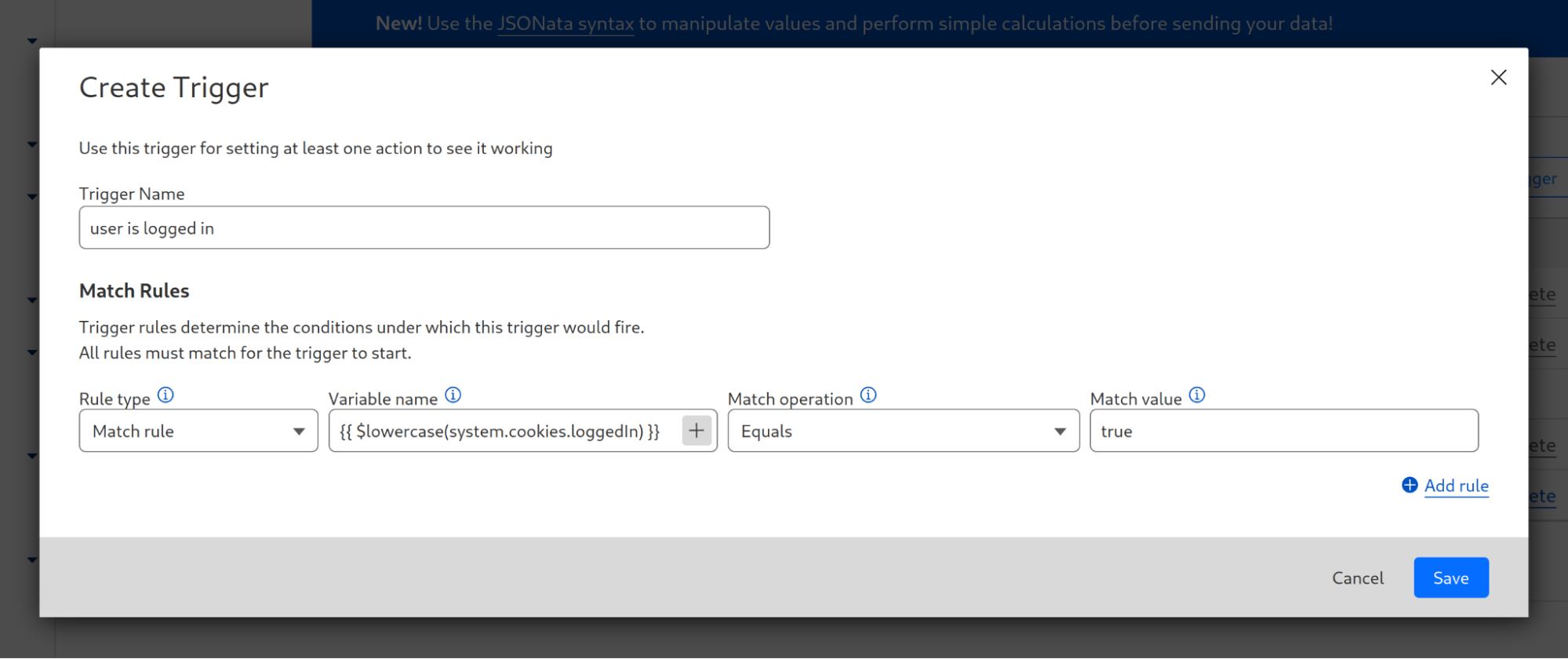
Let's explore two examples from our documentation. Often, there's a need to convert a string to lowercase, such as when comparing it to another value in a regular expression. Suppose the original string is derived from a cookie named loggedIn, that specifies if the current user is logged in. In that case, we can use JSONata to transform the value to lowercase using the expression $lowercase(system.cookies.loggedIn). If we want to use this expression within a trigger, we navigate to the Zaraz dashboard and choose our trigger, locate the relevant match rule, and enter {{ $lowercase(system.cookies.loggedIn) }} as the value. Now, the cookie value will be compared in its lowercase format.

Cloudflare Zaraz supports JSONata

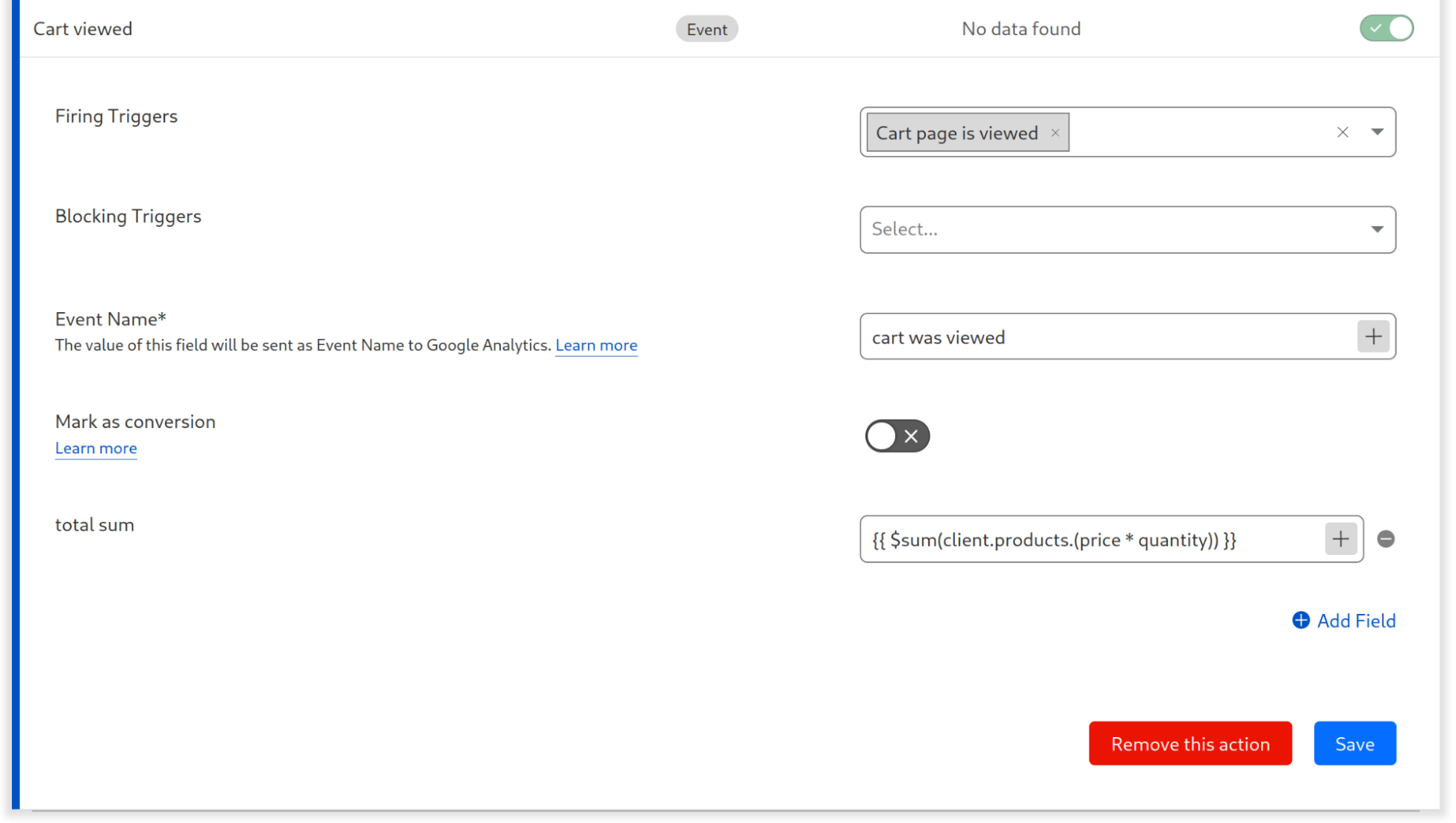
You can also run simple calculations. Assuming you are using zaraz.track() to send the cart content like this:

zaraz.track("Cart Viewed",
  {  products:
	[
	{
  	sku: '2671033',
  	name: 'V-neck T-shirt',
  	price: 14.99,
  	quantity: 3
	},{
  	sku: '2671034',
  	name: 'T-shirt',
  	price: 10.99,
  	quantity: 2
	},
	],
  }
);

If the field in which you want to include the total sum of all products, you will enter {{ $sum(client.products.(price * quantity)) }}. This will multiply the price of each product by its quantity, and then sum up the total.

Cloudflare Zaraz supports JSONata

Start using JSONata today

JSONata support is available to all Zaraz users at no cost, and it is enabled automatically for all websites. Start using JSONata today to send finely tuned data to your providers or APIs with minimal code and zero maintenance for your data infrastructure. If you need any help – join our Discord channel!

AMD VP1902 is Leviathan FPGA Doubling the Previous-Gen Largest FPGA

Post Syndicated from Patrick Kennedy original https://www.servethehome.com/amd-vp1902-is-leviathan-fpga-doubling-the-previous-gen-largest-fpga/

Built around for chiplets, the new AMD VP1902 is an enormous FPGA that doubles the previous generation’s biggest FPGA’s capabilities

The post AMD VP1902 is Leviathan FPGA Doubling the Previous-Gen Largest FPGA appeared first on ServeTheHome.

More Unity: Dive deeper into 3D worlds, game design and programming

Post Syndicated from Marc Scott original https://www.raspberrypi.org/blog/more-unity-3d-game-design/

Our ‘Intro to Unity’ educational project path is a big success, sparking lots of young people’s passion for 3D game design and programming. Today we introduce the ‘More Unity‘ project path — the perfect next step for young people who have completed our ‘Intro to Unity‘ path. This new free path is designed to bridge the gap for young people before they start on the tutorials on the Unity learning platform.

Our work to create this path builds on our partnership with Unity, through which we aim to offer any young person, anywhere, the opportunity to take their first steps in creating virtual worlds using real-time 3D.

More Unity builds on foundations

After young people have tried out the Unity Engine and C# programming through the ‘Intro to Unity’ path, they’re ready for a deeper exploration of 3D game design. ‘More Unity’ helps them build on the foundational skills they learned in the ‘Intro to Unity’ path. After completing this new path, they’ll be able to add complexity, new challenges, and heaps of fun to all their 3D creations.

We’ve prepared a comprehensive Unity Guide to assist with getting ready to start either the ‘Intro to Unity’ or ‘More Unity’ path. To create with Unity, learners need access to a computer with a graphics card, the latest version of the free Unity Games Engine, and a code editor. For the extra Blender-based projects (see below), they need the latest version of the free Blender software.

Dive into the projects in the ‘More Unity’ path

The project path consists of six projects. Like in ‘Intro to Unity’, each project introduces new skills bit by bit, enabling young people to independently code their own, next-level Unity creation in the final project.

Rainbow run

This first project shows how to build an exciting 3D simulation. With ‘Rainbow run’, learners create colourful tracks and guide a marble to race along them. We also offer them an extra project guide where they can customise the look of their marble using Blender.

Disco dance floor

Next, with ‘Disco dance floor’, learners code an interactive, tilting dance floor that responds to a rolling ball with sound and colour. They can add their own style to the dance floor by following our extra Blender project.

Don’t fall through

‘Don’t fall through’ is the third project in the path. Here, learners code a two-player game that requires strategy and timing as marbles traverse a vanishing tiled floor.

Pixel art reveal

‘Pixel art reveal’ comes next in the path. It helps learners design unique pixel art on a tiled floor and reveal their awesome artwork by rolling a ball across the surface.

Track designer

In ‘Track designer’, we invite learners to truly think like game designers. This project empowers learners to design unique tilting tracks filled with obstacles, personalised effects, sounds, and more.

Marble mayhem

Finally ‘Marble mayhem’ lets young people bring to life all the principles of physics and materials in the Unity Game Engine they’ve learned about while following the ‘More Unity’ path. This is their place to create a one-of-a-kind game or digital toy that truly reflects their creativity.

Growing skills through Unity

‘More Unity’ promotes young people’s creativity, problem-solving, and independence. Each project presents them with the chance to create a virtual world of physics, materials, and mechanics. With each project they’ll learn lots of new skills in 3D modeling, gameplay design, and programming.

The path includes a community gallery where young people can share their new 3D creations and see what their peers all over the world have made.

The skills young people gain through the ‘Intro to Unity’ and ‘More Unity’ path provide them with a solid foundation to continue to learn and create with Unity. To follow their passion for 3D worlds, game design, and programming further, they can move on to the hundreds of tutorials available on Unity’s learning platform.

Get ready for ‘More Unity’: Our support for educators, volunteers and parents

Our detailed Unity guide will help you get everything set up for your young people to start with Unity, and the ‘Intro to Unity‘ path is the place for them to begin before they move on to ‘More Unity‘.

If you or your young people want to get a taste of the fun ‘More Unity’ has in store, there’s the Collision and colours Discover project to try out. This short learning experience showcases the new components the ‘More Unity’ path introduces.

To help our community of CoderDojo and Code Club volunteers bring Unity to their learners, we will host a free Unity-focused webinar on 13 July. Sign up to get a walkthrough of the path from our Learning Manager Mac Bowley, and to ask him any questions you might have.

The post More Unity: Dive deeper into 3D worlds, game design and programming appeared first on Raspberry Pi Foundation.

The collective thoughts of the interwebz