Post Syndicated from The Atlantic original https://www.youtube.com/watch?v=UEl6Qc6hLus
Supermicro A3SSV-16C-SPLN10F Intel Atom P5342 25GbE Motherboard Review
Post Syndicated from Patrick Kennedy original https://www.servethehome.com/supermicro-a3ssv-16c-spln10f-intel-atom-p5342-25gbe-motherboard-review/
In our Supermicro A3SSV-16C-SPLN10F review, we see what this 25GbE and 16-core Intel Atom P5342 Snow Ridge platform offers
The post Supermicro A3SSV-16C-SPLN10F Intel Atom P5342 25GbE Motherboard Review appeared first on ServeTheHome.
Using Amazon Verified Permissions to manage authorization for AWS IoT smart home applications
Post Syndicated from Rajat Mathur original https://aws.amazon.com/blogs/security/using-amazon-verified-permissions-to-manage-authorization-for-aws-iot-smart-thermostat-applications/
This blog post introduces how manufacturers and smart appliance consumers can use Amazon Verified Permissions to centrally manage permissions and fine-grained authorizations. Developers can offer more intuitive, user-friendly experiences by designing interfaces that align with user personas and multi-tenancy authorization strategies, which can lead to higher user satisfaction and adoption. Traditionally, implementing authorization logic using role based access control (RBAC) or attribute based access control (ABAC) within IoT applications can become complex as the number of connected devices and associated user roles grows. This often leads to an unmanageable increase in access rules that must be hard-coded into each application, requiring excessive compute power for evaluation. By using Verified Permissions, you can externalize the authorization logic using Cedar policy language, enabling you to define fine-grained permissions that combine RBAC and ABAC models. This decouples permissions from your application’s business logic, providing a centralized and scalable way to manage authorization while reducing development effort.
In this post, we walk you through a reference architecture that outlines an end-to-end smart thermostat application solution using AWS IoT Core, Verified Permissions, and other AWS services. We show you how to use Verified Permissions to build an authorization solution using Cedar policy language to define dynamic policy-based access controls for different user personas. The post includes a link to a GitHub repository that houses the code for the web dashboard and the Verified Permissions logic to control access to the solution APIs.
Solution overview
This solution consists of a smart thermostat IoT device and an AWS hosted web application using Verified Permissions for fine-grained access to various application APIs. For this use case, the AWS IoT Core device is being simulated by an AWS Cloud9 environment and communicates with the IoT service using AWS IoT Device SDK for Python. After being configured, the device connects to AWS IoT Core to receive commands and send messages to various MQTT topics.
As a general practice, when a user-facing IoT solution is implemented, the manufacturer performs administrative tasks such as:
- Embedding AWS Private Certificate Authority certificates into each IoT device (in this case a smart thermostat). Usually this is done on the assembly line and the certificates used to verify the IoT endpoints are burned into device memory along with the firmware.
- Creating an Amazon Cognito user pool that provides sign-up and sign-in options for web and mobile application users and hosts the authentication process.
- Creating policy stores and policy templates in Verified Permissions. Based on who signs up, the manufacturer creates policies with Verified Permissions to link each signed-up user to certain allowed resources or IoT devices.
- The mapping of user to device is stored in a datastore. For this solution, you’ll use an Amazon DynamoDB table to record the relationship.
The user who purchases the device (the primary device owner) performs the following tasks:
- Signs up on the manufacturer’s web application or mobile app and registers the IoT device by entering a unique serial number. The mapping between user details and the device serial number is stored in the datastore through an automated process that is initiated after sign-up and device claim.
- Connects the new device to an existing wireless network, which initiates a registration process to securely connect to AWS IoT Core services within the manufacturer’s account.
- Invites other users (such as guests, family members, or the power company) through a referral, invitation link, or a designated OAuth process.
- Assign roles to the other users and therefore permissions.
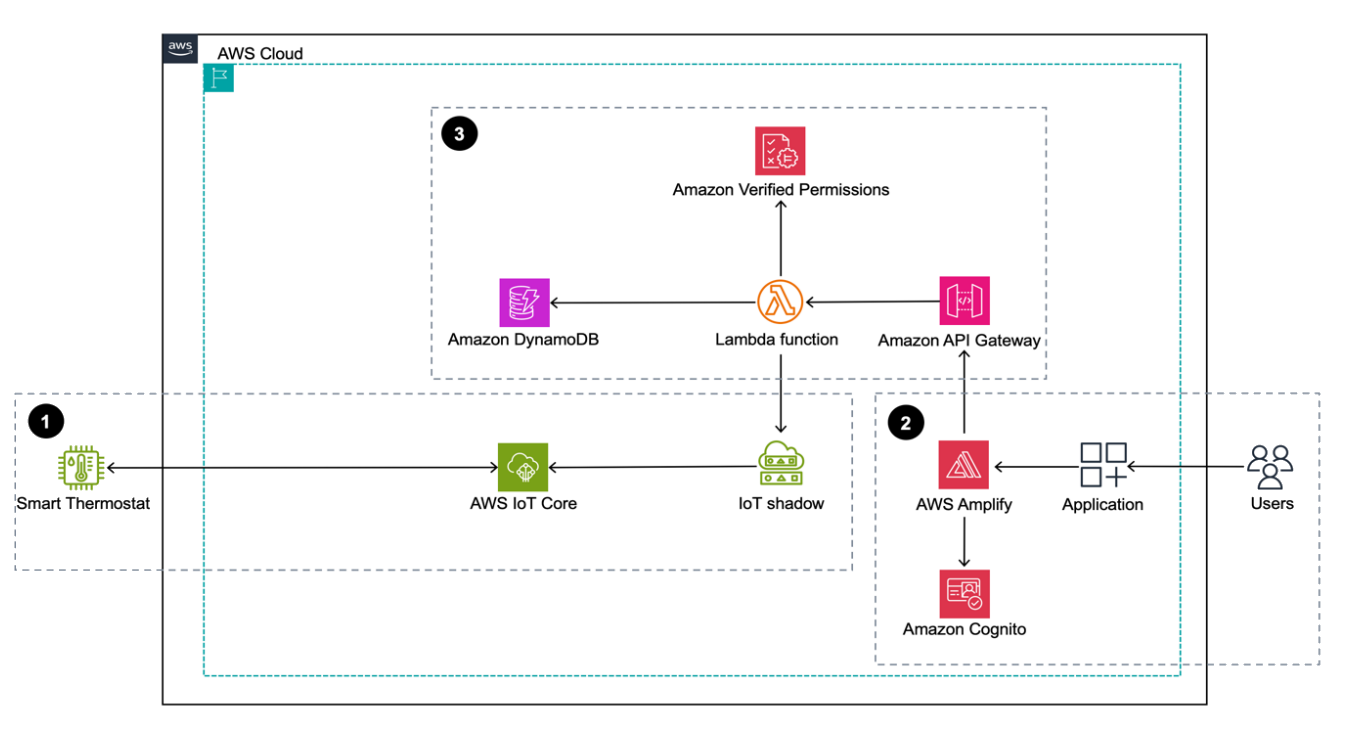
Figure 1: Sample smart home application architecture built using AWS services
Figure 1 depicts the solution as three logical components:
- The first component depicts device operations through AWS IoT Core. The smart thermostat is on site and it communicates with AWS IoT Core and its state is managed through the AWS IoT Device Shadow Service.
- The second component depicts the web application, which is the application interface that customers use. It’s a ReactJS-backed single page application deployed using AWS Amplify.
- The third component shows the backend application, which is built using Amazon API Gateway, AWS Lambda, and DynamoDB. A Cognito user pool is used to manage application users and their authentication. Authorization is handled by Verified Permissions where you create and manage policies that are evaluated when the web application calls backend APIs. These policies are evaluated against each authorization policy to provide an access decision to deny or allow an action.
The solution flow itself can be broken down into three steps after the device is onboarded and users have signed up:
- The smart thermostat device connects and communicates with AWS IoT Core using the MQTT protocol. A classic Device Shadow is created for the AWS IoT thing Thermostat1 when the UpdateThingShadow call is made the first time through the AWS SDK for a new device. AWS IoT Device Shadow service lets the web application query and update the device’s state in case of connectivity issues.
- Users sign up or sign in to the Amplify hosted smart home application and authenticate themselves against a Cognito user pool. They’re mapped to a device, which is stored in a DynamoDB table.
- After the users sign in, they’re allowed to perform certain tasks and view certain sections of the dashboard based on the different roles and policies managed by Verified Permissions. The underlying Lambda function that’s responsible for handling the API calls queries the DynamoDB table to provide user context to Verified Permissions.
Prerequisites
- To deploy this solution, you need access to the AWS Management Console and AWS Command Line Interface (AWS CLI) on your local machine with sufficient permissions to access required services, including Amplify, Verified Permissions, and AWS IoT Core. For this solution, you’ll give the services full access to interact with different underlying services. But in production, we recommend following security best practices with AWS Identity and Access Management (IAM), which involves scoping down policies.
- Set up Amplify CLI by following these instructions. We recommend the latest NodeJS stable long-term support (LTS) version. At the time of publishing this post, the LTS version was v20.11.1. Users can manage multiple NodeJS versions on their machines by using a tool such as Node Version Manager (nvm).
Walkthrough
The following table describes the actions, resources, and authorization decisions that will be enforced through Verified Permissions policies to achieve fine-grained access control. In this example, John is the primary device owner and has purchased and provisioned a new smart thermostat device called Thermostat1. He has invited Jane to access his device and has given her restricted permissions. John has full control over the device whereas Jane is only allowed to read the temperature and set the temperature between 72°F and 78°F.
John has also decided to give his local energy provider (Power Company) access to the device so that they can set the optimum temperature during the day to manage grid load and offer him maximum savings on his energy bill. However, they can only do so between 2:00 PM and 5:00 PM.
For security purposes the verified permissions default decision is DENY for unauthorized principals.
| Name | Principal | Action | Resource | Authorization decision |
| Any | Default | Default | Default | Deny |
| John | john_doe | Any | Thermostat1 | Allow |
| Jane | jane_doe | GetTemperature | Thermostat1 | Allow |
| Jane | jane_doe | SetTemperature | Thermostat1 | Allow only if desired temperature is between 72°F and 78°F. |
| Power Company | powercompany | GetTemperature | Thermostat1 | Allow only if accessed between the hours of 2:00 PM and 5:00 PM |
| Power Company | powercompany | SetTemperature | Thermostat1 | Allow only if the temperature is set between the hours of 2:00 PM and 5:00 PM |
Create a Verified Permissions policy store
Verified Permissions is a scalable permissions management and fine-grained authorization service for the applications that you build. The policies are created using Cedar, a dedicated language for defining access permissions in applications. Cedar seamlessly integrates with popular authorization models such as RBAC and ABAC.
A policy is a statement that either permits or forbids a principal to take one or more actions on a resource. A policy store is a logical container that stores your Cedar policies, schema, and principal sources. A schema helps you to validate your policy and identify errors based on the definitions you specify. See Cedar schema to learn about the structure and formal grammar of a Cedar schema.
To create the policy store
- Sign in to the Amazon Verified Permissions console and choose Create policy store.
- In the Configuration Method section, select Empty Policy Store and choose Create policy store.
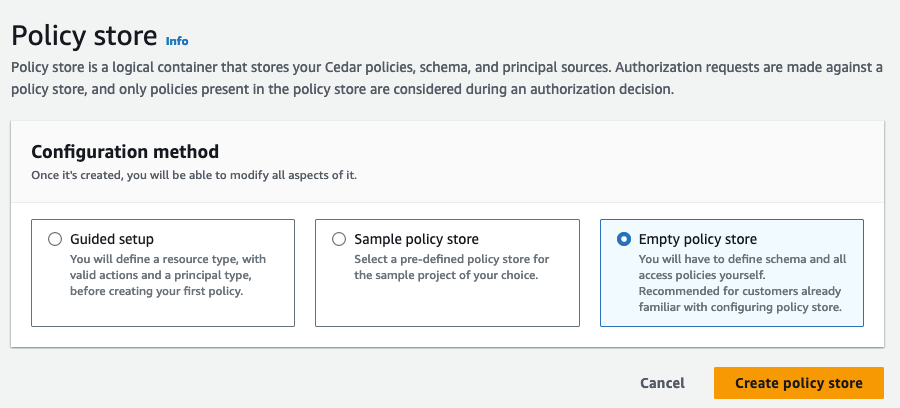
Figure 2: Create an empty policy store
Note: Make a note of the policy store ID to use when you deploy the solution.
To create a schema for the application
- On the Verified Permissions page, select Schema.
- In the Schema section, choose Create schema.

Figure 3: Create a schema
- In the Edit schema section, choose JSON mode, paste the following sample schema for your application, and choose Save changes.
{
    "AwsIotAvpWebApp": {
        "entityTypes": {
            "Device": {
                "shape": {
                    "attributes": {
                        "primaryOwner": {
                            "name": "User",
                            "required": true,
                            "type": "Entity"
                        }
                    },
                    "type": "Record"
                },
                "memberOfTypes": []
            },
            "User": {}
        },
        "actions": {
            "GetTemperature": {
                "appliesTo": {
                    "context": {
                        "attributes": {
                            "desiredTemperature": {
                                "type": "Long"
                            },
                            "time": {
                                "type": "Long"
                            }
                        },
                        "type": "Record"
                    },
                    "resourceTypes": [
                        "Device"
                    ],
                    "principalTypes": [
                        "User"
                    ]
                }
            },
            "SetTemperature": {
                "appliesTo": {
                    "resourceTypes": [
                        "Device"
                    ],
                    "principalTypes": [
                        "User"
                    ],
                    "context": {
                        "attributes": {
                            "desiredTemperature": {
                                "type": "Long"
                            },
                            "time": {
                                "type": "Long"
                            }
                        },
                        "type": "Record"
                    }
                }
            }
        }
    }
}

When creating policies in Cedar, you can define authorization rules using a static policy or a template-linked policy.
Static policies
In scenarios where a policy explicitly defines both the principal and the resource, the policy is categorized as a static policy. These policies are immediately applicable for authorization decisions, as they are fully defined and ready for implementation.
Template-linked policies
On the other hand, there are situations where a single set of authorization rules needs to be applied across a variety of principals and resources. Consider an IoT application where actions such as SetTemperature and GetTemperature must be permitted for specific devices. Using static policies for each unique combination of principal and resource can lead to an excessive number of almost identical policies, differing only in their principal and resource components. This redundancy can be efficiently addressed with policy templates. Policy templates allow for the creation of policies using placeholders for the principal, the resource, or both. After a policy template is established, individual policies can be generated by referencing this template and specifying the desired principal and resource. These template-linked policies function the same as static policies, offering a streamlined and scalable solution for policy management.
To create a policy that allows access to the primary owner of the device using a static policy
- In the Verified Permissions console, on the left pane, select Policies, then choose Create policy and select Create static policy from the drop-down menu.
Figure 4: Create static policy
- Define the policy scope:
- Select Permit for the Policy effect.

Figure 5: Define policy effect
- Select All Principals for Principals scope.
- Select All Resources for Resource scope.
- Select All Actions for Actions scope and choose Next.
Figure 6: Define policy scope
- Select Permit for the Policy effect.
- On the Details page, under Policy, paste the following full-access policy, which grants the primary owner permission to perform both SetTemperature and GetTemperature actions on the smart thermostat unconditionally. Choose Create policy.
	permit (principal, action, resource)
	when { resource.primaryOwner == principal };
Figure 7: Write and review policy statement


To create a static policy to allow a guest user to read the temperature
In this example, the guest user is Jane (username: jane_doe).
- Create another static policy and specify the policy scope.
- Select Permit for the Policy effect.
Figure 8: Define the policy effect
- Select Specific principal for the Principals scope.
- Select AwsIotAvpWebApp::User and enter jane_doe.
Figure 9: Define the policy scope
- Select Specific resource for the Resources scope.
- Select AwsIotAvpWebApp::Device and enter Thermostat1.
- Select Specific set of actions for the Actions scope.
- Select GetTemperature and choose Next.
Figure 10: Define resource and action scopes
- Enter the Policy description: Allow jane_doe to read thermostat1.
- Choose Create policy.
- Select Permit for the Policy effect.


Next, you will create reusable policy templates to manage policies efficiently. To create a policy template for a guest user with restricted temperature settings that limit the temperature range they can set to between 72°F and 78°F. In this case, the guest user is going to be Jane (username: jane_doe)
To create a reusable policy template
- Select Policy template and enter Guest user template as the description.
- Paste the following sample policy in the Policy body and choose Create policy template.
permit (
    principal == ?principal,
    action in [AwsIotAvpWebApp::Action::"SetTemperature"],
    resource == ?resource
)
when { context.desiredTemperature >= 72 && context.desiredTemperature <= 78 };
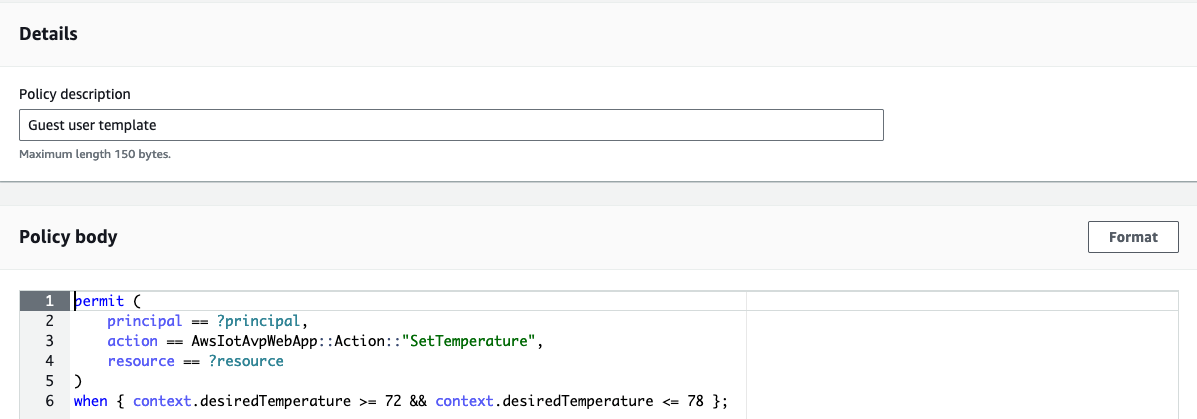
Figure 11: Create guest user policy template
As you can see, you don’t specify the principal and resource yet. You enter those when you create an actual policy from the policy template. The context object will be populated with the desiredTemperature property in the application and used to evaluate the decision.
You also need to create a policy template for the Power Company user with restricted time settings. Cedar policies don’t support date/time format, so you must represent 2:00 PM and 5:00 PM as elapsed minutes from midnight.
To create a policy template for the power company
- Select Policy template and enter Power company user template as the description.
- Paste the following sample policy in the Policy body and choose Create policy template.
permit (
    principal == ?principal,
    action in [AwsIotAvpWebApp::Action::"SetTemperature", AwsIotAvpWebApp::Action::"GetTemperature"],
    resource == ?resource
)
when { context.time >= 840 && context.time < 1020 };
The policy templates accept the user and resource. The next step is to create a template-linked policy for Jane to set and get thermostat readings based on the Guest user template that you created earlier. For simplicity, you will manually create this policy using the Verified Permissions console. In production, application policies can be dynamically created using the Verified Permissions API.
To create a template-linked policy for a guest user
- In the Verified Permissions console, on the left pane, select Policies, then choose Create policy and select Create template-linked policy from the drop-down menu.
Figure 12: Create new template-linked policy
- Select the Guest user template and choose next.

Figure 13: Select Guest user template
- Under parameter selection:
- For Principal enter AwsIotAvpWebApp::User::”jane_doe”.
- For Resource enter AwsIotAvpWebApp::Device::”Thermostat1″.
- Choose Create template-linked policy.
Figure 14: Create guest user template-linked policy


Note that with this policy in place, jane_doe can only set the temperature of the device Thermostat1 to between 72°F and 78°F.
To create a template-linked policy for the power company user
Based on the template that was set up for power company, you now need an actual policy for it.
- In the Verified Permissions console, go to the left pane and select Policies, then choose Create policy and select Create template-linked policy from the drop-down menu.
- Select the Power company user template and choose next.
- Under Parameter selection, for Principal enter AwsIotAvpWebApp::User::”powercompany”, and for Resource enter AwsIotAvpWebApp::Device::”Thermostat1″, and choose Create template-linked policy.
Now that you have a set of policies in a policy store, you need to update the backend codebase to include this information and then deploy the web application using Amplify.
The policy statements in this post intentionally use human-readable values such as jane_doe and powercompany for the principal entity. This is useful when discussing general concepts but in production systems, customers should use unique and immutable values for entities. See Get the best out of Amazon Verified Permissions by using fine-grained authorization methods for more information.
Deploy the solution code from GitHub
Go to the GitHub repository to set up the Amplify web application. The repository Readme file provides detailed instructions on how to set up the web application. You will need your Verified Permissions policy store ID to deploy the application. For convenience, we’ve provided an onboarding script—deploy.sh—which you can use to deploy the application.
To deploy the application
- Close the repository.
- Deploy the application.
After the web dashboard has been deployed, you’ll create an IoT device using AWS IoT Core.
Create an IoT device and connect it to AWS IoT Core
With the users, policies, and templates, and the Amplify smart home application in place, you can now create a device and connect it to AWS IoT Core to complete the solution.
To create Thermostat1” device and connect it to AWS IoT Core
- From the left pane in the AWS IoT console, select Connect one device.
Figure 15: Connect device using AWS IoT console
- Review how IoT Thing works and then choose Next.
Figure 16: Review how IoT Thing works before proceeding
- Choose Create a new thing and enter Thermostat1 as the Thing name and choose next.
&bsp;
Figure 17: Create the new IoT thing
- Select Linux/macOS as the Device platform operating system and Python as the AWS IoT Core Device SDK and choose next.
Figure 18: Choose the platform and SDK for the device
- Choose Download connection kit and choose next.
Figure 19: Download the connection kit to use for creating the Thermostat1 device
- Review the three steps to display messages from your IoT device. You will use them to verify the thermostat1 IoT device connectivity to the AWS IoT Core platform. They are:
- Step 1: Add execution permissions
- Step 2: Run the start script
- Step 3: Return to the AWS IoT Console to view the device’s message
Figure 20: How to display messages from an IoT device


Solution validation
With all of the pieces in place, you can now test the solution.
Primary owner signs in to the web application to set Thermostat1 temperature to 82°F
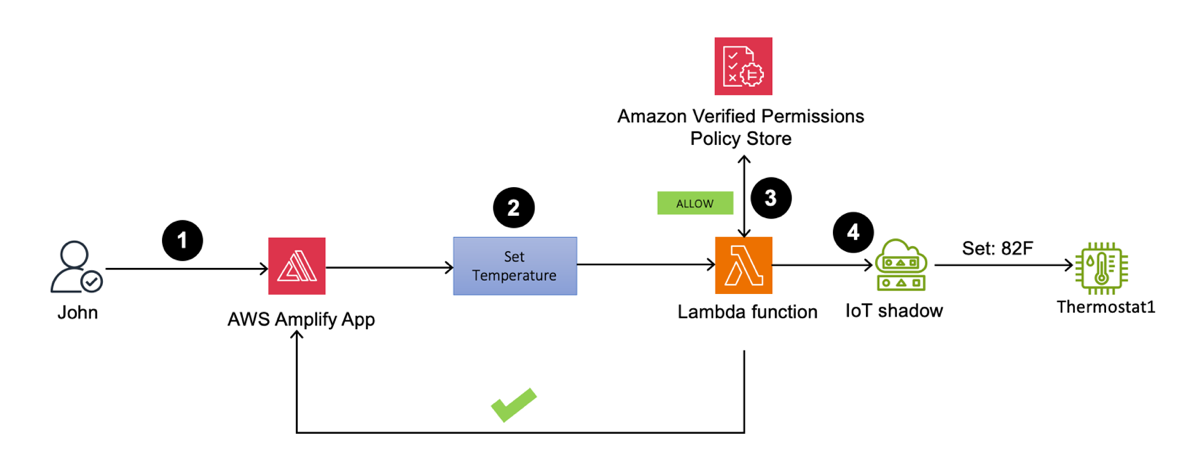
Figure 21: Thermostat1 temperature update by John
- Sign in to the Amplify web application as John. You should be able to view the Thermostat1 controller on the dashboard.
- Set the temperature to 82°F.
- The Lambda function processes the request and performs an API call to Verified Permissions to determine whether to ALLOW or DENY the action based on the policies. Verified Permissions sends back an ALLOW, as the policy that was previously set up allows unrestricted access for primary owners.
- Upon receiving the response from Verified Permissions, the Lambda function sends ALLOW permission back to the web application and an API call to the AWS IoT Device Shadow service to update the device (Thermostat1) temperature to 82°F.
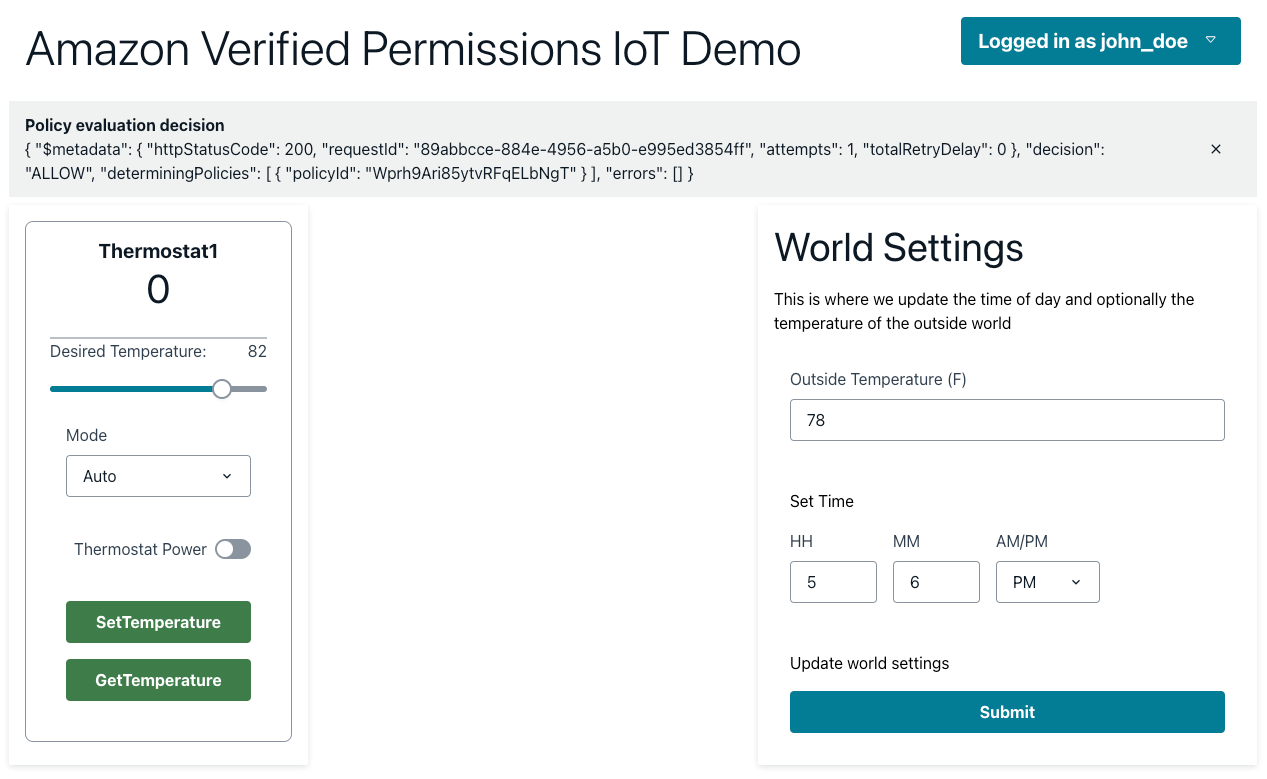
Figure 22: Policy evaluation decision is ALLOW when a primary owner calls SetTemperature
Guest user signs in to the web application to set Thermostat1 temperature to 80°F
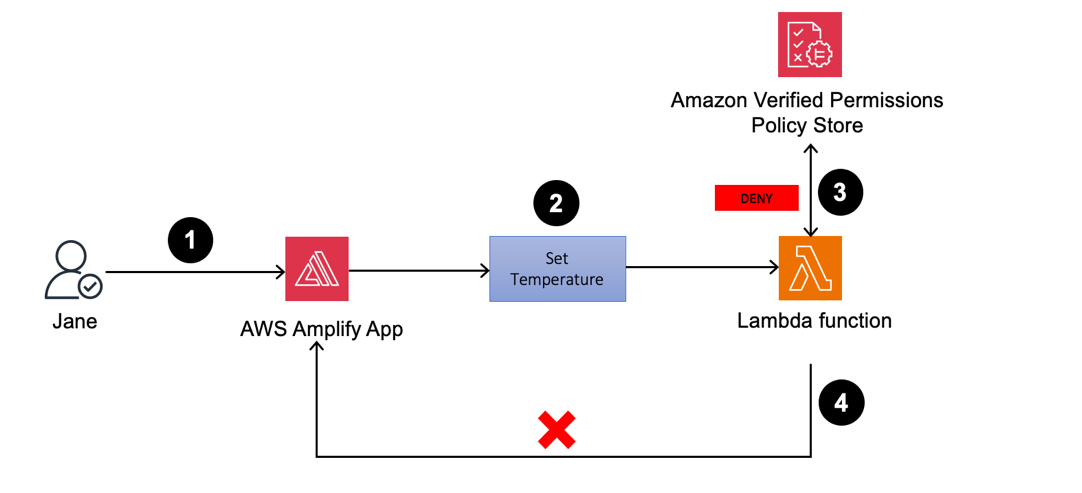
Figure 23: Thermostat1 temperature update by Jane
- If you sign in as Jane to the Amplify web application, you can view the Thermostat1 controller on the dashboard.
- Set the temperature to 80°F.
- The Lambda function validates the actions by sending an API call to Verified Permissions to determine whether to ALLOW or DENY the action based on the established policies. Verified Permissions sends back a DENY, as the policy only permits temperature adjustments between 72°F and 78°F.
- Upon receiving the response from Verified Permissions, the Lambda function sends DENY permissions back to the web application and an unauthorized response is returned.
Figure 24: Guest user jane_doe receives a DENY when calling SetTemperature for a desired temperature of 80°F
- If you repeat the process (still as Jane) but set Thermostat1 to 75°F, the policy will cause the request to be allowed.
Figure 25: Guest user jane_doe receives an ALLOW when calling SetTemperature for a desired temperature of 75°F
- Similarly, jane_doe is allowed run GetTemperature on the device Thermostat1. When the temperature is set to 74°F, the device shadow is updated. The IoT device being simulated by your AWS Cloud9 instance reads desired the temperature field and sets the reported value to 74.
- Now, when jane_doe runs GetTemperature, the value of the device is reported as 74 as shown in Figure 26. We encourage you to try different restrictions in the World Settings (outside temperature and time) by adding restrictions to the static policy that allows GetTemperature for guest user.
Figure 26: Guest user jane_doe receives an ALLOW when calling GetTemperature for the reported temperature


Power company signs in to the web application to set Thermostat1 to 78°F at 3.30 PM
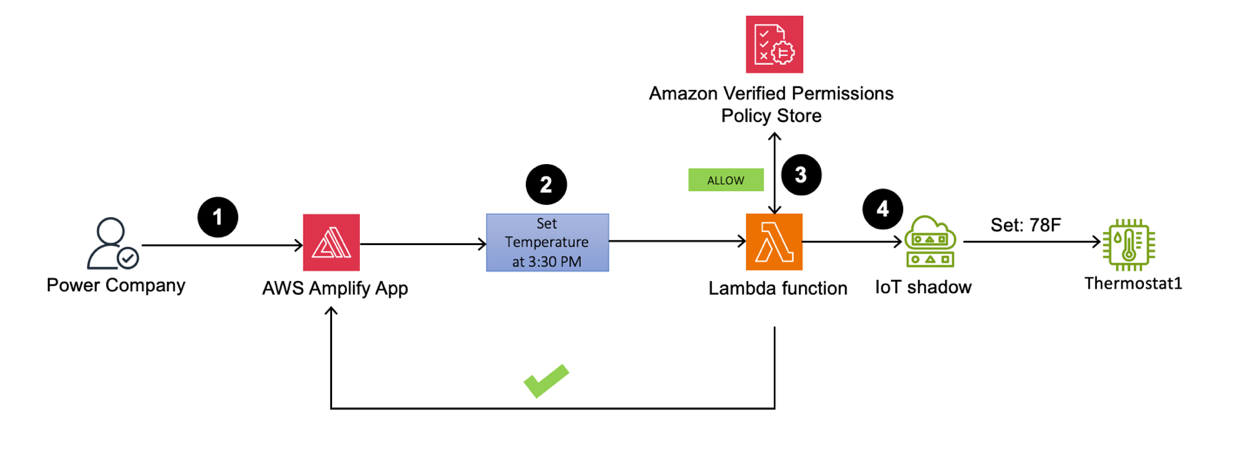
Figure 27: Thermostat1 temperature set to 78°F by powercompany user at a specified time
- Sign in as the powercompany user to the Amplify web application using an API. You can view the Thermostat1 controller on the dashboard.
- To test this scenario, set the current time to 3:30 PM, and try to set the temperature to 78°F.
- The Lambda function validates the actions by sending an API call to Verified Permissions to determine whether to ALLOW or DENY the action based on pre-established policies. Verified Permissions returns ALLOW permission, because the policy for powercompany permits device temperature changes between 2:00 PM and 5:00 PM.
- Upon receiving the response from Verified Permissions, the Lambda function sends ALLOW permission back to the web application and an API call to the AWS IoT Device Shadow service to update the Thermostat1 temperature to 78°F.
Figure 28: powercompany receives an ALLOW when SetTemperature is called with the desired temperature of 78°F

Note: As an optional exercise, we also made jane_doe a device owner for device Thermostat2. This can be observed in the users.json file in the Github repository. We encourage you to create your own policies and restrict functions for Thermostat2 after going through this post. You will need to create separate Verified Permissions policies and update the Lambda functions to interact with these policies.
We encourage you to create policies for guests and the power company and restrict permissions based on the following criteria:
- Verify Jane Doe can perform GetTemperature and SetTemperature actions on Thermostat2.
- John Doe should not be able to set the temperature on device Thermostat2 outside of the time range of 4:00 PM and 6:00 PM and outside of the temperature range of 68°F and 72°F.
- Power Company can only perform the GetTemperature operation, but there are no restrictions on time and outside temperature.
To help you verify the solution, we’ve provided the correct policies under the challenge directory in the GitHub repository.
Clean up
Deploying the Thermostat application in your AWS account will incur costs. To avoid ongoing charges, when you’re done examining the solution, delete the resources that were created. This includes the Amplify hosted web application, API Gateway resource, AWS Cloud 9 environment, the Lambda function, DynamoDB table, Cognito user pool, AWS IoT Core resources, and Verified Permissions policy store.
Amplify resources can be deleted by going to the AWS CloudFormation console and deleting the stacks that were used to provision various services.
Conclusion
In this post, you learned about creating and managing fine-grained permissions using Verified Permissions for different user personas for your smart thermostat IoT device. With Verified Permissions, you can strengthen your security posture and build smart applications aligned with Zero Trust principles for real-time authorization decisions. To learn more, we recommend:
- Getting started with Amazon Verified Permissions
- Best practices for defining authorization model with Amazon Verified Permissions
- Working with AWS IoT in AWS Cloud9 IDE
If you have feedback about this post, submit comments in the Comments section below. If you have questions about this post, contact AWS Support.
20 години „борба с наркотиците“. Хроника на корупция и нарастващ популизъм
Post Syndicated from Светла Енчева original https://www.toest.bg/20-godini-borba-s-narkotitsite-hronika-na-koruptsiya-i-narastvasht-populizam/

Младежите, навършили пълнолетие през последните години, нямат спомени от времето, когато е въведена една поправка в Наказателния кодекс (НК), засягаща много от тях. Някои дори не са били родени, когато тя е приета от парламента. През март 2004 г. Народното събрание гласува отпадане на текста в НК, според който не се наказва човек, носещ у себе си наркотик в количество за еднократна употреба.
По онова време правителството беше оглавявано от Симеон Сакскобургготски, а на власт беше коалицията между НДСВ, ДПС и „Новото време“. Председател на „Новото време“ беше днешният директор на БНТ Емил Кошлуков. Именно тази партия инициира криминализирането на еднократната доза. Особено активен в агитацията за законовата поправка беше депутатът Мирослав Севлиевски, затова и тя се запомни като поправката „Севлиевски“.
Какво се твърдеше, а какво стана
„Че някой е решил да напълни затворите с деца, е лъжа, която обслужва наркопазара“, твърдеше преди 20 години Севлиевски. На практика обаче от демократичността на всеки съдебен състав зависеше дали ще наложи ефективна присъда на някого за еднократна доза, или ще намери законова „врътка“, за да го отърве. Имаше случаи на 18–19 годишни тийнейджъри, влезли в затвора за половин цигара марихуана.
Така полицията отчиташе разкриваемост на престъпления, свързани с наркотици, а мрежите за разпространение на дрога си процъфтяваха. Поради това наркотиците продължаваха да бъдат достъпни, а най-уязвими бяха крайните им потребители, които живееха в постоянен страх от репресии. За тези от тях, развили зависимост към определени наркотични вещества, уязвимостта ставаше още по-голяма, защото страхът от преследване намаляваше шансовете им да потърсят и намерят адекватна подкрепа.
Всичко това стана възможно въпреки предупрежденията на множество експерти, лекари, юристи и организации, включително на Националния център по наркомании, че криминализирането на еднократната доза няма да има декларирания ефект, а напротив – ще стане предпоставка за увеличение на корупцията. А адекватната борба със зависимостите, каквато се практикува в европейските държави още по онова време, е свързана не с преследване на зависимите, а с превенция и лечение.
Вместо поука – увеличаване на репресиите
В течение на тези 20 години криминализиране на еднократната доза се правят множество изследвания, според които употребата им сред младите хора у нас се увеличава.
„В България продължава тенденцията на общо увеличение на броя на учениците, употребили наркотици, който влиза в известно противоречие с тенденцията на лек спад в повечето европейски страни, най-вече в употребата на марихуана“, е изводът от годишното изследване за 2011 г. на Националния фокусен център за наркотици и наркомания. По данни на същата организация през 2021 г. 14,7% от учениците от 8. до 12. клас са употребили някога поне едно наркотично вещество.
Трудно е обаче да има достоверна статистика, когато става въпрос за нещо стигматизирано и криминализирано, каквото е дрогата. От гражданската инициатива „Един грам живот“ отиват още по-далеч в заключенията си. В края на 2023 г. те твърдят, че по неофициални данни над 70% от учениците в България са пробвали наркотици. Данните са извлечени от анонимни анкети, направени от експерти. Гаранция за тяхната представителност и достоверност, разбира се, няма, но пък няма и официални данни по темата.
На този фон репресиите върху употребилите наркотични вещества се засилват. Обискирането по паркове, градинки и метростанции на хора, които според служителите на реда „приличат“ на такива, които биха употребявали наркотици, не престава. В края на миналата година например полицаи буквално изхвърлиха на пътното платно, по което минават коли, човек, когото се опитват да обискират, понеже чули разговор между трима души, в който се споменава марихуана. А друг от групата арестуваха заради „хулиганство“, но пък заповедта за арест е по друго обвинение – „нанасяне на лека телесна повреда“, понеже ухапал (чудно как) един от полицаите по коляното.
Към тези репресии се прибавят и все по-строги законови санкции, като основният фокус вече пада върху т.нар. пияни и дрогирани шофьори. Преди няколко години се въведе временно отнемане на книжката на лица, шофирали след употреба на алкохол и наркотици, дори да не са извършили престъпление. А от 2023 г. вече се отнема и самият автомобил. Въпреки че по данни на Института за пътна безопасност алкохолът и наркотиците са причина за едва 2,5% от катастрофите с жертви.
Колко е важно значението на понятията (и клишетата)
Представете си, че не сте яли от една седмица. Пиете хапче, на чиято листовка пише, че се приема след хранене. И се чудите защо ви става лошо – нали преди една седмица сте яли, значи го приемате след хранене. Едва ли бихте си помислили подобно нещо, нали? В противен случай бихте имали сериозни проблеми с функционалната грамотност.
Масовите медии използват изразите „пияни и дрогирани шофьори“ и „шофиране след употреба на алкохол или наркотици“ като равнозначни и в масовото съзнание те са се набили като устойчиви клишета. Какво значи обаче „след употреба“? Дали че човекът зад волана е пиян или дрогиран, или просто е пил алкохол или употребил наркотик някога в миналото?
Българското законодателство прецизно уточнява какво означава един човек да кара пиян. Ако алкохолът в кръвта е до 0,5 промила, не се носи нито административна, нито наказателна отговорност. От 0,5 до 1,2 промила следват административни санкции, които се увеличават пропорционално на количеството алкохол в кръвта. От 1,2 промила нагоре отговорността е вече наказателна, тоест става въпрос за престъпление.
За наркотиците обаче няма подобни уточнения. Може да сте изпушили един джойнт преди седмица, действието му отдавна да е изтекло, но тестът пак ще установи, че сте шофирали „след употреба на наркотици“.
Не по-маловажен проблем е, че полевите тестове за наркотици са пословично неточни – те могат да покажат позитивен резултат дори след употреба на легални лекарства, включително такива, които не предизвикват промени в съзнанието – като антибиотици и ибупрофен. Резултатът ви може да излезе позитивен дори ако просто сте си хапнали кифла с маково семе. А докато се изчакат по-достоверните резултати от кръвните тестове, минават месеци.
Затова адвокати като например Силвия Петкова, която води (и печели) дела за санкции за шофьори след фалшиво позитивни текстове, наричат „лудост“ идеята за конфискуване на превозното средство след полеви тест за наркотици. Междувременно отнетите автомобили заради употреба на алкохол и наркотици са над 2500 към 20 март. В някои градове вече няма място за тях, въпреки че държавата е започнала да ги продава.
Две лични истории
Редакцията на „Тоест“ разполага с личните истории на двама души, които показват как репресивността на мерките срещу хората, шофиращи „след употреба на наркотици“, води до увеличаване на корупцията. Запазваме тяхната анонимност, за да ги предпазим. Нека ги наречем Миро и Славчо – в чест на Мирослав Севлиевски.
Един ден Миро кара с колата към работа. Спират го полицаи за проверка. Той е сигурен, че не е извършил нарушение. Но пък е слушал музика и си е „куфеел“ – може поради това да им се е видял съмнителен. Проверяват документите му , багажника и започват да му задават различни въпроси. Питат го дали е ползвал наркотици, като го предупреждават, че ще му направят тест.
„Казах им, че съм пушил марихуана предишната седмица – може би събота или неделя. И те се оживиха, като разбраха тази работа. Започнаха да плашат, че нямало да отида на работа, сваляли ми номерата, отиваме в районното, арестуват ме… И аз им казах: „Добре, отиваме.“ Те обаче продължиха да настояват, че нататък става много лошо. […] „Ако те удари някой, за нищо ще изгориш. Може да не си виновен ти. Виждам, имаш деца, трябва да ги пазиш.“
След като го съветват да „почерпи“ за „доброто отношение“, Миро дава на полицаите всичките пари в брой, които носи у себе си – 90 лв. Чак после се сеща, че са го преметнали – спряла го е обикновена патрулна кола, а само автомобилите на КАТ разполагат с тестове за наркотици.
Ако аз в петък съм бил в Нидерландия и съм пушил джойнт – там това е напълно законно. Прибирам се в неделя. В понеделник ме спират български полицаи на българска територия – аз в нарушение ли съм, или не съм? – пита Миро. – По какъв начин нещо, което съм правил през уикенда и няма никакви последствия върху организма ми, тъй като действието му приключва до няколко часа след употребата, ме прави престъпник?
Историята на Славчо е аналогична. И той карал кола към работа – на връщане от работна среща, с не повече от 20–30 километра в час, спазвайки правилата.
В 12 на обед в работен ден в един храсталак между къщички на тихо пътче, което излиза на Околовръстното, ме спират полицаи, изскачащи от шубрака.
Не казват защо го спират, но не пропускат въпроса: „Скоро използвали ли сте наркотици?“ Славчо честно си признава, че е пушил трева през уикенда. За разлика от Миро обаче носи повече пари – 300 лв. Вземат му ги всичките.
Пак минах тънко – успокоява се Славчо, – има хора, които са придружавани до банкомат, за да дръпнат по една хилядарка от сметката си и да ги пуснат по живо, по здраво.
Последствията от репресиите за психичното здраве
Лечението на много заболявания изисква медикаменти, чиято употреба води до позитивен тест за наркотици – не само защото полевите тестове често дават фалшиви резултати, а и защото самите лекарства съдържат вещества, класифицирани като наркотични. Психиатърът Владимир Сотиров, управител на Амбулатория за психично здраве „Адаптация“, разказа пред „Тоест“ на какви проблеми се натъква в професионалната си практика заради санкционирането на т.нар. дрогирани шофьори:
„Факт е, че хората се притесняват, когато предписвам лекарства на зелена (бензодиазепини) и/или жълта рецепта (амфетамини), дали това няма да ги застраши, ако ги спрат полицаи за случайна проверка“, казва Сотиров. Според него така състоянието на пациентите му се усложнява: „Възниква още едно притеснение – дори страх – върху притесненията им, с които идват при мен и които аз се опитвам да лекувам.“
Тези притеснения имат основателна причина, а не са само в главите на пациентите. Така се стига до парадокс – в опита си да помогне, предписвайки адекватна терапия, лекарят може да усложни състоянието на пациента. „Аз съм този, който с препоръките си за лечение въвежда допълнителен симптом в клиничната картина“, отбелязва управителят на „Адаптация“.
Психиатърът обръща внимание и на нещо, върху което малко не-специалисти се замислят, а законотворците ни – хич. Понякога състоянието на пациентите представлява по-голям риск от забранените за шофьорите вещества, съдържащи се в лекарствата им:
Симптомите, от които хората страдат, повлияват на тяхното функциониране, включително в ролята им на шофьори, в много по-голяма степен от ефектите на лечението. Даже е обратното – ефектите от лечението целят подобряване на функционирането – включително шофирането – чрез облекчаване или редуциране на симптомите, които го затрудняват.
Например в някои случаи на пациентите с паникатаки и други тревожни разстройства „практически задължително“ се изписва бензодиазепин. И така се намалява тревожността, която може да повлияе и върху шофирането – „така, както парацетамолът облекчава треската“.
„В общия случай хората използват наркотици по същите причини, поради които използват и всякакви други психотропни лекарства – да облекчат симптоми на тревожност или друго емоционално или психично страдание“, казва Сотиров. Затова той смята, че отношението към хората със зависимости не следва да е като към престъпници, а употребата на наркотици следва да се декриминализира.
Защото наказателното преследване на употребяващите наркотици прибавя още едно страдание към страданието, наложило употребата.
Много потърпевши, но мижав интерес
На 20 април в София се проведе протест под надслов „Употреба“ не е „въздействие“. Едно от исканията на организаторите беше в НК „след употреба“ да се замени с „под въздействието на“. В мотивите си те обръщат внимание на пренебрежимо ниския дял на смъртността при пътнотранспортни произшествия, причинена поради употреба на дрога, и отбелязват, че рисковете от използването на смартфон при шофиране са далеч по-сериозни. В допълнение се казва и че определени хора редовно биват подлагани на тестове само защото са млади или изглеждат „алтернативно“.
Въпреки хилядите досъдебни производства и стотиците присъди за заклеймяваните като „пияни и дрогирани шофьори“ протестът се проведе при „мижав интерес“, ако използваме думите на певеца Панайот Панайотов. Вероятно част от потенциалните потърпевши са се опасявали да не станат обект на репресии само заради участието си в демонстрацията. Други (и някои от предишните) знаят, че ако постъпят като Миро и Славчо и подкупят полицаите, с голяма вероятност ще се отърват.
Има обаче една категория хора, които смятат, че са над правилата, и живеят с това убеждение. Като Кристиан Николов, причинил смъртта на журналиста Милен Цветков и осъден на 9 години затвор за това. Или Георги Семерджиев, осъден на втора инстанция на 20 години затвор за произшествие, в което живота си загубиха две момичета, минаващи по тротоара в момента на катастрофата. Има още много като Николов и Семерджиев. Те обикновено карат скъпи и мощни автомобили, имат свои хора в полицията или неслучайни родители, или разполагат с други ресурси, благодарение на които могат да живеят в безнаказаност. Поне докато се случи непоправимото.
Именно пробитата и корумпирана система, позволяваща на такива хора да бъдат над закона, е истинският „убиец на пътя“, ако използваме още едно медийно клише. Докато тя не се промени така, че правилата да важат за всички, няма значение дали ще се криминализира и шофирането с 0,5 промила алкохол в кръвта, както предложи МВР преди месец. Или ако пушенето на джойнт дори две седмици преди теста се наказва с доживотен затвор.
Последното май още никой не го е предложил, но натам вървят нещата.
[$] A change in direction for security-module stacking?
Post Syndicated from jake original https://lwn.net/Articles/970070/
The long-running effort to complete the work on stacking (or composing) the
Linux security modules (LSMs) recently encountered a barrier—in the form of
a “suggestion” to discontinue it from Linus Torvalds. His complaint
revolved around the indirect function calls that are used to implement
LSMs, but he also did not think much of the effort to switch away from
those calls. While it does not appear that a major course-change is in store
for LSMs, it is clear that Torvalds is not happy with the direction of that
subsystem.
USF College of Engineering Presents Rapid7 With 2024 Corporate Impact Award
Post Syndicated from Martin McKeay original https://blog.rapid7.com/2024/04/23/usf-college-of-engineering-presents-rapid7-with-2024-corporate-impact-award/

This past Friday, April 19, the University of South Florida (USF) College of Engineering recognized individuals and organizations who have greatly impacted USF and beyond at its ninth annual Engineering Honors Awards at The Armature Works in Tampa. I had the honor of joining my colleagues, including Rapid7 CEO, Corey Thomas, who accepted the Corporate Impact Award on behalf of the company.
The Corporate Impact Award is among the highest and most prestigious recognitions given by the College of Engineering. It recognizes Rapid7’s significant contributions to the College and its students. Receiving this award is incredibly gratifying for the Rapid7 Labs team as well as the greater Rapid7 organization.

In February 2023, the Rapid7 Cybersecurity Foundation invested in USF to create the Rapid7 Cyber Threat Intelligence Lab. Furthermore, Rapid7 is actively working with a multi-disciplinary team at USF to research and develop training to better educate students for taking SOC roles, funded by the National Science Foundation and the Office of Naval Research.
Equally important has been Rapid7’s enthusiasm for directly working with researchers, professors, and students. Our Open Data Initiative provides real-world data derived from internet scans and honeypot data. We support research into training future SOC professionals by exposing them to teams working to protect our networks. A significant number of our teammates in Rapid7’s Tampa office are graduates from University of South Florida, a trend we aim to continue.

The future of Rapid7 and USF is bright, especially with the recent announcement of the formation of the College of AI and Cybersecurity at University of South Florida.
Rapid7 would like to not only thank the USF College of Engineering for recognizing our efforts in supporting the College, but more importantly, we want to thank them for being a great partner in driving research in the cybersecurity field as well as working alongside us to train the next generation of professionals. The future of cybersecurity depends on helping today’s students gain the tools they need to be successful, an area where University of South Florida excels.
The Largest General Naval Supply Depot of WWII
Post Syndicated from The History Guy: History Deserves to Be Remembered original https://www.youtube.com/watch?v=ExP6US4tUow
Избори 2024 – заявления за гласуване в чужбина
Post Syndicated from Боян Юруков original https://yurukov.net/blog/2024/izbori2024-zaqvleniq/
На 9-ти юни 2024 ще се проведат избори за Народно събрание и Европейски парламент. Вече може да подавате заявление за гласуване зад граница. Ще намерите формуляра на страницата на ЦИК. Там може да проверите и дали правилно е записано заявлението ви. Ето няколко важни неща, които трябва да знаете:
- Крайният срок за подаване е 14-ти май в полунощ българско време
- Подаването на заявление за гласуване в секцията най-близо до Вас, ще Ви улесни и ще ускори изборния процес, тъй като ще сте вече вписани в списъците
- Заявление се подава за всеки вот поотделно. Т.е. не се пренасят от предходни избори
- Дори да подадете заявление, а се окаже, че на 9-ти юни сте в България, ще може да гласувате в секцията си по постоянен адрес с попълване на декларация (Приложение 28 и 29 на страницата на ЦИК)
- Вече са предварително одобрени 776 места за секции в чужбина, където в последните 5 години е имало поне 100 гласували. Това не означава, че непременно ще има секции на тези места. Това зависи от възможностите на помещенията и дали има комисии и доброволци към тях. В крайна сметка решението е на ЦИК по препоръка на Външно. Могат да се увеличат шансовете като се подават заявления за тези места и повече хора се включат като членове на комисии и доброволци.
- На някои места като Германия е нужно да се иска разрешение от местните власти. Това вече би трябвало да се случва предвид предварително одобрените места. Очакваме информация от Външно
- Подаването на заявления освен, че подпомага изборния процес, показва и повишен интерес на съгражданите ни в чужбина към вота
Събирането на заявленията и визуализацията в картата на Glasuvam.org, каквото правих години наред, в момента е невъзможно, тъй като ЦИК изглежда са блокирали такива опити. Търся начин да го възстановя.
The post Избори 2024 – заявления за гласуване в чужбина first appeared on Блогът на Юруков.
Backblaze Wins NAB Product of the Year
Post Syndicated from Jeremy Milk original https://backblaze.com/blog/backblaze-wins-nab-product-of-the-year/

Last week the Backblaze team connected with the best and brightest of the media and entertainment industry at the National Association of Broadcasters (NAB) conference in Las Vegas. For those who missed out, here is a recap of last week events:
Event Notifications Launches at NAB 2024
Event Notifications gives you the freedom to build automated workflows across the different best-of-breed cloud platforms you use or want to use—saving time, money, and improving your end users’ experiences. After demoing this new service for folks working across media workflows at the NAB show and winning the NAB Product of the Year in the Cloud Computing and Storage category, the Event Notifications private preview list is filling up, but you can still join it today.
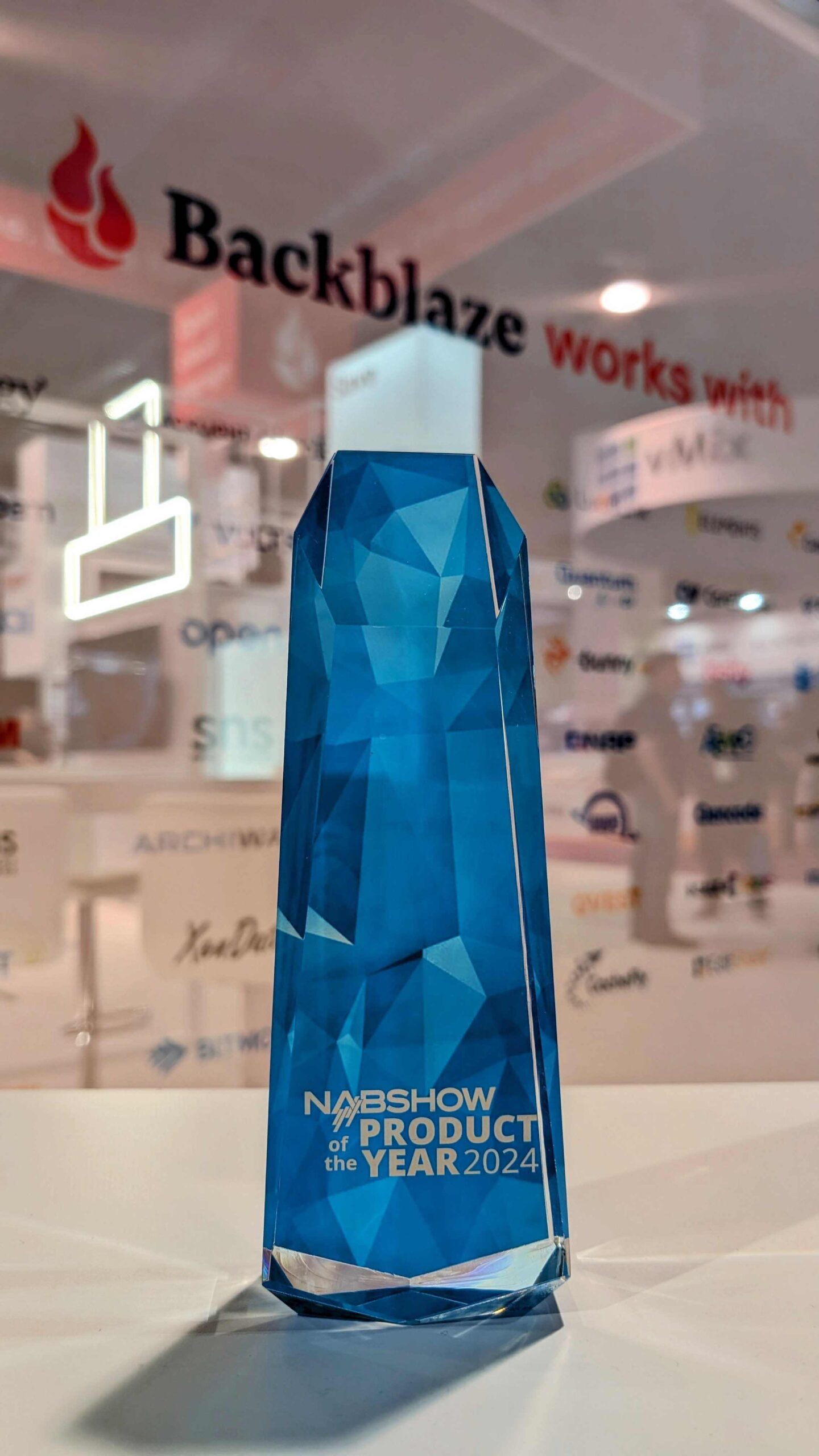
Backblaze B2 Cloud Storage Event Notifications Wins NAB Best of Show Product of the Year

Backblaze Achieves TPN Blue Shield Status
More news for media and entertainment leaders: Backblaze joined the Trusted Partner Network (TPN), receiving Blue Shield status. TPN is the Motion Picture Association’s initiative aimed at advancing trust and security best practices across the media and entertainment industry. This important initiative provides greater transparency and confidence in the procurement process as you advance your workflow with new technology.
Axle AI Cloud is Powered by Backblaze
A testament to the power of partnerships across the industry, Axel AI announced Axel AI Cloud Powered by Backblaze, a new, highly affordable, AI-powered media storage service that leverages Backblaze’s new Powered by Backblaze program for affordable, seamlessly integrated AI tagging, transcription, and search.
Experts on Stage
For the first time, Backblaze hosted a series of events together with Partners and customers, delivering actionable insights for folks on the show floor to improve their own media workflows. Our Backblaze Tech Talks featured Quantum, CuttingRoom, iconik, ELEMENTS, Axel AI, CloudSoda, Hedge, bunny.net, Suite Studios, and Qencode. Huge thanks to the presenters and everyone who came by.
See You at the Next One
Thank you to all of our customers, partners, and friends who helped make last week a hit. We are already looking forward to NAB–NY, IBC, NAB 2025—and, most of all, to moving the industry forward together.
The post Backblaze Wins NAB Product of the Year appeared first on Backblaze Blog | Cloud Storage & Cloud Backup
THG Podcast: Assassinated US Governors
Post Syndicated from The History Guy: History Deserves to Be Remembered original https://www.youtube.com/watch?v=vrjDrV1-7dM
Unauthenticated CrushFTP Zero-Day Enables Complete Server Compromise
Post Syndicated from Caitlin Condon original https://blog.rapid7.com/2024/04/23/etr-unauthenticated-crushftp-zero-day-enables-complete-server-compromise/

On Friday, April 19, 2024, managed file transfer vendor CrushFTP released information to a private mailing list on a new zero-day vulnerability affecting versions below 10.7.1 and 11.1.0 (as well as legacy 9.x versions) across all platforms. No CVE was assigned by the vendor, but a third-party CVE Numbering Authority (CNA) assigned CVE-2024-4040 as of Monday, April 22. According to a public-facing vendor advisory, the vulnerability is ostensibly a VFS sandbox escape in CrushFTP managed file transfer software that allows “remote attackers with low privileges to read files from the filesystem outside of VFS Sandbox.”
Rapid7’s vulnerability research team analyzed CVE-2024-4040 and determined that it is fully unauthenticated and trivially exploitable; successful exploitation allows for not only arbitrary file read as root, but also authentication bypass for administrator account access and full remote code execution. Successful exploitation allows a remote, unauthenticated attacker to access and potentially exfiltrate all files stored on the CrushFTP instance.
Although the vulnerability has been formally described as an arbitrary file read, Rapid7 believes that it can be more accurately categorized as a server-side template injection (SSTI). CVE-2024-4040 was exploited in the wild as a zero-day vulnerability, per private customer communications from the vendor and a public Reddit post from security firm CrowdStrike. Using a query that looks for a specific JavaScript file in the web interface, there appear to be roughly 5,200 instances of CrushFTP exposed to the public internet.
Mitigation guidance
According to the advisory, CrushFTP versions below 11.1 are vulnerable to CVE-2024-4040. The following versions of CrushFTP are vulnerable as of April 22, 2024:
- All legacy CrushFTP 9 installations
- CrushFTP 10 before v10.7.1
- CrushFTP 11 before v11.1.0
The vulnerability has been patched in version 11.1.0 for the 11.x version stream, and in version 10.7.1 for the 10.x version stream. The vendor advisory emphasizes the importance of updating to a fixed version of CrushFTP on an urgent basis. Rapid7 echoes this guidance, particularly given our team’s findings on the true impact of the issue, and urges organizations to apply the vendor-supplied patch on an emergency basis, without waiting for a typical patch cycle to occur.
While the vendor guidance as of April 22 says that “customers using a DMZ in front of their main CrushFTP instance are partially protected,” it’s unclear whether this is actually an effective barrier to exploitation. Out of an abundance of caution, Rapid7 advises against relying on a DMZ as a mitigation strategy.
CrushFTP customers can harden their servers against administrator-level remote code execution attacks by enabling Limited Server mode with the most restrictive configuration possible. Organizations should also use firewalls wherever possible to aggressively restrict which IP addresses are permitted to access CrushFTP services.
Rapid7 customers
A vulnerability check for InsightVM and Nexpose customers is in development and expected to be available in either today’s (Tuesday, April 23) or tomorrow’s (Wednesday, April 24) content release.
OpenEPaper Link – eInk price tags as Home Assistant display
Post Syndicated from BeardedTinker original https://www.youtube.com/watch?v=JOIp4s4YNEs
Fedora 40 released
Post Syndicated from corbet original https://lwn.net/Articles/970893/
The Fedora 40 distribution has been
released. See the “what’s new” pages for Fedora
Workstation and Fedora
KDE to learn more about the desktop spins, along with this LWN article, for more information.
UDM-Pro-Max Gateway: What You Need to Know
Post Syndicated from Crosstalk Solutions original https://www.youtube.com/watch?v=KizI9XaM2P4
[$] Rust for embedded Linux kernels
Post Syndicated from corbet original https://lwn.net/Articles/970216/
The Rust programming language, it is hoped, will bring a new level of
safety to the Linux kernel. At the moment, though, there are still a
number of impediments to getting useful Rust code into the kernel. In the
Embedded Open Source Summit track of the Open
Source Summit North America, Fabien Parent provided an overview of his
work aimed at improving the infrastructure needed to write the device
drivers needed by embedded systems in Rust; there is still some work to be
done.
Security updates for Tuesday
Post Syndicated from corbet original https://lwn.net/Articles/970889/
Security updates have been issued by Debian (glibc and samba), Fedora (chromium, cjson, mingw-python-idna, and pgadmin4), Mageia (kernel, kmod-xtables-addons, kmod-virtualbox, kernel-linus, and perl-Clipboard), Red Hat (go-toolset:rhel8, golang, java-11-openjdk, kpatch-patch, and shim), Slackware (freerdp), SUSE (apache-commons-configuration, glibc, jasper, polkit, and qemu), and Ubuntu (google-guest-agent, google-osconfig-agent, linux-lowlatency-hwe-6.5, pillow, and squid).
Monitoring Oracle Cloud Infrastructure (OCI) with Zabbix
Post Syndicated from Kristaps Naglis original https://blog.zabbix.com/monitoring-oracle-cloud-infrastructure-oci-with-zabbix/27638/
Monitoring Oracle Cloud Infrastructure resources is crucial for maintaining optimal performance, security, and cost-efficiency. By continuously monitoring resources such as compute instances, storage, databases, and networking components, you can proactively identify and address potential issues before they escalate, ensuring uninterrupted service delivery.
Monitoring also provides valuable insights into resource utilization patterns, enabling capacity planning and optimization efforts. Furthermore, effective monitoring enhances security posture by detecting anomalies or suspicious activities that could indicate potential security breaches.
This integration consists of multiple templates, where each template covers a specific OCI resource. As of writing this blog post, such services are supported:
- OCI Compute;
- OCI Autonomous Database (serverless);
- OCI Object Storage;
- OCI Virtual Cloud Networks (VCNs);
- OCI Block Volumes;
- OCI Boot Volumes.
The structure of these templates is made so that you do not need to configure each service separately. There is a master template Oracle Cloud by HTTP, which needs to be configured and rest of the services get monitored automatically using low-level discovery and host prototypes. Overall, the structure of templates looks like this:

Prepare OCI for monitoring with Zabbix
In all of these examples, an OCI web console will be used, therefore, keep in mind that some of the UI elements or navigation menus can potentially change in the future.
User creation
First of all, you need to set up a user in OCI that Zabbix will use to access the Rest API and gather data. To do so, navigate to 'Identity & Security' -> 'Domains' from the main menu in top-left of the screen. Select the domain for which you wish to monitor resources and head over to Users view on the left sidebar. Here, create a new user.
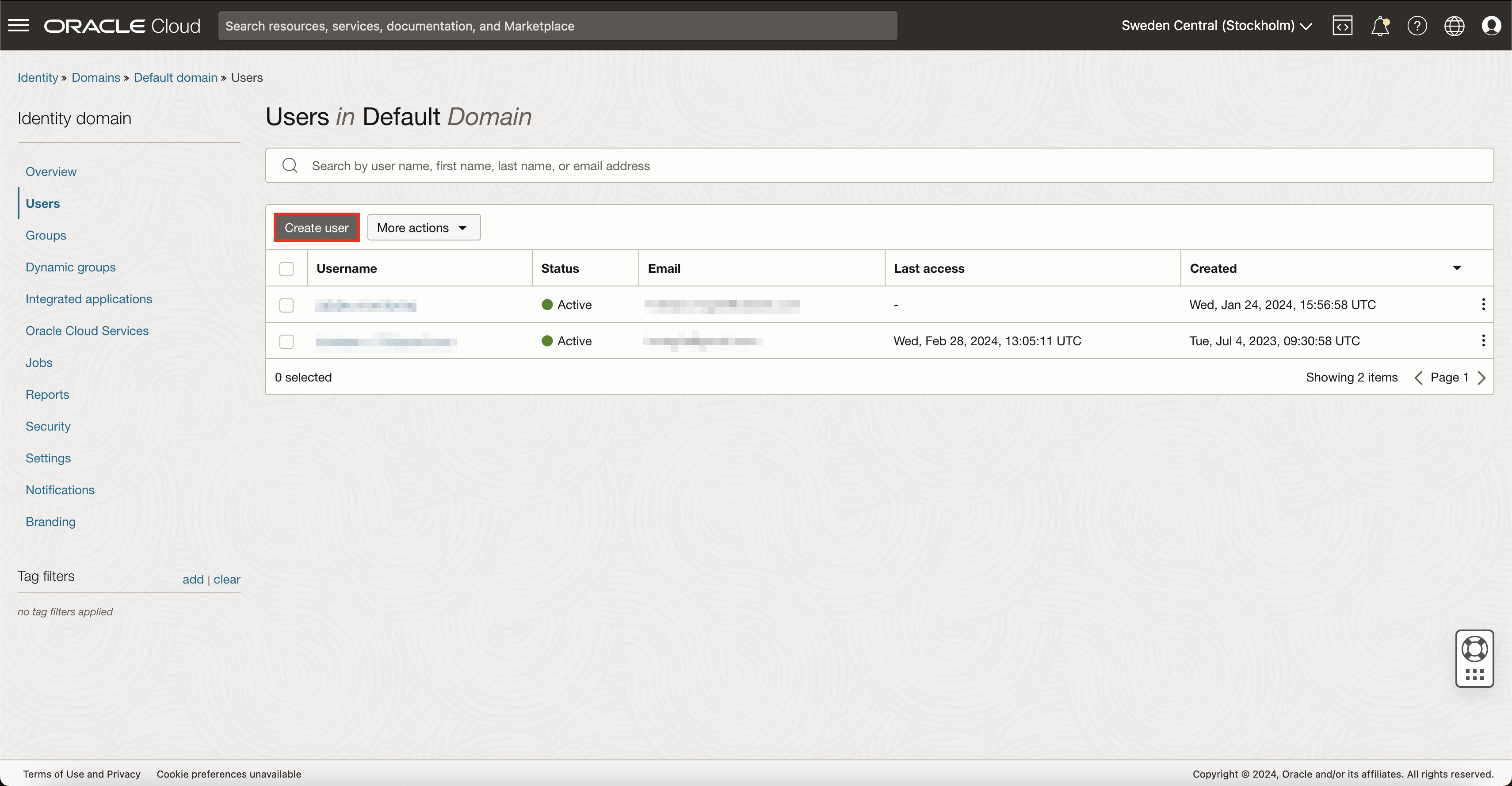
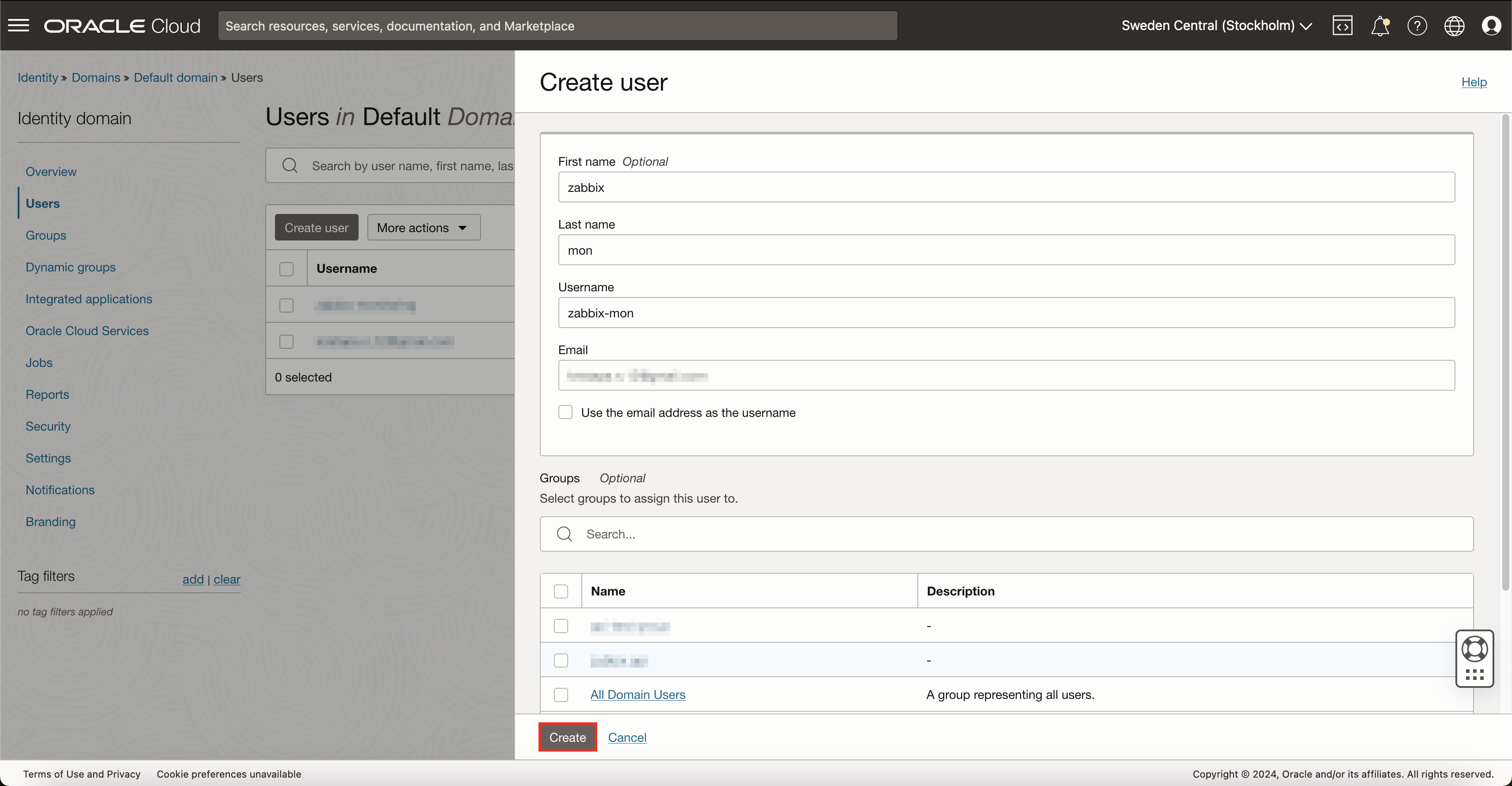
API key generation
After this, OCI should automatically redirect you to the newly created user page. If not, for some reason, go back to all users in domain and open your previously created user.
You need to assign API keys to this user. To do so, on the left sidebar, press API keys and then Add API key. If you already have an RSA key pair that you wish to use for this monitoring user, you can select an option to either upload or paste the public key. However, in this example, I will generate a completely new key pair.
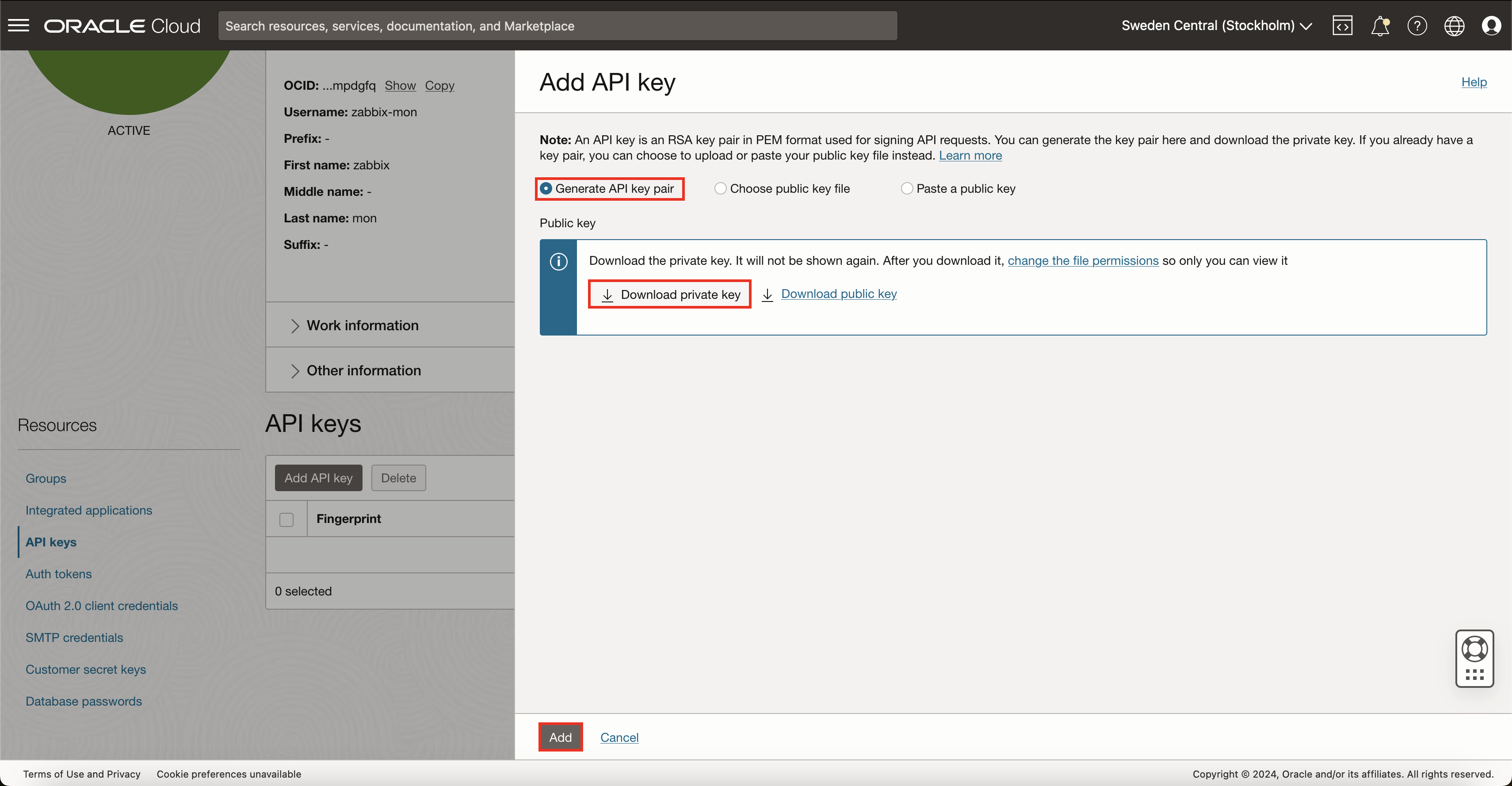
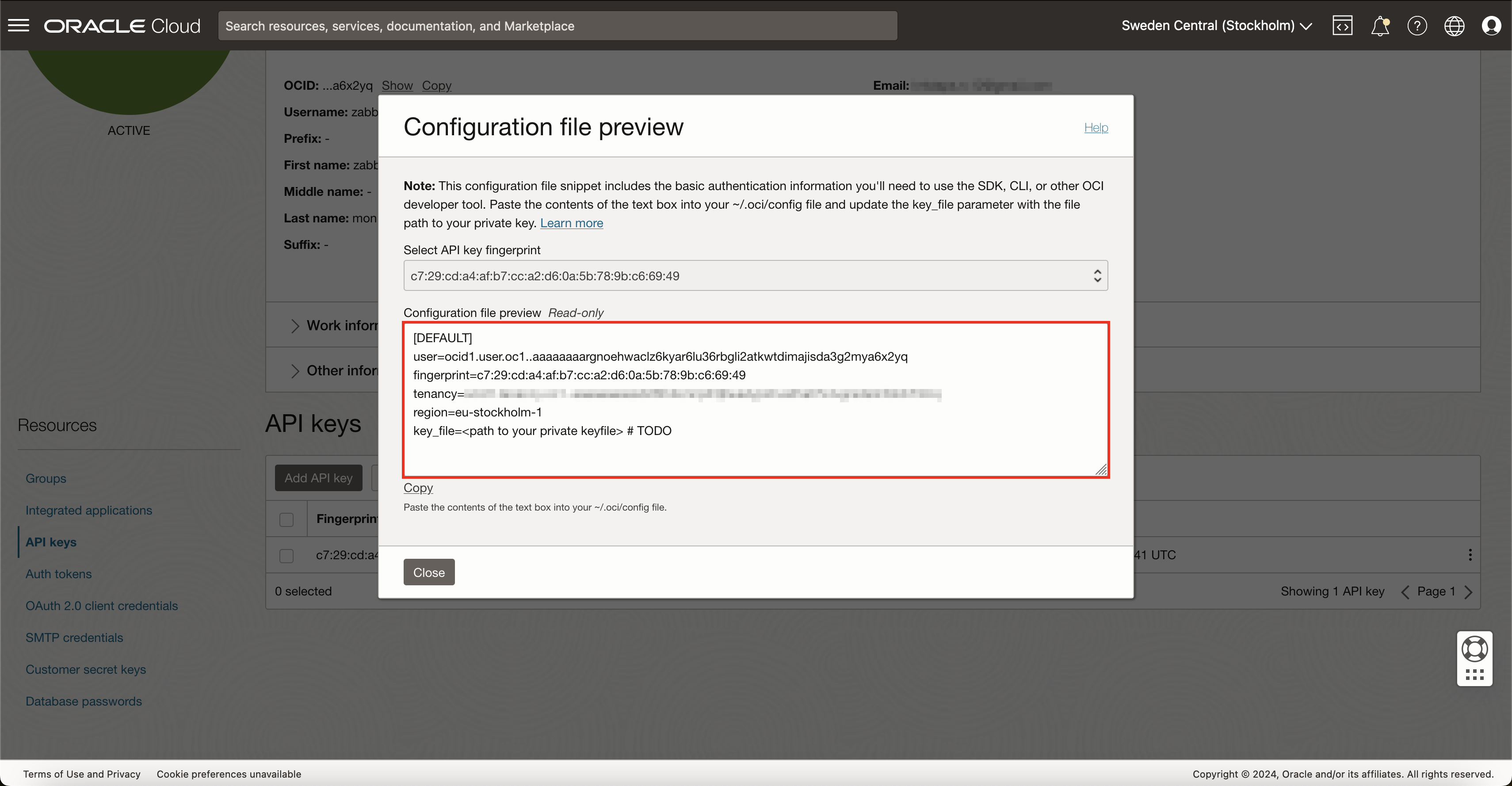
After pressing button Add, OCI will show you details about your environment and the API key. Save this information somewhere safe for now, as we will need to use this data later inside Zabbix. After saving this, you can now close this pop-up.
User group creation
To make user management more flexible, a good idea would be to create a user group specifically for monitoring and assign monitoring user to this group. So in case, in the future, you will need more monitoring users, you will be able to just assign those users to a common monitoring user group, and all access rights will work automatically.
To do this, navigate back to 'Identity & Security' -> 'Domains' and select Groups. Here press on button Create group. Give a name for this group and assign your monitoring user to it while you’re at it.
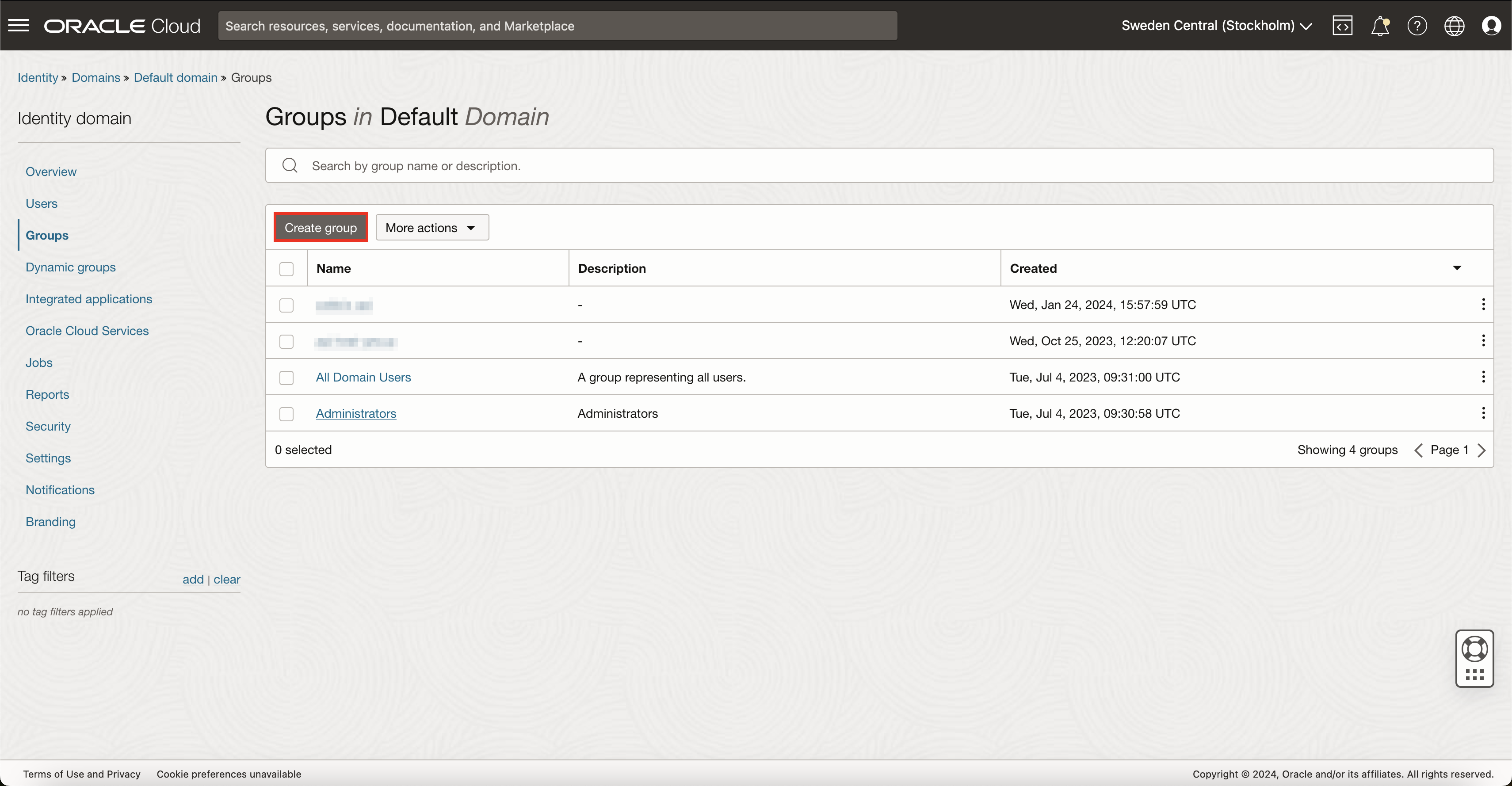
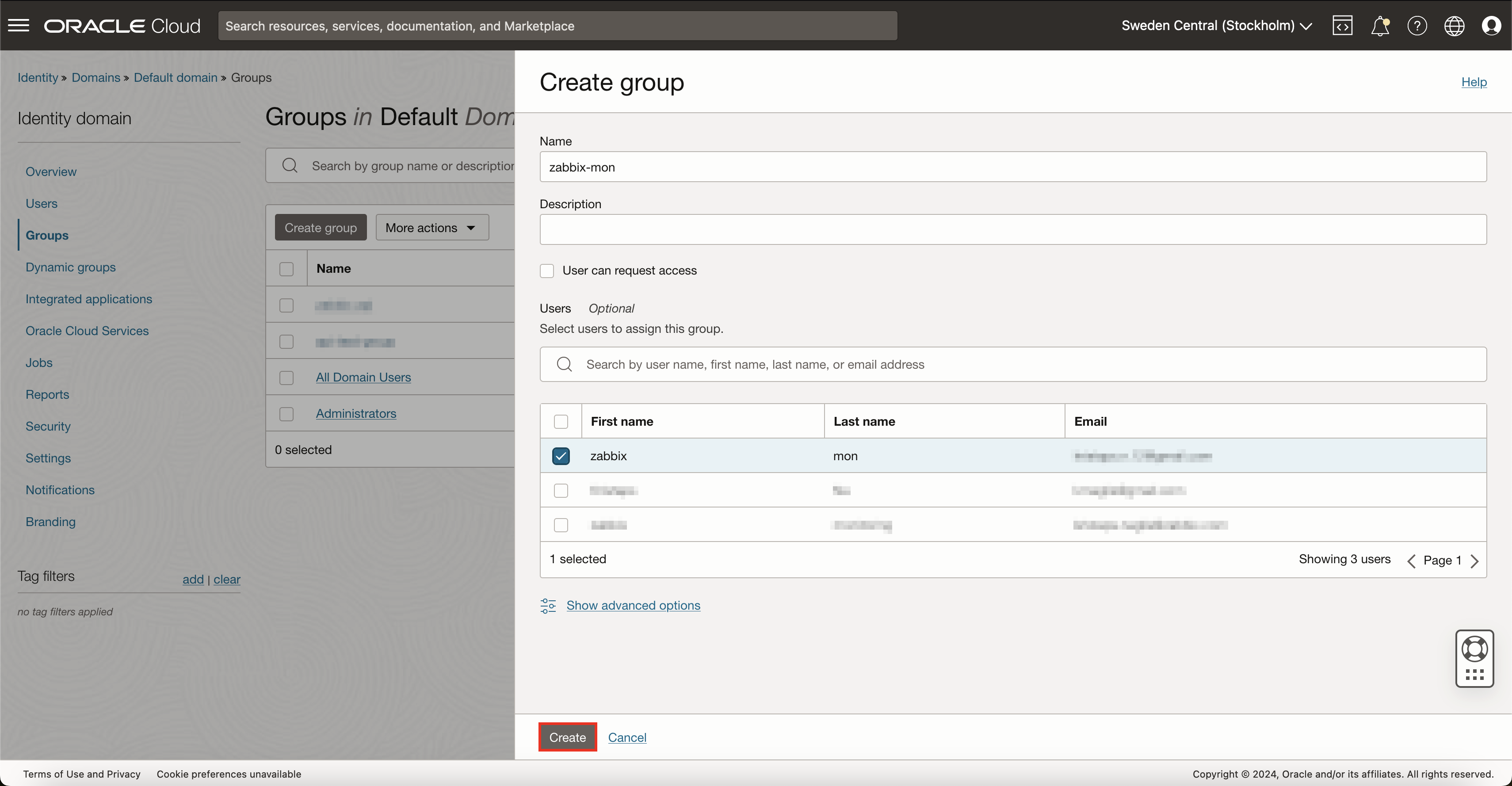
Policy creation
Now that you have successfully created a monitoring user, generated API keys and created a user group for monitoring, you now need to create a new OCI policy. Policies in OCI regulate what resources its users can access and what they can do with those resources. To create a new policy, open the top-left menu and navigate to 'Identity & Security' -> 'Policies' and press on the button Create Policy.
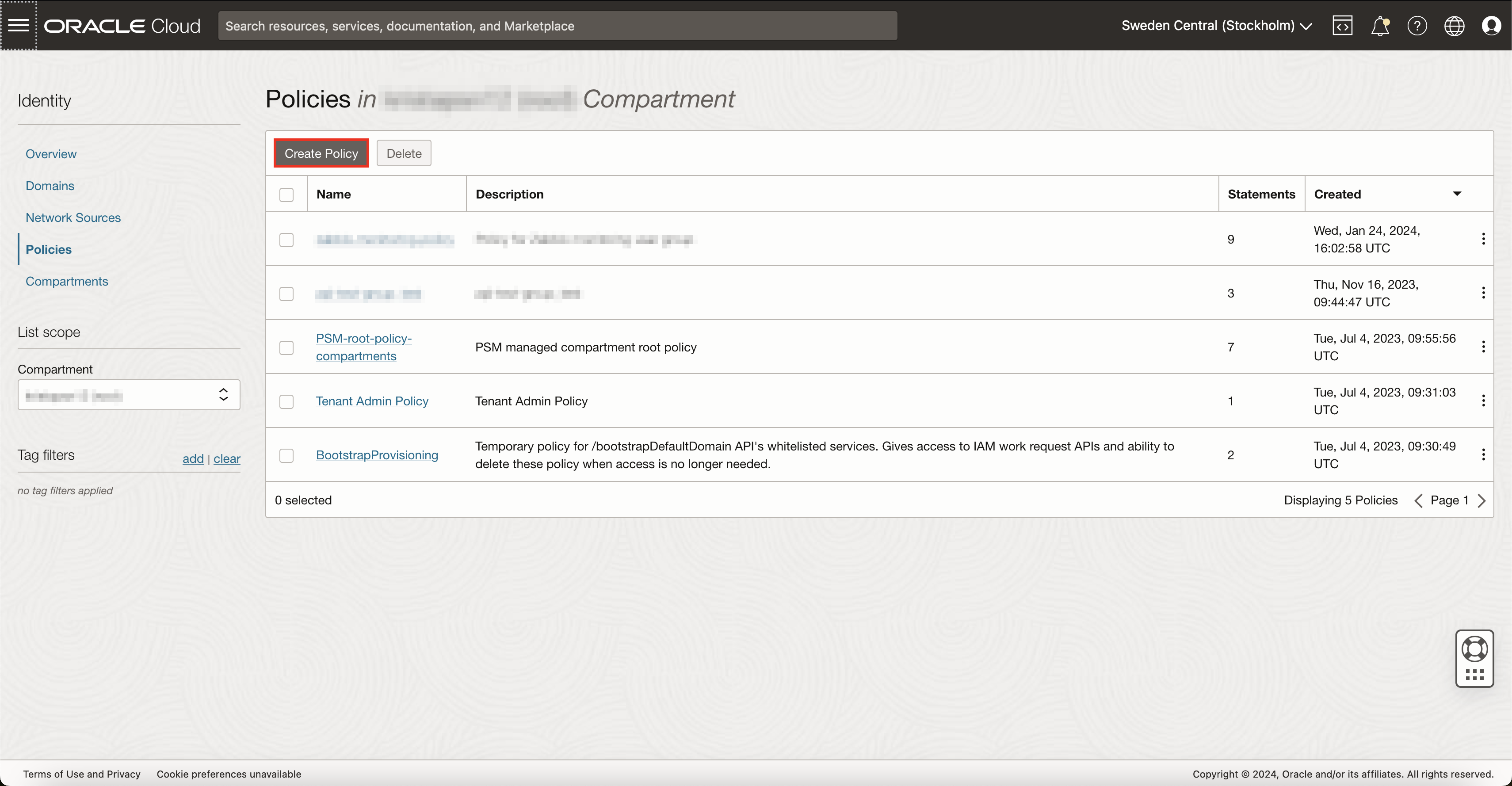
This will open a new view where you can define policy settings. Give this policy a name and description and select the appropriate compartment. Inside the policy builder, enable Show manual editor and copy-paste these rules, just remember to replace zabbix-mon with your monitoring group name:
Allow group 'zabbix-mon' to read metrics in tenancy
Allow group 'zabbix-mon' to read instances in tenancy
Allow group 'zabbix-mon' to read subnets in tenancy
Allow group 'zabbix-mon' to read vcns in tenancy
Allow group 'zabbix-mon' to read vnic-attachments in tenancy
Allow group 'zabbix-mon' to read volumes in tenancy
Allow group 'zabbix-mon' to read objectstorage-namespaces in tenancy
Allow group 'zabbix-mon' to read buckets in tenancy
Allow group 'zabbix-mon' to read autonomous-databases in tenancy
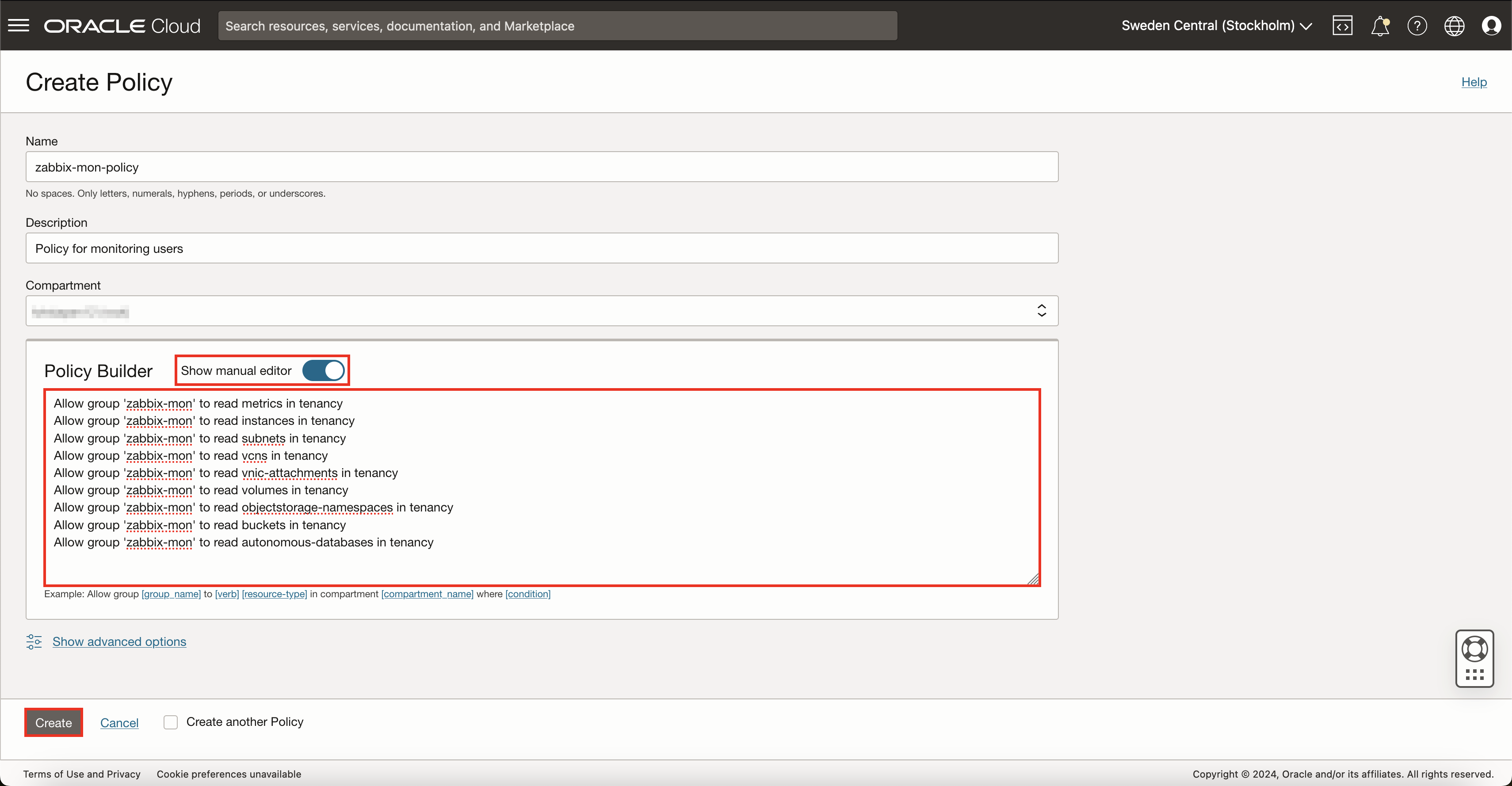
This set of rules will give your monitoring group users read-only access to only those resources that Zabbix Oracle Cloud Infrastructure templates use.
After you are done, press the Create button and the policy will be created.
If you decide to modify our template to access more data from OCI, you will need to append appropriate rules here as well.
That is it for configuration on the OCI side now.
Prepare Zabbix
Create host
First, open up your Zabbix web interface, head over to Hosts section and create a new host. Here, you will need to specify a host name of your choice, template Oracle Cloud by HTTPS and assign it to a group.
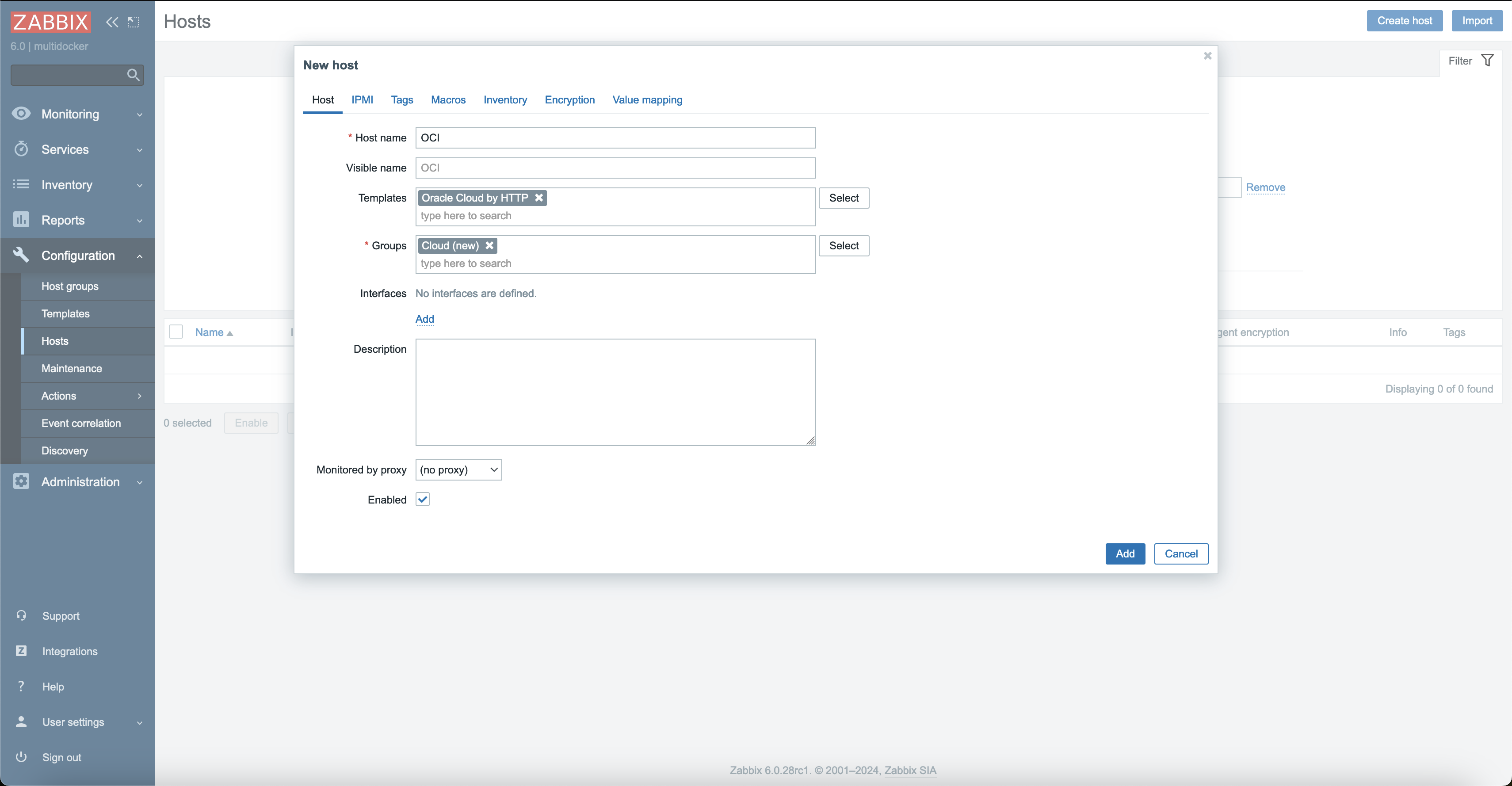
Before pressing the Add button, you should configure macros. Open the Macros tab and select Inherited and host macros. There will be quite a few of them, but each with its own use-case. Some of these macros are discussed in Optional configuration section, so for now let’s focus on the ones that are necessary for template to work at all.
Essentially, there are 3 steps to take here:
- This is the moment when OCI configuration file values from API key generation section come into play. You will need to set the macro value to the value that OCI gave you:
{$OCI.API.TENANCY}– here set the tenancy OCID value;{$OCI.API.USER}– here set the user OCID value;{$OCI.API.FINGERPRINT}– here set the fingerprint value;
- Now you need to find where you saved the private key for your OCI monitoring user from the same API key generation section. Copy the contents of that private key file and paste them into
{$OCI.API.PRIVATE.KEY}macro. - Once the authentication credentials are entered, you need to identify the correct OCI API endpoints that match for your region (the one that OCI configuration file gave you in the API key generation section). One way to do this is to go to Oracle Cloud Infrastructure Documentation, and on the left side you will find all the API services. Under each of these services, there is a home page dedicated to each service with respective API endpoints available. Required API service endpoints for Zabbix are:
In my case the OCI region is
eu-stockholm-1, therefore the above API service endpoints look like this:OCI API service URL Zabbix macro name Core Services API iaas.eu-stockholm-1.oraclecloud.com{$OCI.API.CORE.HOST}Database Service API database.eu-stockholm-1.oraclecloud.com{$OCI.API.AUTONOMOUS.DB.HOST}Object Storage Service API objectstorage.eu-stockholm-1.oraclecloud.com{$OCI.API.OBJECT.STORAGE.HOST}Monitoring API telemetry.eu-stockholm-1.oraclecloud.com{$OCI.API.TELEMETRY.HOST}Now that you have the necessary host names, you need to save them as values for their respective Zabbix macros.
IMPORTANT! API Endpoint URLs need to be entered without the HTTP scheme (
https://).
After these 3 steps, your Macros tab should look something like this.
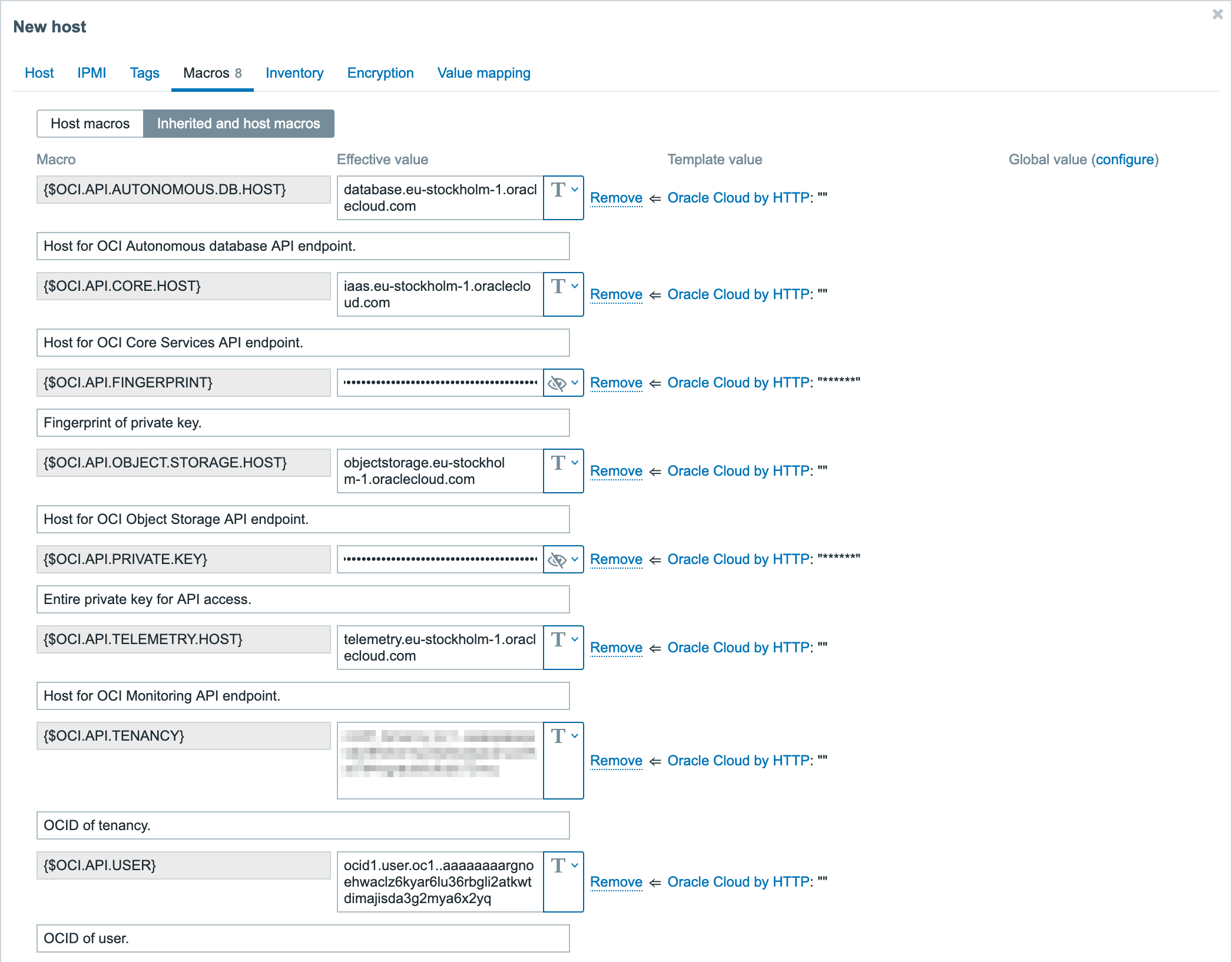
After pressing the button Add, this host will be added to Zabbix.
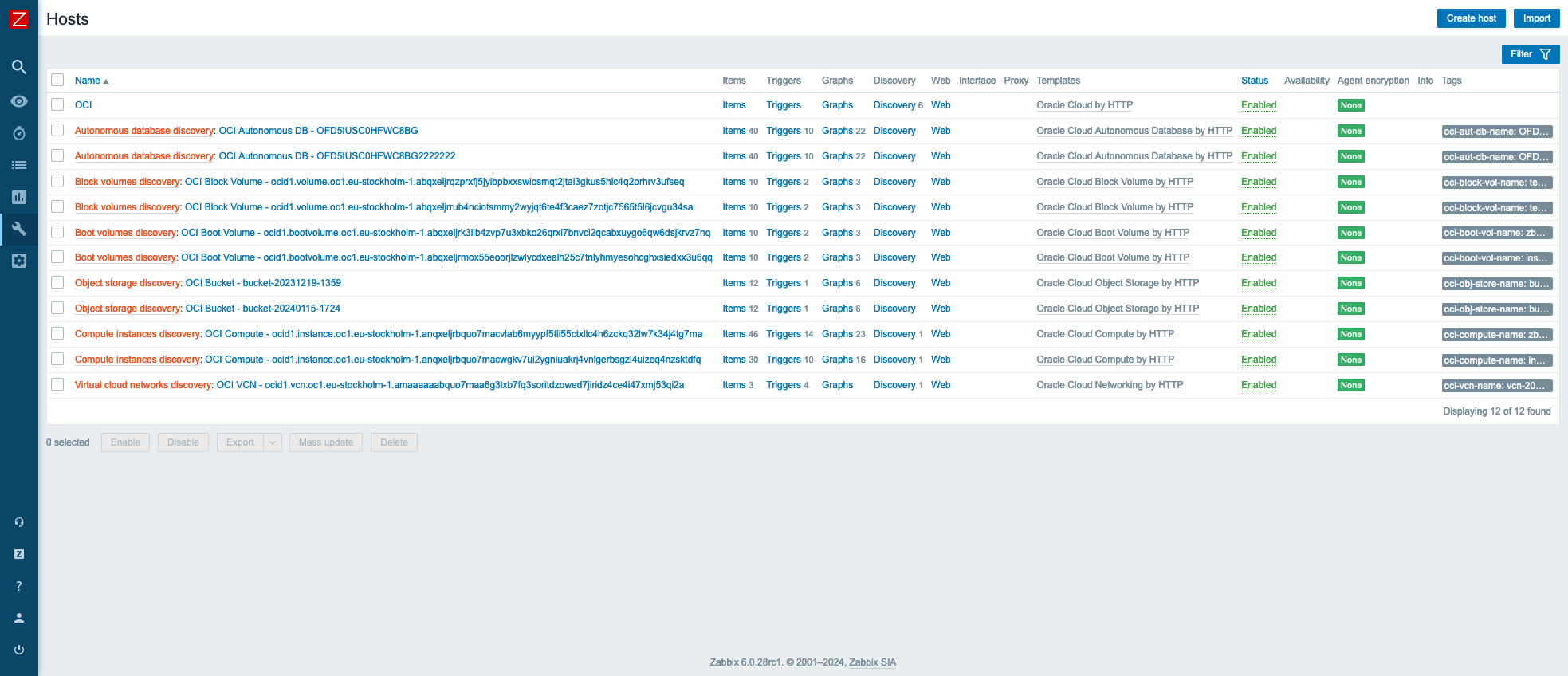
This host will not have any metrics items, instead it will discover all the OCI resources and add them as separate hosts in Zabbix. This will happen automatically, sometime between when Zabbix server reloads its configuration cache and 1 hour after that (because discovery rules have update interval of 1 hour). However, if you want to speed this up, you can manually refresh Zabbix server config cache with CLI command zabbix_server -R config_cache_reload and execute all discovery rules manually.
After that, in the Hosts view, you should see all of your monitored OCI resources.
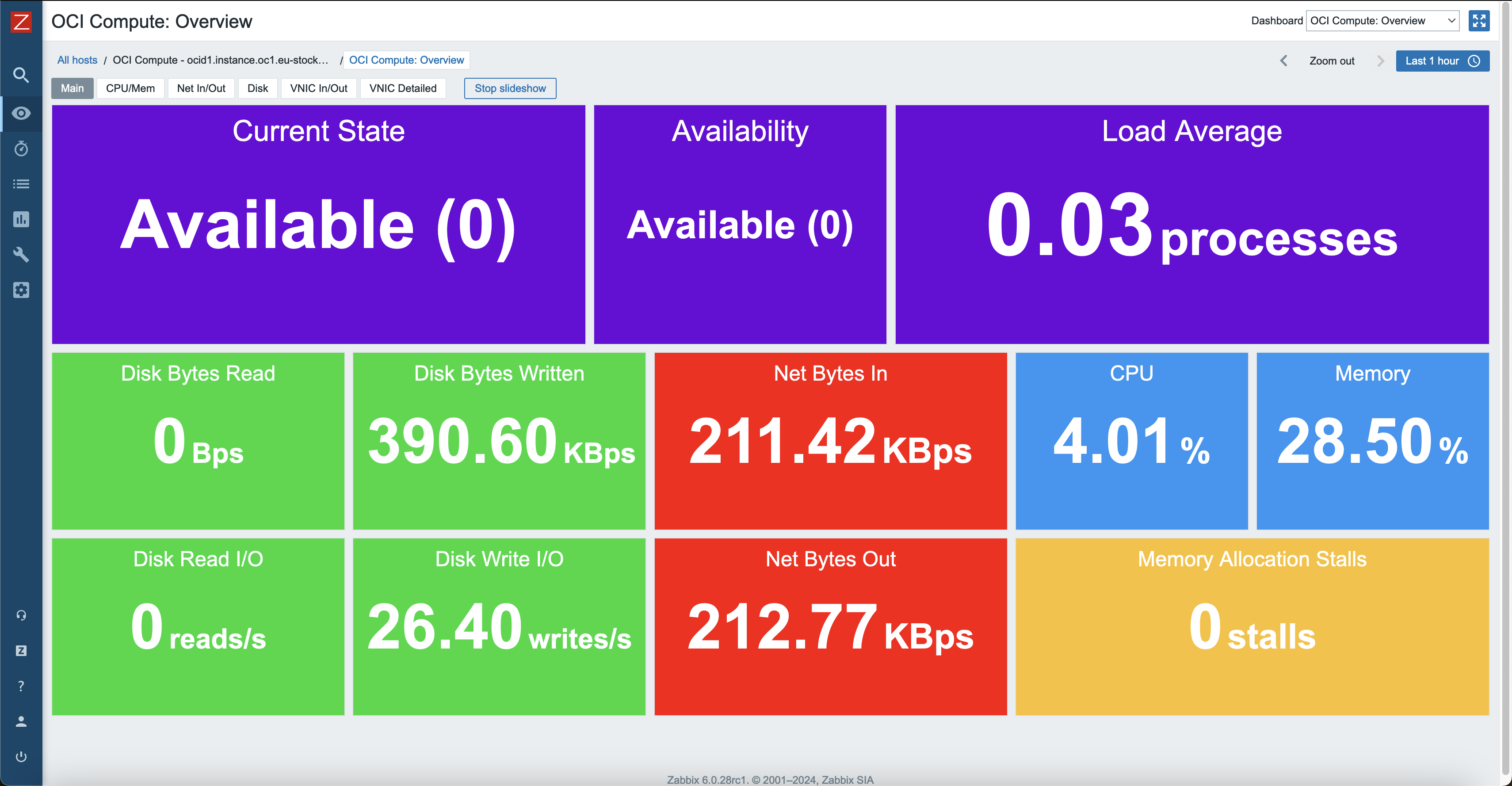
Also, each of these hosts will have their own dashboards created automatically that will give a good overview of resource utilization.
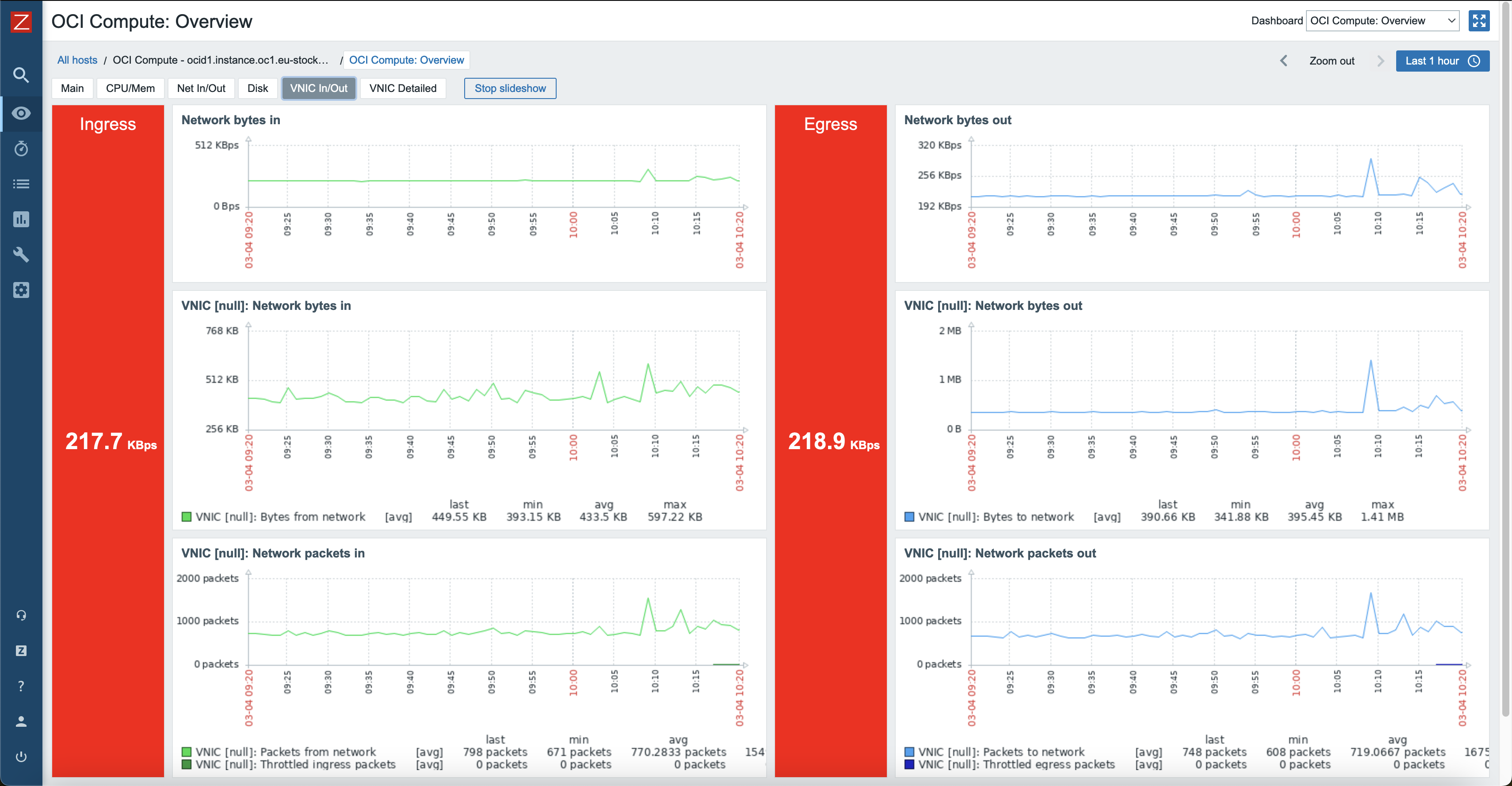
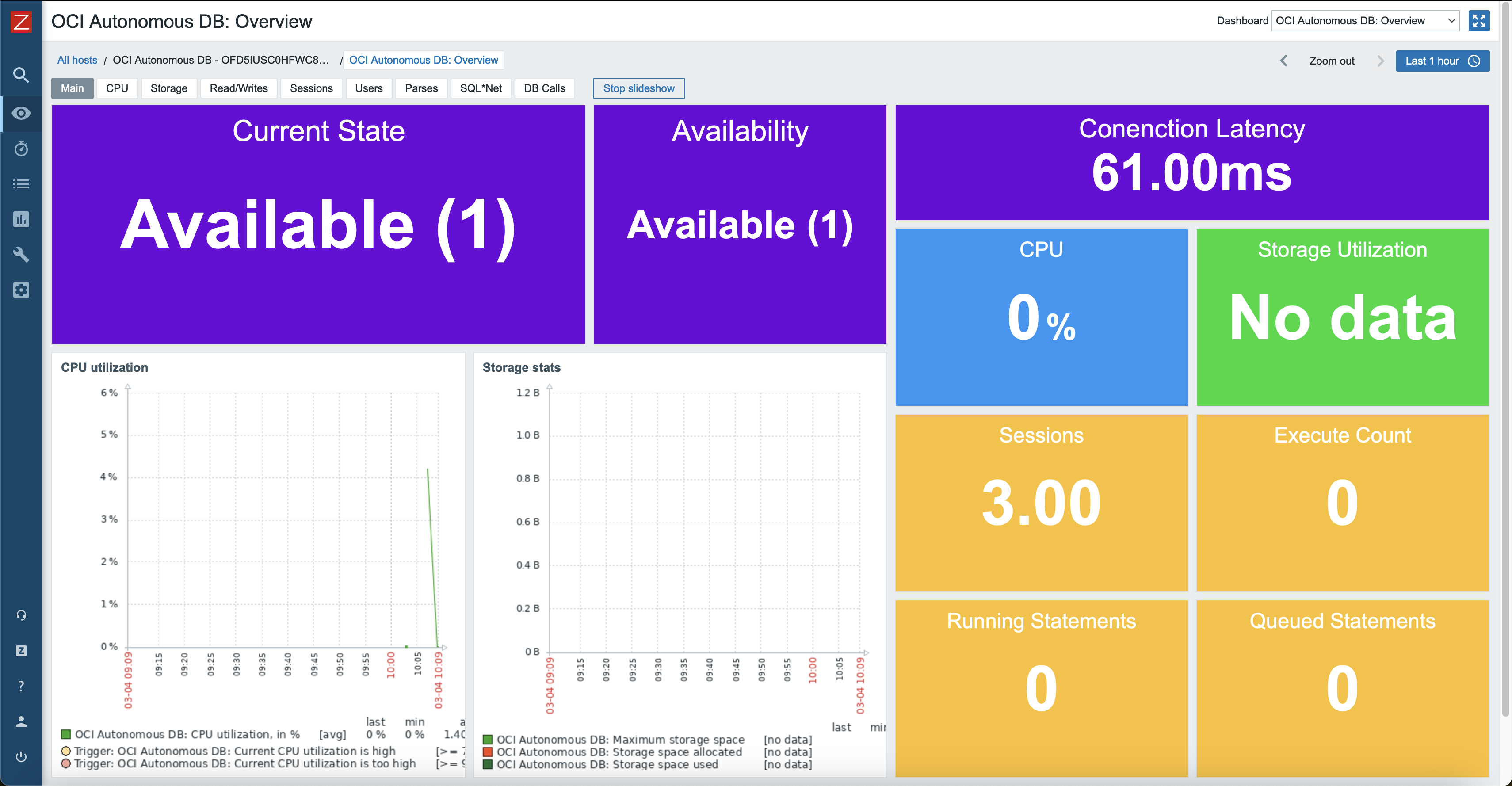
Optional configuration
When creating the OCI host in Zabbix, there were a few macros that required modification of values. As you might have noticed, there were quite a few other macros that we skipped over. In the following sections, usage of these macros will be explained. These are optional macros, so depending on your requirements, you might not even need to change them.
Use macros for low-level discovery filtering
In official Zabbix templates, you might find macros that end with MATCHES and NOT_MATCHES. These are used for Low-level discovery rules (LLDs), to help you filter resources that should or should not be discovered. These values are using regular expressions. Therefore, you can use wildcard symbols for pattern matching.
Usage of these macros can be found in Filters tab, under discovery rules.
Usually default values for MATCHES is .* and for NOT_MATCHES – CHANGE_IF_NEEDED. This means that any kind of value will be discovered if it is not equal to CHANGE_IF_NEEDED. For example, if such macros are filtering compute instance name:
{"instance-name": "compute_instance_1"}will be discovered;{"instance-name": "web-server"}will be discovered;{"instance-name": "CHANGE_IF_NEEDED"}will not be discovered.
In OCI templates, such discovery macros are also used. One example is compute instance discovery where filters are checking the instance state:
- Macro
{$OCI.COMPUTE.DISCOVERY.STATE.MATCHES}has a value of.*; - Macro
{$OCI.COMPUTE.DISCOVERY.STATE.NOT_MATCHES}has a value ofTERMINATED.
This means that any instance that is in terminated state will not be discovered. This is because when you terminate an instance in OCI, it is still kept for a while, but there is no reason to monitor such an instance.
Now that you have an idea how these filters work, you can adjust them based on your requirements.
Low-level discovery resource filtering by free-form tags of OCI resources
To add additional resource discovery filtering options, every discovery script (except VCN discovery), gathers free-form tag data about a specific resource. Since free-form tags are completely custom and format or usage will vary between users, the free-from tag filters are not included under LLD filters by default, but can be easily added as they are already being collected by scripts.
To show an example, let’s assume that you want to categorize OCI compute instances by their usage utilizing free-form tags.
For one of the instances, add a new free-from tag, such as, usage with value web-server.


You need to repeat this for other compute instances and set usage free-from tag values as you want to.
Now, switch over to Zabbix and open Oracle Cloud by HTTP template in Zabbix and go to Discovery rules. Find Compute instances discovery and open it.
Under LLD macros tab, add a new macro that will represent this location group tag, for example, {#USAGE} $.tags.usage.

Under the Filters tab, there will already be filters regarding the compute instance name and state. Click “Add” to add a new filter and define the previously created LLD macro and add a matching pattern and value, for example, {#USAGE} matches web-server.

The next time Compute instances discovery is executed, it will only discover OCI compute instances that have the free-form tag usage that matches the regex of web-server. You can also experiment with the LLD filter pattern matching value to receive different matching results for a specified value.
IMPORTANT! You must have the free-from tag present on every resource in OCI that you are using this method on. In these examples you would need to set
usagefree-form tag on every compute instance, or Zabbix LLD will stop working. If a tag does not exist when Zabbix LLD searches for it, it will throw an error. The free-form tag does not need to have a value, make sure that the tag key is there.
HTTP proxy usage
If needed, you can specify an HTTP proxy for the template to use by changing the value of {$OCI.HTTP.PROXY} user macro. Every request will use this proxy.
Custom OK HTTP response
If using proxy, returned OK HTTP response could change from 200 to some different value. In that case, please change user macro {$OCI.HTTP.RETURN.CODE.OK} to the appropriate value. By default, this is set to 200, therefore, all request items will only accept data when response is 200.
That is about it. Good luck and have fun!
The post Monitoring Oracle Cloud Infrastructure (OCI) with Zabbix appeared first on Zabbix Blog.
Lessons from building an automated SDK pipeline
Post Syndicated from Jacob Bednarz original https://blog.cloudflare.com/lessons-from-building-an-automated-sdk-pipeline
In case you missed the announcement from Developer Week 2024, Cloudflare is now offering software development kits (SDKs) for Typescript, Go and Python. As a reminder, you can get started by installing the packages.
// Typescript
npm install cloudflare

// Go
go get -u github.com/cloudflare/cloudflare-go/v2

// Python
pip install --pre cloudflare
Instead of using a tool like curl or Postman to create a new zone in your account, you can use one of the SDKs in a language that you’re already comfortable with or that integrates directly into your existing codebase.
import Cloudflare from 'cloudflare';

const cloudflare = new Cloudflare({
  apiToken: process.env['CLOUDFLARE_API_TOKEN']
});

const newZone = await cloudflare.zones.create({
  account: { id: '023e105f4ecef8ad9ca31a8372d0c353' },
  name: 'example.com',
  type: 'full',
});
Since their inception, our SDKs have been manually maintained by one or more dedicated individuals. For every product addition or improvement, we needed to orchestrate a series of manually created pull requests to get those changes into customer hands. This, unfortunately, created an imbalance in the frequency and quality of changes that made it into the SDKs. Even though the product teams would drive some of these changes, not all languages were covered and the SDKs fell to either community-driven contributions or to the maintainers of the libraries to cover the remaining languages. Internally, we too felt this pain when using our own services and, instead of covering all languages, decided to rally our efforts behind the primary SDK (Go) to ensure that at least one of these libraries was in a good state.
This plan worked for newer products and additions to the Go SDK, which in turn helped tools like our Terraform Provider stay mostly up to date, but even this focused improvement was still very taxing and time-consuming for internal teams to maintain. On top of this, the process didn’t provide any guarantees on coverage, parity, or correctness because the changes were still manually maintained and susceptible to human error. Regardless of the size of contribution, a team member would still need to coordinate a minimum of 4 pull requests (shown in more depth below) before a change was considered shipped and needed deep knowledge of the relationship between the dependencies in order to get it just right.
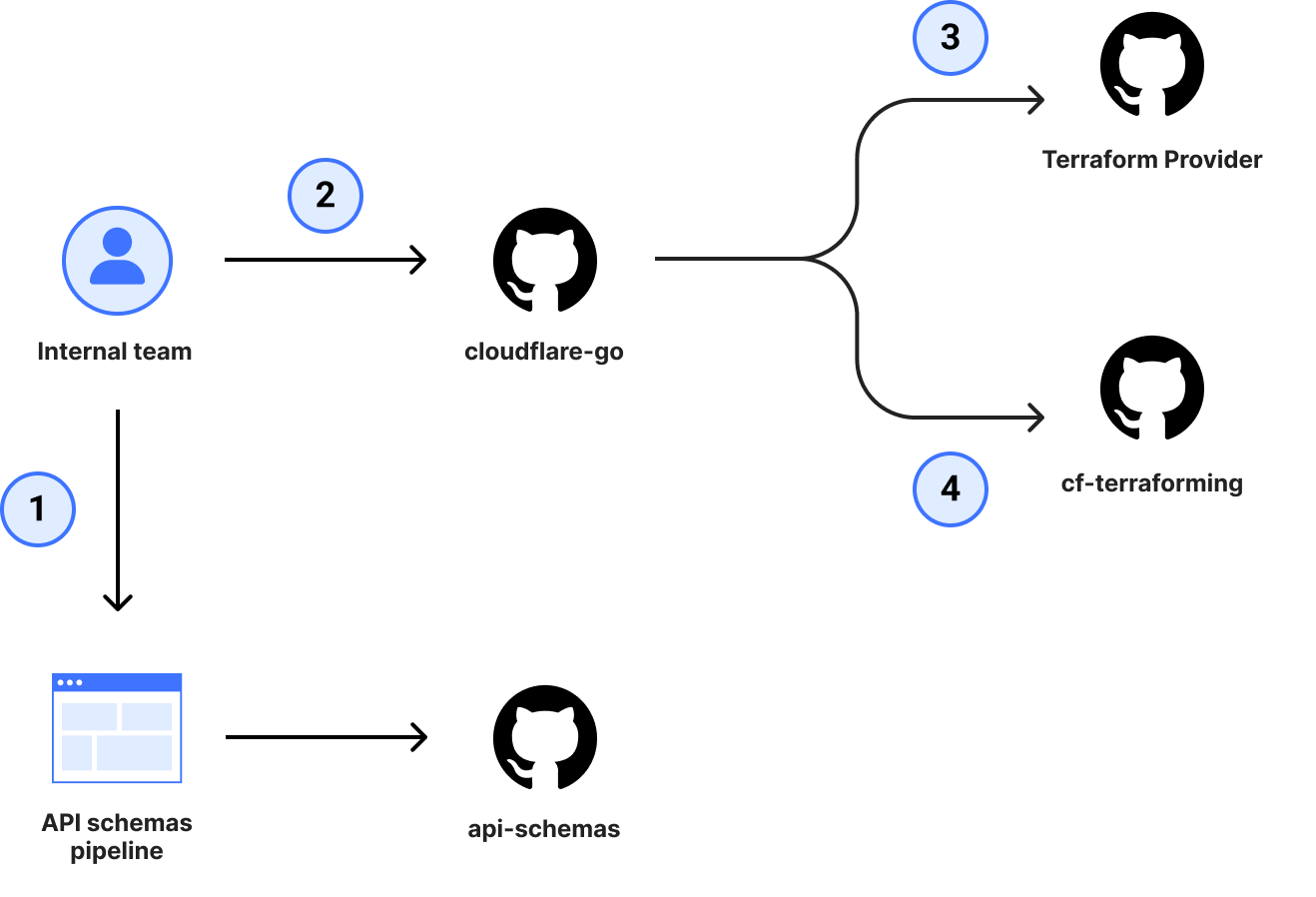
Following the completion of our transition to OpenAPI from JSON Hyper-Schema, we caught up internally and started discussing what else OpenAPI could help us unlock. It was at that point that we set the lofty goal of using OpenAPI for more than just our documentation. It was time to use OpenAPI to generate our SDKs.
Before we dove headfirst into generating SDKs, we established some guiding principles. These would be non-negotiable and determine where we spent our effort.
You should not be able to tell what underlying language generated the SDK
This was important for us because too often companies build SDKs using automation. Not only do you end up with SDKs that are flavored based on generator language, but the SDKs then lack the language nuances or patterns that are noticeable to users familiar with the language.
For example, a Rubyist may use the following if expression:
do_something if bar?
Whereas most generators do not have this context and would instead default to the standard case where if/else expressions are spread over multiple lines.
if bar?
  do_something
end
Despite being a simple and non-material example, it demonstrates a nuance that a machine cannot decipher on its own. This is terrible for developers because you’re then no longer only thinking about how to solve the original task at hand, but you also end up tailoring your code to match how the generator has built the SDK and potentially lose out on the language features you would normally use. The problem is made significantly worse if you’re using a strongly typed language to generate a language without types, since it will be structuring and building code in a way that types are expected but never used.
Lowering the mean time to uniform support
When a new feature is added to a product, it’s great that we add API support initially. However, if that new feature or product never makes it to whatever language SDK you are using to drive your API calls, it’s as good as non-existent. Similarly, not every use case is for infrastructure-as-code tools like Terraform, so we needed a better way of meeting our customers with uniformity where they choose to integrate with our services.
By extension, we want uniformity in the way the namespaces and methods are constructed. Ignoring the language-specific parts, if you’re using one of our SDKs and you are looking for the ability to list all DNS records, you should be able to trust that the method will be in the dns namespace and that to find all records, you can call a list method regardless of which one you are using. Example:
// Go
client.DNS.Records.List(...)

// Typescript
client.dns.records.list(...)

// Python
client.dns.records.list(...)
This leads to less time digging through documentation to find what invocation you need and more time using the tools you’re already familiar with.
Fast feedback loops, clear conventions
Cloudflare has a lot of APIs; everything is backed by an API somewhere. However, not all Cloudflare APIs are designed with the same conventions in mind. Those APIs that are on the critical path and regularly experience traffic surges or malformed input are naturally more hardened and more resilient than those that are infrequently used. This creates a divergence in quality of the endpoint, which shouldn’t be the case.
Where we have learned a lesson or improved a system through a best practice, we should make it easy for others to be aware of and opt into that pattern with little friction at the earliest possible time, ideally as they are proposing the change in CI. That is why when we built the OpenAPI pipeline for API schemas, we built in mechanisms to allow applying linting rules, using redocly CLI, that will either warn the engineer or block them entirely, depending on the severity of the violation.
For example, we want to encourage usage of fine grain API tokens, so we should present those authentication schemes first and ensure they are supported for new endpoints. To enforce this, we can write a redocly plugin:
module.exports = {
    id: 'local',
    assertions: {
        apiTokenAuthSupported: (value, options, location) => {
            for (const i in value) {
                if (value.at(i)?.hasOwnProperty("api_token")) {
                    return [];
                }
            }

            return [{message: 'API Token should be defined as an auth method', location}];
        },
        apiTokenAuthDefinedFirst: (value, options, location) => {
            if (!value.at(0)?.hasOwnProperty("api_token")) {
                return [{message: 'API Tokens should be the first listed Security Option', location}];
            }

            return [];
        },
    },
};
And the rule configuration:
rule/security-options-defined:
  severity: error
  subject:
    type: Operation
    property: security
  where:
  - subject:
    type: Operation
    property: security
    assertions:
      defined: true
  assertions:
    local/apiTokenAuthSupported: {}
    local/apiTokenAuthDefinedFirst: {}
In this example, should a team forget to put the API token authentication scheme first, or define it at all, the CI run will fail. Teams are provided a helpful failure message with a link to the conventions to discover more if they need to understand why the change is recommended.
These lints can be used for style conventions, too. For our documentation descriptions, we like descriptions to start with a capital letter and end in a period. Again, we can add a lint to enforce this requirement.
module.exports = {
    id: 'local',
    assertions: {
        descriptionIsFormatted: (value, options, location) => {
            for (const i in value) {
                if (/^[A-Z].*\.$/.test(value)) {
                    return [];
                }
            }

            return [{message: 'Descriptions should start with a capital and end in a period.', location}];
        },
    },
};
rule/security-options-defined:
  severity: error
  subject:
    type: Schema
    property: description
  assertions:
    local/descriptionIsFormatted: {}
This makes shipping endpoints of the same quality much easier and prevents teams needing to sort through all the API design or resiliency patterns we may have introduced over the years – possibly even before they joined Cloudflare.
Building the generation machine
Once we had our guiding principles, we started doing some analysis of our situation and saw that if we decided to build the solution entirely in house, we would be at least 6–9 months away from a single high quality SDK with the potential for additional follow-up work each time we had a new language addition. This wasn’t acceptable and prevented us from meeting the requirement of needing a low-cost followup for additional languages, so we explored the OpenAPI generation landscape.
Due to the size and complexity of our schemas, we weren’t able to use most off the shelf products. We tried a handful of solutions and workarounds, but we weren’t comfortable with any of the options; that was, until we tried Stainless. Founded by one of the engineers that built what many consider to be the best-in-class API experiences at Stripe, Stainless is dedicated to generating SDKs. If you’ve used the OpenAI Python or Typescript SDKs, you’ve used an SDK generated by Stainless.
The way the platform offering works is that you bring your OpenAPI schemas and map them to methods with the configuration file. Those inputs then get fed into the generation engine to build your SDKs.
resources:
  zones:
    methods:
      list: get /zones
The configuration above would allow you to generate various client.zones.list() operations across your SDKs.
This approach means we can do the majority of our changes using the existing API schemas, but if there is an SDK-specific issue, we can modify that behavior on a per-SDK basis using the configuration file.
An added benefit of using the Stainless generation engine is that it gives us a clear line of responsibility when discussing where a change should be made.
- Service team: Knows their service best and manages the representation for end users.
- API team: Understands and implements best practices for APIs and SDK conventions, builds centralized tooling or components within the platform for all teams, and translates service mappings to align with Stainless.
- Stainless: Provides a simple interface to generate SDKs consistently.
The decision to use Stainless has allowed us to move our focus from building the generation engine to instead building high-quality schemas to describe our services. In the span of a few months, we have gone from inconsistent, manually maintained SDKs to automatically shipping three language SDKs with hands-off updates freely flowing from the internal teams. Best of all, it is now a single pull request workflow for the majority of our changes – even if we were to add a new language or integration to the pipeline!
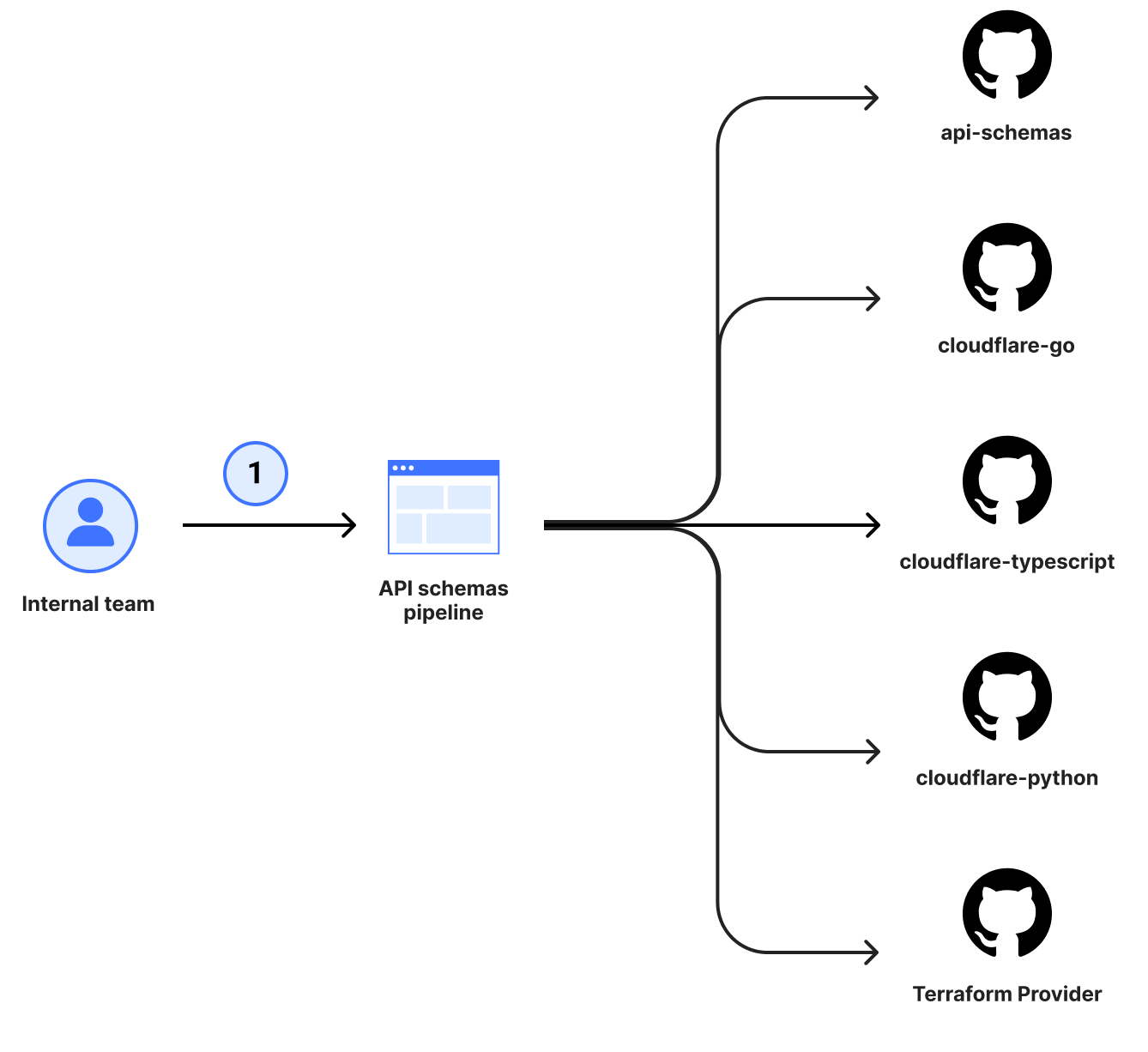
Lessons from our journey, for yours
Mass updates, made easy
Depending on the age of your APIs, you will have a diverging history of how they are represented to customers. That may be as simple as path parameters being inconsistent or perhaps something more complex like different HTTP methods for updates. While you can handle these individually at any sort of scale, that just isn’t feasible. As of this post, Cloudflare offers roughly 1,300 publicly documented endpoints, and we needed a more automatable solution. For us, that was codemods. Codemods are a way of applying transformations to perform large scale refactoring of your codebase. This allows you to programmatically rewrite expressions, syntax or other parts of your code without having to manually go through every file. Think of it like find and replace, but on steroids and with more context of the underlying language constructs.
We started with a tool called comby. We wrapped it in a custom CLI tool that knew how to speak to our version control endpoints and wired it in a way that provides a comby configuration TOML file, pull request description, and commit message for each transformation we needed to apply. Here is a sample comby configuration where we updated the URI paths to be consistently suffixed with _id instead of other variations (_identifier, Identifier, etc.) where we had a plural resource followed by an individual identifier.
[account-id-1-path-consistency]
match = 'paths/~accounts~1{account_identifier1}'
rewrite = 'paths/~accounts~1{account_id}'

[account-id-camelcase-path-consistency]
match = 'paths/~accounts~1{accountId}'
rewrite = 'paths/~accounts~1{account_id}'

[placeholder-identifier-to-id]
match = ':[_~_identifier}]' # need the empty hole match here since we are using unbalanced }
rewrite = '_id}'

[route-consistency-for-resource-plurals]
match = ':[topic~/\w+/]{:[id~\w+]}'
rewrite = ':[topic]{:[id]}'
rule = 'where rewrite :[id] { :[x] -> :[topic] }, rewrite :[id] { /:[x]s/ -> :[x]_id }'

[property-identifier-to-id]
match = 'name: :[topic]_identifier'
rewrite = 'name: :[topic]_id'
For an interactive version of this configuration, check out the comby playground.
This approach worked for the majority of our internal changes. However, knowing how difficult migrations can be, we also wanted a tool that we could provide to customers to use for their own SDK migrations. In the past we’ve used comby for upgrades in the Terraform Provider with great feedback. While comby is powerful, once you start using more complex expressions, the syntax can be difficult to understand unless you are familiar with it.
After looking around, we eventually found Grit. It is a tool that does everything we need (including the custom CLI) while being very familiar to anyone that understands basic Javascript through a query language, known as GritQL. An added bonus here is that we are able to contribute to the Grit Pattern Library, so our migrations are only ever a single CLI invocation away for anyone to use once they have the CLI installed.
// Migrate to the Golang v2 library
grit apply cloudflare_go_v2
Consistency, consistency, consistency
Did I mention consistency is important? Before attempting to feed your OpenAPI schemas into any system (especially a homegrown one), get them consistent with the practices, structures, and how you intend to represent them. This makes determining what is a bug in your generation pipeline vs a bug in your schema much easier. If it’s broken everywhere, it’s the generation pipeline, otherwise it’s an isolated bug to track down in your schema.
Having consistency leads into a better developer experience. From our examples above, if your routes always follow the plural resource name followed by an identifier, the end user doesn’t have to think about what the inputs need to be. The consistency and conventions lead them there – even if your documentation is lacking.
Use shared $refs sparingly
It seems like a great idea for reusability at the time of writing them, but when overused, $refs make finding correct values problematic and lead to cargo cult practices. In turn, this leads to lower quality and difficult-to-change schemas despite looking more usable from the outset. Consider the following schema example:
thing_base:
  type: object
  required:
    - id
  properties:
    updated_at:
      $ref: '#/components/schemas/thing_updated_at'
    created_at:
      $ref: '#/components/schemas/thing_updated_at'
    id:
      $ref: '#/components/schemas/thing_identifier'

thing_updated_at:
  type: string
  format: date-time
  description: When the resource was last updated.
  example: "2014-01-01T05:20:00Z"

thing_created_at:
  type: string
  format: date-time
  description: When the resource was created.
  example: "2014-01-01T05:20:00Z"

thing_id:
  type: string
  description: Unique identifier of the resource.
  example: "2014-01-01T05:20:00Z"
Did you spot the bug? Have another look at the created_at value. You likely didn’t catch it at first glance, but this is a common issue when needing to reference reusable values. Here, it is a minor annoyance as the documentation would be incorrect (created_at would have the description of updated_at), but in other cases, it could be a completely incorrect schema representation.
For us, the correct usage of $ref values is predominantly where you have potential for multiple component schemas that may be used as part of a oneOf, allOf or anyOf directive.
dns_record:
  oneOf:
    - $ref: '#/components/schemas/dns-records_ARecord'
    - $ref: '#/components/schemas/dns-records_AAAARecord'
    - $ref: '#/components/schemas/dns-records_CAARecord'
    - $ref: '#/components/schemas/dns-records_CERTRecord'
    - $ref: '#/components/schemas/dns-records_CNAMERecord'
    - $ref: '#/components/schemas/dns-records_DNSKEYRecord'
    - $ref: '#/components/schemas/dns-records_DSRecord'
    - $ref: '#/components/schemas/dns-records_HTTPSRecord'
    - $ref: '#/components/schemas/dns-records_LOCRecord'
    - $ref: '#/components/schemas/dns-records_MXRecord'
    - $ref: '#/components/schemas/dns-records_NAPTRRecord'
    - $ref: '#/components/schemas/dns-records_NSRecord'
    - $ref: '#/components/schemas/dns-records_PTRRecord'
    - $ref: '#/components/schemas/dns-records_SMIMEARecord'
    - $ref: '#/components/schemas/dns-records_SRVRecord'
    - $ref: '#/components/schemas/dns-records_SSHFPRecord'
    - $ref: '#/components/schemas/dns-records_SVCBRecord'
    - $ref: '#/components/schemas/dns-records_TLSARecord'
    - $ref: '#/components/schemas/dns-records_TXTRecord'
    - $ref: '#/components/schemas/dns-records_URIRecord'
  type: object
  required:
    - id
    - type
    - name
    - content
    - proxiable
    - created_on
    - modified_on
When in doubt, consider the YAGNI principle instead. You can always refactor and extract this later once you have enough uses to determine the correct abstraction.
Design your ideal usage and work backwards
Before we wrote a single line of code to solve the problem of generation, we prepared language design documents for each of our target languages that followed the README-driven design principles. This meant our focus from the initial design was on the usability of the library and not on the technical challenges that we would eventually encounter. This led us to identify problems and patterns early with how various language nuances would surface to the end user without investing in anything more than a document. Python keyword arguments, Go interfaces, how to enforce required parameters, client instantiation and overrides, types – all considerations made up front that helped minimize the number of unknowns as we built out support.
What’s next?
When we embarked on the OpenAPI journey, we knew it was only the beginning and would eventually open more doors and quality of life improvements for teams and customers alike. Now that we have a few language SDKs available, we’re turning our attention to generating our Terraform Provider using the same guiding principles to further minimize the maintenance burden. But that’s still not all. Coming later in 2024 are more improvements and integrations with other parts of the Cloudflare Developer Platform, so stay tuned.
If you haven’t already, check out one of the SDKs in Go, Typescript and Python today. If you’d like support for a different language, go here to submit your details to help determine the next language. We’d love to hear what languages you would like offered as a Cloudflare SDK.
Comic for 2024.04.23 – Surprise
Post Syndicated from Explosm.net original https://explosm.net/comics/surprise
New Cyanide and Happiness Comic
A Sweet History of Saccharin
Post Syndicated from The History Guy: History Deserves to Be Remembered original https://www.youtube.com/watch?v=sxVEUHeWYcM