Meta’s Llama 3 models are now available in Amazon Bedrock

Post Syndicated from Channy Yun original https://aws.amazon.com/blogs/aws/metas-llama-3-models-are-now-available-in-amazon-bedrock/

Today, we are announcing the general availability of Meta’s Llama 3 models in Amazon Bedrock. Meta Llama 3 is designed for you to build, experiment, and responsibly scale your generative artificial intelligence (AI) applications. New Llama 3 models are the most capable to support a broad range of use cases with improvements in reasoning, code generation, and instruction.

According to Meta’s Llama 3 announcement, the Llama 3 model family is a collection of pre-trained and instruction-tuned large language models (LLMs) in 8B and 70B parameter sizes. These models have been trained on over 15 trillion tokens of data—a training dataset seven times larger than that used for Llama 2 models, including four times more code, which supports an 8K context length that doubles the capacity of Llama 2.

You can now use two new Llama 3 models in Amazon Bedrock, further increasing model choice within Amazon Bedrock. These models provide the ability for you to easily experiment with and evaluate even more top foundation models (FMs) for your use case:

  • Llama 3 8B is ideal for limited computational power and resources, and edge devices. The model excels at text summarization, text classification, sentiment analysis, and language translation.
  • Llama 3 70B is ideal for content creation, conversational AI, language understanding, research development, and enterprise applications. The model excels at text summarization and accuracy, text classification and nuance, sentiment analysis and nuance reasoning, language modeling, dialogue systems, code generation, and following instructions.

Meta is also currently training additional Llama 3 models over 400B parameters in size. These 400B models will have new capabilities, including multimodality, multiple languages support, and a much longer context window. When released, these models will be ideal for content creation, conversational AI, language understanding, research and development (R&D), and enterprise applications.

Llama 3 models in action
If you are new to using Meta models, go to the Amazon Bedrock console and choose Model access on the bottom left pane. To access the latest Llama 3 models from Meta, request access separately for Llama 3 8B Instruct or Llama 3 70B Instruct.

To test the Meta Llama 3 models in the Amazon Bedrock console, choose Text or Chat under Playgrounds in the left menu pane. Then choose Select model and select Meta as the category and Llama 8B Instruct or Llama 3 70B Instruct as the model.

By choosing View API request, you can also access the model using code examples in the AWS Command Line Interface (AWS CLI) and AWS SDKs. You can use model IDs such as meta.llama3-8b-instruct-v1 or meta.llama3-70b-instruct-v1.

Here is a sample of the AWS CLI command:

$ aws bedrock-runtime invoke-model \
  --model-id meta.llama3-8b-instruct-v1:0 \
  --body "{\"prompt\":\"Simply put, the theory of relativity states that\\n the laws of physics are the same everywhere in the universe, and that the passage of time and the length of objects can vary depending on their speed and position in a gravitational field \",\"max_gen_len\":512,\"temperature\":0.5,\"top_p\":0.9}" \
  --cli-binary-format raw-in-base64-out \
  --region us-east-1 \
  invoke-model-output.txt

You can use code examples for Amazon Bedrock using AWS SDKs to build your applications with various programming languages. The following Python code examples show how to invoke the Llama 3 Chat model in Amazon Bedrock for text generation.

def invoke_llama3(self, prompt):
        try:
            body = {
                "prompt": prompt,
                "temperature": 0.5,
                "top_p": 0.9,
                "max_gen_len": 512,
            }

            response = self.bedrock_runtime_client.invoke_model(
                modelId="meta.llama3-8b-instruct-v1:0", body=json.dumps(body)
            )

            response_body = json.loads(response["body"].read())
            completion = response_body["generation"]

            return completion

        except ClientError:
            logger.error("Couldn't invoke Llama 3")
            raise

You can use these Llama 3 models for a variety of tasks, such as question answering, language translation, sentiment analysis, and more. Here is an example of Llama 3 models with few-shot in-context learning where we provide training samples available to the model.

Input: Translate English to French:
sea otter => loutre de mer
peppermint => menthe poivrée
plush girafe => girafe peluche
cheese =>
Output:  fromage
panda => panda
penguin => pingouin
polar bear => ours polaire
puffin => macareux
sloth => paresseux
walrus => morse
whale => baleine
zebra => z\u00e8bre

Translate English to German:
sea otter => Seeotter

You can also use Llama 3 instruct models optimized for dialogue use cases. The input to the instruct model endpoints is the previous history between the chat assistant and the user. So, you can ask questions contextual to the conversation that has happened so far and provide the system configuration, such as personas, which define the chat assistant’s behavior in the following format:

<|begin_of_text|><|start_header_id|>system<|end_header_id|>
[SYSTEM_TEXT]<|eot_id|><|start_header_id|>user<|end_header_id|>
[USER_TEXT]<|eot_id|><|start_header_id|>assistant<|end_header_id|>

In the following example, the user has a conversation with the assistant about tourist sites in Paris. Then, the user inquires about the first option recommended by the chat assistant.

Input: <|begin_of_text|><|start_header_id|>user<|end_header_id|>\n\n
I am going to Paris, what should I see?<|eot_id|><|start_header_id|>assistant<|end_header_id|>\n\n
Paris, the capital of France, is known for its stunning architecture, art museums, historical landmarks, and romantic atmosphere. Here are some of the top attractions to see in Paris:\n\n
1. The Eiffel Tower: The iconic Eiffel Tower is one of the most recognizable landmarks in the world and offers breathtaking views of the city.\n
2. The Louvre Museum: The Louvre is one of the world's largest and most famous museums, housing an impressive collection of art and artifacts, including the Mona Lisa.\n
3. Notre-Dame Cathedral: This beautiful cathedral is one of the most famous landmarks in Paris and is known for its Gothic architecture and stunning stained glass windows.\n\n
These are just a few of the many attractions that Paris has to offer. With so much to see and do, it's no wonder that Paris is one of the most popular tourist destinations in the world.<|eot_id|><|start_header_id|>user<|end_header_id|>\n\n
What is so great about #1?<|eot_id|><|start_header_id|>assistant<|end_header_id|>\n\n
Output: The Eiffel Tower! It's an iconic symbol of Paris and one of the most recognizable landmarks in the world. Here are some reasons why it's so great:\n\n
1. **Engineering marvel**: When it was built for the 1889 World's Fair, the Eiffel Tower was a groundbreaking feat of engineering. It was the tallest structure in the world at the time, standing at 324 meters (1,063 feet).\n
2. **Panoramic views**: The Eiffel Tower offers breathtaking 360-degree views of the city from its observation decks. You can see many of Paris' famous landmarks, such as the Seine River, the Louvre, and Montmartre.\n
3. **Romantic atmosphere**: The Eiffel Tower is often associated with romance and is a popular spot for proposals, weddings, and romantic dinners. The tower's iron latticework and twinkling lights at night add to its romantic ambiance.\n
4. **Historical significance**: The Eiffel Tower has played a significant role in French history, serving as a communication tower during World War I and a symbol of French culture and engineering.\n
5. **Accessibility**: The Eiffel Tower is easily accessible by public transportation or on foot, and there are various ways to experience it, including taking the stairs, elevator, or a guided tour.\n
6. **Nighttime spectacle**: The Eiffel Tower is even more magical at night, when it's illuminated with thousands of twinkling lights. The light show, known as the \"Eiffel Tower Sparkle,\" takes place every hour on the hour from dusk to midnight.\n
7. **Iconic status**: The Eiffel Tower has been featured in countless films, literature, and art, making it an instantly recognizable symbol of Paris and France.\n\n
Overall, the Eiffel Tower is a must-visit attraction in Paris, offering a unique combination of history, engineering, romance, and stunning views.

To learn more about the new prompt template and special tokens of Llama 3, check out Meta’s model cards and prompt formats or Llama Recipes in the GitHub repository.

Now available
Meta’s Llama 3 models are available today in Amazon Bedrock in the US East (N. Virginia) and US West (Oregon) Regions. Check the full Region list for future updates. To learn more, check out the Llama in Amazon Bedrock product page and pricing page.

Give Llama 3 a try in the Amazon Bedrock console today, and send feedback to AWS re:Post for Amazon Bedrock or through your usual AWS Support contacts.

Visit our community.aws site to find deep-dive technical content and to discover how our Builder communities are using Amazon Bedrock in their solutions.

— Channy

Guardrails for Amazon Bedrock now available with new safety filters and privacy controls

Post Syndicated from Esra Kayabali original https://aws.amazon.com/blogs/aws/guardrails-for-amazon-bedrock-now-available-with-new-safety-filters-and-privacy-controls/

Today, I am happy to announce the general availability of Guardrails for Amazon Bedrock, first released in preview at re:Invent 2023. With Guardrails for Amazon Bedrock, you can implement safeguards in your generative artificial intelligence (generative AI) applications that are customized to your use cases and responsible AI policies. You can create multiple guardrails tailored to different use cases and apply them across multiple foundation models (FMs), improving end-user experiences and standardizing safety controls across generative AI applications. You can use Guardrails for Amazon Bedrock with all large language models (LLMs) in Amazon Bedrock, including fine-tuned models.

Guardrails for Bedrock offers industry-leading safety protection on top of the native capabilities of FMs, helping customers block as much as 85% more harmful content than protection natively provided by some foundation models on Amazon Bedrock today. Guardrails for Amazon Bedrock is the only responsible AI capability offered by top cloud providers that enables customers to build and customize safety and privacy protections for their generative AI applications in a single solution, and it works with all large language models (LLMs) in Amazon Bedrock, as well as fine-tuned models.

Aha! is a software company that helps more than 1 million people bring their product strategy to life. “Our customers depend on us every day to set goals, collect customer feedback, and create visual roadmaps,” said Dr. Chris Waters, co-founder and Chief Technology Officer at Aha!. “That is why we use Amazon Bedrock to power many of our generative AI capabilities. Amazon Bedrock provides responsible AI features, which enable us to have full control over our information through its data protection and privacy policies, and block harmful content through Guardrails for Bedrock. We just built on it to help product managers discover insights by analyzing feedback submitted by their customers. This is just the beginning. We will continue to build on advanced AWS technology to help product development teams everywhere prioritize what to build next with confidence.”
In the preview post, Antje showed you how to use guardrails to configure thresholds to filter content across harmful categories and define a set of topics that need to be avoided in the context of your application. The Content filters feature now has two additional safety categories: Misconduct for detecting criminal activities and Prompt Attack for detecting prompt injection and jailbreak attempts. We also added important new features, including sensitive information filters to detect and redact personally identifiable information (PII) and word filters to block inputs containing profane and custom words (for example, harmful words, competitor names, and products).

Guardrails for Amazon Bedrock sits in between the application and the model. Guardrails automatically evaluates everything going into the model from the application and coming out of the model to the application to detect and help prevent content that falls into restricted categories.

You can recap the steps in the preview release blog to learn how to configure Denied topics and Content filters. Let me show you how the new features work.

New features
To start using Guardrails for Amazon Bedrock, I go to the AWS Management Console for Amazon Bedrock, where I can create guardrails and configure the new capabilities. In the navigation pane in the Amazon Bedrock console, I choose Guardrails, and then I choose Create guardrail.

I enter the guardrail Name and Description. I choose Next to move to the Add sensitive information filters step.

I use Sensitive information filters to detect sensitive and private information in user inputs and FM outputs. Based on the use cases, I can select a set of entities to be either blocked in inputs (for example, a FAQ-based chatbot that doesn’t require user-specific information) or redacted in outputs (for example, conversation summarization based on chat transcripts). The sensitive information filter supports a set of predefined PII types. I can also define custom regex-based entities specific to my use case and needs.

I add two PII types (Name, Email) from the list and add a regular expression pattern using Booking ID as Name and [0-9a-fA-F]{8} as the Regex pattern.

I choose Next and enter custom messages that will be displayed if my guardrail blocks the input or the model response in the Define blocked messaging step. I review the configuration at the last step and choose Create guardrail.

I navigate to the Guardrails Overview page and choose the Anthropic Claude Instant 1.2 model using the Test section. I enter the following call center transcript in the Prompt field and choose Run.

Please summarize the below call center transcript. Put the name, email and the booking ID to the top:
Agent: Welcome to ABC company. How can I help you today?
Customer: I want to cancel my hotel booking.
Agent: Sure, I can help you with the cancellation. Can you please provide your booking ID?
Customer: Yes, my booking ID is 550e8408.
Agent: Thank you. Can I have your name and email for confirmation?
Customer: My name is Jane Doe and my email is [email protected]
Agent: Thank you for confirming. I will go ahead and cancel your reservation.

Guardrail action shows there are three instances where the guardrails came in to effect. I use View trace to check the details. I notice that the guardrail detected the Name, Email and Booking ID and masked them in the final response.

I use Word filters to block inputs containing profane and custom words (for example, competitor names or offensive words). I check the Filter profanity box. The profanity list of words is based on the global definition of profanity. Additionally, I can specify up to 10,000 phrases (with a maximum of three words per phrase) to be blocked by the guardrail. A blocked message will show if my input or model response contain these words or phrases.

Now, I choose Custom words and phrases under Word filters and choose Edit. I use Add words and phrases manually to add a custom word CompetitorY. Alternatively, I can use Upload from a local file or Upload from S3 object if I need to upload a list of phrases. I choose Save and exit to return to my guardrail page.

I enter a prompt containing information about a fictional company and its competitor and add the question What are the extra features offered by CompetitorY?. I choose Run.

I use View trace to check the details. I notice that the guardrail intervened according to the policies I configured.

Now available
Guardrails for Amazon Bedrock is now available in US East (N. Virginia) and US West (Oregon) Regions.

For pricing information, visit the Amazon Bedrock pricing page.

To get started with this feature, visit the Guardrails for Amazon Bedrock web page.

For deep-dive technical content and to learn how our Builder communities are using Amazon Bedrock in their solutions, visit our community.aws website.

— Esra

Agents for Amazon Bedrock: Introducing a simplified creation and configuration experience

Post Syndicated from Danilo Poccia original https://aws.amazon.com/blogs/aws/agents-for-amazon-bedrock-introducing-a-simplified-creation-and-configuration-experience/

With Agents for Amazon Bedrock, applications can use generative artificial intelligence (generative AI) to run tasks across multiple systems and data sources. Starting today, these new capabilities streamline the creation and management of agents:

Quick agent creation – You can now quickly create an agent and optionally add instructions and action groups later, providing flexibility and agility for your development process.

Agent builder – All agent configurations can be operated in the new agent builder section of the console.

Simplified configuration – Action groups can use a simplified schema that just lists functions and parameters without having to provide an API schema.

Return of control –You can skip using an AWS Lambda function and return control to the application invoking the agent. In this way, the application can directly integrate with systems outside AWS or call internal endpoints hosted in any Amazon Virtual Private Cloud (Amazon VPC) without the need to integrate the required networking and security configurations with a Lambda function.

Infrastructure as code – You can use AWS CloudFormation to deploy and manage agents with the new simplified configuration, ensuring consistency and reproducibility across environments for your generative AI applications.

Let’s see how these enhancements work in practice.

Creating an agent using the new simplified console
To test the new experience, I want to build an agent that can help me reply to an email containing customer feedback. I can use generative AI, but a single invocation of a foundation model (FM) is not enough because I need to interact with other systems. To do that, I use an agent.

In the Amazon Bedrock console, I choose Agents from the navigation pane and then Create Agent. I enter a name for the agent (customer-feedback) and a description. Using the new interface, I proceed and create the agent without providing additional information at this stage.

Console screenshot.

I am now presented with the Agent builder, the place where I can access and edit the overall configuration of an agent. In the Agent resource role, I leave the default setting as Create and use a new service role so that the AWS Identity and Access Management (IAM) role assumed by the agent is automatically created for me. For the model, I select Anthropic and Claude 3 Sonnet.

Console screenshot.

In Instructions for the Agent, I provide clear and specific instructions for the task the agent has to perform. Here, I can also specify the style and tone I want the agent to use when replying. For my use case, I enter:

Help reply to customer feedback emails with a solution tailored to the customer account settings.

In Additional settings, I select Enabled for User input so that the agent can ask for additional details when it does not have enough information to respond. Then, I choose Save to update the configuration of the agent.

I now choose Add in the Action groups section. Action groups are the way agents can interact with external systems to gather more information or perform actions. I enter a name (retrieve-customer-settings) and a description for the action group:

Retrieve customer settings including customer ID.

The description is optional but, when provided, is passed to the model to help choose when to use this action group.

Console screenshot.

In Action group type, I select Define with function details so that I only need to specify functions and their parameters. The other option here (Define with API schemas) corresponds to the previous way of configuring action groups using an API schema.

Action group functions can be associated to a Lambda function call or configured to return control to the user or application invoking the agent so that they can provide a response to the function. The option to return control is useful for four main use cases:

  • When it’s easier to call an API from an existing application (for example, the one invoking the agent) than building a new Lambda function with the correct authentication and network configurations as required by the API
  • When the duration of the task goes beyond the maximum Lambda function timeout of 15 minutes so that I can handle the task with an application running in containers or virtual servers or use a workflow orchestration such as AWS Step Functions
  • When I have time-consuming actions because, with the return of control, the agent doesn’t wait for the action to complete before proceeding to the next step, and the invoking application can run actions asynchronously in the background while the orchestration flow of the agent continues
  • When I need a quick way to mock the interaction with an API during the development and testing and of an agent

In Action group invocation, I can specify the Lambda function that will be invoked when this action group is identified by the model during orchestration. I can ask the console to quickly create a new Lambda function, to select an existing Lambda function, or return control so that the user or application invoking the agent will ask for details to generate a response. I select Return Control to show how that works in the console.

Console screenshot.

I configure the first function of the action group. I enter a name (retrieve-customer-settings-from-crm) and the following description for the function:

Retrieve customer settings from CRM including customer ID using the customer email in the sender/from fields of the email.

Console screenshot.

In Parameters, I add email with Customer email as the description. This is a parameter of type String and is required by this function. I choose Add to complete the creation of the action group.

Because, for my use case, I expect many customers to have issues when logging in, I add another action group (named check-login-status) with the following description:

Check customer login status.

This time, I select the option to create a new Lambda function so that I can handle these requests in code.

For this action group, I configure a function (named check-customer-login-status-in-login-system) with the following description:

Check customer login status in login system using the customer ID from settings.

In Parameters, I add customer_id, another required parameter of type String. Then, I choose Add to complete the creation of the second action group.

When I open the configuration of this action group, I see the name of the Lambda function that has been created in my account. There, I choose View to open the Lambda function in the console.

Console screenshot.

In the Lambda console, I edit the starting code that has been provided and implement my business case:

import json

def lambda_handler(event, context):
    print(event)
    
    agent = event['agent']
    actionGroup = event['actionGroup']
    function = event['function']
    parameters = event.get('parameters', [])

    # Execute your business logic here. For more information,
    # refer to: https://docs.aws.amazon.com/bedrock/latest/userguide/agents-lambda.html
    if actionGroup == 'check-login-status' and function == 'check-customer-login-status-in-login-system':
        response = {
            "status": "unknown"
        }
        for p in parameters:
            if p['name'] == 'customer_id' and p['type'] == 'string' and p['value'] == '12345':
                response = {
                    "status": "not verified",
                    "reason": "the email address has not been verified",
                    "solution": "please verify your email address"
                }
    else:
        response = {
            "error": "Unknown action group {} or function {}".format(actionGroup, function)
        }
    
    responseBody =  {
        "TEXT": {
            "body": json.dumps(response)
        }
    }

    action_response = {
        'actionGroup': actionGroup,
        'function': function,
        'functionResponse': {
            'responseBody': responseBody
        }

    }

    dummy_function_response = {'response': action_response, 'messageVersion': event['messageVersion']}
    print("Response: {}".format(dummy_function_response))

    return dummy_function_response

I choose Deploy in the Lambda console. The function is configured with a resource-based policy that allows Amazon Bedrock to invoke the function. For this reason, I don’t need to update the IAM role used by the agent.

I am ready to test the agent. Back in the Amazon Bedrock console, with the agent selected, I look for the Test Agent section. There, I choose Prepare to prepare the agent and test it with the latest changes.

As input to the agent, I provide this sample email:

From: [email protected]

Subject: Problems logging in

Hi, when I try to log into my account, I get an error and cannot proceed further. Can you check? Thank you, Danilo

In the first step, the agent orchestration decides to use the first action group (retrieve-customer-settings) and function (retrieve-customer-settings-from-crm). This function is configured to return control, and in the console, I am asked to provide the output of the action group function. The customer email address is provided as the input parameter.

Console screenshot.

To simulate an interaction with an application, I reply with a JSON syntax and choose Submit:

{ "customer id": 12345 }

In the next step, the agent has the information required to use the second action group (check-login-status) and function (check-customer-login-status-in-login-system) to call the Lambda function. In return, the Lambda function provides this JSON payload:

{
  "status": "not verified",
  "reason": "the email address has not been verified",
  "solution": "please verify your email address"
}

Using this content, the agent can complete its task and suggest the correct solution for this customer.

Console screenshot.

I am satisfied with the result, but I want to know more about what happened under the hood. I choose Show trace where I can see the details of each step of the agent orchestration. This helps me understand the agent decisions and correct the configurations of the agent groups if they are not used as I expect.

Console screenshot.

Things to know
You can use the new simplified experience to create and manage Agents for Amazon Bedrock in the US East (N. Virginia) and US West (Oregon) AWS Regions.

You can now create an agent without having to specify an API schema or provide a Lambda function for the action groups. You just need to list the parameters that the action group needs. When invoking the agent, you can choose to return control with the details of the operation to perform so that you can handle the operation in your existing applications or if the duration is longer than the maximum Lambda function timeout.

CloudFormation support for Agents for Amazon Bedrock has been released recently and is now being updated to support the new simplified syntax.

To learn more:

— Danilo

Amazon Bedrock model evaluation is now generally available

Post Syndicated from Jeff Barr original https://aws.amazon.com/blogs/aws/amazon-bedrock-model-evaluation-is-now-generally-available/

The Amazon Bedrock model evaluation capability that we previewed at AWS re:Invent 2023 is now generally available. This new capability helps you to incorporate Generative AI into your application by giving you the power to select the foundation model that gives you the best results for your particular use case. As my colleague Antje explained in her post (Evaluate, compare, and select the best foundation models for your use case in Amazon Bedrock):

Model evaluations are critical at all stages of development. As a developer, you now have evaluation tools available for building generative artificial intelligence (AI) applications. You can start by experimenting with different models in the playground environment. To iterate faster, add automatic evaluations of the models. Then, when you prepare for an initial launch or limited release, you can incorporate human reviews to help ensure quality.

We received a lot of wonderful and helpful feedback during the preview and used it to round-out the features of this new capability in preparation for today’s launch — I’ll get to those in a moment. As a quick recap, here are the basic steps (refer to Antje’s post for a complete walk-through):

Create a Model Evaluation Job – Select the evaluation method (automatic or human), select one of the available foundation models, choose a task type, and choose the evaluation metrics. You can choose accuracy, robustness, and toxicity for an automatic evaluation, or any desired metrics (friendliness, style, and adherence to brand voice, for example) for a human evaluation. If you choose a human evaluation, you can use your own work team or you can opt for an AWS-managed team. There are four built-in task types, as well as a custom type (not shown):

After you select the task type you choose the metrics and the datasets that you want to use to evaluate the performance of the model. For example, if you select Text classification, you can evaluate accuracy and/or robustness with respect to your own dataset or a built-in one:

As you can see above, you can use a built-in dataset, or prepare a new one in JSON Lines (JSONL) format. Each entry must include a prompt and can include a category. The reference response is optional for all human evaluation configurations and for some combinations of task types and metrics for automatic evaluation:

{
  "prompt" : "Bobigny is the capitol of",
  "referenceResponse" : "Seine-Saint-Denis",
  "category" : "Capitols"
}

You (or your local subject matter experts) can create a dataset that uses customer support questions, product descriptions, or sales collateral that is specific to your organization and your use case. The built-in datasets include Real Toxicity, BOLD, TREX, WikiText-2, Gigaword, BoolQ, Natural Questions, Trivia QA, and Women’s Ecommerce Clothing Reviews. These datasets are designed to test specific types of tasks and metrics, and can be chosen as appropriate.

Run Model Evaluation Job – Start the job and wait for it to complete. You can review the status of each of your model evaluation jobs from the console, and can also access the status using the new GetEvaluationJob API function:

Retrieve and Review Evaluation Report – Get the report and review the model’s performance against the metrics that you selected earlier. Again, refer to Antje’s post for a detailed look at a sample report.

New Features for GA
With all of that out of the way, let’s take a look at the features that were added in preparation for today’s launch:

Improved Job Management – You can now stop a running job using the console or the new model evaluation API.

Model Evaluation API – You can now create and manage model evaluation jobs programmatically. The following functions are available:

  • CreateEvaluationJob – Create and run a model evaluation job using parameters specified in the API request including an evaluationConfig and an inferenceConfig.
  • ListEvaluationJobs – List model evaluation jobs, with optional filtering and sorting by creation time, evaluation job name, and status.
  • GetEvaluationJob – Retrieve the properties of a model evaluation job, including the status (InProgress, Completed, Failed, Stopping, or Stopped). After the job has completed, the results of the evaluation will be stored at the S3 URI that was specified in the outputDataConfig property supplied to CreateEvaluationJob.
  • StopEvaluationJob – Stop an in-progress job. Once stopped, a job cannot be resumed, and must be created anew if you want to rerun it.

This model evaluation API was one of the most-requested features during the preview. You can use it to perform evaluations at scale, perhaps as part of a development or testing regimen for your applications.

Enhanced Security – You can now use customer-managed KMS keys to encrypt your evaluation job data (if you don’t use this option, your data is encrypted using a key owned by AWS):

Access to More Models – In addition to the existing text-based models from AI21 Labs, Amazon, Anthropic, Cohere, and Meta, you now have access to Claude 2.1:

After you select a model you can set the inference configuration that will be used for the model evaluation job:

Things to Know
Here are a couple of things to know about this cool new Amazon Bedrock capability:

Pricing – You pay for the inferences that are performed during the course of the model evaluation, with no additional charge for algorithmically generated scores. If you use human-based evaluation with your own team, you pay for the inferences and $0.21 for each completed task — a human worker submitting an evaluation of a single prompt and its associated inference responses in the human evaluation user interface. Pricing for evaluations performed by an AWS managed work team is based on the dataset, task types, and metrics that are important to your evaluation. For more information, consult the Amazon Bedrock Pricing page.

Regions – Model evaluation is available in the US East (N. Virginia) and US West (Oregon) AWS Regions.

More GenAI – Visit our new GenAI space to learn more about this and the other announcements that we are making today!

— Jeff;

Import custom models in Amazon Bedrock (preview)

Post Syndicated from Danilo Poccia original https://aws.amazon.com/blogs/aws/import-custom-models-in-amazon-bedrock-preview/

With Amazon Bedrock, you have access to a choice of high-performing foundation models (FMs) from leading artificial intelligence (AI) companies that make it easier to build and scale generative AI applications. Some of these models provide publicly available weights that can be fine-tuned and customized for specific use cases. However, deploying customized FMs in a secure and scalable way is not an easy task.

Starting today, Amazon Bedrock adds in preview the capability to import custom weights for supported model architectures (such as Meta Llama 2, Llama 3, and Mistral) and serve the custom model using On-Demand mode. You can import models with weights in Hugging Face safetensors format from Amazon SageMaker and Amazon Simple Storage Service (Amazon S3).

In this way, you can use Amazon Bedrock with existing customized models such as Code Llama, a code-specialized version of Llama 2 that was created by further training Llama 2 on code-specific datasets, or use your data to fine-tune models for your own unique business case and import the resulting model in Amazon Bedrock.

Let’s see how this works in practice.

Bringing a custom model to Amazon Bedrock
In the Amazon Bedrock console, I choose Imported models from the Foundation models section of the navigation pane. Now, I can create a custom model by importing model weights from an Amazon Simple Storage Service (Amazon S3) bucket or from an Amazon SageMaker model.

I choose to import model weights from an S3 bucket. In another browser tab, I download the MistralLite model from the Hugging Face website using this pull request (PR) that provides weights in safetensors format. The pull request is currently Ready to merge, so it might be part of the main branch when you read this. MistralLite is a fine-tuned Mistral-7B-v0.1 language model with enhanced capabilities of processing long context up to 32K tokens.

When the download is complete, I upload the files to an S3 bucket in the same AWS Region where I will import the model. Here are the MistralLite model files in the Amazon S3 console:

Console screenshot.

Back at the Amazon Bedrock console, I enter a name for the model and keep the proposed import job name.

Console screenshot.

I select Model weights in the Model import settings and browse S3 to choose the location where I uploaded the model weights.

Console screenshot.

To authorize Amazon Bedrock to access the files on the S3 bucket, I select the option to create and use a new AWS Identity and Access Management (IAM) service role. I use the View permissions details link to check what will be in the role. Then, I submit the job.

About ten minutes later, the import job is completed.

Console screenshot.

Now, I see the imported model in the console. The list also shows the model Amazon Resource Name (ARN) and the creation date.

Console screenshot.

I choose the model to get more information, such as the S3 location of the model files.

Console screenshot.

In the model detail page, I choose Open in playground to test the model in the console. In the text playground, I type a question using the prompt template of the model:

<|prompter|>What are the main challenges to support a long context for LLM?</s><|assistant|>

The MistralLite imported model is quick to reply and describe some of those challenges.

Console screenshot.

In the playground, I can tune responses for my use case using configurations such as temperature and maximum length or add stop sequences specific to the imported model.

To see the syntax of the API request, I choose the three small vertical dots at the top right of the playground.

Console screenshot.

I choose View API syntax and run the command using the AWS Command Line Interface (AWS CLI):

aws bedrock-runtime invoke-model \
--model-id arn:aws:bedrock:us-east-1:123412341234:imported-model/a82bkefgp20f \
--body "{\"prompt\":\"<|prompter|>What are the main challenges to support a long context for LLM?</s><|assistant|>\",\"max_tokens\":512,\"top_k\":200,\"top_p\":0.9,\"stop\":[],\"temperature\":0.5}" \
--cli-binary-format raw-in-base64-out \
--region us-east-1 \
invoke-model-output.txt

The output is similar to what I got in the playground. As you can see, for imported models, the model ID is the ARN of the imported model. I can use the model ID to invoke the imported model with the AWS CLI and AWS SDKs.

Things to know
You can bring your own weights for supported model architectures to Amazon Bedrock in the US East (N. Virginia) AWS Region. The model import capability is currently available in preview.

When using custom weights, Amazon Bedrock serves the model with On-Demand mode, and you only pay for what you use with no time-based term commitments. For detailed information, see Amazon Bedrock pricing.

The ability to import models is managed using AWS Identity and Access Management (IAM), and you can allow this capability only to the roles in your organization that need to have it.

With this launch, it’s now easier to build and scale generative AI applications using custom models with security and privacy built in.

To learn more:

— Danilo

Amazon Titan Image Generator and watermark detection API are now available in Amazon Bedrock

Post Syndicated from Antje Barth original https://aws.amazon.com/blogs/aws/amazon-titan-image-generator-and-watermark-detection-api-are-now-available-in-amazon-bedrock/

During AWS re:Invent 2023, we announced the preview of Amazon Titan Image Generator, a generative artificial intelligence (generative AI) foundation model (FM) that you can use to quickly create and refine realistic, studio-quality images using English natural language prompts.

I’m happy to share that Amazon Titan Image Generator is now generally available in Amazon Bedrock, giving you an easy way to build and scale generative AI applications with new image generation and image editing capabilities, including instant customization of images.

In my previous post, I also mentioned that all images generated by Titan Image Generator contain an invisible watermark, by default, which is designed to help reduce the spread of misinformation by providing a mechanism to identify AI-generated images.

I’m excited to announce that watermark detection for Titan Image Generator is now generally available in the Amazon Bedrock console. Today, we’re also introducing a new DetectGeneratedContent API (preview) in Amazon Bedrock that checks for the existence of this watermark and helps you confirm whether an image was generated by Titan Image Generator.

Let me show you how to get started with these new capabilities.

Instant image customization using Amazon Titan Image Generator
You can now generate new images of a subject by providing up to five reference images. You can create the subject in different scenes while preserving its key features, transfer the style from the reference images to new images, or mix styles from multiple reference images. All this can be done without additional prompt engineering or fine-tuning of the model.

For this demo, I prompt Titan Image Generator to create an image of a “parrot eating a banana.” In the first attempt, I use Titan Image Generator to create this new image without providing a reference image.

Note: In the following code examples, I’ll use the AWS SDK for Python (Boto3) to interact with Amazon Bedrock. You can find additional code examples for C#/.NET, Go, Java, and PHP in the Bedrock User Guide.

import boto3
import json

bedrock_runtime = boto3.client(service_name="bedrock-runtime")

body = json.dumps(
    {
        "taskType": "TEXT_IMAGE",
        "textToImageParams": {
            "text": "parrot eating a banana",   
        },
        "imageGenerationConfig": {
            "numberOfImages": 1,   
            "quality": "premium", 
            "height": 768,
            "width": 1280,
            "cfgScale": 10, 
            "seed": 42
        }
    }
)
response = bedrock_runtime.invoke_model(
    body=body, 
    modelId="amazon.titan-image-generator-v1",
    accept="application/json", 
    contentType="application/json"
)

You can display the generated image using the following code.

import io
import base64
from PIL import Image

response_body = json.loads(response.get("body").read())

images = [
    Image.open(io.BytesIO(base64.b64decode(base64_image)))
    for base64_image in response_body.get("images")
]

for img in images:
    display(img)

Here’s the generated image:

Image of a parrot eating a banana generated by Amazon Titan Image Generator

Then, I use the new instant image customization capability with the same prompt, but now also providing the following two reference images. For easier comparison, I’ve resized the images, added a caption, and plotted them side by side.

Reference images for Amazon Titan Image Generator

Here’s the code. The new instant customization is available through the IMAGE_VARIATION task:

# Import reference images
image_path_1 = "parrot-cartoon.png"
image_path_2 = "bird-sketch.png"

with open(image_path_1, "rb") as image_file:
    input_image_1 = base64.b64encode(image_file.read()).decode("utf8")

with open(image_path_2, "rb") as image_file:
    input_image_2 = base64.b64encode(image_file.read()).decode("utf8")

# ImageVariationParams options:
#   text: Prompt to guide the model on how to generate variations
#   images: Base64 string representation of a reference image, up to 5 images are supported
#   similarityStrength: Parameter you can tune to control similarity with reference image(s)

body = json.dumps(
    {
        "taskType": "IMAGE_VARIATION",
        "imageVariationParams": {
            "text": "parrot eating a banana",  # Required
            "images": [input_image_1, input_image_2],  # Required 1 to 5 images
            "similarityStrength": 0.7,  # Range: 0.2 to 1.0
        },
        "imageGenerationConfig": {
            "numberOfImages": 1,
            "quality": "premium",
            "height": 768,
            "width": 1280,
            "cfgScale": 10,
            "seed": 42
        }
    }
)

response = bedrock_runtime.invoke_model(
    body=body, 
    modelId="amazon.titan-image-generator-v1",
    accept="application/json", 
    contentType="application/json"
)

Once again, I’ve resized the generated image, added a caption, and plotted it side by side with the originally generated image. Amazon Titan Image Generator instance customization results

You can see how the parrot in the second image that has been generated using the instant image customization capability resembles in style the combination of the provided reference images.

Watermark detection for Amazon Titan Image Generator
All Amazon Titan FMs are built with responsible AI in mind. They detect and remove harmful content from data, reject inappropriate user inputs, and filter model outputs. As content creators create realistic-looking images with AI, it’s important to promote responsible development of this technology and reduce the spread of misinformation. That’s why all images generated by Titan Image Generator contain an invisible watermark, by default. Watermark detection is an innovative technology, and Amazon Web Services (AWS) is among the first major cloud providers to widely release built-in watermarks for AI image outputs.

Titan Image Generator’s new watermark detection feature is a mechanism that allows you to identify images generated by Amazon Titan. These watermarks are designed to be tamper-resistant, helping increase transparency around AI-generated content as these capabilities continue to advance.

Watermark detection using the console
Watermark detection is generally available in the Amazon Bedrock console. You can upload an image to detect watermarks embedded in images created by Titan Image Generator, including those generated by the base model and any customized versions. If you upload an image that was not created by Titan Image Generator, then the model will indicate that a watermark has not been detected.

The watermark detection feature also comes with a confidence score. The confidence score represents the confidence level in watermark detection. In some cases, the detection confidence may be low if the original image has been modified. This new capability enables content creators, news organizations, risk analysts, fraud detection teams, and others to better identify and mitigate misleading AI-generated content, promoting transparency and responsible AI deployment across organizations.

Watermark detection using the API (preview)
In addition to watermark detection using the console, we’re introducing a new DetectGeneratedContent API (preview) in Amazon Bedrock that checks for the existence of this watermark and helps you confirm whether an image was generated by Titan Image Generator. Let’s see how this works.

For this demo, let’s check if the image of the green iguana I showed in the Titan Image Generator preview post was indeed generated by the model.

Green iguana generated by Amazon Titan Image Generator

I define the imports, set up the Amazon Bedrock boto3 runtime client, and base64-encode the image. Then, I call the DetectGeneratedContent API by specifying the foundation model and providing the encoded image.

import boto3
import json
import base64

bedrock_runtime = boto3.client(service_name="bedrock-runtime")

image_path = "green-iguana.png"

with open(image_path, "rb") as image_file:
    input_image_iguana = image_file.read()

response = bedrock_runtime.detect_generated_content(
    foundationModelId = "amazon.titan-image-generator-v1",
    content = {
        "imageContent": { "bytes": input_image_iguana }
    }
)

Let’s check the response.

response.get("detectionResult")
'GENERATED'
response.get("confidenceLevel")
'HIGH'

The response GENERATED with the confidence level HIGH confirms that Amazon Bedrock detected a watermark generated by Titan Image Generator.

Now, let’s check another image I generated using Stable Diffusion XL 1.0 on Amazon Bedrock. In this case, a “meerkat facing the sunset.”

Meerkat facing the sunset

I call the API again, this time with the image of the meerkat.

image_path = "meerkat.png"

with open(image_path, "rb") as image_file:
    input_image_meerkat = image_file.read()

response = bedrock_runtime.detect_generated_content(
    foundationModelId = "amazon.titan-image-generator-v1",
    content = {
        "imageContent": { "bytes": input_image_meerkat }
    }
)

response.get("detectionResult")
'NOT_GENERATED'

And indeed, the response NOT_GENERATED tells me that there was no watermark by Titan Image Generator detected, and therefore, the image most likely wasn’t generated by the model.

Using Amazon Titan Image Generator and watermark detection in the console
Here’s a short demo of how to get started with Titan Image Generator and the new watermark detection feature in the Amazon Bedrock console, put together by my colleague Nirbhay Agarwal.

Availability
Amazon Titan Image Generator, the new instant customization capabilities, and watermark detection in the Amazon Bedrock console are available today in the AWS Regions US East (N. Virginia) and US West (Oregon). Check the full Region list for future updates. The new DetectGeneratedContent API in Amazon Bedrock is available today in public preview in the AWS Regions US East (N. Virginia) and US West (Oregon).

Amazon Titan Image Generator, now also available in PartyRock
Titan Image Generator is now also available in PartyRock, an Amazon Bedrock playground. PartyRock gives you a no-code, AI-powered app-building experience that doesn’t require a credit card. You can use PartyRock to create apps that generate images in seconds by selecting from your choice of image generation models from Stability AI and Amazon.

More resources
To learn more about the Amazon Titan family of models, visit the Amazon Titan product page. For pricing details, check Amazon Bedrock Pricing.

Give Amazon Titan Image Generator a try in PartyRock or explore the model’s advanced image generation and editing capabilities in the Amazon Bedrock console. Send feedback to AWS re:Post for Amazon Bedrock or through your usual AWS contacts.

For more deep-dive technical content and to engage with the generative AI Builder community, visit our generative AI space at community.aws.

— Antje

Microsoft and Security Incentives

Post Syndicated from Bruce Schneier original https://www.schneier.com/blog/archives/2024/04/microsoft-and-security-incentives.html

Former senior White House cyber policy director A. J. Grotto talks about the economic incentives for companies to improve their security—in particular, Microsoft:

Grotto told us Microsoft had to be “dragged kicking and screaming” to provide logging capabilities to the government by default, and given the fact the mega-corp banked around $20 billion in revenue from security services last year, the concession was minimal at best.

[…]

“The government needs to focus on encouraging and catalyzing competition,” Grotto said. He believes it also needs to publicly scrutinize Microsoft and make sure everyone knows when it messes up.

“At the end of the day, Microsoft, any company, is going to respond most directly to market incentives,” Grotto told us. “Unless this scrutiny generates changed behavior among its customers who might want to look elsewhere, then the incentives for Microsoft to change are not going to be as strong as they should be.”

Breaking up the tech monopolies is one of the best things we can do for cybersecurity.

Шурейгейт: Зетят на Калин Стоянов се оказа рекетьор от НАП

Post Syndicated from Екип на Биволъ original https://bivol.bg/zetyat-kalin-stoyanov.html

вторник 23 април 2024


Фалшив данъчен инспектор рекетира търговец да му плати 600 лв., за да не му напише акт. Случаят е разкрит от полицията и стига дори до ДАНС. Три години по-късно развръзка…

Ensuring data reliability and observability in risk systems

Post Syndicated from Grab Tech original https://engineering.grab.com/data-observability

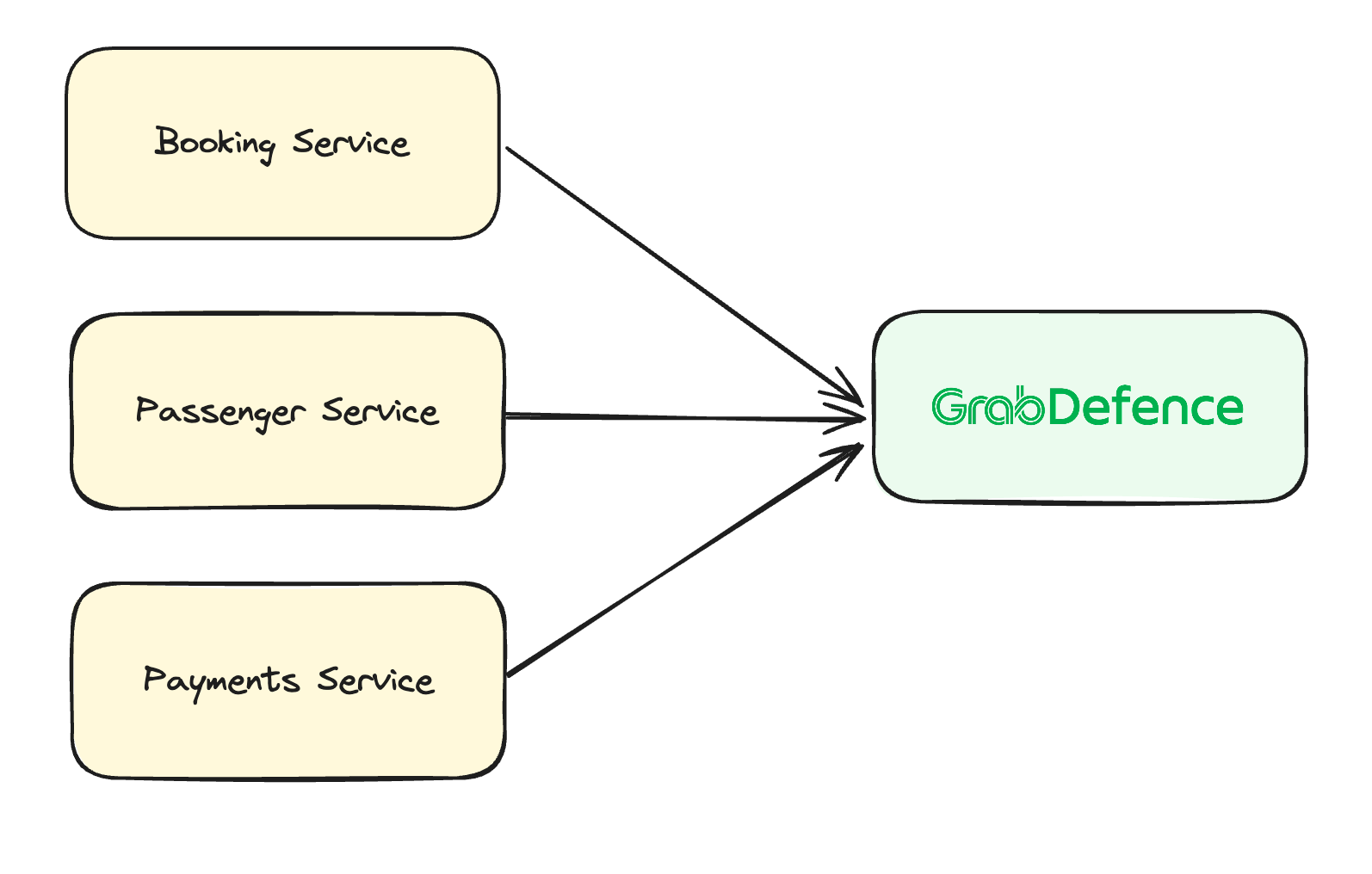
Grab has an in-house Risk Management platform called GrabDefence which relies on ingesting large amounts of data gathered from upstream services to power our heuristic risk rules and data science models in real time.

Fig 1. GrabDefence aggregates data from different upstream services

As Grab’s business grows, so does the amount of data. It becomes imperative that the data which fuels our risk systems is of reliable quality as any data discrepancy or missing data could impact fraud detection and prevention capabilities.

We need to quickly detect any data anomalies, which is where data observability comes in.

Data observability as a solution

Data observability is a type of data operation (DataOps; similar to DevOps) where teams build visibility over the health and quality of their data pipelines. This enables teams to be notified of data quality issues, and allows teams to investigate and resolve these issues faster.

We needed a solution that addresses the following issues:

  1. Alerts for any data quality issues as soon as possible – so this means the observability tool had to work in real time.
  2. With hundreds of data points to observe, we needed a neat and scalable solution which allows users to quickly pinpoint which data points were having issues.
  3. A consistent way to compare, analyse, and compute data that might have different formats.

Hence, we decided to use Flink to standardise data transformations, compute, and observe data trends quickly (in real time) and scalably.

Flink SQL is a powerful, flexible tool for performing real-time analytics on streaming data. It allows users to query continuous data streams using standard SQL syntax, enabling complex event processing and data transformation within the Apache Flink ecosystem, which is particularly useful for scenarios requiring low-latency insights and decisions.

In Grab, data comes from multiple sources and while most of the data is in JSON format, the actual JSON structure differs between services. Because of JSON’s nested and dynamic data structure, it is difficult to consistently analyse the data – posing a significant challenge for real-time analysis.

To help address this issue, Apache Flink SQL has the capability to manage such intricacies with ease. It offers specialised functions tailored for parsing and querying JSON data, ensuring efficient processing.

Another standout feature of Flink SQL is the use of custom table functions, such as JSONEXPLOAD, which serves to deconstruct and flatten nested JSON structures into tabular rows. This transformation is crucial as it enables subsequent aggregation operations. By implementing a 5-minute tumbling window, Flink SQL can easily aggregate these now-flattened data streams. This technique is pivotal for monitoring, observing, and analysing data patterns and metrics in near real-time.

Now that data is aggregated by Flink for easy analysis, we still needed a way to incorporate comprehensive monitoring so that teams could be notified of any data anomalies or discrepancies in real time.

How we interfaced the output with Datadog 

Datadog is the observability tool of choice in Grab, with many teams using Datadog for their service reliability observations and alerts. By aggregating data from Apache Flink and integrating it with Datadog, we can harness the synergy of real-time analytics and comprehensive monitoring. Flink excels in processing and aggregating data streams, which, when pushed to Datadog, can be further analysed and visualised. Datadog also provides seamless integration with collaboration tools like Slack, which enables teams to receive instant notifications and alerts.

With Datadog’s out-of-the-box features such as anomaly detection, teams can identify and be alerted to unusual patterns or outliers in their data streams. Taking a proactive approach to monitoring is crucial in maintaining system health and performance as teams can be alerted, then collaborate quickly to diagnose and address anomalies.

This integrated pipeline—from Flink’s real-time data aggregation to Datadog’s monitoring and Slack’s communication capabilities—creates a robust framework for real-time data operations. It ensures that any potential issues are quickly traced and brought to the team’s attention, facilitating a rapid response. Such an ecosystem empowers organisations to maintain high levels of system reliability and performance, ultimately enhancing the overall user experience.

Organising monitors and alerts using out-of-the-box solutions from Datadog

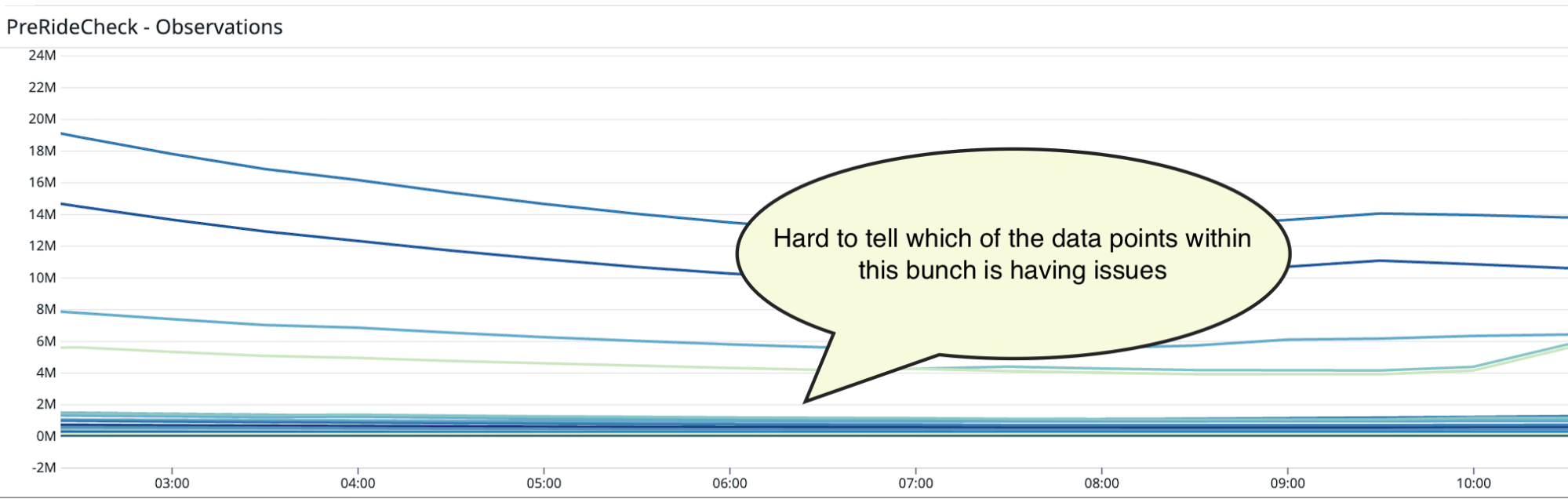
Once we integrated Flink data into Datadog, we realised that it could become unwieldy to try to identify the data point with issues from hundreds of other counters.

Fig 2. Hundreds of data points on a graph make it hard to decipher which ones have issues

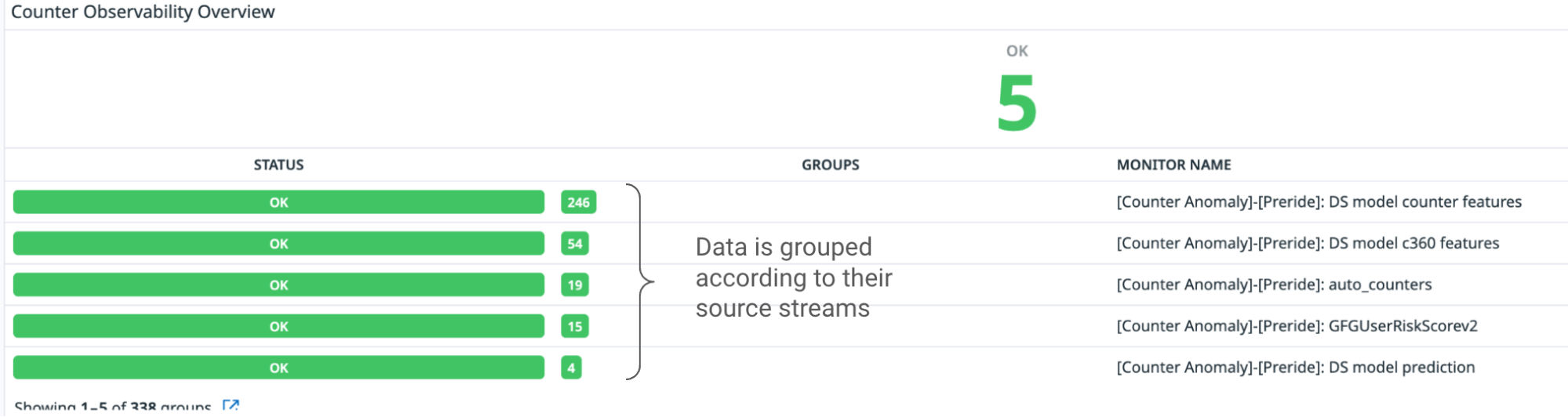
We decided to organise the counters according to the service stream it was coming from, and create individual monitors for each service stream. We used Datadog’s Monitor Summary tool to help visualise the total number of service streams we are reading from and the number of underlying data points within each stream.  

Fig 3. Data is grouped according to their source stream

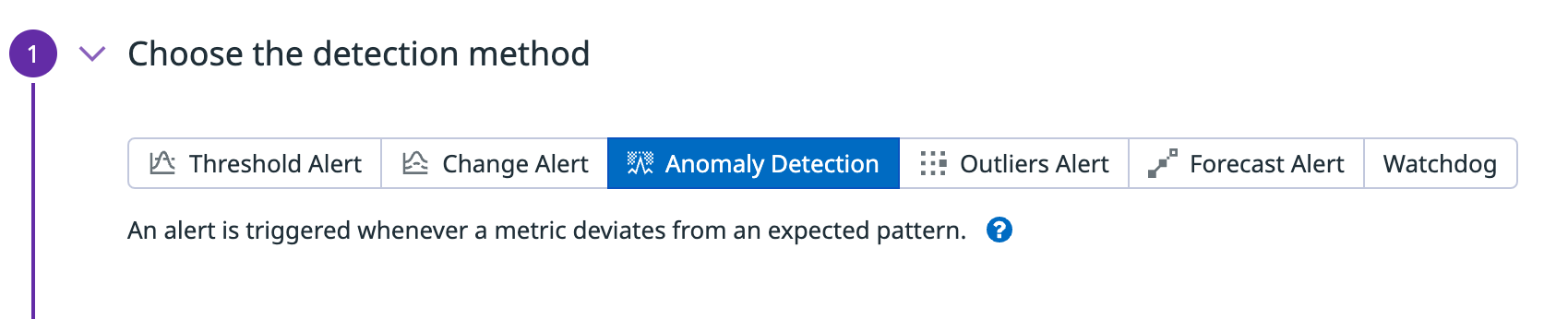
Within each individual stream, we used Datadog’s Anomaly Detection feature to create an alert whenever a data point from the stream exceeds a predefined threshold. This can be configured by the service teams on Datadog.

Fig 4. Datadog’s built-in Anomaly Detection function triggers alerts whenever a data point exceeds a threshold

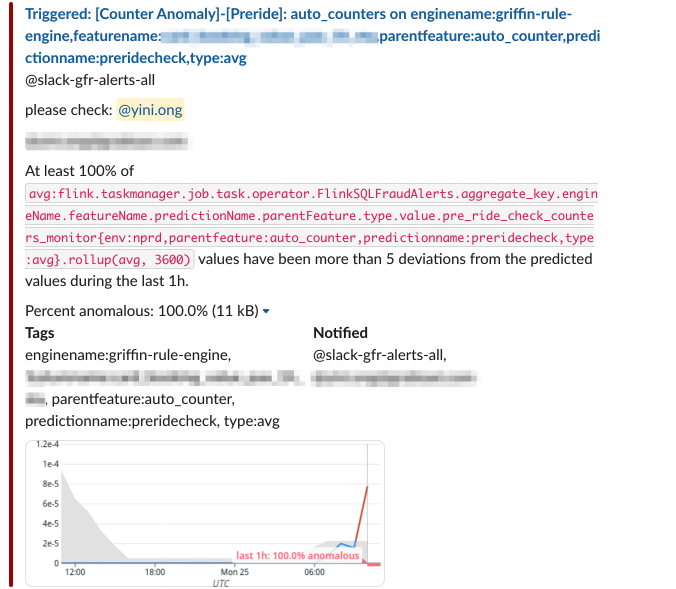
These alerts are then sent to a Slack channel where the Data team is informed when a data point of interest starts throwing anomalous values.

Fig 5. Datadog integration with Slack to help alert users

Impact

Since the deployment of this data observability tool, we have seen significant improvement in the detection of anomalous values. If there are any anomalies or issues, we now get alerts within the same day (or hour) instead of days to weeks later.

Organising the alerts according to source streams have also helped simplify the monitoring load and allows users to quickly narrow down and identify which pipeline has failed.

What’s next?

At the moment, this data observability tool is only implemented on selected checkpoints in GrabDefence. We plan to expand the observability tool’s coverage to include more checkpoints, and continue to refine the workflows to detect and resolve these data issues.

Join us

Grab is the leading superapp platform in Southeast Asia, providing everyday services that matter to consumers. More than just a ride-hailing and food delivery app, Grab offers a wide range of on-demand services in the region, including mobility, food, package and grocery delivery services, mobile payments, and financial services across 428 cities in eight countries.

Powered by technology and driven by heart, our mission is to drive Southeast Asia forward by creating economic empowerment for everyone. If this mission speaks to you, join our team today!

The Open Home Foundation launches

Post Syndicated from corbet original https://lwn.net/Articles/970835/

The Open Home Foundation has announced
its existence
as a home and support resource for free home-automation
projects.

We created the Open Home Foundation to fight for the fundamental
principles of privacy, choice, and sustainability for smart
homes. And every person who lives in one.

Ahead of today, we’ve transferred over 240 projects, standards,
drivers, and libraries—Home Assistant, ESPHome, Zigpy, Piper,
Improv Wi-Fi, Wyoming, and so many more—to the Open Home
Foundation. This is all about looking into the future. We’ve done
this to create a bulwark against surveillance capitalism, the risk
of buyout, and open-source projects becoming abandonware. To an
extent, this protection extends even against our future selves—so
that smart home users can continue to benefit for years, if not
decades. No matter what comes.

Unify DNS management using Amazon Route 53 Profiles with multiple VPCs and AWS accounts

Post Syndicated from Esra Kayabali original https://aws.amazon.com/blogs/aws/unify-dns-management-using-amazon-route-53-profiles-with-multiple-vpcs-and-aws-accounts/

If you are managing lots of accounts and Amazon Virtual Private Cloud (Amazon VPC) resources, sharing and then associating many DNS resources to each VPC can present a significant burden. You often hit limits around sharing and association, and you may have gone as far as building your own orchestration layers to propagate DNS configuration across your accounts and VPCs.

Today, I’m happy to announce Amazon Route 53 Profiles, which provide the ability to unify management of DNS across all of your organization’s accounts and VPCs. Route 53 Profiles let you define a standard DNS configuration, including Route 53 private hosted zone (PHZ) associations, Resolver forwarding rules, and Route 53 Resolver DNS Firewall rule groups, and apply that configuration to multiple VPCs in the same AWS Region. With Profiles, you have an easy way to ensure all of your VPCs have the same DNS configuration without the complexity of handling separate Route 53 resources. Managing DNS across many VPCs is now as simple as managing those same settings for a single VPC.

Profiles are natively integrated with AWS Resource Access Manager (RAM) allowing you to share your Profiles across accounts or with your AWS Organizations account. Profiles integrates seamlessly with Route 53 private hosted zones by allowing you to create and add existing private hosted zones to your Profile so that your organizations have access to these same settings when the Profile is shared across accounts. AWS CloudFormation allows you to use Profiles to set DNS settings consistently for VPCs as accounts are newly provisioned. With today’s release, you can better govern DNS settings for your multi-account environments.

How Route 53 Profiles works
To start using the Route 53 Profiles, I go to the AWS Management Console for Route 53, where I can create Profiles, add resources to them, and associate them to their VPCs. Then, I share the Profile I created across another account using AWS RAM.

In the navigation pane in the Route 53 console, I choose Profiles and then I choose Create profile to set up my Profile.

I give my Profile configuration a friendly name such as MyFirstRoute53Profile and optionally add tags.

I can configure settings for DNS Firewall rule groups, private hosted zones and Resolver rules or add existing ones within my account all within the Profile console page.

I choose VPCs to associate my VPCs to the Profile. I can add tags as well as do configurations for recursive DNSSEC validation, the failure mode for the DNS Firewalls associated to my VPCs. I can also control the order of DNS evaluation: First VPC DNS then Profile DNS, or first Profile DNS then VPC DNS.

I can associate one Profile per VPC and can associate up to 5,000 VPCs to a single Profile.

Profiles gives me the ability to manage settings for VPCs across accounts in my organization. I am able to disable reverse DNS rules for each of the VPCs the Profile is associated with rather than configuring these on a per-VPC basis. The Route 53 Resolver automatically creates rules for reverse DNS lookups for me so that different services can easily resolve hostnames from IP addresses. If I use DNS Firewall, I am able to select the failure mode for my firewall via settings, to fail open or fail closed. I am also able to specify if I wish for the VPCs associated to the Profile to have recursive DNSSEC validation enabled without having to use DNSSEC signing in Route 53 (or any other provider).

Let’s say I associate a Profile to a VPC. What happens when a query exactly matches both a resolver rule or PHZ associated directly to the VPC and a resolver rule or PHZ associated to the VPC’s Profile? Which DNS settings take precedence, the Profile’s or the local VPC’s? For example, if the VPC is associated to a PHZ for example.com and the Profile contains a PHZ for example.com, that VPC’s local DNS settings will take precedence over the Profile. When a query is made for a name for a conflicting domain name (for example, the Profile contains a PHZ for infra.example.com and the VPC is associated to a PHZ that has the name account1.infra.example.com), the most specific name wins.

Sharing Route 53 Profiles across accounts using AWS RAM
I use AWS Resource Access Manager (RAM) to share the Profile I created in the previous section with my other account.

I choose the Share profile option in the Profiles detail page or I can go to the AWS RAM console page and choose Create resource share.

I provide a name for my resource share and then I search for the ‘Route 53 Profiles’ in the Resources section. I select the Profile in Selected resources. I can choose to add tags. Then, I choose Next.

Profiles utilize RAM managed permissions, which allow me to attach different permissions to each resource type. By default, only the owner (the network admin) of the Profile will be able to modify the resources within the Profile. Recipients of the Profile (the VPC owners) will only be able to view the contents of the Profile (the ReadOnly mode). To allow a recipient of the Profile to add PHZs or other resources to it, the Profile’s owner will have to attach the necessary permissions to the resource. Recipients will not be able to edit or delete any resources added by the Profile owner to the shared resource.

I leave the default selections and choose Next to grant access to my other account.

On the next page, I choose Allow sharing with anyone, enter my other account’s ID and then choose Add. After that, I choose that account ID in the Selected principals section and choose Next.

In the Review and create page, I choose Create resource share. Resource share is successfully created.

Now, I switch to my other account that I share my Profile with and go to the RAM console. In the navigation menu, I go to the Resource shares and choose the resource name I created in the first account. I choose Accept resource share to accept the invitation.

That’s it! Now, I go to my Route 53 Profiles page and I choose the Profile shared with me.

I have access to the shared Profile’s DNS Firewall rule groups, private hosted zones, and Resolver rules. I can associate this account’s VPCs to this Profile. I am not able to edit or delete any resources. Profiles are Regional resources and cannot be shared across Regions.

Available now
You can easily get started with Route 53 Profiles using the AWS Management Console, Route 53 API, AWS Command Line Interface (AWS CLI), AWS CloudFormation, and AWS SDKs.

Route 53 Profiles will be available in all AWS Regions, except in Canada West (Calgary), the AWS GovCloud (US) Regions and the Amazon Web Services China Regions.

For more details about the pricing, visit the Route 53 pricing page.

Get started with Profiles today and please let us know your feedback either through your usual AWS Support contacts or the AWS re:Post for Amazon Route 53.

— Esra

Dynamic DAG generation with YAML and DAG Factory in Amazon MWAA

Post Syndicated from Jayesh Shinde original https://aws.amazon.com/blogs/big-data/dynamic-dag-generation-with-yaml-and-dag-factory-in-amazon-mwaa/

Amazon Managed Workflow for Apache Airflow (Amazon MWAA) is a managed service that allows you to use a familiar Apache Airflow environment with improved scalability, availability, and security to enhance and scale your business workflows without the operational burden of managing the underlying infrastructure. In Airflow, Directed Acyclic Graphs (DAGs) are defined as Python code. Dynamic DAGs refer to the ability to generate DAGs on the fly during runtime, typically based on some external conditions, configurations, or parameters. Dynamic DAGs helps you to create, schedule, and run tasks within a DAG based on data and configurations that may change over time.

There are various ways to introduce dynamism in Airflow DAGs (dynamic DAG generation) using environment variables and external files. One of the approaches is to use the DAG Factory YAML based configuration file method. This library aims to facilitate the creation and configuration of new DAGs by using declarative parameters in YAML. It allows default customizations and is open-source, making it simple to create and customize new functionalities.

In this post, we explore the process of creating Dynamic DAGs with YAML files, using the DAG Factory library. Dynamic DAGs offer several benefits:

  1. Enhanced code reusability – By structuring DAGs through YAML files, we promote reusable components, reducing redundancy in your workflow definitions.
  2. Streamlined maintenance – YAML-based DAG generation simplifies the process of modifying and updating workflows, ensuring smoother maintenance procedures.
  3. Flexible parameterization – With YAML, you can parameterize DAG configurations, facilitating dynamic adjustments to workflows based on varying requirements.
  4. Improved scheduler efficiency – Dynamic DAGs enable more efficient scheduling, optimizing resource allocation and enhancing overall workflow runs
  5. Enhanced scalability – YAML-driven DAGs allow for parallel runs, enabling scalable workflows capable of handling increased workloads efficiently.

By harnessing the power of YAML files and the DAG Factory library, we unleash a versatile approach to building and managing DAGs, empowering you to create robust, scalable, and maintainable data pipelines.

Overview of solution

In this post, we will use an example DAG file that is designed to process a COVID-19 data set. The workflow process involves processing an open source data set offered by WHO-COVID-19-Global. After we install the DAG-Factory Python package, we create a YAML file that has definitions of various tasks. We process the country-specific death count by passing Country as a variable, which creates individual country-based DAGs.

The following diagram illustrates the overall solution along with data flows within logical blocks.

Overview of the Solution

Prerequisites

For this walkthrough, you should have the following prerequisites:

Additionally, complete the following steps (run the setup in an AWS Region where Amazon MWAA is available):

  1. Create an Amazon MWAA environment (if you don’t have one already). If this is your first time using Amazon MWAA, refer to Introducing Amazon Managed Workflows for Apache Airflow (MWAA).

Make sure the AWS Identity and Access Management (IAM) user or role used for setting up the environment has IAM policies attached for the following permissions:

The access policies mentioned here are just for the example in this post. In a production environment, provide only the needed granular permissions by exercising least privilege principles.

  1. Create an unique (within an account) Amazon S3 bucket name while creating your Amazon MWAA environment, and create folders called dags and requirements.
    Amazon S3 Bucket
  2. Create and upload a requirements.txt file with the following content to the requirements folder. Replace {environment-version} with your environment’s version number, and {Python-version} with the version of Python that’s compatible with your environment:
    --constraint "https://raw.githubusercontent.com/apache/airflow/constraints-{Airflow-version}/constraints-{Python-version}.txt"
    dag-factory==0.19.0
    pandas==2.1.4

Pandas is needed just for the example use case described in this post, and dag-factory is the only required plug-in. It is recommended to check the compatibility of the latest version of dag-factory with Amazon MWAA. The boto and psycopg2-binary libraries are included with the Apache Airflow v2 base install and don’t need to be specified in your requirements.txt file.

  1. Download the WHO-COVID-19-global data file to your local machine and upload it under the dags prefix of your S3 bucket.

Make sure that you are pointing to the latest AWS S3 bucket version of your requirements.txt file for the additional package installation to happen. This should typically take between 15 – 20 minutes depending on your environment configuration.

Validate the DAGs

When your Amazon MWAA environment shows as Available on the Amazon MWAA console, navigate to the Airflow UI by choosing Open Airflow UI next to your environment.

Validate the DAG

Verify the existing DAGs by navigating to the DAGs tab.

Verify the DAG

Configure your DAGs

Complete the following steps:

  1. Create empty files named dynamic_dags.yml, example_dag_factory.py and process_s3_data.py on your local machine.
  2. Edit the process_s3_data.py file and save it with following code content, then upload the file back to the Amazon S3 bucket dags folder. We are doing some basic data processing in the code:
    1. Read the file from an Amazon S3 location
    2. Rename the Country_code column as appropriate to the country.
    3. Filter data by the given country.
    4. Write the processed final data into CSV format and upload back to S3 prefix.
import boto3
import pandas as pd
import io
   
def process_s3_data(COUNTRY):
### Top level Variables replace S3_BUCKET with your bucket name ###
    s3 = boto3.client('s3')
    S3_BUCKET = "my-mwaa-assets-bucket-sfj33ddkm"
    INPUT_KEY = "dags/WHO-COVID-19-global-data.csv"
    OUTPUT_KEY = "dags/count_death"
### get csv file ###
   response = s3.get_object(Bucket=S3_BUCKET, Key=INPUT_KEY)
   status = response['ResponseMetadata']['HTTPStatusCode']
   if status == 200:
### read csv file and filter based on the country to write back ###
       df = pd.read_csv(response.get("Body"))
       df.rename(columns={"Country_code": "country"}, inplace=True)
       filtered_df = df[df['country'] == COUNTRY]
       with io.StringIO() as csv_buffer:
                   filtered_df.to_csv(csv_buffer, index=False)
                   response = s3.put_object(
                       Bucket=S3_BUCKET, Key=OUTPUT_KEY + '_' + COUNTRY + '.csv', Body=csv_buffer.getvalue()
                   )
       status = response['ResponseMetadata']['HTTPStatusCode']
       if status == 200:
           print(f"Successful S3 put_object response. Status - {status}")
       else:
           print(f"Unsuccessful S3 put_object response. Status - {status}")
   else:
       print(f"Unsuccessful S3 get_object response. Status - {status}")
  1. Edit the dynamic_dags.yml and save it with the following code content, then upload the file back to the dags folder. We are stitching various DAGs based on the country as follows:
    1. Define the default arguments that are passed to all DAGs.
    2. Create a DAG definition for individual countries by passing op_args
    3. Map the process_s3_data function with python_callable_name.
    4. Use Python Operator to process csv file data stored in Amazon S3 bucket.
    5. We have set schedule_interval as 10 minutes, but feel free to adjust this value as needed.
default:
  default_args:
    owner: "airflow"
    start_date: "2024-03-01"
    retries: 1
    retry_delay_sec: 300
  concurrency: 1
  max_active_runs: 1
  dagrun_timeout_sec: 600
  default_view: "tree"
  orientation: "LR"
  schedule_interval: "*/10 * * * *"
 
module3_dynamic_dag_Australia:
  tasks:
    task_process_s3_data:
      task_id: process_s3_data
      operator: airflow.operators.python.PythonOperator
      python_callable_name: process_s3_data
      python_callable_file: /usr/local/airflow/dags/process_s3_data.py
      op_args:
        - "Australia"
 
module3_dynamic_dag_Brazil:
  tasks:
    task_process_s3_data:
      task_id: process_s3_data
      operator: airflow.operators.python.PythonOperator
      python_callable_name: process_s3_data
      python_callable_file: /usr/local/airflow/dags/process_s3_data.py
      op_args:
        - "Brazil"
 
module3_dynamic_dag_India:
  tasks:
    task_process_s3_data:
      task_id: process_s3_data
      operator: airflow.operators.python.PythonOperator
      python_callable_name: process_s3_data
      python_callable_file: /usr/local/airflow/dags/process_s3_data.py
      op_args:
        - "India"
 
module3_dynamic_dag_Japan:
  tasks:
    task_process_s3_data:
      task_id: process_s3_data
      operator: airflow.operators.python.PythonOperator
      python_callable_name: process_s3_data
      python_callable_file: /usr/local/airflow/dags/process_s3_data.py
      op_args:
        - "Japan"
 
module3_dynamic_dag_Mexico:
  tasks:
    task_process_s3_data:
      task_id: process_s3_data
      operator: airflow.operators.python.PythonOperator
      python_callable_name: process_s3_data
      python_callable_file: /usr/local/airflow/dags/process_s3_data.py
      op_args:
        - "Mexico"
 
module3_dynamic_dag_Russia:
  tasks:
    task_process_s3_data:
      task_id: process_s3_data
      operator: airflow.operators.python.PythonOperator
      python_callable_name: process_s3_data
      python_callable_file: /usr/local/airflow/dags/process_s3_data.py
      op_args:
        - "Russia"
 
module3_dynamic_dag_Spain:
  tasks:
    task_process_s3_data:
      task_id: process_s3_data
      operator: airflow.operators.python.PythonOperator
      python_callable_name: process_s3_data
      python_callable_file: /usr/local/airflow/dags/process_s3_data.py
      op_args:
        - "Spain"
  1. Edit the file example_dag_factory.py and save it with the following code content, then upload the file back to dags folder. The code cleans the existing the DAGs and generates clean_dags() method and the creating new DAGs using the generate_dags() method from the DagFactory instance.
from airflow import DAG
import dagfactory
  
config_file = "/usr/local/airflow/dags/dynamic_dags.yml"
example_dag_factory = dagfactory.DagFactory(config_file)
  
## to clean up or delete any existing DAGs ##
example_dag_factory.clean_dags(globals())
## generate and create new DAGs ##
example_dag_factory.generate_dags(globals())
  1. After you upload the files, go back to the Airflow UI console and navigate to the DAGs tab, where you will find new DAGs.
    List the new DAGs
  2. Once you upload the files, go back to the Airflow UI console and under the DAGs tab you will find new DAGs are appearing as shown below:DAGs

You can enable DAGs by making them active and testing them individually. Upon activation, an additional CSV file named count_death_{COUNTRY_CODE}.csv is generated in the dags folder.

Cleaning up

There may be costs associated with using the various AWS services discussed in this post. To prevent incurring future charges, delete the Amazon MWAA environment after you have completed the tasks outlined in this post, and empty and delete the S3 bucket.

Conclusion

In this blog post we demonstrated how to use the dag-factory library to create dynamic DAGs. Dynamic DAGs are characterized by their ability to generate results with each parsing of the DAG file based on configurations. Consider using dynamic DAGs in the following scenarios:

  • Automating migration from a legacy system to Airflow, where flexibility in DAG generation is crucial
  • Situations where only a parameter changes between different DAGs, streamlining the workflow management process
  • Managing DAGs that are reliant on the evolving structure of a source system, providing adaptability to changes
  • Establishing standardized practices for DAGs across your team or organization by creating these blueprints, promoting consistency and efficiency
  • Embracing YAML-based declarations over complex Python coding, simplifying DAG configuration and maintenance processes
  • Creating data driven workflows that adapt and evolve based on the data inputs, enabling efficient automation

By incorporating dynamic DAGs into your workflow, you can enhance automation, adaptability, and standardization, ultimately improving the efficiency and effectiveness of your data pipeline management.

To learn more about Amazon MWAA DAG Factory, visit Amazon MWAA for Analytics Workshop: DAG Factory. For additional details and code examples on Amazon MWAA, visit the Amazon MWAA User Guide and the Amazon MWAA examples GitHub repository.


About the Authors

 Jayesh Shinde is Sr. Application Architect with AWS ProServe India. He specializes in creating various solutions that are cloud centered using modern software development practices like serverless, DevOps, and analytics.

Harshd Yeola is Sr. Cloud Architect with AWS ProServe India helping customers to migrate and modernize their infrastructure into AWS. He specializes in building DevSecOps and scalable infrastructure using containers, AIOPs, and AWS Developer Tools and services.

[$] Linus and Dirk chat about AI, XZ, hardware, and more

Post Syndicated from jzb original https://lwn.net/Articles/970293/

One of the mainstays of the the Linux Foundation’s Open Source Summit is the “fireside chat”
(sans fire) between Linus Torvalds and Dirk Hohndel to discuss open source and
Linux kernel topics of the day. On April 17, at Open Source Summit
North America
(OSSNA) in Seattle, Washington, they held with tradition
and discussed a range of topics including proper whitespace parsing,
security, and the current AI craze.

The collective thoughts of the interwebz