Post Syndicated from LGR original https://www.youtube.com/watch?v=kdv6nI-GBKs
Security updates for Friday
Post Syndicated from original https://lwn.net/Articles/929107/
Security updates have been issued by Debian (haproxy and openvswitch), Fedora (bzip3, libyang, mingw-glib2, thunderbird, xorg-x11-server, and xorg-x11-server-Xwayland), and Ubuntu (apport, ghostscript, linux-bluefield, node-thenify, and python-flask-cors).
What’s Up, Home? – Let’s hit the road!
Post Syndicated from Janne Pikkarainen original https://blog.zabbix.com/whats-up-home-lets-hit-the-road/25693/
Can you monitor how much you drive your car, even if your car wouldn’t have any way to report back to Zabbix? Of course, you can! By day, I am a Lead Site Reliability Engineer in a global cyber security company. By night, I monitor my home with Zabbix & Grafana and do some weird experiments with them. Welcome to my blog about the project.
Some forewords: Now that our baby girl is over six months old, she has developed some kind of sleeping pattern. It means she goes to bed very early in the evening, around 6pm. Or, I go to the bedroom with her and wait for her to sleep steadily before I exit the bedroom without her noticing. It means I have lots of time to think, and also to play around with apps like iPhone Shortcuts. I have previously done a few Siri & Zabbix experiments and this will be one more.
I did do this shortcut only two days ago and have not actually driven yet, but I verified that the shortcut itself works when I go into my car and start it up. Also, as I don’t want to give out the exact location where we live, for this blog post I faked our car to be located in Santa Claus Village, Rovaniemi.
Let’s get started.
What are you planning?
Even though I already know very well how much I drive — there’s the odometer in our car, a fuel app in my iPhone shows how many liters per month I refuel, and so on, this data is still something that would contribute to my dear single pane of glass, like your company probably wants to have.
My Siri Shortcut is simple: whenever I go to my car and my iPhone connects to car Bluetooth, it’s a clear data point that I’m probably going somewhere, so the shortcut gets my current location and saves its coordinates to a text file in my iCloud.
Next, just like in my previous Siri examples, a Zabbix Agent on my MacBook keeps an eye on this text file, very much like in my FlightGear integration example, Zabbix will then populate the coordinates in Zabbix inventory for my car host. This way, I can project the car location to the Geomap widget.
Let’s create the shortcut
Here’s the shortcut in all its simplicity.

About that Append to Text File… why appending instead of overwriting, I’ll tell you a story some other day.

Why Desktop Directory? I’ll tell you a story some other day.
Next up, Zabbix
On the Zabbix side of the house, the story is like so many times in my posts: read the text file, and using dependent items create the longitude and latitude items.

Wait! You saved it on your Desktop but now it’s in /tmp? I’ll tell you a story about this kludge some other day… or immediately after this caption.
It was easier to get macOS Zabbix Agent to get to read /tmp instead of your home directory, as the security is in the way, so a cronjob syncs the file once per minute to /tmp. Not only that but because in iOS Shortcuts the Append to a text file was the only way I got the shortcut to run without it asking for permission to run, my cronjob is actually like this:
* * * * * /usr/bin/tail -n1 /Users/jaba/Desktop/car_location.txt >/tmp/car_location.txt
Beautiful? No, but due to reasons I had to do this, and at least it works.
Anyway, then the longitude/latitude-dependent items just use some regular expressions.

Beautiful? No, but it works.
Does it work?
Of course, it does! See for yourself.

Here’s the latest data…

… and here’s the Geomap.
But wait! How does this track your kilometers?
Heh, you got me. It does not. One easy way would be to use Get distance block in iOS Shortcuts. It actually works — you get to choose that yes I will be driving, give me the kilometers. Whenever I do that, I would need a text file containing just one line (which would contain the old location), and getting to that point without your iPhone asking anything ever is not so simple, so for now I gave up.
So, the next part of this will be to use some API and make my Zabbix calculate the distances. That would be cooler anyway, but I’ll find time for that next time. Anyway, from now on Zabbix will know the locations where I have started our car, so the data will be collected from today. I know there are limitations in this implementation, such as that if I start the car and just drive to some place and back without ever stopping the engine, that won’t really give me any results, but this is better than nothing.
I have been working at Forcepoint since 2014 and as you know by now, I have this never-ending drive for monitoring. — Janne Pikkarainen
This post was originally published on the author’s page.
1944 Battle of Kansas
Post Syndicated from The History Guy: History Deserves to Be Remembered original https://www.youtube.com/watch?v=fp1t4OT_QG4
Gaining an Advantage in Roulette
Post Syndicated from Bruce Schneier original https://www.schneier.com/blog/archives/2023/04/gaining-an-advantage-in-roulette.html
You can beat the game without a computer:
On a perfect [roulette] wheel, the ball would always fall in a random way. But over time, wheels develop flaws, which turn into patterns. A wheel that’s even marginally tilted could develop what Barnett called a ‘drop zone.’ When the tilt forces the ball to climb a slope, the ball decelerates and falls from the outer rim at the same spot on almost every spin. A similar thing can happen on equipment worn from repeated use, or if a croupier’s hand lotion has left residue, or for a dizzying number of other reasons. A drop zone is the Achilles’ heel of roulette. That morsel of predictability is enough for software to overcome the random skidding and bouncing that happens after the drop.”
Comic for 2023.04.14 – End It All
Post Syndicated from Explosm.net original https://explosm.net/comics/end-it-all
New Cyanide and Happiness Comic
Linguistics Gossip
Post Syndicated from original https://xkcd.com/2763/
Streaming Android games from cloud to mobile with AWS Graviton-based Amazon EC2 G5g instances
Post Syndicated from Sheila Busser original https://aws.amazon.com/blogs/compute/streaming-android-games-from-cloud-to-mobile-with-aws-graviton-based-amazon-ec2-g5g-instances/
This blog post is written by Vincent Wang, GCR EC2 Specialist SA, Compute.
Streaming games from the cloud to mobile devices is an emerging technology that allows less powerful and less expensive devices to play high-quality games with lower battery consumption and less storage capacity. This technology enables a wider audience to enjoy high-end gaming experiences from their existing devices, such as smartphones, tablets, and smart TVs.
To load games for streaming on AWS, it’s necessary to use Android environments that can utilize GPU acceleration for graphics rendering and optimize for network latency. Cloud-native products, such as the Anbox Cloud Appliance or Genymotion available on the AWS Marketplace, can provide a cost-effective containerized solution for game streaming workloads on Amazon Elastic Compute Cloud (Amazon EC2).
For example, Anbox Cloud’s virtual device infrastructure can run games with low latency and high frame rates. When combined with the AWS Graviton-based Amazon EC2 G5g instances, which offer a cost reduction of up to 30% per-game stream per-hour compared to x86-based GPU instances, it enables companies to serve millions of customers in a cost-efficient manner.
In this post, we chose the Anbox Cloud Appliance to demonstrate how you can use it to stream a resource-demanding game called Genshin Impact. We use a G5g instance along with a mobile phone to run the streamed game inside of a Firefox browser application.
Overview
Graviton-based instances utilize fewer compute resources than x86-based instances due to the 64-bit architecture of Arm processors used in AWS Graviton servers. As shown in the following diagram, Graviton instances eliminate the need for cross-compilation or Android emulation. This simplifies development efforts and reduces time-to-market, thereby lowering the cost-per-stream. With G5g instances, customers can now run their Android games natively, encode CPU or GPU-rendered graphics, and stream the game over the network to multiple mobile devices.
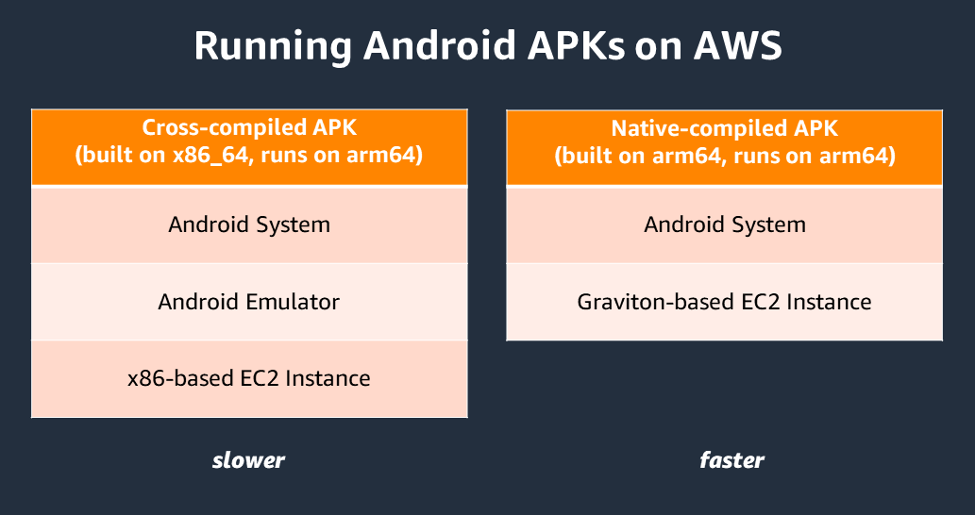
Figure 1: Architecture difference when running Android on X86-based instance and Graviton-based instance.
Real-time ray-traced rendering is required for most modern games to deliver photorealistic objects and environments with physically accurate shadows, reflections, and refractions. The G5g instance, which is powered by AWS Graviton2 processors and NVIDIA T4G Tensor Core GPUs, provides a cost-effective solution for running these resource-intensive games.
Architecture

Figure 2: Architecture of Android Streaming Game.
When streaming games from a mobile device, only input data (touchscreen, audio, etc.) is sent over the network to the game streaming server hosted on a G5g instance. Then, the input is directed to the appropriate Android container designated for that particular client. The game application running in the container processes the input and updates the game state accordingly. Then, the resulting rendered image frames are sent back to the mobile device for display on the screen. In certain games, such as multiplayer games, the streaming server must communicate with external game servers to reflect the full game state. In these cases, additional data is transferred to and from game servers and back to the mobile client. The communication between clients and the streaming server is performed using the WebRTC network protocol to minimize latency and make sure that users’ gaming experience isn’t affected.
The Graviton processor handles compute-intensive tasks, such as the Android runtime and I/O transactions on the streaming server. However, for resource-demanding games, the Nvidia GPU is utilized for graphics rendering. To scale effortlessly, the Anbox Cloud software can be utilized to manage and execute several game sessions on the same instance.
Prerequisites
First, you need an Ubuntu single sign-on (SSO) account. If you don’t have one yet, you may create one from Ubuntu One website. Then you need an Android mobile phone with Firefox or Chrome browser installed to play the streaming games.
Setup
We can install Anbox Cloud Appliance in the AWS Marketplace. Select the Arm variant so that it works on Graviton-based instances. If the subscription doesn’t work on the first try, then you receive an email which guides you to a page where you can try again.

Figure 3: Subscribe Anbox Cloud Appliance in AWS Marketplace.
In this demonstration, we select G5g.xlarge in the Instance type section and leave all settings with default values, except the storage as per the following:
- A root disk with minimum 50 GB (required)
- An additional Amazon Elastic Block Store (Amazon EBS) volume with at least 100 GB (recommended)
For the Genshin Impact demo, we recommend a specific amount of storage. However, when deploying your Android applications, you must select an appropriate storage size based on the package size. Additionally, you should choose an instance size based on the resources that you plan to utilize for your gaming sessions, such as CPU, memory, and networking. In our demo, we launched only one session from a single mobile device.
Launch the instance and wait until it reaches running status. Then you can secure shell (SSH) to the instance to configure the Android environment.
Install Anbox cloud
To make sure of the security and reliability of some of the package repositories used, we update the CUDA Linux GPG Repository Key. View this Nvidia blog post for more details on this procedure.
|
$ sudo apt-key del 7fa2af80 $ wget https://developer.download.nvidia.com/compute/cuda/repos/ubuntu2004/sbsa/cuda keyring_1.0-1_all.deb $ sudo dpkg -i cuda-keyring_1.0-1_all.deb |
As the Android in Anbox Cloud Appliance is running in an LXD container environment, upgrade LXD to the latest version.
| $ sudo snap refresh –channel=5.0/stable lxd |
Install the Anbox Cloud Appliance software using the following command and selecting the default answers:
| $ sudo anbox-cloud-appliance init |
Watch the status page at https://$(ec2_public_DNS_name) for progress information.

Figure 4: The status of deploying Anbox Cloud.
The initialization process takes approximately 20 minutes. After it’s complete, register the Ubuntu SSO account previously created, then follow the instructions provided to finalize the process.
| $ anbox-cloud-appliance dashboard register <your Ubuntu SSO email address> |
Stream an Android game application
Use the sample from the following repo to setup the service on the streaming server:
| $ git clone https://github.com/anbox-cloud/cloud-gaming-demo.git |
Build the Flutter web UI:
|
$ sudo snap install flutter –classic $ cd cloud-gaming-demo/ui && flutter build web && cd .. $ mkdir -p backend/service/static $ cp -av ui/build/web/* backend/service/static |
Then build the backend service which processes requests and interacts with the Anbox Stream Gateway to create instances of game applications. Start by preparing the environment:
|
$ sudo apt-get install python3-pip $ sudo pip3 install virtualenv $ cd backend && virtualenv venv |
Create the configuration file for the backend service so that it can access the Anbox Stream Gateway. There are two parameters to set: gateway-URL and gateway-token. The gateway token can be obtained from the following command:
|
$ anbox-cloud-appliance gateway account create <account-name> |
Create a file called config.yaml that contains the two values:
|
gateway-url: https:// <EC2 public DNS name> gateway-token: <gateway_token> |
Add the following line to the activate hook in the backend/venv/bin/ directory so that the backend service can read config.yaml on its startup:
|
$ export CONFIG_PATH=<path_to_config_yaml> |
Now we can launch the backend service which will be served by default on TCP port 8002.
|
$./run.sh |
In the next steps, we download a game and build it via Anbox Cloud. We need an Android APK and a configuration file. Create a folder under the HOME directory and create a manifest.yaml file in the folder. In this example, we must add the following details in the file. You can refer to the Anbox Cloud documentation for more information on the format.
|
name: genshin instance-type: g10.3 resources: cpus: 10 memory: 25GB disk-size: 50GB gpu-slots: 15 features: [“enable_virtual_keyboard”] |
Select an APK for the arm64-v8a architecture which is natively supported on Graviton. In this example, we download Genshin Impact, an action role-playing game developed and published by miHoYo. You must supply your own Android APK if you want to try these steps. Download the APK into the folder and rename it to app.apk. Overall, the final layout of the game folder should look as follows:
|
. ├── app.apk └── manifest.yaml |
Run the following command from the folder to create the application:
|
$ amc application create . |
Wait until the application status changes to ready. You can monitor the status with the following command:
|
$ amc application ls |
Edit the following:
- Update the gameids variable defined in the ui/lib/homepage.dart file to include the name of the game (as declared in the manifest file).
- Insert a new key/value pair to the static appNameMap and appDesMap variables defined in the lib/api/application.dart file.
- Provide a screenshot of the game (in jpeg format), rename it to <game-name>.jpeg, and put it into the ui/lib/assets directory.
Then, re-build the web UI, copy the contents from the ui/build/web folder to the backend/service/static directory, and refresh the webpage.
Test the game
Using your mobile phone, open the Firefox browser or another browser that supports WebRTC. Type the public DNS name of the G5g instance with the 8002 TCP port, and you should see something similar to the following:

Figure 5: The webpage of the Android streaming game portal.
Select the Play now button, wait a moment for the application to be setup on the server side, and then enjoy the game.

Figure 6: The screen capture of playing Android streaming game.
Clean-up
Please cancel the subscription of the Anbox Cloud Appliance in the AWS Marketplace, you can follow the AWS Marketplace Buyer Guide for more details, then terminate the G5g.xlarge instance to avoid incurring future costs.
Conclusion
In this post, we demonstrated how a resource-intensive Android game runs natively on a Graviton-based G5g instance and is streamed to an Arm-based mobile device. The benefits include better price-performance, reduced development effort, and faster time-to-market. One way to run your games efficiently on the cloud is through software available on the AWS Marketplace, such as the Anbox Cloud Appliance, which was showcased as an example method.
To learn more about AWS Graviton, visit the official product page and the technical guide.
Investigate security events by using AWS CloudTrail Lake advanced queries
Post Syndicated from Rodrigo Ferroni original https://aws.amazon.com/blogs/security/investigate-security-events-by-using-aws-cloudtrail-lake-advanced-queries/
This blog post shows you how to use AWS CloudTrail Lake capabilities to investigate CloudTrail activity across AWS Organizations in response to a security incident scenario. We will walk you through two security-related scenarios while we investigate CloudTrail activity. The method described in this post will help you with the investigation process, allowing you to gain comprehensive understanding of the incident and its implications. CloudTrail Lake is a managed audit and security lake that allows you to aggregate, immutably store, and query your activity logs for auditing, security investigation, and operational troubleshooting.
Prerequisites
You must have the following AWS services enabled before you start the investigation.
- CloudTrail Lake — To learn how to enable this service and use sample queries, see the blog post Announcing AWS CloudTrail Lake – a managed audit and security Lake. When you create a new event data store at the organization level, you will need to enable CloudTrail Lake for all of the accounts in the organization. We advise that you include not only management events but also data events.
When you use CloudTrail Lake with AWS Organizations, you can designate an account within the organization to be the CloudTrail Lake delegated administrator. This provides a convenient way to perform queries from a designated AWS security account—for example, you can avoid granting access to your AWS management account.
- Amazon GuardDuty — This is a threat detection service that continuously monitors your AWS accounts and workloads for malicious activity and delivers detailed security findings for visibility and remediation. To learn about the benefits of the service and how to get started, see Amazon GuardDuty.
Incident scenario 1: AWS access keys compromised
In the first scenario, you have observed activity within your AWS account from an unauthorized party. This example covers a situation where a threat actor has obtained and misused one of your AWS access keys that was exposed publicly by mistake. This investigation starts after Amazon GuardDuty generates an IAM finding identifying that the malicious activity came from the exposed AWS access key. Following the Incident Response Playbook Compromised IAM Credentials, focusing on step 12 in the playbook ([DETECTION AND ANALYSIS] Review CloudTrail Logs), you will use CloudTrail Lake capabilities to investigate the activity that was performed with this key. To do so, you will use the following nine query examples that we provide for this first scenario.
Query 1.1: Activity performed by access key during a specific time window
The first query is aimed at obtaining the specific activity that was performed by this key, either successfully or not, during the time the malicious activity took place. You can use the GuardDuty finding details “EventFirstSeen” and “EventLastSeen” to define the time window of the query. Also, and for further queries, you want to fetch artifacts that could be considered possible indicators of compromise (IoC) related to this security incident, such as IP addresses.
You can build and run the following query on CloudTrail Lake Editor, either in the CloudTrail console or programmatically.
Query 1.1
The results of the query are as follows:
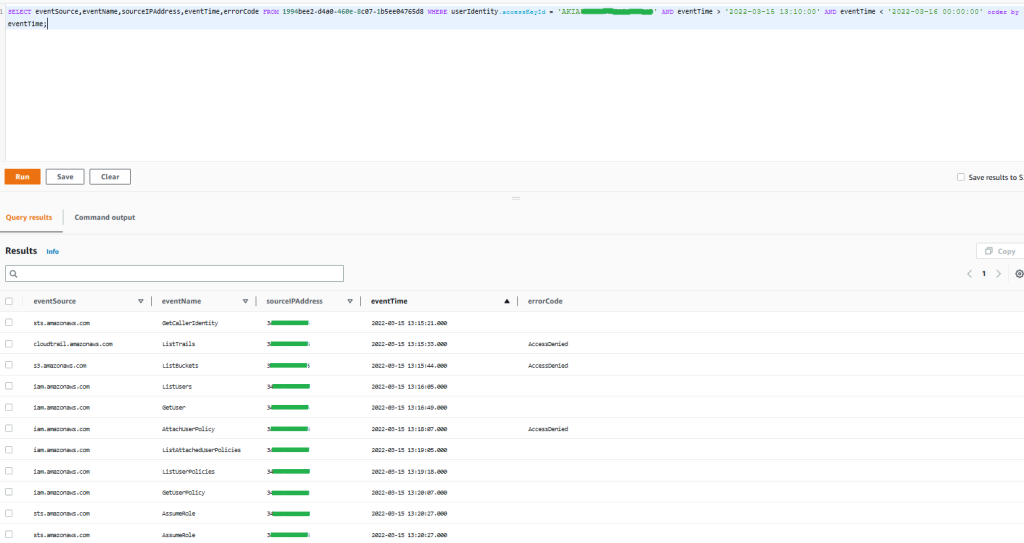
Figure 1: Sample query 1.1 and results in the AWS Management Console
The results demonstrate that the activity performed by the access key tried to unsuccessfully list Amazon Simple Storage Services (Amazon S3) buckets and CloudTrail trails. You can also see specific write activity related to AWS Identity and Access Management (IAM) that was denied, and afterwards there was activity possibly related to reconnaissance tactics in IAM to finally be able to assume a role, which indicates a possible attempt to perform an escalation of privileges. You can observe only one source IP from which this activity was performed.
Query 1.2: Confirm which IAM role was assumed by the threat actor during a specific time window
As you observed from the previous query results, the threat actor was able to assume an IAM role. In this query, you would like to confirm which IAM role was assumed during the security incident.
Query 1.2
The results of the query are as follows:
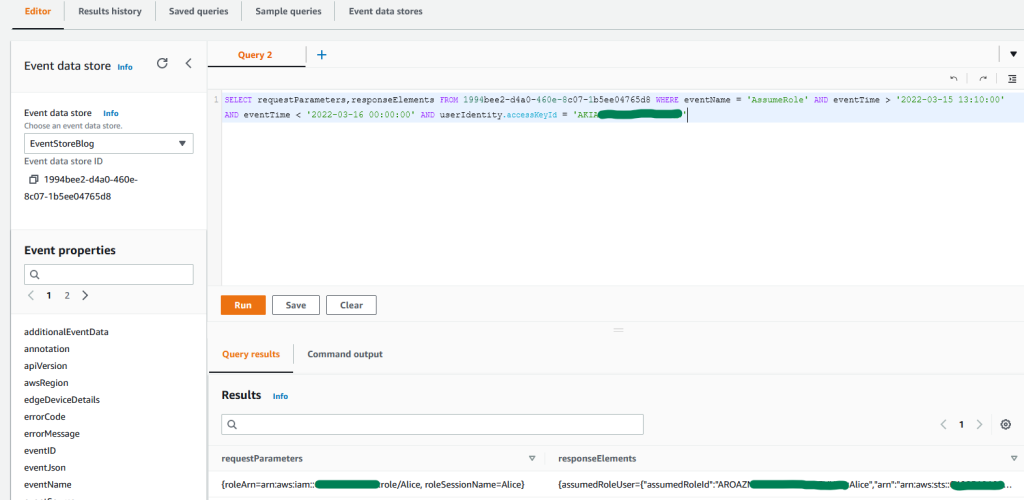
Figure 2: Sample query 1.2 and results in the console
The results show that an IAM role named “Alice” was assumed in a second account. For future queries, keep the temporary access key from the responseElements result to obtain activity performed by this role session.
Query 1.3: Activity performed from an IP address in an expanded time window search
Investigating the incident only from the time of discovery may result in overlooking signs or indicators of potential past incidents that were not detected related to this threat actor. For this reason, you want to expand the investigation window time, which might result in expanding the search back weeks, months, or even years, depending on factors such as the nature and severity of the incident, available resources, and so on. In this example, for balance and urgency, the window of time searched is expanded to a month. You want to also review whether there is past activity related to this account by the IP you previously observed.
Query 1.3
The results of the query are as follows:
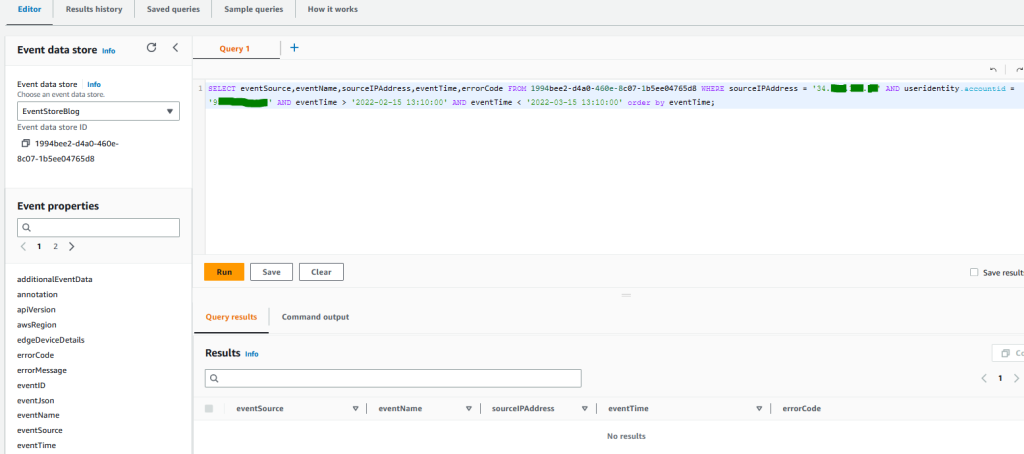
Figure 3: Sample query 1.3 and results in the console
As you can observe from the results, there is no activity coming from this IP address in this account in the previous month.
Query 1.4: Activity performed from an IP address in any other account in your organization during a specific time window
Before you start investigating what activity was performed by the role assumed in the second account, and considering that this malicious activity now involves cross-account access, you will want to review whether any other account in your organization has activity related to the specific IP address observed. You will need to expand the window of time to an entire month in order to see if previous activity was performed before this incident from this source IP, and you will need to exclude activity coming from the first account.
Query 1.4
The results of the query are as follows:
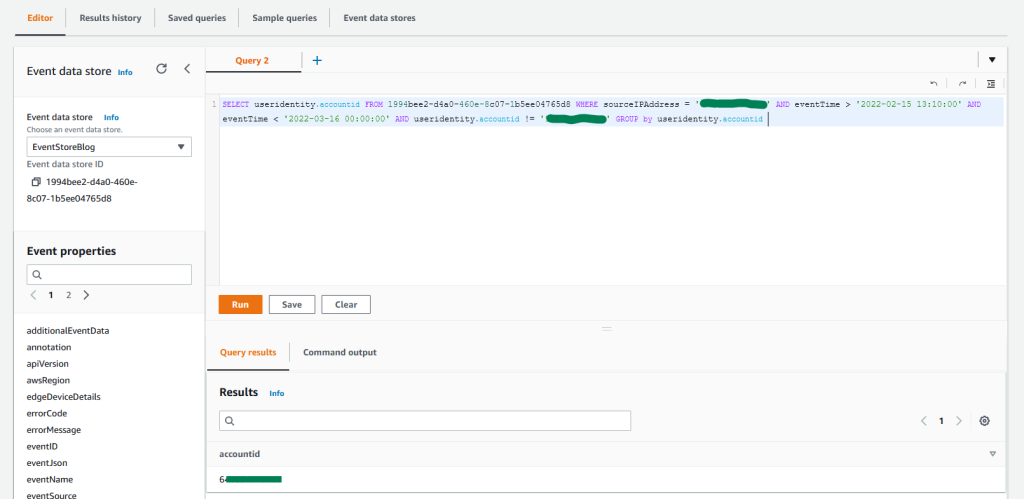
Figure 4: Sample query 1.4 and results in the console
As you can observe from the results, there is activity only in the second account where the role was assumed. You can also confirm that there was no activity performed in other accounts in the previous month from this IP address.
Query 1.5: Count activity performed by an IAM role during a specific time period
For the next query example, you want to count and group activity based on the API actions that were performed in each service by the role assumed. This query helps you quantify and understand the impact of the possible unauthorized activity that might have happened in this second account.
Query 1.5
The results of the query are as follows:
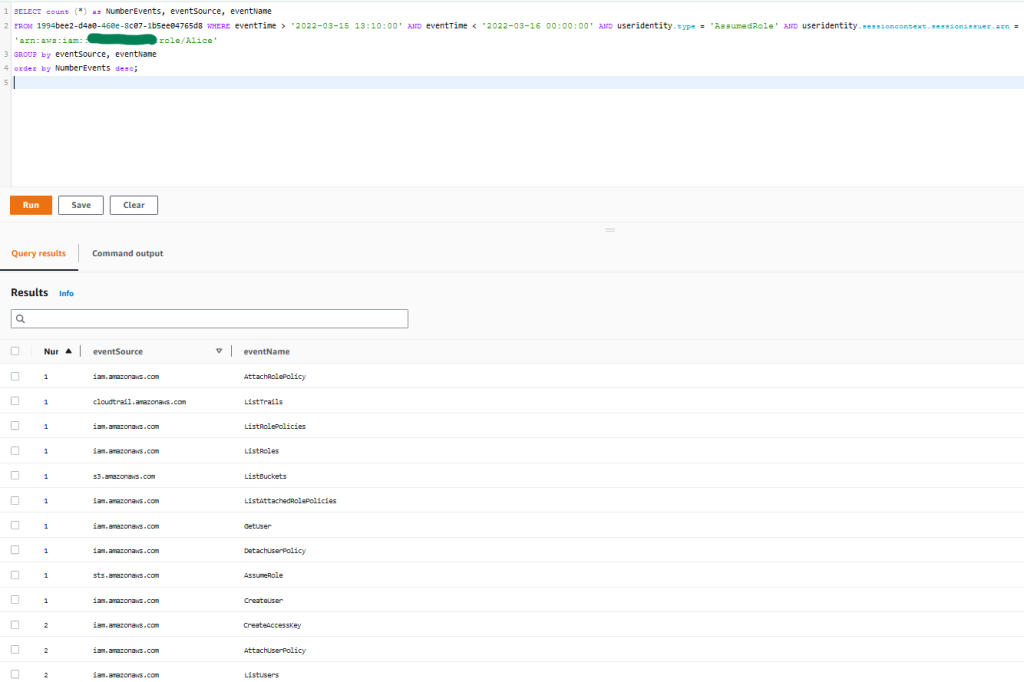
Figure 5: Sample query 1.5 and results in the console
You observe that the activity is consistent with what was shown in the first account, and the threat actor seems to be targeting trails, S3 buckets, and IAM activity related to possible further escalation of privileges.
Query 1.6: Confirm successful activity performed by an IAM role during a specific time window
Following the example in query 1.1, you will fetch the information related to activity that was successful or denied. This helps you confirm modifications that took place in the environment, or the creation of new resources. For this example, you will also want to obtain the event ID in case you need to dig further into one specific API call. You will then filter out activity done by any other session by using the temporary access key obtained from query 1.2.
Query 1.6
The results of the query are as follows:
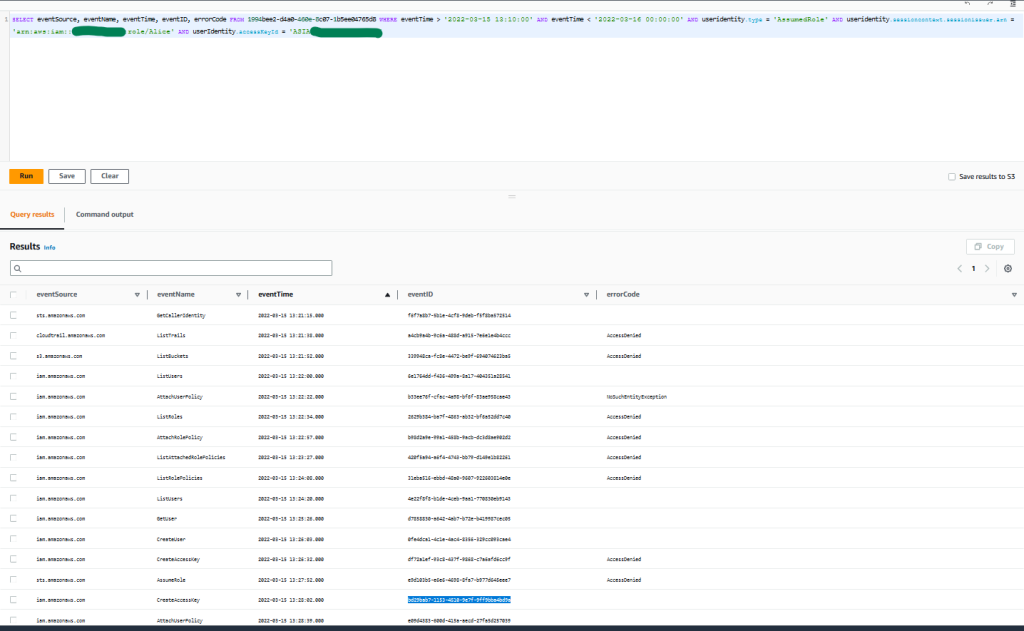
Figure 6: Sample query 1.6 and results in the console
You can observe that the threat actor was again not able to perform activity upon the trails, S3 buckets, or IAM roles. But as you can see, the threat actor was able to perform specific IAM activity, which led to the creation of a new IAM user, policy attachment, and access key.
Query 1.7: Obtain new access key ID created
By making use of the event ID from the CreateAccesskey event displayed in the previous query, you can obtain the access key ID so that you can further dig into what activity was performed by it.
Query 1.7
The results of the query are as follows:
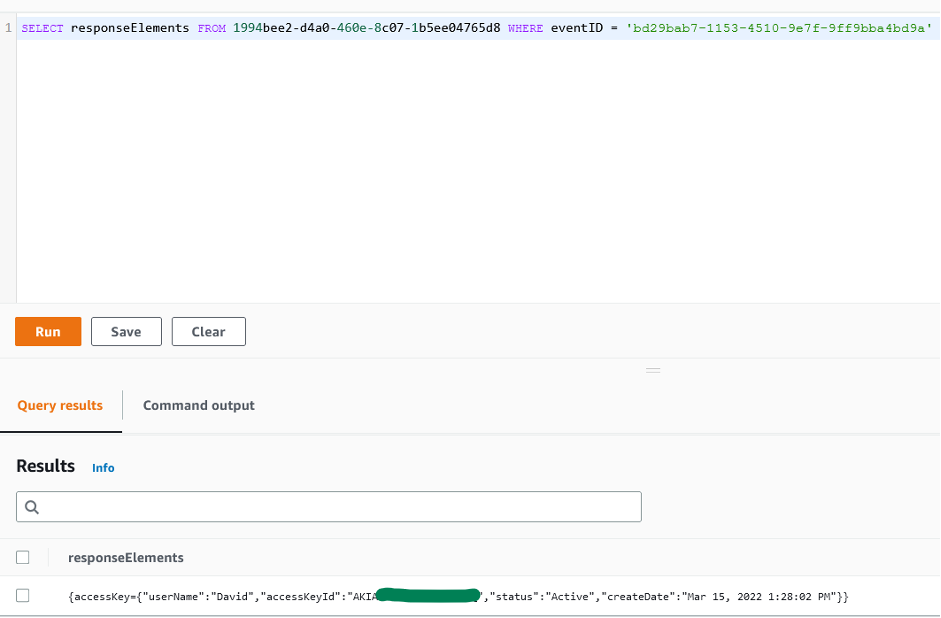
Figure 7: Sample query 1.7 and results in the console
Query 1.8: Obtain successful API activity that was performed by the access key during a specific time window
Following previous examples, you will count and group the API activity that was successfully performed by this access key ID. This time, you will exclude denied activity in order to understand the activity that actually took place.
Query 1.8
The results of the query are as follows:
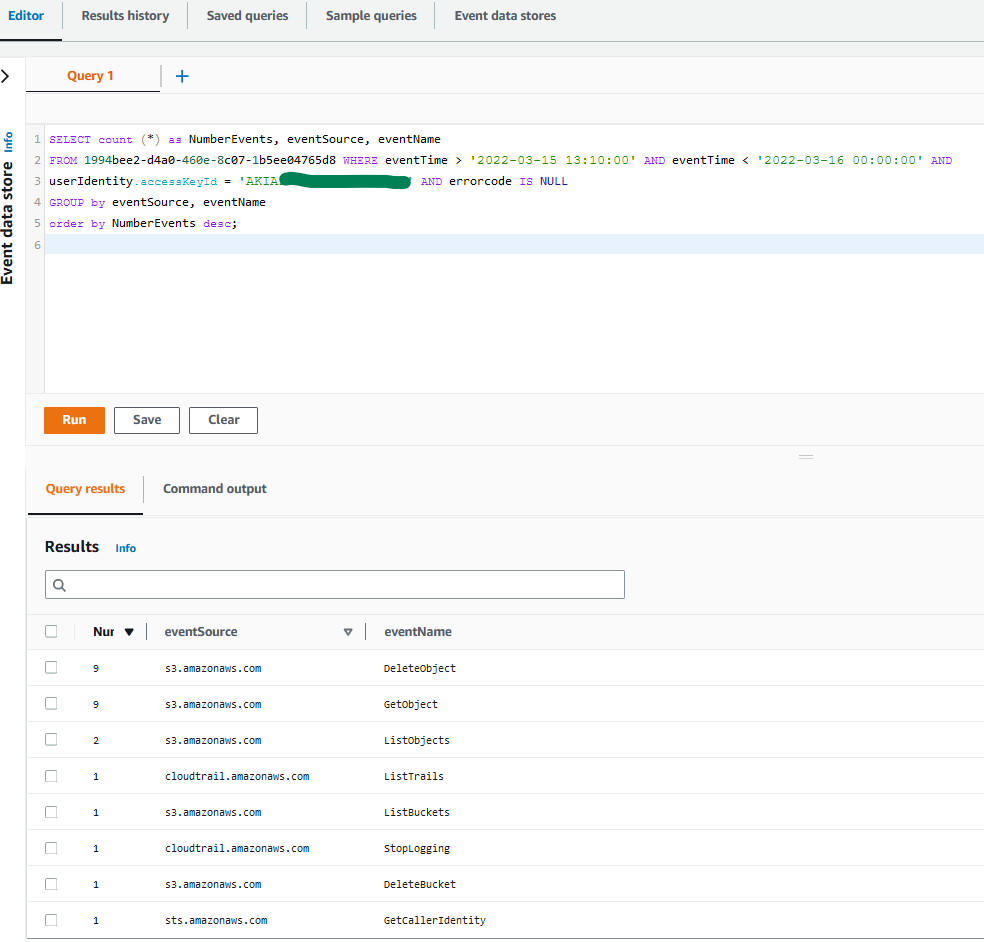
Figure 8: Sample query 1.8 and results in the console
You can observe that this time, the threat actor was able to perform specific activities targeting your trails and buckets due to privilege escalation. In these results, you observe that a trail was successfully stopped, and S3 objects were downloaded and deleted.
You can also see bucket deletion activity. At first glance, this might indicate activity related to a data exfiltration scenario in the case where the bucket was not properly secured, and possible future ransom demands could be made if proper preventive controls and measures to recover the data were not in place. For more details on this scenario, see this AWS Security blog post.
Query 1.9: Obtain bucket and object names affected during a specific time window
After you obtain the activities on the S3 buckets by using sample query 1.8, you can use the following query to show what objects this activity was related to, and from which buckets. You can expand the query to exclude denied activity.
Query 1.9
The results of the query are as follows:
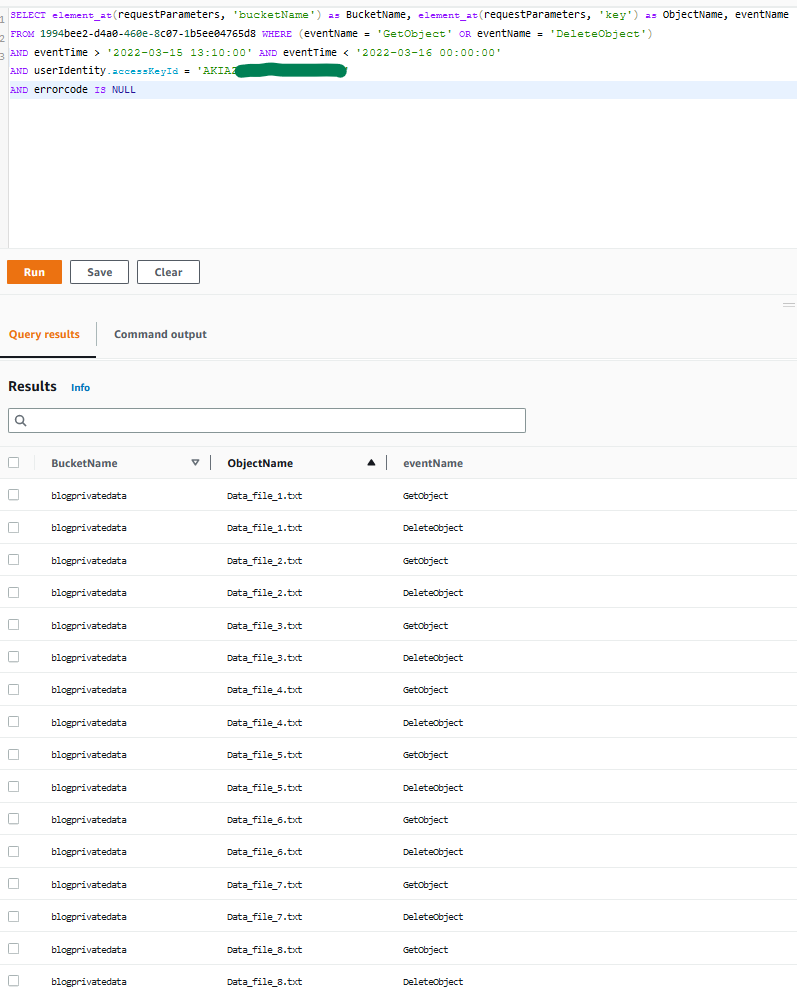
Figure 9: Sample query 1.9 and results in the console
As you can observe, the unauthorized user was able to first obtain and exfiltrate S3 objects, and then delete them afterwards.
Summary of incident scenario 1
This scenario describes a security incident involving a publicly exposed AWS access key that is exploited by a threat actor. Here is a summary of the steps taken to investigate this incident by using CloudTrail Lake capabilities:
- Investigated AWS activity that was performed by the compromised access key
- Observed possible adversary tactics and techniques that were used by the threat actor
- Collected artifacts that could be potential indicators of compromise (IoC), such as IP addresses
- Confirmed role assumption by the threat actor in a second account
- Expanded the time window of your investigation and the scope to your entire organization in AWS Organizations; and searched for any activity that might have taken place originating from the IP address related to the unauthorized activity
- Investigated AWS activity that was performed by the role assumed in the second account
- Identified new resources that were created by the threat actor, and malicious activity performed by the actor
- Confirmed the modifications caused by the threat actor and their impact in your environment
Incident scenario 2: AWS IAM Identity Center user credentials compromised
In this second scenario, you start your investigation from a GuardDuty finding stating that an Amazon Elastic Compute Cloud (Amazon EC2) instance is querying an IP address that is associated with cryptocurrency-related activity. There are several sources of logs that you might want to explore when you conduct this investigation, including network, operation system, or application logs, among others. In this example, you will use CloudTrail Lake capabilities to investigate API activity logged in CloudTrail for this security event. To understand what exactly happened and when, you start by querying information from the resource involved, in this case an EC2 instance, and then continue digging into the AWS IAM Identity Center (successor to AWS Single Sign-On) credentials that were used to launch that EC2 instance, to finally confirm what other actions were performed.
Query 2.1: Confirm who has launched the EC2 instance involved in the cryptocurrency-related activity
You can begin by looking at the finding CryptoCurrency:EC2/BitcoinTool.B to get more information related to this event, for example when (timestamp), where (AWS account and AWS Region), and also which resource (EC2 instance ID) was involved with the security incident and when it was launched. With this information, you can perform the first query for this scenario, which will confirm what type of user credentials were used to launch the instance involved.
Query 2.1
The results of the query are as follows:
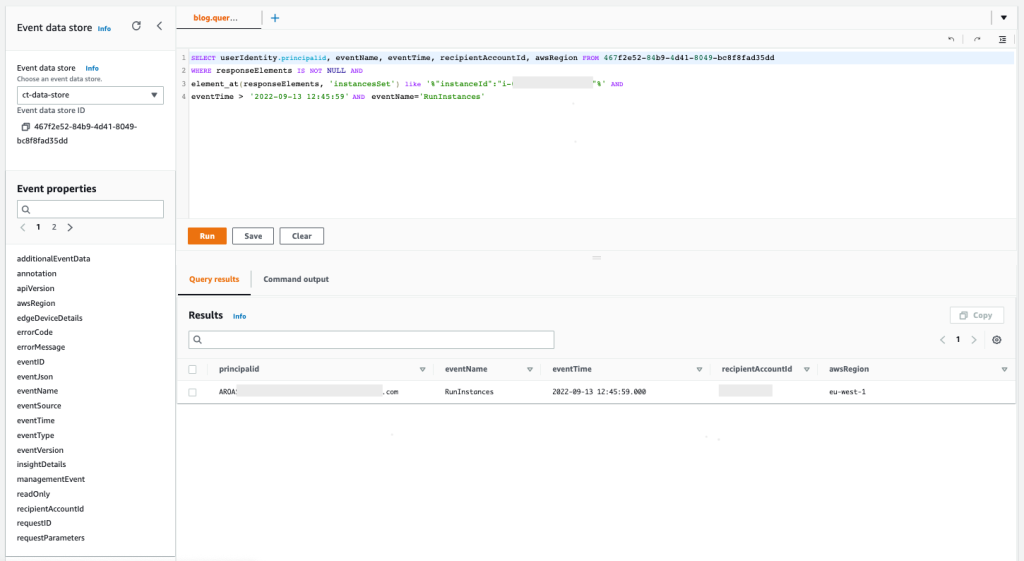
Figure 10: Sample query 2.1 and results in the console
The results demonstrate that the IAM Identity Center user as principal ID AROASVPO5CIEXAMPLE:[email protected] was used to launch the EC2 instance that was involved in the incident.
Query 2.2: Confirm in which AWS accounts the IAM Identity Center user has federated and authenticated
You want to confirm which AWS accounts this specific IAM Identity Center user has federated and authenticated with, and also which IAM role was assumed. This is important information to make sure that the security event happened only within the affected AWS account. The window of time for this query is based on the maximum value for the permission sets’ session duration in IAM Identity Center.
Query 2.2
The results of the query are as follows:
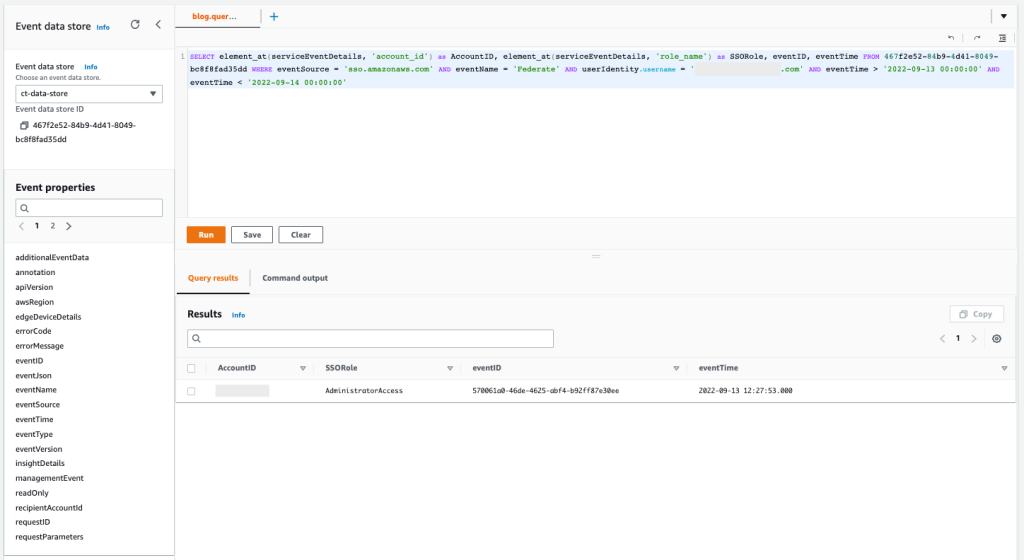
Figure 11: Sample query 2.2 and results in the console
The results show that only one AWS account has been accessed during the time of the incident, and only one AWS role named AdministratorAccess has been used.
Query 2.3: Count and group activity based on API actions that were performed by the user in each AWS service
You now know exactly where the user has gained access, so next you can count and group the activity based on the API actions that were performed in each AWS service. This information helps you confirm the types of activity that were performed.
Query 2.3
The results of the query are as follows:
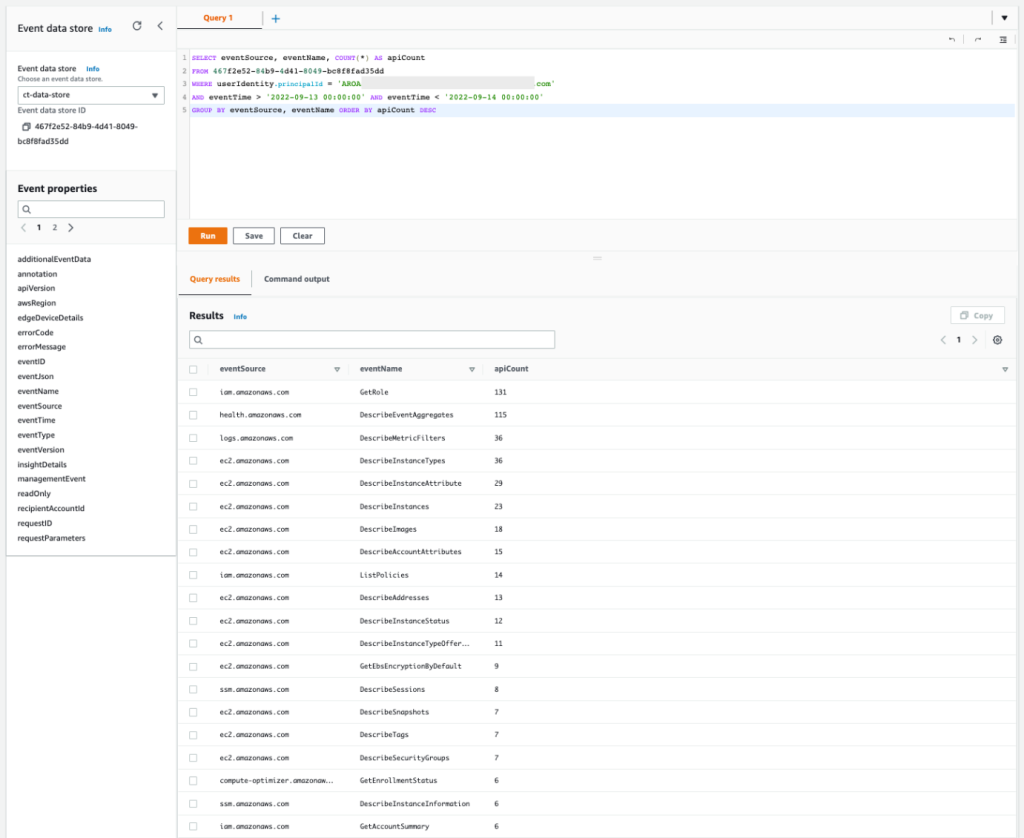
Figure 12: Sample query 2.3 and results in the console
You can see that the list of APIs includes the read activities Get, Describe, and List. This activity is commonly associated with the discovery stage, when the unauthorized user is gathering information to determine credential permissions.
Query 2.4: Obtain mutable activity based on API actions performed by the user in each AWS service
To get a better understanding of the mutable actions performed by the user, you can add a new condition to hide the read-only actions by setting the readOnly parameter to false. You will want to focus on mutable actions to know whether there were new AWS resources created or if existing AWS resources were deleted or modified. Also, you can add the possible error code from the response element to the query, which will tell you if the actions were denied.
Query 2.4
The results of the query are as follows:
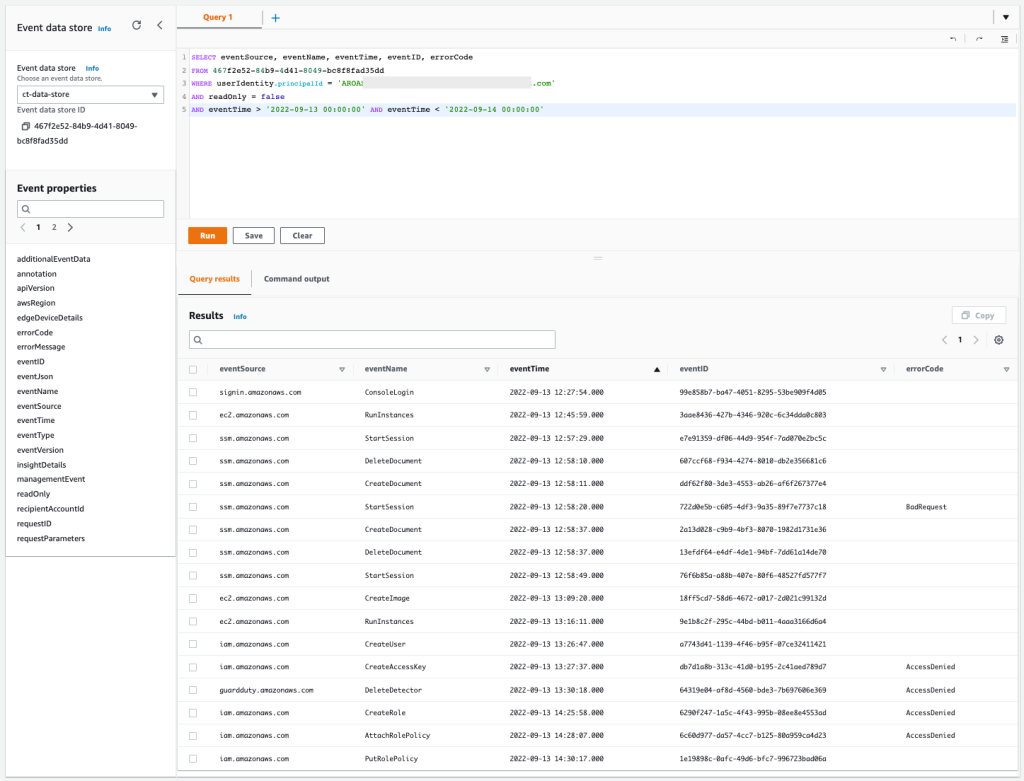
Figure 13: Sample query 2.4 and results in the console
You can confirm that some actions, like EC2 RunInstances, EC2 CreateImage, SSM StartSession, IAM CreateUser, and IAM PutRolePolicy were allowed. And in contrast, IAM CreateAccessKey, IAM CreateRole, IAM AttachRolePolicy, and GuardDuty DeleteDetector were denied. The IAM-related denied actions are commonly associated with persistence tactics, where an unauthorized user may try to maintain access to the environment. The GuardDuty denied action is commonly associated with defense evasion tactics, where the unauthorized user is trying to cover their tracks and avoid detection.
Query 2.5: Obtain more information about API action EC2 RunInstances
You can focus first on the API action EC2 RunInstances to understand how many EC2 instances were created by the same user. This information will confirm which other EC2 instances were involved in the security event.
Query 2.5
The results of the query are as follows:
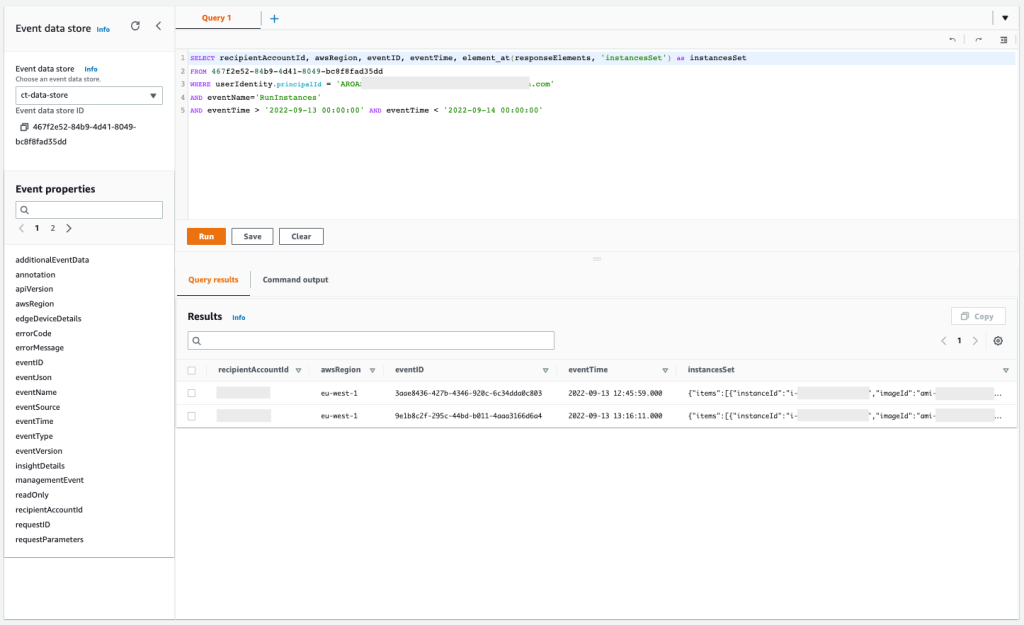
Figure 14: Sample query 2.5 and results in the console
You can confirm that the API was called twice, and if you expand the column InstanceSet in the response element, you will see the exact number of EC2 instances that were launched. Also, you can find that these EC2 instances were launched with an IAM instance profile called ec2-role-ssm-core. By checking in the IAM console, you can confirm that the IAM role associated has only the AWS managed policy AmazonSSMManagedInstanceCore attached, which enables AWS Systems Manager core functionality.
Query 2.6: Get the list of denied API actions performed by the user for each AWS service
Now, you can filter more to focus only on those denied API actions by performing the following query. This is important because it can help you to identify what kind of malicious event was attempted.
Query 2.6
The results of the query are as follows:
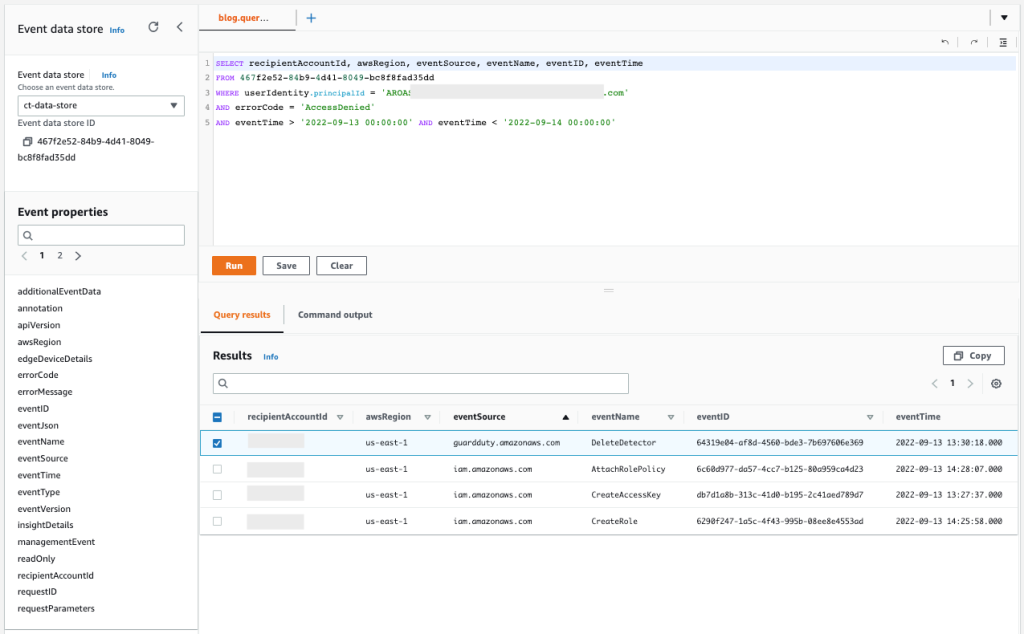
Figure 15: Sample query 2.6 and results in the console
You can see that the user has tried to stop GuardDuty by calling DeleteDetector, and has also performed actions within IAM that you should examine more closely to know if new unwanted access to the environment was created.
Query 2.7: Obtain more information about API action IAM CreateUserAccessKeys
With the previous query, you confirmed that more actions were denied within IAM. You can now focus on the failed attempt to create IAM user access keys that could have been used to gain persistent and programmatic access to the AWS account. With the following query, you can make sure that the actions were denied and determine the reason why.
Query 2.7
The results of the query are as follows:
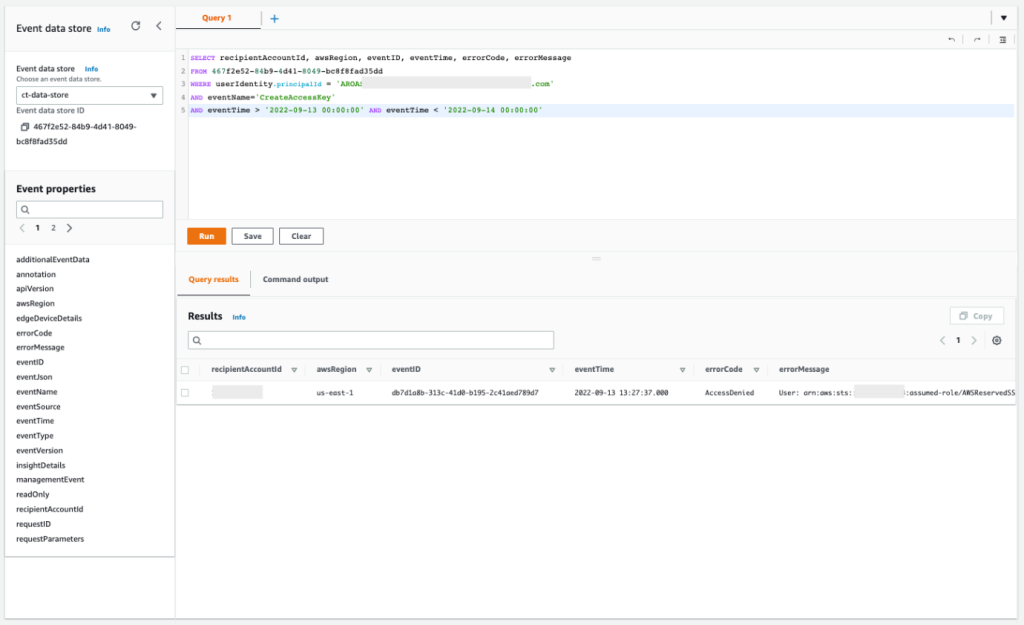
Figure 16: Sample query 2.7 and results in the console
If you copy the errorMessage element from the response, you can confirm that the action was denied by a service control policy, as shown in the following example.
Query 2.8: Obtain more information about API IAM CreateUser
From the query error message in query 2.7, you can confirm the name of the IAM user that was used. Now you can check the allowed API action IAM CreateUser that you observed before to see if the IAM users match. This helps you confirm that there were no other IAM users involved in the security event.
Query 2.8
The results of the query are as follows:
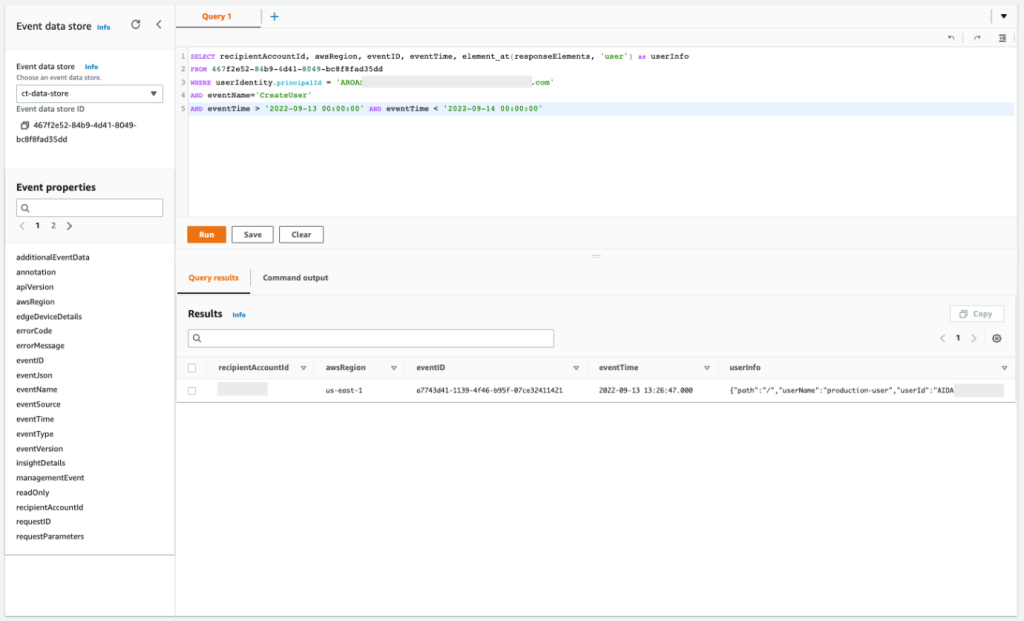
Figure 17: Sample query 2.8 and results in the console
Based on this output, you can confirm that the IAM user is indeed the same. This user was created successfully but was denied the creation of access keys, confirming the failed attempt to get new persistent and programmatic credentials.
Query 2.9: Get more information about the IAM role creation attempt
Now you can figure out what happened with the IAM CreateRole denied action. With the following query, you can see the full error message for the denied action.
Query 2.9
The results of the query are as follows:
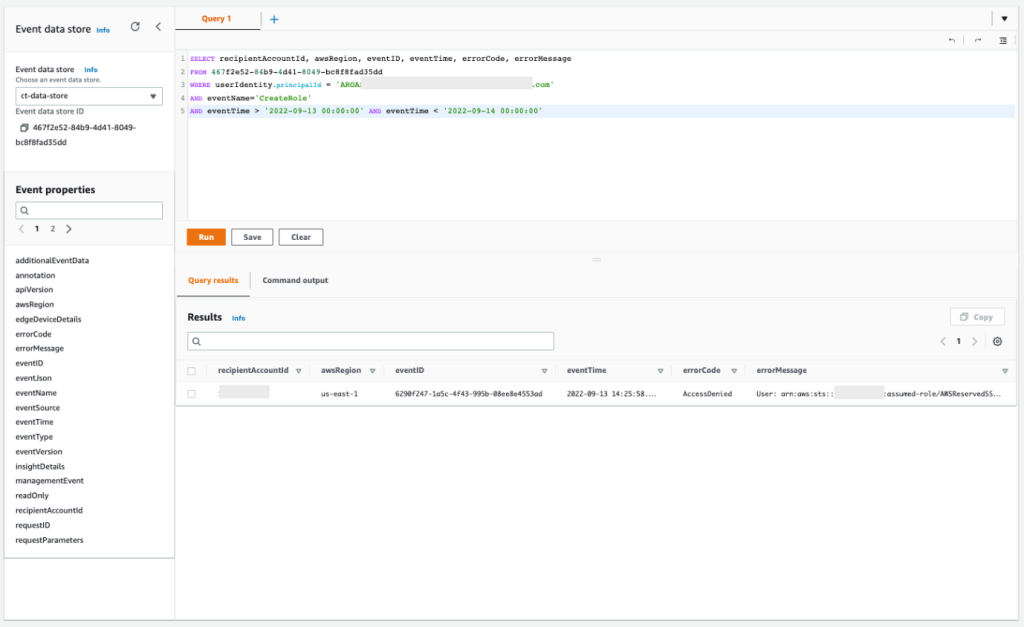
Figure 18: Sample query 2.9 and results in the console
If you copy the output of this query, you will see that the role was denied by a service control policy, as shown in the following example:
Query 2.10: Get more information about IAM role policy changes
With the previous query, you confirmed that the unauthorized user failed to create a new IAM role to replace the existing EC2 instance profile in an attempt to grant more permissions. And with another of the previous queries, you confirmed that the IAM API action AttachRolePolicy was also denied, in another attempt for the same goal, but this time trying to attach a new AWS managed policy directly. However, with this new query, you can confirm that the unauthorized user successfully applied an inline policy to the EC2 role associated with the existing EC2 instance profile, with full admin access.
Query 2.10
The results of the query are as follows:
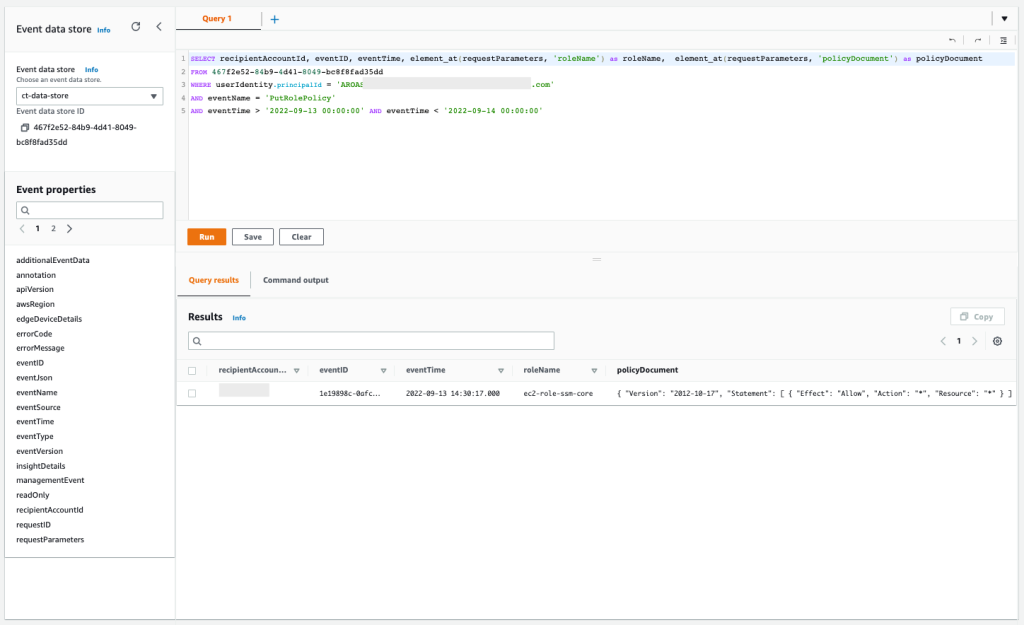
Figure 19: Sample query 2.10 and results in the console
Summary of incident scenario 2
This second scenario describes a security incident that involves an IAM Identity Center user that has been compromised. To investigate this incident by using CloudTrail Lake capabilities, you did the following:
- Started the investigation by looking at metadata from the GuardDuty EC2 finding
- Confirmed the AWS credentials that were used for the creation of that resource
- Looked at whether the IAM Identity Center user credentials were used to access other AWS accounts
- Did further investigation on the AWS APIs that were called by the IAM Identity Center user
- Obtained the list of denied actions, confirming the unauthorized user’s attempt to get persistent access and cover their tracks
- Obtained the list of EC2 resources that were successfully created in this security event
Conclusion
In this post, we’ve shown you how to use AWS CloudTrail Lake capabilities to investigate CloudTrail activity in response to security incidents across your organization. We also provided sample queries for two security incident scenarios. You now know how to use the capabilities of CloudTrail Lake to assist you and your security teams during the investigation process in a security incident. Additionally, you can find some of the sample queries related to this post and other topics in the following GitHub repository, and additional examples in the sample queries tab in the CloudTrail console. To learn more, see Working with CloudTrail Lake in the CloudTrail User Guide.
Regarding pricing for CloudTrail Lake, you pay for ingestion and storage together, where the billing is based on the amount of uncompressed data ingested. If you’re a new customer, you can try AWS CloudTrail Lake for a 30-day free trial or when you reach the free usage limits of 5GB of data. For more information, see see AWS CloudTrail pricing.
Finally, in combination with the investigation techniques shown in this post, we also recommend that you explore the use of Amazon Detective, an AWS managed and dedicated service that simplifies the investigative process and helps security teams conduct faster and more effective investigations. With the Amazon Detective prebuilt data aggregations, summaries, and context, you can quickly analyze and determine the nature and extent of possible security issues.
If you have feedback about this post, submit comments in the Comments section below. If you have questions about this post, contact AWS Support.
Want more AWS Security news? Follow us on Twitter.
Танкерът може да бъде отвлечен във всеки един момент. Пиратски съд узакони отвличането на БАДР по Великден
Post Syndicated from Екип на Биволъ original https://bivol.bg/pirate-judge-badr.html
четвъртък 13 април 2023

Съдия Красимира Проданова от Административен съд София – Град е разрешила да бъде вдигнат ареста на танкера БАДР и корабът да отплава за ремонт. Определението на съда е от 06.03.23…
Optimizing AWS Lambda extensions in C# and Rust
Post Syndicated from James Beswick original https://aws.amazon.com/blogs/compute/optimizing-aws-lambda-extensions-in-c-and-rust/
This post is written by Siarhei Kazhura, Senior Specialist Solutions Architect, Serverless.
Customers use AWS Lambda extensions to integrate monitoring, observability, security, and governance tools with their Lambda functions. AWS, along with AWS Lambda Ready Partners, like Datadog, Dynatrace, New Relic, provides ready-to-run extensions. You can also develop your own extensions to address your specific needs.
External Lambda extensions are designed as a companion process running in the same execution environment as the function code. That means that the Lambda function shares resources like memory, CPU, and disk I/O, with the extension. Improperly designed extensions can result in a performance degradation and extra costs.
This post shows how to measure the impact an extension has on the function performance using key performance metrics on an Amazon CloudWatch dashboard.
This post focuses on Lambda extensions written in C# and Rust. It shows the benefits of choosing to write Lambda extensions in Rust. Also, it explains how you can optimize a Lambda extension written in C# to deliver three times better performance. The solution can be converted to the programming languages of your choice.
Overview
A C# Lambda function (running on .NET 6) called HeaderCounter is used as a baseline. The function counts the number of headers in a request and returns the number in the response. A static delay of 500 ms is inserted in the function code to simulate extra computation. The function has the minimum memory setting (128 MB), which magnifies the impact that extension has on performance.
A load test is performed via a curl command that is issuing 5000 requests (with 250 requests running simultaneously) against a public Amazon API Gateway endpoint backed by the Lambda function. A CloudWatch dashboard, named lambda-performance-dashboard, displays performance metrics for the function.
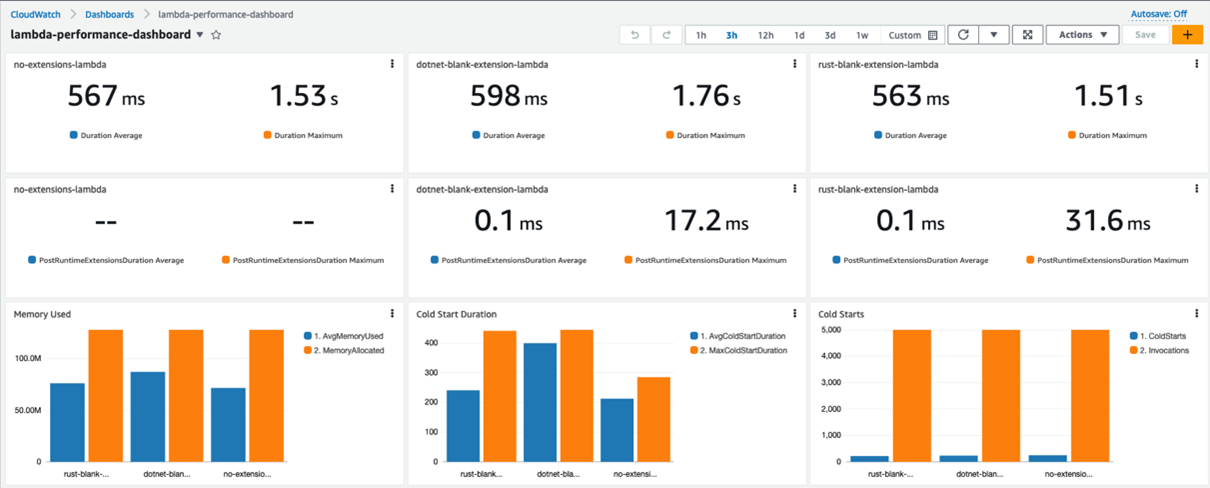
Metrics captured by the dashboard:
- The Max Duration, and Average Duration metrics allow you to assess the impact the extension has on the function execution duration.
- The PostRuntimeExtensionsDuration metric measures the extra time that the extension takes after the function invocation.
- The Average Memory Used, and Memory Allocated metrics allow you to assess the impact the extension has on the function memory consumption.
- The Cold Start Duration, and Cold Starts metrics allow you to assess the impact the extension has on the function cold start.
Running the extensions
There are a few differences between how the extensions written in C# and Rust are run.
The extension written in Rust is published as an executable. The advantage of an executable is that it is compiled to native code, and is ready to run. The extension is environment agnostic, so it can run alongside with a Lambda function written in another runtime.
The disadvantage of an executable is the size. Extensions are served as Lambda layers, and the size of the extension counts towards the deployment package size. The maximum unzipped deployment package size for Lambda is 250 MB.
The extension written in C# is published as a dynamic-link library (DLL). The DLL contains the Common Intermediate Language (CIL), that must be converted to native code via a just-in-time (JIT) compiler. The .NET runtime must be present for the extension to run. The dotnet command runs the DLL in the example provided with the solution.
Blank extension

Three instances of the HeaderCounter function are deployed:
- The first instance, available via a no-extension endpoint, has no extensions.
- The second instance, available via a dotnet-extension endpoint, is instrumented with a blank extension written in C#. The extension does not provide any extra functionality, except logging the event received to CloudWatch.
- The third instance, available via a rust-extension endpoint, is instrumented with a blank extension written in Rust. The extension does not provide any extra functionality, except logging the event received to CloudWatch.

The dashboard shows that the extensions add minimal overhead to the Lambda function. The extension written in C# adds more overhead in the higher percentile metrics, such as the Maximum Cold Start Duration and Maximum Duration.
EventCollector extension
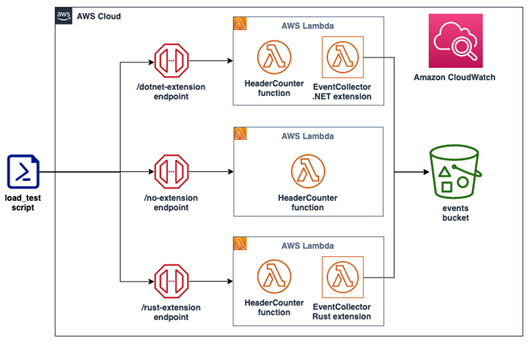
Three instances of the HeaderCounter function are deployed:
- The first instance, available via a no-extension endpoint, has no extensions.
- The second instance, available via a dotnet-extension endpoint, is instrumented with an EventCollector extension written in C#. The extension is pushing all the extension invocation events to Amazon S3.
- The third instance, available via a rust-extension endpoint, is instrumented with an EventCollector extension written in Rust. The extension is pushing all the extension invocation events to S3.
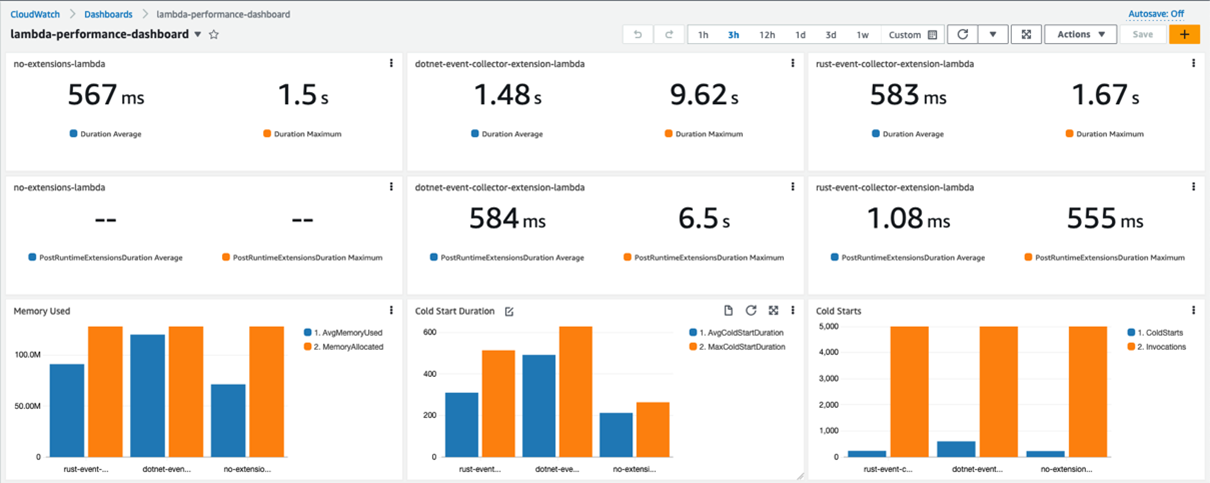
The Rust extension adds little overhead in terms of the Duration, number of Cold Starts, and Average PostRuntimeExtensionDuration metrics. Yet there is a clear performance degradation for the function that is instrumented with an extension written in C#. Average Duration jumped almost three times, and the Maximum Duration is now around six times higher.
The function is now consuming almost all the memory allocated. CPU, networking, and storage for Lambda functions are allocated based on the amount of memory selected. Currently, the memory is set to 128 MB, the lowest setting possible. Constrained resources influence the performance of the function.

Increasing the memory to 512 MB and re-running the load test improves the performance. Maximum Duration is now 721 ms (including the static 500 ms delay).
For the C# function, the Average Duration is now only 59 ms longer than the baseline. The Average PostRuntimeExtensionDuration is at 36.9 ms (compared with 584 ms previously). This performance gain is due to the memory increase without any code changes.
You can also use the Lambda Power Tuning to determine the optimal memory setting for a Lambda function.
Garbage collection
Unlike C#, Rust is not a garbage collected language. Garbage collection (GC) is a process of managing the allocation and release of memory for an application. This process can be resource intensive, and can affect higher percentile metrics. The impact of GC is visible with the blank extension’s and EventCollector extension’s metrics.
Rust uses ownership and borrowing features, allowing for safe memory release without relying on GC. This makes Rust a good runtime choice for tools like Lambda extensions.
EventCollector native AOT extension
Native ahead-of-time (Native AOT) compilation (available in .NET 7 and .NET 8), allows for the extensions written in C# to be delivered as executables, similar to the extensions written in Rust.
Native AOT does not use a JIT compiler. The application is compiled into a self-contained (all the resources that it needs are encapsulated) executable. The executable runs in the target environment (for example, Linux x64) that is specified at compilation time.
These are the results of compiling the .NET extension using Native AOT and re-running the performance test (with function memory set to 128 MB):

For the C# extension, Average Duration is now close the baseline (compared to three times the baseline as a DLL). Average PostRuntimeExtensionDuration is now 0.77 ms (compared with 584 ms as a DLL). The C# extension also outperforms the Rust extension for the Maximum PostRuntimeExtensionDuration metric – 297 ms versus 497 ms.
Overall, the Rust extension still has better Average/Maximum Duration, Average/Maximum Cold Start Duration, and Memory Consumption. The Lambda function with the C# extension still uses almost all the allocated memory.
Another metric to consider is the binary size. The Rust extension compiles into a 12.3 MB binary, while the C# extension compiles into a 36.4 MB binary.
Example walkthroughs
To follow the example walkthrough, visit the GitHub repository. The walkthrough explains:
- The prerequisites required.
- A detailed solution deployment walkthrough.
- The cleanup process.
- Cost considerations.
Conclusion
This post demonstrates techniques that can be used for running and profiling different types of Lambda extensions. This post focuses on Lambda extensions written in C# and Rust. This post outlines the benefits of writing Lambda extensions in Rust and shows the techniques that can be used to improve Lambda extension written in C# to deliver better performance.
Start writing Lambda extensions with Rust by using the Runtime extensions for AWS Lambda crate. This is a part of a Rust runtime for AWS Lambda.
For more serverless learning resources, visit Serverless Land.
Home Assistant Setup Made Easy: The Ultimate Guide
Post Syndicated from Crosstalk Solutions original https://www.youtube.com/watch?v=Y38qRYYAwAI
Dell PowerEdge R760 Review The Mainstream 2U Dual Intel Xeon Server
Post Syndicated from Patrick Kennedy original https://www.servethehome.com/dell-poweredge-r760-review-the-mainstream-2u-dual-intel-xeon-server/
In our Dell PowerEdge R760 review, we see how Dell’s engineers put together this generation’s design study on building a 2U Intel Xeon server
The post Dell PowerEdge R760 Review The Mainstream 2U Dual Intel Xeon Server appeared first on ServeTheHome.
What Is Cyber Insurance?
Post Syndicated from Kari Rivas original https://www.backblaze.com/blog/what-is-cyber-insurance/
The first cybersecurity insurance policy was issued in 1997. In the following 27 years it’s grown from a niche insurance product to an important consideration for organizations large and small to protect their bottom line from cyber threats like malicious data breaches, malware, phishing attacks, and ransomware.
While there are many security tactics to deploy in order to maintain business continuity (BC) should any of the above happen, getting back up and running in the event of a security incident can cost time and money. Cyber insurance is one way to reduce fallout from security events, prepare your business, and support business continuity objectives.
Today, we are breaking down the basics of cyber insurance: What is it? How much will it cost? What do cyber insurance companies provide? And how do you get it?
Does my organization need cyber insurance?
Cyber insurance has become more common as part of BC planning. Like many things in the cybersecurity world, it can be a bit hard to measure precise adoption numbers because there are different industry associations, enforcement agencies, and so on in different geographic markets. According to Fortune Business Insights, the global cyber insurance market size was valued at $16.66 billion in 2023. The market is projected to grow from $20.88 billion in 2024 to $120.47 billion by 2032, exhibiting a compound annual growth rate (CAGR) of 24.5% during the forecast period.
Take a look at these three data points in cybersecurity risk:
- According to a 2023 Ransomware Market Report, global ransomware costs are predicted to reach $265 billion annually by 2031, up from $20 billion in 2021.
- According to IBM, the average cost of a data breach in the U.S. is $4.88 million, up 10% over 2023.
- Fifty-nine percent of organizations were hit by ransomware in the last year, according to Sophos’ State of Ransomware 2024 report.
Whether your company is a 10 person software as a service (SaaS) startup or a global enterprise, cyber insurance could be the difference between a minor interruption of business services and closing up for good. However, providers don’t opt to provide coverage for every business that applies for cyber insurance. If you want coverage (and there are plenty of reasons why you would), it helps to prepare by making your company as attractive (meaning low-risk) as possible to cyber insurers. Some cyber insurance providers like Coalition even offer assistance and services to reduce your cyber risk posture before an attack as part of a “whole package” approach.
Ransomware Protection Resource
Learn about the growing threat of ransomware and what you can do to protect against ransomware attacks.

What is cyber insurance?
Cyber insurance protects your business from losses resulting from a digital attack. This can include business income loss, but it also includes coverage for unforeseen expenses, including:
- Forensic post-breach review expenses.
- Additional monitoring outflows.
- The expenditure for notifying parties of a breach.
- Public relations service expenses.
- Litigation fees.
- Accounting expenses.
- Court-ordered judgments.
- Claims disbursements.
Cyber insurance policies may also cover ransom payments. However, according to expert guidance, it is never advisable or prudent to pay the ransom, even if it’s covered by insurance.
There are a few reasons for this:
- It’s not guaranteed that cybercriminals will provide a decryption key to recover your data. They’re criminals after all.
- Even with a decryption key, you may not be able to recover your data. This could be intentional, or simply poor design on the part of cybercriminals. Ransomware code is notoriously buggy.
- Paying the ransom encourages cybercriminals to keep plying their trade, and can even result in businesses that pay being hit by the same ransomware demand twice.
- Ransom payouts may be illegal. Certain states make it illegal for local government entities to pay ransoms. Federally in the U.S., it’s illegal to make payments to individuals, organizations, regimes, and sometimes entire countries that are on the sanctions list—and some cyber crime groups are certainly on that list.
Ultimately, the most effective way to undermine the motivation of these criminal groups is to reduce the potential for profit.
Types of cyber insurance
What plans cover and how much they cost can vary. Typically, you can choose between first-party coverage, third-party coverage, or both.
First-party coverage protects your own data and includes coverage for business expenses related to things like recovery of lost or stolen data, lost revenue due to business interruption, and legal counsel, and other types of expenses.
Third-party coverage protects your business from liability claims brought by someone outside the company. This type of policy might cover things like payments to consumers affected by a data breach, costs for litigation brought by third parties, and losses related to defamation.
Depending on how substantial a digital attack’s losses could be to your business, your best choice may be both first- and third-party coverage.
Cyber insurance policy coverage considerations
Cyber insurance protects your company’s bottom line by helping you pay for costs related to recovering lost or stolen data and cover costs incurred by affected third parties (if you have third-party coverage).
As you might imagine, cyber insurance policies vary. When reviewing cyber insurance policies, it’s important to ask these questions:
- Does this policy cover a variety of digital attacks, especially the ones we’re most susceptible to?
- What are the policy’s exclusions? For example, unlikely circumstances like acts of war or terrorism and well-known, named viruses may not be covered in the policy.
- How much do the premiums and deductibles cost for the coverage we need?
- What are the coverage (payout) amounts or limitations?
Keep in mind that choosing the company with the lowest premiums may not be the best strategy. For further reading, the Federal Trade Commission offers a helpful checklist of additional considerations for choosing a cyber insurance policy.
Errors & omissions (E&O) coverage
Technology errors and omissions (E&O) coverage isn’t technically cyber insurance, but could be part of a comprehensive policy. This type of coverage protects your business from expenses that may be incurred if/when your product or service fails to deliver or doesn’t work the way it’s supposed to. This can be confused with cyber insurance coverage because it protects your business in the case your technology product or service fails. The difference is that E&O coverage comes into effect when that failure is due to the business’ own negligence.
You may want to pay the upcharge for E&O coverage to protect against harm caused if/when your product or service fails to deliver or work as intended. E&O also offers coverage for data loss stemming from employee errors or employee negligence in following data safeguards already in place. Consider whether you also need this type of protection and ask your cyber insurer if they offer E&O policies.
Beyond insurance
Cybersecurity insurance providers often offer a range of holistic services designed to help you manage and mitigate cyber risks. These services go beyond traditional insurance coverage, providing proactive support in the form of risk assessment, incident response, and recovery assistance. This comprehensive approach helps you strengthen your cybersecurity posture and minimize the impact of cyber incidents.
Services potentially offered by cybersecurity insurance providers:
- Risk assessment and management: Evaluating your current cybersecurity measures and identifying vulnerabilities.
- Incident response planning: Assisting in the development and implementation of incident response plans.
- Threat intelligence: Providing real-time information on emerging cyber threats and vulnerabilities.
- Employee training and awareness: Offering programs to educate employees on best practices for cybersecurity.
- Breach response services: Support during and after a cyber incident, including forensic investigation and legal assistance.
- Business continuity and recovery support: Helping to restore operations and recover lost data following an incident.
- Regulatory compliance guidance: Assisting in meeting industry-specific cybersecurity regulations and standards.
It’s important to ask if these services are included in your policy or if you can add them if needed.
Premiums, deductibles, and coverage
What are the average premium costs, deductible amounts, and liability coverage for a business like yours? The answer to that question turns out to be more complex than you’d think.
How are premiums determined?
Every insurance provider is different, but here are common factors that affect cyber insurance premiums:
- Your industry (e.g., education, healthcare, and financial industries are higher risk)
- Your company size (e.g., more employees increase risk)
- Amount and sensitivity of your data (e.g., school districts with student and faculty personal identifiable information are at higher risk)
- Your revenue (e.g., a profitable bank will be more attractive to cybercriminals)
- Your investment in cybersecurity (e.g., lower premiums go to companies with dedicated resources and policies around cybersecurity)
- Coverage limit (e.g., the cost per incident will decrease with a lower liability limit).
- Deductible (e.g., the more you pay per incident, the less your plan’s premium)
What does the average premium cost?
These days, it’s challenging to estimate the true cost of an attack because historical data hasn’t been widely shared. The U.S. Government Accountability Office reported that the rising “frequency, severity, and cost of cyberattacks” increases cyber insurance premiums.
But, generally speaking, if you are willing to cover more of the cost of a data breach, your deductible rises, and your premium falls. Data from TechInsurance reveals that the average cyber insurance premium is around $145 per month depending on your risk profile and the policy limits you choose.
How do I get cyber insurance?
Most companies start with an online quote from a cyber insurance provider, but many will eventually need to compile more detailed and specific information in order to get the most accurate figures.
If you’re a business owner, you may have all the information you need at hand, but for mid-market and enterprise companies, securing a cyber insurance policy should be a cross-functional effort. You’ll need information from finance, legal, and compliance departments, IT, operations, and perhaps other divisions to ensure cyber insurance coverage and policy terms meet your company’s needs.
Before the quote, an insurance company will perform a risk assessment of your business in order to determine the cost to insure you. A typical cyber insurance questionnaire might include specific, detailed questions in the areas of organizational structure, legal and compliance requirements, business policies and procedures, and questions about your technical infrastructure. Here are some questions you might encounter:
- Organizational: What kind of third-party data do you store or process on your computer systems?
- Legal and compliance: Are you aware of any disputes over your business website address and domain name?
- Policies and procedures: Do you have a business continuity plan in place?
- Technical: Do you utilize a cloud provider to store data or host applications?
Cyber insurance readiness
Now that you know the basics of cyber insurance, you can be better prepared if and when the time comes to get insured. Shoring up your vulnerability to cyber incidents goes a long way toward helping you acquire cyber insurance and get the best premiums possible. You can start by protecting business workstations with automatic backups and by protecting virtual machines (VMs), servers, and network attached storage (NAS) data for BC and disaster recovery (DR).
The post What Is Cyber Insurance? appeared first on Backblaze Blog | Cloud Storage & Cloud Backup
Stable kernels 6.2.11, 6.1.24, and 5.15.107
Post Syndicated from original https://lwn.net/Articles/929012/
Greg Kroah-Hartman has announced the release of the 6.2.11, 6.1.24, and 5.15.107 stable kernels. They contain another
collection of important fixes throughout the kernel tree.
Cloudflare One named in Gartner® Magic Quadrant™ for Security Service Edge
Post Syndicated from Sam Rhea original https://blog.cloudflare.com/cloudflare-sse-gartner-magic-quadrant/
Gartner has recognized Cloudflare in the 2023 “Gartner® Magic Quadrant™ for Security Service Edge (SSE)” report for its ability to execute and completeness of vision. We are excited to share that the Cloudflare Zero Trust solution, part of our Cloudflare One platform, is one of only ten vendors recognized in the report.
Of the 10 companies named to this year’s Gartner® Magic Quadrant™ report, Cloudflare is the only new vendor addition. You can read more about our position in the report and what customers say about using Cloudflare One here.
Cloudflare is also the newest vendor when measured by the date since our first products in the SSE space launched. We launched Cloudflare Access, our best-in-class Zero Trust access control product, a little less than five years ago. Since then, we have released hundreds of features and shipped nearly a dozen more products to create a comprehensive SSE solution that over 10,000 organizations trust to keep their organizations data, devices and teams both safe and fast. We moved that quickly because we built Cloudflare One on top of the same network that already secures and accelerates large segments of the Internet today.
We deliver our SSE services on the same servers and in the same locations that serve some of the world’s largest Internet properties. We combined existing advantages like the world’s fastest DNS resolver, Cloudflare’s serverless compute platform, and our ability to route and accelerate traffic around the globe. We might be new to the report, but customers who select Cloudflare One are not betting on an upstart provider; they are choosing an industry-leading solution made possible by a network that already secures millions of destinations and billions of users every day.
We are flattered by the recognition from Gartner this week and even more thrilled by the customer outcomes we make possible today. That said, we are not done and we are only going faster.
What is a Security Service Edge?
A Security Service Edge (SSE) “secures access to the web, cloud services and private applications. Capabilities include access control, threat protection, data security, security monitoring, and acceptable-use control enforced by network-based and API-based integration. SSE is primarily delivered as a cloud-based service, and may include on-premises or agent-based components.”1
The SSE space developed to meet organizations as they encountered a new class of security problems. Years ago, teams could keep their devices, services, and data safe by hiding from the rest of the world behind a figurative castle-and-moat. The defense perimeter for an enterprise corresponded to the literal walls of their office. Applications ran in server closets or self-managed data centers. Businesses could deploy firewalls, proxies, and filtering appliances in the form of on-premise hardware. Remote users suffered through the setup by backhauling their traffic through the physical office with a legacy virtual private network (VPN) client.
That model began to break down when applications started to leave the building. Teams began migrating to SaaS tools and public cloud providers. They could no longer control security by placing physical appliances in the flow of their one path to the Internet.
Meanwhile, users also left the office, placing stress on the ability of a self-managed private network to scale with the traffic. Performance and availability suffered while costs increased as organizations carried more traffic and deployed more bandaids to try and buy time.
Bad actors also evolved. Attacks became more sophisticated and exploited the migration away from a classic security perimeter. The legacy appliances deployed could not keep up with the changes in attack patterns and scale of attacks.
SSE vendors provide organizations with a cloud-based solution to those challenges. SSE providers deploy and maintain security services in their own points of presence or in a public cloud provider, giving enterprises a secure first hop before they connect to the rest of the Internet or to their internal tools. IT teams can deprecate the physical or virtual appliances that they spent days maintaining. Security teams benefit from filtering and policies that update constantly to defend against new threats.
Some SSE features target remote access replacement by offering customers the ability to connect users to internal tools with Zero Trust access control rules. Other parts of an SSE platform focus on applying Zero Trust scrutiny to the rest of the Internet, replacing the on-premise filtering appliances of an enterprise with cloud-based firewalls, resolvers, and proxies that filter and log traffic leaving a device closer to the user instead of forcing a backhaul to a centralized location.
What about SASE?
You might also be familiar with the term Secure Access Service Edge (SASE). We hear customers talk about their “SASE” goals more often than “SSE” alone. SASE extends the definition of SSE to include managing the connectivity of the traffic being secured. Network-as-a-Service vendors help enterprises connect their users, devices, sites, and services. SSE providers secure that traffic.
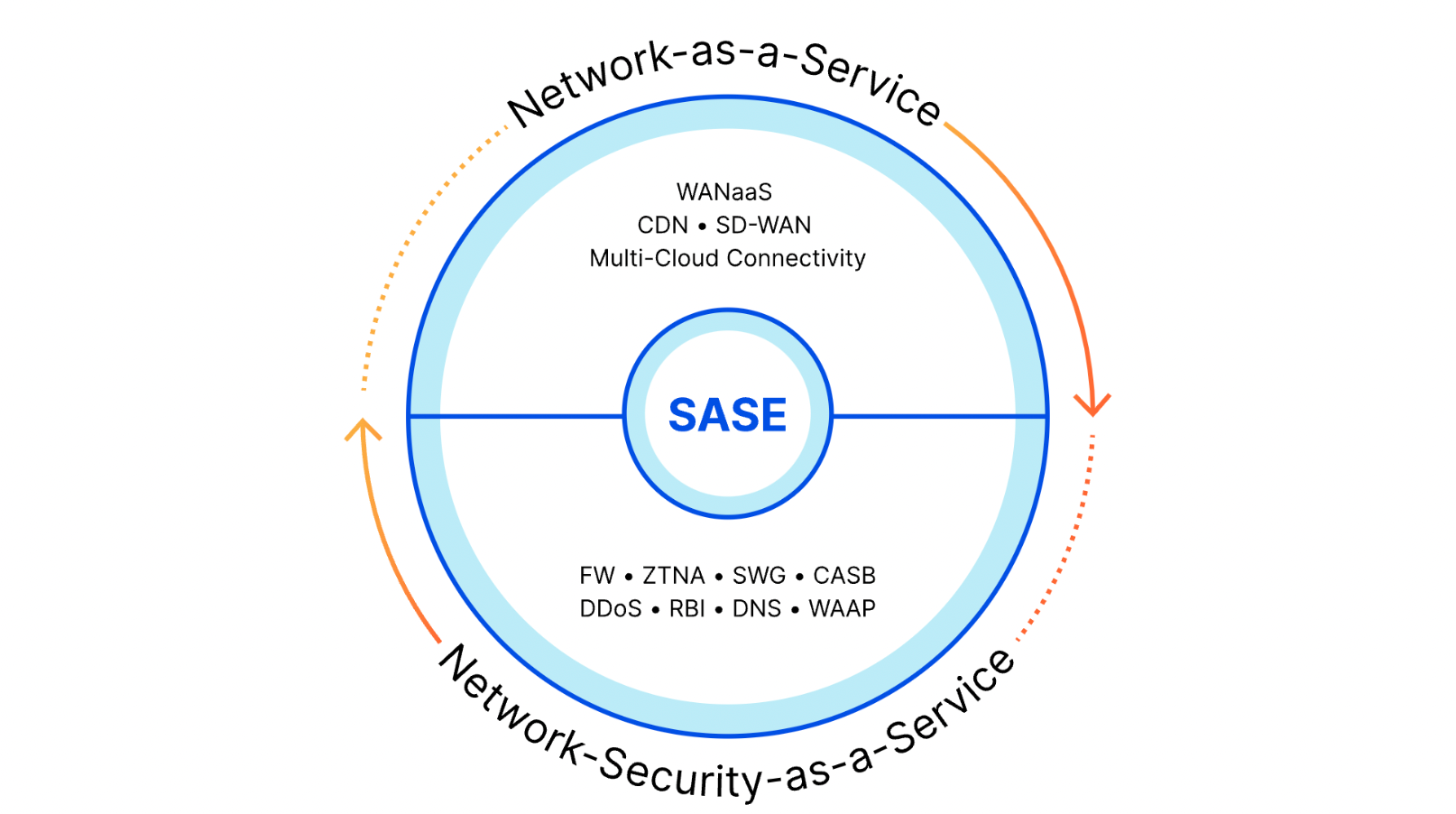
Most vendors focus on one side of the equation. Network-as-a-service companies sell software-defined wide area network (SD-WAN), interconnection, and traffic optimization solutions to help enterprises manage and accelerate connectivity, but those enterprises wind up losing those benefits by sending all that traffic to an SSE provider for filtering. SSE providers deliver security tools for traffic of nearly any type, but they still need customers to buy additional networking services to get that traffic to their locations.
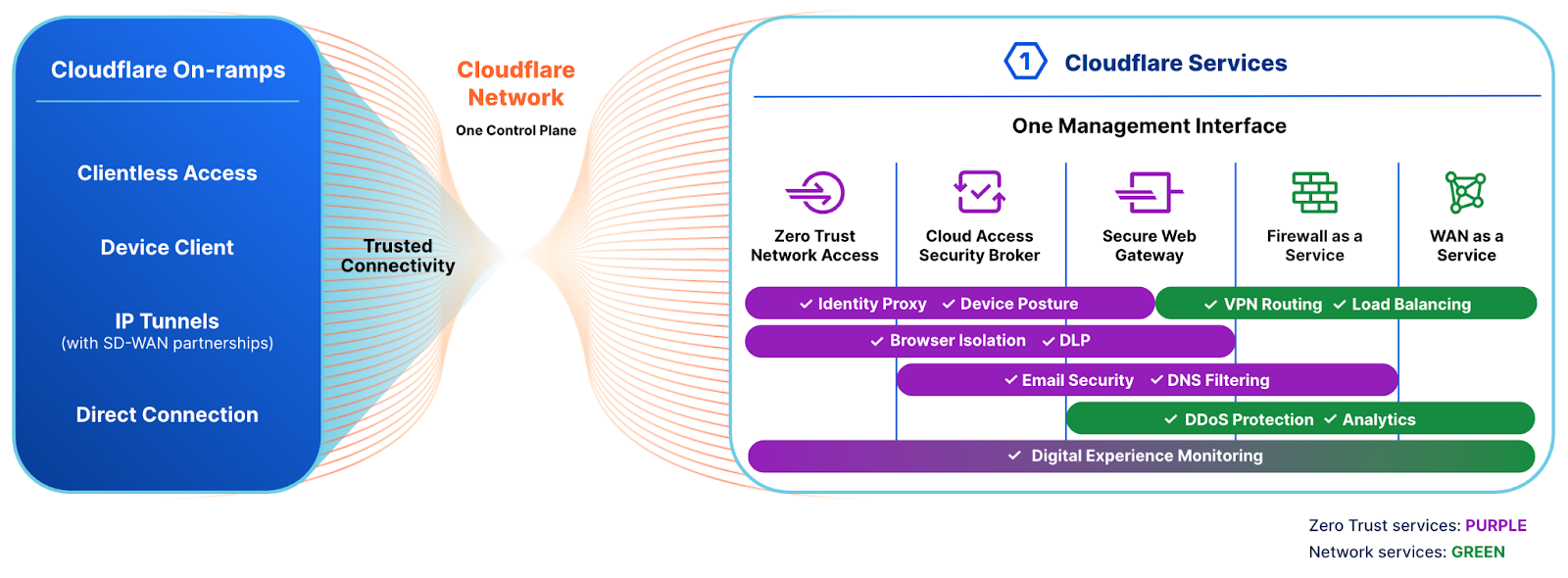
Cloudflare One is a single vendor SASE platform. Cloudflare offers enterprises a comprehensive network-as-a-service where teams can send all traffic to Cloudflare’s network, where we can help teams manage connectivity and improve performance. Enterprises can choose from flexible on-ramps, like their existing hardware routers, agents running on laptops and mobile devices, physical and virtual interconnects, or Cloudflare’s own last mile connector.
When that traffic reaches Cloudflare’s network, our SSE services apply security filtering in the same locations where we manage and route connectivity. Cloudflare’s SSE solution does not add additional hops; we deliver filtering and logging in-line with the traffic we accelerate for our customers. The value of our single vendor SASE solution is just another outcome of an obsession we’ve had since we first launched our reverse proxy over ten years ago: customers should not have to compromise performance for security and vice versa.
So where does Cloudflare One fit?
Cloudflare One connects enterprises to the tools they need while securing their devices, applications and data without compromising on performance. The platform consists of two primary components: our Cloudflare Zero Trust products, which represent our SSE offering, and our network-as-a-service solution. As much as today’s announcement separates out those features, we prefer to talk about how they work together.
Cloudflare’s network-as-a-service offering, our Magic WAN solution, extends our network for customers to use as their own. Enterprises can take advantage of the investments we have made over more than a decade to build out one of the world’s most peered, most performant, and most available networks. Teams can connect individual roaming devices, offices and physical sites, or entire networks and data centers through Cloudflare to the rest of the Internet or internal destinations.
We want to make it as easy as possible for customers to send us their traffic, so we provide many flexible “on-ramps” to easily fit into their existing infrastructure. Enterprises can use our roaming agent to connect user devices, our Cloudflare Tunnel service for application-level connectivity, network-level tunnels from our Magic WAN Connector or their existing router or SD-WAN hardware, and/or direct physical or virtual interconnections for dedicated connectivity to on-prem or cloud infrastructure at 1,600+ locations around the world. When packets arrive at the closest Cloudflare location, we provide optimization, acceleration and logging to give customers visibility into their traffic flows.
Instead of sending that accelerated traffic to an additional intermediary for security filtering, our Cloudflare Zero Trust platform can take over to provide SSE security filtering in the same location – generally on the exact same server – as our network-as-a-service functions. Enterprises can pick and choose what SSE features they want to enable to strengthen their security posture over time.
Cloudflare One and the SSE feature set
The security features inside of Cloudflare One provide comprehensive SSE coverage to enterprises operating at any scale. Customers just need to send traffic to a Cloudflare location within a few milliseconds of their users and Cloudflare Zero Trust handles everything else.
Cloudflare One SSE Capabilities
Zero Trust Access Control
Cloudflare provides a Zero Trust VPN replacement for teams that host and control their own resources. Customers can deploy a private network inside of Cloudflare’s network for more traditional connectivity or extend access to contractors without any agent required. Regardless of how users connect, and for any type of destination they need, Cloudflare’s network gives administrators the ability to build granular rules on a per-resource or global basis. Teams can combine one or more identity providers, device posture inputs, and other sources of signal to determine when and how a user should be able to connect.
Organizations can also extend these types of Zero Trust access control rules to the SaaS applications where they do not control the hosting by introducing Cloudflare’s identity proxy into the login flow. They can continue to use their existing identity provider but layer on additional checks like device posture, country, and multifactor method.
DNS filtering
Cloudflare’s DNS filtering solution runs on the world’s fastest DNS resolver, filtering and logging the DNS queries leaving individual devices or some of the world’s largest networks.
Network firewall
Organizations that maintain on-premise hardware firewalls or cloud-based equivalents can deprecate their boxes by sending traffic through Cloudflare where our firewall-as-a-service can filter and log traffic. Our Network Firewall includes L3-L7 filtering, Intrusion Detection, and direct integrations with our Threat Intelligence feeds and the rest of our SSE suite. It enables security teams to build sophisticated policies without any of the headaches of traditional hardware: no capacity or redundancy planning, no throughput restrictions, no manual patches or upgrades.
Secure Web Gateway
Cloudflare’s Secure Web Gateway (SWG) service inspects, filters, and logs traffic in a Cloudflare PoP close to a user regardless of where they work. The SWG can block HTTP requests bound for dangerous destinations, scan traffic for viruses and malware, and control how traffic routes to the rest of the Internet without the need for additional hardware or virtualized services.
In-line Cloud Access Security Broker and Shadow IT
The proliferation of SaaS applications can help teams cut costs but poses a real risk; sometimes users prefer tools other than the ones selected by their IT or Security teams. Cloudflare’s in-line Cloud Access Security Broker (CASB) gives administrators the tools to make sure employees use SaaS applications as intended. Teams can build tenant control rules that restrict employees from logging into personal accounts, policies that only allow file uploads of certain types to approved SaaS applications, and filters that restrict employees from using unapproved services.
Cloudflare’s “Shadow IT” service scans and catalogs user traffic to the Internet to help IT and Security teams detect and monitor the unauthorized use of SaaS applications. For example, teams can ensure that their approved cloud storage is the only place where users can upload materials.
API-driven Cloud Access Security Broker
Cloudflare’s superpower is our network, but sometimes the worst attacks start with data sitting still. Teams that adopt SaaS applications can share work products and collaborate together from any location; that same convenience makes it simple for mistakes or bad actors to cause a serious data breach.
In some cases, employees might overshare a document with sensitive information by selecting the wrong button in the “Share” menu. With just one click, a spreadsheet with customer contact data could become public on the Internet. In other situations, users might share a report with their personal account without realizing they just violated internal compliance rules.
Regardless of how the potential data breach started, Cloudflare’s API-driven CASB constantly scans the SaaS applications that your team uses for potential misconfiguration and data loss. Once detected, Cloudflare’s CASB will alert administrators and provide a comprehensive guide to remediating the incident.
Data Loss Prevention
Cloudflare’s Data Loss Prevention service scans traffic to detect and block potential data loss. Administrators can select from common precreated profiles, like social security numbers or credit card numbers, or create their own criteria using regular expressions or integrate with existing Microsoft Information Protection labels.
Remote Browser Isolation
Cloudflare’s browser isolation service runs a browser inside of our network, in a data center just milliseconds from the user, and sends the vector rendering of the web page to the local device. Team members can use any modern browser and, unlike other approaches, the Internet just feels like the Internet. Administrators can isolate sites on the fly, choosing to only isolate unknown destinations or providing contractors with an agentless workstation. Security teams can add additional protection like blocking copy-paste or printing.
Security beyond the SSE
Many of the customers who talk to us about their SSE goals are not ready to begin adopting every security service in the category from Day 1. Instead, they tend to have strategic SSE goals and tactical immediate problems. That’s fine. We can meet customers wherever they begin on their journey and sometimes that journey starts with pain points that sit just a bit outside of the current SSE definition. We can help in those areas, too.
Many of the types of attacks that an SSE model aims to prevent begin with email, but that falls outside of the traditional SSE definition. Attackers will target specific employees or entire workforces with phishing links or malware that the default filtering available from email providers today miss.
We want to help customers stop these attacks at the inbox before SSE features like DNS or SWG filtering need to apply. Cloudflare One includes industry-leading email security through our Area 1 product to protect teams regardless of their email provider. Area 1 is not just a standalone solution bundled into our SSE; Cloudflare Zero Trust features work better together alongside Area 1. Suspicious emails can open links in an isolated browser, for example, to give customers a defense-in-depth security model without the risk of more IT help desk tickets.
Cloudflare One customers can also take advantage of another Gartner-recognized platform in Cloudflare, our application security suite. Cloudflare’s industry-leading application security features, like our Web Application Firewall and DDoS mitigation service, can be deployed in-line with our Zero Trust security features. Teams can add bot management alerts, API protection, and faster caching to their internal tools with a single click.
Why Cloudflare?
Over 10,000 organizations trust Cloudflare One to connect and secure their enterprise. Cloudflare One helps protect and accelerate teams from the world’s largest IT organization, the US Federal Government, to thousands of small groups who rely on our free plan. A couple of months ago we spoke with customers as part of our CIO Week to listen to the reasons they select Cloudflare One. Their feedback followed a few consistent themes.
1) Cloudflare One delivers more complete security
Nearly every SSE vendor offers improved security compared to a traditional castle-and-moat model, but that is a low bar. We built the security features in Cloudflare One to be best in class. Our industry-leading access control solution provides more built-in options to control who can connect to the tools that power your business.
We partner leading identity providers and endpoint protection platforms, like Microsoft and CrowdStrike, to provide a Zero Trust VPN replacement that is better than anything else on the market. On the outbound filtering side, every filtering option relies on threat intelligence gathered and curated by Cloudforce One, our dedicated threat research team.
2) Cloudflare One makes your team faster
Cloudflare One accelerates your end users from the first moment they connect to the Internet by starting with the world’s fastest DNS resolver. End users send those DNS queries and establish connectivity over a secure tunnel optimized based on feedback from the millions of users who rely on our popular consumer forward proxy. Entire sites connect through a variety of tunnel options to Cloudflare’s network where we are the fastest connectivity provider for the most number of the world’s 3,000 largest networks.
We compete and measure ourselves against pure connectivity providers. When we measure ourselves against pure SSE providers, like Zscaler, we significantly outperform by 38% to 59% depending on use case.
3) Cloudflare One is easier to manage
The Cloudflare Zero Trust products are unique in the SSE market in that we offer a free plan that covers nearly every feature. We make these services available at no cost to groups of up to 50 users because we believe that security on the Internet should be accessible to anyone on any budget.
A consequence of that commitment is that we built products that have to be easy to use. Unlike other SSE providers who only sell to the enterprise and can rely on large systems integrators for deployment, we had to create a solution that any team could deploy. From human rights organizations without full-time IT departments to start ups who want to spend more time building and less time worrying about vulnerabilities.
We also know that administrators want more options than just an intuitive dashboard. We provide API support for managing every Cloudflare One feature, and we maintain a Terraform provider for teams that need the option for peer reviewed configuration-as-code management.
4) Cloudflare One is the most cost-efficient comprehensive SASE offering
Cloudflare is responsible for delivering and securing millions of websites on the Internet every day. To support that volume of traffic, we had to build our network for scale and cost-efficiency.
The largest enterprises’ internal network traffic does not (yet) match the volume of even moderately popular Internet properties. When those teams send traffic to Cloudflare One, we rely on the same hardware and the same data centers that power our application services business to apply security and networking features. As a result, we can help deliver comprehensive security to any team at a price point that is made possible by our existing investment in our network.
5) Cloudflare can be your single, consolidated security vendor
Cloudflare One is only the most recent part of the Cloudflare platform to be recognized in industry analyst reports. In 2022 Gartner named Cloudflare a Leaderin Web Application and API Protection (WAAP). When customers select Cloudflare to solve their SSE challenges, they have the opportunity to add best-in-class solutions all from the same vendor.
Dozens of independent analyst firms continue to recognize Cloudflare for our ability to deliver results to our customers on services ranging from DDoS protection, CDN and edge computing to bot management.
What’s next?
When customers choose Cloudflare One, they trust our network to secure the most sensitive aspects of their enterprise without slowing down their business. We are grateful to the more than 10,000 organizations who have selected us as their vendor in the last five years, from small teams on our free plan to Fortune 500 companies and government agencies.
Today’s announcement only accelerates the momentum in Cloudflare One. We are focused on building the next wave of security and connectivity features our customers need to focus on their own mission. We’re going to keep going faster to help more and more organizations. Want to get started on that journey with us? Let us know here and we’ll reach out.
Gartner, “Magic Quadrant for Security Service Edge”, Analyst(s): Charlie Winckless, Aaron McQuaid, John Watts, Craig Lawson, Thomas Lintemuth, Dale Koeppen, April 10, 2023.
……
1https://www.gartner.com/en/information-technology/glossary/security-service-edge-sse
GARTNER is a registered trademark and service mark of Gartner and Magic Quadrant is a registered trademark of Gartner, Inc. and/or its affiliates in the U.S. and internationally and are used herein with permission. All rights reserved.
Gartner does not endorse any vendor, product or service depicted in its research publications and does not advise technology users to select only those vendors with the highest ratings or other designation. Gartner research publications consist of the opinions of Gartner’s research organization and should not be construed as statements of fact. Gartner disclaims all warranties, expressed or implied, with respect to this research, including any warranties of merchantability or fitness for a particular purpose.
MOST POWERFUL ESPHome Smart Doorbell for your Home
Post Syndicated from BeardedTinker original https://www.youtube.com/watch?v=Wv_MJufpAnc
How anthropomorphism hinders AI education
Post Syndicated from Ben Garside original https://www.raspberrypi.org/blog/ai-education-anthropomorphism/
In the 1950s, Alan Turing explored the central question of artificial intelligence (AI). He thought that the original question, “Can machines think?”, would not provide useful answers because the terms “machine” and “think” are hard to define. Instead, he proposed changing the question to something more provable: “Can a computer imitate intelligent behaviour well enough to convince someone they are talking to a human?” This is commonly referred to as the Turing test.
It’s been hard to miss the newest generation of AI chatbots that companies have released over the last year. News articles and stories about them seem to be everywhere at the moment. So you may have heard of machine learning (ML) chatbots such as ChatGPT and LaMDA. These chatbots are advanced enough to have caused renewed discussions about the Turing Test and whether the chatbots are sentient.
Chatbots are not sentient
Without any knowledge of how people create such chatbots, it’s easy to imagine how someone might develop an incorrect mental model around these chatbots being living entities. With some awareness of Sci-Fi stories, you might even start to imagine what they could look like or associate a gender with them.

The reality is that these new chatbots are applications based on a large language model (LLM) — a type of machine learning model that has been trained with huge quantities of text, written by people and taken from places such as books and the internet, e.g. social media posts. An LLM predicts the probable order of combinations of words, a bit like the autocomplete function on a smartphone. Based on these probabilities, it can produce text outputs. LLM chatbots run on servers with huge amounts of computing power that people have built in data centres around the world.
Our AI education resources for young people
AI applications are often described as “black boxes” or “closed boxes”: they may be relatively easy to use, but it’s not as easy to understand how they work. We believe that it’s fundamentally important to help everyone, especially young people, to understand the potential of AI technologies and to open these closed boxes to understand how they actually work.
As always, we want to demystify digital technology for young people, to empower them to be thoughtful creators of technology and to make informed choices about how they engage with technology — rather than just being passive consumers.
That’s the goal we have in mind as we’re working on lesson resources to help teachers and other educators introduce KS3 students (ages 11 to 14) to AI and ML. We will release these Experience AI lessons very soon.
Why we avoid describing AI as human-like
Our researchers at the Raspberry Pi Computing Education Research Centre have started investigating the topic of AI and ML, including thinking deeply about how AI and ML applications are described to educators and learners.
To support learners to form accurate mental models of AI and ML, we believe it is important to avoid using words that can lead to learners developing misconceptions around machines being human-like in their abilities. That’s why ‘anthropomorphism’ is a term that comes up regularly in our conversations about the Experience AI lessons we are developing.
To anthropomorphise: “to show or treat an animal, god, or object as if it is human in appearance, character, or behaviour”
https://dictionary.cambridge.org/dictionary/english/anthropomorphize
Anthropomorphising AI in teaching materials might lead to learners believing that there is sentience or intention within AI applications. That misconception would distract learners from the fact that it is people who design AI applications and decide how they are used. It also risks reducing learners’ desire to take an active role in understanding AI applications, and in the design of future applications.
Examples of how anthropomorphism is misleading
Avoiding anthropomorphism helps young people to open the closed box of AI applications. Take the example of a smart speaker. It’s easy to describe a smart speaker’s functionality in anthropomorphic terms such as “it listens” or “it understands”. However, we think it’s more accurate and empowering to explain smart speakers as systems developed by people to process sound and carry out specific tasks. Rather than telling young people that a smart speaker “listens” and “understands”, it’s more accurate to say that the speaker receives input, processes the data, and produces an output. This language helps to distinguish how the device actually works from the illusion of a persona the speaker’s voice might conjure for learners.

Another example is the use of AI in computer vision. ML models can, for example, be trained to identify when there is a dog or a cat in an image. An accurate ML model, on the surface, displays human-like behaviour. However, the model operates very differently to how a human might identify animals in images. Where humans would point to features such as whiskers and ear shapes, ML models process pixels in images to make predictions based on probabilities.
Better ways to describe AI
The Experience AI lesson resources we are developing introduce students to AI applications and teach them about the ML models that are used to power them. We have put a lot of work into thinking about the language we use in the lessons and the impact it might have on the emerging mental models of the young people (and their teachers) who will be engaging with our resources.
It’s not easy to avoid anthropomorphism while talking about AI, especially considering the industry standard language in the area: artificial intelligence, machine learning, computer vision, to name but a few examples. At the Foundation, we are still training ourselves not to anthropomorphise AI, and we take a little bit of pleasure in picking each other up on the odd slip-up.
Here are some suggestions to help you describe AI better:
| Avoid using | Instead use |
| Avoid using phrases such as “AI learns” or “AI/ML does” | Use phrases such as “AI applications are designed to…” or “AI developers build applications that…” |
| Avoid words that describe the behaviour of people (e.g. see, look, recognise, create, make) | Use system type words (e.g. detect, input, pattern match, generate, produce) |
| Avoid using AI/ML as a countable noun, e.g. “new artificial intelligences emerged in 2022” | Refer to ‘AI/ML’ as a scientific discipline, similarly to how you use the term “biology” |
The purpose of our AI education resources
If we are correct in our approach, then whether or not the young people who engage in Experience AI grow up to become AI developers, we will have helped them to become discerning users of AI technologies and to be more likely to see such products for what they are: data-driven applications and not sentient machines.
If you want to use the Experience AI lessons to teach your learners, please sign up to be the first to hear when we launch these resources.
The post How anthropomorphism hinders AI education appeared first on Raspberry Pi Foundation.
[$] Process-level kernel samepage merging control
Post Syndicated from original https://lwn.net/Articles/928510/
The kernel
samepage merging (KSM) feature can save significant amounts of memory
with some types of workloads, but security concerns have greatly limited
its use. Even when KSM can be safely enabled, though, the control interface
provided by the kernel makes it unlikely that KSM actually will be used. A
small patch
series from Stefan Roesch aims to change this situation by improving
and simplifying how KSM is managed.
Security updates for Thursday
Post Syndicated from original https://lwn.net/Articles/928976/
Security updates have been issued by Debian (chromium, firefox-esr, lldpd, and zabbix), Fedora (ffmpeg, firefox, pdns-recursor, polkit, and thunderbird), Oracle (kernel and nodejs:14), Red Hat (nodejs:14, openvswitch2.17, openvswitch3.1, and pki-core:10.6), Slackware (mozilla), SUSE (nextcloud-desktop), and Ubuntu (exo, linux, linux-kvm, linux-lts-xenial, linux-aws, smarty3, and thunderbird).