Tag Archives: Customer Solutions

Integrating AWS CloudFormation Guard into CI/CD pipelines

Post Syndicated from Sergey Voinich original https://aws.amazon.com/blogs/devops/integrating-aws-cloudformation-guard/

In this post, we discuss and build a managed continuous integration and continuous deployment (CI/CD) pipeline that uses AWS CloudFormation Guard to automate and simplify pre-deployment compliance checks of your AWS CloudFormation templates. This enables your teams to define a single source of truth for what constitutes valid infrastructure definitions, to be compliant with your company guidelines and streamline AWS resources’ deployment lifecycle.

We use the following AWS services and open-source tools to set up the pipeline:

Solution overview

The CI/CD workflow includes the following steps:

  1. A code change is committed and pushed to the CodeCommit repository.
  2. CodePipeline automatically triggers a CodeBuild job.
  3. CodeBuild spins up a compute environment and runs the phases specified in the buildspec.yml file:
  4. Clone the code from the CodeCommit repository (CloudFormation template, rule set for CloudFormation Guard, buildspec.yml file).
  5. Clone the code from the CloudFormation Guard repository on GitHub.
  6. Provision the build environment with necessary components (rust, cargo, git, build-essential).
  7. Download CloudFormation Guard release from GitHub.
  8. Run a validation check of the CloudFormation template.
  9. If the validation is successful, pass the control over to CloudFormation and deploy the stack. If the validation fails, stop the build job and print a summary to the build job log.

The following diagram illustrates this workflow.

Architecture Diagram

Architecture Diagram of CI/CD Pipeline with CloudFormation Guard

Prerequisites

For this walkthrough, complete the following prerequisites:

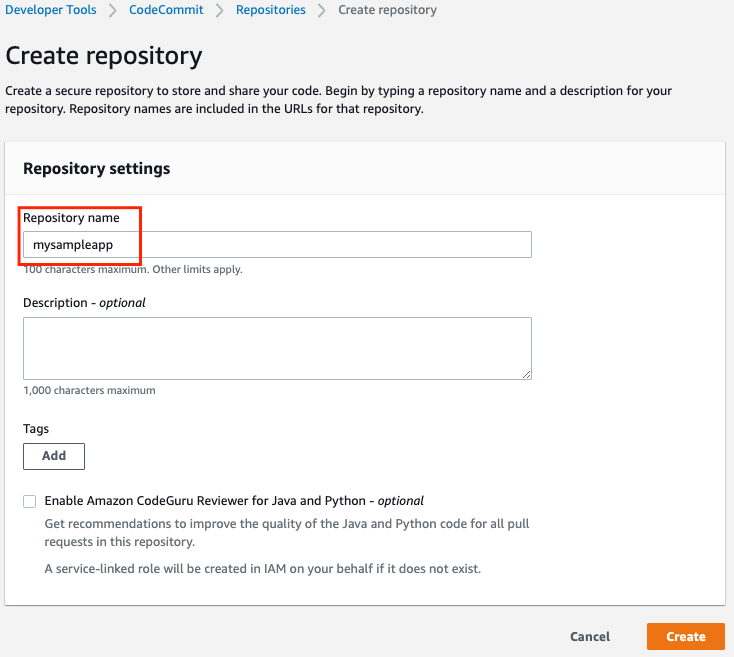
Creating your CodeCommit repository

Create your CodeCommit repository by running a create-repository command in the AWS CLI:

aws codecommit create-repository --repository-name cfn-guard-demo --repository-description "CloudFormation Guard Demo"

The following screenshot indicates that the repository has been created.

CodeCommit Repository

CodeCommit Repository has been created

Populating the CodeCommit repository

Populate your repository with the following artifacts:

  1. A buildspec.yml file. Modify the following code as per your requirements:
version: 0.2
env:
  variables:
    # Definining CloudFormation Teamplate and Ruleset as variables - part of the code repo
    CF_TEMPLATE: "cfn_template_file_example.yaml"
    CF_ORG_RULESET:  "cfn_guard_ruleset_example"
phases:
  install:
    commands:
      - apt-get update
      - apt-get install build-essential -y
      - apt-get install cargo -y
      - apt-get install git -y
  pre_build:
    commands:
      - echo "Setting up the environment for AWS CloudFormation Guard"
      - echo "More info https://github.com/aws-cloudformation/cloudformation-guard"
      - echo "Install Rust"
      - curl https://sh.rustup.rs -sSf | sh -s -- -y
  build:
    commands:
       - echo "Pull GA release from github"
       - echo "More info https://github.com/aws-cloudformation/cloudformation-guard/releases"
       - wget https://github.com/aws-cloudformation/cloudformation-guard/releases/download/1.0.0/cfn-guard-linux-1.0.0.tar.gz
       - echo "Extract cfn-guard"
       - tar xvf cfn-guard-linux-1.0.0.tar.gz .
  post_build:
    commands:
       - echo "Validate CloudFormation template with cfn-guard tool"
       - echo "More information https://github.com/aws-cloudformation/cloudformation-guard/blob/master/cfn-guard/README.md"
       - cfn-guard-linux/cfn-guard check --rule_set $CF_ORG_RULESET --template $CF_TEMPLATE --strict-checks
artifacts:
  files:
    - cfn_template_file_example.yaml
  name: guard_templates
  1. An example of a rule set file (cfn_guard_ruleset_example) for CloudFormation Guard. Modify the following code as per your requirements:
#CFN Guard rules set example

#List of multiple references
let allowed_azs = [us-east-1a,us-east-1b]
let allowed_ec2_instance_types = [t2.micro,t3.nano,t3.micro]
let allowed_security_groups = [sg-08bbcxxc21e9ba8e6,sg-07b8bx98795dcab2]

#EC2 Policies
AWS::EC2::Instance AvailabilityZone IN %allowed_azs
AWS::EC2::Instance ImageId == ami-0323c3dd2da7fb37d
AWS::EC2::Instance InstanceType IN %allowed_ec2_instance_types
AWS::EC2::Instance SecurityGroupIds == ["sg-07b8xxxsscab2"]
AWS::EC2::Instance SubnetId == subnet-0407a7casssse558

#EBS Policies
AWS::EC2::Volume AvailabilityZone == us-east-1a
AWS::EC2::Volume Encrypted == true
AWS::EC2::Volume Size == 50 |OR| AWS::EC2::Volume Size == 100
AWS::EC2::Volume VolumeType == gp2
  1. An example of a CloudFormation template file (.yaml). Modify the following code as per your requirements:
AWSTemplateFormatVersion: "2010-09-09"
Description: "EC2 instance with encrypted EBS volume for AWS CloudFormation Guard Testing"

Resources:

 EC2Instance:
    Type: AWS::EC2::Instance
    Properties:
      ImageId: 'ami-0323c3dd2da7fb37d'
      AvailabilityZone: 'us-east-1a'
      KeyName: "your-ssh-key"
      InstanceType: 't3.micro'
      SubnetId: 'subnet-0407a7xx68410e558'
      SecurityGroupIds:
        - 'sg-07b8b339xx95dcab2'
      Volumes:
         - 
          Device: '/dev/sdf'
          VolumeId: !Ref EBSVolume
      Tags:
       - Key: Name
         Value: cfn-guard-ec2

 EBSVolume:
   Type: AWS::EC2::Volume
   Properties:
     Size: 100
     AvailabilityZone: 'us-east-1a'
     Encrypted: true
     VolumeType: gp2
     Tags:
       - Key: Name
         Value: cfn-guard-ebs
   DeletionPolicy: Snapshot

Outputs:
  InstanceID:
    Description: The Instance ID
    Value: !Ref EC2Instance
  Volume:
    Description: The Volume ID
    Value: !Ref  EBSVolume
AWS CodeCommit

Optional CodeCommit Repository Structure

The following screenshot shows a potential CodeCommit repository structure.

Creating a CodeBuild project

Our CodeBuild project orchestrates around CloudFormation Guard and runs validation checks of our CloudFormation templates as a phase of the CI process.

  1. On the CodeBuild console, choose Build projects.
  2. Choose Create build projects.
  3. For Project name, enter your project name.
  4. For Description, enter a description.
AWS CodeBuild

Create CodeBuild Project

  1. For Source provider, choose AWS CodeCommit.
  2. For Repository, choose the CodeCommit repository you created in the previous step.
AWS CodeBuild

Define the source for your CodeBuild Project

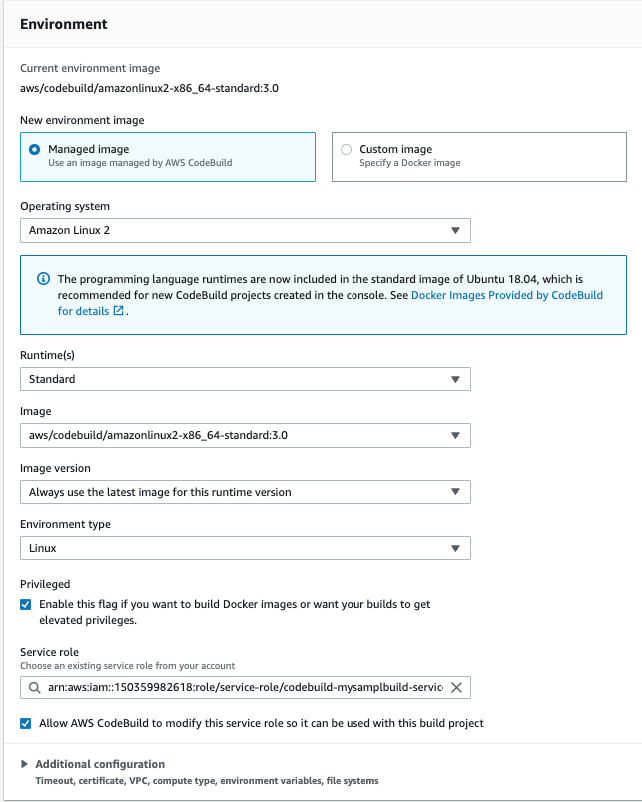
To setup CodeBuild environment we will use managed image based on Ubuntu 18.04

  1. For Environment Image, select Managed image.
  2. For Operating system, choose Ubuntu.
  3. For Service role¸ select New service role.
  4. For Role name, enter your service role name.
CodeBuild Environment

Setup the environment, the OS image and other settings for the CodeBuild

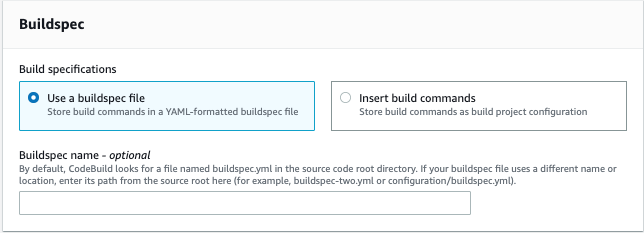
  1. Leave the default settings for additional configuration, buildspec, batch configuration, artifacts, and logs.

You can also use CodeBuild with custom build environments to help you optimize billing and improve the build time.

Creating IAM roles and policies

Our CI/CD pipeline needs two AWS Identity and Access Management (IAM) roles to run properly: one role for CodePipeline to work with other resources and services, and one role for AWS CloudFormation to run the deployments that passed the validation check in the CodeBuild phase.

Creating permission policies

Create your permission policies first. The following code is the policy in JSON format for CodePipeline:

{
    "Version": "2012-10-17",
    "Statement": [
        {
            "Sid": "VisualEditor0",
            "Effect": "Allow",
            "Action": [
                "codecommit:UploadArchive",
                "codecommit:CancelUploadArchive",
                "codecommit:GetCommit",
                "codecommit:GetUploadArchiveStatus",
                "codecommit:GetBranch",
                "codestar-connections:UseConnection",
                "codebuild:BatchGetBuilds",
                "codedeploy:CreateDeployment",
                "codedeploy:GetApplicationRevision",
                "codedeploy:RegisterApplicationRevision",
                "codedeploy:GetDeploymentConfig",
                "codedeploy:GetDeployment",
                "codebuild:StartBuild",
                "codedeploy:GetApplication",
                "s3:*",
                "cloudformation:*",
                "ec2:*"
            ],
            "Resource": "*"
        },
        {
            "Sid": "VisualEditor1",
            "Effect": "Allow",
            "Action": "iam:PassRole",
            "Resource": "*",
            "Condition": {
                "StringEqualsIfExists": {
                    "iam:PassedToService": [
                        "cloudformation.amazonaws.com",
                        "ec2.amazonaws.com"
                    ]
                }
            }
        }
    ]
}

To create your policy for CodePipeline, run the following CLI command:

aws iam create-policy --policy-name CodePipeline-Cfn-Guard-Demo --policy-document file://CodePipelineServiceRolePolicy_example.json

Capture the policy ARN that you get in the output to use in the next steps.

The following code is the policy in JSON format for AWS CloudFormation:

{
    "Version": "2012-10-17",
    "Statement": [
        {
            "Sid": "VisualEditor0",
            "Effect": "Allow",
            "Action": "iam:CreateServiceLinkedRole",
            "Resource": "*",
            "Condition": {
                "StringEquals": {
                    "iam:AWSServiceName": [
                        "autoscaling.amazonaws.com",
                        "ec2scheduled.amazonaws.com",
                        "elasticloadbalancing.amazonaws.com"
                    ]
                }
            }
        },
        {
            "Sid": "VisualEditor1",
            "Effect": "Allow",
            "Action": [
                "s3:GetObjectAcl",
                "s3:GetObject",
                "cloudwatch:*",
                "ec2:*",
                "autoscaling:*",
                "s3:List*",
                "s3:HeadBucket"
            ],
            "Resource": "*"
        }
    ]
}

Create the policy for AWS CloudFormation by running the following CLI command:

aws iam create-policy --policy-name CloudFormation-Cfn-Guard-Demo --policy-document file://CloudFormationRolePolicy_example.json

Capture the policy ARN that you get in the output to use in the next steps.

Creating roles and trust policies

The following code is the trust policy for CodePipeline in JSON format:

{
  "Version": "2012-10-17",
  "Statement": [
    {
      "Effect": "Allow",
      "Principal": {
        "Service": "codepipeline.amazonaws.com"
      },
      "Action": "sts:AssumeRole"
    }
  ]
}

Create your role for CodePipeline with the following CLI command:

aws iam create-role --role-name CodePipeline-Cfn-Guard-Demo-Role --assume-role-policy-document file://RoleTrustPolicy_CodePipeline.json

Capture the role name for the next step.

The following code is the trust policy for AWS CloudFormation in JSON format:

{
  "Version": "2012-10-17",
  "Statement": [
    {
      "Sid": "",
      "Effect": "Allow",
      "Principal": {
        "Service": "cloudformation.amazonaws.com"
      },
      "Action": "sts:AssumeRole"
    }
  ]
}

Create your role for AWS CloudFormation with the following CLI command:

aws iam create-role --role-name CF-Cfn-Guard-Demo-Role --assume-role-policy-document file://RoleTrustPolicy_CloudFormation.json

Capture the role name for the next step.


Finally, attach the permissions policies created in the previous step to the IAM roles you created:

aws iam attach-role-policy --role-name CodePipeline-Cfn-Guard-Demo-Role  --policy-arn "arn:aws:iam::<AWS Account Id >:policy/CodePipeline-Cfn-Guard-Demo"

aws iam attach-role-policy --role-name CF-Cfn-Guard-Demo-Role  --policy-arn "arn:aws:iam::<AWS Account Id>:policy/CloudFormation-Cfn-Guard-Demo"

Creating a pipeline

We can now create our pipeline to assemble all the components into one managed, continuous mechanism.

  1. On the CodePipeline console, choose Pipelines.
  2. Choose Create new pipeline.
  3. For Pipeline name, enter a name.
  4. For Service role, select Existing service role.
  5. For Role ARN, choose the service role you created in the previous step.
  6. Choose Next.
CodePipeline Setup

Setting Up CodePipeline environment

  1. In the Source section, for Source provider, choose AWS CodeCommit.
  2. For Repository name¸ enter your repository name.
  3. For Branch name, choose master.
  4. For Change detection options, select Amazon CloudWatch Events.
  5. Choose Next.
AWS CodePipeline Source

Adding CodeCommit to CodePipeline

  1. In the Build section, for Build provider, choose AWS CodeBuild.
  2. For Project name, choose the CodeBuild project you created.
  3. For Build type, select Single build.
  4. Choose Next.
CodePipeline Build Stage

Adding Build Project to Pipeline Stage

Now we will create a deploy stage in our CodePipeline to deploy CloudFormation templates that passed the CloudFormation Guard inspection in the CI stage.

  1. In the Deploy section, for Deploy provider, choose AWS CloudFormation.
  2. For Action mode¸ choose Create or update stack.
  3. For Stack name, choose any stack name.
  4. For Artifact name, choose BuildArtifact.
  5. For File name, enter the CloudFormation template name in your CodeCommit repository (In case of our demo it is cfn_template_file_example.yaml).
  6. For Role name, choose the role you created earlier for CloudFormation.
CodePipeline - Deploy Stage

Adding deploy stage to CodePipeline

22. In the next step review your selections for the pipeline to be created. The stages and action providers in each stage are shown in the order that they will be created. Click Create pipeline. Our CodePipeline is ready.

Validating the CI/CD pipeline operation

Our CodePipeline has two basic flows and outcomes. If the CloudFormation template complies with our CloudFormation Guard rule set file, the resources in the template deploy successfully (in our use case, we deploy an EC2 instance with an encrypted EBS volume).

CloudFormation Deployed

CloudFormation Console

If our CloudFormation template doesn’t comply with the policies specified in our CloudFormation Guard rule set file, our CodePipeline stops at the CodeBuild step and you see an error in the build job log indicating the resources that are non-compliant:

[EBSVolume] failed because [Encrypted] is [false] and the permitted value is [true]
[EC2Instance] failed because [t3.2xlarge] is not in [t2.micro,t3.nano,t3.micro] for [InstanceType]
Number of failures: 2

Note: To demonstrate the above functionality I changed my CloudFormation template to use unencrypted EBS volume and switched the EC2 instance type to t3.2xlarge which do not adhere to the rules that we specified in the Guard rule set file

Cleaning up

To avoid incurring future charges, delete the resources that we have created during the walkthrough:

  • CloudFormation stack resources that were deployed by the CodePipeline
  • CodePipeline that we have created
  • CodeBuild project
  • CodeCommit repository

Conclusion

In this post, we covered how to integrate CloudFormation Guard into CodePipeline and fully automate pre-deployment compliance checks of your CloudFormation templates. This allows your teams to have an end-to-end automated CI/CD pipeline with minimal operational overhead and stay compliant with your organizational infrastructure policies.

Field Notes: Implementing Hardware-in-the-Loop for Autonomous Driving Development on AWS

Post Syndicated from Bryan Berezdivin original https://aws.amazon.com/blogs/architecture/field-notes-implementing-hardware-in-the-loop-for-autonomous-driving-development-on-aws/

Automotive customers use AWS as their platform for advanced driving assistance systems (ADAS) and autonomous driving (AD) development to accelerate their development cycles and experience faster time-to-market.  In the blog post, Autonomous Vehicle and ADAS development on AWS Part 1: Achieving Scale, we illustrated how software in the loop (SiL) and hardware in the loop (HiL) simulations are part of the workflow used to develop and validate safe AD and ADAS functionality. In this post, I run through some of the more common questions and patterns for implementing HiL on AWS, while looking at some of the differences from running your development all on-premises.

HiL simulations leverage test drive data and derived synthetic data to develop and validate various functions in the AD software stack.  Test drive log data is ingested and stored in Amazon S3 for use for HiL simulations in parallel with other AD development workloads including visualization, processing, labeling, analysis, and model and algorithm development.

As such, we see customers exist in a hybrid context with their HiL workloads running on-premises to support customized equipment. For ADAS and ADS customers, this poses a few questions and considerations:

  • What are the recommendations to deploy HiL for AD on AWS?
  • How is this different from what customers were used to on-premises?

For hybrid customers, there are assumptions and misconceptions:

  • Do I need to replicate the test drive data locally, and if so, what are the considerations and consequences?

For the purposes of brevity, the remainder of this blog post will use the term AD development to encompass ADAS and AD unless specifically called out.

HiL Building Blocks

Simulations and validations make up an important aspect of AD development. According to Rand’s analysis, there is a need to demonstrate safe driving on billions of miles for an autonomous vehicle to have a lower failure rate than a human driver. While this analysis is statistically derived for fully autonomous driving (SAE Level 5), it demonstrates a need for further validation on millions of miles. This pattern is reflected in most ADAS and AD development projects, where software in the loop (SiL) and HiL are used for verification and validation.

The following diagram is an illustration of the ISO 26262 V-Model, a product development approach for matching requirements with corresponding tests, where HiL simulation is required for much of system level testing and validation phases on the right side of the overlaid V-Model.

Figure 1: V-Model as defined by ISO-26262

Figure 1: V-Model as defined by ISO-26262

HiL simulations require a few key elements. The main component is the device under test (DUT), such as one or more electronic control units (ECUs) running the AD software stack. HiL simulations allow customers to put the device under test (DUT) under the rigor of real-world signals found in a vehicle. By providing more accurate environments and scenarios for the DUT, it can be fine-tuned for key performance indicators (KPIs) such as power utilization, response time, and accuracy.

The DUT is connected to a “HIL Rig,” a high performance server with multiple expansion boards to connect to various components of the AD system. The various interfaces are identified in Figure 2:  High Level Hardware-in-the-loop (HiL) System and Interfaces and include Controller Area Network (CAN), Automotive Ethernet, Low Voltage Differential Signal (LVDS), and PCIExpress. These interfaces emulate the vehicular topology for testing purposes and allow system level validation of the DUT.

The HiL Rigs and the corresponding software tooling are offered by companies like Elektrobit, dSpace, National Instruments, and Opal-RT. The HiL systems facilitate time synchronized inputs and outputs to the DUT and measures system performance. These solutions have optimizations for large-scale operations aligned with faster validation cycles for customers. This latter point is relevant when a project requires validation across a large number of miles. Elektrobit provides the ability to orchestrate and deploy large HiL server farms that can be deployed to work in parallel. The larger server farms allow parallel HiL simulations to reduce the time to validate thousands of miles of drive time and assess the key performance indicators (KPIs) for the feature sets. Results can be acted on more quickly and reduce the overall development time.

Figure 2: High Level Hardware-in-the-loop (HiL) System and Interfaces

Figure 2: High Level Hardware-in-the-loop (HiL) System and Interfaces

The HIL system loads sensor data derived from test drive logs. These logs vary in format, but often are captured and stored as MDF4, ADTF, rosbag, or other data logger proprietary formats. These are then processed for HIL simulations to implement open-loop and closed-loop simulations.

  • Open loop simulations refer to replay of log data from test drives.
  • Closed-loop simulations rely on the behavior of the system as inputs vary based on new outputs of the simulation.

Both open loop and closed loop simulations are part of autonomous driving development, but open-loop simulations require the largest datasets (multiple petabytes on average) due to reliance on the log data from test drives making them a primary concern for deploying HiL in a hybrid manner.

Overview of Solution

Architectures for supporting HIL simulations with AWS for AD development vary based primarily on the networking available at HiL locations. A common pattern for AWS customers is to have the HiL systems directly interfacing with Amazon S3 over high-bandwidth network links leveraging AWS Direct Connect. This is the simplest approach to deploying HiL and avoids hybrid data management of the petabytes of data in Amazon S3 to a local storage system.

AWS Direct Connect provides customers options to deploy their HIL rigs at their data center or in AWS colocation facilities with low latency connections. AWS has the largest number of Direct Connection locations and points-of-presence (POPs) to enable low latency connectivity to any of the >24 AWS Regions. The following diagram illustrates a reference architecture leveraging a direct interface from the HiL systems and Amazon S3.

Figure 3 : Reference Architecture for Hardware-in-the-Loop (HiL) Direct to Amazon S3

As shown in Figure 3, we illustrate the common interfaces, topology, and AWS services used for autonomous driving customers.

  • Amazon S3 is used to store and analyze the test drive logs used by the HiL simulations and also the results from the simulation runs for further analysis.
  • Metadata of test drive data is populated in various database and analytics services, referred to as the data catalogues, with metadata crawlers and processing pipelines that extract from the drive log and test result data on Amazon S3.
  • The data catalogues provide flexible search interfaces for developers and validation engineers or advanced analytics tools. These systems provide keyword search in Amazon Elasticsearch or SQL queries in Amazon Redshift or Amazon RDS and noSQL interfaces using Amazon DynamoDB. Amazon Partner Network solutions for these database and analysis tools are common as well, such as those in AWS Marketplace.
  • Validation engineer, data scientists, or developers use these data catalogues to find scenarios for testing. These personas also use the HiL management interfaces to configure and orchestrate the HiL simulation runs on the scenarios identified and ensure traceability.
  • HiL management systems control the HiL Rigs that interface to the DUT and implement the HiL simulations using the test drive logs. The HiL management system then writes results back to S3 for further analysis via various tool chains.

A common question AWS customers have is how to determine an optimal hybrid architecture using this approach. The primary factors are properly sized network links to accommodate data sets used by the HiL simulations as well as low latency network links between Amazon S3 and the HiL rigs. As a result, a key factor is ensuring use of an AWS region for your AWS storage that is in close proximity to your HiL testing site(s).

Based on current HiL implementations, open-loop simulations can sustain latencies of 30-50 ms RTT. AWS has numerous AWS Direct Connect locations in co-location facilities with latencies <5ms RTT. Sizing for these network links can be calculated based on the expected dataset sizes and the interval of time targeted for simulation run. We show a basic formula used for network sizing.

Average_Throughput (Gbps) = Average_Dataset_Size(GB)*8 / Time_Interval (seconds)

As an example, for a scenario where an average of 20PB is needed by the HIL rig every 2 weeks, we require ~200Gbps for the AWS Direct Connect bandwidth.

Figure 4 shows an example of a high-level architecture supported by Elektrobit with multiple EB 9101 test racks grouped together. This architecture supports multiple ECUs to be tested at once, leveraging drive log data in Amazon S3. This system is controlled with a central management software that allows optimal orchestration to keep the Elektrobit HiL system running optimally.

Use cases include:

  • The automated replay of all relevant sensor data with high time precision to ECU
  • Capture of ECU responses including debug data
  • Integration of customer components inside the HiL rack for visualization or post-processing.

Another common question from AWS customers is whether this architecture is supported for their HiL implementation. Many HiL providers are adding AWS functionality to their software and hardware stacks in response to customers transitioning to cloud for the development platforms.  Some vendors still require Amazon S3 as a supported interface in their HiL Rigs. The work needed to accommodate Amazon S3 is usually a small level of effort for any developer by using Amazon SDKs on the HiL rig software stack. If there is a project where this is needed, contact the AWS account teams and your HiL vendors to ensure a successful and cost efficient project implementation.

Figure 4: Elektrobit HiL Architecture with AWS

Figure 4: Elektrobit HiL Architecture with AWS

An alternative HiL solution shown in Figure 5 includes Amazon S3 as the primary storage for drive log data and the scale out NAS storage system is located on-premises operating as a cache for the HIL rigs. This is common when the networking options at the HIL site are limited in bandwidth or latency to handle the target datasets and time windows.

AWS customers calculate the size of the cache to transfer the entire dataset over the intended time interval. Following is a simple calculation to demonstrate this.

Cache_Size(GB) = Average_Dataset_Size(GB) - Average_Throughput (Gbps) /8 * Time_Interval (seconds)

In this example, a customer has 40 Gbps AWS Direct Connect available and a 10PB dataset needed for HIL simulations every 2 weeks. Using the preceding formula there is a need for local cache of four PB capable of high read-rates.

Figure 5: Reference Architecture for Hardware-in-the Loop (HiL) with Local Cache to Amazon S3

Figure 5: Reference Architecture for Hardware-in-the Loop (HiL) with Local Cache to Amazon S3

In this hybrid architecture there is a need to orchestrate the data movement in line with the needs of the HIL simulation data set. This requires third party software generally or built in functionality into workflow orchestration tools like Apache Airflow. At CES 2019, Dell EMC and AWS illustrated a solution for this hybrid architecture documented in this short solution brief using Isilon as the scale out NAS storage system and DataIQ as the data movement and orchestration mechanism.

Any of these architectures can be cost-optimized, and AWS has programs and pricing options for Amazon Direct Connect as well as the other AWS services involved. There are Enterprise Agreements and Migration Acceleration Programs (MAP)  in line with the holistic AD development platform needs, that reduce the costs for hybrid architecture functionality needed in the HiL solutions. One common need is support for AWS Direct Connect “flat rate” pricing option to accommodate the data transfer out (DTO) needs for the HiL workload. If you need details on these programs for your AD development project, contact your AWS account team.

Conclusion

In this blog post, we discussed two common architectural patterns for supporting HiL simulations for ADAS and Autonomous Driving development. These help customers decide on the right networking, storage, and hybrid topologies for these systems.

HiL systems directly interfacing with Amazon S3 is the most common pattern as you see with Elektrobit HiL solutions, but for customers with limited network links the use of a local cache is an option. Autonomous driving customers looking to increase velocity in their SAE Level 2-5 development programs with HiL simulations have achieved success with AWS as the development platform using these patterns. AWS has a team dedicated to autonomous driving, so contact your AWS account team to get a more prescriptive solution for your HiL or related ADAS and AD development needs.

Also, check out the Automotive issue of the AWS Architecture Monthly Magazine.

Field Notes provides hands-on technical guidance from AWS Solutions Architects, consultants, and technical account managers, based on their experiences in the field solving real-world business problems for customers.

Architecture Monthly Magazine: AWS Solutions

Post Syndicated from Annik Stahl original https://aws.amazon.com/blogs/architecture/architecture-monthly-magazine-aws-solutions/

Architecture Monthly - October 2020 - AWS SolutionsFor October’s issue of AWS Architecture Monthly Magazine, we decided to do a deep dive into the AWS Solutions Library, a virtual treasure trove of cloud-based solutions for dozens of technical and business problems. Whether you want to combine pre-built, well-architected multi-service patterns to create your own solution, deploy vetted architecture directly into your AWS account, or get help deploying vetted architecture from AWS Competency Partners, we can help. Our expert runs us though the various offerings you can take advantage of, and some of our other guest writers will go more deeply into the individual options.

In this month’s AWS Solutions issue

  • Ask an Expert: Tom Begley, Manager, AWS Solutions Builder
  • Customer Success Story: App8: Helping Restaurants Succeed during COVID-19
  • AWS Solutions Implementations: Detailed architectures, a deployment guide, and instructions for both automated and manual deployment
  • AWS Solutions Constructs: Building faster and more confidently with vetted architecture patterns
  • AWS Solutions Consulting Offers: Enhancing the AWS Solutions Library to address customer needs
  • Related Videos: Watch what AWS Solutions can do for you

How to access the magazine

We hope you’re enjoying Architecture Monthly, and we’d like to hear from you—leave us star rating and comment on the Amazon Kindle Newsstand page or contact us anytime at [email protected].

Architecture Patterns for Red Hat OpenShift on AWS

Post Syndicated from Ryan Niksch original https://aws.amazon.com/blogs/architecture/architecture-patterns-for-red-hat-openshift-on-aws/

Editor’s note: Although this blog post and its accompanying code make use of the word “Master,” Red Hat is making open source code more inclusive by eradicating “problematic language.” Read more about this.

Introduction

Red Hat OpenShift is an application platform that provides customers with turnkey application platform that is much more than a simple Kubernetes orchestration.

OpenShift customers choose AWS as their cloud of choice because of the efficiency, security, and reliability, scalability, and elasticity it provides. Customers seeking to modernize their business, process, and application stacks are drawn to the rich AWS service and feature sets.

As such, we see some customers migrate from on-premises to AWS or exist in a hybrid context with application workloads running in various locations. For OpenShift customers, this poses a few questions and considerations:

  • What are the recommendations for the best way to deploy OpenShift on AWS?
  • How is this different from what customers were used to on-premises?
  • How does this ensure resilience and availability?
  • Do customers need a multi-region, multi-account approach?

For hybrid customers, there are assumptions and misconceptions:

  • Where does the control plane exist?
  •  Is there replication, and if so, what are the considerations and ramifications?

In this post I will run through some of the more common questions and patterns for OpenShift on AWS, while looking at some of the terminology and conceptual differences of AWS. I’ll explore migration and hybrid use cases and address some misconceptions.

OpenShift building blocks

On AWS, OpenShift 4x is the norm. To that effect, I will focus on OpenShift 4, but many of the considerations will apply to both OpenShift 3 and OpenShift 4.

Let’s unpack some of the OpenShift building blocks. An OpenShift cluster consists of Master, infrastructure, and worker nodes. The Master forms the control plane and infrastructure nodes cater to a routing layer and additional functions, such as logging, monitoring etc. Worker nodes are the nodes that customer application container workloads will exist on.

When deployed on-premises, OpenShift nodes will be placed in separate network subnets. Depending on distance, latency, etc., a single OpenShift cluster may span two data centers that have some nodes in a subnet in one data center and other subnets in a different data center. This applies to customers with data centers within a few miles of each other with high-speed connectivity. An alternative would be an OpenShift cluster in each data center.

AWS concepts and terminology

At AWS, the concept of “region” is a geolocation, such as EMEA (Europe, Middle East, and Africa) or APAC (Asian Pacific) rather than a data center or specific building. An Availability Zone (AZ) is the closest construct on AWS that maps to a physical data center. Within each region you will find multiple (typically three or more) AZs. Note that a single AZ will contain multiple physical data centers but we treat it as a single point of failure. For example, an event that impacts an AZ would be expected to impact all the data centers within that AZ. To this effect, customers should deploy workloads spanning multiple AZs to protect against any event that would impact a single AZ.

Read more about Regions, Availability Zones, and Edge Locations.

Deploying OpenShift

When deploying an OpenShift cluster on AWS, we recommend starting with three Master nodes spread across three AWS AZs and three worker nodes spread across three AZs. This allows for the combination of resilience and availably constructs provided by AWS as well as Red Hat OpenShift. The OpenShift installer provides a means of deploying the underlying AWS infrastructure in two ways: IPI Installer-provisioned infrastructure and UPI user-provisioned infrastructure. Both Red Hat and AWS collect customer feedback and use this to drive recommended patterns that are then included in the OpenShift installer. As such, the OpenShift installer IPI mode becomes a living reference architecture for deploying OpenShift on AWS.

Deploying OpenShift

The installer will require inputs for the environment on which it’s being deployed. In this case, since I am deploying on AWS, I will need to provide the AWS region, AZs, or subnets that related to the AZs, as well as EC2 instance type. The installer will then generate a set of ignition files that will be used during the deployment of OpenShift:

apiVersion: v1
baseDomain: example.com 
controlPlane: 
  hyperthreading: Enabled   
  name: master
  platform:
    aws:
      zones:
      - us-west-2a
      - us-west-2b
      - us-west-2c
      rootVolume:
        iops: 4000
        size: 500
        type: io1
      type: m5.xlarge 
  replicas: 3
compute: 
- hyperthreading: Enabled 
  name: worker
  platform:
    aws:
      rootVolume:
        iops: 2000
        size: 500
        type: io1 
      type: m5.xlarge
      zones:
      - us-west-2a
      - us-west-2b
      - us-west-2c
  replicas: 3
metadata:
  name: test-cluster 
networking:
  clusterNetwork:
  - cidr: 10.128.0.0/14
    hostPrefix: 23
  machineNetwork:
  - cidr: 10.0.0.0/16
  networkType: OpenShiftSDN
  serviceNetwork:
  - 172.30.0.0/16
platform:
  aws:
    region: us-west-2 
    userTags:
      adminContact: jdoe
      costCenter: 7536
pullSecret: '{"auths": ...}' 
fips: false 
sshKey: ssh-ed25519 AAAA... 

What does this look like at scale?

For larger implementations, we would see additional worker nodes spread across three or more AZs. As more worker nodes are added, use of the control plane increases. Initially scaling up the Amazon Elastic Compute Cloud (EC2) instance type to a larger instance type is an effective way of addressing this. It’s possible to add more Master nodes, and we recommend that an odd number of nodes are maintained. It is more common to see scaling out of the infrastructure nodes before there is a need to scale Masters. For large-scale implementations, infrastructure functions such as the router, monitoring, and logging functions can be moved to separate EC2 instances from the Master nodes, as well as from each other. It is important to spread the routing layer across multiple AZs, which is critical to maintaining availability and resilience.

The process of resource separation is now controlled by infrastructure machine sets within OpenShift. An infrastructure machine set would need to be defined, then the infrastructure role edited to be moved from the default to this new infrastructure machine set. Read about this in greater detail.

OpenShift in a multi-account context

Using AWS accounts as a means of separation is a common well-architected pattern. AWS Organizations and AWS Control Tower are services that are commonly adopted as part of a multi-account strategy. This is very much the case when looking to enable teams to use their own accounts and when an account vending process is needed to cater for self-service account provisioning.

OpenShift in a multi-account context

OpenShift clusters are deployed into multiple accounts. An OpenShift dev cluster is deployed into an AWS Dev account. This account would typically have AWS Developer Support associated with it. A separate production OpenShift cluster would be provisioned into an AWS production account with AWS Enterprise Support. Enterprise support provides for faster support case response times, and you get the benefit of dedicated resources such as a technical account manager and solutions architect.

CICD pipelines and processes are then used to control the application life cycle from code to dev to production. The pipelines would push the code to different OpenShift cluster end points at different stages of the life cycle.

Hybrid use case implementation

A common misconception of hybrid implementations is that there is a single cluster or control plan that has worker nodes in various locations. For example, there could be a cluster where the Master and infrastructure nodes are deployed in one location, but also worker nodes registered with this cluster that exist on-premises as well as in the cloud.

Having a single customer control plane for a hybrid implementation, even if technically possible, introduces undesired risks.

There is the potential to take multiple environments with very different resilience characteristics and make them interdependent of each other. This can result in performance and reliability issues, and these may increase not only the possibility of the risk manifesting, but also increase in the impact or blast radius.

Instead, hybrid implementations will see separate OpenShift clusters deployed into various locations. A customer may deploy clusters on-premises to cater for a workload that can’t be migrated to the cloud in the short term. Separate OpenShift clusters can then deployed into accounts in AWS for workloads on the cloud. Customers can also deploy separate OpenShift clusters in different AWS regions to cater for proximity to the consuming customer.

Though adding multiple clusters doesn’t add significant administrative overhead, there is a desire to be able to gain visibility and telemetry to all the deployed clusters from a central location. This may see the OpenShift clusters registered with Red Hat Advanced Cluster Manager for Kubernetes.

Summary

Take advantage of the IPI model, not only as a guide but to also save time. Make AWS Organizations, AWS Control Tower, and the AWS Service catalog part of your cloud and hybrid strategies. These will not only speed up migrations but also form building blocks for a modernized business with a focus of enabling prescriptive self-service. Consider Red Hat advanced cluster manager for multi cluster management.

Automated CloudFormation Testing Pipeline with TaskCat and CodePipeline

Post Syndicated from Raleigh Hansen original https://aws.amazon.com/blogs/devops/automated-cloudformation-testing-pipeline-with-taskcat-and-codepipeline/

Researchers at Academic Medical Centers (AMCs) use programs such as Observational Health Data Sciences and Informatics (OHDSI) and Research Electronic Data Capture (REDCap) to interact with healthcare data. Our internal team at AWS has provided solutions such as OHDSI-on-AWS and REDCap environments on AWS to help clinicians analyze healthcare data in the AWS Cloud. Occasionally, these solutions break due to a change in some portion of the solution (e.g. updated services). The Automated Solutions Testing Pipeline enables our team to take a proactive approach to discovering these breaks and their cause in order to expedite the repair process.

OHDSI-on-AWS provides these AMCs with the ability to store and analyze observational health data in the AWS cloud. REDCap is a web application for managing surveys and databases with HIPAA-compliant environments. Using our solutions, these programs can be spun up easily on the AWS infrastructure using AWS CloudFormation templates.

Updates to AWS services and other program libraries can cause the CloudFormation template to fail during deployment. Other times, the outputs may not be operating correctly, or the template may not work on every AWS region. This can create a negative customer experience. Some customers may discover this kind of break and decide to not move forward with using the solution. Other customers may not even realize the solution is broken, so they might be unknowingly working with an uncooperative environment. Furthermore, we cannot always provide fast support to the customers who contact us about broken solutions. To meet our team’s needs and the needs of our customers, we decided to focus our efforts on taking a CI/CD approach to maintain these solutions. We developed the Automated Testing Pipeline which regularly tests solution deployment and changes to source files.

This post shows the features of the Automated Testing Pipeline and provides resources to help you get started using it with your AWS account.

Overview of Automated Testing Pipeline Solution

The Automated Testing Pipeline solution as a whole is designed to automatically deploy CloudFormation templates, run tests against the deployed environments, send notifications if an issue is discovered, and allow for insightful testing data to be easily explored.

CloudFormation templates to be tested are stored in an Amazon S3 bucket. Custom test scripts and TaskCat deployment configuration are stored in an AWS CodeCommit repository.

The pipeline is triggered in one of three ways: an update to the CloudFormation Template in S3, an Amazon CloudWatch events rule, and an update to the testing source code repository. Once the pipeline has been triggered, AWS CodeBuild pulls the source code to deploy the CloudFormation template, test the deployed environment, and store the results in an S3 bucket. If any failures are discovered, subscribers to the failure topic are notified. The following diagram shows its overall architecture.

Diagram of Automated Testing Pipeline architecture

Diagram of Automated Testing Pipeline architecture

In order to create the Automated Testing Pipeline, two interns collaborated over the course of 5 weeks to produce the architecture and custom test scripts. We divided the work of constructing a serverless architecture and writing out test scripts for the output urls for OHDSI-on-AWS and REDCap environments on AWS.

The following tasks were completed to build out the Automated Testing Pipeline solution:

  • Setup AWS IAM roles for accessing AWS resources securely
  • Create CloudWatch events to trigger AWS CodePipeline
  • Setup CodePipeline and CodeBuild to run TaskCat and testing scripts
  • Configure TaskCat to deploy CloudFormation solutions in various AWS Regions
  • Write test scripts to interact with CloudFormation solutions’ deployed environments
  • Subscribe to receive emails detailing test results
  • Create a CloudFormation template for the Automated Testing Pipeline

The architecture can be extended to test any CloudFormation stack. For this particular use case, we wrote the test scripts specifically to test the urls output by the CloudFormation solutions. The Automated Testing Pipeline has the following features:

  • Deployed in a single AWS Region, with the exception of the tested CloudFormation solution
  • Has a serverless architecture operating at the AWS Region level
  • Deploys a pipeline which can deploy and test the CloudFormation solution
  • Creates CloudWatch events to activate the pipeline on a schedule or when the solution is updated
  • Creates an Amazon SNS topic for notifying subscribers when there are errors
  • Includes code for running TaskCat and scripts to test solution functionality
  • Built automatically in minutes
  • Low in cost with free tier benefits

The pipeline is triggered automatically when an event occurs. These events include a change to the CloudFormation solution template, a change to the code in the testing repository, and an alarm set off by a regular schedule. Additional events can be added in the CloudWatch console.

When the pipeline is triggered, the testing environment is set up by CodeBuild. CodeBuild uses a build specification file kept within our source repository to set up the environment and run the test scripts. We created a CodeCommit repository to host the test scripts alongside the build specification. The build specification includes commands run TaskCat — an open-source tool for testing the deployment of CloudFormation templates. TaskCat provides the ability to test the deployment of the CloudFormation solution, but we needed custom test scripts to ensure that we can interact with the deployed environment as expected. If the template is successfully deployed, CodeBuild handles running the test scripts against the CloudFormation solution environment. In our case, the environment is accessed via urls output by the CloudFormation solution.

We used a Selenium WebDriver for interacting with the web pages given by the output urls. This allowed us to programmatically navigate a headless web browser in the serverless environment and gave us the ability to use text output by JavaScript functions to understand the state of the test. You can see this interaction occurring in the code snippet below.

def log_in(driver, user, passw, link, btn_path, title):
    """Enter username and password then submit to log in

        :param driver: webdriver for Chrome page
        :param user: username as String
        :param passw: password as String
        :param link: url for page being tested as String
        :param btn_path: xpath to submit button
        :param title: expected page title upon successful sign in
        :return: success String tuple if log in completed, failure description tuple String otherwise
    """
    try:
        # post username and password data
        driver.find_element_by_xpath("//input[ @name='username' ]").send_keys(user)
        driver.find_element_by_xpath("//input[ @name='password' ]").send_keys(passw)

        # click sign in button and wait for page update
        driver.find_element_by_xpath(btn_path).click()
    except NoSuchElementException:
        return 'FAILURE', 'Unable to access page elements'

    try:
        WebDriverWait(driver, 20).until(ec.url_changes(link))
        WebDriverWait(driver, 20).until(ec.title_is(title))
    except TimeoutException as e:
        print("Timeout occurred (" + e + ") while attempting to sign in to " + driver.current_url)
        if "Sign In" in driver.title or "invalid user" in driver.page_source.lower():
            return 'FAILURE', 'Incorrect username or password'
        else:
            return 'FAILURE', 'Sign in attempt timed out'

    return 'SUCCESS', 'Sign in complete'

We store the test results in JSON format for ease of parsing. TaskCat generates a dashboard which we customize to display these test results. We are able to insert our JSON results into the dashboard in order to make it easy to find errors and access log files. This dashboard is a static html file that can be hosted on an S3 bucket. In addition, messages are published to topics in SNS whenever an error occurs which provide a link to this dashboard.

Dashboard containing descriptions of tests and their results

Customized TaskCat dashboard

In true CI/CD fashion, this end-to-end design automatically performs tasks that would otherwise be performed manually. We have shown how deploying solutions, testing solutions, notifying maintainers, and providing a results dashboard are all actions handled entirely by the Automated Testing Pipeline.

Getting Started with the Automated Testing Pipeline

Prerequisite tasks to complete before deploying the pipeline:

Once the prerequisite tasks are completed, the pipeline is ready to be deployed. Detailed information about deployment, altering the source code to fit your use case, and troubleshooting issues can be found at the GitHub page for the Automated Testing Pipeline.

For those looking to jump right into deployment, click the Launch Stack button below.

Button to click to deploy the Automated Testing Pipeline via CloudFormation

Tasks to complete after deployment:

  • Subscribe to SNS topic for error messages
  • Update the code to match the parameters and CloudFormation template that were chosen
  • Skip this step if you are testing OHDSI-on-AWS. Upload the desired CloudFormation template to the created source S3 Bucket
  • Push the source code to the created CodeCommit Repository

After the code is pushed to the CodeCommit repository and the CloudFormation template has been uploaded to S3, the pipeline will run automatically. You can visit the CodePipeline console to confirm that the pipeline is running with an “in progress” status.

You may desire to alter various aspects of the Automated Testing Pipeline to better fit your use case. Listed below are some actions you can take to modify the solution to fit your needs:

  • Go to CloudWatch Events and update rules for automatically started the pipeline.
  • Scale out testing by providing custom testing scripts or altering the existing ones.
  • Test a different CloudFormation template by uploading it to the source S3 bucket created and configuring the pipeline accordingly. Custom test scripts will likely be required for this use case.

Challenges Addressed by the Automated Testing Pipeline

The Automated Testing Pipeline directly addresses the challenges we faced with maintaining our OHDSI and REDCap solutions. Additionally, the pipeline can be used whenever there is a need to test CloudFormation templates that are being used on a regular basis or are distributed to other users. Listed below is the set of specific challenges we faced maintaining CloudFormation solutions and how the pipeline addresses them.

Table describing challenges faced with their direct solution offered by Testing Pipeline

The desire to better serve our customers guided our decision to create the Automated Testing Pipeline. For example, we know that source code used to build the OHDSI-on-AWS environment changes on occasion. Some of these changes have caused the environment to stop functioning correctly. This left us with cases where our customers had to either open an issue on GitHub or reach out to AWS directly for support. Our customers depend on OHDSI-on-AWS functioning properly, so fixing issues is of high priority to our team. The ability to run tests regularly allows us to take action without depending on notice from our customers. Now, we can be the first ones to know if something goes wrong and get to fixing it sooner.

“This automation will help us better monitor the CloudFormation-based projects our customers depend on to ensure they’re always in working order.” — James Wiggins, EDU HCLS SA Manager

Cleaning Up

If you decide to quit using the Automated Testing Pipeline, follow the steps below to get rid of the resources associated with it in your AWS account.

  • Delete CloudFormation solution root Stack
  • Delete pipeline CloudFormation Stack
  • Delete ATLAS S3 Bucket if OHDSI-on-AWS was chosen

Deleting the pipeline CloudFormation stack handles removing the resources associated with its architecture. Depending on the CloudFormation template chosen for testing, additional resources associated with it may need to be removed. Visit our GitHub page for more information on removing resources.

Conclusion

The ability to continuously test preexisting solutions on AWS has great benefits for our team and our customers. The automated nature of this testing frees up time for us and our customers, and the dashboard makes issues more visible and easier to resolve. We believe that sharing this story can benefit anyone facing challenges maintaining CloudFormation solutions in AWS. Check out the Getting Started with the Automated Testing Pipeline section of this post to deploy the solution.

Additional Resources

More information about the key services and open-source software used in our pipeline can be found at the following documentation pages:

About the Authors

Raleigh Hansen is a former Solutions Architect Intern on the Academic Medical Centers team at AWS. She is passionate about solving problems and improving upon existing systems. She also adores spending time with her two cats.

Dan Le is a former Solutions Architect Intern on the Academic Medical Centers team at AWS. He is passionate about technology and enjoys doing art and music.

Fundbox: Simplifying Ways to Query and Analyze Data by Different Personas

Post Syndicated from Annik Stahl original https://aws.amazon.com/blogs/architecture/fundbox-simplifying-ways-to-query-and-analyze-data-by-different-personas/

Fundbox is a leading technology platform focused on disrupting the $21 trillion B2B commerce market by building the world’s first B2B payment and credit network. With Fundbox, sellers of all sizes can quickly increase average order volumes (AOV) and improve close rates by offering more competitive net terms and payment plans to their SMB buyers. With heavy investments in machine learning and the ability to quickly analyze the transactional data of SMB’s, Fundbox is reimagining B2B payments and credit products in new category-defining ways.

Learn how how the company simplified the way different personas in the organization query and analyze data by building a self-service data orchestration platform. The platform architecture is entirely serverless, which simplifies the ability to scale and adopt to unpredictable demand. The platform was built using AWS Step Functions, AWS Lambda, Amazon API Gateway, Amazon DynamoDB, AWS Fargate, and other AWS Serverless managed services.

For more content like this, subscribe to our YouTube channels This is My Architecture, This is My Code, and This is My Model, or visit the This is My Architecture on AWS, which has search functionality and the ability to filter by industry, language, and service.