Tag Archives: Identity

re:Invent – New security sessions launching soon

Post Syndicated from Marta Taggart original https://aws.amazon.com/blogs/security/reinvent-new-security-sessions-launching-soon/

Where did the last month go? Were you able to catch all of the sessions in the Security, Identity, and Compliance track you hoped to see at AWS re:Invent? If you missed any, don’t worry—you can stream all the sessions released in 2020 via the AWS re:Invent website. Additionally, we’re starting 2021 with all new sessions that you can stream live January 12–15. Here are the new Security, Identity, and Compliance sessions—each session is offered at multiple times, so you can find the time that works best for your location and schedule.

Protecting sensitive data with Amazon Macie and Amazon GuardDuty – SEC210
Himanshu Verma, AWS Speaker

Tuesday, January 12 – 11:00 AM to 11:30 AM PST
Tuesday, January 12 – 7:00 PM to 7:30 PM PST
Wednesday, January 13 – 3:00 AM to 3:30 AM PST

As organizations manage growing volumes of data, identifying and protecting your sensitive data can become increasingly complex, expensive, and time-consuming. In this session, learn how Amazon Macie and Amazon GuardDuty together provide protection for your data stored in Amazon S3. Amazon Macie automates the discovery of sensitive data at scale and lowers the cost of protecting your data. Amazon GuardDuty continuously monitors and profiles S3 data access events and configurations to detect suspicious activities. Come learn about these security services and how to best use them for protecting data in your environment.

BBC: Driving security best practices in a decentralized organization – SEC211
Apurv Awasthi, AWS Speaker
Andrew Carlson, Sr. Software Engineer – BBC

Tuesday, January 12 – 1:15 PM to 1:45 PM PST
Tuesday, January 12 – 9:15 PM to 9:45 PM PST
Wednesday, January 13 – 5:15 AM to 5:45 AM PST

In this session, Andrew Carlson, engineer at BBC, talks about BBC’s journey while adopting AWS Secrets Manager for lifecycle management of its arbitrary credentials such as database passwords, API keys, and third-party keys. He provides insight on BBC’s secrets management best practices and how the company drives these at enterprise scale in a decentralized environment that has a highly visible scope of impact.

Get ahead of the curve with DDoS Response Team escalations – SEC321
Fola Bolodeoku, AWS Speaker

Tuesday, January 12 – 3:30 PM to 4:00 PM PST
Tuesday, January 12 – 11:30 PM to 12:00 AM PST
Wednesday, January – 7:30 AM to 8:00 AM PST

This session identifies tools and tricks that you can use to prepare for application security escalations, with lessons learned provided by the AWS DDoS Response Team. You learn how AWS customers have used different AWS offerings to protect their applications, including network access control lists, security groups, and AWS WAF. You also learn how to avoid common misconfigurations and mishaps observed by the DDoS Response Team, and you discover simple yet effective actions that you can take to better protect your applications’ availability and security controls.

Network security for serverless workloads – SEC322
Alex Tomic, AWS Speaker

Thursday, January 14 -1:30 PM to 2:00 PM PST
Thursday, January 14 – 9:30 PM to 10:00 PM PST
Friday, January 15 – 5:30 AM to 6:00 AM PST

Are you building a serverless application using services like Amazon API Gateway, AWS Lambda, Amazon DynamoDB, Amazon Aurora, and Amazon SQS? Would you like to apply enterprise network security to these AWS services? This session covers how network security concepts like encryption, firewalls, and traffic monitoring can be applied to a well-architected AWS serverless architecture.

Building your cloud incident response program – SEC323
Freddy Kasprzykowski, AWS Speaker

Wednesday, January 13 – 9:00 AM to 9:30 AM PST
Wednesday, January 13 – 5:00 PM to 5:30 PM PST
Thursday, January 14 – 1:00 AM to 1:30 AM PST

You’ve configured your detection services and now you’ve received your first alert. This session provides patterns that help you understand what capabilities you need to build and run an effective incident response program in the cloud. It includes a review of some logs to see what they tell you and a discussion of tools to analyze those logs. You learn how to make sure that your team has the right access, how automation can help, and which incident response frameworks can guide you.

Beyond authentication: Guide to secure Amazon Cognito applications – SEC324
Mahmoud Matouk, AWS Speaker

Wednesday, January 13 – 2:15 PM to 2:45 PM PST
Wednesday, January 13 – 10:15 PM to 10:45 PM PST
Thursday, January 14 – 6:15 AM to 6:45 AM PST

Amazon Cognito is a flexible user directory that can meet the needs of a number of customer identity management use cases. Web and mobile applications can integrate with Amazon Cognito in minutes to offer user authentication and get standard tokens to be used in token-based authorization scenarios. This session covers best practices that you can implement in your application to secure and protect tokens. You also learn about new Amazon Cognito features that give you more options to improve the security and availability of your application.

Event-driven data security using Amazon Macie – SEC325
Neha Joshi, AWS Speaker

Thursday, January 14 – 8:00 AM to 8:30 AM PST
Thursday, January 14 – 4:00 PM to 4:30 PM PST
Friday, January 15 – 12:00 AM to 12:30 AM PST

Amazon Macie sensitive data discovery jobs for Amazon S3 buckets help you discover sensitive data such as personally identifiable information (PII), financial information, account credentials, and workload-specific sensitive information. In this session, you learn about an automated approach to discover sensitive information whenever changes are made to the objects in your S3 buckets.

Instance containment techniques for effective incident response – SEC327
Jonathon Poling, AWS Speaker

Thursday, January 14 – 10:15 AM to 10:45 AM PST
Thursday, January 14 – 6:15 PM to 6:45 PM PST
Friday, January 15 – 2:15 AM to 2:45 AM PST

In this session, learn about several instance containment and isolation techniques, ranging from simple and effective to more complex and powerful, that leverage native AWS networking services and account configuration techniques. If an incident happens, you may have questions like “How do we isolate the system while preserving all the valuable artifacts?” and “What options do we even have?”. These are valid questions, but there are more important ones to discuss amidst a (possible) incident. Join this session to learn highly effective instance containment techniques in a crawl-walk-run approach that also facilitates preservation and collection of valuable artifacts and intelligence.

Trusted connects for government workloads – SEC402
Brad Dispensa, AWS Speaker

Wednesday, January 13 – 11:15 AM to 11:45 AM PST
Wednesday, January 13 – 7:15 PM to 7:45 PM PST
Thursday, January 14 – 3:15 AM to 3:45 AM PST

Cloud adoption across the public sector is making it easier to provide government workforces with seamless access to applications and data. With this move to the cloud, we also need updated security guidance to ensure public-sector data remain secure. For example, the TIC (Trusted Internet Connections) initiative has been a requirement for US federal agencies for some time. The recent TIC-3 moves from prescriptive guidance to an outcomes-based model. This session walks you through how to leverage AWS features to better protect public-sector data using TIC-3 and the National Institute of Standards and Technology (NIST) Cybersecurity Framework (CSF). Also, learn how this might map into other geographies.

I look forward to seeing you in these sessions. Please see the re:Invent agenda for more details and to build your schedule.

If you have feedback about this post, submit comments in the Comments section below.

Want more AWS Security how-to content, news, and feature announcements? Follow us on Twitter.

Author

Marta Taggart

Marta is a Seattle-native and Senior Program Manager in AWS Security, where she focuses on privacy, content development, and educational programs. Her interest in education stems from two years she spent in the education sector while serving in the Peace Corps in Romania. In her free time, she’s on a global hunt for the perfect cup of coffee.

re:Invent 2020 – Your guide to AWS Identity and Data Protection sessions

Post Syndicated from Marta Taggart original https://aws.amazon.com/blogs/security/reinvent-2020-your-guide-to-aws-identity-and-data-protection-sessions/

AWS re:Invent will certainly be different in 2020! Instead of seeing you all in Las Vegas, this year re:Invent will be a free, three-week virtual conference. One thing that will remain the same is the variety of sessions, including many Security, Identity, and Compliance sessions. As we developed sessions, we looked to customers—asking where they would like to expand their knowledge. One way we did this was shared in a recent Security blog post, where we introduced a new customer polling feature that provides us with feedback directly from customers. The initial results of the poll showed that Identity and Access Management and Data Protection are top-ranking topics for customers. We wanted to highlight some of the re:Invent sessions for these two important topics so that you can start building your re:Invent schedule. Each session is offered at multiple times, so you can sign up for the time that works best for your location and schedule.

Managing your Identities and Access in AWS

AWS identity: Secure account and application access with AWS SSO
Ron Cully, Principal Product Manager, AWS

Dec 1, 2020 | 12:00 PM – 12:30 PM PST
Dec 1, 2020 | 8:00 PM – 8:30 PM PST
Dec 2, 2020 | 4:00 AM – 4:30 AM PST

AWS SSO provides an easy way to centrally manage access at scale across all your AWS Organizations accounts, using identities you create and manage in AWS SSO, Microsoft Active Directory, or external identity providers (such as Okta Universal Directory or Azure AD). This session explains how you can use AWS SSO to manage your AWS environment, and it covers key new features to help you secure and automate account access authorization.

Getting started with AWS identity services
Becky Weiss, Senior Principal Engineer, AWS

Dec 1, 2020 | 1:30 PM – 2:00 PM PST
Dec 1, 2020 | 9:30 PM – 10:00 PM PST
Dec 2, 2020 | 5:30 AM – 6:00 AM PST

The number, range, and breadth of AWS services are large, but the set of techniques that you need to secure them is not. Your journey as a builder in the cloud starts with this session, in which practical examples help you quickly get up to speed on the fundamentals of becoming authenticated and authorized in the cloud, as well as on securing your resources and data correctly.

AWS identity: Ten identity health checks to improve security in the cloud
Cassia Martin, Senior Security Solutions Architect, AWS

Dec 2, 2020 | 9:30 AM – 10:00 AM PST
Dec 2, 2020 | 5:30 PM – 6:00 PM PST
Dec 3, 2020 | 1:30 AM – 2:00 AM PST

Get practical advice and code to help you achieve the principle of least privilege in your existing AWS environment. From enabling logs to disabling root, the provided checklist helps you find and fix permissions issues in your resources, your accounts, and throughout your organization. With these ten health checks, you can improve your AWS identity and achieve better security every day.

AWS identity: Choosing the right mix of AWS IAM policies for scale
Josh Du Lac, Principal Security Solutions Architect, AWS

Dec 2, 2020 | 11:00 AM – 11:30 AM PST
Dec 2, 2020 | 7:00 PM – 7:30 PM PST
Dec 3, 2020 | 3:00 AM – 3:30 AM PST

This session provides both a strategic and tactical overview of various AWS Identity and Access Management (IAM) policies that provide a range of capabilities for the security of your AWS accounts. You probably already use a number of these policies today, but this session will dive into the tactical reasons for choosing one capability over another. This session zooms out to help you understand how to manage these IAM policies across a multi-account environment, covering their purpose, deployment, validation, limitations, monitoring, and more.

Zero Trust: An AWS perspective
Quint Van Deman, Principal WW Identity Specialist, AWS

Dec 2, 2020 | 12:30 PM – 1:00 PM PST
Dec 2, 2020 | 8:30 PM – 9:00 PM PST
Dec 3, 2020 | 4:30 AM – 5:00 AM PST

AWS customers have continuously asked, “What are the optimal patterns for ensuring the right levels of security and availability for my systems and data?” Increasingly, they are asking how patterns that fall under the banner of Zero Trust might apply to this question. In this session, you learn about the AWS guiding principles for Zero Trust and explore the larger subdomains that have emerged within this space. Then the session dives deep into how AWS has incorporated some of these concepts, and how AWS can help you on your own Zero Trust journey.

AWS identity: Next-generation permission management
Brigid Johnson, Senior Software Development Manager, AWS

Dec 3, 2020 | 11:00 AM – 11:30 AM PST
Dec 3, 2020 | 7:00 PM – 7:30 PM PST
Dec 4, 2020 | 3:00 AM – 3:30 AM PST

This session is for central security teams and developers who manage application permissions. This session reviews a permissions model that enables you to scale your permissions management with confidence. Learn how to set your organization up for access management success with permission guardrails. Then, learn about granting workforce permissions based on attributes, so they scale as your users and teams adjust. Finally, learn about the access analysis tools and how to use them to identify and reduce broad permissions and give users and systems access to only what they need.

How Goldman Sachs administers temporary elevated AWS access
Harsha Sharma, Solutions Architect, AWS
Chana Garbow Pardes, Associate, Goldman Sachs
Jewel Brown, Analyst, Goldman Sachs

Dec 16, 2020 | 2:00 PM – 2:30 PM PST
Dec 16, 2020 | 10:00 PM – 10:30 PM PST
Dec 17, 2020 | 6:00 AM – 6:30 AM PST

Goldman Sachs takes security and access to AWS accounts seriously. While empowering teams with the freedom to build applications autonomously is critical for scaling cloud usage across the firm, guardrails and controls need to be set in place to enable secure administrative access. In this session, learn how the company built its credential brokering workflow and administrator access for its users. Learn how, with its simple application that uses proprietary and AWS services, including Amazon DynamoDB, AWS Lambda, AWS CloudTrail, Amazon S3, and Amazon Athena, Goldman Sachs is able to control administrator credentials and monitor and report on actions taken for audits and compliance.

Data Protection

Do you need an AWS KMS custom key store?
Tracy Pierce, Senior Consultant, AWS

Dec 15, 2020 | 9:45 AM – 10:15 AM PST
Dec 15, 2020 | 5:45 PM – 6:15 PM PST
Dec 16, 2020 | 1:45 AM – 2:15 AM PST

AWS Key Management Service (AWS KMS) has integrated with AWS CloudHSM, giving you the option to create your own AWS KMS custom key store. In this session, you learn more about how a KMS custom key store is backed by an AWS CloudHSM cluster and how it enables you to generate, store, and use your KMS keys in the hardware security modules that you control. You also learn when and if you really need a custom key store. Join this session to learn why you might choose not to use a custom key store and instead use the AWS KMS default.

Using certificate-based authentication on containers & web servers on AWS
Josh Rosenthol, Senior Product Manager, AWS
Kevin Rioles, Manager, Infrastructure & Security, BlackSky

Dec 8, 2020 | 12:45 PM – 1:15 PM PST
Dec 8, 2020 | 8:45 PM – 9:15 PM PST
Dec 9, 2020 | 4:45 AM – 5:15 AM PST

In this session, BlackSky talks about its experience using AWS Certificate Manager (ACM) end-entity certificates for the processing and distribution of real-time satellite geospatial intelligence and monitoring. Learn how BlackSky uses certificate-based authentication on containers and web servers within its AWS environment to help make TLS ubiquitous in its deployments. The session details the implementation, architecture, and operations best practices that the company chose and how it was able to operate ACM at scale across multiple accounts and regions.

The busy manager’s guide to encryption
Spencer Janyk, Senior Product Manager, AWS

Dec 9, 2020 | 11:45 AM – 12:15 PM PST
Dec 9, 2020 | 7:45 PM – 8:15 PM PST
Dec 10, 2020 | 3:45 AM – 4:15 AM PST

In this session, explore the functionality of AWS cryptography services and learn when and where to deploy each of the following: AWS Key Management Service, AWS Encryption SDK, AWS Certificate Manager, AWS CloudHSM, and AWS Secrets Manager. You also learn about defense-in-depth strategies including asymmetric permissions models, client-side encryption, and permission segmentation by role.

Building post-quantum cryptography for the cloud
Alex Weibel, Senior Software Development Engineer, AWS

Dec 15, 2020 | 12:45 PM – 1:15 PM PST
Dec 15, 2020 | 8:45 PM – 9:15 PM PST
Dec 16, 2020 | 4:45 AM – 5:15 AM PST

This session introduces post-quantum cryptography and how you can use it today to secure TLS communication. Learn about recent updates on standards and existing deployments, including the AWS post-quantum TLS implementation (pq-s2n). A description of the hybrid key agreement method shows how you can combine a new post-quantum key encapsulation method with a classical key exchange to secure network traffic today.

Data protection at scale using Amazon Macie
Neel Sendas, Senior Technical Account Manager, AWS

Dec 17, 2020 | 7:15 AM – 7:45 AM PST
Dec 17, 2020 | 3:15 PM – 3:45 PM PST
Dec 17, 2020 | 11:15 PM – 11:45 PM PST

Data Loss Prevention (DLP) is a common topic among companies that work with sensitive data. If an organization can’t identify its sensitive data, it can’t protect it. Amazon Macie is a fully managed data security and data privacy service that uses machine learning and pattern matching to discover and protect your sensitive data in AWS. In this session, we will share details of the design and architecture you can use to deploy Macie at large scale.

While sessions are virtual this year, they will be offered at multiple times with live moderators and “Ask the Expert” sessions available to help answer any questions that you may have. We look forward to “seeing” you in these sessions. Please see the re:Invent agenda for more details and to build your schedule.

If you have feedback about this post, submit comments in the Comments section below.

Want more AWS Security how-to content, news, and feature announcements? Follow us on Twitter.

Author

Marta Taggart

Marta is a Seattle-native and Senior Program Manager in AWS Security, where she focuses on privacy, content development, and educational programs. Her interest in education stems from two years she spent in the education sector while serving in the Peace Corps in Romania. In her free time, she’s on a global hunt for the perfect cup of coffee.

Author

Himanshu Verma

Himanshu is a Worldwide Specialist for AWS Security Services. In this role, he leads the go-to-market creation and execution for AWS Data Protection and Threat Detection & Monitoring services, field enablement, and strategic customer advisement. Prior to AWS, he held roles as Director of Product Management, engineering and development, working on various identity, information security and data protection technologies.

New – Attributes Based Access Control with AWS Single Sign On

Post Syndicated from Sébastien Stormacq original https://aws.amazon.com/blogs/aws/new-attributes-based-access-control-with-aws-single-sign-on/

Starting today, you can pass user attributes in the AWS session when your workforce sign-in into the cloud using AWS Single Sign-On. This gives you the centralized account access management of AWS Single Sign-On and ABAC, with the flexibility to use AWS SSO, Active Directory, or an external identity provider as your identity source. To learn more about the advantages of ABAC policies on AWS, you may read my previous blog post on the subject.

Overview
On one side, system administrators configure user attributes on the AWS Single Sign-On identity repository, or the managed Active Directory. System administrators may also configure an external identity provider, such as Okta, OneLogin or PingFederate to pass existing user attributes in the AWS sessions when their workforce federates into AWS. These attributes are known as session tags in AWS. On the other side, cloud administrators create fine-grained permissions policies such that your workforce get only access to cloud resources with matching resource tags.

Creating policies based on matching attributes instead of functional roles helps to reduce the number of distinct permissions and roles you must create and manage in your AWS environment. For example, when developers Bob from team red and Alice from team blue sign-in into AWS and assume the same AWS Identity and Access Management (IAM) role, they get distinct permissions to project resources tagged for their team. The identity system sends the team name attribute in the AWS session when Bob and Alice sign-in into AWS. The role’s permissions grant access to project resources with matching team name tags. Now, if Bob moves to team blue and system administrators update his team name in their identity provider directory, Bob automatically gets access to team blue’s project resources without requiring permissions updates in IAM.

How to Configure AWS SSO to Map User Attributes
Before to configure AWS SSO, there are two important points to highlight. First, ABAC will work with attributes from any identity source configured in AWS SSO : AWS SSO itself, a managed Active Directory, or an external identity provider. Second, there are two ways to pass attributes for access control to AWS SSO. Either you can pass attributes directly in the SAML assertion using the prefix https://aws.amazon.com/SAML/Attributes/AccessControl, or you can use attributes that are in the AWS SSO identity store. Those attributes are configured by your AWS SSO administrator for users created in AWS SSO, synchronized in from an Active Directory, or synchronized in from an external identity provider using automatic provisioning (SCIM).

For this demo, I choose to use an external identity provider and SCIM.

I can enable ABAC in AWS using AWS SSO with three steps:

Step 1: I configure my identity source with the associated user identities and attributes in the external identity provider. As of today, AWS SSO supports identity synchronization via SCIM with Azure AD, Okta, OneLogin, and PingFederate. Check this page to get an up-to-date list. The specifics depend on each identity provider.

Step 2: I configure the SCIM attributes I want to use for access control using the new Access Control Attributes global setting in the AWS SSO console or API. This screen allows me to select attributes for access control from the identity source I configured in step 1.

Attributes for Access Control

Step 3: I author ABAC rules through permission sets and resource-based policies using the attributes I configured in Step 2. More about this in a minute.

Now, when my workforce federates into an AWS account using SSO, they get access to their AWS resources based on matching attributes.

Attributes are passed as session tags. They are passed as comma-separated key:value pairs. The total character length of all the attributes together must be less than or equal to 460 characters.

What Does a Policy Look Like?
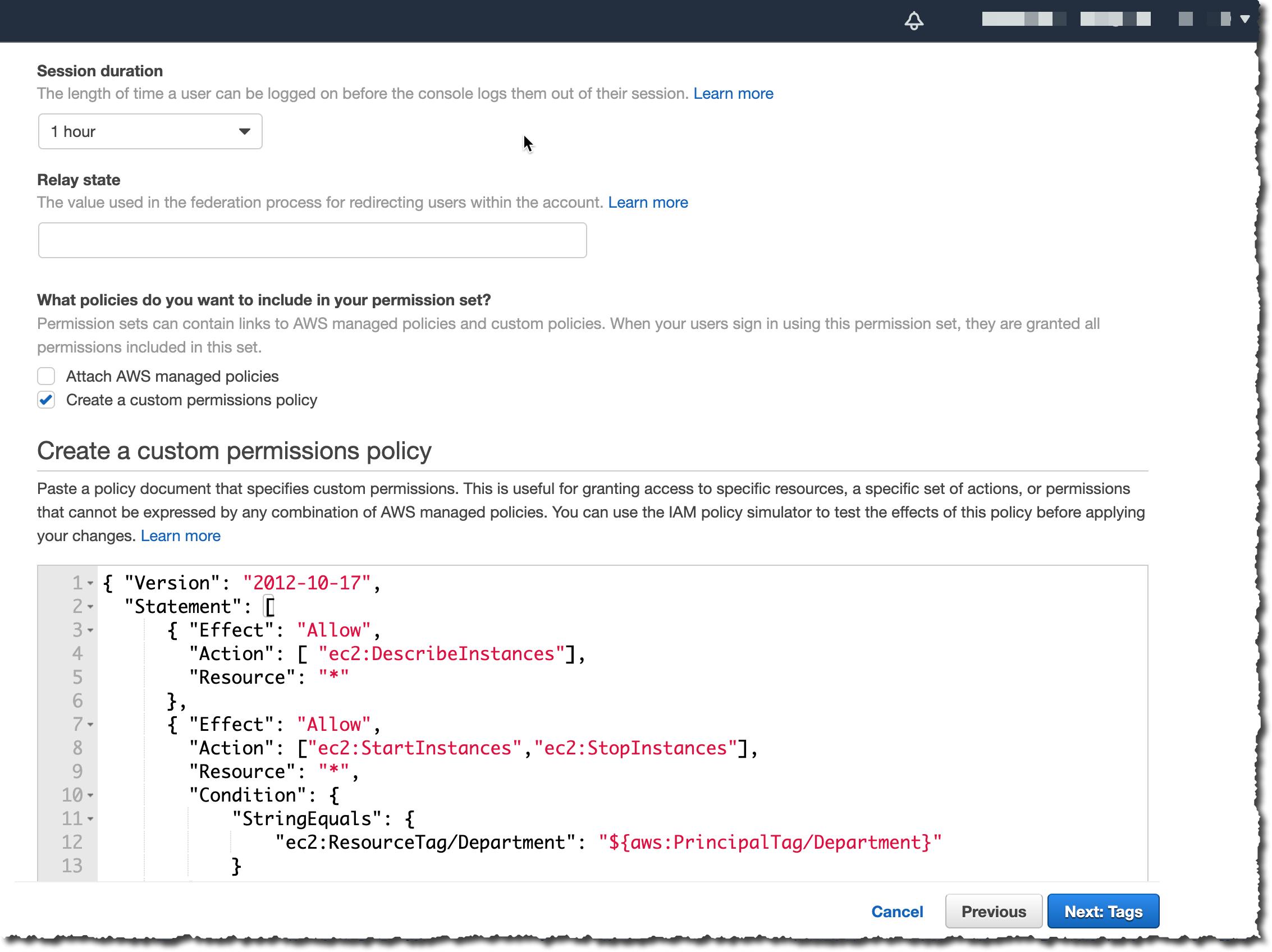
I now can use user attributes in my permission sets using the aws:PrincipalTag condition key when creating access control rules. For example, I can tag all the resources in my organization with their respective department name, and use a single permission set that grants developers access only to their department resources. Now, whenever developers federate into the AWS account, AWS SSO creates a department session tag with the value received from the identity provider. The security policies allow them to only get access to the resources in their respective department. As the team adds more developers and resources to their project, I only have to tag resources with the correct department name. As a result, as the organization adds new resources and developers to departments, developers can only manage resources aligned to their department without needing any permission updates.

An ABAC SSO permission set policy might look like this:

{
    "Version": "2012-10-17",
    "Statement": [
        {
            "Effect": "Allow",
            "Action": [ "ec2:DescribeInstances"],
            "Resource": "*"
        },
        {
            "Effect": "Allow",
            "Action": ["ec2:StartInstances","ec2:StopInstances"],
            "Resource": "*",
            "Condition": {
                "StringEquals": {
                    "ec2:ResourceTag/Department": "${aws:PrincipalTag/Department}"
                }
            }
        }
    ]
}

This policy allows anybody to DescribeInstances, but only users with a aws:PrincipalTag/Department tag’s value matching the EC2 instance ec2:ResourceTag/Department tag’s value are authorized to stop or to start instances.

I attach this policy to an AWS Account’s Permission Set. On the left part of the AWS Single Sign-On console, I click AWS Accounts and select the Permission sets tab. Then I click Create permission set. On the next screen, I select Create a customer permission set.

Create a custom permission set

I enter a name and description, I make sure Create a custom permissions policy is selected. Then I can copy/paste the previous policy allowing to start and stop EC2 instances when the department name tag value is equal to the person’s department name tag value.

Create Custom Policy for Permission Set

On the next screen, I enter some tags, then I review my configuration before clicking Create. Et voila, I am ready to go.

If you have existing federation configured with AWS Security Token Service, remember that external identity providers consider AWS SSO as a new application configuration. This means when you move from direct IAM federation to AWS SSO, you have to update your external identity provider configuration to connect with AWS SSO and to introduce attributes as session tags for this configuration.

Available Today
There is no additional charge to configure user attributes with AWS Single Sign-On. You can start to use it today in all AWS Regions where AWS SSO is available.

— seb

Aligning IAM policies to user personas for AWS Security Hub

Post Syndicated from Vaibhawa Kumar original https://aws.amazon.com/blogs/security/aligning-iam-policies-to-user-personas-for-aws-security-hub/

AWS Security Hub provides you with a comprehensive view of your security posture across your accounts in Amazon Web Services (AWS) and gives you the ability to take action on your high-priority security alerts. There are several different user personas that use Security Hub, and they typically require different AWS Identity and Access Management (IAM) permissions. Those personas include: a security administrator; a security analyst or engineer on a central security team or in a Cloud Center of Excellence; and a Developer Operations (DevOps) engineer or application builder who is the primary owner of an AWS account. In this post, we show how to deploy sample IAM policies for these three personas.

The first persona, a security administrator or cloud system administrator (sysadmin), is responsible for setting up and configuring Security Hub, and they typically need access to all of the Security Hub APIs to do this work. As part of this work, the sysadmin enables Security Hub on various accounts and Regions, decides which standards and controls should be enabled on which accounts, enables product integrations, creates insights, sets up custom actions and automated remediations, and configures IAM policies for other users.

The second persona, a security analyst or engineer using Security Hub, is part of a central security team, often part of a Cloud Center of Excellence. We often see that cloud security efforts are centralized in Cloud Centers of Excellence within a company. These security analysts or engineers typically have access to the master account in Security Hub and can view and take action on findings from any of the connected member accounts. They typically are not configuring Security Hub, so they don’t need permissions to do so.

The third persona is a DevOps engineer or application builder. This user needs the ability to view findings and take action only on the findings associated with their account. For cloud workloads, security is often decentralized down to these users. Security Hub enables them to take more proactive responsibility for the security of their own account by directly viewing and taking action on findings in their account. They typically don’t need permissions to set up and configure Security Hub, because that is done by a central sysadmin.

Overview

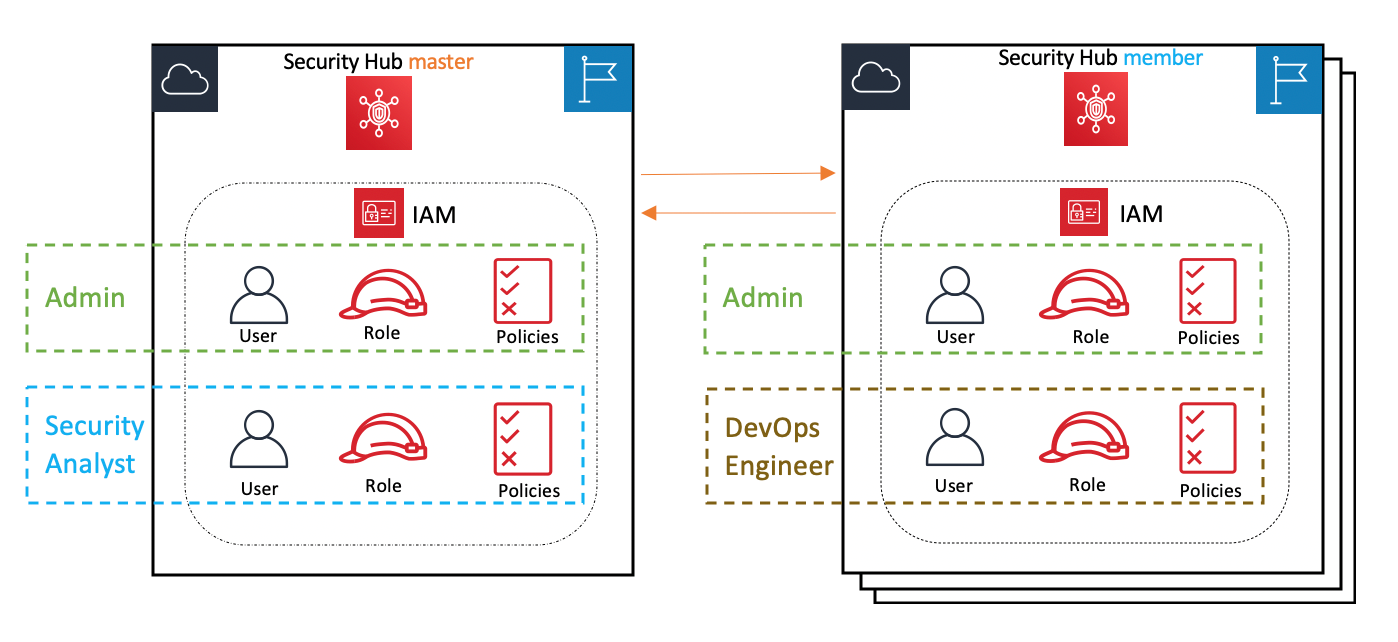
The following reference architecture presents an overview of a Security Hub master-member account structure and three personas: a security administrator, a security analyst/engineer, and a DevOps engineer.
 

Figure 1: Reference architecture

Figure 1: Reference architecture

In this blog post, we show how you can create and use the following AWS managed and customer managed IAM policies to support these three personas:

  • The sysadmin persona needs permissions to configure and manage Security Hub, account memberships, insights, and integrations, and to create remediations and take actions and perform record and workflow updates. The AWS managed IAM policy called AWSSecurityHubFullAccess provides the permissions for this persona. An IAM user or role with these permissions can deploy and configure Security Hub in master and member accounts. They can also update findings. The sysadmin also requires permissions to configure AWS Config and Amazon CloudWatch event rules to set up automated responses and remediations.
  • The security analyst persona needs permissions to read, list, and describe findings, standards, controls, and products; to update findings; and to create and update insights for Security Hub resources in the master account. The AWS managed IAM policy called AWSSecurityHubReadOnlyAccess provides the permissions needed for read, list, and describe actions, and a customer managed policy will be attached to give permissions to create and update insights and to update findings.
  • The DevOps engineer persona needs the same permissions as the security analyst persona, but they will only have the ability to access their own Security Hub member AWS account(s) and won’t have access to the master account.

Depending on your specific use case, you might want to provide additional permissions to the security analyst and DevOps engineer personas. For example, you might want to also grant them permissions to create custom actions by using the UpdateActionTarget API. In that case, you should also ensure that they have appropriate permissions to create CloudWatch event rules. You can also restrict these personas to only be able to update certain fields in findings (for example, only update workflow status but not severity) by using IAM context keys.

Prerequisites

You must have already enabled Security Hub with one account as master and other associated accounts as members. You will use the following AWS services:

Implementation

To create the required customer managed policies and associate them to users and roles, you will perform these tasks, described in more detail later in this section:

  1. Create a customer managed policy and associate it with the user and role for the security analyst persona in the Security Hub master account, along with the AWSSecurityHubReadOnlyAccess AWS managed policy.
  2. Create a customer managed policy and associate it with the user and role for the DevOps persona in the Security Hub member account, along with the AWSSecurityHubReadOnlyAccess AWS managed policy.
  3. Create a sysadmin user and role and associate it with the AWS managed policy for AWSSecurityHubFullAccess, along with AWS Config and CloudWatch event rule permissions in the Security Hub master account.

The following policy JSON script is for those two customer managed policies.

Security Hub - Security Analyst policy 
MasterCustomer Managed Policy:
{
    "Version": "2012-10-17",
    "Statement": [
        {
            "Sid": "SecurityAnalystMasterCMP",
            "Effect": "Allow",
            "Action": [
                "securityhub:UpdateInsight",
                "securityhub:CreateInsight",
	  			"securityhub:BatchUpdateFindings"
            ],
            "Resource": "*"
        }
    ]
}

Security Hub – DevOps Engineer policy: 
MemberCustomer Managed Policy:
{
    "Version": "2012-10-17",
    "Statement": [
        {
            "Sid": "DevOpsMemberCMP",
            "Effect": "Allow",
            "Action": [
                "securityhub:UpdateInsight",
                "securityhub:CreateInsight",
                "securityhub:BatchUpdateFindings"
            ],
            "Resource": "*"
        }
    ]
}

Step 1: Create the user and role for the security analyst persona

First, create a customer managed policy and associate it with the user and role for the security analyst persona in the Security Hub master account, along with the AWSSecurityHubReadOnlyAccess AWS managed policy.

To create the IAM policy, user, and role (console method)

  1. Sign in to the AWS Management Console in the Security Hub master account and open the IAM console.
  2. In the IAM console navigation pane, choose Policies, and then choose Create Policies.
  3. Choose the JSON tab.
  4. Copy the Security Hub – Security Analyst policy JSON shown earlier in this section, and paste it into the visual editor. When you are finished, choose Review policy.
  5. On the Review policy page, enter a name and a description (optional) for the policy that you’re creating. Review the policy summary to see the permissions that are granted by your policy. Then choose Create policy to save your work.
  6. Follow the instructions in the AWS Identity and Access Management User Guide to create a user and role, and attach the policy you just created.
  7. In the IAM console navigation pane, choose the user or role (or both) that you just created, and on the Permissions tab, choose Add Permissions.
  8. Choose the permissions category Attach existing policies directly to filter and select the managed policy AWSSecurityHubReadOnlyAccess. Review the permissions and then choose Add permissions.
  9. Save all the changes and try using the user and role after few minutes.

Step 2: Create the user and role for the DevOps persona

Next, create a customer managed policy and associate it with the user and role for the DevOps persona in the Security Hub member account, along with the AWSSecurityHubReadOnlyAccess AWS managed policy.

To create the IAM policy, user, and role (console method)

  1. Sign in to the AWS Management Console in the Security Hub member account and open the IAM console.
  2. In the IAM console navigation pane, choose Policies and then choose Create Policies.
  3. Choose the JSON tab.
  4. Copy the Security Hub – DevOps Engineer policy JSON shown earlier in this section, and paste it into the visual editor. When you are finished, choose Review policy.
  5. On the Review policy page, enter a name and a description (optional) for the policy that you are creating. Review the policy summary to see the permissions that are granted by your policy. Then choose Create policy to save your work.
  6. Follow the instructions in the AWS Identity and Access Management User Guide to create a user and role, and attach the policy you just created.
  7. In the IAM console navigation pane, choose the user or role (or both) that you just created, and on the Permissions tab, choose Add Permissions.
  8. Choose the permissions category Attach existing policies directly to filter and select the managed policy AWSSecurityHubReadOnlyAccess. Review the permissions and then choose Add permissions.
  9. Save all the changes and try using the user and role after few minutes.

Step 3: Create the user and role for the sysadmin persona

Next, create a user and role for the sysadmin persona and associate it with the AWS managed policies AWSSecurityHubFullAccess, CloudWatchEventsFullAccess, and full access to AWS Config in the Security Hub master account.

To create the IAM user and role (console method)

  1. Sign in to the AWS Management Console in the Security Hub member account and open the IAM console.
  2. Follow the instructions in the AWS Identity and Access Management User Guide to create a user and role.
  3. In the IAM console navigation pane, choose the user or role (or both) that you just created, and on the Permissions tab, choose Add Permissions.
  4. Choose the permissions category Attach existing policies directly to filter and select managed policies, and attach the managed policies AWSSecurityHubFullAccess and CloudWatchEventsFullAccess.
  5. Create another policy to grant full access to AWS Config as described in the AWS Config Developer Guide, and attach the policy to the user or role. Review the permissions, and choose Add permissions.
  6. Save all the changes and try using the user and role after few minutes.

Test the users and roles in the Security Hub master and member accounts

Finally, test the three users and roles that you created for the respective personas in the preceding steps.

To test the users and roles

  1. Security analyst user and role:
    1. Sign in to the AWS Management Console in the master account and open Security Hub.
    2. Make sure that Security Hub UI features (such as the Summary, Security Standard, Insights, Findings, and Integrations) are rendered so that the Security Analyst can view them.
    3. Navigate to a finding and change the workflow status as described in the topic Setting the workflow status for findings.
  2. DevOps engineer user and role:
    1. Sign in to the AWS Management Console in the member account and open Security Hub.
    2. Make sure that Security Hub UI features (such as the Summary, Security Standard, Insights, Findings, and Integrations) are rendered so that the DevOps Engineer can view them.
    3. Create a custom insight for the member account and other attribute groupings.
  3. Sysadmin user and role:
    1. Sign in to the AWS Management Console in the master or member account, and open Security Hub.
    2. Try admin-related operations such as create a custom action, invite another account, and so on.

Adding policy conditions

You might want to further restrict the permissions for the security analyst and DevOps personas. IAM policies for Security Hub’s BatchUpdateFindings API enable you to specify conditions to prevent a user from making any update to a specific finding field. The following example disallows setting the Workflow Status field to Suppressed.

{
	"Sid": "CMPCondition",
	"Effect": "Deny",
	"Action": "securityhub:BatchUpdateFindings",
	"Resource": "*",
	"Condition": {
		"StringEquals": {
			"securityhub:ASFFSyntaxPath/Workflow.Status": "SUPPRESSED"
		}
	}
}

Summary

In this post, we showed you how to align AWS managed and customer managed IAM policies to different user personas, so that you can allow different users to access Security Hub with least privilege permissions. Security Hub enables both central security teams and individual DevOps engineers to understand and improve the security posture of the AWS accounts in their organization.

If you have feedback about this post, submit comments in the Comments section below. If you have questions about this post, start a new thread on the AWS Security Hub forum or contact AWS Support.

Want more AWS Security how-to content, news, and feature announcements? Follow us on Twitter.
Author

Vaibhawa Kumar

Vaibhawa is a Cloud Infra Architect with AWS Professional Services. He helps customers on their cloud journey of critical workloads to the AWS cloud with infrastructure security and automations. In his free time, you can find him spending time with family, sports, and cooking.

Author

Sanjay Patel

Sanjay is a Senior Cloud Application Architect with AWS Professional Services. He has a diverse background in software design, enterprise architecture, and API integrations. He has helped AWS customers automate infrastructure security. He enjoys working with AWS customers to identify and implement the best fit solution.

Author

Ely Kahn

Ely is the Principal Product Manager for AWS Security Hub. Before his time at AWS, Ely was a co-founder for Sqrrl, a security analytics startup that AWS acquired and is now Amazon Detective. Earlier, Ely served in a variety of positions in the federal government, including Director of Cybersecurity at the National Security Council in the White House.

How to implement password-less authentication with Amazon Cognito and WebAuthn

Post Syndicated from Mahmoud Matouk original https://aws.amazon.com/blogs/security/how-to-implement-password-less-authentication-with-amazon-cognito-and-webauthn/

In this blog post, I show you how to offer a password-less authentication experience to your customers. To do this, you’ll allow physical security keys or platform authenticators (like finger-print scanners) to be used as the authentication factor to your web or mobile applications that use Amazon Cognito user pools for authentication.

An Amazon Cognito user pool is a user directory that Amazon Web Services (AWS) customers use to manage their customer identities. Web Authentication (WebAuthn) is a W3C standard that lets users authenticate to web applications using public-key cryptography. Using public-key cryptography enables you to implement a stronger authentication mechanism that’s less dependent on passwords.

Mobile and web applications can use WebAuthn together with browser and device support for the Client-To-Authenticator-Protocol (CTAP) to implement Fast ID Online (FIDO) authentication. To learn more about the flow of WebAuthn and CTAP, visit the FIDO Alliance.

How it works

Amazon Cognito user pools allow you to build a custom authentication flow that uses AWS Lambda functions to authenticates users based on one or more challenge/response cycles. You can use this flow to implement password-less authentication that is based on custom challenges. To use this flow to implement FIDO authentication, you need to create credentials during the registration phase and reference these credentials in the user’s profile. You can then validate these credentials during the authentication phase in a custom challenge.

During registration, a new set of credentials that are bound to your application (relying party), are created through a FIDO authenticator. For example, a platform authenticator with a biometric sensor or a roaming authenticator like a physical security key. The private key of this credential set remains on the authenticator, the public key, together with a credential identifier are saved in a custom attribute that’s part of the user profile in Amazon Cognito.

During authentication, a Cognito custom authentication flow will be used to implement authentication through a custom challenge. The application prompts the user to sign in using the authenticator that they used during registration. Response from the authenticator is then passed as a challenge response to Amazon Cognito and verified using the stored public key.

In this password-less flow, the private key has never left the physical device, the authenticator also validates that relying party in authentication request matches the relying party that was used to create the credentials. This combination provides a more secured authentication flow that uses stronger credentials, protects user from phishing and provides better user experience.

About the demo project

This blog post and the diagrams below explain a scenario that uses FIDO as the only authentication factor, to implement password-less authentication. To help with implementation details, I created a project to demonstrate WebAuthn integration with Amazon Cognito that provides sample code for three scenarios:

  • A scenario that uses FIDO as the only factor (password-less)
  • A scenario that uses FIDO as a second factor (with password)
  • A scenario that lets users sign-in with only a password

This project is only a demonstration and shouldn’t be used as-is in production environments. When using FIDO as authentication factor, it is a best practice to allow users to register multiple authenticators and you need to implement an account recovery workflow in case of a lost authenticator.

Implementing FIDO Authentication

Let’s take a deeper dive into the design and components involved in implementing this solution. To deploy this project in your development environment, follow the instructions in the WebAuthn integration with Amazon Cognito project.

Creating and configuring user pool

The first step is to create a Cognito user pool and triggers that orchestrate a custom authentication flow. You do that by deploying the CloudFormation stack that will create all resources as explained in the demo project.

Few implementation details to note about the user pool:

  • The template creates a user pool, app client, triggers, and Lambda functions to use for custom authentication.
  • The template creates a custom attribute called publicKeyCred. This is the custom attribute that holds a base64 encoded representation of the credential identifier and public key for the user’s authenticator.
  • The app client defines what authentication flows are allowed. You can limit allowed flows according to your use-case. To support FIDO authentication, you must allow CUSTOM_AUTH flow.
  • The app client has “write” permissions to the custom attribute publicKeyCred but not “read” permissions. This allows your application to write the attribute during registration or profile updates but excludes this attribute from the user’s id_token. Since this attribute is considered back-end data that is only used during authentication, it doesn’t need to be part of user profile in the id_token.

User registration flow

The registration flow needs to create credentials using the authenticator and store the public-key in user’s profile. Let’s take a closer look at the sequence of calls and involved components to implement this flow.
 

Figure 1: WebAuthn user registration process

Figure 1: WebAuthn user registration process

  1. The user navigates to your application, www.example.com (relying party), and creates an account. A request is sent to the relying party to build a credentials options object and send it back to the browser. (in the demo project, this starts in the createCredentials function in webauthn-client.js and creates the credentials options object by making a call to createCredRequest in authn.js)
  2. The browser uses built-in WebAuthn APIs to create the new credentials with an available authenticator using the credentials options object that was created in first step. This is done by making a call to navigator.credentials.create API (this API is available in browsers and platforms that support FIDO and WebAuthn).
  3. The user experience in this step depends on the OS, browser, and the authenticator. For example, the browser could prompt the user to attach a security key or, on devices that support it, to use a biometric scanner.
     
    Figure 2: User registration and browser alert to use an authenticator in Firefox

    Figure 2: User registration and browser alert to use an authenticator in Firefox

  4. The user interacts with an authenticator (by touching a security key or scanning finger on a touch-id device), which generates new credentials bound to the relying party and returns a response object to the browser.
  5. The browser sends a credential response object to the relying party to parse and validate the response on the server-side. The credential identifier and public key are extracted from the credential response. At this step, your application can also check additional authenticator data and use it to make authentication decisions. For example, your application can check if the authenticator was able to verify user identity through PIN or biometrics (UV flag) or only user presence (UP flag) was verified by authenticator. In the demo project, this is still part of createCredentials function and server-side parsing and validation is done in parseCredResponse that is implemented in authn.js
  6. To complete the user registration, the browser passes the profile attributes that have been collected during registration through Amazon Cognito APIs as custom attributes. This step is performed in signUp function in webauthn-client.js

At the conclusion of this process, a new user will be created in Amazon Cognito and the custom attribute “publicKeyCred” will be populated with a base64 encoded string that includes a credential identifier and the public key generated by the authenticator. This attribute is not considered secret or sensitive data, it rather includes the public key that will be used to verify the authenticator response during subsequent authentications.

User authentication flow

The following diagram describes the custom authentication flow to implement password-less authentication.
 

Figure 3: WebAuthn user authentication process

Figure 3: WebAuthn user authentication process

  1. The user provides their user name and selects the sign-in button, script (running in browser) starts the sign-in process using Amazon Cognito InitiateAuth API passing the user name and indicating that authentication flow is CUSTOM_AUTH. In the demo project, this part is performed in the signIn function in webauthn-client.js.
  2. The Amazon Cognito service passes control to the Define Auth Challenge Lambda trigger. The trigger then determines that this is the first step in the authentication and returns CUSTOM_CHALLENGE as the next challenge to the user.
  3. Control then moves to Create Auth Challenge Lambda trigger to create the custom challenge. This trigger creates a random challenge (a 64 bytes random string), extracts the credential identifier from the user profile (the value passed initially during the sign-up process) combines them and returns them as a custom challenge to the client. This is performed in CreateAuthChallenge Lambda function.
  4. The browser then prompts the user to activate an authenticator. At this stage, the authenticator verifies that credentials exist for the identifier and that the relying party matches the one that is bound to the credentials. This is implemented by making a call to navigator.credentials.get API that is available in browsers and devices that support FIDO2 and WebAuthn.
     
    Figure 4: Authentication and browser prompt to use a registered authenticator

    Figure 4: Authentication and browser prompt to use a registered authenticator

  5. If credentials exist and the relying party is verified, the authenticator requests a user attention or verification. Depending on the type of authenticator, user verification through biometrics or a PIN code is performed and the credentials response is passed back to the browser.
     
    Figure 5: Authentication examples from different browsers and platforms

    Figure 5: Authentication examples from different browsers and platforms

  6. The signIn function continues the sign-in process by calling respondToAuthChallenge API and sending the credentials response to Amazon Cognito.
  7. Amazon Cognito sends the response to the Verify Auth Challenge Lambda trigger. This trigger extracts the public key from the user profile, parses and validates the credentials response, and if the signature is valid, it responds with success. This is performed in VerifyAuthChallenge Lambda trigger.
  8. Lastly, Amazon Cognito sends the control again to Define Auth Challenge to determine the next step. If the results from Verify Auth Challenge indicate a successful response, authentication succeeds and Amazon Cognito responds with ID, access, and refresh tokens.

Conclusion

When building customer facing applications, you as the application owner and developer need to balance security with usability. Reducing the risk of account take-over and phishing is based on using strong credentials, strong second-factors, and minimizing the role of passwords. The flexibility of Amazon Cognito custom authentication flow integrated with WebAuthn offer a technical path to make this possible in addition to offering better user experience to your customers.

Check out the WebAuthn with Amazon Cognito project for code samples and deployment steps, deploy this in your development environment to see this integration in action and go build an awesome password-less experience in your application.

If you have feedback about this post, submit comments in the Comments section below. If you have questions about this post, start a new thread on the Amazon Cognito forum or contact AWS Support.

Want more AWS Security how-to content, news, and feature announcements? Follow us on Twitter.

Author

Mahmoud Matouk

Mahmoud is a Senior Solutions Architect with the Amazon Cognito team. He helps AWS customers build secure and innovative solutions for various identity and access management scenarios.

How to configure Duo multi-factor authentication with Amazon Cognito

Post Syndicated from Mahmoud Matouk original https://aws.amazon.com/blogs/security/how-to-configure-duo-multi-factor-authentication-with-amazon-cognito/

Adding multi-factor authentication (MFA) reduces the risk of user account take-over, phishing attacks, and password theft. Adding MFA while providing a frictionless sign-in experience requires you to offer a variety of MFA options that support a wide range of users and devices. Let’s see how you can achieve that with Amazon Cognito and Duo Multi-Factor Authentication (MFA).

Amazon Cognito user pools are user directories that are used by Amazon Web Services (AWS) customers to manage the identities of their customers and to add sign-in, sign-up and user management features to their customer-facing web and mobile applications. Duo Security is an APN Partner that provides unified access security and multi-factor authentication solutions.

In this blog post, I show you how to use Amazon Cognito custom authentication flow to integrate Duo Multi-Factor Authentication (MFA) into your sign-in flow and offer a wide range of MFA options to your customers. Some second factors available through Duo MFA are mobile phone SMS passcodes, approval of login via phone call, push-notification-based approval on smartphones, biometrics on devices that support it, and security keys that can be attached via USB.

How it works

Amazon Cognito user pools enable you to build a custom authentication flow that authenticates users based on one or more challenge/response cycles. You can use this flow to integrate Duo MFA into your authentication as a custom challenge.

Duo Web offers a software development kit to make it easier for you to integrate your web applications with Duo MFA. You need an account with Duo and an application to protect (which can be created from the Duo admin dashboard). When you create your application in the Duo admin dashboard, note the integration key (ikey), secret key (skey), and API hostname. These details, together with a random string (akey) that you generate, are the primary factors used to integrate your Amazon Cognito user pool with Duo MFA.

Note: ikey, skey, and akey are referred to as Duo keys.

Duo MFA will be integrated into the sign-in flow as a custom challenge. To do that, you need to generate a signed challenge request using Duo APIs and use it to load Duo MFA in an iframe and request the user’s second factor. When the challenge is answered by the user, a signed response is returned to your application and sent to Amazon Cognito for verification. If the response is valid then the MFA challenge is successful.

Let’s take a closer look at the sequence of calls and components involved in this flow.

Implementation details

In this section, I walk you through the end-to-end flow of integrating Duo MFA with Amazon Cognito using a custom authentication flow. To help you with this integration, I built a demo project that provides deployment steps and sample code to create a working demo in your environment.

Create and configure a user pool

The first step is to create the AWS resources needed for the demo. You can do that by deploying the AWS CloudFormation stack as described in the demo project.

A few implementation details to be aware of:

  • The template creates an Amazon Cognito user pool, application client, and AWS Lambda triggers that are used for the custom authentication.
  • The template also accepts ikey, skey, and akey as inputs. For security, the parameters are masked in the AWS CloudFormation console. These parameters are stored in a secret in AWS Secrets Manager with a resource policy that allows relevant Lambda functions read access to that secret.
  • Duo keys are loaded from secrets manager at the initialization of create auth challenge and verify auth challenge Lambda triggers to be used to create sign-request and verify sign-response.

Authentication flow

Figure 1: User authentication process for the custom authentication flow

Figure 1: User authentication process for the custom authentication flow

The preceding sequence diagram (Figure 1) illustrates the sequence of calls to sign in a user, which are as follows:

  1. In your application, the user is presented with a sign-in UI that captures their user name and password and starts the sign-in flow. A script—running in the browser—starts the sign-in process using the Amazon Cognito authenticateUser API with CUSTOM_AUTH set as the authentication flow. This validates the user’s credentials using Secure Remote Password (SRP) protocol and moves on to the second challenge if the credentials are valid.

    Note: The authenticateUser API automatically starts the authentication process with SRP. The first challenge that’s sent to Amazon Cognito is SRP_A. This is followed by PASSWORD_VERIFIER to verify the user’s credentials.

  2. After the SRP challenge step, the define auth challenge Lambda trigger will return CUSTOM_CHALLENGE and this will move control to the create auth challenge trigger.
  3. The create auth challenge Lambda trigger creates a Duo signed request using the Duo keys plus the username and returns the signed request as a challenge to the client. Here is a sample code of what create auth challenge should look like:
    <JavaScript>
    
    exports.handler = async (event) => {
    
        //load duo keys from secrets manager and store them in global variables
    
        if(ikey == null || skey == null || akey == null){ 
          const promise = new Promise(function(resolve, reject) {
              secretsManagerClient.getSecretValue({SecretId: secretName}, function(err, data) {
                    if (err) {throw err; }
                    else {
                        if ('SecretString' in data) {
                            secret = JSON.parse(data.SecretString);
                            ikey = secret['duo-ikey'];
                            skey = secret['duo-skey'];
                            akey = secret['duo-akey'];
                        }
                    }
                    resolve();
                });
            })
            
            await promise; 
        }
    
        
        var username = event.userName;
        var sig_request = duo_web.sign_request(ikey, skey, akey, username);
        
        event.response.publicChallengeParameters = {
            sig_request: sig_request
        };
        
        return event;
    };
    

  4. The client initializes the Duo Web library with the signed request and displays Duo MFA in an iframe to request a second factor from the user. To initialize the Duo library, you need the api_hostname that is generated for your application in the Duo dashboard, the sign-request that was received as a challenge, and a callback function to invoke after the MFA step is completed by the user. This is done on the client side as follows:
    <JavaScript>
          //render Duo MFA iframe
          $("#duo-mfa").html('<iframe id="duo_iframe" title="Two-Factor Authentication" </iframe>');
            
          Duo.init({
            'host': api_hostname,
            'sig_request': challengeParameters.sig_request,
            'submit_callback': mfa_callback
          });
    

  5. Through the Duo iframe, the user can set up their MFA preferences and respond to an MFA challenge. After successful MFA setup, a signed response from the Duo Web library will be returned to the client and passed to the callback function that was provided in Duo.init call.
     
    Figure 2: The first time a user signs in, Duo MFA displays a Start setup screen

    Figure 2: The first time a user signs in, Duo MFA displays a Start setup screen

  6. The client sends the Duo signed response to the Amazon Cognito service as a challenge response.
  7. Amazon Cognito sends the response to the verify auth challenge Lambda trigger, which uses Duo keys and username to verify the response.
    <JavaScript>
    const duo_web = require('duo_web');
    exports.handler = async (event) => {
    
        //load duo keys from secrets manager and store them in global variables
        
        var username = event.userName;
        
        //-------get challenge response
        const sig_response = event.request.challengeAnswer;
        const verificationResult = duo_web.verify_response(ikey, skey, akey, sig_response);
        
        if (verificationResult === username) {
            event.response.answerCorrect = true;
        } else {
            event.response.answerCorrect = false;
        }
        return event;
    };
    

  8. Validation results and current state are passed once again to the define auth challenge Lambda trigger. If the user response is valid, then the Duo MFA challenge is successful. You can then decide to introduce additional challenges to the user or issue tokens and complete the authentication process.

Conclusion

As you build your mobile or web application, keep in mind that using multi-factor authentication is an effective and recommended approach to protect your customers from account take-over, phishing, and the risks of weak or compromised passwords. Making multi-factor authentication easy for your customers enables you to offer authentication experience that protects their accounts but doesn’t slow them down.

Visit the security pillar of AWS Well-Architected Framework to learn more about AWS security best practices and recommendations.

In this blog post, I showed you how to integrate Duo MFA with an Amazon Cognito user pool. Visit the demo application and review the code samples in it to learn how to integrate this with your application.

If you have feedback about this post, submit comments in the Comments section below. If you have questions about this post, start a new thread on the Amazon Cognito forum or contact AWS Support.

Want more AWS Security how-to content, news, and feature announcements? Follow us on Twitter.

Author

Mahmoud Matouk

Mahmoud is a Senior Solutions Architect with the Amazon Cognito team. He helps AWS customers build secure and innovative solutions for various identity and access management scenarios.

Cloudflare Access: now for SaaS apps, too

Post Syndicated from Sam Rhea original https://blog.cloudflare.com/cloudflare-access-for-saas/

Cloudflare Access: now for SaaS apps, too

Cloudflare Access: now for SaaS apps, too

We built Cloudflare Access™ as a tool to solve a problem we had inside of Cloudflare. We rely on a set of applications to manage and monitor our network. Some of these are popular products that we self-host, like the Atlassian suite, and others are tools we built ourselves. We deployed those applications on a private network. To reach them, you had to either connect through a secure WiFi network in a Cloudflare office, or use a VPN.

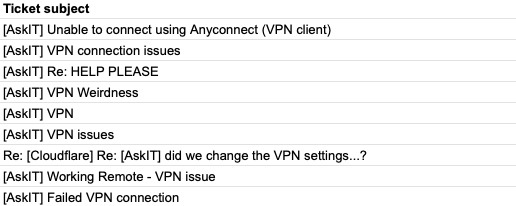
That VPN added friction to how we work. We had to dedicate part of Cloudflare’s onboarding just to teaching users how to connect. If someone received a PagerDuty alert, they had to rush to their laptop and sit and wait while the VPN connected. Team members struggled to work while mobile. New offices had to backhaul their traffic. In 2017 and early 2018, our IT team triaged hundreds of help desk tickets with titles like these:

Cloudflare Access: now for SaaS apps, too

While our IT team wrestled with usability issues, our Security team decided that poking holes in our private network was too much of a risk to maintain. Once on the VPN, users almost always had too much access. We had limited visibility into what happened on the private network. We tried to segment the network, but that was error-prone.

Around that time, Google published its BeyondCorp paper that outlined a model of what has become known as Zero Trust Security. Instead of trusting any user on a private network, a Zero Trust perimeter evaluates every request and connection for user identity and other variables.

We decided to create our own implementation by building on top of Cloudflare. Despite BeyondCorp being a new concept, we had experience in this field. For nearly a decade, Cloudflare’s global network had been operating like a Zero Trust perimeter for applications on the Internet – we just didn’t call it that. For example, products like our WAF evaluated requests to public-facing applications. We could add identity as a new layer and use the same network to protect applications teams used internally.

We began moving our self-hosted applications to this new project. Users logged in with our SSO provider from any network or location, and the experience felt like any other SaaS app. Our Security team gained the control and visibility they needed, and our IT team became more productive. Specifically, our IT teams have seen ~80% reduction in the time they spent servicing VPN-related tickets, which unlocked over $100K worth of help desk efficiency annually. Later in 2018, we launched this as a product that our customers could use as well.

By shifting security to Cloudflare’s network, we could also make the perimeter smarter. We could require that users login with a hard key, something that our identity provider couldn’t support. We could restrict connections to applications from specific countries. We added device posture integrations. Cloudflare Access became an aggregator of identity signals in this Zero Trust model.

As a result, our internal tools suddenly became more secure than the SaaS apps we used. We could only add rules to the applications we could place on Cloudflare’s reverse proxy. When users connected to popular SaaS tools, they did not pass through Cloudflare’s network. We lacked a consistent level of visibility and security across all of our applications. So did our customers.

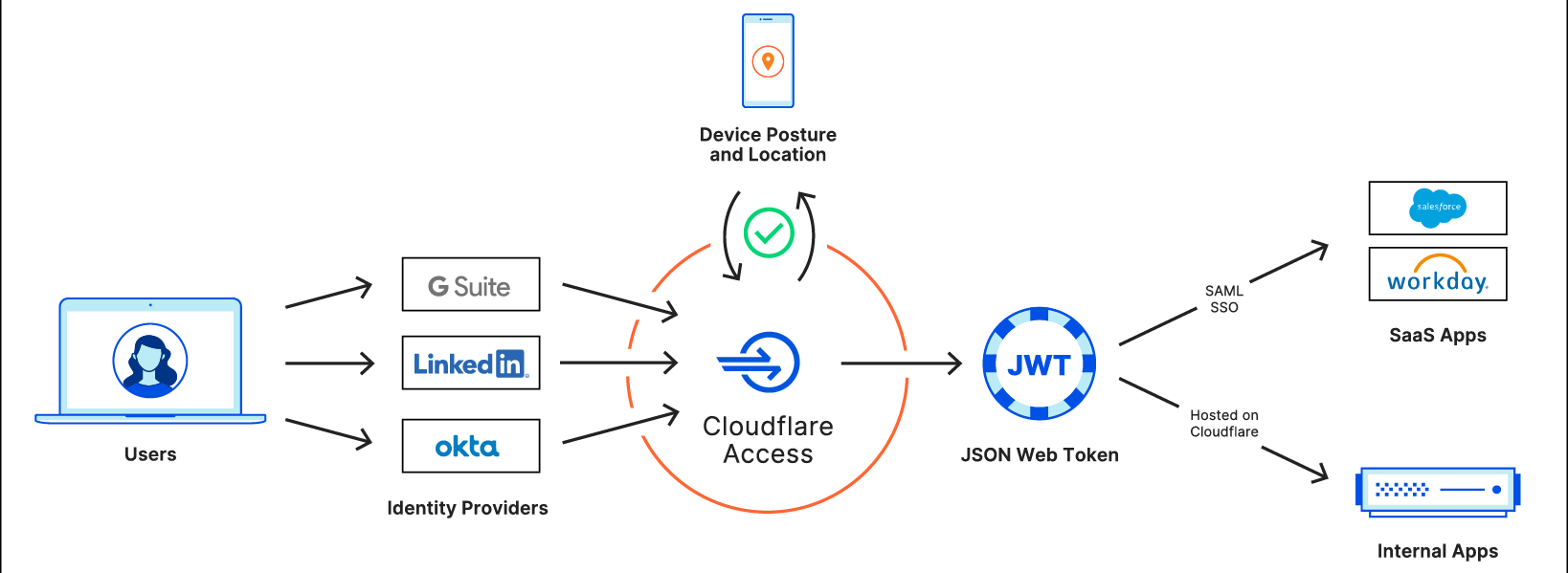
Starting today, our team and yours can fix that. We’re excited to announce that you can now bring the Zero Trust security features of Cloudflare Access to your SaaS applications. You can protect any SaaS application that can integrate with a SAML identity provider with Cloudflare Access.

Even though that SaaS application is not deployed on Cloudflare, we can still add security rules to every login. You can begin using this feature today and, in the next couple of months, you’ll be able to ensure that all traffic to these SaaS applications connects through Cloudflare Gateway.

Standardizing and aggregating identity in Cloudflare’s network

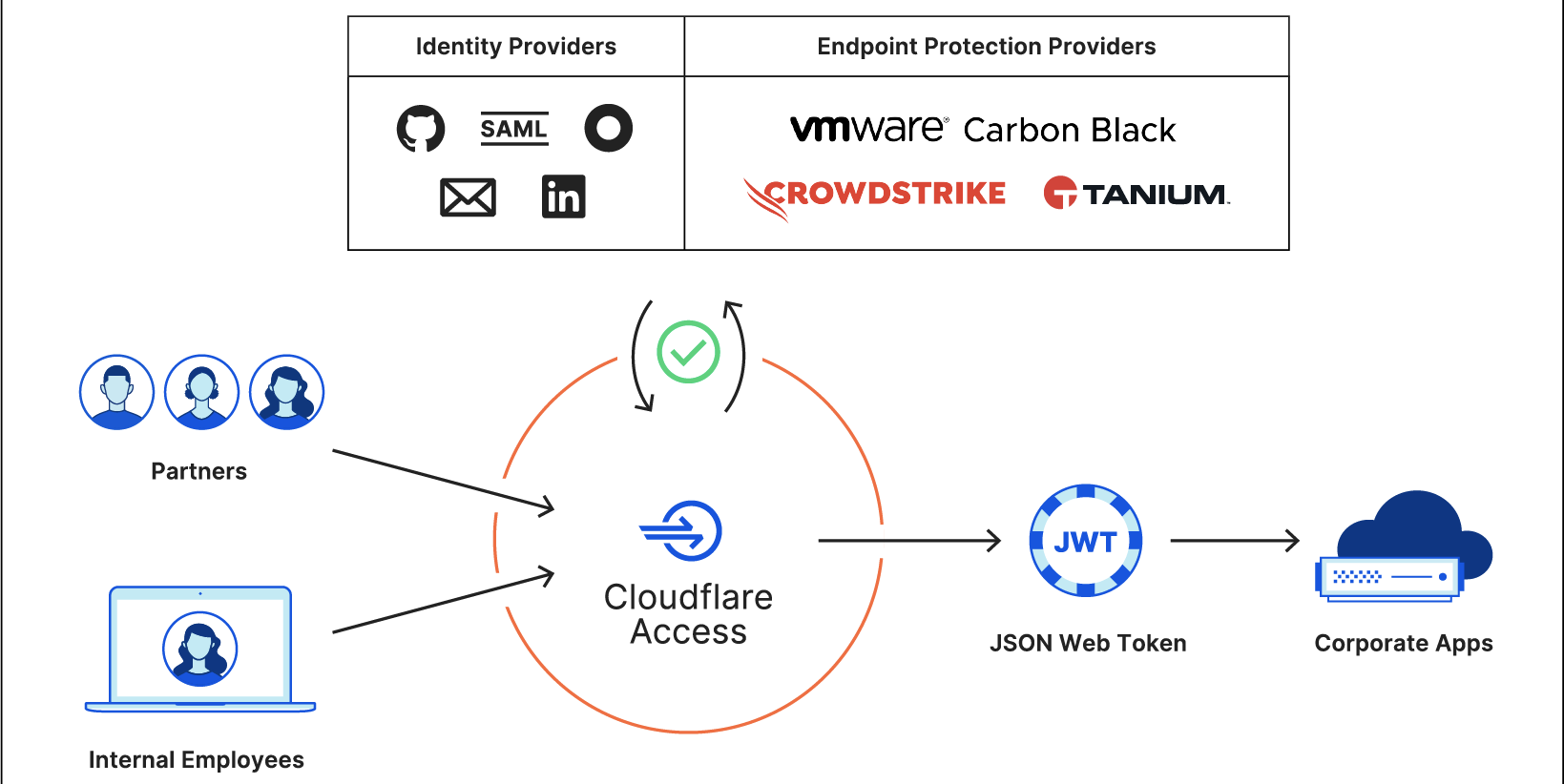
Support for SaaS applications in Cloudflare Access starts with standardizing identity. Cloudflare Access  aggregates different sources of identity: username, password, location, and device. Administrators build rules to determine what requirements a user must meet to reach an application. When users attempt to connect, Cloudflare enforces every rule in that checklist before the user ever reaches the app.

The primary rule in that checklist is user identity. Cloudflare Access is not an identity provider; instead, we source identity from SSO services like Okta, Ping Identity, OneLogin, or public apps like GitHub. When a user attempts to access a resource, we prompt them to login with the provider configured. If successful, the provider shares the user’s identity and other metadata with Cloudflare Access.

A username is just one part of a Zero Trust decision. We consider additional rules, like country restrictions or device posture via partners like Tanium or, soon, additional partners CrowdStrike and VMware Carbon Black. If the user meets all of those criteria, Cloudflare Access summarizes those variables into a standard proof of identity that our network trusts: a JSON Web Token (JWT).
Cloudflare Access: now for SaaS apps, too

A JWT is a secure, information-dense way to share information. Most importantly, JWTs follow a standard, so that different systems can trust one another. When users login to Cloudflare Access, we generate and sign a JWT that contains the decision and information about the user. We store that information in the user’s browser and treat that as proof of identity for the duration of their session.
Every JWT must consist of three Base64-URL strings: the header, the payload, and the signature.

  • The header defines the cryptographic operation that encrypts the data in the JWT.
  • The payload consists of name-value pairs for at least one and typically multiple claims, encoded in JSON. For example, the payload can contain the identity of a user.
  • The signature allows the receiving party to confirm that the payload is authentic.

We store the identity data inside of the payload and include the following details:

  • User identity: typically the email address of the user retrieved from your identity provider.
  • Authentication domain: the domain that signs the token. For Access, we use “example.cloudflareaccess.com” where “example” is a subdomain you can configure.
  • amr: If available, the multifactor authentication method the login used, like a hard key or a TOTP code.
  • Country: The country where the user is connecting from.
  • Audience: The domain of the application you are attempting to reach.
  • Expiration: the time at which the token is no longer valid for use.

Some applications support JWTs natively for SSO. We can send the token to the application and the user can login. In other cases, we’ve released plugins for popular providers like Atlassian and Sentry. However, most applications lack JWT support and rely on a different standard: SAML.

Converting JWT to SAML with Cloudflare Workers

You can deploy Cloudflare’s reverse proxy to protect the applications you host, which puts Cloudflare Access in a position to add identity checks when those requests hit our edge. However, the SaaS applications you use are hosted and managed by the vendors themselves as part of the value they offer. In the same way that I cannot decide who can walk into the front door of the bakery downstairs, you can’t build rules about what requests should and shouldn’t be allowed.

When those applications support integration with your SSO provider, you do have control over the login flow. Many applications rely on a popular standard, SAML, to securely exchange identity data and user attributes between two systems. The SaaS application does not need to know the details of the identity provider’s rules.

Cloudflare Access uses that relationship to force SaaS logins through Cloudflare’s network. The application itself thinks of Cloudflare Access as the SAML identity provider. When users attempt to login, the application sends the user to login with Cloudflare Access.

That said, Cloudflare Access is not an identity provider – it’s an identity aggregator. When the user reaches Access, we will redirect them to the identity provider in the same way that we do today when users request a site that uses Cloudflare’s reverse proxy. By adding that hop through Access, though, we can layer the additional contextual rules and log the event.

Cloudflare Access: now for SaaS apps, too

We still generate a JWT for every login providing a standard proof of identity. Integrating with SaaS applications required us to convert that JWT into a SAML assertion that we can send to the SaaS application. Cloudflare Access runs in every one of Cloudflare’s data centers around the world to improve availability and avoid slowing down users. We did not want to lose those advantages for this flow. To solve that, we turned to Cloudflare Workers.

The core login flow of Cloudflare Access already runs on Cloudflare Workers. We built support for SaaS applications by using Workers to take the JWT and convert its content into SAML assertions that are sent to the SaaS application. The application thinks that Cloudflare Access is the identity provider, even though we’re just aggregating identity signals from your SSO provider and other sources into the JWT, and sending that summary to the app via SAML.

Integrate with Gateway for comprehensive logging (coming soon)

Cloudflare Gateway keeps your users and data safe from threats on the Internet by filtering Internet-bound connections that leave laptops and offices. Gateway gives administrators the ability to block, allow, or log every connection and request to SaaS applications.

However, users are connecting from personal devices and home WiFi networks, potentially bypassing Internet security filtering available on corporate networks. If users have their password and MFA token, they can bypass security requirements and reach into SaaS applications from their own, unprotected devices at home.

To ensure traffic to your SaaS apps only connects over Gateway-protected devices, Cloudflare Access will add a new rule type that requires Gateway when users login to your SaaS applications. Once enabled, users will only be able to connect to your SaaS applications when they use Cloudflare Gateway. Gateway will log those connections and provide visibility into every action within SaaS apps and the Internet.

Every identity provider is now capable of SAML SSO

Identity providers come in two flavors and you probably use both every day. One type is purpose-built to be an identity provider, and the other accidentally became one. With this release, Cloudflare Access can convert either into a SAML-compliant SSO option.

Corporate identity providers, like Okta or Azure AD, manage your business identity. Your IT department creates and maintains the account. They can integrate it with SaaS Applications for SSO.

The second type of login option consists of SaaS providers that began as consumer applications and evolved into public identity providers. LinkedIn, GitHub, and Google required users to create accounts in their applications for networking, coding, or email.

Over the last decade, other applications began to trust those public identity provider logins. You could use your Google account to log into a news reader and your GitHub account to authenticate to DigitalOcean. Services like Google and Facebook became SSO options for everyone. However, most corporate applications only supported integration with a single SAML provider, something public identity providers do not provide. To rely on SSO as a team, you still needed a corporate identity provider.

Cloudflare Access converts a user login from any identity provider into a JWT. With this release, we also generate a standard SAML assertion. Your team can now use the SAML SSO features of a corporate identity provider with public providers like LinkedIn or GitHub.

Multi-SSO meets SaaS applications

We describe Cloudflare Access as a Multi-SSO service because you can integrate multiple identity providers, and their SSO flows, into Cloudflare’s Zero Trust network. That same capability now extends to integrating multiple identity providers with a single SaaS application.

Most SaaS applications will only integrate with a single identity provider, limiting your team to a single option. We know that our customers work with partners, contractors, or acquisitions which can make it difficult to standardize around a single identity option for SaaS logins.

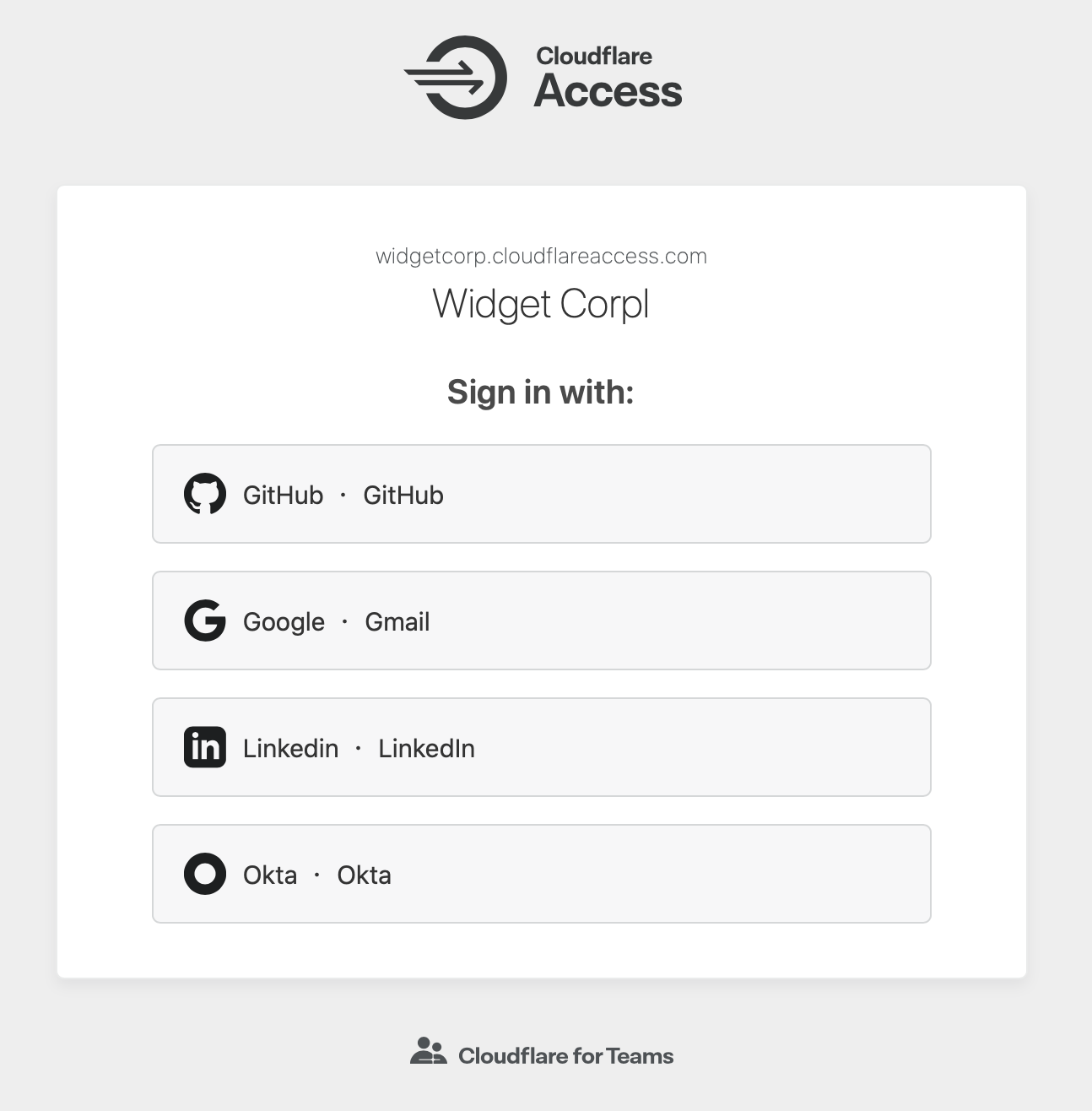
Cloudflare Access can connect to multiple identity providers simultaneously, including multiple instances of the same provider. When users are prompted to login, they can choose the option that their particular team uses.

Cloudflare Access: now for SaaS apps, too

We’ve taken that ability and extended it into the Access for SaaS feature. Access generates a consistent identity from any provider, which we can now extend for SSO purposes to a SaaS application. Even if the application only supports a single identity provider, you can still integrate Cloudflare Access and merge identities across multiple sources. Now, team members who use your Okta instance and contractors who use LinkedIn can both SSO into your Atlassian suite.

All of your apps in one place

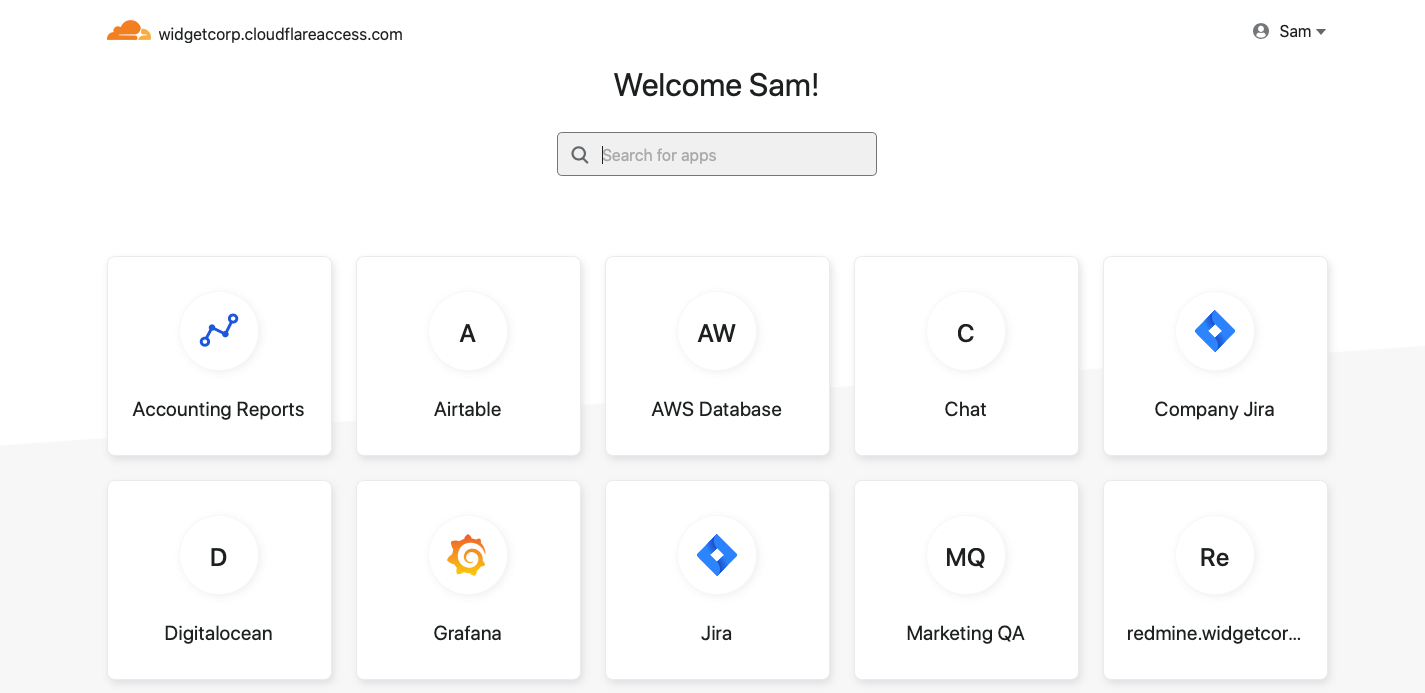
Cloudflare Access released the Access App Launch as a single destination for all of your internal applications. Your team members visit a URL that is unique to your organization and the App Launch displays all of the applications they can reach. The feature requires no additional administrative configuration; Cloudflare Access reads the user’s JWT and returns only the applications they are allowed to reach.

Cloudflare Access: now for SaaS apps, too

That experience now extends to all applications in your organization. When you integrate SaaS applications with Cloudflare Access, your users will be able to discover them in the App Launch. Like the flow for internal applications, this requires no additional configuration.

How to get started

To get started, you’ll need a Cloudflare Access account and a SaaS application that supports SAML SSO. Navigate to the Cloudflare for Teams dashboard and choose the “SaaS” application option to start integrating your applications. Cloudflare Access will walk through the steps to configure the application to trust Cloudflare Access as the SSO option.

Cloudflare Access: now for SaaS apps, too

Do you have an application that needs additional configuration? Please let us know.

Protect SaaS applications with Cloudflare for Teams today

Cloudflare Access for SaaS is available to all Cloudflare for Teams customers, including organizations on the free plan. Sign up for a Cloudflare for Teams account and follow the steps in the documentation to get started.

We will begin expanding the Gateway beta program to integrate Gateway’s logging and web filtering with the Access for SaaS feature before the end of the year.

Innovating on Authentication Standards

Post Syndicated from mikesefanov original https://yahooeng.tumblr.com/post/175238642656

yahoodevelopers:

By George Fletcher and Lovlesh Chhabra

When Yahoo and AOL came together a year ago as a part of the new Verizon subsidiary Oath,  we took on the challenge of unifying their identity platforms based on current identity standards. Identity standards have been a critical part of the Internet ecosystem over the last 20+ years. From single-sign-on and identity federation with SAML; to the newer identity protocols including OpenID Connect, OAuth2, JOSE, and SCIM (to name a few); to the explorations of “self-sovereign identity” based on distributed ledger technologies; standards have played a key role in providing a secure identity layer for the Internet.

As we navigated this journey, we ran across a number of different use cases where there was either no standard or no best practice available for our varied and complicated needs. Instead of creating entirely new standards to solve our problems, we found it more productive to use existing standards in new ways.

One such use case arose when we realized that we needed to migrate the identity stored in mobile apps from the legacy identity provider to the new Oath identity platform. For most browser (mobile or desktop) use cases, this doesn’t present a huge problem; some DNS magic and HTTP redirects and the user will sign in at the correct endpoint. Also it’s expected for users accessing services via their browser to have to sign in now and then.

However, for mobile applications it’s a completely different story. The normal user pattern for mobile apps is for the user to sign in (via OpenID Connect or OAuth2) and for the app to then be issued long-lived tokens (well, the refresh token is long lived) and the user never has to sign in again on the device (entering a password on the device is NOT a good experience for the user).

So the issue is, how do we allow the mobile app to move from one
identity provider to another without the user having to re-enter their
credentials? The solution came from researching what standards currently
exist that might addres this use case (see figure “Standards Landscape”
below) and finding the OAuth 2.0 Token Exchange draft specification (https://tools.ietf.org/html/draft-ietf-oauth-token-exchange-13).

image

The Token Exchange draft allows for a given token to be exchanged for new tokens in a different domain. This could be used to manage the “audience” of a token that needs to be passed among a set of microservices to accomplish a task on behalf of the user, as an example. For the use case at hand, we created a specific implementation of the Token Exchange specification (a profile) to allow the refresh token from the originating Identity Provider (IDP) to be exchanged for new tokens from the consolidated IDP. By profiling this draft standard we were able to create a much better user experience for our consumers and do so without inventing proprietary mechanisms.

During this identity technical consolidation we also had to address how to support sharing signed-in users across mobile applications written by the same company (technically, signed with the same vendor signing key). Specifically, how can a signed-in user to Yahoo Mail not have to re-sign in when they start using the Yahoo Sports app? The current best practice for this is captured in OAuth 2.0 for Natives Apps (RFC 8252). However, the flow described by this specification requires that the mobile device system browser hold the user’s authenticated sessions. This has some drawbacks such as users clearing their cookies, or using private browsing mode, or even worse, requiring the IDPs to support multiple users signed in at the same time (not something most IDPs support).

While, RFC 8252 provides a mechanism for single-sign-on (SSO) across mobile apps provided by any vendor, we wanted a better solution for apps provided by Oath. So we looked at how could we enable mobile apps signed by the vendor to share the signed-in state in a more “back channel” way. One important fact is that mobile apps cryptographically signed by the same vender can securely share data via the device keychain on iOS and Account Manager on Android.

Using this as a starting point we defined a new OAuth2 scope, device_sso, whose purpose is to require the Authorization Server (AS) to return a unique “secret” assigned to that specific device. The precedent for using a scope to define specification behaviour is OpenID Connect itself, which defines the “openid” scope as the trigger for the OpenID Provider (an OAuth2 AS) to implement the OpenID Connect specification. The device_secret is returned to a mobile app when the OAuth2 code is exchanged for tokens and then stored by the mobile app in the device keychain and with the id_token identifying the user who signed in.

At this point, a second mobile app signed by the same vendor can look in the keychain and find the id_token, ask the user if they want to use that identity with the new app, and then use a profile of the token exchange spec to obtain tokens for the second mobile app based on the id_token and the device_secret. The full sequence of steps looks like this:

image

As a result of our identity consolidation work over the past year, we derived a set of principles identity architects should find useful for addressing use cases that don’t have a known specification or best practice. Moreover, these are applicable in many contexts outside of identity standards:

  1. Spend time researching the existing set of standards and draft standards. As the diagram shows, there are a lot of standards out there already, so understanding them is critical.
  2. Don’t invent something new if you can just profile or combine already existing specifications.
  3. Make sure you understand the spirit and intent of the existing specifications.
  4. For those cases where an extension is required, make sure to extend the specification based on its spirit and intent.
  5. Ask the community for clarity regarding any existing specification or draft.
  6. Contribute back to the community via blog posts, best practice documents, or a new specification.

As we learned during the consolidation of our Yahoo and AOL identity platforms, and as demonstrated in our examples, there is no need to resort to proprietary solutions for use cases that at first look do not appear to have a standards-based solution. Instead, it’s much better to follow these principles, avoid the NIH (not-invented-here) syndrome, and invest the time to build solutions on standards.