Post Syndicated from Crosstalk Solutions original https://www.youtube.com/watch?v=SIugBgqbXYw
Security updates for Thursday
Post Syndicated from original https://lwn.net/Articles/899483/
Security updates have been issued by Debian (firefox-esr, firejail, and ublock-origin), Fedora (chromium, firefox, thunderbird, and vim), Mageia (kernel and kernel-linus), Oracle (389-ds-base and python-virtualenv), SUSE (chromium), and Ubuntu (cloud-init).
[The Lost Bots] Season 2, Episode 1: SIEM Deployment in 10 Minutes
Post Syndicated from Rapid7 original https://blog.rapid7.com/2022/06/30/the-lost-bots-season-2-episode-1-siem-deployment-in-10-minutes/
![[The Lost Bots] Season 2, Episode 1: SIEM Deployment in 10 Minutes](https://blog.rapid7.com/content/images/2022/06/The-Lost-Bots-logo-large.png)
Welcome back to The Lost Bots! In the first installment of Season 2, Rapid7 Detection and Response (D&R) Practice Advisor Jeffrey Gardner and his new co-host Stephen Davis, Lead D&R Sales Technical Advisor, give us their five pillars of success for deploying a security information and event management (SIEM) solution. They tell us which pillars are their favorites and how security practitioners — including our hosts themselves — sometimes misstep in these areas.
Watch below for a rundown of how to successfully deploy a SIEM, all in a cool 10 minutes. (Fair warning: Your actual SIEM deployment might take slightly longer than it takes to watch this episode.)
Throughout Season 2, Jeffrey and Stephen will talk through some of the biggest topics and most pressing questions in D&R and cybersecurity, both one-on-one and with guests. We’ll be publishing new episodes on the last Thursday of every month. See you in July!
Additional reading:
- Velociraptor Version 0.6.5: Table Transformations, Multi-Lingual Support, and Better VQL Error-Handling Let You Dig Deeper Than Ever
- Rapid7 MDR Delivered 549% ROI via Headcount Avoidance, Time Savings, and Breach Risk Reduction
- [VIDEO] An Inside Look at the RSA 2022 Experience From the Rapid7 Team
- The Average SIEM Deployment Takes 6 Months. Don’t Be Average.
Managed Transforms: templated HTTP header modifications
Post Syndicated from Sam Marsh original https://blog.cloudflare.com/managed-transforms-templated-http-header-modifications/


Managed Transforms is the next step on a journey to make HTTP header modification a trivial task for our customers. In early 2021 the only way for Cloudflare customers to modify HTTP headers was by writing a Cloudflare Worker. We heard from numerous customers who wanted a simpler way.
In June 2021 we introduced Transform Rules, giving customers a simple UI letting them specify what the custom HTTP header’s name and value is—either a static string (i.e. X-My-CDN: Cloudflare) or a dynamically populated value (i.e. X-Bot-Score: cf.bot_management.score).
This made the job much simpler, however there is still a good amount of thought required—with a number of potential drop-off points on the user journey. For example, in order to dynamically populate the bot score into the value of an HTTP request header, the user needs to know the correct field name. To find that they’ll need to go to the documentation site, find the correct section, etc.
When we analyzed how our customers use Transform Rules we found a set of very common use cases in the data. Four of the top eight fields used were relating to bot management; customers wanting to have the bot score, JA3 hash, etc. of each request added as an HTTP header. A further three of the top 10 fields were relating to the geographic location of the visitor (their city, country and ASN). We also saw over 400 Transform Rules being used just to remove X-Powered-By. That means potentially 400 users went to the same part of the dashboard, typed the same header name, read the same documentation and selected the same action.
Much as we set out to productize the common Cloudflare Worker use case of HTTP header modification into Transform Rules, we have now set out to productize and further simplify the common Transform Rules use cases into Managed Transforms.
The intention is to continue to identify common reasons for use of a Transform Rule and where possible package them up into a single click solution.
We always want to make our user’s lives as easy as possible, and finding a way to stop hundreds of people typing the same thing and clicking the same buttons, to achieve the exact same outcome, seems a great way to continue that mission.
An even simpler solution
Managed Transforms is a dedicated section of Transform Rules offering one-click HTTP header modifications. Want to add relevant Cloudflare Bot Management information as custom HTTP headers? One click. Want to add geographic information (country, etc.) as custom HTTP headers? One click.
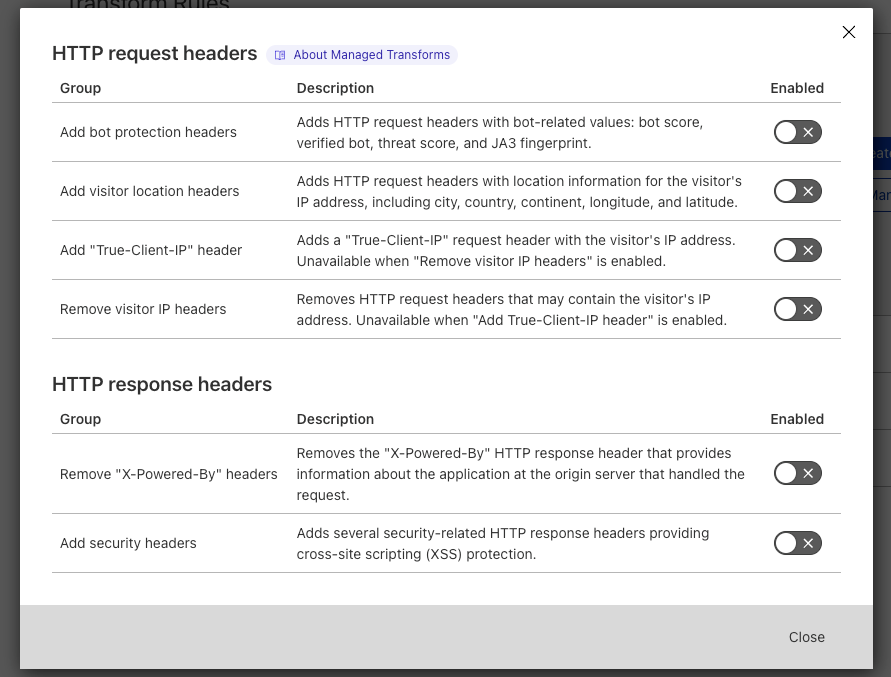
Managed Transforms can be found in ‘Rules > Transform Rules’ and clicking on the ‘Managed Transforms’ button. To benefit from Managed Transforms, users simply toggle the appropriate settings, and we take care of the rest.
For example, to enrich every HTTP request with Cloudflare’s Bot Management information users would enable ‘Add bot protection headers’. This setting ensures we add four new HTTP request headers to every HTTP request. SIEM (Security Information and Event Management) products can then be configured to correctly collect and chart these new headers, allowing customers to see the bot score of every HTTP request, how many requests are coming from verified bots, and so on.
Another great use case is the ‘Add security headers’ toggle. On a completely standard, default zone, a user can improve their website’s security score from an F to a C in just one click. Enabling HSTS improves the score to a B (scores correct as of June 7, 2022).
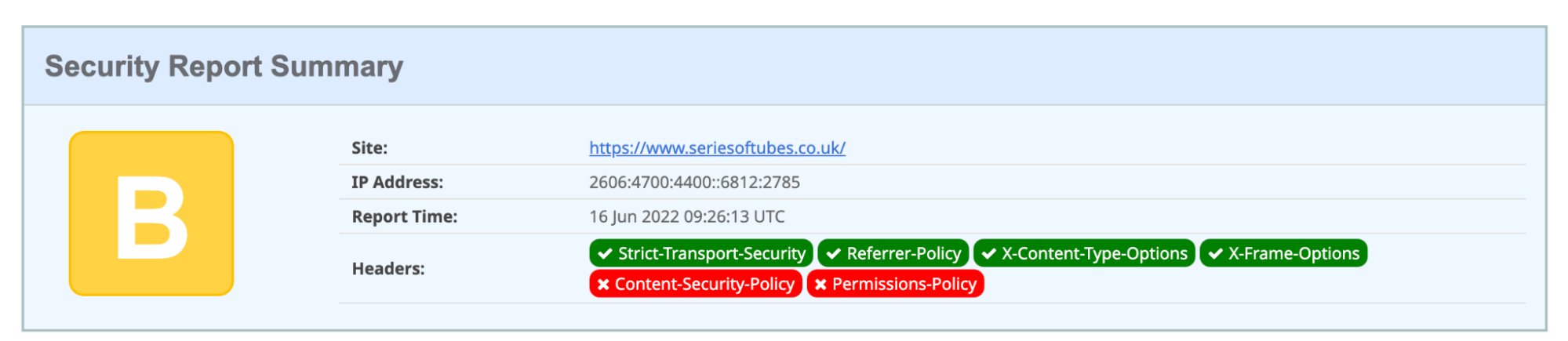
Adding a Content-Security-Policy (used to mitigate Cross-Site Scripting (‘XSS’) attacks) or a Permission-Policy (used to give websites the ability to allow or block the use of browser features) increases the score to an ‘A’; the addition of both improves the score to the maximum: A+.
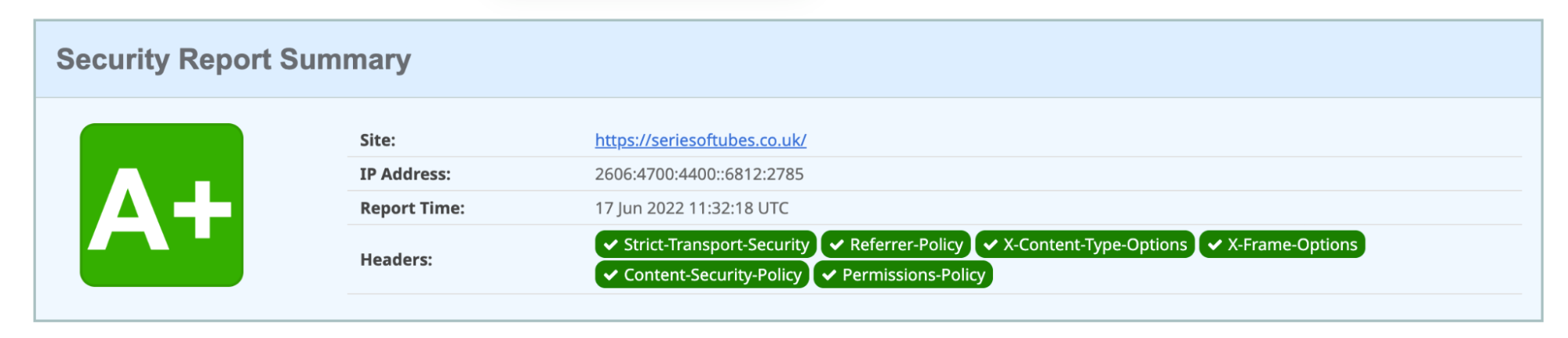
During the design of Managed Transforms we chose not to include default Content-Security-Policy and Permission-Policy HTTP response headers within the ‘Add security headers’ toggle as we found these particular headers to be very specific to each individual website. Any default policies we tried either caused incorrect loading of the website content, or were too open to be of any value. So we decided to remove them from scope.
However, users can still add these HTTP response headers and their appropriate values in a handful of clicks by creating a new Transform Rule:

The HTTP response headers entered here will be added alongside the HTTP response headers added by Managed Transforms to give an A+ score.
Try it now
Managed Transforms can be used to improve operations, remove sensitive data, and increase security, amongst other common use cases.
Try out Managed Transforms yourself today.
OCCRP Investigation A ‘Bloody’ Trade: Inside the Murky Supply Chain of Syrian Phosphates into Europe
Post Syndicated from Николай Марченко original https://bivol.bg/a-bloody-trade-inside-the-murky-supply-chain-of-syrian-phosphates-into-europe.html
четвъртък 30 юни 2022

Imports of Syrian phosphates into Europe have boomed over the past several years. The importers include Serbia and Ukraine, as well EU members Italy, Bulgaria, Spain, and Poland. Security firms…
Расследование OCCRP «Кровавая» торговля: как устроены поставки сирийских фосфатов в Европу
Post Syndicated from Николай Марченко original https://bivol.bg/%D0%BA%D1%80%D0%BE%D0%B2%D0%B0%D0%B2%D0%B0%D1%8F-%D1%82%D0%BE%D1%80%D0%B3%D0%BE%D0%B2%D0%BB%D1%8F-%D0%BA%D0%B0%D0%BA-%D1%83%D1%81%D1%82%D1%80%D0%BE%D0%B5%D0%BD%D1%8B-%D0%BF%D0%BE%D1%81.html
четвъртък 30 юни 2022

Главное из расследования: За последние несколько лет объемы импорта сирийских фосфатов в Европу резко возросли. В числе импортеров Сербия и Украина, а также страны ЕС: Италия, Болгария, Испания и Польша. …
Разследване на OCCRP “Кървава” търговия: Поглед отвътре към потайните вериги за доставка на фосфати в Европа
Post Syndicated from Николай Марченко original https://bivol.bg/%D0%BA%D1%8A%D1%80%D0%B2%D0%B0%D0%B2%D0%B0-%D1%82%D1%8A%D1%80%D0%B3%D0%BE%D0%B2%D0%B8%D1%8F-%D0%BF%D0%BE%D0%B3%D0%BB%D0%B5%D0%B4-%D0%BE%D1%82%D0%B2%D1%8A%D1%82%D1%80%D0%B5-%D0%BA%D1%8A%D0%BC.html
четвъртък 30 юни 2022
• Вносът на сирийски фосфати в Европа бележи бум през последните няколко години. • Сред вносителите са Сърбия и Украйна, но също и членките на ЕС Италия, България, Испания и…
Can a Laser Projector REPLACE your TV? Top 4 Modern TV Replacement 4K Laser and LED Projectors
Post Syndicated from The Hook Up original https://www.youtube.com/watch?v=ZDB_dqR2EWA
Celebrating the community: Sophie
Post Syndicated from Katie Gouskos original https://www.raspberrypi.org/blog/celebrating-the-community-sophie/
It’s wonderful hearing from people in the community about what learning and teaching digital making means to them and how it impacts their lives. So far, our community stories series has involved young creators, teachers, and mentors from the UK and US, India, Romania, and Ireland, who are all dedicated to making positive change in their corner of the world through getting creative with technology.

For our next story, we travel to a tiny school in North Yorkshire in the UK to meet teacher Sophie Hudson, who’s been running a Code Club since February 2021.
Introducing Sophie and Linton-on-Ouse Primary School
A teacher for 10 years, Sophie is always looking for new opportunities and ideas to inspire and encourage her learners. The school where she teaches, Linton-on-Ouse Primary School & Nursery in rural Yorkshire, is very small. With only five teachers supporting the children, any new activity has to be meticulously planned and scheduled. Sophie was also slightly nervous about setting up a Code Club because she doesn’t have a computer science background, sharing that “there’s always one subject that you feel less confident in.”

Sophie started the Code Club off small, with only a few learners. But then she grew it quickly, and now half of the learners in Key Stage 2 attend, and the club sessions have become a regular fixture in the school week.
“Once I did have a look at it [Code Club], it really wasn’t as scary as I thought. […] It has had a really positive influence on our school.”
Sophie Hudson, primary school teacher
Thanks to our free Code Club project guides and coding challenges like Astro Pi Mission Zero, Sophie’s Code Club has plenty of activities and resources for the children to learn to code with confidence — while having fun too. Sophie says: “I like the idea that the children can be imaginative: it’s play, but it’s learning at the same time. They might not even realise it.”
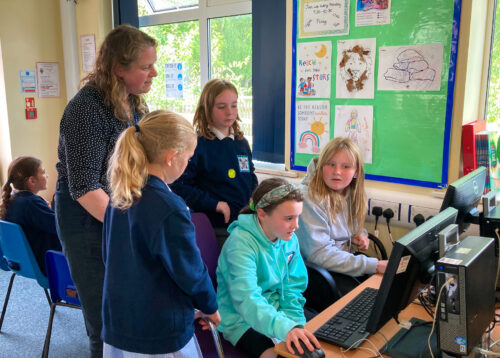
Visiting the Code Club at Linton-on-Ouse Primary School was a joyful experience. The children listened intently as Sophie kicked off the lunchtime club session. As they started to code, there were giggles and gasps throughout, and the classroom filled with sounds and intermittent squeaks from the ‘Stress ball’ project. It was clear how much enjoyment the learners felt, and how engaged everyone was with their coding projects. Learner Erin told us she likes Code Club because she can “have a little fun with it”. Learners Maise and Millie enjoy it because “it makes you worry less about getting stuff wrong, because you always know there’s a back-up plan.”
“It’s amazing. Anything is possible.”
Millie (10), learner at Sophie’s Code Club

Attending Code Club had a profound impact on a 9-year-old learner called Archie, who shares that his confidence has improved since taking part in the sessions: “I would never, ever think of doing things that I do now in Code Club,” he says. His mum Jenni has also seen a difference in Archie since he joined Code Club, with his confidence improving generally at school.

The positive impact that Sophie has on Linton-on-Ouse Primary School & Nursery is undeniable, not only by running Code Club as an extracurricular activity but also by joint-leading science and leading PE, computing, and metacognition. Head teacher Davinia Pearson says, “How could you not be influenced by someone who’s just out there looking for the best for their class and children, and making a difference?”
Help us celebrate Sophie and her Code Club at Linton-on-Ouse Primary School & Nursery by sharing their story on Twitter, LinkedIn, and Facebook.
The post Celebrating the community: Sophie appeared first on Raspberry Pi.
Медийни партньори: БТА и “Биволъ” Много награди и емоции на финала на Деветия международен литературен ученически конкурс „Който спаси един човешки живот, спасява цяла вселена”
Post Syndicated from Биволъ original https://bivol.bg/%D0%BC%D0%BD%D0%BE%D0%B3%D0%BE-%D0%BD%D0%B0%D0%B3%D1%80%D0%B0%D0%B4%D0%B8-%D0%B8-%D0%B5%D0%BC%D0%BE%D1%86%D0%B8%D0%B8-%D0%BD%D0%B0-%D1%84%D0%B8%D0%BD%D0%B0%D0%BB%D0%B0-%D0%BD%D0%B0-%D0%B4%D0%B5%D0%B2.html
четвъртък 30 юни 2022

„Ще изградим свят без война и омраза!” Това заявиха лауреатите на Деветия международен литературен ученически конкурс „Който спаси един човешки живот, спасява цяла вселена” от сцената на Международния конгресен център…
Тялото като държавна собственост
Post Syndicated from Йоанна Елми original https://toest.bg/tyaloto-kato-druzhavna-sobstvenost/
Победата на едно поколение. Така много американски медии описаха решението на Върховния съд на САЩ за отмяна на конституционното право на аборт. Страната бе залята от множество протести на фона на доволството в консервативно-религиозните кръгове, които от десетилетия работят активно за премахването на „Роу срещу Уейд“. Под това име е известно съдебното решение от 1973 г., според което по Конституция всяка жена има право да реши дали да прекъсне бременността си.


Разделителните линии са добре познати – слабонаселеният Среден Запад и южните консервативни щати срещу Западния и Източния бряг, където са концентрирани икономическите и културните двигатели на страната; крайнорелигиозните активисти срещу умерените, атеистите, секуларистите. По последни данни белите евангелисти представляват най-голямата група, която смята, че абортите трябва да са незаконни в повечето или във всички случаи. В същото време 84% от нерелигиозните американци настояват правото на аборт да бъде запазено, както и 66% от чернокожите протестанти, 60% от белите протестанти и 56% от католиците.
В допълнение, само крайноконсервативните избиратели казват, че абортите трябва да са незаконни в повечето или във всички случаи; останалите три групи – умереноконсервативните, либералните и крайнолибералните избиратели – са на мнение, че правото на аборт трябва да е защитено. Иронично, на абортите се противопоставят онези възрастови групи, които са най-далеч от детеродна възраст – над 50-годишните, но дори и там надделяват хората, които подкрепят правото на аборт. Подкрепа, която преобладава сред американското общество и остава непроменена от края на 80-те до наши дни.
Защо тогава се стигна до това противоречиво решение на Върховния съд на САЩ?
Причините са комплексни, а процесите имат дълга история. Тя съчетава надигането на реакционерско движение в консервативните кръгове в САЩ вследствие на културните революции през 60-те години; изграждането и вкопаването на силно евангелистки лобита и групи за натиск в политиката; „конституционното разлагане“ на американската система; спада на доверие в науката и медицината вследствие на лоша комуникация между учени и държава; силно изродената здравна система; и не на последно място, враждебността към държавните институции като активна политика на крайните консерватори през последните три десетилетия.
Следващият въпрос съвсем естествено би бил:
Защо това трябва да интересува българите?
Както Светла Енчева писа още през 2019 г., и у нас наблюдаваме налагането на привнесени теми от американската културна война. Правото на аборт никога не е било тема в България, което не пречи на активисти като Александър Урумов, когото Енчева описва като „евангелист и небезизвестен борец срещу джендъра“, да публикуват текстове срещу абортите в своя блог. Този тип наратив върви активно във Facebook групи като РОД (Родители обединени за децата), тясно свързани с противопоставянето на важни социални политики в защита на децата.
В допълнение, Евангелската църква остава сред малкото институции, които активно работят с българската ромска общност, и то с нарастващо влияние. А руската пропаганда с радост експлоатира американския екстремизъм, който пасва на наратива за защита на „традиционните ценности“, като взаимовръзките между двете са описани още преди години. Затова и не е изненадващо, че силно проруската Българска православна църква и евангелската общност споделят едни и същи доктрини. И както показват скорошни политически събития и обрати, не е никак невъзможно те да повлияят на политиката.
Кой прави аборт?
След решението „Роу срещу Уейд“ през 1973 г. броят на абортите в САЩ нараства, но от средата на 80-те насам се наблюдава продължителен спад, като за 2019 г. са извършени 629 898 процедури. От тях 56% са хирургически и 44% медикаментозни, а от 1982 г. насам намалява и броят на клиниките, които предлагат този тип медицинска интервенция. Статистиката обаче не означава нищо, ако не предоставим контекста на причините, които карат една жена да вземе толкова тежко решение: данните от 2019 г. показват, че за мнозинството жени процедурата е за първи път и най-много са жените, които вече имат едно или повече деца – 60% от тези жени вече са майки. В 93% от случаите абортът се прави по време на първия триместър, или преди 13-тата гестационна седмица, и само 1% от абортите се правят след 21-вата седмица.
Най-изтъкваните причини за аборт са, че раждането на дете би попречило на образованието и работата на жената или на способността ѝ да се грижи за други хора, които зависят от нея (74%). Почти половината от запитаните жени казват, че правят аборт, защото не искат да бъдат самотни майки или защото имат проблеми с партньора си. Четири от десет жени вече имат достатъчно деца, а една трета от тях не са готови за дете. Грижата за други хора е фактор при по-възрастните жени, а неготовността да бъдат родители – при по-младите. Това означава, че ако проблемът с раждането на деца наистина трябва да бъде адресиран, то семейните консултации, ролята на бащата, платеното майчинство, финансовата помощ и подкрепата от работодателя, както и институции, които да подпомагат двойката (не само жената) при отглеждането на дете и грижите за други хора, трябва да бъдат основни цели на насърчаващата политика.
САЩ остават единствената развита държава в света без гарантирано платено майчинство, в сравнение с държави като Великобритания (39 седмици), Швеция (68 седмици), Естония (82 седмици) и Япония (минимум 52 седмици). Държавните инвестиции в ранна детска грижа също са на последните места от страните в развития свят. Съединените щати обаче се нареждат на първите места по усложнения и смърт по време на раждане, като цената на процедурата и отглеждането на дете е една от най-високите сред сходни икономики.
И все пак – спасяваме ли човешки живот?
Макар че крайноконсервативните кръгове твърдо се противопоставят на изброените по-горе социални политики (първият неоконсервативен президент Роналд Рейгън е известен с речите си срещу т.нар. welfare queens, или „кралиците на социалните помощи“), те настояват, че отхвърлянето на „Роу срещу Уейд“ е в името на спасяването на човешки живот. Както казахме по-горе, по-голямата част от абортите се извършват преди края на първия триместър. Науката не може да даде категоричен отговор кога един зародиш се превръща в човек. Това е въпрос, който се разисква от етиката посредством сложни аргументи – например достатъчна ли е биологичната активност, за да предположим съзнание?
Ако приемем религиозната постановка, че в момента на зачатието вече може да говорим за живот, тъй като оплодената яйцеклетка съдържа пълния генетичен материал на ембриона, който ще се развие до човек, то трябва да третираме всяка клетка в човешкото тяло по същия начин. Ако приемем, че трябва да има развитие на мозък и мозъчна дейност, сме изправени пред проблема, че само мозъчната активност не предполага наличието на съзнание, нито други присъщи на човешкото процеси и качества.
Поради това най-валидният извод е, че животът започва, когато плодът може да оцелее самостоятелно извън утробата, и именно тази постановка е началната точка за законодателството, което определя правото на аборт. Радикалната теория, третираща плода като правен субект, разглежда аборта като убийство, но от нея следва плодът да придобие правоспособност, включително например правото на издръжка от бащата от момента на зачеване.

Най-важният аргумент обаче остава сигурен и неоспорим: че майката вече е развита личност със свой живот и самостоятелно право на избор, поради това и насилственото износване и раждане се счита за нарушение на човешките права. Затова и майката трябва да бъде началната точка в преценката за законодателни мерки.
Защитниците на пълна или почти пълна забрана на абортите се прицелват в късните аборти (този 1% от всички процедури) именно поради гореизброените етични и биологични аргументи. Но и преди отхвърлянето на „Роу срещу Уейд“ 43 от общо 50 щата така или иначе забраняват късните аборти по причини извън медицинските. Ограниченията варират, но щати като Калифорния, Аризона и Ню Йорк например се позовават на момента, от който се смята, че плодът може да оцелее самостоятелно извън утробата. Аляска, Колорадо, Ню Хемпшир, Ню Джърси, Ню Мексико, Орегон и Върмонт са сред малкото щати, в които късните аборти са разрешени без ограничения.
Долу държавата, освен ако не става въпрос за личния ви живот
Законодателството в САЩ в такъв случай не се различава особено от европейското, където повечето държави ограничават процедурата до първия триместър, освен в случаите, когато е застрашен животът или здравето на майката – в такъв случай процедурата се прави и по-късно. Европейската практика приема, че силно ограничителното законодателство не взема предвид сложни и силно индивидуални медицински проблеми, генетични болести и малформации, както и усложнения по време на бременността. В малкото европейски изключения става въпрос за регрес от този тип практика поради религиозни причини, какъвто е случаят в Полша.
Парадоксът нараства, ако вземем предвид, че консервативните кръгове в САЩ са яростни адвокати на ограничаването на държавната намеса и изобщо на регулацията от какъвто и да било вид. Но това противоречие е привидно: съвременният американски консерватизъм отхвърля регулация на сектори от обществено значение – здравеопазване, околна среда, трудови правоотношения и икономика, – но е силно ориентиран към контролиране на личната сфера: право на аборт, достъп до контрацепция, сексуално образование, еднополови бракове и съжителство, по-скоро с оглед на морални и религиозни съображения, отколкото на съвременни научни или правни аргументи. С две думи, регулацията няма място в борбата за по-добро заплащане на труда или за единна здравна система, но с пълна сила може да влезе в спалнята ви. Някои права са по-важни от други.
Един от доводите на Върховния съд е, че „Роу срещу Уейд“ представлява прекомерен федерален контрол над щатите, чиито жители трябва сами да пишат законите си на щатско ниво чрез влияние над публичното мнение, лобиране, гласуване и кандидатиране за постове. Проблемът е, че демократичните механизми и системи, които подобно решение би обслужило, са проядени от порочни практики, а общественото доверие в тях е рекордно ниско. Същото важи и за доверието във Върховния съд.
След решението на Върховния съд регулацията на абортите става различна във всеки щат
Пример за крайност е Уисконсин, където след отмяната на прецедента „Роу срещу Уейд“ е върнат предишният закон за абортите отпреди 170 години. Този закон вероятно няма да бъде реформиран – отчасти и защото в законодателните органи доминират републиканците, които са разчертали електоралните граници така, че да гарантират спечелването на изборите. Върховният съд се контролира от същата партия и наскоро постанови, че именно тези манипулирани карти на избирателните райони трябва да се ползват като основа дори когато се чертаят нови.
Подобни практики не са запазена марка само на една партия, а нарастващата политическа поляризация влияе на недоверието във Върховния съд, което е сравнително нов феномен. Най-фрапантният случай от последните години е номинацията на Мерик Гарланд през 2016 г. от демократичния президент Барак Обама, която бе блокирана от републиканците, тъй като те настояваха, че не може да бъде избран нов съдия във Върховния съд в година на избори. Четири години по-късно идентична ситуация, но с обратен знак – номинацията на Ейми Кони-Барет от консервативния президент Доналд Тръмп мина безпроблемно. Поради тези и други фактори нараства подкрепата за реформа на Върховния съд, особено с оглед на възможността за оспорване на резултатите от президентските избори през 2024 г., което ще се реши именно на тази инстанция.


Дотогава обаче реалността е повече от мрачна за много американски жени, най-вече от малцинствата и от по-бедните прослойки на обществото. Законът в Алабама например забранява абортите изобщо, без изключения за изнасилване или кръвосмешение. В други щати, като Арканзас, абортите са забранени след 20-тата седмица, освен при случаите на изнасилване, кръвосмешение и заплаха за живота на майката, но по-сурови закони без подобни изключения вече са предложени и в момента са блокирани от федерални съдии, тоест предстоят евентуални промени. В Делауер законодателите вземат мерки още след встъпването в длъжност на президента Тръмп през 2017 г. и вписват правото на аборт в законодателството, като аборт не може да се извършва след момента, в който плодът би могъл да оцелее извън утробата. Подобна мозайка от сценарии не е по вкуса на крайноконсервативните активисти, чиято следваща вероятна стъпка е криминализирането на абортите на федерално ниво – въпреки аргументите, че всеки щат трябва да има свободата да пише своите закони.
Добрата новина: демократичните механизми в САЩ все още работят достатъчно добре, че крайното законодателство наистина да бъде подложено на изпитание от съдии и прокурори, както и от групи за натиск извън правната система, в политиката. Лошата: когато религиозният фундаментализъм успее да се намеси в политиката и да измести научната експертност и правните аргументи, пред нацията се открива дълъг път на конфронтация с истината: забраната на абортите не намалява абортите, но убива жени. Разбира се, ако жените са държавна собственост, а не човешки същества със свобода на избор и преценка, това вероятно не е от чак толкова голямо значение.
Заглавна снимка: „Съкрушена съм, че младите жени днес имат по-малко права, отколкото имах аз“ © Mark Dixon / Flickr
Да помечтаем за училищното образование
Post Syndicated from Светла Енчева original https://toest.bg/da-pomechtaem-za-uchilishtnoto-obrazovanie/
Резултатите от националното външно оценяване (НВО) на учениците и тази година разпалиха обществени страсти. Докато едни акцентират върху нещата, които децата, държащи изпитите за външно оценяване, не знаят, не разбират или не могат, други обръщат внимание на проблемите в училищното образование, част от които се явява и НВО. По какъв начин училището изгражда знания и умения и с адекватен инструментариум ли се оценяват те? Бива ли да свеждаме седмокласниците единствено до формалните резултати, които постигат на изпити и на базата на които успяват или не успяват да се класират за „елитна“ гимназия?
По отношение на инструментариума за оценяване два случая станаха обект на критики.
След като от Министерството на образованието и науката разпространиха информация, че четвъртокласниците не могат да обяснят какво е пожарникар, стана ясно, че проблемът е в изпитния критерий, според който децата на 10–11 години трябва непременно да се сетят, че става въпрос не просто за гасене на пожари, а за професия. Дори да оставим настрана, че при нивото на институционална и гражданска култура у нас дори възрастни се затрудняват да разграничат човека от различните му социални роли, критерият не е коректен и във фактологическо отношение – има и пожарникари, които са доброволци.
Вторият случай е с разказа „Талисманът“ на варненеца Красимир Бочев, даден за преразказ на изпита по литература след VII клас. Обект на критики стана както посредствеността на самото произведение, така и избирането на точно този автор, който е последовател на „Възраждане“ и споделя конспиративни теории за COVID-19 и по всякакви други теми. В своя защита от МОН отговориха, че художествените качества на разказа не влизат в критериите за избор на произведение, а най-важното е той да е лесен за преразказване. От това е логично да се заключи, че възпитаването на литературен вкус не е сред приоритетите на обучението по литература.
Ала по-сериозният проблем е в самата философия на училищното образование –
инструментариумът и критериите са малка част от нея. След излизането на резултатите от НВО за седми клас Надежда Цекулова от БХК и педиатърката Бояна Петкова публикуваха постове във Facebook, в които подлагат на критика системата на училищното образование. Система, която изтезава и децата, и родителите им. Която създава училища за отличници и образователни гета. В която стойността на 13–14-годишните тийнейджъри (и способностите на родителите им) се измерва според получените точки на изпитите, които пък предопределят по-нататъшния им живот.
Образователната система е фиксирана върху постиженията и класациите не само в България, макар у нас допълнителни проблеми да са неадекватните учебни програми и критерии, както и огромното образователно неравенство. В германската федерална провинция Бавария например бъдещето на учениците се предопределя дори по-рано – едва в пети клас се решава кое дете е „достойно“ за гимназия, в края на която ще може да държи матура, и за кое е по-добре да отиде в професионално училище. А без матура няма университет. Възможно е човек да стигне до нея и вече като възрастен, но трябва да има много силен мотив да надскочи професионалната си среда.
Нека си представим, че може да бъде и друго.
За да се научите да карате колело или кънки, задължително е да преодолеете страха си от падане. Основен принцип в съвременното обучение по чужди езици е, че за да проговори на новия език, човек не трябва да се бои да прави грешки. Като се замислим, така е с всичко, което учим – страхът да не сбъркаме блокира както разбирането, така и свободното прилагане на наученото. Когато основният мотив е оценяването, на практика не се учим, а се приспособяваме към определени критерии за оценка.
Да помечтаем, че в училище няма оценки. Че целта на училищното образование е учениците да се развият като личности, които разбират света, в който живеят, и са способни да се ориентират в него. Уроците са интересни и децата виждат какъв е смисълът да научат едно или друго. Не живеят в непрекъснат стрес да не се „провалят“, а експериментират и си помагат взаимно. По-големите ученици избират кое в какъв обем и с каква сложност да изучават според интересите си, стига да съберат определен брой „точки“. Няма „елитни“ и гетоизирани училища, а навсякъде може да се получи образование с аналогично качество.
Как тогава ще се влиза в университет?
За разлика от училището, в университета (поне на теория, макар с масовизирането на висшите училища ситуацията да не е точно такава) се спазват високи академични стандарти. Ето защо е логично достъпът до него да става след проверка на потенциала за усвояването на такива стандарти, тоест след изпит. И е важно висшето образование да съдържа по-високи изисквания за качество. Още повече че то (отново на теория) е предназначено за хора, които са мотивирани и знаят какво искат. Не съществува обаче никаква необходимост входът към него да е следствие от резултатите в училище. Освен всичко човек може да реши да се насочи към университет и в зряла възраст, когато вече е забравил какво стои зад оценките от гимназиалната му диплома.
По същия начин и хората, които се насочват към професия след училище, не следва да са заложници на образователните си успехи или провали, особено ако тези успехи или провали нямат пряка връзка с това, което ще се изисква от тях в работата. Често се получава така, че дори човек да е специализирал в определено професионално направление по време на образованието си, новата работа да изисква от него компетентности, които не е изучавал и тепърва трябва да усвоява. Това се случва впрочем нерядко и на хора, завършили университет.
Утопия, но не съвсем.
Така описаната картина не съществува в чист вид в никоя държава, но на много места може да намерим нейни елементи. Има висши училища, които приемат и без диплома за средно образование. Във финландските училища например оценките се формират по съвсем други критерии и нямат добре познатата ни санкционираща функция. Принцип на образованието по Монтесори е да няма оценки и домашни, а процесът на обучение прилича по-скоро на игра. В някои училища и образователни системи по-големите ученици сами избират какъв да бъде учебният им план, на кое да наблегнат повече и на кое – по-малко.
Контрапродуктивността в съвременни условия на училището, което е изградено според принципите на дисциплината и санкциите, адекватни на демократичните общества до втората половина на ХХ век, се забелязва от философи и експерти в областта на образованието. Сред тях са например немските философи Рихард Давид Прехт и Харалд Леш, за чиято книга „Как образованието сполучва“ вече писахме в „Тоест“.
Въпросът е защо моделите на несанкциониращо училище не се превръщат в масова практика.
Проблемът е не толкова в закостенялостта на самото образование, колкото в спецификите на социалната система, чиито неравенства образованието възпроизвежда, ако се позовем на френския социолог Пиер Бурдийо. В представата, че светът едва ли не ще се срути, ако хората не научат още от деца къде им е мястото. В инерцията да се произвеждат не личности, а винтчета в машината, които стават безполезни, когато тя бъде заменена от нова. В илюзията, че училищната месомелачка е „подготовка за живота“.
Обикновено детството се описва като „щастливо“ и „безгрижно“. Това клише трябва да е произведено от хора, които са забравили какво е да си дете. Или поне какво е да си ученик. Със стреса на ученическия живот може да се сравни само стресът на отдадения родител на ученик. И пак не е сигурно кой е по-стресиран, защото за ученика всичко се случва за първи път и съответно се преживява драматично. Към децата в училищна възраст има безброй изисквания, а в същото време те нямат правото да се разпореждат с живота си. Но пък могат да провалят бъдещето си – или поне да го направят много по-трудно, защото са блокирали на някой изпит.
„Знам, че не може, но може ли да може?“,
пеят босненците от „Дубиоза колектив“. Вероятно една радикална реформа на училищното образование, в която се премахнат оценките, няма да е безпроблемна. От друга страна, проблемите на настоящото училищно статукво сме свикнали да приемаме за даденост, едва ли не като природен факт. Но в степента, в която осъзнаваме, че може да бъде и друго, има и надежда за промяна.
Заглавна снимка: © MChe Lee / Unsplash
[$] LWN.net Weekly Edition for June 30, 2022
Post Syndicated from original https://lwn.net/Articles/898729/
The LWN.net Weekly Edition for June 30, 2022 is available.
Graph Networks – 10X investigation with Graph Visualisations
Post Syndicated from Grab Tech original https://engineering.grab.com/graph-visualisation
Introduction
Detecting fraud schemes used to require investigations using large amounts and varying types of data that come from many different anti-fraud systems. Investigators then need to combine the different types of data and use statistical methods to uncover suspicious claims, which is time consuming and inefficient in most cases.

We are always looking for ways to improve fraud investigation methods and stay one step ahead of our ever-growing fraudsters. In the introductory blog of this series, we’ve mentioned experimenting with a set of Graph Network technologies, including Graph Visualisation.
In this post, we will introduce our Graph Visualisation Platform and briefly illustrate how it makes fraud investigations easier and more effective.
Why visualise a graph?
If you’re a fan of crime shows, you would have come across scenes like a detective putting together evidence, such as pictures, notes and articles, on a board and connecting them with thumb tacks and yarn. When you look at the board, it’s easy to see the relationships between the different pieces of evidence. That’s what graphs do, especially in fraud detection.
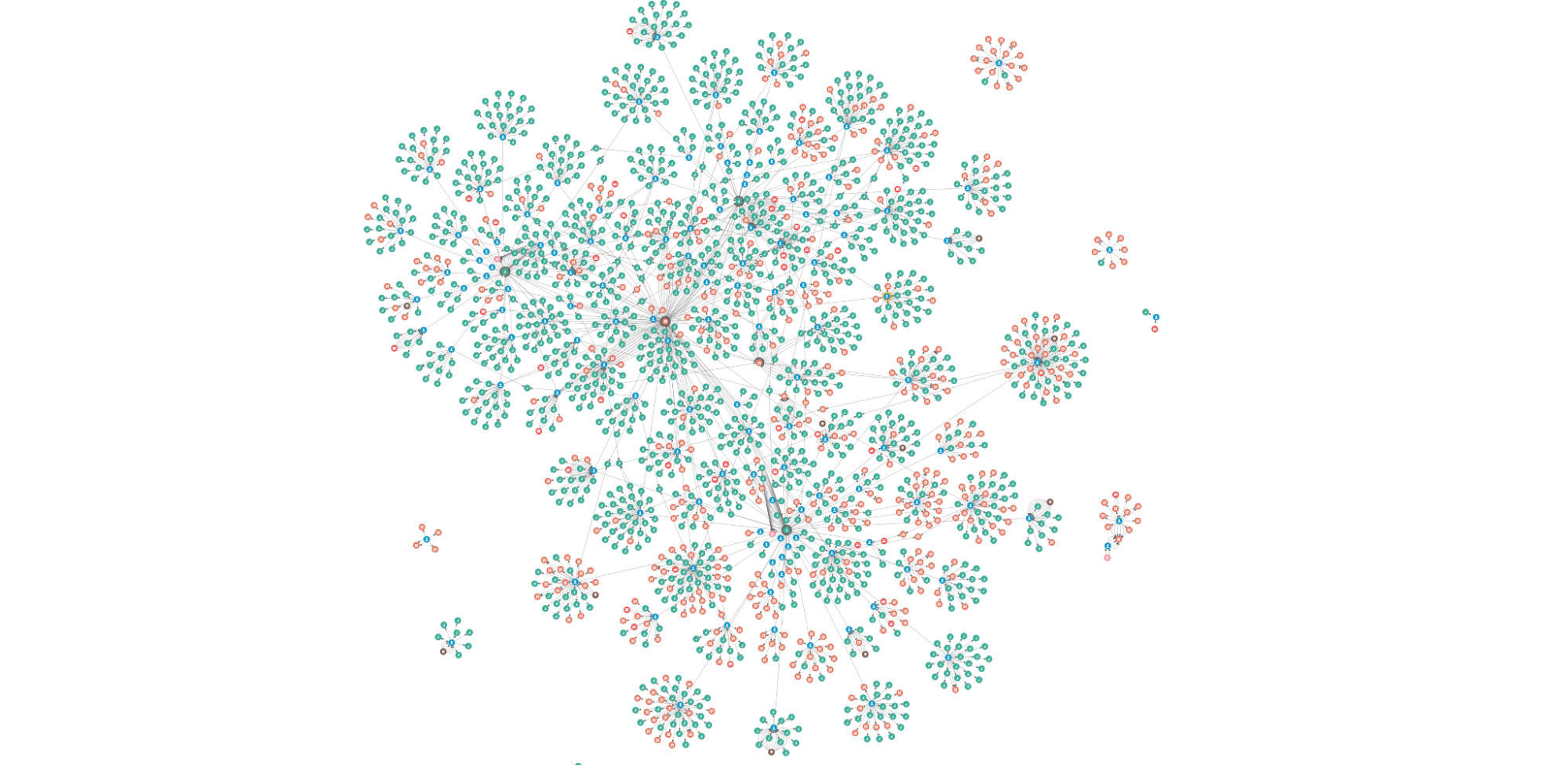
In the same way, while graph data is the raw material of an investigation, some of the most interesting relationships are often inferred rather than modelled directly in the data. Visualising these relationships can give a unique “big picture” of the data that is difficult or impossible to obtain with traditional relational tables and business intelligence tools.
On the other hand, graph visualisation enhances the quick identification of relationships and significant structures because it is an intuitive way to help detect patterns. Plus, the human brain processes visual information much faster; that’s where our Graph Visualisation platform comes in.
What is the Graph Visualisation platform?
Graph Visualisation platform is a full-featured investigation platform that can reveal hidden connections and context in data by transforming raw records into highly visual and interactive maps. From there, investigators can grab any data point and quickly see relationships, patterns, and anomalies, and if necessary, drill down to investigate further.
This is all done without writing a manual query, switching between anti-fraud systems, or having to think about data science! These are some of the interactions on the platform that easily make anomalies or relevant patterns stand out.
Expanding the data
To date, we have over three billion nodes and edges in our storage system. It is not possible (nor necessary) to show all of the data at once. The platform allows the user to grab any data point and easily expand to view the relationships.
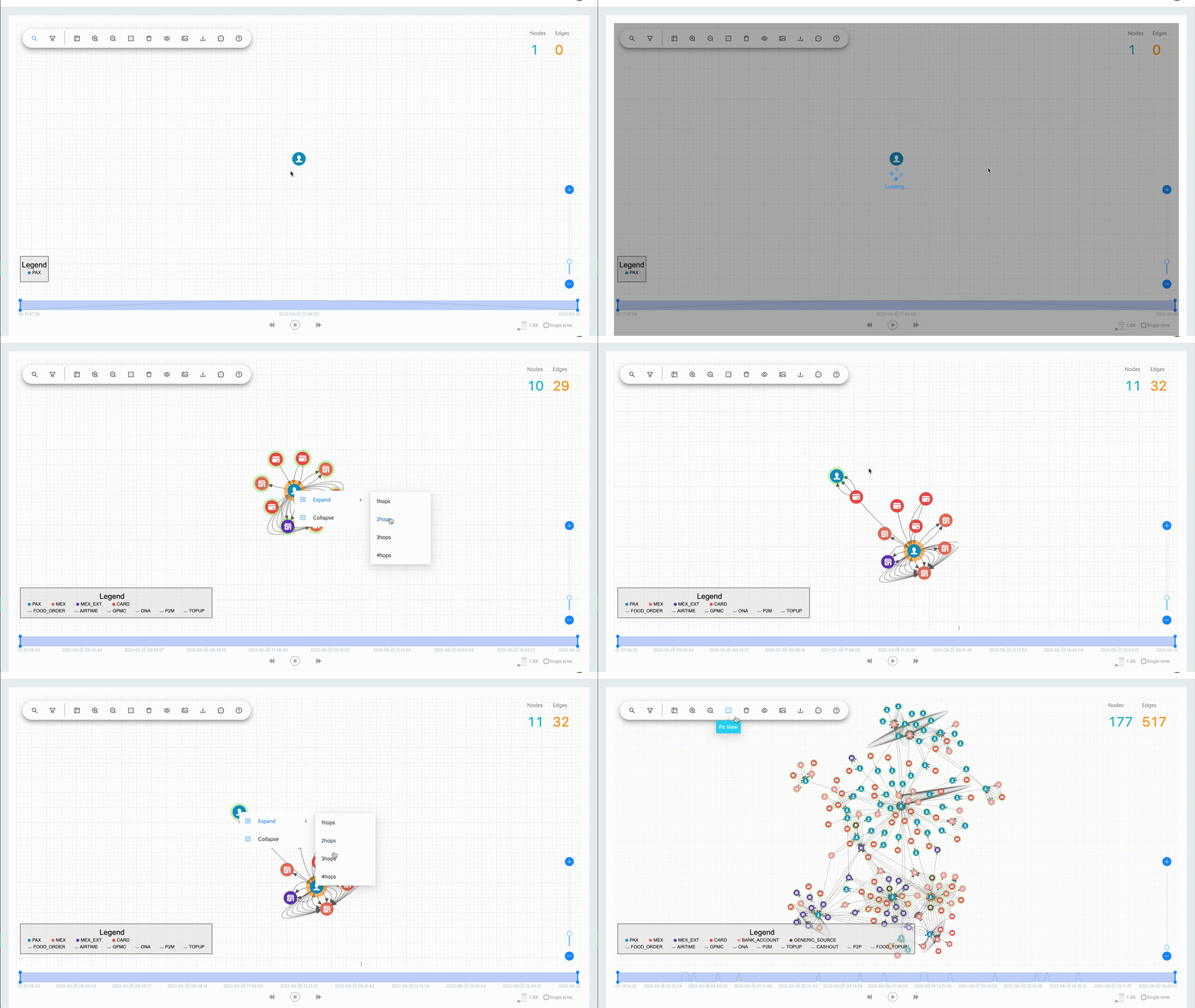
Timeline tracking and history replay
The Graph Visualisation platform’s interactive time filter lets you see temporal relationships within your data and clearly reveals the chronological progression of events. You can start with a specific time of interest, track everything that happens after, then quickly focus on the time and relationships that matter most.
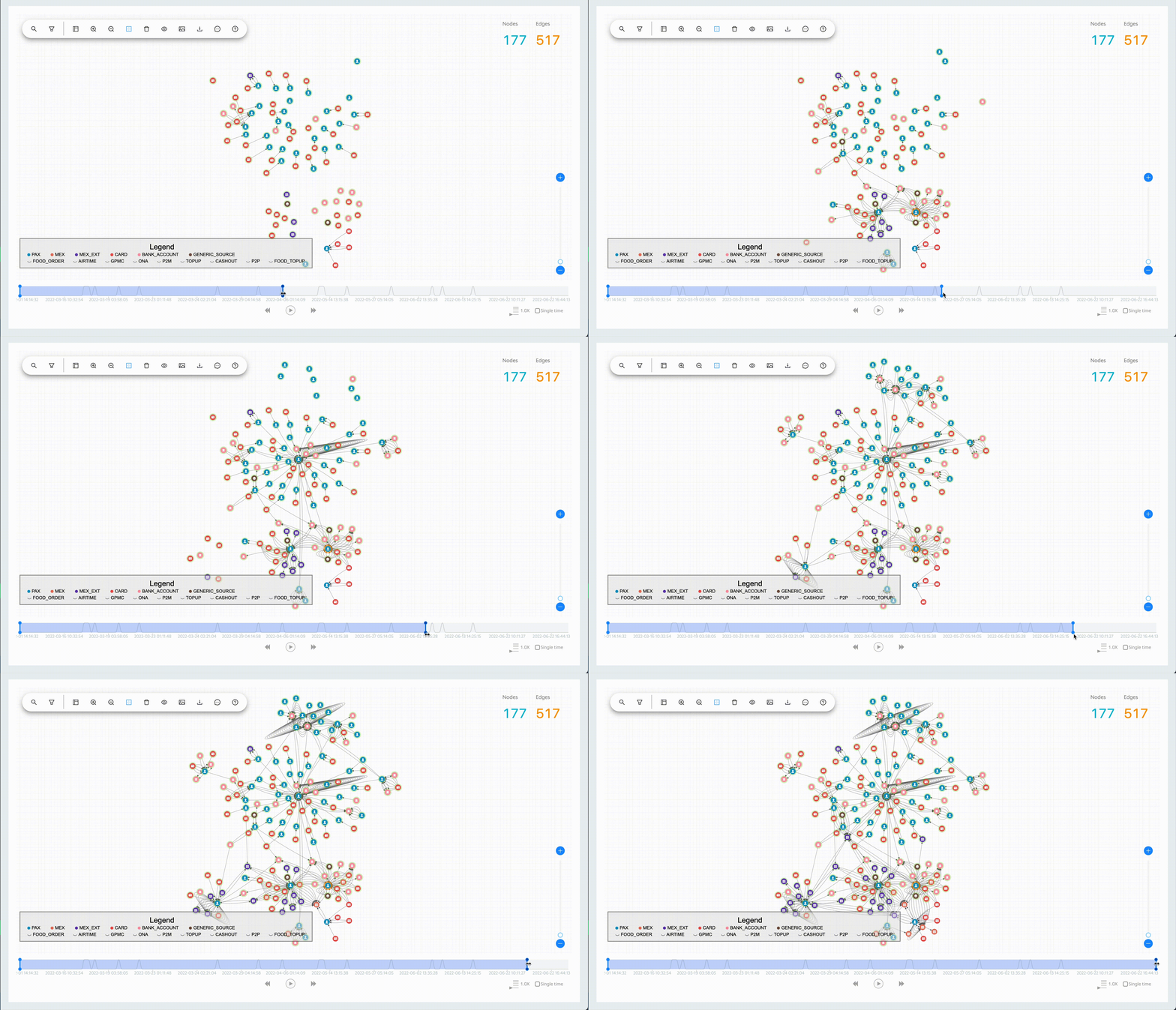
10X investigations
Here are a few examples of how the Graph Visualisation platform facilitates fraud investigations.
Appeal confirmation
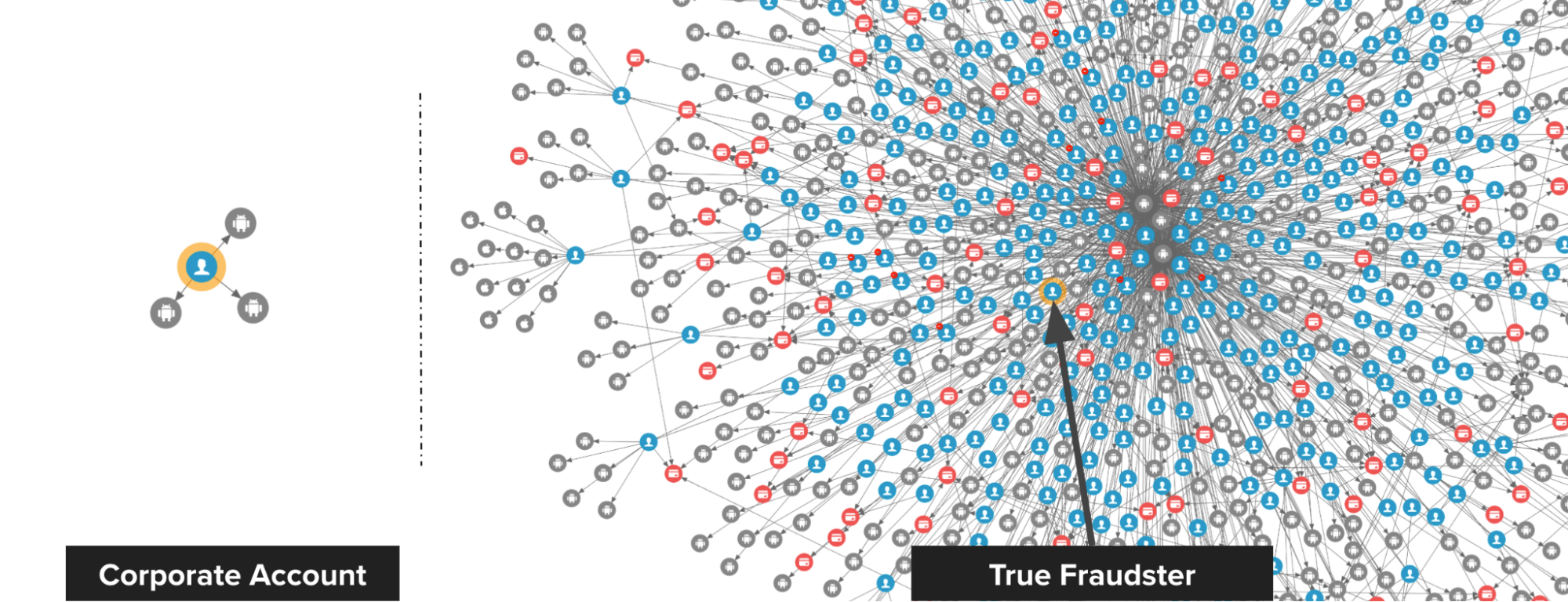
The following image shows the difference between a true fraudster and a falsely identified one. On the left, we have a Grab rental corporate account that was falsely detected by a fraud rule. Upon review, we discovered that there is no suspicious connection to this account, thus the account got unblocked.
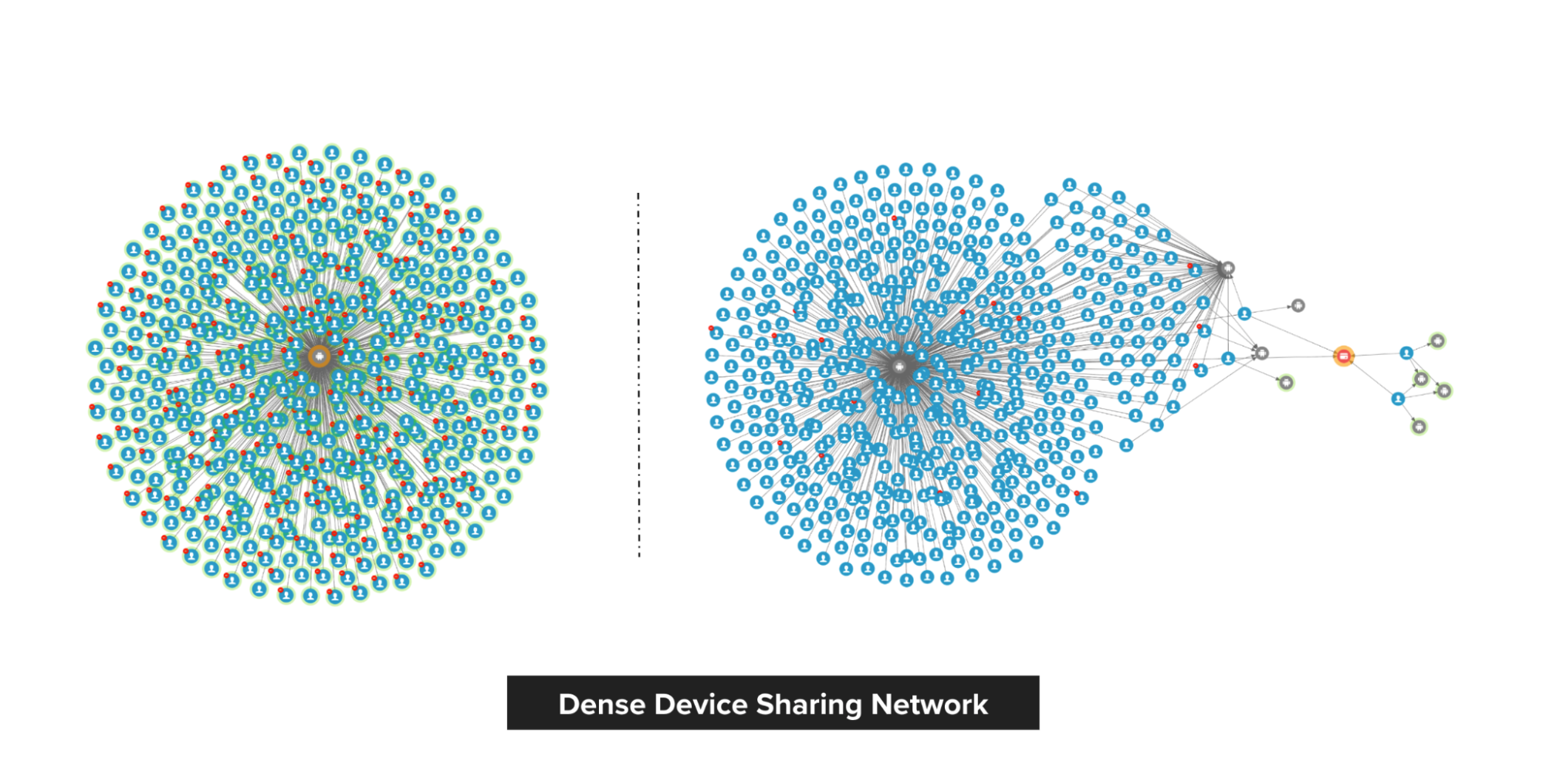
On the right, we have a passenger that was blocked by the system and they appealed. Investigations showed that the passenger is, in fact, part of an extremely dense device-sharing network, so we maintained our decision to block.
Modus operandi discovery
Passenger sharing device
Fraudsters tend to share physical resources to maximise their revenue. With our Graph Visualisation platform, you can see exactly how this pattern looks like. The image below shows a device that is shared by a lot of fraudsters.
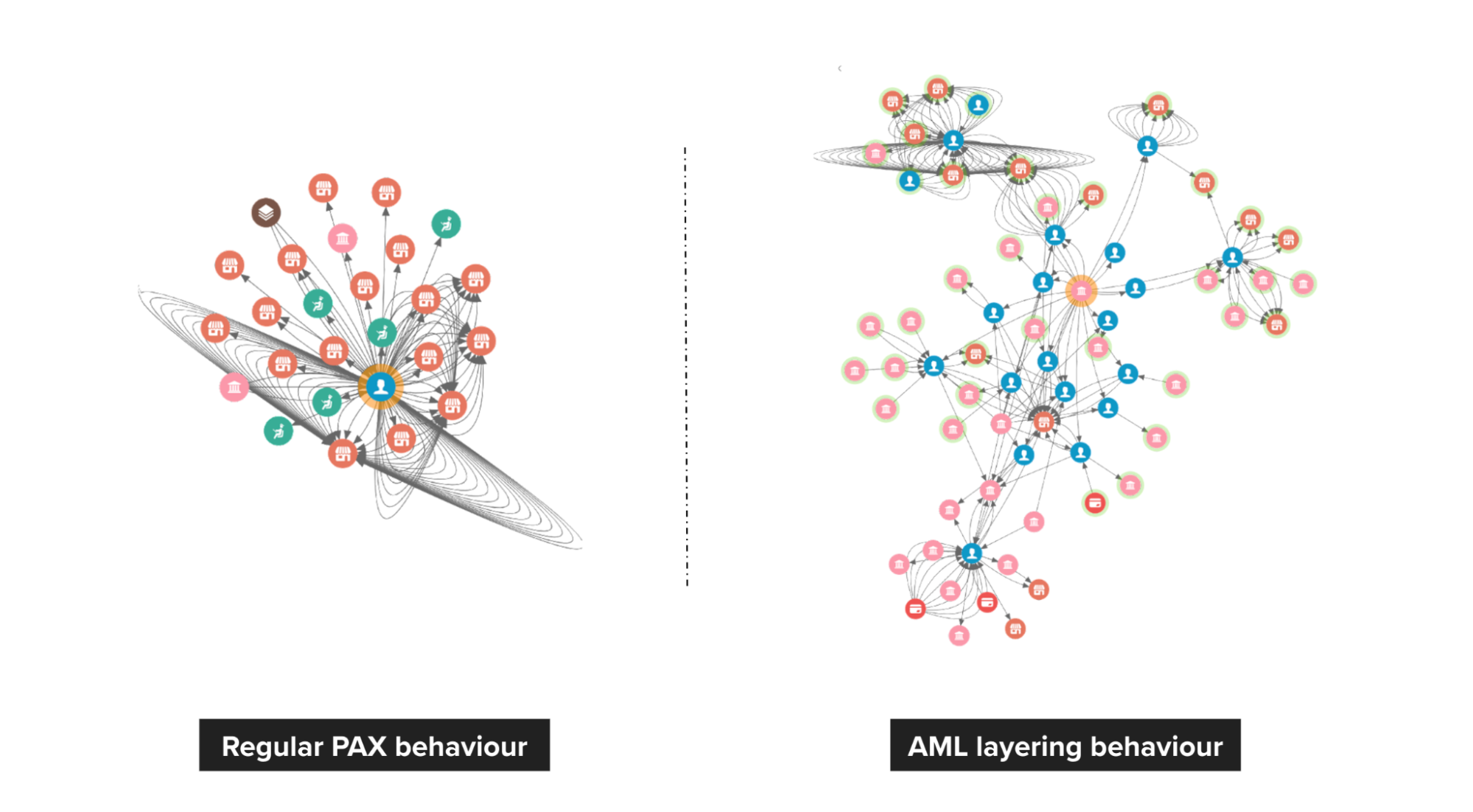
Anti-money laundering (AML)
On the left, we see a pattern of healthy spending on Grab. However, on the right, we can see that passengers are highly connected, and it has frequent large amount transfers to other payment providers.
Closing thoughts
Graph Visualisation is an intuitive way to investigate suspicious connections and potential patterns of crime. Investigators can directly interact with any data point to get the details they need and literally view the relationships in the data to make fast, accurate, and defensible decisions.
While fraud detection is a good use case for Graph Visualisation, it’s not the only possibility. Graph Visualisation can help make anything more efficient and intelligent, especially if you have highly connected data.
In the next part of this blog series, we will talk about the Graph service platform and the importance of building graph services with graph databases. Check out the other articles in this series:
Join us
Grab is the leading superapp platform in Southeast Asia, providing everyday services that matter to consumers. More than just a ride-hailing and food delivery app, Grab offers a wide range of on-demand services in the region, including mobility, food, package and grocery delivery services, mobile payments, and financial services across 428 cities in eight countries.
Powered by technology and driven by heart, our mission is to drive Southeast Asia forward by creating economic empowerment for everyone. If this mission speaks to you, join our team today!
[$] System call interception for unprivileged containers
Post Syndicated from original https://lwn.net/Articles/899281/
On the first day of the 2022 Linux
Security Summit North America (LSSNA) in Austin, Texas, Stéphane Graber
and Christian Brauner gave a presentation on using system-call interception
for container security purposes. The idea is to allow unprivileged
containers, those without elevated privileges on the host, to still
accomplish their tasks, some of which require privileges. A fair amount of
work has been done to make this
viable, but there is still more to do.
Collabora Online developer edition 22.05 released
Post Syndicated from original https://lwn.net/Articles/899404/
CODE
22.05 has been released; this is the “developer edition” of the
Collabora Online offering formerly known as LibreOffice Online.
CODE 22.05 is preceding the next major release of our long-term
supported business suite Collabora Online. This free developer
version includes all features and enhancements that will be
available in our enterprise version, expected later in July. The
CODE releases allow every interested user to learn and test new
features on an early stage.
New features include support for external grammar checkers, the ability to
have 16,000 columns in a spreadsheet (which is evidently useful to
somebody), sparkline plots, support for WebP graphics, and more.
Use AWS Nitro Enclaves to perform computation of multiple sensitive datasets
Post Syndicated from Sheila Busser original https://aws.amazon.com/blogs/compute/leveraging-aws-nitro-enclaves-to-perform-computation-of-multiple-sensitive-datasets/
This blog post is written by, Jeff Wisman, Principal Solutions Architect and Andrew Lee, Solutions Architect.
Introduction
Many organizations have sensitive datasets that they do not want to share with others because of stringent security and compliance requirements. However, they would still like to use each other’s data to perform processing and aggregation. For example, B2B (business to business) companies often want to augment their customer information dataset with additional demographic or psychographic signals. This enrichment of data is often done by one party sending customer information to be matched against another party’s data universe. Naturally, privacy and the revealing of business-critical customer information to an external entity is a major concern here. In this blog, we present a solution where multiple parties can choose to give an isolated compute environment access to their encrypted data to be decrypted and processed in a secure way using AWS Nitro Enclaves.
Designing and building your own secure private computing solution can be challenging, with few out-of-the-box solutions. Our sample application uses Nitro Enclaves, which support the creation of an isolated execution environment called an enclave and a cryptographic attestation process for generating and validating the enclave’s identity. The attestation process makes it possible to ensure only authorized code is running, as well as integration with the AWS Key Management Service (AWS KMS), so that only enclaves that you choose can access sensitive data. Nitro Enlaves enables customers to focus more on their application instead of worrying about integration with external services. While many enterprise use cases involve complex datasets, we’ll use a hypothetical scenario to learn the fundamentals of how this works. The example proof of concept (POC) application will be centered around a third-party bidding service for real estate transactions. Buyers will submit encrypted bids to the application. Once all the bids have been entered, the application will decrypt the bids, determine the highest bidder, and return a result without disclosing the actual bid amounts to any party.
How it works
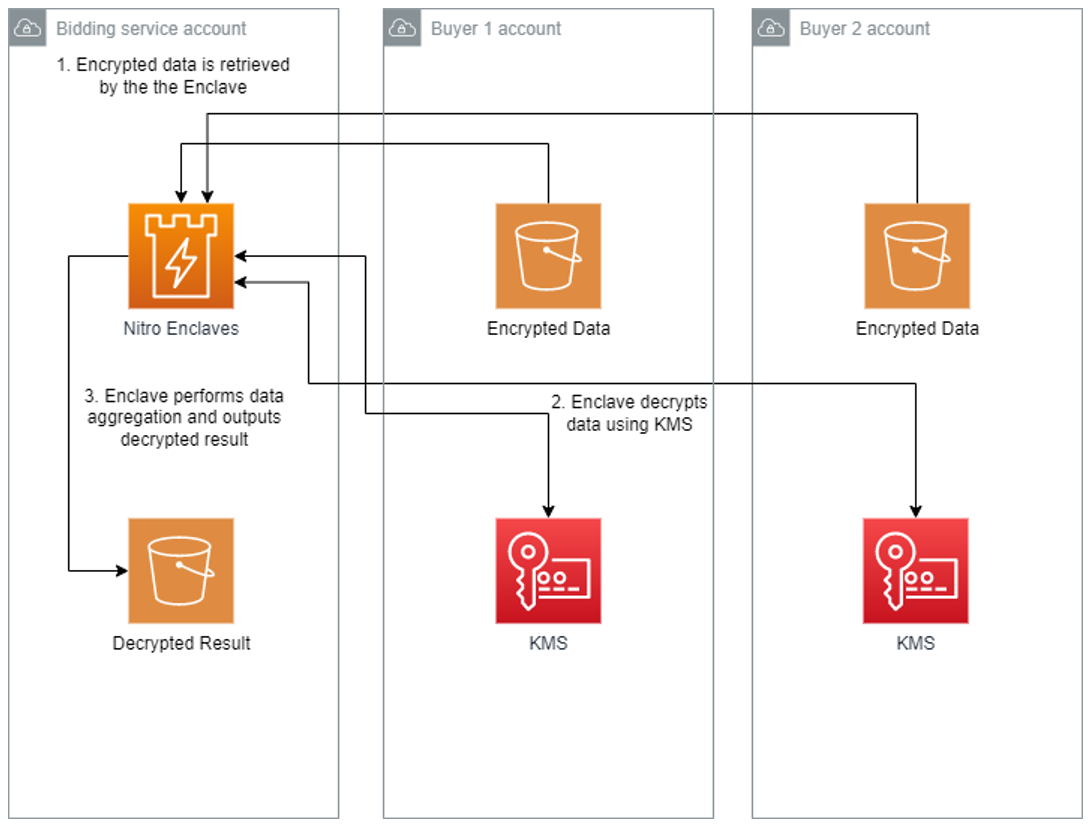
The POC will be deployed across three AWS accounts, one each for buyer-1, buyer-2, and the bidding service. The bidding service will be run in an enclave on the bidding service’s account.
- The bidding service will generate a set of measurements called platform configuration registers (PCRs) from the application code that uses the attestation process. PCRs are cryptographic measurements that are unique to an enclave. An attestation document can be used to verify the identity of the enclave and establish trust.
- The buyers will each generate their own AWS KMS key and use AWS KMS to authorize cryptographic requests from the bidding service enclave based on PCR values in the attestation document.
- The buyers will place their bids into a file, encrypt the file using AWS KMS, and store them in their own Amazon Simple Storage Service (Amazon S3)
- The bidding service will run the application, which will retrieve the encrypted bids from each buyer’s S3 bucket, decrypt the bids, calculate the highest bidder, and store the result in an S3 bucket.
Implementation
Let’s take a deeper dive into the steps involved in implementing this POC. To deploy the POC to your environment, follow the instructions in the AWS Nitro Enclaves Bidding Service GitHub project.
Enclave image generation
The first step is for the bidding service to launch the parent instance that will host the enclave. Refer to Launch the parent instance for more information about this process. The two real estate buyers, which we will call buyer-1 and buyer-2, will need to review the application code of the enclave application and agree that their data will not be exposed outside the enclave. Once they agree on the code, the bidding service generates the enclave image and a set of measurements as part of the attestation process. The buyers should also perform this process to ensure that the enclave image was generated and its measurements are from the agreed-upon application code. During the generation process, a unique set of measurements is taken of the application, which will make up its identity. When the enclave makes a request to decrypt data with AWS KMS, those measurements will be included in an attestation document to prove the enclave’s identity. Access policies in AWS KMS can then grant access to that identity. An example of a set of measurements is shown here:
Enclave Image successfully created.
{ "Measurements": { "HashAlgorithm": "Sha384 { ... }",
"PCR0":"287b24930a9f0fe14b01a71ecdc00d8be8fad90f9834d547158854b8279c74095c43f8d7f047714e98deb7903f20e3dd",
"PCR1":"aca6e62ffbf5f7deccac452d7f8cee1b94048faf62afc16c8ab68c9fed8c38010c73a669f9a36e596032f0b973d21895",
"PCR2":"0315f483ae1220b5e023d8c80ff1e135edcca277e70860c31f3003b36e3b2aaec5d043c9ce3a679e3bbd5b3b93b61d6f"
} }
Preparing encrypted data
Each buyer will create an AWS KMS key and use that key to encrypt their bids. The encrypted bids will be stored in their respective S3 buckets. Because AWS KMS integrates with Nitro Enclaves to provide built-in attestation support, each buyer can add the PCR values generated earlier as a condition to their respective AWS KMS key policies. This will ensure that only the enclave application code agreed upon by both buyers will have access to utilize the keys for decryption. The following is an example of a KMS key policy with PCR values as a condition:
{
  "Version": "2012-10-17",
  "Id": "key-default-1",
  "Statement": [{
    "Sid": "Enable decrypt from enclave",
    "Effect": "Allow",
    "Principal": < PARENT INSTANCE ROLE ARN > ,
    "Action": "kms:Decrypt",
    "Resource": "",
    "Condition": {
      "StringEqualsIgnoreCase": {
        "kms:RecipientAttestation:ImageSha384": "<PCR0 VALUE FROM BUILDING ENCLAVE IMAGE>",
        "kms:RecipientAttestation:PCR1":"<PCR1 VALUE FROM BUILDING ENCLAVE IMAGE>",
        "kms:RecipientAttestation:PCR2":"<PCR2 VALUE FROM BUILDING ENCLAVE IMAGE>"
      }
    }
  }]
}
The previous example only shows a key policy that uses PCR0, PCR1, and PCR2. You can further scope down the permissions by adding additional PCR values, for instance, role, parent instance ID, and a signing certificate for the enclave image. Refer to the AWS Nitro Enclaves User Guide for more details about PCR values.
Running the POC
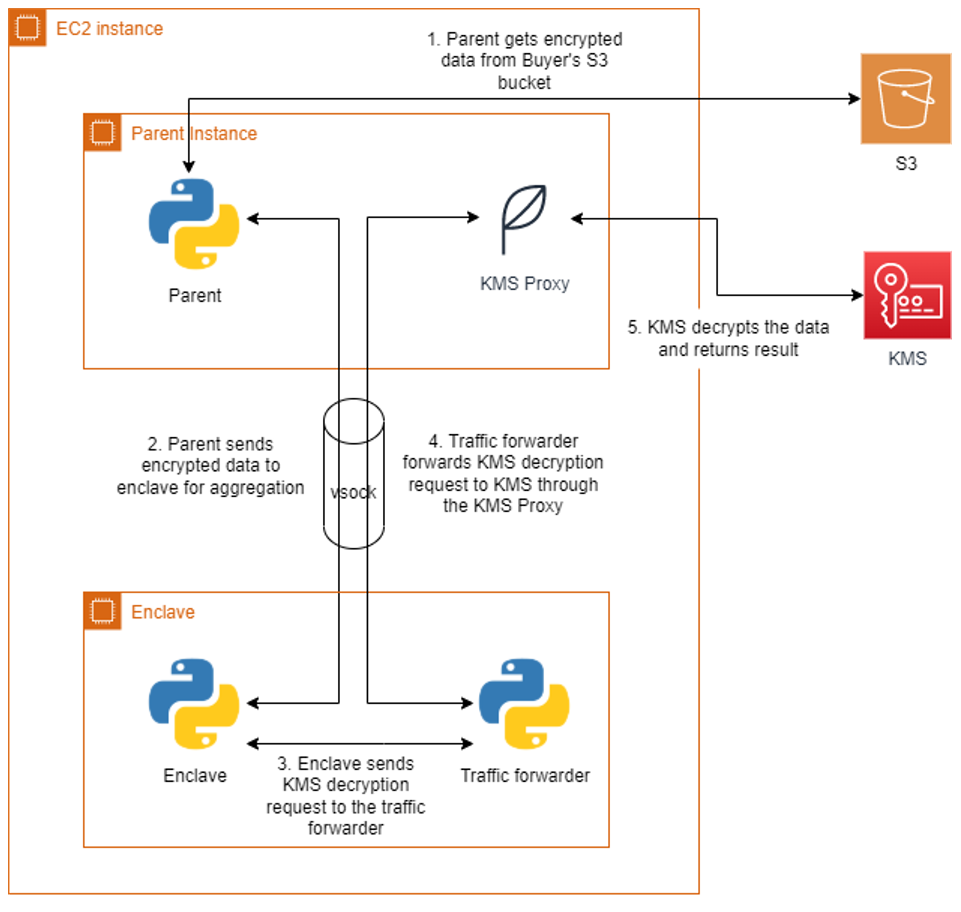
The bidding service will run the enclave image generated earlier on the parent instance. The application runs as two parts, one part on the parent instance and another in the enclave. Communication between the parent and the enclave is done through a vsock connection. An AWS KMS proxy is also used on the parent to allow communication between the enclave and AWS KMS for decrypting data. The parent application will retrieve the encrypted bids from each buyer’s S3 bucket and send them to the enclave. The enclave will decrypt the data using both buyers’ AWS KMS keys and present attestation documents signed by the Nitro Hypervisor. AWS KMS will validate that the PCR values in the attestation documents match the key policy before performing the decryption. The decryption event will be logged in AWS CloudTrail for auditing purposes. Once the encrypted bids are decrypted, the values are compared, and the winning buyer is recorded in the result. The unencrypted result is then returned to the parent and written to an S3 bucket in the bidding service’s account. A diagram of this process is shown in Figure 2.
Cleanup
Be sure you delete all the resources that were created when following the included Github project:
- Bidding service EC2 instance EC2 instance IAM role and policy
- AWS KMS Customer managed keys
- S3 Buckets for storing encrypted files
Conclusion
In this blog post, we introduced a sample POC utilizing Nitro Enclaves to allow a bidding service to process two parties’ encrypted data without revealing their data to any party. We did this by ensuring access to sensitive data is only allowed from an application running within an enclave. With the straightforward integration of AWS KMS and the attestation process, customers can quickly develop applications on Nitro Enclaves that can enable computing on encrypted datasets from multiple accounts. For more information on AWS Nitro Enclaves, see the official product documentation or the introductory videos on YouTube.
Improve Git monorepo performance with a file system monitor
Post Syndicated from Jeff Hostetler original https://github.blog/2022-06-29-improve-git-monorepo-performance-with-a-file-system-monitor/
If you have a monorepo, you’ve probably already felt the pain of slow Git commands, such as git status and git add. These commands are slow because they need to search the entire worktree looking for changes. When the worktree is very large, Git needs to do a lot of work.
The Git file system monitor (FSMonitor) feature can speed up these commands by reducing the size of the search, and this can greatly reduce the pain of working in large worktrees. For example, this chart shows status times dropping to under a second on three different large worktrees when FSMonitor is enabled!
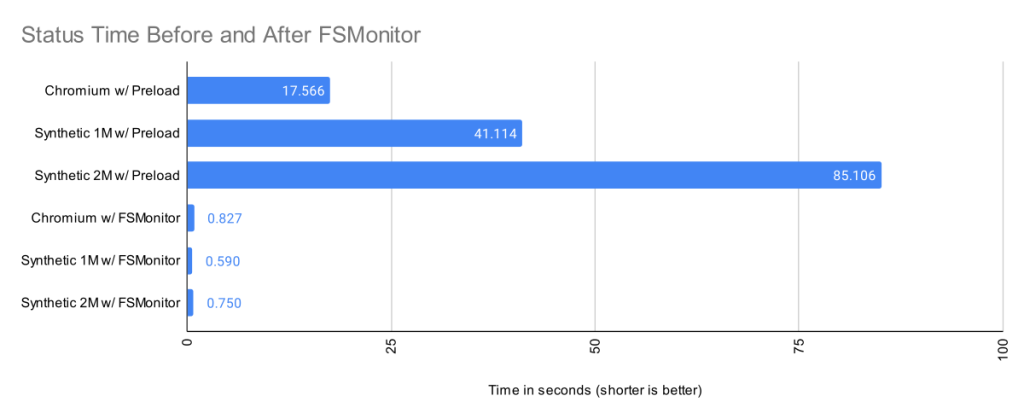
In this article, I want to talk about the new builtin FSMonitor git fsmonitor--daemon added in Git version 2.37.0. This is easy to set up and use since it is “in the box” and does not require any third-party tooling nor additional software. It only requires a config change to enable it. It is currently available on macOS and Windows.
To enable the new builtin FSMonitor, just set core.fsmonitor to true. A daemon will be started automatically in the background by the next Git command.
FSMonitor works well with core.untrackedcache, so we’ll also turn it on for the FSMonitor test runs. We’ll talk more about the untracked-cache later.
$ time git status
On branch main
Your branch is up to date with 'origin/main'.

It took 5.25 seconds to enumerate untracked files. 'status -uno'
may speed it up, but you have to be careful not to forget to add
new files yourself (see 'git help status').
nothing to commit, working tree clean

real    0m17.941s
user    0m0.031s
sys     0m0.046s

$ git config core.fsmonitor true
$ git config core.untrackedcache true

$ time git status
On branch main
Your branch is up to date with 'origin/main'.

It took 6.37 seconds to enumerate untracked files. 'status -uno'
may speed it up, but you have to be careful not to forget to add
new files yourself (see 'git help status').
nothing to commit, working tree clean

real    0m19.767s
user    0m0.000s
sys     0m0.078s

$ time git status
On branch main
Your branch is up to date with 'origin/main'.

nothing to commit, working tree clean

real    0m1.063s
user    0m0.000s
sys     0m0.093s

$ git fsmonitor--daemon status
fsmonitor-daemon is watching 'C:/work/chromium'
_Note that when the daemon first starts up, it needs to synchronize with the state of the index, so the next git status command may be just as slow (or slightly slower) than before, but subsequent commands should be much faster.
In this article, I’ll introduce the new builtin FSMonitor feature and explain how it improves performance on very large worktrees.
How FSMonitor improves performance
Git has a “What changed while I wasn’t looking?” problem. That is, when you run a command that operates on the worktree, such as git status, it has to discover what has changed relative to the index. It does this by searching the entire worktree. Whether you immediately run it again or run it again tomorrow, it has to rediscover all of that same information by searching again. Whether you edit zero, one, or a million files in the mean time, the next git status command has to do the same amount of work to rediscover what (if anything) has changed.
The cost of this search is relatively fixed and is based upon the number of files (and directories) present in the worktree. In a monorepo, there might be millions of files in the worktree, so this search can be very expensive.
What we really need is a way to focus on the changed files without searching the entire worktree.
How FSMonitor works
FSMonitor is a long-running daemon or service process.
- It registers with the operating system to receive change notification events on files and directories.
- It adds the pathnames of those files and directories to an in-memory, time-sorted queue.
- It listens for IPC connections from client processes, such as
git status. - It responds to client requests for a list of files and directories that have been modified recently.
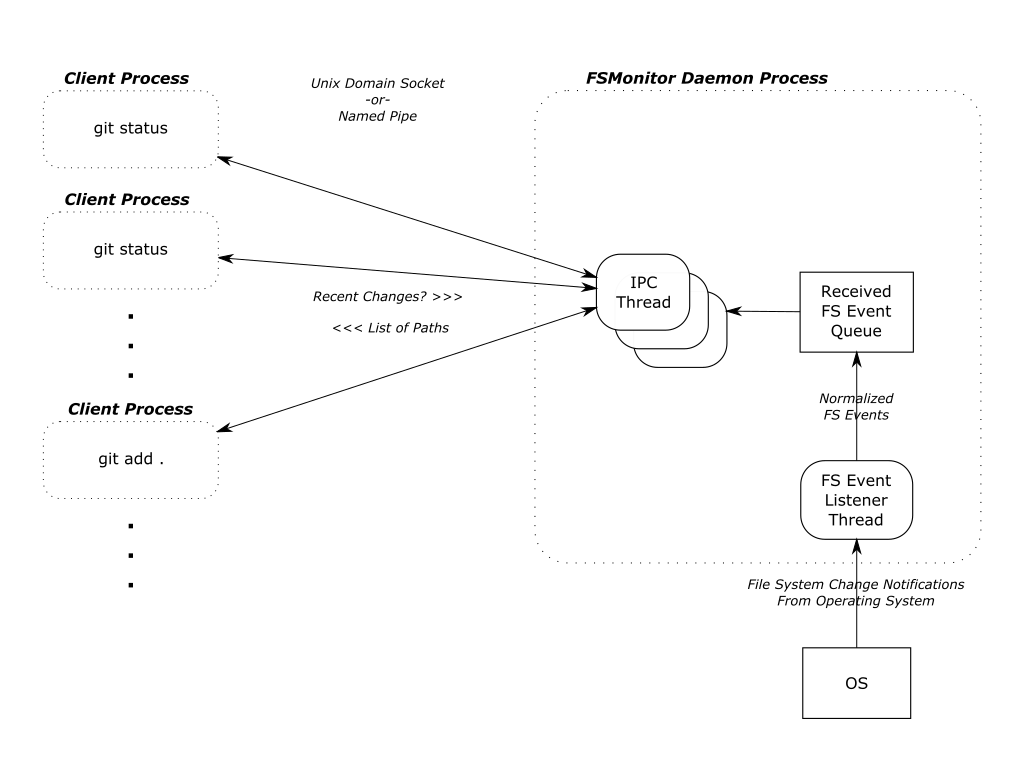
FSMonitor must continuously watch the worktree to have a complete view of all file system changes, especially ones that happen between Git commands. So it must be a long-running daemon or service process and not associated with an individual Git command instance. And thus, it cannot be a traditional Git hook (child) process. This design does allow it to service multiple (possibly concurrent) Git commands.
FSMonitor Synchronization
FSMonitor has the concept of a “token”:
- A token is an opaque string defined by FSMonitor and can be thought of as a globally unique sequence number or timestamp.
- FSMonitor creates a new token whenever file system events happen.
- FSMonitor groups file system changes into sets by these ordered tokens.
- A Git client command sends a (previously generated) token to FSMonitor to request the list of pathnames that have changed, since FSMonitor created that token.
- FSMonitor includes the current token in every response. The response contains the list of pathnames that changed between the sent and received tokens.
git status writes the received token into the index with other FSMonitor data before it exits. The next git status command reads the previous token (along with the other FSMonitor data) and asks FSMonitor what changed since the previous token.
Earlier, I said a token is like a timestamp, but it also includes other fields to prevent incomplete responses:
- The FSMonitor process id (PID): This identifies the daemon instance that created the token. If the PID in a client’s request token does not match the currently running daemon, we must assume that the client is asking for data on file system events generated before the current daemon instance was started.
- A file system synchronization id (SID): This identifies the most recent synchronization with the file system. The operating system may drop file system notification events during heavy load. The daemon itself may get overloaded, fall behind, and drop events. Either way, events were dropped, and there is a gap in our event data. When this happens, the daemon must “declare bankruptcy” and (conceptually) restart with a new SID. If the SID in a client’s request token does not match the daemon’s curent SID, we must assume that the client is asking for data spanning such a resync.
In both cases, a normal response from the daemon would be incomplete because of gaps in the data. Instead, the daemon responds with a trivial (“assume everything was changed”) response and a new token. This will cause the current Git client command to do a regular scan of the worktree (as if FSMonitor were not enabled), but let future client commands be fast again.
Types of files in your worktree
When git status examines the worktree, it looks for tracked, untracked, and ignored files.

Tracked files are files under version control. These are files that Git knows about. These are files that Git will create in your worktree when you do a git checkout. The file in the worktree may or may not match the version listed in the index. When different, we say that there is an unstaged change. (This is independent of whether the staged version matches the version referenced in the HEAD commit.)
Untracked files are just that: untracked. They are not under version control. Git does not know about them. They may be temporary files or new source files that you have not yet told Git to care about (using git add).
Ignored files are a special class of untracked files. These are usually temporary files or compiler-generated files. While Git will ignore them in commands like git add, Git will see them while searching the worktree and possibly slow it down.
Normally, git status does not print ignored files, but we’ll turn it on for this example so that we can see all four types of files.
$ git status --ignored
On branch master
Changes to be committed:
  (use "git restore --staged <file>..." to unstage)
    modified:   README

Changes not staged for commit:
  (use "git add <file>..." to update what will be committed)
  (use "git restore <file>..." to discard changes in working directory)
    modified:   README
    modified:   main.c

Untracked files:
  (use "git add <file>..." to include in what will be committed)
    new-file.c

Ignored files:
  (use "git add -f <file>..." to include in what will be committed)
    new-file.obj
The expensive worktree searches
During the worktree search, Git treats tracked and untracked files in two distinct phases. I’ll talk about each phase in detail in later sections.
- In “refresh_index,” Git looks for unstaged changes. That is, changes to tracked files that have not been staged (added) to the index. This potentially requires looking at each tracked file in the worktree and comparing its contents with the index version.
- In “untracked,” Git searches the worktree for untracked files and filters out tracked and ignored files. This potentially requires completely searching each subdirectory in the worktree.
There is a third phase where Git compares the index and the HEAD commit to look for staged changes, but this phase is very fast, because it is inspecting internal data structures that are designed for this comparision. It avoids the significant number of system calls that are required to inspect the worktree, so we won’t worry about it here.
A detailed example
The chart in the introduction showed status times before and after FSMonitor was enabled. Let’s revisit that chart and fill in some details.
I collected performance data for git status on worktrees from three large repositories. There were no modified files, and git status was clean.
- The Chromium repository contains about 400K files and 33K directories.
- A synthetic repository containing 1M files and 111K directories.
- A synthetic repository containing 2M files and 111K directories.
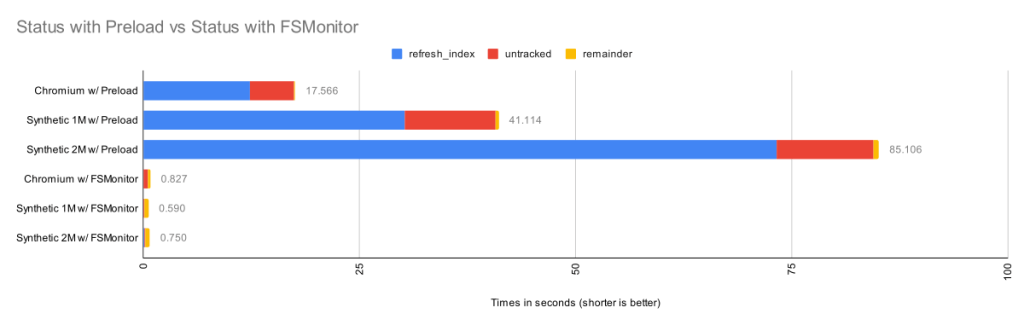
Here we can see that when FSMonitor is not present, the commands took from 17 to 85 seconds. However, when FSMonitor was enabled the commands took less than 1 second.
Each bar shows the total run time of the git status commands. Within each bar, the total time is divided into parts based on performance data gathered by Git’s trace2 library to highlight the important or expensive steps within the commands.
| Worktree | Files | refresh_index
with Preload |
Untracked
without Untracked-Cache |
Remainder | Total |
| Chromium | 393K | 12.3s | 5.1s | 0.16s | 17.6s |
| Synthetic 1M | 1M | 30.2s | 10.5s | 0.36s | 41.1s |
| Synthetic 2M | 2M | 73.2s | 11.2s | 0.64s | 85.1s |
The top three bars are without FSMonitor. We can see that most of the time was spent in the refresh_index and untracked columns. I’ll explain what these are in a minute. In the remainder column, I’ve subtracted those two from the total run time. This portion barely shows up on these bars, so the key to speeding up git status is to attack those two phases.
The bottom three bars on the above chart have FSMonitor and the untracked-cache enabled. They show a dramatic performance improvement. On this chart these bars are barely visible, so let’s zoom in on them.
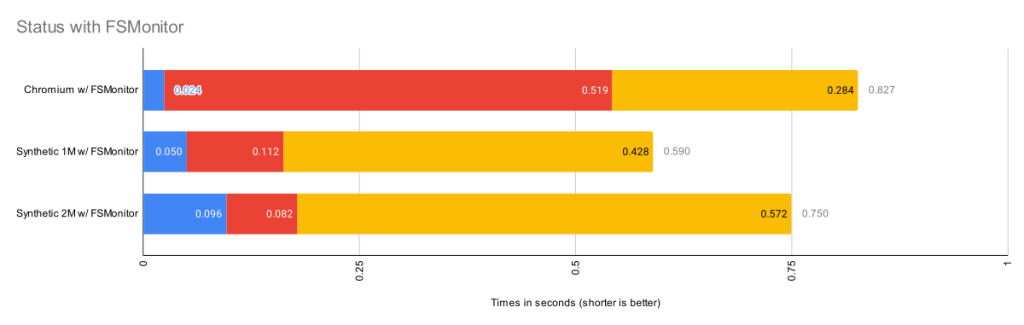
This chart rescales the FSMonitor bars by 100X. The refresh_index and untracked columns are still present but greatly reduced thanks to FSMonitor.
| Worktree | Files | refresh_index
with FSMonitor |
Untracked
with FSMonitor and Untracked-Cache |
Remainder | Total |
| Chromium | 393K | 0.024s | 0.519s | 0.284s | 0.827s |
| Synthetic 1M | 1M | 0.050s | 0.112s | 0.428s | 0.590s |
| Synthetic 2M | 2M | 0.096s | 0.082s | 0.572s | 0.750s |
This is bigger than just status
So far I’ve only talked about git status, since it is the command that we probably use the most and are always thinking about when talking about performance relative to the state and size of the worktree. But it is just one of many affected commands:
git diffdoes the same search, but uses the changed files it finds to print a difference in the worktree and your index.git add .does the same search, but it stages each changed file it finds.git restoreandgit checkoutdo the same search to decide the files to be replaced.
So, for simplicity, I’ll just talk about git status, but keep in mind that this approach benefits many other commands, since the cost of actually staging, overwriting, or reporting the change is relatively trivial by comparison — the real performance cost in these commands (as the above charts show) is the time it takes to simply find the changed files in the worktree.
Phase 1: refresh_index
The index contains an “index entry” with information for each tracked file. The git ls-files command can show us what that list looks like. I’ll truncate the output to only show a couple of files. In a monorepo, this list might contain millions of entries.
$ git ls-files --stage --debug
[...]
100644 7ce4f05bae8120d9fa258e854a8669f6ea9cb7b1 0   README.md
  ctime: 1646085519:36302551
  mtime: 1646085519:36302551
  dev: 16777220 ino: 180738404
  uid: 502  gid: 20
  size: 3639    flags: 0
[...]
100644 5f1623baadde79a0771e7601dcea3c8f2b989ed9 0   Makefile
  ctime: 1648154224:994917866
  mtime: 1648154224:994917866
  dev: 16777221 ino: 182328550
  uid: 502  gid: 20
  size: 110149  flags: 0
[...]
Scanning tracked files for unstaged changes
Let’s assume at the beginning of refresh_index that all index entries are “unmarked” — meaning that we don’t know yet whether or not the worktree file contains an unstaged change. And we “mark” an index entry when we know the answer (either way).

To determine if an individual tracked file has an unstaged change, it must be “scanned”. That is, Git must read, clean, hash the current contents of the file, and compare the computed hash value with the hash value stored in the index. If the hashes are the same, we mark the index entry as “valid”. If they are different, we mark it as an unstaged change.
In theory, refresh_index must repeat this for each tracked file in the index.
As you can see, each individual file that we have to scan will take time and if we have to do a “full scan”, it will be very slow, especially if we have to do it for millions of files. For example, on the Chromium worktree, when I forced a full scan it took almost an hour.
| Worktree | Files | Full Scan |
| Chromium | 393K | 3072s |
refresh_index shortcuts
Since doing a full scan of the worktree is so expensive, Git has developed various shortcuts to avoid scanning whenever possible to increase the performance of refresh_index.
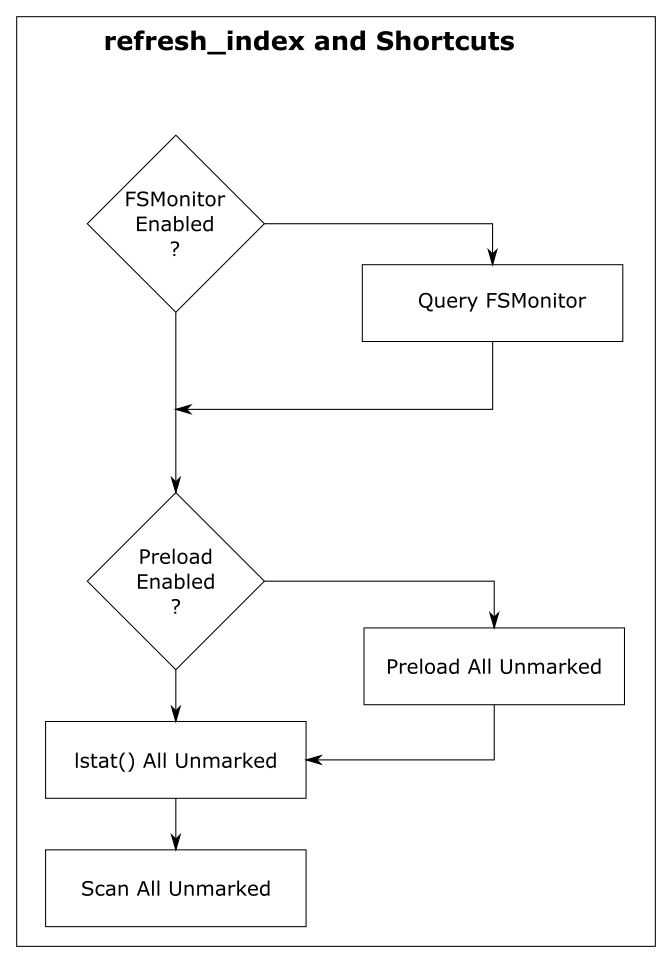
For discussion purposes, I’m going to describe them here as independent steps rather than somewhat intertwined steps. And I’m going to start from the bottom, because the goal of each shortcut is to look at unmarked index entries, mark them if they can, and make less work for the next (more expensive) step. So in a perfect world, the final “full scan” would have nothing to do, because all of the index entries have already been marked, and there are no unmarked entries remaining.
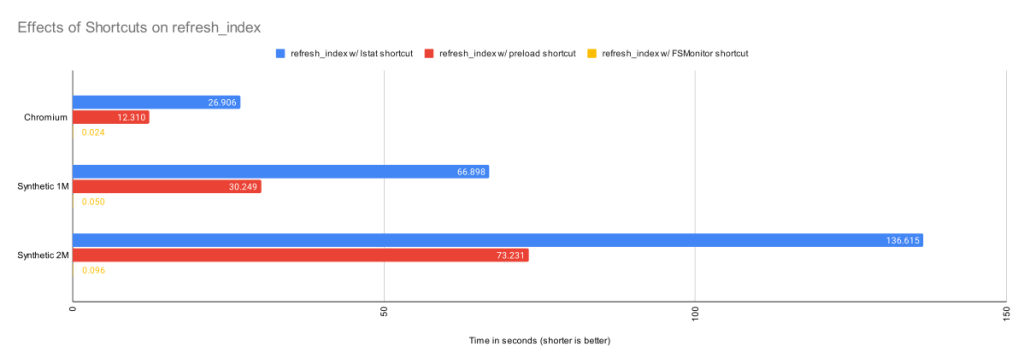
In the above chart, we can see the cummulative effects of these shortcuts.
Shortcut: refresh_index with lstat()
The “lstat() shortcut” was created very early in the Git project.
To avoid actually scanning every tracked file on every git status command, Git relies on a file’s last modification time (mtime) to tell when a file was last changed. File mtimes are updated when files are created or edited. We can read the mtime using the lstat() system call.
When Git does a git checkout or git add, it writes each worktree file’s current mtime into its index entry. These serve as the reference mtimes for future git status commands.
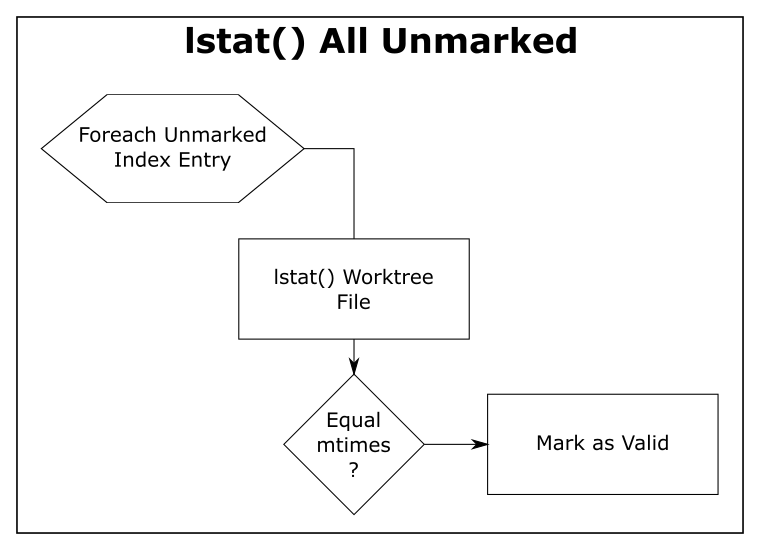
Then, during a later git status, Git checks the current mtime against the reference mtime (for each unmarked file). If they are identical, Git knows that the file content hasn’t changed and marks the index entry valid (so that the next step will avoid it). If the mtimes are different, this step leaves the index entry unmarked for the next step.
| Worktree | Files | refresh_index with lstat()
|
| Chromium | 393K | 26.9s |
| Synthetic 1M | 1M | 66.9s |
| Synthetic 2M | 2M | 136.6s |
The above table shows the time in seconds taken to call lstat() on every file in the worktree. For the Chromium worktree, we’ve cut the time of refresh_index from 50 minutes to 27 seconds.
Using mtimes is much faster than always scanning each file, but Git still has to lstat() every tracked file during the search, and that can still be very slow when there are millions of files.
In this experiment, there were no modifications in the worktree, and the index was up to date, so this step marked all of the index entries as valid and the “scan all unmarked” step had nothing to do. So the time reported here is essentially just the time to call lstat() in a loop.
This is better than before, but even though we are only doing an lstat(), git status is still spending more than 26 seconds in this step. We can do better.
Shortcut: refresh_index with preload
The core.preloadindex config option is an optional feature in Git. The option was introduced in version 1.6 and was enabled by default in 2.1.0 on platforms that support threading.
This step partitions the index into equal-sized chunks and distributes it to multiple threads. Each thread does the lstat() shortcut on their partition. And like before, index entries with different mtimes are left unmarked for the next step in the process.
The preload step does not change the amount of file scanning that we need to do in the final step, it just distributes the lstat() calls across all of your cores.
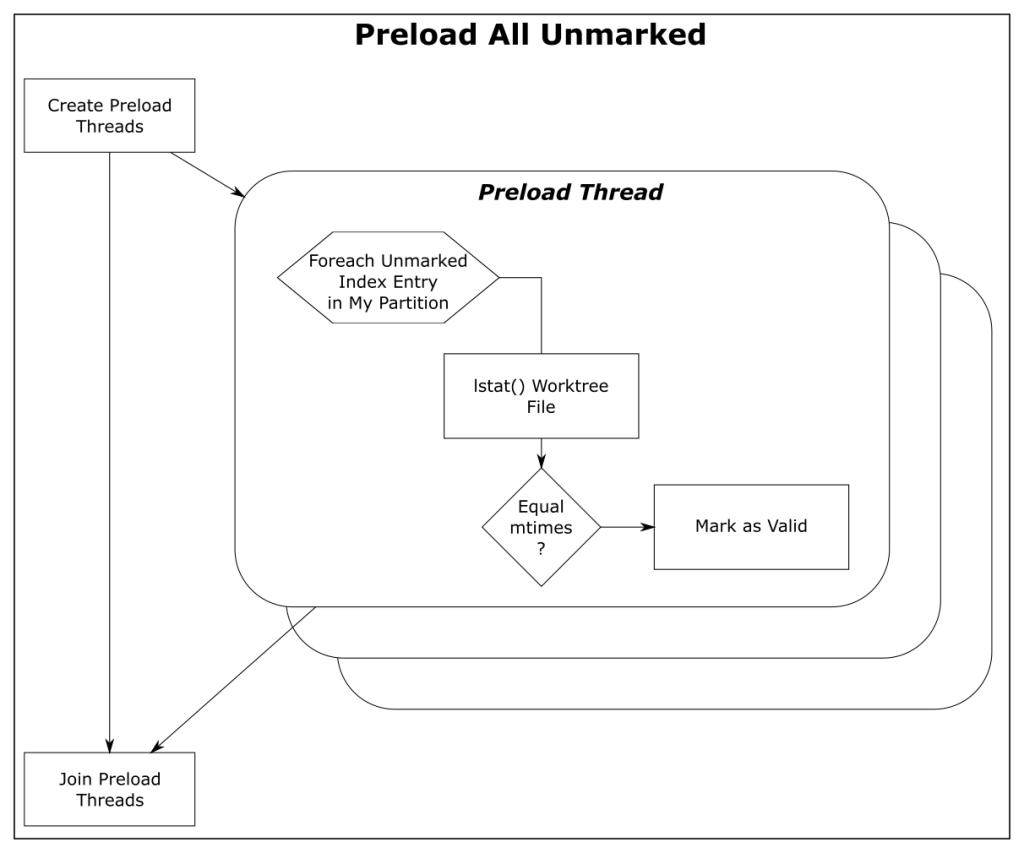
| Worktree | Files | refresh_index with Preload |
| Chromium | 393K | 12.3s |
| Synthetic 1M | 1M | 30.2s |
| Synthetic 2M | 2M | 73.2s |
With the preload shortcut git status is about twice as fast on my 4-core Windows laptop, but it is still expensive.
Shortcut: refresh_index with FSMonitor
When FSMonitor is enabled:
- The
git fsmonitor--daemonis started in the background and listens for file system change notification events from the operating system for files within the worktree. This includes file creations, deletions, and modifications. If the daemon gets an event for a file, that file probably has an updated mtime. Said another way, if a file mtime changes, the daemon will get an event for it. - The FSMonitor index extension is added to the index to keep track of FSMonitor and
git statusdata betweengit statuscommands. The extension contains an FSMonitor token and a bitmap listing the files that were marked valid by the previousgit statuscommand (and relative to that token). - The next
git statuscommand will use this bitmap to initialize the marked state of the index entries. That is, the previous Git command saved the marked state of the index entries in the bitmap and this command restores them — rather than initializing them all as unmarked. - It will then ask the daemon for a list of files that have had file system events since the token and unmark each of them. FSMonitor tells us the exact set of files that have been modified in some way since the last command, so those are the only files that we should need to visit.
At this point, all of the unchanged files should be marked valid. Only files that may have changed should be unmarked. This sets up the next shortcut step to have very little to do.
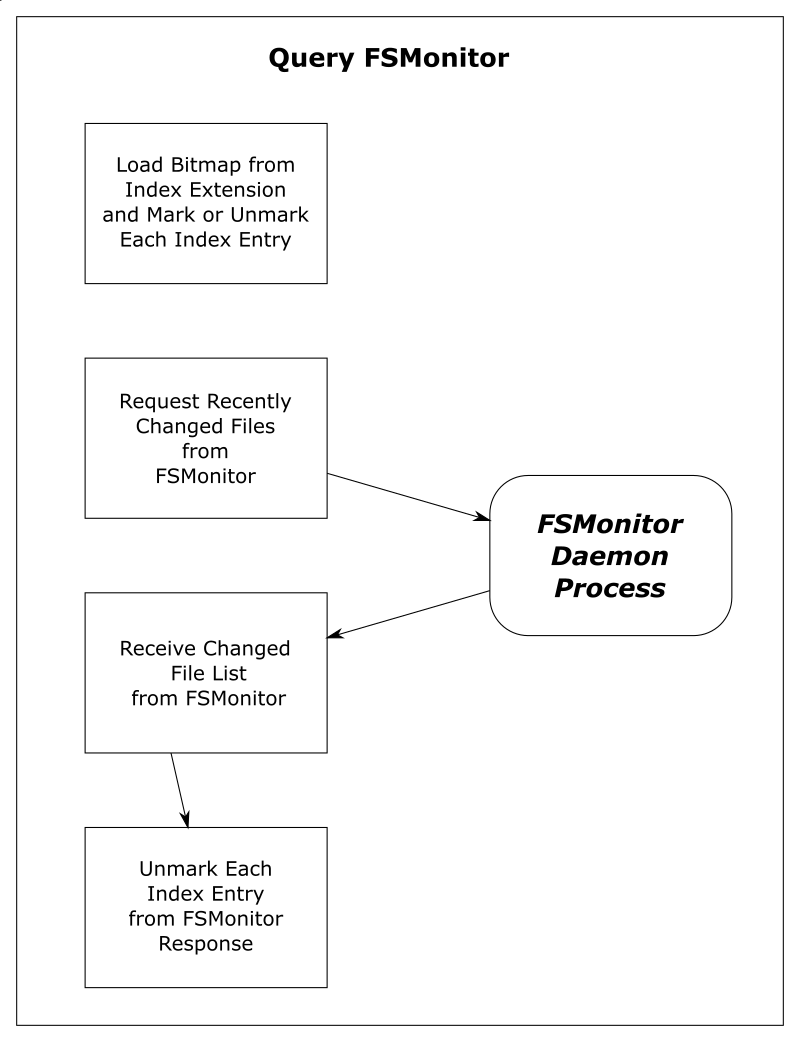
| Worktree | Files | Query FSMonitor | refresh_index with FSMonitor |
| Chromium | 393K | 0.017s | 0.024s |
| Synthetic 1M | 1M | 0.002s | 0.050s |
| Synthetic 2M | 2M | 0.002s | 0.096s |
This table shows that refresh_index is now very fast since we don’t need to any searching. And the time to request the list of files over IPC is well worth the complex setup.
Phase 2: untracked
The “untracked” phase is a search for anything in the worktree that Git does not know about. These are files and directories that are not under version control. This requires a full search of the worktree.
Conceptually, this looks like:
- A full recursive enumeration of every directory in the worktree.
- Build a complete list of the pathnames of every file and directory within the worktree.
- Take each found pathname and do a binary search in the index for a corresponding index entry. If one is found, the pathname can be omitted from the list, because it refers to a tracked file.
- On case insensitive systems, such as Windows and macOS, a case insensitive hash table must be constructed from the case sensitive index entries and used to lookup the pathnames instead of the binary search.
- Take each remaining pathname and apply
.gitignorepattern matching rules. If a match is found, then the pathname is an ignored file and is omitted from the list. This pattern matching can be very expensive if there are lots of rules. - The final resulting list is the set of untracked files.
This search can be very expensive on monorepos and frequently leads to the following advice message:
$ git status
On branch main
Your branch is up to date with 'origin/main'.

It took 5.12 seconds to enumerate untracked files. 'status -uno'
may speed it up, but you have to be careful not to forget to add
new files yourself (see 'git help status').
nothing to commit, working tree clean
Normally, the complete discovery of the set of untracked files must be repeated for each command unless the [core.untrackedcache](https://git-scm.com/docs/git-config#Documentation/git-config.txt-coreuntrackedCache) feature is enabled.
The untracked-cache
The untracked-cache feature adds an extension to the index that remembers the results of the untracked search. This includes a record for each subdirectory, its mtime, and a list of the untracked files within it.
With the untracked-cache enabled, Git still needs to lstat() every directory in the worktree to confirm that the cached record is still valid.
If the mtimes match:
- Git avoids calling
opendir()andreaddir()to enumerate the files within the directory, - and just uses the existing list of untracked files from the cache record.
If the mtimes don’t match:
- Git needs to invalidate the untracked-cache entry.
- Actually open and read the directory contents.
- Call
lstat()on each file or subdirectory within the directory to determine if it is a file or directory and possibly invalidate untracked-cache entries for any subdirectories. - Use the file pathname to do tracked file filtering.
- Use the file pathname to do ignored file filtering
- Update the list of untracked files in the untracked-cache entry.
How FSMonitor helps the untracked-cache
When FSMonitor is also enabled, we can avoid the lstat() calls, because FSMonitor tells us the set of directories that may have an updated mtime, so we don’t need to search for them.
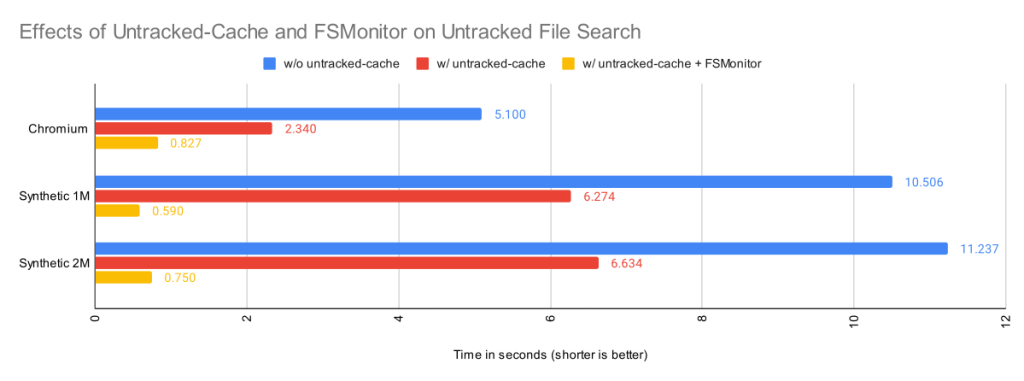
| Worktree | Files | Untracked
without Untracked-Cache |
Untracked
with Untracked-Cache |
Untracked
with Untracked-Cache and FSMonitor |
| Chromium | 393K | 5.1s | 2.3s | 0.83s |
| Synthetic 1M | 1M | 10.5s | 6.3s | 0.59s |
| Synthetic 2M | 2M | 11.2s | 6.6s | 0.75s |
By itself, the untracked-cache feature gives roughly a 2X speed up in the search for untracked files. Use both the untracked-cache and FSMonitor, and we see a 10X speedup.
A note about ignored files
You can improve Git performance by not storing temporary files, such as compiler intermediate files, inside your worktree.
During the untracked search, Git first eliminates the tracked files from the candidate untracked list using the index. Git then uses the .gitignore pattern matching rules to eliminate the ignored files. Git’s performance will suffer if there are many rules and/or many temporary files.
For example, if there is a *.o for every source file and they are stored next to their source files, then every build will delete and recreate one or more object files and cause the mtime on their parent directories to change. Those mtime changes will cause git status to invalidate the corresponding untracked-cache entries and have to re-read and re-filter those directories — even if no source files actually changed. A large number of such temporary and uninteresting files can greatly affect the performance of these Git commands.
Keeping build artifacts out of your worktree is part of the philosophy of the Scalar Project. Scalar introduced Git tooling to help you keep your worktree in <repo-name>/src/ to make it easier for you to put these other files in <repo-name>/bin/ or <repo-name>/packages/, for example.
A note about sparse checkout
So far, we’ve talked about optimizations to make Git work smarter and faster on worktree-related operations by caching data in the index and in various index extensions. Future commands are faster, because they don’t have to rediscover everything and therefore can avoid repeating unnecessary or redundant work. But we can only push that so far.
The Git sparse checkout feature approaches worktree performance from another angle. With it, you can ask Git to only populate the files that you need. The parts that you don’t need are simply not present. For example, if you only need 10% of the worktree to do your work, why populate the other 90% and force Git to search through them on every command?
Sparse checkout speeds the search for unstaged changes in refresh_index because:
- Since the unneeded files are not actually present on disk, they cannot have unstaged changes. So
refresh_indexcan completely ignore them. - The index entries for unneeded files are pre-marked during
git checkoutwith theskip-worktreebit, so they are never in an “unmarked” state. So those index entries are excluded from all of therefresh_indexloops.
Sparse checkout speeds the search for untracked files because:
- Since Git doesn’t know whether a directory contains untracked files until it searches it, the search for untracked files must visit every directory present in the worktree. Sparse checkout lets us avoid creating entire sub-trees or “cones” from the worktree. So there are fewer directories to visit.
- The untracked-cache does not need to create, save, and restore untracked-cache entries for the unpopulated directories. So reading and writing the untracked-cache extension in the index is faster.
External file system monitors
So far we have only talked about Git’s builtin FSMonitor feature. Clients use the simple IPC interface to communicate directly with git fsmonitor--daemon over a Unix domain socket or named pipe.
However, Git added support for an external file system monitor in version 2.16.0 using the core.fsmonitor hook. Here, clients communicate with a proxy child helper process through the hook interface, and it communicates with an external file system monitor process.
Conceptually, both types of file system monitors are identical. They include a long-running process that listens to the file system for changes and are able to respond to client requests for a list of recently changed files and directories. The response from both are used identically to update and modify the refresh_index and untracked searches. The only difference is in how the client talks to the service or daemon.
The original hook interface was useful, because it allowed Git to work with existing off-the-shelf tools and allowed the basic concepts within Git to be proven relatively quickly, confirm correct operation, and get a quick speed up.
Hook protocol versions
The original 2.16.0 version of the hook API used protocol version 1. It was a timestamp-based query. The client would send a timestamp value, expressed as nanoseconds since January 1, 1970, and expect a list of the files that had changed since that timestamp.
Protocol version 1 has several race conditions and should not be used anymore. Protocol version 2 was added in 2.26.0 to address these problems.
Protocol version 2 is based upon opaque tokens provided by the external file system monitor process. Clients make token-based queries that are relative to a previously issued token. Instead of making absolute requests, clients ask what has changed since their last request. The format and content of the token is defined by the external file system monitor, such as Watchman, and is treated as an opaque string by Git client commands.
The hook protocol is not used by the builtin FSMonitor.
Using Watchman and the sample hook script
Watchman is a popular external file system monitor tool and a Watchman-compatible hook script is included with Git and copied into new worktrees during git init.
To enable it:
- Install Watchman on your system.
- Tell Watchman to watch your worktree:
$ watchman watch .
{
    "version": "2022.01.31.00",
    "watch": "/Users/jeffhost/work/chromium",
    "watcher": "fsevents"
}
- Install the sample hook script to teach Git how to talk to Watchman:
$ cp .git/hooks/fsmonitor-watchman.sample .git/hooks/query-watchman
- Tell Git to use the hook:
$ git config core.fsmonitor .git/hooks/query-watchman
Using Watchman with a custom hook
The hook interface is not limited to running shell or Perl scripts. The included sample hook script is just an example implementation. Engineers at Dropbox described how they were able to speed up Git with a custom hook executable.
Final Remarks
In this article, we have seen how a file system monitor can speed up commands like git status by solving the “discovery” problem and eliminating the need to search the worktree for changes in every command. This greatly reduces the pain of working with monorepos.
This feature was created in two efforts:
- First, Git was taught to work with existing off-the-shelf tools, like Watchman. This allowed the basic concepts to be proven relatively quickly. And for users who already use Watchman for other purposes, it allows Git to efficiently interoperate with them.
- Second, we brought the feature “in the box” to reduce the setup complexity and third-party dependencies, which some users may find useful. It also lets us consider adding Git-specific features that a generic monitoring tool might not want, such as understanding ignored files and omitting them from the service’s response.
Having both options available lets users choose the best solution for their needs.
Regardless of which type of file system monitor you use, it will help make your monorepos more usable.
The Big Story: After Roe. A Conversation With Adrienne LaFrance, Mary Ziegler, and David French
Post Syndicated from The Atlantic original https://www.youtube.com/watch?v=sHd0DlrorAQ
Let’s Architect! Understanding the build versus buy dilemma
Post Syndicated from Luca Mezzalira original https://aws.amazon.com/blogs/architecture/lets-architect-understanding-the-build-versus-buy-dilemma/
Vendor lock in happens when you commit to a specific technology and then don’t have the freedom to maintain full control of your applications. Even if you want to switch to another vendor, it’s not easy because of the financial investment, effort, and time needed to do so.
In the cloud computing, technology changes quickly, and vendor lock in can impact your business objectives. In this edition of Let’s Architect!, we show you how to avoid the risks of vendor lock in and examine when you should build or buy new software.
Buy vs. Build Revisited: 3 Traps to Avoid
In this blog post, Gregor Hohpe shares some tips on how to avoid risks of vendor lock in. He advises to “build the software that differentiates your business and buy all else” and shows you how opportunity cost, an economic concept, plays major role in whether to build or buy software.

Time to Rethink Build vs Buy
Which is the right option for your business: build or buy? Customers often ask this question. The answer is: it depends.
Moving to the cloud does not necessarily mean you are locked in to a cloud provider. Most cloud platforms offer you a pay as-you-go model with the flexibility to choose from a wide range of services and solutions such as serverless, DevOps, etc. However, having advanced and scalable technology products powering your business can help differentiate your core product. And, it can help you innovate faster and increase speed and agility. This blog post will help you choose the right path for you based on your business objectives.

Switching Costs and Lock-In
In this blog post, Mark Schwartz shares his personal story. He talks about his role as the CIO of US Citizenship and Immigration Services and how he decided to migrate their workloads to the cloud during his time there. He discusses some of his considerations in moving and some of the obstacles he encountered along the way.

See you next time!
Thanks for reading! See you in a couple of weeks when we discuss DevOps.
Other posts in this series
- Let’s Architect! Using open-source technologies on AWS
- Let’s Architect! Architecting for Sustainability
- Let’s Architect! Architecting for Machine Learning
- Let’s Architect! Architecting for Security
- Let’s Architect! Tools for Cloud Architects
- Let’s Architect! Architecting for Blockchain
- Let’s Architect! Architecting microservices with containers
- Let’s Architect! Serverless architecture on AWS
- Let’s Architect! Creating resilient architecture
- Let’s Architect! Architecting for governance and management
- Let’s Architect! Architecting for front end