This is Ceti Alpha Five!

Post Syndicated from Owen Holland original https://blog.rapid7.com/2023/06/06/this-is-ceti-alpha-five/

This is Ceti Alpha Five!

Star Trek II: The Wrath of Khan demonstrating the very best and worst of cybersecurity in the 23rd Century

For those new to the Sci-Fi game, Star Trek II: The Wrath of Khan is a 1982 science fiction film based on the 1966-69 television series Star Trek. In the film, Admiral James T. Kirk and the crew of the starship USS Enterprise face off against a genetically engineered tyrant Khan Noonien Singh for control of the Genesis Device (a technology designed to reorganize dead matter into a habitable environment).

It is widely considered the best Star Trek film due to Khan’s capabilities exceeding the Enterprise’s crew and its narrative of no-win scenarios. To celebrate the 41st anniversary of its release, this blog looks at The Wrath of Khan through a cybersecurity lens.

Khan’s Wrath

In the opening scene, Kirk oversees a simulator session of Captain Spock’s trainees. The simulation, called the Kobayashi Maru, is a no-win scenario designed to test the character of Starfleet officers. Like in cybersecurity, a no-win scenario is a situation every commander may face. This is as true today as it was in the ’80s; however, you can certainly even the odds today.

Having a clear cybersecurity mission and vision provides more precise outcomes; however, like Spock was so keen to highlight, we learn by doing, as the journey is a test of character, and maybe that was the lesson of the simulation.

We then learn how Khan seeks to escape from a 15-year exile on an uninhabitable planet and exact revenge on Kirk. Khan is genetically engineered, and his physical strength and intelligence are abnormal. As a result, he is prone to having grand visions and likely has a superiority complex. Unsurprisingly, his own failures and those of his crew reverberate around him, consuming him and giving him a single unstoppable focus.

In a cybersecurity context, Khan represents threat actors slowly descending on you and your organisation. They are driven to succeed, to inflict pain, gain an advantage, and steal technology. Most, like Khan, have a crew, a band of like-minded individuals with a common objective. If Khan, in this example, is the threat actor, the Starfleet represents an organization operating in today’s threat landscape.

Ceti Alpha FAIL!

There’s no other way to describe it; there are simply some forehead-slapping moments regarding basic cybersecurity practices in The Wrath of Khan. For example, the starship Reliant, a science vessel, is on a mission to search for a lifeless planet called Ceti Alpha Five to test the Genesis Device. Two Reliant officers beam down to the planet, which they believe to be uninhabited. Once there, they are captured by Khan as part of his plan to seek revenge against Kirk.

Khan implants the two crew members with indigenous eel larvae that render them susceptible to mind control (Think Insider Threat.) and uses them to capture the starship Reliant. With seemingly no quarantine procedures in place, they return to the Reliant, and quickly beam Khan and his crew aboard.

However, just like a cyber threat actor, Khan doesn’t stop there. He wants more… and since everything has gone unnoticed so far, he can press home his advantage. He learns about the Genesis project the science team supported and quickly realizes that he can use the device as a weapon.

The Hubris of the Defeated

Next, the Enterprise receives a distress call from the space station to which the Reliant is assigned. There are several examples of poor cybersecurity best practices in this scene; so the audience knows an attack is about to happen, but the Enterprise crew are completely unaware. This scenario is similar to the cybersecurity vulnerabilities many modern organisations face without completely understanding their risks.

The Enterprise, still operated by Spock’s trainees, encounters the Reliant en route to the space station. Ignorant of the forthcoming danger, Kirk approaches the Reliant with its shields down; and Khan draws them closer with false communications until they are in striking range.

The junior bridge officer, Commander Saavik, quotes General Order 12: ‘When approaching a vessel with which communications has not been established, all Starfleet vessels are to maintain maximum safety precautions... but she is cut off. Kirk carries on despite having processes for just such a risky encounter AND having just received a distress call from the space station. Failing to follow security guidelines makes Khan’s surprise attack even more powerful.

Going into an unknown encounter with their shields down and with the opposition having sufficient time to plan the attack, the Enterprise’s critical systems are targeted. The battle begins, and chaos erupts among the inexperienced crew; people panic and leave their posts due to the shock and awe of the attack. The attack is over in just 30 seconds. Enterprise is disabled, dead in the water, and utterly vulnerable. This is reminiscent of just how fast cyber attacks can happen and the feeling of helplessness and panic that can overcome an inexperienced team in the aftermath.

Reeling from the initial battle, Kirk and Spock survey the damage on monitors. ‘They knew exactly where to hit us’, Spock observes. With insider knowledge, time to plan and poor security procedures, the attack was devastating. Finally, Khan appears on the display monitor, revealing he was behind the attack on the crew of the Enterprise. The mistakes of Kirk’s past flash across his face.

Ol’ Comeback Kirk

If you’ve ever watched Star Trek, you know that you can never count Kirk out. The man can see himself out of a jam. Yes, he messed up; but he wasn’t about to back down. What is demonstrated over the next 2 minutes of the film is much like the very best of cybersecurity collaboration.

Khan originally intended to gain revenge for the past by destroying the Enterprise, but seeing this as an opportunity, Khan offers to spare the crew if they relinquish all material related to Genesis (think Ransomware).

Kirk stalls for time so his senior bridge officers can search their database for the Reliant’s command codes. They use the five-digit code (16309, in case you’re interested) to order Reliant’s shields down remotely and gain access to their critical infrastructure and launch a counter attack (effectively hacking the hackers).

What’s most impressive about this scene is that despite the damage and destruction that Khan inflicted, the crew kept their heads, thought logically and responded rapidly. Relying on each other’s knowledge and experience to prevent further misery – they even take the time to teach and communicate what they are doing to the junior officers (learn by doing, as the journey is a test of character).

It’s a satisfying moment for the audience as you see the aggressors being attacked themselves. You watch panic flood Khan’s face as he struggles with the counterattack and is ultimately forced to retreat and effect repairs. Kirk’s scrappiness and the team’s quick thinking in the face of disaster makes for an exciting movie. In the real world, however, it is critical to implement measures that enable you to avoid or quickly recover from threats.

When developing (or improving upon) your cybersecurity strategy, look for tools that:

Provide visibility into external threats

  • Stay ahead of threats to your organisation, employees, and customers with proactive clear, deep, and dark web monitoring.

Mitigate threats before they have an impact

  • Prevent damage to your organisation with contextualised alerts that enable rapid response.

Help you make informed security decisions

  • Easily prioritise mitigation efforts to shorten investigation time and speed alert triage.

To learn more about how a Rapid7 detection and response solution might fit into your cybersecurity strategy, watch our on-demand demo.

Finally, from one Enterprise to another: Live long and prosper.

[$] Ethics in a machine-learning world

Post Syndicated from original https://lwn.net/Articles/933193/

Margaret Mitchell, a researcher focused on the intersection of machine
learning and ethics, was the morning keynote speaker on the third day of
PyCon 2023. She spoke about her
journey into machine learning and how the Python language has been
instrumental in it. It was a timely and thought-provoking talk that looked
beyond the machine-learning hype to consider the bigger picture.

Gigabyte H263-V11 a 2U4N NVIDIA Grace Hopper Platform

Post Syndicated from Cliff Robinson original https://www.servethehome.com/gigabyte-h263-v11-a-2u4n-nvidia-grace-hopper-platform-arm-broadcom-intel/

At Computex 2023, we saw a Gigabyte H263-V11. This is a 2U 4-node NVIDIA Grace Hopper solution in a familiar form factor

The post Gigabyte H263-V11 a 2U4N NVIDIA Grace Hopper Platform appeared first on ServeTheHome.

Examining HTTP/3 usage one year on

Post Syndicated from David Belson original http://blog.cloudflare.com/http3-usage-one-year-on/

Examining HTTP/3 usage one year on

Examining HTTP/3 usage one year on

In June 2022, after the publication of a set of HTTP-related Internet standards, including the RFC that formally defined HTTP/3, we published HTTP RFCs have evolved: A Cloudflare view of HTTP usage trends. One year on, as the RFC reaches its first birthday, we thought it would be interesting to look back at how these trends have evolved over the last year.

Our previous post reviewed usage trends for HTTP/1.1, HTTP/2, and HTTP/3 observed across Cloudflare’s network between May 2021 and May 2022, broken out by version and browser family, as well as for search engine indexing and social media bots. At the time, we found that browser-driven traffic was overwhelmingly using HTTP/2, although HTTP/3 usage was showing signs of growth. Search and social bots were mixed in terms of preference for HTTP/1.1 vs. HTTP/2, with little-to-no HTTP/3 usage seen.

Between May 2022 and May 2023, we found that HTTP/3 usage in browser-retrieved content continued to grow, but that search engine indexing and social media bots continued to effectively ignore the latest version of the web’s core protocol. (Having said that, the benefits of HTTP/3 are very user-centric, and arguably offer minimal benefits to bots designed to asynchronously crawl and index content. This may be a key reason that we see such low adoption across these automated user agents.) In addition, HTTP/3 usage across API traffic is still low, but doubled across the year. Support for HTTP/3 is on by default for zones using Cloudflare’s free tier of service, while paid customers have the option to activate support.

HTTP/1.1 and HTTP/2 use TCP as a transport layer and add security via TLS. HTTP/3 uses QUIC to provide both the transport layer and security. Due to the difference in transport layer, user agents usually require learning that an origin is accessible using HTTP/3 before they'll try it. One method of discovery is HTTP Alternative Services, where servers return an Alt-Svc response header containing a list of supported Application-Layer Protocol Negotiation Identifiers (ALPN IDs). Another method is the HTTPS record type, where clients query the DNS to learn the supported ALPN IDs. The ALPN ID for HTTP/3 is "h3" but while the specification was in development and iteration, we added a suffix to identify the particular draft version e.g., "h3-29" identified draft 29. In order to maintain compatibility for a wide range of clients, Cloudflare advertised both "h3" and "h3-29". However, draft 29 was published close to three years ago and clients have caught up with support for the final RFC. As of late May 2023, Cloudflare no longer advertises h3-29 for zones that have HTTP/3 enabled, helping to save several bytes on each HTTP response or DNS record that would have included it. Because a browser and web server typically automatically negotiate the highest HTTP version available, HTTP/3 takes precedence over HTTP/2.

In the sections below, “likely automated” and “automated” traffic based on Cloudflare bot score has been filtered out for desktop and mobile browser analysis to restrict analysis to “likely human” traffic, but it is included for the search engine and social media bot analysis. In addition, references to HTTP requests or HTTP traffic below include requests made over both HTTP and HTTPS.

Overall request distribution by HTTP version

Examining HTTP/3 usage one year on

Aggregating global web traffic to Cloudflare on a daily basis, we can observe usage trends for HTTP/1.1, HTTP/2, and HTTP/3 across the surveyed one year period. The share of traffic over HTTP/1.1 declined from 8% to 7% between May and the end of September, but grew rapidly to over 11% through October. It stayed elevated into the new year and through January, dropping back down to 9% by May 2023. Interestingly, the weekday/weekend traffic pattern became more pronounced after the October increase, and remained for the subsequent six months. HTTP/2 request share saw nominal change over the year, beginning around 68% in May 2022, but then starting to decline slightly in June. After that, its share didn’t see a significant amount of change, ending the period just shy of 64%. No clear weekday/weekend pattern was visible for HTTP/2. Starting with just over 23% share in May 2022, the percentage of requests over HTTP/3 grew to just over 30% by August and into September, but dropped to around 26% by November. After some nominal loss and growth, it ended the surveyed time period at 28% share. (Note that this graph begins in late May due to data retention limitations encountered when generating the graph in early June.)

API request distribution by HTTP version

Examining HTTP/3 usage one year on

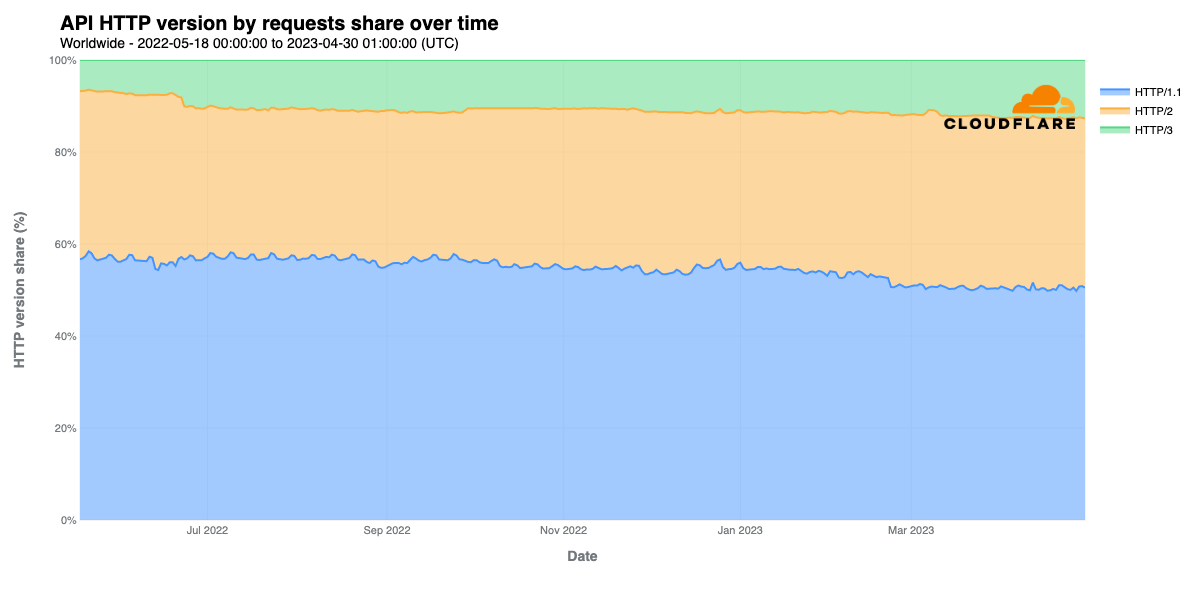
Although API traffic makes up a significant amount of Cloudflare’s request volume, only a small fraction of those requests are made over HTTP/3. Approximately half of such requests are made over HTTP/1.1, with another third over HTTP/2. However, HTTP/3 usage for APIs grew from around 6% in May 2022 to over 12% by May 2023. HTTP/3’s smaller share of traffic is likely due in part to support for HTTP/3 in key tools like curl still being considered as “experimental”. Should this change in the future, with HTTP/3 gaining first-class support in such tools, we expect that this will accelerate growth in HTTP/3 usage, both for APIs and overall as well.

Mitigated request distribution by HTTP version

Examining HTTP/3 usage one year on

The analyses presented above consider all HTTP requests made to Cloudflare, but we also thought that it would be interesting to look at HTTP version usage by potentially malicious traffic, so we broke out just those requests that were mitigated by one of Cloudflare’s application security solutions. The graph above shows that the vast majority of mitigated requests are made over HTTP/1.1 and HTTP/2, with generally less than 5% made over HTTP/3. Mitigated requests appear to be most frequently made over HTTP/1.1, although HTTP/2 accounted for a larger share between early August and late November. These observations suggest that attackers don’t appear to be investing the effort to upgrade their tools to take advantage of the newest version of HTTP, finding the older versions of the protocol sufficient for their needs. (Note that this graph begins in late May 2022 due to data retention limitations encountered when generating the graph in early June 2023.)

HTTP/3 use by desktop browser

As we noted last year, support for HTTP/3 in the stable release channels of major browsers came in November 2020 for Google Chrome and Microsoft Edge, and April 2021 for Mozilla Firefox. We also noted that in Apple Safari, HTTP/3 support needed to be enabled in the “Experimental Features” developer menu in production releases. However, in the most recent releases of Safari, it appears that this step is no longer necessary, and that HTTP/3 is now natively supported.

Examining HTTP/3 usage one year on

Looking at request shares by browser, Chrome started the period responsible for approximately 80% of HTTP/3 request volume, but the continued growth of Safari dropped it to around 74% by May 2023. A year ago, Safari represented less than 1% of HTTP/3 traffic on Cloudflare, but grew to nearly 7% by May 2023, likely as a result of support graduating from experimental to production.

Examining HTTP/3 usage one year on

Removing Chrome from the graph again makes trends across the other browsers more visible. As noted above, Safari experienced significant growth over the last year, while Edge saw a bump from just under 10% to just over 11% in June 2022. It stayed around that level through the new year, and then gradually dropped below 10% over the next several months. Firefox dropped slightly, from around 10% to just under 9%, while reported HTTP/3 traffic from Internet Explorer was near zero.

As we did in last year’s post, we also wanted to look at how the share of HTTP versions has changed over the last year across each of the leading browsers. The relative stability of HTTP/2 and HTTP/3 seen over the last year is in some contrast to the observations made in last year’s post, which saw some noticeable shifts during the May 2021 – May 2022 timeframe.

Examining HTTP/3 usage one year on

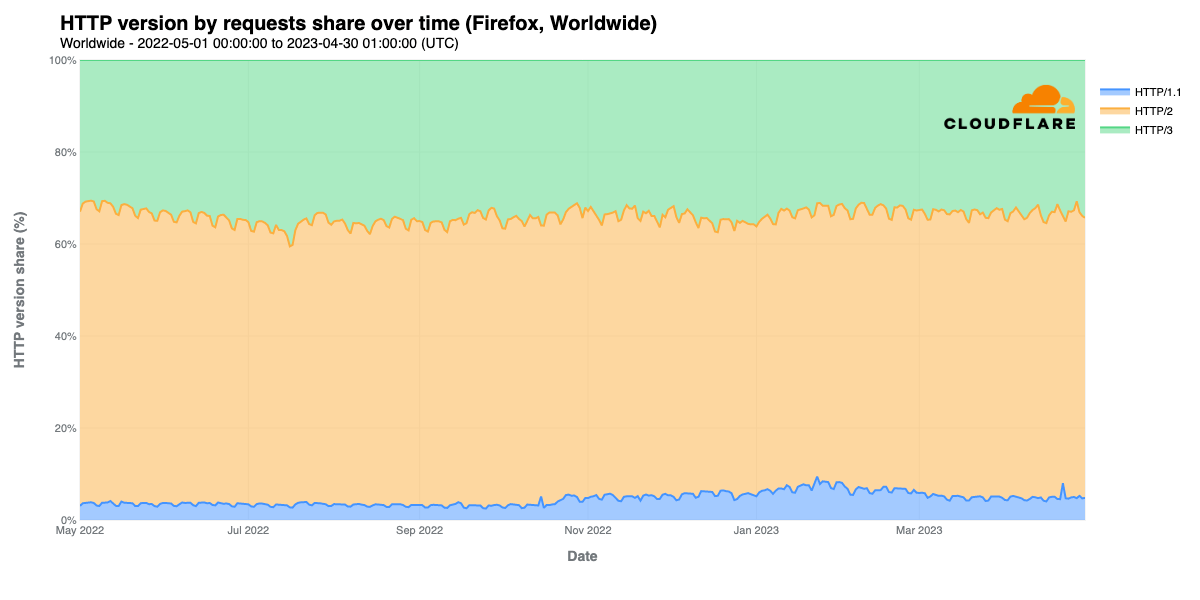
In looking at request share by protocol version across the major desktop browser families, we see that across all of them, HTTP/1.1 share grows in late October. Further analysis indicates that this growth was due to significantly higher HTTP/1.1 request volume across several large customer zones, but it isn’t clear why this influx of traffic using an older version of HTTP occurred. It is clear that HTTP/2 remains the dominant protocol used for content requests by the major browsers, consistently accounting for 50-55% of request volume for Chrome and Edge, and ~60% for Firefox. However, for Safari, HTTP/2’s share dropped from nearly 95% in May 2022 to around 75% a year later, thanks to the growth in HTTP/3 usage.

HTTP/3 share on Safari grew from under 3% to nearly 18% over the course of the year, while its share on the other browsers was more consistent, with Chrome and Edge hovering around 40% and Firefox around 35%, and both showing pronounced weekday/weekend traffic patterns. (That pattern is arguably the most pronounced for Edge.) Such a pattern becomes more, yet still barely, evident with Safari in late 2022, although it tends to vary by less than a percent.

HTTP/3 usage by mobile browser

Mobile devices are responsible for over half of request volume to Cloudflare, with Chrome Mobile generating more than 25% of all requests, and Mobile Safari more than 10%. Given this, we decided to explore HTTP/3 usage across these two key mobile platforms.

Examining HTTP/3 usage one year on

Looking at Chrome Mobile and Chrome Mobile Webview (an embeddable version of Chrome that applications can use to display Web content), we find HTTP/1.1 usage to be minimal, topping out at under 5% of requests. HTTP/2 usage dropped from 60% to just under 55% between May and mid-September, but then bumped back up to near 60%, remaining essentially flat to slightly lower through the rest of the period. In a complementary fashion, HTTP/3 traffic increased from 37% to 45%, before falling just below 40% in mid-September, hovering there through May. The usage patterns ultimately look very similar to those seen with desktop Chrome, albeit without the latter’s clear weekday/weekend traffic pattern.

Perhaps unsurprisingly, the usage patterns for Mobile Safari and Mobile Safari Webview closely mirror those seen with desktop Safari. HTTP/1.1 share increases in October, and HTTP/3 sees strong growth, from under 3% to nearly 18%.

Search indexing bots

Exploring usage of the various versions of HTTP by search engine crawlers/bots, we find that last year’s trend continues, and that there remains little-to-no usage of HTTP/3. (As mentioned above, this is somewhat expected, as HTTP/3 is optimized for browser use cases.) Graphs for Bing & Baidu here are trimmed to a period ending April 1, 2023 due to anomalous data during April that is being investigated.

Examining HTTP/3 usage one year on

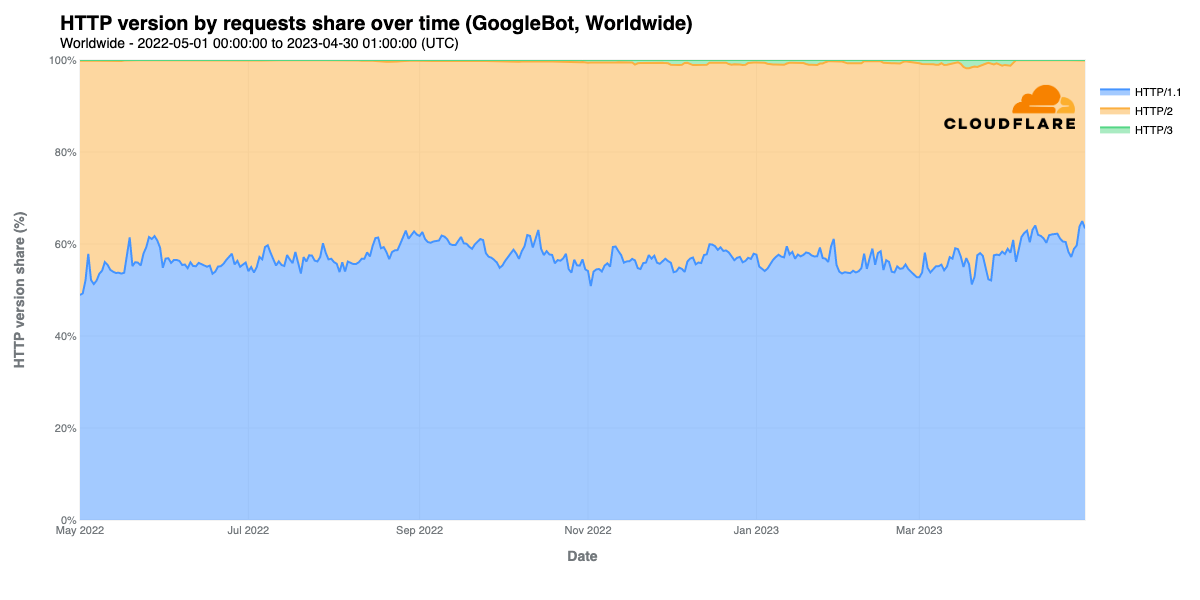
GoogleBot continues to rely primarily on HTTP/1.1, which generally comprises 55-60% of request volume. The balance is nearly all HTTP/2, although some nominal growth in HTTP/3 usage sees it peaking at just under 2% in March.

Examining HTTP/3 usage one year on

Through January 2023, around 85% of requests from Microsoft’s BingBot were made via HTTP/2, but dropped to closer to 80% in late January. The balance of the requests were made via HTTP/1.1, as HTTP/3 usage was negligible.

Examining HTTP/3 usage one year on

Looking at indexing bots from search engines based outside of the United States, Russia’s YandexBot appears to use HTTP/1.1 almost exclusively, with HTTP/2 usage generally around 1%, although there was a period of increased usage between late August and mid-November. It isn’t clear what ultimately caused this increase. There was no meaningful request volume seen over HTTP/3. The indexing bot used by Chinese search engine Baidu also appears to strongly prefer HTTP/1.1, generally used for over 85% of requests. However, the percentage of requests over HTTP/2 saw a number of spikes, briefly reaching over 60% on days in July, November, and December 2022, as well as January 2023, with several additional spikes in the 30% range. Again, it isn’t clear what caused this spiky behavior. HTTP/3 usage by BaiduBot is effectively non-existent as well.

Social media bots

Similar to Bing & Baidu above, the graphs below are also trimmed to a period ending April 1.

Examining HTTP/3 usage one year on

Facebook’s use of HTTP/3 for site crawling and indexing over the last year remained near zero, similar to what we observed over the previous year. HTTP/1.1 started the period accounting for under 60% of requests, and except for a brief peak above it in late May, usage of HTTP/1.1 steadily declined over the course of the year, dropping to around 30% by April 2023. As such, use of HTTP/2 increased from just over 40% in May 2022 to over 70% in April 2023. Meta engineers confirmed that this shift away from HTTP/1.1 usage is an expected gradual change in their infrastructure's use of HTTP, and that they are slowly working towards removing HTTP/1.1 from their infrastructure entirely.

Examining HTTP/3 usage one year on

In last year’s blog post, we noted that “TwitterBot clearly has a strong and consistent preference for HTTP/2, accounting for 75-80% of its requests, with the balance over HTTP/1.1.” This preference generally remained the case through early October, at which point HTTP/2 usage began a gradual decline to just above 60% by April 2023. It isn’t clear what drove the week-long HTTP/2 drop and HTTP/1.1 spike in late May 2022. And as we noted last year, TwitterBot’s use of HTTP/3 remains non-existent.

Examining HTTP/3 usage one year on

In contrast to Facebook’s and Twitter’s site crawling bots, HTTP/3 actually accounts for a noticeable, and growing, volume of requests made by LinkedIn’s bot, increasing from just under 1% in May 2022 to just over 10% in April 2023. We noted last year that LinkedIn’s use of HTTP/2 began to take off in March 2022, growing to approximately 5% of requests. Usage of this version gradually increased over this year’s surveyed period to 15%, although the growth was particularly erratic and spiky, as opposed to a smooth, consistent increase. HTTP/1.1 remained the dominant protocol used by LinkedIn’s bots, although its share dropped from around 95% in May 2022 to 75% in April 2023.

Conclusion

On the whole, we are excited to see that usage of HTTP/3 has generally increased for browser-based consumption of traffic, and recognize that there is opportunity for significant further growth if and when it starts to be used more actively for API interactions through production support in key tools like curl. And though disappointed to see that search engine and social media bot usage of HTTP/3 remains minimal to non-existent, we also recognize that the real-time benefits of using the newest version of the web’s foundational protocol may not be completely applicable for asynchronous automated content retrieval.

You can follow these and other trends in the “Adoption and Usage” section of Cloudflare Radar at https://radar.cloudflare.com/adoption-and-usage, as well as by following @CloudflareRadar on Twitter or https://cloudflare.social/@radar on Mastodon.

Security updates for Tuesday

Post Syndicated from original https://lwn.net/Articles/934010/

Security updates have been issued by Debian (linux-5.10), Red Hat (cups-filters, curl, kernel, kernel-rt, kpatch-patch, and webkit2gtk3), SUSE (apache-commons-fileupload, openstack-heat, openstack-swift, python-Werkzeug, and openstack-heat, python-Werkzeug), and Ubuntu (frr, go, libraw, libssh, nghttp2, python2.7, python3.10, python3.11, python3.5, python3.6, python3.8, and xfce4-settings).

Snowden Ten Years Later

Post Syndicated from Bruce Schneier original https://www.schneier.com/blog/archives/2023/06/snowden-ten-years-later.html

In 2013 and 2014, I wrote extensively about new revelations regarding NSA surveillance based on the documents provided by Edward Snowden. But I had a more personal involvement as well.

I wrote the essay below in September 2013. The New Yorker agreed to publish it, but the Guardian asked me not to. It was scared of UK law enforcement, and worried that this essay would reflect badly on it. And given that the UK police would raid its offices in July 2014, it had legitimate cause to be worried.

Now, ten years later, I offer this as a time capsule of what those early months of Snowden were like.


It’s a surreal experience, paging through hundreds of top-secret NSA documents. You’re peering into a forbidden world: strange, confusing, and fascinating all at the same time.

I had flown down to Rio de Janeiro in late August at the request of Glenn Greenwald. He had been working on the Edward Snowden archive for a couple of months, and had a pile of more technical documents that he wanted help interpreting. According to Greenwald, Snowden also thought that bringing me down was a good idea.

It made sense. I didn’t know either of them, but I have been writing about cryptography, security, and privacy for decades. I could decipher some of the technical language that Greenwald had difficulty with, and understand the context and importance of various document. And I have long been publicly critical of the NSA’s eavesdropping capabilities. My knowledge and expertise could help figure out which stories needed to be reported.

I thought about it a lot before agreeing. This was before David Miranda, Greenwald’s partner, was detained at Heathrow airport by the UK authorities; but even without that, I knew there was a risk. I fly a lot—a quarter of a million miles per year—and being put on a TSA list, or being detained at the US border and having my electronics confiscated, would be a major problem. So would the FBI breaking into my home and seizing my personal electronics. But in the end, that made me more determined to do it.

I did spend some time on the phone with the attorneys recommended to me by the ACLU and the EFF. And I talked about it with my partner, especially when Miranda was detained three days before my departure. Both Greenwald and his employer, the Guardian, are careful about whom they show the documents to. They publish only those portions essential to getting the story out. It was important to them that I be a co-author, not a source. I didn’t follow the legal reasoning, but the point is that the Guardian doesn’t want to leak the documents to random people. It will, however, write stories in the public interest, and I would be allowed to review the documents as part of that process. So after a Skype conversation with someone at the Guardian, I signed a letter of engagement.

And then I flew to Brazil.

I saw only a tiny slice of the documents, and most of what I saw was surprisingly banal. The concerns of the top-secret world are largely tactical: system upgrades, operational problems owing to weather, delays because of work backlogs, and so on. I paged through weekly reports, presentation slides from status meetings, and general briefings to educate visitors. Management is management, even inside the NSA Reading the documents, I felt as though I were sitting through some of those endless meetings.

The meeting presenters try to spice things up. Presentations regularly include intelligence success stories. There were details—what had been found, and how, and where it helped—and sometimes there were attaboys from “customers” who used the intelligence. I’m sure these are intended to remind NSA employees that they’re doing good. It definitely had an effect on me. Those were all things I want the NSA to be doing.

There were so many code names. Everything has one: every program, every piece of equipment, every piece of software. Sometimes code names had their own code names. The biggest secrets seem to be the underlying real-world information: which particular company MONEYROCKET is; what software vulnerability EGOTISTICALGIRAFFE—really, I am not making that one up—is; how TURBINE works. Those secrets collectively have a code name—ECI, for exceptionally compartmented information—and almost never appear in the documents. Chatting with Snowden on an encrypted IM connection, I joked that the NSA cafeteria menu probably has code names for menu items. His response: “Trust me when I say you have no idea.”

Those code names all come with logos, most of them amateurish and a lot of them dumb. Note to the NSA: take some of that more than ten-billion-dollar annual budget and hire yourself a design firm. Really; it’ll pay off in morale.

Once in a while, though, I would see something that made me stop, stand up, and pace around in circles. It wasn’t that what I read was particularly exciting, or important. It was just that it was startling. It changed—ever so slightly—how I thought about the world.

Greenwald said that that reaction was normal when people started reading through the documents.

Intelligence professionals talk about how disorienting it is living on the inside. You read so much classified information about the world’s geopolitical events that you start seeing the world differently. You become convinced that only the insiders know what’s really going on, because the news media is so often wrong. Your family is ignorant. Your friends are ignorant. The world is ignorant. The only thing keeping you from ignorance is that constant stream of classified knowledge. It’s hard not to feel superior, not to say things like “If you only knew what we know” all the time. I can understand how General Keith Alexander, the director of the NSA, comes across as so supercilious; I only saw a minute fraction of that secret world, and I started feeling it.

It turned out to be a terrible week to visit Greenwald, as he was still dealing with the fallout from Miranda’s detention. Two other journalists, one from the Nation and the other from the Hindu, were also in town working with him. A lot of my week involved Greenwald rushing into my hotel room, giving me a thumb drive of new stuff to look through, and rushing out again.

A technician from the Guardian got a search capability working while I was there, and I spent some time with it. Question: when you’re given the capability to search through a database of NSA secrets, what’s the first thing you look for? Answer: your name.

It wasn’t there. Neither were any of the algorithm names I knew, not even algorithms I knew that the US government used.

I tried to talk to Greenwald about his own operational security. It had been incredibly stupid for Miranda to be traveling with NSA documents on the thumb drive. Transferring files electronically is what encryption is for. I told Greenwald that he and Laura Poitras should be sending large encrypted files of dummy documents back and forth every day.

Once, at Greenwald’s home, I walked into the backyard and looked for TEMPEST receivers hiding in the trees. I didn’t find any, but that doesn’t mean they weren’t there. Greenwald has a lot of dogs, but I don’t think that would hinder professionals. I’m sure that a bunch of major governments have a complete copy of everything Greenwald has. Maybe the black bag teams bumped into each other in those early weeks.

I started doubting my own security procedures. Reading about the NSA’s hacking abilities will do that to you. Can it break the encryption on my hard drive? Probably not. Has the company that makes my encryption software deliberately weakened the implementation for it? Probably. Are NSA agents listening in on my calls back to the US? Very probably. Could agents take control of my computer over the Internet if they wanted to? Definitely. In the end, I decided to do my best and stop worrying about it. It was the agency’s documents, after all. And what I was working on would become public in a few weeks.

I wasn’t sleeping well, either. A lot of it was the sheer magnitude of what I saw. It’s not that any of it was a real surprise. Those of us in the information security community had long assumed that the NSA was doing things like this. But we never really sat down and figured out the details, and to have the details confirmed made a big difference. Maybe I can make it clearer with an analogy. Everyone knows that death is inevitable; there’s absolutely no surprise about that. Yet it arrives as a surprise, because we spend most of our lives refusing to think about it. The NSA documents were a bit like that. Knowing that it is surely true that the NSA is eavesdropping on the world, and doing it in such a methodical and robust manner, is very different from coming face-to-face with the reality that it is and the details of how it is doing it.

I also found it incredibly difficult to keep the secrets. The Guardian’s process is slow and methodical. I move much faster. I drafted stories based on what I found. Then I wrote essays about those stories, and essays about the essays. Writing was therapy; I would wake up in the wee hours of the morning, and write an essay. But that put me at least three levels beyond what was published.

Now that my involvement is out, and my first essays are out, I feel a lot better. I’m sure it will get worse again when I find another monumental revelation; there are still more documents to go through.

I’ve heard it said that Snowden wants to damage America. I can say with certainty that he does not. So far, everyone involved in this incident has been incredibly careful about what is released to the public. There are many documents that could be immensely harmful to the US, and no one has any intention of releasing them. The documents the reporters release are carefully redacted. Greenwald and I repeatedly debated with Guardian editors the newsworthiness of story ideas, stressing that we would not expose government secrets simply because they’re interesting.

The NSA got incredibly lucky; this could have ended with a massive public dump like Chelsea Manning’s State Department cables. I suppose it still could. Despite that, I can imagine how this feels to the NSA. It’s used to keeping this stuff behind multiple levels of security: gates with alarms, armed guards, safe doors, and military-grade cryptography. It’s not supposed to be on a bunch of thumb drives in Brazil, Germany, the UK, the US, and who knows where else, protected largely by some random people’s opinions about what should or should not remain secret. This is easily the greatest intelligence failure in the history of ever. It’s amazing that one person could have had so much access with so little accountability, and could sneak all of this data out without raising any alarms. The odds are close to zero that Snowden is the first person to do this; he’s just the first person to make public that he did. It’s a testament to General Alexander’s power that he hasn’t been forced to resign.

It’s not that we weren’t being careful about security, it’s that our standards of care are so different. From the NSA’s point of view, we’re all major security risks, myself included. I was taking notes about classified material, crumpling them up, and throwing them into the wastebasket. I was printing documents marked “TOP SECRET/COMINT/NOFORN” in a hotel lobby. And once, I took the wrong thumb drive with me to dinner, accidentally leaving the unencrypted one filled with top-secret documents in my hotel room. It was an honest mistake; they were both blue.

If I were an NSA employee, the policy would be to fire me for that alone.

Many have written about how being under constant surveillance changes a person. When you know you’re being watched, you censor yourself. You become less open, less spontaneous. You look at what you write on your computer and dwell on what you’ve said on the telephone, wonder how it would sound taken out of context, from the perspective of a hypothetical observer. You’re more likely to conform. You suppress your individuality. Even though I have worked in privacy for decades, and already knew a lot about the NSA and what it does, the change was palpable. That feeling hasn’t faded. I am now more careful about what I say and write. I am less trusting of communications technology. I am less trusting of the computer industry.

After much discussion, Greenwald and I agreed to write three stories together to start. All of those are still in progress. In addition, I wrote two commentaries on the Snowden documents that were recently made public. There’s a lot more to come; even Greenwald hasn’t looked through everything.

Since my trip to Brazil [one month before], I’ve flown back to the US once and domestically seven times—all without incident. I’m not on any list yet. At least, none that I know about.


As it happened, I didn’t write much more with Greenwald or the Guardian. Those two had a falling out, and by the time everything settled and both began writing about the documents independently—Greenwald at the newly formed website the Intercept—I got cut out of the process somehow. I remember hearing that Greenwald was annoyed with me, but I never learned the reason. We haven’t spoken since.

Still, I was happy with the one story I was part of: how the NSA hacks Tor. I consider it a personal success that I pushed the Guardian to publish NSA documents detailing QUANTUM. I don’t think that would have gotten out any other way. And I still use those pages today when I teach cybersecurity to policymakers at the Harvard Kennedy School.

Other people wrote about the Snowden files, and wrote a lot. It was a slow trickle at first, and then a more consistent flow. Between Greenwald, Bart Gellman, and the Guardian reporters, there ended up being steady stream of news. (Bart brought in Ashkan Soltani to help him with the technical aspects, which was a great move on his part, even if it cost Ashkan a government job later.) More stories were covered by other publications.

It started getting weird. Both Greenwald and Gellman held documents back so they could publish them in their books. Jake Appelbaum, who had not yet been accused of sexual assault by multiple women, was working with Laura Poitras. He partnered with Spiegel to release an implant catalog from the NSA’s Tailored Access Operations group. To this day, I am convinced that that document was not in the Snowden archives: that Jake got it somehow, and it was released with the implication that it was from Edward Snowden. I thought it was important enough that I started writing about each item in that document in my blog: “NSA Exploit of the Week.” That got my website blocked by the DoD: I keep a framed print of the censor’s message on my wall.

Perhaps the most surreal document disclosures were when artists started writing fiction based on the documents. This was in 2016, when Poitras built a secure room in New York to house the documents. By then, the documents were years out of date. And now they’re over a decade out of date. (They were leaked in 2013, but most of them were from 2012 or before.)

I ended up being something of a public ambassador for the documents. When I got back from Rio, I gave talks at a private conference in Woods Hole, the Berkman Center at Harvard, something called the Congress and Privacy and Surveillance in Geneva, events at both CATO and New America in DC, an event at the University of Pennsylvania, an event at EPIC and a “Stop Watching Us” rally in DC, the RISCS conference in London, the ISF in Paris, and…then…at the IETF meeting in Vancouver in November 2013. (I remember little of this; I am reconstructing it all from my calendar.)

What struck me at the IETF was the indignation in the room, and the calls to action. And there was action, across many fronts. We technologists did a lot to help secure the Internet, for example.

The government didn’t do its part, though. Despite the public outcry, investigations by Congress, pronouncements by President Obama, and federal court rulings, I don’t think much has changed. The NSA canceled a program here and a program there, and it is now more public about defense. But I don’t think it is any less aggressive about either bulk or targeted surveillance. Certainly its government authorities haven’t been restricted in any way. And surveillance capitalism is still the business model of the Internet.

And Edward Snowden? We were in contact for a while on Signal. I visited him once in Moscow, in 2016. And I had him do an guest lecture to my class at Harvard for a few years, remotely by Jitsi. Afterwards, I would hold a session where I promised to answer every question he would evade or not answer, explain every response he did give, and be candid in a way that someone with an outstanding arrest warrant simply cannot. Sometimes I thought I could channel Snowden better than he could.

But now it’s been a decade. Everything he knows is old and out of date. Everything we know is old and out of date. The NSA suffered an even worse leak of its secrets by the Russians, under the guise of the Shadow Brokers, in 2016 and 2017. The NSA has rebuilt. It again has capabilities we can only surmise.

This essay previously appeared in an IETF publication, as part of an Edward Snowden ten-year retrospective.

EDITED TO ADD (6/7): Conversation between Snowden, Greenwald, and Poitras.

Introducing in-place version upgrades with Amazon MWAA

Post Syndicated from Parnab Basak original https://aws.amazon.com/blogs/big-data/introducing-in-place-version-upgrades-with-amazon-mwaa/

Today, AWS is announcing the availability of in-place version upgrades for Amazon Managed Workflow for Apache Airflow (Amazon MWAA). This enhancement allows you to seamlessly upgrade your existing Apache Airflow version 2.x environments to newer available versions while retaining the workflow run history and environment configurations. You can now take advantage of the latest capabilities of the Apache Airflow platform without having to create an entirely new Amazon MWAA environment.

Until now, if you wanted to upgrade your Amazon MWAA environment to a different Apache Airflow version, you had to follow the Amazon MWAA environment migration instructions. This involved creating a new Amazon MWAA environment and then migrating all of your configurations and Directed Acyclic Graphs (DAGs) to it. If you also needed to preserve the history of DAG runs, you had to take a backup of your metadata database and then restore that backup on the newly created environment. This process was error prone, manual, and involved additional costs to maintain two separate Amazon MWAA environments until you could verify the new and decommission the old.

In this post, we provide an overview of the in-place version upgrade feature, explore applicable use cases, detail the steps to use it, and provide additional guidance on its capabilities.

Overview of solution

The newly introduced in-place version upgrades by Amazon MWAA provide a streamlined transition from your existing Apache Airflow version 2.x-based environments to newer available Apache Airflow versions. Amazon MWAA manages the entire upgrade process, from provisioning new Apache Airflow versions to upgrading the metadata database. In the event of an upgrade failure, Amazon MWAA is designed to roll back to the previous stable version using the associated metadata database snapshot.

Upgrading your existing environments on Amazon MWAA is a straightforward process. You can upgrade your existing Apache Airflow 2.0 and later environments on Amazon MWAA with just a few clicks on the Amazon MWAA console, by using the Amazon MWAA API, the AWS Command Line Interface (AWS CLI), or by using tools like AWS CloudFormation, the AWS Cloud Development Kit (AWS CDK), or Terraform. This feature is available in all currently supported Amazon MWAA Regions.

On the Amazon MWAA console, simply edit the environment and select an available Apache Airflow version higher than the current version of your existing environment. You can also use the UpdateEnvironment API and specify the new Apache Airflow version to trigger an upgrade process. To learn more about in-place version upgrades, refer to Upgrading the Apache Airflow version from Amazon MWAA documentation.

During an upgrade, Amazon MWAA first creates a snapshot of the existing environment’s metadata database, which then serves as the basis for a new database. Subsequently, all Apache Airflow components—web server, scheduler, and workers—are upgraded. Finally, the newly created metadata database is upgraded, effectively completing the transition to the new environment.

Applicable use cases

You should consider upgrading your Apache Airflow version on Amazon MWAA if your existing workflows can accommodate the change and a new version is available with features or improvements that align with your use case. By upgrading, you can take advantage of the latest capabilities of the Apache Airflow platform and maintain compatibility with new features and best practices like data-driven scheduling and new Amazon provider packages released in Apache Airflow 2.4.3. The upgrade process involves an environment downtime that can take up to 2 hours to complete depending on the environment size and can be performed on demand at a time that best suits you. If your existing environment is heavily used such that you can’t afford a downtime, consider creating a new environment instead.

Prerequisites

When preparing for the upgrade, make sure you complete the following prerequisite steps:

  1. Verify Apache Airflow changes between your existing and new versions of the environment. Review the Apache Airflow release notes to understand the impact of new features, significant changes, and bug fixes that all intermediate Apache Airflow releases made between your source and destination versions.
  2. Review your existing requirements.txt file to verify the correct set of dependencies required for your target environment. Additionally, verify that your requirements.txt file has the correct constraints file added at the top of the file to match your target environment. The Apache Airflow constraints file specifies the dependent modules and provider versions available at the time of an Apache Airflow release. Adding a constraints file prevents incompatible libraries from being installed to your environment. In the following example, replace {Airflow-version} with your target environment’s version number, and {Python-version} with the version of Python that’s compatible with your environment: --constraint "https://raw.githubusercontent.com/apache/airflow/constraints-{Airflow-version}/constraints-{Python-version}.txt"
  3. Review the compatibility of additional Python libraries mentioned in your requirements.txt file to match your target environment. Apache Airflow v2.4.3 and above use Python v3.10, while older Apache Airflow versions use Python v3.7. Therefore, if you are trying to upgrade your existing Apache Airflow v2.0.2/2.2.2-based environment to Apache Airflow v2.4.3 or higher, you should update your additional Python libraries to match Python v3.10.
  4. With Apache Airflow v2.4.3 and above, the list of provider packages Amazon MWAA installs by default for your environment has changed. Note that some imports and operator names have changed in the new provider package in Apache Airflow in order to standardize the naming convention across the provider packages. Compare the list of provider packages installed by default in Apache Airflow v2.2.2 or v2.0.2, and configure any additional packages you might need for your new Apache Airflow v2.4.3 and higher environment.
  5. Make sure that your DAGs and other workflow resources are compatible with the new Apache Airflow version you are upgrading to.
  6. Use the aws-mwaa-local-runner utility to test out your existing DAGs, requirements, plugins, and dependencies locally before deploying to Amazon MWAA. You can create a target Apache Airflow environment that’s similar to an Amazon MWAA production image locally using aws-mwaa-local-runner and verify all your components work before attempting to upgrade your Amazon MWAA environment. Additionally, test the new environment upgrade process in lower Amazon MWAA environments like dev or staging before rolling out the upgrade in production environments.

Upgrade process

When an upgrade has been initiated, Amazon MWAA stops the existing underlying Apache Airflow components (web server, scheduler, and workers). This process halts any worker tasks that are currently running. The status of your environment at this stage will show as UPDATING. The upgrade process then creates a database snapshot of the metadata database, marked by the status CREATING_SNAPSHOT. When the snapshot is complete, the environment status returns to UPDATING as Amazon MWAA triggers the creation of a new Apache Airflow environment that matches your version selection and applies the necessary schema changes to the existing metadata database to align it with the target Apache Airflow environment. During this phase, your specified requirements, plugins, and other dependencies are installed.

Upon completion, your new environment is marked as AVAILABLE, indicating that the upgrade process has been successful and the environment is ready for testing. You can now log in to your Apache Airflow UI to verify the presence of your existing DAGs, their historical runs, configured connections, and more.

However, if there are failures in installing your specified requirements, plugins, and dependencies files, the environment initiates a rollback to the previous stable version. During this process, your environment status will show as ROLLING_BACK. If the rollback is successful, your previous stable environment will be available and the status will display as UPDATE_FAILED until a new update is attempted and succeeds. If the rollback fails, the status will show as UNAVAILABLE, indicating that your environment is not functional.

If your environment upgrade process fails, it is likely that the underlying Amazon Elastic Container Service (Amazon ECS) AWS Fargate clusters had stabilization issues caused by conflicting requirements and plugins, networking issues, or DB migration issues after the Apache Airflow component upgrade. To mitigate these issues, ensure that your DAGs and requirements work without issues using the aws-mwaa-local-runner utility and, ideally, test in a staging Amazon MWAA environment.

Additional considerations

Keep in mind the following additional information of this feature:

  • The upgrade process is available on demand, and will be limited to moving to newer versions. In-place version upgrades on Amazon MWAA are not supported for version 1.10.z. To perform a major version upgrade, for example from version 1.y.z to 2.y.z, you must create a new environment and migrate your resources.
  • You can only select applicable higher versions that you can upgrade to. Downgrading to a lower version is not available.
  • The rollback process can take additional time and, if you have Amazon Simple Storage Service (Amazon S3) bucket versioning enabled, Amazon MWAA is designed to revert the environment to the previous working configuration, including plugins and requirements. However, any manual changes made to your DAGs will not be reverted during this process.
  • After the upgrade process has completed successfully and the environment is available, any running DAGs that were interrupted during the upgrade are scheduled for a retry, depending on the way you configure retries for your DAGs. You can also trigger them manually or wait for the next scheduled run.
  • You should iteratively upgrade your environments starting with the least critical ones first.

Conclusion

In this post, we talked about the new feature of Amazon MWAA that allows you to upgrade your existing Amazon MWAA environment to higher Apache Airflow versions. This feature is supported on new and existing Amazon MWAA environments running Apache Airflow 2.x and above. Use this feature to upgrade your Apache Airflow versions while retaining your existing workflow run histories and environment configurations. By upgrading, you can take advantage of the latest capabilities of the Apache Airflow platform and maintain compatibility with new features and adhere to best practices.

For additional details and code examples on Amazon MWAA, visit the Amazon MWAA User Guide and the Amazon MWAA examples GitHub repo.

Apache, Apache Airflow, and Airflow are either registered trademarks or trademarks of the Apache Software Foundation in the United States and/or other countries.


About the Authors

Parnab Basak is a Solutions Architect and a Serverless Specialist at AWS. He specializes in creating new solutions that are cloud native using modern software development practices like serverless, DevOps, and analytics. Parnab works closely in the analytics and integration services space helping customers adopt AWS services for their workflow orchestration needs.

Fernando Gamero is a Senior Solutions Architect engineer at AWS, having more than 25 years of experience in the technology industry, from telecommunications, banking to startups. He is now helping customers with building Event Driven Architectures, adopting IoT solutions at the Edge, and transforming their data and machine learning pipelines at scale.

Shubham Mehta is an experienced product manager with over eight years of experience and a proven track record of delivering successful products. In his current role as a Senior Product Manager at AWS, he oversees Amazon Managed Workflows for Apache Airflow (Amazon MWAA) and spearheads the Apache Airflow open-source contributions to further enhance the product’s functionality.

AWS Week in Review – Amazon Security Lake Now GA, New Actions on AWS Fault Injection Simulator, and More – June 5, 2023

Post Syndicated from Veliswa Boya original https://aws.amazon.com/blogs/aws/aws-week-in-review-amazon-security-lake-now-ga-new-actions-on-aws-fault-injection-simulator-and-more-june-5-2023/

Last Wednesday, I traveled to Cape Town to speak at the .Net Developer User Group. My colleague Francois Bouteruche also gave a talk but joined virtually. I enjoyed my time there—what an amazing community! Join the group in order to learn about upcoming events.

Now onto the AWS updates from last week. There was a lot of news related to AWS, and I have compiled a few announcements you need to know. Let’s get started!

Last Week’s Launches
Here are a few launches from last week that you might have missed:

Amazon Security Lake is now Generally Available – This service automatically centralizes security data from AWS environments, SaaS providers, on-premises environments, and cloud sources into a purpose-built data lake stored in your account, making it easier to analyze security data, gain a more comprehensive understanding of security across your entire organization, and improve the protection of your workloads, applications, and data. Read more in Channy’s post announcing the preview of Security Lake.

New AWS Direct Connect Location in Santiago, Chile – The AWS Direct Connect service lets you create a dedicated network connection to AWS. With this service, you can build hybrid networks by linking your AWS and on-premises networks to build applications that span environments without compromising performance. Last week we announced the opening of a new AWS Direct Connect location in Santiago, Chile. This new Santiago location offers dedicated 1 Gbps and 10 Gbps connections, with MACsec encryption available for 10 Gbps. For more information on over 115 Direct Connect locations worldwide, visit the locations section of the Direct Connect product detail pages.

New actions on AWS Fault Injection Simulator for Amazon EKS and Amazon ECS – Had it not been for Adrian Hornsby’s LinkedIn post I would have missed this announcement. We announced the expanded support of AWS Fault Injection Simulator (FIS) for Amazon Elastic Kubernetes Service (EKS) and Amazon Elastic Container Service (ECS). This expanded support adds additional AWS FIS actions for Amazon EKS and Amazon ECS. Learn more about Amazon ECS task actions here, and Amazon EKS pod actions here.

Other AWS News
A few more news items and blog posts you might have missed:

Autodesk Uses Sagemaker to Improve Observability – One of our customers, Autodesk, used AWS services including Amazon Sagemaker, Amazon Kinesis, and Amazon API Gateway to build a platform that enables development and deployment of near-real time personalization experiments by modeling and responding to user behavior data. All this delivered a dynamic, personalized experience for Autodesk’s customers. Read more about the story at AWS Customer Stories.

AWS DMS Serverless – We announced AWS DMS Serverless which lets you automatically provision and scale capacity for migration and data replication. Donnie wrote about this announcement here.

For AWS open-source news and updates, check out the latest newsletter curated by my colleague Ricardo Sueiras to bring you the most recent updates on open-source projects, posts, events, and more.

For a full list of AWS announcements, be sure to keep an eye on the What’s New at AWS page.

Upcoming AWS Events
We have the following upcoming events. These give you the opportunity to meet with other tech enthusiasts and learn:

AWS Silicon Innovation Day (June 21) – A one-day virtual event that will allow you to understand AWS Silicon and how you can use AWS’s unique silicon offerings to innovate. Learn more and register here.

AWS Global Summits – Sign up for the AWS Summit closest to where you live: London (June 7), Washington, DC (June 7–8), Toronto (June 14).

AWS Community Days – Join these community-led conferences where event logistics and content are planned, sourced, and delivered by community leaders: Chicago, Illinois (June 15), and Chile (July 1).

And with that, I end my very first Week in Review post, and this was such fun to write. Come back next Monday for another Week in Review!

– Veliswa x

This post is part of our Week in Review series. Check back each week for a quick roundup of interesting news and announcements from AWS!

Implementing custom domain names for Amazon API Gateway private endpoints using a reverse proxy

Post Syndicated from James Beswick original https://aws.amazon.com/blogs/compute/implementing-custom-domain-names-for-amazon-api-gateway-private-endpoints-using-a-reverse-proxy/

This post is written by Heeki Park, Principal Solutions Architect, Sachin Doshi, Senior Application Architect, and Jason Enderle, Senior Solutions Architect.

Amazon API Gateway enables developers to create private REST APIs that can only be accessed from within a Virtual Private Cloud (VPC). Traffic to the private API is transmitted over secure connections and stays within the AWS network and specifically within the customer’s VPC, protecting it from the public internet. This approach can be used to address a customer’s regulatory or security requirements by ensuring the confidentiality of the transmitted traffic. This makes private API Gateway endpoints suitable for publishing internal APIs, such as those used by microservices and data APIs.

In microservice architectures, teams often build and manage components in separate AWS accounts and prefer to access those private API endpoints using company-specific custom domain names. Custom domain names serve as an alias for a hostname and path to your API. This makes it easier for clients to connect using an easy-to-remember vanity URL and also maintains a stable URL in case the underlying API endpoint URL changes. Custom domain names can also improve the organization of APIs according to their functions within the enterprise. For example, the standard API Gateway URL format: “https://api-id.execute-api.region.amazonaws.com/stage” can be transformed into “https://api.private.example.com/myservice”.

Overview

This blog post builds on documentation that covers frontend invokes of private endpoints and backend integration patterns and two previously published blog posts.

The first blog post that helps you consume private API endpoints from API Gateway, using a VPC-enabled Lambda function and a container-based application using mTLS. The second post helps you implement private backend integrations to your API microservices that are deployed using AWS Fargate or Amazon EC2. This post extends these, enabling you to simplify access to your API endpoints by implementing custom domain names for private endpoints using an NGINX reverse proxy.

This solution uses NGINX because it acts as a high-performance intermediary, enabling the efficient forwarding of traffic within a private network. A configuration mapping file associates your custom domain with the corresponding private endpoint across AWS accounts. This configuration mapping file can then be source controlled and used for governed deployments into your lower and production environments.

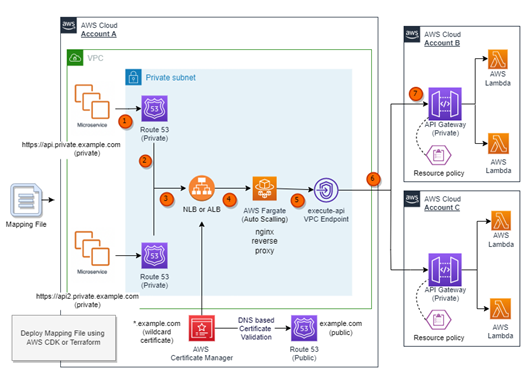
The following diagram illustrates the interactions between the components and the path for an API request. In this use case, a shared services account (Account A) is responsible for centrally managing the mappings of custom domains and creating an AWS PrivateLink connection to private API endpoints in provider accounts (Account B and Account C).

Architecture

  1. A request to the API is made using a private custom domain from within a VPC or another device that is able to route to the VPC. For example, the request might use the domain https://api.private.example.com.
  2. An alias record in Amazon Route 53 private hosted zone resolves to the fully qualified domain name of the private Elastic Load Balancing (ELB). The ELB can be configured to be either a Network Load Balancer (NLB) or an Application Load Balancer (ALB).
  3. The ELB uses an AWS Certificate Manager (ACM) certificate to terminate TLS (Transport Layer Security) for corresponding custom private domain.
  4. The ELB listener redirects requests to an associated ELB target group, which in turn forwards the request to an Amazon Elastic Container Service task running on AWS Fargate.
  5. The Fargate service hosts a container based on NGINX that acts as a reverse proxy to the private API endpoint in one or more provider accounts. The Fargate service is configured to scale using a metric that tracks CPU utilization automatically.
  6. The Fargate task, forwards traffic to the appropriate private endpoints in provider Account B or Account C through a PrivateLink VPC Endpoint.
  7. The API Gateway resource policy limits access to the private endpoints based on a specific VPC endpoint, HTTP verbs, and source domain used to request the API.

The solution passes any additional information found in headers from upstream calls, such as authentication headers, content type headers, or custom data headers unmodified to private endpoints in provider accounts (Account B and Account C).

Prerequisites

To use custom domain names, you need two components: a TLS certificate and a DNS alias. This example uses ACM for managing the TLS certificate and Route 53 for creating the DNS alias.

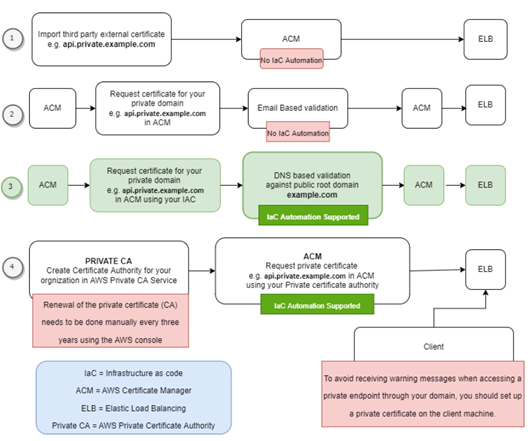
ACM offers various options for integrating a TLS certificate, such as:

  1. Importing an existing TLS certificate into ACM.
  2. Requesting a TLS certificate in ACM with Email-based validation.
  3. Requesting a TLS certificate in ACM with DNS-based validation.
  4. Requesting a TLS certificate from ACM using your Organization’s Private CA in AWS.

The following diagram illustrates the benefits and drawbacks associated with each option.

Benefits and drawbacks

This solution uses DNS-based validation (option #3) to request TLS certificates from ACM. It is assumed that a public hosted zone with a registered root domain (such as example.com) is already deployed in the target account. The solution then uses ACM to validate ownership of the domain names specified in the configuration mapping file during deployment.

With a deployed public hosted zone, private child domains (such as api.private.example.com) can be deployed using DNS validation, which enables infrastructure as code (IaC) deployment to automate certificate validation during deployment of the solution. Additionally, DNS-based validation automatically renews the ACM certificate before it expires.

This solution requires the presence of specific VPC endpoints, namely execute-api, logs, ecr.dkr, ecr.api, and Amazon S3 gateway in a shared services account (Account A). Enabling private DNS on the execute-api VPC endpoint is optional and is not a requirement of the solution. Some customers may choose not to enable private DNS on the execute-api VPC endpoint, as this then allows applications within the VPC to reach the private API endpoints through the NGINX reverse proxy but also resolve public API Gateway endpoints.

Deploying the example

You can use the example AWS Cloud Development Kit (CDK) or Terraform code available on GitHub to deploy this pattern in your own account.

This solution uses a YAML-based configuration mapping file to add, update, or delete a mapping between a custom domain and a private API endpoint. During deployment, the automated infrastructure as code (IaC) script parses the provided YAML file and does the following:

  • Create an NGINX configuration file.
  • Apply the NGINX configuration file to the standard NGINX container image.
  • Parses the mapping file and creates necessary Route 53 private hosted zones in Account A.
  • Creates wildcard-based SSL certificates (such as *.example.com) in Account A. ACM validates these certificates using its respective public hosted zone (such as example.com) and attaches them to the ELB listener. By default, an ELB listener supports up to 25 SSL certificates. Wildcards are used to secure an unlimited number of subdomains, making it easier to manage and scale multiple subdomains.

Description of mapping file fields

Property

Required Example Values

Description

CUSTOM_DOMAIN_URL true api.private.example.com Desired custom URL for private API.
PRIVATE_API_URL true https://a1b2c3d4e5.execute-api.us-east-1.amazonaws.com/dev/path1/path2 Execution URL of targeted private endpoint
VERBS false [“GET”,” POST”, “PUT”, “PATCH”, “DELETE”, “HEAD”, “OPTIONS”]

This property would be used to create API Gateway resource policies.

You can provide one or more verbs as a comma separated list. If this property is not provided, all verbs are permitted.

Using API Gateway resource policies for private endpoints

To allow access to private endpoints from your VPCs or from VPCs in another account, you must implement a resource policy. Resource policies can be used to restrict access based on specific criteria such as VPC endpoints, API paths, and API verbs. To enable this functionality, follow these steps:

  • Complete the infrastructure as code (IaC) deployment.
  • Create or update an API Gateway resource policy in the provider accounts (such as Account B and Account C). This policy should include the VPC endpoint id from the shared services account (Account A).
  • Deploy your API to apply the changes in provider accounts (such as Account B and Account C).

To update the API Gateway resource policy with code, refer to the documentation and code examples in the GitHub repository.

Deploying updates to the mapping file

To add, update, or delete a mapping between your custom domain and private endpoint, you can update the mapping file and then rerun the deployment using the same steps as before.

Deploying subsequent updates to the mapping file using the existing infrastructure as code pipeline reduces the risk of human error, adds traceability, prevents configuration drift, and allows the deployment process to follow your existing DevOps and governance processes in place.

For example, you could store the configuration mapping file in a separate source control repository and commit each change to that repository. Each change could then trigger a deployment process, which would then check the configuration changes and conduct the appropriate deployment. If required, you could introduce gates to enforce either manual checks or a ticketing process to ensure that change control processes are enforced.

Understanding cost of the solution

Most of the services mentioned in this solution are billed according to usage, which is determined by the number of requests made.

However, there are a few services that incur hourly or monthly costs. These include monthly fees for Route 53 hosted zones, hourly charges for VPC endpoints, Elastic Load Balancing, and the hourly cost of running the NGINX reverse proxy on Fargate. To estimate the cost for these options based on your specific workload, you can utilize the AWS pricing calculator. Here is an example outlining the approximate cost associated with the architecture implemented in this solution.

Conclusion

This blog post demonstrates a solution that allows customers to utilize their private endpoints securely with API Gateway across AWS accounts and within a VPC network by using a reverse proxy with a custom domain name. The solution offers a simplified approach to manage the mapping between private endpoints with API Gateway and custom domain names, ensuring seamless connectivity and security.

For more serverless learning resources, visit Serverless Land.

Advanced patterns with AWS SDK for pandas on AWS Glue for Ray

Post Syndicated from Abdel Jaidi original https://aws.amazon.com/blogs/big-data/advanced-patterns-with-aws-sdk-for-pandas-on-aws-glue-for-ray/

AWS SDK for pandas is a popular Python library among data scientists, data engineers, and developers. It simplifies interaction between AWS data and analytics services and pandas DataFrames. It allows easy integration and data movement between 22 types of data stores, including Amazon Simple Storage Service (Amazon S3), Amazon Athena, Amazon Redshift, and Amazon OpenSearch Service.

In the previous post, we discussed how you can use AWS SDK for pandas to scale your workloads on AWS Glue for Ray. We explained how using both Ray and Modin within the library enabled us to distribute workloads across a compute cluster. To illustrate these capabilities, we explored examples of writing Parquet files to Amazon S3 at scale and querying data in parallel with Athena.

In this post, we show some more advanced ways to use this library on AWS Glue for Ray. We cover features and APIs from AWS services such as S3 Select, Amazon DynamoDB, and Amazon Timestream.

Solution overview

The Ray and Modin frameworks allow scaling of pandas workloads easily. You can write code on your laptop that uses the SDK for pandas to get data from an AWS data or analytics service to a pandas DataFrame, transform it using pandas, and then write it back to the AWS service. By using the distributed version of the SDK for pandas and replacing pandas with Modin, exactly the same code will scale on a Ray runtime—all logic about task coordination and distribution is hidden. Taking advantage of these abstractions, the AWS SDK for pandas team has made considerable use of Ray primitives to distribute some of the existing APIs (for the full list, see Supported APIs).

In this post, we show how to use some of these APIs in an AWS Glue for Ray job, namely querying with S3 Select, writing to and reading from a DynamoDB table, and writing to a Timestream table. Because AWS Glue for Ray is a fully managed environment, it’s by far the easiest way to run jobs because you don’t need to worry about cluster management. If you want to create your own cluster on Amazon Elastic Compute Cloud (Amazon EC2), refer to Distributing Calls on Ray Remote Cluster.

Configure solution resources

We use an AWS CloudFormation stack to provision the solution resources. Complete the following steps:

  1. Choose Launch stack to provision the stack in your AWS account:

Launch CloudFormation Stack

This takes about 2 minutes to complete. On successful deployment, the CloudFormation stack shows the status as CREATE_COMPLETE.

CloudFormation CREATE_COMPLETE

  1. Navigate to AWS Glue Studio to find an AWS Glue job named AdvancedGlueRayJob.

Glue for Ray Job Script

  1. On the Job details tab, scroll down and choose Advanced Properties.

Under Job Parameters, AWS SDK for pandas is specified as an additional Python module to install, along with Modin as an extra dependency.

Glue for Ray Job Details

  1. To run the job, choose Run and navigate to the Runs tab to monitor the job’s progress.

Glue for Ray Job Runs

Import the library

To import the library, use the following code:

import awswrangler as wr

AWS SDK for pandas detects if the runtime supports Ray, and automatically initializes a cluster with the default parameters. Advanced users can override this process by starting the Ray runtime before the import command.

Scale S3 Select workflows

S3 Select allows you to use SQL statements to query and filter S3 objects, including compressed files. This can be particularly useful if you have large files of several TBs and want to extract some information. Because the workload is delegated to Amazon S3, you don’t have to download and filter objects on the client side, leading to lower latency, lower cost, and higher performance.

With AWS SDK for pandas, these calls to S3 Select can be distributed across Ray workers in the cluster. In the following example, we query Amazon reviews data in Parquet format, filtering for reviews with 5-star ratings in the Mobile_Electronics partition. star_rating is a column in the Parquet data itself, while the partition is a directory.

# Filter for 5-star reviews with S3 Select within a partition
df_select = wr.s3.select_query(
    sql="SELECT * FROM s3object s where s.\"star_rating\" >= 5",
    path="s3://amazon-reviews-pds/parquet/product_category=Mobile_Electronics/",
    input_serialization="Parquet",
    input_serialization_params={},
    scan_range_chunk_size=1024*1024*16,
)

scan_range_chunk_size is an important parameter to calibrate when using S3 Select. It specifies the range of bytes to query the S3 object, thereby determining the amount of work delegated to each worker. For this example, it’s set to 16 MB, meaning the work of scanning the object is parallelized into separate S3 Select requests each 16 MB in size. A higher value equates to larger chunks per worker but fewer workers, and vice versa.

The results are returned in a Modin DataFrame, which is a drop-in replacement for pandas. It exposes the same APIs but enables you to use all the workers in the cluster. The data in the Modin DataFrame is distributed along with all the operations among the workers.

Scale DynamoDB workflows

DynamoDB is a scalable NoSQL database service that provides high-performance, low-latency, and managed storage.

AWS SDK for pandas uses Ray to scale DynamoDB workflows, allowing parallel data retrieval and insertion operations. The wr.dynamodb.read_items function retrieves data from DynamoDB in parallel across multiple workers, and the results are returned as a Modin DataFrame. Similarly, data insertion into DynamoDB can be parallelized using the wr.dynamodb.put_df function.

For example, the following code inserts the Amazon Reviews DataFrame obtained from S3 Select into a DynamoDB table and then reads it back:

# Write Modin DataFrame to DynamoDB
wr.dynamodb.put_df(
    df=df_select,
    table_name=dynamodb_table_name,
    use_threads=4,
)
# Read data back from DynamoDB to Modin
    df_dynamodb = wr.dynamodb.read_items(
    table_name=dynamodb_table_name,
    allow_full_scan=True,
)

DynamoDB calls are subject to AWS service quotas. The concurrency can be limited using the use_threads parameter.

Scale Timestream workflows

Timestream is a fast, scalable, fully managed, purpose-built time series database that makes it easy to store and analyze trillions of time series data points per day. With AWS SDK for pandas, you can distribute Timestream write operations across multiple workers in your cluster.

Data can be written to Timestream using the wr.timestream.write function, which parallelizes the data insertion process for improved performance.

In this example, we use sample data from Amazon S3 loaded into a Modin DataFrame. Familiar pandas commands such as selecting columns or resetting the index are applied at scale with Modin:

# Select columns
df_timestream = df_timestream.loc[:, ["region", "az", "hostname", "measure_kind", "measure", "time"]]
# Overwrite the time column
df_timestream["time"] = datetime.now()
# Reset the index
df_timestream.reset_index(inplace=True, drop=False)
# Filter a measure
df_timestream = df_timestream[df_timestream.measure_kind == "cpu_utilization"]

The Timestream write operation is parallelized across blocks in your dataset. If the blocks are too big, you can use Ray to repartition the dataset and increase the throughput, because each block will be handled by a separate thread:

# Repartition the data into 100 blocks
df_timestream = ray.data.from_modin(df_timestream).repartition(100).to_modin()

We are now ready to insert the data into Timestream, and a final query confirms the number of rows in the table:

# Write data to Timestream
rejected_records = wr.timestream.write(
    df=df_timestream,
    database=timestream_database_name,
    table=timestream_table_name,
    time_col="time",
    measure_col="measure",
    dimensions_cols=["index", "region", "az", "hostname"],
)

# Query
df = wr.timestream.query(f'SELECT COUNT(*) AS counter FROM "{timestream_database_name}"."{timestream_table_name}"')

Clean up

To prevent unwanted charges to your AWS account, we recommend deleting the AWS resources that you used in this post:

  1. On the Amazon S3 console, empty the data from the S3 bucket with prefix glue-ray-blog-script.

S3 Bucket

  1. On the AWS CloudFormation console, delete the AdvancedSDKPandasOnGlueRay stack.

All resources will be automatically deleted with it.

Conclusion

In this post, we showcased some more advanced patterns to run your workloads using AWS SDK for pandas. In particular, these examples demonstrated how Ray is used within the library to distribute operations for several other AWS services, not just Amazon S3. When used in combination with AWS Glue for Ray, this gives you access to a fully managed environment to run at scale. We hope this solution can help with migrating your existing pandas jobs to achieve higher performance and speedups across multiple data stores on AWS.


About the Authors

Abdel JaidiAbdel Jaidi is a Senior Cloud Engineer for AWS Professional Services. He works on open-source projects focused on AWS Data & Analytics services. In his spare time, he enjoys playing tennis and hiking.

Anton KukushkinAnton Kukushkin is a Data Engineer for AWS Professional Services based in London, UK. In his spare time, he enjoys playing musical instruments.

Leon LuttenbergerLeon Luttenberger is a Data Engineer for AWS Professional Services based in Austin, Texas. He works on AWS open-source solutions that help our customers analyze their data at scale. In his spare time, he enjoys reading and traveling.

Търговците на надежда и техните жертви

Post Syndicated from original https://yurukov.net/blog/2023/targovci-na-nadejda/

Зачестяват призивите за събиране на пари за всякакви терапии и здравни процедури на тежко болни. Най-често деца. За съжаление, сред тях все повече се забелязва следата на тези които аз наричам търговци на надежда.

Това са лешояди, най-вече посредници на клиники в Турция, Израел, Швейцария та чак до Индия, които продават всякакви процедури като преливане на столови клетки, неодобрени още лекарства, други експериментални терапии и дори трансплантации като чудодейни лечения за какво ли не. Днес само ми изскочиха три такива за „лечение“ на множествена склероза и аутизъм. За нито едно от двете няма лечение, а второто не е дори болест.

Родните лекари не изостават – събират се баснословни суми за продължителни терапии с барокамери, хомеопатия и прочие. Преди време беше нашумяла една такава клиника обещаваща лечение на вродени митохондриални заболявания с хомеопатия. За такива се събират пари по концерти, магазини и дори общински съвети дават публични средства от чист популизъм.

Всичко това е подхранено от некадърната работа на НЗОК. Има сериозни съмнения за продължаваща корупция, злоупотреби и пряко източване на касата чрез в пъти увеличените разходи за едни и същи лекарствени средства на многократно по-високи цени. Тази липса на ефективност, доверие и всъщност работа с децата, които наистина имат нужда, кара много да се обръщат към каквато и да е помощ.

Така виждаме много кампании за легитимни лечения, но и още повече, които са станали жертва на търговците на надежда. В публичното пространство е трудно да се различат едните от другите, а повечето сайтове за събиране на пари бягат от отговорност, включително наказателна. Понякога от криворазбрано желание да помогнат, а понякога защото просто е добър бизнес.

Всичко това е на фона на пълната липса на палиативна грижа в държавата ни, за каквото всъщност отиват по мои наблюдения 2/3 от събраните средства от кутиите – физиотерапия и поддържаща грижа в прескъпи хотели опакована като лечение за пред отчаяните родители очакващи изцерение. В същото време НЗОК отказва да поеме разходите за медицинска храна, която е крайно нужда на десетки семейства и е малка част от нелогично завишените разходи, които правят за лечение на все по-малко деца през вече бившия фонд.

Вглеждайки се във всеки отделен случай е ужасяващо. Гледайки данните като цяло може да проследим из коридорите на НЗОК следите на папките на десетки починали деца, които е могло да бъдат спасени всяка година.

The post Търговците на надежда и техните жертви first appeared on Блогът на Юруков.

Enable complex row-level security in embedded dashboards for non-provisioned users in Amazon QuickSight with OR-based tags

Post Syndicated from Srikanth Baheti original https://aws.amazon.com/blogs/big-data/enable-complex-row-level-security-in-embedded-dashboards-for-non-provisioned-users-in-amazon-quicksight-with-or-based-tags/

Amazon QuickSight is a fully managed, cloud-native business intelligence (BI) service that makes it easy to connect to your data, create interactive dashboards, and share these with tens of thousands of users, both within QuickSight and embedded in your software as a service (SaaS) applications.

QuickSight Enterprise edition started supporting nested conditions within row-level security (RLS) tags where you can combine AND and OR conditions to simplify multi-tenant access patterns. Previously, QuickSight only supported the AND operator for all tags. When users are assigned multiple roles, which enables them to view data in multiple dimensions, you need both AND and OR operators to express RLS rules. QuickSight enables authors and developers to use the OR operator in the form of OR of AND, which allows you to satisfy even the most complex data security scenarios. In this post, we look at how this can be implemented.

Feature overview

When you embed QuickSight dashboards in your application for users who aren’t provisioned (registered) in QuickSight, this is called anonymous embedding. In this scenario, even though the user is anonymous to QuickSight, you can still customize the data that user sees in the dashboard using RLS tags.

You can do this in three simple steps:

  1. Add RLS tags to a dataset.
  2. Add the OR condition to RLS tags.
  3. Assign values to those tags at runtime using the GenerateEmbedUrlForAnonymousUser API operation. For more information, see Embedding QuickSight data dashboards for anonymous (unregistered) users.

To see this feature in action, see Using tag-based rules.

Use case overview

AnyHealth Inc. is a fictitious independent software vendor (ISV) in the healthcare space. They have a SaaS application for different hospitals across different regions of the country to manage their revenue. AnyHealth Inc has thousands of healthcare employees accessing their application portal. Part of their application portal has embedded operational insights related to their business within a QuickSight dashboard. AnyHealth doesn’t want to manage their users in QuickSight separately, and wants to secure data based on who the user is and the hospital the user is affiliated to. AnyHealth decided to authorize data access to their users at runtime, enabling row-level security using tags.

AnyHealth has hospitals (North Hospital, South Hospital, and Downtown Hospital) in regions Central, East, South, and West.

In this example, the following users access AnyHealth’s application with the embedded dashboard. Each user has a certain level of data restriction that define what they can access in the dashboards. PowerUser is a super user that can see the data for all hospitals and regions.

AnyHealth’s

Application Users

Hospital Region Condition Payor State
NorthMedicaidUser North Hospital Central and East OR Medicaid New York
SouthMedicareUser South Hospital South OR Medicare All states
NorthAdmin North Hospital All regions
SouthAdmin South Hospital All regions
PowerUser All hospitals All regions

These users are only application-level users and haven’t been provisioned in QuickSight. AnyHealth wants to continue with user management and their roles at the application level as a single source of truth. This way, when the user accesses the embedded QuickSight dashboard from the application, AnyHealth must secure the data on the dashboard based on the roles and permissions that user has. AnyHealth has different combinations of user permissions; for example, all AnyHealth administrators have access to all the data that can be achieved by PowerUser permissions. A hospital admin, for example NorthAdmin, is a user who is the administrator at North Hospital and can only view all the data related to that hospital. A hospital user, for example SouthUser, is a user who has access to data at South Hospital in a specific region.

Additionally, when there are Medicaid and Medicare claims, there are special users who monitor these programs. For example, there can be a user at North Hospital who has access to all the data in North Hospital in regions Central and East. But this user also manages Medicaid for New York. In this case, to show all the relevant data, RLS rules have to be defined such that the user can see data where (Hospital = North Hospital and Region in (Central, East)) or (payor = Medicaid and State = New York). This can be achieved with the new RLS with OR tags feature in QuickSight.

Solution overview

Setup involves two steps:

  1. Create tag keys.
  2. Set SessionTags for each user.

Create tag keys

AnyHealth creates tag keys on the dataset they’re using to power the dashboard. This can be done in two ways, either through an UpdateDataset API call or through the QuickSight console.

Configuration using the API

In the UpdateDataset API call, the RowLevelPermissionTagConfiguration element is set as follows. Note that the items within an item in TagRuleConfigurations will always run a logical AND when the rules are passed, and if there is more than one item in the list, then the items are run with a logical OR. We use the following sample configuration to address our use case:

"RowLevelPermissionTagConfiguration": {
            "Status": "ENABLED",
            "TagRules": [
                {
                    "TagKey": "region",
                    "ColumnName": "Region",
                    "TagMultiValueDelimiter": ",",
                    "MatchAllValue": "*"
                },
                {
                    "TagKey": "hospital",
                    "ColumnName": "Hospital",
                    "TagMultiValueDelimiter": ",",
                    "MatchAllValue": "*"
                },
                {
                    "TagKey": "payor",
                    "ColumnName": "Payor Segment",
                    "TagMultiValueDelimiter": "*",
                    "MatchAllValue": ","
                },
                {
                    "TagKey": "state",
                    "ColumnName": "State",
                    "TagMultiValueDelimiter": ",",
                    "MatchAllValue": "*"
                }
            ],
            "TagRuleConfigurations": [
                [
                    "region",
                    "hospital"
                ],
                [
                    "payor",
                    "state"
                ]
            ]
        }

Configuration using the QuickSight console

To use the QuickSight console, complete the following steps:

  1. On the QuickSight console, choose Datasets in the navigation pane.
  2. Choose the dataset from the list to apply tag-based RLS tags (for this post, we use the patientinfo dataset).
  3. Choose Edit under Row-level security.
  4. On the Set up row-level security page, expand Tag-based rules.
  5. To begin adding rules, choose columns on the Column drop-down menu under Manage tags.
  6. Create rules as per the permissions table.

To grant access to QuickSight provisioned users, you still need to configure user-based rules.

  1. Repeat these steps to add the required tags.
  2. After all the tags are added, choose Add OR Condition under Manage rules.
  3. Choose your tags for the OR condition and choose Update.

Note that you need to explicitly update the first condition that automatically created AND for all fields added.

  1. Once the rules are created, choose Apply.

Set SessionTags

At runtime, when embedding the dashboards via the GenerateDahboardEmbedURLForAnonymousUser API, set SessionTags for each user.

SessionTags for NorthAdmin are as follows:

{
    "SessionTags": [
        {
            "Key": "hospital",
            "Value": "North Hospital"
        },
        {
            "Key": "region",
            "Value": "*"
        }
    ]
}

SessionTags for SouthAdmin are as follows:

{
    "SessionTags": [
        {
            "Key": "hospital",
            "Value": "South Hospital"
        },
        {
            "Key": "region",
            "Value": "*"
        }
    ]
}

SessionTags for PowerUser are as follows:

{
    "SessionTags": [
        {
            "Key": "hospital",
            "Value": "*"
        },
        {
            "Key": "region",
            "Value": "*"
        }
    ]
}

SessionTags for NorthMedicaidUser are as follows:

{
    "SessionTags": [
        {
            "Key": "hospital",
            "Value": "North Hospital"
        },
        {
            "Key": "region",
            "Value": "East"
        }, 
        {
            "Key": "payor",
            "Value": "Medicaid"
        },
        {
            "Key": "state",
            "Value": "New York"
        }
    ]
}

SessionTags for SouthMedicareUser are as follows:

{
    "SessionTags": [
        {
            "Key": "hospital",
            "Value": "South Hospital"
        },
        {
            "Key": "region",
            "Value": "South"
        }, 
        {
            "Key": "payor",
            "Value": "Medicare"
        },
        {
            "Key": "state",
            "Value": "*"
        }
    ]
}

The following screenshot shows what NorthMedicaidUser sees pertaining to all North hospitals in the East region and Medicaid in New York state.

The following screenshot shows what SouthMedicaidUser sees pertaining to all South hospitals in the South region or Medicare in all states.

Based on session tags with OR of AND’s support, AnyHealth has secured data on the embedded dashboards such that each user only sees specific data based on their access. You can access the dashboard as one of the users (by changing the user on the drop-down menu on the top right) and see how the data changes based on the user selected.

Overall, with row-level security using OR of AND, AnyHealth is able to provide a compelling analytics experience within their SaaS application, while making sure that each user only sees the appropriate data without having to provision and manage users in QuickSight. QuickSight provides a highly scalable, secure analytics option that you can set up and roll out to production in days, instead of weeks or months previously.

Conclusion

The combination of embedding dashboards for users not provisioned in QuickSight and row-level security using tags with OR of AND enables developers and ISVs to quickly set up sophisticated, customized analytics for their application users—all without any infrastructure setup or user management, while scaling to millions of users. For more updates from QuickSight embedded analytics, see What’s New in the Amazon QuickSight User Guide.

If you have any questions or feedback, please leave a comment. For additional discussions and help getting answers to your questions, check out the QuickSight Community.


About the Authors

Srikanth Baheti is a Specialized World Wide Principal Solution Architect for Amazon QuickSight. He started his career as a consultant and worked for multiple private and government organizations. Later he worked for PerkinElmer Health and Sciences & eResearch Technology Inc, where he was responsible for designing and developing high traffic web applications, highly scalable and maintainable data pipelines for reporting platforms using AWS services and Serverless computing.

Raji Sivasubramaniam is a Sr. Solutions Architect at AWS, focusing on Analytics. Raji is specialized in architecting end-to-end Enterprise Data Management, Business Intelligence and Analytics solutions for Fortune 500 and Fortune 100 companies across the globe. She has in-depth experience in integrated healthcare data and analytics with wide variety of healthcare datasets including managed market, physician targeting and patient analytics.

Mayank Agarwal is a product manager for Amazon QuickSight, AWS’ cloud-native, fully managed BI service. He focuses on embedded analytics and developer experience. He started his career as an embedded software engineer developing handheld devices. Prior to QuickSight he was leading engineering teams at Credence ID, developing custom mobile embedded device and web solutions using AWS services that make biometric enrollment and identification fast, intuitive, and cost-effective for Government sector, healthcare and transaction security applications.

Фоторепортаж на “Биволъ” от Софийска Градска Прокуратура Близък до Бойко Борисов е разпитан от прокурори за скандалните инсинератори за животни

Post Syndicated from Николай Марченко original https://bivol.bg/lazarov-razpit-borisov.html

понеделник 5 юни 2023


Борислав Петров Лазаров излиза от разпит в Софийска градска прокуратура (СГП) на столичната ул. Черковна, видя фоторепортер на „Биволъ“ (вижте заглавната снимка и снимките долу). Придружава го личен бодигард, който…

Native Frame Rate Playback

Post Syndicated from Netflix Technology Blog original https://netflixtechblog.com/native-frame-rate-playback-6c87836a948

by Akshay Garg, Roger Quero

Introduction

Maximizing immersion for our members is an important goal for the Netflix product and engineering teams to keep our members entertained and fully engaged in our content. Leveraging a good mix of mature and cutting-edge client device technologies to deliver a smooth playback experience with glitch-free in-app transitions is an important step towards achieving this goal. In this article we explain our journey towards productizing a better viewing experience for our members by utilizing features and capabilities in consumer streaming devices.

If you have a streaming device connected to your TV, such as a Roku Set Top Box (STB) or an Amazon FireTV Stick, you may have come across an option in the device display setting pertaining to content frame rate. Device manufacturers often call this feature “Match Content Frame Rate”, “Auto adjust display refresh rate” or something similar. If you’ve ever wondered what these features are and how they can improve your viewing experience, keep reading — the following sections cover the basics of this feature and explain the details of how the Netflix application uses it.

Problem

Netflix’s content catalog is composed of video captured and encoded in one of various frame rates ranging from 23.97 to 60 frames per second (fps). When a member chooses to watch a movie or a TV show on a source device (ex. Set-top box, Streaming stick, Game Console, etc…) the content is delivered and then decoded at its native frame rate, which is the frame rate it was captured and encoded in. After the decode step, the source device converts it to the HDMI output frame rate which was configured based on the capabilities of the HDMI input port of the connected sink device (TV, AVR, Monitor etc). In general, the output frame rate over HDMI is automatically set to 50fps for PAL regions and 60fps for NTSC regions.

Netflix offers limited high frame rate content (50fps or 60fps), but the majority of our catalog and viewing hours can be attributed to members watching 23.97 to 30fps content. This essentially means that most of the time, our content goes through a process called frame rate conversion (aka FRC) on the source device which converts the content from its native frame rate to match the HDMI output frame rate by replicating frames. Figure 1 illustrates a simple FRC algorithm that converts 24fps content to 60fps.

Figure 1 : 3:2 pulldown technique to convert 24FPS content to 60FPS

Converting the content and transmitting it over HDMI at the output frame rate sounds logical and straightforward. In fact, FRC works well when the output frame rate is an integer multiple of the native frame rate ( ex. 24→48, 25→50, 30→60, 24→120, etc…). On the other hand, FRC introduces a visual artifact called Judder when non-integer multiple conversion is required (ex. 24→60, 25→60, etc…), which manifests as choppy video playback as illustrated below:

With Judder
Without Judder

It is important to note that the severity of the judder depends on the replication pattern. For this reason, judder is more prominent in PAL regions because of the process of converting 24fps content to 50fps over HDMI (see Figure 2):

  • Total of 50 frames must be transmitted over HDMI per second
  • Source device must replicate the original 24 frames to fill in the missing 26 frames
  • 50 output frames from 24 original frames are derived as follows:
  • 22 frames are duplicated ( total of 44 frames )
  • 2 frames are repeated three times ( total of 6 frames )
Figure 2: Example of a 24 to 50fps frame rate conversion algorithm

As a review, judder is more pronounced when the frequency of the number of repeated frames is inconsistent and spread out e.g. in the scenario mentioned above, the frame replication factor varies between 2 and 3 resulting in a more prominent judder.

Judder Mitigation Solutions

Now that we have a better understanding of the issue, let’s review the solutions that Netflix has invested in. Due to the fragmented nature of device capabilities in the ecosystem, we explored multiple solutions to address this issue for as many devices as possible. Each unique solution leverages existing or new source device capabilities and comes with various tradeoffs.

Solution #1: Match HDMI frame rate to content Native Frame Rate

The first solution we explored and recently enabled leverages the capability of existing source & sink devices to change the outgoing frame rate on the HDMI link. Once this feature is enabled in the system settings, devices will match the HDMI output frame rate with the content frame rate, either exactly or an integer multiple, without user intervention.

While this sounds like the perfect solution, devices that support older HDMI technologies e.g. HDMI v<2.1, can’t change the frame rate without also changing the HDMI data rate. This results in what is often referred as an “HDMI bonk” which causes the TV to display a blank screen momentarily. Not only is this a disruptive experience for members, but the duration of the blank screen varies depending on how fast the source and sink devices can resynchronize. Figure 3 below is an example of how this transition looks:

Figure 3: Native frame rate experience with screen blanking

Solution #2 : Match HDMI frame rate to content Native Frame Rate w/o screen blanking

Improvements in the recent HDMI standards (HDMI 2.1+) now allow a source device to send the video content at its native frame rate without needing an HDMI resynchronization. This is possible through an innovative technology called Quick Media Switching (QMS) which is an extension of Variable Refresh Rate (VRR) targeted for content playback scenarios. QMS allows a source device to maintain a constant data rate on the HDMI link even during transmission of content with different frame rates. It does so by adjusting the amount of non-visible padding data while keeping the amount of visible video data constant. Due to the constant HDMI data rate, the HDMI transmitter and receiver don’t need to resynchronize, leading to a seamless/glitch-free transition as illustrated in Figure 4.

HDMI QMS is positioned to be the ideal solution to address the problem we are presenting. Unfortunately, at present, this technology is relatively new and adoption into source and sink devices will take time.

Figure 4: Native frame rate experience without screen blanking using HDMI QMS

Solution #3: Frame Rate Conversion within Netflix Application

Apart from the above HDMI specification dependent solutions, it is possible for an application like Netflix to manipulate the presentation time stamp value of each video frame to minimize the effect of judder i.e. the application can present video frames to the underlying source device platform at a cadence that can help the source device to minimize the judder associated with FRC on the HDMI output link.

Let us understand this idea with the help of an example. Let’s go back to the same 24 to 50 fps FRC scenario that was covered earlier. But, instead of thinking about the FRC rate per second (24 ⇒ 50 fps), let’s expand the FRC calculation time period to 3 seconds (24*3 = 72 ⇒50*3 = 150 fps). For content with a native frame rate of 24 fps, the source device needs to get 72 frames from the streaming application in a period of 3 seconds. Now instead of sending 24 frames per second at a regular per second cadence, for each 3 second period the Netflix application can decide to send 25 frames in the first 2 seconds (25 x 2 = 50) and 22 frames in the 3rd second thereby still sending a total of 72 (50+22) frames in 3 seconds. This approach creates an even FRC in the first 2 seconds (25 frames replicated twice evenly) and in the 3rd second the source device can do a 22 to 50 fps FRC which will create less visual judder compared to the 24->50 fps FRC given a more even frame replication pattern. This concept is illustrated in Figure 5 below.

Figure 5: FRC Algorithm from Solution#3 for 24 to 50 fps conversion

NOTE: This solution was developed by David Zheng in the Partner Experience Technology team at Netflix. Watch out for an upcoming article going into further details of this solution.

How the Netflix Application Uses these Solutions

Given the possible solutions available to use and the associated benefits and limitations, the Netflix application running on a source device adapts to use one of these approaches based on factors such as source and sink device capabilities, user preferences and the specific use case within the Netflix application. Let’s walk through each of these aspects briefly.

Device Capability

Every source device that integrates the Netflix application is required to let the application know if it and the connected sink device have the ability to send and receive video content at its native frame rate. In addition, a source device is required to inform whether it can support QMS and perform a seamless playback start of any content at its native frame rate on the connected HDMI link.

As discussed in the introduction section, the presence of a system setting like “Match Content Frame Rate” typically indicates that a source device is capable of this feature.

User Preference

Even if a source device and the connected sink can support Native content frame rate streaming (seamless or non-seamless), a user might have selected not to do this via the source device system settings e.g. “Match Content Frame Rate” set to “Never”. Or they might have indicated a preference of doing this only when the native content frame rate play start can happen in a seamless manner e.g. “Match Content Frame Rate” set to “Seamless”.

The Netflix application needs to know this user selection in order to honor their preference. Hence, source devices are expected to relay this user preference to the Netflix application to help with this run-time decision making.

Netflix Use Case

In spite of source device capability and the user preferences collectively indicating that the Native Content Frame Rate streaming should be enabled, the Netflix application can decide to disable this feature for specific member experiences. As an example, when the user is browsing Netflix content in the home UI, we cannot play Netflix trailers in their Native frame rate due to the following reasons:

  • If using Solution # 1, when the Netflix trailers are encoded in varying content frame rates, switching between trailers will result in screen blanking, thereby making the UI browsing unusable.
  • If using Solution # 2, sending Netflix trailers in their Native frame rate would mean that the associated UI components (movement of cursor, asset selection etc) would also be displayed at the reduced frame rate and this will result in a sluggish UI browsing experience. This is because on HDMI output from the source device, both graphics (Netflix application UI) and video components will go out at the same frame rate (native content frame rate of the trailer) after being blended together on the source device.

To handle these issues we follow an approach as shown in Figure 6 below where we enable the Native Frame Rate playback experience only when the user selects a title and watches it in full screen with minimal graphical UI elements.

Figure 6: Native Frame Rate usage within Netflix application

Conclusion

This article presented features that aim to improve the content playback experience on HDMI source devices. The breadth of available technical solutions, user selectable preferences, device capabilities and the application of each of these permutations in the context of various in-app member journeys represent a typical engineering and product decision framework at Netflix. Here at Netflix, our goal is to maximize immersion for our members through introduction of new features that will improve their viewing experience and keep them fully engaged in our content.

Acknowledgements

We would like to acknowledge the hard work of a number of teams that came together to deliver the features being discussed in this document. These include Core UI and JS Player development, Netflix Application Software development, AV Test and Tooling (earlier article from this team), Partner Engineering and Product teams in the Consumer Engineering organization and our data science friends in the Data Science and Engineering organization at Netflix. Diagrams in this article are courtesy of our Partner Enterprise Platform XD team.


Native Frame Rate Playback was originally published in Netflix TechBlog on Medium, where people are continuing the conversation by highlighting and responding to this story.

Документи от Панама и Пандора пейпърс нареждат пъзела Руска връзка излиза в Барселонагейт

Post Syndicated from Екип на Биволъ original https://bivol.bg/naydenov-barcelonagate.html

понеделник 5 юни 2023


Състудент на Валентин Златев и Александър Чаушев от съветския институт МГИМО в Москва е обект на интерес в делото Барселонагейт, според източници на Биволъ и BIRD. Асен Любенов Найденов до…

The collective thoughts of the interwebz