Black Hat State of Security Vendors

Post Syndicated from Bruce Schneier original https://www.schneier.com/blog/archives/2026/08/black-hat-state-of-security-vendors.html

Andy Ellis has a roundup of the security vendors at Black Hat this year.

Key Takeaways: We have entered into an AI world. While nearly half of booths didn’t directly mention AI or agents in their taglines, the effects of AI are everywhere. Multiple spaces (Identity, SaaS, AppSec, Data) have almost every vendor leading with AI; existing unsolved problem areas just got worse.

At the same time, there’s a clear trichotomy in the market: tools that tell you how bad things are; tools that stop adversaries, and tools that prevent problems from occurring. While you’d suspect that the tools that fix things would dominate, the tools that merely tell you how bad things are seem to be frustratingly plentiful.

Supporting a technical AI-focused qualification for young people in England

Post Syndicated from Diane Dowling original https://www.raspberrypi.org/blog/support-for-ai-focused-qualification-young-people-england/

Young people see and use artificial intelligence (AI) systems frequently, and hear a lot about how they are applied across many areas of life. That makes them understandably eager to find out more about how AI works. For some, this interest extends to wanting to experiment with the technology to investigate their own questions and build something themselves. How can schools support learners who want to take their interest further and gain recognition for the knowledge and skills they develop along the way?

Computer science students at a desktop computer in a classroom.

For learners in the UK, there is currently no established qualification that develops technical AI skills. This can make it difficult to create space in the curriculum for dedicated AI learning, especially for learners from age 14, for whom preparation for high-stakes exams is prioritised over non-examined learning.

We have been working over the past year to develop a research-informed curriculum framework for data science, which lays out many of the foundational skills and knowledge needed to understand and develop AI models. Alongside this, we have been making the case in England for a Level 3 qualification in data science and AI. However, establishing a new qualification can take years.

In the meantime, we are starting to support students in England who choose an established route for extending their skills and getting that effort recognised: the Extended Project Qualification (EPQ).

An established qualification with room to explore AI

The EPQ is a well-established qualification for 16- to 19-year-olds offered in England, Northern Ireland, and Wales by several exam boards (including AQA, Pearson Edexcel, OCR, Eduqas/WJEC, and City & Guilds). It is completed by around 1 in 10 learners at this stage of education.

Learners pursuing an EPQ undertake an extended, self-directed investigation or project. They choose an area of interest where they want to develop their own project and take responsibility for planning, completing, and evaluating the project work.

A teenager learning computer science.

Its self-directed nature makes the EPQ particularly well suited to learners who want to explore emerging areas, such as artificial intelligence and data science. For students fascinated by AI, an EPQ offers an opportunity to do more than simply learn about the technology. With the right foundations and support, they can investigate a question of their own, build a machine learning model, and use that work to gain a recognised qualification.

We are now working to offer those foundations through a new introductory ‘Data Science and AI’ course that will enable learners to build a machine learning model as their EPQ artefact.

Building the foundations for an independent AI investigation

Creating a machine learning model involves much more than choosing a statistical technique and using easily available training data. It involves understanding the problem being addressed, deciding what data to use, exploring and preparing that data, building and evaluating a model, and interpreting the model’s outputs.

Learners who want to do this work for their EPQ need not only technical knowledge and skills, but also skills for critical thinking, research, decision-making, evaluation, and reflection — skills that are valuable for any further study and future career.

To help learners develop these foundations, we are creating an introductory ‘Data Science and AI’ course, based on our curriculum framework for data science and designed to be completed before learners begin their AI-focused EPQ.

The course will guide students through a structured investigation based on a recognised data science lifecycle. By working through it, students will:

  • Learn about each stage of the data science lifecycle
  • Develop the technical understanding they need to make independent decisions during an AI investigation 
  • Gain practical experience of working with data and building a machine learning model
  • Learn about key concepts behind the techniques they use, through theoretical content that supports them to understand not just what to do, but why

The course will consist of 10 units, each involving 2 to 3 hours of independent study for learners. We are designing the activities with a no-code approach to allow students to focus on understanding data science concepts and processes.

Supporting independent project work

Importantly, the work learners produce during this course won’t be the EPQ investigation itself. Working through ‘Data Science and AI’ will give learners the knowledge and skills they need to undertake an AI-focused project with greater independence and confidence.

A young person in a university computing classroom.

After they have completed the course, when they begin their EPQ project pursuing a question that interests them, students can apply their new skills and knowledge to make decisions about their AI investigation and document their progress.

We are looking forward to supporting learners in England to turn their interest in one of today’s most significant technologies into the opportunity to develop independent research and project skills through a recognised qualification.

What’s next?

The ‘Data Science and AI’ course will be available to selected schools in England from September 2026, where students and teachers will test the materials and we will learn from their feedback to improve the course materials. We plan to make the course freely available in 2027. 

The post Supporting a technical AI-focused qualification for young people in England appeared first on Raspberry Pi Foundation.

Supporting an AI-focused qualification for young people in England

Post Syndicated from Diane Dowling original https://www.raspberrypi.org/blog/support-for-ai-focused-qualification-young-people-england/

Young people see and use artificial intelligence (AI) systems frequently, and hear a lot about how they are applied across many areas of life. That makes them understandably eager to find out more about how AI works. For some, this interest extends to wanting to experiment with the technology to investigate their own questions and build something themselves. How can schools support students who want to take their interest further and gain recognition for the knowledge and skills they develop along the way?

Computer science students at a desktop computer in a classroom.

Currently, there is no widely available subject qualification in AI for students in the UK. This can make it difficult to create space in the curriculum for dedicated AI learning, especially for students from age 14, for whom preparation for high-stakes exams is prioritised over non-examined learning.

We have been working over the past year to develop a research-informed curriculum framework for data science, which lays out many of the foundational skills and knowledge needed to understand and develop AI models. Alongside this, we have been making the case in England for a Level 3 qualification in data science and AI. However, establishing a new qualification can take years.

In the meantime, we are starting to support students in England who choose an established route for extending their skills and getting that effort recognised: the Extended Project Qualification (EPQ).

An established qualification with room to explore AI

The EPQ is a well-established qualification for 16- to 19-year-olds offered in England, Northern Ireland, and Wales by several exam boards (including AQA, Pearson Edexcel, OCR, Eduqas/WJEC, and City & Guilds). It is completed by around 1 in 10 learners at this stage of education.

Learners pursuing an EPQ undertake an extended, self-directed investigation or project. They choose an area of interest where they want to develop their own project and take responsibility for planning, completing, and evaluating the project work.

A teenager learning computer science.

Its self-directed nature makes the EPQ particularly well suited to learners who want to explore emerging areas, such as artificial intelligence and data science. For students fascinated by AI, an EPQ offers an opportunity to do more than simply learn about the technology. With the right foundations and support, they can investigate a question of their own, build a machine learning model, and use that work to gain a recognised qualification.

We are now working to offer those foundations through a new introductory ‘Data Science and AI’ course that will enable learners to build a machine learning (ML) model as their EPQ artefact.

Building the foundations for an independent AI investigation

Creating an ML model involves much more than choosing a statistical technique and using easily available training data. It involves understanding the problem being addressed, deciding what data to use, exploring and preparing that data, building and evaluating a model, and interpreting the model’s outputs.

Learners who want to do this work for their EPQ need not only technical knowledge and skills, but also skills for critical thinking, research, decision-making, evaluation, and reflection — skills that are valuable for any further study and future career.

To help learners develop these foundations, we are creating an introductory ‘Data Science and AI’ course, based on our curriculum framework for data science and designed to be completed before learners begin their AI-focused EPQ.

The course will guide students through a structured investigation based on a recognised data science lifecycle. By working through it, students will:

  • Learn about each stage of the data science lifecycle
  • Develop the technical understanding they need to make independent decisions during an AI investigation 
  • Gain practical experience of working with data and building a machine learning model
  • Learn about key concepts behind the techniques they use, through theoretical content that supports them to understand not just what to do, but why

The course will consist of 10 units, each involving 2 to 3 hours of independent study for learners. We are designing the activities with a no-code approach to allow students to focus on understanding data science concepts and processes.

Supporting independent project work

Importantly, the work learners produce during this course won’t be the EPQ investigation itself. Working through ‘Data Science and AI’ will give learners the knowledge and skills they need to undertake an AI-focused project with greater independence and confidence.

A young person in a university computing classroom.

After they have completed the course, when they begin their EPQ project pursuing a question that interests them, students can apply their new skills and knowledge to make decisions about their AI investigation and document their progress.

We are looking forward to supporting learners in England to turn their interest in one of today’s most significant technologies into the opportunity to develop independent research and project skills through a recognised qualification.

What’s next?

The ‘Data Science and AI’ course will be available to selected schools in England from September 2026, where students and teachers will test the materials and we will learn from their feedback to improve the course materials. We plan to make the course freely available in 2027. 

The post Supporting an AI-focused qualification for young people in England appeared first on Raspberry Pi Foundation.

Intel Crescent Island 160GB to 480GB LPDDR5X AI GPU at Hot Chips 2026

Post Syndicated from Patrick Kennedy original https://www.servethehome.com/intel-crescent-island-160gb-to-480gb-lpddr5x-ai-gpu-at-hot-chips-2026/

We learned more about the new 160GB to 480GB LPDDR5X Intel Crescent Island GPU focused on memory capacity at Hot Chips 2026

The post Intel Crescent Island 160GB to 480GB LPDDR5X AI GPU at Hot Chips 2026 appeared first on ServeTheHome.

Your alt text passes automated checks. That doesn’t mean it’s any good.

Post Syndicated from Taarik Ashenafi original https://github.blog/engineering/user-experience/your-alt-text-passes-automated-checks-that-doesnt-mean-its-any-good/


More than one in four images on the web’s most popular home pages have alt text that’s missing, vague, or copied from adjacent images.

That’s from WebAIM’s 2026 WebAIM Million report, which found that alt text,an HTML attribute containing text describing the content of an image, was missing on 16.2% of images across the top million home pages. Among the images that did have alt text, another 10.8% provided an undescriptive attribute, such as alt="image", a raw filename, or a description duplicated from a neighbor.

While automated tooling reliably flags missing alt text, it isn’t as good at fixing poorly written alt text. Most alt text checkers test whether an accessible name for an image exists, not whether the provided alt text says anything useful about the associated image, and that’s a deliberate design choice: a quality-oriented rule with false positives is a rule teams switch off. So alt="IMG_2847.png" passes. So does the same alt="3/5 stars" on five different star-shaped icons.

We built an alt text plugin for the GitHub Accessibility Scanner to help improve your alt text. This post covers where we drew the line between what a checker can prove and what it can only suspect, why our worst bug turned out to be a layout problem rather than a parsing one, and what changed once we let a model into the loop.

If you’re building automated checks of your own, for accessibility or otherwise, the tradeoffs should transfer.

Proving a string is wrong without seeing the picture

Presence of alt text is an objective fact; the attribute is there or it isn’t. Quality is often a judgment call. A machine can’t prove whether a sentence adequately describes a picture in context from markup.

However, not all quality is subjective. There’s several checks you can perform based on the alt text alone, with no need to consult the image content:

  • The attribute is absent (not empty) or whitespace-only.
  • The alt is a filename, such as hero.png, IMG_2847.jpg.
  • The alt is a placeholder somebody meant to replace, such as TODO, tbd.
  • The alt is one generic word naming the medium instead of the content, such as image, logo, chart.
  • The same alt repeats across adjacent images.

Every one of those is a claim about a string, and that became our dividing line. Five deterministic rules run by default which need no credentials for running AI models or network calls. One opt-in rule calls a model with provided image content and surrounding context, for judgments an alt text string can’t support on its own.

First, we had to determine which images to judge on a scanned webpage. We use Playwright’s role-based locator rather than querySelectorAll('img'), so anything not included in the browser’s accessibility tree drops out, including anything carrying alt="". That last exclusion matters most. An empty alt is the author explicitly saying the image is decorative, and flagging it would punish exactly the behavior you want to encourage.

So, how strict should it be? A quality checker lives or dies on false positives, so we chose closed sets over clever heuristics. The vague-alt rule normalizes a string, then checks it against a curated list of words that carry no information on their own. It fires only on an exact match:

  • alt="image" gets flagged.
  • alt="image of the login screen with the SSO button highlighted" doesn’t.

Rules this literal miss plenty of bad alt text. We took the miss over the false positive, because a reliable checker that developers enable beats one that gets switched off.

Repetition is a layout problem, not a DOM problem

Repeated alt text presented an interesting problem. Picture a row of five star-shaped icons that each say "3/5 stars". A screen reader user hears the same thing five times and learns nothing new from four of them.

Our first version walked the images in document order and flagged any run sharing the same normalized alt. It caught things it shouldn’t have. For example, a footer “GitHub” logo and a header “GitHub” logo might sit next to each other in the extracted list but nowhere near each other on screen, so nobody experiences them as a group.

What matters is where images land on screen, not where they sit in the markup. So the rule now checks page layout, and only extends a run when the gap between two bounding boxes is small compared to the boxes themselves:

const gap = Math.max(horizontalGap, verticalGap) 
const largerDim = Math.max(a.boundingBox.width, a.boundingBox.height, 
                           b.boundingBox.width, b.boundingBox.height) 
return gap > GAP_MULTIPLIER * largerDim

Two details worth noting:

  • The multiplier is a judgment call, not a number we derived from anything. It’s the kind of value you tune against real pages instead of trusting from a spec.
  • When either image has no measurable box, the check fails open and the run continues. A missing finding is invisible; a wrong one isn’t.

Getting a model to act like a reviewer, not a critic

Deterministic rules only need the alt string. Anything smarter needs to know what the page is about, and none of that is tracked by the image element. Whether alt="a smiling person" is fine depends entirely on what surrounds it: on a generic mood shot, it’s probably works. But under a heading where a specific person is named, it doesn’t provide enough detail.

In our optional alt-text-qualitycheck, we extract page context alongside each image: the nearest heading, the page title, any <figcaption>, whether the image sits inside a link or button, and up to 600 characters of nearby prose.

The link signal matters most, because when an image is a link’s only content, its alt becomes the link’s accessible name. The right alt then names the destination instead of describing the picture.

One caution: The plugin only records that an image sits inside a link. We don’t check whether it’s the link’s only content, which is the part that actually turns alt into a link name. So right now both cases look identical to the model.

That context, the alt, and the image go to a vision model through GitHub Models. Our failure modes were rarely the model misreading a picture. They were the model having opinions. Given perfectly good alt text, our first version of the checker would suggest different alt text, because “could this be better?” is a question a language model always answers yes to. Every image becomes a finding, so the signal disappears.

Three changes fixed it:

  • A decision procedure instead of an instruction. The prompt walks four ordered steps, stops at the first that matches, and emits that step’s verdict: decorative, redundant with a caption, functional, or informative.
  • Explicit anti-nitpick rules. Trust the author’s framing. Separate redundant prefixes (“Image of…”) from semantic ones (“Photograph of…”). Treat a short alt as correct when the surrounding prose already analyzes the image.
  • Structured output with a forced field order, so reasoning is generated before verdict and the model has to build an argument before it picks a label.

None of that makes the model unfailingly correct. It makes it consistent enough to iterate against. The repository carries an offline grading harness built from published teaching material: WebAIM, the W3C images tutorial, and POET. The rule and the harness share one prompt, so what you tune offline is what runs in CI. That harness only tests the model’s judgment, though, not the whole pipeline. A case can score perfectly there and never reach the model in a real scan.

Sending images to a model is a privacy and cost decision

The moment a check calls an external model with webpage data, it stops being just a lint rule and requires careful data flow design. A few things follow from that:

  • The rule is off by default. It won’t run unless you deliberately enable it in your plugin configuration, and it needs a token with access to GitHub Models.
  • URLs get redacted. Image URLs and link hrefs often carry signed CDN tokens or session identifiers, so query and fragment are stripped from anything entering the model context or the rule’s error logs. For the same reason, src and srcset are replaced with (omitted) in the markup we send.
  • Everything in that context window is untrusted input. Titles, headings, and prose all come from the page being scanned, and a page can contain text written to steer a model. Structured output constrains the shape of a response, not the reasoning behind it.

One caution, because that list is easy to over-read: findings still carry the real page URL and original HTML into the scanner’s normal reporting pipeline. That’s on purpose, since you can’t fix an image you can’t locate. Redaction narrows what reaches the model and the logs, not what lands in your own issues. And if you set up Azure AI Vision credentials, an optional OCR pre-pass sends image bytes to a second place. Nothing requires Azure, but a data-flow review needs to cover both paths.

Cost follows the same shape. In the common case this is one model call per image per scan, which on an image-heavy site dominates the cost of the whole run. That’s reason enough to put it on a schedule rather than on every commit.

What this still can’t do

  • The deterministic rules are literal. They catch alt text that’s obviously unwritten, not alt text that’s fluent and wrong. They also read the alt attribute rather than the computed accessible name, so an aria-label that fixes the problem won’t stop the finding.
  • The model-backed rule produces false positives. Every finding is a prompt for human attention, not a verdict.
  • Silence isn’t coverage. That rule re-fetches images outside the browser session, so anything behind authentication can fail to load. Fetch and model errors are logged and skipped, which means a page can come back clean because nothing got checked.
  • Suggested alt text is a draft. A model that sees the image and a few nearby words can’t account for your audience, your house style, or the job that image is doing on the whole page.
  • Some findings double up with the scanner’s built-in checks, since our missing-alt rule covers the same ground.
  • We only check HTML <img> tags. SVG, role="img" containers, CSS backgrounds, and canvas aren’t covered yet.
  • This is new code with limited real-world feedback. Rules like these improve when they meet the variety of markup and content found across real sites. This plugin hasn’t had that yet, so treat early findings accordingly.
  • Passing isn’t conformance. Automated checks are a floor. Testing with people who use assistive tech is the goal.

What we’d tell you if you’re building something similar

Separate what you can prove from what you can only suspect, and give them different defaults. Checks that prove something should be cheap, predictable, and on by default. Checks that only suspect something should be opt-in, and should read as a suggestion rather than a verdict. Then, ask what the user experiences rather than what the DOM says. Every gap still open in this plugin has that second shape. We record that an image is inside a link, not that it is the link. We read an attribute, not a computed name.

That distance is the real boundary, and a better model doesn’t close it. Deciding what the functionality of an image is for a user who can’t see it still requires human judgment. What automation buys you is making sure that human is giving the right images a second examination.

Try the alt-text plugin in your accessibility scanning workflow. If it tells you the wrong thing, please report it. Open an issue with the finding and, if public, a link to the affected page.

The post Your alt text passes automated checks. That doesn’t mean it’s any good. appeared first on The GitHub Blog.

Introducing AWS Glue 6.0 for faster and more cost-effective data integration

Post Syndicated from Aarthi Srinivasan original https://aws.amazon.com/blogs/big-data/introducing-aws-glue-6-0-for-apache-spark/

Organizations running large data processing pipelines want lower costs, faster job runtimes, and dependable support for open table formats, without adding operational overhead. AWS Glue, a serverless, scalable data integration service that you can use to discover, prepare, move, and integrate data from multiple sources, has now launched AWS Glue 6.0, the new version of AWS Glue that addresses these needs. This version upgrade lowers AWS Glue pricing by 30% and improves performance with AWS optimized Apache Spark 4.1. It also augments developer experience with new features and adds support for Apache Iceberg V3 specifications that are suitable for enterprise adoption. The newly available AWS Glue 6.0 makes data processing workloads more manageable, faster to run, and easier to operate.

In this post, we cover the key capabilities of AWS Glue 6.0 and their performance benefits. We share code examples to help you take full advantage of the release, and we show you how to get started.

AWS Glue 6.0 highlights

AWS Glue 6.0 brings together four major improvements designed to transform how you build and run data integration workloads.

First, it upgrades the underlying runtime to Apache Spark 4.1.1, Python 3.13, Scala 2.13, and AWS SDK for Java 2.x, delivering performance improvements that can help with faster job completion times and lower costs.

Second, this release reduces current AWS Glue usage rate by 30%, and when combined with the performance improvements, you may realize an even lower effective cost.

Third, AWS Glue 6.0 introduces support for more capabilities of Apache Iceberg V3. This includes the VARIANT data type with automatic shredding, deletion vectors, row lineage tracking, nanosecond timestamps, and geo types. With these capabilities, you can build modern lakehouse architectures on the latest open table format standards.

Finally, new features like Spark Declarative Pipelines, Real-Time Mode for streaming and Python virtual environments with S3 caching are designed to further improve performance and developer experience. The following sections dive deeper into each of these areas.

Runtime upgrades

AWS Glue 6.0 upgrades the core runtime stack across the board, bringing newer versions of Apache Spark, Python, Scala, and the AWS SDK to your serverless data integration workloads.

  • Apache Spark 4.1.1 – AWS Glue 6.0 runs an AWS optimized build of Apache Spark 4.1.1, a major generational leap from Spark 3.5 on AWS Glue 5.1. This release introduces improvements focused on intent-driven data engineering, real-time streaming with sub-second latencies down to single-digit milliseconds for stateless tasks, faster PySpark performance, and expanded SQL features.
  • Python 3.13 – Supports Python 3.13, a stable release that brings interpreter changes, Python data model enhancements, standard library updates, and security updates.
  • Scala 2.13 – Upgrades to Scala 2.13 which includes a collections library overhaul, language and syntax feature changes, standard library additions, and compiler performance updates.

Reduced Pricing

AWS Glue 6.0 cuts current AWS Glue pricing by 30%. This means every job you run on AWS Glue 6.0 costs 30% less per DPU-hour compared to AWS Glue 5.1, with no changes required to your workload configuration. When you combine this pricing reduction with the performance improvements delivered by runtime upgrades, your effective cost savings can compound because jobs can complete faster and consume fewer DPU-hours on a lower price point. If you run large-scale Extract, Transform, and Load (ETL) pipelines or recurring batch workloads, this compounding effect can help reduce your monthly spend.

To quantify the comparison, we ran the industry-standard TPC-DS benchmark at 3 TB scale on Parquet data stored in Amazon Simple Storage Service (Amazon S3), using 30 G.2X workers on AWS Glue. The following table compares the results we obtained in our tests for AWS Glue 6.0 and AWS Glue 5.1. Thus, based on TPC-DS benchmark at 3 TB scale, AWS Glue 6.0 delivers up to 36% better price performance than AWS Glue 5.1.

. AWS Glue 6.0 AWS Glue 5.1
Estimated Cost ($) USD 5.61 USD 8.87

Table 1: 3TB TPC-DS benchmark comparison between AWS Glue 6.0 and AWS Glue 5.1

Updated Open Table Format (OTF) support

AWS Glue 6.0 ships with updated versions of all three major open table formats – Iceberg 1.11.0, Hudi 1.1.1, and Delta Lake 4.2.0 – providing better performance, improved merge-on-read capabilities, streamlined concurrency control, and expanded SQL compatibility.

Besides supporting the latest open table format versions, AWS Glue 6.0 delivers Apache Iceberg V3 specification that is suitable for enterprise use. The highlight is Variant shredding, which AWS Glue uses to automatically decompose semi-structured data into physically optimized, columnar sub-fields, which should result in faster query read performance. Combined with deletion vectors for efficient row-level updates, UNKNOWN column types, default column values, and richer data type support, AWS Glue 6.0 is designed to make your open data lakes faster, more flexible, and more cost-efficient. AWS Glue 6.0 also adds support for geospatial data types (Geometry and Geography) and nanosecond-precision timestamps from the Apache Iceberg V3 specification, neither of which are currently supported in open-source Apache Spark 4.1. Additional features like row lineage tracking round out the Apache Iceberg V3 capabilities available on AWS Glue 6.0.

In the following sections, we illustrate select capabilities from Apache Iceberg V3 specification on AWS Glue 6.0.

  1. VARIANT column type

Apache Iceberg V3 introduces the Variant type to store semi-structured data (think JSON, XML, logs, and deeply nested event data) in a compact binary format. Variant shredding is designed to automatically decompose VARIANT columns into physically optimized, columnar sub-fields, facilitating predicate pushdowns and reducing scan overhead. It aims to provide simpler management of semi-structured data, without the need for complex flattening logic. With Variant type, you get the flexibility of embedding a JSON data type in your table columns while shredding is designed to help accelerate read queries and reduce costs.

  1. UNKNOWN column type

The UNKNOWN type in Apache Iceberg V3 acts as a flexible placeholder for columns where the data type is not yet determined at the time of table creation or data ingestion. Tables can accept all-null data initially, and the column type can be upgraded later without breaking ingestion pipelines or consuming applications. This can simplify schema evolution for rapidly changing data sources. Apache Iceberg V3’s UNKNOWN column type maps to Spark 4.1’s VOID type.

  1. DEFAULT column values

Apache Iceberg V3’s DEFAULT column values allow specifying a default value for a column in the table metadata. When you add a new column, the query engine is designed to automatically apply this default to older rows, without rewriting data or running manual backfill operations.

The following code demonstrates creating an Apache Iceberg V3 table that uses VARIANT and UNKNOWN types, and DEFAULT values for a column.

Prerequisites

To get started with this code example, make sure you have the following prerequisites.

  1. An AWS account.
  2. An AWS Identity and Access Management (IAM) role with permissions for AWS Glue, the AWS Glue Data Catalog, and Amazon S3. For more information, see Setting up IAM permissions for AWS Glue. This will be the AWS Glue job execution role.
  3. An S3 bucket to store the Iceberg table data.

Steps

To create an AWS Glue 6.0 job, use the following steps.

  1. Log in to your AWS account and open the AWS Glue console.
  2. Create a new ETL job, with Script editor option.
    1. Choose engine as Spark in the drop-down menu.
    2. Start fresh, Create script and copy-paste the following code.
    3. Replace the demo S3 bucket name with your bucket name in the code.
# Example pySpark script for testing few Iceberg v3's new data types
from pyspark.sql import SparkSession

CATALOG = "glue_catalog"
DATABASE = "sample_glue6_iceberg_db"
TABLE_NAME = "sample_glue6_table"
TABLE = f"{CATALOG}.{DATABASE}.{TABLE_NAME}"
TABLE_LOCATION = "s3://amzn-s3-demo-table-bucket/glue6blog-newdatatypes/"

# Configure Spark to use Apache Iceberg with the AWS Glue Data Catalog.
spark = (
    SparkSession.builder
    .appName("Glue6NewDataTypes")
    .config("spark.sql.extensions", "org.apache.iceberg.spark.extensions.IcebergSparkSessionExtensions")
    .config(f"spark.sql.catalog.{CATALOG}", "org.apache.iceberg.spark.SparkCatalog")
    .config(f"spark.sql.catalog.{CATALOG}.catalog-impl", "org.apache.iceberg.aws.glue.GlueCatalog")
    .config(f"spark.sql.catalog.{CATALOG}.io-impl", "org.apache.iceberg.aws.s3.S3FileIO")
    .config(f"spark.sql.catalog.{CATALOG}.warehouse", "s3://amzn-s3-demo-table-bucket/glue6blog-newdatatypes")
    .config("spark.sql.defaultColumn.enabled", "true")
    .getOrCreate()
)

spark.sql(f"CREATE DATABASE IF NOT EXISTS {CATALOG}.{DATABASE}")

# Create an Iceberg v3 table with VARIANT, unknown, and a default value.
# Spark's VOID type is stored as the Iceberg v3 unknown type.
spark.sql(
    f"""
    CREATE TABLE {TABLE} (
        record_id BIGINT,
        payload VARIANT,
        reserved_field VOID,
        status STRING DEFAULT 'active'
    )
    USING ICEBERG
    LOCATION '{TABLE_LOCATION}'
    TBLPROPERTIES ('format-version' = '3')
    """
)

# Insert two rows. The omitted columns use null and the declared default.
spark.sql(
    f"""
    INSERT INTO {TABLE} (record_id, payload)
    VALUES
    (1, parse_json('{{"event_type":"created","score":98.5}}')),
    (2, parse_json('{{"event_type":"processed","score":87.2}}'))
    """
)

# Query the row and extract values from the VARIANT column.
spark.sql(
    f"""
    SELECT
        record_id,
        variant_get(payload, '$.event_type', 'string') AS event_type,
        variant_get(payload, '$.score', 'double') AS score,
        reserved_field,
        status
    FROM {TABLE}
    """
).show(truncate=False)

spark.stop()
  1. Provide the following details in the Job details tab.
    1. A Name for the job.
    2. The IAM role you have from Prerequisites (2) for the IAM role of the job.
    3. Choose Glue 6.0 for the Glue version.
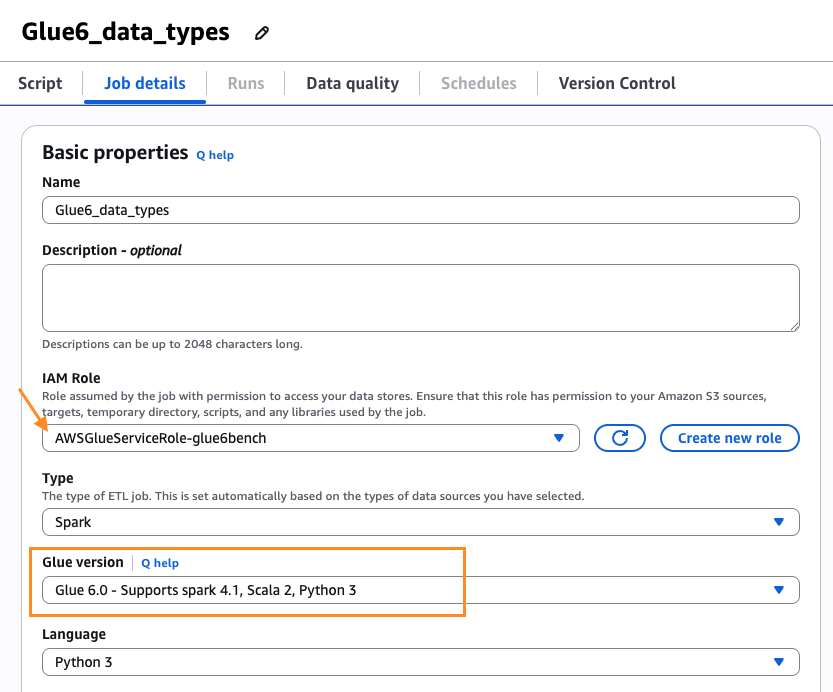
    4. Leave the rest as defaults.The following screenshot shows the Job details tab with illustrated values in the AWS Glue console.

      AWS Glue Job details tab with the Glue version set to Glue 6.0 and other settings left as defaults

      Figure 1: Job details tab with the Glue version set to Glue 6.0

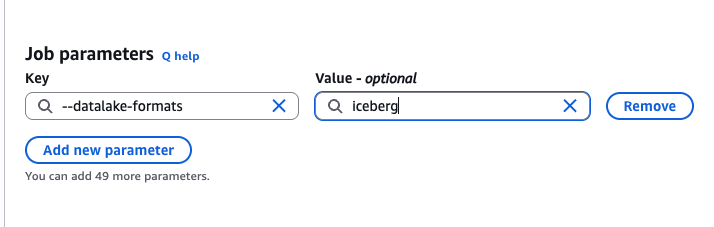
    5. Scroll down. Under Advanced properties, for Job parameters, add the following additional Job parameter key-value pair:--datalake-formats=icebergThe following screenshot shows the Job parameters with the illustrated key-value pair in the AWS Glue console.

      Advanced properties section showing the Job parameters key –datalake-formats set to the value iceberg

      Figure 2: Job parameters with the datalake-formats key set to iceberg

  2. Save the job and choose Run.
  3. After the job is completed successfully, from the Runs tab – Run details, you can inspect the Output logs that take you to the logs in the Amazon CloudWatch console. The following shows the sample output for the SELECT query in the script.
+---------+----------+-----+--------------+------+
|record_id|event_type|score|reserved_field|status|
+---------+----------+-----+--------------+------+
|1        |created   |98.5 |NULL          |active|
|2        |processed |87.2 |NULL          |active|
+---------+----------+-----+--------------+------+

Notice that we inserted two rows with values only in the record_id and the variant column. Variant column inserts were done using parse_json(). The reserved_field is of VOID type, hence returns NULL values. The status column is declared with a default active value and returns active, since the column was omitted during the insert operation.

  1. Deletion Vectors
    Apache Iceberg V3 replaces the traditional positional delete files used in Apache Iceberg V2 to deletion vectors. This change can help improve Merge-on-Read (MoR) performance. This shift replaces heavy, multi-file Parquet reads with highly compressed, direct binary bitmaps that can provide lower storage overhead and faster reads on delete-heavy tables. In scenarios with heavy table updates, such as streaming change data capture (CDC) from operational databases, Apache Iceberg V3 can offer read performance advantage over Apache Iceberg V2.

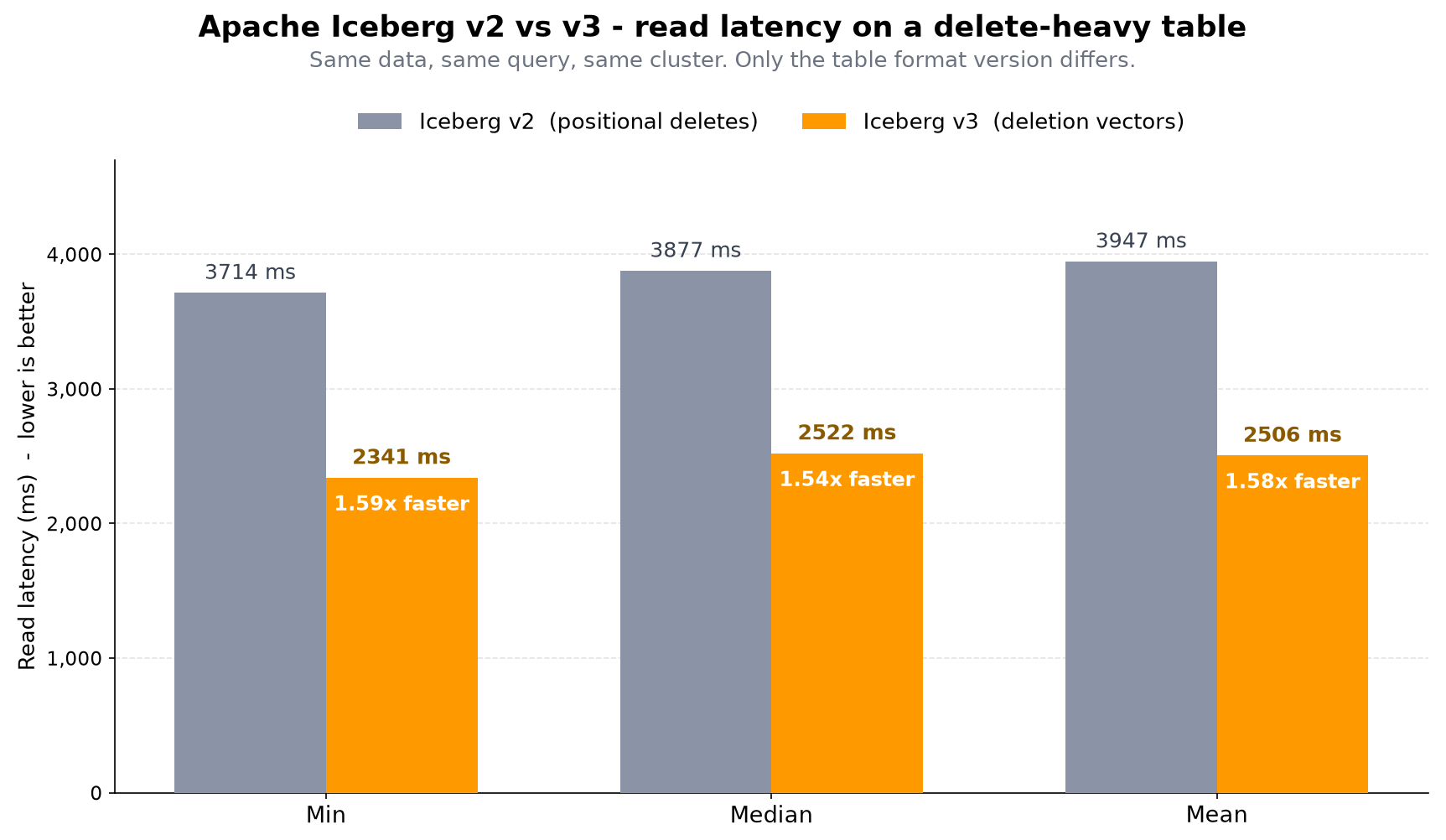
    To validate the performance of deletion vectors, we created two identical AWS Glue streaming jobs and ingested the events into two different Iceberg tables, one in Apache Iceberg V2 and another in Apache Iceberg V3 format. The streaming CDC events were approximately 150,000 events per second, merge-on-read, update-heavy. Every micro-batch writes row-level deletes. We froze both tables at the same delete-heavy state and disabled compaction, leaving the tables with roughly 1.7 million rows in valid state out of the 26.4 million physical rows. The following table summarizes the read performance latency of the two Iceberg tables. We observed in this testing that reading from the delete-heavy Apache Iceberg V3 is at least 1.5 times faster than the reading from a similar Apache Iceberg V2 table. For larger enterprise scale Apache Iceberg V3 tables, the read performance could improve further.

Read latency comparison showing Apache Iceberg V3 deletion vectors reading at least 1.5 times faster than Apache Iceberg V2 delete files

Table 2 – Read latency comparison between Apache Iceberg V2 delete files and Apache Iceberg V3 deletion vectors

New ETL features

AWS Glue 6.0 introduces several additional capabilities designed to simplify how you build and manage data pipelines, some of which are discussed in the following list.

  • Spark Declarative Pipelines (SDP) where you define the outcomes you want for your entire data pipelines in a declarative fashion with SQL statements or Python decorators while AWS Glue handles execution flow, dependency resolution, parallelism, checkpointing, CDC, and recovery automatically. This helps you focus on business logic rather than orchestration plumbing.
  • Real-Time Mode (RTM) for streaming delivers continuous execution for Structured Streaming with sub-second latencies, down to single-digit milliseconds for stateless tasks. This can help support real-time use cases like fraud detection, live dashboards, and event-driven architectures without managing dedicated streaming infrastructure.
  • Arrow-Native UDFs/UDTFs execute Python functions directly on PyArrow batches without Pandas conversion overhead, which can result in faster performance for custom transformation logic at scale.
  • Recursive Common Table Expressions (CTE) adds WITH RECURSIVE queries natively, allowing graph traversals and hierarchical queries without workarounds or external libraries.
  • Python data source filter pushdown evaluates filters at the data source designed to minimize data movement, reduce the volume of data scanned, and improve job performance.
  • With Python virtual environments and S3 caching, you can provide pre-built Python dependencies, which should result in reduced startup latency for AWS Glue jobs by eliminating runtime dependency resolution. For existing jobs that use --additional-python-modules, no action is required. AWS Glue automatically handles the conversion to virtual environments when your job runs on AWS Glue 6.0.

Dependent library upgrades

The following table summarizes the key runtime and library version upgrades on AWS Glue 6.0.

Feature Glue 6.0 Glue 5.1
Spark 4.1.1-amzn-0 3.5.6-amzn-1
Python 3.13.14 3.11.15
Scala 2.13.17 2.12.18
AWS SDK for Java 2.44.6
(Version 1.x removed)
2.35.5
Boto3 1.42.84 1.40.61
Java 17.0.20 17.0.19
Iceberg 1.11.0 1.10.0
Hudi 1.1.1 .0.2
Delta Lake 4.2.0 3.3.2
AWS Glue Data Catalog client 4.11.0 4.9.0
EMR DynamoDB connector 6.1.0 5.7.0
Arrow 18.3.0 2.0.1
Hive 2.3.10-amzn-1 2.3.9-amzn-4

Table 3: Runtime and library version comparison across AWS Glue 6.0 and AWS Glue 5.1

Getting started

To get started with AWS Glue 6.0, you can use one of the following methods.  

Clean up

To avoid incurring costs, clean up the resources you created for this post.

  1. Delete the Data Catalog database and the Iceberg table.
  2. Delete the data and metadata folders of the Iceberg table from your S3 bucket.
  3. Delete the AWS Glue job and the AWS Glue job execution IAM role.

Conclusion

AWS Glue 6.0 is designed to be faster, more cost-effective, and easier to use for building your open data lakehouse architectures and orchestrating your data pipelines. In this post, we discussed the key highlights of AWS Glue 6.0 and illustrated usage of Apache Iceberg V3 features with code samples. You can create new AWS Glue jobs on AWS Glue 6.0 or migrate your existing AWS Glue jobs to benefit from these improvements.

With Apache Spark 4.1.1, Apache Iceberg V3, Python 3.13, upgraded open table format libraries, and new streaming capabilities, AWS Glue 6.0 aims to help you build new data applications or to operate your existing data pipelines more efficiently and with less maintenance overhead.

We encourage you to test AWS Glue 6.0 in your development environment today. Check out this blog that talks about upgrading your AWS Glue jobs to AWS Glue 6.0. Also, in the coming days and weeks, look out for blogs on individual topics illustrating various features of Spark 4.1.1 and Apache Iceberg V3 on AWS Glue 6.0.

Acknowledgements: We thank the numerous engineers and leaders who helped build AWS Glue 6.0 to support customers with a highly performant Spark runtime and other value-added capabilities.


About the authors

Aarthi Srinivasan

Aarthi Srinivasan

Aarthi is a Senior Big Data Architect working on data, analytics and GenAI topics with the worldwide specialist org at AWS. She works with AWS customers and partners to architect open data lake solutions, enhance product features, and establish best practices for data governance and analytics services adoption.

Shrey Malpani

Shrey Malpani

Shrey is a Senior Product Manager Technical at Amazon Web Services (AWS), where he works at the intersection of distributed data processing and data integration. He is focused on building and scaling data integration and data management capabilities across services like AWS Glue, Amazon EMR, and Amazon Redshift that help customers build AI-ready data platforms for their analytics and machine learning workflows.

Angel Conde Manjon

Angel Conde Manjon

Angel is a Senior Solutions Architect at AWS where he helps partners develop businesses centered on Data and AI. He has previously worked on research related to Data Analytics and Artificial Intelligence in diverse European research projects. Angel is also an Apache Iceberg contributor.

Peter Tsai

Peter Tsai

Peter is a Software Development Engineer at AWS, where he enjoys solving challenges in the design and performance of the AWS Glue runtime. In his leisure time, he enjoys hiking and cycling.

Danylo Prozorov

Danylo Prozorov

Danylo is a Software Development Engineer at AWS Glue, where he works on building data integration and generative AI solutions for analytics customers. Outside of work, he enjoys sports, hiking, riding motorcycles, and building his overland rig.

Bo Li

Bo Li

Bo is a Senior Software Development Engineer on the AWS Glue team. He is devoted to designing and building end-to-end solutions to address customers’ data analytic and processing needs with cloud-based, data-intensive and GenAI technologies.

Kartik Panjabi

Kartik Panjabi

Kartik is a Software Development Manager on the AWS Glue team. His team builds generative AI features for the Data Integration and distributed system for data integration.

Mohit Saxena

Mohit Saxena

Mohit leads AWS Glue and AWS Data Analytics agentic AI initiatives that help customers build and operate big data applications on Apache Spark, Amazon S3, and cloud data lakes and warehouses, spanning across AWS Glue, Amazon EMR, and Amazon Athena.

Upgrade AWS Glue jobs to Glue 6.0 with AI-powered Spark upgrades

Post Syndicated from Prasad Nadig original https://aws.amazon.com/blogs/big-data/upgrade-aws-glue-jobs-to-glue-6-0-with-ai-powered-spark-upgrades/

Upgrading PySpark jobs to a new Apache Spark major version can introduce breaking changes. Removed configuration keys, stricter type casting, and Python library incompatibilities can cause runtime failures or silent behavior differences. With AWS Glue 6.0 now running Apache Spark 4.1 and Python 3.13, you need a reliable way to migrate your existing jobs while validating correctness.

In this post, we walk through upgrading a PySpark ETL job from AWS Glue 5.1 to AWS Glue 6.0. We use the generative AI upgrades for Apache Spark in the AWS Glue console. The upgrade analysis automatically identifies incompatibilities, iteratively resolves them, validates the result with data quality checks, and presents recommended changes for your review. AWS Glue 6.0 also delivers up to 36% better price performance* along with Iceberg v3, Spark Declarative Pipelines, Real-Time Mode, and Arrow-native Python UDFs.

What changes with AWS Glue 6.0

AWS Glue 6.0 runs Apache Spark 4.1, which introduces several behavioral changes from the Spark 3.5 runtime used in AWS Glue 5.1:

Behavior Spark 3.5 (AWS Glue 5.1) Spark 4.1 (AWS Glue 6.0)
ANSI SQL mode Disabled by default Enabled by default
Legacy Parquet datetime configs Supported Removed (renamed)
Python runtime 3.11 3.13

Beyond version compatibility, AWS Glue 6.0 also introduces:

  • Apache Iceberg v3 with VARIANT Shredding for efficient semi-structured data handling.
  • Spark Declarative Pipelines — agent-authorable ETL.
  • Real-Time Mode — single-digit millisecond streaming latency.
  • Arrow-native Python UDFs (PyArrow) for improved performance.
  • Built-in observability with structured metrics and enhanced Spark UI.
  • Up to 36% better price performance compared to AWS Glue 5.1*.

These runtime changes mean your existing AWS Glue jobs might encounter removed configuration keys, stricter type casting behavior, or Python package version incompatibilities when running on AWS Glue 6.0. Fixing these manually is time-consuming and error-prone. The following sections show how the generative upgrade analysis handles this automatically.

The sample job

Our example is a daily ecommerce order analytics pipeline running on AWS Glue 5.1:

What the job does:

  • Ingests 10,000 orders from Parquet files with INT96 timestamps (including pre-1900 historical dates from a legacy system migration).
  • Computes revenue metrics by casting string prices to numeric values and calculating line totals with discounts and tax.
  • Segments customers using recency, frequency, and monetary (RFM) scoring through mapInPandas with pandas and scikit-learn.
  • Writes enriched results back to Amazon Simple Storage Service (Amazon S3).

Job configuration (AWS Glue 5.1):

Glue version: 5.1
Worker type: G.1X
Workers: 10
Python modules: pandas==2.2.2, scikit-learn==1.5.0, numpy==1.26.4
Spark configs:
  spark.sql.legacy.parquet.datetimeRebaseModeInWrite=LEGACY
  spark.sql.legacy.parquet.int96RebaseModeInWrite=LEGACY
  spark.sql.parquet.datetimeRebaseModeInRead=LEGACY
  spark.sql.parquet.int96RebaseModeInRead=LEGACY

This job runs successfully on AWS Glue 5.1. The following sections walk through how the upgrade analysis identifies and resolves incompatibilities when upgrading this job to AWS Glue 6.0. Before starting, confirm you have the prerequisites in place.

Prerequisites

  • An AWS account with access to the AWS Glue console.
  • An existing AWS Glue job on version 5.1 or earlier with at least one successful run.
  • An Amazon S3 path for storing the upgrade analysis results.

Running the upgrade analysis from the console

The following steps walk through the upgrade analysis workflow using the AWS Glue console.

Step 1: Select your job

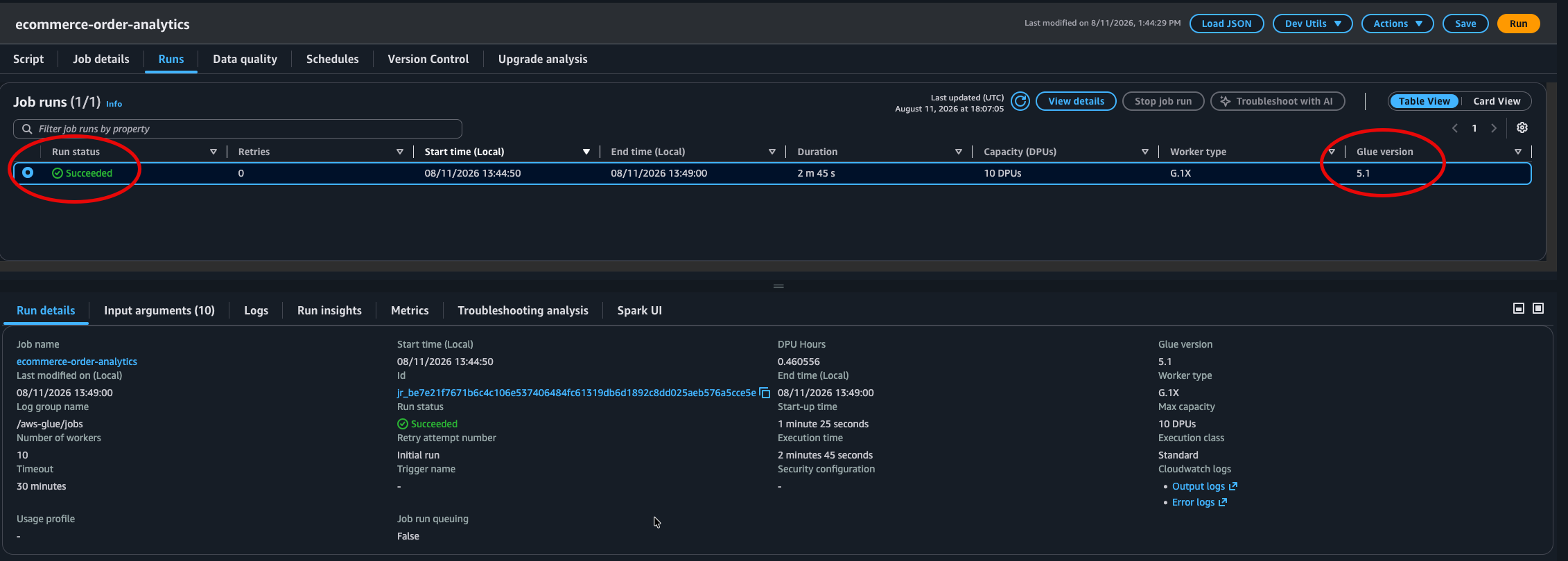
Navigate to your job in the AWS Glue Studio console. Confirm the job has a successful run history on AWS Glue 5.1 before starting the upgrade analysis.

AWS Glue Studio job run history showing a successful run on AWS Glue 5.1

Figure 1: Job run status for the job on AWS Glue 5.1

Step 2: Start the upgrade analysis

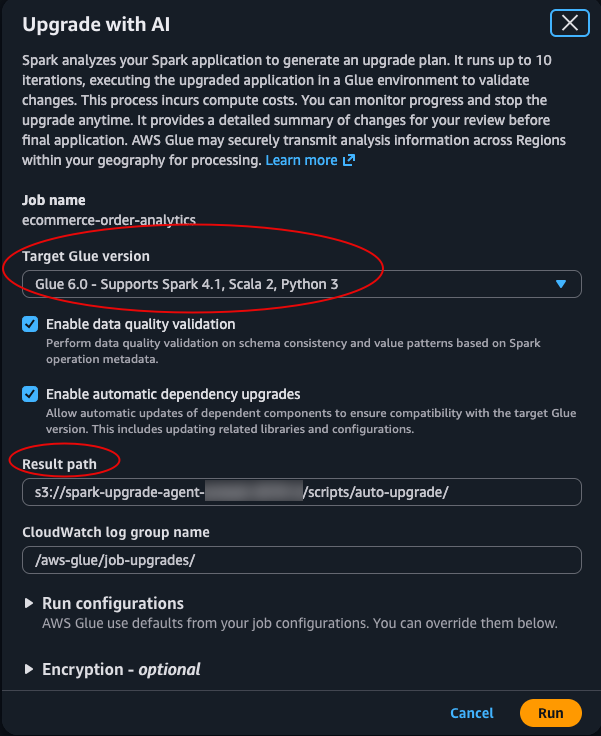
From the job’s Actions menu, select Upgrade with generative AI. Configure the following:

  • Target AWS Glue version: 6.0.
  • Results S3 path: An S3 location where the analysis stores its artifacts and recommendations.
Actions menu in AWS Glue Studio with the Upgrade with generative AI option

Figure 2: The Upgrade with generative AI option in the Actions menu

Configure the target AWS Glue version and the S3 results path, then choose Run.

Upgrade window with the target AWS Glue version set to 6.0 and an Amazon S3 results path

Figure 3: The Upgrade with generative AI window for setting the target AWS Glue version and results path

Choose Run. The analysis begins by running your job on AWS Glue 5.1 to establish a baseline. It then iteratively tests the job on AWS Glue 6.0, identifies failures, applies recommended fixes, and validates the job. If the upgrade analysis cannot resolve an incompatibility within its attempt budget, the analysis stops and reports the unresolved issue for manual review. Your original job remains unchanged.

Note: The upgrade analysis executes your job multiple times (one baseline run plus one or more validation attempts), and each run consumes Data Processing Units (DPUs). For large or long-running jobs, consider using the run configuration option to specify fewer workers or a smaller dataset to optimize analysis cost.

Step 3: Monitor progress

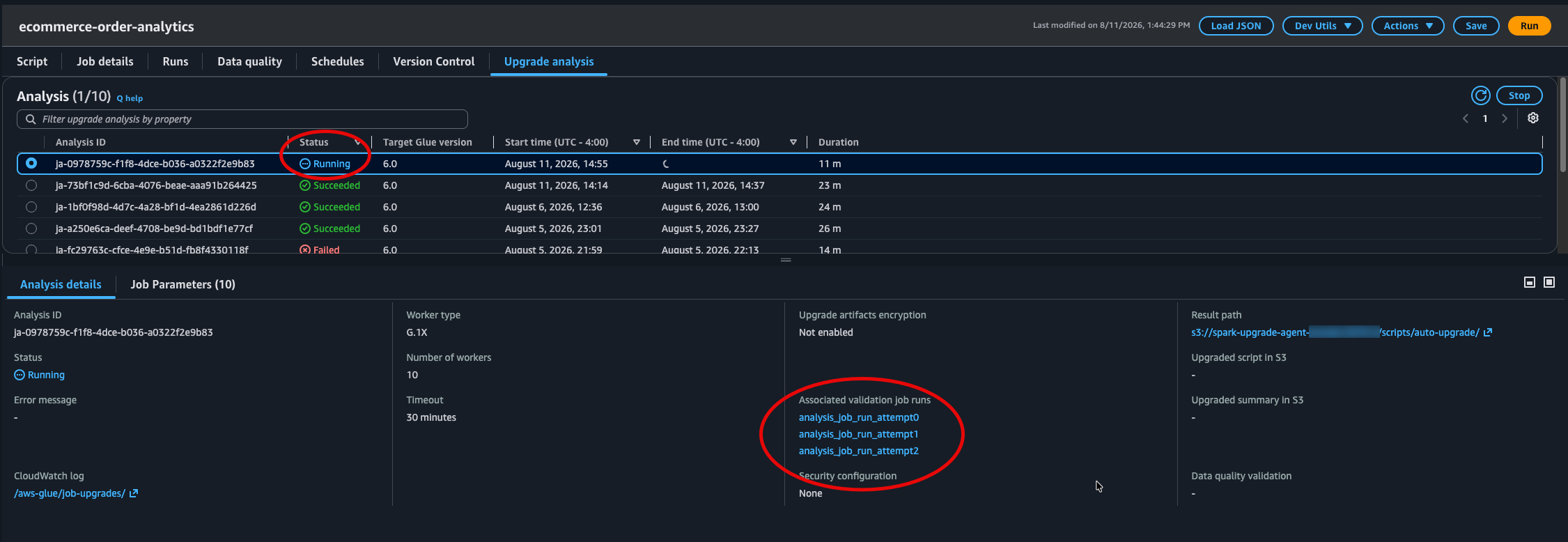
The console displays the analysis progressing through multiple validation attempts. Each attempt either succeeds or fails with a specific error, and the upgrade analysis uses that error signal to determine and apply the appropriate fix for the next attempt.

Upgrade analysis progress showing multiple validation attempts with success and failure states

Figure 4: Upgrade analysis progress across multiple validation attempts

What the upgrade analysis found and fixed

The analysis completed in four validation attempts, identifying and resolving three distinct incompatibilities. The upgrade uses deterministic migration rules for known config changes, and automated diagnosis for runtime or code errors.

Iteration 1: Removed Parquet legacy configuration

The analysis first sanitizes any Spark configurations that were removed in Spark 4.1. Our job used spark.sql.legacy.parquet.datetimeRebaseModeInWrite and spark.sql.legacy.parquet.int96RebaseModeInWrite, which no longer exist.

Migration rule applied: The SQL configs with the spark.sql.legacy prefix were removed in Spark 4.1. They have been renamed to their non-legacy equivalents, preserving the original values.

Recommended change:

Before:
spark.sql.legacy.parquet.datetimeRebaseModeInWrite=LEGACY
spark.sql.legacy.parquet.int96RebaseModeInWrite=LEGACY

After:
spark.sql.parquet.datetimeRebaseModeInWrite=LEGACY
spark.sql.parquet.int96RebaseModeInWrite=LEGACY

The read-side configs (datetimeRebaseModeInRead, int96RebaseModeInRead) already used the correct non-legacy names and required no changes.

However, with this fix applied, the validation run still failed because the Python module installation encountered an error on the AWS Glue 6.0 image.

Iteration 2: Python module version incompatibility

The pinned module versions (pandas==2.2.2, scikit-learn==1.5.0, numpy==1.26.4) could not be installed in the AWS Glue 6.0 Python 3.13 environment.

Error:

LAUNCH ERROR | Installation of Additional Python Modules failed

Recommended change: The upgrade analysis updated the version specifications from exact pins to minimum version constraints, allowing pip to resolve compatible versions for Python 3.13:

Before: pandas==2.2.2, scikit-learn==1.5.0, numpy==1.26.4
After:  pandas>=2.1.0, scikit-learn>=1.3.0, numpy>=1.24.0

With modules installing successfully, the job launched on AWS Glue 6.0 but encountered a runtime error.

Iteration 3: ANSI mode strict type casting

Spark 4.1 enables ANSI SQL mode by default (spark.sql.ansi.enabled=true). Our revenue calculation casts string prices to double, but approximately 1.8% of records contain non-numeric placeholder values such as “N/A”, “pending”, or “null” from the upstream system. From a business perspective, this meant 1.8% of revenue orders were silently excluded from revenue metrics. This data quality issue was invisible to the original pipeline.

On AWS Glue 5.1 (ANSI mode off), cast("N/A" as double) silently returns null. On AWS Glue 6.0 (ANSI mode on), this throws an exception:

Error:

NumberFormatException: [CAST_INVALID_INPUT] The value 'null' of the type
"STRING" cannot be cast to "DOUBLE" because it is malformed. Correct the
value as per the syntax, or change its target type. Use try_cast to
tolerate malformed input and return NULL instead. SQLSTATE: 22018

Migration rule applied: As of Spark 4.1, spark.sql.ansi.enabled is on by default. Casting a malformed value now raises CAST_INVALID_INPUT instead of returning NULL. The upgrade analysis resolved this by updating the script to use try_cast(), which safely returns NULL for malformed input while preserving ANSI mode protections for the rest of the job.

Recommended change:

Before (AWS Glue 5.1):

F.col("unit_price").cast("double")

After (AWS Glue 6.0, fixed by the upgrade analysis):

F.expr("try_cast(unit_price as double)")

This is a targeted fix that handles the known dirty data without disabling ANSI mode globally, keeping overflow detection and type safety active throughout the job.

Final validation and data quality check

After applying all three fixes, the analysis ran the job on AWS Glue 6.0 one final time and performed a data quality comparison between the AWS Glue 5.1 baseline output and the AWS Glue 6.0 output.

Result: The job completed successfully and all data validations passed with no mismatches detected between the source and target outputs.

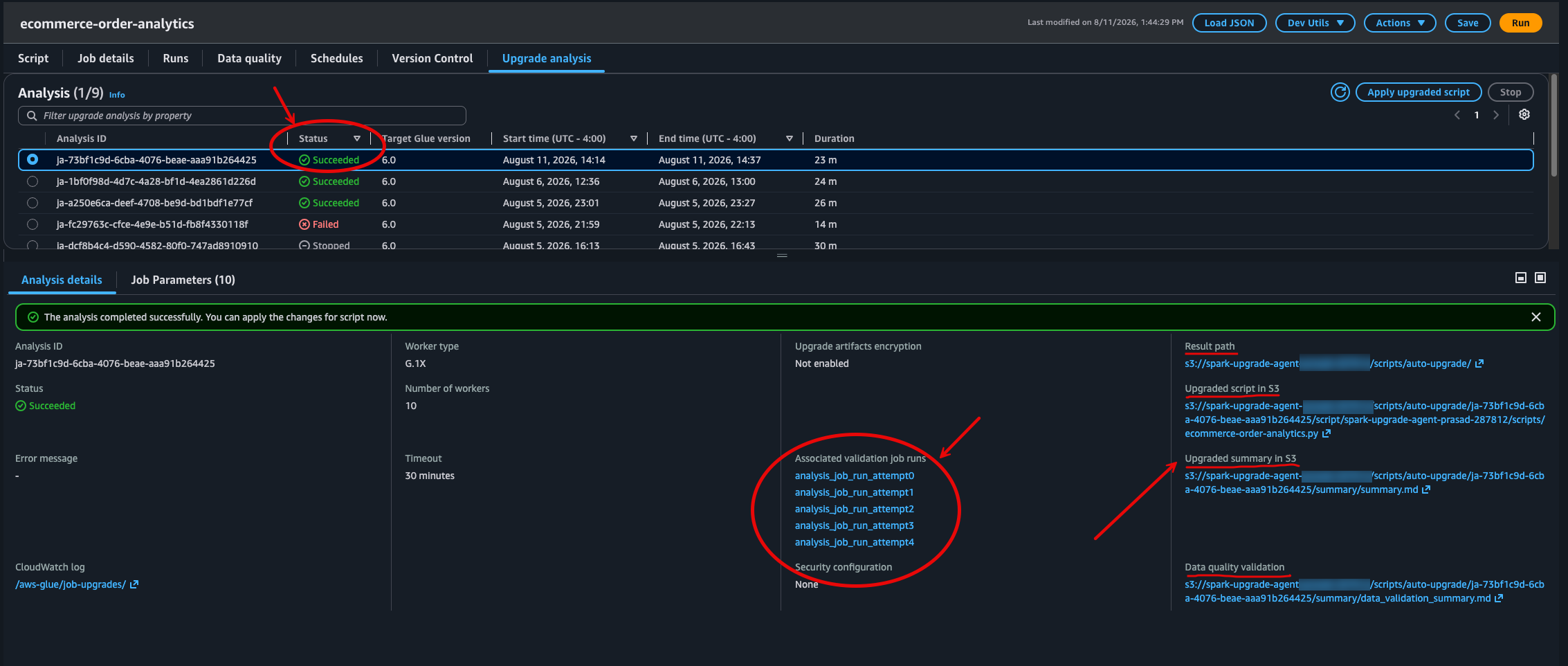
Completed upgrade analysis status with links to the results output path in Amazon S3

Figure 5: Final analysis status with links to the results output path in Amazon S3

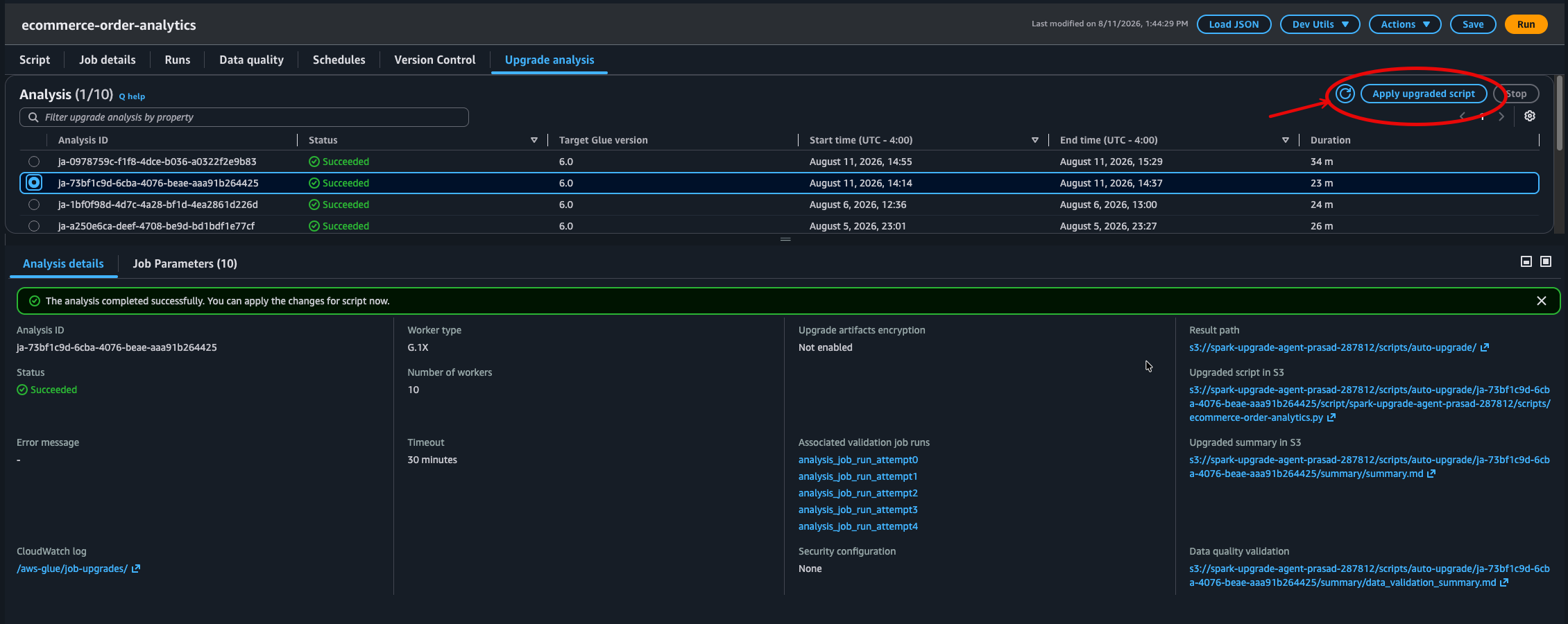
Reviewing the upgrade summary

The analysis produces a detailed summary stored in your S3 results path. This summary documents each validation attempt, the errors encountered, the migration rules applied, and the recommended configuration changes:

s3://amzn-s3-demo-bucket/scripts/auto-upgrade/ja-{analysis-id}/
    summary/
        summary.md                       # Full iteration-by-iteration report
        data_validation_summary.md       # Data quality comparison results
    artifact/
        attempt_N/
            script/main.py               # Recommended script (if modified)
            job_config_modifications.json  # Recommended parameter changes
            requirements.txt             # Updated dependency versions

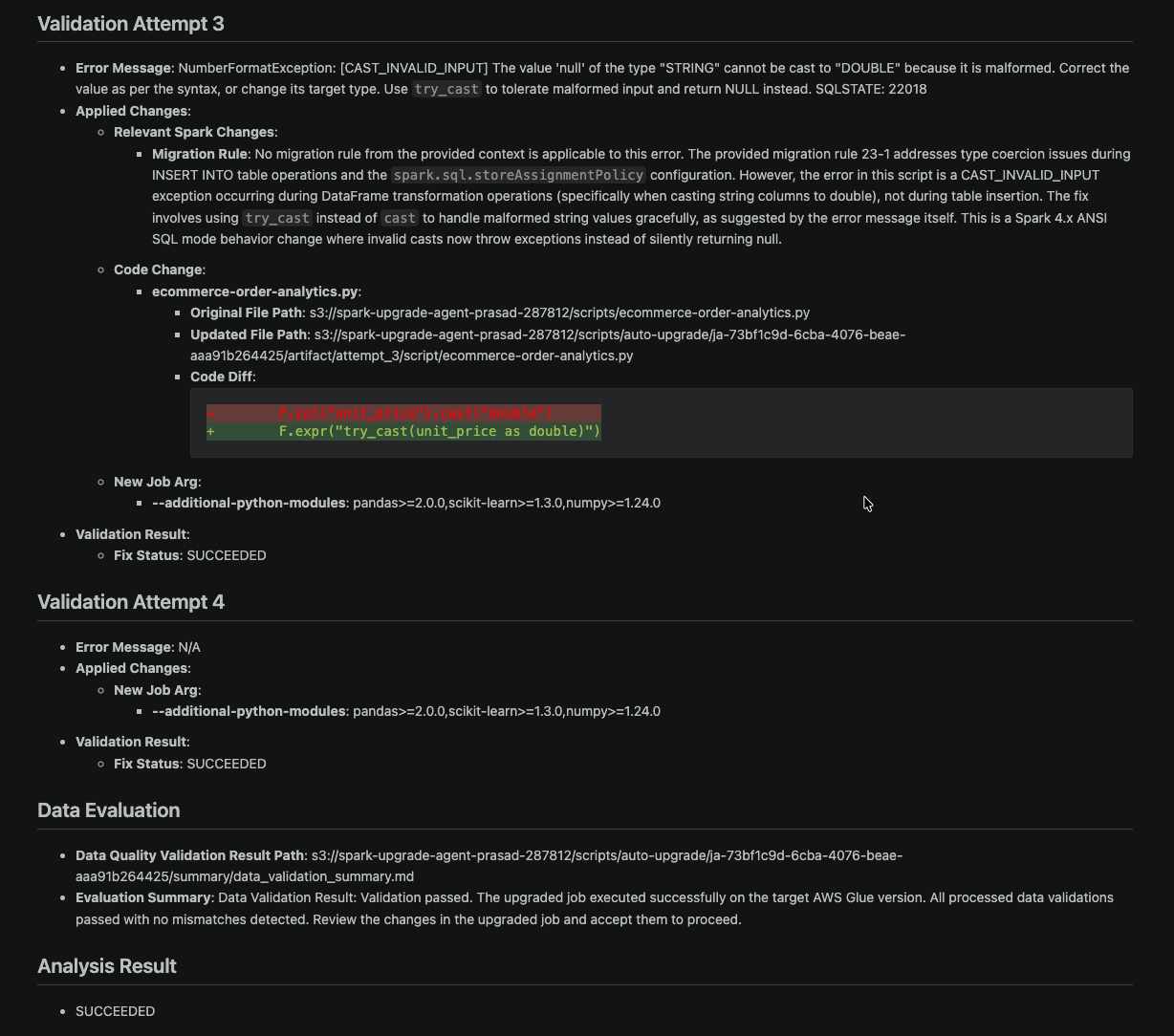
The following is a snippet from the upgrade summary (summary.md) showing the recommended changes and validation attempt details:

The summary documents each validation attempt, the changes applied, and the data quality results.

Upgrade summary showing validation attempts, applied changes, and data quality comparison results

Figure 6: Upgrade summary snippet showing validation attempt details, data quality, and analysis results

After reviewing the recommendations, accept the changes to upgrade your job to AWS Glue 6.0. This updates your job definition with the recommended configuration, including the renamed Spark configs, updated module versions, and any script modifications. Because the analysis has already validated the job on AWS Glue 6.0 and confirmed data quality parity with the original, your job is ready for production.

After reviewing the recommendations, you can apply the upgraded script to your job.

AWS Glue Studio prompt to apply the upgraded script to the job

Figure 7: The option to apply the upgraded script to the job

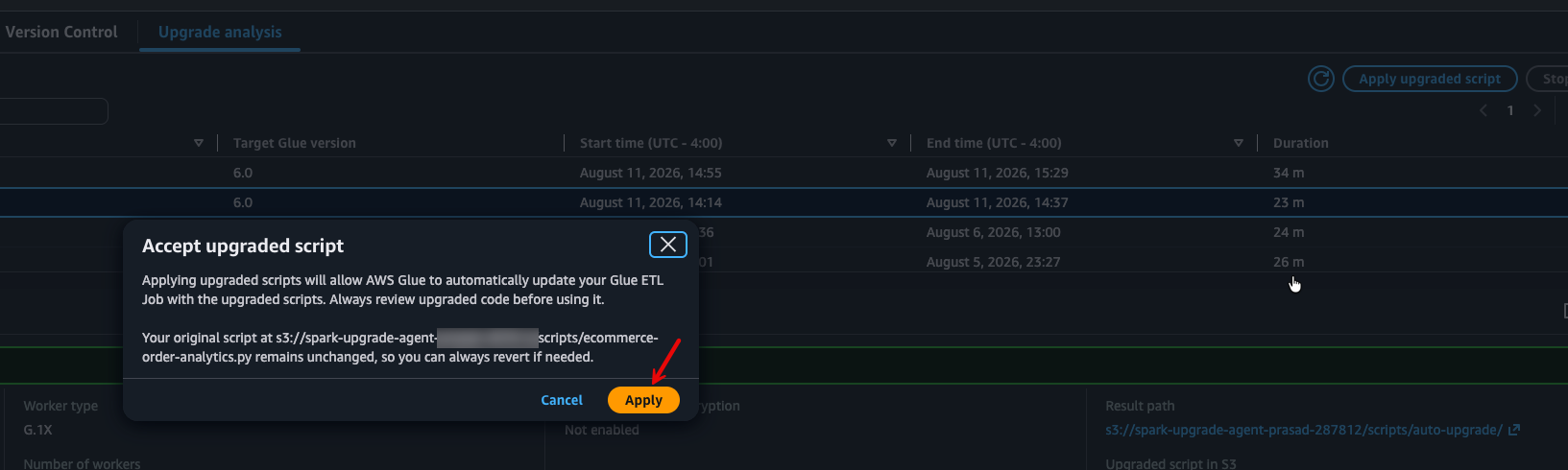
Choose Apply to confirm the upgrade.

Confirmation dialog with the Apply button to upgrade the job to AWS Glue 6.0

Figure 8: The Apply button that confirms upgrading the job to AWS Glue 6.0

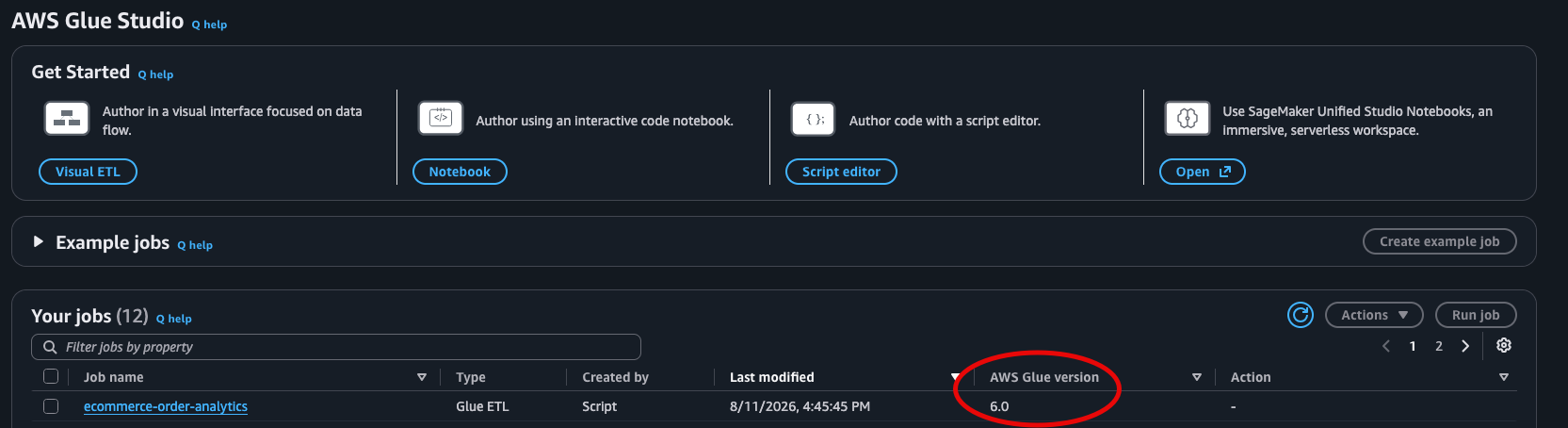
After applying, the job definition reflects the new AWS Glue version.

AWS Glue job details showing version 6.0 after applying the upgrade

Figure 9: The AWS Glue version for the job after applying the upgrade

Python virtual environments in AWS Glue 6.0

AWS Glue 6.0 introduces --python-virtual-env-storage-prefix, a service-managed virtual environment with S3 caching that simplifies Python dependency management.

For existing jobs that use --additional-python-modules, no action is required. AWS Glue automatically handles the conversion to virtual environments when your job runs on AWS Glue 6.0. Your jobs continue to work without any changes.

For new jobs on AWS Glue 6.0, we recommend using the virtual environment approach:

{
    "DefaultArguments": {
        "--python-virtual-env-storage-prefix": "s3://amzn-s3-demo-bucket/glue-venv-cache/",
        "--additional-python-modules": "pandas>=2.1.0,scikit-learn>=1.3.0,numpy>=1.24.0"
    }
}

How it works:

  • On the first run, AWS Glue installs your modules into a virtual environment, packages it, and caches the result to your specified S3 path (approximately 15–30 seconds of additional startup time).
  • On subsequent runs, AWS Glue downloads and extracts the cached virtual environment instead of running pip install.
  • The cache is automatically invalidated when your module list, versions, or AWS Glue version changes.

This approach provides faster cold starts after the first run, requires no Docker image management (unlike --python-virtual-env), and is entirely service-managed with no maintenance burden.

Conclusion

The generative upgrade analysis identified and resolved three distinct compatibility issues in our AWS Glue 5.1 job, so the job now runs successfully on AWS Glue 6.0 with Apache Spark 4.1:

  • The upgrade analysis renamed legacy Parquet datetime configuration keys (removed in Spark 4.1) to their current equivalents.
  • The upgrade analysis updated Python module version specifications that were incompatible with Python 3.13 to use flexible minimum version constraints.
  • The upgrade analysis addressed the new ANSI SQL mode default (which causes runtime failures on malformed data) with a targeted fix using try_cast() to safely handle non-numeric values while preserving ANSI mode protections.

The analysis validated that the upgraded job produces output consistent with the original, and presented all changes as recommendations for review before applying them to your job.

Next steps

After you have reviewed and accepted the upgrade changes, you can delete the analysis results stored in your S3 results path.

*Based on 3TB TPC-DS benchmark comparing AWS Glue 6.0 to AWS Glue 5.1.


About the authors

Prasad Nadig

Prasad Nadig

Prasad is a Senior Analytics Specialist Solutions Architect at Amazon Web Services (AWS), specializing in large-scale data analytics and AI. Prasad partners with customers to design, migrate, and modernize their analytics platforms on AWS into scalable, cost-effective solutions, with deep expertise in data lakes, data warehousing, distributed processing, and performance tuning at petabyte scale.

Shrey Malpani

Shrey Malpani

Shrey is a Senior Product Manager Technical at Amazon Web Services (AWS), where he works at the intersection of distributed data processing and data integration. He is focused on building and scaling data integration and data management capabilities across services like AWS Glue, Amazon EMR, and Amazon Redshift that help customers build AI-ready data platforms for their analytics and machine learning workflows.

Rishabh Nair

Rishabh Nair

Rishabh is a Software Development Engineer in the AWS analytics organization, where he combines generative AI with distributed systems to build agentic workflows that modernize large-scale data processing. He is passionate about the infrastructure that makes these workflows reliable and scalable for customers.

Keerthi Chadalavada

Keerthi Chadalavada

Keerthi is a Senior Software Development Engineer in the AWS analytics organization. She focuses on combining generative AI and data integration technologies to design and build comprehensive solutions for analytics and data engineering workloads.

Arm’s AGI Data Center CPU at Hot Chips 2026

Post Syndicated from Ryan Smith original https://www.servethehome.com/arms-agi-data-center-cpu-at-hot-chips-2026/

At Hot Chips 2026, Arm is showcasing their AGI data center CPU, the company’s first complete commercial CPU design. Based around Arm’s Neoverse V3 CPU cores, AGI is designed to power the next generation of agentic AI servers

The post Arm’s AGI Data Center CPU at Hot Chips 2026 appeared first on ServeTheHome.

The Cloudflare Blog – Brought to you by EmDash

Post Syndicated from Kody Jackson original https://blog.cloudflare.com/cloudflare-blog-uses-emdash/

You likely noticed the recent redesign of the Cloudflare Blog. We added dark mode, modernized the look and feel, and made a lot of other small improvements along the way.

What you might not have noticed – well, except for those who are more terminally online – is that the redesign was part of a much bigger migration project. On Wednesday, August 12, we moved the blog to EmDash, a content management system (CMS) built especially to work on Astro and with Cloudflare.

We’ll take you into the migration story – what we learned and how EmDash got better – as well as into the benefits we’re already seeing from a new platform.

We are Customer Zero

At Cloudflare, Cloudflare itself is Customer Zero. This means that we use our products. And – in use – we make them better for ourselves and our customers.

This is a very real cultural value at Cloudflare. The burden of proof is on you if you want to use an external vendor. Why can’t that team support you, what gaps are there, why can’t those gaps be filled, and are those “gaps” true requirements?

This preference is even enshrined in our internal engineering standards, known as our Codex.

We don’t just build products for others; we build them to run Cloudflare itself. We are our own first, most demanding customer.

We validate scale, security, and usability on our own massive infrastructure before a paying customer ever touches the product. If a product breaks, it breaks us first. This forces us to fix issues immediately, ensuring that by the time a feature reaches the enterprise, it has already survived the harshest production environment on earth.

With the launch of EmDash and some limitations with our current CMS vendor, we knew that we’d likely be the Customer Zero for EmDash internally at Cloudflare.

Customer Zero in Action

When we began our initial migration conversations, we started with two main questions:

  • Does EmDash work for us?
  • Can EmDash scale?

Does the platform work?

Our first question was the most broad, does EmDash work for us? This is something you’d want to know broadly about any new platform, but especially one that’s pre-1.0. 

To answer this question, we ran through a bunch of common user flows, such as:

  • Publishing and unpublishing a post
  • Authoring a new post
  • Scheduling a post
  • Adding media items

By and large, EmDash held up pretty well to these usability tests. The gaps we found were generally related to:

The biggest oversight we found was around scheduled posts, which didn’t work until EmDash version 0.19.0. This gap was understandable given the early version of EmDash, but it was also definitely something we didn’t want to be finding out after the scheduled time for a post.

Can EmDash scale?

Our biggest concerns were whether our proposed EmDash setup could handle the traffic we saw on the Cloudflare Blog.

The traffic pattern to our blog is incredibly varied. Normal load sits in the neighborhood of 75 requests per second (RPS), but also spikes up to over 5,000 RPS. Some of these spikes line up with the publishing times of new posts, meaning those posts went viral and attracted a lot of attention. Others happen during all points of the day and night, which likely means folks are sending some extra traffic our way, just to see what happens. 

Performance also matters for our systems (and our readers). Cloudflare is a web performance company, after all, so the speed at which a page loads becomes incredibly important.

With those two concerns in mind, we built out some scenarios using k6, an open-source performance testing tool:

  • Ramp: Where we gradually increase requests up to triple the prod baseline and then cool down.
  • Breakpoint: Where we ramp from 0 to 100 RPS over 10 minutes, stopping when something breaks.
  • Burst: Where we throw an immediate traffic load of 7,000 RPS and see what happens.

For each of those scenarios, we evaluated:

  • Availability: Failure when more than 0.01% of HTTP requests lead to 5xx errors, meaning the application couldn’t handle the traffic.
  • Latency:
    • P95 latency: Failure when more than 5% of responses exceed 500ms.
    • P99 latency: Failure when more than 1% of responses exceed 1000ms.

Armed with these tests – and a lot of internal discussion and data points – we came to our production architecture:

The multiple layers of caching we put in place play a key role in making the blog both fast and resilient. In the diagram below, they are ordered from top to bottom by proximity to the user:

With this setup, we’re typically serving 99.5% of static files from a cache and 70% of requests from a cache, improving frontend performance and decreasing load on the database.

Once we had that architecture in place, we could start thinking about the frontend redesign as well.

Frontend redesign

Beyond updating the backend architecture, the migration offered us the perfect opportunity to bring the blog's interface into alignment with Cloudflare’s updated visual language. We rebuilt the frontend experience using patterns established by the Kumo design system, creating visual and structural consistency between the Cloudflare homepage, dashboard, and marketing sites. The result is a cohesive reading experience that feels like a natural extension of the broader Cloudflare ecosystem.

A major priority for this redesign, and a long-overdue request from our readers, was native support for light and dark modes. We implemented theme switching tied directly to system preferences, alongside an explicit toggle, and ensured that accessibility guidelines were strictly met across both themes. Regardless of preference, the updated palette and code syntax highlighting adapt seamlessly without sacrificing legibility.

We also took the opportunity to solve a few long-standing user experience quirks, starting with our email subscription form. Previously, the subscription box lived in the top right corner of the page. Because of its placement, readers frequently mistook it for a search bar and typed their search queries directly into the input field.

To fix this, we moved the email sign-up into a dedicated call-to-action block at the bottom of posts. 

Now, once a reader finishes an article and wants to stay updated, the prompt to subscribe appears naturally at the end of a post.

Finally, we introduced two dedicated sidebar features on interior post pages to improve navigation and community engagement. On the right, an "On this page" table of contents tracks your progress and lets you jump directly to specific sections of longer technical posts. On the left, a new "Discuss Online" section makes it effortless to share articles and engage in conversations across social platforms and developer communities.

Rollout strategy

As we got nearer to our migration, we started focusing on the broader question of “how do we make this change safely?” Ensuring zero downtime for our readers was a non-negotiable requirement, alongside guaranteeing a seamless fallback mechanism if something went wrong at the last minute.

To achieve this, we deployed a proxy Worker to intelligently route traffic between the legacy blog and the new EmDash-powered site. This Worker set a version cookie on requests, which then let us route incoming traffic to the new or legacy experience accordingly. Additionally, this strategy allowed us to fall back to the legacy blog if the new site experienced any 500 errors. Thanks to the flexibility of Cloudflare Workers, this proxy was relatively simple to create and scaled without any issues. The ability to configure a direct worker-to-worker connection through the NEW_BLOG service binding was particularly useful here, as it reduced latency for any end user going through the proxy. This service binding let the proxy Worker dispatch incoming requests directly to the new blog Worker instead of sending them through a public hostname, DNS, TLS, and an outbound HTTP connection.

On launch day, we initiated a gradual rollout, starting at just 1% of total traffic, then incrementally stepping up to 5%, 15%, and beyond as we validated system health. This phased approach allowed us to observe how the platform handled real-world production load while catching a few last-minute edge cases without impacting the vast majority of our audience. By the end of the day, we had comfortably shifted 100% of traffic over to the new platform.

Results

Measurable performance gains

One of our primary objectives for this migration was to deliver a faster, more reliable site to our readers, and the early data shows we accomplished exactly that.

Comparing p95 response latencies between the old architecture (green line) and the new EmDash setup (yellow line) revealed a stark difference. Where the previous platform experienced periodic latency spikes under load, the new system maintains a remarkably flat, consistent response profile. By running EmDash on Cloudflare Workers alongside our new caching layers, we’ve delivered a significantly faster and more performant reading experience across the board.

We’ve seen all these performance gains – and minimal errors – while serving up to 850 RPS.

MCP servers

With this change, the blog also got more accessible for agents, in two distinct ways.

The first is that we released a new Model Context Protocol (MCP) server for the Cloudflare Blog.

An MCP server bundles up a bunch of specific tools that your agent can then use to interact with an external resource, almost like an API for agents.

Using that MCP, you can now use the following tools with your agents:

  • search_posts
  • list_posts
  • get_post
  • list_tags

With the new, intuitive EmDash APIs and AI search endpoints exposed by our Worker, creating this new MCP took just a few hours of work.

The second is that – for our blog authors – EmDash has an MCP server for EmDash itself, meaning that they can browse, create, and edit content, publish and schedule posts, remove files, and more.

Though this sort of agentic tooling is becoming more standardized in the CMS industry, what’s not standard is that it’s available without any additional cost. The MCP is just another part of the platform, reflecting a growing trend of designing for agents, as well as humans.

The first test: Agents Week

At Cloudflare, we run multiple innovation “weeks” a year, where we set ambitious goals for internal teams around specific themes. These weeks push our products forward, as well as help customers digest the changes that are constantly happening at Cloudflare.

The latest of these, Agents Week, was quite a test for the new blog. We launched 18 new posts over 9 days. And those posts got a lot of traffic, close to 3 million pageviews.

On the frontend, our new blog Worker did very well, serving up to 450 RPS without any noticeable issues. Thanks to Cloudflare’s built-in DDoS protection, we also absorbed a 28,000 RPS DDoS attack on August 10th, also without any noticeable issues.

On the editing side, we continued to find some issues. Most of these involved small quirks of the editing experience, though we also found some bugs specifically around scheduled posts. We’ve since raised these to the EmDash team and are confident that they’ll be fixed before Birthday Week.

Give EmDash a try

We want to give a heartfelt thank you to the EmDash team, who made this migration about as smooth as possible and were incredibly receptive to our feedback. This is how Customer Zero is supposed to work, and it’s incredibly gratifying to share an inside look into that process with all of our readers as well.

If you’re in the market for a new CMS, try out EmDash today. It’s pretty amazing and – with the upcoming launch to v1 – it’ll be getting even better soon.


Временната отсечка на Зеления ринг и какво да очакваме

Post Syndicated from Боян Юруков original https://yurukov.net/blog/2026/greenring-aug26/

В събота реших да мина през отсечката на Зеления ринг в Изгрев и Слатина, за която от общината през страницата си за проекта за Зеления ринг писаха, че ще се ремонтира и доведе до временно състояние, за да могат феновете да стигат по-лесно до европейското по волейбол в Арената след две седмици. Това всъщност е много добра идея, тъй като всеки път като има събитие там тротоарите и пешеходните пътеки около кръговото на 4-ти км. се препълват създавайки опасност както за пешеходците, така и блокирайки движението.

Отсечката е от началото на хотела на Тиков до края Арената. Вижда се, че са сложили бордюри и вече е насипан част от чакъла. Хотел East Plasa партнирали като ще предоставят достъп за 10 метра през имота си и ще изградят стълби до нивото на зеления ринг. Това, всъщност, е най-малкото, което следва да направят предвид, че изсякоха дърветата там, унищожиха почвения слой и са оставили строителни отпадъци в края на разчистената площ докато строяха хотела си.

Попитах и ми отговориха, че няма да се слага асфалт и бордюрите са само, за да държат чакъла. Лампите са също временно докато не се реши как да изглежда цялата отсечка от гара Пионер. Събитията за обсъждане на плановете щели започнат през септември. Питах и какви са плановете за минаване с колело или детска количка и отговориха, че се обмисля и това.

Ако искате да стигнете до същото място. Единственият начин в момента е да влезете откъм ул. Любен Русев – където е Топлофикация и където районният кмет на Изгрев иска да му строи частник ново кметство по схема кон за кокошка. Там има едно мостче (единственото водещо до бъдещото кметство), по което ще стигнете до още неразчистената част от зеления ринг. Завивате надясно и ще ви пречат само строителните отпадъци от строежа на East Plasa. Ако се разчистят бетонните блокове, ще може да се минава с колело и от там.

Има една пътека вляво, която обаче стига до частен имот (дясното кръгче на последната снимка). Би трябвало да може да се влезе и от пътека още на изток, но общински имот-улица стигаща до зеления ринг е застроена с вход на гараж (лявото кръгче). Не е ясно дали и как е позволено това, но ще трябва да се разруши.

Всъщност, докато бях в Зеления ринг видях поне три случая на незаконно строителство или нарушения в готови сгради. Разпознават се с просто око. Когато районният ни кмет, на когото са разпределени от call.sofia тези сигнали, неизбежно слезе да се снима за фейса след две седмици на вече свършената работа, надявам се да ги забележи и най-вече да ги санкционира. Ха дано, ама надали.

Още статии свързани с темата за Зеления ринг може да прочетете тук:

Intel Core Series 3 (Wildcat Lake) CPU at Hot Chips 2026

Post Syndicated from Ryan Smith original https://www.servethehome.com/intel-core-series-3-wildcat-lake-cpu-at-hot-chips-2026/

At Hot Chips 2026, Intel went deeper into its newest budget SoC design, Wildcat Lake, which is being used in consumer and edge devices

The post Intel Core Series 3 (Wildcat Lake) CPU at Hot Chips 2026 appeared first on ServeTheHome.

IBM Z and LinuxONE Dual-ISA Processor and AI Acceleration at Hot Chips 2026

Post Syndicated from Patrick Kennedy original https://www.servethehome.com/ibm-z-and-linuxone-dual-isa-processor-and-ai-acceleration-at-hot-chips-2026/

At Hot Chips 2026, IBM showed a crazy new IBM Z CPU that will support IBM Z and Arm instruction sets natively.

The post IBM Z and LinuxONE Dual-ISA Processor and AI Acceleration at Hot Chips 2026 appeared first on ServeTheHome.

The collective thoughts of the interwebz