Post Syndicated from digiblur DIY original https://www.youtube.com/watch?v=kg2LregUm4U
Microsoft Is Finally Killing RC4
Post Syndicated from Bruce Schneier original https://www.schneier.com/blog/archives/2025/12/microsoft-is-finally-killing-rc4.html
After twenty-six years, Microsoft is finally upgrading the last remaining instance of the encryption algorithm RC4 in Windows.
of the most visible holdouts in supporting RC4 has been Microsoft. Eventually, Microsoft upgraded Active Directory to support the much more secure AES encryption standard. But by default, Windows servers have continued to respond to RC4-based authentication requests and return an RC4-based response. The RC4 fallback has been a favorite weakness hackers have exploited to compromise enterprise networks. Use of RC4 played a key role in last year’s breach of health giant Ascension. The breach caused life-threatening disruptions at 140 hospitals and put the medical records of 5.6 million patients into the hands of the attackers. US Senator Ron Wyden (D-Ore.) in September called on the Federal Trade Commission to investigate Microsoft for “gross cybersecurity negligence,” citing the continued default support for RC4.
Last week, Microsoft said it was finally deprecating RC4 and cited its susceptibility to Kerberoasting, the form of attack, known since 2014, that was the root cause of the initial intrusion into Ascension’s network.
Fun fact: RC4 was a trade secret until I published the algorithm in the second edition of Applied Cryptography in 1995.
GDB 17.1 released
Post Syndicated from corbet original https://lwn.net/Articles/1051653/
Version 17.1 of the GDB debugger is out. Changes include shadow-stack
support, info threads improvements, a number of Python API
improvements, and more, including: “Warnings and error messages now
” See the
start with an emoji (warning sign, or cross mark) if supported by the host
charset. Configurable.
NEWS file for more information.
Qubes OS 4.3.0 released
Post Syndicated from corbet original https://lwn.net/Articles/1051650/
Version 4.3.0 of the security-oriented Qubes OS distribution has been
released. Changes include more recent distribution templates, preloaded
disposable virtual machines, and the reintroduction of the Qubes Windows
Tools set. See the
release notes for more information.
Unlock Your Home’s Power: Zendure Smart Energy Explained! #shorts
Post Syndicated from BeardedTinker original https://www.youtube.com/shorts/LCLRvGzKgmM
Jackson: Debian’s git transition
Post Syndicated from corbet original https://lwn.net/Articles/1051580/
Ian Jackson (along with Sean Whitton) has posted a manifesto and status
update to the effect that, since Git repositories have become the
preferred method to distribute source, that is how Debian should be
distributing its source packages.
Everyone who interacts with Debian source code should be able to
do so entirely in git.That means, more specifically:
- All examination and edits to the source should be performed via
normal git operations.- Source code should be transferred and exchanged as git data, not
tarballs. git should be the canonical form everywhere.- Upstream git histories should be re-published, traceably, as part of
formal git releases published by Debian.- No-one should have to learn about Debian Source Packages, which are
bizarre, and have been obsoleted by modern version control.This is very ambitious, but we have come a long way!
[$] Tools for successful documentation projects
Post Syndicated from jake original https://lwn.net/Articles/1049976/
At Open
Source Summit Japan 2025, Erin McKean talked about the challenges to
producing good project documentation, along with some tooling that can help
guide the process toward success. It is a problem that many projects
struggle with and one that her employer, Google, gained a lot of experience
with from its now-concluded Season of Docs
initiative. Through that program, more than 200 case studies of
documentation projects were gathered that were mined for common problems
and solutions, which led to the tools and techniques that McKean described.
Loong64 is now an official Debian architecture
Post Syndicated from jzb original https://lwn.net/Articles/1051576/
John Paul Adrian Glaubitz has announced
that loong64 is now an official architecture for Debian, and will be
part of the Debian 14 (“forky”) release “if everything goes
“. This is a bit more than two years after the initial
along as planned
bootstrap of the architecture.
So far, we have manually built and imported an initial set of 112
packages with the help of the packages in Debian Ports. This was
enough to create an initial chroot and set up the first buildd which
is now churning through the build queue. Over night, the currently
single buildd instance already built and uploaded 300 new packages.
How Workers powers our internal maintenance scheduling pipeline
Post Syndicated from Kevin Deems original https://blog.cloudflare.com/building-our-maintenance-scheduler-on-workers/
Cloudflare has data centers in over 330 cities globally, so you might think we could easily disrupt a few at any time without users noticing when we plan data center operations. However, the reality is that disruptive maintenance requires careful planning, and as Cloudflare grew, managing these complexities through manual coordination between our infrastructure and network operations specialists became nearly impossible.
It is no longer feasible for a human to track every overlapping maintenance request or account for every customer-specific routing rule in real time. We reached a point where manual oversight alone couldn’t guarantee that a routine hardware update in one part of the world wouldn’t inadvertently conflict with a critical path in another.
We realized we needed a centralized, automated “brain” to act as a safeguard — a system that could see the entire state of our network at once. By building this scheduler on Cloudflare Workers, we created a way to programmatically enforce safety constraints, ensuring that no matter how fast we move, we never sacrifice the reliability of the services on which our customers depend.
In this blog post, we’ll explain how we built it, and share the results we’re seeing now.
Picture an edge router that acts as one of a small, redundant group of gateways that collectively connect the public Internet to the many Cloudflare data centers operating in a metro area. In a populated city, we need to ensure that the multiple data centers sitting behind this small cluster of routers do not get cut off because the routers were all taken offline simultaneously.
Another maintenance challenge comes from our Zero Trust product, Dedicated CDN Egress IPs, which allows customers to choose specific data centers from which their user traffic will exit Cloudflare and be sent to their geographically close origin servers for low latency. (For the purpose of brevity in this post, we’ll refer to the Dedicated CDN Egress IPs product as “Aegis,” which was its former name.) If all the data centers a customer chose are offline at once, they would see higher latency and possibly 5xx errors, which we must avoid.
Our maintenance scheduler solves problems like these. We can make sure that we always have at least one edge router active in a certain area. And when scheduling maintenance, we can see if the combination of multiple scheduled events would cause all the data centers for a customer’s Aegis pools to be offline at the same time.
Before we created the scheduler, these simultaneous disruptive events could cause downtime for customers. Now, our scheduler notifies internal operators of potential conflicts, allowing us to propose a new time to avoid overlapping with other related data center maintenance events.
We define these operational scenarios, such as edge router availability and customer rules, as maintenance constraints which allow us to plan more predictable and safe maintenance.
Every constraint starts with a set of proposed maintenance items, such as a network router or list of servers. We then find all the maintenance events in the calendar that overlap with the proposed maintenance time window.

Next, we aggregate product APIs, such as a list of Aegis customer IP pools. Aegis returns a set of IP ranges where a customer requested egress out of specific data center IDs, shown below.
[
    {
      "cidr": "104.28.0.32/32",
      "pool_name": "customer-9876",
      "port_slots": [
        {
          "dc_id": 21,
          "other_colos_enabled": true,
        },
        {
          "dc_id": 45,
          "other_colos_enabled": true,
        }
      ],
      "modified_at": "2023-10-22T13:32:47.213767Z"
    },
]
In this scenario, data center 21 and data center 45 relate to each other because we need at least one data center online for the Aegis customer 9876 to receive egress traffic from Cloudflare. If we tried to take data centers 21 and 45 down simultaneously, our coordinator would alert us that there would be unintended consequences for that customer workload.
We initially had a naive solution to load all data into a single Worker. This included all server relationships, product configurations, and metrics for product and infrastructure health to compute constraints. Even in our proof of concept phase, we ran into problems with “out of memory” errors.

We needed to be more cognizant of Workers’ platform limits. This required loading only as much data as was absolutely necessary to process the constraint’s business logic. If a maintenance request for a router in Frankfurt, Germany, comes in, we almost certainly do not care what is happening in Australia since there is no overlap across regions. Thus, we should only load data for neighboring data centers in Germany. We needed a more efficient way to process relationships in our dataset.
As we looked at our constraints, a pattern emerged where each constraint boiled down to two concepts: objects and associations. In graph theory, these components are known as vertices and edges, respectively. An object could be a network router and an association could be the list of Aegis pools in the data center that requires the router to be online. We took inspiration from Facebook’s TAO research paper to establish a graph interface on top of our product and infrastructure data. The API looks like the following:
type ObjectID = string

interface MainTAOInterface<TObject, TAssoc, TAssocType> {
  object_get(id: ObjectID): Promise<TObject | undefined>

  assoc_get(id1: ObjectID, atype: TAssocType): AsyncIterable<TAssoc>
}
The core insight is that associations are typed. For example, a constraint would call the graph interface to retrieve Aegis product data.
async function constraint(c: AppContext, aegis: TAOAegisClient, datacenters: string[]): Promise<Record<string, PoolAnalysis>> {
  const datacenterEntries = await Promise.all(
    datacenters.map(async (dcID) => {
      const iter = aegis.assoc_get(c, dcID, AegisAssocType.DATACENTER_INSIDE_AEGIS_POOL)
      const pools: string[] = []
      for await (const assoc of iter) {
        pools.push(assoc.id2)
      }
      return [dcID, pools] as const
    }),
  )

  const datacenterToPools = new Map<string, string[]>(datacenterEntries)
  const uniquePools = new Set<string>()
  for (const pools of datacenterToPools.values()) {
    for (const pool of pools) uniquePools.add(pool)
  }

  const poolTotalsEntries = await Promise.all(
    [...uniquePools].map(async (pool) => {
      const total = aegis.assoc_count(c, pool, AegisAssocType.AEGIS_POOL_CONTAINS_DATACENTER)
      return [pool, total] as const
    }),
  )

  const poolTotals = new Map<string, number>(poolTotalsEntries)
  const poolAnalysis: Record<string, PoolAnalysis> = {}
  for (const [dcID, pools] of datacenterToPools.entries()) {
    for (const pool of pools) {
      poolAnalysis[pool] = {
        affectedDatacenters: new Set([dcID]),
        totalDatacenters: poolTotals.get(pool),
      }
    }
  }

  return poolAnalysis
}
We use two association types in the code above:
-
DATACENTER_INSIDE_AEGIS_POOL, which retrieves the Aegis customer pools that a data center resides in.
-
AEGIS_POOL_CONTAINS_DATACENTER, which retrieves the data centers an Aegis pool needs to serve traffic.
The associations are inverted indices of one another. The access pattern is exactly the same as before, but now the graph implementation has much more control of how much data it queries. Before, we needed to load all Aegis pools into memory and filter inside constraint business logic. Now, we can directly fetch only the data that matters to the application.

The interface is powerful because our graph implementation can improve performance behind the scenes without complicating the business logic. This lets us use the scalability of Workers and Cloudflare’s CDN to fetch data from our internal systems very quickly.
We switched to using the new graph implementation, sending more targeted API requests. Response sizes dropped by 100x overnight, switching from loading a few massive requests to many tiny requests.

While this solves the issue of loading too much into memory, we now have a subrequest problem because instead of a few large HTTP requests, we make an order of magnitude more of small requests. Overnight, we started consistently breaching subrequest limits.

In order to solve this problem, we built a smart middleware layer between our graph implementation and the fetch API.
export const fetchPipeline = new FetchPipeline()
  .use(requestDeduplicator())
  .use(lruCacher({
    maxItems: 100,
  }))
  .use(cdnCacher())
  .use(backoffRetryer({
    retries: 3,
    baseMs: 100,
    jitter: true,
  }))
  .handler(terminalFetch);
If you’re familiar with Go, you may have seen the singleflight package before. We took inspiration from this idea and the first middleware component in the fetch pipeline deduplicates inflight HTTP requests, so they all wait on the same Promise for data instead of producing duplicate requests in the same Worker. Next, we use a lightweight Least Recently Used (LRU) cache to internally cache requests that we have already seen before.
Once both of those are complete, we use Cloudflare’s caches.default.match function to cache all GET requests in the region that the Worker is running. Since we have multiple data sources with different performance characteristics, we choose time to live (TTL) values carefully. For example, real-time data is only cached for 1 minute. Relatively static infrastructure data could be cached for 1–24 hours depending on the type of data. Power management data might be changed manually and infrequently, so we can cache it for longer at the edge.
In addition to those layers, we have the standard exponential backoff, retries and jitter. This helps reduce wasted fetch calls where a downstream resource might be unavailable temporarily. By backing off slightly, we increase the chance that we fetch the next request successfully. Conversely, if the Worker sends requests constantly without backoff, it will easily breach the subrequest limit when the origin starts returning 5xx errors.
Putting it all together, we saw ~99% cache hit rate. Cache hit rate is the percentage of HTTP requests served from Cloudflare’s fast cache memory (a “hit”) versus slower requests to data sources running in our control plane (a “miss”), calculated as (hits / (hits + misses)). A high rate means better HTTP request performance and lower costs because querying data from cache in our Worker is an order of magnitude faster than fetching from an origin server in a different region. After tuning settings, for our in memory and CDN caches, hit rates have increased dramatically. Since much of our workload is real-time, we will never have a 100% hit rate as we must request fresh data at least once per minute.

We have talked about improving the fetching layer, but not about how we made origin HTTP requests faster. Our maintenance coordinator needs to react in real-time to network degradation and failure of machines in data centers. We use our distributed Prometheus query engine, Thanos, to deliver performant metrics from the edge into the coordinator.
To explain how our choice in using the graph processing interface affected our real-time queries, let’s walk through an example. In order to analyze the health of edge routers, we could send the following query:
sum by (instance) (network_snmp_interface_admin_status{instance=~"edge.*"})Originally, we asked our Thanos service, which stores Prometheus metrics, for a list of each edge router’s current health status and would manually filter for routers relevant to the maintenance inside the Worker. This is suboptimal for many reasons. For example, Thanos returned multi-MB responses which it needed to decode and encode. The Worker also needed to cache and decode these large HTTP responses only to filter out the majority of the data while processing a specific maintenance request. Since TypeScript is single-threaded and parsing JSON data is CPU-bound, sending two large HTTP requests means that one is blocked waiting for the other to finish parsing.
Instead, we simply use the graph to find targeted relationships such as the interface links between edge and spine routers, denoted as EDGE_ROUTER_NETWORK_CONNECTS_TO_SPINE.
sum by (lldp_name) (network_snmp_interface_admin_status{instance=~"edge01.fra03", lldp_name=~"spine.*"})The result is 1 Kb on average instead of multiple MBs, or approximately 1000x smaller. This also massively reduces the amount of CPU required inside the Worker because we offload most of the deserialization to Thanos. As we explained before, this means we need to make a higher number of these smaller fetch requests, but load balancers in front of Thanos can spread the requests evenly to increase throughput for this use case.
Our graph implementation and fetch pipeline successfully tamed the ‘thundering herd’ of thousands of tiny real-time requests. However, historical analysis presents a different I/O challenge. Instead of fetching small, specific relationships, we need to scan months of data to find conflicting maintenance windows. In the past, Thanos would issue a massive amount of random reads to our object store, R2. To solve this massive bandwidth penalty without losing performance, we adopted a new approach the Observability team developed internally this year.
There are enough maintenance use cases that we must rely on historical data to tell us if our solution is accurate and will scale with the growth of Cloudflare’s network. We do not want to cause incidents, and we also want to avoid blocking proposed physical maintenance unnecessarily. In order to balance these two priorities, we can use time series data about maintenance events that happened two months or even a year ago to tell us how often a maintenance event is violating one of our constraints, e.g. edge router availability or Aegis. We blogged earlier this year about using Thanos to automatically release and revert software to the edge.
Thanos primarily fans out to Prometheus, but when Prometheus’ retention is not enough to answer the query it has to download data from object storage — R2 in our case. Prometheus TSDB blocks were originally designed for local SSDs, relying on random access patterns that become a bottleneck when moved to object storage. When our scheduler needs to analyze months of historical maintenance data to identify conflicting constraints, random reads from object storage incur a massive I/O penalty. To solve this, we implemented a conversion layer that transforms these blocks into Apache Parquet files. Parquet is a columnar format native to big data analytics that organizes data by column rather than row, which — together with rich statistics — allows us to only fetch what we need.
Furthermore, since we are rewriting TSDB blocks into Parquet files, we can also store the data in a way that allows us to read the data in just a few big sequential chunks.
sum by (instance) (hmd:release_scopes:enabled{dc_id="45"})In the example above we would choose the tuple “(__name__, dc_id)” as a primary sorting key so that metrics with the name “hmd:release_scopes:enabled” and the same value for “dc_id” get sorted close together.
Our Parquet gateway now issues precise R2 range requests to fetch only the specific columns relevant to the query. This reduces the payload from megabytes to kilobytes. Furthermore, because these file segments are immutable, we can aggressively cache them on the Cloudflare CDN.
This turns R2 into a low-latency query engine, allowing us to backtest complex maintenance scenarios against long-term trends instantly, avoiding the timeouts and high tail latency we saw with the original TSDB format. The graph below shows a recent load test, where Parquet reached up to 15x the P90 performance compared to the old system for the same query pattern.

To get a deeper understanding of how the Parquet implementation works, you can watch this talk at PromCon EU 2025, Beyond TSDB: Unlocking Prometheus with Parquet for Modern Scale.
By leveraging Cloudflare Workers, we moved from a system that ran out of memory to one that intelligently caches data and uses efficient observability tooling to analyze product and infrastructure data in real time. We built a maintenance scheduler that balances network growth with product performance.
But “balance” is a moving target.
Every day, we add more hardware around the world, and the logic required to maintain it without disrupting customer traffic gets exponentially harder with more products and types of maintenance operations. We’ve worked through the first set of challenges, but now we’re staring down more subtle, complex ones that only appear at this massive scale.
We need engineers who aren’t afraid of hard problems. Join our Infrastructure team and come build with us.
Security updates for Monday
Post Syndicated from jzb original https://lwn.net/Articles/1051572/
Security updates have been issued by Debian (chromium, dropbear, mediawiki, php8.4, python-mechanize, rails, roundcube, usbmuxd, and wordpress), Fedora (cef, chromium, fonttools, gobuster, gosec, mingw-libpng, moby-engine, mqttcli, nextcloud, pgadmin4, python-unicodedata2, uriparser, and util-linux), Mageia (php and webkit2), Oracle (binutils, curl, gcc-toolset-13-binutils, gimp, git-lfs, kernel, openssh, php:8.3, podman, python-kdcproxy, python3.12, python3.9, skopeo, and webkit2gtk3), Red Hat (rsync), Slackware (php), SUSE (alloy, busybox, chromedriver, chromium, coredns-for-k8s, duc, firefox, kernel-devel, libpng16, libruby3_4-3_4, mariadb, netty, php8, python311-tornado6, rsync, taglib, and xen), and Ubuntu (linux-oracle-5.4, linux-raspi, linux-realtime-6.14, and linux-xilinx).
The Worst Christmas: Paris 1870
Post Syndicated from The History Guy: History Deserves to Be Remembered original https://www.youtube.com/watch?v=6fSjte2C3wY
Какво е GenZ и има ли то почва у нас?
Post Syndicated from Боян Юруков original https://yurukov.net/blog/2025/genz/

Разговорите за поколенията и зодиите си приличат много – обичаме да им приписваме групово поведение, решителност, мнения и дори ниво на интелект. Доколкото за второто някои винят звездите и ретроградния Меркурий, зад първите стоят реални събития, кризи и политически процеси. Дали те наистина влияят толкова определящо на групи от хора на близка възраст е въпрос на дебати. Споделено е мнението обаче за регионални особености според исторически и социален контекст. В България може да се говори за GenZ, но характеристиките и политическата им тежест ще е далеч по-малка от други държави и отколкото много се надяват. Решенията им обаче ще предопределят каква ще е България в следващите десетилетия много повече, отколкото ние или родителите ни и за това има добри причини.
Най-краткото обяснение би било, че GenZ са онези, които нямат представа от къде идва лафа заложен в заглавието. Това обаче не би ни било особено полезно. Всъщност, в последните седмици доста хора се питат точно това в контекста на идващите избори и политическото бъдеще на България като цяло. Тук не се опитвам да предвидя дали и как ще гласуват младите, а кои са, как може да определим поколенията в родния контекст и има ли въобще смисъл.
За това стана дума, всъщност, преди няколко дни, когато споделих графиката на Землевеж с възрастовото разпределение на хората в България според най-често срещаната дефиниция на поколенията. В коментар под споделянето ми авторът на Земелевеж Иван Люцканов спомена, че му се ще да намерим дефиниция на тези поколения или аналогични в България. Имено това ще се опитам да направя тук.
Първо, трябва да се спомене, че като цяло концепцията за поколенията е крайно измислена и размита. Адам Коновър преди почти десет години обясни добре защо са глупави като цяло и създадени в голяма степен от рекламната индустрия, както много други популярни концепции. Преди две години обсъди темата в подкаста си по-широко, ако ви се гледа. Така или иначе, използваме думи като милениъл, GenZ, бумър в голяма степен заради популяната култура идваща от щатите и ги използваме за кратко събирателно особено за икономически и политически активните млади. Хората обичаме да слагаме другите в кутийки, да разделяме и така да се самоопределяме. Лесно е и е удобно, макар навярно да създава повече неясноти, несигурност и грешки, отколкото си струва. Долу виждате как Pew Research са ги представили. Имат добра статия за границите между поколенията. Критикувах ги за тяхно изледване преди години за религиозността по държави, та приемете написаното с условностите им, както и всичко в този блог.
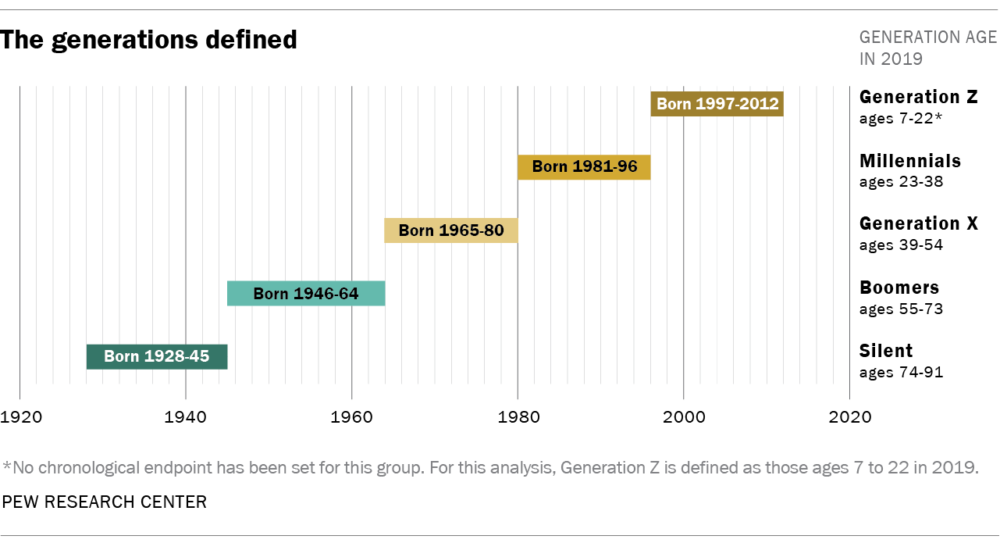
С това наум, трябва да се каже отново, че макар често да четем за конкретна година за начало и край, границите им са силно размити, а вариацията в тях е голяма. Хората сме различни и приемаме света различно. Отделно в рамките на едно население има много малцинства, които биват повлияни драстично от конкретни събития и промени докато множеството не ги забелязва. Спин епидемията е такова поне преди да осъзнаем, че не засяга само хомосексуалните и започва да се изследва. Има и на вид прости неща, които имат огромен ефект, но го осъзнаваме по-късно. Пример е ниското колело, което е дало независима физическа мобилност на жените и в ретроспекция се смята за един от ключовите фактори за еманципацията.
Това важи с още по-голяма сила когато излезем от щатите, за където са горните дефиниции. Истината е, че поколенията така дефинирани са обосновани с конкретни социални, политически и природни събития, които влияят драматично на това как хората прежиели ги възприемат света, взимат решения и живеят. Втората световна война оформя възприятиятна на върналите се от фронта също както терористичния акт на 11 септември в щатите наклони политическите пристрастия, също както дигиталната революция, взривът от масови престрелки в последите 30 години, пандемията, дълговата криза и прочие.
Какво общо има това с България?
Наистина повечето от тези събития не са основополагащи за голяма част от света и особено България. Затова трябва първо да разберем кои са ключовите повратни точки у нас. Тъй като не търсим урок по история, нека се фокусираме върху последните 40-тина години.
Има няколко очевидни – 1989, 1997, 2007. Самият факт, че не се налага да обясня какво се е случило тогава дава идея колко дефиниращи новата история са.
В допълнение трябва да споменем войните в процеса на разпадане на Югославия и особено бомбандировките през 1999. Доколкото постоянно четем и гледаме войни, знаейки, че са толкова близо до нас неизменно определя отношението към темата за война в Европа повече отколкото хора, които просто го четат в последствие. Войната в Украйна сега би следвало да има същия ефект, но в действителност не я усещаме сякаш толкова близо. Преживяваме я предимно през бежанците и политическата пропаганда. Но и това възприятие е различно при онези, които си спомнят падналите ракети от нашата страна на границата. Именно за това правим това упражнение тук.
Други важни промени са безвизовото пътуване в Европа през 2001 г., отпадането на ограниченията за работа в Европа около 2014-та и масовата миграция през 90-те. Демографски, икономически и социално огромният брой хора, които напуснаха България има огромно влияние. Освен с броят хора в съответните групи, за което ще говорим после, това повлия на структурата на въпросните възрастови групи, кой остана, защо и как възприемат света.
Тук не събитие, а дългосрочен процес като миграцията има също трайна роля – да имаш роднини в чужбина, от които да зависиш финансово или най-малкото да научаваш неща, да преживяваш сам работа или живот в чужбина с всички плюсове, минуси, компромиси и възможности да научиш нещо, сблъсъка с чужди култури, политически системи и ситуция и базата за сравнение, които позволяват. Ефектът от тези обаче е доста труден за преценка. Доколкото почти всеки има близък живеещ в чужбина, стотици хиляди са работили временно и над милион са напуснали страната, а доста вече се връщат, дали са разширили кръгозора си и са научили нещо се оказва, че зависи изцяло от това с каква нагласа са тъгнали. Като пример, познавам твърде много хора, които работят и живеят в Германия, но мразят нея, еврото и всичко, което им е дало тази възможност. В другата крайност познавам доста, които възхваляват Германия без да се опитват да вникнат в социалните и политическите процеси и проблеми, поне докато не ги засегнат директно.
Покрай конкретните събития бихме могли да вземем пандемията от 2020-та. Тя обаче е твърде скоро и доколкото промени много животи що се отнася до светоглед тепърва ще видим дали има отношение към политическо и икономическо поведение в допълнение на вече видимите в очакванията към работното място и гъвкавостта.
В другия край на разглеждания период би трябвало да разгледаме и т.н. Възродителен процес, през който около 360 хиляди българи от турски произход са изселени насилствено в Турция. Това е предшествано с насилствена смяна на имената, протести, силовото им потушаване и дори терористични актове. Потомствената травма от тези събития не може да бъдат пренебрегвани за живеещите сега в районите, изселниците ни в Турция и децата им, голяма част от които са се пренесли в страни като Германия. За съжаление, доколкото се споменава като бележка в историята, нищо от това не се изучава сериозно в училищата и не се дава възможност да се разбере колко брутално и абсурдно е било отношението ни като общество към една част от него. Така изселването на стотици хиляди не е тема за голяма част от обществото, но със сигурност е определяща за една немалка част от нея дори да не е непременно компактна в даден район на страната.
Разбира се, има много други международни и строго локални събития, които определят как биха гласували хората в даден район или свидетелите на едно събитие. Ще се концентрираме на национален мащаб, защото иначе навлизаме в местна политика.
Като допънително четиво по темата препоръчвам изследването на Тренд за профила на избирателя през изборите октомври 2024, тази статия на Медияпул за политическите възгледи на младите е Европа, доклада на Националния младежки форум за изборите през юни 2024 и годишниците на НСИ за демографията през 1985 и 2005. Последните данните са в Инфостат.
Поколение BG
Може би бихме могли да измислим някакво различно разпределение или брой на поколенията. Разглеждайки събитията открих, че ще е полезно и честно казано по-удобно да използваме същите възрастови групи. След това съпоставих три ключови възрасти през живота на родените в последните 60 години – 15, 22 и 45.
Чувството за принадлежност и автономност, разбирането за света, обществото, отговорностите, движещите сили и политиката като процес започва да се заражда доста рано. Особено когато те се обсъждат в обкръжението, са актуални теми и засягат пряко ежедневието на детето. Според мен обаче на около 15 години може да говорим за далеч по-дейно изразяване на позиция, активност по тези позиции и физическа автономност, която го позволява. Има и някакво ниво на зрялост за разбиране на изброените процеси. Не разглеждам формалната възраст на пълнолетие, когато човек може да гласува или шофира. Вместо това взимам 22 г., когато относително хората започват да стават икономически активни – започват сериозна работа, взимат ипотека, заформят семейство.
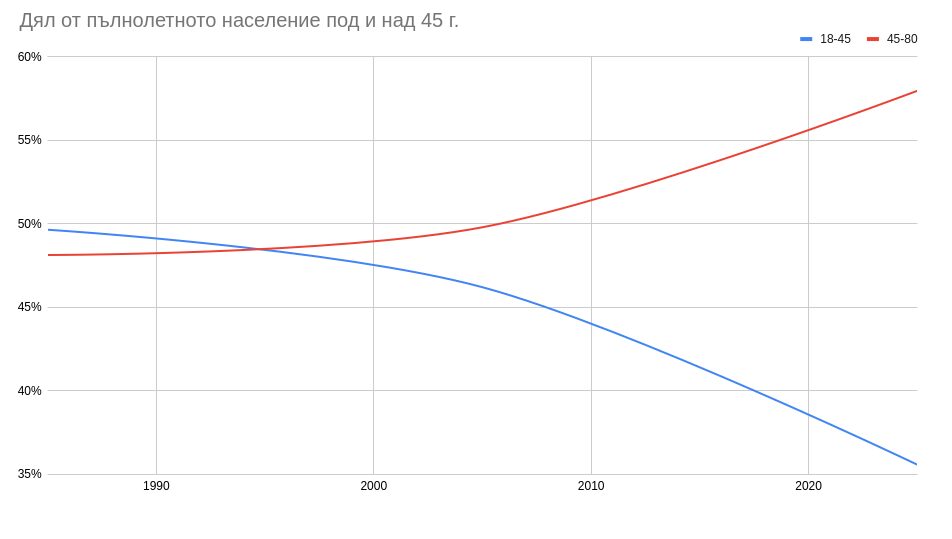
Тук може би бихме могли да разгледаме като водораздел възрастта на раждане на дете, но през последните десетилетия тя расте постоянно. Така по-скоро е функция на всичко останало, което обсъждаме. Затова се спирам на 45 години. Както всичко останало и тази е усновна, но според изследавния, които намерих, се счита често за приблизителната фаза в живота, в които сме далеч по-малко склонни към промяна, да приемем нови идеи и концепции и като цяло се осланяме повече на миналото и как ни е карало да се чувстваме, отколкото искаме да оформяме бъдещето. Някои биха нарекли тези убеждения консервативни. Този термин обаче твърде много се свързва със съответните политически движения в щатите и Англия. У нас обаче често е смесица от широк политически спектър и остарели социални норми често налагани по политически и религиозни причини в миналото.
Тезата ми е, че кръстосвайки тези ключови възрасти с изброените събития може да определим групиране относимо до България на хора, чиито убеждения по политически и социални теми са се оформили по аналогичен начин. Не, че убежденията им са идентични, а че са реакция на еднакви стимули, които се различават от приписваните на същите възрастови групи в щатите и други европейски държави.
Boomers или Последното соц-поколение – 1946-1964
Това е поколение израстнало, изучило се и започнало кариера в социализма. Градили са нещо в живота си, което се срива. Доста все още не разбират съвсем защо въпреки разсекретените документи. Доколкото повечето искат новооткритата свобода, всъщност не са подготвени да я използват и всъщност не знаят каква отговорност носи. Към настоящия момент това са пенсионерите в България. Голяма част от тях са прекарали промените вече във възрастта отхвърляща новото. В същото време солидна част от трудовия им стаж е в несигурните години на 90-те и нерядко имат проблеми с пенсиите заради липсващи документи, работа в сивия сектор или безработица. Преживели са в икономически активна възраст краха на социализма през 80-те, хаосът на 90-те, възхода след 2000, влизането в ЕС, кризите, мутрите, олигарсите и местните велможи. Именно през 70-те и 80-те това поколение постави основите на демографския преход с рязко намаляване на броя деца и началото на увеличението на средната възраст на първо дете. Към 2024-та формират 24.3% от населението живеещо в България. Заедно с останалите пенсионери са 32.6% от гласоподавателите в страната.
GenX или Изгубеното поколение – 1965-1980
Тук някой може да направи връзка с „изгубеното поколение“ в щатите и има определен смисъл. Така наричам онези, които в към на социализма тепърва влизат в икономически активна възраст. През кризисните години на 80-те и 90-те се е наложило да формират семейства, да започнат работа, да градят дом и стабилност. Всичко това в крайна несигурност и недоимък за доста. Доколкото немалко успяха, научиха се, създадоха бизнеси и кариера, много винят обстоятелствата, обществото, предишната или следващата система, правителство или пазар за пропуснатите си години. Заради кризите именно те отлагаха най-много да има деца и емигрира най-много съставяйки същността на демографската дупка през 90-те. Това е поколение, което тепърва ще влиза в пенсия и във фаза, в която ще има навярно най-сериозните социални и финансови проблеми от всички изброени групи. Представляват 23.8% от населението и 26.3% от гласоподавателите.
Millennials или Технологичното поколение – 1981-1996
Това е поколение, което стана свидетел на кризите в края на 80-те и 90-те, на войните в Югославия и влизането в Европейският съюз, но в по-голямата си част като деца или странични наблюдатели. Знаели са, че това са важни неща по реакциите на по-възрастните, но липсата на зрялост и икономическа активност не позволява да се оценят пряко тези събития. Все пак те в голяма степен определят убеждения що се отнася до икономика, социални и политически въпроси. Това поколение е навярно първото, което пътуваше толкова много и толкова свободни още от млади. Това поколение започна първо и най-основно да използва технологии трансформиращи из основи търговия, комункация и работа. Липсата на толкова сериозни тавми от соца и 90-те и опита от Европа, сблъскването с различни хора, култури и разбирания влияе на разбиранията им. Това не значи непременно, че са либерални, а че са далеч повече фактор от предишни поколения. Представляват 27.4% от населението и 30.3% от гласоподавателите.
GenZ или Европейското поколение – 1997-2012
Наричам ги „европейско“, защото в родния контекст са първото поколение, което по познава друг свят в съзнателния си живот, в който България не е в Европейския съюз, не може да се пътува свободно, няма свободна търговия или достъп до съдържание и информация. Сериозно се подценява ефектът от това и той е двуяк. Също както непознаващите недъзите и откровените ужаси на социалистическото управление се хващат на аналогични популистки лозунги, така има риск непозаващите „какво беше едно време“ да се подведат по призиви за изолация и идеи вкоренени в национализстически и религиозни концепции. Белези за това се виждат сред най-младите гласоподаватели в цяла Европа и България не е изключение. От друга страна, приемането на горната свобода не за даденост, а за отпавна точка създава предпоставки за значителен напредък както икономически, така и социално.
Друг важен аспект е, че това е поколението, което преживя пандемията в рамките на образованието и началото на кариерата си. Доколкото много твърдят, че това ги прави по-зле подготвени, паралелно с това твърдят колко безполезно е образованието в България. Т.е. така или иначе не би трябвало да има значение, ако и двете са вярни. Със сигурност обаче дават основа за очакванията към работното място в бъдеще, което има потенциал да промени не само търсените ефекти в градската среда, но и да засили децентрализацията на работната ръка в България в другата крайност. Не на последно място, това е поколението, което тепърва ще взима решения да има деца. Никакви парични стимули, патриотични песни, лозунги по партийни седенки, дядовци в костюми мислещи си, че оправят демокрафията с комисии, законопроекти и доклади нямат значение. Това е поколението, което ще определи каква ще е раждаемостта след 30 години и настроенията, притесненията и плановете им зависи изцяло от това каква среда и сигурност ще създадем в България в идните няколко. Зависи от всички нас, тъй като това е най-малкото поколение поради същите тези решения на последните две. GenZ са 14.8% от населението, но само две трети са пълнолетни днес и така са едва 10.8% от гласоподавателите.
Какво от това?
Да разделяме наслението на случайни групи с ефектни за clickbait заглавия имена е по принцип безпредметно. Демографията от своя страна е важен и лесен за предвиждане сбор от процеси. При еднаква фертилност не може да очакваме много повече деца при условие, че няма повече жени в детеродна възраст. Дори да са се родили много преди 30 години, когато една трета от тях напуснат страната, не може да очакваме, че децата им ще се родят в България. Когато мъжете не се грижим за здравето си и умираме на инат на 45, няма как да очакваме смъртността да не е висока. Също когато хората над 60 са повече от тези под 30 не може да не очакваме да не изглежда, че в България умираме най-много в света, докато в действителност сигурацията да е съвсем друга. Няма политическа или социална мярка, която да промени смислено това в следващите 10-20 г., защото математиката е ясна.
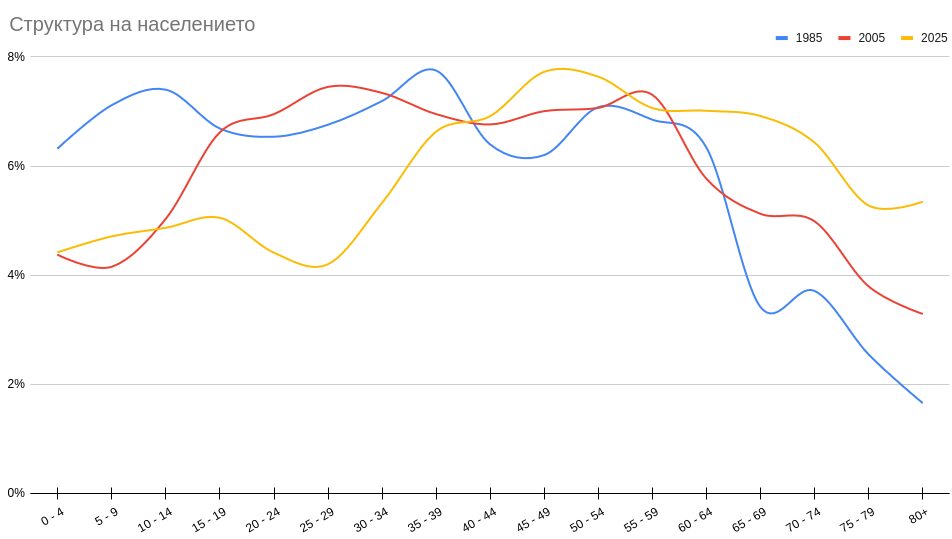
В последните седмици се говори много за поколението GenZ, защото изведнъж всички забелязахме, че съществуват. Забелязахме ги на протестите, с плакати, с искания и очаквания. Поканиха изявени младолики членове по медиите да говорят, но не защото искаха да чуем нещо, а като клиширан поглед над човешка история, която да забравиш утре. В немалко случаи медиите бяха изненадани донякъде неприятно за лично тях. Всички се обнадеждиха, че бъдещото поколение ще оправи България. По-възрастните показваме единствено, че пак чакаме някой друг да го стори.
Истината е, че това няма как да се случи. Гледайки участието в изборите до сега, най-активни избирателно са хората между 30 и 39 – 14.4% са от населението, а формиарт 17.8% от гласувалите. Т.е. 23% по-голяма активност от средното. Следват тези между 40 и 49 – 18% по-голяма активност от средното. Дори тези под 60 години гласуват повече – 9%. Ако забелязвате това са GenX и millennials – или както аз ги наричам изгубеното и технологичното поколение. Тези под 30 години или приблизително сегашните GenZ гласуват средно с 6% по-малко от средното. Дори пенсионерите гласуват повече, макар доста по-малко отколкото си мислим. Дори обаче да излязат да гласуват и да достигнат рекордните 80% активност удвоявайки тежеста си във вота, те едва ще достигнат този на родителите им – GenX.
Затова освен в активността, борбата им ще е да убедят именно родителите си да подкрепят това, което искат, Българията, която очакват и Българията, в която биха искали да живеят. Звучи наивно, но е навярно единственото, което би сработило в този момент. Очакваме много от най-малкото поколение – да има повече деца и по-рано, да работи здраво с по-висока добавена стойност, да разпознава манипулациите, популстите и фалшивите новини навигирайки сложна вътрешно- и външнополитическа обстановка.
Все неща, които нито едно от другите няколко предходни поколения не направи. Поне не в мащабите, които са нужни и които очакваме сега. И да, оправдаваме се с обстановката, с тежките кризи, с несигурността, с политиката и войните наблизо. Гледайки ситуацията сега сякаш не си даваме сметка, че същото ги чака и следващите. В крайна сметка обаче това беше наше решение и последствията ги жънем днес. Ако очакваме тия следващите да взимат по-добри решения, включително за нашите старини, може би трябва да мислим – и гласуваме – повече за тях, а не гледайки само себе си.
Kernel prepatch 6.19-rc2
Post Syndicated from corbet original https://lwn.net/Articles/1051466/
The 6.19-rc2 kernel prepatch is out for
testing. “I obviously expect next week to be even quieter, with people
“
being distracted by the holidays. So let’s all enjoy taking a little break,
but maybe break the boredom with some early rc testing?
Comic for 2025.12.22 – Presents
Post Syndicated from Explosm.net original https://explosm.net/comics/33406
New Cyanide and Happiness Comic
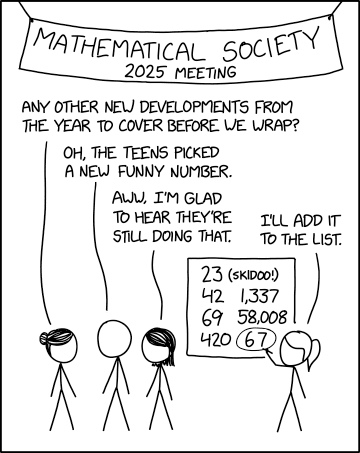
Funny Numbers
Post Syndicated from xkcd.com original https://xkcd.com/3184/
Ubiquiti CloudKey Gen2 Plus UCK-G2-SSD Quick Look
Post Syndicated from Rohit Kumar original https://www.servethehome.com/ubiquiti-cloudkey-gen2-plus-uck-g2-ssd-quick-look/
We take a quick look at the Ubiquiti Cloudkey+ Gen2 1TB and see how this offers a low power physical node to run a UniFi controller
The post Ubiquiti CloudKey Gen2 Plus UCK-G2-SSD Quick Look appeared first on ServeTheHome.
How the Trump Administration is Politicizing the Epstein Files
Post Syndicated from The Atlantic original https://www.youtube.com/shorts/UcNNfMeQkkM
1987 Computer Chronicles Christmas Buyer’s Guide 🎁
Post Syndicated from LGR original https://www.youtube.com/watch?v=bWXLDfbmpU8
Making OG Memories with the Switchbot AI Frame
Post Syndicated from digiblur DIY original https://www.youtube.com/watch?v=XbAezHNJxik
Results from the 2025 TAB election
Post Syndicated from corbet original https://lwn.net/Articles/1051459/
The 2025 election for members of the Linux Foundation Technical Advisory
Board has
concluded; the winners are Greg Kroah-Hartman, Steven Rostedt, Julia
Lawall, David Hildenbrand, and Ted Ts’o.