Гласовете на Америка – брой 11

Post Syndicated from Йоанна Елми original https://www.toest.bg/glasovete-na-amerika-broy-11/

Заветът, с който най-много ще се гордея, ще бъде този на миротворец и обединител. […] Ще премерим успехите си не само по броя на спечелените битки, но и по броя на войните, които ще прекратим – и най-вече на войните, които никога няма да започнем.

Президентът Доналд Дж. Тръмп по време на встъпителното си слово през януари 2025 г. 


Гласовете на Америка – брой 11

Описвайки преживяванията на обществото в исторически интензивните периоди на Древна Елада, американският психолог и философ Роло Мей говори за тънката граница между усещането за възникване на нов свят (emergence) и критичното състояние (emergency). На английски двете думи са свързани, а понастоящем ми се струват добър калъп за случилото се през изминалата седмица – американската операция „Абсолютна решителност“ (Absolute Resolve), в рамките на която САЩ извършиха пълномащабни военни действия във Венецуела, залавяйки президента на страната – диктатора Николас Мадуро. Заедно със съпругата Силия Флорес той бе транспортиран в Ню Йорк, където го очаква съдебен процес. 

Събитията се разиграха

на 3 януари в рамките на няколко часа, през които САЩ нанесоха и стратегически удари в столицата Каракас. След това американският президент Доналд Тръмп се обърна към нацията и заяви, че предстои САЩ да поемат контрол над Венецуела за неопределен период. На Мадуро са повдигнати обвинения във Федералния окръжен съд в Ню Йорк за „съзаклятничество/заговор за наркотероризъм, внос на кокаин, притежание на оръжия и взривни устройства, както и заговор за притежание на оръжия и взривни устройства срещу Съединените американски щати“. 

САЩ поемат контрола над Венецуела 

„до момента, в който можем да подсигурим безопасно, уредено и законно прехвърляне [на властта – б.а.]“, заяви президентът Тръмп в първоначалното си обръщение. В събота Делси Родригес, доскоро вицепрезидентка, пое длъжността на главнокомандващ и осъди действията на САЩ, призовавайки за връщането на Мадуро в страната. Според Тръмп обаче Родригес е заявила, че ще сътрудничи на американските власти. 

Това е само едно от множеството противоречия и неясноти. 

Сред най-очевидните са как една суверенна държава получава правото да „управлява“ друга, още повече че президентът Тръмп не уточни нито логистичните измерения на подобно управление, нито сроковете за неговото изпълнение. За сметка на това администрацията подчерта, че няма проблем да прати войници на терен заедно с американските петролни компании, които „скоро ще започнат да правят пари от държавата [Венецуела – б.а.]“. В неделя държавният секретар на САЩ Марко Рубио промени позицията и каза, че администрацията на Тръмп ще наложи военна „карантина“ на износа на петрол от страната, а не че ще я управлява директно. По-късно същия ден обаче президентът намекна, че САЩ може да предприеме подобни военни действия и срещу други държави в Западното полукълбо – Куба, Колумбия, Гренландия. 

Действията на САЩ във Венецуела са колкото изненадващи, толкова и напълно предвидими. 

Анализатори предсказваха наземни операции във Венецуела още миналата година, а в Стратегията за национална сигурност изрично беше заявено, че САЩ ще затвърждава геостратегическите си интереси в Южна Америка, надграждайки изкованата в имперско време доктрина „Монро“. Изненадата дойде оттам, че вероятно широката публика (и голяма част от традиционните партньори на САЩ) не очакваха или отричаха факта, че това утвърждаване ще става с груба сила и погазване на съществуващите норми (а вероятно и принципи на международното право). Но нищо от посоченото не е извън марката „Тръмп“ и вероятно е само началото – администрацията изпраща ясни послания за интересите си към Гренландия например. Макар човек никога да не е сигурен кога настоящото американско управление просто говори и кога заявява конкретни действия, има достатъчно основания подобни амбиции да бъдат вземани сериозно. 

„Живеем в свят, в реалния свят, в който управлява властта, силата. Това са железните закони на света от началото на историята“, каза пред Си Ен Ен Стивън Милър в понеделник. Публикация на съпругата на Милър в социалните мрежи – карта на Гренландия с мотивите на американското знаме – предизвика реакция от датските власти по-рано през седмицата. Във вторник държавният секретар Марко Рубио увери американските законодатели, че САЩ имали намерение само да купят Гренландия, а не да нахлуят с военна сила.

Конституцията е недвусмислена: президентът може да арестува и екстрадира лидера на чужда държава без одобрение от Конгреса, ако публикува намеренията си в социалните мрежи 12 часа по-рано под звуците на YMCA. 

Има ли нещо гнило във Венецуела?

Напрежението се нагнетяваше през изминалите седмици, в които бяха нанесени няколко удара върху плавателни съдове, за които се твърдеше, че са част от мрежа за наркотероризъм. Президентът Тръмп заяви, че корабите превозват огромни количества фентанил и нелегални вещества, чиято цел е да отровят и избият американците, и затова трябва да бъдат унищожени. На пресконференция на 15 октомври президентът каза, че всеки взривен кораб спасява живота на 25 000 души. „Имайки предвид, че през изминалата година в САЩ от свръхдоза са починали 84 000 души, трябваше да сме обявили победа и да сме се прибрали преди около седем кораба“, пишат експертите Джъстин Логан и Брендън Бък в очерк за Cato Instutute. 

Но фентанилът се произвежда основно в Мексико с химикали, внесени от Китай и Индия – поне според официалните доклади от 2025 г. на американската Агенция за борба с наркотиците. В тях Венецуела не е спомената дори като транзитна държава. Подобни са и изводите на Службата на ООН по наркотиците и престъпността. Според данните потокът на снабдяване е един и същ от години насам: основни съставки от Азия (Китай, Индия, Мианмар), производство в Мексико и разпространение в САЩ. 

В допълнение, Венецуела не се появява в скорошните данни на Бреговата охрана на САЩ и други охранителни органи, отговорни за залавянето и изземването на наркотични вещества. Латиноамериканската страна се свързва с каналите за разпространение на кокаин, но по-скоро като транзитна държава, отколкото като производител. Според ООН около 5% от колумбийския кокаин минава през Венецуела на път за Карибите и Европа. Фактът, че по-голямата част от наркотиците, влизащи в САЩ, идват от Централна Америка, противоречи на заявеното от администрацията с оглед и на това, че наскоро президентът Тръмп помилва бившия президент на Хондурас Хуан Орландо Ернандес, осъден за… трафик на кокаин. 

За свободата и петрола 

И ако наркотиците, изглежда, са вариация на „оръжията за масово поразяване“ от времето на Джордж Буш-младши, то въпросът тогава е какви всъщност са мотивите за операцията във Венецуела. Един от най-дискутираните варианти е, разбира се, петролните залежи: не от вчера е шегата, че там, където има петрол, има и американци, които освобождават местното население в името на демокрацията. С поемането на управлението на най-големите залежи от петрол в света САЩ си осигуряват не само добър инструмент за контрол върху световните цени, но и по-голяма независимост за действия спрямо Иран например (на трето място в света по петролно богатство). 

Ефективното усвояване на венецуелските залежи обаче би отнело години и би коствало милиарди: производството на петрол във Венецуела е минимално в сравнение с потенциала на страната и е намаляло драстично от началото на века. Макар и компании като американската „Шеврон“ все още да са активни в страната, наложените от 2015 г. насам санкции са орязали значително както инвестициите, така и поддръжката на необходимата инфраструктура – значителна част от нея е окрадена и разпродадена.

Освен че венецуелският петрол е и логистично по-труден за рафиниране, потенциални инвеститори ще играят на сляпо, разчитайки на стабилна политическа ситуация в страната, за каквато поне засега няма изгледи. Стана ясно, че режимът в Каракас е разпоредил въоръжени милиции (т.нар. colectivos) да патрулират по улиците и да проверяват телефоните на гражданите, което се тълкува като опит за консолидация на властите след извеждането на Мадуро. Според експерти в сектора, дори страната да се върне към предишни темпове на производство (ок. 3 млн. барела дневно), това пак би я поставило след водещите десетина производителя в света. Бившият изпълнителен директор на British Petroleum Джон Браун казва пред Би Би Си, че съживяването на петролната индустрия на Венецуела е „много дългосрочен проект“, който със сигурност надхвърля периода на мандата на Тръмп.

Освен това, независимо от идеологическата позиция на администрацията на Тръмп, която отрича климатичните промени и енергийния преход към по-чисти и възобновяеми източници на енергия, инвестициите в „чиста енергия“ са рекордни за 2025 г. и надхвърлят двойно инвестициите в изкопаеми горива. Пазарът в Южна Америка може да се окаже твърде апетитен за американските компании въпреки рисковете. Но в дългосрочен план – и с оглед на реалния свят, но не по Стивън Милър – е твърде вероятно и плановете за Венецуела да приличат на операция „Абсолютна решителност“: бърз ефект без визия, без ясен план и постижими цели. 

И преди съм отбелязвал, че Тръмп не е войнолюбец, но обича военни действия. Той гледа на тях като на чиста проба телевизионно шоу, забавление, но иска нещата да приключат бързо, навреме за рекламите. Действията в Афганистан, убийствата на Багдади, Сюлеймани и Мухандис, бомбардировките в Иран и сега залавянето на Мадуро. [Тръмп в обаждането си на „Фокс Нюз“ преди обръщението си към нацията: „Беше си направо като риалити, гледах го така… скоростта, насилието.“] 

А минерали? 

Венецуела е богата на залежи от алуминий, берилий, олово, магнезий, никел, фосфати, платина, титан, уран и цинк, както и на злато и диаманти. Заедно с други минерали те са част от списък с 60 елемента (сред които и 15 редки минерала) от ключова необходимост за снабдителната верига на САЩ, които търсят начини за подсилване на запасите си с оглед на зависимостта си за набавянето им от Китай. Неслучайно администрацията на Тръмп сключи споразумение за съвместно разработване на полезните изкопаеми в Украйна. 

„Имате стомана, имате минерали, всички ключови минерали, имате страхотна история на рудодобива, който е западнал. Президентът Тръмп ще поправи това и ще го съживи“, каза търговският секретар на САЩ Хауърд Лутник пред репортери. На 15 декември 2025 г. Лутник обяви проект за мащабни инвестиции в инфраструктура за обработка на ключови минерали в Тенеси, където се очаква да се обработват и произвеждат годишно до 540 000 тона за нуждите на САЩ. „Тези минерали са жизненоважни за технологиите на бъдещето ни: отбранителни системи, полупроводници, изкуствен интелект, квантови компютри, автомобили, центрове за данни и съвременните производствени технологии“, написа Лутник в личния си акаунт в X.

Това е начинът да спечелим битката: строим тук, подсигуряваме снабдителните вериги, създаваме страхотни работни места и запазваме мястото на Америка на световен индустриален и технологичен водач.

Организираната престъпност, корупцията и незаконната рудодобивна дейност остават основни предизвикателства пред експлоатацията на тези ресурси. Както и при петрола, санкциите са предотвратили значителни инвестиции в сектора през последните десетилетия. Ако вярваме на първоначалните сигнали от властта във Венецуела в дните след отвличането на Мадуро, никой няма намерение да реформира страната. А без върховенство на правото, прозрачност и отчетност – все продукти на здравата демокрация, към която и самият американски президент не е особено привързан – бизнесът трудно жъне успехи, както знаем всички в България. 

От доктрината „Монро“ до доктрината „Донро“ разликите са големи.

За първата говорихме подробно миналия месец. В исторически план целта ѝ е не толкова насилствен контрол над Южна Америка, а нейното опазване от влиянието на европейските империи във времената на засилен европейски империализъм, войни и бунтове. 

По онова време в САЩ съществува обществена солидарност с движенията за независимост, суверенитет и обособяване на национални държави в Южна Америка – точно обратното на посланието, което отправят САЩ в момента. Настоящите проучвания на мнението показват, че повечето американци искат администрацията да се фокусира върху вътрешнополитически проблеми, като високите цени на здравеопазването, а първите анкети сочат, че мнозинството от американците не са убедени в нуждата САЩ да контролира друга суверенна държава. Самият Тръмп спечели изборите с обещания да не въвлича страната в повече външни конфликти. Четирима от десет души одобряват изпращането на войски за залавянето на Мадуро, а девет от десет смятат, че венецуелците трябва да решат кой ще управлява държавата им. 

„Съединените щати трябва да стоят далеч от Венецуела. Нека венецуелците си определят бъдещето. Не искаме другите държави да избират нашите президенти – така че трябва да спрем да избираме техните.“ Тълси Габард, 21 януари 2019 г.

Съвременният имперски паралел са, разбира се, Китай и Русия, като една от теориите за премахването на Николас Мадуро е, че той е твърде ненадежден играч, който се опитва да балансира между големите сили за лична изгода и не би могъл да бъде гарант на американските интереси в страната. Китайска делегация пристигна във Венецуела часове преди отвличането му (меметата: най-неудобното и безсмислено дипломатическо пътуване в историята), а Русия от години разпростира влиянието си в страната. 

Гласовете на Америка – брой 11

Появиха се и теории, че безпроблемното извеждане на Мадуро всъщност се дължи на вътрешни договорки – включително и такава между Русия и САЩ, според която САЩ оттеглят подкрепата и влиянието си в Украйна за сметка на същия „жест“ от страна на Русия във Венецуела. Подобни хипотези на този етап остават в сферата на спекулациите. Сигурен факт е обаче, че ако изобщо има ефект, то изборът на силата пред дипломацията е само краткосрочно рентабилен (например за разсейване на обществеността от вътрешнополитически проблеми или от лош президентски рейтинг). От подобни действия печели както Китай, така и Русия, за които вече няма морални или етични бариери пред упражняването на сила в собствените им сфери на влияние, например Тайван или Източна Европа. 

Бананови империи, бананови войни 

В „Гласовете на Америка“ повтаряме неуморно, че ерата Тръмп не е първопричина, а симптом на много по-сериозни и дългосрочни процеси – раждането на нови (корпоратизирани) империи и новото поделяне на света е само част от тях. Действията на администрацията във Венецуела не са без исторически прецедент. Просто за разлика от предишни подобни операции, например тези на администрацията на Обама в Либия (които произведоха гражданска война и пазари за роби), тук дипломацията и параванът на ценностите отсъстват, а разпадът и прехвърлянето към транзакционна (гео)политика е на пълен показ. Възникването на новия свят се усеща като критично състояние, защото е именно такова. Но и всичко ново е добре забравено старо. 

По-рано в историята имаме намесата на президента Удроу Уилсън в Мексико и залавянето на Панчо Вила; две интервенции в Никарагуа, които стават проблем на четири поредни администрации в рамките на двайсетгодишен период; окупация на Доминиканската република; окупацията на Хаити. Администрациите на Хувър и Рузвелт се отказват от намеса в Южна Америка към 20-те и 30-те години на миналия век, но през 1983-та САЩ влизат в Гренада, а през 1989-та свалянето на Мануел Нориега в Панама е подпомогнато от вече присъстващите американски войски. 

Администрирането на държава с територията на Венецуела обаче е почти невъзможно от логистична гледна точка: тя е два пъти по-голяма от Ирак и е управлявана от режим, който се радва на лоялността на армията и силовите структури, да не говорим за евентуалната гражданска съпротива на подобно решение. Необходимият военен ресурс – включително кубинките на терен, както казват американците – би бил огромен. Експерти подчертават, че дори евентуална смяна на режима много по-вероятно ще създаде хаос от безкрайни войни и борби за власт, само че не в далечния Близък изток както през последните десетилетия, а в непосредствена близост до САЩ. Освен всичко друго това би довело и до нови бежански вълни и би засилило миграционния поток към Щатите – един от най-важните проблеми за избирателите на Тръмп. 

Американците ще ми направят демокрация, ама друг път 

Имперските амбиции на САЩ във Венецуела предполагат високо ниво на стратегическо и логистично обмисляне и (дългосрочно) планиране, които настоящата администрация надали може да изпълни. Пример е публичното обявяване на подривни дейности на ЦРУ във Венецуела. Предшественикът на Мадуро – Чавес, често обвинява ЦРУ за вътрешнополитически събития, дори и за предизвикването на земетресения. Според специалисти подобна недообмислена комуникация дава основания за всякакви конспиративни теории, както и картбланш на чавистите да припишат външно влияние на различни политически събития и процеси в страната – включително на действията на демократичната опозиция, за която американското управление не изразява явна подкрепа въпреки заявките си за реформи.

Отвличането на Мадуро не е битка за демокрация, нито особена загриженост за съдбата на венецуелците – подобни интерпретации тепърва ще остаряват нелепо. То е послание към света, към следващите територии и към другите страни в Южна Америка – един от въпросите в предишния бюлетин беше какво би се случило с държавите от Западното полукълбо, ако не споделят визията на Националната стратегия за сигурност на САЩ – може би вече имаме отговор. 

Демонстрациите на сила и свалянето на бананови диктатори са (сравнително) лесни; както показва историческият опит, да си направиш демокрация е по-трудно, отколкото изглежда. Да си направиш колония – също, поне в XXI в., поне засега (дистопичните сценарии може да оставим за следващ бюлетин с художествени елементи). 

Защото в политиката, дипломацията и историята не е важно само какво правиш, а и как го правиш; на правото на силния да налага волята си със сламени аргументи и в разрез с установените правила могат да се радват само силните – останалите могат просто да се надяват да се окажат от правилната страна на събитията. 

Гласовете на Америка – брой 11

И ако всичко това е твърде дълго и не сте го прочели, 

можем да обобщим кризата на новия свят по следния начин: 

Президентът Тръмп и действията на САЩ във Венецуела продължават да излагат на показ загниването на скелето, което крепи света след Втората световна война. И не защото Николас Мадуро не е жесток диктатор и защото радостта на венецуелците от залавянето му е неоснователна, а защото ценностите на хуманизма и демокрацията са просто параван за алчността и тъмните импулси на властта, и то не само в този случай. Международните организации отдавна са беззъби в опазването на реда – сега проличава точно колко. Наивността, че краят на историята е тук, се топи пред реалполитиката на големите, които готвят поредна делба. Не можем да бъдем наивни и да вярваме, че не живеем в свят на сила и власт; въпросът е в това да разбираме, че когато определени процеси се задвижват независимо от всичко, цената рано или късно става твърде висока. И я плащаме всички. 

„Завръщането към сферите на влияние е логично единствено ако сте Велика сила. Ако не сте, да се радвате на подобно развитие е откровена глупост. Прекалено много хора си въобразяват, че живеят като американци, без реално да разбират, че всъщност са граждани на периферията“, написа в X оксфордският политолог Юан И Жу. Надали може да бъде казано по-добре. 

Възникването на нови светове винаги поражда критично състояние. Хубавото е, че и критичните състояния могат да родят нови светове – и то добри. Въпросът оттук нататък – за американците, осъзнаващи нуждата от дълбоки реформи в страната си, липсата на които доведоха до днешната американска безнаказаност и институционален упадък; за венецуелците, които ще се борят за демокрация – от истинската; и за европейците, които трябва да си дадат сметка за позицията си спрямо Великите сили и ролята си като евентуални възродители и пазители на ценностите, направили един по-добър свят възможен – е какъв точно нов свят ни се предлага. И дали искаме да живеем в него. Ако отговорът е отрицателен – да се борим за друг. Навреме. Защото времето за чудене изтича.


Абонирайте се, за да получавате този бюлетин на електронната си поща в момента, в който излезе!

Вече сте регистриран потребител на Toest.bg? Може директно от настройките на бюлетините в своя профил да изберете „Гласовете на Америка“ или да натиснете бутона по-долу:

Още нямате профил в Toest.bg? Регистрирайте се само с няколко клика:

[$] READ_ONCE(), WRITE_ONCE(), but not for Rust

Post Syndicated from corbet original https://lwn.net/Articles/1053142/

The READ_ONCE() and WRITE_ONCE() macros are heavily used
within the kernel; there are nearly 8,000 call sites for
READ_ONCE(). They are key to the implementation of many lockless algorithms and can be necessary for some
types of device-memory access. So one might think that, as the
amount of Rust code in the kernel increases, there would be a place for
Rust versions of these macros as well. The truth of the matter, though, is
that the Rust community seems to want to take a different approach to
concurrent data access.

Beyond the Device: Exploring the New Security Risks of Interconnected IoT at CES 2026

Post Syndicated from Deral Heiland original https://www.rapid7.com/blog/post/tr-beyond-devices-exploring-new-security-risks-interconnected-iot-ces-2026

Attending CES over the last several years has provided me with a valuable opportunity to observe how rapidly IoT technology continues to evolve across consumer and enterprise domains. This was my fourth year attending CES and I have seen a continued growth and advancement across multiple technology categories, from mobile devices and wearables, to AI-driven automation and robotics, to connected infrastructure. 

This year’s show floor highlighted how deeply embedded “smart” technology has become within our everyday systems. As an IoT security researcher, what stood out to me most was not just the pace of innovation, but how increasingly interconnected these technologies have become, often relying on shared backend services, cloud platforms, and automated decision-making. These trends highlight the importance of examining not only individual devices, but the broader trust relationships and infrastructure architectures that support them.

CES2026-iot-1.png

AI-driven automation is no longer experimental

It was clear at CES 2026 that AI-driven automation is no longer experimental, it has become operational. Throughout automation, robotics, and transportation technology, decision-making processes are increasingly being delegated to backend AI systems that consume device telemetry and trigger real-world actions. From a security perspective, this marks a primary shift where trust relationships that were once local are now centralized, automated, and capable of impacting all devices within a larger ecosystem. The challenge moving forward doesn’t just involve securing devices; we will have to secure the data these devices produce, plus ensure that data is not altered or corrupted in a way that would impact all devices under the control of the backend AI systems.

CES2026-iot-2.png

Robotics innovation demands urgent security action

One of the more striking areas of progress has been in robotics, particularly in dexterity and fine motor control. Seeing robots play the piano or fold cloth highlighted how far robotic manipulation has come. Moving beyond their old rigid, pre-programmed motion toward a more adaptive interaction with our physical world. While we are still years away from anything resembling The Jetsons, these demonstrations show clear forward momentum. Before increasingly capable and autonomous robots become more deeply integrated into our world, we need to seriously address how to build security into the underlying technology. It’s also critical to maintain and secure the vast amount of data they will gather.  

CES2026-iot-3.png

Mobile and wearable technologies are “always on”

During CES this year, I also observed advances in mobile technology and wearables. While these devices have long been a staple of the show and continue to evolve incrementally each year, the growing integration of AI has noticeably expanded their capabilities. Features such as continuous sensing and adaptive behavior introduce new questions around security and privacy that go beyond traditional mobile threat models. As these technologies increasingly find their way into the hands of employees, they also raise important considerations for organizational security posture. This shift prompts a larger question CISOs should ask themselves: have our organization’s mobile device policies evolved alongside these technologies, or are they still grounded in smartphone-only assumptions from a decade ago?

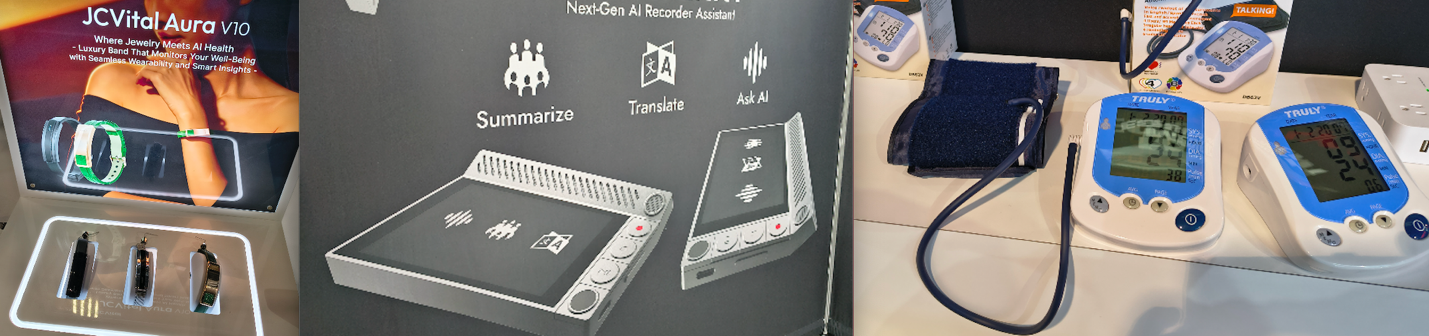
For example, one of the most concerning mobile device technologies I observed was a device designed for use in corporate meetings that could automatically take notes, transcribe discussions, and translate conversations in real time. While such capabilities can clearly improve productivity and collaboration, especially in global organizations, they also introduce new security and privacy considerations. A device that is continuously listening, processing speech, and potentially transmitting data to backend cloud systems raises questions about where sensitive conversations are stored, how long that data is retained, and who ultimately has access to it. When such technologies are introduced into meeting rooms or business workflows, they essentially become an always-on sensor within the organization, and its presence may not be fully accounted for in most organizations with existing acceptable use policies. This highlights the need for organizations to reassess how emerging mobile and wearable technologies could impact their data protection, confidentiality, and overall security posture.

CES2026-iot-4.png

Conclusion: Building a new infrastructure of trust

My observations from CES 2026 clearly illustrate that the evolution of IoT has moved us beyond securing individual devices. The true security challenge now lies within the highly interconnected ecosystems, centralized AI-driven automation, and “always-on” data collection that underpin our increasingly “smart” world. The operationalization of AI and the rapid progress in robotics introduce centralized trust relationships and vast new data streams that are not yet matched by adequate security considerations.

This shift presents an urgent call to action for organizations. It’s time to aggressively reassess acceptable use and data protection policies to account for continuously sensing wearables, autonomous machinery, and the security of the backend services that control them all. The future of security is no longer just about protecting the perimeter; it is about securing the entire infrastructure of trust, data integrity, and automated decision-making that powers the next generation of technology.

Security updates for Friday

Post Syndicated from jzb original https://lwn.net/Articles/1053492/

Security updates have been issued by Debian (pdfminer and vlc), Red Hat (kernel, kernel-rt, and microcode_ctl), Slackware (libtasn1), SUSE (apptainer, curl, ImageMagick, libpcap, libvirt, libwget4, php8, podman, python311-cbor2, qemu, and rsync), and Ubuntu (gnupg, gnupg2, gpsd, libsodium, and python-tornado).

Борисов и Пеевски. Разхерметизация?

Post Syndicated from Емилия Милчева original https://www.toest.bg/borisov-i-peevski-razhermetizatsiya/

Борисов и Пеевски. Разхерметизация?

„Когато падне Пеевски, не искам аз да съм отдолу…“, пееха протестиращите през декември. Падне ли Пеевски, Бойко Борисов е отдолу. Освен ако не е успял да се разкачи преди това.

Реална ли е обаче такава хипотеза? В този случай олигархът Пеевски, санкциониран за корупция от САЩ и Великобритания, би изгубил не само ракетата носител, а и съдружника в архитектурата и ползването на сегашния властови модел. Оставката на кабинета на Росен Желязков, подкрепян от ГЕРБ–СДС, БСП, ИТН и ДПС – Ново начало, не означава, че Борисов–Пеевски са паднали, нито че моделът е разрушен. Но е добро начало. Следващата стъпка са честни избори и висока активност.

По време на почти едногодишното управление на кабинета „Желязков“ не беше тайна, че влиятелният и непопулярен Пеевски тежи на лидера на ГЕРБ. И ако някой се катери на гърба на Борисов, както често обича да казва самият той, това е Делян Пеевски. Колкото и да му се иска обаче да се откопчи от „Д“, толкова се и опасява дали ще остане цял, ако се случи. 

Безкръвно? Абсурд!

Борисов и Пеевски са съюзници по необходимост. Единият носи електорална легитимност и международна „приемливост“, другият – контрол върху институции, медии, прокуратура и компромати. Политическата операция с разделянето е сложна и не е възможно да се осъществи безкръвно. Двамата са като космически модул, херметично свързани системи с общо налягане и общи ресурси. Както в Космоса, така и в политиката при разкачване херметичността е въпрос на живот и смърт. 

Когато през 2014 г. олигархът Пеевски се разкачи от Корпоративна търговска банка и от мажоритарния ѝ собственик Цветан Василев, квазисистемната банка фалира.

Олигархът забогатя още повече, Василев се укри в съседна Сърбия, където е и до ден днешен, делото се заблати, щетите останаха за данъкоплатците. А разследващият прокурор Иван Гешев се издигна до главен прокурор и едва преполовил мандата си, през юни 2023 г. със завидно мнозинство от 16 гласа Висшият съдебен съвет го отстрани от поста, когато той се осмели да каже истината, макар и не цялата:

Ясно кой е политическият боклук в Народното събрание.

Но такава е ориста на пешките. И в шаха, и в политиката тях ги жертват най-лесно. Наред е изпълняващият функциите главен прокурор Борислав Сарафов, който се „радва“ на 4% одобрение, по-ниско и от това на Пеевски, който има резултат от 5,6% според проучване на „Алфа Рисърч“. През юни 2023 г., когато се създаваше кабинетът на ПП–ДБ и ГЕРБ с подкрепата на ДПС, Сарафов замени Гешев и нямаше опит да се оспори изборът му – макар да е част от статуквото, владеещо държавното обвинение. А сега стана излишен и аргументът е, че легитимността му е спорна.

Причината – не е освободил поста след 21 юли 2025 г., когато изтече ограничителният 6-месечен срок по Закона за съдебната власт (ЗСВ), в който може да е и.ф. главен прокурор. Не го освободи, защото прокурорската колегия на ВСС реши, че този срок не се отнасял за Началника им – било заварено положение. Ситуацията изглежда абсурдно: временният главен прокурор също като предшественика си Гешев пробва да се закрепи на поста дори прегазвайки закона.

През октомври миналата година Върховният касационен съд отказа да възобновява дела по искания, идващи от Борислав Сарафов, тъй като по закон той не може да изпълнява функциите на главен прокурор. А тази седмица и Апелативен съд – Варна попита Конституционния съд (КС) дали Сарафов е легитимен на поста и може ли да иска възобновяване на дела. Председателката на КС Павлина Панова даде 14 дни на варненските магистрати да прецизират въпросите си. „Капитал“ разкри, че КС де факто е показал, че Сарафов е нелегитимен – по което де юре не може да се произнесе, игнорирайки неговото становище по конституционно дело. Причината е, че то е изпратено след 21 юли, когато е изтекъл ограничителният срок по ЗСВ.

Дори и Сарафов да се оттегли като изпълняващ функциите, той ще продължи да бъде заместник главен прокурор и шеф на Националната следствена служба, докато няма нов ВСС и избор на нов главен прокурор, който да предложи и свои заместници.

Настоящият ВСС е с изтекъл мандат от 2023 г., а изборът на членове на ВСС от парламентарната квота се извършва с мнозинство от 160 гласа за всеки член. То се оказа непосилно за сглобените мнозинства, но изборът на нов ВСС остава сред ключовите политически приоритети заедно с избора на Инспекторат, чиито членове са с изтекли мандати още през 2020 г. Така че този възел ще се разсече не от съдебната система, а от политиците. 

Протестите срещу Сарафов – инструмент на статуквото, са и част от протестите срещу завладяната държава, така както през 2020–2021 г. гражданското недоволство беше срещу Иван Гешев.

След като Гешев беше отгърмян, къщата в Барселона, златните кюлчета в едно нощно шкафче и другото мръсно бельо бяха покрити. В края на същата 2023 г. стана ясно, че разследването за евентуална съпричастност на Борисов към историята с къщата в Барселона е приключило и не е установено той да има нещо общо. 

Докато симбиозата Борисов–Пеевски работи, прокуратурата ще функционира като санитарен кордон около тях и като сопа за противниците им. Всеки потенциален скандал се неутрализира.

Случаят „Барселона“ е показателен: не че истината беше разкрита, просто темата беше закрита.

Дотук всичко, застрашаващо Борисов, Пеевски или някой от тяхната кохорта, е старателно почиствано от държавното обвинение: няма доказателство – няма проблем. Но ако Бойко Борисов направи опит да се измъкне от Пеевски, го грози компроматен гръм. 

Възможен ли е разлом?

Известният с бруталност, отмъстителност и мрежа за събиране и съхраняване на компромати Пеевски изглежда съмнително спокоен. Протестите и оставката на коалиционния кабинет унищожиха надеждите му за пълно и трайно утвърждаване в управлението на държавата с превръщането му от задкулисен фактор във формален властови стълб. (Както и за евентуално отпадане на наложените му от САЩ санкции по Глобалния закон „Магнитски“.) 

Упадъкът му може да бъде ускорен, ако нито една партия не го пожелае за партньор – скрит вече не може да остане, а за преговори наяве едва ли някой ще се осмели. Вече си партнира с ПП–ДБ, с ГЕРБ са в отдавнашна сглобка, а когато и да се появи партийният проект на президента Румен Радев, едва ли ще се съюзи с Пеевски. Подчинените на олигарха в институциите са хора, които по кучешки ще сменят една ръка, която ги бие и храни, с друга.

Но и предизборната кампания още не е започнала. Преди това трябва да се извърши безплодната въртележка с връчването на мандатите – на първата, втората и избраната от президента трета политическа сила. Първите две – ГЕРБ–СДС и ПП–ДБ, вече декларираха, че няма да участват в правителство в рамките на този парламент, следователно която и трета партия да избере Румен Радев, финалът е предопределен. 

Неизвестните

Неизвестните са дали изборите ще са в края на март, или през първата седмица на април, по какви изборни правила ще се проведат и как ще се казва служебният премиер. От името му зависи и чие ще е служебното правителство – на ПП–ДБ, ако на този пост е подуправителят на Българската народна банка (БНБ) Андрей Гюров, или на Борисов–Пеевски, ако е всеки друг от „домовата книга“. До момента е известно, че предложението за служебен премиер няма да приемат председателката на парламента Рая Назарян (ГЕРБ), предложената от ГЕРБ и избрана за омбудсман Велислава Делчева, както и гуверньорът на БНБ Димитър Радев.

Съдът на ЕС обаче още не е излязъл с решение по казуса на Гюров, свързан с освобождаването му от БНБ. А след Съда в Люксембург и българският Върховен административен съд ще трябва да се произнесе по решението на Управителния съвет на БНБ да освободи Гюров заради „участието му като съдружник в „Йонтех Инженеринг“ ООД, както и във връзка с осъществяваната от него дейност като член на управителен орган на юридически лица с нестопанска цел: Сдружение „Балкански – Паница Институт за научни издирвания“ и Сдружение „Голф-клуб Благоевград“. Междувременно Европейската централна банка подкрепи Андрей Гюров пред Съда на Европейския съюз по делото му срещу БНБ, като допусна политически натиск и изрази съмнение в независимостта на българската Антикорупционна комисия, писа „Дневник“.

Ако президентът избере Гюров за служебен министър-председател, този жест би могъл да се тълкува и като политически маньовър за общи действия с ПП–ДБ в бъдеще. 

Докато новият политически сезон още не е открит, Борисов направи скромен опит да елиминира протестите като фактор, обяснявайки в интервю пред Явор Дачков как властта е паднала заради самонадеяността на всички, „включително и Пеевски“. Също и как той бил казвал много пъти, че след 1 януари ще има промяна.

Ситуацията ни направи да зависим от него [Пеевски – б.а.], защото другите се дръпнаха. Когато всички прекалиха, включително и Пеевски, нищо не задържаше ГЕРБ в това правителство, в това мнозинство.

Разбира се, никой не вярва на тези обяснения, защото те звучат като закъснял опит за пренаписване на общата биография. Интервюто по-скоро маркира първия етап на контролирано дистанциране, засега вербално. Дачков се опита да помогне с въпрос коментар, че протестите май били насочени по-скоро към Пеевски, отколкото към Борисов. Но на този етап е невъзможно двамата да бъдат отграничени един от друг. 

Какво значи да падне Пеевски?

Как си представяме разкачването на Борисов и Пеевски: и двамата падат, оцелява само единият или става въпрос само за формално контролирано дистанциране? 

По-важният въпрос обаче е съдбата на схемите, които изградиха и усъвършенстваха през годините. Проблемът не е в персоните.

Проблемът е в механизмите на власт, които оцеляват след политически катастрофи и бързо приспособяват към себе си нови лица, често по-симпатични, по-образовани и по-добре опаковани, но функционално идентични.

Разрушаването на тези схеми минава не през падането на един или двама политически играчи, а през разглобяването на институционалната среда, която ги прави възможни: зависима прокуратура, безконтролни регулатори, обслужващи спецслужби и медийна екосистема, която заменя разследването с внушение. Без това всяко „разкачване“ ще бъде само техническа маневра – смяна на екипажа без промяна на курса.

Борисов и Пеевски са върховните представители на контролираната българска демокрация и разбират, че и двамата ще пострадат при конфликт помежду си. Председателят на ГЕРБ няма да се осмели да го направи сам, а Пеевски не може да натисне спусъка, без да пострада. Той е санкциониран, токсичен и все по-малко търсен. Един открит конфликт би ускорил политическата му смърт, особено в контекста на заплахата от протести за всеки, който го „приюти“ в съюз. Съдбата му е да се върне обратно в подземието.

Истинското предизвикателство е не дали Борисов ще се откопчи от Пеевски, или кой ще падне отдолу, а дали обществото ще успее да наложи правила, които да направят невъзможно възпроизвеждането на същия модел. В противен случай ще наблюдаваме как след краткотрайното морално възмущение и многохилядни протести следващото ново управление е изградено върху старите зависимости.

Тогава въпросът няма да е кой е отдолу, а докога всички ще сме там.

Use Amazon SageMaker custom tags for project resource governance and cost tracking

Post Syndicated from David Victoria original https://aws.amazon.com/blogs/big-data/use-amazon-sagemaker-custom-tags-for-project-resource-governance-and-cost-tracking/

Amazon SageMaker announced a new feature that you can use to add custom tags to resources created through an Amazon SageMaker Unified Studio project. This helps you enforce tagging standards that conform to your organization’s service control policies (SCPs) and helps enable cost tracking reporting practices on resources created across the organization.

As a SageMaker administrator, you can configure a project profile with tag configurations that will be pushed down to projects that currently use or will use that project profile. The project profile is set up to pass either required key and value tag pairings or pass the key of the tag with a default value that can be modified during project creation. All tags passed to the project will result in the resources created by that project being tagged. This provides you with a governance mechanism that enforces that project resources have the expected tags across all projects of the domain.

The first release of custom tags for project resources is supported through an application programming interface (API), through Amazon DataZone SDKs. In this post, we look at use cases for custom tags and how to use the AWS Command Line Interface (AWS CLI) to add tags to project resources.

What we hear from customers

As customers continue to build and collaborate using AWS tools for model development, generative AI, data processing, and SQL analytics, they see the need to bring control and visibility into the resources being created. To support connectivity to these AWS tools from SageMaker Unified Studio projects, many different types of resources across AWS services need to be created. These resources are created through AWS CloudFormation stacks (through project environment deployment) by the Amazon SageMaker service. From customers we hear the following use cases:

  • Customers need to enforce that tagging practices conform to company policies through the use of AWS controls, such as SCPs, for resource creation. These controls block the creation of resources unless specific tags are placed on the resource.
  • Customers can also start with policies to enforce that the correct tags are placed when resources are created with the additional goal of standardizing on resource reporting. By placing identifiable information on resources when created, they enforce consistency and completeness when performing cost attribution reporting and observability.

Customer Swiss Life uses SageMaker as a single solution for cataloging, discovery, sharing, and governance of their enterprise data across business domains. They require all resources have a set of mandatory tags for their finance group to bill organizations across their company for the AWS resources created.

“The launch of project resource tags for Amazon SageMaker allows us to bring visibility to the costs incurred across our accounts. With this capability we are able to meet the resource tagging guidelines of our company and have confidence in attributing costs across our multi-account setup for the resources created by Amazon SageMaker projects.”

– Tim Kopacz, Software Developer at Swiss Life

Prerequisites

To get started with custom tags, you must have the following resources:

  • A SageMaker Unified Studio domain.
  • An AWS Identity and Access Management (IAM) entity with privileges to make AWS CLI calls to the domain.
  • An IAM entity authorized to make changes to the domain IAM provisioning role. If SageMaker created this for you, it will be called AmazonSageMakerProvisioning-<accountId>. The provisioning role provisions and manages resources defined in the selected blueprints in your account.

How to set up project resource tags

The following steps outline how you can configure custom tags for your SageMaker Unified Studio project resources:

  1. (Optional) Update the SageMaker provisioning role to permit specific tag keys.
  2. Create a new project profile with project resource tags configured.
  3. Create a new project with project resource tags.
  4. Update an existing project with project resource tags.
  5. Validate that the resources are tagged.

(Optional) Update a SageMaker provisioning role to permit tag key values

The AmazonSageMakerProvisioning-<accountId> role has an AWS managed policy with condition aws:TagKeys allowing tags to be created by this role only if the tag key begins with AmazonDataZone. For this example, we will change the tag key to begin with different strings. Skip to Create a new project profile with project resource tags configured if you don’t need tag keys to have a different structure (such as begins with, contains, and so on)

  1. Open the AWS Management Console and go to IAM.
  2. In the navigation pane, choose Roles.
  3. In the list, choose AmazonSageMakerProvisioning-<accountId>.
  4. Choose the Permissions tab.
  5. Choose Add permissions, and then choose Create inline policy.
  6. Under Policy editor, select JSON.
  7. Enter the following policy. Add the strings under the condition aws:TagKeys. In this example, tag keys beginning with ACME or tag keys with the exact match of CostCenter will be created by the role.
    {
        "Version": "2012-10-17",
        "Statement": [
            {
                "Sid": "CustomTagsUnTagPermissions",
                "Effect": "Allow",
                "Action": [
                    "codecommit:UntagResource",
                    "iam:UntagRole",
                    "logs:UntagResource",
                    "athena:UntagResource",
                    "redshift-serverless:UntagResource",
                    "scheduler:UntagResource",
                    "bedrock:UntagResource",
                    "neptune-graph:UntagResource",
                    "quicksight:UntagResource",
                    "glue:UntagResource",
                    "airflow:UntagResource",
                    "secretsmanager:UntagResource",
                    "lambda:UntagResource",
                    "emr-serverless:UntagResource",
                    "elasticmapreduce:RemoveTags",
                    "sagemaker:DeleteTags",
                    "ec2:DeleteTags"
                ],
                "Resource": "*",
                "Condition": {
                    "StringEquals": {
                        "aws:ResourceAccount": "${aws:PrincipalAccount}"
                    },
                    "ForAllValues:StringLike": {
                        "aws:TagKeys": [
                            "AmazonDataZone*",
                            "ACME*",
                            "CostCenter"
                        ]
                    },
                    "Null": {
                        "aws:ResourceTag/AmazonDataZoneProject": "false"
                    }
                }
            },
            {
                "Sid": "CustomTagsTaggingPermissions",
                "Effect": "Allow",
                "Action": [
                    "cloudformation:TagResource",
                    "codecommit:TagResource",
                    "iam:TagRole",
                    "glue:TagResource",
                    "athena:TagResource",
                    "lambda:TagResource",
                    "redshift-serverless:TagResource",
                    "logs:TagResource",
                    "secretsmanager:TagResource",
                    "sagemaker:AddTags",
                    "emr-serverless:TagResource",
                    "neptune-graph:TagResource",
                    "bedrock:TagResource",
                    "elasticmapreduce:AddTags",
                    "airflow:TagResource",
                    "scheduler:TagResource",
                    "quicksight:TagResource",
                    "emr-containers:TagResource",
                    "logs:CreateLogGroup",
                    "athena:CreateWorkGroup",
                    "scheduler:CreateScheduleGroup",
                    "cloudformation:CreateStack",
                    "ec2:*"
                ],
                "Resource": "*",
                "Condition": {
                    "ForAnyValue:StringLike": {
                        "aws:TagKeys": [
                            "AmazonDataZone*",
                            "ACME*",
                            "CostCenter"
                        ]
                    },
                    "StringEquals": {
                        "aws:ResourceAccount": "${aws:PrincipalAccount}"
                    }
                }
            }
        ]
    }

It’s possible to scope down the specific AWS service tag and un-tag permissions based on which blueprints or capabilities are being used.

Create a new project profile with project resource tags configured

Use the following steps to create a new SQL Analytics project profile with custom tags. The example uses AWS CLI commands.

  1. Open the AWS CloudShell console.
  2. Create a project profile using the following CLI command.
    1. The project-resource-tags parameter consists of key (tag key), value (tag value), and isValueEditable (boolean indicating if the tag value can be modified during project creation or update).
    2. The allow-custom-project-resource-tags parameter set to true permits the project creator to create additional key-value pairs. The key needs to conform to the inline policy of the AmazonSageMakerProvisioning-<accountId> role.
    3. The project-resource-tags-description parameter is a description field for project resource tags. The max character limit is 2,048. The description needs to be passed in every time create-project-profile or update-project-profile is called.
    aws datazone create-project-profile \
      --name "SQL Analytics with Project Resource Tags" \
      --description "Analyze your data in SageMaker Lakehouse using SQL" \
      --domain-identifier "$DOMAIN_ID" \
      --region "$REGION" \
      --status ENABLED \
      --project-resource-tags '[
        {
            "key": "ACME-Application",
            "value": "SageMaker",
            "isValueEditable": false
        },
        {
            "key": "CostCenter",
            "value": "123",
            "isValueEditable": true
        }
      ]' \
      --allow-custom-project-resource-tags \
      --environment-configurations '[
        {
            "name": "Tooling",
            "description": "Configuration for the Tooling Environment",
            "environmentBlueprintId": "",
            "deploymentMode": "ON_CREATE",
            "deploymentOrder": 0,
            "awsAccount": {
            "awsAccountId": "$ACCOUNT"
        },
        "awsRegion": {
            "regionName": "$REGION"
        },
            "configurationParameters": {
                "parameterOverrides": [
                    {
                        "name": "enableSpaces",
                        "value": "false",
                        "isEditable": false
                    },
                    {
                        "name": "maxEbsVolumeSize",
                        "isEditable": false
                    },
                    {
                        "name": "idleTimeoutInMinutes",
                        "isEditable": false
                    },
                    {
                        "name": "lifecycleManagement",
                        "isEditable": false
                    },
                    {
                        "name": "enableNetworkIsolation",
                        "isEditable": false
                    }
                ]
            }
        },
        {
            "name": "Lakehouse Database",
            "description": "Creates databases in Amazon SageMaker Lakehouse for storing tables in S3 and Amazon Athena resources for your SQL workloads",
            "environmentBlueprintId": "",
            "deploymentMode": "ON_CREATE",
            "deploymentOrder": 1,
            "awsAccount": {
                "awsAccountId": "$ACCOUNT"
            },
            "awsRegion": {
            "regionName": "$REGION"
            },
            "configurationParameters": {
                "parameterOverrides": [
                    {
                        "name": "glueDbName",
                        "value": "glue_db",
                        "isEditable": true
                    }
                ]
            }
        },
        {
            "name": "OnDemand RedshiftServerless",
            "description": "Enables you to create an additional Amazon Redshift Serverless workgroup for your SQL workloads",
            "environmentBlueprintId": "",
            "deploymentMode": "ON_DEMAND",
            "awsAccount": {
            "awsAccountId": "$ACCOUNT"
            },
            "awsRegion": {
                "regionName": "$REGION"
            },
            "configurationParameters": {
                "parameterOverrides": [
                    {
                        "name": "redshiftDbName",
                        "value": "dev",
                        "isEditable": true
                        },
                        {
                        "name": "redshiftMaxCapacity",
                        "value": "512",
                        "isEditable": true
                        },
                        {
                        "name": "redshiftWorkgroupName",
                        "value": "redshift-serverless-workgroup",
                        "isEditable": true
                        },
                        {
                        "name": "redshiftBaseCapacity",
                        "value": "128",
                        "isEditable": true
                        },
                        {
                        "name": "connectionName",
                        "value": "redshift.serverless",
                        "isEditable": true
                        },
                        {
                        "name": "connectToRMSCatalog",
                        "value": "false",
                        "isEditable": false
                        }
                    ]
                }
            },
            {
                "name": "OnDemand Catalog for Redshift Managed Storage",
                "description": "Enables you to create additional catalogs in Amazon SageMaker Lakehouse for storing data in Redshift Managed Storage",
                "environmentBlueprintId": "",
                "deploymentMode": "ON_DEMAND",
                "awsAccount": {
                "awsAccountId": "$ACCOUNT"
                },
                "awsRegion": {
                    "regionName": "$REGION"
                },
                "configurationParameters": {
                    "parameterOverrides": [
                        {
                            "name": "catalogName",
                            "isEditable": true
                        },
                        {
                            "name": "catalogDescription",
                            "value": "RMS catalog",
                            "isEditable": true
                        }
                    ]
                }
            }
      ]'

This project profile will have the tag ACME-Application = SageMaker placed on all projects associated to the project profile and cannot be modified by the project creator. The tag CostCenter = 123 can have the value modified by the project creator because the isValueEditable property is set to true.

Grant permissions for users to use the project profile during project creation. In the Authorization section of the project profile set either Selected users or groups or Allow all users and groups.

The use of the allow-custom-project-resource-tags parameter means the project creator can add their own tags (key-value pair). The key must conform to the condition check in the policy of the provisioning role (AmazonSageMakerProvisioning-<accountId>). If the allow-custom-project-resource-tagsparameter is changed to false after a project created tags, tags created by the project will be removed during the next project update.

Updates to the project profile

Updates to project resource tags are possible through the update-project-profile command. The command will replace all values in the project-resource-tags section so be sure to include the exhaustive set of tags. Updates to the project profile are reflected in projects after running the update-project command or when a new project is created using the project profile. The following example adds a new tag, ACME-BusinessUnit = Retail.

There are three ways to work with the project-resource-tags parameter when updating the project profile.

  • Passing a non-empty list of project resource tags will replace the tags currently configured on the project profile.
  • Passing an empty list of project resource tags will clear out all previously configured tags:
    • --project-resource-tags '[]'
  • Not including the project resource tag parameter will keep previously configured tags as-is.
aws datazone update-project-profile \
  --domain-identifier "$DOMAIN_ID" \
  --identifier "$PROJECT_PROFILE_ID" \
  --region "$REGION" \
  --project-resource-tags '[
    {
        "key": "ACME-Application",
        "value": "SageMaker",
        "isValueEditable": false
    },
    {
        "key": "CostCenter",
        "value": "123",
        "isValueEditable": true
    },
    {
        "key": "ACME-BusinessUnit",
        "value": "Retail",
        "isValueEditable": false
    }
  ]'

Create a new project with project resource tags

The following steps walk you through creating a new project that inherits tags from the project profile and lets the project creator modify one of the tag values.

  1. Create a project using the following example CLI command.
  2. Modify the CostCenter tag value using the --resource-tags parameter. Tags configured on the project profile where the isValueEditable attribute is false will be pushed to the project automatically.
    aws datazone create-project \
      --domain-identifier "$DOMAIN_ID" \
      --region "$REGION" \
      --name "$PROJECT_NAME" \
      --description "New project with tags" \
      --project-profile-id "$PROJECT_PROFILE_ID" \
      --resource-tags '{
            "CostCenter": "456"
        }'

Update existing project with project resource tags

For existing projects associated to the project profile, you must update the project for the new tags to be applied.

  1. Update the project using the following example CLI command.
  2. In this scenario, an editable value needs to be updated and a new tag added. Tag CostCenter will have its default value overwritten as “789” and the new ACME-Department = Finance tag will be added.
    aws datazone update-project \
      --domain-identifier "$DOMAIN_ID" \
      --identifier "$PROJECT_ID" \
      --project-profile-version "latest" \
      --region "$REGION" \
      --resource-tags '{
            "CostCenter": "789",
            "ACME-Department": "Finance"
        }' 

Project level tags (those not configured from the project profile) need to be passed during project update to be preserved. For tags with isValueEditable = true configured from the project profile, any override previously set needs to be applied or the value will revert to the default from the project profile.

Validating resources are tagged

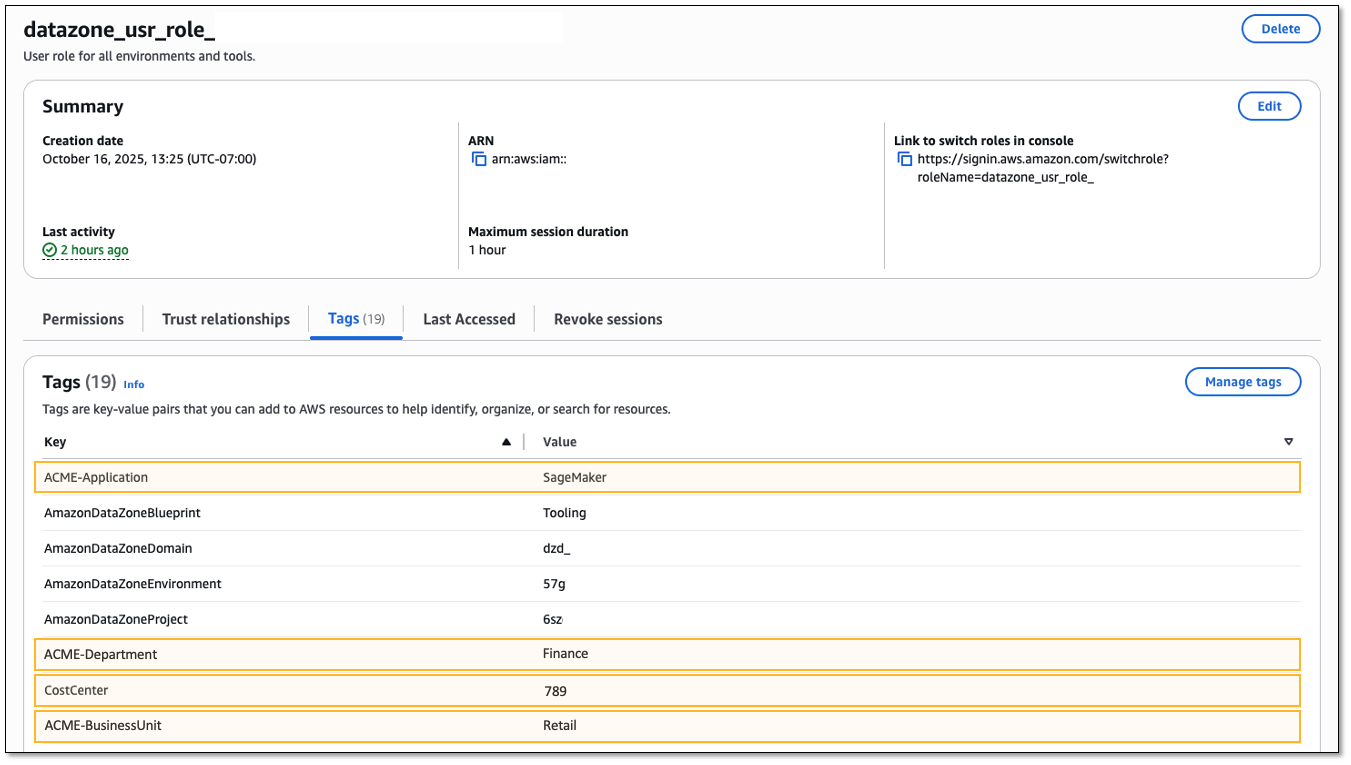
Validate that tags are placed correctly. An example resource that is created by the project is the project IAM role. Viewing the tags for this role should show the tags configured from the project profile.

  1. Open SageMaker Unified Studio to get the project role from the Project details section of the project. The role name begins with datazone_usr_role_.
  2. Open the IAM console.
  3. In the navigation pane, choose Roles.
  4. Search for the project IAM role.
  5. Select the Tags tab.

Conclusion

In this post, we discussed tagging related use cases from customers and walked through getting started with custom tags in Amazon SageMaker to place tags on the resources created by the project. By giving administrators a way to configure project profiles with standardized tag configurations, you can now help ensure consistent tagging practices across all SageMaker Unified Studio projects while maintaining compliance with SCPs. This feature addresses two critical customer needs: enforcing organizational tagging standards through automated governance mechanisms and enabling accurate cost attribution reporting across multi-service deployments.

To learn more, visit Amazon SageMaker, then get started with Project resource tags.


About the authors

David Victoria

David Victoria

David is a Senior Technical Product Manager with Amazon SageMaker at AWS. He focuses on improving administration and governance capabilities needed for customers to support their analytics systems. He is passionate about helping customers realize the most value from their data in a secure, governed manner.

Rohit Srikanta

Rohit Srikanta

Rohit is a Senior Software Engineer at AWS. He works on building and scaling services within Amazon SageMaker. He focuses on developing robust and scalable distributed systems and is passionate about solving complex engineering challenges to deliver maximum customer value.

Ahan Malli

Ahan Malli

Ahan is a Software Development Engineer at AWS. He works on the core data and governance layer behind Amazon SageMaker. He’s passionate about building scalable distributed systems and streamlining developer workflows. When he’s not coding, you can find him traveling or hiking Pacific Northwest trails.

Create AWS Glue Data Catalog views using cross-account definer roles

Post Syndicated from Aarthi Srinivasan original https://aws.amazon.com/blogs/big-data/create-aws-glue-data-catalog-views-using-cross-account-definer-roles/

With AWS Glue Data Catalog views you can create a SQL view in the Data Catalog that references one or more base tables. These multi-dialect views support various SQL query engines, providing consistent access across multiple Amazon Web Services (AWS) services including Amazon Athena, Amazon Redshift Spectrum, and Apache Spark in both Amazon EMR and AWS Glue 5.0.

You can now create Data Catalog views using a cross-account AWS Identity and Access Management (IAM) definer role. A definer role is an IAM role used to create the Data Catalog view and has SELECT permissions on all columns of the underlying base tables. This definer role is assumed by AWS Glue and AWS Lake Formation service principals to vend credentials to the base tables’ data whenever the view is queried. The definer role allows the Data Catalog view to be shared to principals or AWS accounts so that you can share a filtered subset of data without sharing the base tables.

Previously, Data Catalog views required a definer role within the same AWS account as the base tables. The introduction of cross-account definer roles enables Data Catalog view creation in enterprise data mesh architectures. In this setup, database and table metadata is centralized in a governance account, and individual data owner accounts maintain control over table creation and management through their IAM roles. Data owner accounts can now create and manage Data Catalog views in the central governance accounts using their existing continuous integration and continuous delivery (CI/CD) pipeline roles.

In this post, we show you a cross-account scenario involving two AWS accounts: a central governance account containing the tables and hosting the views and a data owner (producer) account with the IAM role used to create and manage views. We provide implementation details for both SPARK dialect using AWS SDK code samples and ATHENA dialect using SQL commands. Using this approach, you can implement sophisticated data governance models at enterprise scale while maintaining operational efficiency across your AWS environment.

Key benefits

Key benefits for cross-account definer roles are as follows:

  • Enhanced data mesh support – Enterprises with multi-account data lakehouse architectures can now maintain their existing operational model where data owner accounts manage table creation and updates using their established IAM roles. These same roles can now create and manage Data Catalog views across account boundaries.
  • Strengthened security controls – By keeping table and view management within data owner account roles:
    • Security posture is enhanced through proper separation of duties.
    • Audit trails become more comprehensive and meaningful.
    • Access controls follow the principle of least privilege.
  • Elimination of data duplication – Data owner accounts can create views in central accounts that:
    • Provide access to specific data subsets without duplicating tables.
    • Reduce storage costs and management overhead.
    • Maintain a single source of truth while enabling targeted data sharing.

Solution overview

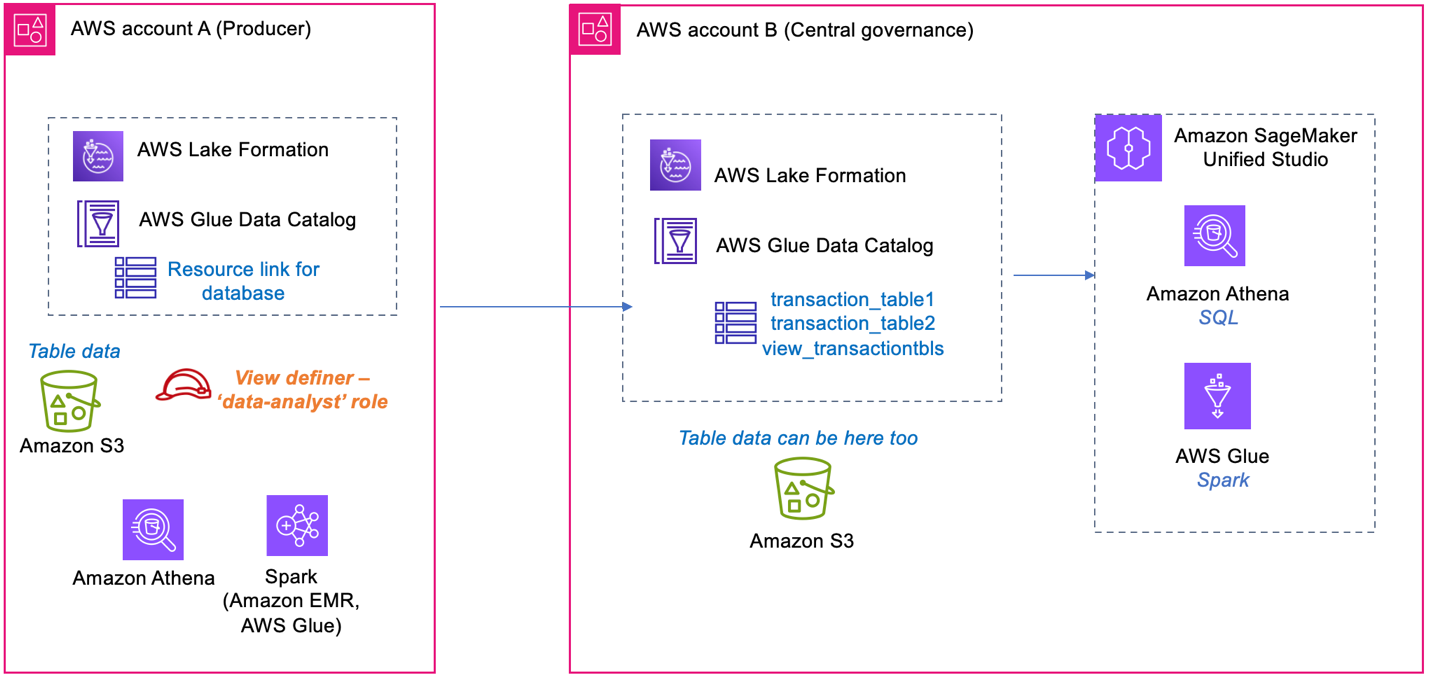
An example customer has a database with two transaction tables in their central account, where the catalog and permissions are maintained. With the database shared to the data owner (producer) account, we create a Data Catalog view in the central account on these two tables, using the producer’s definer role. The view from the central account can be shared to additional consumer accounts and queried. We illustrate creating the SPARK dialect using create-table CLI, and add the ATHENA dialect for the same view from the Athena console. We also provide the AWS SDK sample code for CreateTable() and UpdateTable(), with view definition and a sample pySpark script to read and verify the view in AWS Glue.

The following diagram shows the table, view, and definer IAM role placements between a central governance account and data producer account.

Prerequisites

To perform this solution, you need to have the following prerequisites:

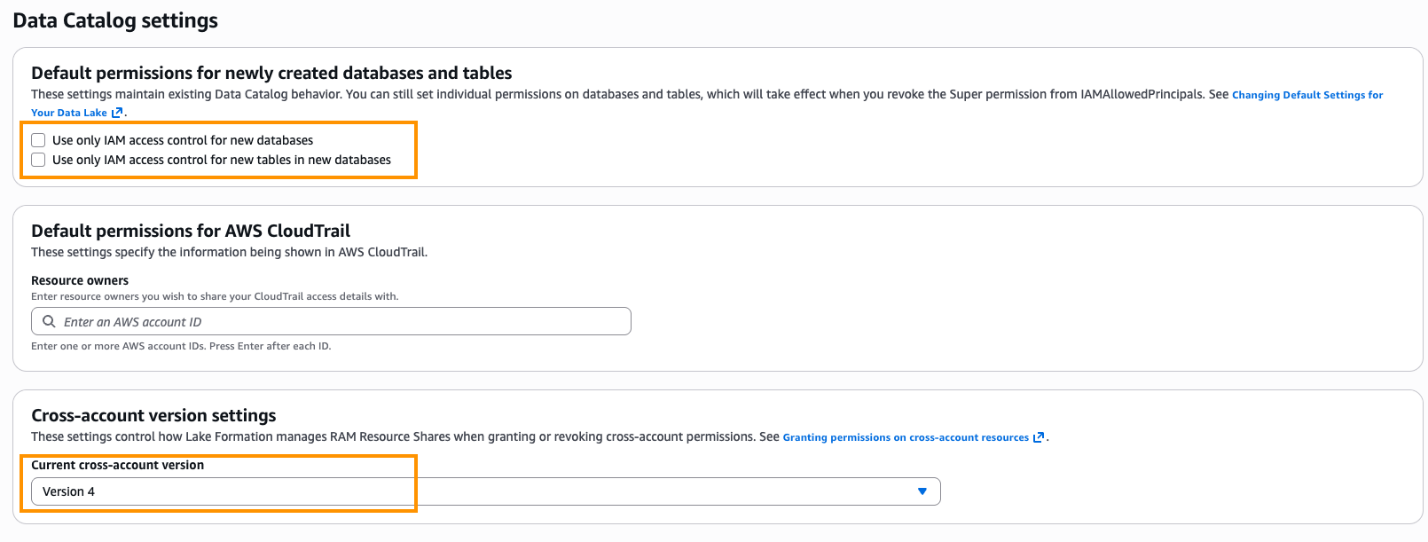
  1. Two AWS accounts with AWS Lake Formation set up. For details, refer to Set up AWS Lake Formation. The Lake Formation setup includes registering your IAM admin role as Lake Formation administrator. In the Data Catalog settings, shown in the following screenshot, Default permissions for newly created databases and tables is set to use Lake Formation permissions only. Cross-account version settings is set to Version 4.

  1. Create an IAM role Data-Analyst in the producer account. For the IAM permissions on this role, refer to Data analyst permissions. This role will also be used as the view definer role. Add the permissions to this definer role from the Prerequisites for creating views.

Create database and tables in the central account

In this step, you create two tables in the central governance account and populate them with few rows of data:

  1. Sign in to the central account as admin user. Open the Athena console and set up the Athena query results bucket.
  2. Run the following queries to create two sample Iceberg tables, representing bank customer transactions data:
/* Check if the Database exists, if not create new database. */
CREATE DATABASE IF NOT EXISTS bankdata_icebergdb;

/*Create transaction_table1*/ Replace the bucket name
CREATE TABLE bankdata_icebergdb.transaction_table1 (
  transaction_id string,
  transaction_type string,
  transaction_amount double)
LOCATION 's3://<bucket-name>/bankdata_icebergdb/transaction-table1'
TBLPROPERTIES (
  'table_type'='iceberg',
  'write_compression'='zstd'
);

/*Create transaction_table2*/
CREATE TABLE bankdata_icebergdb.transaction_table2 (
  transaction_id string,
  transaction_location string,
  transaction_date date)
LOCATION 's3://<bucket-name>/bankdata_icebergdb/transaction-table2'
TBLPROPERTIES (
  'table_type'='iceberg',
  'write_compression'='zstd'
);


INSERT INTO bankdata_icebergdb.transaction_table1 (transaction_id, transaction_type, transaction_amount)
VALUES
  ('T001', 'purchase', 50.0),
  ('T002', 'purchase', 120.0),
  ('T003', 'refund', 200.5),
  ('T004', 'purchase', 80.0),
  ('T005', 'withdrawal', 500.0),
  ('T006', 'purchase', 300.0),
  ('T007', 'deposit', 1000.0),
  ('T008', 'refund', 20.0),
  ('T009', 'purchase', 150.0),
  ('T010', 'withdrawal', 75.0);


INSERT INTO bankdata_icebergdb.transaction_table2 (transaction_id, transaction_location, transaction_date)
VALUES
  ('T001', 'Charlotte', DATE '2024-10-01'),
  ('T002', 'Seattle', DATE '2024-10-02'),
  ('T003', 'Chicago', DATE '2024-10-03'),
  ('T004', 'Miami', DATE '2024-10-04'),
  ('T005', 'New York', DATE '2024-10-05'),
  ('T006', 'Austin', DATE '2024-10-06'),
  ('T007', 'Denver', DATE '2024-10-07'),
  ('T008', 'Boston', DATE '2024-10-08'),
  ('T009', 'San Jose', DATE '2024-10-09'),
  ('T010', 'Phoenix', DATE '2024-10-10');
  1. Verify the created tables in Athena query editor by running a preview.

Share the database and tables from central to producer account

In the central governance account, you share the database and the two tables to the producer account and the Data-Analyst role in producer.

  1. Sign in to the Lake Formation console as the Lake Formation admin role.
  2. In the navigation pane, choose Data permissions.
  3. Choose Grant and provide the following information:
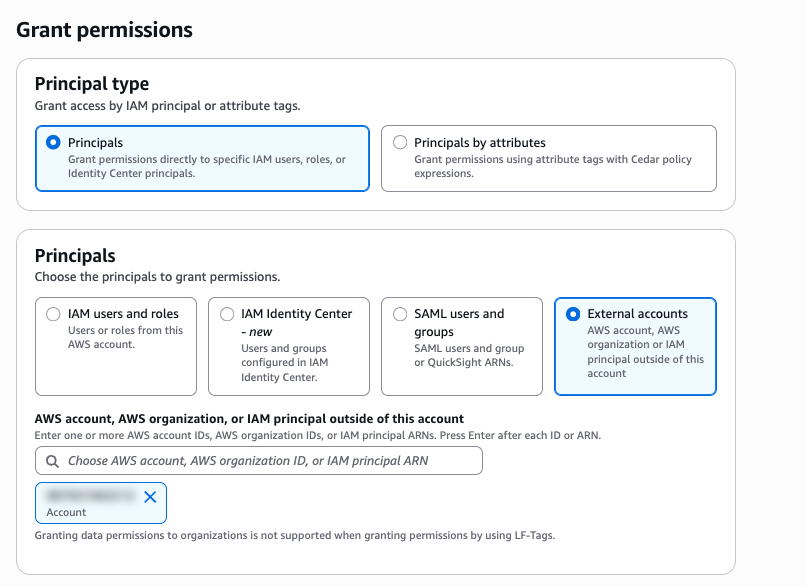
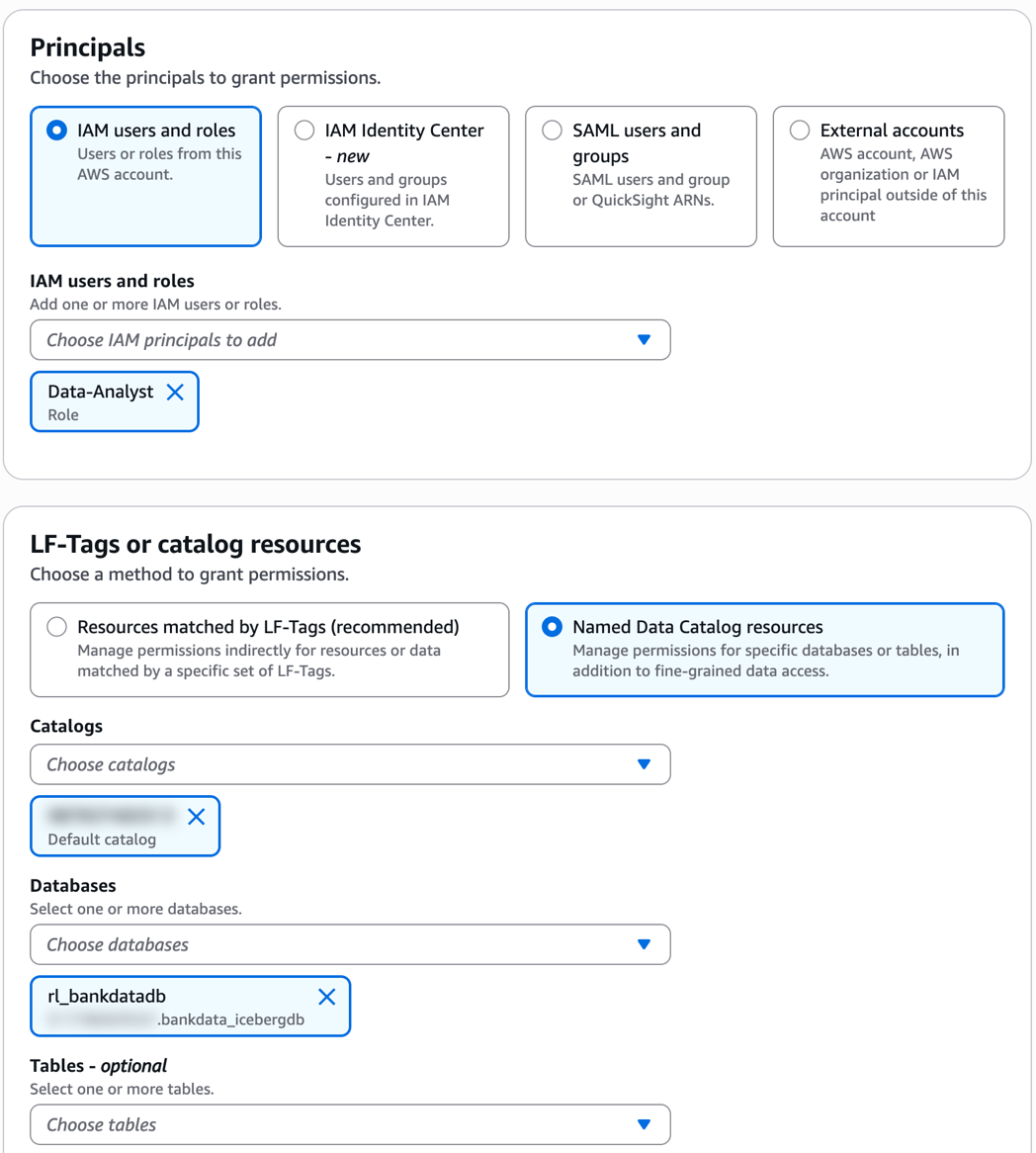
    1. For Principals, select External accounts and enter the producer account ID, as shown in the following screenshot.
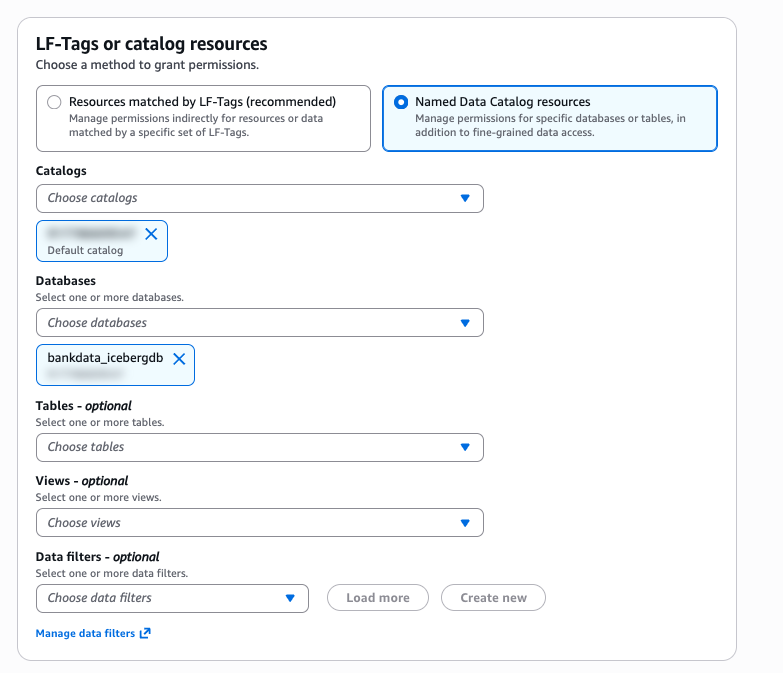
    2. For Named Data Catalog Resources, select the default catalog and database bankdata_icebergdb, as shown in the following screenshot.
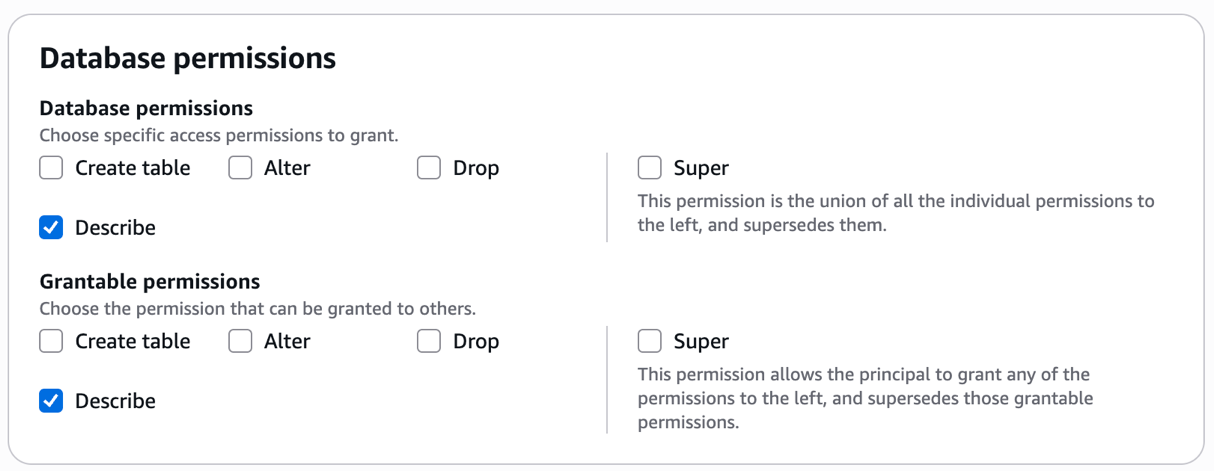
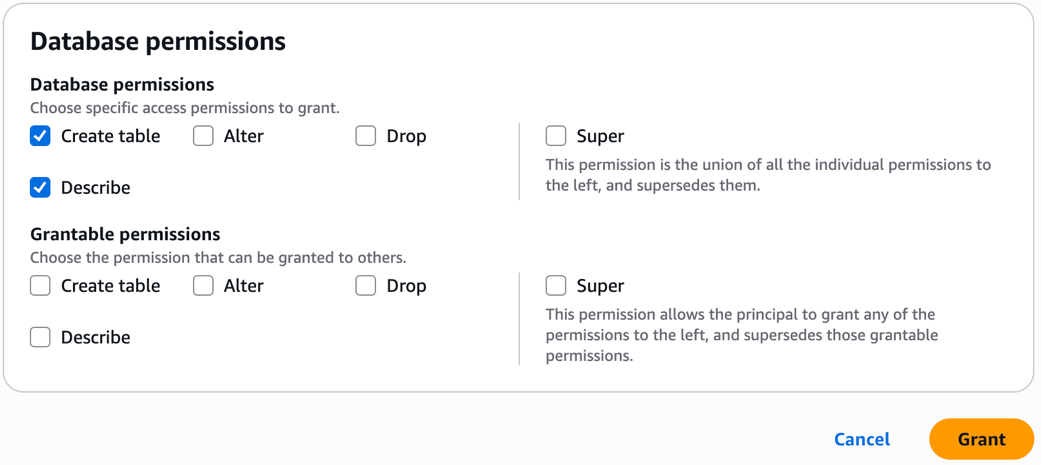
    3. Under Database permissions, select Describe. For Grantable permissions, select Describe.
    4. Choose Grant.
    5. Repeat the preceding steps to grant access to the producer account definer role Data-Analyst on the database bankdata_icebergdb and the two tables transaction_table1 and transaction_table2 as follows.
    6. Under Database permissions, grant Create table and Describe permissions.
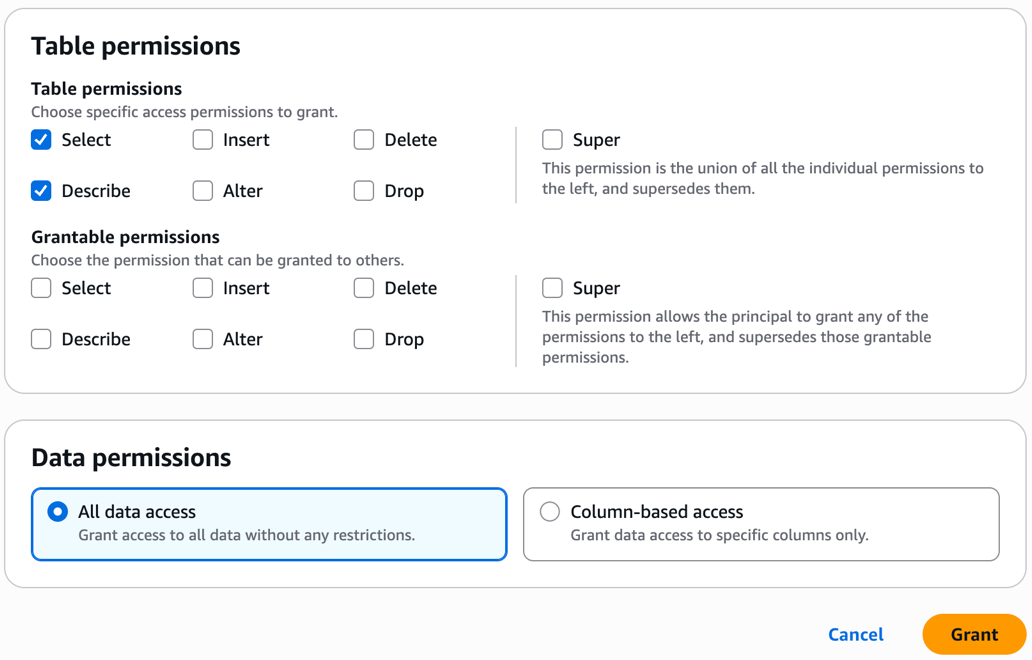
    7. Under Table permissions, grant Select and Describe on all columns.

With these steps, the central governance account data admin steward has shared the database and tables to the producer account definer role.

Steps for producer account

Follow these steps for the producer account:

  1. Sign in to the Lake Formation console on the producer account as the Lake Formation administrator.
  2. In the left navigation pane, choose Databases. A blue banner will appear on the console, showing pending invitations from AWS Resource Access Manager (AWS RAM).
  3. Open the AWS RAM console and review the AWS RAM shares under Shared with me. You will see the AWS RAM shares in pending state. Select the pending AWS RAM share from central account and choose Accept resource share. After the resource share request is accepted, the shared database shows up in the producer account.
  4. On the Lake Formation console, select the database. On the Create dropdown list, choose Resource link. Provide a name rl_bank_iceberg and choose Create.
  5. Let’s grant Describe permission on the resource link to the Data-Analyst role in the producer account in the following steps.
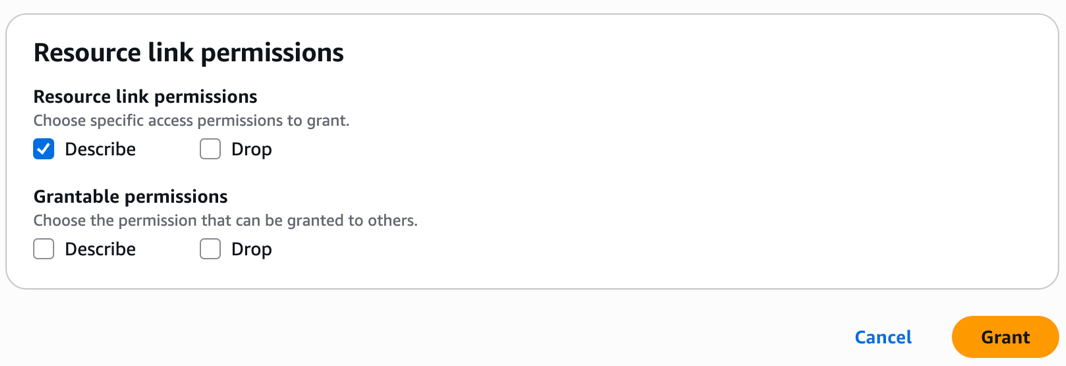
    1. In the left navigation pane, choose Data permissions. Choose the Data-Analyst role. Select the resource link rl_bank_iceberg for the database as shown in the following screenshot.
    2. Grant Describe permission on the resource link.

Note: Cross-account Data Catalog views can’t be created using a resource link, although a resource link is needed for the SDK use of SPARK dialect.

Next, add the central account Data Catalog as a Data Source in Athena from producer account:

  1. Open the Athena console.
  2. On the left navigation pane, choose Data sources and catalogs. Choose Create data source.
    1. Select S3-AWS Glue Data Catalog.
    2. Choose AWS – Glue Data Catalog in another account and name the data source as centraladmin.
    3. Choose Next and then create data source.

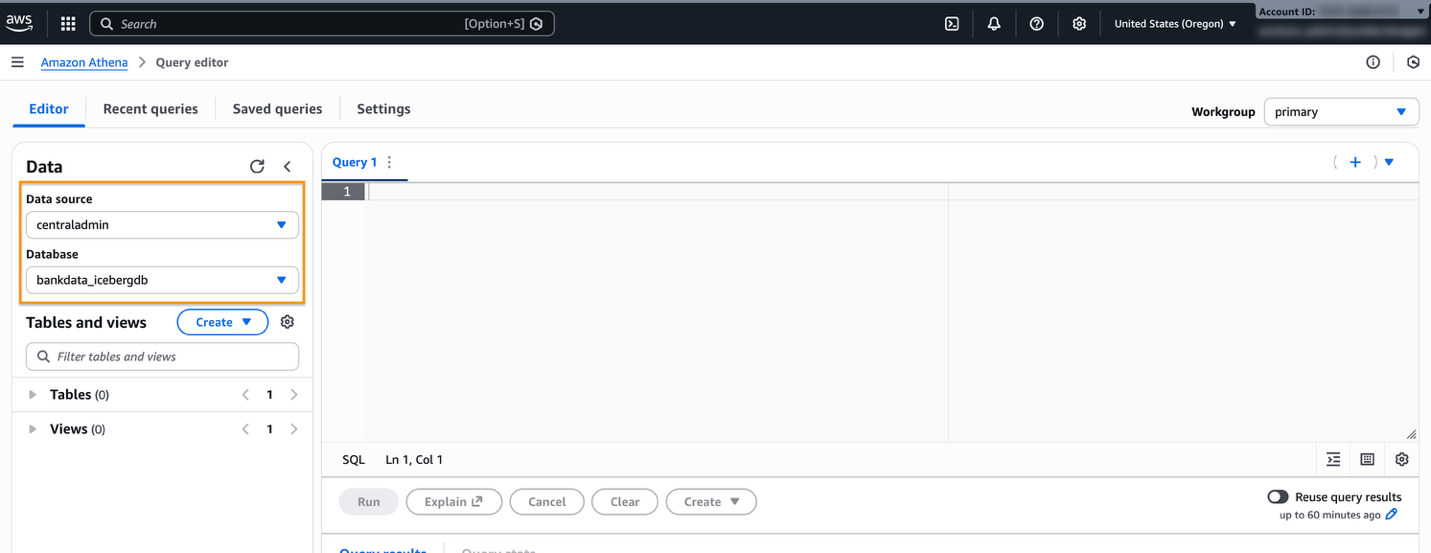
After the data source is created, navigate to the Query editor and verify the Data source centraladmin appears, as shown in the following screenshot.

The definer role can also now access and query the central catalog database.

Create SPARK dialect view

In this step, you create a view with SPARK dialect, using AWS Glue CLI command create-table:

  1. Sign in to the AWS console in the producer account as Data-Analyst role. Enter the following command in your CLI environment, such as AWS CloudShell, to create a SPARK DIALECT:
aws glue create-table --cli-input-json '{
   "DatabaseName": "rl_bank_iceberg",
   "TableInput": {
     "Name": "mdv_transaction1",
     "StorageDescriptor": {
       "Columns": [
         {
           "Name": "transaction_id",
           "Type": "string"
         },
         {
           "Name": "transaction_type",
           "Type": "string"
         },
         {
           "Name": "transaction_amount",
           "Type": "float"
         },
         {
           "Name": "transaction_location",
           "Type": "string"
         },
         {
           "Name": "transaction_date",
           "Type": "date"
         }
       ],
       "SerdeInfo": {}
     },
     "ViewDefinition": {
       "SubObjects": [
         "arn:aws:glue:<your-region>:<your-central-account-id>:table/bankdata_icebergdb/transaction_table1",
         "arn:aws:glue:<your-region>:<your-central-account-id>:table/bankdata_icebergdb/transaction_table2"
        ],
       "IsProtected": true,
       "Representations": [
         {
           "Dialect": "SPARK",
           "DialectVersion": "1.0",
           "ViewOriginalText": "SELECT t1.transaction_id, t1.transaction_type, t1.transaction_amount, t2.transaction_location, t2.transaction_date FROM transaction_table1 t1 JOIN transaction_table2 t2 ON t1.transaction_id = t2.transaction_id WHERE t1.transaction_amount > 100;",
           "ViewExpandedText": "SELECT t1.transaction_id, t1.transaction_type, t1.transaction_amount, t2.transaction_location, t2.transaction_date FROM transaction_table1 t1 JOIN transaction_table2 t2 ON t1.transaction_id = t2.transaction_id WHERE t1.transaction_amount > 100;"
         }
       ]
     }
   }
 }'
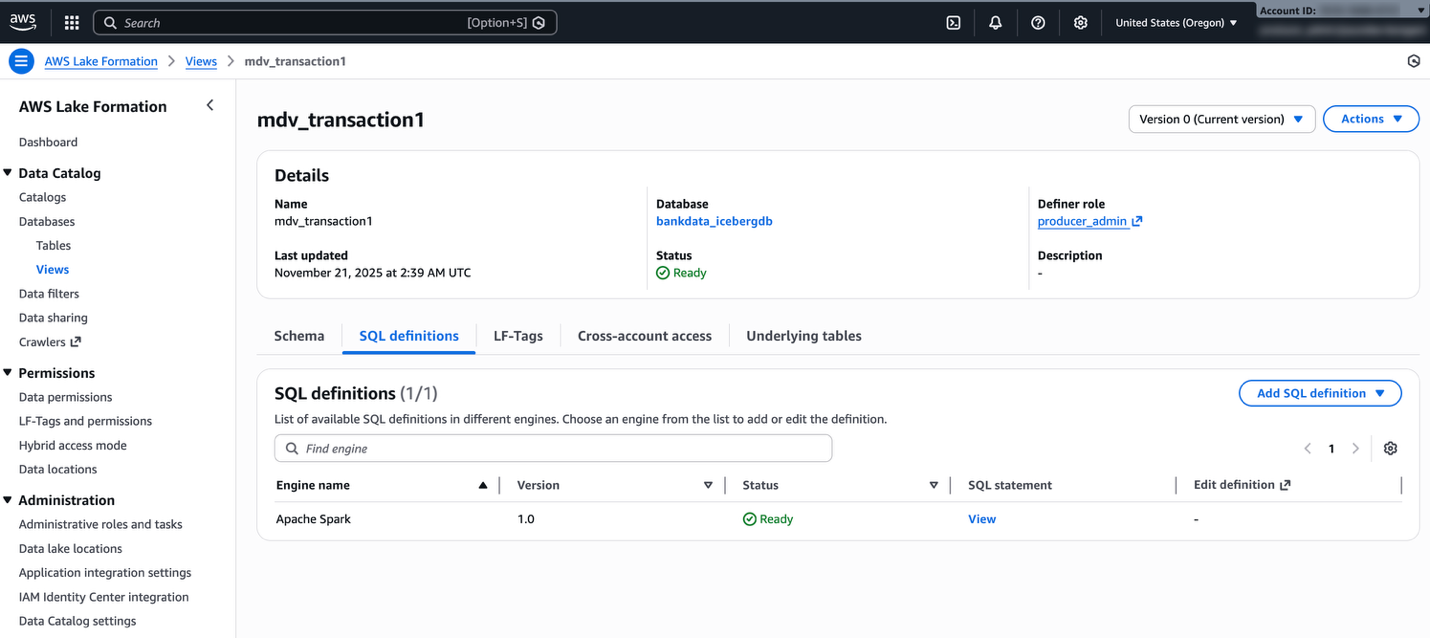
  1. Open the Lake Formation console and verify if the view is created. Verify the dialect of the view on the SQL definitions tab for the view details.

Add ATHENA dialect

To add ATHENA dialect, follow these steps:

  1. On the Athena console, select centraladmin from the Data source.
  2. Enter the following SQL script to create the ATHENA dialect for the same view:
ALTER VIEW mdv_transaction1 FORCE ADD DIALECT
AS
SELECT t1.transaction_id, t1.transaction_type, t1.transaction_amount, t2.transaction_location, t2.transaction_date FROM transaction_table1 t1 JOIN transaction_table2 t2 ON t1.transaction_id = t2.transaction_id WHERE t1.transaction_amount > 100

We can’t use the resource link rl_bank_iceberg in the Athena query editor to create or alter a view in the central account.

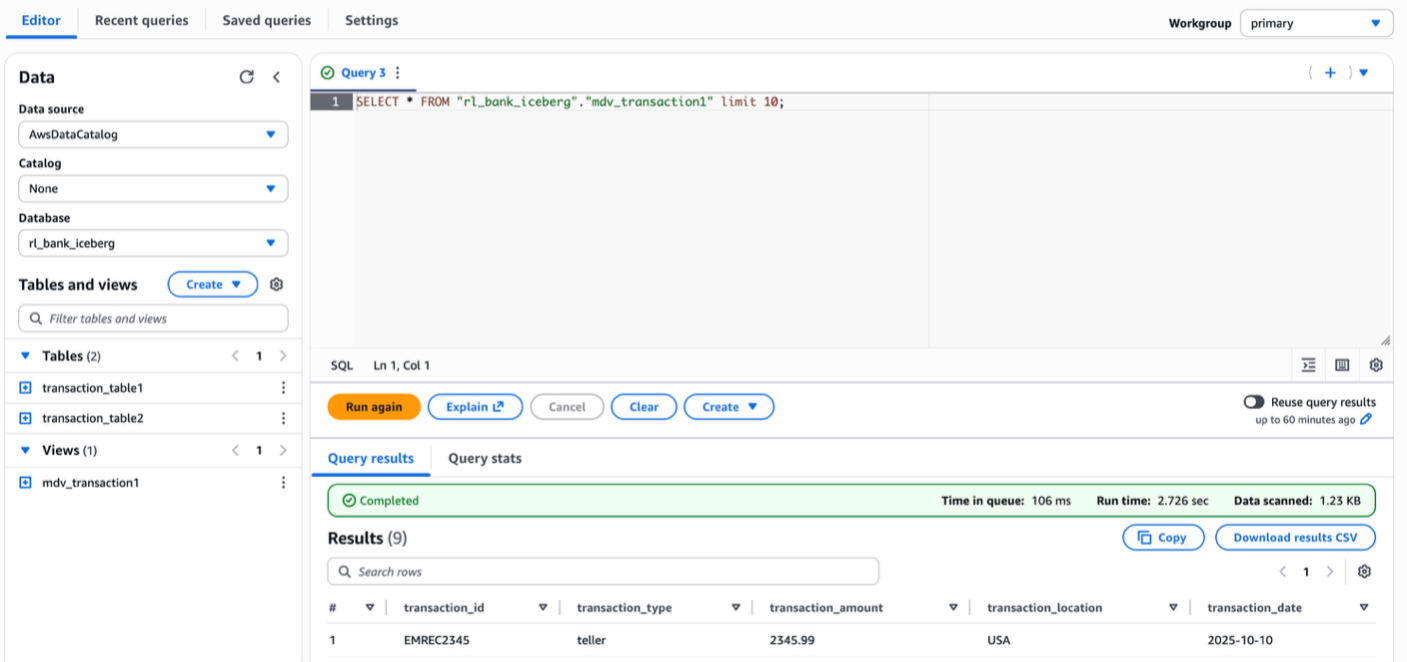
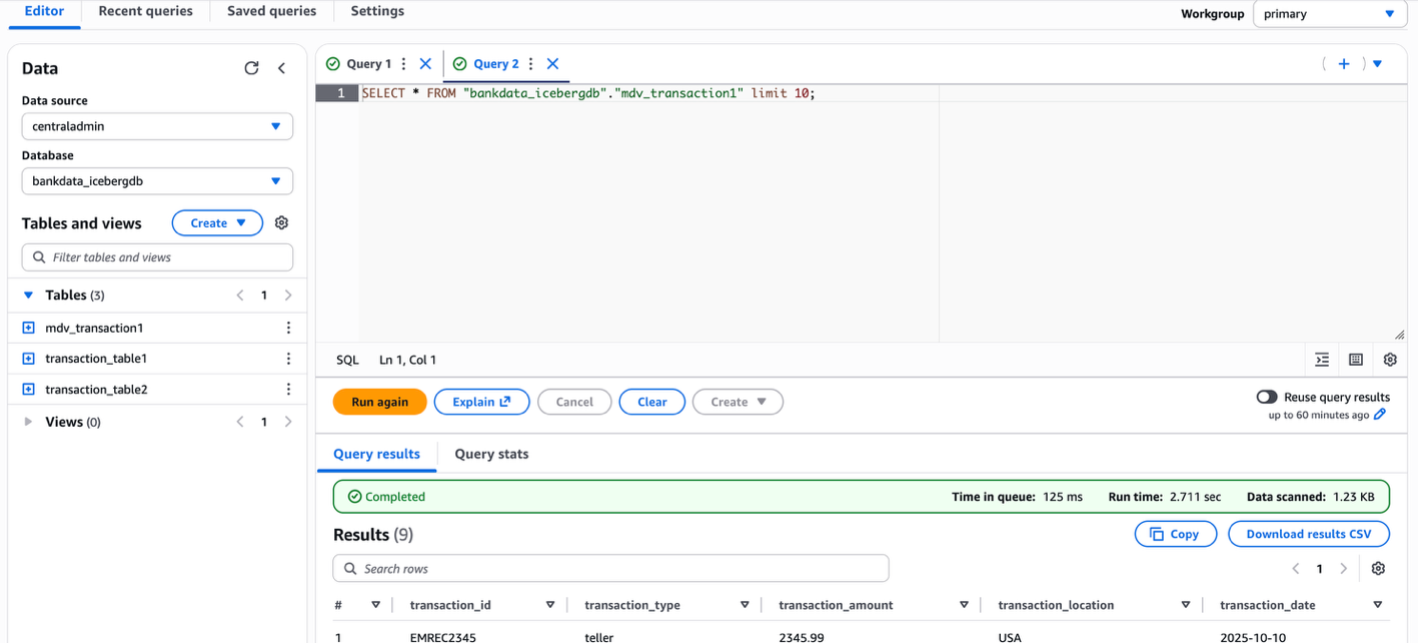
  1. Verify the added dialect by running a preview in Athena. For running the query, you can use either the resource link rl_bank_iceberg from the producer account catalog or use the centraladmin catalog.

The following screenshot shows querying using the resource link of the database in the producer account catalog.

The following screenshot shows querying the view from the producer using the connected catalog centraladmin as the data source.

  1. Verify the dialects on the view by inspecting the table in the Lake Formation console.

You can now query the view as the Data-Analyst role in the producer account, using both Athena and Spark. The view will also show in the central account as shown in the following code example, with access to the Lake Formation admin.

You can also create the view with ATHENA dialect and add the SPARK dialect. The SQL syntax to create the view in ATHENA dialect is shown in the following example:

create protected multi dialect view mdv_transaction1
security definer
as
SELECT t1.transaction_id, t1.transaction_type, t1.transaction_amount, t2.transaction_location, t2.transaction_date FROM transaction_table1 t1 
JOIN transaction_table2 t2 
ON t1.transaction_id = t2.transaction_id 
WHERE t1.transaction_amount > 100;

The update-table CLI to add the corresponding SPARK dialect is shown in the following example:

aws glue update-table --cli-input-json '{
    "DatabaseName": "rl_bankdatadb",
    "ViewUpdateAction": "ADD",
    "Force": true,
    "TableInput": {
        "Name": " mdv_transaction1",
        "StorageDescriptor": {
            "Columns": [
                {
                  "Name": "transaction_id",
                  "Type": "string"
                },
                {
                  "Name": "transaction_type",
                  "Type": "string"
                },
                {
                  "Name": "transaction_amount",
                  "Type": "float"
                },
                {
                  "Name": "transaction_location",
                  "Type": "string"
                },
                {
                  "Name": "transaction_date",
                  "Type": "date"
                }
             ],
             "SerdeInfo": {}
         },
         "ViewDefinition": {
         "SubObjects": [
               " "arn:aws:glue:<your-region>:<your-central-account-id>:table/bankdata_icebergdb/transaction_table1",
           "arn:aws:glue:<your-region>:<your-central-account-id>:table/bankdata_icebergdb/transaction_table2" 
],
         "IsProtected": true,
         "Representations": [
             {
                 "Dialect": "SPARK",
                 "DialectVersion": "1.0",
                 "ViewOriginalText": " SELECT t1.transaction_id, t1.transaction_type, t1.transaction_amount, t2.transaction_location, t2.transaction_date FROM transaction_table1 t1 JOIN transaction_table2 t2 ON t1.transaction_id = t2.transaction_id WHERE t1.transaction_amount > 100",
                 "ViewExpandedText": " SELECT t1.transaction_id, t1.transaction_type, t1.transaction_amount, t2.transaction_location, t2.transaction_date FROM transaction_table1 t1 JOIN transaction_table2 t2 ON t1.transaction_id = t2.transaction_id WHERE t1.transaction_amount > 100"
              }
           ]
        }
    }
}'

The following is a sample Python script to create a SPARK dialect view: glueview-createtable.py.

The following code block is a sample AWS Glue extract, transfer, and load (ETL) script to access the Spark dialect of the view from AWS Glue 5.0 from the central account. The AWS Glue job execution role should have Lake Formation SELECT permission on the AWS Glue view:

from pyspark.context import SparkContext
from pyspark.sql import SparkSession

aws_region = "<your-region>"
aws_account_id = "<your-central-account-id>"
local_catalogname = "spark_catalog"
warehouse_path = "s3://<your-bucket-name>/bankdata_icebergdb/transaction-table1"

spark = SparkSession.builder.appName('query_glue_view') \
    .config('spark.sql.extensions','org.apache.iceberg.spark.extensions.IcebergSparkSessionExtensions') \
    .config(f'spark.sql.catalog.{local_catalogname}', 'org.apache.iceberg.spark.SparkSessionCatalog') \
    .config(f'spark.sql.catalog.{local_catalogname}.catalog-impl', 'org.apache.iceberg.aws.glue.GlueCatalog') \
    .config(f'spark.sql.catalog.{local_catalogname}.client.region', aws_region) \
    .config(f'spark.sql.catalog.{local_catalogname}.glue.account-id', aws_account_id) \
    .config(f'spark.sql.catalog.{local_catalogname}.io-impl', 'org.apache.iceberg.aws.s3.S3FileIO') \
    .config(f'spark.sql.catalog.{local_catalogname}.warehouse',warehouse_path) \
    .getOrCreate()
spark.sql(f"show databases").show()
spark.sql(f"SHOW TABLES IN {local_catalogname}.bankdata_icebergdb").show()
spark.sql(f"SELECT * FROM {local_catalogname}.bankdata_icebergdb. mdv_transaction1").show()

In the AWS Glue job-details, for Lake Formation managed tables and for Iceberg tables, set additional parameters respectively as follows:

--enable-lakeformation-fine-grained-access = true
--datalake-formats = iceberg

Cleanup

To avoid incurring costs, clean up the resources you used for this post:

  1. Revoke the Lake Formation permissions granted to the Data-Analyst role and Producer account
  2. Drop the Athena tables
  3. Delete the Athena query results from your Amazon Simple Storage Service (Amazon S3) bucket
  4. Delete the Data-Analyst role from IAM

Conclusion

In this post, we demonstrated how to use cross-account IAM definer roles with AWS Glue Data Catalog views. We showed how data owner accounts can create and manage views in a central governance account while maintaining security and control over their data assets. This feature enables enterprises to implement sophisticated data mesh architectures without compromising on security or requiring data duplication.

The ability to use cross-account definer roles with Data Catalog views provides several key advantages:

  • Streamlines view management in multi-account environments
  • Maintains existing CI/CD workflows and automation
  • Enhances security through centralized governance
  • Reduces operational overhead by eliminating the need for data duplication

As organizations continue to build and scale their data lakehouse architectures across multiple AWS accounts, cross-account definer roles for Data Catalog views provide a crucial capability for implementing efficient, secure, and well-governed data sharing patterns.


About the authors

Aarthi Srinivasan

Aarthi Srinivasan

Aarthi is a Senior Big Data Architect at Amazon Web Services (AWS). She works with AWS customers and partners to architect data lake solutions, enhance product features, and establish best practices for data governance.

Sundeep Kumar

Sundeep Kumar

Sundeep is a Sr. Specialist Solutions Architect at Amazon Web Services (AWS), helping customers build data lake and analytics platforms and solutions. When not building and designing data lakes, Sundeep enjoys listening to music and playing guitar.

Ni8mare and N8scape flaws among multiple critical vulnerabilities affecting n8n

Post Syndicated from Rapid7 original https://www.rapid7.com/blog/post/etr-ni8mare-n8scape-flaws-multiple-critical-vulnerabilities-affecting-n8n

Overview

On November 18, 2025, a patched release was published for a critical unauthenticated file read vulnerability in n8n, a popular piece of automation software. The advisory for this vulnerability, CVE-2026-21858, was subsequently published on January 7, 2026; the vulnerability holds a CVSS score of 10.0. If a server has a custom configured web form that implements file uploads with no validation of content type, an attacker can overwrite an internal JSON object to read arbitrary files and, in some cases, establish remote code execution. This vulnerability has been dubbed “Ni8mare” by the finders. 

The finders, Cyera, published a technical blog post about the vulnerability on January 7, 2026, and a separate technical analysis and proof-of-concept (PoC) exploit were published by third-party security researcher Valentin Lobstein the same day. The Cyera writeup demonstrates CVE-2026-21858, while the third-party exploit also leverages CVE-2025-68613, an authenticated expression language injection vulnerability in n8n, for remote code execution. Additional authenticated vulnerabilities, tracked as CVE-2025-68613, CVE-2025-68668, CVE-2025-68697, and CVE-2026-21877 can be chained with the unauthenticated vulnerability CVE-2026-21858 for code execution or arbitrary file write on specific affected versions of n8n.

In total there are five CVEs that n8n users should be aware of:

CVE Number

Published Date

CVSS

Description

Leveraged in PoC?

CVE-2026-21858 (Ni8mare)

01/07/2026

10.0 (NVD score)

Certain form-based workflows are vulnerable to improper file handling that can result in arbitrary file read. When exploited, attackers can establish administrator-level access to n8n.

Yes

CVE-2026-21877

01/07/2026

9.9 (NVD score)

Under certain conditions, authenticated n8n users may be able to cause untrusted code to be executed by the n8n service.

No

CVE-2025-68613

12/19/2025

8.8 (NVD score)

A vulnerability in n8n’s expression evaluation system allows authenticated users to execute arbitrary system commands through crafted expressions in workflow parameters.

Yes

CVE-2025-68668 (N8scape)

12/26/2025

9.9 (NVD score)

A sandbox bypass vulnerability exists in the n8n Python Code node that uses Pyodide. An authenticated user with permission to create or modify workflows can exploit this vulnerability to execute arbitrary commands on the host system running n8n in the context of the service user.

No

CVE-2025-68697

12/26/2025

5.4 (NVD score)

In self-hosted n8n instances where the Code node runs in legacy (non-task-runner) JavaScript execution mode, authenticated users with workflow editing access can invoke internal helper functions from within the Code node. This permits reading and writing files on the host.

No

Technical overview

CVE-2026-21858: “Unauthenticated File Access via Improper Webhook Request Handling”

This is the primary access vector for the n8n exploit chain and holds a maximum CVSS score of 10.0. It is a critical unauthenticated file read vulnerability that occurs when custom web forms implement file uploads without validating the content type. By exploiting this flaw, an attacker can overwrite an internal JSON object to read arbitrary files from the server. This capability may be leveraged to forge an administrator session token and exploit subsequent authenticated vulnerabilities for code execution.

CVE-2025-68613: “Remote Code Execution via Expression Injection”

This vulnerability is characterized as an authenticated expression language injection flaw. While it requires an established session to exploit, it can be chained with CVE-2026-21858 to achieve remote code execution. It affects n8n versions starting at 0.211.0 and below 1.20.4. Attackers can leverage this flaw by injecting malicious expression language commands once they have gained a foothold as an administrator.

CVE-2025-68668: “Arbitrary Command Execution in Pyodide based Python Code node”

Affecting n8n versions between 1.0.0 and 2.0.0, this is an authenticated vulnerability used for secondary exploitation. Depending on the specific configuration of the affected version, it allows an attacker to execute arbitrary OS commands. Because it requires authentication, it is used on a case-by-case basis after an initial breach has compromised the management interface.

CVE-2025-68697: “Legacy Code node enables file read/write in self-hosted n8n”

CVE-2025-68697 is an authenticated vulnerability that facilitates arbitrary file read/write in the context of the n8n process when exploited. Per the advisory, systems are vulnerable when the Code node runs in legacy (non-task-runner) JavaScript execution mode. CVE-2025-68697 specifically impacts n8n versions ranging from 1.2.1 up to 2.0.0, though n8n version 1.2.1 and higher automatically prevents read/write access to the `.n8n` directory by default. As a result, exploitation of CVE-2025-68697 is likely to require a more bespoke strategy for each specific target, making it a less likely vulnerability to be exploited as a secondary chained bug with CVE-2026-21858.

CVE-2026-21877: “RCE via Arbitrary File Write”

This vulnerability has a CVSS score of 9.9 and affects both self-hosted and cloud versions of n8n. It allows for remote code execution within n8n versions 0.123.0 through 1.121.3. Although it is an authenticated vulnerability, its high severity stems from its ability to grant an attacker full system control once they have bypassed initial authentication using the CVE-2026-21858 file read flaw.

Mitigation guidance

Organizations running self-hosted instances of n8n should prioritize upgrading to a version at or above 1.121.0 immediately to remediate the unauthenticated initial access vulnerability CVE-2026-21858.

According to the vendor, the following versions are affected:

  • CVE-2026-21858: Versions at or above 1.65.0 and below 1.121.0.

  • CVE-2025-68613: Versions at or above 0.211.0 and below 1.20.4.

  • CVE-2025-68668: Versions at or above 1.0.0 and below 2.0.0.

  • CVE-2025-68697: Versions at or above 1.2.1 and below 2.0.0.

  • CVE-2026-21877: Versions at or above 0.123.0 and below 1.121.3.

For the latest mitigation guidance, please refer to the vendor’s security advisories.

Rapid7 customers

Exposure Command, InsightVM, and Nexpose

Exposure Command and InsightVM customers can assess exposure to CVE-2026-21858, CVE-2025-68613, CVE-2025-68668, CVE-2025-68697, and CVE-2026-21877 with vulnerability checks expected to be available in the January 9, 2026 content release.

Updates

  • January 8, 2026: Initial publication.

.NET 10 runtime now available in AWS Lambda

Post Syndicated from Henrique Graca original https://aws.amazon.com/blogs/compute/net-10-runtime-now-available-in-aws-lambda/

AWS Lambda now supports .NET 10 as both a managed runtime and base container image. .NET is a popular language for building serverless applications. Developers can now use the new features and enhancements in .NET when creating serverless applications on Lambda. This includes support for file-based apps to streamline your projects by implementing functions using just a single file.

.NET 10 delivers runtime and compiler optimizations including enhancements to the JIT compiler and improvements to Native AOT that reduce executable size and startup time. For details of the .NET 10 features, you can go to the .NET 10 overview.

You can develop Lambda functions in .NET 10 using the AWS Management Console, AWS Command Line Interface (AWS CLI), AWS Toolkit for Visual Studio, AWS Extensions for .NET CLI (Amazon.Lambda.Tools), AWS Serverless Application Model (AWS SAM), AWS Cloud Development Kit (AWS CDK), and other infrastructure as code (IaC) tools.

You can also use .NET 10 with Powertools for AWS Lambda (.NET), a developer toolkit that helps you implement serverless best practices. Use cases include observability, batch processing, AWS Systems Manager Parameter Store integration, idempotency, and more.

This post demonstrates what’s new in the .NET 10 Lambda runtime and how you can use the new .NET 10 runtime in your serverless applications.

File-based C# applications

.NET 10 introduces file-based apps, which are programs contained in a single .cs file, without a .csproj file or a complex folder structure. File-based apps are an ideal way to streamline the development and management of .NET Lambda functions. They are fully supported by the Lambda .NET 10 runtime and associated developer tooling.

Creating C# file-based apps

The fastest way to get started creating a C# file-based Lambda function is to use the Amazon.Lambda.Templates package. Version 8.0.1 of the package adds the lambda.FileBased template as well as updating the rest of the templates in the package to .NET 10.

Install the package by running the following command:

dotnet new install Amazon.Lambda.Templates

Create a new C# file-based Lambda function by running the following command:

dotnet new lambda.FileBased -n MyLambdaFunction

This creates a file in the current directory called MyLambdaFunction.cs with all of the required startup code necessary for a Lambda function. The following is the starting content of the file:

// C# file-based Lambda functions can be deployed to Lambda using the 
// .NET Tool Amazon.Lambda.Tools version 6.0.0 or later. 
// 
// Command to install Amazon.Lambda.Tools 
//   dotnet tool install -g Amazon.Lambda.Tools 
// 
// Command to deploy function 
//    dotnet lambda deploy-function <lambda-function-name> MyLambdaFunction.cs 
// 
// Command to package function 
//    dotnet lambda package MyLambdaFunction.zip MyLambdaFunction.cs 
 
 
#:package [email protected] 
 
// Explicitly setting TargetFramework here is done to avoid 
// having to specify it when packaging the function with Amazon.Lambda.Tools 
#:property TargetFramework=net10.0 
 
// By default File-based C# apps publish as Native AOT. When packaging Lambda function 
// unless the host machine is Amazon Linux a container build will be required. 
// Amazon.Lambda.Tools will automatically initate a container build if docker is installed. 
// Native AOT also requires the code and dependencies be Native AOT compatible. 
// 
// To disable Native AOT uncomment the following line to add the .NET build directive 
// that disables Native AOT. 
//#:property PublishAot=false 
 
using Amazon.Lambda.Core; 
using Amazon.Lambda.RuntimeSupport; 
using Amazon.Lambda.Serialization.SystemTextJson; 
using System.Text.Json.Serialization; 
 
// The function handler that will be called for each Lambda event 
var handler = (string input, ILambdaContext context) => 
{ 
    return input.ToUpper(); 
}; 
 
// Build the Lambda runtime client passing in the handler to call for each 
// event and the JSON serializer to use for translating Lambda JSON documents 
// to .NET types. 
await LambdaBootstrapBuilder.Create(handler, new SourceGeneratorLambdaJsonSerializer<LambdaSerializerContext>()) 
        .Build() 
        .RunAsync(); 
 
// Since Native AOT is used by default with C# file-based Lambda functions the source generator 
// based Lambda serializer is used. Ensure the input type and return type used by the function 
// handler are registered on the JsonSerializerContext using the JsonSerializable attribute. 
[JsonSerializable(typeof(string))] 
public partial class LambdaSerializerContext : JsonSerializerContext 
{ 
}

File-based functions use executable assembly handlers, in which the compiler generates the Main() method containing your function code. Therefore, your code must include the Amazon.Lambda.RuntimeSupport NuGet package and implement the LambdaBootstrapBuilder.Create method to bootstrap the runtime client.

File-based applications also use .NET Native AOT by default. You can disable Native AOT by adding #:property PublishAot=false to the top of the file. For more information on using Native AOT in Lambda, go to Compile .NET Lambda function code to a native runtime format in the Lambda documentation.

Deploying C# file-based apps

To deploy your function using the dotnet CLI with the Amazon.Lambda.Tools extension, pass the .cs filename as an added argument. Native AOT is enabled by default, thus the build must match the target architecture. If you’re building on the same architecture as the target Lambda function and on Amazon Linux 2023, then the build runs natively. Otherwise, Amazon.Lambda.Tools uses a Docker container to build the function.

For example, to deploy for x86_64 (default architecture):


dotnet lambda deploy-function ToUpper ToUpper.cs --function-runtime 
dotnet10 --function-role <role-arn>

Alternatively, to deploy for arm64:


dotnet lambda deploy-function ToUpper ToUpper.cs --function-runtime 
dotnet10 --function-role <role-arn> --function-architecture arm64

Debugging C# file-based apps

Visual Studio Code with the C# Dev Kit support debugging C# file-based applications.

1. Install the test tool.
dotnet tool install -g Amazon.Lambda.TestTool

2. Start the emulator.
dotnet lambda-test-tool start --lambda-emulator-port 5050

3. Configure .vscode/launch.json to attach to the process.

{
  "version": "0.2.0",
  "configurations": [
    {
      "name": "LambdaDebugFile",
      "type": "coreclr",
      "request": "launch",
      "program": "${fileDirname}/artifacts/Debug/${fileBasenameNoExtension}.dll",
      "cwd": "${workspaceFolder}",
      "console": "internalConsole",
      "stopAtEntry": false,
      "env": {
        "AWS_LAMBDA_RUNTIME_API": "localhost:5050/${fileBasenameNoExtension}"
      },
      "preLaunchTask": "build-active-file"
    }
  ]
}

4. Configure .vscode/tasks.json to build the active file.

{
  "version": "2.0.0",
  "tasks": [
    {
      "label": "build-active-file",
      "command": "dotnet",
      "type": "process",
      "args": [
        "build",
        "${file}",
        "--output",
        "./artifacts/Debug"
      ],
      "problemMatcher": "$msCompile"
    }
  ]
}

The configuration uses ${file}, which allows the build task to target whichever C# file is currently active in your editor. This enables seamless debugging across multiple single-file functions.

Lambda Managed Instances

The Lambda runtime for .NET 10 includes support for Lambda Managed Instances, so that you can run .NET 10 Lambda functions on Amazon Elastic Compute Cloud (Amazon EC2) instances while maintaining serverless operational clarity. Therefore, you can use current-generation EC2 instances, including Graviton4, network-optimized instances, and other specialized compute options, without managing instance lifecycles, operating system patching, or scaling policies. Lambda Managed Instances provides access to Amazon EC2 commitment-based pricing models, such as Compute Savings Plans and Reserved Instances, which can provide up to a 72% discount over Amazon EC2 On-Demand pricing. This offers significant cost savings for steady-state workloads while maintaining the familiar Lambda programming model. For more information, go to Lambda Managed Instances.

With Lambda Managed Instances, each function execution environment can process multiple function invokes at the same time. In .NET, Lambda uses .NET Tasks for asynchronous processing of multiple concurrent requests. You should apply the same concurrency safety practices when using Lambda Managed Instances that you would in any other multi-concurrent environment. For example, any mutable state—including shared collections, database connections, and static objects—must be thread safe. For more information, go to .NET runtime for Lambda Managed Instances.

Performance considerations

At launch, new Lambda runtimes receive less usage than existing established runtimes. This can result in longer cold start times due to reduced cache residency within internal Lambda sub-systems. Cold start times typically improve in the weeks following launch as usage increases. Therefore, AWS recommends not drawing conclusions from side-by-side performance comparisons with other Lambda runtimes until the performance has stabilized.

Performance is highly dependent on workload, thus you should conduct your own testing instead of relying on generic test benchmarks. There are a range of features available to reduce the impact of cold starts for Lambda functions that use .NET 10, including SnapStart, provisioned concurrency, Native AOT, and Lambda Managed Instances.

In addition, .NET 10 Lambda workloads might experience slightly lower performance until some added runtime enhancements are released. Go to dotnet/runtime#120288 for details.

Migrating from .NET 8 to .NET 10

To use .NET 10 and the new file-based features, you must update your tools.

1. Install or update the .NET 10 SDK.

2. If you are using AWS SAM, then install or update to the latest version.

3. If you are using Visual Studio, then install or update the AWS Toolkit for Visual Studio to version 1.83.0.0 or later.

4. If you use the .NET Lambda Global Tools extension (Amazon.Lambda.Tools) for the .NET CLI, then update to version 6.0.0 or later to support file-based C#.

To upgrade a function to .NET 10, check your code and dependencies for compatibility with .NET 10, run tests, and update as necessary. Generative AI can help: consider using AWS Transform custom or coding assistants such as Kiro to help with upgrades.

Upgrading using the dotnet CLI

For projects using the dotnet CLI with the Amazon.Lambda.tools extension:

1. Open the .csproj project file.

2. Update the TargetFramework to net10.0.

3. Update NuGet packages Amazon.Lambda.* to the latest versions.

4. If using aws-lambda-tools-defaults.json, then set function-runtime to dotnet10.

5. Run dotnet lambda deploy-function to deploy.

Upgrading using the AWS Toolkit for Visual Studio

To upgrade a function to .NET 10:

1. Open the .csproj project file and update the TargetFramework to net10.0.

2. Update NuGet packages to the latest versions.

3. Right-click the project in Solution Explorer and choose Publish to AWS Lambda.

Upgrading container image functions

Along with the preceding changes, the .NET 8 and .NET 10 runtimes are built on the provided.al2023 runtime, which is based on the Amazon Linux 2023 minimal container image. The Amazon Linux 2023 minimal image uses microdnf as a package manager, symlinked as dnf. This replaces the yum package manager used in .NET 6 and earlier Amazon Linux 2-based images. If you deploy your Lambda functions as container images, then you must update your Dockerfiles to use dnf instead of yum when upgrading to the .NET 10 base image from .NET 6 or earlier base images.

Learn more about the provided.al2023 runtime in the post Introducing the Amazon Linux 2023 runtime for AWS Lambda.

Using the .NET 10 runtime in Lambda

The following sections demonstrate how to use the .NET 10 runtime in Lambda.

The console

On the Create Function page of the Lambda console, choose .NET 10 in the Runtime dropdown menu, as shown in the following figure.

Figure 1: Creating a .NET 10 function in the Lambda console

To update an existing Lambda function to .NET 10, navigate to the function in the Lambda console. Choose Edit in the Runtime settings panel, then choose .NET 10 from the Runtime dropdown menu, as shown in the following figure.

Figure 2: Editing runtime settings to choose .NET 10

Lambda container image

Change the .NET base image version by modifying the FROM statement in your Dockerfile:

FROM public.ecr.aws/lambda/dotnet:10
# Copy function code
COPY artifacts/publish/ ${LAMBDA_TASK_ROOT}

AWS SAM

In AWS SAM, set the Runtime attribute to dotnet10:

AWSTemplateFormatVersion: '2010-09-09'
Transform: AWS::Serverless-2016-10-31
Description: Simple Lambda Function
Resources:
  MyFunction:
    Type: AWS::Serverless::Function
    Properties:
      Description: My .NET Lambda Function
      CodeUri: ./src/MyFunction/
      Handler: MyFunction::MyFunction.Function::FunctionHandler
      Runtime: dotnet10

For file-based functions, set CodeUri to the C# file path relative to the AWS SAM template. AWS CloudFormation commands such as deploy-serverless and package-ci package the file-based Lambda function as a .NET executable. The Handler field must be set to the .NET assembly name, which for file-based C# applications is the filename minus the .cs extension:

ToUpperFunction:
  Type: AWS::Serverless::Function
  Properties:
    Handler: ToUpperFunction
    Runtime: dotnet10
    CodeUri: ./ToUpperFunction.cs
    MemorySize: 512
    Timeout: 30

AWS SAM supports generating new serverless .NET 10 applications using the sam init command. Refer to the AWS SAM documentation for details.

Conclusion

AWS Lambda now supports .NET 10 as a managed language runtime to help developers build more efficient, powerful, and scalable serverless applications. .NET 10 language additions include C# 14 features, runtime optimizations, and improved Native AOT support. This release also introduces file-based C# applications for streamlined single-file Lambda functions, and it includes support for Lambda Managed Instances for specialized compute requirements and at-scale cost efficiency.

You can build and deploy functions using .NET 10 using the AWS Management Console, AWS CLI, AWS SDK, AWS SAM, AWS CDK, or your choice of IaC tool. You can also use the .NET 10 container base image if you prefer to build and deploy your functions using container images.

Try the .NET 10 runtime in Lambda today and experience the benefits of this updated language version.

To find more .NET examples, use the Serverless Patterns Collection. For more serverless learning resources, visit Serverless Land.

Automating AWS SDK for Java v1 to v2 Upgrades with AWS Transform

Post Syndicated from Brent Everman original https://aws.amazon.com/blogs/devops/automating-aws-sdk-for-java-v1-to-v2-upgrades-with-aws-transform/

The AWS SDK for Java v2 represents a fundamental shift in how Java applications interact with AWS services, addressing critical security requirements while delivering measurable performance improvements. For organizations still operating on v1, this transition extends beyond a routine version upgrade—it’s a strategic imperative for maintaining secure, efficient cloud operations. With v1 reaching end-of-support on December 31, 2025, organizations face a hard deadline where security vulnerabilities will no longer receive patches, potentially violating compliance frameworks that require current, supported software versions.

Security enhancements alone justify the migration, with v2 implementing advanced credential management, modernized encryption clients, and comprehensive TLS security protocols that v1’s architecture cannot accommodate. Beyond security, v2 delivers architectural improvements through non-blocking I/O operations and modular service clients that reduce application footprint while improving response times.

This blog post demonstrates how to automate AWS SDK for Java v1 to v2 upgrades using AWS Transform custom, enabling organizations to modernize their Java applications efficiently while minimizing manual intervention and potential errors.

AWS Transform custom uses agentic AI to perform large-scale modernization of software, code, libraries, and frameworks to reduce technical debt. It handles diverse scenarios including language version upgrades, API and service migrations, framework upgrades and migrations, code refactoring, and organization-specific transformations.

Prerequisites

Before beginning the transformation process, verify the following requirements:

Solution Overview

The AWS Transform CLI provides AWS-Managed Transformations that are pre-built, AWS-vetted transformations for common use cases that are ready to use without any additional setup. The AWS/java-aws-sdk-v1-to-v2 transformation enables you to upgrade the AWS SDK from v1 to v2 for Java projects. We will use this verified transformation definition to upgrade a sample Java application from AWS SDK for Java v1 to v2.

Step 1: Prepare the Sample Project

Clone the AWS Java sample repository to your local environment:

git clone https://github.com/aws-samples/aws-java-sample
cd aws-java-sample

Step 2: Execute the Transformation

The AWS Transform CLI’s def exec command provides multiple parameters for customizing transformations. View all available options using atx custom def exec --help. For this transformation, execute the following command (replace <path_to_project> with your actual project path):

atx custom def exec -n AWS/java-aws-sdk-v1-to-v2 -p <path_to_project> -t -c "mvn package"

Parameter breakdown:

  • -p: Path to the code repository to transform
  • -n: Name of the transformation definition in the registry
  • -t: Trusts all tools (no tool prompts)
  • -c: Command to run when building repository

Step 3: Provide Additional Guidance

Before AWS Transform generates the transformation plan, it asks if there is specific guidance to take into consideration when generating the plan. For example, some organizations may require or have approved the use of specific versions of libraries. If there are specific requirements like this or guidance you would like to provide, please add it here. For this sample, enter the following prompt that demonstrates how you can specify a specific version of a library that may be needed to meet organizational requirements:

Please utilize version 2.34.0 of software.amazon.awssdk

Step 4: Review the Transformation Plan

AWS Transform analyzes your project and generates a comprehensive transformation plan. This plan details all proposed changes, including:

  • Update Maven dependencies
  • API migration patterns
  • Builder pattern implementations
  • Update exception handling

The transformation plan will be outlined in a plan.json file in the specified directory in the output (Figure 1). We suggest doing a thorough review of the transformation plan to ensure it encapsulates all expected updates. If adjustments are needed, feedback can be provided through the CLI interface. AWS Transform custom incorporates all feedback provided to refine the transformation plan before proceeding.

Transformation plan output

Figure 1: Transformation plan output

Step 5: Apply the Transformation

After confirming the transformation plan meets your requirements, type proceed and press Enter. AWS Transform custom proceeds to the next step and executes the transformation according to the approved plan.

Step 6: Verify Changes

Once the transformation is complete, you can review the validation summary that was written to the validation_summary.md file in the specified directory. After reviewing the summary, we will use our IDE (VS Code in this case, you can use your preferred mechanism) to examine the transformation results.

POM.xml Updates: The AWS SDK dependency upgrades from version 1.9.6 to 2.34.0 (Figure 2), reflecting the version that was specified during the planning phase.

POM.xml Updates

Figure 2: POM.xml Updates

Code Pattern Updates: The S3Sample.java file shown in Figure 3 demonstrates v2’s builder pattern implementation.

Builder pattern updates

Figure 3: Builder pattern updates

Step 7: Build the application

Since the build command was passed as part of the -c parameter, AWS Transform custom will have already verified that the application builds as expected. We will also validate the transformation by building the application via the following command:

mvn clean package

The application should build successfully and you should see a BUILD SUCCESS message.

Step 7: Test the application

Next, we will verify that the application’s functionality is working as expected after the transformation. Configure your AWS credentials and run the application:

aws configure
mvn clean compile exec:java

The application should execute successfully (as seen in Figure 4), demonstrating that core functionality remains intact after the transformation.

Successful application execution logs

Figure 4: Successful application execution

Custom Transformation Definition

While AWS provides managed transformations for modernizing legacy projects, these standard solutions may not always meet an organization’s unique requirements. Although AWS allows customization of these managed transformations through plan context and feedback mechanisms, some scenarios demand custom solutions. This is particularly true when organizations need to:

  1. Upgrade proprietary internal frameworks
  2. Update custom libraries
  3. Manage complex SDK version upgrades
  4. Handle organization-specific code patterns

AWS Transform custom addresses these needs by enabling organizations to create and maintain their own transformation definitions. This capability offers several advantages:

  • Allows organizations to codify their specific modernization requirements
  • Creates reusable transformation patterns
  • Enables consistent application of organizational best practices
  • Facilitates scalable modernization efforts across multiple projects
  • Preserves and leverages institutional knowledge through documented transformations

By defining these custom transformations once, organizations can efficiently execute standardized modernization tasks across their entire codebase, ensuring consistency and reducing manual effort.

Conclusion

The automated transformation from AWS SDK for Java v1 to v2 using the AWS Transform CLI demonstrates how organizations can modernize their Java applications efficiently while maintaining code quality and functionality. This approach eliminates the manual effort traditionally required for SDK migrations, reducing both time investment and the risk of introducing errors during the upgrade process.

Key benefits realized through this automation:

  • Accelerated migration timeline – What typically requires weeks of manual refactoring completes in minutes
  • Consistent transformation patterns – Verified transformations ensure uniform code updates across your entire codebase
  • Reduced human error – Automated pattern recognition and replacement eliminates common migration mistakes
  • Immediate security improvements – Applications gain V2’s enhanced security features without extensive manual intervention

As AWS continues to innovate and enhance AWS SDK for Java v2 with new features and optimizations, maintaining current SDK versions becomes increasingly important. By automating this critical upgrade process, development teams can focus on delivering business value while ensuring their applications leverage the latest AWS capabilities and security enhancements. Get started with AWS Transform custom today to begin your modernization journey, or explore additional AWS-Managed Transformations to address other modernization use cases.

The collective thoughts of the interwebz